
C-Bus Basic Training Manual Volume 1. 1A. Introduction to C-Bus 1B. C-Bus Concepts 1C. C-Bus Hardware Revision Number: V2
|
|
|
- Hannah Carpenter
- 9 years ago
- Views:
Transcription
1 C-Bus Basic Training Manual Volume 1 1A. Introduction to C-Bus 1B. C-Bus Concepts 1C. C-Bus Hardware Revision Number: V2

2 Copyright Clipsal Australia Pty Ltd All rights reserved. This material is copyright under Australian and international laws. Except as permitted under the relevant law, no part of this work may be reproduced by any process without prior written permission of and acknowledgement to Clipsal Australia Pty Ltd. Clipsal is a registered trademark of Clipsal Australia Pty Ltd. The information in this manual is provided in good faith. Whilst Clipsal Australia Pty Ltd (CAPL) has endeavoured to ensure the relevance and accuracy of the information, it assumes no responsibility for any loss incurred as a result of its use. CAPL does not warrant that the information is fit for any particular purpose, nor does it endorse its use in applications which are critical to the health or life of any human being. CAPL reserves the right to update the information at any time without notice. V 2 November C-BUS TRAINING MANUAL - VOL 1

3 Contents Volume 1A. Introduction to C-Bus Scope 7 Learning Outcomes 7 Introduction What is C-Bus? Why Use C-Bus? Ease Of Wiring Flexibility How C-Bus Works C-Bus Network Wiring C-Bus Units Simple Control Multiple Events Control Flexibility Types of Units 12 System Support Devices 12 Input Units 12 Output Units C-Bus Communications Wiring Methods Conventional Wiring C-Bus Wiring Wiring a C-Bus Network Which Wires to Use C-Bus Terminations Standard Network Topology Location of C-Bus Units Mains and C-Bus Segregation C-Bus Power Supplies Voltage and Electrical Characteristics Short Circuit and Overload Protection Over Voltage Protection Multiple Power Supplies Types of Power Supplies Network Burdens C-Bus Operating Parameters C-Bus Multi Network Installations Maximum Number of Networks 25 1A. Introduction to C-Bus 3

4 Contents Volume 1A. Introduction to C-Bus 10.0 Address Structure Unit Address Group Address Area Address Programming Technique C-Bus Tools and Functions Local Toggle Buttons C-Bus Network Analyser 5000NA Learn Mode 31 Contents Volume 1B. C-Bus Concepts Scope 33 Learning Outcomes C-Bus Network Specifications Cable Type Maximum Cable Length Mains Segregation Single Network Topology C-Bus Cable Current System Voltage Units per Network C-Bus Clock Network Burden C-Bus Addressing Conventions Network Address Unit Address Application Address Group Address Area Address Levels and Selectors C-Bus Tags 44 4 C-BUS TRAINING MANUAL - VOL 1

5 Contents Volume 1C. C-Bus Hardware Scope 46 Learning Outcomes System Support Devices Power Supply Network Bridge PC Interface C-Bus Input Units Operation of Input Units Pressing a Button Sending Input Messages C-Bus Output Units Voltage Free Relay Voltage Free Changeover Relay Professional Series Dimmer DIN Rail Series Dimmer DSI Gateway Analogue Output Unit Infrared Transmitter C-Bus Indicators 57 Index 62 1A. Introduction to C-Bus 5

6 Volume 1A Introduction to C-Bus 6 C-BUS TRAINING MANUAL - VOL 1

7 Scope This manual provides an installer with basic skills needed to program and use C-Bus. A fundamental technical background is required. The manual includes: an overview of C-Bus C-Bus wiring methods C-Bus terminations C-Bus power supplies network burdens operating parameters multiple networks C-Bus addressing concepts. It is an ideal preparation before attending the C-Bus Basic Training Course. Learning Outcomes By the end of this module, you should have an understanding of: how C-Bus works C-Bus wiring characteristics of a C-Bus power supply using a Network Burden connecting multiple network C-Bus projects various C-Bus addresses various operating parameters. 1A. Introduction to C-Bus 7

8 Introduction - What is C-Bus? C-Bus is a microprocessor-based control and management system for buildings and homes. It is used to control lighting and other electrical services such as pumps, audiovisual devices, motors, etc. Whether it s simple ON/OFF control of a lighting circuit, or variable (analogue) type control, such as electronic dimmable fluorescent ballasts, C-Bus can be used to easily control virtually any type of electrical load. To ensure fast and reliable operation, each C-Bus device has its own in-built microprocessor and intelligence, allowing units to be individually programmed. C-Bus uses a patented method for updating the status of units. This method does not require a central computer or central controller to handle databases or look-up tables to operate. The status of each C-Bus unit is initiated at specific time intervals, without the need of a central controller. Each device is allocated a specific time frame to broadcast its status, synchronised by a self-generated system clock pulse. This allows large amounts of data to be transmitted in a very small time frame, effectively and reliably on the network, leading to low processing overheads and low bandwidth requirements. 8 C-BUS TRAINING MANUAL - VOL 1

9 1.0 Why Use C-Bus There are many reasons to use C-Bus: it is a highly robust and reliable control system, with a low cost per node a wide range of tools is available, allowing third party companies to interface with both PC based and embedded systems a single C-Bus cable connection can control many devices C-Bus offers the ultimate flexibility in switching and control. Functions can be changed, added, removed, moved, reprogrammed, at any position on the network, at any time without any cumbersome hard-wiring C-Bus is simple to install and commission C-Bus can control any type of load, digital and analogue. Electrical wiring practices have not changed much since the introduction of insulated multicore cabling. However, wiring requirements in commercial buildings have changed rapidly since that innovation. The additions of fire and smoke detection, security and energy management systems have placed high demands on electrical installations. The need for central monitoring and control of these extra systems may result in massive networks of wires emanating from the control area. Conventional wiring practice requires current to flow through both a switch and its load. This requires heavy conductors to run from the switchboard to the load and from the load to the controlling switches. These aspects add to wiring complexity, increasing installation time, documentation control and overall system cost. Maintenance and system flexibility can be problematic. The C-Bus network overcomes these problems. It uses a twisted pair of wires such as Unshielded Twisted Pair (UTP) Category 5 (Cat-5) Local Area Network (LAN) cable, to communicate between a building s light switches and load controlling devices. This same cable pair also provides the d.c. supply voltage to the C-Bus devices. This greatly reduces the number of heavy wires in an installation, while enabling easy central monitoring and system control. C-Bus can be expanded to control and monitor a building s electrical appliances from a personal computer. Security, air conditioning and other systems can be programmed to turn on or off at specific times or events. Lighting and temperature can be varied according to ambient conditions. Inputs, switches and loads can be reconfigured without reconnecting a single wire. 1A. Introduction to C-Bus 9

10 1.1 Ease Of Wiring No point to point wiring is required. All input and output units are looped together with Cat-5 UTP cable. Units do not need to be wired in any particular order. The positive and negative C-Bus terminals on each unit are connected to the appropriate conductors on the C-Bus cable. These two conductors carry a low voltage power supply for the electronics in each C-Bus unit, and also allows digital control signals to be sent between units. 1.2 Flexibility A C-Bus input unit can be programmed to perform various functions such as timing, dimming on/off and other functions. This programming can be changed as often as needed. An input can control many outputs, providing simple load bank control. An output can be controlled by many inputs, providing multipoint control (including dimming) without complex wiring. The program that specifies which inputs control and which outputs can be changed as often as needed, to match an installation s changing needs. 2.0 How C-Bus Works 2.1 C-Bus Network Wiring The C-Bus network bus is the communications wiring for the system, consisting of an unshielded twisted pair (UTP) Cat-5 cable. The bus not only provides the means of communication between units, but also the small amount of power needed to operate the circuitry within each C-Bus unit. The C-Bus network is electrically isolated from the mains power, and operates at safe extra low voltage level (36V d.c.). Legal restrictions of mains wiring do not apply, so C-Bus wiring may be run into places that would be dangerous (or illegal) with normal mains wiring. All input and output devices are wired to any point in the C-Bus network by a twisted pair cable, which carries all communications between the units. The C-Bus connections may be looped from unit to unit or a branch can be made at any point. This free topology structure provides a flexible system layout. New units can be added anywhere, at any time, without reconfiguration. During commissioning, the system is programmed so that specific commands trigger specific responses in one (or more) devices on the network. At any time the commands can be reprogrammed, and C-Bus units can also be added, removed or moved. The size of a C-Bus network is practically unlimited. A large network is usually divided into subnetworks of 100 C-Bus units, with a total cable length of 1 km per sub-network. This allows a C-Bus system to be divided into manageable sections, simplifying design, limiting potential fault propagation and aiding in any troubleshooting. 10 C-BUS TRAINING MANUAL - VOL 1

11 2.2 C-Bus Units All units on the C-Bus network have their own built-in microprocessor, allowing them to operate independently with distributed intelligence. This provides extremely reliable and efficient communications. Every C-Bus unit has a unique number, so that all devices on the network can communicate directly. Also, as C-Bus uses point to multi-point communication, every device on a C-Bus network issues and responds to commands directly from the network, rather than requiring a central computer or controller. 2.3 Simple Control Each C-Bus device is programmed to issue and respond to the certain commands. A virtually unlimited number of commands can be programmed into the C-Bus system. Generally, input devices are programmed to issue commands, and output devices are programmed to execute those commands. When a C-Bus Group Address command is issued by a C-Bus device, any other devices that have been programmed with that Group Address will be activated, wherever they are on the C-Bus network. There is no need for any direct 240 V connection between any C-Bus units. 2.4 Multiple Events Single devices can also produce multiple events. For example, you may program an input switch so that the length of time the key is pressed determines what Command is issued a short press issues an on/off command and a long press controls a dimming command. Multiple commands do not have to control the same output device(s), so complex scenarios can be easily created, for example a single push button switch controlling a whole floor of a building. Multiple input devices can conditionally control a single output device, dependant on specific circumstances. This allows multiple levels of over-ride switching and other complex control systems to be created easily. 2.5 Control Flexibility The C-Bus system can carry out control in virtually unlimited ways: any input device can be programmed as a master control point. Master overrides can be positioned anywhere in the network, and control any other unit or units on any connected network the system can allow unlimited switching configurations. Two, three (or more) switches can be set to toggle or control any other switch or device overrides can be easily re-programmed via Windows software at any time a computer or central controller is not required for normal C-Bus operation, but can be used to add additional features if desired. 1A. Introduction to C-Bus 11

12 2.6 Types of Units There are 3 main categories of C-BUS devices System Support Devices Power Supply Network Bridge PC Interface Computer Network Interface (CNI) Unit Input Units Switch Plates (1, 2, 4, 6, 8, 12, 16, 20 or 24 button) Light Level Sensors PIR Occupancy Sensors Temperature Sensors Real Time Clocks Auxiliary Input Units Infrared Receivers Scene Controllers Bus Coupler Thermostat Output Units Voltage Free Relays Voltage Free Changeover relays Dimmers DSI Gateway Analogue Output (0 10V DC) Infrared Transmitters. 12 C-BUS TRAINING MANUAL - VOL 1

13 3.0 C-Bus Communications When a button is pressed on an input unit, a measurement is made of its press duration. This measurement influences the message that the unit issues in response to the button press (depending on its programming). This is illustrated in Figure 1. Figure 1 An input unit measures the duration of a button press before responding The relevant C-Bus message is then transmitted over the C-Bus network as indicated by the dashed line in Figure 2. Figure 2 An input unit transmits a message over the C-Bus network 1A. Introduction to C-Bus 13

14 The C-Bus message is broadcast over the bus for all C-Bus units to read, as illustrated in Figure 3. It contains information about the Group Address and the operation to be performed, such as switch on or off. Only the C-Bus units with the same address will respond. Figure 3 A C-Bus message is read by all C-Bus units connected to the same network Once the C-Bus units have received and interpreted the message, they respond according to their programming, switching the appropriate load (Figure 4). Figure 4 A C-Bus output unit switches its loads in response to a message sent by an input unit 14 C-BUS TRAINING MANUAL - VOL 1

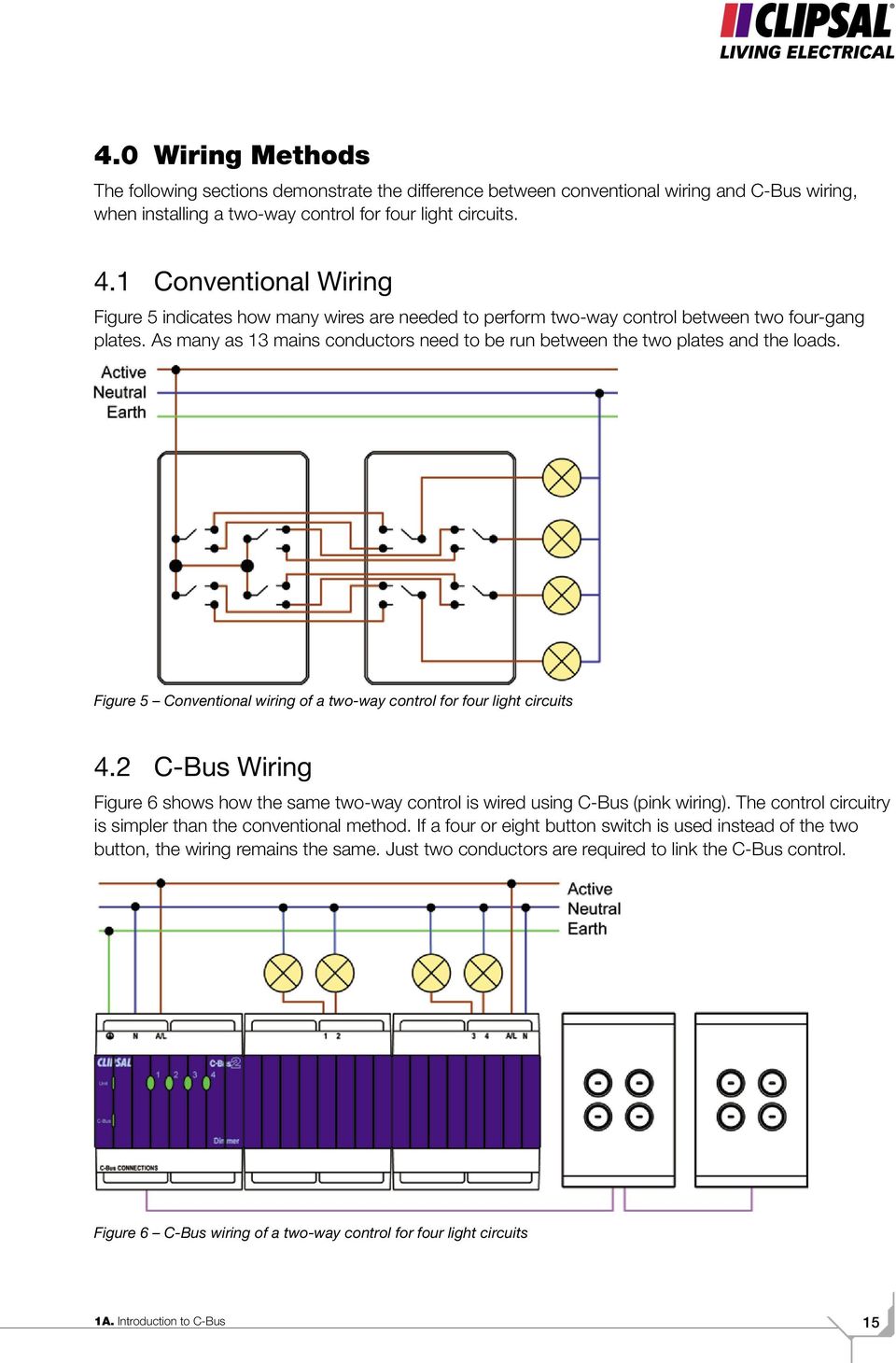
15 4.0 Wiring Methods The following sections demonstrate the difference between conventional wiring and C-Bus wiring, when installing a two-way control for four light circuits. 4.1 Conventional Wiring Figure 5 indicates how many wires are needed to perform two-way control between two four-gang plates. As many as 13 mains conductors need to be run between the two plates and the loads. Figure 5 Conventional wiring of a two-way control for four light circuits 4.2 C-Bus Wiring Figure 6 shows how the same two-way control is wired using C-Bus (pink wiring). The control circuitry is simpler than the conventional method. If a four or eight button switch is used instead of the two button, the wiring remains the same. Just two conductors are required to link the C-Bus control. Figure 6 C-Bus wiring of a two-way control for four light circuits 1A. Introduction to C-Bus 15
16 4.3 Wiring a C-Bus Network The C-Bus system is wired using Cat-5 UTP cable. C-Bus Cat-5 UTP has a mains rated sheath (pink) and consists of four colour-coded twisted pairs. The standard colours are: blue twisted with blue & white orange twisted with orange & white green twisted with green & white brown twisted with brown & white. The conductors within a C-Bus cable are displayed in Figure 7. Figure 7 Conductors within a C-Bus cable The electrical characteristics of Cat-5 UTP cable include low resistance and capacitance. The cable also has high noise immunity (provided by the twist between the pairs), making it ideal for C-Bus wiring. Two conductors are used for each positive connection to a C-Bus unit and two for each negative connection: a termination is more secure when made with two conductors the extra copper provided by the second conductor reduces the voltage drop on long cable runs. 16 C-BUS TRAINING MANUAL - VOL 1

17 4.4 Which Wires to Use In order to maintain noise immunity, the natural twist between pairs must be retained when connecting to the positive and negative C-Bus terminals. It is important that the following Cat-5 conductors are used when making C-Bus connections: orange + blue orange & white + blue & white for positive C-Bus Wires for negative C-Bus Wires. Figure 8 shows correct wiring that maintains the natural twist of the C-Bus cable conductor pairs. Figure 8 Correct pairing of C-Bus conductors Figure 9 shows incorrect pairing of conductors. This increases the C-Bus network s susceptibility to electrical interference. Figure 9 Incorrect pairing of C-Bus conductors IMPORTANT Using the correct pairing while maintaining the cable twist (Figure 8) provides increased immunity to electromagnetic interference. CIS have standardised on using the orange conductor and blue conductor for the positive connection, and the orange & white conductor and the blue & white conductor for the negative connection. This colour code matches that used in Cat-5 patch cords supplied with the C-Bus DIN range of products. 1A. Introduction to C-Bus 17

18 4.5 C-Bus Terminations The C-Bus network uses an Unshielded Twisted Pair (UTP), Category 5 LAN cable as the communications medium. The Clipsal catalogue number for this product is 5005C305B. It is recommended that the C-Bus cable be terminated by twisting the pair together or by using a bootlace crimp as shown in Figure 10. When terminating the C Bus cable, do not solder as in Figure 11. This may cause cold flow. When twisting the pair together, avoid frayed terminations as shown in Figure 12. Cat-5 cable normally consists of single strand 0.2 mm² copper in each conductor. Care must be taken when twisting the conductors together to ensure the wire does not break. Care must also be taken to ensure all wires are secure. Figure 10 Terminating with a bootlace crimp Figure 11 Soldering may cause cold flow Figure 12 Avoid frayed terminations Up to four Cat-5 conductors can be securely held using a small bootlace or ferrule crimp. Depending on the size of crimp, several crimps may be held in a terminal. Soldering conductors together shrinks back the insulation, increasing the likelihood of short circuits between conductors. Over time the solder will cold flow away from the point of pressure (under the terminal screw), causing an intermittent or high resistance joint. 18 C-BUS TRAINING MANUAL - VOL 1

19 The Clipsal C-Bus data cable is strongly recommended due to its distinctive pink outer sheathing. This reduces confusion between a C-Bus network and information systems (such as data, fire and telephone), at the same installation. The Cat-5 UTP also has a 240V mains rated outer sheath. This is a requirement where the cable enters a switchboard, and is present in the same enclosure as single insulated mains wire. The RJ45 end is an 8-position modular connector that looks like a large phone plug. There are a couple variations available. The primary variation you need to pay attention to is whether the connector is intended for braided or solid wire. For braided/stranded wires, the connector has contacts that actually pierce the wire. For solid wires, the connector has fingers, which pierce the insulation and make contact with the wire by grasping it from both sides. The connector is the weak point in an ethernet cable, choosing the wrong one will often cause grief later. If you just walk into a computer store, it s pretty impossible to tell what type of connector it is, if it isn t specifically labelled. Strain relief boots are somewhat helpful sometimes. The C-Bus connectors are wired as a standard patch lead, as shown in Table 1. Pin Connection Colour 1 Remote Override ON Green & white 2 Remote Override ON Green 3 C-Bus Negative (-) Orange & white 4 C-Bus Positive (+) Blue 5 C-Bus Negative (-) Blue & white 6 C-Bus Positive (+) Orange 7 Remote Override OFF Brown & white 8 Remote Override OFF Brown RJ45 pictured with clip facing down. Table 1 C-Bus connector identification 4.6 Standard Network Topology C-Bus units can be wired together in a number of different ways. They can be daisy chained together. This uses the least amount of cable but may cause excessive voltage drop over long runs. (Spreading C-Bus power supplies or output units with in-built power supplies around the network, will address this). Alternatively C-Bus units can be star wired back to a central point, such as a switchboard where the output units are mounted. This limits voltage drop but may use more cable. In most cases the most suitable topology is a combination of daisy chain runs, which are star wired out from output unit locations. Ring topologies are not recommended. While they offer some redundancy in case of broken or damaged wires, ring topologies can provide parallel communication runs that may result in distorted waveforms and race conditions. A calculator tool and information regarding voltage drop across networks is available at 1A. Introduction to C-Bus 19

20 4.7 Location of C-Bus Units It is important to choose a suitable location to mount a C-Bus unit. Input units are typically located in a position convenient for the people who will operate them. DIN Rail output units are typically installed inside a power distribution board or cabinet. Some important factors to consider: ensure the mounted unit will not be subject to high temperatures. Most C-Bus units are rated to operate at an ambient temperature of up to 45 C. When mounted in a confined space (such as a cabinet), the units contribute to the ambient temperature. This is particularly true of dimmer units, which dissipate more heat than other unit types. Avoid mounting in places that may become hot such as ceiling cavities or in direct sunlight choose a location that will not become wet or subjected to extreme humidity ensure units are mounted at a suitable height for the end user consult the unit s Installation Instructions as there may be specific mounting considerations for a particular unit type. 20 C-BUS TRAINING MANUAL - VOL 1

21 5.0 Mains and C-Bus Segregation With all C-Bus units that have mains as well as 36V d.c. bus connections, care must be taken to adequately separate the 240Va.c. wiring from the bus wiring. Pink C-Bus Cat-5 UTP, with its mains rated outer sheath, must be used within the confines of a switchboard. Wiring practices vary from installer to installer. Sometimes the mains cable entering the switchboard is double insulated, while other times it is single insulated. When it is double insulated, the outer insulation must be stripped back to allow the connection of mains wires to the DIN unit power supply and output terminals. No isolation issues can be expected between C-Bus and a single insulated mains cable, when the pink C-Bus Cat-5 cable enters a switchboard and plugs straight into a DIN module. The 300 mm pink Cat-5 patch leads supplied with all DIN units are used to loop in and out of any other DIN units within the enclosure. Where more than one pink Cat-5 cable enters the switchboard, care must be taken to ensure that any join made between multiple Cat-5 cables is effectively insulated with no exposed terminal screws etc. Consider terminating multiple C-Bus Cat-5 cables outside the switchboard, and bringing just one into the RJ socket on a DIN unit. The mains rated pink sheath allows the C-Bus Cat-5 cable to run closer to mains wiring than would otherwise be allowed. To give the greatest margin of noise immunity within the switchboard and overall installation: always maintain 150 mm of separation between C-Bus and mains cable, when running C-Bus cable in parallel with mains ensure that C-Bus always crosses mains cable at a 90 degree angle, with at least 60 mm of separation. Most importantly, securely anchor both Cat-5 and mains cable in switchboards. This provides an additional safety margin against contact between loose mains conductors, and the C-Bus 36Vd.c. wiring. IMPORTANT NOTE Wiring regulations covers these issues. An installer must ensure that wiring is carried out in a safe manner. The safety and protection of users of equipment is of the highest importance. The product warranty will be affected if a failure is found to be caused by poor wiring practice. In addition, the isolation between mains and C-Bus wiring is one of the key checks made during a CIS Approved Installer* visit. *An Approved Installer is a person or company that has had the standard of their installation, servicing abilities and quality of service to customers recognised by Clipsal Integrated Systems. This recognition is secured through on going training, on site assessments and customer feedback. 1A. Introduction to C-Bus 21
22 6.0 C-Bus Power Supplies The two-wire connection between C-Bus units serves two purposes. It is the communication medium through which on and off signals are sent between inputs and outputs. It also carries a 36Vd.c. supply to power the electronics in C-Bus units. 6.1 Voltage and Electrical Characteristics The C-Bus power supply is isolated from the mains supply by at least 3kV. It achieves this isolation using a double wound transformer. The output voltage is capped at 36V. C-Bus units that connect to both mains and C-Bus supplies use transformers or opto-isolators to achieve isolation. To achieve successful communication across the bus, power supplies must have the correct electrical characteristics. For this reason only C-Bus power supplies are suitable for use in a C-Bus installation. 6.2 Short Circuit and Overload Protection The internal circuitry of the power supply will react if: the bus conductors are shorted together too many C-Bus units are connected to a supply a C-Bus unit is incorrectly connected. In all cases the power supply will limit the amount of current that flows to a safe level, ensuring that neither it nor any other C-Bus unit is damaged. 6.3 Over Voltage Protection It is recommended that sufficient over voltage and lightning protection be fitted, particularly in areas where there is a high incidence of lightning strikes. The Clipsal 970 Series may be useful for this purpose. 6.4 Multiple Power Supplies Where the number of C-Bus units used on a system exceeds the capability of a C-Bus power supply, additional power supplies are connected to increase capacity. In larger installations the power supplies are best distributed around the system, to minimise voltage drop across the C-Bus conductors. On any one C-Bus network, the combined power from the power supplies should not exceed 2A, as this would exceed the current handling capability of the Cat-5 cable. 22 C-BUS TRAINING MANUAL - VOL 1
23 6.5 Types of Power Supplies C-Bus power supplies are available in a number of configurations. These include stand-alone units, and supplies incorporated into relay or dimmer output units. Table 2 lists the output currents of various power supply types. Type of Power Supply DIN rail stand-alone DIN rail on-board Pro Series Dimmer on-board* Matrix Switcher Output Current 350mA 200mA 60mA 330mA Table 2 Power supply output currents NOTE *The Twelve Channel Pro Series Dimmer does not come with an on board C-Bus Power Supply. The output current specified in an on-board power supply is independent of any power that the unit uses itself. When calculating the number of units to be powered by an on-board supply, you do not need to include the unit with the on-board supply in the calculation. 7.0 Network Burdens A network burden is a 1 kω resistor in series with a 10 µf to 22 µf, 50V capacitor. A network burden acts as an a.c. filter, and must be connected across each network to ensure reliable communication. Only one burden should be present on a C-Bus network. A network burden has been built-in to particular C-Bus units. Depending on the Unit Address, the network burden is enabled or disabled using the C-Bus Toolkit software. For a network burden to be enabled via software, the unit must be at Unit Address 001. An external hardware network burden can also be used. It is enclosed in an RJ45 package, which can be plugged into any C-Bus RJ45 socket on the network. Software burdens can be found on: all C-Bus DIN Rail Output Units the C-Bus Network Interface the PC Interface Touch Screens the HomeMinder General Input Units Network Bridges Telephone Interfaces. This list will continue to grow as additional C-Bus units are developed. For more information on a C-Bus unit, see the installation instructions included with the unit. 1A. Introduction to C-Bus 23
24 8.0 C-Bus Operating Parameters The following are important considerations when planning a C-Bus network: 1. The maximum total length of Cat-5 UTP cables on any one C-Bus network is 1 km. 2. The maximum recommended number of C-Bus units on any one network is 100 units. The actual number is dependent on the impedance and amount of flowing current. The current must not exceed 2A. 3. Multiple C-Bus power supplies can be connected to a C-Bus network to provide sufficient power for C-Bus units. The power supplies will share the load evenly. The maximum combined power supply output for a single network is 2A. Examples of acceptable configurations for a single network are: PS rated at 350mA each 10 DIN Rail Output Unit on-board power supplies rated at 200mA each 30 Pro Series Dimmer power supplies (except the 12 Channel) rated at 60mA each. 4. Any combination of power supply units is allowed as long as the total power available does not exceed 2A. 5. Where more than 1 km of cable or 100 standard C-Bus units are required, two or more networks can be linked using a network bridge. 6. Each C-Bus network requires only one network burden. A burden is contained within: all C-Bus output units (such as dimmers and relays) most system support devices (such as a PC or network interface) some input units (including C-Touch and the Four Channel General Input Unit). A network burden can also be assembled using a 1kW, 0.6W (or higher) resistor and a 10mF, 50V capacitor in series, connected across the C-Bus 36V rails. 7. Each C-Bus network requires at least one (and a recommended maximum of three) system clock generating units. A system clock generator is contained within: all C-Bus output units (such as dimmers and relays) most system support devices (such as a PC or network interface) some input units (including C-Touch and the Four Channel General Input Unit). 8. The maximum number of networks that may be combined in a single installation is The maximum number of networks that may be connected in series to the local network is seven (using six network bridges). 10. C-Bus power supply units (including DIN and Pro units) may be connected to different phases. 11. Individual relay channels may be connected to different phases. On DIN Rail Dimmers, the 240V supply connected to the units power supply and the output channels, must be on the same phase. 12. The isolation between the 240Va.c. mains and the 36Vd.c. C-Bus circuitry is greater than 3.5kV. This is achieved using double wound transformers and opto-isolators. 24 C-BUS TRAINING MANUAL - VOL 1
25 9.0 C-Bus Multi Network Installations A C-Bus system cannot be expanded past a certain point without the inclusion of a C-Bus Network Bridge. A bridge splits the installation into separate networks, which are electrically isolated from each other. It can be programmed to allow communication between networks. A bridge must be added whenever the current requirement (or the number of units) exceeds the C-Bus limit, or when the total length of Cat-5 cable exceeds 1 km. Cross-network communication between units (across a bridge) is determined by programming. It can be allowed in both directions, in one direction only, or not at all. Regardless of what this is set to, an operator scanning the network from their PC will be able to see every network connected to a C-Bus system. Since a bridge provides electrical isolation between networks (using galvanic separation), power supplies cannot be shared across this connection. This also means that a separate network burden is required for each network. 9.1 Maximum Number of Networks Up to 255 C-Bus networks can be connected using C-Bus Network Bridges. Various topologies can be employed when connecting the C-Bus networks. There are three types of connection topologies: star configuration daisy chain configuration a combination of star and daisy chain configurations. An example of a multiple network connected using a star configuration is shown in Figure 13. Figure 13 Example of a multiple network connected using a star configuration 1A. Introduction to C-Bus 25
26 A daisy chain configuration must not exceed six bridges deep. An example of a multiple network connected using this configuration is shown in Figure 14. Figure 14 Example of a multiple network connected using a daisy chain configuration Figure 15 shows an example of how a combination of star and daisy chain topologies may be used. There are hundreds of possible combinations. Figure 15 Example of a multiple network connected using a mixed topology configuration 26 C-BUS TRAINING MANUAL - VOL 1
27 10.0 Address Structure Several types of addresses are used when communicating with C-Bus units. These are described in Table 3. Network Address Identifies each network. Network Addresses range from 000 to 254 (255 is reserved). Unit Address Application Address Group Address Area Address Level or Selector Identifies each individual unit on a C-Bus network. Unit Addresses range from 000 to 254 (255 means undefined). An Application Address is used with a Group Address and Area Address to define which input(s) will control which output(s). The default Application Address is lighting. The programmer can specify up to 255 different Applications, but some Application Addresses have been reserved for specific command types.using a combination of Application Address and Group or Area Address gives thousands of unique combinations. This is used together with an Application Address to provide an association between C-Bus inputs and outputs. Up to 255 different Group Addresses may be used on any one Application Address. This is a Group Address entered into a special Area Address field on a C-Bus output. It is similar in action to the Group Address except that it can be entered into one or more C-Bus relays and/or C-Bus dimmers to give master control of all of the channels on those relays or dimmers. This is a value of a Group Address. A Level is most often used to set a light to a specific level. A Selector is generally used to trigger a specific scene or select a Schedule. The value of a Level or Selector ranges from 000 to 255. Table 3 Types of addresses used when communicating with C-Bus units 1A. Introduction to C-Bus 27
28 10.1 Unit Address The Unit Address ranges from 000 to 254. It gives each unit on a C-Bus network a unique identity. There are 255 addresses available that can be displayed in decimal or hexadecimal format. Figure 16 illustrates how Unit Addresses are used. 240Va.c. Figure 16 Unit Addresses No two C-Bus units on the same network may have the same Unit Address. The C-Bus Toolkit software will recognise any such conflict, and resolve it by assigning a unique Unit Address to one of the units. 28 C-BUS TRAINING MANUAL - VOL 1
29 10.2 Group Address The Group Address determines which button inputs control which output channels. There are 255 addresses available (000 to 254) that can be displayed in decimal, hexadecimal* or text format (Tags). Figure 17 illustrates how Group Addresses are used. 240Va.c. Figure 17 Group Addresses (Shown as Tags) NOTE * Hexadecimal refers to the base-16 number system, which consists of 16 unique symbols - the numbers 0 to 9 and the letters A to F. For example, the decimal number 15 is represented as F in the hexadecimal numbering system. A C-Bus address can be used in raw numeric form, or it may be assigned a meaningful name, known as a Tag. 1A. Introduction to C-Bus 29
30 10.3 Area Address The Area Address is used to simultaneously control all channels on a C-Bus relay or dimmer unit. Figure 18 illustrates how Area Addresses are used. 240Va.c. Figure 18 Area Addresses Individual relay and dimmer channels can also be controlled from their local toggle buttons (unless disabled by software) Programming Technique All C-Bus units leave the factory with a default undefined Unit Address value of 255. You need to assign a unique Unit Address to each unit before connecting it to a C-Bus system. You do this by programming each unit prior to delivery, using a computer, a 5500PC interface and a 5500PS power supply: 1. ensure the 5500PC has a Unit Address of 000 before connecting the new C-Bus unit 2. connect the C-Bus unit to be programmed 3. assign the Unit Address, as a minimum programming requirement 4. disconnect the unit and mark it with its Unit Address 5. deliver the unit to site and install it on the network. 30 C-BUS TRAINING MANUAL - VOL 1
31 12.0 C-Bus Tools and Functions 12.1 Local Toggle Buttons DIN and Pro series C-Bus outputs are equipped with local toggle control for each output channel. These toggle buttons operate as long as mains voltage is connected to the DIN unit. They do not require the C-Bus connection to be wired in. Pressing a local toggle control button will alternately switch the load wired to the respective channel, on and off. This allows you to check that the mains wiring is correct and that the loads switched by each channel are correct C-Bus Network Analyser 5000NA This product is temporarily connected to a C-Bus network. It indicates the status of the C-Bus power supply, network burden, system clock and acceptable cable length Learn Mode Learn Mode is a method of programming C-Bus units without using software. See Learn Mode Programming Manual for details. 1A. Introduction to C-Bus 31
32 Volume 1B C-Bus Concepts 32 C-BUS TRAINING MANUAL - VOL 1
33 Scope This manual aims to provide an installer with the basic skills needed to program and use C-Bus. A fundamental technical background is required. This manual covers: various C-Bus network specifications C-Bus addressing concepts. It is an ideal preparation before attending the C-Bus Basic Training Course. Learning Outcomes By the end of this module, you should have an understanding of: various C-Bus cabling requirements various single network topology configurations various C-Bus network parameters differences between the various C-Bus Addresses the uses of Tags. 1.0 C-Bus Network Specifications There are various parameters and characteristics that must be followed in order for the C-Bus network to function reliably. 1.1 Cable Type The C-Bus network uses an Unshielded Twisted Pair (UTP) Category 5 (Cat-5) Local Area Network (LAN) cable, as the communication medium. The Clipsal catalogue number for this product is 5005C305B. The following conductors of the Cat-5 cable must be used to make the C-Bus connections: orange + blue orange & white + blue & white C-Bus positive C-Bus negative. 1B. C-Bus Concepts 33
34 IMPORTANT Using the above pairing ensures a mutual twist between conductors and C Bus terminals, providing increased immunity to electromagnetic interference. It is recommended that the C-Bus cable be terminated by twisting the pair together or by using a bootlace crimp as shown in Figure 1. Figure 1 Terminating with a bootlace crimp When terminating the C-Bus cable, do not solder as in Figure 2. This may cause cold flow. Figure 2 Soldering may cause cold flow When twisting the pair together, avoid frayed terminations as shown in Figure 3. Figure 3 Avoid frayed terminations The Clipsal C-Bus data cable is strongly recommended due to its distinctive pink outer sheathing. This reduces confusion between a C-Bus network and information systems (such as data, fire and telephone), at the same installation. The Cat-5 UTP also has a 240 V mains rated outer sheath. This is a requirement where the cable enters a switchboard, and is present in the same enclosure as single insulated mains wire. The C-Bus connectors are wired as a standard patch lead, as shown in Table 1 34 C-BUS TRAINING MANUAL - VOL 1
35 1.2 Maximum Cable Length On any given C-Bus network, the total length of Cat-5 UTP cable used must not exceed 1 km. This figure is determined by the propagation delay of C-Bus communication at a total cable capacitance of 100nF. Large cable lengths can introduce undesirable effects on the network such as: a drop in voltage an increase in cable capacitance. A voltage drop will occur because the Cat-5 cable has a resistance of 90Ω per kilometre. To minimise the amount of voltage drop along a large length of cable, evenly space the C-Bus power supplies along the C-Bus Network. Using a large amount of Cat-5 cable will result in a high capacitance, causing the C-Bus clock to distort. 1B. C-Bus Concepts 35
36 1.3 Mains Segregation With all C-Bus units that have mains as well as 36Vd.c. bus connections, care must be taken to adequately separate the 240Va.c. wiring from the bus wiring. Pink C-Bus Cat-5 UTP, with its mains rated outer sheath, must be used within the confines of a switchboard. Wiring practices vary from installer to installer. Sometimes the mains cable entering the switchboard is double insulated, while other times it is single insulated. When it is double insulated, the outer insulation must be stripped back to allow the connection of mains wires to the DIN unit power supply and output terminals. No isolation issues can be expected between C-Bus and a single insulated mains cable, when the pink C-Bus Cat-5 cable enters a switchboard and plugs straight into a DIN module. The 300 mm pink Cat-5 patch leads supplied with all DIN units are used to loop in and out of any other DIN units within the enclosure. Where more than one pink Cat-5 cable enters the switchboard, care must be taken to ensure that any join made between multiple Cat-5 cables, is effectively insulated with no exposed terminal screws etc. Consider terminating multiple C-Bus Cat-5 cables outside the switchboard, and bringing just one into the RJ socket on a DIN unit. The mains rated pink sheath allows the C-Bus Cat-5 cable to run closer to mains wiring than would otherwise be allowed. To give the greatest margin of noise immunity within the switchboard and overall installation: always maintain 150 mm of separation between C-Bus and mains cable, when running C-Bus cable in parallel with mains ensure that C-Bus always crosses mains cable at a 90 degree angle, with at least 60 mm of separation. Most importantly, securely anchor both Cat-5 and mains cable in switchboards. This provides an additional safety margin against contact between loose mains conductors, and the C-Bus 36Vd.c. wiring. IMPORTANT These issues are covered by wiring regulations. An installer must ensure that wiring is carried out in a safe manner. The safety and protection of users of equipment is of the highest importance. The product warranty will be affected if a failure is found to be caused by poor wiring practice. In addition, the isolation between mains and C-Bus wiring is one of the key checks made during a CIS Approved Installer visit. 36 C-BUS TRAINING MANUAL - VOL 1
37 1.4 Single Network Topology All C-Bus units may be wired in star, daisy chain or a combination of both configurations. A closed ring configuration must not be used. Wiring the C-Bus network in this configuration will cause erratic behaviour. Daisy Chain The daisy chain wiring configuration (shown in Figure 4), is basically a run of units, connected with its positive and negative terminals in parallel. Figure 4 A daisy chain configuration Star Figure 5 shows some input units wired in a star configuration. This is basically a run of units, connected with multiple wires coming into the positive and negative terminals in parallel. If two or more cable runs branch off from a single point, it is referred to as a star configuration. Figure 5 A star configuration 1B. C-Bus Concepts 37
38 1.5 C-Bus Cable Current The maximum amount of current allowed to flow on Cat-5 UTP cable is 2A. This is a limitation of the cable. If 2 A is exceeded, you run the risk of damaging the C-Bus cable. 1.6 System Voltage At all points in a C-Bus network, the voltage across a C-Bus unit must be within the range of 15V to 36Vd.c. However, a C-Bus voltage as low as 15Vd.c., may cause unstable communication. As a rule of thumb, it is strongly recommended that the C-Bus voltage be maintained at 20Vd.c. or higher. IMPORTANT 1.7 Units per Network Within an individual network, try to evenly distribute C-Bus power supplies along the network. This will ensure a minimal voltage drop over the C-Bus cable. Two factors determine how many units can be put onto a C-Bus Network. These are: network impedance current consumption. To calculate the maximum number of C-Bus units allowed on a network, add the current consumption of all the inputs, system support units and outputs that do not have power supplies. The combined current consumption of all these devices must not exceed 2A. Note: The C-Bus Toolkit software will also calculate this for you. 38 C-BUS TRAINING MANUAL - VOL 1
39 1.8 C-Bus Clock At least one clock must be enabled on the C-Bus Network. In the absence of a C-Bus clock, no communication will be transmitted along C-Bus. Note: This is not a real time clock, but a means by which communication is synchronised. There will only ever be one active clock on the C-Bus network, however it is recommended to have multiple system clock generating units available for a redundant system. If multiple system clock generators are available (enabled), the network will determine which unit will have the active clock. IMPORTANT Where possible, avoid enabling a C-Bus clock on a network bridge or network interface. Figure 6 shows a single C-Bus Clock pulse viewed through a Cathode Ray Oscilloscope. Figure 6 A single C-Bus clock pulse viewed through a Cathode Ray Oscilloscope 1B. C-Bus Concepts 39
40 1.9 Network Burden A network burden applies a standard impedance to a C-Bus network. It consists of a 1kW, 0.6W resistor in series with a 10 to 22µF, 50V capacitor as shown below. 10uF - 22uF 50V 1kW 0.6W Figure 7 A network burden There are two ways in which a network burden may be added via hardware via software (by enabling a unit s in-built burden). A network burden should only be used to adjust the network impedance to between 400W and 1.5 kw. A hardware burden is enclosed in an RJ45 package, which can easily be added or removed from a C-Bus socket. The software burden is enabled or disabled using C-Bus Toolkit software. 40 C-BUS TRAINING MANUAL - VOL 1
41 2.0 C-Bus Addressing Conventions Several types of addresses are used when communicating with C-Bus units. 2.1 Network Address A C-Bus network is a collection of C-Bus devices connected together using Cat-5 UTP LAN cable. The network size is dependent on various factors such as: the Cat-5 cable length the number of units per network the total current drawn on the Cat-5 cable. The Network Address is a code assigned to each network within a particular project. A Network Address can be any value between 000 and 254. A C-Bus network defaults to a Network Address of 254. Network Addresses are really only of concern when multiple networks are used. 2.2 Unit Address All units on a C-Bus network have a unique identity code called a Unit Address. This code is used in messages sent over the bus, to ensure that only the appropriate unit responds. Such messages are typically used to program C-Bus operating variables. The unique Unit Address allows: each unit to be individually programmed and customised, without removing it from the network instructional messages to be passed over the network to specific units. A Unit Address ranges from 000 to 255, however 255 is reserved as a default for new units which have not been assigned a unique Unit Address. 1B. C-Bus Concepts 41
42 2.3 Application Address An Application Address is used together with a Group or Area Address to identify one or more units, inputs or outputs. It provides a convenient way to separate units and their associations, into different categories. The default Application Address is lighting. The programmer can specify up to 255 Application Addresses. Using two address types provides thousands of unique Group Address combinations, instead of the 255 which would be available if only a single Application Address was used. This means that a message to switch an output within the lighting application, will not affect an output within the heating application, even if both outputs used the same Group Address. It is recommended that specific Application Addresses are used for particular applications. (Special features may be associated with these Application Addresses in the future). These are listed in Table 2. Other Application Addresses may be used for different applications. Application Free use for developers Temperature Broadcast Room Control System (Clipsal 5 Star) Lighting Dali Gateway Interface Default Application Ventilation (dampers and fans) Irrigation control Pool, spa, fountain and pond control Heating Trigger control Enable control Audio / Visual Security Metering (gas, water, electricity, oil, etc) Clock and Timekeeping Telephony Status and Control Measurement (light, liquid, temperature, etc) C-Bus Network Management and Control Application Address 000 to 015 (00h to 0Fh) 025 (19h) 038 (26h) 048 to 094 (30h to 5Eh)default is 056 (38h) 095 (5Fh) 112 (70h) 113 (71h) 114 (72h) 136 (88h) 202 (CAh) 203 (CBh) 205 (CDh) 208 (D0h) 209 (D1h) 223 (DFh) 224 (E0h) 228 (E4h) 255 (FFh) Table 2 Application Address assignments 42 C-BUS TRAINING MANUAL - VOL 1
43 2.4 Group Address Within any application, Group Addresses are used to communicate between all units on the C-Bus network. The C-Bus addressing scheme allows you to define up to 255 different groups per application. Using Group Addresses to communicate between input and output units, it is possible to emulate or expand beyond the functionality of conventional wiring. Messages broadcast by an input device will be seen by the entire network, but only the units with a corresponding Group Address will react. By assigning a common Group Address to several units, a number of loads can be controlled by a single button press on a wall switch. In the same way, a number of wall switches can control the same load, by assigning a common Group Address. 2.5 Area Address An Area Address controls an entire C-Bus unit. It is a variation of a Group Address and can be programmed into the Area Address field on most C-Bus units. This gives the ability to control all channels on an output unit via one group address. If it is programmed to an input unit, it allows for all indicator LED s on the input unit to update quicker than the standard 3 second SR interval. If the input unit has buttons programmed as timers, the timers will also be reset. A common Area Address may be assigned to multiple output units. Up to 255 Area Addresses may be used (000 to 254), taken from the same address pool as Group Addresses. The default is 255, which is undefined. 2.6 Levels and Selectors A Group Address normally uses an additional parameter to provide increased flexibility. This additional parameter is used for two broad purposes; to select a specific item (to enable or trigger a group), or to specify a value within a range (such as a lighting level). This additional parameter is referred to as a Level or Selector (depending on the application it is associated with). It is a value between 000 (0%) and 255 (100%). NOTE C-Bus Toolkit sometimes refers to a Level or Selector as a Value or Action Selector. Level A Level is most often used in lighting applications to dim lights to various levels. Lights attached to relay output units are switched between a Level of 000 (Off) and 255 (On). Selector A Selector is used in a trigger control application to trigger a specific scene or action. It is also used in an enable control application to select a particular Schedule. A Selector must be set and not ramped to, otherwise it will have no effect. The ramp rate must be set to zero (an instantaneous change). 1B. C-Bus Concepts 43
44 2.7 C-Bus Tags A C-Bus address can be used in raw numeric form, or it may be assigned a meaningful name, known as a Tag. A Tag is user defined. Table 3 to Table 7 list typical tags you could use for various address types. Network Address Tag Local Network Remote Network First Floor Second Floor Third Flood Basement East Wing West Wing North West Wing Table 3 Network Address Tags Unit Address Tag Master Bedroom 4 Button Dining Room C-Touch Pavilion 4 Button Neo Garage PIR Hallway PIR Fountain Pump Relay Table 4 Unit Address Tags Application Address Tag Lighting Apps Control Application Enable Application Trigger Application Heating Apps Irrigation Table 5 Application Address Tags Group Address Tag Kitchen Light Bedroom Light Bedroom Fan Pool Pump Wall Lights Fan Timer Table 6 Group Address Tags Level or Selector Tag Welcome Home Scene Goodnight Scene Group 1 Level DD Irrigation Off Master Off Scene 1 Trigger Table 7 Level or Selector Tags IMPORTANT C-Bus Tags are stored in the C-Bus Toolkit database, but not in physical C-Bus units. Only numeric addresses are stored in physical C-Bus units. Therefore, if you do not have the database for an existing project, you will only retrieve numerical values from a network scan. 44 C-BUS TRAINING MANUAL - VOL 1
45 Volume 1C C-Bus Hardware 1C. C-Bus Hardware 45
46 Scope This manual provides an overview of various units used in a C-Bus network. A fundamental technical background is required. The manual covers: system support devices input units output units C-Bus indicators. It is an ideal preparation before attending the C-Bus Basic Training Course. Learning Outcomes By the end of this module, you should have an understanding of: system support devices and their uses operations for system support devices basic calculations used to predict voltage drops over large cable runs input units and their uses output units and their uses recalling operations for the output units by using the manual provided. 1.0 System Support Devices C-Bus system support devices are units which support the operation of a C-Bus network. They are used to: program C-Bus generate C-Bus voltage offer multi-network connectivity. 46 C-BUS TRAINING MANUAL - VOL 1
47 1.1 Power Supply The C-Bus power supply is a switch mode device, which means it is efficient and compact. It converts mains voltage into a usable C-Bus voltage of 36Vd.c.. It is the C-Bus power source, providing power to each unit on the network. The C-Bus system operates at an Extra Low Voltage (ELV) level. The minimum voltage required by each device on the bus is 15Vd.c.. However, a voltage this low may cause communication to be unstable. Therefore, it is strongly recommended that the C-Bus voltage be at least 20Vd.c. The resistance of a typical C-Bus Unshielded Twisted Pair (UTP) conductor is 90W/km. The typical current requirement of a C-Bus device is 18mA. Therefore, if one device is connected to the end of one kilometre of C-Bus cable (Figure 1), the voltage drop would be or 1.6V. Figure 1 Voltage drop over one kilometre of C-Bus cable (Approximately 18 ma per device). In an installation, power supplies should be distributed evenly along the C-Bus, rather than just at one end, in order to minimise system voltage drops. Number of Required Power Supplies The number of power supplies needed in a C-Bus installation depends upon: the power supply output current the number and type of devices on the network the location of the devices in relation to the power supplies. While the first two points are easily measured, the third is more subjective. Power supplies should be placed to minimise voltage drop across the network, reducing power loss. As a general rule, one power supply is required for every 17 C-Bus units that draw 18mA each. Output Current Limiting One of the many advantages of the C-Bus ELV is that connections can be made while power is applied to the network. (This applies to 36V C-Bus input units, but not units with mains voltage connections such as dimmers and relays). Should a short circuit occur on the C-Bus, the power supply current limiting and overload protection feature, provides protection from damage for an indefinite period of time. 1C. C-Bus Hardware 47
48 AC Output Impedance C-Bus messages are voltage pulses which are superimposed over the d.c. power supply voltage. This requires a high a.c. impedance to be present at communication frequencies. The power supply has a special output stage that provides this impedance. General purpose off-the-shelf power supplies are not suitable for C-Bus installations. 1.2 Network Bridge A network bridge is a special linking unit that allows communication between two or more C-Bus networks, while maintaining electrical isolation. A C-Bus network bridge allows: relaying of messages between networks, allowing units on multiple networks to be programmed and monitored from a central location transmission of commands which allow input units on one network to control output units on another. Units across several networks can be assigned the same Group Address to provide this high level of control. A C-Bus network bridge has several limitations: the Multipoint to Multipoint Interrogation* (MMI) status report cannot be transferred across a bridge. This means that an input unit controlling an output unit in another network, cannot automatically correct itself a bridge can only send messages to its two adjacent networks plus one other. This limits internetwork control when bridges are used in cascade form the maximum number of bridges that can be cascaded is six (in series). A star network topology is recommended for most installations, and is required to interconnect more than seven networks. 48 C-BUS TRAINING MANUAL - VOL 1
49 A network bridge consists of two functionally and electrically independent systems. Each system consists of a communication interface and microcontroller, powered by the ELV C-Bus power from the networks to which it is connected. Each Network Bridge provides optically isolated communication between sub-networks, so the reliability of the overall system will not be impaired by introducing bridges. Refer to the illustration in Figure 2 Figure 2 Construction of a network bridge NOTE *The Multipoint to Multipoint Interrogation (MMI) Wired C-Bus uses a status reporting system (known as an MMI), which provides automatic detection and correction of discrepancies between the states of grouped inputs and outputs. This status reporting occurs at periodic intervals. Increasing the frequency of status reporting decreases the response time in which errors are corrected. However, it increases the amount of network communication traffic. If different status report values exist in the same network, the smallest value is used. The default value is 3 seconds. 1C. C-Bus Hardware 49
50 1.3 PC Interface A PC Interface provides a communication path between a personal computer and a C-Bus network (see Figure 2). With a PC Interface and the C-Bus Toolkit software, you can: program and issue commands to C-Bus units monitor a C-Bus network, logging network activity. A C-Bus PC Interface can: generate a system clock for synchronised data transmissions apply a network burden to the C-Bus network. Figure 2 A PC interface lets you connect a computer to the C-Bus network NOTE A C-Bus Network Interface serves the same function as a PC Interface, but connects to a PC using an Ethernet connection rather than an RS-232. The C-Bus PC Interface uses a proprietary ASCII command language for communicating with a PC. Detailed protocol information is available to approved applicants, from Clipsal Integrated Systems (CIS). Please contact a CIS representative for more details. 50 C-BUS TRAINING MANUAL - VOL 1
51 2.0 C-Bus Input Units C-Bus input units respond to certain stimuli (such as touch, ambient light conditions, temperature and infrared radiation), by sending messages to appropriate output units in a predetermined way. There are various types of input unit: wall switches (1, 2, 4, 6 or 8 channel), as shown in Figure 3 light level sensors PIR occupancy sensors temperature sensors real time clocks auxiliary input units infrared receivers scene controllers touch screens. Input units can be used to: control lighting conditions manually or as a response to changing light levels control air conditioning according to ambient temperature respond to human presence by sending commands to security and access systems send IR commands to third party devices. Figure 3 A DLT wall switch 1C. C-Bus Hardware 51
52 2.1 Operation of Input Units Any network needs to have input and output capabilities. Therefore, input units are a fundamental building block of a C-Bus system. Input units can only broadcast three types of commands on a C-Bus network. These are: on commands off commands ramp to (level) commands. When a button is pressed on a wall switch, a message is sent across the C-Bus network for an output unit to perform one of the three functions above. An input unit can also perform timing functions. A press of a button starts a timer, and a command is sent to an associated output unit. After a programmed time interval (of up to 18 hours), another command is sent to cancel the previous (depending on the unit s programming). One of the main features of C-Bus (and the reason the system is so effective), is its self-checking ability. At regular intervals an input unit issues a request over the network for a status report. In response to this request, output units with the same Application Address broadcast their status in the form of an MMI*. This allows inputs assigned to the same Group Address to compare and synchronise their status. If the comparison disagrees, the input unit may take corrective action. This corrective action could be as simple as updating its own indicator to match the status of the output, or issuing a command for the output unit to change its state. NOTE 2.2 Pressing a Button *MMI (Multipoint to Multipoint Interrogation). If you press a button on a wall switch, one or more messages may be transmitted over the C-Bus network. The message transmitted depends on: how the unit is programmed how long you pressed the button. A change in ambient lighting, temperature level or the detection of infrared energy may be used instead of a physical button press, to trigger a response in some input units. Such units include light level sensors, temperature sensors and PIR occupancy sensors. 52 C-BUS TRAINING MANUAL - VOL 1
53 2.3 Sending Input Messages When a C-Bus input or output unit receives a message, it performs a function described in Table 1. Any internal timers (input units only) on the same Group Address will be forced to cancel. On Off Ramp To Level Timer Options A unit s internal level is set to maximum and its status is set to on. A unit s internal level is set to zero and its status is set to off. A unit s internal level is set to the level contained in the message. Output dimmer units ramp to the new level. Two possible status levels exist: if the new level is zero, the status is set to off if the level in the message is not zero, the status is set to on. Interval timers reside on input units. When activated, time is decremented in one second intervals. The maximum timeout range is 18 hours, 12 minutes and 15 seconds (65,535 seconds). Upon reaching a count of zero, the timer will send an expiry command message. Table 1 Command function types performed in response to a C-Bus message 3.0 C-Bus Output Units C-Bus output units are used to control external loads. They switch these loads in response to messages received from associated input units. Output units can be programmed in various ways, to suit the need of various installations. There are various types of output unit: voltage free relays voltage free changeover relays Professional Series dimmers DIN rail dimmers DSI Gateway analogue outputs (0 to 10Vd.c.) infrared transmitters. 1C. C-Bus Hardware 53
54 3.1 Voltage Free Relay The C-Bus 55xRVF Series Voltage Free Relays are relay-switching devices designed to be mounted in electrical switchboards or similar enclosures (an example is shown in Figure 4). For ease of installation, they are DIN rail mounted, measuring 12 DIN modules wide. Several independent voltage free relay contacts are provided for general switching applications. The series includes units with 10A rated relays for resistive, inductive (lighting loads) or fl uorescent loads. There is also a 20A version. Units are available with or without a 200mA C-Bus power supply, for powering other C-Bus units connected to the network. Figure 4 A 12 Channel Voltage Free Relay 3.2 Voltage Free Changeover Relay A C-Bus L5504RVFC Series Voltage Free Changeover Relay is used in an application where changeover contacts are required. These units are typically used to operate three-speed motors and two-way motor control devices, such as motorised blinds, shutters, curtains and skylights. Four independent voltage free, changeover relay contacts are provided, each with normally open, normally closed and common terminals. They are available with or without an internalc-bus power supply. Units with a power supply are capable of supporting other C-Bus units (200 ma capacity). Voltage free changeover relays are suitable for use with resistive, inductive, fl uorescent and incandescent loads. 54 C-BUS TRAINING MANUAL - VOL 1
55 3.3 Professional Series Dimmer The Lx510xDx Professional Series Dimmers are C-Bus output units suitable for dimming resistive and low voltage loads in lighting applications. Each channel is load rated between 5A and 20A (depending on the unit s model). Housed in an all aluminium heat sink, the dimmers have been designed for fast installation, with features such as keyhole mounting, front and rear cable access, ample termination space for mains cabling, and removable terminals for C-Bus and override connections. They have independent dimmable channels, operating from a single-phase mains voltage. They operate with any mains frequency in the range 47 to 53Hz or 57 to 63 Hz, and will automatically resynchronise when this frequency varies. Professional Series Dimmers draw 18mA from the C-Bus network when not connected to the mains supply. With mains voltage connected the dimmers provide up to 60mA to the C-Bus network. 3.4 DIN Rail Series Dimmer The DIN Rail Series Dimmers are C-Bus output units suitable for dimming incandescent and low voltage lighting. They feature eight leading edge, phase controlled dimming channels. Each channel has a load rating of between 1 and 2A (depending on the unit s model). The dimmers are capable of controlling incandescent and low voltage lighting (utilising iron-core and electronic transformers, compatible with leading edge dimmers). Two product variants are available. One incorporates a 200mA C-Bus power supply used to source current to the C-Bus network. The other is an economical model with the same features and performance, but does not include the power supply. 3.5 DSI Gateway A DSI Gateway is a DIN rail mounted C-Bus output device, designed for controlling ATCO-Tridonic DSI dimming ballasts, or an equivalent product that uses the DSI protocol standard. DSI Gateway units incorporate eight independent control channels, for switching and dimming fluorescent luminaries. They are designed to control up to 100 DSI dimming ballasts per channel, allowing up to 800 electronic ballasts to be connected to one DSI Gateway unit. The DSI Gateway is capable of detecting faulty lamps connected to its terminals (depending on the ballast used). When this occurs, the DSI Gateway will shut down the channel, and the corresponding channel LED indicator flashes at a slower rate (approximately four times per second). 1C. C-Bus Hardware 55
56 3.6 Analogue Output Unit The DIN rail mounted Analogue Output Unit provides analogue voltage control signals. These can be used to drive most types of 0 to 10V electronic dimmable ballasts used in the lighting industry. The 0 to 10V signal may be used to control other equipment with this standard control input voltage. The signal direction ranges from 0 to 10V, as the C-Bus ramping level increases from 0% to 100%. The Analogue Output Unit operates in response to commands from C-Bus input units. The output terminals can be assigned to any combination of group addresses, providing multiple output control. Four analogue outputs are provided for independent control of up to four devices, with a common reference connection. This unit requires power from a mains a.c supply with Earth. 3.7 Infrared Transmitter The Infrared Transmitter unit is a C-Bus output unit that controls third party devices using infrared signals. The unit is typically used to control audiovisual equipment such as TVs, DVDs and VCRs. Other infrared capable devices such as motorised blinds and air conditioning units can also be controlled. A specialised software tool, the C-Bus Infrared Commissioning Application (CIRCA), is provided for programming the unit. The CIRCA software allows the user to select infrared codes, and assign C-Bus events to trigger their transmission. The same confi guration can be uploaded to multiple units without having to be reprogrammed. A high speed programming cable is required to program this unit. 56 C-BUS TRAINING MANUAL - VOL 1
57 4.0 C-Bus Indicators All C-Bus Output Units (apart from the Infrared Transmitter) have three types of indicators that serve a common purpose. Figure 5 and Table 2 show the location of the indicators on a C-Bus output unit, together with their explanation. For the specific functions of various indicators, please see the relevant installation instructions that come with the C-Bus units. Figure 5 C-Bus output unit indicators Unit LED C-Bus LED Local Toggle Indicators This LED indicates the status of the individual unit, and whether mains power is present. If the Unit LED is flashing with a 90% on duty cycle, it indicates that a local or remote override has been toggled. This indicator shows the status of the C-Bus network at that particular unit. If the indicator is off, either no C-Bus clock or voltage is detected. The Local Toggle Indicators show the status of each channel on the particular output unit. Each Toggle Indicator is also a switch, which allows each individual channel to be manually controlled. These indicators are also used in Learn Mode. Table 2 Explanation of C-Bus output unit indicators The Unit and C-Bus indicators are found on most system support devices and some input units. 1C. C-Bus Hardware 57
58 Notes 58 C-BUS TRAINING MANUAL - VOL 1
59 Notes 1C. C-Bus Hardware 59
60 Notes 60 C-BUS TRAINING MANUAL - VOL 1
61 Notes 1C. C-Bus Hardware 61
62 Index Volume 1A. Introduction to C-Bus Address Area 30 Group 29 Structure 27 Unit 28 Burden 23 Cable Core Colours 16 Segregation 21 Cat-5 UTP cable Electrical Characteristics 22 C-Bus Parameters 8 RJ-45 Pin Connections 19 Terminations 18 C-Bus Network Wiring 10 Input Units 12 Network 10 Network Maximum 25 Multi Network Installation 25 Operating Parameters 24 Output Units 12 Power Supplies 22 Programming 30 Scenes Toggle Level Selector 27 System Support Devices 12 Local Buttons 31 Types of Units 12 Volume 1B. C-Bus Concepts Addressing Conventions 27 Application Address 42 Area Address 30 Burden Network 23 Cable Length 35 Cable Type 33 C-Bus Network Specifications 33 Clock 39 Current 38 Delay Propagation - Cable 35 Group Address 43 Levels 43 Network Address 41 Network Topology 37 Propagation Delay Cable 35 Scene Selector 43 Segregation 36 Selectors 43 Tags 44 Unit Address 41 Units per Network 38 Unshielded Twisted Pair (UTP) 33 Voltage 38 units 11 Unshielded Twisted Pair (UTP) 16 Wiring Requirements C-BUS TRAINING MANUAL - VOL 1
63 Index Volume 1C. C-Bus Hardware Air-Conditioning 51 Auxiliary Key Input Unit 51 Current Limiting 47 Dimmer Units 55 Group Address 52 Impedance 47 Infrared Receiver 51 Input Units 48, 51, 52 Level ramp to 53 Light Level Sensor 52 MMI Status Report 48 Network Bridge 48 Network Burden 50 Network Topology 48 Output Units 42, 44, 45, 53 PC Interface 50 Photo Electric Cell 44 PIR Occupancy Sensor 51 Power Supplies 44 Relay Units 53 Scene Controller 51 ELV 47 System Support Devices 46 System Support Units 46 Temperature Sensor 51 Timer 53 Topology 48 1C. C-Bus Hardware 63
64 Product of Clipsal Australia Pty Ltd A member of the Schneider Electric Group Head Office 12 Park Terrace, Bowden South Australia 5007 Telephone (08) Facsimile (08) Internet clipsal.com [email protected] National Customer Service Enquiries: National Customer Service Facsimile: Area Representatives NSW Albury (02) Central Coffs Harbour Dubbo Newcastle Tamworth Wagga Wagga Wollongong ACT Canberra region VIC Ballarat Bendigo Geelong Gippsland Mornington Peninsula Western Victoria QLD Cairns Gladstone Gold Coast Mackay Maryborough Northern Rivers Rockhampton Sunshine Coast Nth Sunshine Coast Sth Toowoomba Townsville WA Bunbury Kalgoorlie and Eastern Gold Fields Karratha SA Riverland/Mildura/ Broken Hill NT Darwin TAS North South printed on recycled paper Training & Technical Support Australia New Zealand International [email protected] International Enquiries International Sales and Marketing Telephone Facsimile [email protected] New Zealand Clipsal Industries (NZ) Ltd Telephone (09) Facsimile (09) [email protected] Customer Service Free Fax (0508) Auckland/Mobile Phone (09) Free Phone (0508) CLIPSAL You can find this brochure and many others online in PDF format at: clipsal.com Follow the links off the home page or access the following page directly: clipsal.com/wat_lib_pdf.cfm Clipsal Australia Pty Ltd reserves the right to change specifications, modify designs and discontinue items without incurring obligation and whilst every effort is made to ensure that descriptions, specifications and other information in this catalogue are correct, no warranty is given in respect thereof and the company shall not be liable for any error therein. Clipsal Australia Pty Ltd. This material is copyright under Australian and international laws. Except as permitted under the relevant law, no part of this work may be reproduced by any process without prior written permission of and acknowledgement to Clipsal Australia Pty Ltd. C1-007 CLIPCOM November 2007 The identified trademarks and copyrights are the property of Clipsal Australia Pty Ltd unless otherwise noted. O/N 14084
How To Fix A Cbus Network From A Power Supply To A Power Source
 Online Introductory C-Bus Network Tutorial Square D Clipsal C-Bus Products Training Course Basic Series Online Introductory C-Bus Network Tutorial 1250SM0702A1 Square D Clipsal C-Bus Products Training
C-Bus Network Monitor
 C-Bus Network Monitor Installation Instructions 5500NMA Copyright Clipsal Integrated Systems Pty Ltd 2004. All rights Reserved. This material is copyright under Australian and international laws. Except
Square D Clipsal Two-Channel DIN-Rail DALI Gateway
 Square D Clipsal Two-Channel DIN-Rail DALI Gateway SLC5502DAL for Use with C-Bus Wired Networks Instruction Bulletin Retain for future use. Square D Clipsal Two-Channel DIN-Rail DALI Gateway 63249-420-226A1
Square D Clipsal C-Bus Network Analyzer
 Square D Clipsal C-Bus Network Analyzer for Use with C-Bus Wired Networks Instruction Bulletin Retain for future use. Square D Clipsal C-Bus Network Analyzer 63249-420-234A1 Instruction Bulletin 12/2006
C-Bus. Single Zone Thermostat. 5070THB Series. Installation Instructions REGISTERED DESIGN REGISTERED PATENT
 C-Bus Single Zone Thermostat 5070THB Series REGISTERED DESIGN REGISTERED PATENT Clipsal is a registered trademark of Clipsal Australia Pty Ltd ABN 27 007 873 529. Copyright Clipsal Australia Pty Ltd 2008.
LocoNet, the Digitrax Difference
 LocoNet, the Digitrax Difference LocoNet is Digitrax's method of communication between LocoNet compatible devices on a model railroad layout. LocoNet Compatible devices are designed to work together on
Square D Clipsal DIN-Rail Four-Channel Auxiliary Input Unit
 Square D Clipsal DIN-Rail Four-Channel Auxiliary Input Unit SLCLE5504AUX for Use with Wired C-Bus Networks Instruction Bulletin Retain for future use. Square D Clipsal DIN-Rail Four-Channel Auxiliary Input
SMART SENSOR COLLECTION
 TEMPERATURE SENSOR This sensor measures temperature in degrees Celsius or Fahrenheit. It works with all SensorHawk base units (SensorHawk-2, SensorHawk-8 and SensorHawk8/20) as well as the SecurityHawk-8
Modular I/O System Analog and Digital Interface Modules
 OPERATING INSTRUCTIONS Modular I/O System Analog and Digital Interface Modules Installation Operation Maintenance Document Information Document ID Title: Operating Instructions Modular I/O System Part
Whale 3. User Manual and Installation Guide. DC Servo drive. Contents. 1. Safety, policy and warranty. 1.1. Safety notes. 1.2. Policy. 1.3. Warranty.
 Whale 3 DC Servo drive User Manual and Installation Guide Contents 1. Safety, policy and warranty. 1.1. Safety notes. 1.2. Policy. 1.3. Warranty. 2. Electric specifications. 2.1.Operation ranges. 3. Connections
Basics of Dimming. ISC Learning Centre
 ISC Learning Centre July 2009 > Dimmers Contents What is a dimmer? Dimmers & customer benefits Dimmers at home Dimmers at the office Dimmers: technical choices Overview of the Schneider Electric offer
USER GUIDE. Studio Hotline Multi-line System Phone Flasher and Door/Alert Indicator Input Module and Indicator. DM Engineering. Version 1.
 USER GUIDE Studio Hotline Multi-line System Phone Flasher and Door/Alert Indicator Input Module and Indicator Version 1.3 DM Engineering 2174 Chandler St. Camarillo, CA 91345-4611 805-987-7881 800-249-0487
FIBER OPTIC APPLICATION IN A PROFIBUS NETWORK
 FIBER OPTIC APPLICATION IN A PROFIBUS NETWORK Field busses are industrial control systems using Programmable Logic lers (PLC) to control and manage field devices found in industrial environments. The communication
KNX Lighting Control System
 KNX Lighting Control System Part 1 - Specification Lighting control system A. The following specification details the minimum standards for performance of components, material and operation of lighting
CM705B - Universal Expander Module CM707B - Plug On Zone Expander Security Systems
 CM705B - Universal Expander Module CM707B - Plug On Zone Expander Security Systems EN Security System CM705B CM705B - Universal Expander Module The CM705B universal expander provides a cost effective way
Specifying a Variable Frequency Drive s
 Specifying a Variable Frequency Drive s Put on by Bruce Reeves and Jeremy Gonzales Dykman Electrical Covering the Western US For all of your VFD and Soft Start and Motor Needs How To Specify a Variable
Kit 106. 50 Watt Audio Amplifier
 Kit 106 50 Watt Audio Amplifier T his kit is based on an amazing IC amplifier module from ST Electronics, the TDA7294 It is intended for use as a high quality audio class AB amplifier in hi-fi applications
ECEN 1400, Introduction to Analog and Digital Electronics
 ECEN 1400, Introduction to Analog and Digital Electronics Lab 4: Power supply 1 INTRODUCTION This lab will span two lab periods. In this lab, you will create the power supply that transforms the AC wall
EMBEDDED ACCESS CONTROL Hardware Installation Guide
 EMBEDDED ACCESS CONTROL Hardware Installation Guide Lenel goentry Hardware Installation Guide, product version 1.00. This guide is item number DOC- ENHW-ENU, revision 1.003, April 2009 Copyright 2009 Lenel
ABB Drives. User s Manual. Pulse Encoder Interface Module RTAC-01
 ABB Drives User s Manual Pulse Encoder Interface Module RTAC-0 Pulse Encoder Interface Module RTAC-0 User s Manual 3AFE 64486853 REV A EN EFFECTIVE:.5.00 00 ABB Oy. All Rights Reserved. Safety instructions
WxGoos-1 Climate Monitor Installation Instructions Page 1. Connections. Setting an IP Address
 Instructions Page 1 Connections The WxGoos-1 is a self-contained web server and requires 6vdc of power at 300ma. A center-positive 2.1 mm plug is used. There are five ports: 1. 10/100 Ethernet RJ-45 receptacle
01. HARTING RJ INDUSTRIAL RJ45 ETHERNET CONNECTORS
 . HARTING RJ INDUSTRIAL ETHERNET CONNECTORS Ethernet is is coming up to standard industrial interface. Therefore, automation devices such as controllers, sensors and actuators feature possess on one or
Short Range Wireless Switch System Handheld 8 Installation and Operations Guide
 Phone: (866) 701-1146 Fax: (425) 216-7558 www.remotecontroltech.com Short Range Wireless Switch System Handheld 8 Installation and Operations Guide Introduction... 2 Before Installation... 2 Receiver Installation...
WEB log. Device connection plans
 WEB log LIGHT+ 20 BASIC 100 PRO unlimited Device connection plans Version 20160425* Copyright Copyright for this manual remains with the manufacturer. No part of this manual may be reproduced or edited,
EXTERNAL DIMENSIONS AND PARTS
 FX2N-4DA SPECIAL FUNCTION BLOCK USER S GUIDE JY992D65901A This manual contains text, diagrams and explanations which will guide the reader in the correct installation and operation of the FX2N-4DA special
LOXONE 12 Channel Amplifier
 LOXONE 12 Channel Amplifier Item no.: 200110 Thank you for purchasing the Loxone Twelve Channel Amplifier. The versatility of the Amplifier makes it the perfect choice for almost every type of custom multi-room
Instruction Manual. 2in1 LAN Tester & Multimeter. Model: LA-1011
 Instruction Manual 2in1 LAN Tester & Multimeter Model: LA-1011 1 Contents Introduction... Features... Safety Precautions.. Meter Description... Electrical Specification... Operation.. AutoRanging Multimeter.
PCS0100en 02.2008. Persy Control Services B.V. Netherlands
 P-Bus Gateway PBGW2.128 Universal gateway between the P-bus protocol and open standard protocols. The variety of available electrical interfaces on the gateway offers a wide range of possibilities for
Application/Connection Examples
 This Quick Start Guide is designed to familiarize the user with the connection and configuration of the DTS-305 DIN rail mounted single / 3 phase power & energy meter with RS-485 or TCP communications.
Network Design. Yiannos Mylonas
 Network Design Yiannos Mylonas Physical Topologies There are two parts to the topology definition: the physical topology, which is the actual layout of the wire (media), and the logical topology, which
NC-12 Modbus Application
 NC-12 Modbus Application NC-12 1 Table of Contents 1 Table of Contents... 2 2 Glossary... 3 SCADA...3 3 NC-12 Modbus in general... 3 4 Entire system... 4 4.1 PFC to PC connection alternatives...4 4.1.1
Home Cabling Installation Guide
 Home Cabling Installation Guide Wiselan Home Cabling Installation Guide * This document should be treated as a guide only. In no way does it replace any regulation. This Document is subject to copyright
FAQ s on Siemens Magmeters
 FAQ s on Siemens Magmeters 1. The cables for the coils and electrodes for the magmeters look the same. Does it matter which cable is used for coils and which one is used for the electrodes? Both cables
How To Use A Power Supply On A Powerline 2.2 (Ai)
 KNX/EIB Product documentation Issue: 05.08.2010 629x1220 Push button sensor 3 comfort 1-gang Push button sensor 3 comfort 2-gang (1+1) Push button sensor 3 comfort 3-gang Push button sensor 3 comfort 4-gang
IPX AUTOMATIC IP NETWORK LOSS BACKUP A/B SWITCH INSTRUCTION BOOK IB6444-02
 IPX AUTOMATIC IP NETWORK LOSS BACKUP A/B SWITCH INSTRUCTION BOOK IB6444-02 TABLE OF CONTENTS DESCRIPTION 2 MOUNTING INSTRUCTIONS 2 HOW TO CABLE THE IPX 2/3 POWER SUPPLY INSTALLATION 3 OPERATION 3 CARE
MGL Avionics CAN bus interface for Trig Avionics TT21/TT22 transponders
 MGL Avionics CAN bus interface for Trig Avionics TT21/TT22 transponders General The MGL Avionics CAN bus interface for the Trig Avionics TT21 and TT22 transponders provides a simple solution to allow any
Section B: Electricity
 Section B: Electricity We use mains electricity, supplied by power stations, for all kinds of appliances in our homes, so it is very important to know how to use it safely. In this chapter you will learn
USB/VGA Cat 5 UTP Console Extender
 USB/VGA Cat 5 UTP Console Extender SV565UTPU SV565UTPUGB SV565UTPUEU Instruction Manual FCC Compliance Statement This equipment has been tested and found to comply with the limits for a Class B digital
User Guide. Model 380260 Insulation Tester / Megohmmeter
 User Guide Model 380260 Insulation Tester / Megohmmeter Introduction Congratulations on your purchase of Extech s Insulation Tester/Megohmmeter. The Model 380260 provides three test ranges plus continuity
MechoNet TM Network Interface (MNI) Specification Submittal
 MechoNet TM Network Interface (MNI) Specification Submittal Models MechoNet Network Interface: MNI RJ (RJ45 Motor Ports): Stock No.: IMNI 0001 TP AS (US version) Stock No.: IMNI 0004 TP AS (UK version)
Transformerless UPS systems and the 9900 By: John Steele, EIT Engineering Manager
 Transformerless UPS systems and the 9900 By: John Steele, EIT Engineering Manager Introduction There is a growing trend in the UPS industry to create a highly efficient, more lightweight and smaller UPS
Video Camera Installation Guide
 Video Camera Installation Guide The intent of this guide is to provide the information needed to complete or modify a video camera installation to avoid lightning and induced power surge damage. This guide
Lighting Control Overview
 Overview Lighting Control Overview RTC Inbuilt real time clock Automatic daylight savings adjustment Atomic clock synchronisation (NTS). Triggers Inputs Schedules Network Conigurable inputs with dynamic
Troubleshooting accelerometer installations
 Troubleshooting accelerometer installations Accelerometer based monitoring systems can be tested to verify proper installation and operation. Testing ensures data integrity and can identify most problems.
C-Bus Solutions. Complete commercial control. Make the most of your energy SM
 C-Bus Solutions Complete commercial control Make the most of your energy SM Complete Control C-Bus control systems from Schneider Electric will put you in control of your lighting levels, your comfort,
PRODUCTIVITY THROUGH INNOVATION 600 CONTROL DIRECT DRIVE TECHNICAL/OPERATION MANUAL
 Rev. D PRODUCTIVITY THROUGH INNOVATION 600 CONTROL DIRECT DRIVE TECHNICAL/OPERATION MANUAL 10 BORIGHT AVENUE, KENILWORTH NEW JERSEY 07033 TELEPHONE: 800-524-0273 FAX: 908-686-9317 TABLE OF CONTENTS Page
T7560A,B,C Digital Wall Module
 T7560A,B,C Digital Wall Module HONEYWELL EXCEL 5000 OPEN SYSTEM BEFORE INSTALLATION All wiring must comply with local electrical codes and ordinances or as specified on installation wiring diagrams. Digital
Lighting Controls ! WARNING RISK OF ELECTRIC SHOCK. Installation Instructions DESCRIPTION
 GE Lighting Installation Instructions Lighting Controls Centralized Lighting Control Panel Interior Catalog Number CLCINTxx DESCRIPTION The Centralized Lighting Control System is a small network of relay
TECHNICAL BRIEF. Commercial PV in Australia and New Zealand Using the Enphase Microinverter System
 TECHNICAL BRIEF Commercial PV in Australia and New Zealand Using the Enphase Microinverter System 2015 Enphase Energy Inc. All rights reserved May 2015 Table of Contents Commercial PV in Australia and
IO-RM3 3-Stage Relay Module
 Page 1 of 6 IO-RM3 3-Stage Relay Module Features: Benefits: Link selectable modes binary, heat/cool, staged or sequenced On/Off/Auto links for ease of commissioning DIN Rail mounting Fault finding LED
Instruction Manual. This Manual covers the use of: SmartSwitch Servo Kit. DCC Stationary Decoder PLEASE READ THESE INSTRUCTIONS FULLY BEFORE USE
 built by Instruction Manual This Manual covers the use of: PLS-125 PLS-130 PLS-135 SmartSwitch Servo Kit SmartFrog DCC Stationary Decoder PLEASE READ THESE INSTRUCTIONS FULLY BEFORE USE Contents Introduction
DIGITAL-TO-ANALOGUE AND ANALOGUE-TO-DIGITAL CONVERSION
 DIGITAL-TO-ANALOGUE AND ANALOGUE-TO-DIGITAL CONVERSION Introduction The outputs from sensors and communications receivers are analogue signals that have continuously varying amplitudes. In many systems
DLP-PU/E Instruction Manual
 Instruction Manual BEFORE USING THE POWER SUPPLY UNIT Pay attention to all warnings and cautions before using the unit. Incorrect usage could lead to an electrical shock, damage to the unit or a fire hazard.
Designing VM2 Application Boards
 Designing VM2 Application Boards This document lists some things to consider when designing a custom application board for the VM2 embedded controller. It is intended to complement the VM2 Datasheet. A
1 Safety instructions. 2 Device components. 3 Function. Leader in Led solutions. Compact presence detector. Operating instructions
 Compact presence detector Operating instructions 1 Safety instructions Electrical equipment may only be installed and fitted by electrically skilled persons. Failure to observe the instructions may cause
Class 2 transformer (TBT) Low Tension Conform to EN 60742. A LED turns ON when the current exceeds 1 A at the 14V output connector
 Technical notice TECHNICAL CHARACTERISTICS Power Class 2 transformer (TBT) Low Tension Conform to EN 60742 Rechargeable battery 16 Vac, 50-60Hz 50 Va min. 250 Va max 12 V, 7AH Protection A LED turns ON
Niko Home Control. Installation Manual
 Niko Home Control Installation Manual Niko Home Control: Table of contents Warnings regarding installation...2 Guarantee provisions...3 CE...4 Key of symbols...5 1. Installation preparations...6 2. Controller...8
VX 2400 Dimmer User's Manual
 TM VX 2400 Dimmer User's Manual 21-2119C Manual Revision 1.01 Software Version 1.0 10 March 1994 Table of Contents 1. General Description...3 1.1. Standard Features:...3 2. Installing Options...4 2.1.
Mini Breakout-Board. CNC Interface for LPT Port. Installation Manual Version 4
 Mini CNC Interface for LPT Port Version 4 Product Brief This breakout-board is designed to connect up to four stepper or servo drives to the parallel port of a PC. This requires the use of a CNC controller
WEB log. Device connection plans
 WEB log LIGHT+ 20 BASIC 100 PRO unlimited Device connection plans Version 20151210* Copyright Copyright for this manual remains with the manufacturer. No part of this manual may be reproduced or edited,
Grounding Demystified
 Grounding Demystified 3-1 Importance Of Grounding Techniques 45 40 35 30 25 20 15 10 5 0 Grounding 42% Case 22% Cable 18% Percent Used Filter 12% PCB 6% Grounding 42% Case Shield 22% Cable Shielding 18%
OPTICAL FIBER repeaters/ isolators
 OPTICAL FIBER repeaters/ isolators FUNCTINALITY AND RELIABILITY' Optical Fiber converters give the possibilità to extend on Optical Fiber (also at the same time) every type of network/bus (LAN/Ethernet,
C-Bus Application Messages & Behaviour Chapter 25 Air Conditioning
 C-Bus Application Messages & Behaviour Chapter 25 Air Conditioning Document Number: CBUS-APP/25 Comments on this document should be addressed to: Engineering Manager Clipsal Integrated Systems PO Box 103
BLOCK OCCUPANCY DETECTOR WITH SEMAPHORE OPERATION BOD1/DAP4-BR
 BLOCK OCCUPANCY DETECTOR WITH SEMAPHORE OPERATION BOD1/DAP4-BR This Block Occupancy Detector recognises the current drawn by moving trains within a block, and can operate a number of built-in programs
ALARMLINE ANALOGUE Linear Heat Detection System
 ALARMLINE ANALOGUE Alarmline Analogue sensor cable senses temperature variations by continuously monitoring the resistance of specially doped N.T.C. polymeric insulation. A change in temperature produces
Positive-guided relay outputs: 3 safety contacts (N/O), instantaneous. 1 auxiliary contact (N/C), instantaneous
 Safety relay for monitoring E-STOP pushbuttons. Approvals Unit features Positive-guided relay outputs: 3 safety contacts (N/O), instantaneous 1 auxiliary contact (N/C), instantaneous Safe separation of
SingleNet Single Cable Control System
 Single Cable Control System Economical, Reliable and Expandable Two-Wire Single Cable System DRIP/MICRO IRRIGATION PRODUCTS Single Cable Control System System Manager or Irrigation Controller Controls
Ethernet Patch Cord Wiring
 Ethernet Patch Cord Wiring C ONTENTS Ethernet Patch Cords & RJ-45 Connectors... 2 Ethernet Patch Cords and UTP Cabling... 3 What s all the twisting about?... 4 Ethernet Applications... 5 568A & 568B Wiring
Mini Effect Gizmo. User s Manual. RJM Music Technology, Inc.
 Mini Effect Gizmo User s Manual RJM Music Technology, Inc. Mini Effect Gizmo User s Manual Version 1.3 September 26, 2013 RJM Music Technology, Inc. 2525 Pioneer Ave #1 Vista, CA 92081 E-mail: [email protected]
Temperature & Humidity SMS Alert Controller
 Temperature & Humidity Alert Controller METERS 3 simple steps starting the unit: Insert the SIM card Plug in the sensors connectors Connect the AC power cord. Specifications: AC 90~260V Auto Select Internal
Category 6 Solutions. 4. Category 6 Solutions. 09/08 400836IN TrueNet Structured Cabling. Introduction... 4.2. Cable... 4.3. Patch Panels... 4.
 Category 6 Solutions Introduction... 4.2 Cable... 4.3 Patch Panels... 4.4 Modules... 4.6 Patch Cords... 4.12 Outlets... 4.16 Faceplates...4.18 4. 1 Search Category 6 Solutions Introduction ADC KRONE s
THERMONET UNDERFLOOR HEATING STANDARD THERMOSTAT KIT STOCK CODE 5260
 THERMONET UNDERFLOOR HEATING STANDARD THERMOSTAT KIT STOCK CODE 5260 STANDARD THERMOSTAT KIT 1.0 KIT CONTENTS Parts included: 1 x Thermostat 1 x Wall plate 2 x Mounting box screws 1 x Floor temperature
SECTION 26 09 26 LOW VOLTAGE LIGHTING CONTROLS
 SECTION 26 09 26 LOW VOLTAGE LIGHTING CONTROLS PART 1 - GENERAL 1.01 RELATED DOCUMENTS: A. The Conditions of the Contract and applicable requirements of Division 1, "General Requirements", and Section
SYSTEM 4C. C R H Electronics Design
 SYSTEM 4C C R H Electronics Design SYSTEM 4C All in one modular 4 axis CNC drive board By C R Harding Specifications Main PCB & Input PCB Available with up to 4 Axis X, Y, Z, A outputs. Independent 25
EDI Distributor Control Interface Wiring and Setup Instructions
 Universal I/O EDI Distributor Control Interface Wiring and Setup Instructions EDI UNIVERSAL I/O INTERFACE MODULE The only interface needed for EDI-V5 controls Network compatible with all older EDI controls
ELECTRONIC POWER SYSTEMS
 ELECTRONIC POWER SYSTEMS TRADEOFFS BETWEEN SINGLE-PHASE & THREE-PHASE POWER WHITE PAPER: TW0057 1 Executive Summary Modern Electronic Systems are quite often powered from a three-phase power source. While
SPL 2-00/-01 OPERATION INSTRUCTIONS
 SPL 2-00/-01 OPERATION INSTRUCTIONS Powerline Ethernet Adapter 500 Mbps EN Read and keep Operation Instructions SPL 2-00/-01 Safety Notes Do NOT use this product near water, for example, in a wet basement
LS1024B / LS2024B/ LS3024B. Solar Charge Controller USER MANUAL
 EPSOLAR LS1024B / LS2024B/ LS3024B Solar Charge Controller USER MANUAL Thank you very much for selecting our product! This manual offers important information and suggestions with respect to installation,
12 Volt 30 Amp Digital Solar Charge Controller
 12 Volt 30 Amp Digital Solar Charge Controller User s Manual WARNING Read carefully and understand all INSTRUCTIONS before operating. Failure to follow the safety rules and other basic safety precautions
NETWORKS Controller Area Network (CAN)
 SEC TION 2 : DOMEST I C GMLAN Overview GMLAN is the General Motors variation of the CAN Bus. Although it is CAN based, there are enough proprietary features and functions to make this a unique protocol.
T0118 T2118 T3118. Instruction Manual
 Programmable indoor transmitter of temperature T0118 Programmable indoor transmitter of atmospheric pressure T2118 Programmable indoor transmitter of temperature, relative humidity and other derived humidity
Permissible ambient temperature Operation Storage, transport
 The Sitras PRO combined DC protective unit and controller is used in the power supply for DC railways in mass transit and main-line systems up 3,000 V DC. It protects DC switch gear and contact line systems
Motion Detector 360 Degrees 5420/360. Installation Instructions REGISTERED DESIGN REGISTERED PATENT
 Motion Detector 360 Degrees 5420/360 Installation Instructions REGISTERED DESIGN REGISTERED PATENT Installation Instructions The Infra-red Monitor Motion Detector from Clipsal provides high performance
GLOLAB Two Wire Stepper Motor Positioner
 Introduction A simple and inexpensive way to remotely rotate a display or object is with a positioner that uses a stepper motor to rotate it. The motor is driven by a circuit mounted near the motor and
Digital input modules
 8 172 TX-I/O Digital input modules TXM1.8D TXM1.16D Two fully compatible versions: TXM1.8D: 8 inputs, each with a three-color LED (green, yellow or red) TXM1.16D: As TXM1.8X, but 16 inputs, each with a
contents Leading the way in intelligent automation INELS Wireless? Why Click Accessories Complete control
 Wireless Control Systems Accessories Leading the way in intelligent automation contents Range Overview Typical Installations Transmitters Combined Modules Accessories Programming Switching & Dimmer Functions
CURRENT TRANSFORMERS INSTALLATION GUIDE
 CURRENT TRANSFORMERS INSTALLATION GUIDE Information contained within this document is subject to change without notice and does not represent a commitment on the part of PRI Ltd or its agents. E&OE. Copyright
SYSTEM 45. C R H Electronics Design
 SYSTEM 45 C R H Electronics Design SYSTEM 45 All in one modular 4 axis CNC drive board By C R Harding Specifications Main PCB & Input PCB Available with up to 4 Axis X, Y, Z, & A outputs. Independent 25
KNX Powerline PL 110. KNX Association
 KNX Powerline PL 110 Table of Contents 1 Introduction...3 2 Standardisation...3 3 Transmission Process...4 3.1 Phase Coupling...5 3.2 Telegram Transmission...6 3.2.1 Training Sequence...6 3.2.2 Preamble
GLOLAB Universal Telephone Hold
 GLOLAB Universal Telephone Hold 1 UNIVERSAL HOLD CIRCUIT If you have touch tone telephone service, you can now put a call on hold from any phone in the house, even from cordless phones and phones without
Guide to the electrical parameter classifications of IEC 60950 and IEC 62368 safety standards
 Guide to the electrical parameter classifications of IEC 60950 and IEC 62368 safety standards Abstract This Guide is an informative listing of selected terms and definitions found in IEC Glossary entry
BACnet Wiring Guidelines. For Price Controls MANUAL INSTALLATION
 MANUAL INSTALLATION BACnet Wiring Guidelines For Price Controls Revision #: 01 Issue Date: 01/22/14 2014 Price Industries Limited. All rights reserved. TABLE OF CONTENTS Product Overview Overview...1 Power
Draper Low Voltage, Remote Control, Serial and Network Wiring Guide
 Draper Low Voltage, Remote Control, Serial and Network Wiring Guide Copyright 2007 Draper Inc. Form LV-RC-Serial-Network_Wiring07 Print ed in U.S.A. Draper Low Voltage, Remote Control, Serial and Network
EBDSPIR-PRM, EBDSPIR-PRM-IP
 Product Guide EBDSPIR-PRM, EBDSPIR-PRM-IP Ceiling PIR presence/absence detector Overview The EBDSPIR-PRM PIR (passive infrared) presence detector provides automatic control of lighting loads with optional
AC-DC Converter Application Guidelines
 AC-DC Converter Application Guidelines 1. Foreword The following guidelines should be carefully read prior to converter use. Improper use may result in the risk of electric shock, damaging the converter,
Documentation. M-Bus 130-mbx
 Documentation M-Bus 130-mbx Introduction The mx M-Bus module is part of the mx Smart Slot communications family. With the integrated SmartSlot technology, mx systems ag offers automatic consumer data read-out
SERVICE MANUAL FOR 12 VDC WALL THERMOSTAT AIR CONDITIONING SYSTEMS ROOF TOP UNITS ONLY
 RV Products Division SERVICE MANUAL FOR 12 VDC WALL THERMOSTAT AIR CONDITIONING SYSTEMS ROOF TOP UNITS ONLY Airxcel, Inc. RV Products Division P.O. Box 4020 Wichita, KS 67204 1976A376 (1-11) TABLE OF CONTENTS
INSTALLATION & SERVICE MANUAL. Display Panel
 INSTALLATION & SERVICE MANUAL Display Panel The PowerLine EMS TM is a specialized power distribution and energy management system intended to be used in recreational vehicles. The Control Module is housed
Operating Instructions
 D-TEK Vehicle Loop Detector Operating Instructions This product is an accessory or part of a system. Always read and follow the manufacturer s instructions for the equipment you are connecting this product
Module 5. Broadcast Communication Networks. Version 2 CSE IIT, Kharagpur
 Module 5 Broadcast Communication Networks Lesson 1 Network Topology Specific Instructional Objectives At the end of this lesson, the students will be able to: Specify what is meant by network topology