
VX 2400 Dimmer User's Manual
|
|
|
- Sherman Caldwell
- 10 years ago
- Views:
Transcription
1 TM VX 2400 Dimmer User's Manual C Manual Revision 1.01 Software Version March 1994

2 Table of Contents 1. General Description Standard Features: Installing Options Rack Mount Kit Stand Alone Kit Power Input VX 2400 Power Requirements VX 2400 Power VX 1200 Power VX 3000 Power Over voltage and Protection and Power Indcator Temp LED and Fan Control Connection to Terminal Power Inlet Control Input DMX DMX Load DMX Indicators and controls Analog control input Dimmer Circuit Controls and Indicators Circuit Breaker Test Switch Output LED Error LED Scene Storage Recording Scenes Scene Playback Service and Maintenance Recommended Service Replacing modules Appendix A DMX 512 Standards
3 1. General Description The Leprecon VX Dimmer is designed to meet the demanding requirements of the lighting industry. Emphasis was placed on designing a system that is flexible, reliable, and serviceable. The latest digital technology, combined with a modular design, bring a new level of performance and ease of use to portable and permanent dimming systems. Because of the many custom features available on VX systems, the features described in this manual may not cover all available options of the dimmer Standard Features: Modular Dimming & Control Electronics Dimmer and control electronics can be serviced from the front panel, without removing the dimmer from the rack or enclosure. DMX Control Input Digital control electronics using a patented circuit allows simultaneous DMX-512 and analog control input, with a highest-takes-precedence logic. Parallel input and output for DMX 512 allows daisy-chaining racks together in one system. DMX start address switches allow the dimmers to be assigned to start receiving data at any of the 512 addresses. "True digital" control electronics provides accurate dimmer output tracking from channel to channel, eliminating any variance in output levels when multiple dimmer channels are patched together. Analog Control Input Two 8 pin Jones type male plugs are provided for 0-10 DC analog control. Control cable and pin connections are compatible with other Leprecon dimmers. Channel Breakers The circuit breakers used in the VX dimmers are fast response magnetic breakers. The quality of the breaker contributes to the reliable operation of the dimmer pack, even when shorted lamps or cables are plugged into the dimmer. The front panel toggle also allows the breaker to be used as a switch for the dimmer channel. Fan Cooling Two fans are used in the VX dimmer to keep the electronics at a safe operating temperature. The fans are controlled by a thermostat to keep fan noise to a minimum. When the pack is lightly loaded, the fans turn at a slower rate, and are accelerated to full speed when the temperature inside the pack increases. Ten Scene Memory Non-volatile memory in the VX control card retains 10 scenes for backup or use without controller. Scenes program via front panel controls, and may be set individually at any time. 3

4 2. Installing Options The VX dimmer can be shipped with user installed hardware for the intended application. If your order included either Rack mount or Stand-alone kits, the hardware is included in the package for the VX dimmer Rack Mount Kit The Rack mount kit, CAE # , for the VX dimmer includes the following items; 1) Rack mount ears 2 pcs ) Rear support bracket 2 pcs ) Screw, 6-32 x 1/2" 4 pcs ) Screw, 8-32 x 3/8" 6 pcs To install rack ears, simply screw the brackets to the left and right side of the dimmer. Use the larger #8 screws provided, and tighten securely. The Rear support brackets attach to the back of the dimmer, using the screws that fasten the backpanel to the sides. Locate and remove these #6 screws, two on each side. Discard the original screws, and attach the rear support bracket with the new longer screws supplied. Warning: Do not use screws longer than those provided for attaching hardware. Longer screws may contact live parts inside the dimmer and present a shock hazard Stand Alone Kit For applications when the VX dimmer is not rack mounted, accessory handles and feet may be installed. The VX Standalone Kit, CAE # , contains these parts: 1) Handles 2 pcs ) Screw, #8-32 x 3/8" 6 pcs ) Lockwasher, #8 split ring 10 pcs ) Rubber Foot 4 pcs ) Screw, #8-32 x 1/2" 4 pcs To attach the handles, locate the three holes in each side provided for the handles. Use the six shorter #8 screws with the lockwashers to attach the handles. Tighten the screws securely. The rubber feet attach to the bottom side of the dimmer with the longer #8 screws. Tighten the screws securely. Warning: Do not use screws longer than those provided for attaching hardware. Longer screws may contact live parts inside the dimmer and present a shock hazard. 4

5 Power Input The VX dimmer is designed as a component for use in large, high-power stage lighting systems. It is the responsibility of the user to understand and properly follow guidelines and regulations for the use of equipment of this type. It is beyond the scope of this manual to fully explain all requirements and implications of connecting and operating dimming systems in general and Leprecon VX systems specifically. If you have any doubts of your ability to specify, safely connect and use high-voltage, highpowered equipment, please employ a qualified electrician. 3. VX Power Requirements 3.1. VX 2400 Power The VX 2400 with the standard Terminal Power inlet requires 80 amps per leg of 3 phase power. Because of the neutral currents that can occur with phase control dimmers, the neutral must be capable of carrying 150% of the current of a single leg, or 120 amps. Two screw terminals are provided for double neutral wires to meet this requirement. It is recommended that the safety ground be equal to the capacity of the hot legs, or 80 amps. The Leprecon VX dimmer systems are primarily designed for three phase, four wire with ground power systems. Because of the variation in service from location to location, and the possibility of improper connection, it is strongly suggested that the service is checked for proper voltage with a meter before the dimmers are connected. The VX 2400 consists of twelve circuits of twenty amps each. Nominal line voltage is 115 VAC at 60 Hz. Special order models are available for 50 Hz and 230 volt operation VX 1200 Power The VX 1200 with the standard Terminal Power inlet requires 40 amps per leg of 3 phase power. Because of the neutral currents that can occur with phase control dimmers, the neutral must be capable of carrying 150% of the current of a single leg, or 60 amps. It is recommended that the safety ground be equal to the capacity of the hot legs, or 40 amps. The VX 1200 consists of twelve circuits of ten amps each. Nominal line voltage is 115 VAC at 60 Hz. Special order models are available for 50 Hz and 230 volt operation VX 3000 Power The VX 3000 with the standard Terminal Power inlet requires 108 amps per leg of 3 phase power. Because of the neutral currents that can occur with phase control dimmers, the neutral must be capable of carrying 150% of the current of a single leg, or 162 amps. Two screw terminals are provided for double neutral wires to meet this requirement. It is recommended that the safety ground be equal to the capacity of the hot legs, or 108 amps. The VX 3000 consists of twelve circuits of twenty seven amps each. Nominal line voltage is 115 VAC at 60 Hz. Special order models are available for 50 Hz and 230 volt operation Over voltage Protection and Power Indicator 5
6 The VX dimmer system uses a modular control card for each 12 channel dimmer. This control card incorporates over voltage detection and shutdown to protect the dimmer electronics and lamp loads from destruction. The VX control card features three green LED's for power indication. These indicators show that each phase is connected and within normal limits. If all three LED's are not lighted, power is not applied, is out of range, or a fault is present in the VX system. The internal protection takes effect at 140 volts AC. Voltages of this level or above will light the red Over voltage LED on the power supply drawer front panel, and disable all dimmer control. Input from a controller or from the channel Test switches will be ignored, and no voltage will be output from any dimmer channels. As soon as the applied voltage is reduced to a safe level, the Over voltage LED will be quenched, and the dimmer will begin to operate normally Temp LED and Fan Control Each channel of the VX rack system has its own temperature sensor. If a problem occurs that causes a channel to overheat, the entire dimmer shuts down until a normal temperature is reached. This overtemp shutdown is indicated by lighting the red Temp LED. VX racks are cooled by temperature controlled fans mounted in each 12 channel section. The same temperature sensor that is used for thermal shutoff also determines the fan speed. This arrangement allows for the lowest possible noise level from the cooling fans while still providing proper cooling for the hottest module. Noticeable airflow and fan noise will only occur when the dimmer is loaded and channels are turned on long enough for the internal temperature to start to rise Connection to Terminal Power Inlet The most common power input connector for the Leprecon VX 2400 dimmer is the Terminal Power inlet. This option provides an insulated terminal strip with 7 screw connections for 3 phase power. The block is labeled to identify the three power phases ( X Y Z ), neutral connections and a safety ground. Because of the large neutral current that can exist in phase control systems, two screw terminals are supplied for neutral connection. It remains the responsibility of the user to determine the correct cable type to properly connect VX dimmer racks, and the need for overcurrent protection in the power supplied to the dimmer system. For more information, see the appendix of this manual. 4. Control Input 6

7 4.1. DMX 512 One of the best features of modern lighting equipment is the use of digital communication between control boards and dimmers. The low cost of the cable and connectors in a digital system makes a substantial difference in system cost. With the adoption of DMX 512 by the industry, compatibility is assured between products offered by different manufacturers. All Leprecon VX dimmers are compatible with DMX 512. To connect the VX dimmer to a DMX controller, simply use a standard DMX cable and plug the two devices together. A parallel wired female connector is supplied to allow output to additional dimmers or other devices DMX Load VX dimmers, along with other digital dimmers manufactured by Leprecon, includes optical isolation at the DMX input. This design greatly reduces the chances of failure in the dimmer causing incidental damage to the control console, or other dimmers in the system. The load presented to the DMX line is greater than non-isolated dimmers. The DMX standard allows for up to 32 receivers per DMX line. The optical input stage of the VX dimmer limits the DMX line to ten dimmer packs. If additional packs are to be driven from a single DMX line, buffers manufactured by Leprecon or other suppliers can be used to amplify and distribute the DMX signal. For more detailed information about DMX 512, see the appendix at the end of this manual DMX Indicators and controls The VX Control card located at the top of the pack contains all electronics needed to decode the digital DMX signal, and translate that information into signals to control 12 dimmer channels. On the front panel are the indicators and controls for DMX inputs. The green LED labeled "signal" is lighted whenever a DMX signal is being received. This indicates that the controller, cable and DMX input to the VX dimmer system are functional. The three thumbwheel switches labeled "Start Address" are used to select the board channels that the VX dimmer will respond to. For instance, a switch setting of 001 will assign VX dimmer channel 1 to the board control channel 1. Setting the switches to 13 will cause the first VX dimmer channel to follow board control channel 13. This would be the case when a second 12 channel VX is used as part of a larger system. The control electronics is programmed to ignore changes to the address thumbwheels until the switches have stopped changing. For this reason, it will require a moment for the VX dimmer to accept a new address after the switches have been changed. This feature is useful when scenes are stored in the dimmer using a DMX source. For information about storing scenes, see section 5. The LED labeled "Match" will flash each time a DMX channel equal to the switch setting is received. For example, if the Start Address switches on the Control drawer are set to 500, and the console is only outputting 256 DMX channels, the Match LED will not flash, and no dimmer channels can be turned on Analog control input The VX control electronics also accepts analog control signals. The DC level needed for full output is factory set at 10 volts, but can be readjusted in the range of 5 to 24 volts DC. 7

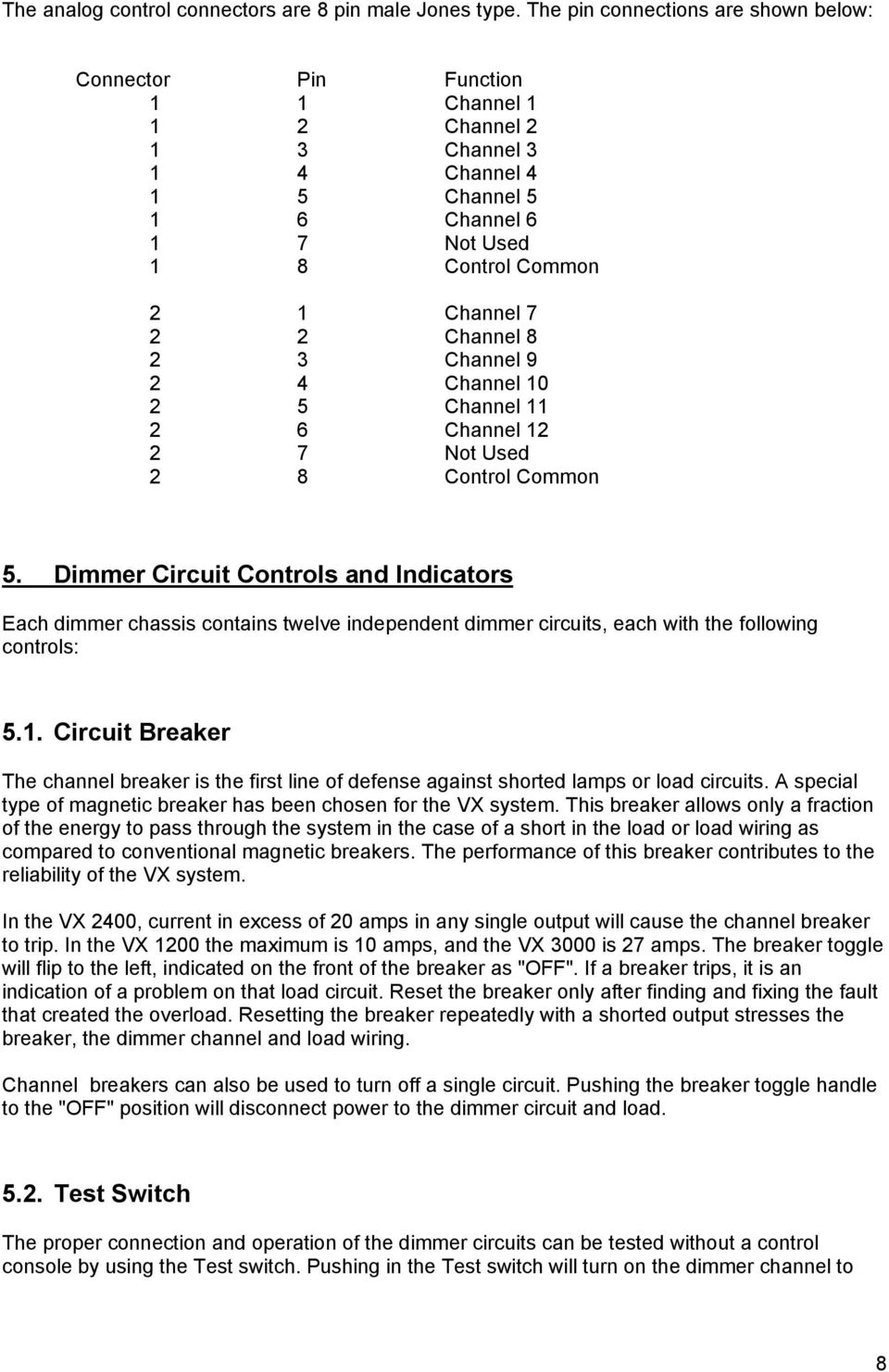
8 The analog control connectors are 8 pin male Jones type. The pin connections are shown below: Connector Pin Function 1 1 Channel Channel Channel Channel Channel Channel Not Used 1 8 Control Common 2 1 Channel Channel Channel Channel Channel Channel Not Used 2 8 Control Common 5. Dimmer Circuit Controls and Indicators Each dimmer chassis contains twelve independent dimmer circuits, each with the following controls: 5.1. Circuit Breaker The channel breaker is the first line of defense against shorted lamps or load circuits. A special type of magnetic breaker has been chosen for the VX system. This breaker allows only a fraction of the energy to pass through the system in the case of a short in the load or load wiring as compared to conventional magnetic breakers. The performance of this breaker contributes to the reliability of the VX system. In the VX 2400, current in excess of 20 amps in any single output will cause the channel breaker to trip. In the VX 1200 the maximum is 10 amps, and the VX 3000 is 27 amps. The breaker toggle will flip to the left, indicated on the front of the breaker as "OFF". If a breaker trips, it is an indication of a problem on that load circuit. Reset the breaker only after finding and fixing the fault that created the overload. Resetting the breaker repeatedly with a shorted output stresses the breaker, the dimmer channel and load wiring. Channel breakers can also be used to turn off a single circuit. Pushing the breaker toggle handle to the "OFF" position will disconnect power to the dimmer circuit and load Test Switch The proper connection and operation of the dimmer circuits can be tested without a control console by using the Test switch. Pushing in the Test switch will turn on the dimmer channel to 8
9 allow lamps and load patching to be verified. Push the "Test" switch again to return it to the out position, and turn the channel off again. The "Test" switch is a hard wired function at the output stage of the dimmer. For this reason, the "Test" switches will continue to operate even if the control electronics are disabled. This fail-safe feature can be very important if the control console or dimmer electronics are disabled Output LED This green LED is connected to the output of the dimmer circuit. When lighted, it indicates that voltage is present at the load. Any condition that turns on the load will light the LED; Test switch on, control signal present, or dimmer malfunction. In conjunction with the other indicator, the Output LED can be used to troubleshoot system problems quickly Error LED Each channel of the VX dimmer includes an "Error" LED that when lighted indicates one of several improper conditions. These conditions are easy to understand, the dimmer has no output when it should, or the dimmer has output when it should not. The causes are listed below: a) Breaker open - no power applied to the channel. b) No Load - lamp disconnected or burned out. c) Test - Channel is at 100% because the "Test" switch is on. d) Shorted SCR - Bad power device. Note: No-load indication is accurate only with the control signal below 90% and the "Test" switch in the "Off" position. 6. Scene Storage With microprocessor based control circuitry, the VX dimmer is capable of advanced functions, such as scene storage. Using the front panel thumbwheel and push switches, up to ten scenes sent to the dimmer can be saved in non-volatile memory for later playback. Any DMX or analog controller can be used to set scenes in the VX dimmer Recording Scenes Scenes are programmed into the VX dimmer by sending a scene to the dimmer, specifying the scene number to be stored, and pressing the "Enter" switch. DMX addresses starting with 600 are used to program scenes. 1) Set the levels of the dimmer channels with any analog or DMX controller. 2) Select the scene to store with the DMX switches. Set the first DMX digit to "6" to indicate scene storage. Set the next two digit to a number between 1 and 10. For example, setting an address of "605" would prepare the dimmer to store scene 5. 3) Press the "Enter" button to memorize the scene. Return the DMX switches to the previous start code to resume normal operation. 9
10 4) To clear all ten recorded scenes, set the thumbwheels to address 699. Press "Enter" to erase all scene memory Scene Playback The scenes stored in the VX dimmer can be recalled for emergency backup, or for use without a control board. The scenes are recalled with the DMX switches set to addresses beginning with 700: 1) Set the first DMX digit to "7" 2) Set the second two digits to a number between 1 and 10. 3) Press the "enter" button to start a one second fade to the memorized scene. If a scene is already being output from memory, pressing the "Enter" button will start a one second crossfade from scene to scene. Memorized scenes will pile-on with current DMX or analog scenes from controller. 4) To resume normal operation, set the DMX switches to a valid address ) Scene 700 is a pre-recorded blackout, and can be used to fade out any of the recorded scenes. 7. Service and Maintenance The VX dimmer racks are designed to make troubleshooting and repair of the system fast and easy. LED indicators are used to pinpoint problems to a defective module. The suspected module can be removed without tools, and the system repaired in minutes by installing replacement parts Recommended Service VX dimmers, like other dense-pack dimmers, needs an unrestricted supply of fresh, cool air. The pack has been designed to operate at ambient temperatures up to 40 degrees Celsius, or about 100 degrees Fahrenheit. When the dimmers are used in very dusty conditions, it may be necessary to remove and clean the air inlet filters periodically. 10
11 7.2. Replacing modules VX dimmers are exceptionally easy to service. If a problem is suspected in a power module, the part can be replaced in a few minutes. To change a power module, follow these steps: Warning: Removing the dimmer front panel will expose dangerous high voltage components. Do not attempt to service dimmer with power applied. 1) Disconnect power to the dimmer pack. Potentially lethal voltages are present inside the dimmer. 2) Remove the front panel. This is done by turning the four quarter-turn fasteners to the left (counterclockwise). Pull the front panel straight out. 3) Disconnect the six pin control connector from the suspect module. 4) Pull the module straight out. It will require a tug to unseat the power connector located at the back of the module. 5) Position the replacement module on the plastic guide. 6) Connect the six pin control connector. 7) Gently slide the module into place. It may be necessary to wiggle the module into alignment with the power connector. The click of the contacts mating means that the connector is completely seated. 8) Replace front panel. Gently push in the quarter turn fasteners while turning until they drop into place. Push the fasteners completely in against the spring, and turn to the right (clockwise) to lock. 8. Appendix A DMX 512 Standards The following information is a summary of the USITT 1990 standard for dimmers and controllers. A complete copy may be obtained from: USITT 10 W. 19th ST. Suite 5A New York, NY

12 The DMX 512 standard is designed as a simple, reliable system for connecting digital dimmers and controllers. The protocol allows up to 512 dimmers to be connected to a single control console. With 512 dimmers in a system, DMX 512 allows each dimmer level to be updated as fast as 44 times each second. As far as the users of DMX equipment are concerned, three things matter more than the electrical specifications contained in the DMX description. The most important items are connectors, cable and how to wire the two ends together. DMX 512 currently uses 3 pins of a 5 pin connector. The two unused pins are reserved for future use, some manufacturers are using these pins for communications back from the dimmer to the control console, or as a redundant data line. At this time, DMX cables are being used that only contain 3 wires. If you wish to include the capability to use the extra pins, it is suggested that you buy or make cables with all 5 pins connected. The connectors to be used for DMX 512 are as follows: Console end (transmitter) Female 5 pin XLR Dimmer end (receiver) Male 5 pin XLR The 5 pin XLR is very similar to the 3 pin connectors used for microphone cable. Some manufacturers of XLR connectors are Switchcraft, ITT Cannon, and Neutrik. Cable type: Shielded twisted pair approved for EIA-422/EIA-485 use. Either one pair with shield or two pair with shield may be used. Examples of such cable are: Single pair: Belden 9841, Alpha 5271 Two pairs: Belden 9842, Alpha 5272 The Pin Designations for DMX 512 are as follows: Pin 1 Signal common (cable shield) Pin 2 Data 1- Pin 3 Data 1+ Pin 4 Spare, optional Data 2- Pin 5 Spare, optional Data 2+ 12

NSI DIGITAL DIMMING SYSTEM DDS 9800 DIMMER PACKS
 NSI DIGITAL DIMMING SYSTEM NSI DIGITAL DIMMING SYSTEM DDS 9800 DIMMER PACKS Software Revision 1.41, Version C UL, Mfg Q3/96, and above SPECIFICATIONS Number of Channels: 9800 : 8 channels Output capacity:
MCR1900 Media Converter 19-Slot Chassis
 MCR1900 Media Converter 19-Slot Chassis Installation Guide Part #5500304-11 Copyright Statement This document must not be reproduced in any way whatsoever, either printed or electronically, without the
Rack Installation. Unpacking the System. Choosing a Setup Location. General Server Precautions. Barracuda Appliances
 This set of instructions applies to racking and rail kit installation for 6XX and above. The Rack Mounting Instructions section below provides information on installing the SC825 chassis into a rack unit
AU-110 racking guide NBXPN: 023
 AU-110 racking guide NBXPN: 023 1. Overview NIMBOXX AU-110 Rack Installation This guide provides setup instructions for installing your NIMBOXX AU-110 in a rack. Following these steps in the order given
StorTrends 3400 Hardware Guide for Onsite Support
 StorTrends 3400 Hardware Guide for Onsite Support MAN-3400-SS 11/21/2012 Copyright 1985-2012 American Megatrends, Inc. All rights reserved. American Megatrends, Inc. 5555 Oakbrook Parkway, Building 200
HP UPS R1500 Generation 3
 HP UPS R1500 Generation 3 Installation Instructions Part Number 650952-001 NOTE: The rating label on the device provides the class (A or B) of the equipment. Class B devices have a Federal Communications
SCD Server. SCD Server Pro
 SCD Server SCD Server Pro SCD Server & SCD Server Pro 9850-000387-01 - Page 1 of 8 SCD Server and SCD Server Pro The SCD Server is a 2U high DMX generator, running the ZerOS Operating System and emulating
Applied Electronics. Commercial Dimming System UPDATE NOTICE
 REV. A Applied Electronics Commercial Dimming System UPDATE NOTICE This notice is to inform the end user of an additional feature added to this DP12/2400 dimming unit. This unit has been outfitted with
DMX512 TO 0-10 VOLT ANALOG CONVERTER OWNERS MANUAL
 DMX512 TO 0-10 VOLT ANALOG CONVERTER OWNERS MANUAL Doug Fleenor Design 396 Corbett Canyon Road Arroyo Grande, CA 93420 (805) 481-9599 revision 2.1 November, 1998 PRODUCT DESCRIPTION The DMX512 to Analog
5-Slot Housing and FrameSaver 9000 Series Access Carrier AC Power Supply Installation Instructions
 TM 5-Slot Housing and FrameSaver 9000 Series Access Carrier AC Power Supply Installation Instructions Document Number 9000-A2-GN17-30 August 1998 Before You Begin Both the 5-slot housing and the FrameSaver
MODEL 2202IQ (1991-MSRP $549.00)
 F O R T H E L O V E O F M U S I C F O R T H E L O V E O F M U S I C MODEL 2202IQ (1991-MSRP $549.00) OWNER'S MANUAL AND INSTALLATION GUIDE INTRODUCTION Congratulations on your decision to purchase a LINEAR
Service manual. Website: www.andico.com.au CAUTION - BEFORE SERVICING THE UNIT, READ THE SAFETY - PRECAUTIONS IN THIS MANUAL.
 Website: www.andico.com.au Service manual CAUTION - BEFORE SERVICING THE UNIT, READ THE SAFETY - PRECAUTIONS IN THIS MANUAL. - ONLY FOR AUTHORISED SERVICE PERSONNEL. MODELS: MPK1-09CR-QB8 MPK1-12ER-QB6
543-0032-00, 943-0032-00. User s Manual
 543-0032-00, 943-0032-00 User s Manual 1 Comfort Alert Diagnostics Faster Service And Improved Accuracy The Comfort Alert diagnostics module is a breakthrough innovation for troubleshooting heat pump and
PDS-750-TR Touring Power Supply Operator s Manual
 PDS-750-TR Touring Power Supply Operator s Manual Rev 1.2 2004 City Theatrical, Inc. Patent Pending 2 CONTENTS The City Theatrical PDS-750-TR...3 Cautions...3 Compliance Certifications...3 Compatibility
APOLLO Plus PORTABLE DIMMER SERIES
 APOLLO Plus PORTABLE DIMMER SERIES USER S MANUAL Any reproduction by means or whole of this user manual in any way, is prohibited without the consent of ELECTRON S.A. ELECTRON S.A. reserves the right to
FOXAIR 60/50 ALL MODELS
 FOXAIR 60/50 ALL MODELS OPERATION AND SERVICE MANUAL UNIT WEIGHT - ALL MODELS APPROX. 300 POUNDS FOXTRONICS, INC. 38 L x 28 W x 24 H Love Field-Dallas TX MADE IN THE USA 3448 West Mockingbird Lane Dallas,
RI-215A Operator s Manual. Part Number: 71-0045RK Revision 0 Released: 10/3/05
 RI-215A Operator s Manual Part Number: 71-0045RK Revision 0 Released: 10/3/05 Warranty RKI Instruments, Inc., warrants gas alarm equipment sold by us to be free from defects in materials and workmanship,
Service Guide 12/27/03 TESTING, SERVICE & REPAIR GUIDE (For SH Space Heating Models & RA Water Heating Models)
 TESTING, SERVICE & REPAIR GUIDE (For SH Space Heating Models & RA Water Heating Models) WARNING - HIGH VOLTAGE AC electrical circuits are connected to this heater. Do not attempt any service work on the
Operation Manual. 150 Watt Halogen Light Source for Endoscopy Model # s ESS-150, ESS-150A ESS-220, ESS-220A
 Operation Manual 150 Watt Halogen Light Source for Endoscopy Model # s ESS-150, ESS-150A ESS-220, ESS-220A Endoscopy Support Services, Inc. Croton River Executive Park Route 22, Bldg. 3 Brewster, NY 10509
PS6500 Storage Arrays Rack Mount Instructions
 PS6500 Storage Arrays Rack Mount Instructions Part Number: R724M Rev. A01 Copyright 2010 Dell, Inc. All rights reserved. Dell is a trademark of Dell, Inc. EqualLogic is a registered trademark. All trademarks
Mobile Data Power Model: MDP-25
 Mobile Data Power Model: MDP-25 Topic Section Features... 2 Operational Features Summary... 2 Back-up Battery Power Internal Charger Voltage Spike Protection RF Noise Filtering Warning of Imminent Loss
Advantium 2 Plus Alarm
 ADI 9510-B Advantium 2 Plus Alarm INSTALLATION AND OPERATING INSTRUCTIONS Carefully Read These Instructions Before Operating Carefully Read These Controls Corporation of America 1501 Harpers Road Virginia
K E E P E TH T I H S I MA M N A U N A U L A FO F R
 Quad-C LED Moving Wash Pro SI-055 User Manual KEEP THIS MANUAL FOR FUTURE NEEDS 1. Unpacking Thank you for choosing Color Imagination s Quad-C LED Moving Wash Pro. For your own safety, please read this
SNQ-60x0-320 Series Data Center Switch. Quick Installation Guide
 Introduction This guide is to assist the reader with the most basic form of installation and connection to switches in this series. As there is more than one switch in this series, the diagrams might slightly
USER MANUAL WARNING! CONTENTS MODEL 1 SPECIFICATIONS READ ALL INSTRUCTIONS BEFORE PROCEEDING. Non-Programmable Single Stage Heat/Cool Thermostat
 Builder MODEL 1010 Series Non-Programmable Single Stage Heat/Cool Thermostat USER MANUAL Compatible with low voltage single stage gas, oil or electric heating or cooling systems, including single stage
PDS-375-TR Touring CB Power/Data Supply Operator s Manual Rev 1.2
 PDS-375-TR Touring CB Power/Data Supply Operator s Manual Rev 1.2 2005 City Theatrical, Inc. Patent Pending The PDS-375 TR Power Supply page 2 CONTENTS The City Theatrical PDS-375 TR...3 Cautions...3 Compliance
TELIKOU Intercom System. MS-500(4+1 channel) Main Station Instruction Manual
 TELIKOU Intercom System MS-500(4+1 channel) Main Station Instruction Manual TELIKOU Systems All Rights Reserved While TELIKOU makes every attempt to maintain the accuracy of the information contained in
TELIKOU Intercom System. TM-200 Main Station. Instruction Manual
 Intercom System TM-200 Main Station Instruction Manual TELIKOU Systems All Rights Reserved I. Introduction Thank you for choosing TELIKOU intercom product. TM-200 main station is suitable for television
INSTALLATION & SERVICE MANUAL. Display Panel
 INSTALLATION & SERVICE MANUAL Display Panel The PowerLine EMS TM is a specialized power distribution and energy management system intended to be used in recreational vehicles. The Control Module is housed
DIGITAL ALARM II FOR HOSPITALS AND LABORATORIES INSTALLATION AND OPERATING INSTRUCTIONS 52 635.0
 Form No. 74-00-4001 S168-195-001 Revision E DIGITAL ALARM II FOR HOSPITALS AND LABORATORIES INSTALLATION AND OPERATING INSTRUCTIONS 52 635.0 INTRODUCTION Allied Healthcare Products, Inc. s Digital Alarm
OPTICAL HEADEND PLATFORM OTOHP-NMS NETWORK MONITORING MODULE INSTRUCTION MANUAL
 OPTICAL HEADEND PLATFORM OTOHP-NMS NETWORK MONITORING MODULE INSTRUCTION MANUAL Phone: (209) 586-1022 (800) 545-1022 Fax: (209) 586-1026 OTOHP-NMS Rev. X1 E-Mail: [email protected] www.olsontech.com
Installation and User Guide
 Installation and User Guide 458-UNI8 8-Channel Universal Dimmer Module Introduction The 458/UNI8 is an 8-channel universal, digital transistor, dimmer module. Each channel s mode can be selected for either
Daker DK 1, 2, 3 kva. Manuel d installation Installation manual. Part. LE05334AC-07/13-01 GF
 Daker DK 1, 2, 3 kva Manuel d installation Installation manual Part. LE05334AC-07/13-01 GF Daker DK 1, 2, 3 kva Index 1 Introduction 24 2 Conditions of use 24 3 LCD Panel 25 4 Installation 28 5 UPS communicator
TECHNICAL SERVICE DEPARTMENT Technical Service Bulletin 1-800-432-8373. Tankless Electric (RTE) Troubleshooting
 Sequence of Operations 1 Power supply and field wiring block 2 Energy Cut Off (ECO) 3 Water flow plunger and cold inlet 4 Magnetic flow switch 5 Water temperature thermistor 6 Control panel and circuit
USER MANUAL Stand Alone Power Supply PSQ 2909 / PSQ 3909 / PSQ 4909 PSQ 2920 / PSQ 3920 / PSQ 4920
 USER MANUAL Stand Alone Power Supply PSQ 2909 / PSQ 3909 / PSQ 4909 PSQ 2920 / PSQ 3920 / PSQ 4920 [This page intentionally left blank] Warning for Your Protection 1. Read these instructions. 2. Keep these
DP-DMX20L 4 CHANNEL DMX DIMMER PACK MODE MENU DISPLAY. OUTPUT: 10A/CH, TOTAL 20A Max. DMX CHANNEL RECEIVE TOTAL DMX CHANNEL DIMMER / SWITCH
 DP-DMX0L OUTPUT: 0A/CH, TOTAL 0A Max. CHANNEL DMX DIMMER PACK DISPLAY RECEIVE DMX CHANNEL TOTAL DMX CHANNEL DIMMER / SWITCH 8888 CHASE PROGRAM CHASE CHASE SPEED CHASE DIMMER MODE MENU Elation Professional
REB 1 REB 3 REB 5 REB 6 REB 8 REB 10 REB 12 REB 16
 REB 1 REB 3 REB 5 REB 6 REB 8 REB 10 REB 12 REB 16 Manually Operated Electronic Speed Controller Single Phase For all applications using suitably specified single-phase induction motor fans 1 GENERAL The
HP R12000 and R18000 DirectFlow UPS User Guide
 HP R12000 and R18000 DirectFlow UPS User Guide Abstract This document includes installation, configuration, and operation information for the HP R12000 and R18000 DirectFlow UPS. This document is for the
PT-6000 Power Tower INSTALLATION MANUAL SPECIFICATIONS
 PT-6000 Power Tower INSTALLATION MANUAL 10.5 9.75 12 22.75 10.75 MAXIMUM SOIL HEIGHT: DO NOT ALLOW FILL TO EXCEED THIS LEVEL! 11.5 4 4 13 Optional PT-BASE for new installations or when previous 2000/6000
Tyan Computer. Transport PX22. Service Engineer s Manual
 Tyan Computer Transport PX22 Service Engineer s Manual 1 Precaution To read through the user manual, check all assembly and follow setup process before any operation on this server To keep paper clips,
Modular I/O System Analog and Digital Interface Modules
 OPERATING INSTRUCTIONS Modular I/O System Analog and Digital Interface Modules Installation Operation Maintenance Document Information Document ID Title: Operating Instructions Modular I/O System Part
DALI RC BASIC SO. Control unit Operating instructions
 DALI RC BASIC SO Control unit Operating instructions Contents Safety... 4 General instructions 4 Safety instructions 4 Description... 5 Purpose and application 5 Function 5 Light control 5 Brightness
5-port / 8-port 10/100BaseTX Industrial Ethernet Switch User Manual
 5-port / 8-port 10/100BaseTX Industrial Ethernet Switch User Manual Content Overview... 1 Introduction... 1 Features... 3 Packing List... 4 Safety Precaution... 4 Hardware Description... 5 Front Panel...
USER GUIDE. Studio Hotline Multi-line System Phone Flasher and Door/Alert Indicator Input Module and Indicator. DM Engineering. Version 1.
 USER GUIDE Studio Hotline Multi-line System Phone Flasher and Door/Alert Indicator Input Module and Indicator Version 1.3 DM Engineering 2174 Chandler St. Camarillo, CA 91345-4611 805-987-7881 800-249-0487
ComPar KIT 1 & 2 DMX LED light set
 ComPar KIT 1 & 2 DMX LED light set User manual 1 Safety precautions WARNING: This unit may cause serious injury to the eyes when used incorrectly. It is therefore strongly advised to read this user manual
PSC POWER STAR LiFE TM
 PSC POWER STAR LiFE TM Operation Manual Version 3.0 Copyright 2012 Professional Sound Corp 28085 Smyth Drive, Valencia, CA 91355 USA CE RoHS Printed in the U.S.A. Thank you for purchasing your new PSC
G670 Intermittent Pilot Ignition Controls
 Installation Sheets Manual 121 Gas Combustion Combination Controls and Systems Section G Technical Bulletin Issue Date 0300 Intermittent Pilot Ignition Controls Figure 1: Intermittent Pilot Ignition Control
ADA COMPLIANT BOX STYLE TELEPHONE INSTALLATION, PROGRAMMING AND OPERATING INSTRUCTIONS FOR MODEL PBX
 ADA COMPLIANT BOX STYLE TELEPHONE INSTALLATION, PROGRAMMING AND OPERATING INSTRUCTIONS FOR MODEL PBX INSTALLATION INSTRUCTIONS Step 1. Determine the position for the Hands-free phone in the elevator phone
For Models #6-5001, #6-7501, #10-7501 & #10-12K1
 EmerGen Switch Manual Transfer Switch Manufactured by CONNECTICUT ELECTRIC SWITCH MFG. CO. 1-800-730-2557 OWNER S MANUAL & INSTALLATION INSTRUCTIONS For Models #6-5001, #6-7501, #10-7501 & #10-12K1 PLEASE
NSI DDR DIMMING RACK POWER DISTRIBUTION UNIT
 Main Power Connections NSI DDR DIMMING RACK POWER DISTRIBUTION UNIT Camlok style "J" series connectors are for connection of up to a 300 Amp 120/240 VAC or 120/208 VAC electrical service. These connections
Snapshot. LEDrain 38 USER MANUAL. Ok on Dimmer. Outdoor OK. Sound Activated. DMX/Master/Slave. 115V/230V Switch. Replaceable Fuse.
 LEDrain 38 Snapshot Ok on Dimmer Outdoor OK Sound Activated DMX/Master/Slave 5V/30V Switch Replaceable Fuse User Serviceable Duty Cycle USER MANUAL CHAUVET, 3000 N 9 th Ct, Hollywood, FL 3300 U.S.A (800)
Mini Effect Gizmo. User s Manual. RJM Music Technology, Inc.
 Mini Effect Gizmo User s Manual RJM Music Technology, Inc. Mini Effect Gizmo User s Manual Version 1.3 September 26, 2013 RJM Music Technology, Inc. 2525 Pioneer Ave #1 Vista, CA 92081 E-mail: [email protected]
Installation and Operation Guide PD4600 Series Converter Replacement
 Installation and Operation Guide PD4600 Series Converter Replacement Extended warranties are available for purchase at www.progressivedyn.com Member Thank you for selecting Progressive Dynamics as your
Contents. Safety Warnings... 1
 Contents Safety Warnings... 1 Unpacking the GQ600... 1 Introduction... 2 GQ600 Filter Characteristics... 2 1/3 Octave Centre Frequencies... 4 Front Panel Functions... 5 Rear Panel Functions... 6 Specifications...
About the BitStorm 6051 POTS Splitter
 BitStorm 6051 Installation Instructions Document Number 6051-A2-GZ40-10 July 2002 About the BitStorm 6051 The BitStorm system enables simultaneous high-speed digital data access and analog voice service
IMMS-CCC. IMMS-CCC Hardwire Central Interface. Installation Instructions
 IMMS-CCC IMMS-CCC Hardwire Central Interface Installation Instructions TABLE OF CONTENTS... Choose a Location... 1 Connections... 2 Operations... 3 Software Configuration... 4 Troubleshooting... 5 Loopback
Installation instructions for Series NRX INCOM communications adapter module
 4000 NRX RF DRAWOUT SUBTITLE IMAGE (12/15/2010) Effective July 2015 Supersedes October 2010 IL01301033EH04 Installation instructions for Series NRX INCOM communications adapter module Instructions apply
Congratulations! Thank you!
 TM-47 ORDERCODE D1370 Congratulations! You have bought a great, innovative product from DAP Audio. The DAP Audio Microphone range brings excitement to any venue. Whether you want simple plug-&-play action
* DISCLAIMER: Contents. How to Use This Guide: COMMERCIAL INSTALL GUIDE 2
 COMMERCIAL INSTALL GUIDE 2 Contents How to Use This Guide: The first section of this guide is designed to assist you with the installation of your DECK Monitoring hardware. The revenue grade meter and
Tone Hammer 500. Owners Manual. Manual Version 1.0
 Tone Hammer 500 Owners Manual Manual Version 1.0 1. Incorporating the preamp from the popular Tone Hammer preamp/di pedal this superlight bass head combines three bands of flexible EQ, a colorful "Drive"
HM-W536 Install Guide
 HM-W536 Install Guide 9/13/2013 IMPORTANT SAFETY INSTRUCTIONS Warning - When using electrical devices, basic safety precautions should be followed to reduce the risk of fire, electrical shock or injury.
Refer installation of power supplies to qualified service personnel.
 AC Power Supply For 5-Slot Housing and 9000 Series Access Carrier Installation Instructions Document Number 9000-A2-GN17-50 August 2000 Before You Begin Both the 5-slot housing and the 9000 Series Access
Parallel Redundant Uninterruptible Power Supply
 9 315 Parallel Redundant Uninterruptible Power Supply Installation/Operation Manual 164202013 Rev. D ------------------------------------------------------------------------ ------------------------------------------------------------------------
LEDPAR64 USER MANUAL
 LEDPAR64 USER MANUAL 1 Table of Content Part I General Information 1.1 Introduction...3 1.2 Safety Information.. 3 1.3 Unpacking..4 1.4 Specifications....4 1.5 Features.. 4 Part II Installation and Operation
ELECTRIC POSITION for electric heat, then confirm with Fan Test below.
 Troubleshooting Poor Temperature Regulation This page lists problems that may affect the temperature performance of your LUX thermostat with suggested resolutions. For more detailed information please
SECTION 28 23 23 VIDEO SURVEILLANCE SYSTEMS INFRASTRUCTURE
 PART 1 - GENERAL 1.1 SUMMARY SECTION 28 23 23 VIDEO SURVEILLANCE SYSTEMS INFRASTRUCTURE A. Section Includes 1. Video Surveillance Systems Infrastructure B. Related Sections 1. Section [28 23 16 Video Surveillance
Fixture One Power Cord One User Manual One Omega Bracket One DMX Cable - One
 1. INTRODUCTION AND UNPACKING Thank you for purchasing the MICROH LED NEO SPOT 60R moving head fixture. For your own safety and knowledge, please read this manual before installing or operating the device.
How To Use A Power Supply On A Powerline 2.2 (Ai)
 KNX/EIB Product documentation Issue: 05.08.2010 629x1220 Push button sensor 3 comfort 1-gang Push button sensor 3 comfort 2-gang (1+1) Push button sensor 3 comfort 3-gang Push button sensor 3 comfort 4-gang
Instruction Manual. 2in1 LAN Tester & Multimeter. Model: LA-1011
 Instruction Manual 2in1 LAN Tester & Multimeter Model: LA-1011 1 Contents Introduction... Features... Safety Precautions.. Meter Description... Electrical Specification... Operation.. AutoRanging Multimeter.
About the HotWire 7900 10-Slot Standalone Shelf
 TM HotWire Model 7900 10-Slot Standalone Shelf Installation Instructions Document Number 7900-A2-GN10-10 About the HotWire 7900 10-Slot Standalone Shelf The HotWire 7900 10-Slot Standalone Shelf is designed
DVI DA2 and DVI DA 4 User Guide
 DVI DA2 and DVI DA 4 User Guide This guide describes the installation and operation of the Extron DVI DA2 and DVI DA4 Distribution Amplifiers. Unless stated otherwise, distribution amplifier or the unit
CB-100 LED Color Beam LED spotlight. user manual
 CB-100 LED Color Beam LED spotlight user manual Musikhaus Thomann Thomann GmbH Hans-Thomann-Straße 1 96138 Burgebrach Germany Telephone: +49 (0) 9546 9223-0 E-mail: [email protected] Internet: www.thomann.de
16/32 Channel 1U Rack Mount CCTV Power Supply
 16/32 Channel 1U Rack Mount CCTV Power Supply Manual PH-A3224-GUQ Shown 16-Channel 32-Channel PTC PH-A1612-PUQ PH-A3224-PUQ Glass Fuse PH-A1612-GUQ PH-A3224-GUQ Industrial design 12 Amp 3 Amps per channel
VS CONTROL PACK INSTALLATION INSTRUCTIONS
 VS CONTROL PACK INSTALLATION INSTRUCTIONS Hot Tub Works www.hottubworks.com 1-800-770-0292 [email protected] Congratulations! You have purchased and are about to install in your spa, the most
Owners & Installation Manual for the Sheridan, Mountainair, Pine Valley and Old Forge Ceiling Fan Family
 Owners & Installation Manual for the Sheridan, Mountainair, Pine Valley and Old Forge Ceiling Fan Family Part of the Kiva Lighting Family Custom Lighting and Fans Since 1992 1312 12th St NW Albuquerque,
STAGE SETTER-8. User Instructions. Elation Professional
 STAGE SETTER-8 User Instructions Elation Professional A Division of the American DJ Group of Companies 4295 Charter Street Los Angeles, CA 90058 USA Tel: 323-582-2650 Fax: 323-582-2610 Web: www.elationlighting.com
NEWTECH PRO 1-2-3 KVA ONLINE UNINTERRUPTIBLE POWER SUPPLY USER MANUAL
 NEWTECH PRO 1-2-3 KVA ONLINE UNINTERRUPTIBLE POWER SUPPLY USER MANUAL [email protected] / www.tuncmatik.com Table of Contents 1. Important Safety Warning 2 1-1. Transportation 2 1-2. Preparation 2 1-3.
DC LOAD TESTING Gian Trento June 18 th, 2004
 DC LOAD TESTING Gian Trento June 18 th, 2004 THIS TECHNICAL NOTE DESCRIBES THE PROCESS OF CONNECTING THE UNIVERSAL VOLTRONICS CORPORATION (UVC) POWER SYSTEM TO THE DC LOAD AS WELL AS OPERATING THE UVC
HP ProLiant DL380 G6 Carrier-Grade Server Read Before Install
 HP ProLiant DL380 G6 Carrier-Grade Server Read Before Install Carrier-Grade Instructions HP Part Number: AM275-9001A Published: July 2012 Edition: 3 Copyright 2009, 2012 Hewlett-Packard Development Company,
LocoNet, the Digitrax Difference
 LocoNet, the Digitrax Difference LocoNet is Digitrax's method of communication between LocoNet compatible devices on a model railroad layout. LocoNet Compatible devices are designed to work together on
DRM75A 230V 20/100A DIN rail single phase two wire energy meter
 DRM75A 230V 20/100A DIN rail single phase two wire energy meter 1.1 Safety instruction 1.2 Foreword 1.3 Performance criteria 1.4 Specifications 1.5 Basic errors 1.6 Description 1.7 Dimensions 1.8 Installation
MODEL 5010 DUAL CHANNEL SMOKE/FIRE DETECTION MODULE
 DESCRIPTION MODEL 5010 DUAL CHANNEL SMOKE/FIRE DETECTION MODULE DESCRIPTION The SST Model 5010 Two Channel Smoke/Fire Detection Module provides two independent detection input channels for the NOVA-5000
Industrial-Grade UPS System Heavy-duty power protection for harsh industrial environments
 Industrial-Grade UPS System Heavy-duty power protection for harsh industrial environments Model #: SM2000RMX Heavy-duty, industrial-grade metal housings Shock and vibration rated to MIL-STD-810D 19 inch
MANUAL PC1000R [email protected]
 MANUAL PC1000R [email protected] Features The APart PC1000R is a professional multisource CD/USB/SD card music player, equipped with balanced and unbalanced analog outputs, coaxial and optical digital
Replacing Redundant AC Power Supplies in an EX4500 Ethernet Switch Without Disrupting Service
 Replacing Redundant AC Power Supplies in an EX4500 Ethernet Switch Without Disrupting Service This field replacement guide provides instructions for replacing the two AC power supplies in an EX4500 Ethernet
with MERCURY FREE 1 HP Relays ! WARNING Before using this product read and understand instructions.
 B Installation & Maintenance Instructions MM-414 Series 150E and 157E Low Water Cut-Off/Pump Controllers For Steam Boilers and Other Level Control Applications A Typical Applications: Primary or secondary
ATS Overhead Table Shelf System INSTRUCTION MANUAL
 ATS Overhead Table Shelf System INSTRUCTION MANUAL ATS Overhead Table Shelf System Instruction Manual Warranty Newport Corporation warrants this product to be free of defects in material and workmanship
P. D. Q. Automatic Burnout Furnaces. 115 and 230-volt Models OPERATOR S MANUAL
 P. D. Q. Automatic Burnout Furnaces 115 and 230-volt Models OPERATOR S MANUAL TABLE OF CONTENTS Introduction... 3 Warranty... 3 Safety Instructions........................................................
D7050/D7050TH. Installation Instructions. Multiplex Photoelectric Smoke Detectors
 D7050/D7050TH EN Installation Instructions Multiplex Photoelectric Smoke Detectors D7050/D7050TH Installation Instructions.0 Description Notices These instructions cover the installation of the D7050/D7050TH
Acrobat. user manual
 Acrobat user manual 1 mounting bracket 2 swivel locks 3 focus adjustment 4 effects cover 5 lamp access 6 13 mm clamp hole 7 air vent 8 AC input & main fuse 9 data sockets 10 DIP-switch 1999-2001 Martin
Please read this owner s Manual carefully before operating the unit. - Cooling - Heating - Dehumidifying - Fan
 Please read this owner s Manual carefully before operating the unit. - Cooling - Heating - Dehumidifying - Fan TABLE OF CONTENTS INTRODUCTION 2 IMPORTANT SAFEGUARDS...2 PACKAGE CONTAINS..2 NAMES OF PARTS.3
PRELIMINARY MANUAL STAGE COLOR 48. Preliminary User Guide. Official version will follow soon on: WWW.BRITEQ-LIGHTING.COM TABLE OF CONTENTS
 STGE COO 48 Preliminary User Guide Official version will follow soon on: WWW.BITEQ-IGHTIG.COM TBE OF COTETS 1. Safety Instruction 2. Technical Specification 3. How To Set The Unit 4. How To Control The
JNIOR. Overview. Get Connected. Get Results. JNIOR Model 310. JNIOR Model 312. JNIOR Model 314. JNIOR Model 410
 The INTEG is an Ethernet I/O (digital, analog) device that monitors and controls a small set of process signals. functions as both basic I/O for integration with another application or system AND as a
Portable Air Conditioner. OWNER S MANUAL Read these instructions before use. Model: MM14CHCSCS
 Portable Air Conditioner OWNER S MANUAL Read these instructions before use Model: MM14CHCSCS Voltage rating: 120V~60Hz Power rating : 1400W(Cooling) Power rating : 1350W(Heating) Customer Support : 1-800-474-21477
UPDATEUPDATEUPDATE. Converting the tower chassis to a rack-mount chassis. A - M5 13 8 To mount outer member to rack
 UPDATEUPDATEUPDATE Converting the tower chassis to a rack-mount chassis Rail overview Converting your Server to Rack-Mount The rail kit includes the following: Two rail units Five packages of screws (labeled
Data Bulletin. Communications Wiring for POWERLINK G3 Systems Class 1210 ABOUT THIS BULLETIN APPLICATION INTRODUCTION.
 Data Bulletin 1210DB0002R3/05 03/2005 LaVergne, TN, USA Communications Wiring for POWERLINK G3 Systems Class 1210 Retain for future use. ABOUT THIS BULLETIN This data bulletin describes the proper wiring
VIEW. SLX300 SpeakerLinX IP Zone. Amplifier Installation and Setup Guide. AVoIP
 VIEW SLX300 SpeakerLinX IP Zone Amplifier Installation and Setup Guide TM AVoIP ClearOne 5225 Wiley Post Way Suite 500 Salt Lake City, UT 84116 Telephone 1.800.283.5936 1.801.974.3760 Tech Sales 1.800.705.2103
CHAPTER 4 UTILITY SYSTEMS ELECTRICAL. Utility Systems Electrical. Main Panel
 CHAPTER 4 UTILITY SYSTEMS ELECTRICAL Utility Systems Electrical The electrical supply to your home begins outside, where you will see either an overhead feed and piping down the side of your home or (if