
NBX Business Telephone Guide
|
|
|
- Marilynn Lloyd
- 10 years ago
- Views:
Transcription
1 NBX Busiess Telephoe Guide Versio 2.0 Also icludes sectios o: APX Voice Messagig NBX NetSet DSS/BLF Adjuct Part No. 3C10171 Rev. D Published December 1999

2 3Com Corporatio 5400 Bayfrot Plaza Sata Clara, Califoria Copyright 2000, 3Com Corporatio. All rights reserved. No part of this documetatio may be reproduced i ay form or by ay meas or used to make ay derivative work (such as traslatio, trasformatio, or adaptatio) without writte permissio from 3Com Corporatio. 3Com Corporatio reserves the right to revise this documetatio ad to make chages i cotet from time to time without obligatio o the part of 3Com Corporatio to provide otificatio of such revisio or chage. 3Com Corporatio provides this documetatio without warraty, term, or coditio of ay kid, either implied or expressed, icludig, but ot limited to, the implied warraties, terms or coditios of merchatability, satisfactory quality, ad fitess for a particular purpose. 3Com may make improvemets or chages i the product(s) ad/or the program(s) described i this documetatio at ay time. If there is ay software o removable media described i this documetatio, it is furished uder a licese agreemet icluded with the product as a separate documet, i the hard copy documetatio, or o the removable media i a directory file amed LICENSE.TXT or!license.txt. If you are uable to locate a copy, please cotact 3Com ad a copy will be provided to you. UNITED STATES GOVERNMENT LEGEND If you are a Uited States govermet agecy, the this documetatio ad the software described herei are provided to you subject to the followig: All techical data ad computer software are commercial i ature ad developed solely at private expese. Software is delivered as Commercial Computer Software as defied i DFARS (Jue 1995) or as a commercial item as defied i FAR 2.101(a) ad as such is provided with oly such rights as are provided i 3Com s stadard commercial licese for the Software. Techical data is provided with limited rights oly as provided i DFAR (Nov 1995) or FAR (Jue 1987), whichever is applicable. You agree ot to remove or deface ay portio of ay leged provided o ay licesed program or documetatio cotaied i, or delivered to you i cojuctio with, this User Guide. 3Com, the 3Com logo, ad NBX are registered trademarks of 3Com Corporatio. NBX 100, NBX NetSet, Advaced PowerMail exchage, Palm Pilot, ad Network Based Exchage are trademarks of 3Com Corporatio. Microsoft, Widows, Widows NT ad the Iteret Explorer logo are registered trademarks of Microsoft Corporatio. Adobe ad Acrobat Exchage are trademarks ad Adobe Acrobat is a registered trademark of Adobe Systems Icorporated. Netscape Navigator is a registered trademark of Netscape Commuicatios. All other compay ad product ames may be trademarks of the respective compaies with which they are associated. Guide writte ad illustrated by Gregory Paul Brucato. Updated ad edited by Laura Fergusso. 1/4/00

3 CONTENTS ABOUT THIS GUIDE How to Use This Guide 7 1 THE NBX BUSINESS TELEPHONE The Telephoe s Buttos ad Cotrols 10 The NBX 100 Commuicatio System s Features 13 2 USING THE TELEPHONE Basic Operatio 17 Placig a Iteral Call 17 Usig the Iteral User Directory 17 Placig a Exteral Call 18 Aswerig a Call 18 Aswerig Behaviors 19 Placig a Call o Hold 19 Status Lights 19 Trasferrig a Call 20 Aouced Trasfer 20 Blid Trasfer 20 Coferecig Other Parties o a Call 21 Coferece Call Behaviors 21 Hadsfree Aswer o Itercom 21 Mute 22 Redialig a Call 22 Usig the Speakerphoe 22 Settig the Volume 22 Features Not Assiged to a Dedicated Butto 23 Usig Feature Codes 23 Accout Codes for Call Detail Reportig 24 Call Park 25

4 Call Pickup 25 Directed Call Pickup 26 Group Call Pickup 27 Direct Mail Trasfer 27 Flash 27 Hut Groups ad Callig Groups 27 Pagig 29 Iteral Pagig 29 Exteral Pagig 29 Simultaeous Pagig 29 Release (Usig a Headset) 29 Dialig Speed Dials 30 Oe-touch Speed Dials 30 Persoal Speed Dials 30 System-wide Speed Dials 31 3 APX VOICE MESSAGING Types of Mailboxes 34 Settig Up Your Voice Mail 34 Listeig to Messages 35 Listeig to Messages Remotely 36 Evelope Optios 37 Replyig to a Message 38 Forwardig a Message with Commets 38 Creatig ad Sedig a Message 39 Message Delivery Optios 40 Creatig Group Lists 41 Modifyig Group Lists 41 Forwardig Callers to Voice Mail 42 Accessig Voice Mail Messages Through Your 42 Chagig Your Password 42 Security Tips 43 4 NBX NETSET Startig NBX NetSet 45 User Iformatio 47 Call Permissios 48

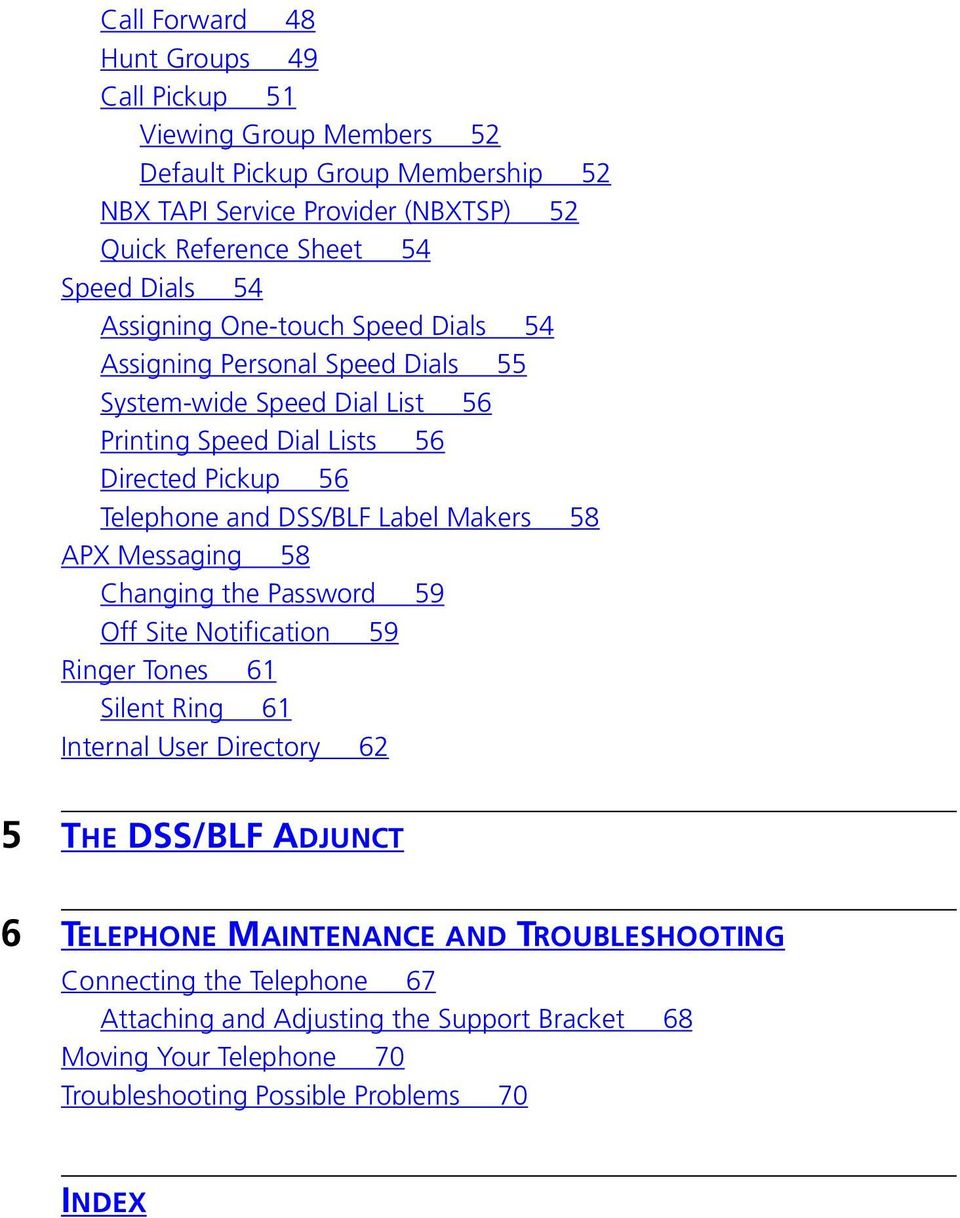
5 Call Forward 48 Hut Groups 49 Call Pickup 51 Viewig Group Members 52 Default Pickup Group Membership 52 NBX TAPI Service Provider (NBXTSP) 52 Quick Referece Sheet 54 Speed Dials 54 Assigig Oe-touch Speed Dials 54 Assigig Persoal Speed Dials 55 System-wide Speed Dial List 56 Pritig Speed Dial Lists 56 Directed Pickup 56 Telephoe ad DSS/BLF Label Makers 58 APX Messagig 58 Chagig the Password 59 Off Site Notificatio 59 Riger Toes 61 Silet Rig 61 Iteral User Directory 62 5 THE DSS/BLF ADJUNCT 6 TELEPHONE MAINTENANCE AND TROUBLESHOOTING Coectig the Telephoe 67 Attachig ad Adjustig the Support Bracket 68 Movig Your Telephoe 70 Troubleshootig Possible Problems 70 INDEX
6

7 ABOUT THIS GUIDE This guide provides istructios for usig the 3Com NBX Busiess Telephoe ad related features. It also icludes sectios for usig the APX Voice Messagig System, the NBX NetSet web user iterface ad the DSS/BLF adjuct. This guide is iteded for ayoe usig the NBX Busiess Telephoe ad its features. For a glossary of terms used i this guide, ad other commo telephoy terms, please refer to the 3Com NBX 100 Commuicatios System Admiistratio Guide. If release otes are shipped with your product ad the iformatio there differs from the iformatio i this guide, follow the istructios i the release otes. The latest versios of user guides ad release otes are available i Adobe Acrobat Reader Portable Documet Format (PDF) o the 3Com World Wide Web site: How to Use This Guide Table 1 shows where to look for specific iformatio i this guide. Table 1 Where to fid specific iformatio If you are lookig for... A descriptio of the NBX Busiess Telephoe s buttos ad cotrols, ad a overview of its features. Tur to... Chapter 1 Istructios o how to use the telephoe s features. Chapter 2 Istructios o how to set up voice mail ad use the various types of Chapter 3 mailboxes. Istructios o how to use the NBX NetSet user iterface to view Chapter 4 ad chage your telephoe s persoal settigs. Iformatio about the DSS/BLF adjuct. Chapter 5 Telephoe maiteace ad troubleshootig iformatio. Chapter 6

8 8 ABOUT THIS GUIDE Covetios Table 2 ad Table 3 list covetios that are used throughout this guide. Table 2 Notice Icos Ico Notice Type Descriptio Iformatio ote Cautio Warig Iformatio that describes importat features or istructios. Iformatio that alerts you to potetial loss of data or potetial damage to a applicatio, system, or device. Iformatio that alerts you to potetial persoal ijury. Table 3 Text Covetios Covetio Scree displays The words eter ad type Words i italics Descriptio This typeface represets iformatio as it appears o the display pael or o a computer scree. Whe you see the word eter i this guide, you must type somethig, ad the press Retur or Eter. Do ot press Retur or Eter whe a istructio simply says type. Italics are used to: Emphasize a poit. Deote a ew term at the place where it is defied i the text. Idetify meu ames, meu commads, ad software butto ames. Example: From the Help meu, select Cotets. Click OK. The term admiistrator refers to the perso or persos tasked with maitaiig your busiess s NBX 100 Commuicatios System. Year 2000 Compliace For iformatio o Year 2000 compliace ad 3Com products, visit the 3Com Year 2000 Web page:

9 1 THE NBX BUSINESS TELEPHONE The NBX Busiess Telephoe, alog with the NBX 100 Commuicatios System, offers a large umber of features, optios ad flexibility to you the user as well as the perso tasked with admiisterig the system. As a result, may of the features have alterate ways i which to use them, some better suited to a particular situatio tha others. I additio to usig the telephoe, the NetSet browser-based user iterface ca be used to access features. This chapter cotais iformatio about the followig: The Telephoe s Buttos ad Cotrols The NBX 100 Commuicatio System s Features

10 10 CHAPTER 1: THE NBX BUSINESS TELEPHONE The Telephoe s Buttos ad Cotrols Figure 1 shows the NBX 100 Busiess Telephoe s buttos ad cotrols: Figure 1 NBX Busiess Telephoe Adam Traci 11 3 Julie 12 a 4 06* Mail Trasfer Call Park Flash Romaie b c Release d 5 e ext Hadset 2 3 Forward to Voice Mail Butto Press to have all icomig calls set to your voice mail after oe rig. You ca modify the settigs of this feature to forward icomig calls to the Automated Attedat, or to a telephoe umber of your choosig. For more iformatio, see Forwardig Callers to Voice Mail o page 42. Message Butto Press to access your voice mail through the APX Voice Messagig System. For more iformatio, see Listeig to Messages o page 35. Whe there are messages i your mailbox, the idicator to the left of the Message butto lights up ad the display pael

11 NBX Busiess Telephoe Guide 11 idicates the total umber of messages i your mailbox ad the umber of ew messages. For example, 3 Msgs 2 New Speaker Dial Pad Hadsfree Butto Press to eable this feature. Hadsfree allows you to aswer iteral (itercom) calls without pickig up the hadset. The telephoe souds a alert toe to otify you while activatig the speakerphoe for a hads-free coversatio. For more iformatio, see Hadsfree Aswer o Itercom o page 21. Display Pael The display pael provides telephoe status messages, Caller ID iformatio, ad a idicatio of the umber of messages i your voice mail mailbox. You ca also use it to view the iteral user directory. Whe your telephoe is idle, the curret date ad time are displayed. Soft Buttos These buttos allow you to select commads while usig the iteral user directory. The three commads are Select, Back, ad Exit. Scroll Buttos These buttos allow you to scroll through user ames i the iteral user directory. Program Butto Reserved for future use. Access Buttos These buttos allow you to access iteral ad exteral telephoe lies. Your admiistrator ca cofigure them to access various features ad system speed dials, or you ca assig your ow persoal speed dials to available access buttos. See Figure 3 o page 23. A idicator light to the left of each butto shows which lies are available, i use, or o hold. Access Buttos (without idicator lights) Apart from the oval shape ad the absece of idicator lights, these Access buttos serve the same purpose as those with lights. Most of these Access buttos come pre-assiged with features. See Figure 3 o page 23. However, your system admiistrator ca re-assig features or speed dials to these buttos.

12 12 CHAPTER 1: THE NBX BUSINESS TELEPHONE The pre-assiged features are as follows: a b c d e Feature Code Butto Press to access features which are ot assiged to a Access butto o your telephoe usig feature codes. For more iformatio, see Usig Feature Codes o page 23. Direct Mail Trasfer Butto Press to sed a caller directly to aother user s voice mail. For more iformatio, see Direct Mail Trasfer o page 27. Call Park Butto Press to place a call i a holdig patter so it ca be retrieved from ay other telephoe o the system. For more iformatio, see Call Park o page 25. Flash Butto Use to activate certai features that may be available from your local telephoe compay, such as Call Waitig. Release Butto Whe usig a headset with microphoe istead of the hadset, use the Release butto to ed calls. For more iformatio, see Release (Usig a Headset) o page Mute Butto While o a speakerphoe call, press the Mute butto to tur the speakerphoe s microphoe off. The Mute butto does ot mute the hadset. For more iformatio, see Mute o page 22. Volume Cotrol Buttos Press to adjust the volume of the hadset, the speaker, or the riger. For more iformatio, see Settig the Volume o page 22. Speaker Butto Press to activate the speakerphoe. The idicator above the butto lights up whe this feature is eabled. For more iformatio, see Usig the Speakerphoe o page 22. Redial Butto Press this to redial the last telephoe umber or extesio you called. Coferece Butto Use to establish a sigle call with up to three additioal iteral ad/or exteral parties. For more iformatio, see Coferecig Other Parties o a Call o page 21. Trasfer Butto Use to sed a call to aother telephoe. For more iformatio, see Trasferrig a Call o page 20.

13 NBX Busiess Telephoe Guide Hold Butto Press to place a caller o hold. For more iformatio, see Placig a Call o Hold o page 19. Microphoe (located o uderside of telephoe) The microphoe activates whe the telephoe is i speakerphoe mode. For best results keep the area aroud the microphoe free of obstructios. The NBX 100 Commuicatio System s Features The followig descriptios provide a overview of the major features of the NBX 100 Commuicatios System most of which work directly i cojuctio with the NBX Busiess Telephoe. Your admiistrator cotrols whether or ot the followig features are available for your telephoe or the etire system, so some of these features may ot be available to you. Accout Codes These allow you to keep track of calls associated with a particular cliet or accout. Whe aswerig or placig a call, you eter a umeric accout code which allows time spet with a cliet to be to be tracked, ad perhaps associated with a billable accout. See Accout Codes for Call Detail Reportig o page 24. Automated Attedat This is a automated aswerig system cotrolled by your admiistrator, which gives icomig callers meu optios to assist them i reachig the appropriate perso or iformatio they are seekig. Whe the admiistrator or receptioist activates this feature, icomig calls are aswered by the Automated Attedat. For example, icomig calls aswered by a receptioist durig busiess hours ca be redirected to the Automated Attedat at ight. Automatic Telephoe Relocatio You ca coect your telephoe to a differet Etheret jack at a ew locatio o the same local area etwork without losig your persoal ad system settigs, or your extesio umber. Sice your extesio ad persoal settigs are associated with your telephoe, you caot swap your telephoe with aother user s without first havig the admiistrator re-associate each of you with the other telephoe. Caller ID Iteral Caller ID displays the extesio ad ame of a iteral caller o the display pael. Exteral Caller ID provides the same

14 14 CHAPTER 1: THE NBX BUSINESS TELEPHONE iformatio for exteral icomig calls but requires your admiistrator to subscribe to the service from your local telephoe compay. Availability ad service charges for exteral Caller ID i your area may vary. Callig Groups These allow icomig calls to be simultaeously directed to a particular group of telephoes. This meas the call is more likely to be aswered ad also meas that calls ca be directed to a group of users with a particular speciality withi a orgaizatio. See Hut Groups ad Callig Groups o page 27. Call Forward Whe you are uable to aswer your telephoe, all of your calls forward to either your voice mail (default settig), the Automated Attedat, or a telephoe umber of your choosig. See Call Forward o page 48. Call Permissios Call Permissios are established by the admiistrator to cotrol the types of calls that ca be placed from your telephoe. Your Call Permissios ca be cofigured to automatically chage depedig o the time of day. For example, your admiistrator ca prevet log distace calls from beig placed from your telephoe after busiess hours. See Call Permissios o page 48. Call Pickup This allows you to retrieve calls rigig o other user s telephoes from your telephoe. There are two types of call pickup, Directed call pickup ad Group call pickup. See Call Pickup o page 25 ad o page 51. Delayed Rigig This prevets a telephoe o a shared lie from rigig util a icomig call has rug o other telephoes a specified umber of times. This allows users, such as supervisors, to work uiterrupted, aswerig oly calls that have ot bee aswered by other users. Although icomig calls iitially do ot rig audibly, the lie s status light will still flash allowig calls to be retrieved. Group Mailboxes Group mailboxes are ot associated with a particular telephoe but allow a group of users to have joit access to a sigle mailbox. See Types of Mailboxes o page 34. Hut Groups Hut groups allow you to establish iformal call ceters which esure that calls are ever missed. Calls rig to oe member of the group. If there is o aswer, the call rigs to the ext

15 NBX Busiess Telephoe Guide 15 member s telephoe, ad so o util a available member aswers the call. See Hut Groups ad Callig Groups o page 27. Ispect Caller ID Caller ID iformatio of a secod icomig call displays briefly o the display pael whe you already have a call i progress. You ca place the curret call o hold to aswer the secod call or let the secod call be aswered by your voice mail. Iteral User Directory You use the LCD display o the telephoe to fid ad dial the extesios of other users o the system. You ca also access these usig NBX NetSet o your computer. See Usig the Iteral User Directory o page 17. Label Maker You ca create professioal-lookig labels for your telephoe usig the label maker available from NetSet or the NBX Resource Pack CD-ROM. You eed the Adobe Acrobat Reader to ope ad edit the label maker; this is available free of charge from the Adobe Web site or the Resource Pack. See Telephoe ad DSS/BLF Label Makers o page 58. Message Waitig Idicator The admiistrator ca assig a Access butto o your telephoe to idicate whe there are messages i a phatom, group or ormal extesio mailbox. This is similar to the MSG butto but allows users to access mailboxes other tha their ow. This feature is also available o the DSS/BLF Adjuct. NBX NetSet You access this browser-based user iterface usig Iteret Explorer or Netscape. It allows you to modify may of the telephoes features icludig the followig: Modify your telephoe s speed dials View your persoal settigs Chage your telephoe s riger toe Chage your call forwardig path Arrage Offsite Notificatio Oe-touch Speed Dials Oe-touch speed dials allow you to directly dial a umber at the touch of a butto. Pressig a Oe-touch speed dial without havig first picked up the hadset activates the speakerphoe. You ca assig speed dials to ay available Access butto. See Assigig Oe-touch Speed Dials o page 54.

16 16 CHAPTER 1: THE NBX BUSINESS TELEPHONE Off Site Notificatio Whe eabled, this feature seds a otificatio message to either your pager or a outside telephoe umber iformig you that you have received a voice mail message. You ca the retrieve your messages. See Off Site Notificatio o page 59. Pagig You ca use your telephoe for both iteral ad exteral pagig. You ca broadcast a message over the speaker of every telephoe o the system, a exteral speaker system (if your busiess is so equipped), or both. See Pagig o page 29. Phatom Mailboxes These mailboxes are ot associated with a particular telephoe but are established to accommodate users who do ot have their ow NBX Busiess Telephoe. See Types of Mailboxes o page 34. Riger Toe Selectio There are ie differet rigig toes available to help you distiguish your telephoe from others i oisy areas. Silet Rig prevets your telephoe from rigig audibly. See Riger Toes o page 61. Speed Dial Lists You ca access ad prit a list of up to 99 persoal speed dial umbers ad a list of up to 100 system-wide speed dial umbers. See Pritig Speed Dial Lists o page 56. Trasfer Timeout/Park Timeout Depedig o how the admiistrator has set up the system, whe you park or trasfer a call ad it is ot aswered withi a specified amout of time, the call may rig back to your telephoe. See Call Park o page 25, ad Trasferrig a Call o page 20. Voice Mail Messages Through Your The NBX 100 allows you to liste to your voice mail usig ay computer from which you ca access your . Your software must be IMAP-compliat ad your computer must be equipped with a soud card ad speakers. See your etwork admiistrator.

17 2 USING THE TELEPHONE This chapter cotais iformatio about the followig: Basic Operatio Features Not Assiged to a Dedicated Butto Dialig Speed Dials May of the NBX Busiess Telephoe s features ca be ca be modified usig the NetSet browser-based user iterface, ofte with more optios available tha with usig the telephoe aloe. See NBX NetSet o page 45. Basic Operatio This sectio describes the most commoly-used telephoe features. Placig a Iteral To place a iteral call: Call 1 Pick up the hadset or press the Speaker butto. If your telephoe defaults to a exteral lie or you have iadvertetly chose oe, select a iteral lie. 2 Dial the three or four digit extesio umber for aother user. 3 Whe fiished, hag up the hadset, or if o speakerphoe, press the Speaker butto agai to ed the call. Usig the Iteral User Directory You ca use the iteral user directory to quickly access co-worker s extesios, without eedig to refer to paper telephoe lists. The list updates automatically as users are added or removed from the system ad is arraged i alphabetical order, last ame first.

18 18 CHAPTER 2: USING THE TELEPHONE To access the iteral user directory: 1 Press either scroll key to the right of the display pael. The first ame i the directory appears i the display pael. Note that the last ame is displayed first. 2 You ca move aroud the directory as follows: To scroll up ad dow through the list, press either the up or dow scroll butto. Use the dial pad to jump to the first ame i the list begiig with a particular letter, for example, press 4 twice to jump to the first ame begiig with H. If you do ot select a ame immediately, the system alterates betwee the list of ames ad the meu choices, [Select Back Exit]. To exit from the system, press the soft butto uder Exit. 3 Whe you have foud the user you wat to cotact, esure that the cursor is at that etry, ad press the soft butto uder Select. Figure 2 Usig the Iteral Directory!0DQVIHLOG7RGG 0DUVWRQ*HRUJH 6HOHFWDQHQWU\ 6OFW_%DFN_([LW Placig a Exteral To place a exteral call: Call 1 Pick up the hadset or press the Speaker butto. If your telephoe defaults to a iteral lie, dial 9 or 8 to access a exteral lie or select a exteral lie butto. 2 Dial the umber. 3 Whe fiished, hag up the hadset, or if o speakerphoe, press the Speaker butto agai to termiate the call. Aswerig a Call To aswer a icomig call, lift the hadset or press the Speaker butto. The display pael displays the ame ad extesio of iteral callers.

19 NBX Busiess Telephoe Guide 19 Caller ID service from your local telephoe compay is required for ame ad umber iformatio of exteral callers. Aswerig Behaviors If two calls rig to your telephoe at the same time, the call that arrived first is aswered whe you pick up the hadset. If you do ot aswer a call withi four rigs, the caller is automatically forwarded to your voice mail. To chage the umber of rigs or the call forwardig path, see Call Forward o page 48. Whe Forward to Mail is activated, all icomig calls are forwarded to your voice mail after oe rig. However, you still have the opportuity to aswer the call durig that rig. For more iformatio, see Forwardig Callers to Voice Mail o page 42. If aother call comes i while you already have a call i progress, your telephoe rigs oce to alert you, ad the the ame ad extesio of iteral callers appear briefly i the display pael. The call ca be retrieved as log as the lie s status light is still flashig. You ca activate the Hadsfree Aswer o Itercom feature to have iteral calls set to your speakerphoe. Your telephoe otifies you with a alert toe, ad the the speakerphoe automatically activates for a hads-free coversatio. For more iformatio, see Hadsfree Aswer o Itercom o page 21. Calls that come i to your telephoe through your extesio follow the coverage path that you have set up. Calls that come i to your telephoe through Hut groups ad Callig groups follow the coverage path set up for that group. Placig a Call o Hold To place a call o hold, press the Hold butto. To retur to the call, press the Access butto from which the call origiated. Status Lights The idicator for each Access butto shows you the butto s status at a glace. Table 4 shows the meaig associated with each light patter.

20 20 CHAPTER 2: USING THE TELEPHONE Table 4 Status Lights Light Meaig oe The lie is available for use. steady The lie is i use. flashig The lie is rigig. slow blik The lie is o hold. Trasferrig a Call The Trasfer feature allows you to sed a call from your telephoe to ay other iteral lie ad, if your call permissios allow, to outside lies as well. For more iformatio, see Call Permissios o page 48. You ca trasfer a call i two ways: by aoucig the trasfer or by sedig a blid trasfer. Aouced Trasfer With a aouced trasfer, you otify the recipiet that you are about to sed them a call before completig the trasfer. This allows the recipiet to refuse to take the call. To aouce a trasfer: 1 While o a call, press the Trasfer butto. The system automatically places the caller o hold ad selects a ew lie. 2 Dial the umber to which you wat to trasfer the call. 3 Aouce the call whe the recipiet aswers the telephoe. If the recipiet does ot wat to take the call, you ca retrieve it by pressig the Access butto from which the call origiated, otherwise cotiue with step 4. 4 Press the Trasfer butto agai to complete the trasfer, ad the hag up the hadset. Blid Trasfer With a blid trasfer you trasfer the call without otifyig the recipiet.

21 NBX Busiess Telephoe Guide 21 To sed a blid trasfer: 1 While o a call, press the Trasfer butto. The system automatically places the caller o hold ad selects a ew lie. 2 Dial the umber to which you wat to trasfer the call. 3 Press the Trasfer butto as soo as you hear rigig, ad the hag up the hadset. Coferecig Other Parties o a Call You ca coferece up to four parties, icludig yourself. The other three parties ca be ay combiatio of iteral ad exteral calls. To place a coferece call: 1 While o a call, press the Coferece butto. The system automatically selects a ew lie ad places the other party o hold. 2 Place a call to aother party, wait for that party to aswer the call ad press the Coferece butto agai. Util the Coferece butto is pressed a secod time, the first party is o hold ad you may coverse with the secod party privately. 3 Repeat steps 1 ad 2 to coferece i a fourth party. Coferece Call Behaviors To place a coferece call o hold, press the Hold butto. The other parties ca talk amog themselves but they caot hear you. (Whe a coferece call is placed o hold, there is o music-o-hold.) To place a coferece call o speakerphoe, simply press the Speaker butto. Pressig the Mute butto turs the microphoe off. The coferece parties caot hear you but you ca hear them. To trasfer a coferece call to aother telephoe, press the Trasfer butto. Dial the umber you wat to trasfer the call to ad the press the Trasfer butto agai. All parties are trasferred. Hadsfree Aswer o Itercom Activatig this feature allows you to aswer iteral (itercom) calls without pickig up the hadset. The telephoe will soud a alert toe to otify you of the icomig call while activatig the speakerphoe for a hadsfree coversatio. Exteral calls rig to your telephoe i the usual maer.
22 22 CHAPTER 2: USING THE TELEPHONE To eable this feature, press the Hadsfree butto the idicator to the left of the butto lights up. Mute Whe o speakerphoe, press the Mute butto to tur off the microphoe. You ca hear the other party but they caot hear you. Press the Mute butto agai to tur the microphoe back o. The idicator to the left of the butto lights up whe this feature is eabled. The Mute butto does ot mute the hadset. Redialig a Call Usig the Speakerphoe Settig the Volume Press the Redial butto to automatically redial the last umber you called. You ca either pick up the hadset ad press Redial, or simply press Redial to automatically activate the speakerphoe as the umber is beig redialed. Press the Speaker butto to activate the speakerphoe. You ca do this before dialig the call or durig a call i progress. Pickig up the hadset while o speakerphoe turs the speakerphoe off ad allows you to resume the coversatio usig the hadset. Use the volume cotrol buttos to raise or lower the volume of the hadset, the speaker, or the riger. Hadset Volume To raise or lower the volume of the hadset, lift the hadset ad press the volume cotrol buttos repeatedly util the desired volume is achieved. This ca be doe durig a coversatio or by listeig to the dial toe for a idicatio of volume. Speaker Volume To raise or lower the volume of the speaker, press the Speaker butto ad the press the volume cotrol buttos repeatedly util the desired volume is achieved. This ca be doe durig a coversatio or by listeig to the dial toe for a idicatio of volume. Riger Volume To raise or lower the volume of the riger, press the volume cotrol buttos repeatedly while your telephoe is rigig util the desired volume is achieved.
23 NBX Busiess Telephoe Guide 23 Features Not Assiged to a Dedicated Butto The admiistrator ca assig additioal features to available Access buttos o all telephoes or certai groups of telephoes o the system. I additio, some of these Access butto may be available to you for assigig Oe-touch Speed Dials. The Figure 3 shows features as they are assiged to Access buttos from the factory. The Oe-touch Speed Dials scree i NetSet shows your telephoe s curret butto mappigs. See, Assigig Oe-touch Speed Dials o page 54. Figure 3 Access Buttos This butto comes pre-assiged as Feature Code. This butto comes pre-assiged as Direct Mail Trasfer. This butto comes pre-assiged as Call Park. These access buttos ca have direct lies, speed dials, message waitig idicators or other features assiged to them. This butto comes pre-assiged as Flash. available This butto comes pre-assiged as Release. The bottom two or three buttos are usually assiged for shared system access ad are used to access iteral (itercom) lies. Usig Feature Codes You ca access ay features that have ot bee assiged to your telephoe while the hadset is off-hook by pressig the Feature Code butto (See Figure 3 o page 23.) ad the eterig the relevat feature code. The followig are codes for features that you may fid useful. Table 5 Feature Codes Feature Code The... Accout Codes 888 Eter the accout code ad press # Call Park 444 Eter a call park extesio
24 24 CHAPTER 2: USING THE TELEPHONE Table 5 Feature Codes (cotiued) Feature Code The... Call Pickup Direct Call Pickup 455 Eter the telephoe s extesio Group Call Pickup 456 Eter the Call Pickup Group umber Direct Mail Trasfer 441 Eter the telephoe extesio to which you wat to trasfer the call Flash 260 Eter the code provided by your local telephoe compay. Hut Groups ad Callig Groups 840 Eter the hut group umber ad the the group s password The Pagig Feature Codes are dialed directly. You do ot press the Feature Code butto to access them. The Pagig codes ca be chaged by the admiistrator. Table 6 Default Pagig Feature Codes Pagig Feature Code After Dialig... Exteral Pagig 620 Speak ito the hadset Iteral Pagig 621 Speak ito the hadset Iteral ad Exteral Pagig 622 Speak ito the hadset Accout Codes for Call Detail Reportig Accout codes allow you to keep track of calls associated with a particular cliet or accout. This allows you to accurately bill idividual cliets for the time spet o the telephoe with them. You ca use the Accout Code feature whe placig ad receivig calls. To activate a accout code: 1 While o a call, press the Feature Code butto followed by 888 or, if available, press the Access butto assiged as Accout Code. 2 Eter the umeric accout code associated with the curret cliet this ca be up to 64 digits i legth the press #.
25 NBX Busiess Telephoe Guide 25 The call is the logged usig the accout code ad appears i the Call Detail Reports. Call reports ca the be used to bill customers for time that was spet assistig them over the telephoe. The system does ot verify the accout code you eter, so esure that the code you eter is valid. Call Park Call Park allows you to place a call i a holdig patter ad make it available for someoe else to pick up from ay telephoe o the system. You ca use the iteral ad/or exteral pagig feature to aouce the call to all users ad the recipiet ca the retrieve the call by eterig the Call Park extesio give durig the aoucemet. This feature is useful whe the recipiet is ot at their telephoe, or whe you wat to cotiue a call o aother telephoe ad trasferrig the call does ot give you eough time to retrieve it. Whe parkig a call, you assig it a three-digit Call Park Extesio which is the used to retrieve it. If the call is ot aswered withi 3 4 miutes of beig parked (this ca be adjusted by the admiistrator), it rigs back to the origial telephoe. To park a call: 1 While o a call, press the Access butto assiged to Call Park. If Call Park has ot bee assiged to your telephoe, it ca still be accessed by pressig the Feature Code butto, followed by 444. For more iformatio, see Usig Feature Codes o page Use the dial pad to eter a Call Park extesio. If you select a call park extesio that is already i use, the display pael displays Park Cacelled ad the call rigs back to your telephoe. You ca the try aother Call Park extesio. To retrieve a parked call: 1 Pick up the hadset of ay telephoe o the system. 2 Dial the Call Park extesio assiged to the call. Call Pickup Call Pickup allows you to retrieve a call rigig o aother telephoe. This feature is best arraged i advace whe a sceario exists where a user kows that it would be coveiet or ecessary to retrieve calls rigig to other telephoes.
26 26 CHAPTER 2: USING THE TELEPHONE You ca retrieve a call rigig o aother user s telephoe oly if that user ad you are both members of the same Call Pickup group, or that user is a member of a Call Pickup group that allows o-member pickup. You ca view which group(s) you are a member of through the Call Pickup scree i NetSet, see Call Pickup o page 51. There are two types of call pickup: Directed Call Pickup Allows you to retrieve a call rigig to a specific telephoe. Group Call Pickup Allows you to retrieve a call rigig to ay oe of a group of telephoes. There are three ways pickup a call rigig o aother telephoe usig either Group or Directed Pickup: Press the Feature Code butto, eter the appropriate feature code (455 for directed pickup ad 456 for group pickup.) ad the dial either the group umber or the user s extesio. Press the Feature Code butto ad the eter the group umber or the directed pickup code. Press a Access butto assiged with a oe-touch group or directed pickup extesio. Your admiistrator must assig oe of the Access buttos as a oe-touch pickup for your telephoe. Directed Call Pickup To retrieve a call rigig o someoe else s telephoe usig the feature code: 1 Pick up the hadset. 2 Press the Feature Code butto followed by 455, or if available, press the Access butto assiged for Directed Pickup. 3 Eter the extesio umber of the telephoe that is rigig. The call is ow directed to your telephoe.
27 NBX Busiess Telephoe Guide 27 Group Call Pickup To retrieve a call rigig o group members telephoe s usig the feature code: 1 Pick up the hadset. 2 Press the Feature Code butto followed by 456, or if available, press the Access butto assiged for Call Pickup. 3 Eter the group umber. The call is ow directed to your telephoe. Direct Mail Trasfer This feature allows you to trasfer a caller directly to aother user s voice mail without requirig them to wait through rigig or iterruptig the recipiet. To directly trasfer a caller to aother user s voice mail: 1 While o a call, press the Access butto assiged to Direct Mail Trasfer. Direct Mail Trasfer comes preassiged to a Access butto, as show i Figure 3 o page Dial the extesio of the recipiet whose voice mail you wat to trasfer the call. 3 Hag up the hadset. Calls trasferred to a user s mailbox usig Direct Mail Trasfer are always directed ito the mailbox, eve if the other user has chose to forward their calls to aother umber. Flash Hut Groups ad Callig Groups Flash is used to activate certai features that may be available from your local telephoe compay, such as Call Waitig. Hut groups allow you to establish iformal call ceters which esure that calls are ever missed. A icomig call rigs to a member of the hut group. If that member is ot available to aswer the call the system huts for aother member of the group util the call is aswered or forwarded to the group call coverage path. For example, if there are o available members of the hut group, the call might be forwarded to a group mailbox. Aother type of group is a Callig group. Callig groups allow icomig calls to be simultaeously directed to a particular group of telephoes. This meas the call is more likely to be aswered ad also meas that
28 28 CHAPTER 2: USING THE TELEPHONE calls ca be directed to a group of users with a particular speciality withi a orgaizatio. Hut groups ca either be static or dyamic. Whe a user is a member of a static hut group, they are always part of that group alog with the other members. With a dyamic hut group, members must log i to the group to be part of it. Hut groups ca also be cofigured so that whe members step away from their desk ad a hut group call comes i to their telephoe ad goes uaswered, the member is logged out of the group so that further calls do ot rig to a uatteded telephoe. Use NetSet to determie which hut groups you belog to, see Hut Groups o page 49. To log i to a hut group usig the telephoe: 1 Pick up the hadset. 2 Press the Feature Code butto followed by the Hut group umber. (Hut group umbers rage from ) 3 Eter the hut group password ad the press #. To log out of the hut group, press the Feature Code butto followed by the hut group umber. Your admiistrator ca map a particular hut group to a Access butto. If this is the case, press the Access butto ad eter the password to log i or out of the hut group. The idicator to the left of the butto lights up to let you kow that you are logged i. If you have logged i to a dyamic Hut group, ad the do ot aswer a call whe it rigs o your telephoe, the system automatically logs you out. Calls that come i to your telephoe through your extesio follow the coverage path that you have set up. Calls that come i to your telephoe through Hut groups ad Callig groups follow the coverage path set up for that group. NetSet ca also be used to log i ad out of Hut groups, as well as be used to view which groups you belog to ad who the other members are. See Hut Groups o page 49.
29 NBX Busiess Telephoe Guide 29 Pagig Pagig allows you to broadcast a message iterally through the speakerphoes of NBX phoes ot curretly o a call, exterally through a pagig amplifier, or both simultaeously. You access the pagig system by dialig oe of three reserved extesios. Iteral Pagig Iteral pagig allows you to broadcast a message over the speaker of every telephoe o the system. To page iterally: 1 Pick up the hadset. 2 Dial 621 (the Iteral Pagig extesio). 3 Speak ito the hadset. 4 Whe fiished, hag up the hadset to ed the broadcast. Exteral Pagig If your busiess is equipped with a pagig amplifier ad speaker system coected to the NBX 100 Commuicatios System, you ca broadcast a message over the speakers by dialig the exteral pagig extesio ad speakig ito the hadset or the speakerphoe s microphoe. To page exterally: 1 Pick up the hadset. 2 Dial 620 (the Exteral Pagig extesio). 3 Speak ito the hadset. Whe fiished, hag up the hadset to ed the broadcast. Simultaeous Pagig To page exterally ad iterally simultaeously: 1 Pick up the hadset. 2 Dial 622 (the simultaeous pagig extesio). 3 Speak ito the hadset. Release (Usig a Headset) Whe usig a headset with a microphoe istead of the hadset, use the Release butto to ed calls istead of to placig the hadset o the hook each time.
30 30 CHAPTER 2: USING THE TELEPHONE Whe usig a headset, either the headset or the headset s amplifier is plugged ito the hadset cord s receptacle o the telephoe s uderside. Although the hadset may the be plugged ito the amplifier so that either the headset or hadset may be used, the hadset must be removed from the cradle whe usig a headset. To place ad ed calls usig a headset, select a available lie butto ad place the call as usual. To ed a call usig a headset, press the Release butto. Dialig Speed Dials There are three types of speed dials available: Oe-touch Persoal System-wide To see which speed dials are already assiged to your telephoe, look at your telephoe s curret butto mappigs usig the Oe-touch Speed Dials scree i NetSet. See Assigig Oe-touch Speed Dials o page 54. Oe-touch Speed Dials Persoal Speed Dials A Oe-touch speed dial is a telephoe umber that is dialed automatically by pressig the Access butto assiged to it by you or the admiistrator. Pressig a Oe-touch speed dial without havig first picked up the hadset activates the speakerphoe. For istructios o assigig Oe-touch speed dials to your telephoe usig NetSet, see Assigig Oe-touch Speed Dials o page 54. You ca create a list of up to 99 Persoal speed dials. These are available oly from the telephoe for which they were created, ad are especially useful whe there are o available Access buttos for assigig Oe-touch speed dials. You ca create, view ad prit a Persoal speed dial list through NetSet. For more iformatio, see Assigig Persoal Speed Dials o page 55. To use a Persoal speed dial: 1 Pick up the hadset or press the Speaker butto. 2 Press the Access butto assiged for Feature Code. 3 Eter the three-digit speed dial code for the umber you wat to dial.
31 NBX Busiess Telephoe Guide 31 Persoal speed dial codes rage from ad are assiged sequetially by the system each time you create a speed dial. If you eter a speed dial code that has o umber assiged to it, the display pael returs the message No umber stored. System-wide Speed Dials System-wide speed dials are set by the admiistrator for umbers that are frequetly dialed by most users. The System-wide speed dial list ca be accessed through NetSet ad is available to all users o the system. To use a System-wide speed dial: 1 Pick up the hadset or press the Speaker butto. 2 Press the Access butto assiged for Feature Code (as show i Figure 3 o page 23). 3 Eter the three-digit speed dial code for the umber you wat to dial. System-wide Speed Dial codes rage from If you eter a speed dial code that has o umber assiged to it, the display pael returs the message No umber stored.
32 32 CHAPTER 2: USING THE TELEPHONE
33 3 APX VOICE MESSAGING Oe of the stadard features of the NBX 100 Commuicatios System is the Advaced PowerMail exchage Voice Messagig System. This allows callers to leave voice mail messages i your mailbox whe you are ot able to aswer your telephoe. You ca the liste to, save, ad forward those messages from ay touchtoe telephoe. APX Messagig also allows you to retrieve your voice mail through your . I additio, you ca use NetSet to arrage automatic otificatio of voice mail messages left i your mailbox with the Offsite Notificatio feature. See Off Site Notificatio o page 59. This chapter cotais iformatio about the followig: Types of Mailboxes Settig Up Your Voice Mail Listeig to Messages Listeig to Messages Remotely Replyig to a Message Forwardig a Message with Commets Creatig ad Sedig a Message Creatig Group Lists Forwardig Callers to Voice Mail Accessig Voice Mail Messages Through Your
34 34 CHAPTER 3: APX VOICE MESSAGING Types of Mailboxes The NBX 100 Commuicatios System provides access to three types of mailboxes: Persoal Mailbox This type of mailbox is associated with a particular telephoe. Group Mailbox The system admiistrator sets up this type of mailbox. It is usually associated with a group of users rather tha with a particular telephoe. For example, groups such as sales persoel could beefit from havig access to a commual mailbox. Users who access group mailboxes may also have persoal mailboxes of their ow. Phatom Mailbox Phatom mailboxes are similar to group mailboxes i that they are ot associated with a particular telephoe. They are ofte used by workers who do ot have a telephoe of their ow. Settig Up Your Voice Mail There are three steps ivolved i settig up your voice mail: Settig your password Whe your telephoe is first istalled, your voice mail mailbox has o password. To prevet ayoe else from listeig to your messages you must set a password. This is the same password used to chage your telephoe s persoal settigs through NBX NetSet, ad you ca chage it from either your telephoe or from NetSet. Recordig your ame aoucemet Your ame aoucemet idetifies your mailbox ad extesio to other users i the Iteral User Directory. Recordig your persoal greetig Your persoal greetig is played to callers whe they reach your voice mail. Chage your greetig as ofte as ecessary to let callers kow that you will be away from your desk for a exteded period, or to iform them that you have goe o vacatio, etc. These steps apply whe you are settig up persoal, group or phatom voice mail messages.
35 NBX Busiess Telephoe Guide 35 Whe you access the voice messagig system for the first time by pressig the Message butto, you are prompted to follow these steps. To set up your voice mail: 1 Pick up the hadset ad press the Message butto. You are the prompted to eter a persoal password. 2 Eter a 4 to 10 digit password, ad the press #. 3 Press 1 to save the password, or 2 to chage the password. You are the prompted to record your ame aoucemet. 4 Speak your ame clearly ito the hadset s receiver, ad the press #. Example: Joh Smith, extesio Press 1 to save your ame aoucemet, or 2 to re-record your ame aoucemet. You are the prompted to record your persoal greetig. 6 Record your greetig after the toe, ad the press #. Example: Hello, you have reached (ame) of (compay). I am uavailable to take your call at the momet, please leave your ame, umber ad a brief message after the toe ad I will retur your call as soo as possible. 7 Press 1 to save your greetig or 2 to re-record your greetig. The voice prompt will verify that you successfully set up your voice mail by sayig, Your accout is active ad ready to receive messages. Listeig to Messages Whe there are messages i your mailbox, the idicator to the left of the Message butto lights up ad the display pael shows the total umber of messages, for example, 3 Msgs 2 New. After listeig to messages, you should either save them or delete them to clear them from the New Messages Queue. Your admiistrator ca assig a Message Waitig Idicator to a Access butto to allow you to access the voice mail from a group mailbox. If there are messages i the mailbox assiged to this butto, the idicator to the left of the Access butto lights up.
36 36 CHAPTER 3: APX VOICE MESSAGING To liste to your messages: 1 Pick up the hadset ad press the Message butto to access the voice messagig system. If you are usig a telephoe other tha your ow, press * after pressig the Message butto, ad the eter your extesio. 2 Eter your password ad the press #. 3 Press 1, ad the system plays all ew messages i the order they arrived. Choose from the followig optios: Press to repeat the previous message. Press to save the message. Press to delete the message from your mailbox. Press to reply to the message. Press to forward the message. Press for Evelope Optios. Press to backup i curret message 5 secods. Press to move ahead i curret message 5 secods. Press to skip to the ext message. Press to retur to the mai meu. Listeig to Messages Remotely You ca liste to your messages from ay telephoe, from ay locatio, by callig your busiess s mai telephoe umber, ad accessig the voice messagig system with your extesio ad password.
37 NBX Busiess Telephoe Guide 37 To liste to your messages remotely: 1 Call your busiess s mai telephoe umber. If the receptioist aswers your call, ask to be forwarded to your voice mail, the press *, ad cotiue with step 2. If the Automated Attedat greets your call, Press * twice to access the voice messagig system, cotiue with step 2. The * butto is the default for accessig the Voice messagig system remotely, however, the admiistrator may have chaged this, so liste to the voice prompts. 2 Eter your extesio. Your ame aoucemet plays. 3 Eter your password ad the press #. 4 Press 1, ad the system plays all ew messages i the order they arrived. Choose from the followig optios: Press to replay the previous message. Press to save the message. Press to delete the message from your mailbox. Press to reply to the message. Press to forward the message. Press for Evelope Optios. Press to backup i curret message 5 secods. Press to move ahead i curret message 5 secods. Press to skip to the ext message. Press to retur to the mai meu. Evelope Optios Evelope Optios provide date, time ad seder iformatio for messages that have bee left i your mail box. To access Evelope
38 38 CHAPTER 3: APX VOICE MESSAGING Optios, press 6 while, or after listeig to a message ad choose from the followig optios: Press for date ad time iformatio. Press for seder iformatio. Press for iformatio regardig a previous message. Replyig to a Message After listeig to a message, you ca sed a reply to just the origiator or all recipiets of the origial message. You ca also add recipiets to the reply list. If a message is marked Private, a reply ca be set oly to the user who set the message. To reply to a message: 1 Press 4 after listeig to the message. 2 Record your reply after the toe. 3 Press # to ed the recordig. Choose from the followig optios: Press to reply to the seder. Press to re-record the message. Press to liste to the message agai. Press to select a delivery optio. Press to cacel the message. Forwardig a Message with Commets After listeig to a message, you ca forward it to other users o the system with your commets. Your commets will itroduce the message to the other user(s).
39 NBX Busiess Telephoe Guide 39 If a message is marked Private, it caot be forwarded. To forward a message with commets: 1 Press 5 after listeig to the message. 2 Record a itroductory commet after the toe ad the press # whe fiished. 3 Eter the extesio or mailbox umber(s) of the recipiet(s), or group list umber, ad the press #. Choose from the followig optios: Press to sed the message. Press to re-record the message. Press to review the itroductory commet. Press to select a delivery optio. Press to cacel the message. Creatig ad Sedig a Message You ca record a message ad sed it directly to the recipiet s mailbox without actually placig a call. You ca eter the extesio(s) of the recipiet(s) or use a predefied group list. For more iformatio, see Creatig Group Lists o page 41. To create ad sed a message: 1 Press the Message butto to access the voice messagig system. 2 Eter your password ad the press #. 3 Press 2 to select Create ad Sed Message. 4 Record your message, ad the press # to ed the recordig. 5 Eter the extesio(s) or mailbox umber(s) of the recipiet(s), or a group list umber, ad the press #.
40 40 CHAPTER 3: APX VOICE MESSAGING Choose from the followig optios: Press to sed the message. Press to re-record the message. Press to review the message. Press to select a delivery optio. Press to cacel the message. Message Delivery Optios Whe you leave a message i someoe else s mailbox you have the optio to leave it as a Normal, Private, or Urget message. If you do ot select a delivery optio, your message will be set as a Normal message. Private Messages Sedig a message as Private prevets the recipiet from forwardig the message to others. Urget Messages Normally, icomig messages are arraged i a mailbox from the oldest to ewest message. Urget messages, however, are set to the top of the recipiet s message queue, esurig that the message is heard first. I additio, whe users have Offsite Notificatio setup, they ca choose to be otified whe receivig urget messages oly. To select a message delivery optio: 1 Press # after you have fiished recordig your message. 2 Press 9 for Message Delivery Optios after recordig a message. Choose from the followig optios: Press to mark the message as Urget. Press to mark the message as Private.
41 NBX Busiess Telephoe Guide 41 Creatig Group Lists A group list is a collectio of extesios ad/or mailbox umbers assiged a special group umber. By usig this group umber, you ca sed a message to everyoe o the list at oe time. To create a group list: 1 Pick up the hadset ad press the Message butto to access the voice messagig system. 2 Eter your password ad the press #. 3 Press 9 for Mailbox Optios. 4 Press 3 to select Group Lists. 5 Press 2 to select Create Group. 6 Eter a two-digit Group Number. This ca be ay two umbers you wat. 7 Record a ame for the group after the toe, ad the press #. 8 Press 1 to save the group ame, 2 to chage the group ame, or * to exit without savig. 9 Eter the extesios ad/or mailbox umbers of other users o the system that you wat to add to this group list. Choose from the followig optios: Press to save the group list. Press to cacel creatio of a group. Press twice to go to the previous meu. Modifyig Group Lists You ca review each of your group lists ad add or remove members, or you ca delete a group list etirely. To modify a group list: 1 Pick up the hadset ad press the Message butto to access the voice messagig system. 2 Eter your password ad the press #. 3 Press 9 for Mailbox Optios. 4 Press 3 to select Group Lists.
42 42 CHAPTER 3: APX VOICE MESSAGING Choose from the followig optios: Press to review your list of groups. Press to create a group. Press to delete a group. Press to review or chage the members i a group. Press to retur to the mai meu. Forwardig Callers to Voice Mail To forward icomig calls immediately to your voice mail after oe rig, press the Forward to Mail butto. The idicator to the left of the butto lights up to show that this feature has bee eabled. Whe a call comes i, the telephoe rigs oce to otify you givig you a opportuity to aswer the call ad the caller is the set to your voice mail. To disable this feature, press the Forward to Mail butto agai. Whe Forward to Mail is tured off, callers will ot be forwarded to your voice mail util the telephoe has rug four times. You ca use NetSet to chage the umber of rigs required before the call forwards ad to chage the forwardig path to either the Automated Attedat or a telephoe umber of you choosig. For more iformatio, see Call Forward o page 48. Accessig Voice Mail Messages Through Your You ca liste to your voice mail from ay computer which allows you to access your . (Your software must be IMAP compliat.) Voice mail messages are set as soud files, so your computer must have a soud card istalled. (See your admiistrator for further assistace.) Chagig Your Password Sice the password for accessig your voice mail is the same as that used to access NetSet, it ca be chaged from either your telephoe or through NetSet. See Chagig the Password o page 59 for istructios o chagig your password through NetSet.
43 NBX Busiess Telephoe Guide 43 To chage your password usig the telephoe: 1 Pick up the hadset ad press the Message butto. 2 Eter your password ad the press #. 3 Press 9 for mailbox optios. 4 Press 2 to select Chage Password. 5 Eter your ew 4 to 10 digit password, ad the press #. 6 Press 1 to save the ew password or 2 to chage the password agai. Security Tips Never give out your password to ayoe. Do ot use passwords that are easily idetifiable with you, such as your birth date, licese umber, etc. Avoid simple passwords such as, 1234, 0000, etc. Loger passwords are more secure. Chage your password ofte.
44 44 CHAPTER 3: APX VOICE MESSAGING
45 4 NBX NETSET NetSet is a browser-based user iterface for viewig ad chagig your telephoe s persoal settigs, such as speed dials, riger toe, call forwardig path, ad Off Site Notificatio. You ca also use NetSet to access the iteral user directory to fid extesios of other users o the system. All you eed is a computer coected to your busiess s local area etwork (LAN) ad a web browser. Although a web browser is used to view NetSet over your busiess s LAN, you do ot eed Iteret access to use NetSet. NetSet is best viewed usig oe of the followig browsers: Microsoft Iteret Explorer versio 4.0 or later. Netscape Navigator versio 4.0 or later. NetSet allows you to view ad chage iformatio i the followig areas: User Iformatio Riger Toes Speed Dials Iteral User Directory APX Messagig Startig NBX NetSet You access NBX NetSet through a web browser as if you were visitig a Web site o the Iteret; however, you do ot eed to have Iteret access.

46 46 CHAPTER 4: NBX NETSET To start NetSet: 1 Start a web browser o a computer coected to your busiess s LAN. 2 Type the NetSet web address (supplied by your admiistrator) i the Address field, ad the press Eter. 3 Logi as User by clickig the User butto o the Logi scree that appears i your browser. The password dialog box the appears o the scree. 4 Eter your userame this is your telephoe s three-digit extesio. 5 Eter your voice mail password, ad the press Eter. Figure 4 NBX NetSet Logi Scree Eter your telephoe s extesio i the userame field, ad eter your voice mail password i the password field, the click OK. The NetSet password is the same password used for accessig your voice mail through the APX Voice Messagig System. It ca be chaged from

47 NBX Busiess Telephoe Guide 47 either your telephoe or NetSet. If you have ot yet set a password, you must first do so by settig up your voice mail. For more iformatio, see Settig Up Your Voice Mail o page 34. Whe you have fiished usig NetSet, close all ope browsers. Web browsers cache (save) passwords ad closig your browser clears this cache, prevetig others from accessig ad chagig your telephoe s persoal settigs. User Iformatio The User Iformatio scree displays your persoal iformatio. This iformatio is available to other users through the iteral user directory ad ca be modified oly by your admiistrator. This scree is also used to access the followig fuctios: Call Permissios Call Pickup Groups Call Forward NBX TAPI Service Provider Hut Groups & Callig Groups Quick Referece Sheet Figure 5 User Iformatio Scree
48 48 CHAPTER 4: NBX NETSET Call Permissios Use Call Permissios i NetSet to view which types of calls ad features are allowed o your telephoe. These settigs ca oly be chaged by the admiistrator. I additio, the admiistrator ca set differet permissios differet times of the day such as, ope, closed, luch or other time periods. To view your call permissios: 1 Logi to NetSet as a User. 2 Select the User Iformatio tab, the click the Call Permissios butto. Call Forward Use Call Forward to select where you wat your calls routed whe you are uable to aswer your telephoe. Your calls ca be forwarded to your voice mail (default settig), the Automated Attedat, or a telephoe umber of your choosig. You ca also select how may times you wat the telephoe to rig before the call is forwarded. This is ca be used to give yourself more time to aswer a call, or prevet your telephoe from rigig too may times ad disturbig others. The default settig is four rigs. Also see Forwardig Callers to Voice Mail o page 42. To chage your call forwardig path ad the umber of rigs before your calls forward: 1 Logi to NetSet as a User. 2 Select the User Iformatio tab, the click the Call Forward butto. 3 Select either, Voice Mail, Automated Attedat, or Phoe Number from the Call Forward scree. Whe selectig Automated Attedat, choose a attedat from the pull-dow list. Whe selectig Phoe Number, eter a phoe umber i the Phoe Number field. Do ot use parethesis, dashes or spaces. For exteral calls, start by eterig a 9 (or 8) ad the a comma to access a outside lie (e.g., 9, dials (281) ). The telephoe umber you choose may be limited by your Call Permissios. For example, you may be allowed to forward calls oly to toll-free telephoe umbers or oly to iteral extesios. 4 Select how may time you would like your phoe to rig before calls are forwarded (the default is 4). 5 Click OK.
49 NBX Busiess Telephoe Guide 49 If you chage the default settig from voice mail, all of your calls are the forwarded to the ew locatio whe you are ot available to aswer your telephoe. Callers are uable to reach your voice mail uless forwarded to your voic by aother user through a Direct Mail Trasfer. Whe you forward your calls to aother user s telephoe ad they are ot at their desk, your calls will the be forwarded to the call forwardig path that they have set. If that user has set your telephoe umber as their call forwardig path, the ay icomig calls will forward back ad forth betwee the two telephoes. Hut Groups Hut groups allow you to establish iformal call ceters which esure that calls are ever missed. A icomig call rigs to a member of the hut group. If that member is ot available to aswer the call the system huts for aother member of the group util the call is aswered or forwarded to the group call coverage path. For example, if there are o available members of the hut group, the call might be forwarded to a group mailbox. Aother type of group is a Callig group. Callig groups allow icomig calls to be simultaeously directed to a particular group of telephoes. This meas the call is more likely to be aswered ad also meas that calls ca be directed to a group of users with a particular speciality withi a orgaizatio. Hut groups ca either be static or dyamic. Whe a user is a member of a static hut group, they are always part of that group alog with the other members. With a dyamic hut group, members log i ad out of the group. Hut groups ca also be cofigured so that whe members step away from their desk ad a hut group call comes i to their telephoe ad goes uaswered, the member is logged out of the group so that further calls do ot rig to a uatteded telephoe. To log i to a hut group: 1 Logi to NetSet as a User. 2 Select the User Iformatio tab, the click the Hut Groups butto. 3 Select the hut group or callig group to which you wat to log i. 4 Eter the password for that hut group, ad click Logi.
50 50 CHAPTER 4: NBX NETSET Figure 6 Hut Groups Scree Locked meas that you caot log out of the group. You always receive calls that come i to this Hut group. Ulocked meas that you ca log i ad out of the group as required. This is the extesio to which the calls are comig i, ot the Hut group umber. Select a group ad the click the Details butto to view which users belog to a group. Your admiistrator may have mapped a particular hut group to a Access butto. If this is the case, the idicator to the left of the butto lights up whe you are logged i to the hut group. If you have logged i to a dyamic hut group, ad the do ot aswer a call whe it rigs o your telephoe, the system automatically logs you out. Calls that come i to your telephoe through your extesio follow the coverage path that you have set up. Calls that come i to your telephoe through Hut groups ad Callig groups follow the coverage path set up for that group.
51 NBX Busiess Telephoe Guide 51 Call Pickup Call pickup allows you to aswer a call rigig o ay telephoe belogig to a Call Pickup Group. I order for you to retrieve that call, you must also be a member of the same group, or that user must be a member of a Call Pickup group that allows o-member pickup. You ca view which group(s) you are a member of through the Call Pickup scree i NetSet. There may also be a default group (500), which allows ayoe to pick up a call rigig o ay telephoe. You ca add or remove your telephoe extesio from this default group to allow or prevet others from pickig up calls rigig to your telephoe. A similar feature, Directed Pickup allows you to retrieve calls rigig o a specific telephoe. See Directed Pickup o page 56. Figure 7 Call Pickup Groups Scree Use the remove butto to remove your self from the default group (500). This butto the becomes a Add butto so you ca add yourself back to the group agai if desired. Oly the admiistrator ca add or remove you to groups other tha the default group. Select a group from the group list ad the click Details to view the members of that group. You ca oly pickup calls rigig o other member s telephoes. Some groups allow o-member pickup, however, these groups are ot listed.
52 52 CHAPTER 4: NBX NETSET Viewig Group Members To view the members of a particular call pickup group: 1 Logi to NetSet as a User. 2 Select the User Iformatio tab, the click the Call Pickup butto. 3 Select the group umber that you wat to view from the Group List, the click Details to display the members of that group i the Group Members list. Default Pickup Group Membership To add or remove your telephoe extesio from the default pickup group: 1 Logi to NetSet as a User. 2 Select the User Iformatio tab, the click the Call Pickup butto. 3 Select the default group (500) umber from the Group List. 4 Select your extesio umber from the Groups Members list. 5 Click Add or Remove as required. You ca oly add or remove your extesio from the default group. NBX TAPI Service Provider (NBXTSP) The NBX TAPI Service Provider allows your telephoe ad computer to commuicate. (Your computer must be usig Microsoft Widows.) Certai software programs take advatage of this techology to itergrate computer/telephoe tasks. To istall NBXTSP: 1 Logi to NetSet as a User. 2 Select the User Iformatio tab, the click the NBXTSP butto. 3 From the NBXTSP dialog box, select NBX TAPI Service Provider ad click the Apply butto. Widows 95 users must istall the Widows 95 Prerequisites Kit first. The istallatio program guides you through the process of istallig NBXTSP. It will prompt you to iput the followig three pieces of iformatio: The NetSet address (the address used to access NBX NetSet, e.g., ).
53 NBX Busiess Telephoe Guide 53 Your telephoe extesio. Your NetSet password. (This is the same password you use to access your voice mail. Oce NBXTSP is istalled, you ca use the features of your TAPI-eabled software program. Cosult your software maual or the software s help files. To chage your NBXTSP cofiguratio: 1 Ope the Widows Cotrol Pael, double-click the Telephoy ico to ope the Dialig Properties dialog box, ad the click the Telephoy Drivers tab. 2 I the driver list, select the etry labeled NBX TAPI Service Provider, ad the click the Cofigure butto to ope the NBXTSP Cofiguratio dialog box. 3 I the NetSet Address field, eter the address that you use to access NetSet. This iformatio is provided by your admiistrator. 4 To modify a extesio, select oe form the Extesio list ad the click the Modify butto to ope the Add/Modify Extesio dialog box. 5 Eter the ew extesio ad/or password i the i the dialog box ad click OK. Figure 8 NBXTSP Cofiguratio Dialog Box
54 54 CHAPTER 4: NBX NETSET Figure 9 Add/Remove Extesio Dialog Box You ca also access this dialog box through the iterface of your TAPI-eabled applicatio. The meu optio you use is specific to the particular applicatio. For example, i Microsoft Phoe Dialer, you would choose Coect Usig o the Tools meu. Quick Referece Sheet To ope ad prit a copy of the NBX Telephoe/Voice Mail Quick Referece sheet, click the Quick Referece Sheet butto. You eed to have the Adobe Acrobat Reader 3.0 or 4.0 istalled o your computer to use the template; it is available free of charge from Adobe: Speed Dials Assigig Oe-touch Speed Dials There are three types of speed dials available: Oe-touch, Persoal, ad System-wide. NetSet ca be used to modify your Oe-touch ad Persoal speed dials ad to view System-wide speed dials. You ca also prit a list of Persoal speed dials. See Features Not Assiged to a Dedicated Butto o page 23 for dialig istructios. Oe-touch speed dials are telephoe umbers that are dialed automatically whe you press a programmed Access butto. You ca assig your ow Oe-touch speed dials through NetSet by eterig the telephoe umber or extesio, ad a descriptio i the fields that correspod to the butto. Oly buttos with a asterisk (*) ext to their Number ad Descriptio field (as show i Figure 10) ca be modified. All other buttos are set by the admiistrator ad chages you make to those fields will ot take effect. To assig Oe-touch speed dials: 1 Logi to NetSet as a User. 2 Select the Speed Dials tab, ad the click the Oe-touch butto.

55 NBX Busiess Telephoe Guide 55 3 Type a extesio or telephoe umber i the Number field. Do ot use spaces, dashes, or other characters. Use a comma (,) to isert a 2-secod pause i the dialig. For example: 9, allows the system time to coect to a outside lie before dialig the call. 4 Type a brief commet i the Descriptio field correspodig to the umber. 5 Click Apply. Figure 10 Oe-touch Speed Dial Scree A asterisk deotes a butto that ca be modified for a Oe-touch Speed Dial. Assigig Persoal Speed Dials You ca create a list of up to 99 Persoal speed dials that are available oly from your telephoe. These are usually created whe all of the Access buttos have bee used for Oe-touch speed dials, telephoe lies ad other features. To dial them you must press the Feature butto ad the eter the three-digit Persoal speed dial umber that is associated with that telephoe umber. This feature is especially useful for log telephoe
56 56 CHAPTER 4: NBX NETSET umbers, such as iteratioal umbers. See Persoal Speed Dials o page 30 for more detailed istructios o dialig Persoal speed dials from your telephoe. To add or modify a Persoal speed dial: 1 Logi to NetSet as a User. 2 Select the Speed Dials tab, ad the click the Persoal butto. 3 Eter the telephoe umber you wat to add i the Destiatio Number field. 4 Eter a descriptio for the umber i the Commet field. 5 Click Set. System-wide Speed Dial List The admiistrator ca create up to 100 System-wide speed dials for umbers that are frequetly dialed by most users. To dial them you must press the Feature butto ad eter a three-digit umber associated with that telephoe umber. I additio, your admiistrator ca assig a System-wide speed dial umber as a Oe-touch speed dial o all telephoes or a group of telephoes o the system. Pritig Speed Dial Lists Your admiistrator maitais System-wide speed dials, ad this sectio of NetSet serves oly as a directory. See System-wide Speed Dials o page 31 for more detailed istructios o dialig this type of speed dial from your telephoe. You may also fid it useful to have a paper list of persoal or system speed dials. To prit a list of speed dials: 1 Logi to NetSet as a User. 2 Select the Speed Dials tab, ad the click the Persoal or System-wide butto. 3 Click. 4 A web page is displayed listig all Persoal, System speed dials allocated. 5 Click the prit butto o the list to prit the list. Directed Pickup Directed Pickup allows you to retrieve a call rigig o aother telephoe. This feature is arraged i advace whe a sceario exists where a user kows that it would be coveiet or ecessary to retrieve calls rigig o aother telephoe.

57 NBX Busiess Telephoe Guide 57 You ca oly retrieve a call rigig o aother user s telephoe oly if that user ad you are both members of the same Call Pickup group, or that user is a member of a Call Pickup group that allows o-member pickup. You ca view which group(s) you are a member of through the Call Pickup scree i NetSet, see Call Pickup o page 51. There are three ways pickup a call rigig o aother telephoe usig Directed Pickup: Press the Feature Code butto, eter feature code 455 ad the dial the user s extesio. Press the Feature Code butto ad the eter the directed pickup extesio. This is assiged usig the Directed Pickup scree as described below. Press a Access butto assiged with a oe-touch directed pickup code. Your admiistrator must assig oe of the Access buttos as a oe-touch directed pickup for your telephoe. See the Oe-touch Speed Dials scree i NetSet. Figure 11 Assigig a Directed Pickup Extesio as a Oe-touch Speed Dial Select a available directed pickup extesio, eter a telephoe extesio ad commet ad the click apply. The admiistrator has allowed the first two Access buttos for oe-touch directed pickup.
58 58 CHAPTER 4: NBX NETSET To Assig a Directed Pickup Extesio: 1 Logi to NetSet as a User. 2 Select the User Iformatio tab, ad the click the Directed Pickup butto. 3 Select oe of the available directed pickup extesios from the Directed Pickup Oe-touch Settigs list. 4 Eter the telephoe extesio that you wat to retrieve calls from i the extesio field. 5 Eter a descriptive ame i the Commet field. 6 Click Apply. If the admiistrator has allowed Oe-touch Directed Pickups, they will be ready to use as soo as you assig telephoe extesios to them usig the above istructios. Telephoe ad DSS/BLF Label Makers To create labels for your Busiess Telephoe or DSS/BLF Adjuct, click the appropriate Label Maker butto to dowload a copy of the label template. You eed to have the Adobe Acrobat Reader 3.0 or 4.0 istalled o your computer to use the template; it is available free of charge from Adobe: To use the label makers: 1 Logi to NetSet as a User. 2 Click the Speed Dials tab ad the click either Telephoe Label Maker or the DSS/BLF Label Maker butto to lauch the label maker that you wat to use. 3 Edit the label template by clickig ay of the text i the labels. 4 Tab to move to the ext text field i the label. Whe fiished, click aywhere outside of the labels to esure that all edits take effect. 5 Prit the label template, cut the labels alog the dotted lie, ad the place them i the label holders o the telephoe or the DSS/BLF. Acrobat Reader allows you to prit files but ot to save chages. To save files you must purchase Adobe Acrobat Exchage. APX Messagig Select the APX Messagig tab to chage your password for voice mail (this is the same password used to access NetSet).
59 NBX Busiess Telephoe Guide 59 Chagig the Password You ca chage the password from the telephoe (see Chagig Your Password o page 42) or through NetSet. The userame eeded to access NetSet is your telephoe s three-digit extesio this caot be modified. To chage your password: 1 Logi to NetSet as a User. 2 Select the APX Messagig tab. 3 Eter the curret password i the Curret Password field. Oce you set your password, you caot modify the password without first eterig the curret password. If you forget your password, the admiistrator must reset it. 4 Type a ew 4 to10-digit password i the New Password field. Your password must be umeric so that it ca be etered from the dial pad o the telephoe whe accessig the voice messagig system. The * ad # symbols caot be used. 5 Re-type the password i the Re-type New Password field to esure that you have ot made a typographical error. 6 Click Apply. The NetSet Logi Password dialog box appears. Eter your userame ad ew password agai to cotiue usig NetSet. Off Site Notificatio Off Site Notificatio seds a otificatio message to your pager or a outside telephoe umber, iformig you that you have received a voice mail message. You ca the retrieve your messages. Off Site Notificatio will make up to five attempts to reach you usig either the pager ad/or telephoe method. You ca use the same otificatio method, or ay combiatio of the two for the five attempts. Off Site otificatio stops tryig to reach you oce you call i to retrieve your voice mail message(s). To set up Off Site Notificatio: 1 Logi to NetSet as a User. 2 Select the APX Messagig tab ad click Off Site Notificatio.
60 60 CHAPTER 4: NBX NETSET 3 Check Eabled. If you wat to be otified of urget voice mail messages oly, check Urget Messages Oly. Figure 12 Off Site Notificatio These two settig must be Yes (cotrolled by the admiistrator) for you to use Offsite Notificatio. You ca set up betwee oe ad five attempts i the evet that a attempt is usuccessful. 4 I the first attempt row, select a otificatio method. 5 I the Number/Address field, If you have selected Voice Mail, eter a telephoe umber at which you ca be reached. Do ot use parethesis, dashes or spaces. If you have selected Pager, eter a pager umber. Agai, do ot use parethesis, dashes or spaces. 6 Use the Numeric Page field oly whe you have selected Pager as the otificatio method. Eter a series of digits to be displayed o your pager, iformig you that you have received a voice mail message (e.g., your telephoe extesio umber).
61 NBX Busiess Telephoe Guide 61 7 From the Iterval drop-dow list box, select the umber of miutes for the system to wait before movig to the ext attempt. The iterval depeds upo the attempt method you are usig ad is largely a matter of trial-ad-error. 8 Repeat steps 1 6 to set up additioal attempts if required. 9 Click Apply, ad the perform a Off Site Notificatio test by leavig a voice mail message i your mail box. See Creatig ad Sedig a Message o page 39 for istructios o sedig yourself a voice mail message. If otified by pager, call ito your voice mail to retrieve the message(s). Whe otified by Voice Mail, the APX Messagig System automatically calls the umber you provided ad you will be able to liste to the prompts to access your message(s). Riger Toes You ca select oe of ie differet rigig toes to help you distiguish your telephoe from others i oisy areas. To chage your riger toe: 1 Logi to NetSet as a User. 2 Select the Riger Toes tab. 3 Select oe of the ie differet riger toes from the drop-dow list box. The default riger toe is Alert Toe 1. 4 Click Apply. To liste to each of the ie differet riger toes, click the Sample Riger Toe buttos. Silet Rig I additio to the ie differet audible rigig toes that you ca select, you ca also disable the rigig. The telephoe still keeps its other features, but o loger rigs audibly. To disable the rigig: 1 Logi to NetSet as a User. 2 Select the Riger Toes tab. 3 Select Silet Rig from the drop-dow list box. 4 Click Apply.
62 62 CHAPTER 4: NBX NETSET Iteral User Directory NetSet allows you to view the iteral user directory to locate telephoe extesios ad other iformatio for ay user o the system. Oly the admiistrator ca modify the directory. To view directory iformatio for a user: 1 Logi to NetSet as a User. 2 Select the Directory tab. 3 Select a user from the scroll box. 4 Click Details. The user iformatio appears below the scroll box.
63 5 THE DSS/BLF ADJUNCT The DSS/BLF (Direct Statio Select/Busy Lie Flashig) Adjuct is a device that works alog with a NBX Busiess Telephoe to speed call hadlig. It eables a receptioist or attedat to hadle higher call volumes more efficietly. Although primarily used by receptioists ad attedats, it ca also be used by busy sales represetatives, for example, ad others that make frequet calls to the same telephoe umbers. The DSS/BLF has 50 Access buttos that support the same fuctios ad have the same behavior as the 12 Access buttos (with LEDs) o the Busiess Telephoe. I effect, the DSS/BLF Adjuct is a extesio of the telephoe that it is assiged to. The Access buttos ca have two sets of assigmets, 1 50 ad You ca toggle betwee the two by pressig the Shift butto. The admiistrator ca assig may uses to each Access butto icludig: Iteral ad exteral telephoe lies Speed dials for the followig: User extesios Pager umbers Cellular telephoe umbers Message Waitig Idicators for: Group mailboxes Phatom ad Persoal mailboxes
64 64 CHAPTER 5: THE DSS/BLF ADJUNCT Figure 13 DSS/BLF Adjuct 1 2 A B SHIFT Access Buttos with LEDs These buttos are used to access iteral ad exteral telephoe lies, speed dials, pagers, cellular telephoe umbers, ad group mailboxes. A idicator light to the left of each butto shows which lies are available, i use, o hold, or which features assiged are eabled. Labels You ca create professioal lookig labels by opeig the label maker from NetSet. You eed Adobe Acrobat Reader 3.0 or 4.0 to ope it; this is available free of charge from the Adobe Web site: For more iformatio, see Telephoe ad DSS/BLF Label Makers o page 58. Shift Butto The Access buttos ca have two sets of assigmets, 1 50 ad You toggle betwee the two by pressig the Shift butto. Trasfer Allows you to sed a call to aother telephoe. For more iformatio, see Trasferrig a Call o page 20.
65 NBX Busiess Telephoe Guide Direct Mail Trasfer Use to sed a caller directly to aother user s voice mail. For more iformatio, see Direct Mail Trasfer o page 27. Call Park Use to place a call i a holdig patter so it ca be retrieved from ay other telephoe o the system. For more iformatio, see Call Park o page 25. Hold Press to place a caller o hold. For more iformatio, see Placig a Call o Hold o page 19. The admiistrator ca chage the assigmets for each of the four feature access buttos o the DSS/BLF Adjuct. However, they come pre-assiged from the factory as described above.
66 66 CHAPTER 5: THE DSS/BLF ADJUNCT
67 6 TELEPHONE MAINTENANCE AND TROUBLESHOOTING This chapter provides iformatio about the followig: Coectig the Telephoe Movig Your Telephoe Troubleshootig Possible Problems Coectig the Telephoe The uderside of a NBX telephoe has four receptacles, show i Figure 14. These are for coectig to: The local area etwork (LAN) A electrical wall outlet The telephoe s hadset Your desktop computer Figure 14 The Uderside of the NBX Telephoe (support bracket ot istalled) hadset cord (to hadset) computer cable (to desktop computer) Etheret cable (to wall jack) power cord (to electric outlet) Strai relief tab prevets the power from becomig discoected.
68 68 CHAPTER 6: TELEPHONE MAINTENANCE AND TROUBLESHOOTING Attachig ad Adjustig the Support Bracket The telephoe has a support bracket that ca be attached to the telephoe s uderside i three differet cofiguratios: low profile, high profile, ad wall mout. Tabs o the uderside slip ito slots o the bracket, ad the the opposite moutig poits sap ito place. Figure 15 Low Profile Desktop Positio support bracket Figure 16 High Profile Desktop Positio support bracket Notice tabs o opposite ed of telephoe for attachig support bracket i wall mouted cofiguratio.
69 NBX Busiess Telephoe Guide 69 Figure 17 Wall Mouted Positio hadset support peg wall with a solid backig Support bracket i low profile positio o opposite ed of telephoe. Figure 18 Extedig the Hadset Support Peg Exted the hadset support peg whe wall moutig the telephoe. Pull ad twist the kob located o the back of the telephoe 90 to eable the sprig-loaded peg to pop out o the other side. Pull
70 70 CHAPTER 6: TELEPHONE MAINTENANCE AND TROUBLESHOOTING Movig Your Telephoe All NBX Busiess Telephoes have the Automatic Telephoe Relocatio feature. Each telephoe has a uique address built-i. This allows you to move your telephoe to aother locatio, coectig it to ay other Etheret jack o the LAN, ad still maitai all of your telephoe s persoalized features, speed dials, ad eve your telephoe extesio. Swappig Telephoes Sice your extesio ad persoal settigs are associated with your telephoe, you caot swap your telephoe with aother user s without first havig the admiistrator re-associate each of your settigs with the other telephoe. Cleaig Your Telephoe Always uplug your telephoe before cleaig. Use a damp cloth with mild deterget. WARNING: Failure to uplug the telephoe before cleaig could result i electrical shock. Troubleshootig Possible Problems The troubleshootig quick referece lists possible problems that you might ecouter ad the most likely solutios. Each solutio has a referece to the page i this guide where you ca fid detailed iformatio. Table 7 Troubleshootig Quick Referece Possible Problem My telephoe has o dial toe ad the display pael is blak. Callers caot leave messages o my voice mail. (cotiued) Suggested Solutio(s) Verify that the Etheret cables are coected, ad that each cable is i the proper outlet. Verify that the power cord is coected to the back of the telephoe. Use the strai relief tab to prevet the cord from becomig uplugged (as show i Figure 14 o page 67). Re-power the telephoe by upluggig the power cord ad the pluggig back ito the electric outlet. Your mailbox may be full. Access your voice mail ad delete some messages.
71 NBX Busiess Telephoe Guide 71 Table 7 Troubleshootig Quick Referece (cotiued) Possible Problem Whe parkig a call, the display pael displays, Park xt i use ad the call returs to my telephoe. Whe I dial 9 or 8 to access a outside lie, the display pael displays, All Ports Busy. After placig a call to aother user, I heard a toe but o rigig. All icomig iteral calls come over my speakerphoe. Whe tryig to access NBX NetSet, I do ot get a respose after eterig the address ad pressig Eter. I am uable to log i to NetSet. My telephoe is ot forwardig to voice mail. After addig a Oe-touch speed dial, it does ot dial. (cotiued) I try to pick up a call rigig o aother telephoe usig Directed Call Pickup, but it fails. Suggested Solutio(s) You have selected a Call Park Extesio that is already i use. Try aother Call Park Extesio, they rage from Your admiistrator ca add additioal Call Park Extesios. For more iformatio, see Call Park o page 25. There are curretly o available outside lies. Try agai i a few momets. The other user may have the Hadsfree Active o Itercom feature eabled. Begi speakig after you hear the toe. For more iformatio, see Hadsfree Aswer o Itercom o page 21. You have the Hadsfree Active o Itercom feature eabled. For more iformatio, see Hadsfree Aswer o Itercom o page 21. Verify the web address you typed ito the Address Field o your web browser. Your admiistrator ca chage this address. Set up your voice mail usig the telephoe. Your voice mail password is the same password used to access NetSet. For more iformatio, see Settig Up Your Voice Mail o page 34. Start NetSet ad verify that voice mail is selected as your call forwardig path. For more iformatio, see Call Forward o page 48. Iclude a comma after the 9 or 8 that is used to access a outside lie. For more iformatio, see Assigig Oe-touch Speed Dials o page 54. Do ot use parethesis ( ) or dashes -. The telephoe you are usig to pick up the call may ot be i the default group, or your telephoe may ot be i the same group as the telephoe that is rigig. See Call Pickup o page 25.
72 72 CHAPTER 6: TELEPHONE MAINTENANCE AND TROUBLESHOOTING Table 7 Troubleshootig Quick Referece (cotiued) Possible Problem The labels I prit for my telephoe or DSS/BLF are too short. Suggested Solutio(s) I Adobe Acrobat Reader, select File from the meu bar, ope the prit dialog box ad ucheck either Fit to Page or Shrik to Fit.
73 NBX Busiess Telephoe Guide 73 INDEX Symbols # butto 24 * butto 37 A access buttos 11 assigig speed dials to 54 descriptio 23 lightig patters for 19 accout codes 13 accout codes, eterig 24 admiistrator 8 Adobe Acrobat Reader 15 Advaced PowerMail exchage 33 see also voice mail 33 aswerig a call 18 behaviors 19 APX messagig 58 overview 33 Automated Attedat 13 Automatic Telephoe Relocatio 13 automatic telephoe relocatio 13 B buttos access 11 Call Park 12 Coferece 12 descriptio 10 Direct Mail Trasfer 12 Feature 12 Flash 12 Forward to Voice Mail 10 Hads-free 11 Message 10 Mute 12 Program 11 Redial 12 Release 12 scroll 11 soft 11 Speaker 12 C call ceters 14 call forwardig 14 chagig the path 48 call park 25 pagig the recipiet 25 park timeout 16 retrievig parked calls 25 Call Park butto 12 call permissios 14 viewig i NetSet 48 call pickup 14, 25 directed 26 group 27 usig NetSet 51 Caller ID 13, 15, 19, 28, 50 calls aswerig 18 coferece 21 exteral 18 forwarded to voice mail 19 iteral 17 placig o hold 19 secod call 19 cleaig your telephoe 70 Coferece Butto 12 coferece calls 21 coectig the telephoe 67 cotrols, descriptio 10 covetios otice icos, About This Guide 8 text, About This Guide 8 creatig ad sedig a message 39 D delayed rigig 14 delivery optios, messages 40 dial pad 11
74 74 INDEX direct mail trasfer 27 Direct Mail Trasfer butto 12 Directed Pickup 56 directory iformatio, viewig 62 directory of users 15, 62 display pael 11, 18 DSS/BLF adjuct 15 access buttos 64 overview 63 pre-assiged buttos 65 E electrical shock, avoidig 70 , usig for voice messages 16 evelope optios 37 extesios, fidig out 15 exteral calls, placig 18 pagig 29 F Feature butto 12 fidig user extesios 15 flash 27 Flash butto 12 Forward to Voice Mail butto 10 forwardig callers to voice mail 42 callers to voice mail, automatically 19 calls 14 messages 38 G group lists creatig 41 modifyig 41 group mailboxes 14, 34 H hadset volume 22 hads-free aswer o itercom 19, 21 Hads-free butto 11 headset, how to use 29 Hold butto 13, 19 how to use this guide 7 hut groups 14, 28 backups 49 callig groups 49 loggig ito 49 overview 49 types 49 I IMAP 16, 42 iformal call ceters, settig up 14 Ispect Caller ID 15 iteral calls placig 17 iteral pagig 29 iteral user directory 15, 62 J joit access to sigle mailbox 14 L label maker 15, 58 lightig patters 19 listeig to messages 35 M mailboxes 33 differet types 34 group 14, 34 joit access 14 persoal 34 phatom 16, 34 Message butto 10 message waitig idicator 15, 35 messages creatig ad sedig 39 delivery optios 40 forwardig 38 listeig to 35 listeig to remotely 36 private 40 replyig to 38 urget 40 microphoe 13 movig your telephoe 70 Mute butto 12, 22 N ame aoucemet, recordig 34 NetSet call permissios, viewig 48 curret butto mappigs 47
75 NBX Busiess Telephoe Guide 75 Iteral Directory, accessig 62 label maker 58 overview 15 password 46 password, chagig 59 riger toe, chagig 61 speed dials, assigig 54 startig up 45 user iformatio 47 otificatio, whe off site 16 O off site otificatio 16 differet methods 59 settig up 59 oe-touch speed dials 30, 54 P pager for off site otificatio 16, 60 pagig 29 exteral 29 iteral 29 overview 16 simultaeous 29 park timeout 16 parked calls, retrievig 25 passwords chagig 42, 59 security tips 43 settig 34 persoal mailbox 34 speed dials 30, 55 persoal greetig recordig 34 phatom mailboxes 16, 34 pickig up calls 14 pre-assiged features 11 problem solvig 70 Program butto 11 Q Quick Referece Sheet 54 R Redial butto 12 redialig 22 Release butto 12 relocatio, telephoe 13 replyig to a message 38 riger toes 16, 61 volume 22 rigig delayed 14 silet 14, 61 S Scroll buttos 11 security tips for passwords 43 selectio of riger toes 16 shared lies 14 silet rig 14, 61 simultaeous pagig 29 Soft buttos 11 speaker 11 volume 22 Speaker butto 12 speakerphoe 15, 22 speed dials assigig 54 lists of 16 Oe-touch 15 oe-touch 30, 54 persoal 30, 55 system-wide 31, 56 types of 30, 54 support bracket adjustig 68 attachig 68 swappig telephoes 70 system-wide speed dials 31, 56 T telephoes cleaig 70 coectig 67 dial pad 11 movig 70 relocatio 13 speaker 11 swappig with aother user 70 toes, riger selectio 16 trasfer aouced trasfer 20 blid trasfer 20 timeout 16 Trasfer butto 12 Trasfer, Direct Mail 27 troubleshootig 70
76 76 INDEX U uiterrupted workig, promotig 14 user directory 15, 62 usig a headset 29 V voice mail forwardig callers to 42 messages through your 42 ame aoucemet 34 persoal greetig 34 settig up 34, 35 voice messages through 16 volume hadset 22 riger 22 speaker 22 Y year 2000 compliace 8
BaanERP. BaanERP Windows Client Installation Guide
 BaaERP A publicatio of: Baa Developmet B.V. P.O.Box 143 3770 AC Bareveld The Netherlads Prited i the Netherlads Baa Developmet B.V. 1999. All rights reserved. The iformatio i this documet is subject to
Desktop Management. Desktop Management Tools
 Desktop Maagemet 9 Desktop Maagemet Tools Mac OS X icludes three desktop maagemet tools that you might fid helpful to work more efficietly ad productively: u Stacks puts expadable folders i the Dock. Clickig
ODBC. Getting Started With Sage Timberline Office ODBC
 ODBC Gettig Started With Sage Timberlie Office ODBC NOTICE This documet ad the Sage Timberlie Office software may be used oly i accordace with the accompayig Sage Timberlie Office Ed User Licese Agreemet.
Professional Networking
 Professioal Networkig 1. Lear from people who ve bee where you are. Oe of your best resources for etworkig is alumi from your school. They ve take the classes you have take, they have bee o the job market
Baan Service Master Data Management
 Baa Service Master Data Maagemet Module Procedure UP069A US Documetiformatio Documet Documet code : UP069A US Documet group : User Documetatio Documet title : Master Data Maagemet Applicatio/Package :
Domain 1: Configuring Domain Name System (DNS) for Active Directory
 Maual Widows Domai 1: Cofigurig Domai Name System (DNS) for Active Directory Cofigure zoes I Domai Name System (DNS), a DNS amespace ca be divided ito zoes. The zoes store ame iformatio about oe or more
Domain 1 - Describe Cisco VoIP Implementations
 Maual ONT (642-8) 1-800-418-6789 Domai 1 - Describe Cisco VoIP Implemetatios Advatages of VoIP Over Traditioal Switches Voice over IP etworks have may advatages over traditioal circuit switched voice etworks.
Conversion Instructions:
 Coversio Istructios: QMS magicolor 2 DeskLaser to QMS magicolor 2 CX 1800502-001A Trademarks QMS, the QMS logo, ad magicolor are registered trademarks of QMS, Ic., registered i the Uited States Patet ad
Domain 1: Identifying Cause of and Resolving Desktop Application Issues Identifying and Resolving New Software Installation Issues
 Maual Widows 7 Eterprise Desktop Support Techicia (70-685) 1-800-418-6789 Domai 1: Idetifyig Cause of ad Resolvig Desktop Applicatio Issues Idetifyig ad Resolvig New Software Istallatio Issues This sectio
Detecting Voice Mail Fraud. Detecting Voice Mail Fraud - 1
 Detectig Voice Mail Fraud Detectig Voice Mail Fraud - 1 Issue 2 Detectig Voice Mail Fraud Detectig Voice Mail Fraud Several reportig mechaisms ca assist you i determiig voice mail fraud. Call Detail Recordig
BaanERP 5.0c. EDI User Guide
 BaaERP 5.0c A publicatio of: Baa Developmet B.V. P.O.Box 143 3770 AC Bareveld The Netherlads Prited i the Netherlads Baa Developmet B.V. 1999. All rights reserved. The iformatio i this documet is subject
NBX 1102 Business Telephone NBX 2102 Business Telephone NBX 2102-IR Business Telephone NBX 2101 Basic Telephone
 NBX Telephone Guide Telephones NBX 1102 Business Telephone NBX 2102 Business Telephone NBX 2102-IR Business Telephone NBX 2101 Basic Telephone Attendant Consoles NBX 1105 Attendant Console NBX Complement
Domain 1 Components of the Cisco Unified Communications Architecture
 Maual CCNA Domai 1 Compoets of the Cisco Uified Commuicatios Architecture Uified Commuicatios (UC) Eviromet Cisco has itroduced what they call the Uified Commuicatios Eviromet which is used to separate
Engineering Data Management
 BaaERP 5.0c Maufacturig Egieerig Data Maagemet Module Procedure UP128A US Documetiformatio Documet Documet code : UP128A US Documet group : User Documetatio Documet title : Egieerig Data Maagemet Applicatio/Package
Equalizer Installation and Administration Guide
 Equalizer Istallatio ad Admiistratio Guide Versio 7.2.3 Jauary 2007 Coyote Poit Systems, Ic. 675 North First Street Suite 975 Sa Jose, Califoria 95112 Copyright 1997-2007 Coyote Poit Systems, Ic. All Rights
Ethernet Option Board
 Etheret Optio Board Assembly ad Iitializatio Guide for Addig Etheret Commuicatios to a ADP etime Timeclock Documet Part Number: 470552-00 Documet Revisio: B The iformatio i this documet is subject to chage
Configuring Additional Active Directory Server Roles
 Maual Upgradig your MCSE o Server 2003 to Server 2008 (70-649) 1-800-418-6789 Cofigurig Additioal Active Directory Server Roles Active Directory Lightweight Directory Services Backgroud ad Cofiguratio
Baan Finance Accounts Payable
 Baa Fiace Accouts Payable Module Procedure UP035A US Documetiformatio Documet Documet code : UP035A US Documet group : User Documetatio Documet title : Accouts Payable Applicatio/Package : Baa Fiace Editio
Flood Emergency Response Plan
 Flood Emergecy Respose Pla This reprit is made available for iformatioal purposes oly i support of the isurace relatioship betwee FM Global ad its cliets. This iformatio does ot chage or supplemet policy
Domain 1: Designing a SQL Server Instance and a Database Solution
 Maual SQL Server 2008 Desig, Optimize ad Maitai (70-450) 1-800-418-6789 Domai 1: Desigig a SQL Server Istace ad a Database Solutio Desigig for CPU, Memory ad Storage Capacity Requiremets Whe desigig a
Authentication - Access Control Default Security Active Directory Trusted Authentication Guest User or Anonymous (un-authenticated) Logging Out
 FME Server Security Table of Cotets FME Server Autheticatio - Access Cotrol Default Security Active Directory Trusted Autheticatio Guest User or Aoymous (u-autheticated) Loggig Out Authorizatio - Roles
June 3, 1999. Voice over IP
 Jue 3, 1999 Voice over IP This applicatio ote discusses the Hypercom solutio for providig ed-to-ed Iteret protocol (IP) coectivity i a ew or existig Hypercom Hybrid Trasport Mechaism (HTM) etwork, reducig
Your organization has a Class B IP address of 166.144.0.0 Before you implement subnetting, the Network ID and Host ID are divided as follows:
 Subettig Subettig is used to subdivide a sigle class of etwork i to multiple smaller etworks. Example: Your orgaizatio has a Class B IP address of 166.144.0.0 Before you implemet subettig, the Network
For customers Key features of the Guaranteed Pension Annuity
 For customers Key features of the Guarateed Pesio Auity The Fiacial Coduct Authority is a fiacial services regulator. It requires us, Aego, to give you this importat iformatio to help you to decide whether
Handling. Collection Calls
 Hadlig the Collectio Calls We do everythig we ca to stop collectio calls; however, i the early part of our represetatio, you ca expect some of these calls to cotiue. We uderstad that the first few moths
Setting Up a Contract Action Network
 CONTRACT ACTION NETWORK Settig Up a Cotract Actio Network This is a guide for local uio reps who wat to set up a iteral actio etwork i their worksites. This etwork cosists of: The local uio represetative,
I apply to subscribe for a Stocks & Shares NISA for the tax year 2015/2016 and each subsequent year until further notice.
 IFSL Brooks Macdoald Fud Stocks & Shares NISA trasfer applicatio form IFSL Brooks Macdoald Fud Stocks & Shares NISA trasfer applicatio form Please complete usig BLOCK CAPITALS ad retur the completed form
3102 Business Telephone Guide for 3Com Asterisk. Part Number 900-0469-01 Rev AB Published January 2008 http://www.3com.com/
 3102 Business Telephone Guide for 3Com Asterisk Part Number 900-0469-01 Rev AB Published January 2008 http://www.3com.com/ 3Com Corporation 350 Campus Drive Marlborough, MA 01752-3064 Copyright 2007-2008,
PENSION ANNUITY. Policy Conditions Document reference: PPAS1(7) This is an important document. Please keep it in a safe place.
 PENSION ANNUITY Policy Coditios Documet referece: PPAS1(7) This is a importat documet. Please keep it i a safe place. Pesio Auity Policy Coditios Welcome to LV=, ad thak you for choosig our Pesio Auity.
Now here is the important step
 LINEST i Excel The Excel spreadsheet fuctio "liest" is a complete liear least squares curve fittig routie that produces ucertaity estimates for the fit values. There are two ways to access the "liest"
Consider these sobering statistics
 Idetity Theft is a form of fraud or Idetity theft cotiues to icrease every year ad has impacted millios of Americas. cheatig of aother perso s idetity i which someoe preteds to be someoe else by assumig
Amendments to employer debt Regulations
 March 2008 Pesios Legal Alert Amedmets to employer debt Regulatios The Govermet has at last issued Regulatios which will amed the law as to employer debts uder s75 Pesios Act 1995. The amedig Regulatios
client communication
 CCH Portal cliet commuicatio facig today s challeges Like most accoutacy practices, we ow use email for most cliet commuicatio. It s quick ad easy, but we do worry about the security of sesitive data.
Confidence Intervals for One Mean
 Chapter 420 Cofidece Itervals for Oe Mea Itroductio This routie calculates the sample size ecessary to achieve a specified distace from the mea to the cofidece limit(s) at a stated cofidece level for a
How to set up your GMC Online account
 How to set up your GMC Olie accout Mai title Itroductio GMC Olie is a secure part of our website that allows you to maage your registratio with us. Over 100,000 doctors already use GMC Olie. We wat every
CHAPTER 3 THE TIME VALUE OF MONEY
 CHAPTER 3 THE TIME VALUE OF MONEY OVERVIEW A dollar i the had today is worth more tha a dollar to be received i the future because, if you had it ow, you could ivest that dollar ad ear iterest. Of all
I apply to subscribe for a Stocks & Shares ISA for the tax year 20 /20 and each subsequent year until further notice.
 IFSL Brooks Macdoald Fud Stocks & Shares ISA Trasfer Applicatio Form IFSL Brooks Macdoald Fud Stocks & Shares ISA Trasfer Applicatio Form Please complete usig BLOCK CAPITALS ad retur the completed form
COLLEGE SECURITY & LIFE SAFETY COMMUNICATIONS SOLUTIONS
 THE LE A DERS IN SECURIT Y A ND LIFE S A FE T Y COMMUNICATIONS COLLEGE SECURITY & LIFE SAFETY COMMUNICATIONS SOLUTIONS TALKAPHONE OFFERS MORE THAN INNOVATIVE CAMPUS SAFETY SOLUTIONS. WE PROVIDE PEACE OF
QUADRO tech. PST Flightdeck. Put your PST Migration on autopilot
 QUADRO tech PST Flightdeck Put your PST Migratio o autopilot Put your PST Migratio o Autopilot A moder aircraft hardly remids its pilots of the early days of air traffic. It is desiged to eable flyig as
PUBLIC RELATIONS PROJECT 2016
 PUBLIC RELATIONS PROJECT 2016 The purpose of the Public Relatios Project is to provide a opportuity for the chapter members to demostrate the kowledge ad skills eeded i plaig, orgaizig, implemetig ad evaluatig
Xantaro Maintenance Services & Operations. XTAC User Guide. UK Edition
 Xataro Maiteace Services & Operatios XTAC User Guide UK Editio XTAC WORKFLOW The Xataro Techical Assistace Cetre (XTAC) is the cetral iterface for all techical questios ad topics for products ad services
NBX Business Telephone Guide
 NBX Business Telephone Guide NBX Networked Telephony Solutions System Release 5.0 Part Number 900-0210-01 Published April 2005 http://www.3com.com/ 3Com Corporation 350 Campus Drive Marlborough, MA 01752-3064
Neolane Leads. Neolane v6.1
 Neolae Leads Neolae v6.1 This documet, ad the software it describes, are provided subject to a Licese Agreemet ad may ot be used or copied outside of the provisios of the Licese Agreemet. No part of this
auction a guide to buying at Residential
 Residetial a guide to buyig at auctio Allsop is the market leader for residetial ad commercial auctios i the UK Aually sells approximately 1 billio of property at auctio i the UK Holds at least seve residetial
Savings and Retirement Benefits
 60 Baltimore Couty Public Schools offers you several ways to begi savig moey through payroll deductios. Defied Beefit Pesio Pla Tax Sheltered Auities ad Custodial Accouts Defied Beefit Pesio Pla Did you
Information about Bankruptcy
 Iformatio about Bakruptcy Isolvecy Service of Irelad Seirbhís Dócmhaieachta a héirea Isolvecy Service of Irelad Seirbhís Dócmhaieachta a héirea What is the? The Isolvecy Service of Irelad () is a idepedet
iprox sensors iprox inductive sensors iprox programming tools ProxView programming software iprox the world s most versatile proximity sensor
 iprox sesors iprox iductive sesors iprox programmig tools ProxView programmig software iprox the world s most versatile proximity sesor The world s most versatile proximity sesor Eato s iproxe is syoymous
CCH Accountants Starter Pack
 CCH Accoutats Starter Pack We may be a bit smaller, but fudametally we re o differet to ay other accoutig practice. Util ow, smaller firms have faced a stark choice: Buy cheaply, kowig that the practice
L5352 Ethernet Communications Interface
 L5352 Etheret Commuicatios Iterface Techical Maual HA470898 Issue 2 Copyright SSD Drives Ic 2005 All rights strictly reserved. No part of this documet may be stored i a retrieval system, or trasmitted
A GUIDE TO BUILDING SMART BUSINESS CREDIT
 A GUIDE TO BUILDING SMART BUSINESS CREDIT Establishig busiess credit ca be the key to growig your compay DID YOU KNOW? Busiess Credit ca help grow your busiess Soud paymet practices are key to a solid
Comparing Credit Card Finance Charges
 Comparig Credit Card Fiace Charges Comparig Credit Card Fiace Charges Decidig if a particular credit card is right for you ivolves uderstadig what it costs ad what it offers you i retur. To determie how
2014 Menu of Agency Support Services 17 TOP OF MIND TOUCH POINTS
 2014 Meu of Agecy Support Services 17 TOP OF MIND TOUCH POINTS Table of Cotets Turig a moolie customer ito a multi-lie customer icreases retetio by 7x! ORGANIC GROWTH Policy Reewal Appoitmet Calls.4 Life
E-Plex Enterprise Access Control System
 Eterprise Access Cotrol System Egieered for Flexibility Modular Solutio The Eterprise Access Cotrol System is a modular solutio for maagig access poits. Employig a variety of hardware optios, system maagemet
NBX Business Telephone Guide
 NBX Business Telephone Guide NBX Networked Telephony Solutions System Release 6.0 Part Number 900-0337-01 Published July 2006 http://www.3com.com/ 3Com Corporation 350 Campus Drive Marlborough, MA 01752-3064
Supply Chain Manager User s Manual
 Supply Chai Maager User s Maual FEBRUARY 2006 This publicatio was produced for review by the U.S. Agecy for Iteratioal Developmet. It was prepared by the USAID DELIVER PROJECT, Task Order 1. SUPPLY CHAIN
There s Wealth in Our Approach.
 Electroic Fud Trasfers/ Automated Clearig House Services There s Wealth i Our Approach. A divisio of RBC Capital Markets, LLC, Member NYSE/FINRA/SIPC. Electroic Fud Trasfers/Automated Clearig House Services
auction a guide to selling at Residential
 Residetial a guide to sellig at auctio Allsop is the market leader for residetial ad commercial auctios i the UK Aually sells up to 700 millio of property at auctio Holds at least seve residetial ad six
Bio-Plex Manager Software
 Multiplex Suspesio Array Bio-Plex Maager Software Extract Kowledge Faster Move Your Research Forward Bio-Rad cotiues to iovate where it matters most. With Bio-Plex Maager 5.0 software, we offer valuable
SYSTEM INFO. MDK - Multifunctional Digital Communications System. Efficient Solutions for Information and Safety
 Commuicatios Systems for Itercom, PA, Emergecy Call ad Telecommuicatios MDK - Multifuctioal Digital Commuicatios System SYSTEM INFO ms NEUMANN ELEKTRONIK GmbH Efficiet Solutios for Iformatio ad Safety
HP Asset Manager. Software version: 5.20. Service Asset and Configuration Management
 HP Asset Maager Software versio: 5.20 Service Asset ad Cofiguratio Maagemet Documet Release Date: 01 October 2009 Software Release Date: October 2009 Legal Notices Copyright Notices Copyright 1994-2009
Exchange Server 2010 Configuration (70-662) LearnSmart Exam Manual Copyright 2011 by PrepLogic, LLC. Product ID: 012467 Production Date: July 13, 2011
 Maual Exchage Server 2010 Cofiguratio (70-662) 1-800-418-6789 Exchage Server 2010 Cofiguratio (70-662) LearSmart Maual Copyright 2011 by PrepLogic, LLC. Product ID: 012467 Productio Date: July 13, 2011
! encor e networks TM
 ! ecor e etworks TM Copyright 2003 Ecore Networks, Ic. All rights reserved. SigalPath 201 (SP201 ) Istallatio Guide Versio C, July 2004 Part Number 15469.1000 SigalPath Software Versio 1100 This Istallatio
How to use what you OWN to reduce what you OWE
 How to use what you OWN to reduce what you OWE Maulife Oe A Overview Most Caadias maage their fiaces by doig two thigs: 1. Depositig their icome ad other short-term assets ito chequig ad savigs accouts.
summary of cover CONTRACT WORKS INSURANCE
 1 SUMMARY OF COVER CONTRACT WORKS summary of cover CONTRACT WORKS INSURANCE This documet details the cover we ca provide for our commercial or church policyholders whe udertakig buildig or reovatio works.
Hypergeometric Distributions
 7.4 Hypergeometric Distributios Whe choosig the startig lie-up for a game, a coach obviously has to choose a differet player for each positio. Similarly, whe a uio elects delegates for a covetio or you
HP Media Center PC Getting Started Guide
 HP Media Ceter PC Gettig Started Guide The oly warraties for Hewlett-Packard products ad services are set forth i the express statemets accompayig such products ad services. Nothig herei should be costrued
INVESTMENT PERFORMANCE COUNCIL (IPC) Guidance Statement on Calculation Methodology
 Adoptio Date: 4 March 2004 Effective Date: 1 Jue 2004 Retroactive Applicatio: No Public Commet Period: Aug Nov 2002 INVESTMENT PERFORMANCE COUNCIL (IPC) Preface Guidace Statemet o Calculatio Methodology
Taking DCOP to the Real World: Efficient Complete Solutions for Distributed Multi-Event Scheduling
 Taig DCOP to the Real World: Efficiet Complete Solutios for Distributed Multi-Evet Schedulig Rajiv T. Maheswara, Milid Tambe, Emma Bowrig, Joatha P. Pearce, ad Pradeep araatham Uiversity of Souther Califoria
Document Control Solutions
 Documet Cotrol Solutios State of the art software The beefits of Assai Assai Software Services provides leadig edge Documet Cotrol ad Maagemet System software for oil ad gas, egieerig ad costructio. AssaiDCMS
CREATIVE MARKETING PROJECT 2016
 CREATIVE MARKETING PROJECT 2016 The Creative Marketig Project is a chapter project that develops i chapter members a aalytical ad creative approach to the marketig process, actively egages chapter members
IT Support. 020 8269 6878 n www.premierchoiceinternet.com n [email protected]. 30 Day FREE Trial. IT Support from 8p/user
 IT Support IT Support Premier Choice Iteret has bee providig reliable, proactive & affordable IT Support solutios to compaies based i Lodo ad the South East of Eglad sice 2002. Our goal is to provide our
Repeating Decimals are decimal numbers that have number(s) after the decimal point that repeat in a pattern.
 5.5 Fractios ad Decimals Steps for Chagig a Fractio to a Decimal. Simplify the fractio, if possible. 2. Divide the umerator by the deomiator. d d Repeatig Decimals Repeatig Decimals are decimal umbers
GOOD PRACTICE CHECKLIST FOR INTERPRETERS WORKING WITH DOMESTIC VIOLENCE SITUATIONS
 GOOD PRACTICE CHECKLIST FOR INTERPRETERS WORKING WITH DOMESTIC VIOLENCE SITUATIONS I the sprig of 2008, Stadig Together agaist Domestic Violece carried out a piece of collaborative work o domestic violece
(VCP-310) 1-800-418-6789
 Maual VMware Lesso 1: Uderstadig the VMware Product Lie I this lesso, you will first lear what virtualizatio is. Next, you ll explore the products offered by VMware that provide virtualizatio services.
User s Guide. OMEGAMON Alert Manager for HP OpenView NNM. Version 200 GC32-9235-00. April 2002
 User s Guide OMEGAMON Alert Maager for HP OpeView NNM Versio 200 GC32-9235-00 April 2002 Cadle Corporatio 201 North Douglas Street El Segudo, Califoria 90245 Registered trademarks ad service marks of Cadle
ContactPro Desktop for Multi-Media Contact Center
 CotactPro Desktop for Multi-Media Cotact Ceter CCT CotactPro (CP) is the perfect solutio for the aget desktop i a Avaya multimedia call ceter eviromet. CotactPro empowers agets to efficietly serve customers
Security Functions and Purposes of Network Devices and Technologies (SY0-301) 1-800-418-6789. Firewalls. Audiobooks
 Maual Security+ Domai 1 Network Security Every etwork is uique, ad architecturally defied physically by its equipmet ad coectios, ad logically through the applicatios, services, ad idustries it serves.
InventoryControl. The Complete Inventory Tracking Solution for Small Businesses
 IvetoryCotrol The Complete Ivetory Trackig Solutio for Small Busiesses Regular Logo 4C Productivity Solutios for Small Busiesses Logo Outlie Get i cotrol of your ivetory with Wasp Ivetory Cotrol the complete
Neolane Reporting. Neolane v6.1
 Neolae Reportig Neolae v6.1 This documet, ad the software it describes, are provided subject to a Licese Agreemet ad may ot be used or copied outside of the provisios of the Licese Agreemet. No part of
*The most important feature of MRP as compared with ordinary inventory control analysis is its time phasing feature.
 Itegrated Productio ad Ivetory Cotrol System MRP ad MRP II Framework of Maufacturig System Ivetory cotrol, productio schedulig, capacity plaig ad fiacial ad busiess decisios i a productio system are iterrelated.
This publication was written by the staff of the College Information Services office
 This publicatio was writte by the staff of the College Iformatio Services office ad desiged by the Registrar s Office Academic Publicatios Uit. Special ackowledgemet for the desig ad productio of the Gradebook
HP Pavilion PC Media Center Software Guide
 HP Pavilio PC Media Ceter Software Guide The oly warraties for HP products ad services are set forth i the express warraty statemets accompayig such products ad services. Nothig herei should be costrued
Feed in Tariff. Application Form
 Feed i Tariff Applicatio Form Feed i Tariff Applicatio Form How to complete this form: You eed to check you re eligible to joi the Feed i Tariff (FiT) first, by visitig our website power.com ad readig
France caters to innovative companies and offers the best research tax credit in Europe
 1/5 The Frech Govermet has three objectives : > improve Frace s fiscal competitiveess > cosolidate R&D activities > make Frace a attractive coutry for iovatio Tax icetives have become a key elemet of public
Modified Line Search Method for Global Optimization
 Modified Lie Search Method for Global Optimizatio Cria Grosa ad Ajith Abraham Ceter of Excellece for Quatifiable Quality of Service Norwegia Uiversity of Sciece ad Techology Trodheim, Norway {cria, ajith}@q2s.tu.o
How to read A Mutual Fund shareholder report
 Ivestor BulletI How to read A Mutual Fud shareholder report The SEC s Office of Ivestor Educatio ad Advocacy is issuig this Ivestor Bulleti to educate idividual ivestors about mutual fud shareholder reports.
Simple Annuities Present Value.
 Simple Auities Preset Value. OBJECTIVES (i) To uderstad the uderlyig priciple of a preset value auity. (ii) To use a CASIO CFX-9850GB PLUS to efficietly compute values associated with preset value auities.
PowerView. Model AP9215. User s Manual
 PowerView Model AP9215 User s Maual Thak You! Thak you for selectig the America Power Coversio PowerView. It has bee desiged for may years of reliable, maiteace-free service i combiatio with your America
e-trader user guide Introduction
 User guide e-trader user guide Itroductio At UK Geeral our aim is to provide you with the best possible propositio for you ad your customers. We believe i offerig brokers a choice of how they trade with
Radio Dispatch Systems
 Radio Dispatch Systems ZETRON DISPATCH SOLUTIONS: AT THE CENTER OF YOUR CRITICAL OPERATIONS Your dispatch system is the ceterpoit through which your key operatios are coordiated ad cotrolled. That s why
Confidence Intervals. CI for a population mean (σ is known and n > 30 or the variable is normally distributed in the.
 Cofidece Itervals A cofidece iterval is a iterval whose purpose is to estimate a parameter (a umber that could, i theory, be calculated from the populatio, if measuremets were available for the whole populatio).
Safe Driver Guide. Your Safe Driver unit Installation. Document Inspection
 Safe Driver Guide Additioal Charges The followig additioal charges may apply to your policy, please see the relevat guide below for a full descriptio of whe these amouts may be charged: Uit trasfer fee
INDEPENDENT BUSINESS PLAN EVENT 2016
 INDEPENDENT BUSINESS PLAN EVENT 2016 The Idepedet Busiess Pla Evet ivolves the developmet of a comprehesive proposal to start a ew busiess. Ay type of busiess may be used. The Idepedet Busiess Pla Evet
BEA elink Adapter for Kenan Arbor/BP. User Guide
 BEA elik Adapter for Kea Arbor/BP User Guide BEA elik Adapter for Kea Arbor/BP Versio 1.1 Documet Editio 1.1 April 2000 Copyright Copyright 2000 BEA Systems, Ic. All Rights Reserved. Restricted Rights
Serial ATA PCI Host Adapter AEC-6290/6295
 Serial ATA PCI Host Adapter AEC-6290/6295 User s Maual Versio:1.0 Copyright 2003 ACARD Techology Corp. Release: April 2003 Copyright ad Trademarks The iformatio of the product i this maual is subject to