
High Quality Automated Conference Calling. No reservations, 24 Hour Instant Access, Permanent Dial Information
|
|
|
- Crystal Caldwell
- 10 years ago
- Views:
Transcription
1 High Quality Automated Conference Calling No reservations, 24 Hour Instant Access, Permanent Dial Information Feature rich commands via telephone keypad or Web Controls International Toll Free service available to 39 countries Recording & Podcast capability on every conference Integrated Web Conferencing when using Instant Access Plus Audio

2 Instant Access Plus Product Overview Easy-To-Remember 7-digit Access Code (typically your phone number) Security Features Two Levels of Pass code Security Ability to change chairperson pass code anytime Meeting Scheduler Uses Microsoft Outlook Calendar in conjunction with Instant Access Plus Meeting Scheduler Conference Recording No Reservation or Advance Set-Up Required Start/End Using Telephone Touch-Tones or Web Controls Archive Management & Podcast Web-Based File Storage and Management Web-Based Playback - Flash Format (Superior Quality, Cost-Effective) Your Conference Playback or Post a Podcast to thousands

3 Save Your Instant Access Plus Welcome
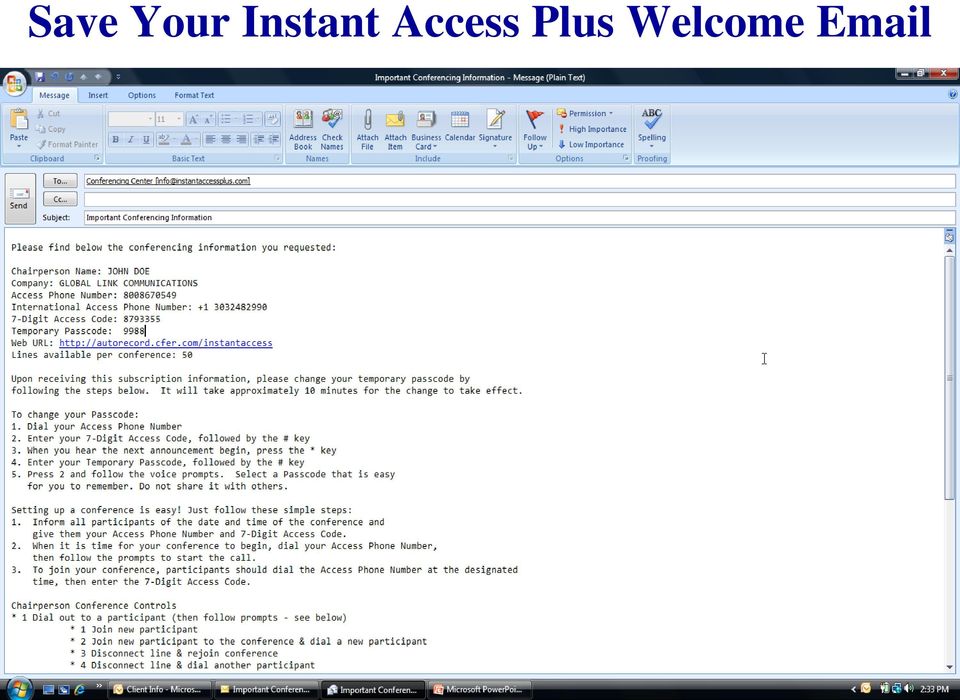
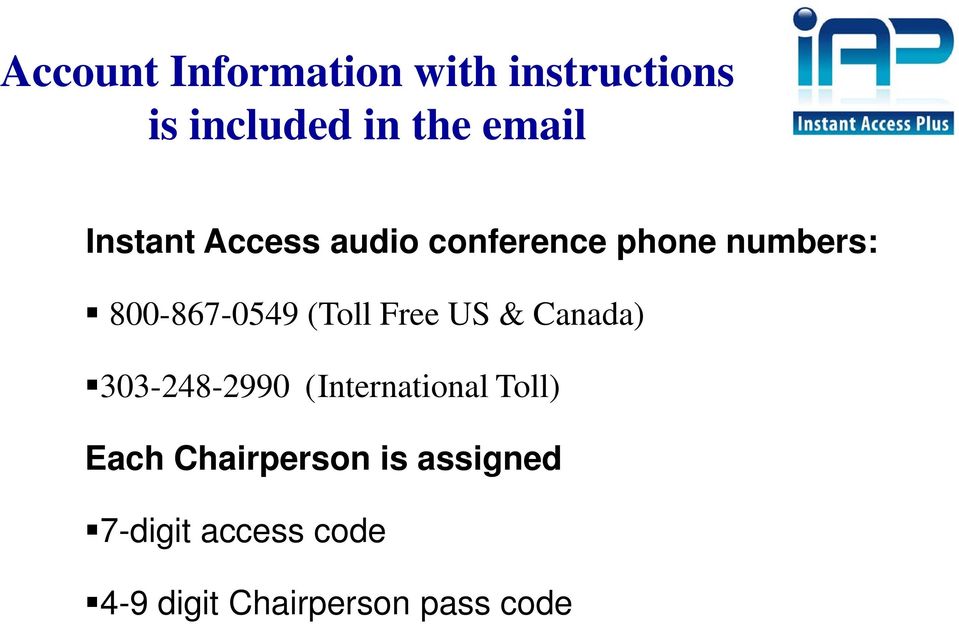
4 Account Information with instructions is included in the Instant Access audio conference phone numbers: (Toll Free US & Canada) (International Toll) Each Chairperson is assigned 7-digit access code 4-9 digit Chairperson pass code
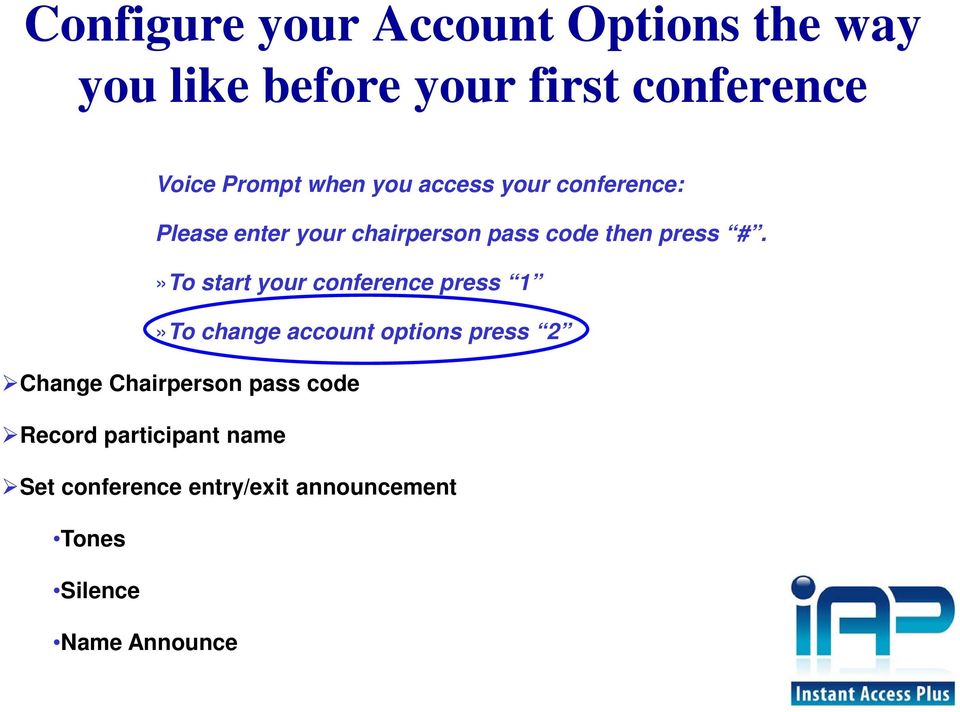
5 Configure your Account Options the way you like before your first conference Voice Prompt when you access your conference: Please enter your chairperson pass code then press #.»To start your conference press 1»To change account options press 2 Change Chairperson pass code Record participant name Set conference entry/exit announcement Tones Silence Name Announce
6 Invite your participants to the conference Tell your participants the date and time of the conference call Provide them with your Audio Conferencing phone number and 7-digit access code Participants dial in and follow the voice prompts or chairperson dials out to connect participants (using the web controls or the phone touch pad) All of the above can be done automatically by using our Outlook Scheduler tool free of charge. It s that easy!

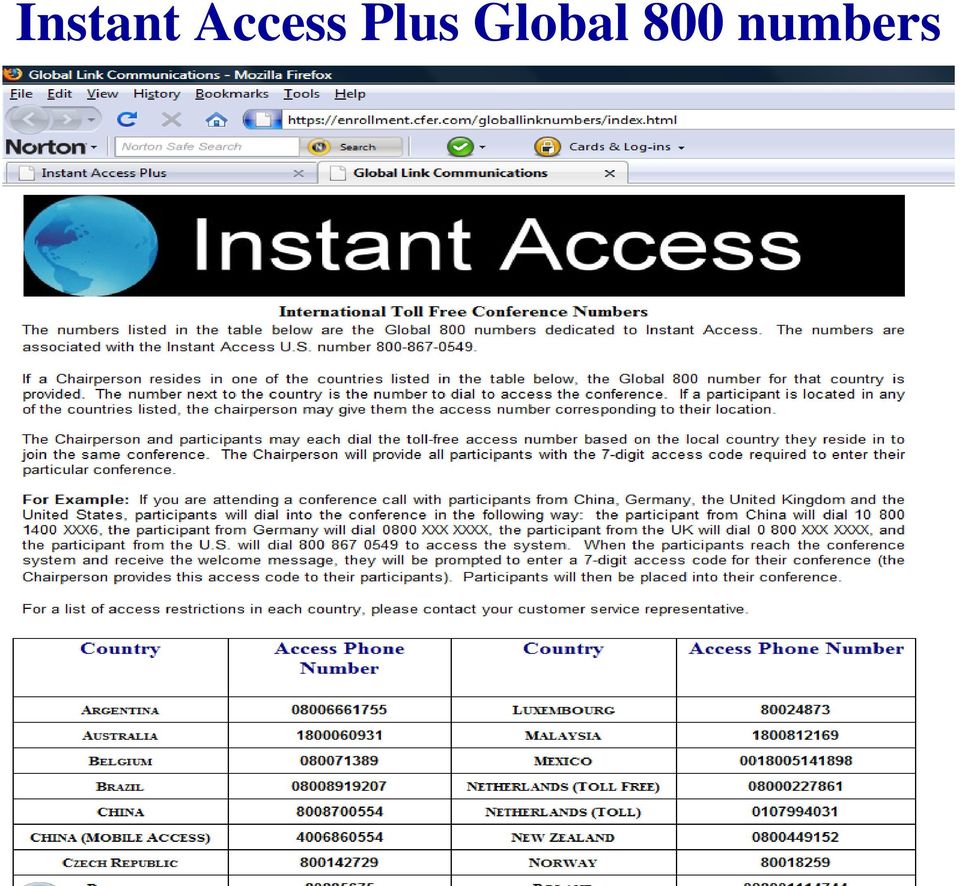
7 Need toll free access for participants outside the United States? Instant Access Plus Global 800 Numbers can be found on the web at instantaccesplus.com

8 Instant Access Plus Global 800 numbers
9 What you will hear dialing into the conference Welcome to the Conference Center. Please enter your 7 digit access code followed by the # key. Thank you please stand by If you are the chairperson please press the * key now. Chairperson Please enter your chairperson pass code then press #.»To start your conference press 1 Participant»Your Conference will begin when the chairperson arrives. Please wait.»to change account options press 2»To start your conference now press 1 or for additional security you may assign a 4-9 digit conference security code. You must provide this code to participants prior to starting the conference. To assign a conference security code for this conference enter it now, then press #. To bypass this option press *.»Your conference will now begin.»you can record your call by press *2 at anytime to start or end a recording.»for a menu of conference commands press ** at anytime.»beep

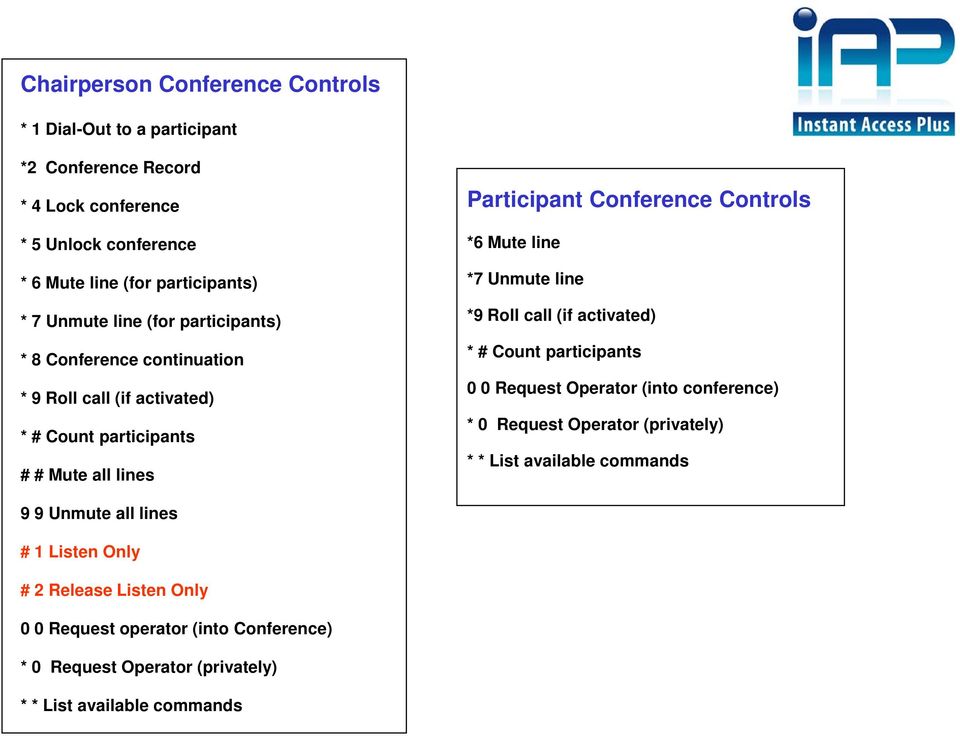
10 Chairperson Conference Controls * 1 Dial-Out to a participant *2 Conference Record * 4 Lock conference * 5 Unlock conference * 6 Mute line (for participants) * 7 Unmute line (for participants) * 8 Conference continuation * 9 Roll call (if activated) * # Count participants # # Mute all lines Participant Conference Controls *6 Mute line *7 Unmute line *9 Roll call (if activated) * # Count participants 0 0 Request Operator (into conference) * 0 Request Operator (privately) * * List available commands 9 9 Unmute all lines # 1 Listen Only # 2 Release Listen Only 0 0 Request operator (into Conference) * 0 Request Operator (privately) * * List available commands
11 Visit the Instant Access Plus User Site for user guides and tips on all features

12 If you would like to use the Instant Access Plus Audio controls via the Web

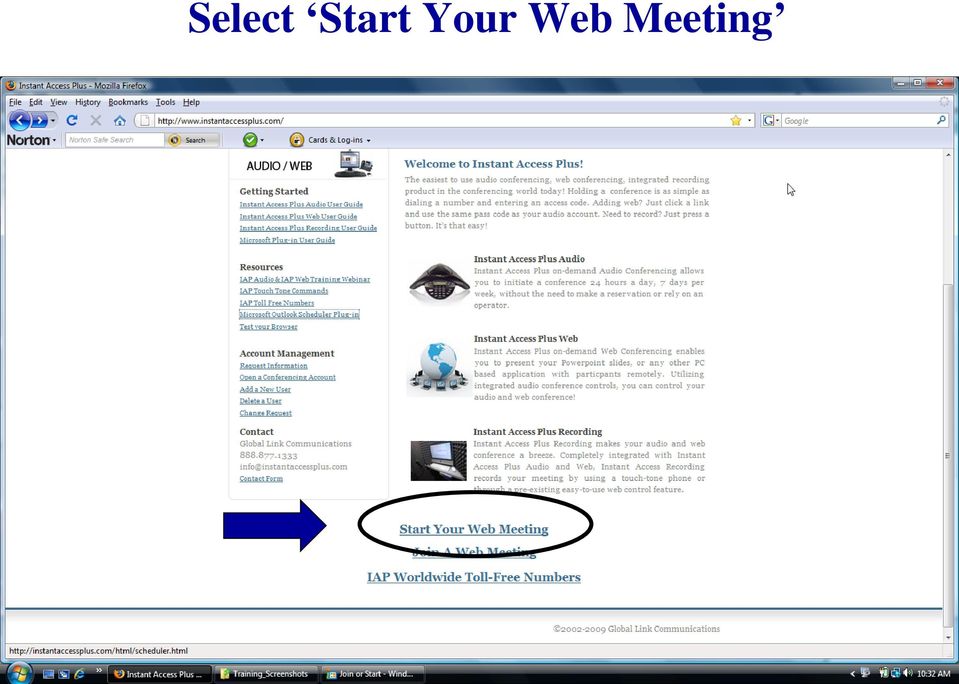
13 Select Start Your Web Meeting
14 Chairperson Login Screen Enter your Account Information

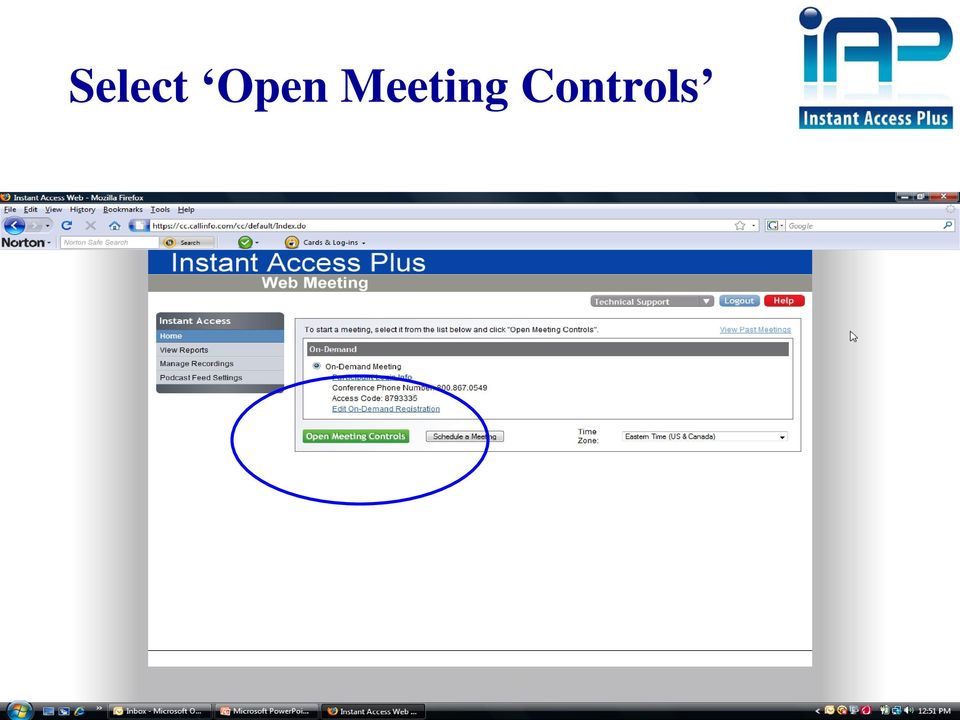
15 Select Open Meeting Controls
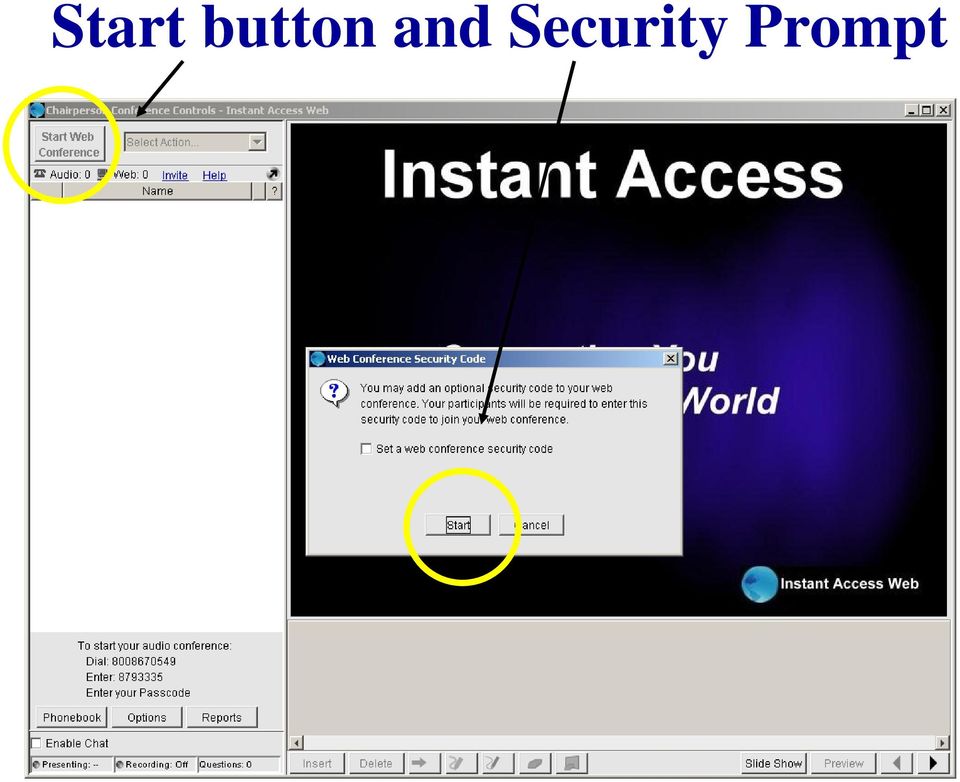
16 Start button and Security Prompt
17 Leader Screen
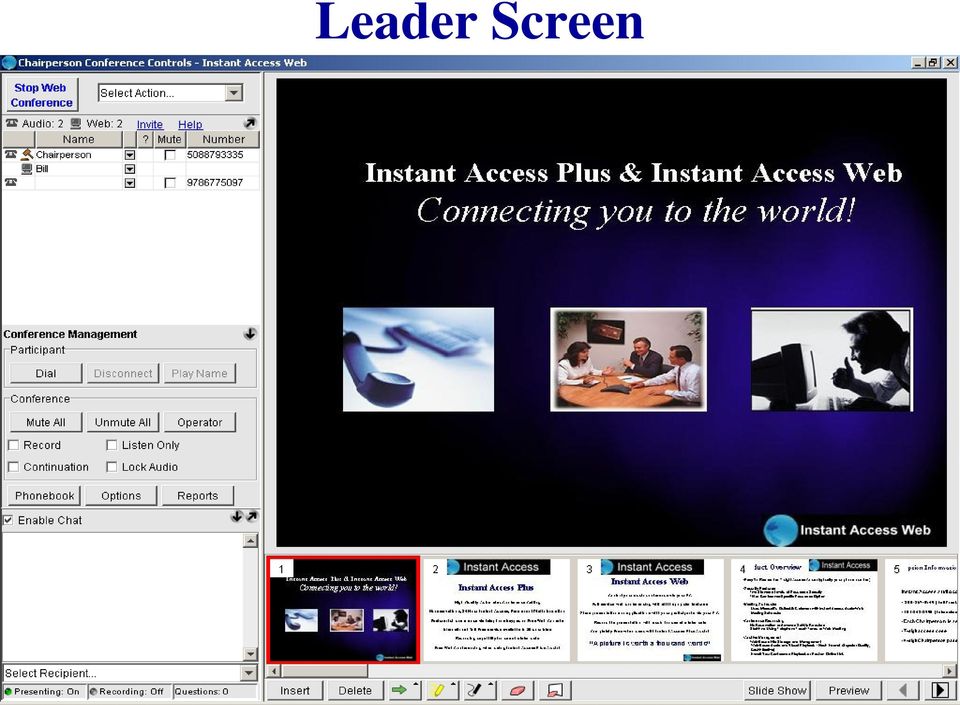
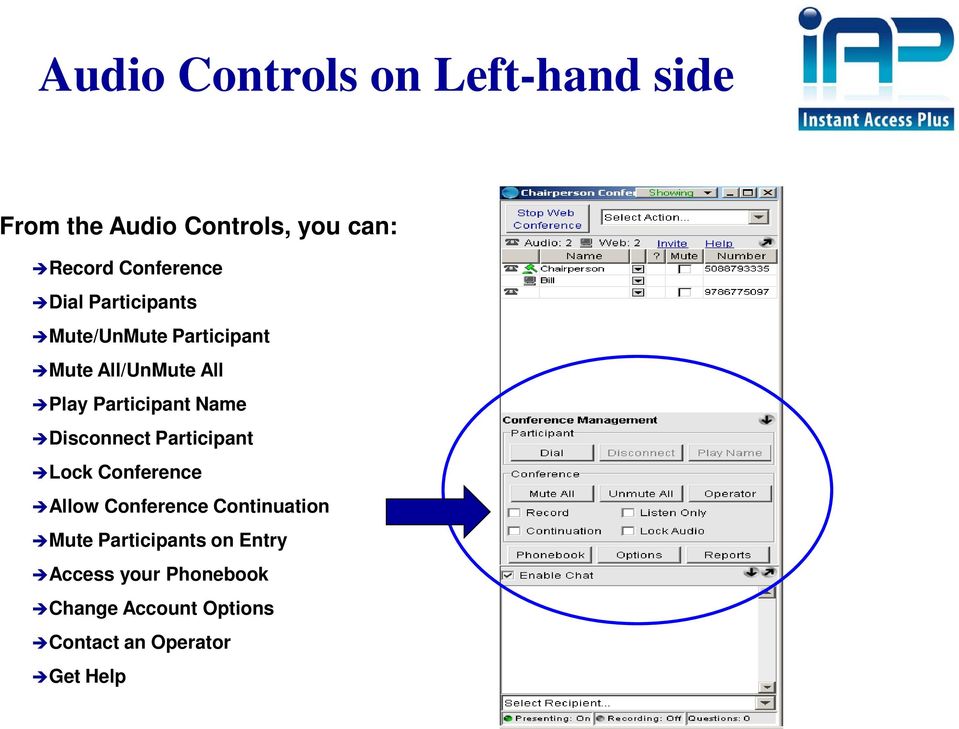
18 Audio Controls on Left-hand side From the Audio Controls, you can: Record Conference Dial Participants Mute/UnMute Participant Mute All/UnMute All Play Participant Name Disconnect Participant Lock Conference Allow Conference Continuation Mute Participants on Entry Access your Phonebook Change Account Options Contact an Operator Get Help
Premier Quality Automated Conference Calling. No reservations, 24 Hour Instant Access, Permanent Dial Information
 Premier Quality Automated Conference Calling No reservations, 24 Hour Instant Access, Permanent Dial Information Feature rich commands via telephone keypad or Web Controls Toll Free and Local access numbers
INFOCONNECT AUDIO CONFERENCING CHAIRPERSON USER GUIDE
 INFOCONNECT AUDIO CONFERENCING CHAIRPERSON USER GUIDE CHAIRPERSON SUBSCRIPTION INFORMATION 2 SET UP A CONFERENCE CALL 2 START A CONFERENCE CALL 2 INFOCONNECT ACCOUNT OPTIONS 2 COMMANDS AND FEATURES 3 MANAGE
USER S GUIDE: Audio Conferencing. Start increasing your efficiency today.
 USER S GUIDE: Audio Conferencing Start increasing your efficiency today. Table of Contents Conferencing Basics 3 Conferencing Set Up Options 4 Call Control Features 5 Security Features 6 Call Control Commands
Reservationless Conferencing
 CHAIRPERSON SUBSCRIPTION INFORMATION As a Reservationless Chairperson, you will receive: Permanent dial-in numbers (toll and toll-free/free phone) 7-digit Access Code (used by you and your participants)
OPERATOR ASSISTANCE (*0) - Immediate operator support is available by pressing *0 on your telephone keypad*.
 In Short: How to Conduct a Conference Call 1. Dial in to the system using either the toll or toll-free domestic phone number or the international phone number that was supplied to you. 2. Enter your HOST
Conference Connections User Guide. Quick, Easy, On-demand Reservationless Conferencing. Verizon Enterprise Solutions Group
 Conference Connections User Guide Quick, Easy, On-demand Reservationless Conferencing. Verizon Enterprise Solutions Group Table of Contents Introduction 2 User Terms and Definitions 3 Feature Descriptions
Alteva Collaborate USER GUIDE
 Alteva Collaborate USER GUIDE Setting Up a Conference Call When you are ready for a conference follow these simple steps: 1. Inform all participants of the date and time of the conference. 2. Give all
BroadData Audio Conferencing Product Upgrade (If your current domestic toll-free dial-in number is 888-942-8686)
 BroadData Audio Conferencing Product Upgrade (If your current domestic toll-free dial-in number is 888-942-8686) In an effort to improve your conferencing services, we will be upgrading our audio conferencing
Table of Contents. Meet-Me Audio Conferencing Service: Chairperson User Guide v1.2. Getting Started Setting-Up a Conference Call
 : Chairperson User Guide v1.2 Table of Contents Getting Started Setting-Up a Conference Call Commands & Features Chairperson Commands and Features Participant Commands and Features Helpful Hints Connection
USER MANUAL. For. Unlimited Conferencing
 USER MANUAL For Unlimited Conferencing Table of Contents How to Start a Conference Call... 2 System Features... 3 Conference Viewer... 7 My Account... 8 Appendix A: Frequently Asked Questions... 9 Appendix
Audio Conferencing Service: Chairperson s Guide
 Audio Conferencing Service: Chairperson s Guide Table of Contents Getting Started Setting Up a Conference Call Controls and Commands Chairperson Commands and Features Participant Commands and Features
USER MANUAL. For. Unlimited Audio Conferencing
 USER MANUAL For Unlimited Audio Conferencing Table of Contents How to Start a Conference Call... 2 System Features... 3 Conference Viewer... 7 Online Customer Care Center... 8 Appendix A: Frequently Asked
Audio OnDemand User Guide
 Audio OnDemand User Guide MEETING ASSISTANCE SECURITY *1 = Help Menu *31 = Turn Security Code On/Off *0 = Operator Assistance *91 = Hear Participant Count MEETING INTRODUCTION *92 = Hear Roll Call of Participants
Welcome to Instant Meeting Service
 USER GUIDE Conferencing Welcome to Instant Meeting Service Instant Meeting Service Touchtone Features...2 Instant Meeting Web Moderator... 2 Web Moderator Features... 2 Participant Details... 3 Dialing
SMALL BUSINESS USER GUIDE
 AUDIO CONFERENCING How to Start a Conference Call: Dial In 1. Dial the access number for your region. USA: Dial Toll-Free: (800) 444-801 (lower 48 states). Local USA Access Numbers: View Access Numbers
Reservationless Audio Conferencing
 Reservationless Audio Conferencing Forward Participants the Date, Time, Time zone, Dial-in telephone number(s) and 1 Conference Passcode. 2 At the specified time, dial the Dial-in Telephone Number. 3 When
Using BT MeetMe with Microsoft Lync Online
 Using BT MeetMe with Microsoft Lync Online User Guide BT Conferencing Last modified: 12 Nov 2014 Version: 2.0.0 Contents Introduction 2 Why, when, and what Scheduling & inviting 3 Scheduling a conference
Conferencing Moderator Guide
 Conferencing Moderator Guide Patent Information The accompanying product is protected by one or more U.S. and foreign patents and/or pending patent applications held by Vail Systems, Inc. 2009 UniVoIP,
1. Dial into the system using either the toll-free domestic phone number or the international (toll) phone number that was supplied to you.
 How to Conference Call 3 Easy Steps 1. Dial into the system using either the toll-free domestic phone number or the international (toll) phone number that was supplied to you. 2. Enter your HOST CODE followed
1. Dial into the system using either the toll-free domestic phone number or the international phone number that was supplied to you.
 Quick Start - Conference Call Setup 1. Dial into the system using either the toll-free domestic phone number or the international phone number that was supplied to you. 2. Enter your HOST ENTRY CODE followed
CONFERENCING & COLLABORATION
 OVERVIEW Reservationless-Plus Feature Detail Reservationless-Plus allows you to access a conference call at a moment s notice. Whether you have weekly recurring meetings or you are organizing a last minute
Conference Instructions
 Step 1-Setup Conference Call Conference Instructions Organize your conference call by notifying all participants of the date and time for your conference call and provide them with the conference dial-in
BT MeetMe Global Access User guide
 BT MeetMe Global Access User guide BT MeetMe Global Access is an instant audio conferencing service that only requires access from a fixed or mobile phone, to enable virtual meetings with up to 40 participants.
Conference Instructions
 Toll-Free Customer Service: (844) 844-1322 Online Support: [email protected] Step 1-Setup Conference Call Conference Instructions Organize your conference call by notifying all participants
User Guide. 24x7 Audio Conferencing
 24x7 Audio Conferencing User Guide University of Wisconsin- Extension The Pyle Center 702 Langdon Street Madison, WI 53706 Table of Contents How do I create a 24x7 Conference Subscription? Page 3 Wallet
Using BT MeetMe with Skype for Business Online
 Using BT MeetMe with Skype for Business Online User Guide BT Conferencing Last modified: July 2015 Version: 3.1 Contents Introduction 2 Why, when, and what Scheduling and inviting 3 Scheduling a conference
Microsoft Lync 2010 Voice and Video Training
 Microsoft Lync 2010 Voice and Video Training Objectives This course covers the following voice and video features of the Lync 2010 client. Make a Call Answer a Call Manage a Call Forward a Call Follow
RESERVATIONLESS-PLUS
 RESERVATIONLESS-PLUS Feature Detail Reservationless-Plus allows you to access a conference call at a moment s notice. Whether you have weekly recurring meetings or you are organizing a last minute meeting,
Conferencing Platform Manual
 Conferencing Platform Manual Columbus Communications Inc. [email protected] Version: 2 Columbus Group Columbus Conferencing Manual 1. Introduction 1.1. Conferencing Operation Users who join a
RESERVATIONLESS-PLUS Feature Detail
 RESERVATIONLESS-PLUS Feature Detail Reservationless-Plus allows you to access a conference call at a moment s notice. Whether you have weekly recurring meetings or you are organizing a last minute meeting,
AT&T Connect Global Reservationless Service User Guide. Version: S. March 8, 2011
 AT&T Connect Global Reservationless Service Version: S March 8, 2011 1 CHAPTER ONE... 2 1.1 AT&T RESERVATIONLESS SERVICE - INTRODUCTION... 2 1.2 USERS TYPES... 2 1.3 CONFERENCE ACCESS NUMBERS... 2 1.4
Reservationless. connecting customers, colleagues and suppliers. Real-time communication. we are www.daisygroup.com. Audio Conferencing User Guide
 Reservationless Audio Conferencing User Guide Real-time communication connecting customers, colleagues and suppliers What is Reservationless Audio Conferencing? Daisy Reservationless Conferencing is an
Table of Contents. Conferencing Basics 3. Ready Bridge Set Up Options 4. Call Control Features 5. Security Features 6. Call Control Commands 7
 Table of Contents Conferencing Basics 3 Ready Bridge Set Up Options 4 Call Control Features 5 Security Features 6 Call Control Commands 7 Conference Call Recording 8 International Conferencing 10 Page:
Unified Meeting. Easy to use, simple, reliable. Tips for a Successful Conference CONFERENCING & COLLABORATION
 U S E R G U I D E V 4. 1 1. 7 Unified Meeting Easy to use, simple, reliable Unified Meeting lets you quickly and easily bring people together from anywhere in the world. You get audio, web and video conferencing
Reservationless-Plus Features
 Reservationless-Plus Features When you need to host weekly recurring meetings or organize a last minute meeting, Reservationless-Plus conferencing efficiently allows you to bring people together to help
BT MeetMe User guide
 BT MeetMe User guide BT MeetMe is an instant audio conferencing service that only requires access from a fixed or mobile phone to enable virtual meetings with up to 40 participants. No prior booking is
If a participant calls in before you, he/she will hear music until you, the host, join the call.
 How do I use my AT&T Reservationless Conference Service: AT&T TeleConference Services Reservationless Conferencing provides users the ease of having a conference call anytime of the day or night without
AT&T Reservationless Service User Guide. April 16, 2007
 April 16, 2007 CHAPTER ONE...3 AT&T RESERVATIONLESS SERVICE INTRODUCTION..3 USER TYPES...3 ACCESS NUMBERS, PASSWORD, AND SECURITY CODE...3 PREPARING FOR A CONFERENCE CALL - PRE-CONFERENCE REQUIREMENTS...4
Unicom and Microsoft Lync 2010 Enterprise Voice Getting Started
 Unicom and Microsoft Lync 2010 Enterprise Voice Getting Started Objectives This course covers the following voice and video features of the Lync 2010 client. Make a Call Answer a Call Manage a Call Forward
Comcast Business Class Audio and Web
 Comcast Business Class Audio and Web Conferencing User Guide 1 table of contents WELCOME TO COMCAST AUDIO AND WEB CONFERENCING DOCUMENTATION CONVENTIONS TERMINOLOGY 1 YOUR CONFERENCING SUBSCRIPTION Account
Conference Connect for Lync User Guide
 Conference Connect for Lync User Guide BT Conferencing Issue 1.0 March 2013 Contents 2 What is Conference Connect for Lync? Introduction 3 Setting up Conference Connect 4 How to launch 5 First time launching
Skype for Business Phone Conference Call
 Ready Reference 062316 Introduction Skype for Business Phone Conference Call Skype for Business (formerly MS Lync) provides an easy way to join phone conference calls anytime without assistance from a
Elisa Conference. User Guide
 Elisa Conference User Guide Version 10/2014 Quick Guide Elisa Audio Conference START YOUR CONFERENCE Just follow these 2 easy steps to start your conferencing: 1. Dial the toll or toll free phone access
IDT Connect User Guide
 IDT Connect User Guide Updated: January 31, 2008 Table of Contents Getting Started... 2 Setting Up Your Conference Room... 3 Setting your Administrator Password... 3 Setting your Participant Password...
User guide Automated audio conferencing solution
 User guide Automated audio conferencing solution this guide will help you scheduling and running audio conferences very easily from https://www.orangebusinessconferencing.com/ What you will learn : manage
From the World s Leading Conferencing Specialist
 Audio Conferencing Solutions InterCall has become one of the largest conference services provider in the world. We specialise in every type of conferencing Audio, Video, Web and Event. We connect thousands
BT MeetMe User guide
 BT MeetMe User guide BT MeetMe is an instant audio conferencing service that only requires access from a fixed or mobile phone to enable virtual meetings with up to 40 participants. No prior booking is
Online/Web User Interface
 Business Conference Bridge USER GUIDE Local Conference Access Number: 772-597-2743 Toll Free Access Number: 877-680-6338* You and your call participants can use either of the phone number listed above
user guide the conference call people Simple Effective Collaboration
 user guide the conference call people Simple Effective Collaboration Introduction MeetingZone is a fully automated conferencing service that lets you set up and manage audio and web conferences. Your MeetingSpace
Feature Reference. Features: Call Forwarding Call Waiting Conference Calling Outbound Caller ID Block Last Call Return VoiceMail
 Feature Reference This document will provide you with information on and how to use the following features of your phone service with Standard Broadband. Features: Call Forwarding Call Waiting Conference
managedip Hosted TDS Table of Contents Meet-Me Conferencing User Guide
 Table of Contents Add a Conference... 2 Assigning Delegates... 4 Modifying or Delegating a Conference.. 4 Creating Custom Greeting... 4 Manage Recordings... 5 Moderator Client... 6 Launch Conference Moderator/Join...
CONFERENCE NOW. with WebConnect
 CONFERENCE NOW with WebConnect I. WebConnect Overview 2 A. Conference Center 2 B. Conference Controls II. Log in (Chairperson) 3 III. Join a Meeting (Participant) 5 IV. Conference Controls 6 A. Participants
Conferencing User Guide
 Welcome Conferencing is an easy to use, on demand, audio conferencing service to help enhance your business productivity. Included at no extra charge with your Business Advantage Plus and Business Advantage
GENESYS MEETING CENTER. User Guide
 GENESYS MEETING CENTER User Guide GENESYS MEETING CENTER Customer Service and Support We are here to help you at any time: Technical Support: 1-800-305-5208 1-303-267-1097 Technical Support during conference
GLOBAL CROSSING READY-ACCESS WEB MEETING. User Guide GETTING STARTED FEATURES INSTALLING THE JAVA PLUG-IN 9 SYSTEM REQUIREMENTS 9
 GLOBAL CROSSING READY-ACCESS WEB MEETING User Guide GETTING STARTED > SETTING UP A CONFERENCE 2 > LOGIN TO READY-ACCESS WEB MEETING 2 FEATURES > CHAIRPERSON CONFERENCE CONTROL SCREEN 3 > WEB CONTROLS Start
Audio Conferencing Getting Started
 Audio Conferencing Getting Started 1. How to open the bridge (conference moderator) o In the office o Out of the office 2. How to schedule a conference o Outlook Plug-in o Outlook Appointment (Meet Me
Introduction. Type of Audio Conferencing
 Company Profile Shinetown Telecom Group was established in 1997. Headquartered in Hong Kong, we started our operation in Hong Kong as a licensed Private Payphone Service Operator. Apart from providing
Sonera Meeting Services Microsoft Office 365 dial-in service. Quick Start Guide
 Sonera Meeting Services Microsoft Office 365 dial-in service Quick Start Guide Revised: September 2015 Contents Introduction... 2 System Requirements... 2 What s New in This Guide... 2 Tips for Using Audio
An Informational User Guide for: Web Conferencing
 Allows You to: Manage your audio conference online using easy point and click conference commands Show slide presentations and graphics to meeting participants Show your desktop to meeting participants
Unified Meeting 5 User guide for Windows
 Unified Meeting 5 User guide for Windows Unified Meeting 5, a meeting and collaboration application enhances the way you communicate by making meetings convenient and easy to manage. It improves your meeting
Inter-Tel Audio and Web Conferencing
 MITEL Inter-Tel Audio and Web Conferencing User Guide NOTICE This Inter-Tel Audio and Web Conferencing User Guide is released by Inter-Tel, Inc. as a guide for end-users. It provides information necessary
Genesys Meeting Center User Guide v4.11
 Genesys Meeting Center User Guide v4.11 www.intercalleurope.com Information Hotline 0871 7000 170 +44 (0)1452 546742 [email protected] Reservations 0870 043 4167 +44 (0)1452 553456 [email protected]
Meet Me Conferencing. Document Date: 05/15/2015 Document Version: 1.0d
 Meet Me Conferencing Document Date: 05/15/2015 Document Version: 1.0d Creating Conferences Access You have access to Conferencing features if you have been assigned to a Meet-Me conference bridge. Go to
To the CPA Telephone Meeting Chairperson
 Meeting Material from CPA CPA Telephone Meeting Suggested Guidelines To the CPA Telephone Meeting Chairperson Thank you for leading a CPA telephone meeting. The telephone meeting is a safe place for CPA
User guide. Using BT MeetMe with Microsoft Lync Enterprise.
 User guide. Using BT MeetMe with Microsoft Lync Enterprise. Contents. Introduction Why, when, and what Scheduling and inviting Scheduling a conference with Outlook Joining Joining the conference Joining
READY-ACCESS CHAIRPERSON GUIDE
 READY-ACCESS CHAIRPERSON GUIDE SETTING UP A CONFERENCE CALL When you are ready for a conference follow these simple steps: 1. Inform all participants of the date and time of the conference. 2. Give all
GLOBAL CROSSING READY-ACCESS AND EMEETING. Chairperson Guide CHAIRPERSON COMMANDS AND FEATURES SETTING UP A CONFERENCE CALL
 GLOBAL CROSSING READY-ACCESS AND EMEETING Chairperson Guide SETTING UP A CONFERENCE CALL When you are ready for a conference follow these simple steps: 1. Inform all participants of the date and time of
Audio Conferencing User Guide
 User Guide 09232009 Contents Introduction... 3 Basics... 3 Dial-in... 3 Dial-out... 3 Operator-assisted... 4 Keypad Features... 4 Advanced Settings... 4 Live Call Manager... 5 Open the Live Call Manager...
Planning Your Meeting... 2
 User Guide: Insert Title USER GUIDE Conferencing Audio Conferencing Planning Your Meeting... 2 Choose the Type of Meeting... 2 Choose How Participants Attend Your Virtual Meeting... 3 Choose Features for
BT MeetMe with Global Access
 Data sheet BT MeetMe with Global Access The easy way to collaborate Whether you re a multi-national organisation with teams all over the world or a small business with clients across the country, offers
Genesys Meeting Center User Guide
 Genesys Meeting Center User Guide v4.0. For more information: 866.46.797 www.genesys.com Genesys Meeting Center is your perfect everyday business conferencing tool. Our awardwinning technology integrates
UNITY MEET ME CONFERENCING SERVICE DEFINITION. SD051 v1.0 Issue Date 29th June 2012
 = UNITY MEET ME CONFERENCING SERVICE DEFINITION SD051 v1.0 Issue Date 29th June 2012 Unity Meet Me Conferencing Service Definition Service Summary Unity Meet Me Conferencing is InTechnology s hosted audio
Kaiser Permanente Conferencing User Guide
 Kaiser Permanente Conferencing User Guide Welcome! This user guide explains the new features and functionality brought to you by Qwest Conferencing. Read about your expanded conferencing options and select
INTERCALL ONLINE. Customer Portal Manage Account User Guide. View/Edit Owner Profile
 INTERCALL ONLINE Customer Portal Manage Account User Guide View or update your personal account profile details and/or your product feature defaults at any time by visiting the Manage My Account section
View/Edit Owner Profile
 USER GUIDE TCC Online Manage My Account View or update your personal account profile details and/or your product feature defaults at any time by visiting the Manage My Account section on TCC Online. View/Edit
Instant Meeting Web Moderator User Guide
 USER GUIDE Conferencing Instant Meeting Web Moderator User Guide Overview... 2 System Requirements... 2 Accessing Web Moderator... 2 Creating a shortcut on your desktop... 2 Web Moderator sections... 3
MeetingPlace Conference Bridge 509 335 4700
 MeetingPlace Conference Bridge 509 335 4700 There are several advantages to using MeetingPlace over the web or the conference features on your phone. The main advantages include: You never have to remember
Audio and Web Conferencing
 MITEL Audio and Web Conferencing User Guide Notice This User Guide is released by Mitel Networks Corporation as a guide for end users. It provides information necessary to use Audio and Web Conferencing.
BROADCONNECT POLYCOM SOUNDPOINT IP 550. Quick Reference Guide
 BROADCONNECT POLYCOM SOUNDPOINT IP 550 Quick Reference Guide SOUNDPOINT IP 550 Quick Reference Sheet My Telephone Number: My Extension: Voice Portal URL: http://mypbx.broadconnect.ca Voice Portal User
BP_UserGuide_1113. Business Phone User Guide
 BP_UserGuide_1113 Business Phone User Guide Contents Welcome to Shaw Business Phone 2 Voicemail 6 Call Forward 7 Call Forward Busy 8 Call Forward No Answer 9 Call Waiting 10 Multi-line Hunting 12 Call
BP_UserGuide_0113. Business Phone User Guide
 BP_UserGuide_0113 Business Phone User Guide Contents Welcome to Shaw Business Phone 2 Voicemail 6 Call Forward 7 Call Forward Busy 8 Call Forward No Answer 9 Call Waiting 10 Multi-line Hunting 12 Call
2007 Global Crossing - Proprietary. Ready-Access Web Meeting Version 9
 2007 Global Crossing - Proprietary Ready-Access Web Meeting Version 9 Agenda Getting Started with Installation/Login Participant Experience Conference Center Features Starting your Web Meeting Managing
Spiderphone.com. Owner s Manual [Updated 10/3/03] Take control of your conference calls!
![Spiderphone.com. Owner s Manual [Updated 10/3/03] Take control of your conference calls!](/thumbs/26/9256927.jpg "Spiderphone.com. Owner s Manual [Updated 10/3/03] Take control of your conference calls!") Spiderphone.com Owner s Manual [Updated 10/3/03] Take control of your conference calls! Spiderphone gives you the ability to set up and control your own conference calls quickly, easily and cost-effectively.
Spiderphone.com Owner s Manual [Updated 10/3/03] Take control of your conference calls! Spiderphone gives you the ability to set up and control your own conference calls quickly, easily and cost-effectively.
AUDIO CONFERENCING USER GUIDE ON CALL. spark.co.nz. 1-1 TEL1811 RB Audio Conferencing Document.indd 1 6/08/14 6:15 pm
 MEETINGS ON CALL AUDIO CONFERENCING USER GUIDE spark.co.nz 1-1 TEL1811 RB Audio Conferencing Document.indd 1 6/08/14 6:15 pm Spark Audio Conferencing brings people together, wherever they are. Audio Conferencing
InterCall Audio Conferencing I N F O R M A T I O N D E P L O Y E D. S O L U T I O N S A D V A N C E D. M I S S I O N S A C C O M P L I S H E D.
 InterCall Audio Conferencing I N F O R M A T I O N D E P L O Y E D. S O L U T I O N S A D V A N C E D. M I S S I O N S A C C O M P L I S H E D. Introduction This How to Guide was developed by Human Resources,
Audio and Web Conferencing quick start guide
 Audio and Web Conferencing quick start guide Orange Business Services would like to thank you for using its Audio and Web Conferencing services the way to set up and schedule your conferences depends on
Frequently Asked Questions
 Frequently Asked Questions Contents Installing Lync 2010 Setting Up Devices Managing Contacts Using Lync 2010 as a Phone Using Lync 2010 with Office Outlook Scheduling Meetings Inviting People to Meetings
DAMOVO CONFERENCE CALL MeetMe Meeting Expectations
 Introductory User Guide DAMOVO CONFERENCE CALL MeetMe Meeting Expectations CONFERENCING WELCOME TO DAMOVO MeetMe YOUR PERSONAL MEETING ROOM Simply pick up the phone and you ll soon be sharing your thoughts
Unified Meeting 5 User guide for MAC
 Unified Meeting 5 User guide for MAC Unified Meeting 5 is a web based tool that puts you in complete control of all aspects of your meeting including scheduling, managing and securing your meetings.. Whether
Conferencing Moderator Guide - Proprietary - 2007 Nextera Communications. Conferencing Moderator Guide
 - Proprietary - Conferencing Moderator Guide TABLE OF CONTENTS 1 INTRODUCTION...3 2 ACTIVATING THE CONFERENCE CALL...3 3 QUICK KEY REFERENCE FOR TELEPHONE ADMINISTRATION...3 4 WEB INTERFACE...4 4.1 Accessing