
Table of Contents. Conferencing Basics 3. Ready Bridge Set Up Options 4. Call Control Features 5. Security Features 6. Call Control Commands 7
|
|
|
- Lewis Strickland
- 10 years ago
- Views:
Transcription
1

2 Table of Contents Conferencing Basics 3 Ready Bridge Set Up Options 4 Call Control Features 5 Security Features 6 Call Control Commands 7 Conference Call Recording 8 International Conferencing 10 Page: 2 Version: 6.0

3 Conferencing Basics As a new Chairperson you should have received an with; 1. A Toll Free Access Phone Number 2. Your Own Seven-Digit Access Code 3. Your Chairperson Pass Code If you have not received this information, please call your PAETEC Account Manager, or call Setting up a Conference Call When you are ready for a conference, follow these simple steps: 1. Inform all participants of the date and time of the conference. 2. Give all participants your toll-free access phone number and 7-digit access code. 3. When it's time for your conference, dial the toll-free conferencing phone number, listen to the prompts to enter your 7-digit access code, then enter your Chairperson passcode to begin the conference. 4. Conference participants dial the toll-free conferencing access number at the designated time, enter the 7- digit access code, and the conference is underway. Conference Call Details When you order your Ready Bridge number, you can set the maximum number of participants, up to 96, that can join a conference (including the chairperson). Anyone trying to join the conference after the maximum number of participants has been reached will not be able to join. If participants dial in before the Chairperson they will be placed on music hold until the Chairperson joins the conference. When the Chairperson hangs up, the conference call will end. To allow the conference to continue after the Chairperson leaves, he or she should press *8 early in the conference. You will hear a tone each time a participant joins or leaves a conference. If you need assistance anytime during your call, simply press 00 for a live operator. Rating There is no charge for owning a conference bridge. You are only charged for service usage. The total cost of a conference call is calculated as follows: (Conference Call Rate) x (Duration of Call in Minutes) x (Number of Participants) Different rates apply for international versus domestic participants. Consult your service contract or contact your account manager for your conference call rates. Page: 3 Version: 6.0
4 Ready Bridge set up options Ready Bridge provides you the flexibility to configure your bridge number with key options that will be in effect for all your calls. Options include; Record Names: The name of each participant will be recorded as they enter the conference. Each participant will be announced by name as they enter and exit the conference call. Change Password: Change your Chairperson password Set Tones: Set conference tones for when participants enter and exit conference call. You can set to normal tone, silence, or announce participant s name To change set-up option, dial your toll free access number, your 7 digit access code and your password then enter 2 and listen to prompts. Page: 4 Version: 6.0

5 Call Control Features Call control features provide you with the advanced tools you need to manage an efficient conference call. Dialing Out To Participants If you want a participant to join a call that has not dialed in, the Chairperson can dial out to them from the conference call. To dial out to a participant dial *1 and listen to the prompts. Muting And Un-Muting Lines Any participants can mute and un-mute their line. To do this, press *6 to mute the line, and *7 to un-mute the line. The Chairperson can also mute and un-mute all other lines in a conference call. Press ## to mute all lines and 99 to un-mute all lines. This will affect all lines except the Chairperson s. Continuing Your Call By default, the conference call will end when the Chairperson drops off the call. To allow the call to continue after the Chairperson has dropped off, the Chairperson can press *8 anytime during the call. The call will not end until all participants have dropped off the call. Keeping Track Of Participants Anyone on the call can obtain a count of participants by dialing *# anytime during the call. You can also do an automated roll call, which will announce the names of all participants on the call by pressing *9. To use this feature, you must have activated the Record Names feature listed in the Ready Bridge Set Up Option section of this guide. Page: 5 Version: 6.0

6 Security Features These features allow you to customize the level of security you need to keep your conferences confidential. Changing your Chairperson Pass Code Change your Chairperson pass code number frequently by following these simple steps: 1. Dial the toll-free conferencing phone number 2. Enter your 7-digit access code 3. Press the *key 4. Enter your current Chairperson pass code 5. Select Option 2 6. Follow the prompts to create a new Chairperson pass code Assign additional Security Code You can add an additional security code for sensitive conferences. No one will be able to enter your conference call without entering the security code. Be sure to inform all participants of the security code before you begin the conference. 1. Enter the conference before participants are scheduled to join 2. Enter your 7-digit access code 3. Press the *key 4. Enter your current Chairperson pass code 5. Select Option 1 6. Enter your additional security pass code (4 to 9 digits) Lock Feature To ensure maximum security you can lock your call once all your participants have joined. This will prevent any other participants from joining your call. Press *4 to lock the conference Press *5 to unlock the conference Page: 6 Version: 6.0
7 Controls and Commands Chairperson command Controls * 1 Dial out to participant * 1 Join new participant to conference * 2 Join new participant and dial out to another participant * 3 Disconnect line and rejoin conference * 4 Disconnect line and dial out to another participant * 2 Conference Call Recording (Start / Stop) * 4 Lock Conference * 5 Unlock Conference * 6 Mute your line only * 7 Unmute your line only * 8 Allow conference to continue after you disconnect * 9 Automated roll call of participants (if activated) * # Count number of participants in the conference # # Mute all lines 9 9 Unmute all lines 0 0 Ask for operator * * List of available command Participant command Controls * 6 Mute Line * 7 Unmute Line * 9 Automated Roll Call (if activated) * # Count Participants 0 0 Ask for operator * * List of available commands Page: 7 Version: 6.0

8 Conference Call Recording The chairperson can start and stop recording an audio conference by simply pressing *2. When the recording starts, a message will play notifying participants that the meeting is being recorded. To avoid multiple recording fees for a single meeting, do not start and stop the recording multiple times during the conference. The recording will continue until the chairperson presses *2 again to stop the recording, or until the call is ended. Conference Recording Playback Recordings are available immediately after the conference ends. Recordings can be accessed in several ways: 1. Chairperson can access recordings from the Archive Management Screen (see Managing Your Recording Archive). 2. Participants can access recordings via a link, which is ed to the chairperson after the conference. 3. Recording can be downloaded in MP3 format by the chairperson and distributed via , posted on corporate internet or intranet sites, or various other electronic media. Managing Your Recording Archive You can access your recordings through the Archive Management section of Ready Bridge On-Line at Archive Management Sign In Screen Access Archive Management by selecting Archives from the Ready Bridge On-Line main Sign In Screen. You will receive the Archive Management Sign In Screen (figure 1). Figure (1) Previously recorded conferences will be stored in the Archives List (see next page) for future use. This list includes the title of each archive, the date and time it was recorded, and a file ID number. In addition, there are some report settings that you can turn on or off. These include the following columns: Page: 8 Version: 6.0
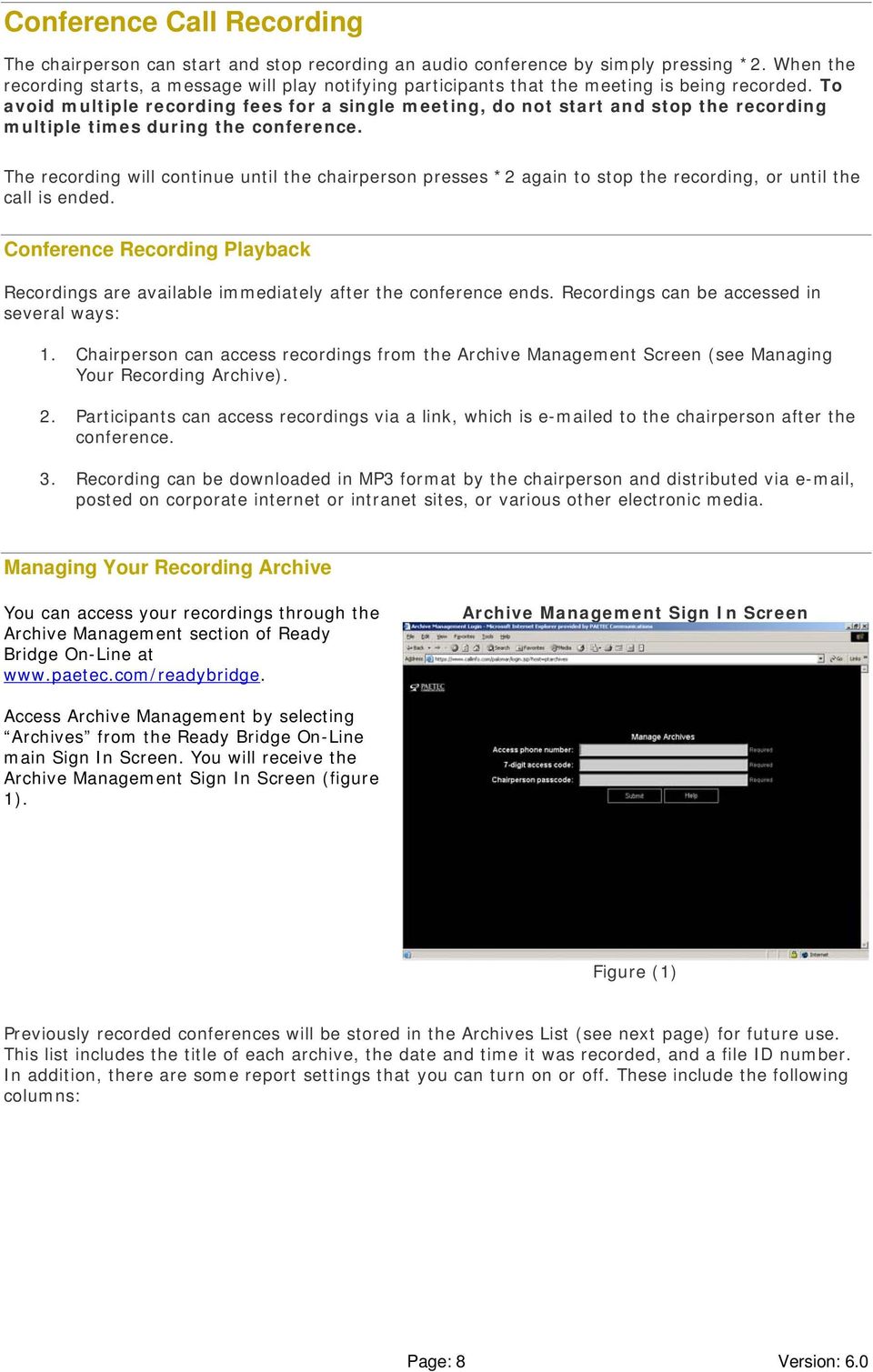
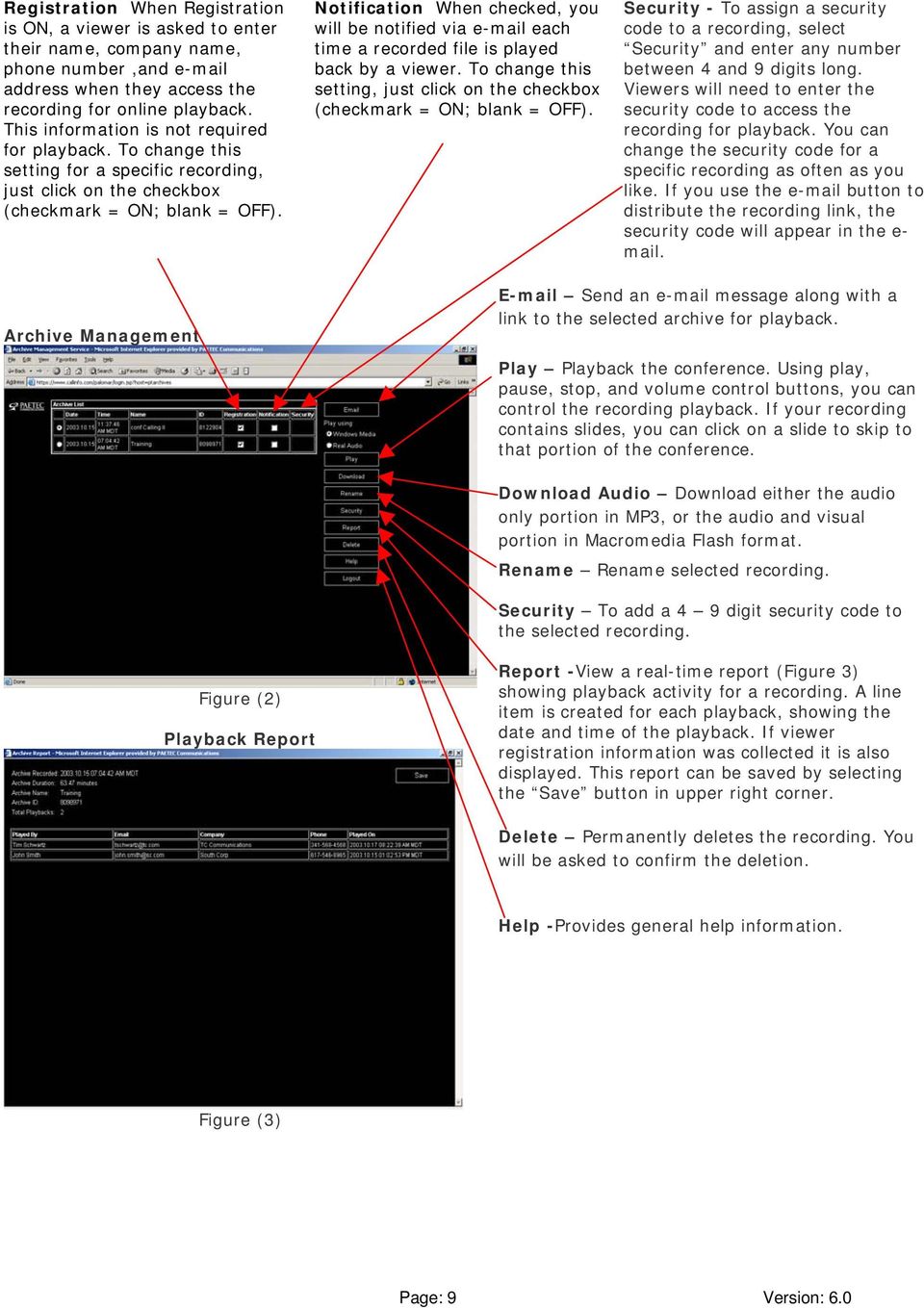
9 Registration When Registration is ON, a viewer is asked to enter their name, company name, phone number,and address when they access the recording for online playback. This information is not required for playback. To change this setting for a specific recording, just click on the checkbox (checkmark = ON; blank = OFF). Notification When checked, you will be notified via each time a recorded file is played back by a viewer. To change this setting, just click on the checkbox (checkmark = ON; blank = OFF). Security - To assign a security code to a recording, select Security and enter any number between 4 and 9 digits long. Viewers will need to enter the security code to access the recording for playback. You can change the security code for a specific recording as often as you like. If you use the button to distribute the recording link, the security code will appear in the e- mail. Archive Management Send an message along with a link to the selected archive for playback. Play Playback the conference. Using play, pause, stop, and volume control buttons, you can control the recording playback. If your recording contains slides, you can click on a slide to skip to that portion of the conference. Download Audio Download either the audio only portion in MP3, or the audio and visual portion in Macromedia Flash format. Rename Rename selected recording. Security To add a 4 9 digit security code to the selected recording. Figure (2) Playback Report Report -View a real-time report (Figure 3) showing playback activity for a recording. A line item is created for each playback, showing the date and time of the playback. If viewer registration information was collected it is also displayed. This report can be saved by selecting the Save button in upper right corner. Delete Permanently deletes the recording. You will be asked to confirm the deletion. Help -Provides general help information. Figure (3) Page: 9 Version: 6.0
10 International Conferencing With Ready Bridge you can join people from around the world to your conference. You can dial out to join participants anywhere in the world. Participants can also dial in to a conference, toll free, from many international locations. Below is a list of countries we offer dial in service from, along with the toll free access number they would dial to join a conference from each country. Country Access Number Restrictions Argentina Austria Bahamas Belgium Brazil Chile CHINA Not available on all networks. No availability from mobile phones Colombia Denmark Dominican Republic Finland France Germany Greece HONG KONG The only mobile network with access is C&W-HKT Hungary Iceland Indonesia Ireland Italy Jamaica JAPAN Luxembourg Malaysia MEXICO Netherlands Norway Philippines Poland Russia Saint Kitts / Nevis South Africa SOUTH KOREA Not available from mobile networks Spain Sweden Taiwan Thailand UNITED KINGDOM Works in the following areas of UK: England, Guernsey, Isle of Man, Northern Ireland, Scotland, Wales, Channel Island Page: 10 Version: 6.0

USER S GUIDE: Audio Conferencing. Start increasing your efficiency today.
 USER S GUIDE: Audio Conferencing Start increasing your efficiency today. Table of Contents Conferencing Basics 3 Conferencing Set Up Options 4 Call Control Features 5 Security Features 6 Call Control Commands
Welcome to Bell Reservationless Audio Conferencing. A guide to help you get started with your new Bell service
 Welcome to Bell Reservationless Audio Conferencing A guide to help you get started with your new Bell service Contents Welcome to Bell Reservationless Audio Conferencing How to get started with Bell Reservationless
IDT Connect User Guide
 IDT Connect User Guide Updated: January 31, 2008 Table of Contents Getting Started... 2 Setting Up Your Conference Room... 3 Setting your Administrator Password... 3 Setting your Participant Password...
AT&T TeleConference Best Practices
 Page 1 Table of Contents How to prepare for an Audio Conference... 3 What to do during a conference... 4 Frequently Asked Questions How do I schedule a reserved conference?... 5 How do I set up a Reservationless
INFOCONNECT AUDIO CONFERENCING CHAIRPERSON USER GUIDE
 INFOCONNECT AUDIO CONFERENCING CHAIRPERSON USER GUIDE CHAIRPERSON SUBSCRIPTION INFORMATION 2 SET UP A CONFERENCE CALL 2 START A CONFERENCE CALL 2 INFOCONNECT ACCOUNT OPTIONS 2 COMMANDS AND FEATURES 3 MANAGE
Meetings. on call. The two popular Audio Conferencing options. Audio Conference. user guide
 Audio Conference user guide Meetings on call Telecom Audio Conferencing brings people together, wherever they are. Audio Conferencing is one of the easiest and most cost-effective ways to get people together
SunGard Best Practice Guide
 SunGard Best Practice Guide What Number Should I Use? www.intercalleurope.com Information Hotline 0871 7000 170 +44 (0)1452 546742 [email protected] Reservations 0870 043 4167 +44 (0)1452
Reservationless Conferencing
 CHAIRPERSON SUBSCRIPTION INFORMATION As a Reservationless Chairperson, you will receive: Permanent dial-in numbers (toll and toll-free/free phone) 7-digit Access Code (used by you and your participants)
An Informational User Guide for: Web Conferencing
 Allows You to: Manage your audio conference online using easy point and click conference commands Show slide presentations and graphics to meeting participants Show your desktop to meeting participants
BT Premium Event Call and Web Rate Card
 BT Managed Event and BT Self-Managed Event (also referred to as Express, Plus and Premium) Conference Bridge and Call for Booked Audio Conferencing Services will comprise the following for each phone-conference:
Audio Conferencing Service: Chairperson s Guide
 Audio Conferencing Service: Chairperson s Guide Table of Contents Getting Started Setting Up a Conference Call Controls and Commands Chairperson Commands and Features Participant Commands and Features
DIR Contract #DIR-TSO-2610 Amendment #1 Appendix C Price Index
 CONFERENCING SERVICES Customer Price Price per minute/hour/mont h etc. Comment Audio Conferencing Operator Assisted Dial-Out $0.1530 Per Minute OADI Toll-Free Dial-In (Operator Assisted) $0.0816 Per Minute
Foreign Taxes Paid and Foreign Source Income INTECH Global Income Managed Volatility Fund
 Income INTECH Global Income Managed Volatility Fund Australia 0.0066 0.0375 Austria 0.0045 0.0014 Belgium 0.0461 0.0138 Bermuda 0.0000 0.0059 Canada 0.0919 0.0275 Cayman Islands 0.0000 0.0044 China 0.0000
Global Network Access International Access Rates
 Global Network Access International Access Rates We know that you need to communicate with your partners, colleagues and customers around the world. We make every effort to understand the difficulties
Schedule R Teleconferencing Service
 Schedule R Teleconferencing Service 11-X-21415 Telecommunication Equipment & Services Hosted Telecommunications Services/Applications Teleconferencing Service Section 3.4.4 AT&T Audio Teleconferencing
Quantum View Manage Administration Guide
 2010 United Parcel Service of America, Inc. UPS, the UPS brandmark and the color brown are trademarks of United Parcel Service of America, Inc. All rights reserved. Quantum View Manage Administration Guide
Planning Your Meeting... 2
 User Guide: Insert Title USER GUIDE Conferencing Audio Conferencing Planning Your Meeting... 2 Choose the Type of Meeting... 2 Choose How Participants Attend Your Virtual Meeting... 3 Choose Features for
Reporting practices for domestic and total debt securities
 Last updated: 4 September 2015 Reporting practices for domestic and total debt securities While the BIS debt securities statistics are in principle harmonised with the recommendations in the Handbook on
GLOBAL CROSSING READY-ACCESS WEB MEETING. User Guide GETTING STARTED FEATURES INSTALLING THE JAVA PLUG-IN 9 SYSTEM REQUIREMENTS 9
 GLOBAL CROSSING READY-ACCESS WEB MEETING User Guide GETTING STARTED > SETTING UP A CONFERENCE 2 > LOGIN TO READY-ACCESS WEB MEETING 2 FEATURES > CHAIRPERSON CONFERENCE CONTROL SCREEN 3 > WEB CONTROLS Start
Audio Conferencing Service Comprehensive Telecommunications Services Group Number 77017 Award Number 20268 Contract Number PS63110
 Audio Conferencing Comprehensive Telecommunications s Number PS63110 Audio Conferencing, Function or Device Reservationless Conferencing Solution Setup Meeting Center Multimedia Minute - Self-, Automated
Alteva Collaborate USER GUIDE
 Alteva Collaborate USER GUIDE Setting Up a Conference Call When you are ready for a conference follow these simple steps: 1. Inform all participants of the date and time of the conference. 2. Give all
Global Dialing Comment. Telephone Type. AT&T Direct Number. Access Type. Dial-In Number. Country. Albania Toll-Free 00-800-0010 888-426-6840
 Below is a list of Global Access Numbers, in order by country. If a Country has an AT&T Direct Number, the audio conference requires two-stage dialing. First, dial the AT&T Direct Number. Second, dial
Region Country AT&T Direct Access Code(s) HelpLine Number. Telstra: 1 800 881 011 Optus: 1 800 551 155
 Mondelēz International HelpLine Numbers March 22, 2013 There are many ways to report a concern or suspected misconduct, including discussing it with your supervisor, your supervisor s supervisor, another
High Quality Automated Conference Calling. No reservations, 24 Hour Instant Access, Permanent Dial Information
 High Quality Automated Conference Calling No reservations, 24 Hour Instant Access, Permanent Dial Information Feature rich commands via telephone keypad or Web Controls International Toll Free service
1. Dial into the system using either the toll-free domestic phone number or the international (toll) phone number that was supplied to you.
 How to Conference Call 3 Easy Steps 1. Dial into the system using either the toll-free domestic phone number or the international (toll) phone number that was supplied to you. 2. Enter your HOST CODE followed
Premier Quality Automated Conference Calling. No reservations, 24 Hour Instant Access, Permanent Dial Information
 Premier Quality Automated Conference Calling No reservations, 24 Hour Instant Access, Permanent Dial Information Feature rich commands via telephone keypad or Web Controls Toll Free and Local access numbers
USER MANUAL. For. Unlimited Audio Conferencing
 USER MANUAL For Unlimited Audio Conferencing Table of Contents How to Start a Conference Call... 2 System Features... 3 Conference Viewer... 7 Online Customer Care Center... 8 Appendix A: Frequently Asked
USER MANUAL. For. Unlimited Conferencing
 USER MANUAL For Unlimited Conferencing Table of Contents How to Start a Conference Call... 2 System Features... 3 Conference Viewer... 7 My Account... 8 Appendix A: Frequently Asked Questions... 9 Appendix
BroadData Audio Conferencing Product Upgrade (If your current domestic toll-free dial-in number is 888-942-8686)
 BroadData Audio Conferencing Product Upgrade (If your current domestic toll-free dial-in number is 888-942-8686) In an effort to improve your conferencing services, we will be upgrading our audio conferencing
Appendix 1: Full Country Rankings
 Appendix 1: Full Country Rankings Below please find the complete rankings of all 75 markets considered in the analysis. Rankings are broken into overall rankings and subsector rankings. Overall Renewable
1. Dial into the system using either the toll-free domestic phone number or the international phone number that was supplied to you.
 Quick Start - Conference Call Setup 1. Dial into the system using either the toll-free domestic phone number or the international phone number that was supplied to you. 2. Enter your HOST ENTRY CODE followed
User Guide. 24x7 Audio Conferencing
 24x7 Audio Conferencing User Guide University of Wisconsin- Extension The Pyle Center 702 Langdon Street Madison, WI 53706 Table of Contents How do I create a 24x7 Conference Subscription? Page 3 Wallet
.com. Table of contents. Fax to Email
 Table of contents About the product... 3 Homepage description... 3 The header... 4 The central part our rates... 5 The central part - benefits... 6 The central part - for further information... 7 The central
GE Grid Solutions. Providing solutions that keep the world energized Press Conference Call Presentation November 12, 2015. Imagination at work.
 GE Grid Solutions Providing solutions that keep the world energized Press Conference Call Presentation November 12, 2015 Press Conference Call Recording: Toll Free: +1 (855) 859-2056 Toll: +1 (404) 537-3406
Conference Instructions
 Step 1-Setup Conference Call Conference Instructions Organize your conference call by notifying all participants of the date and time for your conference call and provide them with the conference dial-in
Conference Instructions
 Toll-Free Customer Service: (844) 844-1322 Online Support: [email protected] Step 1-Setup Conference Call Conference Instructions Organize your conference call by notifying all participants
Configuring DHCP for ShoreTel IP Phones
 Configuring DHCP for ShoreTel IP Phones Network Requirements and Preparation 3 Configuring DHCP for ShoreTel IP Phones The ShoreTel server provides the latest application software and configuration information
GLOBAL CROSSING READY-ACCESS AND EMEETING. Chairperson Guide CHAIRPERSON COMMANDS AND FEATURES SETTING UP A CONFERENCE CALL
 GLOBAL CROSSING READY-ACCESS AND EMEETING Chairperson Guide SETTING UP A CONFERENCE CALL When you are ready for a conference follow these simple steps: 1. Inform all participants of the date and time of
Cisco Conference Connection
 Data Sheet Cisco Conference Connection Cisco IP Communications a comprehensive system of powerful, enterprise-class solutions including IP telephony, unified communications, IP video/audio conferencing,
Ready. Set. Go global! INTERNATIONAL CONFERENCING SOLUTIONS
 INTERNATIONAL CONFERENCING SOLUTIONS Ready. Set. Go global! Expand your global reach with our International Conferencing Solutions. Select from four options to connect your international business partners
AT&T TeleConference Best Practices
 Page 1 Initiating a Web Meeting Quick Start Card Integrated Edition To host a meeting you must have an AT&T TeleConference Service account, and have installed and activated the AT&T Connect Participant
OPERATOR ASSISTANCE (*0) - Immediate operator support is available by pressing *0 on your telephone keypad*.
 In Short: How to Conduct a Conference Call 1. Dial in to the system using either the toll or toll-free domestic phone number or the international phone number that was supplied to you. 2. Enter your HOST
Online/Web User Interface
 Business Conference Bridge USER GUIDE Local Conference Access Number: 772-597-2743 Toll Free Access Number: 877-680-6338* You and your call participants can use either of the phone number listed above
GLOBALINX dta and mobile video
 GLOBALINX dta and mobile video frequently asked questions HOW DO I SET UP MY GLOBALINX DTA TO BEGIN USING MY SERVICE? If you need to connect your GLOBALINX DTA, a copy of our quick installation guide is
Conferencing Moderator Guide
 Conferencing Moderator Guide Patent Information The accompanying product is protected by one or more U.S. and foreign patents and/or pending patent applications held by Vail Systems, Inc. 2009 UniVoIP,
A free call from your Roadpost satellite phone: +1.905.272.5665. A free call from North America: +1.888.622.7368
 READ THIS GUIDE BEFORE USING YOUR SERVICE Roadpost Satellite Service Iridium 9555 User Guide Customer Care A free call from your Roadpost satellite phone: A free call from North America: +1.888.622.7368
Dial 00-800-0010, when prompted to enter calling number, enter 800-544-6666 American Samoa 1-800-544-6666 Number can be dialed directly Angola 0199
 National Financial Services International Calling Instructions Albania 00-800-0010 Dial 00-800-0010, when prompted to enter American Samoa 1-800-544-6666 Number can be dialed directly Angola 0199 Dial
International Call Services
 International Call Services Affordable rates for business calls. Wherever you are in the world. We ve got plenty to say when it comes to staying in touch when you re overseas. We have agreements with 443
World Consumer Income and Expenditure Patterns
 World Consumer Income and Expenditure Patterns 2014 14th edi tion Euromonitor International Ltd. 60-61 Britton Street, EC1M 5UX TableTypeID: 30010; ITtableID: 22914 Income Algeria Income Algeria Income
Supported Payment Methods
 Supported Payment Methods Global In the global payments market, credit cards are the most popular payment method. However, BlueSnap expands the payment selection by including not only the major credit
Welcome to Genesys Meeting Center
 User Guide Welcome to Genesys Meeting Center Genesys Meeting Center is your perfect everyday business conferencing tool. Our award-winning technology integrates fully-automated audio conferencing with
READY-ACCESS CHAIRPERSON GUIDE
 READY-ACCESS CHAIRPERSON GUIDE SETTING UP A CONFERENCE CALL When you are ready for a conference follow these simple steps: 1. Inform all participants of the date and time of the conference. 2. Give all
Supported Payment Methods
 Sell Globally in a Snap Supported Payment Methods Global In the global payments market, credit cards are the most popular payment method. However, BlueSnap expands the payment selection by including not
How To Get A New Phone System For Your Business
 Cisco Phone Systems Telemarketing Script Cold Call 1. Locate Contact: Name listed Owner General Manager / Office Manager Chief BDM (Business Decision Maker) Note: Avoid talking to IT since this is not
Quantum View SM Manage Administration Guide
 Quantum View SM Manage Administration Guide January 2005 Table of Contents Table of Contents Overview.......................................... 3 Introduction.................................... 3 System
Elisa Conference. User Guide
 Elisa Conference User Guide Version 10/2014 Quick Guide Elisa Audio Conference START YOUR CONFERENCE Just follow these 2 easy steps to start your conferencing: 1. Dial the toll or toll free phone access
at&t SCHEDULE R - TELECONFERENCING SERVICE Bidder to provide price list labeled Schedule R reflecting its Section 3.4.4 pricing.
 11-X-21415 Telecommunication Equipment & Services AT&T Audio Teleconferencing Service, Best and Final Offer Rseraiionless Toll Free DiaHn SO02() Re%erationhss ( Lier Paid Diji-In $(LO3() Auwmatcd Toll
RESERVATIONLESS-PLUS Feature Detail
 RESERVATIONLESS-PLUS Feature Detail Reservationless-Plus allows you to access a conference call at a moment s notice. Whether you have weekly recurring meetings or you are organizing a last minute meeting,
Cisco Router and Security Device Manager File Management
 Application Note Cisco Router and Security Device Manager File Management Introduction Cisco Router and Security Device Manager (SDM) allows you to view and manage the file system on your Cisco router
Table of Contents. Meet-Me Audio Conferencing Service: Chairperson User Guide v1.2. Getting Started Setting-Up a Conference Call
 : Chairperson User Guide v1.2 Table of Contents Getting Started Setting-Up a Conference Call Commands & Features Chairperson Commands and Features Participant Commands and Features Helpful Hints Connection
Consolidated International Banking Statistics in Japan
 Total (Transfer Consolidated cross-border claims in all currencies and local claims in non-local currencies Up to and including one year Maturities Over one year up to two years Over two years Public Sector
Global AML Resource Map Over 2000 AML professionals
 www.pwc.co.uk Global AML Resource Map Over 2000 AML professionals January 2016 Global AML Resources: Europe France Italy Jersey / Guernsey 8 Ireland 1 Portugal 7 Luxembourg 5 United Kingdom 1 50 11 Spain
Let s Conference! Pro
 Let s Conference! Pro Powered by Catch Telecom Limited, 87 Park Road, Camberley, Surrey, GU15 2SW Tel: 01276 590000 Email: [email protected] www.catchtelecom.com Let s Conference! Pro Welcome to Catch
Global Effective Tax Rates
 www.pwc.com/us/nes Global s Global s April 14, 2011 This document has been prepared pursuant to an engagement between PwC and its Client. As to all other parties, it is for general information purposes
Cisco Blended Agent: Bringing Call Blending Capability to Your Enterprise
 DATA SHEET Cisco Blended Agent: Bringing Call Blending Capability to Your Enterprise Cisco ICM software has traditionally enabled companies to distribute inbound service volume to a variety of termination
Report on Government Information Requests
 Report on Government Information July 1 - December 31, 2014 apple Apple takes our commitment to protecting your data very seriously and we work incredibly hard to deliver the most secure hardware, software
Conferencing Moderator Guide - Proprietary - 2007 Nextera Communications. Conferencing Moderator Guide
 - Proprietary - Conferencing Moderator Guide TABLE OF CONTENTS 1 INTRODUCTION...3 2 ACTIVATING THE CONFERENCE CALL...3 3 QUICK KEY REFERENCE FOR TELEPHONE ADMINISTRATION...3 4 WEB INTERFACE...4 4.1 Accessing
CNE Progress Chart (CNE Certification Requirements and Test Numbers) (updated 18 October 2000)
 Novell Education CNE Progress Chart (CNE Certification Requirements and Test Numbers) (updated 18 October 2000) Prerequisite for all certifications In order to receive a Novell certification the candidate
OCTOBER 2010. Russell-Parametric Cross-Sectional Volatility (CrossVol ) Indexes Construction and Methodology
 OCTOBER 2010 Russell-Parametric Cross-Sectional Volatility (CrossVol ) Indexes Construction and Methodology SEPTEMBER 2010 Russell-Parametric Cross-Sectional Volatility (CrossVol) Indexes Construction
IS YOUR OLD PHONE SYSTEM HANGING UP YOUR DISTRICT? CISCO K 12 DIRECT LINE SOLUTION FOR IP COMMUNICATIONS
 IS YOUR OLD PHONE SYSTEM HANGING UP YOUR DISTRICT? CISCO K 12 DIRECT LINE SOLUTION FOR IP COMMUNICATIONS THEN YOU NEED A DIRECT LINE. now. CISCO IP PHONE SOLUTIONS Cisco IP phones provide better communications,
AT&T Connect Global Reservationless Service User Guide. Version: S. March 8, 2011
 AT&T Connect Global Reservationless Service Version: S March 8, 2011 1 CHAPTER ONE... 2 1.1 AT&T RESERVATIONLESS SERVICE - INTRODUCTION... 2 1.2 USERS TYPES... 2 1.3 CONFERENCE ACCESS NUMBERS... 2 1.4
41 T Korea, Rep. 52.3. 42 T Netherlands 51.4. 43 T Japan 51.1. 44 E Bulgaria 51.1. 45 T Argentina 50.8. 46 T Czech Republic 50.4. 47 T Greece 50.
 Overall Results Climate Change Performance Index 2012 Table 1 Rank Country Score** Partial Score Tendency Trend Level Policy 1* Rank Country Score** Partial Score Tendency Trend Level Policy 21 - Egypt***
FedEx is the preferred and primary courier company for BP small package, parcel and express envelope (up to 150 lbs.) requirements worldwide.
 FedEx is the preferred and primary courier company for BP small package, parcel and express envelope (up to 150 lbs.) requirements worldwide. Corporate Account To set up a corporate account or to update
THE ETHICS HELPLINE Worldwide Dialing Instructions April 2012
 COUNTRY DIALING INSTRUCTIONS US, Canada and Virgin Islands The Ethics Helpline is always available, 24/7/365 888 478 6858 (Dialing instructions for other jurisdictions follow) Coming soon internet reporting
Conference Services from Airtel
 Conference Services from Airtel LIST OF INTERNATIONAL TOLLFREE NUMBERS(unattended) Country Dial-in Nos Dialing Comments Argentina 08004441052 No restriction on Telecom Argentina ;Restrictions on Telefonica
IFI 2011-2013 SPONSOR & PARTNER OPPORTUNITIES CELEBRATING 50 YEARS
 IFI 2011-2013 SPONSOR & PARTNER OPPORTUNITIES CELEBRATING 50 YEARS IFI practice. The International Federation of Interior Architects/ Designers (IFI) is the global voice and authority for professionals
Release Notes: PowerChute plus for Windows 95 and Windows 98
 : PowerChute plus for Windows 95 and Windows 98 These release notes supplement the User s Guide: PowerChute plus, Version 5.0.2, for Windows 95 and Windows 98 (pc98ug.pdf) and the Installation Guide: PowerChute
BT MeetMe User guide
 BT MeetMe User guide BT MeetMe is an instant audio conferencing service that only requires access from a fixed or mobile phone to enable virtual meetings with up to 40 participants. No prior booking is
Comcast Business Class Audio and Web
 Comcast Business Class Audio and Web Conferencing User Guide 1 table of contents WELCOME TO COMCAST AUDIO AND WEB CONFERENCING DOCUMENTATION CONVENTIONS TERMINOLOGY 1 YOUR CONFERENCING SUBSCRIPTION Account
E-Seminar. Financial Management Internet Business Solution Seminar
 E-Seminar Financial Management Internet Business Solution Seminar Financial Management Internet Business Solution Seminar 3 Welcome 4 Objectives 5 Financial Management 6 Financial Management Defined 7
Overview menu: ArminLabs - DHL Medical Express Online-Pickup: Access to the Online System
 Access to the Online System Overview menu: Create shipment: Preselected - Here you can order your shipment including the Pickup 0049 821 78093150 ArminLabs DHL Medical Express Online-Pickup-Manual DHL
Application Notes for VTech 1-Line and 2-Line Analog Hotel Phones with Avaya IP Office 8.1 and Voicemail Pro 8.1 Issue 1.0
 Avaya Solution & Interoperability Test Lab Application Notes for VTech 1-Line and 2-Line Analog Hotel Phones with Avaya IP Office 8.1 and Voicemail Pro 8.1 Issue 1.0 Abstract These Application Notes describe
The Role of Banks in Global Mergers and Acquisitions by James R. Barth, Triphon Phumiwasana, and Keven Yost *
 The Role of Banks in Global Mergers and Acquisitions by James R. Barth, Triphon Phumiwasana, and Keven Yost * There has been substantial consolidation among firms in many industries in countries around
Guide. Axis Webinar. User guide
 Guide Axis Webinar User guide Table of contents 1. Introduction 3 2. Preparations 3 2.1 Joining the visual part 3 2.2 Joining the conference call 3 2.3 Providing feedback and asking questions during a
SMALL BUSINESS USER GUIDE
 AUDIO CONFERENCING How to Start a Conference Call: Dial In 1. Dial the access number for your region. USA: Dial Toll-Free: (800) 444-801 (lower 48 states). Local USA Access Numbers: View Access Numbers
Introducing Clinical Trials Insurance Services Ltd
 Introducing Clinical Trials Insurance Services Ltd Important Staff Richard Kelly Managing Director Richard joined CTIS in 2006 having previously managed the Pharmaceutical wholesale division at Heath Lambert
Report on Government Information Requests
 Report on Government Information July 1 - December 31, 2015 Apple takes our commitment to protecting your data very seriously and we work incredibly hard to deliver the most secure hardware, software and
Senate Committee: Education and Employment. QUESTION ON NOTICE Budget Estimates 2015-2016
 Senate Committee: Education and Employment QUESTION ON NOTICE Budget Estimates 2015-2016 Outcome: Higher Education Research and International Department of Education and Training Question No. SQ15-000549
GENESYS MEETING CENTER. User Guide
 GENESYS MEETING CENTER User Guide WELCOME TO GENESYS MEETING CENTER Genesys Meeting Center is your perfect everyday business conferencing tool. Our award-winning technology integrates fully-automated audio
Know the Facts. Aon Hewitt Country Profiles can help: Support a decision to establish or not establish operations in a specific country.
 Aon Hewitt Country Profiles Your eguide to employment requirements and practices Profiles for nearly 90 countries worldwide Risk. Reinsurance. Human Resources. Know the Facts Whether you are a newcomer
Voice Internet Phone Gateway
 Voice Internet Phone Gateway Quick Installation Guide IPC 1000 Series ARTDio Company Inc. Edition 1.0 Note: For more detailed hardware installation instructions, please refer to the IPC 1000 series User
Business Phone. Product solutions. Key features
 Product solutions Enjoy free calls and significant savings on your business landline bills with from International. Set-up is simple and you don t need to change your existing telephone numbers, plus there
Motion Graphic Design Census. 10 hrs. motiongraphicdesigncensus.org. 9 hrs.
 8 h 2010 Motion Graphic Design Census 10 hrs. motiongraphicdesigncensus.org 9 hrs. A Note on the Survey. First, let me apologize for the delay in getting this actually done and out to you. I bit off much
Mikogo Web Conferencing & Remote Support. User Guide (Windows Version)
 Mikogo Web Conferencing & Remote Support User Guide (Windows Version) Table of Contents Register an Account... 3 Download the Software... 3 Start a Session... 4 Informing your Participants to Join the
Guide. Axis Webinar User Guide
 Guide Axis Webinar User Guide Introduction Joining an Axis Webinar is a quick and easy way to gain additional knowledge about more than just new products, and technology. These webinars allow attendees
Get the benefits of Norgren s unique range of Online services
 Get the benefits of Norgren s unique range of Online services Make your job easier and save time - everything you need to select, design and purchase Norgren pneumatics is in one convenient location, available
Fall 2015 International Student Enrollment
 Fall 2015 International Student Enrollment Prepared by The Office of International Affairs Nova Southeastern University Nova Southeastern University International Student Statistics Fall 2015 International
Cisco IOS Public-Key Infrastructure: Deployment Benefits and Features
 Data Sheet Cisco IOS Public-Key Infrastructure: Deployment Benefits and Features Introduction to Public Key Infrastructure Public Key Infrastructure (PKI) offers a scalable method of securing networks,