
2.0 Installation 1. Remove the cover using a small flat blade screwdriver. Figure 2: Cover Removal
|
|
|
- Reynard Daniel
- 9 years ago
- Views:
Transcription
1 O N DS160/DS161 Installation Guide High Performance Request-to-Exit Sensors 1.0 Description The DS160/161 is a passive-infrared (PIR) detector designed for Request to Exit (REX) interior applications. The DS160/161 is UL Listed as an access control device under the UL 294 Standard and is listed for Class I for UL Canada under ULC-S319 when it is connected to a UL approved access control system. For C-UL listed installation applications, the REX detector shall be connected to ULC-S319 listed compatible devices (i.e. control units, power supply and locks). The technology designed into the DS160/161 is based on the principal that all objects emit infrared energy. The warmer an object is, the more infrared energy emitted. Its PIR technology allows the DS160/161 to detect the change in infrared energy that occurs when a person passes through its field of view. The DS160/161 has features such as Sequential Logic Input (SLI) to eliminate unauthorized entry. SLI allows you to arm the detector using any dry contact device, such as a second detector, card reader, or the access control system. This provides better control for this type of application. A built-in sounder can be automatically activated if the door is propped open. The sounder can be controlled from any dry contact device. The DS160/161 detection pattern provides dense C-shaped coverage ideal for most REX applications. In addition, complete pattern control allows it to be adjusted to a single zone or placed over a doorknob, for example. There are fifteen possible coverage patterns to accommodate most applications. This, combined with the ability to monitor the door and intelligently control the lock, adds considerable security to these types of applications. The DS160/161 uses Motion Analyzer II signal processing to help prevent false activation due to environmental conditions. The relay output consists of two Form C contacts that can be adjusted to latch from approximately 0.5 to 64 sec. The latch time features two modes of operation, resettable (where the relay timer will not time out as long as someone is in the field of view) and non-resettable (where the relay will remain latched for a fixed period of time). The relay can also be programmed to fail safe or fail secure in the event of power loss. The DS160/161 provides one set of relay contacts specially protected from EMF (voltage) spikes caused by connecting to inductive loads. The DS160/161 may either be ceiling or wall mounted, and its pattern may be aimed and/or masked for more effective use based upon installation needs. It is not designed as a primary means of exit for emergency egress applications. The DS160/161 is available in a light grey (DS160) or a black (DS161) enclosure along with an optional trim plate (light gray TP160 or black TP161) that can cover a single gang box. Panic hardware must be used with this or any other egress device. 2.0 Installation 1. Remove the cover using a small flat blade screwdriver. Figure 2: Cover Removal Insert screwdriver here Bottom of unit 2. Rotate the detector clockwise to remove it from the base. Figure 3: Detector Removal 3. Select a mounting location. Figure 4: Mounting Locations Push to Exit Alarm will Sound Push to Exit Alarm will Sound Rotate Push to Exit Alarm will Sound Push to Exit Alarm will Sound Figure 1: Detector Component Locations Sounder DIP Switches LED Above the Door On the Ceiling Above Double Doors Wire Terminals Before you mount the unit, review Section 6.0 Coverage Patterns on page 6 for more information on the placement and location of the DS160/161. Sounder Volume Control Tamper Switch Lens Lock-Down Screw 4. Route the wiring through the base before mounting the base to the wall or ceiling. Refer to Step 5 on page 2 when using the optional trim plate (TP160 or TP161). Figure 5: Wire Routing

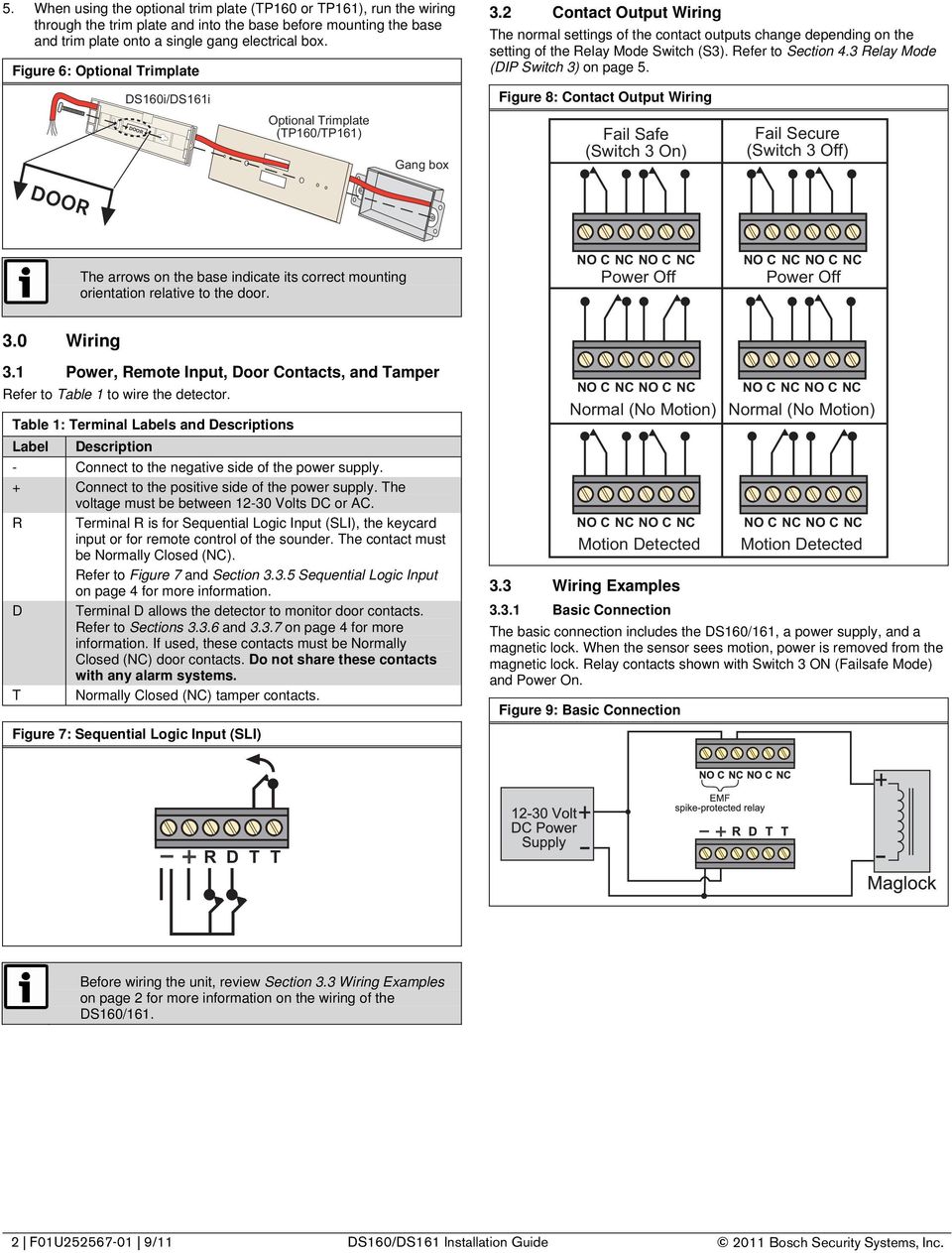
2 5. When using the optional trim plate (TP160 or TP161), run the wiring through the trim plate and into the base before mounting the base and trim plate onto a single gang electrical box. Figure 6: Optional Trimplate DS160i/DS161i DOOR Optional Trimplate (TP160/TP161) Gang box 3.2 Contact Output Wiring The normal settings of the contact outputs change depending on the setting of the Relay Mode Switch (S3). Refer to Section 4.3 Relay Mode (DIP Switch 3) on page 5. Figure 8: Contact Output Wiring Fail Safe (Switch 3 On) Fail Secure (Switch 3 Off) DOOR The arrows on the base indicate its correct mounting orientation relative to the door. Power Off Power Off 3.0 Wiring 3.1 Power, Remote Input, Door Contacts, and Tamper Refer to Table 1 to wire the detector. Table 1: Terminal Labels and Descriptions Label Description - Connect to the negative side of the power supply. + Connect to the positive side of the power supply. The voltage must be between Volts DC or AC. R Terminal R is for Sequential Logic Input (SLI), the keycard input or for remote control of the sounder. The contact must be Normally Closed (NC). Refer to Figure 7 and Section Sequential Logic Input on page 4 for more information. D Terminal D allows the detector to monitor door contacts. Refer to Sections and on page 4 for more information. If used, these contacts must be Normally Closed (NC) door contacts. Do not share these contacts with any alarm systems. T Normally Closed (NC) tamper contacts. Figure 7: Sequential Logic Input (SLI) Normal (No Motion) Normal (No Motion) Motion Detected 3.3 Wiring Examples Motion Detected Basic Connection The basic connection includes the DS160/161, a power supply, and a magnetic lock. When the sensor sees motion, power is removed from the magnetic lock. Relay contacts shown with Switch 3 ON (Failsafe Mode) and Power On. Figure 9: Basic Connection R D T T Before wiring the unit, review Section 3.3 Wiring Examples on page 2 for more information on the wiring of the DS160/ F01U /11 DS160/DS161 Installation Guide 2011 Bosch Security Systems, Inc.
3 3.3.2 Spike Protection EMF (Voltage) Spike-Protected Relay: Use this relay when connecting inductive loads to the detector. This relay protects the detector from inductive loads that might deliver damaging EMF spikes. No additional spike protection is needed. Non-EMF (Voltage) Spike-Protected Relay: This relay is best used for non-inductive loads. When connecting an inductive load that is not spike-protected, such as a magnetic door lock, to the detector, use either a bridge rectifier (such as a KBL01) or a diode (such as a 1N4007). Refer to Figure 10 and Figure DS160/161 and a Keycard Reader Normally, this setup is used when a keycard reader is on one side of the door and the DS160/161 is on the other side. Either swiping a keycard or a motion detected by the DS160/161 removes power from the magnetic lock. For DIP switch settings, refer to Section 4.7 Remote Input Function (DIP Switches 2, 9, and 10) on page 6. Figure 12: Keycard Reader Configuration UL listed magnetic locks typically are already EMF spikeprotected, and therefore do not require the bridge rectifier or diode as shown in Figure 10 and Figure 11. Refer to the magnetic lock s documentation for more information. Figure 10: Diode Connection Figure 11: Bridge Rectifier Connection Direct Sounder Enable The Direct Sounder Enable setting can be used to activate the DS160/161 sounder from a remote contact. The DS160/161 internal sounder remains on as long as the external contacts remain open. The sounder input can come from devices such as a door controller or door contacts. Turning the sounder on does not affect the relay or relay timer. The direct sounder input does not remove power from the magnetic lock. Turning the sounder on does not affect the relay or relay timer. The direct sounder input does not remove power from the magnetic lock. Failure to spike-protect the detector can shorten the life of the relay contacts. Figure 13: Direct Sounder Enable Configuration To ensure the best sound quality from the sounder, tighten all unused terminals on the terminal strip Bosch Security Systems, Inc. DS160/DS161 Installation Guide 9/11 F01U

4 3.3.5 Sequential Logic Input The detector only activates by motion when the Sequential Logic Input (Terminal R) is open, or for 10 sec after it closes. For example, when a second detector placed before the DS160/161 activates, and for 10 sec after it resets, the DS160/161 activates when it detects motion. Any movement after 10 sec after the contact on Terminal R closes is ignored. For DIP switch settings, refer to Section 4.7 Remote Input Function (DIP Switches 2, 9, and 10) on page 6. Figure 14: Sequential Logic Input Configuration To ensure the best sound quality from the sounder, tighten all unused terminals on the terminal strip Door Monitor Contacts (Second Option) If the detector is activated but the door is not opened, the relay drops out after 10 sec. If the detector is activated and the door opens, then closes, the relay drops out after 2 sec. This prevents unauthorized people from entering. In this mode, the REX can be activated by either someone walking in its field of view or from a remote device if using the R input. If using the R input to activate the detector, switch 2 should be set in the ON position (resettable mode). For DIP switch settings, refer to Section 4.7 Remote Input Function (DIP Switches 2, 9, and 10) on page 6. Figure 16: Door Monitor Contacts Configuration (Second Option) Door Monitor Contacts (First Option) In the Monitor Door Contacts Mode, a person entering the field of view of the detector activates the relay and timer. Door contacts connected to Terminal D monitor if the door is open or closed. If the door is held open and the relay timer is in the last 10 seconds of the latch time, the sounder will turn on. In order for this to work correctly, the latch time must be set for 16 seconds or greater (refer to section 4.3 on page 5.) The sounder also activates if the door is opened without first activating the detector or keycard input. The sounder remains on until the door closes or by someone moving in the field of view. For DIP switch settings, refer to Section 4.7 Remote Input Function (DIP Switches 2, 9, and 10) on page 6. Figure 15: Door Monitor Contacts Configuration (First Option) 4 F01U /11 DS160/DS161 Installation Guide 2011 Bosch Security Systems, Inc.

5 3.3.8 Disabling the Request-to-Exit The DS160/161 can be disabled by using Terminal R and an external device such as an access control or burglar alarm system. When the contact connected to Terminal R closes, the DS160/161 disables after a 10-sec delay. The DS160/161 returns to normal operation as described in Section Sequential Logic Input, on page 4, after the contact closes. Figure 17: Disabling the Request-to-Exit 4.2 Timer Reset Mode (DIP Switch 2) ON: The relay timer starts when the detector sees motion and restarts if there is additional motion. The relay only drops out when there is no more motion and the timer expires. OFF: The relay timer starts when the detector sees motion. It drops out when the timer runs out, even if the motion continues. If the motion continues, the timer restarts. Refer to Section 4.3 Relay Mode (DIP Switch 3) to select the time period. 4.3 Relay Mode (DIP Switch 3) ON: The relays operate in the Fail Safe Mode. Refer to Section 3.2 Contact Output Wiring, on page 2, for more information. OFF: The relays operate in the Fail Secure Mode. In the secure mode, the REX shall be installed in a manner that does not impair the intended operation of panic hardware used in conjunction with the REX detector. The Fail Secure Mode must be authorized by your Local Authority Having Jurisdiction (AHJ). Refer to Section 3.2 Contact Output Wiring, on page 2, for more information. 4.4 Relay Timer (DIP Switches 4, 5, and 6) Setting Switches 4, 5, and 6 determines the amount of time the output relays energize (between 0.5 sec and 64 sec) when motion is detected. Refer to Table 2 to set the relay timer. Table 2: Relay Timer DIP Switch Settings The NFPA 101 Life Safety Code requires secured doors to have a manual release device that shall result in direct interruption of power to the lock - independent of the access control system electronics. 4.0 Switch Settings You can change the switch settings by sliding the switch to the ON or OFF position. Refer to Figure 18. Figure 18: DIP Switch Positions O N OFF ON Time (sec) Switch 4 Switch 5 Switch (Default) OFF OFF OFF 1 OFF OFF ON 2 OFF ON OFF 4 OFF ON ON 8 ON OFF OFF 16 ON OFF ON 32 ON ON OFF 64 ON ON ON 4.5 Signal Processing (DIP Switch 7) The Signal Processing setting determines how sensitive to movement the detector is. ON: High sensitivity (REX Mode) OFF: Low sensitivity (security sensor) 4.6 Door Secure Mode (DIP Switches 8, 9, and 10) If the detector activates, but the door does not open, the relay drops out after 10 sec. If the detector activates and the door opens and then closes, the relay drops out after 2 sec. This prevents unauthorized people from entering. To ensure that the Door Secure Mode operates as expected, set the relay timer (DIP Switches 4, 5, and 6) to 16 sec or longer. 4.1 LED Operation (DIP Switch 1) ON: LED operates normally when motion is detected. OFF: LED is turned off. When LED is enabled, it will flash on and off when first powered up. Once the flashing LED stops, the REX is ready to be used. ON: If DIP Switches 8, 9, and 10 are all ON, Door Secure Mode is enabled. Wire according to the wiring example shown in Section Door Monitor Contacts (Second Option) on page 4 for door secure. OFF: If DIP Switches 8, 9, and 10 are all OFF, Door Secure Mode is disabled Bosch Security Systems, Inc. DS160/DS161 Installation Guide 9/11 F01U

6 O N 4.7 Remote Input Function (DIP Switches 2, 9, and 10) The Remote Input Function switches determine what the DS160/161 does when the contact attached to Terminal R is closed. Keycard Input: An input to the Terminal R activates the detector. Normally, this is used with a keycard reader outside of the door/building. The internal sounder does not activate when the keycard input is selected. The keycard inputs are affected by Resettable/Non-resettable Mode (Switch 2). The relay remains activated for as long as the keycard input is closed. The timer starts when the keycard input is force activated. If Switch 2 is on, toggling the keycard input again restarts the timer ( the suggested setting). When Switch 2 is off, toggling the keycard input does not restart the timer. Direct Sounder Enabled: The sounder is turned on for long as the contact on Terminal R is open. It does not affect the relay or timer. Sequential Logic Input: The detector only activates if the Sequential Logic Input (Terminal R) is open, or for 10 sec after it closes again. Movement after 10 sec after the contact on Terminal R closes is ignored. Monitor Door Contacts: Door contacts connected to Terminal D monitor if the door is open or closed. If the detector activates and the door is open when 10 sec remain on the timer, the sounder turns on. If the door opens without activating the detector, the sounder turns on. The sounder remains on until the door closes or the detector activates. For this feature to work, set the timer a minimum of 16 sec. Refer to Table 3 to set the remote input function. Table 3: Remote Input Function DIP Switch Settings Function Switch 9 Switch 10 Keycard Input OFF OFF Direct Sounder Enable OFF ON Sequential Logic Input ON OFF Monitor Door Contacts ON ON 3. Replace the cover and secure with a screw. Use a drill to remove a screw knockout in the cover only, then start screw and tighten to secure. Figure 21: Replace and Secure Cover Self-Tapping Screw (provided) 6.0 Coverage Patterns The coverage (detection area) of the DS160/161 varies depending on the mounting height above the floor, angle of the lens, and if the unit is mounted on a wall above the door or on the ceiling. The unit can also be masked to allow only some parts of the coverage pattern to be active. 6.1 Examples When the unit is mounted on the wall and the lens is pointed straight down, some detection zones point toward the wall and do not detect movement. Figure 22: Coverage Pattern Example 1 Views of coverage pattern with the unit mounted at 7.5 ft (2.3 m) above the floor with the "eye" pointed straight down. Zones that are pointed toward the wall are not shown. Mounted on wall above door Front View Mounted on ceiling 2.5 ft (.75 m) in front of the door 5.0 Complete the Installation 1. Secure the detector inside the base. ALARM WILL SOUND WHEN DOOR IS OPENED ALARM WILL SOUND WHEN DOOR IS OPENED Figure 19: Secure the Detector Rotate 4 ft (1.2 m) Pattern on Floor 10 ft (3 m) Rotate the barrel to the desired location. 2. Adjust the sounder volume. Figure 20: Sounder Volume Secure by tightening the lock-down screw. Side View To test the volume, turn Switch 10 on and apply power. The sounder will turn on as long as Terminal R is open. 2.5 ft (.75 m) 5 ft (1.5 m) To adjust the volume, turn the Volume Control with a screwdriver. Turn clockwise to increase the volume, and counterclockwise to decrease. To ensure the best sound quality from the sounder, tighten all unused terminals on the terminal strip. 6 F01U /11 DS160/DS161 Installation Guide 2011 Bosch Security Systems, Inc.

7 The higher the unit is mounted, the larger the coverage area. Do not mount the DS160/161 more than 15 ft (4.6 m) above the floor. Figure 23: Coverage Pattern Example 2 Side view of coverage pattern with the unit mounted at 15 ft (4.6 m) above the floor with the "eye" pointed straight down Remove a by placing the tip of a small screwdriver behind the and prying it up. Do not scratch the lens when removing the. Figure 26: Remove a Wedge Insert screwdriver behind Pry up to remove 5 ft (1.5 m) Mounted on wall above door 10 ft (3 m) Mounted on ceiling Up to three masking s can be used if you only want to detect in a very small area, such as around a doorknob or crash bar. Figure 27: Wedge Usage s When the DS160/161 is mounted on the wall above the door, you can move the coverage pattern away from the wall by rotating the detector s lens. 6.2 The DS160/161 is supplied with three masking s used to disable any part of the coverage pattern. Each covers approximately 25% of the coverage pattern. ALARM WILL SOUND WHEN DOOR IS OPENED Figure 24: Options The coverage pattern depends on how high the DS160/161 is mounted, location of the unit and the position of the detector lens. If you want a setup as shown above, mount the DS160/161 just above the door, on the hinge side, with the lens pointed down and slightly out. Insert a masking by placing the bottom peg in first. Then press on the center of the until it snaps into place. Figure 25: Insert a Wedge Select a section of the lens to mask Insert the tab on the end of the in the hole in one side of the lens Textured side facing out Press here to snap into place 2011 Bosch Security Systems, Inc. DS160/DS161 Installation Guide 9/11 F01U

8 7.0 Specifications 7.1 Specifications Input Power Relay Terminal Strip Sounder Temperature Humidity Dimensions (HxWxD) Trim plate (HxW) 12 to 30 VDC or VAC Two Form C contact sets rated for 1 A each at 30 VDC or VAC max for resistive loads AWG Adjustable up to 70 db at a distance of 10 ft (3 m). -20 F to +120 F (-29 C to +49 C). For UL and ULC Listed installations, the temperature range is +32 F to +120 F (0 C to +49 C). 0-95% non-condensing 1.8 in. x 7 in. x 1.75 in. (4.5 cm x 17.8 cm x 4.4 cm) Optional. TP160 (light gray); TP161 (black) 3 in. x 8.25 in. (7.6 cm x 21 cm) Current Draw for Fail Safe Mode (DIP Switch 3 ON) State 12 VDC 30 VDC 12 VAC 30 VAC No Motion 15 ma 19 ma 29 ma 38 ma Alarm 23 ma 26 ma 42 ma 51 ma Alarm and Sounder 65 ma 79 ma 101 ma 147 ma Current Draw for Fail Secure Mode (DIP Switch 3 OFF) State 12 VDC 30 VDC 12 VAC 30 VAC No Motion 5 ma 9 ma 9 ma 20 ma Alarm 33 ma 37 ma 40 ma 73 ma Alarm and Sounder 73 ma 95 ma 95 ma 164 ma 7.2 Regulatory Notes The unit shall be installed in accordance with National Electrical Code ANSI/NFPA 70 and part 1 of the Canadian Electrical Code CSA C22.1, Safety Standard for Electrical Installations. The DS160/161 is not intended to be configured to function as a standalone access control system. Connection to listed (ALVY and/or ALVY7) compatible control units and locking devices shall be required. It is intended to be used as an access control Request-to-Exit device only and not for security function; as such, the DS160 should not be connected to a burglar alarm system. The Request-to-Exit device shall not be connected directly to a keypad for access control function. Connection to a listed compatible access control system is required. The DS160/161 was not investigated by UL for special locking arrangements in accordance with NFPA 101. The Request-to-Exit detector was tested for UL compliance while powered by an XF 1640EE transformer made by AmSeco. 8.0 Reading Bosch Security Systems, Inc. Product Date Codes For Product Date Code Information, refer to the Bosch Security Systems, Inc. Web site at: Bosch Security Systems, Inc. 130 Perinton Parkway, Fairport, NY USA F01U Installation Guide 9/11 DS160/DS161 Page 8 of 8

D287/D288/D292/D293A/D293E
 D87/D88/D9/D9A/D9E EN Installation Guide Smoke Detector Bases D87/D88/D9/D9A/D9E Installation Guide.0 Overview.0 Overview The D87/D88/D9/D9A/D9E Smoke Detector Bases are designed for use with the D8 Ionization
D7050/D7050TH. Installation Instructions. Multiplex Photoelectric Smoke Detectors
 D7050/D7050TH EN Installation Instructions Multiplex Photoelectric Smoke Detectors D7050/D7050TH Installation Instructions.0 Description Notices These instructions cover the installation of the D7050/D7050TH
Detector transparent with Color Inserts. FAA 500 TR P Trim Ring transparent with Color Inserts. FCA 500 / FCA 500 E Detector Bases
 Detector Color Detector transparent with Color Inserts FAA 500 TR W Trim Ring FAA 500 TR P Trim Ring transparent with Color Inserts FAA 500 BB Ceiling Mount Back Box FCA 500 / FCA 500 E Detector Bases
AC-115 Compact Networked Single Door Controller. Installation and User Manual
 AC-115 Compact Networked Single Controller Installation and User Manual December 2007 Table of Contents Table of Contents 1. Introduction...5 1.1 Key Features... 6 1.2 Technical Specifications... 7 2.
TS93 EMR T/PT/TDE. Surface applied door closer
 TS EMR T/PT/TDE Surface applied door closer Installation instructions: Pull side track mount door closer with smoke detector (EMR T) Push side track mount door closer with smoke detector (EMR PT) Double
Dual Technology Ceiling Mount Sensor
 369652b 1 05.04.12 Dual Technology Ceiling Mount Sensor The ceiling-mount dual-technology sensors can integrate into Lutron systems or function as stand-alone controls using a Lutron power pack. The technology
www.sebury.com.cn Digital Keypad Use s Manual
 K3 K4 www.sebury.com.cn Digital Keypad Use s Manual Contents Introduction Introduction Specifications Intramural Interface Circuit 3 Mounting 3 Wiring 5 Power UP 7 Engineer Programming Mode 7 The K3/K4
DORMA MODEL PS-406BB POWER SUPPLY INSTALLATION INSTRUCTIONS
 Features: INSTALLATION Install in accordance with NFPA 70. DORMA MODEL PS-406BB POWER SUPPLY INSTALLATION INSTRUCTIONS Up to 1.95 Amps Load Capacity Class 2 Rated Outputs Overload, Over Voltage, and Short
INSTALLATION GUIDE. Card Reader & Controller with KIM Swipe Reader for Solitaire 850 / 950 / 850L Learnlok PK2930
 INSTALLATION GUIDE Card Reader & Controller with KIM Swipe Reader for Solitaire 850 / 950 / 850L Learnlok PK2930 Card Reader and Controller Model 3.5 with KIM Swipe Reader Table of Contents 1. Features..................................
WIRELESS ALARM KIT INSTRUCTION MANUAL COMPLETE ALARM SYSTEM FOR HOME OR BUSINESS. Model Number: IT214054
 WIRELESS ALARM KIT COMPLETE ALARM SYSTEM FOR HOME OR BUSINESS Model Number: IT214054 INSTRUCTION MANUAL Warranty Details/Support This product is warranted against defects for a period of One year if the
Alarm Security Kit - NVR
 Alarm Security Kit - NVR EN The alarm configuration menu (see above right screenshot) allows you to configure and change settings for the PIR movement sensors, window/door sensors, remote controls (key
SECTION 13850 DETECTION AND ALARM
 SECTION 13850 DETECTION AND ALARM PART 1 GENERAL 1.01 SUMMARY A. Section Includes 1. Control Panel 2 Associated Equipment B. Products Installed But Not Supplied Under This Section 1. Section 16140 - Wiring
INSTALLATION/PROGRAMMING INSTRUCTIONS 928 ENTRYCHECK
 3580 Willow Lane, Westlake Village, CA 91361-4921 (805) 494-0622 Fax: (805) 494-8861 www.sdcsecurity.com E-mail: [email protected] INSTALLATION/PROGRAMMING INSTRUCTIONS 928 ENTRYCHECK INTRODUCTION
Smoke Detectors Ordering Information DS230 DS230 Series Heat Detectors DS230F DS233F Peripheral Accessories EOL200 TP280 Bases Features
 Smoke Detectors DS230 Series Heat Detectors DS230, DS230F and DS233F Heat Detectors 2-wire: See Tech Service Note P/N: 26979. 4-wire: Compatible with all UL Listed 4-wire control panels. Ordering Information
SFC-200 SERIES FIRE ALARM CONTROL PANELS. SFC-200 Series Fire Alarm Control Panels. Features. Description
 SFC-200 SERIES FIRE ALARM CONTROL PANELS SFC-200 Series Fire Alarm Control Panels Description Summit s SFC-200 Series fire alarm control panels consist of six and twelve zone models which are equipped
Your Simple Guide to Battery. www.firstalertpro.com. Replacement. Customer Care: 1-800-852-0086. www.firstalertpro.
 Previous Menu Your Simple Guide to Battery www.firstalertpro.com Replacement p e t s ts ep -by Customer Care: 1-800-852-0086 FA/1565 9/00 www.firstalertpro.com Table of Contents: page Introduction...............................
INSTALLATION INSTRUCTIONS
 LIGHTING CONTROL PANELS 4 AND 8 RELAYS INSTALLATION INSTRUCTIONS INSTALLATION OVERVIEW The installation instructions contained in this document are provided as a guide for proper and reliable installation.
How To Make A Commercial Detector
 Detection delivered. Reliability assured. Commercial Series Motion Detectors Detection is the first step to protecting a home or business and the people and property within its walls. Instant responses
PROFESSIONAL HOME ALARM SYSTEM. Important! Please read these instructions carefully.
 WIRELESS AUTODIAL HOME ALARM SYSTEM AM2000 Instructions for use Important! Please read these instructions carefully. IMPORTANT 1 IDENTIFICATION PLEASE CONTACT BEFORE RETURNING THIS PRODUCT TO THE RETAILER
PK5500 v1.1 Installation Instructions
 PK5500 v1.1 Installation Instructions 1 2 3 4 5 6 7 8 9 * 0 # WARNING: Please refer to the System Installation Manual for information on limitations regarding product use and function and information on
Installation Instructions
 Specifications PW-100-24 v3 Passive Infrared Low Voltage Wall Switch Occupancy Sensor Voltage...18-24VDC, 24VAC or Half-wave rectified AC Current Consumption...20mA Power Supply... WattStopper Power Packs
KCIEN KCIENSBP. Heavy Duty Stainless Steel Illuminated Keypads INSTALLATION MANUAL. Range: DIGICODE (Stand-Alone Keypad)
 KCIENSBP KCIEN Heavy Duty Stainless Steel Illuminated Keypads Range: DIGICODE (Stand-Alone Keypad) INSTALLATION MANUAL Features: Input voltage: 12V to 24V AC or 12V to 48V DC Illuminated keys Heavy duty
Control Panels D9412GV3/D7412GV3/D7212GV3. UL Installation Instructions
 Control Panels D9412GV3/D7412GV3/D7212GV3 en UL Installation Instructions Control Panels Table of Contents en 3 Table of Contents 1 Installation 4 1.1 Installation Preparation 4 1.2 Enclosure Options
FIRERAY 2000 Installation Guide
 FIRERAY 2000 Installation Guide Features Range 33ft to 330 ft. 24Vdc operation Selectable alarm thresholds Low current consumption Ground level electronics Manual or Automatic reset System Description
IS3016A Passive Infrared Motion Sensor with Anti-Mask - Installation Instructions
 IS3016A Passive Infrared Motion Sensor with Anti-Mask - Installation Instructions QUICK LINKS Mounting Location Guidelines Open the Sensor Mount the Sensor Sensor Components and Settings Wire the Sensor
Programmable Room Thermostat 7 Day (5-2 Day) Models: 22083 / 22087 Power Supply: Battery / Mains
 Drayton Programmable Room Thermostat 7 Day (5-2 Day) Models: 22083 / 22087 Power Supply: Battery / Mains Invensys Controls Europe Technical Helpline: +44 (0) 845 130 7722 www.draytoncontrols.co.uk Installation
NetworX Series. NX-216E Zone Expander Module Installation and Startup
 NetworX Series NX-E Zone Expander Module Installation and Startup 00 GE Security All rights reserved. These instructions do not purport to cover all details or variations in equipment nor to provide every
PASSIVE INFRARED INTRUSION DETECTOR PASSIVE INFRAROOD DETECTOR DETECTEUR D INTRUSION PASSIF INFRAROUGE
 MODEL HAA51 PASSIVE INFRARED INTRUSION DETECTOR PASSIVE INFRAROOD DETECTOR DETECTEUR D INTRUSION PASSIF INFRAROUGE OPERATING MANUAL HAA51 PASSIVE INFRARED INTRUDER DETECTOR INTRODUCTION HAA51 Passive Infrared
REDWALL-V adjustment procedures guide
 Page 1/18 Ver1.2 July 1. 2011 REDWALL-V adjustment procedures guide This document is provided as a reference tool for installing the Optex Redwall SIP passive infrared detector. Before starting, read the
EQUIPMENT SPECIFICATIONS
 EQUIPMENT SPECIFICATIONS IC-1600 Intelligent Controller The IC-1600 Intelligent Controller is a fully intelligent panel that has a complete database on board. It operates in conjunction with the Access
NEI-30 VEI-30 Dinion Infrared Imager NEI VEI Series. Quick Install Guide
 NEI-30 VEI-30 Dinion Infrared Imager NEI VEI Series en Quick Install Guide NEI-30 VEI-30 Dinion Infrared Imager Table of Contents en 3 Table of Contents 1 Planning 4 1.1 Hardware Requirements 4 1.2 Pre-installation
ICP-CP500. User's Guide ICP-CP500 Codepads
 ICP-CP500 EN User's Guide ICP-CP500 Codepads ICP-CP500 User's Guide 1.0 ICP-CP500 Series Codepads Overview EN 2 1.0 ICP-CP500 Series Codepads Overview The codepad is the communications interface between
GE Wireless Devices Battery Replacement
 60-506-319.5 Crystal Smoke Detector Two 9V Duracell 9V 1. Twist counter-clockwise until detector become loose from base. 2. Replace batteries observing correct polarity. 3. Replace detector by twisting
FIREDEX 2200. Conventional Fire Panels
 68 Flexible, high specification system Choice of 1, 2, 4 or 8 zones Simple one-shot auto-reset user test facility Approved to EN54 Maintenance free poly switch circuit protection, with auto reset Class
Duct Humidity Transmitter
 SDC-H Duct Humidity Transmitter Features Replaceable sensor element Humidity measurement for air ducts Minimum and maximum value memory 0 0V, 0 0mA or 0V, 4 0mA measuring signals selectable with jumpers
GSM Autodialer Professional GJD700 Speech & Text Autodialer
 Text Edit message GSM Autodialer Professional GJD700 Speech & Text Autodialer Introduction The GSM Autodialer Professional works in conjunction with standard alarm systems and makes use of your preferred
Model 201 Wiegand Touchpad Reader Installation Guide
 Model 201 Wiegand Touchpad Reader Installation Guide P/N 460353001C 15AUG11 2011 UTC Fire & Security. All rights reserved. This document may not be copied in whole or in part or otherwise reproduced without
ABB Stotz-Kontakt GmbH ABB safe&smart Project planning of security systems
 ABB Stotz-Kontakt GmbH ABB safe&smart Project planning of security systems Content Introduction Preventing unauthorized access by perimeter surveillance Monitoring unauthorized access by indoor surveillance
Installation Manual. Features SMART SWITCH OCCUPANCY SENSOR. Maximum Energy savings
 Features SMART SWITCH OCCUPANCY SENSOR Installation Manual Maximum Energy savings Sensitive 180º view passive infrared motion detector keeps lights on only when rooms are in use. No ON switch so lights
Single Channel Loop Detector
 Single Channel Loop Detector Model - LD100 Series The LD100 is a single channel inductive loop detector designed for parking and access control applications. The detector is connected to an inductive loop
Lighting Packages. 230 VAC Fluorescent Enclosure Light:
 Spec-00581 H763.422.2211 763.422.2600 Electrical Lighting Packages Electrical Lighting Packages PANELITE Enclosure Lights Overview FEATURES Slim profile allows light to be tucked up out of the way for
Radiant Temperature Sensor TY7321
 AB-5361-U Specifications/Instructions Radiant Temperature TY7321 General TY7321 Radiant Temperature s are designed to measure infrared radiation from perimeter windows and walls and provide a proportional
NOTE: It is the responsibility of the installation organization to have only technically qualified personnel performing the installation.
 This quick start guide provides, basic installation information, drawings, first time power-on instructions, and short descriptions of key terms and concepts for installing the EntraGuard Platinum Telephone
HM-W536 Install Guide
 HM-W536 Install Guide 9/13/2013 IMPORTANT SAFETY INSTRUCTIONS Warning - When using electrical devices, basic safety precautions should be followed to reduce the risk of fire, electrical shock or injury.
PK-01. Standalone door control module. SATEL sp. z o.o. ul. Schuberta 79 80-172 Gdańsk POLAND tel. + 48 58 320 94 00
 Standalone door control module PK-01 Firmware version 1.00 pk-01_en 06/12 SATEL sp. z o.o. ul. Schuberta 79 80-172 Gdańsk POLAND tel. + 48 58 320 94 00 [email protected] www.satel.eu WARNINGS Read carefully
PAC1 Door Access Controller
 PAC1 Door Access Controller Series 2 IMPORTANT DIFFERENCES FROM SERIES 1 1. A PACDL data logger revision 4.0 or higher attached to the DLOG terminal is able to program all features (i.e. times, relay type,
INSTALLATION/PROGRAMMING INSTRUCTIONS E4KP ENTRYCHECK
 Security Door Controls 3580 Willow Lane, Westlake Village, CA 91361-4921 (805) 494-0622 Fax: (805) 494-8861 www.sdcsecurity.com E-mail: [email protected] INSTALLATION/PROGRAMMING INSTRUCTIONS E4KP
SECTION G2: CABLE PROCESSOR MODULE MAINTENANCE
 SECTION G2: CABLE PROCESSOR MODULE MAINTENANCE Cable Processor Module overview WARNING! When tipping the Cable Processor Module back, (after removing the toggle arm pin), use extreme caution not to drop
2013 Wireless Video Intercom INSTALLATION GUIDE
 2013 Wireless Video Intercom INSTALLATION GUIDE INDEX System configuration and wiring VL-SWD501 System Component.. 4 VL-SWD501EX wiring schematic diagram VL-SWD501EX wiring type and length... 5.... 6 Door
BODY-12, Door Handle - Removal, Installation, and Adjustment
 Introduction BODY-12, Door Handle - Removal, Installation, and Adjustment There are many different procedures floating around describing how to replace the door handles on a 944 and every one of them will
1pcs. 1pcs. 2pcs 1pcs 1pcs 2pcs
 Home security alarm system LX-HS06 Instruction Brief introduction LX-HS06 is a set of entirely new English home security alarm system, it uses advanced MCU control and SMD technology. it innovate multiple
WD-AMX Water Detection Controllers
 Page 1 of 5 WD-AMX Water Detection Controllers Features: Benefit: LED Status of leak status VFC output Audible alarm Auto or manual reset alarm output Uses an isolated AC signal which prevents oxidation
for DNE-K07 Reference and Installation Manual
 for DNE-K07 Reference and Installation Manual TABLE OF CONTENTS INTRODUCTION...2 Specifications... 3 Navigation... 3 INSTALLATION...4 Viewing Angle... 4 Keypad Cover Clearance... 4 Mounting the Metal
SP4-LOC SAFEPATH4 REMOTE MICROPHONE AND LOCAL OPERATOR CONSOLE
 SP4LOC SAFEPATH4 REMOTE MICROPHONE AND LOCAL OPERATOR CONSOLE INSTALLATION AND OPERATION MANUAL MASS NOTIFICATION SYSTEM Part Number: P84767 Rev. A Copyright 2006 Cooper Wheelock, Inc. All rights reserved.
DLP-PU/E Instruction Manual
 Instruction Manual BEFORE USING THE POWER SUPPLY UNIT Pay attention to all warnings and cautions before using the unit. Incorrect usage could lead to an electrical shock, damage to the unit or a fire hazard.
ETC TWO STAGE ELECTRONIC TEMPERATURE CONTROL
 RANCO INSTALLATION INSTRUCTIONS ETC TWO STAGE ELECTRONIC TEMPERATURE CONTROL Relay Electrical Ratings PRODUCT DESCRIPTION The Ranco ETC is a microprocessor-based family of electronic temperature controls,
Hills wireless security alarm DIY range
 Hills wireless security alarm DIY range EASY TO INSTALL DIY system PEACE OF MIND Receive SMS/calls when alarm is armed INTERACTIVE Arm and disarm by SMS or via smartphone app Control your alarm via smart
Total Protection Alarm System
 www.skylinkhome.com Total Protection Alarm System MODEL: SC-10 101A073-001 AUG, 2005. CUSTOMER SERVICE 17 Sheard Avenue, Brampton, Ontario, Canada L6Y 1J3 Tel : (800) 304-1187 Fax : (800) 286-1320 Email
HONEYWELL COMMERCIAL FIRE/BURG PANEL UL LISTING REQUIREMENTS (Compiled from VistaFBPT Installation Instructions 800-09617V1 Rev A 11/12)
 HONEYWELL COMMERCIAL FIRE/BURG PANEL UL LISTING REQUIREMENTS (Compiled from VistaFBPT Installation Instructions 800-09617V1 Rev A 11/12) UL864 (Commercial Fire) Compliance General Requirements The VISTA-128FBPT/VISTA250FBPT
HomeSafe-Basic VT-PS99E. User s Manual. PSTN Home Alarm System. Page: 1 / 15
 HomeSafe-Basic VT-PS99E User s Manual PSTN Home Alarm System Page: 1 / 15 Table of Contents 1. Product Overview:... 3 2. Main Functions & Features... 3 3. For Your Safety... 4 4. VT-PS99E Characteristics...
Infrastructure Management & Monitoring For Business-Critical Continuity. Liebert AC4. User Manual
 Infrastructure Management & Monitoring For Business-Critical Continuity Liebert AC4 User Manual TABLE OF CONTENTS 1.0 INTRODUCTION 1.1 Methods of Viewing and Configuring the Liebert AC4..............................
Add Door Phones to Your Phone System
 Universal Door Phone System Material Code/Comcode # 408466563 (controller) and # 408466548 (speaker) PEC # 5324-001 Add Door Phones to Your Phone System The Door Entry Controller system dramatically expands
DC-8706K Auto Dial Alarm System
 DC-8706K Auto Dial Alarm System User Guide Basic Contents: 1x the host unit; 1x wireless door (window) magnet; 1x wireless infrared detector; 2x remote control; 1x siren; 1x phone core; 1x AC to DC power
500r+ Installation and User Guide
 500r+ Installation and User Guide Compatible Equipment 502rUK-50 Watch/Pendant PA. 509rUK-50 Smoke Detector 515rUK-00 10 metre passive infra red movement detector. 525rUK-00 Remote Set/Unset (Full and
8900 EMR (WITH DETECTOR)
 00 EMR (WITH ) GENERAL DESCRIPTION Each 00 EMR series unit contains a door closer, hold open electromagnet and smoke detector. The unit can be used as a single installation or as a series of singles powered
9448 Installation and User Guide
 9448 Installation and User Guide Compatible Equipment 9040 Internal Sounder 660 Speech communicator 496327 Issue 1 1 of 6 9448 INTRODUCTION The 9448 is a 3 zone control panel with separate Entry/Exit and
High Bay Occupancy Sensor Selection Guide
 High Bay Occupancy Sensor Selection Guide Make the most of your energy SM 1 2 Schneider Electric offers a vast array of lighting control sensors for HID and Fluorescent High Bay applications. HID High
INSTALLATION MANUAL XM3 Reader
 INSTALLATION MANUAL XM3 Reader Conditions Transactions, deliveries et cetera will be according to the general terms of delivery as deposited at the Chamber of Commerce at Meppel, The Netherlands. Registration
 ABLOY DA60 SWING DOOR OPERATOR Installation and commissioning manual Abloy Oy An ASSA ABLOY Group company APPROVALS / STANDARDS Low Voltage directive 7//EEC as amended by the directive 9/68/EEC EMC directive
2M IR Mini Dome Quick Installation Guide
 2M IR Mini Dome 2M IR Mini Dome Quick Installation Guide Please follow the installation steps below to set up 2M IR Mini Dome IP Camera. Check the package contents against the list below. See P.1 Physical
Lighting Controls ! WARNING RISK OF ELECTRIC SHOCK. Installation Instructions DESCRIPTION
 GE Lighting Installation Instructions Lighting Controls Centralized Lighting Control Panel Interior Catalog Number CLCINTxx DESCRIPTION The Centralized Lighting Control System is a small network of relay
tattletale User Guide Consumer unit version 2.48 1 P a g e
 tattletale User Guide Consumer unit version 2.48 1 P a g e Contents Basic 1... 4 Base Unit Features... 4 Initial Setup... 4 Arming... 5 Disarming... 5 Quiet Button... 5 Settings... 5 Settings 2... 6 Quick
Short Range Wireless Switch System Handheld 8 Installation and Operations Guide
 Phone: (866) 701-1146 Fax: (425) 216-7558 www.remotecontroltech.com Short Range Wireless Switch System Handheld 8 Installation and Operations Guide Introduction... 2 Before Installation... 2 Receiver Installation...
WIRELESS STATUS MONITOR
 INSTALLATION INSTRUCTIONS WIRELESS STATUS MONITOR (WSM or AUWSM) The most current version of this document is available for download at: http://www.ir-swa.com P/N: M053-032-D Schlage 245 W. Roosevelt Road,
NX-591NE-GSM NetworX GSM 3G HSPA+ Module Installation Sheet
 NX-591NE-GSM NetworX GSM 3G HSPA+ Module Installation Sheet The NX-591NE-GSM is a microprocessor-controlled GSM interface module used to connect the NetworX series of control panels to GSM cellular networks
Holder/Release Devices with Integral Door Closers DORMA EMF/ EMR
 Holder/Release Devices with Integral Door Closers DORMA EMF/ EMR DORMA EMR Holder/Release Device with Integral Detector The DORMA EMR Series holder/release device incorporates a photoelectric detector
Accenta/Optima. Engineer s Manual. Honeywell Security. 8SP399A - Accenta mini panel with remote LCD keypad and communicator outputs.
 Reset Chime Omit Prog Set Power PA Day ZONE PA PA Accenta/Optima Engineer s Manual Power Gen" ACCENTA! " # $ % & Zones Power Attack Tamper Day 0 1 2 3 5 6 7 8 Chime Omit Reset Prog 4 9 Set Accenta/! mini
LED MOTION ACTIVATED FLOOD LIGHT
 Utilitech & UT Design are registered trademarks of LF, LLC. All Rights Reserved. ITEM #0611551, #0611550 LED MOTION ACTIVATED FLOOD LIGHT MODEL #SE1036-BP2-02LF0-U, SE1036-WH3-02LF0-U Français p. 10 Español
VARIO PROX CARD READER INSTALLATION MANUAL
 VARIO PROX CARD READER INSTALLATION MANUAL TABLE OF CONTENTS 1.0 INTRODUCTION...2 1.1 Legend...3 1.2 Terminology...4 2.0 MOUNTING...5 3.0 WIEGAND CONNECTION...6 4.0 AUX BUTTON INPUT...7 5.0 INSTALLER PROGRAMMING...8
Commander 2000 Control Panel
 Commander 2000 Control Panel Interactive Technologies, Inc. File: Panels Overview Applications Features The Commander 2000 is an affordable wireless security system that is easy to install and easy to
Two-Zone Burglar Alarm System
 49-454.fm Page 1 Wednesday, January 17, 2001 10:37 AM Two-Zone Burglar Alarm System Owner s Manual Please read before using this equipment. 49-454.fm Page 2 Wednesday, January 17, 2001 10:37 AM ˆ Features
INSTALLATION AND OPERATING INSTRUCTIONS For Model GL1 Gate Locks
 Securitron Magnalock Corp. www.securitron.com ASSA ABLOY, the global leader Tel 800.624.5625 [email protected] in door opening solutions INSTALLATION AND OPERATING INSTRUCTIONS For Model GL1 Gate
AMI MARINE (UK) LTD BRIDGE NAVIGATIONAL WATCH ALARM SYSTEM (BNWAS) Operation Manual KW810
 AMI MARINE (UK) LTD BRIDGE NAVIGATIONAL WATCH ALARM SYSTEM (BNWAS) Operation Manual KW810 This Manual and the information contained therein is the property of AMI Marine (UK) Ltd. It must not be reproduced
DUCT SMOKE DETECTOR D4120
 Purpose/Application National and local safety standards and codes recognize the ability of air duct systems to transfer smoke, toxic gases, and flame from area to area. Sometimes smoke can be of such quantity
Shunt lock function 3066
 Version: January 2004 Contents Alarm System Activation unit Deactivation unit Digital locking cylinder or Smart Relay 1.0 Method of Operation 4 1.1 General 4 1.2 Turning the Alarm System On 4 1.3 Turning
TrueAlarm Fire Alarm Systems
 TrueAlarm Systems UL, ULC, CSFM Listed; FM Approved* Network Annunciators; es Features Provides a dedicated local area network (LAN) for connection of a TrueSite workstation server to remote clients: es
WxGoos-1 Climate Monitor Installation Instructions Page 1. Connections. Setting an IP Address
 Instructions Page 1 Connections The WxGoos-1 is a self-contained web server and requires 6vdc of power at 300ma. A center-positive 2.1 mm plug is used. There are five ports: 1. 10/100 Ethernet RJ-45 receptacle
9452/9453 Installation and User Guide
 9452/9453 Installation and User Guide Compatible Equipment 9425 Remote Keypad 9040 Internal Sounder 660 Speech Communicator 8440 4-Channel Minicom 496330 Issue 1 1 of 10 9452/3 Introduction The 9452 and
EMF/EMR. Holder/Release Devices with Integral Door Closers
 EMF/EMR Holder/Release Devices with Integral Door Closers EMR TECHNICAL DETAILS DORMA EMR SERIESHOLDER/RELEASE DEVICE The DORMA EMR Series holder/ release device incorporates a photoelectric detector and
Solid State Timers Type F
 Solid State Timers Type F Class 9050 CATALOG CONTENTS Description.....................................................Page Product Descriptions............................................. 3 Application
JANUS INTERNATIONAL CORPORATION INSTALLATION INSTRUCTIONS Pantheon Mini Operator
 JANUS INTERNATIONAL CORPORATION INSTALLATION INSTRUCTIONS Pantheon Mini Operator The Janus Pantheon mini operator does not typically require the provision of any additional site requirements other than
AUTODIALLER / QUICKDIALLER - SA132
 AUTODIALLER / QUICKDIALLER - SA132 INSTRUCTION LEAFLET ENGLISH www.thermomax-group.com CONTENTS 1 SETUP AT A GLANCE... 2 2 FOREWORD....... 3 3 INSTALLATION...... 4 4 KEYPAD AND INDICATORS...... 5 SETTING
HyperAccess Access Control System
 Control System We manufacture, an advanced PC based access control solution that will give you control over who has access to your building. With you can control access on hundreds of doors for up to 10,000
CelluLine CGW-TS GSM Cellular Gateway. Installation and Programming Manual
 CelluLine CGW-TS GSM Cellular Gateway Installation and Programming Manual CelluLine CGW-TS GSM Cellular Gateway Installation and Programming Manual CGWTS-M001A Version 1, Release 1, December 2004 NOTICE
e-ask electronic Access Security Keyless-entry
 e-ask electronic Access Security Keyless-entry e-fob Keyless-entry entry System Full-Function Function Installation Manual FCC ID: TV2EFOB1 (UM20 ~ 22793-02) Table of Contents Introduction... 1 e-fob Operation
Secure Keypads for access control
 torm Secure Keypads for access control Strike Master Read this manual carefully before attempting to install, program or operate the STORM AXS Strike Master Keypad. After installation the Command Summary
Motion Detector 360 Degrees 5420/360. Installation Instructions REGISTERED DESIGN REGISTERED PATENT
 Motion Detector 360 Degrees 5420/360 Installation Instructions REGISTERED DESIGN REGISTERED PATENT Installation Instructions The Infra-red Monitor Motion Detector from Clipsal provides high performance
SMART SENSOR COLLECTION
 TEMPERATURE SENSOR This sensor measures temperature in degrees Celsius or Fahrenheit. It works with all SensorHawk base units (SensorHawk-2, SensorHawk-8 and SensorHawk8/20) as well as the SecurityHawk-8
Liebert Universal Monitor
 Infrastructure Management & Monitoring For Business-Critical Continuity Liebert Universal Monitor User Manual TABLE OF CONTENTS 1.0 INTRODUCTION 1.1 Methods of Viewing and Configuring the Liebert Universal
GSM ALARM SYSTEM USER MANUAL
 GSM ALARM SYSTEM USER MANUAL 1. Instruction The alarm system is based on GSM network. With a GSM SIM card, it can be used wherever you want and no need to connect any wire, which is convenient and easy