
AUTODIALLER / QUICKDIALLER - SA132
|
|
|
- Clinton Cain
- 10 years ago
- Views:
Transcription
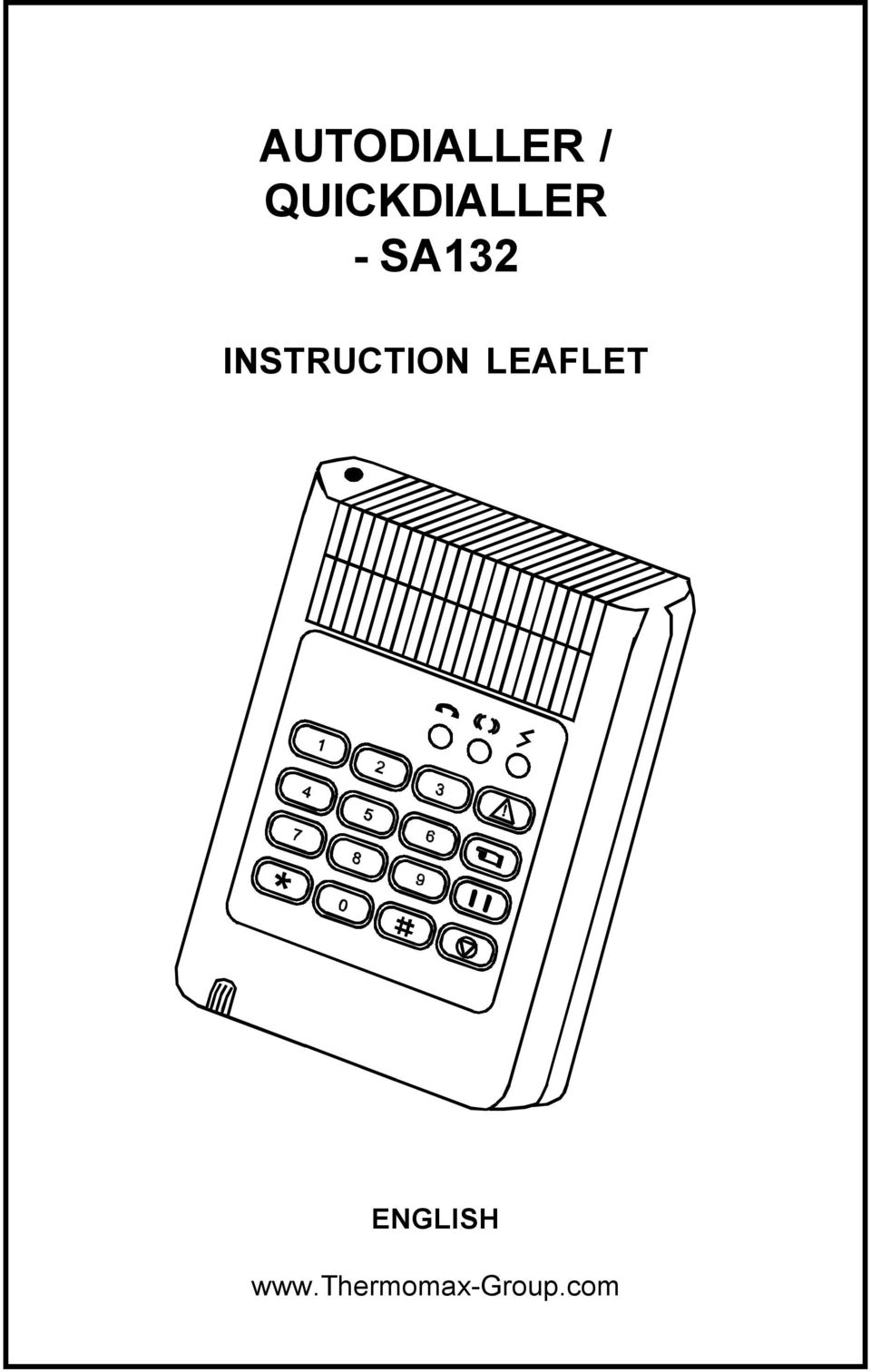
1 AUTODIALLER / QUICKDIALLER - SA132 INSTRUCTION LEAFLET ENGLISH
2 CONTENTS 1 SETUP AT A GLANCE FOREWORD INSTALLATION KEYPAD AND INDICATORS SETTING UP THE UNIT TROUBLE SHOOTING GUIDE

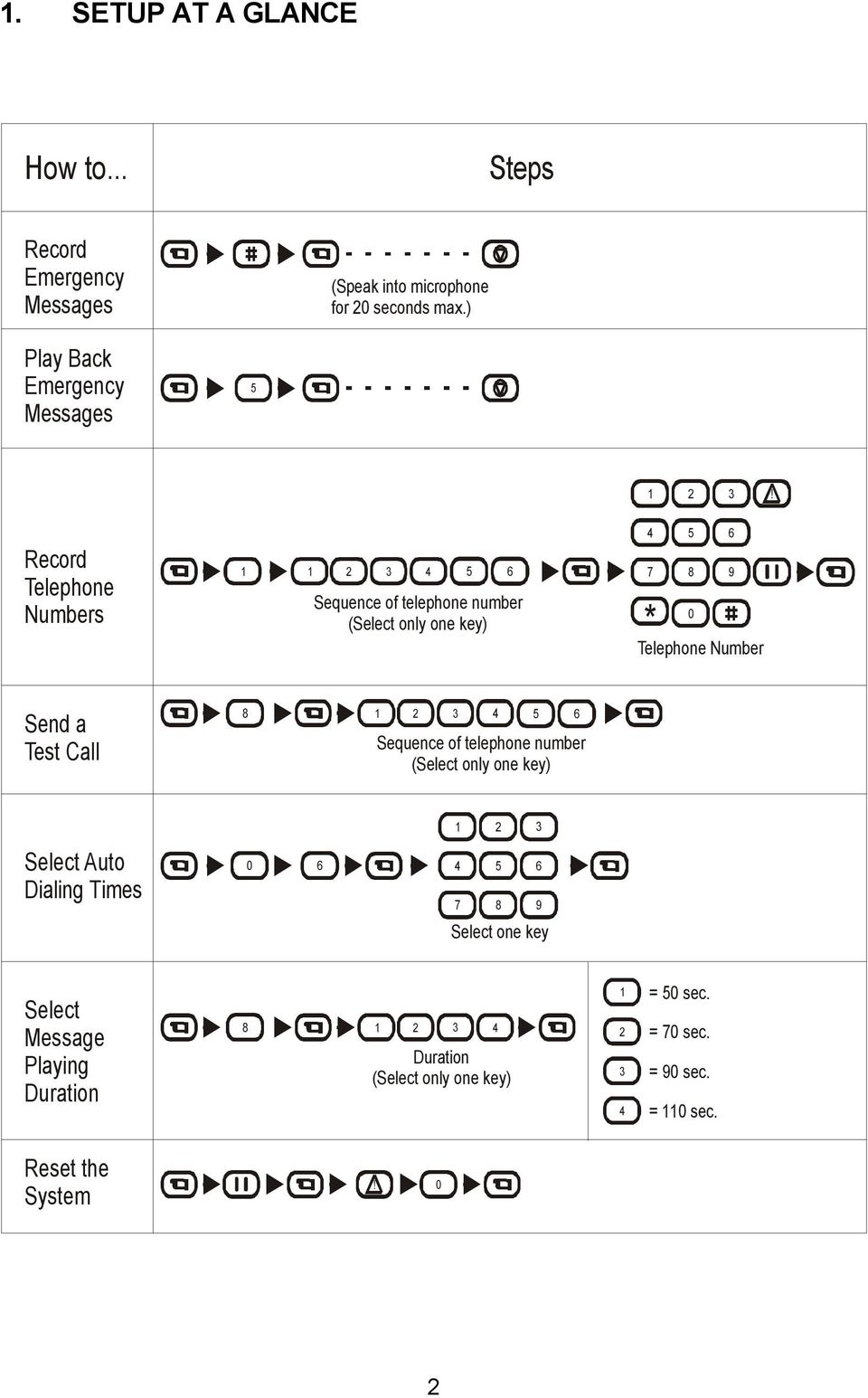
3 1. SETUP AT A GLANCE How to... Steps Record Emergency Messages (Speak into microphone for 2 seconds max.) Play Back Emergency Messages Record Telephone Numbers (Select only one key) * Telephone Number Send a Test Call (Select only one key) Select Auto Dialing Times Select one key Select Message Playing Duration Duration (Select only one key) = 5 sec. = 7 sec. = 9 sec. = 11 sec. Reset the System 2
4 2. FOREWORD The SA132 Autodialer / QuickDialer is an intelligent device designed to connect to any security alarm control panel, and it is compatible with any of the following Thermomax units - SM12, SM UNO, SM DUE, SM QUATTRO, LCT-2, SMX 1, etc.). The Autodialer / QuickDialer enables the dialer to call any phone numbers programmed to it when an emergency occurs. The recorded messages played during the phone calls will alert either the homeowner or a second party to take action. The Autodialer / QuickDialer can memorize up to telephone numbers of up to 32 digits each, and you can record emergeny messages of up to 2 seconds on the system to be played during the phone calls. The Autodialer / QuickDialer can be programmed to call telephone units, mobile phones, pager and DISA (Direct Inward System Access) facilities. Features: Built-in terminal block to connect to the alarm control panel for emergency alert. All phone numbers, emergency messages, and settings are stored in Non- Volatile Memory (NVM) permanently in case of power failure. Stores up to telephone numbers (T1 - T) with a maximum of 32 digits each. 2-second recording time for emergeny messages. In case of an emergency, press the button on the Autodialer / QuickDialer, which will immediately start dialing the phone numbers for help. Detects dial tone, busy tone and ring back tone so as to perform auto dialing or auto redialing when the line is busy. Each phone number will be dialed for a maximum of 9 times. Alarm memory facility. 3

5 3. INSTALLATION MOUNTING THE UNIT To mount the unit on the wall, drill two holes for the 2 screws provided into the wall, leaving a 5cm space between them, and hang the unit on the screws as shown in Fig. 1. Fig. 1 CONNECTING TO TELEPHONE LINE (PARALLEL CONNECTION) Insert the telephone line RJ11 jack to the Autodialer / QuickDialer s phone line socket. Connect the other end of the telephone line to the phone line socket on the wall. See Fig. 2. Fig. 2 CONNECTING TO POWER SOURCES The Operating Voltage of the Autodialer / QuickDialer is 12V DC. Open the cover as shown in Fig. 3, and connect the Autodialer / QuickDialer to the 12V DC output of an alarm panel or 1 12V battery. The QuickDialer is equipped with power input protection. When the +/- battery polarity is connected wrongly, the red LED on the QuickDialer will not illuminate. PRESS Fig. 3 4

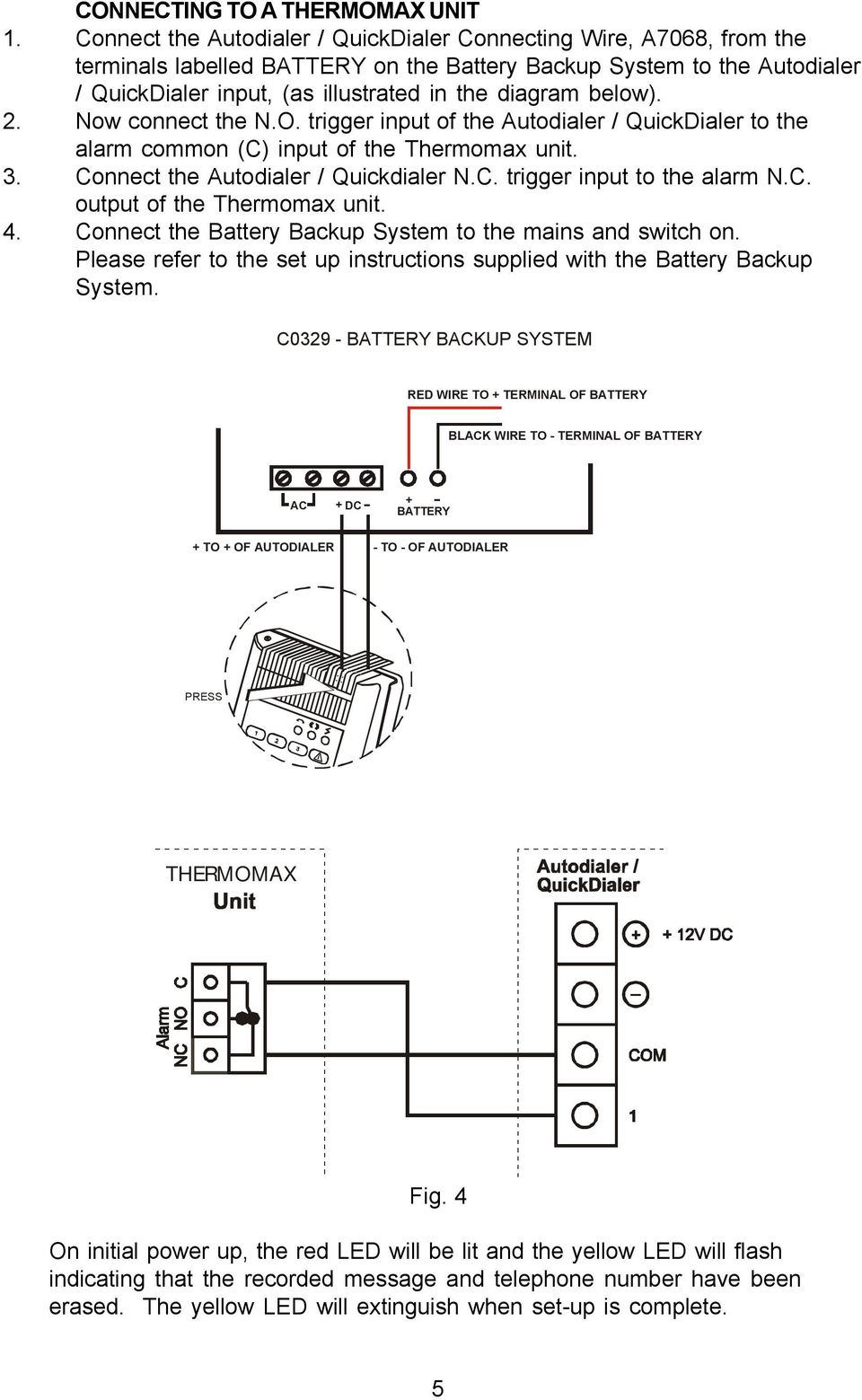
6 CONNECTING TO A THERMOMAX UNIT 1. Connect the Autodialer / QuickDialer Connecting Wire, A78, from the terminals labelled BATTERY on the Battery Backup System to the Autodialer / QuickDialer input, (as illustrated in the diagram below). 2. Now connect the N.O. trigger input of the Autodialer / QuickDialer to the alarm common (C) input of the Thermomax unit. 3. Connect the Autodialer / Quickdialer N.C. trigger input to the alarm N.C. output of the Thermomax unit. 4. Connect the Battery Backup System to the mains and switch on. Please refer to the set up instructions supplied with the Battery Backup System. C329 - BATTERY BACKUP SYSTEM RED WIRE TO + TERMINAL OF BATTERY BLACK WIRE TO - TERMINAL OF BATTERY AC + DC + BATTERY + TO + OF AUTODIALER - TO - OF AUTODIALER PRESS THERMOMAX Fig. 4 On initial power up, the red LED will be lit and the yellow LED will flash indicating that the recorded message and telephone number have been erased. The yellow LED will extinguish when set-up is complete. 5
7 4. KEYPAD AND INDICATORS KEYPAD * 8 9 <PANIC> <SET> <PAUSE> <CLEAR> LED INDICATORS LED STATUS GREEN YELLOW RED OFF OFF-LINE STANDBY POWER OFF ON ON-LINE REC / PLAY POWER ON FLASH DIALLING INCOMPLETE SETTING OF RECORDED MESSAGE AND PHONE NUMBER ALARM MEMORY LED INDICATION DURING PROGRAMMING Each time any button is pressed, the Yellow LED will flash once to confirm the input. When you press the once,the Yellow LED will flash once, on the second press of this key, the Yellow LED will flash twice, and on the third press of this key, the Yellow LED will be on for 1.5 second, indicating the completion of a programming procedure. When pressing the key or if the next sequent key is not pressed over an interval of 1 seconds or there is an incorrect input, the Yellow LED will flash four times, indicating ans incorrect operation. When the red LED is flashing, the user cannot proceed with the programming. To reset the Autodialer / QuickDialer press the key, (the Red LED will illuminate continuously), you can then proceed with the settings.

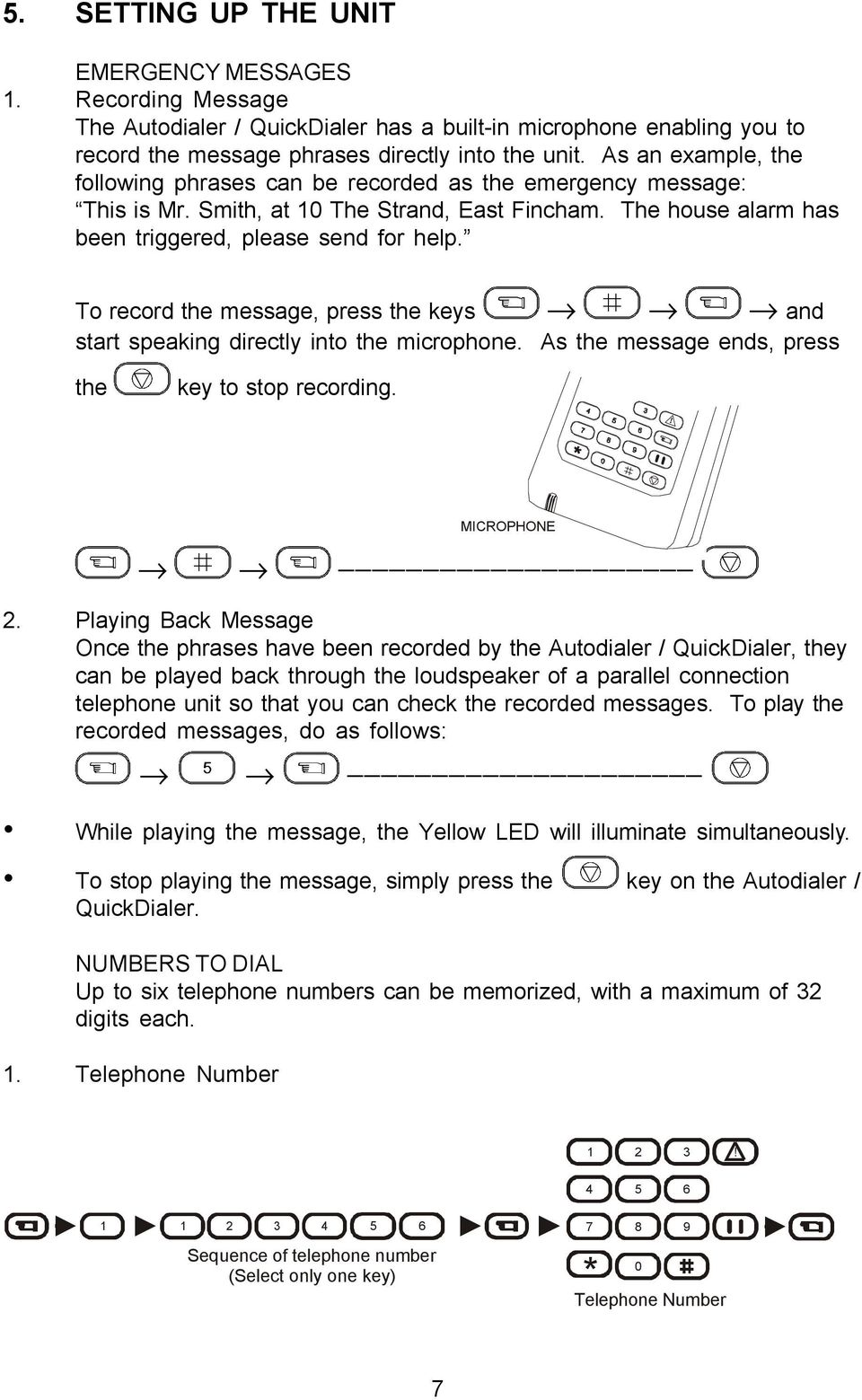
8 5. SETTING UP THE UNIT EMERGENCY MESSAGES 1. Recording Message The Autodialer / QuickDialer has a built-in microphone enabling you to record the message phrases directly into the unit. As an example, the following phrases can be recorded as the emergency message: This is Mr. Smith, at 1 The Strand, East Fincham. The house alarm has been triggered, please send for help. To record the message, press the keys and start speaking directly into the microphone. As the message ends, press the key to stop recording. 2. Playing Back Message Once the phrases have been recorded by the Autodialer / QuickDialer, they can be played back through the loudspeaker of a parallel connection telephone unit so that you can check the recorded messages. To play the recorded messages, do as follows: While playing the message, the Yellow LED will illuminate simultaneously. To stop playing the message, simply press the key on the Autodialer / QuickDialer. NUMBERS TO DIAL Up to six telephone numbers can be memorized, with a maximum of 32 digits each. 1. Telephone Number MICROPHONE (Select only one key) * Telephone Number 7
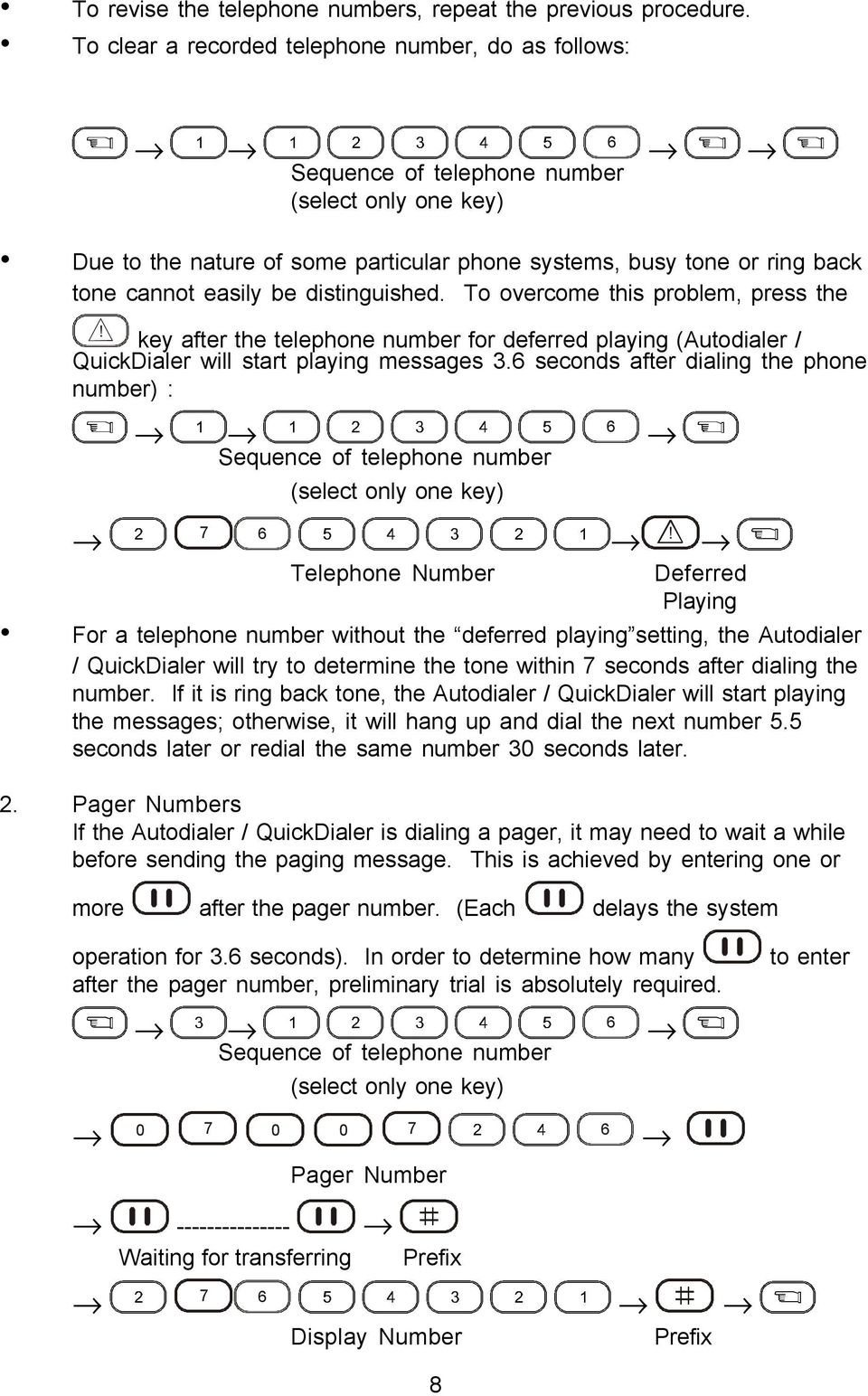
9 To revise the telephone numbers, repeat the previous procedure. To clear a recorded telephone number, do as follows: (select only one key) Due to the nature of some particular phone systems, busy tone or ring back tone cannot easily be distinguished. To overcome this problem, press the key after the telephone number for deferred playing (Autodialer / QuickDialer will start playing messages 3. seconds after dialing the phone number) : (select only one key) 7 Telephone Number Deferred Playing For a telephone number without the deferred playing setting, the Autodialer / QuickDialer will try to determine the tone within 7 seconds after dialing the number. If it is ring back tone, the Autodialer / QuickDialer will start playing the messages; otherwise, it will hang up and dial the next number 5.5 seconds later or redial the same number 3 seconds later. 2. Pager Numbers If the Autodialer / QuickDialer is dialing a pager, it may need to wait a while before sending the paging message. This is achieved by entering one or more after the pager number. (Each delays the system operation for 3. seconds). In order to determine how many after the pager number, preliminary trial is absolutely required. (select only one key) to enter 7 Pager Number Waiting for transferring 7 Prefix 7 Display Number Prefix 8
10 3. Programming an internal PABX telephone exchange through Direct Inward System Access (DISA) facility (Select only one key) Telephone Number Waiting for transfer Extension Deferred Number Playing 4. Connected to PABX system or ISDN switcher If the Autodialer / QuickDialer is connected to an internal PABX telephone exchange or ISDN switcher, a prefix digit (e.g. 9) is normally required before an outside line can be obtained. If the prefix dialing function is activated, the Autodialer / QuickDialer will dial the first digit (prefix) entered for every telephone number, and then start dial tone detecting function. To activate this function, enter. To disable the function, enter. The setting is done as follows: 9 Prefix (select only one key) Before entering the telephone number ( for the example below), press 9 for the dial output prefix. (select only one key) 9 7 Prefix Telephone Number SENDING A TEST CALL It is possible to send one test call by selecting one of the telephone numbers to call. (select only one key) The telephone number of the test call will be dialed only once whether the line is busy or not. 9

11 ALARM SYSTEM TRIGGER SETTINGS Upon receiving an input signal from the connected alarm control panel, the Autodialer / QuickDialer will react accordingly. For the Autodialer / QuickDialer to function correctly, it should memorize each zone s different alarm system trigger type and trigger duration. Alarm system Trigger Type: BUTTON 1 TYPE NORMAL OPEN (N.O.) NORMAL LOW NORMAL CLOSE (N.C.) NORMAL HI Factory Default: = Normal Open / Normal Low Trigger Duration: BUTTON DURATION Factory Default: = 1 seconds duration Durations and are suitable for pulse triggers, i.e. magnetic reed sensors, shock sensors and glass breaking sensors. For and duration, as long as the alarm control panel has been disarmed within 1 or 15 seconds respectively, the Autodialer / QuickDialer will stop operating right away and the alarm memory will be erased (red LED stays on accordingly). If you want the settings different from the factory default, do as follows: Type Duration (Select one key) (Select one key) If a new trigger occurs while the previous dialing procedure has not been completed, the Autodialer / QuickDialer will regard it as the same activation. If the triggered zone remains in its triggered state after the dialing procedure is completed, the autodialer / QuickDialer will regard it as the same activation and will not dial the numbers again. The previous trigger has to be cleared for at least 2 seconds before another trigger from the same zone will be regarded as a new activation. After being triggered 3 times in a row, the Autodialer / QuickDialer will enter the sleep mode for 1 hour, during which it will not accept any more new triggers. During the 1-hour period, you may press the key at any time to reset the alarm memory to zero for the Autodialer / QuickDialer to be on alert again. The panic key trigger is not limited by any of the alarm memory facilities mentioned above. You may press the Autodialer / QuickDialer. 1 key at any time to activate the

12 AUTODIALING SET-UP Each telephone number can be dialed for a maximum of 9 times. The factory default is to dial each phone number 3 times. 4 When setting up, by pressing the key for instance, each telephone number will be dialed four times upon activation. To select an Auto Dialing setting different from the factory default, do as follows: Select one key Note: The maximum number of times the Autodialer / QuickDialer will dial is 15 times. For example, if you stored 3 sets of telephone numbers in the memory, each telephone number can be dialed for a maximum of 5 times, even if you select an Auto Dialing setting greater than 5. When only one number is stored and that number is engaged, the Autodialer / QuickDialer will automatically redial that number with an interval of 3 seconds between dialing attempts. When more than one telephone number is stored, the Autodialer / QuickDialer will dial in accordance with the order. If the number being dialed is engaged, the Autodialer / Quickdialer will try the next number in the sequence and so on. Each number will be tried, and the redial interval between each number is 5.5 seconds. After a complete dialing cycle, the Autodialer / Quickdialer will rest for 3 seconds before doing another cycle. MESSAGE PLAYING DURATION During each call, the recorded message will be played repeatedly for a certain period of time (duration). There are four selectable settings of duration, the factory default is set for 1, i.e. 5 seconds. BUTTON DURATION To select a message playing duration different from the default, do as follows: 8 Duration (Select only one key) RESET THE SYSTEM To clear all settings and reset the system to the original factory default, do as follows: 11

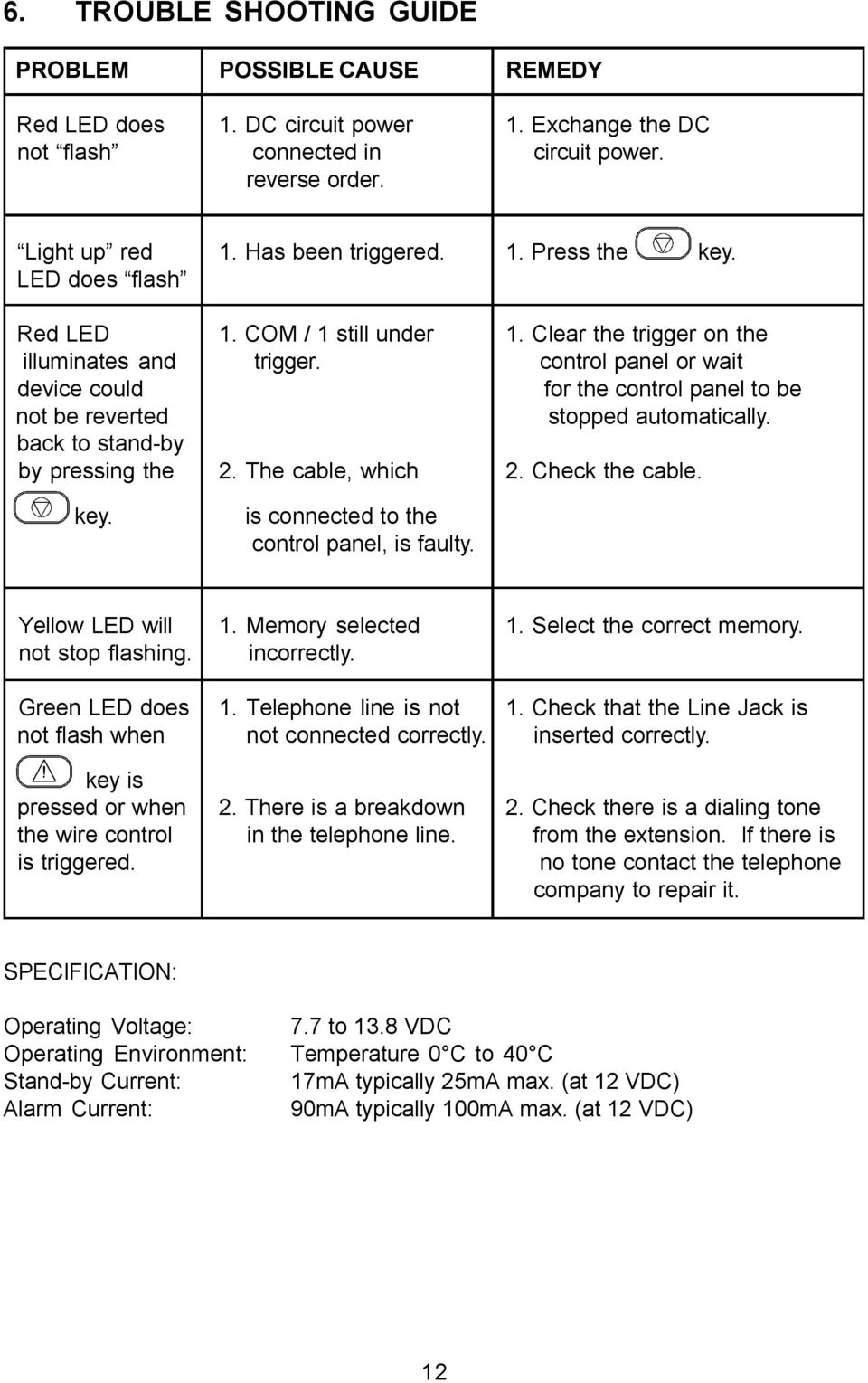
13 . TROUBLE SHOOTING GUIDE PROBLEM POSSIBLE CAUSE REMEDY Red LED does 1. DC circuit power 1. Exchange the DC not flash connected in circuit power. reverse order. Light up red 1. Has been triggered. 1. Press the key. LED does flash Red LED 1. COM / 1 still under 1. Clear the trigger on the illuminates and trigger. control panel or wait device could for the control panel to be not be reverted stopped automatically. back to stand-by by pressing the 2. The cable, which 2. Check the cable. key. is connected to the control panel, is faulty. Yellow LED will 1. Memory selected 1. Select the correct memory. not stop flashing. incorrectly. Green LED does 1. Telephone line is not 1. Check that the Line Jack is not flash when not connected correctly. inserted correctly. key is pressed or when 2. There is a breakdown 2. Check there is a dialing tone the wire control in the telephone line. from the extension. If there is is triggered. no tone contact the telephone company to repair it. SPECIFICATION: Operating Voltage: 7.7 to 13.8 VDC Operating Environment: Temperature C to 4 C Stand-by Current: 17mA typically 25mA max. (at 12 VDC) Alarm Current: 9mA typically 1mA max. (at 12 VDC) 12
Automatic Telephone Dialer TD-101(W)
 Automatic Telephone Dialer TD-101(W) The TD-101 is an automatic dialing device which can transmit prerecorded information via the telephone line. The dialer can send two different 10 second voice messages
Auto Dialer. Manual E-921APQ E-921GPQ
 Troubleshooting: Auto dialer will not arm/disarm Auto dialer will not dial out Unit doesn t respond to a call-back Difficulty in activating room monitor by telephone remote control Make sure that you have
Speech Dialler Engineering Information
 Speech Dialler Engineering Information Description The Informa is a Speech Dialler for use with intruder alarm systems. When the control panel recognises an alarm it triggers the Informa. The Informa uses
GSM-DL2 GSM auto dialer
 Introduction GSM-DL2 GSM auto dialer GSM-DL2 is a GSM auto dialer; designed for car alarm, boat alarm, home alarm and other applications. When it is triggered, it dials pre-programmed telephone numbers
How To Program An Autodialer
 GJD HYL005 GSM Autodialer Instruction Manual Please read these instructions before you start the installation Features: LCD display. Programmable 9 x 32 digit phone numbers for each trigger. 10 second
WIRELESS ALARM SYSTEM WITH TELEPHONE AUTO DIALER
 BAT.LOW AC WIRELESS ALARM SYSTEM WITH TELEPHONE AUTO DIALER THE SYSTEM THAT CALLS YOU! Our WIRELESS ALARM SYSTEM WITH TELEPHONE AUTO DIALER is designed to allow you to create your own security system.
AD-01 Slave Auto Dialer. Owner s Manual
 AD-01 Slave Auto Dialer Owner s Manual AD-01 Slave Manual.indd 1 10/15/2009 10:20:44 AM 2 AD-01 Slave Manual.indd 2 10/15/2009 10:20:44 AM Features: Programmable entry/exit delay time; select up to 9 (32
Emergency Dialer DIAL-ALERT MODEL: AD-105. www.skylinkhome.com
 www.skylinkhome.com Emergency Dialer TM DIAL-ALERT MODEL: AD-105 If you would like to order Skylink s products or have difficulty getting them to work or download information and user manual, please :
Autodialler. Installation & Programming Guide HYL004. Please read these instructions before you start the installation. Installation.
 Autodialler HYL004 Installation & Programming Guide Features Please read these instructions before you start the installation LCD Display Programmable 9 x 32 digit phone numbers for each trigger. 10 second
Wireless Home Security System Product Manual (Model #80355)
 Wireless Home Security System Product Manual (Model #80355) Installation Instructions During set-up, if no key is pressed for 15 seconds it will come out of the setup mode and you will have to start over.
WIRELESS ALARM SYSTEM WITH TELEPHONE AUTO DIALER
 BAT.LOW AC WIRELESS ALARM SYSTEM WITH TELEPHONE AUTO DIALER THE SYSTEM THAT CALLS YOU! Our WIRELESS ALARM SYSTEM WITH TELEPHONE AUTO DIALER is designed to allow you to create your own security system.
AC-115 Compact Networked Single Door Controller. Installation and User Manual
 AC-115 Compact Networked Single Controller Installation and User Manual December 2007 Table of Contents Table of Contents 1. Introduction...5 1.1 Key Features... 6 1.2 Technical Specifications... 7 2.
Microprocessor Home Security System
 numbers of sensor s activations in the zone and after which activations the zone will be discarded (ignored). On every system s arming the counter is cleared in self. 6.3.11. 2 - Triger Timer - enter a
TS510 & TS500. Installation & User Guide. Compatible Equipment
 Installation & User Guide Compatible Equipment TS510 REM - Remote Keypad 9040 - Loudspeaker DC54/58 - Digital Communicator SD1+ - Speech Dialler 496525 Issue A 1 of 10 TS510 and TS500 Overview Introduction
o^c a (fg 1) Telephone Line Socket ( flcg. 2b ) ) fig. 2a ) TeiePhone b ^^I r DC Adaptor
 INTRODUCTION Our jnique passive in`raroc ^ys,e^ii conccotrates on the protected area you select. Whenever the unit is set at ARMED, the motion detector will concentrate on the protected area. Once there
Home Security Alarm System
 Home Security Alarm System User Manual (ALM-S02) Read manual carefully before use. PiSector Inc., USA www.pisector.com Thank you for purchasing this home security alarm system. For your safety and better
HAM841K ALARM CONTROL PANEL FOR COMMERCIAL AND RESIDENTIAL SECURITY SYSTEMS
 ALARM CONTROL PANEL FOR COMMERCIAL AND RESIDENTIAL SECURITY SYSTEMS USER MANUAL USER MANUAL ALARM CONTROL PANEL FOR COMMERCIAL AND RESIDENTIAL SECURITY SYSTEMS INTRODUCTION The (HA-841K) is a complete
LW-2000-3A. Wireless Auto Dial Alarm System. Sentry Plus User Manual By Global Gadgets
 LW-2000-3A Wireless Auto Dial Alarm System Sentry Plus User Manual By Global Gadgets Main Features Simple to use keypad for operation and control. The system can store up to 9 telephone numbers: positions
SD1+ Speech Dialler. Installation and Programming Guide. Programming
 Speech Dialler Cooper Security Ltd Security House Vantage Point Business Village Mitcheldean Gloucestershire GL17 0SZ www.coopersecurity.co.uk Product Support (UK) Tel: +44 (0) 1594 541979. Available between:
MICROPROCESSOR HOME - SECURITY SYSTEM Home4
 MICROPROCESSOR HOME - SECURITY SYSTEM Home4 The system is useful for protection of small buildings - living places, shops, offices, store places etc. including up to 8 separate zones. It has built-in power
GSM Autodialer Professional GJD700 Speech & Text Autodialer
 Text Edit message GSM Autodialer Professional GJD700 Speech & Text Autodialer Introduction The GSM Autodialer Professional works in conjunction with standard alarm systems and makes use of your preferred
AGRI-ALERT 800T / AGRI-ALERT 800 ALARM SYSTEM USER MANUAL
 AGRI-ALERT 800T / AGRI-ALERT 800 ALARM SYSTEM USER MANUAL Manufacturer: Viatron Electronics 3514 1st Street, St-Hubert (Quebec) Canada J3Y 8Y5 WARNING: the warranty can be void if the Agri-Alert 800T or
GSM AD05 Slave GSM Auto Dialer- Instruction Manual
 GSM AD05 Slave GSM Auto Dialer- Instruction Manual Please read these instructions before you start the installation Features LCD display Programmable 9 x 32 digit phone numbers for each trigger. 10 second
Speech Dialler Engineering Information
 Speech Dialler Engineering Information Description The ADE Informa is a Speech Dialler for use with intruder alarm systems. When the control panel recognises an alarm it will trigger the Informa. The Informa
Firmware version: 1.10 Issue: 7 AUTODIALER GD30.2. Instruction Manual
 Firmware version: 1.10 Issue: 7 AUTODIALER GD30.2 Instruction Manual Firmware version: 2.0.1 Issue: 0.6 Version of the GPRS transmitters configurator: 1.3.6.3 Date of issue: 07.03.2012 TABLE OF CONTENTS
9452/9453 Installation and User Guide
 9452/9453 Installation and User Guide Compatible Equipment 9425 Remote Keypad 9040 Internal Sounder 660 Speech Communicator 8440 4-Channel Minicom 496330 Issue 1 1 of 10 9452/3 Introduction The 9452 and
SEC-ALARM200 WIRELESS ALARM SYSTEM
 SEC-ALARM200 WIRELESS ALARM SYSTEM - 1 - Safety precautions: CAUTION To reduce risk of electric shock, RISK OF ELECTRIC SHOCK this product should ONLY be DO NOT OPEN opened by an authorized technician
Wireless AUTODIAL GSM SMS Home Alarm Security System 900/ 1800/ 1900Mhz(CK-GSM-9003)
 CN2HK LIMITED Wireless AUTODIAL GSM SMS Home Alarm Security System 900/ 1800/ 1900Mhz(CK-GSM-9003) User Manual Please read this manual before operating this product. After you finish reading this manual,
PK5500 v1.1 Installation Instructions
 PK5500 v1.1 Installation Instructions 1 2 3 4 5 6 7 8 9 * 0 # WARNING: Please refer to the System Installation Manual for information on limitations regarding product use and function and information on
SD1 SPEECH DIALLER OPERATING INSTRUCTIONS SD1 ESC ENT
 SD1 SPEECH DIALLER 1 2 3 4 5 6 7 8 9 SD1 ENT 0 ESC A B C OPERATING INSTRUCTIONS CONTENTS Section Title Page 1 Overview................................................ 1 2 Initialising the SD1.........................................
Model PBX 308 Plus System Administration Guide
 Model PBX 308 Plus System Administration Guide Introduction 3 Installation Hints 4 System Programming 5 IMPORTANT Exchange Lines 6 Assign Incoming calls to ring Nominated Extensions 7 Cascade Ringing Of
SpotCell Automatic Dialer System
 Application Note 108 11-Jun-00 SpotCell Automatic Dialer System Overview All SpotCell adaptive repeaters now come equipped with built-in alarming capabilities which have been designed to be compatible
GSM HOME SECURITY SYSTEM
 Cell /Mobile phone home security system GSM HOME SECURITY SYSTEM Model : GSM-120 TABLE OF CONTENTS 1. FEATURES... 1 2. APPLICATION... 2 3. SPECIFICATIONS... 3 4. FRONT PANEL & LAYOUT DESCRIPTION...6 5.
CONTENTS QUICK SETUP & INSTALLATION USER MANUAL. SUPA8 Quick Setup & User Manual
 SUPA8 Quick Setup & User Manual QUICK SETUP & INSTALLATION CONTENTS FACTORY DEFAULTS... 1 INSTALLATION OF THE SECURITY SYSTEM... 2 COMMISSIONING THE DIALLER PANEL... 5 ZONE INPUT CONNECTIONS... 7 PANEL
Control/Communicator Installation Manual
 DAS NETWORX NX-8 Control/Communicator Installation Manual Page General Description... 2 Ordering Information... 2 Option Definitions... 2 Programming the LED Code Pads... 4 Programming the NX-8... 8 Types
Installation and Programming Guide
 Speech Dialler Installation and Programming Guide Contents Introduction... 1 Overview... 1 Specifications... 4 Installation... 5 Installation Requirements... 5 Mounting Instructions... 5 PCB Layout...
CONTENTS 4. HOW TO UNSET THE PANEL...7
 Pi-8 USER MANUAL CONTENTS 1. THE KEYPAD AND ITS OPERATION...3 1.1 DESCRIPTION OF THE KEYPAD LEDS... 3 1.1.1 READY LED (RED)...3 1.1.2 TAMPER LED (RED)...3 1.1.3 POWER LED (GREEN)...3 1.1.4 CIRCUIT LEDs
DC-8706K Auto Dial Alarm System
 DC-8706K Auto Dial Alarm System User Guide Basic Contents: 1x the host unit; 1x wireless door (window) magnet; 1x wireless infrared detector; 2x remote control; 1x siren; 1x phone core; 1x AC to DC power
www.sebury.com.cn Digital Keypad Use s Manual
 K3 K4 www.sebury.com.cn Digital Keypad Use s Manual Contents Introduction Introduction Specifications Intramural Interface Circuit 3 Mounting 3 Wiring 5 Power UP 7 Engineer Programming Mode 7 The K3/K4
TX GSM SMS Auto-dial Alarm System. Installation and User Manual
 TX GSM SMS Auto-dial Alarm System Installation and User Manual Product Features: 1. 16 wireless zones, 3 wired zones alarm system, suitable for small to medium size offices and homes. 2. The system uses
United Security Products Model AVD-45b Automatic Voice Dialer Installation and Instruction Manual
 United Security Products Model AVD-45b Automatic Voice Dialer Installation and Instruction Manual Patents Pending INTRODUCTION Thank you for purchasing United Security Products Model AVD-45b, the single
Model PBX 308 System Administration Guide
 Model PBX 308 System Administration Guide Introduction 4 Installation Hints 4 Wall Mounting System Programming 5 System Password Changing the Password IMPORTANT Exchange Lines 6 1 Exchange Line connected:
PROFESSIONAL HOME ALARM SYSTEM. Important! Please read these instructions carefully.
 WIRELESS AUTODIAL HOME ALARM SYSTEM AM2000 Instructions for use Important! Please read these instructions carefully. IMPORTANT 1 IDENTIFICATION PLEASE CONTACT BEFORE RETURNING THIS PRODUCT TO THE RETAILER
Fire Alarm Control Panel. Family. Operating Manual
 Fire Alarm Control Panel Family Operating Manual CONTENTS System Description AH-03312 System Characteristics... Fire Signal Receiving Board Description-4L... Fire Signal Receiving Board Description-8L...
Automatic Phone-Out Home Monitoring Systems
 Automatic Phone-Out Home Monitoring Systems Power Outage and Freeze Alarm Model Number: THP202 Power Outage, Freeze and Flood Alarm Product Description Model Number: THP201 These monitoring systems are
Model PBX 308 Plus System Administration Guide
 Model PBX 308 Plus System Administration Guide Introduction 4 Installation Hints 4 System Programming 5 - System Password 5 - Changing Password 5 Exchange Line Set up 6 - Caller Display 6 - Setting Date
Emergency Dialer DIAL-ALERT. English MODEL : AD-433S. www.skylinkhome.com
 www.skylinkhome.com Emergency Dialer English DIAL-ALERT TM MODEL : AD-433S 101A320 JUNE, 2004 CUSTOMER SERVICE 17 Sheard Avenue, Brampton, Ontario, Canada L6Y 1J3 Tel : (800) 304-1187 Fax : (800) 286-1320
Using your LED Plus keypad
 Using your LED Plus keypad System 238 System 2316 System 238i System 2316i Part Number 5-051-372-00 Rev B Thank you for purchasing this C&K alarm system Your system is one of the most powerful and advanced
Installation Manual for D1110 DigiCom2
 Installation Manual for D1110 DigiCom2 Dycon Ltd Tel: +44 (0)1443 471 060 Fax: +44 (0)1443 479 374 Cwm Cynon Business Park Mountain Ash CF45 4ER - UK www.dyconsecurity.com [email protected] TABLE
ADA COMPLIANT BOX STYLE TELEPHONE INSTALLATION, PROGRAMMING AND OPERATING INSTRUCTIONS FOR MODEL PBX
 ADA COMPLIANT BOX STYLE TELEPHONE INSTALLATION, PROGRAMMING AND OPERATING INSTRUCTIONS FOR MODEL PBX INSTALLATION INSTRUCTIONS Step 1. Determine the position for the Hands-free phone in the elevator phone
Memcom Emergency Telephone
 Memcom Emergency Telephone Installation Guide Ref No. 450 900 (GB) Version 2 + + Simple wiring for quick installation + + Integrated LCD display shows you what you have programmed + + All code based programming
Model PBX 416 Plus System Administration Guide
 Model PBX 416 Plus System Administration Guide Introduction 4 Installation Hints 4 System Programming 5 - System Password 5 - Changing Password 5 - Entering password in Direct 5 Dial Mode Exchange Line
MOBILE CALL GSM Alarm System User s Manual
 MOBILE CALL GSM Alarm System User s Manual Profile For a better understanding of this product, please read this user manual thoroughly before using it. Contents Function Introduction Alarm Host Diagram
1R / 4-BUTTON SERIES
 Button 1 1R / 4-BUTTON SERIES VEHICLE SECURITY SYSTEM Standard Features: Two 4-Button Remote Transmitters Status indicator (LED) Valet / override switch Multi-tone siren Dual stage impact detector Remote
System Administration Guide. Model KS 832. Expandable up to 1664
 System Administration Guide Model KS 832 Expandable up to 1664 Introduction 4 Installation Hints 4 System Programming 5 - System Password 5 - Changing Password 5 Exchange Line Set up 6 - Caller Display
GSM AUTO DIALER. Remote Monitoring & Control using your mobile phone. www.gsm-activate.co.uk
 GSM AUTO DIALER Remote Monitoring & Control using your mobile phone www.gsm-activate.co.uk Product Information Our GSM Auto-Dialer is a versatile unit which can be attached to many of your electronic devices
Intelligent GSM Auto-Dial Alarm System
 Auto-dial Alarm System Intelligent GSM Auto-Dial Alarm System Profile For a better understanding of this product, please read this user manual thoroughly before using it. 2013.2.V1.0 Auto-dial Alarm System
Model PBX 206 System User Guide
 Model PBX 206 System User Guide Introduction 3 Installation Hints 3 System Programming 3 IMPORTANT Exchange Lines 4 Assign Incoming calls to ring Nominated Extensions 4 Call Barring / Call Restrictions
GSM AUTO-DIALER With 10Amp Relay USER GUIDE
 GSM AUTO-DIALER With 10Amp Relay USER GUIDE GSM Frequency: Quad band freq 850/900/1800/1900 MHz Power Supply Voltage: 9-18Vdc 1Amp max Current used in standby mode: 25mA max IP 65 Enclosure rating for
FältCom ECII Flex Manual. Version: 0.2.4-C Updated: 2010-12-15. 162187 Manual FältCom ECII Flex Page 1 of 42
 FältCom ECII Flex Manual Version: 0.2.4-C Updated: 2010-12-15 162187 Manual FältCom ECII Flex Page 1 of 42 162187 Manual FältCom ECII Flex Page 2 of 42 Table of contents 1 NOTES... 5 2 COPYRIGHT... 5 3
G.A.L. HANDS FREE EMERGENCY TELEPHONE MODEL GAL-6400
 I. GENERAL G.A.L. HANDS FREE EMERGENCY TELEPHONE MODEL GAL-6400 The GAL-6400 Hands Free Emergency Telephone permits a pre-programmed number to be dialed when the "push to call" button is depressed on the
NESS D16. 16 Zone Control Panel and Dialler OWNER S MANUAL
 NESS D16 16 Zone Control Panel and Dialler OWNER S MANUAL REVISION 2, JULY 2001 Ness Security Products Pty Ltd Quality Endorsed Company ISO9001 LIC.No. QEC2074 NSW Head Office only WWW.NESS.COM.AU Australia
PiSector Home security systems
 PiSector Home security systems User Manual (ALM-S02) Read manual fully before use. PiSector Inc., USA, www.pisector.com Thank you for purchase this alarm system, For proper use and your safety, please
User s Information Guide R1A
 HSC505-R Home Security Controller - User Manual Release R1a Pi HSC505 and Pi HSC505R Home Security Controller User s Information Guide R1A Page 1 QD Dynamics (Pty) Ltd reserves the right to make changes
User Manual. Video Doorphone CDV-1020AQ
 User Manual Video Doorphone CDV-1020AQ 513-11, Sangdaewon-dong, Jungwon-gu, Seongnam-si, Gyeonggi-do, Korea Int l Business Dept. Tel. : +82-31-7393-540~550 Fax. : +82-31-745-2133 Web site : www.commax.com
SECURITY ALARM CONTROL PANEL QUICK SETUP & USER MANUAL
 SECURITY ALARM CONTROL PANEL QUICK SETUP & USER MANUAL PINKERTON Quick Setup & User Manual QUICK SETUP & INSTALLATION CONTENTS FACTORY DEFAULTS...1 INSTALLATION OF THE SECURITY SYSTEM...2 COMMISSIONING
CAD-05 Kit GSM Auto Dialer. Owner s Manual
 CAD-05 Kit GSM Auto Dialer Owner s Manual CAD-05 Kit Manual.indd 1 Warnings: This device complies with Part 15 of the FCC rules, Operation of this device is subject to the following conditions: 1. This
WITURA CORPORATION SDN BHD
 WT 1010SA Stand Alone GSM Alarm System User Manual and Installation Instructions Version: 1.2 Updated: 4 JAN 2012 WITURA CORPORATION SDN BHD Stand Alone GSM Alarm System Instruction Manual 1 Introduction:
INSTALLATION GUIDE. Card Reader & Controller with KIM Swipe Reader for Solitaire 850 / 950 / 850L Learnlok PK2930
 INSTALLATION GUIDE Card Reader & Controller with KIM Swipe Reader for Solitaire 850 / 950 / 850L Learnlok PK2930 Card Reader and Controller Model 3.5 with KIM Swipe Reader Table of Contents 1. Features..................................
Six-defense zone Display Alarm System. User Manual
 Six-defense zone Display Alarm System User Manual Feature 1. Anti-interfere function. When someone interferes it with same frequency, the control unit will activate siren to alarm. 2. Support anti-decode
OPERATING INSTRUCTIONS
 Gemini Speakerphone OPERATING INSTRUCTIONS This Interquartz telephone has been manufactured to very high standards and is very easy to use. Please read this manual carefully to find out how to use the
WIRING HARNESS FOR AS635P4. BLUE PLUG RED, BLUE, BLACK, WHITE - Plug in dual stage sensor harness
 WIRING HARNESS FOR AS635P4 ANTENNA NOT USED 5 PIN WHITE PLUG 2 PIN WHITE PLUG GREEN - PARKING BRAKE INPUT (-) BLUE - NOT USED 3 PIN BLUE PLUG RED, BLUE, BLACK, WHITE - Plug in dual stage sensor harness
HILLS Series LED Code Pad User Manual
 HILLS Series LED Code Pad User Manual Not all features may be available on your system Check with your installer to find out which features are programmed Page 2 TABLE OF CONTENTS Code Pad Diagrams...2
Ademco Vista-20P/First Alert FA-168C Basic Commands
 Zones 64 total Ademco Vista-20P/First Alert FA-168C Basic Commands Wireless Yes, Zones 09 to 48 + 16 Keyfob Zones (Zones 49 to 64) Batteries Downloadable Partitions 2 12 volt Rechargable inside main Panel,
GSM Voice Auto Dialer & SMS Sender JC-999
 GSM Voice Auto Dialer & SMS Sender JC-999 Main features: () Large LCD display,integrated integrated keypad, human-friendly programming; (2) Support 2 alarm receiving numbers; (3) Triggering means: N.C
Solution-16 Operators Manual ISSUE 1.60
 Solution-16 Operators Manual ISSUE 1.60 !"#$%&"'()*+ Operators Manual Copyright 2002 by, SYDNEY, AUSTRALIA Document Part Number MA880O DOCUMENT ISSUE 1.60 Printed 22 March 2002 This documentation is provided
STATUS POWER MONITOR ALARM SOS DISARM
 STATUS POWER MONITOR ALARM SOS DISARM I. Features II. Preparation before use III. Host 1.LED status explanation 2. Host panel IV. System Settings 1. Coding of wireless sensors 2. Exit coding 3. Settings
500r+ Installation and User Guide
 500r+ Installation and User Guide Compatible Equipment 502rUK-50 Watch/Pendant PA. 509rUK-50 Smoke Detector 515rUK-00 10 metre passive infra red movement detector. 525rUK-00 Remote Set/Unset (Full and
INSTALLATION MANUAL 3RP / 5RP 4-BUTTON SERIES VEHICLE SECURITY SYSTEMS
 3RP / 5RP 4-BUTTON SERIES VEHICLE SECURITY SYSTEMS INSTALLATION MANUAL Before you begin the installation Read the INSTRUCTIONS! Always use a multi-meter when verifying vehicle wiring. Before mounting the
GSM Voice Auto Dialer& SMS sender JC-999. User Manual
 1. Description 1.1 Main features GSM Voice Auto Dialer& SMS sender JC-999 User Manual (1) Large LCD display,integrated keypad, human-friendly programming; (2) Support 12 alarm receiving numbers; (3) Triggering
CR9971 2 Band Auto Set Dual Alarm Clock Radio ROBERTS. Sound for Generations. Please read this manual before use
 ROBERTS Sound for Generations CR9971 2 Band Auto Set Dual Alarm Clock Radio Please read this manual before use Contents Contents... 1 Controls...2-5 Switching on... 6 Setting the time manually... 6 Setting
Button 1 Button 2. Button 3 Button 4. Programmed Remote Transmitter. Button Function Condition
 WWW.STELLAR.COM ST9000 SECURITY SYSTEM Button Function Condition 1 a. Arm and lock doors b. Car finder with sound c. Temporary stop alarm from sounding d. Remote lock doors 1 for 2 sec. Panic Anytime a.
Solution-8 Control Panel
 Solution-8 Control Panel Issue 3c September 1994 Copyright 1994-1995 All rights reserv (MA 800 O) Important Note As there are many different types of consoles available for use with this control panel,
VEHICLE SECURITY SYSTEM G25/G20
 VEHICLE SECURITY SYSTEM G25/G20 Limited Lifetime Warranty This vehicle security system is warranted to the original purchaser, to be free from defects in material and workmanship. The manufacturer will
VOICE DIALER MODULE V1.10
 VOICE DIALER MODULE V1.10 SECURITY HAS A VOICE REFERENCE AND INSTALLATION MANUAL TABLE OF CONTENTS 1.0 INTRODUCTION... 3 1.1 SYSTEM FEATURES... 3 1.2 TECHNICAL SPECIFICATIONS... 4 1.3 GLOSSARY OF TERMS...
CM705B - Universal Expander Module CM707B - Plug On Zone Expander Security Systems
 CM705B - Universal Expander Module CM707B - Plug On Zone Expander Security Systems EN Security System CM705B CM705B - Universal Expander Module The CM705B universal expander provides a cost effective way
Shunt lock function 3066
 Version: January 2004 Contents Alarm System Activation unit Deactivation unit Digital locking cylinder or Smart Relay 1.0 Method of Operation 4 1.1 General 4 1.2 Turning the Alarm System On 4 1.3 Turning
IDS. Users Guide to Keypad Functions S E C U R I T Y MANUAL NO. 700-171-01B ISSUED AUG 2002 VERSION 1.18
 INHEP DIGITAL IDS S E C U R I T Y Users Guide to Keypad Functions MANUAL NO. 700-171-01B ISSUED AUG 2002 VERSION 1.18 Summary of Operation A rm/ disarm [#] + [USER CODE] Quick Quick Quick Away Arm Stay
Understanding the Code Pad lights...4. Code Pad tones...5. Fully arming the system On MODE...6. Fully arming the system - Quick Arm MODE...
 TABLE OF CONTENTS...Glossary of terms...2...code Pad Diagram...3 Understanding the Code Pad lights...4 Code Pad tones...5 Fully arming the system On MODE...6 Fully arming the system - Quick Arm MODE...6
ABUS WIRELESS ALARM SYSTEM
 ABUS WIRELESS ALARM SYSTEM These installation instructions are published by Security-Center GmbH & Co. KG, Linker Kreuthweg 5, D-86444 Affing/Mühlhausen. All rights including translation reserved. Reproductions
1pcs. 1pcs. 2pcs 1pcs 1pcs 2pcs
 Home security alarm system LX-HS06 Instruction Brief introduction LX-HS06 is a set of entirely new English home security alarm system, it uses advanced MCU control and SMD technology. it innovate multiple
S100. GSM House Alarm System. Http://www.GSMalarmsystem.com
 S100 GSM House Alarm System Http://www.GSMalarmsystem.com 1. Brief introduction The GSM Alarm System is a new security protection solution special for home, house and office and other applications. It
GSM WIRELESS DIGITAL ALARM SYSTEM USER GUIDE. Please read it carefully before installation and operation
 GSM WIRELESS DIGITAL ALARM SYSTEM USER GUIDE Please read it carefully before installation and operation Your New Diamond Designs Alarm works with a GSM SimCard via the cellular phone,system to call up
User Manual CN2HK LIMITED. Complete Wireless Home Alarm Security System (CK-8806) ENG. Please read this manual before operating this product.
 CN2HK LIMITED Complete Wireless Home Alarm Security System (CK-8806) User Manual Please read this manual before operating this product. After you finish reading this manual, store it in a safe place for
Users Guide to Keypad Functions
 Users Guide to Keypad Functions MANUAL NO. 700-175-01J ISSUED JAN 2002 VERSION 1.41 Summary of Operation A rm/ disarm [#] + [USER CODE] Quick Quick Quick Panic Fire Medical Away Arm Stay Arm Stay Arm &
HILLS Series LED Code Pad User Manual
 HILLS Series LED Code Pad User Manual Not all features may be available on your system Check with your installer to find out which features are programmed Page 2 TABLE OF CONTENTS Code Pad Diagrams...2
Converse 320. Userfriendly Guide
 Converse 0 Userfriendly Guide Return Diversion Minder On Off At a glance IMPORTANT Next Inserts a space in a number when storing numbers in the memory. Clear Used to edit numbers when pre-dialling or when
ADEMCO LYNXR-I Security Systems
 K14117 3/06 Rev. A ADEMCO LYNXR-I Security Systems Quick Start Guide UL LYNXR-I is not intended for UL985 Household Fire applications unless a 24-hour backup battery (P/N LYNXRCHKIT-HC or LYNXRCHKIT-SHA)
VOCALISER USER INSTRUCTIONS. Pyronix Ltd OCTOBER 2000. RINS113 Issue 2
 VOCALISER USER INSTRUCTIONS Pyronix Ltd OCTOBER 2000 RINS113 Issue 2 9 RECEIVING A CALL FROM THE VOCALISER A telephone call from the Vocaliser is easily recognised by the distinctive three tones heard
PRO PLM Installation Instructions
 PRO PLM Installation Instructions PROFESSIONAL INSTALLATION STRONGLY RECOMMENDED Installation Precautions: Roll down window to avoid locking keys in vehicle during installation Avoid mounting components