
SIMATIC NET. CP AS-Interface Master B C. Preface Contents. Technical Description and Installation Instructions Interface to the User Program
|
|
|
- Clare James
- 10 years ago
- Views:
Transcription
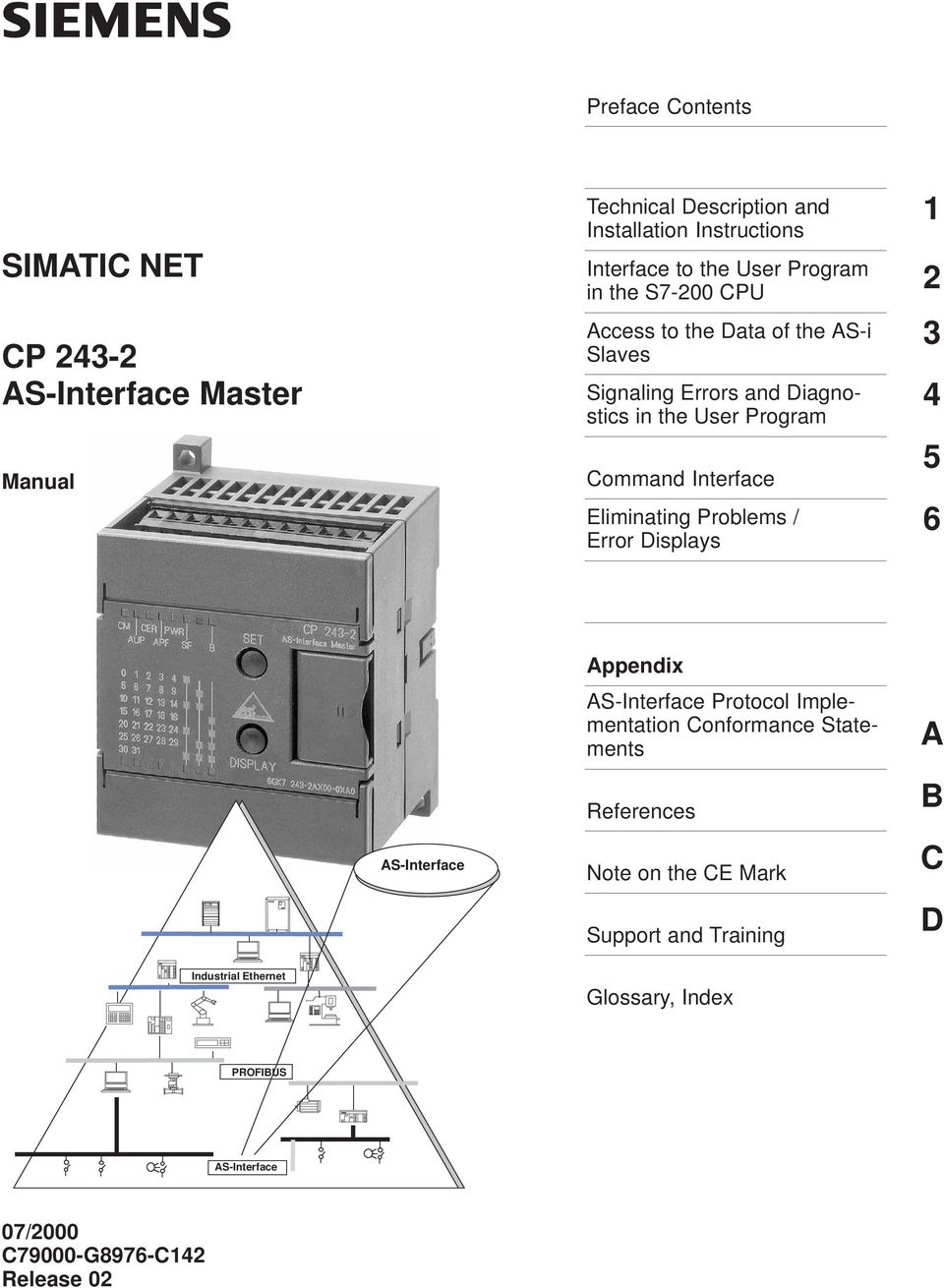
1 Preface Contents SIMATIC NET CP AS-Interface Master Manual Technical Description and Installation Instructions Interface to the User Program 2 in the S7-200 CPU Access to the Data of the AS-i Slaves Signaling Errors and Diagnostics in the User Program Command Interface Eliminating Problems / Error Displays Appendix AS-Interface AS-Interface Protocol Implementation Conformance Statements References Note on the CE Mark Support and Training A B C D Industrial Ethernet Glossary, Index PROFIBUS AS-Interface 07/2000 C79000-G8976-C142 Release 02
2 Safety Guidelines This manual contains notices which you should observe to ensure your own personal safety, as well as to protect the product and connected equipment. These notices are highlighted in the manual by a warning triangle and are marked as follows according to the level of danger:! Danger indicates that death, severe personal injury or substantial property damage will result if proper precautions are not taken.! Warning indicates that death, severe personal injury or substantial property damage can result if proper precautions are not taken.! Caution indicates that minor personal injury or property damage can result if proper precautions are not taken. Note draws your attention to particularly important information on the product, handling the product, or to a particular part of the documentation. Qualified Personnel Only qualified personnel should be allowed to install and work on this equipment. Qualified persons are defined as persons who are authorized to commission, to ground, and to tag circuits, equipment, and systems in accordance with established safety practices and standards. Correct Usage Note the following! Warning This device and its components may only be used for the applications described in the catalog or the technical description, and only in connection with devices or components from other manufacturers which have been approved or recommended by Siemens. This product can only function correctly and safely if it is transported, stored, set up, and installed correctly, and operated and maintained as recommended. Trademarks SIMATIC, SIMATIC HMI and SIMATIC NET are registered trademarks of the SIEMENS AG. Third parties using for their own purpose any other names in this document which refer to trademarks might infringe upon the rights of the trademark owners. Copyright Siemens AG 1999 All rights reserved The reproduction, transmission or use of this document or its contents is not permitted without express written authority. Offenders will be liable for damages. All rights, including rights created by patent grant or registration of a utility model or design, are reserved. A&D Industrial Automation Systems Postfach 4848, D Nürnberg Siemens Aktiengesellschaft Disclaimer of Liability We have checked the contents of this manual for agreement with the hardware and software described. Since deviations cannot be precluded entirely, we cannot guarantee full agreement. However, the data in this manual are reviewed regularly and any necessary corrections included in subsequent editions. Suggestions for improvement are welcomed. Technical data subject to change. Siemens AG 1999 C79000-G8976-C142
3 Preface Purpose of the Manual This manual supports you when using the CP module. It explains how to access AS-Interface actuators and AS-Interface sensors from an S7-22x CPU via this module. We recommend the following procedure when......you want an overall picture of the AS-Interface. First read the AS-Interface Introduction and Basic Information manual (not part of this documentation package). This contains general information about the AS-Interface, abbreviated to AS-i in the following chapters....you want to set up an AS-i system and include the CP module in it: You will find the relevant information about connecting and operating the CP in Chapter 3. Requirements To understand this document, you should be familiar with the manual AS-Interface Introduction and Basic Information (part of this documentation package). Diskette with Sample Programs The diskette supplied with this manual (S7-200 PROGR) contains sample programs that will help you when programming the CP These sample programs were written with STEP 7-Micro/WIN32 and can be run on an S7-22x CPU. i
4 Preface ii

5 Contents 1 Technical Description and Installation Instructions General Notes on Operation Safety Warnings Uses of the Module Technical Specifications of the Module Installing the Module Front Panel Access to all Functions Terminal Block Modes of the CP Displays and Operator Controls Status Display Slave Display Configuring the AS-Interface with the SET Button Interface to the User Program in the S7-200 CPU Overview Addressing the CP in the S7-200 CPU Meaning of the Data in the Digital Module Identification Register in the Digital Module Error Register in the Digital Module Status Byte (Input Register 8DI) Control Byte (Output Register 8DO) Meaning of the Data in the Analog Module Identification Register in the Analog Module Error Register in the Analog Module Access to the Analog Input and Output Words Analog Input Area Analog Output Area Access to the Data of the AS-i Slaves Access to the Binary Data of the AS-i Slaves Addressing the AS-i Slaves in the User Program Access to the AS-i User Data Access to the Analog Data of the AS-i Slaves (Slaves complying with Profile 7.3 or 7.4) Addressing the Analog AS-i Slaves in the User Program Access to the AS-i Analog Data iii
6 Contents 4 Signaling Errors and Diagnostics in the User Program Signaling Example: Reading the Delta List Command Interface Command interface of the CP Description of the AS-i Commands Set_Permanent_Parameter Get_Permanent_Parameter Write_Parameter Read_Parameter Store_Actual_Parameters Set_Extended_Permanent_Configuration Get_Extended_Permanent_Configuration Store_Actual_Configuration Get_Extended_Actual_Configuration Set_ Set_Offline_Mode Select_Autoprogramming Set_Operation_Mode Change_AS-i_Slave_Address Get_AS-i_Slave_Status Get_, Get_, Get_LDS, Get_Flags Get_Extended_Total_Configuration Store_Extended_Total_Configuration Write_Extended_Parameter_List Read_Extended_Parameter_Echo_List Read_Version_ID Read_AS-i_Slave_ID Read_AS-i_Slave_ID Write_AS-i_Slave_Extended_ID Read_AS-i_Slave_ID Read_AS-i_Slave_I/O Get_LPF Write_AS-i_Slave_Parameter_String Read_AS-i_Slave_Parameter_String Read_AS-i_Slave_ID_String Read_AS-i_Slave_Diagnostic_String Read_Data_and_Delta_List Dealing with Problems / Error Displays Replacing a Defective AS-Interface Slave/Automatic Address Programming Error Displays of the CP / Remedying Errors iv
7 Contents A AS-Interface Protocol Implementation Conformance Statement (PICS)..... A-1 B References B-1 C Notes on the CE Mark C-1 D SIMATIC NET Support and Training D-1 Glossary Index v

8 Contents vi

9 Technical Description and Installation Instructions 1 This chapter outlines the basic functions of the CP and explains how the module is installed and started up. You will get to know the following properties of the CP 243-2: The applications The technical specifications Display and control elements Configuration 1-1

10 Technical Description and Installation Instructions 1.1 General Notes on Operation Safety Warnings! Caution When handling and installing the CP 243-2, make sure that you keep to the ESD guidelines. The CP must only be connected when the AS-i power supply unit is turned off.! Caution Noise immunity/grounding To ensure the noise immunity of the CP 243-2, the CP and the AS-i power supply unit must be correctly grounded.! Caution The AS-i power supply unit used must provide a low voltage, safely isolated from the network. This safe isolation can be implemented according to the following requirements: VDE 0100 Part 410 = HD = IEC (as functional extra-low voltage with safe isolation) or VDE 0805 = EN60950 = IEC 950 (as safety extra-low voltage SELV) or VDE 0106 Part
11 Technical Description and Installation Instructions 1.2 Uses of the Module DP Slave and AS-i Master The CP module can be operated in the S7-200 programmable controller. It allows the attachment of an S7-200 to the AS-Interface (as AS-i master). Both interfaces can be used independent of each other. S7-22x CPU CP AS-i master Passive module (without ASIC) Active module (with ASIC) AS-i power supply Actuator/sensor with ASIC AS-i cable AS-i branch Figure 1-1 Example of a System Configuration with the CP System Integration and Structure The accompanying product information lists the CPUs with which the CP can be operated. From the point of view of the S7-22x CPU, the CP represents two expansion modules (an 8DI/8DO digital module and an 8AI/8AO analog module). The design of the CP corresponds to that of a standard expansion module for an S

12 Technical Description and Installation Instructions Components Supplied The CP product includes the following components: CP Product information bulletin on the CP
13 Technical Description and Installation Instructions 1.3 Technical Specifications of the Module The technical specifications of the CP module are as follows: Table 1-1 Feature Explanation/Values AS-i cycle time Configuration of the AS-Interface AS-i master profiles supported Attachment to the AS-i cable Address range Power supply SIMATIC backplane bus Current consumption from 5 V DC Power supply from the AS-i cable Current consumption from the AS-i cable Power consumption 5 ms with 31 s 10 ms with 62 AS-i s using the extended addressing mode By a button on the front panel or using the total configuration command (refer to the description of the AS-i commands) M1e Via an S7-200 terminal block Permitted current loading from terminal 1 to 3 or from terminal 2 to 4 maximum 3 A One digital module with 8DI/8DO and one analog module with 8AI/8AO 5 V DC max. 220 ma According to the AS-i specification max. 100 ma 3.7 W Ambient conditions Operating temperature Horizontal installation: 0 to C Vertical installation: 0 to 45 C Transport and storage temperature 40 C to +70 C Relative humidity max. 95% at +25 C Construction Type of protection IP 20 Module format S7-200 expansion module Dimensions (W x H x D) in mm 71 x 80 x 62 Weight approx. 250 g 1-5

14 Technical Description and Installation Instructions 1.4 Installing the Module Slots in the S7-200 The CP can be inserted in all slots for expansion modules in the S7-200 programmable controller (CPUs 22x). Possible Restrictions There may, however, be restrictions depending on the CPU or power supply unit being used in terms of the following: Expandability with several expansion modules, For further information, refer to /4/; Electrical restrictions The maximum current consumption from the S7 backplane bus must not be exceeded. Please use the calculation table in /4/. 1-6

15 Technical Description and Installation Instructions 1.5 Front Panel Access to all Functions Connection, Display and Control Elements On the front panel, you have access to all the connection, display and control elements of the CP During operation, the connection and control elements are protected by a front cover. Unused terminal block B display Status display SET button Group display Display button Slave display AS-i cable connection Figure 1-2 Connections, Operator Controls and Interpreting the Displays For more detailed information, refer to the following sections. 1-7

16 Technical Description and Installation Instructions 1.6 Terminal Block Connections The CP has the following connections: Two connections to the AS-i cable (bridged internally) One connection for functional ground The terminals are located under the cover of the front panel of the CP AS-i cables Functional ground Figure 1-3 Connecting the AS-i Cable Connections to the AS-i Cable The CP has two connections for AS-i cables that are jumpered internally on the CP This allows the CP to be looped into the AS-i cable.! Caution The load capacity of the AS-i contacts is a maximum of 3 A. If this value is exceed on the AS-i cable, the CP must not be looped into the AS-i cable but must be connected by a separate cable (in this case only one pair of terminals of the CP is used). The CP must be connected to the grounding conductor via the ground terminal. 1-8
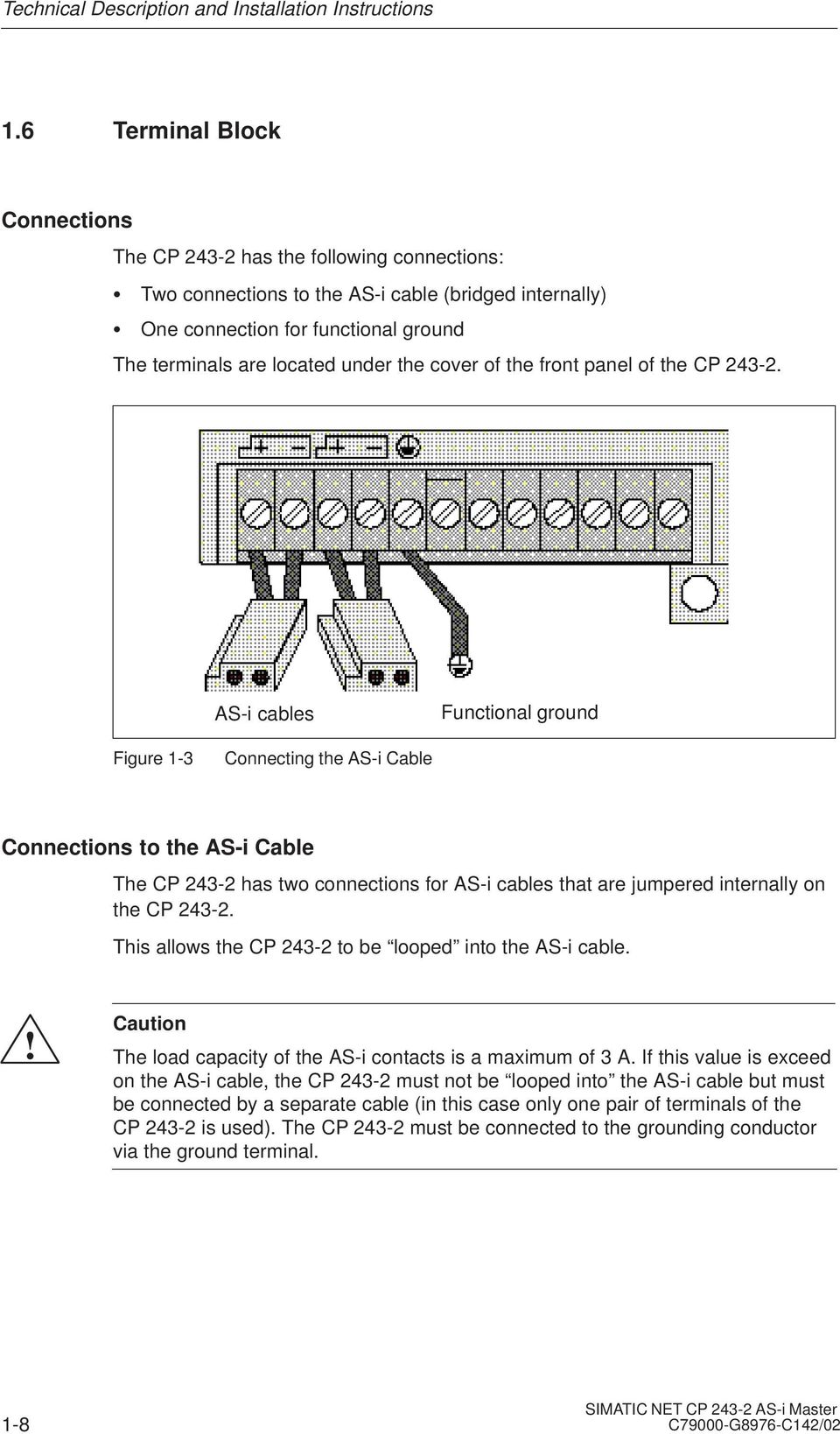
17 Technical Description and Installation Instructions Note Functional ground (terminal ) The CP has a connection for functional ground. This connector should be connected to the PE conductor with as little resistance as possible. 1-9

18 Technical Description and Installation Instructions 1.7 Modes of the CP Standard Operation In this type of operation, the user program accesses the user data of the AS-i s and the diagnostic data of the CP Programming is simple and this type of operation is adequate for the majority of automation tasks. In standard operation, no commands or special parameters are transferred to the s. This type of operation corresponds to the profile M0 of the AS-i master specification. Extended Operation In extended operation, the user program uses the command interface of the CP This means that the entire range of functions in the AS-i system is available to the PLC programmer. In particular, the AS-i master calls (for example to assign parameters to s) are available. This type of operation corresponds to the profile M1e of the AS-i master specification. 1-10

19 Technical Description and Installation Instructions 1.8 Displays and Operator Controls Changing the Display Status DISPLAY Button You can change between the status display (basic status), display and PROFIBUS display with the DISPLAY button. Each time you press the button, you change to the next display status finally returning to the initial status. In the display, the s on the AS-Interface are displayed in groups of 5 s. You can move on the display to the next group with the DISPLAY button. First the standard or A s are displayed and then the B s ( B LED is lit). You return to the status display as follows: After you have displayed the last group ( 30B, 31B) by pressing the DISPLAY button or If you do not press the DISPLAY button for a longer period of time (approximately 8 minutes). Meaning of the LEDs The front panel of the CP has two rows of LEDs. The LEDs CM, AUP, CER, APF, PWR and SF in the upper row represent the status display. The B LED indicates B s. It is lit when the display is active if B s are displayed. The first five LEDs of the lower row indicate the connected s ( display). The other three LEDs indicate the group. The meaning of the LEDs depends on the status of the group displays. If all the LEDs of the group display are off, the status display is active; in other words, the LEDs CM, AUP, CER, APF, PWR and SF indicate the status of the CP If at least one of the LEDs of the group display is lit, the status display goes off (exception: PWR LED remains lit) and the display is active. SET Button The SET button is required to configure the CP
20 Technical Description and Installation Instructions Status Display Interpreting the Status Display The status display is active when no group LEDs are lit. The status display is the default display in the basic status of the CP Meaning of the LEDs The LEDs have the following meaning: Table 1-2 LED (color) Status Meaning CM (yellow) Configuration This displays the operating mode of the CP Mode LED lit: Configuration mode LED unlit: Protected mode The configuration mode is only required when putting the CP into operation. In the configuration mode, the CP activates all connected AS-i s and exchanges data with them. For more information about the configuration mode, refer to Section 1.9. AUP (green) CER (yellow) Autoprog available Configuration Error In the protected mode of the CP 243-2, this indicates that automatic address programming of an AS-i is possible. The automatic address programming makes it much easier to exchange a defective AS-i on the AS-i cable (for more detailed information refer to Section 6.1). This LED indicates whether the configuration detected on the AS-i cable matches the expected configuration (). If they do not match, the CER LED is lit. The CER LED is lit in the following situations: When a configured AS-i does not exist on the AS-i cable (for example failure of the ). When an AS-i exists on the AS-i cable but it was not previously configured. When a connected AS-i has different configuration data (I/O configuration, ID code, extended ID1 code, extended ID2 code) from the AS-i configured on the CP When the CP is in the offline phase. APF (red) AS-i Power Fail This indicates that the voltage supplied by the AS-i power supply unit on the AS-i cable is too low or has failed. PWR (green) Power The PWR LED (power) indicates that the CP is supplied with power. 1-12

21 Technical Description and Installation Instructions Table 1-2, continued LED (color) Status Meaning SF (red) System error This LED is lit in the following situations: The CP has detected an internal problem (for example a defective EEPROM). The CP is unable to make the currently required mode change (for example an AS-i with address 0 exists) when a button is pressed. 1-13
22 Technical Description and Installation Instructions Slave Display Interpreting the Slave Display Status You can switch over to the display mode used by pressing the DISPLAY button. You switch from group to group by pressing the DISPLAY button again: The display is active when at least one group LED is lit. Characteristics of the Slave Display If the CP is in the configuration mode, all detected AS-i s are displayed. If the CP is in the protected mode, all active AS-i s are displayed. In the protected mode, failed or existing but unconfigured AS-i s are indicated by the corresponding LED flashing. Display Statuses in Detail The AS-i s are displayed in groups of five. The three group LEDs indicate which group of 5 is being displayed in binary code. The 5 LEDs of the display then indicate the detected or active AS-i s within the group. To find out which s are active, select the group of 5 (line) corresponding to the lit group LEDs. The currently lit LEDs of the display then indicate which s within this group are currently active. If a group of B s is displayed, the B LED is also lit. 1-14
23 Technical Description and Installation Instructions Example of a Slave Display From the display shown below, you can obtain the following information: The 2nd group LED is lit, i.e. the 2nd line from the top (corresponds to 2 1 = 2 DEC ; 2. group of 5; s 5 9). If the 2nd and 4th LEDs are also lit within the display, this means that s 6 and 8 are active. If the B LED is also lit, then in this example, this would mean that s 6B and 8B are active. The intersecting points mark 6 and 8. LED/column nd group Figure 1-4 Example of a Slave Display 1-15
24 Technical Description and Installation Instructions 1.9 Configuring the AS-Interface with the SET Button Interpreting the Display Status The CP distinguishes between two operating modes on the AS-Interface: Configuration mode Protected mode Pressing the SET button changes the operating mode. Note The SET button is only effective when the bit PLC_RUN = 0 is set in the control byte of the CP This is always the case when the S7-22x CPU is in the STOP mode. Configuration Mode The configuration mode is used to install and start up an AS-i installation. If the CP is in the configuration mode (CM LED lit), it can exchange data with every AS-i connected to the AS-i cable (except for an AS-i with address 0 ). Newly added AS-i s are detected immediately by the master, activated, and included in cyclic data exchange. When installation and startup is completed, the CP can be switched to the protected mode using the SET button. At the same time, active AS-i s are configured. The following data are then stored permanently on the CP 243-2: The addresses of the AS-i s The ID codes (ID code, extended ID1 code, extended ID2 code) The I/O configuration The current parameters Protected Mode In the protected mode, the CP exchanges data only with the configured AS-i s. In this sense, configured means that the addresses and the configuration data stored on the CP match the values of existing AS-i s. 1-16
25 Technical Description and Installation Instructions Note Changing from the configuration mode to the protected mode is only possible when there is no with address 0 connected to the AS-Interface. If a 0 is connected, the SF LED lights up when the SET button is pressed. Preparing to Configure Make sure that the following situation applies: The S7-22x CPU must be set to STOP (PLC_RUN=0). The CP and all AS-i s must be connected to the AS-Interface and supplied with power by the AS-i power supply. Configuring 1. Press the DISPLAY button to set the CP display to the status display mode (initial status). 2. Check whether the CP is in the configuration mode. ( CM LED lit ). If not, change the CP to the configuration mode using the SET button. 3. By changing to the display with the DISPLAY button, you can check whether all the s connected to the AS-Interface exist. 4. Press the SET button. The CP is configured. At the same time, the CP is changed to the protected mode; the CM LED goes off. The CER LED also goes off since following configuration, the expected configuration stored on the CP matches the actual configuration on the AS-Interface. Note Configuring the CP during an AS-Interface Power Fail (for example when the AS-i power supply unit is turned off or when the CP is not connected to the AS-Interface) resets the configuration of the CP This has the following results: No AS-i s are configured; All AS-i parameters are set; Automatic address programming is activated (bit AUTO_ADDRESS_ENABLE = 1). 1-17
26 Technical Description and Installation Instructions 1-18
27 Interface to the User Program in the S7-200 CPU 2 This chapter explains how the CP is addressed. You will learn the significance of the data in the digital and in the analog module and you will learn how to access the analog inputs and outputs. 2-1
28 Interface to the User Program in the S7-200 CPU 2.1 Overview CP as Expansion Module in the S7-200 The CP occupies 2 consecutive expansion module slots in the S7-200: Digital module 8DI/8DO Analog module 8AI/8AO S7-200 CPU User program CP Digital module (8DI/8DO) Status/error information Control of the CP Bank selection Figure 2-1 AS-i cable Analog module (8AI/8AO) Binary input/output data of the AS-i s Analog input/output data of the AS-i s AS-i diagnostic information (delta list) AS-i commands and response data AS-i master ÍÍÎÎ ÍÍÎÎ ÍÍÎÎ ÍÍÎÎ ÍÍÎÎ ÍÍÎÎ Digital Module The digital module occupies 8 input and 8 output bits in the address area of the digital inputs and outputs. The S7-200 CPU and the CP are coordinated via the digital module. The data to be addressed in the analog module by the user program is selected using bank select bits. 2-2
29 Interface to the User Program in the S7-200 CPU Analog Module The analog module occupies 16 input and 16 output bytes in the address area of the analog inputs and outputs. Data exchange with the AS-i s is handled via the analog module (see Figure 2-1). The bank select mechanism means that a larger data area in total can be addressed in the analog module than the addressable data area in the S7-200 CPU for the expansion module. 2-3
30 Interface to the User Program in the S7-200 CPU 2.2 Addressing the CP in the S7-200 CPU Address Areas The start addresses of the address areas are determined by the following: The type of S7-200 CPU being used The slot of the CP in the S Examples The following table contains examples of the addresses of the digital and analog input/output areas with the possible configurations with a CPU 212 and CPU 214. Example of a CPU 222 and a CP CPU 222 CP DI 8 DO 8DI 8 DO 8AI 8AO I0.0 Q0.0 I1.0 Q1.0 AIW0 AQW0 I0.1 Q0.1 I1.1 Q1.1 AIW2 AQW2 I0.2 Q0.2 I1.2 Q1.2 AIW4 AQW4 I0.3 Q0.3 I1.3 Q1.3 AIW6 AQW6 I0.4 Q0.4 I1.4 Q1.4 AIW8 AQW8 I0.5 Q0.5 I1.5 Q1.5 AIW10 AQW10 I0.6 Q0.6 I1.6 Q1.6 AIW12 AQW12 I0.7 Q0.7 I1.7 Q1.7 AIW14 AQW14 2-4
31 Interface to the User Program in the S7-200 CPU Example of a CPU 224 and a CP Inserted Directly Beside the CPU CPU 224 CP DI 10 DO 8DI 8 DO 8AI 8AO I0.0 Q0.0 I2.0 Q2.0 AIW0 AQW0 I0.1 Q0.1 I2.1 Q2.1 AIW2 AQW2 I0.2 Q0.2 I2.2 Q2.2 AIW4 AQW4 I0.3 Q0.3 I2.3 Q2.3 AIW6 AQW6 I0.4 Q0.4 I2.4 Q2.4 AIW8 AQW8 I0.5 Q0.5 I2.5 Q2.5 AIW10 AQW10 I0.6 Q0.6 I2.6 Q2.6 AIW12 AQW12 I0.7 Q0.7 I2.7 Q2.7 AIW14 AQW14 I1.0 Q1.0 I1.1 Q1.1 I1.2 I1.3 I1.4 I1.5 Example of a CPU 224, a CP and a CP CPU 224 CP CP DI 10 DO 8DI 8 DO 8AI 8AO 8DI 8 DO 8AI 8AO I0.0 Q0.0 I2.0 Q2.0 AIW0 AQW0 I3.0 Q3.0 AIW16 AQW16 I0.1 Q0.1 I2.1 Q2.1 AIW2 AQW2 I3.1 Q3.1 AIW18 AQW18 I0.2 Q0.2 I2.2 Q2.2 AIW4 AQW4 I3.2 Q3.2 AIW20 AQW20 I0.3 Q0.3 I2.3 Q2.3 AIW6 AQW6 I3.3 Q3.3 AIW22 AQW22 I0.4 Q0.4 I2.4 Q2.4 AIW8 AQW8 I3.4 Q3.4 AIW24 AQW24 I0.5 Q0.5 I2.5 Q2.5 AIW10 AQW10 I3.5 Q3.5 AIW26 AQW26 I0.6 Q0.6 I2.6 Q2.6 AIW12 AQW12 I3.6 Q3.6 AIW28 AQW28 I0.7 Q0.7 I2.7 Q2.7 AIW14 AQW14 I3.7 Q3.7 AIW30 AQW30 I1.0 Q1.0 I1.1 Q1.1 I1.2 I1.3 I1.4 I
32 Interface to the User Program in the S7-200 CPU Example of a CPU 224, an 8DI Module, a 3AI/1AO Module and a CP CPU 224 Module Module CP DI 10 DO 8DI 3AI 1AO 8DI 8 DO 8AI 8AO I0.0 Q0.0 I2.0 AIW0 AQW0 I3.0 Q2.0 AIW8 AQW4 I0.1 Q0.1 I2.1 AIW2 I3.1 Q2.1 AIW10 AQW6 I0.2 Q0.2 I2.2 AIW4 I3.2 Q2.2 AIW12 AQW8 I0.3 Q0.3 I2.3 I3.3 Q2.3 AIW14 AQW10 I0.4 Q0.4 I2.4 I3.4 Q2.4 AIW16 AQW12 I0.5 Q0.5 I2.5 I3.5 Q2.5 AIW18 AQW14 I0.6 Q0.6 I2.6 I3.6 Q2.6 AIW20 AQW16 I0.7 Q0.7 I2.7 I3.7 Q2.7 AIW22 AQW18 I1.0 Q1.0 I1.1 Q1.1 I1.2 I1.3 I1.4 I
33 Interface to the User Program in the S7-200 CPU 2.3 Meaning of the Data in the Digital Module Overview The digital module of the CP consists of four registers: Identification register, 8 bits (I/O module identifier) Error register, 8 bits Input register 8DI (status byte of the CP 243-2) Output register 8DO (control byte of the CP 243-2) Essentially, the functions shown in the following diagram are handled via these registers: S7-200 CPU User program CP Digital module (8DI/8DO) Status/error information Control of the CP Bank selection Analog module (8AI/8AO) AS-i cable AS-i master ÍÍÎÎ ÍÍÎÎ ÍÍÎÎ ÍÍÎÎ ÍÍÎÎ ÍÍÎÎ Figure
34 Interface to the User Program in the S7-200 CPU Identification Register in the Digital Module Meaning The identification register signals the I/O module identifier to indicate the existence of an 8DI/8DO digital module with the value specified below. The address at which the program can access the identification register depends on the slot in which the CP is inserted. For further information about the special bit memory and its structure for I/O modules, refer to /4/. Range of Values The identification register can be read via the special bit memory of the S7-200 CPU. It provides the fixed value 05H. Example Assuming that the CP is inserted directly beside the S7-200 CPU. The content of the identification register can be read from SMB8. 2-8
35 Interface to the User Program in the S7-200 CPU Error Register in the Digital Module Meaning for the User Program This register always supplies the value 0. The CP reports errors using the error register in the analog module (see Section 2.4.2). Example of Access to the Error Register If the CP is inserted directly beside the S7 200 CPU, SMB9 constantly supplies the value
36 Interface to the User Program in the S7-200 CPU Status Byte (Input Register 8DI) Meaning for the User Program This register shows the status of the CP relative to the AS-i master interface. Structure of the Status Byte Bit 7 Bit 6 Bit 5 Bit 4 Bit 3 Bit 2 Bit 1 Bit 0 0 ASI_RESP CP_READY ASI_MODE Description of the Bits Table 2-1 Bit Value Meaning ASI_MODE 0 The CP is in the protected mode. 1 The CP is in the configuration mode. CP_READY 0 The CP is not yet operational after turning on the power supply. Evaluation of the I/O data or other information from the CP is not permitted. 1 The CP is operational. ASI_RESP 0/1 Response bit for the AS-i command interface (see Section 5.1). 2-10
37 Interface to the User Program in the S7-200 CPU Control Byte (Output Register 8DO) Meaning for the User Program The user program controls the data exchange with the CP using this register. Structure of the Control Byte Bit 7 Bit 6 Bit 5 Bit 4 Bit 3 Bit 2 Bit 1 Bit 0 PLC_RUN ASI_COM BS5 BS4 BS3 BS2 BS1 BS0 Description of the Bits Table 2-2 Bit Value Meaning BS0..BS dec. Bank select bits for changing the bank in the analog module (see Section 2.5). ASI_COM 0/1 Job bit for the AS-i command interface (see Section 5.1). PLC_RUN In the STOP mode of the S7-200 CPU, the CP must send defined values to all AS-i s (see Chapter 3). Since the AS-i data are transferred via the analog area and the S7-200 CPU does not set this area to 0 when it changes from RUN to STOP, the CPU mode must be signaled to the CP using the PLC_RUN bit as follows: 0 Signal to the CP that the S7-200 CPU is in the STOP mode. The CP sends 0 to all AS-i binary s. The analog value transfer to analog output s is interrupted. The S7-200 CPU sets the bit automatically to 0 at a change from RUN to STOP. 1 Signals to the CP that the S7-200 CPU is in the RUN mode. The CP sends the content of output bank 0 to all AS-i s (see Section 2.4). The user program must set this bit to 1 during startup (first scan). Do not set the PLC_RUN bit permanently to 1 with the S7-200 operating system functions such as CPU configuration/setting the outputs or force outputs. 2-11
38 Interface to the User Program in the S7-200 CPU 2.4 Meaning of the Data in the Analog Module Overview The analog module of the CP consists of four areas: Identification register, 8 bits (I/O module identifier) Error register, 8 bits 8 analog input words (8 AI) 8 analog output words (8 AO) The most important functions handled via these areas are shown in the diagram below: S7-200 CPU User program CP Digital module (8DI/8DO) AS-i cable Analog module (8AI/8AO) Binary input/output data of the AS-i s Analog input/output data of the AS-i s AS-i diagnostic information (delta list) AS-i commands and response data AS-i master ÍÍÎÎ ÍÍÎÎ ÍÍÎÎ ÍÍÎÎ ÍÍÎÎ Figure
39 Interface to the User Program in the S7-200 CPU Identification Register in the Analog Module Meaning The identification register signals the I/O module identifier to indicate the existence of an 8AI/8AO analog module with the value specified below. The address at which the program can access the identification register depends on the slot in which the CP is inserted. For further information about the special bit memory and its structure for I/O modules refer to /4/. Range of Values The identification register can be read via the special bit memory area of the S7-200 CPU. It provides the fixed value 1FH. Example Assuming that the CP is inserted directly beside the S7-200 CPU. The content of the identification register can be read via SMB
40 Interface to the User Program in the S7-200 CPU Error Register in the Analog Module Meaning for the User Program With this register, the CP signals errors to the user program. Structure of the Error Register Bit 7 Bit 6 Bit 5 Bit 4 Bit 3 Bit 2 Bit 1 Bit APF 0 CER Bit Description/Range of Values Table 2-3 Bit Value Meaning CER 0 AS-i configuration correct (only in the protected mode) The CER LED is off 1 AS-i configuration error (only in the protected mode) This indicates a difference between the configuration detected on the AS-i cable and the desired configuration configured on the CP The CER LED is lit (see Section Status Display of the CP 243-2). APF 0 AS-i voltage correct The APF LED is off. 1 AS-i Power Fail. This indicates that the voltage supplied on the AS-i cable by the AS-i power supply unit is too low or there is a complete power outage. The APF LED is lit (see Section Status Display of the CP 243-2). Note The CER bit indicates configuration errors only in the protected mode. In the configuration mode, the CER bit is always 0. The CER LED, on the other hand, indicates configuration errors both in the configuration mode and in the protected mode. 2-14
41 Interface to the User Program in the S7-200 CPU Example of Access to the Error Register Assuming that the CP is inserted directly beside the S7-200 CPU. Evaluate the special memory bits SM 11.0 to SM 11.2 in the SM area (for more information about the special bit memory area of the S7-200 CPU, refer to /4/). If an error has occurred, bit SM 11.0 and/or bit SM 11.2 is set. 2-15
42 Interface to the User Program in the S7-200 CPU 2.5 Access to the Analog Input and Output Words Principle Using a bank-select mechanism, the 8 analog input words and the 8 analog output words can be switched to 64 different analog input areas (banks) and 64 different analog output areas (banks) on the CP Each of these banks is 8 words long. Advantage This bank-select mechanism has the advantage that the analog data area of 8 words available for the expansion module is increased according to the number of banks. Access in the User Program The switchover to the various banks is made using bits BS0 BS5 in the control byte of the CP (see Section 2.3.4). The bank select bits are binary coded and select banks as shown below: BS5 BS4 BS3 BS2 BS1 BS0 Bank No Bank 0 selected Bank 1 selected Bank 2 selected Bank 3 selected Bank 4 selected Bank 5 selected Bank 6 selected Bank 7 selected Bank 8 selected Bank 9 selected Bank 10 selected Bank 11 selected Bank 12 selected Bank 13 selected Bank 14 selected Bank 15 selected Bank 16 selected Bank 17 selected Bank 18 selected Bank 19 selected Bank 20 selected Bank 21 selected Bank 22 selected Bank 23 selected Bank 24 selected Bank 25 selected 2-16
43 Interface to the User Program in the S7-200 CPU BS5 BS4 BS3 BS2 BS1 BS0 Bank No Bank 26 selected Bank 27 selected Bank 28 selected Bank 29 selected Bank 30 selected Bank 31 selected Bank 32 selected Bank 33 selected Bank 34 selected Bank 35 selected Bank 36 selected Bank 37 selected Bank 38 selected Bank 39 selected Bank 40 selected Bank 41 selected Bank 42 selected Bank 43 selected Bank 44 selected Bank 45 selected Bank 46 selected Bank 47 selected Bank 48 selected Bank 49 selected Bank 50 selected Bank 51 selected Bank 52 selected Bank 53 selected Bank 54 selected Bank 55 selected Bank 56 selected Bank 57 selected Bank 58 selected Bank 59 selected Bank 60 selected Bank 61 selected Bank 62 selected Bank 63 selected! Caution Make sure that the value of the bank select bits is located not only in the process output image but that it is also transferred to the CP before you access the corresponding bank (see example in Table 5-1). 2-17
44 Interface to the User Program in the S7-200 CPU Analog Input Area Assignment of the Input Areas The input area of the analog module of the CP is mapped to the analog inputs of the user program using bank selection as shown below: S7-200 CPU CP Analog inputs 8 AIW e.g. AIW0..AIW14 *) Bank select bits BS5...BS0 Bank 0 Memory assignment Binary inputs 1 to 31 or 1A to 31A Figure 2-4 *) The address area depends on the slot of the CP (see Section 2.2) Bank 1 Bank 2 Bank 15 Bank 16 Bank 30 Bank 31 Bank 32 Bank 47 Bank 48 Bank 63 AS-i diagnostics (Delta list) Response data reserved Binary inputs 1B to 31B Analog inputs 1 to 31 reserved The bank select bits are set in the control byte of the digital module by the user program (see Section 2.3.4). Bank 0: Binary input data of the AS-i s 1 to 31 or 1A to 31A With this analog input words, you can access the binary inputs of the standard s or A s (s with extended addressing mode). The structure of the input data is described in Section
45 Interface to the User Program in the S7-200 CPU Bank 1: Diagnostics on the AS-Interface The delta list of the AS-i s is indicated in this bank. The delta list contains deviations of the existing AS-i s from the configuration on the CP A set bit can indicate the following: Missing s Extra s (not in the configuration) Slaves with incorrect I0/ID coding The delta list is updated both in the configuration and in the protected mode. The bytes and bits of the delta list are ordered as shown in the table below. (m: start address of the analog input area of the CP 243-2) Byte \ Bit Bit 7 Bit 6 Bit 5 Bit 4 Bit 3 Bit 2 Bit 1 Bit 0 Byte m+0 Slave 7 Slave 7A Slave 6 Slave 6A Slave 5 Slave 5A Slave 4 Slave 4A Slave 3 Slave 3A Slave 2 Slave 2A Slave 1 Slave 1A Slave 0 Slave 0A Byte m+1 Slave 15 Slave 15A Slave 14 Slave 14A Slave 13 Slave 13A Slave 12 Slave 12A Slave 11 Slave 11A Slave 10 Slave 10A Slave 9 Slave 9A Slave 8 Slave 8A Byte m+2 Slave 23 Slave 23A Slave 22 Slave 22A Slave 21 Slave 21A Slave 20 Slave 20A Slave 19 Slave 19A Slave 18 Slave 18A Slave 17 Slave 17A Slave 16 Slave 16A Byte m+3 Slave 31 Slave 31A Slave 30 Slave 30A Slave 29 Slave 29A Slave 28 Slave 28A Slave 27 Slave 27A Slave 26 Slave 26A Slave 25 Slave 25A Slave 24 Slave 24A Byte m+4 Slave 7B Slave 6B Slave 5B Slave 4B Slave 3B Slave 2B Slave 1B Slave 0B Byte m+5 Slave 15B Slave 14B Slave 13B Slave 12B Slave 11B Slave 10B Slave 9B Slave 8B Byte m+6 Slave 23B Slave 22B Slave 21B Slave 20B Slave 19B Slave 18B Slave 17B Slave 16B Byte m+7 Slave 31B Slave 30B Slave 29B Slave 28B Slave 27B Slave 26B Slave 25B Slave 24B Banks 2 15: Response data on the AS-Interface These banks contain the response data of the command calls. The data structures used and the codings are described in Section 5.2. The number of banks used depends on the particular command. Banks 16 30: Reserved area These areas are reserved for later expansions and cannot be used. Bank 31: Binary input data of the AS-i s 1B 31B Via these analog input words, you have access to the binary inputs of the B s (s with the extended addressing mode). The structure of the input data is described in Section
46 Interface to the User Program in the S7-200 CPU Banks 32 47: Analog input data of the AS-i s Via these areas, you can access the analog input data of the AS-i s that support the AS-i profile 7.3 or 7.4 (see Section 3.1.2). Banks 48 63: Reserved area These areas are reserved for later expansions and cannot be used. 2-20
47 Interface to the User Program in the S7-200 CPU Analog Output Area Assignment of the Output Areas The output area of the analog module of the CP is mapped to the analog outputs of the user program using bank selection as shown below: S7-200 CPU CP Analog outputs 8 AIW e.g. AIW0..AIW14 *) Bank select bits BS5...BS0 Bank 0 Memory assignment Binary outputs 1 to 31 or 1A to 31A Figure 2-5 *) The address area depends on the slot of the CP (see Section 2.2) Bank 1 Bank 2 Bank 15 Bank 16 Bank 30 Bank 31 Bank 32 Bank 47 Bank 48 Bank 63 reserved Command data reserved Binary outputs 1B to 31B Analog outputs 1 to 31 reserved Bank 0: Binary output data of the AS-i s 1 to 31 or 1A to 31A Via these analog output words, you can access the binary outputs of the standard s or A s (s with the extended addressing mode). The structure of the output data is described in Section 3.1. Bank 1: reserved This area is reserved for later expansions and cannot be used. 2-21
48 Interface to the User Program in the S7-200 CPU Banks 2 15: Command data on the AS-Interface Via this area, you can store command calls on the CP The data structures and codes used are described in Section 5.2. The number of banks used depends on the particular command. Banks 16 30: Reserved area These areas are reserved for later expansions and cannot be used. Bank 31: Binary output data of the AS-i s 1B 31B Using these analog output words, you can access the binary outputs of the B s (s with the extended addressing mode). The structure of the output data is described in Section Banks 32 47: Analog output data of the AS-i s Via these areas, you can access the analog binary outputs of AS-i s that support the AS-i profile 7.3 or 7.4 (see Section 3.1.2). Banks 48 63: Reserved area These areas are reserved for later expansions and cannot be used. 2-22
49 Access to the Data of the AS-i Slaves 3 This chapter explains the AS-i master interface of the CP The first part covers addressing the AS-i s and access to the binary data of the s. In the second part, addressing and access to the analog data of the AS-i s is explained. 3-1
50 Access to the Data of the AS-i Slaves 3.1 Access to the Binary Data of the AS-i Slaves Addressing the AS-i Slaves in the User Program Requirements Before you can access the I/O data of the AS-i s, the following requirements must be met: Deactivate the filtering of the analog inputs for the CP in the system data block of the S7 200 CPU. Set the PLC_RUN bit (bit 7) in the digital control byte to 1 at the beginning of the cyclic program. Access to the I/O data of the s is then only allowed when the CP_Ready bit (bit 1) in the digital status byte is set to 1. Access to the Binary Values The CP assigns four bits (a nibble) in the input and output data area for each AS-i. The PLC can write ( output data) and read ( input data) this nibble. This allows bi-directional s to be addressed. 3-2
51 Access to the Data of the AS-i Slaves Assignment of the AS-i Input Data of the Standard or A Slaves (Bank 0 in the Analog Input Area of the CP) Bank Byte no. Bit 7 4 Bit m+0 reserved Slave 1 or 1A Bit 3 Bit 2 Bit 1 Bit 0 0 m+1 Slave 2 or 2A Slave 3 or 3A 0 m+2 Slave 4 or 4A Slave 5 or 5A 0 m+3 Slave 6 or 6A Slave 7 or 7A 0 m+4 Slave 8 or 8A Slave 9 or 9A 0 m+5 Slave 10 or 10A Slave 11 or 11A 0 m+6 Slave 12 or 12A Slave 13 or 13A 0 m+7 Slave 14 or 14A Slave 15 or 15A 0 m+8 Slave 16 or 16A Slave 17 or 17A 0 m+9 Slave 18 or 18A Slave 19 or 19A 0 m+10 Slave 20 or 20A Slave 21 or 21A 0 m+11 Slave 22 or 22A Slave 23 or 23A 0 m+12 Slave 24 or 24A Slave 25 or 25A 0 m+13 Slave 26 or 26A Slave 27 or 27A 0 m+14 Slave 28 or 28A Slave 29 or 29A 0 m+15 Slave 30 or 30A Bit 3 Bit 2 Bit 1 Bit 0 Slave 31 or 31A Bit 3 Bit 2 Bit 1 Bit 0 m = start address of the CP analog module in the input direction Assignment of the AS-i Output Data of the Standard or A Slaves (Bank 0 in the Analog Output Area of the CP) Bank Byte no. Bit 7 4 Bit n+0 reserved Slave 1 or 1A Bit 3 Bit 2 Bit 1 Bit 0 0 n+1 Slave 2 or 2A Slave 3 or 3A 0 n+2 Slave 4 or 4A Slave 5 or 5A 0 n+3 Slave 6 or 6A Slave 7 or 7A 0 n+4 Slave 8 or 8A Slave 9 or 9A 0 n+5 Slave 10 or 10A Slave 11 or 11A 0 n+6 Slave 12 or 12A Slave 13 or 13A 0 n+7 Slave 14 or 14A Slave 15 or 15A 0 n+8 Slave 16 or 16A Slave 17 or 17A 0 n+9 Slave 18 or 18A Slave 19 or 19A 0 n+10 Slave 20 or 20A Slave 21 or 21A 0 n+11 Slave 22 or 22A Slave 23 or 23A 0 n+12 Slave 24 or 24A Slave 25 or 25A 0 n+13 Slave 26 or 26A Slave 27 or 27A 0 n+14 Slave 28 or 28A Slave 29 or 29A 0 n+15 Slave 30 or 30A Bit 3 Bit 2 Bit 1 Bit 0 Slave 31 or 31A Bit 3 Bit 2 Bit 1 Bit 0 n = start address of the CP analog module in the output direction 3-3
52 Access to the Data of the AS-i Slaves Assignment of the AS-i Input Data of the B Slaves (Bank 31 in the Analog Input Direction of the CP) Bank Byte no. Bit 7 4 Bit m+0 reserved Slave 1B Bit 3 Bit 2 Bit 1 Bit 0 31 m+1 Slave 2B Slave 3B 31 m+2 Slave 4B Slave 5B 31 m+3 Slave 6B Slave 7B 31 m+4 Slave 8B Slave 9B 31 m+5 Slave 10B Slave 11B 31 m+6 Slave 12B Slave 13B 31 m+7 Slave 14B Slave 15B 31 m+8 Slave 16B Slave 17B 31 m+9 Slave 18B Slave 19B 31 m+10 Slave 20B Slave 21B 31 m+11 Slave 22B Slave 23B 31 m+12 Slave 24B Slave 25B 31 m+13 Slave 26B Slave 27B 31 m+14 Slave 28B Slave 29B 31 m+15 Slave 30B Bit 3 Bit 2 Bit 1 Bit 0 Slave 31B Bit 3 Bit 2 Bit 1 Bit 0 m = start address of the CP analog module in the input direction Assignment of the AS-i Output Data of the B Slaves (Bank 31 in the Analog Output Area of the CP) Bank Byte No. Bit 7 4 Bit n+0 reserved Slave 1B Bit 3 Bit 2 Bit 1 Bit 0 31 n+1 Slave 2B Slave 3B 31 n+2 Slave 4B Slave 5B 31 n+3 Slave 6B Slave 7B 31 n+4 Slave 8B Slave 9B 31 n+5 Slave 10B Slave 11B 31 n+6 Slave 12B Slave 13B 31 n+7 Slave 14B Slave 15B 31 n+8 Slave 16B Slave 17B 31 n+9 Slave 18B Slave 19B 31 n+10 Slave 20B Slave 21B 31 n+11 Slave 22B Slave 23B 31 n+12 Slave 24B Slave 25B 31 n+13 Slave 26B Slave 27B 31 n+14 Slave 28B Slave 29B 31 n+15 Slave 30B Bit 3 Bit 2 Bit 1 Bit 0 Slave 31B Bit 3 Bit 2 Bit 1 Bit 0 n = start address of the CP analog module in the output direction 3-4
53 Access to the Data of the AS-i Slaves Data Exchange in the STOP Mode of the S7-22x CPU In the STOP mode, the S7-22x CPU sets bit PLC_RUN in the digital control area to 0 automatically. As a result, the CP outputs 0 data to all binary s. Special Feature of Analog Slaves If you use analog s complying with profile 7.3 or 7.4 the following points apply: In the input direction, the CP sets the nibbles assigned to the s to 0. In the output direction, the CP ignores the nibbles assigned to these s. Access to the analog data is described in Section
54 Access to the Data of the AS-i Slaves Example Figure 3-1 shows an example of the CP addressing four AS-i s. In the example, m = 0 is the start address for the input data and n = 0 is the start address for the output data. The bits relevant for the user program (existing AS-i s) are shown on a gray background. The bits on a white background are irrelevant for the user program. CP input bytes 16 output bytes 0 Bit 3 Bit 2 Slave 1 0 Slave 1 Bit 1 Bit 0 Bit 3 Bit 2 Bit 1 Bit 0 Bit 3 Bit 2 Bit 1 Bit 0 Bit 3 Bit 2 Bit 1 Bit 0 1 Slave 2 Slave 3 Bit 3 Bit 2 Bit 1 Bit 0 Bit 3 Bit 2 Bit 1 Bit 0 1 Slave 2 Slave 3 Bit 3 Bit 2 Bit 1 Bit 0 Bit 3 Bit 2 Bit 1 Bit Slave 4 Slave 5 Bit 3 Bit 2 Bit 1 Bit 0 Bit 3 Bit 2 Bit 1 Bit 0 Slave 30 Slave 31 Bit 3 Bit 2 Bit 1 Bit 0 Bit 3 Bit 2 Bit 1 Bit Slave 4 Slave 5 Bit 3 Bit 2 Bit 1 Bit 0 Bit 3 Bit 2 Bit 1 Bit 0 Slave 30 Slave 31 Bit 3 Bit 2 Bit 1 Bit 0 Bit 3 Bit 2 Bit 1 Bit AS-i s Slave no. 2 Slave no. 3 Slave no. 4 Slave no I module I module 2 I/2 O module 4 O module 4 I/4 O module Figure 3-1 In the figure above, for example, the 2I/2O module (AS-i number 3 with two inputs and two outputs) occupies bits 0 and 1 in input byte 1 and bits 2 and 3 in output byte 1. The assignment of the AS-i terminals of the bus modules to the data bits of the input/output bytes is shown below based on the example of number 3: Input byte Bit no. Terminal 2 on the AS-i bus module Terminal 1 on the AS-i bus module Output byte Bit no. Terminal 4 on the AS-i bus module Terminal 3 on the AS-i bus module 3-6
55 Access to the Data of the AS-i Slaves Access to the AS-i User Data Data Access with STEP 7 Micro To access the binary data of the s, you use the analog transfer commands of the STEP 7 Micro/WIN32 programming language. Example If you want to access individual bits of the data, you can use the method shown in the following sample program. The example created with STEP 7 Micro/WIN32 is valid for a CPU 222 with a CP plugged in directly beside it: OB1 (STL) NETWORK 1 LD SM0.1 //If: bit First Scan : SI Q1.7, 1 //PLC_RUN = 1 LD I1.1 //If: CP 243-2_READY CALL 1 //Then: AS-i I/O processing (standard or A s) SBR 1 (STL) NETWORK 1 LD SM0.0 //Always 1 RI Q1.0,6 //Select bank 0 BMW AIW0, VW100, 8 //Transfer standard s SI Q1.0,5 //Select bank 31 BMW AIW0, VW116, 8 //Transfer B s //Below, several examples of access to AS-i bits LD V100.0 //If bit 1 of 1 A V115.1 //And bit 2 of 31 A V116.0 //And bit 1 of 1B = V203.2 //The bit 3 of 7 = 1 LD SM0.0 //Always 1 RI Q1.0,6 //Select bank 0 BMW VW900, AOW0, 8 //Transfer standard s SI Q1.0,5 //Select bank 31 BMW AIW0, AOW0, 8 //Transfer B s 3-7
56 Access to the Data of the AS-i Slaves 3.2 Access to the Analog Data of the AS-i Slaves (Slaves complying with Profile 7.3 or 7.4) Addressing the Analog AS-i Slaves in the User Program Requirements Before you can access the I/O data of the AS-i s, the following requirements must be met: Deactivate the filtering of the analog inputs for the CP in the system data block of the S7 200 CPU. Set the PLC_RUN bit (bit 7) in the digital control byte to 1 at the beginning of the cyclic program. Access to the I/O data of the s is then only allowed when the CP_Ready bit (bit 1) in the digital status byte is set to 1. The following explanations do not apply to analog s complying with profile 7.1 or 7.2. Analog value transfer for these s is not supported by the CP Access to the Analog Values The CP assigns four words in the input area and four words in the output area for each AS-i. The PLC can write these values (analog outputs) or read these values (analog inputs). Assignment of the AS-i Analog Data Bank Byte no. Meaning 32 0 Slave 1, channel 1, high byte 32 1 Slave 1, channel 1, low byte 32 2 Slave 1, channel 2, high byte 32 3 Slave 1, channel 2, low byte 32 4 Slave 1, channel 3, high byte 32 5 Slave 1, channel 3, low byte 32 6 Slave 1, channel 4, high byte 32 7 Slave 1, channel 4, low byte 32 8 Slave 2, channel 1, high byte 32 9 Slave 2, channel 1, low byte Slave 2, channel 2, high byte Slave 2, channel 2, low byte Slave 2, channel 3, high byte Slave 2, channel 3, low byte Slave 2, channel 4, high byte Slave 2, channel 4, low byte 3-8
57 Access to the Data of the AS-i Slaves Bank Byte no. Meaning 33 0 Slave 3, channel 1, high byte 33 1 Slave 3, channel 1, low byte 33 2 Slave 3, channel 2, high byte 33 3 Slave 3, channel 2, low byte 33 4 Slave 3, channel 3, high byte 33 5 Slave 3, channel 3, low byte 33 6 Slave 3, channel 4, high byte 33 7 Slave 3, channel 4, low byte 33 8 Slave 4, channel 1, high byte 33 9 Slave 4, channel 1, low byte Slave 4, channel 2, high byte Slave 4, channel 2, low byte Slave 4, channel 3, high byte Slave 4, channel 3, low byte Slave 4, channel 4, high byte Slave 4, channel 4, low byte 34 0 Slave 5, channel 1, high byte 34 1 Slave 5, channel 1, low byte 34 2 Slave 5, channel 2, high byte 34 3 Slave 5, channel 2, low byte 34 4 Slave 5, channel 3, high byte 34 5 Slave 5, channel 3, low byte 34 6 Slave 5, channel 4, high byte 34 7 Slave 5, channel 4, low byte 34 8 Slave 6, channel 1, high byte 34 9 Slave 6, channel 1, low byte Slave 6, channel 2, high byte Slave 6, channel 2, low byte Slave 6, channel 3, high byte Slave 6, channel 3, low byte Slave 6, channel 4, high byte Slave 6, channel 4, low byte 35 0 Slave 7, channel 1, high byte 35 1 Slave 7, channel 1, low byte 35 2 Slave 7, channel 2, high byte 35 3 Slave 7, channel 2, low byte 35 4 Slave 7, channel 3, high byte 35 5 Slave 7, channel 3, low byte 35 6 Slave 7, channel 4, high byte 35 7 Slave 7, channel 4, low byte 35 8 Slave 8, channel 1, high byte 35 9 Slave 8, channel 1, low byte Slave 8, channel 2, high byte Slave 8, channel 2, low byte Slave 8, channel 3, high byte Slave 8, channel 3, low byte Slave 8, channel 4, high byte Slave 8, channel 4, low byte 36 0 Slave 9, channel 1, high byte 3-9
58 Access to the Data of the AS-i Slaves Bank Byte no. Meaning 36 1 Slave 9, channel 1, low byte 36 2 Slave 9, channel 2, high byte 36 3 Slave 9, channel 2, low byte 36 4 Slave 9, channel 3, high byte 36 5 Slave 9, channel 3, low byte 36 6 Slave 9, channel 4, high byte 36 7 Slave 9, channel 4, low byte 36 8 Slave 10, channel 1, high byte 36 9 Slave 10, channel 1, low byte Slave 10, channel 2, high byte Slave 10, channel 2, low byte Slave 10, channel 3, high byte Slave 10, channel 3, low byte Slave 10, channel 4, high byte Slave 10, channel 4, low byte 37 0 Slave 11, channel 1, high byte 37 1 Slave 11, channel 1, low byte 37 2 Slave 11, channel 2, high byte 37 3 Slave 11, channel 2, low byte 37 4 Slave 11, channel 3, high byte 37 5 Slave 11, channel 3, low byte 37 6 Slave 11, channel 4, high byte 37 7 Slave 11, channel 4, low byte 37 8 Slave 12, channel 1, high byte 37 9 Slave 12, channel 1, low byte Slave 12, channel 2, high byte Slave 12, channel 2, low byte Slave 12, channel 3, high byte Slave 12, channel 3, low byte Slave 12, channel 4, high byte Slave 12, channel 4, low byte 38 0 Slave 13, channel 1, high byte 38 1 Slave 13, channel 1, low byte 38 2 Slave 13, channel 2, high byte 38 3 Slave 13, channel 2, low byte 38 4 Slave 13, channel 3, high byte 38 5 Slave 13, channel 3, low byte 38 6 Slave 13, channel 4, high byte 38 7 Slave 13, channel 4, low byte 38 8 Slave 14, channel 1, high byte 38 9 Slave 14, channel 1, low byte Slave 14, channel 2, high byte Slave 14, channel 2, low byte Slave 14, channel 3, high byte Slave 14, channel 3, low byte Slave 14, channel 4, high byte Slave 14, channel 4, low byte 39 0 Slave 15, channel 1, high byte 39 1 Slave 15, channel 1, low byte 3-10
59 Access to the Data of the AS-i Slaves Bank Byte no. Meaning 39 2 Slave 15, channel 2, high byte 39 3 Slave 15, channel 2, low byte 39 4 Slave 15, channel 3, high byte 39 5 Slave 15, channel 3, low byte 39 6 Slave 15, channel 4, high byte 39 7 Slave 15, channel 4, low byte 39 8 Slave 16, channel 1, high byte 39 9 Slave 16, channel 1, low byte Slave 16, channel 2, high byte Slave 16, channel 2, low byte Slave 16, channel 3, high byte Slave 16, channel 3, low byte Slave 16, channel 4, high byte Slave 16, channel 4, low byte 40 0 Slave 17, channel 1, high byte 40 1 Slave 17, channel 1, low byte 40 2 Slave 17, channel 2, high byte 40 3 Slave 17, channel 2, low byte 40 4 Slave 17, channel 3, high byte 40 5 Slave 17, channel 3, low byte 40 6 Slave 17, channel 4, high byte 40 7 Slave 17, channel 4, low byte 40 8 Slave 18, channel 1, high byte 40 9 Slave 18, channel 1, low byte Slave 18, channel 2, high byte Slave 18, channel 2, low byte Slave 18, channel 3, high byte Slave 18, channel 3, low byte Slave 18, channel 4, high byte Slave 18, channel 4, low byte 41 0 Slave 19, channel 1, high byte 41 1 Slave 19, channel 1, low byte 41 2 Slave 19, channel 2, high byte 41 3 Slave 19, channel 2, low byte 41 4 Slave 19, channel 3, high byte 41 5 Slave 19, channel 3, low byte 41 6 Slave 19, channel 4, high byte 41 7 Slave 19, channel 4, low byte 41 8 Slave 20, channel 1, high byte 41 9 Slave 20, channel 1, low byte Slave 20, channel 2, high byte Slave 20, channel 2, low byte Slave 20, channel 3, high byte Slave 20, channel 3, low byte Slave 20, channel 4, high byte Slave 20, channel 4, low byte 42 0 Slave 21, channel 1, high byte 42 1 Slave 21, channel 1, low byte 42 2 Slave 21, channel 2, high byte 3-11
60 Access to the Data of the AS-i Slaves Bank Byte no. Meaning 42 3 Slave 21, channel 2, low byte 42 4 Slave 21, channel 3, high byte 42 5 Slave 21, channel 3, low byte 42 6 Slave 21, channel 4, high byte 42 7 Slave 21, channel 4, low byte 42 8 Slave 22, channel 1, high byte 42 9 Slave 22, channel 1, low byte Slave 22, channel 2, high byte Slave 22, channel 2, low byte Slave 22, channel 3, high byte Slave 22, channel 3, low byte Slave 22, channel 4, high byte Slave 22, channel 4, low byte 43 0 Slave 23, channel 1, high byte 43 1 Slave 23, channel 1, low byte 43 2 Slave 23, channel 2, high byte 43 3 Slave 23, channel 2, low byte 43 4 Slave 23, channel 3, high byte 43 5 Slave 23, channel 3, low byte 43 6 Slave 23, channel 4, high byte 43 7 Slave 23, channel 4, low byte 43 8 Slave 24, channel 1, high byte 43 9 Slave 24, channel 1, low byte Slave 24, channel 2, high byte Slave 24, channel 2, low byte Slave 24, channel 3, high byte Slave 24, channel 3, low byte Slave 24, channel 4, high byte Slave 24, channel 4, low byte 44 0 Slave 25, channel 1, high byte 44 1 Slave 25, channel 1, low byte 44 2 Slave 25, channel 2, high byte 44 3 Slave 25, channel 2, low byte 44 4 Slave 25, channel 3, high byte 44 5 Slave 25, channel 3, low byte 44 6 Slave 25, channel 4, high byte 44 7 Slave 25, channel 4, low byte 44 8 Slave 26, channel 1, high byte 44 9 Slave 26, channel 1, low byte Slave 26, channel 2, high byte Slave 26, channel 2, low byte Slave 26, channel 3, high byte Slave 26, channel 3, low byte Slave 26, channel 4, high byte Slave 26, channel 4, low byte 45 0 Slave 27, channel 1, high byte 45 1 Slave 27, channel 1, low byte 45 2 Slave 27, channel 2, high byte 45 3 Slave 27, channel 2, low byte 3-12
61 Access to the Data of the AS-i Slaves Bank Byte no. Meaning 45 4 Slave 27, channel 3, high byte 45 5 Slave 27, channel 3, low byte 45 6 Slave 27, channel 4, high byte 45 7 Slave 27, channel 4, low byte 45 8 Slave 28, channel 1, high byte 45 9 Slave 28, channel 1, low byte Slave 28, channel 2, high byte Slave 28, channel 2, low byte Slave 28, channel 3, high byte Slave 28, channel 3, low byte Slave 28, channel 4, high byte Slave 28, channel 4, low byte 46 0 Slave 29, channel 1, high byte 46 1 Slave 29, channel 1, low byte 46 2 Slave 29, channel 2, high byte 46 3 Slave 29, channel 2, low byte 46 4 Slave 29, channel 3, high byte 46 5 Slave 29, channel 3, low byte 46 6 Slave 29, channel 4, high byte 46 7 Slave 29, channel 4, low byte 46 8 Slave 30, channel 1, high byte 46 9 Slave 30, channel 1, low byte Slave 30, channel 2, high byte Slave 30, channel 2, low byte Slave 30, channel 3, high byte Slave 30, channel 3, low byte Slave 30, channel 4, high byte Slave 30, channel 4, low byte 47 0 Slave 31, channel 1, high byte 47 1 Slave 31, channel 1, low byte 47 2 Slave 31, channel 2, high byte 47 3 Slave 31, channel 2, low byte 47 4 Slave 31, channel 3, high byte 47 5 Slave 31, channel 3, low byte 47 6 Slave 31, channel 4, high byte 47 7 Slave 31, channel 4, low byte 47 8 reserved 47 9 reserved reserved reserved reserved reserved reserved reserved Read access: Read analog input data from AS-i s Write access: Write analog output data to AS-i s 3-13
62 Access to the Data of the AS-i Slaves Representation of the Analog Values The analog values must be interpreted complying with profile 7.3 or 7.4 as 16-bit values in two s complement. For further information about the range of values, measuring range, accuracy etc., refer to the relevant documentation of the analog s. Special Situations In the input direction, the CP supplies the value 7FFF H when, the AS-i does not exist, has failed, or is not an analog complying with profile 7.3 or 7.4; the channel number is not supported by the ; The signals Value Invalid. In the input direction, the CP supplies the value 0000 H when the AS-i supplies transparent data complying with profile 7.3 (extended ID2 code, bit 2=1) and when this has failed this signals Value Invalid. In the output direction, the CP behaves as follows: In the STOP mode of the PLC (more exactly: bit PLC_RUN = 0), the CP stops transfer of the analog values. The reaction of the analog depends on the particular manufacturer. When the CP starts up, all analog values have the default 7FFF H. This value is, however, only sent after the bit PLC_RUN changes from 0 to 1.! Caution To ensure the consistency of the analog values, the CP does not update the analog input and analog output values as long as the bank select bit BS5 = 1. Immediately after a read or write access to the analog values it is best to set all bank select bits to
63 Access to the Data of the AS-i Slaves Access to the AS-i Analog Data Data Access with STEP 7 Micro You access the analog data of the AS-i s using the analog commands of the STEP 7 Micro/WIN32 programming language. Example The following example shown in STL is valid for a CPU 222 with a CP plugged in directly beside it. The program reads the analog input value of 3 (channel 2) cyclically and sends it to the analog output 16 (channel 1). OB1 (STL) NETWORK 1 LD SM0.1 //If: bit First Scan : SI Q1.7, 1 //PLC_RUN = 1 LD I1.1 //If: CP 243-2_READY CALL 4 //Then : process AS-i analog values SBR 4 (STL) NETWORK 1 LD SM0.0 //Always 1 RI Q1.0,6 //Select bank 33 SI Q1.5,1 //Select bank 33 SI Q1.0,1 //Select bank 33 MOVW AIW10, VW50 //Read 4, channel 2 RI Q1.0,1 //Select bank 40 SI Q1.3,1 //Select bank 40 MOVW VW50, AOW0 //Write 17, channel 1 RI Q1.0,6 //Important: deselect the analog bank 3-15
64 Access to the Data of the AS-i Slaves 3-16
65 Signaling Errors and Diagnostics in the User Program 4 This chapter explains which errors of the CP are signaled and how to read out the Delta list. 4-1
66 Signaling Errors and Diagnostics in the User Program 4.1 Signaling Error Signaling If the CP recognizes errors on the AS-Interface (AS-i failure, AS-i Power Failure) during operation, it signals these errors by resetting the input data of the affected and by setting the corresponding bit in the error register in the SM area (Special Memory). The SM byte addresses depend on the slot of the CP ! Caution Note that the operating system of the S7-200 CPU does not always update the error register in the SM area before a program cycle. For this reason, it is possible that the input data of a binary AS-i are set to 0 although no error is signaled in the error register. If you require a consistent view of the input data, error bits and the delta list for programming your system, you can achieve this using the Read Data and Delta List command (see Section ). 4-2
67 Signaling Errors and Diagnostics in the User Program 4.2 Example: Reading the Delta List STL Example The following example in STL applies to a CPU 222 with a CP plugged in directly beside it: If an AS-i configuration error occurs in the protected mode, the CP sets bits SM 9.0 and SM 11.0 (both bits provide the user with the same information: AS-i configuration errors). To obtain more detailed information (which has failed), you can read in the delta list via bank 1 of the analog input area (see Section 2.5.1). Table 4-1 OB1 (STL) NETWORK 1 LD SM0.1 //If: bit First Scan : SI Q1.7, 1 //PLC_RUN = 1 RI Q1.0, 6 //Select bank 0 LD I1.1 //If: CP_READY CALL 2 //Then: AS-i diagnostics SBR 2 (STL) NETWORK 1 //Read delta list LD SM0.0 //Always 1 =I Q1.0 //Select bank 1 BMW AIW0, VW316, 4 //Read delta list NOT =I Q1.0 //Select bank 0 //Below, there are several accesses to the delta list: LD V316.1 //If 1 has failed O V319.7 //Or if 31 has failed = Q0.0 //Then CPU output bit = 1 4-3
68 Signaling Errors and Diagnostics in the User Program 4-4
69 Command Interface 5 Via the command interface, you can control the response of the AS-i master completely from within your user program. This chapter introduces you to the AS-i command interface and the AS-i commands. You require the AS-i command interface when you want to use functions over and above pure I/O data exchange with the AS-i s (for example assigning parameters to s from within the S7-200 program, modifying addresses etc.). 5-1
70 Command Interface 5.1 Command interface of the CP Command Buffer and Response Buffer Command calls are made to the CP from within the user program. You specify the command call in a command buffer and start the job. The command buffer is in the analog output area of the CP (for example starting at AQW0 if the CP is plugged in directly beside an S7-200 CPU). Depending on the command to be executed (see Section 5.2), the response data occupy banks 2 to 15 in the analog output area of the CP On completion of the job, the job status and any response data are made available in a response buffer. The response buffer is in the analog input area of the CP (for example starting at AIW0 if the CP is plugged in directly beside an S7-200 CPU). Depending on the command that was executed, the response data occupy banks 2 to 15 in the analog input area of the CP Requirements Remember that the following requirements must be met before a command call is sent from within the user program: Deactivate the filtering of the analog inputs for the CP in the system data block of the S7 200 CPU. By setting the bit CP_READY = 1 in the status byte, the CP signals that it is ready for operation after the power supply is turned on. 5-2
71 Command Interface Command Sequence The diagram below shows the following: How to execute commands in the user program How the CP reacts to a command AS-i master (user program) CP (reaction to command) Set command parameter in the analog output area Initial status ASI_COM bit = 0 ASI_RESP bit = 0 Initial status ASI_COM bit = 0 ASI_RESP bit = 0 Start command Set ASI_COM bit = 1 Receives command Wait for response ASI_RESP bit =? Executes command Response data valid ASI_RESP bit = 1 detected Signals command executed Sets ASI_RESP = 1 Evaluate response data After evaluation, set ASI_COM = 0 Detects that response data were evaluated Ready to send command detected ASI_RESP bit = 0 detected Ready for new command Sets ASI_RESP = 0 Figure
72 Command Interface A command started by the CP is executed completely regardless of the state of the ASI_COM bit. The ASI_RESP bit is only reset by the CP when the user program has set the ASI_COM bit to 0. Example The following example in STL applies to a CPU 222 with a CP plugged in directly beside it: The example shows the sequence of the Read_Lists_and_Flags command. Command execution is triggered by the positive edge at input 0.0. To simplify matters, 224 bytes are always transferred to the CP in these examples. When the response is read in from the CP 243-2, 224 bytes are also transferred. This allows each command to be processed regardless of its length. Table 5-1 OB1 (STL) NETWORK 1 LD SM0.1 //If: bit First Scan : SI Q1.7, 1 //PLC_RUN = 1 RI Q.0, 6 //select bank 0 LD I1.1 //If: CP_READY MOVW 16#3000, VW700 //Enter code Read_extended_lists CALL 3 //Then: SBR 3 Table 5-2 SBR 3 (STL) NETWORK 1 //Transfer the command data LD I0.0 //If trigger bit EU //pos. edge AN Q1.6 //ASI_COM AN I1.6 //ASI_RESP RI Q1.0, 6 //Select bank 2 SI Q1.1, 1 //Select bank 2 BMW VW700, AQW0, 8 //V memory > bank SI Q1.0, 1 //Select bank 3 BMW VW716, AQW0, 8 //V memory > bank RI Q1.0, 2 //Select bank 4 SI Q1.2, 1 //Select bank 4 BMW VW732, AQW0, 8 //V memory > bank 5-4
73 Command Interface Table 5-2, continued SI Q1.0, 1 //Select bank 5 BMW VW748, AQW0, 8 //V memory > bank RI Q1.0, 1 //Select bank 6 SI Q1.1, 1 //Select bank 6 BMW VW764, AQW0, 8 //V memory > bank SI Q1.0, 1 //Select bank 7 BMW VW780, AQW0, 8 //V memory > bank RI Q1.0, 3 //Select bank 8 SI Q1.3, 1 //Select bank 8 BMW VW796, AQW0, 8 //V memory > bank SI Q1.0, 1 //Select bank 9 BMW VW812, AQW0, 8 //V memory > bank RI Q1.0, 1 //Select bank 10 SI Q1.1, 1 //Select bank 10 BMW VW828, AQW0, 8 //V memory > bank SI Q1.0, 1 //Select bank 11 BMW VW844, AQW0, 8 //V memory > bank RI Q1.0, 2 //Select bank 12 SI Q1.2, 1 //Select bank 12 BMW VW860, AQW0, 8 //V memory > bank SI Q1.0, 1 //Select bank 13 BMW VW876, AQW0, 8 //V memory > bank RI Q1.0, 1 //Select bank 14 SI Q1.1, 1 //Select bank 14 BMW VW892, AQW0, 8 //V memory > bank SI Q1.0, 1 //Select bank 15 BMW VW908, AQW0, 8 //V memory > bank RI Q1.0,6 //Select bank 0 SI Q1.6, 1 //ASI_COM //Fetch response from CP LD Q1.6 //ASI_COM A I1.6 //ASI_RESP RI Q1.0, 6 //Select bank 2 SI Q1.1, 1 //Select bank 2 BMW AIW0, VW400, 8 //Bank > V memory SI Q1.0, 1 //Select bank 3 BMW AIW0, VW416, 8 //Bank > V memory RI Q1.0, 2 //Select bank 4 SI Q1.2, 1 //Select bank 4 BMW AIW0, VW432, 8 //Bank > V memory SI Q1.0, 1 //Select bank 5 BMW AIW0, VW448, 8 //Bank > V memory RI Q1.0, 1 //Select bank 6 SI Q1.1, 1 //Select bank 6 BMW AIW0, VW464, 8 //Bank > V memory SI Q1.0, 1 //Select bank 7 BMW AIW0, VW480, 8 //Bank > V memory RI Q1.0, 3 //Select bank 8 SI Q1.3, 1 //Select bank 8 BMW AIW0, VW496, 8 //Bank > V memory 5-5
74 Command Interface Table 5-2, continued SI Q1.0, 1 //Select bank 9 BMW AIW0, VW512, 8 //Bank > V memory RI Q1.0, 1 //Select bank 10 SI Q1.1, 1 //Select bank 10 BMW AIW0, VW528, 8 //Bank > V memory SI Q1.0, 1 //Select bank 11 BMW AIW0, VW544, 8 //Bank > V memory RI Q1.0, 2 //Select bank 12 SI Q1.2, 1 //Select bank 12 BMW AIW0, VW560, 8 //Bank > V memory SI Q1.0, 1 //Select bank 13 BMW AIW0, VW576, 8 //Bank > V memory RI Q1.0, 1 //Select bank 14 SI Q1.1, 1 //Select bank 14 BMW AIW0, VW592, 8 //Bank > V memory SI Q1.0, 1 //Select bank 15 BMW AIW0, VW608, 8 //Bank > V memory RI Q1.0, 6 //Select bank 0 RI Q1.6, 1 //ASI_COM 5-6
75 Command Interface 5.2 Description of the AS-i Commands Overview The following sections describe the AS-i command calls that can be sent by the S7-200 system to the CP With these command calls, the CP provides the complete functionality of the M1 master profile of the AS-i master specification. In addition to this, the CP can be configured completely using command calls by the S7-200 system. How to use the jobs is explained in the descriptions of the individual jobs, the PICS appendix and the detailed explanations in /1/ and /2/. The commands that can be executed are listed in the following table: Table 5-3 Set_Permanent_Parameter > described in Section Get_Permanent_Parameter > described in Section Write_Parameter > described in Section Read_Parameter > described in Section Store_Actual_Parameters > described in Section Name Parameter Return Coding Set_Extended_Permanent_Configuration > described in Section Get_Extended_Permanent_Configuration > described in Section Store_Actual_Configuration > described in Section Get_Extended_Actual_Configuration > described in Section Set_Extended_ > described in Section Set_Offline_Mode > described in Section Select_Autoprogramming > described in Section Set_Operation_Mode > described in Section Change_AS-i_Slave_Address > described in Section Slave address, parameter 0 0 H Slave address Parameter 0 1 H Slave address, parameter Parameter echo (optional) 0 2 H Slave address Parameter value 0 3 H Slave address, configuration 0 4 H 2 5 H Slave address specified configuration 2 6 H 0 7 H AS-i address Actual configuration data 2 8 H Mode Mode Mode Address 1, Address2 2 9 H 0 A H 0 B H 0 C H 0 D H 5-7
76 Command Interface Table 5-3, continued Name Get_AS-i_Slave_Status > described in Section Get_, Get_, Get_LDS, Get_Flags > described in Section Get_Extended_Total_Configuration > described in Section Store_Extended_Total_Configuration > described in Section Write_Extended_Parameter_List > described in Section Read_Extended_Parameter_Echo_List > described in Section Read_Version_ID > described in Section Read_AS-i_Slave_ID > described in Section Read_AS-i_Slave_Extended_ID1 > described in Section Write_AS-i_Slave_Extended_ID1 > described in Section Read_AS-i_Slave_Extended_ID2 > described in Section Read_AS-i_Slave_I/O > described in Section Read_I/O_Error_List > described in Section Write_AS-i_Slave_Parameter_String > described in Section Parameter Slave address Total configuration Parameter list Return Error record of the AS-i LDS,,, flags Actual configuration data actual parameters, flags Parameter echo list Version string Coding 0 F H 3 0 H 3 9 H 3 A H 3 C H 3 3 H 1 4 H Slave address ID code 1 7 H Slave address Extended ID1 code 3 7 H Extended ID1 code 3 F H Slave address Extended ID2 code 3 8 H Slave address I/O configuration 1 8 H Slave address, parameter string Read_AS-i_Slave_Parameter_String > described in Section Slave address Parameter string LPF Read_AS-i_Slave_ID_String > described in Section Slave address ID string Read_AS-i_Slave_Diagnostic_String > described in Section Slave address Diagnostic string Read_Data_and_Delta_List > described in Section none Error bits Input data Delta list 3 E H 4 0 H 4 1 H 4 2 H 4 3 H 1 D H 5-8
77 Command Interface General Structure of the Command Buffer Depending on the command, the command buffer can extend over a maximum of 14 banks (bank 2 15 in the analog module) with a maximum of 224 bytes. In the following description of the command interface, the start address 0 is assumed for the analog input module of the CP to simplify byte numbering. Table 5-4 Bank Byte Meaning / Content 2 0 Command number 1 Parameters for job 2 Parameters for job 3 Parameters for job 4 Parameters for job 5 Parameters for job 6 Parameters for job 7 Parameters for job 8 Parameters for job 9 Parameters for job 10 Parameters for job 11 Parameters for job 12 Parameters for job 13 Parameters for job 14 Parameters for job 15 Parameters for job Parameters for job : : 15 Parameters for job 5-9
78 Command Interface General Structure of the Response Buffer Depending on the command, the response buffer can extend over a maximum of 14 banks (bank 2 15 in the analog module) and a maximum of 224 bytes. In the following description of the command interface, the start address 0 is assumed for the analog output module of the CP to simplify byte numbering. Table 5-5 Bank Byte Meaning / Content 2 0 Command number (echo) 1 Command status 2 Response data 3 Response data 4 Response data 5 Response data 6 Response data 7 Response data 8 Response data 9 Response data 10 Response data 11 Response data 12 Response data 13 Response data 14 Response data 15 Response data Response data : : 15 Response data 5-10
79 Command Interface Command Status Whether or not the job was executed correctly or errors occurred is signaled in the command status of the response buffer in byte 1. Table 5-6 Value Meaning 00 H Job completed without error 81 H The AS-i address is incorrect 82 H The AS-i is not activated (not in ). 83 H Error on AS-Interface. 84 H Command not permitted in the current status of the AS-i master. 85 H An AS-i with address 0 exists. 86 H The AS-i has illegal configuration data (I/O or ID codes). A1 H A2 H A3 H A4 H A5 H A6 H A7 H A8 H The addressed AS-i was not found on the AS-Interface. An AS-i with address 0 exists. An AS-i with the new address already exists on the AS-Interface. The AS-i address cannot be deleted. The AS-i address cannot be set. The AS-i address cannot be stored permanently. Error reading the extended ID1 code. The target address is not plausible (for example a B address was used for a standard ). B1 H A length error has occurred transferring a string according to profile 7.4. B2 H F8 H F9 H A protocol error has occurred transferring a string according to profile 7.4. The job number or the job parameter is unknown. The AS-i master has detected an EEPROM error. 5-11
80 Command Interface General Structure of the AS-i Slave Address If an AS-i is addressed in a command or in a reply, the address is structured as shown below: Bit 7 Bit 5 Bit 4 Bit 3 Bit 0 S bit Slave address Where the S(elect) bit for selecting the type is specified as follows: S bit = 0 Standard AS-i or AS-i with extended addressing mode in address area A S bit = 1 AS-i with extended addressing mode in address area B 5-12
81 Command Interface Set_Permanent_Parameter Purpose With this call, a parameter value for the specified AS-i is transferred to the CP The value is saved permanently as a configured value. The configured parameter is not transferred immediately to the AS-i by the CP The configured parameter value is only transferred when the AS-i is activated after turning on the power supply on the CP This call is not permitted for AS-i s that comply with the AS-i standard profile 7.4. For these AS-i s, the AS-i master handles the AS-i parameter assignment itself. In this case, the configured parameters are always set to F H. Structure of the Job Data in the Send Buffer Bank Byte Meaning Bit 7 Bit 4 Bit 3 Bit Command number: 00 H 2 1 AS-i address 2 2 irrelevant Parameter Structure of the Job Data in the Receive Buffer Bank Byte Meaning 2 0 Echo of the command number: 00 H 2 1 Command status 5-13
82 Command Interface Get_Permanent_Parameter Purpose With this call, a -specific parameter value stored on the EEPROM of the CP is read. Structure of the Job Data in the Send Buffer Bank Byte Meaning 2 0 Command number: 01 H 2 1 AS-i address Structure of the Job Data in the Receive Buffer Bank Byte Meaning Bit 7 Bit 4 Bit 3 Bit Echo of the command number: 01 H 2 1 Command status 2 2 irrelevant Parameter 5-14
83 Command Interface Write_Parameter Purpose of the Command The AS-i parameter value transferred with the command is passed on to the addressed AS-i. The parameter is stored on the CP only temporarily and is not entered as a configured parameter in the EEPROM! The AS-i transfers its current parameter value in the reply (parameter echo). This can deviate from the value that has just been written according to the AS-i master specification (/2/). The AS-i response is supplied as a parameter echo in the receive buffer. This call is not permitted for AS-i s that comply with the AS-i standard profile 7.4. For these s, the AS-i master handles the AS-i parameter assignment itself. Structure of the Job Data in the Send Buffer Bank Byte Meaning Bit 7 Bit 4 Bit 3 Bit Command number: 02 H 2 1 AS-i address 2 2 irrelevant Parameter Structure of the Job Data in the Receive Buffer Bank Byte Meaning Bit 7 Bit 4 Bit 3 Bit Echo of the command number: 02 H 2 1 Command status 2 2 Parameter echo 5-15
84 Command Interface Read_Parameter Purpose This call returns the current parameter value (actual parameter) of a. This value must not be confused with the parameter echo that is supplied by the AS-i as a reply to the write_parameter job. Structure of the Job Data in the Send Buffer Bank Byte Meaning 2 0 Command number: 03 H 2 1 AS-i address Structure of the Job Data in the Receive Buffer Bank Byte Meaning Bit 7 Bit 4 Bit 3 Bit Echo of the command number: 03 H 2 1 Command status 2 2 irrelevant Parameter 5-16
85 Command Interface Store_Actual_Parameters Purpose This call overwrites the permanently stored configured parameters with the actual parameters, in other words the parameters are reconfigured. For AS-i s that comply with the AS-i standard profile 7.4, the AS-i master manages the AS-i parameter assignment itself. The configured parameters for these AS-i s always have the value F H. Structure of the Job Data in the Send Buffer Bank Byte Meaning 2 0 Command number: 04 H Structure of the Job Data in the Receive Buffer Bank Byte Meaning 2 0 Echo of the command number: 04 H 2 1 Command status 5-17
86 Command Interface Set_Extended_Permanent_Configuration Purpose This call sets the following configuration data for the addressed AS-i. I/O configuration ID code Extended ID1 code Extended ID2 code The configuration data are stored permanently on the EEPROM of the CP and are used as the expected configuration by the AS-i master in the protected mode. The configuration data are specified by the manufacturer of the AS-i. The meaning of the configuration data is described in /2/. If the addressed AS-i does not support an extended ID code 1/2, the value F H must be specified. When executing this command, the AS-i master changes to the offline phase and then changes back to normal operation (restart on the AS-i master). This call is not executed in the protected mode. Structure of the Job Data in the Send Buffer Bank Byte Meaning Bit 7 Bit 4 Bit 3 Bit Command number 25 H 2 1 Slave address 2 2 ID code I/O configuration 2 3 Extended ID1 code Extended ID2 code Structure of the Job Data in the Receive Buffer Bank Byte Meaning Bit 7 Bit 4 Bit 3 Bit Echo of the command number: 25 H 2 1 Command status 5-18
87 Command Interface Get_Extended_Permanent_Configuration Purpose This call reads the following configuration data (configured data) of an addressed AS-i stored on the EEPROM of the AS-i master. I/O configuration ID code Extended ID1 code Extended ID2 code The configuration data are specified by the manufacturer of the AS-i. The meaning of the configuration data is described in /2/. Structure of the Job Data in the Send Buffer Bank Byte Meaning Bit 7 Bit 4 Bit 3 Bit Command number 26 H 2 1 Slave address Structure of the Job Data in the Receive Buffer Bank Byte Meaning Bit 7 Bit 4 Bit 3 Bit Echo of the command number: 26 H 2 1 Command status 2 2 ID code I/O configuration 2 3 Extended ID1 code Extended ID2 code 5-19
88 Command Interface Store_Actual_Configuration Purpose of the Command With this call, the (actual) configuration data (I/O configuration, ID code, extended ID1 code and extended ID2 code) of all AS-i s are stored permanently in the EEPROM as the (expected) configuration data. The list of activated AS-i s () is adopted in the list of permanent AS-i s (). When this command is executed, the AS-i master changes to the offline phase and then changes back to the normal mode (warm restart on the AS-i master). The call is not executed in the protected mode. Structure of the Job Data in the Send Buffer Bank Byte Meaning 2 0 Command number: 07 H Structure of the Job Data in the Receive Buffer Bank Byte Meaning 2 0 Echo of the command number: 07 H 2 1 Command status 5-20
89 Command Interface Get_Extended_Actual_Configuration Purpose of the Command With this call, the following configuration data of an addressed AS-i obtained by the AS-i master on the AS-Interface are read. I/O configuration ID code Extended ID1 code Extended ID2 code The configuration data are specified by the manufacturer of the AS-i. The meaning of the configuration data is described in /2/. Structure of the Job Data in the Send Buffer Bank Byte Meaning Bit 7 Bit 4 Bit 3 Bit Command number 28 H 2 1 Slave address Structure of the Job Data in the Receive Buffer Bank Byte Meaning Bit 7 Bit 4 Bit 3 Bit Echo of the command number: 28 H 2 1 Command status 2 2 ID code I/O configuration 2 3 Extended ID1 code Extended ID2 code 5-21
90 Command Interface Set_Extended_ Purpose With this call, the list of configured AS-i s is transferred for permanent storage in the EEPROM. When this command is executed, the AS-i master changes to the offline phase and then changes back to the normal mode (warm restart on the AS-i master). The call is not executed in the protected mode. Structure of the Job Data in the Send Buffer Bank Byte Meaning Bit 7 Bit 6 Bit 5 Bit 4 Bit 3 Bit 2 Bit 1 Bit H H reserv. 1B 2B 3B 4B 5B 6B 7B 2 7 8B 9B 10B 11B 12B 13B 14B 15B B 17B 18B 19B 20B 21B 22B 23B B 25B 26B 27B 28B 29B 30B 31B In the data, 0 means AS-i not configured, 1 means AS-i configured. Structure of the Job Data in the Receive Buffer Bank Byte Meaning 2 0 Echo of the command number: 29 H 2 1 Command status 5-22
91 Command Interface Set_Offline_Mode Purpose This call switches between the online and offline mode. The online mode is the normal situation for the CP Here, the following jobs are processed cyclically: During the data exchange phase, the fields of the output data are transferred to the outputs for all s in the. The addressed s transfer the values of the inputs to the master when the transfer was free of errors. This is followed by the inclusion phase in which there is a search for the existing AS-i s and newly added AS-i s are entered in the LDS or. In the management phase, jobs from the user such as writing parameters are executed. In the offline mode, the CP only processes jobs from the user. (Jobs that involve the immediate addressing of an AS-i are rejected with an error.) There is no cyclic data exchange with the AS-i s. The OFFLINE=TRUE bit is not permanently stored; in other words, following a warm/hot restart, the CP is once again in the online mode. Structure of the Job Data in the Send Buffer Bank Byte Meaning Bit 7 Bit 1 Bit Command number: 0A H 2 1 reserved Mode (0=online 1=offline) Structure of the Job Data in the Receive Buffer Bank Byte Meaning 2 0 Echo of the command number: 0A H 2 1 Command status 5-23
92 Command Interface Select_Autoprogramming Purpose This call can enable or disable the automatic address programming function (see also Section 6.1). The AUTO_ADDR_ENABLE bit is stored permanently; in other words it is retained after a warm/hot restart on the AS-i master. Structure of the Job Data in the Send Buffer Bank Byte Meaning Bit 7 Bit 1 Bit Command number: 0B H 2 1 reserved Value for AUTO_ADDR_ENABLE 1=Automatic address programming enabled 0=Automatic address programming disabled Structure of the Job Data in the Receive Buffer Bank Byte Meaning 2 0 Echo of the command number: 0B H 2 1 Command status 5-24
93 Command Interface Set_Operation_Mode Purpose of the Command With this call, you can select between the configuration mode and the protected mode. In the protected mode, only AS-i s are activated that are entered in the and whose expected and actual configurations match, in other words when the I/O configuration and ID codes of the detected AS-i s are identical to the configured values. In the configuration mode, all detected AS-i s (except for address 0 ) are activated. This also applies to AS-i s in which there are differences between the expected and actual configuration. The OPERATION MODE bit is saved permanently in the EEPROM, i.e. it is retained following a startup/restart. When changing from the configuration mode to the protected mode, the CP is restarted (transition to the offline phase followed by switchover to the online mode). Note If an AS-i with the address 0 is connected, the CP cannot switch from the configuration mode to the protected mode. Structure of the Job Data in the Send Buffer Bank Byte Meaning 2 0 Command number: 0C H 2 1 Operating mode protected mode: 00H configuration mode: 01H Structure of the Job Data in the Receive Buffer Bank Byte Meaning 2 0 Echo of the command number: 0C H 2 1 Command status 5-25
94 Command Interface Change_AS-i_Slave_Address Purpose of the Command With this call, the address of an AS-i can be modified. This call is mainly used to add a new AS-i with the default address 0 to the AS-Interface. In this case, the address is changed from the old address (0) to the new address. This change can only be made when the following conditions are fulfilled: 1. A with the old address exists. 2. If the old address is not equal to 0, then a with address 0 cannot be connected at the same time. 3. The AS-i address new must have a valid value. 4. An AS-i with address new must not exist. Note When the address is changed, the AS-i is not reset, in other words the output data of the AS-i are retained until new data are received at the new address. Structure of the Job Data in the Send Buffer Bank Byte Meaning 2 0 Command number: 0D H 2 1 Slave address old 2 2 Slave address new Structure of the Job Data in the Receive Buffer Bank Byte Meaning 2 0 Echo of the command number: 0D H 2 1 Command status 5-26
95 Command Interface Get_AS-i_Slave_Status Purpose With this call, the status register of the addressed AS-i can be read out. Depending on the type of AS-i, the flags of the status register have the following meaning: Status Bit AS-i complying with standard 2.0 AS-i complying with standard 2.1 S 0 Address volatile Address/ID code volatile This flag is set when the internal AS-i routine for permanent storage of the AS-i address is active. This can take up to 15 ms and must not be interrupted by a further addressing call. when the AS-i internal address comparison recognizes that the stored address is not the same as the entry in the address register. S 1 Parity error detected I/O error detected S 2 S 3 This flag is set when the AS-i has recognized a parity error in a received frame since the last read and delete status job. End bit error detected This flag is set when the AS-i has recognized an end bit error in a frame since the last read and delete status job. Read error in non-volatile memory An AS-i can set this flag when it has detected and error (for example wire break) in the attached I/Os. reserved This bit is set when the AS-i has detected a read error when reading the non-volatile memory. Structure of the Job Data in the Send Buffer Bank Byte Meaning 2 0 Command number: 0F H 2 1 AS-i address 5-27
96 Command Interface Structure of the Job Data in the Receive Buffer Bank Byte Meaning Bit 7 Bit 4 Bit 3 Bit 2 Bit 1 Bit Echo of the command number: 0F H 2 1 Command status 2 2 reserved S 3 S 2 S 1 S
97 Command Interface Get_, Get_, Get_LDS, Get_Flags Purpose With this call, the following entries are read out of the AS-i master CP 243-2: The list of active AS-i s () The list of detected AS-i s (LDS) The list of permanent AS-i s () The flags according to the AS-i specification Structure of the Job Data in the Send Buffer Bank Byte Meaning 2 0 Command number: 30 H Structure of the Job Data in the Receive Buffer Bank Byte Meaning Bit 7 Bit 6 Bit 5 Bit 4 Bit 3 Bit 2 Bit 1 Bit H 2 1 Command status reserv. 1B 2B 3B 4B 5B 6B 7B 2 7 8B 9B 10B 11B 12B 13B 14B 15B B 17B 18B 19B 20B 21B 22B 23B B 25B 26B 27B 28B 29B 30B 31B 2 10 LDS 0 LDS 1 LDS 2 LDS 3 LDS 4 LDS 5 LDS 6 LDS
98 Command Interface 2 11 LDS 8 LDS 9 LDS 10 LDS 11 LDS 12 LDS 13 LDS 14 LDS LDS 16 LDS 17 LDS 18 LDS 19 LDS 20 LDS 21 LDS 22 LDS LDS 24 LDS 25 LDS 26 LDS 27 LDS 28 LDS 29 LDS 30 LDS reserv. LDS 1B LDS 2B LDS 3B LDS 4B LDS 5B LDS 6B LDS 7B 2 15 LDS 8B LDS 9B LDS 10B LDS 11B LDS 12B LDS 13B LDS 14B LDS 15B 2 16 LDS 16B LDS 17B LDS 18B LDS 19B LDS 20B LDS 21B LDS 22B LDS 23B 2 17 LDS 24B LDS 25B LDS 26B LDS 27B LDS 28B LDS Slave 29B LDS 30B LDS 31B reserv. 1B 2B 3B 4B 5B 6B 7B 3 5 8B 9B 10B 11B 12B 13B 14B 15B B 17B 18B 19B 20B 21B 22B 23B B 25B 26B 27B 28B 29B 30B 31B 3 8 Flag Flag 2 Flag 1 Flag 2 Bit Number Meaning Bit Number Meaning 8 OFFLINE_READY 0 OFFLINE 9 APF 1 reserved 10 NORMAL_MODE 2 EEPROM_OK 11 CONFIG_MODE 3 AUTO_ADDR_ENABLE 12 AUTO_ADDR_AVAIL 4 PERIPHERY_FAULT 13 AUTO_ADDR_ASSIGN 5 reserved 14 LDS_0 6 reserved 15 CONFIG_OK 7 reserved 5-30
99 Command Interface Meaning of the Flags OFFLINE_READY APF NORMAL_MODE CONFIG_MODE AUTO_ADDR_AVAIL The flag is set when the offline phase is active. This flag is set when the voltage on the AS-i cable is too low. This flag is set when the CP is in the normal mode. The flag is set in the configuration mode and reset in the protected mode. This flag is set when the automatic address programming can be executed (in other words exactly one is currently out of operation). AUTO_ADDR_ASSIGN This flag is set when the automatic address programming is possible (in other words AUTO_ADDR_ENABLE = 1 and there is no incorrect connected to the AS-i cable). LDS_0 This flag is set when a exists with address 0. CONFIG_OK OFFLINE EEPROM_OK AUTO_ADDR_ENABLE INTERNAL PERIPHERY_FAULT MPO startup This flag is set when the desired (configured) and actual configuration match. This flag is set when the CP is to change to the OFFLINE mode or is already in this mode. This flag is set when the test of the internal EEPROM did not detect any errors. This flag indicates whether the automatic address programming is enabled (BIT = 1) or disabled (BIT = 0) by the user. This flag is always set. This flag is set when at least one AS-i is signaling a peripheral fault. The master_power_on_startup flag is set after the power supply of the AS-i master has been turned on. If the master is later changed to OFFLINE, the bit is reset. meaning of the bits in the lists: Bit = 0: Bit = 1: AS-i is not activated (detected, configured) AS-i is activated (detected, configured) 5-31
100 Command Interface Get_Extended_Total_Configuration Purpose With this command, the following data are read from the CP 243-2: The list of active s (). This indicates which of the connected s are activated. The current configuration data of the connected s (I/O configuration and ID code). The current parameters of the s (actual parameters). The current flags. This command can, for example, be used to find out the configuration of the stations connected to the AS-i cable after installation. The configuration data read in can, if necessary, be modified and saved on the CP as the expected configuration using the command Store_Extended_Total_Configuration (see Section ). Structure of the Job Data in the Send Buffer Bank Byte Meaning 2 0 Command number: 39 H Structure of the Job Data in the Receive Buffer Bank Byte Meaning Bit 7 Bit 6 Bit 5 Bit 4 Bit 3 Bit 2 Bit 1 Bit H 2 1 Command status reserv. 1B 2B 3B 4B 5B 6B 7B 2 7 8B 9B 10B 11B 12B 13B 14B 15B 5-32
101 Command Interface B B 18B 19B 20B 21B 22B 24B 25B 26B 27B 28B 29B 30B 2 10 ID_CODE 0 I/O configuration Ext ID1 0 Ext ID ID_CODE 1 I/O configuration Ext ID1 1 Ext ID ID_CODE 2 I/O configuration Ext ID1 2 Ext ID ID_CODE 3 I/O configuration Ext ID1 3 Ext ID ID_CODE 4 I/O configuration Ext ID1 4 Ext ID ID_CODE 5 I/O configuration Ext ID1 5 Ext ID ID_CODE 6 I/O configuration Ext ID1 6 Ext ID ID_CODE 7 I/O configuration Ext ID1 7 Ext ID ID_CODE 8 I/O configuration Ext ID1 8 Ext ID ID_CODE 9 I/O configuration Ext ID1 9 Ext ID ID_CODE 10 I/O configuration Ext ID1 10 Ext ID ID_CODE 11 I/O configuration Ext ID1 11 Ext ID ID_CODE 12 I/O configuration Ext ID1 12 Ext ID ID_CODE 13 I/O configuration Ext ID1 13 Ext ID ID_CODE 14 I/O configuration Ext ID1 14 Ext ID ID_CODE 15 I/O configuration Ext ID1 15 Ext ID ID_CODE 16 I/O configuration Ext ID1 16 Ext ID ID_CODE 17 I/O configuration Ext ID1 17 Ext ID ID_CODE 18 I/O configuration Ext ID1 18 Ext ID ID_CODE 19 I/O configuration Ext ID1 19 Ext ID ID_CODE 20 I/O configuration Ext ID1 20 Ext ID ID_CODE 21 I/O configuration Ext ID1 21 Ext ID B 31B 5-33
102 Command Interface 5 6 ID_CODE 22 I/O configuration Ext ID1 22 Ext ID ID_CODE 23 I/O configuration Ext ID1 23 Ext ID ID_CODE 24 I/O configuration Ext ID1 24 Ext ID ID_CODE 25 I/O configuration Ext ID1 25 Ext ID ID_CODE 26 I/O configuration Ext ID1 26 Ext ID ID_CODE 27 I/O configuration Ext ID1 27 Ext ID ID_CODE 28 I/O configuration Ext ID1 28 Ext ID ID_CODE 29 I/O configuration Ext ID1 29 Ext ID ID_CODE 30 I/O configuration Ext ID1 30 Ext ID ID_CODE 31 I/O configuration Ext ID1 31 Ext ID reserved reserved 6 11 reserved reserved 6 12 ID_CODE 1B I/O configuration 1B 6 13 Ext ID1 1B Ext ID2 1B 6 14 ID_CODE 2B I/O configuration 2B 6 15 Ext ID1 2B Ext ID2 2B 7 0 ID_CODE 3B I/O configuration 3B 7 1 Ext ID1 3B Ext ID2 3B 7 2 ID_CODE 4B I/O configuration 4B 7 3 Ext ID1 4B Ext ID2 4B 7 4 ID_CODE 5B I/O configuration 5B 7 5 Ext ID1 5B Ext ID2 5B 7 6 ID_CODE 6B I/O configuration 6B 7 7 Ext ID1 6B Ext ID2 6B 7 8 ID_CODE 7B I/O configuration 7B 7 9 Ext ID1 7B Ext ID2 7B 7 10 ID_CODE 8B I/O configuration 8B 7 11 Ext ID1 8B Ext ID2 8B 7 12 ID_CODE 9B I/O configuration 9B 7 13 Ext ID1 9B Ext ID2 9B 7 14 ID_CODE 10B I/O configuration 10B 7 15 Ext ID1 10B Ext ID2 10B 8 0 ID_CODE 11B I/O configuration 11B 8 1 Ext ID1 11B Ext ID2 11B 8 2 ID_CODE 12B I/O configuration 12B 8 3 Ext ID1 12B Ext ID2 12B 8 4 ID_CODE 13B I/O configuration 13B 8 5 Ext ID1 13B Ext ID2 13B 8 6 ID_CODE 14B I/O configuration 14B 8 7 Ext ID1 14B Ext ID2 14B 5-34
103 Command Interface 8 8 ID_CODE 15B I/O configuration 15B 8 9 Ext ID1 15B Ext ID2 15B 8 10 ID_CODE 16B I/O configuration 16B 8 11 Ext ID1 16B Ext ID2 16B 8 12 ID_CODE 17B I/O configuration 17B 8 13 Ext ID1 17B Ext ID2 17B 8 14 ID_CODE 18B I/O configuration 18B 8 15 Ext ID1 18B Ext ID2 18B 9 0 ID_CODE 19B I/O configuration 19B 9 1 Ext ID1 19B Ext ID2 19B 9 2 ID_CODE 20B I/O configuration 20B 9 3 Ext ID1 20B Ext ID2 20B 9 4 ID_CODE 21B I/O configuration 21B 9 5 Ext ID1 21B Ext ID2 21B 9 6 ID_CODE 22B I/O configuration 22B 9 7 Ext ID1 22B Ext ID2 22B 9 8 ID_CODE 23B I/O configuration 23B 9 9 Ext ID1 23B Ext ID2 23B 9 10 ID_CODE 24B I/O configuration 24B 9 11 Ext ID1 24B Ext ID2 24B 9 12 ID_CODE 25B I/O configuration 25B 9 13 Ext ID1 25B Ext ID2 25B 9 14 ID_CODE 26B I/O configuration 26B 9 15 Ext ID1 26B Ext ID2 26B 10 0 ID_CODE 27B I/O configuration 27B 10 1 Ext ID1 27B Ext ID2 27B 10 2 ID_CODE 28B I/O configuration 28B 10 3 Ext ID1 28B Ext ID2 28B 10 4 ID_CODE 29B I/O configuration 29B 10 5 Ext ID1 29B Ext ID2 29B 10 6 ID_CODE 30B I/O configuration 30B 10 7 Ext ID1 30B Ext ID2 30B 10 8 ID_CODE 31B I/O configuration 31B 10 9 Ext ID1 31B Ext ID2 31B reserved Parameter Parameter 2 Parameter Parameter 4 Parameter Parameter 6 Parameter Parameter 8 Parameter Parameter 10 Parameter Parameter 12 Parameter Parameter 14 Parameter Parameter 16 Parameter Parameter 18 Parameter Parameter 20 Parameter Parameter 22 Parameter Parameter 24 Parameter Parameter 26 Parameter Parameter 28 Parameter Parameter 30 Parameter
104 Command Interface reserved Parameter 1B Parameter 2B Parameter 3B Parameter 4B Parameter 5B Parameter 6B Parameter 7B Parameter 8B Parameter 9B Parameter 10B Parameter 11B 12 0 Parameter 12B Parameter 13B 12 1 Parameter 14B Parameter 15B 12 2 Parameter 16B Parameter 17B 12 3 Parameter 18B Parameter 19B 12 4 Parameter 20B Parameter 21B 12 5 Parameter 22B Parameter 23B 12 6 Parameter 24B Parameter 25B 12 7 Parameter 26B Parameter 27B 12 8 Parameter 28B Parameter 29B 12 9 Parameter 30B Parameter 31B Flag Flag 2 The meaning of the flags is the same as for the read lists and flags job (see Section ). 5-36
105 Command Interface Store_Extended_Total_Configuration Purpose With this call, the required total configuration of the AS interface is transferred to the AS-i master and stored permanently in the EEPROM as the expected configuration. This configures the CP The following data are transferred: The list of configured s specifying the s that can be activated by the CP in the protected mode. The list of configuration data specifying the ID codes and I/O configurations the AS-i s must have. The list of the AS-i parameters stored on the CP (non-volatile). These are transferred to the AS-i s during the start up of the CP The flags that determine the mode of the CP after startup (in other words after the CP has been synchronized). <F 36>The call is not executed in the protected mode. For AS-i s that comply with the standard profile 7.4, the AS-i master manages the parameter assignment itself. The parameter values for s complying with standard profile 7.4 specified in the call are ignored by the AS-i master. Structure of the Job Data in the Send Buffer Bank Byte Meaning Bit 7 Bit 6 Bit 5 Bit 4 Bit 3 Bit 2 Bit 1 Bit Command number 3A H H reserv. 1B 2B 3B 4B 5B 2 7 8B B B 9B 17B 25B 10B 18B 26B 11B 19B 27B 12B 20B 28B 13B 21B 29B B 14B 22B 30B B 15B 23B 31B 5-37
106 Command Interface 2 10 ID_CODE 0 I/O configuration Ext ID1 Slave 0 Ext ID ID_CODE 1 I/O configuration Ext ID1 Slave 1 Ext ID ID_CODE 2 I/O configuration Ext ID1 Slave 2 Ext ID ID_CODE 3 I/O configuration Ext ID1 Slave 3 Ext ID ID_CODE 4 I/O configuration Ext ID1 Slave 4 Ext ID ID_CODE 5 I/O configuration Ext ID1 Slave 5 Ext ID ID_CODE 6 I/O configuration Ext ID1 Slave 6 Ext ID ID_CODE 7 I/O configuration Ext ID1 Slave 7 Ext ID ID_CODE 8 I/O configuration Ext ID1 Slave 8 Ext ID ID_CODE 9 I/O configuration Ext ID1 Slave 9 Ext ID ID_CODE 10 I/O configuration Ext ID1 Slave 10 Ext ID ID_CODE 11 I/O configuration Ext ID1 Slave 11 Ext ID ID_CODE 12 I/O configuration Ext ID1 Slave 12 Ext ID ID_CODE 13 I/O configuration Ext ID1 Slave 13 Ext ID ID_CODE 14 I/O configuration Ext ID1 Slave 14 Ext ID ID_CODE 15 I/O configuration Ext ID1 Slave 15 Ext ID ID_CODE 16 I/O configuration Ext ID1 Slave 16 Ext ID ID_CODE 17 I/O configuration Ext ID1 Slave 17 Ext ID ID_CODE 18 I/O configuration Ext ID1 Slave 18 Ext ID ID_CODE 19 I/O configuration Ext ID1 Slave 19 Ext ID ID_CODE 20 I/O configuration Ext ID1 Slave 20 Ext ID ID_CODE 21 I/O configuration Ext ID1 Slave 21 Ext ID ID_CODE 22 I/O configuration Ext ID1 Slave 22 Ext ID ID_CODE 23 I/O configuration Ext ID1 Slave 23 Ext ID ID_CODE 24 I/O configuration Ext ID1 Slave 24 Ext ID
107 Command Interface 5 12 ID_CODE 25 I/O configuration Ext ID1 Slave 25 Ext ID ID_CODE 26 I/O configuration Ext ID1 Slave 26 Ext ID ID_CODE 27 I/O configuration Ext ID1 Slave 27 Ext ID ID_CODE 28 I/O configuration Ext ID1 Slave 28 Ext ID ID_CODE 29 I/O configuration Ext ID1 Slave 29 Ext ID ID_CODE 30 I/O configuration Ext ID1 Slave 30 Ext ID ID_CODE 31 I/O configuration Ext ID1 Slave 31 Ext ID reserved reserved 6 11 reserved reserved 6 12 ID_CODE 1B I/O configuration 1B 6 13 Ext ID1 Slave 1B Ext ID2 1B 6 14 ID_CODE 2B I/O configuration 2B 6 15 Ext ID1 Slave 2B Ext ID2 2B 7 0 ID_CODE 3B I/O configuration 3B 7 1 Ext ID1 Slave 3B Ext ID2 3B 7 2 ID_CODE 4B I/O configuration 4B 7 3 Ext ID1 Slave 4B Ext ID2 4B 7 4 ID_CODE 5B I/O configuration 5B 7 5 Ext ID1 Slave 5B Ext ID2 5B 7 6 ID_CODE 6B I/O configuration 6B 7 7 Ext ID1 Slave 6B Ext ID2 6B 7 8 ID_CODE 7B I/O configuration 7B 7 9 Ext ID1 Slave 7B Ext ID2 7B 7 10 ID_CODE 8B I/O configuration 8B 7 11 Ext ID1 Slave 8B Ext ID2 8B 7 12 ID_CODE 9B I/O configuration 9B 7 13 Ext ID1 Slave 9B Ext ID2 9B 7 14 ID_CODE 10B I/O configuration 10B 7 15 Ext ID1 Slave 10B Ext ID2 10B 8 0 ID_CODE 11B I/O configuration 11B 8 1 Ext ID1 Slave 11B Ext ID2 11B 8 2 ID_CODE 12B I/O configuration 12B 8 3 Ext ID1 Slave 12B Ext ID2 12B 8 4 ID_CODE 13B I/O configuration 13B 8 5 Ext ID1 Slave 13B Ext ID2 13B 8 6 ID_CODE 14B I/O configuration 14B 8 7 Ext ID1 Slave 14B Ext ID2 14B 8 8 ID_CODE 15B I/O configuration 15B 8 9 Ext ID1 Slave 15B Ext ID2 15B 8 10 ID_CODE 16B I/O configuration 16B 8 11 Ext ID1 Slave 16B Ext ID2 16B 8 12 ID_CODE 17B I/O configuration 17B 8 13 Ext ID1 Slave 17B Ext ID2 17B 5-39
108 Command Interface 8 14 ID_CODE 18B I/O configuration 18B 8 15 Ext ID1 Slave 18B Ext ID2 18B 9 0 ID_CODE 19B I/O configuration 19B 9 1 Ext ID1 Slave 19B Ext ID2 19B 9 2 ID_CODE 20B I/O configuration 20B 9 3 Ext ID1 Slave 20B Ext ID2 20B 9 4 ID_CODE 21B I/O configuration 21B 9 5 Ext ID1 Slave 21B Ext ID2 21B 9 6 ID_CODE 22B I/O configuration 22B 9 7 Ext ID1 Slave 22B Ext ID2 22B 9 8 ID_CODE 23B I/O configuration 23B 9 9 Ext ID1 Slave 23B Ext ID2 23B 9 10 ID_CODE 24B I/O configuration 24B 9 11 Ext ID1 Slave 24B Ext ID2 24B 9 12 ID_CODE 25B I/O configuration 25B 9 13 Ext ID1 Slave 25B Ext ID2 25B 9 14 ID_CODE 26B I/O configuration 26B 9 15 Ext ID1 Slave 26B Ext ID2 26B 10 0 ID_CODE 27B I/O configuration 27B 10 1 Ext ID1 Slave 27B Ext ID2 27B 10 2 ID_CODE 28B I/O configuration 28B 10 3 Ext ID1 Slave 28B Ext ID2 28B 10 4 ID_CODE 29B I/O configuration 29B 10 5 Ext ID1 Slave 29B Ext ID2 29B 10 6 ID_CODE 30B I/O configuration 30B 10 7 Ext ID1 Slave 30B Ext ID2 30B 10 8 ID_CODE 31B I/O configuration 31B 10 9 Ext ID1 Slave 31B Ext ID2 31B irrelevant Parameter Parameter 2 Parameter Parameter 4 Parameter Parameter 6 Parameter Parameter 8 Parameter Parameter 10 Parameter Parameter 12 Parameter Parameter 14 Parameter Parameter 16 Parameter Parameter 18 Parameter Parameter 20 Parameter Parameter 22 Parameter Parameter 24 Parameter Parameter 26 Parameter Parameter 28 Parameter Parameter 30 Parameter irrelevant Parameter 1B Parameter 2B Parameter 3B Parameter 4B Parameter 5B Parameter 6B Parameter 7B Parameter 8B Parameter 9B Parameter 10B Parameter 11B 5-40
109 Command Interface 12 0 Parameter 12B Parameter 13B 12 1 Parameter 14B Parameter 15B 12 2 Parameter 16B Parameter 17B 12 3 Parameter 18B Parameter 19B 12 4 Parameter 20B Parameter 21B 12 5 Parameter 22B Parameter 23B 12 6 Parameter 24B Parameter 25B 12 7 Parameter 26B Parameter 27B 12 8 Parameter 28B Parameter 29B 12 9 Parameter 30B Parameter 31B Flag Flag 2 Flag 1 Flag 2 Bit Number Meaning Bit Number Meaning 0 OFFLINE_READY 0 OFFLINE 1 APF 1 INTERNAL 2 NORMAL_MODE 2 EEPROM_OK 3 CONFIG_MODE 3 AUTO_ADDR_ENABLE 4 AUTO_ADDR_AVAIL 4 PERIPHERY_FAULT 5 AUTO_ADDR_ASSI_GN 5 reserved 6 LDS_0 6 reserved 7 CONFIG_OK 7 MPO startup Flags whose values modify the AS-i master mode are shown on a gray background. The values of the other flags have no significance for the store total configuration command and cannot be modified on the AS-i master with this call. Only the gray shaded flags can be modified. CONFIG_MODE AUTO_ADDR_ENABLE The entry 0 means that the CP changes to the protected mode after executing the command. The entry 1 means that the CP continues in the configuration mode. 0 The AS-i master starts up in the protected mode on completion of the job. 1 The AS-i master starts up in the configuration mode on completion of the job. 0 means that the automatic address programming is disabled, 1 means that the automatic address programming is enabled. 0 Automatic address programming disabled. 1 Address programming enabled. 5-41
110 Command Interface Structure of the Job Data in the Receive Buffer Bank Byte Meaning 2 0 Echo of the command number: 3A H 2 1 Command status 5-42
111 Command Interface Write_Extended_Parameter_List Purpose With this command, the parameters for all s are transferred to the CP The CP transfers only the parameters that have changed, in other words that deviate from the current actual parameters to the AS-i s. Structure of the Job Data in the Send Buffer Bank Byte Meaning Bit 7 Bit 6 Bit 5 Bit 4 Bit 3 Bit 2 Bit 1 Bit Command number 3C H H 2 2 irrelevant Parameters Parameters 2 Parameters Parameters 4 Parameters Parameters 6 Parameters Parameters 8 Parameters Parameters 10 Parameters Parameters 12 Parameters Parameters 14 Parameters Parameters 16 Parameters Parameters 18 Parameters Parameters 20 Parameters Parameters 22 Parameters Parameters 24 Parameters Parameters 26 Parameters Parameters 28 Parameters Parameters 30 Parameters irrelevant Parameters 1B 3 3 Parameters 2B Parameters 3B 3 4 Parameters 4B Parameters 5B 3 5 Parameters 6B Parameters 7B 3 6 Parameters 8B Parameters 9B 3 7 Parameters 10B Parameters 11B 3 8 Parameters 12B Parameters 13B 3 9 Parameters 14B Parameters 15B 3 10 Parameters 16B Parameters 17B 3 11 Parameters 18B Parameters 19B 3 12 Parameters 20B Parameters 21B 3 13 Parameters 22B Parameters 23B 3 14 Parameters 24B Parameters 25B 3 15 Parameters 26B Parameters 27B 4 0 Parameters 28B Parameters 29B 4 1 Parameters 30B Parameters 31B 5-43
112 Command Interface Structure of the Job Data in the Receive Buffer Bank Byte Meaning 1 1 Echo of the command number: 3C H 2 2 Command status 5-44
113 Command Interface Read_Extended_Parameter_Echo_List Purpose When the parameters are transferred to the AS-i s, they return echo values as the response. The read parameter echo list call reads out the echo values of all AS-i s. Structure of the Job Data in the Send Buffer Bank Byte Meaning Bit 7 Bit 6 Bit 5 Bit 4 Bit 3 Bit 2 Bit 1 Bit Command number: 33 H H Structure of the Job Data in the Receive Buffer Bank Byte Meaning Bit 7 Bit 6 Bit 5 Bit 4 Bit 3 Bit 2 Bit 1 Bit Echo of the command number 33 H 2 1 Command status 2 2 irrelevant Par echo Par echo 2 Par echo Par echo 4 Par echo Par echo 6 Parameters Par echo 8 Par echo Par echo 10 Par echo Par echo 12 Par echo Par echo 14 Par echo Par echo 16 Par echo Par echo 18 Par echo Par echo 20 Par echo Par echo 22 Par echo Par echo 24 Par echo Par echo 26 Par echo Par echo 28 Par echo Par echo 30 Par echo irrelevant Par echo 1B 3 3 Par echo 2B Par echo 3B 3 4 Par echo 4B Par echo 5B 3 5 Par echo 6B Parameters 7B 3 6 Par echo 8B Par echo 9B 3 7 Par echo 10B Par echo 11B 3 8 Par echo 12B Par echo 13B 5-45
114 Command Interface 3 9 Par echo 14B Parameters 15B 3 10 Par echo 16B Par echo 17B 3 11 Par echo 18B Par echo 19B 3 12 Par echo 20B Par echo 21B 3 13 Par echo 22B Parameters 23B 3 14 Par echo 24B Par echo 25B 3 15 Par echo 26B Par echo 27B 4 0 Par echo 28B Par echo 29B 4 1 Par echo 30B Parameters 31B 5-46
115 Command Interface Read_Version_ID Purpose With this call, the version ID of the CP firmware is read out. Structure of the Job Data in the Send Buffer Bank Byte Meaning 2 0 Command number: 14 H The reply of the CP contains the name and the firmware version number of the CP in the form shown below: Structure of the Job Data in the Receive Buffer Bank Byte Meaning 2 0 Echo of the command number 14 H 2 1 Command status 2 2 C 2 3 P V 2 12 x y 2 15 y x.yy stands for the current version number of the firmware of the CP
116 Command Interface Read_AS-i_Slave_ID Purpose With this call, the ID code of an AS-i can be read out directly over the AS-i cable. The call is intended for diagnostic purposes and is not required in the normal master mode. Structure of the Job Data in the Send Buffer Bank Byte Meaning 2 0 Command number: 17 H 2 1 AS-i address Structure of the Job Data in the Receive Buffer Bank Byte Meaning Bit 7 Bit 4 Bit 3 Bit Echo of the command number: 17 H 2 1 Command status 2 2 reserved ID code 5-48
117 Command Interface Read_AS-i_Slave_ID1 Purpose With this call, the ID1 code of an AS-i can be read out directly over the AS-i cable. The call is intended for diagnostic purposes and is not required in the normal master mode. Structure of the Job Data in the Send Buffer Bank Byte Meaning 2 0 Command number: 37 H 2 1 AS-i address Structure of the Job Data in the Receive Buffer Bank Byte Meaning Bit 7 Bit 4 Bit 3 Bit Echo of the command number: 37 H 2 1 Command status 2 2 reserved Extended ID1 code 5-49
118 Command Interface Write_AS-i_Slave_Extended_ID1 Purpose With this call, the extended ID1 code of an AS-i with address 0 can be written directly over the AS-i cable. The call is intended for diagnostic purposes and is not required in the normal master mode. The AS-i master passes on the extended ID1 code to the AS-i without any plausibility check. Structure of the Job Data in the Send Buffer Bank Byte Meaning Bit 7 Bit 4 Bit 3 Bit Command number: 3F H 2 1 irrelevant Extended ID1 code Structure of the Job Data in the Receive Buffer Bank Byte Meaning Bit 7 Bit 4 Bit 3 Bit Echo of the command number: 3F H 2 1 Command status 5-50
119 Command Interface Read_AS-i_Slave_ID2 Purpose With this call, the ID2 code of an AS-i can be read out directly over the AS-i cable. The call is intended for diagnostic purposes and is not required in the normal master mode. Structure of the Job Data in the Send Buffer Bank Byte Meaning 2 0 Command number: 38 H 2 1 AS-i address Structure of the Job Data in the Receive Buffer Bank Byte Meaning Bit 7 Bit 4 Bit 3 Bit Echo of the command number: 38 H 2 1 Command status 2 2 reserved Slave ID2 5-51
120 Command Interface Read_AS-i_Slave_I/O Purpose With this call, the I/O configuration of an AS-i can be read out directly over the AS-i cable. The call is intended for diagnostic purposes and is not required in the normal master mode. Structure of the Job Data in the Send Buffer Bank Byte Meaning 2 0 Command number: 18 H 2 1 AS-i address Structure of the Job Data in the Receive Buffer Bank Byte Meaning Bit 7 Bit 4 Bit 3 Bit Echo of the command number: 18 H 2 1 Command status 2 2 reserved I/O configuration 5-52
121 Command Interface Get_LPF Purpose With this call, the list of peripheral faults (LPF) signaled by the AS-i s is read out from the AS-i master. The LPF is updated cyclically by the AS-i master. Whether and when as AS-i signals faults of the attached peripherals (for example wire break) can be found in the description of the AS-i.. Structure of the Job Data in the Send Buffer Bank Byte Meaning 2 0 Command number 3E H 2 1 AS-i address Structure of the Job Data in the Receive Buffer Bank Byte Meaning Bit 7 Bit 6 Bit 5 Bit 4 Bit 3 Bit 2 Bit 1 Bit Echo of the command number 3E H 2 1 Command status reserv. 1B 2B 3B 4B 5B 6B 7B 2 7 8B 9B 10B B 2 9 2B4 17B 25B 18B 26B 11B 19B 27B 12B 20B 28B The bits in the LPF data have the following meaning: Bit=0: Slave signals no peripheral fault Bit=1: Slave signals peripheral faults 13B 21B 29B 14B 22B 30B 15B 23B 31B 5-53
122 Command Interface Write_AS-i_Slave_Parameter_String Purpose With this call, a parameter string complying with AS-i profile 7.4 can be sent to the AS-i master that passes on the string to the AS-i address specified in the send buffer. With this call, a send buffer with a maximum of 223 bytes is transferred to the AS-i master. The actual number of parameter bytes to be sent to the AS-i is calculated by the AS-i master from byte 2 of the send buffer (number of parameter bytes). The information in the string is not evaluated by the AS-i master and is passed on to the AS-i transparently. As long as the string transfer is active, there is no user/analog data exchange with the addressed AS-i. Structure of the Job Data in the Send Buffer Bank Byte Meaning H 2 1 Slave address 2 2 Number of parameter bytes 2 3 String byte (1) 2 4 String byte (2) String byte (n 1) String byte (n) Maximum value for n=220 Structure of the Job Data in the Receive Buffer Bank Byte Meaning 2 0 Echo of the command number: 40 H 2 1 Command status 5-54
123 Command Interface Read_AS-i_Slave_Parameter_String Purpose With this call, a parameter string complying with AS-i profile 7.4 can be read from the AS-i with the AS-i address specified in the send buffer. The AS-i master supplies up to 223 bytes of reply data. The actual number of parameter bytes sent by the AS-i is signaled by the AS-i master in byte 2 of the receive buffer (number of parameter bytes). If the AS-i sends a string longer than 220 bytes, the AS-i master aborts the string transfer and terminates the job with an error. The received data are then not made available to the user program. As long as the string transfer is active, there is no user/analog data exchange with the addressed AS-i. Structure of the Job Data in the Send Buffer Bank Byte Meaning 2 0 Command number 41 H 2 1 Slave address Structure of the Job Data in the Receive Buffer Bank Byte Meaning 2 0 Echo of the command number 41 H 2 1 Command status 2 2 Number of parameter bytes 2 3 String byte (1) 2 4 String byte (2) String byte (n 1) String byte (n) Maximum value for n=
124 Command Interface Read_AS-i_Slave_ID_String Purpose With this call, an identification string complying with the AS-i profile 7.4 can be read from the AS-i with the AS-i address specified in the send buffer. The AS-i master always supplies 223 bytes of reply data. The actual number of ID bytes sent by the AS-i is signaled by the AS-i master in byte 2 of the receive buffer (number of ID bytes). If the AS-i sends a string longer than 220 bytes, the AS-i master aborts the string transfer and terminates the job with an error. The received data are then not made available to the user program. As long as the string transfer is active, there is no user/analog data exchange with the addressed AS-i. Note In contrast to other jobs, in this job, the bytes containing the bits Follow and Valid are also transferred (see profile 7.4). Structure of the Job Data in the Send Buffer Bank Byte Meaning 2 0 Command number 42 H 2 1 Slave address Structure of the Job Data in the Receive Buffer Bank Byte Meaning 2 0 Echo of the command number 42 H 2 1 Command status 2 2 Number of ID bytes 2 3 String byte (1) 2 4 String byte (2) String byte (n 1) String byte (n) Maximum value for n=
125 Command Interface Read_AS-i_Slave_Diagnostic_String Purpose With this call, an diagnostic string complying with the AS-i profile 7.4 can be read from the AS-i with the AS-i address specified in the send buffer. The AS-i master supplies up to 223 bytes of reply data. The number of diagnostic bytes actually sent by the AS-i is signaled by the AS-i master in byte 2 of the receive buffer (number of diagnostic bytes). If the AS-i sends a string longer than 220 bytes, the AS-i master aborts the string transfer and terminates the job with an error. The received data are then not made available to the user program. As long as the string transfer is active, there is no user/analog data exchange with the addressed AS-i. Structure of the Job Data in the Send Buffer Bank Byte Meaning 2 0 Command number 43 H 2 1 Slave address Structure of the Job Data in the Receive Buffer Bank Byte Meaning 2 0 Echo of the command number 43 H 2 1 Command status 2 2 Number of diagnostic bytes 2 3 String byte (1) 2 4 String byte (2) String byte (n 1) String byte (n) Maximum value for n=
126 Command Interface Read_Data_and_Delta_List Purpose With this call, the AS-i error bits, the input data of the AS-i s and the delta list can be read out consistently. Structure of the Command Buffer Bank Byte Meaning 2 0 Command number: 3D H Structure of the Response Buffer Bank Byte Meaning Bit 7 Bit 6 Bit 5 Bit 4 Bit 3 Bit 2 Bit 1 Bit Echo of the command number 3D H 2 1 Command status 2 2 APF CER 0 0 Data Data 2 Data Data 4 Data Data 6 Data Data 8 Data Data 10 Data Data 12 Data Data 14 Data Data 16 Data Data 18 Data Data 20 Data Data 22 Data Data 24 Data Data 26 Data Data 28 Data Data 30 Data reserved Data 1B 3 3 Data 2B Data 3B 3 4 Data 4B Data 5B 3 5 Data 6B Data 7B 3 6 Data 8B Data 9B 3 7 Data 10B Data 11B 3 8 Data 12B Data 13B 3 9 Data 14B Data 15B 3 10 Data 16B Data 17B 3 11 Data 18B Data 19B 5-58
127 Command Interface 3 12 Data 20B Data 21B 3 13 Data 22B Data 13B 3 14 Data 24B Data 25B 3 15 Data 26B Data 27B 4 1 Data 28B Data 29B 4 2 Data 30B Data 31B 4 3 Delta Delta Delta Delta Delta 7B 4 8 Delta 15B 4 9 Delta 23B 4 10 Delta 31B Delta 6 Delta 14 Delta 22 Delta 30 Delta 6B Delta 14B Delta 22B Delta 30B Delta 5 Delta 13 Delta 21 Delta 29 Delta 5B Delta 13B Delta 21B Delta 29B Delta 4 Delta 12 Delta 20 Delta 28 Delta 4B Delta 12B Delta 20B Delta 28B Delta 3 Delta 11 Delta 19 Delta 27 Delta 3B Delta 11B Delta 19B Delta 27B Delta 2 Delta 10 Delta 18 Delta 26 Delta 2B Delta 10B Delta 18B Delta 26B Delta 1 Delta 9 Delta 17 Delta 25 Delta 1B Delta 9B Delta 17B Delta 25B Delta 0 Delta 8 Delta 16 Delta 24 reserv. Delta 8B The meaning of the error bits APF and CER is the same as in the error register. Delta 16B Delta 24B 5-59
128 Command Interface 5-60
129 Dealing with Problems / Error Displays 6 This chapter contains information about special operating states and explains how to deal with errors. 6-1
130 Dealing with Problems / Error Displays 6.1 Replacing a Defective AS-Interface Slave/Automatic Address Programming Simple Replacement of AS-Interface Slaves Using the automatic address programming function, you can replace failed AS-Interface s extremely simply. Note Remember that automatic address programming is only possible in the following situations: The CP is in the protected mode. The AUTO_ADDR_ENABLE flag is set to 1. and Only one AS-Interface has failed. The sections below explain how to replace failed AS-Interface s using the automatic address programming function. Detecting Defective AS-Interface Slaves If the AUP LED is lit (only in the protected mode) this indicates the following: Exactly one has failed. Automatic address programming by the CP is possible. You can recognize the failed AS-Interface simply because the LED assigned to the flashes on the front panel. To do this, you must switch the CP to the display (see Section 1.8.2) You can now replace the defective as follows: Replace the defective with an identical (same I/O configuration and ID code extended ID1 code, extended ID2 code) with the address 0 (as supplied). The CP then programs this with the address of the original station that had failed. The AUP indicator then goes off. The CP indicates the new in the LED display. 6-2
131 Dealing with Problems / Error Displays 6.2 Error Displays of the CP / Remedying Errors <F 1>The following table lists the possible causes of errors that can occur when operating the CP and how to remedy the problem. Table 6-1 Error Displays of the CP / Remedying Errors Error Possible Cause Remedy APF LED lit SF lights up without pressing the SET button. SF is lit when the SET button is pressed. CER is lit permanently. CER display flickers, in other words a configured AS-Interface is lost sporadically. The AS-Interface power supply unit is not connected or is defective. Power requirements of the AS-Interface s are too high. Result: The voltage on the AS-Interface cable is too low. Short-circuit on the AS-Interface cable. The CP is defective. Internal EEPROM error. An AS-Interface with address 0 exists when there is a change to the protected mode. The CP has not yet been configured. A configured AS-Interface has failed (evaluate the display). An unconfigured AS-Interface was connected to the AS-Interface cable. An AS-Interface was connected whose configuration data (I/O configuration, ID codes) do not match the values of the configured AS-Interface. Bad electrical connection. Noise affecting the AS-Interface cable. Check the connection of the AS- Interface power supply unit; if necessary replace the power supply unit. Check the power requirements of the AS-Interface s. If necessary, supply the s with power externally. Check the AS-Interface cable and the attached s. Replace the CP Remove the with address 0 from the AS-Interface cable. Configure the CP using the mode button on the front panel. Replace the defective AS-Interface or configure the CP again if the is not required. Remove the AS-Interface or reconfigure the CP Check whether the wrong AS-Interface has been connected. If necessary, reconfigure the CP Check the electrical connections of the AS-Interface s. Check the correct grounding of the S7-200 and check the AS-Interface cable. Check that the shield of the AS-Interface power supply unit is connected correctly. 6-3
132 Dealing with Problems / Error Displays Table 6-1 Error Displays of the CP / Remedying Errors Error Possible Cause Remedy The CP does not switch from the configuration mode to the protected mode. The CP does not switch from the protected mode to the configuration mode. After failure of an AS-Interface, the AUP display remains off. The S7-200 CPU is in the RUN mode. The SET button was not pressed long enough. A with address 0 is connected to the AS-Interface cable. The CP cannot change to the protected mode as long as this exists. The S7-200 CPU is in the RUN mode. Switch the S7-200 CPU to STOP. This sets the PLC_RUN bit to 0. Press the button for at least 0.5 seconds. Remove the with address 0. Switch the S7-200 CPU to STOP. This sets the PLC_RUN bit to 0. Button not pressed long enough Press the button for at least 0.5 seconds. The CP is in the configuration mode. More than one AS-Interface has failed. The CP has not detected configured AS-Interface s. The AUTO_ADDR_ENABLE flag is not set. Automatic programming is not possible in the configuration mode. Program the address of the new AS-Interface with the addressing unit. Check the AS-Interface cable. If APF is displayed at the same time, check the power supply on the AS-Interface cable. If more than one AS-Interface is defective, program the address on the replaced AS-Interface s using the addressing unit. Remove the unconfigured AS-Interface s from the AS-Interface cable. Set the bit with the appropriate commands or by pressing the SET button during AS-i Power Fail. 6-4
133 Dealing with Problems / Error Displays Table 6-1 Error Displays of the CP / Remedying Errors Error Automatic address programming is unsuccessful although the AUP display is lit. The CER LED and the LEDs of active AS-Interface s flicker irregularly. Possible Cause The configuration data (I/O configuration, ID codes) of the replaced AS-Interface do not match the values of the original AS-Interface. The replaced AS-Interface does not have the address 0.0 Replaced AS-Interface is not correctly connected or is defective. An extender is installed in the AS- Interface with Line1 and Line2 connections reversed. Remedy Check whether the correct replacement was used. Compare the information from the manufacturer about configuration data. If you want to replace the original AS-Interface with a different type, assign the address with the addressing unit and reconfigure the CP (for example by pressing the SET button). Set the address of the replaced AS-Interface with the addressing unit. Check the connections of the AS- Interface and if necessary replace the AS-Interface. Correct the connections to the extender. 6-5
134 Dealing with Problems / Error Displays 6-6
135 AS-Interface Protocol Implementation Conformance Statement (PICS) A PICS for the CP Table A-1 Vendor SIEMENS AG Product Name CP AS-Interface Master Order Number 6GK7243-2AX00-0XA0 Version 1 Master Profile M1e Date List of Master Functions Available Table A-2 No. Function or Call on the Host Interface (symbolic representation) M1 Comment / Function implemented by / Section 1 Image, Status = Read_IDI() X By access to the I/O data of the CP module by the DP master. 2 Status = Write_ODI(Image) X By access to the I/O data of the CP module by the DP master. 3 Status = Set_Permanent_Parameter(Addr, Param) 4 Param, Status = Get_Permanent_Parameter(Addr) 5 Status, GParam = Write_Parameter(Addr, Param) X see Section X see Section X see Section Status, Param = Read_Parameter(Addr) X see Section Status = Store_Actual_Parameters() X see Section Status = Set_Permanent_Configuration(Addr, Config) 9 Status, Config = Get_Permanent_Configuration(Addr) X Set_Extended_Permanent_Configuration / see Section X Get_Extended_Permanent_Configuration / see Section A-1
136 AS-Interface Protocol Implementation Table A-2, continued No. Function or Call on the Host Interface M1 Comment / Function implemented by / (symbolic representation) Section 10 Status = Store_Actual_Configuration() X By pressing the SET button; or with the command Store_actual_configuration see Section Status, Config = Read_Actual_Configuration(Addr) X Get_Extended_Actual_Configuration / see Section Status = Set_(List31) X Set_ / see Section Status, List31 = Get_() X Get_, Get_, Get_LDS, Get_Flags / see Section Status, List31 = Get_() X Get_, Get_, Get_LDS, Get_Flags / see Section Status, List32 = Get_LDS() X Get_, Get_, Get_LDS, Get_Flags / see Section Status = Get_Flags() X Get_, Get_, Get_LDS, Get_Flags / see Section Status, Flag = Get_Flag_Config_OK() X Get_, Get_, Get_LDS, Get_Flags / see Section Status, Flag = Get_Flag_LDS.0() X Get_, Get_, Get_LDS, Get_Flags / see Section Status, Flag = Get_Flag_Auto_Address_Assign() 16.4 Status, Flag = Get_Flag_Auto_Prog_Available() 16.5 Status, Flag = Get_Flag_Configuration_Active() 16.6 Status, Flag = Get_Flag_Normal_Operation_Active() X X X X Get_, Get_, Get_LDS, Get_Flags / see Section Get_, Get_, Get_LDS, Get_Flags / see Section Get_, Get_, Get_LDS, Get_Flags / see Section Get_, Get_, Get_LDS, Get_Flags / see Section Status, Flag = Get_Flag_APF() X Get_, Get_, Get_LDS, Get_Flags / see Section Status, Flag = Get_Flag_Offline_Ready() X Get_, Get_, Get_LDS, Get_Flags / see Section Status = Set_Operation_Mode(Mode) X By pressing the SET button; or with the command Set_operation_mode see Section Status = Set_Offline_Mode(Mode) X see Section Status = Activate_Data_Exchange(Mode) not implemented A-2
137 AS-Interface Protocol Implementation Table A-2, continued No. Function or Call on the Host Interface M1 Comment / Function implemented by / (symbolic representation) Section 20 Status = Change_Slave_Address(Addr1, Addr2) 21 Status = Set_Auto_Address_Enable X X see Section see Section Status = Get_Auto_Address_Enable X Get_, Get_, Get_LDS, Get_Flags / see Section Status, Resp = Cmd_Reset_ASI_Slave(Addr, RESET) 23.2 Status, Resp = Cmd_Read_IO_Configuration(Addr, CONF) 23.3 Status, Resp = Cmd_Read_Identification_Code(Addr, IDCOD) 23.4 Status, Resp = Cmd_Read_Status(Addr, STAT) 23.5 Status, Resp = Cmd_Read_Reset_Status(Addr, STATRES) not implemented X Read_AS-i_Slave_I/O / see Section X Read_AS-i_Slave_ID / see Section X see Section X see Section Symbols in column 3 (M2) Symbol X Meaning Function exists Function does not exist A-3
138 AS-Interface Protocol Implementation How the AS-Interface cycle time depends on the number of connected s The following formula is used to calculate the AS-Interface cycle time depending on the number of activated s. T cycl = (1 + number of activated s) * 156µs If a pair of s using the extended addressing mode (A/B s) occupies an address, this pair is counted as a single in the formula. Pairs of A and B s are addressed in every second AS-Interface cycle; in other words, the calculated cycle time is doubled for these s. The calculated cycle time applies assuming that no frames are repeated, there are no management calls and all s are synchronized. A-4
139 References B /1/ AS-Interface:The Actuator-Sensor-Interface for Automation Werner Kriesel, O.W. Madelung, Carl Hanser Verlag München Wien 1994 /2/ AS-Interface Complete Specification can be ordered from the ASI Association e.v. Address: AS-International Association e.v. Geschäftsführung: Dr. Otto W. Madelung Auf den Broich 4A D Odenthal Germany Tel.: Fax.: (The AS-i technology is promoted by the AS-Interface Association e. V.) Internet address of the AS-International Association e.v.: /3/ SIMATIC NET Industrial Communications Networks Catalog IK 10 The catalog can be ordered from your local SIEMENS branch office or distributor. /4/ SIMATIC S7-200 Programmable Controller / System Manual Siemens AG B-1
140 References /5/ Profibus & AS-Interface Components on the Field Bus Catalog ST PI The catalog can be ordered from your local SIEMENS branch office or distributor. /6/ SIMATIC STEP 7-Micro/DOS Manual Siemens AG Order numbers The order numbers of the SIEMENS documentation listed above can be found in the catalogs SIMATIC NET Industrial Communication, Catalog IK10 and SIMATIC Programmable Controllers SIMATIC S7 / M7 / C7 Components for Integrated Automation, Catalog ST70. You can order these catalogs and obtain additional information from your local SIEMENS branch or distributor. B-2
141 Notes on the CE Mark C Product Name CP Order no.: 6GK7243-2AX00-0XA0 EU Directive EMC 89/336/EEC The product listed above meets the requirements of the EU directive 89/336/EEC Electromagnetic Compatibility. The EU conformity certificates are available for the relevant authorities according to the EU directive and are kept at the following address: Siemens Aktiengesellschaft Bereich Automatisierungstechnik Industrielle Kommunikation (A&D PT2) Postfach 4848 D Nuremberg, Germany Area of Application The product meets the following requirements: Area of application Requirements Noise emission Noise immunity Industrial EN : 1993 EN : 1995 Installation Instructions The product meets the requirements providing you adhere to the instructions for installation and operation as described in the documentation listed below: This manual SIMATIC S7-200 Programmable Controller / System Manual /4/ Information for Manufacturers of Machines The product is not a machine in the sense of the EU directive on machines. There is therefore no conformity certificate for this product complying with the EU directive for machines 89/392/EEC. If the product is integrated as part of a machine, it must be included in the conformity application of the manufacturer. C-1
142 Notes on the CE Mark C-2
143 SIMATIC NET Support and Training D SIMATIC Training Center To help you to become familiar with the SIMATIC S7 automation system, we offer a range of courses. Please contact your regional training center or the central training center in D Nuremberg, Germany. Infoline: Tel (48 Pfg./min), Fax Internet: [email protected] SIMATIC Customer Support Hotline Open round the clock, worldwide: Nuremberg Johnson City Singapore SIMATIC Basic Hotline Nuremberg SIMATIC BASIC Hotline Local time:mo.-fr. 8:00 to 18:00 Phone: +49 (911) Fax: +49 (911) simatic.support@ nbgm.siemens.de Johnson City SIMATIC BASIC Hotline Local time:mo.-fr. 8:00 to 17:00 Phone: Fax: simatic.hotline@ sea.siemens.com Singapore SIMATIC BASIC Hotline Local time:mo.-fr. 8:30 to 17:30 Phone: Fax: simatic.hotline@ sae.siemens.com.sg D-1
144 SIMATIC NET Support and Training SIMATIC Premium Hotline (Calls charged, only with SIMATIC Card) Time:Mo.-Fr. 0:00 to 24:00 Phone: +49 (911) Fax: +49 (911) SIMATIC Customer Support Online Services The SIMATIC customer support team provides you with comprehensive additional information on SIMATIC products in its online services: You can obtain general current information: On the Internet at Using fax polling no Current Product Information leaflets and downloads which you may find useful for your product are available: On the Internet at Via the Bulletin Board System (BBS) in Nuremberg (SIMATIC Customer Support Mailbox) under the number +49 (911) To access the mailbox, use a modem with V.34 (28.8 Kbps) capability with the following settings: 8, N, 1, ANSI, or dial in using ISDN (x.75, 64 Kbps). Further Support If you have further questions on SIMATIC NET products, please contact your Siemens representative in your local Siemens office. The addresses are listed: in our catalog IK 10 on the Internet ( D-2
145 Glossary APF AS-i Power Fail. Flag or LED display that indicates that the power supply on the AS-i cable is too low or has failed (for example failure of the AS-i power supply unit). AS-i (AS-Interface) Actuator-sensor interface. A network system for the lowest field area of the automation range. It is suitable for networking sensors and actuators with control devices. (previously: SINEC S1) AS-i A/B AS-i A/B s use the extended addressing mode. Pairs of A/B s can be assigned to one address on the AS-Interface; by organizing addresses in this way, up to 62 AS-i A/B s can be attached to the AS-Interface. AS-i analog AS-i analog s are special AS-i standard s that exchange analog values with the AS-i master. AS-i library Library whose functions allow the user program to communicate with the AS-i driver. AS-i master The AS-i master is used to monitor and control the simplest binary actuators and sensors via AS-i modules or AS-i s. A distinction is made between a standard AS-i master and an extended AS-i master. Glossary-1
146 Glossary AS-i module For the AS-Interface, a module concept has been defined that allows the blocklike linking of AS-i s sensors and actuators via AS-i modules. The following types of module exist: The active AS-i module with an integrated AS-i chip; using this, up to four conventional sensors and actuators can be connected. The passive AS-i module; this functions as a distributor and provides a connection for up to four sensors and actuators with an integrated AS-i chip. In keeping with the concept of the standard AS-i master and the extended AS-i master, either AS-i chips with standard functions or with extended functions are used in the AS-i s. AS-i All the nodes that can be addressed by an AS-i master are known as AS-i s. AS-i s are distinguished by their design (AS-i modules and sensors or actuators with an integrated AS-i attachment) and their address range (AS-i standard s and AS-i A/B s with the extended addressing mode). AS-i standard An AS-i standard always occupies one address on the AS-Interface; with this address organization, up to 31 AS-i standard s can be attached to the AS-Interface. Extended AS-i master An extended AS-i master supports 31 addresses that can be used for standard AS-i s or AS-i s with the extended addressing mode. This increases the number of addressable AS-i s to a maximum of 62. The extended AS-i masters of SIMATIC NET support the integrated transfer of AS-Interface analog s that operate in compliance with Profile 7.3/7.4 of the AS-Interface Specification. List of activated s. LDS List of detected s. List of permanent s. Glossary-2
147 Glossary Nibble A nibble is a unit of information consisting of four bits. Standard AS-i master Up to 31 standard s or s with the extended addressing mode (A s only) can be attached to a standard AS-i master. Glossary-3
148 Glossary Glossary-4
149 Index Index A Addressing AS-i s, 3-2 example, 3-6 examples, 2-4 the CP in the S7-200 CPU, 2-4 Analog input and output words, access to, 2-16 Analog input area, 2-18 Analog module, 2-2, 2-13 Analog output area, 2-21 AS Interface, cycle time, A-4 AS-i. See AS-Interface AS-Interface configuring with the SET button, 1-16 cycle time, 1-5 diagnostics on, 2-19 input data, 3-2 master, 1-3, 3-1 output data, 3-2, replacing defective s, 6-2 Automatic address programming, 6-2 B Bank selection, 2-2 Button DISPLAY, 1-7, 1-11 SET, 1-7, 1-16 C CE mark, C-1 Command interface, 5-2 Change_AS-i_Slave_Address, 5-26 command sequence, 5-3 description of the AS-i commands, 5-7 functions, 5-2 Get_AS-i_Slave_Status, 5-27 Get_Extended_Total_Configuration, 5-32 Get_LPF, 5-53 Get_, Get_, Get_LDS, Get_Flags, 5-29 master, 5-1 Read_AS-i_Slave_Diagnostic_String, 5-57 Read_AS-i_Slave_I/O, 5-52 Read_AS-i_Slave_ID, 5-48 Read_AS-i_Slave_ID_String, 5-56 Read_AS-i_Slave_ID1, 5-49 Read_AS-i_Slave_ID2, 5-51 Read_AS-i_Slave_Parameter_String, 5-55 Read_Data_and_Delta_List, 5-58 Read_Extended_Actual_Configuration, 5-21 Read_Extended_Parameter_Echo_List, 5-45 Read_Version_ID, 5-47 set_operation_mode, 5-25 store_actual_configuration, 5-20 Store_Extended_Total_Configuration, 5-37 Write_AS-i_Slave_Extended_ID1, 5-50 Write_AS-i_Slave_Parameter_String, 5-54 Write_Extended_Parameter_List, 5-43 write_parameter, 5-15 Command status, 5-11 Configuration mode, 1-14, 1-16 Connection elements, 1-7 Control byte, 2-12 Control elements, 1-7 Convection, 1-6 D Delivered product, 1-3 Delta list, 2-19 Diagnostic signaling, 4-2 Digital module, 2-2, 2-7 Display elements, 1-7 Index-1
150 Index E Error displays, 6-1 Error register, 2-7, 2-13 in the analog module, 2-15 in the digital module, 2-9 Error signaling, 4-2 master, 4-1 ESD guidelines, 1-2 Expansion module, 2-2 Extended mode, 1-10 F Front panel, 1-7 I Identification register, 2-7, 2-13 in the analog module, 2-14 in the digital module, 2-8 Input register, 2-7, 2-11 Installation, 1-6 L LED, 1-11, 1-12 row, 1-7 N Noise immunity/grounding, 1-2 O Output register, 2-7, 2-12 P PICS, A-1 Power supply, 1-5, 1-8, 1-10 Power supply unit, 1-2 Problems, 6-1 PROFIBUS-DP, master, available master functions, A-1 Protected mode, 1-14, 1-16 S Slave display, 1-14 example of, 1-15 Standard rail, 1-6 Status byte, 2-11 Status display, 1-12 STEP 7 Micro, 3-7, 3-15 T Technical specifications, 1-5 Terminal block, 1-8 Terminal contacts, 1-8, 1-10 Transmission rate, PROFIBUS, 1-5 U User data, 3-7, 3-15 User program, interface to, 2-1 Index-2
SIMATIC. C7-621, C7-621 AS-i Control Systems. Volume 2 Working with C7 A B C D E. Contents. User Information. Introduction. Startup.
 Contents User Information Introduction 1 Startup 2 SIMATIC C7-621, C7-621 AS-i Control Systems Volume 2 Working with C7 Manual Controlling Controlling with the C7 CPU 3 Addessing, Parameter Assignment,
SIMATIC. ET 200S distributed I/O 2AO I ST analog electronic module (6ES7135-4GB01-0AB0) Preface. Properties 1. Parameters 2.
 SIMATIC ET 200S distributed I/O SIMATIC ET 200S distributed I/O 2AO I ST analog electronic module (6ES7135-4GB01-0AB0) Manual Preface Properties 1 Parameters 2 Diagnostics 3 Analog value representation
SIMATIC S7-300. Getting Started for First Time Users. Order No.: 6ZB5310-0NC02-0BA0 04/2007 A5E01094750-01
 SIMATIC S7-300 Getting Started for First Time Users Order No.: 6ZB5310-0NC02-0BA0 04/2007 A5E01094750-01 Safety Guidelines This manual contains notices you have to observe in order to ensure your personal
SIMATIC NET. AS-Interface - Introduction and Basics A B. Preface, Contents
 Preface, Contents SIMATIC NET AS-Interface - Introduction and Basics Manual AS-Interface (AS-i) 1 AS- Interface Safety at Work (ASIsafe) 2 AS-i System Components 3 The Master Mode - Commands, Sequence,
How To Write A Profibus Dpl (Profibus) Program
 SIMATIC NET DP Base Programming Interface for CP 5613/CP 5614 Manual Preface, Contents Basic Steps in Creating a DP Application 1 Overview of PROFIBUS DP 2 Overview of the DP Base Interface 3 Description
SIMATIC NET. DP Base Programming Interface for CP 5613/CP 5614. Preface, Contents. Basic Steps in Creating a DP Application 1
 SIMATIC NET DP Base Programming Interface for CP 5613/CP 5614 Manual Preface, Contents Basic Steps in Creating a DP Application 1 Overview of PROFIBUS DP 2 Overview of the DP Base Interface 3 Description
BK MIKRO9. Tool monitoring system. Getting Started with Profibus Release 1.00 / 21.4.2008
 BK MIKRO9 Tool monitoring system Getting Started with Profibus Release 1.00 / 21.4.2008 MSC Tuttlingen GmbH Rudolf-Diesel-Straße 17 D-78532 Tuttlingen Tel. +49 7461 925 200 Fax +49 7461 925 268 E-Mail
WinCC. Communication Manual. Manual 2. This manual is part of the documentation package with the order number: 6AV6392-1CA05-0AB0 C79000-G8276-C156-01
 WinCC Communication Manual Manual 2 This manual is part of the documentation package with the order number: 6AV6392-1CA05-0AB0 Release: September 1999 WinCC, SIMATIC, SINEC, STEP are trademarks of Siemens.
SIMATIC. SM 335 High-Speed Analog Input/Output Module for the SIMATIC S7-300
 SIMATIC SM 335 High-Speed Analog Input/Output Module for the SIMATIC S7-300 Manual Preface, Contents Characteristics and Technical Specifications of the SM 335 Connecting the Inputs and Outputs of the
Brake module AX5021. Documentation. Please read this document carefully before installing and commissioning the brake module!
 Documentation Brake module AX5021 Please read this document carefully before installing and commissioning the brake module! Version : 1.2 : 2012.03.05 Date Article-no. : TDmlAX-5021-0000-0200 Page 2/8
DVPPF02-H2. PROFIBUS DP Slave Communication Module Application Manual
 DVPPF02-H2 PROFIBUS DP Slave Communication Module Application Manual Warning Please read this instruction carefully before use and follow this instruction to operate the device in order to prevent damages
Creating the program. TIA Portal. SIMATIC Creating the program. Loading the block library. Deleting program block Main [OB1] Copying program blocks
![Creating the program. TIA Portal. SIMATIC Creating the program. Loading the block library. Deleting program block Main [OB1] Copying program blocks](/thumbs/37/17675850.jpg "Creating the program. TIA Portal. SIMATIC Creating the program. Loading the block library. Deleting program block Main [OB1] Copying program blocks") Loading the block library 1 Deleting program block Main [OB1] 2 TIA Portal SIMATIC Getting Started Copying program blocks 3 Cyclic interrupt OB 4 Copying tag tables 5 Compiling a project 6 Load project
Loading the block library 1 Deleting program block Main [OB1] 2 TIA Portal SIMATIC Getting Started Copying program blocks 3 Cyclic interrupt OB 4 Copying tag tables 5 Compiling a project 6 Load project
Validity 1. Improvements in STEP 7 2. Improvements in WinCC 3 SIMATIC. Readme. Programming and Operating Manual
 Validity 1 Improvements in STEP 7 2 SIMATIC Improvements in WinCC 3 Readme Programming and Operating Manual 07/2013 Legal information Warning notice system This manual contains notices you have to observe
CPU 317-2 PN/DP: Configuring an ET. 200S as PROFINET IO device SIMATIC. PROFINET CPU 317-2 PN/DP: Configuring an ET 200S as PROFINET IO device
 CPU 317-2 PN/DP: Configuring an ET 200S as PROFINET IO device SIMATIC PROFINET CPU 317-2 PN/DP: Configuring an ET 200S as PROFINET IO device Introduction 1 Preparation 2 Learning units 3 Further Information
Visualization SIMATIC. Visualization. Present sample project. HMI configuration. Insert HMI device from libraries 3. Configuring HMI connection 4
 Present sample project 1 HMI configuration 2 SIMATIC Getting Started Insert HMI device from libraries 3 Configuring HMI connection 4 Configuring system diagnostics 5 Simulating an HMI device 6 05/2014
CP 1242-7 SIMATIC NET. S7-1200 - Telecontrol CP 1242-7. Preface. Application and properties. Displays and connectors 2
 Preface Application and properties 1 SIMATIC NET S7-1200 - Telecontrol Operating Instructions Displays and connectors 2 Installation, connecting up, commissioning 3 Notes on operation and configuration
SIMATIC. ET 200S distributed I/O Digital electronic module 8DI DC24V (6ES7131-4BF00-0AA0) Preface. Properties 1. Diagnostics 2.
 SIMATIC ET 200S distributed I/O SIMATIC Preface Properties 1 Diagnostics 2 ET 200S distributed I/O Digital electronic module 8DI DC24V (6ES7131-4BF00-0AA0) Manual 04/2007 A5E01077339-01 Safety Guidelines
SIMATIC. ET 200S distributed I/O Digital electronic module 8DO DC24V/0.5 A (6ES7132-4BF00-0AA0) Preface. Properties 1. Diagnostics 2.
 SIMATIC ET 200S distributed I/O SIMATIC Preface Properties 1 Diagnostics 2 ET 200S distributed I/O Digital electronic module 8DO DC24V/0.5 A (6ES7132-4BF00-0AA0) Manual 04/2007 A5E01077385-01 Safety Guidelines
CMC-PD01 PROFIBUS DP Slave Communication Card Operation Manual
 CMC-PD01 PROFIBUS DP Slave Communication Card Operation Manual CMC-0205820-01 Table of Content 1 Introduction to CMC-PD01... 2 1.1 Product Introduction... 2 1.2 Features... 2 2 Product Profile and Outline...
Modular I/O System Analog and Digital Interface Modules
 OPERATING INSTRUCTIONS Modular I/O System Analog and Digital Interface Modules Installation Operation Maintenance Document Information Document ID Title: Operating Instructions Modular I/O System Part
Digital input modules
 8 172 TX-I/O Digital input modules TXM1.8D TXM1.16D Two fully compatible versions: TXM1.8D: 8 inputs, each with a three-color LED (green, yellow or red) TXM1.16D: As TXM1.8X, but 16 inputs, each with a
Product and functional description
 Product and functional description The KNX / DALI gateway N 141/02 is a 4 MU wide, DINrail mounted KNX device with one DALI interface to which up to 64 DALI actuators (e.g. DALI ballasts) can be connected
L5354 ControlNet Communications Interface
 L5354 ControlNet Communications Interface Technical Manual HA470733 Issue 2 Copyright SSD Drives Inc 2005 All rights strictly reserved. No part of this document may be stored in a retrieval system, or
Inwall 4 Input / 4 Output Module
 Inwall 4 Input / 4 Output Module IO44C02KNX Product Handbook Product: Inwall 4 Input / 4 Output Module Order Code: IO44C02KNX 1/27 INDEX 1. General Introduction... 3 2. Technical data... 3 2.1 Wiring Diagram...
SIMATIC. ET 200S distributed I/O IM151-1 STANDARD interface module (6ES7151-1AA05-0AB0) Preface. Properties 1. Parameters 2.
 Preface SIMATIC ET 200S distributed I/O SIMATIC ET 200S distributed I/O IM151-1 STANDARD interface module (6ES7151-1AA05-0AB0) Manual Properties 1 Parameters 2 Functions 3 Interrupt, error, and system
SIMATIC NET. Functions (FC) and function blocks (FB) for SIMATIC NET S7 CPs. Preface. Overview and general information on working with FCs and FBs
 Preface Overview and general information on working with FCs and FBs 1 SIMATIC NET Functions (FC) and function blocks (FB) for SIMATIC NET S7 CPs Programming Manual FCs / FBs for Industrial Ethernet 2
Documentation for. KL2602 and KL2622. Two-channel Relay Output Terminals for 230 V AC / 30 V DC. Version: 1.4 Date: 2013-03-20
 Documentation for KL2602 and KL2622 Two-channel Relay Output Terminals for 230 V AC / 30 V DC Version: 1.4 Date: 2013-03-20 Table of contents Table of contents 1 Foreword 1 1.1 Notes on the documentation
PCS0100en 02.2008. Persy Control Services B.V. Netherlands
 P-Bus Gateway PBGW2.128 Universal gateway between the P-bus protocol and open standard protocols. The variety of available electrical interfaces on the gateway offers a wide range of possibilities for
SIMATIC. S7-300 and M7-300 Programmable Controllers Module Specifications. Preface, Contents. General Technical Specifications. Power Supply Modules
 SIMATIC S7-300 and M7-300 Programmable Controllers Module Specifications Reference manual This manual is part of the following documentation packages with order nos: S7 300 Programmable Controller: 6ES7
PROFINET IO Diagnostics 1
 PROFINET IO is a very cost effective and reliable technology. However, extensive installations can have thousands of PROFINET IO devices operating on many networks. The reliable operation of these networks
SIMATIC NET. Installation Instructions. INSTALLATION INSTRUCTIONS for the CP 5412 (A2) C79000-Z8974-C39-02. Stand / Dated 04/98
 SIMATIC NET Installation Instructions Stand / Dated 04/98 INSTALLATION INSTRUCTIONS for the CP 5412 (A2) This document contains information in English. SIEMENS AG 1998 Subject to change SIEMENS Aktiengesellschaft
Fieldbus slave modules with I/Os, DIO
 140 Fieldbus slave modules with I/Os, DIO 1534CF00 1534CH00 1534PF00 1534PH00 1536CH00 1536CL10 1536PH00 1536PL00 Order number 1534CF00 1534CH00 1534PF00 1534PH00 Figure Type SM 153, CANopen slave, DIO
SIMATIC. ET 200S distributed I/O 2AI U ST analog electronic module (6ES7134-4FB01-0AB0) Preface. Properties 1. Parameters 2.
 SIMATIC ET 200S distributed I/O SIMATIC ET 200S distributed I/O 2AI U ST analog electronic module (6ES7134-4FB01-0AB0) Manual Preface Properties 1 Parameters 2 Diagnostics 3 Analog value representation
SIMATIC. WinCC V7.0. Getting started. Getting started. Welcome 2. Icons 3. Creating a project 4. Configure communication 5
 SIMATIC WinCC V7.0 SIMATIC WinCC V7.0 Printout of the Online Help 1 Welcome 2 Icons 3 Creating a project 4 Configure communication 5 Configuring the Process Screens 6 Archiving and displaying values 7
Training Document for Comprehensive Automation Solutions Totally Integrated Automation (T I A) MODULE A5 Programming the CPU 314C-2DP
 Training Document for Comprehensive Automation Solutions Totally Integrated Automation (T I A) MODULE T I A Training Document Page 1 of 25 Module This document has been written by Siemens AG for training
Siemens AG 2011. 3/42 Analog modules 3/42 EM 231 3/42 EM 232 3/42 EM 235 3/47 EM 231 thermocouple module 3/49 EM 231 RTD module
 Siemens AG 2011 /2 Introduction /4 Central processing units /4 CPU 221 /4 CPU 222 /4 CPU 224 /4 CPU 224 XP, CPU 224 XPsi /4 CPU 226 /24 SIPLUS central processing units /24 SIPLUS CPU 221 /25 SIPLUS CPU
PCAN-B10011S Bus Converter High-speed CAN to Truck Trailer CAN. User Manual. Document version 2.1.0 (2013-11-15)
 PCAN-B10011S Bus Converter High-speed CAN to Truck Trailer CAN User Manual Document version 2.1.0 (2013-11-15) Products taken into account Product Name Model Part number PCAN-B10011S IPEH-002041 CANopen
Configuration limits for products of the SIMATIC NET PC Software V12 SIMATIC NET. Configuration limits for products of the SIMATIC NET PC Software V12
 Configuration limits for products of the SIMATIC NET PC Software V12 Communications partners and configuration limits for HARDNET-PB DP-Base 1 software Configuration limits, SOFTNET-PB DP 2 SIMATIC NET
Applications & Tools. Configuration of Messages and Alarms in WinCC (TIA Portal) WinCC (TIA Portal) Application description December 2012
 Cover Configuration of Messages and Alarms in WinCC (TIA Portal) WinCC (TIA Portal) Application description December 2012 Applications & Tools Answers for industry. Siemens Industry Online Support This
ABB i-bus EIB / KNX EIB Monitoring Unit EUB/S 1.1
 Product Manual ABB i-bus EIB / KNX EIB Monitoring Unit EUB/S 1.1 Intelligent Installation Systems This manual describes the function of the EIB monitoring module EUB/S 1.1 with the Application program
Identification System. FC 44 Function for ASM 450 With Supplements for FB 240. Contents. General Features Hardware Description of ASM 450
 MOBY FC 44 Function for ASM 450 With Supplements for FB 240 Technical Description Identification System Contents General Features Hardware Description of ASM 450 Specifications of the FC 44 BEDB Command
Profibus DP Network with DeltaV/EMERSON Digital Automation System and Ponto Series Remote I/O
 Application Note NAP101 Profibus DP Network with DeltaV/EMERSON Digital Automation System and Ponto Series Remote I/O Summary Description...1 1. Introduction...2 2. Installation...3 3. Configuration...3
Using the WAGO 750-340 PROFINET Coupler as Remote I/O with a Siemens S7 PLC
 Using the WAGO 750-340 PROFINET Coupler as Remote I/O with a Siemens S7 PLC, English Version 1.0.0 2 General Copyright 2007 by WAGO Kontakttechnik GmbH & Co. KG All rights reserved. WAGO Kontakttechnik
Series Six Plus Programmable Controller
 Series Six Plus Programmable Controller Gl?K-0147B June 1989 Central Processor Unit 8-Slot Rack 1l-Slot Rack General Description The Central Processor Unit (CPU) for the Series Six Plus Programmable Logic
Validity 1. Improvements in STEP 7 2. Improvements in WinCC 3. Simatic. Readme. Readme
 Validity 1 Improvements in STEP 7 2 Simatic Improvements in WinCC 3 2012 Legal information Warning notice system This manual contains notices you have to observe in order to ensure your personal safety,
SIMATIC S7-1200. It s the Interplay that makes the difference. Siemens AG 2010. All Rights Reserved.
 SIMATIC S7-1200 It s the Interplay that makes the difference SIMATIC S7-1200 Controller SIMATIC S7-1200 CPUs CPU 1211C 3 configurations per CPU Dimensions W x H x D (mm) CPU 1212C CPU 1214C DC/DC/DC, AC/DC/RLY,
SIMATIC HMI. WinCC flexible 2008 Getting Started - First-Time Users Getting Started. Printout of the Online Help 06/2008 A5E00279548-04
 SIMATIC HMI WinCC flexible 2008 Getting Started - First-Time Users Getting Started Printout of the Online Help 06/2008 A5E00279548-04 Safety Guidelines This manual contains notices you have to observe
Switch Actuator, 8-fold, 10 A, MDRC AT/S 8.10.1, GH Q631 0075 R0111
 , GH Q631 0075 R0111 The 8-fold switch actuator is a DIN rail mounted device for insertion in the distribution board. It is connected to the EIB via a bus terminal. In the event of bus voltage failure,
Product Manual. ABB i-bus KNX IP Interface IPS/S 2.1. Intelligent Installation Systems ABB
 Product Manual ABB i-bus KNX IP Interface IPS/S 2.1 Intelligent Installation Systems ABB This manual describes the function of the IP Interface IPS/S 2.1 with the application program IP Interface. Subject
Permissible ambient temperature Operation Storage, transport
 The Sitras PRO combined DC protective unit and controller is used in the power supply for DC railways in mass transit and main-line systems up 3,000 V DC. It protects DC switch gear and contact line systems
Communication Unit 560CMU05 Data sheet
 RTU560 product line Communication Unit 560CMU05 Data sheet E1 10/100 MB LAN E2 10/100 MB LAN CP1, CP2 RS232C or RS485 Ethernet Controller Ethernet Controller USART Processor bus MPU ELAN520 /Flash Memory
How to read this guide
 How to read this guide The following shows the symbols used in this Quick start guide with descriptions and examples. Symbol Description Example P oint Reference Caution [ ] This symbol explains information
WinCC Runtime Professional Readme SIMATIC HMI. WinCC V11 SP1. Readme WinCC Runtime Professional. Special considerations for Windows 7.
 WinCC Runtime Professional Readme SIMATIC HMI WinCC V11 SP1 Special considerations for Windows 7 1 Installation 2 Runtime 3 Options 4 HMI devices 5 Readme WinCC Runtime Professional System Manual Online
Programmable set for Ethernet Modbus/TCP in IP67 TI-BL67-PG-EN-2
 Type code Ident no. 1545065 Number of channels 2 Dimensions (W x L x H) 108 x 145 x 77.5 mm CoDeSys-programmable acc. to IEC 61131-3 Cable max. 50 m between interface and read/write head 10/100 Mbps Male
ZC-24DO CANopen I/O Module: 24 Digital Outputs
 Z-PC Line EN ZC-24DO CANopen I/O Module: 24 Digital Outputs Installation Manual Contents: - General Specifications - Technical Specifications - Installation Rules - Electrical connections - DIP-switches
Getting Started - SINAMICS Startdrive. Startdrive. SINAMICS Getting Started - SINAMICS Startdrive. Introduction 1
 Introduction 1 Connecting the drive unit to the PC 2 Startdrive SINAMICS Getting Started - SINAMICS Startdrive Getting Started Creating a project 3 Going online and incorporating devices 4 Commissioning
WEB log. Device connection plans
 WEB log LIGHT+ 20 BASIC 100 PRO unlimited Device connection plans Version 20151210* Copyright Copyright for this manual remains with the manufacturer. No part of this manual may be reproduced or edited,
Product and Application Description
 Technical Product - Information Product and Application Description The room temperature controller UP 237K and UP 252K are available in the following colors, matching the design of the wall switch design
6ES7313-5BF03-0AB0. Supply voltages Rated value 24 V DC Yes permissible range, upper limit (DC) circuit breaker type B, min. 4 A
 6ES7313-5BF03-0AB0 Page 1 Product data sheet 6ES7313-5BF03-0AB0 SIMATIC S7-300, CPU 313C, COMPACT CPU WITH MPI, 24 DI/16 DO, 4AI, 2AO 1 PT100, 3 FAST COUNTERS (30 KHZ), INTEGRATED 24V DC POWER SUPPLY,
Compact multiprotocol I/O module for Ethernet 8 digital PNP inputs and 8 digital PNP outputs 2 A TBEN-L1-8DIP-8DOP
 EtherNet/IP, Modbus TCP, or PROFINET slave Integrated Ethernet switch Supports 10 Mbps/100 Mbps 2 x M12, 4-pin, D-coded, Ethernet fieldbus connection 7/8" males, 5-pin, for power supply Separated power
xepi 2 Installation Guide Diagnostic Unit and Configuration Interface Doc. Version 4.0 English
 xepi 2 Diagnostic Unit and Configuration Interface Doc. Version 4.0 Installation Guide English Dear Customer, This "Installation Guide" will help you to install the hardware. If you have any further questions,
ABB Drives. User s Manual. Pulse Encoder Interface Module RTAC-01
 ABB Drives User s Manual Pulse Encoder Interface Module RTAC-0 Pulse Encoder Interface Module RTAC-0 User s Manual 3AFE 64486853 REV A EN EFFECTIVE:.5.00 00 ABB Oy. All Rights Reserved. Safety instructions
Electronic Control Devices The European Product Catalogue 2007
 FX14 Field Controller (1/4) FX14 Field Controller The FX14 is an equipment field controller in the Facility Explorer range of products. The controller is designed specifically for commercial Heating, Ventilating,
Automation System TROVIS 6400 TROVIS 6493 Compact Controller
 Automation System TROVIS 6400 TROVIS 6493 Compact Controller For panel mounting (front frame 48 x 96 mm/1.89 x 3.78 inch) Application Digital controller to automate industrial and process plants for general
Product and Applications Description. Application Programs. Example of Operation. GAMMA instabus Technical Product-Information.
 Product and Applications Description The power supply units N 125/x2 can supply DC 24 V power from an additional pair of terminals (yellowwhite). This DC 24 V output voltage can be used to power e.g. an
The CP 342-5 FO provides access to different communication services of the PROFIBUS bus system:
 CP 342-5 FO Function The CP 342-5 FO provides access to different communication services of the PROFIBUS bus system: PROFIBUS DP (according to IEC 61 158/61784, master or slave) PG/OP communication S7
4 non-safe digital I/O channels 2 IO-Link Master V1.1 slots. Figure 1. Figure 2. Type code. TBPN-L1-FDIO1-2IOL Ident no. 6814053.
 PROFINET slave Integrated Ethernet switch 100 Mbps supported 2 x M12, 4-pin, D-coded, Ethernet fieldbus connection Glass-fiber reinforced housing Shock and vibration tested Potted module electronics Protection
Addendum to the Operating Instructions
 Drive Technology \ Drive Automation \ System Integration \ Services Addendum to the Operating Instructions MOVIMOT with AS-Interface and AC Motor DT/DV Unit Replacement MOVIMOT MM..C -> MM..D with MLK3A
CPUs - CPU 315-2 PN/DP
 Overview The CPU with a medium program memory and quantity framework High processing performance in binary and floating-point arithmetic Used as a central controller on production lines with central and
Install the DeviceNet Module using the following procedure:
 Installation INSTALLATION INSTRUCTIONS: MCD DEVICENET MODULE Order Code: 175G9002 1. Installation Install the DeviceNet Module using the following procedure: 1. Remove control power and mains supply from
Automation Unit TM 1703 ACP Flexible automation and telecontrol
 Automation Unit Flexible automation and telecontrol Power Transmission and Distribution Outstanding performance: Automate simply with Highly complex and yet fully transparent automation solutions are not
TEXT DISPLAY TD17 LC DISPLAY, BACK-LIT LED, 4X20/8X40 LINES X CHARACTERS F0R SIMATIC S5,505,S7,M7 NATIVE DRIVERS, PROFIBUS-DP12
 6AV3017-1NE30-0AX0 Page 1 Product data sheet 6AV3017-1NE30-0AX0 TEXT DISPLAY TD17 LC DISPLAY, BACK-LIT LED, 4X20/8X40 LINES X CHARACTERS F0R SIMATIC S5,505,S7,M7 NATIVE DRIVERS, PROFIBUS-DP12 Supply voltage
How To Use A Power Supply On A Powerline 2.2 (Ai)
 KNX/EIB Product documentation Issue: 05.08.2010 629x1220 Push button sensor 3 comfort 1-gang Push button sensor 3 comfort 2-gang (1+1) Push button sensor 3 comfort 3-gang Push button sensor 3 comfort 4-gang
SIMATIC S7-300, CPU 315-2DP CPU WITH MPI INTERFACE INTEGRATED 24 V DC POWER SUPPLY 128 KBYTE WORKING MEMORY 2
 6ES7315-2AG10-0AB0 Page 1 Product data sheet 6ES7315-2AG10-0AB0 SIMATIC S7-300, CPU 315-2DP CPU WITH MPI INTERFACE INTEGRATED 24 V DC POWER SUPPLY 128 KBYTE WORKING MEMORY 2. INTERFACE DP-MASTER/SLAVE
EZmoto V2. Product description Rev. 6 10/01/2014. EZmoto V2 Product description Rev.6 10/01/2014
 EZmoto V2 Product description Rev. 6 10/01/2014 1 Contents 1. Overview... 3 2. Hardware Interface Description... 3 2.1 Main features of the EZmoto... 3 2.2 Hardware block diagram... 4 2.3 Internal Hardware
Training Document for Comprehensive Automation Solutions Totally Integrated Automation (T I A) MODUL E04
 Training Document for Comprehensive Automation Solutions Totally Integrated Automation (T I A) MODUL PROFINET with IO Controller CPU 315F-2 PN/DP and IO Device ET 200S T I A Training Document Page 1 of
6AV3617-1JC30-0AX1. Type of voltage. UPS connectable (serial) Backup battery. minimum backup duration Memory. Flash / RAM.
 6AV3617-1JC30-0AX1 Page 1 Product data sheet 6AV3617-1JC30-0AX1 OPERATOR PANEL OP17/DP12 LC DISPLAY, BACKLIT LED 4X20/8X40 LINESXCHARACTERS SIMATIC S5, 505, S7, M7, NATIVE DRIVERS, PROFIBUS-DP 12 MBAUD,
CP 342-5. Page 1342 Mar 2008 Siemens ITS
 CP 342-5 Function The CP 342-5 provides access to different communication services of the PROFIBUS bus system: PROFIBUS DP (according to IEC 61158/61784, master or slave) PG/OP communication S7 communication
Waveguide Access Point WGA631. Product Guide
 Waveguide Access Point Product Guide Waveguide Access Point Contents 1. Description............................ 3 2. Application............................ 3 3. Technical data... 4 4. Physical interfaces......................
Light scene push button 8gang comfort flush-mounted 751688xx
 751688xx Documentation Product name: Light scene push button 8gang comfort Design: flush-mounting type (Up) ETS search path: Push button / Push button general / Light scene push button 8gang comfort Functional
SIMATIC HMI. WinCC flexible Getting Started First Time User. Order number 6ZB5370-1CL02-0BA2. Edition 04/2006 A5E00279548-03
 SIMATIC HMI WinCC flexible Getting Started First Time User Order number 6ZB5370-1CL02-0BA2 Edition 04/2006 A5E00279548-03 Safety Guidelines This manual contains notices which you should observe to ensure
Training Document for Integrated Automation Solutions Totally Integrated Automation (TIA) MODULE M1
 Training Document for Integrated Automation Solutions Totally Integrated Automation (TIA) MODULE M1 Startup Programming of the SIMATIC S7-1200 with TIA Portal V10 T I A Ausbildungsunterlage Seite 1 von
ADM1TE 5/30A DIN rail single phase two wire energy meter
 ADMTE 5/30A DIN rail single phase two wire energy meter. Safety instruction.2 Foreword.3 Performance criteria.4 Specifications.5 Basic errors.6 Description.7 Dimensions.8 Installation.9 Operating.0 Troubleshooting.
Shutter Actuator Standard, 4-fold, 230 VAC, MDRC RA/S 4.230.1, GH Q631 0076 R0111. ABB i-bus EIB
 , GH Q631 0076 R0111 2CDC 071 240 F0003 The Shutter Actuator Standard is used to control a maximum of four independent 230 VAC drives for positioning shutters, blinds, awnings and other hangings as well
WinCC. Configuration Manual. Manual Volume 3
 WinCC Configuration Manual Manual Volume 3 This manual is part of the documentation package with the order number: 6AV6392-1CA05-0AB0 Release: September 1999 WinCC, SIMATIC, SINEC, STEP are trademarks
SIMATIC NET. S7-CPs for PROFIBUS. CP 443-5 Basic. Manual Part B3
 SIMATIC NET S7-CPs for PROFIBUS Manual Part B3 CP 443-5 Basic 6GK7 443-5FX02-0XE0 Version 1 and higher (firmware version V4.0 and higher) for SIMATIC S7-400 / S7-400H Status and fault LEDs Mode selector
SIMATIC. S7-1200 Getting started with S7-1200. Preface. Quick review 1. Installation 2. Create a simple latch circuit 3. Complete the user program 4
 Preface S7-1200 SIMATIC S7-1200 Getting Started Quick review 1 Installation 2 Create a simple latch circuit 3 Complete the user program 4 Use a watch table for monitoring 5 11/2009 A5E02486791-01 Legal
Part 1: User information SIMATIC ET 200B Distributed I/O Station Manual Part 2: Reference information Appendices EWA 4NEB 812 6089-02c Edition 04
 Preface, Contents SIMATIC ET 200B Distributed I/O Station Manual Part 1: User information System Overview Technical Description Mechanical and Electrical 3 Installation Configuration and 4 Parameterization
User Manual. AS-Interface Programmer
 AS-Interface Programmer Notice: RESTRICTIONS THE ZMD AS-INTERFACE PROGRAMMER HARDWARE AND ZMD AS-INTERFACE PROGRAMMER SOFTWARE IS DESIGNED FOR IC EVALUATION, LABORATORY SETUP AND MODULE DEVELOPMENT ONLY.
ABB i-bus EIB Shutter Actuators JA/S 2.230.1, JA/S 4.230.1, JA/S 8.230.1, JA/S 4.230.1M, JA/S 8.230.1M, JA/S 4.24.1
 Product Manual ABB i-bus EIB Shutter Actuators JA/S 2.230.1, JA/S 4.230.1, JA/S 8.230.1, JA/S 4.230.1M, JA/S 8.230.1M, JA/S 4.24.1 Intelligent Installation Systems Contents Page 1 Introduction.......................................
The CP 342-5 provides access to different communication services of the PROFIBUS bus system:
 SIPLUS CP 342-5 Function The CP 342-5 provides access to different communication services of the PROFIBUS bus system: PROFIBUS DP (according to IEC 61158/61784, master or slave) PG/OP communication S7
DRM75A 230V 20/100A DIN rail single phase two wire energy meter
 DRM75A 230V 20/100A DIN rail single phase two wire energy meter 1.1 Safety instruction 1.2 Foreword 1.3 Performance criteria 1.4 Specifications 1.5 Basic errors 1.6 Description 1.7 Dimensions 1.8 Installation
BNI IOL-709-000-K006 BNI IOL-710-000-K006. IO-Link Sensor-Hub analog User s Guide
 BNI IOL-709-000-K006 BNI IOL-710-000-K006 IO-Link Sensor-Hub analog User s Guide Inhalt 1 Notes to the user 2 1.1 About this guide 2 1.2 Structure of the guide 2 1.3 Typographical conventions 2 Enumerations
HMI display Installation Guide
 HMI display Installation Guide Product Description Specifications Important Information o Package Contents o Related Documents o Accessories Cautions and Warnings Mounting and Dimensions o BAC-DIS-ENC
Web Site: www.parallax.com Forums: forums.parallax.com Sales: [email protected] Technical: [email protected]
 Web Site: www.parallax.com Forums: forums.parallax.com Sales: [email protected] Technical: [email protected] Office: (916) 624-8333 Fax: (916) 624-8003 Sales: (888) 512-1024 Tech Support: (888) 997-8267
Duct Humidity Transmitter
 SDC-H Duct Humidity Transmitter Features Replaceable sensor element Humidity measurement for air ducts Minimum and maximum value memory 0 0V, 0 0mA or 0V, 4 0mA measuring signals selectable with jumpers
SIMATIC NET. S7-CPs for PROFIBUS Configuring and Commissioning
 SIMATIC NET S7-CPs for PROFIBUS Configuring and Commissioning Manual Part A General Application Preface, Contents Communication over S7-CPs 1 Characteristics of the PROFIBUS CPs 2 NCM S7 for PROFIBUS CPs
Web server SIMATIC. S7-1500 Web server. Preface. Documentation guide. General information. Websites 3. Function Manual 12/2014 A5E03484625-AD
 Preface Documentation guide 1 SIMATIC S7-1500 General information 2 Websites 3 Function Manual 12/2014 A5E03484625-AD Legal information Warning notice system This manual contains notices you have to observe
Information Server Documentation SIMATIC. Information Server V8.0 Update 1 Information Server Documentation. Introduction 1. Web application basics 2
 Introduction 1 Web application basics 2 SIMATIC Information Server V8.0 Update 1 System Manual Office add-ins basics 3 Time specifications 4 Report templates 5 Working with the Web application 6 Working
T7560A,B,C Digital Wall Module
 T7560A,B,C Digital Wall Module HONEYWELL EXCEL 5000 OPEN SYSTEM BEFORE INSTALLATION All wiring must comply with local electrical codes and ordinances or as specified on installation wiring diagrams. Digital