
CMC-PD01 PROFIBUS DP Slave Communication Card Operation Manual
|
|
|
- Ashlyn Casey
- 10 years ago
- Views:
Transcription
1 CMC-PD01 PROFIBUS DP Slave Communication Card Operation Manual CMC

2

3 Table of Content 1 Introduction to CMC-PD Product Introduction Features Product Profile and Outline Parts Specifications Installation Connecting CMC-PD01 to VFD-C Disconnecting CMC-PD01 from VFD-C Definition of PROFIBUS DP Port Connecting to PROFIBUS DP Connector Communication Communication Parameters for VFD-C2000 Connected to PROFIBUS DP Transmission Distance and Baud Rate Applicable Data Form for CMC-PD01 and Introduction to PKW, PZD Data Formats and Examples Reading/Writing AC Motor Drive Parameters by PZD GSD File LED Indicators, Panel Display on VFD-C2000 and Trouble-shooting LED Indicator and Trouble-shooting Panel Display on VFD-C2000 and Trouble-shooting Application Example DVP-PLC Operation Manual 1

4 1 Introduction to CMC-PD Product Introduction 1. Thank you for choosing Delta CMC-PD01 communication card. To ensure correct installation and operation of the product, please read this operation manual carefully before using it. 2. This operation manual only provides introductory information on CMC-PD01. Detailed information about PROFIBUS DP protocol is not included in this manual. Please refer to relevant literatures for more information on PROFIBUS DP protocol. 3. CMC-PD01 is PROFIBUS DP slave communication card for connecting Delta VFD-C2000 series AC motor drive to PROFIBUS DP network. 1.2 Features 1. Supports PZD control data exchange. 2. Supports PKW polling AC motor drive parameters. 3. Supports user diagnosis function. 4. Auto-detects baud rates; support max. 12Mbps. 2 Product Profile and Outline 2.1 Parts 2 DVP-PLC Operation Manual

5 1 NET indicator 2 POWER indicator 3 Positioning hole 4 AC motor drive connection port 7 Fool-proof groove 5 PROFIBUS DP connection port 6 Screw fixing hole 2.2 Specifications PROFIBUS DP Port Interface Transmission method Transmission cable Electrical isolation DB9 connector High-speed RS-485 Shielded twisted pair cable 500VDC Communication Message type Model name GSD file Company ID Serial transmission speed supported (auto-detection) Cyclic data exchange. CMC-PD01 DELA08DB.GSD 08DB (HEX) 9.6kbps; 19.2kbps; 93.75kbps; 187.5kbps; 500kbps; 1.5Mbps; 3Mbps; 6Mbps; 12Mbps (bits per second) Electrical Specification Power supply voltage Insulation voltage Power consumption Weight 5VDC (supplied by AC motor drive) 500VDC 1W 28g Environment Noise immunity Storage/operation Shock/vibration immunity ESD (IEC , IEC ) EFT (IEC , IEC ) Surge Teat (IEC , IEC ) Conducted Susceptibility Test (IEC , IEC ) Operation: -10 C ~ 50 C (temperature), 90% (humidity) Storage: -25 C ~ 70 C (temperature), 95% (humidity) International standards: IEC , IEC /IEC , IEC DVP-PLC Operation Manual 3

6 3 Installation 3.1 Connecting CMC-PD01 to VFD-C Switch off the power of VFD-C Open the front cover of VFD-C Place the insulation spacer into the positioning pin and aim the two holes on the PCB at the positioning pin. Press the pin to clip the holes with the PCB (see Figure 3.1-1). 4. Screw up after the PCB is clipped with the holes (see Figure 3.1-2). Figure Figure Disconnecting CMC-PD01 from VFD-C Remove the two screws (see Figure 3.2-1). 2. Twist open the card clip and insert the slot type screwdriver to the hollow to separate the PCB from the card clip (see Figure 3.2-2). 3. Twist open the other card clip to remove the PCB (see Figure 3.2-3). Figure Figure Figure DVP-PLC Operation Manual

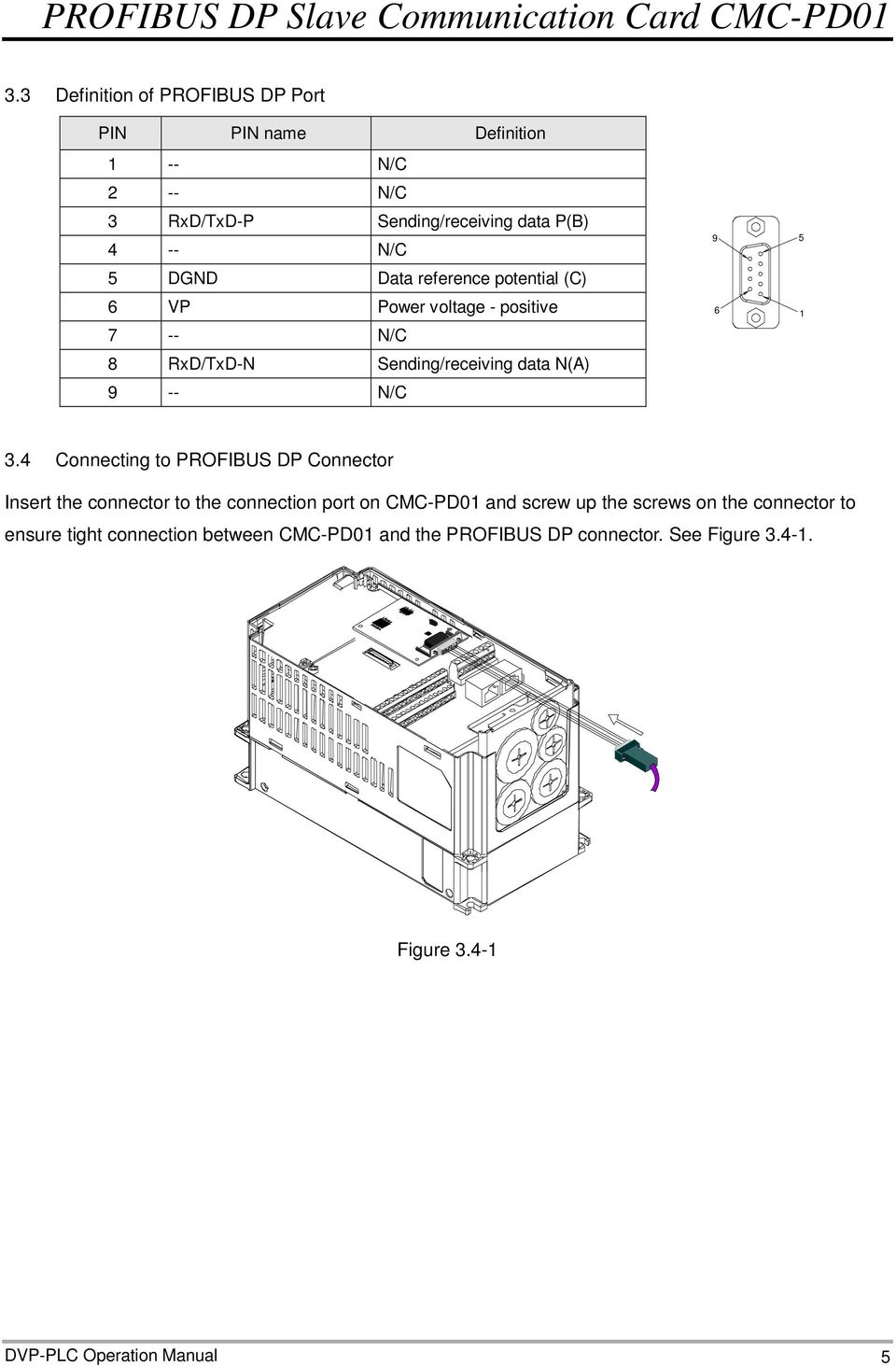
7 3.3 Definition of PROFIBUS DP Port PIN PIN name Definition 1 -- N/C 2 -- N/C 3 RxD/TxD-P Sending/receiving data P(B) 4 -- N/C 5 DGND Data reference potential (C) 6 VP Power voltage - positive 7 -- N/C 8 RxD/TxD-N Sending/receiving data N(A) 9 -- N/C Connecting to PROFIBUS DP Connector Insert the connector to the connection port on CMC-PD01 and screw up the screws on the connector to ensure tight connection between CMC-PD01 and the PROFIBUS DP connector. See Figure Figure DVP-PLC Operation Manual 5
8 4 Communication 4.1 Communication Parameters for VFD-C2000 Connected to PROFIBUS DP When VFD-C2000 is connected to PROFIBUS DP, please set up the communication parameters for it according to Table The PROFIBUS DP master is only able to read/write the parameters of VFD-C2000 after the communication parameters are set. Parameter Function Set value Explanation Setting up source of frequency command Setting up source of operation command Decoding method for communication Address of communication card 8 5 0/1 User defined The frequency command is controlled by communication card. The operation command is controlled by communication card. 0: The old decoding method for Delta AC motor drive (20XX) 1: The new decoding method for Delta AC motor drive (60XX) Address of VFD-C2000 on PROFIBUS DP network Table Note: The value of is the address of VFD-C2000 on the PROFIBUS DP network. The address has to be consistent with the address of VFD-C2000 during configuration. Changing the value in when VFD-C2000 is working will be invalid. After the value in is changed, shut down VFD-C2000 and re-power it to make the parameter valid. 4.2 Transmission Distance and Baud Rate The baud rate range for PROFIBUS DP is 9.6kbps ~ 12Mbps, and the length of transmission cable varies upon the transmission speed. The transmission distance ranges from 100m to 1,200m. SeeTable for the baud rates CMC-PD01 supports and their corresponding communication distances. Baud rate (bps) 9.6k 19.2k 93.75k 187.5k 500k 1.5M 3M 6M 12M Distance (m) 1,200 1,200 1,200 1, Table Applicable Data Form for CMC-PD01 and Introduction to PKW, PZD Applicable Data Form for CMC-PD01 The data form defined by PROFIDrive can be used for cyclic data exchange. These defined data form is called Parameter Process data Object (PPO). Apart from PPO, the cyclical data can be configured as EXT CONF1 or EXT CONF2. Based on different demands, the two extended configurations are able to achieve 4 process data words. See Table for the data forms CMC-PD01 supports. 6 DVP-PLC Operation Manual

9 4.3.2 Introduction to PKW, PZD After VFD-C2000 is connected to PROFIBUS DP network through CMC-PD01, there will be two ways to poll AC motor drive parameters, PKW polling and PZD polling. PKW is composed of 4 words, and each word represents particular definition. 4 words combined are able to read or write one AC motor drive parameter. Change each word in PKW to poll all the parameters in the AC motor drive. When the AC motor drive parameter is polled by PZD, PZD is able to map the address of the AC motor drive directly. After PZD maps the address, it will fix to map the certain address. See Table 4.3-1, the 4 words in PKW zone combined are able to read one parameter in the AC motor drive, but every word in PZD zone is able to map one parameter address of the AC motor drive. PKW PZD PKE IND PWE1 PWE2 PZD1 PZD2 PZD3 PZD4 PZD5 PZD6 PZD7 PZD8 PZD9 PZD10 1 st 2 nd 3 rd 4 th 1 st 2 nd 3 rd 4 th 5 th 6 th 7 th 8 th 9 th 10 th word word word word word word word word word word word word word word PPO1 PPO2 PPO5 EXT CONF1 PPO3 PPO4 EXT CONF2 Table Data Formats and Examples See Table for the data form of PKW. As cyclical data, PKW data has request and response mechanism, i.e. all masters are able to send new request message only after receiving the corresponding responses. PKW Word 1 Word 2 Word 3 Word 4 Definitions of bit bit15 bit14 bit13 bit12 bit11 bit10 bit9 bit8 bit7 bit6 bit5 bit4 bit3 bit2 bit1 bit0 PKE (parameter ID) AK SPM PNU (basic parameter number) IND (sub-index of parameter) Page number Not in use PWE1 (reserved) PWE2 (read/write parameter value) Table DVP-PLC Operation Manual 7

10 4.4.1 PKE (Word 1) PNU (PKE bit0 ~ bit10): Basic parameter number Basic parameter number (PNU) = Address of AC motor drive to be polled n*2,000 (n = PNU page number). Range of PNU: 1 ~ 1,999 (decimal). PNU page number = 0, when the parameter address of AC motor drive < 1,999 (decimal). When the parameter address of AC motor drive > 1,999 (decimal), you will need to set up adequate PNU page number to make PNU < 1,999 (decimal). SPM (PKE bit11): Reserved (Default = 0) AK (PKE bit12 ~ bit15): Request or response ID Request ID (Master CMC-PD01) Request ID 0 No request 1 Request parameter value 2 Modify parameter value Definition Response ID (CMC-PD01 Master) Table Response ID 0 No response 1 Send parameter value 7 Definition Request unable to process (Find out the reason according to PWE2 error code) Table When the request is unable to process, an error code will be generated in PWE2. See Table for the definitions of error codes. Error code Definition 0 Illegal parameter number (parameter does not exist) IND (Word 2) Parameter value cannot be changed (read-only parameter, the present value cannot be changed) 2 Below or exceeds minimum or maximum value 18 Other errors Table See Table for the data form of IND (sub-index of parameter). IND bit12 ~ bit15 are for page number selection (see Table for the definition of each bit). When you use PKW to poll the AC motor drive parameters, you have to first make sure the page number. The value of page number is decided by bit12 ~ bit15 of IND, which is the sum of each bit value multiplied by power value. For example, if the page number is 4, bit12 ~ bit15 of IND will be After the page number is set, the IND value will be confirmed as well. The IND value can be obtained by the binary bit0 ~ bit15 values. For example, if the page number is 4, the IND value will be 2000 (hex). 8 DVP-PLC Operation Manual

11 bit12 ~ bit15 (page number) Sub-index of parameter (IND) bit0 ~ bit11 (Reserved, Default = 0) bit15 bit14 bit13 bit12 bit11 bit10 bit9 bit8 bit7 bit6 bit5 bit4 bit3 bit2 bit1 bit Table Page number Bit IND bit15 IND bit14 IND bit13 IND bit12 Weight Value 0/1 0/1 0/1 0/1 Table Once the parameter address of the AC motor drive is known, you can further confirm the value of PNU page number according to Table With the PNU page number, you will be able to obtain the IND and PNU value. PNU value = Parameter Address of AC Motor Drive PNU Page Number 2,000. PNU (PKE bit0 ~ bit10) (Hex) PNU page number (INC bit12 ~ bit15) (Decimal) , ,000 3, ,000 4, ,000 31, PWE1 and PWE2 (Word 3 and Word 4) Table Parameter address of AC motor drive (Decimal) PWE1 is reserved for PD-01. When PKW is used for reading or writing AC motor drive parameters, the PROFIBUS DP master has to be set to PWE1 = 0. When PKW is used for reading AC motor drive parameters, PWE2 has to be 0. When PKW is used for writing AC motor drive parameters, PWE2 has to be the parameter value to be written in Reading Actual Output Frequency from VFD-C2000 by PKW To read the actual output frequency, first set the request ID to 1 (read parameter). The address of actual output frequency is 2103 (hex), and the decimal form of it is 8,451. Due to the range of PNU = 1 ~ 1999, and the page number is set to 4, the IND value = 2,000. PNU = = 451 (01C3(hex)). The data format for PKW: Master C2000: 11C C2000 Master: 11C DVP-PLC Operation Manual 9

12 Master requesting data: Parameters in PKW Parameters in PKW (hex) Word 1 (PKE) 11C3 Word 2 (IND) 2000 Word 3 (PWE1) 0000 Word 4 (PWE2) 0000 Slave responding data: Parameters in PKW Parameters in PKW (hex) Word 1 (PKE) 11C3 Word 2 (IND) 2000 Word 3 (PWE1) 0000 Word 4 (PWE2) Writing Value 2 into AC Motor Drive Address 2000 (hex) through PKW To write value 2 into the parameter at address 2000 (hex), first set the request ID to 2 (modify parameter). The address of control word of AC motor drive is 2000 (hex), and the decimal form of it is 8,192. Set the page number to 4, the IND value = 2,000, and PNU = 8,192 4 x 2,000 = 192 (0C0(hex)). The data format for PKW: Master C2000: 20C C2000 Master: 10C Master requesting data: Parameters in PKW Parameters in PKW (hex) Word 1 (PKE) 20C0 Word 2 (IND) 2000 Word 3 (PWE1) 0000 Word 4 (PWE2) 0002 Slave responding data: Parameters in PKW Parameters in PKW (hex) Word 1 (PKE) 10C0 Word 2 (IND) 2000 Word 3 (PWE1) 0000 Word 4 (PWE2) DVP-PLC Operation Manual

13 4.5 Reading/Writing AC Motor Drive Parameters by PZD When you read/write AC motor drive parameters by PZD, the parameters of AC motor drive and registers in the master will formulate a corresponding relation. That is, when you read/write the parameter in the slave through the master, you can do it directly on the slave address which is mapped in the master. See Application Example section below for detailed method. 5 GSD File The GSD file is a text file and can be used to identify PROFIBUS DP device (master or slave). A GSD file usually contains the supplier s information, baud rates supported and applicable I/O messages. When using VFD-C2000 as a PROFIBUS DP slave, you have to first import the GSD file of VFD-C2000 to the configuration software for PROFIBUS DP master. You can download the GSD file at Delta s website: 6 LED Indicators, Panel Display on VFD-C2000 and Trouble-shooting 6.1 LED Indicator and Trouble-shooting POWER LED The POWER LED displays the status of the working power supply. LED status Indication How to correct Green light on Off Power supply in normal status No power supply --- Check if the connection between CMC-PD01 and AC motor drive is normsl. NET LED The NET LED displays the connection status of the communication. LED status Indication How to correct Green light on Normal status --- Red light on Red light flashes Orange light flashes CMC-PD01 is not connected to PROFIBUS DP master. Invalid PROFIBUS communication address CMC-PD01 fails to communicate with AC motor drive. 1. Check if the configuration address of VFD-C2000 is consistent with the actual addrss. 2. Check if the communication cable between CMC-PD01 and PROFIBUS DP master is working normally. Set the PROFIBUS address of VFD-C2000 to be between 1 ~ 125 (decimal). Switch off the power of VFD-C2000 and check whether CMC-PD01 is correctly and normally connected to the AC motor drive. DVP-PLC Operation Manual 11

14 6.2 Panel Display on VFD-C2000 and Trouble-shooting Errors on PROFIBUS DP bus are displayed on the panel of VFD-C2000. Displayed code Indication How to correct ECIO ECPP ECPI The I/O data exchange between PROFIBUS DP master and CMC-PD01 is disconnected. PROFIBUS DP parameter error PROFIBUS DP configuration error 1. Check if the connection between CMC-PD01 and PROFIBUS DP bus is in normal status. 2. Check if the communication cable between CMC-PD01 and PROFIBUS DP master is in normal status. Check if the GSD file is correct. Check if VFD-C2000 is configured to general puspose mode. 7 Application Example 1 Mission: Exchanging data between S7-300 (Siemens) and VFD-C2000 through PROFIBUS DP network Connecting VFD-C2000 to PROFIBUS DP network: 1. S7-300 as the PROFIBUS DP master; VFD-C2000 as the slave. See the PROFIBUS DP network in Figure 7-1. PROFIBUS-DP Master PROFIBUS-DP BUS Figure 7-1 C2000 Driver 2. Set parameter of VFD-C2000 to 8, to 5, to 0 and to 8. The value of is the address of VFD-C2000 on the PROFIBUS DP network. When the value of is changed, VFD-C2000 has to be re-powered to make the new value valid. 3. Check if VFD-C2000 and CMC-PD01 is firmly connected, and if the wiring of the entire network is correct. 12 DVP-PLC Operation Manual

15 Configuring VFD-C2000 in PROFIBUS network (the software configuration): Create a new project by software wizard. 1. Open SIMATIC Manager. See Figure 7-2. Figure Select File => New Project Wizard. See Figure 7-3. Figure Click Next in the wizard. See Figure 7-4. DVP-PLC Operation Manual 13

16 Figure Select CPU315-2 DP for CPU as we are using the S7-300 model. Click Next. See Figure 7-5. Figure DVP-PLC Operation Manual

17 5. Select the block and language we need and click Next. See Figure 7-6. Figure Enter the project name and click Finish. See Figure 7-7. Figure 7-7 DVP-PLC Operation Manual 15

18 7. A new window will appear after the project is created. See Figure 7-8. Figure 7-8 Add PROFIBUS DP bus 1. Select SIMATIC 300 Station in the project created. See Figure 7-9. Double click Hardware, and a new window (HW-Config) will appear. Figure DVP-PLC Operation Manual

19 2. In the HW Config window, double click DP in the left-hand side column, and a dialog box will appear. See Figure Figure Click Properties in the dialog box, leading to another dialog box. See Figure Figure 7-11 DVP-PLC Operation Manual 17

20 4. Select Address in the dialog box to be the address of the master. Then click New to go to the next dialog box. See Figure Figure Select communication speed and bus type, then click OK. See Figure Figure DVP-PLC Operation Manual

21 6. Confirm the communication speed and the master address for PROFIBUS DP bus, then click OK. See Figure Figure Confirm the information on the PROFIBUS DP bus in the dialog box and click OK. See Figure Figure 7-15 DVP-PLC Operation Manual 19
22 8. Once all the parameters are set, a PROFIBUS DP bus will appear after the UR window. See Figure Add GSD file of VFD-C2000 Figure Select Options => Install GSD File in the HW Config window. See Figure Figure DVP-PLC Operation Manual
23 2. Find the path of the GSD file, select it and click Open to add the GSD file needed. See Figure Figure We can see VFD-C2000 in the right-hand side column. See Figure C2000 DRIVES is the module added. Figure 7-19 DVP-PLC Operation Manual 21
24 Add VFD-C2000 slave and set up parameters 1. See Figure Select PROFIBUS DP on the right-hand side column and double click C2000 DRIVES to open a dialog box. Figure In the dialog box, select the address (decimal) of VFD-C2000 slave. The address has to be the same as the setting of parameter for AC motor drive. Click OK. See Figure Figure DVP-PLC Operation Manual
25 3. Add PROFIBUS DP bus to VFD-C2000. See Figure Figure Select Slot 0 and double click 4PKW 4PZD in the right-hand side column. See Figure Figure 7-23 DVP-PLC Operation Manual 23
26 5. Configure 4PKW 4PZD to Slot 0 and Slot 1. See Figure Figure After all the parameters are configured, click in the HW Config window to show the dialog box as Figure Click OK to go to the next dialog box. Figure DVP-PLC Operation Manual
27 7. Click OK in the dialog box as Figure 7-26 to download the configured parameters. Figure The configured parameters are being downloaded. Figure Once all the configured parameters are downloaded, the NET LED on CMC-PD01 will be constantly On in green color. DVP-PLC Operation Manual 25
28 Data Mapping: Figure 7-28 Double click the C2000 DRIVES slave icon under the PROFIBUS DP bus in Figure 7-28 to go to the dialog box in Figure Data Output and Data Input areas are the mapped slave addresses in PZD. The data format for Data Output and Data Input is decimal and can be entered manually. For example, if we enter 1024 (decimal) in Data Output 3, the address of AC motor drive will be 0400 (hex), meaning parameter of AC motor drive. 26 DVP-PLC Operation Manual
29 Figure 7-29 Scroll down Figure 7-29 to Figure din_len refers to the length of data in the Data Input, and dout-len means the length of data in the Data Output. Figure 7-30 DVP-PLC Operation Manual 27
30 See Figure 7-31., scroll down the options for LossDPComTreat. See Table 7-1 for the meanings of the options. Figure 7-31 Influence on AC motor drive when CMC-PD01 is disconnected with PROFIBUS DP master Ignore and continue Stop accord to Pr.STOP METHOD AC motor drive continues to operate as it does before the disconnection. AC motor drive stops following the stop method set in it. Table 7-1 See Figure 7-32., scroll down the options for LossSPComTreat. See Table 7-2 for the meanings of the options. 28 DVP-PLC Operation Manual
31 Figure 7-32 Influence on PROFIBUS DP bus when CMC-PD01 is disconnected with AC motor drive Stop DataExchange&Report Fault Continue&Report Alarm Ignore&Continue DataExchange CMC-PD01 stops exchanging data with PROFIBUS DP master and reports the error. CMC-PD01 keeps exchanging data with PROFIBUS DP master and reports alarms. CMC-PD01 keeps exchanging data with PROFIBUS DP master and reports alarms. Table 7-2 See Table 7-3 below for the data mapping relation in the parameter configuration shown in Figure 7-28: PKW/PZD External I/O word for S7-300 Data transmission direction in PROFIBUS DP network Parameter address of AC motor drive (hex) PKW PQW256 PQW258 PQW260 PQW262 PIW256 4 words combined make it able to read/write one AC motor drive parameter. PIW258 PIW260 PKW returning data PIW262 DVP-PLC Operation Manual 29
32 PKW/PZD PZD External I/O word for S7-300 Data transmission direction in PROFIBUS DP network Parameter address of AC motor drive (hex) PQW (Data Output 1) PQW (Data Output 2) PQW (Data Output 3) PQW (Data Output 4) PIW (Data Input 1) PIW (Data Input 2) PIW (Data Input 3) PIW (Data Input 4) Program Example: Table 7-3 Instructions on SFC14 and SFC15 commands: SFC15: Write consistent data to standard PROFIBUS DP slave EN DPRD_DAT EN0 W#16#100 LADDR RET-VAL MW40 P#M 10.0 B YTE 8 REC0RD Figure 7-33 LADDR is the start address of slave in the mapping area for master output (as PQW256 in Figure 7-28). LADDR is in hexadecimal form, e.g. enter W#16#100 in LADDR of SFC15 to represent PQW256. The decimal form of 100 in hex is 256. RECORD is the start address and length of the data to be written. The data length of RECORD has to be consistent with the data length in parameter configuration, and the unit has to be byte. See Figure 7-33 for the input format. RET_VAL is the address of error code. When the EN condition in SFC15 is true, SFC15 will be executed. If any error occurs in the execution, an error code will be stored into RET_VAL. When there is no error, the value in RET_VAL will be 0. In Figure 7-33 we can see the data in MW10, MW12, MW14 and MW16 are written into PQW256, PQW258, PQW260 and PQW262, and the data in PQW will be sent to the slave automatically. 30 DVP-PLC Operation Manual
33 SFC14: Write consistent data to standard PROFIBUS DP slave EN DPRD_DAT EN0 W#16#100 LADDR RET-VAL MW42 REC0RD P#M 20.0 B YTE 8 Figure 7-34 LADDR is the start address of slave in the mapping area for master input (as PIW256 in Figure 7-28). LADDR is in hexadecimal form, e.g. enter W#16#100 in LADDR of SFC14 to represent PIW256. The decimal form of 100 in hex is 256. RECORD is the start address and length of the data to be read. The data length of RECORD has to be consistent with the data length in parameter configuration, and the unit has to be byte. See Figure 7-34 for the input format. RET_VAL is the address of error code. When the EN condition in SFC14 is true, SFC14 will be executed. If any error occurs in the execution, an error code will be stored into RET_VAL. When there is no error, the value in RET_VAL will be 0. In Figure 7-34 we can see the data sent from the slave to PIW256, PIW258, PIW260 and PIW262 are written to MW20, MW22, MW24 and MW26. The program of master OB1: DVP-PLC Operation Manual 31
34 When M0.0 = ON, PKW can be executed. See the table below about the PKW data. Modifying value in parameter (hex) of AC motor drive by PKW (the address of parameter is 402 (hex)) Data from master to slave MW10 MW12 MW14 MW16 Data value (hex) Data from slave to master MW20 MW22 MW24 MW26 Data value (hex) Reading value in parameter (hex) of AC motor drive by PKW (the address of parameter is 402 (hex)) Data from master to slave MW10 MW12 MW14 MW16 Data value (hex) Data from slave to master MW20 MW22 MW24 MW26 Data value (hex) When M0.1 = ON, PZD can be executed. See the table below for the data transmission for PZD. Register in master MW30 (PQW264) MW32 (PQW266) MW34 (PQW268) MW36 (PQW270) MW40 (PIW264) MW42 (PIW266) MW44 (PIW268) MW46 (PIW280) Data transmission of PROFIBUS DP bus Parameter address of AC motor drive 2000 (hex) 2001 (hex) 0400 (hex) 0401 (hex) 2101 (hex) 2102 (hex) 2103 (hex) 2104 (hex) 32 DVP-PLC Operation Manual
DVPPF02-H2. PROFIBUS DP Slave Communication Module Application Manual
 DVPPF02-H2 PROFIBUS DP Slave Communication Module Application Manual Warning Please read this instruction carefully before use and follow this instruction to operate the device in order to prevent damages
CMC-DN01 DeviceNet Slave Communication Card Operation Manual
 CMC-DN01 DeviceNet Slave Communication Card Operation Manual 2011-12-26-A Warning This operation manual provides introduction on the functions, specifications, installation, basic operation and settings
CB15/CB155. PROFIBUS Module
 CB15/CB155 PROFIBUS Module Contents Warning and Caution Notes 1. OVERVIEW 1.1 Description and Features 1.2 Application on a PROFIBUS Link 2. INSTALLATION 2.1 Installing the Module 2.1.1 CB15 Installation
Siemens S7 PLC and FC 300 Profibus
 Introduction This application note describes how to set up a PROFIBUS system between a Danfoss Drives FC 300 frequency converter and S7 PLC 315-2 from Siemens. It is assumed that you are already familiar
SIMATIC NET. CP 243-2 AS-Interface Master B C. Preface Contents. Technical Description and Installation Instructions Interface to the User Program
 Preface Contents SIMATIC NET CP 243-2 AS-Interface Master Manual Technical Description and Installation Instructions Interface to the User Program 2 in the S7-200 CPU Access to the Data of the AS-i Slaves
1 Application Description... 3. 1.1 Objective... 3 1.2 Goals... 3
 Contents Moxa Technical Support Team [email protected] 1 Application Description... 3 1.1 Objective... 3 1.2 Goals... 3 2 System Topology... 3 3 Hardware and Software Requirements... 4 4 Configuration...
User manual. magnetic absolute positioning drive AG03/1
 User manual magnetic absolute positioning drive AG03/1 1 GENERAL REMARKS... 3 1.1 DOCUMENTATION... 3 1.2 BLOCK DIAGRAM... 3 2 FUNCTIONAL DESCRIPTION... 4 2.1 SYSTEM STATUS WORD... 4 2.2 OPERATING MODES...
Start-up of IVI-KHD2-4HRX, IVI-KHA6-4HRX at S7-300 V1.1. Table of Contents TABLE OF CONTENTS... 1
 Table of Contents TABLE OF CONTENTS... 1 1. DESCRIPTION OF HARDWARE... 2 1.1 Modules and devices... 2 1.2 Set-up and installation... 2 2. SETTING UP PARAMETERS... 2 2.1 Setting up parameters in accordance
GW-7552 PRIFIBUS/MODBUS GATEWAY
 GW-7552 PRIFIBUS/MODBUS GATEWAY Quick Start User Guide 1. Introduction This manual introduces the GW-7552's basic setting and operating quickly, the user can refer to the user manual in the ICP DAS companion
GE Power Controls FIELDBUS APPENDIX PROFIBUS DP. Doc. No.: ASTAT Plus PB_Appendix-v0
 GE Power Controls = FIELDBUS APPENDIX PROFIBUS DP = Doc. No.: ASTAT Plus PB_Appendix-v0 Fieldbus Appendix: PROFIBUS DP 1 Fieldbus Introduction...... 2 1.1 Introduction to Profibus-DP... 2 1.2 Network Overview...
2354235 11/2008. Altivar 61/71. Profibus DP. User manual 11/2009. www.schneider-electric.com
 2354235 11/2008 Altivar 61/71 Profibus DP User manual 11/2009 1755873 www.schneider-electric.com Contents Before you begin 4 Documentation structure 5 Introduction 6 Presentation 6 Notation 6 Hardware
The Answer to the 14 Most Frequently Asked Modbus Questions
 Modbus Frequently Asked Questions WP-34-REV0-0609-1/7 The Answer to the 14 Most Frequently Asked Modbus Questions Exactly what is Modbus? Modbus is an open serial communications protocol widely used in
5-port / 8-port 10/100BaseTX Industrial Ethernet Switch User Manual
 5-port / 8-port 10/100BaseTX Industrial Ethernet Switch User Manual Content Overview... 1 Introduction... 1 Features... 3 Packing List... 4 Safety Precaution... 4 Hardware Description... 5 Front Panel...
Manual. MOVIDRIVE MDX61B MOVI-PLC DHP11B Control Card. Edition 09/2005 FA361510 11350717 / EN
 Gearmotors \ Industrial Gear Units \ Drive Electronics \ Drive Automation \ s MOVIDRIVE MDX61B MOVI-PLC DHP11B Control Card FA36151 Edition 9/25 1135717 / EN Manual 1 Important Notes... 4 2 Introduction...
WinCC. Communication Manual. Manual 2. This manual is part of the documentation package with the order number: 6AV6392-1CA05-0AB0 C79000-G8276-C156-01
 WinCC Communication Manual Manual 2 This manual is part of the documentation package with the order number: 6AV6392-1CA05-0AB0 Release: September 1999 WinCC, SIMATIC, SINEC, STEP are trademarks of Siemens.
2-Port RS232/422/485 Combo Serial to USB2.0 Adapter (w/ Metal Case and Screw Lock Mechanism) Installation Guide
 2-Port RS232/422/485 Combo Serial to USB2.0 Adapter (w/ Metal Case and Screw Lock Mechanism) Installation Guide 1. Introduction Thank you for purchasing this 2-Port RS232/422/485 Combo Serial to USB Adapter.
ZC-24DO CANopen I/O Module: 24 Digital Outputs
 Z-PC Line EN ZC-24DO CANopen I/O Module: 24 Digital Outputs Installation Manual Contents: - General Specifications - Technical Specifications - Installation Rules - Electrical connections - DIP-switches
PROFINET IO Diagnostics 1
 PROFINET IO is a very cost effective and reliable technology. However, extensive installations can have thousands of PROFINET IO devices operating on many networks. The reliable operation of these networks
SIMATIC. ET 200S distributed I/O IM151-1 STANDARD interface module (6ES7151-1AA05-0AB0) Preface. Properties 1. Parameters 2.
 Preface SIMATIC ET 200S distributed I/O SIMATIC ET 200S distributed I/O IM151-1 STANDARD interface module (6ES7151-1AA05-0AB0) Manual Properties 1 Parameters 2 Functions 3 Interrupt, error, and system
applicomio Profibus-DP
 BradCommunications Profibus-DP network interface cards allow deterministic I/O data acquisition for PC-based control applications. Features New! Support of Windows 32-bit and 64-bit (WoW64) Support of
L5354 ControlNet Communications Interface
 L5354 ControlNet Communications Interface Technical Manual HA470733 Issue 2 Copyright SSD Drives Inc 2005 All rights strictly reserved. No part of this document may be stored in a retrieval system, or
Bluetooth HC-06 with serial port module Easy guide
 1 Bluetooth HC-06 with serial port module Easy guide This manual consists of 3 parts: PART 1. Overview of Bluetooth HC-06 module with serial port. PART 2. Installing Bluetooth HC-06 module with Bolt 18F2550
Soft-Starter SSW-06 V1.6X - Profibus DP, DeviceNet and EtherNet/IP
 Motors Energy Automation Coatings Soft-Starter SSW-06 V1.6X - Profibus DP, DeviceNet and EtherNet/IP Fieldbus Communication Manual Language: English Document: 0899.5844 / 06 Profibus DP, DeviceNet and
PCS0100en 02.2008. Persy Control Services B.V. Netherlands
 P-Bus Gateway PBGW2.128 Universal gateway between the P-bus protocol and open standard protocols. The variety of available electrical interfaces on the gateway offers a wide range of possibilities for
DeviceNet Bus Software Help for Programming an Allen Bradley Control System
 FBP FieldBusPlug V7 DeviceNet Bus Software Help for Programming an Allen Bradley Control System DeviceNet Software Help for Programming an Allen Bradley Control System Contents Page General Purpose...
RTU-EN01 Modbus TCP Remote I/O Communication Module Operation Manual
 RTU-EN01 Modbus TCP Remote I/O Communication Module Operation Manual DVP-0213920-01 Introduction This operation manual only provides introductory information on electrical specification, installation
ENET-710. ENET-710 - Ethernet Module ENET-710 JAN / 06 FOUNDATION
 ENET-710 ENET-710 - Ethernet Module JAN / 06 ENET-710 FOUNDATION E N E T 7 1 0 ME smar www.smar.com Specifications and information are subject to change without notice. Up-to-date address information is
Application Note - Connecting an Electricity Meter to SolarEdge Devices (Europe and APAC)
 February 2015 February 2015 Application Note - Connecting an Electricity Meter to SolarEdge Devices (Europe and APAC) This document describes how to connect an electricity meter to a SolarEdge device (inverters,
Practical steps for a successful. PROFIBUS Project. Presented by Dr. Xiu Ji Manchester Metropolitan University
 Practical steps for a successful PROFIBUS Project Presented by Dr. Xiu Ji Manchester Metropolitan University Basics of PROFIBUS Content Practical steps in the design and installation stages Segmentation:
Programmable set for Ethernet Modbus/TCP in IP20 TI-BL20-PG-EN-8
 CoDeSys-programmable acc. to IEC 61131-3 Cable max. 50 m between interface and read/write head 10/100 Mbps LEDs for display of supply voltage, group and bus errors as well as status and diagnostics Connection
Bluetooth to Serial Adapter
 Bluetooth to Serial Adapter Third Edition, Oct 2007 Version 3.0 771-BTS1009C3-001 Contents 1.0 Features....P.2 2.0 Package Content....P.2 3.0 Hard Drives Requirement.P.2 4.0 Specifications.P.3 5.0 Pin
s!nus-elektrotechnikai bt. Industrial IT & Automation
 USB/PPI+ Optoelectronic isolated USB/PPI adapter Optoelectronic isolated USB/PPI adapter, can replace Siemens 6ES7 901-3DB30-0XA0, the largest communication distance of up to 2 kilometers. Not support
I.S. 1 remote I/O system Redundant coupling via PROFIBUS DP
 I.S. 1 remote I/O system Redundant coupling via PROFIBUS DP 1. Functions An I. S. 1 fieldstation can be equipped with a primary and a redundant central unit (), whereby each has its own independent PROFIBUS
CipherLab 5100 Time Attendance Utility Manual
 CipherLab 5100 Time Attendance Utility Manual K:\Products\Product Technical\BI\BI-PC5100T\CipherLab5100TimeAttendnaceUtilityManual0707-process.doc Page 1 / 13 1 Login A popup form as follows will appear
s!nus-elektrotechnikai bt. Industrial IT & Automation
 USER MANUAL s!nus-elektrotechnikai bt. USB/PPIM+ Siemens S7-200 USB/PPI Multi-Master Cable USB/RS485 Isolated For all PPI-Bus System Summary: USB / PPIM + is the PPI Multi-Master programming Cable which
D8X / D16X IPHONE INTERFACE
 Ness icomms App D8X / D16X IPHONE INTERFACE SETUP GUIDE Revision 1.0.0 Table of Contents Copyright Notice... 3 1. Important Information... 4 2. Wiring Diagram... 5 2.1 RS232 Wiring Setup... 5 2.2 IP232
GV- RK1352 Card Reader
 GV- RK1352 Card Reader The GV-RK1352 is a card reader with keypad, designed to recognize PIN codes, identification cards or both. Featured with the Wiegand and RS-485 outputs, the unit can be connected
MDM192 MULTI-DROPS DIGITAL MODEM FOR PRIVATE LINE. USER GUIDE Document reference : 9010709-03
 MDM192 MULTI-DROPS DIGITAL MODEM FOR PRIVATE LINE USER GUIDE Document reference : 9010709-03 If you have questions about the MDM192 or desire assistance, contact ETIC TELECOMMUNICATIONS at the following
PROFINET Diagnostics Software and Tools
 PROFINET Diagnostics Software and Tools Dr. Xiu Ji Static wiring test, diagnostics Live system diagnostics Basics of PROFINET Content PROFINET Diagnostics by Dr. Xiu Ji, Page 2 What is PROFINET? PROFINET
Install the DeviceNet Module using the following procedure:
 Installation INSTALLATION INSTRUCTIONS: MCD DEVICENET MODULE Order Code: 175G9002 1. Installation Install the DeviceNet Module using the following procedure: 1. Remove control power and mains supply from
DeviceNet Motor Control
 Quick-Start Guide for the DN65 DeviceNet I/O Module using Rockwell RSNetWorx version 2.22 or later This Quick-Start Guide provides instructions for configuring a Cutler-Hammer Freedom full voltage, non-reversing
Using the AnyBus -X Gateway to Communicate between a DVT camera and a Profibus Master
 Using the AnyBus -X Gateway to Communicate between a DVT camera and a Profibus Master Page 1 of 13 Table of Contents 1 OVERVIEW... 3 2 INSTALLING AND CONFIGURING THE ANYBUS -X GENERIC GATEWAY AND ETHERNET
PROFIBUS DP Fieldbus Documentation
 PROFIBUS DP Fieldbus Documentation 5th generation of inverters FUNDAMENTALS CONFIGURATION PARAMETERS V 5.3 04/2007 GB MI BCI AM Fieldbus Applications POSI Switch PROFIBUS DP 5th Generation of Inverters
Application about Communication
 Application about Communication Integration of a MicroMaster Drive with Rockwell ControlLogix using DeviceNet Third-Party Integration Warranty, liability and support Note The application examples are not
SMT-BD1/p - CD1-p - User manual. SMT-BD1/p CD1-p gb. PROFIBUS POSITIONER User manual INFRANOR. SMT-BD1/p - CD1-p - User manual 1
 SMT-BD1/p CD1-p gb PROFIBUS POSITIONER User manual INFRANOR SMT-BD1/p - CD1-p - User manual 1 2 SMT-BD1/p - CD1-p - User manual WARNING!! This is a general manual describing a series of servo amplifiers
2-Pair. Managed SHDSL Ethernet Extender. User s Manual
 2-Pair User s Manual 1. Quick Start Guide This quick start guide describes how to install and use the Managed SHDSL Ethernet Extender. This is the Ethernet Extender of choice to extend 10/100 Ethernet
Set for PROFINET IO in IP20 TI-BL20-EN-PN-4
 Cable max. 50 m between interface and read/write head Connection of up to 4 read/write heads via BL ident extension cables Mixed operation of HF and UHF read/ write heads Connectors /S2500 Type code Ident
PCI/PXI ETHERNET ADAPTERS
 INSTALLATION GUIDE PCI/PXI ETHERNET ADAPTERS Installing Your PCI Board National Instruments offers several Ethernet adapters based on the Intel 82559-compatible Ethernet controller. This document explains
Original instructions. PLUTO Gateway. User Manual. PROFIBUS GATE-P1/P2 DeviceNet GATE-D1/D2 CANopen GATE-C1/C2 Ethernet GATE-E1/E2
 Original instructions PLUTO User Manual PROFIBUS GATE-P1/P2 DeviceNet GATE-D1/D2 CANopen GATE-C1/C2 Ethernet GATE-E1/E2 English v10e 2TLC172009M0210_E Revision history: Version Date Change 1A 2006-04-20
PROFIBUS / MODBUS GATEWAY Application Note for Communication between Premium CPU & XPS-MC Safety Controllers
 PROFIBUS / MODBUS GATEWAY Application Note for Communication between Premium CPU & XPS-MC Safety Controllers eng 33003105.02 2 Table of Contents About the Book....................................... 5
USER MANUAL V5.0 VT300
 GPS Vehicle Tracker USER MANUAL V5.0 VT300 Updated on 26/12/2008 Contents 1 Product Overview 3 2 For Your Safety 3 3 VT300 Parameters 3 4 Getting Started 4 4.1 Hardware and Accessories 4 4.2 Light and
Installation Manual (English) Adjustable Active DP Terminator T1-Pepper Active RS485 segment termination for non-compliant cable
 Installation Manual (English) Adjustable Active DP Terminator T1-Pepper Active RS485 segment termination for non-compliant cable Designed for use with the COMbricks SALT repeater All baudrates Redundant
4 non-safe digital I/O channels 2 IO-Link Master V1.1 slots. Figure 1. Figure 2. Type code. TBPN-L1-FDIO1-2IOL Ident no. 6814053.
 PROFINET slave Integrated Ethernet switch 100 Mbps supported 2 x M12, 4-pin, D-coded, Ethernet fieldbus connection Glass-fiber reinforced housing Shock and vibration tested Potted module electronics Protection
TCP/IP MODULE CA-ETHR-A INSTALLATION MANUAL
 TCP/IP MODULE CA-ETHR-A INSTALLATION MANUAL w w w. c d v g r o u p. c o m CA-ETHR-A: TCP/IP Module Installation Manual Page Table of Contents Introduction...5 Hardware Components... 6 Technical Specifications...
Commissioning IDENTControl Compact IC-KP2-2HB17-2V1D Profinet Protocol with a Siemens S7 PLC
 Commissioning IDENTControl Compact IC-KP2-2HB17-2V1D Profinet Protocol with a Siemens S7 PLC Seite 1 von 19 Index of contents 1. Adjustment of communication parameter with web interface...3 2. Installation
How To Connect A Directsofl To A Powerpoint With An Acd With An Ctel With An Dm-Tel Modem On A Pc Or Ipad Or Ipa (Powerpoint) With A Powerline 2 (Powerline
 Application Note Last reviewed: 03/17/2008 AN-KEP-003.doc Page 1 of 23 Introduction... 1 Recommended s and ports to use... 1 Cable Wiring... 2 MDM-TEL Configuration ( Wizard)... 3 Direct Logic Communications
TECHNICAL NOTE TNOI34
 TECHNICAL NOTE TNOI Title: Communication with Siemens S7-00 PLCs via Ethernet Product(s): G, MC, and DSP ABSTRACT Crimson.0 provides advanced Ethernet communication capabilities for Red Lion Products,
xepi 2 Installation Guide Diagnostic Unit and Configuration Interface Doc. Version 4.0 English
 xepi 2 Diagnostic Unit and Configuration Interface Doc. Version 4.0 Installation Guide English Dear Customer, This "Installation Guide" will help you to install the hardware. If you have any further questions,
BIT COMMANDER. Serial RS232 / RS485 to Ethernet Converter
 BIT COMMANDER Serial RS232 / RS485 to Ethernet Converter (Part US2000A) Copyrights U.S. Converters 1 Contents Overview and Features... 3 Functions..5 TCP Server Mode... 5 Httpd Client Mode.5 TCP Auto mode....6
How to make a diagnostic on TeSysT to start the network?
 How to make a diagnostic on TeSysT to start the network? I- Type of publication Typical application Best know Method (BKM) Troubleshooting guide Level 2 use Internal use Customer II- Product - Product
AC500. Software Description. Scalable PLC for Individual Automation. Installation of the AC500 Control Builder PS501
 Software Description AC500 Scalable PLC for Individual Automation Installation of the AC500 Control Builder PS501 CM572 PM581 DC532 AX522 Contents Installation of the AC500 Control Builder 1 Contents
How to read this guide
 How to read this guide The following shows the symbols used in this Quick start guide with descriptions and examples. Symbol Description Example P oint Reference Caution [ ] This symbol explains information
Set for Profibus DPV1 in IP20 TI-BL20-DPV1-8
 Type code Ident no. 1545007 Number of channels 8 Dimensions (W x L x H) 110.3 x 128.9 x 74.4 mm Cable max. 50 m between interface and read/write head 2 decimal rotary coding switches for the adjustment
USER MANUAL V5.0 ST100
 GPS Vehicle Tracker USER MANUAL V5.0 ST100 Updated on 15 September 2009-1 - Contents 1 Product Overview 3 2 For Your Safety 3 3 ST100 Parameters 3 4 Getting Started 4 4.1 Hardware and Accessories 4 4.2
Cisco TelePresence VCR MSE 8220
 Cisco TelePresence VCR MSE 8220 Getting started 61-0008-05 Contents General information... 3 About the Cisco TelePresence VCR MSE 8220... 3 Port and LED location... 3 LED behavior... 4 Installing the VCR
Rack mounted telephone- and leased line modem for industrial applications
 Rack mounted telephone- and leased line modem for industrial applications TR-6 Rack modem for industrial PSTNand /-wire leased line applications The TR-6 is an analogue V. 9 -rack PSTN modem as well as
CM705B - Universal Expander Module CM707B - Plug On Zone Expander Security Systems
 CM705B - Universal Expander Module CM707B - Plug On Zone Expander Security Systems EN Security System CM705B CM705B - Universal Expander Module The CM705B universal expander provides a cost effective way
Part Number 129777-01 Revision A, January 1996. 3500 Monitoring System Rack Configuration and Utilities Guide
 Part Number 129777-01 Revision A, January 1996 3500 Monitoring System Rack Configuration and Utilities Guide Copyright 1995 Bently Nevada Corporation All Rights Reserved. No part of this publication may
Tutorial: Configuring GOOSE in MiCOM S1 Studio 1. Requirements
 Tutorial: Configuring GOOSE in MiCOM S1 Studio 1. Requirements - Two (2) MiCOM Px4x IEDs with Version 2 implementation of IEC 61850 - Two (2) Cat 5E Ethernet cable - An Ethernet switch 10/100 Mbps - MiCOM
Manual. MOVIFIT Function Level "Classic" Edition 05/2007 11591811 / EN
 Gearmotors \ Industrial Gear Units \ Drive Electronics \ Drive Automation \ Services MOVIFIT Function Level "Classic" Edition 05/2007 11591811 / EN Manual SEW-EURODRIVE Driving the world Contents 1 General
PU-USBX. USB over Ethernet Extender OPERATION MANUAL
 PU-USBX USB over Ethernet Extender OPERATION MANUAL Safety Precautions Please read all instructions before attempting to unpack or install or operate this equipment, and before connecting the power supply.
User Manual. smart mcc COMMUNICATIONS. Connectivity to Industrial Networks Third Party Compatible PROFIBUS Solutions
 User Manual smart mcc COMMUNICATIONS Connectivity to Industrial Networks Third Party Compatible PROFIBUS Solutions Trademarks Unless otherwise noted, all names identified by are registered trademarks of
ADACSNET USB Control Module
 ADACSNET USB Control Module Installation Guide Termination Switch 2-Pin SensorNet Connection Features and Hookup The USB Control Module contains the following: - USB port: Connects to the host computer.
DSX Master Communications
 DSX Access Systems, Inc. PC to Master Controller - Direct Connect Communications DSX Master Communications Communications between the Comm Server PC and the Master Controller can take several forms which
Programmable set for Ethernet Modbus/TCP in IP67 TI-BL67-PG-EN-2
 Type code Ident no. 1545065 Number of channels 2 Dimensions (W x L x H) 108 x 145 x 77.5 mm CoDeSys-programmable acc. to IEC 61131-3 Cable max. 50 m between interface and read/write head 10/100 Mbps Male
2 Setting Up the Hardware for a Wired Ethernet Network... 13. 3 Setting Up the Software for an Ethernet Network... 21
 Contents 1 Networking Basics............................................... 1 Selecting a network connection........................................ 2 Wired Ethernet network...........................................
OPT-700 - SERIAL TO FIBER OPTIC CONVERTER
 USER S MANUAL OPT-700 - SERIAL TO FIBER OPTIC CONVERTER JUL / 05 OPT-700 VERSION 1 TM FOUNDATION OPT700ME smar www.smar.com Specifications and information are subject to change without notice. Up-to-date
USB PC Adapter V4 Configuration
 Programming PC adapter V4 USB PC Adapter V4 Configuration PC adapter with USB cable Flat Ribbon Cable Power Supply Unit Device Driver General The USB PC adapter V4 is used for communication between a PC
How To Use An American Zw.Com V20-20 (V20) V20 (Veu) V2.20 (Femalese) V1.2.2 (V2.1) V3.
 Cover SINAMICS V: Speed Control of a V20 with S7-1200 via USS Protocol in TIA Portal SINAMICS V20, SIMATIC S7-1200 Short Documentation November 2012 Applications & Tools Answers for industry. Siemens Industry
Applications & Tools. Configuration of Messages and Alarms in WinCC (TIA Portal) WinCC (TIA Portal) Application description December 2012
 Cover Configuration of Messages and Alarms in WinCC (TIA Portal) WinCC (TIA Portal) Application description December 2012 Applications & Tools Answers for industry. Siemens Industry Online Support This
Technical Note A007 Modbus Gateway Vantage Pro2 25/09/2009 Rev. A 1 de 7
 1 de 7 1. Introduction This Technical Note explains how to configure the Modbus Gateway for Vantage Pro2. The Modbus Gateway allows the easy connection of a PLC (Programmable Logic Controller), RTU (Remote
HCR3.2/.. Chipcard reader HOTEL SOLUTION
 s 6 332 HOTEL SOLUTION Chipcard reader HCR3.2/.. Chipcard reader for hotel room access control Reads access code on chipcard Transfers access code to room controller Built-in optical display of messages
1 Serial RS232 to Ethernet Adapter Installation Guide
 Installation Guide 10/100 Mbps LED (amber color ) Link/Activity LED (green color ) 1. Introduction Thank you for purchasing this 1-port RS232 to Ethernet Adapter (hereinafter referred to as Adapter ).
1. SAFETY INFORMATION
 RS-232 Sound Level Meter 72-860A INSTRUCTION MANUAL www.tenma.com 1. SAFETY INFORMATION Read the following safety information carefully before attempting to operate or service the meter. Use the meter
Parameterizing options. 8.1.1 Parameterization options based on the communication protocols used
 Setting module parameters 8 PARAMETERIZATION 8.1 Parameterizing options 8.1.1 Parameterization options based on the communication protocols used Many fieldbuses currently in use do not have sufficient
LevelOne IFE-0500 4-Port PoE + 1-Port TP Industrial Fast Ethernet Switch User Manual
 LevelOne IFE-0500 4-Port PoE + 1-Port TP Industrial Fast Ethernet Switch User Manual Ver. 1.0.0-0711 1 FCC Warning This Equipment has been tested and found to comply with the limits for a Class-A digital
BASLER ACE QUICK INSTALLATION GUIDE
 BASLER ACE QUICK INSTALLATION GUIDE Rev. 01 Quick installation Guide V1 1 Introduction The installation procedures in this guide assume that you want to get your camera operational and begin capturing
MAX6683 Evaluation System/Evaluation Kit
 19-2343; Rev 1; 3/07 MAX6683 Evaluation System/Evaluation Kit General Description The MAX6683 evaluation system (EV system) consists of a MAX6683 evaluation kit (EV kit) and a companion Maxim CMODUSB board.
LOVELINK III- Process Monitoring, Logging, Graphing, & Configuration
 LOVELINK III- Process Monitoring, Logging, Graphing, & Configuration VERSION 1.00.00 USER MANUAL Updated 09/13/2002 Table of Contents Hardware/Software Requirements...2 Computer Requirements...2 Instrument
HP UPS R1500 Generation 3
 HP UPS R1500 Generation 3 Installation Instructions Part Number 650952-001 NOTE: The rating label on the device provides the class (A or B) of the equipment. Class B devices have a Federal Communications
WAP3205 v2. User s Guide. Quick Start Guide. Wireless N300 Access Point. Default Login Details. Version 1.00 Edition 2, 10/2015
 WAP3205 v2 Wireless N300 Access Point Version 1.00 Edition 2, 10/2015 Quick Start Guide User s Guide Default Login Details Web Address http://zyxelsetup Password www.zyxel.com 1234 Copyright 2014 ZyXEL
Data Bulletin. Communications Wiring for POWERLINK G3 Systems Class 1210 ABOUT THIS BULLETIN APPLICATION INTRODUCTION.
 Data Bulletin 1210DB0002R3/05 03/2005 LaVergne, TN, USA Communications Wiring for POWERLINK G3 Systems Class 1210 Retain for future use. ABOUT THIS BULLETIN This data bulletin describes the proper wiring
HIPERDRIVE HRA71 and HIPER- DRIVE -HUB: Integrated positioning system with absolute distance measurement for format adjustment
 HIPERDRIVE HRA7 and HIPER- DRIVE -HUB: Integrated positioning system with absolute distance measurement for format adjustment Convincing benefits: Highly integrated system Low cabling requirements: VDC
Continuous PROFIBUS PA Instruments and Step 7. Configuring a Siemens Continuous Level PROFIBUS PA device in a S7-300 or S7-400 PLC
 Continuous PROFIBUS PA Instruments and Step 7 Configuring a Siemens Continuous Level PROFIBUS PA device in a S7-300 or S7-400 PLC Objective: Equipment: Become familiar with the steps required to configure
2-port RS-422 / 485 Universal PCI
 IPC-P2102 2-port RS-422 / 485 Universal PCI Introduction SUNIX IPC-P2102, industrial standard universal PCI serial communication card, allows users to expand two RS-422/485 ports on PC-based system. Each
Manual. Fieldbus Interface DFP21B PROFIBUS DP-V1. Edition 07/2006 FA375100 11479019 / EN
 Gearmotors \ Industrial Gear Units \ Drive Electronics \ Drive Automation \ Services Fieldbus Interface DFP21B PROFIBUS DP-V1 FA3751 Edition 7/26 1147919 / EN Manual SEW-EURODRIVE Driving the world 1 Important
TECHNICAL NOTE TNOI32
 TECHNICAL NOTE TNOI32 Title: G3 to MC Modbus Communication Product(s): G3 and Modular Controller V2 (CSMSTRV2) ABSTRACT This document provides an introduction to connect a G3 HMI to a Modular Controller
DAM Series DAM124 4DIN+8AI+4DO Module Model No.:DAM124 WebSite: www.gsm-m2m.com
 DAM Series DAM124 4DIN+8AI+4DO Module Model No.:DAM124 WebSite: www.gsm-m2m.com This handbook has been designed as a guide to the installation and operation of King Pigeon Hi-Tech.Co.,Ltd DAM series. Statements
EDI Distributor Control Interface Wiring and Setup Instructions
 Universal I/O EDI Distributor Control Interface Wiring and Setup Instructions EDI UNIVERSAL I/O INTERFACE MODULE The only interface needed for EDI-V5 controls Network compatible with all older EDI controls
Perle Protocol Transparent Media Converter Modules
 Perle Protocol Transparent Media Converter Modules Installation Guide C-4GPT-DSFP CM-4GPT-DSFP Part# 5500335-10 Overview This document contains instructions necessary for the installation and operation