
Undergraduate Academic Affairs \ Student Affairs IT Services. VPN and Remote Desktop Access from a Windows 7 PC
|
|
|
- Valentine Hubbard
- 10 years ago
- Views:
Transcription
1 Undergraduate Academic Affairs \ Student Affairs IT Services VPN and Remote Desktop Access from a Windows 7 PC Last edited: 4 December 2015
2 Contents Inform IT Staff... 1 Things to Note... 1 Setting Up VPN Connection... 2 Adding Security to VPN... 6 If you have not been able to connect to VPN before... 7 Using Remote Desktop Connection... 8 Closing Remote Desktop and Disconnecting from VPN Renabling VPN and Creating a Shortcut for Future Uses Reconnecting to Remote Desktop Client Inform IT Staff Inform an IT Staff member so that they can add you to the list of users who can access your computer remotely (Remote Desktop Users). You can do so by sending us an at [email protected] or calling us at (848) Our helpdesk will be happy to assist you. Please have your computer name ready. Things to Note Internet browsing will not work while you re connected to VPN You will need to inform IT Staff if your computer was recently replaced or if you are remoting into a different machine to be re-added to Remote Desktop Users. 1

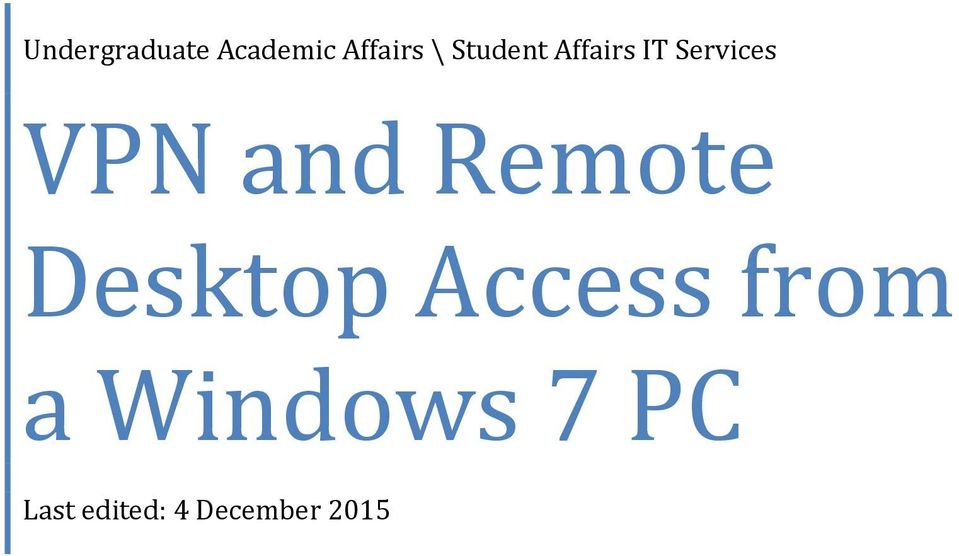
3 Setting Up VPN Connection Press the Start Menu 2. Type in vpn in the search bar 3. Click on Set up a virtual private network (VPN) connection to open a new window 2
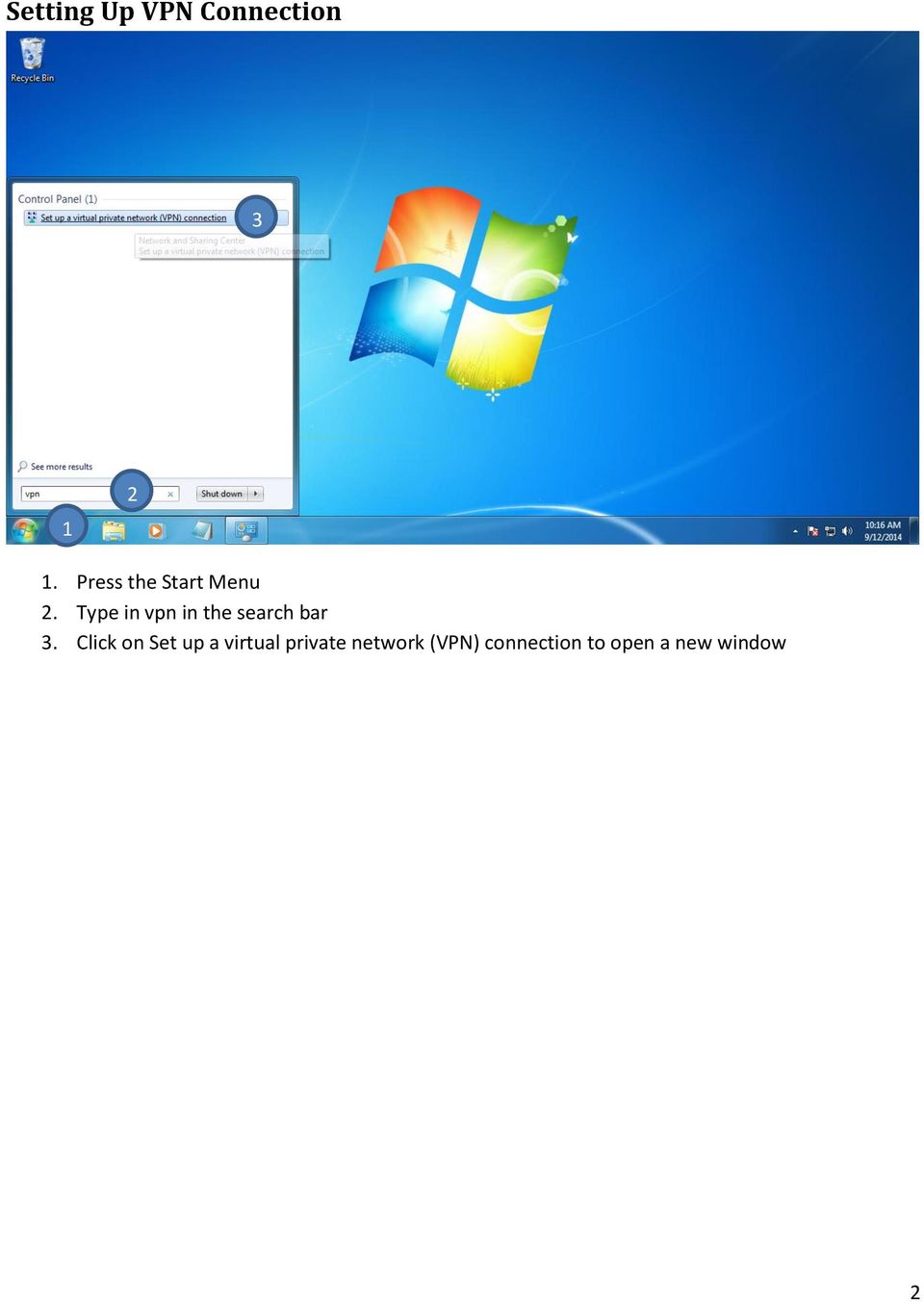
4 4. Enter the following in their respective fields Internet address: its-vpn.rutgers.edu Destination name: ITS VPN 5. Enter the following in their respective fields 3
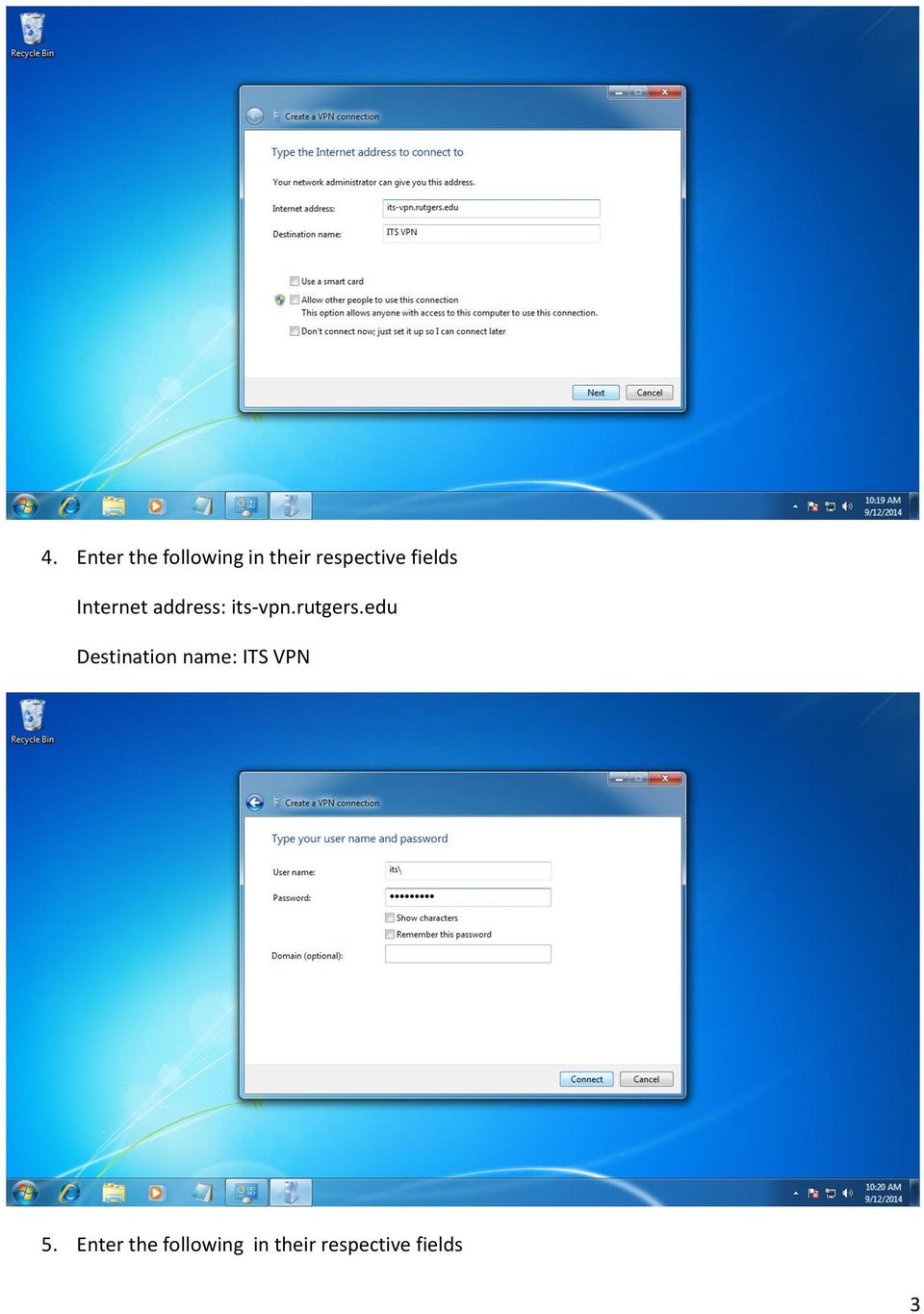
5 User name: its\<echo username> Password: <echo password> Domain (optional): <leave blank> 6. Verify that you re seeing You are connected. If otherwise, continue along. 4

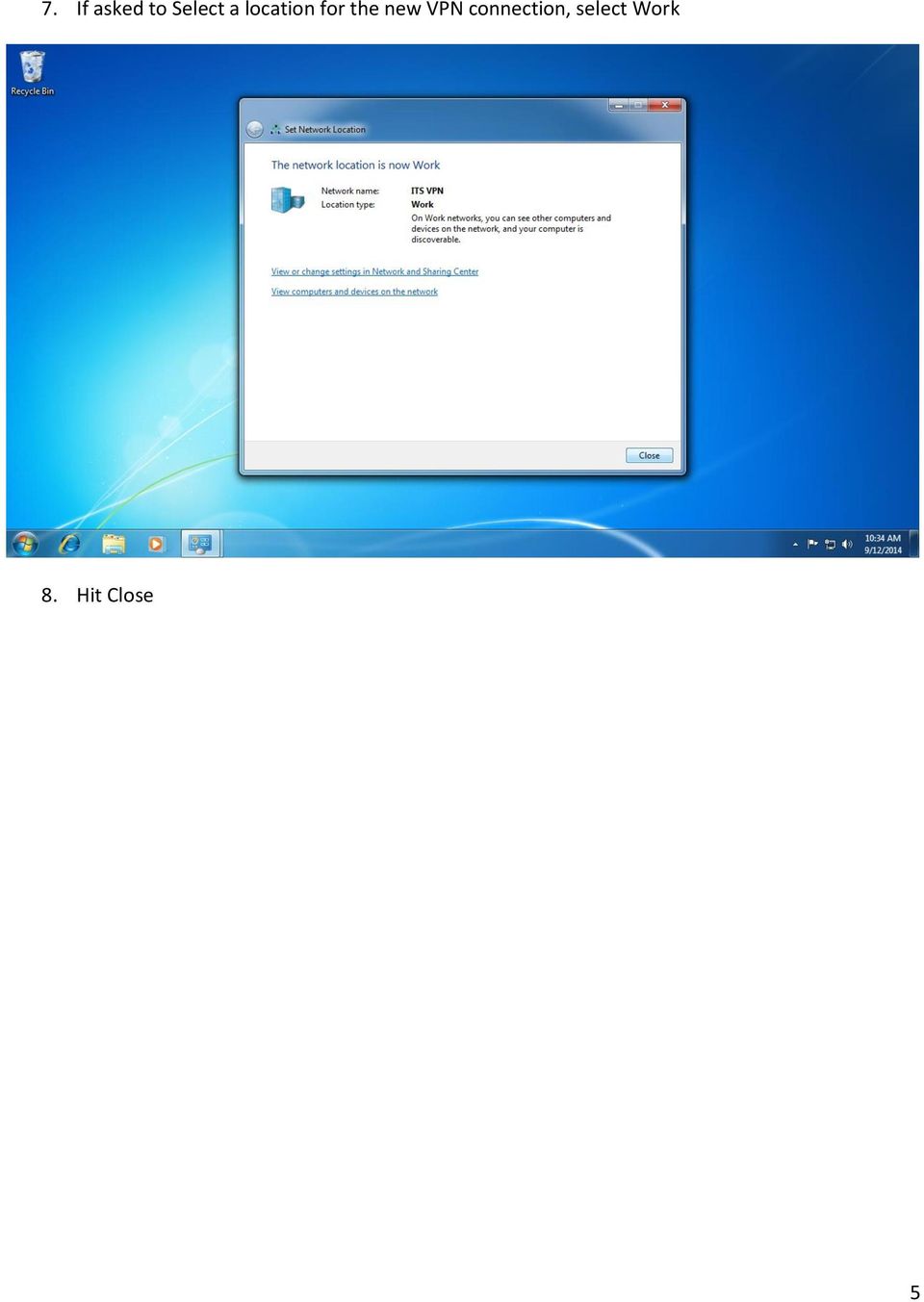
6 7. If asked to Select a location for the new VPN connection, select Work 8. Hit Close 5
7 Adding Security to VPN If you have not been successful at being able to connect to VPN, you might need to configure security settings. 1. Click Start on your Desktop 2. Type in View network connections 3. Click on View network connections 6

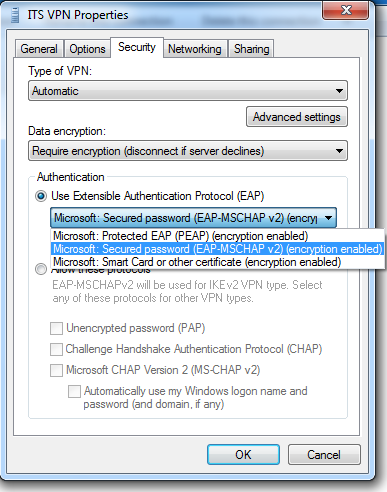

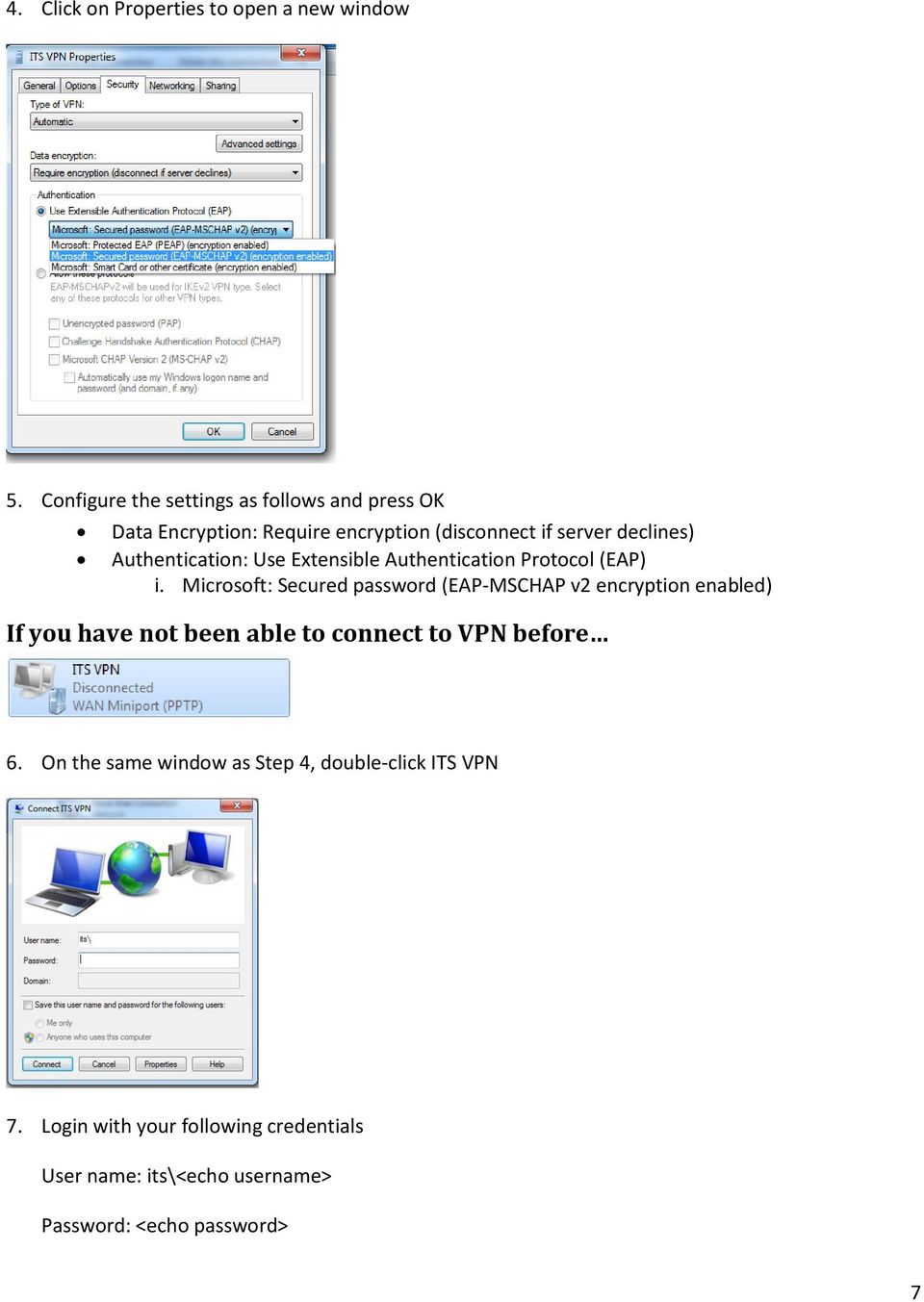
8 4. Click on Properties to open a new window 5. Configure the settings as follows and press OK Data Encryption: Require encryption (disconnect if server declines) Authentication: Use Extensible Authentication Protocol (EAP) i. Microsoft: Secured password (EAP-MSCHAP v2 encryption enabled) If you have not been able to connect to VPN before 6. On the same window as Step 4, double-click ITS VPN 7. Login with your following credentials User name: its\<echo username> Password: <echo password> 7
9 Domain (optional): <leave blank> Using Remote Desktop Connection Verify that you re connected to the VPN 2. Press the Start Menu 3. Type in remote desktop in the search bar 4. Click on Remote Desktop Connection to open a new window 8

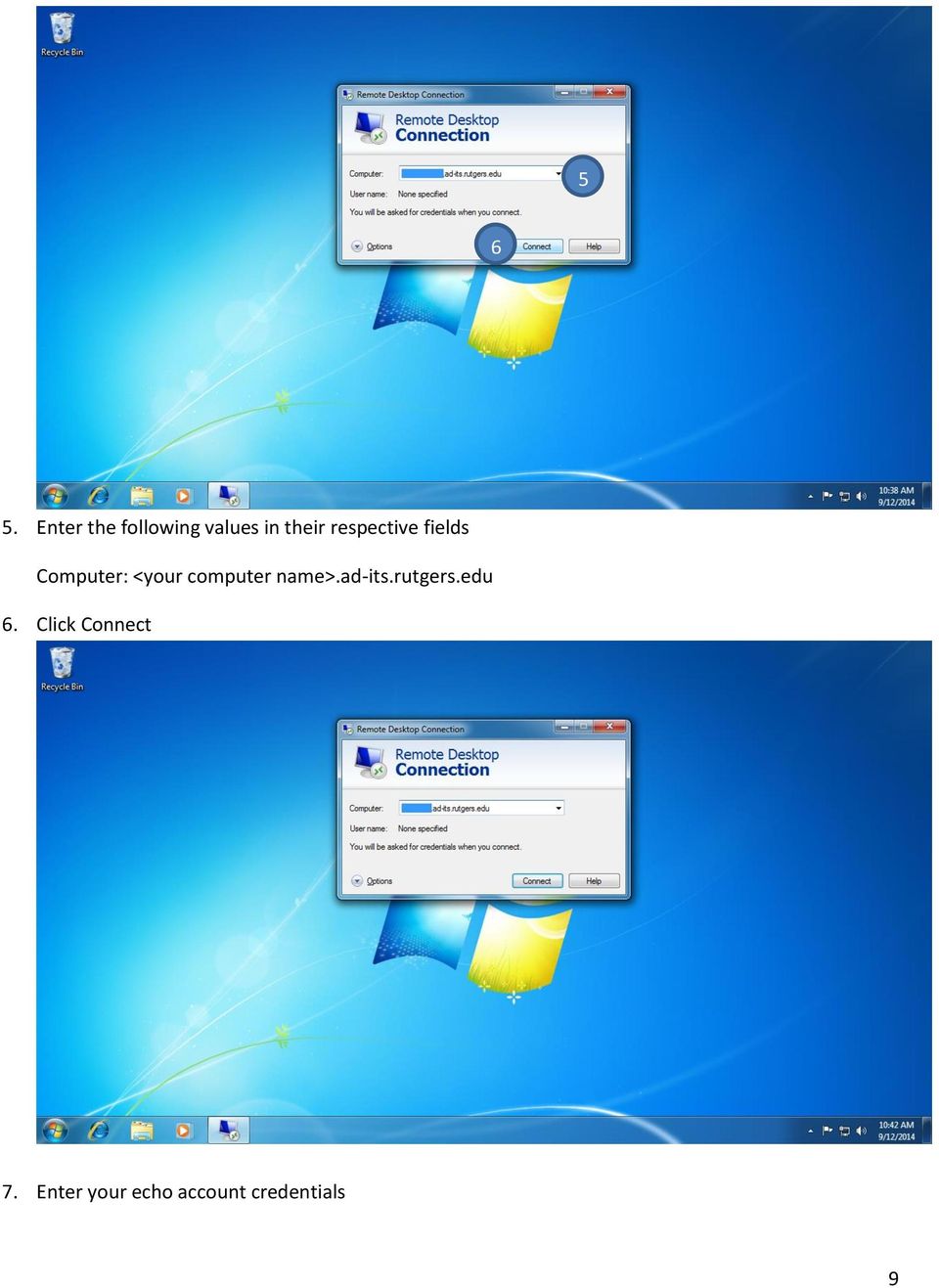
10 Enter the following values in their respective fields Computer: <your computer name>.ad-its.rutgers.edu 6. Click Connect 7. Enter your echo account credentials 9
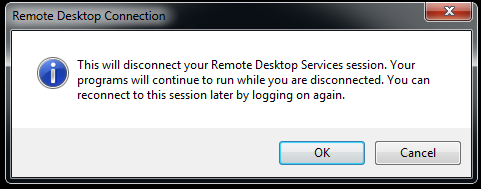
11 Username: its\<echo username> Password: <echo password> 8. Click OK You should now be connected. Closing Remote Desktop and Disconnecting from VPN It is recommended that you disconnect from VPN in order to renable internet browsing on your external Windows Vista PC. 1. Hit the Close button on the Remote toolbar at the top edge of the Remote Desktop If the toolbar is not visible, hover your mouse at the top edge of the Remote Desktop This process will close your Remote Desktop Session but will leave your account signed in in your remote computer. 2. Click OK 10

12 Click Start on your Desktop 4. Type in View network connections 5. Click on View network connections Click on ITS VPN 7. Click on Disconnect this connection 11

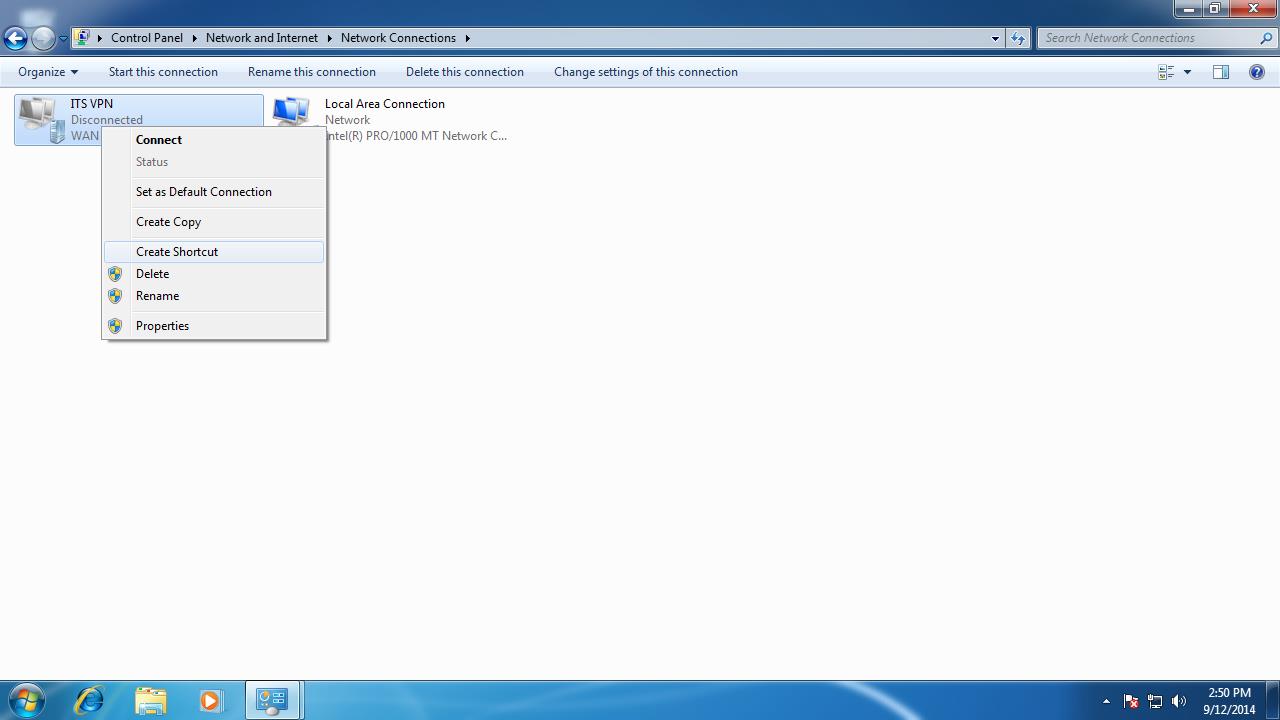
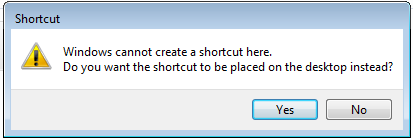
13 Renabling VPN and Creating a Shortcut for Future Uses 1. On the same window as Step 7 of Closing Remote Desktop and Disconnecting from VPN, right-click ITS VPN and click Create Shortcut 2. Click Yes 3. Navigate back to your Desktop and double-click an icon labeled ITS VPN-Shortcut 12
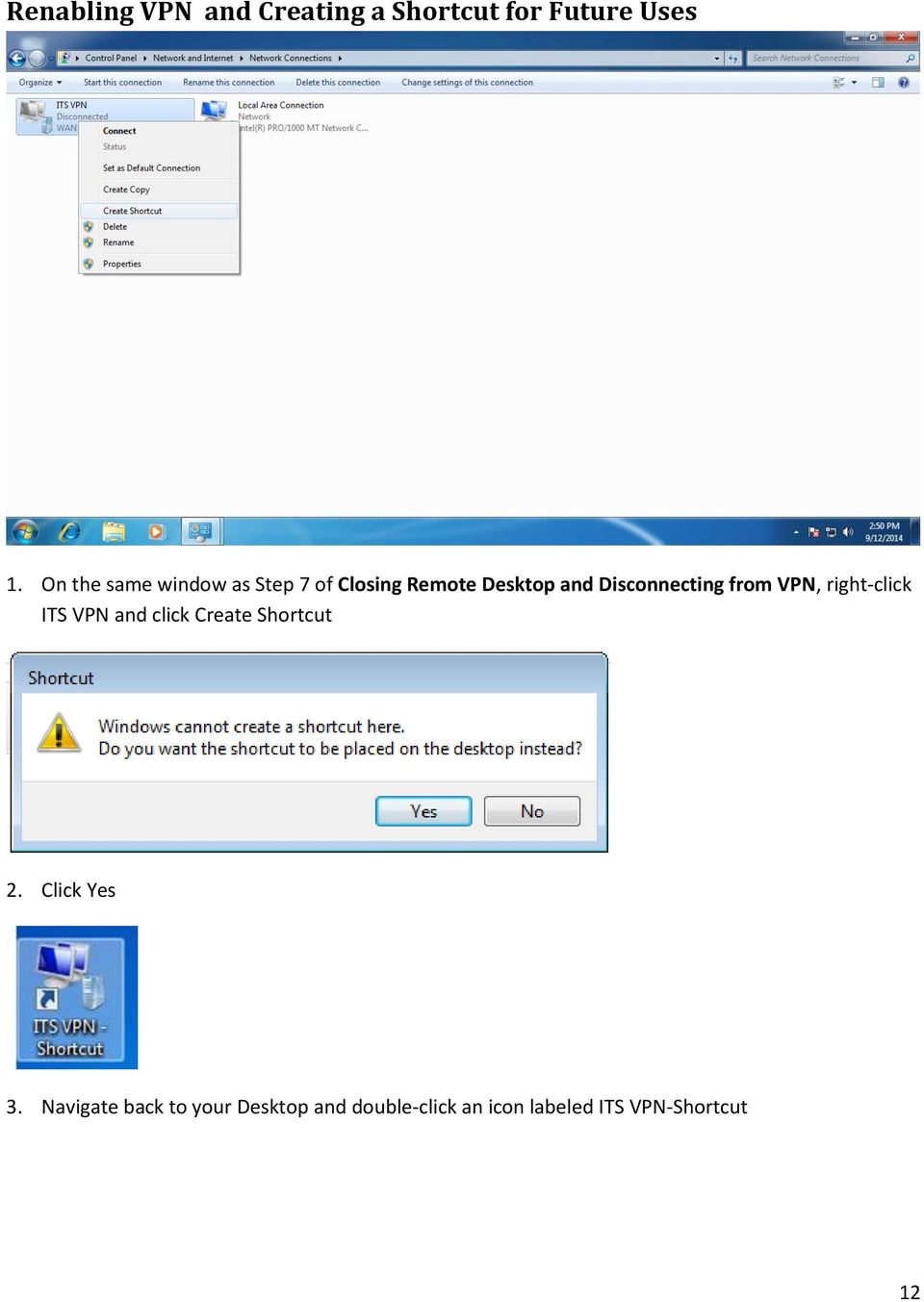
14 On the new window, simply re-enter your echo account creations Username: its\<echo username> Password: <echo password> 5. Hit Connect Reconnecting to Remote Desktop Client Simply repeat the steps on Using Remote Desktop Connection 13

CruzNet Secure Set-Up Instructions for Windows Vista
 CruzNet Secure Set-Up Instructions for Windows Vista 1. In order to start using CruzNet Secure, you'll first need to create a password at https://vpn.soe.ucsc.edu/. Click on the reset your password link.
Configuring WPA2 for Windows XP
 Configuring WPA2 for Windows XP Requirements for wireless using WPA2 on Windows XP with Service Pack 2 Your wireless card must support 802.1x, AES, and WPA2. Windows XP with service pack 2, it is recommended
How to Access Coast Wi-Fi
 How to Access Coast Wi-Fi Below is a summary of the information required to configure your device to connect to the coast-wifi network. For further assistance in configuring your specific device, continue
Configuring Windows 7 to Use Encrypted (WPA-E) Wireless Services a...
 1 di 9 31/05/2011 14.48 Search This Site All UCSD Sites Blink Home > Technology > Network Services > Connections > Wireless > Windows 7 Configuring Windows 7 to Use Encrypted (WPA-E) Wireless Services
Accessing the Media General SSL VPN
 Launching Applications and Mapping Drives Remote Desktop Outlook Launching Web Applications Full Access VPN Note: To access the Media General VPN, anti-virus software must be installed and running on your
University Computing & Telecommunications Virtual Private Networking: How To/Self- Help Guide Windows 8.1 Operating System.
 A VPN (Virtual Private Network) provides a secure, encrypted tunnel from your computer to UHCL's network when off campus. UHCL offers VPN software to allow authenticated, secure access to many UHCL resources
Purple Sturgeon Standard VPN Installation Manual for Windows XP
 A. Preparations In order to install Purple Sturgeon Standard VPN you need the following details: 1. Your username 2. Your password 3. The server's IP address 4. The server's pre-shared key This information
E-Mail: [email protected] Phone: 281-283-2828 Fax: 281-283-2969 Box: 230 http://www.uhcl.edu/uct
 A VPN (Virtual Private Network) provides a secure, encrypted tunnel from your computer to UHCL's network when off campus. UHCL offers VPN software to allow authenticated, secure access to many UHCL resources
How to connect to VUWiFi
 Wireless Registration Instructions Windows XP How to connect to VUWiFi 1. The first step in setting up your wireless card for VUWiFi is to open your Network Connections window. You can find this by going
How to Connect to YaleSecure (Yale s secure wireless network)
 How to Connect to YaleSecure (Yale s secure wireless network) Below are instructions for Mac OS X, Windows XP, Windows Vista, and Windows 7. How to Connect to Yale s Encrypted Wireless Network (only possible
Note: This documentation was written using the Samsung Galaxy S5 and Android version 5.0. Configuration may be slightly different.
 University Information Technology Services Training, Outreach, Learning Technologies & Video Production HallPass Instructions for Connecting to PC with an Android Device Note: This documentation was written
Connecting to LRDC Fileserver Remotely Using Windows Vista/7 & SRemote VPN
 Connecting to LRDC Fileserver Remotely Using Windows Vista/7 & SRemote VPN October 2013 In order to access the LRDC file server remotely/off campus, or from Wireless Pittnet, you must first authenticate
Using Remote Web Workplace Version 1.01
 Using Remote Web Workplace Version 1.01 Remote web workplace allows you to access your Windows XP desktop through Small Business Server 2003 from a web browser. 1. Connect to the Internet in your remote
Connecting to the King s College VPN with Windows 8
 Connecting to the King s College VPN with Windows 8 This guide will walk you through the steps of connecting to the King s College VPN (Virtual Private Network) from a Windows 8 device. A VPN connection
How to Connect to Remote Desktop & How to Use Cisco AnyConnect Secure Mobility Client Secure VPN Connection
 How to Connect to Remote Desktop & How to Use Cisco AnyConnect Secure Mobility Client Secure VPN Connection Revised 09/2014 These instructions presume that you already have the Cisco AnyConnect Secure
How To Connect To A Wireless Network On Windows 7 (Windows 7) On A Pc Or Mac Or Ipad (Windows) On Pc Or Ipa (Windows 8) On Your Computer Or Mac (Windows). (Windows.7) On An
 Wireless Configuration for Windows 7 Frostburg State University offers wireless service to all employees and students which can be accessed almost anywhere on campus. Network and Sharing Windows 7 includes
Setting up a VPN connection Windows XP
 Setting up a VPN connection Windows XP 1. Open Control Panel. 2. Click on Network and Internet Connections. 3. Click on Create a connection to the network at your workplace. 4. Select Virtual Private Network
SSL VPN Setup for Windows
 SSL VPN Setup for Windows SSL VPN allows you to connect from off campus to access campus resources such as Outlook email client, file sharing and remote desktop. These instructions will guide you through
APSCN VPN Instructions for VPN Setup on Windows and MAC OS
 APSCN VPN Instructions for VPN Setup on Windows and MAC OS Updated 8/18/2015 Windows 10 and Windows 8/8.1 Table of Contents APSCN VPN Settings for Windows 10... 2 1. Creating a VPN Connection... 2 2. Disconnecting
Connecting to Remote Desktop Windows Users
 Connecting to Remote Desktop Windows Users How to log into the College Network from Home 1. Start the Remote Desktop Connection For Windows XP, Vista and Windows 7 this is found at:- Star t > All Programs
Windows Vista: Connecting to the fastnsecure@hood wireless network at Hood College
 Windows Vista: Connecting to the fastnsecure@hood wireless network at Hood College Please ensure your computer meets the following criteria in order to successfully make a connection to this network: 802.11n
Connecting to UNOSECURE using Windows 7
 Connecting to UNOSECURE using Windows 7 1. Click the Wireless status icon on the task bar. 2. Select the unosecure connection and click connect. 3. Enter your UNO username and password. Click OK. UCC Help
Setting up Email in Outlook Express
 Setting up Email in Outlook Express If you have more than one email account but need to use a single computer to access them, then Outlook Express can help. To begin, open Outlook Express by double-clicking
Bloomfield Hills Schools VPN and Viewconnect Instructions
 Connect to Bloomfield Hills Schools VPN - Open Internet Explorer. - Type https://vpn.bloomfield.org into the address bar. - Click Continue to this website (not recommended). if prompted. - If this is your
Edith Cowan University Information Technology Services Centre
 Information There are three wireless networks on campus which give you access to the ECU website, the staff intranet, the internet and other ECU resources: ECU This is the easiest to use and safest wireless
First Time Off-Campus Remote Desktop Connection ipad Edition
 First Time Off-Campus Remote Desktop Connection ipad Edition General: This guide is a step-by-step guide for configuring and using an ipad to remotely connect to a work computer from off campus. This guide
Setting Up VPN Connection to use Internet Access. 2. Right click on the appropriate VPN connection and click properties
 Setting Up VPN Connection to use Internet Access 1. Right click on My Network Places and click on Properties 2. Right click on the appropriate VPN connection and click properties 3. Click on the Networking
HOW TO REMOTELY CONNECT TO THE FIU NETWORK VIA VPN
 HOW TO REMOTELY CONNECT TO THE FIU NETWORK VIA VPN FLORIDA INTERNATIONAL UNIVERSITY HERBERT WERTHEIM COLLEGE OF MEDICINE OFFICE OF INFORMATION TECHNOLOGY Modesto A. Maidique Campus, 11200 S. W. 8 th St.,
INFORMATION SYSTEMS SERVICE NETWORKS AND TELECOMMUNICATIONS SECTOR
 INFORMATION SYSTEMS SERVICE NETWORKS AND TELECOMMUNICATIONS SECTOR User Guide: Connecting to the University of Cyprus wireless network ucywifi for Windows Vista operating systems ΥΠΣ ΕΔ/56 Last review
Remote Desktop Access
 Ready Reference 110708 Remote Desktop Access Introduction Remote Desktop Access for Windows XP Professional or Windows Vista Business provides access to a Windows session that is running on your computer
E-Mail: [email protected] Phone: 281-283-2828 Fax: 281-283-2969 Box: 230 http://www.uhcl.edu/uct
 A VPN (Virtual Private Network) provides a secure, encrypted tunnel from your computer to UHCL's network when off campus. UHCL offers VPN software to allow authenticated, secure access to many UHCL resources
IT Quick Reference Guides Connecting to SU-Secure using Windows 8
 IT Quick Reference Guides Connecting to SU-Secure using Windows 8 Windows 8 Guides CONNECTING TO SU-SECURE WI-FI This document will give you instructions on how to connect your Windows 8 Computer to our
STEP 01 Nortel Contivity VPN Client Installation
 STEP 01 Nortel Contivity VPN Client Installation The screen shots below may not be exactly what you see while installing the Contivity VPN Client on your PC. Different browsers and operating systems may
Internet Access: Wireless WVU.Encrypted Network Connecting a Windows 7 Device
 Internet Access: Wireless WVU.Encrypted Network Connecting a Windows 7 Device Prerequisites An activated MyID account is required to use ResNet s wireless network. If you have not activated your MyID account,
APSCN VPN Settings for Windows 7 2. APSCN VPN Settings for Windows XP 8. APSCN VPN Settings for MAC OS 15
 APSCN VPN Settings for Windows 7 2 1. Creating a VPN Connection 2 2. Disconnecting the VPN 6 3. Connecting to an existing VPN Connection 7 APSCN VPN Settings for Windows XP 8 1. Creating a VPN Connection
Secure Global Desktop (SGD)
 Secure Global Desktop (SGD) Table of Contents Checking your Java Version...3 Preparing Your Desktop Computer...3 Accessing SGD...5 Logging into SGD...6 Using SGD to Access Your Desktop...7 Using SGD to
BEFORE YOU START... 1 Set Up Your PC Desktop Computer/Laptop... 1 Set Up Remote Desktop on Your ipad... 3
 Quick Reference Guide Using Remote Desktop With Your ipad and PC This user guide is for users connecting their ipad to a PC computer or laptop. This user guide covers how to set up your ipad to connect
Using SSH Secure Shell Client for FTP
 Using SSH Secure Shell Client for FTP The SSH Secure Shell for Workstations Windows client application features this secure file transfer protocol that s easy to use. Access the SSH Secure FTP by double-clicking
Windows Vista and Windows 7 Wireless Configuration For NCC Faculty and Staff Owned Laptops
 Windows Vista and Windows 7 Wireless Configuration For NCC Faculty and Staff Owned Laptops A wireless network for Faculty and Staff to use with their personal laptops, is available throughout campus with
Safety and Health Grant Program Database Remote Access Installation Guide
 Safety and Health Grant Program Database Remote Access Installation Guide Version 1.01 October 29, 2011 Imagine Nation Software 8223 Yukon Hills Ct. Las Vegas, NV 89178 www.insoftware.net Contact: Michael
How to connect to the diamonds wireless network with Vista.
 How to connect to the diamonds wireless network with Vista. This configuration guide requires the use of Windows to configure the wireless settings. 1. Click on the START menu and click the Control Panel.
Shellfire L2TP-IPSec Setup Windows XP
 Shellfire L2TP-IPSec Setup Windows XP This guide explains how to configure your Windows XP PC to work with a Shellfire L2TP-IPSec VPN. Index 1. Required data and files... 2 2. Creating a connection...
How to Setup PPTP VPN Between a Windows PPTP Client and the DIR-130.
 Note: DIR-130 FW: 1.21 How to Setup PPTP VPN Between a Windows PPTP Client and the DIR-130. This setup example uses the following network settings: D-Link Technical Support PPTP VPN Between Windows PPTP
Installing the Virtual Desktop Application (MAC)
 Installing the Virtual Desktop Application (MAC) The folowing instructions will guide you through the process of installing the components necessary to connect in to the NEL B Virtual Desktop environment
User Guide Microsoft Exchange Remote Test Instructions
 User Guide Microsoft Exchange Remote Test Instructions University of Louisville Information Technology 1.1 Who Should Use It This guide is intended for University of Louisville Faculty and Staff participating
Sophos UTM. Remote Access via PPTP Configuring Remote Client
 Sophos UTM Remote Access via PPTP Configuring Remote Client Product version: 9.300 Document date: Tuesday, October 14, 2014 The specifications and information in this document are subject to change without
How to connect to NAU s WPA2 Enterprise implementation in a Residence Hall:
 How to connect to NAU s WPA2 Enterprise implementation in a Residence Hall: General Settings To connect to the ResNet-Secure SSID, a device is needed that supports 802.1X authentication and WPA2 Enterprise.
How to Connect to Berkeley College Virtual Lab Using Windows
 How to Connect to Berkeley College Virtual Lab Using Windows Minimum Requirements Create and Save a Remote Desktop Services Connection Connecting to a Remote Desktop Services session Copy Files between
Remote Desktop Connection Setup at King s College in Wilkes-Barre, PA
 Remote Desktop Connection Setup at King s College in Wilkes-Barre, PA Remote Desktop connections are granted to King s Staff only. Students do not have desktop (office) machines on campus, thus no desktop
TAMUS Terminal Server Setup BPP SQL/Alva
 We have a new method of connecting to the databases that does not involve using the Texas A&M campus VPN. The new way of gaining access is via Remote Desktop software to a terminal server running here
Instructions for connecting to the LSC-O Secure Wireless Network
 Instructions for connecting to the LSC-O Secure Wireless Network Wireless computer hot spots are available at various locations around the LSC-O campus. The Academic Center first floor, AHB first and second
For Mac User Directions, see page 5
 Windows Vista, Windows 7, and Windows XP with Service Pack 3 Remote Desktop Access For Mac User Directions, see page 5 This instruction allows district staff and students to access the Commack UFSD network
Instructions for accessing the new TU wireless Network
 Instructions for accessing the new TU wireless Network These instructions are meant for University owned systems directly supported by ENS Computer Services. Users of other systems may find this document
Network Services One Washington Square, San Jose, CA 95192-0209 408-924-1530
 SJSU Premier Wi-Fi Service Network Services One Washington Square, San Jose, CA 95192-0209 408-924-1530 The SJSU Premier Wi-Fi service transmits your data across a secure, encrypted connection. This ensures
Setting up VPN and Remote Desktop for Home Use
 Setting up VPN and Remote Desktop for Home Use Contents I. Prepare Your Work Computer... 1 II. Prepare Your Home Computer... 2 III. Run the VPN Client... 3-4 IV. Remote Connect to Your Work Computer...
Barbara Ann Karmanos Cancer Institute. Instructions for Installing Cisco Systems VPN Client
 Barbara Ann Karmanos Cancer Institute Instructions for Installing Cisco Systems VPN Client DISCLAIMER: IMPORTANT INFORMATION - PLEASE READ THIS AGREEMENT CAREFULLY BEFORE OPENING THE PACKAGE AND/OR USING
Connecting to LRDC Fileserver Remotely Using Windows XP & SRemote VPN
 Connecting to LRDC Fileserver Remotely Using Windows XP & SRemote VPN October 2013 In order to access the LRDC file server remotely/off campus, or from Wireless Pittnet, you must first authenticate to
Install FileZilla Client. Connecting to an FTP server
 Install FileZilla Client Secure FTP is Middle Georgia State College s supported sftp client for accessing your Web folder on Webdav howeve you may use FileZilla or other FTP clients so long as they support
Use the below instructions to configure your wireless settings to connect to the secure wireless network using Microsoft Windows Vista/7.
 Use the below instructions to configure your wireless settings to connect to the secure wireless network using Microsoft Windows Vista/7. 1. Click the Windows Start button, then Control Panel How-To-WCC-Secure-Windows-7-11/4/2010-4:09
Setting up VPN and Remote Desktop for Home Use
 Setting up VPN and Remote Desktop for Home Use Contents I. Prepare Your Work Computer... 1 II. Prepare Your Home Computer... 2 III. Run the VPN Client... 3 IV. Remote Connect to Your Work Computer... 4
First Time On-Campus Remote Desktop Connection ipad Edition
 First Time On-Campus Remote Desktop Connection ipad Edition General: This guide is a step-by-step guide for configuring and using an ipad to remotely connect to a work computer from on campus. This guide
Setting up Remote Desktop
 Setting up Remote Desktop Terminology: Host PC the computer you want to access remotely; the destination Client PC the computer you are actually using to access another PC; the source IP Address the numerical
POLARIS INSTALLATION
 POLARIS INSTALLATION BELS runs the Polaris 4.1 Integrated Library System (ILS)- the same system as BCCLS. BELS users will connect to Polaris via a terminal server using Remote Desktop Connection (RDC).
Quick Connect. Overview. Client Instructions. LabTech
 LabTech Quick Connect QUICK CONNECT 1 Overview... 1 Client Instructions... 1 Technician Instructions... 4 VNC... 5 RDP... 6 RAssist (Remote Assistance)... 8 IE (Internet Explorer browser)... 9 CMD... 10
HWS Virtual Private Network Configuration and Setup Mac OS X 12/19/2006
 The VPN connection supports mainly access to the HWS network drives, not streaming audio/video or downloading large amounts of data. Contents Before Connecting via VPN Before setting up a Virtual Private
QUANTIFY INSTALLATION GUIDE
 QUANTIFY INSTALLATION GUIDE Thank you for putting your trust in Avontus! This guide reviews the process of installing Quantify software. For Quantify system requirement information, please refer to the
Using Remote Desktop with the Cisco AnyConnect VPN Client in Windows Vista
 Using Remote Desktop with the Cisco AnyConnect VPN Client in Windows Vista 1. In order to use Remote Desktop and the VPN client, users must first complete the Blackboard Remote Users training course and
DEP S REMOTE ACCESS USER GUIDE
 DEP S REMOTE ACCESS USER GUIDE Office of Technology and Information Services June 2015 Table of Contents DEP s Remote Desktop Access User Guide... 2 How do I obtain access?... 2 List of software available
WIRELESS SETUP GUIDES FOR WINDOWS 8
 Information Technology Services WIRELESS SETUP GUIDES FOR WINDOWS 8 Services Directory for RMIT International University Vietnam Date: 3-Nov-14 Version: 1.0 RMIT Vietnam - IT Services Page 1 of 11 Table
For paid computer support call 604-518-6695 http://www.netdigix.com [email protected]
 Setting up your vpn connection on windows 2000 or XP in continuation from installing x.509 certificate on windows (please do not continue if you have not installed your x.509 certificate): Instructions
Instructions for connecting to the FDIBA Wireless Network. (Windows XP)
 Instructions for connecting to the FDIBA Wireless Network (Windows XP) In order to connect, you need your username and password, as well as the FDIBA Root Certificate which you need to install on your
User guide. Business Email
 User guide Business Email June 2013 Contents Introduction 3 Logging on to the UC Management Centre User Interface 3 Exchange User Summary 4 Downloading Outlook 5 Outlook Configuration 6 Configuring Outlook
Viking VPN Guide Mac OSX RDP Usage
 Viking VPN Guide Mac OSX RDP Usage Table Of Contents 1 : What is RDP 2 : Enabling RDP on your Office PC 3 : Installing the RDP client on your Home Mac 4 : Connecting to your Office PC from your Home Mac
FileZilla: Uploading/Downloading Files to SBI FTP
 FileZilla Download and Installation Instructions FileZilla is a free software that uses SourceForge as an installation provider. SourceForge is bundling the FileZilla software with other products that
Wireless Setup for Windows 8
 Wireless Setup for Windows 8 Wireless Names KUEMPLOYEE Only Kettering Staff and Faculty can connect to this wireless o Network Access, Internet Access, Printer Access, License Manager KUSTUDENT Active
Campus VPN. Version 1.0 September 22, 2008
 Campus VPN Version 1.0 September 22, 2008 University of North Texas 1 9/22/2008 Introduction This is a guide on the different ways to connect to the University of North Texas Campus VPN. There are several
LRDC Computing Services
 LRDC Computing Services Remote Access to the LRDC Fileservers Windows XP* April 5, 2005 *While these instructions have been created for and tested on a Windows XP computer, they may also work for your
How to Use Remote Access Using Internet Explorer
 Introduction Welcome to the Mount s Remote Access service. The following documentation is intended to assist first time or active users with connecting, authenticating and properly logging out of Remote
Creating client-server setup with multiple clients
 Creating client-server setup with multiple clients Coffalyser.Net uses a SQL client server database model to store all project/experiment- related data. The client-server model has one main application
Setting up Sharp MX-Color Imagers for Inbound Fax Routing to Email or Network Folder
 Setting up Sharp MX-Color Imagers for Inbound Fax Routing to Email or Network Folder MX-2300, MX-2600, MX-2700, MX-3100, MX-3501, MX-4501, MX-5500, MX-6200, MX-6201, MX-7000, MX-7001, *MX-M850, *MX-M950,
Wireless Network Configuration Guide
 CIT Table of Contents Introduction... 1 General Wireless Settings... 1 1. Windows XP Wireless Configuration... 2 2. Windows XP Intel Pro Wireless Tool... 7 3. Windows Vista Using the Windows Wireless Tools...
XenApp & XenDesktop Documentation. Help Desk (202) 994-8096 www.columbian.gwu.edu/ots
 XenApp & XenDesktop Documentation Help Desk (202) 994-8096 www.columbian.gwu.edu/ots 1 Version Date Comments Author v1.0 June 2011 Initial Version R. Shore v2.0 December 2011 Full Revision R. Shore v2.1
Global VPN Client Getting Started Guide
 Global VPN Client Getting Started Guide 1 Notes, Cautions, and Warnings NOTE: A NOTE indicates important information that helps you make better use of your system. CAUTION: A CAUTION indicates potential
Mac OS X Secure Wireless Setup Guide
 Mac OS X Secure Wireless Setup Guide Requirements: Apple computer with built-in AirPort card capable of WPA2-Enterprise encryption Mac OS X Snow Leopard version 10.6.0 or greater or Mac OS X Lion version
TAMUS Remote Desktop Setup For BPP SQL & Alva
 The BPP SQL database and the ALVA application are both hosted on a remote desktop. A Texas A&M NetId account is needed to log in to this computer. NetId accounts can be requested on this webpage, https://gateway.tamu.edu/netid-activate/
MAPPING THE WEBDRIVE REFERENCE GUIDE
 MAPPING THE WEBDRIVE REFERENCE GUIDE INTRODUCTION The university WebDrive is a dedicated drive to host all university web content. For help with mapping the WebDrive, please read the instructions below
How to Access UF Health Jacksonville VPN services
 How to Access UF Health Jacksonville VPN services To access VPN services go to the hospital website at http://ufhealthjax.org/. Click on the For Employees link at the bottom of the screen. Under Remote
Important Notes for WinConnect Server VS Software Installation:
 Important Notes for WinConnect Server VS Software Installation: 1. Only Windows Vista Business, Windows Vista Ultimate, Windows 7 Professional, Windows 7 Ultimate, Windows Server 2008 (32-bit & 64-bit),
Hallpass Instructions for Connecting to Mac with a Mac
 Hallpass Instructions for Connecting to Mac with a Mac The following instructions explain how to enable screen sharing with your Macintosh computer using another Macintosh computer. Note: You must leave
Configuring VPN Using Windows XP
 Configuring VPN Using Windows XP How to Create a VPN Connection What is VPN? Connecting to VPN Create a VPN Connection Connect to Your Work Computer Copying Files What is VPN? Virtual Private Networks
Home access to Work computer
 Home access to Work computer Problem: Although Remote Access features are provided and are effective, it is not quite as good as actually working on your work computer. Your work computer is set up and
Changing Your Cameleon Server IP
 1.1 Overview Technical Note Cameleon requires that you have a static IP address defined for the server PC the Cameleon server application runs on. Even if the server PC has a static IP address, you may
UCO_SECURE Wireless Connection Guide: Windows 8
 1 The UCO_SECURE wireless network uses 802.1x encryption to ensure that your data is secure when it is transmitted wirelessly. This security is not enabled by default on Windows computers. In order to
Check current version of Remote Desktop Connection for Mac.. Page 2. Remove Old Version Remote Desktop Connection..Page 8
 CONTENTS SECTION 1 Check current version of Remote Desktop Connection for Mac.. Page 2 SECTION 2 Remove Old Version Remote Desktop Connection..Page 8 SECTION 3 Download and Install Remote Desktop Connection
Remote Access End User Reference Guide for F5 Edge VPN Client Access
 Remote Access End User Reference Guide for F5 Edge VPN Client Access Version 2.1 3/2/2015 This remote access end user reference guide provides an overview of how to download and install the F5 Edge VPN
VPN Remote Access Installation and Configuration Guide Operating System: Windows (XP, Vista, 7 and 8)
 INFORMATION SYSTEMS SERVICE NETWORKS AND COMMUNICATIONS SECTOR VPN Remote Access Installation and Configuration Guide Operating System: Windows (XP, Vista, 7 and 8) ΥΠΣ ΕΔ/50 November 2012 A. INSTALLATION
E-Mail: [email protected] Phone: 281-283-2828 Fax: 281-283-2969 Box: 230 http://www.uhcl.edu/uct
 A VPN (Virtual Private Network) provides a secure, encrypted tunnel from your computer to UHCL's network when off campus. UHCL offers VPN software to allow authenticated, secure access to many UHCL resources
How to Install a Network-Licensed Version of IBM SPSS Statistics 19
 How to Install a Network-Licensed Version of IBM SPSS Statistics 19 Important: IBM SPSS Statistics 19 requires either Windows XP Professional or later. IBM SPSS Statistics 19 installs from a DVD and your