
Operating Instructions. VLT HVAC Drive FC 102, kw
|
|
|
- Lynn Ryan
- 10 years ago
- Views:
Transcription
1 MAKING MODERN LIVING POSSIBLE Operating Instructions VLT HVAC Drive FC 102, kw

2

3 Safety Safety WARNING HIGH VOLTAGE! Frequency converters contain high voltage when connected to AC mains input power. Installation, start up, and maintenance should be performed by qualified personnel only. Failure to perform installation, start up, and maintenance by qualified personnel could result in death or serious injury. High Voltage Frequency converters are connected to hazardous mains voltages. Extreme care should be taken to protect against shock. Only trained personnel familiar with electronic equipment should install, start, or maintain this equipment. WARNING UNINTENDED START! When the frequency converter is connected to AC mains, the motor may start at any time. The frequency converter, motor, and any driven equipment must be in operational readiness. Failure to be in operational readiness when the frequency converter is connected to AC mains could result in death, serious injury, equipment, or property damage. Unintended Start When the frequency converter is connected to the AC mains, the motor may be started by means of an external switch, a serial bus command, an input reference signal, or a cleared fault condition. Use appropriate cautions to guard against an unintended start. WARNING DISCHARGE TIME! Frequency converters contain DC-link capacitors that can remain charged even when the frequency converter is not powered. To avoid electrical hazards, disconnect AC mains, any permanent magnet type motors, and any remote DClink power supplies, including battery backups, UPS and DC-link connections to other frequency converters. Wait for the capacitors to fully discharge before performing any service or repair work. The amount of wait time is listed in the Discharge Time table. Failure to wait the specified time after power has been removed before doing service or repair could result in death or serious injury. Voltage [V] Minimum waiting time (minutes) kw kw kw kw kw kw kw kw High voltage may be present even when the warning LED indicator lights are off. Discharge Time Symbols The following symbols are used in this manual. WARNING Indicates a potentially hazardous situation which, if not avoided, could result in death or serious injury. CAUTION Indicates a potentially hazardous situation which, if not avoided, may result in minor or moderate injury. It may also be used to alert against unsafe practices. CAUTION Indicates a situation that may result in equipment or property-damage-only accidents. NOTE Indicates highlighted information that should be regarded with attention to avoid mistakes or operate equipment at less than optimal performance. Approvals NOTE Imposed limitations on the output frequency (due to export control regulations): From software version 3.92 the output frequency of the frequency converter is limited to 590 Hz. MG11AI02 - VLT is a registered Danfoss trademark

4 Safety MG11AI02 - VLT is a registered Danfoss trademark

5 Contents Contents 1 Introduction Purpose of the Manual Additional Resources Product Overview Internal Frequency Converter Controller Functions Frame Sizes and Power Ratings 7 2 Installation Installation Site Check List Frequency Converter and Motor Pre-installation Check List Mechanical Installation Cooling Lifting Mounting Tightening Torques Electrical Installation Requirements Earth (Grounding) Requirements Leakage Current (>3.5 ma) Grounding Using Shielded Cable Motor Connection Motor Connection for A2 and A Motor Connection for A4/A Motor Connection for B1 and B Motor Connection for C1 and C AC Mains Connection Control Wiring Access Control Terminal Types Wiring to Control Terminals Using Screened Control Cables Control Terminal Functions Jumper Terminals 12 and Terminal 53 and 54 Switches Serial Communication Safe Stop Terminal 37 Safe Stop Function Safe Stop Commissioning Test 24 3 Start Up and Functional Testing 25 MG11AI02 - VLT is a registered Danfoss trademark 1

6 Contents 3.1 Pre-start Safety Inspection Applying Power Basic Operational Programming Asynchronous Motor Setup PM Motor Setup Automatic Motor Adaptation Check Motor Rotation Local-control Test System Start Up Acoustic Noise or Vibration 31 4 User Interface Local Control Panel LCP Layout Setting LCP Display Values Display Menu Keys Navigation Keys Operation Keys Back Up and Copying Parameter Settings Uploading Data to the LCP Downloading Data from the LCP Restoring Default Settings Recommended Initialisation Manual Initialisation 35 5 About Frequency Converter Programming Introduction Programming Example Control Terminal Programming Examples International/North American Default Parameter Settings Parameter Menu Structure Quick Menu Structure Main Menu Structure Remote Programming with MCT 10 Set-up Software 46 6 Application Set-Up Examples Introduction Application Examples 47 7 Status Messages Status Display 51 2 MG11AI02 - VLT is a registered Danfoss trademark

7 Contents 7.2 Status Message Definitions 51 8 Warnings and Alarms System Monitoring Warning and Alarm Types Warning and Alarm Displays Warning and Alarm Definitions 55 9 Basic Troubleshooting Start Up and Operation Specifications Power-dependent Specifications Mains Supply 3 x V AC General Technical Data Fuse Tables Branch Circuit Protection Fuses UL and cul Branch Circuit Protection Fuses Substitute Fuses for 240 V Connection Tightening Torques 86 Index 87 MG11AI02 - VLT is a registered Danfoss trademark 3

8 Introduction 1 Introduction BB Illustration 1.1 Exploded View A Size 1 LCP 10 Motor output terminals 96 (U), 97 (V), 98 (W) 2 RS-485 serial bus connector (+68, -69) 11 Relay 2 (01, 02, 03) 3 Analog I/O connector 12 Relay 1 (04, 05, 06) 4 LCP input plug 13 Brake (-81, +82) and load sharing (-88, +89) terminals 5 Analog switches (A53), (A54) 14 Mains input terminals 91 (L1), 92 (L2), 93 (L3) 6 Cable strain relief/pe ground 15 USB connector 7 Decoupling plate 16 Serial bus terminal switch 8 Grounding clamp (PE) 17 Digital I/O and 24 V power supply 9 Shielded cable grounding clamp and strain relief 18 Control cable cover plate Table 1.1 Legend to Illustration MG11AI02 - VLT is a registered Danfoss trademark

9 61 68 Remove jumper to activate Safe Stop Max. 24 Volt! QDF-30 Introduction DC- DC BB FAN MOUNTING Illustration 1.2 Exploded View B and C Sizes LCP 11 Relay 2 (04, 05, 06) 2 Cover 12 Lifting ring 3 RS-485 serial bus connector 13 Mounting slot 4 Digital I/O and 24 V power supply 14 Grounding clamp (PE) 5 Analog I/O connector 15 Cable strain relief / PE ground 6 Cable strain relief/pe ground 16 Brake terminal (-81, +82) 7 USB connector 17 Load sharing terminal (DC bus) (-88, +89) 8 Serial bus terminal switch 18 Motor output terminals 96 (U), 97 (V), 98 (W) 9 Analog switches (A53), (A54) 19 Mains input terminals 91 (L1), 92 (L2), 93 (L3) 10 Relay 1 (01, 02, 03) Table 1.2 Legend to Illustration 1.2 MG11AI02 - VLT is a registered Danfoss trademark 5

10 Introduction Purpose of the Manual This manual is intended to provide detailed information for the installation and start up of the frequency converter. 2 Installation provides requirements for mechanical and electrical installation, including input, motor, control and serial communications wiring and control terminal functions. 3 Start Up and Functional Testing provides detailed procedures for start up, basic operational programming, and functional testing. The remaining chapters provide supplementary details. These details include user interface, detailed programming, application examples, start-up troubleshooting, and specifications. conditions, starts and stops the motor, optimizes energy efficiency, and offers many more control, monitoring, and efficiency functions. Operation and monitoring functions are available as status indications to an outside control system or serial communication network. 1.4 Internal Frequency Converter Controller Functions Illustration 1.3 is a block diagram of the frequency converter's internal components. See Table 1.3 for their functions. 1.2 Additional Resources Other resources are available to understand advanced frequency converter functions and programming. The VLT Programming Guide provides greater detail on working with parameters and many application examples. The VLT Design Guide is intended to provide detailed capabilities and functionality to design motor control systems. Supplemental publications and manuals are available from Danfoss. See Danfoss website BusinessAreas/DrivesSolutions/Documentations/VLT+Technical +Documentation.htm for listings. Optional equipment is available that may change some of the procedures described. Reference the instructions supplied with those options for specific requirements. Contact the local Danfoss supplier or visit the Danfoss website: BusinessAreas/DrivesSolutions/Documentations/VLT +Technical+Documen-tation.htm, for downloads or additional information. 1.3 Product Overview A frequency converter is an electronic motor controller that converts AC mains input into a variable AC waveform output. The frequency and voltage of the output are regulated to control the motor speed or torque. The frequency converter can vary the speed of the motor in response to system feedback, such as changing temperature or pressure for controlling fan, compressor, or pump motors. The frequency converter can also regulate the motor by responding to remote commands from external controllers. In addition, the frequency converter monitors the system and motor status, issues warnings or alarms for fault Illustration 1.3 Frequency Converter Block Diagram Area Title Functions 1 Mains input Three-phase AC mains power supply to the frequency converter 2 Rectifier The rectifier bridge converts the AC input to DC current to supply inverter power 3 DC bus Intermediate DC-bus circuit handles the DC current 4 DC reactors Filter the intermediate DC circuit voltage Prove line transient protection Reduce RMS current Raise the power factor reflected back to the line Reduce harmonics on the AC input 5 Capacitor bank Stores the DC power Provides ride-through protection for short power losses 6 Inverter Converts the DC into a controlled PWM AC waveform for a controlled variable output to the motor 7 Output to motor Regulated three-phase output power to the motor 6 MG11AI02 - VLT is a registered Danfoss trademark

11 Introduction Area Title Functions 8 Control circuitry Input power, internal processing, output, and motor current are monitored to provide efficient operation and control 1 1 User interface and external commands are monitored and performed Status output and control can be provided Table 1.3 Legend to Illustration Frame Sizes and Power Ratings References to frames sizes used in this manual are defined in Table 1.4. Frame Size [kw] [V] A2 A3 A4 A5 B1 B2 B3 B4 C1 C2 C3 C n/a n/a n/a n/a n/a n/a n/a n/a n/a Table 1.4 Frames Sizes and Power Ratings MG11AI02 - VLT is a registered Danfoss trademark 7
![5 Frame Sizes and Power Ratings References to frames sizes used in this manual are defined in Table 1.4. Frame Size [kw] [V] A2 A3 A4 A5 B1 B2 B3 B4 C1 C2 C3 C4 200-240 1.1-2.2 3.0-3.7 1.1-2.2 1.1-3.](/docs-images/41/11149560/images/page_11.jpg "7 5.5-11 15 5.5-11 15-18.5 18.5-30 37-45 22-30 37-45 380-480 1.1-4.0 5.5-7.5 1.1-4.0 1.1-7.5 11-18.5 22-30 11-18.5 22-37 37-55 75-90 45-55 75-90 525-600 n/a 1.1-7.5 n/a 1.1-7.5 11-18.5 22-30 11-18.5 22-37 37-55 75-90 45-55 75-90 525-690 n/a 1.")
12 Installation 2 Installation Installation Site Check List The frequency converter relies on the ambient air for cooling. Observe the limitations on ambient air temperature for optimal operation Ensure that the installation location has sufficient support strength to mount the frequency converter Keep the manual, drawings, and diagrams accessible for detailed installation and operation instructions. It is important that the manual is available for equipment operators. Locate equipment as near to the motor as possible. Keep motor cables as short as possible. Check the motor characteristics for actual tolerances. Do not exceed 300 m (1000 ft) for unshielded motor leads 150 m (500 ft) for shielded cable. Ensure that the ingress protection rating of the frequency converter is suitable for the installation environment. IP55 (NEMA 12) or IP66 (NEMA 4) enclosures may be necessary. CAUTION Ingress protection IP54, IP55 and IP66 ratings can only be guaranteed if the unit is properly closed. Ensure that all cable glands and unused holes for glands are properly sealed. Ensure that the unit cover is properly closed CAUTION Device damage through contamination Do not leave the frequency converter uncovered. 2.2 Frequency Converter and Motor Preinstallation Check List Compare the model number of unit on the nameplate to what was ordered to verify the proper equipment Ensure each of the following are rated for same voltage: Mains (power) Frequency converter Motor Ensure that the frequency converter output current rating is equal to or greater than motor full load current for peak motor performance 2.3 Mechanical Installation Cooling Motor size and frequency converter power must match for proper overload protection If frequency converter rating is less than motor, full motor output cannot be achieved To provide cooling airflow, mount the unit to a solid flat surface or to the optional back plate (see Mounting) Top and bottom clearance for air cooling must be provided. Generally, mm (4-10 in) is required. See Illustration 2.1 for clearance requirements Improper mounting can result in over heating and reduced performance Derating for temperatures starting between 40 C (104 F) and 50 C (122 F) and elevation 1000 m (3300 ft) above sea level must be considered. See the equipment Design Guide for detailed information. 8 MG11AI02 - VLT is a registered Danfoss trademark

13 2 2 Installation a 130BA BA Illustration 2.2 Proper Mounting with Back Plate A b Illustration 2.1 Top and Bottom Cooling Clearance Enclosure A2-A5 B1-B4 C1, C3 C2, C4 a/b [mm] Table 2.1 Minimum Airflow Clearance Requirements Item A is a back plate properly installed for required airflow to cool the unit. A130BA Lifting Check the weight of the unit to determine a safe lifting method Ensure that the lifting device is suitable for the task If necessary, plan for a hoist, crane, or forklift with the appropriate rating to move the unit For lifting, use hoist rings on the unit, when provided Mounting Mount the unit vertically The frequency converter allows side by side installation Ensure that the strength of the mounting location will support the unit weight Mount the unit to a solid flat surface or to the optional back plate to provide cooling airflow (see Illustration 2.2 and Illustration 2.3) Improper mounting can result in over heating and reduced performance Use the slotted mounting holes on the unit for wall mounting, when provided Illustration 2.3 Proper Mounting with Railings NOTE Back plate is needed when mounted on railings Tightening Torques See 10.4 Connection Tightening Torques for proper tightening specifications. MG11AI02 - VLT is a registered Danfoss trademark 9

14 Installation Electrical Installation This section contains detailed instructions for wiring the frequency converter. The following tasks are described. Wiring the motor to the frequency converter output terminals Wiring the AC mains to the frequency converter input terminals Connecting control and serial communication wiring After power has been applied, checking input and motor power; programming control terminals for their intended functions Illustration 2.4 shows a basic electrical connection. 3 Phase power input DC bus +10Vdc 0-10Vdc 0/4-20 ma 0-10Vdc 0/4-20 ma 91 (L1) 92 (L2) 93 (L3) 95 PE 88 (-) 89 (+) 50 (+10 V OUT) 53 (A IN) 54 (A IN) 55 (COM A IN) 12 (+24V OUT) 13 (+24V OUT) 18 () S S ON ON ON=0-20mA OFF=0-10V Switch Mode Power Supply 24Vdc 15mA 200mA P V (NPN) 0V (PNP) (U) 96 (V) 97 (W) 98 (PE) 99 (R+) 82 (R-) 81 relay relay Brake resistor 240Vac, 2A 240Vac, 2A 400Vac, 2A Motor 130BA () 20 (COM ) 27 (/OUT) 24V 24V (NPN) 0V (PNP) 24V (NPN) 0V (PNP) S ON (COM A OUT) 39 (A OUT) 42 ON=Terminated OFF=Open Analog Output 0/4-20 ma 29 (/OUT) 0V 24V 24V (NPN) 0V (PNP) 5V S801 0V 32 () 0V 24V (NPN) 0V (PNP) RS-485 Interface (P RS-485) 68 (N RS-485) 69 RS () 24V (NPN) 0V (PNP) (COM RS-485) 61 * 37 () (PNP) = Source (NPN) = Sink Illustration 2.4 Basic Wiring Schematic Drawing. * Terminal 37 is an option 10 MG11AI02 - VLT is a registered Danfoss trademark

15 Installation 2 130BB L1 L2 L3 PE U V W PE 8 7 Illustration 2.5 Typical Electrical Connection 1 PLC 6 Min. 200 mm (7.9 in) between control cables, motor and mains 2 Frequency converter 7 Motor, 3-phase and PE 3 Output contactor (Generally not recommended) 8 Mains, 3-phase and reinforced PE 4 Earth (grounding) rail (PE) 9 Control wiring 5 Cable insulation (stripped) 10 Equalising min. 16 mm 2 (0.025 in) Table 2.2 Legend to Illustration 2.5 MG11AI02 - VLT is a registered Danfoss trademark 11

16 Installation Requirements WARNING EQUIPMENT HAZARD! Rotating shafts and electrical equipment can be hazardous. All electrical work must conform to national and local electrical codes. It is strongly recommended that installation, start up, and maintenance be performed only by trained and qualified personnel. Failure to follow these guidelines could result in death or serious injury. L1 L2 L3 Fuses L1 L2 L BB CAUTION WIRING ISOLATION! Run input power, motor wiring and control wiring in three separate metallic conduits or use separated shielded cable for high frequency noise isolation. Failure to isolate power, motor and control wiring could result in less than optimum frequency converter and associated equipment performance. For your safety, comply with the following requirements. Electronic controls equipment is connected to hazardous mains voltage. Extreme care should be taken to protect against electrical hazards when applying power to the unit. Run motor cables from multiple frequency converters separately. Induced voltage from output motor cables run together can charge equipment capacitors even with the equipment turned off and locked out. Overload and Equipment Protection An electronically activated function within the frequency converter provides overload protection for the motor. The overload calculates the level of increase to activate timing for the trip (controller output stop) function. The higher the current draw, the quicker the trip response. The overload provides Class 20 motor protection. See 8 Warnings and Alarms for details on the trip function. All frequency converters must be provided with short-circuit and over-current protection. Input fusing is required to provide this protection, see Illustration 2.6. If not factory supplied, fuses must be provided by the installer as part of installationinstallation. See maximum fuse ratings in 10.3 Fuse Tables. GND Illustration 2.6 Frequency Converter Fuses Wire Type and Ratings All wiring must comply with local and national regulations regarding cross-section and ambient temperature requirements. Danfoss recommends that all power connections be made with a minimum 75 C rated copper wire. See 10.1 Power-dependent Specifications for recommended wire sizes Earth (Grounding) Requirements WARNING GROUNDING HAZARD! For operator safety, it is important to ground the frequency converter properly in accordance with national and local electrical codes as well as instructions contained within this document. Ground currents are higher than 3.5 ma. Failure to ground the frequency converter properly could result in death or serious injury. NOTE It is the responsibility of the user or certified electrical installer to ensure correct grounding (earthing) of the equipment in accordance with national and local electrical codes and standards. Follow all local and national electrical codes to ground electrical equipment properly Proper protective grounding for equipment with ground currents higher than 3.5 ma must be established, see Leakage Current (>3.5 ma) A dedicated ground wire is required for input power, motor power and control wiring Use the clamps provided with the equipment for proper ground connections 12 MG11AI02 - VLT is a registered Danfoss trademark

17 Installation Do not ground one frequency converter to another in a daisy chain fashion Keep the ground wire connections as short as possible Using high-strand wire to reduce electrical noise is recommended Follow motor manufacturer wiring requirements Leakage Current (>3.5 ma) Follow national and local codes regarding protective earthing of equipment with a leakage current > 3.5 ma. Frequency converter technology implies high frequency switching at high power. This will generate a leakage current in the earth connection. A fault current in the frequency converter at the output power terminals might contain a DC component which can charge the filter capacitors and cause a transient earth current. The earth leakage current depends on various system configurations including RFI filtering, screened motor cables, and frequency converter power. EN/IEC (Power Drive System Product Standard) requires special care if the leakage current exceeds 3.5 ma. Earth grounding must be reinforced in one of the following ways: Earth ground wire of at least 10 mm 2 Two separate earth ground wires both complying with the dimensioning rules See EN for further information. Using RCDs Where residual current devices (RCDs), also known as earth leakage circuit breakers (ELCBs), are used, comply with the following: Use RCDs of type B only which are capable of detecting AC and DC currents Use RCDs with an inrush delay to prevent faults due to transient earth currents Dimension RCDs according to the system configuration and environmental considerations Grounding Using Shielded Cable Earthing (grounding) clamps are provided for motor wiring (see Illustration 2.7). L1 L2 92 Illustration 2.7 Grounding with Shielded Cable Motor Connection 99 +DC BR- B M A I N S MOTOR V W RELAY 1 Y 2 - LC - WARNING INDUCED VOLTAGE! Run output motor cables from multiple frequency converters separately. Induced voltage from output motor cables run together can charge equipment capacitors even with the equipment turned off and locked out. Failure to run output motor cables separately could result in death or serious injury. For maximum wire sizes see 10.1 Power-dependent Specifications Comply with local and national electrical codes for cable sizes Motor wiring knockouts or access panels are provided at the base of IP21 and higher (NEMA1/12) units Do not install power factor correction capacitors between the frequency converter and the motor Do not wire a starting or pole-changing device between the frequency converter and the motor Connect the 3-phase motor wiring to terminals 96 (U), 97 (V), and 98 (W) Ground the cable in accordance with grounding instructions provided Torque terminals in accordance with the information provided in 10.4 Connection Tightening Torques 130BA MG11AI02 - VLT is a registered Danfoss trademark 13

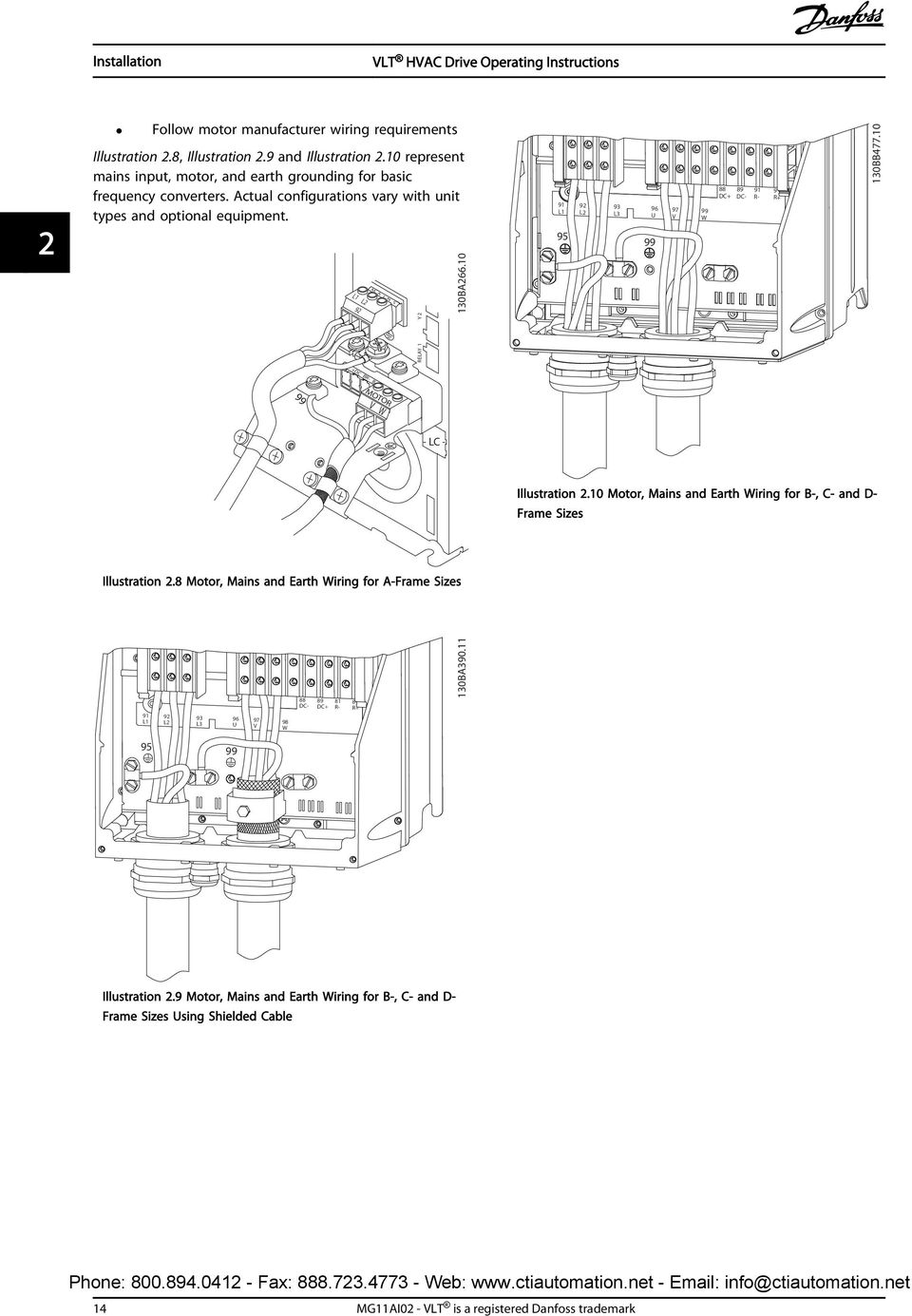
18 Installation 2 Follow motor manufacturer wiring requirements Illustration 2.8, Illustration 2.9 and Illustration 2.10 represent mains input, motor, and earth grounding for basic frequency converters. Actual configurations vary with unit types and optional equipment. L1 L2 92 M A I N S 130BA L L2 93 L3 96 U V 99 W DC+ DC- 91 R- 9 R+ 130BB RELAY 1 Y 2 +DC BR- B 99 MOTOR V W - LC - Illustration 2.10 Motor, Mains and Earth Wiring for B-, C- and D- Frame Sizes Illustration 2.8 Motor, Mains and Earth Wiring for A-Frame Sizes 88 DC- 89 DC+ 81 R- 8 R+ 130BA L1 92 L2 93 L3 96 U 97 V 98 W Illustration 2.9 Motor, Mains and Earth Wiring for B-, C- and D- Frame Sizes Using Shielded Cable 14 MG11AI02 - VLT is a registered Danfoss trademark
19 Installation Motor Connection for A2 and A3 Follow these drawings step by step for connecting the motor to the frequency converter. 1. First terminate the motor earth, then place motor U, V and W wires in plug and tighten. L1 L2 92 +DC BR- B M A I N S RELAY 1 Y 2 130BA M A I N S L1 L2 L DC BR- B - LC + 130BA MOTOR V W - LC - Illustration 2.12 Cable Clamp Mounting Motor Connection for A4/A5 RELAY 1 RELAY 2 First terminate the motor earth, then place motor U, V and W wires in terminal and tighten. Ensure that the outer insulation of the motor cable is removed under the EMC clamp. 99 MOTOR +DC BR- BR+ U V W V W U V W BT Illustration 2.11 Motor Connection for A2 and A3 2. Mount cable clamp to ensure 360 connection between chassis and screen, note the outer insulation of the motor cable is removed under the clamp. Illustration 2.13 Motor Connection for A4/A5 MG11AI02 - VLT is a registered Danfoss trademark 15

20 Installation Motor Connection for B1 and B2 First terminate the motor earth, then place motor U, V and W wires in terminal and tighten. Ensure that the outer insulation of the motor cable is removed under the EMC clamp. 130BT insulation of the motor cable is removed under the EMC clamp AC Mains Connection Size wiring based upon the input current of the frequency converter. For maximum wire sizes see 10.1 Power-dependent Specifications. Comply with local and national electrical codes for cable sizes. Connect 3-phase AC input power wiring to terminals L1, L2, and L3 (see Illustration 2.16). Depending on the configuration of the equipment, input power will be connected to the mains input terminals or the input disconnect. 130BT L 1 L 2 L Illustration 2.14 Motor Connection for B1 and B Motor Connection for C1 and C2 91 L L2 93 L3 96 U V 98 W 88 DC- 89 DC+ 81 R- 8 R+ 130BA Illustration 2.16 Connecting to AC Mains Ground the cable in accordance with grounding instructions provided in Earth (Grounding) Requirements All frequency converters may be used with an isolated input source as well as with ground reference power lines. When supplied from an isolated mains source (IT mains or floating delta) or TT/TN-S mains with a grounded leg (grounded delta), set RFI Filter to OFF. When off, the internal RFI filtercapacitors between the chassis and the intermediate circuit are isolated to avoid damage to the intermediate circuit and to reduce earth capacity currents in accordance with IEC Illustration 2.15 Motor Connection for C1 and C2 First terminate the motor earth, then Place motor U, V and W wires in terminal and tighten. Ensure that the outer 16 MG11AI02 - VLT is a registered Danfoss trademark

21 Installation Control Wiring Isolate control wiring from high power components in the frequency converter. If the frequency converter is connected to a thermistor, for PELV isolation, optional thermistor control wiring must be reinforced/double insulated. A 24 V DC supply voltage is recommended Access Remove access cover plate with a screw driver. See Illustration Or remove front cover by loosening attaching screws. See Illustration BT Frame IP20 IP21 IP55 IP66 A3/A4/A B1/B2 - * C1/C2/C3/C4 - * * No screws to tighten - Does not exist Table 2.3 Tightening Torques for Covers (Nm) Control Terminal Types Illustration 2.19 shows the removable frequency converter connectors. Terminal functions and default settings are summarized in Table BA Illustration 2.17 Control Wiring Access for A2, A3, B3, B4, C3 and C4 Enclosures BT Illustration 2.19 Control Terminal Locations Illustration 2.18 Control Wiring Access for A4, A5, B1, B2, C1 and C2 Enclosures Connector 1 provides four programmable digital inputs terminals, two additional digital terminals programmable as either input or output, a 24 V DC terminal supply voltage, and a common for optional customer supplied 24 V DC voltage Connector 2 terminals (+)68 and (-)69 are for an RS-485 serial communications connection Connector 3 provides two analog inputs, one analog output, 10 V DC supply voltage, and commons for the inputs and output Connector 4 is a USB port available for use with the frequency converter See Table 2.3 before tightening the covers. MG11AI02 - VLT is a registered Danfoss trademark 17
22 Installation 2 Also provided are two Form C relay outputs that are in various locations depending upon the frequency converter configuration and size Some options available for ordering with the unit may provide additional terminals. See the manual provided with the equipment option. See 10.2 General Technical Data for terminal ratings details. Terminal Terminal Description Digital Inputs/Outputs Default Parameter Setting Description 12, V DC 24 V DC supply [8] Start [0] No operation [0] No operation [0] No operation [2] Coast inverse [14] JOG voltage. Maximum output current is 200 ma total for all 24 V loads. Useable for digital inputs and external transducers. Digital inputs. Selectable for digital input and output. Default setting is input Common for digital 37 - Safe Torque Off (STO) Analog Inputs/Outputs inputs and 0 V potential for 24 V supply. (optional) Safe input. Used for STO 39 - Common for analog Speed 0 - High Limit output Programmable analog output. The analog signal is 0-20 ma or 4-20 ma at a maximum of 500 Ω V DC 10 V DC analog supply voltage. 15 ma maximum commonly used for potentiometer or thermistor Reference Analog input Feedback Selectable for voltage or current. Switches A53 and A54 select ma or V. Terminal Terminal Description Digital Inputs/Outputs Default Parameter Setting Description 55 - Common for analog Serial Communication input 61 - Integrated RC-Filter for cable screen. ONLY for connecting the screen when experiencing EMC problems. 68 (+) 8-3 RS-485 Interface. A 69 (-) 8-3 Relays control card switch is provided for termination resistance. 01, 02, [0] [0] Alarm Form C relay output. 04, 05, [1] [0] Running Table 2.4 Terminal Description Wiring to Control Terminals Usable for AC or DC voltage and resistive or inductive loads. Control terminal connectors can be unplugged from the frequency converter for ease of installation, as shown in Illustration Illustration 2.20 Unplugging Control Terminals 1. Open the contact by inserting a small screwdriver into the slot above or below the contact, as shown in Illustration Insert the bared control wire into the contact. 3. Remove the screwdriver to fasten the control wire into the contact. 4. Ensure the contact is firmly established and not loose. Loose control wiring can be the source of equipment faults or less than optimal operation. See 10.1 Power-dependent Specifications for control terminal wiring sizes. 130BT MG11AI02 - VLT is a registered Danfoss trademark
23 Installation See 6 Application Set-Up Examples for typical control wiring connections mm 2 130BA Avoid EMC noise on serial communication This terminal is connected to earth via an internal RC link. Use twisted-pair cables to reduce interference between conductors. The recommended method is in Illustration 2.24: FC PE PE PE PE 1 2 Illustration 2.24 Twisted-pair Cables FC 130BB Illustration 2.21 Connecting Control Wiring Using Screened Control Cables Correct screening The preferred method in most cases is to secure control and serial communication cables with screening clamps provided at both ends to ensure best possible high frequency cable contact. If the earth potential between the frequency converter and the PLC is different, electric noise may occur that will disturb the entire system. Solve this problem by fitting an equalizing cable next to the control cable. Minimum cable cross section: 16 mm 2. 1 Min. 16 mm 2 2 Equalizing cable Table 2.6 Legend to Illustration 2.24 Alternatively, the connection to terminal 61 can be omitted: FC FC PE PE PE PE 1 2 Illustration 2.25 Twisted-pair Cables without Terminal BB PLC PE PE PE PE 1 2 Illustration 2.22 Correct Screening FC 130BB Min. 16 mm 2 2 Equalizing cable Table 2.7 Legend to Illustration Control Terminal Functions 1 Min. 16 mm 2 2 Equalizing cable Table 2.5 Legend to Illustration /60 Hz ground loops With very long control cables, ground loops may occur. To eliminate ground loops, connect one end of the screen-toground with a 100 nf capacitor (keeping leads short). PLC PE 100nF PE Illustration /60 Hz Ground Loops FC 130BB Frequency converter functions are commanded by receiving control input signals. Each terminal must be programmed for the function it will be supporting in the parameters associated with that terminal. See Table 2.4 for terminals and associated parameters. It is important to confirm that the control terminal is programmed for the correct function. See 4 User Interface for details on accessing parameters and 5 About Frequency Converter Programming for details on programming. The default terminal programming is intended to initiate frequency converter functioning in a typical operational mode. MG11AI02 - VLT is a registered Danfoss trademark 19
24 Installation Jumper Terminals 12 and 27 A jumper wire may be required between terminal 12 (or 13) and terminal 27 for the frequency converter to operate when using factory default programming values. Digital input terminal 27 is designed to receive a 24 V DC external interlock command. In many applications, the user wires an external interlock device to terminal 27 When no interlock device is used, wire a jumper between control terminal 12 (recommended) or 13 to terminal 27. This provides in internal 24 V signal on terminal 27 No signal present prevents the unit from operating When the status line at the bottom of the LCP reads AUTO REMOTE COASTING or Alarm 60 External Interlock is displayed, this indicates that the unit is ready to operate but is missing an input signal on terminal 27. When factory installed optional equipment is wired to terminal 27, do not remove that wiring Terminal 53 and 54 Switches BUS TER. OFF-ON VLT A53 A54 U- I U- I Illustration 2.26 Location of Terminals 53 and 54 Switches 1 2 N O 130BT Analog input terminals 53 and 54 can select either voltage (0 to 10 V) or current (0/4-20 ma) input signals Remove power to the frequency converter before changing switch positions Set switches A53 and A54 to select the signal type. U selects voltage, I selects current. The switches are accessible when the LCP has been removed (see Illustration 2.26). Note that some option cards available for the unit may cover these switches and must be removed to change switch settings. Always remove power to the unit before removing option cards. Terminal 53 default is for a speed reference signal in open loop set in Terminal 53 Switch Setting Terminal 54 default is for a feedback signal in closed loop set in Terminal 54 Switch Setting Serial Communication RS-485 is a two-wire bus interface compatible with multidrop network topology, i.e. nodes can be connected as a bus, or via drop cables from a common trunk line. A total of 32 nodes can be connected to one network segment. Repeaters divide network segments. Note that each repeater functions as a node within the segment in which it is installed. Each node connected within a given network must have a unique node address, across all segments. Terminate each segment at both ends, using either the termination switch (S801) of the frequency converters or a biased termination resistor network. Always use screened twisted pair (STP) cable for bus cabling, and always follow good common installation practice. Low-impedance earth (ground) connection of the screen at every node is important, including at high frequencies. Thus, connect a large surface of the screen to earth (ground), for example with a cable clamp or a conductive cable gland. It may be necessary to apply potentialequalizing cables to maintain the same earth (ground) potential throughout the network. Particularly in installations with long cables. To prevent impedance mismatch, always use the same type of cable throughout the entire network. When connecting a motor to the frequency converter, always use screened motor cable. 20 MG11AI02 - VLT is a registered Danfoss trademark
25 Installation Cable Impedance Cable length Screened twisted pair (STP) 120 Ω Table 2.8 Cable Information 2.5 Safe Stop Max m (including drop lines) Max. 500 m station-to-station The frequency converter can perform the safety function Safe Torque Off (STO, as defined by EN IEC ) and Stop Category 0 (as defined in EN ). Danfoss has named this functionality Safe Stop. Before integration and use of Safe Stop in an installation, perform a thorough risk analysis to determine whether the Safe Stop functionality and safety levels are appropriate and sufficient. Safe Stop is designed and approved suitable for the requirements of: - Safety Category 3 according to EN ISO Performance Level "d" according to EN ISO : SIL 2 Capability according to IEC and EN SILCL 2 according to EN ) Refer to EN IEC for details of Safe torque off (STO) function. 2) Refer to EN IEC for details of stop category 0 and 1. Activation and Termination of Safe Stop The Safe Stop (STO) function is activated by removing the voltage at Terminal 37 of the Safe Inverter. By connecting the Safe Inverter to external safety devices providing a safe delay, an installation for a safe Stop Category 1 can be obtained. The Safe Stop function can be used for asynchronous, synchronous, and permanent magnet motors. WARNING After installation of Safe Stop (STO), a commissioning test as specified in Safe Stop Commissioning Test must be performed. A passed commissioning test is mandatory after first installation and after each change to the safety installation. Safe Stop Technical Data The following values are associated to the different types of safety levels: Reaction time for T37 - Maximum reaction time: 20 ms Reaction time = delay between de-energizing the STO input and switching off the frequency converter output bridge. Data for EN ISO Performance Level "d" - MTTFd (Mean Time To Dangerous Failure): years - DC (Diagnostic Coverage): 90% - Category 3 - Lifetime 20 years Data for EN IEC 62061, EN IEC 61508, EN IEC SIL 2 Capability, SILCL 2 - PFH (Probability of Dangerous failure per Hour)=1E-10/h - SFF (Safe Failure Fraction) >99% - HFT (Hardware Fault Tolerance)=0 (1001 architecture) - Lifetime 20 years Data for EN IEC low demand - PFDavg for one year proof test: 1E-10 - PFDavg for three year proof test: 1E-10 - PFDavg for five year proof test: 1E-10 No maintenance of the STO functionality is needed. Security measures have to be taken by the user e.g. installation in a closed cabinet that is only accessible for skilled personnel. SISTEMA Data Functional safety data is available via a data library for use with the SISTEMA calculation tool from the IFA (Institute for Occupational Safety and Health of the German Social Accident Insurance), and data for manual calculation. The library is permanently completed and extended Terminal 37 Safe Stop Function The frequency converter is available with safe stop functionality via control terminal 37. Safe stop disables the control voltage of the power semiconductors of the frequency converter output stage. This in turn prevents generating the voltage required to rotate the motor. When the Safe Stop (T37) is activated, the frequency converter issues an alarm, trips the unit, and coasts the motor to a stop. Manual restart is required. The safe stop function can be used as an emergency stop for the frequency converter. In normal operating mode when safe stop is not required, use the regular stop function instead. When automatic restart is used, ensure the requirements of ISO paragraph are fulfilled. Liability Conditions It is the responsibility of the user to ensure that qualified personnel installs and operates the safe stop function: 2 2 MG11AI02 - VLT is a registered Danfoss trademark 21
26 Installation 2 Read and understand the safety regulations concerning health and safety/accident prevention Understand the generic and safety guidelines given in this description and the extended description in the relevant Design Guide Have a good knowledge of the generic and safety standards applicable to the specific application User is defined as: integrator, operator, service technician, maintenance technician. Standards Use of safe stop on terminal 37 requires that the user satisfies all provisions for safety including relevant laws, regulations and guidelines. The optional safe stop function complies with the following standards. IEC : 2005 category 0 uncontrolled stop IEC 61508: 1998 SIL2 IEC : 2007 safe torque off (STO) function IEC 62061: 2005 SIL CL2 ISO : 2006 Category 3 PL d ISO 14118: 2000 (EN 1037) prevention of unexpected startup The information and instructions of the instruction manual are not sufficient for a proper and safe use of the safe stop functionality. The related information and instructions of the relevant Design Guide must be followed. Protective Measures Qualified and skilled personnel are required for installation and commissioning of safety engineering systems The unit must be installed in an IP54 cabinet or in an equivalent environment. In special applications a higher IP degree is required The cable between terminal 37 and the external safety device must be short circuit protected according to ISO table D.4 When external forces influence the motor axis (for example, suspended loads), additional measures are required (for example, a safety holding brake) to eliminate potential hazards Safe Stop Installation and Set-Up WARNING SAFE STOP FUNCTION! The safe stop function does NOT isolate mains voltage to the frequency converter or auxiliary circuits. Perform work on electrical parts of the frequency converter or the motor only after isolating the mains voltage supply and waiting the length of time specified in Table 1.1. Failure to isolate the mains voltage supply from the unit and waiting the time specified could result in death or serious injury. It is not recommended to stop the frequency converter by using the Safe Torque Off function. If a running frequency converter is stopped by using the function, the unit trips and stops by coasting. If unacceptable or dangerous, use another stopping mode to stop the frequency converter and machinery, before using this function. Depending on the application, a mechanical brake can be required. For synchronous and permanent magnet motor frequency converters, in a multiple IGBT power semiconductor failure: In spite of the activation of the Safe Torque Off function, the system can produce an alignment torque which maximally rotates the motor shaft by 180/p degrees. p denotes the pole pair number. This function is suitable for performing mechanical work on the system or affected area of a machine only. It does not provide electrical safety. Do not use this function as a control for starting and/or stopping the frequency converter. Follow these steps to perform a safe installation of the frequency converter: 1. Remove the jumper wire between control terminals 37 and 12 or 13. Cutting or breaking the jumper is not sufficient to avoid shortcircuiting. (See jumper on Illustration 2.27.) 2. Connect an external Safety monitoring relay via a NO safety function to terminal 37 (safe stop) and either terminal 12 or 13 (24 V DC). Follow the instruction for the safety device. The Safety monitoring relay must comply with Category 3 /PL d (ISO ) or SIL 2 (EN 62061). 22 MG11AI02 - VLT is a registered Danfoss trademark
27 Installation 12/ BA WARNING Safe Stop activation (that is removal of 24 V DC voltage supply to terminal 37) does not provide electrical safety. The Safe Stop function itself is therefore not sufficient to implement the Emergency-Off function as defined by EN Emergency-Off requires measures of electrical isolation, for example, by switching off mains via an additional contactor Activate the Safe Stop function by removing the 24 V DC voltage supply to the terminal After activation of Safe Stop (that is, after the response time), the frequency converter coasts (stops creating a rotational field in the motor). The response time is typically less than 10 ms. Illustration 2.27 Jumper between Terminal 12/13 (24 V) and Illustration 2.28 Installation to Achieve a Stopping Category 0 (EN ) with Cat. 3 /PL d (ISO ) or SIL 2 (EN 62061). 1 Frequency converter 2 [Reset] key 3 Safety relay (cat. 3, PL d or SIL2 4 Emergency stop button 5 Short-circuit protected cable (if not inside installation IP54 cabinet) Table 2.9 Legend to Illustration 2.28 Safe Stop Commissioning Test After installation and before first operation, perform a commissioning test of the installation using safe stop. Moreover, perform the test after each modification of the installation BC The frequency converter is guaranteed not to restart creation of a rotational field by an internal fault (in accordance with Cat. 3 PL d acc. EN ISO and SIL 2 acc. EN 62061). After activation of Safe Stop, the display shows the text Safe Stop activated. The associated help text says, "Safe Stop has been activated. This means that the Safe Stop has been activated, or that normal operation has not been resumed yet after Safe Stop activation. NOTE The requirements of Cat. 3 /PL d (ISO ) are only fulfilled while 24 V DC supply to terminal 37 is kept removed or low by a safety device which itself fulfills Cat. 3 PL d (ISO ). If external forces act on the motor, it must not operate without additional measures for fall protection. External forces can arise for example, in the event of vertical axis (suspended loads) where an unwanted movement, for example caused by gravity, could cause a hazard. Fall protection measures can be additional mechanical brakes. By default the Safe Stop function is set to an Unintended Restart Prevention behaviour. Therefore, to resume operation after activation of Safe Stop, 1. reapply 24 V DC voltage to terminal 37 (text Safe Stop activated is still displayed) 2. create a reset signal (via bus, Digital I/O, or [Reset] key. The Safe Stop function can be set to an Automatic Restart behaviour. Set the value of 5-19 Terminal 37 Safe Stop from default value [1] to value [3]. Automatic Restart means that Safe Stop is terminated, and normal operation is resumed, as soon as the 24 V DC are applied to Terminal 37. No Reset signal is required. MG11AI02 - VLT is a registered Danfoss trademark 23
28 Installation 2 WARNING Automatic Restart Behaviour is permitted in one of the two situations: 1. The Unintended Restart Prevention is implemented by other parts of the Safe Stop installation. 2. A presence in the dangerous zone can be physically excluded when Safe Stop is not activated. In particular, paragraph of ISO must be observed Safe Stop Commissioning Test After installation and before first operation, perform a commissioning test of an installation or application, using Safe Stop. Perform the test again after each modification of the installation or application involving the Safe Stop. NOTE A passed commissioning test is mandatory after first installation and after each change to the safety installation. The commissioning test (select one of cases 1 or 2 as applicable): Case 1: Restart prevention for Safe Stop is required (that is Safe Stop only where 5-19 Terminal 37 Safe Stop is set to default value [1], or combined Safe Stop and MCB 112 where 5-19 Terminal 37 Safe Stop is set to [6] PTC 1 & Relay A or [9] PTC 1 & Relay W/A): 1.1 Remove the 24 V DC voltage supply to terminal 37 using the interrupt device while the frequency converter drives the motor (that is mains supply is not interrupted). The test step is passed when the motor reacts with a coast, and the mechanical brake is activated (if connected) the alarm Safe Stop [A68] is displayed in the LCP, if mounted 1.2 Send Reset signal (via Bus, Digital I/O, or [Reset] key). The test step is passed if the motor remains in the Safe Stop state, and the mechanical brake (if connected) remains activated. 1.3 Reapply 24 V DC to terminal 37. The test step is passed if the motor remains in the coasted state, and the mechanical brake (if connected) remains activated. 1.4 Send Reset signal (via Bus, Digital I/O, or [Reset] key). The test step is passed when the motor becomes operational again. The commissioning test is passed if all four test steps 1.1, 1.2, 1.3 and 1.4 are passed. Case 2: Automatic Restart of Safe Stop is wanted and allowed (that is, Safe Stop only where 5-19 Terminal 37 Safe Stop is set to [3], or combined Safe Stop and MCB 112 where 5-19 Terminal 37 Safe Stop is set to [7] PTC 1 & Relay W or [8] PTC 1 & Relay A/W): 2.1 Remove the 24 V DC voltage supply to terminal 37 by the interrupt device while the frequency converter drives the motor (that is mains supply is not interrupted). The test step is passed when the motor reacts with a coast, and the mechanical brake is activated (if connected) the alarm Safe Stop [A68] is displayed in the LCP, if mounted 2.2 Reapply 24 V DC to terminal 37. The test step is passed if the motor becomes operational again. The commissioning test is passed if both test steps 2.1 and 2.2 are passed. NOTE See warning on the restart behaviour in Terminal 37 Safe Stop Function WARNING The Safe Stop function can be used for asynchronous, synchronous and permanent magnet motors. Two faults can occur in the power semiconductor of the frequency converter. When using synchronous or permanent magnet motors a residual rotation can result from the faults. The rotation can be calculated to Angle = 360/(Number of Poles). The application using synchronous or permanent magnet motors must take this residual rotation into consideration and ensure that it does not pose a safety risk. This situation is not relevant for asynchronous motors. 24 MG11AI02 - VLT is a registered Danfoss trademark
29 Start Up and Functional Tes... 3 Start Up and Functional Testing 3.1 Pre-start Safety Inspection WARNING HIGH VOLTAGE! If input and output connections have been connected improperly, there is potential for high voltage on these terminals. If power leads for multiple motors are improperly run in same conduit, there is potential for leakage current to charge capacitors within the frequency converter, even when disconnected from mains input. For initial start up, make no assumptions about power components. Follow pre-start procedures. Failure to follow pre-start procedures could result in personal injury or damage to equipment Input power to the unit must be OFF and locked out. Do not rely on the frequency converter disconnect switches for input power isolation. 2. Verify that there is no voltage on input terminals L1 (91), L2 (92), and L3 (93), phase-to-phase and phase-to-ground, 3. Verify that there is no voltage on output terminals 96 (U), 97 (V), and 98 (W), phase-tophase and phase-to-ground. 4. Confirm continuity of the motor by measuring ohm values on U-V (96-97), V-W (97-98), and W-U (98-96). 5. Check for proper grounding of the frequency converter as well as the motor. 6. Inspect the frequency converter for loose connections on terminals. 7. Record the following motor-nameplate data: power, voltage, frequency, full load current, and nominal speed. These values are needed to program motor nameplate data later. 8. Confirm that the supply voltage matches voltage of frequency converter and motor. MG11AI02 - VLT is a registered Danfoss trademark 25
30 Start Up and Functional Tes... CAUTION Before applying power to the unit, inspect the entire installation as detailed in Table 3.1. Check mark those items when completed. 3 Inspect for Description Auxiliary equipment Look for auxiliary equipment, switches, disconnects, or input fuses/circuit breakers that may reside on the input power side of the frequency converter or output side to the motor. Ensure that they Cable routing are ready for full speed operation. Check function and installation of any sensors used for feedback to the frequency converter Remove power factor correction caps on motor(s), if present Ensure that input power, motor wiring and control wiring are separated or in three separate metallic conduits for high frequency noise isolation Control wiring Cooling clearance EMC considerations Environmental considerations Fusing and circuit breakers Earthing (Grounding) Input and output power wiring Panel interior Switches Vibration Check for broken or damaged wires and loose connections Check that control wiring is isolated from power and motor wiring for noise immunity Check the voltage source of the signals, if necessary The use of shielded cable or twisted pair is recommended. Ensure that the shield is terminated correctly Measure that top and bottom clearance is adequate to ensure proper air flow for cooling Check for proper installation regarding electromagnetic compatibility See equipment label for the maximum ambient operating temperature limits Humidity levels must be 5-95% non-condensing Check for proper fusing or circuit breakers Check that all fuses are inserted firmly and in operational condition and that all circuit breakers are in the open position The unit requires an earth wire (ground wire) from its chassis to the building earth (ground) Check for good earth connections (ground connections) that are tight and free of oxidation Earthing (grounding) to conduit or mounting the back panel to a metal surface is not a suitable earth (ground) Check for loose connections Check that motor and mains are in separate conduit or separated screened cables Inspect that the unit interior is free of dirt, metal chips, moisture, and corrosion Ensure that all switch and disconnect settings are in the proper positions Check that the unit is mounted solidly or that shock mounts are used, as necessary Check for an unusual amount of vibration Table 3.1 Start Up Check List 26 MG11AI02 - VLT is a registered Danfoss trademark
31 Start Up and Functional Tes Applying Power WARNING HIGH VOLTAGE! Frequency converters contain high voltage when connected to AC mains. Installation, start-up and maintenance should be performed by qualified personnel only. Failure to comply could result in death or serious injury. WARNING UNINTENDED START! When the frequency converter is connected to AC mains, the motor may start at any time. The frequency converter, motor, and any driven equipment must be in operational readiness. Failure to comply could result in death, serious injury, equipment, or property damage. 1. Confirm that the input voltage is balanced within 3%. If not, correct input voltage imbalance before proceeding. Repeat this procedure after the voltage correction. 2. Ensure that optional equipment wiring, if present, matches the installation application. 3. Ensure that all operator devices are in the OFF position. Panel doors should be closed or cover mounted. 4. Apply power to the unit. DO NOT start the frequency converter at this time. For units with a disconnect switch, turn to the ON position to apply power to the frequency converter. NOTE If the status line at the bottom of the LCP reads AUTO REMOTE COASTING or Alarm 60 External Interlock is displayed, this indicates that the unit is ready to operate but is missing an input signal on terminal 27. See Illustration 2.27 for details. settings recommended are intended for start up and checkout purposes. Application settings may vary. See 4 User Interface for detailed instructions on entering data through the LCP. Enter data with power ON, but before operating the frequency converter. 1. Press [Main Menu] twice on the LCP. 2. Use the navigation keys to scroll to parameter group 0-** Operation/Display and press [OK]. Illustration 3.1 Main Menu 1107 RPM Main menu 0 - ** Operation/Display 1 - ** Load/Motor 2 - ** Brakes 3 - ** Reference / Ramps 3.84 A 1 (1) 3. Use navigation keys to scroll to parameter group 0-0* Basic Settings and press [OK]. 0.0% Operation / Display 0-0 * Basic Settings 0-1 * Set-up Opperations 0-2 * LCP Display 0-3 * LCP Custom Readout Illustration 3.2 Operation/Display 0.00A 1(1) 0- ** 4. Use navigation keys to scroll to 0-03 Regional Settings and press [OK]. 130BP BP Basic Operational Programming Required Initial Frequency Converter Programming NOTE If the wizard is run, ignore the following. 0.0% Basic Settings 0-03 Regional Settings [0] International Illustration 3.3 Basic Settings 0.00A 1(1) 0-0 * 130BP Frequency converters require basic operational programming before running for best performance. Basic operational programming requires entering motornameplate data for the motor being operated and the minimum and maximum motor speeds. Enter data in accordance with the following procedure. Parameter 5. Use navigation keys to select [0] International or [1] North America as appropriate and press [OK]. (This changes the default settings for a number of basic parameters. See 5.4 International/North MG11AI02 - VLT is a registered Danfoss trademark 27
32 Start Up and Functional Tes... American Default Parameter Settings for a complete list.) 6. Press [Quick Menu] on the LCP. 7. Use the navigation keys to scroll to parameter group Q2 Quick Setup and press [OK]. 0.0 Hz 0.00kW 1(1) Motor Setup 1-21 Motor Power [kw] 4.0 kw Q2 130BT Quick Menus Q1 My Personal Menu Q2 Quick Setup Q5 Changes Made 13.0A 130BB Illustration 3.5 Motor Setup 3.5 PM Motor Setup Q6 Loggings Illustration 3.4 Quick Menus CAUTION Do only use PM motor with fans and pumps. 8. Select language and press [OK]. 9. A jumper wire should be in place between control terminals 12 and 27. If this is the case, leave 5-12 Terminal 27 Digital Input at factory default. Otherwise select No Operation. For frequency converters with an optional Danfoss bypass, no jumper wire is required Minimum Reference Maximum Reference Ramp 1 Ramp Up Time Ramp 1 Ramp Down Time Reference Site. Linked to Hand/Auto* Local Remote. 3.4 Asynchronous Motor Setup Enter the motor data in parameters 1-20/1-21 to The information can be found on the motor nameplate Motor Power [kw] or 1-21 Motor Power [HP] 1-22 Motor Voltage 1-23 Motor Frequency 1-24 Motor Current 1-25 Motor Nominal Speed Initial Programming Steps 1. Activate PM motor operation 1-10 Motor Construction, select [1) PM, non salient SPM 2. Make sure to set 0-02 Motor Speed Unit to [0] RPM Programming motor data. After selecting PM motor in 1-10 Motor Construction, the PM motor-related parameters in parameter groups 1-2*, 1-3* and 1-4* are active. The information can be found on the motor nameplate and in the motor data sheet. Following parameters must be programmed in the listed order Motor Current Motor Cont. Rated Torque Motor Nominal Speed Motor Poles Stator Resistance (Rs) Enter line to common stator winding resistance (Rs). If only line-line data are available, divide the line-line value with 2 to achieve the line to common (starpoint) value. It is also possible to measure the value with an ohmmeter, which will also take the resistance of the cable into account. Divide the measured value by 2 and enter the result d-axis Inductance (Ld) Enter line to common direct axis inductance of the PM motor. If only line-line data are available, divide the lineline value with 2 to achieve the line-common (starpoint) value. It is also possible to measure the value with an inductancemeter, which will also take the inductance of the cable into account. Divide the measured value by 2 and enter the result Back EMF at 1000 RPM 28 MG11AI02 - VLT is a registered Danfoss trademark
33 Start Up and Functional Tes... Enter line to line back EMF of PM Motor at 1000 RPM mechanical speed (RMS value). Back EMF is the voltage generated by a PM motor when no drive is connected and the shaft is turned externally. Back EMF is normally specified for nominal motor speed or for 1000 RPM measured between two lines. If the value is not available for a motor speed of 1000 RPM, calculate the correct value as follows: If back EMF is e.g. 320 V at 1800 RPM, it can be calculated at 1000 RPM as follows: Back EMF= (Voltage / RPM)*1000 = (320/1800)*1000 = 178. This is the value that must be programmed for 1-40 Back EMF at 1000 RPM Test Motor Operation 1. Start the motor at low speed (100 to 200 RPM). If the motor does not turn, check installation, general programming and motor data. Application Low inertia applications ILoad/IMotor <5 Low inertia applications 50>ILoad/IMotor >5 High inertia applications ILoad/IMotor > 50 High load at low speed <30% (rated speed) Settings 1-17 Voltage filter time const. to be increased by factor 5 to Damping Gain should be reduced 1-66 Min. Current at Low Speed should be reduced (<100%) Keep calculated values 1-14 Damping Gain, 1-15 Low Speed Filter Time Const. and 1-16 High Speed Filter Time Const. should be increased 1-17 Voltage filter time const. should be increased 1-66 Min. Current at Low Speed should be increased (>100% for longer time can overheat the motor) Check if start function in 1-70 PM Start Mode fits the application requirements. Rotor detection This function is the recommended choice for applications where the motor starts from standstill e.g. pumps or conveyors. On some motors, an acoustic sound is heard when the impulse is sent out. This does not harm the motor. Parking This function is the recommended choice for applications where the motor is rotating at slow speed eg. windmilling in fan applications Parking Current and 2-07 Parking Time can be adjusted. Increase the factory setting of these parameters for applications with high inertia. Start the motor at nominal speed. In case the application does not run well, check the VVC plus PM settings. Recommendations in different applications can be seen in Table 3.2. Table 3.2 Recommendations in Different Applications If the motor starts oscillating at a certain speed, increase 1-14 Damping Gain. Increase the value in small steps. Depending on the motor, a good value for this parameter can be 10% or 100% higher than the default value. Starting torque can be adjusted in 1-66 Min. Current at Low Speed. 100% provides nominal torque as starting torque. 3.6 Automatic Motor Adaptation Automatic motor adaptation (AMA) is a test procedure that measures the electrical characteristics of the motor to optimize compatibility between the frequency converter and the motor. The frequency converter builds a mathematical model of the motor for regulating output motor current. The procedure also tests the input phase balance of electrical power. It compares the motor characteristics with the data entered in parameters 1-20 to It does not cause the motor to run or harm to the motor Some motors may be unable to run the complete version of the test. In that case, select [2] Enable reduced AMA If an output filter is connected to the motor, select Enable reduced AMA If warnings or alarms occur, see 8 Warnings and Alarms Run this procedure on a cold motor for best results MG11AI02 - VLT is a registered Danfoss trademark 29
34 Start Up and Functional Tes... 3 NOTE The AMA algorithm does not work when using PM motors. To run AMA 1. Press [Main Menu] to access parameters. 2. Scroll to parameter group 1-** Load and Motor. 3. Press [OK]. 4. Scroll to parameter group 1-2* Motor Data. 5. Press [OK]. 6. Scroll to 1-29 Automatic Motor Adaptation (AMA). 7. Press [OK]. 8. Select [1] Enable complete AMA. 9. Press [OK]. 10. Follow on-screen instructions. 11. The test will run automatically and indicate when it is complete. 3.7 Check Motor Rotation Before running the frequency converter, check the motor rotation. The motor will run briefly at 5 Hz or the minimum frequency set in 4-12 Motor Speed Low Limit [Hz]. 1. Press [Quick Menu]. 2. Scroll to Q2 Quick Setup. 3. Press [OK]. 4. Scroll to 1-28 Motor Rotation Check. 5. Press [OK]. 6. Scroll to [1] Enable. The following text will appear: Note! Motor may run in wrong direction. 7. Press [OK]. 8. Follow the on-screen instructions. To change the direction of rotation, remove power to the frequency converter and wait for power to discharge. Reverse the connection of any two of the three motor cables on the motor or frequency converter side of the connection. 3.8 Local-control Test CAUTION MOTOR START! Ensure that the motor, system and any attached equipment are ready for start. It is the responsibility of the user to ensure safe operation under any condition. Failure to ensure that the motor, system, and any attached equipment is ready for start could result in personal injury or equipment damage. NOTE The [Hand On] key provides a local start command to the frequency converter. The [Off] key provides the stop function. When operating in local mode, [ ] and [ ] increase and decrease the speed output of the frequency converter. [ ] and [ ] move the display cursor in the numeric display. 1. Press [Hand On]. 2. Accelerate the frequency converter by pressing [ ] to full speed. Moving the cursor left of the decimal point provides quicker input changes. 3. Note any acceleration problems. 4. Press [Off]. 5. Note any deceleration problems. If acceleration problems were encountered If warnings or alarms occur, see 8 Warnings and Alarms Check that motor data is entered correctly Increase the ramp-up time accel time in 3-41 Ramp 1 Ramp Up Time Increase current limit in 4-18 Current Limit Increase torque limit in 4-16 Torque Limit Motor Mode If deceleration problems were encountered If warnings or alarms occur, see 8 Warnings and Alarms. Check that motor data is entered correctly. Increase the ramp-down time decel time in 3-42 Ramp 1 Ramp Down Time. Enable overvoltage control in 2-17 Over-voltage Control. See Local Control Panel for resetting the frequency converter after a trip. 30 MG11AI02 - VLT is a registered Danfoss trademark
35 Start Up and Functional Tes... NOTE 3.1 Pre-start to 3.8 Local-control Test conclude the procedures for applying power to the frequency converter, basic programming, set-up and functional testing. 3.9 System Start Up The procedure in this section requires user-wiring and application programming to be completed. 6 Application Set-Up Examples is intended to help with this task. Other aids to application set-up are listed in 1.2 Additional Resources. The following procedure is recommended after application set-up by the user is completed. 3 3 CAUTION MOTOR START! Ensure that the motor, system and any attached equipment is ready for start. It is the responsibility of the user to ensure safe operation under any condition. Failure to do so could result in personal injury or equipment damage. 1. Press [Auto On]. 2. Ensure that external control functions are properly wired to the frequency converter and all programming is completed. 3. Apply an external run command. 4. Adjust the speed reference> throughout the speed range. 5. Remove the external run command. 6. Note any problems. If warnings or alarms occur, see 8 Warnings and Alarms Acoustic Noise or Vibration If the motor or the equipment driven by the motor - e.g. a fan blade - is making noise or vibrations at certain frequencies, try the following: Speed Bypass, parameter group 4-6* Over-modulation, Overmodulation set to off Switching pattern and switching frequency parameter group 14-0* Resonance Dampening, 1-64 Resonance Dampening MG11AI02 - VLT is a registered Danfoss trademark 31
36 Info User Interface 4 User Interface 4.1 Local Control Panel The local control panel (LCP) is the combined display and keypad on the front of the unit. The LCP is the user interface to the frequency converter. The LCP has several user functions LCP Layout The LCP is divided into four functional groups (see Illustration 4.1). 4 Start, stop, and control speed when in local control Display operational data, status, warnings and cautions Programming frequency converter functions Manually reset the frequency converter after a fault when auto-reset is inactive a Status 1(1) 1234rpm 1.0 A 43,5Hz 43,5Hz 130BC An optional numeric LCP (NLCP) is also available. The NLCP operates in a manner similar to the LCP. See the Programming Guide for details on use of the NLCP. NOTE The display contrast can be adjusted by pressing [Status] and [ ]/[ ] key. b Run OK Status Back Quick Menu Main Menu Cancel Alarm Log c On OK Warn. Alarm d Hand on Off Auto on Reset Illustration 4.1 LCP a. Display area. b. Display menu keys for changing the display to show status options, programming, or error message history. c. Navigation keys for programming functions, moving the display cursor, and speed control in local operation. Also included are the status indicator lights. d. Operational mode keys and reset. 32 MG11AI02 - VLT is a registered Danfoss trademark
37 User Interface Setting LCP Display Values Display Menu Keys The display area is activated when the frequency converter receives power from mains voltage, a DC bus terminal, or an external 24 V DC supply. Menu keys are used for menu access for parameter set-up, toggling through status display modes during normal operation, and viewing fault log data. The information displayed on the LCP can be customized for user application. Each display readout has a parameter associated with it Options are selected in the quick menu Q3-13 Display Settings Display 2 has an alternate larger display option The frequency converter status at the bottom line of the display is generated automatically and is not selectable Status 0.0% Off Remote Stop 0.00 A 0.0Hz 2605kWh 1 (1) 0.00 kw 130BT Status Quick Menu Illustration 4.3 Menu Keys Key Status Function Main Menu Alarm Log Shows operational information. In Auto mode, press to toggle between status read-out displays Press repeatedly to scroll through each status display Press [Status] plus [ ] or [ ] to adjust the display brightness The symbol in the upper right corner of the display shows the direction of motor rotation and which set-up is active. This is not programmable. 130BP Illustration 4.2 Display Readouts Display Parameter number Default setting Reference % Motor current Power [kw] Frequency kwh counter Table 4.1 Legend to Illustration 4.2 Quick Menu Main Menu Allows access to programming parameters for initial set up instructions and many detailed application instructions. Press to access Q2 Quick Setup for sequenced instructions to program the basic frequency controller set up Follow the sequence of parameters as presented for the function set up Allows access to all programming parameters. Press twice to access top-level index Press once to return to the last location accessed Press to enter a parameter number for direct access to that parameter Alarm Log Displays a list of current warnings, the last 10 alarms, and the maintenance log. For details about the frequency converter before it entered the alarm mode, select the alarm number using the navigation keys and press [OK]. Table 4.2 Function Description Menu Keys MG11AI02 - VLT is a registered Danfoss trademark 33
38 User Interface Navigation Keys Operation Keys Navigation keys are used for programming functions and moving the display cursor. The navigation keys also provide speed control in local (hand) operation. Three frequency converter status indicator lights are also located in this area. Operation keys are found at the bottom of the LCP. Hand on Off Auto on Reset 130BP Back Cancel 130BT Illustration 4.5 Operation Keys Key Hand On Function Starts the frequency converter in local control. Use the navigation keys to control frequency converter speed On OK Warm Alarm Illustration 4.4 Navigation Keys Info Off Auto On An external stop signal by control input or serial communication overrides the local hand on Stops the motor but does not remove power to the frequency converter. Puts the system in remote operational mode. Responds to an external start command by control terminals or serial communication Key Function Back Reverts to the previous step or list in the menu structure. Cancel Cancels the last change or command as long as the display mode has not changed. Info Press for a definition of the function being displayed. Navigation Keys Use the four navigation keys to move between items in the menu. OK Use to access parameter groups or to enable a choice. Table 4.3 Navigation Keys Functions Light Indicator Function Green ON The ON light activates when the frequency converter receives power from mains voltage, a DC bus terminal, or an external 24 V supply. Yellow WARN When warning conditions are met, the yellow WARN light comes on and text appears in the display area identifying the problem. Red ALARM A fault condition causes the red alarm light to flash and an alarm text is displayed. Reset Speed reference is from an external source Resets the frequency converter manually after a fault has been cleared. Table 4.5 Operation Keys Functions 4.2 Back Up and Copying Parameter Settings Programming data is stored internally in the frequency converter. The data can be uploaded into the LCP memory as a storage back up Once stored in the LCP, the data can be downloaded back into the frequency converter Data can also be downloaded into other frequency converters by connecting the LCP into those units and downloading the stored settings. (This is a quick way to program multiple units with the same settings). Initialisation of the frequency converter to restore factory default settings does not change data stored in the LCP memory Table 4.4 Indicator Lights Functions 34 MG11AI02 - VLT is a registered Danfoss trademark
39 User Interface WARNING UNINTENDED START! When the frequency converter is connected to AC mains, the motor may start at any time. The frequency converter, motor, and any driven equipment must be in operational readiness. Failure to be in operational readiness when the frequency converter is connected to AC mains could result in death, serious injury, or equipment or property damage Uploading Data to the LCP 1. Press [Off] to stop the motor before uploading or downloading data. 2. Go to 0-50 LCP Copy. 3. Press [OK]. 4. Select All to LCP. 5. Press [OK]. A progress bar shows the uploading process. 6. Press [Hand On] or [Auto On] to return to normal operation Downloading Data from the LCP 1. Press [Off] to stop the motor before uploading or downloading data. 2. Go to 0-50 LCP Copy. 3. Press [OK]. 4. Select All from LCP. 5. Press [OK]. A progress bar shows the downloading process. 6. Press [Hand On] or [Auto On] to return to normal operation. personal menu settings, fault log, alarm log, and other monitoring functions Using Operation Mode is generally recommended Manual initialisation erases all motor, programming, localization, and monitoring data and restores factory default settings Recommended Initialisation 1. Press [Main Menu] twice to access parameters. 2. Scroll to Operation Mode. 3. Press [OK]. 4. Scroll to Initialisation. 5. Press [OK]. 6. Remove power to the unit and wait for the display to turn off. 7. Apply power to the unit. Default parameter settings are restored during start up. This may take slightly longer than normal. 8. Alarm 80 is displayed. 9. Press [Reset] to return to operation mode Manual Initialisation 1. Remove power to the unit and wait for the display to turn off. 2. Press and hold [Status], [Main Menu], and [OK] at the same time and apply power to the unit. Factory default parameter settings are restored during start up. This may take slightly longer than normal Restoring Default Settings CAUTION Initialisation restores the unit to factory default settings. Any programming, motor data, localization, and monitoring records will be lost. Uploading data to the LCP provides a backup before initialisation. Restoring the frequency converter parameter settings back to default values is done by initialisation of the frequency converter. Initialisation can be through Operation Mode or manually. Manual initialisation does not reset the following frequency converter information Operating hours Power Up's Over Temp's Over Volt's Initialisation using Operation Mode does not change frequency converter data such as operating hours, serial communication selections, MG11AI02 - VLT is a registered Danfoss trademark 35
40 About Frequency Converter P... 5 About Frequency Converter Programming 5.1 Introduction 5 The frequency converter is programmed for its application functions using parameters. Parameters are accessed by pressing either [Quick Menu] or [Main Menu] on the LCP. (See 4 User Interface for details on using the LCP function keys.) Parameters may also be accessed through a PC using the MCT 10 Set-up Software (see 5.6 Remote Programming with MCT 10 Set-up Software). The quick menu is intended for initial start up(q2-** Quick Set Up) and detailed instructions for common frequency converter applications (Q3-** Function Set Up). Step-by-step instructions are provided. These instructions enable the user to walk through the parameters used for programming applications in their proper sequence. Data entered in a parameter can change the options available in the parameters following that entry. The quick menu presents easy guidelines for getting most systems up and running. 14.7% References 3-15 Reference Resource [1]] Analog input 53 Illustration 5.1 References 3-15 Reference Resource 1 5-1* Minimum Reference. Set minimum internal frequency converter reference to 0 Hz. (This sets the minimum frequency converter speed at 0 Hz.) 14.7% Analog Reference 3-02 Minimum Reference Q BB BT The main menu accesses all parameters and allows for advanced frequency converter applications. 5.2 Programming Example Here is an example for programming the frequency converter for a common application in open loop using the quick menu. This procedure programs the frequency converter to receive a 0-10 V DC analog control signal on input terminal 53 The frequency converter will respond by providing 6-60 Hz output to the motor proportional to the input signal (0-10 V DC =6-60 Hz) Select the following parameters using the navigation keys to scroll to the titles and press [OK] after each action Reference Resource Hz Illustration 5.2 Analog Reference 3-02 Minimum Reference Maximum Reference. Set maximum internal frequency converter reference to 60 Hz. (This sets the maximum frequency converter speed at 60 Hz. Note that 50/60 Hz is a regional variation.) 14.7% Analog Reference 3-03 Maximum Reference Hz Illustration 5.3 Analog Reference 3-03 Maximum Reference Q Terminal 53 Low Voltage. Set minimum external voltage reference on Terminal 53 at 0 V. (This sets the minimum input signal at 0 V.) 130BT MG11AI02 - VLT is a registered Danfoss trademark
41 About Frequency Converter P... Analog Reference 6-10 Terminal 53 Low Voltage 0.00A Q BT % 0.00 A 1(1) Analog Reference 6-15 Terminal 53 High Ref./Feedb. Value Q BT V Illustration 5.4 Analog Reference 6-10 Terminal 53 Low Voltage Illustration 5.7 Analog Reference 6-15 Terminal 53 High Ref./ Feedb. Value Terminal 53 High Voltage. Set maximum external voltage reference on Terminal 53 at 10 V. (This sets the maximum input signal at 10 V.) Analog Reference 6-11 Terminal 53 High Voltage V 0.00A Q3-21 Illustration 5.5 Analog Reference 6-11 Terminal 53 High Voltage 130BT With an external device providing a 0-10 V control signal connected to frequency converter terminal 53, the system is now ready for operation. Note that the scroll bar on the right in the last illustration of the display is at the bottom, indicating the procedure is complete. Illustration 5.8 shows the wiring connections used to enable this set up. 130BB Terminal 53 Low Ref./Feedb. Value. Set minimum speed reference on Terminal 53 at 6 Hz. (This tells the frequency converter that the minimum voltage received on Terminal 53 (0 V) equals 6 Hz output.) U - I A53 6-1* V % 0.00 A 1(1) Analog Reference 6-14 Terminal 53 Low Ref./Feedb. Value Q BT Illustration 5.8 Wiring Example for External Device Providing 0-10 V Control Signal (Frequency Converter Left, External Device Right) Illustration 5.6 Analog Reference 6-14 Terminal 53 Low Ref./Feedb. Value Terminal 53 High Ref./Feedb. Value. Set maximum speed reference on Terminal 53 at 60 Hz. (This tells the frequency converter that the maximum voltage received on Terminal 53 (10 V) equals 60 Hz output.) 5.3 Control Terminal Programming Examples Control terminals can be programmed. Each terminal has specified functions it is capable of performing Parameters associated with the terminal enable the function See Table 2.4 for control terminal parameter number and default setting. (Default setting can change based on the selection in 0-03 Regional Settings.) The following example shows accessing Terminal 18 to see the default setting. MG11AI02 - VLT is a registered Danfoss trademark 37
42 About Frequency Converter P Press [Main Menu] twice, scroll to parameter group 5-** Digital In/Out Parameter Data Set and press [OK]. Main Menu 2-** Brakes 3-** Reference / Ramps 4-** Limits / Warnings 5-** Digital In/Out 0.00A Illustration Terminal 53 High Ref./Feedb. Value 2. Scroll to parameter group 5-1* Digital Inputs and press [OK]. 0.00A Digital In/Out 5-** 5-0* Digital I/O mode 5-1* Digital Inputs 5-4* Relays 5-5* Pulse Input Illustration 5.10 Digital In/Out 3. Scroll to 5-10 Terminal 18 Digital Input. Press [OK] to access function choices. The default setting Start is shown. Digital Inputs 5-10 Terminal 18 Digital Input 0.00A 5-1* 130BT BT BT Parameter 0-03 Regional Settings 1-20 Motor Power [kw] 1-21 Motor Power [HP] International default parameter value International North American default parameter value North America See Note 1 See Note 1 See Note 2 See Note Motor Voltage 230 V/400 V/575 V 208 V/460 V/575 V 1-23 Motor Frequency 3-03 Maximum Reference 3-04 Reference Function 4-13 Motor Speed High Limit [RPM] See Note 3 and Motor Speed High Limit [Hz] See Note Max Output Frequency 4-53 Warning Speed High 5-12 Terminal 27 Digital Input 50 Hz 60 Hz 50 Hz 60 Hz Sum External/Preset 1500 PM 1800 RPM 50 Hz 60 Hz 100 Hz 120 Hz 1500 RPM 1800 RPM Coast inverse External interlock 5-40 Function Relay Alarm No alarm 6-15 Terminal 53 High Ref./Feedb. Value 6-50 Terminal 42 Output Speed 0-HighLim Speed 4-20 ma Reset Mode Manual reset Infinite auto reset [8]] Start Illustration 5.11 Digital Inputs 5.4 International/North American Default Parameter Settings Setting 0-03 Regional Settings to [0] International or [1] North America changes the default settings for some parameters. Table 5.1 lists those parameters that are effected. Table 5.1 International/North American Default Parameter Settings Note 1: 1-20 Motor Power [kw] is only visible when 0-03 Regional Settings is set to [0] International. Note 2: 1-21 Motor Power [HP], is only visible when 0-03 Regional Settings is set to [1] North America. Note 3: This parameter is only visible when 0-02 Motor Speed Unit is set to [0] RPM. Note 4: This parameter is only visible when 0-02 Motor Speed Unit is set to [1] Hz. Note 5: The default value depends on the number of motor poles. For a 4 poled motor the international default value is 1500 RPM and for a 2 poled motor 3000 RPM. The corresponding values for North America is 1800 and 3600 RPM, respectively. Changes made to default settings are stored and available for viewing in the quick menu along with any programming entered into parameters. 1. Press [Quick Menu]. 2. Scroll to Q5 Changes Made and press [OK]. 38 MG11AI02 - VLT is a registered Danfoss trademark
43 About Frequency Converter P Select Q5-2 Since Factory Setting to view all programming changes or Q5-1 Last 10 Changes for the most recent. 25.9% 0.00A 1(1) Changes Made Q5 Q5-1 Last 10 Changes 130BB Q5-2 Since Factory Setti... Illustration 5.12 Changes Made Parameter Data Check 1. Press [Quick Menu]. 2. Scroll to Q5 Changes Made and press [OK] % 0.00A 1(1) Quick Menus Q1 My Personal Menu 130BP Q2 Quick Setup Q3 Function Setups Q5 Changes Made Illustration 5.13 Q5 Changes Made 3. Select Q5-2 Since Factory Setting to view all programming changes or Q5-1 Last 10 Changes for the most recent. 5.5 Parameter Menu Structure Establishing the correct programming for applications often requires setting functions in several related parameters. These parameter settings provide the frequency converter with system details it needs to operate properly. System details may include such things as input and output signal types, programming terminals, minimum and maximum signal ranges, custom displays, automatic restart, and other features. See the LCP display to view detailed parameter programming and setting options Press [Info] in any menu location to view additional details for that function Press and hold [Main Menu] to enter a parameter number for direct access to that parameter Details for common application set ups are provided in 6 Application Set-Up Examples. MG11AI02 - VLT is a registered Danfoss trademark 39
44 About Frequency Converter P Quick Menu Structure 5 Q3-1 General Settings 0-24 Display Line 3 Large 1-00 Configuration Mode Q3-31 Single Zone Ext. Set Point Closed Loop Type Q3-10 Adv. Motor Settings 0-37 Display Text Reference/Feedback Unit 1-00 Configuration Mode PID Performance 1-90 Motor Thermal Protection 0-38 Display Text Minimum Reference/Feedb Reference/Feedback Unit PID Output Change 1-93 Thermistor Source 0-39 Display Text Maximum Reference/Feedb Minimum Reference/Feedb Minimum Feedback Level 1-29 Automatic Motor Adaptation Q3-2 Open Loop Settings 6-22 Terminal 54 Low Current Maximum Reference/Feedb Maximum Feedback Level (AMA) Switching Frequency Q3-20 Digital Reference 6-24 Terminal 54 Low Ref./Feedb Terminal 53 Low Voltage PID Autotuning Value 4-53 Warning Speed High 3-02 Minimum Reference 6-25 Terminal 54 High Ref./Feedb Terminal 53 High Voltage Q3-32 Multi Zone / Adv Value Q3-11 Analog Output 3-03 Maximum Reference 6-26 Terminal 54 Filter Time 6-12 Terminal 53 Low Current 1-00 Configuration Mode Constant 6-50 Terminal 42 Output 3-10 Preset Reference 6-27 Terminal 54 Live Zero 6-13 Terminal 53 High Current 3-15 Reference 1 Source 6-51 Terminal 42 Output Min Scale 5-13 Terminal 29 Digital Input 6-00 Live Zero Timeout Time 6-14 Terminal 53 Low Ref./Feedb Reference 2 Source Value 6-52 Terminal 42 Output Max Scale 5-14 Terminal 32 Digital Input 6-01 Live Zero Timeout Function 6-15 Terminal 53 High Ref./Feedb Feedback 1 Source Value Q3-12 Clock Settings 5-15 Terminal 33 Digital Input Setpoint Terminal 54 Low Current Feedback 1 Conversion 0-70 Date and Time Q3-21 Analog Reference PID Normal/ Inverse Control 6-24 Terminal 54 Low Ref./Feedb Feedback 1 Source Unit Value 0-71 Date Format 3-02 Minimum Reference PID Start Speed [RPM] 6-25 Terminal 54 High Ref./Feedb Feedback 2 Source Value 0-72 Time Format 3-03 Maximum Reference PID Start Speed [Hz] 6-26 Terminal 54 Filter Time Constant Feedback 2 Conversion 0-74 DST/Summertime 6-10 Terminal 53 Low Voltage PID Proportional Gain 6-27 Terminal 54 Live Zero Feedback 2 Source Unit 0-76 DST/Summertime Start 6-11 Terminal 53 High Voltage PID Integral Time 6-00 Live Zero Timeout Time Feedback 3 Source 0-77 DST/Summertime End 6-12 Terminal 53 Low Current Closed Loop Type 6-01 Live Zero Timeout Function Feedback 3 Conversion Q3-13 Display Settings 6-13 Terminal 53 High Current PID Performance PID Normal/ Inverse Control Feedback 3 Source Unit 0-20 Display Line 1.1 Small 6-14 Terminal 53 Low Ref./Feedb PID Output Change PID Start Speed [RPM] Reference/Feedback Unit Value 0-21 Display Line 1.2 Small 6-15 Terminal 53 High Ref./Feedb Minimum Feedback Level PID Start Speed [Hz] Minimum Reference/Feedb. Value 0-22 Display Line 1.3 Small Q3-3 Closed Loop Settings Maximum Feedback Level PID Proportional Gain Maximum Reference/Feedb Display Line 2 Large Q3-30 Single Zone Int. Set Point PID Autotuning PID Integral Time 6-10 Terminal 53 Low Voltage Table 5.2 Quick Menu Structure 40 MG11AI02 - VLT is a registered Danfoss trademark
45 About Frequency Converter P Terminal 53 High Voltage Setpoint Low Speed Detection Low Power Detection Pressure at No-Flow Speed 6-12 Terminal 53 Low Current Setpoint No-Flow Function Low Speed Detection Pressure at Rated Speed 6-13 Terminal 53 High Current PID Normal/ Inverse Control No-Flow Delay No-Flow Function Flow at Design Point 6-14 Terminal 53 Low Ref./Feedb PID Start Speed [RPM] Minimum Run Time No-Flow Delay Flow at Rated Speed Value 6-15 Terminal 53 High Ref./Feedb PID Start Speed [Hz] Minimum Sleep Time Minimum Run Time 1-03 Torque Characteristics Value 6-16 Terminal 53 Filter Time Constant PID Proportional Gain Wake-up Speed [RPM] Minimum Sleep Time 1-73 Flying Start 6-17 Terminal 53 Live Zero PID Integral Time Wake-up Speed [Hz] Wake-up Speed [RPM] Q3-42 Compressor Functions 6-20 Terminal 54 Low Voltage Closed Loop Type Wake-up Ref./FB Difference Wake-up Speed [Hz] 1-03 Torque Characteristics 6-21 Terminal 54 High Voltage PID Performance Setpoint Boost Wake-up Ref./FB Difference 1-71 Start Delay 6-22 Terminal 54 Low Current PID Output Change Maximum Boost Time Setpoint Boost Short Cycle Protection 6-23 Terminal 54 High Current Minimum Feedback Level 2-10 Brake Function Maximum Boost Time Interval between Starts 6-24 Terminal 54 Low Ref./Feedb Maximum Feedback Level 2-16 AC brake Max. Current Dry Pump Function Minimum Run Time Value 6-25 Terminal 54 High Ref./Feedb PID Autotuning 2-17 Over-voltage Control Dry Pump Delay 5-01 Terminal 27 Mode Value 6-26 Terminal 54 Filter Time Constant Q3-4 Application Settings 1-73 Flying Start Flow Compensation 5-02 Terminal 29 Mode 6-27 Terminal 54 Live Zero Q3-40 Fan Functions 1-71 Start Delay Square-linear Curve Approximation 5-12 Terminal 27 Digital Input 6-00 Live Zero Timeout Time Broken Belt Function 1-80 Function at Stop Work Point Calculation 5-13 Terminal 29 Digital Input 6-01 Live Zero Timeout Function Broken Belt Torque 2-00 DC Hold/Preheat Current Speed at No-Flow [RPM] 5-40 Function Relay 4-56 Warning Feedback Low Broken Belt Delay 4-10 Motor Speed Direction Speed at No-Flow [Hz] 1-73 Flying Start 4-57 Warning Feedback High 4-64 Semi-Auto Bypass Set-up Q3-41 Pump Functions Speed at Design Point [RPM] 1-86 Trip Speed Low [RPM] Feedback Function 1-03 Torque Characteristics Low Power Auto Set-up Speed at Design Point [Hz] 1-87 Trip Speed Low [Hz] Table 5.3 Quick Menu Structure 5 5 MG11AI02 - VLT is a registered Danfoss trademark 41
46 About Frequency Converter P Main Menu Structure 0-** Operation / Display 0-0* Basic Settings 0-01 Language 0-02 Motor Speed Unit 0-03 Regional Settings 0-04 Operating State at Power-up 0-05 Local Mode Unit 0-1* Set-up Operations 0-10 Active Set-up 0-11 Programming Set-up 0-12 This Set-up Linked to 0-13 Readout: Linked Set-ups 0-14 Readout: Prog. Set-ups / Channel 0-2* LCP Display 0-20 Display Line 1.1 Small 0-21 Display Line 1.2 Small 0-22 Display Line 1.3 Small 0-23 Display Line 2 Large 0-24 Display Line 3 Large 0-25 My Personal Menu 0-3* LCP Custom Readout 0-30 Custom Readout Unit 0-31 Custom Readout Min Value 0-32 Custom Readout Max Value 0-37 Display Text Display Text Display Text 3 0-4* LCP Keypad 0-40 [Hand on] Key on LCP 0-41 [Off] Key on LCP 0-42 [Auto on] Key on LCP 0-43 [Reset] Key on LCP 0-44 [Off/Reset] Key on LCP 0-45 [Drive Bypass] Key on LCP 0-5* Copy/Save 0-50 LCP Copy 0-51 Set-up Copy 0-6* Password 0-60 Main Menu Password 0-61 Access to Main Menu w/o Password 0-65 Personal Menu Password 0-66 Access to Personal Menu w/o Password 0-67 Bus Access Password 0-7* Clock Settings 0-70 Date and Time 0-71 Date Format 0-72 Time Format 0-74 DST/Summertime 0-76 DST/Summertime Start 0-77 DST/Summertime End 0-79 Clock Fault 0-81 Working Days 0-82 Additional Working Days 0-83 Additional Non-Working Days 0-89 Date and Time Readout 1-** Load and Motor 1-0* General Settings 1-00 Configuration Mode 1-03 Torque Characteristics 1-06 Clockwise Direction 1-1* Motor Selection 1-10 Motor Construction 1-1* VVC+ PM 1-14 Damping Gain 1-15 Low Speed Filter Time Const High Speed Filter Time Const Voltage filter time const. 1-2* Motor Data 1-20 Motor Power [kw] 1-21 Motor Power [HP] 1-22 Motor Voltage 1-23 Motor Frequency 1-24 Motor Current 1-25 Motor Nominal Speed 1-26 Motor Cont. Rated Torque 1-28 Motor Rotation Check 1-29 Automatic Motor Adaptation (AMA) 1-3* Adv. Motor Data 1-30 Stator Resistance (Rs) 1-31 Rotor Resistance (Rr) 1-35 Main Reactance (Xh) 1-36 Iron Loss Resistance (Rfe) 1-37 d-axis Inductance (Ld) 1-39 Motor Poles 1-40 Back EMF at 1000 RPM 1-46 Position Detection Gain 1-5* Load Indep. Setting 1-50 Motor Magnetisation at Zero Speed 1-51 Min Speed Normal Magnetising [RPM] 1-52 Min Speed Normal Magnetising [Hz] 1-58 Flystart Test Pulses Current 1-59 Flystart Test Pulses Frequency 1-6* Load Depen. Setting 1-60 Low Speed Load Compensation 1-61 High Speed Load Compensation 1-62 Slip Compensation 1-63 Slip Compensation Time Constant 1-64 Resonance Dampening 1-65 Resonance Dampening Time Constant 1-66 Min. Current at Low Speed 1-7* Start Adjustments 1-70 PM Start Mode 1-71 Start Delay 1-72 Start Function 1-73 Flying Start 1-77 Compressor Start Max Speed [RPM] 1-78 Compressor Start Max Speed [Hz] 1-79 Compressor Start Max Time to Trip 1-8* Stop Adjustments 1-80 Function at Stop 1-81 Min Speed for Function at Stop [RPM] 1-82 Min Speed for Function at Stop [Hz] 1-86 Trip Speed Low [RPM] 1-87 Trip Speed Low [Hz] 1-9* Motor Temperature 1-90 Motor Thermal Protection 1-91 Motor External Fan 1-93 Thermistor Source 2-** Brakes 2-0* DC-Brake 2-00 DC Hold/Preheat Current 2-01 DC Brake Current 2-02 DC Braking Time 2-03 DC Brake Cut In Speed [RPM] 2-04 DC Brake Cut In Speed [Hz] 2-06 Parking Current 2-07 Parking Time 2-1* Brake Energy Funct Brake Function 2-11 Brake Resistor (ohm) 2-12 Brake Power Limit (kw) 2-13 Brake Power Monitoring 2-15 Brake Check 2-16 AC brake Max. Current 2-17 Over-voltage Control 3-** Reference / Ramps 3-0* Reference Limits 3-02 Minimum Reference 3-03 Maximum Reference 3-04 Reference Function 3-1* References 3-10 Preset Reference 3-11 Jog Speed [Hz] 3-13 Reference Site 3-14 Preset Relative Reference 3-15 Reference 1 Source 3-16 Reference 2 Source 3-17 Reference 3 Source 3-19 Jog Speed [RPM] 3-4* Ramp Ramp 1 Ramp Up Time 3-42 Ramp 1 Ramp Down Time 3-5* Ramp Ramp 2 Ramp Up Time 3-52 Ramp 2 Ramp Down Time 3-8* Other Ramps 3-80 Jog Ramp Time 3-81 Quick Stop Ramp Time 3-82 Starting Ramp Up Time 3-9* Digital Pot.Meter 3-90 Step Size 3-91 Ramp Time 3-92 Power Restore 3-93 Maximum Limit 3-94 Minimum Limit 3-95 Ramp Delay 4-** Limits / Warnings 4-1* Motor Limits 4-10 Motor Speed Direction 4-11 Motor Speed Low Limit [RPM] 4-12 Motor Speed Low Limit [Hz] 4-13 Motor Speed High Limit [RPM] 5-62 Pulse Output Max Freq # Terminal 29 Pulse Output Variable 5-65 Pulse Output Max Freq # Terminal X30/6 Pulse Output Variable 5-68 Pulse Output Max Freq #X30/6 5-8* I/O Options 5-80 AHF Cap Reconnect Delay 5-9* Bus Controlled 5-90 Digital & Relay Bus Control 5-93 Pulse Out #27 Bus Control 5-94 Pulse Out #27 Timeout Preset 5-95 Pulse Out #29 Bus Control 5-96 Pulse Out #29 Timeout Preset 5-97 Pulse Out #X30/6 Bus Control 5-98 Pulse Out #X30/6 Timeout Preset 6-** Analog In/Out 6-0* Analog I/O Mode 6-00 Live Zero Timeout Time 6-01 Live Zero Timeout Function 6-02 Fire Mode Live Zero Timeout Function 6-1* Analog Input Terminal 53 Low Voltage 6-11 Terminal 53 High Voltage 6-12 Terminal 53 Low Current 6-13 Terminal 53 High Current 6-14 Terminal 53 Low Ref./Feedb. Value 6-15 Terminal 53 High Ref./Feedb. Value 6-16 Terminal 53 Filter Time Constant 6-17 Terminal 53 Live Zero 6-2* Analog Input Terminal 54 Low Voltage 6-21 Terminal 54 High Voltage 6-22 Terminal 54 Low Current 6-23 Terminal 54 High Current 6-24 Terminal 54 Low Ref./Feedb. Value 6-25 Terminal 54 High Ref./Feedb. Value 6-26 Terminal 54 Filter Time Constant 6-27 Terminal 54 Live Zero 6-3* Analog Input X30/ Terminal X30/11 Low Voltage 6-31 Terminal X30/11 High Voltage 6-34 Term. X30/11 Low Ref./Feedb. Value 6-35 Term. X30/11 High Ref./Feedb. Value 6-36 Term. X30/11 Filter Time Constant 6-37 Term. X30/11 Live Zero 6-4* Analog Input X30/ Terminal X30/12 Low Voltage 6-41 Terminal X30/12 High Voltage 6-44 Term. X30/12 Low Ref./Feedb. Value 6-45 Term. X30/12 High Ref./Feedb. Value 6-46 Term. X30/12 Filter Time Constant 6-47 Term. X30/12 Live Zero 6-5* Analog Output Terminal 42 Output 6-51 Terminal 42 Output Min Scale 6-52 Terminal 42 Output Max Scale 6-53 Terminal 42 Output Bus Control 6-54 Terminal 42 Output Timeout Preset 6-55 Analog Output Filter Motor Speed High Limit [Hz] 4-16 Torque Limit Motor Mode 4-17 Torque Limit Generator Mode 4-18 Current Limit 4-19 Max Output Frequency 4-5* Adj. Warnings 4-50 Warning Current Low 4-51 Warning Current High 4-52 Warning Speed Low 4-53 Warning Speed High 4-54 Warning Reference Low 4-55 Warning Reference High 4-56 Warning Feedback Low 4-57 Warning Feedback High 4-58 Missing Motor Phase Function 4-6* Speed Bypass 4-60 Bypass Speed From [RPM] 4-61 Bypass Speed From [Hz] 4-62 Bypass Speed To [RPM] 4-63 Bypass Speed To [Hz] 4-64 Semi-Auto Bypass Set-up 5-** Digital In/Out 5-0* Digital I/O mode 5-00 Digital I/O Mode 5-01 Terminal 27 Mode 5-02 Terminal 29 Mode 5-1* Digital Inputs 5-10 Terminal 18 Digital Input 5-11 Terminal 19 Digital Input 5-12 Terminal 27 Digital Input 5-13 Terminal 29 Digital Input 5-14 Terminal 32 Digital Input 5-15 Terminal 33 Digital Input 5-16 Terminal X30/2 Digital Input 5-17 Terminal X30/3 Digital Input 5-18 Terminal X30/4 Digital Input 5-19 Terminal 37 Safe Stop 5-3* Digital Outputs 5-30 Terminal 27 Digital Output 5-31 Terminal 29 Digital Output 5-32 Term X30/6 Digi Out (MCB 101) 5-33 Term X30/7 Digi Out (MCB 101) 5-4* Relays 5-40 Function Relay 5-41 On Delay, Relay 5-42 Off Delay, Relay 5-5* Pulse Input 5-50 Term. 29 Low Frequency 5-51 Term. 29 High Frequency 5-52 Term. 29 Low Ref./Feedb. Value 5-53 Term. 29 High Ref./Feedb. Value 5-54 Pulse Filter Time Constant # Term. 33 Low Frequency 5-56 Term. 33 High Frequency 5-57 Term. 33 Low Ref./Feedb. Value 5-58 Term. 33 High Ref./Feedb. Value 5-59 Pulse Filter Time Constant #33 5-6* Pulse Output 5-60 Terminal 27 Pulse Output Variable 42 MG11AI02 - VLT is a registered Danfoss trademark
47 About Frequency Converter P * Analog Output X30/ Terminal X30/8 Output 6-61 Terminal X30/8 Min. Scale 6-62 Terminal X30/8 Max. Scale 6-63 Terminal X30/8 Output Bus Control 6-64 Terminal X30/8 Output Timeout Preset 8-** Comm. and Options 8-0* General Settings 8-01 Control Site 8-02 Control Source 8-03 Control Timeout Time 8-04 Control Timeout Function 8-05 End-of-Timeout Function 8-06 Reset Control Timeout 8-07 Diagnosis Trigger 8-08 Readout Filtering 8-09 Communication Charset 8-1* Control Settings 8-10 Control Profile 8-13 Configurable Status Word STW 8-3* FC Port Settings 8-30 Protocol 8-31 Address 8-32 Baud Rate 8-33 Parity / Stop Bits 8-34 Estimated cycle time 8-35 Minimum Response Delay 8-36 Maximum Response Delay 8-37 Maximum Inter-Char Delay 8-4* FC MC protocol set 8-40 Telegram Selection 8-42 PCD Write Configuration 8-43 PCD Read Configuration 8-5* Digital/Bus 8-50 Coasting Select 8-52 DC Brake Select 8-53 Start Select 8-54 Reversing Select 8-55 Set-up Select 8-56 Preset Reference Select 8-7* BACnet 8-70 BACnet Device Instance 8-72 MS/TP Max Masters 8-73 MS/TP Max Info Frames 8-74 "I-Am" Service 8-75 Initialisation Password 8-8* FC Port Diagnostics 8-80 Bus Message Count 8-81 Bus Error Count 8-82 Slave Messages Rcvd 8-83 Slave Error Count 8-84 Slave Messages Sent 8-85 Slave Timeout Errors 8-89 Diagnostics Count 8-9* Bus Jog / Feedback 8-90 Bus Jog 1 Speed 8-91 Bus Jog 2 Speed 8-94 Bus Feedback Bus Feedback Bus Feedback 3 9-** Profibus 9-00 Setpoint 9-07 Actual Value 9-15 PCD Write Configuration 9-16 PCD Read Configuration 9-18 Node Address 9-22 Telegram Selection 9-23 Parameters for Signals 9-27 Parameter Edit 9-28 Process Control 9-44 Fault Message Counter 9-45 Fault Code 9-47 Fault Number 9-52 Fault Situation Counter 9-53 Profibus Warning Word 9-63 Actual Baud Rate 9-64 Device Identification 9-65 Profile Number 9-67 Control Word Status Word Profibus Save Data Values 9-72 ProfibusDriveReset 9-75 DO Identification 9-80 Defined Parameters (1) 9-81 Defined Parameters (2) 9-82 Defined Parameters (3) 9-83 Defined Parameters (4) 9-84 Defined Parameters (5) 9-90 Changed Parameters (1) 9-91 Changed Parameters (2) 9-92 Changed Parameters (3) 9-93 Changed Parameters (4) 9-94 Changed Parameters (5) 9-99 Profibus Revision Counter 11-** LonWorks 11-0* LonWorks ID Neuron ID 11-1* LON Functions Drive Profile LON Warning Word XIF Revision LonWorks Revision 11-2* LON Param. Access Store Data Values 12-** Ethernet 12-0* IP Settings IP Address Assignment IP Address Subnet Mask Default Gateway DHCP Server Lease Expires Name Servers Domain Name Host Name Physical Address 12-1* Ethernet Link Parameters Link Status Link Duration Auto Negotiation Link Speed Link Duplex 12-2* Process Data Control Instance Process Data Config Write Process Data Config Read Primary Master Store Data Values Store Always 12-3* EtherNet/IP Warning Parameter Net Reference Net Control CIP Revision CIP Product Code EDS Parameter COS Inhibit Timer COS Filter 12-4* Modbus TCP Status Parameter Slave Message Count Slave Exception Message Count 12-8* Other Ethernet Services FTP Server HTTP Server SMTP Service Transparent Socket Channel Port 12-9* Advanced Ethernet Services Cable Diagnostic Auto Cross Over IGMP Snooping Cable Error Length Broadcast Storm Protection Broadcast Storm Filter Port Config Interface Counters Media Counters 13-** Smart Logic 13-0* SLC Settings SL Controller Mode Start Event Stop Event Reset SLC 13-1* Comparators Comparator Operand Comparator Operator Comparator Value 13-2* Timers SL Controller Timer 13-4* Logic Rules Logic Rule Boolean Logic Rule Operator Logic Rule Boolean Logic Rule Operator Logic Rule Boolean * States SL Controller Event 15-2* Historic Log Historic Log: Event Historic Log: Value Historic Log: Time Historic log: Date and Time 15-3* Alarm Log Alarm Log: Error Code Alarm Log: Value Alarm Log: Time Alarm Log: Date and Time 15-4* Drive Identification FC Type Power Section Voltage Software Version Ordered Typecode String Actual Typecode String Frequency Converter Ordering No Power Card Ordering No LCP Id No SW ID Control Card SW ID Power Card Frequency Converter Serial Number Power Card Serial Number Vendor URL Vendor Name CSIV Filename 15-6* Option Ident Option Mounted Option SW Version Option Ordering No Option Serial No Option in Slot A Slot A Option SW Version Option in Slot B Slot B Option SW Version 15-8* Operating Data II Fan Running Hours Preset Fan Running Hours 15-9* Parameter Info Defined Parameters Modified Parameters Drive Identification Parameter Metadata 16-** Data Readouts 16-0* General Status Control Word Reference [Unit] Reference [%] Status Word Main Actual Value [%] Custom Readout 16-1* Motor Status Power [kw] Power [hp] Motor Voltage Frequency Motor current Frequency [%] SL Controller Action 14-** Special Functions 14-0* Inverter Switching Switching Pattern Switching Frequency Overmodulation PWM Random 14-1* Mains On/Off Mains Failure Mains Voltage at Mains Fault Function at Mains Imbalance 14-2* Reset Functions Reset Mode Automatic Restart Time Operation Mode Typecode Setting Trip Delay at Torque Limit Trip Delay at Inverter Fault Production Settings Service Code 14-3* Current Limit Ctrl Current Lim Ctrl, Proportional Gain Current Lim Ctrl, Integration Time Current Lim Ctrl, Filter Time 14-4* Energy Optimising VT Level AEO Minimum Magnetisation Minimum AEO Frequency Motor Cosphi 14-5* Environment RFI Filter DC Link Compensation Fan Control Fan Monitor Output Filter Actual Number of Inverter Units 14-6* Auto Derate Function at Over Temperature Function at Inverter Overload Inv. Overload Derate Current 14-9* Fault Settings Fault Level 15-** Drive Information 15-0* Operating Data Operating hours Running Hours kwh Counter Power Up's Over Temp's Over Volt's Reset kwh Counter Reset Running Hours Counter Number of Starts 15-1* Data Log Settings Logging Source Logging Interval Trigger Event Logging Mode Samples Before Trigger 5 5 MG11AI02 - VLT is a registered Danfoss trademark 43
48 About Frequency Converter P Torque [Nm] Speed [RPM] Motor Thermal Motor Angle Torque [%] Power Filtered [kw] Power Filtered [hp] 16-3* Drive Status DC Link Voltage Brake Energy /s Brake Energy /2 min Heatsink Temp Inverter Thermal Inv. Nom. Current Inv. Max. Current SL Controller State Control Card Temp Logging Buffer Full Logging Buffer Full Timed Actions Status Current Fault Source 16-5* Ref. & Feedb External Reference Feedback[Unit] Digi Pot Reference Feedback 1 [Unit] Feedback 2 [Unit] Feedback 3 [Unit] PID Output [%] 16-6* Inputs & Outputs Digital Input Terminal 53 Switch Setting Analog Input Terminal 54 Switch Setting Analog Input Analog Output 42 [ma] Digital Output [bin] Pulse Input #29 [Hz] Pulse Input #33 [Hz] Pulse Output #27 [Hz] Pulse Output #29 [Hz] Relay Output [bin] Counter A Counter B Analog In X30/ Analog In X30/ Analog Out X30/8 [ma] 16-8* Fieldbus & FC Port Fieldbus CTW Fieldbus REF Comm. Option STW FC Port CTW FC Port REF * Diagnosis Readouts Alarm Word Alarm Word Warning Word Warning Word Ext. Status Word Ext. Status Word Maintenance Word 18-** Info & Readouts 18-0* Maintenance Log Maintenance Log: Item Maintenance Log: Action Maintenance Log: Time Maintenance Log: Date and Time 18-1* Fire Mode Log FireMode Log:Event Fire Mode Log: Time Fire Mode Log: Date and Time 18-3* Inputs & Outputs Analog Input X42/ Analog Input X42/ Analog Input X42/ Analog Out X42/7 [V] Analog Out X42/9 [V] Analog Out X42/11 [V] Analog Input X48/2 [ma] Temp. Input X48/ Temp. Input X48/ Temp. Input X48/ * Ref. & Feedb Sensorless Readout [unit] 20-** Drive Closed Loop 20-0* Feedback Feedback 1 Source Feedback 1 Conversion Feedback 1 Source Unit Feedback 2 Source Feedback 2 Conversion Feedback 2 Source Unit Feedback 3 Source Feedback 3 Conversion Feedback 3 Source Unit Reference/Feedback Unit Minimum Reference/Feedb Maximum Reference/Feedb. 20-2* Feedback/Setpoint Feedback Function Setpoint Setpoint Setpoint * Feedb. Adv. Conv Refrigerant User Defined Refrigerant A User Defined Refrigerant A User Defined Refrigerant A Duct 1 Area [m2] Duct 1 Area [in2] Duct 2 Area [m2] Duct 2 Area [in2] Air Density Factor [%] 20-6* Sensorless Sensorless Unit Sensorless Information 20-7* PID Autotuning Closed Loop Type PID Performance PID Output Change Minimum Feedback Level Maximum Feedback Level PID Autotuning 20-8* PID Basic Settings PID Normal/ Inverse Control PID Start Speed [RPM] PID Start Speed [Hz] On Reference Bandwidth 20-9* PID Controller PID Anti Windup PID Proportional Gain PID Integral Time PID Differentiation Time PID Diff. Gain Limit 21-** Ext. Closed Loop 21-0* Ext. CL Autotuning Closed Loop Type PID Performance PID Output Change Minimum Feedback Level Maximum Feedback Level PID Autotuning 21-1* Ext. CL 1 Ref./Fb Ext. 1 Ref./Feedback Unit Ext. 1 Minimum Reference Ext. 1 Maximum Reference Ext. 1 Reference Source Ext. 1 Feedback Source Ext. 1 Setpoint Ext. 1 Reference [Unit] Ext. 1 Feedback [Unit] Ext. 1 Output [%] 21-2* Ext. CL 1 PID Ext. 1 Normal/Inverse Control Ext. 1 Proportional Gain Ext. 1 Integral Time Ext. 1 Differentation Time Ext. 1 Dif. Gain Limit 21-3* Ext. CL 2 Ref./Fb Ext. 2 Ref./Feedback Unit Ext. 2 Minimum Reference Ext. 2 Maximum Reference Ext. 2 Reference Source Ext. 2 Feedback Source Ext. 2 Setpoint Ext. 2 Reference [Unit] Ext. 2 Feedback [Unit] Ext. 2 Output [%] 21-4* Ext. CL 2 PID Ext. 2 Normal/Inverse Control Ext. 2 Proportional Gain Ext. 2 Integral Time Ext. 2 Differentation Time Ext. 2 Dif. Gain Limit 21-5* Ext. CL 3 Ref./Fb Ext. 3 Ref./Feedback Unit Ext. 3 Minimum Reference Square-linear Curve Approximation Work Point Calculation Speed at No-Flow [RPM] Speed at No-Flow [Hz] Speed at Design Point [RPM] Speed at Design Point [Hz] Pressure at No-Flow Speed Pressure at Rated Speed Flow at Design Point Flow at Rated Speed 23-** Time-based Functions 23-0* Timed Actions ON Time ON Action OFF Time OFF Action Occurrence 23-0* Timed Actions Settings Timed Actions Mode Timed Actions Reactivation 23-1* Maintenance Maintenance Item Maintenance Action Maintenance Time Base Maintenance Time Interval Maintenance Date and Time 23-1* Maintenance Reset Reset Maintenance Word Maintenance Text 23-5* Energy Log Energy Log Resolution Period Start Energy Log Reset Energy Log 23-6* Trending Trend Variable Continuous Bin Data Timed Bin Data Timed Period Start Timed Period Stop Minimum Bin Value Reset Continuous Bin Data Reset Timed Bin Data 23-8* Payback Counter Power Reference Factor Energy Cost Investment Energy Savings Cost Savings 24-** Appl. Functions * Fire Mode Fire Mode Function Fire Mode Configuration Fire Mode Unit Fire Mode Min Reference Fire Mode Max Reference Fire Mode Preset Reference Fire Mode Reference Source Fire Mode Feedback Source Ext. 3 Maximum Reference Ext. 3 Reference Source Ext. 3 Feedback Source Ext. 3 Setpoint Ext. 3 Reference [Unit] Ext. 3 Feedback [Unit] Ext. 3 Output [%] 21-6* Ext. CL 3 PID Ext. 3 Normal/Inverse Control Ext. 3 Proportional Gain Ext. 3 Integral Time Ext. 3 Differentation Time Ext. 3 Dif. Gain Limit 22-** Appl. Functions 22-0* Miscellaneous External Interlock Delay Power Filter Time 22-2* No-Flow Detection Low Power Auto Set-up Low Power Detection Low Speed Detection No-Flow Function No-Flow Delay Dry Pump Function Dry Pump Delay 22-3* No-Flow Power Tuning No-Flow Power Power Correction Factor Low Speed [RPM] Low Speed [Hz] Low Speed Power [kw] Low Speed Power [HP] High Speed [RPM] High Speed [Hz] High Speed Power [kw] High Speed Power [HP] 22-4* Sleep Mode Minimum Run Time Minimum Sleep Time Wake-up Speed [RPM] Wake-up Speed [Hz] Wake-up Ref./FB Difference Setpoint Boost Maximum Boost Time 22-5* End of Curve End of Curve Function End of Curve Delay 22-6* Broken Belt Detection Broken Belt Function Broken Belt Torque Broken Belt Delay 22-7* Short Cycle Protection Short Cycle Protection Interval between Starts Minimum Run Time Minimum Run Time Override Minimum Run Time Override Value 22-8* Flow Compensation Flow Compensation 44 MG11AI02 - VLT is a registered Danfoss trademark
49 About Frequency Converter P Fire Mode Alarm Handling 24-1* Drive Bypass Drive Bypass Function Drive Bypass Delay Time 24-9* Multi-Motor Funct Missing Motor Function Missing Motor Coefficient Missing Motor Coefficient Missing Motor Coefficient Missing Motor Coefficient Locked Rotor Function Locked Rotor Coefficient Locked Rotor Coefficient Locked Rotor Coefficient Locked Rotor Coefficient 4 25-** Cascade Controller 25-0* System Settings Cascade Controller Motor Start Pump Cycling Fixed Lead Pump Number of Pumps 25-2* Bandwidth Settings Staging Bandwidth Override Bandwidth Fixed Speed Bandwidth SBW Staging Delay SBW Destaging Delay OBW Time Destage At No-Flow Stage Function Stage Function Time Destage Function Destage Function Time 25-4* Staging Settings Ramp Down Delay Ramp Up Delay Staging Threshold Destaging Threshold Staging Speed [RPM] Staging Speed [Hz] Destaging Speed [RPM] Destaging Speed [Hz] 25-5* Alternation Settings Lead Pump Alternation Alternation Event Alternation Time Interval Alternation Timer Value Alternation Predefined Time Alternate if Load < 50% Staging Mode at Alternation Run Next Pump Delay Run on Mains Delay 25-8* Status Cascade Status Pump Status Lead Pump Relay Status Pump ON Time Relay ON Time Reset Relay Counters 25-9* Service Pump Interlock Manual Alternation 26-** Analog I/O Option 26-0* Analog I/O Mode Terminal X42/1 Mode Terminal X42/3 Mode Terminal X42/5 Mode 26-1* Analog Input X42/ Terminal X42/1 Low Voltage Terminal X42/1 High Voltage Term. X42/1 Low Ref./Feedb. Value Term. X42/1 High Ref./Feedb. Value Term. X42/1 Filter Time Constant Term. X42/1 Live Zero 26-2* Analog Input X42/ Terminal X42/3 Low Voltage Terminal X42/3 High Voltage Term. X42/3 Low Ref./Feedb. Value Term. X42/3 High Ref./Feedb. Value Term. X42/3 Filter Time Constant Term. X42/3 Live Zero 26-3* Analog Input X42/ Terminal X42/5 Low Voltage Terminal X42/5 High Voltage Term. X42/5 Low Ref./Feedb. Value Term. X42/5 High Ref./Feedb. Value Term. X42/5 Filter Time Constant Term. X42/5 Live Zero 26-4* Analog Out X42/ Terminal X42/7 Output Terminal X42/7 Min. Scale Terminal X42/7 Max. Scale Terminal X42/7 Bus Control Terminal X42/7 Timeout Preset 26-5* Analog Out X42/ Terminal X42/9 Output Terminal X42/9 Min. Scale Terminal X42/9 Max. Scale Terminal X42/9 Bus Control Terminal X42/9 Timeout Preset 26-6* Analog Out X42/ Terminal X42/11 Output Terminal X42/11 Min. Scale Terminal X42/11 Max. Scale Terminal X42/11 Bus Control Terminal X42/11 Timeout Preset 30-** Special Features 30-2* Adv. Start Adjust Locked Rotor Detection Locked Rotor Detection Time [s] 31-** Bypass Option Bypass Mode Bypass Start Time Delay Bypass Trip Time Delay Test Mode Activation Bypass Status Word HS Temp. (PC5) HS Temp. (PC6) HS Temp. (PC7) HS Temp. (PC8) 99-2* Platform Readouts Platform Version 99-4* Software Control StartupWizardState 99-5* PC Debug PC Debug Selection PC Debug PC Debug PC Debug PC Debug PC Debug Fan 1 Feedback Fan 2 Feedback PC Auxiliary Temp Power Card Temp. 99-9* Internal Values Options present Motor Power Internal Motor Voltage Internal Motor Frequency Internal Imbalance derate [%] Temperature derate [%] Overload derate [%] Bypass Running Hours Remote Bypass Activation 35-** Sensor Input Option 35-0* Temp. Input Mode Term. X48/4 Temperature Unit Term. X48/4 Input Type Term. X48/7 Temperature Unit Term. X48/7 Input Type Term. X48/10 Temperature Unit Term. X48/10 Input Type Temperature Sensor Alarm Function 35-1* Temp. Input X48/ Term. X48/4 Filter Time Constant Term. X48/4 Temp. Monitor Term. X48/4 Low Temp. Limit Term. X48/4 High Temp. Limit 35-2* Temp. Input X48/ Term. X48/7 Filter Time Constant Term. X48/7 Temp. Monitor Term. X48/7 Low Temp. Limit Term. X48/7 High Temp. Limit 35-3* Temp. Input X48/ Term. X48/10 Filter Time Constant Term. X48/10 Temp. Monitor Term. X48/10 Low Temp. Limit Term. X48/10 High Temp. Limit 35-4* Analog Input X48/ Term. X48/2 Low Current Term. X48/2 High Current Term. X48/2 Low Ref./Feedb. Value Term. X48/2 High Ref./Feedb. Value Term. X48/2 Filter Time Constant Term. X48/2 Live Zero 99-* Devel support 99-0* DSP Debug DAC 1 selection DAC 2 selection DAC 3 selection DAC 4 selection DAC 1 scale DAC 2 scale DAC 3 scale DAC 4 scale Test param Test param DAC Option Slot 99-1* Hardware Control RFI Fan 99-1* Software Readouts Idle time Paramdb requests in queue Secondary Timer at Inverter Fault No of Current Sensors 99-2* Heatsink Readouts HS Temp. (PC1) HS Temp. (PC2) HS Temp. (PC3) HS Temp. (PC4) 5 5 MG11AI02 - VLT is a registered Danfoss trademark 45
50 About Frequency Converter P Remote Programming with MCT 10 Setup Software Danfoss has a software program available for developing, storing, and transferring frequency converter programming. The MCT 10 Set-up Software allows the user to connect a PC to the frequency converter and perform live programming rather than using the LCP. Additionally, all frequency converter programming can be done off-line and simply downloaded to the frequency converter. Or the entire frequency converter profile can be loaded onto the PC for back up storage or analysis. 5 The USB connector or RS-485 terminal is available for connecting to the frequency converter. MCT 10 Set-up Software is available for free download at VLT-software website. A CD is also available by requesting part number 130B1000. For further information, see the Operating Instructions. 46 MG11AI02 - VLT is a registered Danfoss trademark
51 Application Set-Up Examples 6 Application Set-Up Examples 6.1 Introduction NOTE When the optional safe stop feature is used, a jumper wire may be required between terminal 12 (or 13) and terminal 37 for the frequency converter to operate when using factory default programming values. FC +24 V +24 V BB Parameters Function Setting 1-29 Automatic Motor [1] Enable 19 Adaptation complete The examples in this section are intended as a quick reference for common applications. Parameter settings are the regional default values unless otherwise indicated (selected in 0-03 Regional Settings) Parameters associated with the terminals and their settings are shown next to the drawings Where switch settings for analog terminals A53 or A54 are required, these are also shown COM +10 V A IN A IN COM A OUT (AMA) AMA 5-12 Terminal 27 [0] No Digital Input operation * = Default Value Notes/comments: Parameter group 1-2* must be set according to motor 37 is an option. 6 6 COM Application Examples FC +24 V V COM V 50 A IN 53 A IN 54 COM 55 A OUT 42 COM BB Table 6.1 AMA with T27 Connected Parameters Function Setting 1-29 Automatic Motor [1] Enable Adaptation complete (AMA) AMA 5-12 Terminal 27 [2]* Coast Digital Input inverse * = Default Value Notes/comments: Parameter group 1-2* must be set according to motor 37 is an option. Table 6.2 AMA without T27 Connected +24 V +24 V COM +10 V A IN A IN COM A OUT COM FC U - I BB V Function Parameters 6-10 Terminal 53 Setting Low Voltage 0.07 V* 6-11 Terminal 53 High Voltage 6-14 Terminal 53 Low Ref./Feedb. Value 6-15 Terminal 53 High Ref./Feedb. Value * = Default Value Notes/comments: 10 V* 0 Hz 37 is an option. 50 Hz A53 Table 6.3 Analog Speed Reference (Voltage) MG11AI02 - VLT is a registered Danfoss trademark 47
52 Application Set-Up Examples V +24 V COM +10 V A IN A IN COM A OUT COM FC U - I A BB mA Function Parameters 6-12 Terminal 53 Low Current 6-13 Terminal 53 High Current 6-14 Terminal 53 Low Ref./Feedb. Value 6-15 Terminal 53 High Ref./Feedb. Value * = Default Value Notes/comments: 4 ma* Setting 20 ma* 0 Hz 37 is an option. Table 6.4 Analog Speed Reference (Current) +24 V +24 V COM +10 A IN A IN COM A OUT COM FC BB Function 50 Hz Parameters 5-10 Terminal 18 Digital Input 5-12 Terminal 27 Digital Input 5-19 Terminal 37 Safe Stop * = Default Value Notes/comments: Setting [8] Start* [0] No operation [1] Safe Stop Alarm If 5-12 Terminal 27 Digital Input is set to [0] No operation, a jumper wire to terminal 27 is not needed. 37 is an option. Speed Start (18) Illustration 6.1 Start/Stop Command with Safe Stop Parameters FC +24 V V COM V 50 A IN 53 A IN 54 COM 55 A OUT 42 COM 39 Table 6.6 Pulse Start/Stop Speed Latched Start (18) Stop Inverse (27) 130BB BB Function Setting 5-10 Terminal 18 [9] Latched Digital Input Start 5-12 Terminal 27 [6] Stop Digital Input Inverse * = Default Value Notes/comments: If 5-12 Terminal 27 Digital Input is set to [0] No operation, a jumper wire to terminal 27 is not needed. 37 is an option. 130BB Table 6.5 Start/Stop Command with Safe Stop Option Illustration 6.2 Latched Start/Stop Inverse 48 MG11AI02 - VLT is a registered Danfoss trademark
53 Application Set-Up Examples Parameters Parameters FC +24 V +24 V COM +10 V A IN A IN COM A OUT COM BB Function 5-10 Terminal 18 Digital Input 5-11 Terminal 19 Digital Input 5-12 Terminal 27 Digital Input 5-14 Terminal 32 Digital Input 5-15 Terminal 33 Digital Input 3-10 Preset Reference Preset ref. 0 Preset ref. 1 Preset ref. 2 Preset ref. 3 Setting [8] Start [10] Reversing* [0] No operation [16] Preset ref bit 0 [17] Preset ref bit 1 25% 50% 75% 100% FC +24 V +24 V COM +10 V A IN A IN COM A OUT COM U - I BB Function Setting 6-10 Terminal 53 Low Voltage 0.07 V* 6-11 Terminal V* High Voltage 6-14 Terminal 53 0 Hz Low Ref./Feedb. Value 6-15 Terminal Hz High Ref./Feedb. Value 5kΩ * = Default Value Notes/comments: 6 6 * = Default Value Notes/comments: A53 37 is an option. Table 6.9 Speed Reference (using a Manual Potentiometer) Parameters Table 6.7 Start/Stop with Reversing and 4 Preset Speeds +24 V +24 V COM FC BB Function Parameters 5-11 Terminal 19 Digital Input * = Default Value Notes/comments: 37 is an option. Setting [1] Reset FC +24 V +24 V COM BB Function Setting 5-10 Terminal 18 [8] Start* Digital Input 5-12 Terminal 27 [19] Freeze Digital Input Reference 5-13 Terminal 29 [21] Speed Digital Input Up 5-14 Terminal 32 [22] Speed Digital Input Down * = Default Value V A IN A IN Notes/comments: 37 is an option. +10 V A IN A IN COM A OUT COM COM A OUT COM Table 6.8 External Alarm Reset Table 6.10 Speed Up/Down MG11AI02 - VLT is a registered Danfoss trademark 49
54 Application Set-Up Examples 6 S p e e d R e f e r e n c e S t a r t ( 1 8 ) F r e e z e r e f ( 2 7 ) S p e e d u p ( 2 9 ) S p e e d d o w n ( 3 2 ) Illustration 6.3 Speed Up/Down +24 V +24 V FC BB Function Parameters 8-30 Protocol FC* 8-31 Address 1* Setting 130BB V +24 V COM +10 V A IN A IN COM A OUT COM FC U - I BB Function 1-90 Motor Thermal Protection 1-93 Thermistor Source Parameters * = Default Value Notes/comments: [2] Setting Thermistor trip [1] Analog input 53 If only a warning is desired, 1-90 Motor Thermal Protection should be set to [1] Thermistor warning. 37 is an option. COM Baud Rate 9600* * = Default Value Notes/comments: Select protocol, address and baud rate in the above mentioned parameters. 37 is an option. A53 Table 6.12 Motor Thermistor +10 V A IN A IN COM A OUT COM R R RS Table 6.11 RS-485 Network Connection CAUTION Thermistors must use reinforced or double insulation to meet PELV insulation requirements. 50 MG11AI02 - VLT is a registered Danfoss trademark
55 Status Messages 7 Status Messages 7.1 Status Display When the frequency converter is in status mode, status messages are generated automatically from within the frequency converter and appear in the bottom line of the display (see Illustration 7.1.) Status 799RP 7.83A Auto Hand Off Illustration 7.1 Status Display Remote Local % Ramping Stop Running Jogging... Stand by a b c 1(1) a. The first part of the status line indicates where the stop/start command originates. b. The second part of the status line indicates where the speed control originates. c. The last part of the status line gives the present frequency converter status. These show the operational mode the frequency converter is in. NOTE In auto/remote mode, the frequency converter requires external commands to execute functions. 130BB Status Message Definitions The next three tables define the meaning of the status message display words. Off Auto On Hand On Operation Mode The frequency converter does not react to any control signal until [Auto On] or [Hand On] is pressed. The frequency converter is controlled from the control terminals and/or the serial communication. The navigation keys on the LCP control the frequency converter. Stop commands, reset, reversing, DC brake, and other signals applied to the control terminals can override local control. Table 7.1 Status Message Operation Mode Remote Local Reference Site The speed reference is given from external signals, serial communication, or internal preset references. The frequency converter uses [Hand On] control or reference values from the LCP. Table 7.2 Status Message Reference Site AC Brake AMA finish OK AMA ready AMA running Braking Braking max. Coast Operation Status AC Brake was selected in 2-10 Brake Function. The AC brake over-magnetizes the motor to achieve a controlled slow down. Automatic motor adaptation (AMA) was carried out successfully. AMA is ready to start. Press [Hand On] to start. AMA process is in progress. The brake chopper is in operation. Generative energy is absorbed by the brake resistor. The brake chopper is in operation. The power limit for the brake resistor defined in 2-12 Brake Power Limit (kw) has been reached. Coast inverse was selected as a function for a digital input (parameter group 5-1* Digital Inputs). The corresponding terminal is not connected. Coast activated by serial communication 7 7 MG11AI02 - VLT is a registered Danfoss trademark 51
56 Status Messages Operation Status Operation Status 7 Ctrl. Ramp-down Current High Current Low DC Hold DC Stop Control Ramp-down was selected in Mains Failure. The mains voltage is below the value set in Mains Voltage at Mains Fault at mains fault The frequency converter ramps down the motor using a controlled ramp down The frequency converter output current is above the limit set in 4-51 Warning Current High. The frequency converter output current is below the limit set in 4-52 Warning Speed Low DC hold is selected in 1-80 Function at Stop and a stop command is active. The motor is held by a DC current set in 2-00 DC Hold/ Preheat Current. The motor is held with a DC current (2-01 DC Brake Current) for a specified time (2-02 DC Braking Time). DC Brake is activated in 2-03 DC Brake Cut In Speed [RPM] and a Stop command is active. Freeze ref. Jog request Jogging Freeze Reference was chosen as a function for a digital input (parameter group 5-1* Digital Inputs). The corresponding terminal is active. The frequency converter saves the actual reference. Changing the reference is now only possible via terminal functions Speed Up and Speed Down. A jog command has been given, but until a run permissive signal is received via a digital input, the motor is stopped The motor is running as programmed in 3-19 Jog Speed [RPM]. Jog was selected as function for a digital input (parameter group 5-1* Digital Inputs). The corresponding terminal (for example, Terminal 29) is active. The Jog function is activated via the serial communication. The Jog function was selected as a reaction for a monitoring function (for example, No signal). The monitoring function is active. Feedback high Feedback low Freeze output Freeze output request DC Brake (inverse) is selected as a function for a digital input (parameter group 5-1* Digital Inputs). The corresponding terminal is not active. The DC Brake is activated via serial communication. The sum of all active feedback is above the feedback limit set in 4-57 Warning Feedback High. The sum of all active feedback is below the feedback limit set in 4-56 Warning Feedback Low. The remote reference is active, which holds the present speed. Freeze output was selected as a function for a digital input (parameter group 5-1* Digital Inputs). The corresponding terminal is active. Speed control is only possible via the terminal functions Speed Up and Speed Down. Hold ramp is activated via serial communication. A freeze output command has been given, but until a run permissive signal is received, the motor remains stopped. Motor check OVC control In 1-80 Function at Stop, Motor Check was selected. A stop command is active. To ensure that a motor is connected to the frequency converter, a permanent test current is applied to the motor. Overvoltage control was activated in 2-17 Overvoltage Control. The connected motor is supplying the frequency converter with generative energy. The overvoltage control adjusts the V/Hz ratio to run the motor in controlled mode and to prevent the frequency converter from tripping. PowerUnit Off (For frequency converters with an external 24 Protection md V power supply installed only.) Mains supply to the frequency converter is removed, but the control card is supplied by the external 24 V. Protection mode is active. The unit has detected a critical status (an overcurrent or overvoltage). To avoid tripping, switching frequency is reduced to 4 khz. If possible, protection mode ends after approximately 10 s Protection mode can be restricted in Trip Delay at Inverter Fault 52 MG11AI02 - VLT is a registered Danfoss trademark
57 Status Messages QStop Ramping Ref. high Ref. low Run on ref. Run request Running Sleep Mode Speed high Speed low Standby Start delay Start fwd/rev Stop Trip Operation Status The motor is decelerating using 3-81 Quick Stop Ramp Time. Quick stop inverse was chosen as a function for a digital input (parameter group 5-1*). The corresponding terminal is not active. The quick stop function was activated via serial communication. The motor is accelerating/decelerating using the active Ramp Up/Down. The reference, a limit value or a standstill is not yet reached. The sum of all active references is above the reference limit set in 4-55 Warning Reference High. The sum of all active references is below the reference limit set in 4-54 Warning Reference Low. The frequency converter is running in the reference range. The feedback value matches the setpoint value. A start command has been given, but the motor is stopped until a run permissive signal is received via digital input. The frequency converter runs the motor. The energy saving function is enabled. The motor has stopped, but will restart automatically when required. Motor speed is above the value set in 4-53 Warning Speed High. Motor speed is below the value set in 4-52 Warning Speed Low. In Auto On Auto mode, the frequency converter starts the motor with a start signal from a digital input or serial communication. In 1-71 Start Delay, a delay starting time was set. A start command is activated and the motor will start after the start delay time expires. Start forward and start reverse were selected as functions for two different digital inputs (parameter group 5-1* Digital Inputs). The motor starts in forward or reverse depending on which corresponding terminal is activated. The frequency converter has received a stop command from the LCP, digital input or serial communication. An alarm occurred and the motor is stopped. Once the cause of the alarm is cleared, the frequency converter can be reset manually by pressing [Reset] or remotely by control terminals or serial communication. Operation Status Trip lock An alarm occurred and the motor is stopped. Once the cause of the alarm is cleared, power must be cycled to the frequency converter. The frequency converter can then be reset manually by pressing [Reset] or remotely by control terminals or serial communication. Table 7.3 Status Message Operation Status 7 7 MG11AI02 - VLT is a registered Danfoss trademark 53
58 Info Warnings and Alarms 8 Warnings and Alarms 8.1 System Monitoring The frequency converter monitors the condition of its input power, output, and motor factors as well as other system performance indicators. A warning or alarm may not necessarily indicate a problem internal to the frequency converter itself. In many cases, it indicates failure conditions from input voltage, motor load or temperature, external signals, or other areas monitored by the frequency converter s internal logic. Be sure to investigate those areas exterior to the frequency converter as indicated in the alarm or warning. 8.3 Warning and Alarm Displays Status 0.0Hz!Live zero error [W2] Off Remote Stop Illustration 8.1 Warning Display 0.0Hz 1:0 - Off!1(1) 130BP Warning and Alarm Types Warnings A warning is issued when an alarm condition is impending or when an abnormal operating condition is present and may result in the frequency converter issuing an alarm. A warning clears by itself when the abnormal condition is removed. Alarms Trip An alarm is issued when the frequency converter is tripped, that is, the frequency converter suspends operation to prevent frequency converter or system damage. The motor will coast to a stop. The frequency converter logic will continue to operate and monitor the frequency converter status. After the fault condition is remedied, the frequency converter can be reset. It will then be ready to start operation again. A trip can be reset in any of 4 ways Press [Reset] on the LCP Digital reset input command Serial communication reset input command Auto reset An alarm or trip-lock alarm will flash on display along with the alarm number. Status 0.0Hz Illustration 8.2 Alarm Display Earth Fault [A14] Auto Remote Trip 0.0Hz 0 In addition to the text and alarm code on the frequency converter LCP, there are three status indicator lights. On Warn. Back OK Cancel 1(1) 130BP BB An alarm that causes the frequency converter to trip-lock requires that input power is cycled. The motor will coast to a stop. The frequency converter logic will continue to operate and monitor the frequency converter status. Remove input power to the frequency converter and correct the cause of the fault, then restore power. This action puts the frequency converter into a trip condition as described above and may be reset in any of those 4 ways. Alarm Hand on Off Auto on Illustration 8.3 Status Indicator Lights Reset 54 MG11AI02 - VLT is a registered Danfoss trademark
59 Warnings and Alarms Warning LED Alarm LED Warning On Off Alarm Off On (Flashing) Trip-Lock On On (Flashing) Table 8.1 Status Indicator Lights Explanations 8.4 Warning and Alarm Definitions Table 8.2 defines whether a warning is issued before an alarm, and whether the alarm trips the unit or trip locks the unit. No. Description Warning Alarm/Trip Alarm/Trip Lock Parameter Reference 1 10 Volts low X 2 Live zero error (X) (X) 6-01 Live Zero Timeout Function 4 Mains phase loss (X) (X) (X) Function at Mains Imbalance 5 DC link voltage high X 6 DC link voltage low X 7 DC over voltage X X 8 DC under voltage X X 9 Inverter overloaded X X 10 Motor ETR over temperature (X) (X) 1-90 Motor Thermal Protection 11 Motor thermistor over temperature (X) (X) 1-90 Motor Thermal Protection 12 Torque limit X X 13 Over Current X X X 14 Earth (Ground) fault X X X 15 Hardware mismatch X X 16 Short Circuit X X 17 Control word timeout (X) (X) 8-04 Control Timeout Function 18 Start Failed X 1-77 Compressor Start Max Speed [RPM], 1-79 Compressor Start Max Time to Trip, 1-03 Torque Characteristics 23 Internal Fan Fault X 24 External Fan Fault X Fan Monitor 25 Brake resistor short-circuited X 26 Brake resistor power limit (X) (X) 2-13 Brake Power Monitoring 27 Brake chopper short-circuited X X 28 Brake check (X) (X) 2-15 Brake Check 29 Drive over temperature X X X 30 Motor phase U missing (X) (X) (X) 4-58 Missing Motor Phase Function 31 Motor phase V missing (X) (X) (X) 4-58 Missing Motor Phase Function 32 Motor phase W missing (X) (X) (X) 4-58 Missing Motor Phase Function 33 Inrush fault X X 34 Fieldbus communication fault X X 35 Out of frequency range X X 36 Mains failure X X 37 Phase Imbalance X X 38 Internal fault X X 8 8 MG11AI02 - VLT is a registered Danfoss trademark 55
60 Warnings and Alarms 8 No. Description Warning Alarm/Trip Alarm/Trip Lock Parameter Reference 39 Heatsink sensor X X 40 Overload of Digital Output Terminal 27 (X) 5-00 Digital I/O Mode, 5-01 Terminal 27 Mode 41 Overload of Digital Output Terminal 29 (X) 5-00 Digital I/O Mode, 5-02 Terminal 29 Mode 42 Overload of Digital Output On X30/6 (X) 5-32 Term X30/6 Digi Out (MCB 101) 42 Overload of Digital Output On X30/7 (X) 5-33 Term X30/7 Digi Out (MCB 101) 46 Pwr. card supply X X 47 24V supply low X X X V supply low X X 49 Speed limit X (X) 1-86 Trip Speed Low [RPM] 50 AMA calibration failed X 51 AMA check Unom and Inom X 52 AMA low Inom X 53 AMA motor too big X 54 AMA motor too small X 55 AMA Parameter out of range X 56 AMA interrupted by user X 57 AMA timeout X 58 AMA internal fault X X 59 Current limit X 60 External Interlock X 62 Output Frequency at Maximum Limit X 64 Voltage Limit X 65 Control Board Over-temperature X X X 66 Heat sink Temperature Low X 67 Option Configuration has Changed X 69 Pwr. Card Temp X X 70 Illegal FC configuration X 71 PTC 1 Safe Stop X X 1) 72 Dangerous Failure X 1) 73 Safe Stop Auto Restart 76 Power Unit Setup X 77 Reduced Power Mode 79 Illegal PS config X X 80 Drive Initialized to Default Value X 91 Analog input 54 wrong settings X 92 NoFlow X X 22-2* 93 Dry Pump X X 22-2* 94 End of Curve X X 22-5* 95 Broken Belt X X 22-6* 96 Start Delayed X 22-7* 97 Stop Delayed X 22-7* 98 Clock Fault X 0-7* 201 Fire M was Active 202 Fire M Limits Exceeded 203 Missing Motor 204 Locked Rotor 243 Brake IGBT X X 244 Heatsink temp X X X 245 Heatsink sensor X X 56 MG11AI02 - VLT is a registered Danfoss trademark
61 Warnings and Alarms No. Description Warning Alarm/Trip Alarm/Trip Lock Parameter Reference 246 Pwr.card supply X X 247 Pwr.card temp X X 248 Illegal PS config X X 250 New spare parts X 251 New Type Code X X Table 8.2 Alarm/Warning Code List (X) Dependent on parameter 1) Cannot be Auto reset via Reset Mode The warning/alarm information below defines each warning/alarm condition, provides the probable cause for the condition, and details a remedy or troubleshooting procedure. WARNING 1, 10 Volts low The control card voltage is below 10 V from terminal 50. Remove some of the load from terminal 50, as the 10 V supply is overloaded. Max. 15 ma or minimum 590 Ω. This condition can be caused by a short in a connected potentiometer or improper wiring of the potentiometer. Troubleshooting Remove the wiring from terminal 50. If the warning clears, the problem is with the customer wiring. If the warning does not clear, replace the control card. WARNING/ALARM 2, Live zero error This warning or alarm only appears if programmed by the user in 6-01 Live Zero Timeout Function. The signal on one of the analog inputs is less than 50% of the minimum value programmed for that input. Broken wiring or faulty device sending the signal can cause this condition. Troubleshooting Check connections on all the analog input terminals. Control card terminals 53 and 54 for signals, terminal 55 common. MCB 101 terminals 11 and 12 for signals, terminal 10 common. MCB 109 terminals 1, 3, 5 for signals, terminals 2, 4, 6 common). Check that the frequency converter programming and switch settings match the analog signal type. Perform Input Terminal Signal Test. WARNING/ALARM 4, Mains phase loss A phase is missing on the supply side, or the mains voltage imbalance is too high. This message also appears for a fault in the input rectifier on the frequency converter. Options are programmed at Function at Mains Imbalance. Troubleshooting Check the supply voltage and supply currents to the frequency converter. WARNING 5, DC link voltage high The intermediate circuit voltage (DC) is higher than the high voltage warning limit. The limit is dependent on the frequency converter voltage rating. The unit is still active. WARNING 6, DC link voltage low The intermediate circuit voltage (DC) is lower than the low voltage warning limit. The limit is dependent on the frequency converter voltage rating. The unit is still active. WARNING/ALARM 7, DC overvoltage If the intermediate circuit voltage exceeds the limit, the frequency converter trips after a time. Troubleshooting Connect a brake resistor Extend the ramp time Change the ramp type Activate the functions in 2-10 Brake Function Increase Trip Delay at Inverter Fault If the alarm/warning occurs during a power sag the solution is to use kinetic back-up (14-10 Mains Failure) WARNING/ALARM 8, DC under voltage If the intermediate circuit voltage (DC link) drops below the under voltage limit, the frequency converter checks if a 24 V DC backup supply is connected. If no 24 V DC backup supply is connected, the frequency converter trips after a fixed time delay. The time delay varies with unit size. Troubleshooting Check that the supply voltage matches the frequency converter voltage. Perform input voltage test. Perform soft charge circuit test. WARNING/ALARM 9, Inverter overload The frequency converter is about to cut out because of an overload (too high current for too long). The counter for electronic, thermal inverter protection issues a warning at 98% and trips at 100%, while giving an alarm. The frequency converter cannot be reset until the counter is below 90%. The fault is that the frequency converter has run with more than 100% overload for too long. 8 8 MG11AI02 - VLT is a registered Danfoss trademark 57
62 Warnings and Alarms 8 Troubleshooting Compare the output current shown on the LCP with the frequency converter rated current. Compare the output current shown on the LCP with measured motor current. Display the Thermal Drive Load on the LCP and monitor the value. When running above the frequency converter continuous current rating, the counter increases. When running below the frequency converter continuous current rating, the counter decreases. WARNING/ALARM 10, Motor overload temperature According to the electronic thermal protection (ETR), the motor is too hot. Select whether the frequency converter issues a warning or an alarm when the counter reaches 100% in 1-90 Motor Thermal Protection. The fault occurs when the motor runs with more than 100% overload for too long. Troubleshooting Check for motor overheating. Check if the motor is mechanically overloaded Check that the motor current set in 1-24 Motor Current is correct. Ensure that Motor data in parameters 1-20 through 1-25 are set correctly. If an external fan is in use, check in 1-91 Motor External Fan that it is selected. Running AMA in 1-29 Automatic Motor Adaptation (AMA) tunes the frequency converter to the motor more accurately and reduces thermal loading. WARNING/ALARM 11, Motor thermistor over temp Check whether the thermistor is disconnected. Select whether the frequency converter issues a warning or an alarm in 1-90 Motor Thermal Protection. Troubleshooting Check for motor overheating. Check if the motor is mechanically overloaded. When using terminal 53 or 54, check that the thermistor is connected correctly between either terminal 53 or 54 (analog voltage input) and terminal 50 (+10 V supply). Also check that the terminal switch for 53 or 54 is set for voltage. Check 1-93 Thermistor Source selects terminal 53 or 54. When using digital inputs 18 or 19, check that the thermistor is connected correctly between either terminal 18 or 19 (digital input PNP only) and terminal 50. Check 1-93 Thermistor Source selects terminal 18 or 19. WARNING/ALARM 12, Torque limit The torque has exceeded the value in 4-16 Torque Limit Motor Mode or the value in 4-17 Torque Limit Generator Mode Trip Delay at Torque Limit can change this from a warning only condition to a warning followed by an alarm. Troubleshooting If the motor torque limit is exceeded during ramp up, extend the ramp up time. If the generator torque limit is exceeded during ramp down, extend the ramp down time. If torque limit occurs while running, possibly increase the torque limit. Make sure that the system can operate safely at a higher torque. Check the application for excessive current draw on the motor. WARNING/ALARM 13, Over current The inverter peak current limit (approximately 200% of the rated current) is exceeded. The warning lasts about 1.5 s, then the frequency converter trips and issues an alarm. This fault can be caused by shock loading or quick acceleration with high inertia loads. It can also appear after kinetic back-up if the acceleration during ramp up is quick. If extended mechanical brake control is selected, trip can be reset externally. Troubleshooting Remove power and check if the motor shaft can be turned. Check that the motor size matches the frequency converter. Check parameters 1-20 to 1-25 for correct motor data. ALARM 14, Earth (ground) fault There is current from the output phases to earth, either in the cable between the frequency converter and the motor or in the motor itself. Troubleshooting: Remove power to the frequency converter and repair the earth fault. Check for earth faults in the motor by measuring the resistance to ground of the motor leads and the motor with a megohmmeter. ALARM 15, Hardware mismatch A fitted option is not operational with the present control board hardware or software. Record the value of the following parameters and contact your Danfoss supplier: FC Type Power Section Voltage Software Version 58 MG11AI02 - VLT is a registered Danfoss trademark
63 Warnings and Alarms Actual Typecode String SW ID Control Card SW ID Power Card Option Mounted Option SW Version (for each option slot) ALARM 16, Short circuit There is short-circuiting in the motor or motor wiring. Remove power to the frequency converter and repair the short circuit. WARNING/ALARM 17, Control word timeout There is no communication to the frequency converter. The warning is only active when 8-04 Control Word Timeout Function is NOT set to [0] Off. If 8-04 Control Word Timeout Function is set to [5] Stop and Trip, a warning appears and the frequency converter ramps down until it stops then displays an alarm. Troubleshooting: Check connections on the serial communication cable. Increase 8-03 Control Word Timeout Time Check the operation of the communication equipment. Verify a proper installation based on EMC requirements. ALARM 18, Start failed The speed has not been able to exceed AP-70 Compressor Start Max Speed [RPM] during start within the allowed time. (set in AP-72 Compressor Start Max Time to Trip). This may be caused by a blocked motor. WARNING 23, Internal fan fault The fan warning function is an extra protective function that checks if the fan is running/mounted. The fan warning can be disabled in Fan Monitor ([0] Disabled). For the D, E, and F Frame filters, the regulated voltage to the fans is monitored. Troubleshooting Check for proper fan operation. Cycle power to the frequency converter and check that the fan operates briefly at start-up. Check the sensors on the heatsink and control card. WARNING 24, External fan fault The fan warning function is an extra protective function that checks if the fan is running/mounted. The fan warning can be disabled in Fan Monitor ([0] Disabled). Troubleshooting Check for proper fan operation. Cycle power to the frequency converter and check that the fan operates briefly at start-up. Check the sensors on the heatsink and control card. WARNING 25, Brake resistor short circuit The brake resistor is monitored during operation. If a short circuit occurs, the brake function is disabled and the warning appears. The frequency converter is still operational but without the brake function. Remove power to the frequency converter and replace the brake resistor (see 2-15 Brake Check). WARNING/ALARM 26, Brake resistor power limit The power transmitted to the brake resistor is calculated as a mean value over the last 120 seconds of run time. The calculation is based on the intermediate circuit voltage and the brake resistance value set in 2-16 AC brake Max. Current. The warning is active when the dissipated braking is higher than 90% of the brake resistance power. If [2] Trip is selected in 2-13 Brake Power Monitoring, the frequency converter trips when the dissipated braking power reaches 100%. WARNING/ALARM 27, Brake chopper fault The brake transistor is monitored during operation and if a short circuit occurs, the brake function is disabled and a warning is issued. The frequency converter is still operational but, since the brake transistor has shortcircuited, substantial power is transmitted to the brake resistor, even if it is inactive. Remove power to the frequency converter and remove the brake resistor. WARNING/ALARM 28, Brake check failed The brake resistor is not connected or not working. Check 2-15 Brake Check. ALARM 29, Heatsink temp The maximum temperature of the heatsink has been exceeded. The temperature fault will not reset until the temperature falls below a defined heatsink temperature. The trip and reset points are different based on the frequency converter power size. Troubleshooting Check for the following conditions. Ambient temperature too high. Motor cable too long. Incorrect airflow clearance above and below the frequency converter. Blocked airflow around the frequency converter. Damaged heatsink fan. Dirty heatsink. ALARM 30, Motor phase U missing Motor phase U between the frequency converter and the motor is missing. Remove power from the frequency converter and check motor phase U. 8 8 MG11AI02 - VLT is a registered Danfoss trademark 59
64 Warnings and Alarms 8 ALARM 31, Motor phase V missing Motor phase V between the frequency converter and the motor is missing. Remove power from the frequency converter and check motor phase V. ALARM 32, Motor phase W missing Motor phase W between the frequency converter and the motor is missing. Remove power from the frequency converter and check motor phase W. ALARM 33, Inrush fault Too many power-ups have occurred within a short time period. Let the unit cool to operating temperature. WARNING/ALARM 34, Fieldbus communication fault The fieldbus on the communication option card is not working. WARNING/ALARM 36, Mains failure This warning/alarm is only active if the supply voltage to the frequency converter is lost and Mains Failure is NOT set to [0] No Function. Check the fuses to the frequency converter and mains power supply to the unit. ALARM 38, Internal fault When an internal fault occurs, a code number defined in Table 8.3 is displayed. Troubleshooting Cycle power Check that the option is properly installed Check for loose or missing wiring It may be necessary to contact your Danfoss supplier or service department. Note the code number for further troubleshooting directions. No. Text 0 Serial port cannot be initialised. Contact your Danfoss supplier or Danfoss Service Department Power EEPROM data is defective or too old. Replace power card Internal fault. Contact your Danfoss supplier or Danfoss Service Department. 783 Parameter value outside of min/max limits Internal fault. Contact your Danfoss supplier or the Danfoss Service Department Option SW in slot A is too old 1300 Option SW in slot B is too old 1315 Option SW in slot A is not supported (not allowed) 1316 Option SW in slot B is not supported (not allowed) Internal fault. Contact your Danfoss supplier or Danfoss Service Department Replace control card 2820 LCP stack overflow 2821 Serial port overflow 2822 USB port overflow No. Text Parameter value is outside its limits 5123 Option in slot A: Hardware incompatible with control board hardware 5124 Option in slot B: Hardware incompatible with control board hardware Internal fault. Contact your Danfoss supplier or Danfoss Service Department. Table 8.3 Internal Fault Codes ALARM 39, Heatsink sensor No feedback from the heatsink temperature sensor. The signal from the IGBT thermal sensor is not available on the power card. The problem could be on the power card, on the gate drive card, or the ribbon cable between the power card and gate drive card. WARNING 40, Overload of digital output terminal 27 Check the load connected to terminal 27 or remove shortcircuit connection. Check 5-00 Digital I/O Mode and 5-01 Terminal 27 Mode. WARNING 41, Overload of digital output terminal 29 Check the load connected to terminal 29 or remove shortcircuit connection. Check 5-00 Digital I/O Mode and 5-02 Terminal 29 Mode. WARNING 42, Overload of digital output on X30/6 or overload of digital output on X30/7 For X30/6, check the load connected to X30/6 or remove the short-circuit connection. Check 5-32 Term X30/6 Digi Out (MCB 101). For X30/7, check the load connected to X30/7 or remove the short-circuit connection. Check 5-33 Term X30/7 Digi Out (MCB 101). ALARM 45, Earth fault 2 Earth (ground) fault on start-up. Troubleshooting Check for proper earthing (grounding) and loose connections. Check for proper wire size. Check motor cables for short-circuits or leakage currents. ALARM 46, Power card supply The supply on the power card is out of range. There are three power supplies generated by the switch mode power supply (SMPS) on the power card: 24 V, 5 V, ±18 V. When powered with 24 V DC with the MCB 107 option, only the 24 V and 5 V supplies are monitored. When powered with three phase mains voltage, all three supplies are monitored. Troubleshooting Check for a defective power card. Check for a defective control card. 60 MG11AI02 - VLT is a registered Danfoss trademark
65 Warnings and Alarms Check for a defective option card. If a 24 V DC power supply is used, verify proper supply power. WARNING 47, 24 V supply low The 24 V DC is measured on the control card. The external 24 V DC backup power supply may be overloaded, otherwise contact the Danfoss supplier. WARNING 48, 1.8 V supply low The 1.8 V DC supply used on the control card is outside of allowable limits. The power supply is measured on the control card. Check for a defective control card. If an option card is present, check for an overvoltage condition. WARNING 49, Speed limit When the speed is not within the specified range in 4-11 Motor Speed Low Limit [RPM] and 4-13 Motor Speed High Limit [RPM], the frequency converter shows a warning. When the speed is below the specified limit in 1-86 Trip Speed Low [RPM] (except when starting or stopping) the frequency converter will trip. ALARM 50, AMA calibration failed Contact your Danfoss supplier or Danfoss Service Department. ALARM 51, AMA check Unom and Inom The settings for motor voltage, motor current and motor power are wrong. Check the settings in parameters 1-20 to ALARM 52, AMA low Inom The motor current is too low. Check the settings. ALARM 53, AMA motor too big The motor is too big for the AMA to operate. ALARM 54, AMA motor too small The motor is too small for the AMA to operate. ALARM 55, AMA Parameter out of range The parameter values of the motor are outside of the acceptable range. AMA will not run. ALARM 56, AMA interrupted by user The user has interrupted the AMA. ALARM 57, AMA internal fault Try to restart AMA again. Repeated restarts can over heat the motor. ALARM 58, AMA internal fault Contact your Danfoss supplier. WARNING 59, Current limit The current is higher than the value in 4-18 Current Limit. Ensure that Motor data in parameters 1-20 to 1-25 are set correctly. Possibly increase the current limit. Be sure that the system can operate safely at a higher limit. WARNING 60, External interlock A digital input signal is indicating a fault condition external to the frequency converter. An external interlock has commanded the frequency converter to trip. Clear the external fault condition. To resume normal operation, apply 24 V DC to the terminal programmed for external interlock. Reset the frequency converter. WARNING 62, Output frequency at maximum limit The output frequency has reached the value set in 4-19 Max Output Frequency. Check the application to determine the cause. Possibly increase the output frequency limit. Be sure the system can operate safely at a higher output frequency. The warning will clear when the output drops below the maximum limit. WARNING/ALARM 65, Control card over temperature The cutout temperature of the control card is 80 C. Troubleshooting Check that the ambient operating temperature is within limits Check for clogged filters Check fan operation Check the control card WARNING 66, Heatsink temperature low The frequency converter is too cold to operate. This warning is based on the temperature sensor in the IGBT module. Increase the ambient temperature of the unit. Also, a trickle amount of current can be supplied to the frequency converter whenever the motor is stopped by setting 2-00 DC Hold/Preheat Current at 5% and 1-80 Function at Stop ALARM 67, Option module configuration has changed One or more options have either been added or removed since the last power-down. Check that the configuration change is intentional and reset the unit. ALARM 68, Safe Stop activated Loss of the 24 V DC signal on terminal 37 has caused the filter to trip. To resume normal operation, apply 24 V DC to terminal 37 and reset the filter. ALARM 69, Power card temperature The temperature sensor on the power card is either too hot or too cold. Troubleshooting Check that the ambient operating temperature is within limits. Check for clogged filters. Check fan operation. Check the power card. ALARM 70, Illegal frequency converter configuration The control card and power card are incompatible. Contact your supplier with the type code of the unit from the nameplate and the part numbers of the cards to check compatibility. ALARM 80, Drive initialised to default value Parameter settings are initialised to default settings after a manual reset. Reset the unit to clear the alarm. 8 8 MG11AI02 - VLT is a registered Danfoss trademark 61
66 Warnings and Alarms 8 ALARM 92, No flow A no-flow condition has been detected in the system No-Flow Function is set for alarm. Troubleshoot the system and reset the frequency converter after the fault has been cleared. ALARM 93, Dry pump A no-flow condition in the system with the frequency converter operating at high speed may indicate a dry pump Dry Pump Function is set for alarm. Troubleshoot the system and reset the frequency converter after the fault has been cleared. ALARM 94, End of curve Feedback is lower than the set point. This may indicate leakage in the system End of Curve Function is set for alarm. Troubleshoot the system and reset the frequency converter after the fault has been cleared. ALARM 95, Broken belt Torque is below the torque level set for no load, indicating a broken belt Broken Belt Function is set for alarm. Troubleshoot the system and reset the frequency converter after the fault has been cleared. ALARM 96, Start delayed Motor start has been delayed due to short-cycle protection Interval between Starts is enabled. Troubleshoot the system and reset the frequency converter after the fault has been cleared. WARNING 97, Stop delayed Stopping the motor has been delayed due to short cycle protection Interval between Starts is enabled. Troubleshoot the system and reset the frequency converter after the fault has been cleared. WARNING 98, Clock fault Time is not set or the RTC clock has failed. Reset the clock in 0-70 Date and Time. WARNING 200, Fire mode This warning indicates the frequency converter is operating in fire mode. The warning clears when fire mode is removed. See the fire mode data in the alarm log. WARNING 201, Fire mode was active This indicates the frequency converter had entered fire mode. Cycle power to the unit to remove the warning. See the fire mode data in the alarm log. WARNING 202, Fire mode limits exceeded While operating in fire mode one or more alarm conditions have been ignored which would normally trip the unit. Operating in this condition voids unit warranty. Cycle power to the unit to remove the warning. See the fire mode data in the alarm log. WARNING 203, Missing motor With a frequency converter operating multi-motors, an under-load condition was detected. This could indicate a missing motor. Inspect the system for proper operation. WARNING 204, Locked rotor With a frequency converter operating multi-motors, an overload condition was detected. This could indicate a locked rotor. Inspect the motor for proper operation. WARNING 250, New spare part A component in the frequency converter has been replaced. Reset the frequency converter for normal operation. WARNING 251, New typecode The power card or other components have been replaced and the typecode changed. Reset to remove the warning and resume normal operation. 62 MG11AI02 - VLT is a registered Danfoss trademark
67 Basic Troubleshooting 9 Basic Troubleshooting 9.1 Start Up and Operation Symptom Possible cause Test Solution Missing input power See Table 3.1 Check the input power source Missing or open fuses or circuit breaker tripped See open fuses and tripped circuit breaker in this table for possible Follow the recommendations provided causes No power to the LCP Check the LCP cable for proper connection or damage Replace the faulty LCP or connection cable Shortcut on control voltage Check the 24 V control voltage Wire the terminals properly (terminal 12 or 50) or at control terminals supply for terminals 12/13 to or 10 V supply for terminals 50 to Display dark/no function 55 Wrong LCP (LCP from VLT 2800 or 5000/6000/8000/ FCD or FCM) Use only LCP 101 (P/N 130B1124) or LCP 102 (P/N 130B1107) Wrong contrast setting Press [Status] + [ ]/[ ] to adjust the contrast Display (LCP) is defective Test using a different LCP Replace the faulty LCP or connection cable Internal voltage supply fault or Contact supplier SMPS is defective Overloaded power supply (SMPS) due to improper control wiring or To rule out a problem in the control wiring, disconnect all If the display stays lit, then the problem is in the control wiring. Intermittent display a fault within the frequency control wiring by removing the Check the wiring for shorts or converter terminal blocks. incorrect connections. If the display continues to cut out, follow the procedure for display dark. Service switch open or missing motor connection Check if the motor is connected and the connection is not Connect the motor and check the service switch interrupted (by a service switch or other device). No mains power with 24 V DC If the display is functioning but no Apply mains power to run the unit option card output, check that mains power is applied to the frequency converter. LCP Stop Check if [Off] has been pressed Press [Auto On] or [Hand On] (depending on operation mode) to run the motor Motor not running Missing start signal (Standby) Check 5-10 Terminal 18 Digital Input Apply a valid start signal to start for correct setting for terminal 18 the motor (use default setting) Motor coast signal active (Coasting) Check 5-12 Coast inv. for correct setting for terminal 27 (use default setting).. Apply 24 V on terminal 27 or program this terminal to No operation Wrong reference signal source Check reference signal: Local, remote or bus reference? Preset reference active? Terminal connection correct? Scaling of terminals correct? Reference signal available? Program correct settings. Check 3-13 Reference Site. Set preset reference active in parameter group 3-1* References. Check for correct wiring. Check scaling of terminals. Check reference signal. 9 9 MG11AI02 - VLT is a registered Danfoss trademark 63
68 Basic Troubleshooting 9 Symptom Possible cause Test Solution Motor rotation limit Active reversing signal Motor running in wrong direction Wrong motor phase connection Frequency limits set wrong Motor is not reaching Reference input signal not scaled maximum speed correctly Possible incorrect parameter settings Motor speed unstable Possible over-magnetization Motor runs rough Possible incorrect settings in the Motor will not brake brake parameters. Possible too short ramp down times Phase to phase short Motor overload Open power fuses or circuit breaker trip Loose connections Problem with mains power (See Alarm 4 Mains phase loss Mains current imbalance description) greater than 3% Problem with the frequency converter Problem with motor or motor wiring Motor current imbalance greater than 3% Problem with the frequency converters Check that 4-10 Motor Speed Program correct settings Direction is programmed correctly. Check if a reversing command is Deactivate reversing signal programmed for the terminal in parameter group 5-1* Digital inputs.. See 3.7 Check Motor Rotation in this manual Check output limits in 4-13 Motor Program correct limits Speed High Limit [RPM], 4-14 Motor Speed High Limit [Hz] and 4-19 Max Output Frequency. Check reference input signal Program correct settings scaling in 6-0* Analog I/O Mode and parameter group 3-1* References. Reference limits in parameter group 3-0* Reference Limit. Check the settings of all motor Check settings in parameter group parameters, including all motor 1-6* Analog I/O mode. For closed compensation settings. For closed loop operation, check settings in loop operation, check PID settings. parameter group 20-0* Feedback.. Check for incorrect motor settings Check motor settings in parameter in all motor parameters groups 1-2* Motor Data, 1-3* Adv Motor Data, and 1-5* Load Indep. Setting. Check brake parameters. Check Check parameter group 2-0* DC ramp time settings Brake and 3-0* Reference Limits. Motor or panel has a short phase Eliminate any shorts detected to phase. Check motor and panel phase for shorts Motor is overloaded for the Perform startup test and verify application motor current is within specifications. If motor current is exceeding nameplate full load current, motor may run only with reduced load. Review the specifications for the application. Perform pre-startup check for loose Tighten loose connections connections Rotate input power leads into the If imbalanced leg follows the wire, frequency converter one position: A it is a power problem. Check mains to B, B to C, C to A. power supply. Rotate input power leads into the If imbalance leg stays on same frequency converter one position: A input terminal, it is a problem with to B, B to C, C to A. the unit. Contact the supplier. Rotate output motor leads one If imbalanced leg follows the wire, position: U to V, V to W, W to U. the problem is in the motor or motor wiring. Check motor and motor wiring. Rotate output motor leads one If imbalance leg stays on same position: U to V, V to W, W to U. output terminal, it is a problem with the unit. Contact the supplier. 64 MG11AI02 - VLT is a registered Danfoss trademark
69 9 9 Basic Troubleshooting Symptom Possible cause Test Solution Bypass critical frequencies by using parameters in parameter group 4-6* Speed Bypass Acoustic noise or vibration Turn off over-modulation in Check if noise and/or vibration (e.g. a fan blade is making Resonances, e.g. in the motor/fan Overmodulation have been reduced to an noise or vibrations at system Change switching pattern and acceptable limit certain frequencies) frequency in parameter group 14-0* Inverter Switching Increase Resonance Dampening in 1-64 Resonance Dampening Table 9.1 Troubleshooting MG11AI02 - VLT is a registered Danfoss trademark 65
70 Specifications 10 Specifications 10.1 Power-dependent Specifications 0 10 Mains supply V AC - Normal overload 110% for 1 minute Frequency converter Typical Shaft Output [kw] P1K1 1.1 P1K5 1.5 P2K2 2.2 P3K0 3 P3K7 3.7 IP20/Chassis (A2+A3 may be converted to IP21 using a conversion kit. (See also Mechanical mounting and IP21/Type 1 Enclosure kit in the Design A2 A2 A2 A3 A3 Guide.)) IP55/Type 12 A4/A5 A4/A5 A4/A5 A5 A5 IP66/NEMA 4X A4/A5 A4/A5 A4/A5 A5 A5 Typical Shaft Output [HP] at 208 V Output current Continuous (3 x V) [A] Intermittent (3 x V) [A] Continuous kva (208 V AC) [kva] Max. input current Continuous (3 x V) [A] Intermittent (3 x V) [A] Additional specifications Estimated power loss at rated max. load [W] 4) IP20, IP21 max. cable cross section (mains, motor, brake and load sharing) [mm 2 (AWG)] 4, 4, 4 (12, 12, 12) (min. 0.2 (24)) IP55, IP66 max. cable cross section (mains, motor, brake and load 4, 4, 4 (12, 12, 12) sharing) [mm 2 (AWG)] Max. cable cross section with disconnect 6, 4, 4 (10, 12, 12) Weight enclosure IP20 [kg] Weight enclosure IP21 [kg] Weight enclosure IP55 [kg] (A4/A5) 9.7/ / / Weight enclosure IP66 [kg] (A4/A5) 9.7/ / / Efficiency 3) Table 10.1 Mains Supply V AC 66 MG11AI02 - VLT is a registered Danfoss trademark
71 Specifications Mains Supply 3x V AC - Normal overload 110% for 1 minute IP20/Chassis (B3+4 and C3+4 may be converted to IP21 using a conversion kit. (See also items Mechanical mounting and IP21/Type 1 Enclosure kit in the B3 B3 B3 B4 B4 Design Guide.)) IP21/NEMA 1 B1 B1 B1 B2 C1 IP55/Type 12 B1 B1 B1 B2 C1 IP66/NEMA 4X B1 B1 B1 B2 C1 Frequency converter Typical Shaft Output [kw] P5K5 5.5 P7K5 7.5 P11K 11 P15K 15 P18K 18.5 Typical Shaft Output [HP] at 208 V Output current Continuous (3 x V) [A] Intermittent (3 x V) [A] Continuous kva (208 V AC) [kva] Max. input current Continuous (3 x V) [A] Intermittent (3 x V) [A] Additional Specifications Estimated power loss at rated max. load [W] 4) IP20 max. cable cross-section (mains, brake, motor and load sharing) 10, 10 (8,8-) 35,-,- (2,-,-) 35 (2) 50 (1) IP21, IP55, IP66 max. cable cross-section (mains, motor) [mm 2 /AWG] 35, 25, 25 10, 10 (8,8-) (2, 4, 4) 50 (1) IP21, IP55, IP66 max. cable cross-section (brake, load sharing) [mm 2 /AWG] 16, 10, 16 (6, 8, 6) 35,-,- (2,-,-) 50 (1) Weight enclosure IP20 [kg] Weight enclosure IP21 [kg] Weight enclosure IP55 [kg] Weight enclosure IP66 [kg] Efficiency 3) Table 10.2 Mains Supply 3x V AC MG11AI02 - VLT is a registered Danfoss trademark 67
72 Specifications 0 10 Mains Supply 3x V AC - Normal overload 110% for 1 minute IP20/Chassis (B3+4 and C3+4 may be converted to IP21 using a conversion kit. (See also C3 C3 C4 C4 items Mechanical mounting and IP21/Type 1 Enclosure kit in the Design Guide.)) IP21/NEMA 1 C1 C1 C2 C2 IP55/Type 12 C1 C1 C2 C2 IP66/NEMA 4X C1 C1 C2 C2 Frequency converter Typical Shaft Output [kw] P22K 22 P30K 30 P37K 37 P45K 45 Typical Shaft Output [HP] at 208 V Output current Continuous (3 x V) [A] Intermittent (3 x V) [A] Continuous kva (208 V AC) [kva] Max. input current Continuous (3 x V) [A] Intermittent (3 x V) [A] Additional Specifications Estimated power loss at rated max. load [W] 4) IP20 max. cable cross-section (mains, brake, motor and load sharing) 150 (300 MCM) IP21, IP55, IP66 max. cable cross-section (mains, motor) [mm 2 /AWG] 150 (300 MCM) IP21, IP55, IP66 max. cable cross-section (brake, load sharing) [mm 2 /AWG] 95 (3/0) Weight enclosure IP20 [kg] Weight enclosure IP21 [kg] Weight enclosure IP55 [kg] Weight enclosure IP66 [kg] Efficiency 3) Table 10.3 Mains Supply 3x V AC 68 MG11AI02 - VLT is a registered Danfoss trademark
73 Specifications Mains Supply 3 x V AC - Normal overload 110% for 1 minute Frequency converter Typical Shaft Output [kw] Typical Shaft Output [HP] at 460 V IP 20/Chassis (A2+A3 may be converted to IP21 using a conversion kit. (Please see also items Mechanical mounting and IP 21/Type 1 Enclosure kit in the Design Guide.)) P1K1 1.1 P1K5 1.5 P2K2 2.2 P3K0 3 P4K0 4 P5K5 5.5 P7K5 A2 A2 A2 A2 A2 A3 A3 IP55/Type 12 A4/A5 A4/A5 A4/A5 A4/A5 A4/A5 A5 A5 IP66/NEMA 4X A4/A5 A4/A5 A4/A5 A4/A5 A4/A5 A5 A5 Output current Continuous (3 x V) [A] Intermittent (3 x V) [A] Continuous (3 x V) [A] Intermittent (3 x V) [A] Continuous kva (400 V AC) [kva] Continuous kva (460 V AC) [kva] Max. input current Continuous (3 x V) [A] Intermittent (3 x V) [A] Continuous (3 x V) [A] Intermittent (3 x V) [A] Additional specifications Estimated power loss at rated max. load [W] 4) IP20, IP21 max. cable cross section (mains, motor, brake and 4, 4, 4 (12, 12, 12) load sharing) [mm 2 /AWG] 2) (min. 0.2 (24)) IP55, IP66 max. cable cross section (mains, motor, brake and load sharing) [mm 2 /AWG] 2) 4, 4, 4 (12, 12, 12) Max. cable cross section with disconnect 6, 4, 4 (10, 12, 12) Weight enclosure IP20 [kg] Weight enclosure IP21 [kg] Weight enclosure IP55 [kg] (A4/A5) 9.7/ / / / / Weight enclosure IP66 [kg] (A4/A5) 9.7/ / / / / Efficiency 3) Table 10.4 Mains Supply 3 x V AC MG11AI02 - VLT is a registered Danfoss trademark 69
74 Specifications 0 10 Mains Supply 3 x V AC - Normal overload 110% for 1 minute Frequency converter Typical Shaft Output [kw] P11K 11 P15K 15 P18K 18.5 P22K 22 P30K 30 Typical Shaft Output [HP] at 460 V IP20/Chassis (B3+4 and C3+4 may be converted to IP21 using a conversion kit (Please contact Danfoss) B3 B3 B3 B4 B4 IP21/NEMA 1 B1 B1 B1 B2 B2 IP55/Type 12 B1 B1 B1 B2 B2 IP66/NEMA 4X B1 B1 B1 B2 B2 Output current Continuous (3 x V) [A] Intermittent (3 x V) [A] Continuous (3 x V) [A] Intermittent (3 x V) [A] Continuous kva (400 V AC) [kva] Continuous kva 460 V AC) [kva] Max. input current Continuous (3 x V) [A] Intermittent (3 x V) [A] Continuous (3 x V) [A] Intermittent (3 x V) [A] Additional specifications Estimated power lossat rated max. load [W] 4) IP20 max. cable cross-section (mains, brake, motor and load sharing) 16, 10, - (8, 8, -) 35, -, - (2, -, -) 35 (2) IP21, IP55, IP66 max. cable cross-section (mains, motor) [mm 2 (AWG)] 10, 10, 16 (6, 8, 6) 35, 25, 25 (2, 4, 4) 50 (1) IP21, IP55, IP66 max. cable cross-section (brake, load sharing) [mm 2 (AWG)] 10, 10, - (8, 8, -) 35, -, - (2, -, -) 50 (1) With mains disconnect switch included: 16/6 Weight enclosure IP20 [kg] Weight enclosure IP21 [kg] Weight enclosure IP55 [kg] Weight enclosure IP66 [kg] Efficiency 3) Table 10.5 Mains Supply 3 x V AC 70 MG11AI02 - VLT is a registered Danfoss trademark
75 Specifications Mains Supply 3 x V AC - Normal overload 110% for 1 minute Frequency converter Typical Shaft Output [kw] P37K 37 P45K 45 P55K 55 P75K 75 P90K 90 Typical Shaft Output [HP] at 460 V IP20/Chassis (B3+4 and C3+4 may be converted to IP21 using a conversion kit (Please contact Danfoss) B4 C3 C3 C4 C4 IP21/NEMA 1 C1 C1 C1 C2 C2 IP55/Type 12 C1 C1 C1 C2 C2 IP66/NEMA 4X C1 C1 C1 C2 C2 Output current Continuous (3 x V) [A] Intermittent (3 x V) [A] Continuous (3 x V) [A] Intermittent (3 x V) [A] Continuous kva (400 V AC) [kva] Continuous kva 460 V AC) [kva] Max. input current Continuous (3 x V) [A] Intermittent (3 x V) [A] Continuous (3 x V) [A] Intermittent (3 x V) [A] Additional specifications Estimated power lossat rated max. load [W] 4) IP20 max. cable cross-section (mains, brake, motor and load sharing) 50 (1) 150 (300 MCM) IP21, IP55, IP66 max. cable cross-section (mains, motor) [mm 2 (AWG)] 150 (300 MCM) IP21, IP55, IP66 max. cable cross-section (brake, load sharing) [mm 2 (AWG)] 95 (3/0) With mains disconnect switch included: 35/2 35/2 70/3/0 185/ kcmil350 Weight enclosure IP20 [kg] Weight enclosure IP21 [kg] Weight enclosure IP55 [kg] Weight enclosure IP66 [kg] Efficiency 3) Table 10.6 Mains Supply 3 x V AC MG11AI02 - VLT is a registered Danfoss trademark 71
76 Specifications 0 10 Mains supply 3 x V AC Normal overload 110% for 1 minute Size: P1K1 P1K5 P2K2 P3K0 P3K7 P4K0 P5K5 P7K5 P11K Typical Shaft Output [kw] IP20/Chassis A3 A3 A3 A3 A2 A3 A3 A3 B3 IP21/NEMA 1 A3 A3 A3 A3 A2 A3 A3 A3 B1 IP55/Type 12 A5 A5 A5 A5 A5 A5 A5 A5 B1 IP66/NEMA 4X A5 A5 A5 A5 A5 A5 A5 A5 B1 Output current Continuous (3 x V) [A] Intermittent (3 x V) [A] Continuous (3 x V) [A] Intermittent (3 x V) [A] Continuous kva (525V AC) [kva] Continuous kva (575V AC) [kva] Max. input current Continuous (3 x V) [A] Intermittent (3 x V) [A] Additional specifications Estim. power loss at rated max. load [W] 4) IP20 max. cable cross-section (mains, motor, brake and load sharing) [mm 2 ]/[AWG] 4, 4, 4 (12, 12, 12) (min. 0.2 (24)) IP55, IP66 max. cable cross-section (mains, motor, brake and load sharing) [mm 2 ]/[AWG] 4, 4, 4 (12, 12, 12) (min. 0.2 (24)) Max. cable cross-section with disconnect 6, 4, 4 (12, 12, 12) Mains disconnect switch included: 4/12 Weight IP20 [kg] Weight IP21/55 [kg] Efficiency 4) Table ) With brake and load sharing 95 / 4/0 72 MG11AI02 - VLT is a registered Danfoss trademark
77 Specifications Mains supply 3 x V AC Normal overload 110% for 1 minute Size: P15K P18K P22K P30K P37K P45K P55K P75K P90K Typical Shaft Output [kw] IP20/Chassis B3 B3 B4 B4 B4 C3 C3 C4 C4 IP21/NEMA 1 B1 B1 B2 B2 C1 C1 C1 C2 C2 IP55/Type 12 B1 B1 B2 B2 C1 C1 C1 C2 C2 IP66/NEMA 4X B1 B1 B2 B2 C1 C1 C1 C2 C2 Output current Continuous (3 x V) [A] Intermittent (3 x V) [A] Continuous (3 x V) [A] Intermittent (3 x V) [A] Continuous kva (525V AC) [kva] Continuous kva (575V AC) [kva] Max. input current Continuous (3 x V) [A] Intermittent (3 x V) [A] Additional specifications Estim. power loss at rated max. load [W] 4) IP20 max. cable cross-section (mains, motor, brake and load sharing) [mm 2 ]/[AWG] IP55, IP66 max. cable cross-section (mains, motor, brake and load sharing) [mm 2 ]/[AWG] Max. cable cross-section with disconnect Mains disconnect switch included: Weight IP20 [kg] Weight IP21/55 [kg] Efficiency 4) Table ) With brake and load sharing 95/ 4/ MG11AI02 - VLT is a registered Danfoss trademark 73
78 Specifications Mains Supply 3 x V AC Normal overload 110% for 1 minute Frequency Converter Typical Shaft Output [kw] P1K1 1.1 P1K5 1.5 P2K2 2.2 P3K0 3 P4K0 4 P5K5 5.5 P7K5 7.5 Enclosure IP20 (only) A3 A3 A3 A3 A3 A3 A3 Output current Continuous (3x V) [A] Intermittent (3x V) [A] Continuous kva (3x V) [A] Intermittent kva (3x V) [A] Continuous kva 525 V AC Continuous kva 690 V AC Max. input current Continuous (3x V) [A] Intermittent (3x V) [A] Continuous kva (3x V) [A] Intermittent kva (3x V) [A] Additional specifications IP20 max. cable cross section 5) (mains, motor, [0.2-4]/(24-10) brake and load sharing) [mm 2 ]/(AWG) Estimated power loss at rated max. load [W] 4) Weight, enclosure IP20 [kg] Efficiency 4) Table 10.9 Mains Supply 3 x V AC MG11AI02 - VLT is a registered Danfoss trademark
79 Specifications Frequency converter Typical Shaft Output [kw] Normal overload 110% for 1 minute Typical Shaft Output [HP] at 575 V IP21/NEMA 1 B2 B2 B2 B2 - - IP55/NEMA 12 B2 B2 B2 B2 - - IP20/Chassis C3 C3 Output current Continuous (3 x V) [A] Intermittent (3 x V) [A] Continuous (3 x V) [A] Intermittent (3 x V) [A] Continuous kva (550 V AC) [kva] Continuous kva (575 V AC) [kva] Continuous kva (690 V AC) [kva] Max. input current Continuous (3 x V) [A] Intermittent (3 x V) [A] Continuous (3 x V) [A] Intermittent (3 x V) [A] Continuous (3 x V) [A] Intermittent (3 x V) [A] Max. pre-fuses 1) [A] Additional specifications Estimated power loss at rated max. load [W] 4) Max. cable size (mains, motor, brake) [mm 2 ]/(AWG) 2) [35]/(1/0) [50]/(1) Weight IP21 [kg] Weight IP55 [kg] Weight IP20 [kg] Efficiency 4) P11K 15 P15K 18.5 P18K 22 P22K 30 P45K 45 P55K Table Mains Supply 3 x V AC IP20-Chassis/IP21-IP55/NEMA 1-NEMA 12 MG11AI02 - VLT is a registered Danfoss trademark 75
80 Specifications Normal overload 110% for 1 minute Frequency converter Typical Shaft Output [kw] P30K 37 P37K 45 P45K 55 P55K 75 P75K 90 Typical Shaft Output [HP] at 575 V IP21/NEMA 1 C2 C2 C2 C2 C2 IP55/NEMA 12 C2 C2 C2 C2 C2 Output current Continuous (3 x V) [A] Intermittent (3 x V) [A] Continuous (3 x V) [A] Intermittent (3 x V) [A] Continuous kva (550 V AC) [kva] Continuous kva (575 V AC) [kva] Continuous kva (690 V AC) [kva] Max. input current Continuous (3 x V) [A] Intermittent (3 x V) [A] Max. pre-fuses 1) [A] Additional specifications Estimated power loss at rated max. load [W] 4) Max. cable size (mains, motor, brake) [mm 2 ]/(AWG) 2) [95]/(4/0) Weight IP21 [kg] Weight IP55 [kg] Efficiency 4) Table Mains Supply 3 x V AC IP21-IP55/NEMA 1-NEMA 12 1) For type of fuse see 10.3 Fuse Tables 2) American Wire Gauge 3) Measured using 5 m screened motor cables at rated load and rated frequency 4) The typical power loss is at normal load conditions and expected to be within ±15% (tolerance relates to variety in voltage and cable conditions). Values are based on a typical motor efficiency (eff2/eff3 border line). Lower efficiency motors will also add to the power loss in the frequency converter and vice versa. If the switching frequency is raised from nominal the power losses may rise significantly. LCP and typical control card power consumptions are included. Further options and customer load may add up to 30 W to the losses. (Though typically only 4 W extra for a fully loaded control card or options for slot A or slot B, each). Although measurements are made with state of the art equipment, some measurement inaccuracy must be allowed for (±5%). 76 MG11AI02 - VLT is a registered Danfoss trademark
81 Specifications 10.2 General Technical Data Mains supply Supply Terminals L1, L2, L3 Supply voltage V ±10% Supply voltage V/ V ±10% Supply voltage V ±10% Mains voltage low/mains drop-out: During low mains voltage or a mains drop-out, the FC continues until the intermediate circuit voltage drops below the minimum stop level, which corresponds typically to 15% below the frequency converter's lowest rated supply voltage. Power-up and full torque cannot be expected at mains voltage lower than 10% below the frequency converter's lowest rated supply voltage. Supply frequency 50/60 Hz ±5% Max. imbalance temporary between mains phases 3.0 % of rated supply voltage True Power Factor (λ) 0.9 nominal at rated load Displacement Power Factor (cos ϕ) near unity (> 0.98) Switching on input supply L1, L2, L3 (power-ups) 7.5 kw maximum 2 times/min. Switching on input supply L1, L2, L3 (power-ups) kw maximum 1 time/min. Switching on input supply L1, L2, L3 (power-ups) 90 kw maximum 1 time/2 min. Environment according to EN overvoltage category III/pollution degree 2 The unit is suitable for use on a circuit capable of delivering not more than 100,000 RMS symmetrical Amperes, 240/500/600/690 V maximum. Motor output (U, V, W) Output voltage Output frequency ( kw) Output frequency ( kw) Switching on output Ramp times 1) Voltage and power dependent 0-100% of supply voltage Hz ) Hz Unlimited s Torque characteristics Starting torque (Constant torque) maximum 110% for 60 s 1) Starting torque maximum 135% up to 0.5 s 1) Overload torque (Constant torque) maximum 110% for 60 s 1) Starting torque (Variable torque) maximum 110% for 60 s 1) Overload torque (Variable torque) maximum 110% for 60 s Torque rise time in VVC plus (independent of fsw) 10 ms 1) Percentage relates to the nominal torque. 2) The torque response time depends on application and load but as a general rule, the torque step from 0 to reference is 4-5 x torque rise time. Cable lengths and cross sections for control cables 1) Max. motor cable length, screened Max. motor cable length, unscreened Maximum cross section to control terminals, flexible/ rigid wire without cable end sleeves Maximum cross section to control terminals, flexible wire with cable end sleeves Maximum cross section to control terminals, flexible wire with cable end sleeves with collar Minimum cross section to control terminals 1) For power cables, see electrical data tables. 150 m 300 m 1.5 mm 2 /16 AWG 1 mm 2 /18 AWG 0.5 mm 2 /20 AWG 0.25 mm 2 /24AWG MG11AI02 - VLT is a registered Danfoss trademark 77
82 Specifications 0 10 Digital inputs Programmable digital inputs 4 (6) 1) Terminal number 18, 19, 27 1), 29 1), 32, 33, Logic PNP or NPN Voltage level 0-24 V DC Voltage level, logic'0' PNP <5 V DC Voltage level, logic'1' PNP >10 V DC Voltage level, logic '0' NPN 2) >19 V DC Voltage level, logic '1' NPN 2) <14 V DC Maximum voltage on input 28 V DC Pulse frequency range khz (Duty cycle) Min. pulse width 4.5 ms Input resistance, Ri approx. 4 kω Safe Stop Terminal 37 3, 4) (Terminal 37 is fixed PNP logic) Voltage level Voltage level, logic'0' PNP Voltage level, logic'1' PNP Maximum voltage on input Typical input current at 24 V Typical input current at 20 V Input capacitance 0-24 V DC <4 V DC >20 V DC 28 V DC 50 ma rms 60 ma rms 400 nf All digital inputs are galvanically isolated from the supply voltage (PELV) and other high-voltage terminals. 1) Terminals 27 and 29 can also be programmed as output. 2) Except Safe Stop input Terminal 37. 3) See for further information about terminal 37 and Safe Stop. 4) When using a contactor with a DC coil inside in combination with Safe Stop, it is important to make a return way for the current from the coil when turning it off. This can be done by using a freewheel diode (or, alternatively, a 30 or 50 V MOV for quicker response time) across the coil. Typical contactors can be bought with this diode. Analog inputs Number of analog inputs 2 Terminal number 53, 54 Modes Voltage or current Mode select Switch S201 and switch S202 Voltage mode Switch S201/switch S202 = OFF (U) Voltage level -10 to +10 V (scaleable) Input resistance, Ri approx. 10 kω Max. voltage ±20 V Current mode Switch S201/switch S202 = ON (I) Current level 0/4 to 20 ma (scaleable) Input resistance, Ri approx. 200 Ω Max. current 30 ma Resolution for analog inputs 10 bit (+ sign) Accuracy of analog inputs Max. error 0.5% of full scale Bandwidth 20 Hz/100 Hz The analog inputs are galvanically isolated from the supply voltage (PELV) and other high-voltage terminals. 78 MG11AI02 - VLT is a registered Danfoss trademark
83 Specifications +24V 18 Control PELV isolation Mains 130BA Functional isolation RS High voltage Motor DC-Bus Illustration 10.1 PELV Isolation Pulse Programmable pulse 2/1 Terminal number pulse 29 1), 33 2) / 33 3) Max. frequency at terminal 29, khz (Push-pull driven) Max. frequency at terminal 29, 33 5 khz (open collector) Min. frequency at terminal 29, 33 4 Hz Voltage level see Digital Inputs Maximum voltage on input 28 V DC Input resistance, Ri approx. 4 kω Pulse input accuracy (0.1-1 khz) Max. error: 0.1% of full scale Encoder input accuracy (1-11 khz) Max. error: 0.05 % of full scale The pulse and encoder inputs (terminals 29, 32, 33) are galvanically isolated from the supply voltage (PELV) and other highvoltage terminals. 1) only 2) Pulse inputs are 29 and 33 Analog output Number of programmable analog outputs 1 Terminal number 42 Current range at analog output 0/4-20 ma Max. load GND - analog output 500 Ω Accuracy on analog output Max. error: 0.5% of full scale Resolution on analog output 12 bit The analogue output is galvanically isolated from the supply voltage (PELV) and other high-voltage terminals Control card, RS-485 serial communication Terminal number 68 (P,TX+, RX+), 69 (N,TX-, RX-) Terminal number 61 Common for terminals 68 and 69 The RS-485 serial communication circuit is functionally separated from other central circuits and galvanically isolated from the supply voltage (PELV). MG11AI02 - VLT is a registered Danfoss trademark 79
84 Specifications 0 10 Digital output Programmable digital/pulse outputs 2 Terminal number 27, 29 1) Voltage level at digital/frequency output 0-24 V Max. output current (sink or source) 40 ma Max. load at frequency output 1 kω Max. capacitive load at frequency output 10 nf Minimum output frequency at frequency output 0 Hz Maximum output frequency at frequency output 32 khz Accuracy of frequency output Max. error: 0.1 % of full scale Resolution of frequency outputs 12 bit 1) Terminal 27 and 29 can also be programmed as input. The digital output is galvanically isolated from the supply voltage (PELV) and other high-voltage terminals. Control card, 24 V DC output Terminal number 12, 13 Output voltage 24 V +1, -3 V Max. load 200 ma The 24 V DC supply is galvanically isolated from the supply voltage (PELV), but has the same potential as the analog and digital inputs and outputs. Relay outputs Programmable relay outputs all kw: 2 Relay 01 Terminal number 1-3 (break), 1-2 (make) Max. terminal load (AC-1) 1) on 1-3 (NC), 1-2 (NO) (Resistive load) 240 V AC, 2 A Max. terminal load (AC-15) 1) (Inductive cosφ 0.4) 240 V AC, 0.2 A Max. terminal load (DC-1) 1) on 1-2 (NO), 1-3 (NC) (Resistive load) 60 V DC, 1 A Max. terminal load (DC-13) 1) (Inductive load) 24 V DC, 0.1 A Relay 02 ( only) Terminal number 4-6 (break), 4-5 (make) Max. terminal load (AC-1) 1) on 4-5 (NO) (Resistive load) 2)3) Overvoltage cat. II 400 V AC, 2 A Max. terminal load (AC-15) 1) on 4-5 (NO) (Inductive cosφ 0.4) 240 V AC, 0.2 A Max. terminal load (DC-1) 1) on 4-5 (NO) (Resistive load) 80 V DC, 2 A Max. terminal load (DC-13) 1) on 4-5 (NO) (Inductive load) 24 V DC, 0.1 A Max. terminal load (AC-1) 1) on 4-6 (NC) (Resistive load) 240 V AC, 2 A Max. terminal load (AC-15) 1) on 4-6 (NC) (Inductive cosφ 0.4) 240 V AC, 0.2 A Max. terminal load (DC-1) 1) on 4-6 (NC) (Resistive load) 50 V DC, 2 A Max. terminal load (DC-13) 1) on 4-6 (NC) (Inductive load) 24 V DC, 0.1 A Min. terminal load on 1-3 (NC), 1-2 (NO), 4-6 (NC), 4-5 (NO) 24 V DC 10 ma, 24 V AC 20 ma Environment according to EN overvoltage category III/pollution degree 2 1) IEC part 4 and 5 The relay contacts are galvanically isolated from the rest of the circuit by reinforced isolation (PELV). 2) Overvoltage Category II 3) UL applications 300 V AC 2A Control card, 10 V DC output Terminal number 50 Output voltage 10.5 V ±0.5 V Max. load 15 ma The 10 V DC supply is galvanically isolated from the supply voltage (PELV) and other high-voltage terminals. Control characteristics Resolution of output frequency at Hz Repeat accuracy of Precise start/stop (terminals 18, 19) System response time (terminals 18, 19, 27, 29, 32, 33) Speed control range (open loop) ± Hz ± 0.1 ms 2 ms 1:100 of synchronous speed 80 MG11AI02 - VLT is a registered Danfoss trademark
85 Specifications Speed control range (closed loop) Speed accuracy (open loop) Speed accuracy (closed loop), depending on resolution of feedback device All control characteristics are based on a 4-pole asynchronous motor 1:1000 of synchronous speed rpm: error ±8 rpm rpm: error ±0.15 rpm Environment Enclosure Vibration test Max. relative humidity Aggressive environment (IEC ) H2S test Ambient temperature 3) 1) Only for 3.7 kw ( V), 7.5 kw ( V) 2) As enclosure kit for 3.7 kw ( V), 7.5 kw ( V) 3) Derating for high ambient temperature, see special conditions in the Design Guide IP20 1) /Type 1, IP21 2) /Type 1, IP55/Type 12, IP g 5% - 93% (IEC ; Class 3K3 (non-condensing) during operation class Kd Max. 50 C (24-hour average maximum 45 C) Minimum ambient temperature during full-scale operation 0 C Minimum ambient temperature at reduced performance - 10 C Temperature during storage/transport -25 to +65/70 C Maximum altitude above sea level without derating 1000 m Derating for high altitude, see special conditions in the Design Guide EMC standards, Emission EN , EN /4, EN EN , EN /2, EMC standards, Immunity EN , EN , EN , EN , EN See section on special conditions in the Design Guide. Control card performance Scan interval 1 ms Control card, USB serial communication USB standard USB plug 1.1 (Full speed) USB type B device plug Connection to PC is carried out via a standard host/device USB cable. The USB connection is galvanically isolated from the supply voltage (PELV) and other high-voltage terminals. The USB ground connection is not galvanically isolated from protection earth. Use only an isolated laptop as PC connection to the USB connector on the frequency converter Protection and Features Electronic thermal motor protection against overload. Temperature monitoring of the heatsink ensures that the frequency converter trips if the temperature reaches a predefined level. An overload temperature cannot be reset until the temperature of the heatsink is below the values stated in the tables on the following pages (Guideline - these temperatures may vary for different power sizes, frame sizes, enclosure ratings etc.). The frequency converter is protected against short-circuits on motor terminals U, V, W. If a mains phase is missing, the frequency converter trips or issues a warning (depending on the load). Monitoring of the intermediate circuit voltage ensures that the frequency converter trips if the intermediate circuit voltage is too low or too high. The frequency converter constantly checks for critical levels of internal temperature, load current, high voltage on the intermediate circuit and low motor speeds. As a response to a critical level, the frequency converter can adjust the switching frequency and/ or change the switching pattern in order to ensure the performance of the frequency converter. MG11AI02 - VLT is a registered Danfoss trademark 81
86 Specifications 10.3 Fuse Tables Branch Circuit Protection Fuses For compliance with IEC/EN electrical standards the following fuses are recommended Frequency converter Maximum fuse size Voltage Type V - T2 1K1-1K5 16A type gg 2K2 25A type gg 3K0 25A type gg 3K7 35A type gg 5K5 50A type gg 7K5 63A type gg 11K 63A type gg 15K 80A type gg 18K5 125A type gg 22K 125A type gg 30K 160A type gg 37K 200A type ar 45K 250A type ar V - T4 1K1-1K5 10A type gg 2K2-3K0 16A type gg 4K0-5K5 25A type gg 7K5 35A type gg 11K-15K 63A type gg 18K 63A type gg 22K 63A type gg 30K 80A type gg 37K 100A type gg 45K 125A type gg 55K 160A type gg 75K 250A type ar 90K 250A type ar 1) Max. fuses - see national/international regulations for selecting an applicable fuse size. Table EN50178 fuses 200 V to 480 V 82 MG11AI02 - VLT is a registered Danfoss trademark
87 Specifications Enclosure size Power [kw] Recommended fuse size Recommended max. fuse Recommended circuit breaker Danfoss Max trip level [A] 1.1 gg-6 gg-25 CTI25M gg-6 gg-25 CTI25M gg-6 gg-25 CTI25M A3 3 gg-10 gg-25 CTI25M gg-10 gg-25 CTI25M gg-16 gg-25 CTI25M gg-16 gg-25 CTI25M gg-25 gg-63 B2 15 gg-25 gg gg gg gg gg-63 gg-80 C2 45 gg-63 gg gg-80 gg gg-100 gg-160 C3 37 gg-100 gg gg-125 gg gg-125 gg gg-160 gg gg-200 gg ar-250 ar-250 D 110 ar-315 ar ar-350 ar ar-400 ar ar-500 ar ar-550 ar-550 E ar-700 ar ar-900 ar ar-1600 ar-1600 F 1000 ar-2000 ar ar-2500 ar Table V, Frame Sizes A, C, D, E and F (non UL fuses) MG11AI02 - VLT is a registered Danfoss trademark 83
88 Specifications UL and cul Branch Circuit Protection Fuses For compliance with UL and cul electrical standards the following fuses or UL/cUL approved substitutions are required. Maximum fuse ratings are listed Frequency Ferraz- Ferraz- Bussmann Bussmann Bussmann SIBA Littel fuse converter Shawmut Shawmut V [kw] Type RK1 Type J Type T Type RK1 Type RK1 Type CC Type RK1 1K1 KTN-R10 JKS-10 JJN KLN-R10 ATM-R10 A2K-10R 1K5 KTN-R15 JKS-15 JJN KLN-R15 ATM-R15 A2K-15R 2K2 KTN-R20 JKS-20 JJN KLN-R20 ATM-R20 A2K-20R 3K0 KTN-R25 JKS-25 JJN KLN-R25 ATM-R25 A2K-25R 3K7 KTN-R30 JKS-30 JJN KLN-R30 ATM-R30 A2K-30R 5K5 KTN-R50 JKS-50 JJN KLN-R50 - A2K-50R 7K5 KTN-R50 JKS-60 JJN KLN-R60 - A2K-50R 11K KTN-R60 JKS-60 JJN KLN-R60 A2K-60R A2K-60R 15K KTN-R80 JKS-80 JJN KLN-R80 A2K-80R A2K-80R 18K5 KTN-R125 JKS-150 JJN KLN-R125 A2K-125R A2K-125R 22K KTN-R125 JKS-150 JJN KLN-R125 A2K-125R A2K-125R 30K FWX L25S-150 A25X-150 A25X K FWX L25S-200 A25X-200 A25X K FWX L25S-250 A25X-250 A25X V, V [kw] Type RK1 Type J Type T Type RK1 Type RK1 Type CC Type RK1 1K1 KTS-R6 JKS-6 JJS KLS-R6 ATM-R6 A6K-6R 1K5-2K2 KTS-R10 JKS-10 JJS KLS-R10 ATM-R10 A6K-10R 3K0 KTS-R15 JKS-15 JJS KLS-R16 ATM-R16 A6K-16R 4K0 KTS-R20 JKS-20 JJS KLS-R20 ATM-R20 A6K-20R 5K5 KTS-R25 JKS-25 JJS KLS-R25 ATM-R25 A6K-25R 7K5 KTS-R30 JKS-30 JJS KLS-R30 ATM-R30 A6K-30R 11K KTS-R40 JKS-40 JJS KLS-R40 - A6K-40R 15K KTS-R40 JKS-40 JJS KLS-R40 - A6K-40R 18K KTS-R50 JKS-50 JJS KLS-R50 - A6K-50R 22K KTS-R60 JKS-60 JJS KLS-R60 - A6K-60R 30K KTS-R80 JKS-80 JJS KLS-R80 - A6K-80R 37K KTS-R100 JKS-100 JJS KLS-R100 A6K-100R 45K KTS-R125 JKS-150 JJS KLS-R125 A6K-125R 55K KTS-R150 JKS-150 JJS KLS-R150 A6K-150R 75K FWH L50S-225 A50-P225 90K FWH L50S-250 A50-P250 Table UL fuses, V and V 84 MG11AI02 - VLT is a registered Danfoss trademark
89 Specifications Recommended max. fuse Bussmann Bussmann Bussmann Bussmann Bussmann Bussmann [kw] Type RK1 Type J Type T Type CC Type CC Type CC 1.1 KTS-R-5 JKS-5 JJS-6 FNQ-R-5 KTK-R-5 LP-CC KTS-R10 JKS-10 JJS-10 FNQ-R-10 KTK-R-10 LP-CC-10 3 KTS-R-15 JKS-15 JJS-15 FNQ-R-15 KTK-R-15 LP-CC-15 4 KTS-R-20 JKS-20 JJS-20 FNQ-R-20 KTK-R-20 LP-CC KTS-R25 JKS-25 JJS-25 FNQ-R-25 KTK-R-25 LP-CC KTS-R-30 JKS-30 JJS-30 FNQ-R-30 KTK-R-30 LP-CC KTS-R-35 JKS-35 JJS KTS-R-45 JKS-45 JJS KTS-R50 JKS-50 JJS KTS-R-60 JKS-60 JJS KTS-R-80 JKS-80 JJS KTS-R-100 JKS-100 JJS KTS-R125 JKS-125 JJS KTS-R150 JKS-150 JJS KTS-R175 JKS-175 JJS-175 Table V, Frame Sizes A, B and C Recommended max. fuse SIBA Littel fuse Ferraz-Shawmut Ferraz-Shawmut [kw] Type RK1 Type RK1 Type RK1 Type J KLSR005 A6K-5R HSJ KLSR010 A6K-10R HSJ KLSR015 A6K-15R HSJ KLSR020 A6K-20R HSJ KLSR25 A6K-25R HSJ KLSR030 A6K-30R HSJ KLSR035 A6K-35R HSJ KLSR045 A6K-45R HSJ KLS-R50 A6K-50R HSJ KLSR060 A6K-60R HSJ KLSR075 A6K-80R HSJ KLSR100 A6K-100R HSJ KLS-125 A6K-125R HSJ KLS-150 A6K-150R HSJ KLS-175 A6K-175R HSJ Table V, Frame Sizes A, B and C MG11AI02 - VLT is a registered Danfoss trademark 85
90 Specifications Recommended max. fuse* [kw] Max. prefuse Bussmann E52273 RK1/JDDZ Bussmann E4273 J/JDDZ Bussmann E4273 T/JDDZ SIBA E RK1/JDDZ LittelFuse E81895 RK1/JDDZ Ferraz-Shawmut E163267/E2137 RK1/JDDZ Ferraz-Shawmut E2137 J/HSJ A KTS-R-30 JKS-30 JKJS KLS-R-030 A6K-30-R HST A KTS-R-45 JKS-45 JJS KLS-R-045 A6K-45-R HST A KTS-R-60 JKS-60 JJS KLS-R-060 A6K-60-R HST A KTS-R-80 JKS-80 JJS KLS-R-075 A6K-80-R HST A KTS-R-90 JKS-90 JJS KLS-R-090 A6K-90-R HST A KTS-R-100 JKS-100 JJS KLS-R-100 A6K-100-R HST A KTS-R-125 JKS-125 JJS KLS-150 A6K-125-R HST A KTS-R-150 JKS-150 JJS KLS-175 A6K-150-R HST-150 * UL compliance V only Table V, Frame Sizes B and C Substitute Fuses for 240 V Original fuse Manufacturer Substitute fuses KTN Bussmann KTS FWX Bussmann FWH KLNR LITTEL FUSE KLSR L50S LITTEL FUSE L50S A2KR FERRAZ SHAWMUT A6KR A25X FERRAZ SHAWMUT A50X Table Substitute Fuses Connection Tightening Torques Power (kw) Torque (Nm) Enclosure connection DC V /500 V V V Mains Motor Brake Earth Relay A A A A B B B B C C /24 1) 14/24 1) C C /24 1) 14/24 1) Table Tightening of Terminals 1) For different cable dimensions x/y, where x 95 mm 2 and y 95 mm MG11AI02 - VLT is a registered Danfoss trademark
91 Index Index A A A AC Input... 7, 16 Mains... 6, 7, 10, 16 Waveform... 6, 7 Accel Time Alarm Log Alarm/Warning Code List Alarms AMA AMA... 58, 61 With T27 Connected Without T27 Connected Analog Input Inputs Output Signal Application Examples Approvals... iii Auto Auto Mode On... 34, 51 Automatic Motor Adaptation... 29, 51 Auto-reset AWG B Back Plate... 9 Braking... 59, 51 C Circuit Breakers Clearance Clearance... 9 Requirements... 8 Closed Loop Communication Option Conduit... 0, 26, 0 Control Cables Card Card, USB Serial Communication Signal... 36, 37, 51 System... 6 Terminals... 10, 18, 28, 34, 51, 37 Wire Wiring... 12, 0, 12, 18, 26 Cooling Cooling... 8 Clearance Copying Parameter Settings Current Limit Rating... 8, 58 D DC Current... 7, 51 Link Derating... 8 Digital Input... 20, 51, 58 Inputs... 17, 38 Disconnect Switch Switches Downloading Data From The LCP E Earth Connections Wire Earthing Earthing (Grounding) Electrical Noise EMC EN50178 Fuses 200 V To 480 V External Commands... 7, 51 Controllers... 6 Interlock... 20, 38 Voltage F Fault Log Feedback... 20, 26, 60, 51, 62 Floating Delta Frequency Converter Converter Block Diagram... 6 Full Load Current... 8, 25 Functional Testing... 6, 30, 25 Fuses... 26, 60, 63, 82, 84 Fusing... 12, 26 MG11AI02 - VLT is a registered Danfoss trademark 87
92 Index G Ground Connections... 12, 26 Loops Wire... 12, 13, 26 Grounded Delta Grounding Grounding... 12, 13, 14, 16, 25, 26 Using Shielded Cable H Hand Hand... 30, 34 On... 30, 34, 51 Harmonics... 7 I IEC Induced Voltage Initialisation Input Current Disconnect Power... 12, 16, 25, 26, 54, 63, 7 Signal Signals... 19, 20 Terminal Terminals... 10, 16, 20, 25 Voltage... 27, 54 Installation... 6, 8, 9, 12, 18, 26, 27 Isolated Mains L Leakage Current Lifting... 9 Local Control... 32, 34, 51 Control Panel Mode Operation Start Local-control Test M Main Menu... 36, 33 Mains Mains... 0 Voltage... 33, 34, 51 Manual Initialisation Menu Keys... 32, 33 Structure... 34, 39, 40 Motor Cables... 8, 12, 13, 30 Current... 7, 29, 61, 33 Data... 28, 30, 58, 61, 30 Frequency Output Power... 10, 0, 12, 61, 33 Protection... 12, 81 Rotation... 30, 33 Speeds Status... 6 Wiring... 12, 0, 13, 26 Mounting... 9, 26 Multiple Frequency Converters... 12, 13 Motors N Navigation Keys... 27, 36, 51, 32, 34 Noise Isolation... 12, 26 O Open Loop... 20, 36 Operation Keys Optional Equipment... 14, 20, 27, 6 Output Current... 51, 58 Signal Terminals... 10, 25 Overcurrent Overload Protection... 8, 12 Overvoltage... 30, 51 P Parameter Settings PELV... 17, 50 Phase Loss Power Connections Factor... 7, 13, 26 Power-dependent Pre-start Programming Programming... 6, 20, 30, 33, 38, 39, 46, 57, 32, 34, 36 Example Q Quick Menu... 33, 36, 38, 33 R Ramp-down Time Ramp-up Time MG11AI02 - VLT is a registered Danfoss trademark
93 Index RCD Reference... iii, 47, 51, 33 Relay Outputs Remote Commands... 6 Programming Reference Reset... 32, 35, 51, 54, 57, 61, 34 Restoring Default Settings RFI Filter RMS Current... 7 RS Run Command Permissive Thermistor Thermistor... 17, 50 Control Wiring Tightening Of Terminals Torque Limit Transient Protection... 7 Trip Trip Function Lock Troubleshooting... 6, 63 U UL Fuses Uploading Data To The LCP S Safe Stop Safety Inspection Serial Communication... 6, 10, 17, 19, 34, 51, 54 Set Up Setpoint Set-up... 31, 33 Shielded Cable... 8, 12, 26 Wire... 0 Short Circuit Sleep Mode Specifications... 6, 9, 66 Speed Reference... 20, 31, 37, 47, 0, 51 Start Up... 6, 35, 36, 25, 63 Status Messages Mode Stop Command Supply Voltage... 17, 25, 60 Switching Frequency Symbols... iii System Feedback... 6 Monitoring Start Up V Voltage Imbalance Level W Warning And Alarm Definitions And Alarm Displays And Alarm Types Wire Sizes... 12, 13 T Technical Data Temperature Limits Terminal , Programming Programming Examples MG11AI02 - VLT is a registered Danfoss trademark 89
94
Operating Instructions VLT HVAC Drive FC 102
 MAKING MODERN LIVING POSSIBLE Operating Instructions VLT HVAC Drive FC 102 1.1-90 kw www.danfoss.com/drives Contents Contents 1 Introduction 3 1.1 Purpose of the Manual 3 1.2 Additional Resources 3 1.3
Installation, Operation and Maintenance Manual
 Installation, Operation and Maintenance Manual VLT 6000 Series Adjustable Frequency Drive 12/01 23-6108-00 Revision K Rotating shafts and electrical equipment can be hazardous. Therefore, it is strongly
VLT Series 3500 Adjustable Frequency Drive Instruction Manual
 Adjustable Frequency Drive Instruction Manual VLT Series 3500 Instruction Manual 175R5237 - Document Version 5.00 This manual applies to all VLT Series 3502-3800 Adjustable Frequency Drives with software
MTE SERIES RLW. World REACTORS USER MANUAL PART NO. INSTR 030 REL. 090930. 2009 MTE Corporation
 MTE SERIES RLW World REACTORS USER MANUAL PART NO. INSTR 030 REL. 090930 2009 MTE Corporation IMPORTANT USER INFORMATION NOTICE MTE Series RLW reactors are components designed to improve the reliability
Safety Manual BT50(T) Safety relay / Expansion relay
 Safety Manual BT50(T) Safety relay / Expansion relay ABB Jokab Safety Varlabergsvägen 11, SE-434 39, Sweden www.abb.com/jokabsafety Read and understand this document Please read and understand this document
1. How to Read these Operating Instructions 3. 2. Safety Instructions and General Warning 7
 VLT Automation Drive FC 300 Contents Contents 1. How to Read these Operating Instructions 3 How to Read these Operating Instructions 3 Approvals 4 Symbols 4 Abbreviations 5 2. Safety Instructions and General
A1000 Cheat Sheet (Open Loop Vector)
 A1000 Cheat Sheet (Open Loop Vector) The following procedure is a supplement to supplied with this equipment and will guide the user in properly wiring the A1000 and. It will also show the user how to
VLT 6000 HVAC. Contents
 Contents Introduction Safety...3 Safety Guidelines...3 Warnings Against Unintended Start...3 Introduction...4 About this manual...4 Assumptions...4 References...4 Trademarks...5 Programming the VLT 6000
Installation and Operating Instructions. AC Variable Speed Drive 0.75kW - 160kW 200-480 Volt 1 & 3 Phase
 Installation and Operating Instructions AC Variable Speed Drive 0.75kW - 160kW 200-480 Volt 1 & 3 Phase Easy Start Up Guide: QD:HVAC IP55 Mechanical Mounting Information can be found on page 12 HVAC Display
33.6W Power over Ethernet Waterproof Adapter PoE Plus Single Port Injector for Outdoor Application
 33.6W Power over Ethernet Waterproof Adapter PoE Plus Single Port Injector for Outdoor Application Features Compliant with the IEEE802.3at Standard -40 to +60 C Temperature Range Diagnostic LEDs Full Protection
Oil and Coolant Circulating Heating System. Model - OCSM
 Oil and Coolant Circulating Heating System Model - OCSM Installation & Operation Manual 216280-000 REV 2 Identifying Your System The HOTSTART heating system is designed to heat fluids for use in marine
MCR1900 Media Converter 19-Slot Chassis
 MCR1900 Media Converter 19-Slot Chassis Installation Guide Part #5500304-11 Copyright Statement This document must not be reproduced in any way whatsoever, either printed or electronically, without the
Brake module AX5021. Documentation. Please read this document carefully before installing and commissioning the brake module!
 Documentation Brake module AX5021 Please read this document carefully before installing and commissioning the brake module! Version : 1.2 : 2012.03.05 Date Article-no. : TDmlAX-5021-0000-0200 Page 2/8
Outdoor 33.6W Dual Port Passive Power-over-Ethernet Midspan For External Security Cameras and Wireless Access Points
 Outdoor 33.6W Dual Port Passive Power-over-Ethernet Midspan For External Security Cameras and Wireless Access Points Features SELV Compliant No Detection Passive Injector Gigabit Compatible Full Protection
GPD 506/P5 Start-up Procedure and Checklist
 GPD 506/P5 Start-up Procedure and Checklist Preparation for GPD506/P5 Drive Start-Up...2 HVAC Start-Up Procedure for GPD 506/P5 WITH Bypass Option:...4 HVAC Start-Up Procedure for GPD 506/P5 WITHOUT Bypass
LIEBERT VNSA Installation Sheet
 LIEBERT VNSA Installation Sheet Description The Liebert vnsa network switch is designed for connecting multiple Ethernet-ready devices and comes in various models. The unit may have: A Liebert icom display
Daker DK 1, 2, 3 kva. Manuel d installation Installation manual. Part. LE05334AC-07/13-01 GF
 Daker DK 1, 2, 3 kva Manuel d installation Installation manual Part. LE05334AC-07/13-01 GF Daker DK 1, 2, 3 kva Index 1 Introduction 24 2 Conditions of use 24 3 LCD Panel 25 4 Installation 28 5 UPS communicator
BT300 HVAC Drives Conventional Bypass (C-Bypass) Options
 BT300 HVAC Drives Conventional Bypass (C-Bypass) Options Description The BT300 Conventional Bypass is a companion package for the family of BT300 HVAC Drives. For information on the family of BT300 HVAC
Specifying a Variable Frequency Drive s
 Specifying a Variable Frequency Drive s Put on by Bruce Reeves and Jeremy Gonzales Dykman Electrical Covering the Western US For all of your VFD and Soft Start and Motor Needs How To Specify a Variable
ABB Drives. User s Manual. Pulse Encoder Interface Module RTAC-01
 ABB Drives User s Manual Pulse Encoder Interface Module RTAC-0 Pulse Encoder Interface Module RTAC-0 User s Manual 3AFE 64486853 REV A EN EFFECTIVE:.5.00 00 ABB Oy. All Rights Reserved. Safety instructions
Safe Torque Off Option (Series B) for PowerFlex 40P and PowerFlex 70 Enhanced Control AC Drives
 User Manual Safe Torque Off Option (Series B) for PowerFlex 40P and PowerFlex 70 Enhanced Control AC Drives Catalog Number 20A-DG01 Topic Page General Description 2 What Is the DriveGuard Safe Torque Off
HP UPS R1500 Generation 3
 HP UPS R1500 Generation 3 Installation Instructions Part Number 650952-001 NOTE: The rating label on the device provides the class (A or B) of the equipment. Class B devices have a Federal Communications
MAKING MODERN LIVING POSSIBLE. AK-SC255 On-Site Installation Guide DANFOSS ELECTRONIC CONTROLS & SENSORS
 MAKING MODERN LIVING POSSIBLE AK-SC255 On-Site Installation Guide DANFOSS ELECTRONIC CONTROLS & SENSORS How to Use This Guide Read this Guide completely as you install and start up your new AK-SC 255 controller.
PowerFlex 700S and 700H Frame 12 DC Bus Connector Kit
 PowerFlex 700S and 700H Frame 12 DC Bus Connector Kit Installation Instructions This document provides instructions for the installation of a DC bus connector kit for PowerFlex 700S and 700H frame 12 drives
NX Series Inverters. HVAC Pocket Programming Guide
 NX Series Inverters HVAC Pocket Programming Guide HVAC Pocket Programming Guide HVAC Pocket Programming Guide / Contents This guide provides a single reference document for the user of NXL HVAC (product
Technical Description. Transistor D.C. Chopper Controller Type GS 24 S
 Technical Description Transistor D.C. Chopper Controller Type GS 24 S Table of contents 1. Getting started guide 2. General information 2.1. Characteristics 2.2. Accessories 3. Information about the Machine
When any of the following symbols appear, read the associated information carefully. Symbol Meaning Description
 Samba OPLC SM35-J-R20 Installation Guide The Unitronics SM35-J-R20 offers the following onboard I/Os: 12 Digital Inputs, configurable via wiring to include: 1 HSC/Shaft-encoder Input, 2 Analog inputs (only
vacon compact ac drives creating perfect harmony
 vacon compact ac drives creating perfect harmony what is harmony? We see harmony as a state of balance. The feeling that the solution created is the best possible for your specific needs. That the supplier
Your Advantages For safety application up to PL e / Cat. 4 e.g. SIL 3 Manual or automatic start 0225592. * see variants. Applications.
 Safety Technique SAFEMASTER Emergency Stop Module BG 5924, IP 5924 Your Advantages For safety application up to PL e / Cat. 4 e.g. SIL 3 Manual or automatic start 0225592 BG 5924 IP 5924 Product Description
Current valve. for AC 24 V pulse/pause control of electrical loads up to 30 kw
 4 937 DESIO Current valve for AC 24 V pulse/pause control of electrical loads up to 30 kw SEA45.1 Use The current valve is used for the control of electric heating elements in heating, ventilation and
LTR Series Uninterruptible Power Systems 700 VA - 2.1 KVA. General Specification
 08/17/12 Rev2 LTR Series General Specification 700 VA to 2.1 KVA 1.0 General LTR Series Uninterruptible Power Systems 700 VA - 2.1 KVA General Specification This specification describes the features and
CAUTION! THE 7I29 USES VOLTAGE AND POWER LEVELS THAT REPRESENT A HAZARD TO LIFE AND LIMB.
 7I29 MANUAL Rev 1.5 CAUTION! THE 7I29 USES VOLTAGE AND POWER LEVELS THAT REPRESENT A HAZARD TO LIFE AND LIMB. THE 7I29 IS INTENDED FOR USE BY OEMS THAT WILL INTEGRATE IT INTO A SYSTEM WITH INTERLOCKS AND
R.C.C.B. s two-pole LEXIC
 87045 LIMOGES Cedex Telephone : (+33) 05 55 06 87 87 Fax : (+ 33) 05 55 06 88 88 R.C.C.B. s two-pole LEXIC 089 06/09/10/11/12/15/16/17/18/ 27/28/29/30/35, CONTENTS PAGES 1. Electrical and mechanical characteristics...
E-STOP relays, safety gate monitors
 Unit features Safety features Gertebild ][Bildunterschrift_NOT_Sch.tuer_Licht Safety relay for monitoring E-STOP pushbuttons, safety gates and light beam devices Approvals Gertemerkmale Positive-guided
Addendum to the Operating Instructions
 Drive Technology \ Drive Automation \ System Integration \ Services Addendum to the Operating Instructions MOVIMOT with AS-Interface and AC Motor DT/DV Unit Replacement MOVIMOT MM..C -> MM..D with MLK3A
9000X AF Drives. User Manual. May 2011 Supersedes June 2009
 9000X AF Drives User Manual May 2011 Supersedes June 2009 9000X AF Drives Disclaimer of Warranties and Limitation of Liability The information, recommendations, descriptions, and safety notations in this
ABB Drives. User s Manual HTL Encoder Interface FEN-31
 ABB Drives User s Manual HTL Encoder Interface FEN-31 HTL Encoder Interface FEN-31 User s Manual 3AUA0000031044 Rev B EN EFFECTIVE: 2010-04-06 2010 ABB Oy. All Rights Reserved. 5 Safety instructions
AMFA-27 AMFA-29. Operator s Manual & Installation Instructions. Rev. 2.5
 AMFA-27 AMFA-29 Operator s Manual & Installation Instructions Rev. 2.5 Date: 17 July, 2010 Permanently-connected, utility Interactive, single-phase, inverters Model AMFA-27 WIND TURBINE INVERTER (240 VAC
LIFT CONTROL SYSTEMS CATALOGUE 2007
 LIFT CONTROL SYSTEMS CATALOGUE 2007 All Your Needs For Elevators INDEX 1. Lift Control Cards... 3 2. Speed Control Units... 7 3. Emergency Rescue Cards... 8 4. Lift Control Panels... 10 5. Photocells...
LIFT CONTROL SYSTEMS CATALOGUE 2007
 LIFT CONTROL SYSTEMS CATALOGUE 2007 All Your Needs For Elevators INDEX 1. Lift Control Cards... 3 2. Speed Control Units... 7 3. Emergency Rescue Cards... 8 4. Lift Control Panels... 10 5. Photocells...
For a complete explanation of all the functions and configurations available please refer to the SC6006: Manual of operation.
 PRELIMINARY TECHNICAL INFORMATION Three-phase Digital SCR Firing Board HIGHLIGHTS - Up to 480 V AC input supply voltage - Up to 700 V AC sync input - DSP controlled - Digital or analog input signaling
Square D Clipsal DIN-Rail Four-Channel Auxiliary Input Unit
 Square D Clipsal DIN-Rail Four-Channel Auxiliary Input Unit SLCLE5504AUX for Use with Wired C-Bus Networks Instruction Bulletin Retain for future use. Square D Clipsal DIN-Rail Four-Channel Auxiliary Input
Safety automation solutions
 Operating principle, characteristics Preventa safety s types XPS AV,, For and switch monitoring Operating principle Safety s XPS AV, and are used for monitoring circuits conforming to standards EN/ISO
How To Use The Vacon 0 Machinery
 vacon 0 machinery how would you like your ac drive today? easy adaptation for customer requirements The Vacon 0 Machinery is an extremely compact AC drive for machine builders in the power range from 0.25
User Guide. AC Variable Speed Drives 0.75-160kW / 1HP - 250HP 200-480V Single and 3 Phase Input. Installation and Operating Instructions
 1 Introduction Optidrive ODV-2 User Guide Revision 2.00 User Guide AC Variable Speed Drives 0.75-160kW / 1HP - 250HP 200-480V Single and 3 Phase Input IP20 IP66 / NEMA 4X IP55 / NEMA 12 IP40 Installation
Single Phase Soft Starter
 Single Phase Soft Starter Installation & Operating Manual 6/02 Table of Contents Section 1 General Information................................................... 1 1 General Description................................................
Installing the Tracer ZN517 Unitary Controller Ordering number: 4950 0496, 4950 0596
 Installing the Tracer ZN517 Unitary Controller Ordering number: 4950 0496, 4950 0596 Product overview The Tracer ZN517 controller is a field-installed, application-specific controller that provides directdigital
CompactLogix Power Supplies Specifications
 Technical Data CompactLogix Power Supplies Specifications 1768 CompactLogix Power Supplies Catalog Numbers 1768-PA3, 1768-PB3 1769 Compact I/O Power Supplies Catalog Numbers 1769-PA2, 1769-PB2, 1769-PA4,
Product Description Full Voltage Starting Electric Fire Pump Controllers FTA1000
 Product Description Full Voltage Starting Electric Fire Pump Controllers FTA1000 Description Firetrol FTA1000 Full Voltage Fire Pump Controllers are intended for use with electric motor driven fi re pumps
Fan Coil EC Motor Control
 Fan Coil EC Motor Control G3 PWM BARD The Enviro-Tec Generation 3 PWM (G3 PWM) board provides a pulse-width modulated (PWM) signal to the EC motor to control fan speed. The board is factory programmed
HMI display Installation Guide
 HMI display Installation Guide Product Description Specifications Important Information o Package Contents o Related Documents o Accessories Cautions and Warnings Mounting and Dimensions o BAC-DIS-ENC
Advantium 2 Plus Alarm
 ADI 9510-B Advantium 2 Plus Alarm INSTALLATION AND OPERATING INSTRUCTIONS Carefully Read These Instructions Before Operating Carefully Read These Controls Corporation of America 1501 Harpers Road Virginia
Type: DILM115(RAC240) Article No.: 239548 Sales text Contactor,55kW/400V,AC operated. Ordering information
 Type: DILM115(RAC240) Article No.: 239548 Sales text Contactor,55kW/400V,AC operated Ordering information Connection technique Description Description Rated operational current Screw terminals 3 pole AC
Application/Connection Examples
 This Quick Start Guide is designed to familiarize the user with the connection and configuration of the DTS-305 DIN rail mounted single / 3 phase power & energy meter with RS-485 or TCP communications.
Service manual. Website: www.andico.com.au CAUTION - BEFORE SERVICING THE UNIT, READ THE SAFETY - PRECAUTIONS IN THIS MANUAL.
 Website: www.andico.com.au Service manual CAUTION - BEFORE SERVICING THE UNIT, READ THE SAFETY - PRECAUTIONS IN THIS MANUAL. - ONLY FOR AUTHORISED SERVICE PERSONNEL. MODELS: MPK1-09CR-QB8 MPK1-12ER-QB6
ETC TWO STAGE ELECTRONIC TEMPERATURE CONTROL
 RANCO INSTALLATION INSTRUCTIONS ETC TWO STAGE ELECTRONIC TEMPERATURE CONTROL Relay Electrical Ratings PRODUCT DESCRIPTION The Ranco ETC is a microprocessor-based family of electronic temperature controls,
CONTROLS DATA MANAGEMENT PROCESS AUTOMATION EUROCUBE. General purpose single phase thyristors and solid state relays Product data.
 425 CONTROLS DATA MANAGEMENT PROCESS AUTOMATION EUROCUBE General purpose single phase thyristors and solid state relays Product data abc 425 EUROCUBE A complete range of low cost solid state relays and
ARCO Electric Products Installation and Maintenance Manual Low Voltage Automatic Power Factor Correction Capacitor Systems 2013
 ARCO Electric Products Installation and Maintenance Manual Low Voltage Automatic Power Factor Correction Capacitor Systems 2013 READ CAREFULLY These instructions are intended to cover good practices in
Application Technique. Safety Function: Magnetic Door Switch Monitoring
 Application Technique Safety Function: Magnetic Door Switch Monitoring Products: MC1 Magnetically-coded Door Switch, Guardmaster Dual-input Safety Relay Safety Rating: CAT. 3, PLd to EN ISO 13849-1: 2008
Options for ABB drives, converters and inverters. User s manual FDPI-02 diagnostics and panel interface
 Options for ABB drives, converters and inverters User s manual FDPI-02 diagnostics and panel interface Table of contents Table of contents 3 1. FDPI-02 diagnostics and panel interface Safety..............................................
..OR How To Protect your 3-Phase Equipment Investment with 3-Phase Monitors from Time Mark...
 ..OR How To Protect your 3-Phase Equipment Investment with 3-Phase Monitors from Time Mark... TIME MARK CORPORATION 11440 EAST PINE STREET TULSA, OK 74116 USA tel 918 438-1220 fax 918 437-7584 www.time-mark.com
MILLENIUM INSTALLATION MANUAL NTR 735 A. Simple Automation Control Module (MAS)
 MILLENIUM Table of contents 1. INTRODUCTION 1 2. HARDWARE DESCRIPTION 2 3. INSTALLATION 5 4. CONNECTION 6 5. USER SAFETY AND PROTECTION OF EQUIPMENT 8 1. Introduction The MILLENIUM series has been designed
Install the DeviceNet Module using the following procedure:
 Installation INSTALLATION INSTRUCTIONS: MCD DEVICENET MODULE Order Code: 175G9002 1. Installation Install the DeviceNet Module using the following procedure: 1. Remove control power and mains supply from
Whale 3. User Manual and Installation Guide. DC Servo drive. Contents. 1. Safety, policy and warranty. 1.1. Safety notes. 1.2. Policy. 1.3. Warranty.
 Whale 3 DC Servo drive User Manual and Installation Guide Contents 1. Safety, policy and warranty. 1.1. Safety notes. 1.2. Policy. 1.3. Warranty. 2. Electric specifications. 2.1.Operation ranges. 3. Connections
650W Single Output Power Supply 15V 24V. 27V 48V Rated Current. 0 ~ 100A 0 ~ 50A 0 ~ 40A 0 ~ 27A 0 ~ 24A 0 ~ 13.6A Rated Power
 Features: Universal AC input / Full range Programmable output Voltage (0% ~ 05%) Programmable output Current (% ~ 05%) + / 0.5A auxiliary output Forced current sharing at parallel operation Power OK signal
ABB industrial drives. Application guide ACS800-01/U1/04/04LC/04M/U4/11/U11/14/31/U31/104/104LC Safe torque off function (+Q967)
 ABB industrial drives Application guide ACS800-01/U1/04/04LC/04M/U4/11/U11/14/31/U31/104/104LC Safe torque off function (+Q967) List of related manuals Single drive and drive modules hardware manuals ACS800-01/U1
RMM2 Heat-Tracing Remote Monitoring Module for the Raychem NGC Control System Installation Instructions
 Heat-Tracing Remote Monitoring Module for the NGC Control System Installation Instructions Tools Required 3 mm slotted screwdriver 3/8 hex key (for -4X only) Approvals Nonhazardous locations Type NM LISTED
Manual No. YEG-TOE-S616-55.1-OY. VARISPEED F7 Vector Control Frequency Inverter USER S MANUAL
 Manual No. YEG-TOE-S616-55.1-OY VARISPEED F7 Control Frequency Inverter USER S MANUAL Table of Content Warnings... VII Safety Precautions and Instructions for Use... VIII EMC Compatibility... X Line Filters...
How To Use A Power Supply Unit (Upu)
 BRAVER UPS (Uninterruptible Power System) User s Manual Safety CAUTION! This UPS utilizes voltages that may be hazardous. Do not attempt to disassemble the unit. The unit contains no user replaceable parts.
1000W Single Output Power Supply 15V 24V. Protection type: Total Power limit, Latch-style (Recovery after reset AC power ON or inhibit)
 000W Single Output Power Supply AK-000 series Features: Universal AC input / Full range Programmable output Voltage (0% ~ 05%) Programmable output Current (% ~ 05%) + / 0.5A auxiliary output U profile,
Silvertel. Ag5200. 1 Features. 2 Description. Power-over-Ethernet Plus Module. IEEE802.3at and IEEE802.3af compliant. Maximum 30W output power
 Silvertel V1.1 November 2012 Datasheet Pb 1 Features IEEE802.3at and IEEE802.3af compliant Maximum 30W output power Dual In-Line (DIL) package size 50.6mm (L) x 30mm (W) Overload, short-circuit and thermal
ST Series POWER SUPPLIES USER INSTRUCTIONS
 Introduction These instructions detail the installation and operation requirements for the ST20 & ST35 power supplies. These have been designed for operation in RV s providing a DC power system, with optional
OPL BASIC. Dosing System for Professional Laundry machines. Contents
 OPL BASIC Dosing System for Professional Laundry machines Contents 1 Getting Started. Page 2 2 Installation. Page 4 3 Set Up & Operation. Page 8 4 Maintenance & Accessories. Page 10 5 Troubleshooting Page
OPLC Installation Guide
 Samba OPLC SM43-J-T20/ SM35-J-T20 OPLC Installation Guide 12 Digital Inputs, include 1 HSC/Shaft-encoder Input, 2 Analog inputs (only when the digital inputs are set to pnp), 8 Relay Outputs 12 Digital
Bulletin 150 SMC Flex Smart Motor Controller Specifications
 Specifications Specifications Standard Features Optional Features Installation Setup Communications Power Wiring Control Wiring Keypad Software Starting and Stopping Modes Protection and Diagnostics Metering
of the LED control gear Compact dimming Uconverter LCAI 55W 900mA 1750mA ECO SR ECO series
 Uconverter LCAI 55W 900mA 1750mA ECO SR ECO series Product description Independent dimmable LED control gear Constant current LED control gear Output current adjustable between 900 1,750 ma Max. output
VSD Series Drives. November 2009 Supersedes September 2006. Powered by Eaton Technology. User Manual
 Powered by Eaton Technology VSD Series Drives User Manual Supersedes September 2006 LIT-1201828 For more information visit: www.johnsoncontrols.com Powered by Eaton Technology VSD Series Drives User Manual
Safety technique. Emergency stop module BO 5988 safemaster
 Safety technique Emergency stop module BO 5988 safemaster 0221562 Function diagram Pushbutton on Mains or emergencystop () K1 According to EC Directive for machines 98/37/EG According to IEC/E 60204-1
What are the basic electrical safety issues and remedies in solar photovoltaic installations?
 What are the basic electrical safety issues and remedies in solar photovoltaic installations? Presented by: Behzad Eghtesady City of Los Angeles Department of Building and Safety Topics Covered Photovoltaic
SAFETY MANUAL SIL Switch Amplifier
 PROCESS AUTOMATION SAFETY MANUAL SIL Switch Amplifier KCD2-SR-(Ex)*(.LB)(.SP), HiC282* ISO9001 2 With regard to the supply of products, the current issue of the following document is applicable: The General
CONSTRUCTION STANDARDS DIVISION 23 HEATING VENTILATING AND AIR CONDITIONING
 PART 1-GENERAL 1.01 DESCRIPTION A. This specification is to cover a complete Variable Frequency motor Drive (VFD) consisting of a pulse width modulated (PWM) inverter designed for use on a standard NEMA
Instruction Manual. 2in1 LAN Tester & Multimeter. Model: LA-1011
 Instruction Manual 2in1 LAN Tester & Multimeter Model: LA-1011 1 Contents Introduction... Features... Safety Precautions.. Meter Description... Electrical Specification... Operation.. AutoRanging Multimeter.
MODEL 2202IQ (1991-MSRP $549.00)
 F O R T H E L O V E O F M U S I C F O R T H E L O V E O F M U S I C MODEL 2202IQ (1991-MSRP $549.00) OWNER'S MANUAL AND INSTALLATION GUIDE INTRODUCTION Congratulations on your decision to purchase a LINEAR
SAFETY PRECAUTIONS AND INSTRUCTIONS FOR USE OF TECHNICAL INFORMATION
 SAFETY PRECAUTIONS AND INSTRUCTIONS FOR USE OF TECHNICAL INFORMATION Please read and understand the product instruction manual before installing, servicing or operating Yaskawa products. Technical content
Drayton Digistat +2RF/+3RF
 /+3RF Programmable Room Thermostat Wireless Model: RF700/22090 Model: RF701/22092 Power Supply: Battery - Thermostat Mains - Digistat SCR Invensys Controls Europe Customer Service Tel: 0845 130 5522 Customer
1 Temperature Derating Guide
 VLT HVAC Drive FC 02 Application Note Temperature Derating Guide Temperature Derating Guide.. Abstract This paper provides detailed data regarding the operation of the VLT HVAC Drive FC02 at varying ambient
Thermistor motor protection
 Thermistor motor protection CM-E Range Thermistor motor protection Thermistor motor protection relays Benefits and advantages Selection table Operating principle and fields of application for thermistor
Problem / Solution. The problem:
 Problem / Solution Solar Photovoltaic (PV) technology has shown significant development in recent years and this has led to many UK homeowners investing in Solar PV installations. Solar electricity is
Power Supply Unit, Primary Switched, Narrow Design MINI-PS-12-24DC/24DC/1
 Power Supply Unit, Primary Switched, Narrow Design MINI POWER provides: Extra narrow design with widths of 22.5 mm, 45 mm, and 67.5 mm (0.886, 1.772, and 2.657 in.) Global use due to a wide-range input
Altivar 71. Network braking units VW3 A7 201... 241. User's manual. Retain for future use
 Altivar 7 User's manual Retain for future use Network braking units VW3 A7 2... 24 Contents Before you begin 4 Steps for setting up the braking unit 5 Checking the installation 6 Recommendations 3 Characteristics
R4D0-FB-IA* FieldBarrier. Features. Assembly. Function. Connection IN + - S OUT ... ... Spur 2. Spur 1. Zone 1. Zone 0
 FieldBarrier Features Assembly 8... 12 outputs Ex ia IIC, FISCO and Entity Advanced fault isolation and diagnostics at the spur FieldBarrier in Zone 1/Div. 2 Instruments in Zone 0...1/Div. 1 For FOUNDATION
Online UPS. PowerWalker VFI 1000R/1U
 Online UPS PowerWalker VFI 1000R/1U Manual Uninterruptible Power Supply System Table of Contents 1. Important Safety Warning... 1 1-1. Transportation... 1 1-2. Preparation... 1 1-3. Installation... 1 1-4.
Installation and safety instructions for AC/DC built-in devices
 The device type and date of manufacture (week/year) can be found on the device rating plate. In the event of any queries about the device, please quote all the details given on the rating plate. For further
Modular I/O System Analog and Digital Interface Modules
 OPERATING INSTRUCTIONS Modular I/O System Analog and Digital Interface Modules Installation Operation Maintenance Document Information Document ID Title: Operating Instructions Modular I/O System Part
USER MANUAL CHARGING STATIONS FOR ELECTRIC VEHICLES
 USER MANUAL CHARGING STATIONS FOR ELECTRIC VEHICLES 204.CAxxx 204.CBxxx 204.UBxxx 204.WBxxx MP36289 1 ZP90856-GB-6 INDICE 1 SYSTEM DESCRIPTION... 4 1.1 MODES OF OPERATION... 4 2 USER INTERFACE... 6 2.1
Installation Instructions
 H5HK Series Installation Instructions 3 Phase Electric Heater Kits 7.5 and 0 TON Package A/C Systems Description Installation of 08/40V and 480V H5HK 3 Phase Heater Kits in 7.5 and 0 TON Packaged Air Conditioners.
Relés e Contatores de Estado Sólido SIRIUS
 Relés e Contatores de Estado Sólido SIRIUS Coletânea de dados técnicos ( product data sheet ) Agosto/212 SSR - 3RF21 22,5 mm Ponto Zero SSR - 3RF2 45 mm Ponto Zero SSR - 3RF22 45 mm Ponto Zero Trifásico
5-port / 8-port 10/100BaseTX Industrial Ethernet Switch User Manual
 5-port / 8-port 10/100BaseTX Industrial Ethernet Switch User Manual Content Overview... 1 Introduction... 1 Features... 3 Packing List... 4 Safety Precaution... 4 Hardware Description... 5 Front Panel...