
VLT Series 3500 Adjustable Frequency Drive Instruction Manual
|
|
|
- Anthony Holmes
- 9 years ago
- Views:
Transcription
1 Adjustable Frequency Drive Instruction Manual

2 VLT Series 3500 Instruction Manual 175R Document Version 5.00 This manual applies to all VLT Series Adjustable Frequency Drives with software version 3.02 and 3.12 or newer. To determine software version refer to Parameter 603, Name Plate. WARNING: Touching the electrical parts, even when the AC line has been disconnected, can cause serious injury or death. Before touching any electrical components wait at least: 4 minutes for VLT , 230V; , 460V, 14 minutes for VLT types , 230V, 14 minutes for VLT types , all voltages.

3 Table of Contents Safety Guidelines... 4 Warnings Against Unintended Start... 4 Specification Charts... 5 Dimensions General VLT Type VLT Type and Base for VLT Type Hinged Door on VLT Type Auxiliary Enclosures Cooling Input Power Wiring Shielded Wires Power Terminals Motor Connections Parallel Connection of Motors Terminal Block Locations Programmable Terminal Functions Control Card Terminals Electrical Noise Installation of Units with Optional EMI Filter Module Shielded Wiring Wiring and Setup Examples Control Panel Local/Hand and Remote/Auto Control External Selection of Local/Hand and Remote/Auto External Local/Hand and Remote/Auto References Start Signal for External hand Mode External Remote/Auto Mode How to Operate VLT Series The VLT Display Remote Mounting of the Control Panel The Keypad Switches Keys for Local Operation Display Mode Programming Functions of the Keys Combinations of Control Panel Keys Display Mode Quick Setup Mode Quick Setup Data Mode Extended Menu Mode Extended Parameter Mode Extended Data Mode Local/Hand Mode Alarm Mode Menu Access Keys

4 Table of Contents Drive Setup Return to Factory Defaults Lockout Standard HVAC Operation Parameters Extended Menu Structure Parameter Numbers Accessing the Various Parameters Changing the Parameter Data Value Leaving Data Mode Speed Control Signal -- Open Loop Speed Control Signal -- Closed Loop Parameter Groups Table Programming Group 0 -- Operation and Display Parameters Parameters Parameters Parameters Group 1 -- Load and Motor Parameters Parameters Parameters Parameters Parameters Group 2 -- References and Limits Parameters Parameters Parameters Parameters Parameters Group 3 -- Functions and Timers Parameters Parameters Parameters Parameters Group 4 -- Inputs and Outputs Parameters Parameters Parameters Parameter Parameter Parameter Parameters Parameters Parameters

5 Table of Contents Group 5 -- Serial Data Interface Bytes Control Word Bit Bit Bit Status Word Bit Bit Message Example Response Message Fault Messages Switch Parameters Parameter 502 (continued) Parameters Parameters 510 (continued) Group 6 -- Service and Diagnostics Parameters Parameters Parameter Parameters Status Messages Warning Messages Reset Messages Alarm Messages Fault Messages Electrostatic Discharges Troubleshooting External Mounting of Display Installation of Option Cards Mounting of Optional Fan Appendix 1 Field Terminal Connections Appendix 2 PI Regulation Index Factory Default Parameter Settings Chart Customer Parameter Settings Chart

6 Touching the electrical parts may be fatal - even after the equipment has been disconnected from the AC line. To be sure that the capacitors have fully discharged, wait 14 minutes after power has been removed before touching any internal component. Rotating shafts and electrical equipment can be hazardous. Therefore, it is strongly recommended that all electrical work conform to the National Electrical Code and all local regulations. Installation, start-up and maintenance should be performed only by qualified personnel. Although shaft couplings or belt drives are generally not furnished by the manufacturer, rotating shafts, couplings and belts must be protected with securely mounted metal guards that are of sufficient thickness to provide protection against flying particles such as keys, bolts and coupling parts. Even when the motor is stopped, it should be considered alive as long as its controller is energized. Automatic circuits may start the motor at any time. Keep hands away from the output shaft until the motor has completely stopped and power is disconnected from the controller. Motor control equipment and electronic controls are connected to hazardous line voltages. When servicing drives and electronic controls, there will be exposed components at or above line potential. Extreme care should be taken to protect against shock. Stand on an insulating pad and make it a habit to use only one hand when checking components. Always work with another person in case of an emergency. Disconnect power whenever possible to check controls or to perform maintenance. Be sure equipment is properly grounded. Wear safety glasses whenever working on electric control or rotating equipment. Safety Guidlines 1. The drive must be disconnected from the AC line before any service work is done. 2. The Stop/Reset key on the operating panel of the drive does not disconnect the equipment from the AC line and is not to be used as a safety switch. 3. Correct protective grounding of the equipment must be established. The user must be protected against supply voltage, and the motor must be protected against overload in accordance with applicable national and local regulations. 4. Ground currents are higher than 3 ma. VLT Series 3500 Warnings against unintended start 1. The motor can be brought to a stop by means of digital commands, bus commands, references or a local stop, while the drive is connected to the AC line. If personal safety considerations make it necessary to ensure that no unintended start occurs, these stops are not sufficient. 2. During programming of parameters, the motor may start. Consequently, the Stop/Reset stop key must always be activated, following which data can be modified. 3. A motor that has been stopped may start if faults occur in the electronics of the drive, or if a temporary overload, a fault in the supply AC line or a fault in the motor connection clears. 4. If the Local/Hand key is activated and the Local reference is modified, the motor can only be brought to a stop by means of the Stop/Reset key. NOTE: It is the responsibility of the user or person installing the drive to provide proper grounding and branch circuit protection for incoming power and motor overload according to the National Electrical Code (NEC) and local codes. The Electronic Thermal Relay (ETR) in UL listed VLTs provides Class 20 motor overload protection in accordance with NEC in single motor applications, when parameter 315 is set for TRIP, parameter 311 is set of 0, and parameter 107 is set for rated motor (nameplate) current. Danfoss VLT and CE Marking Danfoss CE marks our VLT Adjustable Frequency Drives (AFD) according to the Electro Magnetic Compatibility (EMC) Directive 89/336/EEC and Low- Voltage Directive 73/23/EEC. When the installation specification is followed and shielded motor cables are used per instruction manuals provided with the drive, we guarantee the AFD complies with the EMC Directive 89/336/EEC. Please consult the RFI Filter Product Manual and EMC Installation Guidelines (175R5187). Upon request we will issue a declaration of conformity to the EMC and low-voltage directives. A manufacturer's declaration for the Machinery Directive 89/392/EEC is also available. 4

7 3 Phase, 200/220/230 Volt, Units VLT type Output current I VLT,N [A] I VLT, MAX (60 s) [A] Output S VLT, N [kva] Typical shaft output P VLT, N [HP] Max. cable cross-section [AWG] /0 2/0 2/0 Max. motor cable length [feet] 1000 (unshielded)* Output voltage V M [%] 1-100, of AC line voltage Output frequency f M [Hz] Rated motor voltage V M, N [V] 200/220/230 Rated motor frequency f M, N [Hz] 50/60/87/100 Thermal protection during operation Integrated thermal motor protection (electronic); thermistor to DIN44081 Switching on output Unlimited (frequent switching may cause cut-out) Ramp times [s] VLT type Max. input current I L, N [A] Max. cable cross-section [AWG] /0 2/0 2/0 Max. pre-fuses [A] ) 150 2) 150 2) 150 2) Supply voltage [V] 3 phase 200/220/230 ±10% Supply frequency [Hz] 50/60 Power factor / cos 0.9/1.0 Efficiency 0.96 at 100% load Switching on input times/min. 2 Radio noise, cable borne VLT type : EN 55011, class A, gr. 1, with option class B. gr 1 (with shielded cables) VLT type with option: EN 55011, cl. A, 1 VDE 0875, part 3, curve N VLT type Weight (lbs) Chassis (IP00) and NEMA 1 (IP 20) enclosure type NEMA 1 (IP 21) NEMA 12 (IP 54) Power loss Front at max. load [W] Heat sink Total Vibration test [g] 0.7 Relative humidity [%] VDE Ambient temperature [ C] operation at full load 1) 30/25 +65/70, storage/transport Adjustable frequency drive protection Protection against grounding and short-circuiting EMC standards Emission EN 50011, VDE 0875 part 3 Immunity EN , IEC 801-2, IEC 801-3, IEC 801-4, IEC 801-5, VDE 0160, SEN * If shielded cable is to be used, consult Danfoss for cable length. 1) In the range 10 to 0 C, the equipment can start and run; however, the display values and certain operating characteristics will not fulfill the specifications. 2) Bussmann rapid type JJS integrated. 5
![cable cross-section [AWG] 12 12 6 6 6 4 4 2/0 2/0 2/0 Max.](/docs-images/42/18118330/images/page_7.jpg "motor cable length [feet] 1000 (unshielded)* Output voltage V M [%] 1-100, of AC line voltage Output frequency f M [Hz] 0-120 Rated motor voltage V M, N [V] 200/220/230 Rated motor frequency f M, N")
8 3 Phase, 380/400/415 Volt, Units VLT type Output current I VLT,N [A] I VLT, MAX (60 s) [A] Output S VLT, N [kva] Typical shaft output P VLT, N [kw] Max. cable cross-section [AWG] /0 Max. motor cable length [feet] 1000 (unshielded)* Output voltage V M [%] 1-100, of AC line voltage Output frequency f M [Hz] Rated motor voltage V M, N [V] 380/400/415 Rated motor frequency f M, N [Hz] 50/60/87/100 Thermal protection during operation Integrated thermal motor protection (electronic); thermistor to DIN44081 Switching on output Unlimited (frequent switching may cause cut-out) Ramp times [s] VLT type Max. input current I L, N [A] Max. cable cross-section [AWG] /0 Max. pre-fuses [A] Supply voltage [V] 3 phase 380/400/415 ±10% Supply frequency [Hz] 50/60 Power factor / cos 0.9/1.0 Efficiency 0.96 at 100% load Switching on input times/min. 2 Radio noise, cable borne VLT type : EN 55011, class A, gr. 1, with option class B. gr 1 (with shielded cables) VLT type with option: EN 55011, cl. A, 1 VDE 0875, part 3, curve N VLT type Weight (lbs) Chassis (IP00) and NEMA 1 (IP 20) enclosure type NEMA 1 (IP 21) NEMA 12 (IP 54) Power loss at max. load [W] Vibration test [g] 0.7 Relative humidity [%] VDE Ambient temperature [ C] operation at full load 1) 30/25 +65/70, storage/transport Adjustable frequency drive protection Protection against grounding and short-circuiting EMC standards Emission EN 50011, VDE 0875 part 3 Immunity EN , IEC 801-2, IEC 801-3, IEC 801-4, IEC 801-5, VDE 0160, SEN * If shielded cable is to be used, consult Danfoss for cable length. 1) In the range 10 to 0 C, the equipment can start and run; however, the display values and certain operating characteristics will not fulfill the specifications. 6
![cable cross-section [AWG] 12 12 12 12 12 6 6 6 2 2 1/0 Max.](/docs-images/42/18118330/images/page_8.jpg "motor cable length [feet] 1000 (unshielded)* Output voltage V M [%] 1-100, of AC line voltage Output frequency f M [Hz] 0-120 Rated motor voltage V M, N [V] 380/400/415 Rated motor frequency f M, N")
9 3 Phase, 440/460/500 Volt, Units VLT type Output current I VLT,N [A] I VLT, MAX (60 s) [A] Output S VLT, N [kva] Typical shaft output P VLT, N [HP] Max. cable cross-section [AWG] Max. motor cable length [feet] 1000 (unshielded)* Output voltage V M [%] 1-100, of AC line voltage Output frequency f M [Hz] Rated motor voltage V M, N [V] 440/460/500 Rated motor frequency f M, N [Hz] 50/60/87/100 Thermal protection during operation Integrated thermal motor protection (electronic); thermistor to DIN44081 Switching on output Unlimited (frequent switching may cause cut-out) Ramp times [s] VLT type Max. input current I L, N [A] Max. cable cross-section [AWG] Max. pre-fuses [A] Supply voltage [V] 3 phase, 440/460/500 ±10% (VDE 0160) Supply frequency [Hz] 50/60 Power factor / cos 0.9/1.0 Efficiency 0.96 at 100% load Switching on input times/min. 2 Radio noise, cable borne VLT type : EN 55011, class A, gr. 1, with option class B. gr 1 (with shielded cables) VLT type with option: EN 55011, cl. A, 1 VDE 0875, part 3, curve N VLT type Weight (lbs) Chassis (IP00) and NEMA 1 (IP 20) enclosure type NEMA 1 (IP 21) NEMA 12 (IP 54) Power loss at max. load [W] Vibration test [g] 0.7 Relative humidity [%] VDE Ambient temperature [ C] , operation at full load 1) 30/25 +65/70, storage/transport Adjustable frequency drive protection Protection against grounding and short-circuiting EMC standards Emission EN 50011, VDE 0875 part 3 Immunity EN , IEC 801-2, IEC 801-3, IEC 801-4, IEC 801-5, VDE 0160, SEN * If shielded cable is to be used, consult Danfoss for cable length. 1) In the range 10 to 0 C, the equipment can start and run; however, the display values and certain operating characteristics will not fulfill the specifications. 7
![cable cross-section [AWG] 12 12 12 12 6 6 6 6 4 4 4 Max.](/docs-images/42/18118330/images/page_9.jpg "motor cable length [feet] 1000 (unshielded)* Output voltage V M [%] 1-100, of AC line voltage Output frequency f M [Hz] 0-120 Rated motor voltage V M, N [V] 440/460/500 Rated motor frequency f M, N")
10 3 Phase, 380/400/415 Volt, Units VLT type Output current I VLT,N [A] I VLT, MAX (60 s) [A] Output S VLT, N [kva] Typical shaft output P VLT, N [HP] Max. cable cross-section [AWG] 2/0 2/0 500mcm 500mcm 500mcm 2x250mcm 2x250mcm Max. motor cable length [feet] 1000 (unshielded)* Output voltage V M [%] 1-100, of AC line voltage Output frequency f M [Hz] Rated motor voltage V M, N [V] 380/400/415/440/460/500 Rated motor frequency f M, N [Hz] 50/60/87/100 Thermal protection during operation Integrated thermal motor protection (electronic); thermistor to DIN44081 Switching on output Unlimited (frequent switching may cause cut-out) Ramp times [s] VLT type Max. input current I L, N [A] IL,MAX (60S) [A] Max. cable cross-section [AWG] 250mcm 250mcm 2x250mcm 2x250mcm 2x250mcm 2x250mcm 2x250mcm Max. pre-fuses 1) [A] Supply voltage [V] 3 x 380/400/415/440/460/500 ±10% Supply frequency [Hz] 50/60 Power factor / cos 0.9/1.0 Efficiency 0.96 at 100% load Switching on input times/min. 1 Radio noise, cable borne With option: EN55011, class B, group 1, VDE 0875 part 3, curve G VLT type Weight (lbs) and NEMA 1 (IP21) enclosure type NEMA 12 (IP 54) Power loss Front at max. load [W] Cooling rib Vibration test [g] 0.7 Relative humidity [%] VDE Ambient temperature [ C] , operation at full load 1) 30/25 +65/70, storage/transport Adjustable frequency drive protection Protection against grounding and short-circuiting EMC standards Emission EN 50011, VDE 0875 part 3 Immunity EN , IEC 801-2, IEC 801-3, IEC 801-4, IEC 801-5, VDE 0160, SEN * If shielded cable is to be used, consult Danfoss for cable length. 1) In the range 10 to 0 C, the equipment can start and run; however, the display values and certain operating characteristics will not fulfill the specifications. 8
![motor cable length [feet] 1000 (unshielded)* Output voltage V M [%] 1-100, of AC line voltage Output frequency f M [Hz] 0-120 Rated motor voltage V M, N [V] 380/400/415/440/460/500 Rated motor](/docs-images/42/18118330/images/page_10.jpg "frequency f M, N [Hz] 50/60/87/100 Thermal protection during operation Integrated thermal motor protection (electronic); thermistor to DIN44081 Switching on output Unlimited (frequent switching may")
11 3 Phase, 440/460/500 Volt, Units VLT type Output current I VLT,N [A] I VLT, MAX (60 s) [A] Output S VLT, N [kva] Typical shaft output P VLT, N [HP] Max. cable cross-section [AWG] 2/0 2/0 500mcm 500mcm 500mcm 2x250mcm 2x250mcm Max. motor cable length [feet] 1000 (unshielded)* Output voltage V M [%] 1-100, of AC line voltage Output frequency f M [Hz] Rated motor voltage V M, N [V] 380/400/415/440/460/500 Rated motor frequency f M, N [Hz] 50/60/87/100 Thermal protection during operation Integrated thermal motor protection (electronic); thermistor to DIN44081 Switching on output Unlimited (frequent switching may cause cut-out) Ramp times [s] VLT type Max. input current I L, N [A] IL,MAX (60S) [A] Max. cable cross-section [AWG] 250mcm 250mcm 2x250mcm 2x250mcm 2x250mcm 2x250mcm 2x250mcm Max. pre-fuses 1) [A] Supply voltage [V] 3 x 380/400/415/440/460/500 ±10% Supply frequency [Hz] 50/60 Power factor / cos 0.9/1.0 Efficiency 0.96 at 100% load Switching on input times/min. 1 Radio noise, cable borne With option: EN55011, class B, group 1, VDE 0875 part 3, curve G VLT type Weight (lbs) and NEMA 1 (IP21) enclosure type NEMA 12 (IP 54) Power loss Front at max. load [W] Cooling rib Vibration test [g] 0.7 Relative humidity [%] VDE Ambient temperature [ C] , operation at full load 1) 30/25 +65/70, storage/transport Adjustable frequency drive protection Protection against grounding and short-circuiting EMC standards Emission EN 50011, VDE 0875 part 3 Immunity EN , IEC 801-2, IEC 801-3, IEC 801-4, IEC 801-5, VDE 0160, SEN * If shielded cable is to be used, consult Danfoss for cable length. 1) In the range 10 to 0 C, the equipment can start and run; however, the display values and certain operating characteristics will not fulfill the specifications. 9
![motor cable length [feet] 1000 (unshielded)* Output voltage V M [%] 1-100, of AC line voltage Output frequency f M [Hz] 0-120 Rated motor voltage V M, N [V] 380/400/415/440/460/500 Rated motor](/docs-images/42/18118330/images/page_11.jpg "frequency f M, N [Hz] 50/60/87/100 Thermal protection during operation Integrated thermal motor protection (electronic); thermistor to DIN44081 Switching on output Unlimited (frequent switching may")
12 VLT 3502 Dimensions inches (mm) 0.33 (8.5) 0.98 (25) Ø0.57 (14.5) Add-On Module W c D 0.33 (8.5) 0.98 (25) Ø0.57 (14.5) b d H 2.28 (58) (284) 4.53 (115) 7.01 (178) a (258) Type Input Overall Dimensions Mounting Dimensions VAC H W D a b c d Chassis* 230 Chassis* (300) (284) 7.01 (178) (258) 7.48 (190) 2.17 (55) 2.17 (55) Chassis* 460 NEMA 1* (390) 4.53 (115) NEMA 1* (284) 7.01 (178) (258) 7.48 (190) 3.35 (85) (360) 3.35 (85) NEMA 1* 460 NEMA NEMA (530) (284) 7.01 (178) (258) (330) 4.53 (115) 3.35 (85) NEMA * Additional dimensions for Fan Option: Chassis (all voltages) 2.36 (60) to H; 2.36 (60) to c NEMA 1 (all voltages) 1.18 (30) to H; 1.18 (30) to c 10

13 VLT 3504 Dimensions inches (mm) W 0.33 (8.5) 0.98 (25) Ø0.57 (14.5) Add-On Module VLT 3003 c D 0.33 (8.5) 0.98 (25) Ø0.57 (14.5) b d H 2.28 (58) (284) 4.53 (115) 7.01 (178) a (258) Type Input Overall Dimensions Mounting Dimensions VAC H W D a b c d Chassis* 230 Chassis* (300) (284) 7.01 (178) (258) 7.48 (190) 2.17 (55) 2.17 (55) Chassis* 460 NEMA 1* (390) (284) 7.01 (178) (258) 7.48 (190) 4.53 (115) 3.35 (85) NEMA 1* 380 NEMA 1* (360) (284) 7.01 (178) (258) 7.48 (190) 3.35 (85) 3.35 (85) NEMA NEMA (530) (284) 7.01 (178) (258) (330) 4.53 (115) 3.35 (85) NEMA * Additional dimensions for Fan Option: Chassis (all voltages) 2.36 (60) to H; 2.36 (60) to c NEMA 1 (all voltages) 1.18 (30) to H; 1.18 (30) to c 11

14 VLT 3505 Dimensions inches (mm) 0.33 (8.5) 0.98 (25) Ø0.57 (14.5) Add-On Module W c D 0.33 (8.5) 0.98 (25) Ø0.57 (14.5) b d H 2.28 (58) (284) 4.53 (115) 7.01 (178) a (258) Type Input Overall Dimensions Mounting Dimensions VAC H W D a b c d Chassis* (300) (284) 7.01 (178) (258) 7.48 (190) 2.17 (55) 2.17 (55) NEMA 1* (390) (284) 7.01 (178) (258) 7.48 (190) 4.53 (115) 3.35 (85) NEMA (530) (284) 7.01 (178) (258) (330) 4.53 (115) 3.35 (85) * Additional dimensions for Fan Option: Chassis 2.36 (60) to H; 2.36 (60) to c NEMA (30) to H; 1.18 (30) to c 12

15 VLT 3506 Dimensions inches (mm) c b W H D VLT 3006 d 2.28 (58) a (284) 0.33 (8.5) 0.98 (25) Ø0.57 (14.5) 4.53 (115) 7.01 (178) (258) Add-On Module Type Input Overall Dimensions Mounting Dimensions VAC H W D a b c d Chassis* (440) (284) 7.01 (178) (258) (330) 2.17 (55) 2.17 (55) NEMA 1* (500) (284) 7.01 (178) (258) (330) 3.35 (85) 3.35 (85) NEMA (530) (284) 7.01 (178) (258) (330) 4.53 (115) 3.35 (85) * Additional dimensions for Fan Option: Chassis 2.36 (60) to H; 2.36 (60) to c; NEMA (30) to H; 1.18 (30) to c. 13

16 VLT 3508 Dimensions inches (mm) Drawing 1 Drawing 2 W D 0.39 (10) 0.33 (8.5) c c W D b H b H d 2.28 (58) a (284) 0.33 (8.5) 0.98 (25) Ø0.57 (14.5) 4.53 (115) 7.01 (178) d Drawing 1 a Type Input Overall Dimensions Mounting Dimensions VAC H W D a b c d Chassis (660) 0.39 (10) (242) (260) 7.87 (200) (640) 0.39 (10) NEMA (680) 1.18 (30) Drawing 2 Type Input Overall Dimensions Mounting Dimensions VAC H W D a b c d Chassis (500) (284) 7.01 (178) (258) (330) 4.53 (115) 2.17 (55) Chassis 460 NEMA (530) (284) 7.01 (178) (258) (330) 4.53 (115) 3.35 (85) NEMA NEMA (810) (350) (280) (326) (560) 7.09 (180) 2.76 (70) NEMA (530) (284) 7.01 (178) (258) (330) 4.53 (115) 3.35 (85) NEMA * 230 VAC dimensions do not change with options (258) Add-On Module 14

17 VLT 3511 Dimensions inches (mm) Drawing (10) 0.33 (8.5) c W Drawing 2 D VLT 3011 c W D b H b H d d a 2.28 (58) a (284) (258) 0.33 (8.5) 0.98 (25) Ø0.57 (14.5) 4.53 (115) 7.01 (178) Add-On Module Drawing 1 Type Input Overall Dimensions Mounting Dimensions VAC H W D a b c d Chassis (660) 9.53 (242) (260) 7.87 (200) (640) 0.39 (10) 0.39 (10) NEMA (680) 9.53 (242) (260) 7.87 (200) (640) 1.18 (30) 0.39 (10) Drawing 2 Type Input Overall Dimensions Mounting Dimensions VAC H W D a b c d Chassis (500) (284) 7.01 (178) (258) (330) 4.53 (115) 2.17 (55) Chassis 460 NEMA (530) (284) 7.01 (178) (258) (330) 4.53 (115) 3.35 (85) NEMA NEMA (810) (350) (280) (326) (560) 7.09 (180) 2.76 (70) NEMA (530) (284) 7.01 (178) (258) (330) 4.53 (115) 3.35 (85) NEMA

18 VLT 3516 Dimensions inches (mm) c W 0.39 (10) 0.33 (8.5) D W 0.33 (8.5) 0.98 (25) Ø0.57 (14.5) D c b H b H d d a a Drawing 1 Drawing 2 Drawing 1 Type Input Overall Dimensions Mounting Dimensions VAC H W D a b c d Chassis (780) (760) Chassis (242) (260) 7.87 (200) 0.39 (10) 0.39 (10) (660) (640) Chassis 460 NEMA (800) (760) NEMA (242) (260) 7.87 (200) 1.18 (30) 0.39 (10) (680) (640) NEMA Drawing 2 Type Input Overall Dimensions Mounting Dimensions VAC H W D a b c d NEMA NEMA (810) (350) (280) (326) (560) 7.09 (180) 2.76 (70) NEMA

19 VLT 3522 Dimensions inches (mm) 0.39 (10) 0.33 (8.5) 0.33 (8.5) 0.98 (25) Ø0.57 (14.5) c W D W D c b H b H d a Drawing 1 Drawing 2 d a Drawing 1 Type Input Overall Dimensions Mounting Dimensions VAC H W D a b c d Chassis (950) (307) (296) (270) (930) Chassis (10) 0.39 (10) (660) 9.53 (242) (260) 7.87 (200) (640) Chassis 460 NEMA (975) (307) (296) (270) (930) 1.38 (35) NEMA (10) (680) 9.53 (242) (260) 7.87 (200) (640) 1.18 (30) NEMA Drawing 2 Type Input Overall Dimensions Mounting Dimensions VAC H W D a b c d NEMA (940) (398) (374) (690) NEMA (280) 7.09 (180) 2.76 (70) (810) (350) (326) (560) NEMA

20 VLT 3532 Dimensions inches (mm) c W 0.39 (10) 0.33 (8.5) D W 0.33 (8.5) 0.98 (25) Ø0.57 (14.5) D VLT 3022 c b H b H d a a Drawing 1 Drawing 2 d Drawing 1 Type Input Overall Dimensions Mounting Dimensions VAC H W D a b c d Chassis (950) (307) (296) (270) (930) Chassis (10) 0.39 (10) (780) 9.53 (242) (260) 7.87 (200) (760) Chassis 460 NEMA (975) (307) (296) (270) (930) 1.38 (35) NEMA (10) (800) 9.53 (242) (260) 7.87 (200) (760) 1.18 (30) NEMA Drawing 2 Type Input Overall Dimensions Mounting Dimensions VAC H W D a b c d NEMA (940) (398) (374) (690) NEMA (280) 7.09 (180) 2.76 (70) (810) (350) (326) (560) NEMA
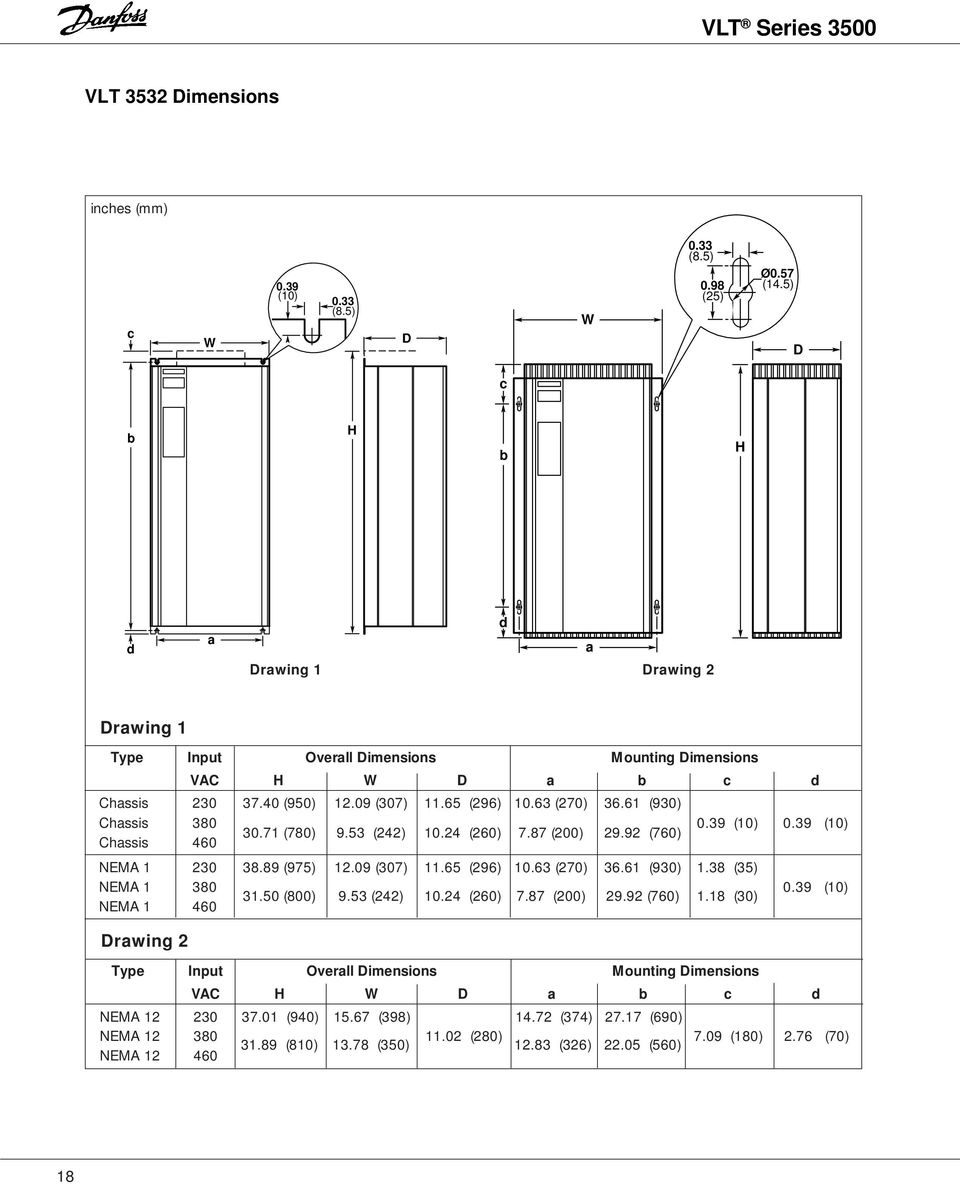
21 Dimensions VLT 3542, 3552, 3562, 380 and 460 V (for 230 V units refer to page 20) inches (mm) c W 0.39 (10) 0.33 (8.5) D W 0.33 (8.5) 0.98 (25) Ø0.57 (14.5) D c b H b H d a Drawing 1 Drawing 2 d a Drawing 1 Type Input Overall Dimensions Mounting Dimensions VAC H W D a b c d Chassis 380 Chassis (950) (307) (296) (270) (930) 0.39 (10) 0.39 (10) NEMA Refer to page 20 Drawing 2 NEMA NEMA (975) (307) (296) (270) (930) 1.38 (35) 0.39 (10) Type Input Overall Dimensions Mounting Dimensions VAC H W D a b c d NEMA Refer to page 20 NEMA NEMA (940) (398) (280) (374) (690) 7.09 (180) 2.76 (70) 19
22 Dimensions VLT 3542, 3552, 3562, 230 V VLT 3575, 3600, 380 and 460 V inches (mm) 2.2 (56) 1.0 (25) 17.6 (446) 1.0 (25) VLT (900) (645) (851) 19.9 (505) D NEMA (353) NEMA (376) Ø0.59 (15) Ø1.06 (27) 0.5 (13) 33.3 (846) Door Radius 19.9 (505) 20
23 Dimensions VLT 3625, 3650, 3700, 380 and 460 V inches (mm) 2.2 (56) 1.2 (31) 17.0 (432) 1.3 (32) RDS 20 VLT DC 3100 Controls 59.6 (1515) 57.2 (1453) 20.2 (513) 5.0(127) Optional Pedestal D NEMA (394) NEMA (417) Ø0.59 (15) Ø1.06 (27) 0.5 (13) 35.2 (894) Door Radius 20.2 (513) 14.2 (361) 1.0 (25.4) Optional Pedestal 1.0 (25.4) 19.5 (495) (4 1/2" holes for bolting pedestal and VLT to floor) 21
24 Dimensions VLT 3750, 3800, 380 and 460 V inches (mm) 2.2 (56) VLT (1694) 20.2 (513) 5.0(127) Pedestal D NEMA (508) NEMA (531) 1.0 (25.4) 19.5 (495) Pedestal 1.0 (25.4) 39.7 (1008) Door Radius 20.2 (513) 19.5 (495) (4 1/2" holes for bolting pedestal and VLT to floor) 22
25 General The specific installation instructions may vary depending upon the model of VLT Series 3500 being installed. When this occurs, the model will be identified by a VLT Type 3XXX number. This number can be found on the red nameplate on the outside of the left side of the drive enclosure, or the outside of the right side of a drive with an auxiliary enclosure. The drive must always be attached firmly to the wall or the floor before further installation work is carried out, so as to ensure that no injury or damage occurs. VLT Series 3500 is cooled by means of air circulation. Consequently, the air needs to be able to move freely above and below the drive. VLT Type This series must be installed on a solid surface to ensure that the air flow is in contact with the heatsink all the way from the bottom of the drive. Drives with mounting holes in the side flanges can be installed flange-to-flange. Drives without side flanges but with mounting holes at top and bottom can be installed without any free space on the sides. If the bracket is removed for installation, it must be reinstalled to prevent overheating. The key slots in the mounting bracket make it possible to fasten the attachment bolts to the wall or in the panel before hanging the unit. VLT Type , 380/500 V and VLT Type , 208/230 V are intended for wall mount only. VLT Type is supplied for wall mount as standard, but can be mounted on an optional mounting base. VLT is intended for floor mount only, using the mounting base supplied. Drawing shows drive seen from above. Base for VLT Type As an option, a base for floor installation can be supplied for VLT Type VLT is intended for floor installation only. The base must be fastened to the floor by means of four bolts before installing the drive. Unscrew the front plate of the base to fasten the drive through the four top holes in the base. Also refer to the section on cooling for further information. VLT Series 3500 can be installed with the flanges side by side. Mounting base VLT Type and /230 V VLT Type , 380/500 V and VLT Type , 208/230 V are supplied with a mounting bracket placed at the back of the drive. The mounting bracket also serves as an air duct for the heat sinks. The bracket must be mounted on the drive before drive operation. The bracket does not need to be removed for installation purposes. However, it is possible to remove it temporarily by loosening the bolts from the inside of the drive. 23
26 The drawing shows the base and its dimensions. Hinged Door on VLT Type The door on the VLT Type is hinged on the left-hand side. The table below gives the door radius and the necessary distance from the mounting surface for the door to be able to open freely: VLT Type A B C D 4 x x 0.5 b c All dimensions are in inches VLT type 3575* C R All dimensions are in inches * Dimensions for VLT Type 3575 also apply to VLT , 208/230 volt units. Base seen from the side: Base VLT type A B a b All dimensions are in inches Base for mounting NEMA 12 cabinet with RFI module VLT type A B a b All dimensions are in inches 24
27 Cooling For a free flow of cooling air, space is required both above and below the drive. The minimum space required depends on the drive model and the enclosure type. All dimensions are in inches. For VLT Type , 460 V and , 230 V, the following applies: Wall mount installation Floor Stand Kit Mounting If a drive designed for wall mounting is mounted to a floor stand kit or is not mounted directly to a wall, a solid panel at least as large as the back surface of the drive must be mounted flush to the mounting holes of the drive. This is necessary to create an air chamber for the cooling air to pass over the fins on the heatsink. Drive Only A Drive w/auxiliary Enclosure A Chassis 6.0 VLT Type V 3.9 NEMA VLT Type V 7.9 NEMA VLT Type V 3.9 VLT Type V 7.9 For VLT Type ; and VLT type , 230 V which are wall-mounted, the following applies: Drive Only Wall mount installation A drive without an auxiliary enclosure can be installed without any free space to the sides; however, the door must be able to open fully (Distance B) for service access. VLT Type A B For VLT Type without auxiliary enclosures which are floor mounted, the following applies: VLT Type A B Floor mount installation The distance between drives must be at least 5.12" for the air inlet in the base. VLT Type has a fan in the front door which cools the internal components. A distance which allows free opening of the door is sufficient in front of the drive. For VLT Type and VLT Type , 230 V with auxiliary enclosures, the following applies: The distance between drives must be at least 5.12" for the air inlet in floor mounted units. VLT Type has a fan in the front door which cools the internal components. A distance which allows free opening of the door is sufficient in front of the drive. VLT Type Top Bottom Left Right , 230 V, wall mount * * , wall mount * * , wall mount * * , floor mount * , floor mount * * Door swing must be accomodated on both sides. 25
28 Input Power Wiring VLT Type , 208/ 230 volt; VLT Type , 380 volt; and VLT Type ,460 volt with NEMA 1 or NEMA 12 enclosures have a plastic bottom cover with marked provision for conduit entry. To meet UL requirements, a bonding plate must be in place in the plastic bottom cover. The plate must be grounded to the chassis, and the conduit grounded to the plate. If the grounding plate is not factory installed, it must be installed in the drives that have a plastic bottom panel to ensure proper grounding of the conduit. Connect the ground wire from the bonding plate to the ground tab marked GND. This tab is located near the AC line terminal strip. Mount the bottom cover on the control unit. The conduit entries provide strain relief for the wires in drives mounted in NEMA 1 or NEMA 12 enclosures. With the chassis mount drives, the power and control wires need to be have strain relief supplied by the installer. Do not rely upon the terminal blocks to provide strain relief. VLT Type , 460 volt, and VLT Type , 208/230 volt have a metal bottom with cutouts for conduit entry. VLT Type , 460 volt and VLT Type , 208/230 volt drives have a wiring access plate on both the bottom and the side of the drive. It is recommended that the larger, bottom wiring access plate be used for conduit entry. Remove the plate before drilling for the power and control wires. Drill all required holes before running any of the wires through the plate. Do not make any of the holes any larger than required to fasten to conduit. Reinstall the plate after drilling and wiring the drive. The plate must be in place to provide protection to the drive and provide proper air flow for cooling. The enclosure for these larger drives and for the auxiliary enclosures is made of steel. To avoid getting steel chips in the electronics, do not drill any holes until after the unit has been installed in a vertical position. Remove the conduit plate before drilling. Shielded Wires Wires to control signals should be shielded to reduce radio noise interference. When radio noise (RFI or EMI) is a concern, shielded cable should be used between the drive and the motor. If unshielded control wires are used, control inputs are subject to signal disturbances. Such disturbances may affect drive operation. Extreme noise levels may disturb the microprocessor of the control card. The drive may fault and EXCEPT will appear in the display. The shield of the control wires must be grounded at the cable clamp at the bottom of the drive, but the shield must continue with the cable all the way up to the control card. The shield is not to be connected to any of the terminals at the control card. For safety reasons, the insulation around the shield should only be removed where it is connected to the cable clamp. The insulation should be left on the shield between the clamp and the terminals. Generally speaking, all conductors coming from a shielded control cable must be as short as possible. Long conductor ends attract noise. The shield must be connected to the chassis by means of the cable clamp. Long pigtails on the shield reduce the effectiveness of the shield. Danfoss VLT and CE Marking Danfoss CE marks our VLT Adjustable Frequency Drives (AFD) according to the Electro Magnetic Compatibility (EMC) Directive 89/336/EEC and Low- Voltage Directive 73/23/EEC. When the installation specification is followed and shielded motor cables are used per instruction manuals provided with the drive, we guarantee the AFD complies with the EMC Directive 89/336/EEC. Please consult the RFI Filter Product Manual and EMC Installation Guidelines (175R5187). Upon request we will issue a declaration of conformity to the EMC and low-voltage directives. A manufacturer's declaration for the Machinery Directive 89/392/EEC is also available. Wiring access plate on bottom of enclosure 26
29 The drive voltage is dangerous when connected to the AC line and up to 14 minutes after the unit has been disconnected. Electrical installation is only to be carried out by a qualified electrician. Incorrect mounting of the motor or the drive may result in damage to the equipment, serious personal injury or death. The instructions in this manual must be complied with, together with national and local safety regulations. NOTE It is the responsibility of the user or the electrician to ensure that the drive is properly grounded in accordance with applicable national and local standards. Input Voltage Max. Drive Max. Fuse Output Current Rating V A A A A A A A A A A Input Fuses For VLT Type drives, external input fuses must be installed in the power supply for the drive, if not specified as a drive option. The maximum size of the input fuses is shown below. For VLT Type volt, and VLT /230 volt drives, the input fuses are included in the basic drive. All fuses must be Bussman JJN for volt drives, JJS for and volt drives or exact equivalent. Input Voltage VLT Max. Fuse Type Rating V A A A A A A A A A A Input Voltage VLT Max. Fuse Type Rating V A A A A A A A A A A A NOTE: It is the responsibility of the user or person installing the drive to provide proper grounding and branch circuit protection for incoming power and motor overload according to the National Electrical Code (NEC) and local codes. The Electronic Thermal Relay (ETR) in UL listed VLTs provides Class 20 motor overload protection in accordance with NEC in single motor applications, when parameter 315 is set for TRIP, parameter 311 is set of 0, and parameter 107 is set for rated motor (nameplate) current. Power and Motor Terminals The terminals for both the three phase AC line input and the motor output are located in the lower portion of the enclosure of the drive. The electronic thermal relay (ETR) cannot be used for more than one motor running at a time. ETR has been UL approved for operating individual motors only when parameter 315 has been set to TRIP, parameter 311 has been set to 0 sec., and parameter 107 has been programmed to match the rated motor (nameplate) current. The AC line supply and the motor must be connected as shown on the following pages. Refer to the appropriate figure for your VLT type. NOTE: Shielded motor cable is optional in most U.S. applications. Refer to CE Marking section in this manual. The shield on the motor wire, if used, should be connected to earth ground at both the drive and the motor. 27
30 Typical Line and Motor Connection VLT 3502, 3504, 230V units VLT 3502, 3504, 3505, 3508, 380V units VLT 3502, 3504, 3506, 3508, 460V units VLT 3508, 3511, 230V units VLT 3511, 3516, 3522, 3532, 380V units VLT 3511, 3516, 3522, 3532, 460V units VLT 3516, 3522, 3532, 230V units VLT 3542, 3552, 3562, 380V units VLT 3542, 3552, 3562, 460V units 28
31 Typical Line and Motor Connection VLT 3542, 3552, 3562, 230V units VLT 3575, 3600, 380V units VLT 3575, 3600, 460V units VLT 3625, 3650, 3700, 380V units VLT 3625, 3650, 3700, 460V units VLT 3750, 3800, 380V units VLT 3750, 3800, 460V units 29
32 Motor Connections All types of three-phase asynchronous standard motors can be used with the VLT Series Wire the motor for the proper voltage as shown on the motor nameplate. Wire the motor to terminals U, V, and W (96, 97 and 98) on the drive. Direction of Rotation The factory setting gives clockwise rotation when the output of the VLT Series 3500 has been connected as follows: Terminal 96: connected to U Terminal 97: connected to V Terminal 98: connected to W The direction of rotation can be changed by swapping any two motor wires. Parallel Connection of Motors VLT Series 3500 can control several motors connected in parallel. If the motor speeds are to be different, motors of different rated speeds must be used. The speed of all of the motors will change simultaneously. The ratio between the rated motor speeds will be maintained over the whole range. The total current consumption by the motors must not exceed the maximum rated output current of the drive. If the motor sizes vary considerably, the speeds may be different when run slowly. This is because small motors have a relatively high resistance in the stator and therefore require a higher voltage at start and at low speeds than larger motors. This should not be a concern in HVAC applications. In systems with parallel motor operation, the electronic thermal relay cannot be used as motor protection of an individual motor. This is because the output current must be programmed to match the overall motor current. Consequently, additional motor protection is required, such as individual thermal relays or thermistors in every motor. 30
33 Terminal Block Locations VLT Type Series, 380 V Series, 208/230 V Series, 460 V Terminal Parameter Function Reset Stop Freeze Setup Thermistor External Reference Select HAND Reset Stop Freeze Pulse Pulse Pulse External Reference 100Hz 1 khz 10 khz AUTO Start Latched No External Start Operation AUTO Reverse Start No External Latched Reverse Operation HAND Start Hand Coast to Quick DC Reset and Stop Stop Stop Braking Coast Jog Jog Freeze Digital Ref. Ramp Latched Freeze Reference Select Select Start Hand Preset Increase Setup Ext. Setup Speed Sel Speed Select Select 33 Decrease Speed VLT Type Series, V Series, 208/230 V Programmable Terminal Functions VLT Type Series, V Series, 208/230 V Bold Type indicates default settings stored in the drive s read-only factory setup. Because of special application requirements, these may not have been used in the active set up that was shipped with the drive. 31
34 Control Card Terminals The drawing at the right shows the control card terminals on the VLT Series 3500 drive, and the parameters that control them. A description of the control signals and terminals is below. Terminal 39: Common for analog/digital outputs. Terminals 42 and 45: Programmable analog or digital outputs for indicating output frequency, input reference, output current and output torque. The analog signal is 0 to 20 ma or 4 to 20 ma at a maximum of 470 W. The digital indication can be of operational status, or alarm or warning. The digital signal is 24 V DC at a minimum 600 W. See parameters 407 and 408. Terminal 50: This provides the supply voltage to the potentiometer and the thermistor. It is 10 V DC, 17 ma max. Terminal 53: Connect a DC analog voltage reference input to this terminal. Voltage range is 0 to 10 V DC, R i = 10 kw. See parameter 412. Terminal 55: Common for analog reference inputs. Terminal 60: Connect a DC analog current reference input to this terminal. Current range is 0 or 4 to 20 ma, R i = 188 W. See parameter 413. Terminal 61: Ground connection, when switch 04 is closed, this connects to chassis ground. When switch 04 is open, an RC filter is connected between this terminal and ground. Terminals 68 and 69: Serial bus communication. Parameter group 5 is used to set up this interface. Terminal 12: This provides the supply voltage to digital inputs. The voltage is 24 V DC, maximum 140 ma. Terminals 16 and 33: These are the digital input terminals. The input must be 0 to 24 V, R i = 2 kohm. < 5V = logical 0, > 10 V = logical 1. See parameters 400 through 406. Terminal 20: Common for digital inputs. Terminal 38: Ground connection can be used to connect the shield on control wires in units with no cable clamps for the shield. Terminals 01 and 03: Connections for Form C relay output. Maximum 240 V AC, 2 A. Minimum 24 V DC, 10 ma or 24 V AC, 100 ma. See parameter 409. Terminals 04 and 05: Connections for Form A relay output. Maximum 240 V AC, 2 A. Minimum 24 V DC, 10 ma or 24 V AC, 100 ma. See parameter 410. NOTE: If a thermistor is used for motor protection, it must be wired from terminal 50 to terminal 16. See parameter
35 Electrical Noise In general, electrical noise can be divided into two forms: wire-borne noise (EMI) and radiating noise (RFI). As shown in the sketch below, the capacitance of the motor wires combined with a high dv/dt from the motor voltage generates noise. The use of shielded motor cables increases the noise current (I 1 ) as indicated in the figure below. This is because shielded wires have a greater capacitance than unshielded wires. If the noise current is not filtered, there will be more noise on the AC line in the radio noise range, below approximately 5 MHz. Since the noise current (I 1 ) is taken back to the unit through the shield (I 3 ), only a small electromagnetic field will in principle be generated from the shielded motor wires. See the figure below. The shield reduces the radiating noise, but increases the low-frequency noise on the AC line. With an EMI filter, the noise level on the AC line will be reduced to about the same level for shielded and unshielded wires alike. The motor wiring shield must be connected in the enclosure of the drive as well as at the motor. The best way of doing this is by using shield brackets to avoid pigtail shield ends. Even short pigtails increase the shield s impedance at higher frequencies, which reduces the shield s effect and increases the noise current. If a shielded cable is used for serial communication and signal interface, the shield must be connected at both ends. In certain situations, however, it will be necessary to break the shield to avoid current loops. In cases where the shield is to be connected to a mounting plate, the mounting plate must be made of metal, because the shield currents are to be taken back to the unit. It is also important to ensure good, electric contact from the mounting plate through the mounting screws to the chassis of the VLT Series It is generally easier and less complicated to use unshielded motor wires than shielded cables. If unshielded wires are used, the RFI will be greater. Since the strength of the radiated signal decreases with distance from the signal source, radiated noise is generally not a problem. In order to reduce the noise level from the total system (drive + installation) to the greatest possible extent, it is important to make the motor wiring as short as possible. Incoming power and control wiring should never be run in the same conduit or raceway as motor wiring. 33
36 Installation of Units with Optional EMI Filter Module If an optional EMI filter module is supplied, it is normally mounted below the drive with its own mounting plate. When mounting the drive and EMI filter, it is important to ground the filter mounting plate through its mounting bolts. Because the aluminium enclosure of the drive and EMI filter module is anodized and electrically insulating, serrated washers must be used to penetrate the anodization, or the anodized surface must be removed. The wiring must be done as shown in the figure below. Also refer to EMI filter manual for further information. Shielded Wiring Serial Communication The wires for serial communication must be shielded. The shield must be mounted by means of a bracket as shown in the figure below. Control Wiring The control wiring must be shielded. The shield must be mounted to the clamp supplied on the drive. See the figure below. Motor Wiring Either shielded or unshielded cables can be used for the motor. If unshielded motor cables are used, RFI emissions will be greater. If shielded motor cables are used, the shield must be connected both to the enclosure of the drive and to the motor enclosure. It is important to connect the shield by means of a clamp, so as to avoid inter-twisted cable ends. 34
37 Typical Wiring and Setup Examples The following examples show some typical HVAC installations. The power and control connections, and the parameter settings for each example are shown. Details of the parameters are in the Drive Setup section. It may helpful to find the example closest to the requirements of your installation and use it as a guide. Example 1: A fan is to be speed controlled between 6 and 60 Hz. A 0 to 10 V DC potentiometer is used as the control signal. NOTE: A shield for control wires is to be connected in accordance with the installation instructions. All settings are based on factory settings. Be sure to check the motor data settings (parameters 104, 105 and 107, or the Quick Setup menu items 1, 2 and 3). They must be set based upon the actual motor used. 1 = Start/Stop 2 = 1 kw potentiometer External safety interlocks can be connected between terminals 12 and 27. The following must be programmed: Function Parameter # Parameter Value Data Value # Safety interlock 003 KEY HOA w. stp [1] Minimum frequency Hz maximum frequency Hz Reference (voltage) to 10 V DC [2] Reference (current) 413 No operation [0] 35
38 Example 2: In a ventilating system, the ability to reverse the fan in the case of fire is required. The control signal used is 4 to 20 ma, corresponding to 10 to 100% motor speed, typically 6 to 60 Hz. A remote indication of motor speed is required. The signal for that is to be 4 to 20 ma, with 4 ma corresponding to 0 Hz, and 20 ma corresponding to 60 Hz. NOTE: A shield for control wires is to be connected in accordance with the installation instructions. All settings are based on factory settings. Be sure to check the motor data settings (parameters 104, 105 and 107, or the Quick Setup menu items 1, 2 and 3). They must be set based upon the actual motor used. 1 = Start/Stop 2 = Reversing 3 = 4 to 20 ma output speed signal 4 = 4 to 20 ma input speed reference External safety interlocks can be connected between terminals 12 and 27. The following must be programmed: Function Parameter # Parameter Value Data Value # Safety interlock 003 KEY HOA w. stp [1] Minimum frequency Hz Maximum frequency Hz 0-f MAX 407 f MAX =4 to 20 ma [20] Reference (voltage) 412 No operation [0] Reference (current) to 20 ma [2] 36
39 Example 3: A fan is to be controlled manually by means of a 0 to 10 V DC potentiometer corresponding to 10 to 60 Hz. A thermistor is installed in the motor to obtain optimum motor protection. The thermistor is to be connected to the drive to shut down the drive in case of motor overtemperature. NOTE: A shield for control wires is to be connected in accordance with the installation instructions. All settings are based on factory settings. Be sure to check the motor data settings (parameters 104, 105 and 107, or the Quick Setup menu items 1, 2 and 3). They must be set based upon the actual motor used. 1 = Start/Stop 2 = Thermistor 3 = 1 k W Potentiometer External safety interlocks can be connected between terminals 12 and 27. The following must be programmed: Function Parameter # Parameter Value Data Value # Safety interlock 003 KEY HOA w. stp [1] Minimum frequency Hz Maximum frequency Hz Thermistor on term THERMISTOR [4] REFERENCE (voltage) to 10 V DC [1] REFERENCE (current) 413 No operation [0] 37
40 Example 4: Although three-wire Start/Stop is not commonly used for unattended operation, some installations may require it for operator safety. A pump is to be controlled by means of a 0 to 10 V control signal, corresponding to 18 to 60 Hz. "Start/Stop" is to be in the form of a three wire (no autorestart) "Start/Stop". A remote indication of output current is required. The signal for that is to be 0 to 20 ma. NOTE: A shield for control wires is to be connected in accordance with the installation instructions. All settings are based on factory settings. Be sure to check the motor data settings (parameters 104, 105 and 107, or the Quick Setup menu items 1, 2 and 3). They must be set based upon the actual motor used. 1 = Stop 2 = Start 3 = 0 to 20 ma output signal (0-I MAX ) 4 = 0 to 10 V control signal (0-100% speed) External safety interlocks can be connected between terminals 12 and 27. The following must be programmed: Function Parameter # Parameter Value Data Value # Safety interlock 003 KEY HOA w. stp [1] Power Up Mode 014 Stopped in local operation, [1] using saved reference speed Minimum frequency Hz Maximum frequency Hz START 402 LATCH START [1] STOP 404 STOP [4] 0-I MAX 407 I MAX 0-20 ma [25] Reference V DC [1] 38
41 Example 5: The output frequency of the drive is to be controlled by means of digital signals from a PLC or floating point control. Whenever the output frequency is outside the 10 to 45 Hz range, the relay output is to be activated giving a signal to the PLC. NOTE: A shield for control wires is to be connected in accordance with the installation instructions. All settings are based on factory settings. Be sure to check the motor data settings (parameters 104, 105 and 107, or the Quick Setup menu items 1, 2 and 3). They must be set based upon the actual motor used. 1 = Speed up 2 = Speed down 3 = Relay is activated when the output frequency is outside the 10 to 45 Hz range by closing External safety interlocks can be connected between terminals 12 and 27. The following must be programmed: Function Parameter # Parameter Value Data Value # Safety interlock 003 KEY HOA w. stp [1] Minimum frequency Hz Maximum frequency Hz Frequency too low Hz Frequency too high Hz Speed up and down 401 FREEZE REF. [2] Speed up and down 406 SPEED UP/DOWN [1] Frequency warning on relay 409 OUT FREQ RGE [11] 39
42 Example 6: A ventilation system is to be run at six preset speeds, depending on the time of the day or night. Maximum speed is 60 Hz. 1. Speed 6 Hz (10%) 2. Speed 12 Hz (20%) 3. Speed 18 Hz (30%) 4. Speed 24 Hz (40%) 5. Speed 42 Hz (70%) 6. Speed 60 Hz (100%) NOTE: A shield for control wires is to be connected in accordance with the installation instructions. All settings are based on factory settings. Be sure to check the motor data settings (parameters 104, 105 and 107, or the Quick Setup menu items 1, 2 and 3). They must be set based upon the actual motor used. 1 = Setup choice 2 = Start/stop 3 = Digital reference choice 4 = Digital reference choice External safety interlocks can be connected between terminals 12 and 27. How to activate different speeds Terminal Setup Digital reference X 0 10% X % X % X % X 70% X 0 100% means that 24 V DC is connected to the terminal. The following must be programmed: Function Parameter # Parameter Value Data Value # Choice of setup 001 MULTI-SETUP [5] Safety interlock 003 KEY HOA w. stp [1] Choice of setup 400 SETUP SELECT [3] Digital reference choice 406 DIGITAL REF. [0] Setup 1 Maximum frequency Hz Digital reference % Digital reference % Digital reference % Digital reference % Setup 2 Maximum frequency Hz Digital reference % Digital reference % 40
43 Example 7: In a pump system, a constant pressure of 5 PSI is to be maintained. The integrated PID controller in VLT Series 3500 is used. Normal regulation is desired, in which the speed is reduced when the pressure increases and vice versa. The transmitter used is a 4 to 20 ma, 0 to 10 PSI type. Since a pressure of 5 PSI is required, this corresponds to 50% of the working range of the transmitter, which in turn corresponds to the setpoint programmed as the internal setpoint in the drive. (Digital reference = 50%). The minimum speed must be 10 Hz and the maximum speed 60 Hz. NOTE: A shield for control wires is to be connected in accordance with the installation instructions. All settings are based on factory settings. Be sure to check the motor data settings (parameters 104, 105 and 107, or the Quick Setup menu items 1, 2 and 3). They must be set based upon the actual motor used. 1 = Start/Stop 2 = Feedback pressure transmitter 4 to 20 ma, 0 to 10 PSI External safety interlocks can be connected between terminals 12 and 27. The following must be programmed: Function Parameter # Parameter Value Data Value # Safety interlock 003 KEY HOA w. stp [1] Activation of PID-regulator 101 CLOSED LOOP [2] Feedback type 114 CURRENT [1] Regulator range 120 Application dependent Proportional gain 121 Application dependent Integration time 122 Application dependent Minimum speed Hz Maximum speed Hz Internal setpoint % Current signal to 20 ma [2] 41
44 Example 8: In a ventilation system the temperature is to be adjusted by means of a 0 to 10 V potentiometer. The selected temperature must be kept constant, and the internal PID controller in the drive is to be used. The regulation required is of the inverse type; this means that when the temperature goes up, the fan speed increases so that more air is supplied. The transmitter used is a temperature sensor with a working range of 32 to 120 F, 4 to 20 ma. In order to carry out inverse regulation, the drive is programmed to convert the temperature transmitter signal (4 to 20 ma) to 20 to 4 ma. The minimum and maximum speeds are 10 and 60 Hz. NOTE: A shield for control wires is to be connected in accordance with the installation instructions. All settings are based on factory settings. Be sure to check the motor data settings (parameters 104, 105 and 107, or the Quick Setup menu items 1, 2 and 3). They must be set based upon the actual motor used. 1 = Start/Stop 2 = Temperature reference 32 to 120 F, 0 to 10 V 3 = Temperature transmitter 32 to 120 F, 4 to 20 ma External safety interlocks can be connected between terminals 12 and 27. The following must be programmed: Parameter # Parameter Value Data Value # Safety interlock 003 KEY HOA w. stp [1] Activation of PID-regulator 101 CLOSED LOOP [2] Feedback type 114 CURRENT [1] Regulator range 120 Application dependent Proportional gain 121 Application dependent Integration time 122 Application dependent Minimum speed Hz Maximum speed Hz Current signal to 4 ma [4] 42
45 Example 9: Remote Hand/Off/Auto control is desired. The Local/Hand, and Remote/Hand switches are to provide these functions. The Hand reference is a 0 to 10 V signal from a potentiometer. The Auto signal is a 4 to 20 ma reference from a set point controller. NOTE: A shield for control wires is to be connected in accordance with the installation instructions. All settings are based on factory settings. Be sure to check the motor data settings (parameters 104, 105 and 107, or the Quick Setup menu items 1, 2 and 3). They must be set based upon the actual motor used. 1 = Activation of Local/Hand mode 2 = Activation of Remote/ Auto mode 3 = Stop 4 = Start Auto mode 5 = Pulse Start Hand mode 6 = Auto mode reference, 4 to 20 ma 7 = Hand mode reference, 0 to 10 V External safety interlocks can be connected between terminals 12 and 27. The following must be programmed: Parameter # Parameter Value Data Value # H-O-A position 003 EXTERNAL HOA [2] Activation of Hand 400 EXT. HOA HAND [5] Activation of Auto 401 EXT. HOA AUTO [7] Pulse Start Hand 405 LATCH ST. HAND [4] Auto reference to 20 ma [2] Hand reference 420 VOLTAGE [0] 43
46 Control Panel Local/Hand and Remote/Auto Control The start/stop and speed reference functions of the drive are controlled by these controls. Local/Hand The drive is commanded to energize the run relay and start. Any customer remote start/stop contacts will be overridden. The drive will also follow the local speed reference set using the + and - keys. If parameter 003 is set for KEY HOA W.STP and parameter 404 is set to MTR. COAST, opening the safety interlock circuit between terminals 12 and 27 will stop the drive. While this won t give a fault indication at the drive, if parameter 409 is set to ENABLED nowr (enabled no warning), relay 01 will de-energize. Then this interlock opens, just as it does in a fault condition. Remote/Auto The drive is commanded to pick up the run relay and start only if the customer remote start contact is closed. The drive also follows the specified external speed reference signal. Setting H-O-A Control In parameter 003 it is possible to choose between three different ways of implementing the H-O-A function: 1. Control from the drive keypad. 2. Control from the drive keypad, with the ability to stop the drive remotely. 3. Remote control. External Local/Hand and Remote/Auto References In parameter 420 it is possible to choose the reference to be used in the External Hand mode. There is a choice of three options: 1. Voltage reference 2. Current reference 3. Digital speed up/down Start Signal for External Hand Mode When Local/Hand mode is selected through terminal 16 (parameter 400) or terminal 19 (parameter 403), it is necessary to give the drive a start command to start the drive. Terminal 29 or 19 can be programmed to give the required start command. If 24 V DC is connected to terminal 19 or terminal 29 for a minimum of 20 milliseconds, the inverter starts and the drive supplies the motor with a frequency depending on the reference. When the 24 V DC signal is removed from terminal 16 or 19, the drive stays in Local/Hand mode, but the inverter stops. External Remote/Auto Mode When Remote/Auto mode is activated through terminal 17 (parameter 401) or terminal 18 (parameter 402), the drive will be controlled by means of normal remote operation. External Selection of Local/Hand and Remote/Auto It is possible to choose between Local/Hand or Remote/ Auto mode by means of the digital inputs. The Local/Hand mode is activated when one of the digital input terminals 16 (parameter 400) or terminal 19 (parameter 403) is programmed for External H-O-A Hand, and 24 V DC from terminal 12 is applied to that terminal. The Remote/Auto mode is activated when digital input terminal 17 (parameter 401) or terminal 18 (parameter 402) is programmed for External H-O-A Auto, and 24 V DC from terminal 12 is applied to that terminal. If no terminals are activated using the 24 V DC from terminal 12, the output frequency of the drive will ramp down to 0 Hz. 44
47 How to Operate the VLT Series 3500 In order to program and locally control the drive, use the control panel on the front of the drive. The control panel serves a dual purpose: - Local operation - Programming The control panel consists of: - a display, which gives information about the drive, the process, or the status of the drive s program parameters. - eight keypad switches, which allow the user to select the display, make changes to the drive s status, and make changes to the drive s program parameters. - two light emitting diodes, which indicate: green (On): the drive is connected to the AC line. red (Alarm): an alarm or fault condition exists. The VLT Display The display is designed to be lit whenever the drive is connected to the AC line. The display consists of 3 lines: Line A Seven large alphanumeric characters Lines B and C Fourteen smaller alphanumeric characters on each line A B C 60 Hz USE± VLT Series 3500 Menu Data Alarm Local Hand + On Remote Auto Remote Mounting of the Control Panel The control panel can be removed from the drive cover and remotely mounted. An adaptor plate and 10 cable is available. The control panel and adaptor plate can be installed on a NEMA 12 enclosure and retain the NEMA rating. Stop Reset Start The Keypad Switches The following keypad switches are on the control panel of the drive. The next page gives a description of the individual keys and their functions. 45
48 Keys for Local Operation The following keys are used for local operation: Shown below is the appearance of the display when in local mode and the drive is ready to run. This key is used for starting up the VLT Series This key is used for local control of the drive from this control panel. When this key is depressed, the operating panel display looks as shown below. This key can be deactivated through parameter 008 if desired. When in Local mode these keys are used to increase or decrease the output frequency of the drive. STOP This key is used to stop the connected motor. If stop is activated, the run relay will drop out and the top line of the display will start to flash. This key does not turn off the AC line and therefore cannot be used as a safety switch. This will stop the drive when it is in either Local/Hand or Remote/Auto mode. This key can be deactivated through parameter 007 if desired. NOTE: Whether in Local/Hand or Remote/Auto mode, it is necessary to press the Start key to restart the drive. 0 Hz USE± In the Local mode, the second line in the display will indicate the relative speed. If all squares are filled, it indicates that the drive is running at the commanded speed. Hollow squares indicate that a stop command has been given and there is a speed command or that the drive is in the process of accelerating to the commanded speed. If a run command is given, the drive will accelerate to the commanded speed. A complete row of dashes indicates that there is no speed command. The value of the local speed command, in Hz, is shown in the lower right corner of the display whether the drive is running or stopped. This key is used to switch to the Remote/Auto mode in which the drive is controlled using external Run/Stop and speed reference signals. These keys are used for switching between local operation and remote operation. When Remote/Auto is selected REMOTE will be indicated in the middle of the third row of the display. RESET This key is also used to reset the drive after a fault trip that is not automatically reset. 46
49 Display Mode In normal operation, the VLT Series 3500 starts up in display mode. In the display mode, there is the ability to choose different readouts. There are two different possible displays, the Standard Display, and the Extended Display. Parameter 606 allows the selection of either the Standard Display or the Extended Display. The display readouts can be selected by means of the + and keys: Standard Display 1. Frequency Hz 2. Feedback 3. Current A 4. Power kw 5. Energy kwh 6. Motor voltage V 7. Reference % Extended Display 1. Reference % 2. Frequency Hz 3. Display/Feedback % 4. Current A 5. Torque % 6. Power kw 7. Power HP 8. Energy kwh 9. Motor voltage V 10. DC voltage V 11. Thermal motor load % 12. Thermal inverter load % By default, the top display line shows the value of the selected readout and the second line displays a description of the readout. Parameter 605 makes it possible to display the value of a second readout on the second line, instead of the description. This can be useful when, for example, the PID controller is being programmed. It is possible to read out the reference (setpoint) and the feedback signal at the same time. Programming Programming is carried out by changing the data values for the various parameters. The parameters have been grouped into a menu format. The most commonly used parameters have been grouped together into a Quick Setup Menu. All the parameters, including those also in the Quick Setup Menu are available in the Extended Menu. If a parameter in the Quick Setup Menu is changed, it is automatically changed in the Extended Menu as well. The drive can also be run in four different setups. Many parameters can be programmed differently in each setup. Through the control inputs, the desired drive setup can be chosen. This allows application-dependent programming to be done. For example, one setup may have no PID regulation, while another setup has PID regulation. Display Mode Quick Setup Menu 0 LANGUAGE 1 MOTOR VOLTAGE 2 MOTOR CURRENT Extended Menu Extended Menu Setup 1 Group 0 Group 1 Operation Load MOTOR FREQUENCY 4 FOLLOWER VOLTAGE 5 FOLLOWER CURRENT Group 2 Group 3 Ref. Signal Functions Group 4 Group 5 In-/Output Serial Com. 6 MIN. FREQUENCY 7 MAX. FREQUENCY Group 6 Service 8 RAMP UP TIME 9 RAMP DOWN TIME 47
50 Functions of the Keys Combinations of Control Panel Keys The eight keys on the control panel of the drive are used for programming as follows: MENU AND DATA KEYS If these keys are pressed simultaneously, the system switches to Display mode from any other mode. MENU AND + KEYS If these keys are pressed simultaneously, the system switches to Extended Menu from any mode. MENU KEY Press this key to toggle from Display mode to Quick Setup mode. This key is also used for switching from Data mode to Menu mode. DATA KEY Press this key to toggle from Menu mode to Data mode or Display mode. This key is also used for moving the cursor between the decimal places of numerical data values. The program automatically leaves Data mode after 20 seconds if no operation is registered. + KEY AND - KEY These keys are used for scrolling through the different Menu Modes and their parameters and for choosing a specific parameter value or for scrolling parameter data. They are also used for changing the speed when in Local mode. MENU AND - KEYS If these keys are pressed simultaneously, the system switches to the Quick Set Up Menu from any mode. MENU, DATA and LOCAL/HAND If these keys are pressed and held while power is applied to the drive, all of the drive s parameters and history logs will be reset. These three buttons must be held until the third line of the display shows init eeprom. STOP/RESET Holding down Stop/Reset while pressing other keys allows access to the function of the other keys when a drive fault would otherwise have made the other key inactive. LOCAL/HAND KEY This key is used for selecting local operation. This key can be deactivated by using parameter 008. REMOTE/AUTO KEY This key is used for selecting remote operation. This key can deactivated by using parameter 009. STOP/RESET KEY This key is used to stop the drive and for resetting if a trip occurs. The top line of the display flashes when the drive has been stopped using this key. The start key must then be pressed to restart the drive. The reset function of this key can be deactivated using parameter 006. The stop function of this key can be deactivated using parameter 007. START KEY This key is used for starting the drive. If the drive has been stopped using the Stop/Reset key, the Start key must be pressed to restart the drive. 48
51 Display Mode Shows value and unit Defines the display Status, and source of control 15.0 Hz FREQUENCY RUN OK LOCAL. 1 Direction of rotation Setup number Quick Set Up Menu Enter from the Display mode by pressing the Menu key. Enter from any mode by pressing the Menu and - keys. Data value selected Parameter name Quick Setup Menu number ENGLISH LANGUAGE Select other parameters in the Quick Set Up Menu by pressing either the + or - key. Quick Set Up Data Mode Enter from the Quick Setup menu by pressing the Data key. Flashing, selscted data value Parameter name Quick Setup Menu number ENGLISH LANGUAGE Change the displayed data by pressing either the + or - key. Extended Menu Mode Enter from any mode by pressing the Menu and the + keys. Shows value and unit Flashing group number 0.0 Hz 0..OPERATION AND0DISPLAY 0000 Change the group displayed by pressing either the + or the - key. Data value 49
52 Extended Parameter Mode Enter from the Extended Menu mode by pressing the Menu key. Flashing parameter number 0 = Cursor flashes Selected data value 0.0 Hz 000 LANGUAGE ENGLISH * VLT Series 3500 Change the displayed parameter by pressing the + or the - key. Extended Data Mode Enter from the Extended Parameter mode by pressing the Data key. E = Cursor flashes Selected data value 0.0 Hz LANGUAGE ENGLISH ENGLISH Change the parameter s value by pressing the + or the - key. For numeric parameters, pressing the Data key selects the digit that is changed by the + and - keys. Local/Hand Mode Enter from any mode by pressing Local/Hand key. Display readout of local output frequency Shows speed 15.0 Hz USE± 015 Change speed using the + and the - keys. filled-in when running unfilled when stopped with a speed command present Open rectangles represent the local speed command. Solid rectangles represent the drive s actual speed. Alarm Mode Reset mode Cause of alarm ALARM TRIP MOTOR TRIP NOTE: If the display reads TRIP, the drive will be stopped due to a fault. If the cause of the fault has been eliminated, pressing Reset will start the drive. If the display reads TRIP LOCK, the drive will be stopped. To restart it, the AC power to the drive must be removed and reapplied. If the cause of the fault has been eliminated, pressing the Reset key will then restart the drive.
53 Menu Access Keys 51
54 Drive Setup When the drive is first powered up, the items in the Quick Setup menu should be viewed and changed as required. The Quick Setup menu items are shown below. If preferred, these items can be viewed and changed from the Extended menu. Quick setup no. Extended menu Designation Settings Data Entry Language Choose from six languages Choose English (typical) Motor voltage Check nameplate on motor Enter line voltage 460 (typical) Motor current Check nameplate on motor Enter FLA motor amps Motor frequency Check nameplate on motor Enter 60 Hz (typical) Speed reference Select reference range Choose 0 to 10 V DC (typical) Speed reference Select reference range Choose 4 to 20 ma (typical) Min. frequency Select desired frequency Enter 20 Hz (typical) Max. frequency Select desired frequency Enter 60 Hz (typical) Ramp up Select desired time Enter 30 sec (typical) Ramp down Select desired time Enter 30 sec (typical) Return to Factory Defaults It is possible to globally return all parameters to the factory default settings. If undocumented changes have been made to the settings and the drive is not responding as it should, it is possible to start over. Returning to the factory defaults may affect all parameters. Be sure to review all parameters for desired settings after returning to the factory defaults. There are three ways to return to factory defaults. 1. One way initializes the EEPROM and therefore resets everything. To do this, first remove power from the drive. Then press and hold the Menu, Data and Local/Hand keys while reapplying power. Release the keys after the third line in the display reads init eeprom. Lockout Unwanted programming can be prevented by opening switch pin 01 on the control card. When the switch pin is open, changes cannot be made to the programming. The Local/Hand, Stop/Reset, Remote/Auto, and Start keys are functional, but the programming keys are not. LOCK OPEN is displaced on the third line of the display when programming changes are attempted with the switch pin open. Control functions can be locked out individually. See parameter 006 through If you wish to retain the settings of parameters 501 (PC communication), 821, 822, 904 and 918 (Profibus communication), the cumulative kwh and total running hours, use Parameter 604 to reset to factory settings instead. See parameter 604. Set it to INITIALIZE [3]. 3. It is also possible to return the parameter sets to the factory defaults one set at a time or all at once. If multiple settings are used, it may be desirable to change only one of them, or change them one at a time. Use the procedure for parameter 001 and parameter 002 to copy the factory defaults to a single parameter set or to all four parameter sets. 52
55 Standard HVAC Operation Parameters Operation and Display 000 Language ENGLISH 001 Setup Selection SETUP Setup Copy DO NOT COPY 003 Local/Remote (HOA) KEY HOA w. stp 004 Local Reference No setting needed 005 User Read-out at Max Local Reset (EN/DIS) ENABLE 007 Local Stop (En/Dis) ENABLE 008 Local Loc/Hand (En-Dis) ENABLE 009 Local Rem/Aut (En/Dis) ENABLE 010 Local Ref. (En/Dis) ENABLE 011 Reset kwh Counter NO RESET 012 Reset Time counter NO RESET 014 Power-up Mode AUTO RESTART 015 Setup Program SETUP=P001 Load and Motor 100 Load Type single motor: ENERGY VT.H multi-motor: VT MODE HIGH 101 Speed Control (Fdbk) OPEN LOOP 102 Current Limit Control PROGRAM.VALUE 103 Motor Power (kw) set for the rated size (in kw) 104 Motor Voltage as required 105 Motor Frequency 60 Hz 107 Motor Current per drive rating 109 Starting Voltage No setting usually needed 114 Feedback Type CURRENT 115 Min Fdbk Max Fdbk Display Unit % 119 Feed Forward Factor Controller Range Proportional Gain Integral Time OFF [999 on RS-485] 123 Differentiation Time OFF 124 Low Pass Filter Feedback Factor 100 References and Limits 201 Min. Freq. (Follower) fan 06.0 pump: Max. Freq. (Follower) Jog Freq Dig. Ref. Type (effect) EXT. ON/OFF 205 Dig. Ref. 1 (%) Dig. Ref. 2 (%) Dig. Ref. 3 (%) Dig. Ref. 4 (%) Current Limit (A) 110% of rated current 210 Warn. Freq. Low Warn. Freq. High Warn. Curr. Low 0.0 A 213 Warn. Curr. High the drive s maximum current 214 Ramp time LINEAR 215 Ramp-up Time fan: 60 SEC pump: 10 SEC 216 Ramp-down Time fan: 60 SEC pump: 10 SEC 217 Alt. Ramp-up Time fan: 60 SEC pump: 10 SEC 218 Alt. Ramp-down Time fan: 60 SEC pump: 10 SEC 219 Freq. Bypass Hz 220 Freq. Bypass Hz 221 Freq. Bypass Hz 222 Freq. Bypass Hz 223 Freq. Bypass Width (%) 0% 224 Carrier Freq. small units: 14.0 khz large units: 4.5 khz 225 Variable Carrier Freq. HIGH (or ENABLE) 232 Idle Running Current use default Functions and Timers 301 Start Freq Start Delay High Starting Torque Time Mains Failure (stop) NORM PWR DWN 305 Flying Start SAME DIRECT 306 DC Braking Time DC Braking Cut-in Freq DC Braking Voltage use the default 309 Reset Mode (Counts) AUTOMATIC X Trip Delay, Current Limit Trip Delay, Inv. Fault Max. Auto Restart Time Motor Check OFF 314 Motor Pre-heat OFF 315 Motor Term. Protection TRIP Relay 1 ON Delay Relay 1 OFF Delay Inputs and Outputs 400 Binary Input 16 RESET 401 Binary Input 17 FREEZE REF. 402 Binary Input 18 START 403 Binary Input 19 REVERSING 404 Binary Input 27 (Stop) MTR. COAST 405 Binary Input 29 JOG 406 Binary Input 32/33 SPEED UP/DOWN 407 Signal Output 42 CURmax 4-20 ma 408 Signal Output 45 Fmax 4-20 ma 409 Relay Output 01 ENABLED nowr 410 Relay Output 04 RUNNING 411 Analog Reference Type LINEAR 412 Term. 53 Input Voltage NO OPERATION 413 Term. 60 Input Current 4-20 ma 414 Time Out Time Out Function FREEZE 420 Ext. Hand Ref. Type VOLTAGE 53 Serial Communications 500 Address Baud Rate Data Read-out REFERENCE % 503 Coasting OR 504 Q-stop OR 505 DC Brake OR 506 Start OR 507 Direction DIGITAL 508 Reset OR 509 Setup Select OR 510 Digital Speed Select OR 511 Bus Jogging Bus Jogging Catch Up Value Bus Bit 4 Q STOP 515 Bus Bit 11/12 CATCH UP SLOW DOWN 516 Bus Reference Store Data Values OFF Service and Diagnostics 600 Operation Data 601 Data Log 602 Fault Memory 603 Type Plate 604 Operation Mode RUN NORMAL 605 Personal Display Select STANDARD DISPLAY 606 Display Mode QUICK DISPLAY 650 VLT Type If the control is initialized, the parameters indicated by will change to a default which is different than the choice suggested here. It may be desirable to reset those parameters to the selection shown above. 53
56 Extended Menu Structure VLT Series 3500 menu structure, referred to as the Extended Menu, is divided into seven groups. These contain parameters that allow performance to be optimized and efficiency to be maximized. Although the default parameters are acceptable for most applications, they may not be ideal for your specific application. For optimum performance, review all parameters and reset those that are not optimum for your application. The parameters of the Extended Menu are divided into seven groups, identified below. Parameter groups: 0 Operation and Display Load and Motor References and Limits Functions and Timers Inputs and Outputs Serial Data Interface Service and Diagnostics Changing the Parameter Data Value When a parameter has been selected and the data value is to be changed, press the Data key and then + or. The data value can be either a number or text. For numeric values, the digit to be changed can be selected by pressing the Data key as required. If a parameter in the current set is changed, the parameter change immediately affects the drive s operation. The Data mode is exited by pressing Menu or by waiting 20 seconds. The selected data value will then be saved to the EEPROM. NOTE: The motor must be stopped before the data values of certain parameters are changed. Leaving Data Mode The data value is stored by pressing Menu. Parameter Numbers Each parameter number consists of three digits. The digit to the left indicates the group. In each group, parameters are numbered from 0 and up. For example, the parameters in group 1 are numbered 100, 101, 102, etc. Accessing the Various Parameters When initially powered up, the display is in the Display mode. Press Menu and + simultaneously to go to the Extended Menu. The flashing number at the left of the second line of the display identifies the group accessed. Use the + and keys to scroll through the menu groups. Press Menu again to access a specific parameter within a group. The flashing number will now be at the parameter within the group. Use the + and keys to scroll through the list of parameter numbers. 54
57 Speed Control Signal -- Open Loop AIN AIN DIN AIN AIN AIN AIN AIN Parameter 412 IN OUT V 10-0V 2-10V 10-2V 1-5V 5-1V % 0-100% 0-100% 0-100% 0-100% 0-100% Parameter 413 IN OUT 0-20mA 4-20mA 20-0mA 20-4mA 0-100% 0-100% 0-100% 0-100% Parameter 401 IN OUT 0-100Hz 0-1kHz 0-10kHz 0-100% 0-100% 0-100% Serial bus ref Parameter % % 4 x Digital ref Parameter % % Digital ref type Parameter 204 Sum Relative Ext. DIN 16 DIN 17 DIN 29 max Parameter 411 Linear between min and max ref min max 0 ref 100% Proportional with min limitation min 0 100% Proportional with reversing max ref % -max max Local ref Parameter 004 ref min 0 100% max Jog frequency Parameter 203 Bus Jog 1/2 Parameter 511 Parameter 512 ref min 0 max Freeze Jog Freeze ref. DIN D IN Ref Terminal 19 Reversing ref max -max max ref -max Frequency bypass Slip Comp Parameter 112 Ramps Parameter Parameter Parameter Parameter Parameter IRMS L1 L2 L3 Voltage calc U/f Ratio: Parameter 111 Start comp: Parameter 110 Start voltage: Parameter 109 U fs UDC ASIC U Inverter IV IU U V W f 55
58 f f VLT Series 3500 U V W Speed Control Signal -- Closed Loop IU IV Inverter UDC ASIC VVC U fs IRMS L1 L2 L3 Voltage calc U/f Ratio: Parameter 111 U Start comp: Parameter 110 Start voltage: Parameter Controller limit Parameter % Feedforward factor Parameter % PID controller + Parameter 121 Proportional gain Parameter 122 Integration time Parameter 123 Differentiation time Low pass filter Parameter 124 Terminal 19 Reversing max ref -max max ref Ref -max Frequency bypass Ramps Parameter Parameter Parameter Parameter Parameter FB factor Parameter % max Parameter 411 Linear between min and max ref min max 0 ref 100% Proportional with min limitation min 0 100% Proportional with reversing max ref % -max max Local ref Parameter 004 ref min 0 100% Jog frequency Parameter 203 Bus Jog 1/2 Parameter 511 Parameter 512 max ref min 0 max Freeze Jog Freeze ref. D IN D IN Feedback type Parameter 114 Voltage 10V Current 20mA Pulses DIN 16 DIN 17 DIN Digital ref type Parameter 204 Sum Relative Ext. Parameter 412 IN OUT V 10-0V 2-10V 10-2V 1-5V 5-1V % 0-100% 0-100% 0-100% 0-100% 0-100% Parameter 413 IN OUT 0-20mA 4-20mA 20-0mA 20-4mA 0-100% 0-100% 0-100% 0-100% Parameter 401 IN OUT 0-100Hz 0-1kHz 0-10kHz 0-100% 0-100% 0-100% Serial bus ref Parameter % % 4 x Digital ref Parameter % % AIN AIN DIN AIN AIN AIN AIN AIN 56
59 Parameter Groups Group 0 -- Operation and Display Group 0 includes parameters that pertain to display readouts, local operation and the handling of setups. Group 0 parameters are: 000 Language Select 008 Local Loc/Hand (En/Dis) 001 Setup Selection 009 Local Rem/Auto (En/Dis) 002 Setup Copy 010 Local Ref (En/Dis) 003 Local/Remote (HOA) 011 Reset kwh Counter 004 Local Reference 012 Reset Time Counter 005 User Read-Out at Max 014 Power-up Mode 006 Local Reset (En/Dis) 015 Setup Program 007 Local Stop (En/Dis) Group 1 -- Load and Motor Group 1 includes parameters that tune the drive to the application and the motor. Many of the special features of the VLT 3500 Series drive are included in Group 1. One of these is the Automatic Energy Optimizer (AEO), which, if enabled, monitors the load characteristics during operation and, if possible, reduces voltage to increase efficiency. In addition, programming the correct variable torque load characteristics is done in Group 1. The VLT 3500 Series has an integral controller with feed-forward function. It is programmed in Group 1. Group 1 parameters are: 100 Load Type (4) 116 Max Fdbk 101 Speed Control (Fdbk) (4) 117 Display Unit 102 Current Limit Control 119 Feed Forward Factor (4) 103 Motor Power (kw) (4) 120 Controller Range (4) 104 Motor Voltage (4) 121 Proportional Gain (4) 105 Motor Frequency (4) 122 Integral Time (4) 107 Motor Current (4) 123 Differentiation Time (4) 109 Starting Voltage (4) 124 Low Pass Filter (4) 114 Feedback Type 125 Feedback Factor (4) 115 Min Fdbk Group 2 -- References and Limits Group 2 includes parameters that establish operating conditions and limits for the drive. Group 2 parameters are: 201 Min. Freq. (Follower) (4) 214 Ramp Type (4) 202 Max. Freq. (Follower) (4) 215 Ramp-up Time (4) 203 Jog Freq. (4) 216 Ramp-down Time (4) 204 Dig. Ref. Type (Effect) (4) 217 Alt. Ramp-up Time (4) 205 Dig. Ref. 1 (%) (4) 218 Alt. Ramp-down Time (4) 206 Dig. Ref. 2 (%) (4) 219 Freq. Bypass 1 (4) 207 Dig. Ref. 3 (%) (4) 220 Freq. Bypass 2 (4) 208 Dig. Ref. 4 (%) (4) 221 Freq. Bypass 3 (4) 209 Current Limit (A) (4) 222 Freq. Bypass 4 (4) 210 Warn. Freq. Low (4) 223 Freq. Bypass Wdth % (4) 211 Warn. Freq. High (4) 224 Carrier Freq. (4) 212 Warn. Curr. Low (4) 225 Variable Carrier Freq. (4) 213 Warn. Curr. High (4) 232 Idle Running Current (4) Group 3 -- Functions and Timers Group 3 includes parameters that establish stop/start conditions and time delays for the drive. Group 3 parameters are: 301 Start Freq. (4) 310 Trip Delay, Current Limit 302 Start Delay (4) 311 Trip Delay, Inv. Fault 303 High Starting Torque (4) 312 Max Auto Restart Time 304 Mains Failure (Stop) 313 Motor Check (4) 305 Flying Start (4) 314 Motor Preheat (4) 306 DC Braking Time (4) 315 Motor Therm. Protect (4) 308 DC Brake Voltage (4) 316 Relay 1 ON Delay 309 Reset mode (Counts) 317 Relay 1 OFF Delay Group 4 -- Inputs and Outputs Group 4 includes parameters that allow the drive to respond to inputs and send outputs to other devices. Group 4 parameters are: 400 Binary Input Relay Output Binary Input Relay Output 04 (4) 402 Binary Input Analog Ref. Type (4) 403 Binary Input Term. 53 Input Voltage 404 Binary Input 27 (Stop) 413 Term. 54 Input Voltage 405 Binary Input Time Out 406 Binary Input 32/ Time Out Function 407 Signal Output 42 (4) 420 Ext. Hand Ref. Type 408 Signal Output 45 Group 5 -- Serial Communication Group 5 includes parameters that allow the drive to respond to serial communication. Group 5 parameters are: 500 Address 509 Setup Select 501 Baud Rate 510 Digital Speed Select 502 Data Readout 511 Bus Jogging Coasting 512 Bus Jogging Q-stop 513 Catch Up Value 505 DC Brake 514 Bus Bit Start 515 Bus Bit 11/ Direction 516 Bus Reference 508 Reset 517 Store Data Values Group 6 -- Service and Diagnostics Group 6 includes parameters that help diagnose operation and service problems. Group 6 parameters are: 600 Operation Data 604 Operation Mode 601 Data Log 605 Personal Display Select 602 Fault Memory 606 Display Mode 603 Type Plate 650 VLT Type (4) This parameter can be set differently in each of the four parameter sets. = ROM default setting. = Normal Danfoss setup. Text in ( ) = display text. Figures in [ ] are used when communicating with the bus. 57
60 Programming Below is the detail for all the parameters for all of the groups. You may view the present setting and change the setting by using the key pad on the drive. Many parameters can also be read and changed using the computer-based VLS-DIALOG program. The following description assumes that the key pad is being used, but the parameters and their function are the same either way. Before changing any parameter, it is recommended that you write down the present setting. This will allow resetting the parameter if the change does not result in the desired performance. To enter the extended menus to change a parameter: 1. Press Menu and + simultaneously. 2. Press + or - to move to desired group. 3. Press Menu to allow access to the items in the group. 4. Press + or - to move to the desired item and view the present value for that item. 5. Press Data to access the bottom line of the display to allow changing the present selection. 6. Press + or - to scroll through the possible values. 7. Press Menu and Data simultaneously to leave the programming mode. Group 0 -- Operation and Display 000 Language (LANGUAGE) English (ENGLISH) [0] German (DEUTSCH) [1] French (FRANCAIS) [2] Danish (DANSK) [3] Spanish (ESPANOL) [4] Italian (ITALIANO) [5] Function and Determines the language of the display. This can also be chosen from Quick Set Up step Setup Choice, Operation (SETUP OPER) Pre-programmed (FACTORY SET) [0] Setup 1 (SETUP 1) [1] Setup 2 (SETUP 2) [2] Setup 3 (SETUP 3) [3] Setup 4 (SETUP 4) [4] Multi-setup (MULTI SETUP) [5] This parameter chooses the setup number you want to control the drive. Pre-programmed [0] contains the default parameters. The parameters in this setup cannot be changed. It can be used to restore the default parameters to one or more of the numbered setups. Use parameter 002 to copy these defaults to one or more of the numbered setups. Setups 1-4 [1]-[4] are four individual setups for use as desired. Changes can only be made to the setup specified in parameter 015. By default, this is the currently active setup, which is specified here. Changes made to the active setup take effect immediately. Certain parameters require that the drive be stopped before any change can be made. The third line of the display will indicate this. Multi setup [5] is used if remote switching from one setup to another is required. The parameters that can be different from one setup to another are shown in the general description of the groups. If you want to change from one setup to another remotely, choose Multi-setup and use terminals 16/17 or 32/33, or the serial port to make the change. See parameter 400, 401 and Copy of Setups ((MENU SET C) Value No copying (DO NOT COPY) [0] Copy to 1 from # (COPY TO 1 FRO) [1] Copy to 2 from # (COPY TO 2 FRO) [2] Copy to 3 from # (COPY TO 3 FRO) [3] Copy to 4 from # (COPY TO 4 FRO) [4] Copy to ALL from # (COPY ALL FROM) [5] A menu setup can be copied to one of the other setups or to all the other setups simultaneously, although not to setup [0]. Only the setup chosen in parameter 015 can be used as the source for the copying. Copying is only enabled in Stop mode. The copying starts when you have entered the desired copying function and Data mode is left by pressing the Menu key, or after 20 seconds of no activity. Line 3 in the display flashes while copying is in progress. The display indicates the destination setup and the source setup. The source is always the setup specified in parameter 15. When copying has been completed, the data value shifts automatically to No copying [0]. = ROM default setting. = Normal Danfoss setup. Text in ( ) = display text. Figures in [ ] are used when communicating with the bus. 58
61 003 Local/Remote Control (HAND-O-AUT) Use keypad (KEYPAD HOA) [0] Use keypad with external stop (KEY HOA w. stp) [1] External HOA (EXTERNAL HOA) [2] There is a choice of three different Local/Remote control modes for controlling the drive. Use External H-O-A when remote switching between Hand (manual operation) and Auto (control via general control system) is to be used. If External H-O-A is chosen, the Local/Hand key cannot be used directly on the control panel of the drive. If Use keypad [0] is selected, the speed can be controlled directly on the control panel of the drive by activating the Local/Hand key. The Stop key is active on the control panel of the drive, unless it has been defeated by parameter 007. When shifting between Local/Hand and Remote/Auto, the local speed reference will not be saved. If Use keypad with external stop [1] is selected, the drive can be stopped by breaking the connection between terminal 12 (24 V DC) and terminal 27. Terminal 27 must be programmed for Coast stop [0] or Reset and Coast Stop [3] in parameter 404. If External H-O-A [2] is selected, it is possible to change between Hand (manual operation) and Auto (control from general control system) via the control terminals of the drive, as programmed in parameters 400 through 403. Latch Start Hand is programmed in parameter 403 or 405. The reference type for Hand control is selected in parameter Local Reference (LOCAL SPEE) to f MAX A local reference can be programmed in parameter 004. If the programmed local reference is to be active, the Local/ Hand key must have been pressed. To ensure smooth operation, each time the drive is placed into Local/Hand from the Remote/Auto mode, the local speed reference is reset to match the drive s present speed. The local speed reference is retained after the Stop key is pressed, as long as the drive stays in the Local/Hand mode. The motor may start without warning if parameter 014 is changed to Auto restart [0] and a value is entered into parameter User Readout (VALUE AT M) 1 to Select the desired maximum value of the unit chosen by parameter 117. This will typically be 100 for % speed, 1750 for RPM, etc. Parameter 101 must be set to Open Loop to access this function. The programmed value will be displayed when the output frequency is equal to f MAX (parameter 202). 006 Local Reset (LOCAL RESE) Not possible (DISABLE) [0] Possible (ENABLE) [1] Allows, or prevents, faults from being reset from the key pad. 007 Local Stop (LOCAL STOP) Not possible (DISABLE) [0] Possible (ENABLE) [1] Allows, or prevents, the drive from being stopped from the key pad. 008 Local/Hand (KEY LOCAL/) Not possible (DISABLE) [0] Possible (ENABLE) [1] The speed can be set directly in Hz. The set value is saved after 20 seconds. The setting is saved even after power is removed, but it is not saved when the drive is switched to Remote/Auto mode. The local reference cannot be controlled via serial communication. Data changes in parameter 004 are blocked if parameter 010 is programmed as DISABLE. Allows, or prevents, the drive from being switched to Local/Hand mode from the key pad. = ROM default setting. = Normal Danfoss setup. Text in ( ) = display text. Figures in [ ] are used when communicating with the bus. 59
62 009 Remote/Auto (KEY REMOT/) Disable (DISABLE) [0] Enable (ENABLE) [1] Allows, or prevents, the drive from being switched to the Remote/Auto mode from the keypad. 010 Local Speed Selection (LOC REFERE) Disable (DISABLE) [0] Enable (ENABLE) [1] The ability to change the local speed reference via parameter 004 can be enabled or disabled. If disable [0] is selected in parameter 010, the local speed reference cannot be changed via parameter Reset of kwh (ENERGY COU) No reset (NO RESET) Reset (RESET) Zeroing of kw energy counter. Reset is initiated when RESET has been selected and the Data mode is exited. Cannot be selected via the serial bus. CAUTION When RESET has been selected, zeroing has been completed. 012 Reset of Hours Run (HOUR COUNT) No reset (NO RESET) Reset (RESET) 014 Power Up Mode (POWER-UP M) Auto restart in local operation, using saved reference speed (AUTO RESTART) [0] Stopped in local operation, using saved reference speed (LOC=STOP) [1] Stopped in local operation, set speed reference to 0 (LOC=STP+REF=0) [2] When the Local/Hand key has been activated and the drive is running with local speed reference, or if FREEZE REFERENCE is used, it is possible to program the state in which the drive is to start up after AC power has been lost and restored. Auto restart in local operation, use saved reference speed [0] is selected if the unit is to start up with the local speed reference that was in force when AC power was lost. Stopped in local operation, use saved reference [1] is selected if the unit is to remain stopped when the AC line is restored. After the Start key is pressed, the saved, local speed reference is used. Stopped in local operation, set speed reference to 0 [2] is selected if the unit is to remain stopped when the AC line is connected. Local Reference (parameter 004) and Freeze Reference (parameter 400, 401 or 405) are reset to 0. If remote operation is used with a Freeze Reference function the Freeze Reference will be reset to 0 when the AC power is removed and restored. Use parameter 406 to retain the Freeze Reference speed through a power outage. NOTE: In remote-controlled operation, the restart function is always an Auto Restart. If the unit is to remain stopped after power is restored, select Pulse Start in parameter 402. Resets the hour meter to zero. (See also parameter 600). The hour meter functions only when a start command has been given. Reset starts when Data mode is exited. The hour meter cannot be reset via the serial bus. = ROM default setting. = Normal Danfoss setup. Text in ( ) = display text. Figures in [ ] are used when communicating with the bus. 60
63 015 Setup Choice, Programming (SETUP PROG) Pre-programmed (FACTORY SET) [0] Setup 1 (SETUP 1) [1] Setup 2 (SETUP 2) [2] Setup 3 (SETUP 3) [3] Setup 4 (SETUP 4) [4] Setup=Parameter 001 (SETUP=P001) [5] It is possible to choose the setup that will be affected by parameter changes. The four menu setups can be programmed independently of the setup in which the drive is running (selected in parameter 001). This also determines the parameter set that is used as the source when copying setups (parameter 002). Pre-programmed [0] contains the factory-set data and can be used as a source for data. The language is always English. It is not possible to change data when running from this setup. Setups 1-4 [1]-[4] are four individual setups which can be used as desired. They can be programmed independently of the setup currently used. Setup = Parameter 001 [5] is the pre-selected value normally used. With this choice, parameter changes will take effect immediately because they affect the active set. NOTE: If the setup being used is changed, the changes will take effect immediately. = ROM default setting. = Normal Danfoss setup. Text in ( ) = display text. Figures in [ ] are used when communicating with the bus. 61
64 Group 1 -- Load and Motors 100 Load (LOAD TYPE) Variable torque low (VT MODE-LOW) [0] Variable torque medium (VT MODE-MED) [1] Variable torque high (VT MODE-HIGH) [2] Variable torque low with constant torque start (VT LOW W/CT) [3] Variable torque, medium, with constant torque start (VT MED W/CT) [4] Variable torque, high, with constant torque start (VT HIGH W/CT) [5] No operation (NO OPERATION) [6] No operation (NO OPERATION) [7] No operation (NO OPERATION) [8] Variable torque with AEO function and constant torque start (ENERGY CT.ST) [9] Variable torque, low, with AEO (ENERGY VT.L)* [10] Variable torque, medium, w/aeo (ENERGY VT.M)* [11] Variable torque, high, with AEO (ENERGY VT.H)* [12] This parameter allows the drive s V/Hz pattern to be tailored to the requirements of the load. Low V/Hz means reduced energy consumption and less motor noise. Too low a V/Hz pattern results in poor speed regulation or the inability to start the load. With the factory setting [10], the AEO function (Automatic Energy Optimizing) is active. This means that the drive automatically adjusts the voltage to the present load from the pump or fan motor. This ensures optimum efficiency and minimum motor noise. The AEO function is active above 20% of f MAX (parameter 202). Variable torque (VT) low [0], medium [1] or high [2] is chosen if the motor torque load is proportional to the square of the speed (centrifugal pumps and fans). The choice of torque characteristic should be made taking into account the need for trouble-free operation, minimum energy consumption and the lowest possible acoustic noise level. Variable torque with AEO function and constant torque start [9] is selected if the variable torque characteristic is unknown and there is a need for a high breakaway torque. When the desired speed reference has been reached, the AEO function will adjust the voltage to the optimum value, which minimizes motor noise and maximizes efficiency. Variable torque low [10], medium [11] and high [12] with AEO is selected when the starting torque is relatively low. The AEO function is active; it adjusts the voltage to the load which minimizes motor noise and maximizes efficiency. * There is only one AEO curve available for the VLT Type , and for the 208/230 V VLT Type Parameters [10], [11] and [12] all select the AEO VT LOW curve. NOTE: When multiple motors will be run at once, it is not advisable to use the AEO function. 101 Speed Control (SPEED CONT) Open loop (OPEN LOOP) [0] Closed loop (CLOSED LOOP) [2] It is possible to choose two different kinds of speed control: Open loop and closed loop. Open loop [0] is chosen if normal control is desired. Closed loop [2] is chosen if operation with process feedback is required. The closed loop PID controller must be set up through parameter 119 to 125. Variable torque (VT) low [3], medium [4] or high [5] with constant torque (CT) start is selected if there is a need for a greater breakaway torque than that available with variable torque start. The curve for constant torque is followed until the speed reference is reached. Variable torque operation is provided after that. The magnitude of the starting voltage is controlled by parameter 109. = ROM default setting. = Normal Danfoss setup. Text in ( ) = display text. Figures in [ ] are used when communicating with the bus. 62
65 102 Setting of Current Limit (SET CUR.LI) Pre-programmed value (PROGRAM.VALUE) [0] Voltage signal (10VDC SIGNAL) [1] Current signal (20 ma SIGNAL) [2] Although not commonly done in HVAC applications, speed can be controlled by means of the current limit, which allows indirect control of the torque. The current limit is set in parameter 209, or by means of a current or voltage signal in parameter 412 or parameter 413. Pre-programmed value [0] is chosen if a fixed, set limit for the current limit is desired. This is the normal method of operation. The current limit is set in parameter 209. Voltage signal [1] is selected if the current limit is to be adjustable during operation by means of a 0 to 10 V analog signal on analog input 53 (parameter 412). 0 V will correspond to 0% current, and 10 V will correspond to the value in parameter 209. Current signal [2] is selected if the current limit is to be adjustable during operation by means of a 0 to 20 ma analog signal on analog input 60 (parameter 413). 0 ma will correspond to 0% current limit, and 20 ma will correspond to the value of parameter 209. NOTE: Both a start command and a speed reference command must be provided to run with current limit control. If an analog signal is used to set current limit, the motor may rotate for up to five seconds when the drive is turned on, even if the current limit setting is Motor Power (MOTOR POWE) Depends on unit Small size (in kw) [0] Middle size (in kw) [1] Larger size (in kw) [2] This parameter allows a choice of the kw value that best matches the rated motor power. The factory setting will be for the nominal kw equivalent of the horsepower size on the drive nameplate. Check the rated motor power on the motor nameplate. If it is not equal to the nominal horsepower rating on the drive nameplate, select the most appropriate size. (1 HP = kw) 104 Motor Voltage (U M,N )(MOTOR VOLT) Only V units 200 V [0] 208/220 V [1] 230 V [2] Only V units 380 V [3] 400 V [4] 415 V [5] 440 V [6] Only V units 440 V [6] 460 V [7] 500 V [8] The rated voltage that most closely matches the motor nameplate voltage can be selected. Parameter 107 and 109 are changed automatically. All values can be addressed via the bus. If VLT Type drives do not show the required lower voltages, make this selection through parameter 650. This is also chosen Quick Set Up Menu step 1. = ROM default setting. = Normal Danfoss setup. Text in ( ) = display text. Figures in [ ] are used when communicating with the bus. 63
66 105 Motor Frequency (f N )(MOTOR FREQ) 50 Hz (50 Hz) [0] 60 Hz (60 Hz) [1] 87 Hz (87 Hz) [2] 100 Hz (100 Hz) [3] Depends on unit Choose the frequency that corresponds to the rated motor frequency. Consult factory before selecting a motor frequency other than the rated motor frequency. This is also chosen in Quick Set Up Menu step Motor Current (MOTOR CURR) Full load amps from motor nameplate It is important to specify the rated motor current because it is used in part to calculate torque and thermal motor protection, (ETR), The rated motor current, which can be seen from the motor nameplate, must be entered. This is also chosen in Quick Set Up Menu step Start Voltage (START VOLT) 0.0 to (U M,N + 10%) When Constant torque start (CT) has been chosen in parameter 100, the start voltage can be adjusted. By increasing the start voltage, a high start torque can be obtained. Small motors (<1 HP) normally require a high start voltage. When motors are connected in parallel, it may be desirable to increase the starting voltage. When constant torque start is not selected, this value has no effect on the operation of the drive. The lowest possible value that provides reliable motor starting torque is desired.: 1. Select a value that enables starting with the given load. 2. Reduce this value until starting up with the given load is barely possible, then increase slightly. U M,N = rated motor voltage. If the start voltage is set too high, the motor may overheat or the drive may fault trip. Do not set any higher than required for reliable starting. 114 Feedback Signal (FEEDBACK T) Voltage (VOLTAGE) [0] Current (CURRENT) [1] Pulses (PULSES) [2] This parameter allows a choice of process feedback signal in a closed loop system, as chosen in parameter 101. It has no effect if parameter 101 is set to OPEN LOOP. For further information, see the section on the PID controller. If a PID controller is used, one of the inputs on terminal 17 (parameter 401), terminal 53 (parameter 412) or terminal 60 (parameter 413) must be used for the feedback signal. The same type of signal cannot be the reference signal. = ROM default setting. = Normal Danfoss setup. Text in ( ) = display text. Figures in [ ] are used when communicating with the bus. 64
67 115 Display Value at Minimum Feedback (DIS 0 to Parameters 115 and 116 are used to scale a display readout which is proportional to a feedback transmitter signal. The value is displayed if feedback has been selected in Display mode. If a transmitter, for example, has a range of 2 to 10 in wg, 2 can be programmed in parameter 115 and 10 in parameter 116. In parameter 117 the unit, in wg, [23], is chosen. 116 Display Value at Maximum Feedback (DIS VLU@ma) 0 to Function & Same as parameter 115, except sets the maximum Display Unit (DISPLAY UN) % [0] F [21] C [1] PPM [22] PPM [2] in wg [23] Pa [3] bar [24] bar [4] RPM [25] RPM [5] gal/s [26] l/s. [6] ft 3 /s [27] m 3 /s. [7] gal/min. [28] l/min. [8] ft 3 /min. [29] m 3 /min. [9] gal/h [30] l/h [10] ft 3 /h [31] m 3 /h [11] lb/s [32] kg/s. [12] lb/min. [33] kg/min. [13] lb/h [34] kg/h [14] t/min. [35] t/h [15] ft [36] m [16] lb ft [37] Nm [17] ft/s [38] m/s. [18] ft/min. [39] m/min. [19] mvs [40] (no unit) [20] lb/in 2 [41] Choose the values that are to be shown in the Display mode together with the feedback value. Scaling of the display readout is carried out in parameters 115 and 116. Sets the units to be scaled. Parameters 119 through 125 are used only for PID control. 119 FF Factor (FEED FWD F) 0 to 500% 100% This parameter is used in connection with a PID controller. The FF function makes a large or small part of the reference signal (setpoint) bypass the PID controller. This means that the PID controller only affects part of the control signal. Any change of the setpoint will affect the motor rpm directly. This parameter can be used to tune and stabilize the system. The feed forward factor is selected if the desired reference signal (setpoint) does not lead to the right start frequency. See the section on the PID controller at the end of the parameter section. = ROM default setting. = Normal Danfoss setup. Text in ( ) = display text. Figures in [ ] are used when communicating with the bus. 65
68 120 Control Range (CONTRL RAN) 0 to 100% 100% The regulator range (bandwidth) limits the output from the PID controller as a % of f MAX. A desired % value of f MAX can be selected. If the regulator range is reduced, speed variations will become smaller during initial adjustment. 121 Proportional Gain (PROPRT/L G) to The proportional gain sets the amplification factor of the error (the difference between the feedback signal and the setpoint). Quick regulation is obtained at a high amplification, but if the amplification is too high, the process may become unstable due to overshoot. 122 Integral Time (INTEGRAL T) OFF to sec. OFF The integral time determines how long the PID controller takes to correct the fault. The integral time results in a delay of the signal, and therefore has a dampening effect that will improve stability. Quick regulation is obtained through a short integral time. However, if this time is set too short, the process will become unstable. If the integral time is set long, regulation becomes unnecessarily slow. Off means that the function is inactive. 123 Differential Time (DIFFERENTL) OFF to sec. OFF Quick control is obtained by a short differentiation time. If this time is too short, the process may become unstable. When the differentiation time is set at 0 sec., the differential function is not active. In typical pump and fan systems, the differential function is not used. 124 Lowpass Filter (LOWPASS FI) 00.0 to sec sec. The feedback signal is dampened by means of a lowpass filter with a time constant (τ) of 0-10 sec. When set for 00.0 seconds, the lowpass filter is deactivated. If a time constant (τ) is programmed to be 0.1 sec., the cutoff frequency for the lowpass filter will be 1/0.1 = 10 Hz. The PID controller will then regulate a feedback signal which varies at a frequency of less than 10 Hz. If the feedback signal varies at a higher frequency than 10 Hz, the PID controller will not react. 125 Feedback Factor (FEEDBACK F) 0 to 500% 100% The feedback factor is used if the transmitter cannot be selected optimally for the scale range of the setpoint. A value can be programmed which scales the feedback signal to fit it to the desired setpoint. If 50% is used as setpoint, for example, and the feedback signal is only 25%, parameter 125 enables programming of 200%, which means that the feedback signal is recorded as 50% (25% x 200% = 50%). = ROM default setting. = Normal Danfoss setup. Text in ( ) = display text. Figures in [ ] are used when communicating with the bus. 66
69 Group 2 -- References and Limits 201 Minimum Frequency (f MIN ) (MIN FREQUE) to f MAX 00.0 HZ 06.0 Hz fans 16.0 Hz pumps Choose the minimum frequency that corresponds to the minimum speed at which the motor is to run. The minimum frequency can never be higher than the maximum frequency, f MAX. A value from 0.0 Hz to the max. frequency (f MAX ) selected in parameter 202 can be chosen. This is also chosen in Quick Set Up Menu step Maximum Frequency (f MAX ) (MAX FREQUE) f MIN to 120 Hz depending on the unit 60.0 Hz Choose a maximum frequency that corresponds to the maximum speed at which the motor is to run. The maximum frequency can never be lower than the minimum frequency, f MIN. A value from f MIN to 120 Hz can be chosen. Consult factory before setting a maximum frequency greater than the rated frequency of the motor. This is also chosen in Quick Set Up Menu step Jog Frequency (JOG FREQUE) 0.0 to 120 Hz 10 Hz The jog frequency is the fixed output frequency at which the drive runs when the jog function is activated. A jog button is not provided on the 3500 Series, but the function is available by applying +24 V DC to terminal 29. See parameter 405. The jog frequency can be selected to be lower than f MIN (parameter 201) and higher than f MAX (parameter 202). 204 Digital Reference Type (DIG. REF.) Sum (SUM) [0] Relative (RELATIVE) [1] External on/off function (EXT. ON/OFF) [2] It is possible to define how the internal digital references are to be added to the other references. There is a choice of Sum and Relative. Using the External on/off function switches between other references and the internal digital references. If Sum [0] is selected, the selected digital reference percentage is a percentage of f MAX. This is added to the other references. For example, if f MAX = 60 Hz and f MIN = 0 Hz, the digital reference is 20% and the analog references are 40 HZ, the total reference is:.2 x 60 Hz + 40 Hz = 52 Hz. If Relative [1] is selected, the selected digital reference percentage is a percentage of the other speed references. This is added to the other speed references. For example, if f MAX = 60 Hz, f MIN = 0 Hz, the digital reference is 20%, and the analog references are 40 Hz, the total reference is:.2 x 40 Hz + 40 Hz = 48 Hz. If External on/off [2] is selected, switching can be carried out via terminal 29 (parameter 405) between the other references and one of the digital references, as a percentage of f MAX. NOTE: The sign only determines the direction of rotation if external on/off has been selected. Reversing via terminal 19 has no effect. NOTE: When the jog function is activated, the drive will run at the jog speed (preset speed) regardless of the external speed reference signal. Be sure that the system can be operated at this speed whenever the jog function is activated. = ROM default setting. = Normal Danfoss setup. Text in ( ) = display text. Figures in [ ] are used when communicating with the bus. 67
70 205 Digital Reference 1 (REF. 1 DIG) % to % 0 % of f MAX. /analog reference 206 Digital Reference 2 (REF. 2 DIGI) % % 0 % of f MAX. /analog reference 207 Digital Reference 3 (REF. 3 DIG) % % 0 % of f MAX. /analog reference 208 Digital Reference 4 (REF. 4 DIG) % % 0 % of f MAX. /analog reference Function (parameter ): Four different, internal, digital references can be programmed in parameters 205 to 208. The internal digital references are stated as a percentage of the value f MAX (parameter 202) or as a percentage of the analog reference. If a f MIN (parameter 201) has been programmed, the internal, digital reference as a percentage is calculated from the difference between f MAX and f MIN, and then added to f MIN. Description of choice (parameters ): The desired, internal, digital reference is programmed as a percentage of f MAX (parameter 202). Using terminals 32 and 33 as described in parameter 406, it is possible to choose between the four internal, digital references. See the table below. 209 Current Limit (I LIM ) (CURRENT LI) 0.0 to I VLT,MAX depending on the unit 110% of rated current Use this parameter to set the maximum intermittent output current. If the current limit is exceeded, the output frequency is reduced until the current falls to below the current limit. The output frequency will not increase to the reference level until the current has fallen below the current limit. The value set at the factory corresponds to the rated continuous output current of the VLT 3500 Series. If the current limit is to be used as motor protection, the rated motor current must be programmed. Parameter 310 determines the length of time that the drive will run in current limit before an overcurrent fault. The load range between 100 and 110% can be programmed, but it is only intended for intermittent operation with a maximum of 110% for 60 seconds. The intermittent operating time will be extended as the load drops below 110%, and becomes unlimited at 100%. 210 Warning: Low Frequency (LO FREQ. W) to Hz Hz Set the frequency at which the warning is to occur. If the output frequency falls below the frequency set (f LOW ), the display shows LO FREQ. WARN. Parameters 407 through 410 allow an external warning signal for low frequency. Terminal 33 Terminal Digital reference Digital reference Digital reference Digital reference 4 NOTE: The sign determines the direction of rotation. = ROM default setting. = Normal Danfoss setup. Text in ( ) = display text. Figures in [ ] are used when communicating with the bus. 68
71 211 Warning: High Frequency (HI FREQ. W) to Hz Hz 66 Hz Set the frequency at which the warning is to occur. If the output frequency increases above the frequency set (f HIGH ), the display will read HI FREQ. WARN. Parameter 407 through 410 allow an external warning signal for high frequency. 212 Warning: Low Current, I LOW (LO CURR. W) 0.0 to I VLT,MAX 0.0 A Set the current at which the warning is to occur. If the motor current drops below the I LOW programmed by this parameter, the display will read LO CURR. WARN. Parameters 407 to 410 allow an external warning signal for low current. This indication can be used to signal loss of load, or broken belt. Because this sets the drive to give a warning any time the motor current is below the value set in this parameter, setting it to a number other than zero will cause the drive to give a low current warning when it is stopped. 213 Warning: High current, LOW (HI CURR Warning: High Current, I HIGH (HI CURR. W) 0.0 to I VLT,MAX I VLT,MAX Set the current at which the warning is to occur. If the motor current rises above the I HIGH programmed, the display will read HI CURR. WARN. The upper warning limit I HIGH of the motor current is programmed within the normal operating range of the drive. Parameters 407 through 410 allow an external warning signal for high current. 214 Ramp Type (RAMP TYPE) Linear (LINEAR) [0] Sine shape (S CURVE 1) [1] Sine 2 shape (S CURVE 2) [2] Sine 3 shape (S CURVE 3) [3] There is a choice of four types of ramps. The sine shapes cause a slower rate of change when the actual speed approaches the set speed. This reduces overshoot and increases system stability. Choose the desired ramp type. 215 Accel (ramp-up) Time (RAMP UP TI) to sec. depends on unit 60 sec fan 10 sec pump The accel time is the acceleration time from 0 Hz to the rated motor frequency, provided that the drive is not in current limit. Too rapid an acceleration may result in overshooting, hunting and current limit trips. An accel time of 60 seconds is typical for fans, and 10 seconds is typical for pumps. Choose the desired accel time. This is also chosen in Quick Set Up Menu step Decel (ramp-down) Time (RAMP DOWN) to sec. depends on unit 60 sec fan 10 sec pump The decel time is the deceleration time from the rated motor frequency to 0 Hz, provided that regeneration from the motor does not cause an overvoltage fault. Too rapid deceleration may result in overshooting, hunting and overvoltage faults. A decel time of 60 seconds is typical for fans, and 10 seconds is typical for pumps. The desired decel time is programmed. This is also chosen in Quick Set Up Menu step 9. = ROM default setting. = Normal Danfoss setup. Text in ( ) = display text. Figures in [ ] are used when communicating with the bus. 69
72 217 Alternative Accel (ramp up) Time (ALT. UP RA) to sec. depends on unit 60 sec fan 10 sec pump This alternative ramp time is activated when the jog function is activated through terminal 29 (parameter 405) or the serial communication. No start signal needs to be given. The desired alternative accel time is programmed. This generally should be set to the same value as parameter 215. While parameter 215 can also be accessed through the Quick Set Up Menu, parameter 217 can only be accessed through the Extended Menu. 218 Alternative Decel (ramp down) Time (ALT. DOWN) sec. depends on unit 60 sec fan 10 sec pump This alternative decel time is activated when a quick-stop is selected from terminal 27, parameter 404 or serial bus. The desired alternative decel time is programmed. This generally should be set to the same value as parameter 216. While parameter 216 can also be accessed through the Quick Set Up Menu, parameter 218 can only be accessed through the Extended Menu. 219 Frequency Bypass 1 (FREQ 1 BYP) 0 to 120 Hz 120 Hz 220 Frequency Bypass 2 (FREQ 2 BYP) 0 to 120 Hz 120 Hz 221 Frequency Bypass 3 (FREQ 3 BYP) 0 to 120 Hz 120 Hz 222 Frequency Bypass 4 (FREQ 4 BYP) 0 to 120 Hz 120 Hz 223 Frequency Bypass Bandwidth (BYPASS B.W) 0 to 100% 0 % (Parameter 219 to 223) Some systems must avoid certain output frequencies due to resonance in the driven equipment. Parameters 219 through 222 each allow a range of output frequencies to be bypassed. Parameter 223 sets the bandwidth of the frequency set in parameters 219 through 222 to be avoided. This is set as a percent of the bypass frequency. (Parameter 219 to 223) Enter the frequencies to be avoided in parameters 219 through 222. Enter one bandwidth percentage to be avoided in parameter 223. The actual avoidance range will be the bandwidth percentage for each avoidance frequency; half below the set frequency, and half above the set frequency. 224 Carrier Frequency (CARRIER FR) 2.0 to 14.0 khz 4.5 khz 14.0 khz* The set value determines the carrier frequency of the inverter. Changing the carrier frequency may minimize acoustic noise from the motor. *VLT Types and 208/ 230 volt VLT cannot be set above 4.5 khz. The carrier frequency may be adjusted while the motor is running to find the carrier frequency at which motor noise is the lowest. NOTE: Switching frequencies higher than 4.5 khz lead to automatic derating unless Adjustable Switching Frequency Modulation (ASFM), parameter 225 is enabled. = ROM default setting. = Normal Danfoss setup. Text in ( ) = display text. Figures in [ ] are used when communicating with the bus. 70
73 225 Adjustable Switching Frequency Modulation (ASFM) (VAR.CARR.FR) OFF (DISABLE) [0] HIGH LOW (ENABLE) [1] Low Carrier Frequency at Low Speed (const.carr.low) [2] To minimize acoustical motor noise, a high carrier frequency can be chosen parameter 224. However, the output of the drive must be derated when the carrier frequency is above 4.5 khz. This presents no problem at low speeds, since the variable torque load will also be low. Reducing the carrier frequency as the speed (and load) increases allows the drive to produce full output. At extremely low speeds, a high carrier frequency may produce too much motor voltage. Reducing carrier frequency at output speeds below 12 Hz can correct this problem. OFF maintains the carrier frequency set in parameter 224 at all output speeds. HIGH LOW (shown as ENABLE on some drives) sets the drive to use the carrier frequency set in parameter 224 from minimum speed up to 50% speed. From 50% speed to maximum speed, the drive s carrier frequency decreases linearly to 4.5 khz. This provides minimum motor noise at low speed while eliminating the need to derate the drive at maximum speed. 232 Idle Running Current (NO LOAD CU) 0.0 to I LIM Depends on unit This parameter allows setting a minimum motor current value (idle running current). This allows one of the signal relays to be activated when the motor does not use any more current than the idle running current. This function can be used for monitoring whether the V- belt has broken. I LIM is the current limit programmed in parameter 209. Relay 01 or 04 is activated though the setting of parameter 409 or 410 when the motor current drops below the value set in this parameter and the drive is running at the maximum frequency set in parameter 202. NOTE: For this feature to function, the drive must be able to run up to the maximum frequency set in parameter 202. If that may not be the case, use parameter 212, Warning Current Low, to perform this function. Low Carrier Frequency at Low Speed provides smooth operation at extremely low output speeds by reducing the PWM carrier frequency. At output frequencies below 12 Hz, the PWM carrier frequency will automatically change to match the drive s operating speed and load, This choice is only available on 460 V AC VLT Types 3575 through 3800 and on 208/230 V AC VLT Types 3542 through Because extremely low output speeds are not used, this is generally not useful for variable torque applications. = ROM default setting. = Normal Danfoss setup. Text in ( ) = display text. Figures in [ ] are used when communicating with the bus. 71
74 Group 3 -- Functions and Timers 301 Start Frequency (START FREQ) 00.0 to 10 Hz 0.0 Hz It is possible to define an output frequency at which the motor is to start. This will be the initial operation speed when Start is pressed. The accel ramp will not be used to reach this frequency. Start frequency is separate from minimum speed. Program the initial frequency for the motor to run at when given a start command. 302 Delayed Start (START DELA) 0.0 to 1.0 sec. 0.0 sec. VLT 3500 Series starts at the start frequency (parameter 301) and begins to ramp up when the start delay has ended. Program the desired time delay before VLT 3500 Series starts to ramp up. 303 High Starting Torque (HI START T) 0.0 to 1.0 sec. 0.0 sec. High starting torque allows a current approximately two times the current limit of parameter 209 for the specified time after a start command is given. Insert the time required to give 200% starting current. 304 AC Line (POWER FAIL) Uncontrolled stop (NORM PWR DWN) [0] Ramp down 1 (RAMP DOWN) [1] Ramp down 2 (ALT. RAMP DWN) [2] Select one of the three ramp-down functions to control the ramp-down in a power-out situation. The exact ramp-down will depend upon the speed and load at the time of the power outage. If the ramp-down time is short, a regenerative effect may keep up the DC voltage which means that it takes longer before the drive shuts off. Uncontrolled stop [0]: The motor continues to run at the selected speed until the control voltage drops too low. Ramp down 1 [1]: The motor begins to ramp down immediately following the Decel Time set in parameter 216 (or Quick Set Up Menu step 9) until the control voltage drops too low. Ramp down 2 [2]: The motor begins to ramp down immediately following the Alternative Decel Time set in parameter Catch a Rotating Motor (FLYING STA) Disable (NO FLY START) [0] OK - same direction (SAME DIRECT) [1] OK - both directions (BOTH DIRECT) [2] Stop before start [3] This parameter is used when a stopped drive may be starting into a rotating motor. No Fly Start [0] Select if the motor will not be rotating when a start command is given. The drive will always attempt to accelerate the motor from low speed. If the motor is rotating at a significant speed, the drive may give an overcurrent trip. OK - same direction [1]: Select if motor may be rotating in same direction as drive direction. OK - both directions [2]: Select if motor may rotate in either direction. Stop before start [3]: Select if the motor is to be first stopped by DC braking and then ramped to speed. The DC braking time is set by parameter 306. = ROM default setting. = Normal Danfoss setup. Text in ( ) = display text. Figures in [ ] are used when communicating with the bus. 72
75 306 DC Braking Time (DC-BRAKE T) to sec sec. 307 DC Brake Cut-in Frequency (DC-BRK ON) to Hz 1.0 Hz. 308 DC Brake Voltage (DC-BRK VOL) 0 to 50 V Depends on unit If the stator of an asynchronous motor is supplied with a DC current, a braking torque will result. The amount of braking torque depends upon the DC braking voltage set by parameter 308. Select the duration of the energized DC voltage in parameter 306. Select the output frequency at which DC braking is to start on ramp-down in parameter 307. Select the amount of DC braking voltage in parameter 308. Parameters 306 and 307 must be different from 0 to activate the DC braking. DC braking can also be activated through terminal 27, parameter 404. There is usually no requirement for braking in HVAC applications. If the DC brake voltage value is too high or if it is applied for too long, the motor will be damaged by overheating. If DC braking is used, start with low voltage values and a short time duration. 309 Reset Function (RESET MODE) Manual reset (MANUAL) [0] Automatic reset (AUTOMATIC X 1) [1] Automatic reset (AUTOMATIC X 2) [2] Automatic reset (AUTOMATIC X 3) [3] Automatic reset (AUTOMATIC X 4) [4] Automatic reset (AUTOMATIC X 5) [5] Automatic reset (AUTOMATIC X 6) [6] Automatic reset (AUTOMATIC X 7) [7] Automatic reset (AUTOMATIC X 8) [8] Automatic reset (AUTOMATIC X 9) [9] Automatic reset (AUTOMATIC X 10) [10] Start disabled (START INHIBIT) [11] The VLT 3500 Series can be programmed for automatic fault reset. From one to ten automatic reset attempts may be selected by this parameter. The time delay between reset attempts may be from one to ten seconds. The time delay is chosen by parameter 312. Manual reset [0] can be accomplished through the serial bus, terminal 16, or from the operating panel. Automatic reset [1-10]: The number of resets, between 1 and 10, can be selected. If resetting fails, it is because the drive is in TRIP LOCK mode, which can only be reset by removing and reapplying the AC power. Start not possible [11] disables manual or automatic reset after a fault trip. This setting is available only in connection with serial communication, because restart is only possible from the serial bus. When auto restart is permitted, the motor may start without warning. = ROM default setting. = Normal Danfoss setup. Text in ( ) = display text. Figures in [ ] are used when communicating with the bus. 73
76 310 Trip Delay at Current Limit (TRIP 0 to 60 secs. or OFF (61) OFF sec When the drive goes into current limit, as set by parameter 209, this timer determines how long the drive will run in current limit before it fault trips. This is provided to prevent damaging a stalled or heavily overloaded motor. Select how long the drive is going to be able to run at the current limit, I LIM, before tripping. OFF will allow the drive to run in current limit indefinitely. 311 Trip Delay at Inverter Fault (TRIP DLY@F) 0 to 35 secs. Depends on unit sec This setting determine how long the drive will continue to run after an overvoltage or undervoltage condition is detected. Select how long the drive is to be able to run at over- or undervoltage before tripping. 312 Maximum Automatic Restart Time (AUTO RESTA) 0 to 10 secs. 5 secs. If auto reset has been selected in parameter 309, the time delay before each reset attempt can be set. 313 Motor Check (MOTOR CHEC) Off (OFF) [0] On (ON) [1] VLT 3500 Series is able to check whether a motor has been connected. If On [1] has been selected, the control checks that a motor is connected when there is 24 V on terminal 27 and no start command has been given. If no motor is detected, NO MO- TOR is displayed. This function is not available in VLT Series and 208/230 volt VLT Series. 314 Motor Preheat (MOTOR PRE) Off (OFF) [0] On (ON) [1] The preheat function can be activated to lower the humidity level in the motor. If On [1] has been selected, the motor is preheated by means of direct current (approximately half the start voltage) when there is 24 V on terminal 27 and no start command has been given. This function is not available in VLT Series and 208/230 volt VLT Series. The time between tripping and automatic reset is selected. = ROM default setting. = Normal Danfoss setup. Text in ( ) = display text. Figures in [ ] are used when communicating with the bus. 74
77 315 Motor Thermal Protection (MOTOR THER) Off (PROTECT-OFF) [0] Warning 1 (WARNING 1) [1] Trip 1 (TRIP 1) [2] Warning 2 (WARNING 2) [3] Trip 2 (TRIP 2) [4] Warning 3 (WARNING 3) [5] Trip 3 (TRIP 3) [6] Warning 4 (WARNING 4) [7] Trip 4 (TRIP 4) [8] The drive calculates whether the motor temperature exceeds the permissible limits. The calculation is based on 1.16 x rated motor current, as set in parameter 107. Four separate calculations are possible. One calculation can be chosen for each setup, or the same calculation can be used in several setups. Warning 1 and Trip 1 refer to the motor settings in setup 1, etc. It is possible to monitor the same motor in several setups, or up to four different motors can be monitored. Select Off (OFF) if no warning or tripping is required. Select Warning if only a warning is to be displayed when the motor is overheated. The drive can be programmed to give an external warning through the signal outputs set by parameters 407 through Relay ON Delay (RELAY ON D) to secs secs. Relay output 01, which is connected to terminals 01, 02, and 03 and controlled by parameter 409, can be programmed for a time delay. This has no effect on the operation of relay 04. No time delay for the operation of relay 04 is available. The setting of parameters 316 and 317 affects the duration of the time delay. 317 Relay OFF Delay (RELAY OFF) to secs secs secs. See parameter 316. See parameter 316. Select Trip if a fault trip is desired when the motor is overheated. The drive can be programmed to give an external indication of the trip through the signal outputs set by parameters 407 through 410. = ROM default setting. = Normal Danfoss setup. Text in ( ) = display text. Figures in [ ] are used when communicating with the bus. 75
78 Group 4 -- Inputs and Outputs 400 Terminal 16 Input (INPUT 16) Reset (RESET) [0] Stop (STOP) [1] Freeze reference (FREEZE REF.) [2] Selection of setup (SETUP SELECT) [3] Thermistor (THERMISTOR) [4] External H-O-A Hand (EXT. HOA HAND) [5] Used for choosing between different possible functions of terminal 16. Reset [0]: With 24 V DC from terminal 12 connected to terminal 16, the drive can be reset after tripping. If the thermistor is selected in parameter 400, but no thermistor is connected, the drive will go into the Alarm mode. To reset, hold down the Stop/Reset key while changing the data values by means of the + / - keys. External H-O-A Hand [5]: Select if the H-O-A function is to be used externally from the drive for switching between manual operation (Hand) and normal remote control (Auto). By applying 24 V DC from terminal 12 to terminal 16, the hand mode is activated and adjustment of the output frequency by the reference chosen in parameter 420 is enabled. The drive will not start until a Pulse Start Hand is given via terminal 19 or terminal 29. Stop [1]: The stop function is activated by breaking 24 V DC from terminal 12 to terminal 16. Terminal 16 must have voltage for the motor to be able to run. Parameter 216 determines how the motor will stop. The function is normally used with Latch Start [1] set in parameter 402. Freeze reference [2]: Selected if terminals 32 and 33, set by parameter 406, are to be used for digital control of speed up/down (floating point control). 24 V DC from terminal 12 to terminal 16 will freeze the present reference. The speed can be changed by means of terminals 32 and 33. If used with an analog speed reference, when 24 v DC from terminal 12 is applied to terminal 16, the drive will freeze the present speed reference. Changes to the speed reference will have no effect on the drive s operation until the voltage is removed from terminal 16. Choice of setup [3]: If Multi-setup [5] has been selected in parameter 001, terminal 16 allows a choice of Setup 1 ( 0 ) and Setup 2 ( 1 ). If more than 2 setups are required, both terminals 16 and 17 must be used for choosing the setup as shown below. Setup Terminal 17 Terminal Thermistor [4]: Select if a thermistor or Klixon thermal switch in the motor is to be able to stop the drive if the motor is overheated. The thermistor or thermal switch is to be connected between terminal 50 (+10 V) and terminal 16. When the resistance of the thermistor exceeds 3 kω or the Klixon opens, the drive will trip and MOTOR TRIP will be displayed. = ROM default setting. = Normal Danfoss setup. Text in ( ) = display text. Figures in [ ] are used when communicating with the bus Terminal 17 Input (INPUT 17) Reset (RESET) [0] Stop (STOP) [1] Freeze reference (FREEZE REF.) [2] Selection of setup (SETUP SELECT) [3] Pulse input 100 Hz (PULSES 100 Hz) [4] Pulse input 1 khz (PULSES 1 KHz) [5] Pulse input 10 khz (PULSES 10 KHz) [6] External H-O-A (EXT. HOA AUTO) [7] Used for choosing the function of terminal 17. Reset, stop, freeze reference and choice of setup are similar to terminal 16. Pulses: Terminal 17 can be used for pulse signals in the ranges: 0 to 100 Hz, 0 to 1 khz and 0 to 10 khz. The pulse signal can be used as a speed reference in normal operation and as either a setpoint or a feedback signal for operation in closed loop or PID control. See parameter 101 if required. Pulse emitters with a PNP signal can be used between terminals 12 and 17. The common connection is to terminal 20. External H-O-A [7]: Select if the H-O-A function is to be used externally from the drive for switching between manual operation (Hand) and normal remote control (Auto). By applying 24 V DC from terminal 12 to terminal 17, the normal remote control mode is activated and normal control through the control terminals of the drive is enabled.
79 402 Terminal 18 (INPUT 18) Start (START) [0] Latch start (LATCH START) [1] No operation (NO OPERATION) [2] External H-O-A (EXT. HOA AUTO) [3] Used for choosing between different possible functions of terminal 18. Start and stop will be effected by the ramp times selected in parameters 215 and 216. Start [0]: Selected if a start/stop function is desired. +24 V DC applied from terminal 12 to terminal 18 results in a start command. Removing the +24 V DC gives a stop command. This is a 2-wire control. The drive will start or restart as soon as AC power is applied as long as it is in the Remote/Auto mode with no faults. Latch start [1]: Choose if a start and stop function is desired for two different inputs, one momentary input for start (terminal 18) and one for stop (terminal 16, 17 or 27). If terminal 18 is connected to the +24 V DC power source from terminal 12 for at least 20 msec., the drive will start. In the illustration at the right, if terminal 16 is disconnected from the +24 V DC power source from terminal 12 for at least 20 msec., the drive will stop. This is a 3-wire control. The drive will not restart in remote mode after a power outage. This is not normally used for unattended HVAC applications. No operation [2]: Select if the drive is not to react to signals coming to terminal 18. If serial communication is used, the input status can be read and used by the master. External H-O-A [3]: Selected if the H-O-A function is to be used externally from the drive for switching between manual operation (Hand) and the normal remote control (Auto). By energizing 24 V DC from terminal 12 to terminal 17, the normal remote control mode is activated and normal control through the control terminals of the drive is possible. 403 Terminal 19 (INPUT 19) Reverse direction (REVERSING) [0] Start with reversing (START REV) [1] No operation (NO OPERATION) [2] External H-O-A Hand (EXT. HOA HAND) [3] Latch start hand (LATCH ST.HAND) [4] Using this parameter, terminal 19 can be used for changing the direction of rotation of the motor, remotely switching to Hand operation, or starting using 3-wire control. NOTE: It is not necessary to stop the drive to reverse the direction of the motor. If the drive is running when +24 V DC is applied to terminal 19, it will follow the ramp up and ramp down time settings to decelerate the motor to zero speed and then accelerate it in the reverse direction. Reversing [0]: Choose if the ability to reverse the direction of rotation of the motor is desired. No signal on terminal 19 will set up the drive to run in the forward direction. 24 V DC from terminal 12 to terminal 19 will allow reverse rotation. To run in reverse, in addition to the reverse signal at terminal 19, a start command must be given to terminal 18. The reverse function will reverse the direction of the motor when its speed is controlled by the analog speed reference, the jog speed reference or from Local/Hand mode. It has no effect on rotation direction when using the digital references of parameters 205 through 208. Start with reversing [1], parameter 402, Start [0]: Select if start and reversing are to be activated at the same input. In effect, the switch to terminal 18 becomes a start forward switch and the switch to terminal 19 becomes a start reverse switch. = ROM default setting. = Normal Danfoss setup. Text in ( ) = display text. Figures in [ ] are used when communicating with the bus. 77
80 403 Terminal 19 (INPUT 19), continued Start with reversing [1] and parameter 402 Latch Start [1]: If a latch start has been selected in parameter 402, reverse will also latch start. NOTE: If 24 V DC is supplied from terminal 12 to terminals 18 and 19 at the same time, the motor will stop. No operation [2]: Same as parameter 402. External H-O-A Hand [3]: Select if the H-O-A function is to be used externally from the drive to switch between manual operation (Hand) and the normal remote control (Auto). By applying 24 V DC from terminal 12 to terminal 16, the manual operation mode is activated and the output frequency can be adjusted by the reference selected as external manual operation in parameter 420. Latch Start Hand [4]: Selected for starting the inverter when the drive is in the manual operation mode, Hand. When 24 V DC is supplied from terminal 12 to terminal 19 for a minimum of 20 msec., start will be activated. 404 Terminal 27 Stop (INPUT 27) Motor coasting stop (MTR. COAST) [0] Quick-stop (Q-STOP) [1] DC braking (DC-BRAKE) [2] Reset and motor coasting stop (RST&COAST) [3] Stop (STOP) [4] Used to choose between different possible functions of terminal 27. NOTE: The motor is only able to run in remote mode if 24 V DC is supplied from terminal 12 to terminal 27. This can be overridden by using serial communication or local mode. NOTE: in order to allow the opening of the circuit to stop the drive in Local/Hand mode, parameter 003 must be set to KEY HOA w. stp and parameter must be set to either MTR. COAST or RST & COAST. Motor coasting stop [0]: Choose if the motor is to coast to rest. When the connection from terminal 12 (24 V DC) to terminal 27 is broken, the motor will coast to a stop. Quick-stop [1]: Select if the motor is to be stopped using the alternative ramp time selected in parameter 218. When the connection from terminal 12, 24 V DC, to terminal 27 is broken, the motor will decelerate to a stop using the alternative deceleration time. DC braking [2]: Select if the motor is to be stopped using DC braking which is set up in parameters 306, 307 and 308. This function is only active when the values in parameters 306 and 308 are different from 0. When the connection from terminal 12 (24 V DC) to terminal 27 is broken, the motor will stop with DC braking. Reset and coasting stop [3]: Select if coast to stop and reset (see description of reset in parameters 400 and 401) are desired at the same time. When the connection from terminal 12 (24 V DC) to terminal 27 is broken, the motor will coast to stop and reset. Stop [4]: Choose if it is desired to stop the drive using the decel ramp as defined by parameter 216. When the connection from terminal 12 (24 V DC) to terminal 27 is broken, the drive decelerates to a stop as defined by parameter 216. = ROM default setting. = Normal Danfoss setup. Text in ( ) = display text. Figures in [ ] are used when communicating with the bus. 78
81 405 Terminal 29 Input (INPUT 29) Jogging (JOG) [0] Freeze jogging reference (JOG FREEZE) [1] Freeze reference (FREEZE REF) [2] Digital reference (DIGITAL REF) [3] Ramp selection (RAMP SELECT) [4] Latch start hand (LATCH ST.HAND) [5] Use to choose the function of terminal 29. Jogging [0]: Select to allow the drive to start and accelerate to the jog frequency defined in parameter 203 when terminal 12 (24 V DC) is connected to terminal 29. There is no need for a separate start command to activate jogging. The drive will accelerate to the jog speed using the alternative ramp-up time set in parameter 217. Jog has no effect during Local/ Hand operation and it will not start the drive if the Stop/ Reset key has been pressed. Freeze jogging reference [1]: Select if terminals 32 and 33 set by parameter 406 are to be used for digital control of speed up/down with the jogging speed as the point of reference. 24 V DC from terminal 12 supplied to terminal 29 will freeze the jogging reference. The speed can be changed by means of terminals 32 and 33. Digital reference [3]: Select if there is to be a choice between one of the digital references, parameters 205 through 208 and other references, analog voltage (parameter 412), analog current (parameter 413), pulses (parameter 401), or bus references (parameter 516). Digital reference [3] is only active if external on/off has been selected in parameter 204. When the digital reference has been activated, the direction of rotation is determined exclusively by the sign of the speed reference value in parameter 205 through 208. Choice of ramp [4]: Different ramp times can be selected through terminal 29: If no voltage is applied to terminal 29, Ramp 1 (from parameter 215 and 216) is used. If 24 V DC from terminal 12 is supplied to terminal 29, Ramp 2 (from parameter 217 and 218) is used. The selected ramp up/down times apply to start/stop through terminal 18 (or 19, if programmed) and apply if the reference is changed. Selection of Quick-stop [1] through terminal 27 automatically activates the alternative ramp down time, parameter 218. Latch start Hand [5]: Selected for starting the inverter when the drive is in manual operation mode, Hand. If 24 V DC is supplied from terminal 12 to terminal 29 for a minimum of 20 msec., start is activated. Freeze reference [2]: Selected if terminals 32 and 33, set by parameter 406, are to be used for digital control of speed up/down (floating point control). 24 V DC from terminal 12 to terminal 29 will freeze the present reference. The speed can be changed by means of terminals 32 and 33. If used with an analog speed reference, when 24 v DC from terminal 12 is applied to terminal 29, the drive will freeze the present speed reference. Changes to the speed reference will have no effect on the drive s operation until the voltage is removed from terminal 29. = ROM default setting. = Normal Danfoss setup. Text in ( ) = display text. Figures in [ ] are used when communicating with the bus. 79
82 406 Terminals 32/33 Input (INPUT 32/3) Choice of digital reference (SPEED SELECT) [0] Speed up/down (SPEED UP/DOWN) [1] Choice of setup (SETUP SELECT) [2] 4 setups, extended (4 SETUP EXT.) [3] Used to choose the functions of terminals 32 and 33. Selection of digital reference [0]: Select if up to four different, pre-programmed, digital speed references (preset speeds) are to be chosen following the table below: Digital reference Terminal 33 Terminal 32 1 (parameter 205) (parameter 206) (parameter 207) (parameter 208) 1 1 Speed up/down [1]: Select if digital control of the speed up/down is desired for floating point control. This function is active only if the freeze reference/freeze jogging reference has been selected in parameter 400, 401 or 405, and if the corresponding terminal 16, 17 or 29 is supplied with 24 V DC from terminal 12. As long as terminal 32 receives 24 V DC from terminal 12, the output frequency will increase towards f MAX (set by parameter 202). As long as terminal 33 receives 24 V DC from terminal 12, the output frequency will decrease towards f MIN (set by parameter 201). Terminal 33 Terminal 32 No reference change 0 0 Increase reference 0 1 Reduce reference 1 0 Reduce reference 1 1 A pulse of 24 V DC from terminal 12 is supplied to terminal 32 or 33 (logical 1 ) with a duration of between 20 msec. and 500 msec. will lead to a change of speed of 0.1 Hz. Logical 1 for more than 500 msec. will make the output frequency change at a rate determined by the ramps set in parameters 215 and 216. The digital speed reference can be adjusted even if the unit has stopped (does not apply to motor coasting stop, quickstop or DC-braking on terminal 27). The speed reference will be retained after an AC power outage if the speed reference was constant for at least 15 seconds. See parameter 014. Choice of setup [2]: If multi-setup has been selected in parameter 001, external switches can be used to select the active setup as shown in the table below. 1 represents 24 V from terminal 12. Setup Terminal 33 Terminal Four setups, extended [3]: This allows terminals 32 and 33 to be used to choose the desired parameter set or to change the speed of the drive as in speed up/down above. If freeze reference is not selected in parameter 400, 401 or 405, the terminals function as shown below. 1 represents 24 V from terminal 12. Setup Terminal 32 Terminal If, however, freeze reference is chosen in either parameter 400, 401 or 405, it will be possible to choose between two functions by means of terminal 16, 17 or 29. When no voltage is applied to terminal 16, 17 or 29, terminals function as shown below. 1 represents 24 V from terminal 12. Setup Terminal 32 Terminal When 24 V DC is applied to terminal 16, 17 or 29, the terminals function as shown below. 1 represents 24 V from terminal 12. Terminal 33 Terminal 32 Freeze reference (summarized) 0 0 Increase reference 0 1 Reduce reference 1 0 Reduce reference 1 1 = ROM default setting. = Normal Danfoss setup. Text in ( ) = display text. Figures in [ ] are used when communicating with the bus. 80
83 407 Terminal 42 Output (OUTPUT 42) Control ready (CONTROL READY) [0] Unit ready (UNIT READY) [1] Ready - remote control (UNT RDY RCTL) [2] Enabled (ENABLED nowr) [3] Running (RUNNING) [4] Running, no warning (RUNNING nowr) [5] Running in range, no warning (RUNinRANGE) [6] Speed = reference, no warning (RUN@REF nowr) [7] Alarm (ALARM) [8] Alarm or warning (ALARM or WARN) [9] Current limit (CURRENT LIMIT) [10] Out of frequency range (OUT FREQ RGE) [11] Warning of low freq.(lo FREQ. WARN) [12] Warning of high freq.(hi FREQ. WARN) [13] Out of current range (OUT CURR RGE) [14] Warning of low current (LO CURR. WARN) [15] Warning of high current (HI CURR. WARN) [16] 0 to 100 Hz 0 to 20 ma(100 Hz 0 to 20 ma) [17] 0 to 100 Hz 4 to 20 ma(100 Hz 4 to 20 ma) [18] 0 to f MAX 0 to 20 ma(fmax 0 to 20 ma) [19] 0 to f MAX 4 to 20 ma (Fmax 4 to 20 ma) [20] REF MIN to REF MAX 0 to 20 ma(refmax 0 to 20 ma) [21] REF MIN to REF MAX 4 to 20 ma(refmax 4 to 20 ma) [22] FB MIN to FB MAX 0 to 20 ma(fbmax 0 to 20 ma) [23] FB MIN to FB MAX 4 to 20 ma(fbmax 4 to 20 ma) [24] 0 to I MAX 0 to 20 ma(curmax 0 to 20 ma) [25] 0 to I MAX 4 to 20 ma(curmax 4 to 20 ma) [26] 0 to I LIM 0 to 20 ma(curlim 0 to 20 ma) [27] 0 to I LIM 4 to 20 ma(curlim 4 to 20 ma) [28] 0 to kw MAX 0 to 20 ma(pwrlim 0 to 20 ma) [29] 0 to kw MAX 4 to20 ma(pwrlim 4 to 20 ma) [30] Terminals 42 and 45 can be programmed to give one of these output signals: 24 V DC, (max. 40 ma); 0 to 20 ma; or 4 to 20 ma. The 24 V signal is used to report the status of a selected drive status. The 0 to 20 ma and 4 to 20 ma outputs are used for analog readouts. [0] VLT is ready for use. [1] VLT is ready for use. [2] VLT is in the remote mode and is ready for use. [3] VLT is ready, there are no warnings. [4] VLT is running (output frequency is > 0.5 Hz or has a start signal). [5] VLT is running (output frequency is > 0.5 Hz or has a start signal), there are no warnings. [6] VLT is running within the programmed frequency and/or current range, there are no warnings. [7] VLT output frequency corresponds to the reference, there are no warnings. [8] There is an alarm. [9] There is a warning. [10] The current limit set in parameter 209 has been exceeded. [11] The motor is running out of the frequency range programmed in parameters 210 and 211. [12] The motor is running below the frequency programmed in parameter 210. [13] The motor is running above the frequency programmed in parameter 211. [14] The motor is running out of the current range programmed in parameters 212 and 213. [15] The motor current is below the current programmed in parameter 212. [16] The motor current is above the current programmed in parameter 213. [17-18] The output signal represents the drive s speed, 20 ma represents an output frequency of 100 Hz. The minimum signal represents 0 Hz. [19-20] The output signal represents the drive s speed. 20 ma represents the frequency set in parameter 202. The minimum signal represents 0 Hz. [21-22] The output signal represents the total speed reference signal supplied to the drive from the three external inputs (set by parameters 401, 412, and 413) and the bus reference (set by parameter 516). 20 ma represents the maximum speed reference signal and the minimum signal represents the minimum speed reference signal. The drive does not have to be running to display this reference signal. [23-24] The output signal represents the feedback signal applied to terminal 17, 53 or 60, as setup by parameters 401, 412 or 413. [25-26] The output signal represents the output current from the drive. The maximum signal represents 110% of the drive s rated output current. The minimum signal represents no output current. [27-28] The output signal represents the output current from the drive. The maximum signal represents the current limit value, set in parameter 208. [29-30] The output signal represents the output power from the drive. The maximum signal represents the motor s rated power, which was entered in parameter 103. = ROM default setting. = Normal Danfoss setup. Text in ( ) = display text. Figures in [ ] are used when communicating with the bus. 81
84 408 Terminal 45 Output (OUTPUT 45) Control ready (CONTROL READY) [0] Unit ready (UNIT READY) [1] Ready - remote control (UNT RDY RCTL) [2] Enabled (ENABLED nowr) [3] Running (RUNNING) [4] Running, no warning (RUNNING nowr) [5] Running in range, no warning (RUNinRANGE) [6] Speed = reference, no warning (RUN@REF nowr) [7] Alarm (ALARM) [8] Alarm or warning (ALARM or WARN) [9] Current limit (CURRENT LIMIT) [10] Out of frequency range (OUT FREQ RGE) [11] Warning of F low (LO FREQ. WARN) [12] Warning of F high (HI FREQ. WARN) [13] Out of current range (OUT CURR RGE) [14] Warning of I low (LO CURR. WARN) [15] Warning of I high (HI CURR. WARN) [16] 0 to 100 Hz 0 to 20 ma (100 Hz 0-20 ma) [17] 0 to 100 Hz 4 to 20 ma(100 Hz 4-20 ma) [18] 0 to f MAX 0 to 20 ma(fmax 0-20 ma) [19] 0 to f MAX 4 to 20 ma (Fmax 4-20 ma) [20] REF MIN to REF MAX 0 to 20 ma(refmax 0-20 ma) [21] REF MIN to REF MAX 4 to 20 ma(refmax 4-20 ma) [22] FB MIN to FB MAX 0 to 20 ma(fbmax 0-20 ma) [23] FB MIN to FB MAX 4 to 20 ma(fbmax 4-20 ma) [24] 0 to I MAX 0 to 20 ma(curmax 0-20 ma) [25] 0 to I MAX 4 to 20 ma(curmax 4-20 ma) [26] 0 to I LIM 0 to 20 ma(curlim 0-20 ma) [27] 0 to I LIM 4 to 20 ma(curlim 4-20 ma) [28] 0 to kw MAX 0 to 20 ma(pwrlim 0-20 ma) [29] 0 to kw MAX 4 to 20 ma(pwrlim 4-20 ma) [30] See function under parameter 407. See description of choice under parameter Terminal 01 Relay Output (RELAY 01) Control ready (CONTROL READY) [0] Unit ready (UNIT READY) [1] Ready - remote control (UNT RDY RCTL) [2] Enabled (ENABLED nowr) [3] Running (RUNNING) [4] Running, no warning (RUNNING nowr) [5] Running in range, no warning (RUNinRANGE) [6] Speed = reference, no warning (RUN@REF nowr) [7] Alarm (ALARM) [8] Alarm or warning (ALARM or WARN) [9] Current limit (CURRENT LIMIT) [10] Out of frequency range (OUT FREQ RGE) [11] Warning of F low (LO FREQ. WARN) [12] Warning of F high (HI FREQ. WARN) [13] Out of current range (OUT CURR RGE) [14] Warning of I low (LO CURR. WARN) [15] Warning of I high (HI CURR. WARN) [16] Motor thermal overload (MOT.THERM.WARN) [17] Ready and no motor thermal overload (READY+MOT.OK) [18] Ready and remote control (RDY+MOT+REM) [19] Ready and no over/undervoltage (RDY+DC V OK) [20] Idle running current (NO LOAD CURR) [21] Relay output 01 and relay output 04 can be used for indicating status and warnings. The relay is activated when the conditions for the different data values are fulfilled. Activation/deactivation of relay 01 can be delayed by parameters 316 and 317. When relay 01 is active, its contacts connect terminal 01 to terminal 02. When it is not active, its contacts connect terminal 01 to terminal 03. [0]-[16]: See explanations under parameter 407. [17] The electronic motor thermal overload indicates that the motor is overheated [18] VLT is ready and the electronic motor thermal protection indicates that there is no motor thermal overload. [19] VLT is ready and is in remote control mode (Auto). [20] VLT is ready and the DC bus voltage is OK. [21] The output current from the drive is below the idle running current set in parameter 232. = ROM default setting. = Normal Danfoss setup. Text in ( ) = display text. Figures in [ ] are used when communicating with the bus. 82
85 410 Terminal 04 Relay Output (RELAY 04) Control ready (CONTROL READY) [0] Unit ready (UNIT READY) [1] Ready - remote control (UNT RDY RCTL) [2] Enabled (ENABLED nowr) [3] Running (RUNNING) [4] Running, no warning (RUNNING nowr) [5] Running in range, no warning (RUNinRANGE) [6] Speed = reference, no warning (RUN@REF nowr) [7] Alarm (ALARM) [8] Alarm or warning (ALARM or WARN) [9] Current limit (CURRENT LIMIT) [10] Out of frequency range (OUT FREQ RGE) [11] Warning of F low (LO FREQ. WARN) [12] Warning of F high (HI FREQ. WARN) [13] Out of current range (OUT CURR RGE) [14] Warning of I low (LO CURR. WARN) [15] Warning of I high (HI CURR. WARN) [16] Motor thermal overload (MOT.THERM.WARN) [17] Ready and no motor thermal overload (READY+MOT.OK) [18] Ready and remote control (RDY+MOT+REM) [19] Ready and no over-/undervoltage (RDY+DC V OK) [20] Idle running current (NO LOAD CURR) [21] Relay outputs 01 and 04 can be used for indicating status and warnings. The relay is activated when the conditions for the different data values are fulfilled. When relay 4 is activated, there is a connection between terminals 4 and 5. [0]-[16] See explanations under parameter 407. [17]-[21] See explanations under parameter Analog Reference Type (ANALOG REFTYPE) Linear between minimum and maximum (LINEAR) [0] Proportional with lower limit (PROP W/MIN.) [1] It is possible to select different forms of how the output frequency is to depend on the analog reference signal. Used for deciding how the drive is to follow an analog reference signal, see graphs in next column. 412 Terminal 53 Analog Input Voltage (INPUT #53) No operation (NO OPERATION) [0] 0 to 10 V (0 to 10 V DC) [1] 10 to 0 V (10 to 0 V DC) [2] 2 to 10 V (2 to 10 V DC) [3] 10 to 2 V (10 to 2 V DC) [4] 1 to 5 V (1 to 5 V DC) [5] 5 to 1 V (5 to 1 V DC) [6] Choice [0] Choice [1] = ROM default setting. = Normal Danfoss setup. Text in ( ) = display text. Figures in [ ] are used when communicating with the bus. 83
86 413 Terminal 60 Analog Input Current (INPUT #60) No operation (NO OPERATION) [0] 0 to 20 ma (0 to 20 ma) [1] 4 to 20 ma (4 to 20 ma) [2] 20 to 0 ma (20 to 0 ma) [3] 20 to 4 ma (20 to 4 ma) [4] Function (parameters 412 and 413): Choose the desired analog input references. Description of choice (parameters 412 and 413): Enter the type of analog input signals to inputs 53 and 60. Choose voltage or current, and whether the signals are to be normal or inverted. If two inputs are used for reference signals, the total reference signal is the sum of those two signals. If a PID controller is used without latched input being used ( terminal 17 parameter 401), one of the inputs must be used for the feedback signal. If current control is used as selected in parameter 102, one of these inputs must be for setting the current limit. NOTE: If terminal 53 and/or terminal 60 is not used, NO OPERATION [0] must be chosen in parameters 412 or 413 to avoid a reference fault. NOTE: If a 4 to 20 ma, 20 to 4 ma, 2 to 10 V, 10 to 2 V, 1 to 5 V, or 5 to 1 V reference signal is chosen and no reference signal is connected, the drive will display a reference fault. These are also chosen in Quick Set Up Menu steps 4 and Time Out Interval (TIME OUT) 0 to 99 seconds 100 = OFF 005 sec 415 Time Out Interval Function (TIME OUT A) Freeze (FREEZE) [0] Stop (STOP) [1] Jogging (JOG) [2] Max. speed (MAX) [3] (parameters 414 and 415): If one of the live zero signals, such a 4 to 20 ma, has been selected and the actual signal is less than 50% of this minimum value, REF FAULT will be displayed immediately. The desired operating mode selected in parameter 415 will be followed after the programmed time delay set in parameter 414 has expired. (parameters 414 and 415): The desired operating mode is selected in parameter 415. Freeze [0] makes the drive go to the speed which is associated with the minimum speed reference signal. Stop [1] stops the drive by setting its output frequency to 0 Hz. Jog [2] sets the drive to the speed set in parameter 203. Max [3] sets the drive to its maximum frequency. This function is not active during Local/Hand operation or when closed loop control has been selected in parameter Reference Type to H-O-A (EXT.HOA RE) Voltage #53 [0] Current #60 [1] Speed up/down (SPEED UP/DOWN) [2] When external H-O-A is selected in parameter 003, a reference for manual operation (Hand) must be selected. This reference cannot be the same one that is used for remote control (Auto). If Voltage #53 [0] is selected, an analog voltage reference at terminal #53 is used, which is programmed in parameter 412. If Current 60 [1] is selected, an analog current reference at terminal #60 is used, which is programmed in parameter 413. If Speed Up/Down [2] is selected, digital speed up/down (floating point control) is used, which is programmed in parameter 406. = ROM default setting. = Normal Danfoss setup. Text in ( ) = display text. Figures in [ ] are used when communicating with the bus. 84
87 Group 5 -- Serial Data Interface The RS 485 serial bus (terminals 68 and 69) allows the reading and setting of the drive s parameters, as well as transmitting reference and control commands to it. The serial bus can be used by up to 31 drives per master without using a repeater. If 3 repeaters are used, up to 99 drives can be connected to one master. Danfoss can provide a serial communication program VLS Dialog, which allows an IBM compatible personal computer (PC) to communicate with VLT drives over an RS 485 serial interface. This program allows controlling the drive(s) remotely through the computer without the need for any additional programming. Contact Danfoss literature department for information. It is important to connect and terminate the serial bus with the correct impedance to avoid any reflections which may disturb the data transmission in the cable. Set the switches 03.1 and 03.2 in the on position in the last drive connected to the serial bus. The following information provides detailed specifications of the serial communications format for those who wish to customize their own serial communications software. Communication takes place by means of s special protocol. The data format consists of 10 bits; one start bit (logical 0), eight data bits and one stop bit (logical 1). There is no parity check. Set the speed of transmission in parameter 501 and the address of each unit in parameter 500. Message (telegram) format (protocol) The communication protocol consists of 22 ASCII characters. These characters make it possible to operate, set and read parameters and to receive status feedback from the drive. Communication takes place as follows: The master sends a message to the drive. Then the master awaits a reply from the drive before sending a new message. The reply to the master is a copy of the message sent by the master, now containing any updated data values and the status of the drive. Data format Telegram format 85
88 Byte 1: Start byte, which in this case must be the character "<" (ASCII: 60). Byte 2 and 3: The two-digit address of the frequency converter. This address is also programmed in parameter 500. Sending to address 00 means transmission to all units connected to the bus. None of the units will reply, but they will carry out the command. Byte 4: Control parameter telling the drive what to do with the following data values. U (update) Means that the data value, bytes 13 through 19, must be read into the drive parameter specified by bytes 9 through 12. R (read) Means that the master wishes to read the data value of the parameter in bytes 9 through 12. C (control) Means that the frequency converter reads only the four command bytes, 5 through 8, and returns with status. Parameter number and data value are ignored. I (read index) Means that the frequency converter reads the index and parameter and returns with status. The parameter is stated in bytes 9 through 12 and index is stated in bytes 13 through 18. Parameters with indices are read-only parameters. Action will be taken on the control word. Two-dimensional indices (x,y) (parameters 601 and 602) are separated by a comma, see byte 19. Example: Index = x, y Data value = => Byte 14 through 18 = Byte 5 through 8: Control and status words, used to send commands to the frequency converter and to send status from the frequency converter to the master. Byte 9 through 12: The parameter number is inserted in these bytes. Byte 13: Used for the sign before data value in bytes 14 through 18. All characters other than - are taken as +. Byte 14 through 18: Here is placed the data value of the parameter stated in bytes 9 through 12. The value must be a whole number. If a decimal point is needed, it is stated in byte 19. NOTE: Some data values have brackets with a number, for example [0]. Use this number instead of the Text data value. Byte 19: The position of the decimal point in the data value stated in bytes The number states the number of characters after the decimal point. Consequently, byte 19 can be 0, 1, 2, 3, 4 or 5. For example, the number is stated: Byte no in ASCII character If byte 19 = 9, this indicates an unknown parameter. Byte 20 and 21: Used for check sum control from bytes 2 up to and including 19. The decimal values of the ASCII characters are added and reduced to the two low characters, for example: Σ reduced = 35. If there is to be no control, the function can be cancelled by means of the? character (ASCII: 63) in the two bytes. Byte 22: Stop byte, stating the end of the telegram. The character > is used (ASCII: 62). Byte 19 = 2 86
89 Control Word, bytes 5 through 8 in the message. The control word is used to send control commands from the controller to the drive. According to the data format, 1 byte consists of 8 databits, but in the control word only the 4 least significant bits of each byte are used, which means that ASCII characters from A to O can be used. The table below gives the meaning of the individual bits in the control word. ASCII 0 / 1 CONTROL WORD Byte 8 Byte 7 Byte 6 Byte 5 N C C N N D J J N R H Q C O O O 0 H H O O A O O O A O U O F F F O O T G G M L I A F F F F I I F F A F P D C S U C C U U 2 1 U K T N E E N N N N S / - C C C O O O C T S / / / / T O O T T T F F T O R T I F F I I F F I P A O E O O O O O O V O M P N N N N N S S N N A / / N / P A / E E L / B R T T / / I O O / S E L E - - D N N T N R E V U U C S R A A A D E P P A L / E R B M R T O S T L P S 2 1 C W V E E I H D A T D N - O L G U W I P N A B C D E F G H I J K L M N O P X = Indifferent; if P is used in a group of 4 bits, the current status is maintained. Only the groups with characters P are activated. Bit 10 = 0 means that there is no change from the current status. Bit 00, OFF1/ON1: Ordinary ramp stop using the ramp time in parameter 216. Bit 00 = 0 causes a stop; bit 00 = 1 means that the drive is able to start if the other conditions for doing so have been fulfilled. Bit 01, OFF2/ON2: Coast stop. Bit 01 = 0 causes a coast t stop; bit 01 = 1 means that the frequency converter is able to start if the other conditions for doing so have been fulfilled. Bit 02, OFF3/ON3: Quick-stop using the ramp time in parameter 218. Bit 02 = 0 causes a quick-stop; bit 02 = 1 means that the drive is able to start if the other conditions for doing so have been fulfilled. Bit 03, COAST/ENABLED: Coast stop. Bit 03 = 0 causes a stop; bit 03 = 1 drive is able to start if the other conditions for doing so have been fulfilled. Note: In parameter 503 a choice is made as to how bit 03 is to be combined with the corresponding function on the digital inputs. Bit 04, QUICK-STOP/RAMP: Quick-stop using the ramp time in parameter 218. Bit 04 = 0 causes a quick-stop; bit 04 = 1 means that the drive is able to start if the other conditions for doing so have been fulfilled. 87
90 The function of bit 04 can be redefined to DC braking in parameter 514; otherwise the function is as described. Note: In parameter 504 and 505 a choice is made as to how bit 04 is combined with the corresponding function on the digital inputs. Bit 05, HOLD/RAMP ENABLED: Ordinary ramp stop using the ramp time in parameter 216. Bit 05 = 0 leads to a stop; bit 05 = 1 means that the drive is able to start if the other conditions for doing so have been fulfilled. Bit 06, RAMP STOP/START: Ordinary ramp stop using the ramp time in parameter 216. Bit 06 = 0 causes a stop; bit 06 = 1 means that the drive is able to start if the other conditions for doing so have been fulfilled. Note: In parameter 506 a choice is made as to how bit 06 is combined with the corresponding function on the digital inputs. Bit 07, NO FUNCTION/RESET: Reset of trip. Bit 07 = 0 causes no reset; bit 07 = 1 means that a trip is reset. Note: In parameter 508 a choice is made as to how bit 07 is combined with the corresponding function on the digital inputs. Bit 08, JOG 1 OFF/ON: Activation of the pre-programmed speed in parameter 511 (Bus JOG 1). JOG 1 is only possible when bit 04 = 0 and bit = 1. Bit 09, JOG 2 OFF/ON: Activation of the pre-programmed speed in parameter 512 (Bus JOG 2). JOG 2 is only possible when bit 04 = 0 and bit = 1. If both JOG 1 and JOG 2 are activated (bits 08 and 09 = 1 ), JOG 1 has the higher priority, i.e. the speed programmed in parameter 511 is used. Bit 10, DATA NOT VALID/VALID: Used for telling the drive whether the control word is to be used or ignored. Bit 10 = 0 means that the control word is ignored. Bit 10 = 1 means that the control word is used. This function is relevant because the control word is always contained in the message, no matter what type of message is being used (see byte 4), i.e. it is possible to disregard the control word if it is not to be used in connection with updating or reading of parameters. Bit 11, NO FUNCTION/SLOW DOWN: Used for reducing the speed reference by the value of parameter 513. Bit 11 = 0 means that the reference is not changed. Bit 11 = 1 means that the reference is reduced. The function of bits 11 and 12 can be redefined to be the choice of digital reference in parameter 515, in accordance with the following table: Digital reference/ parameter Bit 14 Bit 13 1/ / / / NOTE: In parameter 510 a choice is made of how bit 1/12 is combined with the corresponding function on the digital inputs. Bit 12, NO FUNCTION/CATCH-UP: Used to increase the speed reference by the value of parameter 513. Bit 12 = 0 means that the reference is not changed; bit 12 = 1 means that the reference is increased. If both slow-down and catch-up are activated (bits 11 and 12 = 1 ), slow-down has the higher priority, i.e. that the speed reference is reduced. The function of bits 11 and 12 can be redefined to become the choice of digital reference; see the description of bit 11 in the above. Bit 13/14, CHOICE OF SETUP: Bits 13 and 14 are used for choosing between the four menu setups, in accordance with the following table: Setup Bit 14 Bit This function is only enabled if Multi setups have been selected in parameter 001. NOTE: In parameter 509 a choice is made of how bit 13/14 is combined with the corresponding function on the digital inputs. 88
91 Bit 15, NO FUNCTION/REVERSING: Reversing of the direction of rotation of the motor. Bit 15 = 0 leads to no reversing; bit 15 = 1 leads to reversing. Please note that the original setting for reversing in parameter 507 is digital; bit 15 only leads to reversing if bus, logical or or logical and has been selected (logical and only in connection with terminal 19). Example: The following control word can be used if the drive is to be given a start command: Bit / D G O Status Word, bytes 5 through 8 in the message: The status word is used to inform the controller about the status of the drive. The status word has been placed in bytes 5 through 8 in the response message from the drive to the controller. The below table gives the meaning of the individual bits of the status word: A B C D E F G H I J K L M N O 0 / 1 Status word Byte 8 Byte 7 Byte 6 Byte 5 T C V V D O L S N S O O N C V C I U O L O U O P O T N N O O L O M R L T E T C E A A T N E R T S A E W R 3 2 F S T R E A O O L D A T A T N R S N G K N F O R / / U O O T E O P N E L / T L O / T O E I N O O T S K O O P R R N A F F E R K K S R E A E G B F F / N E N / T U R T F L A A O / / A N A E / E 3 2 T B D T O L T / D R L Y V O O L / I / W I E R E V V S N S A / P D / E R E E R G B P R A S R R A U U E N S R D H S S U N R S E I T E Y O H H T S A C D N A A O O O O N O G R D / T O O G N = T Y T T S E T R T / R R N E A F O E O A R R L F T D T E Y Q E N L A I B M L I E T D O K
92 Bit 00, CONTROLS NOT READY / READY: Bit 00 = 0 means that bit 00, 01 or 02 of the control word is 0 (OFF1, OFF2 or OFF3), or that the drive has tripped. Bit 00 = 1 means that the drive is ready to run when it receives the necessary start signals. Bit 01, DRIVE NOT READY / READY: Same meaning as bit 00. Bit 02, COAST/ENABLED: Bit 02 = 0 means that bit 00, 02 or 03 of the control word is 0 (OFF1, OFF2, OFF3 or Coasting), or that drive has tripped. Bit 02 = 1 means that bits 00, 01, 02 and 03 of the control word is 1, and that the drive has not tripped. Bit 03, NO FAULT/TRIP: Bit 03 = 0 means that the drive is not in a state of fault; bit 03 = 1 means that the drive has tripped and that it requires a reset signal before being able to run. Bit 04, ON2/OFF2: Bit 04 = 0 means that bit 01 of the control word = 1. Bit 04 = 1 means that bit 01 of the control word = 0. Bit 05, ON3/OFF3: Bit 05 = 0 means that bit 02 of the control word = 1. Bit 05 = 1 means that bit 02 of the control word = 0. Bit 06, START ENABLED/NOT ENABLED: Bit 06 is always 0 if Start not Enabled [11] has not been selected in parameter 309. If Start not Enabled [11] has been selected in parameter 309, bit 06 will be 1 after reset of a trip, after activation of OFF2 or OFF3 and after connection to AC line voltage. Start not Enabled is reset, setting bit 00 of the control word at 0 and bits 01, 02 and 10 at 1. Bit 09, LOCAL CONTROL/BUS CONTROL: Bit 09 = 0 means that the drive has stopped by means of the stop key on the operating panel, or that local or local with external coasting stop has been selected in parameter 003. Bit 09 = 1 means that it is possible to control the frequency converter via the serial port. Bit 10, OUT OF RANGE/FREQUENCY OK: Bit 10 = 0 means that the output frequency is outside the limited set in parameter 210 (Warning: Low frequency) and parameter 211 (Warning: High frequency). Bit 10 = 1 means that the output frequency lies within the mentioned limits. Bit 11, DOES NOT RUN/RUNS: Bit 11 = 0 means that the drive does not run. Bit 11 = 1 means that the drive has received a start signal, or that the output frequency is higher than 0.5 Hz. Bit 12, VLT OK/STALLS, AUTOSTART: Bit 12 = 0 means that there is no temporary overloading of the inverter; bit 12 = 1 means that the inverter has stopped because of an overload, but that the drive has not tripped. The unit will continue to work when the overload has disappeared. Bit 13, OK/OVER- OR UNDERVOLTAGE: Bit 13 = 0 means that the drive's voltage limits have not been exceeded. Bit 13 = 1 means that the DC bus voltage is too low or too high. Bit 14, CURRENT OK/OVERSHOOT: Bit 14 = 0 means that the motor current is smaller than the current limit selected in parameter 209. Bit 14 = 1 means that the current limit of parameter 209 has been exceeded. Bit 07, NO WARNING/WARNING: Bit 07 = 0 means that there is no unusual situation; bit 07 = 1 means that an unusual situation has arisen for the drive. All warnings will make bit 07 go to 1. Bit 08, SPEED REF/SPEED = REF.: Bit 08 = "0" means that the current speed of the motor is different from the speed reference. This could be the case, for example, while the speed is being ramped up/down at start/stop. Bit 08 = "1" means that the current speed of the motor is equal to the preset speed reference. 90
93 Bit 15, TIMERS OK/OVERSHOOT: Bit 15 = 0 means that the timers for thermal motor protection and thermal drive protection have not exceeded 100%. Bit 15 = 1 means that one of the timers has exceeded 100%. Example: The status word below says that the motor is running on the desired speed reference, but outside the defined frequency area. Consequently, bit 10 = 0 (out of frequency range) and bit 07 = 1 (warning). Voltage, current and timers are OK. Bit / K H G Message Example: A drive, with address 1, is to be given a start signal and a speed reference that corresponds to 40 Hz. A start signal is given by means of the control word and the speed reference is given to parameter 516, bus reference, 80% corresponding to 40 Hz, since the maximum frequency is 50 Hz. This results in the following message: Message from the master (PC or PLC) to the frequency converter Function Byte Number ASCII Character Decimal Value Start-byte 1 < 60 Address Control character 4 U 85 5 O 79 Control/status word 6 7 G D Parameter no Sign Data value Decimal point Check-sum Stop-byte 22 > 62 Check-sum: bytes 2-19 = 1007, reduced to
94 Response Message from the Drive to the Controller: Function Byte no. ASCII-character Decimal value Start-byte 1 < 60 Address Control character 4 U 85 5 G 71 Control/status word 6 7 H K Parameter no Sign Data value Decimal point Check-sum Stop-byte 22 > 62 Check-sum: bytes 2 through 19 = 1007, reduced to 07. Fault Messages for Read/Write Parameters: Byte 19 in the response message from the drive takes the value 9 if it is not possible to carry out the selected write or read command. At the same time, a cause code is given is bytes 17 and 18. The following cause codes exist: Code Cause 00 The parameter number does not exist 01 There is no read/write access to the selected parameter 02 A nonexisting index no. has been selected 03 Index reading is used for a parameter that has no indices 04 The parameter is write-protected (read only). This may be because the factory set-up has been selected 05 The parameter cannot be changed while the motor is running 06 The data value lies outside the parameter range 07 Illegal command value (Byte 19) 08 The data value read is > Other fault Switch 04: 04 closed: Terminal 61 is connected to chassis ground. 04 open: Terminal 61 is connected to chassis ground via an RC link. When switch 04 is closed, there is no voltage isolation between the signal lines (terminals 68 and 69) and the ground. This may lead to noise problems if a controller which is not isolated from earth ground is used. In this case, the RS 485 connection should be made as follows: Switch 04 must be open, the shield of the signal cable must be connected to the cable clamp below the control card, but not to terminal 61. The shield should be left on the wire and should extend as close to the terminal strip as possible. The shield should be insulated, to avoid contact with other circuitry. = ROM default setting. = Normal Danfoss setup. Text in ( ) = display text. Figures in [ ] are used when communicating with the bus. 92
95 Serial Communication Parameters 500 Address (ADDRESS) 01 to Specifies the address of each VLT drive. If the master (PLC or PC) gives the address 00, communication is sent to all linked VLT drives at the same time. In that case the unit does not send back a response to the master. If the number of units exceeds 31, a repeater must be used. Parameter 500 must be set locally at each unit. It cannot be selected via the serial bus. 501 Bits/Sec. Baud Rate (BAUD RATE) 300, 600, 1200, 2400, 4800, This parameter sets the speed at which data are transmitted. This value is defined as the number of bits transmitted per second. The transmission speed of the VLT drive must be set to match the PC or PLC transmission speed. Parameter 501 must be set locally at each unit. It cannot be selected via the serial bus. The data transmission time itself, which is determined by the set baud rate, is only part of the total communication time. The total time for sending to the VLT drive and receiving a response is between 320 msec. and 480 msec. 502 Data Readout (DATA READO) 0 Reference (REFERENCE %) ----% 1 Frequency (FREQUENCY Hz) ----Hz 2 Display/Feedback (FEEDBACK UNIT) ---- unit 3 Current (CURRENT A) ----A 4 Torque (TORQUE %) ----% 5 Power (POWER kw) ----kw 6 Power (POWER HP) ----HP 7 Energy (ENERGY kwh) ----kwh 8 Motor voltage (OUTPUT VOLT.V) ----V 9 DC voltage (DC BUS V) ----V 10 Motor thermal load (ETR (MOT) %) ----% 11 Thermal inverter load (ETR (VLT) %) ----% 12 Digital input (DIG INP. CODE) binary code 13 Analog input 1 (ANALOG IN 53) in terminal Analog input 2 (ANALOG IN 60) in terminal Warning parameter (WARNING CODE) binary code 16 Control word (CONTROL WORD) 17 Status word (STATUS WORD) 18 Alarm parameter (ALARM CODE) binary code This parameter is a read-only parameter. It is used for reading out display texts, status messages, warnings and alarms via the serial bus. The data values for parameter 502 cannot be read out on the display. The individual data values are read using index reading, by setting byte 4 of the control word to I. The index number of the data value to be read is given in bytes 14 through 19. = ROM default setting. = Normal Danfoss setup. Text in ( ) = display text. Figures in [ ] are used when communicating with the bus. 93
96 502 Data Read-Out (DATA READOUT) continued Index 0 to 11: These are the twelve display values which are also available in the Extended Display. Only the value of the display is sent via the serial interface, not the unit. Index 0. REFERENCE %, represents only external speed reference signals: analog inputs on terminals 53 and 60, the pulse from input on terminal 17, and the serial bus reference. It does not include the jog speed set by parameter 203 or the digital references set by parameters 205 through 208. Index 12: A decimal value, which is to be converted to an 8-bit binary code. This represents the status of the binary inputs. Example: Decimal 16 Binary Terminal Index 13 and 14: A decimal value between 0 and 1023, where 0 corresponds to 0% and 1023 corresponds to 100% of the selected input signal, for example 0 to 10 V DC. Index 15: A decimal value which is to be converted to a 16-bit binary number. Each bit represents a warning in accordance with the table below. When a warning is present, the corresponding bit has the value 1. The warnings are described at the end of the programming section.. Index 16: A decimal value which is to be converted to a 16-bit binary number. Each bit represents a control command. When a control command has been activated, the corresponding bit has the value 1. Index 17: A decimal value which is to be converted to a 16-bit binary number. Each bit represents a status message. When a status message is present, the corresponding bit has the value 1. Index 18: A decimal value which is to be converted to a 16-bit binary number. Each bit represents an alarm. When an alarm is present, the corresponding bit has the value 1. Bit Alarm 0 Trip locked 1 Control card or option card fault 2 Current limit 3 Not in use 4 Not in use 5 Auto-optimization 6 Motor overloaded 7 Inverter overloaded 8 Inverter fault 9 Undervoltage 10 Overvoltage 11 Overcurrent 12 Ground fault 13 Fault in DC supply 14 Overtemperature 15 Thermistor input activated, see parameter 400/terminal 16 Bit Warning 0 Current limit 1 No motor 2 Reference fault 3 Motor overloaded 4 Inverter overloaded 5 Frequency warning, low 6 Frequency warning, high 7 Current warning, low 8 Current warning, high 9 EEPROM fault V fault 11 Overcurrent 12 Voltage warning, high 13 Voltage warning, low 14 Overvoltage 15 Undervoltage = ROM default setting. = Normal Danfoss setup. Text in ( ) = display text. Figures in [ ] are used when communicating with the bus. 94
97 503 Coasting (COAST) Digital (DIGITAL) [0] Bus (BUS) [1] Logical and (AND) [2] Logical or (OR) [3] 504 Quick-Stop (Q-STOP) Digital (DIGITAL) [0] Bus (BUS) [1] Logical and (AND) [2] Logical or (OR) [3] 505 DC Brake (DC-BRAKE) Digital (DIGITAL) [0] Bus (BUS) [1] Logical and (AND) [2] Logical or (OR) [3] 506 Start (START) Digital (DIGITAL) [0] Bus (BUS) [1] Logical and (AND) [2] Logical or (OR) [3] 507 Direction of Rotation (DIRECTION) Digital (DIGITAL) [0] Bus (BUS) [1] Logical and (AND) [2] Logical or (OR) [3] 508 Reset (RESET) Digital (DIGITAL) [0] Bus (BUS) [1] Logical and (AND) [2] Logical or (OR) [3] 509 Selection of Setup (SETUP SELE) Digital (DIGITAL) [0] Bus (BUS) [1] Logical and (AND) [2] Logical or (OR) [3] 510 Selection of Speed (SPEED SELECT) Digital (DIGITAL) [0] Bus (BUS) [1] Logical and (AND) [2] Logical or (OR) [3] Function (parameters 503 through 510): These parameters are used for determining how control commands from serial bus communication are to be prioritized in relation to the same control commands from the digital inputs. Description of choice (parameters 503 through 510): Digital is selected if the control command is only to be activated via a digital input. Bus is selected if the control command is only to be activated by means of serial bus communication. Logical and is selected if the control command is only to be activated when the signal is active from both the serial bus and the digital input. Active signal 1. Logical or is selected if the control command in question is to be activated when the signal is active from either the control word or the digital input. Active signal 1. NOTE: Parameters 503 through 505 concern stop functions - see example concerning parameter 503, coasting, on next page. Active stop signal is 0. = ROM default setting. = Normal Danfoss setup. Text in ( ) = display text. Figures in [ ] are used when communicating with the bus. 95
98 510 Selection of Speed (SPEED SELECT) continued Parameter 503 = Logical and Digital input Control word Control command 0 0 Coasting 0 1 Motor running 1 0 Motor running 1 1 Motor running Parameter 503 = Logical or Digital input Control word Control command 0 0 Coasting 0 1 Coasting 1 0 Coasting 1 1 Motor running 511 Bus Jogging 1 (BUS JOG 1) f RANGE Bus Jogging 2 (BUS JOG 2) f RANGE 10.0 Choose two fixed jog speeds, in Hz for Bus Jog 1 and Bus Jog 2. They are similar to the jog frequency of parameter 203. Bus jog 1 and 2 can only be activated via serial bus communication. Bus Jog only works when parameter 497 is set for Quick Stop and voltage is applied to terminal Catch-up/Slow-down Value (CATCHup/SL) 0 to 100% 0 The output frequency of the drive can be reduced or increased by the value selected here; the value is set as a percentage of the output frequency at any given time 514 Bus Bit 4 (BUS BIT 4) Quick-stop (Q-STOP) [0] DC braking (DC BRAKE) [1] 515 Bus Bit 11/12 (BUS BIT 11) Catch-up/slow-down (CATCH SLOW ) [0] Choice of digital reference (DIG SPD TYPE) [1] Bits 11/12 of the control word can be used either for the catch-up/slow-down function, or for selecting between the digital speed references defined by parameters 205 through 208 in the same way that terminals 32 and 33 can be used to select a digital reference. 516 Bus Reference (BUS REFERE) % % 0.00 Used for changing the drive s reference. It is entered as a % of f MAX. It is sent as a part of a serial command message as follows: Parameter no.: 516 bytes 9-12 Data: Required ref. bytes Decimal point: Position byte Save Data Values (STORE DATA) Off (OFF) [0] On (ON) [1] Data values that are changed via serial bus communication are not saved automatically if the AC power is removed. Parameter 517 must be used if modified data values are to be saved. If On is selected, it takes approximately 10 seconds to save all data values of the parameters; parameter 517 subsequently assumes the value of Off. Only the data values of the active menu setup are saved. Each setup must be saved separately if changes have been made. NOTE: The saving function can only be activated when the drive has stopped. Bit 4 of the control word can be used either for quick-stop, or for DC braking. = ROM default setting. = Normal Danfoss setup. Text in ( ) = display text. Figures in [ ] are used when communicating with the bus. 96
99 Group Service and Diagnostics 600 Operation Data (OPERATION) 0 Total number of operating hours (TOT.HRS xxxx.x) *) 1 Running hours (RUN.HRS xxxx.x)*) 2 kwh (ENERGY xxxx.x) 3 Number of power ups (POW.UPS xxxxx) 4 Number of overheatings (OV.TEMP xxxxx) 5 Number of overvoltages (OV.VOLT xxxxx) [Index ] Display of the selected operation data. Display range: Total number of operating hours, running hours, and kwh is 0.0 to 99,999 (below 10,000, with 1 decimal). Number of power ups, number of overheatings, and number of overvoltages is 0 to 99,999. Total number of operating hours, running hours, and kwh is automatically reset after manual initialization. kwh can be reset via parameter 011. Running hours can be reset via parameter 012. NOTE: The data stated are saved every 8 hours. Number of power ups, number of overheatings, and number of overvoltages are saved as they occur. 601 Data Log (DATALOG) Digital inputs (DIG.IN) [0] Control word (CONTRL)[1] Status word (STATUS) [2] Reference % (REF. %) [3] Frequency out (F-OUT) [4] Phase current (IPHASE) [5] DC voltage (UDC) [6] [Index ] Log data for the last 3.2 seconds of operation before a stop or a fault. The + and - keys can be used to cycle through the display values and the 20 saved data sets. The data set number is displayed on the far right of the display s third line. Digital inputs are stated in hex code (0-FF). Control words are stated as a hex code (0-FFFF) for bus operation RS 485. Status words are stated as a hex code (0-FFFF) for bus operation RS 485. Reference is the control signal in percent (0 to 100%). Frequency out is the output frequency of the drive in Hz (0.0 to 999.9). Phase current is the output current in A (0.0 to 999.9). DC voltage indicates the voltage of the drive s DC bus in V DC (0 to 999). Twenty logged values are saved (0 to 19). The lowest number (0) contains the most recent/last data value saved, the highest log number (19) contains the oldest data value. Data values log every 160 msec. as long as the start signal is active. The data log contains the 20 last log values (approx. 3.2 sec.) before a stop signal is given (start not active), or a trip occurs. It is possible to scroll through the log values. NOTE: The data log is reset during power up. = ROM default setting. = Normal Danfoss setup. Text in ( ) = display text. Figures in [ ] are used when communicating with the bus. 97
100 602 Alarm Store (ALARM MEMO) Fault code (CODE) [0] Time (TIME) [1] Value (VALUE [2] [Index to ]. Storage of data in connection with tripping. The + and - keys can be used to cycle through the display values and the eight saved data sets. The data set number is displayed on the far right of the display s third line. The fault code gives the cause of a tripping incident in the form of a digit code from 1 to 15: Fault code Fault 1 Alarm 2 Overvoltage 3 Undervoltage 4 Overcurrent 5 Ground fault 6 Overtemperature 7 Inverter overloaded 8 Motor overloaded 9 Current limit 10 Trip locked 11 Control card or option card fault 13 Auto-optimization fault 14 Fault in the DC supply 15 Thermistor input activated 603 Nameplate (NAMEPLATE) 0 Type (VLT3xxx) 1 Unit voltage (xxx V) 2 Software type HVAC [1] Series [2] Profibus Proc [3] Profibus Series [4] Syncron Opt [5] Modbus+ Proc [6] Modbus Series [7] 3 Software version (V x.xx) The key data for the unit can be read from the display or the serial bus. Type indicates the size of unit and the basic functions involved. Unit voltage indicates the voltage range of the unit 200 V = 200 through 230 V 380 V = 380 through 410 V 460 V = 440 through 500 V Software type indicates whether the software used is a standard product or specially developed. Software version indicates the version number. Time indicates the value of the total number of operating hours when the trip occurred. Display range 0.0 to Value indicates at what voltage or current the trip occurred. Display range 0.0 to When serial communication is used, the fault code is returned in the form of a whole number. Time and value are returned in the form of floating decimal point values. Eight events are logged, numbered from 0 to 7. The lowest log number, 0, contains the most recent event, the highest log number, 7, contains the oldest event. An alarm can only be represented once. The fault log is reset after manual initialization. Regardless of the log set being studied at any given time, the display automatically switches to log number 0 if another trip occurs. = ROM default setting. = Normal Danfoss setup. Text in ( ) = display text. Figures in [ ] are used when communicating with the bus. 98
101 604 Operation Mode (OPERATION) Normal operation (RUN NORMAL) [0] Operation with deactivated inverter (RUN INV DISABL) [1] Control card test (CTRL CARD TEST) [2] Initialization (INITIALIZE) [3] In addition to its normal function, this parameter can be used for two different tests. In addition, initialization of all parameters except parameters 500, 501, 600 and 602 can be done. Normal operation [0] is used for normal running of the motor. Initialization [3] is selected if factory setting of the unit is required without resetting of parameters 500, 501, 600 and 602. Procedure: 1) Select initialization. 2) Press the Menu key. 3) Remove AC power and wait for the light in the display to go out. 4) Reapply power. Test Connector Operation with deactivated inverter [1] is selected to allow the control card to be operated without activating the inverter. The effect of changes in the control signal on the control card and its functions can be seen without the inverter driving the motor. Control card test [2] is selected if testing of the control card; analog and digital inputs; analog, digital and relay outputs; and its control voltage of +10 V is required. This test requires the use of a test connector with connections as shown in the drawing. This connector is referred to as the RAIL in the on-screen instructions. To run the control card test, proceed as follows: 1) Press the stop key. 2) Insert the test connectors in the plugs on the control card. 3) Choose control card test from parameter ) Disconnect power and wait for the light on the display to go out. 5) Reapply power. 6) Press the start key. The test will take about two minutes. The test will go through three steps, each of which gives an OK or fault message, depending on the result. If a fault message appears, the control card must be replaced. Following the drawing above, a test connector can be built using a set of the control terminal connectors, a 330 Ω resistor, and wire. = ROM default setting. = Normal Danfoss setup. Text in ( ) = display text. Figures in [ ] are used when communicating with the bus. 99
102 605 Dual Function Display Select (DISPLAY SE) Standard display (STANDARD DISP) [0] Reference % (REFERENCE %) [1] Frequency Hz (FREQUENCY Hz) [2] Feedback unit (FEEDBK 'UNIT') [3] Current A (CURRENT A) [4] Torque % (TORQUE %) [5] Power kw (POWER kw) [6] HP power (POWER HP) [7] Energy kwh (ENERGY kwh) [8] Output voltage V (OUTPUT VOLT.V) [9] DC voltage (DC BUS V) [10] VLT therm % (ETR (VLT) %) [11] Motor therm % (ETR (MOT) %) [12] Running hours (RUN HOURS) [13] Input status binary code (DIGITAL INPUT) [14] The display can show two data values at the same time. The value chosen here is shown in line 2 on the display. Standard display [0] is chosen if normal reading is desired. For example, when Hz is shown in line 1, line 2 will show Frequency and the operating mode will be shown in line 3. Dual function display select. One of the other fourteen data values above is selected if a different operating value is to be displayed in line 2. For example frequency can be shown in line 1 and current shown in line 2 at the same time. 650 VLT Type (VLT TYPE) Used for indicating the unit in which the control card is placed, in cases where the control card is not able to determine this itself. Or used for choosing the voltage range in multi-voltage units whose factory setting varies from that required. This parameter is used for choosing the right VLT type/size/voltage. The power board will identify itself to the control, and in most cases the proper type/size/voltage will automatically be selected when power is applied to the drive. VLT Types 3575 through 3800 are multi-voltage units. It is important that the line voltage be set correctly by this parameter. If the factory-set voltage does not correspond to the line voltage of the application for which the unit is intended, proceed as follows: 1) Select the desired VLT type/size/voltage. 2) Select parameter 604, data value initialization. 3) Remove AC power and wait for the light in the display to go out. 4) Reapply AC power. NOTE: When reapplying power, check the display to see that the new data is shown. NOTE: To view both lines at the same time, the display must be in Display mode. To enter the Display mode from any other mode, press Menu and Data simultaneously. 606 Display Mode (DISPLAY MO) Standard display (QUICK DISPLAY) [0] Extended display (EXT. DISPLAY) [1] Choose between two different Display Modes. Extended display allows the operator to cycle through a wide range of data types. See the section on Display Mode. = ROM default setting. = Normal Danfoss setup. Text in ( ) = display text. Figures in [ ] are used when communicating with the bus. 100
103 Status Messages Status messages appear in the third line of the display Status messages 60.0 Hz FREQUENCY RUN0OK0LOCAL0000 List of Common Status Messages The following status messages will commonly be seen. They are described below. To view the status message line enter the display mode by simultaneously pressing Menu and Data. Local Stop (STOP LOCAL): Keypad or Keypad with external stop has been selected in parameter 003. The Local/Hand key and the Stop key on the keyboard are activated. VLT ready, local (UNIT RDY LOC.): Keypad with external stop has been selected in parameter 003, "Mtr. Coast" has been selected in parameter 404. The Local/Hand key on the drive operating panel is activated. This indicates that the drive is ready to run in local mode, but is not running because the circuit to terminal 27 (external interlock) is open. Local operation OK (RUN OK LOCAL): Keypad or Keypad with external stop has been selected in parameter 003. The Local/Hand key on the drive operating panel is activated and the drive is running on the local reference. Local ramp operation (RAMP LOCAL): Keypad or Keypad with external stop has been selected in parameter 003. The Local/Hand key on the drive operating panel is activated and the drive is either accelerating or decelerating. Stop (STOP REMOTE): Remote Control mode, Remote/Auto, is active and the drive has been stopped via the keyboard or the control terminals. VLT ready (UNIT READY.): Remote Control mode, Remote/Auto is active and Coasting Stop has been selected in parameter 404; there is no voltage on terminal 27. Operation OK (RUN OK.): Remote Control mode, Remote/Auto, is active and the drive is running on the speed reference. Jogging (JOG REMOTE): Remote Control mode, Remote/Auto, is active and Jogging has been selected in parameter 405, and there is 24 V on terminal 29. Ramping (RAMPING): Remote Control mode, Remote/Auto, is active and the drive is either accelerating or decelerating. Freeze Reference (FREEZE): Remote Control mode, Remote/Auto, is active and Freeze Reference has been selected in parameter 400, 401 or 405 and there is an input on terminals 16, 17 and/or 29. The drive will stay at the present speed reference until the voltage to the freeze terminal is removed. Off 2 (OFF 2): Bit 01 of the serial control word is 0. Off 3 (OFF 3): Bit 02 of the serial control word is 0. Start Disabled (START INHIB.): Bit 06 of the serial status word is 1. Reference Locked (HOLD.): Bit 05 of the serial control word is 0. = ROM default setting. = Normal Danfoss setup. Text in ( ) = display text. Figures in [ ] are used when communicating with the bus. 101
104 Warning Messages Warning messages also appear in the third line of the display. Warning messages 60.0 Hz FREQUENCY VOLTAGE0LOW00000 List of Common Warning Messages The following warnings may be seen. They are listed below with an explanation of the cause of the problem. Low Voltage Warning (VOLTAGE LOW): The DC bus voltage is below the warning limit. The inverter is still operating. High Voltage Warning (VOLTAGE HIGH): The DC bus voltage is above the warning limit. The inverter is still operating. Undervoltage (UNDER VOLTAGE): The DC bus voltage is below the undervoltage limit of the inverter. The inverter has stopped and a fault trip will follow after the time delay selected in parameter 311. See the table below. Overvoltage (OVER VOLTAGE): The DC bus voltage is above the overvoltage limit of the inverter. The inverter has stopped and a trip will follow when the delay selected in parameter 311 has passed. See the table below. Current Limit (CURRENT LIMIT): The motor current is higher than the value entered in parameter 209, Current Limit. A fault trip will follow after the time delay selected in parameter 310. Overcurrent (OVER CURRENT): The peak current limit of the inverter (approximately 250% of the rated current) has been exceeded. After 7 to 11 seconds a fault trip will follow. Reference Fault (REF FAULT): An analog input signal with a live zero has been chosen such as 4 to 20 ma, 1 to 5 V or 2 to 10 V, for terminal 53 or 60. The warning is activated when the signal level is below half the minimum level. No Motor (NO MOTOR): The motor check function in parameter 313 detects that no motor has been connected to the drive s output. Low Frequency Warning (LO FREQ WARN): The output frequency is lower than the value selected in parameter 210. High Frequency Warning (HI FREQ WARN): The output frequency is higher than the value selected in parameter 211. Low Current Warning (LO CURR WARN): The output current is lower than the value selected in parameter 212. High Current Warning (HI CURR WARN): The output current is higher than the value selected in parameter 213. Motor Overloaded (MOTOR TIME): According to the motor electronic thermal relay protection (ETR), the motor is too hot. Parameter 315 must be set to give a warning. Inverter Overloaded (INVERT TIME): According to the drive s electronic thermal protection, the drive is close to tripping because of overload (too high a current for too long a time). The counter for drive electronic thermal protection has reached 98%, 100% results in a trip. 24 V Fault (NO 24 VOLT): The 24 V DC supply to the control card is not present. EEPROM Fault (EEPROM ERROR): EEPROM fault. Data changes are not saved when AC power is removed. VOLTAGE LIMITS Drive input voltage 200 through 230 V 380 through 415 V 440 through 500 V all Type DC Bus AC Input DC Bus AC Input DC Bus AC Input DC Bus AC Input Undervoltage fault trip Voltage warning, low Voltage warning, high Overvoltage fault trip
105 Reset Messages Reset messages appear in the second line of the display. Reset messages Alarm messages ALARM TRIP UNDER0VOLTAGE000 Automatic Restart (RESTART): When automatic reset has been selected in parameter 309, this message indicates that the drive is trying to restart automatically after having tripped. The time delay before the restart is set by parameter 312. Trip (TRIP): The drive has tripped and manual resetting has been selected by parameter 309. Manual resetting can be carried out by means of the reset key on the keyboard, a digital input to terminal 16, 17 or 27, or through the serial interface. Trip Locked (TRIP LOCKED): The drive has tripped and resetting is only possible by removing and reapplying AC power, and then resetting as in Trip, above. A trip lock fault is considered serious and the cause of the fault should be corrected before resetting. Alarm Messages Alarm messages appear in the third line of the display and describe the reason for the fault trip. Undervoltage (UNDER VOLTAGE): Error code 3 The DC bus voltage is below the undervoltage limit of the drive, see the table on the previous page. Overvoltage (OVER VOLTAGE): Error code 2 The DC bus voltage is above the overvoltage limit of the drive, see the table on the previous page. Current Limit (CURRENT LIMIT): Error code 9 The motor current has exceeded the value of parameter 209 for a longer time than that permitted in parameter 310. Overcurrent (OVER CURRENT): Error code 4 The peak current limit of the inverter, approximately 250% of the rated current, has been exceeded for more than 7 to 11 secs. This causes a Trip Locked fault. Ground Fault (GROUND FAULT): Error code 5 There is a current path from the output phases to the ground, either in the wiring between the drive and the motor, or within the motor. This causes a Trip Locked fault. Overtemperature (OVER TEMP): Error code 6 Too high a temperature has been measured within the drive. A cool-down period is required before resetting is possible. This causes a Trip Locked fault. Inverter Overloaded (OVERLOAD): Error code 7 The electronic thermal inverter protection reports that the drive has tripped because of overload (too high a current for too long). The counter for electronic thermal inverter protection has reached 100%. Motor Overloaded (MOTOR TRIP): Error codes 8 and 15 The motor electronic thermal relay (ETR) protection reports that the motor is too hot. Trip must be selected in parameter 315 for this alarm to activate. Inverter Fault (INVERT FAULT): Error code 1 There is a fault on the power side of the drive. Fault Messages The fault messages listed below are shown on the third line of the display and indicate that a prohibited change is being attempted. The display will show KEY DISABLED if an attempt is made to change a parameter when Factory Setup had been selected in parameter 001. Change to setup 1, 2, 3, or 4 to change the parameters. If the display reads ONLY IN STOP when an attempt is made to change data, this means that the function cannot be changed with the drive running. Press Stop/Reset and then change the parameter. If the display reads LOCK OPEN when an attempt is made to change a parameter, the mechanical keypad lockout is open. Switch pin 01 must be closed before any parameter is changed. If the display reads LIMIT when a parameter is being changed, it means one end of the permissible range has been reached. 103
106 Start-up Test (CONTROL CARD FAULT) The drive carries out a self-test of the control card whenever the AC power is applied. The following message may appear: CONTROL0CARD0000 FAULTOXXXXX00000 This message indicates a control card problem. Contact a Danfoss service center. The following faults indicate an operational problem that caused the Inverter to fault trip to protect itself or the motor from possible damage. The cause of the fault must be found and eliminated. Inverter Fault The power section of the drive is defective. Overvoltage The voltage in the DC bus is too high. Possible causes include: Input voltage too high Transients on the input Regenerative motor operation NOTE: When the drive decelerates, energy from the motor is returned to the drive (regenerative operation), which charges the intermediate circuit. If this is the cause of the overvoltage fault, the ramp time can be extended using parameters 216 and 218 until the fault does not occur. Undervoltage The voltage of the DC bus is too low. Possible causes include: Input voltage too low Failure of the charging circuit/rectifier of the drive Before calling for service, check the input line voltage. Overcurrent This fault indicates that upper limit of the rectifier peak current has been exceeded, possibly because of a short circuit in the output of the drive. Before calling for service, check for an output short circuit. Ground Fault This indicates a ground fault on the drive s output. Check motor and motor wiring for ground fault problems. It is also possible that the motor wiring is too long. Motor wiring should always be as short as possible, and never over 1,000 feet long. Reducing the output carrier frequency down to 4.5 khz or lower may eliminate a ground fault problem caused by excessive motor lead length. Critical Temperature The temperature inside drive is too high. Possible causes include: Ambient temperature is above 104 o F, (40 o C) The heat sink of the drive is dirty or obstructed The fan(s) is not operating The drive is not mounted vertically directly against a solid surface Overload The electronic thermal overload protection has tripped the drive. This means that the motor has consumed more than 110% of the rated current of the drive for too long. Reduce the motor load. If this is not possible, the application may require a larger drive. Be sure that the motor is not also overloaded before installing a larger drive. Motor Trip The motor electronic thermal relay (ETR) protection is active. This means that the current consumed by the motor at low speed has been too high for too long. It indicates that the motor has been loaded excessively at low speed. Try to reduce the load at low speed or make the motor run at a higher speed. If this not possible, the motor must be replaced with a larger one or extra cooling must be provided for the existing motor. The electronic motor protection can be turned off in parameter 315, but at the risk of burning up the motor. If a thermostat or thermistor is installed in the motor s windings, this can be used to provide motor thermal protection by setting parameter 400 to thermistor and wiring the thermostat or thermistor between terminals 50 and 16. Turning off the electronic thermal motor protection will prevent the drive from monitoring motor temperature. The motor may overheat. 104
107 Electrostatic Discharges Many electronic components are sensitive to static electricity. Even voltages so low that they cannot be felt, seen or heard may damage components or destroy them completely. Discharge of static electricity can damage components, shorten their life, and cause erratic operation. Suspect damage due to static electricity if faults occur periodically with varying temperature, varying load, or vibration. When performing field service on the VLT Series 3500 drives, the following precautions must be taken: A portable ESD service kit, consisting of a metal wrist strap and a conductive mat, must be used. The portable ESD field service kit must be connected to the same potential as the drive chassis. Replaced, defective control cards must be placed in antistatic packing. The packing from the new card may be used for this purpose. 105
108 Troubleshooting The Troubleshooting Flowcharts on the next pages are based on the most common problems. 1) 2) Symptom Motor runs unevenly If the motor runs unevenly, but no fault is indicated, the cause can be incorrect setting of the VLT drive. Adjust the setting. If the new setting cannot make the motor run evenly, contact Danfoss. 3) 4) Symptom Is there backlight in the display? Motor does not run No Yes 6) Are fault messages displayed? 5) Is the unit connected to the AC line? Yes See: 7) No See: 13) Yes See the fault messages section of this manual. 106
109 7) Symptom No fault message or backlight in the display 8) Have the input fuses blown? No Yes 9) Check the drive s input for shorts. Replace the fuses. Contact Danfoss 10) Is the control card overloaded? Disconnect all control signal plugs on the control card. Does the fault disappear? 12) No Contact Danfoss Yes 11) The fault can be caused by short-circuiting on the control signals. The 24 V supply might be shortcircuited. 107
110 13) Symptom Motor stationary. Light in display, but no fault message displayed. 14) Start the drive by pressing START on the keyboard. 15) Is the display frozen, i.e. the display cannot be changed or is undefinable? 17) No Is the motor correctly connected and are all motor phases OK? Yes Yes 16) Check whether the following precautions have been taken! Have shielded cables been used? Are the shielded cables connected correctly? Yes 18) The drive must be set to run using local references. Activate the Local/Hand key and change the Local reference by means of + or Is the motor running? Yes No 20) Contact Danfoss. 19) Check whether the control signals to the control card are OK. 108
111 Before opening the enclosure to install any components, be sure all power has been removed from the drive. Allow at least 14 minutes for the capacitors to discharge before touching any internal components. External Mounting of Display The control panel can be mounted remotely by means of an optional adapter and cable. The cable is 10 feet long. Longer cables are not recommended. The control panel and its mounting surfaces meet the requirements for NEMA 12. The hole size required is 4.41 x 2.01 ± 0.02 inch. Installation of Option Cards There is a provision to mount an option card next to the control card in the drive. Mount the option card using the groove in the right-hand side of the aluminium tray and the two screws provided with the card, if not factory installed. The electrical connections between the option card and the standard control card is through plugs FK1 through FK4. Mounting of Optional Fan Some applications may have an optional fan that must be installed, if it is not factory installed. To install the fan, unplug the ribbon connector and the small cable and the ground wire from the control card. Remove the control card and the shield behind it. Position the fan on the aluminum extrusion, making sure that the fan mounting holes are aligned with the enclosure. Plug the fan connector into the matching connector on the power board. Reinstall the control card carefully. Plug in the ribbon connector, the small cable and the ground wire. 109
112 Appendix 1 Field Terminal Connections All of the bolts on the field terminal blocks and other devices must be torqued according to the tables below. All connections must be made with 75 o C rated copper wiring. All units are in inch pounds V Input Max. Drive Output Current Overload Terminal Block Circuit Breaker Disconnect or Transfer Switch Main Fuse Block Drive Fuse Block Ground Terminal V Input Max. Drive Output Current Overload Terminal Block Circuit Breaker Disconnect or Transfer Switch Main Fuse Block Drive Fuse Block Ground Terminal
113 PI Regulation Appendix 2 The following instructions will enable quick and easy setup of the PI regulation and associated parameter settings. Detailed information about each parameter can be found in the parameter section of this manual. Parameter 100: Set the load type. There are several choices in each group but variable torque medium or variable torque medium with AEO will suit most pumps or fans. Parameter 101: Select closed loop operation. Parameter 114: Choose the type of feedback signal the transmitter is using. The default value is current as it is the most widely used signal type. Parameter 115 & 116: Are used to scale a display read-out which is proportional to the feedback transmitter signal. The value is displayed only if feedback has been selected in display mode. To get to display mode from any other mode press MENU & DATA keys simultaneously. If a transmitter has a range of 0-5 bar, 0 can be set in parameter 115 and 5 in parameter 116. In parameter 117 the unit bar can be programmed. The default values are 0 & 100, to display 0-100%. Parameter 117: Choose the unit of measurement for scaling the feedback signal of the transmitter set in parameter 115 & 116. The default value is %. Parameter 119: The feed forward factor allows a part of the set-point signal to by-pass the PID regulator. This gives faster response when starting up a system where the integration time (parameter 122) is very long, and the system error is small. Set at 0%. Only add 5% at a time, and only if the system takes a long time to start up. The drawing shows the influence of the feed forward. Parameter 120: Controls the bandwidth of the output from PID controller. Set at 100%. Parameter 121: Controls the gain of the system. For most fan and pump systems it should not be higher than 0.9. If set to higher values the system may become unstable. Centrifugal fans - between Centrifugal pumps - between Parameter 122: Improves the final accuracy by integrating out the error. Centrifugal fans - between seconds Centrifugal pumps - between 3-8 seconds Parameter 123: Differential time is not used in pump and fan systems. Set to Off. Parameter 124: If the feedback signal is fluctuating it can be dampened with a time constant. This can occur on pump systems where the pipe can be shut off quickly and cause a standing wave of water. Set initially to 0 seconds. Parameter 125: Leave at the default value of 100% unless the following conditions occur. If the feedback signal does not match the standard analog signal choices in parameter 412 & 413 a value must be programmed which scales the feedback signal to a standard analog value. When using min. speed, parameter 201, it must be ensured that the min. speed % value is not greater than the set-point % value, otherwise the min. speed will over-ride the set-point. (See example on page 112.) Feedforward Setpoint or Reference (Ramps P: 215, 216) (P: 119) + e PID + M Process FB factor Feedback signal 111
114 PI Regulation Example: The set-point is 40%, and the min. speed is 50%. 1. Selecting a new set-point. Choose a value that will raise the set-point about 10% higher than the min. speed. New set-point = % min. speed x 1.1 = 55% 2. Setting parameter 125. Apply the same increase to this parameter. 100 x 1.1 = 110% Parameter 201: Set min. frequency if required. If you enter a min. speed you must observe the following: When min. speed is used parameter 411 must be set to "proportional with min. limit". If the min. frequency % is higher than the set-point % you must re-scale parameter 125 and the set-point. Parameter 202: Max. frequency is normally set to 50 Hz. Running centrifugal pumps and fans above this speed will cause overload of the pump or fan, as the power increases to the third power of the speed change. Example: If the speed increased to 60 Hz the power will increase by a massive 173%. Set at 50 Hz. Parameter 205: The internal set-point for the regulator. Enter the set-point % value. Externally it can be one of the choices of the analog values. Use of one of the analog choices will prevent its use as the feedback signal. The use of the internal set-point reduces installation costs. Up to 4 internal set-points (by using parameters ) can be selected by a combination of 2 switches. Refer to the instruction manual for further information. The set-point can be found by calculating the percentage of required signal from the transmitter range. Example: A pressure transmitter has range of 0-10 bar. A set-point of 4 bar is required. Set-point = 4/10 x 100 = 40% Enter 40 in parameter 205. Parameter 214: Use only linear ramps. Parameter 215 & 216: The ramps only function on starting and stopping the system. Enter the ramp up and down times in seconds. Parameter 315: Set the motor thermal protection to trip 1 if thermal protection of the motor is required. Parameter 411: This parameter must be changed from its default value when PID regulation is used. Set to "proportional with min. limit". Parameter : Set the type of analog input signal for the set-point and feedback signals. Parameter 114 has previously set up the selection of the feedback signal type. If parameter 205 (internal set-point) is used either current or voltage can be used as the feedback signal. If one of the inputs is not used it must be set to no operation. Normal or Inverse Control Introduction: The control is called normal, if the motor speed is increased when the feedback signal goes down, and the motor speed is reduced if the feedback signal goes up. Typical for pump pressure systems and air handling units in variable air volume systems. The control is called inverse if the motor speed is increased when the feedback signal is increased. Typical for pit pumping where: the faster the water flows into the pit, the faster the pump must pump out the water. 112
115 PI Regulation For inverse control; modification of the setpoint and feedback signal is required. Example: A transmitter has a 0-15 foot span equal to 0-20mA. The PID set-point must be set at 12 feet for inverse control. Enter 20-0 ma in parameter 413. The normal signal in figure A is converted to an inverse signal as shown in figure B. 20 ma 100 % Link External Setpoint + Start/Stop Parameter 402 (start) External setpoint using potentiometer. 1 kohm wire wound. Parameter 412 (0-10V) Ft Figure A. Normal signal from transmitter where 12 ft. represents 16mA (80%) Ft Figure B. Inverted signal from par: ft. represents 100%-80%=20% VLT control terminals + 0/4-20 ma transmitter parameter 413 (0/4-20mA) Calculate the set point for inverse control. Setpoint = 100 (4/5 x 100) = 20% It can be seen in figure C how the set point is calculated. % Setpoint Link Internal Setpoint Start/Stop Parameter 402 (start) Setpoint = 20% Feet Figure C. Inverted signal from par:413 (current) where 12 ft. represents 100%-80%=20% If the internal set-point is used, ensure that parameter 412 (voltage input) is set to no operation. The values in parameter 115 & 116 must be reversed. The display at min. feedback in parameter 115 becomes display at max. feedback and parameter 116 becomes display at min. feedback. Connections and set-up are identical to normal control Internal setpoint parameter 205 Set parameter 412 to (no operation) VLT control terminals + External Manual Control Over-ride 0/4-20 ma transmitter parameter 413 (0/4-20mA) For the VLT Series 3500 special parameters are available for external manual over-ride. Refer to parameter group 4 of this instruction manual. 113
116 Index + KEY KEY to 10 V DC to 20 ma... 81, 82, 84 1 to 5 V DC to 0 V DC to 2 V DC wire control to 0 ma to 4 ma to 10 V DC V Fault wire control to 20 ma... 81, 82, 84 5 to 1 V DC A AC line input accel time accelerating acceleration time acoustic noise active menu setup additional motor protection Adjustable Switching Frequency Modulation AEO air circulation ALARM... 81, 82, 83 alarm messages alarm mode ALARM or WARN... 81, 82, 83 alternative ramp time alternative ramp-up ambient temperature analog current analog input analog input analog input references analog inputs analog reference signal analog speed reference analog voltage antistatic packing ASFM...70, 71 auto restart automatic derating Automatic Energy Optimizing automatic fault reset automatic reset automatic restart auxiliary enclosures B base baud rate Bit Bit Bit Bit bottom conduit entry plate bottom cover broken belt bus bus Jog bus references Byte Byte Byte 14 through Byte Byte Byte 20 and Byte Byte Byte Byte 5 through Byte 9 through C control cable clamp catch a rotating motor catch-up/slow-down CATCH SLOW choice of digital reference...80, 96 choice of setup closed loop... 62, 64 coast COAST/ENABLED Coasting Stop conduit entries conduit entry constant torque CONTROL CARD FAULT control card terminals control card test control inputs control of the torque control panel... 44, 45, 48 control panel keys CONTROL READY... 81, 82, 83 control wires control wiring control word... 87, 86, 87 CONTROLS NOT READY / READY cooling copying setups critical temperature CTRL CARD TEST current CURRENT A current control CURRENT LIMIT... 81, 82, 83, 102, 103 current limit... 63, 71, 81 current limit trips CURRENT OK/OVERSHOOT current reference cutoff frequency
117 D dampening DATA KEY data log data mode DC braking...73, 78 DC braking voltage DC BUS V DC bus voltage... 82, 103 DC voltage... 97, 100 decel ramp decelerating deceleration time default setting derate DIG SPD TYPE digital DIGITAL INPUT digital input terminals digital inputs digital reference digital references...79, 94 digital speed references dimensional drawings dimensions direction of rotation...67, 79 display...45, 65 display flashes Display Mode... 47, 48, 49, 54, 100 distance between drives DO NOT COPY DOES NOT RUN/RUNS door DRIVE NOT READY / READY drive setup dual function display E EEPROM EEPROM ERROR EEPROM Fault electrical installation electrical noise electronic motor thermal overload electronic thermal inverter protection electronic thermal overload protection electronic thermal relay...27, 30 electrostatic discharges EMI...26, 33 EMI filter... 33, 34 ENABLED nowr... 81, 82, 83 ENERGY kwh error ESD service kit ETR... 27, 64, 102, 103, 104 ETR (MOT) % ETR (VLT) % except EXT. DISPLAY Extended Data Mode Extended Display...47, 94 Extended display extended menu... 47, 48, 54 extended menu mode extended menus extended parameter mode external H-O-A... 76, 77, 78, 84 external hand mode external mounting of display external on/off external run/stop F factory defaults fans fault code fault messages feedback...65, 76 feedback signal feedback unit FEEDBK 'UNIT' flash floating point control...39, 80 floor mount... 25, 27 FREEZE... 84, 101 freeze reference freeze jogging reference freeze reference... 60, 76, 79, 101 Freeze Reference FREQUENCY Hz frequency out functions of the keys G GROUND FAULT ground gault , 104 grounding plate Group 0 -- Operation and Display...57, 58 Group 1 -- Load and Motor Group 1 -- Load and Motors Group 2 -- References and Limits...57, 67 Group 3 -- Functions and Timers...57, 72 Group 4 -- Inputs and Outputs...57, 76 Group 5 -- Serial Communication Group 6 -- Service and Diagnostics Group Service and Diagnostics H HI CURR. WARN... 69, 81, 82, 83, 102 HI FREQ. WARN... 69, 81, 82, 83, 102 high carrier frequency high current warning high frequency warning high voltage warning hinged door HOLD hollow squares HOUR COUNT how to operate HP power humidity hunting
118 I I (read index) increase or decrease the output frequency information packet Initialization INITIALIZE input fuses input power wiring Input status binary code installation intermittent operation internal PID inverse INVERT FAULT INVERT TIME inverter fault Inverter Overloaded , 103 J JOG jog function JOG REMOTE jog speed...67, 94 jog speed reference jogging... 79, 101 K KEY DISABLED KEY HOA w. stp KEY LOCAL keypad Keypad keypad switches Keypad with external stop kwh L latch start... 76, 77, 78 latch start hand...77, 79 leaving data mode LIMIT linear...69, 83 live zero signals LO CURR WARN... 69, 102 LO CURR. WARN...69, 81, 82, 83, 102 LO FREQ. WARN... 68, 81, 82, 83 local control LOCAL CONTROL/BUS CONTROL Local mode local operation... 45, 46 local operation OK local ramp operation local speed command...46, 50 local stop Local/Hand...77, 79, 101 LOCAL/HAND KEY Local/Hand Mode LOCK OPEN... 52, 104 lockout logical and...95, 96 logical or...95, 96 loss of load low carrier frequency at low speed low current warning low frequency warning low voltage warning M manual initialization manual reset MAX maximum speed menu access keys MENU KEY minimum motor current minimum motor current value (idle running current) minimum speed...67, 72 MOT.THERM.WARN...82, 83 motor coasting stop motor current is above the current programmed motor current is below the current programmed motor electronic thermal relay , 103, 104 motor noise motor output motor overloaded , 103 motor protection motor temperature motor therm % MOTOR TIME MOTOR TRIP... 76, 103, 104 motor wiring... 33, 34 motor wiring shield mounting base mounting bracket "Mtr. Coast" multi-setup... 58, 76 multiple motors N NEMA NEMA NO 24 VOLT no auto-restart NO FAULT/TRIP no fly start NO LOAD CURR...82, 83 NO MOTOR... 74, 102 NO OPERATION...83, 84 No operation NO WARNING/WARNING normal operation number of overheatings number of overvoltages number of power ups O Off Off OK/OVER- OR UNDERVOLTAGE ON2/OFF ON3/OFF ONLY IN STOP OPEN LOOP
119 open loop Open Loop operation OK operation with deactivated inverter option cards OUT CURR RGE... 81, 82, 83 OUT FREQ RGE... 81, 82, 83 OUT OF RANGE/FREQUENCY OK output current output signals OUTPUT VOLT.V output voltage OVER CURRENT , 103 OVER TEMP OVER VOLTAGE , 103 overcurrent , 103, 104 overcurrent trip OVERLOAD overload , 103, 104 overshoot overshooting overtemperature overvoltage... 69, 74, 102, 103, 104 overvoltage fault P Parallel Connection of Motors Parameters -- Description and Setting 000 Language Setup Choice, Operation Copy of Setups Local/Remote Control Local Reference User Readout Local Reset Local Stop Local/Hand Remote/Auto Local Speed Selection Reset of kwh Reset of Hours Run Power Up Mode Setup Choice, Programming Load Speed Control Setting of Current Limit Motor Power Motor Voltage Motor Frequency Motor Current Start Voltage Feedback Signal Display Value at Minimum Feedback Display Value at Maximum Feedback Display Unit FF Factor Control Range Proportional Gain Integral Time Differential Time Lowpass Filter Feedback Factor Minimum Frequency Maximum Frequency Jog Frequency Digital Reference Type Digital Reference Digital Reference Digital Reference Digital Reference Current Limit (ILIM) Warning: Low Frequency Warning: High Frequency Warning: Low Current, ILOW Warning: High Current, IHIGH Ramp Type Accel (ramp-up) Time Decel (ramp-down) Time Alternative Accel (ramp up) Time Alternative Decel (ramp down) Time Frequency Bypass Frequency Bypass Frequency Bypass Frequency Bypass Frequency Bypass Bandwidth Carrier Frequency Adjust Switching Frequency Modulation Idle Running Current Start Frequency Delayed Start High Starting Torque Catch a Rotating Motor DC Braking Time DC Brake Cut-in Frequency DC Brake Voltage Reset Function Trip Delay at Current Limit Trip Delay at Inverter Fault Maximum Automatic Restart Time Motor Check Motor Preheat Motor Thermal Protection Relay ON Delay Relay OFF Delay Terminal 16 Input Terminal Terminal , Terminal 27 Stop Terminal 29 Input Terminals 32/33 Input Terminal 45 Output Terminal 04 Relay Output Analog Reference Type Terminal 53 Analog Input Voltage Terminal 60 Analog Input Current Time Out Interval Time Out Interval Function Reference Type to H-O-A Address Bits/Sec. Baud Rate Data Readout Coasting Quick-Stop DC Brake Start Direction of Rotation
120 508 Reset Selection of Setup Selection of Speed...95, Bus Jogging Bus Jogging Catch-up/Slow-down Value Bus Bit Bus Reference Save Data Values Operation Data Data Log Alarm Store Nameplate Operation Mode Display Mode Parameters--other references parameter , 61 parameter , 58, 61 parameter , 84, 101 parameter , 60 parameter , 52 parameter , 52, 59 parameter , 48, 52 parameter , 52 parameter , 59 parameter parameter parameter , 80 parameter parameter parameter , 64, 76 parameter parameter parameter , 29, 75 parameter , 63 parameter parameter parameter parameter parameter parameter parameter parameter , 68 parameter , 62, 67, 68, 71, 80 parameter , 94, 96 parameter parameter , 80, 94 parameter , 80, 94 parameter , 80, 94 parameter , 80, 81, 94 parameter , 71, 72, 74, 81, 102, 103 parameter parameter parameter , 102 parameter parameter , 80 parameter , 77, 78, 80 parameter parameter parameter parameter parameter parameter parameter parameter parameter parameter , 78 parameter parameter parameter parameter , 102, 103 parameter , 102 parameter , 103 parameter , 52, 103, 104 parameter , 82 parameter , 82 parameter , 58, 59, 60, 76, 78, 79, 80, 104 parameter , 58, 59, 60, 64, 76,... 78, 79, 80, 81, 84 parameter , 59, 60, 76, 78 parameter , 59 parameter , 59, 70, 73, 101 parameter , 60, 67, 70 parameter , 60, 68, 76, 80, 84 parameter , 69, 83 parameter , 69 parameter , 54, 68, 69, 75, 83 parameter , 68, 69 parameter , 63, 64, 79, 81, 84 parameter , 63, 64, 79, 81, 84 parameter parameter parameter , 59, 76, 78 parameter parameter parameter parameter parameter , 96 parameter parameter parameter parameter parameter parameter parameter parameter parameter groups PC peak current limit phase current PID controller... 41, 47, 62, 64, 65, 66, 84 PLC potentiometer...32, 35 POWER HP POWER kw power outage power-out situation preset speed(s)... 40, 67, 80 Profibus communication program parameters programmable terminal functions programming... 45, 47, 58 proportional pulse input pulse signals pulse start... 43,
121 pulse start hand pulses pumps Q QUICK DISPLAY Quick Setup data mode Quick Setup menu Quick Setup... 47, 48, 52 quick-stop... 70, 78, 79, 96 R R (read) radio noise ramp down RAMP LOCAL ramp selection ramp time(s)... 70, 79 RAMPING ramps rated motor current rated motor frequency RDY+DC V OK...82, 83 RDY+MOT+REM...82, 83 READY+MOT.OK...82, 83 REF FAULT... 84, 102 REFERENCE %... 94, 100 reference %... 97, 100 reference Fault reference for manual operation reference Locked reference signal relay , 71 relay relay output relay output , 82 relay output remote control mode... 82, 101 remote Hand/Off/Auto remote indication of motor speed remote indication of output current remote mounting remote operation Remote/Auto... 46, 101 REMOTE/AUTO KEY reset... 46, 76 reset and motor coasting stop reset key reset messages resonance RESTART return to factory defaults reverse...36, 77 reverse direction reversing RFI...26, 33 row of dashes RUN HOURS RUN INV DISABL RUN NORMAL RUN OK LOCAL RUN OK RUN@REF nowr... 81, 82, 83 RUNinRANGE... 81, 82, 83 RUNNING... 81, 82, 83 running above the frequency running below the frequency running hours... 97, 100 RUNNING nowr...81, 82, 83 running out of the current range running out of the frequency range S safety interlock(s)... 35, 36 safety regulations scale second line in display selection of setup serial bus serial communication... 34, 77 serial communication parameters serial interface setpoint setup setups shield...26, 27 shielded cable shielded motor cables signal outputs sine shape sine 2 shape sine 3 shape software type software version SPEED REF/SPEED = REF speed reference... 46, 76, 94 speed reference value speed up and down speed up/down...80, 84 STANDARD DISP standard display... 47, 100 start...72, 77 start disabled START ENABLED/NOT ENABLED start forward switch start in reverse direction START INHIB START KEY start not possible start reverse switch start signal start-up test start/stop starting current starting into a rotating motor starting up static electricity status messages status word...89, 97 STOP stop... 46, 76, 77, 78, 101 Stop STOP LOCAL STOP REMOTE Stop/Reset
122 STOP/RESET KEY strain relief supply voltage switch pin switch pin system stability T terminal terminal terminal terminal , 54, 76, 77, 78, 79, 80 terminal , 73, 76, 78, 80, 103, 104 terminal , 64, 76, 80, 81, 84, 103 terminal , 77 terminal , 67, 76, 77, 78 terminal , 76 terminal , 70, 73, 74, 78, 96, 101, 103 terminal , 67, 70, 76, 79, 80 terminal , 76, 79, 80, 96 terminal , 76, 79, 80, 96 terminal terminal terminal terminal terminal terminal , 104 terminal , 64, 81, 94 terminal terminal , 54, 81, 94 terminal terminal block locations terminals terminals 01 and terminals 04 and terminals terminals 16 and terminals terminals 42 and terminals terminals 68 and test connector thermal motor protection thermal switch thermistor... 32, 37, 76 three-wire Start/Stop time delay... 84, 103 TIMERS OK/OVERSHOOT TORQUE % total number of operating hours total speed reference TRIP... 50, 103 Trip... 75, 103 TRIP LOCK... 50, 103 troubleshooting U UNIT RDY LOC UNIT READY... 81, 82, 83, 101 unshielded motor wires unstable UNT RDY RCTL... 81, 82, 83 V variable torque VLT OK/STALLS, AUTOSTART VLT ready VLT ready, local VLT therm % voltage VOLTAGE HIGH VOLTAGE LOW voltage reference W wall mount... 23, 25 warning...68, 69 warning current low warning messages U (update) UL uncontrolled stop UNDER VOLTAGE , 103 undervoltage... 74, 102, 103,
123 VLT IM-REV3.12A 1995 Danfoss Inc. Part No. 175R5162
Installation, Operation and Maintenance Manual
 Installation, Operation and Maintenance Manual VLT 6000 Series Adjustable Frequency Drive 12/01 23-6108-00 Revision K Rotating shafts and electrical equipment can be hazardous. Therefore, it is strongly
VLT 6000 HVAC. Contents
 Contents Introduction Safety...3 Safety Guidelines...3 Warnings Against Unintended Start...3 Introduction...4 About this manual...4 Assumptions...4 References...4 Trademarks...5 Programming the VLT 6000
Power Supply Unit, Primary Switched, Narrow Design MINI-PS-12-24DC/24DC/1
 Power Supply Unit, Primary Switched, Narrow Design MINI POWER provides: Extra narrow design with widths of 22.5 mm, 45 mm, and 67.5 mm (0.886, 1.772, and 2.657 in.) Global use due to a wide-range input
A1000 Cheat Sheet (Open Loop Vector)
 A1000 Cheat Sheet (Open Loop Vector) The following procedure is a supplement to supplied with this equipment and will guide the user in properly wiring the A1000 and. It will also show the user how to
Bulletin 150 SMC Flex Smart Motor Controller Specifications
 Specifications Specifications Standard Features Optional Features Installation Setup Communications Power Wiring Control Wiring Keypad Software Starting and Stopping Modes Protection and Diagnostics Metering
Current valve. for AC 24 V pulse/pause control of electrical loads up to 30 kw
 4 937 DESIO Current valve for AC 24 V pulse/pause control of electrical loads up to 30 kw SEA45.1 Use The current valve is used for the control of electric heating elements in heating, ventilation and
Drayton Digistat +2RF/+3RF
 /+3RF Programmable Room Thermostat Wireless Model: RF700/22090 Model: RF701/22092 Power Supply: Battery - Thermostat Mains - Digistat SCR Invensys Controls Europe Customer Service Tel: 0845 130 5522 Customer
MTE SERIES RLW. World REACTORS USER MANUAL PART NO. INSTR 030 REL. 090930. 2009 MTE Corporation
 MTE SERIES RLW World REACTORS USER MANUAL PART NO. INSTR 030 REL. 090930 2009 MTE Corporation IMPORTANT USER INFORMATION NOTICE MTE Series RLW reactors are components designed to improve the reliability
1. How to Read these Operating Instructions 3. 2. Safety Instructions and General Warning 7
 VLT Automation Drive FC 300 Contents Contents 1. How to Read these Operating Instructions 3 How to Read these Operating Instructions 3 Approvals 4 Symbols 4 Abbreviations 5 2. Safety Instructions and General
PowerFlex 700S and 700H Frame 12 DC Bus Connector Kit
 PowerFlex 700S and 700H Frame 12 DC Bus Connector Kit Installation Instructions This document provides instructions for the installation of a DC bus connector kit for PowerFlex 700S and 700H frame 12 drives
HERZ-Thermal Actuators
 HERZ-Thermal Actuators Data Sheet 7708-7990, Issue 1011 Dimensions in mm 1 7710 00 1 7710 01 1 7711 18 1 7710 80 1 7710 81 1 7711 80 1 7711 81 1 7990 00 1 7980 00 1 7708 11 1 7708 10 1 7708 23 1 7709 01
MCR1900 Media Converter 19-Slot Chassis
 MCR1900 Media Converter 19-Slot Chassis Installation Guide Part #5500304-11 Copyright Statement This document must not be reproduced in any way whatsoever, either printed or electronically, without the
VLT 4000 VT. Installation. General technical data
 General technical data Line supply (L1, L2, L3): Supply voltage 200-240 V units... 3 x 200/208/220/230/240 V ±10% Supply voltage 380-460 V units... 3 x 380/400/415/440/460 V ±10% Supply voltage 525-600
Electronic timer CT-AHD.12 OFF-delayed with 1 c/o (SPDT) contact
 Data sheet Electronic timer CT-AHD.12 OFF-delayed with 1 c/o (SPDT) contact The CT-AHD.12 is an electronic time relay with OFF-delay. It is from the CT-D range. With their MDRC profile and a width of only
VSD Series Drives. November 2009 Supersedes September 2006. Powered by Eaton Technology. User Manual
 Powered by Eaton Technology VSD Series Drives User Manual Supersedes September 2006 LIT-1201828 For more information visit: www.johnsoncontrols.com Powered by Eaton Technology VSD Series Drives User Manual
ETC TWO STAGE ELECTRONIC TEMPERATURE CONTROL
 RANCO INSTALLATION INSTRUCTIONS ETC TWO STAGE ELECTRONIC TEMPERATURE CONTROL Relay Electrical Ratings PRODUCT DESCRIPTION The Ranco ETC is a microprocessor-based family of electronic temperature controls,
VLT 5000 Crane. Contents. Introduction... 3. Technical Data... 16. Installation... 24. LCP - Local Control Panel... 36. Programming...
 Contents Introduction... 3 Safety... 4 General Instructions... 5 Abbreviations and Definitions... 6 Brief Product Description... 9 Function and System Description... 9 Key Diagram for VLT 5000 Crane 5042.
Bulletin 150 Smart Motor Controllers SMC-3 Smart Motor Controller
 Overview/Modes of Operation Bulletin 150 Smart Motor Controller The SMC-3 is a compact, simple to use, solid-state motor controller designed to operate 3-phase motors. It features a built-in overload relay
VLT 2000 Series. Contents. Section 1 Section 2 Section 3. Section 1. Section 2. Section 3. Installation. After installation.
 Contents Section 1 Section 2 Section 3 Installation After installation Facts about VLT Section 1 Section 2 Section 3 MG.20.B6.02 VLT is a registered Danfoss trademark 1 Section 1 Section 2 Installation
ABB Drives. User s Manual. Pulse Encoder Interface Module RTAC-01
 ABB Drives User s Manual Pulse Encoder Interface Module RTAC-0 Pulse Encoder Interface Module RTAC-0 User s Manual 3AFE 64486853 REV A EN EFFECTIVE:.5.00 00 ABB Oy. All Rights Reserved. Safety instructions
EVC40 EMERGENCY VOICE COMMUNICATION SYSTEM
 EVC40 EMERGENCY VOICE COMMUNICATION SYSTEM INSTALLATION MANUAL Protec Fire Detection PLC, Protec House, Churchill Way, Nelson, Lancashire, BB9 6RT. Telephone: +44 (0) 1282 717171 Fax: +44 (0) 1282 717273
TECHNICAL DATASHEET #TD1404AX PWM CONTROLLED SOLENOID DRIVER
 TECHNICAL DATASHEET #TD1404AX PWM CONTROLLED SOLENOID DRIVER (PWM Input, 1.2A or 2A Output, Metal Box or PCB) PCB Board - P/N: PWMC-PCB-2A, PWMC-PCB-1.2A Packaged Driver (metal box with 1.5 m (5 ft.) cable)
NX Series Inverters. HVAC Pocket Programming Guide
 NX Series Inverters HVAC Pocket Programming Guide HVAC Pocket Programming Guide HVAC Pocket Programming Guide / Contents This guide provides a single reference document for the user of NXL HVAC (product
Multi-Protocol decoder 76 200 with Load regulation
 Multi-Protocol decoder 76 2 with Load regulation For locomotives with universal motors on digital layouts operating in the DCC and Motorola data format. Features 76 2 Load regulated multi-protocol decoder
Technical Description. Transistor D.C. Chopper Controller Type GS 24 S
 Technical Description Transistor D.C. Chopper Controller Type GS 24 S Table of contents 1. Getting started guide 2. General information 2.1. Characteristics 2.2. Accessories 3. Information about the Machine
Duct Humidity Transmitter
 SDC-H Duct Humidity Transmitter Features Replaceable sensor element Humidity measurement for air ducts Minimum and maximum value memory 0 0V, 0 0mA or 0V, 4 0mA measuring signals selectable with jumpers
Redundancy Module QUINT-DIODE/40
 Redundancy Module QUT DIODE provides: 00% decoupling of power supplies connected in parallel Can be installed in potentially explosive areas Load currents up to 60 A supported Easy assembly by snapping
Three-phase monitoring relay CM-PFE
 Data sheet Three-phase monitoring relay CM-PFE The CM-PFE is a three-phase monitoring relay that monitors the phase parameter phase sequence and phase failure in three-phase mains. 2CDC 251 005 S0012 Characteristics
TM7BDM8B expansion block - TM7 - IP67-8 DI/DO - 24V DC - 0.5 A - M8 connector
 Product datasheet Characteristics TM7BDM8B expansion block - TM7 - IP67-8 DI/DO - 24V DC - 0.5 A - M8 connector Main Range of product Product or component type Range compatibility Enclosure material Bus
CONTROLS DATA MANAGEMENT PROCESS AUTOMATION EUROCUBE. General purpose single phase thyristors and solid state relays Product data.
 425 CONTROLS DATA MANAGEMENT PROCESS AUTOMATION EUROCUBE General purpose single phase thyristors and solid state relays Product data abc 425 EUROCUBE A complete range of low cost solid state relays and
Specifying a Variable Frequency Drive s
 Specifying a Variable Frequency Drive s Put on by Bruce Reeves and Jeremy Gonzales Dykman Electrical Covering the Western US For all of your VFD and Soft Start and Motor Needs How To Specify a Variable
ST Series POWER SUPPLIES USER INSTRUCTIONS
 Introduction These instructions detail the installation and operation requirements for the ST20 & ST35 power supplies. These have been designed for operation in RV s providing a DC power system, with optional
Thermistor motor protection
 Thermistor motor protection CM-E Range Thermistor motor protection Thermistor motor protection relays Benefits and advantages Selection table Operating principle and fields of application for thermistor
DORMA MODEL PS-406BB POWER SUPPLY INSTALLATION INSTRUCTIONS
 Features: INSTALLATION Install in accordance with NFPA 70. DORMA MODEL PS-406BB POWER SUPPLY INSTALLATION INSTRUCTIONS Up to 1.95 Amps Load Capacity Class 2 Rated Outputs Overload, Over Voltage, and Short
Installing the Tracer ZN517 Unitary Controller Ordering number: 4950 0496, 4950 0596
 Installing the Tracer ZN517 Unitary Controller Ordering number: 4950 0496, 4950 0596 Product overview The Tracer ZN517 controller is a field-installed, application-specific controller that provides directdigital
ABB 1. Three-phase monitoring relay CM-PFS. Data sheet. Features. Approvals. Marks. Order data. Order data - Accessories. Application.
 1SR 430 824 F9300 Features Monitoring of three-phase mains for phase sequence and failure Powered by the measuring circuit 2 c/o (SPDT) contacts 1 LED for status indication Approvals R: yellow LED - relay
How To Use The Vacon 0 Machinery
 vacon 0 machinery how would you like your ac drive today? easy adaptation for customer requirements The Vacon 0 Machinery is an extremely compact AC drive for machine builders in the power range from 0.25
HMI display Installation Guide
 HMI display Installation Guide Product Description Specifications Important Information o Package Contents o Related Documents o Accessories Cautions and Warnings Mounting and Dimensions o BAC-DIS-ENC
Wiser Panel Meter, Model Number WISERCTPM200 Installer s Guide
 Instruction Bulletin EAV85226 08/2014 Wiser Panel Meter, Model Number WISERCTPM200 Installer s Guide Retain for future use. Product Description Kit Contents The Wiser Panel Meter is for use in energy management
MILLENIUM INSTALLATION MANUAL NTR 735 A. Simple Automation Control Module (MAS)
 MILLENIUM Table of contents 1. INTRODUCTION 1 2. HARDWARE DESCRIPTION 2 3. INSTALLATION 5 4. CONNECTION 6 5. USER SAFETY AND PROTECTION OF EQUIPMENT 8 1. Introduction The MILLENIUM series has been designed
Solid Core and Split Core Adjustable Current Status Switches CSS-O, CSS-C; CSP-O, CSP-C
 Solid Core and Split Core Adjustable Current Status Switches CSS-O, CSS-C; CSP-O, CSP-C DESCRIPTION FEATURES PRODUCT DATA Very low operating trip points LED status indication Integral DIN rail mounting
VLT 6000 HVAC Series. Contents
 Contents Introduction to HVAC 4 Software version 4 Safety regulations 5 Warning against unintended start 5 Introduction to Operating Instructions 8 Available literature 9 VLT 6000 Advantages in a HVAC
Variable Speed AC Motor Drives SM-Basic Installation and Operation Manual
 ELECTRIC MOTORS, GEARMOTORS AND DRIVES Variable Speed AC Motor Drives SM-Basic Installation and Operation Manual We, EC Declaration of Conformity In accordance with EN45014:1998 Leeson Electric Corporation
9000X AF Drives. User Manual. May 2011 Supersedes June 2009
 9000X AF Drives User Manual May 2011 Supersedes June 2009 9000X AF Drives Disclaimer of Warranties and Limitation of Liability The information, recommendations, descriptions, and safety notations in this
User Guide. AC Variable Speed Drives 0.75-160kW / 1HP - 250HP 200-480V Single and 3 Phase Input. Installation and Operating Instructions
 1 Introduction Optidrive ODV-2 User Guide Revision 2.00 User Guide AC Variable Speed Drives 0.75-160kW / 1HP - 250HP 200-480V Single and 3 Phase Input IP20 IP66 / NEMA 4X IP55 / NEMA 12 IP40 Installation
Technical data. General specifications. Signal voltage 15... 30 V DC Signal duration. 1 s Input 2. Signal voltage. 1 s Analog output.
 Model Number Features Very small housing High climatic resistance 4 Bit multiturn Analog output Surge and reverse polarity protection Description This absolute rotary encoder with internal magnetic sampling
INSTRUCTION MANUAL PHOENIX DX 3 TO 3500 HP SENSORLESS VECTOR AC DRIVE
 INSTRUCTION MANUAL PHOENIX DX 3 TO 3500 HP SENSORLESS VECTOR AC DRIVE Thank You We at US Drives would like to say thank you for purchasing our product. We believe the Phoenix AC Drive Series is the most
Type: DILM115(RAC240) Article No.: 239548 Sales text Contactor,55kW/400V,AC operated. Ordering information
 Type: DILM115(RAC240) Article No.: 239548 Sales text Contactor,55kW/400V,AC operated Ordering information Connection technique Description Description Rated operational current Screw terminals 3 pole AC
AC and DC Drive System Installation Information
 Purpose This document contains the Parker SSD Drives recommendations for installing drive systems. These instructions must be followed for safe and reliable operation. Instructions CODES AND REGULATIONS
T7560A,B,C Digital Wall Module
 T7560A,B,C Digital Wall Module HONEYWELL EXCEL 5000 OPEN SYSTEM BEFORE INSTALLATION All wiring must comply with local electrical codes and ordinances or as specified on installation wiring diagrams. Digital
AMFA-27 AMFA-29. Operator s Manual & Installation Instructions. Rev. 2.5
 AMFA-27 AMFA-29 Operator s Manual & Installation Instructions Rev. 2.5 Date: 17 July, 2010 Permanently-connected, utility Interactive, single-phase, inverters Model AMFA-27 WIND TURBINE INVERTER (240 VAC
Daker DK 1, 2, 3 kva. Manuel d installation Installation manual. Part. LE05334AC-07/13-01 GF
 Daker DK 1, 2, 3 kva Manuel d installation Installation manual Part. LE05334AC-07/13-01 GF Daker DK 1, 2, 3 kva Index 1 Introduction 24 2 Conditions of use 24 3 LCD Panel 25 4 Installation 28 5 UPS communicator
Grounding Demystified
 Grounding Demystified 3-1 Importance Of Grounding Techniques 45 40 35 30 25 20 15 10 5 0 Grounding 42% Case 22% Cable 18% Percent Used Filter 12% PCB 6% Grounding 42% Case Shield 22% Cable Shielding 18%
LOXONE 12 Channel Amplifier
 LOXONE 12 Channel Amplifier Item no.: 200110 Thank you for purchasing the Loxone Twelve Channel Amplifier. The versatility of the Amplifier makes it the perfect choice for almost every type of custom multi-room
Submit shop drawings for equipment provided under this section Shop drawings shall indicate:
 Section 16435 - SWITCHBOARDS Introduction Part 1 - General Reference The work under this section is subject to requirements of the Contract Documents including the General Conditions, Supplementary Conditions,
PD30ETB20xxIS. Photoelectrics, Background Suppression reflective with IR light. Main features. Description
 Photoelectrics, Background Suppression reflective with IR light Main features Description The PD30ET... stainless steel sensors are built with high-quality materials and designed for harsh environments.
ACS-30-EU-EMDR-10-MOD
 Multi-application heat tracing Control and Monitoring in commercial and residential buildings Roof & Gutter de-icing sensor module Technical Information Approvals Module IP rating Ambient operating temperature
0.8 U N /0.5 U N 0.8 U N /0.5 U N 0.8 U N /0.5 U N 0.2 U N /0.1 U N 0.2 U N /0.1 U N 0.2 U N /0.1 U N
 55 Series - General purpose relays 7-10 A Features 55.12 55.13 55.14 Printed circuit mount, general purpose 2, 3 & 4 Pole relays 55.12-2 Pole 10 A 55.13-3 Pole 10 A 55.14-4 Pole 7 A AC coils & DC coils
33.6W Power over Ethernet Waterproof Adapter PoE Plus Single Port Injector for Outdoor Application
 33.6W Power over Ethernet Waterproof Adapter PoE Plus Single Port Injector for Outdoor Application Features Compliant with the IEEE802.3at Standard -40 to +60 C Temperature Range Diagnostic LEDs Full Protection
Operating Instructions. VLT HVAC Drive FC 102, 1.1-90 kw
 MAKING MODERN LIVING POSSIBLE Operating Instructions VLT HVAC Drive FC 102, 1.1-90 kw Safety Safety WARNING HIGH VOLTAGE! Frequency converters contain high voltage when connected to AC mains input power.
Quick Connect. quick - simple - efficient. www.g-mw.de
 Quick Connect quick - simple - efficient www.g-mw.de Phone: +49 9103 7129-0 Fax: +49 9103 7129-207 Innovative connection technology to plug three single-phase current transformers to multifunctional power
GPD 506/P5 Start-up Procedure and Checklist
 GPD 506/P5 Start-up Procedure and Checklist Preparation for GPD506/P5 Drive Start-Up...2 HVAC Start-Up Procedure for GPD 506/P5 WITH Bypass Option:...4 HVAC Start-Up Procedure for GPD 506/P5 WITHOUT Bypass
Parallel Redundant Uninterruptible Power Supply
 9 315 Parallel Redundant Uninterruptible Power Supply Installation/Operation Manual 164202013 Rev. D ------------------------------------------------------------------------ ------------------------------------------------------------------------
Power Supplies 3. SDN-P DIN Rail Series
 SDN-P DIN Rail Series The SDN DIN Rail power supplies provide industry leading performance. Sag Immunity, transient suppression and noise tolerant, the SDN series ensures compatibility in demanding applications.
Technical data UNIBLOCK UBSF 180 625
 Data TECHNICL DT Technical data UNIBLOCK UBSF 80 6 Output data Type UBSF 80 UBSF 0 UBSF 00 UBSF 6 Output power 80 kv 0 kv 00 kv 6 kv Output voltage 80/77 V 0/ V 0/ V 0/ V Output current 7 8 66 80 Power
1000W Single Output Power Supply 15V 24V. Protection type: Total Power limit, Latch-style (Recovery after reset AC power ON or inhibit)
 000W Single Output Power Supply AK-000 series Features: Universal AC input / Full range Programmable output Voltage (0% ~ 05%) Programmable output Current (% ~ 05%) + / 0.5A auxiliary output U profile,
Thyristor power units and Solid state contactors. TC2000 series. Two-phase control of a three-phase load or control of two single-phase loads
 Thyristor power units and Solid state contactors TC2000 series Two-phase control of a three-phase load or control of two single-phase loads User Manual Copyright Eurotherm Automation 1995 All rights reserved.
Single Phase Soft Starter
 Single Phase Soft Starter Installation & Operating Manual 6/02 Table of Contents Section 1 General Information................................................... 1 1 General Description................................................
MODEL 2202IQ (1991-MSRP $549.00)
 F O R T H E L O V E O F M U S I C F O R T H E L O V E O F M U S I C MODEL 2202IQ (1991-MSRP $549.00) OWNER'S MANUAL AND INSTALLATION GUIDE INTRODUCTION Congratulations on your decision to purchase a LINEAR
HEAT MONITORING AND CONTROL INSTRUMENTS FOR TRANSFORMERS MB 103 TEMPERATURE CONTROL UNIT PT 100 TEMPERATURE SENSOR
 HEAT MONITORING AND CONTROL INSTRUMENTS FOR TRANSFORMERS MB 103 TEMPERATURE CONTROL UNIT PT 100 TEMPERATURE SENSOR 2 MB 103 TRANSFORMER TEMPERATURE CONTROL UNIT WITH CONTROL SIGNAL Recent approval of new
PowerFlex 700H and 700S AC Drives Frame 11 Main Fan Capacitor Replacement Kit
 Installation Instructions PowerFlex 700H and 700S AC Drives Frame 11 Main Fan Capacitor Replacement Kit ATTENTION: The sheet metal cover and mounting screws on the ASIC Board located on the power structure
When any of the following symbols appear, read the associated information carefully. Symbol Meaning Description
 Samba OPLC SM35-J-R20 Installation Guide The Unitronics SM35-J-R20 offers the following onboard I/Os: 12 Digital Inputs, configurable via wiring to include: 1 HSC/Shaft-encoder Input, 2 Analog inputs (only
Voltage Regulator SPAU 341 C. Product Guide
 Issued: July 1998 Status: Updated Version: D/25.04.2006 Data subject to change without notice Features Comprehensive voltage regulation for power transformers with on-load tapchangers in distribution substations
Type: EASY719 DC RC Article No.: 274119. Ordering information Relay outputs Quantity 6 Power supply V DC 24 V DC. Description
 Type: EASY719 DC RC Article.: 274119 Ordering information Relay outputs Quantity 6 Power supply V DC 24 V DC Description 12 digital inputs (4 inputs available as analog inputs) 6 relay outputs LCD display
Power Supply, Primary Switch Mode, Narrow Design MINI-PS-100-240AC/24DC/2
 Power Supply, Primary Switch Mode, Narrow Design -PS-100-240AC/24/2 POWER provides: Extra narrow widths of 22.5 and 45 mm (0.886 and 1.772 in.) Global use due to a wide range input A high level of operational
HM-W536 Install Guide
 HM-W536 Install Guide 9/13/2013 IMPORTANT SAFETY INSTRUCTIONS Warning - When using electrical devices, basic safety precautions should be followed to reduce the risk of fire, electrical shock or injury.
Operating Instructions VLT HVAC Drive FC 102
 MAKING MODERN LIVING POSSIBLE Operating Instructions VLT HVAC Drive FC 102 1.1-90 kw www.danfoss.com/drives Contents Contents 1 Introduction 3 1.1 Purpose of the Manual 3 1.2 Additional Resources 3 1.3
Pressure monitoring equipment for oil-sf 6. bushings, type GOEK
 Pressure monitoring equipment for oil-sf 6 bushings, type GOEK Installation and maintenance guide 5693 827-6 en, Rev. 3, 2002-01-30 This document must not be copied without our written permission, and
R.C.C.B. s two-pole LEXIC
 87045 LIMOGES Cedex Telephone : (+33) 05 55 06 87 87 Fax : (+ 33) 05 55 06 88 88 R.C.C.B. s two-pole LEXIC 089 06/09/10/11/12/15/16/17/18/ 27/28/29/30/35, CONTENTS PAGES 1. Electrical and mechanical characteristics...
650W Single Output Power Supply 15V 24V. 27V 48V Rated Current. 0 ~ 100A 0 ~ 50A 0 ~ 40A 0 ~ 27A 0 ~ 24A 0 ~ 13.6A Rated Power
 Features: Universal AC input / Full range Programmable output Voltage (0% ~ 05%) Programmable output Current (% ~ 05%) + / 0.5A auxiliary output Forced current sharing at parallel operation Power OK signal
is then retained absolutely without interruption.
 Page 1 of 11 DC UPS uninterruptible power supplies - DC UPS module 15 A Compact design, only 50 mm wide Absolutely interruption-free buffering of power failures through immediate electronic connection
TECHNICAL DATA & SERVICE MANUAL SPLIT SYSTEM AIR CONDITIONER INDOOR UNIT: AW52AL AW64AL AW52AL 387030095 AW64AL 0.8180.463.0 07/05
 TECHNICAL DATA & SERVICE MANUAL INDOOR UNIT: AW52AL AW64AL SPLIT SYSTEM AIR CONDITIONER Model No. Product Code No. AW52AL 387030095 AW64AL 387030096 0.8180.463.0 07/05 IMPORTANT! Please read before installation
LIEBERT VNSA Installation Sheet
 LIEBERT VNSA Installation Sheet Description The Liebert vnsa network switch is designed for connecting multiple Ethernet-ready devices and comes in various models. The unit may have: A Liebert icom display
CONSTRUCTION STANDARDS DIVISION 23 HEATING VENTILATING AND AIR CONDITIONING
 PART 1-GENERAL 1.01 DESCRIPTION A. This specification is to cover a complete Variable Frequency motor Drive (VFD) consisting of a pulse width modulated (PWM) inverter designed for use on a standard NEMA
ABB Drives. User s Manual HTL Encoder Interface FEN-31
 ABB Drives User s Manual HTL Encoder Interface FEN-31 HTL Encoder Interface FEN-31 User s Manual 3AUA0000031044 Rev B EN EFFECTIVE: 2010-04-06 2010 ABB Oy. All Rights Reserved. 5 Safety instructions
Phone: 800.894.0412 - Fax: 888.723.4773 - Web: www.clrwtr.com - Email: [email protected]
 Product description Wide rated operational voltage 208 600 V AC Wide rated control supply voltage 100 250 V, 50/60 Hz Rated operational current 18 to 370 A Wide ambient temperature range, -25 to +60 ºC
38 Series - Relay interface modules 0.1-2 - 3-5 - 6-8 A
 38 Series - Relay interface modules 0.1-2 - 3-5 - 6-8 A Common features Instant ejection of relay by plastic retaining clip Integral coil indication and protection circuit EMR Electromechanical Relays
8146/5 Series Breaker Panelboards
 8146/5 Series Breaker Panelboards DISTRIBUTION BREAKER PANELBOARDS FOR HAZARDOUS & CORROSIVE ENVIRONMENTS Breaker Panels Features: Wide variety of Flameproof branch circuit breakers for Zone 1 & Division
CPCI-3U-AC-300W-R. Rugged 300W AC Input 3U CompactPCI Power Supply. Electrical Specification for: Telkoor Part Number: 900-4602-0000
 Electrical Specification for: CPCI-3U-AC-300W-R Rugged 300W AC Input 3U CompactPCI Power Supply Telkoor Part Number: 900-4602-0000 GENERAL SCALE RELEASE DATE 12/9/06 SHEET 1 OF 6 REVISION HISTORY Rev Level
MC1000 Series Installation and Operation Manual
 MC1000 Series Installation and Operation Manual NOTE! The manual covers software version M108314 and above. Refer to parameter 63 for the software version of the drive you are working with. If you are
38 Series - Relay interface modules 0.1-2 - 3-5 - 6-8 - 16 A
 38 Series - Relay interface modules 0.1-2 - 3-5 - 6-8 - 16 A 38 SERIES Common features Instant ejection of relay by plastic retaining clip Integral coil indication and protection circuit EMR Electromechanical
CONNECTOR AMPLIFIER FOR PROPORTIONAL VALVES (4-20 ma Input Version)
 TECHNICAL DATASHEET #TD1102AX CONNECTOR AMPLIFIER FOR PROPORTIONAL VALVES (4-20 ma Input Version) Part Number: Connector Amplifier CAPV-H-4-20MA-x complete with cable CAPV-4C-yM Where: x = current output
Operating instructions
 ebm-papst Mulfingen GmbH & Co. KG Bachmühle D-74673 Mulfingen Phone +49 (0) 7938 81-0 Fax +49 (0) 7938 81-110 [email protected] www.ebmpapst.com CONTENTS 1. SAFETY REGULATIONS AND S 1.1 Levels of hazard
MOUNTING AND OPERATING INSTRUCTIONS
 MOUNTING AND OPERATING INSTRUCTIONS CF 51/55 1. Delivery CF 51/55-1 calculator with battery (optionally with mains power supply) - 1 wall mounting bracket - package with material for sealing, screws, wall
EnVisioneering. www.danfossdrives.com
 EnVisioneering As a world leader in components and solutions, Danfoss meets our customers challenges through EnVisioneering. This approach expresses our views on engineering innovation, energy efficiency,
ABB general machinery drives. User s manual ACS355 drives
 ABB general machinery drives User s manual ACS355 drives List of related manuals Drive manuals and guides Code (English) ACS355 user s manual 3AUA0000066143 1) ACS355 drives with IP66/67 / UL Type 4x enclosure
DUAL%CHANNEL BROADBAND%LINEAR%AMPLIFIER Model&A800D
 ELECTRONICS AB DUAL%CHANNEL BROADBAND%LINEAR%AMPLIFIER Model&A800D & HIGH&VOLTAGE& FIXED&GAIN& BROADBAND & 800Vpp&60mA& 100x& DC&to&ca&200&kHz & LOW&OUTPUT&IMPEDANCE& HIGH&SLEW&RATE &
Installation and safety instructions for AC/DC built-in devices
 The device type and date of manufacture (week/year) can be found on the device rating plate. In the event of any queries about the device, please quote all the details given on the rating plate. For further