
9000X AF Drives. User Manual. May 2011 Supersedes June 2009
|
|
|
- Imogen Stokes
- 10 years ago
- Views:
Transcription
1 9000X AF Drives User Manual May 2011 Supersedes June 2009

2

3 9000X AF Drives Disclaimer of Warranties and Limitation of Liability The information, recommendations, descriptions, and safety notations in this document are based on Eaton Electrical Inc. and/or Eaton Corporation s ( Eaton ) experience and judgment, and may not cover all contingencies. If further information is required, an Eaton sales office should be consulted. Sale of the product shown in this literature is subject to the terms and conditions outlined in appropriate Eaton selling policies or other contractual agreement between Eaton and the purchaser. THERE ARE NO UNDERSTANDINGS, AGREEMENTS, WARRANTIES, EXPRESSED OR IMPLIED, INCLUDING WARRANTIES OF FITNESS FOR A PARTICULAR PURPOSE OR MERCHANTABILITY, OTHER THAN THOSE SPECIFICALLY SET OUT IN ANY EXISTING CONTRACT BETWEEN THE PARTIES. ANY SUCH CONTRACT STATES THE ENTIRE OBLIGATION OF EATON. THE CONTENTS OF THIS DOCUMENT SHALL NOT BECOME PART OF OR MODIFY ANY CONTRACT BETWEEN THE PARTIES. In no event will Eaton be responsible to the purchaser or user in contract, in tort (including negligence), strict liability or otherwise for any special, indirect, incidental, or consequential damage or loss whatsoever, including but not limited to damage or loss of use of equipment, plant or power system, cost of capital, loss of power, additional expenses in the use of existing power facilities, or claims against the purchaser or user by its customers resulting from the use of the information, recommendations, and descriptions contained herein. The information contained in this manual is subject to change without notice. Cover Photo: SVX9000/SPX9000 AF Drives. 9000X AF Drives MN E May i

4 9000X AF Drives Support Services The goal of Eaton is to ensure your greatest possible satisfaction with the operation of our products. We are dedicated to providing fast, friendly, and accurate assistance. That is why we offer you so many ways to get the support you need. Whether it s by phone, fax, or , you can access Eaton s support information 24 hours a day, seven days a week. Our wide range of services is listed below. You should contact your local distributor for product pricing, availability, ordering, expediting, and repairs. Web Site Use the Eaton Web site to find product information. You can also find information on local distributors or Eaton s sales offices. Web Site Address EatonCare Customer Support Center Call the EatonCare Support Center if you need assistance with placing an order, stock availability or proof of shipment, expediting an existing order, emergency shipments, product price information, returns other than warranty returns, and information on local distributors or sales offices. Voice: 877-ETN-CARE ( ) (8:00 a.m. 6:00 p.m. Eastern Time U.S. [UTC 5]) FAX: After-Hours Emergency: (6:00 p.m. 8:00 a.m. Eastern Time U.S. [UTC 5]) If you are in the U.S. or Canada, and have OI or PLC questions, you can take advantage of our toll-free line for technical assistance with hardware and software product selection, system design and installation, and system debugging and diagnostics. Technical support engineers are available for calls during regular business hours. Drives Technical Resource Center Voice: or (8:00 a.m. 5:00 p.m. Central Time U.S. [UTC 6]) Fax: [email protected] For Customers in Europe, Contact: Eaton Industries GmbH Electrical Sector After Sales Service Hein-Moeller-Str D Bonn Phone: +49 (0) Fax: +49 (0) Hotline: +49 (0) [email protected] ii 9000X AF Drives MN E May

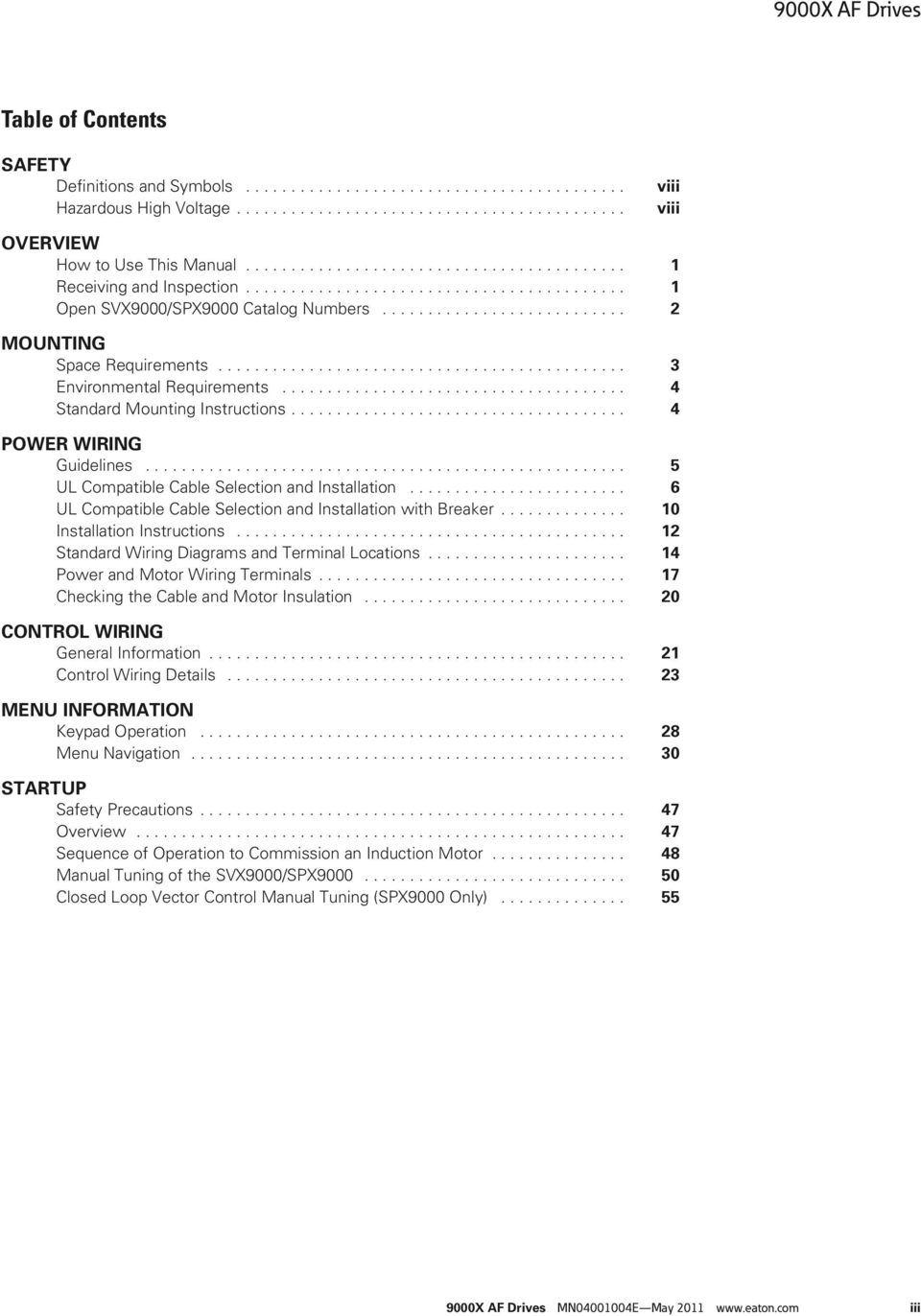
5 9000X AF Drives Table of Contents SAFETY Definitions and Symbols Hazardous High Voltage viii viii OVERVIEW How to Use This Manual Receiving and Inspection Open SVX9000/SPX9000 Catalog Numbers MOUNTING Space Requirements Environmental Requirements Standard Mounting Instructions POWER WIRING Guidelines UL Compatible Cable Selection and Installation UL Compatible Cable Selection and Installation with Breaker Installation Instructions Standard Wiring Diagrams and Terminal Locations Power and Motor Wiring Terminals Checking the Cable and Motor Insulation CONTROL WIRING General Information Control Wiring Details MENU INFORMATION Keypad Operation Menu Navigation STARTUP Safety Precautions Overview Sequence of Operation to Commission an Induction Motor Manual Tuning of the SVX9000/SPX Closed Loop Vector Control Manual Tuning (SPX9000 Only) X AF Drives MN E May iii
6 9000X AF Drives Table of Contents, continued TECHNICAL DATA General Specifications SVX9000/SPX9000 Series Drives Dimensions EMC Capability Declaration of Conformity Warranty and Liability Information FAULT AND WARNING CODES Fault Codes TROUBLESHOOTING CHARTS USING FAULT CODES Using Fault Codes SPARE PARTS Series Option Board Kits Johnson Controls Metasys N2 Network Communications Drive Options Spare Units and Replacement Parts for 9000X Drives iv 9000X AF Drives MN E May

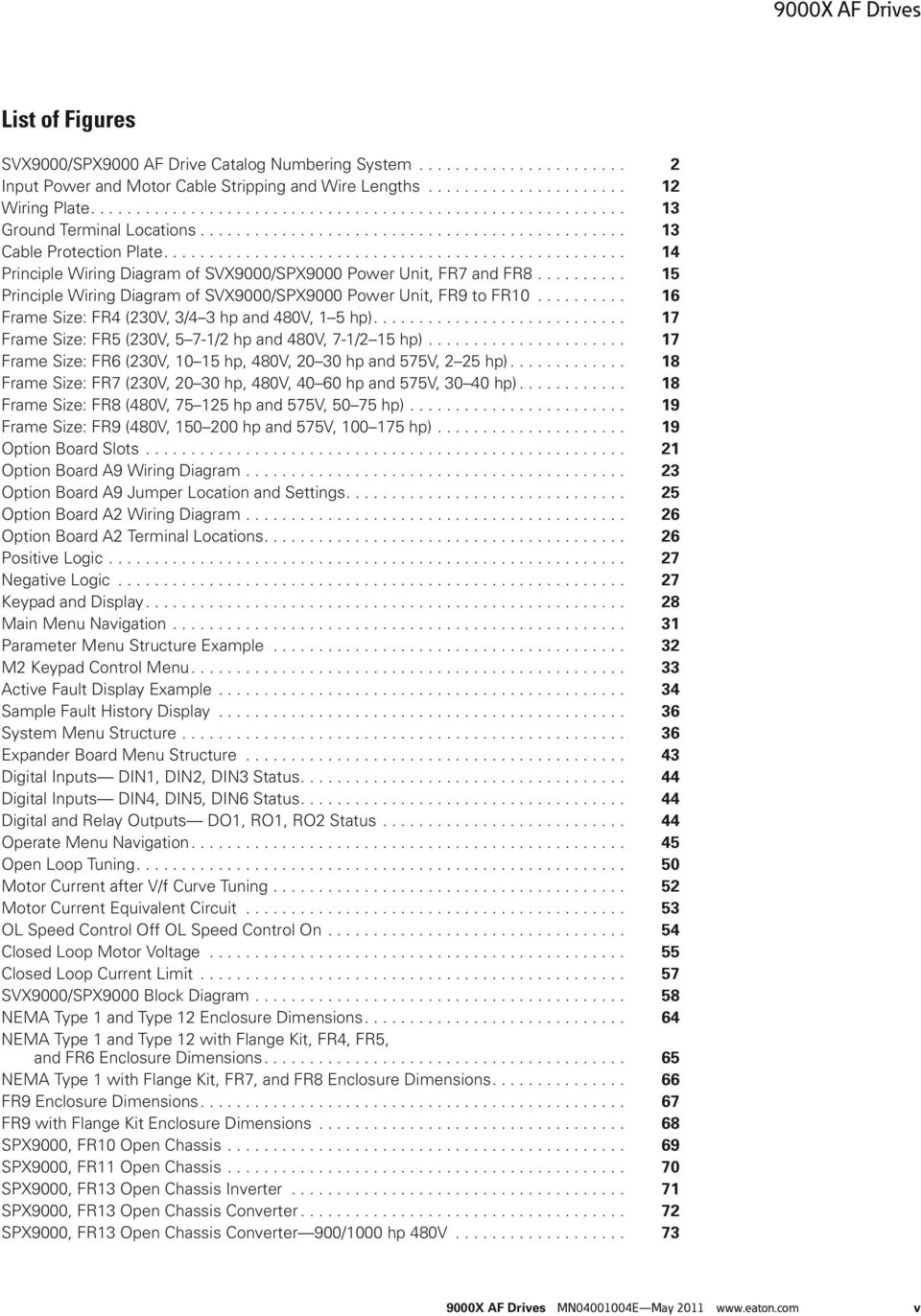
7 9000X AF Drives List of Figures SVX9000/SPX9000 AF Drive Catalog Numbering System Input Power and Motor Cable Stripping and Wire Lengths Wiring Plate Ground Terminal Locations Cable Protection Plate Principle Wiring Diagram of SVX9000/SPX9000 Power Unit, FR7 and FR Principle Wiring Diagram of SVX9000/SPX9000 Power Unit, FR9 to FR Frame Size: FR4 (230V, 3/4 3 hp and 480V, 1 5 hp) Frame Size: FR5 (230V, 5 7-1/2 hp and 480V, 7-1/2 15 hp) Frame Size: FR6 (230V, hp, 480V, hp and 575V, 2 25 hp) Frame Size: FR7 (230V, hp, 480V, hp and 575V, hp) Frame Size: FR8 (480V, hp and 575V, hp) Frame Size: FR9 (480V, hp and 575V, hp) Option Board Slots Option Board A9 Wiring Diagram Option Board A9 Jumper Location and Settings Option Board A2 Wiring Diagram Option Board A2 Terminal Locations Positive Logic Negative Logic Keypad and Display Main Menu Navigation Parameter Menu Structure Example M2 Keypad Control Menu Active Fault Display Example Sample Fault History Display System Menu Structure Expander Board Menu Structure Digital Inputs DIN1, DIN2, DIN3 Status Digital Inputs DIN4, DIN5, DIN6 Status Digital and Relay Outputs DO1, RO1, RO2 Status Operate Menu Navigation Open Loop Tuning Motor Current after V/f Curve Tuning Motor Current Equivalent Circuit OL Speed Control Off OL Speed Control On Closed Loop Motor Voltage Closed Loop Current Limit SVX9000/SPX9000 Block Diagram NEMA Type 1 and Type 12 Enclosure Dimensions NEMA Type 1 and Type 12 with Flange Kit, FR4, FR5, and FR6 Enclosure Dimensions NEMA Type 1 with Flange Kit, FR7, and FR8 Enclosure Dimensions FR9 Enclosure Dimensions FR9 with Flange Kit Enclosure Dimensions SPX9000, FR10 Open Chassis SPX9000, FR11 Open Chassis SPX9000, FR13 Open Chassis Inverter SPX9000, FR13 Open Chassis Converter SPX9000, FR13 Open Chassis Converter 900/1000 hp 480V X AF Drives MN E May v
8 9000X AF Drives List of Figures, continued AC Choke CHK AC Choke CHK AC Choke CHK AC Choke CHK Control Unit SPX9000 FR10 FR Control Unit with Star-Coupler Board, FR12 or FR14 Only F1 Overcurrent F2 Overvoltage F3 Earth Fault F5 Charging Switch F6 Emergency Stop F7 Saturation Trip F8 System Fault F9 Undervoltage F10 Input Line Supervision F11 Output Phase Supervision F12 Brake Chopper Supervision F13 Frequency Converter Under Temperature F14 Frequency Converter Over Temperature F15 Motor Stalled F16 Motor Over Temperature F17 Motor Under Load F22 Param Fault F24 Counter Fault F25 Microprocessor Watchdog Fault F31 IGBT Temperature (Hardware) F32 Fan Cooling F36 Control Unit F37 Device Change F38 Device Added (Indication Only) F39 Device Removed F40 Device Unknown F41 IGBT Temperature F42 Brake Resistor Over Temperature F44 DevParChange F45 DevParAdded F50 Analog Input Iin <4 ma F51 External Fault F52 Keypad Communication Fault X Series Option Boards Catalog Number Selection vi 9000X AF Drives MN E May

9 9000X AF Drives List of Tables Space Requirements for Mounting an SVX9000/SPX9000 Drive Cooling Airflow Requirements Cable Spacing C Cable and Fuse Sizes 230V Ratings C Cable and Fuse Sizes 480V Ratings C Cable and Fuse Sizes 575V Ratings Cable and Bus Bar Sizes, SPX FR10 FR12 480V Ratings Cable and Bus Bar Sizes, SPX FR13 FR14 480V Ratings Cable and Bus Bar Sizes, SPX FR10 FR12 575V Ratings Cable and Bus Bar Sizes, SPX FR13 FR14 575V Ratings Cable and Breaker Sizes 230V Ratings Cable and Breaker Sizes 480V Ratings Cable and Breaker Sizes 575V Ratings Power Connection Tightening Torque Power and Motor Cable Stripping Lengths Tightening Torques of Terminals Control Wiring Instructions Option Board A9 Terminal Descriptions Option Board A2 Terminal Descriptions LCD Status Indicators Navigation Buttons Fault Types Fault Time Data Total Counters Trip Counters Software Information Application Information Hardware Information Expander Board Information Monitoring Menu Items Standard Application Example Operate Menu Items Standard Application Example SVX9000/SPX9000 Drive Specifications V Power Ratings NEMA Type 1/IP21 or NEMA Type 12/IP V Power Ratings NEMA Type 1/IP21 or NEMA Type 12/IP V Power Ratings NEMA Type 1/IP21 or NEMA Type 12/IP Fault Type Categories Fault Codes Option Board Kits Control Panel Factory Options X Spare Units Replacement Parts 9000X Drives, V Replacement Parts FR4 FR9 9000X Drives, V Replacement Parts FR10 FR X Drives, V Replacement Parts FR6 FR9 9000X Drives, V Replacement Parts FR10 FR X Drives, V X AF Drives MN E May vii

10 9000X AF Drives Safety Definitions and Symbols WARNING This symbol indicates high voltage. It calls your attention to items or operations that could be dangerous to you and other persons operating this equipment. Read the message and follow the instructions carefully. This symbol is the Safety Alert Symbol. It occurs with either of two signal words: CAUTION or WARNING, as described below. WARNING Indicates a potentially hazardous situation which, if not avoided, can result in serious injury or death. CAUTION Indicates a potentially hazardous situation which, if not avoided, can result in minor to moderate injury, or serious damage to the product. The situation described in the CAUTION may, if not avoided, lead to serious results. Important safety measures are described in CAUTION (as well as WARNING). Hazardous High Voltage WARNING Motor control equipment and electronic controllers are connected to hazardous line voltages. When servicing drives and electronic controllers, there may be exposed components with housings or protrusions at or above line potential. Extreme care should be taken to protect against shock. Stand on an insulating pad and make it a habit to use only one hand when checking components. Always work with another person in case an emergency occurs. Disconnect power before checking controllers or performing maintenance. Be sure equipment is properly grounded. Wear safety glasses whenever working on electronic controllers or rotating machinery. CAUTION Remove any External Start signals or permissives before resetting the fault to prevent an unintentional restart of the SVX9000/SPX9000, which could result in personal injury or equipment damage WARNING Before startup, observe the warnings and safety instructions provided throughout this manual. Internal components and circuit boards (except the isolated I/O terminals) are at utility potential when the SVX9000/SPX9000 is connected to the line. This voltage is extremely dangerous and may cause death or severe injury if you come in contact with it. When the SVX9000/SPX9000 is connected to the utility, the motor connections U (T1), V (T2), W (T3) and DC bus/brake resistor connections B, B+, and R are live even if the motor is not running. Do not make any connections when the AF drive is connected to the utility line. Do not open the cover of the AF drive immediately after disconnecting power to the unit, because components within the drive remain at a dangerous voltage potential for some time. Wait at least five minutes after the cooling fan has stopped and the keypad or cover indicators are dark before opening the SVX9000/SPX9000 cover. The control I/O terminals are isolated from the utility potential, but relay outputs and other I/Os may have dangerous external voltages connected even if power is disconnected from the SVX9000/ SPX9000. Before connecting to the utility, make sure that the cover of the drive is closed. viii 9000X AF Drives MN E May

11 Overview Overview This chapter describes the purpose and contents of this manual, the receiving inspection recommendations, and the SVX9000/SPX9000 catalog numbering system. How to Use This Manual The purpose of this manual is to provide you with information necessary to install, set, and customize parameters, startup, troubleshoot and maintain the Eaton SVX9000/SPX9000 AF drives by Eaton s electrical business. To provide for safe installation and operation of the equipment, read the safety guidelines at the beginning of this manual and follow the procedures outlined before connecting power to the SVX9000/SPX9000. Keep this user manual handy and distribute to all users, technicians, and maintenance personnel for reference along with the appropriate application manual. Receiving and Inspection This SVX9000/SPX9000 AC drive has met a stringent series of factory quality requirements before shipment. It is possible that packaging or equipment damage may have occurred during shipment. After receiving your SVX9000/ SPX9000 drive, please check for the following: Check to make sure that the package(s) includes the proper drive, the User Manual, and rubber conduit covers, screws, conduit plate, and ground straps Inspect the unit to ensure it was not damaged during shipment Make sure that the part number indicated on the nameplate corresponds with the catalog number on your order If shipping damage has occurred, please contact the carrier involved and file a claim immediately. If the delivery does not correspond to your order, please contact your Eaton representative. Note: Do not destroy the packing. The template printed on the protective cardboard can be used for marking the mounting points of the SVX9000/SPX9000 AF drives on the wall or cabinet. 9000X AF Drives MN E May

12 Overview Open SVX9000/SPX9000 Catalog Numbers SVX9000/SPX9000 AF Drive Catalog Numbering System SVX 007 A 1-4 A 1 B 1 Product SVX = SVX industrial drive SPX = SPX drive Horsepower (I H ) F07 = 3/4 001 = 1 F15 = 1-1/2 002 = = = 5 IL only 005 = = 7-1/2 IL only 007 = 7-1/2 010 = = = = = = = = = = = = = = = = = = = = = = = = 900 H10 = 1000 H12 = 1200 H13 = 1350 H15 = 1500 H16 = 1600 H20 = 2000 AFD Software Series A = Standard software Enclosure 0 = Open chassis 1 = NEMA Type 1 2 = NEMA Type 12 Voltage 2 = V 4 = V 5 = V Keypad A = AlphaNumeric Input Options 1 = Three-phase, EMC H 2 = Three-phase, EMC N 4 = Three-phase, EMC L Braking N = No brake chopper B = Internal brake chopper Board Modifications 1 = Standard boards (A9, A2) Options Options appear in alphabetical order Extended I/O Card Options A3 = 2 RO, therm A4 = Encoder low volt +5V/15V24V A5 = Encoder high volt +15V/24V A7 = Double encoder A8 = 6 DI, DO, 2 AI, 1AO AE = 3 DI (encoder 10 24V), out +15V/+24V 2 DO (pulse + direction) AF = Safe disable B1 = 6 DI, 1 ext +24 Vdc/ext + 24 Vdc B2 = 1 RO (NC/NO), 1 therm B4 = 1 Al (ma isolated), 2 AO (ma isolated), 1 ext +24 Vdc/ext +24 Vdc B5 = 3 RO (NO) B8 = 1 ext +24 Vdc/ext + 24 Vdc, 3 Pt100 B9 = 1 RO (NO), 5 DI Vac input BB = SPI, absolute encoder Communication Cards CA = Johnson controls N2 CI = Modbus TCP CJ = BACnet CQ = Ethernet IP C2 = Modbus C3 = PROFIBUS DP C4 = LonWorks C5 = PROFIBUS DP (D9 connector) C6 = CANopen (slave) C7 = DeviceNet C8 = Modbus (D9 type connector) D1 = Adapter D2 = Adapter D3 = RS-232 with D9 connection Notes All 230V drives and 480V drives up to 200 hp (I H ) are only available with input option V drives 250 hp (I H ) or larger are only available with input option V drives 250 hp, 300 hp and 350 hp (I H ) are only available with enclosure style 0 (chassis). 480V drives up to 30 hp (I H ) are only available with brake chopper option B. 230V drives up to 15 hp (I H ) are only available with brake chopper option B. 480V drives 40 hp (I H ) and larger come with brake chopper option N as standard. 230V drives 20 hp (I H ) or larger come with brake chopper option N as standard. Factory promise delivery. Consult Sales Office for availability. SPX9000 drives only X AF Drives MN E May

13 Mounting Mounting The SVX9000/SPX9000 drive may be mounted side-by-side or stacked vertically, as outlined in the following section. Space Requirements If several units are mounted above each other, the clearance between the drives should equal C + D (see table and figure on this page). In addition, the outlet air used for cooling the lower unit must be directed away from the inlet air used by the upper unit. To ensure proper air circulation and cooling, follow the guidelines below. Space Requirements for Mounting an SVX9000/SPX9000 Drive C A A2 B A A2 B D Approximate Dimensions in Inches (mm) Frame Drive Type A A 2 B C D 4 230V, 1 3 hp I L, 3/4 3 hp I H 0.8 (20) 0.8 (20) 3.9 (100) 2.0 (50) 480V, 1 5 hp I H, 1-1/2 7-1/2 hp I L 5 230V, 5 10 hp I L, 5 7-1/2 hp I H 1.2 (30) 0.8 (20) 4.7 (120) 2.4 (60) 480V, 7-1/2 15 hp I H, hp I L 6 230V, hp I L, hp I H 1.2 (30) 0.8 (20) 6.3 (160) 3.1 (80) 480V, hp I H, hp I L 575V, 2 25 hp I H, 3 30 hp I L 7 230V, hp I L, hp I H 3.1 (80) 3.1 (80) 11.8 (300) 3.9 (100) 480V, hp I H, hp I L 575V, hp I H, hp I L 8 480V, hp I H, hp I L 3.1 (80) 5.9 (150) 3.1 (80) 11.8 (300) 7.9 (200) 575V, hp I H, hp I L 9 480V, hp I L, hp I H 2.0 (50) 3.1 (80) 15.7 (400) 9.8 (250) 575V, hp I H, hp I L 13.8 (350) Notes Dimensions represent the minimum clearance needed when mounting an SVX9000/SPX9000. See figure above. A = clearance around the SVX9000/SPX9000. A 2 = clearance needed to change the fan without disconnecting the motor cables. B = distance between adjacent SVX9000/SPX9000 drives or between the SVX9000/SPX9000 and an enclosure wall. C = clearance above the SVX9000/SPX9000. D = clearance below the SVX9000/SPX9000. Minimum clearance below the SVX9000/SPX9000 needed to change the fan. 9000X AF Drives MN E May

14 Mounting Environmental Requirements Ensure that the environment meets the requirements listed in the table on Pages 59 and 60 for any storage or operating situation. The table below specifies the minimum airflow required in the area where the drive will be mounted. Cooling Airflow Requirements Drive Type Cooling Air Required 230V, 3/4 3 hp I H 41 cfm (70 m 3 /h) 480V, 1 5 hp I H 230V, 5 7-1/2 hp I H 112 cfm (190 m 3 /h) 480V, 7-1/2 15 hp I H 230V, hp I H 250 cfm (425 m 3 /h) 480V, hp I H Standard Mounting Instructions 1. Measure the mounting space to ensure that it allows for the minimum space surrounding the drive. Drive dimensions are in Dimensions starting on Page Make sure the mounting surface is flat and strong enough to support the drive, is not flammable, and is not subject to excessive motion or vibration. 3. Ensure that the minimum airflow requirements for your drive are met at the mounting location. 4. Mark the location of the mounting holes on the mounting surface, using the template provided on the cover of the cardboard shipping package. 5. Using fasteners appropriate to your drive and mounting surface, securely attach the drive to the mounting surface using all four screws or bolts. 575V, 2 25 hp I H 230V, hp I H 250 cfm (425 m 3 /h) 480V, hp I H 575V, hp I H 480V, hp I H 383 cfm (650 m 3 /h) 575V, hp I H 480V, hp I H 765 cfm (1300 m 3 /h) 575V, hp I H 480V, hp I H 1530 cfm (2600 m 3 /h) 575V, hp I H 480V, hp I H 2295 cfm (3900 m 3 /h) 575V, hp I H 480V, hp I H 3060 cfm (5200 m 3 /h) 575V, hp I H X AF Drives MN E May

15 Power Wiring Power Wiring Guidelines To ensure proper wiring, use the following guidelines: Use heat-resistant copper cables only, 75 C or higher The input line cable and line fuses must be sized in accordance with the rated input current of the unit. See Pages 6 9 Provide a ground wire with both input power and output motor leads The control should be installed in accordance with all applicable codes. In accordance with NEC 430 Part IV, a protective device is required in the installation of the control. This protective device can be either a fuse or a circuit breaker. An RK fuse is an acceptable component. For maximum protection, Eaton recommends a Class T fuse. Input line cable and line fuses must be sized in accordance with tables on Pages 6 9. If the motor temperature sensing is used for overload protection, the output cable size may be selected based on the motor specifications If three or more shielded cables are used in parallel for the output on the larger units, every cable must have its own overload protection Avoid placing the motor cables in long parallel lines with other cables If the motor cables run in parallel with other cables, note the minimum distances between the motor cables and other cables given in the following table Cable Spacing Minimum Distance Between Cables in ft (m) Cable in ft (m) 1 (0.3) 164 (50) 3.3 (1.0) 656 (200) Note: The cable spacings also apply between the motor cables and signal cables of other systems. The maximum lengths of the motor cables are as follows: 1 2 hp, 230V units, 328 ft (100m) All other hp units, 984 ft (300m) The motor cables should cross other cables at an angle of 90 degrees If conduit is being used for wiring, use separate conduits for the input power wiring, the output power wiring, the signal wiring, and the control wiring SVX9000/SPX9000 Drive Short-Circuit Current Rating The SVX9000/SPX9000 drive has a maximum symmetrical short-circuit current (ISC) rating of 100 ka rms. The ISC ampere rating is in accordance with the requirements of UL 508C Standard for Power Conversion Equipment. These requirements cover open or enclosed equipment that supplies power to control a motor or motors operating at a frequency or voltage different than that of the input supply including devices rated 1500 volts or less. The SVX9000/ SPX9000 drive series uses an electronic overcurrent protection feature for compliance with the UL 508C requirement. Branch circuit protection must be provided in accordance with local codes. 9000X AF Drives MN E May

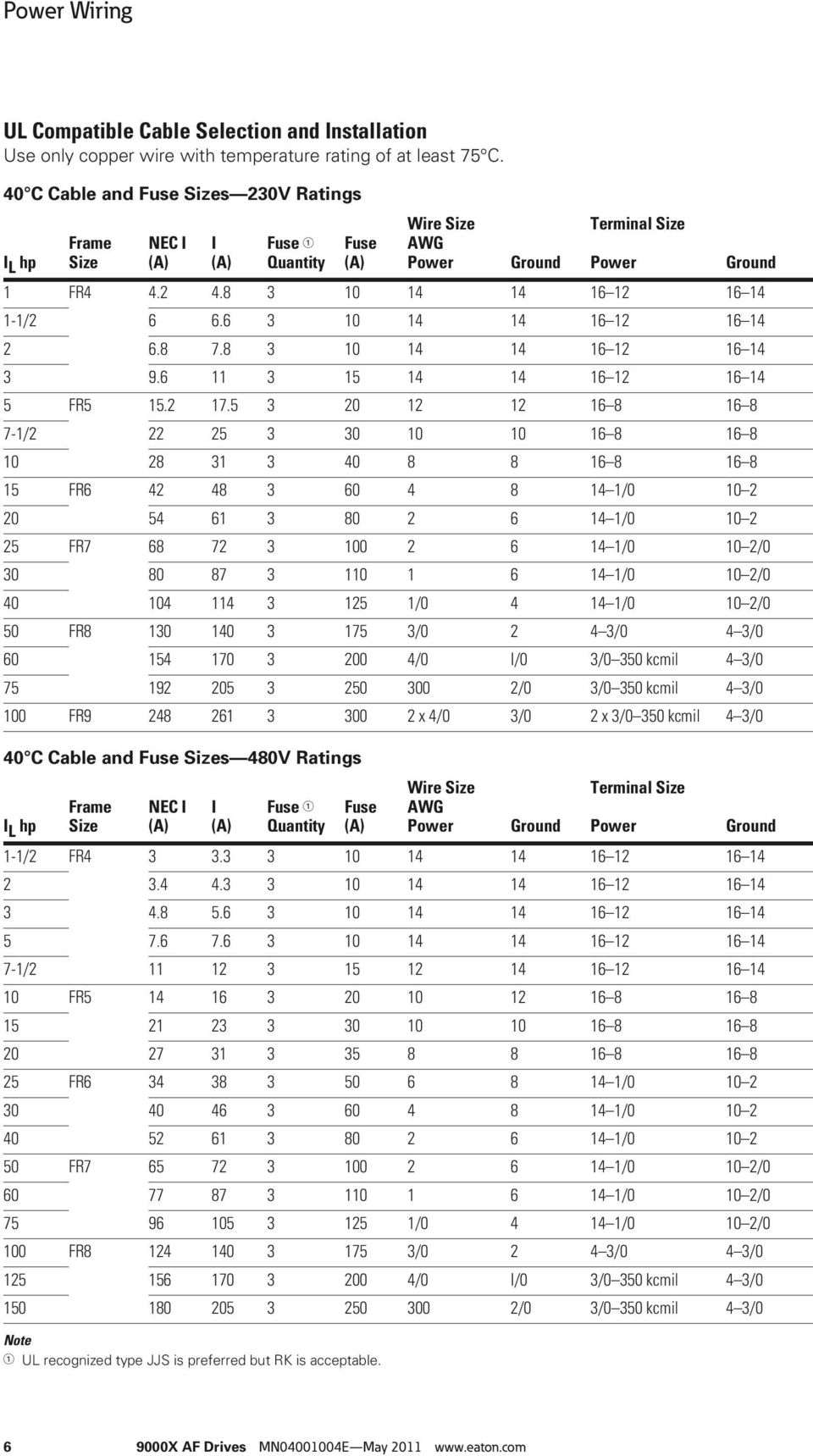
16 Power Wiring UL Compatible Cable Selection and Installation Use only copper wire with temperature rating of at least 75 C. 40 C Cable and Fuse Sizes 230V Ratings Wire Size Terminal Size I L hp Frame Size NEC I (A) I (A) Fuse Quantity Fuse (A) AWG Power Ground Power Ground 1 FR / FR / FR / / FR /0 10 2/ /0 10 2/ / /0 10 2/0 50 FR / /0 4 3/ /0 I/0 3/0 350 kcmil 4 3/ /0 3/0 350 kcmil 4 3/0 100 FR x 4/0 3/0 2 x 3/0 350 kcmil 4 3/0 40 C Cable and Fuse Sizes 480V Ratings Wire Size Terminal Size I L hp Frame Size NEC I (A) I (A) Fuse Quantity Fuse (A) AWG Power Ground Power Ground 1-1/2 FR / FR FR / / / FR /0 10 2/ /0 10 2/ / /0 10 2/0 100 FR / /0 4 3/ /0 I/0 3/0 350 kcmil 4 3/ /0 3/0 350 kcmil 4 3/0 Note UL recognized type JJS is preferred but RK is acceptable X AF Drives MN E May
17 Power Wiring 40 C Cable and Fuse Sizes 480V Ratings, continued Wire Size Terminal Size I L hp Frame Size NEC I (A) I (A) Fuse Quantity Fuse (A) AWG Power Ground Power Ground 200 FR x 4/0 3/0 2 x 3/0 350 kcmil x x 3/0 350 kcmil FR x kcmil 300 kcmil x kcmil 300 kcmil x kcmil 300 kcmil 500 FR x Bus bar Bus bar 550 NS x 4/0 500 Bus bar Bus bar 600 NS x Bus bar Bus bar 650 FR12 NS x Bus bar Bus bar 700 NS x Bus bar Bus bar 800 NS x 350 Bus bar Bus bar 40 C Cable and Fuse Sizes 575V Ratings Wire Size Terminal Size I L hp Frame Size NEC I (A) I (A) Fuse Quantity Fuse (A) AWG Power Ground Power Ground 3 FR / / / / / / / / / FR /0 10 1/ /0 10 1/0 60 FR /0 4 3/ / /0 4 3/ / /0 4 3/0 125 FR / /0 4 3/ /0 3/0 350 kcmil 4 3/ /0 3/0 350 kcmil 4 3/0 250 FR x 4/0 3/0 600 kcmil 300 kcmil x kcmil 300 kcmil x kcmil 300 kcmil 450 FR x Bus Bar Bus bar x Bus Bar Bus bar 550 NS x Bus Bar Bus bar 600 FR12 NS x 4/0 500 Bus Bar Bus bar 700 NS x Bus Bar Bus bar 800 NS x Bus Bar Bus bar Note UL recognized type JJS is preferred but RK is acceptable. 9000X AF Drives MN E May

18 Power Wiring Cable and Bus Bar Sizes, SPX FR10 FR12 480V Ratings Frame Internal Power Cables External Power Bus Bars I H hp Size Current Cu (per Phase) Cu (in Inches) Qty. 250 FR x 2/ x x 3/ x x 3/ x FR x 2 x 2/ x x 2 x 2/ x x 2 x 2/ x FR x 2 x 3/ x x 2 x 3/ x x 2 x 3/ x Cable and Bus Bar Sizes, SPX FR13 FR14 480V Ratings I H hp Frame Size Current Cu (in Inches) Qty. 800 FR x x x 300 kcmil 1.57 x x x x 250 kcmil 1.57 x x x x 250 kcmil 1.57 x FR x x x 250 kcmil 1.57 x x x x 300 kcmil 1.57 x Notes 90 C rating recommended. Rigid copper connection. Internal Power Connections Bus Bar Size NFE INU (in Inches) Bus Bar Size/ Phase (Choke NFE) (in Inches) Cable Size/ Phase (Choke NFE) Supply Bus Bars X AF Drives MN E May

19 Power Wiring Cable and Bus Bar Sizes, SPX FR10 FR12 575V Ratings Frame Internal Power Cables External Power Bus Bars I H hp Size Current Cu (per Phase) Cu (in Inches) Qty. 200 FR x 2/ x x 2/ x x 2/ x FR x 3/ x x 3/ x x 2 x 2/ x FR x 2 x 2/ x x 2 x 2/ x x 2 x 2/ x Cable and Bus Bar Sizes, SPX FR13 FR14 575V Ratings I H hp Frame Size Current Cu (in Inches) Qty. 800 FR x x x 300 kcmil 1.18 x x x x 250 kcmil 1.18 x x x x 300 kcmil 1.18 x FR x x x 250 kcmil 1.18 x x x x 250 kcmil 1.18 x x x x 300 kcmil 1.18 x Notes 90 C rating recommended. Rigid copper connection. Internal Power Connections Bus Bar Size NFE INU (in Inches) Bus Bar Size/ Phase (Choke NFE) (in Inches) Cable Size/ Phase (Choke NFE) Supply Bus Bars 9000X AF Drives MN E May

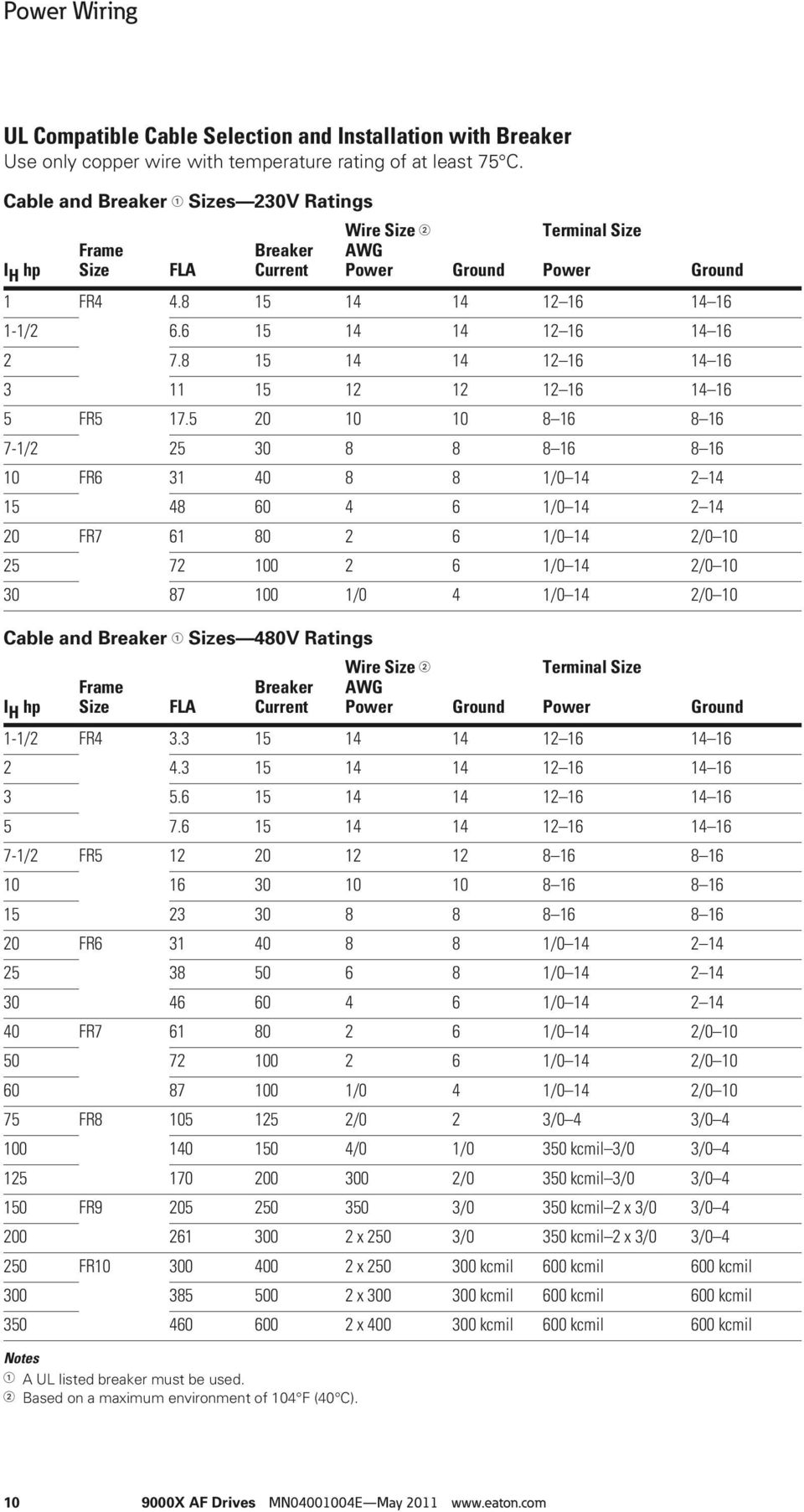
20 Power Wiring UL Compatible Cable Selection and Installation with Breaker Use only copper wire with temperature rating of at least 75 C. Cable and Breaker Sizes 230V Ratings Wire Size Terminal Size I H hp Frame Size FLA Breaker Current AWG Power Ground Power Ground 1 FR / FR / FR / / FR /0 14 2/ /0 14 2/ /0 4 1/0 14 2/0 10 Cable and Breaker Sizes 480V Ratings Wire Size Terminal Size I H hp Frame Size FLA Breaker Current AWG Power Ground Power Ground 1-1/2 FR /2 FR FR / / / FR /0 14 2/ /0 14 2/ /0 4 1/0 14 2/ FR /0 2 3/0 4 3/ /0 1/0 350 kcmil 3/0 3/ /0 350 kcmil 3/0 3/ FR /0 350 kcmil 2 x 3/0 3/ x 250 3/0 350 kcmil 2 x 3/0 3/ FR x kcmil 600 kcmil 600 kcmil x kcmil 600 kcmil 600 kcmil x kcmil 600 kcmil 600 kcmil Notes A UL listed breaker must be used. Based on a maximum environment of 104 F (40 C) X AF Drives MN E May
21 Power Wiring Cable and Breaker Sizes 480V Ratings, continued Wire Size Terminal Size I H hp Frame Size FLA Breaker Current AWG Power Ground Power Ground 400 FR x Bus bar Bus bar x 4/0 500 Bus bar Bus bar x Bus bar Bus bar 600 FR x Bus bar Bus bar x Bus bar Bus bar x 400 Bus bar Bus bar Cable and Breaker Sizes 575V Ratings Wire Size Terminal Size I H hp Frame Size FLA Breaker Current AWG Power Ground Power Ground 2 FR / / / / / / / / / FR /0 14 1/ /0 14 1/ FR /0 4 3/ /0 4 3/ /0 6 3/0 4 3/ /0 6 3/0 4 3/ FR / kcmil 2x3/0 3/ /0 350 kcmil 2x3/0 3/ FR x kcmil 600 kcmil 600 kcmil x kcmil 600 kcmil 600 kcmil x kcmil 600 kcmil 600 kcmil 400 FR x Bus bar Bus bar x Bus bar Bus bar x Bus bar Bus bar 550 FR x 4/0 500 Bus bar Bus bar x Bus bar Bus bar x Bus bar Bus bar Notes The current interrupting of the breaker, up to 100 kaic, will determine the overall current rating of the combination. A UL listed breaker must be used. Based on a maximum environment of 104 F (40 C). 9000X AF Drives MN E May
22 Power Wiring Power Connection Tightening Torque Rating Frame Size Tightening Torque (in-lbs) Tightening Torque (Nm) 230V, 3/4 3 hp FR V, 1 5 hp V, 5 7-1/2 hp FR V, 7-1/2 15 hp V, hp FR V, hp V, 2 25 hp V, hp FR V, hp V, hp V, hp FR8 340/187 40/22 575V, hp 340/187 40/22 480V, hp FR9 340/187 40/22 575V, hp 340/187 40/22 Installation Instructions 1. Strip the motor and input power cables as shown in the figure below and the table on Page 13. Input Power and Motor Cable Stripping and Wire Lengths Ground Ground A1 C1 A2 C2 B1 D1 B2 D2 Power Motor Note The isolation standoff of the bus bar will not withstand the listed tightening torque. Use a wrench to apply a counter torque when tightening X AF Drives MN E May
23 Power Wiring Cable Stripping Lengths for Power and Motor Cables Power and Motor Cable Stripping Lengths Product Frame Power Wiring in Inches (mm) Motor Wiring in Inches (mm) hp Voltage Size A1 B1 C1 D1 A2 B2 C2 D2 3/ V FR (15) 1.38 (35) 0.39 (10) 0.79 (20) 0.28 (7) 1.97 (50) 0.28 (7) 1.38 (35) V 5 7-1/2 230V FR (20) 1.57 (40) 0.39 (10) 1.18 (30) 0.79 (20) 2.36 (60) 0.39 (10) 1.57 (40) 7-1/ V V FR (20) 3.54 (90) 0.59 (15) 2.36 (60) 0.79 (20) 3.54 (90) 0.59 (15) 2.36 (60) V V V FR (25) 4.72 (120) 0.98 (25) 4.72 (120) 0.98 (25) 4.72 (120) 0.98 (25) 4.72 (120) V V V FR (28) 9.45 (240) 1.10 (28) 9.45 (240) 1.10 (28) 9.45 (240) 1.10 (28) 9.45 (240) V V FR (28) (295) 1.10 (28) (295) 1.10 (28) (295) 1.10 (28) (295) V 2. Locate the plastic bag containing the wiring plate. Ground Terminal Locations Wiring Plate 3. If conduit is being used, attach the wiring plate to the drive then conduit. 4. Pass the motor and input power wires/cables through the holes of the wiring plate. 5. Connect the input power and motor and control wires to their respective terminals according to the wiring diagrams in the section marked Standard Wiring Diagrams and Terminal Locations on Page If an optional external brake resistor is used, connect its cable to the appropriate terminals. See Standard Wiring Diagrams and Terminal Locations on Page If shielded cable is used, connect the shields of the input line power cable and the motor cable to the ground terminals of the SVX9000/SPX9000 drive, the motor, and the line power supply. 8. If shielded cable is not used, check the connection of the ground cable to the motor, the SVX9000/SPX9000 drive, and the input line power terminals marked with. 9000X AF Drives MN E May
24 Power Wiring 9. Attach the wiring plate with the screws provided. Ensure that no wires are trapped between the frame and the wiring plate. 10. Insert the rubber grommets supplied into the wiring plate holes that have not been used, as illustrated in the figure to the right. Cable Protection Plate Standard Wiring Diagrams and Terminal Locations The following wiring diagrams show the line and motor connections of the frequency converter. Principle Wiring Diagram of SVX9000/SPX9000 Power Unit, FR4 to FR5 and FR6 Power Board 230V 480V 575V 3/4 15 hp 1 30 hp 2 25 hp Control Board L1 L2 L3 L1 L2 See Note L3 R U V W DC DC+/ R+ BR Option M 3~ Note: Integrated Brake Chopper Circuit Not Included on 575V units. Note: When using a single-phase supply, for units rated for such, connect the input power to terminals L1 and L2. Consult Eaton for more information X AF Drives MN E May
25 Power Wiring Principle Wiring Diagram of SVX9000/SPX9000 Power Unit, FR7 and FR8 Power Board 230V 480V 575V hp hp hp Control Board RFI Filter L1 L2 L3 DC+/ R+ R U V W DC L1 L2 See Note L3 BR Option M 3~ Note: Integrated Brake Chopper Circuit Not Included on 575V units. Note: When using a single-phase supply, for units rated for such, connect the input power to terminals L1 and L2. Consult Eaton for more information. 9000X AF Drives MN E May
26 Power Wiring Principle Wiring Diagram of SVX9000/SPX9000 Power Unit, FR9 to FR10 The dotted lines refer to components present in FR9 but not in FR10. Power Board 480V 575V hp hp Control Board RFI Filter L1 L2 L3 DC+/ R+ R U V W DC BR Option L1 L2 See Note L3 M 3~ X AF Drives MN E May
27 Power Wiring Power and Motor Wiring Terminals Frame Size: FR4 (230V, 3/4 3 hp and 480V, 1 5 hp) Frame Size: FR5 (230V, 5 7-1/2 hp and 480V, 7-1/2 15 hp) 9000X AF Drives MN E May
28 Power Wiring Frame Size: FR6 (230V, hp, 480V, hp and 575V, 2 25 hp) Frame Size: FR7 (230V, hp, 480V, hp and 575V, hp) X AF Drives MN E May
29 Power Wiring Frame Size: FR8 (480V, hp and 575V, hp) Supplied only when brake chopper included with drive Frame Size: FR9 (480V, hp and 575V, hp) 9000X AF Drives MN E May
30 Power Wiring Checking the Cable and Motor Insulation 1. Check the motor cable insulation as follows: Disconnect the motor cable from terminals U, V, and W of the SVX9000/SPX9000 and from the motor. Measure the insulation resistance of the motor cable between each phase conductor as well as between each phase conductor and the protective ground conductor. The insulation resistance must be >1M ohms. 2. Check the input power cable insulation as follows: Disconnect the input power cable from terminals L1, L2, and L3 of the SVX9000/SPX9000 and from the utility line feeder. Measure the insulation resistance of the input power cable between each phase conductor as well as between each phase conductor and the protective ground conductor. The insulation resistance must be >1M ohms. 3. Check the motor insulation as follows: Disconnect the motor cable from the motor and open any bridging connections in the motor connection box. Measure the insulation resistance of each motor winding. The measurement voltage must equal at least the motor nominal voltage but not exceed 1000V. The insulation resistance must be >1M ohms X AF Drives MN E May
31 Control Wiring Control Wiring General Information The control unit of the SVX9000/SPX9000 consists of the control board and various option boards that plug into the five slot connectors (A to E) of the control board. Galvanic isolation of the control terminals is provided as follows: The control connections are isolated from power, and the GND terminals are permanently connected to ground The digital inputs are galvanically isolated from the I/O ground The relay outputs are double-isolated from each other at 300 Vac Option Board General Information The SVX9000/SPX9000 series drives can accommodate a wide selection of expander and adapter option boards to customize the drive for your application needs. Control Wiring Guidelines Wire the control terminals using the following guidelines: The control wires shall be at least AWG 20 (0.5 mm 2) shielded cables The maximum wire size is AWG 14 (2.5 mm 2) for the relay terminals and AWG 16 (1.5 mm 2 ) for all other terminals The tightening torques for the option board terminals are listed in the table below Tightening Torques of Terminals Tightening Torque Terminal Screw in-lbs Nm Relay and thermistor terminals (M3 screw) Other terminals (M2.6 screw) The drive s control unit is designed to accept a total of five option boards. Option boards are available for normal analog and digital inputs and outputs, communication, and additional application-specific hardware. The SVX9000/SPX9000 factory-installed standard option board configuration includes an A9 I/O board and an A2 relay output board, which are installed in slots A and B. For information on additional option boards, see the 9000X Series Drives Option Board User Manual. Option Board Slots A B C D E 9000X AF Drives MN E May
32 Control Wiring Control Wiring Instructions Step 1. Unlock the bottom cover by turning the locking screw 90 degrees counterclockwise. Example 2. Remove the bottom cover by rotating the cover toward you on the base hinges, then lifting the cover away from the base. 3. Wire the control terminals by following the details for the specific option boards shown on the following pages. Note: For ease of access, the option board terminal blocks can be unplugged for wiring X AF Drives MN E May
33 Control Wiring Control Wiring Details Wiring Option Board A9 Option Board A9 Wiring Diagram Basic I/O Board A9 +10V ref AI1+ GND Input Reference (Voltage) AI2+ AI2 4 5 Input Reference (Current) 24V out 6 GND 7 DIN1 8 DIN2 9 NOTE: See page 25 for X-3 jumper settings DIN3 CMA See page 24 24V out 12 GND 13 DIN4 14 DIN5 15 DIN6 16 CMB 17 See page 24 AO (4)/20 ma AO1 19 RL<500 ohms DO V<+48V I<50 ma 9000X AF Drives MN E May
34 Control Wiring Option Board A9 Terminal Descriptions Terminal Signal Description and Parameter Reference 1 +10V ref Reference voltage Maximum current 10 ma 2 AI1+ Analog input, voltage Default: 0 to +10V (R i = 200k ohms) 3 GND Analog input common 10V to +10V (joystick control) 4 to 20 ma (R i = 250 ohms) Select V or ma with jumper block X1 (see Page 25) Differential input if not connected to ground; allows ±20V differential mode voltage to GND 4 AI2+ Analog input Default: 4 to 20 ma (R i = 250 ohms) 5 GND/AI2 Analog input common 0 to +10V (R i = 200k ohms) 10V to +10V (joystick control) Select V or ma with jumper block X2 (see Page 25) Differential input if not connected to ground; allows ±20V differential mode voltage to GND 6 24V out 24V control voltage (bi-directional) ±15%, 250 ma (all boards total); 150 ma (max. current from single board); can be used as external power backup for the control (and fieldbus); galvanically connected to terminal #12 7 GND I/O ground Ground for reference and controls; galvanically connected to terminals #13, 19 8 DIA1 Digital input 1 R i = min. 5k ohms 9 DIA2 Digital input 2 10 DIA3 Digital input 3 11 CMA Digital input common A for DIN1, DIN2 and DIN3 Must be connected to GND or 24V of I/O terminal or to external 24V or GND. Selection with jumper block X3 (see Page 25) 12 24V out 24V control voltage (bi-directional) Same as terminal #6; galvanically connected to terminal #6 13 GND I/O ground Same as terminal #7; galvanically connected to terminals #7, and DIB4 Digital input 4 R i = min. 5k ohms 15 DIB5 Digital input 5 16 DIB6 Digital input 6 17 CMB Digital input common B for DIN4, DIN5 and DIN6 Must be connected to GND or 24V of I/O terminal or to external 24V or GND. Select with jumper block X3 (see Page 25) 18 A01+ Analog signal (+output) Output signal range: 0 20 ma default Current: 0(4) 20 ma, RL max 500 ohms or Voltage: 0 to 10V, RL >1k ohms Selection with jumper block X6 (see Page 25) 19 A01 Analog output common Maximum Vin = 48 Vdc; galvanically connected to terminals #7, DO1 Digital output 1 Open collector, maximum current = 50 ma X AF Drives MN E May
35 Control Wiring Option Board A9 Jumper Location and Settings X1 Jumper Setting Analog Input 1 (AI1) 0 to 10V* Voltage Input 4 to 20 ma Current Input 0 to 10V (Differential) Voltage Input 10 to 10V Voltage Input ABCD ABC D ABC D ABC D X2 Jumper Setting Analog Input 2 (AI2) 4 to 20 ma* Current Input 0 to 10V Voltage Input 0 to 10V (Differential) Voltage Input 10 to 10V Voltage Input ABC D ABC D ABCD ABCD X6 Jumper Setting Analog Output 1 (A01) 0(4) to 20 ma* Current Output 0 to 10V Voltage Output ABCD ABCD ABC D ABC D ABC D X1 X2 X6 X3 Jumper Setting CMA and CMB Grounding X3 * Designates Default Jumper Settings CMB Connected to Ground* CMA Connected to Ground CMB Isolated from Ground CMA Isolated from Ground CMB and CMA Internally Connected and Isolated from Ground 9000X AF Drives MN E May
36 Control Wiring Wiring Option Board A2 Option Board A2 Wiring Diagram Basic Relay Board A2 RO1/1 21 RO1/2 22 RO1/3 23 R L AC/DC RO2/1 RO2/2 RO2/ Switching: <8A/24 Vdc <0.4A/125 Vdc <8A/250 Vac Continuously <2 Arms Option Board A2 Terminal Descriptions Terminal Signal Technical Information 21 RO1/1 Normally closed (NC) Switching capacity: 22 RO1/2 Common 24 Vdc/8A 250 Vac/8A 23 RO1/3 Normally open (NO) 125 Vdc/0.4A Min switching load: 5V/10 ma Continuous capacity: <2 Arms 24 RO2/1 Normally closed (NC) Switching capacity: 25 RO2/2 Common 24 Vdc/8A 250 Vac/8A 26 RO2/3 Normally open (NO) 125 Vdc/0.4A Minimum switching load: 5V/10 ma Continuous capacity: <2 Arms Option Board A2 Terminal Locations X AF Drives MN E May
37 Control Wiring Inverting the Digital Input Signal The active signal level depends on which potential the common inputs CMA and CMB (terminals 11 and 17) are connected to. The alternatives are either +24V or ground (0V). See figures below. The 24V control voltage and the ground for the digital inputs and the common inputs (CMA, CMB) can be sourced from either the internal 24V supply or an external supply. Positive Logic Positive logic (+24V is the active signal) = the input is active when the switch is closed. Negative Logic Negative logic (0V is the active signal) = the input is active when the switch is closed. +24V Ground DIN1 DIN1 DIN2 DIN2 DIN3 DIN3 Ground CMA +24V CMA 9000X AF Drives MN E May
38 Menu Information Menu Information Keypad Operation Keypad and Display LCD Status Indicators Indicator Description Run Indicates that the SVX9000/SPX9000 is running and controlling the load. Blinks when a stop command has been given but the SVX9000/SPX9000 is still ramping down. Counterclockwise Operation The output phase rotation is BAC, corresponding to counterclockwise rotation of most motors. Clockwise Operation The output phase rotation is ABC, corresponding to clockwise rotation of most motors. Stop Indicates that the SVX9000/SPX9000 is stopped and not controlling the load. Ready Indicates that the SVX9000/SPX9000 is ready to be started. Alarm Indicates that there is one or more active drive alarm(s). Fault Indicates that there is one or more active drive fault(s). I/O Terminal Indicates that the I/O terminals have been chosen for control. Keypad Indicates that the keypad has been chosen for control. Bus/Communications Indicates that the communications bus control has been chosen for control X AF Drives MN E May
39 Menu Information LED Status Indicators, continued Indicator local remote fault Description Local Steady Illumination Indicates that the SVX9000/SPX9000 is ready to be started and operated from the local mode. Local Flashing Indicates that the SVX9000/SPX9000 is ready for operating command to select local or remote operation. Remote Indicates that the SVX9000/SPX9000 is operating and controlling the load remotely. Fault Indicates that there is one or more active drive fault(s). Navigation Buttons Button Description Start This button operates as the START button for normal operation when the Keypad is selected as the active control. Enter This button is used in the parameter edit mode to save the parameter setting and move to the next parameter to reset the Fault History if pressed while in the Fault History menu to confirm the acceptance of a change to change a virtual button status while in the Button menu to confirm the start-up list at the end of the Startup Wizard when the Operate menu is active, to exit the Operate submenu Stop This button has two integrated operations. The button operates as STOP button during normal operation motor STOP from the keypad, which is always active unless disabled by the StopButtonActive parameter used to reset the active faults Reset Resets the active faults. Local/Remote Switches between LOCAL and REMOTE control for start, speed reference, and reverse functions. The control locations corresponding to local and remote can be selected within an application. Left Arrow Navigation button, movement to left In parameter edit mode, exits mode, backs up one step Cancels edited parameter (exit from a parameter edit mode) When in Operate menu will move backward through menu At end of Startup Wizard, repeats the Startup Wizard setup menu Right Arrow Navigation button, movement to right Enter parameter group mode Enter parameter mode from group mode When in Operate menu will move forward through menu Up and Down Arrows Move either up or down a menu list to select the desired menu item Editing a parameter/password, while the active digit/character is scrolled Increase/decrease the reference value of the selected parameter In the Operate menu, will cause the display of the current reference source and value and allow its change if the keypad is the active reference source. Used to set the password (if defined) when leaving the Operate menu Scroll through the Active Faults menu when the SVX9000/SPX9000 is stopped 9000X AF Drives MN E May
40 Menu Information Menu Navigation Navigation Tips To navigate within one level of a menu, use the up and down arrows When in edit mode, pressing the right arrow a second time will allow you to edit the parameter value digit by digit To move deeper into the menu structure and back out, use the right and left arrows To edit a parameter, navigate to show that parameter s value, and press the right arrow button to enter the edit mode. In edit mode, the parameter value will flash When in edit mode, the parameter value can be changed by pressing the up or down arrow keys To confirm the parameter change you must press the ENTER button. The value will not change unless the ENTER button is pushed Some parameters cannot be changed while the SVX9000/ SPX9000 is running. The screen will display LOCKED if you attempt to edit these parameters while the drive is running. Stop the drive to edit these parameters. See the appropriate application manual for identification of these parameters specific to your chosen application X AF Drives MN E May
41 Menu Information Main Menu The data on the control keypad are arranged in menus and submenus. The first menu level consists of M1 to M8 and is called the Main Menu. The structure of these menus and their submenus is illustrated below. Some of the submenus will vary for each application choice. Main Menu Navigation Menu Navigation: Up Arrow The up arrow advances to the next menu item. For example, pressing the up arrow once will advance from M1 to M2. Down Arrow The down arrow backs up to the previous menu item. For example, pressing the down arrow once will back up from M2 to M1. Right Arrow The right arrow will advance to the next level in the menu. For example, pressing the right arrow once will advance from M2 to R2.1. Left Arrow The left arrow will back up one level in the menu structure. For example, pressing the left arrow once will back up from R2.1 to M M1 Parameters G G1.x M2 Keypad Control R2.1 Keypad Reference P2.2 Keypad Direction... P2.x Stop Button Active M3 Active Faults A3.1 Active Fault 1 T3.1.1 Operation Days... T Zero Speed... A3.x Active Fault x M4 Fault History H4.1 Most Recent Fault T4.1.1 Operation Days... T Zero Speed... H4.1.x Oldest Saved Fault M5 System Menu S5.1 Language S5.2 Application S5.3 Copy Parameters S5.4 Compare Parameters S5.5 Security S5.6 Keypad Settings S5.7 Hardware Settings S5.8 System Information M6 Expander Boards G6.1 Slot A Board... G6.5 Slot E Board M7 Monitor V7.1 Output Frequency 0.00 Hz V7.2 Frequency Reference 0.00 Hz... M7.1x Multimonitor N7.1x.1 M8 Operate Mode O1 Output Frequency 0.0 Hz O2 Freq Reference 0.0 Hz... Ox X AF Drives MN E May
42 Menu Information Parameter Menu (M1) The Parameter Menu is a single or multi-level menu dependent upon the application in use, arranged by the parameter group items. The figure below illustrates this for the standard application. Parameters and parameter groups are explained in further detail in the appropriate application manual. Parameter Menu Structure Example M1 Parameters Menu + G1.1 Basic Parameters P1.1.1 Minimum Frequency P1.1.2 Maximum Frequency... P Preset Speed 1 + G1.2 Input Signals P1.2.1 Start/Stop Logic P1.2.2 DIN3 Function... P1.2.9 AI2 Signal Select + G1.3 Output Signals P1.3.1 A1out Signal P1.3.2 A1out Content... P A2out Scale + G1.4 Drive Control P1.4.1 Ramp 1 Shape P1.4.2 Ramp 2 Shape... P Flux Brake Current + G1.5 Skip Frequency P1.5.1 Skip F1 Low Limit P1.5.2 Skip F1 High Limit P1.5.3 PH Accel/Decel Ramp + G1.6 Motor Control P1.6.1 Motor Control Mode P1.6.2 V/Hz Optimization G1.7 Protections P mA Input Fault P mA Fault Frequency... P Slot Comm Fault Response G1.8 Auto Restart P1.8.1 Wait Time P1.8.2 Trial Time... P Underload Tries X AF Drives MN E May
43 Menu Information Keypad Control Menu (M2) In the Keypad Control Menu, you can set the frequency reference, choose the motor direction for keypad operation, and determine if the STOP button will be active at all times. See figure below. M2 Keypad Control Menu M2 Keypad Control R2.1 Keypad Reference P2.2 Keypad Direction... P2.x Stop Button Active R2.1 Keypad Reference Range: Min. Frequency Max. Frequency Units: Hertz Keypad Reference This displays and allows the operator to edit the keypad frequency reference. A change takes place immediately. This reference value will not influence the output frequency unless the keypad has been selected as the active control place. P2.2 Keypad Direction Range: Forward, Reverse Default: Forward Keypad Direction This allows the operator to change the rotation direction of the motor. This setting will not influence the rotation direction of the motor unless the keypad has been selected as the active control place. P2.3 Stop Button Active Range: Yes, No Default: Yes StopButtonActive By default, pushing the STOP button will always stop the motor regardless of the selected control place. If this parameter is set to No, the STOP button will stop the motor only when the keypad has been selected as the active control place. Note This parameter number varies for different applications. 9000X AF Drives MN E May
44 Menu Information Active Faults Menu (M3) When a fault occurs, the SVX9000/SPX9000 stops. The sequence indication F1, the fault code, a short description of the fault, and the fault, type symbol will appear on the display. In addition, the indication FAULT or ALARM is displayed and, in case of a FAULT, the red LED on the keypad starts to blink. If several faults occur simultaneously, the sequence of active faults can be browsed with the Browser buttons. See figure below. The active faults memory can store the maximum of 10 faults in the sequential order of appearance. The fault remains active until it is cleared with either the STOP or RESET buttons, or with a reset signal from the I/O terminal. Upon fault reset, the display will be cleared and will return to the same state it was before the fault trip. Active Fault Display Example 51 Ext Fault F T1 T13 CAUTION Remove any External Start signals or permissives before resetting the fault to prevent an unintentional restart of the SVX9000/SPX9000, which could result in personal injury or equipment damage X AF Drives MN E May
45 Menu Information Fault Type Range: A, F, AR, FT Fault Type There are four different types of faults. These faults and their definitions are given in the table below Fault Types Fault Type Fault Name Description A Alarm This type of fault is a sign of an unusual operating condition. It does not cause the drive to stop, nor does it require any special actions. The A fault remains in the display for about 30 seconds. F Fault An F fault is a kind of fault that makes the drive stop. Actions need to be taken in order to restart the drive. AR Auto-Restart Fault If an AR fault occurs, the drive will also stop immediately. The fault is reset automatically and the drive tries to restart the motor. If the restart is not successful, a fault trip (FT) occurs. FT Fault Trip If the drive is unable to restart the motor after an AR fault, an FT fault occurs. The effect of the FT fault is the same as that of the F fault the drive is stopped. Fault Code Range: 1 54 Fault codes indicate the cause of the fault. A list of fault codes, their descriptions, and possible solutions can be found starting on Page 81. Fault Time Data Record Range: T.1 T.13 In this menu, important data recorded at the time the fault is available. This feature is intended to help the user or the service person to determine the cause of fault. The table below indicates the information that is recorded. Fault Time Data Fault Type Units Description T.1 D Counted operation days (Fault 43: Additional code) T.2 hh:mm:ss (d) T.3 Hz hh:mm:ss Notes Real-time record. If real-time is set, T.1 and T.2 will appear as follows: Counted operation hours (Fault 43: Counted operation days) Output frequency (Fault 43: Counted operation hours) T.4 A Motor current T.5 V Motor voltage T.6 % Motor power T.7 % Motor torque T.8 V DC bus voltage T.9 C Unit temperature T.10 Run status T.11 Direction T.12 Warnings T.13 Zero speed T.1 yyyy-mm-dd Counted operation days (Fault 43: Additional code) T.2 hh:mm:ss.sss Counted operation hours (Fault 43: Counted operation days) 9000X AF Drives MN E May
46 Menu Information Fault History Menu (M4) All faults are stored in the Fault History Menu, which can be viewed by using the Browser buttons. Additionally, the Fault time data record pages are accessible for each fault as in the Active Faults Menu described earlier. See figure below. The SVX9000/SPX9000 s memory can store a maximum of 30 faults, in the order of appearance. If there are 30 uncleared faults in the memory, the next occurring fault will erase the oldest fault from the memory. Sample Fault History Display System Menu (M5) The controls associated with the general use of the drive, such as application selection, customized parameter sets, or information about the hardware and software are located in the System Menu. Password protection can be activated by parameter S Descriptions of the system menu parameters are illustrated in the figure below. System Menu Structure 11 Output Phase F T1 T13 Note: Pressing the ENTER button for three seconds will clear the entire fault history S5.1 Language Selection S5.2 Application Selection S5.3 Copy Parameters S5.3.1 Parameter Sets S5.3.2 Upload to Keypad S5.3.3 Download from Keypad S5.3.4 Automate Backup S5.4 Parameter Comparison + S5.5 Security S5.5.1 Password P5.5.2 Parameter Lock P5.5.3 Start-Up Wizard P5.5.4 Multimonitor Items + S5.6 Keypad Settings P5.6.1 Default Page P5.6.2 Default Page/Operating Menu P5.6.3 Timeout Time P5.6.4 Contrast Adjustment P5.6.5 Backlight Time + S5.7 Hardware Settings P5.7.1 Internal Brake Resistor P5.7.2 Fan Control P5.7.3 HMI Acknowledge Timeout P5.7.4 HMI Number of Retries + S5.8 System Information + S5.8.1 Total Counters C MWh Counter C Power On Day Counter C Power On Hour Counter + S5.8.2 Trip Counters T MWh Counter T Clear MWh Trip Counter T Power On Day Counter T Power On Hour Counter T Clear Operating Time Counter + S5.8.3 Software Information I Software Package I System Software Version I Firmware Interface I System Load + S5.8.4 Applications A5.8.4.# Name of Application D5.8.4.#.1 Application ID D5.8.4.#.2 Version D5.8.4.#.3 Firmware Interface + S5.8.5 Hardware I Nominal Unit Power I Nominal Unit Voltage E Brake Chopper E Brake Resistor + S5.8.6 Expander Boards + S5.8.7 Debug Menu X AF Drives MN E May
47 Menu Information System Menu Parameters S5.1 Language Selection Range: English, Spanish, French, Portuguese Default: English Language This parameter offers the ability to control the SVX9000/SPX9000 through the keypad in the language of your choice. Available languages are: English, Spanish, French, and Portuguese. S5.2 Application Selection Default: Basic Application This parameter sets the active application. When changing applications, you will be asked if you want the parameters of the new application to be uploaded to the keypad. If you wish to load the new application parameters, push the ENTER button. Pushing any other button saves the parameters of the previously used application in the keypad. System Menu Copy Parameter Options (S5.3) The parameter copy function is used when the operator wants to copy one or all parameter groups from one drive to another. All the parameter groups are first uploaded to the keypad, the keypad is connected to another drive and the parameter groups are downloaded to it (or possibly back to the same drive). Note: Before any parameters can be successfully copied from one drive to another, the drive must be stopped when the parameters are downloaded to it. S5.3.1 Parameter Sets Parameter Sets This parameter allows you to reload the factory default parameter values, and to store and load two customized parameter sets. S5.3.2 Upload to Keypad Up to keypad This function uploads all existing parameter groups to the keypad. S5.3.3 Download from Keypad Range: 0 3 Down from keypad This function downloads one or all parameter groups from the keypad to the drive. 0 All parameters 1 All, no motor 2 Application parameters Default: 0 (All parameters) S5.3.4 Automatic Backup Range: Yes, No Default: Yes Auto.backup This parameter activates and deactivates the parameter backup function. When the parameter backup function is activated, the keypad makes a copy of the parameters and settings in the currently active application. When applications are changed, you will be asked if you wish the parameters of the new application to be uploaded to the keypad. For this to happen, push the ENTER button. If you wish to keep the copy of the parameters of the previously used application saved in the keypad, push any other button. Note: Parameters saved in the parameter settings of S5.3.1 will be deleted when applications are changed. If you want to transfer the parameters from one application to another, you have to upload them to the keypad first. 9000X AF Drives MN E May
48 Menu Information System Menu Parameter Comparison Options (S5.4) S5.4 Parameter Comparison Parameter Comparison With the Parameter Comparison function, you can compare the actual parameter values to the values of your customized parameter sets and those loaded to the control keypad. The actual parameter values are first compared to those of the customized parameter Set1. If no differences are detected, a 0 is displayed on the lowermost line of the keypad. If any of the parameter values differ from those of the Set1 parameters, the number of the deviations is displayed together with the symbol P (e.g. P1 P5 = five deviating values). By pressing the right arrow button once again, you will see both the actual value and the value it was compared to. In this display, the value on the description line (in the middle) is the default value, and the one on the value line (lowermost line) is the edited value. You can also edit the actual value by pushing the right arrow button. Actual values can also be compared to Set2, factory settings, and the keypad set values. Security Menu Parameter Options (S5.5) Note: The Security submenu is protected with a password. Store the password in a safe place. S5.5.1 Password Range: Default: 0 Password The application selection can be protected against unauthorized changes with the password function. When the password function is enabled, the user will be prompted to enter a password before application changes, parameter value changes, or password changes. By default, the password function is not in use. If you want to activate the password, change the value of this parameter to any number between 1 and The password will be activated after the timeout time (Timeout Time) has expired. To deactivate the password, reset the parameter value to 0. P5.5.2 Parameter Lock Range: ChangeEnable, ChangeDisabl Default: ChangeEnable Parameter Lock This function allows the user to prohibit changes to the parameters. If the parameter lock is activated the text *locked* will appear on the display if you try to edit a parameter value. Note: This function does not prevent unauthorized editing of parameter values. P5.5.3 Startup Wizard Range: Yes, No Default: No STARTUp Wizard The Startup Wizard facilitates commissioning the SVX9000/SPX9000. If selected active, the Startup Wizard prompts the operator for the language and application desired and then advances through the start-up parameter list. After completion it allows the user to repeat the Startup Wizard or return to the default page, the operate menu. The Startup Wizard is always active for the initial power up of the SVX9000/ SPX9000. P5.5.4 Multimonitor Items Range: ChangeEnable, ChangeDisabl Default: ChangeEnable Multimon.items The keypad display can display three actual monitored values at the same time. This parameter determines if the operator is allowed to replace the values being monitored with other values X AF Drives MN E May
49 Menu Information Keypad Settings (S5.6) There are five parameters (Default Page to Backlight Time) associated with the keypad operation: P5.6.1 Default Page Default: 0 Default page This parameter sets the view to which the display automatically moves as the Timeout Time expires or when the keypad power is switched on. If the default page value is 0, this function is not activated, that is, the last displayed page remains on the keypad display. P5.6.2 Default Page in the Operating Menu Default page/om Here you can set the location in the operating menu to which the display automatically moves as the set Timeout Time expires, or when the keypad power is switched on. See setting of Default Page parameter above. P5.6.3 Timeout Time Range: 0 65,535 Units: Seconds Default: 30 Timeout time The Timeout Time setting defines the time after which the keypad display returns to the Default Page. Note: If the Default Page value is 0, the Timeout Time setting has no effect. P5.6.4 Contrast Adjustment Contrast adjustment If the display is not clear, you can adjust the keypad contrast with this parameter. P5.6.5 Backlight Time Range: 1 65,535 or Forever Units: Minutes Default: 10 Backlight time This parameter determines how long the backlight stays on before going out. You can select any time between 1 and 65,535 minutes or Forever. 9000X AF Drives MN E May
50 Menu Information Hardware Settings (S5.7) The Hardware Settings submenu (S5.7) provides parameters for setting information on Internal brake resistor connection, Fan control, Keypad acknowledge timeout, and Keypad retries. P5.7.1 Internal Brake Resistor Connection Range: Connected Not Connected Default: Connected Internbrakeres With this function, you tell the SVX9000/SPX9000 whether the internal brake resistor is connected or not. If your drive has an internal brake resistor, the default value of this parameter is Connected. However, if it is necessary to increase braking capacity by installing an external brake resistor, or if the internal brake resistor is disconnected, it is advisable to change the value of this function to Not Connected in order to avoid unnecessary fault trips. Note: The brake resistor is available as an option for all drives. It can be installed internally in frame sizes FR4 to FR Fan Control Range: Continuous, Temperature, First Start, and Calc Temp Default: Continuous Fan Control This function allows you to control the SVX9000/SPX9000 s cooling fan. You can set the fan to run: 1 Continuous fan runs continuously. 2 Temperature based on the temperature of the unit. The fan is switched on automatically when the heatsink temperature reaches 60 C. The fan receives a stop command when the heatsink temperature falls to 55 C. The fan runs for about a minute after receiving the stop command or switching on the power, as well as after changing the value from Continuous to Temperature. 3 First Start after power up the fan is stopped until the run command is given and then fan runs continuously. This is mainly made for common DC bus systems to prevent cooling fans to load charging resistors on power up moment. 4 Calc Temp starting of cooling fan is based on calculated IGBT-temperature. When IGBT temperature = 40 C, fan starts and when temperature falls down to 30 C, fan stops. Note: The fan runs continuously, regardless of this setting, when the SVX9000/SPX9000 is in RUN state. P5.7.3 Keypad Acknowledge Timeout Range: 200 5,000 Units: ms Default: 200 Keypad ACK timeout This function allows the user to change the timeout of the keypad acknowledgement time. Note: If the SVX9000/SPX9000 has been connected to a PC with a serial cable, the default values of Keypad Acknowledge Timeout and Number of Retries to Receive Keypad Acknowledgement must not be changed. If the SVX9000/SPX9000 has been connected to a PC via a modem and there is delay in transferring messages, the value of Keypad Acknowledge Timeout must be set according to the delay as follows: Example: Transfer delay between the SVX9000/SPX9000 and the PC is found to be 600 ms The value of Keypad Acknowledge Timeout is set to 1200 ms (2 x 600, sending delay + receiving delay) The corresponding setting is then entered in the [Misc] section of the file 9000XDrive.ini: Retries = 5 AckTimeOut = 1200 TimeOut = 5000 It must also be considered that intervals shorter than the Keypad Acknowledge Timeout time cannot be used in SVX9000/SPX9000 drive monitoring. P5.7.4 Number of Retries to Receive Keypad Acknowledgement Range: 1 10 Default: 5 Keypad retry With this parameter, you can set the number of times the drive will try to receive an acknowledgement when it has not been received within the acknowledgement time (Keypad Acknowledge Timeout) or if the received acknowledgement is faulty X AF Drives MN E May
51 Menu Information System Information (S5.8) This section contains hardware and software information as well as operation information. S5.8.1 Total Counters Total counters In the Total Counters page, you will find information related to the SVX9000/SPX9000 operating times, that is, the total numbers of MWh, operating days and operating hours. See table below. Unlike the counters for the Trip Counters, these counters cannot be reset. Note: The Power On time counters, days and hours, operate whenever power is applied to the SVX9000/SPX9000. Total Counters Number Name Description C MWh counter Megawatt hours total operation time counter C Power On day counter Number of days the SVX9000/SPX9000 has been supplied with power C Power On hour counter Number of hours the SVX9000/SPX9000 has been supplied with power S5.8.2 Trip Counters Trip counters The Trip Counters are counters whose values can be reset to zero. The resettable counters are shown in the table below. Trip Counters Number Name Description T MWh counter Megawatts hours since last reset P Clear MWh counter Resets megawatts hours counter T Power On day counter Number of days the SVX9000/SPX9000 has been run since the last reset T Power On hour counter Number of hours the SVX9000/SPX9000 has been run since the last reset P Clr Optime cntr Resets the operating day and hour counters Note: The Trip Counters operate only when the motor is running. S5.8.3 Software Information Software The Software information page includes information on the following software related topics: Software Information Number Name Description I Software package SVX00031V003 I System software version I Firmware interface 4.37 I System load G X AF Drives MN E May
52 Menu Information S5.8.4 Application Information Applications The Application information page includes information on not only the application currently in use but also on all other applications loaded into the SVX9000/SPX9000. The information available is shown in the table below. Note that the x in the table refers to the sequential number of the application in the list. Application Information Name Content A4.8.4.x Application name D4.8.4.x.1 Application ID D4.8.4.x.2 Version D4.8.4.x.3 Firmware interface S5.8.5 Hardware Information Hardware The Hardware information page provides information on the following hardware-related topics: Hardware Information Name I I E E Content Nominal power of the unit Nominal voltage of the unit Brake chopper Brake resistor S5.8.6 Expander Board Information Expander boards This parameter and its sub-items provide information about the basic and option boards plugged into the control board as shown in the table below. Note that the x in the table refers to the sequential number of the slot, with slot A being 1 and slot E being 5. Expander Board Information Name Content E5.8.6.x Slot x board identification E5.8.6.x.1 Operating state E5.8.6.x.2 Software version S5.8.7 Debug Menu Debug This menu is meant for advanced users and application designers. Contact the factory for any assistance needed X AF Drives MN E May
53 Menu Information Expander Board Menu (M6) The Expander Board Menu makes it possible for the user to: See what expander boards are connected to the control board and Access and edit the parameters associated with the expander board Expander Board Menu Structure G6.1 A: OPTA9 (Slot A Option Board) G6.1.1 Parameters P AI1 Mode P AI2 Mode P AO1 Mode G6.1.2 I/O-monitor G6.2 B: (Slot B Option Board) G6.3 C: (Slot C Option Board) G6.4 D: (Slot D Option Board) G6.5 E: (Slot E Option Board) Example of Expander Board Parameters for Option Board A9 P AI1 Mode Range: 1 5 Default: 3 AI1 Mode Analog Input 1 input options: 1 0 to 20 ma 2 4 to 20 ma 3 0 to 10V 4 2 to 10V 5 10 to 10VP P AI2 Mode Range: 1 5 Default: 1 AI2 Mode Analog Input 2 input options: 1 0 to 20 ma 2 4 to 20 ma 3 0 to 10V 4 2 to 10V 5 10 to 10VP P AO1 Mode Range: 1 4 Default: 1 A01 Mode Analog Output 1 output options: 1 0 to 20 ma 2 4 to 20 ma 3 0 to 10V 4 2 to 10V 9000X AF Drives MN E May
54 Menu Information Monitoring Menu (M7) The Monitoring Menu items are meant for viewing parameter values during operation. Monitored values are updated every 0.3 second Monitored items are identified by item numbers V7.1 to V1.xx, where xx varies by application. The table below provides an example of the monitored values for the Standard application. Monitored parameters are not editable from this menu (see Parameter Menu [M1] to change parameter values). Monitoring Menu Items Standard Application Example Code Signal Name Unit Description V7.1 Output frequency Hz Output frequency V7.2 Frequency reference Hz Frequency reference setting V7.3 Motor speed rpm Calculated motor speed V7.4 Motor current A Measured motor current V7.5 Motor torque % Calculated torque based on nominal motor torque V7.6 Motor power % Calculated power based on nominal motor power V7.7 Motor voltage V Calculated motor voltage V7.8 DC bus voltage V Measured DC bus voltage V7.9 Unit temperature C Heatsink temperature V7.10 Calculated motor temperature C Calculated motor temperature based on the motor nameplate information and the calculated motor load V7.11 Analog Input 1 V Voltage input at terminals AI1+ and GND V7.12 Analog Input 2 ma Current input at terminals AI2+ and AI2 V7.13 DIN1, DIN2, DIN3 Digital input status (see figure below) V7.14 DIN4, DIN5, DIN6 Digital input status (see figure below) V7.15 DO1, RO2, RO3 Digital and relay output status (see figure below) V7.16 Analog Iout ma Current output at terminals AO1+ and AO1 Digital Inputs DIN1, DIN2, DIN3 Status Digital and Relay Outputs DO1, RO1, RO2 Status V1.13 DIN1,DIN2, DIN3 OFF ON OFF V1.15 DO1, RO1, RO2 OFF OFF ON Digital Inputs DIN4, DIN5, DIN6 Status V1.14 DIN4,DIN5, DIN6 ON OFF OFF Multimonitor (V7.17) This parameter allows the viewing and selection (if allowed by system menu item, P5.5.4) of three simultaneously monitored items from the Monitored Menu Items shown in the table above. Use the right arrow key to select the item to be modified and then the up or down arrow keys to select the new item. Press the ENTER key to accept the change X AF Drives MN E May
55 Menu Information Operate Menu (M8) The Operate Menu provides an easy-to-use method of viewing key numerical Monitoring Menu items. Some applications also support the setting of reference values in this menu. The items displayed vary by application. The table below is an example for the standard application. Operate Menu Items Standard Application Example Code Signal Name Unit Description O.1 Output frequency Hz Output frequency O.2 Freqreference Hz Frequency reference O.3 Motor speed rpm Calculated motor speed O.4 Motor current A Measured motor current O.5 Motor torque % Calculated torque based on nominal motor torque O.6 Motor power % Calculated power based on nominal motor power O.7 Motor voltage V Calculated motor voltage O.8 DC bus voltage V Measured DC bus voltage O.9 Unit temperature C Heatsink temperature O.10 Motortemperature % Calculated motor temperature based on the motor nameplate information and the calculated motor load R1 Keypad reference Hz Keypad frequency reference setting The menu is navigated by using the left and right arrow buttons. If a reference level is available for setting, the up and down arrow buttons adjust the value. To exit the Operate Menu to access the other menus, depress the ENTER button for 2 seconds. While in the other menus, if there is no keypad activity, the display will return to the Operate Menu after 30 seconds. The figure below illustrates the Operate Menu button function. Operate Menu Navigation One Touch Operate Menu Navigation Freq Ref Up Monitor Display Navigation Left Monitor Display Navigation Right Note! Up and Down arrows are defaulted to frequency reference. Some applications also support other references like Torque or PID. The active reference is selected with a parameter. Freq Ref Down Exit Operate Menu by navigating to Programming display and pressing ENTER button or simply press ENTER button 2 seconds. Acknowledgement password Password? Programming Menu M1 Parameters M2 Keypad Control M3 Active Faults M4 Fault History M5 System Menu M6 Expander Boards M7 Monitor Return to Operate Display will automatically return to default Operate Menu monitor display after 30 sec. delay. or time delay 9000X AF Drives MN E May
56 Menu Information Startup Wizard Upon initial power up, the Startup Wizard guides the commissioner through the basic SVX9000/SPX9000 setup. The Startup Wizard may be set to function upon an application change by setting parameter P Upon power up, the display will read: Startup Wizard Press enter Upon pressing ENTER, the choice for the language to be used followed by the application desired are presented. The lists are navigated by using the right arrow and up and down arrow buttons. A selection is confirmed by pressing ENTER. After these two selections, the following text appears: Setup starts Press enter When ENTER is pressed, the setup parameter list is presented. The parameter value will be blinking, allowing you to set the parameters with the arrow buttons. The value is confirmed using the ENTER button, after which the next parameter in the list will be displayed. After the last setup parameter is presented, the following text is displayed: Repeat setup? Press If the left arrow is pressed, the Startup Wizard restarts. If the ENTER button is pressed, the following is displayed: Setup done After this, the display returns to the default page, normally the Operate Menu X AF Drives MN E May
57 Startup Startup Safety Precautions Before startup, observe the warnings and safety instructions provided throughout this manual WARNING Internal components and circuit boards (except the isolated I/O terminals) are at utility potential when the SVX9000/SPX9000 is connected to the line. This voltage is extremely dangerous and may cause death or severe injury if you come in contact with it. When the SVX9000/SPX9000 is connected to the utility, the motor connections U (T1), V (T2), W (T3) and DC bus/brake resistor connections B, B+, and R are live even if the motor is not running. Do not make any connections when the AF drive is connected to the utility line. Do not open the cover of the AF drive immediately after disconnecting power to the unit, because components within the drive remain at a dangerous voltage potential for some time. Wait at least five minutes after the cooling fan has stopped and the keypad or cover indicators are dark before opening the SVX9000/SPX9000 cover. The control I/O terminals are isolated from the utility potential, but relay outputs and other I/Os may have dangerous external voltages connected even if power is disconnected from the SVX9000/ SPX9000. Before connecting to the utility, make sure that the cover of the drive is closed. Overview The SVX9000/SPX9000 control can be used to operate induction motors using the applications included in the system software delivered with the drive. Higher performance permanent magnet (PM) synchronous motors and other functions of the frequency converter (FC) are accomplished by loading special applications with the 9000XLoad software tool. The following sections describe how to commission the drive for motor control in all applications. See the All-in-One or special application manual for additional startup information or details on the parameters. Parameters are available (visible) based on the application selected, the type of control (SVX or SPX), the option boards installed in the control and the version of the system software loaded in the control. In general, the SVX controls are limited to V/Hz and open loop speed control of induction motors while the SPX control will work with any application, and option board. Before starting the commissioning process, select the type of control, option boards, and the size of the drive to meet the needs of the application, and check that the latest system software is loaded. Open loop or sensorless control means that motor control is accomplished by the standard drive unit without added speed/position feedback devices and associated option cards. Vector control means that the drive can differentiate between torque producing and magnetizing current when reading motor phase currents. The "rotor flux oriented, current vector control" allows the AC drive to control an induction motor in the same manner as a separately excited DC motor. Open Loop Vector Control Operations The SVX9000/SPX9000 control normally operates an induction motor in V/Hz or open loop vector control (speed control) mode. By default, the ID run is designed to automatically configure parameters for the programmable volts per hertz (V/f) curve and make a stator resistance measurement for a standard induction motor. If the ID run does not give the proper performance, manual tuning of the control is required and described in later sections. Frequency Controlled Application For pumps and fans, the application is usually frequency controlled and there is no need for high torque on low speed. A straight V/f curve ( linear V/Hz ratio type) is all that is required for proper operation. Because pumps and fans are variable torque, selecting Squared for V/Hz ratio type will give some energy savings. Compensation for measured stator resistance voltage drop will improve performance, and selecting Auto Torque Boost will help start the motor if necessary. The SLX/SVX controls will operate a PM motor open loop, but manual tuning of the V/f curve is required. Speed Controlled Application When an application is speed controlled and high torque at low speed is needed, it is often necessary to complete the ID run; select auto torque boost to help start the motor, and set the drive to speed control mode to compensate for the slip of the induction motor. Closed Loop Vector Control Operations Closed loop vector mode provides the best performance for speed and torque control; especially in low speed, high torque applications, including full torque at zero speed. The SPX is required for closed loop control with a speed or position feedback device. The closed loop ID run is similar to the open loop mode ID run. PM Motor Control Operations The SPX control can be used to control a synchronous PM motor open loop, or closed loop with a resolver or absolute encoder. Best low speed, high torque performance is achieved with a position feedback device. The high performance multi-purpose application has a selection for PM motor control. The PM motor Encoder ID run determines the zero position of the rotor and stores it to a parameter for use when the load is connected. 9000X AF Drives MN E May
58 Startup Sequence of Operation to Commission an Induction Motor 1. Read and follow all safety warnings and cautions in this manual. 2. At installation, ensure: That the SVX9000/SPX9000 and motor are connected to ground. That the utility and motor cables are in accordance with the installation and connection instructions as detailed starting on Page 5. That the control cables are located as far as possible from the power cables as detailed starting on Page 21. That control cable shields are connected to protective ground. That no wires make contact with any electrical components in the SVX9000/SPX9000. That the common input of each digital input group is connected to ground or +24V of the I/O terminal supply or an external supply as detailed here. 3. Check the quality of the cooling air as detailed starting on Page Check that moisture has not condensed inside the SVX9000/SPX Check that all START/STOP switches connected to the I/O terminals are in the STOP state. 6. Connect the SVX9000/SPX9000 to the utility and switch the power on. For the initial power-up, you will enter the Startup Wizard, which will guide you through application selection and basic parameter setup. See the Startup Wizard on Page 46 for more information. After completing the Startup Wizard, proceed to step 8. If this is not the initial power-up, the keypad will default to the Operate Menu. Depress the ENTER button for 2 seconds to enter the Parameter Menu. Proceed to step Ensure that the Group 1 parameters match the application by setting, at minimum, the following parameters to match the motor nameplate: Nominal voltage of the motor. Nominal nameplate frequency of the motor. Nominal nameplate full load speed of the motor. Motor nominal current. Motor power factor. Motor type (select PM motor in Group 6 of special app) 8. Perform either Test A or Test B without the motor connected to the SVX9000/SPX9000. Test A Control from the Control Panel Apply input power to the SVX9000/SPX9000. Press the keypad START button. If not in the Operate Menu, go to the Monitoring Menu and check that the output frequency follows the keypad reference. Press the keypad STOP button. Test B Control from the I/O Terminals Apply input supply power to the SVX9000/SPX9000. Change control from the keypad to the I/O terminals using the LOCAL/REMOTE button. Start the drive by closing the START/STOP input on DIN1. Change the frequency reference setting on AI1. If not in the Operate Menu, go to the Monitoring Menu and check that the output frequency follows the frequency reference. Stop the drive by opening the START/STOP input on DIN1. 9. Disconnect all power to the SVX9000/SPX9000. Wait until the cooling fan on the unit stops and the indicators on the panel are not lit. If no keypad is present, check the indicators in the control panel cover. Wait at least five more minutes for the DC bus to discharge. Connect the motor to the SVX9000/SPX9000. If possible, perform a startup test or ID run with the motor connected to the SVX9000/SPX9000 but not connected to the process. If the SVX9000 must be tested with the motor connected to the process, perform it under no-load conditions. 10. Repeat Test 8A or 8B to check operation of the motor without the process or load. Note proper motor current, voltage, and direction of shaft rotation. If an encoder card is installed, set encoder parameters in the expander board menu and monitor frequency and speed from the encoder board. Frequency should match output frequency of the drive with a positive value for forward direction. If encoder frequency is opposite, change motor phase order, encoder connection, or select invert on the expander board menu. For many pump or fan applications, no tuning is required. If further tuning is necessary, perform the tuning while the motor is disconnected from the process X AF Drives MN E May
59 Startup 11. Perform ID Run. Setting the identification parameter to the appropriate value Par/group P followed by a start command within 20 seconds activates automatic identification. (See Test 8A or 8B for start command.) Upon completion, cancellation by a stop command or if timely start is not received, the parameter will reset to its default setting. Possible ID run selections are as follows: OL V/f Ratio The drive is run at zero speed to identify the motor parameters. (Earlier system software version.) OL V/f +Boost The drive is run at zero speed to identify the motor parameters and automatic torque boost is turned on. (Earlier system software version.) Identification without motor run The drive is run at zero speed to identify the motor parameters. Identification with motor run The drive is run at 2/3 rated speed to identify the motor parameters. (No load on motor.) Encoder ID run Identifies the shaft zero position when using PM motor with absolute encoder or resolver feedback. 12. When ID Run is complete as shown by a stop indication on the keypad, reset the drive with a stop command according to Test 8A or 8B. Set the motor control mode to OL Speed Control, CL Speed Control if appropriate for the application and repeat Test 8A or 8B. 13. If necessary, skip to the next section to perform manual tuning functions before connecting the motor to the process. 14. Disconnect all power to the SVX9000/SPX9000. Wait until the cooling fan on the unit stops and the indicators on the panel are not lit. If no keypad is present, check the indicators in the control panel cover. Wait at least five more minutes for the DC bus to discharge. Connect the motor to the driven load, making sure mechanical system requirements are met. Make sure that the driven load can be run safely and that no hazard exists to any personnel. Repeat Test 8A or 8B. 9000X AF Drives MN E May
60 Startup Manual Tuning of the SVX9000/SPX9000 Proper tuning of the open loop speed control will give better torque control accuracy for improved motor performance. The aim of tuning is to get the motor model as close to the actual motor as possible through proper setting of parameters. Open loop tuning consists of three functions, 1) V/f curve tuning, 2) stator resistance measurement, and 3) compensation for slip. Open Loop Tuning V Voltage at Field Weakening Point VN Programmable V/f Curve Midpoint Voltage Linear Output Voltage at Zero Frequency U/f Curve Midpoint Frequency f N Field Weakening Point f X AF Drives MN E May
61 Startup V/f Curve Manual Tuning When tuning the V/f curve manually (not using identification run) the motor shaft must be unloaded and the motor control mode set to frequency control (P1.6.1). The following parameters are adjusted to tune the V/f curve: Parameters V/f ratio selection P1.6.3 Field weakening point P1.6.4 Voltage at field weakening point P1.6.5 V/f curve midpoint frequency P1.6.6 V/f curve midpoint voltage P1.6.7 Output voltage at zero frequency P1.6.8 When using a linear V/f curve with increased zero frequency voltage, ensure that the motor current does not increase too much between 3 7 Hz. Tuning Steps Set the motor nameplate values. Nominal voltage of motor Nominal frequency of motor Nominal speed of motor Nominal current of motor Motor Power Factor (Cos Phi) P1.1.6 P1.1.7 P1.1.8 P1.1.9 P Run the motor unloaded at 2/3 rated speed using a frequency reference. Read the motor current from the monitoring menu (V7.4) or use 9000X drive for monitoring. This current is the motor magnetizing current. This value should match a nameplate magnetizing current value if given. If the motor will only be run in closed loop, skip to section on closed loop vector control tuning. Change the V/f curve ratio selection to programmable-mode = 2 (P1.6.3). Run motor with zero frequency reference and increase motor zero point voltage (P1.6.8) until motor current is approximately the same as the motor magnetizing current. (If motor is only in the low frequency area for short periods, it is possible to use up to 80% of rated current.) Then, set the midpoint voltage (P1.6.7) to *P1.6.8 ( 2 * Zero Point Voltage) and midpoint frequency (P1.6.6) to value P1.6.8/100%*P ([ZeroPoint Voltage/100%]*Nominal frequency of motor.) P1.6.7 = 2 * P1.6.8 P1.6.6 = P * P X AF Drives MN E May
62 Startup Hint for the 9000X Drive User: When zero point voltage is set correctly, run motor with slow ramp (~20s) to 1/2 of rated frequency. Show output frequency and motor current in the 9000X drive monitoring window. If midpoint parameters are set correctly, motor current should be stable during acceleration. (heavy solid line in figure below). If there is a peak in the monitored motor current (heavy dashed line in figure below), check what the output frequency is at the maximum current point, and set this value for midpoint frequency (P1.6.6). Then readjust midpoint voltage for a stable current performance during acceleration. Motor Current after V/f Curve Tuning l d V/f Midpoint Voltage P1.6.7 Practical Compromise Ideal With Linear V/f V/f Midpoint Frequency P x Slip Freq. f 1 Hz X AF Drives MN E May
63 Startup Stator Resistance Measurement Using DC Brake at Start 1. Define the DC brake current (=motor nominal current) (P1.4.8). 2. Set the DC brake time at start to 2 seconds (P1.4.11). 3. Give start command. The drive will correct the stator impedance to improve the motor torque calculation. This also improves slip compensation accuracy. (Stator resistance voltage loss compensation, see figure below.) If the DC brake time at start is set back to zero, the calculated stator impedance value goes back to default if the drive s power is switched off. (Identification will retain all values in memory.) Motor Current Equivalent Circuit Voltage Loss on = R Stator Resistance S x I S Is I q R S I d R R V at the Motor Terminals V Across L M Is The Magnetizing Voltage L M Air Gap Flux ~ V Stator Rotor Change the motor control mode to the speed control (P1.6.1 = 1). Change the V/f optimization (auto torque boost) to on if more torque is needed on low frequencies (P1.6.2). Note, this will increase motor voltage while loading motor, check motor current draw. Note: In high torque low speed applications it is likely that the motor will overheat. If the motor has to run a prolonged time under these conditions, special attention must be paid to cooling the motor. 9000X AF Drives MN E May
64 Startup Slip Compensation in Open Loop The drive uses motor torque and motor nominal RPM to compensate slip. If motor nominal RPM is > nominal slip is 90 RPM, and when motor torque is 50% slip is 45 RPM. To keep reference, speed drive must increase output frequency by: 50%*90 RPM * Hz = 1.50 Hz 1800 RPM OL Speed Control Off OL Speed Control On T N T N 1/2 1/2 Slip Slip X AF Drives MN E May
65 Startup Closed Loop Vector Control Manual Tuning (SPX9000 Only) For some non-standard motors, the auto-tune is not sufficient. Closed loop control mode is used when enhanced performance near zero speed and better steady starts and dynamic speed accuracy at higher speeds are needed. Tuning Steps Set the motor nameplate values. Nominal voltage of motor P1.1.6 Nominal frequency of motor P1.1.7 Nominal speed of motor P1.1.8 Nominal current of motor P1.1.9 Motor Power Factor (Cos Phi) P Check encoder pulse/revolution rate and set this value to expander menu P Parameter is only visible if OPTA4 or OPTA5 is installed to slot C. Set motor control mode to open loop frequency control (P1.6.1 = 0). Run the motor unloaded at 2/3 rated speed using a frequency reference. Read the motor current from the monitoring menu (V1.4) or use 9000X drive for monitoring. This current is the motor magnetizing current. This value should match a nameplate magnetizing current value if given. Set the motor magnetizing current P Closed Loop Motor Voltage Check the expander board menu (monitoring page V ), to be sure that the encoder frequency is approximately the same as the output frequency, and that the direction is correct. If the encoder frequency direction is opposite the output frequency (negative value), change the motor phase order to encoder connection. The expander board menu also has a parameter to invert the signal if rewiring is not an option. Set motor control mode to closed loop (P1.6.1 = 3 or 4). Fine Tuning Tune parameter P (slip adjust) to get the motor voltage slightly above the linear V/f curve when motor is loaded and slightly below when motor is generating. Using the linear V/f curve (P1.6.3 = 0), run the motor in frequency control mode (P1.6.1 = 0) at about 2/3 of the motor nominal frequency and check motor voltage (V7.7). At 40 Hz, voltage should be 40/60*460V = 307V. Run the motor in closed loop control mode with same reference and check the motor voltage. Adjust P (slip adjust) so that motor voltage is slightly above the linear V/f curve. If motor voltage is low, decrease the value of slip adjust (P ). 307 V Closed Loop Motor Voltage 60 Hz 460V 40 Hz 9000X AF Drives MN E May
66 Startup Fine Tuning Parameters Adjust the following parameters for optimum performance in closed loop mode: 613 Speed Control P Gain Sets the gain for the speed controller in % per Hz. 100 means nominal torque with 1 Hz frequency error. 614 Speed Control I Time Sets the integral time constant for the speed controller. Too short integration time makes the control unstable. 620 Load Drooping Setting a proper value to the LoadDrooping parameter enables the load drooping. This function causes the speed to decrease as the load torque increases. At rapid load changes, this gives a smoother torque response, when a part of the required power is taken from the system inertia. This operation causes a constant, torque-dependent steady-state error in speed response. 626 Acceleration Compensation Sets the inertia compensation to improve speed response during acceleration and deceleration. The time is defined as acceleration time to nominal speed with nominal torque. This parameter is active also in advanced open loop mode. 627 Magnetizing Current at Start 628 Magnetizing Time at Start These parameters are certain type of DC brake in start. With these parameters it is possible to shorten the time needed to fully magnetize the motor, especially when motor is big. 615 Zero Speed Time at Start After giving the start command, the drive will remain at zero speed for the time defined by this parameter. The ramp is released to follow the set frequency/speed reference after this time has elapsed. 616 Zero Speed Time at Stop The drive will remain at zero speed with controllers active for the time defined by this parameter after reaching the zero speed when a stop command is given. This parameter has no effect if the selected stop function (P1.4.7) is coasting. 621 Startup Torque This parameter selects the startup torque. Torque memory is used in crane applications. Startup torque FWD/REV can be used in other applications to help the speed controller. 0 = Not Used 1 = TorqMemory 2 = Torque Ref 3 = Torq.Fwd/Rev X AF Drives MN E May
67 Startup 633 Startup Torque, Forward Sets the startup torque for forward direction, if selected with par Startup Torque, Reverse Sets the startup torque for reverse direction, if selected with par Current Limit This parameter determines the maximum motor current from the frequency converter. The parameter value range differs from size to size. On closed loop control mode, this limits torque (= torque producing current). For example, if motor magnetizing current is 2.0A and current limit is 1.0A, total motor current can be: Closed Loop Current Limit I (Total Current) I q (Torq. Producing Current) = 10A I d (Magnetizing Current) = 20A I 2 = l d 2 + l q 2 I = ld 2 + l q 2 I = 2.24A 9000X AF Drives MN E May
68 Technical Data Technical Data General The figure below shows a block diagram of the SVX9000/ SPX9000 drive. The SVX9000/SPX9000 physically consists of two sections, the power unit and the control unit. The three-phase AC Choke with the DC Link Capacitor form a LC filter, which together with the Rectifier produce the DC voltage for the IGBT Inverter block. The AC Choke smooths the disturbances from the utility into the SVX9000/ SPX9000 as well as the high frequency disturbances caused by the SVX9000/SPX9000 on the utility line. It also improves the input current waveform to the SVX9000/SPX9000. The IGBT Inverter produces a symmetrical three-phase pulse width modulated adjustable frequency AC voltage to the motor. The Motor and Application Control block contains a microprocessor with customized software. The microprocessor controls the motor based on Measured Signals, parameter value settings, and commands from the Control I/O Block and the Control Module. The Motor and Application Control block commands the Motor Control ASIC which calculates the IGBT switching positions. Gate Drivers amplify these signals for driving the IGBT Inverter. The Control Keypad is a link between the user and the SVX9000/SPX9000. With the Control Keypad, the user can set parameter values, read status information, and issue control commands. The Control Keypad is removable and can be mounted externally and connected with the appropriate cable. Instead of the Control Keypad, a PC can be used to control the SVX9000/SPX9000 by cable connecting it where the Control Keypad is normally connected or through an option board. The Control I/O Block is isolated from line potential and may be connected to or isolated from ground by the choice of the control I/O board that is used. OPTA8 is isolated ground, OPTA1 and OPTA9 are not. Input and Output EMC-Filters are not required for the functionality of the SVX9000/SPX9000. They are only needed for compliance with the EU EMC directive as detailed in the following section. SVX9000/SPX9000 Block Diagram Power Module Brake Resistor Utility L1 L2 L3 Input EMC AC Choke Rectifier 3~ Charg Res Brake Chopper IGBT Inverter 3~ Current Sensors Motor U Output V W EMC Fan Power Supply Measurements PE Gate Drivers Voltage Sensors Control Keypad Control Module RS-232 Motor and Application Control Motor Control ASIC Control I/O Control I/O Control I/O Control I/O Control I/O X AF Drives MN E May
69 Technical Data Specifications SVX9000/SPX9000 Drive Specifications Description Specification Power Connections Input voltage (V in ) V +10%/ 15% V +10%/ 15% V +10%/ 15% Input frequency (f in ) 50/60 Hz (variation up to Hz) Connection to utility power Once per minute or less (typical operation) Maximum symmetrical supply current V, 100 kaic V, 100 kaic V, 100 kaic Motor Connections Output voltage 0 to V in Continuous output current Ambient temperature max. 122 F (50 C), overload 1.5 x I H (1 min. out of 10 min.) Starting current 200% for 2 seconds Output frequency 0 to 320 Hz standard (optional frequencies available) Frequency resolution 0.01 Hz Control Characteristics Control method SVX frequency control (V/f) SVX open loop sensorless vector SPX open loop sensorless vector control SPX closed loop control Switching frequency Adjustable with parameter V: 3/4 15 hp: 1 to 16 khz; hp: 1 to 6 khz V: 1 30 hp: 1 to 16 khz; hp: 1 to 6 khz V: All sizes: 1 to 6 khz Frequency reference Analog input: resolution 0.1% (10-bit), accuracy ±1% Panel reference: resolution 0.01 Hz Field weakening point 30 to 320 Hz Acceleration time 0.1 to 3000 sec. Deceleration time 0.1 to 3000 sec. Braking torque DC brake: 15% to 150% x Tn (without brake option) Environment Ambient operating temperature 14 F ( 10 C), no frost to 122 F (50 C) I H 14 F ( 10 C), no frost to 104 F (40 C) I L Storage temperature 40 F ( 40 C) to 158 F (70 C) Relative humidity 0 to 95% RH, noncondensing, noncorrosive, no dripping water Air quality Chemical vapors: IEC , unit in operation, Class 3C2 Mechanical particles: IEC , unit in operation, Class 3S2 Altitude 100% load capacity (no derating) up to 3300 ft (1000m); 1% derating for each 330 ft (100m) above 3300 ft (1000m); max. 10,000 ft (3000m) 9000X AF Drives MN E May
70 Technical Data SVX9000/SPX9000 Drive Specifications, continued Description Specification Environment, continued Vibration EN 50178, EN to 50 Hz, displacement amplitude 1 mm (peak) at 3 to 15.8 Hz, max. acceleration amplitude 1G at 15.8 to 150 Hz Shock EN 50178, EN UPS drop test (for applicable UPS weights) Storage and shipping: max. 15G, 11 ms (in package) Enclosure class NEMA 1/IP21 available all ratings NEMA 12/IP54 available all ratings Standards EMC (at default settings) Immunity: Fulfils all EMC immunity requirements Emissions: EN Safety UL 508C Product IEC Control Connections Analog input voltage 0 to 10 Vdc, R 200k ohms differential ( 10 to 10 Vdc joystick control) Resolution 0.1%; accuracy ±1% Analog input current 0(4) to 20 ma; Ri 250 ohms differential Digital inputs (6) Positive or negative logic; 18 to 24 Vdc Auxiliary voltage +24V ±15%, max. 250 ma Output reference voltage +10V +3%, max. load 10 ma Analog output 0(4) to 20 ma; RL max. 500 ohms Resolution 10 bit Accuracy ±2% or 0 to 10 Vdc, RL 1k ohms, select with jumper Digital output Open collector output, 50 ma/48v Relay output 3 programmable change-over relay outputs Switching capacity: 24 Vdc/8A, 250 Vac/8A, 125 Vdc/0.4A Minimum switching load: 5V/10 ma Continuous capacity: <2 Arms Protections Overcurrent protection Yes Undervoltage protection Yes Ground (earth) fault In case of a ground fault in the motor or motor cables, only the SVX9000/SPX9000 is protected Input phase supervision Trips if any of the input phases are missing Motor phase supervision Trips if any of the output phases are missing Overtemperature protection Yes Motor overload protection Yes Motor stall protection Yes Motor underload protection Yes Short circuit protection of the +24V Yes and +10V reference voltages X AF Drives MN E May
71 Technical Data SVX9000/SPX9000 Series Drives V Power Ratings NEMA Type 1/IP21 or NEMA Type 12/IP54 hp (I H ) kw (I H ) 230V/60 Hz Three-Phase Input Current (I H ) hp (I L ) kw (I L ) Current (I L ) Switching Frequency Heat Losses Catalog Number Low Overload Full Load Amps at 40 C Min Max Default Watts at Rated Output and Default SF Open High Overload Open Values for x Frame Size Horsepower Drive kw Full Load Amps at 40 C Horsepower Drive kw 1 = N1 = IP21 2 = N12 = IP54 FR4 3/ SVXF07Ax-2A1B / SVX001Ax-2A1B1 1-1/ SVXF15Ax-2A1B SVX002Ax-2A1B SVX003Ax-2A1B1 FR SVX004Ax-2A1B / SVX005Ax-2A1B1 7-1/ SVX007Ax-2A1B1 FR SVX010Ax-2A1B SVX015Ax-2A1B1 FR SVX020Ax-2A1N SVX025Ax-2A1N SVX030Ax-2A1N1 FR SVX040Ax-2A1N SVX050Ax-2A1N SVX060Ax-2A1N1 FR SVX075Ax-2A1N SVX100Ax-2A1N1 9000X AF Drives MN E May
72 Technical Data V Power Ratings NEMA Type 1/IP21 or NEMA Type 12/IP54 hp (I H ) kw (I H ) 480V/60 Hz Three-Phase Input Current (I H ) hp (I L ) kw (I L ) Current (I L ) Switching Frequency Heat Losses Catalog Number Low Overload Full Load Amps at 40 C Min Max Default Watts at Rated Output and Default SF Values for x 1 = N1 = IP21 2 = N12 = IP54 0 = Open Open High Overload Open Frame Size Horsepower Drive kw Full Load Amps at 40 C Horsepower Drive kw FR / SVX001Ax-4A1B1 1-1/ SVXF15Ax-4A1B SVX002Ax-4A1B SVX003Ax-4A1B SVX005Ax-4A1B / SVX006Ax-4A1B1 FR5 7-1/ SVX007Ax-4A1B SVX010Ax-4A1B SVX015Ax-4A1B1 FR SVX020Ax-4A1B SVX025Ax-4A1B SVX030Ax-4A1B1 FR SVX040Ax-4A1N SVX050Ax-4A1N SVX060Ax-4A1N1 FR SVX075Ax-4A1N SVX100Ax-4A1N SVX125Ax-4A1N1 FR SVX150Ax-4A1N SVX200Ax-4A1N1 FR SPX250A0-4A2N SPX300A0-4A2N SPX350A0-4A2N1 FR SPX400A0-4A2N SPX500A0-4A2N ,000 SPX550A0-4A2N1 FR ,250 SPX600A0-4A2N ,500 SPX650A0-4A2N ,000 SPX700A0-4A2N1 FR ,750 SPX800A0-4A2N ,750 SPX900A0-4A2N ,000 SPXH10A0-4A2N1 FR ,000 SPXH12A0-4A2N ,000 SPXH16A0-4A2N ,000 SPXH19A0-4A2N X AF Drives MN E May
73 Technical Data V Power Ratings NEMA Type 1/IP21 or NEMA Type 12/IP54 hp (I H ) kw (I H ) 575V/60 Hz Three-Phase Input Current (I H ) hp (I L ) kw (I L ) Current (I L ) Switching Frequency Heat Losses Catalog Number Low Overload Full Load Amps at 40 C Min Max Default Watts at Rated Output and Default SF Values for x 1 = N1 = IP21 2 = N12 = IP54 0 = Open Open High Overload Open Frame Size Horsepower Drive kw Full Load Amps at 40 C Horsepower Drive kw FR SVX002Ax-5A4N SVX003Ax-5A4N SVX004Ax-5A4N / SVX005Ax-5A4N1 7-1/ SVX007Ax-5A4N SVX010Ax-5A4N SVX015Ax-5A4N SVX020Ax-5A4N SVX025Ax-5A4N1 FR SVX030Ax-5A4N SVX040Ax-5A4N1 FR SVX050Ax-5A4N SVX060Ax-5A4N SVX075Ax-5A4N1 FR SVX100Ax-5A4N SVX125Ax-5A4N SVX150Ax-5A4N SVX175Ax-5A4N1 FR SPX200A0-5A2N SPX250A0-5A2N SPX300A0-5A2N1 FR ,250 SPX400A0-5A2N ,500 SPX450A0-5A2N ,000 SPX500A0-5A2N1 FR ,750 SPX550A0-5A2N ,750 SPX600A0-5A2N ,000 SPX700A0-5A2N1 FR ,500 SPX800A0-5A2N ,000 SPX900A0-5A2N ,750 SPXH10A0-5A2N1 FR ,500 SPXH13A0-5A2N ,000 SPXH15A0-5A2N ,000 SPXH20A0-5A2N1 9000X AF Drives MN E May
74 Technical Data Dimensions Approximate Dimensions in Inches (mm) NEMA Type 1 and Type 12 Enclosure Dimensions W1 W2 R2 D1 R1 H1 H2 H3 D2 D3 R2 Frame Size Voltage hp (I H ) H1 H2 H3 D1 D2 D3 W1 W2 R1 Dia. R2 Dia. FR4 230V 480V 3/ (327) FR5 230V 5 7-1/ V 7-1/2 15 (419) FR6 230V V (558) 575V 2 25 FR7 230V V (630) 575V FR8 480V V (755) FR9 480V V (1150) 12.3 (312) 16.0 (406) 21.3 (541) 24.2 (614) 28.8 (732) 44.1 (1120) 11.5 (292) 15.3 (389) 20.4 (519) 23.3 (591) 28.4 (721) 45.3 (1150) 7.5 (190) 8.4 (214) 9.3 (237) 10.1 (257) 12.3 (312) 14.3 (362) 2.5 (64) 2.7 (68) 2.7 (68) 2.7 (68) 1.3 (34) 5.4 (137) 5.0 (126) 5.8 (148) 6.7 (171) 7.5 (189) 11.0 (279) 8.8 (224) 5.0 (128) 5.6 (143) 7.7 (195) 9.3 (237) 11.2 (285) 18.9 (480) 3.9 (100) 3.9 (100) 5.8 (148) 7.5 (190) 10.0 (255) 15.7 (400) 0.5 (13) 0.5 (13) 0.7 (18) 0.7 (18) 0.7 (18) 0.7 (18) 0.3 (7) 0.3 (7) 0.4 (9) 0.4 (9) 0.4 (9) 0.4 (9) Weight Lbs (kg) 11 (5) 17.9 (8.1) 40.8 (18.5) 77.2 (35) (58) (146) X AF Drives MN E May
75 Technical Data Approximate Dimensions in Inches (mm) NEMA Type 1 and Type 12 with Flange Kit, FR4, FR5, and FR6 Enclosure Dimensions D2 H4 W2 H3 H1 H2 W1 H5 D1 Dia. Frame Size Voltage W1 W2 H1 H2 H3 H4 H5 D1 D2 Dia. FR4 230V 480V 5.0 (128) FR5 230V V (144) FR6 230V V (195) 575V 4.45 (113) 4.7 (120) 6.7 (170) (337) 17.0 (434) 22.0 (560) 12.8 (325) 16.5 (420) 21.6 (549) 12.9 (327) 16.5 (419) 21.9 (558) 1.18 (30) 1.4 (36) 1.18 (30) 0.87 (22) 0.7 (18) 0.79 (20) 7.5 (190) 8.42 (214) 9.33 (237) 3.0 (77) 3.93 (100) 4.17 (106) 0.27 (7) 0.27 (7) 0.25 (6.5) 9000X AF Drives MN E May
76 Technical Data Approximate Dimensions in Inches (mm) NEMA Type 1 with Flange Kit, FR7, and FR8 Enclosure Dimensions D2 W4 W2 H6 H4 H3 H1 H2 H4 W3 W1 H5 D1 H7 Dia. Frame Size Voltage W1 W2 W3 W4 H1 H2 H3 H4 H5 H6 H7 D1 D2 Dia. FR7 230V 480V 9.33 (237) 575V FR8 480V V (285) 6.8 (175) (270) (355) 10 (253) 13 (330) 25.6 (652) (832) 24.8 (632) 24.8 (630) (745) 7.42 (188.5) (258) 7.42 (188.5) (265) 0.9 (23) 1.7 (43) 0.78 (20) 2.24 (57) 10.1 (257) 11.3 (288) 4.6 (117) 4.33 (110) 0.25 (5.5) 0.35 (9) X AF Drives MN E May
77 Technical Data Approximate Dimensions in Inches (mm) FR9 Enclosure Dimensions D1 W5 W5 B- B+ /R+ R- PE H6 W3 H4 H1 H2 H3 D3 W1 D2 Dia. H5 W2 W4 Frame Size Voltage W1 W2 W3 W4 W5 H1 H2 H3 H4 H5 H6 D1 D2 D3 Dia. FR9 480V V (480) (400) 6.5 (165) 0.35 (9) 2.12 (54) (1150) Note Brake resistor terminal box (H6) included when brake chopper ordered. 44 (1120) 28.3 (721) 8 (205) 0.62 (16) 7.4 (188) (362) (340) (285) 0.82 (21) 9000X AF Drives MN E May
78 Technical Data Approximate Dimensions in Inches (mm) FR9 with Flange Kit Enclosure Dimensions D1 H6 W3 Opening H5 H4 H3 H2 H1 Opening H3 H3 H4 Dia. D3 D2 W4 W5 H7 H5 W2 W1 Frame Size Voltage W1 W2 W3 W4 W5 H1 H2 H3 H4 H5 H6 H7 D1 D2 D3 Dia. FR9 480V V (530) 20 (510) 19.1 (485) 7.9 (200) 0.22 (5.5) 51.7 (1312) 45.3 (1150) 16.5 (420) 3.9 (100) 1.4 (35) 0.35 (9) 0.08 (2) 24.9 (362) 13.4 (340) 4.3 (109) 0.8 (21) X AF Drives MN E May
79 Technical Data Approximate Dimensions in Inches (mm) Power Unit SPX9000 FR10 FR14 SPX9000, FR10 Open Chassis Note: SPX9000 FR12 is built of two FR10 modules. D3 W2 W3 H5 H7 H4 H3 H1 H2 H6 D4 W4 W5 W1 D2 D1 Frame Size Voltage hp (I H ) W1 W2 W3 W4 W5 H1 H2 H3 H4 FR10 480V V (500) 16.7 (425) 1.2 (30) 2.6 (67) 12.8 (325) 45.9 (1165) 44.1 (1121) 34.6 (879) 33.5 (850) Frame Size Voltage hp (I H ) H5 H6 H7 D1 D2 D3 D4 FR10 480V V (17) 24.7 (627) 10.8 (275) 19.9 (506) 17.9 (455) 16.7 (423) 16.6 (421) Weight Lbs (kg) 518 (235) 9000X AF Drives MN E May
80 Technical Data Approximate Dimensions in Inches (mm) SPX9000, FR11 Open Chassis D2 W1 Shown without terminal cover W2 W2 W3 H2 H1 D1 W2 W2 W3 Frame Size Voltage hp (I H ) W1 W2 W3 H1 H2 D1 D2 FR11 480V V (709) 8.6 (225) 2.6 (67) 45.5 (1155) 33.5 (850) 19.8 (503) 18.4 (468) Weight Lbs (kg) 833 (378) X AF Drives MN E May
81 Technical Data Approximate Dimensions in Inches (mm) SPX9000, FR13 Open Chassis Inverter Note: 9000X FR14 is built of two FR13 modules. FR13 is built from an inverter module and a converter module. W3 D6 Dia. 4 D8 D7 D5 D6 W4 W4 W4 W4 W4 Dia. 1 D1 D2 W1 H3 H1 H4 Dia. 2 W2 W2 W2 W2 H2 Dia. 3 D4 D4 H5 Dia. 3 D3 W5 W5 W5 Frame Size W1 W2 W3 W4 W5 H1 H2 H3 H4 H5 FR (708) 5.91 (150) (677) 4.57 (116) 3.35 (85) (1055) 2.46 (62.5) (1012.5) (1050) 0.79 (20) Frame Size D1 D2 D3 D4 D5 D6 D7 D8 Dia. 1 Dia. 2 Dia. 3 Dia. 4 Weight Lbs (kg) FR (553) 0.51 (13) 0.63 (16) 1.97 (50) 1.06 (27) 1.57 (40) 5.91 (150) 9.64 (244.8) 0.35 x 0.59 (9x15) 0.18 (4.6) 0.51 (13) 0.37 (9.5) 683 (310) 9000X AF Drives MN E May
82 Technical Data Approximate Dimensions in Inches (mm) SPX9000, FR13 Open Chassis Converter W3 Dia. 3 D9 D8 D7 Dia. 1 W4 W4 W4 D1 D2 W1 D6 H3 H1 H4 H2 W2 W2 D4 D5 D5 H5 Dia. 2 Dia. 2 D3 W5 W5 Frame Size W1 W2 W3 W4 W5 H1 H2 H3 H4 H5 FR (476) 5.91 (150) (445) 4.57 (116) 3.35 (85) (1055) 2.46 (62.5) (1012.5) (1050) 0.69 (17.5) Frame Size D1 D2 D3 D4 D5 D6 D7 D8 D9 Dia. 1 Dia. 2 Dia. 3 FR (373).51 (13) 0.73 (18.5) FR13 Number of Input Units 6.42 (163) 2.56 (65) 1.06 (27) 1.57 (40) 5.91 (150) 5.24 (133) 0.35 x 0.59 (9 x 15) 0.51 (13) 0.37 (9.5) Weight Lbs (kg) 295 (134) 480V hp Input Modules 690V hp Input Modules SPX800A0-4A2N SPX800A0-5A2N SPX900A0-5A2N SPXH10A0-5A2N X AF Drives MN E May
83 Technical Data Approximate Dimensions in Inches (mm) SPX9000, FR13 Open Chassis Converter 900/1000 hp 480V W3 Dia. 4 D9 D8 D7 Dia. 1 W4 W4 W4 W4 W4 D1 D2 W1 D6 H3 H1 H4 H2 Dia. 2 W2 W2 W2 W2 D4 D5 D5 H5 Dia. 3 D3 W5 W5 W5 Frame Size W1 W2 W3 W4 W5 H1 H2 H3 H4 H5 D1 D2 FR (708) 5.91 (150) (677) 4.57 (116) 3.35 (85) (1055) 2.46 (62.5) (1012.5) (1050) 0.69 (17.5) (373) 0.51 (13) Frame Size D3 D4 D5 D6 D7 D8 D9 Dia. 1 Dia. 2 Dia. 3 Dia. 4 FR (18.5) 6.42 (163) 2.56 (65) FR13 Number of Input Units 1.06 (27) 1.57 (40) 5.91 (150) 5.24 (133) 0.35 x 0.59 (9 x 15) 0.18 (4.6) 0.51 (13) 0.37 (9.5) Weight Lbs (kg) 443 (201) 480V hp Input Modules SPX900A0-4A2N SPXH10A0-4A2N X AF Drives MN E May
84 Technical Data Approximate Dimensions in Inches (mm) AC Choke CHK (497) 8.11 (206) 1.77 (45) x 0.59 (11 x 15) Slot (9 Places) (401) 0.79 (20) 1.58 (40) (449) (496) 0.79 (20) (77) 7.88 (200) (400) 0.51 (13) (8 Places) 5.71 (145) 9.61 (244) 0.83 (21) (165) (165) 0.24 (6) X AF Drives MN E May
85 Technical Data Approximate Dimensions in Inches (mm) AC Choke CHK (497) 8.03 (204) 1.69 (43) (20) 1.58 (40) (399) (446) 0.79 (20) (77) 7.88 (200) 5.70 (145) 9.61 (244) 0.55 (14) 0.83 (21) 6.50 (165) 6.50 (165) 0.24 (6) 9000X AF Drives MN E May
86 Technical Data Approximate Dimensions in Inches (mm) AC Choke CHK (350) 9.37 (238) 1.54 (39) (15) 0.59 (15) 1.18 (30) (383) (421) 2.64 (67) 0.75 (19) 5.91 (150) 5.51 (140) (262) (120) (120) 0.24 (6) X AF Drives MN E May
87 Technical Data Approximate Dimensions in Inches (mm) AC Choke CHK (206) 1.54 (39) (15) 1.18 (30) (309) (343) 0.59 (15) (62) (12.5) 5.91 (150) (354) 4.25 (108) 9.06 (230) 0.59 (15) (120) (120) 0.16 (4) 9000X AF Drives MN E May
88 Technical Data Approximate Dimensions in Inches (mm) Control Unit SPX9000 FR10 FR (8.5) 2.32 (59) 0.33 (8.5) 0.63 (16) (300) (328.5) 2.52 (64) 5.75 (146) X AF Drives MN E May
89 Technical Data Approximate Dimensions in Inches (mm) Control Unit with Star-Coupler Board, FR12 or FR14 Only 0.33 (8.5) 2.32 (59) 0.33 (8.5) 0.63 (16) (300) (328) 2.52 (64) 5.75 (146) 9000X AF Drives MN E May
90 Technical Data EMC Capability General For products used within the European Community (EC), the Electro Magnetic Compatibility (EMC) directive states that the electrical equipment must not disturb the environment and must be immune to other Electro Magnetic Disturbances in the environment. The design intent was to develop a family of drives that is user friendly and cost-effective, while fulfilling the user s needs. EMC compliance was a major consideration from the outset of the design. The SVX9000/SPX9000 drive series is targeted for the world market. To ensure maximum flexibility, yet meet the EMC needs of different regions, all drives meet the highest immunity levels, while emission levels meet the requirements noted in the following section. EMC Classification The SVX9000/SPX9000 drive series are EMC classification H capable. Class H SVX9000/SPX9000 drives have been designed to fulfill the requirements of the product standard EN A11 for the 1st environment restricted distribution and the 2nd environment. Warranty and Liability Information Eaton Electrical Inc. warrants the product delivered in the Eaton shipping package to be free from defects in material and workmanship, under normal use and service, for twenty four (24) months from date of manufacturing. Products that fail during this period will be repaired or replaced at Eaton s discretion, with the same or a functionally equivalent product, provided the original purchaser (A) returns the failed product, and (B) provides proof of original date of purchase. This warranty does not apply, in the judgment of Eaton, to damage caused during shipment, handling, storage, or accidental misuse. The original purchaser of the product must obtain a Eaton Return Material Authorization (RMA) number prior to returning any defective product. (When purchased through an Authorized Distributor, the Distributor should supply an RMA number to their customer.) The maximum liability of this warranty is limited to the purchase price of the product. In no event, regardless of cause, shall Eaton Electrical Inc. be liable (a) for penalties or penalty clauses of any description, or (b) for certification not otherwise specifically provided herein and/or indemnification of purchaser or others for costs, damages or expenses, each arising out of or related to the product or services of any order or (c) for any damages resulting from loss of profits, use of products or for any incidental indirect or consequential damages, even if advised of the possibility of such damages. The emission levels correspond to the requirements of EN SVX9000/SPX9000 series drives fulfill all applicable EMC immunity requirements (standards EN , EN , and EN A11). Declaration of Conformity The Manufacturer s Declarations of Conformity ensuring the compliance of the SVX9000/SPX9000 drives with the European Community (EC) EMC directives is available upon request X AF Drives MN E May
91 Fault and Warning Codes Fault and Warning Codes In the SVX9000/SPX9000 drive there are four different types or Levels of faults, each level corresponding to the severity of the fault. The fault types differ from each other on the basis of the drive response to the fault. See Fault Codes table below and on Pages 82 and 83 for descriptions. The faults with one asterisk are Fault only. The faults with two asterisks can be programmed for different actions based on the chosen application. See the appropriate application manual for specific application details. Fault Type Categories Fault Type First Level Fault Fault Level/Significance A minor fault ( * next to fault numbers ) A First Level Fault indicates an unusual operating condition has occurred. It does not cause the drive to stop, and it does not require any action to be taken. The fault indication remains in the display for about 30 seconds. Second Level Fault A significant fault ( ** next to fault numbers ) The drive response to a Second Level Fault can be programmed in the application. A Second Level Fault will cause the drive to stop. Corrective action needs to be taken in order to restart the drive. Third Level Fault (auto resetting) Top Level Fault A major fault If a Third Level Fault occurs the drive will also stop immediately. The fault is reset automatically and the drive will try to restart the motor. Finally, if the restart is not successful, a Top Level Fault trip occurs (see below). A final fault If the drive is unable to restart the motor after a Third Level Fault, a Top Level Fault occurs. The effect of the Top Level Fault is the same as that of the Second Level Fault except that the drive is stopped and remains stopped until corrective is taken and the drive is reset. Fault Codes Fault Code Fault Possible Cause Solution 1 Overcurrent The SVX9000/SPX9000 has detected a high current (>4 x In) in its output due to: sudden heavy load increase short in the motor short in the cables to the motor unsuitable motor 2 Overvoltage The DC link voltage has exceeded its high limit due to: too short a deceleration time high voltage levels or surges in the utility supply 3** Ground (earth) fault Current sensing indicates that the sum of motor phase currents is not zero insulation failure in motor or motor cables 5 Charging switch The charging switch was open when the START command was been given due to: faulty operation component failure 6 Emergency stop An Emergency stop signal was received from one of the digital inputs Check loading Check motor Check cables Make the deceleration time longer Use a chopper and brake resistor (standard on some models, available as an option on others) Correct utility supply voltage (level is too high) Add input impedance to limit surges Check the motor and motor cables Reset the fault and restart. Should the fault reoccur, contact your Eaton distributor Determine the reason for the Emergency stop and remedy it 9000X AF Drives MN E May
92 Fault and Warning Codes Fault Codes, continued Fault Code Fault Possible Cause Solution 7 Saturation trip Defective component Motor or motor cable short 8 System fault Component failure Faulty operation Exceptional fault data record, see the Active Fault Menu and Fault Time Data Record for more information 9** Undervoltage DC link voltage is less than the minimum safe operating voltage limit most probable cause: supply voltage too low SVX9000/SPX9000 internal fault Cannot be reset from the keypad Switch off power If this fault appears simultaneously with Fault 1, check the motor and motor cables IF THE PROBLEM IS NOT IN THE MOTOR OR ITS CABLES, DO NOT RECONNECT POWER! Contact your Eaton distributor Reset the fault and restart Should the fault reoccur, contact your Eaton distributor If there was a supply voltage loss or dip, reset the fault and restart the SVX9000/SPX9000. Check the supply voltage. If it was within specification at the time of the fault, an internal failure has occurred Contact your Eaton distributor 10** Input line supervision Input line phase is low or missing Check the utility supply voltage, cables, and connections 11** Output phase supervision Current sensing indicates that there is no current in one motor phase Check the motor cables, connections, and motor 12 Brake chopper supervision No brake resistor installed Brake resistor is open Brake chopper failure 13 SVX9000/SPX9000 Heatsink temperature is under 14 F ( 10 C) undertemperature 14 SVX9000/SPX9000 Heatsink temperature is over 194 F (90 C) overtemperature 15** Motor stalled Motor or load mechanical failure Load is too high Stall parameter settings incorrect 16** Motor overtemperature Motor is overloaded Motor overheating has been detected by the SVX9000/SPX9000 motor temperature model 17** Motor underload Mechanical or load problems Underload parameter settings incorrect 22 EEPROM checksum fault Parameter save fault due to: faulty operation component failure 24* Counter fault Values displayed on the counters are incorrect 25 Microprocessor watchdog fault Faulty operation Component failure Check the brake resistor If the resistor is ok, the chopper is faulty. Contact your Eaton distributor Provide supplemental heating or relocate the SVX9000/SPX9000 to a warmer location An overtemperature warning is issued when the heatsink temperature exceeds 185 F (85 C), a fault occurs at 194 F (90 C). Check for the correct amount and unrestricted flow of cooling air Check the heatsink for dust or dirt buildup Check the highest ambient temperature level Make sure that the switching frequency is not set too high in relation to ambient temperature and motor load Check motor, mechanical system, and load level Confirm the stall parameter settings Decrease the motor load If no motor overload exists, check the temperature model parameters Check the motor. Check for a loose belt, broken coupling or load problems. Confirm the underload parameter settings Upon reset of this fault, the SVX9000/SPX9000 will automatically reload the parameter default settings. Check all parameter settings after reset. If the fault reoccurs, contact your Eaton distributor Reset the fault and restart Should the fault reoccur, contact your Eaton distributor 26 Startup prevented Startup of the drive has been prevented Check Start Enable/Interlock settings X AF Drives MN E May
93 Fault and Warning Codes Fault Codes, continued Fault Code Fault Possible Cause Solution 29** Thermistor fault The thermistor input of an option board has detected a high motor temperature 31 IGBT temperature (hardware) IGBT inverter bridge overtemperature protection has detected a high short-term overload current 32 Fan cooling The SVX9000/SPX9000 cooling fan did not start when commanded Check the motor cooling and the motor loading Check the thermistor connection (If the thermistor input of an option board is not being used, it must be short-circuited) Check loading Check motor size Contact your Eaton distributor 34 CAN bus communication Sent message not acknowledged Ensure that there is another device on the bus with the appropriate configuration 36 Control unit The control unit cannot control the power unit and vice-versa Change the control unit 37* Device change (same type) 38* Device added (same type) Option board changed Different power rating of drive Option board added Drive of different power rating added 39* Device removed Option board removed Drive removed Reset No Fault Time Data Record is made Reset No Fault Time Data Record is made Reset No Fault Time Data Record is made 40 Device unknown Unknown option board or drive Contact your Eaton distributor 41 IGBT temperature IGBT inverter bridge overtemperature protection has detected a high short-term overload current 42** Brake resistor overtemperature Brake resistor overtemperature protection has detected excessive braking 43 Encoder fault Exceptional fault data record, see the Active Fault Menu and Fault Time Data Record for more information. Additional codes: 1 = Encoder 1 channel A is missing 2 = Encoder 1 channel B is missing 3 = Both encoder 1 channels are missing 4 = Encoder reversed 44* Device change (different type) 45* Device added (different type) 50** Analog input Iin <4 ma (for the signal range 4 to 20 ma) Option board changed Different power rating of drive Option board added Drive of different power rating added Current at the analog input is <4 ma Control cable is broken or loose Signal source has failed 51 External fault Digital input set as an external fault input has been triggered 52 Keypad communication fault The connection between the control keypad and the SVX9000/SPX9000 has been lost 53 Communication bus fault The data connection between the communication bus master and the communication bus board has failed Check loading Check motor size Set the deceleration time longer Use an external brake resistor Check encoder channel connections Check the encoder board Reset No Fault Time Data Record is made Application parameter values restored to default Reset No Fault Time Data Record is made Application parameter values restored to default Check the current loop, signal source, and wiring Check source of trigger Check the keypad connection and keypad cable Check installation If installation is correct contact your Eaton distributor 54 Slot fault Defective option board or slot Check that the board is properly installed and seated in slot. If the installation is correct, contact your Eaton distributor 56 PT100 board temperature fault Temperature limit values set for the PT100 board parameters have been exceeded Determine the cause of the high temperature 9000X AF Drives MN E May
94 Troubleshooting Charts Using Fault Codes Troubleshooting Charts Using Fault Codes Using Fault Codes F1 Overcurrent F1 Check parameters in G2.1 and G2.6 Parameter settings OK? No Make corrections to the settings Yes Start up the drive Disconnect motor cable from the drive Yes F1? No Start up the drive F1? No Fault was generated by external factor. Check: motor motor cable features of the load Yes Check current measuring circuit according to instructions in service manual and replace defective parts Clear fault memory X AF Drives MN E May
95 Troubleshooting Charts Using Fault Codes F2 Overvoltage F2 Check parameters in G2.1, G2.4, and G2.6. Notice the break chopper if used, check parameter P6.3.3 Parameter settings OK? No Make corrections to the settings Yes Measure voltage in DC bus. Compare measured voltage to monitored value V1.8 Measure value = Monitored value? Yes Fault was generated by external factor: line voltage >+10% voltage spikes on line feature of load deceleration time too short for system inertia break resistor too small No Check current measuring circuit according to instructions in service manual. Replace defective parts as recommended in the spare parts lists Make corrective measures to quality of line power, setting the deceleration time versus system inertia Clear fault memory Note: Overvoltage trip limit is 911V in V units 9000X AF Drives MN E May
96 Troubleshooting Charts Using Fault Codes F3 Earth Fault F3 Disconnect motor cable from the drive Start up the drive F3? No Yes Check current measuring circuit according to instructions in service manual. Replace defective parts as recommended in spare parts lists Fault was generated by external factor: damage in insulation of motor cable damage in motor insulation Make corrective measures Clear fault memory X AF Drives MN E May
97 Troubleshooting Charts Using Fault Codes F5 Charging Switch F5 Reset the fault and start up the unit F5? No Yes Test and/or replace the control board with functional one by following instructions in service manual. Replace defective parts as recommended in spare parts lists Set values of parameters to comply with nature of application Clear fault memory 9000X AF Drives MN E May
98 Troubleshooting Charts Using Fault Codes F6 Emergency Stop F6 Check the reason for external fault programmed to a digital input. Reset the fault and start up the unit. Measure operating voltage (+24 Vdc) from frequency converter Measured voltage OK? Yes Look at the monitoring page for the digital input and measure signal from external device No Check +24V circuit in converter Replace defective parts as recommended in spare parts lists If measured value is OV=> replace external device If measured value is 24V and monitored value is OFF=> replace I/O board Clear fault memory X AF Drives MN E May
99 Troubleshooting Charts Using Fault Codes F7 Saturation Trip F7 Note: This fault also covers brake chopper. Earthfault on brakeresistor = F7 Check the main circuit according to instructions in service manual Main circuit OK? No Change defective parts according to instructions in service manual Yes Power up and start the drive. Run through the frequency range Fmin-Fmax F7? No Yes Check control module using instructions in service manual and functional test using the 9000XSERVICE tool No F7? Yes Clear fault memory 9000X AF Drives MN E May
100 Troubleshooting Charts Using Fault Codes F8 System Fault F8 Reset the fault and start up the unit No F8? Yes Check subfault code (1-7) Check control box with 9000X service tool software according to instructions in service manual and change defective parts Note: Subfault codes: 1 = feedback fault 2 = Asic fault 3 = Asic fault 4 = Asic fault 5 = vacon bus problem 6 = charging relay fault 7 = charging relay fault Clear fault memory X AF Drives MN E May
101 Troubleshooting Charts Using Fault Codes F9 Undervoltage F9 Check parameters in G2.1 and G2.6 Parameter settings OK? No Set values of parameters to comply with nature of application Yes Measure voltage in DC bus. Compare actual voltage to monitored value V1.8 Measured value = Monitored value? Yes Fault was generated by either: External factor: line dips features of the load blown input fuses Internal factor: faulty rectifier No Check the voltage measuring circuit and rectifier according to instructions in service manual. Replace defective parts as recommended and listed in spare parts lists Make corrections to parameter settings Clear fault memory 9000X AF Drives MN E May
102 Troubleshooting Charts Using Fault Codes F10 Input Line Supervision F10 Measure mains voltage at input terminals Mains OK? No Make corrections to mains, change fuses Yes If fuses blown, check for possible internal failures in converter Check rectifier-circuit and DC capacitors according to instructions in service manual Measurements OK? Yes Occasionally, existing line dips or disturbances may activate line supervision function. Ensure quality of line power No Replace defective parts as recommended in spare part lists Clear fault memory X AF Drives MN E May
103 Troubleshooting Charts Using Fault Codes F11 Output Phase Supervision F11 Check connections in power transmission line from drive to motor Connections OK? No Make corrective measures to circuit from the drive to motor Yes Check operation of the current measuring circuit according to instructions in service manual Replace defective parts as recommended and listed in spare parts lists Clear fault memory 9000X AF Drives MN E May
104 Troubleshooting Charts Using Fault Codes F12 Brake Chopper Supervision F12 Check brake resistor and connections in brake chopper circuit Note: Earthfault on brake resistor = F7 Circuit OK? No Make corrective measures. Check the dimensioning of the braking resistor Yes Check conditions of brake chopper according to instructions in service manual Yes F12? No Brake chopper OK? No Yes Replace power board according to instructions in service manual Replace defective parts according to instructions in service manual Clear fault memory X AF Drives MN E May
105 Troubleshooting Charts Using Fault Codes F13 Frequency Converter Under Temperature F13 Read value of operation temperature V1.9 Value V1.9 corresponds to Tambient, and Tambient lower than 10C? Yes Unit under temperature protection operated. Install unit into warmer environment or install external heating element No Check the temperature measuring circuit according to instructions in service manual. Replace parts as recommended and listed in spare parts lists. Check control module using instructions in service manual and functional test using the 9000XSERVICE tool Clear fault memory 9000X AF Drives MN E May
106 Troubleshooting Charts Using Fault Codes F14 Frequency Converter Over Temperature F14 Check operation of cooling fans; rotation and direction of blowing Clear blocked heat sink by blowing compressed air along fins of the heat sink F14? No Yes Read value of operation temperature V1.9 Yes Value V1.9 = Tambient? No Check the temperature measuring circuit according to instructions in service manual. Replace parts as recommended and listed in spare parts lists. Check control module using instructions in service manual and functional test using the 9000XSERVICE tool Clear fault memory X AF Drives MN E May
107 Troubleshooting Charts Using Fault Codes F15 Motor Stalled F15 Check parameters in G2.7 and make corrections to match with requirements of application F15? No Yes Check mechanical load of the application versus rating of the motor and the drive Measure actual motor current and compare it to V1.4 reading Combination of the rating for motor and drive do not match with mechanical load Yes Measured current = Monitored current? No Check current measuring circuit according to instructions in service manual and replace defective parts as recommended in spare parts lists Clear fault memory 9000X AF Drives MN E May
108 Troubleshooting Charts Using Fault Codes F16 Motor Over Temperature F16 Motor overheating has been detected by frequency converter temperature model. Measure temperature of motor Temperature higher than thermal capability of the motor? Yes Motor overloaded. Decrease load or provide additional cooling to motor if needed No Correct the parameters for thermal protection in G2.7 No F16? Yes Measure actual motor current and compare it to V1.4 Measured (I) = Monitored (I)? Yes No Check current measurement according to instructions in service manual Replace parts recommended Clear fault memory X AF Drives MN E May
109 Troubleshooting Charts Using Fault Codes F17 Motor Under Load F17 Check settings of parameters in G2.7 and set values according to requirements of application Measure motor current and compare result to value V1.4 (I) Measured = (I) Monitored? Yes No Check the current measuring circuit according to instructions in service manual. Replace defective parts as recommended in spare parts lists Clear fault memory 9000X AF Drives MN E May
110 Troubleshooting Charts Using Fault Codes F22 Param Fault F22 Check parameters and fix incorrect parameters Disconnect input power from drive and wait until internal power supply shuts down Power up the drive F22? Yes Test and/or replace control board with functioning one according to instructions in service manual. Replace defective parts as recommended in spare parts lists No No Check parameters, parameters OK? Yes Clear fault memory F24 Counter Fault F25 Microprocessor Watchdog Fault F24 F25 Reset fault and start up the unit Reset the fault, check the parameters and start up the unit Clear fault memory Test and/or replace the control board with functioning one according to instructions in service manual. Replace defective parts as recommended in spare parts lists Clear fault memory X AF Drives MN E May
111 Troubleshooting Charts Using Fault Codes F31 IGBT Temperature (Hardware) F31 Note: F31 occurs only from FR9 and bigger frame sizes If F31 and F41 occur at the same time, use F41 troubleshooting Check parameters in G2.1 and G2.6 Parameter settings OK? No Make corrections to the settings Yes Start up the drive Disconnect motor cable from the drive Yes F31? No Start up the drive No F31? Check motor and cables Yes Motor and cables OK? No Yes Fix motor and cables Check current measuring circuit according to instructions in service manual and replace defective parts Disbalance fault. Check power modules and current measuring circuit. Replace defective parts Clear fault memory 9000X AF Drives MN E May
112 Troubleshooting Charts Using Fault Codes F32 Fan Cooling F32 Note: This fault is for FR8 Check fan inverter Fan inverter OK? No Replace fan inverter Yes Check the fan Fan OK? No Replace fan Yes Check control module using instructions in service manual and functional test using the 9000XSERVICE tool Clear fault memory X AF Drives MN E May
113 Troubleshooting Charts Using Fault Codes F36 Control Unit F38 Device Added (Indication Only) F36 F38 Note: F38 should appear when same type of option board has been added Reset the fault Reset the fault Clear fault memory No F36? Yes Test and/or replace control board with functioning one according to instructions in service manual. Replace defective parts as recommended in spare parts lists Note: Faulty board is displayed on panel bottom line 1 = Control card A = Slot A 2 = Control unit B = Slot B 5 = Adapter card C = Slot C D = Slot D E = Slot E F39 Device Removed Clear fault memory F39 Note: F39 should appear when an option board has been removed F37 Device Change Reset the fault F37 Note: F37 should appear when same type of power unit and/or option board have been changed Clear fault memory Reset the fault Clear fault memory Note: Faulty board is displayed on panel bottom line A = Slot A B = Slot B C = Slot C D = Slot D E = Slot E 5 = Adapter card Note: Faulty board is displayed on panel bottom line 1 = Control card A = Slot A 2 = Control unit B = Slot B 3 = Power card C = Slot C 4 = Power unit D = Slot D 5 = Adapter card E = Slot E 9000X AF Drives MN E May
114 Troubleshooting Charts Using Fault Codes F40 Device Unknown F40 Note: F40 should appear if installed power board, control board, and/or option board are faulty Disconnect input power from drive and wait until internal power supply shuts down Power up the unit F40? No Yes Faulty board is displayed on panel bottom line Change the faulty board and reset the fault Clear fault memory Note: Faulty board is displayed on panel bottom line 1 = Control card A = Slot A 2 = Control unit B = Slot B 3 = Power card C = Slot C 4 = Power unit D = Slot D 5 = Adapter card E = Slot E X AF Drives MN E May
115 Troubleshooting Charts Using Fault Codes F41 IGBT Temperature F41 Note: If F41 occurs continuously, upgrade software version Check parameters in G2.1 and G2.6 Parameter settings OK? No Make corrections to the settings Yes Start up the drive Disconnect motor cable from the drive Yes F41? No Start up the drive F41? No Fault was generated by external factor. Check: motor motor cable features of the load Yes Check current measurement circuit according to instructions in service manual and replace defective parts Clear fault memory 9000X AF Drives MN E May
116 Troubleshooting Charts Using Fault Codes F42 Brake Resistor Over Temperature F42 Too rough usage of the internal brake resistor Is it possible to slow down the process? Yes Use longer deceleration time and try again No Change parameters external brake resistor Mount properly sized external brake resistor F42? Yes No Clear fault memory X AF Drives MN E May
117 Troubleshooting Charts Using Fault Codes F44 DevParChange F44 Note: F44 should appear when different type power unit and/or option board have been changed Use old parameters? Yes Copy parameters to keypad or upload parameters from drive to PC and save them to file No Reset the fault Reset the fault Download parameters to drive Check parameters Disconnect input power form drive and wait until internal power supply shuts down Power up the drive Check parameters Clear fault memory Note: Faulty board is displayed on panel bottom line A = Slot A B = Slot B C = Slot C D = Slot D E = Slot E 4 = Power unit 9000X AF Drives MN E May
118 Troubleshooting Charts Using Fault Codes F45 DevParAdded F45 Note: F45 should appear when different type option board has been added Reset the fault Clear fault memory Note: Faulty board is displayed on panel bottom line A = Slot A B = Slot B C = Slot C D = Slot D E = Slot E F50 Analog Input I in <4 ma F50 Check value on monitoring page corresponding to the input Measure ma signal of the measurement device Measured value = Monitored value? No Yes I<4mA? No Test input on the option board, if faulty replace option board with functioning one Yes Make corrections to external circuit Test and/or replace control board with functioning one according to instructions in service manual. Replace defective parts as recommended in spare parts lists Clear fault memory X AF Drives MN E May
119 Troubleshooting Charts Using Fault Codes F51 External Fault F51 Set parameters to match with application Read status of programming input from corresponding monitoring page Actual status = Monitored status? Yes External reason for activating the fault No Check I/O option board, replace if necessary Make corrections to the external devices Test and/or replace control board with functioning one according to instructions in service manual. Replace defective parts as recommended in spare parts lists Clear fault memory 9000X AF Drives MN E May
120 Troubleshooting Charts Using Fault Codes F52 Keypad Communication Fault F52 Check keypad connections and its cable. Replace broken parts Plug in a functional panel F26? No Yes Test and/or replace control board with functioning one according to instructions in service manual. Replace defective parts as recommended in spare parts lists Clear fault memory X AF Drives MN E May
121 Spare Parts Spare Parts Series Option Board Kits The 9000X Series drives can accommodate a wide selection of expander and adapter option boards to customize the drive for your application needs. The drive s control unit is designed to accept a total of five option boards (see figure below). The 9000X Series factory-installed standard board configuration includes an A9 I/O board and an A2 relay output board, which are installed in slots A and B. 9000X Series Option Boards A B C D E Option Board Kits Notes AI = Analog Input; AO = Analog Output, DI = Digital Input, DO = Digital Output, RO = Relay Output. Option card must be installed in one of the slots listed for that card. Slot indicated in bold is the preferred location. SPX drives only. Field Installed Factory Installed 9000X Ready Programs Allowed Slot Catalog Option Local/ Option Kit Description Locations Number Designator Basic Remote Standard MSS PID Multi-P. PFC Standard I/O Cards (See figure above) 2 RO (NC/NO) B OPTA2 X X X X X X X 6 DI, 1 DO, 2 AI, 1AO, Vdc ref, 2 ext +24 Vdc/ EXT +24 Vdc A OPTA9 X X X X X X X Extended I/O Card Options 2 RO, therm B OPTA3 A3 X X X X X X Encoder low volt +5V/15V/24V C OPTA4 A4 X X X X X X Encoder high volt +15V/24V C OPTA5 A5 X X X X X X Double encoder C OPTA7 A7 X X X X X X X 6 DI, 1 DO, 2 AI, 1 AO A OPTA8 A8 X X X X X X 3 DI (encoder 10 24V), out +15V/+24V, C OPTAE AE X X X X X X X 2 DO (pulse+direction) Safe disable OPTAF 9000X AF Drives MN E May
122 Spare Parts Option Board Kits, continued Notes AI = Analog Input; AO = Analog Output, DI = Digital Input, DO = Digital Output, RO = Relay Output. Option card must be installed in one of the slots listed for that card. Slot indicated in bold is the preferred location. SPX drives only. OPTC2 is a multi-protocol option card. Field Installed Factory Installed 9000X Ready Programs Allowed Slot Catalog Option Local/ Option Kit Description Locations Number Designator Basic Remote Standard MSS PID Multi-P. PFC Extended I/O Card Options (Continued) 6 DI, 1 ext +24 Vdc/EXT +24 Vdc B, C, D, E OPTB1 B1 X X 1 RO (NC/NO), 1 RO (NO), 1 therm B, C, D, E OPTB2 B2 X X 1 AI (ma isolated), 2 AO (ma isolated), 1 ext +24 Vdc/ EXT +24 Vdc B, C, D, E OPTB4 B4 X X X X X X 3 RO (NO) B, C, D, E OPTB5 B5 X X 1 ext +24 Vdc/EXT +24 Vdc, 3 Pt100 B, C, D, E OPTB8 B8 1 RO (NO), 5 DI Vac Input B, C, D, E OPTB9 B9 X X SPI, absolute encoder C OPTBB BB Communication Cards Modbus D, E OPTC2 C2 X X X X X X X Johnson Controls N2 D, E OPTC2 CA Modbus TCP D, E OPTCI CI X X X X X X X BACnet D, E OPTCJ CJ X X X X X X X EtherNet/IP D, E OPTCQ CQ X X X X X X X PROFIBUS DP D, E OPTC3 C3 X X X X X X X LonWorks D, E OPTC4 C4 X X X X X X X PROFIBUS DP (D9 connector) D, E OPTC5 C5 X X X X X X X CANopen (slave) D, E OPTC6 C6 X X X X X X X DeviceNet D, E OPTC7 C7 X X X X X X X Modbus (D9 type connector) D, E OPTC8 C8 X X X X X X X Adapter D, E OPTD1 D1 X X X X X X X Adapter D, E OPTD2 D2 X X X X X X X RS-232 with D9 connection D, E OPTD3 D3 X X X X X X X Keypad 9000X Series local/remote keypad (replacement keypad) 9000X Series remote mount keypad unit (keypad not included, includes 10 ft cable, keypad holder, mounting hardware) KEYPAD- LOC/REM OPTRMT -KIT- 9000X 9000X Series RS-232 cable, 13 ft PP X AF Drives MN E May
123 Spare Parts Johnson Controls Metasys N2 Network Communications The OPTC2 fieldbus board provides communication between the 9000X drive and a Johnson Controls Metasys N2 network. With this connection, the drive can be controlled, monitored, and programmed from the Metasys system. The N2 fieldbus is available as a factory-installed option and as a field-installable kit. Modbus/TCP Network Communications The Modbus/TCP Network Card OPTCI is used for connecting the 9000X drive to Ethernet networks using Modbus protocol. It includes an RJ-45 pluggable connector. This interface provides a selection of standard and custom register values to communicate drive parameters. The board supports 10 Mbps and 100 Mbps communication speeds. The IP address of the board is configurable over Ethernet using a supplied software tool. BACnet Network Communications The BACnet Network Card OPTCJ is used for connecting the 9000X drive to BACnet networks. It includes a 5.08 mm pluggable connector. Data transfer is Master-Slave/Token Passing (MS/TP) RS-485. This interface uses a collection of 30 Binary Value Objects (BVOs) and 35 Analog Value Objects (AVOs) to communicate drive parameters. The card supports 9.6, 19.2, and 38.4 Kbaud communication speeds and supports network addresses EtherNet/IP Network Communications The EtherNet/IP Network Card OPTCK is used for connecting the 9000X drive to Ethernet/Industrial Protocol networks. It includes an RJ-45 pluggable connector. The interface uses CIP objects to communicate drive parameters (CIP is Common Industrial Protocol, the same protocol used by DeviceNet). The board supports 10 Mbps and 100 Mbps communication speeds. The IP address of the board is configurable by Static, BOOTP, and DHCP methods. PROFIBUS Network Communications The PROFIBUS Network Card OPTC3 is used for connecting the 9000X drive as a slave on a PROFIBUS-DP network. The interface is connected by a 9-pin DSUB connector (female). The baud rates range from 9.6K baud to 12M baud, and the addresses range from 1 to 127. LonWorks Network Communications The LonWorks Network Card OPTC4 is used for connecting the 9000X drive on a LonWorks network. This interface uses Standard Network Variable Types (SNVT) as data types. The channel connection is achieved using a FTT-10A Free Topology transceiver via a single twisted transfer cable. The communication speed with LonWorks is 78 kbits/s. CANopen (Slave) Communications The CANopen (Slave) Network Card OPTC6 is used for connecting the 9000X drive to a host system. According to ISO11898 standard cables to be chosen for CANbus should have a nominal impedance of 120 ohms, and specific line delay of nominal 5 ns/m. 120 ohms line termination resistors required for installation. DeviceNet Network Communications The DeviceNet Network Card OPTC7 is used for connecting the 9000X drive on a DeviceNet Network. It includes a 5.08 mm pluggable connector. Transfer method is via CAN using a twowire twisted shielded cable with two-wire bus power cable and drain. The baud rates used for communication include 125K baud, 250K baud, and 500K baud. Modbus RTU Network Communications The Modbus Network Card OPTC2 is used for connecting the 9000X drive as a slave on a Modbus network. The interface is connected by a 9-pin DSUB connector (female) and the baud rate ranges from 300 to baud. Other communication parameters include an address range from 1 to 247; a parity of None, Odd or Even; and the stop bit is X AF Drives MN E May
124 Spare Parts Drive Options Control Panel Options Control Panel Factory Options Factory Installed Field Installed NEMA Type 1 Description Option Code Catalog Number Local/Remote Keypad SVX9000 Control Panel This option is standard on all drives and consists of an RS-232 connection, backlit alphanumeric LCD display with nine indicators for the RUN status and two indicators for the control source. The nine pushbuttons on the panel are used for panel programming and monitoring of all 9000X parameters. The panel is detachable and isolated from the input line potential. Include LOC/REM key to choose control location. A KEYPAD-LOC/REM Keypad Remote Mounting Kit This option is used to remote mount the 9000X keypad. The footprint is OPTRMT-KIT-9000X compatible to the SV9000 remote mount kit. Includes 10 ft cable, keypad holder, and mounting hardware. Keypad Blank 9000X Series select keypad for use with special and custom applications. KEYPAD-BLANK 9000X Drive A PC-based tool for controlling and monitoring of the 9000X. Features include: loading parameters that can be saved to a file or printed, setting references, starting and stopping the motor, monitoring signals in graphical or text form, and real-time display. To avoid damage to the drive or computer, SVDrivecable must be used. 9000XDRIVE SVDrivecable 6 ft (1.8m) RS-232 cable (22 gauge) with a 7-pin connector on each end. Should be used in conjunction with the 9000X drive option to avoid damage to the drive or the computer. The same cable can be used for downloading specialized applications to the drive. SVDRIVECABLE X AF Drives MN E May
125 Spare Parts Spare Units and Replacement Parts for 9000X Drives 9000X Spare Units Description Control Unit Includes the control board, blue base housing, installed 9000X software program and blue flip cover. Does not include any OPT boards or keypad. See Page 110 for standard and option boards and keypad. Catalog Number CSBS (for SVX) CPBS (for SPX) V Replacement Parts 9000X Drives, V Frame: Catalog hp (I H ): 3/ / / Number Control Board VB00252 (for SVX) VB00561 (for SPX) Power Boards 1 VB VB VB VB VB VB VB VB VB VB VB VB VB VB VB VB Electrolytic Capacitors PP PP PP PP PP PP01005 Note 5 hp I L only; has no corresponding I H rated hp rating. 4 PP X AF Drives MN E May
126 Spare Parts Replacement Parts 9000X Drives, V, continued Frame: Catalog hp (I H ): 3/ / / Number Cooling Fans PP PP PP PP PP PP PP PP CP PP08037 IGBT Modules 1 1 CP CP CP CP CP PP PP PP PP PP PP PP01027 Choppers/Rectifiers 1 CP CP01368 Diode/Thyristor Modules PP CP01268 Rectifying Boards VB VB00227 Notes 5 hp I L only; has no corresponding I H rated hp rating. PP00061 capacitor not included in main fan; please order separately X AF Drives MN E May
127 Spare Parts FR4 FR9, V Replacement Parts FR4 FR9 9000X Drives, V Frame: Catalog hp (I H ): 1 1-1/ /2 7-1/ Number Control Board VB00252 (for SVX) VB00561 (for SPX) Power Boards 1 VB VB VB VB VB VB VB VB VB VB VB VB VB VB VB VB VB VB Electrolytic Capacitors PP PP PP PP PP PP01005 Cooling Fans PP PP PP PP PP01123 Notes I L only; has no corresponding I H rated hp rating. PP00061 capacitor not included in main fan; please order separately. PP00011 capacitor not included in main fan; please order separately. 1 1 PP X AF Drives MN E May
128 Spare Parts Replacement Parts FR4 FR9 9000X Drives, V, continued Frame: Catalog hp (I H ): 1 1-1/ /2 7-1/ Number Cooling Fans, continued PP PP PP CP PP PP09051 IGBT Modules CP CP CP CP CP PP PP PP PP PP PP PP01027 Chopper/Rectifiers 1 1 CP CP01368 Diode/Thyristor Modules PP CP PP01037 Rectifying Boards VB VB VB00459 Rectifying Module Sub-Assembly 1 1 FR09810 Power Module Sub-Assemblies 1 FR ANS Notes I L only; has no corresponding I H rated hp rating. For FR9 NEMA Type 12 you need two PP01068 internal fans. See Page 124 for details. 1 FR ANS X AF Drives MN E May
129 Spare Parts FR10 FR12, V Replacement Parts FR10 FR X Drives, V Frame: Catalog hp (I H ): Number Control Board VB00561 Shunt Boards 6 VB VB VB VB VB VB00514 Driver Boards VB VB00487 Driver Adapter Board VB00330 ASIC Board VB00451 Feedback Interface Board VB00448 Star Coupler Board VB00336 Power Modules FR10820 Notes Rectifying board not included. See Page 124 for details FR FR ANS 1 FR ANS FR ANS 3 FR ANS 3 FR ANS 3 FR ANS 9000X AF Drives MN E May
130 Spare Parts Replacement Parts FR10 FR X Drives, V, continued Frame: Catalog hp (I H ): Number Electrolytic Capacitors PP PP01005 Fuses PP PP01095 Cooling Fans and Isolation Transformers VB PP PP PP FR FR FR FR10847 Rectifying Board VB00459 Note PP00060 capacitor not included in main fan; please order separately X AF Drives MN E May
131 Spare Parts FR6 FR9, V Replacement Parts FR6 FR9 9000X Drives, V Frame: hp (I H ): / Notes I L only; has no corresponding I H rated hp rating. See Page 124 for details. Catalog Number Control Board VB00252 (for SVX) VB00561 (for SPX) Driver Board 1 VB VB VB VB VB VB VB VB VB Power Boards VB VB VB VB VB VB Power Modules 1 FR ANS 1 FR ANS 1 FR ANS 1 FR ANS Electrolytic Capacitors PP PP01041 Fuses 4 PP PP PP X AF Drives MN E May
132 Spare Parts Replacement Parts FR6 FR9 9000X Drives, V, continued Frame: hp (I H ): / Notes I L only; has no corresponding I H rated hp rating. For NEMA Type 12, two PP01068 internal fans are needed. Catalog Number Cooling Fans PP PP PP PP PP CP PP PP01080 Fan Power Supply VB00299 IGBT Modules PP PP PP01127 IGBT/Diode (Brake) PP01040 Diode Module PP01092 Diode/Thyristor Modules 3 3 PP PP01072 Rectifying Boards 1 1 VB VB00460 Rectifying Module Sub-Assemblies FR FR X AF Drives MN E May
133 Spare Parts FR10 FR12, V Replacement Parts FR10 FR X Drives, V Frame: Catalog hp (I H ): Number Control Board VB00561 Shunt Boards 6 VB VB VB VB VB VB00512 Driver Boards VB VB00489 Driver Adapter Board VB00330 ASIC Board VB00451 Feedback Interface Board VB00448 Star Coupler Board VB00336 Power Modules FR FR FR ANS 1 FR ANS FR ANS Notes Rectifying board not included. See Page 124 for details. 3 FR ANS 3 FR ANS 3 FR ANS Electrolytic Capacitors PP PP X AF Drives MN E May
134 Spare Parts Replacement Parts FR10 FR X Drives, V, continued Frame: Catalog hp (I H ): Number Fuses PP PP01095 Cooling Fans and Isolation Transformers VB PP PP PP FR FR FR FR10847 Fan Power Supply VB00299 Rectifying Boards VB00460 Power Module Catalog Number Selection FR A N S Frame Code Horsepower Voltage Cooling Type Brake Option Varnishing Example 150 = 150 hp (See Page 2) 4 = V 5 = V A = Air N = No brake chopper B = Brake chopper S = Standard V = Varnished Note PP00060 capacitor not included in main fan; please order separately X AF Drives MN E May
135
136 Eaton s Electrical Sector is a global leader in power distribution, power quality, control and automation, and monitoring products. When combined with Eaton s full-scale engineering services, these products provide customerdriven PowerChain solutions to serve the power system needs of the data center, industrial, institutional, public sector, utility, commercial, residential, IT, mission critical, alternative energy and OEM markets worldwide. PowerChain solutions help enterprises achieve sustainable and competitive advantages through proactive management of the power system as a strategic, integrated asset throughout its life cycle, resulting in enhanced safety, greater reliability and energy efficiency. For more information, visit Eaton Corporation Electrical Sector 1111 Superior Ave. Cleveland, OH United States 877-ETN-CARE ( ) Eaton.com 2011 Eaton Corporation All Rights Reserved Printed in USA Publication No. MN E / Z10673 May 2011 Eaton is a registered trademark of Eaton Corporation. All other trademarks are property of their respective owners.
VSD Series Drives. November 2009 Supersedes September 2006. Powered by Eaton Technology. User Manual
 Powered by Eaton Technology VSD Series Drives User Manual Supersedes September 2006 LIT-1201828 For more information visit: www.johnsoncontrols.com Powered by Eaton Technology VSD Series Drives User Manual
MTE SERIES RLW. World REACTORS USER MANUAL PART NO. INSTR 030 REL. 090930. 2009 MTE Corporation
 MTE SERIES RLW World REACTORS USER MANUAL PART NO. INSTR 030 REL. 090930 2009 MTE Corporation IMPORTANT USER INFORMATION NOTICE MTE Series RLW reactors are components designed to improve the reliability
vacon nxs/p user manual wall-mounted drives standalone drives ac drives
 vacon nxs/p ac drives user manual wall-mounted drives standalone drives PREFACE VACON 3 PREFACE Document ID: DPD00910D Date: 20.2.2015 ABOUT THIS MANUAL This manual is copyright of Vacon Plc. All Rights
NX Series Inverters. HVAC Pocket Programming Guide
 NX Series Inverters HVAC Pocket Programming Guide HVAC Pocket Programming Guide HVAC Pocket Programming Guide / Contents This guide provides a single reference document for the user of NXL HVAC (product
VLT Series 3500 Adjustable Frequency Drive Instruction Manual
 Adjustable Frequency Drive Instruction Manual VLT Series 3500 Instruction Manual 175R5237 - Document Version 5.00 This manual applies to all VLT Series 3502-3800 Adjustable Frequency Drives with software
Installation instructions for Series NRX INCOM communications adapter module
 4000 NRX RF DRAWOUT SUBTITLE IMAGE (12/15/2010) Effective July 2015 Supersedes October 2010 IL01301033EH04 Installation instructions for Series NRX INCOM communications adapter module Instructions apply
NXL Series Inverters. HVAC Inverters made simple
 NXL Series Inverters HVAC Inverters made simple Honeywell s Voice Of the Customer process unveils a range of requirements expressed by specifiers and installers, that are ideally covered by the NXL inverter
Brake module AX5021. Documentation. Please read this document carefully before installing and commissioning the brake module!
 Documentation Brake module AX5021 Please read this document carefully before installing and commissioning the brake module! Version : 1.2 : 2012.03.05 Date Article-no. : TDmlAX-5021-0000-0200 Page 2/8
A1000 Cheat Sheet (Open Loop Vector)
 A1000 Cheat Sheet (Open Loop Vector) The following procedure is a supplement to supplied with this equipment and will guide the user in properly wiring the A1000 and. It will also show the user how to
PowerFlex 700S and 700H Frame 12 DC Bus Connector Kit
 PowerFlex 700S and 700H Frame 12 DC Bus Connector Kit Installation Instructions This document provides instructions for the installation of a DC bus connector kit for PowerFlex 700S and 700H frame 12 drives
AMFA-27 AMFA-29. Operator s Manual & Installation Instructions. Rev. 2.5
 AMFA-27 AMFA-29 Operator s Manual & Installation Instructions Rev. 2.5 Date: 17 July, 2010 Permanently-connected, utility Interactive, single-phase, inverters Model AMFA-27 WIND TURBINE INVERTER (240 VAC
Installation, Operation and Maintenance Manual
 Installation, Operation and Maintenance Manual VLT 6000 Series Adjustable Frequency Drive 12/01 23-6108-00 Revision K Rotating shafts and electrical equipment can be hazardous. Therefore, it is strongly
BT300 HVAC Drives Conventional Bypass (C-Bypass) Options
 BT300 HVAC Drives Conventional Bypass (C-Bypass) Options Description The BT300 Conventional Bypass is a companion package for the family of BT300 HVAC Drives. For information on the family of BT300 HVAC
ABB Drives. User s Manual. Pulse Encoder Interface Module RTAC-01
 ABB Drives User s Manual Pulse Encoder Interface Module RTAC-0 Pulse Encoder Interface Module RTAC-0 User s Manual 3AFE 64486853 REV A EN EFFECTIVE:.5.00 00 ABB Oy. All Rights Reserved. Safety instructions
MCR1900 Media Converter 19-Slot Chassis
 MCR1900 Media Converter 19-Slot Chassis Installation Guide Part #5500304-11 Copyright Statement This document must not be reproduced in any way whatsoever, either printed or electronically, without the
vacon 100 ac drives installation manual
 vacon 100 ac drives installation manual vacon 0 INDEX Document: DPD00390D Version release date: 27.1.11 1. Safety... 4 1.1 Danger... 4 1.2 Warnings... 5 1.3 Earthing and earth fault protection... 6 1.4
vacon 100 x & vacon 20 x decentralized ac drives
 vacon 100 x & vacon 20 x decentralized ac drives maximum protection wherever you want Decentralized drive solutions enable engineers and machine designers to save on costs and space. VACON 100 X and VACON
vacon compact ac drives creating perfect harmony
 vacon compact ac drives creating perfect harmony what is harmony? We see harmony as a state of balance. The feeling that the solution created is the best possible for your specific needs. That the supplier
RAY-MAX Integrated Solar Power Strip
 RAY-MAX Integrated Solar Power Strip 600008, 600009, 600010, 600208, 600209, 600210 Owner s Manual NEXTRONEX, INC. Revision Date: 10/27/14 Contents 1. Safety Instructions... 3 2. General Equipment Warnings...
Advantium 2 Plus Alarm
 ADI 9510-B Advantium 2 Plus Alarm INSTALLATION AND OPERATING INSTRUCTIONS Carefully Read These Instructions Before Operating Carefully Read These Controls Corporation of America 1501 Harpers Road Virginia
When any of the following symbols appear, read the associated information carefully. Symbol Meaning Description
 Samba OPLC SM35-J-R20 Installation Guide The Unitronics SM35-J-R20 offers the following onboard I/Os: 12 Digital Inputs, configurable via wiring to include: 1 HSC/Shaft-encoder Input, 2 Analog inputs (only
The HVAC SOLUTION DELIVERING POWER...SAVING ENERGY
 The HVAC SOLUTION DELIVERING POWER...SAVING ENERGY PowerGate - Cost effective solutions for F 1 Horsepower Rating 001 1-40 HP (208V) 075 1-75 HP (480V) Input Voltage 2V 208-240V 4V 380-480V Disconnect
ETC TWO STAGE ELECTRONIC TEMPERATURE CONTROL
 RANCO INSTALLATION INSTRUCTIONS ETC TWO STAGE ELECTRONIC TEMPERATURE CONTROL Relay Electrical Ratings PRODUCT DESCRIPTION The Ranco ETC is a microprocessor-based family of electronic temperature controls,
T7560A,B,C Digital Wall Module
 T7560A,B,C Digital Wall Module HONEYWELL EXCEL 5000 OPEN SYSTEM BEFORE INSTALLATION All wiring must comply with local electrical codes and ordinances or as specified on installation wiring diagrams. Digital
SECTION 26 09 13 - POWER MONITOR FOR ELECTRICAL, STEAM CONDENSATE, AND WATER PART I - GENERAL
 SECTION 26 09 13 - POWER MONITOR FOR ELECTRICAL, STEAM CONDENSATE, AND WATER PART I - GENERAL 1.1 SUMMARY A. This section describes the requirements for the installation of Power Monitors and associated
Installation Manual Version 7.3 IMPORTANT:
 Installation Manual Version 7.3 IMPORTANT: READ ENTIRE MANUAL CAREFULLY, THIS PHASE CONVERTER MUST BE INSTALLED BY A INDUSTRIAL LICENSED ELECTRICIAN 230 VOLTS MODEL ONLY READ FIRST!!!!!! DANGER: HIGH VOLTAGE
How To Use The Vacon 0 Machinery
 vacon 0 machinery how would you like your ac drive today? easy adaptation for customer requirements The Vacon 0 Machinery is an extremely compact AC drive for machine builders in the power range from 0.25
vacon 100 vacon 100 flow vacon 100 hvac ac drives installation manual wall-mounted drives
 vacon 100 vacon 100 flow vacon 100 hvac ac drives installation manual wall-mounted drives PREFACE VACON 3 PREFACE Document ID: DPD01711F Date: 8.7.2015 ABOUT THIS MANUAL This manual is copyright of Vacon
SAFETY PRECAUTIONS AND INSTRUCTIONS FOR USE OF TECHNICAL INFORMATION
 SAFETY PRECAUTIONS AND INSTRUCTIONS FOR USE OF TECHNICAL INFORMATION Please read and understand the product instruction manual before installing, servicing or operating Yaskawa products. Technical content
33.6W Power over Ethernet Waterproof Adapter PoE Plus Single Port Injector for Outdoor Application
 33.6W Power over Ethernet Waterproof Adapter PoE Plus Single Port Injector for Outdoor Application Features Compliant with the IEEE802.3at Standard -40 to +60 C Temperature Range Diagnostic LEDs Full Protection
Parallel Redundant Uninterruptible Power Supply
 9 315 Parallel Redundant Uninterruptible Power Supply Installation/Operation Manual 164202013 Rev. D ------------------------------------------------------------------------ ------------------------------------------------------------------------
Contractors Guide Central Inverter System Installation
 Contractors Guide Central Inverter System Installation Step By Step Procedures 2,200 Watt/VA 6 Step Installation 1. Mount Bottom Cabinet 2. Mount Top Cabinet 3. Install Batteries 4. Install Conduit 5.
Application/Connection Examples
 This Quick Start Guide is designed to familiarize the user with the connection and configuration of the DTS-305 DIN rail mounted single / 3 phase power & energy meter with RS-485 or TCP communications.
E/P Regulator (DeviceNet TM type) ITV1000/2000/3000/2090-DE* Series
 Doc. No. ITV2-OM00095-B P R O D U C T N A M E E/P Regulator (DeviceNet TM type) MODEL/ Series/ Product Number ITV1000/2000/3000/2090-DE* Series Install and operate the product only after reading the Operation
SmartVFD HVAC and BYPASS
 SmartVFD HVAC and BYPASS The Smart Choice for Energy Savings. Saving Energy the Smart Way Buildings consume more than 70 percent of the electricity produced in North America and roughly half of that is
vacon 100 hvac ac drives installation manual
 vacon 100 hvac ac drives installation manual vacon 1 TABLE OF CONTENTS Document: DPD00926G Order code: DOC-INS02234+DLUK Rev. G Version release date: 25.9.13 1. Safety... 4 1.1 Danger... 4 1.2 Warnings...
CAUTION! THE 7I29 USES VOLTAGE AND POWER LEVELS THAT REPRESENT A HAZARD TO LIFE AND LIMB.
 7I29 MANUAL Rev 1.5 CAUTION! THE 7I29 USES VOLTAGE AND POWER LEVELS THAT REPRESENT A HAZARD TO LIFE AND LIMB. THE 7I29 IS INTENDED FOR USE BY OEMS THAT WILL INTEGRATE IT INTO A SYSTEM WITH INTERLOCKS AND
AI120 AIswitch Series 120 Chassis
 AI120 AIswitch Series 120 Chassis Guide INSTALLATION GUIDE Westell Technologies Part # 030-300715 Rev. A Copyright 2015 by Westell Technologies. All Rights Reserved. Westell, Kentrox and Optima Management
vacon compact ac drives creating perfect harmony
 vacon compact ac drives creating perfect harmony creating perfect harmony Drives help improve the control of machines and increase energy efficiency. Selecting the right AC drive is, however, more than
ATS Overhead Table Shelf System INSTRUCTION MANUAL
 ATS Overhead Table Shelf System INSTRUCTION MANUAL ATS Overhead Table Shelf System Instruction Manual Warranty Newport Corporation warrants this product to be free of defects in material and workmanship
40.3. Control Relays and Timers
 .3 Contents EASY500/700/800 Intelligent Relays........ EASY/MFD Expansion Modules............ MFD Intelligent Relays................... EASY/MFD Communication Modules....... EASY/MFD Power Supplies, Accessories
DISCONTINUED PRODUCT. Infrastructure Management & Monitoring For Business-Critical Continuity. Liebert icom-do. User Manual
 Infrastructure Management & Monitoring For Business-Critical Continuity Liebert icom-do User Manual TABLE OF CONTENTS 1.0 INTRODUCTION............................... 1 2.0 INSTALLATION...............................
Installation. Smart-UPS VT MGE Galaxy 3500. Maintenance Bypass Panel. 10-40 kva 400 V
 Installation Smart-UPS VT MGE Galaxy 3500 Maintenance Bypass Panel 10-40 kva 400 V Contents Safety.................................................. 1 Save these instructions...................................
HVAC03C2 HVAC61C2 HVAC03C5 HVAC61C5 NXL HVAC INVERTERS
 HVAC03C2 HVAC61C2 HVAC03C5 HVAC61C5 NXL HVAC INVERTERS SPECIFICATIONS PRODUCT DATA Mains Connection Input voltage U in 380 500 Vac (±10%), 3~ Input Frequency 45 66 Hz Connection to mains Once per minute
User Guide. AC Variable Speed Drives 0.75-160kW / 1HP - 250HP 200-480V Single and 3 Phase Input. Installation and Operating Instructions
 1 Introduction Optidrive ODV-2 User Guide Revision 2.00 User Guide AC Variable Speed Drives 0.75-160kW / 1HP - 250HP 200-480V Single and 3 Phase Input IP20 IP66 / NEMA 4X IP55 / NEMA 12 IP40 Installation
Electronic overload relay EF65, EF96 and EF146
 Data sheet Electronic overload relay EF65, EF96 and EF146 Electronic overload relays offer reliable protection in case of overload and phase-failure. They are the alternative to thermal overload relays.
Safety Manual BT50(T) Safety relay / Expansion relay
 Safety Manual BT50(T) Safety relay / Expansion relay ABB Jokab Safety Varlabergsvägen 11, SE-434 39, Sweden www.abb.com/jokabsafety Read and understand this document Please read and understand this document
ACH550-UH HVAC Drives. User s Manual. ACH550-UH User s Manual 1-1
 ACH550-UH User s Manual 1-1 ACH550-UH HVAC Drives 1 550 HP User s Manual ACH550-UH_UM (3AUA0000004092) Rev I EN EFFECTIVE: 2010-04-01 SUPERSEDES: ACH550-UH_UM (3AUA0000004092) Rev H 2008-04-01 2010 ABB.
UniStream CPU-for-Panel
 UniStream CPU-for-Panel Installation Guide USC-P-B10 Unitronics UniStream platform comprises control devices that provide robust, flexible solutions for industrial automation. This guide provides basic
CompactLogix Power Supplies Specifications
 Technical Data CompactLogix Power Supplies Specifications 1768 CompactLogix Power Supplies Catalog Numbers 1768-PA3, 1768-PB3 1769 Compact I/O Power Supplies Catalog Numbers 1769-PA2, 1769-PB2, 1769-PA4,
Electronic overload relay EF19 and EF45
 Data sheet Electronic overload relay EF19 and EF45 Electronic overload relays offer reliable protection in case of overload and phase-failure. They are the alternative to thermal overload relays. Motor
NXL HVAC & COMPACT USER S MANUAL
 NXL HVAC & COMPACT USER S MANUAL AT LEAST THE 11 FOLLOWING STEPS OF THE START-UP QUICK GUIDE MUST BE PERFORMED DURING THE INSTALLATION AND COMMISSIONING. IF ANY PROBLEMS OCCUR, PLEASE CONTACT YOUR LOCAL
OPL BASIC. Dosing System for Professional Laundry machines. Contents
 OPL BASIC Dosing System for Professional Laundry machines Contents 1 Getting Started. Page 2 2 Installation. Page 4 3 Set Up & Operation. Page 8 4 Maintenance & Accessories. Page 10 5 Troubleshooting Page
Outdoor 33.6W Dual Port Passive Power-over-Ethernet Midspan For External Security Cameras and Wireless Access Points
 Outdoor 33.6W Dual Port Passive Power-over-Ethernet Midspan For External Security Cameras and Wireless Access Points Features SELV Compliant No Detection Passive Injector Gigabit Compatible Full Protection
Model 1756 Test Lead Kit
 Keithley Instruments 28775 Aurora Road Cleveland, Ohio 44139 1-888-KEITHLEY http://www.keithley.com Model 1756 Test Lead Kit Gerneral Purpose Test Lead Information Description These test leads allow you
Manual motor starter MS116
 Data sheet Manual motor starter MS116 Manual motor starters are electromechanical devices for motor and circuit protection. These devices offer local motor disconnect means, manual ON/ OFF control, and
MILLENIUM INSTALLATION MANUAL NTR 735 A. Simple Automation Control Module (MAS)
 MILLENIUM Table of contents 1. INTRODUCTION 1 2. HARDWARE DESCRIPTION 2 3. INSTALLATION 5 4. CONNECTION 6 5. USER SAFETY AND PROTECTION OF EQUIPMENT 8 1. Introduction The MILLENIUM series has been designed
IRRIGATION PUMPING Table of Contents - Section 900
 IRRIGATION PUMPING Table of Contents - Section 900 PARAGRAPH 900.1 GENERAL 1 900.2 METERING REQUIREMENTS 1 900.3 CUSTOMER S CONTROL EQUIPMENT 2 900.4 SERVICE CONDUCTOR REQUIREMENTS 2 900.5 RECOMMENDATIONS
Unified requirements for systems with voltages above 1 kv up to 15 kv
 (1991) (Rev.1 May 2001) (Rev.2 July 2003) (Rev.3 Feb 2015) Unified requirements for systems with voltages above 1 kv up to 15 kv 1. General 1.1 Field of application The following requirements apply to
ABB Drives. User s Manual HTL Encoder Interface FEN-31
 ABB Drives User s Manual HTL Encoder Interface FEN-31 HTL Encoder Interface FEN-31 User s Manual 3AUA0000031044 Rev B EN EFFECTIVE: 2010-04-06 2010 ABB Oy. All Rights Reserved. 5 Safety instructions
Oil and Coolant Circulating Heating System. Model - OCSM
 Oil and Coolant Circulating Heating System Model - OCSM Installation & Operation Manual 216280-000 REV 2 Identifying Your System The HOTSTART heating system is designed to heat fluids for use in marine
Submit shop drawings for equipment provided under this section Shop drawings shall indicate:
 Section 16435 - SWITCHBOARDS Introduction Part 1 - General Reference The work under this section is subject to requirements of the Contract Documents including the General Conditions, Supplementary Conditions,
SmartVFD Frame 4 Wiring Diagrams and Dimensional Drawings
 Smart Frame Wiring Diagrams and Dimensional Drawings Smart Frame Size 60 Vac:.5-7.5 HP 08/0 Vac: 0.75- HP SPECIFICATION DATA CONTENTS Smart Frame Wiring Diagrams... Frame, Fused Disconnect Wiring Diagrams...
Inverter / Charger Installation General Operations and AC and DC Connections
 Inverter / Charger Installation General Operations and AC and DC Connections The Inverter is just one piece. Sometimes, a tendency is to mount the inverter and batteries, and make it work It is better
HM-W536 Install Guide
 HM-W536 Install Guide 9/13/2013 IMPORTANT SAFETY INSTRUCTIONS Warning - When using electrical devices, basic safety precautions should be followed to reduce the risk of fire, electrical shock or injury.
Specifying a Variable Frequency Drive s
 Specifying a Variable Frequency Drive s Put on by Bruce Reeves and Jeremy Gonzales Dykman Electrical Covering the Western US For all of your VFD and Soft Start and Motor Needs How To Specify a Variable
Installation and Operating Instructions. AC Variable Speed Drive 0.75kW - 160kW 200-480 Volt 1 & 3 Phase
 Installation and Operating Instructions AC Variable Speed Drive 0.75kW - 160kW 200-480 Volt 1 & 3 Phase Easy Start Up Guide: QD:HVAC IP55 Mechanical Mounting Information can be found on page 12 HVAC Display
RIGOL. Quick Guide. DS1000CA Series Oscilloscope. Aug. 2011. RIGOL Technologies, Inc.
 Quick Guide DS1000CA Series Oscilloscope Aug. 2011 Technologies, Inc. Guaranty and Declaration Copyright 2011 Technologies, Inc. All Rights Reserved. Trademark Information is a registered trademark of
ABB general machinery drives. User s manual ACS355 drives
 ABB general machinery drives User s manual ACS355 drives List of related manuals Drive manuals and guides Code (English) ACS355 user s manual 3AUA0000066143 1) ACS355 drives with IP66/67 / UL Type 4x enclosure
Single Phase Soft Starter
 Single Phase Soft Starter Installation & Operating Manual 6/02 Table of Contents Section 1 General Information................................................... 1 1 General Description................................................
ABB machinery drives. User s manual ACS355 drives
 ABB machinery drives User s manual ACS355 drives List of related manuals Drive manuals and guides ACS355 user s manual ACS355 drives with IP66/67 / UL Type 4x enclosure supplement ACS355 quick installation
LIEBERT VNSA Installation Sheet
 LIEBERT VNSA Installation Sheet Description The Liebert vnsa network switch is designed for connecting multiple Ethernet-ready devices and comes in various models. The unit may have: A Liebert icom display
543-0032-00, 943-0032-00. User s Manual
 543-0032-00, 943-0032-00 User s Manual 1 Comfort Alert Diagnostics Faster Service And Improved Accuracy The Comfort Alert diagnostics module is a breakthrough innovation for troubleshooting heat pump and
Installation Instructions
 H5HK Series Installation Instructions 3 Phase Electric Heater Kits 7.5 and 0 TON Package A/C Systems Description Installation of 08/40V and 480V H5HK 3 Phase Heater Kits in 7.5 and 0 TON Packaged Air Conditioners.
INSTALLATION INSTRUCTIONS
 LIGHTING CONTROL PANELS 4 AND 8 RELAYS INSTALLATION INSTRUCTIONS INSTALLATION OVERVIEW The installation instructions contained in this document are provided as a guide for proper and reliable installation.
Installation Instructions for EHD, EDB, EDS, ED, EDH, EDC, FDB, FD, HFD, FDC, HFDDC Circuit Breakers and Molded Case Switches
 Instruction Leaflet IL 29C101I Supersedes IL 29C101H Dated 1/11 Contents Description Page Introduction.............................. 2 Installation............................... 2 Manual Operation.........................
SECTION 26 29 23 VARIABLE FREQUENCY DRIVES
 SECTION 26 29 23 VARIABLE FREQUENCY DRIVES PART 1 GENERAL 1.01 SCOPE A. Furnish and install individual freestanding variable frequency AC drives (VFD) as shown on the Drawings and specified herein. 1.02
INSTALLATION GUIDE. Card Reader & Controller with KIM Swipe Reader for Solitaire 850 / 950 / 850L Learnlok PK2930
 INSTALLATION GUIDE Card Reader & Controller with KIM Swipe Reader for Solitaire 850 / 950 / 850L Learnlok PK2930 Card Reader and Controller Model 3.5 with KIM Swipe Reader Table of Contents 1. Features..................................
E2 Series Electric Furnaces
 E2 Series Electric Furnaces Service Manual Table of Contents Electrical Requirements... 10 Codes, Specifications Requirements... 10 Connection Supply Service Wires... 10 Furnace Sequence of Operation...
Series P215PR/RM Direct- and Remote-Mount Pressure-Actuated Condenser Fan Speed Controllers for Single-Phase Motors
 European Refrigeration Controls Catalogue Catalogue Section 4 Product Bulletin P215PR/RM Issue 01/03/2013 Series P215PR/RM Direct- and Remote-Mount Pressure-Actuated Condenser Fan Speed Controllers for
Solid Core and Split Core Adjustable Current Status Switches CSS-O, CSS-C; CSP-O, CSP-C
 Solid Core and Split Core Adjustable Current Status Switches CSS-O, CSS-C; CSP-O, CSP-C DESCRIPTION FEATURES PRODUCT DATA Very low operating trip points LED status indication Integral DIN rail mounting
MDC151-024031 Series
 MDC151-024031 Series 24V, 3A Brushless DC Controller User s Guide A N A H E I M A U T O M A T I O N 910 East Orangefair Lane, Anaheim, CA 92801 e-mail: [email protected] (714) 992-6990 fax: (714)
OPLC Installation Guide
 Samba OPLC SM43-J-T20/ SM35-J-T20 OPLC Installation Guide 12 Digital Inputs, include 1 HSC/Shaft-encoder Input, 2 Analog inputs (only when the digital inputs are set to pnp), 8 Relay Outputs 12 Digital
Installation and safety instructions for AC/DC built-in devices
 The device type and date of manufacture (week/year) can be found on the device rating plate. In the event of any queries about the device, please quote all the details given on the rating plate. For further
Operating Instructions. VLT HVAC Drive FC 102, 1.1-90 kw
 MAKING MODERN LIVING POSSIBLE Operating Instructions VLT HVAC Drive FC 102, 1.1-90 kw Safety Safety WARNING HIGH VOLTAGE! Frequency converters contain high voltage when connected to AC mains input power.
Sunny Boy Accessories SMA POWER BALANCER
 Sunny Boy Accessories SMA POWER BALANCER Installation Guide SBUS-PowBal-IUS102810 IMUS-SBUS-PBL Version 1.0 US SMA America, LLC Legal Restrictions Copyright 2010 SMA America, LLC. All rights reserved.
SOLAR PV STANDARD ELECTRICAL PLAN Microinverter Systems for Single Family Dwellings
 *** Provide this document to the inspector along with ALL system installation instructions *** Project Address: Scope: Standard plan for the installation of grounded microinverter solar PV systems, not
OEM Manual MODEL 2350 ELECTRONIC DUAL CYLINDER SCALE
 OEM Manual MODEL 2350 ELECTRONIC DUAL CYLINDER SCALE Scaletron Industries, Ltd. Bedminster Industrial Park 53 Apple Tree Lane P.O. Box 365 Plumsteadville, PA 18949 USA Toll Free: 1-800-257-5911 (USA &
AC and DC Drive System Installation Information
 Purpose This document contains the Parker SSD Drives recommendations for installing drive systems. These instructions must be followed for safe and reliable operation. Instructions CODES AND REGULATIONS
Installation Manual. Rental Services. Air Handling Units CHS-SVN01A-EN. July 2008
 Installation Manual Rental Services Air Handling Units July 2008 CHS-SVN01A-EN Copyright 2008 Trane All rights reserved This document and the information in it are the property of Trane and may not be
Co-location Interconnect Power Panel (CIPP) Installation Guide
 Co-location Interconnect Power Panel (CIPP) Installation Guide Document INS-97xxxxxxx This guide covers the following part numbers- Trimm 97xxxxxxx Series Table of Contents Section 1 - General Information...
Daker DK 1, 2, 3 kva. Manuel d installation Installation manual. Part. LE05334AC-07/13-01 GF
 Daker DK 1, 2, 3 kva Manuel d installation Installation manual Part. LE05334AC-07/13-01 GF Daker DK 1, 2, 3 kva Index 1 Introduction 24 2 Conditions of use 24 3 LCD Panel 25 4 Installation 28 5 UPS communicator
SOLAR ELECTRIC MODULE ES-124 & ES-62T Owners Manual and Installation Guide
 SOLAR ELECTRIC MODULE ES-124 & ES-62T Owners Manual and Installation Guide circuit. Reverse connection will damage the module and may result in fire. CAUTIONS Solar electric modules produce DC electricity
RI-215A Operator s Manual. Part Number: 71-0045RK Revision 0 Released: 10/3/05
 RI-215A Operator s Manual Part Number: 71-0045RK Revision 0 Released: 10/3/05 Warranty RKI Instruments, Inc., warrants gas alarm equipment sold by us to be free from defects in materials and workmanship,
Bulletin 150 Smart Motor Controllers SMC-3 Smart Motor Controller
 Overview/Modes of Operation Bulletin 150 Smart Motor Controller The SMC-3 is a compact, simple to use, solid-state motor controller designed to operate 3-phase motors. It features a built-in overload relay
R.C.C.B. s two-pole LEXIC
 87045 LIMOGES Cedex Telephone : (+33) 05 55 06 87 87 Fax : (+ 33) 05 55 06 88 88 R.C.C.B. s two-pole LEXIC 089 06/09/10/11/12/15/16/17/18/ 27/28/29/30/35, CONTENTS PAGES 1. Electrical and mechanical characteristics...
Current valve. for AC 24 V pulse/pause control of electrical loads up to 30 kw
 4 937 DESIO Current valve for AC 24 V pulse/pause control of electrical loads up to 30 kw SEA45.1 Use The current valve is used for the control of electric heating elements in heating, ventilation and
BroadBand PowerShield. User Manual
 BroadBand PowerShield User Manual 990-0375G 12/2006 Chapter 1 General Information The PowerShield provides a power source for broadband telephony and other DC applications. Safety This Safety Guide contains
TAKEDO -3VF V20 INSTRUCTION MANUAL. www.sms.bo.it 3 18-10-2013. REL. DATE T.M. Check and Approval
 TAKEDO -3VF V20 INSTRUCTION MANUAL 3 18-10-2013 REL. DATE T.M. Check and Approval www.sms.bo.it PAGE INTENTIONALLY LEFT BLANK 1 INTRODUCTION TAKEDO-3VF V20 is a new type of drive with built-in EMC filter,