
JP1/IT Desktop Management 2 - Agent (For UNIX Systems)
|
|
|
- Horatio Clarke
- 9 years ago
- Views:
Transcription
1 JP1 Version 11 JP1/IT Desktop Management 2 - Agent (For UNIX Systems) B62(E)

2 Notices Relevant program products JP1/IT Desktop Management 2 - Additional License for Linux P GBL JP1/IT Desktop Management 2 - Agent (for Linux (x64)) JP1/IT Desktop Management 2 - Additional License for UNIX P-1M42-7FBL JP1/IT Desktop Management 2 - Agent (for AIX) P-9D42-7FBL JP1/IT Desktop Management 2 - Agent (for Solaris) P-1J42-7FBL JP1/IT Desktop Management 2 - Agent (for HP-UX (IPF)) This manual can be used for the products other than the products shown above. For details, see the Release Notes. Trademarks HITACHI, JP1 are either trademarks or registered trademarks of Hitachi, Ltd. in Japan and other countries. IBM, AIX are trademarks of International Business Machines Corporation, registered in many jurisdictions worldwide. Itanium is a trademark of Intel Corporation in the United States and other countries. Linux(R) is the registered trademark of Linus Torvalds in the U.S. and other countries. Microsoft is either a registered trademark or a trademark of Microsoft Corporation in the United States and/or other countries. Microsoft Office is either a registered trademark or a trademark of Microsoft Corporation in the United States and/or other countries. Microsoft and SQL Server are either registered trademarks or trademarks of Microsoft Corporation in the United States and/or other countries. Oracle and Java are registered trademarks of Oracle and/or its affiliates. Red Hat is a trademark or a registered trademark of Red Hat Inc. in the United States and other countries. Symantec is a trademark or a registered trademark of Symantec Corporation or its affiliates in the U.S. and other countries. Windows is either a registered trademark or a trademark of Microsoft Corporation in the United States and/or other countries. Windows Server is either a registered trademark or a trademark of Microsoft Corporation in the United States and/or other countries. Windows Vista is either a registered trademark or a trademark of Microsoft Corporation in the United States and/or other countries. Other company and product names mentioned in this document may be the trademarks of their respective owners. The following program product contains some parts whose copyrights are reserved by Oracle Corporation, its subsidiaries, or affiliates: P-9D42-7FBL The following program product contains some parts whose copyrights are reserved by UNIX System Laboratories, Inc.: P-9D42-7FBL Restrictions Information in this document is subject to change without notice and does not represent a commitment on the part of Hitachi. The software described in this manual is furnished according to a license agreement with Hitachi. The license JP1/IT Desktop Management 2 - Agent (For UNIX Systems) 2

3 agreement contains all of the terms and conditions governing your use of the software and documentation, including all warranty rights, limitations of liability, and disclaimers of warranty. Material contained in this document may describe Hitachi products not available or features not available in your country. No part of this material may be reproduced in any form or by any means without permission in writing from the publisher. Issued Jan. 2016: B62(E) Copyright All Rights Reserved. Copyright (C) 2016, Hitachi, Ltd. JP1/IT Desktop Management 2 - Agent (For UNIX Systems) 3

4 Preface This manual describes the functions and operations of the following program products: JP1/IT Desktop Management 2 - Additional License for Linux JP1/IT Desktop Management 2 - Additional License for UNIX Intended readers This manual is intended for system administrators who are familiar with UNIX operations, and who are responsible for managing and maintaining the software deployed across a network, using the JP1/IT Desktop Management 2 suite of program products. Organization of this manual This manual is organized into the following parts and appendixes. This manual is for all operating systems. Any differences between operating systems concerning the operation of this program are mentioned at the appropriate place in the manual. PART 1. Description This part outlines the specific roles of the program products configured in a JP1/IT Desktop Management 2 system, and describes the features of JP1/IT Desktop Management 2 - Agent. PART 2. Introduction and Operation This part describes the setup required at system installation, and the settings required for related program products. PART 3. Operations This part explains the syntax of commands. PART 4. Troubleshooting and Messages This part describes what to do if a problem occurs during program operation. The reason for message output and the recommended action are given for all messages output by JP1/IT Desktop Management 2 - Agent. JP1/IT Desktop Management 2 - Agent (For UNIX Systems) 4
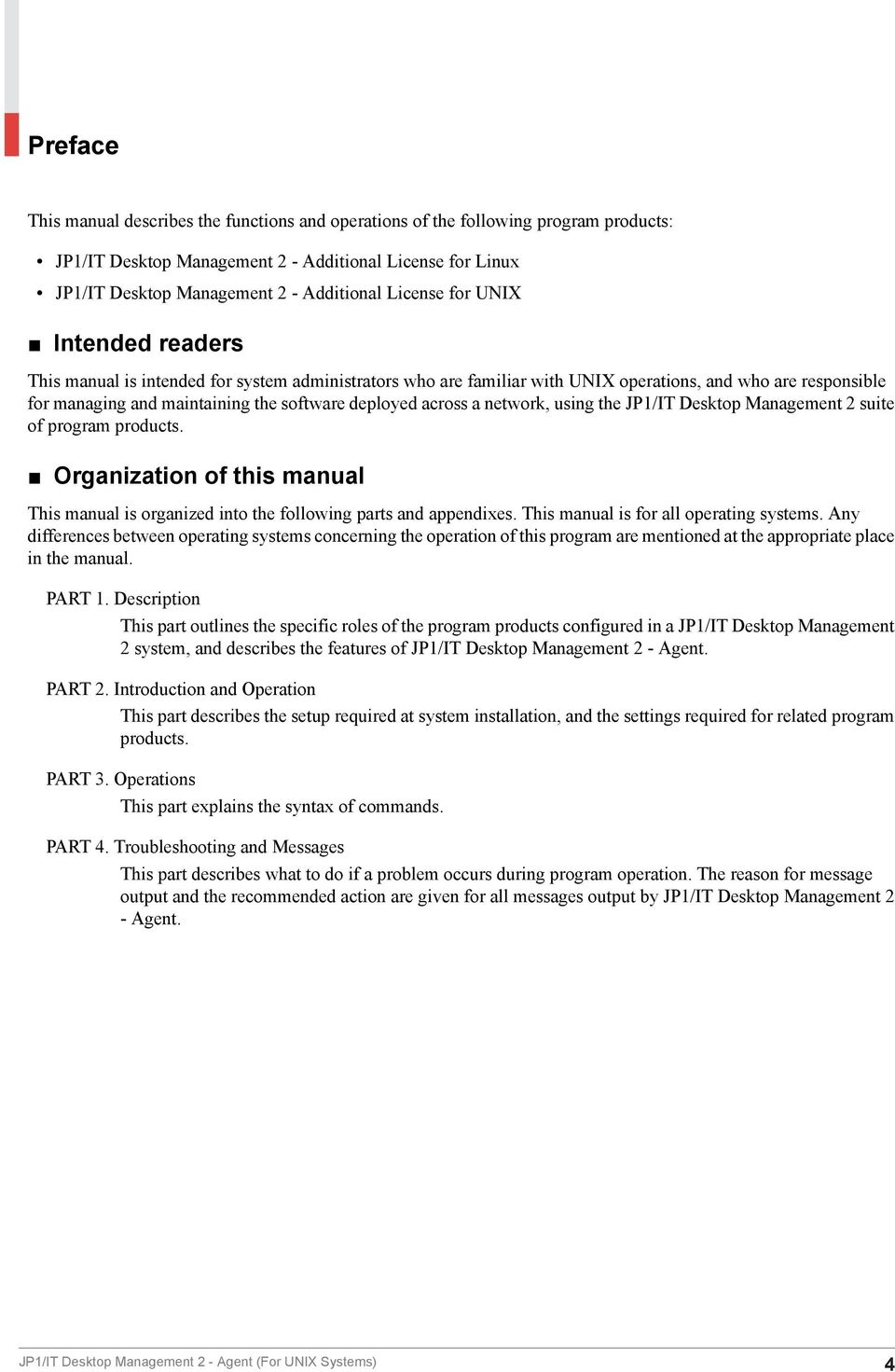
5 Contents Notices 2 Preface 4 Part 1: Description 1 Overview Overview of JP1/IT Desktop Management Features of JP1/IT Desktop Management Types of systems comprising the JP1/IT Desktop Management 2 system Configuration of a JP1/IT Desktop Management 2 system Network configuration Software configuration Functions and operating environment of JP1/IT Desktop Management 2 - Agent Organization of JP1/IT Desktop Management 2 - Agent functions Files used by JP1/IT Desktop Management 2 - Agent Conditions for using JP1/IT Desktop Management 2 - Agent 17 2 Software Distribution Software distribution overview Distribution with UAP startup before and after package installation Distribution specifying the installation timing Distribution specifying the installation date and time Distributing through the selection of the package by the distribution-destination system user Distribution with recovery specified during installation failure Package overwrite installation Distribution with OS restart in distribution-destination systems after installation Preventing package distribution by checking versions Software registration (packaging) Software classification Packaging procedure Creating the files to be specified during packaging Notes on packaging Package distribution Checking whether a distribution job exists Notes on package distribution Package installation Installing packages with installation timing specified 48 JP1/IT Desktop Management 2 - Agent (For UNIX Systems) 5

6 2.4.2 Selecting the package to install (Send package, allow client to choose job) Recovery when installation fails Checking the installation result Reporting the installation results File attributes when installing the package Note on package installation OS patch distribution Formats of distributable OS patches Procedure for distributing an OS patch Notes on configuring the packager Notes on configuring the managing server Required settings in distribution-destination systems and required checking at installation 55 3 File Collection Overview of file collection Collection by specifying collection timing Collection by starting UAP before or after file collection Creating a UAP that executes during collection Executing a file collection job Note on file collection 62 4 Management of the Distribution-Destination System by the Managing Server Overview of distribution-destination management System configuration management Deleting a client system from the system configuration information Inventory management System information management Reporting of inventory information from the distribution-destination system Grouping distribution-destinations ID group ID group definition (client services) Reporting information to the upper-level managing server Reporting distribution/collection results (client services) Reporting user resource status Using a related software product to manage the operation status Using JP1/IM - Manager to manage the operation status 78 Part 2: Introduction and Operation 5 Installation Tasks Procedure for setting the operating environment 80 JP1/IT Desktop Management 2 - Agent (For UNIX Systems) 6

7 5.2 Estimating of the disk space and memory requirements Disk space requirements for the distribution-destination system Disk space requirements for the packager Memory requirement Changing the work directory Setting the network environment Setting the port numbers Setting the host name Defining the network interface for JP1/IT Desktop Management Settings when using firewalls Examples of operating environment setup Creating settings files General rules for the settings files Syntax of the end workstation settings file Syntax of the client workstation settings file Creating the settings file (environment settings file) for the generator tools Environment settings file name Syntax of the environment settings file Setting the language for messages Files that specify LANG and TZ Example of changing the language Configuring the operating-environment settings file File name for the operating-environment settings file Items set in the operating-environment settings file Setting the system files Setting HP-UX system files Setting Solaris system files Setting AIX system files Setting Linux system files Creating the backup directory How to create the backup directory Notes on creating the backup directory Operating the System Managing the temporary collection storehouse Initializing the temporary collection storehouse Forcibly deleting resources from the temporary collection storehouse Allocating the temporary collection storehouse Package backup Acquiring backups Managing backups Acquiring software information 128 JP1/IT Desktop Management 2 - Agent (For UNIX Systems) 7
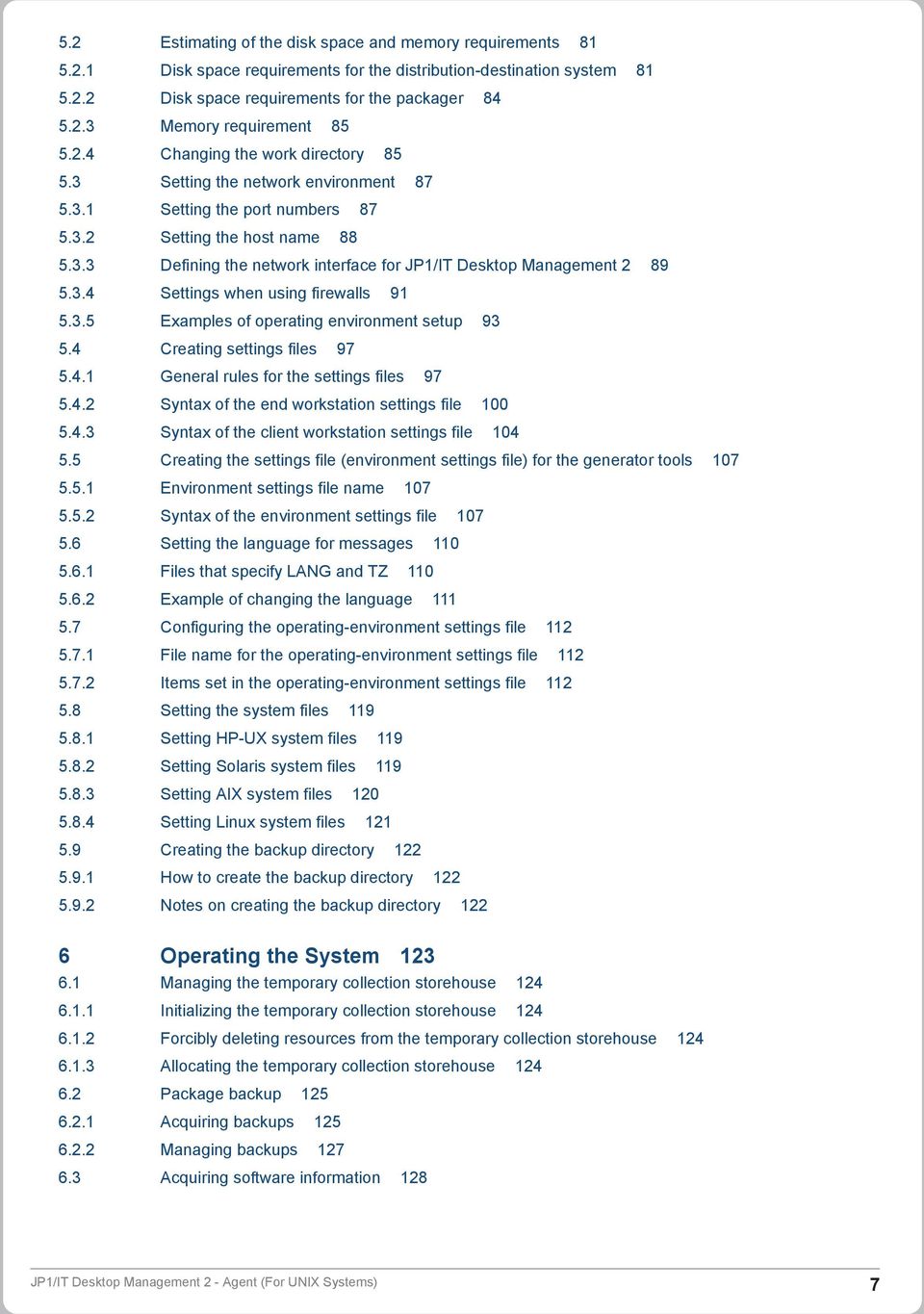
8 7 JP1 Event Processing Using JP1/IM - Manager Overview of the operations using JP1/IM - Manager Overview of the automated action function Preparations for using the automated action function Notes on using the automated action function Details of JP1 events that JP1/IT Desktop Management 2 - Agent may send JP1 Events issued by the client services JP1 Events issued by the generator tools 137 Part 3: Operations 8 Command Operations for Client Services and Generator Tools 140 Types of commands 141 Method of command input 143 How to read the command syntax description 144 rdsbkclear 145 rdscfclr 146 rdscm 147 rdsft 153 rdsiddefine 158 rdsidexec 161 rdsinsset 162 rdskillsrv 164 rdslistdel 165 rdslst 166 rdsma 168 rdsrecover 169 rdsrf 171 rdsrsclst 173 rdsstart 175 rdssts 176 rdssys 177 rdsupt 178 rdsusnd 180 Part 4: Troubleshooting and Messages 9 Troubleshooting Checking failure information by messages Failure information during packaging Failure information during package distribution or file collection Failure types and troubleshooting Failures in the client services Failures in a program performing user-specific processing Acquiring failure information 190 JP1/IT Desktop Management 2 - Agent (For UNIX Systems) 8
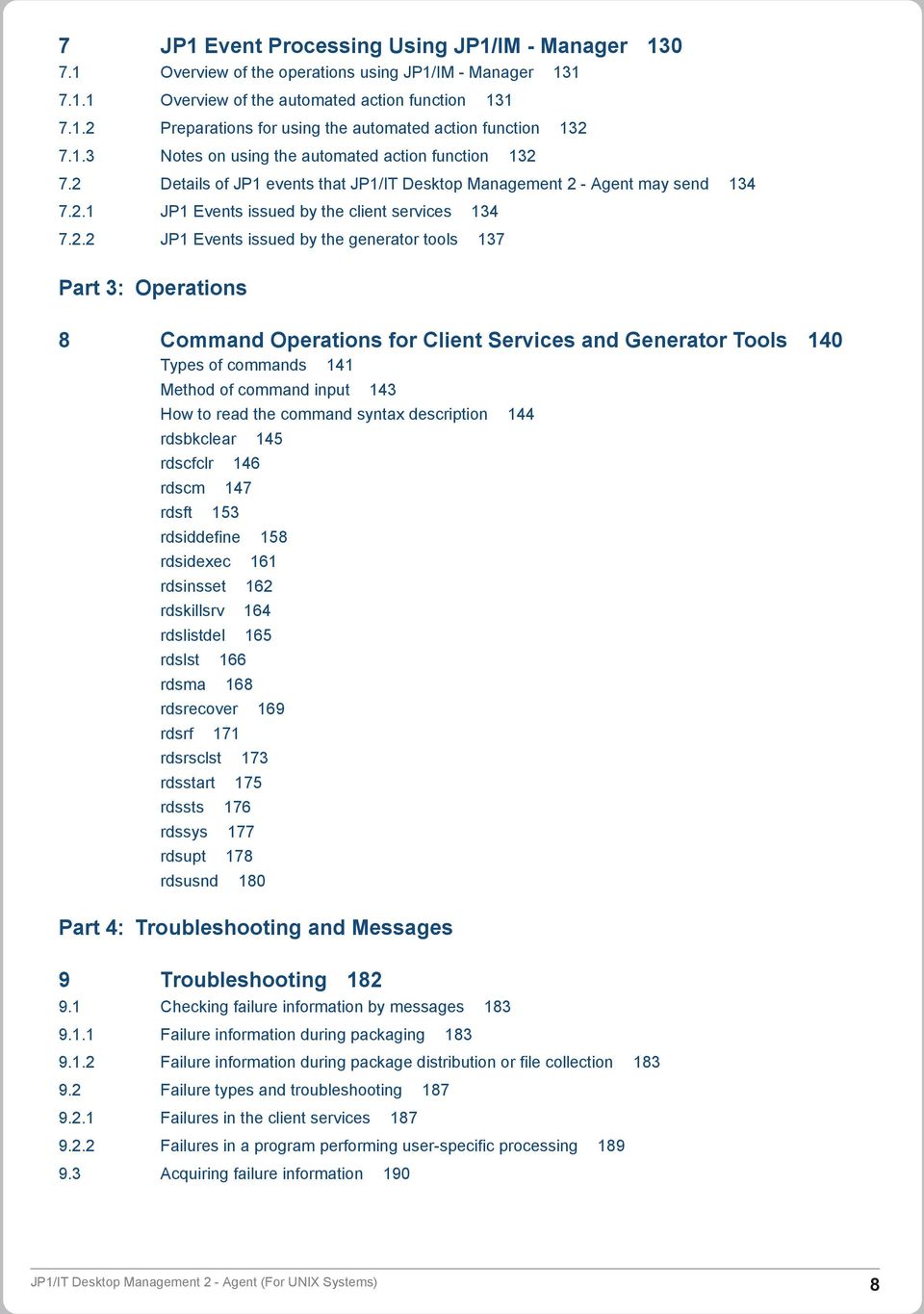
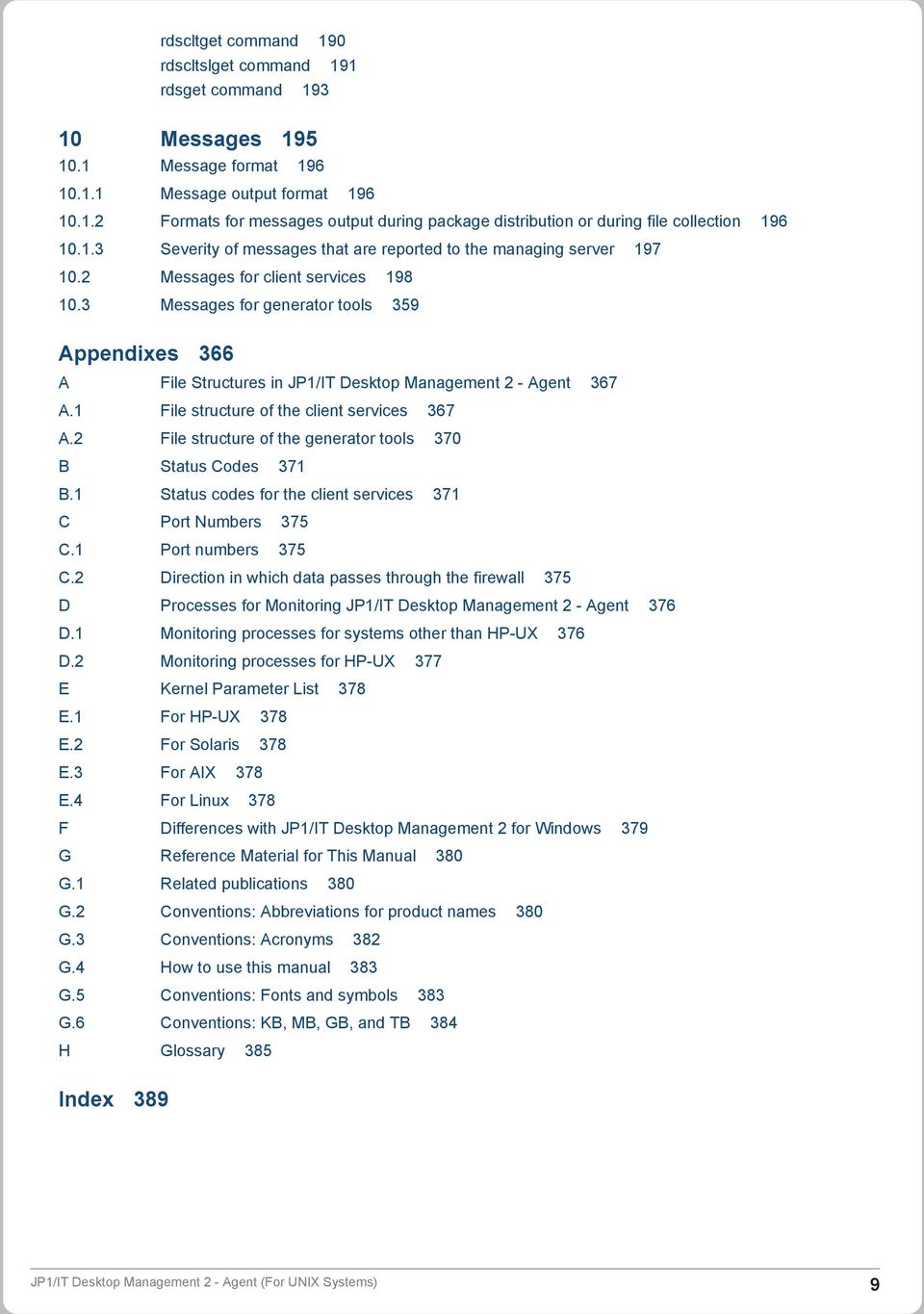
9 rdscltget command 190 rdscltslget command 191 rdsget command Messages Message format Message output format Formats for messages output during package distribution or during file collection Severity of messages that are reported to the managing server Messages for client services Messages for generator tools 359 Appendixes 366 A File Structures in JP1/IT Desktop Management 2 - Agent 367 A.1 File structure of the client services 367 A.2 File structure of the generator tools 370 B Status Codes 371 B.1 Status codes for the client services 371 C Port Numbers 375 C.1 Port numbers 375 C.2 Direction in which data passes through the firewall 375 D Processes for Monitoring JP1/IT Desktop Management 2 - Agent 376 D.1 Monitoring processes for systems other than HP-UX 376 D.2 Monitoring processes for HP-UX 377 E Kernel Parameter List 378 E.1 For HP-UX 378 E.2 For Solaris 378 E.3 For AIX 378 E.4 For Linux 378 F Differences with JP1/IT Desktop Management 2 for Windows 379 G Reference Material for This Manual 380 G.1 Related publications 380 G.2 Conventions: Abbreviations for product names 380 G.3 Conventions: Acronyms 382 G.4 How to use this manual 383 G.5 Conventions: Fonts and symbols 383 G.6 Conventions: KB, MB, GB, and TB 384 H Glossary 385 Index 389 JP1/IT Desktop Management 2 - Agent (For UNIX Systems) 9
10 Part 1: Description 1 Overview When a networked system consists of a great many UNIX and Windows machines, managing the software resources across the whole system can be onerous and time-consuming. JP1/IT Desktop Management 2 - Agent and the other programs in JP1/IT Desktop Management 2 are designed to enable centralized management of all the software resources in a networked system. This chapter describes the basic functions and configuration of a JP1/IT Desktop Management 2 system that uses the programs in the JP1/IT Desktop Management 2 series. JP1/IT Desktop Management 2 - Agent (For UNIX Systems) 10
11 1.1 Overview of JP1/IT Desktop Management 2 JP1/IT Desktop Management 2 is a group of programs for distributing software over a network. The following describes the main programs and their functions. JP1/IT Desktop Management 2 - Manager (Windows only): Software distribution feature JP1/IT Desktop Management 2 - Agent (Windows only) (relay system): Software relay function JP1/IT Desktop Management 2 - Agent (distribution-destination system): Software distribution destination functions Hereafter, unless it is necessary to differentiate JP1/IT Desktop Management 2 - Manager and JP1/IT Desktop Management 2 separately, they (the three programs listed above) will be generically referred to as JP1/IT Desktop Management 2. To distribute software using JP1/IT Desktop Management 2, the applicable programs from those shown above must be installed and set up on all machines used for distribution. The network in which the JP1/IT Desktop Management 2 programs are installed and which enables distribution management of software is called the JP1/IT Desktop Management 2 system Features of JP1/IT Desktop Management 2 A system that uses the JP1/IT Desktop Management 2 programs for managing software distribution has the following features: Less work involved in software distribution Using command-driven operations at a central server, you can distribute software in a single operation to a large number of machines in a distributed environment. Distributed software is installed automatically, so there is no need to set up the destination machines individually. Also, you can centrally manage distribution and installation results on the central server. Hierarchical management of software distribution In a large-scale system, relay machines can be used for software distribution, lessening the load on the network. By using the relay machines as departmental servers, you can distribute software across the whole networked system, or to selected departments only. Precise distribution operations JP1/IT Desktop Management 2 provides a variety of distribution methods, which can be selected according to the system operation. For example, software can be distributed at a specified date and time, or to a specific group of machines. Applicable to a wide range of systems or platforms JP1/IT Desktop Management 2 can be used whatever the size of your system, from a small system comprising a few dozen machines, up to a large-scale network with thousands of machines. The JP1/IT Desktop Management 2 programs also support cross-platform environments with both Windows and UNIX machines. Support for inventory control The JP1/IT Desktop Management 2 system not only distributes software. The managing server in the system can retrieve and manage the inventory information of each machine in a network. The inventory information you can manage includes hardware information, software installation status, and user-specific inventory information. 1. Overview JP1/IT Desktop Management 2 - Agent (For UNIX Systems) 11

12 1.1.2 Types of systems comprising the JP1/IT Desktop Management 2 system In JP1/IT Desktop Management 2, the machines (UNIX and Windows) that make up the network can be divided by purpose into four types: Managing server Distributes software, and manages the distribution process and the installation status at the destination machines. The program JP1/IT Desktop Management 2 - Manager provides this functionality. Relay system Used as a relay point when distributing software. JP1/IT Desktop Management 2 - Agent (relay system) provides this functionality. Distribution-destination system (client) The target system to which software is distributed. JP1/IT Desktop Management 2 - Agent (distribution-destination system) provides this functionality. A distribution-destination system that runs the UNIX version of JP1/IT Desktop Management 2 - Agent (distributiondestination system) is an end workstation if it is connected directly to the managing server. If packages are distributed via a relay system, the distribution-destination system is called a client workstation. Note that, in JP1/IT Desktop Management 2 - Agent documentation, the term workstation refers to UNIX workstations only. Packager Used for registering software to be distributed on the managing server. JP1/IT Desktop Management 2 - Agent provides this functionality. A relay system or distribution-destination system can serve as a packager. 1. Overview JP1/IT Desktop Management 2 - Agent (For UNIX Systems) 12

13 1.2 Configuration of a JP1/IT Desktop Management 2 system This section describes the network configuration and software configuration of a JP1/IT Desktop Management 2 system Network configuration Figure 1-1 shows a network configuration example of a JP1/IT Desktop Management 2 system. Figure 1 1: Network configuration example Note that in the UNIX version of JP1/IT Desktop Management 2 - Agent, the commands that can be used and the environmental settings details differ depending on whether the managing server is connected directly or via a relay system. Therefore, a system that is connected directly to the managing server (including a Windows relay system) is called an end workstation, and a system that is connected via a relay system is called a client workstation. For details about network configurations where UNIX and Windows coexist, see (3) Network configurations where Windows systems coexist. (1) Network configuration under JP1/IT Desktop Management 2 - Manager as a managing server JP1/IT Desktop Management 2 series of programs operates in a WAN or LAN environment. TCP/IP is used over a LAN. JP1/IT Desktop Management 2 also supports firewalls. One or more relay systems (JP1/IT Desktop Management 2 - Agent) can be configured between the managing server (JP1/IT Desktop Management 2 - Manager) and the distribution-destination systems (JP1/IT Desktop Management 2 - Agent). It is also possible to connect a managing server directly to a distribution-destination system (end workstation) without using any relay systems. The managing server includes a Windows relay system for management. (2) Network configuration with multiple LAN connections When the system consists of multiple local area network (LAN) connections, you can select the LAN used by each host in JP1. This function is called multiple LAN connections. The JP1/IT Desktop Management 2 system uses multiple LAN connections in the following situations: 1. Overview JP1/IT Desktop Management 2 - Agent (For UNIX Systems) 13

14 When the network is separated into segments You can set the managing server to use the right LAN for each distribution-destination system, without changing the LAN settings. In the /etc/hosts file at the managing server, you must preset all the LAN settings to be used. When the managing server uses multiple networks Using JP1/IT Desktop Management 2 on the distribution-destination systems, you can switch to the preset LAN connection without changing the LAN settings. In the /etc/hosts file at the distribution-destination system, you must preset all the LAN settings to be used. In the network interface definition file, you must define the LAN settings for the JP1/IT Desktop Management 2 system. For details on settings, see Defining the network interface for JP1/IT Desktop Management 2. (3) Network configurations where Windows systems coexist Figure 1-2 shows system configurations in which Windows systems coexist. Figure 1 2: Network configuration where Windows systems coexist To perform packaging for JP1/IT Desktop Management 2 - Manager in an environment where a UNIX and Windows JP1/IT Desktop Management 2 - Agent coexist, note the following: Cabinet ID is assigned to both the cabinet name and cabinet ID, for the cabinet created in the Windows systems. To set a name for the UNIX cabinet displayed on the Windows screen, register the cabinet in the Windows JP1/IT Desktop Management 2 - Manager, and then set a name at that time Software configuration The following describes the software that makes up a JP1/IT Desktop Management 2 system, and the prerequisite programs for JP1/IT Desktop Management 2 - Agent. 1. Overview JP1/IT Desktop Management 2 - Agent (For UNIX Systems) 14

15 (1) Software used in a JP1/IT Desktop Management 2 system The software used in a JP1/IT Desktop Management 2 system is described below. (a) Software for the managing server The following software runs on the managing server: JP1/IT Desktop Management 2 - Manager Provides managing server functions. (b) Software for the relay systems The following software runs on the relay systems: JP1/IT Desktop Management 2 - Agent (Windows version) This program provides the functions of relay systems, distribution-destination systems, and packagers. (c) Software for the distribution-destination systems The following software runs on the distribution-destination systems: JP1/IT Desktop Management 2 - Agent (Windows version, UNIX version) This program provides distribution-destination system functions and packager functions. (2) Software relating to JP1/IT Desktop Management 2 - Agent functions The following software is required to use JP1/IT Desktop Management 2 - Agent. JP1/IM - Manager This JP1 program enables events to be monitored across the network, and actions to be executed automatically in response to events. In JP1/IT Desktop Management 2 - Agent, events that occur can be automatically reported to JP1/IM - Manager such that actions are executed automatically in response to events. For details on linking JP1/IT Desktop Management 2 - Agent with JP1/IM - Manager, see 7. JP1 Event Processing Using JP1/IM - Manager in PART Overview JP1/IT Desktop Management 2 - Agent (For UNIX Systems) 15
16 1.3 Functions and operating environment of JP1/IT Desktop Management 2 - Agent Along with the basic services that form the core processing, JP1/IT Desktop Management 2 - Manager and JP1/IT Desktop Management 2 - Agent provide additional services. This section describes how functions and files are organized in JP1/IT Desktop Management 2 - Agent, and the conditions for using the program Organization of JP1/IT Desktop Management 2 - Agent functions The functions provided by JP1/IT Desktop Management 2 - Agent can be broadly classified as client services and generator tools. These two types of functions differ in various ways, including their file structure and user interface. It is important to understand the differences in order to use the functions properly. The features of the two types of functions are outlined below Client services Client services provide the functionality for operation as a destination system or packager (system at which packages are registered). These services normally launch automatically at machine startup and are available as resident services. Generator tools Generator tools are additional capabilities of JP1/IT Desktop Management 2 - Agent. The generator tools launch automatically when distributing packages for which the installation date and time are specified. For details on the functionality of the generator tools, see 2.4 Package installation. The generator tools only cover the installation related services of the distribution-destination system of the client services. For details on the role of the generator tools, see 2.4 Package installation Files used by JP1/IT Desktop Management 2 - Agent This section describes the files that must be created or modified for using JP1/IT Desktop Management 2 - Agent. For other information see the following: File (directory) structure See Appendix A. File Structures in JP1/IT Desktop Management 2 - Agent. Disk space requirement for files See 5.2 Estimating of the disk space and memory requirements in PART 2. (1) Files used by the client services Table 1-1 lists the files used by the client services of JP1/IT Desktop Management 2 - Agent. Table 1 1: Files used by JP1/IT Desktop Management 2 - Agent (client services) File type Name Purpose Files used at packaging Packaging-information file Stores the information for the software to be packaged by using a command. 1. Overview JP1/IT Desktop Management 2 - Agent (For UNIX Systems) 16

17 File type Name Purpose Files used at packaging Directories for storing packages Files for reporting information to an upper-level system Settings file User resource path file Special file definition file Temporary collection storehouse User resource status file Specifies the directory from which to package a user resource from the hard disk. Specifies the device special files to be used for packaging. An area on a relay system used to temporarily store resource files collected from lower-level systems if a line error occurs between the managing server and the relay system. Used to report user information, such as the status of packages installed locally (without using JP1/IT Desktop Management 2 - Manager), to the managing server. Defines the operating environment for the client services. File for setting the environment ID group definition file # Network interface definition file Sets an operating environment in detail for distribution-destination system. Stores ID group information for organizing distribution-destination systems as groups. Defines the network interfaces used by JP1/IT Desktop Management 2 in order of priority. Log files Log file Contains the processing log for the client services. File for file system error information Stores error information. # Used in client workstation (2) Files used by the generator tools Table 1-2 lists the files used by the generator tools of JP1/IT Desktop Management 2 - Agent. Table 1 2: Files used by JP1/IT Desktop Management 2 - Agent (generator tools) Name Directory for installation-scheduled packages Environment settings file Log file Error log file Purpose Directory for temporarily storing packages waiting to be installed at a scheduled date/time Sets the operating environment for the generator tools. Contains the processing log for the generator tools. Contains the error log for the generator tools Conditions for using JP1/IT Desktop Management 2 - Agent When using JP1/IT Desktop Management 2 - Agent, note the following: Language settings of the machine In a system environment where machines that use different Japanese encodings coexist, you might not be able to use the Japanese language. You must use the same Japanese encoding system for all machines. Cautions when using on HP-UX When using JP1/IT Desktop Management 2 - Agent under HP-UX, avoid using large user IDs and large files. Free space required for startup 1. Overview JP1/IT Desktop Management 2 - Agent (For UNIX Systems) 17

18 At least 5 megabytes of hard disk space is required to start JP1/IT Desktop Management 2 - Agent. Changing system time You can change the system time when stopping the JP1/IT Desktop Management 2 - Agent system. Note that changing the system time might cause the following problems. A job with the date and time specified is executed at an unexpected time. When the system time is rolled back, a job with the date and time specified is executed twice. It becomes difficult to analyze the causes of failure because the log output times will deviate. If a job is created after the system time is rolled back, a registered job might be overwritten. Wait for the time of the roll back to pass before creating a job. 1. Overview JP1/IT Desktop Management 2 - Agent (For UNIX Systems) 18

19 2 Software Distribution Software distribution is functionality of a JP1/IT Desktop Management 2 system, and performs batch distribution to the systems on a network. This chapter discusses the four stages of software distribution: software registration (packaging), package management, package distribution, and package installation. The method of distributing OS patches is also discussed. JP1/IT Desktop Management 2 - Agent (For UNIX Systems) 19

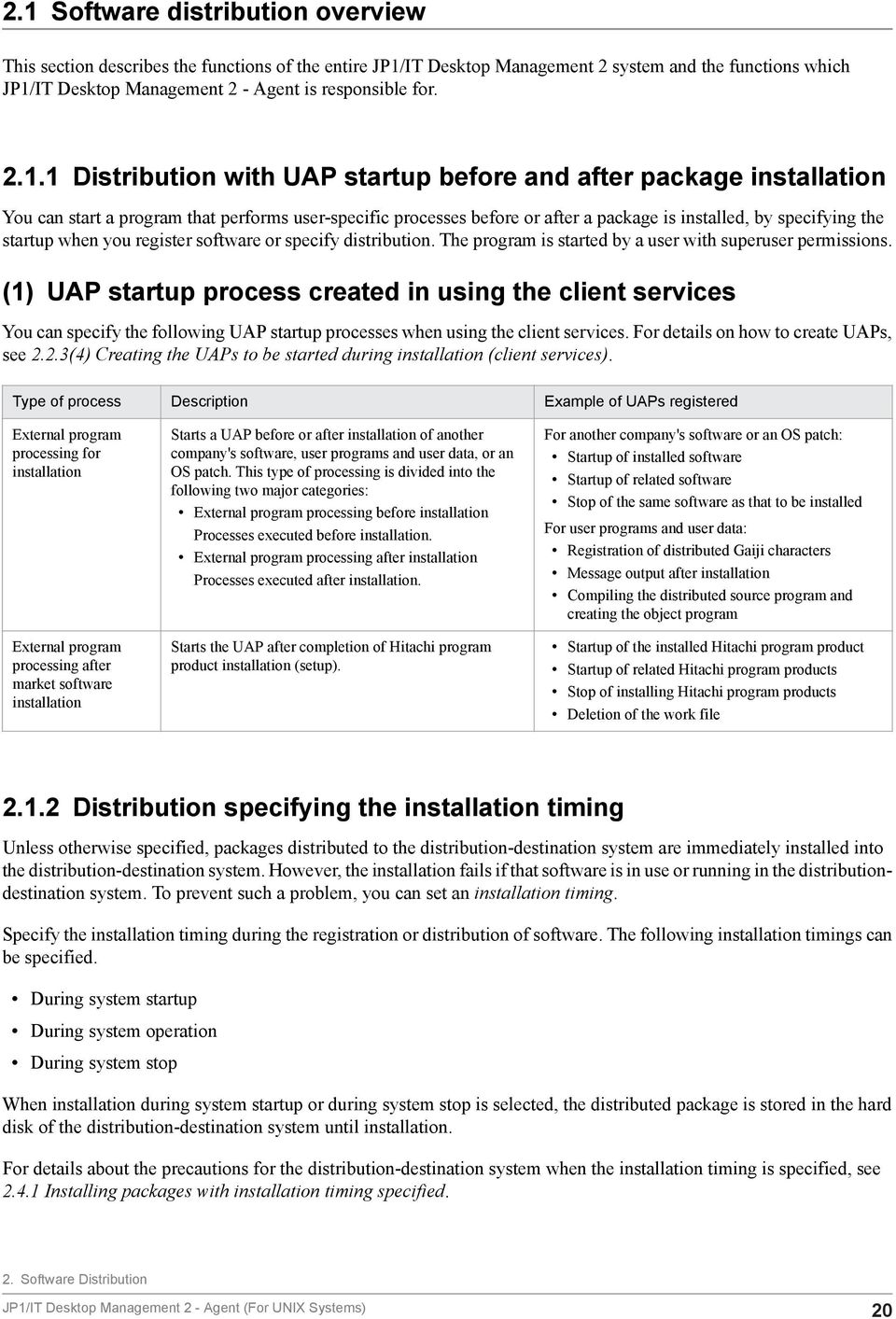
20 2.1 Software distribution overview This section describes the functions of the entire JP1/IT Desktop Management 2 system and the functions which JP1/IT Desktop Management 2 - Agent is responsible for Distribution with UAP startup before and after package installation You can start a program that performs user-specific processes before or after a package is installed, by specifying the startup when you register software or specify distribution. The program is started by a user with superuser permissions. (1) UAP startup process created in using the client services You can specify the following UAP startup processes when using the client services. For details on how to create UAPs, see 2.2.3(4) Creating the UAPs to be started during installation (client services). Type of process Description Example of UAPs registered External program processing for installation External program processing after market software installation Starts a UAP before or after installation of another company's software, user programs and user data, or an OS patch. This type of processing is divided into the following two major categories: External program processing before installation Processes executed before installation. External program processing after installation Processes executed after installation. Starts the UAP after completion of Hitachi program product installation (setup). For another company's software or an OS patch: Startup of installed software Startup of related software Stop of the same software as that to be installed For user programs and user data: Registration of distributed Gaiji characters Message output after installation Compiling the distributed source program and creating the object program Startup of the installed Hitachi program product Startup of related Hitachi program products Stop of installing Hitachi program products Deletion of the work file Distribution specifying the installation timing Unless otherwise specified, packages distributed to the distribution-destination system are immediately installed into the distribution-destination system. However, the installation fails if that software is in use or running in the distributiondestination system. To prevent such a problem, you can set an installation timing. Specify the installation timing during the registration or distribution of software. The following installation timings can be specified. During system startup During system operation During system stop When installation during system startup or during system stop is selected, the distributed package is stored in the hard disk of the distribution-destination system until installation. For details about the precautions for the distribution-destination system when the installation timing is specified, see Installing packages with installation timing specified. 2. Software Distribution JP1/IT Desktop Management 2 - Agent (For UNIX Systems) 20
21 2.1.3 Distribution specifying the installation date and time When an installation date and time is specified for a package, the package that reaches the installation date and time will be automatically installed at the distribution-destination system. You can specify an installation date and time for both Windows and UNIX distribution-destination systems. You can only specify the installation data and time for user data, user programs and OS patch Distributing through the selection of the package by the distributiondestination system user Normally, when a package is distributed, the installation process is started regardless of the operating condition of the distribution-destination system. This can cause a problem in the system operation. To avoid this, you can allow the users at the distribution-destination systems to select whether or not to install the packages. This is called client-user selected installation. When this feature is used, even if the managing server distributes a combination of UNIX and Windows packages, the user can select and install the package applicable to the distribution-destination system. You can specify this method only when distributing packages from JP1/IT Desktop Management 2 - Manager. For details on the procedure for client-user selected installation, see Selecting the package to install (Send package, allow client to choose job) Distribution with recovery specified during installation failure If installation of the distributed package fails, it is possible to perform recovery to the old version, by specifying the recovery in the packaging-information file during packaging. When a distribution job which specifies recovery is executed, the distribution-destination system acquires a backup of the old version, and then begins installation of the package. If the package is not installed, the distribution-destination system uses the backup of the old version to perform recovery. The execution results of the recovery are reported to the managing server as a recovery status. For details on specifying recovery during packaging, see 2.2.3(1) Creating the packaging-information file. For recovery operation during installation, see Recovery when installation fails Package overwrite installation Normally, if a package that has the same name as the package you want to distribute has already been installed in a destination system, the package is not distributed to the destination system. However, if overwrite installation is set during distribution, the new package will be forcibly distributed, overwriting the package that already exists in the distribution-destination system. 2. Software Distribution JP1/IT Desktop Management 2 - Agent (For UNIX Systems) 21
22 2.1.7 Distribution with OS restart in distribution-destination systems after installation When you create a distribution job, you can specify whether to restart the operating system in the distribution-destination systems after the desired package is installed. If you do not specify the restart of the operating system in the distributiondestination systems at the creation of the job, the settings specified at packaging take effect Preventing package distribution by checking versions Before distributing an update version of a program product, you can check whether the base version that of the update version has been installed in the distribution-destination. If it has not, a message is output. This prevents distribution of unnecessary packages. (1) Specifying the base version of the update version When distributing to a UNIX machine, specify the version as attribute information during packaging. This specification can be altered during creation of the distribution job. (2) Timing for checking versions The following shows when the version check is performed. For UNIX distribution-destination systems The check is performed immediately before installation of the resource file. 2. Software Distribution JP1/IT Desktop Management 2 - Agent (For UNIX Systems) 22
23 2.2 Software registration (packaging) In order to distribute a software resource, it must be registered on the managing server. This is called packaging. Make sure that the software does not exceed 2 gigabytes before and after registration. The name of a file or directory registered as a resource must not contain spaces, character strings enclosed in (), [], or {}, or the following special 1-byte characters. $,!, *,?, ;, &, ", ', `, ^, \,, <, > You register software resources from JP1/IT Desktop Management 2 - Agent. The system at which the user registers a package is called a packager. At the managing server, the administrator can set a password to check whether any user attempting to register a package is authorized to do so. Packages can be compressed at packaging time, which reduces the amount of the following data: Amount of data during packaging Disk space at the package storehouse on the distribution-destination system In addition, compressed packages are not expanded until installation on a distribution-destination system, thereby reducing the amount of data at distribution Software classification In a JP1/IT Desktop Management 2 - Agent system running under UNIX, software that can be registered is classified into four types, as follows. This classification is called the package type. Hitachi program products Hitachi software products. Some of these are not permitted to be distributed. For Hitachi program products that can be distributed, see the relevant documentation or Release Notes. Program products that can be registered include JP1/IT Desktop Management 2 - Agent and other programs in the JP1/IT Desktop Management 2 series. That is, you can upgrade the JP1/IT Desktop Management 2 system itself, using the program functions. Another company's software Commercially available software from companies other than Hitachi. In principle, another company's software that can be distributed is a multi-license pack product. Distribution of such a product might not be permitted with a general license. Before distributing another company's software product, obtain approval from the vendor. User data and user programs Files can be packaged singly or in sets. You can also package files located in different directories as a single package. Packages containing user data or user programs that can be distributed to both UNIX machines and Windows machines are called shared packages. OS patches OS patches correct problems in operating systems. JP1/IT Desktop Management 2 can package the OS patches that have not yet been applied to the distribution-destinations systems. You distribute the OS patches to the distributiondestination systems to centrally correct the problems in the operating systems. For details about the formats of OS patches that can be distributed and the procedure for distributing an OS patch, see 2.5 OS patch distribution. 2. Software Distribution JP1/IT Desktop Management 2 - Agent (For UNIX Systems) 23
24 2.2.2 Packaging procedure You can package a resource by a command. How to register the software by using a command Create and register a file (packaging-information file) which specifies attribute information (package attribute) such as the name of the software to be registered, and the installation method during distribution. To register Hitachi program products or register user programs and user data to be distributed to machines whose OS is the same as the OS of the registration source, use the rdsft command. To register another company's software, register OS patches, or register user programs and user data to be distributed to machines whose OS differs from the OS of the registration source, use the rdscm command. The rdscm command can also register user programs and user data to be distributed to machines whose OS is the same as the OS of the registration source. Hitachi program products and another company's software can only be distributed to machines whose OS is the same as the OS of the registration source. This section explains procedures for registering software using commands. (1) Registering Hitachi program products This subsection describes how to register Hitachi program products. (a) Registration method Use the rdsft command to register Hitachi program products. To specify detailed attributes, create the packaging-information file before you register resources and specify that file name in the command option. For the method of creating the packaging-information file, see 2.2.3(1) Creating the packaging-information file. For some items, you can set default values in the settings files of the client services. Table 2-1 lists the rdsft command options to be specified and the items to be specified in the packaging-information file when you register program products. If the same item is specified using more than one method, the order precedence is the rdsft command, the packaging-information file, and then the settings file. Table 2 1: Items to be specified when a Hitachi program product is registered Item Specification method Default rdsft command Packaginginformation file Settings file -k password Y #1 -C special-file-name #2 Y s or -S registered-program-productmodel Y #2 cabinet-id-1 #2 Y Y m managing-host-name Y #3 -Q Y #4 host-name-on-higher-system Y Y -- Value in the settings file packaging-information-file-name Y PPName #5 -- Y Software Distribution JP1/IT Desktop Management 2 - Agent (For UNIX Systems) 24
25 Item Specification method Default rdsft command Packaginginformation file Settings file APafterGeneration -- Y APWatchTimer -- Y seconds InstallTiming -- Y -- EXECUTE Compress -- Y Y NO LifeofResource -- Y Y 1 day Recover -- Y -- NO BackupDataKeep -- Y -- 0 days Legend: Y: Specifiable. --: Not specifiable or inapplicable. #1 Requires the password. #2 Mandatory. #3 For -m managing-host-name, specify the host name of the relay system that is directly connected to the managing server if program products are registered via at least two relay systems. This item does not need to be specified if program products are registered from the end workstation, the UNIX machine connected to the relay system that is directly connected to the managing server. #4 Waits for the response from the user. #5 Mandatory if -s is specified in the rdsft command. If you want to register a Hitachi program product by using a special file that is not a system standard special file, you must define the special file in the special file definition file. For details on how to create the special file definition file, see 2.2.3(3) Setting the special file definition file. (b) Note during registration After execution of the register command (rdsft command), you cannot cancel the packaging. To make sure that the software is registered, execute the rdslst command after creation of the packaging-information file, and check the specified Hitachi program product. The rdslst command, also allows you to confirm the Hitachi program products stored on a storage medium. For example, a CD-ROM might contain a Hitachi program product that is not licensed. Before registering a program product, use the rdslst command to check the stored Hitachi program products. Execute the rdslst command with the medium unmounted. Execute the packaging with the CD-ROM also unmounted. (2) Registering another company's software This subsection describes the formats of another company's software that can be distributed and the method for registering that software. 2. Software Distribution JP1/IT Desktop Management 2 - Agent (For UNIX Systems) 25
26 (a) Formats of another company's software that can be distributed Table 2-2 describes the formats of another company's software that can be distributed by using JP1/IT Desktop Management 2. Table 2 2: Formats of another company's software that can be distributed OS Software format Software format example HP-UX Solaris AIX File formats that can be specified in the -s option of the swinstall command File formats that can be specified in the -d option of the pkgadd command File formats that can be specified in the -d option of the geninstall command depot Solaris package format bff Linux File format that can be specified in the rpm command rpm If the OS command allows, you can specify a directory. The following software of another company cannot be distributed: Software that must be installed in the single-user mode, which is one of the OS operation modes Software that requires the OS to be restarted during installation (b) Registration method To register another company's software, use the rdscm command with the -ISVSOFT option specified. Depending on the situation, you might need to perform the file creation tasks described below before registration: Creating a packaging-information file You can use command options to specify major attributes such as package ID and cabinet ID. However, if you want to specify more detailed attributes, you need to create a packaging-information file. For details on how to do this, see 2.2.3(1) Creating the packaging-information file. Creating a response file If you want to distribute another company's software that requires user responses during installation, you must specify the appropriate response file during packaging. A file that describes user responses is called a response file. You can specify a response file in HP-UX and Solaris only. The following shows the command for creating the response file: HP-UX: swask -c Solaris: pkgask -r For details on the response file, see the documentation for the OS. Creating an installation management file To distribute the Solaris version of another company's software, you need to specify an installation management file during packaging. The installation management file describes information needed during installation. For example, you might be able to indicate forced distribution by using the file. For details on how to create the installation management file, see the documentation for the OS. Table 2-3 lists the items that you can specify by using command options or a packaging-information file when registering another company's software. For some of the items, the default values can be specified using the settings file for the client services. If the same item is specified using more than one method, the order of precedence is command, packageinformation file, and settings file. 2. Software Distribution JP1/IT Desktop Management 2 - Agent (For UNIX Systems) 26
27 Table 2 3: Items to be specified when another company's software is registered Item Specification method Default rdscm command Packaginginformation file Settings file -ISVSOFT #1 Y k password Y #2 -d user-resource-path #1 Y cabinet-id #1 Y Y package-id Y Y -- Automatic generation program-name Y Y -- Space character #3 version Y Y #3 generation Y Y host-name-on-higher-system Y Y Y Value in the settings file -m managing-host-name Y #4 -Q Y #5 packaging-information-file-name Y N service-name Y REBOOT Y ISVRES response-file-name #6 Y ISVADM installation-management-filename Y Path defined by the pkgadd #7 command UserName -- Y -- Space character Compress -- Y Y Value in the settings file APbeforeGeneration -- Y APafterGeneration -- Y APWatchTimer -- Y seconds LifeofResource -- Y Y Value in the settings file InstallTiming -- Y -- EXECUTE Recover #8 -- Y -- NO Legend: Y: Specifiable. --: Not specifiable or inapplicable. #1 Mandatory. #2 Requires a password. #3 If a package ID is not specified, it is automatically generated. 2. Software Distribution JP1/IT Desktop Management 2 - Agent (For UNIX Systems) 27
28 #4 Specify the host name of the relay system that is directly connected to the managing server if program products are to be registered via at least two relay systems. This item does not need to be specified if program products are registered from the end workstation, the UNIX machine connected to the relay system that is directly connected to the managing server. #5 Waits for a response from the user. #6 This item can be specified for only the HP-UX or Solaris version of another company's software. #7 This item can be specified for only the Solaris version of another company's software. #8 This item can be specified for only the HP-UX version of another company's software. (c) Automatic generation of package IDs When you register another company's software without specifying the package ID, an OS command that acquires software information is executed to generate the package ID automatically. If you also omit specifying the program name and version, the command also automatically generates them. The OS command used to acquire software information must be stored in a specific directory. Table 2-4 shows the command and the appropriate directory for each OS. Table 2 4: OS command for acquiring software information and its directory OS Command Directory for storing the command HP-UX swlist /usr/sbin Solaris pkginfo /bin AIX geninstall /usr/sbin Linux rpm /bin The package ID, program name, and the version are automatically generated from the software short name, software long name, and version information acquired by the OS command. Automatic generation uses the following rules to convert the acquired information: Package ID The string WUA- is prefixed. Periods (.) and underscores (_) are converted to hyphens (-). Lower-case letters are converted to the corresponding upper-case letters. If the package ID has more than 44 characters, it is truncated following the 42nd character and two hyphens (--) are appended. Program name Version Periods (.) and underscores (_) are converted to hyphens (-). Lower-case letters are converted to the corresponding upper-case letters. If the program name has more than 50 characters, it is truncated following the 48th character and two hyphens (--) are appended. Periods (.) are deleted. 2. Software Distribution JP1/IT Desktop Management 2 - Agent (For UNIX Systems) 28
29 If the version has fewer than 7 characters, zeros (0) are appended to make the length 7 characters. If the version has more than 7 characters, it is truncated following the 7th character. (3) Registering the user data and user programs (a) Registration method Use the rdsft command to register user data and user programs. Use the rdscm command to register shared packages. Before registration, create the following files as required. Creating the packaging-information file options. To specify detailed attributes, create a packaging-information file. For details on how to create this file, see 2.2.3(1) Creating the packaging-information file. Creating the user resource path file The directories and files for software where user data and user programs are to be registered are called the user resource paths. To register all software in different directories as a single unit of software, specify the user resource paths in a user resource path file. For details on how to create the user resource path file, see 2.2.3(2) Creating the user resource path file. Table 2-5 lists the command options to be specified and the items to be specified in the packaging-information file when you register user data and user programs. For some items, you can set default values in the settings files of the client services. If the same item is specified using more than one method, the order precedence is the command, the packaginginformation file, and then the settings file. Table 2 5: Items to be specified when registering user data and user programs Item Specification method Inheritance of rdsft or rdscm command Packagin g- informatio n file Settings file specified items when packages are distributed to Windows clients Default -k password S A password is requested. -d user-resource-path or -D userresource-path-file-name S A directory under /NETMRDS/UPUPL/hd #1 cabinet-id #2 S S -- I -- package-id #2 S S -- I -- program-name S S -- I Space character -m managing-host-name S #3 -L installation-mode #4 S I B -Q S A response from the user is waited. host-name-on-higher-system S S Value in the settings file packaging-information-file-name S /NETMRDS/UPUPL/ AC #5 version S S -- I prerequisite-version S S -- NI Space character 2. Software Distribution JP1/IT Desktop Management 2 - Agent (For UNIX Systems) 29
30 Item Specification method Inheritance of rdsft or rdscm command Packagin g- informatio n file Settings file specified items when packages are distributed to Windows clients Default generation-number S S -- I 0000 owner-name -- S -- NI Space character Generator -- S -- NI STANDARD APbeforeGeneration -- S -- NI -- APafterGeneration -- S -- NI -- APWatchTimer -- S -- NI 300 seconds Comments -- S -- NI Space character InstallDirectory -- S -- NI / (root directory) OwnerofInstallDirectory -- S -- NI User number 0 GroupofInstallDirectory -- S -- NI Cabinet number 3 ModeofInstallDirectory -- S -- NI 755 InstallTiming -- S -- I #6 EXECUTE Compress -- S S NI NO LifeofResource -- S S I 1 day Recover -- S -- NI NO BackupDataKeep -- S -- NI 0 days UAPBackupList -- S -- NI File with the name of the distributed package #7 Legend: #1 #2 #3 #4 S: Specifiable. --: Not specifiable, inapplicable, or a value used only at registration. I: Inherited by the Windows machine. NI: Not inherited by the Windows machine. For HP-UX, a directory under /var/opt/netmdmw/upupl/hd Mandatory. To register user data or user programs via two or more relay systems, specify the host name of the relay system that is directly connected to the managing server. This specification is unnecessary when registering user data or user programs from the end workstation, the UNIX machine connected to the relay system that is directly connected to the managing server. Use the rdscm command to specify. 2. Software Distribution JP1/IT Desktop Management 2 - Agent (For UNIX Systems) 30
31 #5 #6 #7 Assumed if you do not specify the packaging-information file name, user resource path, and user resource path file specifications are omitted. For HP-UX, it will be /var/opt/netmdmw/upupl/ac In the distribution-destination system of Windows, installation is not executed at system stop. The backups of the file and the directory to be overwritten are acquired. (b) Shared package attributes that can be inherited by the distribution-destination system When the distribution-destination system inherits shared packages, it can inherit the following file attributes. File name File update time and date Name of the user who owns the file Cabinet ID which owns the file Access privilege of the user who owns the file (read, write, and execute) Access privilege of the cabinet who owns the file (read, write, and execute) Access privilege of the other users and cabinets (read, write, and execute) (c) Directory configuration of the packager and the distribution-destination system Figure 2-1 shows the directory configuration of the packager and the distribution-destination system. 2. Software Distribution JP1/IT Desktop Management 2 - Agent (For UNIX Systems) 31
32 Figure 2 1: Directory configuration of the packager and the distribution-destination system Creating the files to be specified during packaging (1) Creating the packaging-information file Before you register resources, you need to create the file that describes the information about the resources to be registered (packaging-information file). This subsection describes how to create the packaging-information file. (a) Rules for creating the packaging-information file To create the packaging-information file, use a text editor in the following format: 2. Software Distribution JP1/IT Desktop Management 2 - Agent (For UNIX Systems) 32
33 attribute-nametabvalueenter attribute-name value Specify the item to be specified in the packaging-information file. Specify the value to be set for an item in the packaging-information file. Create the packaging-information file according to the following rules. You can specify a space character instead of a tab character. To include a space character in a set value, enclose the set value between double quotation marks ("). If you specify # in the first column, that line is treated as a comment. The maximum length of a line in the packaging-information file is 256 bytes including the code for the pressed Enter key. If you specify more than one attribute with the same name, the set value that is specified last is validated and the preceding set values are ignored. (b) Syntax of the package-information file Format As shown below, attributes that can be specified in the package-information file differ depending on the package type. For registering Hitachi program products Group cabinet-id PPName program-product-model [UserName owner-name] [HostName host-name-on-higher-system] [Compress {NO COMPRESS PACK}] [APafterGeneration external-program-processing-after-market-softwareinstallation] [APWatchTimer monitoring-time-for-external-program-processing-aftermarket-software-installation] [LifeofResource package-storage-period] [InstallTiming BOOT] [Recover {YES NO}] [BackupDataKeep backup-file-storage-period] For registering another company's software and OS patches Group cabinet-id [ResourceName package-id] [ProgramName program-name] [Version version] [Generation generation-number] [HostName host-name-on-higher-system] [UserName owner-name] [Compress {NO COMPRESS PACK COMMON}] [APbeforeGeneration external-program-processing-before-installation] [APafterGeneration external-program-processing-after-installation] [APWatchTimer monitoring-time-for-external-program-processing] [LifeofResource package-storage-period] 2. Software Distribution JP1/IT Desktop Management 2 - Agent (For UNIX Systems) 33
34 [InstallTiming {BOOT EXECUTE SHUTDOWN UAP}] [Recover {YES NO}] For registering user data and user programs Explanation Group cabinet-id ResourceName package-id [ProgramName program-name] [UserName owner-name] [Version version] [PrerequisiteVersion prerequisite-version] [Generation generation-number] [Comments user-comment] [HostName host-name-on-higher-system] [Compress {NO COMPRESS PACK COMMON}] [Generator {STANDARD NETM_DM_GF}] [APbeforeGeneration external-program-processing-before-installation] [APafterGeneration external-program-processing-after-installation] [APWatchTimer monitoring-time-for-external-program-processing-forinstallation] [LifeofResource package-storage-period] [InstallDirectory installation-target-directory] [OwnerofInstallDirectory directory-owner] [GroupofInstallDirectory directory-cabinet] [ModeofInstallDirectory directory-file-mode] [InstallTiming {BOOT EXECUTE SHUTDOWN UAP}] [Recover {YES NO}] [BackupDataKeep backup-file-storage-period] [UAPBackupList backup-list-name] Group cabinet-id ~ <uppercase alphabetic characters or numerics> ((2 characters)) Specify the ID of the cabinet where resources are to be registered. A cabinet can register up to 256 resources. When you create a new cabinet to register resources, specify the ID of the cabinet here so the cabinet is automatically created and resources can be registered. This item must be specified if you do not specify a cabinet ID in the option of the rdsft or rdscm command. Specify a different cabinet ID for each managing server that registers resources. If you register resources with the same cabinet ID in different managing servers, the packages might not be distributed even if the package names are different when the cabinet ID is the same. PPName program-product-model Specify the model of the program product to be registered. To specify multiple program products, delimit them using space characters and enclose the set values between double quotation marks ("). A description example for specifying multiple program products is as follows: PPName "P P " By using the regular expression of the UNIX operating system, you can simplify the specification method. A specification example using the regular expression is as follows: PPName * Specifies all the program products that are registered in a DAT or CD-ROM. PPName P-1642-* Specifies all the program products of which names begin with P PPName P-1642-?? 2. Software Distribution JP1/IT Desktop Management 2 - Agent (For UNIX Systems) 34
35 Specifies all the program products of which names begin with P and end with two numbers. PPName P-1642-[1-5] Specifies all the program products of which names begin with P and end with a number between 1 and 5. ResourceName package-id ~ <uppercase alphabetic characters, numerics, hyphens, or underscores> ((1 to 44 characters)) Specify the name of the resource to be registered. Specify a name that is unique in the network system. This item must be specified when you register a Hitachi program product or a user program and user data without specifying the package ID in an option of the rdsft or rdscm command. When you register another company's software or an OS patch, you can omit this item. If you omit this item, the package ID is automatically generated. ProgramName program-name ~ ((1 to 50 characters)) Specify the general name of the resource to be registered. Specify this name if you want a common name besides the package ID. If you do not specify this value, a space character is assumed. For registration of another company's software, if you omit the package ID and program name, the program name is automatically generated. UserName owner-name ~ ((1 to 14 characters)) Specify the name of the user who owns the resource to be registered. If you do not specify this value, a space character is assumed. Version version ~ <uppercase alphabetic characters, numerics, or slants> ((1 to 6 characters)) Specify the version of the resource to be registered. For a program product, the version is automatically set. For other resources, set this item to specify dates and for other purposes. If you do not specify this value, is assumed. For registration of another company's software, if you omit the package ID and version, the version is automatically generated. PrerequisiteVersion prerequisite-version ~ <uppercase alphabetic characters, numerics, or slants> ((1 to 6 characters)) Specify the prerequisite version when distributing a resource to be registered. If you specify as the prerequisite version, the resource is always distributed regardless of the prerequisite version. If you do not specify PrerequisiteVersion, a space character is assumed and the resource is distributed without checking the prerequisite version. This specification becomes valid when EXECUTE is specified for InstallTiming. Generation generation-number ~ <uppercase alphabetic characters or numerics> ((4 digits)) Specify the generation number of the resource to be registered. If you do not specify this value, 0000 is assumed. Comments user-comment ~ ((1 to 64 characters)) Specify the user comment for the resource to be registered. This specification is valid when NETM_DM_GF is set for Generator. Do not insert a new line within a comment. If you do not specify this value, a space character is assumed. HostName host-name-on-higher-system ~ <uppercase alphabetic characters, numerics, hyphens, underscores, or periods> ((1 to 20 characters)) Specify the host name on higher system. If you do not specify this value, the resource is registered into the managing server specified in the settings file. To specify a host file name in a client workstation, specify the host name of the relay system. If you do not specify a host name on higher level in the option of the rdsft or rdscm command, the specification in the packaging-information file is validated. The host name on higher system specified in the rdsft or rdscm command takes precedence over the specification in the packaging-information file. Compress ~ {NO COMPRESS PACK COMMON} Specify the type of compression for the resource to be registered. 2. Software Distribution JP1/IT Desktop Management 2 - Agent (For UNIX Systems) 35
36 NO No compression is performed. COMPRESS Use the compress command to compress. PACK Use the pack command to compress. COMMON Compress a shared package. If the size of a resource is three blocks or smaller, specifying PACK has no effect. If an error occurs during compression, the resource is registered without compression. If you do not specify this value, the type specified in the settings file is validated. Generator ~ {STANDARD NETM_DM_GF} <<STANDARD>> Specify the type of the generator to be started when a package is installed. STANDARD Standard generator provided by JP1/IT Desktop Management 2 - Agent NETM_DM_GF Generator provided by the generator tools of JP1/IT Desktop Management 2 - Agent APbeforeGeneration external-program-processing-before-installation ~ ((1 to 60 characters)) Use the absolute path to specify the external program processing before installation which is started before the standard generator executes installation. If you also specify APafterGeneration (external program processing after installation), the specification value of this item plus the specification value of APafterGeneration must be within 60 characters. This specification is valid when you specify STANDARD for Generator. When you specify NETM_DM_GF, the external program processing before installation is ignored even if it is specified. By creating the program of the external program processing before installation under /NETMRDS/usrcom/ (/opt/netmdmw/usrcom/ for HP-UX), you can use the relative path to specify this item. Note the following when you specify the external program processing before installation: Up to 18 character strings (arguments) can be specified. Consecutive space characters are treated as a single delimiter. Do not use the characters that have special meaning in shell programs such as >, <,, &, and $. Single quotation marks (') are not treated as arguments. Double quotation marks (") cannot be specified. However, when you specify a space character in a set value, enclose the entire set value between double quotation marks. Shell variables are invalid since they are treated as character strings. Do not include processing that waits for responses. APafterGeneration external-program-processing-after-installation or external-program-processing-aftermarket-software-installation ~ ((1 to 64 characters)) Use the absolute path to specify the external program processing after installation or the external program processing after market software installation which is started after a package is installed. This specification is valid when distributing to the workstation. The installation is ignored when distributed to a PC. When you specify NETM_DM_GF is specified for Generator, specify in less than or equal to 40 characters. 2. Software Distribution JP1/IT Desktop Management 2 - Agent (For UNIX Systems) 36
37 When STANDARD is specified for Generator, if you create a program that requires external program processing for installation under the /NETMRDS/usrcom/ directory (or the /opt/netmdmw/usrcom/ directory in the case of HP-UX), you can specify the program using a relative path. Note the following when you specify the external program processing for installation: Up to 18 character strings (arguments) can be specified. Consecutive space characters are treated as a single delimiter. Do not use the characters that have special meaning in shell programs such as >, <,, &, and $. Single quotation marks (') are not treated as arguments. Double quotation marks (") cannot be specified. However, when you specify a space character in a set value, enclose the entire set value between double quotation marks. Shell variables are invalid since they are treated as character strings. Do not include processing that waits for responses. APWatchTimer monitoring-time-for-external-program-processing-for-installation or external-programprocessing-after-market-software-installation ~ <unsigned integer> ((1 to 32767)) <<300>> (unit: seconds) Specify the period of time (in seconds) to monitor the execution of the external program processing for installation or the external program processing after market software installation. If the external program processing for installation or the external program processing after market software installation is still executing after the specified value, the distribution-destination system executes the next processing without waiting for the end of the previous processing. The external program processing for installation or external program processing after market software installation will not be terminated forcibly. In this case, the distributiondestination system reports an installation error to the manager server. This specification is validated at each installation timing. LifeofResource package-storage-period ~ <numerics> ((8 digits)) Use the YYYYMMDD format to specify the time until which the distributed package is stored in the temporary package storehouse of a relay system. YYYY Specify the year (YYYY: current year to 2089). MM Specify the month using two digits (MM: 01 to 12). DD Specify the day using two digits (DD: 01 to 31). If you omit this value, the number of days to keep the package, which is specified in the settings file, is validated. An error occurs if you specify a date before the registration date. InstallDirectory installation-target-directory ~ <alphanumeric characters> ((1 to 64 characters)) Specify the installation target directory of user data or user programs. For a hard disk resource, you can specify this item when you register the resource using the relative path. If the specified directory does not exist in the distribution-destination system, it is created when the package is installed. If the specified directory is not defined or if you omit this specification, the root directory (/) is assumed. For Linux, do not specify a symbolic link for the installation target directory. Otherwise, the symbolic link will be released. OwnerofInstallDirectory directory-owner ~ <unsigned integer> ((5 digits from 0 to 59999)) Specify the owner using the user number if the directory specified in InstallDirectory does not exist in the distribution-destination system. If the specified owner is not defined or if you omit this specification, root (user number 0) is assumed. 2. Software Distribution JP1/IT Desktop Management 2 - Agent (For UNIX Systems) 37
38 GroupofInstallDirectory directory-cabinet ~ <unsigned integer> ((5 digits from 0 to 59999)) Specify the cabinet if the directory specified in InstallDirectory does not exist in the distributiondestination system. When you specify a directory cabinet, OwnerofInstallDirectory must be specified. If the specified cabinet number is not defined or if you omit this specification, sys (cabinet number 3) is assumed. ModeofInstallDirectory directory-file-mode ~ <octal number> ((3 digits from 700 to 777)) <<755>> Specify the file mode of the directory if the directory specified in InstallDirectory does not exist in the distribution-destination system. For the file mode, specify only the permission mode bits using absolute values. When you specify the file mode of a directory, the following items must be specified: OwnerofInstallDirectory GroupofInstallDirectory InstallDirectory InstallTiming ~ {BOOT EXECUTE SHUTDOWN UAP} <<EXECUTE>> Specify the timing to install software. BOOT Install a package when the system is started. EXECUTE Install a package when the managing server issues a distribution job. SHUTDOWN Install a package when the system is stopped. UAP A user application program installs a package. You can specify this value only when the distributiondestination system is Windows. If the package has a daemon process, install the package when the system is started or stopped. The following packages cannot be installed when the system is started. Install them when the system is stopped. Packages that are started before the user_daemon step in the /etc/rc script Packages with the shared library Packages containing the programs that are registered into /etc/inittab with the respawn specification Only BOOT can be specified for program products. If anything else is specified, the specification is ignored. Recover ~ {YES NO} <<NO>> Specify whether to use the recovery facility. YES Execute recovery if installation fails when the package is distributed. NO Do not execute recovery if installation fails when the package is distributed. Some program products might not be able to use the recovery facility because of the attributes of the programs. Recovery is not executed even if you specify YES for such program products. In addition, if the distributiondestination system does not have the backup directory, recovery is not executed even if YES is specified. Socket device files are not recovered. When you write a socket device in the backup list or register a file with the name identical to that of the socket device, do not specify YES for Recover. If recovery is specified in the packaging-information file that registers a socket device, backups are not acquired when packages are distributed and the socket device file is not distributed. For another company's software, the recovery facility is available for only the HP-UX version of the software. 2. Software Distribution JP1/IT Desktop Management 2 - Agent (For UNIX Systems) 38
39 BackupDataKeep backup-file-storage-period ~ <unsigned integer> ((0 to 999)) <<0>> (unit: days) When you use the recovery facility at the distribution of packages, specify the number of days to keep the backup if recovery fails or is not executed. This specification is valid when you specify YES for Recover. The backup will be deleted after the number of days specified here from the date of package distribution. Recovery can be retried while backups are saved. If you specify 0, backups are not saved. Specify 0 for the packages you do not need to retry recovery for. UAPBackupList backup-list-name ~ <alphanumeric characters> ((1 to 128 characters)) To acquire a backup for the recovery facility to be executed at the distribution of the next version after a package is distributed, specify the file name of the backup list containing the file and the directory. For details about the backup list, see Acquiring backups in PART 2. To specify the file name of the backup list, use the absolute path. This specification is valid when the package is user data or a user program. This specification is validated when the recovery facility is executed at the distribution of the next version after a package is distributed. This specification is invalid if the recovery facility is executed at the distribution of the current package. If you do not specify this value, only the file and the directory to be overwritten are backed up when the recovery facility is executed at the distribution of the next version. (2) Creating the user resource path file For the user resource path file, specify a directory that is registered from the hard disk. Since you can specify multiple directories or files, you can register the files in different directories as a single resource by creating this user resource path file. Use the absolute path to specify a directory or a file. Do not include.. in a path. A creation example of the user resource path file is as follows: Example: /users/home /etc/hosts /etc/networks (3) Setting the special file definition file To register program products using the special file that is not provided by the system as standard, you need to define such a special file in the special file definition file. (a) Rules for creating the special file definition file The special file definition file defines the information of each special file. JP1/IT Desktop Management 2 - Agent references this file for the information corresponding to the specified special file when registering a program product and accesses the provided storage medium. The special files provided by the system as standard are defined in the special file definition file. The directory name of the special file definition file is as follows. OS LANG environmental variables Directory name HP-UX ja_jp.sjis /etc/opt/netmdmw/rdsprm/ja_jp.sjis/devtype ja_jp.eucjp Other than ja_jp.sjis, ja_jp.eucjp /etc/opt/netmdmw/rdsprm/ja_jp.eucjp/devtype /etc/opt/netmdmw/rdsprm/c/devtype 2. Software Distribution JP1/IT Desktop Management 2 - Agent (For UNIX Systems) 39
40 OS LANG environmental variables Directory name Solaris ja_jp.pck /NETMRDS/rdsprm/ja_JP.PCK/DEVTYPE ja Other than ja_jp.pck, ja /NETMRDS/rdsprm/ja/DEVTYPE /NETMRDS/rdsprm/POSIX/DEVTYPE AIX Ja_JP /NETMRDS/rdsprm/Ja_JP/DEVTYPE ja_jp Other than Ja_JP, ja_jp /NETMRDS/rdsprm/ja_JP/DEVTYPE /NETMRDS/rdsprm/En_US/DEVTYPE Linux ja_jp.utf-8 /NETMRDS/rdsprm/ja_JP.UTF-8/DEVTYPE ja_jp.eucjp Other than ja_jp.sjis, ja_jp.eucjp /NETMRDS/rdsprm/ja_JP.eucJP/DEVTYPE /NETMRDS/rdsprm/C/DEVTYPE (b) Syntax of the special file definition file The following shows the format and contents of the special file definition file. special-file-nametabmedium-typetabcommenttabmedium-typeenter special-file-name Use the absolute path from /dev to specify the special file name that corresponds to the tape device or the disk device where the storage medium containing the program product is to be set. medium-type Specify the type of the medium containing the data. DISC TAPE Floptical disk or MO CMT or DAT ISO9660 CD-ROM UNKNOWN External storage medium other than disks and tapes ILLEGAL comment External storage medium such as tty and the hard disk Write a comment. If you do not specify a comment, specify "". An error occurs if you specify a space character. medium-type Specify the type of storage medium. DAT The medium is a DAT. 2. Software Distribution JP1/IT Desktop Management 2 - Agent (For UNIX Systems) 40
41 CD-R The medium is a CD-ROM. OTHER The medium is other than above. (c) Creation example The following is an example of registering software using special file/dev/dsk/c0t5d0, when the provided recording medium is a CD-ROM. /dev/dsk/c0t5d0 ISO9660 NETM/DM/WPP access CD-R (d) Notes If the special file accesses a medium which is a type of disk, the special file must be the character type. The special file that accesses a CD-ROM must be the block type. (4) Creating the UAPs to be started during installation (client services) When you use the client services to install packages, you can start the following UAPs before and after the installation. The UAP is started by a user with superuser permissions. External program processing for installation The external program processing for installation is the processing that is started before or after installation of other software, user programs and user data, or OS patches. The external program processing for installation is divided into the external-program-processing-before-installation and the external-program-processing-after-installation. External program processing after market software installation The external program processing after market software installation is the processing that is started after a Hitachi program product is installed. The following subsections describe how to create and specify UAP during packaging. (a) Using the external program processing for installation To use the external program processing for installation: 1. Create the program of the external program processing for installation. Create the external program processing for installation to return the following return codes after the processing: Normal end: 0 Abnormal end: Other than 0 If the return code indicates an abnormal end, JP1/IT Desktop Management 2 - Agent handles it as an installation error. Note the following when you create the external program processing for installation: Do not include spaces in command path names (except for command arguments). The external program processing for installation is started by a user with superuser permissions. Do not include processing that waits for responses Do not output messages to the standard output and the standard error output. The environment variables are inherited from the ones that are active when JP1/IT Desktop Management 2 - Agent is operating. 2. Software Distribution JP1/IT Desktop Management 2 - Agent (For UNIX Systems) 41
42 To implement file operations, such as copying files and logging records to a file, in an external program, make sure that the files are specified with their absolute path names. 2. In the packaging-information file, set the following attributes: Generator STANDARD APbeforeGeneration path-name-of-external-program-processing-beforeinstallation APafterGeneration path-name-of-external-program-processing-afterinstallation Use the absolute path name to specify the path name of the external program processing for installation. However, if you create the processing under the /NETMRDS/usrcom/ or /opt/netmdmw/usrcom/ (for HP-UX) directory, you can use the relative path name. 3. Check the abnormal-end return codes. If a created UAP ends abnormally, you can check the return codes in the message log files of the client service. If an installation error occurs, check the UAP return code. If a created UAP ends abnormally, the KDDM2100-E message is output to /NETMRDS/rdsprm/MAIN.LOGF or /var/opt/netmdmw/rdsprm/main.logf (for HP-UX). Among the last 4 numbers output in this message, the second number indicates the UAP return code. The following example indicates an output message: :00: KDDM2100-E : An error occurred in the specified generator. 43 APbeforeGen ~~~~~ Note: The underlined part indicates the UAP return code. The following is an example of creating the external program processing for installation for the following operation: External program processing before installation (/users/bin/install check) This processing deletes the work directory before installation and outputs the installation start log. External program processing after installation (/users/bin/prog1 DUMMY01) This processing installs the package (DUMMY01) and outputs the date of installation to the file (/tmp/dummy01). Specifying the packaging-information file: Group A1 ResourceName DUMMY01 : Generator STANDARD APbeforeGeneration "/users/bin/install check" APafterGeneration "/users/bin/prog1 DUMMY01" : Contents of the external program processing before installation: /bin/rm -r /usrdata/work RTN =$? if [ $RTN!= 0] /bin/echo "Installation preparation failed (deleting work file" >> /haifu/log exit $RTN fi /bin/mkdir /usrdata/work RTN=$? 2. Software Distribution JP1/IT Desktop Management 2 - Agent (For UNIX Systems) 42
43 if [ $RTN!= 0] /bin/echo "Installation preparation failed (creating work directory)" >> /haifu/log exit $RTN fi /bin/echo "Installation preparation completed" >> /haifu/log exit 0 Contents of the external program processing after installation: RESOURCE=$1 /bin/echo 'RESOURCE='$RESOURCE 'TIME=' '/bin/date' > /tmp/$resource exit 0 (b) Using external program processing after installation of market software To use the external program processing after market software installation: 1. Create the program of the external program processing after market software installation and distribute it to the distribution-destination systems. Create the external program processing after market software installation to return the following return codes after the processing: Normal end: 0 Abnormal end: Other than 0 Note the following when you create the external program processing after market software installation: Do not include spaces in command path names (except for command arguments). The external program processing after market software installation is started by a user with superuser permissions. Do not include processing that waits for responses. Do not output messages to the standard output and the standard error output. The environment variables are inherited from the ones that are active when JP1/IT Desktop Management 2 - Agent is operating. To implement file operations, such as copying files and logging records to a file, in an external program that will be executed after software installation, make sure that the files are specified with their absolute path names. 2. In the packaging-information file, set the following attribute: APafterGeneration path-name-of-external-program-processingafter-market-software-installation Use the absolute path name to specify the path name of the external program processing after market software installation. However, if you create the processing under the /NETMRDS/usrcom/ or /opt/netmdmw/ usrcom/ (for HP-UX) directory, you can use the relative path name. Even if the external program processing after market software installation ends abnormally, the setup of the distributed program product is normally ended. 2. Software Distribution JP1/IT Desktop Management 2 - Agent (For UNIX Systems) 43
44 2.2.4 Notes on packaging When registering the software under the /tmp directory, grant the users with the reference, update, and execute privileges so all the users can access the /tmp directory. The file attributes of the distributed packages (user IDs, ID groups, access modes) are the same as those of the packager. Start the system as a superuser when registering Hitachi program products, another company's software, and OS patches. Any user can start the system when registering user programs and user data. You cannot package a resource from an end workstation to JP1/IT Desktop Management 2 - Agent (relay system) (for Windows). If another distribution-destination system is currently registering a resource into the cabinet that you attempt to register a resource into, you cannot register the resource. When the KDDM1528-Q message is displayed, press the Return key to re-execute registration. Packages registered to a Windows managing server by setting the prerequisite version, pre-installation process programs, and monitoring time will be invalid, regardless of whether the distribution-destination is a Windows or UNIX machine. When registering a Hitachi program product and distributing it from JP1/IT Desktop Management 2 - Manager, do not change the contents of the following programs if they are specified for external program processing after market software installation (external programs that are to be started immediately following installation): For a Hitachi program product not for HP-UX: /NETMRDS/COM/ppsetup For a Hitachi program product for HP-UX: /opt/netmdmw/lbin/ppsetup If the higher system is a relay system (client workstation), the software is installed to the relay system. To perform packaging to the managing server, change the settings so that the relay system is directly connected to the managing server (end workstation) beforehand. JP1/IT Desktop Management 2 - Agent for UNIX can be used to remotely install Hitachi program products as a whole or in part. However, when packaging program products for distribution, you must package program products as a whole. (You cannot package only part of a program product.) In addition, when you use the rdslst command to display the ID of the whole or part of a program product, the IDs are not displayed in a hierarchy but are displayed on the same line. 2. Software Distribution JP1/IT Desktop Management 2 - Agent (For UNIX Systems) 44
45 2.3 Package distribution To distribute a package, register a distribution job that specifies the package to be distributed and the distribution destination in the managing server. There are many types of distribution jobs depending on the distribution method. In this manual, they are generically referred to as a distribution job. This section describes the procedure for distribution of a package from a package storehouse of the managing server to the distribution destination system. When the distribution job is executed, the package is distributed in the following sequence. 1. The managing server starts the relay system or end workstation, and then sends the distribution job. 2. The relay system or the end workstation executes the rdsft -a command to check whether there is any distribution job on the managing server. If there is a distribution job, package distribution is started according to the specification of the job. 3. After starting JP1/IT Desktop Management 2 - Agent (distribution-destination system) according to the distribution job, the relay system distributes the package to the client workstation. If the client workstation is not active, JP1/IT Desktop Management 2 - Agent (distribution-destination system) is started when the client workstation starts. Then the distribution request is given to the relay system, and package distribution is automatically executed. The distributed package is normally installed into the distribution-destination system automatically. However, you might sometimes need to perform installation operations at the distribution destination system. If an error occurs during distribution, distribution is re-executed as follows after recovery from the error: If the error occurs between the managing server and a lower-level system, package distribution is re-executed from the point at with distribution was interrupted. If the error occurs between the relay system and the client, package distribution is re-executed from the beginning of the package Checking whether a distribution job exists The end workstation executes the rdsft -a command to check whether there is a distribution job on the managing server for the local UNIX machine. If there is a distribution job, the package is distributed according to the contents of the job. If there is no distribution job, the process ends. When the distribution process is executed, the program name of the distributed package is output to the log file. When the client workstation starts, JP1/IT Desktop Management 2 - Agent (distribution-destination system) automatically executes the rdsrf -a command to check whether there is a distribution job from the relay system. If there is a distribution job, the package is distributed to the client workstation according to the contents of the job. When the distribution process is executed, the program name of the distributed package is output to the log file. If no distribution job is found, monitoring for jobs continues. Monitoring is retried at the time interval specified in WatchTimeofOrders of the settings file. If an error occurs during processing of multiple distribution jobs for the local UNIX machine, one of the following will occur: If an error occurs during installation That distribution process is canceled, and the processing of another distribution job is executed. If an error occurs during communication with the managing server 2. Software Distribution JP1/IT Desktop Management 2 - Agent (For UNIX Systems) 45
46 All the processes are canceled immediately. Execute the following commands to stop a package distribution that was started with the rdsma -a command or the rdsrf -a command, or to resume distribution after a stop: End workstation: rdsma -q command (stop), rdsma -a command (resume) Client workstation: rdsrf -q command (stop), rdsrf -a command (resume) Notes on package distribution Note the following at package distribution. (1) Stopping the system during package distribution If you stop the system during package distribution, an error, such as a communication error, occurs. If you stop the system during installation, the package at the installation destination might be damaged. Before you stop the system, confirm the users of the managing server that JP1/IT Desktop Management 2 - Agent is not currently executing package distribution. (2) Installing packages during system operation When you install a package during system operation, installation fails if it is executed while the target package is being started or used. Before you perform package distribution during system operation, check that the distribution-destination system is not currently using the package to be distributed. (3) Overwriting distributed packages Distribution is not usually executed if a job is issued to distribute the package which has the same name as the package that is already installed in the local system. However, distribution is executed when you specify overwriting at distribution. However, for the Solaris version of another company's software, overwriting is not performed even when a package which has the same name as a package that is already installed in the local system is distributed with overwriting specified. To perform overwriting in this case, you must edit the installation management file. For details, see the documentation for the OS. (4) Messages that are issued during command processing by the client workstation Messages that are issued during command processing by the client workstation are not displayed on the screen, but are stored in the following files. For details about the messages that are output during command processing, see 9.1 Checking failure information by messages in PART 4. MAIN.LOGF file For systems other than HP-UX: /NETMRDS/rdsprm/MAIN.LOGF For HP-UX: /var/opt/netmdmw/rdsprm/main.logf PPINS.LOGF file For systems other than HP-UX: /NETMRDS/rdsprm/PPINS.LOGF For HP-UX: /var/opt/netmdmw/rdsprm/ppins.logf 2. Software Distribution JP1/IT Desktop Management 2 - Agent (For UNIX Systems) 46
47 (5) Installation result from installation at system startup or system shutdown When BOOT or SHUTDOWN is specified for the installation timing, the installation result is sent to the managing server at the following timing: For client workstation The installation result is sent when the machine is booted up next time. For an end workstation The installation result is sent when the system is connected to the managing server next time. (6) Owner of the package and group If the owner or the group of the file or directory that was packaged by using the rdscm command is an undefined owner or group of the distribution-destination system, this package cannot be distributed. In this case, if an installation directory that does not exist in the distribution-destination system is specified, the installation directory will not be created either. (7) Directory attributes of the installation directory During package distribution, if the installation directory is an existing directory, the directory attribute of the installation directory might temporarily change during distribution as shown below: File mode of the directory: The permission mode bit is 755 Owner of the directory and group: Superuser (root) and group of the superuser (8) Distributing packages compressed in high level If a package was packaged by a Windows packager using High level as the compression method, you cannot distribute the package to a UNIX distribution-destination system. 2. Software Distribution JP1/IT Desktop Management 2 - Agent (For UNIX Systems) 47
48 2.4 Package installation The packages distributed by the managing server are normally installed at the distribution-destination system automatically. However, in some cases you might need to perform installation operations at the distribution-destination system. The following describes the package installation at the distribution-destination system Installing packages with installation timing specified Unless otherwise specified, packages distributed to the distribution-destination system are immediately installed into the distribution-destination system. However, the installation fails if that software is in use or running in the distributiondestination system. To prevent such a problem, you can set an installation timing for the packages. Specify the installation timing during the registration or distribution of software. The following installation timings can be specified. During system startup During system operation During system stop When installation during system startup or during system stop is selected, the distributed package is stored in the hard disk of the distribution-destination system until installation. When specifying the installation timing, note the following: (1) Notes on specifying installation at system startup The following packages cannot be installed during system startup. Install these when the system is stopped. Packages with user daemons which operate before the user_daemon step of the /etc/rc script Packaging with common libraries Packages containing programs registered with the respawn specification to /etc/inittab Installation requires extra hard disk space equivalent to the size of the package to be installed. Estimate the size of the hard disk during installation, by referring to 5.2 Estimating of the disk space and memory requirements in PART 2. The system file must be set during installation. For details on the setting procedure, see 5.8 Setting the system files in PART 2. (2) Note on specifying installation during system operation Hitachi program products cannot be installed during system operation. If you specify installation during system operation, it will be installed during system startup. (3) Notes on specifying installation during system stop Installation requires extra hard disk space equivalent to the size of the package to be installed. Estimate the size of the hard disk during installation, according to 5.2 Estimating of the disk space and memory requirements in PART 2. The system file must be set during installation. For details on the setting procedure, see 5.8 Setting the system files in PART Software Distribution JP1/IT Desktop Management 2 - Agent (For UNIX Systems) 48
49 The results of the installation are sent to the managing server during the next system startup Selecting the package to install (Send package, allow client to choose job) When distributing packages from the managing server, you can set to allow the selection of the package to install at the distribution-destination system (client-user selected installation), instead of performing automatic installation. Figure 2-2 shows the flow of the client-user selected installation. Figure 2 2: Selecting packages at a distribution-destination system To select packages to install at the distribution-destination system, execute the following commands. Use the rdsinsset -l command to check a list of distributed packages. Use the rdsinsset -x command to install packages on the local UNIX machine. A package that has passed the installation deadline specified by the managing server cannot be installed in a distributiondestination system. 2. Software Distribution JP1/IT Desktop Management 2 - Agent (For UNIX Systems) 49
50 2.4.3 Recovery when installation fails If package installation fails, both the distributed package (the new version) and the package already installed (the old version) become unusable. In such situations, you can use the recovery facility to restore the old version of the package. (1) Overview of recovery To use the recovery facility, you must specify usage at packaging time. You can also specify whether to keep the backup if recovery fails or is not executed. When a package is distributed with recovery specified, the distribution-destination system backs up the old version before installing the package. If installation fails, the old version is restored from the backup. If recovery is successful, the backup is deleted. Also, the backup is deleted if recovery is not executed (if installation completed normally). (2) Preparation at distribution-destination systems To use the recovery facility, a directory for backup files must be created on each distribution-destination system. For details on creating a directory, see 5.9 Creating the backup directory in PART 2. Each distribution-destination system must also have sufficient disk space to back up the old version. Estimate the capacity required for the backup, and make sure that the recovery facility is operable at each system. For details on estimating the disk space required for recovery, see 5.2 Estimating of the disk space and memory requirements in PART 2. (3) Optional backup of user data and programs The backup facility always backs up files that will be overwritten on the distribution-destination systems. In addition, you can optionally back up user data and user programs distributed as packages. To specify backup of user data and user programs, create a backup list defining the files and directories that you want to back up. Specify the prepared backup list at packaging time. When a backup list is specified for a package installed on a distribution-destination system, backup will be taken, as specified in the backup list, at distribution of the next version with the recovery facility enabled. For details on creating a backup list, see Acquiring backups in PART 2. (4) Recovery restrictions If either of the following errors occurs, the old version is backed up, but recovery is not executed: A Hitachi program product was successfully installed, but a setup error occurred. A timeout occurred at package installation with external program processing before or after package installation. If the backed-up old version was kept, you can retry recovery in such cases. Also, if you keep the backup, you can retry if recovery fails. Retry can be specified at the managing server or at the distribution-destination system. For details on retrying recovery, see 9.2.1(3) Failures in the recovery facility in PART 4. Note that some Hitachi program products might not support recovery, depending on the program attributes. Recovery will not be executed even if specified for such Hitachi program products. Also note that, for another company's software, only the HP-UX version supports recovery Checking the installation result The user at a distribution-destination system can check what packages are installed on that system. The user can also see if there are any uninstalled packages scheduled for installation at system startup or system shutdown. However, you 2. Software Distribution JP1/IT Desktop Management 2 - Agent (For UNIX Systems) 50
51 cannot use the rdsrsclst command to check the packages for another company's software and OS patches installed in the local system. To view such packages, use the appropriate command provided by the OS. Information about installed user data and user programs is managed at the distribution-destination system in a UAP installation management file. If the file gets too large and occupies too much disk space, delete information that is no longer needed by using the rdslistdel command of the client service Reporting the installation results The installation results are reported to the managing server. For a program product, the installation results will be reported to the managing server again at the next time. When a program product is installed for the first time When the program product is first installed, JP1/IT Desktop Management 2 - Agent reports the results of setup for packages which were already installed, in addition to the package distribution results. This information is recorded in the package status file of the managing server, and the job management file. Information recorded in the job management file is not automatically deleted even if the results are normal. After confirming that the setup results are normal, delete this information. If a setup error occurs in an already installed package When a program product is distributed to the distribution-destination system, the installation process is executed first. After the installation completes, setup is executed. During the setup, a setup error might occur for an already installed package if the distributed package does not match the already installed package. In this case, in addition to the package distribution information, the condition of the already installed package that caused the error will be sent to the managing server. This information is recorded in the package status file of the managing server, and the job management file. Check for errors in the distributed package at this time File attributes when installing the package (1) When distributing a package registered from UNIX The file attributes at the packager are inherited by the file attributes (file mode, owner, and group) when the package is installed. (2) When distributing a package registered from Windows Depending on the selections (such as the File Properties page) made at registration, the file attributes (file mode, owner, and group) when the package is installed are defined. (a) If "Use the permissions and owner of the installation directory" is selected in the "File Properties" page at registration, and a file for validating the file attributes is created on the distribution-destination system The same attributes as those at the installation destination are applied to the file attributes at package installation. If an existing file at the installation destination is overwritten, the file attributes will not be changed. If a new file is installed, the attributes of the upper-level directory will be inherited. 2. Software Distribution JP1/IT Desktop Management 2 - Agent (For UNIX Systems) 51
52 To create a file for validating the file attributes, use the following procedure: For OSs other than HP-UX: touch /NETMRDS/rdsprm/.EnableFileProperties For OSs other than HP-UX: touch /var/opt/netmdmw/rdsprm/.enablefileproperties (b) If (a) is not applicable to the situation The following is applied as the file attributes when the package is installed: File mode: 700 Owner: root Group: sys If the OS of the distribution-destination system is AIX or Linux, and a group definition (sys) does not exist, the following group is applied: system (For AIX) root (For Linux) Note on package installation For notes about using JP1/IT Desktop Management 2 - Agent as the distribution destination, see Notes on package distribution. 2. Software Distribution JP1/IT Desktop Management 2 - Agent (For UNIX Systems) 52
53 2.5 OS patch distribution JP1/IT Desktop Management 2 can package the OS patches for correcting the problems in operating systems and distribute them to the distribution-destination systems. This way, you can centrally correct the problems in the operating systems in the distribution-destination systems that are managed by the managing server. Since the problems in the operating systems can be corrected in a batch, you do not need to apply OS patches in each distribution-destination system. This section describes the information you need to know when you distribute an OS patch to the distribution-destination systems Formats of distributable OS patches Table 2-6 lists the file formats of the OS patches that JP1/IT Desktop Management 2 can distribute. Table 2 6: Distributable file formats of OS patches OS File format Output example when file command is executed HP-UX txt shar file Solaris depot zip jar tar file ZIP archive AIX bff backup/restore format file Linux rpm RPM xxx # # Detailed information is output in xxx. Note that you cannot distribute the following OS patches: OS patches that need to be installed in the single user mode, which is one of the operating modes of operating systems OS patches that require responses at installation OS patches in file formats other than those listed in Table Procedure for distributing an OS patch This subsection describes the procedure for distributing an OS patch using JP1/IT Desktop Management 2: from the packaging of the OS patch, to the distribution to the distribution-destination systems. To distribute an OS patch: 1. Move the target OS patch from the packager to the managing server. In the packager, create the package of the desired OS patch and register it in the managing server. For details on how to register an OS patch in the managing server, see 2.2 Software registration (packaging). When you package an OS patch, you need to be careful about how you execute the rdscm command in the packager or when you specify the attributes in the packaging-information file. For notes on using the packager, see Notes on configuring the packager. 2. Software Distribution JP1/IT Desktop Management 2 - Agent (For UNIX Systems) 53
54 2. In the managing server, execute the distribution job for the OS patch. The OS patch is distributed to the target distribution-destination systems. When you distribute the OS patch, you need to be careful about how you configure the overwrite installation of the OS patch. For notes on using the managing server, see Notes on configuring the managing server. For details about the settings required for installing an OS patch in the distribution-destination systems and how to set the installation commands, see Required settings in distribution-destination systems and required checking at installation. When you distribute an OS patch, the following log files are created. They contain the messages and error messages that are output when an installation command is executed for an OS patch. For systems other than HP-UX: /NETMRDS/rdsprm/OSPATCH.LOGF For HP-UX: /var/opt/netmdmw/rdsprm/ospatch.logf The return codes of the installation commands for OS patches are output to the following files: For systems other than HP-UX: /NETMRDS/rdsprm/MAIN.LOGF For HP-UX: /var/opt/netmdmw/rdsprm/main.logf 3. Check the installation status of the OS patch distributed to the distribution-destination systems. Use JP1/IT Desktop Management 2 - Manager to check whether the OS patch is successfully installed in the distribution-destination systems. You can use the following methods to check the installation status of the OS patch distributed to the distributiondestination systems: Checking by using JP1/IT Desktop Management 2 - Manager for Windows: Execute the Get software information from client job. When this job acquires both the package ID used by JP1/ IT Desktop Management 2 - Agent and the name of the OS patch applied to the operating system, the OS patch is shown as follows: Remote Installation Manager: Undetermined data Notes on configuring the packager Note the following when you move an OS patch from the packager to the managing server: Do not specify the -t option in the rdscm command that is executed at packaging. Do not specify the following attributes in the packaging-information file that describes the information about the software: Generator InstallDirectory OwnerofInstallDirectory GroupofInstallDirectory ModeofInstallDirectory Recover BackupDataKeep UAPBackupList For details on how to create the packaging-information file, see Creating the files to be specified during packaging. 2. Software Distribution JP1/IT Desktop Management 2 - Agent (For UNIX Systems) 54
55 2.5.4 Notes on configuring the managing server Note the following when you use the managing server to set the distribution job for OS patches: You might not be able to change the attributes of the package when you register an OS patch in the managing server of JP1/IT Desktop Management 2 - Manager. In addition, you cannot select the Replace existing package check box in the System Conditions page in the Change Installation Conditions dialog box of JP1/IT Desktop Management 2 - Manager Required settings in distribution-destination systems and required checking at installation This subsection describes the settings required in the distribution-destination systems before you install the distributed OS patch and the item to be checked in the distribution-destination systems at the installation of the OS patch. (1) Required settings in distribution-destination systems before an OS patch is installed In the PATH environment variable at the startup of JP1/IT Desktop Management 2 - Agent, specify the folder containing the installation commands for OS patches and the options in the installation commands listed in Table 2-7. Table 2 7: Installation commands and options for OS patches OS Installation command for OS patches Option to be used HP-UX swinstall -s, -x autoreboot=false, -x patch_match_target=true Solaris patchadd None AIX installp -a, -c, -d, -g, -q, -v, -N, -X Linux rpm -h, -i, -v Specify the maximum monitoring time for OS patch installation commands. The maximum monitoring time for the OS patch installation commands is set for the following item in the settings file: the monitoring time for the external program processing for installation or external program processing after market software installation (APWatchTimer). If the processing of the installation command exceeds this time, the distribution job results in an error. Note Depending on how the existing OS patch was installed, the distributed OS patch might not be successfully installed. Table 2-8 describes whether a new OS patch can be installed if the same OS patch already exists. Table 2 8: Whether a new OS patch can be installed if the same OS patch already exists Installation status Type of distribution job Normal installation Overwrite installation Installed manually. N -- Installed using JP1/IT Desktop Management Not installed. Y Y 2. Software Distribution JP1/IT Desktop Management 2 - Agent (For UNIX Systems) 55
56 Legend: N: The distribution job ends successfully but the OS patch is not installed. --: The distribution jobs results in an error and the OS patch is not installed. Y: The distribution job ends successfully and the OS patch is installed. (2) Required settings in distribution-destination systems when an OS patch is distributed To display the packages of OS patches waiting to be installed or those that are already installed in the local system, specify the u option in the rdsrsclst command and execute the command. (3) Item to be checked in distribution-destination systems when an OS patch is installed When the installation command for the target OS patch ends successfully, the end code is 0. Use the end code to determine whether the installation command has ended successfully. 2. Software Distribution JP1/IT Desktop Management 2 - Agent (For UNIX Systems) 56
57 3 File Collection File collection refers to collection at the managing server of resources such as installed packages and execution results residing on a distribution-destination system. The files to be collected must not exceed 2 gigabytes before or after collection. This chapter explains details of file collection. JP1/IT Desktop Management 2 - Agent (For UNIX Systems) 57
58 3.1 Overview of file collection The files that can be collected through file collection contain user data and user programs. Make sure that the file size before and after collection does not exceed 2 gigabytes. Also, the managing server that can collect files is JP1/IT Desktop Management 2 - Manager. The following types of file collection methods are available Collection by specifying collection timing File collection is normally executed as soon as the distribution-destination system receives a file collection job. However, collection fails if the system is currently using that resource. By specifying the collection timing at file collection, you can choose to collect the resource when the distribution-destination system shuts down or the next time the system starts. This ensures that collection will be performed without any risk of the resource being in use. The execution result of file collection with the collection timing specified is sent when the managing server executes a new instruction Collection by starting UAP before or after file collection You can start a program for user-specific processing before or after resource collection. This is called external program processing for collection. The following sorts of instructions might be useful to include in external program processing for collection: Creation of a collected resource by linking multiple files Log acquisition For details on preparing external program processing for collection, see 3.2 Creating a UAP that executes during collection. 3. File Collection JP1/IT Desktop Management 2 - Agent (For UNIX Systems) 58
59 3.2 Creating a UAP that executes during collection The external program processing for collection is the processing that is started before or after file collection. The external program processing for collection is divided into the external program processing before collection, which is executed before collection, and the external program processing after collection, which is executed after collection. This subsection describes the procedure for using the external program processing for collection, notes on creating the external program processing for collection, and a creation example. Procedure for using the external program processing for collection To use the external program processing for collection: 1. Create the program of the external program processing for collection. Create the external program processing for collection to return the following return codes after the processing. Normal end: 0 Abnormal end: Other than 0 2. Set the external program processing for collection at the managing server. When you create the file collection job at the managing server, set the external program processing for collection for the following items in the Specify external programs to start on destination agent. Before collection: path-name-of-external-program-processing-before-collection After collection: path-name-of-external-program-processing-after-collection Use the absolute path name to specify the external program processing for collection. Note on creating the external program processing for collection You can create the external program processing for collection in any directory. The path name must be 63 characters or less when the absolute path name is used. The data output by the external program processing for collection to the standard output or the standard error output is stored in the following location. To output this data to a console or other location, specify so in the external program processing for collection. For systems other than HP-UX: /NETMRDS/rdsprm/CF.LOGF For HP-UX: /var/opt/netmdmw/rdsprm/cf.logf Grant the execution permission for the external program processing for collection. When the external program processing for collection is executed, the standard input is allocated to /dev/null. Therefore, do not include the processing for data entry from the standard input in the external program processing for collection. No operand is specified when the external program processing for collection is started. Example of creating the external program processing for collection The following shows an example for creating an external program processing for collection. External program processing before collection (/local/usr/etc/cat_files) This processing combines multiple files and creates a single collected resource file (/tmp/datafile). External program processing after collection (/local/usr/etc/logprint) This processing deletes the collected resource file (/tmp/datafile) created by the external program processing before collection and acquires the history of completed file collection in the log file. 3. File Collection JP1/IT Desktop Management 2 - Agent (For UNIX Systems) 59
60 Contents of the external program processing before collection DATADIR=/local/usr/data /bin/cat $DATADIR/DataFile_1 \ $DATADIR/DataFile_2 \ $DATADIR/DataFile_3 > /tmp/datafile exit $? Contents of the external program processing after collection /bin/rm /tmp/datafile DATE= '/bin/date' /bin/echo "Collection completed ($DATE)" >> /local/usr/data/cf_log exit 0 3. File Collection JP1/IT Desktop Management 2 - Agent (For UNIX Systems) 60
61 3.3 Executing a file collection job File collection is performed by executing a file collection job from the managing server. On receiving a file collection job addressed to the local system, the distribution-destination system collects the specified resource and forwards it to the managing server, which stores the file in a collection storehouse. 3. File Collection JP1/IT Desktop Management 2 - Agent (For UNIX Systems) 61
62 3.4 Note on file collection When you distribute the external program processing for collection used for file collection, check that they are normally installed into the distribution-destination system before executing file collection. If you do not set PROHIBITPATH=NO in the operating-environment settings file, the following files and directories cannot be collected: /bin, /dev, /ofis, /usr, /2050, and /3050 directories, and the files and directories under these directories / (root directory) /etc directory and the directories under the /etc directory Files other than the regular files and directories (such as device files) File collection uses the host name of the distribution-destination system for processing. Do not change the host name of the distribution-destination system during file collection. File collection uses the host name of the higher system to identify the managing server. Therefore, do not change the host name of the higher system or the contents while the temporary collection storehouse stores resources. In addition, do not change the contents of the settings file of JP1/IT Desktop Management 2 - Agent. If you do while resources are stored in the temporary collection storehouse, the resources in the temporary collection storehouse might not be sent to the managing server. To switch from an end workstation to a client workstation, delete the files in the temporary collection storehouse before you perform the switch. To delete the files in the temporary collection storehouse, either send them to the managing server or use the rdscfclr command to initialize the temporary collection storehouse. If the file or directory whose owner or group is undefined in the OS is included in the files to be collected, file collection fails. If files are collected at the time as the files are updated, an error might occur at the time when the files are extracted, even if the file collection job succeeds. Therefore, avoid files being updated when collecting the files. If it is difficult to avoid updates, copy the target files to another directory by using processing before collection, and then use those files as the target files to be collected. 3. File Collection JP1/IT Desktop Management 2 - Agent (For UNIX Systems) 62
63 4 Management of the Distribution-Destination System by the Managing Server At the managing server, you can manage the configuration and operating status of distributiondestination systems, based on the information they report. You can also group systems to perform distribution and collection more efficiently. This chapter describes the settings required when the managing server manages the distributiondestination system. JP1/IT Desktop Management 2 - Agent (For UNIX Systems) 63
64 4.1 Overview of distribution-destination management The JP1/IT Desktop Management 2 managing server manages the distribution-destination systems as follows: System configuration management The configuration of the distribution-destination systems is automatically reported to the managing server to allow the managing server to manage the system configuration. Both the managing server and the distribution-destination system need to be set. Management of the inventory Inventory is information required for management of the distribution-destination system, such as hardware statuses and types of installed software for the distribution-destination system. Execute a job to acquire the inventory from the distribution-destination system. For inventory management, the managing server collects information about hard disks, software installation statuses. Some inventory information can be reported to the managing server when the information is updated at the distribution-destination system or when a new distribution-destination system is added. Grouping of the distribution-destination In order to smoothly distribute and collect packages, it is possible to group the distribution-destination systems. There are two types of grouping units: the ID group and the host group. Figure 4-1 shows the overview of management at the distribution-destination. Figure 4 1: Overview of management at the distribution-destination With JP1/IT Desktop Management 2 - Agent, you can report the local system information to the managing server either manually or automatically. 4. Management of the Distribution-Destination System by the Managing Server JP1/IT Desktop Management 2 - Agent (For UNIX Systems) 64
65 4.2 System configuration management The managing server can recognize the system configuration based on the system configuration information reported from the distribution-destination systems. System configuration information includes the host name of the local system (value set in /etc/hostname) and corresponding IP addresses. This enables easy additions and changes to clients and definitions even in a large network, thus reducing the workload of network maintenance at the managing server Deleting a client system from the system configuration information Deleting JP1/IT Desktop Management 2 - Agent from the system configuration allows you to automatically report the deletion of the system to the upper-level systems. Use the rdssys -u command of the client services to delete the system from the system configuration information. For details about the rdssys -u command for JP1/IT Desktop Management 2 - Agent, see 8. Command Operations for Client Services and Generator Tools in PART 3. The rdssys -u command only updates the system configuration information about the system in which the command is executed. If you change the settings after deleting the system, the distribution-destination system reports the changes in the definition to the managing server. However, you can automatically delete lower-level systems from the system configuration information by selecting the check box Synchronize changes to the system configuration in the System Configuration page in the Setup for distribution that uses the Remote Install Manager window of JP1/IT Desktop Management 2 - Manager. 4. Management of the Distribution-Destination System by the Managing Server JP1/IT Desktop Management 2 - Agent (For UNIX Systems) 65
66 4.3 Inventory management System information and software information can be managed as inventory. You can also report the inventory information to the managing server when the inventory is updated in the distribution-destination system. This section explains the inventory management method and the function for reporting the updated inventory to the managing server System information management (1) System information By executing a job from the managing server, you can collect and manage hardware information for the distributiondestination system (host name, IP address, disc size, memory size, and so on.). This information is called system information. Understanding of the system information for the distribution-destination system at the managing server can prevent problems such as insufficient memory in the distribution-destination system during package distribution. System configuration information manages information about network configurations such as the host name, IP address, workstation type, and connection methods. System information contains hardware information for the distributiondestination system, such as the host name, IP address, disk space, free memory, and so on. For details on how to collect and view system information, see the manual for managing server. Note that the system information can be reported to the managing server when the information is updated in the distribution-destination system or when a new distribution-destination system is added. (2) How to collect the system information You can collect all of the system information by either of the following methods: Executing a job to collect the system information Automatic reporting of updated inventory information (3) Specifying the users who will be notified of the number of days that have elapsed since their last password update You can specify the users who will be notified of the number of days that have elapsed since their last password update. You specify the users to be notified in the following file: For systems other than HP-UX: /NETMRDS/rdsprm/.userlist For HP-UX: /var/opt/netmdmw/rdsprm/.userlist A coding example follows. # example user1 user2 When creating the file, you must follow the following rules: The hash mark (#) entered in the first column makes the line a comment line. 4. Management of the Distribution-Destination System by the Managing Server JP1/IT Desktop Management 2 - Agent (For UNIX Systems) 66
67 Hit the Enter key following each entry and use one line for each entry. Enter information beginning with the first column, and do not specify a blank space or tab after the information. If there is a line that contains only an asterisk (*), information for all users will be reported. Note that information for the following users will not be reported: Users for whom the information related to the last password update date is not found in the shadow password file If no applicable settings file is found, no user information is reported Reporting of inventory information from the distribution-destination system To collect inventory information, you must execute a job to get inventory information from the managing server. In a large system, however, executing such jobs results in a problematically large network load. Instead of using such a job to collect inventory information, a function is available for reporting inventory information to the managing server, for example, when the inventory information of the distribution-destination system is changed. In distribution-destination system-led inventory information reporting, the necessary information can be collected from the distribution-destination system only at the necessary timings, thereby reducing the network load. The following two kinds of methods are available for reporting inventory information from the distribution-destination system: Automatic reporting of updated inventory information When the inventory information of the distribution-destination system is updated, it can be automatically reported when the system connects to the managing server. Reporting at automatic registration of system configuration When a new distribution-destination system is added to the JP1/IT Desktop Management 2 system, the inventory information can be reported when the system configuration is automatically registered. Note that the inventory information is reported when the system checks with a higher-level system for a job. To automatically report the inventory information, you must set up the system such that it checks for jobs periodically. For details about the setting method, see the explanation of WatchTimeofOrders under (2) Details in the sections listed below. For an end workstation See Syntax of the end workstation settings file in PART 2 For a client workstation See Syntax of the client workstation settings file in PART 2 (1) Automatic reporting of updated inventory information When certain inventory information is updated as a result of new software installation or patch application, for example, you can use job execution or polling to automatically report the inventory information to the managing server when the system connects to the managing server. 4. Management of the Distribution-Destination System by the Managing Server JP1/IT Desktop Management 2 - Agent (For UNIX Systems) 67
68 (a) Inventory information that is reported This function monitors inventory information that can be utilized for security management, such as OS version and applied patches. When the inventory information being monitored is updated, the system information including the updated inventory information and software information are reported. Table 4-1 shows the correspondence between inventory information monitored for updates and the inventory information to be reported. Table 4 1: Correspondence between inventory information monitored for updates and the inventory information to be reported Inventory information monitored for updates Host name MAC address IP address OS version Inventory information to be reported System information Information on another company's software Software distributed by the JP1/IT Desktop Management 2 system Hitachi program products Applied patches System information Client version Hitachi program products Applied patches Information on another company's software Hitachi program products Applied patches Inventory information is also reported to the managing server at the timings listed below. Table 4-2 shows the correspondence between events monitored for updates and the inventory information to be reported. Table 4 2: Correspondence between events monitored for updates and the inventory information to be reported Events monitored for updates When a new distribution-destination system is installed When the higher-level system at the connection destination is changed When the operation of the higher-level system is changed such that it now uses a host ID When software is added or deleted Inventory information to be reported System information Information on another company's software Software distributed by the JP1/IT Desktop Management 2 system Hitachi program products Applied patches Information on another company's software Hitachi program products Applied patches (b) Notes Note the following when automatically reporting inventory information: When inventory information is automatically reported, it is reported every time the inventory information of the distribution-destination system is updated, and as a result the server or network environment might be subjected to an overload at irregular timings. If it is necessary to ensure that the server or network environment is not subjected to overload, disable the setting for automatically reporting inventory information, and manually collect the inventory information. 4. Management of the Distribution-Destination System by the Managing Server JP1/IT Desktop Management 2 - Agent (For UNIX Systems) 68
69 If inventory information is reported to a managing server different from the one that is specified in the distributiondestination system settings, or if inventory information is reported via multiple routes, the inventory information is not displayed correctly on the managing server. In such a case, delete the inventory information on the managing server, and execute the jobs described below. Get system information from client job In the Get software information from client job (In the Options page, under Software to be searched, specify Search software listed in "Add/Remove Programs".) For Installation date/time in the software information, the date and time when the software information was acquired is reported. Therefore, when the Get software information from client job is executed on the managing server, the following types of information on the managing server are updated regardless of whether the software has been updated or reinstalled: New version New generation number Older version Installation date/time If the setting is disabled for regularly checking whether a job addressed to the local system is present at the higherlevel system, inventory information is not reported when the distribution-destination system is started. Inventory information is reported when a job is executed from the managing server. If the connection destination of the distribution-destination system is switched to a different higher-level system and then switched back to the original connection destination, the information on the software that was uninstalled while the distribution-destination system was connected to another higher-level system might not be reported when the distribution-destination system returns to the original connection destination. (2) Reporting at automatic registration of system configuration Inventory information can be automatically reported to the managing server when a new distribution-destination system is added to the JP1/IT Desktop Management 2 system through the addition of a machine to the network, the installation of a distribution-destination system, or a change in the connection destination of the distribution-destination system. (a) Reporting timing Inventory information is reported to the managing server at the following times: When a new distribution-destination system is installed When the higher-level system at the connection destination is changed When the operation of the higher-level system is changed such that it now uses a host ID (b) Inventory information to be reported The following types of inventory information are reported: System information Information on another company's software (c) Notes Note the following when automatically reporting inventory information at automatic registration of system configuration: 4. Management of the Distribution-Destination System by the Managing Server JP1/IT Desktop Management 2 - Agent (For UNIX Systems) 69
70 If the setting for regularly checking whether a job addressed to the local system is present at the higher-level system is disabled, inventory information is not reported when the distribution-destination system is started. Inventory information is reported when a job is executed from the managing server. 4. Management of the Distribution-Destination System by the Managing Server JP1/IT Desktop Management 2 - Agent (For UNIX Systems) 70
71 4.4 Grouping distribution-destinations Software distribution would be rather inefficient if the managing server had to determine requirements at each of the hundreds of distribution-destination systems on the network. Using the JP1/IT Desktop Management 2 system, you can organize systems into groups for specific purposes, and distribute packages to a particular group. A distribution-destination system can belong to more than one group, which means that you can set overlapping groups defined by department or by project. Figure 4-2 gives an example. Figure 4 2: Grouping distribution-destination systems ID group A group of distribution-destination systems is given an identification (ID) called an ID group, and is handled as a logical group. The ID group can be created from the managing server or a distribution-destination system. For an ID group created by the managing server, it is possible to register the local machine (to affiliate) from the distribution-destination system. That is, there is no need to maintain the group configuration at the managing server. If an ID group is specified as the destination of a distribution job to be created by the managing server, the package is distributed to the distribution-destination systems belonging to that ID group. End workstations can be affiliated with ID groups only by operation from the managing server. (1) Distributing packages to a specified ID group When a distribution job addressed to a specified ID group is executed from JP1/IT Desktop Management 2 - Manager, the job is temporarily kept in a temporary job storehouse on the relay system that manages that ID group. The package 4. Management of the Distribution-Destination System by the Managing Server JP1/IT Desktop Management 2 - Agent (For UNIX Systems) 71
72 is later distributed from the relay system to the distribution-destination systems. A job with ID group specification becomes invalid if the applicable package is deleted from the temporary package storehouse, and is automatically deleted. As long as the job is in the temporary job storehouse, the package will be distributed automatically from the relay system to any distribution-destination system added to the ID group after execution of the job. However, this applies only if the new system is registered in the ID group by operation from the distribution-destination system side. Figure 4-3 illustrates distribution to a specified ID group. Figure 4 3: Distribution to a specified ID group ID group definition (client services) (1) Creating the ID group definition file To create an ID group from the distribution-destination system in the ID group definition file, define the ID group to which the local system belongs, and register the file to the desired relay system. This file cannot be used when defining to an ID group registered from the managing server. (a) File name of the ID group definition file When the distribution-destination system registers the ID group definition file to an upper-level relay system, the group consists of one layer if the registration destination relay system does not register to that ID group. The group consists of two layers if the registration destination relay system registers to that ID group. Use the file names shown in Table 4-3 to create the ID group definition file. 4. Management of the Distribution-Destination System by the Managing Server JP1/IT Desktop Management 2 - Agent (For UNIX Systems) 72
73 Table 4 3: File names for ID group definition file creation ID group definition registration method Type File name When registering to another relay system Other than HP-UX /NETMRDS/rdsprm/DMWIDUPM HP-UX /etc/opt/netmdmw/rdsprm/dmwidupm # In a relay system directly connected to the managing server, this file is always used because registration to the upperlevel relay system is not possible. If the ID group definition file shown in Table 4-3 has already been created when JP1/IT Desktop Management 2 - Agent is started, the ID group is registered according to the contents of the file. Therefore, if an ID group definition file has been created at installation, the set contents will be valid until recreated. When the ID group is correctly registered, the extension of the ID group definition file is labeled.bak. If registration fails, it will be labeled.err. (b) Creation format of the ID group definition file Use a text editor to create the ID group definition file. The following shows the format of the ID group definition file. [LOCAL-ID] *ID-group-1 : *ID-group-n [LOCAL-ID] Specifies the start of the ID group definition. Enter from the first column, and enclose in brackets [ ]. After [LOCAL- ID], do not specify space characters or tabs. *ID-group ~ <alphanumeric characters>((1-8 characters)) Enter * in the first column, and after the *, specify the ID group that the local UNIX machine belongs to. You cannot enter anything between * and the ID group. Do not specify space characters or tabs after the ID group. You can specify multiple ID groups. Create ID group definition files according to the rules below. When # is specified on the first column, that line is regarded as a comment. If the recreated ID group definition file is registered, the previous ID group definition file will become invalid. Because of this, enter all ID groups to be defined when changing the definition of the ID group, not just the ID group that is to be added. (2) ID group definition file registration There are two ways to register the ID group definition file to the relay system. Restarting the system If you restart the system to register the file, the job corresponding to the defined ID group is executed automatically if the job is stored in the temporary job storehouse. Executing the rdsiddefine -s command If you use the rdsiddefine -s command to register the file, the defined ID group is simply registered to the relay system. Therefore, even if a corresponding job is stored in the temporary job storehouse, it will not be executed automatically. To execute the job, execute the rdsidexec command. 4. Management of the Distribution-Destination System by the Managing Server JP1/IT Desktop Management 2 - Agent (For UNIX Systems) 73
74 If the ID group definition file cannot be registered due to a transmission error, or other problems, the ID group definition file is stored as is. Correct the cause of the error, and then try again. If registration cannot be performed due to a syntax error of the ID group definition file, the file name is changed to a name with the extension.err. Correct the definition of the ID group definition file, and then execute again. You can reference the contents of the registered file by executing the following command. rdsiddefine -ll (to reference the ID group defined by the local UNIX machine) 4. Management of the Distribution-Destination System by the Managing Server JP1/IT Desktop Management 2 - Agent (For UNIX Systems) 74
75 4.5 Reporting information to the upper-level managing server Reporting distribution/collection results (client services) By receiving reports from the distribution-destination system, the managing server manage the package distribution or file collection execution status, as well as the package status at the distribution-destination system. The managing server stores the package status at the distribution destination in the package status file Reporting user resource status The distribution-destination system can place the status of the user resource integrated into the local machine in the user resource status file, and use the rdsusnd command of the client services to send this file to the managing server. The status of user resource will be reflected on the package status file of the managing server. This applies to the following user-specific information which is not managed under JP1/IT Desktop Management 2: The status of packages installed locally on the distribution-destination system without using JP1/IT Desktop Management 2 The status of packages manipulated by a user program asynchronously with installation processing by JP1/IT Desktop Management 2 The information entered in the package status file can also be recorded at the distribution-destination system side. This prevents repeat distribution if the managing server executes a distribution job for a package with the same name as one already installed on the system. Note, however, that this method reports the installation status of Hitachi program products, another company's software, and OS patches to the managing server. The rdsusnd command for reporting the user response status can be used after job execution from the managing server succeeds at least once. Figure 4-4 shows reporting of user resource status. 4. Management of the Distribution-Destination System by the Managing Server JP1/IT Desktop Management 2 - Agent (For UNIX Systems) 75
76 Figure 4 4: Reporting the user response status (1) Rules for creating the user resource status file Create the user resource status file by using the following line format, with a text editor, etc. attribute-nametabvalueenter attribute-name value Specify the item to be specified in the packaging-information file. Specify the value to be set for an item in the packaging-information file. Create the user resource status file according to the rules below. You can specify a space character instead of a tab character. To include a space character in a set value, enclose the set value between double quotation marks ("). If you specify # in the first column, that line is treated as a comment. The maximum length of a line in the user resource status file is 256 bytes including the code for the pressed Enter key. 4. Management of the Distribution-Destination System by the Managing Server JP1/IT Desktop Management 2 - Agent (For UNIX Systems) 76
77 If you specify more than one attribute with the same name, the set value that is specified last is validated and the preceding set values are ignored. (2) Details about the user resource status file (a) Format ResourceName package-id ResultInformation {NORMAL ERROR} Status user-status [Version version] [Generation generation-number] [Comments user-comment] (b) Explanation ResourceName package-id ~ <uppercase alphabetic characters, numerics, hyphens, or underscores> ((1 to 44 characters)) Specify the name of the package of which distribution result is to be sent. ResultInformation ~ {NORMAL ERROR} Set the distribution result of a package in the end status. Specify this item to send the distribution result of the package, which is distributed by JP1/IT Desktop Management 2 - Agent, to the managing server. NORMAL ERROR Set the end status (90). Set the end status (9F). Status user-status ~ <hexadecimal number> ((2 digits)) Specify the distribution result of the package, which is to be sent to the managing server, as the user status. For the method of specifying the user status, see Appendix B. Status Codes. Version version ~ <uppercase alphabetic characters, numerics, or slants> ((1 to 6 characters)) Specify the version of the package. If you do not specify this value, is assumed. Generation generation-number ~ <uppercase alphabetic characters or numerics> ((4 digits)) Specify the generation number of the package. If you do not specify this value, 0000 is assumed. Comments user-comment ~ ((1 to 50 characters)) Specify the user comment for the package. If you do not specify this value, a space character is assumed. On the managing server, this value is displayed in the installed package list. 4. Management of the Distribution-Destination System by the Managing Server JP1/IT Desktop Management 2 - Agent (For UNIX Systems) 77
78 4.6 Using a related software product to manage the operation status The following related software product can manage the operation status of JP1/IT Desktop Management 2 - Agent: JP1/IM - Manager Using JP1/IM - Manager to manage the operation status Using the automated action function of JP1/IM - Manager (or JP1/IM - Console), you can automatically execute a process (action) that corresponds to the event reported by Desktop Management 2 - Agent. For details about the setting for using the automated action function, see 7. JP1 Event Processing Using JP1/IM - Manager in PART Management of the Distribution-Destination System by the Managing Server JP1/IT Desktop Management 2 - Agent (For UNIX Systems) 78
79 Part 2: Introduction and Operation 5 Installation Tasks This chapter describes the tasks for installing JP1/IT Desktop Management 2 - Agent. JP1/IT Desktop Management 2 - Agent (For UNIX Systems) 79
80 5.1 Procedure for setting the operating environment Figure 5-1 shows the procedure for installing JP1/IT Desktop Management 2 - Agent. Figure 5 1: Procedure for installing JP1/IT Desktop Management 2 - Agent 5. Installation Tasks JP1/IT Desktop Management 2 - Agent (For UNIX Systems) 80
81 5.2 Estimating of the disk space and memory requirements The subsections and show the disk space requirement for the system to be used. The amount of memory required is shown in Memory requirement. In the formulas shown below, the symbols rounded up to the nearest integer. indicate that the result of the expression enclosed in the symbols are JP1/IT Desktop Management 2 - Agent does not use the superuser's area in the file system. It can use as much area as the df command displays Disk space requirements for the distribution-destination system The following shows how to estimate the disk space requirement for installing packages on the distribution-destination system. A temporary work directory is required when a package is installed in the distribution-destination system. You can obtain the size of the work directory by subtracting from the result of the above formula. For JP1/IT Desktop Management 2 - Agent, the name of the work directory is as follows: For systems other than HP-UX: /NETMRDS For HP-UX: /var/opt/netmdmw The name /NETMRDS in an OS other than HP-UX is a symbolic link to the directory that is actually used as the work directory. The actual work directory name might be /opt/netmdmw in Linux, and /opt/netmrds in other OSs. For the work directory, the actual directory is used. To use the distribution-destination system also as a packager, add the disk space shown in Disk space requirements for the packager. When using the following functions, add the disk space. (1) Client services (a) Installation when the system stops or starts Installing a package when the system stops or starts requires as much free disk space as the size of the package. 5. Installation Tasks JP1/IT Desktop Management 2 - Agent (For UNIX Systems) 81
82 (b) Recovery from an installation failure When the recovery facility creates a backup copy of the previous version of the package, it requires as much disk space as the previous version of the package. For a Hitachi program product For another company's software When the recovery facility is used to distribute the HP-UX version of another company's software, the standard OS installation command swinstall is executed at the distribution-destination systems with the -x autorecover_product=true option specified. Because the files created by the installation are backed up, as much disk space as that used for the backup is required. For user data and a user program (when a backup list is not used) The following shows an example of calculating the total file name length. For user data and a user program (when a backup list is used) (c) Log file Message log file for the client services The following shows the amount of disk space required by the files below. 5. Installation Tasks JP1/IT Desktop Management 2 - Agent (For UNIX Systems) 82
83 For systems other than HP-UX: /NETMRDS/rdsprm/MAIN.LOGF For HP-UX: /var/opt/netmdmw/rdsprm/main.logf If the maximum value specified in MaxEntryofMessage is exceeded, information is overwritten. Hitachi program product distribution information The following files require 128 kilobytes of disk space. If file size exceeds 128 kilobytes, the file is deleted, and then created again. The information is output to the new file. For systems other than HP-UX:/NETMRDS/rdsprm/PPINS.LOGF For HP-UX: /var/opt/netmdmw/rdsprm/ppins.logf Distribution information about another company's software The following files require 10,240 kilobytes of disk space. If the file size exceeds 10,240 kilobytes, the existing information is moved to the ISVSOFT.LOGF.bak backup file, and new information is output to ISVSOFT.LOGF. For systems other than HP-UX: /NETMRDS/rdsprm/ISVSOFT.LOGF For HP-UX: /var/opt/netmdmw/rdsprm/isvsoft.logf The size of the ISVSOFT.LOGF file can be changed using the operating-environment settings file. For details on this file, see Items set in the operating-environment settings file. OS patch distribution information The following files store messages output during unarchiving and installation command execution of OS patches. For both files, the currently stored messages are replaced with new ones every time an OS patch distribution job is executed. If multiple OS patch distribution jobs are created and executed, the files store the messages for each of the distributed OS patches. For systems other than HP-UX: /NETMRDS/rdsprm/OSPATCH.LOGF /NETMRDS/rdsprm/UNACV.LOGF For HP-UX /var/opt/netmdmw/rdsprm/ospatch.logf /var/opt/netmdmw/rdsprm/unacv.logf File for storing information output during collection processing by a user program The following files require 20 kilobytes of disk space: If the file size exceeds 20 kilobytes, information is overwritten. For systems other than HP-UX:/NETMRDS/rdsprm/CF.LOGF For HP-UX:/var/opt/NETMDMW/rdsprm/CF.LOGF (2) Generator tools (a) Installation-scheduled packages The disk space requirement for the directory for installation-scheduled packages (/opt/netmdmgf/hokan/). 5. Installation Tasks JP1/IT Desktop Management 2 - Agent (For UNIX Systems) 83
84 (b) Log file Log file for the generator tools (/opt/netmdmgf/gf.logf) If the file size exceeds the disk capacity shown above, information is overwritten. Error log for the generator tools (/opt/netmdmgf/.dmgflog) The following files require 13,380 kilobytes of disk space. If the file size exceeds 13,380 kilobytes, information is overwritten Disk space requirements for the packager The packager temporarily uses a work directory. You can use the following formula to estimate the disk space requirement for the work directory. For JP1/IT Desktop Management 2 - Agent, the name of the work directory is as follows: For systems other than HP-UX: /NETMRDS For HP-UX: /var/opt/netmdmw The name /NETMRDS in an OS other than HP-UX is a symbolic link to the directory that is actually used as the work directory. The actual work directory name might be /opt/netmdmw in Linux, and /opt/netmrds in other OSs. For the work directory, the actual directory is used. If the packager is also used as a relay system or distribution-destination system, add the size indicated in the following subsections: When the packager is also used as a distribution-destination system, see Disk space requirements for the distribution-destination system. When using the following file with the client services, add the disk space. (1) Registration information file This file stores software attribute information that can be registered with a single operation on a window. 5. Installation Tasks JP1/IT Desktop Management 2 - Agent (For UNIX Systems) 84
85 (2) Message log file Message log file for the client services The following shows the amount of disk space required by the files below. For systems other than HP-UX: /NETMRDS/rdsprm/MAIN.LOGF For HP-UX: /var/opt/netmdmw/rdsprm/main.logf If the maximum value specified in MaxEntryofMessage is exceeded, information is overwritten Memory requirement Check the memory requirement for the client services in the Release Notes Changing the work directory If the free space in the work directory that is being used temporarily becomes insufficient in the distribution-destination system or the packager, take either of the following actions: Increase the partition size of the work directory. Change the work directory. The following procedure shows how to change the work directory. Before using the procedure, make sure that you are logged in as a superuser. Note that if you change the work directory, the changed work directory is not deleted when JP1/IT Desktop Management 2 - Agent is uninstalled. When uninstalling JP1/IT Desktop Management 2 - Agent, manually delete the changed work directory. 1. Terminate the process. For systems other than HP-UX: For a client workstation rdsrf -q /NETMRDS/COM/rdskillsrv For an end workstation /NETMRDS/COM/rdssnde -q /NETMRDS/COM/rdskillsrv For HP-UX: 5. Installation Tasks JP1/IT Desktop Management 2 - Agent (For UNIX Systems) 85
86 For a client workstation /opt/netmdmw/bin/rdsrf -q /opt/netmdmw/lbin/rdskillsrv For an end workstation /opt/netmdmw/lbin/rdssnde -q /opt/netmdmw/lbin/rdskillsrv 2. Change the work directory. The example below shows how to set the work directory when sufficient free space is available under /home. For systems other than HP-UX and Linux: When /NETMRDS is a symbolic link: unlink /NETMRDS cp -rp /opt/netmrds /home rm -rf /opt/netmrds ln -s /home/netmrds /NETMRDS When /NETMRDS is an actual directory: cp -rp /NETMRDS /home rm -rf /NETMRDS ln -s /home/netmrds /NETMRDS For HP-UX: cp -rp /var/opt/netmdmw /home rm -rf /var/opt/netmdmw ln -s /home/netmdmw /var/opt/netmdmw For Linux: unlink /NETMRDS cp -rp /opt/netmdmw /home rm -rf /opt/netmdmw ln -s /home/netmdmw /NETMRDS ln -s /home/netmdmw /opt/netmdmw The work directory also contains the following files, which have the socket attribute: For systems other than HP-UX: /NETMRDS/SCTSVC/xxx (xxx: variable) For HP-UX: /var/opt/netmdmw/sctsvc/xxx (xxx: variable) An attempt to move a file that has the socket attribute might fail. If an attempt to move a file fails, the file is recreated when the process starts. You can therefore ignore an error message that appears if moving fails. 3. Start the process. For systems other than HP-UX: /NETMRDS/COM/rdsstart For HP-UX: /opt/netmdmw/lbin/rdsstart 5. Installation Tasks JP1/IT Desktop Management 2 - Agent (For UNIX Systems) 86
87 5.3 Setting the network environment JP1/IT Desktop Management 2 - Agent uses the the file transfer server facility that is automatically started at the system startup to control the following file transfer: File transfer between the managing server and an end workstation File transfer between a relay system and a client workstation The file transfer server facility runs on an end workstation and starts automatically at system startup. To use the file transfer server facility, you must set the port number in all the UNIX machines running JP1/IT Desktop Management 2 - Agent. You must also assign a port number to the file transfer server facility of each managing server. The following describes how to perform the following settings that are required in each UNIX machine that runs JP1/IT Desktop Management 2 - Agent: Setting the file transfer server facility and the operating environment of each UNIX machine Setting for connecting a firewall Creating the files necessary for JP1/IT Desktop Management 2 - Agent See Examples of operating environment setup for examples for setting the operating environment of each UNIX machine Setting the port numbers The port number settings differ depending on the type of the workstation to be used. The following shows the defaults when the port number is not specified. netmdm:31021 netmdmw:31002 netmdmclt:31001 (1) When the machine is used as an end workstation Specify port numbers for the file transfer server facility in the /etc/services file. Specify the same port numbers as were specified for JP1/IT Desktop Management 2 - Manager. The following shows the syntax of the /etc/ services file. [ 0netmdm 1port-number/tcp] [ 0netmdmw 1port-number/tcp] [ 0netmdmclt 1port-number/tcp] port-number ~ <unsigned integer>(( )) Specifies a port number. For the port number, specify a number that is unique within the network system. netmdmw port-number/tcp Specifies a port number when communication is to take place inside the end workstation. 5. Installation Tasks JP1/IT Desktop Management 2 - Agent (For UNIX Systems) 87
88 netmdmclt port-number/tcp Specifies the number of the port that receives a start request from a higher-level system. This specification is required when the system connects to the managing server via a firewall. If this specification is omitted, port number is assumed. (2) When the machine is used as a client workstation Specify port numbers for the file transfer server facility in the /etc/services file. Specify the same port numbers as were specified for JP1/IT Desktop Management 2 - Agent (relay system) (Windows version). The syntax of the /etc/services file is described below. [ 0netmdmw 1port-number/tcp] [ 0netmdmclt 1port-number/tcp] port-number ~ <unsigned integer>(( )) Specifies a port number for the relay system's file transfer server facility. For the port number, specify a number that is unique within the network system. netmdmclt port-number/tcp Specifies the number of the port that receives a start request from a higher-level system. This specification is required when the system connects to the managing server via a firewall. If this specification is omitted, port number is assumed Setting the host name Specify the host names described below in the /etc/hosts file. JP1/IT Desktop Management 2 - Agent (distribution-destination system) Specify the host name of the local system and higher-level system. When the system is used in a DNS environment, register the host names of the local system and higher-level system at the name server. If you use JP1/IT Desktop Management 2 - Agent in a firewall environment, the host name definition differs depending on the firewall environment. For details on the host name definition in a firewall environment, see Settings when using firewalls. Note If your system uses a name server in a TCP/IP environment, do not specify host name aliases that differ only in the case of the letters, but are otherwise identical. That is, do not specify aliases such as the following: Example (Invalid network information specified in /etc/named.db.) host.hitachi.com IN A HOSTNAME.hitachi.com IN CNAME host.hitachi.com HostName.hitachi.com IN CNAME host.hitachi.com To change the host name or IP address of the local system, make sure that no job is being executed, stop JP1/IT Desktop Management 2 - Agent, and then change the host name or IP address. In addition, delete the files below in either of the following cases: (i) If the host name is specified for the working key in the settings of the managing server, and the host name of the local system (local host name of the OS or DMHOSTNAME of the operatingenvironment settings file) is changed, or (ii) if the IP address is specified for the working key, and the IP address 5. Installation Tasks JP1/IT Desktop Management 2 - Agent (For UNIX Systems) 88
89 of the local system (the local IP address of the OS or DMIPADDR of the operating-environment settings file) is changed. For systems other than HP-UX: /NETMRDS/rdsprm/.myname For HP-UX: /var/opt/netmdmw/rdsprm/.myname Defining the network interface for JP1/IT Desktop Management 2 You can define two or more network connections in the managing server, and use one specifically for JP1/IT Desktop Management 2. Define the connections in a network interface definition file. This enables the network connection to be switched automatically when JP1/IT Desktop Management 2 is used. In the network interface definition file, specify the network interface to be used by JP1/IT Desktop Management 2. You must also define each network in the /etc/hosts file. For details about setting an /etc/hosts file, see Setting the host name. Figure 5-2 shows how to define a network interface definition file. Figure 5 2: Defining a network interface definition file File name of the network interface definition file: System other than HP-UX: /NETMRDS/rdsprm/IFCONFIG HP-UX: /etc/opt/netmdmw/rdsprm/ifconfig 5. Installation Tasks JP1/IT Desktop Management 2 - Agent (For UNIX Systems) 89
90 Rules for defining a network interface definition file: Define the network interfaces displayed when you execute the netstat command with the -i option specified. Write one interface name per line, starting with the interface that has highest priority. You can write up to 8 lines. Definitions exceeding this limit are invalid. The characters from the start of a line to the next line feed code are interpreted as one line. If more than one network interface name is written in a line, the second and subsequent names are invalid. A space or tab at the beginning of a line is invalid. Spaces at the end of a line are also invalid. Begin a comment with a slash and asterisk (/*), and end it with an asterisk and slash (*/). To insert a comment in a line in which the network interface name is defined, insert one or more space characters between the network interface name and the comment. Note that the tab symbol cannot be specified here. Restart JP1/IT Desktop Management 2 - Agent for the settings in the definition file to take effect. The following example shows how to define multiple network interface names in the network interface definition file: net1 /* Primary */ net2 /* Secondary */ net3 /* Tertiary */ net4 /* Fourth */ net5 /* Fifth */ net6 /* Sixth */ net7 /* Seventh */ net8 /* Eighth */ In this example, net1 to net8 are the network interface names and the top name has the highest priority. The comments show the priority level of each network interface name. Network interface selection sequence Note The network to be used for JP1/IT Desktop Management 2 is selected in the following sequence: 1. When JP1/IT Desktop Management 2 is used, the system selects the network defined first in the network interface definition file. 2. If the system cannot connect to the first network, the second definition is selected. If still unsuccessful, the system tries each network in turn, in order of priority. 3. If the system cannot connect to any of the defined networks, the retry count set in the RetryCount parameter in the settings file determines the subsequent processing, as follows. 1 set in RetryCount in the settings file: Connection fails, and JP1/IT Desktop Management 2 is unable to start. 2 or higher set in RetryCount in the settings file: The system waits for a specified length of time (RetryInterval in the settings file), then tries again to make the connection, starting from the first network in the definition file. This process is repeated for the number of times set in RetryCount. If connection still fails, JP1/IT Desktop Management 2 is unable to start. If a network has frequent connection failures, define a lower priority for that network, or delete the definition. To clear the network interface settings, delete the following files: For systems other than HP-UX: /NETMRDS/rdsprm/IFCONFIG /NETMRDS/rdsprm/.ifconfig 5. Installation Tasks JP1/IT Desktop Management 2 - Agent (For UNIX Systems) 90
91 For HP-UX: /etc/opt/netmdmw/rdsprm/ifconfig /var/opt/netmdmw/rdsprm/.ifconfig Specify the network interface definition file settings so that JP1/IT Desktop Management 2 - Agent can use a specific network when communicating with the higher-level system specified for ManagingHost in the settings file. In the settings, you cannot define a network used by the higher-level system to communicate with JP1/IT Desktop Management 2 - Agent in situations such as job execution. You cannot control the network used for communication from the higher-level system to JP1/IT Desktop Management 2 - Agent. In an environment in which multiple IP addresses are assigned to one network interface, such as in a cluster environment, the first IP address that can be obtained from the defined network interface name is used for communication. If the first IP address cannot be used to communicate with the higher-level system, a communication error occurs. In this case, clear the settings specified in the network interface definition file Settings when using firewalls Figure 5-3 shows an example of the JP1/IT Desktop Management 2 system configuration that uses firewalls. Figure 5 3: Example of the JP1/IT Desktop Management 2 system configuration using firewalls 5. Installation Tasks JP1/IT Desktop Management 2 - Agent (For UNIX Systems) 91
92 When you distribute a package from the managing server through a firewall, you can install a relay system within the firewall to reduce the number of nodes to be defined in the firewall. For details on the environment settings of the managing server for distributing packages via a firewall, see the manual of your managing server. (1) Useable firewalls Table 5-1 shows most popular firewalls that can be used with JP1/IT Desktop Management 2 system. Table 5 1: Most popular firewalls that can be used with JP1/IT Desktop Management 2 - Agent Firewall type Gateway environment IP address specified in the /etc/hosts file Application gateway firewall Packet filtering firewall General purpose TCP gateway (Plug-G/W) Packet filtering G/W+NAT function # Assign the address that corresponds to the service names (port number) used in JP1/IT Desktop Management 2 - Agent on the machines where the managing server and the relay system are installed. Assign the global address specified in the host name definition of the managing server and the relay system as the local host address. # NAT (Network Address Translation) is a facility for making the intra-network addresses invisible to the external networks. NAT also prevents the intra-network addresses from leaking to the external networks. There are two address translation policies: Fixed-address allocation Dynamic address allocation JP1/IT Desktop Management 2 can only use the fixed-address allocation policy (STATIC mode). (2) Port numbers used in JP1/IT Desktop Management 2 When you use JP1/IT Desktop Management 2 in a firewall environment, you must set port numbers in the firewall. Table 5-2 shows port numbers used in JP1/IT Desktop Management 2. Table 5 2: Port numbers used in JP1/IT Desktop Management 2 Communication between: Manager and relay systems Relay systems and clients Port number Protocol Sender information Recipient information tcp Manager:Ephemeral # Relay system: tcp Relay system:ephemeral # Manager: tcp Relay system:ephemeral # Client: tcp Client:Ephemeral # Relay system:31002 Manager and clients tcp Manager:Ephemeral # Client: tcp Client:Ephemeral # Manager:31021 # Idle Ephemeral ports are allocated automatically by TCP/IP, normally within the port number range from 1024 to Installation Tasks JP1/IT Desktop Management 2 - Agent (For UNIX Systems) 92
93 5.3.5 Examples of operating environment setup This subsection shows configurations of a JP1/IT Desktop Management 2 system, and provides setup examples for the machines in the system for each configuration. (1) Setup example for connection to a Windows managing server Figure 5-4 shows an example system configuration for connection to a Windows managing server. Figure 5-5 shows the environment settings for this configuration. Figure 5 4: System configuration for connection to a Windows managing server 5. Installation Tasks JP1/IT Desktop Management 2 - Agent (For UNIX Systems) 93
94 Figure 5 5: Example environment settings for connection to a Windows managing server (2) Setup example for using firewalls Figure 5-6 shows an example system configuration with firewalls between the managing server and relay system. Figure 5-7 shows the environment settings for this configuration. 5. Installation Tasks JP1/IT Desktop Management 2 - Agent (For UNIX Systems) 94
95 Figure 5 6: System configuration for connection to firewalls 5. Installation Tasks JP1/IT Desktop Management 2 - Agent (For UNIX Systems) 95
96 Figure 5 7: Example environment settings for connection to firewalls 5. Installation Tasks JP1/IT Desktop Management 2 - Agent (For UNIX Systems) 96
97 5.4 Creating settings files The settings files define the operating environment of JP1/IT Desktop Management 2 - Agent. Create a settings file for the client services. This section describes how to create the settings files General rules for the settings files This section describes the rules that apply to the settings files for the client services. (1) Creating a new settings file Use a text editor to create the settings files. The following shows the names of the settings files. Settings file for the client services For systems other than HP-UX: /NETMRDS/rdsprm/RDSSETFL For HP-UX: /etc/opt/netmdmw/rdsprm/rdssetfl If a settings file has been created upon startup, JP1/IT Desktop Management 2 - Agent configures the operating environment according to the settings file. When the operating environment has been successfully set Extension.bak is added to the end of the settings file name. When the operating environment cannot be set Extension.err is added to the end of the settings file name. When the settings file is created, the specified contents will be valid until the settings file is changed. For details on how to change the settings file, see (5) Changing the settings file. (2) Format of settings files Create settings files in the following format: attribute-nametabvalueenter attribute-name value In attribute-name, specify an item you want to set in the settings file. In value, specify the value of attribute-name you want to set for the UNIX machine. The details to specify in a settings file differ depending on the facility that is being used. For details about the settings files, see and For the packager settings, use the same settings as for the individual UNIX machines. (3) Rules for creating a settings file You can enter a space character instead of a tab character. If you enter a pound sign (#) in the first column, the line is assumed to be a comment. Each line in a settings file can contain up to 256 bytes including the code for the pressed Enter key. 5. Installation Tasks JP1/IT Desktop Management 2 - Agent (For UNIX Systems) 97
98 If you specify the same attribute name more than once, only the last one specified takes effect. All the other attributes specified before the last one are ignored. When you do not specify an item, the following values take effect. The first time the settings file is created: Default When the contents of the settings file have been changed: The specified value of the settings file before it was changed Specify the host name according to (4) Specifying host names. If the pressed Enter key inserts a Windows linefeed code, the settings cannot be correctly specified. (4) Specifying host names The host names you specify in the ManagingHost attribute in settings files and in hostname of each UNIX machine must also be specified in the /etc/hosts file. You cannot specify aliases. The /etc/hosts files of the nodes in the same network must have the same Internet address and host name definition. The following shows the relationship between the host name of /etc/hosts and its alias names: Internet-address host-name alias For details on Internet addresses, host names, and their aliases, see the appropriate manual for each operating system. (5) Changing the settings file Follow the procedures below when changing the settings file. 1. To change the ManagingHost value, execute the rdssys -u command to delete the value from the system configuration information. Also delete the following files: For systems other than HP-UX: /NETMRDS/rdsprm/.myname For HP-UX: /var/opt/netmdmw/rdsprm/.myname Before changing the value of WorkstationType, make sure that all jobs addressed to the system to be changed have been completed. 2. Stop processes in the following order: Execute one of the following commands to stop the process for reporting the results: For a client workstation: rdsrf -q For an end workstation: /NETMRDS/COM/rdssnde -q (/opt/netmdmw/lbin/rdssnde -q for HP- UX) Execute the following command to stop the resident process: For systems other than HP-UX: /NETMRDS/COM/rdskillsrv For HP-UX: /opt/netmdmw/lbin/rdskillsrv 3. Delete.bak from the settings file name to resume the original name. 4. Either restart the system or start the process by executing the following command: For systems other than HP-UX: /NETMRDS/COM/rdsstart For HP-UX: /opt/netmdmw/lbin/rdsstart 5. Installation Tasks JP1/IT Desktop Management 2 - Agent (For UNIX Systems) 98
99 Specify the workstation type for JP1/IT Desktop Management 2 - Agent in WorkstationType of the settings file. To change the workstation type in connection with a network configuration change, the following steps are necessary in addition to the procedure described above: Before making the change, ensure that all jobs addressed to the system have been completed. Ensure that the prerequisite programs have been installed. Change the workstation type in WorkstationType of the settings file. Also reassess other settings according to the workstation type change. (6) s to be taken for data migration from JP1/IT Desktop Management 2 - Agent When you replace machines and migrate the data from JP1/IT Desktop Management 2 - Agent, you need to back up the settings file and some other files. You can migrate JP1/IT Desktop Management 2 - Agent data only when the migration-source system and the migrationdestination system use the same OS. The version of JP1/IT Desktop Management 2 - Agent must also be the same. The following files need to be backed up: Settings file Temporary collection storehouse #1 For systems other than HP-UX /NETMRDS/rdsprm/NS #2 /NETMRDS/rdsprm/.myname #2 /NETMRDS/.uap/uplistd #2 /NETMRDS/rdsprm/.delvadrs #2 /NETMRDS/rdsprm/.delvadrs.ex #2 /NETMRDS/rdsprm/.delvadrs.opt #2 For HP-UX /var/opt/netmdmw/rdsprm/ns #2 /var/opt/netmdmw/rdsprm/.myname #2 /var/opt/netmdmw/.uap/uplistd #2 /var/opt/netmdmw/rdsprm/.delvadrs #2 /var/opt/netmdmw/rdsprm/.delvadrs.ex #2 /var/opt/netmdmw/rdsprm/.delvadrs.opt #2 #1 If the settings file contains the following, a backup is required: - END is set in WorkstationType. 5. Installation Tasks JP1/IT Desktop Management 2 - Agent (For UNIX Systems) 99
100 #2 When you pre-install JP1/IT Desktop Management 2 - Agent, for example, in cases where you copy the hard disk containing JP1/IT Desktop Management 2 - Agent to install JP1/IT Desktop Management 2 - Agent, delete these files after you install JP1/IT Desktop Management 2 - Agent Syntax of the end workstation settings file This section explains the content to specify in an end workstation settings file. (1) Format ManagingHost host-name WorkstationType END [WatchTimeofOrders distribution-job-monitoring-interval] [RetryCount retry-count] [RetryInterval retry-interval] [ServerRetryCount retry-count] [ServerRetryInterval retry-interval] [DeliveryRetryCount package-distribution-and-file-collection-retry-count] [DeliveryRetryInterval package-distribution-and-file-collection-retryinterval] [TransferDataSize { }] [LifeofResource number-of-days] [Compress {NO COMPRESS PACK COMMON}] [Auto {YES NO}] [DetailStatusInf {YES NO}] [SystemLogOutputLevel { }] [MaxEntryofMessage maximum-message-count-for-message-log-file] [ReceiveWaitTime file-transfer-response-timeout] [EnableMultiServer {YES NO}] [RebootPermission {YES NO}] (2) Details ManagingHost host-name ~ <uppercase alphabetic characters, numerics, hyphens, underscores, or periods>((1 to 64 characters)) Specify the address of the managing server. If the managing server is running in a cluster environment, specify a host name that is compatible with the logical IP address defined by the cluster software. For details about operations in a cluster environment, see the JP1 Version 11 JP1/IT Desktop Management 2 Overview and System Design Guide. WorkstationType END Specify END, which indicates an end workstation. WatchTimeofOrders package-distribution-and-file-collection-retry-count ~ <unsigned integer> ((0 to 60)) <<5>> (in minutes) To check from the end workstation for the presence of a distribution job on the managing server, specify in minutes the time interval for monitoring the execution of the command to check for the presence of a distribution job (rdsma command). If you execute the rdsma command when this attribute is set, the system monitors the execution of the command at the specified intervals. If you specify 0 for this attribute, the system monitors the command only once. 5. Installation Tasks JP1/IT Desktop Management 2 - Agent (For UNIX Systems) 100
101 RetryCount retry-count ~ <unsigned integer>((1 to 9))<<3>> (number of times) In retry-count, specify the maximum number of times the system performs a retry if it cannot establish an association or connection with the managing server. If you specify 9, the system will retry endlessly. RetryInterval retry-interval ~ <unsigned integer>((1 to 99))<<1>> (in units of 10 seconds) In retry-interval, specify the interval at which the system performs a retry if it cannot establish an association or connection with the managing server. Specify a value in units of 10 seconds. ServerRetryCount retry-count ~ <unsigned integer>((1 to 9))<<3>> (number of times) In retry-count, specify the maximum number of times the system performs a retry if it cannot establish a connection to the file transfer server facility. If you specify 9, the system will retry endlessly. ServerRetryInterval retry-interval ~ <unsigned integer>((1 to 99))<<5>> (in seconds) In retry-interval, specify the interval at which the system performs a retry if it cannot establish a connection to the file transfer server facility. Specify a value in seconds. DeliveryRetryCount package-distribution-and-file-collection-retry-count ~ <unsigned integer>((0 to 9))<<0>> (number of times) In package-distribution-and-file-collection-retry-count, specify the maximum number of times the system retries the package distribution (or file collection) command if a line failure occurs during package distribution (or file collection). If you specify 0, the system does not perform a retry. DeliveryRetryInterval package-distribution-and-file-collection-retry-interval ~ <unsigned integer>((1 to 99))<<3>> (in units of 10 seconds) In package-distribution-and-file-collection-retry-interval, specify the interval at which the system retries the package distribution (or file collection) command if a line failure occurs during package distribution (or file collection). Specify a value in units of 10 seconds. Note that if the DeliveryRetryCount attribute is set to 0, the system ignores the DeliveryRetryInterval attribute. TransferDataSize ~ { }<<1024>> Specify the size of the buffer for exchanging data with the managing server in a TCP/IP environment. Select one of the buffer sizes, considering the network environment between the end workstation and the managing server. LifeofResource number-of-days ~ <unsigned integer>{1 to 999}<<1>> In number-of-days, specify the number of days for storing resources. If the expiration date of a resource is not specified in the packaging-information file, the resource is stored in the temporary package storehouse for the number of days specified in this attribute. The default is one day (following registration). Compress ~ {NO COMPRESS PACK COMMON}<<NO>> Specify the compression method for the packages you want to register. NO Does not compress the packages. COMPRESS PACK Uses the compress command to compress the packages. Uses the pack command to compress the packages. COMMON Compresses shared packages. Specifying PACK has no effect on a package consisting of three or fewer blocks. If compression of a package fails, the package is registered but is not compressed. The value specified in this attribute becomes the default for the packages for which the compression method is not specified in the packaging-information file. 5. Installation Tasks JP1/IT Desktop Management 2 - Agent (For UNIX Systems) 101
102 Auto ~ {YES NO}<<NO>> Specify whether to send a JP1 event to JP1/Base if an error occurs or if the status changes. YES NO Sends a JP1 event. Does not send a JP1 event. For details on automated actions and other operations using JP1 events, see 7. JP1 Event Processing Using JP1/IM - Manager. DetailStatusInf ~ {YES NO}<<NO>> Specify whether or not to report the details of the job execution status to the managing server. YES NO Reports the details of the job status. Does not send a detailed report. When YES is specified, the job status is reported as follows on the managing server side: If a distribution job that installs a package during system operations is executed, the end status of the job changes to 0x80 when transfer of the package to the distribution-destination system is completed. When multiple distribution jobs are executed simultaneously, the end of execution is reported for each job. SystemLogOutputLevel ~ { }<<3>> Specify the level for the messages to be output to the syslog file Does not output messages. Outputs error messages and system error messages (messages whose ID ends with E or S). Outputs error messages, system error messages, and warning messages (messages whose ID ends with E, S, or W). Outputs all the messages to be output to syslog. The following messages are output to syslog: Messages that are output if an error occurs except an error due to incorrect specification of operands in commands Messages that are output during normal operations when JP1/IT Desktop Management 2 is running in the background The following table lists the messages that the client services output to syslog. Message ID Facility Level KDDMnnnn-E LOG_USER LOG_ERR KDDMnnnn-S LOG_USER LOG_CRIT KDDMnnnn-W LOG_USER LOG_WARNING KDDMnnnn-I LOG_USER LOG_INFO 5. Installation Tasks JP1/IT Desktop Management 2 - Agent (For UNIX Systems) 102
103 Legend: nnnn: A four-digit number is displayed as the message code. MaxEntryofMessage maximum-message-count-for-message-log-file ~ <unsigned integer>((300 to 99999))<<300>> Specify the maximum number of messages that can be stored in a message log file. If you change this value to be smaller than it was before, the message log file is edited beginning from the latest message up to the new maximum that you specified. Delete unnecessary messages and retain the necessary ones. Editing of the message log file temporarily requires additional disk space for the value you specified here. Before specifying this value, make sure that there is sufficient free space on the disk. ReceiveWaitTime file-transfer-response-timeout ~ <unsigned integer>((0 to ))<<240>> (unit: seconds) Specifies in seconds the time to monitor for a response from the server after a file is sent. If there is no response from the server within the specified file transfer time, the system assumes that communication failed. If you specify 0, response is not monitored. Make sure the value you specify here is not less than the sleep time between transmissions (FileTransferSleepTime) set in the manager services settings file; otherwise, a communication error will occur when there is a pause between transmissions. EnableMultiServer ~ {YES NO}<<NO>> Specifies whether or not to accept jobs executed at multiple higher-level systems. A system configuration that has multiple higher-level systems is called a multiserver. YES NO Specify this when operating on a multiserver. According to this specification, job execution results are sent to the host that downloaded the job, instead of to the host specified in ManagingHost. However, if a package is selected and installed, job execution results are sent to the ManagingHost. Note that if one of the following errors occurs, the job may remain in ERROR status even after recovery from the error. If this happens, recreate the job at the managing server and then execute it. A communication error occurred during communication with the relay system (except for the relay system set at ManagingHost). File transfer from the managing server was interrupted. Specify this when not operating on a multiserver. With this setting, job execution results, even those downloaded from other hosts, may be sent to ManagingHost. RebootPermission ~ {YES NO} <<NO>> Specify whether or not to automatically reboot the OS when OS rebooting is specified in the package specified in the distribution job. To automatically reboot the OS in JP1/IT Desktop Management 2 - Agent, you need to specify automatic rebooting of JP1/IT Desktop Management 2 - Agent in the system file. See 5.8 Setting the system files. YES NO The OS is rebooted following package installation. However, the OS is not rebooted if OS rebooting is not specified in the package. The OS is not rebooted. 5. Installation Tasks JP1/IT Desktop Management 2 - Agent (For UNIX Systems) 103
104 5.4.3 Syntax of the client workstation settings file This section explains the content to specify in the client workstation settings file. (1) Format ManagingHost relay-system-host-name WorkstationType CLIENT [WatchTimeofOrders distribution-job-monitoring-interval] [ServerRetryCount retry-count] [ServerRetryInterval retry-interval] [LifeofResource number-of-days] [Compress {NO COMPRESS PACK COMMON}] [Auto {YES NO}] [DetailStatusInf {YES NO}] [SystemLogOutputLevel { }] [MaxEntryofMessage maximum-message-count-for-message-log-file] [ReceiveWaitTime file-transfer-response-timeout] [EnableMultiServer {YES NO}] [RebootPermission {YES NO}] (2) Details ManagingHost relay-system-host-name ~ <uppercase alphabetic characters, numerics, hyphens, underscores, or periods>((1 to 64 characters)) Specify the host name of the relay system to which the local UNIX machine connects. WorkstationType CLIENT Specify CLIENT, which indicates a client workstation. WatchTimeofOrders distribution-job-monitoring-interval ~ <unsigned integer MANUAL>((0 to 1280, MANUAL)) <<5>> (in minutes) Specify in minutes the time interval for monitoring the relay system for the presence of a distribution job addressed to the local client workstation when the rdsrf -a command is executed. MANUAL 0 Jobs are not monitored. Even when a job arrives via the relay system, the local client workstation does not start. Jobs are monitored only once. When a job arrives via the relay system, the local client workstation starts Executes the rdsrf -a command at the specified time interval to monitor for jobs. When a job arrives via the relay system, the local client workstation starts. ServerRetryCount retry-count ~ <unsigned integer>((1 to 9))<<3>> (number of times) In retry-count, specify the maximum number of times the system performs a retry if it cannot establish a connection to the file transfer server facility. If you specify 9, the system will retry endlessly. ServerRetryInterval retry-interval ~ <unsigned integer>((1 to 99))<<5>> (in seconds) In retry-interval, specify the interval at which the system performs a retry if it cannot establish a connection to the file transfer server facility. Specify a value in seconds. 5. Installation Tasks JP1/IT Desktop Management 2 - Agent (For UNIX Systems) 104
105 LifeofResource number-of-days ~ <unsigned integer>((1 to 999))<<1>> In number-of-days, specify the number of days for storing resources. If the expiration date of a resource is not specified in the packaging-information file, the resource is stored in the temporary package storehouse for the number of days specified in this attribute. The default is one day (following registration). Compress ~ {NO COMPRESS PACK COMMON}<<NO>> Specify the compression method for the packages you want to register. NO Does not compress the packages. COMPRESS PACK Uses the compress command to compress the packages. Uses the pack command to compress the packages. COMMON Compresses shared packages. Specifying PACK has no effect on a package consisting of three or fewer blocks. If compression of a package fails, the package is registered but is not compressed. The value specified in this attribute becomes the default for the packages for which the compression method is not specified in the packaging-information file. Auto ~ {YES NO}<<NO>> Specify whether to send a JP1 event to JP1/Base if an error occurs or if the status changes. YES NO Sends a JP1 event. Does not send a JP1 event. For details on automated actions and other operations using JP1 events, see 7. JP1 Event Processing Using JP1/IM - Manager. DetailStatusInf ~ {YES NO}<<NO>> Specify whether or not to report the details of the job execution status to the managing server. YES NO Reports the details of the job status. Does not send a detailed report. When YES is specified, job status is reported as follows on the managing server side: If a distribution job that installs a package during system operation is executed, the end status of the job changes to 0x80 when transfer of the package to the distribution-destination system is completed. When multiple distribution jobs are executed simultaneously, the end of execution is reported for each job. SystemLogOutputLevel~ { }<<3>> Specify the level for the messages to be output to the syslog file. 0 1 Does not output messages. Outputs error messages and system error messages (messages whose ID ends with E or S). 5. Installation Tasks JP1/IT Desktop Management 2 - Agent (For UNIX Systems) 105
106 2 3 Outputs error messages, system error messages, and warning messages (messages whose ID ends with E, S or W). Outputs all the messages to be output to syslog. The following messages are output to syslog: Messages that are output if an error occurs, except an error due to incorrect specification of operands in commands Messages that are output during normal operations when JP1/IT Desktop Management 2 is running in the background MaxEntryofMessage maximum-message-count-for-message-log-file ~ <unsigned integer>((300 to 99999))<<300>> Specify the maximum number of messages that can be stored in a message log file. If you change this value to be smaller than it was before, the message log file is edited beginning from the latest message up to the new maximum that you specified. Delete unnecessary messages and retain the necessary ones. Editing of the message log file temporarily requires additional disk space for the value you specified here. Before specifying this value, make sure that there is sufficient free space on the disk. ReceiveWaitTime file-transfer-response-timeout ~ <unsigned integer>((0 to ))<<240>> (unit: seconds) Specifies in seconds the time to monitor for a response from the server after a file is sent. If there is no response from the server within the specified file transfer time, the system assumes that communication failed. If you specify 0, response is not monitored. Make sure the value you specify here is not less than the sleep time between transmissions (FileTransferSleepTime) set in the relay system's client services settings file; otherwise, a communication error will occur when there is a pause between transmissions. EnableMultiServer ~ {YES NO}<<NO>> Specifies whether or not to accept jobs executed at multiple higher-level systems. A system configuration that has multiple higher-level servers is called a multiserver. YES NO Specify this when operating on a multiserver. According to this specification, job execution results are sent to the host that downloaded the job, instead of to the host specified in ManagingHost. However, if a package is selected and installed, job execution results are sent to ManagingHost. Specify this when not operating on a multiserver. With this setting, job execution results, even those downloaded from other hosts, may be sent to ManagingHost. RebootPermission ~ {YES NO} <<NO>> Specify whether or not to automatically reboot the OS when OS rebooting is specified in the package specified in the distribution job. To automatically reboot the OS in JP1/IT Desktop Management 2 - Agent, you need to specify automatic rebooting of JP1/IT Desktop Management 2 - Agent in the system file. See 5.8 Setting the system files. YES NO The OS is rebooted following package installation. However, the OS is not rebooted if OS rebooting is not specified in the package. The OS is not rebooted. 5. Installation Tasks JP1/IT Desktop Management 2 - Agent (For UNIX Systems) 106
107 5.5 Creating the settings file (environment settings file) for the generator tools The environment settings file defines the operating environment of the generator tools of JP1/IT Desktop Management 2 - Agent. This section describes how to create the environment settings file for the generator tools. If you do not create the environment settings file, the generator tools use the defaults. You do not need to create the environment settings file if there is no problem with using the existing defaults Environment settings file name Create the environment settings file for the generator tools from a copy of the sample file that JP1/IT Desktop Management 2 - Agent provides. The following shows the locations of the sample file and actual settings file. Sample file is located at the following path: /NETMDMGF/profile.sample Create the actual environment settings file at the following path: /NETMDMGF/profile Syntax of the environment settings file (1) Format [NETMDMGF_HOKAN=directory-for-installation-scheduled-packages] [LOGFileDirectory=log-file-directory] [LOGFileRecordMax=number-of-records] [SystemLogOutputLevel={ }] [EvntlogLevel={0 1 2}] [CommandWait=timeout] [GF_WatchTimer={ON OFF}] [ERR_CONTINUE={ON OFF}] [NETMDMGF_UAPGEN=UAP-installation-work-directory] [NETMDMGF_UPTGEN=UAP-installation-work-directory] (2) Details NETMDMGF_HOKAN directory-for-installation-scheduled-packages ~ <1 to 64 alphanumeric characters> <</ NETMDMGF/HOKAN>> This attribute specifies the name of the directory for temporarily storing the installation-scheduled packages that are not installed yet. If a directory that does not exist is specified, distribution that uses generator tools cannot be performed. LOGFileDirectory log-file-directory ~ <1 to 64 alphanumeric characters> <</NETMDMGF>> This attribute specifies the name of the directory for storing log files. If a directory that does not exist is specified, logs cannot be output to files. 5. Installation Tasks JP1/IT Desktop Management 2 - Agent (For UNIX Systems) 107
108 LOGFileRecordMax number-of-records ~ <numerics>((1 to 9999)) <<100>> This attribute specifies the maximum number of records that the log file can contain. This attribute is effective only when you initialize the log file. SystemLogOutputLevel ~ <numerics> { } <<3>> This attribute specifies the output level of the messages that may be output to the syslog file. However, if you specify or omit both of these attributes in the environment settings file, the value that SystemLogOutputLevel explicitly or implicitly specifies prevails Does not output messages. Outputs messages only during startup, shutdown, and when an error occurs. Outputs messages only during startup, shutdown, and when an error or warning occurs. Outputs only start, termination and runtime messages. The runtime messages include messages about normal processing and abnormal processing. The following table lists the messages that the generator tools output to syslog. Message ID Facility Level KDGFnnnn-E LOG_USER LOG_ERR KDGFnnnn-S LOG_USER LOG_CRIT KDGFnnnn-W LOG_USER LOG_WARNING KDGFnnnn-I LOG_USER LOG_INFO Legend: nnnn: A four-digit number is displayed as the message code. EvntlogLevel ~ <numerics> {0 1 2} <<0>> This attribute specifies the level for outputting messages as JP1 events Does not output messages. Only outputs messages at the start of installation or when an error occurs. Outputs messages during startup/shutdown, UAP startup/shutdown, and when an error occurs. CommandWait timeout ~ <numerics>((1 to 9999)) <<3600>> This attribute specifies the timeout (in seconds) for the command waiting until the target file is unlocked. Specifying 9999 prevents the timeout from occurring. The command waiting time indicates the waiting time that occurs due to an exclusive control for the rdsupt command that runs as an extended function of the client services and that is executed by the user. GF_WatchTimer ~ <characters> {ON OFF} <<ON>> This attribute specifies whether to monitor the UAP execution time. ON Monitors the execution time. 5. Installation Tasks JP1/IT Desktop Management 2 - Agent (For UNIX Systems) 108
109 OFF If the user command does not terminate although this attribute is set to ON and a timeout occurs, the system assumes that the user command failed and continues processing. If this occurs, the user command is not forcibly terminated. The timer uses the time specified in the APWatchTimer attribute in the packaging information file. The initial value of APWatchTimer is 300. Does not monitor the execution time. ERR_CONTINUE ~ <characters> {ON OFF} <<ON>> This attribute specifies whether to terminate the processing if an error occurs in the rdsupt command. ON OFF Continues the processing even when an error occurs. Terminates the processing when an error occurs. If OFF is specified and an error occurs during installation processing by the rdsupt command, the installation of the next package is not executed. NETMDMGF_UAPGEN UAP-installation-work-directory ~ <1 to 64 alphanumeric characters> <</usr/bin/ UAPGEN>> Specify the name of the work directory for UAP-based installation. Note that storing other subdirectories and files in the specified directory will cause an installation error. NETMDMGF_UPTGEN UAP-installation-work-directory ~ <1 to 64 alphanumeric characters> <</usr/bin/ UPTGEN>> Specify the name of the work directory for UAP-based installation that is used during installation on the day of application. Note that storing other subdirectories and files in the specified directory will cause an installation error. 5. Installation Tasks JP1/IT Desktop Management 2 - Agent (For UNIX Systems) 109
110 5.6 Setting the language for messages You use the LANG and TZ environment variables to set the language and the time of the messages output by JP1/IT Desktop Management 2 - Agent. The following shows values that can be specified in the environment variable LANG: OS type HP-UX English C Solaris POSIX #1 AIX En_US #1 Linux C #1 If the environment variable LANG is set to C, this value will be assumed. If English is specified at the environment variable LANG, all messages will be output in English, which will have no effect on control. If no LANG is specified, or if a value not shown in the table is specified, English will be used Files that specify LANG and TZ When setting the language environment, set LANG and TZ in the file shown below. Definition file of the operating system This file affects the messages that are output when JP1/IT Desktop Management 2 - Agent starts automatically at the system startup. For details about the automatic startup of JP1/IT Desktop Management 2 - Agent, see 5.8 Setting the system files. If you specify WatchTimeofOrders in the settings file of the client services and execute a job, the LANG and TZ settings in the definition file of the operating system take effect. If a job is executed by the startup request from a higher-level managing server or a relay system, the LANG and TZ settings in the operating-environment settings file take effect. The file to be defined differs depending on the operating system. The following shows the definition file for each operating system: For HP-UX /etc/rc.config.d/any-file-name For Solaris /etc/default/init For AIX /etc/environment For Linux /etc/init.d/functions The definition file might also differ depending on the version of the operating system. Check the applicable file in the applicable manual of your operating system. 5. Installation Tasks JP1/IT Desktop Management 2 - Agent (For UNIX Systems) 110
111 When you define the environment variables that are required to execute JP1/IT Desktop Management 2 - Agent except LANG and TZ in the definition file of the operating system, you can pass those environment variables to the external program processing before installation and the external program processing after installation..profile under the user home directory This file affects the messages that are output when the logged-on user executes a command. You can check whether a relay system has a distribution job for the local client workstation by setting WatchTimeofOrders in the settings file. To do so, you specify the -a option in the rdsrf command and execute the command. When you check the relay system in this way, this file also affects the messages that are output when the distribution job is executed. Operating-environment settings file This file affects the messages that are output when a job is executed by the startup request issued from an upperlevel managing server or a relay system. For the contents of the operating-environment settings file, see 5.7 Configuring the operating-environment settings file Example of changing the language The following example shows how to set the language in the Japanese environment. When you write the following in / etc/rc (/etc/timezone for HP-UX and Solaris), the third line is not necessary. LANG=ja_JP.SJIS TZ=JST-9 export LANG TZ 5. Installation Tasks JP1/IT Desktop Management 2 - Agent (For UNIX Systems) 111
112 5.7 Configuring the operating-environment settings file JP1/IT Desktop Management 2 - Agent uses the settings file and the operating-environment settings file for defining the operating environment. In the operating-environment settings file, define only the items described in Items set in the operating-environment settings file. Define other environment variables in the definition file of the operating system. For details about the definition file of the operating system, see Files that specify LANG and TZ. This section describes the operating-environment settings file. To change the operating-environment settings file, stop the process before making changes. Restart the process after you have made changes to the file File name for the operating-environment settings file You can copy the sample file provided by JP1/IT Desktop Management 2 - Agent to create the operating-environment settings file. The following shows the names of the sample file and the file to be created for the operating-environment settings: Sample file For systems other than HP-UX: /NETMRDS/buff/profile.txt For HP-UX: /etc/opt/netmdmw/buff/profile.txt File to be created for the operating-environment settings For systems other than HP-UX: /NETMRDS/buff/.profile For HP-UX: /etc/opt/netmdmw/buff/.profile To enable a settings item in the model file, delete the pound sign (#) prefixed to the item so that the item begins at column 1. If you start JP1/IT Desktop Management 2 - Agent without creating the operating-environment settings file, an operating-environment settings file that has the same content as the sample file will be automatically created Items set in the operating-environment settings file (1) Locale for messages For the locale for the messages output by JP1/IT Desktop Management 2 - Agent, specify the language in the LANG environment variable and the time zone in the TZ environment variable. The following is an example for setting the locale. LANG=C TZ=JST-9 export LANG TZ An English environment is set by default. Specify the language only when you need to change the default environment to a different environment. Note that the messages output to syslog are output in English. You cannot change the output language. 5. Installation Tasks JP1/IT Desktop Management 2 - Agent (For UNIX Systems) 112
113 (2) Retry count for sending processing results Use this item to set the number of retries to be performed if the transmission of the processing results to the managing server fails. See below for details on how to specify this item. You do not need to use the export statement. Do not specify this item if CLIENT is specified for WorkstationType in the settings file. SNDCNT=retry-count In retry-count, specify a value in the range from 0 to 9. If you do not specify this item, retries are performed until the transmissions are completed. For an end workstation, transmissions are retried every minute. In all other cases, transmission is retried at the time interval specified for WatchTimeofStatus in the settings file of JP1/IT Desktop Management 2 - Agent. If the number of retries exceeds the specified value, the KDDM0541-W message is output to syslog and the MAIN.LOGF log file. If this message has been output, correct the error, and then perform either of the operations below. Transmissions are retried every minute or at the time interval specified for WatchTimeofStatus in the settings file of JP1/IT Desktop Management 2 - Agent. If a value greater than or equal to 2 or greater is specified, that value becomes the number of retries to be performed. Operation from the managing server: Executes a job for an end workstation. Processing by the end workstation: For systems other than HP-UX rdsft -a [-h host-name-of-the-higher-level-system] For HP-UX /opt/netmdmw/bin/rdsft -a [-h host-name-of-the-higher-level-system] (3) Retry count and retry interval for using a socket to start a resident server for TCP/IP You can specify the retry count and retry interval for using a socket to start a resident server for TCP/IP as follows: BINDRETRY=retry-count BINDRETRYINTERVAL=retry-interval In retry-count, specify a value from 1 to 256. The default is 20. In retry-interval, specify a value from 1 to 300 in seconds. The default is 60. (4) No-response timeout You can use the COMWAT environment variable as follows to set the timeout for no-response in the communication between a relay system and a client. COMWAT=timeout In timeout, set a value from 0 to 2,147,483,647 in seconds. If 0 is specified for the value, no monitoring is performed. The default is Installation Tasks JP1/IT Desktop Management 2 - Agent (For UNIX Systems) 113
114 (5) Controlling outputting messages to /dev/console as well as MAIN.LOGF If JP1/IT Desktop Management 2 - Agent fails to output a message to the standard output, specify the following to output a message to the console: CONSOLEMSG=YES If you specify NO, the message is not output. The default is NO. If you specify YES, processing in JP1/IT Desktop Management 2 - Agent might be delayed because of a console lock. We recommend specifying NO. Even if NO is specified, the content of the message is output to message log files and syslog files for client services. (6) Time period for checking whether a resident server for TCP/IP was deactivated by a socket When you want to check whether a resident server for TCP/IP was deactivated by a socket, use the variable below to specify the no-communication period. If the no-communication status lasts for the specified period, JP1/IT Desktop Management 2 - Agent assumes that the resident server for TCP/IP was deactivated by a socket. SOCKETLOOP=time-period In time-period, you can specify a value from 300 to 65,535 in seconds. The default is 300. (7) Removing restrictions on the paths for package registration and collection By default, the following cannot be specified as paths for packaging and file collection: / /usr, /bin, /dev, /ofis, /2050, /3050 (including sub-directories and files when collecting a file) /etc (including sub-directories when collecting a file) To allow these paths to be used, enter the following setting: PROHIBITPATH=NO As #PROHIBITPATH=NO is specified in the model file, delete the leading # symbol to enable the value. You do not need to use the export statement. If you omit this value, YES is assumed and the paths prohibited by default cannot be used for packaging or collection. (8) Size of another company's software installation log file When another company's software is distributed, installation information is output to the another company's software installation log file (ISVSOFT.LOGF). The maximum size of this file is set as shown below: MAXSIZE_ISV_LOGF=size 5. Installation Tasks JP1/IT Desktop Management 2 - Agent (For UNIX Systems) 114
115 In size, specify the number of kilobytes in the range from 10,240 to 2,097,152. The default is 10,240 (KB). If the size of the ISVSOFT.LOGF file exceeds the maximum, the information currently stored in the file is moved to the backup file, ISVSOFT.LOGF.bak, and new information is output to ISVSOFT.LOGF. (9) Host name of the local system Specify in the following format the local system's host name reported by the facility for automatically registering the system configuration: DMHOSTNAME=host-name In host-name, specify a host name from which an address can be resolved. You can use a maximum of 32 alphanumeric characters, including hyphens (-), underscores (_), and periods (.) to specify the host name. If you omit this entry or specify an invalid value, the host name acquired by the hostname command is used. Before changing this setting, make sure that no jobs are being executed. (10) IP address of the local system Specify in the following format the local system's IP address reported by the facility for automatically registering the system configuration: DMIPADDR=IP-address In IP-address, specify an IP address with which communication is possible. If you omit this entry, the system assumes an IP address as follows: When DMHOSTNAME is specified: The IP address for the host name specified in DMHOSTNAME When DMHOSTNAME is also omitted: The IP address for the host name that can be acquired by the hostname command Before changing this setting, make sure that no jobs are being executed. (11) Process monitoring interval Using the format shown below, specify the interval at which to check whether or not the rdsregular process is alive. PROCESSCHKINTERVAL=monitoring-interval Specify the monitoring interval as a value from 0 to 65,535 in seconds. If 0 is specified, monitoring of the rdsregular process is not performed. The default value is 10 seconds. Note that there is a 10-second error in the monitoring interval. (12) Reporting of inventory information to a higher-level system during a system change When a system change is detected and it is necessary to automatically report the system information and software information to a higher-level system, specify the following: 5. Installation Tasks JP1/IT Desktop Management 2 - Agent (For UNIX Systems) 115
116 REALTIME_INVENTORY=YES If this specification is omitted, NO is assumed and system changes are not detected. When you specify YES here, you must also specify the following: Client services settings file EnableMultiServer NO Operating-environment settings file FILESET_MANAGEMENT=YES (for AIX only) (13) Reporting of information on another company's software in file set units In AIX, to report the information on another company's software in file set units, specify the following: FILESET_MANAGEMENT=YES If this specification is omitted, NO is assumed and the software information is reported in package units. This specification is valid only in AIX. If you change this specification, file set information and package information will coexist. To avoid this, first delete the software on the managing server and then change the setting. (14) Reporting inventory information to a higher-level system during the initial polling To report the system information and software information to a higher-level system at the time of the initial polling, specify the following: INVENTORY_UPLOAD=YES If you specify NO, the information is not reported. The default is YES. If YES is specified, you must also specify the following: Client services settings file EnableMultiServer NO (15) Converting the character encoding of package information and information about collected resources You can use Japanese to enter package information such as the package name. To prevent corrupted characters in package information such as the package name when the language environment used is different from that of the managing server and distribution-destination system, specify the following for the packager and distribution-destination system: CONVERT_CHARSET=SJIS 5. Installation Tasks JP1/IT Desktop Management 2 - Agent (For UNIX Systems) 116
117 The specification is valid in the following cases: When Shift JIS encoding is used for the managing server and EUC encoding or UTF-8 encoding is used for the language environment of the packager, you want to display the package information such as package names correctly without corrupted characters. When Shift JIS encoding is used for the managing server and EUC encoding or UTF-8 encoding is used for the language environment of the distribution-destination system, you want to distribute file names and directory names correctly without corrupted characters. When Shift JIS encoding is used for the distribution-destination system and EUC encoding or UTF-8 encoding is used for the language environment of the packager, you want to distribute file names and directory names correctly without corrupted characters. The items converted by this function are listed below. (a) If this function is enabled for the packager At packaging, the following items of package information are converted from the language environment of the packager to Shift JIS encoding: Program name Owner name Name of an installation directory User comments External program processing before installation External program processing after installation Names of files and directories (b) If this function is enabled for the distribution-destination system At the time of distributing the resources, the following items of package information are converted from Shift JIS encoding to the language environment of the distribution-destination system: Program name Owner name Name of an installation directory User comments External program processing before installation External program processing after installation Names of files and directories Names of linkage files Name of the UAP used for installation Name of the end-linked file At the time of collecting the resources, the following items of collected resource information are converted from Shift JIS encoding to the language environment of the distribution-destination system: Names of resource files 5. Installation Tasks JP1/IT Desktop Management 2 - Agent (For UNIX Systems) 117
118 External program processing before collection External program processing after collection The following items of collected resource information are converted from the language environment of the distributiondestination system to Shift JIS encoding: Names of files and directories If this specification is omitted, package attribute information and collection information, for which Japanese can be used for input, will not be converted. (16) Path name of a temporary work directory To change the path name of a temporary work directory to be used for processing in JP1/IT Desktop Management 2 - Agent, specify the following: DMTMPDIR=path-name-of-a-temporary-work-directory You can specify a maximum of 128 alphanumeric characters, excluding spaces, for the path name of a temporary work directory. If this specification is omitted, or a specified directory does not exist, the following directories are assumed: For systems other than HP-UX: /NETMRDS/WORK/tmp For HP-UX: /var/opt/netmdmw/work/tmp (17) Time to wait until a forced installation stop when the system is starting or stopping To avoid delaying the startup or shutdown of an OS because of the time taken for installation processing while the system is starting or stopping, you can forcibly stop installation while the system is starting or stopping. To forcibly stop installation while the system is starting or stopping, specify the time until installation is forcibly stopped as follows: FORCESTOP_WAITTIME=wait-time-until-forced-stop Specify the time to wait until the forced stop in minutes in the range from 0 to If you specify 0, installation will not be forcibly stopped. If this specification is omitted or the specified value is invalid, 0 is assumed, and installation will not be forcibly stopped. If installation is forcibly stopped, a message that indicates that the process has been stopped might be displayed on the window. 5. Installation Tasks JP1/IT Desktop Management 2 - Agent (For UNIX Systems) 118
119 5.8 Setting the system files System files must be set to execute the following processing using the client services of JP1/IT Desktop Management 2 - Agent: Starting JP1/IT Desktop Management 2 - Agent automatically Stopping JP1/IT Desktop Management 2 - Agent Installing packages at system startup To execute this process, you must start JP1/IT Desktop Management 2 - Agent before the distributed software starts. Installing packages at system shutdown To execute this process, you must stop JP1/IT Desktop Management 2 - Agent after the distributed software has stopped. This section explains how to set the system file for each OS type Setting HP-UX system files Link the file (/sbin/init.d/netmdmw) used for starting and stopping JP1/IT Desktop Management 2 - Agent, and for executing installation at system startup or system shutdown, with the following files. Settings for starting JP1/IT Desktop Management 2 - Agent automatically and installing packages at system startup: ln -s /sbin/init.d/netmdmw /sbin/rc2.d/sxxxnetmdmw Settings for stopping JP1/IT Desktop Management 2 - Agent and installing packages at system shutdown: ln -s /sbin/init.d/netmdmw /sbin/rc1.d/kyyynetmdmw In xxx and yyy, specify any 3-digit number. If the number duplicates another file number, the order of the files is determined by the whole file name. Note that a text busy error occurs and installation fails if: A resident system that starts earlier than Sxxxnetmdmw (xxx is smaller than the value specified here) is installed at system startup. A resident system that stops later than Kyyynetmdmw (yyy is larger than the value specified here) is installed at system shutdown Setting Solaris system files Link the file (/etc/init.d/netmdmw) for executing automatic startup of JP1/IT Desktop Management 2 - Agent, installation at system startup, and installation at system shutdown as shown below. Settings for starting JP1/IT Desktop Management 2 - Agent automatically and installing packages at system startup: ln -s /etc/init.d/netmdmw /etc/rc2.d/sxxnetmdmw Settings for package installation at system shutdown: ln -s /etc/init.d/netmdmw /etc/rc0.d/kyynetmdmw In xx and yy, specify any 2-digit number. If the number duplicates another file number, the order of the files is determined by the whole file name. Note that a text busy error occurs and installation fails if: 5. Installation Tasks JP1/IT Desktop Management 2 - Agent (For UNIX Systems) 119
120 A resident system that starts earlier than SxxNETMDMW (xx is smaller than the value specified here) is installed at system startup. A resident system that stops later than KyyNETMDMW (yy is larger than the value specified here) is installed at system shutdown Setting AIX system files The following describes the necessary settings for starting JP1/IT Desktop Management 2 - Agent automatically, and for installing packages at the startup or shutdown of the system. Settings for starting JP1/IT Desktop Management 2 - Agent automatically and for installing packages at system startup: JP1/IT Desktop Management 2 - Agent provides a file (/NETMRDS/COM/netmdmw) for automatic starting and package installation at system startup. Use the following command to add the entries to the /etc/inittab file. mkitab "netmdmw:2:wait:/netmrds/com/netmdmw > /dev/console 2>&1 #NETM/DM/W" This command adds the entries to the end line of the /etc/inittab file. When installing packages at system startup, a resident system that is activated before JP1/IT Desktop Management 2 - Agent cannot distribute anything. Settings for installing packages at system shutdown: Use a text editor to open the etc/rc.shutdown file and add the following at the end of the file. Make sure that the package to be installed does not start when JP1/IT Desktop Management 2 - Agent starts. For an end workstation For a client workstation If the /etc/rc.shutdown file does not exist, perform the following procedure to set the attributes in the /etc/ rc.shutdown file: 1. chmod 550 /etc/rc.shutdown 2. chown root /etc/rc.shutdown 3. chgrp shutdown /etc/rc.shutdown 5. Installation Tasks JP1/IT Desktop Management 2 - Agent (For UNIX Systems) 120
121 5.8.4 Setting Linux system files (1) Setting system files for Red Hat Enterprise Linux Server 6 Link the file (/etc/rc.d/init.d/jp1netmdmw) for executing automatic startup and shutdown of JP1/IT Desktop Management 2 - Agent, installation at system startup, and installation at system shutdown as shown below. Settings for starting JP1/IT Desktop Management 2 - Agent automatically and installing packages at system startup: - If started in a text environment: ln -s /etc/rc.d/init.d/jp1netmdmw /etc/rc.d/rc3.d/sxxjp1netmdmw - If started in a graphical environment: ln -s /etc/rc.d/init.d/jp1netmdmw /etc/rc.d/rc5.d/sxxjp1netmdmw Settings for installing packages at system shutdown: ln -s /etc/rc.d/init.d/jp1netmdmw /etc/rc.d/rc0.d/kyyjp1netmdmw Settings for installing packages at system restart: ln -s /etc/rc.d/init.d/jp1netmdmw /etc/rc.d/rc6.d/kyyjp1netmdmw In xx and yy, specify any 2-digit number. If the number duplicates another file number, the order of the files is determined by the whole file name. Note that a text busy error occurs and installation fails if: A resident system that starts earlier than SxxNETMDMW (xx is smaller than the value specified here) is installed at system startup. A resident system that stops later than KyyNETMDMW (yy is larger than the value specified here) is installed at system shutdown. If the software to be updated by software distribution starts automatically when the system starts, and JP1/IT Desktop Management 2 - Agent is used to distribute the software when the system starts, you must start JP1/IT Desktop Management 2 - Agent before the software to be updated starts. Similarly, if software is to be updated by software distribution when the system shuts down, the software to be updated must stop before JP1/IT Desktop Management 2 - Agent stops. (2) Setting system files for Red Hat Enterprise Linux Server 7 The following describes the necessary settings for starting JP1/IT Desktop Management 2 - Agent automatically, and for installing packages at the startup or shutdown of the system. Settings that enable automatic starting and stopping: systemctl enable jp1netmdmw.service Settings that disable automatic starting and stopping: systemctl disable jp1netmdmw.service Check whether automatic starting and stopping is enabled: systemctl is-enabled jp1netmdmw.service If the setting is enabled, enabled is displayed. If the setting is disabled, disabled is displayed. 5. Installation Tasks JP1/IT Desktop Management 2 - Agent (For UNIX Systems) 121
122 5.9 Creating the backup directory If you want to use the recovery facility in a UNIX machine, you must create the directory for storing a backup of the previous version How to create the backup directory Only the superuser (root) can create the backup directory. Log in as a superuser to create the backup directory. Set one of the following as the directory name: For systems other than HP-UX:/NETMRDS/BACKUP/ For HP-UX:/var/opt/NETMDMW/BACKUP/ Use the following commands to create the backup directory: cd /NETMRDS mkdir BACKUP chmod o-rx BACKUP Notes on creating the backup directory The backup of the recovery facility requires a large amount of disk space. Creating the backup directory in the root file system may lower the system performance. We recommend that you mount the backup directory to a drive other than the root file system. 5. Installation Tasks JP1/IT Desktop Management 2 - Agent (For UNIX Systems) 122
123 6 Operating the System This chapter describes various operations when using JP1/IT Desktop Management 2 - Agent as a lower-level system. JP1/IT Desktop Management 2 - Agent (For UNIX Systems) 123
124 6.1 Managing the temporary collection storehouse This section describes how to manage the temporary collection storehouse of the end workstations used for file collection Initializing the temporary collection storehouse To initialize the temporary collection storehouse of an end workstation, execute the rdscfclr command of the client services. The temporary collection storehouse is also initialized when the rdscfclr command is executed in a UNIX machine that is not using the temporary collection storehouse Forcibly deleting resources from the temporary collection storehouse The temporary collection storehouse of an end workstation temporarily stores the collected resources. When the managing server executes the Collect files from distribution-destination system job, the collected resources are collected into the managing server and deleted from the temporary collection storehouse. To forcibly delete the resources in the temporary collection storehouse, execute the rdscfclr command of the client services, or execute the Delete collected files from relay system job from the managing server Allocating the temporary collection storehouse JP1/IT Desktop Management 2 - Agent automatically creates/manages the temporary collection storehouse using the following name. For systems other than HP-UX:/NETMRDS/RCF/RSC/ For HP-UX:/var/opt/NETMDMW/RCF/RSC/ The temporary collection storehouse is created in the partition where JP1/IT Desktop Management 2 - Agent is installed. Therefore, when the size of the temporary collection storehouse increases, it may affect the operation of JP1/IT Desktop Management 2 - Agent. To avoid this, create a temporary collection storehouse in a different partition and mount that storehouse in the /NETMRDS/RCF/RSC/ directory. 6. Operating the System JP1/IT Desktop Management 2 - Agent (For UNIX Systems) 124
125 6.2 Package backup This section describes how to acquire the backups used in the recovery facility and how to manage the backups Acquiring backups When a package specified with the recovery facility is distributed, JP1/IT Desktop Management 2 - Agent acquires the backup of the old version before installing the package. The following paragraphs describe the methods of acquiring backups for each type of package. (1) Hitachi program products JP1/IT Desktop Management 2 - Agent acquires the backup of the old version of the distributed package. If an error has occurred during the installation of the old package, the backup is not acquired. The backup is acquired if a setup error has occurred. (2) Another company's software The recovery facility is available for only the HP-UX version of another company's software. When the recovery facility is used to distribute the HP-UX version of another company's software, the standard OS installation command swinstall is executed at the distribution-destination systems with the -x autorecover_product=true option specified. At this time, a backup of the old version of the distributed software is acquired. (3) User data and user programs The backup for files to be overwritten is usually acquired. However, you can acquire the backup of your choice by using the backup list. (a) Acquiring backups without using the backup list If packages without a backup list specification are installed, only the backup for files and directories to be overwritten are be acquired when you execute the recovery facility during distribution of the next versions. Accordingly, the backup for files and directories created after being installed in the distribution-destination system is not acquired. Figure 6-1 shows recovery without using the backup list. 6. Operating the System JP1/IT Desktop Management 2 - Agent (For UNIX Systems) 125
126 Figure 6 1: Recovery without using the backup list (b) Acquiring backups using the backup list If you specify the file and directory names created after installation in the backup list, their backups can be acquired. After creating the backup list, specify the name of the backup list in the UAPBackupList of the registered files. Accordingly, the backup will be acquired according to the backup list specification after the package that specified the backup list is installed when the recovery facility executes distribution in the following versions. Figure 6-2 shows recovery using the backup list. Figure 6 2: Recovery using the backup list In the backup list, specify the files and directories to be created after installation, and the files and directories of packages to be overwritten. Note the following when writing files and directories in the backup list: 6. Operating the System JP1/IT Desktop Management 2 - Agent (For UNIX Systems) 126
127 Either the absolute paths or the relative paths can be used to specify files and directories. Relative paths can be used for the files under the directory of the previous installation target. After each entry, press the Enter key. One line can contain one entry. You cannot write the entries using the UNIX regular expression. You cannot use apostrophes (') when writing directory names and file names. Do not write socket devices Managing backups If recovery fails, you can retry recovery if the backup is saved. This subsection describes how to specify the backup file storage period and how to manage the backup directory. For details on managing backups of the HP-UX version of another company's software, see the documentation for the OS. (1) Specifying the backup file storage period To specify the backup file storage period, specify BackupDataKeep in the packaging-information file. To save a backup, specify the number of days to keep it. If you do not save the backup (recovery is not retried), specify 0 (default). The backup is deleted when the following command is executed after the number of days specified here elapses from the package distribution date. rdsrf and rdsft commands However, backups are not deleted when the rdsft command for packaging is executed. (2) Displaying backups To check the information about the saved backups, execute the rdsrecover command of the client services. (3) Deleting unnecessary backups Delete unnecessary backups to prevent the disk from becoming full. You can delete backups as follows: Execute the Delete backup file job in the managing server. Execute the rdsclear command of the client services in a UNIX distribution system. When you use the rdsbkclear command of the client services, the execution result is not reported to the managing server. In this case, execute the Get installed package status job from the managing server to reflect the execution result in the managing server. 6. Operating the System JP1/IT Desktop Management 2 - Agent (For UNIX Systems) 127
128 6.3 Acquiring software information You can acquire information for software installed on lower-level systems from the managing server. Software information acquisition is executed while the system is running even if you specify the acquisition execution timing. Note that information about deleted software is not reported to the managing server, and therefore is not automatically deleted from the managing server. To check the latest software information, delete the package status file of the managing server, and then acquire software information. The acquisition method depends on the means used to acquire the software information. The following table shows the software information acquisition methods. Acquisition means Acquisition method Execute a job to acquire software information Use the function for automatically reporting updated inventory information First acquisition Acquires all information. Acquires all information. Second or later acquisition Acquires all information. Differences from the first acquisition are acquired The following shows software information that is acquired from the distribution-destination system. Managing server Acquired information Windows (GUI) Remotely installed software All software Information for Hitachi program products and UAPs is acquired. Search results derived from the search list are acquired in addition to Hitachi program products and other companies' software and patch information #. If you select Specify drive to be searched for, all fixed drives are searched. Other companies' software information and patch information is acquired from the output results of the following command: HP-UX /usr/sbin/swlist -lproduct Solaris /usr/bin/pkginfo -l -c application Command to acquire patch information: /usr/bin/showrev -p AIX /usr/bin/lslpp -lc Command to acquire patch information: /usr/sbin/instfix -ic Linux /bin/rpm -qai # For systems other than Linux, patch information is not acquired by default. To acquire patch information, delete the patch-information suppressing file by using the following methods. Note that patch information is always acquired for Linux. For AIX and Solaris: rm /NETMRDS/rdsprm/.ForbidPatchInformation For HP-UX: 6. Operating the System JP1/IT Desktop Management 2 - Agent (For UNIX Systems) 128
129 rm /var/opt/netmdmw/rdsprm/.forbidpatchinformation To suppress patch information again, create a patch-information suppressing file by using the following methods. For AIX and Solaris: touch /NETMRDS/rdsprm/.ForbidPatchInformation For HP-UX: touch /var/opt/netmdmw/rdsprm/.forbidpatchinformation 6. Operating the System JP1/IT Desktop Management 2 - Agent (For UNIX Systems) 129
130 7 JP1 Event Processing Using JP1/IM - Manager JP1/IT Desktop Management 2 - Agent issues JP1 events that are compatible with the JP1/Base, and other programs. By using JP1 programs such as JP1/IM - Manager, you can automatically execute processes according to events and display events on the viewer. This chapter describes the processing of JP1 events that mainly use JP1/IM - Manager. JP1/IT Desktop Management 2 - Agent (For UNIX Systems) 130
131 7.1 Overview of the operations using JP1/IM - Manager When JP1/IT Desktop Management 2 - Agent issues a JP1 event, you can perform the following by using a JP1 program such as JP1/IM - Manager. Automatically execute processing according to the event (automated action function) Display the events on the viewer of the integrated console A system that executes an action in response to a JP1 event issued is called a manager. A system that reports JP1 events to the manager is called an agent. Table 7-1 shows the combinations of JP1 programs required to execute the automated action function. These combinations also apply to the client services and generator tools. Table 7 1: Applicable combinations of JP1 programs Agent JP1/Base Manager JP1/Integrated Management - Manager This section focuses on the automated action function to provide an overview of operations using JP1/IM - Manager Overview of the automated action function If an error occurs in the local system, the automated action function is executed as shown in Figure 7-1. Figure 7 1: Flow of processing for the automated action function using job completion events 1. The distribution-destination system reports job execution results to the managing server using either the resultreporting file or the status information file. 2. JP1/IT Desktop Management 2 - Agent issues a JP1 event associated with that information. 3. JP1/Base collects the JP1 events issued by JP1/IT Desktop Management 2 - Agent and reports them to JP1/IM - Manager. 7. JP1 Event Processing Using JP1/IM - Manager JP1/IT Desktop Management 2 - Agent (For UNIX Systems) 131
132 4. After receiving the JP1 event, JP1/IM - Manager automatically processes an (action) based on the action definition for that event. This function is called the automated action function Preparations for using the automated action function A server program provided by JP1/Base to enable event registration and acquisition is called an event server. This section explains the preparations for using the automated action function. Both the event server side and the JP1/IT Desktop Management 2 - Agent side require this preparation. (1) Preparation on the event server side (a) Using JP1/IM - Manager and JP1/Base Define automated actions for the event IDs on the console. (2) Preparation on the JP1/IT Desktop Management 2 - Agent side On the JP1/IT Desktop Management 2 - Agent side, specify whether to send events, types of events to be sent, and other information in the settings file of the client service and in the settings file of the generator tools. (a) Settings for the client services The following item is set in the client services settings file. For details on this item, see Syntax of the end workstation settings file, or Syntax of the client workstation settings file. Auto (b) Settings for the generator tools The following shows the item to be set in the environment settings file for the generator tools. For details on this item, see 5.5 Creating the settings file (environment settings file) for the generator tools. EvntlogLevel Notes on using the automated action function This subsection shows the points you must remember when using the automated action function. Before using the automated action function, start the event server and the remote manager, and the automated action function of JP1/IM - Manager. You cannot use the automated action function when the system starts or when the system terminates. You cannot use the automated action function for the following messages: Response-required messages KDDM0527-E KDDM0528-E You cannot use the automated action function if an error occurs while you are using the generator tools to install user data or a user program. 7. JP1 Event Processing Using JP1/IM - Manager JP1/IT Desktop Management 2 - Agent (For UNIX Systems) 132
133 If JP1/Base is not active on the system where you want to use the automated action function, client services output the following message; however, client services continue processing: KDDM0527-E: Could not connect the event server. When you use the automated action function, if the distribution-destination system uses HP-UX, Solaris, or AIX, set the language environment of messages to English, Shift JIS encoding, or EUC encoding. If you set the language environment of messages to UTF-8, you cannot use the automated action function. 7. JP1 Event Processing Using JP1/IM - Manager JP1/IT Desktop Management 2 - Agent (For UNIX Systems) 133
134 7.2 Details of JP1 events that JP1/IT Desktop Management 2 - Agent may send JP1 Events issued by the client services Table 7-2 shows JP1 events issued by the client services. Table 7 2: JP1 event list (client services) Event ID Event name When the event is issued Communication error event When a communication error occurs between the distribution-destination systems Event that reports abnormal termination of the file transfer server facility When an error occurs at TCP/IP or the file transfer server facility Messages All messages output by the client services are reported as JP1 events. Messages output to the log file are also reported as JP1 events. The following explains the contents of each type of JP1 event issued by the client services. In addition, Severity is set as both an extended attribute and a main attribute for the JP1 events issued for JP1/Base. The severity of each event is displayed in the viewer of the integrated console. (1) Communication error events Table 7-3 shows attributes of the communication error event issued by the client services. Table 7-4 shows detailed information. To determine the cause of the communication error, acquire error information for the other communication party which is shown in Table 7-5, in addition to error information for the system where the communication error occurred. Table 7 3: Attributes of the communication error event Attribute type Item Attribute name Content Main attribute Event ID Message Detailed information -- Provided Detailed information format Text Maximum length of detailed information 474 bytes Characters used to delimit items of detailed information Space character Extended attribute Common information Severity SEVERITY ALERT Legend: --: Not applicable. 7. JP1 Event Processing Using JP1/IM - Manager JP1/IT Desktop Management 2 - Agent (For UNIX Systems) 134
135 Table 7 4: Detailed information on the communication error event Item name Contents Maximum length (Bytes) Format Workstation type Workstation type specified in the settings file of the client services 6 Character string Local UNIX machine name Host name of the local UNIX machine 64 Character string Error occurrence date Shown in the YY:MM:DD format 8 Character string Error occurrence time Shown in the hh:mm:ss format 8 Character string Line type Type (TCP/IP) of line where the error occurred 4 Character string Location of communication error occurrence Location where the error occurred (For details on the relationship between the character string and the error occurrence location, see Table 7-5.) 128 Character string Transfer file name Name of the transfer file where the error occurred 256 Character string Table 7 5: Details on the character strings indicating the locations where the communication error occurred Character string When the communication error occurred Where the communication error occurred CONNECTION Acquisition of a connection with another system Between the local system and the directly READR When a file is being received from another system connected higher-level system (managing server or relay system) READN After a file is received from another system WRITER WRITEN DISCONNECT iconnect_getserve iconnect_gethost iconnect_socket iconnect_connect iconnect_retryout iconnect_sendmsg iconnect_rcvmsg iconnect_illegal icatch icatch_notready icatch_sendmsg icatch_rcvmsg When a file is being sent to another system After a file is sent to another system The connection with the other system has been terminated Acquisition of connection with the file transfer server facility When a file has been received from the file transfer server facility Within the local system, or between the local system and the file transfer server facility of the relay system 7. JP1 Event Processing Using JP1/IM - Manager JP1/IT Desktop Management 2 - Agent (For UNIX Systems) 135
136 Character string When the communication error occurred Where the communication error occurred icatch_illegal icast icast_notready icast_sendmsg icast_rcvmsg icast_illegal idisconnect_close When a file has been received from the file transfer server facility When a file has been sent to the file transfer server facility When the local system is disconnected from the file transfer server facility Within the local system, or between the local system and the file transfer server facility of the relay system (2) Event that reports abnormal termination of the file transfer server facility Table 7-6 shows the attributes of the event that reports abnormal termination of the file transfer server facility, which are issued by the client services. Table 7-7 shows detailed information. Table 7 6: Attributes of the event that reports abnormal termination of the file transfer server facility Attribute type Item Attribute name Contents Main attribute Event ID Message Detailed information -- Provided Detailed information format Text Maximum length of detailed information 88 bytes Characters used to delimit items of detailed information Space character Extended attribute Common information Severity SEVERITY CRITICAL Legend: --: Not applicable. Table 7 7: Detailed information on the event that reports abnormal termination of the file transfer server facility Item name Contents Maximum length (Bytes) Format Workstation type Workstation type specified in the settings file of the client services 6 Character string Local UNIX machine name Host name of the local UNIX machine 64 Character string Error occurrence date Shown in YY:MM:DD format 8 Character string 7. JP1 Event Processing Using JP1/IM - Manager JP1/IT Desktop Management 2 - Agent (For UNIX Systems) 136
137 Item name Contents Maximum length (Bytes) Format Error occurrence time Shown in hh:mm:ss format 8 Character string Signal number Signal number where the interruption occurred 2 Decimal character string JP1 Events issued by the generator tools Table 7-8 shows JP1 events issued by the generator tools. Table 7 8: JP1 event list (generator tools) Event ID Event name When the event is issued Error/installation start event When an error occurs, installation starts, or a severe error or warning error occurs Function execution event When any of the following occurs: The generator tools startup. The generator tools stop. Installation stops. A startup UAP starts. A startup UAP stops. Resource deletion starts. Resource deletion stops. The following explains the contents of each type of JP1 event issued by the generator tools. In addition, Severity is set as both an extended attribute and a main attribute at the JP1 events issued for JP1/Base. The severity of each event is displayed in the viewer of the integrated console. (1) Installation start event Table 7-9 shows attributes of installation start events. Table 7 9: Attributes of installation start events Attribute type Item Attribute name Contents Main attribute Event ID Message Detailed information -- None Extended attribute Common information Severity SEVERITY Error/severe error/warning error: ERROR Installation start: NOTICE Object type OBJECT_TYPE COMMAND Object name OBJECT_NAME JP1/IT Desktop Management 2 - Agent Product name PRODUCT_NAME /HITACHI/JP1/ITDM2 Occurrence type OCCURRENCE Error/severe error/warning error: END Installation start: START 7. JP1 Event Processing Using JP1/IM - Manager JP1/IT Desktop Management 2 - Agent (For UNIX Systems) 137
138 Legend: --: Not applicable. (2) Function execution event Table 7-10 shows attributes of function execution events. Table 7 10: Attributes of function execution events Attribute type Item Attribute name Contents Main attribute Event ID Message Detailed information -- None Extended attribute Common information Severity SEVERITY NOTICE Object type OBJECT_TYPE COMMAND Object name OBJECT_NAME JP1/IT Desktop Management 2 - Agent Product name PRODUCT_NAME /HITACHI/JP1/ITDM2 Occurrence type OCCURRENCE Generator tools stop/installation stop/startup UAP stop/resource deletion stop: END Generator tools start/startup UAP start/resource deletion start: START Legend: --: Not applicable. (3) Examples of messages output to the event log file The following shows an example of a generator tool message that is output to the event log file. 1. Date/time when the message was logged This item indicates the date/time when the message was logged. 2. Event ID This item indicates the event ID of the generator tools. 3. Host name This item indicates the host name of the UNIX machine where the generator tools were started. 4. ID of the user This item indicates the ID of the user who started the generator tools. 5. Program name This item indicates that the message was output from the generator tools. 7. JP1 Event Processing Using JP1/IM - Manager JP1/IT Desktop Management 2 - Agent (For UNIX Systems) 138
139 6. Program ID This item indicates the ID code for the command. YGEN: yougen (the main command of the generator tools) UPTA: rdsupt (command for installing packages based on the schedule) UDEL: rdsupdel (command for cooperative command deletion) 7. ID of the process This item indicates the ID of the process that invoked the command. 8. Message This item is output in Japanese or in English, as specified by the environment variable LANG. 7. JP1 Event Processing Using JP1/IM - Manager JP1/IT Desktop Management 2 - Agent (For UNIX Systems) 139
140 Part 3: Operations 8 Command Operations for Client Services and Generator Tools This chapter describes the syntax of commands for the client services and generator tools of JP1/IT Desktop Management 2 - Agent on a command by command basis. JP1/IT Desktop Management 2 - Agent (For UNIX Systems) 140
141 Types of commands Table 8-1 lists the commands for the client services and generator tools of JP1/IT Desktop Management 2 - Agent. In this table, the commands for generator tools are marked with the superscript #2. Some commands for JP1/IT Desktop Management 2 - Agent are executed by the search path name. Place the following path name at the beginning of the command name. For the commands that are executed by the search path name, check the Format section in the explanation of each command. For systems other than HP-UX: /NETMRDS/COM/ For HP-UX: /opt/netmdmw/bin/, /opt/netmdmw/lbin/ Table 8 1: Commands for JP1/IT Desktop Management 2 - Agent (client services and generator tools) Classification Command name Option Function outline Authority for execution Command executability End WS Client WS Packaging and package distribution rdsft -c Packaging Super #1 Y Y -a Package distribution Super Y N rdscm Registering a shared package Any Y Y rdslst Displaying resources appropriate to packaging Super Y Y rdsrf -a Package distribution to a client workstation (distribution of a package to the local UNIX machine) -q Package distribution to a client workstation (stopping the processing of the rdsrf command) rdsinsset -l Selecting a package to be installed (displaying a list of packages) -x Selecting a package to be installed (installing packages) Super N Y Super N Y Super Y Y Super Y Y rdsrsclst Specify nothing Displaying packages installed or to be installed Super Y Y -i Displaying installed packages Super Y Y rdsupt #2 rdssts -w Displaying packages to be installed Installing packages according to specified installation date/ time Checking the operation status of the command for package distribution Super Y Y Super Y Y Any Y Y 8. Command Operations for Client Services and Generator Tools JP1/IT Desktop Management 2 - Agent (For UNIX Systems) 141
142 Classification Command name Option Function outline Authority for execution Command executability End WS Client WS Collecting files rdscfclr Initializing the temporary collection storehouse Job management rdsma -a Monitoring for a distribution job (starting monitoring for a distribution job) -q Monitoring for a distribution job (stopping monitoring for a distribution job) Super Y Y Super Y N Super Y N ID group management and usage rdsiddefine -s Registering an ID group definition file -ll Displaying the contents of ID group definition files Super N Y Super N Y -dl Clearing ID group definitions Super N Y rdsidexec Executing jobs of a specified ID group Super N Y User resource management rdslistdel Deleting user resource installation information Super Y Y rdsusnd Reporting the user resource status Any Y Y Troubleshooting rdsrecover Recovery when installation has failed Super Y Y rdsbkclear Deleting a backup Super Y Y deleting system configuration rdssys -u deleting system configuration information of local system from upper-level system Super Y Y Start and shutdown of JP1/IT Desktop Management 2 - Agent rdsstart rdskillsrv Starting JP1/IT Desktop Management 2 - Agent Shutting down JP1/IT Desktop Management 2 - Agent Super Y Y Super Y Y Legend: --: No applicable options. Super: Only a superuser can issue the command. Any: Any user can issue the command with their chosen user name. Y: Can be executed on an applicable UNIX machine. N: Cannot be executed on an applicable UNIX machine. #1 Any user can issue the command with their chosen user name when registering user data and a user program. #2 Command for generator tools 8. Command Operations for Client Services and Generator Tools JP1/IT Desktop Management 2 - Agent (For UNIX Systems) 142
143 Method of command input Enter commands from the standard input, using a shell. You may use any shell you like. Command format The following shows an example of the command input format. % indicates the prompt of the shell. Follow the instructions for individual command syntax explained hereafter. Enter all commands in alphanumeric characters according to the standard UNIX format. Space characters might not be required between the option and the operand. For details, see the format of each command. Command name Option The file name of the command you want to execute. An option is an alphabetical character starting with a hyphen (-). An error occurs if multiple hyphens or a hyphen alone is entered for an option. The option may be specified with a character string called an operand to clarify the attribute of options. When specifying options, note the following: Specify the options in the order they appear in the Format section in each command description. If the same option is specified more than once, the command may result in an error or the last specified option may become valid, depending on the characteristics of the command. When entering a space character in the character string of the operand, enclose the character string in double quotations ("). The following shows an example of option -d with operands 1 and 2. %Command name -d "1 2" 8. Command Operations for Client Services and Generator Tools JP1/IT Desktop Management 2 - Agent (For UNIX Systems) 143
144 How to read the command syntax description The following sections explain the commands for the client services and generator tools of JP1/IT Desktop Management 2 - Agent in alphabetical order. The following shows the format of descriptions for each command. A command description does not contain items not applicable to the command. You can use any shell to execute a command. Description Outlines the function of the command. Format Indicates the command input format. For details on the syntax symbols, see Appendix G.5 Conventions: Fonts and symbols. Options Describes the functions and specification methods for each option. The options are listed in alphabetical order. Enter the required options according to the order they appear in the Format section. Example Provides a specification example of the command. Display format Explains the display format at the time of command execution. End code Describes end codes of command execution. The system does not display an end code. So, use a method such as a shell program to determine and use the end code. End codes when a signal occurs are unpredictable. Notes Explains notes and restrictions on command execution. 8. Command Operations for Client Services and Generator Tools JP1/IT Desktop Management 2 - Agent (For UNIX Systems) 144
145 rdsbkclear The rdsbkclear command deletes a backup. Description This command deletes the backup of a package. Format rdsbkclear -rpackage-id Option -rpackage-id Specify the ID of a backup package you want to delete. Specify the package ID parameter using the following format: For a program product Specify its program product designation. For user data and a user program Specify the package ID specified at packaging. End code End code Meaning 0 Terminated normally. 1 No appropriate backup exists. 3 Option is incorrect. 7 The user who issued the command is not a superuser. 9 System error occurred (failed to delete the backup). Notes JP1/IT Desktop Management 2 - Agent does not notify the managing server of the execution result of the rdsbkclear command. Execute a Get installed package status job from the managing server and update the package status file. The rdsbkclear command cannot delete a backup of the HP-UX version of another company's software. 8. Command Operations for Client Services and Generator Tools JP1/IT Desktop Management 2 - Agent (For UNIX Systems) 145
146 rdscfclr The rdscfclr command initializes the temporary collection storehouse. Description This command initializes the temporary collection storehouse. All packages in the temporary collection storehouse are deleted. Format For systems other than HP-UX /NETMRDS/COM/rdscfclr For HP-UX /opt/netmdmw/bin/rdscfclr End code End code Meaning 0 Terminated normally. 1 The user who issued the command is not a superuser. 2 System error occurred. 99 Command processing terminated because of signal reception. 8. Command Operations for Client Services and Generator Tools JP1/IT Desktop Management 2 - Agent (For UNIX Systems) 146
147 rdscm The rdscm command registers a shared package. Description This command specifies that a user program and user data on a hard disk are to be registered as a shared package. You can also use this command to register another company's software, register OS patches, and register user programs and user data to be distributed to machines that run on the same OS as the OS of the local machine. Format rdscm[-isvsoft] [-kpassword] [{-duser-resource-path -Duser-resource-path-file-name}] [-gcabinet-id] [-rpackage-id] [-pprogram-name] [-vversion] [-Vprerequisite-version] [-Ggeneration-number] [-hupper-level-system-host-name] [-mmanaging-host-name] [-Linstallation-mode] [-Q] [-tinstallation-date/time] [packaging-information-file-name] [-Nservice-name] [-REBOOT] [-ISVRESresponse-file-name] [-ISVADMinstallation-management-file-name] Options -Duser-resource-path-file-name ~ ((1 to 128 characters)) Specify the name of a user resource path file. Specifying this option enables JP1/IT Desktop Management 2 - Agent to execute packaging of multiple directories and files in a batch. For details on how to create a user resource path file, see 2.2.3(2) Creating the user resource path file. You must not specify the -D option together with the -d option. Do not specify a path using two consecutive periods (..). If you omit the -D option, JP1/IT Desktop Management 2 - Agent distributes directories or files under /NETMRDS/ UPUPL/hd/ or /var/opt/netmdmw/upupl/hd/ (HP-UX). If packaging of an empty directory is executed, only the directory frame is restored on the distribution destination. -duser-resource-path ~ ((1 to 128 characters)) Specify the absolute or relative path of a directory or file that stores the resources you want to package. You must not specify option -d together with option -D. Do not specify a path using two consecutive periods (..). If you omit the -d option, JP1/IT Desktop Management 2 - Agent distributes directories or files under /NETMRDS/ UPUPL/hd/ or /var/opt/netmdmw/upupl/hd/ (HP-UX). If you package an empty directory, only the directory frame is restored on the distribution destination. When you register another company's software or an OS patch, always specify this item using a relative path. Additionally, when you register an OS patch, specify a file name. 8. Command Operations for Client Services and Generator Tools JP1/IT Desktop Management 2 - Agent (For UNIX Systems) 147
148 -Ggeneration-number ~ <uppercase alphabetic characters or numerics> ((4 digits)) Specify the generation number of the package of resources you want to package. Unless you specify this option and a generation number, the corresponding specification in the packaging-information file is effective. The specification in the -G option has priority over that in the packaging-information file. -gcabinet-id ~ <uppercase alphabetic characters or numerics> ((2 characters)) Specify a cabinet ID for packaging. Full up to 256 resources can be packaged in one cabinet. To create a new cabinet and package into it, specify a cabinet ID in this option for the cabinet, then JP1/IT Desktop Management 2 - Agent automatically creates the cabinet and can execute packaging. Register different cabinet IDs with different managing servers. If you register different packages with the same cabinet ID in different managing servers, you may not be able to distribute the packages. Unless you specify the -g option and a cabinet ID, the cabinet ID specified in the packaging-information file is effective. The specification in the -g option has priority over that in the packaging-information file. If you do not use the packaging-information file, always specify the -g option. -hupper-level-system-host-name ~ <uppercase alphabetic characters, numerics, hyphens, underscores, or periods> ((1 to 64 characters)) If you want to use an end workstation to perform packaging to an upper-level system other than what is specified in ManagingHost in the settings file, specify the host name of that upper-level system. -ISVADMinstallation-management-file-name ~ ((1 to 128 characters)) Specify the absolute path name of the installation management file when you register the Solaris version of another company's software. When another company's software is distributed, the appropriate standard OS installation command is executed at the distribution-destination systems. At this time, the file specified in the -ISVADM option is used for the -a option of the standard OS installation command pkgadd. If you omit the -ISVADM option, place the installation management file in the path defined by the pkgadd command. For details on the installation management file, see the documentation for the OS. -ISVRESresponse-file-name ~ ((1 to 128 characters)) Specify the absolute path of the response file or the directory that contains the response file when you register the HP-UX or Solaris version of another company's software that requires user responses during installation. When another company's software is distributed, the appropriate standard OS installation command is executed at the distribution-destination systems. At this time, the file or directory specified in the -ISVRES option is used for the following standard OS installation command option: HP-UX: swinstall -cdirectory-name Solaris: pkgadd -rfile-name For details on the response file, see the documentation for the OS. -ISVSOFT Specify this as the first option when you register another company's software. -kpassword ~ <uppercase alphabetic characters or numerics> ((1 to 8 characters)) Specify a password for registering resources with the managing server. Specify a password that has been set to identify a packager on the managing server. When registering with JP1/IT Desktop Management 2 - Manager Enter the password you specified when you created the relational database. Do not enter any password unless you are using a relational database. 8. Command Operations for Client Services and Generator Tools JP1/IT Desktop Management 2 - Agent (For UNIX Systems) 148
149 If you omit this parameter, JP1/IT Desktop Management 2 - Agent displays a message prompting password input. If you want to input a password without having it displayed on the screen, enter a password in response to this message. If you specify option -Q, you must also specify the -k option. -Linstallation-mode Specify the installation mode for packages to be stored into the package storehouse. G B GUI installation mode Background installation mode If you omit the -L option, JP1/IT Desktop Management 2 - Agent assumes the background installation mode. The -L option is effective for distribution-destination systems of Windows. For non-windows distribution-destination systems, JP1/IT Desktop Management 2 - Agent ignores this option. -mmanaging-host-name ~ <uppercase alphabetic characters, numerics, hyphens, underscores, or periods> ((1 to 64 characters)) If you want to use a client workstation to perform packaging to an upper-level system other than what is specified in ManagingHost in the settings file, specify the host name of that upper-level system. -OSPATCH Specify this option when you distribute OS patches. When you specify this option, package IDs are automatically acquired from the archive file names of the OS patches even if you do not specify the package IDs. The following rules apply when a package ID is automatically given: Among the characters that are included in the archive file name of the OS patch, those that cannot be used in package ID are replaced by hyphens (-). Upper-case alphabetic characters are used without change. Lower-case alphabetic characters are replaced by corresponding upper-case alphabetic characters. If the name of the OS patch archive file has more than 44 characters, the name is truncated following the 42nd character and two hyphens (--) are appended. Note the following when you specify this option to distribute an OS patch: You must specify the -d option as well when you specify this option. When you package an OS patch, use a relative path name to specify the OS patch file in the -d option. You cannot specify this option when the -D option is specified. -pprogram-name ~ ((1 to 50 characters)) -Q Specify a general name to assign to the package of resources you want to package. Specify this name if you want to assign the package a generally known name other than the package ID. Unless you specify the -p option and a program name, the corresponding specification in the packaging-information file is effective. The specification in the -p option has priority over that in the packaging-information file. If you do not specify the name of the packaging-information file and if you omit the -p option, JP1/IT Desktop Management 2 - Agent assumes a space character. However, for another company's software, if you omit the -r and -p options, the program name is automatically generated. Specify this option if you want JP1/IT Desktop Management 2 - Agent to immediately quit the ongoing processing without waiting for the response in case a password input error or some other error should occur during packaging operation. If you specify the -Q option, you must not omit the -k option. Specify the -Q option so that the command processing will terminate immediately in the following case: 8. Command Operations for Client Services and Generator Tools JP1/IT Desktop Management 2 - Agent (For UNIX Systems) 149
150 You do not give a password to the command. The password is incorrect. Packaging for another distribution-destination system is being executed for the target group for packaging. Also, you might specify the -Q option so that JP1/IT Desktop Management 2 - Agent will quit the command execution without displaying the KDDM1544-Q message. This message prompts you to decide whether to overwrite the specified package if the same package ID exists. -REBOOT Specify this option to restart the operating system after you distribute the package. This option is enabled when Yes is specified for RebootPermission of the settings file. -rpackage-id ~ <uppercase alphabetic characters, numerics, hyphens, or underscores> ((1 to 44 characters)) Specify an ID for the package you want to register. The package ID must be unique in the network system. Unless you specify this option and a package ID, the package ID specified in the packaging-information file is effective. The specification in the -r option has priority over that in the packaging-information file. If you do not use the packaging-information file, always specify the -r option. However, you can omit the -r option when you register another company's software or an OS patch. If you omit the -r option, the package ID is automatically generated. For details on this automatic generation, see 2.2.2(2)(c) Automatic generation of package IDs in PART 1. -tinstallation-date/time Specify the date and time that the user program and user data will be installed, in YYYYMMDDHHMM format. When distributed to a PC, the packages will be installed automatically when the installation date/time is reached. When distributed to a workstation, you need to execute the rdsupt command. The package that has reached the installation date/time when the rdsupt command is executed will be installed. When specifying the -t option, specify NETM_DM_GF in Generator. -Vprerequisite-version ~ <uppercase alphabetic characters, numerics, or slants> ((1 to 6 characters)) Specify a prerequisite version for distributing the package you want to register. The prerequisite version specified in the -V option has priority over that specified in the packaging-information file. If you omit specifying the -V option, the corresponding specification in the packaging-information file is effective. If you specify as the prerequisite version parameter, JP1/IT Desktop Management 2 - Agent unconditionally distributes the package, regardless of the prerequisite version. If this parameter specification exists in neither packaging-information file nor -V option, JP1/IT Desktop Management 2 - Agent assumes a blank and distributes the package without checking the prerequisite version. For another company's software, the -V option has no effect. -vversion ~ < uppercase alphabetic characters, numerics, or slants> ((1 to 6 characters)) Specify the version of the package you want to register. Unless you specify this option and a version, the corresponding specification in the packaging-information file is effective. The specification in the -v option has priority over that in the packaging-information file. If you do not specify the name of the packaging-information file and omit the -v option, JP1/IT Desktop Management 2 - Agent assumes a space character. However, for another company's software, if you omit the -r and -v options, the version is automatically generated. packaging-information-file-name Specify the absolute or relative pathname of the packaging-information file. If you omit specifying the packaginginformation file parameter, user resource path parameter, and user resource path file parameter, JP1/IT Desktop Management 2 - Agent assumes the following path of the packaging-information file as appropriate: /NETMRDS/UPUPL/AC /var/opt/netmdmw/upupl/ac (HP-UX) 8. Command Operations for Client Services and Generator Tools JP1/IT Desktop Management 2 - Agent (For UNIX Systems) 150
151 If you do not use the packaging-information file, always specify the cabinet ID in the -g option. For a Hitachi program product or a user program and user data, if you do not use the packaging-information file, always specify the package ID in the -r option. End code End code Meaning 0 Terminated normally. 2 Free disk space is insufficient. Delete unnecessary files. 3 Interface is invalid. Review the settings file or packaging-information file. 4 System error occurred. Contact system administrator. 5 Communication error occurred. Contact system administrator. 6 Internal error occurred. Contact system administrator. 7 Activation impossible. Contact system administrator. 8 Packaging of the same package ID has already been done or packaging of the same package ID for the same group is now being done from another terminal. In the former case, review the packaging-information file or delete the package registered by previous packaging. In the latter case, re-execute the command after a while. 9 An invalid package has been registered. Delete the invalid package. 10 Number of registered packages exceeds the limit. Contact the system administrator of the managing server. 11 Packaging is now being done from another terminal. Re-execute the command after a while. Notes If you do not set PROHIBITPATH=NO in the operating-environment settings file, you cannot specify /, /ofis, / usr, or /etc as the user resource path for packaging. You may specify one directory or file under these directories (/etc/hosts, /etc/passwd, etc.), but you cannot specify a file or a special file directly under the root directory. As the user resource path parameter, do not specify the absolute path of /NETMRDS/UPUPL/hd (other than HP- UX) or /var/opt/netmdmw/upupl/hd (HP-UX). When you specify a directory as the user resource path, make sure that the length of the file names under the directory does not exceed 128 bytes. When executing this command in the background (by appending an ampersand (&) to the end of the command), make sure that you specify the -Q option. Example When registering another company's software /home/usr/aaa.rpm Move to the /home/usr directory, and then enter the following command: When registering another company's software /home/usr/aaa/bbb with the response file /tmp/isvsoft/ ISVSOFT.res and the installation management file /tmp/isvsoft/isvsoft.adm specified Move to the /home/usr/aaa/bbb directory, and then enter the following command: 8. Command Operations for Client Services and Generator Tools JP1/IT Desktop Management 2 - Agent (For UNIX Systems) 151
152 8. Command Operations for Client Services and Generator Tools JP1/IT Desktop Management 2 - Agent (For UNIX Systems) 152
153 rdsft The rdsft command executes packaging and remotely installs packages. Description 1. Instructs the system to register a program product from a tape- or disk-based device or a hard disk. 2. Requests packaging of user data and user programs from the hard disk. 3. Instructs an end workstation to distribute a package according to a distribution job from the managing server. Format 1. Packaging of a program product rdsft -c [-kpassword] {-s -Spackaging-target-program-product-designation} [-gcabinet-id] [-hupper-level-system-host-name] [-Q] -C{special-file-name hitachi-program-product-storage-directory} [packaging-information-file-name] 2. Packaging of user data and user programs rdsft -c [-kpassword] [{-duser-resource-path -Duser-resource-path-file}] [-gcabinet-id] [-rpackage-id] [-pprogram-name] [-vversion] [-Vprerequisite-version] [-Ggeneration-number] [-hupper-level-system-host-name] [-mmanaging-host-name] [-Q] [packaging-information-file-name] 3. Package distribution rdsft -a [-hupper-level-system-host-name] Options -a In an end workstation, when there is a distribution job addressed to the local UNIX machine, this option instructs that the package be distributed according to that distribution job. The command processing terminates after completion of all jobs of distribution to your own UNIX machine. In case an error occurs during the processing of multiple jobs of distribution to your own UNIX machine, JP1/IT Desktop Management 2 - Agent operates as follows: If an error occurs during installation in process, JP1/IT Desktop Management 2 - Agent aborts the processing of the distribution job involved in the error and proceeds to another distribution job. 8. Command Operations for Client Services and Generator Tools JP1/IT Desktop Management 2 - Agent (For UNIX Systems) 153
154 If an error occurs during communication with the managing server, JP1/IT Desktop Management 2 - Manager aborts the processing of all distribution jobs. JP1/IT Desktop Management 2 - Agent terminates processing if there is no job of distribution to your own UNIX machine. If the upper-level system contains no system configuration information of the local UNIX machine, or the local UNIX machine contains system configuration information that should be reported to the upper-level system, the system configuration information is reported when the local UNIX machine is connected to the upper-level system. -Cspecial-file-name or hitachi-program-product-storage-directory ~ ((1 to 128 characters)) -c When registering Hitachi program products, you must specify this option. special-file-name Specify the absolute pathname from /dev/ of a special file for a tape or disk device that stores the resources you want to package. For details on how to specify a special file name, see 2.2.2(1) Registering Hitachi program products. If you want to perform packaging of a program product, using a special file that is not standard for the system, you must define the special file beforehand in a special file definition file. For details on how to define a special file, see 2.2.3(3) Setting the special file definition file. hitachi-program-product-storage-directory Specify the absolute path of the directory where the Hitachi program products are stored. Note that you cannot specify the root directory (/). The specified Hitachi program product storage directory must contain OS directories named like those listed below. These directories may be named in lowercase letters. Do not store anything other than these OS directories in the specified Hitachi program product storage directory. HPUX, IPFHPUX, LINUX, IPLINUX, AIX, SOLARIS Specify this option to register resources with the managing server. Make sure that the size of the resource does not exceed 2 gigabytes before and after registration. Registered resources can only be distributed to machines with the same operating system as the registration source. -Duser-resource-path-file-name ~ ((1 to 128 characters)) Specify the name of a user resource path file. Specifying this option enables JP1/IT Desktop Management 2 - Agent to execute packaging of multiple directories and files in a batch. For details on how to create a user resource path file, see 2.2.3(2) Creating the user resource path file. You must not specify the -D option together with the -d option. Do not specify a path using two consecutive periods (..) as the user resource path file parameter. If you omit this parameter, JP1/IT Desktop Management 2 - Agent distributes directories or files under /NETMRDS/ UPUPL/hd/ (other than HP-UX) or /var/opt/netmdmw/upupl/hd/ (HP-UX). If packaging of an empty directory is executed, only the directory frame is restored on the distribution destination. -duser-resource-path ~ ((1 to 128 characters)) Specify the absolute or relative path of a directory or file that stores the resources you want to package. You must not specify option -d together with option -D. Do not specify a path using two consecutive periods (..). If you omit the -d option, JP1/IT Desktop Management 2 - Agent distributes directories or files under /NETMRDS/ UPUPL/hd/ (other than HP-UX) or /var/opt/netmdmw/upupl/hd/ (HP-UX). If packaging of an empty directory is executed, only the directory frame is restored on the distribution destination. -Ggeneration-number ~ <uppercase alphabetic characters or numerics> ((4 digits)) Specify the generation number of the package you want to register. The generation number specified in the -G option has priority over that specified in the packaging-information file. If you omit the -G option, the corresponding specification in the packaging-information file is effective. 8. Command Operations for Client Services and Generator Tools JP1/IT Desktop Management 2 - Agent (For UNIX Systems) 154
155 -gcabinet-id ~ <uppercase alphabetic characters or numerics> ((2 characters)) Specify a cabinet ID for packaging. Full up to 256 resources can be packaged in one cabinet. To creating a new cabinet and packaging into it, specify a cabinet ID in this option to the cabinet, then JP1/IT Desktop Management 2 - Agent automatically creates the cabinet and can execute packaging. Register different cabinet IDs with different managing servers. If you register different packages with the same cabinet ID in different managing servers, you may not be able to distribute the packages. Unless you specify the -g option and a cabinet ID, the cabinet ID specified in the packaging-information file is effective. The specification in the -g option has priority over that in the packaging-information file. If you do not use the packaging-information file, always specify the -g option. -hupper-level-system-host-name ~ <uppercase alphabetic characters, numerics, hyphens, underscores, or periods > ((1 to 64 characters)) If you want to use an end workstation to perform packaging or job confirmation for an upper-level system other than what is specified in ManagingHost in the settings file, specify the host name of that upper-level system. -kpassword ~ <uppercase alphabetic characters or numerics> ((1 to 8 characters)) Specify a password for registering resources with the managing server. Specify a password that has been set to identify a packager on the managing server. When registering with JP1/IT Desktop Management 2 - Manager Use the password you specified when you created a relational database. Do not specify any password unless you use a relational database. If you omit the -k option, JP1/IT Desktop Management 2 - Agent displays a message prompting password input. If you want to input a password without having it displayed on the screen, enter a password in response to this message. If you specify option -Q, you must not omit the -k option. -mmanaging-host-name ~ <uppercase alphabetic characters, numerics, hyphens, underscores, or periods > ((1 to 64 characters)) If you want to use a client workstation to perform packaging to an upper-level system other than what is specified in ManagingHost in the settings file, specify the host name of the upper-level system. -pprogram-name ~ ((1 to 50 characters)) -Q Specify a general name to assign to the package you want to register. Specify this name if you want to assign the package a generally known name other than the package ID. Unless you specify the -p option and a program name, the corresponding specification in the packaging-information file is effective. The specification in the -p option has priority over that in the packaging-information file. If you do not specify the name of the packaging-information file and if you omit the -p option, JP1/IT Desktop Management 2 - Agent assumes a space character. Specify this option if you want JP1/IT Desktop Management 2 - Agent to immediately quit the ongoing processing without waiting for the response in case a password input error or some other error should occur during packaging operation. If you specify the -Q option, you must not omit the -k option. Specify the -Q option so that the command processing will terminate immediately in the following case: You do not give a password to the command. The password is incorrect. Packaging for another distribution-destination system is being executed for the target group for packaging. Also, you may specify the -Q option so that JP1/IT Desktop Management 2 - Agent will quit the command execution without displaying the KDDM1544-Q message. This message prompts you to decide whether to overwrite the specified package if the same package ID exists. -rpackage-id ~ <uppercase alphabetic characters, numerics, hyphens, or underscores> ((1 to 44 characters)) Specify an ID for the package you want to register. The package ID must be unique in the network system. 8. Command Operations for Client Services and Generator Tools JP1/IT Desktop Management 2 - Agent (For UNIX Systems) 155
156 The package ID specified in the -r option has priority over that specified in the packaging-information file. If you omit the -r option, the corresponding specification in the packaging-information file is effective. If you apply a system that does not use the packaging-information file, always specify the -r option. {-s -Spackaging-target-program-product-designation} ~ ((1 to 128 alphanumeric characters)) Specify a program product that is a target of packaging. To package a Hitachi program product that has a general and individual model name, you cannot specify the individual model name. You can only specify a general name. -s Indicates the packaging of a program product specified in the packaging-information file. -S packaging-target-program-product-designation Indicates that you must specify the designation of a program product you want to register. Specify the program product designation with 128 or less characters including space characters and special characters. You must specify either of the -s and -S options. -Vprerequisite-version ~ <uppercase alphabetic characters, numerics, or slants>((1 to 6 characters)) Specify a prerequisite version for distributing the package you want to register. The prerequisite version specified in the -V option has priority over that specified in the packaging-information file. If you omit specifying the -V option, the corresponding specification in the packaging-information file is effective. If you specify as the prerequisite version parameter, JP1/IT Desktop Management 2 - Agent unconditionally distributes the package, regardless of the prerequisite version. If this parameter specification does not exist in neither packaging-information file nor -V option, JP1/IT Desktop Management 2 - Agent assumes a space character and distributes the package of resources without checking the prerequisite version. -vversion ~ <uppercase alphabetic characters, numerics, or slants>((1 to 6 characters)) Specify the version of the package you want to register. The version specified in the -v option has priority over the corresponding specification in the packaging-information file. If you omit the -v option, the specification in the packaging-information file is effective. packaging-information-file-name Specify the absolute or relative pathname of the packaging-information file. For packaging of user data and user programs, if you omit specifying the packaging-information file parameter, user resource path parameter, and user resource path file parameter, JP1/IT Desktop Management 2 - Agent assumes the following path of the packaginginformation file as appropriate: /NETMRDS/UPUPL/AC (other than HP-UX) /var/opt/netmdmw/upupl/ac (HP-UX) If you do not use the packaging-information file, when you enter the command for packaging, always specify the following option(s) as appropriate: For packaging of program products -gcabinet-id For packaging of user data and user programs End code -gcabinet-id -rpackage-id End code Meaning 0 or 1 Terminated normally. 8. Command Operations for Client Services and Generator Tools JP1/IT Desktop Management 2 - Agent (For UNIX Systems) 156
157 End code Meaning 2 Free disk space is insufficient. Delete unnecessary files. 3 Interface is invalid. Review the settings file or packaging-information file. 4 System error occurred. Contact system administrator. 5 Communication error occurred. Contact system administrator. 6 Internal error occurred. Contact system administrator. 7 Activation impossible. Contact system administrator. 8 Packaging of the same package ID has already been done or packaging of the same package ID for the same group is now being done from another terminal. In the former case, review the packaging-information file or delete the package registered by previous packaging. In the latter case, re-execute the command after a while. 9 An invalid package has been registered. Delete the invalid package. 10 Number of registered packages exceeds the limit. Contact the system administrator of the managing server. 11 Packaging is now being done from another terminal. Re-execute the command after a while. Notes If the distribution job requests distribution of the package with the same package ID as one of the packages installed in your own UNIX machine, JP1/IT Desktop Management 2 - Agent usually does not install distributed packages. However, if distribution is by a forced distribution job, JP1/IT Desktop Management 2 - Agent installs distributed packages. If you do not set PROHIBITPATH=NO in the operating-environment settings file, you cannot specify /, /ofis, / usr, or /etc as the user resource path for packaging user data or user programs. You may specify one directory or file under these directories (/etc/hosts, /etc/passwd, etc.), but you cannot specify a file or a special file directly under the root directory. As the user resource path parameter, you cannot specify the absolute path of /NETMRDS/UPUPL/hd (other than HP-UX) or /var/opt/netmdmw/upupl/hd (HP-UX). When you specify a directory as the user resource path, make sure that the length of the file names under the directory does not exceed 128 bytes. As the user resource path, you cannot specify a directory that contains a symbolic link. When executing this command in the background (by appending an ampersand (&) to the end of the command), make sure that you specify the -Q option. 8. Command Operations for Client Services and Generator Tools JP1/IT Desktop Management 2 - Agent (For UNIX Systems) 157
158 rdsiddefine The rdsiddefine command registers an ID group definition file, displays ID groups, and clears ID group definition. Description 1. Registers an ID group definition file. 2. Displays the contents of the ID group definition files registered on an upper-level relay system. 3. Clears all ID group definitions. Format 1. Registering an ID group definition file rdsiddefine -s[-did-group-name][-k[password]] [-grelay-system-name] 2. Displaying the contents of ID group definition files rdsiddefine -ll[-a] 3. Clearing ID group definitions rdsiddefine -dl Options -a Displays all ID groups registered from the local system with the groups classified by relay system. If you omit this option, JP1/IT Desktop Management 2 - Agent displays only the ID groups registered with the relay systems specified for ManagingHost in the settings file for client services. -did-group-name -dl 1 to 32 characters except!, ", %, ', *,., /, <, \, for an ID group registered from the managing server 1 to 8 characters uppercase alphabetic characters and numerics for an ID group registered from a distributiondestination system Specify this option and parameter to add an ID group definition of your own UNIX machine. Do not assign a name beginning with networkid_ to the ID-group-name argument. If you omit this option, JP1/IT Desktop Management 2 - Agent registers an ID group specified in the ID group definition file (/NETMRDS/rdsprm/DMWIDUPM). However, if you add definition to an ID group registered from the managing server, register it by using this option. You cannot add it by other means. To define ID groups from the managing server, match the character set between platforms. Using different kinds of character sets may result in packages not being distributed. This option deletes the local system name from all ID groups in which the local system is registered The ID groups from which the local system name is deleted are those being managed either by the relay system that is specified in the client services settings file, or by the relay system in which the local client has been registered. You cannot delete the local system definition by specifying a specific relay system. 8. Command Operations for Client Services and Generator Tools JP1/IT Desktop Management 2 - Agent (For UNIX Systems) 158
159 -grelay-system-name Specify the host name or IP address of the relay system on which you want to register the ID group. If this option is omitted, the ID group is registered in the relay system specified in ManagingHost of the client services settings file. Therefore, do not specify the relay system specified in ManagingHost in the -g option. -kpassword -ll -s Specify a password of the ID group you want to add. If the ID group specified in the -d option is the ID registered from the managing server and has no password setting, specify -k only. Displays the contents of the ID group definition files registered with an upper-level relay system in the same format as for the ID group definition file. This option displays only the group ID registered by the rdsiddefine -s command from the distribution destination system. This option does not display any group ID registered from the upper-level system. Registers an ID group definition file. Display format The rdsiddefine -ll command with the -a option specified displays ID-group definitions as follows: End code End code Meaning 0 Terminated normally. 1 The ID group definition file does not exist. 2 Interface is incorrect. Alternatively, the user who issued the command is not a superuser. 3 You specified simultaneous execution of the rdsiddefine and rdsidexec commands. 253 Communication error occurred. 254 System error occurred. 255 Error other than the above occurred. Notes Should a communication error or some other error occur during the operation of registering an ID group definition file, JP1/IT Desktop Management 2 - Agent saves the ID group definition file as is. By re-executing the rdsiddefine command or restarting the system, you can register the ID group definition file. 8. Command Operations for Client Services and Generator Tools JP1/IT Desktop Management 2 - Agent (For UNIX Systems) 159
160 Once you have changed the ID group definition by means of the rdsiddefine command, execute the rdsidexec command. By executing the rdsidexec command, JP1/IT Desktop Management 2 - Agent executes the jobs relevant to the added ID group. When clearing an ID group, JP1/IT Desktop Management 2 - Agent cancels the installation awaiting jobs on the distribution-destination systems that belong to the cleared ID group. If an ID group defined from a client workstation or relay system is overwritten with overwrite registration specified for the managing server's ID registration facility, you cannot cancel the ID group definition by specifying the -s option from the client workstation or relay system in which the ID group was defined. To cancel the ID group definition, you must specify the -dm option at the definition-destination relay system. 8. Command Operations for Client Services and Generator Tools JP1/IT Desktop Management 2 - Agent (For UNIX Systems) 160
161 rdsidexec The rdsidexec command executes jobs for a specified ID group. Description This command executes the jobs relevant to the ID group added by the rdsiddefine command among those stored in the temporary job storehouse. Format rdsidexec End code End code Meaning 0 Terminated normally. 1 No relevant jobs exist. 2 Interface is incorrect. Alternatively, the user who issued the command is not a superuser. 3 You specified simultaneous execution of the rdsiddefine and rdsidexec commands. 253 Communication error occurred. 254 System error occurred. 255 Error other than the above occurred. Note After you change the ID group definition by means of the rdsiddefine command, JP1/IT Desktop Management 2 - Agent executes all jobs relevant to the ID groups not processed by the execution of the rdsidexec command. 8. Command Operations for Client Services and Generator Tools JP1/IT Desktop Management 2 - Agent (For UNIX Systems) 161
162 rdsinsset The rdsinsset command selects packages to be installed. Description This command selects whether distributed packages are installed. 1. Displays a list of installation-enabled packages. 2. Installs installation-enabled packages. Format 1. Displaying a list of installation-enabled packages rdsinsset -l 2. Installing installation-enabled packages rdsinsset -x -rfull-package-id[full-package-id...] Options -l Displays a list of installation-enabled packages. -rfull-package-id Specify a full package ID to execute the command for the package(s) identified by it. You may specify multiple full package ID parameters. To specify a full package ID, follow the format below: package-type-code.cabinet-id.package-id[.version[.generation-number]] -x If you omit the version and generation number parameters, JP1/IT Desktop Management 2 - Agent executes the command for all packages that meet the conditions of the remaining parameters. Installs installation-enabled packages. Display format Example 1 The display format of the installation-enabled package list (for a client workstation) follows. Example 2 The display format of the installation-enabled package list (for an end workstation) follows. 8. Command Operations for Client Services and Generator Tools JP1/IT Desktop Management 2 - Agent (For UNIX Systems) 162
163 Example 3 The display format when installation-enabled packages have been installed follows. Notes Installation is impossible for the packages marked with an installation period expired mark (*) in the list of installation-enabled packages. Installation is impossible for packages distributed from hosts other than the host specified in ManagingHost. If you specify a package in which OS rebooting is specified, perform key inputs according to the messages that are output (KDDM0559-Q and KDDM0560-Q). By performing this operation, you can now install the package and reboot the OS. In the installation-enabled package list, ERROR is displayed as the resource status of a package that is being splitdistributed. The rdsinsset -x command installs already-installed packages again even if overwriting is not specified. For packages that are installed at system startup or system shutdown, reboot the system after the rdsinsset -x command has been executed. You cannot execute this command in the background (you cannot execute this command by appending an ampersand (&) to the end of the command). 8. Command Operations for Client Services and Generator Tools JP1/IT Desktop Management 2 - Agent (For UNIX Systems) 163
164 rdskillsrv The rdskillsrv command stops JP1/IT Desktop Management 2 - Agent. Description This command stops JP1/IT Desktop Management 2 - Agent. Format For systems other than HP-UX /NETMRDS/COM/rdskillsrv For HP-UX /opt/netmdmw/lbin/rdskillsrv End code End code Meaning 0 Terminated normally. 1 The user who issued the command is not a superuser. Notes Before you execute the rdskillsrv command, execute one of the following commands and stop the resultreporting process: For a client workstation: rdsrf -q For an end workstation: /NETMRDS/COM/rdssnde -q (opt/netmdmw/lbin/rdssnde -q in the case of HP-UX) 8. Command Operations for Client Services and Generator Tools JP1/IT Desktop Management 2 - Agent (For UNIX Systems) 164
165 rdslistdel The rdslistdel command deletes user resource installation information. Description This command deletes user resource installation information from the local system. Format For systems other than HP-UX /NETMRDS/COM/rdslistdel[-rpackage-ID] For HP-UX /opt/netmdmw/bin/rdslistdel[-rpackage-id] Option -rpackage-id ~ <uppercase alphabetic characters, numerics, hyphens, or underscores> ((1 to 44 characters)) Specify the package ID of the user resource installation information you want to delete. As the package ID parameter, specify the same ID as you specified when packaging the resources. If you omit the -r option, JP1/IT Desktop Management 2 - Agent deletes all user resource installation information from the local system. End code End code Meaning 0 Terminated normally. Alternatively, the specified user resource installation information does not exist. -1 Failed to delete the user resource installation information. Notes Pay careful attention to that deletion of user resource installation information may cause some difference from the actual installation status. JP1/IT Desktop Management 2 - Agent does not notify the managing server of the result of execution of the rdslistdel command. If you want to delete the corresponding information from the managing server, request the managing server to delete it. 8. Command Operations for Client Services and Generator Tools JP1/IT Desktop Management 2 - Agent (For UNIX Systems) 165
166 rdslst The rdslst command displays resources appropriate to packaging. Description 1. Outputs the program product designation, version number, and program name if the program product specified by the -S option is stored in the special file or in the Hitachi program product storage directory. 2. Outputs program product designations, version number, and program names stored in the packaging-information file specified by the -f option. Format 1. Displaying resources by specifying a packaging target program product designation rdslst [-Spackaging-target-program-product-designation] { special-file-name hitachi-program-product-storage-directory } 2. Displaying resources by specifying a packaging-information file name rdslst [-ffile-name] { special-file-name hitachi-program-product-storage-directory } Options -ffile-name ~ ((1 to 128 characters)) Specify the name of a packaging-information file to check the specified program product. Specify the absolute path of the file name. -Spackaging-target-program-product-designation ~ ((1 to 128 characters)) Specify the basic designation of a program product to check that it has been stored into the storage medium. Specify this parameter with 128 or less characters including space characters and special characters. You can specify the designation of a program product by using regular expressions for the UNIX operating system. special-file-name Specify the name of a special file compatible with the device on which the storage medium is set. For details on how to specify a special file name, see 2.2.2(1) Registering Hitachi program products. If you want to perform packaging of a Hitachi program product, using a special file that is not standard for the system, you must define the special file beforehand in a special file definition file. For details on how to define a special file, see 2.2.3(3) Setting the special file definition file. hitachi-program-product-storage-directory Specify the absolute path of the directory where the Hitachi program products are stored. Note that you cannot specify the root directory (/). The specified Hitachi program product storage directory must contain OS directories named like those listed below. These directories may be named in lowercase letters. Do not store anything other than these OS directories in the specified Hitachi program product storage directory. HPUX, IPFHPUX, LINUX, IPLINUX, AIX, SOLARIS Example The following is an example of specifying the -S option and packaging target program product designation parameter by using the normal representation system of UNIX operating system. 8. Command Operations for Client Services and Generator Tools JP1/IT Desktop Management 2 - Agent (For UNIX Systems) 166
167 Note When displaying the contents of program products stored on CD-ROM, execute the rdslst command in an unmounted condition. 8. Command Operations for Client Services and Generator Tools JP1/IT Desktop Management 2 - Agent (For UNIX Systems) 167
168 rdsma The rdsma command monitors for a distribution job. Description This command monitors for a distribution job existing on the managing server. You can specify a period of intervals of monitoring for a distribution job in WatchTimeofOrders in the settings file. JP1/IT Desktop Management 2 - Agent monitors for a distribution job at intervals of the period specified in this operand. Format rdsma{-a[-hupper-level-system-host-name] -q} Options -a Starts monitoring for a distribution job. -hupper-level-system-host-name ~ <alphanumeric characters, hyphens, or underscores> ((1 to 64 characters)) -q If you want to use an end workstation to check for a job of an upper-level system other than what is specified in ManagingHost in the settings file, specify the host name of that upper-level system. Stops monitoring for a distribution job. Notes By using the following files, JP1/IT Desktop Management 2 - Agent automatically starts or stops rdsma command operation, at the startup or shutdown of JP1/IT Desktop Management 2 - Agent. Create the file by using the touch command, etc. For systems other than HP-UX: /NETMRDS/rdsprm/.rdsmaauto For HP-UX: /var/opt/netmdmw/rdsprm/.rdsmaauto 8. Command Operations for Client Services and Generator Tools JP1/IT Desktop Management 2 - Agent (For UNIX Systems) 168
169 rdsrecover The rdsrecover command recovers packages when installation has failed. Description 1. Displays the stored backup information (package-id, version, program name). 2. Recovers the package specified in option -r to the old version. Format 1. Displaying backup information rdsrecover 2. Recovery to the old version rdsrecover -rpackage-id Option -rpackage-id Recovers the package identified by package-id to the old version. Specify a package ID using the following format: For a program product Specify its program product designation. For user data and user programs Specify the package ID assigned to the resources when packaging them. Display format The format of a display of stored backup information is as follows: End code End code Meaning 0 Terminated normally. 1 No backup exists. 2 Recovery impossible, because of invalid backup. 3 Option is incorrect. 7 The user who issued the command is not a superuser. 8. Command Operations for Client Services and Generator Tools JP1/IT Desktop Management 2 - Agent (For UNIX Systems) 169
170 End code Meaning 8 Error occurred in program product setup processing. 9 System error occurred (failed to recover). Notes JP1/IT Desktop Management 2 - Agent does not notify the managing server of the execution result of the rdsrecover command. Execute Get installed package status job from the managing server and update the package status file. You cannot use the rdsrecover command to display backup information or perform recovery for the HP-UX version of another company's software. 8. Command Operations for Client Services and Generator Tools JP1/IT Desktop Management 2 - Agent (For UNIX Systems) 170
171 rdsrf The rdsrf command distributes packages to a client workstation. Description This command specifies that packages be distributed to the local client workstation. Format 1. Distributing packages to the local UNIX machine rdsrf -a[-mmanaging-host-name] 2. Stopping the processing of the rdsrf command rdsrf -q Options -a If there is a distribution job addressed to the local UNIX machine, specify this option to distribute the packages according to that distribution job. After all distribution jobs addressed to the local UNIX machine have been finished or if there is no distribution job addressed to the local UNIX machine, JP1/IT Desktop Management 2 - Agent checks again for distribution jobs at the monitoring interval specified in WatchTimeofOrders of the settings file. Checking takes place until the rdsrf -q command is executed. If an error occurs during the processing of multiple distribution jobs addressed to the local UNIX machine, JP1/IT Desktop Management 2 - Agent operates as follows: If an error occurs during the installation process, JP1/IT Desktop Management 2 - Agent aborts the processing of the distribution job involved in the error and proceeds to another distribution job. If an error occurs during communication with a relay system, JP1/IT Desktop Management 2 - Agent aborts the processing of all distribution jobs. -mmanaging-host-name ~ <alphanumeric characters, hyphens, or underscores> ((1 to 64 characters)) -q If you want to use a client workstation to check for a job of an upper-level system other than what is specified in ManagingHost in the settings file, specify the host name of that upper-level system. Specifies that processing of the rdsrf -a command is to stop. If you execute the rdsrf -q command during package distribution, the distribution process stops after the package distribution in progress has terminated. If the rdsrf -q command is executed during a retry interval, the distribution process stops immediately. Notes If a distribution job specifies a package that has the same name as a package already installed on the local UNIX machine, the distribution job is not executed. If the package is distributed as part of a forcible distribution job, the distribution job is executed. Since the rdsrf -a command is automatically executed when the client workstation starts, normally there is no need for you to execute it. If you want to restart the distribution process after stopping it by entering the rdsrf - q command, execute the rdsrf -a command. 8. Command Operations for Client Services and Generator Tools JP1/IT Desktop Management 2 - Agent (For UNIX Systems) 171
172 Messages during command processing are not displayed on the screen, but are stored in one of the files listed below. For details about the messages that are issued during command processing, see 9.1 Checking failure information by messages in PART 4. For systems other than HP-UX /NETMRDS/rdsprm/MAIN.LOGF or /NETMRDS/rdsprm/PPINS.LOGF For HP-UX /var/opt/netmdmw/rdsprm/main.logf or /var/opt/netmdmw/rdsprm/ppins.logf 8. Command Operations for Client Services and Generator Tools JP1/IT Desktop Management 2 - Agent (For UNIX Systems) 172
173 rdsrsclst The rdsrsclst command displays packages installed or to be installed. Description 1. Displays packages installed on the local system and packages that wait for installation. 2. Displays packages installed on the local system. 3. Displays packages that are waiting for installation at the startup or shutdown of the local system, but does not display any packages that are waiting for installation on the installation date. Format 1. Displaying installed packages and packages that wait for installation rdsrsclst 2. Displaying installed packages rdsrsclst -i[p][u] 3. Displaying packages that wait for installation rdsrsclst -w[b][s] Options b -i p s u -w Specify this option if you want a display of packages to be installed at the startup of the system from among the packages that wait for installation. Specify this option to make a display of packages installed on the local system. Specify this option if you want a display of program products from among the packages installed on the local system. Specify this option if you want a display of packages to be installed at the shutdown of the system from among the packages that wait for installation. Specify this option if you want a display of user data and user programs from among the packages installed on the local system. Specify this option to make a display of packages that wait for installation on the local system. Display format The rdsrsclst command displays packages as follows: Example 1 An example follows of displaying all packages that have been installed in the local system. 8. Command Operations for Client Services and Generator Tools JP1/IT Desktop Management 2 - Agent (For UNIX Systems) 173
174 Example 2 An example follows of displaying all packages that are waiting to be installed in the local system. Notes The version information of another company's software and OS patches installed in the local system cannot be displayed using the rdsrsclst command. To display another company's software and OS patch packages, use the command provided by the OS. When the packages that are waiting to be installed are displayed, resource names, version numbers, and program names are not displayed for any jobs other than Install package jobs. 8. Command Operations for Client Services and Generator Tools JP1/IT Desktop Management 2 - Agent (For UNIX Systems) 174
175 rdsstart The rdsstart command starts JP1/IT Desktop Management 2 - Agent. Description This command starts JP1/IT Desktop Management 2 - Agent. Format For systems other than HP-UX /NETMRDS/COM/rdsstart For HP-UX /opt/netmdmw/lbin/rdsstart End code End code Meaning 0 Terminated normally. 1 Terminated abnormally. Note Execute the rdsstart command while JP1/IT Desktop Management 2 - Agent is stopped. 8. Command Operations for Client Services and Generator Tools JP1/IT Desktop Management 2 - Agent (For UNIX Systems) 175
176 rdssts The rdssts command checks the operation status of the package distribution command. Description This command checks the operation status of the command for package distribution. Format rdssts End code End code Meaning 0 The execution of the command for package distribution stopped. 1 The execution of the command for package distribution is in progress. 254 The command for package distribution terminated abnormally. 255 Error occurred in the initialization processing of the command for package distribution. 8. Command Operations for Client Services and Generator Tools JP1/IT Desktop Management 2 - Agent (For UNIX Systems) 176
177 rdssys The rdssys command deletes the system configuration information of the local machine from the upper-level system. Description This command requests the upper-level system (relay system or managing server) to delete the system configuration information of the local UNIX machine from the upper-level system. As described below, the execution results of the rdssys command differ depending on the system in which the command is executed. When the command is executed on the distribution-destination system When the relay system receives the execution of the rdssys command, it deletes the system configuration of the machine within the relay system that executed the rdssys command and then sends a report to the upper-level system. If you change the settings after the execution of the rdssys command, JP1/IT Desktop Management 2 - Agent reports the managing server of the change in the definition. Format rdssys -u Option -u Notifies the upper-level system of the deletion of the information of the local UNIX machine from the system configuration information. End code End code Meaning 0 Terminated normally. 1 Interface is incorrect. Alternatively, the user who issued the command is not a superuser. 2 System error occurred. 253 Communication error occurred. 254 System error occurred. 255 Error other than the above occurred. 8. Command Operations for Client Services and Generator Tools JP1/IT Desktop Management 2 - Agent (For UNIX Systems) 177
178 rdsupt The rdsupt command installs packages according to specified installation date/time. Description This command installs the packages that are due for installation. When you specify options, JP1/IT Desktop Management 2 - Agent determines whether an installation is due by referring to the date and time specified in the options. Format rdsupt [{-ddate-for-installation-date-reference -tshift-time-for-installation-date-reference}] Options -ddate-for-installation-date-reference Specify a date in the YYMMDD format by which JP1/IT Desktop Management 2 - Agent judges whether an installation is due. JP1/IT Desktop Management 2 - Agent installs a package if the package installation date you specified when entering the command for package distribution has reached the date specified in this option. YY Last two digits of a year from 1990 to 2089 (90 to 89) MM DD Month (01 to 12) Day (01 to 31) -tshift-time-for-installation-date-reference ~ <numerics> ((2 digits from 00 to 23)) Specify the time in hours by which JP1/IT Desktop Management 2 - Agent judges whether an installation date is due. JP1/IT Desktop Management 2 - Agent installs a package if the package installation date/time you specified when entering the command for package distribution has reached the time specified in this option. For example, if you specify -t08, JP1/IT Desktop Management 2 - Agent determines that an installation date starts from 8:00, and that the previous day lasts until 7:59. End code End code Meaning 0 Terminated normally. 250 Internal error occurred. 251 Communication error occurred. 252 System error occurred. 253 Interface is incorrect. Alternatively, the user who issued the command is not a superuser. 254 Hard disk space is insufficient. Notes This command is a generator tools command. 8. Command Operations for Client Services and Generator Tools JP1/IT Desktop Management 2 - Agent (For UNIX Systems) 178
179 If you specify both -d and -t options, the first specified option is effective. JP1/IT Desktop Management 2 - Agent automatically executes the rdsupt command. Normally there is no need for you to execute this command. This command must be executed by a superuser. If it is executed by a general user, the command terminates in an error. In such a case, first log back in as a superuser, re-issue the job to the target system, and then re-execute this command as a superuser. 8. Command Operations for Client Services and Generator Tools JP1/IT Desktop Management 2 - Agent (For UNIX Systems) 179
180 rdsusnd The rdsusnd command reports the user resource status. Description This command reports the text contents of a user resource status file to the managing server. Format rdsusnd user-resource-status-file-name [-n] [-hupper-level-system-host-name] [-mmanaging-host-name] Options -hupper-level-system-host-name ~ <alphanumeric characters, hyphens, or underscores> ((1 to 64 characters)) If you want to use an end workstation to report a user resource status to an upper-level system other than what is specified in ManagingHost in the settings file, specify the host name of that upper-level system. -mmanaging-host-name ~ <alphanumeric characters, hyphens, or underscores> ((1 to 64 characters)) -n If you want to use a client workstation to report a user resource status to an upper-level system other than what is specified in ManagingHost in the settings file, specify the host name of that upper-level system. Specify this option to disable writing into the user resource status file from the UNIX machine. user-resource-status-file-name Specify the absolute pathname of a user resource status file as the file name. For details on the user resource status file, see Reporting user resource status. End code End code Meaning 0 Terminated normally. 249 Impossible to allocate memory. 250 System error occurred. 251 The user resource status file is invalid. 252 Options are incorrect. 253 Internal error occurred. 254 Communication error occurred. 255 Hard disk space is insufficient. Notes Enter the options of the rdsusnd command in order as arranged in the Format section. An incorrect sequence in which you specified the options results in an error. 8. Command Operations for Client Services and Generator Tools JP1/IT Desktop Management 2 - Agent (For UNIX Systems) 180
181 If JP1/IT Desktop Management 2 - Agent fails to send the contents of the user resource status file because of a communication error, it attempts to send again to the managing server the next time it executes the rdsusnd command. The rdsusnd command cannot report the installation status of a Hitachi program product, another company's software, or an OS patch to the managing server. 8. Command Operations for Client Services and Generator Tools JP1/IT Desktop Management 2 - Agent (For UNIX Systems) 181
182 Part 4: Troubleshooting and Messages 9 Troubleshooting This chapter describes how to take action if a failure occurs while using JP1/IT Desktop Management 2 - Agent. JP1/IT Desktop Management 2 - Agent (For UNIX Systems) 182
183 9.1 Checking failure information by messages JP1/IT Desktop Management 2 - Agent outputs a failure message if it detects a failure. There are two types of failure messages: One is directly output to the place where the user is located, and the other is output to the syslog file. In addition, JP1/IT Desktop Management 2 - Agent stores detailed failure messages in message log files separately from failure messages stored in the syslog file. The detailed failure messages include maintenance information of JP1/IT Desktop Management 2 - Agent. For failure causes and corrective actions, see 10. Messages. If you cannot identify the failure cause from the messages, see 9.3 Acquiring failure information and use the necessary commands to collect detailed failure information Failure information during packaging Messages issued during packaging are displayed directly on the screen. When a failure occurs at a relay system during packaging from a client workstation, see the relay system's log files Failure information during package distribution or file collection The status of a UNIX machine to which packages are being distributed or from which files are being collected is sent to the managing server as a status code (end status or user status). For the meanings of status codes, see Appendix B. Status Codes. If a failure occurs at the distribution-destination system, detailed information is also stored in the managing server's job management file. For details about the storage method, see Formats for messages output during package distribution or during file collection. Figure 9-1 shows the storage of failure information during package distribution or file collection. Figure 9 1: Storage of failure information during package distribution or file collection For the file names of MAIN.LOGF, PPINS.LOGF, and CF.LOGF, see (2) Checking the local system's failure information. 9. Troubleshooting JP1/IT Desktop Management 2 - Agent (For UNIX Systems) 183
184 If you cannot identify the failure cause by referring to the status code, MAIN.LOGF, PPINS.LOGF, or CF.LOGF, you need to acquire the failure information of JP1/IT Desktop Management 2 - Agent on the UNIX machine. For the acquisition method, see 9.3 Acquiring failure information. (1) Checking the managing server's failure information To check the details of the managing server's failure information, you can use one of the commands or the window described below. For the Windows version of the managing server Job Status window (2) Checking the local system's failure information You can use the cat command or a pager command such as pg and more to check the details of the message log files listed below. Functions Contents of the message log file Message log file name Client services Distributor tools Failure information about distribution of user data or user programs and failure information during file collection Failure information about distribution of program products Failure information about distribution of another company's software Failure information about installing OS patches Failure information about unarchiving OS patches Failure information about applying patches Failure information about external program processing for collection Message log file For systems other than HP-UX /NETMRDS/rdsprm/MAIN.LOGF For HP-UX /var/opt/netmdmw/rdsprm/main.logf For systems other than HP-UX /NETMRDS/rdsprm/PPINS.LOGF For HP-UX /var/opt/netmdmw/rdsprm/ppins.logf For systems other than HP-UX /NETMRDS/rdsprm/ISVSOFT.LOGF For HP-UX /var/opt/netmdmw/rdsprm/isvsoft.logf For systems other than HP-UX /NETMRDS/rdsprm/OSPATCH.LOGF For HP-UX /var/opt/netmdmw/rdsprm/ospatch.logf For systems other than HP-UX /NETMRDS/rdsprm/UNACV.LOGF For HP-UX /var/opt/netmdmw/rdsprm/unacv.logf For systems other than HP-UX /NETMRDS/rdsprm/PPPATCH.LOGF For HP-UX /var/opt/netmdmw/rdsprm/pppatch.logf For systems other than HP-UX /NETMRDS/rdsprm/CF.LOGF For HP-UX /var/opt/netmdmw/rdsprm/cf.logf For systems other than HP-UX /NETMAF/dmprm/MAIN.LOGF 9. Troubleshooting JP1/IT Desktop Management 2 - Agent (For UNIX Systems) 184
185 Functions Contents of the message log file Message log file name Distributor tools Message log file For HP-UX /opt/netmaf/dmprm/main.logf An example of the MAIN.LOGF file as displayed by the cat command follows. 1. Message output number Indicates the output location of the message in the message log file. 2. Output date and output time Indicates the date and time when the message is output. The date and time follow the local standard time and are in the time zone of the parent process that started JP1/IT Desktop Management 2 - Agent, and results adjusted for Daylight Savings Time are stored. 3. Process ID Indicates the process ID of the JP1/IT Desktop Management 2 - Agent process that output the message. 4. Serial message output number in process Indicates the serial message output number within the JP1/IT Desktop Management 2 - Agent process. 5. Message Contains text indicating the nature of the failure. The language type of the message depends on the language environment of the process that activated JP1/IT Desktop Management 2 - Agent. 6. JP1/IT Desktop Management 2 - Agent maintenance information 1 Indicates maintenance information for JP1/IT Desktop Management 2 - Agent. 7. JP1/IT Desktop Management 2 - Agent maintenance information 2 Indicates maintenance information for JP1/IT Desktop Management 2 - Agent. 8. JP1/IT Desktop Management 2 - Agent maintenance information 3 Indicates maintenance information for JP1/IT Desktop Management 2 - Agent. When JP1/IT Desktop Management 2 - Agent maintenance information 2 contains a system call name, the second number in maintenance information 3 indicates the error number (errno) of the system call. For distribution of another company's software, the second number in maintenance information 3 indicates the return value of the OS installation command. (3) Checking the messages in the syslog file Messages that are output to /NETMRDS/rdsprm/MAIN.LOGF (/var/opt/netmdmw/rdsprm/main.logf in the case of HP-UX) are output to the syslog file. For the storage location of the syslog file, see the manual of the applicable OS. Messages issued during system shutdown are not output to the syslog file. The storage format of the syslog file follows. 9. Troubleshooting JP1/IT Desktop Management 2 - Agent (For UNIX Systems) 185
186 1. Output date and output time Indicates the date and time when the message is output. The date and time follow the local standard time and are in the time zone of the parent process that started JP1/IT Desktop Management 2 - Agent, and results adjusted for Daylight Savings Time are stored. 2. Host name Indicates the host name of the managing server that output the message. 3. Process ID Indicates the process ID of the JP1/IT Desktop Management 2 - Agent server process that output the message. 4. Message Contains text indicating the nature of the failure. If an error occurs during file transfer, the message text that is output to the syslog file is always the same, regardless of the actual source message. Therefore, the message text output to the syslog file does not match the message code. However, message text that correctly matches the message code is output to the MAIN.LOGF file of the distributiondestination system at the file-transfer request source. The following shows the message text that is output to the syslog file when an error occurs during file transfer. KDDM9xxx-*: An error occurred in the file transfer server. Legend: xxx: Message code *: Message type 9. Troubleshooting JP1/IT Desktop Management 2 - Agent (For UNIX Systems) 186
187 9.2 Failure types and troubleshooting This section describes the cause of failures and corrective actions for the type of failure Failures in the client services (1) Failures during program product setup Phenomena Method of investigation s and corrective actions The end status of the package status file of JP1/IT Desktop Management 2 - Manager is AF The distributed program product is not installed properly. This is recorded as an error job in both the package status file and in the job management file. In this case, investigate the cause of the failure using the following procedure. 1. Confirm whether the prerequisite program products for the distributed program product are properly installed. 2. Use the cat command to reference the following file to check the cause of the abnormal termination of program product installation. For systems other than HP-UX: /NETMRDS/rdsprm/PPINS.LOGF For HP-UX: /var/opt/netmdmw/rdsprm/ppins.logf If the version of the prerequisite program product is incorrect, re-distribute just the applicable version of the program product. The program product that resulted in the error does not need to be re-distributed. (2) Installation failure during system stop Phenomena Method of investigation s and corrective actions Package installation failure Program product installation failure Because power is shut off immediately after this failure, the failure cannot be checked at that time. At the next startup of the system, a message appears showing up to ten packages for which installation failed. The number of these packages is also displayed. See the following log files for failure information. For systems other than HP-UX /NETMRDS/rdsprm/MAIN.LOGF /NETMRDS/rdsprm/PPINS.LOGF For HP-UX /var/opt/netmdmw/rdsprm/main.logf /var/opt/netmdmw/rdsprm/ppins.logf The package that failed installation cannot be used during the next system startup, because this package might prevent the daemon process from being started. See the following log files for failure information. For systems other than HP-UX /NETMRDS/rdsprm/PPINS.LOGF For HP-UX /var/opt/netmdmw/rdsprm/ppins.logf Resolve the problem and retry. Perform one of the following according to the failure information. For insufficient disk space Delete unneeded files, and then re-distribute the program product. For a system error Request the system administrator for repair of the UNIX machine file system. After repairs are completed, re-distribute the program product. For a text busy error Because the installed program product was operating until power was shut off, you cannot 9. Troubleshooting JP1/IT Desktop Management 2 - Agent (For UNIX Systems) 187
188 Phenomena Method of investigation s and corrective actions Program product installation failure The package that failed installation cannot be used during the next system startup, because this package might prevent the daemon process from being started. See the following log files for failure information. For systems other than HP-UX /NETMRDS/rdsprm/PPINS.LOGF For HP-UX /var/opt/netmdmw/rdsprm/ppins.logf install it with JP1/IT Desktop Management 2 - Agent again. Install the program product from the setup of the operating system. (3) Failures in the recovery facility Phenomena Method of investigation s and corrective actions Recovery failed Insufficient free space in the backup directory The execution results of recovery, and the storage status of backup, are notified to the job management file and package status file of the managing server as the recovery status. For details on the recovery status, see Appendix B. Status Codes. N/A The procedure for retrying recovery is as follows: 1. Analyze the recovery status at the managing server. 2. Confirm the backup storage status. 3. Execute the Recovery job at the managing server. If it is not possible to retry recovery from the managing server, retry recovery or check the storage status of backup using the following procedure: 1. Execute the rdsrecover command on a UNIX machine. This step is unnecessary when recovery has already been retried or the backup has already been deleted. 2. Execute the Get installed package status job from the managing server, and acquire the execution results for the command. Use one of the following methods to delete unnecessary backup data to acquire free disk space. Execute the Delete backup file job from the managing server. Execute the rdsbkclear command from the UNIX machine. Afterwards, execute the Get installed package status job from the managing server, and then apply the deletion results. Legend: N/A: Not applicable (4) Insufficient hard disk space The client services of JP1/IT Desktop Management 2 - Agent require at least five megabytes of space in the hard disk. Delete any unnecessary files to acquire free disk space. 9. Troubleshooting JP1/IT Desktop Management 2 - Agent (For UNIX Systems) 188
189 9.2.2 Failures in a program performing user-specific processing This section describes the procedures when a failure occurs in a program performing user-specific processes. The following shows the applicable programs. External program processing for installation External program processing after market software installation External program processing for collection Phenomena Method of investigation s and corrective actions A program error occurs or the program receives signal and terminates abnormally. The external program processing for installation does not end within the monitoring time. The external program processing after market software installation does not end within the monitoring time. The process is stopped, and a status code is sent to the job management file of JP1/IT Desktop Management 2 - Manager. Check the status code on the managing server side. To check on machine where the failure occurred, view the following log files using the cat command. For systems other than HP-UX /NETMRDS/rdsprm/MAIN.LOGF /NETMRDS/rdsprm/CF.LOGF For HP-UX /var/opt/netmdmw/rdsprm/main.logf /var/opt/netmdmw/rdsprm/cf.logf The installation did not end within the monitoring time specified in APWatchTimer of the registration file. The installation is stopped, and the next installation process is being performed. The status of the package for which the installation process was stopped is sent to the managing server with the installation failure status code. N/A Resolve the problem and retry. For an external program processing before installation, re-distribute the package from the managing server after correcting the failure. For an external program processing after installation, check whether the package installation has been completed normally in the distribution-destination system. If the package is installed correctly, change the status code of the package status file at the managing server as indicated below to complete normally: 1. In the user resource status file, specify the status code to notify to the managing server. 2. Execute the rdsusnd command to send the file to the managing server. For details on how to create the user resource status file, see Reporting user resource status in PART 1. If the installation has failed, re-distribute the package from the managing server. Because the program product setup has been completed normally, there is no need to redistribute the package. Re-execute the external program processing after market software installation, at the distribution-destination system. Legend: N/A: Not applicable 9. Troubleshooting JP1/IT Desktop Management 2 - Agent (For UNIX Systems) 189
190 9.3 Acquiring failure information If you cannot identify the failure cause even by referencing the failure information described in Failure information during package distribution or file collection, use the following commands to acquire detailed failure information: rdscltget command This command acquires the failure information and core-related information of the distribution-destination system's client services and generator tools. rdscltslget command This command acquires the core-related information of the distribution-destination system's client services and generator tools. rdsget command Acquires failure information of client services. These commands are located in the /usr/bin directory (or in the /opt/netmdm/bin directory for HP-UX). Execute these commands as a superuser. rdscltget command Description This command acquires the failure information and core-related information of the distribution-destination system's client services and generator tools, using a UNIX machine. Core-related information is contained in the core file and OS libraries that are required for investigating failures. Format rdscltget -o [-t work-directory-path] [-S[-c core-file-path]] Options -o Outputs failure information of the distribution-destination system's client services and generator tools to the standard output in cpio format. -t work-directory-path -S Specify the absolute path of the directory to be used as the work area when core-related information is output. If you omit this option, the command follows the DMTMPDIR settings of the operating-environment settings file. Outputs core-related information to the standard output in cpio format in addition to the failure information. -c core-file-path Use an absolute path to specify the core file of JP1/IT Desktop Management 2. When you specify this option, you must specify the -S option as well. If you omit this option, the core file is automatically found from the following directories: 9. Troubleshooting JP1/IT Desktop Management 2 - Agent (For UNIX Systems) 190
191 For operating systems other than HP-UX /NETMRDS/ /NETMDMGF/ /usr/bin/netmdmgf/ For HP-UX Example /var/opt/netmdmw/ /etc/opt/netmdmw/ /opt/netmdmw/ /NETMDMGF/ To store failure information in a storage device, use an absolute path in the following format to specify the special file name for the storage medium starting from /dev: rdscltget -o -t /home2 -S -c /tmp/core > special-file-name To output failure information to a hard disk, use an absolute path or a relative path in the following format to specify the output file name: rdscltget -o -t /home2 -S -c /tmp/core > user-specified-file-name End code End code Meaning 0 Command processing terminated normally. 1 The command failed to acquire failure information. rdscltslget command Description This command acquires the core-related information of the distribution-destination system's client services and generator tools, using a UNIX machine. Core-related information is contained in the core file and OS libraries that are required to investigate failures. Format rdscltslget -o [-t work-directory-path] [-c core-file-path] 9. Troubleshooting JP1/IT Desktop Management 2 - Agent (For UNIX Systems) 191
192 Options -o Outputs core-related information of the distribution-destination system's client services and generator tools to the standard output in cpio format. -t work-directory-path Specify the directory to be used as the work area when core-related information is output. If you omit this option, the command follows the DMTMPDIR settings of the operating-environment settings file. -c core-file-path Use an absolute path to specify the core file output by JP1/IT Desktop Management 2. If you omit this option, the core file is automatically found from the following directories: For operating systems other than HP-UX /NETMRDS/ /NETMDMGF/ /usr/bin/netmdmgf/ For HP-UX /var/opt/netmdmw/ /etc/opt/netmdmw/ /opt/netmdmw/ /NETMDMGF/ When you execute the command without specifying this option, an error occurs if: The core file does not exist. There are multiple core files. Example If there are multiple core files, the path for each core file is output to the standard error output. To store core-related information in a storage medium, use an absolute path in the following format to specify the special file name for the medium starting from /dev: rdscltslget -o > special-file-name To output core-related information to a hard disk, use an absolute path or a relative path in the following format to specify the output file name: rdscltslget -o > user-specified-file-name End code End code Meaning 0 Command processing terminated normally. 1 A command argument is invalid. 255 Command processing terminated abnormally. 9. Troubleshooting JP1/IT Desktop Management 2 - Agent (For UNIX Systems) 192
193 rdsget command Description 1. Outputs failure information of client services to the standard output in the cpio format. 2. Uses the output file of the rdsget -o command as the standard input to acquire failure information of client services. The acquired file is restored under the current directory. Format 1. Outputting failure information to the standard output in the cpio format rdsget -o [-f identifier] 2. Using the output result of the -o option as the input to output failure information rdsget -i [-t] Options -f identifier -i -o -t Specifies information to be output with the -o option. Use this option when the storage device to store failure information is small. If you omit the -f option, all the information is output. identifier base: Acquires failure information of client services. Detail: Acquires detailed failure information which is not acquired with base other than communication-related information. tcp_ip: Acquires settings information of TCP/IP. Uses the output file of the rdsget -o command as the standard input to acquire failure information of client services. The acquired file is restored under the current directory. Outputs failure information of client services to the standard output in the cpio format. Uses the file output with the -o option as the standard input to output only the directory information. Example To store failure information in a storage device rdsget -o > special-file-name To output failure information to the hard disk rdsget -o > user-specified-file-name To restore failure information 9. Troubleshooting JP1/IT Desktop Management 2 - Agent (For UNIX Systems) 193
194 rdsget -i < special-file-name Special file name Specify a special file name matching with the storage device to be registered, using the absolute path starting with /dev/. For how to specify a special file name, see the operating system manual. The following lists some of special file names. When using a built-in CMT /dev/cmt00 When using a DAT /dev/datxx (xx varies depending on the connection method or setting method.) When using a built-in floptical disk /dev/rfpd00 When using a CD-ROM Remarks /dev/cdxx (xx varies depending on the connection method or setting method.) To collect failure information, the work area for collection is required. If you specify the name of the directory in the environment variable TMPDIR, a file to be used as the work area is created under the directory. Specify a directory that has sufficient free space for TMPDIR. If you do not specify TMPDIR, the command follows the DMTMPDIR settings of the operating-environment settings file. 9. Troubleshooting JP1/IT Desktop Management 2 - Agent (For UNIX Systems) 194
195 10 Messages This chapter explains the JP1/IT Desktop Management 2 - Agent messages. The messages that are output during packaging are displayed on the screen. The messages output during package distribution or during file collection are stored in the job management file of the managing server as detail codes. JP1/IT Desktop Management 2 - Agent (For UNIX Systems) 195
196 10.1 Message format Message output format Each message is shown in the following format: KDDMnnnn-M (or KDGFnnnn-M) XX...XX yy...yy zz...zz KDDMnnnn-M (or KDGFnnnn-M) Message ID KDDM: Message for the client services for JP1/IT Desktop Management 2 - Agent KDGF: Message for the generator tools nnnn: Any number indicating a message code M: Indicates one of the following message types: I: Information message E: Error message K: Processing message Q: Query message S: System error message W: Warning message XX...XX yy...yy zz...zz Message text Explains the cause of the message. Omitted if no explanation is necessary. Explains an action to take. Omitted if no action is necessary. For messages that can be output during packaging, message IDs and the message text are displayed on the screen. These contents are also contained in the following files: For systems other than HP-UX: /NETMRDS/rdsprm/MAIN.LOGF For HP-UX: /var/opt/netmdmw/rdsprm/main.logf Formats for messages output during package distribution or during file collection The message code (the numerical part of a message ID) of a message reported during package distribution or file collection is sent to the managing server. 10. Messages JP1/IT Desktop Management 2 - Agent (For UNIX Systems) 196
197 Detailed information is set from the 94th byte of the job management file, and uses four bytes per message. The section where a message code is not set is padded with (0x00). Up to seven message codes are sent to the managing server. The 8th and subsequent message codes are not sent. An example of detailed information is as follows: KDDM2205-E: An error occurred during the receiving of the file. KDDM2055-E: Could not find the specified packages in the managing server. In this example, you can determine that an error occurred during file transfer because the specified packages could not be found in the managing server. Consider all the detail codes that are set to determine the cause of an error. In the system of a Windows manager server, you can check messages in the Job Execution Status window to check the detailed information stored in the job management file. For details of how to check the contents of the job management file, see the manual provided for the managing server Severity of messages that are reported to the managing server JP1/IT Desktop Management 2 sets the severity of a message for reporting the result of a job. JP1/IT Desktop Management 2 - Agent determines the severity of an error according to the following criteria and then reports it to the managing server. Critical error The UNIX machine cannot process a job. Major error An error occurred while processing a job. Minor error An error occurred in a job being processed due to an error that occurred in another job. 10. Messages JP1/IT Desktop Management 2 - Agent (For UNIX Systems) 197
198 10.2 Messages for client services This section lists the messages for the client services. KDDM0001-E An error occurred during the processing of a settings file. Check if the disk with the directory containing the client services (such as /NETMRDS for systems other than HP- UX, or /etc/opt/netmdmw for HP-UX) failed. KDDM0002-E Memory became insufficient. An error occurred while attempting to obtain a work area. System resources (such as a buffer area) may temporarily be insufficient. Wait for a while, then retry. KDDM0003-E A specified parameter is invalid. The control statement specified in a file contains an invalid parameter. Correct the parameter, then retry. KDDM0005-E The format of the settings file is invalid. Correct the settings file, then retry. KDDM0006-E An error occurred during the processing setup. An error occurred while initializing the client services. Delete all unnecessary files (other than MAIN.LOGF, RDSSETFL.bak, AC def, etc.) under the directory that stores the settings files for the client services and then reinitialize the client services. 10. Messages JP1/IT Desktop Management 2 - Agent (For UNIX Systems) 198
199 KDDM0010-I Attribute name = 'xxxxx' The attribute name is incorrect. See the message output immediately before this message or immediately after this message. KDDM0011-I xxxxx xxxxx indicates the name and version number of the program being processed. If the message output immediately before this message is KDDM2097-E, the name of a non-existent external program for performing processing before or after installation is indicated. If the KDDM2540-W, KDDM2541-W, KDDM2542-W, KDDM9045-E, KDDM9046-E, KDDM9048-W, KDDM9050-W, KDDM9052-W, or KDDM9054-W message is output immediately before this message, a deleted file name is indicated. See the message output immediately before this message. KDDM0012-E An error occurred in exclusive lock processing. A hard disk error occurred during an exclusive lock for maintaining a processing sequence. Check if the disk failed. If the disk is normal, system resources (a disk, etc.) may temporarily be insufficient. Reexecute the command. KDDM0013-E An error occurred during the processing of the program product installation management file. A system error occurred. Check if the disk with the system directory (/etc/) failed. If the disk is normal, system resources (a memory, etc.) may temporarily be insufficient. Re-execute the command. KDDM0014-E A request to the file transfer server facility is invalid. The program processing request to the file transfer server facility is incorrect. 10. Messages JP1/IT Desktop Management 2 - Agent (For UNIX Systems) 199
200 Check the connection to the upper-level system. KDDM0015-E An error occurred in the file transfer server facility. Check if the upper-level system failed. Check the value of ManagingHost in the settings file of JP1/IT Desktop Management 2 - Agent and the setting of the upper-level connection destination. If the name resolution process, which converts a computer name or a domain name into an IP address or a MAC address, works correctly If the port to be used is correct KDDM0016-E An error occurred in the file transfer program. Check the connection to the upper-level system. KDDM0017-E An error occurred in the processing after sending a file. Check if the upper-level system failed. KDDM0018-E A system call error occurred. Check if the disk failed. If the disk is normal, system resources (a disk, etc.) may temporarily be insufficient. Reexecute the command. Also, check the message immediately before this message, if there is one. KDDM0019-E The file does not exist. No sending or receiving files exist for the file transfer server facility. Check if the file specified in the upper-level system was deleted. KDDM0020-E A communication error occurred in the file transfer server facility. 10. Messages JP1/IT Desktop Management 2 - Agent (For UNIX Systems) 200
201 Check the connection to the upper-level system. KDDM0021-E An error occurred during the processing of a communication message. The destination system failed, or the communication server has an internal conflict. Restart the system. If the error still recurs, collect the error information and contact the program developer. Also, check the message immediately before this message, if there is one. KDDM0022-E An error occurred in the program. Check if the disk failed. Also, check the message immediately before this message, if there is one. KDDM0023-E A communication error occurred in the file transfer server facility. Check the connection to the upper-level system. KDDM0024-E An option is invalid. An invalid option is specified, or the specification is out of order. Check the command name and the option, then retry. KDDM0025-E The host file name is specified incorrectly. Check the host file name, then retry. KDDM0026-E The password is specified incorrectly. The password does not match the one defined in the managing server. 10. Messages JP1/IT Desktop Management 2 - Agent (For UNIX Systems) 201
202 Check the password and specify a correct password. KDDM0027-E No password is specified. -k password is missing in the rdsft command. Specify -k password. KDDM0028-E The directory name is specified incorrectly. The directory name is missing, or it consists of more than 128 characters. Specify the directory name that consists of up to 128 characters. KDDM0029-E The packaging-information file name is specified incorrectly. The packaging-information file name is missing, or it consists of more than 128 characters. Specify the packaging-information file name that consists of up to 128 characters. KDDM0030-E An option is missing. The required option is missing. Check the option, then retry. KDDM0031-E There is an error in the startup method for JP1/IT Desktop Management 2. Start JP1/IT Desktop Management 2 by a command of the client services. KDDM0035-E A command option is invalid. 10. Messages JP1/IT Desktop Management 2 - Agent (For UNIX Systems) 202
203 The command contains an invalid option. See the message output immediately before this message. KDDM0036-E The password is invalid. The password does not match the one defined in the managing server. Check the password, specify a correct password and then retry. KDDM0037-E An error occurred during the processing of the settings file. See the message output immediately before this message. KDDM0039-E An error occurred in the program. A system error occurred. See the message output immediately before this message. KDDM0041-E An option check generated an error. Check the command name and the option, then retry. KDDM0042-E An error occurred during the processing of the settings file output. Delete /NETMRDS/rdsprm/NETSETFL (/etc/opt/netmdmw/rdsprm/netsetfl for HP-UX), recreate the settings file and then re-execute the command. The names of the settings files are as follows: For systems other than HP-UX: /NETMRDS/rdsprm/RDSSETFL HP-UX: /etc/opt/netmdmw/rdsprm/rdssetfl 10. Messages JP1/IT Desktop Management 2 - Agent (For UNIX Systems) 203
204 KDDM0043-E An error occurred during the processing of the settings file input. Delete /NETMRDS/rdsprm/NETSETFL (/etc/opt/netmdmw/rdsprm/netsetfl for HP-UX), recreate the settings file and then re-execute the command. The names of the settings files are as follows: For systems other than HP-UX: /NETMRDS/rdsprm/RDSSETFL HP-UX: /etc/opt/netmdmw/rdsprm/rdssetfl KDDM0044-E Another process is updating the settings file. Wait for the process being executed to complete, then perform the setting. KDDM0045-E The value for ManagingHost in the client environment is specified incorrectly. Correct the value for ManagingHost, then retry. KDDM0046-E An error occurred during the processing of a user-specified file. Check the contents of the file. KDDM0048-E No environment is set up for JP1/IT Desktop Management 2 yet. Set the operating environment for the client services, then retry. KDDM0049-E An error occurred during the processing of a directory. An error occurred while opening or reading a directory. Check if the disk with the directory containing the client services (such as /NETMRDS for systems other than HP- UX, or /var/opt/netmdmw for HP-UX) failed. 10. Messages JP1/IT Desktop Management 2 - Agent (For UNIX Systems) 204
205 KDDM0050-W An error occurred in the system call. An error occurred in an access system call for the file. Processing continues. KDDM0051-E A TCP/IP communication error occurred. Check the connection to the upper-level system. KDDM0052-E The response from the file transfer server facility is invalid. Check the connection destination. KDDM0053-E The default value for netmdmw was already used. The client services set the netmdmw port number in /etc/services, but that number has been used for another port. Set a new netmdmw port number in /etc/services. KDDM0054-E There is no response in TCP/IP communication. There is no response during the specified time period for TCP/IP communication. See the next message ID. KDDM0055-E There is no response from the file transfer server facility in file transfer server facility communication. There is no response during the specified time period for communication with the file transfer server facility. A possible cause is that the time set in the file transfer response timeout (ReceiveWaitTime) in the settings file is shorter than the file transfer sleep time (FileTransferSleepTime) set in the settings file of the upper-level system. 10. Messages JP1/IT Desktop Management 2 - Agent (For UNIX Systems) 205
206 Re-enter the values in the settings files and retry the operation. KDDM0056-E No netmdms is set in the /etc/passwd file. Set netmdms in the /etc/passwd file. KDDM0057-E The default value for netmdmclt was already used. The client services set the netmdmclt port number in /etc/services, but that number has been used for another port. Set netmdmclt in /etc/services. KDDM0058-E The format of the distribution situation file is old. The format of the distribution situation file is old. Convert the file by using the command for converting the distribution situation file (rdsdlvcnv), and then retry the operation. KDDM0059-I A child process did not exist. The child process has already ended. Continue processing. KDDM0060-I func = fff, rtn = rrr, errno = eee, arg = (aaa1, aaa2,...) An error was detected during a system call or a call to a library function. fff: System call name or library function name rrr: Return value of the function eee: Error code aaa: Argument used when the function is called 10. Messages JP1/IT Desktop Management 2 - Agent (For UNIX Systems) 206
207 The items followed by - are not output. This message may take more than one line. If there is a continuing line, > is displayed at the end of the line. If a line has a previous line, the line begins with >. This message may contain the reason of failure if another error message appears after this message or if JP1/IT Desktop Management 2 is running abnormally. Check the error code after errno in the applicable manual of your operating system. KDDM0061-W System information does not exist. The system information indicated in maintenance information 2 of JP1/IT Desktop Management 2 - Agent in the message log file (for operating systems other than HP-UX: /NETMRDS/rdsprm/MAIN.LOGF, for HP- UX: /var/opt/netmdmw/rdsprm/main.logf) does not exist. KDDM0062-E Conversion of data from xxxxxx to yyyyyy has failed. Code conversion of data that can be entered in Japanese failed. xxxxxx: Encoding of the code conversion source (SJIS-WIN (IBM-943, PCK, sjis), EUC, UTF8 (utf8, UTF-8)) yyyyyy: Encoding of the code conversion destination (SJIS-WIN (IBM-943, PCK, sjis), EUC, UTF8 (utf8, UTF-8)) There is no converter (code set) in the distribution-destination system you are using. Use the following command to check the converter (code set): For HP-UX: # find /usr/lib -name lsjisutf8.sl Make sure that the following information is output: /usr/lib/nls/iconv/methods.1/lsjisutf8.sl /usr/lib/nls/iconv/methods.2/lsjisutf8.sl /usr/lib/nls/iconv/pa20_64/methods.2/lsjisutf8.sl For Solaris: # ls /usr/lib/iconv Make sure that the following files are included in the output result: PCK%UTF-8.so UTF-8%PCK.so For AIX and Linux: # iconv -l Make sure that the following information is included in the output result: IBM-943 (for AIX), or SJIS-WIN (for Linux) UTF Messages JP1/IT Desktop Management 2 - Agent (For UNIX Systems) 207
208 KDDM0500-E The -s option and the -S option cannot be specified simultaneously. Check the option, then retry. KDDM0501-E The -d option and the -D option cannot be specified simultaneously. Check the option, then retry. KDDM0503-E An option is specified, but it should not be. Check the option, then retry. KDDM0504-E The value for xxxxx is invalid. Among the specified options, the value of xxxxx is incorrect. Check the option, then retry. KDDM0505-E Required option xxxxx is specified incorrectly. The required option (xxxxx) is not specified or is incorrect. Check the option, then retry. KDDM0506-E A packaging-information file name is specified incorrectly. Check the packaging-information file name, then retry. KDDM0509-E A system error occurred. 10. Messages JP1/IT Desktop Management 2 - Agent (For UNIX Systems) 208
209 Check if the disk failed. If the disk is normal, system resources (a memory, etc.) may temporarily be insufficient. Re-execute the command or the job. KDDM0511-E An error occurred during the displaying of backup information. A system error occurred. Re-execute the rdsrecover command. If the error recurs, restart the system. If the error recurs after restarting the system, collect the error information and contact the program developer. KDDM0514-W xxxxx errors occurred during an attempt to install packages while the system was terminating. See the /NETMRDS/rdsprm/MAIN.LOGF (/var/opt/netmdmw/rdsprm/main.logf for HP-UX) file to check the causes of the errors. KDDM0515-E No xxxxx option is specified. The xxxxx option is missing. Check the specification of the option, then retry. KDDM0516-E The value for the attribute name (xxxxx) in the settings file is specified incorrectly. Check the contents of the settings file, then retry. KDDM0517-E The value for the attribute name (xxxxx) in the host file is specified incorrectly. Check the contents of the host file, then retry. KDDM0518-E Errors occurred during an attempt to install xxxxx packages while the system was terminating. 10. Messages JP1/IT Desktop Management 2 - Agent (For UNIX Systems) 209
210 Check the error message during installation. KDDM0519-E A special file must be specified. The special file is not specified in the rdslst command. Specify the special file in the rdslst command, then retry. KDDM0520-E The operating environment for JP1/IT Desktop Management 2 is incorrect. A file or a directory does not exist for the client services. Check if you deleted the file or directory under /NETMRDS/ (or /var/opt/netmdmw for HP-UX). If you have deleted it, reinstall JP1/IT Desktop Management 2 - Agent. KDDM0521-E The value for the attribute name (xxxxx) in the user resource status file is specified incorrectly. An incorrect value is specified for the keyword indicated as xxxxx in the user resource status file that is specified using the rdsusnd command. Correct the value of xxxxx, then retry. KDDM0522-E No package ID is specified in the user resource status file. A package ID is missing in the user resource status file specified by the rdsusnd command. Specify the package ID in the user resource status file, then retry. KDDM0523-E No user status is specified in the user resource status file. A user status is missing in the user resource status file specified by the rdsusnd command. 10. Messages JP1/IT Desktop Management 2 - Agent (For UNIX Systems) 210
211 Specify the user status in the user resource status file, then retry. KDDM0524-E The specified user resource status file does not exist. The user resource status file specified by the rdsusnd command does not exist. Specify a correct user resource status file, then retry. KDDM0525-E The format of the specified user resource status file is invalid. The format of the user resource status file that is specified using the rdsusnd command is incorrect. Specify the name of a correct user resource status file, or correct the contents of the user resource status file and then retry. KDDM0527-E Could not connect the event server. Restart the event server. If the error recurs, contact the system administrator. KDDM0528-E An attempt to register in the event server failed. Check the status of the JP1/Base server. KDDM0529-E The super user is not executing the rdslst command. A general user executed the rdslst command. Log in as a superuser and then re-execute the command. KDDM0530-E This command cannot operate in an end workstation. 10. Messages JP1/IT Desktop Management 2 - Agent (For UNIX Systems) 211
212 Execute the command at the client workstation where you want to perform package distribution with an ID group specified. KDDM0531-E The xxxxx option cannot be specified in a relay system directly connected to the managing server. Specify the xxxxx option when executing the command at the relay system or the client workstation that is not directly connected to the managing server and that you want to perform package distribution with an ID group specified. KDDM0532-E The xxxxx option cannot be specified in a client. This option is not supported. KDDM0533-E Could not reference the ID group settings in the relay system directly connected to the managing server. The following ID group definition file cannot be created on the relay system that is directly connected to the managing server. Therefore, it cannot be referenced. For systems other than HP-UX: /NETMRDS/rdsprm/DMWIDUPM For HP-UX: /etc/opt/netmdmw/rdsprm/dmwidupm Execute the rdsiddefine -lc command. KDDM0534-E No host name is defined. The host name specified by the -m option of a command is not defined in /etc/hosts. Check the definitions in /etc/hosts, then retry. KDDM0535-E The super user is not executing the xxxxx command. A general user attempted to execute a command that only a superuser can execute. Execute the command as a superuser. 10. Messages JP1/IT Desktop Management 2 - Agent (For UNIX Systems) 212
213 KDDM0536-E This command cannot operate in a client. Execute the command at the relay system where you want to perform package distribution with an ID group specified. KDDM0541-W Saved the file because there were too many transmissions. The number of errors exceeded the limit for file transfer to the upper-level system. Check if the upper-level system failed or if a communication error occurred. KDDM0543-W The user inventory item list has not been updated. You do not have to update the user information. KDDM0546-E Message log file could not be resized because there was not enough free disk space. The amount of available disk space is insufficient for storing the message log file. Delete unnecessary files and set up the environment again. KDDM0547-E Message log file could not be resized because a system error occurred. Set up the environment again. KDDM0548-E host=xxxxx, system call=yyyyy, errno=zzz Communication with xxxxx failed. See the message output immediately before this message. 10. Messages JP1/IT Desktop Management 2 - Agent (For UNIX Systems) 213
214 KDDM0549-E host=xxxxx An error occurred during communication with xxxxx. See the message output immediately before this message. KDDM0550-E An error occurred while xxxxx was being processed. An error occurred while reading the network interface definition file. The file name of the network interface definition file is xxxxx. Delete and then recreate the file. KDDM0552-W xxxxx is an invalid interface name. Entry xxxxx in the network interface definition file is incorrect. Correct the contents of the entry. The file names of the network interface files are as follows: For systems other than HP-UX: /NETMRDS/rdsprm/IFCONFIG For HP-UX: /etc/opt/netmdmw/rdsprm/ifconfig KDDM0553-E The connection via xxxxx has failed. The connection via the entry xxxxx in the network interface definition file has failed. Check the settings of the network specified by that entry. The file names of the network interface files are as follows: For systems other than HP-UX: /NETMRDS/rdsprm/IFCONFIG For HP-UX: /etc/opt/netmdmw/rdsprm/ifconfig KDDM0554-W Since the file transfer from a higher connection destination is interrupted, xxxxx cannot be executed. Because the file transfer from the upper-level system is canceled, the command indicated in xxxxx cannot be executed. 10. Messages JP1/IT Desktop Management 2 - Agent (For UNIX Systems) 214
215 Execute the command after the file transfer has been restarted. KDDM0555-E Installation of the OS patch has failed. The OS patch installation command does not exist or an error occurred during the execution of the OS patch installation command. Check whether the directory containing the OS patch installation command is written in environment variable PATH. When the directory exists, reference the installation log file of the OS patch (for operating systems other than HP-UX: /NETMRDS/rdsprm/OSPATCH.LOGF, for HP-UX: /var/opt/netmdmw/rdsprm/ OSPATCH.LOGF) and the message log file (for operating systems other than HP-UX: /NETMRDS/rdsprm/ MAIN.LOGF, for HP-UX: /var/opt/netmdmw/rdsprm/main.logf) to correct the cause of the failure. Then re-execute the processing. KDDM0556-E Unarchiving of the OS patch has failed. The system failed to unarchive the OS patch. Reference the unarchive log file of the OS patch (for operating systems other than HP-UX: /NETMRDS/rdsprm/ UNACV.LOGF, for HP-UX: /var/opt/netmdmw/rdsprm/unacv.logf) and correct the cause of the failure. Then re-execute the processing. KDDM0557-E The archive form of the OS patch is incorrect. The distributed OS patch is for another operating system or the operating system is not equipped to handle the archive format of the distributed OS patch. Check whether the distributed OS patch is applicable to the operating system in the distribution-destination system. When the OS patch is applicable, execute the OS patch installation command in the distribution-destination system. KDDM0558-E Reboot of the OS has failed. Execution of the reboot command failed. The cause of the reboot command execution failure is as follows: The reboot command cannot be executed. The reboot command terminated abnormally. 10. Messages JP1/IT Desktop Management 2 - Agent (For UNIX Systems) 215
216 Check the following: The reboot command must be in the specified location and you must have execution permissions. Check whether the reboot command is operating correctly. KDDM0559-Q The selected package, requires an OS reboot after installation. Do you want to continue with installation? (To continue, press the Return key; to stop, press the e key) The selected package is set to restart the operating system after it is installed. If you do not want to install the package immediately, press the e key. Re-execute the command when you install the package. KDDM0560-Q The selected package requires an OS reboot after installation. Do you want to reboot the OS now? (To continue, press the Return key; to stop, press the e key) The selected package requires rebooting of the OS after installation. If you do not want to reboot the OS immediately, press the e key and manually reboot the OS. KDDM0561-W Since the program identifier is an OS patch, package properties and job properties will be disregarded. The attribute specified in the program to be installed is invalid when the program is an OS patch. If the program to be installed is an OS patch, the following attributes are ignored when the program is installed: Installation date and time Installation specification Installation target directory Directory owner Directory group Directory mode Recovery specification Backup storage period Installation target file name 10. Messages JP1/IT Desktop Management 2 - Agent (For UNIX Systems) 216
217 KDDM0562-W The installed package requires a reboot of the OS. The installed package is set to restart the operating system at packaging and when the distribution job is issued. If Yes is not set for RebootPermission in the environment settings file, restart the operating system manually. KDDM0563-E Installation of the OS patch did not finish within the monitoring time. Monitoring processing will now stop. The installation job for the OS patch fails since the OS patch installation command did not end within the monitoring period. For the results of the installation of the OS patch, see the installation log file of the OS patch (NETMRDS/rdsprm/ OSPATCH.LOGF). KDDM0564-I Rebooting the OS. Reboots the OS. KDDM0565-I Starting to install the OS patch. Installation of the OS patch will now be executed. KDDM0566-I Completed installing the OS patch. Installation of the OS patch has completed. KDDM0567-E An error occurred while acquiring anti-virus products information. An error occurred while acquiring anti-virus products information. See the message output immediately before this message. 10. Messages JP1/IT Desktop Management 2 - Agent (For UNIX Systems) 217
218 KDDM0568-S An attempt to generate an environment for interprocess communication has failed. The memory may be insufficient. Check the remaining space in the memory and re-execute the processing. KDDM0569-E An attempt to communicate with the xxxxx process has failed. Process xxxxx may have stopped. xxxxx: Process name Restart the client services and re-execute the processing. KDDM0570-E An attempt to generate an environment for interprocess communication has failed. The directory of JP1/IT Desktop Management 2 may have been deleted. Re-install JP1/IT Desktop Management 2 - Agent and re-execute the processing. KDDM0571-E An attempt to communicate with the xxxxx process has failed. Process xxxxx may have stopped. xxxxx: Process name Restart the client services and re-execute the processing. KDDM0572-W xxxxx was stopped because a signal was received. The xxxxx process was terminated because a signal that indicates an event such as an interrupt or line disconnection was received. xxxxx: Process name Restart the system as described in 5.4.1(5) Changing the settings file in PART Messages JP1/IT Desktop Management 2 - Agent (For UNIX Systems) 218
219 KDDM0573-I Installation of another company's software will now begin. Installation of another company's software will now start. KDDM0574-I Installation of another company's software has finished. Installation of another company's software is being ended. KDDM0575-E An attempt to install another company's software has failed. The standard OS installation command does not exist. Alternatively, an error occurred during execution of the installation command. Check whether the directory that contains the standard OS installation command has been specified in the PATH environment variable. If the directory has been specified, check the following installation log file for another company's software, correct the error, and then re-execute the installation: For systems other than HP-UX: /NETMRDS/rdsprm/ISVSOFT.LOGF For HP-UX: /var/opt/netmdmw/rdsprm/isvsoft.logf KDDM0576-E The format of the installation file of another company's software is not supported. The software to be installed was packaged on a machine that runs on an OS that differs from the OS of the distribution destinations. Perform packaging from a machine that runs on the same OS as the OS of the distribution destinations. KDDM0577-W The package and instruction attributes will be ignored because the program identifier is of another company's software. During installation of another company's software, attributes invalid for the software were specified. Keep in mind that the following attributes are ignored during installation of another company's software when you distribute the software: Prerequisite version 10. Messages JP1/IT Desktop Management 2 - Agent (For UNIX Systems) 219
220 Installation date/time Generator Comment Installation target directory Name of the file at the installation destination Directory owner Directory group Directory mode Recovery facility (for systems other than HP-UX) Backup storage period Backup list name KDDM0578-E Monitoring processing will now stop because installation of another company's software did not finish within the monitoring time. Installation of another company's software did not finish within the monitoring period. As a result, the distribution job for the software has failed. Use the following installation log file for another company's software to check the results of installing another company's software: For systems other than HP-UX: /NETMRDS/rdsprm/ISVSOFT.LOGF For HP-UX: /var/opt/netmdmw/rdsprm/isvsoft.logf KDDM0580-W No value is specified for xxxxxx. Data cannot be sent to the upper-level system because no value is specified for xxxxxx, which is a required item. Enter a value, and then send the data to the upper-level system again. KDDM0581-I Conversion of the system configuration information has finished normally. Conversion of the system configuration information has finished normally. KDDM0582-E Conversion of the system configuration information has failed. 10. Messages JP1/IT Desktop Management 2 - Agent (For UNIX Systems) 220
221 An error occurred during conversion of the system configuration information. Check whether the disk that contains the client services directory has an error. In HP-UX, the name of the directory might be /NETMRDS. In other OSs, the name of the directory might be /var/opt/netmdmw. If there is no disk error, since the most likely cause of the error is temporarily insufficient system resources (such as memory), reexecute the command. KDDM0583-E JP1/IT Desktop Management 2 is running. Conversion of system configuration information was canceled because JP1/IT Desktop Management 2 - Agent was active. Stop JP1/IT Desktop Management 2 - Agent, and then retry. KDDM0584-E HOSTID is not set for CLIENT_KEY in the operating-environment settings file. Conversion of system configuration information was canceled because the CLIENT_KEY entry in the operatingenvironment settings file was not set to HOSTID. Make sure that the CLIENT_KEY entry in the operating-environment settings file is set to HOSTID, and then retry the operation. KDDM0999-E An error occurred during the accessing of the message catalog. Set the language environment, then retry. If the error recurs, restart the system. If the error recurs after restarting the system, collect the error information and contact the program developer. KDDM1001-E An error occurred in a workstation. Cancel processing. The amount of space in the root file system may be insufficient. Delete unnecessary files, then retry. If the error recurs, contact the system administrator to check the file system. KDDM1003-E The specified directory does not exist in the user resource path. 10. Messages JP1/IT Desktop Management 2 - Agent (For UNIX Systems) 221
222 Packaging from a hard disk is impossible because the directory does not exist in the user resource path. Cancel processing. Specify a correct directory, then retry. KDDM1004-E Too many resources were packaged to the specified cabinet. The number of packages registered with the specified group exceeded the maximum number of resources (256) that can be packaged in the cabinet in the job management file of the managing server. Cancel processing. Delete unnecessary packages. KDDM1005-E This program cannot be packaged. The floppy disk containing a program that cannot be packaged is mounted. Cancel processing. KDDM1006-W The specified directory is invalid. Since an invalid directory is specified, packaging cannot be done from a hard disk. Cancel processing. Specify a correct directory, then retry. KDDM1007-W An error occurred in the channel. An error occurred in the channel. The managing server may not be turned on. Cancel processing. If the error recurs after retry, contact the system administrator. KDDM1008-E No disk space is left. There is no free space in a hard disk. 10. Messages JP1/IT Desktop Management 2 - Agent (For UNIX Systems) 222
223 KDDM1009-W Delete unnecessary files, and retry. Cancel processing. Delete unnecessary files. KDDM1010-E An attempt was made to package a program that is not a UAP. The floppy disk containing a program other than application program is mounted, or the floppy disk failed. Cancel processing. Check the contents of the floppy disk and the settings of the packaging-information file, and then retry. KDDM1011-E An attempt was made to package a provided recording medium, but it is not a program product. A medium containing a program other than a program product is mounted, or a medium failed. Check the medium, then retry. KDDM1012-E An error occurred during packaging. The UNIX machine failed. Cancel processing. The amount of space in the root file system may be insufficient. Delete unnecessary files, then retry. If the error recurs, contact the system administrator to check the file system. KDDM1013-E No packaging-information file exists. Cancel processing. Correct the packaging-information file, then retry. KDDM1014-E The value for the attribute name in the packaging-information file is invalid. Cancel processing. Correct the packaging-information file, then retry. 10. Messages JP1/IT Desktop Management 2 - Agent (For UNIX Systems) 223
224 KDDM1015-E A required item for the packaging-information file is missing. A cabinet ID is missing in the packaging-information file. If you registered a user program, a package ID or a program name is not specified in the packaging-information file. Cancel processing. Correct the packaging-information file, then retry. KDDM1016-E An invalid attribute name is specified in the packaging-information file. Cancel processing. Correct the packaging-information file, then retry. KDDM1017-E The format of the packaging-information file is invalid. Cancel processing. Correct the packaging-information file, then retry. KDDM1018-E An error occurred during the processing of the packaging-information file. Check if the disk with the directory containing the client services (such as /NETMRDS for systems other than HP- UX, or /var/opt/netmdmw for HP-UX) failed. If the disk is normal, the required files for the client services might be deleted. Reinstall them. KDDM1019-W The specified software is already packaged. The software you attempted to package have already been registered in the cabinet. KDDM1020-W Delete and repackage the packages in the managing server. Cancel processing. Delete the packages in the cabinet from the managing server, then retry. KDDM1021-W The same name software was already packaged in the managing server in an invalid format. 10. Messages JP1/IT Desktop Management 2 - Agent (For UNIX Systems) 224
225 The software you attempted to register is already registered in an incorrect format. KDDM1022-W Delete and package the software in the managing server. Cancel processing. Delete the packages in the cabinet from the managing server, then retry. KDDM1023-E The floppy disk is being used. The floppy disk is mounted. Unmount the floppy disk and then press the Enter key. For details of how to unmount the floppy disk, see the UNIX manual. Press the e key to cancel processing. KDDM1024-E An error occurred in that medium device. The device with the medium mounted failed. Check if the device with the medium mounted failed. Remount the medium, then retry. If this error has occurred on a CD-ROM drive in AIX, mount and unmount the CD-ROM drive, and then retry. KDDM1025-E No recording medium is installed. Mount the medium and then press the Enter key. Press the e key to cancel processing. KDDM1026-E The floppy disk format is incorrect. Insert a correctly formatted disk. A floppy disk with a program other than program products is mounted, or the floppy disk failed. Press the Enter key to remove the floppy disk and check program products. If an error occurred when using the floppy disk with the program products, contact the system administrator. Press the e key to cancel processing. KDDM1027-E The provided recording medium was inserted in the wrong order. 10. Messages JP1/IT Desktop Management 2 - Agent (For UNIX Systems) 225
226 Mount the medium in a correct order, then retry. KDDM1028-W Software is being packaged on other terminals. Since another terminal possesses the access privilege for the managing server, packaging is impossible. Wait for a while, then retry. KDDM1029-I If you want to re-package, press a Return key. Press the Enter key to re-package. Press the e key to cancel processing. KDDM1030-E Other users are using the recording medium. Cancel processing. Wait for other users to complete their use of the medium, then retry. KDDM1031-W The multivolume name specification was invalidated. The multi-volume name is incorrect and it is invalidated. Check the multi-volume name. KDDM1034-I *** Packaging a program *** Packaging of a program starts. KDDM1035-I Insert a recording medium into the device. Mount the medium to be packaged into the device. 10. Messages JP1/IT Desktop Management 2 - Agent (For UNIX Systems) 226
227 KDDM1036-I The inserted floppy disk was read. Packaging of data in the floppy disk starts. KDDM1037-I Insert the provided recording medium n/m into the device. (To continue = Return key; to stop = the e key) Mount the medium (nth medium of the m media provided) and then press the Enter key. Press the e key to cancel processing. KDDM1038-K Now packaging software. Please wait a moment. Software is being packaged. KDDM1039-I Packaging program xxxxx xxxxx indicates the name of a program being packaged. KDDM1040-I (Press the e key to stop.) Press the e key to terminate processing. KDDM1041-I Insert and press the Return key. Mount a floppy disk into the device and then press the Enter key. KDDM1042-E The response key is invalid. Respond by pressing another key. Press a correct response key. 10. Messages JP1/IT Desktop Management 2 - Agent (For UNIX Systems) 227
228 KDDM1043-K Now reading software. Please wait for a moment. Reading is proceeding. KDDM1044-I Please confirm, then press the Return key. Check the contents of the previous message and then press the Enter key. KDDM1045-E An attempt was made to package software which is a program product. A program product is specified for packaging a user resource. Specify a correct user resource, then retry. KDDM1046-E An attribute value specified in the host file is invalid. Specify a correct host file, then retry. KDDM1047-E Host file xxxxx does not exist. The xxxxx host file does not exist. Specify a correct host file, then retry. KDDM1048-E The format of the host file is invalid. Recreate a host file, then retry. KDDM1049-E An error occurred during the processing of the host file. 10. Messages JP1/IT Desktop Management 2 - Agent (For UNIX Systems) 228
229 Check if the disk with the directory containing the client services (such as /NETMRDS for systems other than HP- UX, or /var/opt/netmdmw for HP-UX) failed. KDDM1050-E An invalid attribute name is specified in the host file. Specify a correct attribute name in the host file, then retry. KDDM1051-E The host file name is invalid. Specify a correct host file name, then retry. KDDM1052-I Completed reading software. The software set for the device has been loaded. KDDM1053-I Remove the inserted recording medium. Input from the medium is terminated. Eject the medium from the device. KDDM1054-I To restart packaging, press the Return key. Press the Enter key to start packaging. Press the e key to cancel processing. KDDM1056-I Packaging the following software: KDDM1057-I If it is correct, press the Return key. If a software is correct, press the Enter key. Press the e key to cancel processing. 10. Messages JP1/IT Desktop Management 2 - Agent (For UNIX Systems) 229
230 KDDM1060-E No packaging-information file exists. Specify a correct packaging-information file, then retry. KDDM1061-E The format of the packaging-information file is invalid. Specify a correct packaging-information file, then retry. KDDM1063-E An invalid attribute is being specified for a packaging-information file. Specify a correct attribute name for a packaging-information file, then retry. KDDM1064-E The packaging-information file name specification is invalid. Specify a correct packaging-information file name, then retry. KDDM1065-E Could not find the specified program product in the packaging-information file. The program product does not exist in the packaging-information file. Specify a correct program product name in the packaging-information file, then retry. KDDM1066-E The specified program product is not stored in the provided recording medium. All program products do not exist. Mount a correct medium into the device, then retry. KDDM1067-E The program product is not in the provided cassette tape. 10. Messages JP1/IT Desktop Management 2 - Agent (For UNIX Systems) 230
231 Mount a correct provided magnetic tape cassette into the device, then retry. KDDM1068-E The provided recording medium is not inserted. Mount the provided recording medium, then retry. KDDM1069-E The management floppy disk is not inserted. Mount the management floppy disk into the device. KDDM1071-Q => Press the e key to terminate processing. KDDM1072-E An error occurred during the processing of the provided recording medium. Check if the medium failed. KDDM1073-E The format of the provided cassette tape is invalid. Check the provided magnetic tape cassette, then retry. KDDM1074-E The formats of the provided cassette tape and the management floppy disk do not match. Combine the provided magnetic tape cassette and the management floppy disk correctly, then retry. KDDM1075-E An error occurred during the reading of the management floppy disk. Check the disk status. 10. Messages JP1/IT Desktop Management 2 - Agent (For UNIX Systems) 231
232 KDDM1076-E The format of the management floppy disk is invalid. Mount a correct management floppy disk, then retry. KDDM1078-I Insert the provided cassette tape into the device. KDDM1079-I Insert the management floppy disk into the device. KDDM1080-E The format of the provided cassette tape is invalid. Check the provided magnetic tape cassette, then retry. KDDM1081-E The format of the management floppy disk is invalid. Check the management floppy disk, then retry. KDDM1082-E The value for the attribute name specified in the packaging-information file is invalid. Specify a correct attribute name in the packaging-information file, then retry. KDDM1083-I Remove the provided recording medium. Processing terminated. Remove the provided recording medium. KDDM1088-W Could not find the specified program product 'xxxxx'. The provided recording medium does not contain the xxxxx program product. Check the provided recording medium. 10. Messages JP1/IT Desktop Management 2 - Agent (For UNIX Systems) 232
233 KDDM1089-W Too many packages are already packaged in the specified cabinet, so n/m resources cannot be packaged. You attempted to add m software items but you cannot add all of them. You can package up to 256 software items in a cabinet. Cancel processing. Only m minus n software items can be packaged in the cabinet. KDDM1090-W The software specified in the packaging-information file or command are already packaged. The software specified in the packaging-information file or the option of the rdsft or rdscm command have been packaged. KDDM1091-W The following software can not be packaged. The software specified in the packaging-information file and indicated in the KDDM1095-I message cannot be packaged. Cancel processing. The KDDM1095-I message indicates the software that cannot be packaged. KDDM1092-W The following software is already packaged. (n/m) The nth software of m software specified in the packaging-information file has already been packaged. Cancel processing. The KDDM1095-I message indicates the packages that have already been packaged. Delete the packages in the cabinet from the managing server, then retry. KDDM1093-W The following software was packaged in an invalid format. (n/m) Among m software products that are specified in the packaging-information file, the nth software product is registered in an incorrect format. Cancel processing. The KDDM1095-I message, which appears immediately after this message, shows the package that is registered in an incorrect format. Delete the packages in the cabinet from the managing server, then retry. 10. Messages JP1/IT Desktop Management 2 - Agent (For UNIX Systems) 233
234 KDDM1094-I Packaging the following software. (n/m) The nth software of m specified in the packaging-information file is packaged. The KDDM1095-I message indicates the ID of the software to be packaged. KDDM1095-I xxxxx xxxxx is a software. See the message output immediately before this message. KDDM1096-E An error occurred during the processing of the management floppy disk. Check if the management floppy disk failed. KDDM1098-E The super user is not packaging the program product. The program product is not registered by a superuser. You must log in as a superuser to register the program product. KDDM1099-I Completed packaging software. KDDM1100-I Packaging terminated. KDDM1101-E Could not package in the specified cabinet (xxxxx). You attempted to package resources exceeding the maximum number of resources that can be packaged in the cabinet (256). Package the resources to another cabinet. 10. Messages JP1/IT Desktop Management 2 - Agent (For UNIX Systems) 234
235 KDDM1102-I xxxxx xxxxx indicates the model of the program product, the program name and the sequence number of the provided recording medium. KDDM1103-E An error occurred during the processing of the xxxxx file. A hard disk error occurred while processing the xxxxx file. Check if the disk with the directory containing the client services (such as /NETMRDS for systems other than HP- UX, or /var/opt/netmdmw for HP-UX) failed. KDDM1501-E Packaging of the target program product is specified incorrectly. An invalid program product to be registered is specified in the packaging-information file or the option of the rdsft command. Correct the specification of the program product to be registered, then retry. KDDM1502-E The provided recording medium now set is invalid. The program product to be processed is not stored in the provided recording medium, or the provided recording medium is mounted in an incorrect order. Mount a correct medium and then press the Enter key. Press the e key to cancel processing. KDDM1503-Q Enter a password. Enter a password. KDDM1504-Q Re-enter the password. 10. Messages JP1/IT Desktop Management 2 - Agent (For UNIX Systems) 235
236 The password is missing, or the password specified consists of 8 characters or more. Check the password, then retry. KDDM1507-I Confirm the program product specification. Check the program product specified in the packaging-information file or the option of the rdsft command. KDDM1508-I To continue packaging, press the Return key. Press the Enter key to continue packaging. KDDM1510-E The special file name can not be used for packaging of program product. The specified special file name or the Hitachi program product storage directory cannot be used for registering program products. Check the specified special file name or the Hitachi program product storage directory, and then execute the command again. KDDM1514-E Could not find the UAP backup list file. The UAP backup list file does not exist. Check the specification of the UAP backup list file, then retry. KDDM1515-E An error occurred during the processing of the UAP backup list file. See the message output immediately before this message. KDDM1517-E Could not find a user resource path file. 10. Messages JP1/IT Desktop Management 2 - Agent (For UNIX Systems) 236
237 Check the specification of the user resource path file, then retry. KDDM1518-E The user resource path file is invalid. The directory with a relative path specified is specified in the user resource path file, or the directory with ".." is specified. Correct the coding in the user resource path file, then retry. KDDM1519-E A directory that does not exist in the user resource path was specified. The directory does not exist in the user resource path preventing packaging from a hard disk. Cancel processing. Check the specification of the user resource path, then retry. KDDM1520-E Could not find the specified directory in the user resource path file. Some directories specified in the user resource path file do not exist in the UNIX machine. Cancel processing. Check the coding in the user resource path file, then retry. KDDM1521-E The provided recording medium now set is invalid. Incorrect data exists in the provided recording medium. Check the contents of the medium. KDDM1522-W Ignoring the specification of the installation directory. The installation target directory is specified in the packaging-information file. However, it is a hard disk software for which an absolute path is specified as the installation target directory, so this specification is ignored and the software is packaged. 10. Messages JP1/IT Desktop Management 2 - Agent (For UNIX Systems) 237
238 KDDM1523-E The user resource path is specified incorrectly. The user resource path contains the directory with "..". Cancel processing. Check the specification of the user resource path, then retry. KDDM1524-E An error occurred in the xxxxx command. An error occurred during processing of the xxxxx command. Check the contents of CPIO.LOGF. KDDM1525-E The value specified for the attribute name (xxxxx) in the packaging-information file is invalid. Check the contents of the packaging-information file, then retry. KDDM1526-W Software xxxx is already packaged. Cancel processing. Delete the package in the cabinet from the managing server, then retry. KDDM1527-W Software xxxx is packaged in an invalid format. Cancel processing. Delete the package in the cabinet from the managing server, then retry. KDDM1528-Q Software is being packaged on other terminals. (To re-packaging = Return key; to stop = the e key) Press the Enter key for re-packaging. Press the e key to cancel processing. KDDM1529-I Now packaging software xxxxx. 10. Messages JP1/IT Desktop Management 2 - Agent (For UNIX Systems) 238
239 The xxxxx software is being packaged. KDDM1530-I Now packaging the xxxxth software. The xxxxth software is being packaged. KDDM1531-W Cannot install program product xxxxx while the system is being started. The xxxxx program product cannot be installed when the system starts up. You can install it after the system shuts down. KDDM1532-W Cannot install program product xxxxx while the system is running. Installing the xxxxx program product is impossible while the system is running. You can install it after the system shuts down. KDDM1533-W Could not package software xxxxx. The xxxxx software cannot be packaged. Cancel processing. KDDM1534-Q Confirm program product packaging. (To continue = Return key; to stop = the e key) Press the Enter key to continue packaging. Press the e key to cancel processing. KDDM1535-Q Insert the provided recording medium. (To continue = Return key; to stop = the e key) The device does not contain the provided recording medium. Mount the medium and then press the Enter key. Press the e key to cancel processing. 10. Messages JP1/IT Desktop Management 2 - Agent (For UNIX Systems) 239
240 KDDM1536-Q Insert a correct provided recording medium. (To continue = Return key; to stop = the e key) The provided recording medium that is mounted in the device does not contain the program product to be processed. Mount a correct medium and then press the Enter key. Press the e key to cancel processing. KDDM1537-Q Insert the provided recording medium in a correct order. (To continue = Return key; to stop = the e key) The order of mounting the medium is incorrect. Mount the medium in a correct order and then press the Enter key. Press the e key to cancel processing. KDDM1538-Q Respond by pressing a correct key. (To continue = Return key; to stop = the e key) The response key is incorrect. Press the Enter key to continue processing. Press the e key to cancel processing. KDDM1539-Q Insert the provided recording medium that contains the program product. (To continue = the Return key; to stop = the e key) A recording medium or directory that does not contain the program product is specified. Press the Enter key to continue processing. Press the e key to cancel processing. KDDM1540-E The special file definition file is specified incorrectly. Correct the coding in the special file definition file, then retry. KDDM1541-E The UAP backup list file is invalid. Correct the coding in the UAP backup list file, then retry. 10. Messages JP1/IT Desktop Management 2 - Agent (For UNIX Systems) 240
241 KDDM1542-E There are no software under the xxxxx directory. The -d or -D option is missing for the packaging command. An attempt was made to register a file or directory stored in the directory indicated by xxxxx (/NETMRDS/UPUPL/hd for systems other than HP-UX, /var/opt/ NETMDMW/UPUPL/hd for HP-UX), but the directory contains no software. Specify an existing file or directory in the -d or -D option, or copy the software to be packaged to /NETMRDS/ UPUPL/hd (/var/opt/netmdmw/upupl/hd for HP-UX). KDDM1544-Q Software xxxxx was already packaged. (To forcibly package software = the Return key; to stop = the e key) The packages that have the same name as xxxxx have already been packaged. You can press either the Enter key or the e key. Press the Enter key to force the replacement of existing packages with the new ones. Press the e key to cancel processing. KDDM1547-E Because xxxxx for the archive object is neither a usual file nor a directory it cannot be processed. Because the xxxxx file is neither a usual file nor directory, it cannot be processed. Specify a correct path, then retry. KDDM1548-E The user resource path is specified by an absolute path. The specified user resource path contains a directory name. When you specify a user resource path, move to the current directory containing the OS patch file and then specify the file name. KDDM1549-I Because the package ID was omitted, the file name will be converted to the package ID. Package ID = AAAAA The package ID was omitted when the OS patch was packaged. If you omit the package ID when you package an OS patch, the system automatically assigns a package ID. After that, the package ID is AAAAA. 10. Messages JP1/IT Desktop Management 2 - Agent (For UNIX Systems) 241
242 KDDM1550-E Conversion of the package ID has failed. When you packaged an OS patch without specifying a package ID, an error occurred during the conversion of the file name to the package ID. Specify a package ID and re-execute packaging. KDDM1551-E The rdsft command cannot be used to package an OS patch. The rdsft command has been executed to package an OS patch. Use the rdscm command to package an OS patch. KDDM1552-E The rdsft command cannot be used to package another company's software. An attempt was made to use the rdsft command to package another company's software. When you want to package another company's software, use the rdscm command. KDDM1553-E An attempt to generate resource information of another company's software has failed. An error occurred in the command that generates resource information. Check whether the directory that contains the command that acquires resource information about another company's software has been specified in the PATH environment variable. If the directory has been specified, specify the package ID and then re-execute packaging. KDDM1554-E The program product cannot be packaged using the specified model name. (model name = kkk) The specified model name cannot be packaged. This message is also output if the program product is packaged by specifying an itemized model name included in the integrated model name. kkk: Specified model name 10. Messages JP1/IT Desktop Management 2 - Agent (For UNIX Systems) 242
243 Make sure that the model name specified for packaging is correct. Also make sure that the specified model name is not an itemized model name. If the model name is correct, the content of the provided recording medium might be corrupt. KDDM1555-I PackageSize = xxx byte Displays the size of the package file. KDDM1556-I InstallDirectory = xxxxx Displays the installation target directory. KDDM1557-I APbeforeGeneration = xxxxx Displays the external program processing before installation. KDDM1558-I APafterGeneration = xxxxx Displays the external program processing after installation. KDDM2004-E Cannot secure a communication line. The communication line cannot be reserved because of the following causes: The association cannot be established. Remote mount failed. Check the remote system to communicate, then retry. If the error recurs, contact the system administrator. KDDM2006-E An error occurred in the program. A system error occurred. 10. Messages JP1/IT Desktop Management 2 - Agent (For UNIX Systems) 243
244 See the message immediately before this message. KDDM2007-E Cannot check hard disk capacity. A hard disk error occurred. See the message output immediately before this message. KDDM2008-E There is not enough free space on the hard disk. The free space on the hard disk is less than 5 megabytes. Estimate and acquire the required amount of free space on the hard disk, and then retry. For details on how to estimate hard disk space, see 5.2 Estimating of the disk space and memory requirements in PART 2. KDDM2011-E The directory name or the file name is specified incorrectly. See the message immediately before this message. KDDM2019-E Cannot acquire the node name. An error occurred while collecting a node name. See the message output immediately before this message. KDDM2020-E Stopping processing because a signal was received. A signal such as an interrupt or disconnection signal was received. Retry the operation. If the error recurs, restart the system. If the error recurs after restarting the system, collect the error information and contact the program developer. 10. Messages JP1/IT Desktop Management 2 - Agent (For UNIX Systems) 244
245 KDDM2021-E An error occurred during the sending of a result-reporting file. See the message output immediately before this message. KDDM2022-E An error occurred during the processing of a result-reporting file. A hard disk error occurred while processing the result-reporting file (/NETMRDS/WORK/SND/CD for systems other than HP-UX, /var/opt/netmdmw/work/snd/cd for HP-UX). Delete the result-reporting file, then retry. If the error recurs, restart the system. If the error recurs after restarting the system, collect the error information and contact the program developer. KDDM2023-W Stopping processing because a signal was received. The signal indicating termination of the system is received. KDDM2024-E An error occurred during the sending of the status information file. See the message output immediately before this message. KDDM2025-E An error occurred during the processing of the status information file. A hard disk error occurred while processing the status information file (/NETMRDS/WORK/SND/S for systems other than HP-UX, /var/opt/netmdmw/work/snd/s for HP-UX). Check if the disk with the directory containing the client services (such as /NETMRDS for systems other than HP- UX, or /var/opt/netmdmw for HP-UX) failed. KDDM2027-E Cannot connect the managing server. Connection to the managing server is impossible due to the following causes: The communication line is disconnected. 10. Messages JP1/IT Desktop Management 2 - Agent (For UNIX Systems) 245
246 An invalid host name (UNIX version of the managing server) is specified. Check the specification of the managing server name (UNIX or Windows version) and retry. If an error still occurs after retrying, contact the system administrator. KDDM2028-E An error occurred during the remote installation. See the message output immediately before this message. KDDM2029-E An error occurred during the processing of a resource file. See the message output immediately before this message. KDDM2030-E The program identifier of the job file is invalid. Check if the upper-level system failed. If the upper-level system is normal, re-package the software and distribute them. KDDM2031-E An error occurred during installation. See the message output immediately before this message. KDDM2032-E An error during the expanding of packages. See the message output immediately before this message. KDDM2033-E An error occurred during the opening of the job file. An error occurred while opening the job file (/NETMRDS/RFSWORK/C for systems other than HP- UX, /var/opt/netmdmw/rfswork/c for HP-UX). 10. Messages JP1/IT Desktop Management 2 - Agent (For UNIX Systems) 246
247 Check if the disk with the directory containing the client services (such as /NETMRDS for systems other than HP- UX, or /var/opt/netmdmw for HP-UX) failed. KDDM2034-E An error occurred during the opening of the log file. An error occurred while opening the log file that is set in the settings file. Delete the log file, then retry. If the error recurs, restart the system. If the error still recurs, check the file system. KDDM2035-E An error occurred during the saving. See the message output immediately before this message. KDDM2036-E An error occurred during the processing of xxxxx file. Check if the disk with the directory containing the client services (such as /NETMRDS for systems other than HP- UX, or /var/opt/netmdmw for HP-UX) failed. KDDM2037-E An error occurred during the collecting of statuses. See the message output immediately before this message. KDDM2038-E An error occurred during the processing of the status collection file. See the message output immediately before this message. KDDM2039-I Could not find the job file. The processing of the job file terminated normally. 10. Messages JP1/IT Desktop Management 2 - Agent (For UNIX Systems) 247
248 KDDM2040-E An error occurred during the receiving of the job file. See the message output immediately before this message. KDDM2041-E An error occurred during the copying of the job file. See the message output immediately before this message. KDDM2042-I Deleted the job file. The processing of the job file terminated normally. KDDM2043-E An error occurred during the processing of the result-reporting file. An error occurred while processing the result-reporting file (/NETMRDS/WORK/SND/CD for systems other than HP-UX, /var/opt/netmdmw/work/snd/cd for HP-UX). Check if the disk with the directory containing the client services (such as /NETMRDS for systems other than HP- UX, or /var/opt/netmdmw for HP-UX) failed. KDDM2044-E An error occurred in an exclusive lock for the result-reporting file. See the message output immediately before this message. KDDM2045-E An error occurred in an exclusive lock for the status information file. See the message output immediately before this message. KDDM2046-E An error occurred during the opening of the status information file. 10. Messages JP1/IT Desktop Management 2 - Agent (For UNIX Systems) 248
249 An error occurred while opening the status information file (/NETMRDS/WORK/SND/S for systems other than HP-UX, /var/opt/netmdmw/work/snd/s for HP-UX). Check if the disk with the directory containing the client services (such as /NETMRDS for systems other than HP- UX, or /var/opt/netmdmw for HP-UX) failed. KDDM2047-E The same software already exists. See the message output immediately before this message. KDDM2048-E Cannot install the new program product. Only the updated revision of the program product can be distributed. KDDM2049-E The same version of that software already exists. See the message output immediately before this message. KDDM2050-E An error occurred during the sending of the job file to the client. See the message output immediately before this message. KDDM2051-E An error occurred in an exclusive lock for the job file. See the message output immediately before this message. KDDM2054-E Cannot check hard disk capacity. See the message output immediately before this message. 10. Messages JP1/IT Desktop Management 2 - Agent (For UNIX Systems) 249
250 KDDM2055-E Could not find the specified packages in the managing server. The managing server does not contain the packages. Contact the system administrator of the managing server to report that packages are missing. KDDM2056-E An error occurred during the receiving of a resource file. See the message output immediately before this message. KDDM2057-E The job division in the job file is invalid. A job that does not correspond to the job division is received. Contact the system administrator of the managing server. KDDM2058-E The length of a record in the job file is invalid. The job file contains two records or more. Reset the job file. KDDM2059-E An error occurred during the processing of the initialization definition. See the message output immediately before this message. KDDM2060-E Cannot create the file for managing server transmission. See the message output immediately before this message. 10. Messages JP1/IT Desktop Management 2 - Agent (For UNIX Systems) 250
251 KDDM2061-E The number of arguments is invalid. Check the number of arguments. KDDM2062-E An argument is invalid. The argument does not begin with -d. Check the argument. KDDM2063-E An error occurred during the checking of packaged software. See the message output immediately before this message. KDDM2064-E An error occurred during the opening of the UAP installation management file. A hard disk error occurred while opening the UAP installation management file. Check if the disk with the directory containing the client services (such as /NETMRDS for systems other than HP- UX, or /var/opt/netmdmw for HP-UX) failed. KDDM2065-E An error occurred during the creating of the status information file. See the message output immediately before this message. KDDM2066-E An error concerning getcwd occurred in the system. An error occurred in a getcwd system call. Change the current directory, then retry. 10. Messages JP1/IT Desktop Management 2 - Agent (For UNIX Systems) 251
252 KDDM2067-E Could not find the directory where packages are stored. The packages are not normally packaged. Re-package the software. KDDM2069-E A file in which a multivolume file name was stored is invalid. An error occurred in an access system call for the file that contains a multi-volume file name. Check if the disk with the directory containing the client services (such as /NETMRDS for systems other than HP- UX, or /var/opt/netmdmw for HP-UX) failed. KDDM2070-E A file in which a multivolume file name was stored cannot be input. A hard disk error occurred while reading the file that contains a multi-volume file name. Check if the disk with the directory containing the client services (such as /NETMRDS for systems other than HP- UX, or /var/opt/netmdmw for HP-UX) failed. KDDM2071-E Cannot create a multivolume file. A hard disk error occurred while creating the file that contains a multi-volume file name. Check if the disk with the directory containing the client services (such as /NETMRDS for systems other than HP- UX, or /var/opt/netmdmw for HP-UX) failed. KDDM2072-E An error occurred during the opening of the multivolume file. A hard disk error occurred while opening the multi-volume file. Check if the disk with the directory containing the client services (such as /NETMRDS for systems other than HP- UX, or /var/opt/netmdmw for HP-UX) failed. 10. Messages JP1/IT Desktop Management 2 - Agent (For UNIX Systems) 252
253 KDDM2073-E An error occurred in the UAP installation management file. A hard disk error occurred. Check if the disk with the directory containing the client services (such as /NETMRDS for systems other than HP- UX, or /var/opt/netmdmw for HP-UX) failed. KDDM2074-E Cannot read the UAP installation management file. A hard disk error occurred. Check if the disk with the directory containing the client services (such as /NETMRDS for systems other than HP- UX, or /var/opt/netmdmw for HP-UX) failed. KDDM2075-E Cannot write a status collection-information file. A hard disk error occurred. Check if the disk with the directory containing the client services (such as /NETMRDS for systems other than HP- UX, or /var/opt/netmdmw for HP-UX) failed. KDDM2076-E Cannot create a status collection-information file. A status collection-information file cannot be created due to a hard disk error. Check if the disk with the directory containing the client services (such as /NETMRDS for systems other than HP- UX, or /var/opt/netmdmw for HP-UX) failed. KDDM2077-E An error occurred during the processing of the resource file. A hard disk error occurred. Check if the disk with the directory containing the client services (such as /NETMRDS for systems other than HP- UX, or /var/opt/netmdmw for HP-UX) failed. If the disk is normal, check if it has sufficient free space available. 10. Messages JP1/IT Desktop Management 2 - Agent (For UNIX Systems) 253
254 KDDM2078-E Cannot read the resource file. A hard disk error occurred. Check if the disk with the directory containing the client services (such as /NETMRDS for systems other than HP- UX, or /var/opt/netmdmw for HP-UX) failed. KDDM2079-E Cannot secure the reading area for the resource file. System resources (a buffer area, etc.) may temporarily be insufficient. Wait for a while, then retry. KDDM2080-E Cannot create the resource structure file. A hard disk error occurred. Check if the disk with the directory containing the client services (such as /NETMRDS for systems other than HP- UX, or /var/opt/netmdmw for HP-UX) failed. KDDM2081-E Cannot write the resource structure file. A hard disk error occurred. Check if the disk with the directory containing the client services (such as /NETMRDS for systems other than HP- UX, or /var/opt/netmdmw for HP-UX) failed. KDDM2082-E Cannot delete the work area for the installation operation. A hard disk error occurred. Check if the disk with the directory containing the client services (such as /NETMRDS for systems other than HP- UX, or /var/opt/netmdmw for HP-UX) failed. 10. Messages JP1/IT Desktop Management 2 - Agent (For UNIX Systems) 254
255 KDDM2083-E The work area for the installation operation is invalid. A hard disk error occurred. Check if the disk with the directory containing the client services (such as /NETMRDS for systems other than HP- UX, or /var/opt/netmdmw for HP-UX) failed. KDDM2084-E Cannot create the work area for the installation operation. A hard disk error occurred. Check if the disk with the directory containing the client services (such as /NETMRDS for systems other than HP- UX, or /var/opt/netmdmw for HP-UX) failed. KDDM2085-E Could not install the program product. See the message output immediately before this message. KDDM2086-E Could not install user data. See the message output immediately before this message. KDDM2087-E Could not install a UAP. See the message output immediately before this message. KDDM2089-E The resource structure file is invalid. A hard disk error occurred. Check if the disk with the directory containing the client services (such as /NETMRDS for systems other than HP- UX, or /var/opt/netmdmw for HP-UX) failed. 10. Messages JP1/IT Desktop Management 2 - Agent (For UNIX Systems) 255
256 KDDM2090-E Cannot install the resource structure file. A hard disk error occurred. Check if the disk with the directory containing the client services (such as /NETMRDS for systems other than HP- UX, or /var/opt/netmdmw for HP-UX) failed. KDDM2091-E Could not create a file. An error occurred in a create system call for a 0-byte file. Check if the disk with the directory containing the client services (such as /NETMRDS for systems other than HP- UX, or /var/opt/netmdmw for HP-UX) failed. KDDM2092-E Cannot change the access mode for the resource structure file. A system error occurred. Check if the disk with the directory containing the client services (such as /NETMRDS for systems other than HP- UX, or /var/opt/netmdmw for HP-UX) failed. KDDM2093-E Cannot change the owner of the resource structure file. A system error occurred. Check if the disk with the directory containing the client services (such as /NETMRDS for systems other than HP- UX, or /var/opt/netmdmw for HP-UX) failed. KDDM2094-E The directory additional information file is invalid. An error occurred in a stat system call for the directory additional information file. 10. Messages JP1/IT Desktop Management 2 - Agent (For UNIX Systems) 256
257 Check if the disk with the directory containing the client services (such as /NETMRDS for systems other than HP- UX, or /var/opt/netmdmw for HP-UX) failed. KDDM2095-E Cannot change the access mode for the directory information file. A system error occurred. Check if the disk with the directory containing the client services (such as /NETMRDS for systems other than HP- UX, or /var/opt/netmdmw for HP-UX) failed. KDDM2096-W Cannot change the owner of the additional information file. A system error occurred. Check if the disk with the directory containing the client services (such as /NETMRDS for systems other than HP- UX, or /var/opt/netmdmw for HP-UX) failed. KDDM2097-E Could not find the specified generator. An invalid generator division is specified for the job file. Check the generator or an application program for external program processing after installation. KDDM2098-E A specified generator is invalid. A hard disk error occurred. Check the generator or an application program for external program processing after installation. KDDM2099-E Could not start the specified generator. A system error occurred. 10. Messages JP1/IT Desktop Management 2 - Agent (For UNIX Systems) 257
258 Check the generator or an application program for external program processing after installation. KDDM2100-E An error occurred in the specified generator. A system error occurred. Check the generator or an application program for external program processing before or after installation. KDDM2104-E Cannot create a directory. See the message output immediately before this message. KDDM2105-E Cannot change the access mode of the directory. A system error occurred. Check if the disk with the directory containing the client services (such as /NETMRDS for systems other than HP- UX, or /var/opt/netmdmw for HP-UX) failed. KDDM2106-E Cannot change the owner of the directory. A system error occurred. Check if the disk with the directory containing the client services (such as /NETMRDS for systems other than HP- UX, or /var/opt/netmdmw for HP-UX) failed. KDDM2107-E Cannot secure the reading area for the resource structure file. A system error occurred. System resources (a buffer area, etc.) may temporarily be insufficient. Wait for a while, then retry. 10. Messages JP1/IT Desktop Management 2 - Agent (For UNIX Systems) 258
259 KDDM2108-E Cannot read a resource structure file. An error occurred in a read system call for the package configuration file. Check if the disk with the directory containing the client services (such as /NETMRDS for systems other than HP- UX, or /var/opt/netmdmw for HP-UX) failed. KDDM2109-E Cannot secure the reading area for the directory information file. A system error occurred. System resources (a buffer area, etc.) may temporarily be insufficient. Wait for a while, then retry. KDDM2110-E An error occurred during the processing of the resource structure file. An error occurred in an open system call for the package configuration file. Check if the disk with the directory containing the client services (such as /NETMRDS for systems other than HP- UX, or /var/opt/netmdmw for HP-UX) failed. KDDM2111-E Could not restore the file. See the message output immediately before this message. KDDM2112-E Could not restore the directory. See the message output immediately before this message. KLINKID=kddm2117zzze">KDDM2117-E Cannot create the xxxxx directory. A hard disk error occurred. 10. Messages JP1/IT Desktop Management 2 - Agent (For UNIX Systems) 259
260 xxxxx /NETMRDS/UPAREA for systems other than HP-UX, or /var/opt/netmdmw/uparea for HP-UX. Check if the disk with the directory containing the client services (such as /NETMRDS for systems other than HP- UX, or /var/opt/netmdmw for HP-UX) failed. KDDM2118-E Could not restore packages. See the message output immediately before this message. KDDM2120-E An error occurred during the processing of the program product management file. A hard disk error occurred while copying the program product management file. Check if the disk with the directory containing the client services (such as /NETMRDS for systems other than HP- UX, or /var/opt/netmdmw for HP-UX) failed. KDDM2121-E Could not install packages. See the message output immediately before this message. KDDM2122-E Could not save. See the message output immediately before this message. KDDM2123-E Status collection failed. See the message output immediately before this message. KDDM2124-I Status collection completed. 10. Messages JP1/IT Desktop Management 2 - Agent (For UNIX Systems) 260
261 KDDM2125-I Distributing xxxxx. The packages for the xxxxx program are distributed. KDDM2126-I Saving xxxxx. The packages for the xxxxx program are stored. KDDM2127-E Could not copy the resource file. See the message output immediately before this message. KDDM2128-E Could not parse the resource file. See the message output immediately before this message. KDDM2129-E Could not delete the xxxxx directory. The xxxxx directory could not be deleted. xxxxx /NETMRDS/UPAREA for systems other than HP-UX, or /var/opt/netmdmw/uparea for HP-UX. See the message output immediately before this message. KDDM2130-E The xxxxx directory is invalid. An error occurred in an access system call for the directory indicated by xxxxx (/NETMRDS/UPAREA for systems other than HP-UX, or /var/opt/netmdmw/uparea for HP-UX). Check if the disk with the directory containing the client services (such as /NETMRDS for systems other than HP- UX, or /var/opt/netmdmw for HP-UX) failed. 10. Messages JP1/IT Desktop Management 2 - Agent (For UNIX Systems) 261
262 KDDM2131-E Cannot change the access mode of the xxxxx directory. A system error occurred. xxxxx /NETMRDS/UPAREA for systems other than HP-UX, or /var/opt/netmdmw/uparea for HP-UX. Check if the disk with the directory containing the client services (such as /NETMRDS for systems other than HP- UX, or /var/opt/netmdmw for HP-UX) failed. KDDM2132-E Cannot create a job file in the xxxxx directory. A hard disk error occurred. xxxxx /NETMRDS/UPAREA for systems other than HP-UX, or /var/opt/netmdmw/uparea for HP-UX. Check if the disk with the directory containing the client services (such as /NETMRDS for systems other than HP- UX, or /var/opt/netmdmw for HP-UX) failed. KDDM2133-E Cannot write a job file in the xxxxx directory. A hard disk error occurred. xxxxx /NETMRDS/UPAREA for systems other than HP-UX, or /var/opt/netmdmw/uparea for HP-UX. Check if the disk with the directory containing the client services (such as /NETMRDS for systems other than HP- UX, or /var/opt/netmdmw for HP-UX) failed. If the disk is normal, check if it has sufficient free space available. KDDM2134-E Could not copy a multivolume file. See the message output immediately before this message. KDDM2135-E The multivolume file is invalid. 10. Messages JP1/IT Desktop Management 2 - Agent (For UNIX Systems) 262
263 A system error occurred. Check if the upper-level system failed. If the upper-level system is normal, re-package the software and distribute them. KDDM2137-E Cannot delete the xxxxx directory. The following directory cannot be deleted. xxxxx /NETMRDS/UPAREA/hd for systems other than HP-UX, or /var/opt/netmdmw/uparea/hd for HP- UX. See the message output immediately before this message. KDDM2138-E Cannot change the access mode of the xxxxx directory. The access mode of the following directory cannot be changed. xxxxx /NETMRDS/UPAREA/hd for systems other than HP-UX, or /var/opt/netmdmw/uparea/hd for HP- UX. See the message output immediately before this message. KDDM2139-E An error occurred during the waiting for the generator to complete. A system error occurred. The generator may forcibly be terminated due to an interrupt such as a command. Examine the log to check if the generator failed. KDDM2141-E Could not delete a record from the resource management file. See the message output immediately before this message. 10. Messages JP1/IT Desktop Management 2 - Agent (For UNIX Systems) 263
264 KDDM2142-E Could not create a new resource attribute file. See the message output immediately before this message. KDDM2143-E Could not rewrite the resource attribute file. See the message output immediately before this message. KDDM2144-E Could not delete the resource attribute file. See the message output immediately before this message. KDDM2145-E Could not delete a record from the resource attribute file. See the message output immediately before this message. KDDM2148-E Cannot copy the resource file. See the message output immediately before this message. KDDM2149-E Cannot copy the resource management file. See the message output immediately before this message. KDDM2150-E Cannot copy the resource attribute file. See the message output immediately before this message. KDDM2153-E A resource management file is invalid. 10. Messages JP1/IT Desktop Management 2 - Agent (For UNIX Systems) 264
265 A hard disk error occurred. Check if the disk with the directory containing the client services (such as /NETMRDS for systems other than HP- UX, or /var/opt/netmdmw for HP-UX) failed. KDDM2154-E A resource attribute file is invalid. A hard disk error occurred. Check if the disk with the directory containing the client services (such as /NETMRDS for systems other than HP- UX, or /var/opt/netmdmw for HP-UX) failed. KDDM2155-E A resource file is invalid. A hard disk error occurred. Check if the disk with the directory containing the client services (such as /NETMRDS for systems other than HP- UX, or /var/opt/netmdmw for HP-UX) failed. KDDM2160-E There are more than 1296 cabinets. Check if the upper-level system failed. If the upper-level system is normal, recreate the distribution job. KDDM2161-E Could not create a new resource management file. See the message output immediately before this message. KDDM2162-E Could not rewrite the resource management file. See the message output immediately before this message. 10. Messages JP1/IT Desktop Management 2 - Agent (For UNIX Systems) 265
266 KDDM2163-E Could not add a record to the resource management file. See the message output immediately before this message. KDDM2164-E Cannot read the resource management file. A hard disk error occurred. Check if the disk with the directory containing the client services (such as /NETMRDS for systems other than HP- UX, or /var/opt/netmdmw for HP-UX) failed. KDDM2165-E Cannot create the resource management file. A hard disk error occurred. Check if the disk with the directory containing the client services (such as /NETMRDS for systems other than HP- UX, or /var/opt/netmdmw for HP-UX) failed. KDDM2166-E Cannot read the resource attribute file. A hard disk error occurred. Check if the disk with the directory containing the client services (such as /NETMRDS for systems other than HP- UX, or /var/opt/netmdmw for HP-UX) failed. KDDM2167-E Cannot create the resource attribute file. A hard disk error occurred. Check if the disk with the directory containing the client services (such as /NETMRDS for systems other than HP- UX, or /var/opt/netmdmw for HP-UX) failed. 10. Messages JP1/IT Desktop Management 2 - Agent (For UNIX Systems) 266
267 KDDM2168-E Cannot write the resource management file. A hard disk error occurred. Check if the disk with the directory containing the client services (such as /NETMRDS for systems other than HP- UX, or /var/opt/netmdmw for HP-UX) failed. If the disk is normal, check if it has sufficient free space available. KDDM2169-E Cannot write the resource attribute file. A hard disk error occurred. Check if the disk with the directory containing the client services (such as /NETMRDS for systems other than HP- UX, or /var/opt/netmdmw for HP-UX) failed. If the disk is normal, check if it has sufficient free space available. KDDM2171-E Cannot write the job file in the xxxxx directory. A hard disk error occurred. xxxxx /NETMRDS/UPAREA for systems other than HP-UX, or /var/opt/netmdmw/uparea for HP-UX. Check if the disk with the directory containing the client services (such as /NETMRDS for systems other than HP- UX, or /var/opt/netmdmw for HP-UX) failed. If the disk is normal, check if it has sufficient free space available. KDDM2172-E Cannot create the xxxxx directory. The following directory cannot be created. xxxxx /NETMRDS/UPAREA/hd for systems other than HP-UX, or /var/opt/netmdmw/uparea/hd for HP- UX. See the message output immediately before this message. KDDM2173-E An error occurred during the processing of the directory information file. 10. Messages JP1/IT Desktop Management 2 - Agent (For UNIX Systems) 267
268 See the message output immediately before this message. KDDM2174-E Cannot move the directory. A system error occurred. Check if the disk with the directory containing the client services (such as /NETMRDS for systems other than HP- UX, or /var/opt/netmdmw for HP-UX) failed. KDDM2175-E Cannot acquire the current directory. A system error occurred. Check if the disk with the directory containing the client services (such as /NETMRDS for systems other than HP- UX, or /var/opt/netmdmw for HP-UX) failed. KDDM2177-E An error occurred during the checking of packages. See the message output immediately before this message. KDDM2182-E An error occurred during the copying of the file. A hard disk error occurred while opening the file. Check if the disk with the directory containing the client services (such as /NETMRDS for systems other than HP- UX, or /var/opt/netmdmw for HP-UX) failed. KDDM2183-W An error occurred during the processing of a file. A hard disk error occurred while opening the file. Check if the disk with the directory containing the client services (such as /NETMRDS for systems other than HP- UX, or /var/opt/netmdmw for HP-UX) failed. 10. Messages JP1/IT Desktop Management 2 - Agent (For UNIX Systems) 268
269 KDDM2184-E An error occurred during the deleting of the file. An error occurred in a stat system call. Check if the disk with the directory containing the client services (such as /NETMRDS for systems other than HP- UX, or /var/opt/netmdmw for HP-UX) failed. KDDM2185-E Cannot delete the file. A hard disk error occurred while deleting the file. Check if the disk with the directory containing the client services (such as /NETMRDS for systems other than HP- UX, or /var/opt/netmdmw for HP-UX) failed. KDDM2186-E An error occurred during the creating of the file. A hard disk error occurred while creating the file. Check if the disk with the directory containing the client services (such as /NETMRDS for systems other than HP- UX, or /var/opt/netmdmw for HP-UX) failed. KDDM2187-E Could not place an exclusive lock on the file. The client service is retrying to lock the file. No action is required. KDDM2190-E An error occurred during the performing of a remote mount. See the message output immediately before this message. KDDM2193-E Could not place an exclusive lock on the status information file for the relay system. The program is retrying to lock the file. No action is required. 10. Messages JP1/IT Desktop Management 2 - Agent (For UNIX Systems) 269
270 KDDM2194-E Could not find the status information file in the client. See the message output immediately before this message. KDDM2195-E Could not copy the status information file. See the message output immediately before this message. KDDM2196-I Could not find the job file on this same workstation. The processing of the job file terminated normally. KDDM2197-E Could not place an exclusive lock on the job file for the relay system. The client service is retrying to lock the file. No action is required. KDDM2198-E Could not copy the job file. See the message output immediately before this message. KDDM2199-E Could not find the result-reporting file. The client service is retrying to find the file. No action is required. KDDM2200-E Could not place an exclusive lock on the result-reporting file. The client service is retrying to lock the file. No action is required. KDDM2201-E An error occurred during the copying of the result-reporting file. 10. Messages JP1/IT Desktop Management 2 - Agent (For UNIX Systems) 270
271 See the message immediately before this message. KDDM2202-E Could not copy the result-reporting file. See the message output immediately before this message. KDDM2203-E An error occurred during the performing of a remote unmount. See the message output immediately before this message. KDDM2204-E Could not acquire the size of the send file. A hard disk error occurred in a stat system call for the send file. Check if the disk with the directory containing the client services (such as /NETMRDS for systems other than HP- UX, or /var/opt/netmdmw for HP-UX) failed. KDDM2205-E An error occurred during the receiving of the file. Wait for a while, then retry. If the error recurs, restart the system. If the error recurs after restarting the system, collect the error information and contact the program developer. KDDM2206-E An error occurred during the sending of the file. Wait for a while, then retry. If the error recurs, restart the system. If the error recurs after restarting the system, collect the error information and contact the program developer. KDDM2207-E Cannot delete the directory. A hard disk error occurred while deleting the directory. 10. Messages JP1/IT Desktop Management 2 - Agent (For UNIX Systems) 271
272 Check if the disk with the directory containing the client services (such as /NETMRDS for systems other than HP- UX, or /var/opt/netmdmw for HP-UX) failed. KDDM2208-E An error occurred during the deleting of the file and directory. A hard disk error occurred in a stat system call for the directory to delete the file. Check if the disk with the directory containing the client services (such as /NETMRDS for systems other than HP- UX, or /var/opt/netmdmw for HP-UX) failed. KDDM2209-E Could not acquire the date. See the message output immediately before this message. KDDM2210-E Could not acquire the time. See the message output immediately before this message. KDDM2211-E An error occurred during the processing of the operating status management file. A hard disk error occurred while creating a file that manages the operating status of the client services. Delete the following files and retry. Systems other than HP-UX: /NETMRDS/rdsprm/rdsstsft /NETMRDS/rdsprm/rdsstsrf HP-UX: /var/opt/netmdmw/rdsprm/rdsstsft /var/opt/netmdmw/rdsprm/rdsstsrf If the error still occurs after retrying, restart the system. If the error still occurs after restarting the system, collect error information, and then contact the program developer. 10. Messages JP1/IT Desktop Management 2 - Agent (For UNIX Systems) 272
273 KDDM2212-E Using pack to compress software generated an error. An attempt was made to compress software that cannot be compressed, or there is no pack command. Send the software to the managing server without compression. KDDM2213-E Using user command to compress software generated an error. There is no user command, or the user command terminated abnormally. Send the software to the managing server without compression. KDDM2214-E Using unpack to decompress software generated an error. The hard disk failed, or there is no unpack command. Check if extended utility 1 is installed. If it is installed, contact the system administrator. KDDM2215-E Using user command to decompress software generated an error. There is no user command, or the user command terminated abnormally. Check if the user command exists. KDDM2216-I Could not find the file managing the status of JP1/IT Desktop Management 2. The processing of files terminated normally. KDDM2217-E An error occurred during the processing of the program product installation management file. A system error occurred. 10. Messages JP1/IT Desktop Management 2 - Agent (For UNIX Systems) 273
274 Check if the disk with the system directory (such as /, /etc, /dev or /bin) failed. KDDM2228-E The xxxxx directory is invalid. An error occurred in a stat system call for the directory indicated by xxxxx (/NETMRDS/RDSADV/ for systems other than HP-UX, /var/opt/netmdmw/rdsadv/ for HP-UX). Check if the disk with the directory containing the client services (such as /NETMRDS for systems other than HP- UX, or /var/opt/netmdmw for HP-UX) failed. KDDM2232-E An error occurred during the processing of the status information file and result-reporting file. A hard disk error occurred. Check if the disk with the directory containing the client services (such as /NETMRDS for systems other than HP- UX, or /var/opt/netmdmw for HP-UX) failed. KDDM2233-E Could not place an exclusive lock on the status information file. See the message output immediately before this message. KDDM2234-E Could not create the status information file. See the message output immediately before this message. KDDM2235-E Could not create the result-reporting file. An error occurred in a link system call for the result-reporting file. See the message output immediately before this message. 10. Messages JP1/IT Desktop Management 2 - Agent (For UNIX Systems) 274
275 KDDM2238-E Cannot write the status information file. A hard disk error occurred. Check if the disk failed. If the disk is normal, system resources may temporarily be insufficient. Retry distribution. KDDM2241-E Could not send the status information file. See the message output immediately before this message. KDDM2242-E Could not send the result-reporting file. See the message output immediately before this message. KDDM2243-E Could not connect the managing server. See the message output immediately before this message. KDDM2245-E The cabinet name of the packaging-information file is specified incorrectly. Correct the cabinet ID of the packaging-information file. KDDM2246-E An error occurred during the acquiring of date information. See the message output immediately before this message. KDDM2247-E An error occurred during the processing of the directory. An error occurred in a stat system call for the directory. 10. Messages JP1/IT Desktop Management 2 - Agent (For UNIX Systems) 275
276 Check if the disk with the directory specified as a software failed. KDDM2249-E Could not find the directory specified by the packaging-information file. There is no packaging-information file in the directory. Create the packaging-information file in the directory. KDDM2250-E An error occurred during the processing of the packaging-information file. The size of the packaging-information file is incorrect. Check the contents of the packaging-information file. KDDM2251-E There is an error in the packaging-information file. See the message output immediately before this message. KDDM2253-E An error occurred during the performing of the stat processing for the resource management file. An error occurred in a stat system call for the package management file. Check if the disk with the directory containing the client services (such as /NETMRDS for systems other than HP- UX, or /var/opt/netmdmw for HP-UX) failed. KDDM2254-E An error occurred during the performing of the stat processing for the resource attribute file. An error occurred in a stat system call for the package attribute file. Check if the disk with the directory containing the client services (such as /NETMRDS for systems other than HP- UX, or /var/opt/netmdmw for HP-UX) failed. 10. Messages JP1/IT Desktop Management 2 - Agent (For UNIX Systems) 276
277 KDDM2255-E The specified software is already packaged in an invalid format. Packaging may have terminated incompletely. Delete the packages in the managing server and then re-package them. KDDM2256-E Completed packaging the specified package. If you want to re-package the software, delete the package of the software from the managing server and then repackage it. KDDM2257-E The directory name for the packages is invalid. See the message output immediately before this message. KDDM2258-E Could not find the specified directory. Create the directory, or correct the specification of the directory. KDDM2260-E Could not find the packaging-information file. Check the file, then retry. Alternatively, create the packaging-information file in the directory. KDDM2261-E An error occurred during the deleting of the resource management file. See the message output immediately before this message. KDDM2262-E An error occurred during the receiving of the resource management file. See the message output immediately before this message. 10. Messages JP1/IT Desktop Management 2 - Agent (For UNIX Systems) 277
278 KDDM2263-E An error occurred during the sending of the resource attribute file. See the message output immediately before this message. KDDM2264-E An error occurred during the deleting of the resource attribute file. See the message output immediately before this message. KDDM2265-E An error occurred during the sending of the resource management file. See the message output immediately before this message. KDDM2266-E An error occurred during the receiving of the resource attribute file. See the message output immediately before this message. KDDM2267-E The resource attribute file is being updated on another terminal. Retry the operation. KDDM2268-E Compressing the resource file generated an error. See the message output immediately before this message. KDDM2269-E An error occurred during the copying of the resource file. See the message output immediately before this message. KDDM2270-E An error occurred during the sending of the resource file. 10. Messages JP1/IT Desktop Management 2 - Agent (For UNIX Systems) 278
279 See the message output immediately before this message. KDDM2271-E An error occurred during the deleting of the resource file. See the message output immediately before this message. KDDM2272-E Cannot package software. The number of resources to be packaged exceeded the maximum number of resources (256) that can be packaged in the cabinet. Delete unnecessary packages in the managing server and then re-package the resources. KDDM2273-E Creating the directory generated an error. An error occurred while creating the work directory. See the message output immediately before this message. KDDM2274-E Cannot register the specified directory. Check the directory name, specify a correct directory and then retry. KDDM2275-E Cannot register the specified file. Check the file name, specify a correct directory and then retry. KDDM2276-E An error occurred during the setting up of the program product. Determine the cause of the error according to the procedure described in 9.2.1(1) Failures during program product setup. 10. Messages JP1/IT Desktop Management 2 - Agent (For UNIX Systems) 279
280 KDDM2277-E An error occurred during the processing of the program product installation management file. An error occurred while accessing /etc/.hitachi/pplistd/pplistd. Make sure /etc/.hitachi/pplistd/pplistd exists. If it does not exist, restore /etc/.hitachi/ pplistd/pplistd. If it does exist, make sure that there is no error in the system directory (/etc) disk. KDDM2278-E The settings file is in an invalid format. Check the format of the settings file. KDDM2279-E An attribute name for the settings file is specified incorrectly. Check the contents of the settings file, then retry. KDDM2280-E An attribute name that is necessary for the settings file is missing. Check the combination of the attribute names, then retry. KDDM2281-E An invalid attribute name is specified in the settings file. An incorrect attribute name is specified in the settings file. Alternatively, the method for applying the settings file in which MaxEntryofMessage is written is incorrect. Check the combination of the attribute names, then retry. Apply the settings file according to the procedure described in (5) Change the settings file in General rules for the settings files. KDDM2282-E An error occurred during setup. Check if the disk with the directory containing the client services (such as /NETMRDS for systems other than HP- UX, or /var/opt/netmdmw for HP-UX) failed. 10. Messages JP1/IT Desktop Management 2 - Agent (For UNIX Systems) 280
281 KDDM2283-E A resource management file is being updated on another terminal. Retry the operation. KDDM2285-E Cannot secure a communication line. No association can be established since the communication line is disconnected. Check the settings of the lower levels and then re-execute the processing. If an error occurs again, contact the system administrator. KDDM2286-E The generator division of the job file is invalid. Check if the upper-level system failed. If the system is normal, re-package the software and then perform distribution for them. KDDM2288-E The installation division of the job file is invalid. Check if the upper-level system failed. If the system is normal, re-package the software and then perform distribution for them. KDDM2289-E The installation division or generator division of the job file is invalid. The installation division or the generator division in the job file specifying the application program is incorrect. Check if the upper-level system failed. If the system is normal, re-package the software and then perform distribution for them. KDDM2290-E The job division of the job file is invalid. Check if the upper-level system failed. If the system is normal, re-package the software and then perform distribution for them. 10. Messages JP1/IT Desktop Management 2 - Agent (For UNIX Systems) 281
282 KDDM2291-E The virtual file name for the job file is invalid. The virtual file name for the software in the job file is incorrect. Check if the upper-level system failed. If the system is normal, re-package the software and then perform distribution for them. KDDM2294-E Job deletion for the job file is specified incorrectly. An attempt was made to delete a job from a system other than the relay system. Delete a job from the relay system. KDDM2295-E An error occurred during the processing of the job file. An error occurred while processing the job file (/NETMRDS/WORK/RCV/C for systems other than HP-UX, /var/opt/netmdmw/work/rcv/ C for HP-UX). Check if the disk with the directory containing the client services (such as /NETMRDS for systems other than HP- UX, or /var/opt/netmdmw for HP-UX) failed. KDDM2296-E An error occurred during the processing of the job file. An error occurred while processing the job file (/NETMRDS/RFSWORK/C for systems other than HP-UX, /var/opt/netmdmw/rfswork/ C for HP-UX). Check if the disk with the directory containing the client services (such as /NETMRDS for systems other than HP- UX, or /var/opt/netmdmw for HP-UX) failed. KDDM2297-E An error occurred during the processing of the job file. See the message output immediately before this message. 10. Messages JP1/IT Desktop Management 2 - Agent (For UNIX Systems) 282
283 KDDM2298-E An error occurred during the performing of stat processing for the job file. An error occurred in a stat system call for the job file (/NETMRDS/RFSWORK/C for systems other than HP-UX, /var/opt/netmdmw/rfswork/ C for HP-UX). Check if the disk with the directory containing the client services (such as /NETMRDS for systems other than HP- UX, or /var/opt/netmdmw for HP-UX) failed. KDDM2299-E The size of a job file is invalid. Check if the upper-level system failed. If the upper-level system is normal, recreate the distribution job. KDDM2300-E An error occurred during the retrieving of the job file. An error occurred while retrieving the job file (/NETMRDS/RFSWORK/C for systems other than HP-UX, /var/opt/netmdmw/rfswork/ C for HP-UX). Check if the disk with the directory containing the client services (such as /NETMRDS for systems other than HP- UX, or /var/opt/netmdmw for HP-UX) failed. KDDM2301-E An error occurred during the writing of the job file. An error occurred while writing the job file (/NETMRDS/RFSWORK/C for systems other than HP-UX, /var/opt/netmdmw/rfswork/ C for HP-UX). Check if the disk with the directory containing the client services (such as /NETMRDS for systems other than HP- UX, or /var/opt/netmdmw for HP-UX) failed. KDDM2302-E An error occurred during the opening of the result-reporting file. An error occurred while opening the result-reporting file 10. Messages JP1/IT Desktop Management 2 - Agent (For UNIX Systems) 283
284 (/NETMRDS/WORK/SND/CD for systems other than HP-UX, /var/opt/netmdmw/work/snd/ CD for HP-UX). Check if the disk with the directory containing the client services (such as /NETMRDS for systems other than HP- UX, or /var/opt/netmdmw for HP-UX) failed. KDDM2303-E An error occurred during the writing of the result-reporting file. An error occurred while writing the result-reporting file (/NETMRDS/WORK/SND/CD for systems other than HP-UX, /var/opt/netmdmw/work/snd/ CD for HP-UX). Check if the disk with the directory containing the client services (such as /NETMRDS for systems other than HP- UX, or /var/opt/netmdmw for HP-UX) failed. If the disk is normal, check if it has sufficient free space available. KDDM2304-E An error occurred during the writing of the status information file. An error occurred while writing the status information file (/NETMRDS/WORK/SND/S for systems other than HP-UX, /var/opt/netmdmw/work/snd/ S for HP-UX). Check if the disk with the directory containing the client services (such as /NETMRDS for systems other than HP- UX, or /var/opt/netmdmw for HP-UX) failed. If the disk is normal, check if it has sufficient free space available. KDDM2305-E An error occurred during the writing of the log file. An error occurred while writing the log file that is set by the settings file. Delete the log file, then retry. If the error recurs, restart the system. If the error still recurs, check the file system. KDDM2306-E An error occurred during the performing of lseek processing for the job file. An error occurred in a lseek system call for the job file (/NETMRDS/WORK/RCV/C for systems other than HP-UX, /var/opt/netmdmw/work/rcv/ C for HP-UX). 10. Messages JP1/IT Desktop Management 2 - Agent (For UNIX Systems) 284
285 Check if the disk with the directory containing the client services (such as /NETMRDS for systems other than HP- UX, or /var/opt/netmdmw for HP-UX) failed. KDDM2307-E An error occurred during the performing of read processing for the job file. An error occurred in a read system call for the job file (/NETMRDS/WORK/RCV/C for systems other than HP-UX, /var/opt/netmdmw/work/rcv/ C for HP-UX). Check if the disk with the directory containing the client services (such as /NETMRDS for systems other than HP- UX, or /var/opt/netmdmw for HP-UX) failed. KDDM2308-E An error occurred during the performing of write processing for the job file. An error occurred in a write system call for the job file (/NETMRDS/WORK/RCV/C for systems other than HP-UX, /var/opt/netmdmw/work/rcv/ C for HP-UX). Check if the disk with the directory containing the client services (such as /NETMRDS for systems other than HP- UX, or /var/opt/netmdmw for HP-UX) failed. If the disk is normal, check if it has sufficient free space available. KDDM2309-E An error occurred during the creating of the job file. A hard disk error occurred while creating the job file of the client workstation in the relay system. Check if the disk with the directory containing the client services (such as /NETMRDS for systems other than HP- UX, or /var/opt/netmdmw for HP-UX) failed. If the disk is normal, check if it has sufficient free space available. KDDM2310-E An error occurred during the opening of the job file. An error occurred while opening the job file (/NETMRDS/WORK/RCV/C for systems other than HP-UX, /var/opt/netmdmw/work/rcv/ C for HP-UX). 10. Messages JP1/IT Desktop Management 2 - Agent (For UNIX Systems) 285
286 Check if the disk with the directory containing the client services (such as /NETMRDS for systems other than HP- UX, or /var/opt/netmdmw for HP-UX) failed. KDDM2312-E There is not enough free space on the hard disk. The space required to store packages is insufficient. Delete unnecessary files in the hard disk, then retry. KDDM2313-E Cannot connect the managing server. See the message output immediately before this message. KDDM2315-E The distribution-destination for the job file is invalid. Check if the upper-level system failed. If the upper-level system is normal, recreate the distribution job. KDDM2316-E The distribution-destination for the job file is specified incorrectly. The node name is not specified for the distribution-destination system. Check if the upper-level system failed. If the upper-level system is normal, recreate the distribution job. KDDM2317-E The distribution-destination name for the job file is invalid. The distribution destination name is specified incorrectly. Check the distribution-destination name, and then contact the system administrator of the managing server to report that a retry was attempted. KDDM2319-E An error occurred during the performing of link processing for the job file. 10. Messages JP1/IT Desktop Management 2 - Agent (For UNIX Systems) 286
287 A hard disk error occurred while linking the job file that contains the deleted job. Check if the disk with the directory containing the client services (such as /NETMRDS for systems other than HP- UX, or /var/opt/netmdmw for HP-UX) failed. KDDM2321-E An error occurred during the deleting of the job file. A hard disk error occurred while opening the job file that contains the job that you attempted to delete. Check if the disk with the system directory (such as /tmp or the directory specified by DMTMPDIR in the operatingenvironment settings file) failed, and make sure there is sufficient disk space. KDDM2322-I Could not find the job file. The job is not registered, or it is already being executed in the client workstation. KDDM2323-E An error occurred during the processing of the job file. The path name is too long. Check the path in the /NETMRDS/RDSADV/ (/var/opt/netmdmw/rdsadv/ for HP-UX) directory, then retry. KDDM2324-E An error occurred during the acquiring of directory information for the job file. A hard disk error occurred during acquiring the information about the /NETMRDS/RDSADV/ (/var/opt/ NETMDMW/RDSADV/ for HP-UX) directory. Check if the disk with the directory containing the client services (such as /NETMRDS for systems other than HP- UX, or /var/opt/netmdmw for HP-UX) failed. KDDM2325-E An error occurred during the opening of the directory for the job file. 10. Messages JP1/IT Desktop Management 2 - Agent (For UNIX Systems) 287
288 A hard disk error occurred while opening the /NETMRDS/RDSADV/ (/var/opt/netmdmw/rdsadv/ for HP- UX) directory. Check if the disk with the directory containing the client services (such as /NETMRDS for systems other than HP- UX, or /var/opt/netmdmw for HP-UX) failed. KDDM2326-W An empty directory was specified. There are no files in the directory. Create the resource files in the directory. KDDM2330-E Memory became insufficient during the processing of the job file. The sufficient memory could not be reserved. Retry the operation. KDDM2331-E An error occurred during the reading of the job file. A hard disk error occurred while reading the file in the /NETMRDS/RDSADV/ (/var/opt/netmdmw/rdsadv/ for HP-UX) directory. Check if the disk with the directory containing the client services (such as /NETMRDS for systems other than HP- UX, or /var/opt/netmdmw for HP-UX) failed. KDDM2332-E An error occurred during the performing of lseek processing for the job file. An error occurred in a lseek system call for the job file. Check if the disk with the directory containing the client services (such as /NETMRDS for systems other than HP- UX, or /var/opt/netmdmw for HP-UX) failed. 10. Messages JP1/IT Desktop Management 2 - Agent (For UNIX Systems) 288
289 KDDM2333-E An error occurred during the reading of the job file. A hard disk error occurred while reading the job file. Check if the disk with the directory containing the client services (such as /NETMRDS for systems other than HP- UX, or /var/opt/netmdmw for HP-UX) failed. KDDM2334-E An error occurred during the writing of the job file. A hard disk error occurred while writing the job file. Check if the disk with the directory containing the client services (such as /NETMRDS for systems other than HP- UX, or /var/opt/netmdmw for HP-UX) failed. KDDM2335-E An error occurred during the acquiring of information for the job file. A hard disk error occurred while acquiring the information about the job file. Check if the disk with the directory containing the client services (such as /NETMRDS for systems other than HP- UX, or /var/opt/netmdmw for HP-UX) failed. KDDM2336-E An error occurred during the processing of the job file. The size of the job file is incorrect. Check if the upper-level system failed. If the upper-level system is normal, recreate the distribution job. KDDM2337-E An error occurred during the opening of the job file. A hard disk error occurred while opening the job file. Check if the disk with the directory containing the client services (such as /NETMRDS for systems other than HP- UX, or /var/opt/netmdmw for HP-UX) failed. 10. Messages JP1/IT Desktop Management 2 - Agent (For UNIX Systems) 289
290 KDDM2338-E An error occurred during the opening of the result-reporting file. A hard disk error occurred while opening the result-reporting file. Check if the disk with the directory containing the client services (such as /NETMRDS for systems other than HP- UX, or /var/opt/netmdmw for HP-UX) failed. KDDM2339-E An error occurred during the writing of the result-reporting file. A hard disk error occurred while writing the result-reporting file. Check if the disk with the directory containing the client services (such as /NETMRDS for systems other than HP- UX, or /var/opt/netmdmw for HP-UX) failed. If the disk is normal, check if it has sufficient free space available. KDDM2341-E Could not find the job file. Set the job file. KDDM2342-E The job file is invalid. A hard disk error occurred in a stat system call for the job file. Check if the disk with the directory containing the client services (such as /NETMRDS for systems other than HP- UX, or /var/opt/netmdmw for HP-UX) failed. KDDM2343-E The length of a record in the job file is invalid. Reset the job file. KDDM2344-E The job file is invalid. A hard disk error occurred while opening the job file. 10. Messages JP1/IT Desktop Management 2 - Agent (For UNIX Systems) 290
291 Check if the disk with the directory containing the client services (such as /NETMRDS for systems other than HP- UX, or /var/opt/netmdmw for HP-UX) failed. KDDM2345-E The job file is invalid. A hard disk error occurred while reading the job file. Check if the disk with the directory containing the client services (such as /NETMRDS for systems other than HP- UX, or /var/opt/netmdmw for HP-UX) failed. KDDM2346-E An argument is invalid. Specify a directory name that consists of up to 128 characters, in the argument. KDDM2347-E The program identifier for the job file is invalid. Specify blank for the program identifier of the job file, then retry. KDDM2348-E An error occurred during the retrieving of the UAP installation management file. A hard disk error occurred while retrieving the UAP installation management file. Check if the disk with the directory containing the client services (such as /NETMRDS for systems other than HP- UX, or /var/opt/netmdmw for HP-UX) failed. KDDM2349-E An error occurred during the writing of the UAP installation management file. A hard disk error occurred while writing the UAP installation management file. Check if the disk with the directory containing the client services (such as /NETMRDS for systems other than HP- UX, or /var/opt/netmdmw for HP-UX) failed. If the disk is normal, check if it has sufficient free space available. 10. Messages JP1/IT Desktop Management 2 - Agent (For UNIX Systems) 291
292 KDDM2350-E An error concerning chdir occurred in the system. An error occurred in a chdir system call. Check if the disk with the directory containing the client services (such as /NETMRDS for systems other than HP- UX, or /var/opt/netmdmw for HP-UX) failed. KDDM2351-E An error occurred during installation. The hard disk or the system failed while installing the resource file. Check if the disk with the directory containing the client services (such as /NETMRDS for systems other than HP- UX, or /var/opt/netmdmw for HP-UX) failed. KDDM2352-E A multivolume file name stored in the file is invalid. A hard disk error occurred while opening the file that stores the multi-volume file names. Check if the disk with the directory containing the client services (such as /NETMRDS for systems other than HP- UX, or /var/opt/netmdmw for HP-UX) failed. KDDM2353-E An error occurred during the reading of a multivolume file. A hard disk error occurred while reading the multi-volume file. Check if the disk with the directory containing the client services (such as /NETMRDS for systems other than HP- UX, or /var/opt/netmdmw for HP-UX) failed. KDDM2354-E An error occurred during the writing of a multivolume file. A hard disk error occurred while writing the multi-volume file. 10. Messages JP1/IT Desktop Management 2 - Agent (For UNIX Systems) 292
293 Check if the disk with the directory containing the client services (such as /NETMRDS for systems other than HP- UX, or /var/opt/netmdmw for HP-UX) failed. If the disk is normal, check if it has sufficient free space available. KDDM2355-E An error occurred during the performing of access processing for a multivolume file. A hard disk error occurred in an access system call for the multi-volume file. Check if the disk with the directory containing the client services (such as /NETMRDS for systems other than HP- UX, or /var/opt/netmdmw for HP-UX) failed. KDDM2356-E An error occurred during the performing of a status collection. An error occurred while processing the program product installation management file. See the message output immediately before this message. KDDM2357-E An error occurred during the performing of a status collection. An error occurred while processing the UAP installation management file. See the message output immediately before this message. KDDM2358-E The size of the data part of the job file is invalid. Check if the upper-level system failed. If the upper-level system is normal, recreate the distribution job. KDDM2359-E The type of installation for the job file is invalid. Check if the upper-level system failed. If the upper-level system is normal, recreate the distribution job. KDDM2361-E The cabinet ID for the job file is invalid. 10. Messages JP1/IT Desktop Management 2 - Agent (For UNIX Systems) 293
294 Check if the upper-level system failed. If the upper-level system is normal, recreate the distribution job. KDDM2362-E This version of the job file is invalid. Check if the upper-level system failed. If the upper-level system is normal, recreate the distribution job. KDDM2363-E The generation number of the job file is invalid. Check if the upper-level system failed. If the upper-level system is normal, recreate the distribution job. KDDM2364-E The virtual file name for the job file is invalid. Check if the upper-level system failed. If the system is normal, re-package the software and then perform distribution for them. KDDM2365-E Capacity 2 for the job file is invalid. Check if the upper-level system failed. If the system is normal, re-package the software and then perform distribution for them. KDDM2366-E The resource structure code for the job file is invalid. Check if the upper-level system failed. If the system is normal, re-package the software and then perform distribution for them. KDDM2367-E Stopped processing because a signal was received. Retry the operation. If the error recurs, restart the system. If the error still recurs after restarting the system, collect the error information and contact the program developer. 10. Messages JP1/IT Desktop Management 2 - Agent (For UNIX Systems) 294
295 KDDM2368-E The directory additional information file is invalid. A hard disk error occurred. Check if the disk with the directory containing the client services (such as /NETMRDS for systems other than HP- UX, or /var/opt/netmdmw for HP-UX) failed. KDDM2369-E The resource structure file is invalid. An error occurred in a stat system call for the package configuration file. Check if the disk with the directory containing the client services (such as /NETMRDS for systems other than HP- UX, or /var/opt/netmdmw for HP-UX) failed. KDDM2370-E The job file is invalid. See the message output immediately before this message. KDDM2371-E The xxxxx directory is invalid. A system error occurred. xxxxx /NETMRDS/UPAREA for systems other than HP-UX, or /var/opt/netmdmw/uparea for HP-UX. Check if the disk with the directory containing the client services (such as /NETMRDS for systems other than HP- UX, or /var/opt/netmdmw for HP-UX) failed. KDDM2372-E Cannot create the xxxxx directory. The following directory cannot be created. xxxxx /NETMRDS/UPAREA for systems other than HP-UX, or /var/opt/netmdmw/uparea for HP-UX. 10. Messages JP1/IT Desktop Management 2 - Agent (For UNIX Systems) 295
296 See the message output immediately before this message. KDDM2373-E Stopped processing because a signal was received. Retry the operation. If the error recurs, restart the system. If the error still recurs after restarting the system, collect the error information and contact the program developer. KDDM2374-E The generator ended abnormally. See an error message of the generator. KDDM2377-E An error occurred during the saving of packages. The program failed. See the message output immediately before this message. KDDM2378-E The job file is invalid. Capacity 2 of the file is invalid. Check if the upper-level system failed. If the system is normal, re-package the software and then perform distribution for them. KDDM2379-E Cannot change the access mode of the xxxxx directory. A system error occurred. xxxxx /NETMRDS/UPAREA/hd for systems other than HP-UX, or /var/opt/netmdmw/uparea/hd for HP- UX. Check if the disk with the directory containing the client services (such as /NETMRDS for systems other than HP- UX, or /var/opt/netmdmw for HP-UX) failed. 10. Messages JP1/IT Desktop Management 2 - Agent (For UNIX Systems) 296
297 KDDM2380-E The job file is invalid. Check if the upper-level system failed. If the system is normal, re-package the software and then perform distribution for them. KDDM2381-E An error occurred during the processing of a multivolume file. See the message output immediately before this message. KDDM2382-E An error occurred during the processing of a multivolume file. An error occurred in an access system call for the multi-volume file. See the message output immediately before this message. KDDM2383-E An error occurred during the processing of a resource file. A system error occurred. Check if the disk with the directory containing the client services (such as /NETMRDS for systems other than HP- UX, or /var/opt/netmdmw for HP-UX) failed. KDDM2385-E The directory additional information file is invalid. An error occurred in an open system call for the directory additional information file. Check if the disk with the directory containing the client services (such as /NETMRDS for systems other than HP- UX, or /var/opt/netmdmw for HP-UX) failed. KDDM2386-E The directory additional information file is invalid. An error occurred in a read system call for the directory additional information file. 10. Messages JP1/IT Desktop Management 2 - Agent (For UNIX Systems) 297
298 Check if the disk with the directory containing the client services (such as /NETMRDS for systems other than HP- UX, or /var/opt/netmdmw for HP-UX) failed. KDDM2387-E An error occurred during the performing of stat processing for the resource structure file. An error occurred in a stat system call for the package configuration file. Check if the disk with the directory containing the client services (such as /NETMRDS for systems other than HP- UX, or /var/opt/netmdmw for HP-UX) failed. KDDM2388-E An error occurred during the performing of link processing for the resource structure file. Check if the disk with the directory containing the client services (such as /NETMRDS for systems other than HP- UX, or /var/opt/netmdmw for HP-UX) failed. KDDM2389-E An error occurred during the processing of the UAP installation management file. A hard disk error occurred. Check if the disk with the directory containing the client services (such as /NETMRDS for systems other than HP- UX, or /var/opt/netmdmw for HP-UX) failed. KDDM2390-E Cannot check hard disk capacity. The hard disk or the system failed while checking the hard disk space that is available. Check if the disk with the directory containing the client services (such as /NETMRDS for systems other than HP- UX, or /var/opt/netmdmw for HP-UX) failed. KDDM2391-W An error occurred during the copying of the file. A hard disk error occurred while reading the file. 10. Messages JP1/IT Desktop Management 2 - Agent (For UNIX Systems) 298
299 Check if the disk with the directory containing the client services (such as /NETMRDS for systems other than HP- UX, or /var/opt/netmdmw for HP-UX) failed. KDDM2392-W An error occurred during the copying of the file. A hard disk error occurred while writing the file. Check if the disk with the directory containing the client services (such as /NETMRDS for systems other than HP- UX, or /var/opt/netmdmw for HP-UX) failed. KDDM2393-E Cannot create the directory. A hard disk error occurred while creating the directory. Check if the disk with the directory containing the client services (such as /NETMRDS for systems other than HP- UX, or /var/opt/netmdmw for HP-UX) failed. KDDM2394-E An error occurred during the deleting of the file and directory. A hard disk error occurred while opening the directory to delete the file. Check if the disk with the directory containing the client services (such as /NETMRDS for systems other than HP- UX, or /var/opt/netmdmw for HP-UX) failed. KDDM2395-E An error occurred during the deleting of the file and directory. The work area cannot be reserved. Terminate other processing, then retry. If the error recurs, increase the memory allocation. KDDM2396-E An error occurred during the deleting of the file and directory. A hard disk error occurred while reading the directory to delete the file. 10. Messages JP1/IT Desktop Management 2 - Agent (For UNIX Systems) 299
300 Check if the disk with the directory containing the client services (such as /NETMRDS for systems other than HP- UX, or /var/opt/netmdmw for HP-UX) failed. KDDM2397-E An error occurred during the deleting of the file and directory. A hard disk error occurred in a stat system call for the file to be deleted. Check if the disk with the directory containing the client services (such as /NETMRDS for systems other than HP- UX, or /var/opt/netmdmw for HP-UX) failed. KDDM2398-E An error occurred during the deleting of the file and directory. A hard disk error occurred while deleting the directory. Check if the disk with the directory containing the client services (such as /NETMRDS for systems other than HP- UX, or /var/opt/netmdmw for HP-UX) failed. KDDM2399-E An error occurred during the deleting of the file and directory. A hard disk error occurred while deleting the file. Check if the disk with the directory containing the client services (such as /NETMRDS for systems other than HP- UX, or /var/opt/netmdmw for HP-UX) failed. KDDM2400-E The file that manages the operating status of JP1/IT Desktop Management 2 is invalid. A hard disk error occurred while writing the file that manages the operating status of the client services. Delete both of the following files and retry. For systems other than HP-UX: /NETMRDS/rdsprm/rdsstsft /NETMRDS/rdsprm/rdsstsrf 10. Messages JP1/IT Desktop Management 2 - Agent (For UNIX Systems) 300
301 For HP-UX: /var/opt/netmdmw/rdsprm/rdsstsft /var/opt/netmdmw/rdsprm/rdsstsrf If the error still occurs after retrying, restart the system. If the error still occurs after restarting the system, collect error information, and then contact the program developer. KDDM2402-E An option for the job file is invalid. Check if the upper-level system failed. If the system is normal, re-package the software and then perform distribution for them. KDDM2405-E The xxxxx directory is invalid. A hard disk error occurred. xxxxx /NETMRDS/RDSADV for systems other than HP-UX, or /var/opt/netmdmw/rdsadv for HP-UX. Check if the disk with the directory containing the client services (such as /NETMRDS for systems other than HP- UX, or /var/opt/netmdmw for HP-UX) failed. KDDM2406-E An error occurred during the processing of the status information file and the result-reporting file. A hard disk error occurred. Check if the disk with the directory containing the client services (such as /NETMRDS for systems other than HP- UX, or /var/opt/netmdmw for HP-UX) failed. KDDM2407-E Could not place an exclusive lock on the result-reporting file. See the message immediately before this message. KDDM2409-E Could not create the status information file. 10. Messages JP1/IT Desktop Management 2 - Agent (For UNIX Systems) 301
302 A hard disk error occurred. Check if the disk with the directory containing the client services (such as /NETMRDS for systems other than HP- UX, or /var/opt/netmdmw for HP-UX) failed. If the disk is normal, check if it has sufficient free space available. KDDM2413-E The package ID in the packaging-information file is specified incorrectly. Correct the package ID in the packaging-information file. KDDM2414-E The generation number in the packaging-information file is specified incorrectly. Correct the generation number in the packaging-information file. KDDM2415-E The package expiration specification in the packaging-information file is invalid. Correct the package expiration date in the packaging-information file. KDDM2419-E An error occurred during the processing of the packaging-information file. An error occurred in an open system call for the packaging-information file. Check if the disk with the packaging-information file failed. KDDM2420-E An error occurred during the performing of read processing for the packaging-information file. An error occurred in a read system call for the packaging-information file. Check if the disk with the packaging-information file failed. KDDM2421-E An error occurred during the receiving of the resource management file. 10. Messages JP1/IT Desktop Management 2 - Agent (For UNIX Systems) 302
303 See the message output immediately before this message. KDDM2422-E An error occurred during the performing of open processing for the resource management file. An error occurred in an open system call for the package management file. Check if the disk with the directory containing the client services (such as /NETMRDS for systems other than HP- UX, or /var/opt/netmdmw for HP-UX) failed. KDDM2423-E An error occurred during the performing of read processing for the resource management file. An error occurred in a read system call for the package management file. Check if the disk with the directory containing the client services (such as /NETMRDS for systems other than HP- UX, or /var/opt/netmdmw for HP-UX) failed. KDDM2424-E An error occurred during the performing of open processing for the resource attribute file. An error occurred in an open system call for the package management file. Check if the disk with the directory containing the client services (such as /NETMRDS for systems other than HP- UX, or /var/opt/netmdmw for HP-UX) failed. KDDM2425-E An error occurred during the performing of read processing for the resource attribute file. An error occurred in a read system call for the package attribute file. Check if the disk with the directory containing the client services (such as /NETMRDS for systems other than HP- UX, or /var/opt/netmdmw for HP-UX) failed. KDDM2426-E An error occurred during the deleting of a directory. An error occurred while deleting the work directory. 10. Messages JP1/IT Desktop Management 2 - Agent (For UNIX Systems) 303
304 See the message output immediately before this message. KDDM2427-E An error occurred during the deleting of the resource attribute file. See the message output immediately before this message. KDDM2428-E Could not find the specified directory. Create the directory, or correct the directory specification and then retry. KDDM2429-E Could not find the specified directory. The directory is not a directory. Correct the directory specification. KDDM2430-E An error occurred during the deleting of the resource management file. See the message output immediately before this message. KDDM2431-E An error occurred during the performing of write processing for the resource attribute file. An error occurred in a write system call for the package attribute file. Check if the disk with the directory containing the client services (such as /NETMRDS for systems other than HP- UX, or /var/opt/netmdmw for HP-UX) failed. If the disk is normal, check if it has sufficient free space available. KDDM2432-E An error occurred during the performing of write processing for the resource management file. An error occurred in a write system call for the package management file. 10. Messages JP1/IT Desktop Management 2 - Agent (For UNIX Systems) 304
305 Check if the disk with the directory containing the client services (such as /NETMRDS for systems other than HP- UX, or /var/opt/netmdmw for HP-UX) failed. If the disk is normal, check if it has sufficient free space available. KDDM2433-E An error occurred during the deleting of the resource management file. See the message output immediately before this message. KDDM2434-E An error occurred during the performing of cpio processing for the resource file. An error occurred while executing the cpio command. See the message output immediately before this message. KDDM2435-E An error occurred during the sending of the resource attribute file. See the message output immediately before this message. KDDM2436-E An error occurred during the deleting of the resource attribute file. Check the connection to the upper-level system. If it is normal, check if the upper-level system failed. KDDM2437-E An error occurred during the performing of stat processing for the directory. An error occurred in a stat system call for the work directory. Check if the disk with the directory containing the client services (such as /NETMRDS for systems other than HP- UX, or /var/opt/netmdmw for HP-UX) failed. KDDM2438-E An error occurred during the performing of read processing for the directory. An error occurred in a read system call for the work directory. 10. Messages JP1/IT Desktop Management 2 - Agent (For UNIX Systems) 305
306 Check if the disk with the directory containing the client services (such as /NETMRDS for systems other than HP- UX, or /var/opt/netmdmw for HP-UX) failed. KDDM2439-E An error occurred during the processing of the directory. An error occurred in a stat system call for the check directory. Check if the disk with the system directory (such as /, /etc, /dev or /bin) failed. KDDM2440-E An error occurred during the processing of the program product installation management file. An error occurred while accessing /etc/.hitachi/pplistd/pplistd. Make sure /etc/.hitachi/pplistd/pplistd exists. If it does not exist, restore /etc/.hitachi/ pplistd/pplistd. If it does exist, make sure that there is no error in the system directory (/etc) disk. If the disk is normal, system resources (a memory, etc.) may temporarily be insufficient. Re-execute the command. KDDM2444-E Using compress to compress packages generated an error. The compress command could not be activated. Check if the disk failed. If the disk is normal, system resources (a disk, etc.) may temporarily be insufficient. Reexecute the command. KDDM2445-E An error occurred during the processing of the distribution status file. Examine the log file to check if the distribution status server facility failed. If the distribution status server facility is normal, restart it and then re-execute the command. If the error recurs, restart the system. If the error still recurs after restarting the system, collect the error information and contact the program developer. KDDM2446-I Started distribution status server facility processing. 10. Messages JP1/IT Desktop Management 2 - Agent (For UNIX Systems) 306
307 KDDM2447-I Completed distribution status server facility processing. KDDM2448-I Displaying the list of distribution statuses. KDDM2449-I Completed displaying distribution statuses. KDDM2451-I There is no corresponding distribution status. KDDM2453-E The distribution status server facility is not started. Start the distribution status server facility. KDDM2454-W The distribution status server facility already started. KDDM2455-I Started the distribution status server facility. KDDM2456-I Stopped the distribution status server facility. KDDM2457-E Stopped processing because the distribution status server facility received a signal. Restart the distribution status server facility and then re-execute the command. If the error recurs, restart the system. If the error still recurs after restarting the system, collect the error information and contact the program developer. KDDM2458-E Cannot initialize the distribution status file while the distribution status server facility is being started. Stop the distribution status server facility and then initialize the distribution status file. 10. Messages JP1/IT Desktop Management 2 - Agent (For UNIX Systems) 307
308 KDDM2459-I Completed deleting the distribution status. KDDM2461-E Not enough space in the distribution status file. Delete unnecessary records. KDDM2462-S A system error occurred in the file distribution status server. Restart the distribution status server facility. If the error recurs, restart the system. If the error still recurs after restarting the system, collect the error information and contact the program developer. KDDM2467-I Cannot start because distribution is still in progress. Wait for distribution to complete, then retry. KDDM2470-E The backup contains no corresponding packages. Specify a correct package ID. KDDM2472-I Registration of the user key will now end. KDDM2473-E Could not register the user key. See the message output immediately before this message. KDDM2474-E Canceling registration of the user key because a system error occurred. The message immediately before this message indicates the cause. Examine the log file. 10. Messages JP1/IT Desktop Management 2 - Agent (For UNIX Systems) 308
309 KDDM2475-I Completed modifications to the user key. KDDM2476-E Could not modify the user key. See the message output immediately before this message. KDDM2477-E Canceling modifications to the user key because a system error occurred. The message immediately before this message indicates the cause. Examine the log file. KDDM2478-W The user key is already registered. To modify the user key, use the rdskey command. KDDM2479-E The user key is not registered. Use the rdskey command to register the user key, and then retry the operation. KDDM2480-E Canceling encryption of the software because a system error occurred. Check if the disk with the directory containing the client services (such as /NETMRDS for systems other than HP- UX, or /var/opt/netmdmw for HP-UX) failed. If the disk is normal, check if it has sufficient free space available. KDDM2481-E The software cannot be decoded because the key does not match. The key of the managing server does not match the key of the distribution-destination system. Register or reset the key of the distribution-destination system, and then retry the operation. 10. Messages JP1/IT Desktop Management 2 - Agent (For UNIX Systems) 309
310 KDDM2482-E The format of the system key is invalid. Set the correct system key, and then retry the operation. KDDM2483-E Canceling decoding the software because a system error occurred. Check if the disk with the directory containing the client services (such as /NETMRDS for systems other than HP- UX, or /var/opt/netmdmw for HP-UX) failed. If the disk is normal, check if it has sufficient free space available. KDDM2484-E The user key cannot be modified because the existing user key does not match. Set the existing user key correctly, and then retry the operation. KDDM2487-I Registered ID group (xxxxx). Registering the ID group succeeded. xxxxx ID group KDDM2488-E Could not register ID group (xxxxx). The ID group could not be registered. xxxxx ID group Check if the upper-level system failed. If the upper-level system is normal, recreate the job. KDDM2489-E Could not decode password during the registering of ID group (xxxxx). The password could not be decoded while registering the ID group. 10. Messages JP1/IT Desktop Management 2 - Agent (For UNIX Systems) 310
311 xxxxx ID group See the message output immediately before this message. KDDM2490-I Deleted ID group (xxxxx). Deleting the ID group succeeded. xxxxx ID group KDDM2491-E Could not delete ID group (xxxxx). The ID group could not be deleted. xxxxx ID group See the message output immediately before this message. KDDM2492-I Changed password id (xxxxx). Changing the password of the ID group succeeded. xxxxx ID group KDDM2493-E Could not change password for ID group (xxxxx). The password of the ID group could not be changed. xxxxx ID group See the message output immediately before this message. 10. Messages JP1/IT Desktop Management 2 - Agent (For UNIX Systems) 311
312 KDDM2494-W ID group (xxxxx) is already registered. The xxxxx ID group has already been registered. To overwrite the ID group, specify to overwrite it and then register it. KDDM2495-E Could not report registration of the ID group (xxxxx/yyyyy). The definitions of the ID group could not be reported. ID group registration by overwriting is successful even if this message is output. xxxxx yyyyy ID group Client name of the distribution-destination system that is requested to add to the group Recover from the failure and then re-register the ID group from the managing server. KDDM2496-E Could not report deletion of the ID group (xxxxx/yyyyy). The definitions of the ID group could not be deleted. xxxxx ID group yyyyy Client name of the distribution-destination system that is requested to delete from the group Recover from the failure and then re-register the ID group from the managing server. KDDM2497-E An error occurred during the registering or deleting of the ID group (xxxxx). An error occurred while reporting the addition or deletion of the definitions of ID group. See the message output immediately before this message. 10. Messages JP1/IT Desktop Management 2 - Agent (For UNIX Systems) 312
313 KDDM2498-E Could not find the specified transfer file in the managing server. The managing server does not contain the transfer file. Check if the upper-level system failed. If the upper-level system is normal, recreate the job. KDDM2499-E An error occurred during the receiving of the transfer file. Check the connection to the upper-level system. If it is normal, check if the upper-level system failed. KDDM2500-E Could not send the processing results file for the transfer file. A communication error occurred. Check the connection to the upper-level system. If it is normal, check if the upper-level system failed. KDDM2501-I Deleted the ID group (xxxxx/yyyyy). The distribution-destination system is deleted from the ID group. xxxxx Group from which the distribution-destination system is deleted yyyyy Client name of the distribution-destination system that is deleted from the group KDDM2502-E Could not delete the ID group (xxxxx/yyyyy). The distribution-destination system could not be deleted. xxxxx Group from which the distribution-destination system is attempted to delete yyyyy Client name of the distribution-destination system that deletion was attempted See the message output immediately before this message. 10. Messages JP1/IT Desktop Management 2 - Agent (For UNIX Systems) 313
314 KDDM2503-E An error occurred during the creating of the processing results file for the transfer file. An error occurred while creating the processing results file for the transfer file sent to the managing server. See the message output immediately before this message. KDDM2504-E Cannot create the system structure file. The directory for managing the system configuration file is invalid. Check if the disk with the directory containing the client services (such as /NETMRDS for systems other than HP- UX, or /var/opt/netmdmw for HP-UX) failed. KDDM2505-E Cannot read the system structure file. An error occurred while inputting the system configuration file. Check if the disk with the directory containing the client services (such as /NETMRDS for systems other than HP- UX, or /var/opt/netmdmw for HP-UX) failed. KDDM2507-E Could not delete a terminal job for the ID group (xxxxx). The terminal job for the ID group could not be deleted. xxxxx ID group See the message output immediately before this message. KDDM2509-W There are more disks than can be managed by the system information (xxxxx). The xxxxx disk exceeded the number of disks (47) that the system information can manage. 10. Messages JP1/IT Desktop Management 2 - Agent (For UNIX Systems) 314
315 KDDM2510-W Could not calculate disk capacity (xxxxx). The remaining space on the xxxxx disk could not be calculated. Check if /etc/checklist is correct. KDDM2511-W xxxxx is already distributed. xxxxx has already been distributed. KDDM2522-E An error occurred in an exclusive lock for the user inventory file. An error occurred during an exclusive lock for the user inventory file. See the message output immediately before this message. KDDM2523-E An error occurred during the sending of the user inventory file. An error occurred while sending the user inventory file. See the message output immediately before this message. KDDM2525-W The distribution destination name has been changed. (A...A -> B...B). The distribution-destination name has been changed from A...A to B...B. If A...A and B...B are the same, JP1/IT Desktop Management 2 - Manager has been reconfigured so that host IDs are used or not used for client management. KDDM2526-E An attempt to edit the system construction of xxxxx failed. Editing of the system configuration failed due to either of the following reasons. Communication with the resident server failed. 10. Messages JP1/IT Desktop Management 2 - Agent (For UNIX Systems) 315
316 Writing of the file failed. Re-install the system. If the error occurs again, collect error information and then contact the program developer. KDDM2527-I The system construction information of xxxxx has been deleted. The client specified for the system configuration editing job is deleted. KDDM2528-I Could not find the system construction information of xxxxx. The client specified for the system configuration editing job does not exist. KDDM2529-E The search list file is invalid. Search was not performed because the search list could not be analyzed. Correct the contents of the search list and retry. KDDM2530-E An attempt to create the search list file failed. See the message output immediately before this message. KDDM2531-E An attempt to make the search list file exclusive failed. See the message output immediately before this message. KDDM2532-E An attempt to create the save-related search list file failed. See the message output immediately before this message. 10. Messages JP1/IT Desktop Management 2 - Agent (For UNIX Systems) 316
317 KDDM2533-E An attempt to make the save-related search list file exclusive failed. See the message output immediately before this message. KDDM2534-E An error occurred during the processing of a regular command. See the message immediately before this message. KDDM2535-E An error occurred while the timestamp of a regular command was being updated. A hard disk error occurred. Check if the disk with the directory containing the client services (such as /NETMRDS for systems other than HP- UX, or /var/opt/netmdmw for HP-UX) failed. KDDM2536-E An error occurred while notification information was being created. A hard disk error occurred. Check if the disk with the directory containing the client services (such as /NETMRDS for systems other than HP- UX, or /var/opt/netmdmw for HP-UX) failed. KDDM2537-E An error occurred during the processing of the job number database. An error occurred in the database that manages job numbers. Check for failures in the disk with the directory containing the client services (such as /NETMRDS for systems other than HP-UX, or /var/opt/netmdmw for HP-UX). KDDM2538-W Could not find the job number = xxxx from the job number database. 10. Messages JP1/IT Desktop Management 2 - Agent (For UNIX Systems) 317
318 The job number xxxx could not be found from the database managing the job numbers. A possible cause is that the execution result was not notified to the correct destination because the multiserver was disabled (YES was specified for EnableMultiServer in the settings file of the client services) during job execution. If the cause of the error indicated above does not apply, contact the program developer. KDDM2540-W The wrong collection attribute file was received. An invalid collection attribute file was received from the lower-level system because a power interruption occurred at the lower-level system during resource collection. From the managing server, re-execute the file-collection job on the distribution-destination system where the filecollection job execution is pending. KDDM2542-W The wrong file retrieval result file was received. An invalid file search result was received from the lower-level system because a power interruption occurred at the lower-level system during software information collection. From the managing server, re-execute the Get software information from client job (with Search for a file specified on the Options page) for the distribution-destination system where the software inventory information has not been updated. KDDM2543-I A change to the system was detected. A change to the system was detected. KDDM2544-W An error occurred while monitoring for changes to the system. An error occurred in the system while monitoring for changes to the system. See the message output immediately before this message. KDDM2545-I The program product will now be installed. (model name = kkk) 10. Messages JP1/IT Desktop Management 2 - Agent (For UNIX Systems) 318
319 Installation of the distributed Hitachi program product will now begin. kkk: Model name of the Hitachi program product to be installed KDDM2546-I The program product has been installed successfully. Installation of the distributed Hitachi program product terminated normally. KDDM2547-E Installation of the program product failed. (rc = rrr) An error occurred during installation of the distributed Hitachi program product. rrr: Installer's return value After checking the KDDM2545-I message, which is output before this message, for the model name, check the installer log file in the /etc/.hitachi directory to investigate the cause. KDDM2548-I Post-installation processing will now be executed. (command = ccc) The post-installation processing specified by the user will now be executed. ccc: Command line to be executed KDDM2549-I The file attributes of the package will be matched with the access privileges/owners of the installation destination. The files and directories contained in the package are installed by matching their attributes to the access privileges/ owners of the installation destination. KDDM2550-E The package cannot be distributed because it is compressed using higher level compression. An attempt was made to deliver a package with higher level compression specified. Register the package by specifying old-version-compatible compression or by not selecting compress package data, and then distribute the package again. 10. Messages JP1/IT Desktop Management 2 - Agent (For UNIX Systems) 319
320 KDDM3001-I xxxxx was recovered to the old version. The xxxxx package was recovered to the old version. KDDM3002-E Could not recover xxxxx. The xxxxx package could not be recovered. See the message output immediately before this message. KDDM3003-E An error occurred during the acquiring of a backup. A system error occurred. Redistribute the packages. KDDM3004-E An error occurred during the deleting of the backup. A system error occurred. Delete the backup file by the rdsbkclear command again. If the error recurs, collect the error information and contact the program developer. KDDM3005-I xxxxx is saved. Stores the xxxxx package to be installed when the system starts up or after the system shuts down. KDDM3006-E An error occurred during the saving of the packages being installed during system startup or system termination. An error occurred while storing the packages to be installed when the system starts up or after the system shuts down. 10. Messages JP1/IT Desktop Management 2 - Agent (For UNIX Systems) 320
321 See the message output immediately before this message. KDDM3007-E The program product was specified to be installed actively, but it cannot be installed in that way. Installation was specified for a program product that cannot be installed while the system is running. Change the installation timing, create the job and then retry. KDDM3008-E The program product was specified to be installed at system startup, but it cannot be installed in that way. Installation was specified for a program product that cannot be installed when the system starts up. Change the installation timing, create the job and then retry. KDDM3009-I Deleting the backup of xxxxx. Deletes the backup of the xxxxx package by the delete backup file job from the managing server. KDDM3010-E An error occurred during program product recovery postprocessing. Check the /NETMRDS/rdsprm/PPINS.LOGF file (/var/opt/netmdmw/rdsprm/ppins.logf file for HP-UX) to determine the cause. If you cannot find the cause, collect the PPINS.LOGF file and the error information and contact the program developer. KDDM3011-E An error occurred during the recovering of packages. If the backup file remains, retry the recovery. If the recovery is impossible by retrying the rdsrecover command, collect the error information and contact the program developer. If there is no backup file, redistribute the packages. KDDM3012-W Time is up for the external program processing for installation. 10. Messages JP1/IT Desktop Management 2 - Agent (For UNIX Systems) 321
322 Follow the procedure described in Failures in a program performing user-specific processing. KDDM3013-E There is not enough space in the partitions of the mounted backup directory. The space in the partitions of the mounted backup directory (/NETMRDS/BACKUP/ for systems other than HP- UX, /var/opt/netmdmw/backup/ for HP-UX) is insufficient. Delete unnecessary files, then retry. KDDM3015-E The initialization process for program product installation generated an error. A system error occurred. Check if the disk with the system directory (/etc) failed. If the disk is normal, system resources (a memory, etc.) may temporarily be insufficient. Re-execute the command. KDDM3016-E The prestartup program for program product installation generated an error. Check the cause of the error occurred in the prestartup program for program product installation. KDDM3017-E An error occurred during the executing of the prestartup program for program product installation. A system error occurred. Check the cause of the error occurred in the prestartup program for program product installation. KDDM3020-E An error occurred during the copying of a resource file. A system error occurred. Check if the disk with the destination directory of the program product failed. 10. Messages JP1/IT Desktop Management 2 - Agent (For UNIX Systems) 322
323 KDDM3021-E The process for copying a resource file generated a text busy error. A text busy error occurred while the program product is running during installation. Stop the running program product, then retry. KDDM3022-W Cannot recover to the old version because the backup is invalid. Delete the incorrect backup and then redistribute the package. KDDM3023-E The startup program after program product installation generated an error. Check the cause of the error occurred in the startup program after program product installation. KDDM3024-E An error occurred during the executing of the startup program after program product installation. A system error occurred. Check the cause of the error occurred in the startup program after program product installation. KDDM3027-W No backup of xxxxx exists. The backup does not exist for the xxxxx package. KDDM3028-E The installation directory for the job file is specified incorrectly. An installation target directory has been specified for the software. However, this is hard disk software that needs to be specified by an absolute path, so you cannot specify the installation target directory for the software. Change the installation target directory to the root (/), then retry. 10. Messages JP1/IT Desktop Management 2 - Agent (For UNIX Systems) 323
324 KDDM3029-E Cannot install packages of a different model. The program products for a different model were distributed. Check the packages to be distributed or the distribution-destination, then retry. KDDM3030-E The ID group management file was destroyed. (ID group = xxxxx) The ID group management file for the xxxxx ID group is corrupted. The definition of the xxxxx ID group is invalid. Re-define the xxxxx ID group. KDDM3031-E An error occurred in the ID group management file access. (ID group = xxxxx) An error occurred while accessing the ID group management file of the xxxxx ID group. Check if the disk with the directory containing the client services (such as /NETMRDS for systems other than HP- UX, or /var/opt/netmdmw for HP-UX) failed. KDDM3034-E The ID group in the job file is specified incorrectly. The ID group for the job destination contains the following incorrect specifications: The name of the ID group exceeds 32 digits. The destination contains more than one percent sign (%). The ID group cannot be specified for the destination of this job. Correct the specification of the ID group, then retry. KDDM3035-E An error occurred during the accessing of the ID group management file. An error occurred while accessing the ID group management file. 10. Messages JP1/IT Desktop Management 2 - Agent (For UNIX Systems) 324
325 Check if the disk with the directory containing the client services (such as /NETMRDS for systems other than HP- UX, or /var/opt/netmdmw for HP-UX) failed. KDDM3036-E An error occurred during the processing of the ID job. A system error occurred while processing the job with the ID group specified. Check if the disk with the directory containing the client services (such as /NETMRDS for systems other than HP- UX, or /var/opt/netmdmw for HP-UX) failed. KDDM3037-E Cannot create the following ID job because the host name for the terminal to which it should be distributed is too long (aaaaaaaa/bbbbbbbbbbbbbbbb). The job with the ID group specified for the destination is too long; the total of the length of.%id-group of the destination plus the length of the host name of the distribution-destination system exceeds 64 digits. aaaaaaaa: ID group bbbbbbbbbbbbbbbb: Serial job number in managing server Change the configuration of the distribution-destination system so that the total of the length of.%id-group of the destination plus the length of the host name of the distribution-destination system becomes 64 digits or less. KDDM3041-E Could not find ID group definition files. There is no ID group definition file. The ID group definition files are as follows: For systems other than HP-UX: /NETMRDS/rdsprm/DMWIDLCM or /NETMRDS/rdsprm/DMWIDUPM For HP-UX: /etc/opt/netmdmw/rdsprm/dmwidlcm or /etc/opt/netmdmw/rdsprm/ DMWIDUPM Create the ID group definition file, then retry. KDDM3042-E The ID group definition is unchanged. The ID group definition is not changed. For the rdsidexec command: 10. Messages JP1/IT Desktop Management 2 - Agent (For UNIX Systems) 325
326 Register the ID group definition file by the rdsiddefine command and then re-execute the rdsidexec command. For the rdsiddefine command: Specify the command option or the ID group definition file to change the ID group definition, then retry. KDDM3043-E The format of the ID group definition file (xxxxx) is incorrect. The xxxxx ID group definition file has an invalid format. Correct the contents of the ID group definition file, then retry. KDDM3044-E The ID group in the ID group definition file (xxxxx) is specified incorrectly. The name of the ID group specified in the xxxxx ID group definition file contains a character other than alphanumerics, or the ID group name has more than 8 characters. Correct the specification of the ID group, then retry. KDDM3045-I Registered the ID group (aaaaaaaa/hhhhhhhhhh). Registering the ID group succeeded. aaaaaaaa: ID group hhhhhhhhhh: Host name of the distribution-destination system that is registered in the ID group KDDM3046-E Could not register the ID group (aaaaaaaa/hhhhhhhhhh). The causes of the ID group that cannot be registered are: The ID group management file is corrupted. A system call error occurred in the relay system while registering the ID group. The ID group that you attempted to register has already been defined in the relay system. The ID group that you attempted to register has already been defined in the client workstation or the client PC. Investigate the details of the cause by viewing the log files of the relay system. 10. Messages JP1/IT Desktop Management 2 - Agent (For UNIX Systems) 326
327 KDDM3047-I Deleted the ID group (aaaaaaaa/hhhhhhhhhh). The local UNIX machine or the distribution-destination system is deleted from the ID group. aaaaaaa: Deleted ID group hhhhhhhhhh: Host name of the distribution-destination system deleted from the ID group KDDM3048-E Could not delete the ID group (aaaaaaaa/hhhhhhhhhh). The cause may be either of the following: The ID group management file is corrupted. A system call error occurred in the relay system while registering the ID group. aaaaaaa: ID group deleted hhhhhhhhhh: Host name of the distribution-destination system deleted from the ID group Investigate the details of the cause by viewing the log files of the relay system. KDDM3049-W No ID group is defined. There is no ID group defined. KDDM3050-I Executed the ID group distribution job creation process (aaaaaaaa/bbbbbbbbbb). The job being stored in the aaaaaaaa ID group is created for the bbbbbbbbbb host. KDDM3051-E Could not create the ID group distribution job (aaaaaaaa/bbbbbbbbbb). The cause may be either of the following: The ID group management file is corrupted. A system call error occurred in the relay system while creating the job with the ID group specified. The upper relay system executed the job in which the Windows relay system specified the ID group. 10. Messages JP1/IT Desktop Management 2 - Agent (For UNIX Systems) 327
328 Investigate the details of the cause by viewing the /NETMRDS/rdsprm/MAIN.LOGF (/var/opt/netmdmw/ rdsprm/main.logf for HP-UX) of the relay system. If this message is output after the upper relay system executed the job in which the Windows relay system specified the ID group, ignore this message. KDDM3052-E Could not acquire the history of the ID group additions. The rdsidexec command cannot be executed because the additional history of the ID group could not be acquired. Change the ID group definition to the previous one, then retry. If the error recurs, collect the error information and contact the program developer. KDDM3053-E Setting by DMWIDLCM cannot be done in the client workstation. For the client workstation, the ID group cannot be defined by /NETMRDS/rdsprm/DMWIDLCM (/etc/opt/ NETMDMW/rdsprm/DMWIDLCM for HP-UX). Define the ID group by /NETMRDS/rdsprm/DMWIDUPM (/etc/opt/netmdmw/rdsprm/dmwidupm for HP-UX). KDDM3054-E Setting by DMWIDUPM cannot be done in a relay system directly connected to the managing server. For the relay system directly connected to the managing server, the ID group cannot be defined by /NETMRDS/ rdsprm/dmwidupm (/etc/opt/netmdmw/rdsprm/dmwidupm for HP-UX). Define the ID group by /NETMRDS/rdsprm/DMWIDLCM (/etc/opt/netmdmw/rdsprm/dmwidlcm for HP-UX). KDDM3058-I Recovering xxxxx to the old version. The xxxxx package is recovered to the old version by the recovery job from the managing server. KDDM3059-I Deleted the ID group definition (aaaaaaaa/hhhhhhhh). 10. Messages JP1/IT Desktop Management 2 - Agent (For UNIX Systems) 328
329 The definition of the ID group (aaaaaaaa) is deleted for the distribution-destination system (hhhhhhhh). This message is output when you execute the command to delete an ID group. It may also be output during registration of an ID group definition file if the previously registered ID group is not coded in the file. aaaaaaaa: ID group deleted hhhhhhhh: Distribution-destination system that deleted the ID group KDDM3061-E An error occurred during the creating of the ID job (aaaaaaaa/bbbbbbbbbbbbbbbb/hhhhhhhh). A system error occurred while creating the job with the ID group specified. aaaaaaaa: ID group of the job being created bbbbbbbbbbbbbbbb: Serial job number in managing server of the job with the ID group specified hhhhhhhh: Host name of the distribution-destination system in which the created job is executed Check if the disk with the directory containing the client services (such as /NETMRDS for systems other than HP- UX, or /var/opt/netmdmw for HP-UX) failed. If the disk is normal, check if it has sufficient free space available. KDDM3062-E The following job's distribution-destination is specified incorrectly so it cannot be executed (aaaaaaaa/ bbbbbbbbbbbbbbbb/hhhhhhhh). The automatically-created distribution job could not be executed since the destination of the distribution job is incorrect. aaaaaaaa: ID group defined bbbbbbbbbbbbbbbb: Serial job number in managing server hhhhhhhh: Host name of the distribution-destination system with the ID group defined The host name is too long. Change the configuration of the distribution-destination system so that the total of the length of.%id-group of the destination plus the length of the host name of the distribution-destination system becomes 64 digits or less. KDDM3063-E A program error occurred during the changing of the ID job. A system error occurred while changing the job with the ID group specified. Check if the file system failed by the syslog file. If the file system is normal, collect the error information and contact the program developer. 10. Messages JP1/IT Desktop Management 2 - Agent (For UNIX Systems) 329
330 KDDM3064-E An error occurred during the creating of the ID job (aaaaaaaa/hhhhhhhh). A system error occurred while creating the job with the ID group specified. aaaaaaaa: ID group hhhhhhhh: Host name of the distribution-destination system with the ID group defined Check if the file system failed by the syslog file. If the file system is normal, collect the error information and contact the program developer. KDDM3065-I Adding the ID group definition (aaaaaaaa/hhhhhhhh). The definition of the ID group is added. aaaaaaaa: ID group hhhhhhhh: Host name of the distribution-destination system with the ID group defined KDDM3066-E A program error occurred during the creating of the ID job. A system error occurred while creating the job of the ID group. Check if the file system failed by the syslog file. If the file system is normal, collect the error information and contact the program developer. KDDM3067-I Created the following job (aaaaaaaa/bbbbbbbbbbbbbbbb/hhhhhhhh). The hhhhhhhh job is created to the distribution-destination system. aaaaaaaa: ID group that created the job bbbbbbbbbbbbbbbb: Serial job number in managing server hhhhhhhh: Host name of the distribution-destination system in which the created job is executed KDDM3068-E An error occurred during the deleting of the ID job. A system error occurred while deleting the job with the ID group specified. 10. Messages JP1/IT Desktop Management 2 - Agent (For UNIX Systems) 330
331 Check if the disk with the directory containing the client services (such as /NETMRDS for systems other than HP- UX, or /var/opt/netmdmw for HP-UX) failed. KDDM3071-E Because there is no contract for program product xxxxx, it cannot be installed. You cannot install xxxxx because there is no contract for that program product. Check the program products that were to be distributed. KDDM3072-E The package compression method is invalid. The information about the compression method recorded in the distribution job is incorrect. Delete the packages, re-package them and then perform distribution for them. KDDM3073-E A start request message is invalid. Check the settings of the destination to be connected. KDDM3075-E Could not start the client. System resources (a buffer area, etc.) may temporarily be insufficient. Wait for a while, then retry. KDDM3077-E The user of xxxxx is not registered. Because the xxxxx user that is set at packaging is not set in the local system, the packages cannot be decompressed. Check the packages to be distributed or register the user, then retry. KDDM3078-I Interrupted distribution processing. 10. Messages JP1/IT Desktop Management 2 - Agent (For UNIX Systems) 331
332 Distribution is canceled by the request from the managing server. KDDM3079-W Communication with the managing server is interrupted. The managing server ordered cancellation. Restart processing from the managing server that ordered the cancellation. KDDM3080-I Deleted the information of user resource installation for (xxxxx). The user installation history information about the xxxxx package is deleted. KDDM3081-E Could not delete the information of user resource installation for (xxxxx). The user installation history information about the xxxxx package could not be deleted. The message immediately before this message indicates the cause. KDDM3082-I Restarted distribution processing. The canceled distribution is restarted. KDDM3083-I xx...xx was selected. The client specified installation of the packages that can be installed. KDDM3084-I Installation of xx...xx is denied. The client rejected installation of the packages allowed for installation. 10. Messages JP1/IT Desktop Management 2 - Agent (For UNIX Systems) 332
333 KDDM3085-W Could not find any corresponding packages. KDDM3086-E Could not reference the ID group being managed in the relay system. The ID group cannot be referenced. The causes are as follows: The ID group management file is corrupted. A system call error occurred in the relay system while referencing the ID group. Check /NETMRDS/rdsprm/MAIN.LOGF (/var/opt/netmdmw/rdsprm/main.logf for HP-UX) in the relay system. KDDM3087-E The value in the ID group is specified incorrectly. Check the specifications. KDDM3088-E The value in the password is specified incorrectly. Check the specifications. KDDM3089-E Could not register ID group (xxxxx/yyyyy) because the password does not match. The ID group could not be registered because the password does not match. xxxxx: ID group yyyyy: Client name of the distribution-destination system Check the specifications. KDDM3090-E An error occurred during the converting of the password. See the message output immediately before this message. 10. Messages JP1/IT Desktop Management 2 - Agent (For UNIX Systems) 333
334 KDDM3091-I Executing package installation. The packages allowed for installation were installed in the client. KDDM3092-W The specified ID group (xxxxx) was not registered from the managing server. The ID group is not registered from the managing server and it cannot be defined. xxxxx: ID group KDDM3093-E The upper relay system is an old version so the specified ID group cannot be registered with the -k option specified. Execute the command without the -k option, or use the ID group definition file to register the ID group. KDDM3094-I Application of the patch to xxxxxxxx has finished. Patch xxxxxxxx is applied successfully. xxxxxxxx: Program product model name KDDM3095-E An attempt to apply the patch to xxxxxxxx has failed. Applying patch xxxxxxxx failed. xxxxxxxx: Program product model name Check the contents of the error that are output to /NETMRDS/rdsprm/PPPATCH.LOGF (for HP- UX: /var/opt/netmdmw/rdsprm/pppatch.logf) when the patch is applied. KDDM3096-E A system call error occurred during processing of the xxxxxxxx patch. A system error occurred during the processing of the patch for xxxxxxxx. xxxxxxxx: Program product model name See the message output immediately before this message. 10. Messages JP1/IT Desktop Management 2 - Agent (For UNIX Systems) 334
335 KDDM6001-E Could not send the resource file. An error occurred while sending the resource file. See the message output immediately before this message. KDDM6002-E Could not send the collection-information file. An error occurred while sending the collection-information file. See the message output immediately before this message. KDDM6003-E An error occurred during the changing to the virtual file of the resource. A system call error occurred when renaming the resource file. Check if the disk failed or if there is insufficient disk space. KDDM6004-E An error occurred during the acquiring of the time and date. An error occurred in a time system call. Check if the settings of the system date and time are correct, then retry. If they are correct, contact the system administrator. KDDM6005-I Completed sending collected resources. KDDM6006-I Starting to send resources to temporary collection storehouse. KDDM6009-E Could not send the collected resources. 10. Messages JP1/IT Desktop Management 2 - Agent (For UNIX Systems) 335
336 See the message output immediately before this message to determine the cause of the error. KDDM6010-E Could not send the collection script file. An error occurred while sending the collection script file. See the message output immediately before this message. KDDM6020-I Starting remote collection. KDDM6024-E Remote collection failed. An error occurred during collection processing. See the message output immediately before this message to determine the cause of the error. KDDM6025-E Execution of external program processing before collection failed. Check the external program processing before collection specified in the collection-information file, then retry. If the external program processing before collection is normal, restart the system. If the error still recurs after restarting the system, collect the error information and contact the program developer. KDDM6026-E Execution of external program processing after collection failed. Check the external program processing after collection specified in the collection-information file, then retry. If the external program processing after collection is normal, restart the system. If the error still recurs after restarting the system, collect the error information and contact the program developer. KDDM6027-E The external program processing for collection does not exist. Correct the contents of the collection-information file, then retry. 10. Messages JP1/IT Desktop Management 2 - Agent (For UNIX Systems) 336
337 KDDM6028-E The attribute for external program processing for collection is invalid. Correct the attribute of the external program processing for collection specified in the collection-information file, then retry. KDDM6029-E Could not find the specified file for remote collection. Correct the collection-information file and the collection path file, then retry. KDDM6030-E The attribute for the specified file for remote collection is invalid. Check the attribute of the file specified for the collection-information file or the collection path file, then retry. KDDM6032-E An error occurred during the creation of the collected resources. See the message output immediately before this message. KDDM6033-E No collection path file exists. Correct the specifications of the collection path file in the collection-information file, then retry. KDDM6034-E The format of the collection path file is invalid. Correct the format of the collection path file specified in the collection-information file, then retry. KDDM6035-E The file attribute of a collection path file is invalid. A file or directory other than the usual file and directory was specified. 10. Messages JP1/IT Desktop Management 2 - Agent (For UNIX Systems) 337
338 A file or directory other than the usual file and directory cannot be specified. Check the attribute of the collection path file, then retry. KDDM6038-E Could not find the files in the specified collection path file, or the identical files already exist. COPY is specified for CollectType in the collection-information file: There are no packages in the collection path file, or there is more than one package. STANDARD is specified for CollectType in the collection-information file: There are no packages in the collection path file. Specify a correct collection path file. KDDM6039-E Could not receive the collection path file. See the message output immediately before this message. KDDM6042-E Could not receive the collection script file. See the message output immediately before this message. KDDM6043-I Collection-information file size: xxxx KB The system displays the size of the collection-information file. The displayed size might differ from the actual file size because the size represents the disk space used for the file in KB. KDDM6046-E An option is specified incorrectly. (xxxxx) Option xxxxx specified in the command is incorrect. Check the option, then retry. 10. Messages JP1/IT Desktop Management 2 - Agent (For UNIX Systems) 338
339 KDDM6047-E The collection-information file contains an error. (xxxxx) The contents of the xxxxx collection-information file specified using the command are incorrect. Check the collection-information file and then re-execute the command. KDDM6050-E Could not move the collection-information file. A communication error occurred. See the message output immediately before this message. KDDM6051-E The format of the collection-information file is invalid. Check the coding format in the collection-information file. KDDM6060-I Starting to initialize the temporary collection storehouse. KDDM6061-I Completed initializing the temporary collection storehouse. KDDM6069-E Could not initialize the temporary collection storehouse. See the message output immediately before this message to determine the cause of the error. KDDM6070-I Completed receiving collected resources. KDDM6071-E Could not check the capacity of the transfer destination directory. An error occurred while checking the amount of space the destination directory. 10. Messages JP1/IT Desktop Management 2 - Agent (For UNIX Systems) 339
340 Check if the disk failed. Also, see the message immediately before this message to determine the cause of the error. KDDM6072-E Could not find the collected resource file in transfer source directory. An error occurred in the lower-level system that may have prevented some of the files from being sent. Check if the lower-level system failed. KDDM6074-E Could not move the collected resource file. An error occurred while moving the collected resource file. Check if the disk failed. Also, see the message immediately before this message to determine the cause of the error. KDDM6075-E Could not move the collected resource file to the directory for saving. An error occurred while moving the collected resource file. Check if the disk failed. Also, see the message immediately before this message to determine the cause of the error. KDDM6079-E Could not receive collected resources. See the message output immediately before this message to determine the cause of the error. KDDM6080-E The exclusive lock on the file generated an error. An error occurred in a system call. Check if the disk failed. Also, see the message immediately before this message, if there is one. KDDM6081-E Opening the file generated an error. 10. Messages JP1/IT Desktop Management 2 - Agent (For UNIX Systems) 340
341 An error occurred in a system call. Check if the disk failed. If the disk is normal, system resources may temporarily be insufficient. Re-execute the command or the job from the managing server. KDDM6082-E The collection-information file does not exist. The collection-information file does not exist. Cancel processing. Check the collection-information file. KDDM6083-E Could not read the file. An error occurred while accessing the file. Check if the disk failed. If the disk is normal, system resources may temporarily be insufficient. Re-execute the command or the job from the managing server. KDDM6084-E Accessing the specified file generated an error. A system call error occurred. Check if the disk failed. If the disk is normal, system resources may temporarily be insufficient. Re-execute the command or the job from the managing server. KDDM6085-E Could not write the file. An error occurred while accessing the file. Check if the disk failed. If the disk is normal, system resources may temporarily be insufficient. Re-execute the command or the job from the managing server. KDDM6088-E A system call error occurred. 10. Messages JP1/IT Desktop Management 2 - Agent (For UNIX Systems) 341
342 Check if the disk failed. If the disk is normal, system resources may temporarily be insufficient. Re-execute the command or the job from the managing server. Also, see the message immediately before this message, if there is one. KDDM6089-E Could not create the result-reporting file. A system call error occurred in the internal processing. Check if the disk failed. Also, see the message immediately before this message to determine the cause of the error. KDDM6090-E Only the super user can start it. Log in as a superuser, then retry. KDDM6092-E The user of xxxxx is not registered. The xxxxx user that is set at registration of the collection-information file is not set in the local system. The collection script file could not be decompressed. Check the collection script file, or register the user, then retry. KDDM6093-E The group of xxxxx is not registered. The xxxxx group that is set at registration of the collection-information file is not set in the local system. The collection script file could not be decompressed. Check the collection script file, or register the group and then retry. KDDM7011-E Only the super user can start it. A user other than the superuser activated the command. Log in as a superuser and then execute the command. 10. Messages JP1/IT Desktop Management 2 - Agent (For UNIX Systems) 342
343 KDDM7012-E It cannot be started while a distribution is being executed. Distribution is being executed. To execute distribution, wait for the distribution to complete and then execute the command. KDDM7013-E An option is invalid. The following errors are found: An option of the entered command is incorrect. The type of the workstation is incorrect. Specify a correct option for the command and then execute the command. KDDM7014-E It cannot be started while xxxxx is being executed. The xxxxx command is being executed. To re-execute the xxxxx command, wait for the command to complete and then execute the command. KDDM7018-E Error occurred in the program. The operating environment of JP1/IT Desktop Management 2 is incorrect. Reinstall JP1/IT Desktop Management 2. KDDM7019-E Accessing the message catalog generated an error. Set the language environment, then retry. If the error recurs, restart the system. If the error still recurs after restarting the system, collect the error information and contact the program developer. KDDM7020-E No operating environment is set for JP1/IT Desktop Management Messages JP1/IT Desktop Management 2 - Agent (For UNIX Systems) 343
344 The operating environment for the client services is not set. Create the settings file to set the operating environment. KDDM7021-E Not installing because the file system is invalid. Installation was not executed since an incorrect file system (the result of the fsclean command is other than 0) was found when the software was installed while the system was inactive. Correct the incorrect file system and then restart the system. KDDM7025-E The rdsrf command only operates in the client. Execute the command from the client workstation. KDDM7026-E This command does not operate in an end workstation. Execute the command from the client workstation. KDDM7027-E Could not automatically execute a ID group definition when the system started up. An error occurred while changing the ID group definition when the system starts up or while executing a job. See the message output immediately before this message in the log file to determine the cause of the error, then retry. KDDM7028-E A system error occurred in exclusive lock processing by the xxxxx command. A file access error occurred during an exclusive lock by the xxxxx command. Re-execute the command. If the error recurs, collect the error information and contact the program developer. 10. Messages JP1/IT Desktop Management 2 - Agent (For UNIX Systems) 344
345 KDDM7029-E The exclusive lock processing by the xxxxx command failed. Stopping the command. There are too many processes to be executed. A conflict occurred during an exclusive lock by the xxxxx command. Cancel processing without executing the command. Wait for a while, then retry. KDDM7030-I server (xxxxx) is started. JP1/IT Desktop Management 2 - Agent is started. KDDM7031-I server (xxxxx) is stopped. JP1/IT Desktop Management 2 - Agent is stopped. KDDM7033-E It is executed from relaying system. The end workstation received a job execution request via a relay system. From the managing server, check the distribution-destination name for this system, and change the distributiondestination name so that it is not routed via a relay system. KDDM7034-E It is executed from distribution management system. The client workstation received a job execution request from the managing server. From the managing server, check the distribution-destination name for this system, and change the distributiondestination name so that it is routed via a relay system. KDDM7035-I Processing to acquire core-related information will now start. The core-related information began to be acquired. 10. Messages JP1/IT Desktop Management 2 - Agent (For UNIX Systems) 345
346 KDDM7036-I Target core file = /xxxxx/xxxx The core-related information is acquired from /xxxxx/xxxx. /xxxxx/xxxx: File from which the core-related information is acquired KDDM7037-I Processing to acquire core-related information will now finish. The acquisition of the core-related information has ended. KDDM7038-E Processing to acquire core-related information will now stop because multiple core files exist in the JP1/IT Desktop Management 2 directory. There are multiple core files in the JP1/IT Desktop Management 2 directory. Specify the desired core file and re-execute the command KDDM7039-E Processing to acquire core-related information will now stop because the core file is not in the JP1/IT Desktop Management 2 directory. There is no core file in the JP1/IT Desktop Management 2 directory. Specify the desired core file and re-execute the command. KDDM7040-E An error occurred in an external command. (command = xxxx) An error occurred in the external command that is executed to acquire core-related information. xxxx: External command name Check whether the user who executed the command is authorized to read the core file. Check whether the target file is actually a core file. KDDM7041-E The specified core file does not exist. 10. Messages JP1/IT Desktop Management 2 - Agent (For UNIX Systems) 346
347 The specified core file does not exist. Check the path for the core file and then re-execute the processing. KDDM7042-I Return code = x The system displays a return code. x: Return code Reference the previous message. KDDM7043-E The user resource path for packaging another company's software has been specified as an absolute path. The specified user resource path includes the name of a directory that contains another company's software. When you specify the user resource path, move to the directory that contains the file of another company's software, and then specify the file name. KDDM7044-W The same software from that company has already been installed. The same software of another company as the one you attempted to install has already been installed. KDDM7045-W JP1/IT Desktop Management 2 is already running. JP1/IT Desktop Management 2 is already running. KDDM7046-W 'xxxxxx'(yyyyyy) was stopped. xxxxxx was stopped due to forcible termination of installation when the system was starting or stopping. xxxxxx: Name of the stopped process yyyyyy: Process ID 10. Messages JP1/IT Desktop Management 2 - Agent (For UNIX Systems) 347
348 If there is a job whose execution process did not proceed on the managing server or which terminated with an error, retry the job. KDDM7500-I Completed installation processing when the JP1/IT Desktop Management 2 system was shut down. Installation after the system shuts down terminated. KDDM7501-E Cannot start while JP1/IT Desktop Management 2 is being distributed. JP1/IT Desktop Management 2 is being distributed. After JP1/IT Desktop Management 2 is completely distributed, execute the command. KDDM7502-I Starting installation processing when the JP1/IT Desktop Management 2 system is shut down. Installation after the system shuts down is started. KDDM7503-I Starting installation processing when the JP1/IT Desktop Management 2 system is started up. Installation when the system starts up is started. KDDM7504-I Completed installation processing when the JP1/IT Desktop Management 2 system was started up. Installation when the system starts up is terminated. KDDM7505-E An error occurred during the processing of the settings file. Delete /NETMRDS/rdsprm/NETSETFL (/opt/rdsprm/netsetfl for HP-UX), recreate the settings file (/ NETMRDS/rdsprm/RDSSETFL for systems other than HP-UX, /etc/opt/netmdmw/rdsprm/rdssetfl for HP-UX), and then re-execute the command. 10. Messages JP1/IT Desktop Management 2 - Agent (For UNIX Systems) 348
349 KDDM7515-I The user information settings will now start. Setting of the user information will now start. KDDM7516-I The user information settings will now end. Setting of the user information will now end. KDDM7517-W An attempt to set the user information settings has failed. (item name = xxxxx) Setting of the item xxxxx has failed. Make sure that you have not entered invalid characters or omitted any required options. KDDM7518-E An attempt to set the user information settings has failed. Setting of the user information has failed. Check the command specification, and then retry. KDDM7519-E An error occurred during lock processing of the user inventory file. An error occurred while the user inventory file was being locked. You cannot execute multiple commands concurrently. Wait for the currently running command to finish, and then execute another command. KDDM7520-E An error occurred during the sending of the user inventory file. Sending of the user inventory file failed. Check the communication status, and then re-execute the update command. 10. Messages JP1/IT Desktop Management 2 - Agent (For UNIX Systems) 349
350 KDDM9001-E A TCP/IP communication error occurred. A communication error occurred in the line. Check if the line to the destination system is disconnected. Also, see the message immediately before this message, if there is one. KDDM9003-E A system error occurred in the file transfer server facility. A system error occurred during communication. Check if the upper-level system failed or if the disk failed. Also, see the message immediately before this message, if there is one. KDDM9004-E A processing contradiction occurred in the file transfer server facility. A system error occurred during communication. An internal conflict occurred in the communication server. Restart the system. If the error recurs after restarting the system, collect the error information and contact the program developer. KDDM9005-E The specified connection destination is not defined. Define a correct destination for connection, then retry. KDDM9006-E The sequence of processing requests to the file transfer server facility is invalid. A system error occurred during communication. The destination system failed, or an internal conflict occurred in the communication server. Restart the system. If the error recurs after restarting the system, collect the error information and contact the program developer. KDDM9007-E A processing request to a file transfer server facility is invalid. 10. Messages JP1/IT Desktop Management 2 - Agent (For UNIX Systems) 350
351 A system error occurred during communication. The destination system failed, or an internal conflict occurred in the communication server. Restart the system. If the error recurs, collect the error information and contact the program developer. KDDM9008-E An error was detected in the low-level function. A system error occurred during communication. See the message output immediately before this message. KDDM9009-E An interruption occurred. Communication was interrupted. If the server is forcibly terminated by the command operation, etc., restart the system. Otherwise, collect the error information and contact the program developer. KDDM9010-E Could not find the specified file. A system error occurred during communication. No action is required. KDDM9011-E The specified file is invalid. A system error occurred during communication. An error may have occurred in a lower-level system and an incorrect result file may have been sent. Check if a lower-level system failed. KDDM9012-S Cannot start the file transfer server facility. 10. Messages JP1/IT Desktop Management 2 - Agent (For UNIX Systems) 351
352 A system error occurred during communication. If the number of port for the file transfer server facility is not defined, define the port number. If it is defined, the system definition (such as the total number of files that can be opened by the system) may be exceeded. Restart the system without starting any unnecessary processes. If the error recurs, collect the error information and contact the program developer. KDDM9013-E The processing request for the file transfer server facility is invalid. A system error occurred during communication. The destination system failed, or an internal conflict occurred in the communication server. Restart the system. If the error recurs, collect the error information and contact the program developer. KDDM9014-E Memory became insufficient during the starting up of the file transfer server facility. Memory is insufficient for communication. Check the memory usage and increase it as required. KDDM9015-E Cannot reference definition information about the specified connection destination. The definitions of the host address in the host file cannot be referenced. Alternatively, the job was executed from the Windows version of the managing server, for the UNIX version of the distribution-destination system, with Boot the client at the job destination specified. Check the specifications in the host file. If the job was executed from the Windows version of the managing server with Boot the client at the job destination specified, for a distribution-destination system on a UNIX machine, the Boot the client at the job destination specification has no effect. Start the machine of the distribution-destination system, and then re-execute the job. KDDM9016-E A processing contradiction occurred in the file transfer server facility. A system error occurred during communication. 10. Messages JP1/IT Desktop Management 2 - Agent (For UNIX Systems) 352
353 An internal conflict occurred in the file transfer server facility. Restart the system. If the error recurs after restarting the system, collect the error information and contact the program developer. KDDM9017-E Cannot delete the xxxxx directory. A system error occurred during communication. Check if the disk failed. If the disk is normal, system resources may temporarily be insufficient. KDDM9018-W Could not set up the NLS environment variables. Set the language environment, then retry. If the error recurs, collect the error information and contact the program developer. KDDM9022-E There are too many associations. Wait for the command being executed to complete, and then execute the next command. KDDM9023-E Could not find the file which must be sent. The destination system failed, or an internal conflict occurred in the communication server. Restart the system. If the error recurs, collect the error information and contact the program developer. KDDM9024-E Could not create the directory in the file transfer server facility. Check if the disk with the directory containing the client services (such as /NETMRDS for systems other than HP- UX, or /var/opt/netmdmw for HP-UX) failed. KDDM9025-E Could not delete the file in the file transfer server facility. Check if the disk with the directory containing the client services (such as /NETMRDS for systems other than HP- UX, or /var/opt/netmdmw for HP-UX) failed. 10. Messages JP1/IT Desktop Management 2 - Agent (For UNIX Systems) 353
354 KDDM9026-E The specified channel is being used. The channel is used by other processing. Use another channel, or wait for the channel to be free, and then retry. KDDM9027-E An invalid message was received during the sending of the file. Incorrect text was received during the file transfer with the managing server. Check whether an abnormality occurred in the connection destination system, and then try again. KDDM9028-E The value in attribute name specified in the host file is invalid. Correct the contents of the host file, and then retry. KDDM9029-I Attribute name = 'xxxxx' The attribute name is incorrect. See the message output immediately before this message. KDDM9030-E Cannot start the file transfer server facility. A system error occurred during communication. System resources (a buffer area, etc.) may temporarily be insufficient. Wait for a while, then retry. KDDM9031-E An error occurred in the file transfer server facility of the managing server. Determine the cause of the error from the error log message of the managing server. Correct the cause of the error, and then retry. 10. Messages JP1/IT Desktop Management 2 - Agent (For UNIX Systems) 354
355 KDDM9032-E The default value for netmdm was already used elsewhere. The client services set the value because the port number of netmdm was not set in /etc/services. However, that value has already been used. Add the port number of netmdm in /etc/services. KDDM9033-E There is no answer from the client during the communicating with the client. Check the port number set in /etc/services. KDDM9034-E The answer from the managing server is invalid. An incorrect response is sent from the file transfer server facility of the managing server. Check the port number set in /etc/services. KDDM9035-E There is no answer from the managing server during the communicating with the managing server. There is no response after a period of time expired during communication with the managing server. Retry the operation. KDDM9036-E A connection request was denied because the MaxConnectClients was exceeded. Retry the operation. KDDM9037-E The xxxxx connection request was denied because the MaxConnectClients was exceeded. Retry the operation. 10. Messages JP1/IT Desktop Management 2 - Agent (For UNIX Systems) 355
356 KDDM9038-E No connection destination host name is set. The request from the distribution-destination system that is not defined in the relay system is received causing the connection request to be rejected. Define the host name of the distribution-destination system that requested connection, in the relay system. KDDM9044-W Restarting the program because it is impossible to continue processing. The processing of the file transfer server facility cannot be continued. Restart the program. KDDM9045-E The wrong result-reporting file was received. The received result-reporting file was discarded since it contained incorrect data. Some jobs of the managing server may have not moved to the COMPLETE or ERROR status. On the managing server, use the host name to check the job status and re-create the job. The name of the host that sent the file is indicated in the KDDM0549-E message. KDDM9046-E The wrong status information file was received. The received status information file was discarded since it contained incorrect data. Some jobs of the managing server may have not moved to the COMPLETE or ERROR status. On the managing server, use the host name to check the job status and re-create the job. The name of the host that sent the file is indicated in the KDDM0549-E message. KDDM9047-W An error occurred during processing of a system configuration file. A possible cause of the error is a temporary shortage of system resources (such as free disk space). Check the free disk space of the following directories that contain client services, and then retry: For systems other than HP-UX, directories such as /NETMRDS 10. Messages JP1/IT Desktop Management 2 - Agent (For UNIX Systems) 356
357 For HP-UX, directories such as /var/opt/netmdmw KDDM9048-W An invalid system configuration file was received. Retry the operation. KDDM9049-W An error occurred during the processing of the system information file. A possible cause of the error is a temporary shortage of system resources (such as free disk space). Check the free disk space of the following directories that contain client services, and then retry: For systems other than HP-UX, directories such as /NETMRDS For HP-UX, directories such as /var/opt/netmdmw KDDM9050-W An invalid system information file was received. Retry the operation. KDDM9051-W An error occurred during the processing of the registry information file. A possible cause of the error is a temporary shortage of system resources (such as free disk space). Check the free disk space of the following directories that contain client services, and then retry: For systems other than HP-UX, directories such as /NETMRDS For HP-UX, directories such as /var/opt/netmdmw KDDM9052-W An invalid registry information file was received. Retry the operation. KDDM9053-W An error occurred during the processing of the software information file. 10. Messages JP1/IT Desktop Management 2 - Agent (For UNIX Systems) 357
358 A possible cause of the error is a temporary shortage of system resources (such as free disk space). Check the free disk space of the following directories that contain client services, and then retry: For systems other than HP-UX, directories such as /NETMRDS For HP-UX, directories such as /var/opt/netmdmw KDDM9054-W An invalid software information file was received. Retry the operation. KDDM9055-W An error occurred during the processing of the software operation information file. A temporary system resource shortage (a disk space shortage, for example) may have occurred. Check the disk space of the following directories where the client services are stored, and then re-execute the command: For systems other than HP-UX: /NETMRDS, etc. For HP-UX: /var/opt/netmdmw, etc. KDDM9056-W An invalid software operation information file was received. An invalid software operation information file was received. Re-execute the command. 10. Messages JP1/IT Desktop Management 2 - Agent (For UNIX Systems) 358
359 10.3 Messages for generator tools This section lists the messages for generator tools. KDGF0003-I Processing of generator tools has started [xxx]. Processing of generator tools has started. xxx indicates the startup program name. KDGF0004-I Completed the processing of generator tools [nn]. Processing of generator tools is completed. nn indicates the return code. KDGF0005-I Starting installation (Standard: rrr). The standard installation starts. rrr indicates the full package ID. KDGF0006-I Starting installation (Linkage: rrr). The installation that requires linkage processing starts. rrr indicates the full package ID. KDGF0007-I Starting installation (UAP: rrr). UAP-based installation starts. rrr indicates the full package ID. KDGF0009-I Starting installation (FD: rrr) Installation from FDs will now start. rrr indicates the full package ID. KDGF0010-I Completed installation (nn). 10. Messages JP1/IT Desktop Management 2 - Agent (For UNIX Systems) 359
360 Installation is completed. nn indicates the return code. KDGF0011-I Starting the end-linked file (ccc). The end-linked UAP starts. ccc indicates the end-linked UAP name. KDGF0012-I Closed the end-linked file (nn). The end-linked UAP is completed. nn indicates the return code. KDGF1004-S The -d option is specified incorrectly. The date specified in the startup option of the installation command for the specified date (rdsupt) is incorrect. Specify a correct date, and then reactivate the command. KDGF1005-S The -t option is specified incorrectly. The time specified in the startup option of the installation command for the specified date (rdsupt) is incorrect. Specify a correct time, and then reactivate the command. KDGF1006-S The option is specified incorrectly. The specified command option is incorrect. Specify a correct option, and then reactivate the command. KDGF1010-S A command for generator tools has already started. A command for the generator tools has already started. 10. Messages JP1/IT Desktop Management 2 - Agent (For UNIX Systems) 360
361 This message is output if the command for installation on a specified date (rdsupt) is started or has been started while installing packages by distribution. Wait for the processing of the generator tools being started to complete, then retry. KDGF1012-S The specified installation method is incorrect (fff/mm). The installation method specified at distribution is incorrect. fff: Function name mm: Sub-return code Specify a correct installation method when creating the distribution job, and then retry distribution. KDGF1013-S An error occurred in the cccc command (fff/nn/sss/mm). An error occurred in the cccc command. fff: Function name nn: Return code sss: Sub-function name mm: Sub-return code Retry distribution. If the problem recurs, check the log to determine the cause of the error. If you cannot determine the cause of the error, contact the system administrator. KDGF1014-S Accessing a job file generated an error (sss/nn). A job file access error occurred. sss: Sub-function name nn: Return code Check if the disk with the directory for installation-scheduled packages failed, and then retry distribution. If the problem recurs, check the log to determine the cause of the error. If you cannot determine the cause of the error, contact the system administrator. KDGF1015-S Accessing an event log file generated an I/O error (ccc/ee). 10. Messages JP1/IT Desktop Management 2 - Agent (For UNIX Systems) 361
362 An event log file access error occurred. ccc: Function code ee: Event log error code Check whether the event server of JP1/Base is running, and whether the environment settings are correct. If there is no need to output log information for the generator tools to the event log, change the value of EvntlogLevel in the environment settings file to 0, to prevent the event log from being output. For details, see 5.5 Creating the settings file (environment settings file) for the generator tools in PART 2. KDGF1016-S Accessing a syslog file generated an I/O error (nn). A syslog file access error has occurred. nn: Return code Check whether the syslogd is running. If there is no need to output log information for the generator tools to the system log, change the environment settings of generator tools (set the environment variable SystemLogOutputLevel to 0) to prevent the system log from being output. For details, see 5.5 Creating the settings file (environment settings file) for the generator tools in PART 2. KDGF1017-S Accessing a log file generated an I/O error (sss/nn). A log file access error occurred. sss: Sub-function name nn: Return code Check that you have the output privilege to the destination directory of the log file and that the destination disk is normal. Then retry distribution. If the problem recurs, check the log to determine the cause of the error. If you cannot determine the cause of the error, contact the system administrator. KDGF1018-S A log file parameter error occurred (ppp). A log file parameter error occurred. ppp: Log file output parameter Retry distribution. If the problem recurs, check the log to determine the cause of the error. If you cannot determine the cause of the error, contact the system administrator. 10. Messages JP1/IT Desktop Management 2 - Agent (For UNIX Systems) 362
363 KDGF1019-S Waiting time for exclusive conflict is over. Another generator tools process is executing. A command lock error occurred. If the status of distribution jobs displays Installation Failed, retry distribution. To change the wait time to prevent a command lock conflict, change the environment settings of the generator tools. (Use the CommandWait environment variable to set the wait time to prevent a command lock conflict. For details, see 5.5 Creating the settings file (environment settings file) for the generator tools in PART 2. KDGF1020-I Starting a linkage file (ccc). A linkage file starts. ccc indicates the linkage file name. KDGF1021-I Starting a UAP process (ccc) used for installation. A UAP used for installation starts. ccc indicates the name of a UAP for installation. KDGF1022-I Completed the processing of a linkage file (nn). Processing of a linkage file is completed. nn indicates the return code. KDGF1023-I Completed the processing of a UAP used for installation (nn). Processing of a UAP used for installation is completed. nn indicates the return code. KDGF1024-E The specified command was stopped (time over) (nn: ccc). The ccc command (a linkage file, a UAP used for installation or an end-linked UAP) did not terminate when the monitoring time elapsed. nn: Monitoring time Perform one of the following, and then retry distribution. 10. Messages JP1/IT Desktop Management 2 - Agent (For UNIX Systems) 363
364 Determine and correct the cause of the error. Set the value larger for the monitoring time, and then re-package the resources. Set the GF_WatchTimer environment variable of the generator tools to OFF (monitoring the UAP run time is not done). KDGF1025-E The specified command does not exist (ccc). There is no ccc command (a linkage file, a UAP used for installation or an end-linked UAP). Check if the command exists or if its name is correct and take action against it. Then retry distribution. KDGF1026-E Could not start the specified command (fff/nn) An error occurred in the specified command (a linkage file, a UAP used for installation or an end-linked UAP) startup process. fff: Function name nn: Return code Check the error contents and check if the contents of the command are correct. Take action to correct the problem, and then retry distribution. If the error recurs or if you cannot determine the cause of the error, contact the system administrator. KDGF1031-I Starting to delete package of installation-date-installation (rrr/yyy). Deletion of an installation-date-installation package starts. rrr: Package ID yyy: Job number KDGF1032-I Completed the delete process (nn). Completed the deletion. nn indicates the return code. KDGF1033-E The environmental variable vvv is invalid (ccc). 10. Messages JP1/IT Desktop Management 2 - Agent (For UNIX Systems) 364
365 The value of the environment variable is incorrect. vvv: Environmental variable ccc: Function code Correct the cause of the error, and then retry distribution. The causes may be either: The directory that does not exist is specified. A file exists in the specified directory. KDGF1034-E The disk capacity became insufficient. The disk does not have enough free space for installation. Obtain enough free space for the installation, then retry. KDGF1035-E Failed in copy of resource (fff) Failed to copy the package. fff: Path name of the resource file (User resource path shown in a relative path format) Correct the causes of the error, and then retry distribution. The probable cause is: The software name, file name, or directory name registered as a package contains a space character. 10. Messages JP1/IT Desktop Management 2 - Agent (For UNIX Systems) 365
366 Appendixes JP1/IT Desktop Management 2 - Agent (For UNIX Systems) 366
367 A. File Structures in JP1/IT Desktop Management 2 - Agent A.1 File structure of the client services Tables A-1 and A-2 show the file structure of the client services and the workstation types for systems other than HP- UX and for HP-UX, respectively. Table A 1: Relationship between the file structure of the client services and workstation types (for systems other than HP-UX) File Path Workstation type End workstation Client workstation Packaging-information file The user can specify any path (using the option for the rdsft command or rdscm command options.) O O User resource path files /users/home, /etc/hosts, /etc/network O O Special file definition files /NETMRDS/rdsprm/... # /DEVTYPE O O Resource file /NETMRDS/UPUPL/hd/ O O Work area for packaging /NETMRDS/.odfd/ S S Work file on the hard disk /NETMRDS/UPWORK/ S S User-installed application program, external application program installed after the program product has been installed Storage file for collection processing by a user program Storage file for information output during collection processing by an external program Temporary collection storehouse /NETMRDS/usrcom/ O O The user can specify any path. O O /NETMRDS/rdsprm/CF.LOGF O O /NETMRDS/RCF/RSC/ S N User resource status file The user can specify any path. O O Settings files /NETMRDS/rdsprm/RDSSETFL M M File name after settings are successful: /NETMRDS/rdsprm/RDSSETFL.bak File name after settings have failed: /NETMRDS/rdsprm/RDSSETFL.err Operating-environment settings file /NETMRDS/buff/.profile Sample file name: /NETMRDS/buff/profile.txt O O ID group definition file /NETMRDS/rdsprm/DMWIDUPM N O Network interface definition file /NETMRDS/rdsprm/IFCONFIG O O A. File Structures in JP1/IT Desktop Management 2 - Agent JP1/IT Desktop Management 2 - Agent (For UNIX Systems) 367
368 File Path Workstation type End workstation Client workstation Shell program for invoking commands /etc/uap/pwon.d/ O O Backup directory /NETMRDS/BACKUP/ O O Log files Information about user data, user programs and file collection: /NETMRDS/rdsprm/MAIN.LOGF S S Information program product distribution: /NETMRDS/rdsprm/PPINS.LOGF File for file system error information Installation log file for another company's software Installation log file for OS patches Unarchive log file for OS patches File for storing information output during application of the patch Directory for installation at system startup Directory for installation at system shutdown /NETMRDS/rdsprm/SHUTDOWNINS.LOGF S S /NETMRDS/rdsprm/ISVSOFT.LOGF S S /NETMRDS/rdsprm/OSPATCH.LOGF S S /NETMRDS/rdsprm/UNACV.LOGF S S /NETMRDS/rdsprm/PPPATCH.LOGF S S /NETMRDS/BOOT S S /NETMRDS/SHUTDOWN S S Message catalog /usr/lib (/usr/share for LINUX) S S Program storage directory /NETMRDSEX1 S S Legend: M: Must be created. O: May be optionally created. N: File that cannot be or is not created S: For system use only. You cannot modify this file. # This portion differs depending on the value of the LANG variable. Table A 2: Relationship between the file structure of the client services and workstation types (for HP-UX) File Path Workstation type End workstation Client workstation Packaging-information file The user can specify any path (using the option for the rdsft command or rdscm command). O O Special file definition files /etc/opt/netmdmw/... # /DEVTYPE O O Resource file /var/opt/netmdmw/upupl/hd/ O O A. File Structures in JP1/IT Desktop Management 2 - Agent JP1/IT Desktop Management 2 - Agent (For UNIX Systems) 368
369 File Path Workstation type End workstation Client workstation Work area for packaging /var/opt/netmdmw/.odfd/ O O Work file on the hard disk /var/opt/netmdmw/upwork/ S S User-installed application program, external application program installed after the program product has been installed Storage file for collection processing by a user program Storage file for information output during collection processing by an external program Temporary collection storehouse /opt/netmdmw/usrcom/ O O The user can specify any path. O O /var/opt/netmdmw/rdsprm/cf.logf O O /var/opt/netmdmw/rcf/rsc/ S N User resource status file The user can specify any path. O O Settings files /etc/opt/netmdmw/rdsprm/rdssetfl M M File name after successful setup: /etc/opt/netmdmw/rdsprm/rdssetfl.bak File name after unsuccessful setup: /etc/opt/netmdmw/rdsprm/rdssetfl.err Operating-environment settings file /etc/opt/netmdmw/buff/.profile Sample file name: /etc/opt/netmdmw/buff/profile.txt O O ID group definition file /etc/opt/netmdmw/rdsprm/dmwidupm N O Network interface definition file Shell program for invoking commands /etc/opt/netmdmw/rdsprm/ifconfig O O /etc/uap/pwon.d/ O O Backup directory /var/opt/netmdmw/backup/ O O Log files Information about user data, user programs and file collection: /var/opt/netmdmw/rdsprm/main.logf S S Information about program product distribution: /var/opt/netmdmw/rdsprm/ppins.logf File for file system error information Installation log file for another company's software Installation log file for OS patches Unarchive log file for OS patches /var/opt/netmdmw/rdsprm/shutdownins.logf S S /var/opt/netmdmw/rdsprm/isvsoft.logf S S /var/opt/netmdmw/rdsprm/ospatch.logf S S /var/opt/netmdmw/rdsprm/unacv.logf S S A. File Structures in JP1/IT Desktop Management 2 - Agent JP1/IT Desktop Management 2 - Agent (For UNIX Systems) 369
370 File Path Workstation type End workstation Client workstation File for storing information output during application of the patch Directory for installation at system startup Directory for installation at system shutdown /var/opt/netmdmw/rdsprm/pppatch.logf S S /var/opt/netmdmw/boot S S /var/opt/netmdmw/shutdown S S Program storage directory /opt/netmdmwex1 S S Legend: M: Must be created. O: May be optionally created. N: File that cannot be or is not created S: For system use only. You cannot modify this file. # This portion differs depending on the value of the LANG variable. A.2 File structure of the generator tools Table A-3 shows the file structure of the generator tools. Table A 3: File paths for the generator tools File Path Type Directory for generator tools' commands /usr/bin S Message catalog /usr/lib (/opt/netmdmgf for HP-UX) S User generator work directory /NETMDMGF S Directory for installation-scheduled packages /NETMDMGF/HOKAN S Environment settings files /NETMDMGF/profile Sample file name: /NETMDMGF/profile.sample O Log file for generator tools /NETMDMGF/GF.LOGF S Error log for generator tools /NETMDMGF/.dmgflog S Legend: O: May be optionally created. S: For system use only. You cannot modify this file. A. File Structures in JP1/IT Desktop Management 2 - Agent JP1/IT Desktop Management 2 - Agent (For UNIX Systems) 370
371 B. Status Codes This appendix explains details of status codes. B.1 Status codes for the client services When a client service completes processing, the result is passed to the managing server as a status code. Status codes are organized as follows: es (end status) Set to a value indicating how much of the client service processing was completed. us (user status) Set to a value indicating how much of the distribution and installation processing was completed by the distributor tools. When the package is installed by the standard generator, the result is set as the end status for the client service. e2 (end status 2) Maintenance information for the client services. rc (end code for external program processing for installation or collection) Set to an end code for external program processing for installation or collection if an error occurs during the processing. rs (recovery status) Set to the execution result for the recovery facility. Table B-1 lists end status codes, Table B-2 lists end status 2 codes, and Table B-3 lists recovery status codes. For user status codes, see the manuals for the managing server programs or distributor tools. When the end status or user status indicates a distribution error, the error details are reported as a message. For details about messages, see 10.2 Messages for client services in PART 4. Table B 1: End status codes Code Meaning Process 10 Normal termination Initialization of the temporary collection storehouse and transfer of collected files 12 Communication error 13 Failure to initialize temporary collection storehouse 1F Other error 20 Normal termination Collection of resource files from a distribution-destination system 21 Error at creation of a collection-information file for reporting collected resource file attributes to the managing server 22 Error at activation or execution of external program processing before collection 23 Error at activation or execution of external program processing after collection 24 No such resource or collection path file B. Status Codes JP1/IT Desktop Management 2 - Agent (For UNIX Systems) 371
372 Code Meaning Process 25 Resource file archiving error Collection of resource files from a distribution-destination system 26 Invalid resource attribute 27 Resource transfer error 28 Software encryption error 2F Other error 30 Normal termination Resource file placed in the collection storehouse on the managing server, or in the temporary collection storehouse on 33 Communication error a relay system 40 Normal termination of an ID group operation ID group operation executed from the managing server 41 Failure to register an ID group 42 Failure to delete an ID group 43 Failure to delete an ID group entry 44 System error 45 Failure to change an ID group password 4F Other error 50 Normal termination Receipt of a job file at a relay system 53 Invalid job 55 Error at receipt of a collection path file or script file 6B Corrupted ID group management file on the relay system Distribution to a specified ID group 70 Normal termination Receipt of a job file at an end workstation or client workstation 73 Invalid job 74 System error 75 Client startup failed 78 No such job 7A 7F Mismatch with pre-requisite version Other error 80 Normal termination Generator startup 82 Insufficient disk space at the UNIX machine 83 Invalid job 84 System error 85 Communication error 87 No such resource file on the managing server or relay system 8F Other error 90 Normal termination Installation processing or recovery job from the managing server 92 Insufficient disk space at the UNIX machine Installation processing B. Status Codes JP1/IT Desktop Management 2 - Agent (For UNIX Systems) 372
373 Code Meaning Process 93 Invalid job Installation processing 94 System error 95 Communication error at receipt of the package file at an end workstation, or between the relay system and client workstation 97 Package cannot be installed 98 Error at software processing or external program processing before installation 99 Error at software-based or UAP-based installation 9A 9B 9C 9D # 9E Error at software processing or external program processing after installation Package encoding error Program to be installed is active. Timeout at external program processing for installation or external program processing after market software installation Installation could not be executed because the file system is invalid. Installation on an additional hard disk at system shutdown 9F Other error Installation processing A0 Normal termination Setup processing for a program product AD AE AF Error at external program processing after market software installation Resident process failed to start. Error in the program-product setup program B0 Normal termination Storage of a package to be installed at system shutdown or startup B4 System error C3 Specified package not backed up Recovery job from the managing server C4 CB System error during recovery processing Error at post-recovery processing D3 Specified package not backed up Delete backup file job from the managing server D4 System error at backup deletion E0 Normal termination Collection of package status EF System error during package status collection # End status 2 indicates the type of processing at which the timeout occurred. End status 2 set to 00: The timeout occurred at external program processing after installation or external program processing after market software installation. End status 2 set to 01: The timeout occurred at external program processing before installation. B. Status Codes JP1/IT Desktop Management 2 - Agent (For UNIX Systems) 373
374 Table B 2: End status 2 codes End status 2 Meaning 20 Detailed reports are not supported. 30 The service is not started. 60 The machine is turned off. ff Other status Table B 3: Recovery status codes Code Meaning Content Package status Backup 00 Recovery was not executed because installation of the new version ended normally. 01 Recovery was not executed due to an error at program product setup or a timeout at external program processing for installation. 80 Recovery ended abnormally (backup was not kept because 0 is set in BackupDataKeep). New environment Environment corrupted Environment corrupted No Yes No 81 Recovery ended abnormally. Environment corrupted Yes 90 Recovery ended normally. Old environment No Legend: New environment: The distributed package (new version) can be used. Environment corrupted: Neither the distributed package nor the old version can be used. Old environment: The old version of the distributed package can be used. B. Status Codes JP1/IT Desktop Management 2 - Agent (For UNIX Systems) 374
375 C. Port Numbers This appendix describes the port numbers that JP1/IT Desktop Management 2 uses. This appendix also shows the direction in which data passes through the firewall. C.1 Port numbers Table C-1 lists the port numbers that JP1/IT Desktop Management 2 uses. The listed port numbers are set at shipment. Table C 1: Port numbers used for JP1/IT Desktop Management 2 Port number Service name Explanation 31021/tcp netmdm Managing server 31002/tcp netmdmw Relay system and distribution-destination system 31001/tcp netmdmclt Managing server, relay system, and distributiondestination system C.2 Direction in which data passes through the firewall Table C-2 shows the direction in which data passes through the firewall. Table C 2: Direction in which data passes through the firewall Port number/ protocol Service name Programs requiring setup Direction in which data passes through the firewall 31021/tcp netmdm Managing server, relay system, distribution-destination system 31002/tcp netmdmw Relay system, distribution-destination system 31001/tcp netmdmclt Managing server, relay system, distribution-destination system Managing server <- Relay system Managing server <- Distribution-destination system Relay system <- Distribution-destination system Managing server -> Relay system Managing server -> Distribution-destination system Relay system -> Distribution-destination system Legend: Managing server: Indicates JP1/IT Desktop Management 2 - Manager. Relay system: Indicates JP1/IT Desktop Management 2 - Agent (relay system). Distribution-destination system: Indicates JP1/IT Desktop Management 2 - Agent (distribution-destination system). ->: Indicates the direction from left item to right. <-: Indicates the direction from right item to left. C. Port Numbers JP1/IT Desktop Management 2 - Agent (For UNIX Systems) 375
376 D. Processes for Monitoring JP1/IT Desktop Management 2 - Agent This appendix describes the processes for monitoring JP1/IT Desktop Management 2 - Agent for each operating system. D.1 Monitoring processes for systems other than HP-UX The following indicates the process names for systems other than HP-UX. The number within the parentheses indicates the number of processes that can be executed simultaneously. (1) End workstation monitoring processes The following table shows the end workstation (END is specified for WorkstationType of the settings file) monitoring processes. Process name rdstcpsvc(9999) rdsdaemon(9999) rdssnde(9999) # rdsregular(9999) Function Receives startup requests from TCP. Monitors rdsocket. Monitors the execution results of jobs, including distribution and collection, and reports these results to the managing server. Manages the job execution date and time. # For AIX: sh /NETMRDS/COM/rdssnde (2) Client workstation monitoring processes The following table shows the client workstation (CLIENT is specified for WorkstationType of the settings file) monitoring processes. Process name Function Notes related to the value of WatchTimeofOrders in the settings file rdstcpsvc(9999) rdsrfa(9999) # rdsregular(9999) Receives startup requests from TCP. Connects to the relay system and checks for jobs addressed to the local system. Manages the job execution date and time. If a value from 0 to 1280 is specified, this process resides. If MANUAL is specified, do not execute this monitoring process. If a value from 0 to 1280 is specified, this process resides. If 0 or MANUAL is specified, do not execute this monitoring process. Is resident regardless of the value of WatchTimeofOrders. # The rdsrf command can start and stop this process. For AIX: sh /NETMRDS/COM/rdsrfa -a D. Processes for Monitoring JP1/IT Desktop Management 2 - Agent JP1/IT Desktop Management 2 - Agent (For UNIX Systems) 376
377 D.2 Monitoring processes for HP-UX The following indicates the process names for HP-UX. The number enclosed in parentheses indicates the number of processes that can be executed simultaneously. (1) End workstation monitoring processes The following table shows the end workstation (END is specified for WorkstationType of the settings file) monitoring processes. Process name rdstcpsvc(9999) rdsdaemon(9999) rdssnde(9999) rdsregular(9999) Function Receives startup requests from TCP. Monitors rdsocket. Monitors execution results of jobs including distribution and collection, and reports these results to the managing server. Manages the job execution date and time. (2) Client workstation monitoring processes The following table shows the client workstation (CLIENT is specified for WorkstationType of the settings file) monitoring processes. Process name Function Notes related to the value of WatchTimeofOrders in the settings file rdstcpsvc(9999) rdsrfa(9999) # rdsregular(9999) Receives startup requests from TCP. Connects to the relay system and checks for jobs addressed to the local system. Manages the job execution date and time. If a value from 0 to 1280 is specified, this process is resident. If MANUAL is specified, do not execute this monitoring process. If a value from 0 to 1280 is specified, this process is resident. If 0 or MANUAL is specified, do not execute this monitoring process. Is resident regardless of the value of WatchTimeofOrders. # The rdsrf command can start and stop this process. D. Processes for Monitoring JP1/IT Desktop Management 2 - Agent JP1/IT Desktop Management 2 - Agent (For UNIX Systems) 377
378 E. Kernel Parameter List Depending on the operating system you need to adjust the kernel parameters to assign the required resources for executing JP1/IT Desktop Management 2 - Agent. This appendix describes the kernel parameters which require adjustment. Adjusting the kernel parameters is unnecessary for operating systems that are not described here. E.1 For HP-UX The following shows the required system resources for JP1/IT Desktop Management 2 - Agent for HP-UX. System resource Parameter Estimate File system nflocks 120 Process nproc 15 E.2 For Solaris The following shows the required system resources for JP1/IT Desktop Management 2 - Agent for Solaris. System resource Parameter Estimate File system rlim_fd_cur 120 Process maxuprc or max_nprocs 15 E.3 For AIX The following shows the required system resources for JP1/IT Desktop Management 2 - Agent for AIX. System resource Parameter Estimate Process maxuproc 15 E.4 For Linux The following shows the required system resources for JP1/IT Desktop Management 2 - Agent for Linux. System resource Parameter Estimate File system fs.file-max 120 Process kernel.threads-max 15 E. Kernel Parameter List JP1/IT Desktop Management 2 - Agent (For UNIX Systems) 378
379 F. Differences with JP1/IT Desktop Management 2 for Windows The following describes the differences in terminology between the Windows version and UNIX version. If you are using the Windows version of JP1/IT Desktop Management 2, replace the following terms as appropriate. Terms used with UNIX installation # ID Group cabinet packager job package distribution (software distribution) file collection Terms used with Windows installation ID cabinet packager job remote installation remote collection # In UNIX, the processes from installation to setup are referred to, in general, as installation. F. Differences with JP1/IT Desktop Management 2 for Windows JP1/IT Desktop Management 2 - Agent (For UNIX Systems) 379
380 G. Reference Material for This Manual G.1 Related publications Manuals related to this manual are listed below. Refer to these manuals when necessary. JP1 Version 11 Asset and Distribution Management: Getting Started ( B51(E)) JP1 Version 11 JP1/IT Desktop Management 2 Overview and System Design Guide ( B52(E)) JP1 Version 11 JP1/IT Desktop Management 2 Configuration Guide ( B53(E)) JP1 Version 11 JP1/IT Desktop Management 2 Administration Guide ( B54(E)) JP1 Version 11 JP1/IT Desktop Management 2 Distribution Function Administration Guide ( B55(E)) JP1 Version 11 JP1/IT Desktop Management 2 - Asset Console Configuration and Administration Guide ( B56(E)) JP1 Version 11 JP1/IT Desktop Management 2 - Asset Console Creating an Access Definition File Guide ( B57(E)) JP1 Version 11 JP1/IT Desktop Management 2 Messages ( B58(E)) G.2 Conventions: Abbreviations for product names This manual uses the following abbreviations for product names: Abbreviation JP1/IM - Manager AMT Oracle Full name or meaning JP1/Integrated Management - Manager Intel(R) Active Management Technology Oracle8i Oracle9i UNIX AIX AIX V6.1 AIX V7.1 HP-UX HP-UX(IPF) HP-UX 11i V3(IPF) Linux Linux(R) Linux Linux(x64) Red Hat Enterprise Linux(R) Server 6 (64-bit x86_64) Red Hat Enterprise Linux(R) Server 7 CentOS 6 (x64) CentOS 7 Solaris(SPARC) Solaris 10 (SPARC) Solaris 11 (SPARC) Windows Windows 7 Windows 7 Enterprise Microsoft(R) Windows(R) 7 Enterprise Windows 7 Home Premium Microsoft(R) Windows(R) 7 Home Premium G. Reference Material for This Manual JP1/IT Desktop Management 2 - Agent (For UNIX Systems) 380
381 Abbreviation Full name or meaning Windows Windows 7 Windows 7 Professional Microsoft(R) Windows(R) 7 Professional Windows 7 Ultimate Microsoft(R) Windows(R) 7 Ultimate Windows 8 Windows 8 Windows(R) 8 Windows 8 Enterprise Windows 8 Pro Windows(R) 8 Enterprise Windows(R) 8 Pro Windows 8.1 Windows 8.1 Windows(R) 8.1 Windows 8.1 Enterprise Windows 8.1 Pro Windows(R) 8.1 Enterprise Windows(R) 8.1 Pro Windows 10 Windows 10 Enterprise Windows(R) Enterprise Windows 10 Pro Windows(R) Pro Windows Server 2003 Windows Server 2003 Windows Server 2003 Enterprise Microsoft(R) Windows Server(R) 2003 R2, Enterprise Edition Microsoft(R) Windows Server(R) 2003, Enterprise Edition Windows Server 2003 Standard Microsoft(R) Windows Server(R) 2003 R2, Standard Edition Microsoft(R) Windows Server(R) 2003, Standard Edition Windows Server 2003 (x64) Windows Server 2003 Enterprise (x64) Microsoft(R) Windows Server(R) 2003 R2, Enterprise x64 Edition Microsoft(R) Windows Server(R) 2003, Enterprise x64 Edition Windows Server 2003 Standard (x64) Microsoft(R) Windows Server(R) 2003 R2, Standard x64 Edition Microsoft(R) Windows Server(R) 2003, Standard x64 Edition Windows Server 2008 Windows Server 2008 Windows Server 2008 Datacenter Microsoft(R) Windows Server(R) 2008 Datacenter Microsoft(R) Windows Server(R) 2008 Datacenter without Hyper-V(R) Windows Server 2008 Enterprise Microsoft(R) Windows Server(R) 2008 Enterprise Microsoft(R) Windows Server(R) 2008 Enterprise without Hyper-V(R) Windows Server 2008 Standard Microsoft(R) Windows Server(R) 2008 Standard Microsoft(R) Windows Server(R) 2008 Standard without Hyper-V(R) Windows Server 2008 R2 Microsoft(R) Windows Server(R) 2008 R2 Datacenter Microsoft(R) Windows Server(R) 2008 R2 Enterprise Microsoft(R) Windows Server(R) 2008 R2 Standard Windows Server 2012 Windows Server 2012 Windows Server 2012 Datacenter Microsoft(R) Windows Server(R) 2012 Datacenter Windows Server 2012 Standard Microsoft(R) Windows Server(R) 2012 Standard Windows Server 2012 R2 Microsoft(R) Windows Server(R) 2012 R2 Datacenter G. Reference Material for This Manual JP1/IT Desktop Management 2 - Agent (For UNIX Systems) 381
382 Abbreviation Full name or meaning Windows Windows Server 2012 Windows Server 2012 R2 Microsoft(R) Windows Server(R) 2012 R2 Standard Windows Vista Microsoft(R) Windows Vista(R) Business Microsoft(R) Windows Vista(R) Enterprise Microsoft(R) Windows Vista(R) Home Basic Microsoft(R) Windows Vista(R) Home Premium Microsoft(R) Windows Vista(R) Ultimate Windows XP Windows XP Home Edition Microsoft(R) Windows(R) XP Home Edition Operating System Windows XP Professional Microsoft(R) Windows(R) XP Professional Operating System G.3 Conventions: Acronyms Acronym AP ATM CD-ROM CMT CSMA/CD DAT DNS FD FPD GUI HD IPF LAN NAT NIC OS PC PP RDB SCSI TCP/IP Full name or meaning Application Program Asynchronous Transfer Mode Compact Disc - Read Only Memory Cassette Magnetic Tape Carrier Sense Multiple Access with Collision Detection Digital Audio Taperecorder Domain Name System Floppy Disk Floptical Disk Graphical User Interface Hard Disk Itanium(R) Processor Family Local Area Network Network Address Translation Network Interface Card Operating System Personal Computer Program Product Relational Database Small Computer System Interface Transmission Control Protocol/Internet Protocol G. Reference Material for This Manual JP1/IT Desktop Management 2 - Agent (For UNIX Systems) 382
383 Acronym UAP WS Full name or meaning User Application Program Workstation G.4 How to use this manual For details about the differences in terminology for JP1/IT Desktop Management 2 for Windows, see Appendix F. Differences with JP1/IT Desktop Management 2 for Windows. If you are using the HP-UX version, replace the directory names used in this manual by referring to Appendix A. File Structures in JP1/IT Desktop Management 2 - Agent. G.5 Conventions: Fonts and symbols This manual uses the following symbol conventions: General font conventions The following table explains the text formatting conventions used in this manual: Font Convention Bold Italics Bold type indicates text on a window, other than the window title. Such text includes menus, menu options, buttons, radio box options, or explanatory labels. For example, bold is used in sentences such as the following: From the File menu, choose Open. Click the Cancel button. In the Enter name entry box, type your name. Italics are used to indicate a placeholder for some actual text provided by the user or system. Italics are also used for emphasis. For example: Write the command as follows: copy source-file target-file The following message appears: A file was not found. (file = file-name) Italic characters are also used for emphasis. For example: Do not delete the configuration file. Monospace Monospace characters indicate text that the user enters without change, or text (such as messages) output by the system. For example: At the prompt, enter dir. Use the send command to send mail. The following message is displayed: The password is incorrect. Conventions in syntax explanations The following table explains the symbols used in this manual: Symbol Convention In syntax explanations, a vertical bar separates multiple items, and has the meaning of OR. For example: A B C means A, or B, or C. { } In syntax explanations, curly brackets indicate that only one of the enclosed items is to be selected. For example: G. Reference Material for This Manual JP1/IT Desktop Management 2 - Agent (For UNIX Systems) 383
384 Symbol Convention { } {A B C} means only one of A, or B, or C. [ ] In syntax explanations, square brackets indicate that the enclosed item or items are optional. For example: [A] means that you can specify A or nothing. [B C] means that you can specify B, or C, or nothing.... In coding, an ellipsis (...) indicates that one or more lines of coding have been omitted. In syntax explanations, an ellipsis indicates that the immediately preceding item can be repeated as many times as necessary. For example: A, B, B,... means that, after you specify A, B, you can specify B as many times as necessary. underline Underlined characters indicate the default value. A triangle indicates a space character. 0 indicates zero or more spaces or tabs. 1 indicates one or more spaces or tabs. ~ The item that precedes this symbol must be coded in accordance with the rule expressed within the symbols <> or (()) following the ~ symbol. < > Code the item in accordance with the lexical elements enclosed in the angle brackets: numeric Numeric from 0 to 9. Unless otherwise specified, a number is decimal. alphabetic Letter in the range A to Z, or a to z. alphanumeric Letter or number. Unless otherwise specified, a number is decimal. unsigned integer Number. A decimal unless otherwise specified. hexadecimal Hexadecimal number (0 to 9, or A to F). (( )) Double parentheses enclose the range of specifiable values. << >> Double angle brackets enclose the default assumed by the program when no value is specified. G.6 Conventions: KB, MB, GB, and TB This manual uses the following conventions: 1 KB (kilobyte) is 1,024 bytes. 1 MB (megabyte) is 1,024 2 bytes. 1 GB (gigabyte) is 1,024 3 bytes. 1 TB (terabyte) is 1,024 4 bytes. G. Reference Material for This Manual JP1/IT Desktop Management 2 - Agent (For UNIX Systems) 384
385 H. Glossary cabinet A unit for grouping and managing resources packaged in a package storehouse on the managing server. Cabinets can be set at the managing server or at a packager. client services (JP1/IT Desktop Management 2 - Agent) Functions for a relay system, distribution-destination system, and packager. Normally, the client services start automatically when the machine is started, and are available as resident services. client workstation A UNIX distribution-destination system that is connected to the managing server (JP1/IT Desktop Management 2 - Manager) via a relay system. collection storehouse An area on the managing server for storing resource files collected from the distribution-destination systems. core-related information Core-related information is required to investigate failures. For example, the contents of core files and information about OS libraries are acquired as core-related information. distribution-destination system A system on which a package is to be distributed. A UNIX distribution-destination system is called an end workstation if it is connected directly to the managing server. A distribution-destination system connected via a relay system is known as a client workstation. end workstation A UNIX distribution-destination system that is connected directly to the managing server without being routed through a relay system. event log (event log file) A collection of JP1 events output by JP1/IT Desktop Management 2 - Agent. external program processing for collection User-specific processing that starts before or after file collection execution. file transfer server A process that runs on relay systems and end workstations. The file transfer server controls file transfer between the managing server and distribution-destination systems, and between each relay system and distribution-destination systems. full package ID A unique name within the system that identifies a package for distribution and management. A full package ID is a period-separated list of the packager type code, cabinet ID, package ID, version, and generation number. H. Glossary JP1/IT Desktop Management 2 - Agent (For UNIX Systems) 385
386 generator A program that installs packages distributed from the managing server. Client services of JP1/IT Desktop Management 2 - Agent provide the standard generator, and generator tools also provide a generator. generator tools Additional capabilities for JP1/IT Desktop Management 2 - Agent running as a distribution-destination system. These tools start automatically when a package that has a specified installation date is distributed. ID group An identifier for a group of distribution-destination systems. An ID group can be created from either the managing server or distribution-destination system. ID group definition file A file that defines the ID group to which the local UNIX machine belongs. job Instructions from the managing server to a distribution-destination system for executing distribution or collection. job management file A file in which jobs are registered for execution by the managing server. This file also manages information about the status of jobs after execution. JP1 event Information that is sent to JP1/Base to report any phenomenon that occurs in the system. managing server A system that distributes packages and manages distribution status and the status of the distributiondestination systems. multiple LAN connections A function of JP1/IT Desktop Management 2 for handling systems that are composed of multiple local area networks (LANs). Using this function, you can preset the LAN to be used for JP1 transmission on hosts that are connected to multiple LANs. JP1/IT Desktop Management 2 can be set for independent communication, separate from the system or other applications, allowing flexibility for a multiplicity of network structures and operating methods. Hosts connected to multiple LAN may also be called multi-homed hosts or multiple Network Interface Card (NIC) hosts. JP1/IT Desktop Management 2 supports the following multiple LAN connection environments: environments separated into multiple networks environments with duplex networks package Software that is registered and ready for distribution. H. Glossary JP1/IT Desktop Management 2 - Agent (For UNIX Systems) 386
387 package attribute file Attribute information (package ID, distribution conditions, and so on) about the packages registered on the managing server. package ID A name assigned to a resource when it is packaged. package status file A JP1/IT Desktop Management 2 - Manager file that contains information about the package installation status on each distribution-destination system. package storehouse An area on the managing server for storing packages. packager A system at which packages are registered on the managing server for distribution. JP1/IT Desktop Management 2 - Agent has this function. A relay system or distribution-destination system can also serve as a packager. packaging Operation to register software in a managing server. packaging-information file A file used for setting information about the resources to be packaged. Information written in a packaginginformation file is stored in a package attribute file on the managing server. relay system A system positioned between the managing server and distribution-destination systems. A relay system distributes packages to the distribution-destination systems, and forwards collected resources back to the managing server. A number of relay systems can be connected in a hierarchy. resource file Software stored in the package storehouse and collection storehouse of the managing server. settings file A file used for setting the operating environment of the JP1/IT Desktop Management 2 programs. shared package User data or a user program that can be distributed to both UNIX and Windows distribution-destination systems. system configuration information Information about the network configuration of the JP1/IT Desktop Management 2 system, including host names, IP addresses, and distribution-destination names of the relay systems and distribution-destination systems. The system configuration file are automatically reported and stored in a on the managing server (JP1/IT Desktop Management 2 - Manager). H. Glossary JP1/IT Desktop Management 2 - Agent (For UNIX Systems) 387
388 system information Information about the hardware, such as disk space and memory capacity, at each distribution-destination system. The managing server collects system information from the distribution-destination systems, and uses the information to check the status of a distribution-destination system before distribution. temporary collection storehouse An area on a relay system or end workstation for temporarily keeping resource files collected from distribution-destination systems. temporary job storehouse An area on a relay system for temporarily storing jobs that are executed from the managing server via that relay system. user resource status file A file that records the status of user resources on a distribution-destination system. This file is used to report information about the resources installed locally to the managing server. The reported information is stored in a package status file on the managing server. H. Glossary JP1/IT Desktop Management 2 - Agent (For UNIX Systems) 388
389 Index Symbols /etc/hosts file 88 A abbreviations for products 380 abnormal termination of file transfer server facility, event that reports 136 absolute path 39 acquiring backups using backup list 126 backups without using backup list 125 acronyms 382 action 131, 132 after market software installation 41 agent 131 allocating temporary collection storehouse 124 another company's software format 26 installation log file, size of 114 reporting information on 116 APafterGeneration 36 APbeforeGeneration 36 application gateway firewall 92 APWatchTimer 37 Auto 102, 105 automated action 131 automated action function 131, 132 B action 131 agent 131 manager 131 notes on using 132 preparations for using 132 backup 125 acquiring 125 acquiring using backup list 126 acquiring without using backup list 125 deleting unnecessary 127 displaying 127 managing 127 BackupDataKeep 39 backup directory creating 122 backup file storage period, specifying 127 backup list 50 bold 383 C cabinet 379, 385 changing settings file 98 work directory 85 character conventions 383 checking installation result 50 checking whether distribution job exists 45 classification, software 23 client services 16, 385 defining ID group 72 failures 187 file structure of 367 reporting distribution and collection results 75 status codes for 371 client-user selected installation 21, 49 client workstation 12, 13, 385 collection by specifying collection timing 58 by starting UAP before or after file collection 58 file 58 collection result, reporting 75 collection storehouse 61, 385 collection timing, specifying 58 command input method 143 rdsbkclear (deleting backup) 145 rdscfclr (initializing temporary collection storehouse) 146 rdscltget (collecting distribution-destination system's failure information and core-related information) 190 rdscltslget (collecting distribution-destination system's core-related information) 191 rdscm (registering shared package) 147 rdsft (packaging and package distribution) 153 rdsget (acquiring failure information of client services) 193 rdsiddefine (registering ID group definition file, displaying ID groups, and clearing ID group definition) 158 JP1/IT Desktop Management 2 - Agent (For UNIX Systems) 389
390 rdsidexec (executing jobs of specified ID group) 161 rdsinsset (selecting packages to be installed) 162 rdskillsrv (JP1/IT Desktop Management 2 - Agent shutdown) 164 rdslistdel (deleting user resource installation information) 165 rdslst (displaying resources appropriate to packaging) 166 rdsma (monitoring for distribution job) 168 rdsrecover (recovering packages when installation has failed) 169 rdsrf (package distribution to client workstation) 171 rdsrsclst (displaying packages installed or to be installed) 173 rdsstart (JP1/IT Desktop Management 2 - Agent startup) 175 rdssts (checking operation status of package distribution command) 176 rdssys (deleting system configuration information of local system from upper-level system) 177 rdsupt (installing packages according to specified installation date/time) 178 rdsusnd (reporting user resource status) 180 types 141 command operations for client services and generator tools 140 command syntax description, reading 144 CommandWait 108 Comments 35, 77 communication error event 134 Compress 35, 101, 105 conventions abbreviations for products 380 acronyms 382 fonts 383 fonts and symbols 383 KB, MB, GB and TB 384 syntax 383 converting character encoding of package information and information about collected resources 116 core-related information 385 creating file to be specified during packaging 32 ID group definition file 72 installation management file 26 new settings file 97 packaging-information file 26, 32 response file 26 settings file 97 D UAP that executes during collection 59 deleting backups 127 client system from system configuration information 65 resources from temporary collection storehouse 124 DeliveryRetryCount 101 DeliveryRetryInterval 101 DetailStatusInf 102, 105 differences with JP1/IT Desktop Management 2 for Windows 379 directory configuration of packager and distributiondestination system 31 directory for installation-scheduled packages 17 disk space requirement estimating 81 packager 84 relay system 81 displaying backups 127 distributing through selection of package by distributiondestination system user 21 distribution software 20 specifying installation date and time 21 specifying installation timing 20 with OS restart in distribution-destination systems after installation 22 with recovery specified during installation failure 21 with UAP startup before and after package installation 20 distribution-destination management 64 distribution-destination system 12, 385 directory configuration of 31 disk space requirement for 81 grouping 71 managing 63, 64 preparation at 50 distribution-destination system user, distributing through selection of package by 21 distribution job 45 distribution result reporting 75 JP1/IT Desktop Management 2 - Agent (For UNIX Systems) 390
391 E EnableMultiServer 103, 106 end status codes 371 end workstation 12, 13, 385 environment settings file 17, 107 creating for generator tools 107 file name 107 syntax of 107 ERR_CONTINUE 109 error log file 17 estimating disk space and memory requirements 81 event log 385 event log file 385 event server 132 EvntlogLevel 108 example environment settings for connecting to firewall 96 connecting to Windows managing server 94 executing file collection job 61 external program external program processing for collection 59 processing after collection 59 processing after installation 20 processing after market software installation 20, 41 processing before collection 59 processing before installation 20 processing for installation 20, 41 external program processing for collection 58, 385 example of creating 59 notes on creating 59 procedure for using 59 F failure information acquiring 190 checking by messages 183 checking local system's 184 checking managing server's 184 during file collection 183 during package distribution 183 during packaging 183 failures client services 187 installation, during system stop 187 program performing user-specific processing 189 program product setup 187 recovery facility 188 failure types and troubleshooting 187 file collection 57, 58 notes on 62 file collection job 61 file for file system error information 17 file for setting environment 17 file structure 367 client services 367 generator tools 370 files used by JP1/IT Desktop Management 2 - Agent client services 16 generator tools 17 file-transfer-response-timeout 103, 106 file transfer server 385 file transfer server facility 87 event that reports abnormal termination of 136 firewall 91, 92 font conventions 383 formats for messages output during package distribution or file collection 196 free space required for startup 17 full package ID 385 function execution event 138 G GB meaning 384 Generation 35, 77 generator 386 Generator 36 generator tools 16, 386 creating environment settings file for 107 file structure of 370 GF_WatchTimer 108 Group 34 grouping distribution-destination systems 71 GroupofInstallDirectory 38 H hard disk insufficient space 188 Hitachi program products 23 HostName 35 host name setting 88 specifying 98 JP1/IT Desktop Management 2 - Agent (For UNIX Systems) 391
392 host name (local system) 115 HP-UX, cautions when using on 17 I ID 379 ID group 71, 386 defining 72 distributing package to 71 ID group definition file 17, 72, 386 creating 72 registering 73 initializing temporary collection storehouse 124 installation 379 installation date and time, specifying 21 installation failure distribution with recovery specified during 21 during system stop 187 installation management file, creating 26 installation result checking 50 reporting 51 installation start event 137 installation tasks 79 installation timing 20, 48 setting for package 48 specifying 20 InstallDirectory 37 InstallTiming 38 inventory 64 managing 66 inventory information automatic reporting of 67 reporting, at automatic registration of system configuration 69 reporting, from distribution-destination system 67 reporting, to higher-level system during initial polling 116 reporting, to higher-level system during system change 115 IP address (local system) 115 items specified for registration J another company's software 27 Hitachi program product 24 job 379, 386 job management file 386 JP1/IM - Manager automated action 131 operations using 131 JP1/IT Desktop Management 2 features of 11 overview of 11 JP1/IT Desktop Management 2 - Agent cautions when using on HP-UX 17 client services and tools 16 conditions for using 17 file structure in 367 files used by 16 hard disk space 188 processes for monitoring 376 JP1/ IT Desktop Management 2 - Agent functions of 16 operating environment of 16 JP1/IT Desktop Management 2 system 11 configuration of 13 types of systems comprising 12 JP1 event 131, 386 issued by client services 134 issued by generator tools 137 sent by JP1/IT Desktop Management 2 - Agent 134 JP1 event processing using JP1/IM - Manager 130 K KB meaning 384 kernel parameter list 378 L language example of changing 111 files that specify LANG and TZ 110 setting for messages 110 language settings of the machine 17 LifeofResource 37, 101, 105 local system host name of 115 IP address of 115 log file 17 LOGFileDirectory 107 LOGFileRecordMax 108 M manager 131 JP1/IT Desktop Management 2 - Agent (For UNIX Systems) 392
393 manager tools 16 managing inventory 66 system configuration 65 system information 66 ManagingHost 100, 104 managing server 12, 386 managing distribution-destination system by 63 MaxEntryofMessage 103, 106 maximum-message-count-for-message-log-file 103, 106 MB meaning 384 memory requirement 85 estimating 81 message format 196 message output format 196 messages 195 client services 198 generator tools 359 output to event log file, examples of 138 setting language for 110 method of command input 143 ModeofInstallDirectory 38 multiple LAN connections 13, 386 multiserver 103, 106 N NAT 92 NETMDMGF_HOKAN 107 NETMDMGF_UAPGEN 109 NETMDMGF_UPTGEN 109 network configuration 13 under JP1/IT Desktop Management 2 - Manager as managing server 13 where Windows systems coexist 14 with multiple LAN connections 13 network environment port number 87 setting 87 network interface definition file 17 network interface for JP1/IT Desktop Management 2, defining 89 O operating environment procedure for setting 80 setup example of 93 operating-environment settings file 112 configuring 112 controlling outputting messages to /dev/console as well as MAIN.LOGF 114 locale for messages 112 no-response timeout 113 retry count and retry interval for using socket to start resident server for TCP/IP 113 retry count for sending processing results 113 time period for checking whether resident server for TCP/IP was deactivated by socket 114 operation status managing using JP1/IM - Manager 78 managing using related software product 78 optional backup of user data and program 50 OS command for acquiring software information and directory 28 OS patch distribution 53 formats 53 procedure for distributing 53 overview 10 overwrite installation 21 package 21 OwnerofInstallDirectory 37 P package 386 distributing 45 distributing to ID group 71 overwrite installation 21 selecting to install 49 shared 23 package attribute 24 package attribute file 387 package distribution notes on 46 preventing by checking versions 22 package ID 387 generating 28 package installation 48 distribution with UAP startup before and after 20 notes on 52 with installation timing specified 48 packager 12, 23, 379, 387 directory configuration of 31 disk space requirement for 84 JP1/IT Desktop Management 2 - Agent (For UNIX Systems) 393
394 package status file 75, 387 package storehouse 387 package type 23 packaging 387 creating file to be specified during 32 notes on 44 procedure 24 packaging-information file 16, 24, 387 creating 26, 29, 32 packet filtering firewall 92 path, removing restrictions on 114 path name of temporary work directory 118 port number 375 setting 87 PPName 34 preparation at distribution-destination system 50 PrerequisiteVersion 35 preventing package distribution by checking version 22 process monitoring interval 115 ProgramName 35 program product setup, failures during 187 publications, related 380 R rdsbkclear command (deleting backup) 145 rdscfclr command (initializing temporary collection storehouse) 146 rdscltget command (collecting distribution-destination system's failure information and core-related information) 190 rdscltslget command (collecting distributiondestination system's core-related information) 191 rdscm command (registering shared package) 147 rdsft command (packaging and package distribution) 153 rdsget command (acquiring failure information of client services) 193 rdsiddefine command (registering ID group definition file, displaying ID groups, and clearing ID group definition) 158 rdsidexec command (executing jobs of specified ID group) 161 rdsinsset command (selecting packages to be installed) 162 rdskillsrv command (JP1/IT Desktop Management 2 - Agent shutdown) 164 rdslistdel command (deleting user resource installation information) 165 rdslst command (displaying resources appropriate to packaging) 166 rdsma command (monitoring for distribution job) 168 rdsrecover command (recovering packages when installation has failed) 169 rdsrf command (package distribution to client workstation) 171 rdsrsclst command (displaying packages installed or to be installed) 173 rdsstart command (JP1/IT Desktop Management 2 - Agent startup) 175 rdssts command (checking operation status of package distribution command) 176 rdssys command (deleting system configuration information of local system from upper-level system) 177 rdsupt command (installing packages according to specified installation date/time) 178 rdsusnd command (reporting user resource status) 180 ReceiveWaitTime 103, 106 Recover 38 recovery 50 recovery facility 50 failures 188 recovery restriction 50 recovery status codes 374 registering another company's software 25 Hitachi program product 24 ID group definition file 73 user data 29 user programs 29 registration (packaging) 23 registration method 24 relay system 12, 387 remote collection 379 remote installation 379 reporting information to upper-level managing server 75 installation result 51 user resource status 75 resource file 387 ResourceName 35, 77 response file, creating 26 ResultInformation 77 RetryCount 101 RetryInterval 101 rules for creating settings file 97 JP1/IT Desktop Management 2 - Agent (For UNIX Systems) 394
395 S selecting, package to install 49 ServerRetryCount 101, 104 ServerRetryInterval 101, 104 setting host name 88 special file definition file 39 when using firewall 91 settings file 17, 97, 387 changing 98 creating 97 creating new 97 for client services 97 format of 97 rules for creating 97 syntax of client workstation 104 syntax of end workstation 100 severity 134, 137 of messages that are reported to managing server 197 shared package 23, 387 attributes that can be inherited by distributiondestination system 31 software classification 23 configuration 14 distribution 20 distribution-destination systems 15 managing server 15 relating to JP1/ IT Desktop Management 2 - Agent functions 15 relay systems 15 used in JP1/IT Desktop Management 2 system 15 software distribution 19 software information acquiring 128 special file definition file 17 setting 39 specifying backup file storage period 127 host name 98 starting free space required for 17 Status 77 status codes 371 client services 371 symbol conventions 383 syntax conventions 383 environment settings file 107 syslog file, checking messages in 185 system configuration connecting to firewalls 95 connecting to Windows managing server 93 managing 65 system configuration information 65, 387 deleting client system from 65 system file, setting 119 system information 66, 388 managing 66 SystemLogOutputLevel 102, 105, 108 system operation 123 system time, changing 18 T TB meaning 384 temporary collection storehouse 17, 388 allocating 124 deleting resource forcibly from 124 managing 124 temporary job storehouse 71, 388 temporary package storehouse initializing 124 TransferDataSize 101 troubleshooting 182 types of commands 141 types of systems comprising JP1/IT Desktop Management 2 system 12 U UAP collection by starting 58 that executes during collection, creating 59 to be started during installation, creating (client services) 41 UAPBackupList 39 UAP installation management file 51 upper-level managing server reporting information to 75 useable firewall 92 user data and user program 23 items to be specified when registering 29 optional backup of 50 registering 29 JP1/IT Desktop Management 2 - Agent (For UNIX Systems) 395
396 UserName 35 user resource path file 17, 39 creating 29, 39 user resource status, reporting 75 user resource status file 17, 75, 388 user who is notified of elapsed days since last password update, specifying 66 using external program processing after installation of market software 43 using the external program processing for installation 41 V variable 383 Version 35, 77 W wait time until forced installation stop at system startup or system stop 118 WatchTimeofOrders 100, 104 Windows managing server example environment settings for connection to 94 system configuration for connection to 93 work directory, changing 85 WorkstationType 100, 104 JP1/IT Desktop Management 2 - Agent (For UNIX Systems) 396
Job Management Partner 1/Performance Management - Remote Monitor for Virtual Machine Description, User's Guide and Reference
 Job Management Partner 1 Version 10 Job Management Partner 1/Performance Management - Remote Monitor for Virtual Machine Description, User's Guide and Reference 3021-3-353(E) Relevant program products
Job Management Partner 1/IT Desktop Management 2 - Asset Console Description
 Job Management Partner 1 Version 10 Job Management Partner 1/IT Desktop Management 2 - Asset Console Description 3021-3-375(E) Notices Relevant program products Job Management Partner 1/IT Desktop Management
Job Management Partner 1/File Transmission Server/FTP Description, Reference and Operator's Guide
 For Windows Systems Job Management Partner 1 Version 10 Job Management Partner 1/File Transmission Server/FTP Description, Reference and Operator's Guide 3021-3-334-10(E) Notices Relevant program products
How To Backup A Database In Navision
 Making Database Backups in Microsoft Business Solutions Navision MAKING DATABASE BACKUPS IN MICROSOFT BUSINESS SOLUTIONS NAVISION DISCLAIMER This material is for informational purposes only. Microsoft
EMC NetWorker Release 7.4 Service Pack 1 Multiplatform Version
 EMC NetWorker Release 7.4 Service Pack 1 Multiplatform Version Installation Guide P/N 300-005-508 REV A02 EMC Corporation Corporate Headquarters: Hopkinton, MA 01748-9103 1-508-435-1000 www.emc.com Copyright
Ahsay Replication Server v5.5. Administrator s Guide. Ahsay TM Online Backup - Development Department
 Ahsay Replication Server v5.5 Administrator s Guide Ahsay TM Online Backup - Development Department October 9, 2009 Copyright Notice Ahsay Systems Corporation Limited 2008. All rights reserved. Author:
Operation, Monitoring, and Linkage Guide
 ucosminexus Application Server Operation, Monitoring, and Linkage Guide 3020-3-Y10-10(E) Relevant program products See the manual ucosminexus Application Server Overview. Export restrictions If you export
Introducing FUJITSU Software Systemwalker Operation Manager V13.8.0
 Introducing FUJITSU Software Systemwalker Operation Manager V13.8.0 May 2015 FUJITSU LIMITED Contents Operational Issues in Large-scale Environments Features of Systemwalker Operation Manager Installation
JP1/Automatic Job Management System 3 - Definition Assistant Description, Operator's Guide and Reference
 JP1 Version 11 JP1/Automatic Job Management System 3 - Definition Assistant Description, Operator's Guide and Reference 3021-3-B25(E) Notices Relevant program products For details about the applicable
This guide consists of the following two chapters and an appendix. Chapter 1 Installing ETERNUSmgr This chapter describes how to install ETERNUSmgr.
 Preface This installation guide explains how to install the "ETERNUSmgr for Windows" storage system management software on an ETERNUS DX400 series, ETERNUS DX8000 series, ETERNUS2000, ETERNUS4000, ETERNUS8000,
Siebel Installation Guide for UNIX. Siebel Innovation Pack 2013 Version 8.1/8.2, Rev. A April 2014
 Siebel Installation Guide for UNIX Siebel Innovation Pack 2013 Version 8.1/8.2, Rev. A April 2014 Copyright 2005, 2014 Oracle and/or its affiliates. All rights reserved. This software and related documentation
Siebel Installation Guide for Microsoft Windows. Siebel Innovation Pack 2013 Version 8.1/8.2, Rev. A April 2014
 Siebel Installation Guide for Microsoft Windows Siebel Innovation Pack 2013 Version 8.1/8.2, Rev. A April 2014 Copyright 2005, 2014 Oracle and/or its affiliates. All rights reserved. This software and
Verax Service Desk Installation Guide for UNIX and Windows
 Verax Service Desk Installation Guide for UNIX and Windows March 2015 Version 1.8.7 and higher Verax Service Desk Installation Guide 2 Contact Information: E-mail: [email protected] Internet: http://www.veraxsystems.com/
USB Flash Memory TransMemory-EX II TM
 USB Flash Memory TransMemory-EX II TM Security Software User Manual TOSHIBA Corporation Semiconductor & Storage Products Company Contents Chapter 1: Introduction... 2 Chapter 2: System Requirements...
DOCUMENTATION MICROSOFT SQL BACKUP & RESTORE OPERATIONS
 DOCUMENTATION MICROSOFT SQL BACKUP & RESTORE OPERATIONS Copyright Notice The use and copying of this product is subject to a license agreement. Any other use is prohibited. No part of this publication
Hitachi NAS Blade for TagmaStore Universal Storage Platform and Network Storage Controller NAS Blade Error Codes User s Guide
 Hitachi NAS Blade for TagmaStore Universal Storage Platform and Network Storage Controller NAS Blade Error Codes User s Guide MK-95RD280-03 2006 Hitachi, Ltd., Hitachi Data Systems Corporation, ALL RIGHTS
Job Management Partner 1/Data Highway - Server System Administrator Guide
 Job Management Partner 1 Version 10 Job Management Partner 1/Data Highway - Server System Administrator Guide Description, User's Guide, Operator's Guide 3021-3-359(E) Notices Relevant program products
Symantec LiveUpdate Administrator. Getting Started Guide
 Symantec LiveUpdate Administrator Getting Started Guide Symantec LiveUpdate Administrator Getting Started Guide The software described in this book is furnished under a license agreement and may be used
Rational Rational ClearQuest
 Rational Rational ClearQuest Version 7.0 Windows Using Project Tracker GI11-6377-00 Rational Rational ClearQuest Version 7.0 Windows Using Project Tracker GI11-6377-00 Before using this information, be
Acronis Backup & Recovery 11.5 Quick Start Guide
 Acronis Backup & Recovery 11.5 Quick Start Guide Applies to the following editions: Advanced Server for Windows Virtual Edition Advanced Server SBS Edition Advanced Workstation Server for Linux Server
AMS Suite: Machinery Health Manager
 AMS Suite: Machinery Health Manager Version 5.61 Software Installation Guide User Guide MHM-97402, Rev 23 November 2014 Copyright 2014 by Emerson Process Management. All rights reserved. No part of this
24x7 Scheduler Multi-platform Edition 5.2
 24x7 Scheduler Multi-platform Edition 5.2 Installing and Using 24x7 Web-Based Management Console with Apache Tomcat web server Copyright SoftTree Technologies, Inc. 2004-2014 All rights reserved Table
Plesk 8.3 for Linux/Unix Acronis True Image Server Module Administrator's Guide
 Plesk 8.3 for Linux/Unix Acronis True Image Server Module Administrator's Guide Revision 1.0 Copyright Notice ISBN: N/A SWsoft. 13755 Sunrise Valley Drive Suite 600 Herndon VA 20171 USA Phone: +1 (703)
DOCUMENTATION SHADOWPROTECT - MICROSOFT WINDOWS SYSTEM BACKUP AND RESTORE OPERATIONS
 DOCUMENTATION SHADOWPROTECT - MICROSOFT WINDOWS SYSTEM BACKUP AND RESTORE OPERATIONS Copyright Notice The use and copying of this product is subject to a license agreement. Any other use is prohibited.
DSView 4 Management Software Transition Technical Bulletin
 DSView 4 Management Software Transition Technical Bulletin DSView, Avocent and the Avocent logo are trademarks or registered trademarks of Avocent Corporation or its affiliates in the U.S. and other countries.
PGP Command Line Version 10.3 Release Notes
 PGP Command Line Version 10.3 Release Notes Page 1 of 6 PGP Command Line Version 10.3 Release Notes Thank you for using this Symantec Corporation product. These Release Notes contain important information
Tuning Manager. Hitachi Command Suite. Server Administration Guide MK-92HC021-38. FASTFIND LINKS Document Organization. Product Version.
 Hitachi Command Suite Tuning Manager Server Administration Guide FASTFIND LINKS Document Organization Product Version Getting Help Contents MK-92HC021-38 2015 Hitachi, Ltd. All rights reserved. No part
Chapter 3 Startup and Shutdown This chapter discusses how to startup and shutdown ETERNUSmgr.
 Preface This guide discusses procedures and safeguards relating to the use of ETERNUSmgr to configure ETERNUS DX400 series, ETERNUS DX8000 series, ETERNUS2000, ETERNUS4000, ETERNUS8000, ETERNUS3000, ETERNUS6000,
Application Servers - BEA WebLogic. Installing the Application Server
 Proven Practice Application Servers - BEA WebLogic. Installing the Application Server Product(s): IBM Cognos 8.4, BEA WebLogic Server Area of Interest: Infrastructure DOC ID: AS01 Version 8.4.0.0 Application
IBM Tivoli Storage Manager for Linux Version 7.1.5. Installation Guide IBM
 IBM Tivoli Storage Manager for Linux Version 7.1.5 Installation Guide IBM IBM Tivoli Storage Manager for Linux Version 7.1.5 Installation Guide IBM Note: Before you use this information and the product
PATROL Console Server and RTserver Getting Started
 PATROL Console Server and RTserver Getting Started Supporting PATROL Console Server 7.5.00 RTserver 6.6.00 February 14, 2005 Contacting BMC Software You can access the BMC Software website at http://www.bmc.com.
Veritas Cluster Server Database Agent for Microsoft SQL Configuration Guide
 Veritas Cluster Server Database Agent for Microsoft SQL Configuration Guide Windows 2000, Windows Server 2003 5.0 11293743 Veritas Cluster Server Database Agent for Microsoft SQL Configuration Guide Copyright
BMC BladeLogic Client Automation Installation Guide
 BMC BladeLogic Client Automation Installation Guide Supporting BMC BladeLogic Client Automation 8.2.02 January 2013 www.bmc.com Contacting BMC Software You can access the BMC Software website at http://www.bmc.com.
Symantec Backup Exec TM 11d for Windows Servers. Quick Installation Guide
 Symantec Backup Exec TM 11d for Windows Servers Quick Installation Guide September 2006 Symantec Legal Notice Copyright 2006 Symantec Corporation. All rights reserved. Symantec, Backup Exec, and the Symantec
Installation Instructions Release Version 15.0 January 30 th, 2011
 Release Version 15.0 January 30 th, 2011 ARGUS Software: ARGUS Valuation - DCF The contents of this document are considered proprietary by ARGUS Software, the information enclosed and any portion thereof
System Requirements and Platform Support Guide
 Foglight 5.6.7 System Requirements and Platform Support Guide 2013 Quest Software, Inc. ALL RIGHTS RESERVED. This guide contains proprietary information protected by copyright. The software described in
IBM Tivoli Storage Manager for Linux Version 7.1.3. Installation Guide IBM
 IBM Tivoli Storage Manager for Linux Version 7.1.3 Installation Guide IBM IBM Tivoli Storage Manager for Linux Version 7.1.3 Installation Guide IBM Note: Before you use this information and the product
Backup Exec 15. Quick Installation Guide
 Backup Exec 15 Quick Installation Guide 21344987 Documentation version: 15 PN: 21344987 Legal Notice Copyright 2015 Symantec Corporation. All rights reserved. Symantec, the Symantec Logo, the Checkmark
Lotus Foundations Start Getting Started
 Lotus Foundations Start Getting Started Guide Contents 1 Introduction... page 2 2 Product overview... page 2 3 System Requirements... page 2 4 Summary of Installation... page 3 5 Lotus Foundations operating
Table of Contents. FleetSoft Installation Guide
 FleetSoft Installation Guide Table of Contents FleetSoft Installation Guide... 1 Minimum System Requirements... 2 Installation Notes... 3 Frequently Asked Questions... 4 Deployment Overview... 6 Automating
JP1 Version 11: Example Configurations
 JP1 Version 11: Example Configurations Network Management January 2016 Hitachi, Ltd. 2016. All rights reserved. List of example configurations for network management Network node manager, and system resource
DOCUMENTATION LOTUS NOTES BACKUP & RESTORE OPERATIONS
 DOCUMENTATION LOTUS NOTES BACKUP & RESTORE OPERATIONS Copyright Notice The use and copying of this product is subject to a license agreement. Any other use is prohibited. No part of this publication may
Oracle Application Server
 Oracle Application Server Quick Installation Guide 10g Release 3 (10.1.3) for Microsoft Windows (64-Bit) on Intel Itanium B28114-01 February 2006 Oracle Application Server Quick Installation Guide 10g
Installing on Windows
 Platform LSF Version 9 Release 1.1 Installing on Windows SC27-5316-01 Platform LSF Version 9 Release 1.1 Installing on Windows SC27-5316-01 Note Before using this information and the product it supports,
for Exchange Server Operation Guide
 ETERNUS SF AdvancedCopy Manager V15.3 for Exchange Server Operation Guide Windows B1FW-5996-01ENZ0(00) June 2013 Preface Purpose This manual explains how to execute the Exchange Server Restore function
Administration Quick Start
 www.novell.com/documentation Administration Quick Start ZENworks 11 Support Pack 3 February 2014 Legal Notices Novell, Inc., makes no representations or warranties with respect to the contents or use of
Embarcadero Performance Center 2.7 Installation Guide
 Embarcadero Performance Center 2.7 Installation Guide Copyright 1994-2009 Embarcadero Technologies, Inc. Embarcadero Technologies, Inc. 100 California Street, 12th Floor San Francisco, CA 94111 U.S.A.
Tivoli Storage Manager for Databases
 Tivoli Storage Manager for Databases Version 5 Release 4 Data Protection for Oracle for UNIX and Linux Installation and User s Guide SC32-9064-03 Tivoli Storage Manager for Databases Version 5 Release
Operating Instructions Software (Fax Driver)
 Operating Instructions Software (Fax Driver) For Digital Imaging Systems Sending Document System Configuration General Description System Requirements Before using this software, please carefully read
Administration guide. Océ LF Systems. Connectivity information for Scan-to-File
 Administration guide Océ LF Systems Connectivity information for Scan-to-File Copyright 2014, Océ All rights reserved. No part of this work may be reproduced, copied, adapted, or transmitted in any form
Cybozu Garoon 3 Server Distributed System Installation Guide Edition 3.1 Cybozu, Inc.
 Cybozu Garoon 3 Server Distributed System Installation Guide Edition 3.1 Cybozu, Inc. Preface Preface This guide describes the features and operations of Cybozu Garoon Version 3.1.0. Who Should Use This
Symantec NetBackup Vault Operator's Guide
 Symantec NetBackup Vault Operator's Guide UNIX, Windows, and Linux Release 7.5 Symantec NetBackup Vault Operator's Guide The software described in this book is furnished under a license agreement and may
Symantec Enterprise Security Manager Installation Guide. Version 9.0.1
 Symantec Enterprise Security Manager Installation Guide Version 9.0.1 Enterprise Security Manager Installation Guide The software described in this book is furnished under a license agreement and may be
Tivoli Endpoint Manager for Remote Control Version 8 Release 2. User s Guide
 Tivoli Endpoint Manager for Remote Control Version 8 Release 2 User s Guide Tivoli Endpoint Manager for Remote Control Version 8 Release 2 User s Guide Note Before using this information and the product
NEC ESMPRO Manager RAID System Management Guide for VMware ESXi 5 or later
 NEC ESMPRO Manager RAID System Management Guide for VMware ESXi 5 or later 856-127900-613-G 7th Edition Jun. 2015 Copyright NEC Corporation 2015. Trademarks NEC EXPRESSBUILDER is trademarks of NEC Corporation.
CA ARCserve Backup for Windows
 CA ARCserve Backup for Windows Agent for Sybase Guide r16 This Documentation, which includes embedded help systems and electronically distributed materials, (hereinafter referred to as the Documentation
Ahsay BackupBox v1.0. Deployment Guide. Ahsay TM Online Backup - Development Department
 Ahsay BackupBox v1.0 Deployment Guide Ahsay TM Online Backup - Development Department October 30, 2009 Copyright Notice Ahsay Systems Corporation Limited 2008. All rights reserved. The use and copying
QACenter Installation and Configuration Guide. Release 4.4.2
 QACenter Installation and Configuration Guide Release 4.4.2 ii Please direct questions about QACenter or comments on this document to: QACenter Technical Support Compuware Corporation 31440 Northwestern
Acronis Backup & Recovery 11
 Acronis Backup & Recovery 11 Update 0 Installation Guide Applies to the following editions: Advanced Server Virtual Edition Advanced Server SBS Edition Advanced Workstation Server for Linux Server for
Security Correlation Server Quick Installation Guide
 orrelog Security Correlation Server Quick Installation Guide This guide provides brief information on how to install the CorreLog Server system on a Microsoft Windows platform. This information can also
ADSMConnect Agent for Oracle Backup on Sun Solaris Installation and User's Guide
 ADSTAR Distributed Storage Manager ADSMConnect Agent for Oracle Backup on Sun Solaris Installation and User's Guide IBM Version 2 SH26-4063-00 IBM ADSTAR Distributed Storage Manager ADSMConnect Agent
EMC NetWorker Module for Databases and Applications Release 1.0
 EMC NetWorker Module for Databases and Applications Release 1.0 Installation Guide P/N 300-009-222 REV A01 EMC Corporation Corporate Headquarters: Hopkinton, MA 01748-9103 1-508-435-1000 www.emc.com Copyright
Installation Guide. Yosemite Backup. Yosemite Technologies, Inc
 Installation Guide Yosemite Backup Yosemite Technologies, Inc ii Yosemite Backup Installation Guide Notice Copyright Information in this document is subject to change without notice. makes no representations
Arcserve Backup for Windows
 Arcserve Backup for Windows Agent for Microsoft SharePoint Server Guide r16 Pre-release Document, only for reference This Documentation, which includes embedded help systems and electronically distributed
Dell Statistica 13.0. Statistica Enterprise Installation Instructions
 Dell Statistica 13.0 2015 Dell Inc. ALL RIGHTS RESERVED. This guide contains proprietary information protected by copyright. The software described in this guide is furnished under a software license or
Introduction 1-1 Installing FAS 500 Asset Accounting the First Time 2-1 Installing FAS 500 Asset Accounting: Upgrading from a Prior Version 3-1
 Contents 1. Introduction 1-1 Supported Operating Environments................ 1-1 System Requirements............................. 1-2 Security Requirements........................ 1-3 Installing Server
EMC NetWorker Module for Microsoft Exchange Server Release 5.1
 EMC NetWorker Module for Microsoft Exchange Server Release 5.1 Installation Guide P/N 300-004-750 REV A02 EMC Corporation Corporate Headquarters: Hopkinton, MA 01748-9103 1-508-435-1000 www.emc.com Copyright
DiskPulse DISK CHANGE MONITOR
 DiskPulse DISK CHANGE MONITOR User Manual Version 7.9 Oct 2015 www.diskpulse.com [email protected] 1 1 DiskPulse Overview...3 2 DiskPulse Product Versions...5 3 Using Desktop Product Version...6 3.1 Product
Server Installation Guide ZENworks Patch Management 6.4 SP2
 Server Installation Guide ZENworks Patch Management 6.4 SP2 02_016N 6.4SP2 Server Installation Guide - 2 - Notices Version Information ZENworks Patch Management Server Installation Guide - ZENworks Patch
Microsoft Dynamics TM NAV 5.00. Making Database Backups in Microsoft Dynamics NAV
 Microsoft Dynamics TM NAV 5.00 Making Database Backups in Microsoft Dynamics NAV MAKING DATABASE BACKUPS IN MICROSOFT DYNAMICS NAV Information in this document, including URL and other Internet Web site
DOCUMENTATION MICROSOFT WINDOWS SYSTEM BACKUP AND RESTORE OPERATIONS
 DOCUMENTATION MICROSOFT WINDOWS SYSTEM BACKUP AND RESTORE Copyright Notice The use and copying of this product is subject to a license agreement. Any other use is prohibited. No part of this publication
Creating a Virtual CDFS File Server
 Table of Contents Table of Contents Introduction 1 Foreword... 1 Legal Notices... 2 Document Conventions... 2 What Virtual CD FS can do for you... 3 New Features in Version 9... 4 Virtual CD FS Licensing...
Server Management 2.0
 Server Management 2.0 Installation and Configuration Guide Server Management 2.0 and Higher May 2008 . unisys imagine it. done. Server Management 2.0 Installation and Configuration Guide Server Management
DocuShare Installation Guide
 DocuShare Installation Guide Publication date: May 2009 This document supports DocuShare Release 6.5/DocuShare CPX Release 6.5 Prepared by: Xerox Corporation DocuShare Business Unit 3400 Hillview Avenue
Veritas NetBackup Installation Guide
 Veritas NetBackup Installation Guide Windows Release 6.5 12308334 NetBackup Installation Guide Copyright 1998-2007 Symantec Corporation. All rights reserved. NetBackup 6.5 Symantec, the Symantec logo,
DOCUMENTATION MySQL BACKUP & RESTORE OPERATIONS
 DOCUMENTATION Copyright Notice The use and copying of this product is subject to a license agreement. Any other use is prohibited. No part of this publication may be reproduced, transmitted, transcribed,
Keystone 600N5 SERVER and STAND-ALONE INSTALLATION INSTRUCTIONS
 The following instructions are required for installation of Best Access System s Keystone 600N5 (KS600N) network key control software for the server side. Please see the system requirements on the Keystone
Attix5 Pro Server Edition
 Attix5 Pro Server Edition V7.0.3 User Manual for Linux and Unix operating systems Your guide to protecting data with Attix5 Pro Server Edition. Copyright notice and proprietary information All rights reserved.
DOCUMENTATION FILE BACKUP
 DOCUMENTATION Copyright Notice The use and copying of this product is subject to a license agreement. Any other use is prohibited. No part of this publication may be reproduced, transmitted, transcribed,
JP1/Data Highway - Server System Administrator Guide
 JP1 Version 11 JP1/Data Highway - Server System Administrator Guide Description, User's Guide, Operator's Guide 3021-3-B43(E) Notices Relevant program products For details about the applicable OS versions,
Xactimate v.27 Network Installation
 Xactimate v.27 Network Installation Requirements Like all networked software applications, Xactimate Version 27 must be installed on a workstation connected to a network that has been properly set up and
Importing data from Linux LDAP server to HA3969U
 Importing data from Linux LDAP server to HA3969U Application Notes Abstract: This document describes how to import data and records from Linux LDAP servers to Storageflex HA3969U systems, and by doing
Using Symantec NetBackup with Symantec Security Information Manager 4.5
 Using Symantec NetBackup with Symantec Security Information Manager 4.5 Using Symantec NetBackup with Symantec Security Information Manager Legal Notice Copyright 2007 Symantec Corporation. All rights
VERITAS Bare Metal Restore 4.6 for VERITAS NetBackup
 VERITAS Bare Metal Restore 4.6 for VERITAS NetBackup System Administrator s Guide for UNIX and Windows N09870C Disclaimer The information contained in this publication is subject to change without notice.
JAMF Software Server Installation Guide for Linux. Version 8.6
 JAMF Software Server Installation Guide for Linux Version 8.6 JAMF Software, LLC 2012 JAMF Software, LLC. All rights reserved. JAMF Software has made all efforts to ensure that this guide is accurate.
XenClient Enterprise Synchronizer Installation Guide
 XenClient Enterprise Synchronizer Installation Guide Version 5.1.0 March 26, 2014 Table of Contents About this Guide...3 Hardware, Software and Browser Requirements...3 BIOS Settings...4 Adding Hyper-V
EMC Avamar 7.2 for IBM DB2
 EMC Avamar 7.2 for IBM DB2 User Guide 302-001-793 REV 01 Copyright 2001-2015 EMC Corporation. All rights reserved. Published in USA. Published June, 2015 EMC believes the information in this publication
Upgrade: SAP Mobile Platform Server for Windows SAP Mobile Platform 3.0 SP02
 Upgrade: SAP Mobile Platform Server for Windows SAP Mobile Platform 3.0 SP02 Windows DOCUMENT ID: DC80003-01-0302-01 LAST REVISED: February 2014 Copyright 2014 by SAP AG or an SAP affiliate company. All
SHARP Digital Signage Software Pro PN-SS05 OPERATION MANUAL
 SHARP Digital Signage Software Pro PN-SS05 Version 4.1 OPERATION MANUAL Contents Introduction... 2 Precautions on Use...2 Trademarks...2 How to Read this Manual...3 Definitions...3 Installing/Launching...
EMC AVAMAR BACKUP CLIENTS
 EMC AVAMAR BACKUP CLIENTS 5.0 USER GUIDE P/N 300-008-819 REV A01 EMC CORPORATION CORPORATE HEADQUARTERS: HOPKINTON, MA 01748-9103 1-508-435-1000 WWW.EMC.COM Copyright and Trademark Notices This document
CimTrak Integrity & Compliance Suite 2.0.6.19
 CimTrak Integrity & Compliance Suite 2.0.6.19 Master Repository Management Console App Server File System Agent Network Device Agent Command Line Utility Ping Utility Proxy Utility FTP Repository Interface
CA ARCserve Backup for Windows
 CA ARCserve Backup for Windows Agent for Sybase Guide r16.5 This Documentation, which includes embedded help systems and electronically distributed materials, (hereinafter referred to as the Documentation
JP1/Base Function Reference
 JP1 Version 11 JP1/Base Function Reference 3021-3-A03(E) Notices Relevant program products For details about the supported operating systems and the service packs or patches that are required by JP1/Base,
-------------------------------------------------------------------- README.TXT
 README.TXT Adaptec Storage Manager (ASM) as of September 17, 2007 Please review this file for important information about issues and erratas that were discovered after completion of the standard product
Installation Guide for FTMS 1.6.0 and Node Manager 1.6.0
 Installation Guide for FTMS 1.6.0 and Node Manager 1.6.0 Table of Contents Overview... 2 FTMS Server Hardware Requirements... 2 Tested Operating Systems... 2 Node Manager... 2 User Interfaces... 3 License
Copyright 2015 SolarWinds Worldwide, LLC. All rights reserved worldwide. No part of this document may be reproduced by any means nor modified,
 Copyright 2015 SolarWinds Worldwide, LLC. All rights reserved worldwide. No part of this document may be reproduced by any means nor modified, decompiled, disassembled, published or distributed, in whole
SAS 9.4 Intelligence Platform: Migration Guide, Second Edition
 SAS 9.4 Intelligence Platform: Migration Guide, Second Edition SAS Documentation The correct bibliographic citation for this manual is as follows: SAS Institute Inc. 2015. SAS 9.4 Intelligence Platform:
CA Workload Automation Agent for Remote Execution
 CA Workload Automation Agent for Remote Execution Release Notes r11.3.1 This Documentation, which includes embedded help systems and electronically distributed materials, (hereinafter referred to as the
readme_asm.txt -------------------------------------------------------------------- README.TXT
 README.TXT Adaptec Storage Manager as of March 27, 2006 Please review this file for important information about issues and erratas that were discovered after completion of the standard product documentation.
VERITAS Backup Exec TM 10.0 for Windows Servers
 VERITAS Backup Exec TM 10.0 for Windows Servers Quick Installation Guide N134418 July 2004 Disclaimer The information contained in this publication is subject to change without notice. VERITAS Software