
Varlogic NR6, NR12 Power factor controller
|
|
|
- Estella Wade
- 10 years ago
- Views:
Transcription
1 Varlogic NR6, NR12 Power factor controller DB EN_01.indd 1 07/04/ :24:10

2 Table of Contents 1. General Safety Description Installation Display Start-up Procedure Menu Operations General Main Menu Bank Pre-Configuration Commissioning Auto Setup of Parameters Manual Setup of Parameters Measurement Menu Parameter Update Alarms Menu Maintenance Menu Miscellaneous Stepping Programs Manual calculation of response value High Voltage use of NR6/NR Glossary Technical specifications EN_01.indd EN_01.indd 2 07/04/ :24:14

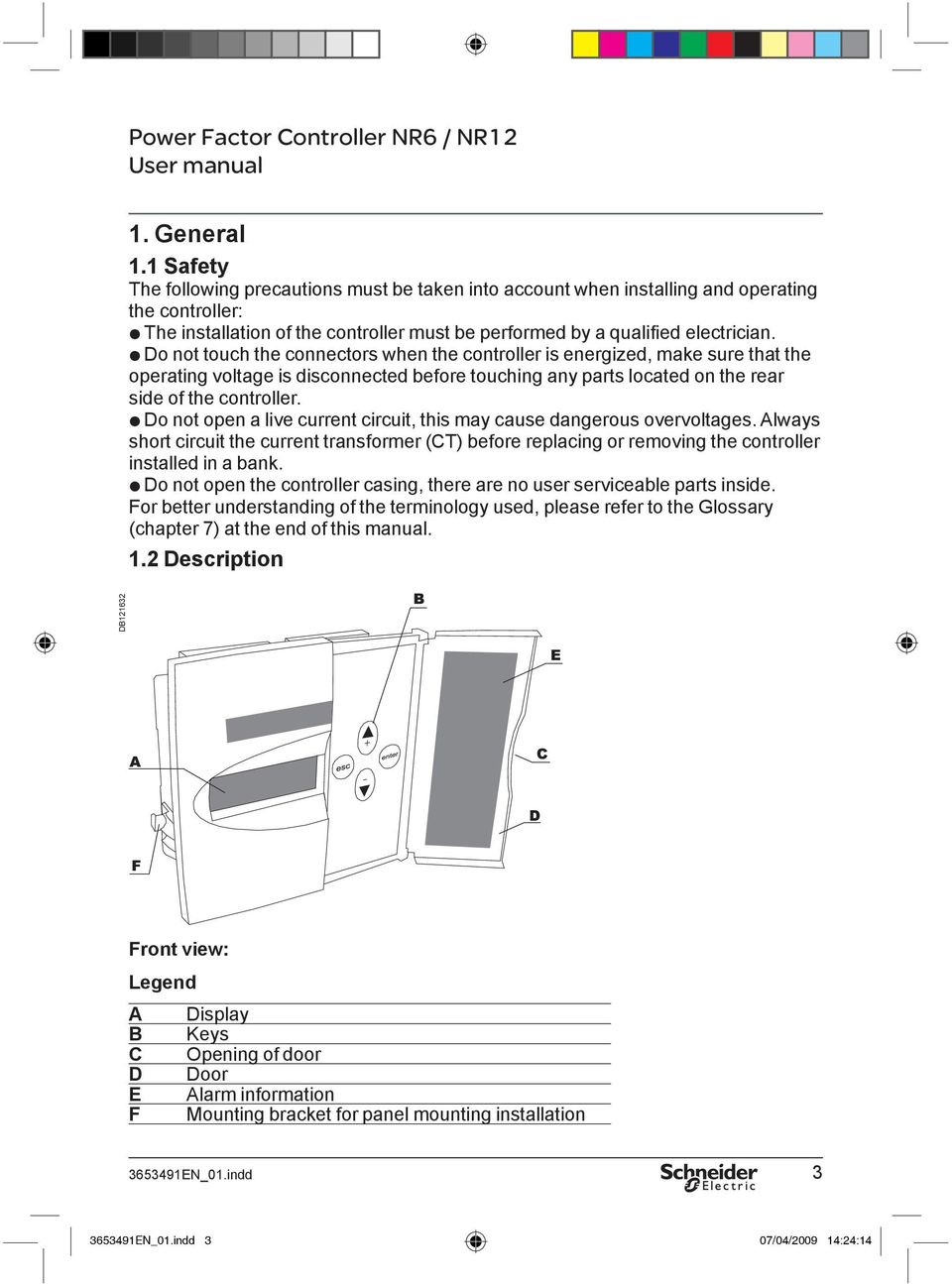
3 1. General 1.1 Safety The following precautions must be taken into account when installing and operating the The installation of the controller must be performed by a qualified Do not touch the connectors when the controller is energized, make sure that the operating voltage is disconnected before touching any parts located on the rear side of the Do not open a live current circuit, this may cause dangerous overvoltages. Always short circuit the current transformer (CT) before replacing or removing the controller installed in a Do not open the controller casing, there are no user serviceable parts inside. For better understanding of the terminology used, please refer to the Glossary (chapter 7) at the end of this manual. 1.2 Description DB Front view: Legend A Display B Keys C Opening of door D Door E Alarm information F Mounting bracket for panel mounting installation EN_01.indd EN_01.indd 3 07/04/ :24:14
4 Rear view: Legend G Step output connectors H Specifi cation label I Mounting bracket for panel mounting installation J Fixing spring for DIN-rail mounting K Current/voltage connection inputs L Fan and alarm outputs M DIN-rail mounting installation area DB DB Side view: Legend N Screwdriver guide See Chapter 8 for technical specifications EN_01.indd EN_01.indd 4 07/04/ :24:14

5 2. Installation The controller is designed for either panel (cut-out 138 x 138 mm) or DIN-rail installation. It is locked to the rail by a screwdriver-operated fixing spring and to a panel by a side fi tting spring. There are two ways of connecting the controller to the Voltage LN (Line Neutral) (CT on the same line Voltage LL (Line Line) (CT on the third phase) Incorrect connections can be automatically corrected by the controller when Auto Setup is selected from the main menu. Caution: For use in HV network, look first at chapter 6.3. DB Figure 1: Controller connections EN_01.indd EN_01.indd 5 07/04/ :24:14

6 3. Display The controller is equipped with a backlighted LCD-display. DB Figure 2: Display layout and symbols. 4. Start-up Procedure Before connecting power, check the wiring of all controller terminals. Check carefully for correct operating voltage. Selection of wrong voltage input can permanently damage the controller. After the fi rst power switch-on, the controller will automatically ask for the language setting of the menu EN_01.indd EN_01.indd 6 07/04/ :24:15

7 DB Figure 3: Language setting dialog. 5. Menu Operations 5.1 General Navigation between different menu levels. As a precaution against accidental use, the access of certain menus has been protected by a keylock, which is a special sequence of keystrokes enabling the use the particular menu item EN_01.indd EN_01.indd 7 07/04/ :24:15

8 Figure 4: General way of entering the menu with a keylock. Adjusting a value. Figure 5: Adjusting a value. Special case: The wiring editor. DB DB DB Figure 6: The wiring editor EN_01.indd EN_01.indd 8 07/04/ :24:15

9 5.2 Main Menu The main menu contains all basic submenus required to set up and operate the controller. Which menu to choose? DB Figure 7: Required skills and menu selection. If bank preconfi guration is properly done, commissioning does not require any special skill EN_01.indd EN_01.indd 9 07/04/ :24:15

10 DB Figure 8: Main menu. (1) Bank pre-configuration When factory settings have not been changed, this menu provides the bank builder the means of pre-configuring the bank at the workshop. After pre-configuration, this menu topic is replaced by (2) Commissioning, by which the controller is taken into service. (3) Automatic setup of parameters In the event that the controller has not been pre-configured, an inexperienced user can automatically set up all the characteristics of the bank and bring it into service. (4) Manual setup of parameters In the event that the controller has not been pre-configured, an experienced user can manually set up all the characteristics of the bank and bring it into service. (5) Measurement The measurement menu contains the most common measurements taken from the network and provides some information about the bank. This is a read-only menu. (6) Parameter update At any time, an experienced user can access the most common operating parameters from this menu. Unlike the configuration and setup sequences, this is a menu allowing a free and unrestricted entry into all its items and should be used when an occasional parameter access is needed. (7) Alarm settings To adjust status and parameters of alarms. (8) Maintenance The maintenance menu provides some useful information about the usage of the bank, capacitors and contactors. Some auxiliary settings and action have also been provided. This menu is basically intended for use by the manufacturer s maintenance team EN_01.indd EN_01.indd 10 07/04/ :24:15

11 5.3 Bank Pre-Configuration This menu item is a forced sequence, meaning that all items must be accessed before the pre-confi guration takes place. NOTE: Do not use of the Bank Pre-Configuration menu for HV network applications. The sequence can be interrupted by pressing key. See Glossary (chapter 7) for parameters definitions EN_01.indd EN_01.indd 11 07/04/ :24:15
12 DB Figure 9: Bank pre-configuration EN_01.indd EN_01.indd 12 07/04/ :24:16

13 5.4 Commissioning A pre-confi gured controller is put into service by this menu. The sequence contains an automatic parameter verifi cation to check that the manually entered parameters agree with the network used. See Glossary (chapter 7) for parameter definitions. NOTE: Do not use of the Commissioning menu for HV network applications. DB Figure 10: Commissioning. What to do in case of error? Error codes can help you to identify a problem and make corrections EN_01.indd EN_01.indd 13 07/04/ :24:16

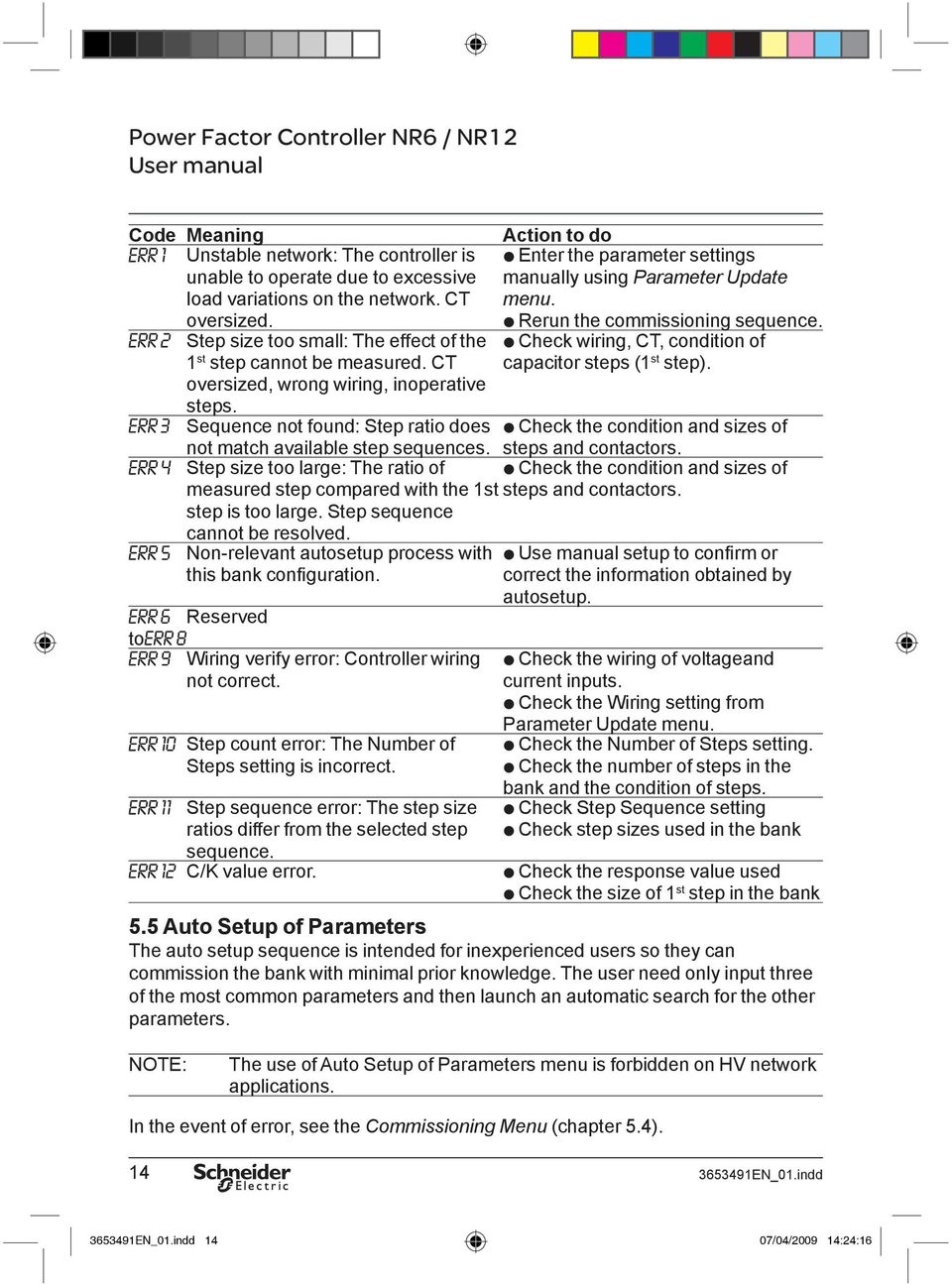
14 Code Meaning Action to do Unstable network: The controller Enter the parameter settings unable to operate due to excessive manually using Parameter Update load variations on the network. CT menu. Rerun the commissioning sequence. Step size too small: The effect of Check wiring, CT, condition of 1 st step cannot be measured. CT capacitor steps (1 st step). oversized, wrong wiring, inoperative steps. Sequence not found: Step ratio Check the condition and sizes of not match available step sequences. steps and contactors. Step size too large: The ratio Check the condition and sizes of measured step compared with the 1st steps and contactors. step is too large. Step sequence cannot be resolved. Non-relevant autosetup process Use manual setup to confirm or this bank confi guration. correct the information obtained by autosetup. Reserved to Wiring verify error: Controller wiring not correct. Step count error: The Number of Steps setting is incorrect. Step sequence error: The step size ratios differ from the selected step sequence. C/K value Check the wiring of voltageand current Check the Wiring setting from Parameter Update Check the Number of Steps Check the number of steps in the bank and the condition of Check Step Sequence Check step sizes used in the Check the response value Check the size of 1 st step in the bank 5.5 Auto Setup of Parameters The auto setup sequence is intended for inexperienced users so they can commission the bank with minimal prior knowledge. The user need only input three of the most common parameters and then launch an automatic search for the other parameters. NOTE: The use of Auto Setup of Parameters menu is forbidden on HV network applications. In the event of error, see the Commissioning Menu (chapter 5.4) EN_01.indd EN_01.indd 14 07/04/ :24:16
15 DB Figure 11: Auto setup of parameters. 5.6 Manual Setup of Parameters The manual setup sequence is intended for experienced users. There are nine important parameters to input before the controller can be taken into service. This sequence is completed by an automatic verification of the parameters entered earlier in this sequence. This menu item is a forced sequence, meaning that all items must be accessed before the validation of the setup takes place. The sequence can be interrupted by pressing key. See Glossary (chapter 7), for parameter definitions. In case of error, refer to the Commissioning Menu, chapter EN_01.indd EN_01.indd 15 07/04/ :24:16

16 DB Figure 12: Manual setup of parameters EN_01.indd EN_01.indd 16 07/04/ :24:16

17 5.7 Measurement Menu The measurement menu contains the most common measurements taken from the network. This is a read-only menu sequence. DB Figure 13: Measurement menu EN_01.indd EN_01.indd 17 07/04/ :24:17

18 5.8 Parameter Update The most common operating parameters can be accessed from this menu. Unlike the confi guration and setup sequences presented earlier in this text, this is a menu allowing a free and unrestricted entry into all of its items and should be used when occasional parameter access is needed. See Glossary (chapter 7), for parameter definitions. In case of error, refer to the Commissioning Menu, chapter DB Figure 14: Parameter update EN_01.indd EN_01.indd 18 07/04/ :24:17

19 5.9 Alarms Menu In Alarms menu, each individual alarm can be enabled or disabled. Once an alarm condition is detected, the corresponding alarm number is shown at the upper part of the display, and the alarm symbol is on. The alarm relay is also activated. An alarm can be reset by an extended pressure of key, this clears all passive alarms. If alarm condition is still active, the alarm cannot be reset. List of alarms: Alarm Alarm Possible cause Controller action No. 1 Low power Wiring or LL/LN definition Undersized bank. 2 Too small C/K Wrong program choice. Pauses regulation for 10 Defective capacitors (optimal program). 3 Abnormal Cos Wiring overcapacitive network (welded Too low current. 4 Low voltage Disconnection till voltage returns. 5 Wiring or LL/LN definition Improper use of fixed steps. 6 Wrong Wrong or unstable network frequency detected at startup. Stop regulation. No automatic restart. 7 Undersized CT. 8 Overvoltage Temporary disconnection of steps. 9 Ambient temperature too Defective coolingsystem. 10 Voltage Harmonic Resonance. Temporary disconnection of steps. Temporary disconnection of steps EN_01.indd EN_01.indd 19 07/04/ :24:17

20 Alarm contacts closed when the controller is not opened when the controller is energized without closed when the controller is energized with alarm. informs on the status of each alarm: enabled or allows enabling or disabling of each individual alarm by setting it ON or OFF. If an alarm is set to OFF, it cannot cause an alarm under any condition. To allow a normal alarm response, the appropriate alarm must be enabled, i.e. set ON. Some alarm triggering levels can be Alarm No 9 (overtemperature ), with temperature limit Alarm No 10 (voltage distortion ), with THD(U) limit setting. DB Figure 15: Alarms menu EN_01.indd EN_01.indd 20 07/04/ :24:17

21 5.10 Maintenance menu The maintenance menu provides useful information about the usage of the bank, capacitors and contactors. Also, some auxiliary settings have been provided. CAUTION: CAUTION: This menu access is dedicated to specialists. In case of installation in a HV bank (with VT), you must adjust the default factory settings. The reconnection delay must be changed to a larger value (e.g. 600 secs) to prevent destruction of capacitors. DB Figure 16/1: Maintenance menu EN_01.indd EN_01.indd 21 07/04/ :24:17
22 DB Figure 16/2: Maintenance menu. 6. Miscellaneous 6.1 Stepping programs The controller's algorithm will try to reach the target cos φ inside a tolerance area dependant upon the C/K value. It reaches the value by switching on or off available relevant steps. The regulation step program choice is as follows: a) Stack Program (linear): All capacitor steps are of equal size (ex: ). The operation sequence obeys to a last-in-fi rst-out (LIFO) principle. The first step connected will be the last one to be disconnected and vice versa. See Fig EN_01.indd EN_01.indd 22 07/04/ :24:18
23 b) Normal program (2+ linear) Normal program can be used on bank whose step ratio is The linear sequence starts with the 3rd step. The two first steps are used as fi ne-tuning. The controller always start by switching the first step then the second. Other steps are used successively. See Fig. 18. c) Circular A program All capacitor steps are of equal size (ex: ). The operation sequence obeys the fi rst-in-fi rst-out (FIFO) principle. The first step connected will be the first one to be disconnected and vice versa. Then a circular sequence is followed. In order to operate correctly, the number of steps programmed into the controller must strictly comply with the number of physical steps. See Fig. 19. d) Circular B program (1+Circular) Circular B program can be used on a bank whose step ratio is The first step is used as tuning after the activating limit is exceeded. The circular sequence starts with the 2nd step. Step demand Step number X + X X + X X X + X X X X + X X X X X + X X X X X X - X X X X X - X X X X - X X X - X X + X X X + X X X X + X X X X X - X X X X - X X X - X X - X Figure 17: Stack program Operation sequence 1:1:1:1 Step demand Step number X + X X + X X X + X X X X - X X X - X X + X X X + X X X X + X X X X X - X X X X - X X X - X X - X Figure 18: Normal program Operation sequence 1:2:4: EN_01.indd EN_01.indd 23 07/04/ :24:18
24 Step demand Step number X + X X + X X X + X X X X - X X X - X X + X X X + X X X X - X X X - X X + X X X + X X X X - X X X Figure 19: Circular A program Operation sequence 1:1:1 Step demand Step number X + X X + X X X - X X + X X X + X X X X - X X X - X X - X + X X + X X X + X X X X + X X X X X - X X X X - X X X - X X Figure 20: Circular B program Operation sequence 1:2:2 e) Optimal Program: The optimal program operates with many step configurations: The target cos ϕ power is reached using the fewest number of steps in minimal time. Like the circular program, this algorithm equalises the usage of steps. This program uses optimally selected steps sizes when approaching the target power and at the same time the response delays are shortened, particularly if there is a large requirement for kvar or if the network suddenly becomes capacitive. Comparison between normal and optimal program: Normal program will reach the cos target value by successive connection/ disconnection of kvar corresponding to the smallest step value. Optimal program will reach the target cos value by successive connection/ disconnection of kvar corresponding to the highest relevant and available step value EN_01.indd EN_01.indd 24 07/04/ :24:18
25 Optimal Stepping Program DB Uncompensated reactive power Q Compensated reactive power +4 Connection of steps Step sizes : 1:2:4:4 +4 Ind Cap Steps on : Steps on : Steps on : t -4-4 Disconnection of steps Normal Stepping Program DB Q Step sizes : 1:2:4:4 +4 Ind Cap Steps on : Steps on : t Steps on : 4-4 Figure 21: Regulation example - Optimal vs. Normal EN_01.indd EN_01.indd 25 07/04/ :24:18
26 6.2 Manual calculation of response value Normally the response value, more generally known as the C/K value, is set automatically as a part of the Auto Setup sequence, but there are cases when these values must be entered manually. The correct value can be calculated using an equation requiring the 1st step size (in vars), line-to-line voltage of the network used (in volts) and the CT ratio as follows: C / K = Q 1st I 1 / 5A x U LL x 3 where Q 1st = size of 1 st step in vars U LL = line-to-line voltage in volts I 1 /5A = CT ratio Alternatively, the C/K value can be taken from the table below (valid for 400 V networks) n1/n2 Smallest step (kvar) / / / / / / / / / / / / / / Table 1: C/K-values for 400 V network EN_01.indd EN_01.indd 26 07/04/ :24:18
27 By successive connections (or disconnections) of steps we adjust the reactive power between two symmetrical limits corresponding to response value. DB Figure 22: Compensation example and consequences. 6.3 High Voltage use of NR6/NR12 This controller is primarily intended for LV network, but may be used in HV networks under the commissioner s full responsibility, if the following points are taken into account. Connections must employ VT and CT with respect to the following figure. In HV applications the power values displayed in Measurement Menu represent only the secondary side values of the VT. To avoid potential misunderstandings, set the CT ratio to percentage scale. Safety (or reconnection) delay must be adapted to the value of the discharge resistors of the capacitors, the most usual value is 10 minutes (600 seconds). The controller s default response delay is adapted for LV use. Using too short a response delay may damage the capacitors. the whole commissioning process must be performed using the Manual setup menu and Parameter the commissioner should not use Bank Pre-Configuration and Commissioning the use of Auto Setup menu is strictly forbidden to prevent capacitor destruction EN_01.indd EN_01.indd 27 07/04/ :24:19
28 DB Figure 23: HV use of the controller EN_01.indd EN_01.indd 28 07/04/ :24:19
29 7. Glossary Display Long form text Min Default Max information value value value ALARMS Alarms Menu. ALRM.SET Alarm Setup (Enable/Disable). AUTO Automatic search of C/K response value. AUTO.SET Automatic Setup Sequence. BANK.PRE Bank Pre-confi guration Sequence Menu. BANK.TST Bank Test: each step is automatically connected and disconnected in turn. This facilitates testing of the operation of each capacitor step contactor. See also Step Test. CIRC.A Circular A stepping program. CIRC.B Circular B stepping program. C/K Response value, normally set up automatically by the controller. CLR.STAT Clear Statistics. COMMISS Commissioning Sequence Menu. COS PHI Target cos φ value. 0.8ind cap CT Current Transformer primary setting, xxx/5 A.25/5 % 6000/5 DELAY Safety Delay or reconnection delay. 10s 50s 600s Response delay is fixed 20% of reconnection delay. The default value corresponds to capacitors with internal discharge resistors 50V 1 min. ENGLISH Language names: English, for instance. ERR NN Error in parameter search or verify. NN= error number. FACTOR.S Restore Factory Settings. IGNORED The controller does not require the information about step sequence for any program outside Optimal. The controller defi nes it automatically. I HIGH Current too high. >115% I N I LOW Current too low. <2.5% I N LANGUAG Language Selection for menus. LL Line to Line connection. LN Line to Neutral connection. LV Low Voltage. MAINTEN Maintenance Menu. MAN.SET Manual Setup Sequence Menu EN_01.indd EN_01.indd 29 07/04/ :24:19
30 Display Long form text Min Default Max information value value value MANUAL Manual setting of C/K response value. See further. MEASURE Measurements Menu. N.CONNEC Number of Connections. N.STEPS Number of used steps. 1 6/12 12 NORMAL Normal, Standard stepping program. OPTIM Optimal program. PARAMET Parameters Menu. PROGRAM Selection of suitable stepping program between (see 6.1 Stepping programs) The controler s algorithm will try to reach the target cos φ inside a tolerance area dependant upon the C/K value. It reaches the value by switching on or off available relevant steps. Stack Normal Circular A Circular B Optimal SEARCH Search (response value, step sizes, wiring...) SERIAL.N Serial Number of the product (for internal manufacturer use) STACK Linear stepping program. STEP.SEQ Setting of Step Size Sequence This concerns the Optimal program. Step sequence are predefined with other programs and modification request are not then taken into account. STEP.TST Step Test: each step can be manually connected and disconnected. This facilitates testing of the operation of each capacitor step contactor. See also Bank Test. TEMP.LIM Temperature Limit (adjustable) Fan switchon 20 C 50 C 60 C limit is 15 C lower than temperature limit. THD.U Total Harmonic Distortion of Voltage EN_01.indd EN_01.indd 30 07/04/ :24:19
31 Display Long form text Min Default Max information value value value THD.U.LIM Maximum Harmonic Distortion of Voltage 5% 7% 20% (adjustable). U LOW Voltage too low. <85%UN UPTIME Uptime (Power On Hours). VERIFY Automatic verifi cation of parameters. VERSION Software version number (for internal manufacturer use). VOLTAGE Input Voltage reference value for voltage 80V 400V 460V alarms. WIRING Connections of voltage and current inputs. Example: U.L2-L3 (Voltage connected between phase 2 and 3) Example: I.1.AUTO (Current connected to phase 1 with automatic polarity selection) Current polarity selections: DIR = direct connection INV = inverted connection AUTO = automatic polarity (defined by controller) EN_01.indd EN_01.indd 31 07/04/ :24:19
32 8. Technical specifications Number of steps 6 or 12 Dimensions 155 x 158 x 70 mm Frequency Hz, Hz Measuring current 0 5 A Measuring and supply voltages V V V Relay outputs 120 Vac/5A, 250 Vac/2A, 400 Vac/1A 110 Vdc/0.3A, 60 Vdc/0.6A, 24 Vdc/2A Display LCD glass with 160 symbols, backlighted Protection class IP41 front panel, IP20 rear part Target cos φ-range 0.85 ind cap Response limits, C/K symmetrical Reconnection delay s Response delay 20 % of reconnection delay, min. 10 s Displayed measurements cos φ, P, Q, S, THD(U), temperature Installation method Panel installation, DIN-rail installation Casing Impact resistant PC/ABS, UL94V-0 Operating temperature range 0 60 C Alarm log List of 5 last alarms Step counters Yes Fan control with dedicated relay Yes Accuracy (of FS) Is: 5% Iq: 5% U/I-samples: 5% Phase: 5 Distortion: ±3 db (up to 11th) Temperature: ±3 C CT setting range 25/5 6000/5 Power outage detection Reaction time > 15 ms Approvals CEI CEI CEI CEI Schneider Electric Industries SAS Rectiphase 399 rue de la Gare Pringy France Tel.: 33 (0) Fax: 33 (0) N EN_01 As standards, specifications and designs change from time to time, please ask for confirmation of the information given in this publication. Printed on ecological paper. Layout: Schneider Electric - Sedoc Photos: Schneider Electric Printing: Schneider Electric - All rights reserved EN_01.indd 32 07/04/ :24:20
Power factor correction and harmonic filtering. Rectimat 2 Automatic capacitor banks. Catalogue. Building a New Electric World
 Catalogue 2002 Automatic capacitor banks Building a New Electric World 0Contents Power factor correction 2 Power factor equipment selection guide 3 General technical data 4 Capacitors and banks 50 z 6
NC-12 Modbus Application
 NC-12 Modbus Application NC-12 1 Table of Contents 1 Table of Contents... 2 2 Glossary... 3 SCADA...3 3 NC-12 Modbus in general... 3 4 Entire system... 4 4.1 PFC to PC connection alternatives...4 4.1.1
Power-monitoring unit PowerLogic System. Technical data sheet. Power Meter Series 800
 Power-monitoring unit PowerLogic System Technical data sheet 2003 Power Meter Series 800 Function and characteristics PB100313 The PowerLogic Power Meter Series 800 offers all the high-performance measurement
Power Meter Series 700
 PowerLogic power-monitoring units Power Meter Series 700 Technical data sheet 2007 Functions and characteristics E90463 The PowerLogic Power Meter Series 700 offers all the measurement capabilities required
max 6f / computer max
 POWER FACTOR REGULATORS computer max max 6f / computer max max 12f Instructions Manual ( M98234601-03-10A ) - 1 - Index 1 INTRODUCTION AND SAFETY RECOMMENDATIONS... 3 1.1 DELIVERY SPOT CHECK... 3 1.2 STARTING
Features. Display. Measurements. Intelligent. Accuracy. Models. Installation DEIF A/S. Multi-instrument 4921210109D
 7000/7000C/7020 Multi-instrument 4921210109D Features Measurements All 3-phase AC measurements True RMS Replaces analogue meters Demand on each phase current Accuracy U, I and F class 0.5 Other values
1. INTRODUCTION FEATURES 2. PROGRAMMING
 1. INTRODUCTION Mono phase compensation systems are not useful in plants where unbalanced loads exist. In such plants compensation has to be done by measuring all 3 phase parameters individually. Devices,
Input signal Maximum Range Accuracy. Thermocouple E -50 to 700 C (-58 to 1832 F) ±1 C
 F4 Process Controller Installation and Operation Guide SAFETY ALERTS The symbols below are used on the equipment and throughout this document to draw the user s attention to important operational and safety
Quick Connect. quick - simple - efficient. www.g-mw.de
 Quick Connect quick - simple - efficient www.g-mw.de Phone: +49 9103 7129-0 Fax: +49 9103 7129-207 Innovative connection technology to plug three single-phase current transformers to multifunctional power
RISH EM 3490 DS Dual Source Energy Meter RISH EM 3490 DS. Application : Product Features:
 Application : RISH Master 3490 DS measures important electrical parameters of Utility (in normal mode) & Generators (in Power back up) in three phase and single phase Network & replaces the multiple analog
Automatic start of a generator
 Automatic start of a generator General description This application note will help you to set your Xtender for an automatic start of a generator as per different parameters such as the output power, the
Applications. diris_826_a_1_gb_cat
 Measurement units NEW diris_824_a_1_cat Energy monitoring and management of low voltage/ high voltage electrical installations Function are measurement units which can provide all the functions offered
Time switch D21-1-channel 4 126 31 / 32 / 33-047 61 / 63 / 6047 60. General information. Overview. Set language
 Time switch D21-1-channel 4 126 31 / 32 / 33-047 61 / 63 / 6047 60! Safety notes GB This product should be installed in line with installation rules, preferably by a qualified electrician. Incorrect installation
RAINCONTROL LCD Special
 RAINCONTROL LCD Special edition 1.1 01/2007 - code 5880 1/16 RAINCONTROL LCD SPECIAL... 3 RAINCONTROL SPECIAL LCD PANEL PRESENTATION... 4 AUTO... 5 LOW AND HIGH THRESHOLD SETTING... 6 LOW THRESHOLD...
User Manual V1.0 2014 SDM220MODBUS. Single-Phase Two Module DIN rail Meters
 SDM220MODBUS Single-Phase Two Module DIN rail Meters Measures kwh, Kvarh, KW, Kvar, KVA, PF, Hz, dmd, V, A, etc. Di-directional measurement IMP & EXP Two pulse outputs RS485 Modbus Din rail mounting 36mm
TEMON 8-C. Doc. N MO-0370-ING TEMPERATURE MONITOR DEVICE TYPE TEMON 8-C OPERATION MANUAL. Microener - Copyright 2010 FW 2.2 Date 01.12.2008 Rev.
 TEMPERATURE MONITOR DEVICE TYPE TEMON 8-C OPERATION MANUAL Microener - Copyright 2010 FW 2.2 Date 01.12.2008 Rev. 0 1. Generality 3 2. Introduction 3 3. Accessories and Options 3 4. Installation 3 5. Connection
EM-PQ 1500 Power Quality Monitor. Operating Manual
 EM-PQ 1500 Power Quality Monitor Operating Manual 1 User notes: 2 Contents Page Page 1. Quick start... 5 2. Description... 6 2.1 Operating principle... 6 3. Installation... 8 3.1 Mounting... 8 3.2 Electrical
MTS Power Products MIAMI FL 33142 ATS-22AG. Automatic Transfer Switch And Control PLC Operator s Manual
 MTS Power Products MIAMI FL 33142 ATS-22AG Automatic Transfer Switch And Control PLC Operator s Manual Dedicated Single Phase Transfer Switch With Touch Screen Controls Normal Power Connections Emergency
3-Phase Energy meter with serial S-Bus interface
 Data sheet www.sbc-support.com 3-Phase Energy meter with serial S-Bus interface Energy meters with an integrated S-Bus interface allow direct reading of all relevant data, such as energy (Total and partial),
Fixed - Over/Under voltage limits, (0.75...1.2) U N respectivity Link selectable - 5 min or 10 min delay. Fixed limits
 Features 71.11.8.230.0010 71.11.8.230.1010 1 - Phase 230 V Over & Under voltage monitoring relays 71.11.8.230.0010 - Fixed Over & Under voltage detection - Link selectable 5 or 10 minute lock-out delay
AUTOMATIC TRANSFER SWITCH CONTROL UNIT OPERATOR S MANUAL
 ATS-220 AUTOMATIC TRANSFER SWITCH CONTROL UNIT OPERATOR S MANUAL For Use in 208 to 240 Volts Single and 3 Phase ATS Systems With 110Volt AC or DC Control Motors and selenoids 4501 NW 27 ave Miami FL 33142
SX460. Generator Automatic Voltage Regulator Operation Manual
 SX460 Generator Automatic Voltage Regulator Operation Manual Self Excited Automatic Voltage Regulator Compatible with Newage SX460* * Use for reference purpose only and not a genuine Newage product. 1.
Single-phase (220...240 V) voltage monitoring: Undervoltage Overvoltage Window mode (overvoltage + undervoltage) Voltage fault memory selectable
 Features 70.11 70.31 70.41 Electronic voltage monitoring relays for single and three-phase applications Multifunctional types, providing the flexibility of monitoring Undervoltage, Overvoltage, Window
NX Series Inverters. HVAC Pocket Programming Guide
 NX Series Inverters HVAC Pocket Programming Guide HVAC Pocket Programming Guide HVAC Pocket Programming Guide / Contents This guide provides a single reference document for the user of NXL HVAC (product
GTEC transfer switch open transition
 GTEC transfer switch open transition 40-1250 Amp Description The GTEC automatic transfer switch combines reliability and flexibility in a small, economical package for transferring loads between a utility
EGCP-3 LS 8406-113 Revision L. Explanation of Software Changes Made for the EGCP-3 LS Control. Application Note 51294
 EGCP-3 LS 8406-113 Revision L Explanation of Software Changes Made for the EGCP-3 LS Control Application Note 51294 WARNING DANGER OF DEATH OR PERSONAL INJURY WARNING FOLLOW INSTRUCTIONS Read this entire
Energy Management Energy Meter Type EM23 DIN
 Energy Management Energy Meter Type EM23 DIN Class 1 (kwh) according to EN62053-21 Class B (kwh) according to EN50470-3 Class 2 (kvarh) according to EN62053-23 Accuracy ±0.5 RDG (current/voltage) Energy
Electronic timer CT-VBS.17+18 OFF-delayed without auxiliary voltage, for DC contactors Data sheet
 Characteristics Single-function OFF-delay timer for DC contactors, without auxiliary voltage Width.5 mm CDC 5 6 F3 Approvals A culus E CCC CT-VBS a Circuit diagram b Marker label Marks a CE b C-Tick Order
Switch Actuator, 8-fold, 10 A, MDRC AT/S 8.10.1, GH Q631 0075 R0111
 , GH Q631 0075 R0111 The 8-fold switch actuator is a DIN rail mounted device for insertion in the distribution board. It is connected to the EIB via a bus terminal. In the event of bus voltage failure,
Daker DK 1, 2, 3 kva. Manuel d installation Installation manual. Part. LE05334AC-07/13-01 GF
 Daker DK 1, 2, 3 kva Manuel d installation Installation manual Part. LE05334AC-07/13-01 GF Daker DK 1, 2, 3 kva Index 1 Introduction 24 2 Conditions of use 24 3 LCD Panel 25 4 Installation 28 5 UPS communicator
Inwall Room Temperature Unit
 Inwall Room Temperature Unit TM11B01KNX TM11B11KNX TM11B21KNX Product Handbook Product: Inwall Room Temperature Unit Order Code: TM11B01KNX TM11B11KNX TM11B21KNX Application Program ETS: TM11B_1KNX Inwall
FLOW CALCULATOR INSTRUCTION MANUAL MESURES BAMOPHOX 759 26-06-2007 759 M1 02 E MES FLOW CALCULATOR 759-02/1
 BAMOPHOX 759 E - M FLOW CALCULATOR INSTRUCTION MANUAL MESURES 22, Rue de la Voie des Bans - Z.I. de la Gare - 95100 ARGENTEUIL Tél : (33) 01 30 25 83 20 - Web : www.bamo.fr Fax : (33) 01 34 10 16 05 -
Tilt switches N3 / N4... MEMS technology, one or two axis. Use. Options. + long lifetime and highly reliability due to mechanism-free MEMS technology
 Tilt switches MEMS technology, one or two axis N3 / N4... + long lifetime and highly reliability due to mechanism-free MEMS technology + combinable output signals + one or two axis measurement + tilt range
Electronic timer CT-AHD.12 OFF-delayed with 1 c/o (SPDT) contact
 Data sheet Electronic timer CT-AHD.12 OFF-delayed with 1 c/o (SPDT) contact The CT-AHD.12 is an electronic time relay with OFF-delay. It is from the CT-D range. With their MDRC profile and a width of only
User Guide. Emergency Lighting Setup, Configuration and Administration. Redwood Software Version 4.0
 Emergency Lighting Setup, Configuration and Administration Redwood Software Version 4.0 IMPORTANT SAFEGUARDS When using electrical equipment, basic safety precautions should always be followed including
Operating Manual for the Electronic Built-in Interval Timer. Micro II (Countdown Timer)
 Operating Manual for the Electronic Built-in Interval Timer Micro II (Countdown Timer) Note: This document has been designed for our OEM customers. They can use it as supporting material when creating
Application/Connection Examples
 This Quick Start Guide is designed to familiarize the user with the connection and configuration of the DTS-305 DIN rail mounted single / 3 phase power & energy meter with RS-485 or TCP communications.
Automatic Transfer Switch-Controller ATS-C by Eaton. Automatic Transfer Switch- Controller ATS-C 96 and C 144
 Automatic Transfer Switch-Controller ATS-C by Eaton Automatic Transfer Switch- Controller ATS-C 96 and C 144 Supply safety for low voltage energy distribution. Automatic Transfer Switch-Controller ATS-C
How To Build A Low Voltage Capacitor Lvcp
 Low Voltage Capacitor LVCP The new choice for Power Factor Correction LVCP : the new choice for Power Factor Correction The LVCP is a compact and powerful capacitor. It offers high modularity, unmatched
543-0032-00, 943-0032-00. User s Manual
 543-0032-00, 943-0032-00 User s Manual 1 Comfort Alert Diagnostics Faster Service And Improved Accuracy The Comfort Alert diagnostics module is a breakthrough innovation for troubleshooting heat pump and
UM-X Field display for continous level sensors
 Technical Documentation Field display for continous level sensors 10/2007 Edition: 1 Item No.: 207120 FAFNIR GmbH Bahrenfelder Str. 19 D-22765 Hamburg Telephone: +49 (0)40-39 82 07-0 Fax: +49 (0)40-3 90
Combi B Alarm box. Mounting instructions
 Combi B Alarm box Mounting instructions EN Mounting instructions Alarm box Combi B VdS, G113064, G113065, G113066 Table of Contents 1 Description... 3 2 System overview... 3 3 Structure... 3 3.1 Power
ABB PV + Storage REACT-3.6/4.6-TL 3.6 to 4.6 kw
 Solar inverters ABB PV + Storage REACT-3.6/4.6-TL 3.6 to 4.6 kw PV energy, combined with energy storage systems, can help increase self-consumption and energy selfsufficiency*. One of the biggest challenges
A1000 Cheat Sheet (Open Loop Vector)
 A1000 Cheat Sheet (Open Loop Vector) The following procedure is a supplement to supplied with this equipment and will guide the user in properly wiring the A1000 and. It will also show the user how to
STERILIZERS, LABORATORY DRYING OVENS
 TS9026 TS9053 TS9135 TS9430 TS 9000 SERIES: STERILIZERS, LABORATORY DRYING OVENS Series TS9000 consists of four different cabinets available in sizes from 26 litres to 430 litres. Interior housing and
Maximum Demand Control
 Maximum Demand Control There are three terms that appear on the majority of electric company bills: Active energy consumption (kwh) Reactive energy consumption (kvarh) Maximum Demand Traditionally, utility
Low Voltage Products
 Low Voltage Products ABB Power Quality Filters: The most efficient solution for active filtering of harmonics, smooth reactive power compensation and load balancing. Enabling trouble-free and efficient
IDEAL INDUSTRIES, INC. TECHNICAL MANUAL MODELS: 61-763 61-765
 IDEAL INDUSTRIES, INC. TECHNICAL MANUAL MODELS: 61-763 61-765 The Service Information provides the following information: Precautions and safety information Specifications Performance test procedure Calibration
HFE1600 Series 1600W 1U Hot Swap Front End Power Supplies
 25.2W/in 3 power density Internal ORing MOSFET & Current Share Climate Savers Computing efficiency standards Up to 8000W in 1U rack Single and dual output 1U racks PMBus option HFE1600 Series 1600W 1U
Softstart. Upgrade to Torque control PSTB370 1050. Contents. 1. ESD Warning...2. 2. Tools...2. 3. PCB information...2. 4. Step by step...
 Softstart Upgrade to Torque control PST30 300 PSTB370 1050 1SFC132040M0201 RevA Dec-06 Contents 1. ESD Warning...2 2. Tools...2 3. PCB information...2 4. Step by step...3 5. Configuration of the LV board...7
ALARM ANNUNCIATOR ME - 3010 INSTRUCTION MANUAL
 ALARM ANNUNCIATOR ME - 3010 INSTRUCTION MANUAL INTRODUCTION... 2.. TECHNICAL DATA... 3 ACCESSORIES... 5. INSTALLATION... 7 OPERATION... 12. TECHNICAL INFORMATION... 13 MAINTENANCE... 14. CONFIGURATIONS...
CAUTION OPC-LM1-ID. Option Card for Frequency Divider. Fuji Electric FA Components & Systems Co., Ltd. Instruction Manual
 Instruction Manual Option Card for Frequency Divider Deliver this instruction manual without fail to those who actually operate the equipment. Read this operation manual and understand the description
Current valve. for AC 24 V pulse/pause control of electrical loads up to 30 kw
 4 937 DESIO Current valve for AC 24 V pulse/pause control of electrical loads up to 30 kw SEA45.1 Use The current valve is used for the control of electric heating elements in heating, ventilation and
Vibration Monitoring System Adash 3600
 " User's guide Application: Vibration Monitoring System Adash 3600! Vibration diagnostics, monitoring and protective on-line system! On-line vibration monitoring system of engines, fans, pumps, gearboxes,
RISH CON - Hz. Salient Features : Application : Product Features: FREQUENCY TRANSDUCER
 Application : The RISH CON - Hz transducer is used for frequency measurement. The output signal is proportional to measured frequency and is either load independent DC Current or load independent DC Voltage.
Match. GE Digital Energy. Uninterruptible Power Supply 500-1500 VA. Technology for the Digital World. Match UPS. GE Digital Energy.
 Match Uninterruptible Power Supply 500-1500 VA Manufactured by: General Electric Company Telephone +41 (0)91 / 850 51 51 CH 6595 Riazzino (Locarno) Fax +41 (0)91 / 850 51 44 Switzerland Website www.gedigitalenergy.com
INSTALLATION GUIDE. Card Reader & Controller with KIM Swipe Reader for Solitaire 850 / 950 / 850L Learnlok PK2930
 INSTALLATION GUIDE Card Reader & Controller with KIM Swipe Reader for Solitaire 850 / 950 / 850L Learnlok PK2930 Card Reader and Controller Model 3.5 with KIM Swipe Reader Table of Contents 1. Features..................................
MAKING MODERN LIVING POSSIBLE. living connect. Installation and User Guide. Danfoss heating
 MAKING MORN LIVING POSSIBLE Danfoss heating living connect Installation and User Guide Contents 1.0 System overview... 3 2.0 Overview of display and control buttons... 3 3.0 Installation - step by step...
Installation and Operation Back-UPS 1250, 1300, 1500
 Installation and Operation Back-UPS 1250, 1300, 1500 Inventory bu001a Safety and General Information This unit is intended for indoor use only. Do not operate this unit in direct sunlight, in contact with
Recommended Tools and Supplies: Small Flat Blade Screwdriver, 35mm x 7.5mm DIN Rail. Qwik Install
 TPDIN-Monitor-WEB Web Based Monitor and Control Remote Power Stations Backup Power Systems Solar Systems Wind Powered Systems Industrial Sense & Control Process Automation Congratulations! on your purchase
Fire Alarm Control Panel. Family. Operating Manual
 Fire Alarm Control Panel Family Operating Manual CONTENTS System Description AH-03312 System Characteristics... Fire Signal Receiving Board Description-4L... Fire Signal Receiving Board Description-8L...
Modular I/O System Analog and Digital Interface Modules
 OPERATING INSTRUCTIONS Modular I/O System Analog and Digital Interface Modules Installation Operation Maintenance Document Information Document ID Title: Operating Instructions Modular I/O System Part
Panel Meters and Controllers Modular Panel Meter Type EDM 35
 Panel Meters and Controllers Modular Panel Meter Type EDM 35 Modular digital panel meter, 3 1/2-digit Indicating or controlling current, voltage, resistance, temperature, tacho or frequency. Easy programming
EVR01. General description. Input power cord. S.a.s. di Rizzo Davide & C.
 General description EVR01 EVR01 is a device that allows you to recharge an Electrical Vehicle from any standard mono-phase source of power. The international standard defines Mode 2 recharging cable any
Softstart. Changing of Printed Circuit Board, Display, Keypad and upgrade to Torque control PSTB370 1050. Contents. 1. ESD Warning...2. 2. Tools...
 Softstart Changing of Printed Circuit Board, Display, Keypad and upgrade to Torque control PST30 300 PSTB370 1050 1SFC132009M0201 Rev A Dec-06 Contents 1. ESD Warning...2 2. Tools...2 3. PCB information...2
Counter for Energy. We make energy measurable and secure your future. www.g-mw.de
 Counter for Energy We make energy measurable and secure your future www.g-mw.de 10 reasons for GMW Customer oriented solutions Individual consultancy Satisfied customers in all continents Large range of
Congratulations! Thank you!
 TM-47 ORDERCODE D1370 Congratulations! You have bought a great, innovative product from DAP Audio. The DAP Audio Microphone range brings excitement to any venue. Whether you want simple plug-&-play action
Product Manual. ABB i-bus KNX. Universal Dim Actuator, MDRC UD/S 2.300.2. Intelligent Installation Systems ABB
 Product Manual ABB i-bus KNX Universal Dim Actuator, MDRC UD/S 2.300.2 Intelligent Installation Systems ABB UD/S 2.300.2 Universal Dim Actuator, MDRC This manual describes the function of the Universal
Operating ambient temperature range: 5ºC to 50ºC Storage temperature range: -30ºC to 70ºC
 HOJA TÉCNICA 1400H101 Edición 01 (02 de 08) www.ako.es GENERAL TECHNICAL SPECIFICATIONS Temperature range: -50ºC to +99ºC type: NTC Total accuracy ( + controller): ±1ºC lead extension with cable AKO-15586:
ABB i-bus KNX Switch Actuator, x-fold, 16/20 A, MDRC SA/S x.16.6.1, 2CDG 110 1xx R0011
 , 2CDG 110 1xx R0011 SA/S 8.16.6.1 2CDC 071 006 S0010 The 16/20 A Switch actuators are modular installation devices in Pro M Design for installation in the distribution board. The devices are especially
AGRI-ALERT 800T / AGRI-ALERT 800 ALARM SYSTEM USER MANUAL
 AGRI-ALERT 800T / AGRI-ALERT 800 ALARM SYSTEM USER MANUAL Manufacturer: Viatron Electronics 3514 1st Street, St-Hubert (Quebec) Canada J3Y 8Y5 WARNING: the warranty can be void if the Agri-Alert 800T or
Mobile Data Power Model: MDP-25
 Mobile Data Power Model: MDP-25 Topic Section Features... 2 Operational Features Summary... 2 Back-up Battery Power Internal Charger Voltage Spike Protection RF Noise Filtering Warning of Imminent Loss
DALI RC BASIC SO. Control unit Operating instructions
 DALI RC BASIC SO Control unit Operating instructions Contents Safety... 4 General instructions 4 Safety instructions 4 Description... 5 Purpose and application 5 Function 5 Light control 5 Brightness
Operating Manual UWAPS-TINY Series
 Operating Manual UWAPS-TINY Series Powecon Oy WWW.POWECON.FI 1/9 Table of content 1 Warranty...3 2 Safety information...3 3 Abbreviations and terminology...3 4 List of appendices...4 5 Introduction...4
Modbus RTU (RS-485) TCP/IP (Ethernet)
 Eaton Innovative Technology PEM PC Software Installation and Operation Instruction Manual: IM01005006E Rev. 2 March 2007 Modbus RTU (RS-485) TCP/IP (Ethernet) Effective Date 3/2007 For more information
Controller Automation, Model II+
 Controller Automation Page 2 of 2 Automation with the RADAK II+ power controller II+ I/O Points: Inputs 5 Programmable Digital inputs 2 Dedicated digital inputs (Channel select and External SCR control
WATER LEAK DETECTION SYSTEM WLDS-10 INSTALLATION & COMMISSIONING
 WATER LEAK DETECTION SYSTEM WLDS-10 INSTALLATION & COMMISSIONING DESCRIPTION: An electronic control panel used in conjunction with one pulse meter (water meter with pulse output proportional to flow rate)
M1000 Process Alarm Monitor
 Data Sheet Process Alarm Monitor Reliable Supervision and Control 10 inputs with LED indications Supports both NO/NC input contacts 10 open collector outputs Built-in siren relay Text label for alarm descriptions
Installation and operating instructions
 English Installation and operating instructions Energy meter 3-phase CETS-A via up to 1500A Description The CETS-A is a compact electronic active power energy meter for application in 3-phase power lines
Installation manual. Generator Paralleling Controller GPC multi-line 2 4189340225C
 Installation manual Generator Paralleling Controller GPC multi-line 2 Software ver. 1.3X Compact system in one unit - dynamic synchronisation - load sharing - generator protection DEIF A/S 3-phase AC RMS
A.1. a Division of Pittway Corporation. Documento: M-010.1-MGAS-ENG. Edizione: 01/1997 Rev.:
 Documento: M-010.1-MGAS-ENG Edizione: 01/1997 Rev.: A.1 a Division of Pittway Corporation FRONT PANEL & VISUAL INDICATIONS GENERAL TROUBLE GENERAL PROGRAMMING IN PROGRESS ENABLE/ALARM/TROUBLE (ZONE 1 ALARM
Brake module AX5021. Documentation. Please read this document carefully before installing and commissioning the brake module!
 Documentation Brake module AX5021 Please read this document carefully before installing and commissioning the brake module! Version : 1.2 : 2012.03.05 Date Article-no. : TDmlAX-5021-0000-0200 Page 2/8
SOLAR MICRO INVERTER 260 COMMUNICATION GATEWAY. Apparent Power Control (APC) unique micro inverter with
 SOLAR MICRO INVERTER 260 COMMUNICATI GATEWAY Apparent Power Control (APC) P Q unique micro inverter with REAL & REACTIVE POWER CTROL 2 Micro Inverters unique micro inverter with real & reactive power control
Installation and User Guide
 Installation and User Guide 458-UNI8 8-Channel Universal Dimmer Module Introduction The 458/UNI8 is an 8-channel universal, digital transistor, dimmer module. Each channel s mode can be selected for either
Automation System TROVIS 6400 TROVIS 6493 Compact Controller
 Automation System TROVIS 6400 TROVIS 6493 Compact Controller For panel mounting (front frame 48 x 96 mm/1.89 x 3.78 inch) Application Digital controller to automate industrial and process plants for general
Firmware version: 1.10 Issue: 7 AUTODIALER GD30.2. Instruction Manual
 Firmware version: 1.10 Issue: 7 AUTODIALER GD30.2 Instruction Manual Firmware version: 2.0.1 Issue: 0.6 Version of the GPRS transmitters configurator: 1.3.6.3 Date of issue: 07.03.2012 TABLE OF CONTENTS
How To Control A Power Supply With A Mini Transmitter And Switch (Power Supply)
 transmitter (2 wire) / switch for continuous or On/Off Control Indication, monitoring, transmitting and continuous or On/Off control in one device Output signal 4...20 ma, 2-wire for continuous control
User's Guide. True RMS Industrial Multimeter
 User's Guide 97650 True RMS Industrial Multimeter Ω C ã F ã 10A V µ 10A V ã ã ma A Introduction This meter measures AC/DC Voltage, AC/DC Current, Resistance, Capacitance, Frequency (electrical & electronic),
SERVICE MANUAL FOR 6535 SERIES TWO TON HIGH EFFICIENCY PACKAGED HEAT PUMPS
 SERVICE MANUAL FOR 6535 SERIES TWO TON HIGH EFFICIENCY PACKAGED HEAT PUMPS TABLE OF CONTENTS 1. Warnings...2 2. Accessibility Of Appliance...3 3. Unit Dimensions And Specifications...3 4. Unit Specifications
SECTION 26 29 23 VARIABLE FREQUENCY DRIVES
 SECTION 26 29 23 VARIABLE FREQUENCY DRIVES PART 1 GENERAL 1.01 SCOPE A. Furnish and install individual freestanding variable frequency AC drives (VFD) as shown on the Drawings and specified herein. 1.02
Electronic Pressure Switch EDS 300
 Electronic Pressure Switch EDS 300 User manual Page 2 of 16 Content 1. Functions of the EDS 300...3 2. Mounting...3 3. Operating keys on the membrane keypad...4 4. Digital display...4 5. Output function...5
Configure Inverter output for two utility settings, (1)120V/60Hz, (2)220V/50Hz
 HV Solar Inverter System GUI Overview January 2012 TMS320C2000 Systems Applications Collateral The HV Solar Inverter System GUI provides a simple interface to evaluate some of the functionalities of the
Thermistor motor protection relays CM-MSS.22 and CM-MSS.23
 Data sheet Thermistor motor protection relays CM-MSS.22 and CM-MSS.23 The thermistor motor protection relays CM-MSS.22 and CM-MSS.23 monitor the winding temperature of motors and protect them from overheating,
Disturbance Recoder SPCR 8C27. Product Guide
 Issued: April 1999 Status: Updated Version: C/26.04.2006 Data subject to change without notice Features Versatile digital disturbance recorder module for recording various phenomena in the electric power
NELSON VOLTAGE MONITOR INSTALLATION & PROGRAMMING MANUAL
 NELSON VOLTAGE MONITOR INSTALLATION & PROGRAMMING MANUAL CONTENTS GENERAL INFORMATION...3 INSTALLATION...3 FIELD WIRING...4 PROGRAMMING...4 Circuit Monitor Options...5 Power Frequency...5 Alarm Silence
Operational Overview and Controls Guide. Two or Three Pump IronHeart Lite with Variable Frequency Drives
 DOCUMENT: ECSEQ6-0 EFFECTIVE: 09/23/10 SUPERSEDES: Operational Overview and Controls Guide Two or Three Pump IronHeart Lite with Variable Frequency Drives 6700 Best Friend Road. Norcross, GA 30071. (770)
Water Leak Detection System
 Water Leak Detection System Installation and Operating Manual 505-334-5865 ph 505-334-5867 fax www.rodisystems.com email:[email protected] 936 Highway 516 Aztec, NM 87410-2828 Manual Revisions and Copyright
Instruction Manual Copy Adapter "CPAD-C1A" "CP Fuji Electric Systems Co., Ltd. INR-SI47-0886a-EU Rev 052010
 Instruction n Manual Copy Adapter "CPAD-C1A" Thank you for purchasing our Copy Adapter CPAD-C1A. This product is designed to copy function codes and their data, which are stored in the FRENIC-Mini series
TC 1818a. Operating Guide. Control Module SWM-015.5
 TC 1818a Control Module Operating Guide SWM-015.5 This guide is intended solely for use by owners of Thermon HeatChek TM heat tracing control and monitoring units. This manual describes operation for TC
User Manual WatchPower
 User Manual WatchPower Management Software for Inverter Table of Contents 1. WatchPower Overview... 1 1.1. Introduction... 1 1.2. Features... 1 2. WatchPower Install and Uninstall... 1 2.1. System Requirement...