
YASKAWA AC Drive 1000-Series Option EtherNet/IP. Technical Manual
|
|
|
- Osborn McDowell
- 9 years ago
- Views:
Transcription
1 YASKAWA AC Drive 1000-Series Option EtherNet/IP Technical Manual Type: SI-EN3 To properly use the product, read this manual thoroughly and retain for easy reference, inspection, and maintenance. Ensure the end user receives this manual. MANUAL NO. SIEP C B

2 Copyright 2012 YASKAWA ELECTRIC CORPORATION All rights reserved. No part of this publication may be reproduced, stored in a retrieval system, or transmitted, in any form or by any means, mechanical, electronic, photocopying, recording, or otherwise, without the prior written permission of Yaskawa. No patent liability is assumed with respect to the use of the information contained herein. Moreover, because Yaskawa is constantly striving to improve its high-quality products, the information contained in this manual is subject to change without notice. Every precaution has been taken in the preparation of this manual. Yaskawa assumes no responsibility for errors or omissions. Neither is any liability assumed for damages resulting from the use of the information contained in this publication. 2 YASKAWA ELECTRIC SIEP C B 1000-Series Option SI-EN3 Technical Manual

3 Table of Contents 1 PREFACE AND SAFETY PRODUCT OVERVIEW RECEIVING OPTION COMPONENTS INSTALLATION PROCEDURE RELATED DRIVE PARAMETERS CONFIGURING MESSAGING OUTPUT ASSEMBLIES (DRIVE CONSUMES) INPUT ASSEMBLIES (DRIVE PRODUCES) GENERAL CLASS OBJECTS VENDOR-SPECIFIC (YASKAWA) CLASS OBJECTS WEB INTERFACE TROUBLESHOOTING SPECIFICATIONS YASKAWA ELECTRIC SIEP C B 1000-Series Option SI-EN3 Technical Manual 3

4 1 Preface and Safety 1 Preface and Safety Yaskawa manufactures products used as components in a wide variety of industrial systems and equipment. The selection and application of Yaskawa products remain the responsibility of the equipment manufacturer or end user. Yaskawa accepts no responsibility for the way its products are incorporated into the final system design. Under no circumstances should any Yaskawa product be incorporated into any product or design as the exclusive or sole safety control. Without exception, all controls should be designed to detect faults dynamically and fail safely under all circumstances. All systems or equipment designed to incorporate a product manufactured by Yaskawa must be supplied to the end user with appropriate warnings and instructions as to the safe use and operation of that part. Any warnings provided by Yaskawa must be promptly provided to the end user. Yaskawa offers an express warranty only as to the quality of its products in conforming to standards and specifications published in the Yaskawa manual. NO OTHER WARRANTY, EXPRESS OR IMPLIED, IS OFFERED. Yaskawa assumes no liability for any personal injury, property damage, losses, or claims arising from misapplication of its products. Applicable Documentation The following manuals are available for the SI-EN3 option: Yaskawa AC Drive 1000-Series Option SI-EN3 EtherNet/IP Installation Manual Manual No: TOBP C Yaskawa AC Drive 1000-Series Option SI-EN3 EtherNet/IP Technical Manual Manual No: SIEP C (This book) SI-EN3 Option Read this manual first. The installation manual is packaged with the option and contains information required to install the option and set up related drive parameters. The technical manual contains detailed information about the option. Access the following sites to obtain the technical manual: U.S.: Europe: Japan: For questions, contact your local Yaskawa sales office or the nearest Yaskawa representative. Yaskawa AC Drive 1000-Series Quick Start Guide Yaskawa AC Drive 1000-Series Technical Manual Yaskawa Drive The drive manuals cover basic installation, wiring, operation procedures, functions, troubleshooting, and maintenance information. The manuals also include important information about parameter settings and drive tuning. Access these sites to obtain Yaskawa instruction manuals: U.S.: Europe: Japan: For questions, contact your local Yaskawa sales office or the nearest Yaskawa representative. Terms Note: Drive: Option: Indicates supplemental information that is not related to safety messages. Yaskawa AC Drive 1000-Series Yaskawa AC Drive 1000-Series Option SI-EN3 EtherNet/IP Registered Trademarks EtherNet/IP is a trademark of the ODVA. All trademarks are the property of their respective owners. 4 YASKAWA ELECTRIC SIEP C B 1000-Series Option SI-EN3 Technical Manual

5 1 Preface and Safety Supplemental Safety Information Read and understand this manual before installing, operating, or servicing this option. The option must be installed according to this manual and local codes. The following conventions are used to indicate safety messages in this manual. Failure to heed these messages could result in serious or possibly even fatal injury or damage to the products or to related equipment and systems. DANGER Indicates a hazardous situation, which, if not avoided, will result in death or serious injury. W ARNING Indicates a hazardous situation, which, if not avoided, could result in death or serious injury. CAUTION Indicates a hazardous situation, which, if not avoided, could result in minor or moderate injury. Indicates an equipment damage message. General Safety NOTICE General Precautions The diagrams in this section may include options and drives without covers or safety shields to illustrate details. Be sure to reinstall covers or shields before operating any devices. The option should be used according to the instructions described in this manual. Any illustrations, photographs, or examples used in this manual are provided as examples only and may not apply to all products to which this manual is applicable. The products and specifications described in this manual or the content and presentation of the manual may be changed without notice to improve the product and/or the manual. When ordering new copies of the manual, contact a Yaskawa representative or the nearest Yaskawa sales office and provide the manual number shown on the front cover. DANGER Heed the safety messages in this manual. Failure to comply will result in death or serious injury. The operator is responsible for injuries or equipment damage caused from failure to heed the warnings in the manual. NOTICE Do not expose the drive or the option to halogen group disinfectants. Failure to comply may cause damage to the electrical components in the option. Do not pack the drive in wooden materials that have been fumigated or sterilized. Do not sterilize the entire package after the product is packed. Do not modify the drive or option circuitry. Failure to comply could result in damage to the drive or option and will void warranty. Yaskawa is not responsible for any modification of the product made by the user. This product must not be modified. YASKAWA ELECTRIC SIEP C B 1000-Series Option SI-EN3 Technical Manual 5

6 2 Product Overview 2 Product Overview About This Product The option provides a communications connection between the drive and an ODVA EtherNet/IP network. The option connects the drive to an EtherNet/IP network and facilitates the exchange of data. This manual explains the handling, installation and specifications of this product. EtherNet/IP is a communications link to connect industrial devices (such as smart motor controllers, operator interfaces, and variable frequency drives) as well as control devices (such as programmable controllers and computers) to a network. EtherNet/IP is a simple, networking solution that reduces the cost and time to wire and install factory automation devices, while providing interchangeability of like components from multiple vendors. EtherNet/IP is an open device network standard. By installing the option to a drive, it is possible to do the following from an EtherNet/IP master device: drive operation drive operation status monitoring changing parameter settings. Applicable Models The option can be used with the drive models in Table 1. Table 1 Applicable Models Drive Series Drive Model Number Software Version <1> CIMR-A 2A 1010 A1000 CIMR-A 4A0002 to 4A CIMR-A 4A0930 and 4A CIMR-A 5A 504 Z1000 CIMR-Z A 1014 <1> See PRG on the drive nameplate for the software version number. 6 YASKAWA ELECTRIC SIEP C B 1000-Series Option SI-EN3 Technical Manual

7 3 Receiving 3 Receiving Please perform the following tasks upon receipt of the option: Inspect the option for damage. Contact the shipper immediately if the option appears damaged upon receipt. Verify receipt of the correct model by checking the model number printed on the name plate of the option package. Contact your supplier if you have received the wrong model or the option does not function properly. Option Package Components Table 2 Option Package Contents Description: Option Ground Wire Screws (M3) LED Label Installation Manual _ NS MS MANUAL Quantity: Tools Required for Installation A Phillips screwdriver (M3 metric/#1, #2 U.S. standard size <1>) is required to install the option and remove drive front covers. Diagonal cutting pliers. (required for some drive models) A small file or medium grit sandpaper. (required for certain drive models) <1> Screw sizes vary by drive capacity. Select a screwdriver appropriate for the drive capacity. Note: Tools required to prepare option networking cables for wiring are not listed in this manual. YASKAWA ELECTRIC SIEP C B 1000-Series Option SI-EN3 Technical Manual 7

8 4 Option Components 4 Option Components SI-EN3 Option Figure 1 A F G H B Underside E D C A1000 A Connector (CN5) E Ground terminal and installation hole <1> B Installation hole F Communication connector CN1 (RJ45) C LED (MS) <2> G LED (LINK/ACT) <2> D LED (NS) <2> H LED (10/100) <2> <1> The ground wire provided in the option shipping package must be connected during installation <2> Refer to Option LED Display on page 9 for details on the LEDs Communication Connector CN1 Figure 1 SI-EN3 Option Components The communication connector on the option is a modular RJ45 female connector designated CN1. CN1 is the connection point for a customer supplied male Ethernet network communication cable. Table 3 Male 8-way Ethernet Modular Connector (Customer Supplied) Male EtherNet 8-Way Modular Connector Pin Description <1> Not used for 10 Mbps and 100 Mbps networks. 1 (Pair 2) Transmit data (TXD) + 2 (Pair 2) Transmit data (TXD) - 3 (Pair 3) Receive data (RXD) + 4 (Pair 1) Not used <1> 5 (Pair 1) Not used <1> 6 (Pair 3) Receive data (RXD) - 7 (Pair 4) Not used <1> 8 (Pair 4) Not used <1> 8 YASKAWA ELECTRIC SIEP C B 1000-Series Option SI-EN3 Technical Manual

9 4 Option Components Option LED Display The option has four LEDs: Bi-color Status LEDs: Module status (MS) red/green Network status (NS) red/green Green Ethernet LEDs: Network speed-10/100 (MS) green Link status and network activity-link/act (NS) red/green The operational states of the option LEDs after the power-up diagnostic LED sequence is completed are described in Table 4. Wait at least 2 seconds for the power-up diagnostic process to complete before verifying the states of the LEDs. Table 4 Option LED States LED Name MS NS 10/100 <1> LINK/ACT <1> Indication Color Status Operating Status Remarks OFF Power supply OFF Power is not being supplied to the drive Green ON Option operating The option is operating normally Green Flashing Option initializing The option is configuring an IP address Red ON Fatal error occurred The option has detected a fatal (unrecoverable) error Red Flashing Non-fatal error occurred The option has detected a non-fatal (recoverable) error Green/Red Flashing Option self-test The option is in self-test mode OFF Offline or Power supply OFF Green ON Online communications established The option is online and has established connections Green Flashing Online communications not established The option is online without an established connection Red ON Communications error (fatal) The option detected a duplicate IP address Red Flashing Communications time-out (non-fatal) A communications time-out occurred Green/Red Flashing Option self-test The option is in self-test mode Green OFF 10 Mbps is established Green ON 100 Mbps is established Green OFF Link is not established Green ON Link is established Green Flashing Link is established and there is network activity <1> Remove the drive front cover to check the status of the LED. Be careful not to touch the main circuit terminals or the control board in the drive. Power-Up Diagnostics An LED test is performed each time the drive is powered up. The initial boot sequence may take several seconds. After the LEDs have completed the diagnostic LED sequence, the option is successfully initialized. The LEDs then assume operational conditions as shown in Table 4. Table 5 Power-Up Diagnostic LED Sequence Sequence Module Status (MS) Network Status (NS) Time (ms) 1 Green OFF Red OFF Green OFF 4 Green Green Green Red Green OFF YASKAWA ELECTRIC SIEP C B 1000-Series Option SI-EN3 Technical Manual 9

10 5 Installation Procedure 5 Installation Procedure Section Safety DANGER Electrical Shock Hazard Do not connect or disconnect wiring while the power is on. Failure to comply will result in death or serious injury. Disconnect all power to the drive and wait at least the amount of time specified on the drive front cover safety label. After all indicators are off, measure the DC bus voltage to confirm safe level, and check for unsafe voltages before servicing. The internal capacitor remains charged after the power supply is turned off. W ARNING Electrical Shock Hazard Do not remove the front covers of the drive while the power is on. Failure to comply could result in death or serious injury. The diagrams in this section may include options and drives without covers or safety shields to show details. Be sure to reinstall covers or shields before operating any devices. The option should be used according to the instructions described in this manual. Do not allow unqualified personnel to use equipment. Failure to comply could result in death or serious injury. Maintenance, inspection, and replacement of parts must be performed only by authorized personnel familiar with installation, adjustment, and maintenance of this product. Do not touch circuit boards while the power to the drive is on. Failure to comply could result in death or serious injury. Do not use damaged wires, place excessive stress on wiring, or damage the wire insulation. Failure to comply could result in death or serious injury. Fire Hazard Tighten all terminal screws to the specified tightening torque. Loose electrical connections could result in death or serious injury by fire due to overheating of electrical connections. NOTICE Damage to Equipment Observe proper electrostatic discharge (ESD) procedures when handling the option, drive, and circuit boards. Failure to comply may result in ESD damage to circuitry. Never shut the power off while the drive is outputting voltage. Failure to comply may cause the application to operate incorrectly or damage the drive. Do not operate damaged equipment. Failure to comply may cause further damage to the equipment. Do not connect or operate any equipment with visible damage or missing parts. Do not use unshielded cable for control wiring. Failure to comply may cause electrical interference resulting in poor system performance. Use shielded twisted-pair wires and ground the shield to the ground terminal of the drive. 10 YASKAWA ELECTRIC SIEP C B 1000-Series Option SI-EN3 Technical Manual

11 5 Installation Procedure Properly connect all pins and connectors. Failure to comply may prevent proper operation and possibly damage equipment. Check wiring to ensure that all connections are correct after installing the option and connecting any other devices. Failure to comply may result in damage to the option. Installing the Option to A1000 Drive Prior to Installing the Option NOTICE Prior to installing the option, wire the drive, make necessary connections to the drive terminals, and verify that the drive functions normally without the option installed. Refer to the Quick Start Guide packaged with the drive for information on wiring and connecting the drive. Figure 2 shows an exploded view of the drive with the option and related components for reference. Figure 2 A1000 N A B C M L D K I H J G NS MS E F A Insertion point for CN5 connector H Included screws B SI-EN3 option I Ground wire C Drive front cover J Option modular connector CN1 D Digital operator K Drive grounding terminal (FE) E LED label L Connector CN5-A F Drive terminal cover M Connector CN5-B G Removable tabs for wire routing N Connector CN5-C Figure 2 Drive Components with Option YASKAWA ELECTRIC SIEP C B 1000-Series Option SI-EN3 Technical Manual 11

12 5 Installation Procedure Installing the Option Remove the front covers of the drive before installing the option. Refer to the drive Quick Start Guide for directions on removing the front covers. Cover removal varies depending on drive size. This option can be inserted only into the CN5-A connector located on the drive control board. DANGER! Electrical Shock Hazard. Do not connect or disconnect wiring while the power is on. Failure to comply could result in death or serious injury. Before installing the option, disconnect all power to the drive and wait at least the amount of time specified on the drive front cover safety label. After all indicators are off, measure the DC bus voltage to confirm safe level, and check for unsafe voltages before servicing. The internal capacitor remains charged after the power supply is turned off. 1. Shut off power to the drive, wait the appropriate amount of time for voltage to dissipate, then remove the digital operator (D) and front covers (C, F). Refer to the Quick Start Guide packaged with the drive for directions on removing the front covers. Cover removal varies depending on drive size. NOTICE: Damage to Equipment. Observe proper electrostatic discharge procedures (ESD) when handling the option, drive, and circuit boards. Failure to comply may result in ESD damage to circuitry. Figure 3 A1000 C D F Figure 4 Figure 3 Remove the Front Covers and Digital Operator 2. With the front covers and digital operator removed, apply the LED label (E) in the appropriate position on the drive top front cover (C). A1000 C NS MS E Figure 4 Apply the LED Label 12 YASKAWA ELECTRIC SIEP C B 1000-Series Option SI-EN3 Technical Manual

13 5 Installation Procedure 3. Make sure the screws on the left and right sides of the option terminal block (J) are tightened with a tightening torque of 0.5 to 0.6 N m (4.4 to 5.3 in lbs), then insert the option (B) into the CN5-A connector (L) located on the drive and fasten it using one of the included screws (H). Figure 5 A1000 B L J H Figure 5 Insert the Option 4. Connect the ground wire (I) to the ground terminal (K) using one of the remaining provided screws (H). Connect the other end of the ground wire (I) to the remaining ground terminal and installation hole on the option (B) using the last remaining provided screw (H) and tighten both screws to 0.5 to 0.6 N m (4.4 to 5.3 in lbs). Figure 6 A1000 B K I H Figure 6 Connect the Ground Wire Note: There are two screw holes on the drive for use as ground terminals(k). When connecting three options, two ground wires will need to share the same drive ground terminal. YASKAWA ELECTRIC SIEP C B 1000-Series Option SI-EN3 Technical Manual 13

14 5 Installation Procedure 5. Route the option wiring. Depending on the drive model, some drives may require routing the wiring through the side of the front cover to the outside to provide adequate space for the wiring. Refer to the Peripheral Devices & Options section of the drive Quick Start Guide or Technical Manual for more information on wire routing of specific models. Figure 7 Note: Route the wiring through the side of the front cover to the outside. In these cases, using diagonal cutting pliers, cut out the perforated openings on the left side of the drive front cover as shown in Figure 7-A. Sharp edges along the cut out should be smoothed down with a file or sand paper to prevent any damage to the wires. Route the wiring inside the enclosure as shown in Figure 7-B for drives that do not require routing through the front cover. Separate communication cables from main circuit wiring and other electrical lines. A A1000 B A Route wires through the openings provided on the left side of the front cover. <1> B Use the open space provided inside the drive to route option wiring. <1> The drive will not meet NEMA Type 1 requirements if wiring is exposed outside the enclosure. Figure 7 Wire Routing Examples 6. Connect the Ethernet communication cable to the option modular connector (CN1). To connect the option to a network, insert the RJ45 connector of the Cat 5e patch cable into the option modular connector (CN1). Ensure the cable end is firmly connected (see Figure 7). IGMP Snooping Switches implementing IGMP Snooping are strongly recommended. When IGMP Snooping is used, devices will only receive the multicast packets in which they are interested. Communication Cable Specifications Only use cable recommended for EtherNet/Industrial Protocol (EtherNet/IP ). Using a cable not specifically recommended may cause the option or drive to malfunction. Refer to the ODVA website for more information on network cabling ( 14 YASKAWA ELECTRIC SIEP C B 1000-Series Option SI-EN3 Technical Manual

15 5 Installation Procedure Connection Diagram A1000 Power R S T Drive U V W <1> M Motor CN5 EtherNet/IP Master EtherNet/IP Cable SI-EN3 EtherNet/IP Option CN1 FE <1> The ground wire provided in the option shipping package must be connected during installation. Figure 8 Option Connection Diagram 7. Replace and secure the front covers of the drive (C, F) and replace the digital operator (D). Figure 8 A1000 C D F Figure 9 Replace the Front Covers and Digital Operator Note: Take proper precautions when wiring the option so that the front covers will easily fit back onto the drive. Make sure no cables are pinched between the front covers and the drive when replacing the covers. 8. Set drive parameters in Table 6 for proper option performance. YASKAWA ELECTRIC SIEP C B 1000-Series Option SI-EN3 Technical Manual 15

16 5 Installation Procedure Installing the Option to Z1000 Drive Prior to Installing the Option Prior to installing the option, wire the drive, make necessary connections to the drive terminals, and verify that the drive functions normally without the option installed. Refer to the User Manual packaged with the drive for information on wiring and connecting the drive. Figure 10 shows an exploded view of the drive with the option and related components for reference. Figure 9 A1000 A B C D E J I H G NS MS F A Drive grounding terminal (FE) B SI-EN3 option C Mounting screw D Drive front cover E HOA keypad F LED label G Ground wire H Terminal block CN1 I Insert connector CN5 here J Connector CN5 Figure 10 Drive Components with Option 16 YASKAWA ELECTRIC SIEP C B 1000-Series Option SI-EN3 Technical Manual

17 5 Installation Procedure Installing the Option Remove the front cover of the drive before installing the option. Refer to the drive User Manual for directions on removing the front covers. Cover removal varies depending on drive size. This option can be inserted only into the CN5- A connector located on the drive control board. DANGER! Electrical Shock Hazard. Do not connect or disconnect wiring while the power is on. Failure to comply could result in death or serious injury. Before installing the option, disconnect all power to the drive and wait at least the amount of time specified on the drive front cover safety label. After all indicators are off, measure the DC bus voltage to confirm safe level, and check for unsafe voltages before servicing. The internal capacitor remains charged after the power supply is turned off. 1. Shut off power to the drive, wait the appropriate amount of time for voltage to dissipate, then remove the HOA keypad (E) and front cover (D). NOTICE: Damage to Equipment. Observe proper electrostatic discharge procedures (ESD) when handling the option, drive, and circuit boards. Failure to comply may result in ESD damage to circuitry. Figure 10 A1000 D E Figure 11 Figure 11 Remove the Front Cover and HOA Keypad 2. With the front cover and HOA keypad removed, apply the LED label (F) in the appropriate position on the drive front cover (D). A1000 D F NS MS Figure 12 Apply the LED Label YASKAWA ELECTRIC SIEP C B 1000-Series Option SI-EN3 Technical Manual 17

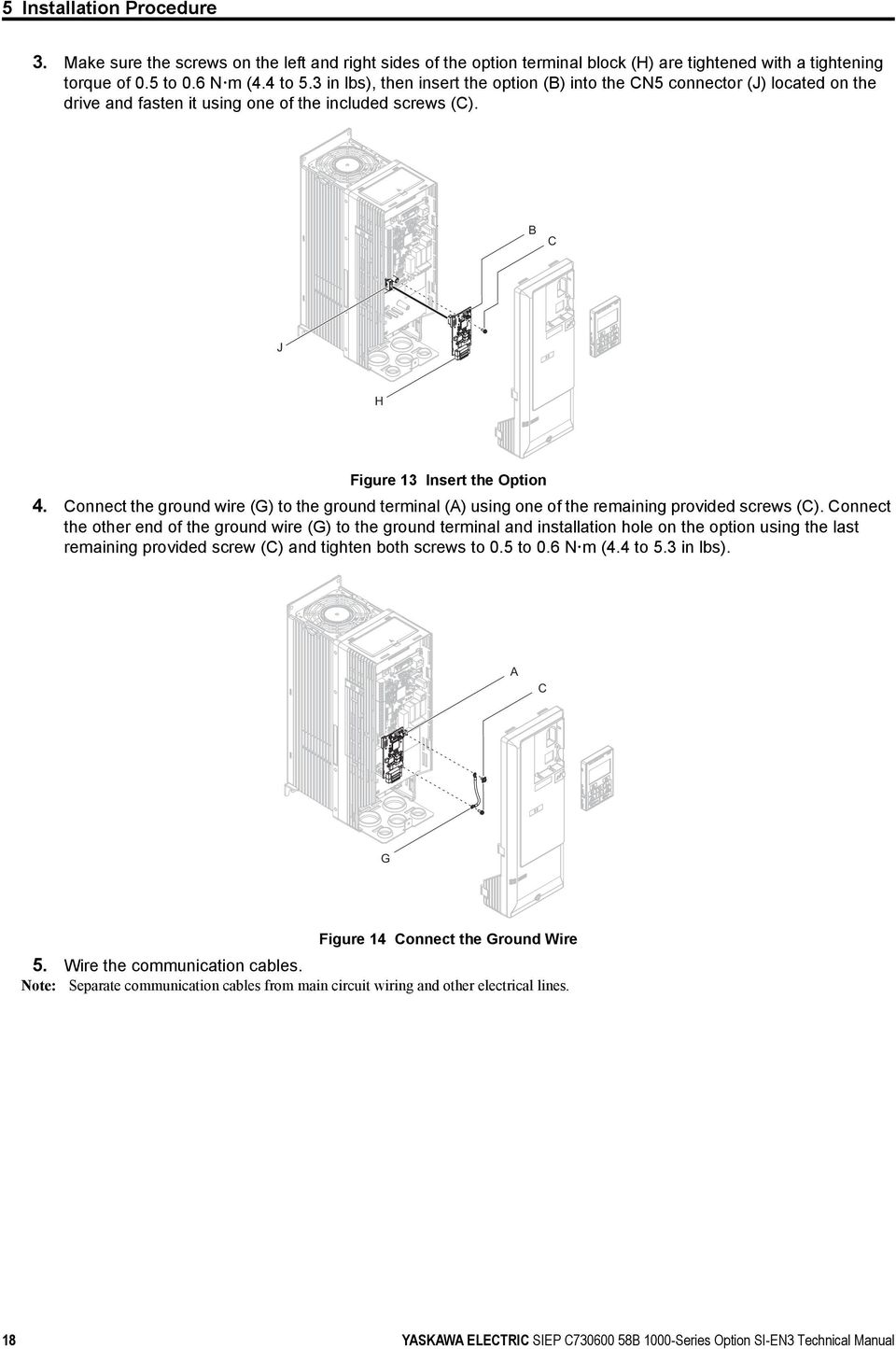
18 5 Installation Procedure Figure Make sure the screws on the left and right sides of the option terminal block (H) are tightened with a tightening torque of 0.5 to 0.6 N m (4.4 to 5.3 in lbs), then insert the option (B) into the CN5 connector (J) located on the drive and fasten it using one of the included screws (C). A1000 B C J H Figure 13 Figure 13 Insert the Option 4. Connect the ground wire (G) to the ground terminal (A) using one of the remaining provided screws (C). Connect the other end of the ground wire (G) to the ground terminal and installation hole on the option using the last remaining provided screw (C) and tighten both screws to 0.5 to 0.6 N m (4.4 to 5.3 in lbs). A1000 A C G Figure 14 Connect the Ground Wire 5. Wire the communication cables. Note: Separate communication cables from main circuit wiring and other electrical lines. 18 YASKAWA ELECTRIC SIEP C B 1000-Series Option SI-EN3 Technical Manual
19 5 Installation Procedure 6. Connect the Ethernet communication cable to the option modular connector (CN1). To connect the option to a network, insert the RJ45 connector of the Cat 5e patch cable into the option modular connector (CN1). Ensure the cable end is firmly connected (see Figure 15). IGMP Snooping Switches implementing IGMP Snooping are strongly recommended. When IGMP Snooping is used, devices will only receive the multicast packets in which they are interested. Communication Cable Specifications Only use cable recommended for EtherNet/Industrial Protocol (EtherNet/IP ). Using a cable not specifically recommended may cause the option or drive to malfunction. Refer to the ODVA website for more information on network cabling ( Connection Diagram A1000 Power R S T Drive U V W <1> M Motor CN5 EtherNet/IP Master EtherNet/IP Cable SI-EN3 EtherNet/IP Option CN1 FE <1> The ground wire provided in the option shipping package must be connected during installation. Figure 15 Option Connection Diagram 7. Replace and secure the front cover of the drive (D) and replace the HOA Keypad (E). Figure 14 A1000 D E Figure 16 Replace the Front Cover and HOA Keypad Note: Take proper precautions when wiring the option so that the front covers will easily fit back onto the drive. Make sure no cables are pinched between the front covers and the drive when replacing the covers. 8. Set drive parameters in Table 6 for proper option performance. YASKAWA ELECTRIC SIEP C B 1000-Series Option SI-EN3 Technical Manual 19

20 5 Installation Procedure EDS Files For easy network implementation of drives equipped with the option, an EDS file can be obtained from: U.S.: Europe: Japan: Other areas: Contact a Yaskawa representative. Note: Download the EDS file for SI-EN3 option. The SI-EN3 will not function as a slave in the network without the appropriate EDS file. 20 YASKAWA ELECTRIC SIEP C B 1000-Series Option SI-EN3 Technical Manual

21 6 Related Drive Parameters 6 Related Drive Parameters The following parameters are used to set up the drive for operation with the option. Parameter setting instructions can be found in the drive Quick Start Guide or Technical Manual. Confirm proper setting of the all parameters in Table 6 using the digital operator, before starting network communications. Table 6 Related Parameter Settings No. (Addr. Hex) b1-01 (180) <1> b1-02 (181) <1> F6-01 (3A2) F6-02 (3A3) F6-03 (3A4) F6-06 (3A7) <3> F6-07 (3A8) F6-08 (36A) F7-01 (3E5) <5> <6> <7> F7-02 (3E6) <5> <6> <7> F7-03 (3E7) <5> <6> <7> Name Description Values Frequency Reference Selection Run Command Selection Operation Selection after Communications Error External Fault Detection Conditions (EF0) Stopping Method for External Fault from the Communication Option Torque Reference/Torque Limit Selection from the Communication Option NetRef/ComRef Selection Function Reset Communication Related Parameters IP Address 1 IP Address 2 IP Address 3 Selects the frequency reference input source. 0: Operator - Digital preset speed d1-01 to d1-17 1: Terminals - Analog input terminal A1 or A2 2: MEMOBUS/Modbus communications 3: Option 4: Pulse Input (Terminal RP) Selects the run command input source. 0: Digital Operator - RUN and STOP keys 1: Digital input terminals S1 to S8 2: MEMOBUS/Modbus communications 3: Option Determines drive response when a bus error is detected during communications with the option. 0: Ramp to Stop 1: Coast to Stop 2: Fast-Stop 3: Alarm Only <2> Sets the condition for external fault detection (EF0). 0: Always detected 1: Detected only during operation Determines drive response for external fault input (EF0) detection during option communications. 0: Ramp to Stop 1: Coast to Stop 2: Fast-Stop 3: Alarm Only <2> 0: Torque Reference/Torque Limit via network communications are disabled. 1: Torque Reference/Torque Limit via network communications are enabled. <4> 0: Multi-step speed reference disabled, (F7 functionality) 1: Multi-step speed reference allowed (V7 functionality) Determines if communication-related parameters F6- and F7- are set back to original default values when the drive is initialized using parameter A : Do not reset parameters 1: Reset parameters Sets the static/fixed IP address. Parameter F7-01 sets the most significant octet. Sets the static/fixed IP address. Parameter F7-02 sets the second most significant octet. Sets the static/fixed IP address. Parameter F7-03 sets the third most significant octet. Default: 1 Range: 0 to 4 (Set to 3) Default: 1 Range: 0 to 3 (Set to 3) Default: 1 Range: 0 to 3 Default: 0 Range: 0, 1 Default: 1 Range: 0 to 3 Default: 0 Range: 0, 1 Default: 0 Range: 0, 1 Default: 0 <7> Range: 0, 1 Default: 192 Range: 0 to 255 Default: 168 Range: 0 to 255 Default: 1 Range: 0 to 255 YASKAWA ELECTRIC SIEP C B 1000-Series Option SI-EN3 Technical Manual 21
22 6 Related Drive Parameters No. (Addr. Hex) F7-04 (3E8) <5> <6> <7> F7-05 (3E9) <7> F7-06 (3EA) <7> F7-07 (3EB) <7> F7-08 (3EC) <7> F7-09 (3ED) <7> F7-10 (3EE) <7> F7-11 (3EF) <7> F7-12 (3E0) <7> F7-13 (3F1) F7-14 (3F2) F7-15 (3F3) <8> F7-17 (3F5) F7-18 (3F6) F7-19 (3F7) F7-20 (3F8) F7-21 (3F9) F7-22 (3FA) IP Address 4 Subnet Mask 1 Subnet Mask 2 Subnet Mask 3 Subnet Mask 4 Gateway Address 1 Gateway Address 2 Gateway Address 3 Gateway Address 4 Address Mode at Startup Duplex Mode Selection Communication Speed Selection EtherNet/IP Speed Scaling Factor EtherNet/IP Current Scaling Factor EtherNet/IP Torque Scaling Factor EtherNet/IP Power Scaling Factor EtherNet/IP Voltage Scaling Factor EtherNet/IP Time Scaling Name Description Values Sets the static/fixed IP address. Parameter F7-04 sets the fourth most significant octet. Sets the static/fixed Subnet Mask. Parameter F7-05 sets the most significant octet. Sets the static/fixed Subnet Mask. Parameter F7-06 sets the second most significant octet. Sets the static/fixed Subnet Mask. Parameter F7-07 sets the third most significant octet. Sets the static/fixed Subnet Mask. Parameter F7-08 sets the fourth most significant octet. Sets the static/fixed Gateway address. Parameter F7-09 sets the most significant octet. Sets the static/fixed Gateway address. Parameter F7-10 sets the second most significant octet. Sets the static/fixed Gateway address. Parameter F7-11 sets the third most significant octet. Sets the static/fixed Gateway address. Parameter F7-12 sets the fourth most significant octet. Selects how the option address is set. 0: Static <6> 1: BOOTP 2: DHCP Selects duplex mode setting. 0: Half duplex forced 1: Auto-negotiate 2: Full duplex forced Sets the communication speed. 10: 10 Mbps 100: 100 Mbps Sets the scaling factor for the speed monitor in EtherNet/IP Class ID 2AH Object. Sets the scaling factor for the output current monitor in EtherNet/IP Class ID 2AH Object. Sets the scaling factor for the torque monitor in EtherNet/IP Class ID 2AH Object. Sets the scaling factor for the power monitor in EtherNet/IP Class ID 2AH Object. Sets the scaling factor for the voltage monitor in EtherNet/IP Class ID 2AH Object. Sets the scaling factor for the time monitor in EtherNet/IP Class ID 2AH Object. Default: 20 Range: 0 to 255 Default: 255 Range: 0 to 255 Default: 255 Range: 0 to 255 Default: 255 Range: 0 to 255 Default: 0 Range: 0 to 255 Default: 192 Range: 0 to 255 Default: 168 Range: 0 to 255 Default: 1 Range: 0 to 255 Default: 1 Range: 0 to 255 Default: 2 Range: 0 to 2 Default: 1 Range: 0 to 2 Default: 10 Range: 10, 100 Default: 0 Min.: -15 Max.: 15 Default: 0 Min.: -15 Max.: 15 Default: 0 Min.: -15 Max.: 15 Default: 0 Min.: -15 Max.: 15 Default: 0 Min.: -15 Max.: 15 Default: 0 Min.: -15 Max.: YASKAWA ELECTRIC SIEP C B 1000-Series Option SI-EN3 Technical Manual
23 6 Related Drive Parameters No. (Addr. Hex) F7-23 to F7-32 (3FB to 404) F7-33 to F7-42 (405 to 40E) Dynamic Output Assembly Parameters Dynamic Input Assembly Parameters Name Description Values Parameters used in Output Assembly 116. Each parameter contains a MEMOBUS/Modbus address. The value received for Output Assembly 116 will be written to this corresponding MEMOBUS/Modbus address. A MEMOBUS/Modbus address value of 0 means that the value received for Output Assembly 116 will not be written to any MEMOBUS/Modbus register. Parameters used in Input Assembly 166. Each parameter contains a MEMOBUS/Modbus address. The value sent for Input Assembly 166 will be read from this corresponding MEMOBUS/Modbus address. A MEMOBUS/Modbus address value of 0 means that the value sent for Input Assembly 166 is not defined by the user, therefore the option default register value will be returned. Refer to Input Assemblies (Drive Produces) on page 33 for definitions of the default MEMOBUS/Modbus registers. Default: 0 Default: 0 <1> To start and stop the drive with the EtherNet/IP master device using serial communications, set b1-02 to 3 or set the Net Control bit in the assemblies or Control Supervisor Object. To control the drive frequency reference of the drive via the master device, set b1-01 to 3 or set the Net Reference bit in the assemblies or AC/DC Object. <2> If F6-01 is set to 3, the drive will continue to operate when a fault is detected. Take safety measures, such as installing an emergency stop switch. <3> A1000: Enabled in CLV, AOLV/PM, and CLV/PM control modes (A1-02 = 3, 6, or 7). When enabled, d5-01 determines whether the value is read as the Torque Limit value (d5-01 = 0) or read as the Torque Reference value (d5-01 = 1). In CLV/PM, this value is read as the Torque Limit. Z1000: Enabled in OLV/PM control modes (A1-02 = 5). When enabled, d5-01 determines whether the value is read as the Torque Limit value (d5-01 = 0) or read as the Torque Reference value (d5-01 = 1). In V/f, this value is read as the Torque Limit. <4> The setting specifies that the Torque Reference or Torque Limit is to be provided via network communications (F6-06 = 1). The motor may rotate if no torque reference or Torque Limit is supplied from the PLC. <5> Cycle power for setting changes to take effect. <6> If F7-13 is set to 0, then all IP Addresses (F7-01 to F7-04) must be unique. <7> Set F7-01 to F7-12 when F7-13 is set to 0. <8> Set F7-15 when F7-14 is set to 0 or 2. Table 7 Option Monitors No. Name Description Value Range U6-80 to U6-83 Online IP Address IP Address currently available; U6-80 is the most significant octet 0 to 255 U6-84 to U6-87 Online Subnet Subnet currently available; U6-84 is the most significant octet 0 to 255 U6-88 to U6-91 Online Gateway Gateway currently available; U6-88 is the most significant octet 0 to 255 U6-92 Online Speed Link Speed 10: 10 Mbps 100: 100 Mbps U6-93 Online Duplex Duplex Setting 0: Half, 1: Full U6-98 First Fault First Option Fault U6-99 Current Fault Current Option Fault YASKAWA ELECTRIC SIEP C B 1000-Series Option SI-EN3 Technical Manual 23
24 7 Configuring Messaging 7 Configuring Messaging This section provides information on methods used to control the drive with the option installed. Drive Polled Configuration The assemblies in Table 8 are available for polled I/O: Table 8 Supported Polled I/O Assemblies Assembly Number (Hex) Description Type Bytes Page 20(14) Basic Speed Control Output Output (15) Extended Speed Control Output Output (16) Speed and Torque Control Output Output (17) Extended Speed and Torque Control Output Output (46) Basic Speed Control Input Input (47) Extended Speed Control Input Input (48) Speed and Torque Control Input Input (49) Extended Speed and Torque Control Input Input (64) (Vendor Specific Yaskawa Electric (YE) Assy)-MEMOBUS/Modbus Message Output Output (65) (Vendor Specific Yaskawa Electric (YE) Assy)-Speed/Torque Control Output Output (74) (Vendor Specific Yaskawa Electric (YE) Assy)-High Speed/Torque Control Output Output (96) (Vendor Specific Yaskawa Electric (YE) Assy)-MEMOBUS/Modbus Message Input Input (97) (Vendor Specific Yaskawa Electric (YE) Assy)-Speed/Torque Status Input Input (A6) (Vendor Specific Yaskawa Electric (YE) Assy)-High Speed/Torque Status Input Input YASKAWA ELECTRIC SIEP C B 1000-Series Option SI-EN3 Technical Manual
25 8 Output Assemblies (Drive Consumes) 8 Output Assemblies (Drive Consumes) Note: The convention in this manual is from the PLC perspective. As such, an assembly is called an Output Assembly when outputted from the PLC and received by this node. This section details Output Assemblies that are Consumed by this drive. Basic Speed Control Output - 20 (0x14) Output Instance Byte Bit 7 Bit 6 Bit 5 Bit 4 Bit 3 Bit 2 Bit 1 Bit Speed Reference (Low Byte) 3 Speed Reference (High Byte) Fault Reset Run Fwd Name Run Fwd Fault Reset Speed Reference Description Forward Run Command 0: Stop 1: Forward Run Fault Reset (0 to 1 transition: Fault Reset) Speed Command Sets drive speed reference. Speed reference data: Frequency reference/2 SS (SS: Speed scale) Setting range: 0 to 0xFFFF Example: setting a reference of 4096 with a speed scale of 2: Speed reference data = 4096/2 2 = 1024 = 0x0400 Hex or Hz Unit depends on o1-03. Extended Speed Control Output - 21 (0x15) Output Instance Byte Bit 7 Bit 6 Bit 5 Bit 4 Bit 3 Bit 2 Bit 1 Bit NetRef NetCtrl 1 2 Speed Reference (Low Byte) 3 Speed Reference (High Byte) Fault Reset Run Rev Run Fwd Name Run Fwd Run Rev Fault Reset NetCtrl NetRef Forward Run Command 0: Stop 1: Forward Run Reverse Run Command 0: Stop 1: Reverse Run Fault Reset (0 to 1 transition: Fault Reset) Run command from Network 0: Depends on b1-02 1: Enables the run command from network Speed reference from Network 0: Depends on b1-01 1: Enables the speed reference from network Description YASKAWA ELECTRIC SIEP C B 1000-Series Option SI-EN3 Technical Manual 25
26 8 Output Assemblies (Drive Consumes) Name Speed Reference Description Speed Command Sets drive speed reference. Speed reference data: Frequency reference/2 SS (SS: Speed scale) Setting range: 0 to 0xFFFF For example, when setting a reference of 4096 with a speed scale of 2: Speed reference data = 4096/2 2 = 1024 = 0x0400 Unit depends on o1-03. Speed and Torque Control Output - 22 (0x16) Output Instance Byte Bit 7 Bit 6 Bit 5 Bit 4 Bit 3 Bit 2 Bit 1 Bit Fault Reset 1 2 Speed Reference (Low Byte) 3 Speed Reference (High Byte) 4 Torque Reference/Torque Limit (Low Byte) 5 Torque Reference/Torque Limit (High Byte) Run Fwd Name Run Fwd Fault Reset Speed Reference Torque Reference/Torque Limit Description Forward Run Command 0: Stop 1: Forward Run Fault Reset (0 to 1 transition: Fault Reset) Speed Command Sets drive speed reference. Speed reference data: Frequency reference/2 SS (SS: Speed scale) Setting range: 0 to 0xFFFF For example, when setting a reference of 4096 with a speed scale of 2: Speed reference data = 4096/2 2 = 1024 = 0x0400 Unit depends on o1-03. Torque Reference/Torque Limit Sets the Torque Reference/Torque Limit in units of 0.1%. Sets the Torque Reference when using Torque Control (d5-01 = 1). Sets the Torque Limit when using Speed Control (d5-01 = 0). The Torque Reference and Torque Limit are disabled with F6-06 = 0. Extended Speed and Torque Control Output - 23 (0x17) Output Instance Byte Bit 7 Bit 6 Bit 5 Bit 4 Bit 3 Bit 2 Bit 1 Bit NetRef NetCtrl Fault Reset 1 2 Speed Reference (Low Byte) 3 Speed Reference (High Byte) 4 Torque Reference/Torque Limit (Low Byte) 5 Torque Reference/Torque Limit (High Byte) Run Rev Run Fwd 26 YASKAWA ELECTRIC SIEP C B 1000-Series Option SI-EN3 Technical Manual
27 8 Output Assemblies (Drive Consumes) Name Run Fwd Run Rev Fault Reset NetCtrl NetRef Speed Reference Torque Reference/Torque Limit Description Forward Run Command 0: Stop 1: Forward Run Reverse Run Command 0: Stop 1: Reverse Run Fault Reset (0 to 1 transition: Fault Reset) Run command from Network 0: Depends on b1-02 1: Enables the run command from network Speed reference from Network 0: Depends on b1-01 1: Enables the speed reference from network Speed Command Sets drive speed reference. Speed reference data: Frequency reference/2 SS (SS: Speed scale) Setting range: 0 to 0xFFFF For example, when setting a reference of 4096 with a speed scale of 2: Speed reference data = 4096/2 2 = 1024 = 0x0400 Unit depends on o1-03. Torque Reference/Torque Limit Sets the Torque Reference/Torque Limit in units of 0.1%. Sets the Torque Reference when using Torque Control (d5-01 = 1). Sets the Torque Limit when using Speed Control (d5-01 = 0). The Torque Reference and Torque Limit are disabled with F6-06 = 0. MEMOBUS/Modbus Message Output (Vendor Specific Yaskawa Electric (YE) Assy) (0x64) Output Instance Byte Bit 7 Bit 6 Bit 5 Bit 4 Bit 3 Bit 2 Bit 1 Bit 0 0 Function Code 1 Register Number (High Byte) Register Number (Low Byte) 3 Register Data (High Byte) 4 Register Data (Low Byte) Note: This is a paired assembly (100/150). Name Function Code Register Number Register Data MEMOBUS/Modbus Function Code MEMOBUS/Modbus Register Number MEMOBUS/Modbus Register Data Description Table 9 Function Code Decode Table Function Code 0x00 0x03 0x10 MEMOBUS/Modbus Function No Operation Read Register Write Register Note: Refer to the MEMOBUS/Modbus Data Table in Appendix C of the Technical Manual for a list of monitor data using the MEMOBUS/Modbus message area. YASKAWA ELECTRIC SIEP C B 1000-Series Option SI-EN3 Technical Manual 27
28 8 Output Assemblies (Drive Consumes) Speed/Torque Control Output (Vendor Specific Yaskawa Electric (YE) Assy) (0x65) Output Instance Byte Bit 7 Bit 6 Bit 5 Bit 4 Bit 3 Bit 2 Bit 1 Bit Multi-Function Input 8 Multi-Function Photo Coupler 2 Multi-Function Input 7 Multi-Function Photo Coupler 1 Multi-Function Input 6 Multi-Function Digital Output Multi-Function Input 5 Multi-Function Input 4 Multi-Function Input 3 2 Speed Reference (Low Byte) 3 Speed Reference (High Byte) 4 Torque Reference/Torque Limit (Low Byte) 5 Torque Reference/Torque Limit (High Byte) 6 Torque Compensation (Low Byte) 7 Torque Compensation (High Byte) Run Rev Fault Reset Run Fwd External Fault Output Instance Run Fwd Run Rev Multi-Function Input 3 Multi-Function Input 4 Multi-Function Input 5 Multi-Function Input 6 Multi-Function Input 7 Multi-Function Input 8 External Fault Fault Reset Multi-Function Digital Output Multi-Function Photo Coupler 1 Multi-Function Photo Coupler 2 Byte Forward Run Command 0: Stop 1: Forward Run Reverse Run Command 0: Stop 1: Reverse Run Terminal S3 Function Input 0: Terminal S3 Function (H1-03) OFF 1: Terminal S3 Function (H1-03) ON Terminal S4 Function Input 0: Terminal S4 Function (H1-04) OFF 1: Terminal S4 Function (H1-04) ON Terminal S5 Function Input 0: Terminal S5 Function (H1-05) OFF 1: Terminal S5 Function (H1-05) ON Terminal S6 Function Input 0: Terminal S6 Function (H1-06) OFF 1: Terminal S6 Function (H1-06) ON Terminal S7 Function Input 0: Terminal S7 Function (H1-07) OFF 1: Terminal S7 Function (H1-07) ON Terminal S8 Function Input 0: Terminal S8 Function (H1-08) OFF 1: Terminal S8 Function (H1-08) ON External Fault EF0 0: No External Fault (EF0) 1: External Fault (EF0) Fault Reset 0: No Fault Reset 1: Fault Reset Terminal M1/M2 0: M1/M2 OFF 1: M1/M2 ON This function is enabled only when H2-01 is set to F. Terminal P1 0: P1 OFF 1: P1 ON This function is enabled only when H2-02 is set to F. Terminal P2 0: P2 OFF 1: P2 ON This function is enabled only when H2-03 is set to F. 28 YASKAWA ELECTRIC SIEP C B 1000-Series Option SI-EN3 Technical Manual
29 8 Output Assemblies (Drive Consumes) Output Instance Speed Reference Torque Reference/Torque Limit Torque Compensation Byte Speed Command Sets drive speed reference. Unit depends on o1-03. Unit is not affected by Speed Scale SS. Torque Reference/Torque Limit Sets the Torque Reference/Torque Limit in units of 0.1%. Sets the Torque Reference when using Torque Control (d5-01 = 1). Sets the Torque Limit when using Speed Control (d5-01 = 0). The Torque Reference and Torque Limit are disabled with F6-06 = 0. Sets the amount of Torque Compensation Sets in units of 0.1%. YASKAWA ELECTRIC SIEP C B 1000-Series Option SI-EN3 Technical Manual 29
30 8 Output Assemblies (Drive Consumes) High Speed/Torque Control Output (Vendor Specific Yaskawa Electric (YE) Assy) (0x74) This assembly is dynamic and can be configured as to what parameters are used. The first 20 Bytes (0-19) are fixed and the next 20 Bytes can be configured using parameters F7-23 to F7-32. If an error occurs while trying to write to the dynamic parameters, the appropriate error bit in Assembly 166 will be set. If more information is needed as to the nature of the error, the extended error status can be read explicitly through Class 4, Instance 0xA6, Attribute 0x64. This will return 20 Bytes with each dynamic parameter in Assembly 116 having a Byte dedicated to its extended error status. Refer to Input Assemblies (Drive Produces) on page 33 for more information. Output Instance 116 Byte Bit 7 Bit 6 Bit 5 Bit 4 Bit 3 Bit 2 Bit 1 Bit Multi- Function Input 8 Multi- Function Photo Coupler 2 Multi- Function Input 7 Multi- Function Photo Coupler 1 Multi- Function Input 6 Multi- Function Digital Output 2 Speed Reference (Low Byte) 3 Speed Reference (High Byte) 4 Torque Reference/Torque Limit (Low Byte) 5 Torque Reference/Torque Limit (High Byte) 6 Torque Compensation (Low Byte) 7 Torque Compensation (High Byte) 8 (Reserved) Multi- Function Input 5 9 Multi- Function Input 4 Multi- Function Input 3 Multi- Function Input 12 Multi- Function Input 11 Run Rev Fault Reset Multi- Function Input 10 Run Fwd External Fault Multi- Function Input 9 10 NetCtrl NetRef Analog Output 1 (Low Byte) 13 Analog Output 1 (High Byte) 14 Analog Output 2 (Low Byte) 15 Analog Output 2 (High Byte) 16 Digital Outputs (Low Byte) 17 Digital Outputs (High Byte) 18 Reserved 19 Reserved Programmable Bytes Defined by F7-23 Default: Not Used Programmable Bytes Defined by F7-24 Default: Not Used Programmable Bytes Defined by F7-25 Default: Not Used Programmable Bytes Defined by F7-26 Default: Not Used Programmable Bytes Defined by F7-27 Default: Not Used Programmable Bytes Defined by F7-28 Default: Not Used Programmable Bytes Defined by F7-29 Default: Not Used 30 YASKAWA ELECTRIC SIEP C B 1000-Series Option SI-EN3 Technical Manual
31 8 Output Assemblies (Drive Consumes) Output Instance 116 Byte Bit 7 Bit 6 Bit 5 Bit 4 Bit 3 Bit 2 Bit 1 Bit 0 Programmable Bytes Defined by F7-30 Default: Not Used Programmable Bytes Defined by F7-31 Default: Not Used Programmable Bytes Defined by F7-32 Default: Not Used Not Used Parameter Run Fwd Run Rev Multi-Function Input 3 Multi-Function Input 4 Multi-Function Input 5 Multi-Function Input 6 Multi-Function Input 7 Multi-Function Input 8 External Fault Fault Reset Multi-Function Digital Output Multi-Function Photo Coupler 1 Multi-Function Photo Coupler 2 Speed Reference Torque Reference/Torque Limit Data Forward Run Command 0: Stop 1: Forward Run Reverse Run Command 0: Stop 1: Reverse Run Terminal S3 Function Input 0: Terminal S3 Function (H1-03) OFF 1: Terminal S3 Function (H1-03) ON Terminal S4 Function Input 0: Terminal S4 Function (H1-04) OFF 1: Terminal S4 Function (H1-04) ON Terminal S5 Function Input 0: Terminal S5 Function (H1-05) OFF 1: Terminal S5 Function (H1-05) ON Terminal S6 Function Input 0: Terminal S6 Function (H1-06) OFF 1: Terminal S6 Function (H1-06) ON Terminal S7 Function Input 0: Terminal S7 Function (H1-07) OFF 1: Terminal S7 Function (H1-07) ON Terminal S8 Function Input 0: Terminal S8 Function (H1-08) OFF 1: Terminal S8 Function (H1-08) ON External Fault EF0 0: No External Fault (EF0) 1: External Fault (EF0) Fault Reset 0: No Fault Reset 1: Fault Reset Terminal M1/M2 0: M1/M2 OFF 1: M1/M2 ON This function is enabled only when H2-01 is set to F Terminal P1 0: P1 OFF 1: P1 ON This function is enabled only when H2-02 is set to F Terminal P2 0: P2 OFF 1: P2 ON This function is enabled only when H2-03 is set to F Speed Reference [RPM or o1-03] Torque Reference/Torque Limit Sets the Torque Reference/Torque Limit in units of 0.1%. Sets the Torque Reference when using Torque Control (d5-01 = 1). Sets the Torque Limit when using Speed Control (d5-01 = 0). The Torque Reference and Torque Limit are disabled with F6-06 = 0. YASKAWA ELECTRIC SIEP C B 1000-Series Option SI-EN3 Technical Manual 31
32 8 Output Assemblies (Drive Consumes) Parameter Data Torque Compensation Sets the amount of Torque Compensation Sets in units of 0.1%. Digital Inputs MEMOBUS/Modbus (0x49). Monitor parameter U1-10 NetRef Network sets reference NetCtrl Network sets control Analog Output 1 MEMOBUS/Modbus (0x0007) Analog Output 2 MEMOBUS/Modbus (0x0008) Digital Outputs MEMOBUS/Modbus (0x0009) Contains the data to be written to the MEMOBUS/Modbus address defined in the given parameter. A value of 0 in the given parameter means it is not used, therefore the value received for this given parameter will Programmable Bytes not be written to any MEMOBUS/Modbus register. If the PPA is Input Assembly 166, then any errors occurring during a write will be flagged. Refer to High Speed/Torque Status Input (Vendor Specific Yaskawa Electric (YE) Assy) (0xA6) on page YASKAWA ELECTRIC SIEP C B 1000-Series Option SI-EN3 Technical Manual
33 9 Input Assemblies (Drive Produces) 9 Input Assemblies (Drive Produces) Note: The convention in this manual is from the PLC perspective. An Input Assembly is outputted from this node and read by the PLC. This section details Input Assemblies that are Produced by this drive. Basic Speed Control Input - 70 (0x46) Input Instance 70 Byte Bit 7 Bit 6 Bit 5 Bit 4 Bit 3 Bit 2 Bit 1 Bit Speed Actual (Low Byte) 3 Speed Actual (High Byte) Running 1 (FWD) Faulted Parameter Faulted Running 1 (FWD) Speed Actual Data Faulted 0: No Faults Occurred 1: Fault Occurred Forward Running 0: Stop or Reverse Running 1: Forward Running Actual Drive Speed Monitors drive output frequency. Speed actual data: Output frequency x 2 SS (SS: Speed scale) Range: 0 to 0xFFFF For example, when output frequency of 1024 with a speed scale of 2: Speed actual data = 1024 x 2 2 = 4096 = 0x1000 Unit depends on o1-03. Extended Speed Control Input - 71 (0x47) Input Instance 71 Byte Bit 7 Bit 6 Bit 5 Bit 4 Bit 3 Bit 2 Bit 1 Bit 0 0 At Speed Ref from Net Ctrl from Net Ready Running 2 (REV) 1 Drive State 2 Speed Actual (Low Byte) 3 Speed Actual (High Byte) Running 1 (FWD) Warning Faulted Name Faulted Warning Running 1 (FWD) Running 2 (REV) Ready Ctrl from Net Faulted 0: No Faults Occurred 1: Fault Occurred Warning 0: No Warning Occurred 1: Warning Occurred Forward Running 0: Stop or Reverse Running 1: Forward Running Reverse Running 0: Stop or Forward Running 1: Reverse Running Drive Ready 0: Not Ready 1: Ready Status of Run command from Network 0: Run command is not from network 1: Run command is from network Description YASKAWA ELECTRIC SIEP C B 1000-Series Option SI-EN3 Technical Manual 33
34 9 Input Assemblies (Drive Produces) Name Description Status of Speed reference from Network Ref from Net 0: Speed reference is not from network 1: Speed reference is from network Speed Agree At Speed 0: No Speed Agree 1: Speed actual at speed reference Drive State Contains the value from the Control Supervisor (Class 0x29) Instance 1 Attribute 6. Actual Drive Speed Monitors drive output frequency. Speed actual data: Output frequency x 2 SS (SS: Speed scale) Speed Actual Range: 0 to 0xFFFF For example, when output frequency of 1024 with a speed scale of 2: Speed actual data = 1024 x 2 2 = 4096 = 0x1000 Unit depends on o1-03. Speed and Torque Control Input - 72 (0x48) Input Instance 72 Byte Bit 7 Bit 6 Bit 5 Bit 4 Bit 3 Bit 2 Bit 1 Bit Speed Actual (Low Byte) 3 Speed Actual (High Byte) 4 Torque Actual (Low Byte) 5 Torque Actual (High Byte) Running 1 (FWD) Faulted Name Faulted Running 1 (FWD) Speed Actual Torque Actual Description Faulted 0: No Faults Occurred 1: Fault Occurred Forward Running 0: Stop or Reverse Running 1: Forward Running Actual Drive Speed Monitors drive output frequency. Speed actual data: Output frequency x 2 SS (SS: Speed scale) Range: 0 to 0xFFFF For example, when output frequency of 1024 with a speed scale of 2: Speed actual data = 1024 x 2 2 = 4096 = 0x1000 Unit depends on o1-03. Output Torque Shows the Torque Reference. Value displays in 0.1% units. 34 YASKAWA ELECTRIC SIEP C B 1000-Series Option SI-EN3 Technical Manual
35 9 Input Assemblies (Drive Produces) Extended Speed and Torque Control Input - 73 (0x49) Input Instance 73 Byte Bit 7 Bit 6 Bit 5 Bit 4 Bit 3 Bit 2 Bit 1 Bit 0 0 At Speed Ref from Net Ctrl from Net Ready Running 2 (REV) 1 Drive State 2 Speed Actual (Low Byte) 3 Speed Actual (High Byte) 4 Torque Actual (Low Byte) 5 Torque Actual (High Byte) Running 1 (FWD) Warning Faulted Name Description Faulted Faulted 0: No Faults Occurred 1: Fault Occurred Warning Warning 0: No Warning Occurred 1: Warning Occurred Forward Running Running 1 (FWD) 0: Stop or Reverse Running 1: Forward Running Reverse Running Running 2 (REV) 0: Stop or Forward Running 1: Reverse Running Drive Ready Ready 0: Not Ready 1: Ready Status of Run command from Network Ctrl from Net 0: Run command is not from network 1: Run command is from network Status of Speed reference from Network Ref from Net 0: Speed reference is not from network 1: Speed reference is from network Speed Agree At Speed 0: No Speed Agree 1: Speed actual at speed reference Drive State Contains the value from the Control Supervisor (Class 0x29) Instance 1 Attribute 6. Actual Drive Speed Monitors drive output frequency. Speed actual data: Output frequency x 2 SS (SS: Speed scale) Speed Actual Range: 0 to 0xFFFF For example, when output frequency of 1024 with a speed scale of 2: Speed actual data = 1024 x 2 2 = 4096 = 0x1000 Unit depends on o1-03. Output Torque Torque Actual Shows the Torque Reference. Value displays in 0.1% units. YASKAWA ELECTRIC SIEP C B 1000-Series Option SI-EN3 Technical Manual 35
36 9 Input Assemblies (Drive Produces) MEMOBUS/Modbus Message Input (Vendor Specific Yaskawa Electric (YE) Assy) (0x96) Input Instance Byte Bit 7 Bit 6 Bit 5 Bit 4 Bit 3 Bit 2 Bit 1 Bit 0 0 Function Code 1 Register Number (High Byte) Register Number (Low Byte) 3 Register Data (High Byte) 4 Register Data (Low Byte) Note: This is a paired assembly (100/150). Table 10 Reply Mapping Byte Write Success Read Success Write Failure Read Failure 0 0x10 0x03 0x90 0x Output Assembly Register Number (High Byte) Output Assembly Register Number (Low Byte) Output Assembly Register Number (High Byte) Output Assembly Register Number (Low Byte) Output Assembly Register Number (High Byte) Output Assembly Register Number (Low Byte) Table 11 Error Replies Output Assembly Register Number (High Byte) Output Assembly Register Number (Low Byte) Invalid Function Code Function Code Or-ed with 0x80 Output Assembly Register Number (High Byte) Output Assembly Register Number (Low Byte) 3 0 Read Data (High Byte) Read Data (Low Byte) Error Code Error Code 1 0 Function Code Equals Zero Error Code 0x01 0x02 0x21 0x22 0x23 0x24 Description Invalid Function Code Invalid Register Number Upper/Lower Limit Error Option generated busy event. The MEMOBUS/Modbus requested operation is in the process loop but the drive is not done yet. Writing Enter when drive is running. Attempt to write data that is read only. Attempt to write a parameter when drive is running. During a CPF03 event attempting to write to registers other than A1-00 to A1-05, E1-03, o2-04. Attempting to write during a drive undervoltage (Uv) event. Attempting to write while the drive is storing data. Note: Refer to the MEMOBUS/Modbus Data Table in Appendix C of the drive Technical Manual for a list of monitor data using the MEMOBUS/Modbus message area. 36 YASKAWA ELECTRIC SIEP C B 1000-Series Option SI-EN3 Technical Manual
37 9 Input Assemblies (Drive Produces) Speed/Torque Status Input (Vendor Specific Yaskawa Electric (YE) Assy) (0x97) Output Instance 151 Byte Bit 7 Bit 6 Bit 5 Bit 4 Bit 3 Bit 2 Bit 1 Bit 0 0 Faulted Alarm Ready 1 ZSV Multi- Function Photo-Coupler 2 Speed Agree Multi- Function Photo-Coupler 1 Reset Multi- Function Digital Output 2 Output Frequency (Low Byte) 3 Output Frequency (High Byte) 4 Torque Actual (Low Byte) 5 Torque Actual (High Byte) 6 Current Actual (Low Byte) 7 Current Actual (High Byte) REV Running LOCAL/ REMOTE ZSP UV Running OPE Parameter Running ZSP REV Running Reset Speed Agree Ready Alarm Faulted OPE UV Local/Remote Multi-Function Digital Output Multi-Function Photo-Coupler 1 Multi-Function Photo-Coupler 2 Running 0: Stop 1: Forward or Reverse Running Zero Speed 0: Running 1: Stop or DC Injection Braking Reverse Running 0: Not Reverse Running 1: Reverse Running Reset 0: No Reset 1: Reset Speed Agree 0: No Speed Agree 1: Speed Actual at speed reference Drive Ready 0: Not Ready 1: Ready Drive Alarm 0: No Drive Alarm 1: Alarm Drive Fault 0: No Drive Fault 1: Fault OPE Fault 0: No ope Fault 1: ope Under Voltage 0: No Under Voltage 1: Under Voltage Status of Run command from Network 0: Run command is not from network 1: Run command is from network Terminal M1/M2 0: Terminal M1/M2 OFF 1: Terminal M1/M2 ON Terminal P1 0: Terminal P1 OFF 1: Terminal P1 ON Terminal P2 0: Terminal P2 OFF 1: Terminal P2 ON Data YASKAWA ELECTRIC SIEP C B 1000-Series Option SI-EN3 Technical Manual 37
38 9 Input Assemblies (Drive Produces) Parameter ZSV Output Frequency Torque Actual Current Actual Zero Servo Completed 0: 1: Completed Actual Drive Speed Monitors drive output frequency. Unit depends on o1-03. Unit is not affected by Speed Scale SS. Output Torque Shows the Torque Reference. Value displays in 0.1% units. Actual Output Current Monitors drive output current. Unit is 0.01 A. Unit is not affected by Current Scale CS. Data 38 YASKAWA ELECTRIC SIEP C B 1000-Series Option SI-EN3 Technical Manual
39 9 Input Assemblies (Drive Produces) High Speed/Torque Status Input (Vendor Specific Yaskawa Electric (YE) Assy) (0xA6) If an error occurs while trying to read from the dynamic parameters, the appropriate error bit in Assembly 166 will be set. If more information about the nature of the error is needed, the extended error status can be read explicitly through Class 4, Instance 0xA6, Attribute 0x64. This will return 20 Bytes with each dynamic parameter in Assembly 166 having a Byte dedicated to its extended error status. Input Instance Byte Bit 7 Bit 6 Bit 5 Bit 4 Bit 3 Bit 2 Bit 1 Bit 0 0 Faulted Alarm Ready Speed Agree Fault Reset REV Running Zero Speed Running ZSV Multi- Function Photo- Coupler 2 2 Motor Speed (Low Byte) 3 Motor Speed (High Byte) 4 Torque Actual (Low Byte) 5 Torque Actual (High Byte) 6 PG Count Value (Low Byte) 7 PG Count Value (High Byte) 8 Frequency Command (Low Byte) 9 Frequency Command (High Byte) 10 Output Frequency (Low Byte) 11 Output Frequency (High Byte) 12 Output Current (Low Byte) 13 Output Current (High Byte) 14 Terminal A1 Input (Low Byte) 15 Terminal A1 Input (High Byte) 16 Main Circuit DC Voltage (Low Byte) 17 Main Circuit DC Voltage (High Byte) 18 Error Code (Low Byte) 19 Error Code (High Byte) Parameter F7-33 Default: Alarm Code (Low Byte) Parameter F7-33 Default: Alarm Code (High Byte) Parameter F7-34 Default: Output Power (Low Byte) Parameter F7-34 Default: Output Power (High Byte) Parameter F7-35 Default: Terminal A2 Input (Low Byte) Parameter F7-35 Default: Terminal A2 Input (High Byte) 20 <1> 21 <1> 22 <1> 23 <1> 24 <1> 25 <1> 26 <1> 27 <1> 28 <1> 29 <1> 30 <1> 31 <1> Parameter F7-36 Default: Terminal S1 to S8 Input (Low Byte) Parameter F7-36 Default: Terminal S1 to S8 Input (High Byte) Parameter F7-37 Default: Terminal A3 Input (Low Byte) Parameter F7-37 Default: Terminal A3 Input (High Byte) Parameter F7-38 Default: PG Counter (Ch2) (Low Byte) Parameter F7-38 Default: PG Counter (CH2) (High Byte) Multi- Function Photo- Coupler 1 Multi- Function Digital Output LOCAL/ REMOTE Uv ope YASKAWA ELECTRIC SIEP C B 1000-Series Option SI-EN3 Technical Manual 39
40 9 Input Assemblies (Drive Produces) Input Instance Byte Bit 7 Bit 6 Bit 5 Bit 4 Bit 3 Bit 2 Bit 1 Bit 0 Parameter F <1> Default: NetRef and NetCtrl (Low Byte) NetCtrl NetRef 33 <1> Parameter F7-39 Default: NetRef and NetCtrl 34 <1> Parameter F7-40 Default: Drive Software Version (Low Byte) 35 <1> Parameter F7-40 Default: Drive Software Version (High Byte) 36 <1> Parameter F7-41 Default: Not Used Parameter F <1> 166 Default: Not Used 38 <1> Parameter F7-33 Default: Not Used 39 <1> Parameter F7-42 Default: Not Used Assy. 116 F7-30 Error Assy. 116 F7-29 Error Assy. 116 F7-28 Error Assy. 116 F7-27 Error Assy. 116 F7-26 Error Assy. 116 F7-25 Error Assy. 166 F7-40 Error <1> Selectable with F7-33 to F7-42. Assy. 166 F7-39 Error Assy. 166 F7-38 Error Assy. 166 F7-37 Error Assy. 166 F7-36 Error Assy. 166 F7-35 Error Assy. 116 F7-32 Error Assy. 116 F7-24 Error Assy. 166 F7-42 Error Assy. 166 F7-34 Error Assy. 116 F7-31 Error Assy. 116 F7-23 Error Assy. 166 F7-41 Error Assy. 166 F7-33 Error Parameter Running Zero Speed REV Running Fault Reset Speed Agree Ready Alarm Faulted OPE Uv Running 0: Stop 1: Forward or Reverse Running Zero Speed 0: Running 1: Stop or DC Injection Braking Reverse Running 0: Not Reverse Running 1: Reverse Running Fault Reset command from Network 0: Fault Reset command is not from network 1: Fault Reset command is from network Speed Agree 0: No Speed Agree 1: Speed actual at speed reference Drive Ready 0: Not Ready 1: Ready Drive Alarm 0: No Drive Alarm 1: Alarm Drive Fault 0: No Drive Fault 1: Fault OPE Fault 0: No ope fault 1: ope Under Voltage 0: No Under Voltage 1: Under Voltage Data 40 YASKAWA ELECTRIC SIEP C B 1000-Series Option SI-EN3 Technical Manual
41 9 Input Assemblies (Drive Produces) Parameter Status of Run command from Network Local/Remote 0: Run command is not from Network 1: Run Command is from Network Terminal M1/M2 Multi-Function Digital Output 0: Terminal M1/M2 OFF 1: Terminal M1/M2 ON Terminal P1 Multi-Function Photo Coupler 1 0: Terminal P1 OFF 1: Terminal P1 ON Terminal P2 Multi-Function Photo Coupler 2 0: Terminal P2 OFF 1: Terminal P2 ON Zero Servo Completed ZSV 0: 1: Completed Motor Speed Monitor parameter U1-05 Output Torque Torque Actual Shows the Torque Reference. Value displays in 0.1% units. PG Count Value Contained MEMOBUS/Modbus Address Frequency Command Monitor parameter U1-01 Actual Drive Speed Monitors drive output frequency. Output Frequency Unit depends on o1-03. Unit is not affected by Speed Scale SS. Actual Output Current Monitors drive output current. Output Current Unit is 0.01 A Unit is not affected by Current Scale CS. MEMOBUS/Modbus (0x46) Drive Terminal A1 Input Monitor parameter U1-13 Main Circuit DC Voltage Main DC Voltage Monitor parameter U1-07 Error Code U2-01 converted using fault code table F7-33 Alarm Code Programmable: MEMOBUS/Modbus (0x7F) Programmable: MEMOBUS/Modbus (0x47) F7-34 Output Power Monitor parameter U1-08 Programmable: MEMOBUS/Modbus (0x4F) F7-35 Terminal A2 Input Monitor parameter U1-14 Programmable: MEMOBUS/Modbus (0x49) F7-36 Drive Terminal S1 to S8 Monitor parameter U1-10 F7-37 Terminal A3 Input Programmable: MEMOBUS/Modbus (0x50) Programmable: MEMOBUS/Modbus (0xF1) F7-38 PG Count Value (CH 2) Serial interface Control Response Status of reference command from Network F7-39 NetRef (Status) 0: Reference command is not from network 1: Reference command is from network Programmable: MEMOBUS/Modbus (0x4D) F7-40 Drive Software Version Monitor parameter U1-25 Data Possible extended error codes are listed in Table 12 and Table 13. If an error occurs, extended error code 0x02 (Register number failure) is usually set. YASKAWA ELECTRIC SIEP C B 1000-Series Option SI-EN3 Technical Manual 41
42 9 Input Assemblies (Drive Produces) Table 12 Extended Error Codes for Assembly 116/166 Error Code 0x00 0x01 0x02 0x21 0x22 0x23 0x24 No Error Sub function code failure Register number failure Limit check error failure Write failure Write failure at Uv Write failure at busy Description Table 13 Extended Error Codes in Class 0x04 Instance 0xA6 Attribute 0x64 Dynamic Parameter Byte Containing Extended Error Code F7-23 Byte 0 F7-24 Byte 1 F7-25 Byte 2 F7-26 Byte 3 F7-27 Byte 4 F7-28 Byte 5 F7-29 Byte 6 F7-30 Byte 7 F7-31 Byte 8 F7-32 Byte 9 F7-33 Byte 10 F7-34 Byte 11 F7-35 Byte 12 F7-36 Byte 13 F7-37 Byte 14 F7-38 Byte 15 F7-39 Byte 16 F7-40 Byte 17 F7-41 Byte 18 F7-42 Byte YASKAWA ELECTRIC SIEP C B 1000-Series Option SI-EN3 Technical Manual
43 10 General Class Objects 10 General Class Objects Identity Object 1 (Class 0x01) Services Supported Service Code No. (hex) 01 Get Attribute All 05 Reset 0E Get Attribute Single Service Name Attributes Supported Instance ID Attribute Name Description Get Set Size Range Default Object 0 1 Software Identity Object software revision O Word 1 Revision 1 1 Vendor ID Manufacturer code. 44 (2C H): Yaskawa Electric O Word 44 (Yaskawa) Device profile. 1 2 Device Type The profile for this product is an AC drive. O Word 2 (AC drives) 2: AC drive 1 3 Product codes determined by the Product Code manufacturer. O Word <1> 1 4 Revision Software revision for the option. O Word Depends on software 1 5 Status Shows the communication status for the drive. O Word Serial Number Option serial number. O Long Each unit is unique 1 7 Product Name Product Name O 1 8 State Operation status of the drive. 3: Drive ready 4: Fault String (14 Bytes) O Byte <1> Product code is 2 Bytes. The first Byte is the drive type and the second Byte is the model number of the drive. Product dependent (i.e., CIMR- ) 3 State of the Drive Assembly Object 4 (Class 0x04) Services Supported Attributes Supported Service Code No. (hex) Service Name 0E Get Attribute Single 10 Set Attribute Single Instance ID 0 1 Attribute Name Description Get Set Size Range Default Object Software Revision 20 3 Data 21 3 Data 22 3 Data 23 3 Data Show the EtherNet Object software revision. O Word 2 Same function as the Basic Speed Control (Output Assembly) Same function as the Extended Speed Control (Output Assembly) Same function as the Speed and Torque Control (Output Assembly) Same function as the Extended Speed and Torque Control (Output Assembly) O O O O O O O O Array 4 Bytes Array 4 Bytes Array 6 Bytes Array 6 Bytes YASKAWA ELECTRIC SIEP C B 1000-Series Option SI-EN3 Technical Manual 43
44 10 General Class Objects Instance ID Attribute Name Description Get Set Size Range Default 70 3 Data 71 3 Data 72 3 Data 73 3 Data Data Data Data Data Data Data Motor Data Object 40 (Class 0x28) Services Supported Attributes Supported Same function as the Basic Speed Control (Input Assembly) Same function as the Extended Speed Control (Input Assembly) Same function as the Extended Speed and Torque Control (Input Assembly) Same function as the Speed Control (Input Assembly) Same function as the MEMOBUS/Modbus Message Command (Output Assembly) Same function as the Standard Control (Output Assembly) Same function as the High Speed/Torque Control (Output Assembly) Same function as the MEMOBUS/Modbus Message Command (Input Assembly) Same function as the Standard Status (Input Assembly) Same function as the High Speed/Torque Status (Input Assembly) O O O O O O O O O O O O O Array 4 Bytes Array 4 Bytes Array 6 Bytes Array 6 Bytes Array 5 Bytes Array 8 Bytes Array 44 Bytes Array 5 Bytes Array 8 Bytes Array 44 bytes Service Code No. (hex) Service Name 0E Get Attribute Single 10 Set Attribute Single Instance ID Attribute Name Description Get Set Size Range Default 0 1 Object Software Revision Motor Data Object software revision. O Word Motor Type 1 6 Rated Current [0.1 A] 1 7 Rated Voltage [1V] Differs by the motor control mode that is selected. When set for Open Loop Vector for PM motors (A1-02 = 5), value becomes 3 (PM motor). When the drive is set for V/f Control (A1-02 = 0) or Open Loop Vector (A1-02 = 2), value becomes 7 (squirrel cage motor). Motor rated current. Displayed in 0.1 A units. Changes according to the current scale (CS). Motor rated voltage. Displayed in 1 V units. Changes according to the voltage scale (VS). O Byte O O Byte O O Byte Depends on A1-02, Control Method Selection Depends on capacity Depends on capacity 44 YASKAWA ELECTRIC SIEP C B 1000-Series Option SI-EN3 Technical Manual
45 10 General Class Objects Control Supervisor Object 41 (Class 0x29) Services Supported Attributes Supported Service Code No. (hex) Service Name 0E Get Attribute Single 10 Set Attribute Single 05 Reset Instance ID Attribute Name Description Get Set Size Range Default 0 1 Object Software Revision Run 1 (Forward Run Command) Run 2 (Reverse Run Command) 1 5 NetCtrl (Command) 1 6 State 1 7 Running 1 (FWD) 1 8 Running 1 (REV) 1 9 Ready 1 10 Faulted 1 11 Warning 1 12 Fault Reset 1 13 Fault Code 1 15 Control from Net (Status) Revision number of the Control Supervisor Object. Forward Running 0: Stop 1: Forward Running Reverse Running 0: Stop 1: Reverse Running Run command from Network 0: Depends on b1-02 1: Enables the run command from network Drive Status. 2: Not Ready 3: Ready (Stopped) 4: Enabled (Run command present) 5: Deceleration to Stop 6: Fault Stop 7: Fault Forward Running 0: Stop 1: Forward Running Reverse Running 0: Stop 1: Reverse Running Drive Ready 0: Not Ready 1: Ready Drive Fault 0: No Drive Fault 1: Fault Warning 0: No Warning 1: Warning Fault Reset 0: No Fault Reset 1: Fault Reset Current Fault Refer to Option Fault Code Conversion Table for details Run Command from the option 0: The run command is not from the option 1: Enables the run command from option O Word 1 O O Byte 0, 1 0 O O Byte 0, 1 0 O O Byte 0, 1 0 O Byte 3 O Byte 0 O Byte 0 O Byte 1 O Byte 0 O Byte 0 O O Byte 0, 1 0 O Word 0000 O Byte NetFaultMode Normal 2 (Vendor Specific) O Byte Force Fault External Fault 0: No External Fault 1: External Fault (EF0) Triggered by the rising edge of the signal. O O Byte 0, 1 0 YASKAWA ELECTRIC SIEP C B 1000-Series Option SI-EN3 Technical Manual 45
46 10 General Class Objects Instance ID Attribute Name Description Get Set Size Range Default 1 18 ForceStatus Option Fault Code Conversion Table External Fault status 0: No External Fault 1: External Fault (EF0) Triggered by the rising edge of the signal. O Byte 0 Drive Fault Code (Hex) (MEMOBUS/Modbus 0080 Hex) Option Fault Code (hex) Description None DC Bus Undervolt (Uv1) CTL PS Undervolt (Uv2) MC Answerback (Uv3) Ground Fault (GF) Over Current (oc) DC Bus Overvolt (ov) Heatsink Overtemp (oh) Heatsink Max Temp (oh1) Motor Overload (ol1) Drive Overload (ol2) Overtorque Det 1 (ol3) Overtorque Det 2 (ol4) DynBrk Transistor (rr) DynBrk Resistor (rh) External Fault 3 (EF3) External Fault 4 (EF4) External Fault 5 (EF5) External Fault 6 (EF6) External Fault 7 (EF7) External Fault 8 (EF8) Overspeed Det (os) Speed Deviation (dev) PG Open (PGo) Input Phase Loss (PF) Output Phase Loss (LF) Motor Overheat 1 (PTC Input) (oh3) Operator Disconnected (opr) EEPROM R/W Error (Err) Motor OverHeat 2 (PTC Input) (oh4) MEMBOUS/Modbus Com Fault (CE) EtherNet/IP Communication Error (bus) Out of Control (CF) External Fault 0 (EF0) PID Feedback Loss (FbL) Undertorque Detection 1 (UL3) Undertorque Detection 2 (UL4) High Slip Braking ol (ol7) Z Pulse Fault Detection (dv1) Z Pulse Noise Fault Detection (dv2) Inversion Detection (dv3) Inversion Prevention Detection (dv4) Current Imbalance (LF2) Pull-Out Detection (STo) PG Hardware Fault (PGoH) Too Many Speed Search Restarts (SEr) Excessive PID Feedback (FbH) 46 YASKAWA ELECTRIC SIEP C B 1000-Series Option SI-EN3 Technical Manual
47 10 General Class Objects Drive Fault Code (Hex) (MEMOBUS/Modbus 0080 Hex) Option Fault Code (hex) Description External Fault (input terminal S1) (EF1) External Fault (input terminal S2) (EF2) Mechanical Weakening Detection 1 (ol5) Mechanical Weakening Detection 2 (UL5) Current Offset Fault (CoF) DriveWorksEZ Fault (dwfl) Output Voltage Detection Fault (vof) Braking Resistor Fault (rf) Braking Transistor Overload Fault (bol) 1000 Other faults AC/DC Drive Object 42 (Class 0x2A) Services Supported Attributes Supported Service Code No. (hex) Service Name 0E Get Attribute Single 10 Set Attribute Single Instance ID Attribute Name Description Get Set Size Range Default 0 1 Object Software Revision Revision number of AC/DC drive object O Word AtReference Speed Agree 0: O Byte 0 1: Speed Agree 1 4 NetRef (Command) Status of reference command from EtherNet/ IP 0: Reference command not from option O Byte 0 1: Reference command from the option 1 6 Drive Mode Drive control mode. 0: OLV, OLV for PM motors (Read only), Advanced OLV for PM motors (Read only) 1: V/f control O O Byte 0 to 3 0 2: V/f control with PG 3: CLV, CLV for PM motors (Read only) 1 7 Speed Actual Actual drive speed. Unit is not affected by Speed Scale (SS). O Word Speed Reference Frequency Reference. Monitors the drive s frequency reference. O O Word 0 Unit is not affected by Speed Scale (SS). 1 9 Current Actual Actual Output Current. Unit is 0.01 A for drives set up to 11 kw in Heavy Duty or Normal Duty and 0.1 A for O Word 0 drives set up for 15 kw and above. Unit is not affected by Current Scale (CS) Torque Actual Drive Output Torque Unit is affected by Torque Scale (TS) O Word Torque References/ Torque Limit 1 15 Power Actual (W) Torque Reference/Torque Limit Sets the Torque Reference/Torque Limit. The units are determined by the Torque Scale. Sets the Torque Reference when using Torque Control (d5-01 = 1). Sets the Torque Limit when using Speed Control (d5-01 = 0) The Torque Reference/Torque Limit are disabled when F6-06 = 0. Drive Output Power Unit is affected by Power Scale (PS). O O Word 0 O Word 0 YASKAWA ELECTRIC SIEP C B 1000-Series Option SI-EN3 Technical Manual 47
48 10 General Class Objects Instance ID Attribute Name Description Get Set Size Range Default 1 16 Input Voltage (V) 1 17 Output Voltage (V) 1 18 Accel Time (ms) 1 19 Decel Time (ms) TCP/IP Object 245 (Class 0xF5) Services Supported Low Speed Limit Percent of Max Speed High Speed Limit Percent of Max Speed Speed Scale (-15 to 15) Current Scale (-15 to 15) Torque Scale (-15 to 15) Power Scale (-15 to 15) Voltage Scale (-15 to 15) Time Scale (-15 to 15) 1 29 Reference from Net (Status) Attributes Supported Drive Input Voltage Unit is affected by Voltage Scale (VS). Drive Output Voltage Unit is affected by Voltage Scale (VS). Acceleration Time 1 (C1-01) Units set in parameter C1-10. Unit is affected by Time Scale (TS). Acceleration Time 1 (C1-02) Units set in parameter C1-10. Unit is affected by Time Scale (TS). O Word Depends on Capacity O Word 0 O O Word 2710H O O Word 2710H Frequency Reference Lower Limit (d2-02) O O Word 0 to Frequency Reference Upper Limit (d2-01) O O Word 0 to E8H Setting for F7-17, scale of units for speed related data. Setting for F7-18, scale of units for current related data. Setting for F7-19, scale of units for torque related data. Setting for F7-20, scale of units for power related data. Setting for F7-21, scale of units for voltage related data. Setting for F7-22, scale of units for speed related data Status of Reference Command (1 = Network). 0: As set by the drive parameters (i.e., b1-01) 1: Network Service Code No. (hex) Service Name 01 Get Attribute All 0E Get Attribute Single 10 Set Attribute Single O O Byte -15 to 15 0 O O Byte -15 to 15 0 O O Byte -15 to 15 0 O O Byte -15 to 15 0 O O Byte -15 to 15 0 O O Byte -15 to 15 0 O Byte 0 Instance ID Attribute Name Description Get Set Size Range Default 0 1 Object Software Revision Revision number of the TCP/IP Object O Word Status Bits 0-3 = Interface Status 0: Interface has not been configured 1: Interface Configuration is valid, obtained from BOOTP, DHCP, or NVRAM 2: Interface Configuration is valid and O DWord obtained from hardware settings 3: Reserved Bit 4 = Multicast Pending Bits 5-31 = Reserved 1 2 Configuration Capability Bit 0 = BOOTP Client Bit 1 = DNS Client Bit 2 = DHCP Client Bit 3 = DHCP-DNS Update Bit 4 = Configuration Settable Bits 5-31 = Reserved O DWord 48 YASKAWA ELECTRIC SIEP C B 1000-Series Option SI-EN3 Technical Manual
49 10 General Class Objects Instance ID Attribute Name Description Get Set Size Range Default 1 3 Configuration Control 1 4 Physical Link 1 5 Interface Configuration Bits 0-3 = Startup Configuration 0: NVRAM 1: BOOTP 2: DHCP 3: Reserved Bit 4 =DNS Enabled (not supported) Bits 5-31 = Reserved Struct of: Path Size: Word Path: EPATH Struct of: IP Address = Long Subnet Mask = Long Gateway Address = Long Name Server1 = Long Name Server2 = Long Domain Name = STRING O O DWord O Struct 02H 00H 20H F6H 24H 01H O O Struct 1 6 Host Name Host Name O O STRING 64 Characters Null Note: Get Attributes All Service shall report in attribute ascending order. Ethernet Link Object 246 (Class 0xF6) Services Supported Attributes Supported Service Code No. (H) Service Name 01 Get Attribute All 0E Get Attribute Single 10 Set Attribute Single Instance ID Attribute Name Name Get Set Size Range Default 0 1 Object Software Revision Revision number of the Ethernet Link Object O Word Interface Speed Interface speed currently in use O UDINT 1 2 Interface Flags Bit 0 = Link Status Bit 1 = Duplex (0: Half/1: Full) Bits 2-4 = Negotiation Status 0: In progress 1: Auto-negotiate failed 2: Speed found, duplex not found O DWord 3: Successful 4: Not attempted Bit 5 = Manual Setting requires restart Bit 6 = Local hardware fault Bits 7-31 = Reserved 1 3 Physical Address (MAC) MAC address O Array of 6 Bytes 1 6 Interface Control Struct of: Control Bits: Word Bit 0 = Auto-negotiate Bit 1 = Forced Duplex Mode Bits 2-15 = Reserved Forced Int Speed: Word O Struct Note: Get Attributes All Service shall report in attribute ascending order. YASKAWA ELECTRIC SIEP C B 1000-Series Option SI-EN3 Technical Manual 49
50 11 Vendor-Specific (Yaskawa) Class Objects 11 Vendor-Specific (Yaskawa) Class Objects Yaskawa Drive Parameters Object 100 (Class 0x64) Services Supported Service Code No. (hex) Service Name 0E Get Attribute Single 10 Set Attribute Single This is a dynamic explicit Class Object. With this Class object any drive parameter with a MEMOBUS/Modbus address greater than 0x00FF can be accessed. The mapping of Class Object instance/attribute to MEMOBUS/Modbus address is as follows. Given a typical MEMOBUS/Modbus Address of 0xXXYY The EtherNet/IP Instance value is equal to XX The EtherNet/IP Attribute value is equal to YY As an example, to access parameter b5-12 (MEMOBUS/Modbus Address =0x01B0) Class Object is 100 (0x64) (Always for this Class Object) Instance = 0x01 Attribute = 0xB0 Storing Changed Parameters Writing a zero to 0x0900 (Enter) stores changed parameters to the non-volatile memory of the drive. Writing a 0 to 0x0910 (Accept) allows the drive to use the changed parameters. Reading Enter Command 0x0900 or Accept Command 0x910 will always return a value of 0x0001. Performing a RAM-ENTER to Store Register Data Parameter H5-11 is used to decide whether a RAM-ENTER will be done on the writes to registers in the drive. If H5-11 = 1 (default), the option will issue the RAM-ENTER with the parameter writes. If H5-11 = 0, no RAM-ENTER is issued and an ENTER command must be explicitly sent by the user for the parameter to be activated after a write. Explicit writes to RAM-ENTER (0x910) and ROM-ENTER (0x900) are handled as special cases. If a user writes a 0 to RAM-ENTER or ROM-ENTER, the command will be executed in the drive. If a user writes a 1 to those registers, the command will not be executed but returns a success to the explicit write on the network. Writing a value other than 0 or 1 will result in an error response of Invalid Attribute Value on the network. Note: Performing the RAM-ENTER increases the processing time of the writes and increases the response time to explicit writes. 50 YASKAWA ELECTRIC SIEP C B 1000-Series Option SI-EN3 Technical Manual
51 11 Vendor-Specific (Yaskawa) Class Objects Attributes Supported Instance ID Attribute Name Description Get Set Size Range Default 0 1 Object Software Revision YY 2 YY MEMOBUS/Modbus Register 0x0100 MEMOBUS/Modbus Register 0x0101 MEMOBUS/Modbus Registers 0x0100 to 0x01FF MEMOBUS/Modbus Registers 0x0200 to 0x02FF Yaskawa Drive Parameters object software revision O Word 1 Language selection O O Word 0 to 7 1 Parameter access level O O Word 0 to 2 2 MEMOBUS/Modbus Registers 0x0100 to 0x01FF MEMOBUS/Modbus Registers 0x0200 to 0x02FF O O Word O O Word O Word 255 YY MEMOBUS/Modbus Registers 0xFF00 to 0xFFFF MEMOBUS/Modbus Registers 0xFF00 to 0xFFFF O O Word Note: 1. Attempting to set a read-only parameter results in a EtherNet/IP error code of 0x0E, Attribute Not Settable. 2. Attempting to access an invalid parameter results in a EtherNet/IP error code of 0x09, Invalid Attribute Value. 3. Refer to the MEMOBUS/Modbus Data Table in Appendix C of the drive Technical Manual for a list of monitor data using the MEMOBUS/Modbus message area. Yaskawa Monitor/Control Object 125 (Class 0x7D) Services Supported Service Code No. (hex) Service Name 0E Get Attribute Single 10 Set Attribute Single This is a dynamic explicit Class Object. With this Class object any parameter with a MEMOBUS/Modbus address less than 0x0100 can be accessed. This class is similar to the Drive Parameters Object Class 100, Object Class 100 differs slightly from Object Class 125. In Object Class 125 the most significant byte of MEMOBUS/Modbus address is always zero and the Instance ID remains at 1. Given a typical MEMOBUS/Modbus Address 0f 0x00YY The EtherNet/IP Instance value is equal to 0x01 The EtherNet/IP Attribute value is equal to YY As an example, to access Drive Status (MEMOBUS/Modbus Address = 0x002C) Class Object is 125 (0x7D) (Always for this Class Object) Instance = 0x01 Attribute = 0x2C Attributes Supported Instance ID Attribute MEMOBUS/Modbus Address Description Get Set Size Range Default 0 1 Object Software Revision O Word x0001 Drive Command Bits O O Word x0002 Frequency Instruction O O Word O O Word x00FF Unused O O Word Note: 1. Attempting to set a read-only parameter results in a EtherNet/IP error code of 0x0E, Attribute Not Settable. 2. Attempting to access an invalid parameter results in a EtherNet/IP error code of 0x09, Invalid Attribute Value. 3. Refer to the MEMOBUS/Modbus Data Table in Appendix C of the drive Technical Manual for a list of monitor data using the MEMOBUS/Modbus message area. YASKAWA ELECTRIC SIEP C B 1000-Series Option SI-EN3 Technical Manual 51
52 12 Web Interface 12 Web Interface The web server interface to the option allows management of diagnostic information through a standard web browser. The embedded web pages include: Main page (Information) Drive Status page (Status, Monitor and Fault History) Network Monitor page (Network Monitor) Main Page (information) The embedded main page shows basic option information such as vendor ID, serial number, MAC address, and firmware version. This page also shows the status of the option and provides links to the other embedded web pages. Figure 15 Figure 17 Main Page View 52 YASKAWA ELECTRIC SIEP C B 1000-Series Option SI-EN3 Technical Manual
53 12 Web Interface Drive Status Page (Status, Monitor and Fault History) The embedded drive status page shows basic I/O information and drive state information. Figure 16 Figure 18 Drive Status Page View Network Monitor Page (Network Monitor) The embedded network monitor page shows the status of the option network traffic and open I/O connections. Figure 17 Figure 19 Network Monitor Page View YASKAWA ELECTRIC SIEP C B 1000-Series Option SI-EN3 Technical Manual 53
54 12 Web Interface Table 14 Network Monitor Explanations Network Monitor Msg Tx OK Msg Rx OK Current Connections Msg Tx Dropped Msg Rx Dropped Collisions Msg Tx Errors Msg Rx Errors Tx Retry Originator IP Address Time out Multiplier O2T_RPI O2T_API Consume Msg Cnt T20_RPI T20_API Produce Msg Cnt Reset Statistics Connection1 Explanation Cumulative number of messages transmit successfully from the option. Cumulative number of messages received successfully to the option. Current number of open connections. Cumulative number of messages dropped due to output network buffer being full and unable to hold the new message. Cumulative number of messages dropped due to input network buffer being full and unable to hold the new message. Cumulative number of collisions. Cumulative number of transmit errors. Cumulative number of receive errors. Cumulative number of transmit errors. The IP address of the network node making this connection. The value here specifies the multiplier applied to the expected packet rate (API) to obtain the value used by the inactivity timer for this connection. Originator to Target (ie, PLC to SI-EN3) Requested Packet Interval for I/O messaging, in milliseconds, for this connection. Originator to Target (ie, PLC to SI-EN3) Actual Packet Interval for I/O messaging, in milliseconds, for this connection. Number of I/O messages consumed (ie, received) from the SI-EN3 since the connection was established or statistics were reset for this connection. Target to Originator (ie, SI-EN3 to PLC) Requested Packet Interval for I/O messaging, in milliseconds, for this connection. Target to Originator (ie, SI-EN3 to PLC) Actual Packet Interval for I/O messages, in milliseconds, for this connection. Number of IO messages produced (ie, transmit) from the SI-EN3 since the connection was established or statistics were reset for this connection. Clicking this resets the Consume Msg Cnt and the Produce Msg Cnt for this connection to start counting from zero. Note: Network monitors are reset when the power supply is cycled. 54 YASKAWA ELECTRIC SIEP C B 1000-Series Option SI-EN3 Technical Manual
55 13 Troubleshooting 13 Troubleshooting Drive-Side Error Codes Drive-side error codes appear on the drive digital operator. Causes of the errors and corrective actions are listed in Table 15. For additional error codes that may appear on the drive digital operator, refer to the drive Technical Manual. Faults Both bus (option communication error) and EF0 (External fault input from the option) can appear as an alarm or as a fault. When a fault occurs, the digital operator ALM LED remains lit. When an alarm occurs, the ALM LED flashes. If communication stops while the drive is running, use the following questions as a guide to help remedy the fault: Is the option properly installed? Is the communication line properly connected to the option? Is it loose? Is the controller program working? Has the controller/plc CPU stopped? Did a momentary power loss interrupt communications? Table 15 Fault Display and Possible Solutions LED Operator Display bus Cause Master controller (PLC) has stopped communicating Communication cable is not connected properly A data error occurred due to noise Option is damaged Connection Time-out Duplicate IP Address Fault Name Option Communication Error After establishing initial communication, the connection was lost Only detected when the run command or frequency reference is assigned to the option (b1-01 = 3 or b1-02 = 3) Possible Solution Check that power is supplied to the PLC Check that PLC is not in program mode Check for faulty wiring Correct any wiring problems Inspect items that can minimize the effects of electrical noise Counteract noise in the control circuit, main circuit, and ground wiring If a magnetic contactor is identified as a source of noise, install a surge absorber to the contactor coil Make sure the cable used meets the EtherNet/IP requirements Make sure the option ground wire is connected between option FE terminal and the drive ground terminal connected to earth ground If there are no problems with the wiring and the error continues to occur, replace the option. The option Requested Packet Interval (RPI) timer timed out Make sure that RPI time is set properly Check if the option shares IP Address with at least one other node. Check the setting values of F7-01 to F7-04. LED Operator Display EF0 Cause An external fault is being sent from the upper controller (PLC) Problem with the PLC program PLC is in the Idle Mode. Fault Name Option Card External Fault The alarm function for an external device has been triggered. Corrective Action Remove the cause of the external fault Reset the external fault input from the PLC device Check the program used by the PLC and make the appropriate corrections. Set the PLC to the Run Mode Set the drive parameter F6-54 to 0 (Enabled) not to detect errors while the PLC is in the Idle Mode LED Operator Display ofa00 Cause Non-compatible option connected to the drive Fault Name Option Card Connection Error (CN5-A) Option is not properly connected. Possible Solution Connect an option that is compatible with the drive. YASKAWA ELECTRIC SIEP C B 1000-Series Option SI-EN3 Technical Manual 55
56 13 Troubleshooting LED Operator Display ofa01 Cause Problem with the connectors between the drive and option Option Card Fault (CN5-A) Option is not properly connected. Fault Name Possible Solution Turn the power off and check the connectors between the drive and option. LED Operator Display ofa03 Cause Option hardware fault Option Card Error (CN5-A) Option self-diagnostics error. Replace the option. Fault Name Possible Solution LED Operator Display ofa04 Cause Option hardware fault Option Card Error (CN5-A) Option flash write mode. Replace the option. Fault Name Possible Solution LED Operator Display Fault Name to ofa30 to ofa43 Option Card Connection Error (CN5-A) Communication ID error. Cause Option hardware fault Replace the option. Possible Solution LED Operator Display ofb00 Cause Non-compatible option connected to the drive. Fault Name Option Fault (CN5-B) Non-compatible option is connected. Possible Solution Connect the correct option to CN5-A. LED Operator Display Fault Name ofb02 Option Fault (CN5-B) Two identical options are connected at the same time. Cause Possible Solution Options AI-A3 or DI-A3 are connected to the Only one type of AI-A3, DI-A3 or SI- option can be connected to the drive CN5-B port with an option connected to CN5-A. The SI-EN3 option can only be connected to CN5-A LED Operator Display ofc00 Cause Non-compatible option connected to the drive. Fault Name Option Fault (CN5-C) Non-compatible option is connected. Possible Solution Connect the correct option to CN5-A. LED Operator Display ofc02 Cause Options AI-A3 or DI-A3 are connected to the CN5-B port while an option connected to CN5-A. Option Fault Option Flash write mode. Fault Name Possible Solution Only one type of AI-A3, DI-A3 or SI- option can be connected to the drive The SI-EN3 option can only be connected to CN5-A 56 YASKAWA ELECTRIC SIEP C B 1000-Series Option SI-EN3 Technical Manual
57 13 Troubleshooting Minor Faults and Alarms LED Operator Display Cause CALL Communication wiring is faulty, there is a short circuit, or improper connection. Programming error on the master side. Communication circuitry is damaged. Minor Fault Name Serial communication transmission error Communication is not established. Possible Solution Check for wiring errors: Correct the wiring Remove ground shorts and reconnect loose wires Check communications at start-up and correct programming errors. Perform a self-diagnostics check Replace the drive if the fault continues to occur Minor Fault (H2- = 10) YES Explicit Message Communications Errors When there is a problem with a request message sent from the master in explicit communications, the drive will return one of the following error codes. Error Code Description Cause Possible Solution (hex) 08 Service not supported The service code is incorrect. Correct the service code. 09 Invalid attribute value The attribute is incorrect. Correct the attribute. 0C Object state conflict Attempted to change an drive constant that cannot be changed while the drive is running. Stop the drive. 0E Attribute not settable Attempted to change a read-only attribute. Correct the service code or attribute setting. 13 Not enough data The data size is incorrect. Correct the data size. 14 Attribute not supported Attempted to execute a service not defined for the attribute. Correct the service code or attribute setting. 15 Too much data The data size is incorrect. Correct the data size. 16 Object does not exist An unsupported object was specified. Correct the class or instance setting. 1F Vendor-specific error Attempted to change a drive constant that cannot be changed while the drive is running. Attempted to change a drive constant to a value outside the setting range. Stop the drive. Specify a value within the setting range. 20 Invalid parameter Attempted to change to a data value outside the setting range. Specify a data value within the setting range. Note: Refer to the MEMOBUS/Modbus Data Table in the Technical Manual for a list of monitor data using the MEMOBUS/Modbus message area. Option Error Codes Option Fault Monitors U6-98 and U6-99 The option can declare error/warning conditions via drive monitor parameters on the drive digital operator as shown in Table 16. Table 16 Option Fault Monitor Descriptions Fault Condition Fault Declared Status Value (U6-98/U6-99) Description No Fault n/a 0 No faults. Force Fault EF0 3 Network sent a message to force this node to the fault state. Network Link Down BUS ERROR 1100 No network link to option. Connection Time-out BUS ERROR 1101 The node timer (Requested Packet Interval) timed out. Duplicate IP Address BUS ERROR 1102 This node and at least one other node have the same IP Address. Default MAC Address None 1103 Factory default MAC Address programmed into the option. Return for reprogramming. Two drive monitor parameters, U6-98 and U6-99 assist the user in network troubleshooting. U6-98 displays the first declared fault since the last power cycle. U6-98 is only cleared upon drive power-up. U6-99 displays the present option status. U6-99 is cleared upon a network-issued fault reset and upon power-up. YASKAWA ELECTRIC SIEP C B 1000-Series Option SI-EN3 Technical Manual 57
58 13 Troubleshooting If another fault occurs while the original fault is still active, parameter U6-98 retains the original fault value and U6-99 stores the new fault status value. Option Compatibility with A1000 A limited number of options may be simultaneously connected to the A1000 depending on the type of option. Refer to Table 17 for more information. More details can be found in the Options and Peripheral Devices chapter of the drive Technical Manual. Table 17 Option Installation Compatibility Option Connector Number of Possible Options SI-C3, SI-EM3, SI-EN3, SI-N3, SI-P3, SI-S3, SI-W3, etc. CN5-A 1 PG-B3, PG-X3, etc. CN5-B, C 2 <2> AI-A3 <1>, AO-A3, DI-A3 <1>, DO-A3, etc. CN5-A, B, C 1 <1> When installed in CN5-A, the AI-A3 and DI-A3 options can be used to set the frequency reference or replace the drive analog inputs with higher resolution. When installed in CN5-B or CN5-C, these options can only be used for monitoring; their input levels will be displayed in U1-17 or U1-21 to U1-23. <2> Use the CN5-C connector when connecting only one option to the drive; use both CN5-B and CN5-C when connecting two options. 58 YASKAWA ELECTRIC SIEP C B 1000-Series Option SI-EN3 Technical Manual
59 14 Specifications 14 Specifications Specifications Table 18 Option Specifications Item Model Supported Messages I/O Assembly Instance SI-EN3 Specification SI-EN3 Profile Connector Type Physical Layer Type IP Address Setting Communication Speed Number of Connections Duplex Mode Address Startup Mode Ambient Temperature Humidity Storage Temperature Area of Use Altitude Specification SI-EN3 Explicit: Explicit Class 3, Unconnected I/O: Class 1, Listen Only, Input Only Input: 7 types (4 to 44 Bytes) Output: 7 types (4 to 44 Bytes) Conformance Level A6: Passed AC Drive RJ45 8-pin Straight Connector STP Cat 5e cable Isolated Physical Layer TCP Protocol Transformer Isolated Programmable from drive keypad or network Programmable from drive keypad or network: 10/100 Mbps, auto-negotiate I/O: 2 Explicit: 6 Half-forced, Auto-negotiate, Full-forced Static, BOOTP, DHCP -10 C to +50 C (14 F to 122 F) 95% RH or lower with no condensation -20 C to +60 C (-4 F to 140 F) allowed for short-term transport of the product Indoor (free of corrosive gas, airborne particles, etc.) 1000 m (3280 ft.) or lower YASKAWA ELECTRIC SIEP C B 1000-Series Option SI-EN3 Technical Manual 59
60 14 Specifications Revision History Revision dates and manual numbers appear on the bottom of the back cover. MANUAL NO. SIEP C B Published in Japan November A1000 Revision number Date of original publication Date of publication Date of Publication Revision Number Section Revised Content November All Revision: Reviewed and corrected entire documentation. Chapter 2 and 5 Addition: Z1000 drive added along with corresponding data. March 2012 First edition 60 YASKAWA ELECTRIC SIEP C B 1000-Series Option SI-EN3 Technical Manual
61 EtherNet/IP YASKAWA AC Drive 1000-Series Option Technical Manual DRIVE CENTER (INVERTER PLANT) , Nishimiyaichi, Yukuhashi, Fukuoka, , Japan Phone: Fax: YASKAWA ELECTRIC CORPORATION New Pier Takeshiba South Tower, , Kaigan, Minatoku, Tokyo, , Japan Phone: Fax: YASKAWA AMERICA, INC Norman Drive South, Waukegan, IL 60085, U.S.A. Phone: (800) YASKAWA ( ) or Fax: YASKAWA ELÉTRICO DO BRASIL LTDA. Avenda Fagundes Filho, 620 Bairro Saude, São Paulo, SP , Brazil Phone: Fax: YASKAWA EUROPE GmbH Hauptstrasse 185, Eschborn, Germany Phone: Fax: YASKAWA ELECTRIC UK LTD. 1 Hunt Hill Orchardton Woods, Cumbernauld, G68 9LF, United Kingdom Phone: Fax: YASKAWA ELECTRIC KOREA CORPORATION 9F, Kyobo Securities Bldg., 26-4, Yeouido-dong, Yeongdeungpo-gu, Seoul, , Korea Phone: Fax: YASKAWA ELECTRIC (SINGAPORE) PTE. LTD. 151 Lorong Chuan, #04-01, New Tech Park, , Singapore Phone: Fax: YASKAWA ELECTRIC (CHINA) CO., LTD. 12F, Carlton Bld., No.21 HuangHe Road, HuangPu District, Shanghai , China Phone: Fax: YASKAWA ELECTRIC (CHINA) CO., LTD. BEIJING OFFICE Room 1011, Tower W3 Oriental Plaza, No. 1 East Chang An Ave., Dong Cheng District, Beijing, , China Phone: Fax: YASKAWA ELECTRIC TAIWAN CORPORATION 9F, 16, Nanking E. Rd., Sec. 3, Taipei, 104, Taiwan Phone: Fax: YASKAWA ELECTRIC INDIA PRIVATE LIMITED #17/A Electronics City, Hosur Road Bangalore (Karnataka), India Phone: Fax: YASKAWA ELECTRIC CORPORATION In the event that the end user of this product is to be the military and said product is to be employed in any weapons systems or the manufacture thereof, the export will fall under the relevant regulations as stipulated in the Foreign Exchange and Foreign Trade Regulations. Therefore, be sure to follow all procedures and submit all relevant documentation according to any and all rules, regulations and laws that may apply. Specifications are subject to change without notice for ongoing product modifications and improvements YASKAWA ELECTRIC CORPORATION. All rights reserved. MANUAL NO. SIEP C B Published in Japan November
Operator Mounting Kit
 YASKAWA AC Drive-1000 Series Option Operator Mounting Kit Installation Manual Model No. UUX000526 or UUX000527 To properly use the product, read this manual thoroughly and retain for easy reference, inspection,
Install the DeviceNet Module using the following procedure:
 Installation INSTALLATION INSTRUCTIONS: MCD DEVICENET MODULE Order Code: 175G9002 1. Installation Install the DeviceNet Module using the following procedure: 1. Remove control power and mains supply from
A1000 Cheat Sheet (Open Loop Vector)
 A1000 Cheat Sheet (Open Loop Vector) The following procedure is a supplement to supplied with this equipment and will guide the user in properly wiring the A1000 and. It will also show the user how to
Addendum to the Operating Instructions
 Drive Technology \ Drive Automation \ System Integration \ Services Addendum to the Operating Instructions MOVIMOT with AS-Interface and AC Motor DT/DV Unit Replacement MOVIMOT MM..C -> MM..D with MLK3A
MicroTech II McQuay Maverick II Rooftop Unit Controller BACnet Communication Module (MS/TP)
 Installation and Maintenance Manual IM 852 Group: Controls Part Number: IM 852 Date: June 2007 Supercedes: New MicroTech II McQuay Maverick II Rooftop Unit Controller BACnet Communication Module (MS/TP)
1000 Hz High Frequency Custom Software
 YASKAWA AC Drive - V1000 Option 1000 Hz High Custom Software Supplement Software No. VSV91005X To properly use the product, read this manual thoroughly and retain for easy reference, inspection, and maintenance.
ABB Drives. User s Manual Ethernet Adapter Module RETA-01
 ABB Drives User s Manual Ethernet Adapter Module RETA-01 Ethernet Adapter Module RETA-01 User s Manual 3AFE64539736 Rev D EN EFFECTIVE: 23.3.2007 2007 ABB Oy. All Rights Reserved. 5 Safety instructions
MEMOBUS/Modbus Communications
 2 2.1 MEMOBUS/MODBUS CONFIGURATION............260 2.2 COMMUNICATION SPECIFICATIONS..............261 2.3 COMMUNICATION TERMINAL RESISTANCE........262 2.4 CONNECTING A PLC...........................263 2.5
EMBEDDED ACCESS CONTROL Hardware Installation Guide
 EMBEDDED ACCESS CONTROL Hardware Installation Guide Lenel goentry Hardware Installation Guide, product version 1.00. This guide is item number DOC- ENHW-ENU, revision 1.003, April 2009 Copyright 2009 Lenel
L5354 ControlNet Communications Interface
 L5354 ControlNet Communications Interface Technical Manual HA470733 Issue 2 Copyright SSD Drives Inc 2005 All rights strictly reserved. No part of this document may be stored in a retrieval system, or
GPD 506/P5 Start-up Procedure and Checklist
 GPD 506/P5 Start-up Procedure and Checklist Preparation for GPD506/P5 Drive Start-Up...2 HVAC Start-Up Procedure for GPD 506/P5 WITH Bypass Option:...4 HVAC Start-Up Procedure for GPD 506/P5 WITHOUT Bypass
Whale 3. User Manual and Installation Guide. DC Servo drive. Contents. 1. Safety, policy and warranty. 1.1. Safety notes. 1.2. Policy. 1.3. Warranty.
 Whale 3 DC Servo drive User Manual and Installation Guide Contents 1. Safety, policy and warranty. 1.1. Safety notes. 1.2. Policy. 1.3. Warranty. 2. Electric specifications. 2.1.Operation ranges. 3. Connections
Modular I/O System Analog and Digital Interface Modules
 OPERATING INSTRUCTIONS Modular I/O System Analog and Digital Interface Modules Installation Operation Maintenance Document Information Document ID Title: Operating Instructions Modular I/O System Part
PowerFlex 700H and 700S AC Drives Frame 11 Main Fan Capacitor Replacement Kit
 Installation Instructions PowerFlex 700H and 700S AC Drives Frame 11 Main Fan Capacitor Replacement Kit ATTENTION: The sheet metal cover and mounting screws on the ASIC Board located on the power structure
User Manual. PowerFlex 525 Embedded EtherNet/IP Adapter
 User Manual PowerFlex 525 Embedded EtherNet/IP Adapter Important User Information Solid-state equipment has operational characteristics differing from those of electromechanical equipment. Safety Guidelines
SLC 5/05 Processors Firmware/Operating System ControlFLASH Upgrade
 Installation Instructions SLC 5/05 Processors Firmware/Operating System ControlFLASH Upgrade Catalog Numbers 1747-DU501 Topic Page System Requirements 3 Install ControlFLASH 3 Prior to Running ControlFLASH
Instruction Manual Copy Adapter "CPAD-C1A" "CP Fuji Electric Systems Co., Ltd. INR-SI47-0886a-EU Rev 052010
 Instruction n Manual Copy Adapter "CPAD-C1A" Thank you for purchasing our Copy Adapter CPAD-C1A. This product is designed to copy function codes and their data, which are stored in the FRENIC-Mini series
ABB Drives. User s Manual. Pulse Encoder Interface Module RTAC-01
 ABB Drives User s Manual Pulse Encoder Interface Module RTAC-0 Pulse Encoder Interface Module RTAC-0 User s Manual 3AFE 64486853 REV A EN EFFECTIVE:.5.00 00 ABB Oy. All Rights Reserved. Safety instructions
PowerFlex 700S and 700H Frame 12 DC Bus Connector Kit
 PowerFlex 700S and 700H Frame 12 DC Bus Connector Kit Installation Instructions This document provides instructions for the installation of a DC bus connector kit for PowerFlex 700S and 700H frame 12 drives
AC 800M. EtherNet/IP DeviceNet Linking Device LD 800DN. Power and productivity for a better world TM SP1134
 AC 800M EtherNet/IP DeviceNet Linking Device LD 800DN SP1134 Power and productivity for a better world TM AC 800M EtherNet/IP DeviceNet Linking Device LD 800DN NOTICE This document contains information
YASKAWA AC Drive-J1000
 YASKAWA AC Drive-J1000 Compact V/f Control Drive Quick Start Guide Type: CIMR-JU Models: 200 V Class, Three-Phase Input: 0.1 to 5.5 kw 200 V Class, Single-Phase Input: 0.1 to 2.2 kw 400 V Class, Three-Phase
MicroTech III Rooftop and Self Contained Unit Controller BACnet Communication Module (MS/TP)
 Installation and Maintenance Manual IM 917-1 Group: Controls Part Number: IM 917 Date: October 2009 Supercedes: IM 917 MicroTech III Rooftop and Self Contained Unit Controller BACnet Communication Module
Hard Disk Drive (HDD)
 Installation Instructions Hard Disk Drive (HDD) Catalog Number 6189V-35HDDST80, 6189V-35HDDST160 Topic Page About This Publication 1 Important User Information 2 Electrostatic Discharge (ESD) Precautions
OPTICAL HEADEND PLATFORM OTOHP-NMS NETWORK MONITORING MODULE INSTRUCTION MANUAL
 OPTICAL HEADEND PLATFORM OTOHP-NMS NETWORK MONITORING MODULE INSTRUCTION MANUAL Phone: (209) 586-1022 (800) 545-1022 Fax: (209) 586-1026 OTOHP-NMS Rev. X1 E-Mail: [email protected] www.olsontech.com
Allen-Bradley/Rockwell
 MANUFACTURER DATA SHEET High Speed Counter Manufacturer: Allen-radley/Rockwell Model Number: 1746-HSCE See www.geomartin.com for additional PDF datasheets Martin Part Number: E-014901-03 VendorPartNumber:
HP UPS R1500 Generation 3
 HP UPS R1500 Generation 3 Installation Instructions Part Number 650952-001 NOTE: The rating label on the device provides the class (A or B) of the equipment. Class B devices have a Federal Communications
EtherNet/IP Adapter. 22-COMM-E FRN 1.xxx. User Manual
 EtherNet/IP Adapter 22-COMM-E FRN 1.xxx User Manual Important User Information Solid state equipment has operational characteristics differing from those of electromechanical equipment. Safety Guidelines
Configuring PROFINET
 CHAPTER 9 This chapter describes how to configure the PROFINET feature on the Cisco IE 3000 switch. Understanding PROFINET, page 9-1, page 9-4 Displaying the PROFINET Configuration, page 9-5 Troubleshooting
ScreenLogic Wireless Connection Kit. Installation Guide. pool/spa control system
 pool/spa control system ScreenLogic Wireless Connection Kit Installation Guide P/N 520663 - Rev B 8 Technical Support Contact Technical Support at: Sanford, North Carolina (8 A.M. to 5 P.M.) Phone: (800)
CMC-DN01 DeviceNet Slave Communication Card Operation Manual
 CMC-DN01 DeviceNet Slave Communication Card Operation Manual 2011-12-26-A Warning This operation manual provides introduction on the functions, specifications, installation, basic operation and settings
BIT COMMANDER. Serial RS232 / RS485 to Ethernet Converter
 BIT COMMANDER Serial RS232 / RS485 to Ethernet Converter (Part US2000A) Copyrights U.S. Converters 1 Contents Overview and Features... 3 Functions..5 TCP Server Mode... 5 Httpd Client Mode.5 TCP Auto mode....6
StructureScan HD Module. Installation Guide ENGLISH. www.bandg.com www.simrad-yachting.com www.lowrance.com
 StructureScan HD Module Installation Guide ENGLISH www.bandg.com www.simrad-yachting.com www.lowrance.com Disclaimer As Navico is continuously improving this product, we retain the right to make changes
User Manual. PowerFlex 25-COMM-E2P Dual-Port EtherNet/IP Adapter
 User Manual PowerFlex 25-COMM-E2P Dual-Port EtherNet/IP Adapter Important User Information Solid-state equipment has operational characteristics differing from those of electromechanical equipment. Safety
E/P Regulator (DeviceNet TM type) ITV1000/2000/3000/2090-DE* Series
 Doc. No. ITV2-OM00095-B P R O D U C T N A M E E/P Regulator (DeviceNet TM type) MODEL/ Series/ Product Number ITV1000/2000/3000/2090-DE* Series Install and operate the product only after reading the Operation
When any of the following symbols appear, read the associated information carefully. Symbol Meaning Description
 Samba OPLC SM35-J-R20 Installation Guide The Unitronics SM35-J-R20 offers the following onboard I/Os: 12 Digital Inputs, configurable via wiring to include: 1 HSC/Shaft-encoder Input, 2 Analog inputs (only
Wall-Mounting your HP computer. User Guide
 Wall-Mounting your HP computer User Guide The only warranties for Hewlett-Packard products and services are set forth in the express statements accompanying such products and services. Nothing herein should
Universal Serial Bus (USB) to DH-485 Interface Converter
 Installation Instructions Universal Serial Bus (USB) to DH-485 Interface Converter Catalog Number 1747-UIC Contents Overview..................................................3 Computer and Operating System
StorTrends 3400 Hardware Guide for Onsite Support
 StorTrends 3400 Hardware Guide for Onsite Support MAN-3400-SS 11/21/2012 Copyright 1985-2012 American Megatrends, Inc. All rights reserved. American Megatrends, Inc. 5555 Oakbrook Parkway, Building 200
MCR1900 Media Converter 19-Slot Chassis
 MCR1900 Media Converter 19-Slot Chassis Installation Guide Part #5500304-11 Copyright Statement This document must not be reproduced in any way whatsoever, either printed or electronically, without the
INSTALLATION INSTRUCTIONS
 LIGHTING CONTROL PANELS 4 AND 8 RELAYS INSTALLATION INSTRUCTIONS INSTALLATION OVERVIEW The installation instructions contained in this document are provided as a guide for proper and reliable installation.
T7560A,B,C Digital Wall Module
 T7560A,B,C Digital Wall Module HONEYWELL EXCEL 5000 OPEN SYSTEM BEFORE INSTALLATION All wiring must comply with local electrical codes and ordinances or as specified on installation wiring diagrams. Digital
ABB Drives. Protocol Manual - Modbus/TCP Ethernet Adapter Module FENA-01
 ABB Drives Protocol Manual - Modbus/TCP Ethernet Adapter Module FENA-01 Ethernet Adapter Module - Modbus/TCP FENA-01 Protocol Manual 3AUA0000022989 REV B EN EFFECTIVE: 2009-11-01 2009 ABB Oy. All Rights
DRM75A 230V 20/100A DIN rail single phase two wire energy meter
 DRM75A 230V 20/100A DIN rail single phase two wire energy meter 1.1 Safety instruction 1.2 Foreword 1.3 Performance criteria 1.4 Specifications 1.5 Basic errors 1.6 Description 1.7 Dimensions 1.8 Installation
SolarEdge. RS485 Expansion Kit Installation Guide. Version 1.0
 SolarEdge RS485 Expansion Kit Installation Guide Version 1.0 Disclaimers Disclaimers Important Notice Copyright SolarEdge Inc. All rights reserved. No part of this document may be reproduced, stored in
SIMATIC NET. CP 243-2 AS-Interface Master B C. Preface Contents. Technical Description and Installation Instructions Interface to the User Program
 Preface Contents SIMATIC NET CP 243-2 AS-Interface Master Manual Technical Description and Installation Instructions Interface to the User Program 2 in the S7-200 CPU Access to the Data of the AS-i Slaves
Fiber Optic Ethernet Media Converter Kit
 Fiber Optic Ethernet Media Converter VG4-SFPSCKT en Installation Manual Fiber Optic Ethernet Media Converter Table of Contents en 3 Table of contents 1 Important Safety Instructions 4 2 Parts List 5 3
M3 Single-Slot Cradle. User Guide. Cradle Model: A-1CR-U002-040-R00, A-1CR-U00D-040-R00, A-1CR-US02-110-R00, A-1CR-U0ED-110-R00
 M3 Single-Slot Cradle User Guide Cradle Model: A-1CR-U002-040-R00, A-1CR-U00D-040-R00, A-1CR-US02-110-R00, A-1CR-U0ED-110-R00 Compatible Device: M3 RED, GREEN and SKY Version 2.3 Released in March 2013
ADM1TE 5/30A DIN rail single phase two wire energy meter
 ADMTE 5/30A DIN rail single phase two wire energy meter. Safety instruction.2 Foreword.3 Performance criteria.4 Specifications.5 Basic errors.6 Description.7 Dimensions.8 Installation.9 Operating.0 Troubleshooting.
Manual. Fieldbus Interface DFE33B EtherNet/IP and Modbus/TCP. Edition 10/2008 16725611 / EN
 Drive Technology \ Drive Automation \ System Integration \ Services Fieldbus Interface DFE33B EtherNet/IP and Modbus/TCP Edition 10/2008 16725611 / EN Manual SEW-EURODRIVE Driving the world Contents 1
Dial Backup Module (DBM) Two standoff posts, four washers, and four Phillips-head screws 14 RJ49C ISDN-U cable Warranty card
 TM ISDN BRI Dial Backup Module (DBM) Installation Instructions Document Number 9000-A2-GN19-30 Feature Number 9098-F1-870 February 1998 Before You Begin Make sure you have: Ordered ISDN service, and it
ABB Drives. User s Manual HTL Encoder Interface FEN-31
 ABB Drives User s Manual HTL Encoder Interface FEN-31 HTL Encoder Interface FEN-31 User s Manual 3AUA0000031044 Rev B EN EFFECTIVE: 2010-04-06 2010 ABB Oy. All Rights Reserved. 5 Safety instructions
UniStream CPU-for-Panel
 UniStream CPU-for-Panel Installation Guide USC-P-B10 Unitronics UniStream platform comprises control devices that provide robust, flexible solutions for industrial automation. This guide provides basic
Disclaimers. Important Notice
 Disclaimers Disclaimers Important Notice Copyright SolarEdge Inc. All rights reserved. No part of this document may be reproduced, stored in a retrieval system, or transmitted, in any form or by any means,
Express5800/120Ed. Rack Mount Kit Installation Procedures PN: 455-01607-001
 Express5800/120Ed Rack Mount Kit Installation Procedures PN: 455-01607-001 Proprietary Notice and Liability Disclaimer The information disclosed in this document, including all designs and related materials,
Router Setup Manual. NETGEAR, Inc. 4500 Great America Parkway Santa Clara, CA 95054 USA 208-10060-01 2006-03-17
 NETGEAR, Inc. 4500 Great America Parkway Santa Clara, CA 95054 USA 208-10060-01 2006-03-17 2006 by NETGEAR, Inc. All rights reserved. Trademarks NETGEAR is a trademark of Netgear, Inc. Microsoft, Windows,
Quick Start Guide. Cisco Small Business. 200 Series 8-Port Smart Switches
 Quick Start Guide Cisco Small Business 200 Series 8-Port Smart Switches Welcome Thank you for choosing the Cisco 200 Series 8-Port Smart Switch, a Cisco Small Business network communications device. This
NuMount VESA Adapter for imac ASSEMBLY MANUAL
 NuMount VESA Adapter for imac ASSEMBLY MANUAL TABLE OF CONTENTS 1. INTRODUCTION...1 1.1 COMPATIBILITY 1.2 PACKAGE CONTENTS 1.3 ABOUT THIS MANUAL 2. ASSEMBLY & SETUP...2 2.1 ATTACHING THE ADAPTER TO YOUR
CX-Server OPC Redundancy Quick Start Guide
 CX-Server OPC Redundancy Quick Start Guide Version 2.0 Page 1 CX-Server OPC Redundancy Quick Start Guide ª OMRON, 2008 All rights reserved. No part of this publication may be reproduced, stored in a retrieval
SCREENLOGIC INTERFACE WIRELESS CONNECTION KIT
 SCREENLOGIC INTERFACE WIRELESS CONNECTION KIT FOR INTELLITOUCH AND EASYTOUCH CONTROL SYSTEMS INSTALLATION GUIDE IMPORTANT SAFETY INSTRUCTIONS READ AND FOLLOW ALL INSTRUCTIONS SAVE THESE INSTRUCTIONS Technical
Manual. Simrad StructureScan LSS-1 Sonar Module. English
 Manual Simrad StructureScan LSS-1 Sonar Module English www.simrad-yachting.com A brand by Navico - Leader in Marine Electronics Disclaimer As Navico is continuously improving this product, we retain the
Installation. Smart-UPS VT MGE Galaxy 3500. Maintenance Bypass Panel. 10-40 kva 400 V
 Installation Smart-UPS VT MGE Galaxy 3500 Maintenance Bypass Panel 10-40 kva 400 V Contents Safety.................................................. 1 Save these instructions...................................
20-COMM-M Modbus/TCP Adapter Firmware 1.xxx
 20-COMM-M Modbus/TCP Adapter Firmware 1.xxx User Manual Important User Information Solid state equipment has operational characteristics differing from those of electromechanical equipment. Safety Guidelines
Digi-Motor Installation Guide
 Digi-Motor Installation Guide Installation Video...located at marsdelivers.com Digi-Motor Installation Guide Digi-Motor For technical assistance with your Azure Digi-Motor, call the MARS technical support
MicroLogix 1100 Embedded Web Server
 User Manual MicroLogix 1100 Embedded Web Server Bulletin 1763 Controllers Important User Information Solid-state equipment has operational characteristics differing from those of electromechanical equipment.
LevelOne IFE-0500 4-Port PoE + 1-Port TP Industrial Fast Ethernet Switch User Manual
 LevelOne IFE-0500 4-Port PoE + 1-Port TP Industrial Fast Ethernet Switch User Manual Ver. 1.0.0-0711 1 FCC Warning This Equipment has been tested and found to comply with the limits for a Class-A digital
5-port / 8-port 10/100BaseTX Industrial Ethernet Switch User Manual
 5-port / 8-port 10/100BaseTX Industrial Ethernet Switch User Manual Content Overview... 1 Introduction... 1 Features... 3 Packing List... 4 Safety Precaution... 4 Hardware Description... 5 Front Panel...
Operating instructions. AS-i Profibus gateway AC1411 / AC1412 7390884/00 04/2014
 Operating instructions AS-i Profibus gateway AC1411 / AC1412 7390884/00 04/2014 Contents 1 Preliminary note 4 1.1 Notes on this document 4 1.2 Symbols used 4 2 Safety instructions 4 2.1 General 4 2.2 Installation
Aura SSD. for the 2013 Apple Mac Pro INSTALLATION GUIDE
 Aura SSD for the 2013 Apple Mac Pro INSTALLATION GUIDE TABLE OF CONTENTS 1. INTRODUCTION...1 1.1 SYSTEM REQUIREMENTS 1.2 PACKAGE CONTENTS 1.3 ABOUT THIS MANUAL 2. INSTALLATION...2 2.1 PREPARING THE MAC
Cisco TelePresence VCR MSE 8220
 Cisco TelePresence VCR MSE 8220 Getting started 61-0008-05 Contents General information... 3 About the Cisco TelePresence VCR MSE 8220... 3 Port and LED location... 3 LED behavior... 4 Installing the VCR
ADSL Modem Installation Guide. Model # 36R515 Part # 030-300108 Rev. D Revision Date 12/2000. ADSL Modem Installation Guide
 ADSL Modem Installation Guide Model # 36R515 Part # 030-300108 Rev. D Revision Date 12/2000 ADSL Modem Installation Guide Installation Instructions Westell ADSL Modem 1. Package Inspection and Contents...2
RouteFinder SOHO. Quick Start Guide. SOHO Security Appliance. EDGE Models RF825-E, RF825-E-AP CDMA Models RF825-C-Nx, RF825-C-Nx-AP
 RouteFinder SOHO SOHO Security Appliance EDGE Models RF825-E, RF825-E-AP CDMA Models RF825-C-Nx, RF825-C-Nx-AP Quick Start Guide RouteFinder RF825 Series Quick Start Guide RouteFinder SOHO Security Appliance
USER S MANUAL. CompoBus/D (DeviceNet) Communications Unit MODEL 3G3MV-PDRT1-SINV. (For SYSDRIVE 3G3MV Multi-function Compact Inverters)
 Cat. No. I529-E1-1 USER S MANUAL CompoBus/D (DeviceNet) Communications Unit MODEL 3G3MV-PDRT1-SINV (For SYSDRIVE 3G3MV Multi-function Compact Inverters) Thank you for choosing a 3G3MV Multi-function Compact
Sunny Boy Accessories SMA POWER BALANCER
 Sunny Boy Accessories SMA POWER BALANCER Installation Guide SBUS-PowBal-IUS102810 IMUS-SBUS-PBL Version 1.0 US SMA America, LLC Legal Restrictions Copyright 2010 SMA America, LLC. All rights reserved.
Original instructions Tina 3A/Aps Adaptor unit
 Original instructions Tina 3A/Aps Adaptor unit ABB Jokab Safety Varlabergsvägen 11, SE-434 39 Kungsbacka, Sweden www.abb.com/jokabsafety Read and understand this document Please read and understand this
APPENDIX. SureSERVO QUICK START GUIDE. In This Appendix... Quick Start for SureServo Drives...A 2. Tuning Quick Start for SureServo Drives...
 SureSERVO QUICK START GUIDE APPENDIX BA In This Appendix... Quick Start for SureServo Drives.............A 2 Spin the Motor......................................A 2 Position Mode Quick Start (Pt & Pr)......................A
DVPPF02-H2. PROFIBUS DP Slave Communication Module Application Manual
 DVPPF02-H2 PROFIBUS DP Slave Communication Module Application Manual Warning Please read this instruction carefully before use and follow this instruction to operate the device in order to prevent damages
M-series Virtual I/O Module 2
 DeltaV Distributed Control System Product Data Sheet M-series Virtual I/O Module 2 Non-intrusive DeltaV I/O simulation Powerful integration solution Easy to use Modular, flexible packaging The M-series
CPU 317-2 PN/DP: Configuring an ET. 200S as PROFINET IO device SIMATIC. PROFINET CPU 317-2 PN/DP: Configuring an ET 200S as PROFINET IO device
 CPU 317-2 PN/DP: Configuring an ET 200S as PROFINET IO device SIMATIC PROFINET CPU 317-2 PN/DP: Configuring an ET 200S as PROFINET IO device Introduction 1 Preparation 2 Learning units 3 Further Information
HP ProLiant DL380 G6 Carrier-Grade Server Read Before Install
 HP ProLiant DL380 G6 Carrier-Grade Server Read Before Install Carrier-Grade Instructions HP Part Number: AM275-9001A Published: July 2012 Edition: 3 Copyright 2009, 2012 Hewlett-Packard Development Company,
Multi-Protocol decoder 76 200 with Load regulation
 Multi-Protocol decoder 76 2 with Load regulation For locomotives with universal motors on digital layouts operating in the DCC and Motorola data format. Features 76 2 Load regulated multi-protocol decoder
Application Technique. Safety Function: Magnetic Door Switch Monitoring
 Application Technique Safety Function: Magnetic Door Switch Monitoring Products: MC1 Magnetically-coded Door Switch, Guardmaster Dual-input Safety Relay Safety Rating: CAT. 3, PLd to EN ISO 13849-1: 2008
PRODUCTIVITY THROUGH INNOVATION 600 CONTROL DIRECT DRIVE TECHNICAL/OPERATION MANUAL
 Rev. D PRODUCTIVITY THROUGH INNOVATION 600 CONTROL DIRECT DRIVE TECHNICAL/OPERATION MANUAL 10 BORIGHT AVENUE, KENILWORTH NEW JERSEY 07033 TELEPHONE: 800-524-0273 FAX: 908-686-9317 TABLE OF CONTENTS Page
Legal Disclaimers. For C-UL Listed applications, the unit shall be installed in accordance with Part 1 of the Canadian Electrical Code.
 ACS5000 Networking Admin Interface Guide 1/21/2015 Legal Disclaimers Federal Communications Commission (FCC) Compliancy This equipment has been tested and found to comply with the limits for a Class B
LIEBERT VNSA Installation Sheet
 LIEBERT VNSA Installation Sheet Description The Liebert vnsa network switch is designed for connecting multiple Ethernet-ready devices and comes in various models. The unit may have: A Liebert icom display
8-Port PoE Network Switch
 Page 1 of 12 8-Port PoE Network Switch User s Guide Document Number 91I00-1 Rev A August, 2009 FCC Warning: Page 2 of 12 This devices has been tested and found to comply with the regulations for Class
Medical Vacuum Systems-PXMI
 Medical Vacuum Systems-PXMI Please read and save these instructions. Read carefully before attempting to assemble, install, operate or maintain the product described. Protect yourself and others by observing
BroadBand PowerShield. User Manual
 BroadBand PowerShield User Manual 990-0375G 12/2006 Chapter 1 General Information The PowerShield provides a power source for broadband telephony and other DC applications. Safety This Safety Guide contains
Stratix 5700 Switch Configuration
 Quick Start Stratix 5700 Switch Configuration Important User Information Read this document and the documents listed in the additional resources section about installation, configuration, and operation
connecdim Gateway G1 Ethernet TCP/IP to DALI
 Gateway G1 Ethernet TCP/IP to LI Independent lighting control for up to 256 LI gears on 4 LI lines Can be expanded by connecting multiple gateways on the same network Cloud based web interface for configuration
Installation Instructions for FT-10 Network PowerCommand ATS Communication Module (NCM) Kits 541 0812 and 541 0868
 Instruction Sheet 10-2004 Installation Instructions for FT-10 Network PowerCommand ATS Communication Module (NCM) Kits 541 0812 and 541 0868 PowerCommand is a registered trademark of Cummins Inc. InPower
M3 ORANGE single-slot Cradle. User Guide. Product Number: A-1CR-US0D-030-R00, A-1CR-U0ED-030-R00. Compatible Device(s): M3 ORANGE
 M3 ORANGE single-slot Cradle User Guide Product Number: A-1CR-US0D-030-R00, A-1CR-U0ED-030-R00 Compatible Device(s): M3 ORANGE Version 2.0 Released in January 2011 Contents Copyright and Agreement... 3
Management Software. Web Browser User s Guide AT-S106. For the AT-GS950/48 Gigabit Ethernet Smart Switch. Version 1.0.0. 613-001339 Rev.
 Management Software AT-S106 Web Browser User s Guide For the AT-GS950/48 Gigabit Ethernet Smart Switch Version 1.0.0 613-001339 Rev. A Copyright 2010 Allied Telesis, Inc. All rights reserved. No part of
Installation and Start-up Guide. CS 31 Adapter Module NCSA-01
 ABB Drives Installation and Start-up Guide CS 31 Adapter Module NCSA-01 CS 31 Adapter Module NCSA-01 Installation and Start-up Guide 3BFE 58920029 R0225 EFFECTIVE: 1.12.1999 SUPERSEDES: 1996-02-01 1999
BACnet Automation Interface Module (Network Version)
 Sense +V Tx Rx LAN LINK Over ARCNET KBaud BACnet Rx BACnet Tx Archive Valid Port S Tx Port S Rx Low Battery Network- Enhanced Access Default MSTP PTP = Download Required on Rnet and Port S IP Address IP
HG600/HG800. Hydro-Power Unit. Installation and Operation Guide
 HG600/HG800 Hydro-Power Unit Installation and Operation Guide Copyright 04 HydroSpin, All rights reserved. The data contained in this document is proprietary to HydroSpin. It is disclosed to the receiving
DeviceNet Communication Manual
 DeviceNet Communication Manual Soft-Starter Series: SSW-07/SSW-08 Language: English Document: 10000046963 / 00 03/2008 Summary ABOUT THIS MANUAL... 5 ABBREVIATIONS AND DEFINITIONS... 5 NUMERICAL REPRESENTATION...
Refer installation of power supplies to qualified service personnel.
 AC Power Supply For 5-Slot Housing and 9000 Series Access Carrier Installation Instructions Document Number 9000-A2-GN17-50 August 2000 Before You Begin Both the 5-slot housing and the 9000 Series Access
VG4 Fiber Optic Media Converter
 VG4 Fiber Optic Media Converter VG4-SFPSCKT en Installation Guide Fiber Optic Media Converter Table of Contents en iii Table of Contents 1 Important Safety Instructions 1 1.1 Customer Support and Service
HP 2530 8-Port Switches Quick Setup Guide
 HP 2530 8-Port Switches Quick Setup Guide The switch drawings in this document are for illustration only and may not match your particular switch model. For more detailed instructions and information to