
VPN User Guide: Own Device (Windows) Staff: Malaysia Campus
|
|
|
- Regina Cecily Harrison
- 9 years ago
- Views:
Transcription
1 VPN User Guide: Own Device (Windows) Staff: Malaysia Campus Contents Own PC/laptop: Windows... 2 Remote desktop to your HW PC after VPN login... 2 Windows 7: Client (preferred option)... 3 To install the client... 3 To disconnect... 6 Next time login... 6 Windows 8 App... 7 Set up the connection... 7 Log in to the VPN... 7 Disconnect... 7 Windows 10 App... 8 Set up the connection... 8 Log in to the VPN... 8 Disconnect... 8 Using Web Browser (not app)... 9 Browser choice is important... 9 Log in to the VPN ihr and Finance Staff Home Drive Log out Remote desktop Information Services 1 June 2016

2 Own PC/laptop: Windows The instructions on the following pages tell you how to setup and install the software required to connect your own/home Windows PC or laptop to the Heriot-Watt (Malaysia) VPN. Once connected to the VPN you can access ihr and Finance services, or use remote desktop to access your HWU desktop PC and your normal work applications and files. Please note that you do not need to use remote desktop to access the ihr or Finance systems. Once connected to the VPN you can access these systems direct by going to the following URLs. ihr: Finance: Remote desktop to your HW PC after VPN login If you plan to remote desktop to your office PC via the VPN you need to ensure that you leave your office PC switched on, and you know your office PC name or IP address. Prep for a remote desktop session via the VPN 1. Leave your HWU desktop PC switched on 2. Make a note of your HWU PC name or IP address you can get this information from the About My PC shortcut on your desktop 3. Lock the screen: Start, click the arrow to right of Shut down, click Lock The instructions that follow tell you how to set up your home PC/laptop to access the HWU VPN. Depending on your version of Windows, we recommend that you use the Windows 7 Client or the SonicWALL App (Windows 8 or 10) If you have any queries please contact the IT helpdesk ([email protected]) Information Services 2 June 2016


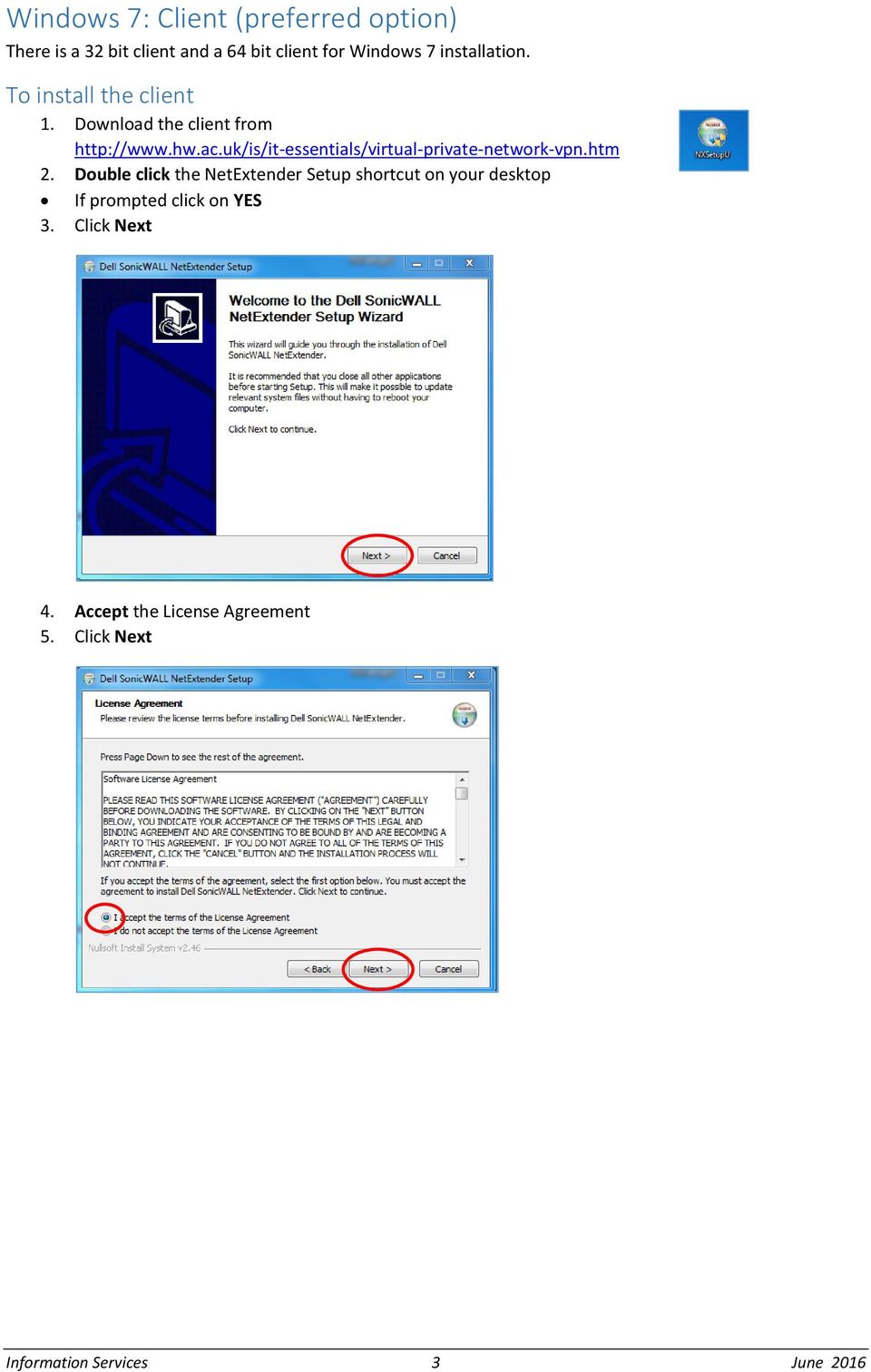
3 Windows 7: Client (preferred option) There is a 32 bit client and a 64 bit client for Windows 7 installation. To install the client 1. Download the client from 2. Double click the NetExtender Setup shortcut on your desktop If prompted click on YES 3. Click Next 4. Accept the License Agreement 5. Click Next Information Services 3 June 2016

4 6. Click Next at Choose Install Location 7. Click Install 8. Click Finish Information Services 4 June 2016

5 Connect to the VPN Once the client is installed the following connection window will appear automatically. 1. Enter hwumvpn.hw.ac.uk at the Server prompt 2. Enter your HWU username and password 3. Enter HW Staff (this is case sensitive!) in the Domain window 4. Click Connect Type this exactly as shown 5. Once connected, minimise this window to your taskbar If you are remote accessing your HW PC please see the Remote Desktop document. Information Services 5 June 2016

6 To disconnect 1. Restore our NetExtender window 2. Click Disconnect Next time login Once you have disconnected you will notice the Dell SonicWALL Extender icon on your desktop. The next time you want to connect to the VPN simply double click this icon. Information Services 6 June 2016

7 Windows 8 App The SonicWALL Mobile Connect App is built-in to Windows 8.1 Set up the connection From the Windows Tiles page 1. Click Search 2. Type PC setting into the search field 3. Select Network 4. Click on Add a VPN connection 5. Choose SonicWALL mobile connect from the VPN provider dropdown list Connection name: Server name: HW work hwumvpn.hw.ac.uk 6. Click Save 7. Close window Log in to the VPN 1. Click the WiFi/Network icon in the Notification area 2. Click on HW Work and then click Connect 3. Click Next 4. Enter your HWU UserID and password 5. Click OK Disconnect 1. Click the WiFi/Network icon in the Notification area 2. Click on HW Work 3. Click Disconnect Information Services 7 June 2016

8 Windows 10 App Download the SonicWALL Mobile Connect App from the Windows App store and follow the installation procedures. Set up the connection 1. Click on Start and then Settings 2. Click on Network & Internet 3. Click on VPN 4. Click on Add a VPN connection 5. Select SonicWALL Mobile Connect from the VPN provider dropdown Connection name: Server name: HW work hwumvpn.hw.ac.uk 6. Click on Save Log in to the VPN 1. Click on WiFi/Network icon in the Notification area 2. Click HW Work 3. Click on HW Work then click Connect 4. Click Next 5. Enter your HWU UserID and password 6. Click OK 7. Close window Disconnect 1. Click the WiFi/Network icon in the Notification area 2. Select HW Work 3. Click on HW Work and then click Disconnect Information Services 8 June 2016


9 Using Web Browser (not app) Depending on your version of Windows, we recommend that you use the Windows 7 Client or the SonicWALL App (Windows 8 or 10) The browser offers an alternative way to log in if there is any reason you cannot use the app you should not use both together. The following instructions tell you how to setup and install the software required to connect to the Heriot-Watt Edinburgh VPN via your browser. Browser choice is important Use either Internet Explorer (IE) or Firefox Do not use Windows 10 Edge or Chrome Pre-Configurations required before logging into VPN JAVA Settings You must be running the most recent version of JAVA on your home PC You can download JAVA here ( Edit your JAVA security settings 1. Go to the Java Control Panel ( Open System preferences then open Java) 2. Select the Security tab 3. Click Edit Site List 4. Click ADD 5. Type in the new row 6. Click OK Browser settings for Internet Explorer Add to your trusted sites 1. Open IE and go to 2. Open the Tools menu and choose Internet options Information Services 9 June 2016


10 3. Select the Security tab, then select Trusted sites in the zone options, then click Sites In the Add this website to the zone: it should say 4. Click ADD 5. Click Close 6. Click OK Information Services 10 June 2016

11 Log in to the VPN 1. Open your browser and go to 2. Enter your HW Username and Password 3. Click on Login The VPN NetExtender will start automatically if prompted, click Yes Once the NetExtender has started you will be able to see the connection details minimise the NetExtender window. Information Services 11 June 2016


12 You will now be logged into the VPN and the following screen will be displayed ihr and Finance Click on the Finance or ihr bookmarks to open the applications. Information Services 12 June 2016


13 Staff Home Drive Click Staff Home Network Drive bookmark to display your folders If prompted click on Allow to run JAVA Your drives will be displayed in a new window Left panel: your local computer Right panel: your HW Home (H:) drive You can drag and drop files from your PC to your HW Home drive or vice-versa The other options on the screen are shortcuts and tips/help. Log out 1. Disconnect from NetExtender 2. Click Logout Remote desktop If you are connecting to your HWU work PC by remote desktop see MS Remote Desktop Client for Windows. You must be logged into the VPN before you can use Remote Desktop. Information Services 13 June 2016

Running Argos via VPN client
 These instructions will show you how to run Argos reports from a home PC or laptop. Argos is not a web based program. It runs from NSU s network. To establish a connection, we need three components; the
How do I use Citrix Staff Remote Desktop
 How do I use Citrix Staff Remote Desktop September 2014 Initial Log On In order to login into the new Citrix system, you need to go to the following web address. https://remotets.tees.ac.uk/ Be sure to
How to remotely access your Virtual Desktop from outside the college using VMware View Client. How to guide
 How to remotely access your Virtual Desktop from outside the college using VMware View Client How to guide Author: ICT Services Version: 1.0 Date: November 2015 Contents What is the VMware View Client?...
VPN Connection and Configuration
 VPN Connection and Configuration The assumption is made that you have already gained access to the internet either via a dialup, DSL, or cable modem connection. Please keep in mind that the slower your
Remote VPN: Remote access for personal devices
 Remote VPN: Remote access for personal devices Documentation Team. March 2013. About Remote VPN Remote VPN 1 provides staff and students with secure, authenticated remote access to personal and shared
TAMUS Terminal Server Setup BPP SQL/Alva
 We have a new method of connecting to the databases that does not involve using the Texas A&M campus VPN. The new way of gaining access is via Remote Desktop software to a terminal server running here
Remote Web Access (vpn)
 Remote Web Access (vpn) Features Connect via vpn Login to Remote Desktop Web Bookmarks Access Whitireia Intranet Access Ātea from the Remote Desktop Logout from Remote Desktop Copyright 2012 Whitireia
Setting up Remote Desktop
 Setting up Remote Desktop Terminology: Host PC the computer you want to access remotely; the destination Client PC the computer you are actually using to access another PC; the source IP Address the numerical
Virtual Owl. Guide for Windows. University Information Technology Services. Training, Outreach, Learning Technologies & Video Production
 Virtual Owl Guide for Windows University Information Technology Services Training, Outreach, Learning Technologies & Video Production Copyright 2015 KSU Division of University Information Technology Services
Remote Desktop Instructions for the Remote PC Running Windows Vista
 USC Marshall School of Business Academic Information Services Remote Desktop Instructions for the Remote PC Running Windows Vista Remote Desktop allows you to access the files and programs on a computer
MiraCosta College now offers two ways to access your student virtual desktop.
 MiraCosta College now offers two ways to access your student virtual desktop. We now feature the new VMware Horizon View HTML access option available from https://view.miracosta.edu. MiraCosta recommends
Step 1 : Remove Old Versions of Java
 VPN (Banner Home Access) Pellissippi State Community College Home Installation Instructions Please Read Entire Instructions Before Installation!! Step 1 : Remove Old Versions of Java Warning!!: The Performance
Windows and MAC User Handbook Remote and Secure Connection Version 1.01 09/19/2013. User Handbook
 Windows and MAC User Handbook How to Connect Your PC or MAC Remotely and Securely to Your U.S. Department of Commerce Account Developed for You by the Office of IT Services (OITS)/IT Service Desk *** For
SSL VPN Setup for Windows
 SSL VPN Setup for Windows SSL VPN allows you to connect from off campus to access campus resources such as Outlook email client, file sharing and remote desktop. These instructions will guide you through
Junos Pulse VPN Client Installation
 Junos Pulse VPN Client Installation Windows 7 Installation p 2-6 Windows 8.1 Installation p 7-11 Macintosh version 10.6 and greater p 12-17 *This vpn appliance is to replace the Legacy SP vpn client Cisco
Accessing your Staff (N and O drive) files from off campus
 Accessing your Staff (N and O drive) files from off campus It is possible to access your N and O drive files while you are off campus, for example whilst working from home or travelling. This document
Sophos UTM. Remote Access via PPTP Configuring Remote Client
 Sophos UTM Remote Access via PPTP Configuring Remote Client Product version: 9.300 Document date: Tuesday, October 14, 2014 The specifications and information in this document are subject to change without
SHC Client Remote Access User Guide for Citrix & F5 VPN Edge Client
 SHC Client Remote Access User Guide for Citrix & F5 VPN Edge Client Version 1.1 1/15/2013 This remote access end user reference guide provides an overview of how to install Citrix receiver (a required
BEFORE YOU START... 1 Set Up Your PC Desktop Computer/Laptop... 1 Set Up Remote Desktop on Your ipad... 3
 Quick Reference Guide Using Remote Desktop With Your ipad and PC This user guide is for users connecting their ipad to a PC computer or laptop. This user guide covers how to set up your ipad to connect
Configuring VPN Using Windows XP
 Configuring VPN Using Windows XP How to Create a VPN Connection What is VPN? Connecting to VPN Create a VPN Connection Connect to Your Work Computer Copying Files What is VPN? Virtual Private Networks
Installing the VMware Horizon View Client to Access Hoag Virtual Desktops
 Installing the VMware Horizon View Client to Access Hoag Virtual Desktops Hoag IT Department For questions or further assistance, please contact the Service Desk: 949-764-8600, option 2 1 Table of Contents
Remote Desktop Services
 Remote Desktop Services AMERICAN INSTITUTES FOR RESEARCH AIR REMOTE DESKTOP SERVICES (RDS) GUIDE Overview Welcome to AIR Remote Desktop Services! AIR Remote Desktop Services can be accessed from a Windows
Disabling Microsoft SharePoint in order to install the OneDrive for Business Client
 Disabling Microsoft SharePoint in order to install the OneDrive for Business Client If you try to setup and sync your OneDrive online documents with the client software and Microsoft SharePoint opens,
MetroHealth Information Services
 METROHEALTH SSLVPN INSTALLATION INSTRUCTIONS REQUIREMENTS:... 2 VPN INSTALLATION... 3 OK, I M CONNECTED NOW WHAT DO I DO?... 5 Set up a connection to the Application Portal:... 5 Logging off the VPN Clinical
E-Mail: [email protected] Phone: 281-283-2828 Fax: 281-283-2969 Box: 230 http://www.uhcl.edu/uct
 A VPN (Virtual Private Network) provides a secure, encrypted tunnel from your computer to UHCL's network when off campus. UHCL offers VPN software to allow authenticated, secure access to many UHCL resources
VPN: Virtual Private Network Setup Instructions
 VPN: Virtual Private Network Setup Instructions Virtual Private Network (VPN): For e-journals and web-based databases, plus applications like EndNote's Online Search (formerly "Connect") and business systems.
Installing the Cisco AnyConnect YSU VPN Client Windows XP or later
 Installing the Cisco AnyConnect YSU VPN Client Windows XP or later Required Items: Windows XP or later, YSU directory account, Windows account with administrator privileges This guide will assist you with
Connecting to a Massey Computer using Vista s Remote Desktop via VPN
 Connecting to a Massey Computer using Vista s Remote Desktop via VPN NP 014092009 Contents Introduction... 3 Prerequisites... 3 Minimum Requirements... 3 Related Documents... 3 Help... 3 Step 1 Setting
Resource Guide INSTALL AND CONNECT TO CISCO ANYCONNECT VPN CLIENT (FOR WINDOWS COMPUTERS)
 INSTALL AND CONNECT TO CISCO ANYCONNECT VPN CLIENT (FOR WINDOWS COMPUTERS) PLEASE READ BEFORE INSTALLING THE CISCO ANYCONNECT SECURE MOBILITY CLIENT SOFTWARE: The VPN is to be used on computers that are
Campus VPN. Version 1.0 September 22, 2008
 Campus VPN Version 1.0 September 22, 2008 University of North Texas 1 9/22/2008 Introduction This is a guide on the different ways to connect to the University of North Texas Campus VPN. There are several
Sale Grammar School Remote Desktop Services User Instructions
 Sale Grammar School Remote Desktop Services User Instructions Sale Grammar School Remote Desktop Services allows Staff and Students access to a virtual school computer while connected to the internet at
ecfshome-ts Terminal Server How to Use
 ecfshome-ts Terminal Server How to Use Connect to VPN Connect to Terminal Server, Set Options to Use Personal Computer Files, Printers, Clipboard Use Network Folders Copy Files from Network Folders to
Page 1 of 11. Setting up VPN on Windows XP. Setting up VPN on Windows XP version 1.2
 Page 1 of 11 Setting up VPN on Windows XP Page 2 of 11 Setting up VPN on Windows XP(Professional) Requirements: 1. These instructions are only applicable for a computer that has Windows XP Professional
If you have questions or find errors in the guide, please, contact us under the following e-mail address:
 1. Introduction... 2 2. Remote Access via PPTP... 2 2.1. Configuration of the Astaro Security Gateway... 3 2.2. Configuration of the Remote Client...10 2.2.1. Astaro User Portal: Getting Configuration
1. Right click using your mouse on the desktop and select New Shortcut.
 offers 3 login page styles: Standard Login, List Login or Quick Time Punch. Each login page can be saved as a shortcut to your desktop or as a bookmark for easy fast login access. For quicker access to
Instructions for Accessing the Hodges University Virtual Lab
 Instructions for Accessing the Hodges University Virtual Lab Table of Contents Adding the VLAB as a Trusted Site... 3 Accessing the VLAB using Windows 8... 5 Using Internet Explorer and Windows 8 to Access
THE EDINBURGH NAPIER UNIVERSITY WINDOWS VIRTUAL PRIVATE NETWORK (VPN) GUIDE FOR MAC USERS
 THE EDINBURGH NAPIER UNIVERSITY WINDOWS VIRTUAL PRIVATE NETWORK (VPN) GUIDE FOR MAC USERS INTRODUCTION... 2 WHAT SERVICES CAN I ACCESS USING THE VPN?... 2 WHAT ARE THE REQUIREMENTS OF THE VPN SERVICE?...
Information to configure your Windows 7 office computer is described below.
 The Remote Desktop feature in Windows allows you to control your computer from another office or from home. Remote Desktop allows you to use the applications on your office computer, and access your data
Remote Desktop Web Access. Using Remote Desktop Web Access
 Remote Desktop Web Access What is RD Web Access? RD Web Access is a Computer Science service that allows you to access department software and machines from your Windows or OS X computer, both on and off
User Guide Microsoft Exchange Remote Test Instructions
 User Guide Microsoft Exchange Remote Test Instructions University of Louisville Information Technology 1.1 Who Should Use It This guide is intended for University of Louisville Faculty and Staff participating
VPN - AnyConnect on Windows
 VPN - AnyConnect on Windows Tufts Technology Services Training and Documentation VPN - AnyConnect on Windows 1 Table of Contents AnyConnect on a Windows PC... 3 How Do I Install AnyConnect on a Windows
Faculty/Staff instructions for connecting to the Hood College VPN to gain access to your office computer
 Faculty/Staff instructions for connecting to the Hood College VPN to gain access to your office computer Note: These instructions were written for Windows 7 Professional. Some screens may be different
Windows VPN and Epic Installation Instructions
 Windows VPN and Epic Installation Instructions Contents Read Me First... 2 Windows 8 VPN installation instructions... 3 Windows 7 VPN installation instructions... 5 BIGIPEdge FAT Client installation instructions...
UMass Amherst Secure Access Service Juniper and Junos VPN
 UMass Amherst Secure Access Service Juniper and Junos VPN Looking for a way to access your files when you aren t on your workstation? The Juniper VPN web portal is your answer! There are two ways to get
Instructions for accessing the new TU wireless Network
 Instructions for accessing the new TU wireless Network These instructions are meant for University owned systems directly supported by ENS Computer Services. Users of other systems may find this document
Purpose The procedures below provide outlined steps for gaining access to the MSUE PFS (Protective Factors Survey) database.
 416 Agriculture Hall Michigan State University 517-355-3776 http://support.anr.msu.edu [email protected] Title How to Access the MSUE PFS Database Document No. - 131 Revision Date - 9/2013 Revision No.
How To Install Ru-Vpn On A Pc Or Macbook Or Ipad (For Macbook) With A Microsoft Macbook (For Pc) With An Ipad Or Ipa (For A Macbook). Pc (For An
 RU-VPN Installation Instructions (Windows Vista and Windows 7) An RU-VPN id allows authorized users to access Ryerson s Administrative Systems via the internet. RU-VPN utilizes a digital certificate that
Using Internet or Windows Explorer to Upload Your Site
 Using Internet or Windows Explorer to Upload Your Site This article briefly describes what an FTP client is and how to use Internet Explorer or Windows Explorer to upload your Web site to your hosting
Connecting to a Massey Computer using XP s Remote Desktop via VPN
 Connecting to a Massey Computer using XP s Remote Desktop via VPN NP 24092009 Contents Introduction... 3 Prerequisites... 3 Minimum Connection Requirements... 3 Related Documents... 3 Help... 3 Step 1
Setting up a Virtual Private Network (VPN) connection Windows 8
 Setting up a Virtual Private Network (VPN) connection Windows 8 A Virtual Private Network (VPN) is best described as a tunnel to MAASnet, the university network. After having configured the VPN connection,
Using VPN. DJJ Staff
 Using VPN DJJ Staff Internet Explorer (32 bit) Enter https://vpn.djj.state.fl.us in the address bar You will need to use IE 32bit. 64 bit machines have the IE 64 bit option as well. To check this setting
Accessing the Online Meeting Room (Blackboard Collaborate)
 Step 1: Check your System and Install Required Software NOTE: Make sure you are on the computer you will be using to access the online meeting room AND that you are using the internet browser (ie: firefox,
Mac OS X: INSTALLING TUNNELBLICK
 Mac OS X: INSTALLING TUNNELBLICK 1. Download "Tunnelblick" for Mac OS X from the UWG VPN website. Go to http://vpn.westga.edu. You will find a link to the installation file on the right hand side of the
TM Online Storage: StorageSync
 TM Online Storage: StorageSync 1 Part A: Backup Your Profile 1: How to download and install StorageSync? Where to download StorageSync? You may download StorageSync from your e-storage account. Please
CWOPA Broadband Users. Windows Operating System
 CWOPA Broadband Users Windows Operating System October 2012 Background These instructions are to be used for VPN users who have been assigned a CWOPA username and password. If your machine has Internet
Using Remote Web Workplace Version 1.01
 Using Remote Web Workplace Version 1.01 Remote web workplace allows you to access your Windows XP desktop through Small Business Server 2003 from a web browser. 1. Connect to the Internet in your remote
HWS Virtual Private Network Configuration and Setup Mac OS X 12/19/2006
 The VPN connection supports mainly access to the HWS network drives, not streaming audio/video or downloading large amounts of data. Contents Before Connecting via VPN Before setting up a Virtual Private
Setting Up Monthly Reporter
 Setting Up Monthly Reporter April 11, 2014 I. HOW IT WORKS A QUICK OVERVIEW A. AuditWare Development Company maintains a powerful, sophisticated server on which a portion of memory is assigned to each
For paid computer support call 604-518-6695 http://www.netdigix.com [email protected]
 Setting up your vpn connection on windows 2000 or XP in continuation from installing x.509 certificate on windows (please do not continue if you have not installed your x.509 certificate): Instructions
Install and End User Reference Guide for Direct Access to Citrix Applications
 Install and End User Reference Guide for Direct Access to Citrix Applications Version 1.0 7/26/2013 This remote access end user reference guide provides an overview of how to install Citrix receiver (a
Setting Up and Accessing VPN
 Setting Up and Accessing VPN Instructions for establishing remote access to the URMC network for PC or Mac Duo Two-Factor Authentication If you have already enrolled and setup Duo Two-Factor Authentication
How to Remotely Access the C&CDHB Network from a Personal Device
 How to Remotely Access the C&CDHB Network from a Personal Device 13/09/2012 Contents Installing the Citrix Receiver for Windows PCs... 2 Installing the Citrix Receiver for Mac OS X... 6 Installing the
Connecting to Remote Desktop Windows Users
 Connecting to Remote Desktop Windows Users How to log into the College Network from Home 1. Start the Remote Desktop Connection For Windows XP, Vista and Windows 7 this is found at:- Star t > All Programs
Manufacturing Representative SSL VDM Login User s Guide
 June 12 2008 Ver. 1.5 KEMET Corporation Manufacturing Representative SSL VDM Login User s Guide This document is a guide to assist a Manufacturing Representative (MFG REP) to connect and login to the SSL
Contents. VPN Instructions. VPN Instructions... 1
 VPN Instructions Contents VPN Instructions... 1 Download & Install Check Point VPN Software... 2 Connect to FPUA by VPN... 6 Connect to Your Computer... 8 Determine Your Machine Type... 10 Identify 32-bit
VPN Web Portal Usage Guide
 VPN Web Portal Usage Guide Table of Contents WHAT IS VPN WEB CLIENT 4 SUPPORTED WEB BROWSERS 4 LOGGING INTO VPN WEB CLIENT 5 ESTABLISHING A VPN CONNECTION 6 KNOWN ISSUES WITH MAC COMPUTERS 6 ACCESS INTRANET
VIRTUAL SOFTWARE LIBRARY REFERENCE GUIDE
 VIRTUAL SOFTWARE LIBRARY REFERENCE GUIDE INTRODUCTION The Virtual Software Library (VSL) provides remote and on-campus access to lab/course software. This approach is intended to simplify access for all
How do I Install and Configure MS Remote Desktop for the Haas Terminal Server on my Mac?
 Enterprise Computing & Service Management How do I Install and Configure MS Remote Desktop for the Haas Terminal Server on my Mac? In order to connect remotely to a PC computer from your Mac, we recommend
Remote Access: Citrix Client Setup
 Introduction: The following documentation is intended to assist first time or active users with installation of the Citrix ICA connection software required to access the MSVU Remote Access system desktop
Installing Microsoft Outlook on a Macintosh. This document explains how to download, install and configure Microsoft Outlook on a Macintosh.
 Reference : USER184 Issue date : December 2002 Revision date : September 2007 Classification : Software Originator : Hugh Burt REVISED DOCUMENT Installing Microsoft Outlook on a Macintosh This document
MY HELPDESK - END-USER CONSOLE...
 Helpdesk User Guide Page 1 Helpdesk User Guide Table of Contents 1 INTRODUCTION... 3 1.1. OBJECTIVES... 3 1.2. END-USER CONSOLE... 3 1.3. SUMMARY OF RESPONSIBILITY... 3 1.4. HELPDESK INCIDENT LIFE CYCLE...
E-Mail: [email protected] Phone: 281-283-2828 Fax: 281-283-2969 Box: 230 http://www.uhcl.edu/uct
 A VPN (Virtual Private Network) provides a secure, encrypted tunnel from your computer to UHCL's network when off campus. UHCL offers VPN software to allow authenticated, secure access to many UHCL resources
VPN: Using WebVPN SSL Client This document outlines the process for using the WebVPN SSL with Internet Explorer and Firefox
 VPN: Using WebVPN SSL Client This document outlines the process for using the WebVPN SSL with Internet Explorer and Firefox 1. Introduction The WebVPN SSL Client does not require the manual installation
Windows Installation 1. On a Windows PC (For MAC, skip to next section), at the file download prompt click Run.
 Introduction These instructions are for Windows and MAC users ONLY. For Mobile devices (IOS/Android), use the Mobile Device document found on the portal Login Page. For Windows 8.x users: At this time,
Montefiore Portal Quick Reference Guide
 Montefiore Portal Quick Reference Guide Montefiore s remote portal allows users to securely access Windows applications, file shares, internal web applications, and more. To use the Portal, you must already
Access to Webmail services via a Non Trust Computer
 Access to Webmail services via a Non Trust Computer Aintree Outlook Web Access has been provided via the AppGate SSL Portal, this service can be accessed from any computer on the Internet. Two factor SMS
SSL VPN Service. To get started using the NASA IV&V/WVU SSL VPN service, you must verify that you meet all required criteria specified here:
 SSL VPN Service Note: This guide was written using Windows 7 with Internet Explorer 8. The same principles and techniques are applicable to new versions of Internet Explorer as well as Firefox. Any significant
Remote Access Services Microsoft Windows - Installation Guide
 Remote Access Services Microsoft Windows - Installation Guide Version 3.1 February 23, 2015 1 P age Contents GETTING STARTED... 3 JAVA VERIFICATION, INSTALLATION, AND CONFIGURATION... 3 Windows XP... 3
ecstudent-ts Terminal Server How to Use
 ecstudent-ts Terminal Server How to Use Connect to Cisco Any Connect Connect to Terminal Server, Set Options to Use Home Computer Files, Printers, Clipboard Use Network Folders Copy Files from Network
University Computing & Telecommunications Virtual Private Networking: How To/Self- Help Guide Windows 8.1 Operating System.
 A VPN (Virtual Private Network) provides a secure, encrypted tunnel from your computer to UHCL's network when off campus. UHCL offers VPN software to allow authenticated, secure access to many UHCL resources
Use Remote Desktop capabilities to Access your Work PC from home over VPN
 Use Remote Desktop capabilities to Access your Work PC from home over VPN With Remote Desktop on Windows XP Professional, you can have access to a Windows session that is running on your computer when
VPN: Using the WebVPN SSL Client
 IS1504 VPN: Using the WebVPN SSL Client Page 1 of 10 VPN: Using the WebVPN SSL Client This document outlines the process for using the WebVPN SSL client with Internet Explorer and Firefox User Guide IS1504
Using Outlook Web Access (OWA) & Remote Web Workplace
 Using Outlook Web Access (OWA) & Remote Web Workplace October 6, 2008 Neil G. Levy Phone -732-446-9950 x111 Fax 732-879-0325 [email protected] Outlook Web Access (OWA) To access your Outlook/Exchange
Remote Desktop access via Faculty Terminal Server Using Internet Explorer (versions 5.x-7.x)
 Remote Desktop access via Faculty Terminal Server Using Internet Explorer (versions 5.x-7.x) Start your Internet Explorer browser and direct it to the faculty home page. Click on the link Remote Access,
Voice-Over PowerPoint (VOPP) and FTP Instructions for Online Courses (for Windows PC Computers) December 2009
 Voice-Over PowerPoint (VOPP) and FTP Instructions for Online Courses (for Windows PC Computers) December 2009 A. How to add narration to a PowerPoint presentation: 1. Attach a microphone to your computer
Shellfire L2TP-IPSec Setup Windows XP
 Shellfire L2TP-IPSec Setup Windows XP This guide explains how to configure your Windows XP PC to work with a Shellfire L2TP-IPSec VPN. Index 1. Required data and files... 2 2. Creating a connection...
For more information refer: UTM - FAQ: What are the basics of SSLVPN setup on Gen5 UTM appliances running SonicOS Enhanced 5.2?
 TM SSL-VPN: How to setup SSL-VPN feature (NetExtender Access)... of 6 1/12/2013 11:46 PM Question/Title UTM SSL-VPN: How to setup SSL-VPN feature (NetExtender Access) on SonicOS Enhanced (SonicOS 5.6 and
WinSCP: Secure File Transfer Using WinSCP for Secure File Transfer on Windows
 WinSCP: Secure File Transfer Using WinSCP for Secure File Transfer on Windows Overview WinSCP is an SFTP (Secure File Transfer Protocol), FTP (File Transfer Protocol), and SCP (Secure Copy Protocol) application
USC Marshall School of Business Academic Information Services
 USC Marshall School of Business Academic Information Services Wake My PC Windows Version Connecting to a Marshall Windows PC Remotely Remote Desktop allows you to access the files and programs on a remote
Setting up a VPN connection Windows XP
 Setting up a VPN connection Windows XP 1. Open Control Panel. 2. Click on Network and Internet Connections. 3. Click on Create a connection to the network at your workplace. 4. Select Virtual Private Network
Using a VPN Connection
 Bullis School Using a VPN Connection Access Files and Resources While Off Campus Mark Smith Table of Contents What is a VPN?... 2 Can I set up my home computer to use a VPN connection?... 2 So how do I
How to Access UF Health Jacksonville VPN services
 How to Access UF Health Jacksonville VPN services To access VPN services go to the hospital website at http://ufhealthjax.org/. Click on the For Employees link at the bottom of the screen. Under Remote
How To Set Up Dataprotect
 How To Set Up Dataprotect This document will show you how to install and configure your computer for a Typical installation. If you have questions about configuring a Custom installation please contact
How to install and use the File Sharing Outlook Plugin
 How to install and use the File Sharing Outlook Plugin Thank you for purchasing Green House Data File Sharing. This guide will show you how to install and configure the Outlook Plugin on your desktop.
Steps for using MagicConnect
 Getting Started Getting Started MagicConnect is a remote access service that allows you safe remote access to a target device from your remote device. What is a remote device? It is a Windows device, iphone/ipad,
VPN Remote Access Installation and Configuration Guide Operating System: Windows (XP, Vista, 7 and 8)
 INFORMATION SYSTEMS SERVICE NETWORKS AND COMMUNICATIONS SECTOR VPN Remote Access Installation and Configuration Guide Operating System: Windows (XP, Vista, 7 and 8) ΥΠΣ ΕΔ/50 November 2012 A. INSTALLATION
Connecting to HomeRun over the Web
 (o HomeRun Integrated Clinical and Financial Homecare Software Connecting to HomeRun over the Web White Oak Systems, LLC 8 Research Parkway Wallingford, CT 06492 Phone: 866-679-7702 [email protected]
VPN User Guide. For Mac
 VPN User Guide For Mac System Requirements Operating System: Mac OSX. Internet Browser: Safari (Firefox and Google Chrome are NOT currently supported). Disclaimer Your computer must have the system requirements
Accessing the Media General SSL VPN
 Launching Applications and Mapping Drives Remote Desktop Outlook Launching Web Applications Full Access VPN Note: To access the Media General VPN, anti-virus software must be installed and running on your