
DORMA ED 800 SERIES Service Manual
|
|
|
- Barnaby Robertson
- 10 years ago
- Views:
Transcription
1 DORMA ED 800 SERIES Service Manual ED 800J ED 800T software level 3.27M INSPK NO Rev.08/ /07

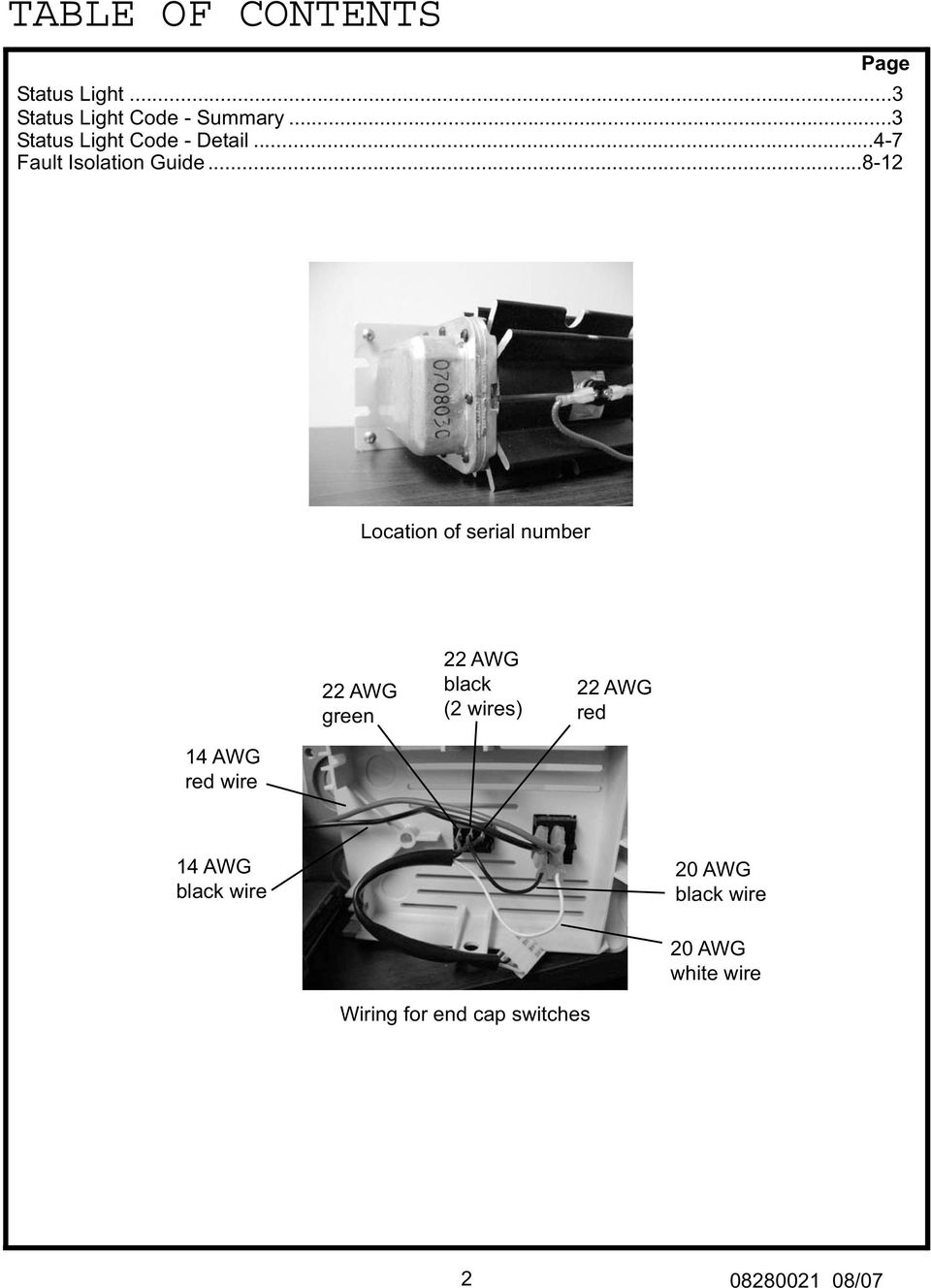
2 TABLE OF CONTENTS Page Status Light...3 Status Light Code - Summary...3 Status Light Code - Detail Fault Isolation Guide Location of serial number 22 AWG green 22 AWG black (2 wires) 22 AWG red 14 AWG red wire 14 AWG black wire 20 AWG black wire 20 AWG white wire Wiring for end cap switches /07
3 The ED800 Series Service Manual contains product information that is intended to supplement product information which is covered in the ED800 Series Installation Instructions. Users of the Service Manual should also be familiar with the Installation Instruction. STATUS LIGHT The ED 800 controller module is equipped with a status light which indicates the current state of the software program by a series of green flashes. In addition, the status light can indicate problems with the installation or adjustment of the ED 800, or problems with the actual unit by a series of red flashes. If the status light indicates a problem by a series of red flashes, the ED 800 will not accept an open trigger and will not operate under power until the problem is corrected, and the unit is turned off and then turned on. However, the ED 800 will always operate as a manual door closer. STATUS LIGHT CODE - SUMMARY NUMBER OF GREEN FLASHES INDICATES 1 Test (Factory use only) 2 Learning 3 Latch Stop 4 Latch Stop - Push & go on 5 Opening 6 Back Stop 7 Balance 8 Closing 9 Abort NUMBER OF RED FLASHES INDICATES 2 Overcurrent 4 Short Connecting Arm (too much preload), or Pull set for Push 5 Long Connecting Arm (too little preload), or Push set for Pull 7 Encoder Cable 10 Open Motor Lead or Disconnected Encoder, Worn Brushes, Damaged Control Module. NO LIGHT No power to unit, or unit is overheated and in a cool down state (should continue to run after it has cooled). Caution: Motor may be hot! /07

4 STATUS LIGHT CODE - DETAIL 1 green flash Indicates that unit is in Test Phase. Test Phase is used in the final assembly process and for factory diagnostics. This code is normally not used in the field. 2 green flashes Indicates that the unit is in Learn Phase. Immediately after the unit is turned on, it enters the Learn Phase. During this time, the software determines the spring power of the TS 83 door closer and the closed position of the door by opening the door slowly to about 10 o -15 o, then allowing the door to close. The door will open three times to determine this information. If there is an electric strike or electric latch retraction which is controlled by the ED 800, it will remain energized during this phase. If the door is latched or locked during this phase, the software recognizes this condition and defaults to a safe, predeter mined value for door closer spring power. In this case, it is possible that perfect balancing of the door upon obstacle conditions may not be achieved since the software was unable to obtain an actual spring power reading. If the door is held open during the Learn Phase, the software will wait until the door has closed to complete the Learn Phase. 3 green flashes Indicates that unit is in Latch Stop Phase. After completing a successful Learn Phase, the unit enters Latch Stop Phase. During this phase, the unit will accept an activation trigger, provided the busy swing (safety) circuit is open. If an activation trigger is received while the busy swing (safety) circuit is closed, the unit remains in Latch Stop Phase, however the trigger is remembered and activation occurs when the busy swing (safety) circuit is opened. 4 green flashes Indicates that the unit is in Latch Stop - Push and Go On Phase. This phase is identical to Latch Stop Phase, with the exception that one inch of manual door movement from the closed position will also activate the unit, in addition to external activation triggers. 5 green flashes Indicates that the unit is in Open Phase. In this phase, the door accelerates, then drives at a constant speed to the backcheck position, then decelerates and continues to open at a crawl speed to the fully open position. If an electric strike or electric latch retraction is connected to the ED 800, door movement will be delayed by 1/2 second, the strike or latch retraction will be activated immediately and will remain active until the door reaches approximately 10 o of opening. The strike or latch retraction will only be activated if the door is between 10 o and closed when the trigger is received /07

5 6 green flashes 7 green flashes Indicates that the unit is in Back Stop State, which is the fully open position as determined by the Opening Angle potentiometer. Indicates that the unit is in Balance Phase. In the Balanced Phase, the ED800 applies a minimal amount of force to maintain the door s current position. The door may be manually opened or closed, as required. In Low Energy Function, the Balance Phase occurs when the door encounters an obstacle during the Opening or Closing Phases. Once in the Balance Phase, the unit will remain in the Balance Phase as long as there is door movement plus the duration of the delay time potentiometer. Activation triggers received during the Balance Phase will restart the delay timer, extending the time in the Balance Phase. In Power Assist Function, the Balance Phase begins immediately upon receiving an activation trigger. Initially, the door will open slowly to approximately 10 o to alert the user that the Power Assist Function is active. The unit will remain in the Balance Phase as long as there is door movement plus the duration of the delay time potentiometer. 8 green flashes 9 green flashes Indicates that the unit is in Closing Phase. During the Closing Phase, the door position is continuously monitored from the fully open position to approximately 10 o. If the door stops moving or is reopened manually, the controller changes to Balance Phase. From 10 o to the closed position, the door closes under the control of the latch valve only. Indicates that the unit is in Abort State. During Abort State the drive mechanism (shuttle) within the unit returns to the latch check position (approximately 10 o of door opening) and waits for the door to close. The Abort State occurs when the controller starts the Closing Phase, however, the door remains stationary, as if propped open. The Abort State also occurs when the controller is set for Low Energy Function with the Push and Go feature turned on and the door is opened briskly beyond 45 o /07

6 2 red flashes Indicates overcurrent. Allow time to recover and cool down which is usually minutes. (Caution: Be sure the unit is being used primarily for ADA applications, and the appli cation is within the maximum tolerances that the ED800 is designed for). 4 red flashes Top Jamb Application - Indicates that the connecting arm is too short (closer is preloaded too much). The connect ing arm should be at a 90 o angle to the door when closed. Confirm that ED 800 base plate and arm shoe are located accurately. Improper templating can cause this error code. Track Application - Indicates that Push/Pull switch is set incorrectly. Confirm that switch is set for Pull. Confirm the pull side face of the door and frame are flush. Misalignment between the track and the ED800 baseplate due to non-standard frame configuration can cause this error code. Connecting arm perpendicular to the door /07

7 PUSH/PULL SWITCH 5 red flashes This error code normally occurs in top jamb applications only. Indicates that the connecting arm is too long (too little preload). The connecting arm should be at a 90 o angle to the door when closed. Confirm that the ED 800 base plate and arm shoe are located accurately. Improper templating can cause this error code. Confirm that the Push/Pull switch is set correctly. Top jamb units set for pull will generate this error code. Top jamb units must be set for push. Units turned on without the main arm installed will display this error code. 7 red flashes Indicates the encoder cable is not making contact (could be disconnected or damaged). 10 red flashes Indicates an open motor lead. Confirm that motor leads are connected. Check for worn brushes /07

8 FAULT ISOLATION GUIDE PROBLEM: Door does not open completely. SOLUTION: Determine status light code when door is at the maximum opening. 7 green flashes Indicates unit in Balance Phase - check Low Energy/Power Assist switch If set for Low Energy: Door is contacting an obstacle. Confirm that the swing area of the door is clear. Once obstacle is removed, door should close and continue to operate correctly. OR If set for Power Assist: The unit is functioning properly. 6 green flashes Indicates unit in Back Stop State, which is the maximum opening angle as determined by the Opening Angle adjustment. Re-adjust opening angle, if necessary. If door remains in balance, confirm that the door swings freely. Turn ED 800 off. Disconnect the arm from the door. The door must swing freely through the entire range of operation. Check for hinge bind, excessive drag from weather stripping, door dragging on threshold or carpet, excessive resistance from high wind, or pressure differences from one side of the door to the other. The unit is designed to exert a maximum of 15 pounds of force at the leading edge of the door. The source of resistance must be isolated and corrected. OR Confirm that the door width setting matches the actual door size. The ED 800 is designed to operate on doors from 36 to 48 inches wide. The door weight is not to exceed 200 pounds. The unit must only be installed on doors of proper size and weight /07

9 PROBLEM: Door opens slightly for no apparent reason. SOLUTION: Unit is performing a Learn Cycle. When the ED 800 is initially turned on, a learn cycle is performed to obtain information regarding required opening forces and the closed position of the door. During the learn cycle, the door will open slowly to approximately 10 o - 15 o, then close. This will repeat 3 times. After completing a successful learn cycle, the unit will accept an opening trigger and operate normally. The only time a learn cycle will be performed is if there has been a power interruption caused by turning the unit off and on by the end cap switch, or remote switch option. PROBLEM: Door opens too slowly. SOLUTION: Confirm that the Opening Time (LE) adjustment is correct. MIN is the least amount of time which is the fastest speed. MAX is the greatest amount of time which is the slowest speed. Confirm that the door width setting matches the actual door size. The fastest opening time to be expected from closed to 80 o is about 6 seconds for a 36 door (longer for wider doors). This speed was determined to insure compliance with A156.19, the American National Standard For Power Assist And Low Energy Power Operated Doors. PROBLEM: Door does not close completely after a powered opening. SOLUTION: Turn the ED 800 off. Does the door immediately close? YES The ED 800 may have learned an incorrect latch position due to interference during the learn cycle. Turn the unit back on and allow it to complete a new learn cycle. NO Disconnect the arm from the door. Does the door swing freely to the fully closed position? YES NO If the problem persists, increased spring power and slightly faster sweep and latch speeds may correct the situation. Reconnect the arm to the door. Confirm the sweep and latch speeds are correct. If necessary, increase the spring power to insure consistent closing. Correct the source of the bind or excessive resistance (Hinge bind, door dragging on carpet or threshold, weather stripping drag, air pressure blowing the door open) /07

10 PROBLEM: Door remains in the open position and will not close. SOLUTION: Depress the hold open switch on the end cap to override the time delay. The door should close immediatley. Does the door close? YES The ED 800 received a hold open trigger. The door will remain in the hold open position for approximately 15 minutes. NO Check for obstacle blocking door from closing. See Problem: Door does not close completely... PROBLEM: The unit is turned on but makes no attempt to open the door when triggered. SOLUTION: Determine the Status Light code. 2 green flashes: Indicates that the unit is in Learn Phase. Normally, when the unit is initially turned on, it enters and completes the Learn Phase. Confirm that the door swings freely to the closed position. 3 or 4 green flashes: Indicates that the unit is in Latch Stop Phase. The unit will normally accept an open trigger in this phase except when the busy swing (safety) circuit is closed (normally activated by a presence sensor). In this case, the open trigger will be stored until the busy swing (safety) circuit is opened, then the unit will be activated. 7 green flashes: Indicates that the unit is in Balance Phase. The unit has attempted to open the door but an obstacle was encountered causing the unit to enter the Balance Phase. Confirm that all latches and deadbolts are retracted and that the door swings freely through the entire opening range. PROBLEM: No status lights. SOLUTION: A. Indicates that the fuse is blown. Replace the fuse with an identical type (3 amp, type AGC, size 1/4 x 1-1/4 ). B. Damaged hold open or on/off switch. Replace switch. C. Motor cool down period (motor is hot). The operator will remain in a powered-down state until the motor cools and allows normal operation (Usually not longer than 20 Minutes). High duty cycles, extended hold open times, strong spring power, heavy or wide doors, and high temperature environments can all contribute to the need for a motor cool down period. Occasional cool down periods do not harm the unit, however the cause of continual cool down periods must be determined and corrected /07

11 4 red flashes: Top Jamb Application - Indicates that the connecting arm is too short (too much preload). The connecting arm must be at a 90 o angle to the door when closed. Confirm that proper length arm has been supplied. The standard arm length (C886) accomodates reveals of 2-6. The (C800R) accomodates reveals of 0-4. The extended arm length (C810R) accomodates reveals of 3-8, and the (C812R) accomodates reveals of Confirm that the ED 800 base plate and arm shoe are located accurately. Improper templating can cause this error code. Confirm that the ED 800 base plate is anchored securely to the frame. Excessive header flex or base plate rocking during the Learn Phase can cause this error code. Track Application - Indicates that the Push/Pull switch is set incorrectly. Confirm that the switch is set to Pull. Confirm that the pull side face of the door and frame are flush. Misalignment between the track and the ED 800 base plate, due to a non-standard door/frame configuration, can cause this error code. 5 red flashes: Top Jamb Application - Indicates that the connecting arm is too long (too little preload). The connecting arm should be at a 90 o angle to the door when closed. Confirm that proper length arm has been supplied. The standard arm length (C886) accomodates reveals of 2-6. The (C800R) accomodates reveals of 0-4. The extended arm length (C810R) accomodates reveals of 3-8 and the (C812R) accomdotes reveals Confirm that the ED 800 base plate and arm shoe are located accurately. Improper templating can cause this error code. Confirm that the Push/Pull switch is set for push. Top jamb units which are set for pull will generate this error code. Track Application - Confirm that the pull side face of the door and frame are flush. Misalignment between the track and the ED 800 base plate, due to a non-standard door/frame configuration, can cause this error code. Any ED 800 that is turned on without the main arm installed will generate this error code. 7 red flashes: Indicates disconnected encoder. Verify that encoder cable is connected and not damaged. 10 red flashes: Indicates an open motor lead, a disconnected encoder, worn motor brushes or a damaged control module. Turn off power and confirm that the motor leads are connected. Check motor brushes for burning or wear and replace if necessary. Verify control module is not damaged. PROBLEM: Door opens and closes continually. SOLUTION: Determine the status of the Push and Go Switch. PUSH AND GO ON PUSH AND GO OFF Does the door close completely before reopening? YES Turn the unit off for 10 seconds, then turn it back on and allow a new Learn Cycle to be completed. The unit may have learned an incorrect closed position. If problem continues, isolate all external triggering devices to determine if they are functioning properly. NO Isolate all external triggering devices to determine the source of opening trigger. The door is encountering an obstacle during the last 10 o of closing. Confirm that: the sweep area of the door is clear, the door is not dragging on the threshold or carpet, the door is not binding on weather stripping, the latch bolt is not binding or sticking, there is not excessive hinge bind, there is not excessive air pressure preventing the door from closing completely. Confirm that the latch valve is properly adjusted /07

12 PROBLEM: Electric strike does not release properly. SOLUTION: Confirm that the electric strike is wired according to the diagrams shown in the ED 800 Installation Instructions. All external triggering devices must signal the ED 800. The ED 800 automatically delays door activation by 1/2 second and provides a signal to the strike until the door reaches approximately 10 o. Electric strike applications that are not wired according to the ED 800 Installation Instructions may not achieve proper strike sequencing. Is the strike wired according to ED 800 Installation Instruction? YES Isolate the strike and confirm proper operation. Confirm that the power supply is adequate for the strike. (If the ED800 is powering the strike, a 12VDC strike is required. The total amount of current available to power a strike and any other accessory is 500ma from the ED800 accessory power output). NO Correct the wiring. Confirm that there is no tension against the strike keeper plate when the door is closed. Many electric strikes will not release when there is tension on the keeper plate. Confirm that there are no other obstructions preventing the door from opening. Check for the door: binding on the strike jamb, dragging on the threshold, excessive weather stripping drag. Confirm that the latch delay switch is set to the on position /07

13 ED800 APPLICATION CHECK LIST In the event that satisfactory performance cannot be obtained with the ED 800, the following form should be completed with information regarding your particular application. Then contact DORMA Door Controls Inc. - Technical Services Department by phone at , or fax the completed form to , Attn: Technical Services Department. 1.) Serial Number of the unit (Located on gear box cover): 2.) Type of application (Track, Top Jamb, Top Jamb Drop): 3.) Templating - Measure the following dimensions: Hinge pin to first screw in ED 800 base plate = Hinge pin to first screw in arm shoe or track = 4.) Measure reveal dimension (top jamb only) = 5.) Low Energy/Power Assist slide switch setting: 6.) Push and Go slide switch setting (on or off): (setting should be off in applications with high manual traffic) 7.) Push/Pull slide switch setting: 8.) Interior or Exterior door: 9.) Right hand or Left hand door: 10.) Door material (wood, steel, aluminum, tempered glass): 11.) Frame material (wood, steel, aluminum): 12.) Door size: Height (96 /2438mm max) Width (48 /1219mm max interior, 36 /914mm max exterior) 13.) Door weight (approximate): (200 lb/90kg max interior, 100 lb/45kg max exterior) 14.) Method of hanging door (hinges, offset pivots, center pivots, gear hinge): /07 Page 1 of 2

14 15.) Degree of opening required (90 o, 100 o, 110 o ): (over 110 should include auxilliary door stop up to 115 max opening) 16.) Other hardware on door (exit device, latch set, coordinator, overhead stop, etc.): 17.) Method of activation (wall switch, radio receiver, motion detector, key pad, card reader, etc.): (when a motion detector is used the installation must be totally dedicated to handicap access only) 18.) Other electronic items interfaced with the ED 800 (electric strike, electric latch retraction, magnetic locks, presence sensor, safety beams, etc.): (all auxilliary electronics requiring more than 0.5 amps must use a separate power supply) 19.) Is a wiring diagram available? If so, please attach. 20.) Describe the function of the ED 800. Include the status light codes, if known. 21.) What is the number of expected door cycles per day at the location where the ED800 is installed? CONTACT NAME: COMPANY: PHONE NUMBER: DATE: JOB NAME: DOOR NUMBER OR LOCATION: /07 Page 2 of 2
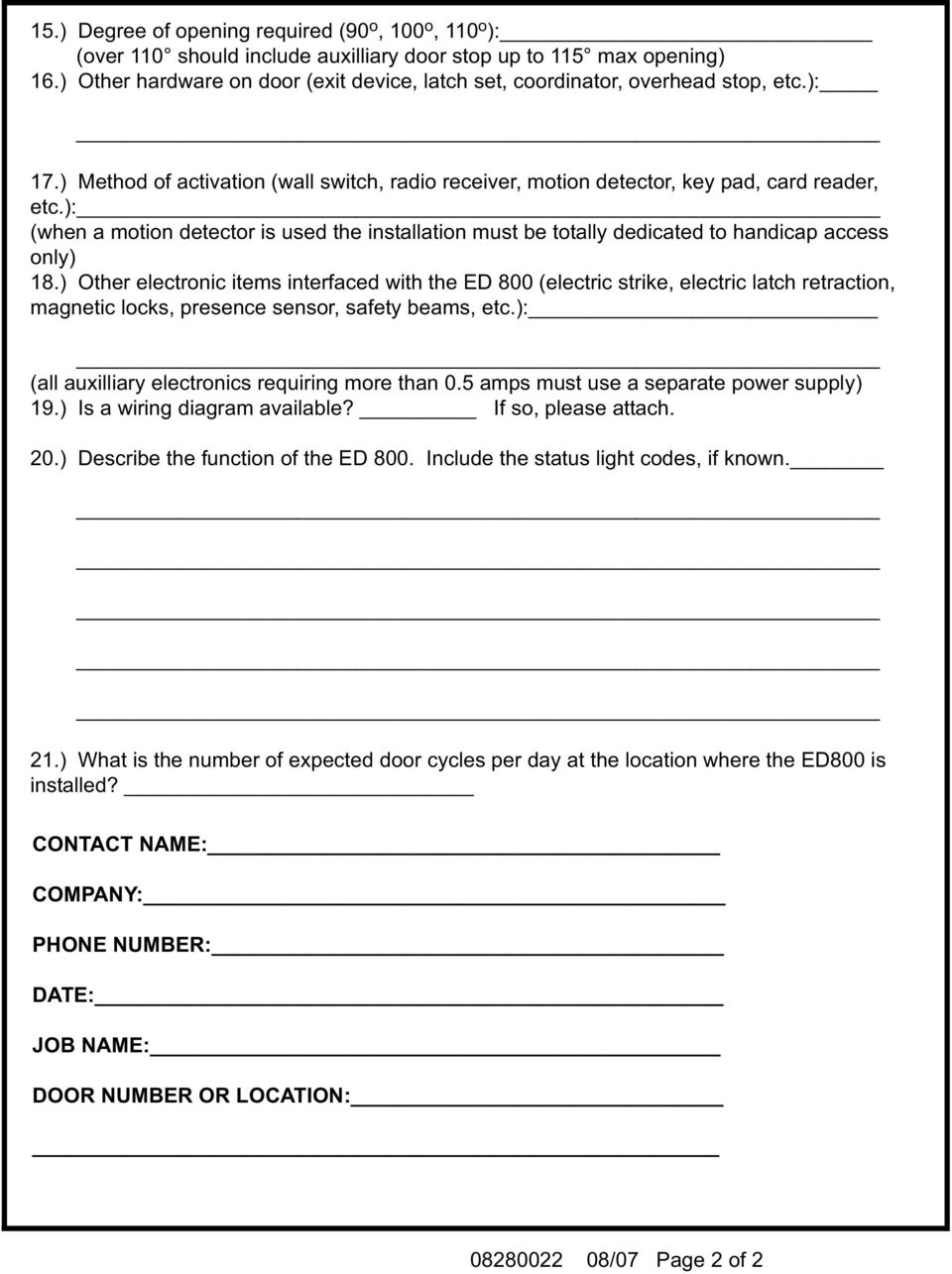
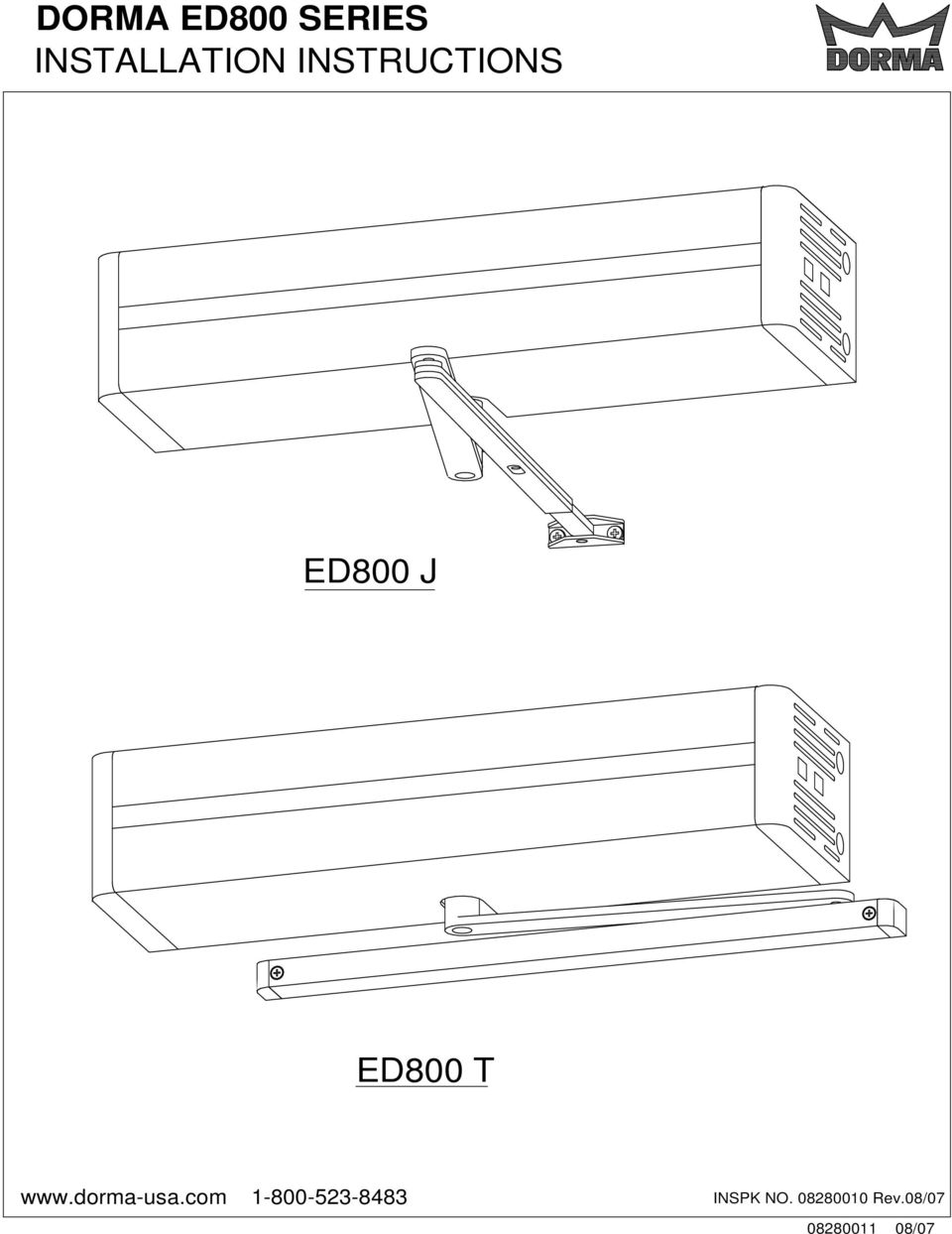
15 DORMA ED800 SERIES INSTALLATION INSTRUCTIONS ED800 J ED800 T INSPK NO Rev.08/ /07
16 TABLE OF CONTENTS Page Suggested Tool List 3 Functional Detail. 4 Installation of Unit... Introduction.. 5 ED 800J Template & Mounting Instructions... 6 ED 800J x Drop Template & Mounting Instructions.. 8 ED 800J x Drop x 830 Template & Mounting Instructions 8 ED 800J x 870 Angle Bracket Template (optional)... 9 ED 800T Template & Mounting Instructions 12 Valve Adjustments.. 14 Spring Power Adjustment.. 14 Main Power Connection. 15 Power Cord Option. 15 Fuse.. 16 Remote Switch Option Fire Door Wiring.. 16 Power Adjustments Push/Pull Switch. 17 Strike Delay On/Off Switch 17 Low Energy Function. 17 Power Assist Function Latched Door.. 18 ED800 Controller Module Diagram. 19 External Connections Accessory Wire Routing. 20 Open Trigger WS-1 Wall Switch FS-1 Frame Switch RFR Radio Frequency Receiver WS/RFT-1 Wall Switch HH/RFT-1 Transmitter KC/RFT-1 Transmitter KC/RFT-2 Transmitter MS-1 Motion Sensor Busy Swing (Safety PS-1 Presence Sensor) Vestibule Function.. 25 Strike Delay Interface. 26 Strike Interface 26 Latch Retraction Signage 27 Electrical Specifications ED /07

17 SUGGESTED TOOL LIST The following is a list of tools required for the installation of the ED 800. Additional tools may be required for installation of the various types of actuators and accessories " Long No. 2 Phillips screwdriver 2. No. 3 Phillips screwdriver 3. 1/8" blade screwdriver 4. 3/16" blade screwdriver 5. Tape measure 6. 10" Adjustable wrench 7. Center punch 8. Hammer 9. 5mm Hex key 10. 6mm Hex key 11. 3/8" Drill 12. No. 7 (0.201") Drill bit 13. 5/32" Drill bit 14. 3/8" Drill bit 15. 7/8" Hole saw 16. 1/4-20 Tap 17. Safety glasses 18. ED 800 Installation Video ED /07

18 GENERAL INFORMATION Functional Detail The DORMA ED 800 low energy power operator was designed to make doors accessible, while still providing the good operating characteristics of a manual door closer. The ED 800 is based on the DORMA TS83 door closer and offers the same sweep, latch, backcheck, adjustable spring power and operating efficiencies. In the normal mode of operation, the ED 800 will be used as a manual door closer. Upon activation the unit will open the door, hold the door open for a predetermined period, and close the door under the parameters as set forth by ANSI A156.19, Standard for Power Assist and Low Energy Power Operated Doors. The mechanical components of the unit consist of a permanent magnet type DC motor, which drives a lead screw assembly. The lead screw assembly has a recirculating ball nut with a shuttle attached to it. The shuttle drives the TS83 door closer. The electronic components of the unit consist of the motor, an encoder assembly, a control module, a power transformer, and additional electronic components and assemblies. The transformer is powered by line voltage. The transformer powers the control module. The motor is driven by the control module. The motor shaft turns an incremental encoder which indicates the motor velocity to the control module. The control module responds to external inputs such as an activation switch and internal door inputs such as an obstacle encountered in the opening or closing cycle. The unit also provides a manual rocker switch for a hold open function. The hold open switch will override all other inputs, and will hold the door open approximately 15 minutes. After that period of time, the door will automatically close and return to the automatic mode. The door can also be closed at any time by pushing the hold open rocker switch in the opposite direction. The ED 800 has two basic functions which can be selected in the field: Low Energy or Power Assist. The factory setting will be at Low Energy. In the Low Energy function, when the door is activated, the door will open within the speed and force guidelines, per ANSI A The door will open to a position which is adjustable between 85 and 115, and will stay in the hold open position for a period of time which is adjustable from 5 to 60 seconds. At the expiration of the selected time, the door will begin to close. The time delay commences once the door attains the fully open position, or when it last receives an actuation input, whichever occurs later. In the opening cycle the door will exert a maximum of 15 lbf. at the latch edge of the door. In the event an obstacle is encountered, the power will be reduced to the door, so that the door is held in a balanced state. While in the balanced state the door can easily be pushed open or closed, as needed. The door will remain in the balanced state for the length of time as set by the time delay adjustment. The time delay commences once there is no longer any door movement. In the closing cycle a maximum of 15 lbf. may be generated at the latch edge of the door. If an obstacle is encountered, the unit will balance the door. While in this state the door can easily be pushed open or closed manually, as needed. The door will remain in the balanced state for the length of time as set by the time delay adjustment. The time delay commences once there is no longer any door movement. If at any time there is a power failure, the unit will operate as a standard TS83 door closer. The second basic function is power assist. When the power assist is activated, the unit responds by opening the door approximately one inch, to alert the user that the power assist mode is active. The door can then be opened with a reduced opening force, which can be adjusted from 1/2 lb. to 5 lbs., as measured from the latch edge of the door. The reduction of opening force remains active as long as the unit senses door movement, plus the duration of the time delay setting. The time delay will commence after there is no door movement. At the expiration of the time delay, the door begins to close under the control of the TS83 door closer. When the ED 800 is initially energized, it will perform a learn cycle. If the door is latched and can not open during the learn cycle, the ED 800 will default to the power requirements of a typical 36" wide interior door. If an electric strike, magnetic lock or electric latch retraction device is installed and tied in with the delay contacts, the ED800 will automatically send a signal to unlock the strike, magnetic lock or hold back the electric latch. The ED800 will only go through a full learn cycle when turned on at the ON/OFF switch. During the learn cycle, the exact closed position of the door will be established. Also, the ED800 will open the door a few degrees to determine the amount of force required to compress the door closer spring and set the door in motion. From this information, along with the "door width" setting, the control module can determine the amount of force to exert on the door so as not to exceed the 15 lbf. maximum required by the ANSI standard. If the ED800 losses power, (other than the ON/OFF switch) when power is restored the ED800 does a Secure Learn. The most recent learn cycle is stored in memory and is used so that the door stays secure (locked and latched) during and after a power failure. Activation of the ED 800 can be by any normally open circuit which is momentarily closed to signal the door. The most basic means of activating the unit would be a wall switch or frame switch which is directly wired to the external connector. A radio frequency receiver along with a radio frequency wall switch transmitter, or hand held transmitter, can be used if it is considered too difficult to run wires from the push button to the unit. For doors that are specifically dedicated for accessibility, a motion sensor is available to activate the unit. Keep in mind that when the unit is not activated it will operate as a standard TS83 door closer. ED /07

19 Another method of activating the door is with the Push and Go feature. This is a standard field selectable option which activates the door when it is opened more than one inch. It can be used as the only method of door activation, or it can be used in conjunction with other external activation means, such as push buttons. The push and go type activation is intended for openings that are dedicated to accessibility, since the door is operating automatically 100% of the time. The push and go feature is only active when the door is in the fully closed position. The ED800 has an open trigger to activate the door opening. The ED800 also has a standard vestibule function available. With this function two units can be interconnected. Upon the completion of the closing cycle of the first unit, an activation signal will be sent to the second unit. This activation functions in both directions. If the interior door is activated first, it will then signal the exterior door to open. If the exterior door is activated first, it will then signal the interior door to open. The ED800 also has a standard strike delay function. This is used to control the release of an electric strike, magnetic lock or the retraction of an electric latch, in conjunction with the operation of the ED800. When the ED800 is activated, Form-C relay (NO/ C / NC) contacts (PINS 6, 7, 8) momentarily change state for up to 1 second to release a strike, magnetic lock or retract a latch. If required, ED800 operation may be delayed by 1/2 second when using an electric strike, magentic lock or latch retraction. Delaying the operator allows a locking device time to release the door before the ED800 opens it. The delay is enabled using an On/Off switch on the controller (See page 16). This feature is only activated when the door is in the closed position, so that electric strikes, magnetic locks or electric latch bolts are not operated needlessly. In addition, the ED 800 offers an external output terminal, rated at 12 volts DC, at a maximum of 500 milliamps. This can be used to power an electric strike or any accessory of compatible voltage. The ED 800 also has a built-in safety circuit. While not required by the ANSI A standard, this safety circuit can provide the ultimate in safe door operation. When the optional presence sensor is installed, the door will not operate under power when it detects an obstacle within the swing area of the door. In addition, the unit will hold the door in the fully opened position until traffic has cleared from the swing area of the door. Under no circumstances however, shall the presence sensor serve to stop an already moving door in the event that the swing area of the door becomes occupied, once the door is in motion. In this case, safety is assured by the low opening force, low opening speed, and obstacle default function of the unit. INSTALLATION OF UNIT Introduction Prior to installation of the ED800, confirm that the door is in proper working order. Hinges or pivots must be in good condition and the door must swing freely through the entire opening range anticipated with the ED800. All door repairs must be performed prior to installation of the ED800. Ball bearing hinges or needle bearing pivots are recommended for proper ED800 operation. The ED 800 is a non-handed unit which mounts to the door and frame much the same as a standard door closer. The unit is designed so that it can be installed by one person. The backplate is equipped with unique slots to aid in installation. Two screws are pre-installed into the frame. The unit is then hung on the two screws until the balance of the screws can be installed and tightened. There are four different ways that the ED 800 can be ordered and installed: ED 800J - Top jamb installation where the unit is attached to the header on the push side and the arm shoe is attached to the door. The standard unit accommodates a reveal from 2 to 6 inches. For reveals of 0 to 4 inches, the C800R bar and shoe must be specified. For reveals of 4 to 8 inches, the C810R bar and shoe must be specified. For reveals of 8 to 12 inches, the C812R bar and shoe must be specified. ED 800J x Drop - Top jamb installation where the unit is located to clear a low ceiling condition on the push side of the door. This is otherwise similar to the ED 800J. ED 800J x Drop x Top jamb drop installation to clear a low ceiling on the push side. The 830 is an arm shoe drop plate designed to connect the ED 800 arm to a narrow top door rail in this particular application. This is otherwise similar to the ED 800J x Drop. ED 800T - Track installation where the unit is attached to the header on the pull side and a track arm assembly is attached to the top of the door. Refer to individual templates for exact dimensional requirements for each particular application. Please use the full size preparation template included with the ED 800 when preparing the door and frame. ED /07

20 ED 800J - TOP JAMB INSTALLATION TEMPLATE & MOUNTING INSTRUCTIONS Prepare door and frame according to template. NOTES: 5. SEE CATALOG FOR ARM NUMBER FOR NON STANDARD REVEALS. 1. DO NOT SCALE DRAWING. 6. MAXIMUM OPENING ANGLE DIMENSIONS ARE IN INCHES/(MM). 7. DOORS AND FRAMES MUST BE PROPERLY REINFORCED. 3. LEFT HAND DOOR SHOWN. 8. IF STOP PROJECTION IS OVER 5/8" USE ED800 x DROP INSTALLATION. 4. CAUTION: SEX NUTS ARE REQUIRED FOR 9. AUXILIARY STOP, (BY OTHERS) ARE REQUIRED AT 115 FOR ATTACHMENT OF COMPONENTS TO UNREINFORCED INSTALLATIONS WHERE DOOR CAN OPEN MORE THAN 115. DOORS AND TO WOOD OR PLASTIC FACED COMPOSITE TYPE FIRE DOORS, UNLESS AN FOR 1/4-20 MACHINE SCREWS USE No.7 (0.201") DRILL ALTERNATIVE METHOD IS IDENTIFIED IN THE FOR No. 14 WOOD SCREWS USE 5/32" DRILL INDIVIDUAL DOOR MANUFACTURER'S LISTINGS. FIVE (5) HOLES IN FRAME FOR PLATE 20-11/16 (525) MINIMUM TO CEILING 4-1/4" 1-5/16 (33) 3-15/16 (110) 3-1/4 (83) 4-3/8 (111) 8-13/16 (224) 5/8" MAX. SEE NOTE # 8 15/16 (24) BOTTOM OF FRAME 7/16 (11) 1-3/32 (28) 7/8" DIA. HOLE FOR WIRE ACCESS 12-5/8 (321) 1-3/4 (44) 1-3/4 (44) 2" TO 6" STD. REVEAL SEE NOTE # 5 FOR 1/4-20 MACHINE SCREWS USE No.7 (0.201") DRILL FOR No.14 WOOD SCREWS USE 5/32" DRILL FOR SEX NUTS USE 3/8" DRILL TWO (2) HOLES IN DOOR FOR ARM SHOE C OF 4-1/2" WIDE HINGE, 3/4" OFFSET PIVOT, ED800-1 Rev.08/04 Remove two (2) cover screws and cover. Disconnect cover ground wire at base plate. Loosen, but do not remove end cap screws and slide end caps off. Note: Re-install end caps, cover ground wire and cover after installation is complete. Push-in emblems or logo decals can be applied to hide cover screws if needed. COVER GROUND WIRE FOR COVER END CAP END CAP WITH SWITCHES END CAP SCREW (LEFT HAND MOUNT SHOWN) ED /07

21 Initially install screws for slots "A" as pictured, allowing 5/16" between the screw head and the frame. Align the slots in the mounting plate with the screws. Slide the mounting plate over the screw and hold the unit in place until the balance of the screws are installed. Tighten all screws securely. SLOT "A" SLOT "A" MOUNTING PLATE HINGE SIDE OF DOOR Orient arm as shown. Attach arm shoe to door. Place wrench on top pinion shaft and rotate pinion slightly toward latch edge of door. Slide main arm over bottom pinion shaft. Fasten securely with pinion screw and lock washer provided. Loosen screw in connecting arm so arm slides freely. Adjust connecting arm length so rod and connecting arm are 90 to door. Re-tighten screw. CONNECTING ARM MAIN ARM ROD ARM SHOE LOCK WASHER PINION SCREW 6 mm HEX KEY HINGE SIDE OF DOOR ED /07
22 ED 800J X DROP - TOP JAMB DROP INSTALLATION TEMPLATE & MOUNTING INSTRUCTIONS Prepare door and frame according to template. 1-5/16 (33) NOTES: 1. DO NOT SCALE DRAWING. 2. DIMENSIONS ARE IN INCHES/(MM). 3. LEFT HAND DOOR SHOWN. 4. CAUTION: SEX NUTS ARE REQUIRED FOR ATTACHMENT OF COMPONENTS TO UNREINFORCED DOORS AND TO WOOD OR PLASTIC FACED COMPOSITE TYPE FIRE DOORS, UNLESS AN ALTERNATIVE METHOD IS IDENTIFIED IN THE INDIVIDUAL DOOR MANUFACTURER'S LISTINGS. 3-15/16 (100) 3-1/4 (83) 4-3/8 (111) 20-11/16 (525) 5. SEE CATALOG FOR ARM NUMBER FOR NON STANDARD REVEALS. 6. MAXIMUM OPENING ANGLE DOORS AND FRAMES MUST BE PROPERLY REINFORCED. 8. AUXILIARY STOP, (BY OTHERS) ARE REQUIRED AT 115 FOR INSTALLATIONS WHERE DOOR CAN OPEN FURTHER THEN /16 (224) FOR 1/4-20 MACHINE SCREWS USE No.7(0.201") DRILL & TAP FOR No. 14 WOOD SCREWS USE 5/32" DRILL FIVE (5) HOLES IN FRAME FOR PLATE MINIMUM TO CEILING 1-3/4" 4-1/4 BOTTOM OF FRAME (108) 12-5/8 (321) C OF 4-1/2" WIDE HINGE, 3/4" OFFSET PIVOT 1-3/4 (44) 3/8 (10) 11/16 (17) 15/16 (24) 7/8" DIA. HOLE FOR WIRE ACCESS 2" TO 6" STD. FOR 1/4-20 MACHINE SCREWS USE No.7 DRILL FOR No.14 WOOD SCREWS USE 5/32" DRILL FOR SEX NUTS USE 3/8" DRILL TWO (2) HOLES IN DOOR FOR ARM SHOE REVEAL SEE NOTE # 5 ED800J X DROP TOP JAMB DROP INSTALLATION - LOW CEILING CLEARANCE (PUSH SIDE MOUNT) ED800-2 Rev.08/04 ED 800J X DROP X TOP JAMB DROP INSTALLATION WITH 830 ARM SHOE DROP PLATE TEMPLATE & MOUNTING INSTRUCTIONS Prepare door and frame according to template. 1-5/16 (33) NOTES: 1. DO NOT SCALE DRAWING. 2. DIMENSIONS ARE IN INCHES/(MM). 5. SEE CATALOG FOR ARM NUMBER 3. LEFT HAND DOOR SHOWN. FOR NON STANDARD REVEALS. 4. CAUTION: SEX NUTS ARE REQUIRED FOR 6. MAXIMUM OPENING ANGLE 115 ATTACHMENT OF COMPONENTS TO UNREINFORCED DOORS AND TO WOOD OR PLASTIC FACED 7. DOORS AND FRAMES MUST BE PROPERLY REINFORCED. COMPOSITE TYPE FIRE DOORS, UNLESS AN 8. AUXILIARY STOP, (BY OTHERS) ARE REQUIRED AT 115 FOR ALTERNATIVE METHOD IS IDENTIFIED IN THE INSTALLATIONS WHERE DOOR CAN OPEN FURTHER THEN 115 INDIVIDUAL DOOR MANUFACTURER'S LISTINGS. 3-15/16 (100) 3-1/4 (83) 4-3/8 (111) 20-11/16 (525) 8-13/16 (224) FOR 1/4-20 MACHINE SCREWS USE No.7(0.201") DRILL & TAP FOR No. 14 WOOD SCREWS USE 5/32" DRILL FIVE (5) HOLES IN FRAME FOR PLATE MINIMUM TO CEILING 1-3/4" 3/4" MAX. BOTTOM OF FRAME 12-5/8 (321) 1-3/8 (35) C OF 4-1/2" WIDE HINGE, 3/4" OFFSET PIVOT 1/2 (13) 1-3/4 (44) 7/8 (22) 3/8 (10) 15/16 11/16 (17) (24) FOR 1/4-20 MACHINE SCREWS USE No.7 DRILL FOR No.14 WOOD SCREWS USE 5/32" DRILL FOR SEX NUTS USE 3/8" DRILL THREE (3) HOLES IN DOOR FOR PLATE 7/8" DIA. HOLE FOR WIRE ACCESS 2" TO 6" STD. REVEAL SEE NOTE # 5 2" MIN. TOP RAIL ED800J X DROP X 830 ARM SHOE DROP PLATE TOP JAMB DROP INSTALLATION - LOW CEILING CLEARANCE / NARROW TOP RAIL (PUSH SIDE MOUNT) ED800-4 Rev.08/04 ED /07
23 ED 800J x 870 ANGLE BRACKET - TOP JAMB INSTALLATION TEMPLATE FOR 1/4-20 MACHINE SCREWS USE No.7 (0.201") DRILL FOR No. 14 WOOD SCREWS USE 5/32" DRILL SIX (6) HOLES IN FRAME FOR BRACKET 1-5/ /8 (33) 10-3/16 (518) (259) 2 5/16 (51) (8) NOTES: 1. DO NOT SCALE DRAWING. 2. DIMENSIONS ARE IN INCHES/(MM). 3. LEFT HAND DOOR SHOWN. 4. CAUTION: SEX NUTS ARE RECOMMENDED FOR ATTACHMENT OF COMPONENTS ON COMPOSITE DOORS OR LABELED FIRE DOORS. 5. ALWAYS LOCATE ARM SHOE FROM 870 BRACKET MOUNTING SURFACE. 6. MAXIMUM OPENING ANGLE DOORS AND FRAMES MUST BE PROPERLY REINFORCED. FOR 1/4-20 MACHINE SCREWS USE No.7 DRILL FOR No.14 WOOD SCREWS USE 5/32" DRILL FOR SEX NUTS USE 3/8" DRILL TWO (2) HOLES IN DOOR FOR ARM SHOE 6-1/8 (156) SEE NOTE #5 12-5/8 (321) 1-3/4 (44) 3 (76) C OF 4-1/2" WIDE HINGE, 3/4" OFFSET PIVOT, ED800J TOP JAMB INSTALLATION - (PUSH SIDE MOUNT) WITH 870 ANGLE BRACKET TEMPLATE No. ED800-SP1 Rev.02/95 ED 800J x 870 ANGLE BRACKET x 831 ARM SHOE DROP PLATE - TOP JAMB INSTALLATION TEMPLATE 1-5/16 (33) 10-3/16 (259) FOR 1/4-20 MACHINE SCREWS USE No.7 (0.201") DRILL FOR No. 14 WOOD SCREWS USE 5/32" DRILL SIX (6) HOLES IN FRAME FOR BRACKET 2 (51) 20-3/8 (518) 5/16 (8) NOTES: 1. DO NOT SCALE DRAWING. 2. DIMENSIONS ARE IN INCHES/(MM). 3. LEFT HAND DOOR SHOWN. 4. CAUTION: SEX NUTS ARE RECOMMENDED FOR ATTACHMENT OF COMPONENTS ON COMPOSITE DOORS OR LABELED FIRE DOORS. 5. ALWAYS LOCATE 830 PLATE FROM 870 BRACKET MOUNTING SURFACE. 6. MAXIMUM OPENING ANGLE DOORS AND FRAMES MUST BE PROPERLY REINFORCED. 12-5/8 (321) C OF 4-1/2" WIDE HINGE, 3/4" OFFSET PIVOT, 7/8 (22) 1-3/4 (44) FOR 1/4-20 MACHINE SCREWS USE No.7 DRILL FOR No.14 WOOD SCREWS USE 5/32" DRILL FOR SEX NUTS USE 3/8" DRILL THREE (3) HOLES IN DOOR FOR PLATE ED800J TOP JAMB INSTALLATION - (PUSH SIDE MOUNT) WITH 870 ANGLE BRACKET X 831 ARM SHOE DROP PLATE 1/2 (13) ED /4 (32) SEE NOTE #5 3 (76) TEMPLATE No. ED800-SP3 Rev.08/ /07
24 Remove two (2) cover screws and cover. Disconnect cover ground wire at base plate. Loosen, but do not remove end cap screws and slide end caps off. Note: Re-install end caps, cover ground wire and cover after installation is complete. Push-in emblems or logo decals can be applied to hide cover screws if needed. COVER GROUND WIRE FOR COVER END CAP END CAP WITH SWITCHES END CAP SCREW (LEFT HAND MOUNT SHOWN) Initially install screws for slots "A" as pictured, allowing 5/16" between the screw head and the frame. Align the slots in the mounting plate with the screws. Slide the mounting plate over the screw and hold the unit in place until the balance of the screws are installed. Tighten all screws securely. SLOT "A" SLOT "A" HINGE SIDE OF DOOR ED /07
25 If required, attach 830 arm shoe drop plate to top rail with three screws provided. 830 DROP PLATE HINGE SIDE OF DOOR Orient arm as shown. Attach arm shoe to door or 830 arm shoe drop plate. Place wrench on top pinion shaft and rotate pinion slightly toward latch edge of door. Slide main arm over bottom pinion shaft. Fasten securely with pinion screw and lock washer provided. Loosen screw in connecting arm so arm slides freely. Adjust connecting arm length so rod and connecting arm are 90 to door. Re-tighten screw. CONNECTING ARM MAIN ARM ROD ARM SHOE LOCK WASHER PINION SCREW 6 mm HEX KEY HINGE SIDE OF DOOR ED /07
26 ED 800T - TRACK INSTALLATION TEMPLATE & MOUNTING INSTRUCTIONS Prepare door and frame according to template. NOTES: 1. DO NOT SCALE DRAWING. 2. DIMENSIONS ARE IN INCHES/(MM). 3. RIGHT HAND DOOR SHOWN. 4. CAUTION: SEX NUTS ARE REQUIRED FOR ATTACHMENT OF COMPONENTS TO UNREINFORCED DOORS AND TO WOOD OR PLASTIC FACED COMPOSITE TYPE FIRE DOORS, UNLESS AN ALTERNATIVE METHOD IS IDENTIFIED IN THE INDIVIDUAL DOOR MANUFACTURER'S LISTINGS. 5. MAXIMUM OPENING ANGLE DOORS AND FRAMES MUST BE PROPERLY REINFORCED. 7. AUXILIARY STOP, (BY OTHERS) ARE REQUIRED AT 115 FOR INSTALLATIONS WHERE DOOR CAN OPEN FURTHER THEN 115 DIM. "A" DIM. "B" 4-1/2" 3/4" OFFSET WIDE HINGE PIVOT 7/16" 1" (11) (25) 4-5/16" (106) 4-7/8" (124) "A" 1 (25) 8-13/16 (224) 1-7/16 (37) FOR 1/4-20 MACHINE SCREWS USE No.7 (0.201") DRILL 7/8" DIA. HOLE FOR WIRE ACCESS FOR No. 14 WOOD SCREWS USE 5/32" DRILL FIVE (5) HOLES IN FRAME FOR PLATE MINIMUM TO CEILING 4-5/8" 4-3/8 (111) 3-1/4 (83) 3-15/16 (100) BOTTOM OF FRAME "B" 23-1/2 (597) 1/2 (13) 13/16 (21) 15/16 (24) C OF HINGE FOR 1/4-20 MACHINE SCREWS USE No.7 (0.201") DRILL FOR No.14 WOOD SCREWS USE 5/32" DRILL FOR SEX NUTS USE 3/8" DRILL TWO (2) HOLES IN DOOR FOR TRACK ED800-3 Rev.08/04 Remove two (2) cover screws and cover. Disconnect cover ground wire at base plate. Loosen, but do not remove end cap screws and slide end caps off. Note: Re-install end caps, cover ground wire and cover after installation is complete. Push-in emblems or logo decals can be applied to hide cover screws if needed. COVER GROUND WIRE FOR COVER END CAP END CAP WITH SWITCHES END CAP SCREW (LEFT HAND MOUNT SHOWN) ED /07
27 Initially install screws for slots "A" as pictured, allowing 5/16" between the screw head and the frame. Align the slots in the mounting plate with the screws. Slide the mounting plate over the screw and hold the unit in place until the balance of the screws are installed. Tighten all screws securely. SLOT "A" SLOT "A" MOUNTING PLATE HINGE SIDE OF DOOR Insert slide shoe and end blocks into track and attach track to door. Attach arm to slide shoe using screw provided. Place wrench on top pinion shaft and rotate 45 towards hinge edge of door. Slide arm over bottom pinion shaft. Fasten securely with pinion screw and lock washer provided. HINGE SIDE OF DOOR 5 mm HEX KEY SLIDE SHOE SCREW END BLOCK END BLOCK LOCK WASHER PINION SCREW SLIDE SHOE 6 mm HEX KEY ED /07
28 VALVE ADJUSTMENTS Adjust sweep, latch and backcheck valves. Closing time from 90 to 10 (sweep range) should take at least 3 seconds. Closing time from 10 to fully closed (latch range) should take at least 1.5 seconds. Backcheck intensity should be adjusted to ensure that door is under control during the opening cycle BACKCHECK RANGE CAUTION: DO NOT REMOVE VALVES. SWEEP INCREASE RANGE DECREASE LATCH RANGE BACKCHECK INTENSITY BACKCHECK VALVE SWEEP VALVE DECREASE LATCH VALVE INCREASE SWEEP & LATCH SPEED SPRING POWER ADJUSTMENT Adjust spring tension according to the chart below. The ED 800 is shipped from the factory as a size 3. The spring power can be increased to a size 5. Clockwise turns increase spring power. Do not decrease spring power from factory setting. CRITICAL Spring tension must be adjusted to ensure that door will close and latch consistently. DOOR WIDTH EXTERIOR INTERIOR - 3'-0" 3'-0" 3'-6" 3'-6" 4'-0" FULL TURNS OF SPRING ADJUSTING SPRING SIZE ULC LABELED UNITS ONLY - ADJUST ACCORDING TO CHART adjust with 5 mm hex key INCREASE MAX. DOOR WEIGHT (LBS.) FULL TURNS OF SPRING ADJUSTING SPRING SIZE ED /07
29 MAIN POWER CONNECTION Connect the 120 volt AC power supply wires to the ED 800 terminal block. Connect the ground wire to the green ground screw on the mounting plate. Observe all local electrical codes when performing connections. The incoming wire size is to be 14 AWG. The maximum power consumption of the ED 800 is 2 amps. WARNING: DISCONNECT POWER WHILE MAKING CONNECTIONS. FUSE TERMINAL BLOCK L1 (BLACK) N (WHITE) GROUND POWER CORD OPTION (refer to Installation Instructions ) The ED800 is available with an optional power cord which allows the unit to be plugged directly into a standard receptacle. If power cord is being added as a field option, refer to instructions packaged with power cord. A grounding-type 120 volt receptacle rated for a minimum of 15 amps. is required and should be located at the approximate location shown. When considering the amount of units to be supplied by one circuit, remember the power consumption is 2 amps. per unit. When routing the power cord to the receptacle, do not run through doorways, window openings, walls, ceilings, floors, or the like. Do not attach or otherwise secure the power cord to the building structure, and do not conceal the power cord behind walls. WARNING: DO NOT ALLOW THE POWER CORD TO BECOME ENTRAPPED IN THE MOVING PARTS OF THE ED 800 OR THE DOOR AND THE FRAME. If the local codes require permanent wiring to be employed, refer to Main Power Connection section. Track Installations Top Jamb & Top Jamb Drop Installations 10 (254) 32 (813) 6 (152) 6 (152) Pull Side of Door CHINGE C HINGE Push Side of Door ED /07
30 FUSE The ED 800 is protected by a 3 amp type AGC size 1/4" x 1 1/4" fuse. Replace only with an identical fuse. WARNING: DISCONNECT POWER TO THE ED 800 WHEN REPLACING THE FUSE. ON/OFF SWITCH The ED 800 is equipped with an on/off switch which is located in the end cap closest to the control module. The switch must be in the "on" position for any powered function. HOLD OPEN/CLOSE SWITCH The ED 800 is equipped with a standard "hold open" feature. To activate, momentarily depress the switch towards "hold open". The door will open and remain in the open position for approximately 15 minutes. After that period of time, the door will then close and the unit will be ready for normal operation. To close the door at any time, depress the switch towards "close". This will override the time delay and close the door immediately. NOTE: Hold Open/Close Switch must be plugged into control module to enable operator. ON "1" OFF "0" HOLD OPEN CLOSE PUSH BUTTON FOR LEARN OPTION (available with remote switch option) A small concealed button accessible through end cap slots must be pressed for ED800 to start learn cycle. REMOTE SWITCH OPTION (refer to Installation Instructions ) If the ED 800 is ordered with the RS - Remote Switch option, the On/Off switch and the Hold Open/Close switch are deleted. This is recommended for applications where the switches may be subjected to tampering. In this application, a remote switch must be provided (by others) in the incoming power supply. This switch must be wired in accordance to The National Electrical Code. L1 with SPST SWITCH 120 VOLTS MIN. (BY OTHERS) FIRE DOOR WIRING When the ED 800 is installed on a fire door, the main power to the unit must be supplied through a set of contacts in a UL listed fire alarm panel. The contacts are to be closed under normal (stand-by) conditions providing power to the unit. Under alarm conditions, the contacts must open, cutting power to the unit, causing the ED 800 to operate as a manual door closer. ED /07
31 POWER ADJUSTMENTS NOTE: Before making any power adjustments, the ED 800 unit must be properly installed on the door and frame, the arm must be adjusted and the spring tension set. MOUNT TYPE SWITCH Set the Push/Pull switch for correct mounting. Push is required for top jamb applications. Pull is required for track applications. STRIKE DELAY SWITCH When turned "ON" this switch delays the function of the operator by 1/2 second to allow time for a strike or ES exit device to operate. (See pages 5 or 25) CLOSING OBSTACLE SWITCH Normally "ON". When switching to "OFF" position, obstacle detection in the closing direction will not be functional. LOW ENERGY FUNCTION STRIKE DELAY SWITCH (OFF/ON) MOUNT TYPE SWITCH (PUSH/PULL) CLOSING OBSTACLE SWITCH (OFF/ON) 1. Adjust the "Power Assist/Low Energy" slide switch to the "Low Energy" position. 2. Adjust the "Door Width" potentiometer to match the approximate door width. Doors must be between 36 and 48 inches wide for optimum operation. 3. Adjust the "Opening Time(LE)" potentiometer to obtain the desired door opening time. "MIN" is the least amount of opening time (fastest door speed), and "MAX" is the greatest amount of opening time (slowest door speed). 4. Adjust the "Opening Angle" potentiometer to obtain the desired angle of opening (Hold Open Position). This is adjustable from 85 to 115. This is a "live" adjustment when the door is in the hold open position 5. Adjust the "Delay Time" potentiometer to obtain the desired amount of time the door will remain at the hold open position. This is adjustable from 5 to 60 seconds. The delay time will commence when the door reaches the hold open position, or when it last receives an actuation input, whichever occurs later. 6. Adjust the "Push & Go" slide switch as required. When in the "on" position, a door movement of one inch will activate the unit. If the user opens the door briskly beyond 45 the Push & Go feature will abort. This is to conserve heating and air conditioning energy and to prevent the unit from operating needlessly. When in the "off" position, the unit must be activated externally. Refer to the Functional Detail in the General Information section for a complete description of the operation of the ED 800 in Low Energy Function. ED /07
32 POWER ASSIST FUNCTION 1. Adjust the "Power Assist/Low Energy" slide switch to the "Power Assist" position. 2. Adjust the "Door Width" potentiometer to match the approximate door width. Doors must be between 36 and 48 inches wide for optimum operation. 3. Adjust the "Opening Force(PA)" potentiometer to obtain the amount of opening force desired. "MIN" is the least amount of force required to open the door (approximately 1.5 pounds of force), and "MAX" is the greatest amount of force required to open the door (approximately 5 pounds of force). 4. Adjust the "Opening Angle" potentiometer to obtain the maximum angle of opening to which the unit will assist. 5. Adjust the "Delay Time" potentiometer to obtain the desired amount of time the door will remain in the Power Assist function once activated. This is adjustable from 5 to 60 seconds. The delay time will commence upon activation or when there is no longer any door movement, whichever occurs later. 6. Adjust the "Push & Go" slide switch as required. When in the "on" position, a door movement of one inch will activate the unit. If the user opens the door briskly beyond 45 the Push & Go feature will abort. This is to conserve heating and air conditioning energy and to prevent the unit from operating needlessly. When in the "off" position, the unit must be activated externally. Refer to the Functional Detail in the General Information section for a complete description of the ED 800 in Power Assist Function. LATCHED DOOR If the ED 800 is to be installed on a door which is required to be latched, it is recommended that an electric strike release or electric latch retraction device be installed. When the ED 800 is installed on a door with an exit device, the device should be dogged during hours when the ED 800 is turned on. Also, the latch must be manually held retracted when the unit is initially turned on. This is because the ED 800 performs a "learn cycle" when it is first energized. Part of the learn cycle requires that the door be opened a few degrees to obtain information about the amount of force required to open that particular door. If the door is latched during the learn cycle, the ED 800 will default to the power requirements of a typical 36" wide interior door. If this is not satisfactory, simply turn the unit off, wait approximately 30 seconds, then turn the unit back on while holding the latch retracted until the learn cycle is completed. ED /07
33 ED800 Controller Module Diagram External Connector (See below) Encoder Connection Transformer/Motor Connection (Factory use only) Hold Open Switch Connection Closing Obstacle Switch (Off/On) Mount Type Switch (Push/Pull) Latch Delay Switch (Off/On) External Connector 1 2 GROUND +12VDC OPEN TRIGGER BUSY SWING (SAFETY) VESTIBULE NO C NC NOTE: Terminal can be removed from control module to simplify installation of wires. The maximum recommended wire size is 18 AWG. ED /07
34 ACCESSORY WIRE ROUTING Remove knockout with a 1/2" diameter punch and hammer. Back side of end cap must be supported to prevent damage to the end cap. 1/2" DIA. PUNCH KNOCKOUT OVERSIZE SOCKET AS RECEIVER END CAP Insert bushing into end cap. Feed accessory wires through bushing in end cap. Connect wires as required to external connector. Note: Accessory wires must be isolated from 120V incoming power 120V INCOMING FEED WIRED HERE BUSHING END CAP EXTERNAL CONNECTOR FOR ACCESSORY WIRES ED /07
35 OPEN TRIGGER - HARD WIRED WS-1 Wall Switch FS-1 Frame Switch The open trigger is created by providing a normally open dry circuit, which is momentarily closed. Contact is made between "OPEN TRIGGER" and "GROUND" to signal the ED800. Typical Wall Switch or Frame switch wiring diagram. WS-1 WALL SWITCH When considering the location of the 800 WS-1 Wall Switch, sufficient distance should be allowed between the switch and the door, to allow for the door to open. Inside Switch 4x4 box mounting screws GROUND +12VDC OPEN TRIGGER BUSY SWING (SAFETY) VESTIBULE NO C NC Outside Switch 6 x 32 wall switch mounting screws 42" APPROXIMATE CL 4x4 or 2x4 Junction box (by others) 6-32 screw plastic inserts FINISHED FLOOR Tighten screws through holes in cover plate with 3/32" hex key FS-1 FRAME SWITCH The FS-1 Frame Switch is designed to be installed in a metal door frame with a minimum width of 1 3/4". NOTE: Generally, a junction box is not used with this type of switch Tighten screws through holes in cover plate with 5/64" hex key 42" APPROXIMATE CL FINISHED FLOOR ED /07
36 OPEN TRIGGER - WIRELESS RFR Radio Frequency Receiver The RFR Receiver can be used on applications where it is not practical to run wires from a switch to the ED 800 unit. A code must be selected to ensure the receiver is only activated by the intended transmitter(s). This is determined by the positions of the 10 small switches numbered 1 through 10 located on the receiver board. To gain access to the switch, remove the top section of the case. Any combination of on (closed) or off (open) positions can be selected by using a small screwdriver or ball point pen. It is strongly recommended that the following codes be avoided: all on; all off; 2, 4, 6, 8, 10 on; or 1, 3, 5, 7, 9, on. These codes are frequently used and create the possibility of false operation. After selecting the code be sure it is recorded so that it may be duplicated in any transmitter intended to operate the door. Install antenna by threading it on the connector. Locate receiver in close proximity to the ED 800 unit. Position antenna so that it is clear of metal structures. Anchor the receiver permanently. NOTE: Be sure receiver unit is kept away from direct moisture. BLACK RED GRAY GROUND +12VDC 5 open OPEN TRIGGER VESTIBULE C NC CODE SWITCH 6 7 BUSY SWING (SAFETY) After installation is complete, check for proper operation. The transmitter should provide reliable operation from a distance of about 50 feet, however the environment and location of both transmitter and receiver will affect range. WS/RFT-1Wall Switch 800RFR RECEIVER Connect wires according to following diagram. GRAY NO The WS/RFT-1 wall switch with radio frequency transmitter is used in conjunction with the RFR radio frequency receiver. The wall switch transmitter must be located within a distance of 50 feet from the receiver. The WS/RFT-1 is suitable for outdoor use, however it must not be exposed to direct moisture. Anchor the backplate of the wall switch securely to the mounting surface at a height approximately 42" above the finished floor CODE SWITCH 4 5 open Anchor backplate securely to wall. Select the code for the transmitter. The code must be identical to the code for the receiver which is intended to be signalled. Refer to code selection for RFR Radio Frequency Receiver. Connect the 9 volt battery at this time. The replacement battery is 9 volt NEDA 1604 (Eveready 216 or equivalent) Wall switch mounting screw. Tighten screws through holes in cover plate with 5/64" hex key. NOTE: Flush Mount Assembly Kit also available ED /07
37 HH/RFT-1 Transmitter and HH/RFT-2 Transmitter The HH/RFT hand held transmitters are used in conjunction with the RFR radio frequency receiver. Under normal conditions, it will provide reliable activation of the ED800 within a distance of 50 feet. Select the code for the transmitters. The code must be identical to the code for the receiver which is intended to be signaled. To access the code switch, remove the lower cover of the housing, exposing the battery and the code switch. Refer to the code selection for RFR Radio Frequency Receiver. Connect the 9 volt battery at this time. If desired, a belt clip can be attached to the back of the transmitter housing by sliding the clip completely into the slot provided. The replacement battery is 9 volt NEDA 1604 (Eveready 216 or equivalent). If the red LED on the transmitter fails to light when the button is depressed, it is most likely that the battery is weak or dead, and should be replaced CODE SWITCH open 9 10 After installation is complete, check for proper operation. KC/RFT-1 Transmitter and KC/RFT-2 Transmitter The KC/RFT key chain transmitters are used in conjunction with the RFR radio frequency receiver. Under normal conditions, it will provide reliable activation of the ED 800 within a distance of 50 feet. Select the code for the transmitter. The code must be identical to the code for the receiver which is intended to be signalled. To access the code switch, KC/RFT-1 separate the two halves of the transmitter case by inserting a coin in the side slot and twisting. KC/RFT-2 remove the phillips head screw on back of case and carefully separate the two halves exposing the circuit board and battery. Refer to the code selection for RFR Radio Frequency Receiver. The replacement battery is a 12 volt alkaline lighter battery (Eveready A23 or equivalent).note: If the red LED on the transmitter fails to light when the button is depressed it is most likely that the battery is weak or dead and should be replaced. It is required that the correct polarity is observed when replacing the battery. After installation is complete, check for proper operation. BATTERY BATTERY CODE SWITCH CODE SWITCH #1 CODE SWITCH #2 HH/RFT-1 TRANSMITTER WITH TOP HALF OF CASE REMOVED HH/RFT-1 TRANSMITTER TOP COVER ON SV OFF 9A KC/RFT-2 TRANSMITTER WITH TOP HALF OF CASE REMOVED KC/RFT-2 TRANSMITTER TOP COVER ED /07
38 PS-1 Presence Sensor BUSY SWING (SAFETY) The ED800 has a built-in safety circuit which can be interfaced with an optional presence sensor. When activated, the safety circuit prevents the door from receiving an "open trigger" signal. Additionally, when the door is in the open position, the safety circuit will now act as an "open trigger" signal, keeping the door open until the signal is no longer present. The use of the safety circuit is optional and not required. However, by utilizing the safety circuit, the ultimate Safety and convenience can be realized. The Safety circuit is activated by making a contact between " Busy Swing (Safety)" and "Ground" GROUND +12VDC OPEN TRIGGER BUSY SWING (SAFETY) VESTIBULE NO C NC VAC/VDC + 10 COM NO NC DATA (-) DATA (+) ED800 PS-1 VESTIBULE FUNCTION The ED 800 can provide two different types of vestibule functions depending on the method of wiring. SIMULTANEOUS OPERATION In this operation, both doors will open at the same time. The switch for each door and the optional switch inside the vestibule will cause both doors to open at the same time. NOT USED BY ED800 INTERIOR SWITCH GROUND +12VDC OPEN TRIGGER BUSY SWING (SAFETY) VESTIBULE NO C NC GROUND +12VDC OPEN TRIGGER BUSY SWING (SAFETY) VESTIBULE NO C NC EXTERIOR SWITCH INTERIOR ED800 OPTIONAL SWITCH INSIDE VESTIBULE EXTERIOR ED 800 SEQUENTIAL OPERATION (SINGLE DOORS) In this operation, the doors will open in sequence. The switch at each door will activate that door. After that door closes completely, the other door will be activated. For example, when the exterior switch is depressed the exterior door will open. When the exterior door closes completely, the interior door will then open. This operation is the same in both directions. The optional switch inside the vestibule opens both doors simultaneously. Note: To one operator or the other, but not to both. INTERIOR SWITCH GROUND +12VDC OPEN TRIGGER BUSY SWING (SAFETY) VESTIBULE NO C NC GROUND +12VDC OPEN TRIGGER BUSY SWING (SAFETY) VESTIBULE NO C NC EXTERIOR SWITCH INTERIOR ED800 OPTIONAL SWITCH INSIDE VESTIBULE EXTERIOR ED 800 ED /07
39 STRIKE DELAY SWITCH Toggle switch must be placed in the "ON" position (to the right) to allow ED800 to delay for 1/2 second before opening door when Electric Latch, Strike or Magnetic Locks are interfaced. FAIL SECURE STRIKE 12 VDC STRIKE POWER SUPPLY STRIKE FAIL SECURE FAIL SECURE ED800 GROUND +12VDC OPEN TRIGGER BUSY SWING (SAFETY) VESTIBULE NO C NC GROUND +12VDC OPEN TRIGGER BUSY SWING (SAFETY) VESTIBULE NO C ED800 NC STRIKE DELAY OFF/ON SWITCH STRIKE INTERFACE The ED 800 can coordinate the release of an electric strike with the operation of the door. Upon activation of the unit, a signal is immediately sent to operate the strike. The signal will last until the door is open approximately 10. Door activation may be delayed for 1/2 second to allow the strike to operate (See page 16). The strike will only be signalled when the door is in the closed position to eliminate unnecessary operation. A 12 Volt DC fail secure electric strike or fail safe electric strike may be powered directly by the ED 800. The maximum power draw is 500 milliamps. FAIL SAFE 12 VDC STRIKE POWER SUPPLY FAIL SAFE MAG. LOCK OR STRIKE FAIL SAFE ED800 GROUND +12VDC OPEN TRIGGER BUSY SWING (SAFETY) VESTIBULE NO C ED800 For 24 Volt AC, 24 Volt DC and 12 Volt AC fail secure electric strike, magnetic lock or fail safe electric strike, the ED 800 provides a switch to control the strike. A separate power supply is required for these applications. The maximum switch rating is 48 Volts AC or DC at 1amp. 12 VAC, 24 VAC, OR 24 VDC STRIKES/MAG. LOCKS NC GROUND +12VDC OPEN TRIGGER AUXILIARY POWER OUTPUT The ED 800 is equipped with an auxiliary power output terminal which can be used to power accessories such as electric strikes or radio frequency receivers. This terminal provides a nominal 12 Volts DC filtered unregulated power source. The voltage range is from 10 to 25 volts at 500 milliamps. More than one accessory can be powered by the auxiliary power output terminal, however the combined power draw can not exceed 500 milliamps. BUSY SWING (SAFETY) VESTIBULE NO C NC 12 VDC ACCESSORY ED800 GROUND +12VDC OPEN TRIGGER BUSY SWING (SAFETY) VESTIBULE NO C NC ED /07
40 LATCH RETRACTION An electric latch retraction function can be coordinated with the ED 800. The ED 800 provides a normally open set of contacts which close momentarily to act as a switch to signal the power supply for the latch retraction. When activated, the contacts close immediately and stay closed until the door is open approximately 10 to provide the signal to the power supply. Door activation may be delayed by 1/2 second to allow the latch to retract (See page 16). A separate power supply is required for the latch retraction function. Typical wiring diagram for the ED 800 with ES100 Power Supply and ES8000 exit device GROUND +12VDC OPEN TRIGGER BUSY SWING (SAFETY) VESTIBULE NO C 8 NC ED800 ES-105 POWER TRANSFER ES100 POWER SUPPLY ES8000 EXIT DEVICE TURN OFF 120 VAC POWER BEFORE MAKING ANY CONNECTIONS OR SERVICE. (+) OUTPUT TERMINALS 24 VDC (-) ZONE 1 (IN) (+) CONTROL SWITCH (+) (-) (IN) (+) OUTPUT CONTROL TERMINALS SWITCH 24 VDC ZONE 2 NO CONNECTIONS Refer to ES100 Installation Instructions for complete wiring information. 1 GROUND Typical wiring diagram for the ED800 with PS501 Power Supply and ES5000 or ES9000 Exit Device. (ES5000 MANUFACTURED AFTER 5/06) NO ED VDC OPEN TRIGGER BUSY SWING (SAFETY) VESTIBULE C NC ES-105 POWER TRANSFER PS501 POWER SUPPLY TURN OFF 120 VAC POWER BEFORE MAKING ANY CONNECTIONS OR SERVICE. ON OFF DIP SWITCH INPUT OUTPUT B OUTPUT A 120 VAC INPUT DRY DRY FIRE CONTACT CONTACT CONTACT INPUT B INPUT A 2 1 FIRE CONTACT DELAY ADJUSTMENT B + 24VDC - A OUTPUTS PS 501 POWER SUPPLY (2X) 24VDC, 1AMP (2X) 16AMP SURGE,.2 SEC. - + ES5000 SERIES ES9000 SERIES EXIT DEVICE Refer to PS501 Installation Instructions for complete wiring information. ED /07
41
42 ELECTRICAL SPECIFICATIONS ED 800 Power Requirements: Current: Fuse: Auxiliary Power Output: Max.Strike Switch Rating: WS-1 Wall Switch Switch Type: Switch Rating: FS-1 Wall Switch Switch Type: Switch Rating: RFR Radio Frequency Receiver Frequency: Supply Voltage: Power Consumption (rest): Power Consumption (relay on) Relay Contact Rating: Numbers of Codes: WS/RFT-1 Wall Switch Switch Type: Switch Rating: Frequency: Range: Numbers of Codes: Battery Type: HH/RFT-1, HH/RFT-2 Transmitter Transmitter Type: Frequency: Range: Numbers of Codes: Battery Type: KC/RFT-1, KC/RFT-2 Transmitter Transmitter Type: Frequency: Range: Numbers of Codes: Battery Type: 120 Volts AC %, 50/60 Hz 2 Amp 3 Amp - type AGC - size 1/4" x 1 1/4" 12 Volts (nominal) filtered unregulated Range 10 to 25 Volts 500mA 48 1 Amp Max.(terminals 6,7, 8) SPDT or 250 Volts AC SPDT or 250 Volts AC 300 MHz std. or 310 MHz jumper selectable Volts AC/DC 16mA 50mA 30 Volts 5 Amp Max SPDT or 250 Volts 300 MHz Normally 50 ft. - depending on local conditions Volt NEDA 1604 (Eveready 216 or equivalent) Hand held 300 MHz Normally 50 ft. - depending on local conditions Volt NEDA 1604 (Eveready 216 or equivalent) Key chain 300 MHz Normally 50 ft. - depending on local conditions Volt (Eveready A23 or equivalent) ED /07
43 ED800 SERIES COMPANION - CMP ED800J CMP ED800T CMP INSPK Rev.11/06 INS NO PAGE 1 of 9 Rev. 11/06
44 Introduction The ED800 Companion is designed to aesthetically balance a pair of doors where one leaf is automated by an ED800 while the other leaf is operated manually. There is NO provision for powered opening, however, door control is provided by the TS83 series door closer. Prior to installation of the ED800 Companion, confirm that the door is in proper working order. Hinges or pivots must be in good condition and the door must swing freely through the entire opening range anticipated with the ED800 Companion. All door repairs must be performed prior to installlation of the ED800 Companion. The ED800 Companion is a non-handed unit which mounts to the door and frame much the same as a standard door closer. The unit is designed so that it can be installed by one person. The backplate is equipped with unique slots to aid in installation. Two screws are pre-inserted into the frame. The unit is then hung on the two screws until the balance of the screws can be installled and tightened. There are four diffent ways that the ED800 CMP can be ordered and installed: ED800J CMP - Top jamb installation where ED800J CMP x Drop x Top jamb drop the unit is attached to the header on the push installation to clear a low ceiling on the push side and the arm shoe is attached to the door. side. The 830 is an arm shoe drop plate The standard unit accommodates a reveal from designed to connect the ED800 arm to a narrow 0 to 3 inches. For reveals of 3 to 7 inches, the top door rail in this particular application. This C810R arm bar and shoe must be specified. is otherwise similar to the ED800J CMPx Drop. ED800J CMP x Drop - Top jamb installation where the unit is located to clear a low ceiling condition on the push side of the door. This is otherwise similar to the ED800J CMP. Refer to individual templates for exact dimensional requirements for each particular application. Please use the full size preparation template included with the ED800 Companion when preparing the door and frame. NOTE: It is not necessary to drill for the electrical connections with the CMP units. ED800T CMP - Track installation where the unit is attached to the header on the pull side and a track arm assembly is attached to the top of the door. ED800J CMP - TOP JAMB INSTALLATION TEMPLATE & MOUNTING INSTRUCTIONS Prepare door and frame according to template INS NO PAGE 2 of 9 Rev. 11/06
45 Remove two (2) cover screws and cover. Loosen, but do not remove end cap screws and slide end caps off. Note: Reinstall end caps and cover after installation is complete. DORMA logo decal (optional) For ED800 push-in emblem (or logo decal) to hide screw COVER SCREWS COVER For DORMA push-in emblem (or logo decal) to hide screw END CAP END CAP SCREWS END CAP END CAP SCREWS Initially install the two screws, A illustrated, allowing approximately 5/16" between the screw head and the frame. Align the slots in the mouting plate with the screws. Slide the mounting plate over the screws to hold the unit in place until the balance of the screws are installed. Tighten all screws securely. MOUNTING PLATE A FRAME A Hinge edge of door INS NO PAGE 3 of 9 Rev. 11/06
46 Orient arm as shown. Attach arm shoe to door. Place wrench on top pinion shaft and rotate pinion slighty toward latch edge of door. Slide main arm over bottom pinion shaft. Fasten securely with pinion screw and lock washer provided. Loosen screw in connecting arm so arm slides freely. Adjust connecting arm length so rod and connecting arm are 90 to door. Re-tighten screw. CONNECTING ARM MAIN ARM 90 ROD ARM SHOE LOCK WASHER PINION SCREW 6mm HEX KEY ED800J CMP x DROP - TOP JAMB DROP INSTALLATION TEMPLATE & MOUNTING INSTRUCTIONS Prepare door and frame according to template INS NO PAGE 4 of 9 Rev. 11/06
47 ED800J CMP x DROP x TOP JAMB DROP INSTALLATION WITH 830 ARM SHOE DROP PLATE TEMPLATE & MOUNTING INSTRUCTIONS Prepare door and frame according to template Remove two (2) cover screws and cover. Loosen, but do not remove end cap screws and slide end caps off. Note: Reinstall end caps and cover after installation is complete. DORMA logo decal (optional) For ED800 push-in emblem (or logo decal) to hide screw COVER SCREWS COVER For DORMA push-in emblem (or logo decal) to hide screw END CAP END CAP SCREWS END CAP END CAP SCREWS INS NO PAGE 5 of 9 Rev. 11/06
48 Initially install screw A illustrated, allowing 5/16" between the screw head and the frame. Align the slot in the mounting plate with the screw as shown. Slide the mounting plate over the screw and hold the unit in place until the balance of the screws are installed. Tighten all screws securely. A Hinge Edge of door If required, attach 830 arm shoe drop plate to top rail with three screws provided. 830 PLATE INS NO PAGE 6 of 9 Rev. 11/06
49 Orient arm as shown. Attach arm shoe to door or 830 arm shoe drop plate. Place wrench on top pinion shaft and rotate pinion slightly toward latch edge of door. Slide main arm over bottom pinion shaft. Fasten securely with pinion screw and lock washer provided. Loosen screw in connecting arm so arm slides freely. Adjust connecting arm length so rod and connecting arm are 90 to door. Re-tighten screw. MAIN ARM CONNECTING ARM ROD 90 ARM SHOE LOCK WASHER PINION SCREW 6mm HEX KEY ED800T CMP - TRACK INSTALLATION TEMPLATE & MOUNTING INSTRUCTIONS Prepare door and frame according to template INS NO PAGE 7 of 9 Rev. 11/06
50 Remove two (2) cover screws and cover. Loosen, but do not remove end cap screws and slide end caps off. Note: Reinstall end caps and cover after installation is complete. DORMA logo decal (optional) For ED800 push-in emblem (or logo decal) to hide screw COVER SCREWS COVER For DORMA push-in emblem (or logo decal) to hide screw END CAP END CAP SCREWS END CAP END CAP SCREWS Initially install the two screws, A illustrated, allowing approximately 5/16" between the screw head and the frame. Align the slots in the mouting plate with the screws. Slide the mounting plate over the screws to hold the unit in place until the balance of the screws are installed. Tighten all screws securely. A A INS NO PAGE 8 of 9 Rev. 11/06
51 Insert slide shoe and end blocks into track and attach track to door. Attach arm to slide shoe using screw provided. Place wrench on top pinion shaft and rotate pinion 45 towards hinge edge of door. Slide arm over bottom pinion shaft. Fasten securely with pinion screw and lock washer provided. After installation is complete, lubricate the interior of the track for maximum efficiency and quiet operation. A light weight spray lubricant is recommended. 45 5mm HEX KEY SLIDE SHOE SCREW END BLOCK PINION SCREW SLIDE SHOE LOCK WASHER 6mm HEX KEY END BLOCK Adjust sweep, latch and backcheck cycles. CAUTION: DO NOT REMOVE VALVES. DELAYED ACTION RANGE BACKCHECK RANGE SWEEP RANGE LATCH RANGE DECREASE INCREASE SWEEP & LATCH Adjust spring tension, if required. NOTE: Closer is normally supplied with minimum spring setting. Clockwise turns increase spring tension. NOTE: MAXIMUM NUMBER OF TURNS - 17 INCREASE DECREASE CRITICAL BARRIER-FREE OPENINGS - Adjust only if more spring tension is required to positively close and latch the door. NON-BARRIER-FREE OPENINGS: - Adjust according to chart. SWEEP (SPEED) LATCH (SPEED) DOOR WIDTH EXTERIOR - 3'-0" 3'-6" INTERIOR 3'-0" 3'-6" 4'-0" FULL TURNS SPRING OF SPRING SIZE ADJUSTER BACKCHECK (INTENSITY) INCREASE DECREASE BACKCHECK INS NO PAGE 9 of 9 Rev. 11/06
52 DORMA ED800 SERIES - EXPORT INSTALLATION INSTRUCTIONS ED800 J ED800 T /07
53 TABLE OF CONTENTS Page Suggested Tool List 3 Functional Detail. 4 Installation of Unit... Introduction.. 5 ED 800J Template & Mounting Instructions... 6 ED 800J x Drop Template & Mounting Instructions.. 8 ED 800J x Drop x 830 Template & Mounting Instructions 8 ED 800J x 870 Angle Bracket Template (optional) ED 800T Template & Mounting Instructions 11 Valve Adjustments.. 13 Spring Power Adjustment.. 13 Main Power Connection. 14 Fuse.. 15 Remote Switch Option Fire Door Wiring.. 15 Power Adjustments Push/Pull Switch. 16 Latch/Delay On/Off Switch 16 Low Energy Function. 16 Power Assist Function Latched Door.. 17 ED800 Controller Module Diagram. 18 External Connections Accessory Wire Routing. 19 Open Trigger WS-1 Wall Switch FS-1 Frame Switch RFR Radio Frequency Receiver WS/RFT-1 Wall Switch HH/RFT-1 Transmitter KC/RFT-1 Transmitter KC/RFT-2 Transmitter MS-1 Motion Sensor Busy Swing (Safety PS-1 Presence Sensor) Vestibule Function.. 24 Latch/Delay Interface. 25 Strike Interface 25 Latch Retraction Auxiliary Power Output.. 26 Signage 27 Electrical Specifications ED /07
54 SUGGESTED TOOL LIST The following is a list of tools required for the installation of the ED 800. Additional tools may be required for installation of the various types of actuators and accessories. 1. Long No. 2 Phillips screwdriver 2. No. 3 Phillips screwdriver 3. 1/8" blade screwdriver 4. 3/16" blade screwdriver 5. Tape measure 6. 10" Adjustable wrench 7. Center punch 8. Hammer 9. 5mm Hex key 10. 6mm Hex key 11. 3/8" Drill 12. 5/32" Drill bit 13. 3/8" Drill bit 14. 7/8" Hole saw 15. Safety glasses 16. ED 800 Installation Video ED /07
55 GENERAL INFORMATION Functional Detail The DORMA ED 800 low energy power operator was designed to make doors accessible, while still providing the good operating characteristics of a manual door closer. The ED 800 is based on the DORMA TS83 door closer and offers the same sweep, latch, backcheck, adjustable spring power and operating efficiencies. In the normal mode of operation, the ED 800 will be used as a manual door closer. Upon activation the unit will open the door, hold the door open for a predetermined period, and close the door under the parameters as set forth by ANSI A156.19, Standard for Power Assist and Low Energy Power Operated Doors. The mechanical components of the unit consist of a permanent magnet type DC motor, which drives a lead screw assembly. The lead screw assembly has a recirculating ball nut with a shuttle attached to it. The shuttle drives the TS83 door closer. The electronic components of the unit consist of the motor, an encoder assembly, a control module, a power transformer, and additional electronic components and assemblies. The transformer is powered by line voltage. The transformer powers the control module. The motor is driven by the control module. The motor shaft turns an incremental encoder which indicates the motor velocity to the control module. The control module responds to external inputs such as an activation switch and internal door inputs such as an obstacle encountered in the opening or closing cycle. The unit also provides a manual rocker switch for a hold open function. The hold open switch will override all other inputs, and will hold the door open approximately 5 minutes. After that period of time, the door will automatically close and return to the automatic mode. The door can also be closed at any time by pushing the hold open rocker switch in the opposite direction. The ED 800 has two basic functions which can be selected in the field: Low Energy or Power Assist. The factory setting will be at Low Energy. In the Low Energy function, when the door is activated, the door will open within the speed and force guidelines, per ANSI A The door will open to a position which is adjustable between 85 and 115, and will stay in the hold open position for a period of time which is adjustable from 5 to 60 seconds. At the expiration of the selected time, the door will begin to close. The time delay commences once the door attains the fully open position, or when it last receives an actuation input, whichever occurs later. In the opening cycle the door will exert a maximum of 15 lbf. at the latch edge of the door. In the event an obstacle is encountered, the power will be reduced to the door, so that the door is held in a balanced state. While in the balanced state the door can easily be pushed open or closed, as needed. The door will remain in the balanced state for the length of time as set by the time delay adjustment. The time delay commences once there is no longer any door movement. In the closing cycle a maximum of 15 lbf. may be generated at the latch edge of the door. If an obstacle is encountered, the unit will balance the door. While in this state the door can easily be pushed open or closed manually, as needed. The door will remain in the balanced state for the length of time as set by the time delay adjustment. The time delay commences once there is no longer any door movement. If at any time there is a power failure, the unit will operate as a standard TS83 door closer. The second basic function is power assist. When the power assist is activated, the unit responds by opening the door approximately one inch, to alert the user that the power assist mode is active. The door can then be opened with a reduced opening force, which can be adjusted from 1/2 lb. to 5 lbs., as measured from the latch edge of the door. The reduction of opening force remains active as long as the unit senses door movement, plus the duration of the time delay setting. The time delay will commence after there is no door movement. At the expiration of the time delay, the door begins to close under the control of the TS83 door closer. When the ED 800 is initially energized, it will perform a learn cycle. If the door is latched and can not open during the learn cycle, the ED 800 will default to the power requirements of a typical 36" wide interior door. If an electric strike, magnetic lock or electric latch retraction device is installed and tied in with the delay contacts, the ED800 will automatically send a signal to unlock the strike, magnetic lock or hold back the electric latch. The ED800 will only go through a full learn cycle when turned on at the ON/OFF switch. During the learn cycle, the exact closed position of the door will be established. Also, the ED800 will open the door a few degrees to determine the amount of force required to compress the door closer spring and set the door in motion. From this information, along with the "door width" setting, the control module can determine the amount of force to exert on the door so as not to exceed the 15 lbf. maximum required by the ANSI standard. If the ED800 losses power, (other than the ON/OFF switch) when power is restored the ED800 does a Secure Learn. The most recent learn cycle is stored in memory and is used so that the door stays secure (locked and latched) during and after a power failure. Activation of the ED 800 can be by any normally open circuit which is momentarily closed to signal the door. The most basic means of activating the unit would be a wall switch or frame switch which is directly wired to the external connector. A radio frequency receiver along with a radio frequency wall switch transmitter, or hand held transmitter, can be used if it is considered too difficult to run wires from the push button to the unit. For doors that are specifically dedicated for accessibility, a motion sensor is available to activate the unit. Keep in mind that when the unit is not activated it will operate as a standard TS83 door closer. ED /07
56 Another method of activating the door is with the Push and Go feature. This is a standard field selectable option which activates the door when it is opened more than one inch. It can be used as the only method of door activation, or it can be used in conjunction with other external activation means, such as push buttons. The push and go type activation is intended for openings that are dedicated to accessibility, since the door is operating automatically 100% of the time. The push and go feature is only active when the door is in the fully closed position. The ED800 has an open trigger to activate the door opening. The ED800 also has a standard vestibule function available. With this function two units can be interconnected. Upon the completion of the closing cycle of the first unit, an activation signal will be sent to the second unit. This activation functions in both directions. If the interior door is activated first, it will then signal the exterior door to open. If the exterior door is activated first, it will then signal the interior door to open. The ED800 also has a standard latch delay function. This is used to control the release of an electric strike, magnetic lock or the retraction of an electric latch, in conjunction with the operation of the ED800. When the ED800 is activated, Form-C relay (NO/ C / NC) contacts (PINS 6, 7, 8) momentarily change state for up to 1 second to release a strike, magnetic lock or retract a latch. If required, ED800 operation may be delayed by 1/2 second when using an electric strike, magentic lock or latch retraction. Delaying the operator allows a locking device time to release the door before the ED800 opens it. The delay is enabled using an On/Off switch on the controller (See page 16). This feature is only activated when the door is in the closed position, so that electric strikes, magnetic locks or electric latch bolts are not operated needlessly. In addition, the ED 800 offers an external output terminal, rated at 12 volts DC, at a maximum of 500 milliamps. This can be used to power an electric strike or any accessory of compatible voltage. The ED 800 also has a built-in safety circuit. While not required by the ANSI A standard, this safety circuit can provide the ultimate in safe door operation. When the optional presence sensor is installed, the door will not operate under power when it detects an obstacle within the swing area of the door. In addition, the unit will hold the door in the fully opened position until traffic has cleared from the swing area of the door. Under no circumstances however, shall the presence sensor serve to stop an already moving door in the event that the swing area of the door becomes occupied, once the door is in motion. In this case, safety is assured by the low opening force, low opening speed, and obstacle default function of the unit. INSTALLATION OF UNIT Introduction Prior to installation of the ED800, confirm that the door is in proper working order. Hinges or pivots must be in good condition and the door must swing freely through the entire opening range anticipated with the ED800. All door repairs must be performed prior to installation of the ED800. Ball bearing hinges or needle bearing pivots are recommended for proper ED800 operation. The ED 800 is a non-handed unit which mounts to the door and frame much the same as a standard door closer. The unit is designed so that it can be installed by one person. The backplate is equipped with unique slots to aid in installation. Two screws are pre-installed into the frame. The unit is then hung on the two screws until the balance of the screws can be installed and tightened. There are four different ways that the ED 800 can be ordered and installed: ED 800J - Top jamb installation where the unit is attached to the header on the push side and the arm shoe is attached to the door. The standard unit accommodates a reveal from 2 to 6 inches. For reveals of 0 to 4 inches, the C800R bar and shoe must be specified. For reveals of 4 to 8 inches, the C810R bar and shoe must be specified. For reveals of 8 to 12 inches, the C812R bar and shoe must be specified. ED 800J x Drop - Top jamb installation where the unit is located to clear a low ceiling condition on the push side of the door. This is otherwise similar to the ED 800J. ED 800J x Drop x Top jamb drop installation to clear a low ceiling on the push side. The 830 is an arm shoe drop plate designed to connect the ED 800 arm to a narrow top door rail in this particular application. This is otherwise similar to the ED 800J x Drop. ED 800T - Track installation where the unit is attached to the header on the pull side and a track arm assembly is attached to the top of the door. Refer to individual templates for exact dimensional requirements for each particular application. Please use the full size preparation template included with the ED 800 when preparing the door and frame. ED /07
57 ED 800J - TOP JAMB INSTALLATION TEMPLATE & MOUNTING INSTRUCTIONS Prepare door and frame according to template or full size template WN /96. NOTES: 5. SEE CATALOG FOR ARM NUMBER FOR NON STANDARD REVEALS. 1. DO NOT SCALE DRAWING. 6. MAXIMUM OPENING ANGLE DIMENSIONS ARE IN INCHES/(MM). 7. DOORS AND FRAMES MUST BE PROPERLY REINFORCED. 3. LEFT HAND DOOR SHOWN. 8. IF STOP PROJECTION IS OVER 5/8" USE ED800 x DROP INSTALLATION. 4. CAUTION: SEX NUTS ARE REQUIRED FOR 9. AUXILIARY STOP, (BY OTHERS) ARE REQUIRED AT 115 FOR ATTACHMENT OF COMPONENTS TO UNREINFORCED INSTALLATIONS WHERE DOOR CAN OPEN MORE THAN 115. DOORS AND TO WOOD OR PLASTIC FACED COMPOSITE TYPE FIRE DOORS, UNLESS AN ALTERNATIVE METHOD IS IDENTIFIED IN THE MINIMUM TO CEILING 4-1/4" INDIVIDUAL DOOR MANUFACTURER'S LISTINGS. 5/8" MAX. SEE NOTE # 8 2" TO 6" STD. REVEAL SEE NOTE # 5 Remove two (2) cover screws and cover. Disconnect cover ground wire at base plate. Loosen, but do not remove end cap screws and slide end caps off. Note: Re-install end caps, cover ground wire and cover after installation is complete. Push-in emblems or logo decals can be applied to hide cover screws if needed. COVER GROUND WIRE FOR COVER END CAP END CAP WITH SWITCHES END CAP SCREW (LEFT HAND MOUNT SHOWN) ED /07
58 Initially install screws for slots "A" as pictured, allowing 5/16" between the screw head and the frame. Align the slots in the mounting plate with the screws. Slide the mounting plate over the screw and hold the unit in place until the balance of the screws are installed. Tighten all screws securely. SLOT "A" MOUNTING PLATE SLOT "A" HINGE SIDE OF DOOR Orient arm as shown. Attach arm shoe to door. Place wrench on top pinion shaft and rotate pinion slightly toward latch edge of door. Slide main arm over bottom pinion shaft. Fasten securely with pinion screw and lock washer provided. Loosen screw in connecting arm so arm slides freely. Adjust connecting arm length so rod and connecting arm are 90 to door. Re-tighten screw. CONNECTING ARM MAIN ARM ROD ARM SHOE LOCK WASHER PINION SCREW 6 mm HEX KEY HINGE SIDE OF DOOR ED /07
59 ED 800J X DROP - TOP JAMB DROP INSTALLATION INSTRUCTIONS (SEE PAGE 9) ED 800J X DROP X TOP JAMB DROP INSTALLATION WITH 830 ARM SHOE DROP PLATE MOUNTING INSTRUCTIONS (SEE PAGE 10) ED /07
60 Remove two (2) cover screws and cover. Disconnect cover ground wire at base plate. Loosen, but do not remove end cap screws and slide end caps off. Note: Re-install end caps, cover ground wire and cover after installation is complete. Push-in emblems or logo decals can be applied to hide cover screws if needed. COVER GROUND WIRE FOR COVER END CAP END CAP WITH SWITCHES END CAP SCREW (LEFT HAND MOUNT SHOWN) Initially install screws for slots "A" as pictured, allowing 5/16" between the screw head and the frame. Align the slots in the mounting plate with the screws. Slide the mounting plate over the screw and hold the unit in place until the balance of the screws are installed. Tighten all screws securely. SLOT "A" SLOT "A" HINGE SIDE OF DOOR ED /07
61 If required, attach 830 arm shoe drop plate to top rail with three screws provided. 830 DROP PLATE HINGE SIDE OF DOOR Orient arm as shown. Attach arm shoe to door or 830 arm shoe drop plate. Place wrench on top pinion shaft and rotate pinion slightly toward latch edge of door. Slide main arm over bottom pinion shaft. Fasten securely with pinion screw and lock washer provided. Loosen screw in connecting arm so arm slides freely. Adjust connecting arm length so rod and connecting arm are 90 to door. Re-tighten screw. CONNECTING ARM MAIN ARM ROD ARM SHOE LOCK WASHER PINION SCREW 6 mm HEX KEY HINGE SIDE OF DOOR ED /07
62 ED 800T - TRACK INSTALLATION TEMPLATE & MOUNTING INSTRUCTIONS Prepare door and frame according to full size template WN /96. Remove two (2) cover screws and cover. Disconnect cover ground wire at base plate. Loosen, but do not remove end cap screws and slide end caps off. Note: Re-install end caps, cover ground wire and cover after installation is complete. Push-in emblems or logo decals can be applied to hide cover screws if needed. COVER GROUND WIRE FOR COVER END CAP END CAP WITH SWITCHES END CAP SCREW (LEFT HAND MOUNT SHOWN) ED /07
63 Initially install screws for slots "A" as pictured, allowing 5/16" between the screw head and the frame. Align the slots in the mounting plate with the screws. Slide the mounting plate over the screw and hold the unit in place until the balance of the screws are installed. Tighten all screws securely. SLOT "A" MOUNTING PLATE SLOT "A" HINGE SIDE OF DOOR Insert slide shoe and end blocks into track and attach track to door. Attach arm to slide shoe using screw provided. Place wrench on top pinion shaft and rotate 45 towards hinge edge of door. Slide arm over bottom pinion shaft. Fasten securely with pinion screw and lock washer provided. HINGE SIDE OF DOOR 5 mm HEX KEY SLIDE SHOE SCREW END BLOCK END BLOCK LOCK WASHER PINION SCREW 6 mm HEX KEY ED /07
64 VALVE ADJUSTMENTS Adjust sweep, latch and backcheck valves. Closing time from 90 to 10 (sweep range) should take at least 3 seconds. Closing time from 10 to fully closed (latch range) should take at least 1.5 seconds. Backcheck intensity should be adjusted to ensure that door is under control during the opening cycle BACKCHECK RANGE CAUTION: DO NOT REMOVE VALVES. SWEEP INCREASE RANGE DECREASE LATCH RANGE BACKCHECK INTENSITY BACKCHECK VALVE SWEEP VALVE DECREASE LATCH VALVE INCREASE SWEEP & LATCH SPEED SPRING POWER ADJUSTMENT Adjust spring tension according to the chart below. The ED 800 is shipped from the factory as a size 3. The spring power can be increased to a size 5. Clockwise turns increase spring power. Do not decrease spring power from factory setting. CRITICAL Spring tension must be adjusted to ensure that door will close and latch consistently. EXTERIOR DOOR WIDTH INTERIOR - 3'-0" (914) 3'-0" (914) 3'-6" (1067) 3'-6" (1067) 4'-0" (1219) FULL TURNS OF SPRING ADJUSTING SPRING SIZE ULC LABELED UNITS ONLY - ADJUST ACCORDING TO CHART adjust with 5 mm hex key INCREASE MAX. DOOR WEIGHT (LBS.) 125 (57 kg) 150 (68 kg) 200 (91 kg) FULL TURNS OF SPRING ADJUSTING SPRING SIZE ED /07
65 MAIN POWER CONNECTION Connect the 220 volt AC power supply wires to the ED 800 terminal block. Connect the ground wire to the green ground screw on the mounting plate. Observe all local electrical codes when performing connections. The incoming wire size is to be 14 AWG. The maximum power consumption of the ED 800 is 1 amp. WARNING: DISCONNECT POWER WHILE MAKING CONNECTIONS. FUSE TERMINAL BLOCK L1 (BLUE) N (BROWN) GROUND POWER CORD The ED800 is available with a power cord which allows the unit to be plugged directly into a standard receptacle. A grounding-type 220 volt receptacle rated for a minimum of 15 amps. is required and should be located at the approximate location shown. When considering the amount of units to be supplied by one circuit, remember the power consumption is 1 amp per unit. When routing the power cord to the receptacle, do not run through doorways, window openings, walls, ceilings, floors, or the like. Do not attach or otherwise secure the power cord to the building structure, and do not conceal the power cord behind walls. WARNING: DO NOT ALLOW THE POWER CORD TO BECOME ENTRAPPED IN THE MOVING PARTS OF THE ED 800 OR THE DOOR AND THE FRAME. If the local codes require permanent wiring to be employed, refer to Main Power Connection section. Track Installations Top Jamb & Top Jamb Drop Installations 10 (254) 32 (813) 6 (152) 6 (152) Pull Side of Door CHINGE C HINGE Push Side of Door ED /07
66 FUSE The ED 800 is protected by a 2 amp slow blow size 5x20mm fuse. Replace only with an identical fuse. WARNING: DISCONNECT POWER TO THE ED 800 WHEN REPLACING THE FUSE. ON/OFF SWITCH The ED 800 is equipped with an on/off switch which is located in the end cap closest to the control module. The switch must be in the "on" position for any powered function. It is recommended that the switch be in the "off" position after hours or during extended idle periods. HOLD OPEN/CLOSE SWITCH The ED 800 is equipped with a standard "hold open" feature. To activate, momentarily depress the switch towards "hold open". The door will open and remain in the open position for approximately 15 minutes. After that period of time, the door will then close and the unit will be ready for normal operation. To close the door at any time, depress the switch towards "close". This will override the time delay and close the door immediately. NOTE: Hold Open/Close Switch must be plugged into control module to enable operator. ON "1" OFF "0" HOLD OPEN CLOSE REMOTE SWITCH OPTION (refer to Installation Instructions ) If the ED 800 is ordered with the RS - Remote Switch option, the On/Off switch and the Hold Open/Close switch are deleted. This is recommended for applications where the switches may be subjected to tampering. In this application, a remote switch must be provided (by others) in the incoming power supply. This switch must be wired in accordance to The National Electrical Code. L1 with SPST SWITCH 220 VOLTS MIN. (BY OTHERS) FIRE DOOR WIRING When the ED 800 is installed on a fire door, the main power to the unit must be supplied through a set of contacts in a UL listed fire alarm panel. The contacts are to be closed under normal (stand-by) conditions providing power to the unit. Under alarm conditions, the contacts must open, cutting power to the unit, causing the ED 800 to operate as a manual door closer. ED /07
67 POWER ADJUSTMENTS NOTE: Before making any power adjustments, the ED 800 unit must be properly installed on the door and frame, the arm must be adjusted and the spring tension set. PUSH/PULL SWITCH Determine that the Push/Pull switch is set properly. Push is required for all top jamb applications. Pull is required for all track applications. (See page 18 for switch location) LATCH DELAY ON/OFF SWITCH When turned "ON" this switch delays the function of the operator by 1/2 second to allow time for a strike to operate. (See pages 5 or 25) CLOSING OBSTACLE SWITCH Normally "ON". When switching to "OFF" position, obstacle detection in the closing direction will not be functional. LATCH DELAY SWITCH (OFF/ON) MOUNT STYLE SWITCH (PUSH/PULL) CLOSING OBSTACLE SWITCH (OFF/ON) LOW ENERGY FUNCTION 1. Adjust the "Power Assist/Low Energy" slide switch to the "Low Energy" position. 2. Adjust the "Door Width" potentiometer to match the approximate door width. Doors must be between 36 and 48 inches wide for optimum operation. 3. Adjust the "Opening Time(LE)" potentiometer to obtain the desired door opening time. "MIN" is the least amount of opening time (fastest door speed), and "MAX" is the greatest amount of opening time (slowest door speed). 4. Adjust the "Opening Angle" potentiometer to obtain the desired angle of opening (Hold Open Position). This is adjustable from 85 to 115. This is a "live" adjustment when the door is in the hold open position 5. Adjust the "Delay Time" potentiometer to obtain the desired amount of time the door will remain at the hold open position. This is adjustable from 5 to 60 seconds. The delay time will commence when the door reaches the hold open position, or when it last receives an actuation input, whichever occurs later. 6. Adjust the "Push & Go" slide switch as required. When in the "on" position, a door movement of one inch will activate the unit. If the user opens the door briskly beyond 45 the Push & Go feature will abort. This is to conserve heating and air conditioning energy and to prevent the unit from operating needlessly. When in the "off" position, the unit must be activated externally. Refer to the Functional Detail in the General Information section for a complete description of the operation of the ED 800 in Low Energy Function. ED /07
68 POWER ASSIST FUNCTION 1. Adjust the "Power Assist/Low Energy" slide switch to the "Power Assist" position. 2. Adjust the "Door Width" potentiometer to match the approximate door width. Doors must be between 36 and 48 inches wide for optimum operation. 3. Adjust the "Opening Force(PA)" potentiometer to obtain the amount of opening force desired. "MIN" is the least amount of force required to open the door (approximately 1.5 pounds of force), and "MAX" is the greatest amount of force required to open the door (approximately 5 pounds of force). 4. Adjust the "Opening Angle" potentiometer to obtain the maximum angle of opening to which the unit will assist. 5. Adjust the "Delay Time" potentiometer to obtain the desired amount of time the door will remain in the Power Assist function once activated. This is adjustable from 5 to 60 seconds. The delay time will commence upon activation or when there is no longer any door movement, whichever occurs later. 6. Adjust the "Push & Go" slide switch as required. When in the "on" position, a door movement of one inch will activate the unit. If the user opens the door briskly beyond 45 the Push & Go feature will abort. This is to conserve heating and air conditioning energy and to prevent the unit from operating needlessly. When in the "off" position, the unit must be activated externally. Refer to the Functional Detail in the General Information section for a complete description of the ED 800 in Power Assist Function. LATCHED DOOR If the ED 800 is to be installed on a door which is required to be latched, it is recommended that an electric strike release or electric latch retraction device be installed. When the ED 800 is installed on a door with an exit device, the device should be dogged during hours when the ED 800 is turned on. If it is not possible to release the strike or retract the latch, the ED 800 must be activated by only the Push & Go feature. Also, the latch must be manually held retracted when the unit is initially turned on. This is because the ED 800 performs a "learn cycle" when it is first energized. Part of the learn cycle requires that the door be opened a few degrees to obtain information about the amount of force required to open that particular door. If the door is latched during the learn cycle, the ED 800 will default to the power requirements of a typical 36" wide interior door. If this is not satisfactory, simply turn the unit off, wait approximately 30 seconds, then turn the unit back on while holding the latch retracted until the learn cycle is completed. ED /07
69 ED800 Controller Module Diagram External Connector (See below) Encoder Connection Transformer/Motor Connection Battery (Factory use only) Hold Open Switch Connection Closing Obstacle Switch (Off/On) Mount Style Switch (Push/Pull) Latch Delay Switch (Off/On) External Connector 1 2 GROUND +12VDC OPEN TRIGGER BUSY SWING (SAFETY) VESTIBULE NO C NC NOTE: Terminal can be removed from control module to simplify installation of wires. The maximum recommended wire size is 18 AWG. ED /07
70 ACCESSORY WIRE ROUTING Remove knockout with a 1/2" diameter punch and hammer. Back side of end cap must be supported to prevent damage to the end cap. 1/2" DIA. PUNCH KNOCKOUT OVERSIZE SOCKET AS RECEIVER END CAP Insert bushing into end cap. Feed accessory wires through bushing in end cap. Connect wires as required to external connector. Note: Accessory wires must be isolated from 120V incoming power 220V INCOMING FEED WIRED HERE BUSHING END CAP EXTERNAL CONNECTOR FOR ACCESSORY WIRES ED /07
71 OPEN TRIGGER WS-1 Wall Switch FS-1 Frame Switch The open trigger is created by providing a dry, normally open circuit, which is momentarily closed to signal the ED 800. Contact is made between "OPEN TRIGGER" and "GROUND". Typical Wall Switch or Frame switch wiring diagram. WS-1 WALL SWITCH When considering the location of the 800 WS-1 Wall Switch, sufficient distance should be allowed between the switch and the door, to allow for the door to open. Inside Switch 4x4 box mounting screws ED GROUND +12VDC OPEN TRIGGER BUSY SWING (SAFETY) VESTIBULE NO C NC Outside Switch 6 x 32 wall switch mounting screws 4x4 or 2x4 Junction box (by others) 6-32 screw plastic inserts 42" APPROXIMATE CL FINISHED FLOOR Tighten screws through holes in cover plate with 3/32" hex key FS-1 FRAME SWITCH The FS-1 Frame Switch is designed to be installed in a metal door frame with a minimum width of 1 3/4". NOTE: Generally, a junction box is not used with this type of switch Tighten screws through holes in cover plate with 5/64" hex key 42" APPROXIMATE CL FINISHED FLOOR ED /07
72 800RFR Radio Frequency Receiver The 800RFR RF Receiver can be used on applications where it is not practical to run wires from a switch to the ED 800 unit. A code must be selected to insure the receiver is only activated by the intended transmitter(s). This is determined by the positions of the 10 small switches numbered 1 through 10 located on the receiver board. To gain access to the switch, remove the top section of the case. Any combination of on (closed) or off (open) positions can be selected by using a small screwdriver or ball point pen. It is strongly recommended that the following codes be avoided: all on; all off; 2, 4, 6, 8, 10 on; or 1, 3, 5, 7, 9, on. These codes are frequently used and create the possibility of false operation. After selecting the code be sure it is recorded so that it may be duplicated in any transmitter intended to operate the door open CODE SWITCH Install antenna by threading it on the connector. Locate receiver in close proximity to the ED 800 unit. Position antenna so that it is clear of metal structures. Anchor the receiver permanently. NOTE: Be sure receiver unit is kept away from direct moisture. BLACK RED GRAY GROUND +12VDC OPEN TRIGGER BUSY SWING (SAFETY) VESTIBULE After installation is complete, check for proper operation. The transmitter should provide reliable operation from a distance of about 50 feet, however the environment and location of both transmitter and receiver will affect range. WS/RFT-1Wall Switch 800RFR RECEIVER Connect wires according to following diagram. GRAY NO C NC The WS/RFT-1 wall switch with radio frequency transmitter is used in conjunction with the 800RFR radio frequency receiver. The wall switch transmitter must be located within a distance of 50 feet from the receiver. The WS/RFT-1 is suitable for outdoor use, however it must not be exposed to direct moisture. Anchor the backplate of the wall switch securely to the mounting surface at a height approximately 42" above the finished floor CODE SWITCH 4 5 open Anchor backplate securely to wall. Select the code for the transmitter. The code must be identical to the code for the receiver which is intended to be signalled. Refer to code selection for 800RFR Radio Frequency Receiver. Connect the 9 volt battery at this time. The replacement battery is 9 volt NEDA 1604 (Eveready 216 or equivalent) Wall switch mounting screw. Tighten screws through holes in cover plate with 5/64" hex key. NOTE: Flush Mount Assembly Kit also available ED /07
73 HH/RFT-1 Transmitter and HH/RFT-2 Transmitter The HH/RFT hand held transmitters are used in conjunction with the 800RFR radio frequency receiver. Under normal conditions, it will provide reliable activation of the ED800 within a distance of 50 feet. Select the code for the transmitters. The code must be identical to the code for the receiver which is intended to be signaled. To access the code switch, remove the lower cover of the housing, exposing the battery and the code switch. Refer to the code selection for 800RFR Radio Frequency Receiver. Connect the 9 volt battery at this time. If desired, a belt clip can be attached to the back of the transmitter housing by sliding the clip completely into the slot provided. The replacement battery is 9 volt NEDA 1604 (Eveready 216 or equivalent). If the red LED on the transmitter fails to light when the button is depressed, it is most likely that the battery is weak or dead, and should be replaced CODE SWITCH open 9 10 After installation is complete, check for proper operation. KC/RFT-1 Transmitter and KC/RFT-2 Transmitter The KC/RFT key chain transmitters are used in conjunction with the RFR radio frequency receiver. Under normal conditions, it will provide reliable activation of the ED 800 within a distance of 50 feet. Select the code for the transmitter. The code must be identical to the code for the receiver which is intended to be signalled. To access the code switch, KC/RFT-1 separate the two halves of the transmitter case by inserting a coin in the side slot and twisting. KC/RFT-2 remove the phillips head screw on back of case and carefully separate the two halves exposing the circuit board and battery. Refer to the code selection for 800RFR Radio Frequency Receiver. The replacement battery is a 12 volt alkaline lighter battery (Eveready A23 or equivalent). NOTE: If the red LED on the transmitter fails to light when the button is depressed it is most likely that the battery is weak or dead and should be replaced. It is required that the correct polarity is observed when replacing the battery. After installation is complete, check for proper operation. BATTERY BATTERY CODE SWITCH CODE SWITCH #1 CODE SWITCH #2 HH/RFT-1 TRANSMITTER WITH TOP HALF OF CASE REMOVED HH/RFT-1 TRANSMITTER TOP COVER ON SV OFF 9A KC/RFT-2 TRANSMITTER WITH TOP HALF OF CASE REMOVED KC/RFT-2 TRANSMITTER TOP COVER ED /07
74 PS-1 Presence Sensor BUSY SWING (SAFETY) The ED800 has a built-in safety circuit which can be interfaced with an optional presence sensor. When activated, the safety circuit prevents the door from receiving an "open trigger" signal. Additionally, when the door is in the open position, the safety circuit will now act as an "open trigger" signal, keeping the door open until the signal is no longer present. The use of the safety circuit is optional and not required. However, by utilizing the safety circuit, the ultimate Safety and convenience can be realized. The Safety circuit is activated by making a contact between " Busy Swing (Safety)" and "Ground" GROUND +12VDC OPEN TRIGGER BUSY SWING (SAFETY) VESTIBULE NO C NC VAC/VDC + 10 COM NO NC DATA (-) DATA (+) ED800 PS-1 VESTIBULE FUNCTION The ED 800 can provide two different types of vestibule functions depending on the method of wiring. SIMULTANEOUS OPERATION In this operation, both doors will open at the same time. The switch for each door and the optional switch inside the vestibule will cause both doors to open at the same time. NOT USED BY ED800 INTERIOR SWITCH GROUND +12VDC OPEN TRIGGER BUSY SWING (SAFETY) VESTIBULE NO C NC GROUND +12VDC OPEN TRIGGER BUSY SWING (SAFETY) VESTIBULE NO C NC EXTERIOR SWITCH INTERIOR ED800 OPTIONAL SWITCH INSIDE VESTIBULE EXTERIOR ED 800 SEQUENTIAL OPERATION (SINGLE DOORS) In this operation, the doors will open in sequence. The switch at each door will activate that door. After that door closes completely, the other door will be activated. For example, when the exterior switch is depressed the exterior door will open. When the exterior door closes completely, the interior door will then open. This operation is the same in both directions. The optional switch inside the vestibule opens both doors simultaneously. Note: To one operator or the other, but not to both. INTERIOR SWITCH GROUND +12VDC OPEN TRIGGER BUSY SWING (SAFETY) VESTIBULE NO C NC GROUND +12VDC OPEN TRIGGER BUSY SWING (SAFETY) VESTIBULE NO C NC EXTERIOR SWITCH INTERIOR ED800 OPTIONAL SWITCH INSIDE VESTIBULE EXTERIOR ED 800 ED /07
75 LATCH DELAY SWITCH Toggle switch must be placed in the "ON" position (to the right) to allow ED800 to delay for 1/2 second before opening door when Electric Latch, Strike or Magnetic Locks are interfaced. LATCH DELAY OFF/ON SWITCH STRIKE INTERFACE The ED 800 can coordinate the release of an electric strike with the operation of the door. Upon activation of the unit, a signal is immediately sent to operate the strike. The signal will last until the door is open approximately 10. Door activation may be delayed for 1/2 second to allow the strike to operate (See page 16). The strike will only be signalled when the door is in the closed position to eliminate unnecessary operation. A 12 Volt DC fail secure electric strike or fail safe electric strike may be powered directly by the ED 800. The maximum power draw is 500 milliamps. FAIL SECURE FAIL SAFE 1 GROUND 1 GROUND FAIL SECURE STRIKE 12 VDC STRIKE ED VDC OPEN TRIGGER BUSY SWING (SAFETY) VESTIBULE NO C NC FAIL SAFE 12 VDC STRIKE ED VDC OPEN TRIGGER BUSY SWING (SAFETY) VESTIBULE NO C NC For 24 Volt AC, 24 Volt DC and 12 Volt AC fail secure electric strike, magnetic lock or fail safe electric strike, the ED 800 provides a switch to control the strike. A separate power supply is required for these applications. The maximum switch rating is 48 Volts AC or DC at 1amp. FAIL SECURE 1 GROUND FAIL SAFE 1 GROUND POWER SUPPLY STRIKE ED VDC OPEN TRIGGER BUSY SWING (SAFETY) VESTIBULE NO C NC POWER SUPPLY MAG. LOCK OR STRIKE ED VDC OPEN TRIGGER BUSY SWING (SAFETY) VESTIBULE NO C NC 12 VAC, 24 VAC, OR 24 VDC STRIKES/MAG. LOCKS LATCH RETRACTION An electric latch retraction function can be coordinated with the ED 800. The ED 800 provides a normally open set of contacts which close momentarily to act as a switch to signal the power supply for the latch retraction. When activated, the contacts close immediately and stay closed until the door is open approximately 10 to provide the signal to the power supply. Door activation may be delayed by 1/2 second to allow the latch to retract (See page 16). A separate power supply is required for the latch retraction function. ED /07
76 Typical wiring diagram for the ED 800 with AD100 Power Supply and ESAD4000 exit device GROUND +12VDC OPEN TRIGGER BUSY SWING (SAFETY) VESTIBULE NO C 8 NC ED800 ES-105 POWER TRANSFER AD100 POWER SUPPLY ESAD4000 EXIT DEVICE TURN OFF 220 VAC POWER BEFORE MAKING ANY CONNECTIONS OR SERVICE. (+) (-) OUTPUT TERMINALS 24 VDC ZONE 1 (IN) (+) CONTROL SWITCH (IN) (+) CONTROL SWITCH Refer to AD100 Installation Instructions for complete wiring information. (+) OUTPUT TERMINALS (-) 24 VDC ZONE 2 NO CONNECTIONS AUXILIARY POWER OUTPUT The ED 800 is equipped with an auxiliary power output terminal which can be used to power accessories such as electric strikes or radio frequency receivers. This terminal provides a nominal 12 Volts DC filtered unregulated power source. The voltage range is from 10 to 25 volts at 500 milliamps. More than one accessory can be powered by the auxiliary power output terminal, however the combined power draw can not exceed 500 milliamps. 12 VDC ACCESSORY GROUND +12VDC OPEN TRIGGER BUSY SWING (SAFETY) VESTIBULE NO C NC ED800 ED /07
77
78 ELECTRICAL SPECIFICATIONS ED 800 Power Requirements: Current: Fuse: Auxiliary Power Output: Max.Strike Switch Rating: WS-1 Wall Switch Switch Type: Switch Rating: FS-1 Wall Switch Switch Type: Switch Rating: RFR Radio Frequency Receiver Frequency: Supply Voltage: Power Consumption (rest): Power Consumption (relay on) Relay Contact Rating: Numbers of Codes: WS/RFT-1 Wall Switch Switch Type: Switch Rating: Frequency: Range: Numbers of Codes: Battery Type: HH/RFT-1, HH/RFT-2 Transmitter Transmitter Type: Frequency: Range: Numbers of Codes: Battery Type: KC/RFT-1, KC/RFT-2 Transmitter Transmitter Type: Frequency: Range: Numbers of Codes: Battery Type: 220 Volts AC %, 50 Hz 1 Amp 2 Amp - slow blow - size 5X20mm 12 Volts (nominal) filtered unregulated Range 10 to 25 Volts 500mA 48 1 Amp Max.(terminals 6,7, 8) SPDT or 250 Volts AC SPDT or 250 Volts AC 300 MHz std. or 310 MHz jumper selectable Volts AC/DC 16mA 50mA 30 Volts 5 Amp Max SPDT or 250 Volts 300 MHz Normally 50 ft. - depending on local conditions Volt NEDA 1604 (Eveready 216 or equivalent) Hand held 300 MHz Normally 50 ft. - depending on local conditions Volt NEDA 1604 (Eveready 216 or equivalent) Key chain 300 MHz Normally 50 ft. - depending on local conditions Volt (Eveready A23 or equivalent) ED /07
79 DORMA ED800 SINGLE DOOR FULL LENGTH COVER INSTALLATION INSTRUCTION SUPPLEMENT ED 800J ED 800T /06
80 GENERAL INFORMATION This installation instruction is a supplement which covers the unique aspects of the full length cover for the ED 800 Please consult the ED 800 installation instructions for the balance of the information required to complete the installation. The DORMA ED 800 FULL LENGTH COVER PACKAGE was designed to give a pleasing uninterrupted sight line across the entire header. The package consists of of a one piece backplate, one piece cover, one end cap with switches, one blank end cap, one end cap wire harness, two end cap mounting shims, one cover stabilizer bracket, and required fasteners. In addition to the cover package, ED 800 Service unit and arm assemblies are required. One piece cover assemblies are custom made per opening, the length being determined by jamb opening dimension, the type of hinge or pivot, and type of mount. INSTALLATION OF UNIT Prior to installation confirm that jamb opening dimension, hinge or pivot type of mount match information on packing slip. Also confirm that the doors are in proper working order. Hinges or pivots must be in good condition and the door must swing freely through the entire opening range anticipated with the ED 800. All door repairs must be performed prior to installation of the ED /06
81 ED 800 J - FULL COVER TOP JAMB INSTALLATION TEMPLATE AND MOUNTING INSTRUCTIONS 3 (76) 7 (178) 11 (279) 15 (381) 19 (483) 20-11/16 (525) 7/16 (11) SEE NOTE #7 12-5/8 (321) BOTTOM OF FRAME 1-3/4 (44) 1-3/32 (28) 1-3/4 (44) 1-1/4" DIA. HOLE IN FRAME FOR ELECTRICAL CONNECTOR CLEARANCE FOR 1/4-20 MACHINE SCREWS USE No.7 DRILL FOR No.14 WOOD SCREWS USE 5/32" DRILL FOR 1/4-20 MACHINE SCREWS USE No.7 DRILL FOR No.14 WOOD SCREWS USE 5/32" DRILL FOR SEX NUTS USE 3/8" DRILL TWO (2) HOLES IN DOOR FOR ARM SHOE C OF HINGE OR PIVOT, NOTES: 1. DO NOT SCALE DRAWING. 2. DIMENSIONS ARE IN INCHES/(MM). 3. LEFT HAND DOOR SHOWN. 4. CAUTION: SEX NUTS ARE RECOMMENDED FOR ATTACHMENT OF COMPONENTS ON COMPOSITE DOORS OR LABELED FIRE DOORS. 5. IF STOP PROJECTION IS OVER 5/8" USE DROP INSTALLATION AND TEMPLATING. 6. REFERENCE PAGE 6 OF ED 800 INSTALLATION INSTRUCTION FOR ADDITIONAL ED800J TEMPLATE INFORMATION 7. REFERENCE DIMENSION EDGE OF PLATE TO EDGE OF SIDE JAMB = 1-1/2" INSTALLATION INFORMATION 1. Prepare door and frame according to above template. 2. For holes not dimensioned on template, use backplate as drill guide to locate holes. Number of holes will vary with length of plate. 3. Fasten backplate securely to frame /06
82 Initially install the two screws, A illustrated, allowing approximately 5/16" between the screw head and the plate. Align the slots in the mounting plate with the screws. Slide the mounting plate over the screws to hold the unit in place until the screws are installed. Tighten all screws securely. END CAP WITH SWITCHES BLANK END CAP Hinge edge of door END CAP SHIM ED 800 A 90cm 36" MIN 85 5s 120cm 48" MAX s END CAP SHIM A BACKPLATE COVER STABLIZER Fasten cover stabilizer to backplate using 1/4"-20 pan head fastener provided. Attach end cap shims with backplate fastening screws. Screws go thru shim and backplate into side jamb. Shim must be positioned 1/8" from edge of backplate as shown in illustration below. Slide end cap in place and tighten 8-32 screws. 1/8 (3) END CAP SHIM BACKPLATE Please turn to page 9 for wiring information /06
83 ED 800 J x DROP - FULL COVER TOP JAMB DROP INSTALLATION TEMPLATE AND MOUNTING INSTRUCTIONS 3 (76) 7 (178) 11 (279) 15 (381) 19 (483) 20-11/16 (525) SEE NOTE #6 FOR 1/4-20 MACHINE SCREWS USE No.7 DRILL FOR No.14 WOOD SCREWS USE 5/32" DRILL 12-5/8 (321) 1-5/16 (33) BOTTOM OF FRAME 1-3/4 (44) 1-1/4" DIA. HOLE IN FRAME FOR ELECTRICAL CONNECTOR CLEARANCE 4-1/4 (108) 11/16 (17) C OF HINGE OR PIVOT, NOTES: 1. DO NOT SCALE DRAWING. 2. DIMENSIONS ARE IN INCHES/(MM). 3. CAUTION: SEX NUTS ARE RECOMMENDED FOR ATTACHMENT OF COMPONENTS ON COMPOSITE DOORS OR LABELED FIRE DOORS. 4. DOORS AND FRAMES MUST BE PROPERLY REINFORCED. 5. REFERENCE PAGE 8 OF ED 800 INSTALLATION INSTRUCTION FOR ADDITIONAL ED800J TEMPLATE INFORMATION 6. REFERENCE DIMENSION EDGE OF PLATE TO EDGE OF SIDE JAMB = 1-1/2" FOR 1/4-20 MACHINE SCREWS USE No.7 DRILL FOR No.14 WOOD SCREWS USE 5/32" DRILL FOR SEX NUTS USE 3/8" DRILL TWO (2) HOLES IN DOOR FOR ARM SHOE 1. Prepare door and frame according to above template. 2. For holes not dimensioned on template, use backplate as drill guide to locate holes. Number of holes will vary with length of plate. 3. Fasten backplate securely to frame /06
84 Initially install the two screws, A illustrated, allowing approximately 5/16" between the screw head and the plate. Align the slots in the mounting plate with the screws. Slide the mounting plate over the screws to hold the unit in place until the screws are installed. Tighten all screws securely Hinge edge of door END CAP WITH SWITCHES A BACKPLATE BLANK END CAP END CAP SHIM A 5s 85 90cm 36" 120cm 48" MAX MIN s END CAP SHIM ED 800 COVER STABLIZER Fasten cover stabilizer to backplate using 1/4"-20 pan head fastener provided. Attach end cap shims with backplate fastening screws. Screws go thru shim and backplate into side jamb.shim must be positioned 1/8" from edge of backplate as shown in illustration below. Slide end cap in place and tighten 8-32 screws. 1/8 (3) END CAP SHIM BACKPLATE Please turn to page 9 for wiring information /06
85 ED 800 T - FULL COVER TRACK INSTALLATION TEMPLATE AND MOUNTING INSTRUCTIONS 1-1/4" DIA. HOLE IN FRAME FOR ELECTRICAL CONNECTOR CLEARANCE 2-1/8 (54) 6-1/8 (156) 10-1/8 (257) 14-1/8 (359) 18-1/8 (460) 1-7/16 (37) 1-7/16 (37) SEE NOTE #6 BOTTOM OF FRAME FOR 1/4-20 MACHINE SCREWS USE No.7 DRILL FOR No.14 WOOD SCREWS USE 5/32" DRILL 13/16 (21) 1/2 (13) 4-5/16 (110) 23-1/2 (597) C OF HINGE OR PIVOT, FOR 1/4-20 MACHINE SCREWS USE No.7 DRILL FOR No.14 WOOD SCREWS USE 5/32" DRILL FOR SEX NUTS USE 3/8" DRILL TWO (2) HOLES IN DOOR FOR TRACK NOTES: 1. DO NOT SCALE DRAWING. 2. DIMENSIONS ARE IN INCHES/(MM). 3. CAUTION: SEX NUTS ARE RECOMMENDED FOR ATTACHMENT OF COMPONENTS ON COMPOSITE DOORS OR LABELED FIRE DOORS. 4. DOORS AND FRAMES MUST BE PROPERLY REINFORCED. 5. REFERENCE PAGE 11 OF ED 800 INSTALLATION INSTRUCTION FOR ADDITIONAL ED800T TEMPLATE INFORMATION 6. REFERENCE DIMENSION EDGE OF PLATE TO EDGE OF SIDE JAMB = 1-1/2" 1. Prepare door and frame according to above template. 2. For holes not dimensioned on template, use backplate as drill guide to locate holes. Number of holes will vary with length of plate. 3. Fasten backplate securely to frame /06
86 Initially install the two screws, A illustrated, allowing approximately 5/16" between the screw head and the plate. Align the slots in the mounting plate with the screws. Slide the mounting plate over the screws to hold the unit in place until the screws are installed. Tighten all screws securely. BLANK END CAP END CAP WITH SWITCHES END CAP SHIM ED 800 A 90cm 36" MIN 85 5s 120cm 48" MAX s END CAP SHIM A COVER STABLIZER BACKPLATE Fasten cover stabilizer to backplate using 1/4"-20 pan head fastener provided. Attach end cap shims with backplate fastening screws. Screws go thru shim and backplate into side jamb.shim must be positioned 1/8" from edge of backplate as shown in illustration below. Slide end cap in place and tighten 8-32 screws. 1/8 (3) END CAP SHIM BACKPLATE Please turn to page 9 for wiring information /06
87 WIRING HARNESS INSTALLATION Attach adhesive wire clips to ED 800 in areas shown. Route wires from end cap to controller module securing in clips. HINGES PATENTS PENDING 120cm 48" Status 90cm 36" Width Door MAX MIN Angle Opening Speed Opening 65s 5s Time Delay Low Power Energy Assist Push & Go Off On Attach self adhesive wire clips in these locations Connect hold open/close switch plug to controller module. Cut off ends of red and black leads from ED 800 wiring harness and strip wire. Connect with wire nut red lead from wiring harness to red lead from ED800. Connect with wire nut black lead from wiring harness to black lead from ED800. Refer to ED 800 Installation Instructions for balance of installation information with the exception of the cover. Please refer to the last page of this supplement for that information. BLACK RED HO/CLOSE PLUG WIRE NUTS /06
88 5s COVER INSTALLATION After installation is complete, install full length cover with five cover screws provided. Connect ground wire prior to installation. For DORMA push-in emblem (or logo decal) to hide screw DORMA logo decal (optional) For ED800 push-in emblem (or logo decal) to hide screw GROUND WIRE 90cm 36" MIN cm 48" MAX s /06
89 DORMA ED800 PAIR OF DOORS FULL LENGTH COVER INSTALLATION INSTRUCTION SUPPLEMENT ED 800J ED 800T /06
90 GENERAL INFORMATION This installation instruction is a supplement which covers unique aspects of the one piece cover for pairs of doors. Please consult the ED 800 installation instructions for the balance of information required to complete the installation. The DORMA ED 800 PAIRS - FULL LENGTH COVER PACKAGE was designed to give a pleasing uninterrupted sight line across the entire header of a pair of doors. The package consists of a one piece backplate, one piece cover, two end caps with switches, two end cap mounting shims, two cover stabilizer brackets, and required fasteners. In addition to the cover package, two ED 800 Service units and two arm assemblies are required. One piece cover assemblies are custom made per opening, the length being determined by the hinge pin to hinge pin dimension, the type of hinge or pivot, and type of mount. INSTALLATION OF UNIT Prior to the installation confirm that hinge pin to hinge pin dimension, hinge or pivot and type of mount match information on packing slip. Also confirm that the doors are in proper working order. Hinges or pivots must be in good condition and the door must swing freely through the entire opening range anticipated with the ED 800s. All door repairs must be performed prior to installation of the ED 800s /06
91 ED 800 J - TOP JAMB INSTALLATION TEMPLATE AND MOUNTING INSTRUCTIONS 3 (76) 7 (178) 11 (279) 15 (381) 19 (483) 20-11/16 (525) SEE NOTE #5 7/16 (11) SEE NOTE #7 12-5/8 (321) BOTTOM OF FRAME 1-3/4 (44) 1-3/32 (28) 1-3/4 (44) C OF HINGE OR PIVOT, 1-1/4" DIA. HOLE IN FRAME FOR SEE NOTE #8 ELECTRICAL CONNECTOR CLEARANCE C OF HINGE OR PIVOT, FOR 1/4-20 MACHINE SCREWS USE No.7 DRILL FOR No.14 WOOD SCREWS USE 5/32" DRILL NOTES: 1. DO NOT SCALE DRAWING. 5. IF STOP PROJECTION IS OVER 5/8" USE DROP INSTALLATION AND TEMPLATING. 6. REFERENCE PAGE 6 OF ED 800 INSTALLATION INSTRUCTION FOR ADDITIONAL ED800J TEMPLATE INFORMATION 7. REFERENCE DIMENSION EDGE OF PLATE TO EDGE OF SIDE JAMB = 1-1/2" 8. LEFT HAND SIDE OF HEADER SHOWN. PREPARE RIGHT HAND SIDE, MIRROR IMAGE. FOR 1/4-20 MACHINE SCREWS USE No.7 DRILL FOR No.14 WOOD SCREWS USE 5/32" DRILL FOR SEX NUTS USE 3/8" DRILL TWO (2) HOLES IN DOOR FOR ARM SHOE 2. DIMENSIONS ARE IN INCHES/(MM). 3. CAUTION: SEX NUTS ARE RECOMMENDED FOR ATTACHMENT OF COMPONENTS ON COMPOSITE DOORS OR LABELED FIRE DOORS. 4. DOORS AND FRAMES MUST BE PROPERLY REINFORCED. INSTALLATION INFORMATION 1. Prepare door and frame according to above template. 2. For holes not dimensioned on template, use backplate as drill guide to locate holes. Number of holes will vary with length of plate. 3. Fasten backplate securely to frame /06
92 Initially install the two screws, A illustrated, allowing approximately 5/16" between the screw head and the frame. Align the slots in the mounting plate with the screws. Slide the mounting plate over the screws to hold the unit in place until the screws are installed. Tighten all screws securely. END CAP ED 800 A COVER STABLIZERS 36" MIN 85 5s 120cm 48" MAX s END CAP SHIM A BACKPLATE Fasten top and bottom cover stabilizer to backplate using 1/4"-20 pan head fasteners provided. Attach end cap shims with backplate fastening screws. Screws go thru shim and backplate into side jamb. Shim must be positioned 1/8" from edge of backplate as shown in illustration below. Slide end cap in place and tighten 8-32 screws. 1/8 (3) END CAP SHIM BACKPLATE Please turn to page 9 for wiring information /06
93 ED 800 J x DROP - TOP JAMB DROP INSTALLATION TEMPLATE AND MOUNTING INSTRUCTIONS 3 (76) 7 (178) 11 (279) 15 (381) 19 (483) 20-11/16 (525) C OF HEADER SEE NOTE #7 SEE NOTE #6 BOTTOM OF FRAME FOR 1/4-20 MACHINE SCREWS USE No.7 DRILL FOR No.14 WOOD SCREWS USE 5/32" DRILL 12-5/8 (321) 1-5/16 (33) 1-3/4 (44) 1-1/4" DIA. HOLE IN FRAME FOR ELECTRICAL CONNECTOR CLEARANCE 4-1/4 (108) 11/16 (17) C OF HINGE OR PIVOT, NOTES: 1. DO NOT SCALE DRAWING. 2. DIMENSIONS ARE IN INCHES/(MM). 3. CAUTION: SEX NUTS ARE RECOMMENDED FOR ATTACHMENT OF COMPONENTS ON COMPOSITE DOORS OR LABELED FIRE DOORS. 4. DOORS AND FRAMES MUST BE PROPERLY REINFORCED. 5. REFERENCE PAGE 8 OF ED 800 INSTALLATION INSTRUCTION FOR ADDITIONAL ED800J TEMPLATE INFORMATION 6. REFERENCE DIMENSION EDGE OF PLATE TO EDGE OF SIDE JAMB = 1-1/2" 7. LEFT HAND SIDE OF HEADER SHOWN PREPARE RIGHT HAND SIDE, MIRROR IMAGE FOR 1/4-20 MACHINE SCREWS USE No.7 DRILL FOR No.14 WOOD SCREWS USE 5/32" DRILL FOR SEX NUTS USE 3/8" DRILL TWO (2) HOLES IN DOOR FOR ARM SHOE 1. Prepare door and frame according to above template. 2. For holes not dimensioned on template, use backplate as drill guide to locate holes. Number of holes will vary with length of plate. 3. Fasten backplate securely to frame /06
94 Initially install the two screws, A illustrated, allowing approximately 5/16" between the screw head and the plate. Align the slots in the mounting plate with the screws. Slide the mounting plate over the screws to hold the unit in place until the screws are installed. Tighten all screws securely END CAP COVER STABLIZERS BACKPLATE A A 5s 85 END CAP SHIM 36" 120cm 48" MIN MAX s ED 800 Fasten top and bottom cover stabilizer to backplate using 1/4"-20 pan head fasteners provided. Attach end cap shims with backplate fastening screws. Screws go thru shim and backplate into side jamb.shim must be positioned 1/8" from edge of backplate as shown in illustration below. Slide end cap in place and tighten 8-32 screws. 1/8 (3) END CAP SHIM BACKPLATE Please turn to page 9 for wiring information /06
95 ED 800 T - TRACK INSTALLATION TEMPLATE AND MOUNTING INSTRUCTIONS 1-1/4" DIA. HOLE IN FRAME FOR ELECTRICAL CONNECTOR CLEARANCE 2-1/8 (54) 6-1/8 (156) 10-1/8 (257) 14-1/8 (359) 18-1/8 (460) C OF HINGE OR PIVOT, SEE NOTE #6 1-7/16 (37) 1-7/16 (37) SEE NOTE #6 13/16 BOTTOM OF FRAME (21) FOR 1/4-20 MACHINE SCREWS USE No.7 DRILL FOR No.14 WOOD SCREWS USE 5/32" DRILL 1/2 (13) 4-5/16 (110) 23-1/2 (597) C OF HINGE OR PIVOT, FOR 1/4-20 MACHINE SCREWS USE No.7 DRILL FOR No.14 WOOD SCREWS USE 5/32" DRILL FOR SEX NUTS USE 3/8" DRILL TWO (2) HOLES IN DOOR FOR TRACK NOTES: 1. DO NOT SCALE DRAWING. 2. DIMENSIONS ARE IN INCHES/(MM). 3. CAUTION: SEX NUTS ARE RECOMMENDED FOR ATTACHMENT OF COMPONENTS ON COMPOSITE DOORS OR LABELED FIRE DOORS. 4. DOORS AND FRAMES MUST BE PROPERLY REINFORCED. 5. REFERENCE PAGE 11 OF ED 800 INSTALLATION INSTRUCTION FOR ADDITIONAL ED800T TEMPLATE INFORMATION 6. REFERENCE DIMENSION EDGE OF PLATE TO EDGE OF SIDE JAMB = 1-1/2" 7. LEFT HAND SIDE OF HEADER SHOWN PREPARE RIGHT HAND SIDE, MIRROR IMAGE 1. Prepare door and frame according to above template. 2. For holes not dimensioned on template, use backplate as drill guide to locate holes. Number of holes will vary with length of plate. 3. Fasten backplate securely to frame /06
96 Initially install the two screws, A illustrated, allowing approximately 5/16" between the screw head and the plate. Align the slots in the mounting plate with the screws. Slide the mounting plate over the screws to hold the unit in place until the balance of screws are installed. Tighten all screws securely. END CAP / WITH SWITCHES END CAP SHIM ED 800 A 36" MIN 85 5s 120cm 48" MAX s A BACKPLATE COVER STABLIZER Fasten top and bottom cover stabilizer to backplate using 1/4"-20 pan head fasteners provided. Attach end cap shims with backplate fastening screws. Screws go thru shim and backplate into side jamb.shim must be positioned 1/8" from edge of backplate as shown in illustration below. Slide end cap in place and tighten 8-32 screws. 1/8 (3) END CAP SHIM BACKPLATE Please turn to page 9 for wiring information /06
97 5s WIRING HARNESS INSTALLATION Attach adhesive wire clips to ED 800 in areas shown. Route wires from end cap to controller module securing in clips. 36" MIN 120cm 48" MAX s Attach self adhesive wire clips in these locations Connect hold open/close switch plug to controller module. Cut off ends of red and black leads from ED 800 wiring harness and strip wire. Connect with wire nut red lead from wiring harness to red lead from ED800. Connect with wire nut black lead from wiring harness to black lead from ED800. Refer to ED 800 Installation Instructions for balance of installation information with the exception of the cover. Please refer to the last page of this supplement for that information. BLACK RED HO/CLOSE PLUG WIRE NUTS /06
98 COVER INSTALLATION After installation is complete, install full length cover with two cover screws provided. Connect ground wire to each ED 800 prior to cover installation. (TRACK MOUNT SHOWN) GROUND WIRE MIN 36" 85 48" MAX 115 5s 65s For DORMA push-in emblem (or logo decal) to hide screw For ED800 push-in emblem (or logo decal) to hide screw DORMA logo decal (optional) /06
99
100
101
102 MS-1 RV1 MOTION SENSOR SUPPLEMENTAL INSTRUCTIONS The MS-1 RV1 Motion Sensor is intended to activate doors which are dedicated entirely to accessibility. This motion sensor detects only approaching traffic and ignores departing traffic. This allows the door to close more quickly, conserving energy costs. A PS-1 RMT (Presence Sensor Remote) is required to install the MS-1 RV1. One PS-1 RMT remote will program an unlimited number of motion sensors. Connect wires to ED 800 and MS-1 RV1 as shown. Refer to Installation Instructions packed with the motion sensor for the remaining adjustment information GROUND +12VDC OPEN TRIGGER BUSY SWING (SAFETY) VESTIBULE NO C NC VOLTS COM NO NC MS-1 RV1 ED800 INS NO PAGE 1 of 1 Rev. 12/06
103 Wall Switch Installation 2 x 4 (Single Gang) Wall Switch Mounting Step 1: Install a 2 x 4 (single gang) mounting box in the area in which the wall switch is to be installed. Be sure the screws are vertically orientated and ensure there is adequate clearance on each side to accommodate the seal plate. Step 2: Wire the wall switch to the door controller or using the NO and COMMON contacts (see drawing on reverse side). Step 3: Thread the enclosed #6-32 screws through the seal plate adapter and into the 2 x 4 box, tightening until approximately 1/4 remains visible. Step 4: Slide the back plate of the switch over the screws and allow the back plate to settle onto the screws. Use the enclosed wrench to tighten and secure wall switch plate. Step 5: Test for activation. 4 x 4 (Double Gang) Wall Switch Mounting Step 1: Install a 4 x 4 (double gang) mounting box in the area in which the wall switch is to be installed. Be sure there is adequate clearance on each side to accommodate the seal plate. Step 2: Wire the wall switch to the door controller using the NO and COMMON contacts (see drawing on reverse side). Step 3: Press the #6-32 screw inserts into the holes in the seal plate as shown with the hex head flush to the face of the seal plate on the side facing the wall switch. Step 4: Thread the enclosed #6-32 screws into the seal plate adapter, tightening until approximately 1/4 of the threads remain visible. Step 5: Thread the 4 x 4 mounting box screws through the seal plate adapter and into the 4 x 4 box as shown. Tighten. Step 6: Slide the back plate of the switch over the #6-32 screws and allow the back plate to settle onto the screws. Use the enclosed wrench to tighten and secure wall switch plate. Step 7: Test for activation. DORMA Architectural Hardware DORMA Drive, Drawer AC, Reamstown, PA Phone: Fax: Toll Free: AD9-March 2003
104 Wall Switch Installation 3 x 3 (European) Box Mounting Step 1: Install a 3 x 3 mounting box in the area in which the wall switch is to be installed. Bend upper and lower tabs inward to accommodate wall switch. Be sure there is adequate clearance on each side to accommodate the seal plate. Step 2: Wire the wall switch to the door controller using the NO and COMMON contacts (see drawing below). Step 3: Press the #6-32 screw inserts into the holes in the seal plate as shown with the hex head flush to the face of the seal plate on the side facing the wall switch. Step 4: Thread the enclosed #6-32 screws into the seal plate adapter, tightening until approximately 1/4 of the threads remain visible. Step 5: Knock out the holes in the seal plate indicated in the drawing above by the notation 3 x 3 box countersunk mounting screws to accommodate the 3 x 3 mounting box screws. Bevel the edges of the knock-out holes to countersink mounting screw heads. Step 6: Thread the 3 x 3 mounting box screws through the holes knocked out in step 5 and into the 3 x 3 box. Tighten. Step 7: Slide the back plate of the switch over the #6-32 screws and allow the back plate to settle onto the screws. Use the enclosed wrench to tighten and secure wall switch plate. Step 8: Test for activation. Wall Switch Wire Connection Illustration Drawing Cleaning Wall Switches Wall switch cover plates are manufactured from high quality stainless steel and painted with scuffresistant coatings. To clean the cover plates, use a damp non-abrasive cloth. Regular cleaning with harsh solvents or abrasive materials may cause deterioration of the painted engraving. In addition to the mounting options on this sheet, DORMA wall switches can be mounted in any of our specially designed wall switch mounting boxes, like the universal box shown at right. Use the guidelines included with each box for proper installation. Observe all codes according to the authority having jurisdiction. Observe all manufacturers recommendations for safety and operation of their products. ANSI/BHMA standards that offer specific recommendations for each type and class of automatic door have been developed. To obtain a copy of the ANSI/BHMA standard that applies to your installation, visit or DORMA Architectural Hardware DORMA Drive, Drawer AC, Reamstown, PA Phone: Fax: Toll Free:
105 Universal Wall Box Installation Surface Mount Installation Step 1. Determine wall switch mounting location based on wall construction, applicable standards and intended use. In high use and abuse areas, a solid mounting surface or additional reinforcement may be required behind the box. Step 2. Punch out holes in box in areas indicated on the top view drawing by the notation mounting screw punch outs. Step 3. Determine stud location in mounting area. Drill holes in mounting surface and into mounting stud. Step 4. Insert appropriate fastener through box and into mounting surface and tighten securely. For mounting directly into a stud or solid wall, the recommended fastener is a #8-32 x 1 wood screw. For mounting into a hollow wall or surface, the recommended fastener is an #8-32 x 1 toggle bolt. Step 5. Complete wall switch assembly using instructions included with your wall switch. Note: DORMA s Labor Saver System can be used to affix mounting boxes to partitions and walls where mechanical fasteners cannot be used. Read and follow the instructions that accompany the Labor Saver System Solid Wall Mounting Illustration Universal Wall Box Mounting Top View Drawing Hollow Wall Mounting Illustration Observe all codes according to the authority having jurisdiction. Observe all manufacturers recommendations for safety and operation of their products. ANSI/BHMA standards that offer specific recommendations for each type and class of automatic door have been developed. To obtain a copy of the ANSI/BHMA standard that applies to your installation, visit or DORMA Architectural Hardware DORMA Drive, Drawer AC, Reamstown, PA Phone: Fax: Toll Free: AD10-March 2003
106 Universal Wall Box Installation Flush Mount Installation Step 1. Determine wall switch mounting location based on wall construction, applicable standards and intended use. In high use and abuse areas, a solid mounting surface or additional reinforcement may be required behind the box. Step 2. Determine stud location in mounting area. Cut an access hole adjacent to stud for extra support. Access hole dimensions should be 6-3/4 square. Use the included template as your guide. Step 3. Punch out holes in box in areas indicated on the top view drawing by the notation mounting screw punch outs (see reverse side). Step 4. Slide the flush mounting ring over the mounting box. Step 5. Thread two #8-32 screws through the pilot holes and into the retaining bracket. Do not tighten screws completely. Step 6. Insert the mounting box and bracket into the access hole. The bracket is slightly larger than the access hole. Squeeze the sides of the bracket into the mounting box and gently force the bracket through the hole. Tighten both screws until the assembly is held tightly to the wall surface. Step 7. Complete wall switch assembly using instructions included with your wall switch. Flush Mount Kit Assembly Illustration Flush Mounting Illustration Observe all codes according to the authority having jurisdiction. Observe all manufacturers recommendations for safety and operation of their products. ANSI/BHMA standards that offer specific recommendations for each type and class of automatic door have been developed. To obtain a copy of the ANSI/BHMA standard that applies to your installation, visit or DORMA Architectural Hardware DORMA Drive, Drawer AC, Reamstown, PA Phone: Fax: Toll Free:
107 Jamb Switch Installation DRILL 7/64" 2-PLACES AND TAP FOR #6-32 MACH. SCREW 18 GA WIRE MAX. 1-1/4" X 3-3/8" CUTOUT 3-3/8" 3-3/4" TIGHTEN SCREWS THROUGH HOLES IN COVER PLATE WITH HEX KEY PROVIDED 1-1/4" FOLD ON DOTTED LINES FOR 1-3/4" JAMB TEMPLATE DORMA Architectural Hardware DORMA Drive, Drawer AC, Reamstown, PA Phone: Fax: Toll Free: REV 01/07

108 INSTRUCTIONS ED800, Replacing Brushes 1. Locating the Components A. C. Gently remove the old brush and replace with the new brush. Note: the brush is small and fragile. Transformer wire B. Brush cap D. While holding the brush in place, take the cap and place it back on top of the brush. E. Screw the cap back into place until snug. Do not over-tighten as the cap housing is fragile. F. Gently put the transformer wire back into place. C. Brush 2. Replacing Brush 1 A. Gently remove the RED transformer wire. 3. Replacing Brush 2 B. With a flat head screw driver, unscrew the cap on the housing of the brush. Note: unscrew gently and slowly to prevent stripping the screw, and also the spring from popping out. A. Gently take off the BLACK transformer wire. B. Repeat step 2 as listed above Rev.02/08 Page 1 of 1
TS93 EMR T/PT/TDE. Surface applied door closer
 TS EMR T/PT/TDE Surface applied door closer Installation instructions: Pull side track mount door closer with smoke detector (EMR T) Push side track mount door closer with smoke detector (EMR PT) Double
8900 EMR (WITH DETECTOR)
 00 EMR (WITH ) GENERAL DESCRIPTION Each 00 EMR series unit contains a door closer, hold open electromagnet and smoke detector. The unit can be used as a single installation or as a series of singles powered
INSTALLATION AND OPERATING INSTRUCTIONS For Model GL1 Gate Locks
 Securitron Magnalock Corp. www.securitron.com ASSA ABLOY, the global leader Tel 800.624.5625 [email protected] in door opening solutions INSTALLATION AND OPERATING INSTRUCTIONS For Model GL1 Gate
Installation Instructions K900 series Door Closer
 Installation Instructions series Non-Hold Open Models Adjustable size : 1(BF) thru 6 Optional Feature : Delayed Action An Incorrectly installed or improperly adjusted door closer can cause property damage
Model 2300DR Installation Guide
 Model 2300DR Installation Guide POWER ACCESS CORPORATION P.O. BOX 1050 170 MAIN STREET NEW HARTFORD, CT 06057 800-344-0088 WEBSITE: www.power-access.com EMAIL: [email protected] 1 STANDARD PARTS
Holder/Release Devices with Integral Door Closers DORMA EMF/ EMR
 Holder/Release Devices with Integral Door Closers DORMA EMF/ EMR DORMA EMR Holder/Release Device with Integral Detector The DORMA EMR Series holder/release device incorporates a photoelectric detector
EMF/EMR. Holder/Release Devices with Integral Door Closers
 EMF/EMR Holder/Release Devices with Integral Door Closers EMR TECHNICAL DETAILS DORMA EMR SERIESHOLDER/RELEASE DEVICE The DORMA EMR Series holder/ release device incorporates a photoelectric detector and
9300BC SERIES Light Commercial Door Closer
 Light Commercial Door Closer general information The 9300BC is a durable, economically priced door closer designed for commercial exterior and interior doors such as storefront and industrial applications.
DORMA MODEL PS-406BB POWER SUPPLY INSTALLATION INSTRUCTIONS
 Features: INSTALLATION Install in accordance with NFPA 70. DORMA MODEL PS-406BB POWER SUPPLY INSTALLATION INSTRUCTIONS Up to 1.95 Amps Load Capacity Class 2 Rated Outputs Overload, Over Voltage, and Short
Small Flat Panel Lift Arm FSA-1004 and KSA-1004
 I N S T A L L A T I O N I N S T R U C T I O N S Small Flat Panel Lift Arm FSA-1004 and KSA-1004 The Lift Arm is an accessory that can be used with a broad range of Small Flat Panel Displays. The allows
INSTALLATION GUIDE. Card Reader & Controller with KIM Swipe Reader for Solitaire 850 / 950 / 850L Learnlok PK2930
 INSTALLATION GUIDE Card Reader & Controller with KIM Swipe Reader for Solitaire 850 / 950 / 850L Learnlok PK2930 Card Reader and Controller Model 3.5 with KIM Swipe Reader Table of Contents 1. Features..................................
SECTION G2: CABLE PROCESSOR MODULE MAINTENANCE
 SECTION G2: CABLE PROCESSOR MODULE MAINTENANCE Cable Processor Module overview WARNING! When tipping the Cable Processor Module back, (after removing the toggle arm pin), use extreme caution not to drop
FIRE/LIFE SAFETY CLOSERS/HOLDERS SERIES
 FIRE/LIFE SAFETY CLOSERS/HOLDERS SERIES PRODUCT SELECTION GUIDE SENTRONIC Series LCN closer/holders combine heavy duty closers with electrically controlled hold-open functions to control fire and smoke
AC-115 Compact Networked Single Door Controller. Installation and User Manual
 AC-115 Compact Networked Single Controller Installation and User Manual December 2007 Table of Contents Table of Contents 1. Introduction...5 1.1 Key Features... 6 1.2 Technical Specifications... 7 2.
Mobile Data Power Model: MDP-25
 Mobile Data Power Model: MDP-25 Topic Section Features... 2 Operational Features Summary... 2 Back-up Battery Power Internal Charger Voltage Spike Protection RF Noise Filtering Warning of Imminent Loss
 ABLOY DA60 SWING DOOR OPERATOR Installation and commissioning manual Abloy Oy An ASSA ABLOY Group company APPROVALS / STANDARDS Low Voltage directive 7//EEC as amended by the directive 9/68/EEC EMC directive
INSTALLATION INSTRUCTIONS for Bifold Doors (JII103)
 Thank you for selecting JELD-WEN products. Attached are JELD-WEN s recommended installation instructions for premium composite, hollow and solid core molded Bifold Doors. Bifolds are designed for fast
2.0 Installation 1. Remove the cover using a small flat blade screwdriver. Figure 2: Cover Removal
 O N DS160/DS161 Installation Guide High Performance Request-to-Exit Sensors 1.0 Description The DS160/161 is a passive-infrared (PIR) detector designed for Request to Exit (REX) interior applications.
Technical Information
 Technical Information This section of the catalogue provides technical information that will help specify, install and maintain Surelock McGill devices and components. The topics are listed below: Blast
OPL BASIC. Dosing System for Professional Laundry machines. Contents
 OPL BASIC Dosing System for Professional Laundry machines Contents 1 Getting Started. Page 2 2 Installation. Page 4 3 Set Up & Operation. Page 8 4 Maintenance & Accessories. Page 10 5 Troubleshooting Page
Wiper Motor Marinco 2.5. Installation Instructions
 Wiper Motor Marinco 2.5 Installation Instructions Wiper Motor Marinco-2.5 The Marinco 2.5 Wiper Motor Offers the Following Features: Fully sealed base and housing which allows installation in outdoor wet
BUILT-IN DISHWASHER INSTALLATION INSTRUCTIONS
 BUILT-IN DISHWASHER INSTALLATION INSTRUCTIONS PLEASE READ COMPLETE INSTRUCTIONS BEFORE YOU BEGIN LEAVE INSTALLATION INSTRUCTIONS AND USER'S GUIDE WITH OWNER ALL ELECTRIC WIRING AND PLUMBING MUST BE DONE
JANUS INTERNATIONAL CORPORATION INSTALLATION INSTRUCTIONS Pantheon Mini Operator
 JANUS INTERNATIONAL CORPORATION INSTALLATION INSTRUCTIONS Pantheon Mini Operator The Janus Pantheon mini operator does not typically require the provision of any additional site requirements other than
PRODUCT: WASHER / WASHER-DRYER COMBO MODEL: AW 120 / AW 122 / AW 125 AWD 120 / AWD 121 / AWD 129
 PRODUCT: WASHER / WASHER-DRYER COMBO MODEL: The information included in this Splendide Repair Manual may change without notice. Please see our web site www.splendide.com/service/docs.html for updates,
Master Code 2. Troubleshooting: Installation 7. Troubleshooting: Door Jamming and Door Handing 8. Troubleshooting: Keypad 12
 Programming and Troubleshooting Guide 1 2 3 4 5 6 Master Code 2 Troubleshooting: Installation 7 Troubleshooting: Door Jamming and Door Handing 8 Troubleshooting: Keypad 12 Troubleshooting: Battery 13 Battery
All-Season Sunroom Sliding Glass Door Installation Instructions
 ASRESGD-08 All-Season Sunroom Sliding Glass Door Installation Instructions Panel Frame Door Frame Left Side Foam Insulator IE241 H Bar Assembly Door Frame Top Track Panel Frame Door Frame Right Side Stationary
Manual for Fire Suppression & Methane Detection System
 Manual for Fire Suppression & Methane Detection System Fogmaker North America Post address: 150 Gordon Dr Exton, PA 19341 Delivery address: 150 Gordon Dr Exton, PA 19341 Tel: 610-265-3610 Fax: 610-265-8327
Service and Maintenance. SEW-EURODRIVE Driving the world
 SEW Brakes Service and Maintenance 2 Objectives Upon completion of this session, you will be able to do the following: - Identify the components of an SEW brakemotor - Explain the operation of the SEW
WHI 90-Minute Rated Veneered Door Frame Installation Instructions
 No. 940-03-10 INSTALLATION INSTRUCTIONS 90 MINUTE RATED VENEERED DOOR FRAME DOOR REQUIREMENTS: Consult the door manufacturer to make sure that the doors are qualified for the hardware to be installed,
SECTION 6. Glass Storefront Doors:
 SECTION 6 Glass Storefront Doors: Table of Contents 3070 Storefront Door System Description & Dimensions 6070 Storefront Door System Description & Dimensions Door Leaf Detail Optional 10 Bottom Rail Detail
ATS Overhead Table Shelf System INSTRUCTION MANUAL
 ATS Overhead Table Shelf System INSTRUCTION MANUAL ATS Overhead Table Shelf System Instruction Manual Warranty Newport Corporation warrants this product to be free of defects in material and workmanship
D-4990 PRECISION HARDWARE
 D-4990 PRECISION HARDWARE INTRODUCTION TABLE OF CONTENTS Page Introduction...2 ADA Blue-Paint Access...2 Features/Benefits...3 Electrical Data Specifications...4 How To Order...4 INTRODUCTION Page Standard
HM-W536 Install Guide
 HM-W536 Install Guide 9/13/2013 IMPORTANT SAFETY INSTRUCTIONS Warning - When using electrical devices, basic safety precautions should be followed to reduce the risk of fire, electrical shock or injury.
Adaptability to Enhanced Security
 Installer Guide Adaptability to Enhanced Security AdapTec Plus combines power supply and door access controller features in a compact casing for an encrypted and secure I/O function, enhancing door access
UPLIFT Height Adjustable Standing Desk (T-Frame) DIRECTIONS FOR ASSEMBLY AND USE - - ALSO - - Watch our assembly video
 UPLIFT Height Adjustable Standing Desk (T-Frame) DIRECTIONS FOR ASSEMBLY AND USE - - ALSO - - Watch our assembly video http://bit.ly/9ywwh! CAUTION MAKE SURE NO OBSTACLES ARE IN THE DESK S PATH AND ALL
Floor-Concealed Door Closers with Electromagnetic Hydraulic Hold Open DORMA BTS80 EMB
 Floor-Concealed Door Closers with Electromagnetic Hydraulic Hold Open DORMA BTS80 EMB Floor-Concealed Door Closers with Electromagnetic Hydraulic Hold Open Aesthetically Pleasing Floor Closer for Fire/Life
Operating Manual. Los Angeles Abrasion Machine HM-70A & HM-70AF
 Operating Manual Los Angeles Abrasion Machine HM-70A & HM-70AF Rev: 07/19/2012 PHONE: 800-444-1508 P.O. Box 200, Lewis Center, Ohio 43035-0200 FAX: 800-255-5314 740-548-7298 E-mail: [email protected]
MODELS 7007 Gorilla Cycle Alarm 7017 Gorilla Cycle Alarm with 2-way pager system 1017 2-way pager system
 MODELS 7007 Gorilla Cycle Alarm 7017 Gorilla Cycle Alarm with 2-way pager system 1017 2-way pager system Remote Control Motorcycle Alarm System Installation & Operation Instructions Sistema de Alarma de
Adaptability to Enhanced Security
 Installer Guide Adaptability to Enhanced Security AdapTec Plus combines power supply and door access controller features in a compact casing for an encrypted and secure I/O function, enhancing door access
Installation Instructions For Slider Casement Air Conditioners
 Installation Instructions For Slider Casement Air Conditioners NOTE: These instructions describe installation in a typical wood framed window with a wood SLIDE-BY sash, or installation in a metal CASEMENT
Express5800/120Ed. Rack Mount Kit Installation Procedures PN: 455-01607-001
 Express5800/120Ed Rack Mount Kit Installation Procedures PN: 455-01607-001 Proprietary Notice and Liability Disclaimer The information disclosed in this document, including all designs and related materials,
MODELS 8007 Gorilla Cycle Alarm 8017 Gorilla Cycle Alarm with 2-way pager system 1018 2-way pager system
 MODELS 8007 Gorilla Cycle Alarm 8017 Gorilla Cycle Alarm with 2-way pager system 1018 2-way pager system Remote Control Motorcycle Alarm System Installation & Operation Instructions Sistema de Alarma de
Arecont Vision H.264 Color or Day/Night SurroundVideo Series Installation Manual
 0 P a g e H.264 Color or Day/Night SurroundVideo Installation Manual Inside the box: A. Arecont Vision SurroundVideo camera B. Mounting template C. RJ45 female to female coupler D. Hex key E. Security
Owners & Installation Manual for the Sheridan, Mountainair, Pine Valley and Old Forge Ceiling Fan Family
 Owners & Installation Manual for the Sheridan, Mountainair, Pine Valley and Old Forge Ceiling Fan Family Part of the Kiva Lighting Family Custom Lighting and Fans Since 1992 1312 12th St NW Albuquerque,
Cooktop Low-Profile Ventilation Hoods
 INSTALLATION GUIDE Cooktop Low-Profile Ventilation Hoods Contents Wolf Cooktop Low-Profile Ventilation Hoods........ 3 Cooktop Low-Profile Hood Specifications.......... 4 Cooktop Low-Profile Hood Installation............
GPS AutoSteer System Installation Manual
 GPS AutoSteer System Installation Manual Supported Vehicles John Deere Sprayers 4720 4630 4730 4830 AutoTrac Ready PN: 602-0227-01-A LEGAL DISCLAIMER Note: Read and follow ALL instructions in this manual
Networkfleet 3500 Product Line Installation Guide
 Networkfleet 3500 Product Line Installation Guide Light/Medium Duty (L3500) Heavy Duty (H3500) Universal (U3500) www.networkcar.com/fleet Customer Care: (866) 227-7323 [email protected] Table
Models HD920EV HD930EV LW5000EV WD962KEV WD962KPEV WD962MLEV 349544
 .. Belt Drive Battery Backup Garage Door Opener Models HD920EV HD930EV LW5000EV WD962KEV WD962KPEV WD962MLEV 349544 FOR RESIDENTIAL USE ONLY Please read this manual and the enclosed safety materials carefully!
www.sebury.com.cn Digital Keypad Use s Manual
 K3 K4 www.sebury.com.cn Digital Keypad Use s Manual Contents Introduction Introduction Specifications Intramural Interface Circuit 3 Mounting 3 Wiring 5 Power UP 7 Engineer Programming Mode 7 The K3/K4
Roll-Up Door Maintenance Guide
 R Roll-Up Door Maintenance Guide Cable Replacement on Two Spring Type Balancer Page 1 Panel Replacement - Removable Roller Cover Type Bottom Panel Page 1 Panel Replacement - Removable Roller Cover Type
LUCCI AIRFUSION QUEST II CEILING FAN
 LUCCI AIRFUSION QUEST II CEILING FAN WITH IR REMOTE INSTALLATION OPERATION MAINTENANCE WARRANTY INFORMATION CAUTION READ INSTRUCTIONS CAREFULLY FOR SAFE INSTALLATION AND FAN OPERATION. V1.0 QUEST II IR
PowerFlex 700S and 700H Frame 12 DC Bus Connector Kit
 PowerFlex 700S and 700H Frame 12 DC Bus Connector Kit Installation Instructions This document provides instructions for the installation of a DC bus connector kit for PowerFlex 700S and 700H frame 12 drives
GAERTNER SCIENTIFIC CORPORATION 3650 Jarvis Ave. Skokie, Illinois 60076 U.S.A. tel: 1 847 673-5006 fax: 1 847 673-5009 email@gaertnerscientific.
 7109-C-244E-R1 Field Installation of HeNe Laser in B, C, and D-Type Auto Gain Ellipsometers GAERTNER SCIENTIFIC CORPORATION 3650 Jarvis Ave. Skokie, Illinois 60076 U.S.A. tel: 1 847 673-5006 fax: 1 847
Installation Guide. WSD-100 Wind Speed and Direction Sensor For XR5 Data Loggers. February, 2011
 WSD-100 Wind Speed and Direction Sensor For XR5 Data Loggers Installation Guide February, 2011 Pace Scientific Inc www.pace-sci.com Tel: 704-799-0688 [email protected] 1 Disclaimer The following warranty
42U/45U 28" Wide Rack Installation & Service Guide
 42U/45U 28" Wide Rack Installation & Service Guide 96-00171-005 Rev B Important Information Information in this document is subject to change without notice and does not represent a commitment on the part
STANLEY DOOR CLOSERS D-4550/D-4551 D-4550 / D-4551 SERIES OOR CLOSERS
 STANLEY DOOR CLOSERS D-4550/D-4551 D-4550 / D-4551 SERIES OOR CLOSERS 1 GENERAL INFORMATION TABLE OF CONTENTS Page General Information... 2 4 How To Order...4 Standard (Pull) Application...5 Parallel Arm
How To Use A Power Supply On A Powerline 2.2 (Ai)
 KNX/EIB Product documentation Issue: 05.08.2010 629x1220 Push button sensor 3 comfort 1-gang Push button sensor 3 comfort 2-gang (1+1) Push button sensor 3 comfort 3-gang Push button sensor 3 comfort 4-gang
Owner's Copy. 104873 December 14, 2011 ELECTRICAL INSTRUCTIONS FOR ADVANTEX EA OR EX MODELS
 104873 December 14, 2011 Detex Corporation, 302 Detex Drive, New Braunfels, Texas 78130-3045 (830)629-2900 / 1-800-729-3839 / Fax (830)620-6711 E-MAIL: [email protected] INTERNET: www.detex.com ELECTRICAL
TraceTek TTDM Series Leak Detection and Location Modules Replacement Parts Installation Instructions
 TraceTek TTDM Series Leak Detection and Location Modules Replacement Parts Installation Instructions TRACETEK TraceTek TTDM Replacement Parts General Information These instructions detail the steps to
Understanding Access Control
 Understanding Access Control To understand access control, we must understand the language of the industry. Terms like alarm inputs, relays, timezones, anti-passback, shunt, and access levels are commonly
Premier & Deluxe 3-Season Room Sliding Glass Door
 DTSSGD-11 Premier & Deluxe 3-Season Room Sliding Glass Door Installation Instructions Screen Door Seal Left Side Track Top Track Assembly Right Side Track Right Side Trim Sliding Glass Door Sliding Screen
VEHICLE SPEED CONTROL SYSTEM
 PL VEHICLE SPEED CONTROL SYSTEM 8H - 1 VEHICLE SPEED CONTROL SYSTEM TABLE OF CONTENTS page DESCRIPTION AND SPEED CONTROL SYSTEM...1 SPEED CONTROL SERVO-PCM OUTPUT....2 SPEED CONTROL SWITCHES PCM INPUT...2
WINEGARD MOTORIZED SENSAR ANTENNA Models MA1055W & MA1055G MADE IN U.S.A. U.S. Patents D500,496 and 7,358,909 INSTALLATION MANUAL
 WINEGARD MOTORIZED SENSAR ANTENNA Models MA1055W & MA1055G MADE IN U.S.A. U.S. Patents D500,496 and 7,358,909 INSTALLATION MANUAL CAUTION: This system is not for use with antenna in raised position while
Elo Touch Solutions Wall-mounting Kit for the 5501L IDS Touchmonitors
 Installation Manual Elo Touch Solutions Wall-mounting Kit for the 5501L IDS Touchmonitors SW602206 Rev B Table of Contents Chapter 1: Safety Warning... 3 Chapter 2: Kit Contents... 4 Included in Kit...
WIRELESS HOME ALARM SYSTEM (WHA1)
 WIRELESS HOME ALARM SYSTEM (WHA1) IMPORTANT : PLEASE READ THIS MANUAL CAREFULLY BEFORE ATTEMPTING TO INSTALL AND OPERATE THIS ALARM SYSTEM. SAFETY Please note: Before you start to install this alarm, we
GARAGE DOOR OPENER ASSEMBLY/INSTALLATION MANUAL
 The Chamberlain Group, Inc. 845 Larch Avenue Elmhurst, Illinois 60126-1196 www.chamberlain.com GARAGE DOOR OPENER ASSEMBLY/INSTALLATION MANUAL Please read this manual and the enclosed safety materials
SECTION 08360 SECTIONAL OVERHEAD DOORS 521 SERIES ALUMINUM SECTIONAL OVERHEAD DOORS
 SECTION 08360 SECTIONAL OVERHEAD DOORS 521 SERIES ALUMINUM SECTIONAL OVERHEAD DOORS Display hidden notes to specifier by using Tools / Options / View / Hidden Text. On newer versions of Microsoft Word
MGB Chrome Bumper Conversion
 MGB Chrome Bumper Conversion Installation Instructions For 1974 1/2-1980 MGB This kit requires cutting, welding, and painting. Professional installation recommended. Note: Every MGB body is slightly different
Control Box Wiring For PRSstandard Tool
 888-680-4466 ShopBotTools.com Control Box Wiring For PRSstandard Tool Copyright 2016 ShopBot Tools, Inc. page 1 Copyright 2016 ShopBot Tools, Inc. page 2 Table of Contents Introduction:...5 Installation:...5
HEAVY DUTY STAIR LIFT SYSTEM Installation and Service Manual
 HEAVY DUTY STAIR LIFT SYSTEM Installation and Service Manual WARNING! STRICT ADHERENCE TO THESE INSTALLATION INSTRUCTIONS is required and will promote the safety of those installing this product, as well
Models HD920EV HD930EV LW5000EV WD962KEV WD962KPEV WD962MLEV 349544
 .. Belt Drive Battery Backup Garage Door Opener Models HD920EV HD930EV LW5000EV WD962KEV WD962KPEV WD962MLEV 349544 FOR RESIDENTIAL USE ONLY Please read this manual and the enclosed safety materials carefully!
Multi Function, User Configurable Remote Vehicle Security System with 4 Button Replaceable Membrane Remote Transmitter
 MODEL PRO-9744 INSTALLATION MANUAL Multi Function, User Configurable Remote Vehicle Security System with 4 Button Replaceable Membrane Remote Transmitter This System Allows The Transmitter Buttons To Be
Contractors Guide Central Inverter System Installation
 Contractors Guide Central Inverter System Installation Step By Step Procedures 2,200 Watt/VA 6 Step Installation 1. Mount Bottom Cabinet 2. Mount Top Cabinet 3. Install Batteries 4. Install Conduit 5.
Model 201 Wiegand Touchpad Reader Installation Guide
 Model 201 Wiegand Touchpad Reader Installation Guide P/N 460353001C 15AUG11 2011 UTC Fire & Security. All rights reserved. This document may not be copied in whole or in part or otherwise reproduced without
Combi B Alarm box. Mounting instructions
 Combi B Alarm box Mounting instructions EN Mounting instructions Alarm box Combi B VdS, G113064, G113065, G113066 Table of Contents 1 Description... 3 2 System overview... 3 3 Structure... 3 3.1 Power
Table of Contents. www.hunterfan.com. What to Expect with. Preparation. Tools Needed. Wiring. Hanging the Fan. Blades. Motor Housing.
 www.hunterfan.com Table of Contents What to Expect with Your Installation 30 inches Hanging the Fan Wiring 8 Maintenance, Operation & Cleaning Light Kit 13??? 14 1 9 Troubleshooting 11 5 Blades Motor Housing
Advantium 2 Plus Alarm
 ADI 9510-B Advantium 2 Plus Alarm INSTALLATION AND OPERATING INSTRUCTIONS Carefully Read These Instructions Before Operating Carefully Read These Controls Corporation of America 1501 Harpers Road Virginia
Andersen Electric Window Opener for Andersen Awning and Roof Windows
 W A Electric Window Opener Electric Window Opener for Awning and Roof Windows Congratulations! You have just purchased one of the many fine products. For ease of installation and continued enjoyment of
Model SETR-50 and SETR-51 Trim Tab Control
 Model SETR-50 and SETR-51 Trim Tab Control Pictured above is the SETR-50 with black switches on a gray background. The SETR-51 is identical except for the color, wherein it has black switches on a black
Installation Instructions
 READ BEFORE INSTALLING UNIT For Slider Casement Air Conditioners To avoid risk of personal injury, property damage, or product damage due to the weight of this device and sharp edges that may be exposed:
STEEL-RITE II or III COMMERCIAL SECTIONAL DOOR Owner s Manual Supplement Model 52242 NOTICE TO USER
 STEEL-RITE II or III COMMERCIAL SECTIONAL DOOR Owner s Manual Supplement Model 52242 NOTICE TO USER Thank you for purchasing the Steel-Rite II or III, model 52242 commercial sectional door from RITE-HITE
Installation and Operation Manual. Digital Remote Meter for Monitoring System Performance. Version: RM-1
 REMOTE METER TM Installation and Operation Manual. Digital Remote Meter for Monitoring System Performance. Version: RM-1 1098 Washington Crossing Road Washington Crossing, PA 18977 USA www.morningstarcorp.com
Table of Contents. 1 - Specifications...3. 2 - Installation...3. 3 - Wiring...5. 4 - User controls...7
 THERMOSTATS Table of Contents Page 1 - Specifications...3 1.1 - Product range...3 ARTTH001 (DSL-610)...3 ARTTH002 (DSL-700)...3 ARTTH003 (DSL-600)...3 1.2 - Technical data...3 1.3 - Power failures...3
TABLE OF CONTENTS. I. TROUBLESHOOTING... 2 - Section 1.01: Common Problems/Solutions... 2
 BAL Accu-Slide System I. Table of Contents TABLE OF CONTENTS I. TROUBLESHOOTING... 2 - Section 1.01: Common Problems/Solutions... 2 II. GETTING STARTED... 5 - Section 2.01: Tools You Will Need... 5 - Section
1250 & 1450 SERIES SURFACE MOUNTED CLOSERS
 1250 & 1450 SERIES SURFACE MOUNTED OSERS PRODUCT SELECTION GUIDE Surface mounted 1250 & 1450 Series LCN closers feature a modern slim line design for easy installation on narrow head frames and top rails.
6000 SERIES Low Energy Power Operator
 Low Energy Power Operator introduction The 6000 Series, the newest addition to the PowerMatic Family of Operators combines intelligence, reliability and superior control in one package. Designed with the
AstroSystems Digital Setting Circles for Zhumell, GSO, Apertura and Astro-Tech
 AstroSystems Digital Setting Circles for Zhumell, GSO, Apertura and Astro-Tech Components 1 Sky Commander Digital Setting Circle Computer 2 Encoders 10,000 step 1 Sky Commander Digital Setting Circle Manual
ED 100LE ED 250LE. Low energy swing door operators
 ED LE ED 250LE Low energy swing door operators ED LE & ED 250LE LOW ENERGY SWING DOOR OPERATORS LOW ENERGY SWING DOOR OPERATORS Automatic doors provide a means of opening and closing doors without the
Part Name/Description Part Number Quantity. Power Cable 4000950-5 1
 Note: Indented items indicate parts included in an assembly listed above Part Name/Description Part Number Quantity Power Cable 4000950-5 1 Raven Harness Adapter Kit 4100525 1 Installation Instructions
To Purchase This Item, Visit BMI Gaming www.bmigaming.com 1-800-746-2255 + 1-561-391-7200. Operation Manual
 Operation Manual 90MAN 01 B Copyright 2008 Patent Pending All Rights Reserved Table of Contents Game Play 3 Game Set up 4 Technical Description 5 Programming 6 10 Error Codes 9 Electronic Components 11
MODEL E-AF. Drain Cleaning Machine. Operator s Manual
 MODEL E-AF Drain Cleaning Machine Operator s Manual!!!! FOR YOUR SAFETY Before you operate or maintenance this equipment, READ this manual carefully and completely! Purchase Date: Serial Number: ELECTRIC
SERVICE PARTS LIST PAGE 1 OF 6 BASE ASSEMBLY SPECIFY CATALOG NO. AND SERIAL NO. WHEN ORDERING PARTS 12" DUAL BEVEL COMPOUND MITER SAW B27A
 PAGE 1 OF 6 BASE ASSEMBLY 00 0 EXAMPLE: Component Parts (Small #) Are Included When Ordering The Assembly (Large #). SPECIFY CATALOG NO. AND NO. WHEN ORDERING PARTS 1 02-80-0050 Thrust Bearing (1) 2 05-80-0510
MCR1900 Media Converter 19-Slot Chassis
 MCR1900 Media Converter 19-Slot Chassis Installation Guide Part #5500304-11 Copyright Statement This document must not be reproduced in any way whatsoever, either printed or electronically, without the
MODEL 5010 DUAL CHANNEL SMOKE/FIRE DETECTION MODULE
 DESCRIPTION MODEL 5010 DUAL CHANNEL SMOKE/FIRE DETECTION MODULE DESCRIPTION The SST Model 5010 Two Channel Smoke/Fire Detection Module provides two independent detection input channels for the NOVA-5000
GARAGE DOOR OPENER Model 3265 1/2 HP
 The Chamberlain Group, Inc. 845 Larch Avenue Elmhurst, Illinois 60126-1196 www.liftmaster.com GARAGE DOOR OPENER Model 3265 1/2 HP For Residential Use Only Owner s Manual Please read this manual and the
7200 series Electromechanical Closer/Holder
 7200 series Electromechanical Closer/Holder introduction The 7200 Series Electromechanical Closer/Holders combine the functions of an electromechanical door holder with the 7700 series door closer. The
Ceiling Mounted Folding Attic Ladders Installation Instructions
 Ceiling Mounted Folding Attic Ladders Installation Instructions WARNING Before you start installing your new Louisville Ceiling Mounted Folding Attic Ladder, you must read and understand the following:
WIRELESS STATUS MONITOR
 INSTALLATION INSTRUCTIONS WIRELESS STATUS MONITOR (WSM or AUWSM) The most current version of this document is available for download at: http://www.ir-swa.com P/N: M053-032-D Schlage 245 W. Roosevelt Road,