
Special Events Policies & Procedures
|
|
|
- Shauna Williams
- 10 years ago
- Views:
Transcription
1 Special Events Policies & Procedures Rev. 3 April 2015 Authored By: Dawn Roenik - Facilities Brian Cottington - Event/Media Scott Steiner - Parkhurst Catering

2 Scheduling Rooms...3 Shadyside Campus...3 Eastside / Eden Hall...4 Facilities Setup Request...5 Final Notes...6 Digital Equipment/ IT/AV...7 Digital Equipment Requests...7 Returns / Event Technicians...8 Event Videography...8 Venue Capabilities...9 Catering...11 Contacts...12

3 Scheduling Rooms Reserving Rooms - Shadyside Campus First, reserve your room with the proper Area Contact. Scheduled rooms can be viewed on my.chatham.edu through the Astra Scheduler. The following are the Area Contacts and their designated rooms and spaces on campus. Adey Yilma - Ext Non-Chatham Community Events All of Mellon Mellon Board Room - Seating 120 Mellon Living Room - Seating 30 Mellon Dining Room - Seating 20 Solarium - Seating 15 Conover Room - Seating 28 to 30 Devore Room - Seating 20 Donaldson Conference Room (in the AFC) - Seating 12 Founder s Room (in Laughlin Music Center) - Seating 25 Lisa Zezza - Ext PCW Room - Seating 40 Welker Room - Seating 80, Standing 100 Chapel (first floor) - Seating 600 Prajna Parasher - Ext Art Gallery (Woodland Hall) Amanda Bossart - Assistant Registrar Ext Contact - [email protected] All classroom spaces Braun Falk Coolidge Chapel Basement Laughlin Music Center Woodland Hall Classroom JKM Library-LCC1 & LCC2 Sanger - Seating 81 Eddy Theater - Seating 287 Beckwith - Seating 80 Buhl Atrium - Seating 70 Dani Pais - Ext AFC (except Donaldson Conference Room) Gym Seating on floor with only chairs 600 Seating on floor with tables and chairs 400 Bleacher seating 700 JKM LIBRARY - Ext Contact - [email protected] Reservation Infohttp://libguides.chatham.edu/circ/roomreservations Special Events Policies & Procedures 3

4 Scheduling Rooms Reserving Rooms - Eastside Campus Kevin Pilarski at either or or [email protected] - Main Conference Room Elaine Ellison - Ext Glass Conference Room Amanda Bossart - Assistant Registrar Ext Contact - [email protected] PBL Rooms Eastside Classrooms Eden Hall Campus To schedule rooms and sound or to cancel an event contact Stacey Enck at either or or [email protected] Small groups consisting of 50 attendees or less must make arrangements with Stacey 2 weeks prior to the event. Large groups of more than 50 attendees; please make arrangements to meet with Stacey 1 month prior to the event. a. Library - seating 20 b. Living Room - Seating 75 c. Dining Room - Seating 48 d. Recreational Room Theatre - style seating 75 e. Recreational Room Table - seating 80 f. Large Barn g. Field Lab h. Amphitheater Due to the amount of events requested at The Eden Hall Campus, failure to contact Stacey Enck in the above time frames will result in an event not being approved. Special Events Policies & Procedures 4

5 Scheduling Rooms-Cont. Facilities Request Form The second step towards scheduling an event is to fill out the Facilities Management Set-Up Form, which can be found on my.chatham.edu under the Documents and Forms Download the file and complete all required information. Print and return to Facilities Management, Rea Garage, Attention, Lisa and Dawn. All set-up request forms FOR ALL CAMPUS LOCATIONS must be signed by the Department Head. Time Guidelines / Outdoor Events Make sure you request enough time prior to the start of the event and enough time after the event is over to sufficiently break down and clean the facility; on occasion there may be another event to follow. Smaller groups of less than 50 attendees, Must return the completed form 2 weeks prior to the event. Larger groups of 50 to 100 attendees, must return the completed form 1 month prior to the event, to be sure there are adequate tables and chairs to accommodate the group. All events scheduled to be held outdoors need to have an alternate indoor location and you MUST make the decision 24 hours prior to the event on which location will be used. Special Events Policies & Procedures 5

6 Scheduling Rooms - Cont. Final Notes Weekly Event Meetings Weekly Special Events meetings are held on Thursdays at 9:30 a.m. in the PCW Room, Anderson Dining Hall. These meetings are a fantastic opportunity to meet face to face with members from facilities management, IT, and catering to address any last minute changes to an upcoming event. Attendence is strongly encouraged, especially for those who have upcoming events. Non-Chatham Community Events The Chatham University Campus is available for venue rental for outside groups and organizations at various rates. However, there are a number of conditions that must be in place prior to an event being booked. Late Requests / Rentals / Back to Back Setups Set ups returned to Facilities 2 days prior to the event cannot be guaranteed due to the lack of tables, chairs, equipment and possible insufficient manpower. Facilities will require the Department Head s approval to rent any additional equipment for the event. If an event is scheduled immediately after another event, the second event will have to use the same set up. Personal Items & Lost Items After the event, remove all event materials and personal items from the room, Facilities cannot be responsible for lost items or the transporting of them. 1. ALL OUTSIDE GROUPS must book their event through Adey Yilma at [email protected] or A Rental Agreement must be signed and all rental fees must be paid prior to the event. 3. A Hold Harmless Agreement must be signed prior to the event. **A RENTAL AGREEMENT, HOLD HARMLESS AGREEMENT, AND ALL FEES MUST BE SIGNED AND PAID BEFORE PROCEEDING WITH FACILITIES, DIGITAL EQUIPMENT, AND CATERING RESERVATIONS** **Please contact Adey Yilma for more information on venue rates and booking** Special Events Policies & Procedures 6

7 Digital Equipment / IT / AV Digital Equipment Request All requests for equipment must be submitted through the Digital Equipment Request Form found on my.chatham.edu under the Helpdesk tab. Personal s and requests through the IT ticket system will not be accepted. All digital equipment (ie, microphones, laptops, projectors, speakers, skype setups, Portable Audio Setups) are covered under the Digital Equipment Request Form. Guidelines - Chatham University Faculty and Staff can only submit Digital Equipment Requests. - Requests for Projectors, Laptops, Skype Setups must be completed within 1 week of the event. - Requests for Portable Sound Systems, Microphones, Speakers, Rental AV gear, and web streaming must be completed within 2 weeks of the event. - Larger event setups (ie-commencement, Outside Concerts, Alumni Weekend) should be discussed with the Event/Media Specialist and IT Help Desk at least 1 month to assure coverage and equipment availability. - Portable Projector Screens must be requested through the Facilities Setup Request Form. All digital equipment is lent out and setup on a first come first serve basis. So it is vitally important that requests are submitted prompt and early. If the form is not filled out within the times listed, we cannot guarantee that equipment will be available as our supply is limited. Special Events Policies & Procedures 7

8 Digital Equipment / IT / AV - Cont. Equipment Cancellations & Returns If a reschedule for a delivery is needed, we encourage you to send an to [email protected] or call by at least 48 hours prior of the event time / location change. Again, as our supply is limited, it is best to contact Help Desk as early as possible! Any equipment that is lent out over a certain amount of time must be returned to the Help Desk according to the initial request. Any person that has Help Desk equipment over 1 business day will be contacted by Help Desk to immediately return said equipment. Event Technicians Event Technician coverage is not guaranteed for all events and is allocated as resources become available. It is highly recommended that all digital materials (DVDs, Powerpoints, slide shows, etc.) be tested with the Event/Media Specialist at least 1 day prior to the event to ensure that any and all errors can be dealt with. Each event media setup is tested and confirmed functional at the time of the event. In the event that a piece of equipment fails during the event, please notify IT Helpdesk (x1112) to arrange repair. Event Videography & Live Streaming Event Videography is handled by Kristen Shaeffer and The Broadcast Studio. Graduate Student Videographers are requested per the Event Video Request Form found on my.chatham.edu under documents. NOTES: Submission of the form does not guarantee that a videographer will be available. University-wide events are given preference over department-specific events. Live Web Streaming via the Chatham University Ustream channel is available for events. Live Streaming requires that it is noted on the Digital Equipment Request Form at the time of submission AND that a separate request via web helpdesk is issued to the web department to embed your live stream on chatham.edu. It is highly recommended that the parameters of your live streaming setup be discussed and cleared with the Event/Media Specialist at least 2 weeks prior to your event. Special Events Policies & Procedures 8

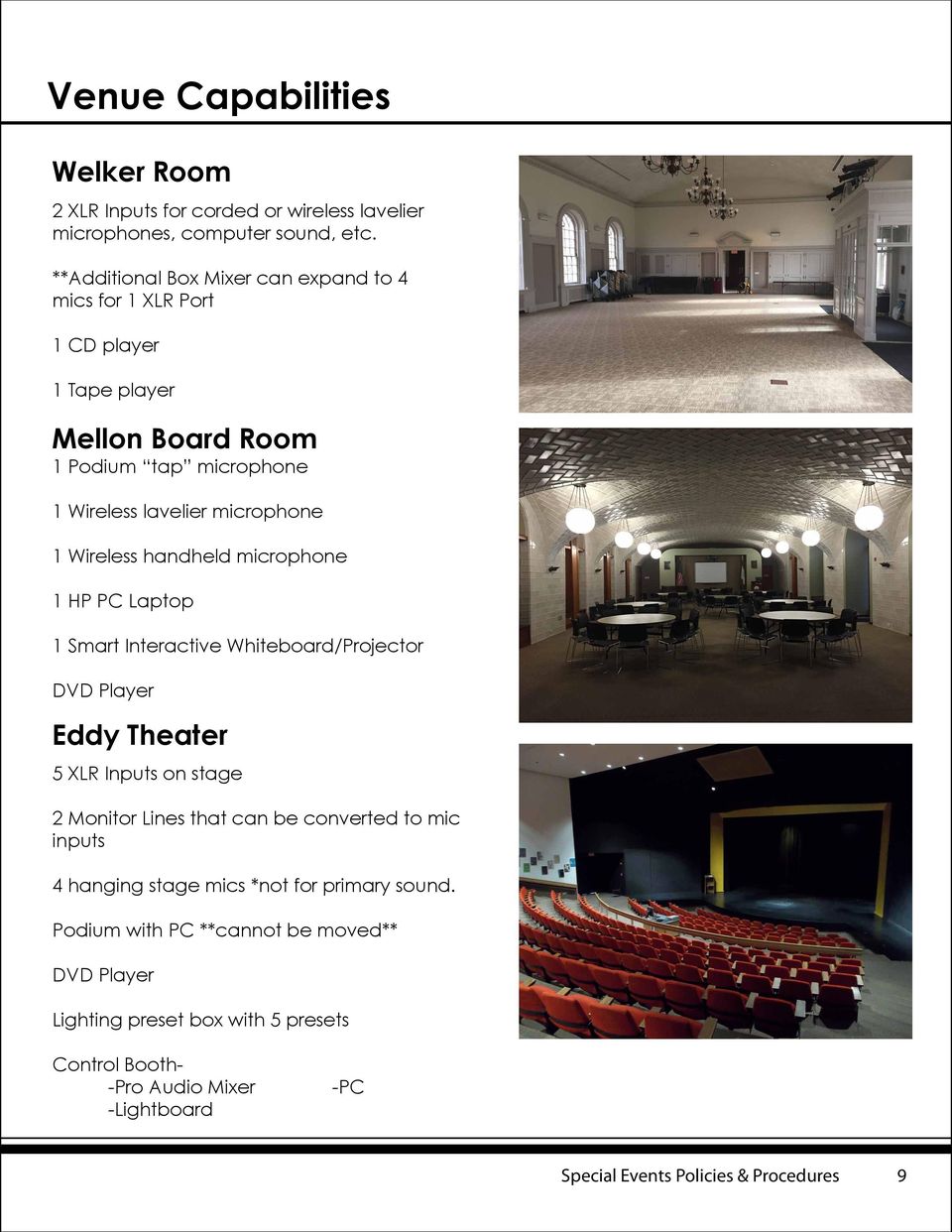
9 Venue Capabilities Welker Room 2 XLR Inputs for corded or wireless lavelier microphones, computer sound, etc. **Additional Box Mixer can expand to 4 mics for 1 XLR Port 1 CD player 1 Tape player Mellon Board Room 1 Podium tap microphone 1 Wireless lavelier microphone 1 Wireless handheld microphone 1 HP PC Laptop 1 Smart Interactive Whiteboard/Projector DVD Player Eddy Theater 5 XLR Inputs on stage 2 Monitor Lines that can be converted to mic inputs 4 hanging stage mics *not for primary sound. Podium with PC **cannot be moved** DVD Player Lighting preset box with 5 presets Control Booth- -Pro Audio Mixer -Lightboard -PC Special Events Policies & Procedures 9
10 Venue Capabilities AFC 3 Open XLR ports (Front, Back, Left Bleacher) 1 wireless handheld mic 1 Mobile Mixer -3 XLR Corded Mic Ports -CD player -RCA (Ipod) Connection Chapel Analog System*** 8 Open inputs for corded microphones, wireless lavelier microphone, musical instruments, ect. 1 CD player 1 Tape player Yamaha Box Mixer Digital System*** Touch Panel AV Control Podium ***Must be connected for system use*** Sanyo Projector/Screen Laptop Connection 2 Wireless mics Podium mic 2 floor boxes with 2 XLR ports each DVD Player Dimmable Stage Lights Only Rea Coffee House / Cafe Rachel Mellon Living Room Portable Sound System Required Consists of- - Mixer - 2 Speakers with Stands - Microphones & Ipod Cable Special Events Policies & Procedures 10

11 Catering All catering information on menus, costs, setup types, and booking procedures can be found on the Chatham University Catering Guide on my.chatham.edu under Documents & Forms Special Events Policies & Procedures 11

12 Contacts Facilities Lisa Zezza Secretary-Facilities/Public Safety Dawn Roenik Manager of Facilities Services Kevin Pilarski Property Manger-Chatham Eastside Stacey Enck Facilities Manager-Eden Hall Farm IT / Event-Media / Video IT Helpdesk Brian Cottington Event / Media Specialist [email protected] Kristen Shaeffer Manager-Broadcast Studio [email protected] Area Contacts **Refer to Page 3 for Area Details** Adey Yilma Program Coordinator [email protected] Amanda Bossart Assistant Registrar [email protected] [email protected] Dani Pais AFC Coordinator [email protected] Prajna Parasher Faculty-Art & Design [email protected] JKM Library [email protected] Catering Scott Steiner Director of Catering [email protected] Special Events Policies & Procedures 12

Education & Meeting Room Facilities
 Chan Centre for Family Health Education (Auditorium) - 200 tiered seats in auditorium - Seats have tablet arms, lefthanded at the end of row. - Wheel Chair accessible - 2 multi media projectors with laptop
Cole 100 Auditorium. Equipment Use Instructional Guide
 Cole 100 Auditorium Equipment Use Instructional Guide Contents 1. Equipment Orientation. Location & Basic Function. 2. Basic Start Up. 3. Equipment Control 4. Shutting Down the System This Guide is meant
Special Events & Space Rentals
 Special Events & Space Rentals history University Settlement is the nation s first settlement house, pioneering social justice programs for nearly 130 years that continue to shape New York City today.
FSM Room Reservation Confirmation Conditions (Updated February 2015)
 FSM Room Reservation Confirmation Conditions (Updated February 2015) The Agreement of this Confirmation Conditions between requesting party (event coordinator) and Feinberg School of Medicine (FSM) applies
Bleachers Pub (Capacity 160) Cafeteria NORTHERN COLLEGE - PORCUPINE CAMPUS FACILITY RENTAL FEES
 Bleachers Pub ( 160) Facility Use: $150.00/day (with or without bar services) *Cleaning, setup, tear down and Security is an additional charge Available upon request. Full bar service includes liquor license
Facilities Rental Policies for Shaw University
 Facilities Rental Policies for Shaw University Shaw University has a number of meeting rooms, auditoriums, and other public spaces that can be used for a variety of uses. The following guidelines and policies
Events and Conferences AT THE COLLEGE OF SAINT BENEDICT. Facility Guide. Experience A Place...
 Events and Conferences AT THE COLLEGE OF SAINT BENEDICT Facility Guide Experience A Place... 15 Minutes West of St. Cloud Contact Jessica Reiter at 320-363-5791 or email [email protected] www.csbsju.edu/csb-events-and-conferences
Media Technology Services Classroom Equipment Guide
 Media Technology Services Classroom Equipment Guide 412 268-8855 www.cmu.edu/computing/mediatech [email protected] JULY 2010 Large Classroom Media Technology Our Services Media Technology Services (MediaTech),
2016 Facility Rentals
 5251 Oak St., Vancouver, BC V6M 4H1 www.vandusengarden.org 2016 Facility Rentals For further information contact Corinne Johnston: Phone: (604) 257-6915 / Fax: (604) 257-8679 E-mail: [email protected]
Media Technology Services Classroom Equipment Guide
 Media Technology Services Classroom Equipment Guide 412 268-8855 www.cmu.edu/computing/mediatech [email protected] JULY 2010 Small Classroom Media Technology Our Services Media Technology Services (MediaTech),
Challenger Learning Center of Tallahassee
 Challenger Learning Center of Tallahassee College of Engineering Florida A&M University-Florida State University 200 South Duval Street Tallahassee, FL 32301 Voice: (850) 645-7827 Fax: (850) 645-7784 www.challengertlh.com
Nursing School Classroom Technology Tips
 Nursing School Classroom Technology Tips Facility Overview The School of Nursing building was built in 2001. It is used daily by hundreds of students, faculty and staff for regular classes. Please help
Event Reservation & Pricing Guidelines
 Event Reservation & Guidelines Office of Event Services (OES), a division of Marketing and Communications, is a resource and partner in planning and producing thousands of events annually. This document
Event Planning Checklist Office of the President
 Event Planning Checklist Office of the President Introduction The success of any event is largely due to the management of details selecting proper locations, ensuring adequate seating, choosing menus,
SERC Audio Visual Options
 SERC Audio Visual Options AUDITORIUM The Auditorium is a tiered classroom that provides a front row view from every seat. This room is equipped with the latest in audiovisual technology. Used primarily
Auditorium Audiovisual System User s Guide
 Auditorium Audiovisual System User s Guide Page Page Contents Introduction...4 Facilities 7 Auditorium floor plan...8 Stage floor boxes and wall plates...9 Other floor boxes and wall plates...10 System
UMD School of Music Degree-Required Recitals Gildenhorn and Ulrich Recital Hall Policy Manual Spring 2015
 UMD School of Music Degree-Required Recitals Gildenhorn and Ulrich Recital Hall Policy Manual Spring 2015 Scheduling and Rentals Office The Clarice Smith Performing Arts Center 301-405-1837 1 TABLE OF
VENUE RENTAL OVERVIEW
 VENUE RENTAL 2 VENUE RENTAL OVERVIEW Hamdan Bin Mohammed Smart University (HBMSU) was officially launched by His Highness Sheikh Hamdan Bin Mohammed Bin Rashid Al Maktoum, the Crown Prince of Dubai, as
Auer Hall Technology Instructions
 Using the projector 1. The equipment rack with a Crestron touch panel and other equipment (PC, Blu-Ray and microphones) are located behind the door on stage. Equipment rack with touch panel, PC, blu-ray
Traktor Audio Configuration
 Traktor Audio Configuration 1. Select the S4 CoreAudio (for Mac) or S4 ASIO (for Windows) driver. 2. Select Internal mixing mode and set the Output Monitor and Output Master using the available outputs
University of Central Florida Class Specification Administrative and Professional. Associate Director Engineering
 Associate Director Engineering Job Code: 2595 Responsible for the engineering unit in Instructional Resources. Oversee engineering and multimedia technicians who install, maintain, and repair audiovisual
TWTC NANGANG Exhibition Hall Conference Rooms Rental Rates
 Form 1 TWTC NANGANG Exhibition Hall Conference Rooms Rental Rates Conference Rooms Seating Capacity(person) Room Size Theater Classroom Standard U-Shape Square SQM Ping Dimensions (L x W x H) meter Effective
Auer Hall Technology Instructions
 Using the projector 1. The equipment rack with a Crestron touch panel and other equipment (PC, Blu-Ray and microphones) are located behind the door on stage. Equipment rack with touch panel, PC, blu-ray
AUGUSTANA COLLEGE INFORMATION TECHNOLOGY SERVICES
 AUGUSTANA COLLEGE INFORMATION TECHNOLOGY SERVICES Augustana College maintains state-of-the-art information technology facilities to support the instructional program of the College. Currently there are
the audio/video + lighting menu
 the audio/video + lighting menu welcome av information ONE CALL TO KVL CONNECTS YOU WITH A limitless inventory of state-of the art audio visual equipment and a staff of dedicated professionals ready to
Appendix 3H A/V and Video Conferencing Standard
 Appendix 3H A/V and Standard 1. Introduction The Authority uses meeting and conference rooms for a variety of purposes. All new construction will have a mix of each type of room type as identified below.
EVENT REQUEST FORM (NON-UNIVERSITY)
 1 EVENT REQUEST FORM (NON-UNIVERSITY) Please complete this form and return to the Museum for Director s approval. Fax: 408.554.7840 or [email protected] EVENT INFORMATION Today s Date: Requested
BOOKING ENQUIRY FORM
 Dear Client, BOOKING ENQUIRY FORM Thank you for your interest in the as a venue for your event. We look forward to supporting you in hosting a successful function. If you prefer to download this Booking
Olin, Uris, and Kroch Libraries GUIDELINES FOR ROOM USE AND ROOM DESCRIPTIONS
 201 Olin Library Ithaca, New York 14853-5301 t. 607.255.3393 f. 607.255.6788 www.library.cornell.edu Olin, Uris, and Kroch Libraries GUIDELINES FOR ROOM USE AND ROOM DESCRIPTIONS General Rooms Guidelines
Use of Facilities Agreement/User Contract Saemann Student Center, Conferences & Events
 Use of Facilities Agreement/User Contract Saemann Student Center, Conferences & Events Thank you for your interest in hosting an event at Wartburg College. Please see detailed information below. You may
TECHNOLOGY YOUR SCHOOL CAN DEPEND ON
 TECHNOLOGY YOUR SCHOOL CAN DEPEND ON Bogen knows that educational concerns are constantly on the rise. To respond to these concerns, schools need to embrace technology in the learning environment. Technology
The technology in this room supports both local and video conference presentations with the following equipment:
 The technology in this room supports both local and video conference presentations with the following equipment: Local computer (DVD/CD) with TrentNet, Internet (Trent login ID required) Crestron touch
FACILITIES RESERVATION & SERVICES ORDER FORM
 Today's Date: Event Date: Event Name: Event Time: Start: AM PM End: AM PM Company Name or Department: Company/Department Address: Number of Attendees: Requesting Method of Payment *Dept Budget Check Credit
H107 Video Conference Room
 Capacity: 20 persons White Board (1) Document Camera (1) Door (1) Network connections possible Layout: Seminar style with chairs and tables (moveable) Podium (1) Media Cart (1) Windows (4) Meets all ADA
Conferences Meetings Special Events. Events and Conference Services. Your Event. Your Way. mtroyal.ca/mrevents
 Events and Conference Services Your Event. Your Way. mtroyal.ca/mrevents Conferences Meetings Special Events Leadership in Energy and Environmental Design The Roderick Mah Centre for Continuous Learning
General Event Planning Checklist
 General Event Planning Checklist The checklist below will help you facilitate communication among the various departments In an effort to reduce repetitious actions and wasted time, we encourage you to
Rental Policy & Pricing 2013
 413 Market Street, Lewisburg, PA 17837 ~ 570-577-7902 ~ www.campustheatre.org ~ [email protected] Rental Policy & Pricing 2013 Whether you re hosting a screening, lecture, small musical performance,
How To Build A Large Room For A Conference
 Polycom Solutions Architecture Typical Applications for Vortex Products with Other Installed A/V Equipment Application Note Polycom Installed Voice Business April 2005 Polycom Solutions Architecture This
Operating Instructions 1.208 Clear Lake Center I.S. Conference Room
 Operating Instructions 1.208 Clear Lake Center I.S. Conference Room Press Touch Panel to Begin Introduction Welcome to the 1.208 Clear Lake Center conference room. This manual is to describe the operating
Main Library Meeting Room Use
 Main Library Meeting Room Use Occupancy: Meeting Room A: 100 Meeting Room B: 50 Meeting Room C: 50 Combined A, B & C: 300 Conference Room: 20 Tables: 50 (2x5 ), 4 (3 ), and 16 round (8 ) Chairs: 290 This
FOOTHILL COLLEGE FINE ARTS FACILITIES OFFICE
 FOOTHILL COLLEGE FINE ARTS FACILITIES OFFICE 650-949 949-7252 [email protected] THIS COMPLETED FORM OR A LIST OF REQUESTED EQUIPMENT MUST BE SENT TO THE FACILITIES COORDINATOR BY ONE MONTH PRIOR
SOLUTION GUIDE TRAINING THEATER. Audio Visual System Solutions for Business. HARMAN Professional Solutions Brands:
 SOLUTION GUIDE TRAINING THEATER Audio Visual System Solutions for Business HARMAN Professional Solutions Brands: TRAINING THEATERS are large spaces, often with podiums and tiered seating, which serve high-capacity
A supervisor with a professional staff is present at all times to respond to requests.
 Soldiers & Sailors Auditorium Auditorium seating capacity: 2359 (1543 first floor; 816 balcony) Stage seating capacity: 80-100 orchestra style; 80 auditorium style with chairs Basics: The stage is 78ft
The technology in this room supports both local and video conference presentations with the following equipment:
 The technology in this room supports both local and video conference presentations with the following equipment: Local computer (DVD/CD) with TrentNet, Internet (Trent login ID required) Crestron touch
Kiva Technology User s Manual
 2009 Kiva Technology User s Manual For Support Contact Call Center (816) 235-2000: Monday Friday 7:00 am 7:00 pm ILE Support E-Mail: [email protected] URL: http://www.umkc.edu/is/cts/ilesupport/ctssupporttext.asp
Taylor Family Digital Library Meeting Space Booking Guide
 Taylor Family Digital Library Meeting Space Booking Guide Thank you for choosing the Taylor Family Digital Library for your meeting event. Please help us keep our spaces tidy for other users by adhering
Conference Center LICENSE AGREEMENT
 LICENSE AGREEMENT This License Agreement is made on between THE BAR ASSOCIATION OF SAN FRANCISCO (BASF) and in connection with the rental of BASF Conference Center, located at 301 Battery Street, 3rd Floor,
Apogee ONE. QuickStart Guide. V3, March, 2013
 Apogee ONE QuickStart Guide V3, March, 2013 Contents Overview!... 5 Introduction! 5 Package contents! 6 ONE Panel Tour! 8 Optional Battery Power! 9 Connecting to your Mac!... 10 System Requirements! 10
CLASSROOM TECHNOLOGY GUIDE
 Media Services/Instructional Technology Support Services Waymon L. Hickman Building, Room 131 1665 Hampshire Pike Columbia, TN 38401 CLASSROOM TECHNOLOGY GUIDE Bob Trybalski, Coordinator [email protected]
Video Conference Room
 Western Hemispheric Trade Center 226 Office of Information Technology Think Blue! Site Code: INT Video Conference Room Table of Contents Devices 1 Touch Panel 2 Home 3 Computer 4 Laptop 5 Document Camera
Videoconference Room Guide
 Videoconference Room Guide Technical Support Should you encounter technical problems please contact Help Desk 250-852-6800 Videoconference classrooms are equipped with two cameras and a ceiling mount LCD
Quick Start Guide for Video Conferencing
 Quick Start Guide for Video Conferencing 1. Clear teacher mats a. Make sure there are no chairs, bags, or other objects on the teacher mats in the front of the room 2. Turn off all student microphones
MEETING PACKAGES 400 LEVEL
 MEETING PACKAGES 400 LEVEL Your next event is in great hands with AV Factory. Our meeting packages provide easy audio visual solutions that make presenting a breeze. The meeting rooms at Meydenbauer Center
Classroom Setup... 2 PC... 2 Document Camera... 3 DVD... 4 Auxiliary... 5. Lecture Capture Setup... 6 Pause and Resume... 6 Considerations...
 Classroom Setup... 2 PC... 2 Document Camera... 3 DVD... 4 Auxiliary... 5 Lecture Capture Setup... 6 Pause and Resume... 6 Considerations... 6 Video Conferencing Setup... 7 Camera Control... 8 Preview
Facilities and Equipment
 Facilities and Equipment The Harper Center features a number of audio/visual resources throughout the facility. Descriptions of the classroom and conference room features can be found below. If you have
SMART Board User Guide for PC
 SMART Board User Guide for PC What is it? The SMART Board is an interactive whiteboard available in an increasing number of classrooms at the University of Tennessee. While your laptop image is projected
Audio/Visual Services
 Audio/Visual Services The NPC Audio/Visual and Broadcast departments provide all equipment, services, and technical assistance. No outside audio/visual equipment or broadcast/webcasting services are allowed
Audio Visual Services (AVS) A Guide to Teaching with Video Conferencing Technology at WKU Classroom Operational Information
 Audio Visual Services (AVS) A Guide to Teaching with Video Conferencing Technology at WKU Classroom Operational Information TABLE OF CONTENTS Classroom Operational Information... 3 Video Conferencing Classroom
Media Services University Systems
 Audio Visual Rental and Support Video Conferencing Facilities Webcasting Video Recording Video on Demand Computer Help Desk Classrooms Audio Visual Rental and Support Consultation and design expertise
FACILITY RENTAL GUIDE. Rodman Hall Art Centre/Brock University
 FACILITY RENTAL GUIDE Rodman Hall Art Centre/Brock University Rodman Hall Gallery Hours: Mon: Closed Tues-Fri: 10 am - 5 pm Sat-Sun: 12 pm - 5 pm Rodman Hall Admin Hours: Mon - Fri: 9 am - 5 pm CONTENTS
Chester County Hospital E134 Conference Room. Control for AV system
 Chester County Hospital E134 Conference Room Control for AV system The following document contains pictorial layouts and button descriptions of the touch panel interface for the audio visual system. 1.
Equipment Guide Human Resources Training Room Suite 205, Building 3377
 Equipment Guide Human Resources Training Room Suite 205, Building 3377 Equipment For technical help with running the equipment please contact HR Training at 4-8534. The room is equipped with: 1. A ceiling-mounted
OWASSO. Conference Center
 OWASSO Conference Center The primary purpose of Tulsa Tech s Owasso Conference Center is to provide students in our hospitality programs with workplace experience. We also encourage the use of the facility
Conference Room Reservation Policy Packet
 Conference Room Reservation Policy Packet Opening Our Doors to the Community 185 Oakes Street SW Grand Rapids, MI 49503 616.454.1751 Phone 616.454.6455 Fax www.grfoundation.org Policies and Procedures
Production analogue video fed to Granicus encoder currently place Phase 3 will provide digital audio video to Granicus encoder
 The City has received questions regarding the recently distributed RFEI - CPM Council Chambers A/V System Replacement Answers have been provided below supporting documents and photos have also been provided
Academic Learning and Teaching Center Classrooms
 Academic Learning and Teaching Center Classrooms Lobby Capacity: 157 Video wall Furniture can be removed or reconfigured for after-hours (after 5PM) events Classroom 1.101 Capacity: 30 (2) TV s located
SOLUTION GUIDE AUDI TOR IUM. Audio Visual System Solutions for Business. HARMAN Professional Solutions Brands:
 SOLUTION GUIDE AUDI TOR IUM Audio Visual System Solutions for Business HARMAN Professional Solutions Brands: AUDITORIUMS are large event spaces that serve host to town halls and other building-wide presentations
Revised RFP submission schedule October 15 th 3:00 PM EST Last Day to Submit Questions October 30 th 3:00 PM EST Proposals Due
 Revised RFP submission schedule October 15 th 3:00 PM EST Last Day to Submit Questions October 30 th 3:00 PM EST Proposals Due III. Scope of Services The work in this section outlines the materials, installation,
Tech Tips on how to plan a showing of Green Fire
 Tech Tips on how to plan a showing of Green Fire QUICK OVERVIEW Questions How many people in the audience? Where will it be shown? What equipment do I need? Location of screen, projector, speakers and