
SIMOVERT MASTER DRIVES Frequency Control (FC) Operating Instructions Part 2
|
|
|
- Daniel Robertson
- 9 years ago
- Views:
Transcription
1 SIMOVERT MASTER DRIVES Frequency Control (FC) Operating Instructions Part Edition: AA Order-No.: 6SE787-6XX
2 General 8.96 Overview of the MASTER DRIVES Operating Instructions: Operating Instructions consists of Part Part 6SE78_-_AD 6SE78_-_AD7 6SE78_-_XX 6SE78_-_AD 6SE78_-_AD7 6SE78_-_XX 6SE78_-_AD3 6SE78_-_AD7 6SE78_-_XX3 6SE78_-_BD 6SE78_-_BD7 6SE78_-_XX 6SE78_-_BD 6SE78_-_BD7 6SE78_-_XX 6SE78_-_BD3 6SE78_-_BD7 6SE78_-_XX3 6SE78_-_AH 6SE78_-_AH7 6SE78_-_XX 6SE78_-_AH 6SE78_-_AH7 6SE78_-_XX 6SE78_-_AH3 6SE78_-_AH7 6SE78_-_XX3 6SE78_-_BH 6SE78_-_BH7 6SE78_-_XX 6SE78_-_BH 6SE78_-_BH7 6SE78_-_XX 6SE78_-_BH3 6SE78_-_BH7 6SE78_-_XX3 6SE78_-_BM 6SE78_-_BM7 6SE78_-_XX You will receive Parts and of the Operating Instructions when you use this Order No. Parts and can be individually ordered by specifying the particular Order No. _-_ stands for the language code, e.g. - for German Editions. The following foreign language Editions of these Operating Instructions are available: Language English French Spanish Italian Language code These Operating Instructions are valid for software release V.3. The reproduction, transmission or use of this document or its contents is not permitted without express written authority. Offenders will be liable for damages. All rights, including rights created by patent grant or registration of a utility model or design, are reserved. We have checked the contents of this document to ensure that they coincide with the described hardware and software. However, differences cannot be completely excluded, so that we do not accept any guarantee for complete conformance. However, the information in this document is regularly checked and necessary corrections will included in subsequent editions. We are grateful for any recommendations for improvement. SIMOVERT Registered Trade Mark Siemens AG 996 All rights reserved

3 8.96 General Contents Definitions...7 Safety and operating instructions for drive converters...9 Control terminal strip and serial interface Connectors for the control terminal strip Connecting-up the control cables Terminal connection Connecting-up the parameterizing unit (PMU) Measures to maintain the radio interference suppression regulations Operator control Operator control elements Displays Structure General explanation of the terminology and functional scope of the unit Converter open-loop/closed-loop control versions Process data Indexed parameters Data sets Start-up Capacitor forming First start-up Parameterization Standard application Parameterization Expert application Drive start-up when the drive converter is controlled through an external main contactor Drive start-up after enabling additional software functions or hardware options Simple application examples for connecting process data with connection assignment Factory setting Manual/automatic operation (Basic/reserve changeover) Siemens AG 6SE787-6XX 3

4 General Process data Control word (control word and control word ) Control word display using the 7-segment display on the PMU Control word (Visualization parameter r55 or r967) Control word (Visualization parameter r55) Selecting the source for control words and Significance of control word- ( and ) commands Status word Status word (visualization parameter r55 or r968) Status word (visualization parameter r553) Significance of the status word messages Setpoints Overview of the setpoints Selecting the possible setpoint sources Actual values Interfaces Binary inputs Binary outputs Analog inputs Analog input as setpoint input Analog input as speed actual value input Analog output Serial interfaces Basic converter interface SST Dual port RAM (DPR for SCB, TSY, CB, TB) Ramp-function generator (RFG) and limiting stage in front of the ramp-function generator Ramp-function generator, RFG Limit value stage in front of the ramp-function generator Open-loop and closed-loop control types V/f characteristic Start-up functions Function selection (P5) Factory setting (P5 = ) Initialization (MLFB input) (P5 = ) Download (P5 = 3) Hardware configuration (P5 = 4) Drive setting (P5 = 5) Automatic parameterization (P5 = 6) Motor identification at standstill (P5 = 7) Siemens AG 6SE787-6XX

5 8.96 General 9 Functions (software) WEA (automatic restart) KIP (Kinetic buffering) Flexible response Vdmax closed-loop control DC current brake Restart-on-the-fly Technology controller Function diagrams... - Parameter list General Observation Parameters General Parameters Drive Data Hardware Configuration Motor Data Control Functions Setpoint Channel Control and Status Word Analog Input/Output Communications Diagnosis Modulator Factory Parameters Special Parameters Profile Parameters Siemens AG 6SE787-6XX 5

6 General 8.96 Fault and alarm messages Fault messages Alarm messages Logbook Index and Abbreviations Index List of abbreviations Siemens AG 6SE787-6XX

7 8.96 General Definitions QUALIFIED PERSONAL For the purpose of these instructions and product labels, a "Qualified person" is someone who is familiar with the installation, mounting, start-up and operation of the equipment and the hazards involved. He or she must have the following qualifications:. Trained and authorized to energize, de-energize, clear, ground and tag circuits and equipment in accordance with established safety procedures.. Trained in the proper care and use of protective equipment in accordance with established safety procedures. 3. Trained in rendering first aid. DANGER For the purpose of these instructions and product labels, "Danger" indicates death, severe personal injury or substantial property damage will result if proper precautions are not taken. WARNING For the purpose of these instructions and product labels, "Warning" indicates death, severe personal injury or property damage can result if proper precautions are not taken. CAUTION For the purpose of these instructions and product labels, "Caution" indicates that minor personal injury or material damage can result if proper precautions are not taken. NOTE For the purpose of these instructions, "Note" indicates information about the product or the respective part of the Instruction Manual which is essential to highlight. NOTE These instructions do not purport to cover all details or variations in equipment, nor to provide for every possible contingency to be met in connection with installation, operation or maintenance. Should further information be desired or should particular problems arise which are not covered sufficiently for the purchaser s purposes, the matter should be referred to the local Siemens sales office. The contents of this Instruction Manual shall not become part of or modify any prior or existing agreement, committment or relationship. The sales contract contains the entire obligation of Siemens. The warranty contained in the contract between the parties is the sole warranty of Siemens. Any statements contained herein do not create new warranties or modify the existing warranty. Siemens AG 6SE787-6XX 7

8 General 8.96 CAUTION Components which can be destroyed by electrostatic discharge (ESD) The converters contain components which can be destroyed by electrostatic discharge. These components can be easily destroyed if not carefully handled. If you have to handle electronic boards please observe the following: Electronic boards should only be touched when absolutely necessary. The human body must be electrically discharged before touching an electronic board Boards must not come into contact with highly insulating materials - e.g. plastic foils, insulated desktops, articles of clothing manufactured from man-made fibers Boards must only be placed on conductive surfaces When soldering, the soldering iron tip must be grounded Boards and components should only be stored and transported in conductive packaging (e.g. metalized plastic boxes, metal containers) If the packing material is not conductive, the boards must be wrapped with a conductive packaging material, e.g. conductive foam rubber or household aluminum foil. The necessary ECB protective measures are clearly shown in the following diagram: a = Conductive floor surface d = ESD overall b = ESD table e = ESD chain c = ESD shoes f = Cubicle ground connection b d d b d e e f f f f f a c c a c a Sitting Standing Standing / Siting 8 Siemens AG 6SE787-6XX

9 8.96 General WARNING Hazardous voltages are present in this electrical equipment during operation. Non-observance of the safety instructions can result in severe personal injury or property damage. Only qualified personnel should work on or around the equipment after first becoming thoroughly familiar with all warning and safety notices and maintenance procedures contained herein. The successful and safe operation of this equipment is dependent on proper handling, installation, operation and maintenance. Safety and operating instructions for drive converters Safety and operating instructions for drive converters (in conformity with the low-voltage directive 73/3/EEC). General In operation, drive converters, depending on their degree of protection, may have live, uninsulated, and possibly also moving or rotating parts, as well as hot surfaces. In case of inadmissible removal of the required covers, of improper use, wrong installation or maloperation, there is the danger of serious personal injury and damage to property. For further information, see documentation. All operations serving transport, installation and commissioning as well as maintenance are to be carried out by skilled technical personnel (Observe IEC 364 or CENELEC HD 384 or DIN VDE and IEC 664 or DIN/VDE and national accident prevention rules!). For the purposes of these basic safety instructions, "skilled technical personnel" means persons who are familiar with the installation, mounting, commissioning and operation of the product and have the qualifications needed for the performance of their functions.. Intended use Drive converters are components designed for inclusion in electrical installations or machinery. In case of installation in machinery, commissioning of the drive converter (i.e. the starting of normal operation) is prohibited until the machinery has been proved to conform to the provisions of the directive 89/39/EEC (Machinery Safety Directive - MSD). Account is to be taken of EN 64. Commissioning (i.e. the starting of normal opertion) is admissible only where conformity with the EMC directive (89/336/EEC) has been established. The drive converters meet the requirements of the low-voltage directive 73/3/EEC. They are subject to the harmonized standards of the series pren 578/DIN VDE 6 in conjunction with EN 6439-/ VDE 66, part 5, and EN 646/ VDE 558. The technical data as well as information concerning the supply conditions shall be taken from the rating plate and from the documentation and shall be strictly observed. Siemens AG 6SE787-6XX 9

10 General Transport, storage The instructions for transport, storage and proper use shall be complied with. The climatic conditions shall be in conformity with pren Installation The installation and cooling of the appliances shall be in accordance with the specifications in the pertinent documentation. The drive converters shall be protected against excessive strains. In particular, no components must be bent or isolating distances altered in the course of transportation or handling. No contact shall be made with electronic components and contacts. Drive converters contain electrostatic sensitive components which are liable to damage through improper use. Electric components must not be mechanically damaged or destroyed (potential health risks). 5. Electrical connection When working on live drive converters, the applicable national accident prevention rules (e.g. VBG 4) must be complied with. The electrical installation shall be carried out in accordance with the relevant requirements (e.g. cross-sectional areas of conductors, fusing, PE connection). For further information, see documentation. Instructions for the installation in accordance with EMC requirements, like screening, earthing, location of filters and wiring, are contained in the drive converter documentation. They must always be complied with, also for drive converters bearing a CE marking. Observance of the limit values required by EMC law is the responsibility of the manufacturer of the installation or machine. 6. Operation Installations which include drive converters shall be equipped with additional control and protective devices in accordance with the relevant applicable safety requirements, e.g. Act respecting technical equipment, accident prevention rules etc. Changes to the drive converters by means of the operating software are admissible. After disconnection of the drive converter from the voltage supply, live appliance parts and power terminals must not be touched immediately because of possibly energized capacitors. In this respect, the corresponding signs and markings on the drive converter must be respected. During operation, all covers and doors shall be kept closed. 7. Maintenance and servicing The manufacturer s documentation shall be followed. Keep safety instructions in a safe place! Siemens AG 6SE787-6XX

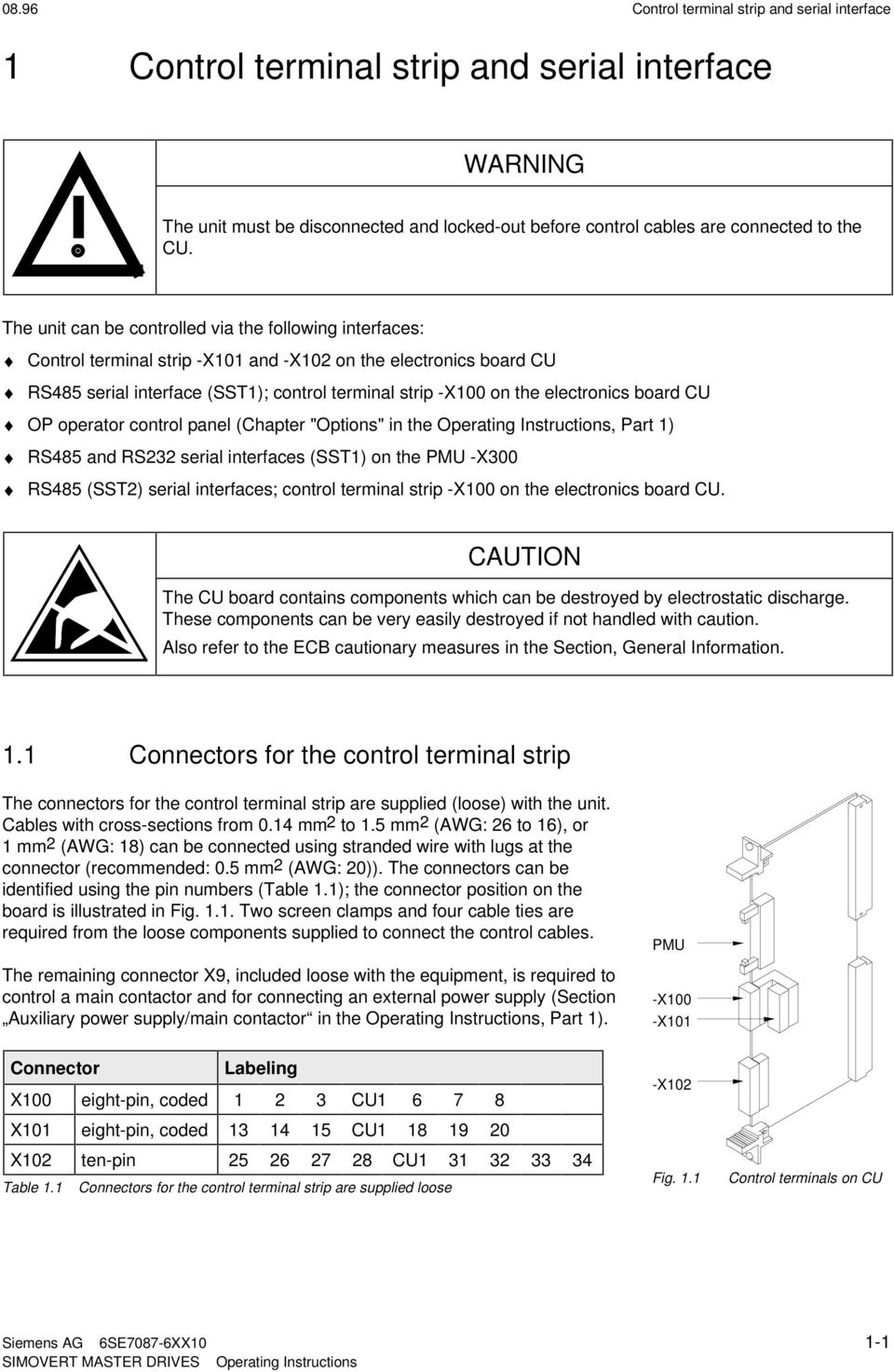
11 8.96 Control terminal strip and serial interface Control terminal strip and serial interface WARNING The unit must be disconnected and locked-out before control cables are connected to the CU. The unit can be controlled via the following interfaces: Control terminal strip -X and -X on the electronics board CU RS485 serial interface (SST); control terminal strip -X on the electronics board CU OP operator control panel (Chapter "Options" in the Operating Instructions, Part ) RS485 and RS3 serial interfaces (SST) on the PMU -X3 RS485 (SST) serial interfaces; control terminal strip -X on the electronics board CU. CAUTION The CU board contains components which can be destroyed by electrostatic discharge. These components can be very easily destroyed if not handled with caution. Also refer to the ECB cautionary measures in the Section, General Information.. Connectors for the control terminal strip The connectors for the control terminal strip are supplied (loose) with the unit. Cables with cross-sections from.4 mm to.5 mm (AWG: 6 to 6), or mm (AWG: 8) can be connected using stranded wire with lugs at the connector (recommended:.5 mm (AWG: )). The connectors can be identified using the pin numbers (Table.); the connector position on the board is illustrated in Fig... Two screen clamps and four cable ties are required from the loose components supplied to connect the control cables. The remaining connector X9, included loose with the equipment, is required to control a main contactor and for connecting an external power supply (Section Auxiliary power supply/main contactor in the Operating Instructions, Part ). Connector Labeling X eight-pin, coded 3 CU X eight-pin, coded CU 8 9 X ten-pin CU Table. Connectors for the control terminal strip are supplied loose PMU -X -X -X Fig.. Control terminals on CU Siemens AG 6SE787-6XX -
12 Control terminal strip and serial interface Connecting-up the control cables NOTE As a general rule, it is recommended that shielded control wiring be used for signals connected directly to the chassis, in order to achieve maximum noise immunity. The shield must be grounded at both ends. To avoid noise coupling, control wires which are directly connected to the chassis should be separated from power wiring by a minimum distance of cm. For drives wired in approved factories, internal wiring practices which achieve acceptable noise immunity results may be used for drive connections. Control- and cables must cross each other at an angle of 9. Latch screen clamp into place Cable tie Connector 5 mm 7.5 mm 5 mm Adapt length to type of construction Pull-back screen and retain, e.g. with shrink tubing Screening 35 Do not overextend spring Release clamp Compress the calamp with your hand or using a screwdriver and withdraw towards the top.. Caution! The clamps have sharp edges! Fig.. Connecting-up the control cables and the technique for using the screen clamps The "EMC screened housing" option should be used if so many control cables are required that two screen clamps are not sufficient. Order No.: Type A Type B Type C Type D 6SE79-XA87-3CA 6SE79-XB87-3CA 6SE79-XC87-3CA 6SE79-XD87-3CA - Siemens AG 6SE787-6XX

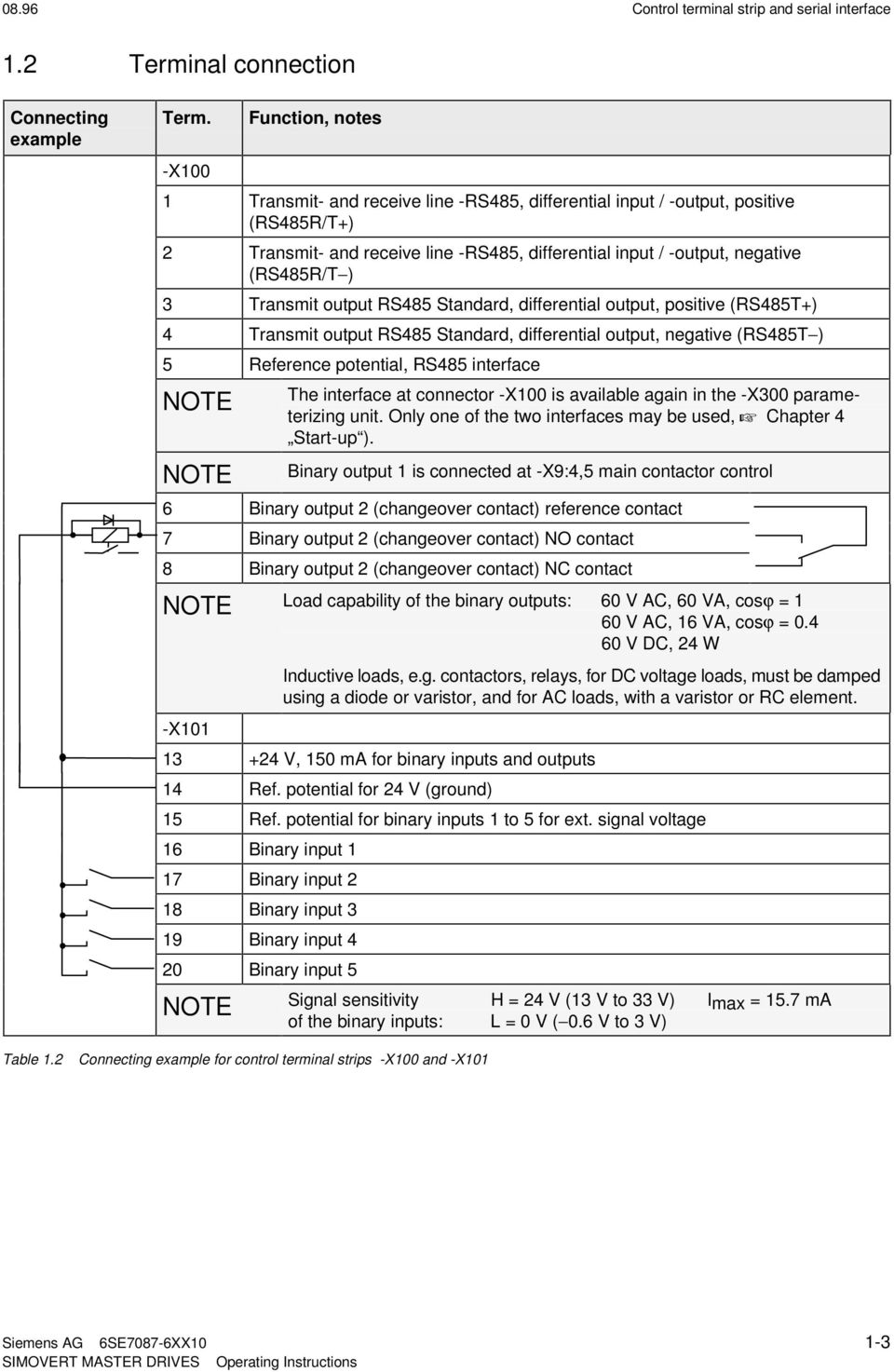
13 8.96 Control terminal strip and serial interface. Terminal connection Connecting example Term. -X Function, notes Transmit- and receive line -RS485, differential input / -output, positive (RS485R/T+) Transmit- and receive line -RS485, differential input / -output, negative (RS485R/T ) 3 Transmit output RS485 Standard, differential output, positive (RS485T+) 4 Transmit output RS485 Standard, differential output, negative (RS485T ) 5 Reference potential, RS485 interface NOTE NOTE The interface at connector -X is available again in the -X3 parameterizing unit. Only one of the two interfaces may be used, + Chapter 4 Start-up ). Binary output is connected at -X9:4,5 main contactor control 6 Binary output (changeover contact) reference contact 7 Binary output (changeover contact) NO contact 8 Binary output (changeover contact) NC contact NOTE Load capability of the binary outputs: 6 V AC, 6 VA, cosϕ = 6 V AC, 6 VA, cosϕ =.4 6 V DC, 4 W -X Inductive loads, e.g. contactors, relays, for DC voltage loads, must be damped using a diode or varistor, and for AC loads, with a varistor or RC element V, 5 ma for binary inputs and outputs 4 Ref. potential for 4 V (ground) 5 Ref. potential for binary inputs to 5 for ext. signal voltage 6 Binary input 7 Binary input 8 Binary input 3 9 Binary input 4 Binary input 5 NOTE Signal sensitivity H = 4 V (3 V to 33 V) Imax = 5.7 ma of the binary inputs: L = V (.6 V to 3 V) Table. Connecting example for control terminal strips -X and -X Siemens AG 6SE787-6XX -3
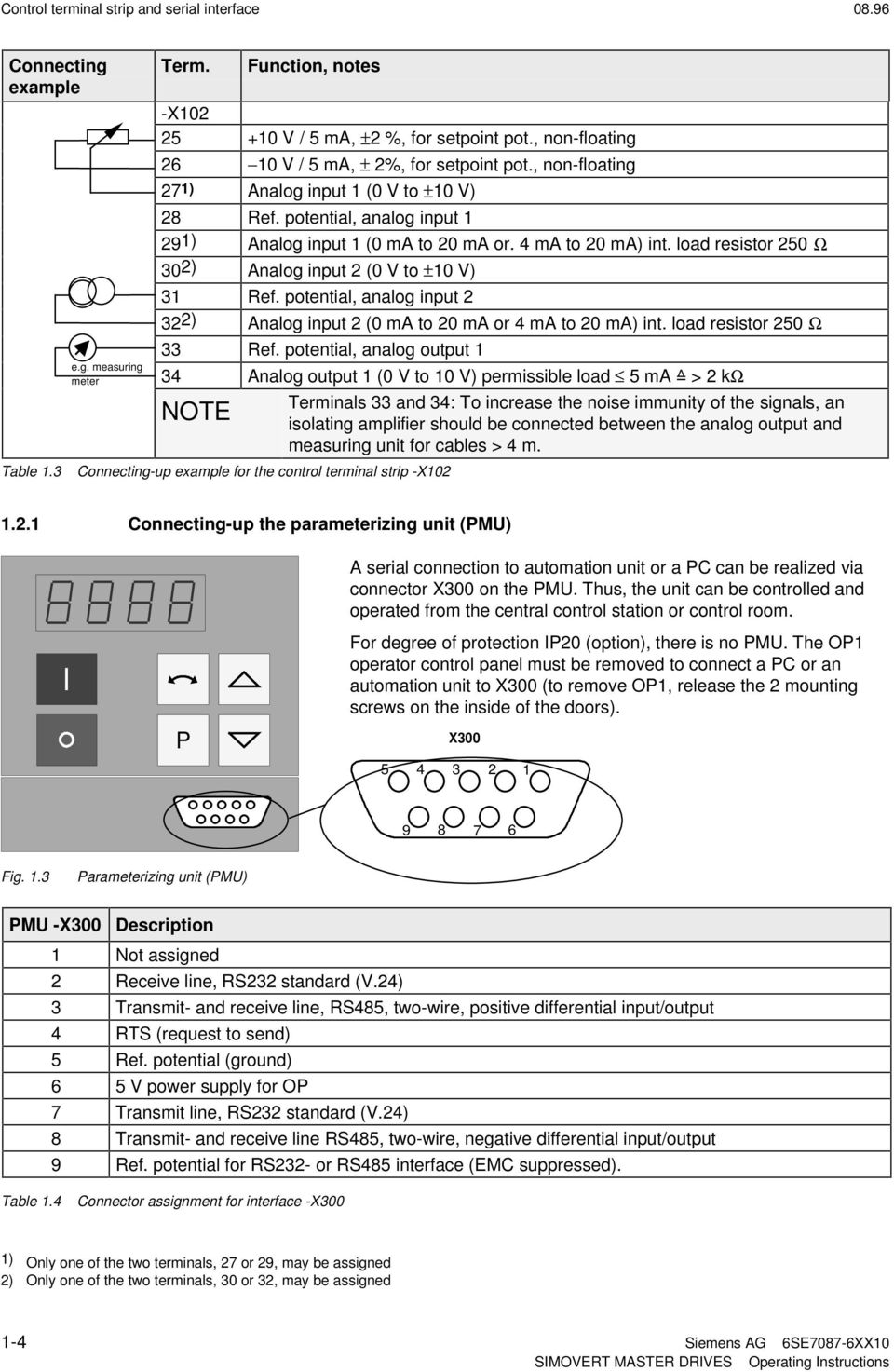
14 Control terminal strip and serial interface 8.96 Connecting example e.g. measuring meter Term. Function, notes -X 5 + V / 5 ma, ± %, for setpoint pot., non-floating 6 V / 5 ma, ± %, for setpoint pot., non-floating 7 ) Analog input ( V to ± V) 8 Ref. potential, analog input 9) Analog input ( ma to ma or. 4 ma to ma) int. load resistor 5 Ω 3) Analog input ( V to ± V) 3 Ref. potential, analog input 3) Analog input ( ma to ma or 4 ma to ma) int. load resistor 5 Ω 33 Ref. potential, analog output 34 Analog output ( V to V) permissible load 5 ma =^ > kω NOTE Table.3 Connecting-up example for the control terminal strip -X Terminals 33 and 34: To increase the noise immunity of the signals, an isolating amplifier should be connected between the analog output and measuring unit for cables > 4 m... Connecting-up the parameterizing unit (PMU) A serial connection to automation unit or a PC can be realized via connector X3 on the PMU. Thus, the unit can be controlled and operated from the central control station or control room. For degree of protection IP (option), there is no PMU. The OP operator control panel must be removed to connect a PC or an automation unit to X3 (to remove OP, release the mounting screws on the inside of the doors). P X Fig..3 Parameterizing unit (PMU) PMU -X3 Description Not assigned Receive line, RS3 standard (V.4) 3 Transmit- and receive line, RS485, two-wire, positive differential input/output 4 RTS (request to send) 5 Ref. potential (ground) 6 5 V power supply for OP 7 Transmit line, RS3 standard (V.4) 8 Transmit- and receive line RS485, two-wire, negative differential input/output 9 Ref. potential for RS3- or RS485 interface (EMC suppressed). Table.4 Connector assignment for interface -X3 ) Only one of the two terminals, 7 or 9, may be assigned ) Only one of the two terminals, 3 or 3, may be assigned -4 Siemens AG 6SE787-6XX
15 8.96 Control terminal strip and serial interface.3 Measures to maintain the radio interference suppression regulations The drives must be installed and mounted according to the Installation Instructions for EMC-correct installation and mounting of drives (Order No. 6SE787-6CX87-8CE). The limit values for industrial environments can be maintained without radio interference suppression filter. B radio interference suppression filters must be used for environments other than industrial environments. The following points must be observed regarding radio interference suppression regulations: Grounding Converters generate radio interference noise. This noise should be fed back to the source through the lowest possible ohmic connection (ground connection cross-section supply connection cross-section). Use the best grounding possibility (e.g. mounting panel, grounding cable, grounding bar) when installing converters and optional radio interference suppression filters. Connect all connector housings together through the largest possible surface area. For radio interference suppression, the cross-section (observe the safety regulations under fault conditions), is not so important, but the contact surface, as high-frequency noise currents do not flow through the complete cross-section, but essentially on the outside surface of a conductor (skin effect). Screening In order to reduce noise and maintain the radio interference suppression level, the following should be maintained screened cables should be used between the converter output and motor screen control cables must be used. route control- and power cables separately; min. clearance, cm. The screen must be connected to ground potential at both ends. Control cables and power cables may only cross at an angle of 9. Filter The radio interference suppression filter must be connected directly in front of the rectifier- or rectifier and regenerative feedback unit. The housings must be connected electrically with one another. Siemens AG 6SE787-6XX -5

16

17 8.96 Operator control Operator control The converter can be controlled via: the PMU (Parameterization Unit) the control terminal strip on the CU (Chapter Control terminal strip ) the OP operator control panel (Chapter Options in the Operating Instructions, Part ) the RS485 and RS3 serial interface on PMU -X3 When the equipment is shipped, the drive converter is controlled and parameterized by the parameterizing unit (PMU) on the front side of the unit. For option M (degree of protection IP), the unit is controlled and parameterized via the OP. Operator control using the PMU is described in this section. On key Off key P Seven-segment display Reversing key Raise key Changeover key, operator control level Lower key X3 Fig.. Parameterization unit. Operator control elements Operator control elements P, Function Converter switch on (standard). For faults: Return to the fault display. Command is effective when the key is released. Converter shutdown depending on the parameterization of OFF, OFF or OFF3 (P554 to P56). Command becomes effective when the key is released. Field reversal / reversing for the appropriate parameterization (P57 and P57). Command becomes effective when the key is released. Changeover from parameter number to parameter value. In conjunction with other keys, additional functions (refer to Figs.. to.5). Command becomes effective when the key is released. Values (raise, lower) change as long as the keys are depressed. P + resp. P + Depress P and hold, then depress the second key. The command becomes effective when the key is released (e.g. fast changeover). Table. Function of the operator control elements on the PMU Siemens AG 6SE787-6XX -

18 Operator control Displays Pos. actual value e.g Parameter number Index Parameter value Neg. actual value e.g e.g.. e.g. Visualization parameters Setting parameters Basic converter Technology board Basic converter Technology board Table. Displaying visualization- and setting parameters on the PMU Actual value Parameter value not possible Alarm Fault Display Table.3 Status display on the PMU NOTE The parameter description is provided in Chapter Parameter list. - Siemens AG 6SE787-6XX

19 8.96 Operator control.3 Structure Operating display Ready-to-switch-on P Parameter number level P P Fast changeover P + P + P + P + P + Fast changeover next parameter P P highest parameter P Parameter indexed? no yes Index level P P highest index P Parameter value level highest value P P lowest value P Step from the highest to the lowest value only possible with a setpoint connection (e.g. P443) Return to parameter number Fig.. Operator control structure using the PMU Siemens AG 6SE787-6XX -3

20 Operator control 8.96 Display before fault with fault Fault P Fault acknowl. P + Fault not acknowl. P Fault acknowl. P + Fault not acknowl. If several fault exist, the particular fault can be selected using the keys. P- + key: Jump into the parameterizing level, if, e.g., fault acknowledgement is not possible. Fig..3 Operator control structure of the PMU for faults Display before alarm Alarm Cause of the alarm removed P or or after delay time Cause of the alarm removed P or or If several alarms are present, then display automatically switches to the higher alarm. P- + - or key: Jump into the parameterizing level independent of the alarms which are present Fig..4 Operator control structure of the PMU for alarms If several faults or alarms exist, a point appears at the right in the display. P + P + The shift is only possible in the parameter value level. Fig..5 Shifting the PMU display for parameter values with more than 4 digits -4 Siemens AG 6SE787-6XX

21 8.96 General explanation of the terminology and functional scope of the unit 3 General explanation of the terminology and functional scope of the unit Abbreviations: Abbreviations used: + Chapter 4 Index and Abbreviations 3. Converter open-loop/closed-loop control versions Open-loop control versions (also suitable for multi-motor drives): V/f characteristic: Open-loop frequency control with constant voltage/frequency ratio, or a voltage/frequency ratio entered via a characteristic V/f characteristic, for textile applications: as for the V/f characteristic, however certain functions where the frequency setpoint (+ function diagrams) is inhibited for textile machine applications. Closed-loop control version: V/f + closed-loop speed control (V/f characteristic with higher-level closed-loop speed control): In addition to the specified V/f characterstic, in order to achieve an especially high speed accuracy, the motor speed, measured using a tachometer, is fed to a higher-level speed controller. Tip: For digital tachos and for certain analog tachos, option boards are required! 3. Process data The following is understood under process data: Setpoints and control commands, which directly influence the drive operating status, Actual values and status messages, which are directly output from the drive. Directly means: Each process data change is realized immediately and without any acknowledgement - or handshake mechanisms. Only then can fast process responses be achieved Contrary to the process data, a parameter value change is subject to a specified mechanism, and consists of task and checkback signal. Siemens AG 6SE787-6XX 3-
22 General explanation of the terminology and functional scope of the unit 8.96 Converter Binary inputs BE (terminals) Parameterizing unit (PMU) Op. control panel (OP) Serial interfaces (SST, SCB, CB, TB) Commands "Control word" Setpoint channel Messages "Status word" Binary outputs BA (terminals) Parameterizing unit (PMU) Op. control panel (OP) Serial interfaces (SST, SCB, CB, TB) Analog inputs AE (terminals) Parameterizing unit (PMU) Op. control panel (OP) Serial interfaces (SST, SCB, CB, TB) Setpoints Open-/ closed loop control Actual values Analog outputs AA (terminals) Parameterizing unit (PMU) Op. control panel (OP) Serial interfaces (SST, SCB, CB, TB) Sources Process data Destinations Fig. 3. Process data 3.3 Indexed parameters Indexed parameters are sub-divided into various indices (briefly: i, i, etc.), in which the particular parameter values can be entered. The significance of the indices of the particular parameter (parameter number) can be taken from the chapter Parameter list. Example: Index P65 i = Index i = Configuration analog input : -V...+V or -ma...+ma Configuration analog input : 4 to ma with wire breakage monitoring 3.4 Data sets Indexed parameters can be sub-divided according to data sets (indexed). There are three kinds of data sets: SDS (setpoint channel data set) and : setpoint channel data sets which can be changed over; e.g. for production-related different drive ramp-up and ramp-down times. Basic/reserve (basic- or reserve setting): e.g. for changing over between manual and automatic operation MDS (motor data set) and : motor data sets which can be changed over; e.g. for operating different motor types from one converter. The data sets are selected via the control word, and are read-out in r4, r and r5. + Chapter Function diagrams 3- Siemens AG 6SE787-6XX
23 8.96 Start-up 4 Start-up The drive converter must be ready. This means, that it must be installed and connected-up according to the information in the hardware description. NOTE Forming: If the drive converter was continuously shutdown for longer than a year, or not connected, then the DC link capacitors must be formed. 4. Capacitor forming The DC link capacitors must be re-formed if the converter has been non-operational for more than one year. If the converter was started-up within one year after having been shipped (serial number on the rating plate), it is not necessary to re-form the DC link capacitors For AC-AC, as well as for DC-AC drive converters, forming is realized by switching-in a rectifier and resistor, which are connected to the DC link (circuit configuration: refer to Figs. Fig. 4. and Fig. 4.3). The drive converter feed in this case must be shutdown (disconnected)! A second possibility exists for DC-AC units. The DC busbar voltage is slowly increased up to the rated drive converter input voltage during the forming time. The forming time is dependent on the time for which the drive converter stood. (refer to Fig. 4.) 3AC DC 3AC DC 3AC DC 8 V to 45 V 8 V to 3 V 5 V to 6 V 38 V to 46 V 675 V to 93 V 5 V to 69 V Recommended components A R C SKD 5 / Ω / W nf / 6 V SKD 6 / 6 47 Ω / W nf / 6 V SKD 6 / 8 68 Ω / W nf / 6 V Table 4. Recommended components for circuits acc. to Fig. 4. and Fig. 4.3 Position Example and A- Manufacturing location 3 E F H 4 to 9 O N D January to September October November December 5 to 4 Not relevant for forming Table 4. Forming time in h Fig. 4. Serial number structure: A-E Non-operational time in years Forming time as a function for the time which the converter was non-operational Siemens AG 6SE787-6XX 4-
24 Start-up 8.96 Forming Forming Disconnect A A PE U/ L V/ L W/ L3 C X9: X9: C/L+ D/L- D/L- C R PE C/L+ R X9: X9: PE U/ T V/ T W/ T3 6SE7 PE U/ T V/ T W/ T3 6SE7 Fig. 4. Circuit to form AC-AC units Fig. 4.3 Circuit to form DC-AC units 4. First start-up The converter is supplied with the Factory setting (+ Chapter Parameter list ) and access stage (standard mode). That means: The converter data correspond to the converter type, MLFB (Order No.) (converter initialized). A 5 Hz induction motor, adapted to the converter type, is parameterized, which is operated using the V/f control (open-loop). If the required converter functions are already realized with the factory setting, the converter can be immediately switched-on and operated. Further parameterization is not required. Parameterization is realized according to the following sections: 4.. As Standard application with V/f characteristic without hardware options for simple applications. or 4.. As Expert application for sophisticated applications (e.g.: Closed-loop control, data set changeover, interface operation, etc.) of if hardware options are available. 4- Siemens AG 6SE787-6XX
25 8.96 Start-up 4.. Parameterization Standard application P5 = P5 = P5 = 5 Language: = German, = English, = Espanol, 3 = Francais, 4 = Italiano Access stage standard mode Function selection. drive setting P7 = Converter supply voltage [V] : AC units: Line supply voltage DC units: DC link voltage P.i = Motor rating plate data observe config. (star/delta)! Motor type: = IEC-motor (international standard) = NEMA-motor (US standard) P.i = P.i = Rated motor voltage [V] P.i = P.i = Rated motor current [A] (multi-motor drives: sum of all the currents) P4.i = P5.i = IEC motor:: Cos Phi (n) NEMA motor: Rated output [Hp] (multi-motor drives: sum af all the outputs) P6.i = Efficiency [%] P7.i = Rated motor frequency [Hz] The maximum frequency is a function of P63 Control mode P8.i = P65.i = Rated motor speed [RPM] Characteristic: : linear characteristic (constant-torque drives) : parabolic characteristic (fans and pumps) Motor protection acc. to UL spec. yes NOTE The motor temperature is estimated using the motor current. The motor is reliably protected with the factory setting no P36 = Motor cooling: : naturally ventilated : force ventilated P363 = Motor thermal time constant P364.i = P364.i = Motor load limit... 3 % P4 = P45.i = P453.i = Rated system frequency [Hz] Rated motor operating frequency in the system Max. frequency, clockwise phase sequence [Hz] Max. frequency, counter-clockwise phase sequence[hz] Siemens AG 6SE787-6XX 4-3
26 Start-up 8.96 P5 = 7 depress P key Switch on Wait Function selection motor identification at standstill (includes ground fault test and automatic parameterization ) NOTE Current flows in the motor and the rotor can align itself Alarm A78 appears after the P key is depressed.the converter must be switched-on within s. Wait until the converter shuts down! If fault Ffxx occurs, + Chapter Fault and alarm messages Ready 4.. Parameterization Expert application P5 = P5 = 3 Language: : Deutsch, : English, : Espanol, 3: Francais, 4: Italiano Access stage expert mode Optionsboards? yes Possible option boards: SCB, TSY, CB, TB no P5 = 4 Function selection hardware configuration P5 = 5 P9 = P9 = Other parameters depending on the option Define and parameterize the option boards: + Instruction Manuals for the option boards Option boards: : none : CB : TB 3: SCB 4: TSY Function selection drive setting If fault Fxxx, + Chapter Fault and alarm messages P7 = Converter supply voltage [V] AC units: Line supply voltage DC units: DC link voltage P9 = Select output filter: : without sinusoidal filter : with sinusoidal filter : with dv/dt filter 4-4 Siemens AG 6SE787-6XX
27 8.96 Start-up Motor rating plate data Observe config. (star/delta)! P.i = Motor type: : IEC motor (international standard) : NEMA motor (US standard) P.x = P.x = Rated motor voltage [V] P.x = P.x = Rated motor current [A] (Multi-motor drives: Sum of all the currents) P3.x = P3.x = No-load current [%] (Multi-motor drives: Sum of all the no-load currents referred to the sum of all rated motor currents). For. %, the value is automatically calculated for motor identification at standstill and automatic parameterization (also refer to r96). P4.x = P5.x = IEC motor: Cos Phi (n) NEMA motor: Rated output [Hp] (Multi-motor drives: Sum of all the outputs) P6.x = Efficiency [%] P7.x = Rated motor frequency [Hz] The maximum frequency is a function of P63 control mode P8.x = P9.x = Rated motor speed [RPM] Motor pole pair number Motor protection acc. to UL spec. yes NOTE The motor temperature is estimated using the motor current. The motor is reliably protected with the factory setting no P36 = Motor cooling: : naturally ventilated : force ventilated P363 = Motor thermal time constant P364.i = P364.i = Motor load limit... 3 % P4 = P45.x = P453.x = P76 = Rated system frequency [Hz] Motor rated operating frequency in the system Max. frequency, clockwise phase sequence [Hz] Max. frequency, counter-clockwise phase sequence [Hz] Pulse frequency (+ Chapter Parameter list ) Siemens AG 6SE787-6XX 4-5
28 Start-up 8.96 Sina. filter P9 = or syn. motor? yes no P5 = 6 depress P Function selection automatic parameterizationl Wait Wait until the converter is ready to switch on! (PMU display: 9) If fault Fxxx occurs + Chapter Fault and alarm messages P5 = 7 depress P Switch on Wait Function selection motor identification at standstill (includes ground fault test and automatic parameterization ) NOTE Current flows in the motor and the rotor can align itself! Alarm A78 appears after the P key is depressed. The converter must be switched-on within s! Wait until the converter shuts down! If fault Fxxx occurs + Chapter Fault and alarm messages Analogtacho available? P8 = 3, 4 yes no Adjust tacho Adjust tacho: Tacho at ATI: refer to the ATI Instruction Manual Tacho at terminal strip CU: + Section 6.3 Analog inputs Change process data connection? yes Change factory setting for: Command- and setpoint sources, Destinations for signals and actual values no Connect process data Process data: (+ Chapter 5 Process data ) Control word (commands)/status word (messages) Setpoint/actual values Possible process data sources/destinations: (Sections 5. to 5.3) Binary inputs, binary outputs Analog inputs, analog outputs Serial interface in the basic converter (SST, SST) Option boards (SCB, TSY, CB, TB) Simple applications: + Section Siemens AG 6SE787-6XX
29 8.96 Start-up Functions required? (software) yes Possible functions: KIP, WEA, restart-on-the-fly, DC braking, selectivity, Vd-max. controller no Parameterize functions Parameterize function: Chapter 9 Functions and Chapter Parameter list Ready detailed parameter description: detailed function diagrams: + Chapter Parameter list + Chapter Function diagrams 4.3 Drive start-up when the drive converter is controlled through an external main contactor It is not absolutely necessary that the converter is operated with a main- or output contactor. If the converter control functions have to be maintained with the main contactor open, an external 4 V DC power is required. Binary output (-X9:4,5) is provided to control the contact (pre-assigned P6). The checkback signal can be wired to a binary input (e.g. binary input 3). 4 V DC Auxiliary voltage main contactor Auxiliary voltage output contactor -K -X U/ L V/ L W/ L3 -X U/ L -X U/ T V/ L V/ T W/ L3 W/ T3 -X9 -K -X9:4 -X9:5 -K -X:3 -X:8 for checkback signal -X -K U/ T V/ T W/ T3 -X9:4 -K -X9:5 -K -X:3 -X:8 for checkback signal M 3 M 3 Fig. 4.4 Example for connecting an main- and input contactor Fig. 4.5 Example for connecting an output contactor Siemens AG 6SE787-6XX 4-7
30 Start-up 8.96 Sequence control, on command-operation (effect on the main- or output contactor). ON Contactor available? (P6) no yes no Checkback signal connected-up? ms delay time yes F no Checkback signal? 5 ms yes Monitor charge curve no DC link voltage OK. after 3 s. F yes CLOSE bypass contactor (for AC units in the drive converter) ms delay time Ready () no Enable pulses? (P56) yes Run (4) Fig. 4.6 Sequence control, on command- operation Parameter- Index Parameter- Terminal With Contactor(s) with No. Name value contactor(s) checkback signals P6 Dst.MC energized i X9: 4,5 X X P59 Src MC chckbck sig. binary input 3-3 X:8 X Table 4.3 Recommended parameterization for the main- and output contactors 4-8 Siemens AG 6SE787-6XX
31 8.96 Start-up 4.4 Drive start-up after enabling additional software functions or hardware options If new software functions were enabled in the drive converter or hardware options installed, start-up must be repeated. This must be realized using the same steps as for first start-up: Standard application; + refer to Section 4.. Expert application: + refer to Section 4.. NOTES Depending on the required change and taking into account the access stage (P5), and a possibly necessary function selection (P5), a jump can be made to the appropriate step. Due to background calculations, it is recommended that the following parameters and functions selections are checked/executed after the position jumped to! For example: Standard application (Section 4..): Changing motor data P5 = Access stage P5 = 5 Function selection, drive setting Change motor data Check subsequent parameters P5 = Return from function selection P5 = Access stage Description of the function selection (P5) and motor identification at standstill (P5 = 7), + Sections 8..4 and Subsequent enabling of functions : + Chapter 9 Subsequent enabling of hardware options, Additional information regarding the appropriate options is provided in the Instruction Manuals. Siemens AG 6SE787-6XX 4-9
32 Start-up Simple application examples for connecting process data with connection assignment Connecting-up: + Chapter Control terminal strip Multiple use of control word bits and source connections are permitted. Caution: This excludes undesirable connections; e.g. factory setting basic/reserve changeover connected at binary input 5 (P59 = 5) 4.5. Factory setting Switch-on/off as well as setpoint input via the PMU, messages and actual values via the terminal strip. Terminal strip only operational if binary input 5 (BE5) is energized (high signal level corresponds to reserve ). If BE5 is open (low signal level), then operator control is realized via the PMU. The factory setting shown is not valid for cabinet units (compare P77) Controlling via PMU Basic setting Switch-on/off, setpoint input Controlling via terminal strip Reserve setting CU CU -X/3 -X/ P4 BE5 -X/3 -X/ P4 BE5 PMU CU -X/3 P4 P554. = / ON/OFF P554. = -X/6 BE P555. = no source OFF (pulse inhibit) P555. = -X/7 BE P565. = only PMU Aknowledge P565. = 3 -X/8 BE3 P58. = no source Fixed setpoint / P58. = 4 -X/9 BE4 P573. = Raise mot. pot P573. = no source P574. = Lower mot. pot P574. = no source Fig. 4.7 Factory setting: Switsch-on/off as well as setpoint input Examples of output connections: Messages and setpoints Parameter values / terminals CU Floating contact X/6 BA Fault P63. = -X/7 BA -X/3 Basic/reserve P59 = 5 -X/ BE5 Speed/frequency-act. value P655. = 8 -X/33 AAM -X/34 P4 AA Fig. 4.8 Factory setting: Messages and setpoints 4- Siemens AG 6SE787-6XX
33 8.96 Start-up 4.5. Manual/automatic operation (Basic/reserve changeover) Manual operation (BE5 low signal level): Setpoint- and command input via the terminal strip. Automatic operation (BE5 high signal level): Setpoint-and command input from the automation unt via serial interface (SST), OFF3 and the monitoring of external faults via a terminal strip also possible. Recommended parameterization: Manual operation, Controlling via terminal strip Setpoint- and command input Automatic operation CU CU -X/3 -X/ P4 BE5 -X/3 -X/ P4 BE5 SST -X/3 P4 P554. = -X/6 BE ON/OFF P554. = SST control word P558. = -X/7 BE OFF3 (fast stop) P559. = P565. = 3 -X/8 BE Aknowledge P565. = P575. = 4 -X/9 BE Fault external cw phase seq P57. = ccw phase seq P57. = P443. = 3 -X/7 AE Main setpoint P443. = SST word -X/8 AEM Fig. 4.9 Manual / automatic: switsch-on/off as well as setpoint input Examples of output connections: Messages and setpoints Parameter values / terminals CU Floating contact X/6 BA Operation P6. = -X/7 BA -X/3 P4 Basic/reserve P59 = 5 -X/ BE5 Output current P655. = 4 -X/33 AAM -X/34 AA Fig. 4. Manual / automatic: Messages and setpoints Tip: If a terminal cannot be connected-up as source or destination, it should be checked as to whether it has already been used for other signals. Siemens AG 6SE787-6XX 4-
34
35 8.96 Process data 5 Process data 5. Control word (control word and control word ) Introduction and application example An individual source can be parameterized for every control command, from where the control command may be output (fixed values, binary inputs, PMU, PZD part of the telegram from the automation devices). The selection parameters for the sources are, with the exception of P59 and P59 are indexed x as follows: Index i: Basic setting (GRD) Index i: Reserve setting (RES) One parameter is available to connect-up the source(s) for the control commands. Example for connecting-up the sources: The basic setting for the ON command (control word bit, control word ), should be connected-up to binary input of the CU (terminal -X:6): From control word table, one can identify that the factory setting of parameter P554. is for the basic setting of the ON command source. In Table A for the possible sources of the ON-command, one can see that corresponds to the PMU operator control panel source. The parameter value for the required source is searched for in Tables X and A. For binary input (BE) of the CU, the result is found in table X, it is. This parameter value must now be entered into parameter P554.. Command Parameter Possible sources Parameter value Required source connection ON/OFF (GRD) P554. Tab. X,A BE terminal -X:6 A high signal at terminal -X:6 powers-up the drive converter; a low signal powers-down the drive converter. INFORMATION Multiple wiring is permitted! The control word commands OFF (bit ), OFF3 (bit ) and acknowledge (bit 7) are always simultaneously effective from 3 sources (can be parameterized)! Acknowledge (bit7) is additionally always effective from the PMU! If the on command (bit ) is connected to a serial interface (SST, CB/TB, SCB-SST), then the following must be observed for safety-related reasons: Additionally, an OFF or OFF3 command must be parameterized at the terminal strip/pmu, as otherwise the converter cannot be shutdown with a a defined command, when communications fail! 5.. Control word display using the 7-segment display on the PMU Control word Control word Siemens AG 6SE787-6XX 5-
36 Process data Control word (Visualization parameter r55 or r967) The factory setting is only valid for P77 =. Designation Value High / Low Parameter No. Fact. setting. Source Bit No. ( = High, = Low) BAS (RES) BAS (RES) selection (Significance) (P77 = ) see 5..4 ON / OFF (Stop) ON OFF P554. () () Tab. X,A OFF (electrical) ON OFF P555. () () Tab. X,B P556. () () Tab. X,B OFF3 (fast stop) ON OFF3 P557. () () Tab. X,B P558. () () Tab. X,B P559. () () Tab. X,B Inverter enable Inverter enable Inhibit inverter P56. () () Tab. X,B 3 P56. () () Tab. X,F RFG enable RFG enable Inhibit RFG 4 P56. () () Tab. X,F Start RFG Start RFG RFG stop 5 P563. () () Tab. X,F Setpoint enable Setpoint enable Inhibit setpoint 6 P564. () () Tab. X,F Acknowledge ON P565. () (3) Tab. X,C 7 P566. () () Tab. X,C Inching Inching ON Inching OFF P567. () () Tab. X,C (fixed) 8 P568. () () Tab. X,C 9 Reserve Control from the PLC Control no control SST/ CB / TB Enable ph. seq. Both enab. ccw ph seq cw ph. seq No ph seq SCB P57. () () Tab. X,E P57. () () Tab. X,E Motor potentiometer Stop Raise Lower Stop 3 P573. () () Tab. X,A 4 P574. () () Tab. X,A Fault, external no fault Fault, external 5 P575. () () Tab. X,D & & 5- Siemens AG 6SE787-6XX
37 8.96 Process data 5..3 Control word (Visualization parameter r55) The factory setting is only valid for P77 = Designation Value High / Low Parameter No. Fact. setting. Source Bit No. ( = High, = Low) BAS (RES) BAS (RES) selection (Significance) (P77 = ) see 5..4 Setpoint data set SDS SDS 6 P576. () () Tab. X,I 7 Reserve Motor data set MDS MDS 8 P578. () () Tab. X,I 9 Reserve Fixed setpoint FS 4 FS 3 FS FS P58. () (4) Tab. X,I P58. () () Tab. X,I Reserve Restart-on-the-fly Enable Inhibit 3 P583. () () Tab. X,I Technology Enable Inhibit 4 P584. () () Tab. X,I 5 Reserve Fault, external No fault Fault, external 6 P586. () () Tab. X,G 7 Reserve Alarm, external No alarm Alarm, external 8 P588. () () Tab. X,G Alarm, external No alarm Alarm, external 9 P589. () () Tab. X,G Basic/reserve Reserve setting Basic setting 3 P59 5 Tab. X,I HS checkback sig. HS checkback sig. No HS checkb. sig. 3 P59 Tab. X,H Siemens AG 6SE787-6XX 5-3
38 Process data Selecting the source for control words and Table X (external pins) BE Pin -X:6 BE Pin -X:7 3 BE3 Pin -X:8 4 BE4 Pin -X:9 5 BE5 Pin -X: 4 SCI, Slave, Pin 4 SCI, Slave, Pin 43 SCI, Slave, Pin 3 44 SCI, Slave, Pin 4 45 SCI, Slave, Pin 5 46 SCI, Slave, Pin 6 47 SCI, Slave, Pin 7 48 SCI, Slave, Pin 8 49 SCI, Slave, Pin 9 4 SCI, Slave, Pin 4 SCI, Slave, Pin 4 SCI, Slave, Pin 43 SCI, Slave, Pin 3 44 SCI, Slave, Pin 4 45 SCI, Slave, Pin 5 46 SCI, Slave, Pin 6 4 SCI, Slave, Pin 4 SCI, Slave, Pin 43 SCI, Slave, Pin 3 44 SCI, Slave, Pin 4 45 SCI, Slave, Pin 5 46 SCI, Slave, Pin 6 47 SCI, Slave, Pin 7 48 SCI, Slave, Pin 8 49 SCI, Slave, Pin 9 4 SCI, Slave, Pin 4 SCI, Slave, Pin 4 SCI, Slave, Pin 43 SCI, Slave, Pin 3 44 SCI, Slave, Pin 4 45 SCI, Slave, Pin 5 46 SCI, Slave, Pin 6 5 TSY, Pin Table A constant value PMU SST word 3 CB/TB word 45 SCB/ peer-to-peer, SCB USS, word 45 SCB/ peer-to-peer, word 453 SCB/ peer-to-peer, word SCB/ peer-to-peer, word SCB/ peer-to-peer, word 5 Table B constant value PMU SST word 3 CB/TB word 45 SCB/ peer-to-peer, SCB USS, word 45 SCB/ peer-to-peer, word 453 SCB/ peer-to-peer, word SCB/ peer-to-peer, word SCB/ peer-to-peer, word 5 Table C constant value SST word 3 CB/TB word 45 SCB/ peer-to-peer, SCB USS, word 45 SCB/ peer-to-peer, word 453 SCB/ peer-to-peer, word SCB/ peer-to-peer, word SCB/ peer-to-peer, word 5 Table D constant value SST word 3 CB/TB word 45 SCB/ peer-to-peer, SCB USS, word 45 SCB/ peer-to-peer, word 453 SCB/ peer-to-peer, word SCB/ peer-to-peer, word SCB/ peer-to-peer, word Siemens AG 6SE787-6XX
39 8.96 Process data Table E constant value constant value PMU SST word 3 CB/TB word 45 SCB/ peer-to-peer, SCB USS, word 45 SCB/ peer-to-peer, word 453 SCB/ peer-to-peer, word SCB/ peer-to-peer, word SCB/ peer-to-peer, word 5 Table I constant value constant value 4 SST word 4 34 CB/TB word 4 45 SCB/ peer-to-peer, word 45 SCB/ peer-to-peer, word 453 SCB/ peer-to-peer, word SCB/ peer-to-peer, SCB USS, word SCB/ peer-to-peer, word 5 Table F constant value constant value SST word 3 CB/TB word 45 SCB/ peer-to-peer, SCB USS, word 45 SCB/ peer-to-peer, word 453 SCB/ peer-to-peer, word SCB/ peer-to-peer, word SCB/ peer-to-peer, word 5 Table G constant value 4 SST word 4 34 CB/TB word 4 45 SCB/ peer-to-peer, word 45 SCB/ peer-to-peer, word 453 SCB/ peer-to-peer, word SCB/ peer-to-peer, SCB USS, word SCB/ peer-to-peer, word 5 Table H No HS checkback sig. 45 SCB/ peer-to-peer, word 45 SCB/ peer-to-peer, word 453 SCB/ peer-to-peer, word SCB/ peer-to-peer, word SCB/ peer-to-peer, word 5 Siemens AG 6SE787-6XX 5-5
40 Process data Significance of control word- ( and ) commands The operating statuses can be read in monitoring parameter r: e.g. READY-TO-POWER-UP: r=9. The function sequences are described in the sequence in which they are realized. Bit : ON / OFF command ( ON ) / (L OFF ) The command is executed with a positive edge change from L to H (L H) only in the READY-TO-SWITCH- ON (9). Folge: PRE-CHARGING () Main contactor/bypass contactor (option) are switched-in, if present Pre-charging is realized READY STATUS () If the unit was last powered don using OFF, the drive converter only changes over into the next status after the de-energization time (P37) since the last shutdown instant. GROUND FAULT TEST (), only for selected ground-fault test (P354). RESTART-ON-THE-FLY (3), if restart-on-the-fly (control word bit 3 via P583) is enabled. READY (4). LOW-Signal Result: OFF (5), if the unit is in a status with inverter enable. The setpoint is inhibited at the ramp-function generator input (setpoint=), so that the drive is decelerated along the parameterized deceleration ramp (P464) down to the OFF shutdown frequency (P54). After the OFF delay time has expired (P56), the inverter pulses are inhibited, and the main contactor, if available, is opened. If the OFF command is again withdrawn during ramp-down (e.g. using an ON command), deceleration is interrupted, and the drive goes into the RUN (4) status. The inverter pulses are inhibited, and the main contactor, if available, opened for PRECHARGING (), READY (), RESTART-ON-THE-FLY (3) or MOT-ID STANDSTILL (8). SWITCH-ON INHIBIT (8) SWITCH-ON INHIBIT (9), if OFF or OFF3 is not present. Bit : OFF command (L OFF ) (electrical) LOW signal Result: The inverter pulses are inhibited, and the main contact, if available, opened. SWITCH-ON INHIBIT (8), until the command is withdrawn. NOTE The OFF command is simultaneously effective from three sources (P555, P556 and P557)! 5-6 Siemens AG 6SE787-6XX
41 8.96 Process data Bit : OFF3 command (L OFF3 ) (fast stop) LOW signal Result: This command has two possible effects: DC braking is enabled (P37 = ): DC braking (7) The drive decelerates along the parameterized down ramp for OFF3 (P466), until it reaches the start of DC braking frequency (P375). The inverter pulses are then inhibited for the duration of the de-energization time (P37). DC current braking is then realized with an adjustable braking current (P373) with a braking time which can be parameterized (P374). The inverter pulses are then inhibited, and the main contactor, if available, is opened. DC braking is not enabled (P37 = ): The setpoint is inhibited at the ramp-function generator input (setpoint = ), so that the drive decelerates along the parameterized downramp for OFF3 (P466) to the OFF shutdown frequency (P54). After the OFF delay time (P56) has expired, the inverter pulses are inhibited, and the main/bypass contactor, if available, is opened. If the OFF 3 command is again withdrawn during deceleration, the drive still continues to decelerate. Section 6.6 Ramp-function generator The inverter pulses are inhibited, and the main/bypass contactor, if available, is opened for PRECHARGING (), READY (), RESTART-ON-THE-FLY (3) or MOT-ID STANDSTILL (8). If the drive operates as slave drive, then it automatically switches-over to master drive, for an OFF3 command. SWITCH-ON INHIBIT (8), until the command is withdrawn. NOTE The OFF 3 command is simultaneously effective from three sources (P558, P559 und P56)! Priority of the OFF commands: OFF > OFF3 > OFF Bit 3: Inverter enable command (H inverter enable ) / (L inverter inhibit ) HIGH signal, READY () and expiration of the de-energization time (P37) since the last shutdown instant. Result: RUN (4) The inverter pulses are enabled, and the setpoint is approached via the ramp-function generator. LOW signal Result: For RESTART-ON-THE-FLY (3), RUN (4) or KINETIC BUFFERING with pulse enable: Changeover into the READY () status, the inverter pulses are inhibited. For OFF (5 / stop), the inverter pulses are inhibited, the main contact, if available, opens, and the drive converter changes over into the SWITCH-ON INHIBIT status (8). For OFF3 (6 / fast stop), the inverter inhibit command is ignored, and fast stop is continued. Siemens AG 6SE787-6XX 5-7
42 Process data 8.96 Bit 4: Ramp-function generator inhibit command (L inhibit ramp-function generator ) LOW signal in the RUN (4) status. Result: The ramp-function generator output is set to setpoint =. Bit 5: Ramp-function generator stop command (L ramp-function generator stop ) LOW signal in the RUN status (4). Result: The actual setpoint is frozen at the ramp-function generator output. Bit 6: Setpoint enable command ( H setpoint enable ) HIGH signal and expiration of the de-energization time (P89). Result: The setpoint at the ramp-function generator input is enabled. Bit 7: Acknowledge command ( Acknowledge ) Positive edge change from (L H) in the FAULT status (7). Result: All of the actual faults are deleted after they have been previously transferred into the diagnostics memory. SWITCH-ON INHIBIT (8), if no actual faults exist. FAULT (7), if additional actual faults exist. NOTE The acknowledge command is simultaneously effective from three sources (P565, P566 und P567) and alwlays from the PMU! Bit 8: Inching ON command ( Inching ON ) / (L Inching OFF ) Positive edge change from L to H (L H) in the READY TO SWITCH-ON status (9). Result: An ON command (refer to control word, bit ) is issued, and the inching frequency (P448) is enabled in the setpoint channel. The ON/OFF command (bit ) is ignored for active inching operation. LOW signal Result: An OFF command (refer to control word bit ) is automatically issued. Bit 9: Reserved 5-8 Siemens AG 6SE787-6XX
43 8.96 Process data Bit : Control from the PLC command (H control from the PLC ) HIGH signal; Process data PZD (control word, setpoints) which were sent via the SST interface of CU, the CB/TB interface (option) and the SST/SCB interface (option), are only evaluated if the command was accepted. Result: If several interfaces are operational, only the process data of the interfaces are evaluated, which transmit the H signal. For an L signal, the last values are retained in the appropriate dual port RAM of the interface. NOTE An H signal appears in the visualization parameter r55 control word, if one of the interfaces transmits an H signal! Bit : Clockwise phase sequence command (H clockwise phase sequence ) HIGH signal Result: The setpoint is influenced in conjunction with bit counter-clockwise rotating field. Chapter Function diagram, setpoint channel CU (Section ) Bit : Counter-clockwise phase sequence command (H counter-clockwise phase sequence ) HIGH signal Result: The setpoint is influenced in conjunction with bit clockwise rotating field. Chapter Function diagram, setpoint channel CU (Section ) NOTE The counter-clockwise phase sequence- and clockwise phase sequence commands have no influence on the supplementary setpoint, if this is added after the ramp-function generator via P43= (factory setting )! Bit 3: Motorized potentiomenter, raise command (H raise motorized potentiometer ) HIGH signal Result: The motorized potentiometer in the setpoint channel is energized in conjunction with bit 4 motorized potentiometer, lower. Chapter Function diagram, setpoint channel CU (Section ) Bit 4: Motorized potentiometer, lower command (H motorized potentiometer, lower) HIGH signal Result: The motorized potentiometer in the setpoint channel is energized in conjunction with bit 3 motorized potentiometer, raise. Chapter Function diagram, setpoint channel CU (Section ) Siemens AG 6SE787-6XX 5-9
44 Process data 8.96 Bit 5: Fault, external command (L fault, external ) LOW signal Result: FAULT (7) and fault message (F35). The inverter pulses are inhibited and the main contactor, if available, is opened. Chapter Fault and alarm messages Bit 6: Setpoint channel data set SDS bit command (H SDS ) / (L SDS ) HIGH signal activates SDS, LOW signal, SDS. Result: The parameter settings of the appropriate data set are activated in the setpoint channel. Chapter Function diagram, setpoint channel CU (Part ) / data sets Bit 7: Reserved Bit 8: Motor data set MDS bit command (H MDS ) / (L MDS ) READY-TO-SWITCH-ON (9), PRECHARGING () or READY () HIGH signal activates MDS, LOW signal, MDS. Result: The parameter settings of the appropriate motor data set in the setpoint channel and in the openloop/closed-loop control are activated. Chapter Function diagram, data sets Bit 9: Reserved Bit : Fixed setpoint FSW bit (LSB command) Result: One of the four possible fixed setpoints is controlled in conjunction with bit FSW BIT. Chapter Function diagram, setpoint channel CU (Section ) / data sets Bit : Fixed setpoint FSW bit (MSB) command Result: One of the four possible fixed setpoints is controlled in conjunction with bit FSW BIT. Chapter Function diagram, setpoint channel CU (Section ) / data sets Bit : Reserved Bit 3: Restart-on-the-fly enable command (H enable restart-on-the-fly ) HIGH-Signal Folge: This command enables the restart-on-the-fly function. Chapter 9 Functions (software)" 5- Siemens AG 6SE787-6XX
45 8.96 Process data Bit 4: Technology controller enable command (H technology controller enable ) HIGH-Signal Folge: The command activates the technology controller if the inverter pulses are enabled and the excitation time has expired. The technology controller can be parameterized using parameters P55 to P545. Chapter Function diagrams, closed-loop control and Chapter Parameter list Bit 5: Reserved Bit 6: Fault, external command (L fault, external ) LOW signal; only activated from the READY status () with an additional time delay of ms. Result: FAULT (7) and fault message (F36). The inverter pulses are inhibited, the main contactor, if available, is opened. Chapter Fault and alarm messages Bit 7: Reserved Bit 8: Alarm, external command (L alarm, external ) LOW signal Result: The operating status is retained. An alarm message (A5) is output. Chapter Fault and alarm messages Bit 9: Alarm, external command (L alarm, external ) LOW-Signal Result: The operating status is retained. An alarm message (A6) is output. Chapter Fault and alarm messages Bit 3: Selection, reserve/basic setting command (H reserve setting ) / (L basic setting ) HIGH signal Folge: The parameter settings of the reserve setting for the control word itself, the setpoint channel, and the closed-loop control are activated. LOW signal Result: The parameter settings of the basic setting for the control word itself, the setpoint channel, and the closed-loop control are activated. Chapter Function diagrams, data sets Bit 3: HS checkback signal command (H HS checkback signal ) HIGH signal, corresponding to the configuration (wiring) and parameterization of the main contactor (option). Result: Checkback signal, main contactor energized. Chapter Options in Operating Instructions, Part Siemens AG 6SE787-6XX 5-
46 Process data Status word Introduction and application example Status words are process data in the sense of the explanation in Section 3.. A destination can be parameterized for every bit of a status word, which can be identified by the bit status (binary outputs of the CU, SCI / terminals, TSY terminals). A parameter is available to connect-up the destination for each status bit. The selection parameters are indexed three times as follows: Index i Selecting a terminal on the CU / PEU board (basic drive converter) Index i Selecting a terminal on the SCI / board (option) Index i3 Selecting a terminal on the TSY board (option) Example for connecting-up the destination: The ramp-function generator active signal (status word, bit 3), is to be connected-up as high-active signal at binary output (BA) of CU (terminal -X:6/7) : The status bit connection to binary output of the CU is parameterized via index i. From the status word table, it can be identified that the ramp-function generator active signal is assigned to parameter P63. The parameter value for the required destination is searched for in the same table. The result is for binary output of the CU. This parameter value must now be entered into parameter P63.. Bit # Significance Parameter Parameter value Required destination connection Bit 3 Ramp-function P63. BA terminal -X:6/7 generator active For a high signal at terminal -X:6/7, the ramp-function generator is active; it is inactive for a low signal. If a value, which is assigned a terminal (binary output BA), is assigned once in a select parameter for a destination, then it is no longer available in the same index of another select parameter, as a terminal is only suitable to output one status bit. INFORMATION Faults, alarms and power-on inhibit (HIGH active), are displayed via the terminal strip (binary outputs) as LOW active. This is also valid for possible option boards! Section 6. Binary outputs 5- Siemens AG 6SE787-6XX
47 8.96 Process data 5.. Status word (visualization parameter r55 or r968) PMU display Status word Bit # Value = High Select Value Destination = Low dest. Bit Ready-to-switch-on P6.x Not ready to switch on x = No destination Bit Ready P6.x BA, -X9:4/5 Not ready BA, -X:6/7/8 Bit Run P6.x Inverter pulses inhibited No destination Bit 3 Fault P63.x 4 SCI /, slave, BA No fault 4 SCI /, slave, BA Bit 4 No OFF P64.x 43 SCI /, slave, BA3 OFF 44 SCI /, slave, BA4 Bit 5 No OFF 3 P65.x 45 SCI /, slave, BA5 OFF3 46 SCI /, slave, BA6 Bit 6 Switch-on inhibit P66.x 47 SCI /, slave, BA7 No switch-on inhibit 48 SCI /, slave, BA8 Bit 7 Alarm P67.x 49 only SCI, slave, BA9 No alarm 4 only SCI, slave, BA Bit 8 No setpt. act. val. deviation P68.x x = 4 only SCI, slave, BA Setpt. act. value deviation 4 only SCI, slave, BA Bit 9 PZD control requested always 4 SCI /, slave, BA (not permissible) 4 SCI /, slave, BA Bit Comparison freq. reached P6.x 43 SCI /, slave, BA3 Actual val. < comparitive freq. 44 SCI /, slave, BA4 Bit Fault, undervoltage P6.x 45 SCI /, slave, BA5 No undervoltage fault 46 SCI /, slave, BA6 Bit Main contactor energized P6.x 47 SCI /, slave, BA7 Main contactor not energized 48 SCI /, slave, BA8 Bit 3 HLG active P63.x 49 only SCI, slave, BA9 HLG not active 4 only SCI, slave, BA Bit 4 Clockwise phase sequence P64.x 4 only SCI, slave, BA Counter-clockwise phase seq. 4 only SCI, slave, BA Bit 5 KIP/FLN active P65.x KIP/FLN not active x = 3 No destination 5 TSY, BA 5 TSY, BA Siemens AG 6SE787-6XX 5-3
48 Process data Status word (visualization parameter r553) PMU display Status word Bit # Value = High Select Value Destination = Low dest. Bit 6 Restart on the fly active P66.x Restart-on-the-fly not active x = No destination Bit 7 Reserved BA, -X9:4/5 Bit 8 No overspeed P68.x BA, -X:6/7/8 Overspeed Bit 9 Fault, external P69.x No destination No fault, external 4 SCI /, slave, BA Bit Fault, external P6.x 4 SCI /, slave, BA No fault, external 43 SCI /, slave, BA3 Bit Alarm, external P6.x 44 SCI /, slave, BA4 No alarm, external 45 SCI /, slave, BA5 Bit Alarm it converter P6.x 46 SCI /, slave, BA6 No alarm, it converter 47 SCI /, slave, BA7 Bit 3 Fault, overtemp., converter P63.x 48 SCI /, slave, BA8 No fault, overtemp. conv. 49 only SCI, slave, BA9 Bit 4 Alarm, overtemp., conv. P64.x x = 4 only SCI, slave, BA No alarm, overtemp., conv. 4 only SCI, slave, BA Bit 5 Alarm, motor overtemp. P65.x 4 only SCI, slave, BA No alarm, overtemp. mot. 4 SCI /, slave, BA Bit 6 Fault, motor overtemp. P66.x 4 SCI /, slave, BA No fault, overtemp. mot. 43 SCI /, slave, BA3 Bit 7 T. contr. act. val.>t. contr. setp. P67.x 44 SCI /, slave, BA4 T. contr. act. val.<t. contr. setp. 45 SCI /, slave, BA5 Bit 8 Fault, motor stall/lock P68.x 46 SCI /, slave, BA6 No fault motor stall/lock 47 SCI /, slave, BA7 Bit 9 Bypass contactor energized P69.x 48 SCI /, slave, BA8 Bypass contactor not 49 only SCI, slave, BA9 Bit 3 Reserved 4 only SCI, slave, BA Bit 3 Pre-charging active P63.x 4 only SCI, slave, BA Pre-charging not active 4 only SCI, slave, BA x = 3 No destination 5 TSY, BA 5 TSY, BA 5-4 Siemens AG 6SE787-6XX
49 8.96 Process data 5..3 Significance of the status word messages Bit : Signal, Ready to switch-on (H) HIGH signal: SWITCH-ON INHIBIT (8) or READY-TO-SWITCH-ON (9) status Significance The power supply, the open-loop and closed-loop control are operational. The inverter impulses are inhibited. If an external power supply and a main contactor (option) are available, it is possible that the DC link can be brought into a no-voltage condition in this converter status! Bit : Signal, ready (H) HIGH signal: PRE-CHARGING () or READY () status Significance The power supply, the open-loop and closed-loop control are operational. The converter is switched-on. Pre-charging is executed (has been completed). The DC link is ramped-up to the full voltage (has attained full voltage). The inverter pulses are still inhibited. Bit : Signal, run (H) HIGH signal: RESTART-ON-THE-FLY (3), RUN (4), OFF (5) or OFF3 (6) status Significance The converter is functioning. The inverter pulses are enabled. The output terminals are live. Bit 3: Signal, Fault (H) HIGH signal: FAULT (7) status Significance A fault has occured. Output at the terminal strip (PEU, CU, TSY, SCI/) with L signal. Bit 4: Signal, OFF (L) LOW signal: OFF command present Significance The OFF command (control word bit ) was output. Bit 5: Signal, OFF3 (L) LOW signal : OFF3 (6) status, and/or OFF3 command available Significance The OFF3 command (control word bit ) was output. Siemens AG 6SE787-6XX 5-5
50 Process data 8.96 Bit 6: Signal, switch-on inhibit (H) HIGH signal: SWITCH-ON INHIBIT (8) status Significance The power supply, open- and closed-loop control are operational. If an external power supply and a main contactor (option) are available, it is possible that the DC link is in a no-voltage condition in this converter status! The message is continuously available as long as an OFF command is present via the control word bit; or/and an OFF3 command is available via the control word bit after the setpoint has been reduced; or/and an ON command is still available via the control word bit (edge evaluation). Output at the terminal strip (PEU, CU, TSY, SCI/) with L signal. Bit 7: Signal, alarm (H) HIGH signal: Alarm (Axxx) Significance An alarm has occured. The signal remains until the cause has been removed. Output at the terminal strip (PEU, CU, TSY, SCI/) with L signal. Bit 8: Signal, setpoint-actual value deviation (L) LOW signal: Alarm setpoint-actual value deviation (A34) Significance The frequency actual value - frequency setpoint deviation is greater than P57 (Deviation Freq.) and remains for longer than the time parameterized in P58 (Deviation Time). The bit is again set to an H signal if the deviation is less than the parameter value P57. Bit 9: Signal, PZD control requested (H) HIGH signal: It is always present. Bit : Signal, comparison frequency reached (H) HIGH signal: The parameterized comparison frequency has been reached. Significance The absolute frequency actual value is greater than or the same as the parameterized comparison frequency (P5). The bit is again set to L, as soon as the actual absolute frequency value falls below the comparison frequency (P5), minus the parameterized comparison frequency hysteresis (P53 in % referred to the comparison frequency (P5)). Bit : Signal, fault, undervoltage (H) HIGH signal: Fault undervoltage in the DC link (F8) Significance The DC link voltage has fallen below the permissible limit value. Chapter Fault and alarm messages Output at the terminal strip (PEU, CU, TSY, SCI/) with L signal. 5-6 Siemens AG 6SE787-6XX
51 8.96 Process data Bit : Signal, main contactor energized (H) HIGH signal: The main contactor is energized. Significance A main contactor (option) can be controlled with the appropriate wiring and parameterization. Chapter Options in the Operating Instructions, Part Bit 3: Signal, RFG active (H) HIGH signal: Ramp-function generator active Significance The ramp-function generator output value (r48) is not equal to the ramp-function input value (r46). A hysteresis, which can be parameterized, (P476 in %, referred to the rated system frequency P4) can only be taken into account for an analog setpoint input. Bit 4: Signal, clockwise phase sequence (H)/ counter-clockwise phase sequence (L) HIGH signal: Clockwise phase sequence Significance The frequency setpoint for the closed-loop control (n/f setpoint, r48), is greater than or equal to ). LOW signal: Counter-clockwise phase sequence Significance The frequency setpoint for the closed-loop control (n/f setpoint, r48) is less than. Bit 5: Signal, KIP/FLN active (H) HIGH signal: The kinetic buffering (KIP) function or the flexible response (FLN) function is active. Significance KIP: A brief supply failure is buffered using the kinetic energy of the machine. FLN: The drive converter can be operated down to a minimum DC link voltage of 5% of the rated value. Chapter Functions Bit 6: Signal, restart-on-the-fly active (H) HIGH signal: The restart-on-the-fly function is active or the excitation time (P89) is running. Significance The drive converter has been switched to a motor which is still rotating. An overcurrent condition is prevented using the restart-on-the-fly function. Chapter 9 Functions The energization time is active. Bit 7: Reserved Siemens AG 6SE787-6XX 5-7
52 Process data 8.96 Bit 8: Signal, overspeed (L) LOW signal: Alarm overspeed (A33) Significance The frequency actual value is either: greater than the maximum frequency for a clockwise phase sequence (P45), plus a hysteresis (P59 in %, referred to P45) or is less than the maximum frequency for the counter-clockwise phase sequence (P453) plus a hysteresis (P59 in %, referred to P453). The bit is again set to an H, as soon as the absolute frequency actual value is less than or equal to the absolute value of the appropriate maximum frequency. Bit 9: Signal, fault, external (H) HIGH signal: Fault, external Significance A fault, external is present in control word bit 5. Output at the terminal strip (PEU, CU, TSY, SCI/) with L signal. Bit : Signal, fault, external (H) HIGH signal: Fault, external Significance A fault, external is present in control word bit 6. Output at the terminal strip (PEU, CU, TSY, SCI/) with L signal. Bit : Signal, external alarm (H) HIGH signal: External alarm Significance An external alarm is present in control word bit 8, or an external alarm in control word bit 9. Output at the terminal strip (PEU, CU, TSY, SCI/) with L signal. Bit : Signal, alarm it inv. (H) HIGH signal: Alarm it-inv. (A5) Significance If the instantaneous load status remains the same, then the drive converter will be thermally overloaded. Chapter Fault and alarm messages Output at the terminal strip (PEU, CU, TSY, SCI/) with L signal. Bit 3: Signal, Overtemperature fault signal UMR (H) HIGH signal: Inverter temperature too high fault (F3) Significance The inverter temperature limit value was exceeded. Chapter Fault and alarm messages Output at the terminal strip (PEU, CU, TSY, SCI/) with L signal. Bit 4: Signal, motor overtemperature alarm (H) HIGH signal: Alarm inverter temperature too high (A) Significance Alarm temperature threshold of the inverter was exceeded. Chapter Fault and alarm messages Output at the terminal strip (PEU, CU, TSY, SCI/) with L signal. 5-8 Siemens AG 6SE787-6XX
53 8.96 Process data Bit 5: Signal, motor overtemperature alarm (H) HIGH signal: Motor overtemperature alarm Significance It involves motor It alarm (A9). The prerequisite for the alarm is fulfilled by calculating the motor load (r8). Parameters used in the calculation: P36 (Motor cooling), P363 (Mot.ThermT-Const), P364 (Mot. Load Limits). Chapter Fault and alarm messages Output at the terminal strip (PEU, CU, TSY, SCI/) with L signal. Bit 6: Signal, motor overtemperature fault (H) HIGH signal: High signal: motor overtemperature fault Significance It involves a motor It fault (F). Chapter Fault and alarm messages Output at the terminal strip (PEU, CU, TSY, SCI/) with L signal. Bit 7: Signal, technology controller actual value greater than technology controller setpoint (H) HIGH signal: The technology controller actual value (r534) is greater than the technology controller setpoint (r59). Significance The signal is set when the technology controller setpoint is exceeded. If the technology controller actual value becomes less than the technology controller setpoint, a hysteresis (P535) is also taken into account. Bit 8: Signal, motor stall (H) HIGH signal: Motor stalled or locked rotor fault (F5) Significance The drive has either stalled or the rotor is locked. Chapter Fault and alarm messages Output at the terminal strip (PEU, CU, TSY, SCI/) with L signal. Bit 9: Signal, bypass contactor energized (H) HIGH signal: The bypass (pre-charging) contactor is energized (closed). Significance A bypass contactor (option) can be energized (closed) with the appropriate wiring and parameterization. Chapter Options in the Operating Instructions, Part Bit 3: Reserved Bit 3: Pre-charging active signal (H) HIGH signal: PRE-CHARGING () status Significance Pre-charging is executed after an ON command. Siemens AG 6SE787-6XX 5-9
54 Process data Setpoints Introduction and application example The setpoints are process data in the sense of the explanation in Section 3.. An individual source can be parameterized for every setpoint, from which the setpoint may be entered (fixed values, analog inputs, PMU, PZD part of the telegram from automation units). The select parameters for the sources are indexed twice: Index i: Basic setting (BASE) Index i: Reserve setting (RES) One parameter is available for the setpoints to connect the source(s). Example for connecting-up the sources: The main setpoint should be connected to analog input of the CU (terminal -X:7,8) as voltage input in the basic setting: From the setpoint table, it is possible to identify that the factory setting of parameter P443. of the main setpoint value is In table B for the possible sources of the main setpoint, it can be seen that corresponds to the motorized potentiometer source. In the setpoint table, it can be seen that the possible sources for the main setpoint are written into tables X, Y and B. The parameter value for the required source is searched for in tables X, Y and B. For analog input of the CU, the value is found in Table X. The result is 3. This parameter value must now be entered into parameter P443.. Designation Parameter Possible sources Parameter value Required source wiring Main setpoint (GRD) P443. Tab.X,Y,B 3 AE terminal -X:7,8,9 An amplification factor (P444.) is available for parameter P443., which can be set as required. Gain Normalization Visualization Supplementary setpoint P48 P49 4Hex = P4 r43 Main setpoint P443 P444 4Hex = P4 r447 Technology controller setpoint P56 P57 4Hex = % r59 Technology controller actual value P53 P53 4Hex = % r534 Table 5. Interdependecies of the parameters for gain, normalization and visualization 5- Siemens AG 6SE787-6XX
55 8.96 Process data 5.3. Overview of the setpoints Designation Param. No. Fac. setting Possible Gain Fac. set. BAS (RES) BAS (RES) sources BAS (RES) BAS+RES Supplementary setpoint P48. () () Tab.X, A P49. (). Main setpoint P443. () () Tab.X, B P444. (). Technology controller setpoint P56. () () Tab.X, A P57. (). Technology controller actual value P53. () () Tab.X, C P53. (). Table 5. Setpoints 5.3. Selecting the possible setpoint sources Table X Table A CU BOARD Value Source Constant setpoint 3 Analog input 4 Analog input SST word 3 SST word 3 4 SST word 4 ) Consecutively to 6 SST word 6 OPTIONS Value Source 3 PT/CB word 33 PT/CB word 3 34 PT/CB word 4 3) Consecutively to 36 PT/CB word 6 4 SCI, slave, AE 4 SCI, slave, AE 43 SCI, slave, AE3 4 SCI, slave, AE 4 SCI, slave, AE 43 SCI, slave, AE3 45 SCB/ (peer to peer) word 4) 45 SCB/ (peer to peer, USS) word 453 SCB/ (peer to peer, USS) word SCB/ (peer to peer, USS) word 4 5) Consecutively to 455 SCB/ (peer to peer, USS) word SCB (USS) word 6 Consecutively to 456 SCB (USS) word 6 Value Source Fixed setpoint for source P48: P4 to P44 for source P56: P55 Technology controller output Table B Value Source Fixed setpoint (P4 to P44) Motorized potentiometer Technology controller output Table C Value Source Technology controller actual value : P53. Technology controller actual value : P53. ) only when word4 is not assigned for control word with 4 (Section 5.) ) only if word4 is not assigned for control word with 64 (Section 5.) 3) only if word4 is not assigned for control word with 34 (Section 5.) 4) only if word is not assigned for control word with 45 (Section 5.) 5) only if word4 is not assigned for control word with 454 (Section 5.) Siemens AG 6SE787-6XX 5-
56 Process data Actual values Actual values are process data in the sense of the explanation in Section 3.. Three destinations are available in the basic version to output actual values. Three additional output devices can be parameterized via option boards. The contents of all available parameters of the basic drive converter can be selected as output values. In order to connect a parameter to a destination, its parameter number must be entered in the selected destination parameter. NOTES When selecting an indexed parameter, the value of the first index is always output! When entering a instead of a parameter number, an output is not made to the appropriate destination! Destinations: P53 ActVal s ProcReg Output at the technology controller actual value input Indices: i Value for the technology controller actual value input (P53 = ) i Value for the technology controller actual value input (P53 = ) Chapter Function diagrams, closed-loop control P655 P68 CU-AA actual values Output via the CU control terminal strip (Chapter ) Analog output (-X:34 / reference potential -X:33) Section 6.4 Analog output SCom Act Value Output via the basic converter interface SST Indices: i Word of the telegram (PZD) i6 Word 6 of the telegram (PZD) Section 6.5 Basic converter interface SST 5- Siemens AG 6SE787-6XX
57 8.96 Process data Destination, options: P664 SCI-AA actual values Output via the SCB interface with SCI Instruction Manual for the option boards Indexes i Destination: Analog output from slave i Destination: Analog output from slave i3 Destination: Analog output 3 from slave i4 Destination: Analog output from slave i5 Destination: Analog output from slave i6 Destination: Analog output 3 from slave P69 P694 SCB actual values Output via the SCB interface with peer-to-peer protocol or SCB Instruction Manual for the option boards Indexes: i Destination: Word of the telegram (PZD) i6 Destination: Word 6 of the telegram (PZD) CB/TB actual values Output via the CB or TB interface Instruction Manual for the option boards and Sections 6.5. DPR Indices: i Destination: Word of the telegram (PZD) i6 Destination: Word 6 of the telegram (PZD) NOTE For telegram data transfer (P68, P69, P694), it is generally necessary/practical to assign word of the telegram (PZD) with status word (r968 or r55)! Normalization: The values of the parameters to be output are weighted with the normalization relationship specified in the parameter list. For example, r4 (output current) is referred to 4 x P (Mot.curr(n)), i.e. % corresponds to 4 % rated motor current. Examples: ) Technology controller The output power (r5) of the control should be fed to the technology controller as second actual value. P53. = 5 P53. = (basic setting) Siemens AG 6SE787-6XX 5-3
58
59 8.96 Interfaces 6 Interfaces 6. Binary inputs Five binary inputs (4 V) which can be parameterized are available at the control terminal strip of board CU (- X). These inputs can be used to input commands, external faults/alarms as well as checkback signal at the control word of the drive converter. Connecting-up: + Chapter Control terminal strip. Parameterization: + Section 5. Control word. Factory setting (valid for standby operation): Binary Command Control Parameter input HIGH LOW word bit ON OFF P554. = (reserve) ON OFF (electrical) P555. = (reserve) 3 Acknowledge 7 P565. = 3 (reserve) 4 FSW-Bit = FSW-Bit = P58. = 4 (reserve) 5 Reserve setting Basic setting 3 P59 = 5 Table 6. Binary inputs 6. Binary outputs There are two binary outputs which can be parameterized. These outputs can be used to output signals and external commands of the drive converter status word. Connecting-up: Binary output at the basic drive converter (connector -X9): + Section Auxilary power supply / main contactor in Operating Instructions, Part Binary output on the control terminal strip of board CU (connector -X): + Chapter Control terminal strip Parameterization: + Section 5. Status word. Factory setting ( not valid for cabinet units): Binary Connector, Signal Status- Parameter output location HIGH LOW word bit -X9 Main contactor energized Main contactor not energized P6. = -X on the CU Fault No fault 3 P63. = Table 6. Binary outputs NOTE Faults, alarms and power-on inhibit (HIGH active) are displayed as LOW active via the terminal strip (binary outputs) + Section 5. Status word. Siemens AG 6SE787-6XX 6-
60 Interfaces Analog inputs Control board CU has analog inputs (AI), which can be used to input setpoints via voltage- or current signals or as speed actual value input (Connection + Chapter ). Technical data: Setpoint input via voltage Setpoint via current Speed actual value input Input voltage range: V to + V Input current range: ma to + ma Input voltage range: V to + V (use the ATI V to + V ma to ma board for higher tachometer voltages!) + V to + V 4 ma to ma Resolution mv (9 bit + sign) Accuracy ±,6 % Stability at T = K:,% Smoothing 3.5 ms Resolution,4 ma (9 bit + sign) Accuracy ±,7 % Stability at T = K:,% Smoothing 3.5 ms Use a shielded cable and connect at one end to the drive converter. Table 6.3 Technical data of the analog inputs Using P8.x, it can be defined as to whether the analog input should be used as tachometer input (refer to Section 6.3.). P8.x Analog input AE Analog input AE 3 Analog tach. input 4 Analog tach. input Table 6.4 Speed feedback 6.3. Analog input as setpoint input Signal flow for any setpoint; the overview of the possible setpoints is located in Section (+ Function diagrams Analog inputs, Chapter ): AE (AE) 7 (3) 9 (3) 8 (3) ADC n # Smoothing Offset 3.5 ms P65.() P65.() Range - V to + V V to + V ma to + ma +4 ma to + ma Terminal 7 (3) 7 (3) 9 (3) 9 (3) Setpoint connection: Gain refer to Section 5.3. Visualization parameter Normalization For setpoint = Main setpoint: Basic setpoint Fig. 6. Analog input as setpoint input 6- Siemens AG 6SE787-6XX
61 8.96 Interfaces Parameters for gain, normalization and visualization belonging to a specific setpoint connection: Gain Normalization Visualization Supplementary setpoint P48 P49 V = P4 r43 Main setpoint P443 P444 V = P4 r447 Technology controller setpoint P56 P57 V = % r59 Technology controller actual value P53 P53 V = % r534 Table 6.5 Inter-relationships between parameters for gain, normalization and visualization Parameterization: Connect the setpoint to the required analog input (e.g.: P443. = 3: The main setpoint is connected to analog input (basic setting)). P65.() = Defines the input signal for analog input () (± V, to V / to ma, 4 to ma). NOTE For P65 = (4 to ma), setpoints < ma result in a fault trip (wire breakage monitoring function) When required, adjust the zero point (offset adjustment) for setpoint input. In this case, P65.() is changed until the setpoint visualization parameter (corresponding to Table 6.5) is, e.g. r447. When required, set the gain (parameter according to Table 6.5) e.g. P444. Calculating the gain using as an example, the main setpoint (including the basic setpoint): Values X to X at the analog input should be represented at setpoints Y to Y. ± V and to V: P444 x = V Y - Y. % X -X P4 P445 x = X Y - X Y. % X -X P4 4 ma to ma: 6 ma Y - Y P444. x = % X -X P4 ( X - 4 ma ) Y - ( X- 4 ma) Y P445. x = % X -X P4 X Fig. 6. Setpoint [Hz] Y Y Gain X Analog input [V or ma] Siemens AG 6SE787-6XX 6-3
62 Interfaces 8.96 Example of setpoint input via analog input: In the basic setting, the main setpoint for motor data set should be entered via analog input. Setting range: to V should correspond to + 5 Hz to + 5 Hz. Rated system frequency P4 = 5 Hz. 5 [Hz] Setpoint Y Parameterization: P443. = 3 The basic setting for the main setpoint is connected to analog input. P65. = The input voltage range for AE is set to to V P65. = 4 The smoothing time constant of AE is 4 ms (if required, change). P65. =. AE does not have a zero point deviation. When required, change P65. until the main setpoint, r447=, for setpoint input. Set gain P444. and basic setpoint P445.: V P444.= V - V 5 Hz -5 Hz 5 Hz V 5 Hz - V 5 Hz P445.= V - V %= 7 % %= 3 % 5 Hz 5 Y X Fig. 6.3 Setpoint input via analog input X Analog input [V] Example without offset (P4 = 5 Hz): P445 = Setting range ± V ± 5 Hz : P444 = % ± V ± Hz : P444 = % 6-4 Siemens AG 6SE787-6XX
63 8.96 Interfaces 6.3. Analog input as speed actual value input For drive converter output frequencies up to Hz, an analog tachometer can be used for speed sensing. Generally, the ATI option is used as interface between the tachometer and board CU. AE (AE) 7 (3) ADC Offset P65.() P8.x Analog tach. adjustment nact, encoder r4 Smoothing P 9 (3) n # 3 AE P.x To the speed controller 8 (3) 4 AE Fig. 6.4 Analog input as speed actual value input Parameterization: P5 = 5 P53 = 3 Drive setting function Expert mode access stage P8.x = 3 The speed actual value is received via analog input, or 4 speed actual value is received via analog input. P.x = P63.x = P5 = Enter the maximum occuring speed (in RPM) (it is absolutely necessary that the speed overshoot is taken into account - typical value: %!). An input signal of V at the analog input corresponds to the speed set here. control with V/Hz characteristic Return from the drive setting function With the motor stationary, select r4 (n(act, encoder)), and if required, adjust the zero point using P65.(). If possible, de-couple the motor from the load. Power-up the unit and operate the drive at various speeds. Measure the speed, for example, using a handheld tachometer, and adjust the potentiometer on the ATI board so that the measured value coincdies with the display in r4. If the motor is operated under no load (no-load operation), it is adjusted, if the setpoint and actual value speeds are the same (r48 = r4). P65.() smoothing time constant ineffective, use P for smoothing. P5 = 5 Drive setting function P63.x = P5 = V/Hz+speed control Return from drive setting When required, the speed actual value can be smoothed via P, and a maximum value for the permissible speed change entered using P5 (+ the function diagrams in Chapter ). Special case: The tachometer voltage at the maximum occuring speed is < V. Connect the tachometer voltage directly at the analog input. Set P.x to that speed, where the tachometer voltage is V (the value can exceed the maximum occuring speed). Siemens AG 6SE787-6XX 6-5
64 Interfaces 8.96 Example for using the analog input as speed actual value input: The speed actual value is to be fed in via analog input. Tachometer and system data: Analog tachometer with 3 V / RPM Speed at the maximum setpoint: 7 RPM Parameterization: Ground the tachometer cable shield at end, at the drive converter. If noise is coupled-in, connect a nf capacitor to the motor housing. P5 = 5 P53 = 3 Drive setting function Expert mode access stage P8. = 4 Connect the speed actual value to analog input. P.x = Enter the maximum occuring speed (in RPM): 7 RPM + e.g. 8 % for overshoot 836 RPM. Tachometer voltage at the maximum speed: 55 V -> the ATI board is required. P63. = P5 = Control with V/Hz characteristic return from the drive setting With the motor stationary, select r4, and if required, adjust the zero point using P65.. Power-up the unit and operate the drive at various speeds (e.g. 5, and 5 RPM). Measure the speed, for example, using a handheld tachometer, and adjust the potentiometer on the ATI board so that the measured value coincides with the display in r4 (the display is realized in Hz). Specify additional steps as above. 6-6 Siemens AG 6SE787-6XX
65 8.96 Interfaces 6.4 Analog output The CU control board has analog output (AO) to output actual values and other internal quantities of the drive converter (Connection + Chapter ). Technical data: Output voltage range V to + V 4 mv resolution (8 bits + sign) Accuracy ± % Output current, max. ± 5 ma Short-circuit proof Not floating Additional details, + Function diagram Analog output, Chapter. r r4 r8 Normalizationrelationship acc.. to parameter list x P P4 P655 CU-AA act. values r P656 CU-AAgain P657 CU-AA offset # DAC n + V - V ms Analog output AO xxx r999 Fig. 6.5 Analog output Normalization: The values of the parameters to be output are weighted with the normalization relationships specified in the parameter list (e.g. r4 (output current) referred to 4 x p (rated motor current). Example: P656 = V Analog output = V, if r4 = 4 x P P656 = 4 V Analog output = V, if r4 = P Siemens AG 6SE787-6XX 6-7
66 Interfaces 8.96 Parameterization: The number of the parameter, whose value is to be output at the analog output, is entered in P655 (CU-AA actual values). Corresponding to points X,Y and X,Y, the required analog output characteristics are defined, set gain P656 and offset P657: Output voltage Y P656 = P657 = ( ) X - X Y - Y ( YX ) - ( Y X ) X - X / ref. quantity Y X X Offset P657.x Quantity to be displayed Fig. 6.6 Analog output. The output current (r4) should be represented as V to + V at the analog output, in the range 3 A to 6 A. The rated motor current (P) is 4. A. Parameterization: P655 = 4 The output current is connected to the analog output. The reference quantity for r4 is taken from the parameter list. It is 4 x P. Set the gain and offset: P656 = P657 = V - V 6 A - 3 A / 4 x 4 A =.5 V ( ) ( ) ( V x 6 A ) - ( V x 3 A) 6 A - 3 A = -.5 V + Output voltage [V] 3 6 r4 [A] Offset P657 Fig. 6.7 Example, output current at the analog output. The frequency actual value (r8) is to be represented from - V to + V at the analog output from Hz to + 5 Hz. The rated system frequency (P4) is Hz. Parameterization: P655 = 8 output. The frequency actual value is connected to the analog Take the reference quantity for r8 from the parameter list. It is P4. Set the gain and offset: V + V P656 = 5 Hz + Hz / Hz = 85.7 V P657 = ( ) (- V x 5 Hz ) - ( V x (- Hz) ) 5 Hz + Hz = -4.9 V + Output voltage [V] - 5 r8 [Hz] Offset P657 - Fig. 6.8 Example, frequency actual value at the analog output 6-8 Siemens AG 6SE787-6XX
67 8.96 Interfaces 6.5 Serial interfaces 6.5. Basic converter interface SST The USS protocol (universal serial interface) is implemented at the basic converter interface SST. The following documentation is available depending on the particular application of the SST basic converter interface: Connecting a PC / PG with SIMOVIS software for start-up / service operator control: The documentation is provided on SIMOVIS floppy disks in files BEDANLTG.TXT (ASCII format) and BEDANLTG.WRI (WRITE format). Connecting higher-level PLCs with the USS protocol: SIMOVERT MASTER DRIVES Using the serial interfaces with USS protocol Order No.: 6SE787-6CX87-4KB Additional general comments regarding connecting-up and parameterization: Connecting-up: + Chapter Control terminal strip -X7 NOTE Communications can either be realized via the terminal strip of CU -X (RS485 standard) or the interface connector on PMU -X3 (9-pin SUB D connector / RS485 or RS3 (V4)). Only one of the two possible connections may be used! When connecting SST via the terminal strip (-X), of the CU, a four-wire connection can be implemented. The changeover between two- and four-wire connection is realized automatically. NOTE The bus terminating resistors (total 5 Ω) must be switched-in at the last bus node (slave). + Fig. 6.9 for the position of the jumpers S. SST: Close jumpers S. and S. of DIP-FIX S on the CU PMU -X -X -X S Parameterization: Define the process data: P683 bis P687 Connect process data (control word, status word, setpoints, actual values) to the interfaces + Chapter 5 Process data Enabling parameterization: P53 oder P97 Fig. 6.9 CU Siemens AG 6SE787-6XX 6-9
68 Interfaces Dual port RAM (DPR for SCB, TSY, CB, TB) The dual port RAM is the internal interface on the CU (-X7) to connect possible option boards via the LBA (Local Bus Adapter, option) of the electronics box. Possible option boards: TSY (tachometer- and synchronization board), TB (Technology board), SCB (serial communications board), CB (Communications board). To connect possible option boards and parameterize the interface, + Chapter Options in the Operating Instructions, Part as well as the Operating Instructions of the option boards. Additional information, + Chapter 5 Process data. 6- Siemens AG 6SE787-6XX
69 8.96 Interfaces 6.6 Ramp-function generator (RFG) and limiting stage in front of the ramp-function generator A detailed description as supplement to the Function diagrams, setpoint channel CU, Chapter 6.6. Ramp-function generator, RFG f [Hz] fsys. rated without round. off OFF with rounding off with rounding off OFF OFF3 OFF without rounding off foff Tramp-up Tdelay Tdelay t [s] t3 t Ramp down time for an OFF command: t = T OFF-ramp down f set - foff fanl-rated Ramp down time for an OFF3 command: t 3 = T OFF3-ramp down f set - foff fanl-rated + Tdelay + Tdelay Fig. 6. Ramp-function generator For a detailed description of the OFF-, OFF- and OFF3 commands, refer to Section 5.. Control word Parameters for setting the acceleration time P4 Rated system frequency (frated system). Hz to 3. Hz P46 Acceleration time (Tramp-up) i SDS i SDS Acceleration time from standstill up to rated system frequency (P4). s to s P464 Deceleration time (Tdeceleration) i i SDS SDS Deceleration time in s from the rated system frequency (P4) down to standstill. s to s Siemens AG 6SE787-6XX 6-
70 Interfaces 8.96 P466 OFF3 deceleration time (Toff 3 deceleration). s to s Deceleration time for the OFF3 command (if DC braking, P37 is not selected) in s from the rated system frequency (P4) down to standstill. Rounding-off (P468) is de-activated. P467 Protective ramp-up Kp i SDS i SDS Factor from. to. referred to the acceleration time, P46 to enter a protective ramp-up time. Using the protective ramp-up, the acceleration time up to 5% of the rated motor frequency (P7) can be extended (+ Fig. 6. Protective ramp-up ). Protective ramp-up is not activated for... to. f [Hz] P4 P7 5 % P7 P467 = The total run-up (acceleration time) can be calculated according to T5 % P7 t [s] total run - up = P46 + P46 x 5 ( ) x P7 P4 x P46 T5 % P7 (P467 = ) Taccel. P46 Fig. 6. Protective ramp-up P468 Rounding-off i SDS i SDS % to 5 % Rounding-off in % referred to the acceleration time, P46 when accelerating or the deceleration time, P464, when decelerating. Example: Acceleration time P46, = s rounding-off = %. Thus, a rounding-off time of s is obtained. The same is valid for the deceleration time. If the motorized potentiometer is active (control word bits 3 and 4 set, + Section 5.), rounding-off is not realized. P54 OFF shutdown frequency (f off ). Hz to 3. Hz As soon as the speed/frequency actual value r8 reaches the OFF shutdown frequency, P4 when the drive decelerates (OFF or OFF3 without DC braking, P37), then the OFF delay time P56, starts to run. After this, the inverter pulses are inhibited. P56 OFF delay time (Tdelay) i SDS i SDS. s to 6. s Delay time for OFF and OFF3 (if no DC braking, P37 is selected for OFF3) in s. As soon as the speed/frequency actual value (r8) reaches the OFF shutdown frequency (P54) when the drive decelerates, the OFF delay time starts to run. The inverter pulses are then inhibited. Further, it is still possible to inhibit or hold the ramp-function generator via the Control word (Section 5.). 6- Siemens AG 6SE787-6XX
71 8.96 Interfaces 6.6. Limit value stage in front of the ramp-function generator SDS / MDS P45, max. freq. (RDF) Hz P455, suppress. freq. P564.x S.. setpoint. enable r46 RFG input r45 - Sum pt. Hz P457 min. freq. - P457 RESV BASIC Setpoint enable Hz - P455, suppress. freq. P453, max. freq. (LDF) Fig. 6. Limit value stage before the ramp-function generator P45 Max. frequency (RDF) Clockwise phase sequence i i Max. setpoint frequency for a clockwise phase sequence P453 Max. frequency (LDF) Counter-clockwise phase sequence i i MDS MDS MDS MDS Max. setpoint frequency for a counter-clockwise phase sequence. Hz to 3. Hz 3. Hz to. Hz P455 Suppression frequency i SDS. Hz to 3. Hz i SDS Frequency suppression of ± Hz on each side of the parameterized suppression frequency (is valid for positive and negative setpoints), in order to prevent steady-state drive operation at possible resonant frequencies. Steady-state operation in a parameterized Hz suppression bandwidth is therefore not possible; the range can only be run-through. For a setpoint at summation point in front of the ramp-function generator, r45, which lies within the suppression bandwidth, the setpoint, increasing from below is held at the lower limit, and the setpoint decreasing from above, is held at the upper limit. The suppression bandwidth is not activated when a suppression frequency of. to. Hz is entered. Siemens AG 6SE787-6XX 6-3
72 Interfaces 8.96 P457 Min. frequency i SDS i SDS 3. Hz to 3. Hz Max. frequency LDF/RDF It is possible to realize a Hz frequency suppression using the minimum frequency. Steady-state operation in the range Hz ± minimum frequency is therefore not possible; the range can only be run-through. After the drive has been switched-on, and for a setpoint at summation point in front of the ramp-function generator, r45, in the range from Hz up to the positive minimum frequency, the positive minimum frequency is approached, and in the range Hz to the negative minimum frequency, the negative minimum frequency. In operation, and for a setpoint at summation point in front of the ramp-function generator, r45, in the suppression bandwidth ( Hz ± minimum frequency), the setpoint, increasing from below is held at the lower limit, and the setpoint decreasing from above, is held at the upper limit. The drive can be reversed by entering a setpoint (reference) frequency at summation point, which lies outside the suppression bandwidth. 6-4 Siemens AG 6SE787-6XX
73 8.96 Open-loop and closed-loop control types 7 Open-loop and closed-loop control types 7. V/f characteristic A detailed description as supplement to the Function diagrams, V/f characteristic, Section 4.4 MDS Vset in [V] P7 P7 P P65 = (linear characteristic) P7 = P7 (standard drives) Boost P65 = (parabolic characteristic) P69 P7 P7 P7 fset in [Hz] Fig. 7. V/f characteristic Boost: P66 = : current reference: P67 (taking into account P7) P66 = : voltage reference: P68 P7: Acceleration current P Motor voltage (n) i: MDS i: MDS 5. V to 6. V Rating plate value of the rated motor voltage (observe whether the motor is connected in star or delta!) For SIMOSYN motors: Voltage at the rated drive frequency P7 Motor frequency (n) i: MDS i: MDS Rating plate value of the rated motor frequency P65 Characterisic i: MDS i: MDS V/f characteristic type: : Linear characteristic (constant-torque drives) : Parabolic characteristic (fans and pumps) 8. Hz to 3. Hz and Siemens AG 6SE787-6XX 7-
74 Open-loop and closed-loop control types 8.96 P66 Boost i: MDS i: MDS and Select the boost reference type (for high-inertia starting and compensating the ohmic voltage drops across the motor feeder/stator winding of the drives at low frequencies): : Current reference via P67 Voltage for f = Hz for the starting current (conversion using P7 (R (stator + feeder cable)) : Voltage reference via P68 Voltage for f = Hz P67 Boost current i: MDS i: MDS. % to 4. % Only valid for current reference: (P66 = ) Boost current for f= Hz as a % referred to the rated motor current (P) The boost current is reduced to when the boost end frequency (P69) is reached. The boost current is converted into a voltage boost taking into account (P7 (R (stator + feeder cable)). NOTE P7 (R(stator + feeder cable)) should be calculated or measured using Automatic parameterization or even better, using motor identification (function selection P5, + Section 8.)! P68 Boost voltage i: MDS i: MDS. % to 5. % Only valid for voltage reference: (P66 = ) Boost voltage at f = Hz as a % referred to the rated motor voltage (P) The boost voltage is reduced to when the boost end frequency (P69) is reached. P68 is calculated during automatic parameterization or motor identification (function selection P5, + Section 8.). P69 Boost end frequency i: MDS i: MDS. Hz to 3. Hz In the range from Hz up to the boost end frequency, the voltage boost value (P67 or P68) is reduced to Special case: For P69 =. Hz and specified voltage boost (P67 % or P68 %), the voltage from Hz up to the intersection point of the non-boosted V/f characteristic is kept constant to the value corresponding to the reference entered using P67 or P68 (horizontal boost). P69 is set to % of the rated motor frequency (P7) using the automatic parameterization (function selection P5, + Section 8.). P7 Field weakening frequency i: MDS 8. Hz to 3. Hz i: MDS Frequency at the start of field weakening The voltage is kept constant above this frequency limit. When the conveter voltage limit (r8) is reached before this frequency, field weakening is started appropriately earlier. The actual field-weakening frequency can be read from parameter r8 (field weakfrq(act)). P7 is set to the rated motor frequency (P7) (standard drives) during automatic parameterization (function selection P5, + Section 8.). 7- Siemens AG 6SE787-6XX
75 8.96 Open-loop and closed-loop control types P7 Acceleration current i: MDS i: MDS. % to % Acceleration current (supplementary boost current) for active acceleration for high-inertia starting as a [%] referred to the rated motor current (P) The acceleration current is only switched-in up to the boost end frequency (P69). The acceleration current is converted into a voltage boost taking into account P7 (R(stator total)). NOTE P7 R(stator, total) should be calculated or measured using automatic parameterization or even better using motor identification (function selection P5, + Section 8.! Further, it is possible, to set load-dependent voltage injection to compensate for voltage drops across the motor feede cables using P7 IxR compensation Kp. to set soft starting P9 (to ramp-up the characteristic voltage when powering-up within the excitation time P89). Siemens AG 6SE787-6XX 7-3
76
77 8.96 Start-up functions 8 Start-up functions 8. Function selection (P5) Function selection is activated via parameter P5 and permits various special functions during the start-up phase. Condition: Access stage (P5 = ) must be enabled and the converter may only be in the Run (R) status. The following functions are available: Return from function selection (P5 = ) Factory setting (P5 = ) Initialization (P5 = ) Download (P5 = 3) Hardware configuration (P5 = 4) Drive setting (P5 = 5) Automatic parameterization (P5 = 6) Motor identification at standstill (P5 = 7) The factory setting, automatic parameterization, and motor identification at standstill functions are automatically reset after completion, i.e. P5= ( return ). The other functions must be manually reset! P5 = 5 can be exited using P5 =, 6, 7, 8,. P5 = 6 can only be selected from the "drive setting" (P5 = 5). 8.. Factory setting (P5 = ) Function: Condition: Result: This function is used to establish the factory setting (the same as when the unit was shipped) for all of the parameters (+ Chapter Parameter list ). Observe the pre-setting of P77! The factory setting can be realized in the status DRIVE SETTING (5), FAULT (7), SWITCH- ON INHIBIT (8) or READY TO SWITCH-ON (9). In this case, several drive converter- and motor data as well as several open-loop/closed-loop control parameters ( automatic parameterization ) are set according to the drive converter type (MLFB dependent / P7). Siemens AG 6SE787-6XX 8-
78 Start-up functions 8.96 Procedure: P5 = Function selection Factory setting P key The numbers of the newly-assigned parameters are consecutively displayed: Factory setting of all parameters according to the parameter list (Chapter ) (also the board configuration P9/P9) Drive converter data (determined from the MLFB of the drive converter (P7) P7 Drive converter supply voltage P7 Drive converter current (n) P73 Drive converter output (n) Motor data (determined from the MLFB of the drive converter (P7)) P Motor voltage (n) P Motor current (n) P4 Motor cos phi (n) P5 Motor output (n) P6 Motor efficiency (n) P9 Motor pole pair number P73 Imax (max. current) Open-loop/closed-loop control parameter Automatic parameterization is executed (+ Section 8..5). All motor data sets are reassigned. After the factory setting has been completed, SWITCH-ON INHIBIT (8) or READY TO SWITCH-ON (9) are displayed 8.. Initialization (MLFB input) (P5 = ) Function: This function is used to change the model No. (unit type). Condition: Initialization can be realized in the DRIVE SETTING (5), FAULT (7), SWITCH-ON INHIBIT (8) or READY TO SWITCH-ON (9). Result: When the Model No. is changed the factory setting is only partially established (as when the unit is shipped), depending on the new model No. The process data connection retained. Procedure: P5 = 3 access stage Expert mode (in order to change P7) P5 = function selection Initialization P7 = MLFB (specifies the MLFB (machine-readable product designation = model No.) of the drive converter (+ type plate). When changing the CU, the MLFB corresponding to the drive converter must be input. When parameterizing via the PMU, the appropriate identification number (PWE) must be specfied in accordance with the following table: Table of SIMOVERT MASTER-DRIVES minimum pulse frequency =.5 khz rated pulse frequency = 3. khz Brief description of the table columns: PWE parameter value (enter for initialization / PMU / P7) I(n) rated drive converter current in A (P7) V cl. voltage class, voltage range 8- Siemens AG 6SE787-6XX
79 8.96 Start-up functions PWE Model No. I(n) U-Kl. 6SE74-5FB 4,5 3AC SE74-5UB 4,5 DC SE76-EA 6, 3AC SE76-TA 6, DC SE76-FB 6, 3AC SE76-UB 6, DC SE77-8FB 7,8 3AC SE77-8UB 7,8 DC SE78-EA 8, 3AC SE78-TA 8, DC 5-6 6SE7-EA, 3AC SE7-TA, DC SE7-CA,6 3AC SE7-RA,6 DC SE7-FB, 3AC SE7-UB, DC SE7-3EB 3, 3AC SE7-3TB 3, DC 5-6 6SE7-3CA 3,3 3AC 8-3 6SE7-3RA 3,3 DC SE7-5FB 5, 3AC SE7-5UB 5, DC SE7-8EB 7,5 3AC SE7-8TB 7,5 DC SE7-8CB 7,7 3AC SE7-8RB 7,7 DC SE7-FC, 3AC SE7-UC, DC SE7-3CB,9 3AC SE7-3RB,9 DC SE7-6EC 5,5 3AC SE7-6TC 5,5 DC SE73-FD 9, 3AC SE73-UD 9, DC SE73-CB 3, 3AC SE73-RB 3, DC SE73-4EC 34, 3AC SE73-4TC 34, DC SE73-4FD 34, 3AC SE73-4UD 34, DC SE73-8ED 37,5 3AC SE73-8TD 37,5 DC SE74-4CC 44, 3AC SE74-4RC 44, DC SE74-7FD 46,5 3AC SE74-7UD 46,5 DC PWE Model No. I(n) U-Kl. 5 6SE74-7ED 47, 3AC SE74-7TD 47, DC SE75-4CD 54, 3AC SE75-4RD 54, DC SE76-ED 59, 3AC SE76-TD 59, DC SE76-HF 6 3AC SE76-WF 6 DC SE76-FE 6 3AC SE76-UE 6 DC SE76-6FF 66 3AC SE76-6UF 66 DC SE77-CD 69, 3AC SE77-RD 69, DC SE77-ED 7, 3AC SE77-TD 7, DC SE78-FF 79, 3AC SE78-UF 79, DC SE78-CD 8, 3AC SE78-RD 8, DC SE78-HF 8, 3AC SE78-WF 8, DC SE73-EE 9, 3AC SE73-TE 9, DC SE73-HG 97, 3AC SE73-WG 97, DC SE73-FG 8, 3AC SE73-UG 8, DC SE73-HG 8, 3AC SE73-WG 8, DC SE73-EF 4, 3AC SE73-TF 4, DC SE73-3FG 8, 3AC SE73-3UG- 8, DC SE73-5HG 45, 3AC SE73-5WG 45, DC SE73-5EF 46, 3AC SE73-5TF 46, DC SE73-6FG 56, 3AC SE73-6UG 56, DC SE73-7HG 7, 3AC SE73-7WG 7, DC SE73-8EF 86, 3AC SE73-8TF 86, DC 5-6 6SE73-FH 9, 3AC SE73-UH 9, DC Siemens AG 6SE787-6XX 8-3
80 Start-up functions 8.96 PWE Model No. I(n) U-Kl. 6SE73-EG, 3AC SE73-TG, DC SE73-3FH 5, 3AC SE73-3UH 5, DC SE73-6EG 6, 3AC PWE Model No. I(n) U-Kl. 9 6SE73-6TG 6, DC 5-6 6SE733-EG 35, 3AC SE733-TG 35, DC SE733-7TH 37, DC 5-6 P5 = Function selection return P key The operating display appears, and when the MLFB has been changed, the following parameters are re-assigned: Equipment data and motor data (from the MLFB of the equipment (P7) determine), as well open-loop/closed-loop control parameters ( automatic parameterization over all data sets as for function selection factory setting (+ Section 8..)). The process data connections (e.g. analog inputs/outputs are retaineid). SWITCH-ON INHIBIT (8) or READY TO SWITCH-ON (9) are displayed after initialization has been completed Download (P5 = 3) Function: It is used to read and change all parameters using a PC at the basic drive converter interface SST. Condition: Download is possible in the FAULT (7), SWITCH-ON INHIBIT (8) or READY TO SWITCH- ON (9) statuses. Procedure: P5 = 3 Function selection Download P key Operating display (). All of the parameters can now be read and changed, independently of the selected control type etc. using a PC connected at the basic drive converter interface SST. P5 = Function selection Return P key After return, the SWITCH-ON INHIBIT (8) or READY TO SWITCH-ON (9) is displayed. 8-4 Siemens AG 6SE787-6XX
81 8.96 Start-up functions 8..3 Hardware configuration(p5 = 4) Function: Condition: Result: It is used to define option boards (SCB, TSY, CB, TB) in the electronics box of the drive converter. The hardware configuration is possible in the FAULT (7), SWITCH-ON INHIBIT (8) or READY TO SWITCH-ON (9) status. Further, the bus coupling LBA (Local Bus Adapter) is required for the electronics box! + Chapter Options in the Operating Instructions, Part All parameters, which can be written into the hardware configuration status ( H, + righthand column in the parameter list, Chapter ), can be changed. Procedure: P5 = 4 Function selection Hardware-configuration P5 = 3 Access stage Expert mode ( to change the following parameters) P9 = Board, slot (To the RIGHT in the electronics box!!) P9 = Board, slot 3 (To the CENTER in the electronics box!!) Parameter values for P9/P9: : No option board : CB Communications board : TB Technology board (only P9) 3: SCB Serial communications board 4: TSY Digital tachometer and synchronization board Slots in the electronics box Boards Left Slot (CU) CU Center Slot 3 (options) CB / SCB / SCB / (TSY, not for TB) Right Slots (options) CB / SCB / SCB / TSY / TB NOTE Only one of each option board type may inserted in the electronics box. Technology boards (e.g. T3) must always be inserted at slot. When a TB board is used, a TSY board my not be inserted. If only one option board is used it must always be inserted at slot. Order numbers for option boards and their descriptions, are provided in the Chapter Options in the Operating Instructions, Part. Additional parameters, depending on the option boards (+ associated Operating Instructions and parameter list, Chapter ) Select one of the following: P5 = 5 Function selection drive setting (+ Section 8..4) or P5 = return P key The operational display (r) appears during which parameters and internal quantities are re-assigned depending on the function selection. The hardware is initialized. If a fault message F5/F7/F8 appears, + Chapter Fault and alarm messages. After the selected function has been completed, the SWITCH-ON INHIBIT (8) or READY TO SWITCH- ON (9) display appears. Siemens AG 6SE787-6XX 8-5
82 Start-up functions Drive setting (P5 = 5) Function: Condition: It is used to change the drive setting (drive converter/motor data, system data). The drive setting is possible in the FAULT (7), SWITCH-ON INHIBIT (8) or READY TO SWITCH-ON (9) status. Result: All parameters, which can be written in the drive setting status ( A, + righthand column in the parameter list, Chapter ) can be changed. After the drive setting has been completed, it can be decided as to whether the automatic parameterization (P5 = 6) or motor identification at standstill (P5 = 7) functions should be executed, or if the status (P5 = ) is just reset with a calculation of the internal quantities. If fault F6 occurs when exiting the drive setting, the parameter number, which caused the fault, can be read in fault value r949. Procedure: P5 = 5 Function selection drive setting P5 = 3 Access stage expert mode (if parameters are to be changed, which require the expert mode) Change the selected parameters, which can be written into the drive setting status. Make a selection between the following: either P5 = 6 Function selection automatic parameterization (+ Section 8..5) or P5 = 7 Function selection motor identification at standstill (+ Section 8..6) oder P5 = Function selection return P key The operating display (r) appears while parameters and internal quantities are re-assigned depending on the particular function selection. After the selected function has been completed, the SWITCH-ON INHIBIT (8) or READY TO SWITCH- ON (9) function is displayed Automatic parameterization (P5 = 6) Function: It is used to pre-assign open-loop/closed-loop control parameters, dependent on the selected drive setting (drive converter- and motor data) and open-loop/closed-loop control type (P63). Condition: Automatic parameterization can only be selected from the drive setting status (P5=5). Result: Only the parameters of the currently selected motor data set MDS can be pre-assigned! Procedure: P5 = 5 Function selection drive setting P5 = 3 Access stage expert mode (if parameters are to be changed, which require the expert mode) P5 = 6 Function selection automatic parameterization P key The operating display appears, while the following parameters are re-assigned: If parameter P3 (no-load motor current) has the value.%, the rated magnetizing current is calculated, and can be subsequently read via r96. Otherwise, the value is retained. 8-6 Siemens AG 6SE787-6XX
83 8.96 Start-up functions P69 P7 P7 P73 P89 P5 P P5 P9 P6 P7 P94 P99 P369 P37 Boost end frequency Field weakening frequency IxR compensation Kp Imax (max. current value) Energization time Delta n(act, permissible) Smothing n/f (act) n/f controller Kp n/f controllertn Smoothing Isq R(stator + cable) Slip compensation Kp Resonant damping Kp Restart-on-the-fly, search current De-energization time After automatic parameterization has been completed, the SWITCH-ON INHIBIT (8) or READY TO SWITCH-ON (9) operating display appears Motor identification at standstill (P5 = 7) Function: This function executes a ground-fault test, and then activates automatic parameterization (+ Section 8..5), and then carries-out a resistance measurement to improve the control characteristics. In so doing, certain control parameters are re-assigned. Condition: The motor identification at standstill can be selected from the drive setting (P5 = 5) or READY TO SWITCH-ON (9). Result: Only the parameters of the currently selected motor data set MDS are pre-assigned! The motor identification at standstill can be interrupted at any time using an OFF command. In this case, fault message F4 measurement aborted is output. To display the actual measuring segment of the motor identification at standstill the visualization parameter (display parameter) r333 measurement section is available. If a fault/error occurs during measurement, the test is terminated with a fault message. The fault message (r947) is stored together with the fault value (r949) in the fault memory. The fault cause is described in detail in the fault value. The fault messages, fault values and alarm messages are described in Chapter Fault- and alarm messages. NOTE The "motor identification at standstill" is not possible when operating the drive converter with an input voltage range of 5 V to 575 V with sinusoidal filter (option)! Siemens AG 6SE787-6XX 8-7
84 Start-up functions 8.96 Procedure: P5 = 7 Function selection, motor identification at standstill P key The operating display appears: The alarm message A78 standstill measurement follows is output, and the drive converter must be powered-up within s. Otherwise, F4 fault trip measurement aborted is output. Power-up the drive converter Alarm message A78 standstill measurement follows is reset. NOTE The inverter is enabled, current flows through the motor and the rotor can align itself! The operational display appears, while the following steps are automatically executed: Automatic parameterization is called-up (+ Section 8..5). Ground-fault test: When the drive converter is operated from a grounded line network, a ground fault in the connected motor (including feeder cables) is identified, if the ground fault current > 5 % Î rated (drive converter). Further, defective transistors, which are still conductive, are identified in the inverter. The tests consists of 7 steps. No transistor is fired in the st step, and in additional steps, precisely one transistor is fired. In each step, the actual values of the output currents, phases U and W, the UCE checkback signals of the 3 phases, the overcurrent comparator, and the overvoltage comparator monitored. The visualization parameter r358 (ground fault test result) is available, from which the measurement result which caused the fault, can be read-out. Comment: The ground fault test can also be separately called-up using parameter 354 (ground-fault test). Resistance measurement and the resulting parameter change: The resistance measurement defines the total resistance P7 (consisting of the motor stator resistance and the feeder resistance), as well as the setting of the deadtime compensation. The measurement consists of 5 measuring segments. The deadtime compensation is determined in measuring segments and. Measurements in measurement segments 3 to 5 is realized using a constant DC current with a magnitude of the peak value of the rated motor current ( rated drive converter output current) at different pulse frequencies. Two resistance values are calculated in each of the three measuring segments. An average value, which is limited to max % is generated from these 6 individual results. Measured/calculated parameter values: P7R (stator + cable) deadtime compensation The READY TO SWITCH-ON (9) operating display appears after the selected function has been completed. 8-8 Siemens AG 6SE787-6XX
85 8.96 Functions (software) 9 Functions (software) 9. WEA (automatic restart) Description: The automatic restart function can be used for automatic fault acknowledgement and automatic power-up after a power failure (F8 DC link undervoltage ) as well as to permanently activate the restart-on-the-fly function without operating personnel having to intervene. For fault message F8 DC link undervoltage (power failure): + Section Fault and Alarm Messages Parameter to set the automatic restart function: P366 WEA selection i: MDS i: MDS P366 = (inhibited): WEA is inhibited. to 3 P366 = (power failure acknowlegement after the power returns): Fault message F8 DC link undervoltage (power failure) is acknowledged, if this did not occur for an OFFor INCHING command for motor identification MOTID. The converter is not automatically switched-in by the WEA. P366 = (Drive restart after the power returns): Fault message F8 DC link undervoltage (power failure), is acknowledged, if this did not occur for an OFF or inching command or for motor identification MOTID. If it has been acknowledged, a delay time P367 in (s), which can be parameterized has to expire in the status SWITCH-ON INHIBIT (8), until the drive is automatically restarted by WEA. If the restart-on-the-fly function is activated via control word bit 3 (Section 5.), delay time P367 is ignored. The unit is only switched-in again if the ON command (control word bit ) is still present after the power returns. Thus, the WEA function is not possible with a parameterized ON command (control word bit ) via PMU or OP! P366 = 3 (drive is always powered-up with automatic restart-on-the-fly circuit): As for P366 =, however, the restart-on-the-fly function is always activated, independent of control word bit 3 (Section 5.). Delay time (P367) is ignored. The restart-on-the fly function is activated each time the drive is powered-up, even if the power had not previously failed! A description of the additionally necessary settings for the restart-on-the-fly function is provided in Section Restart-on-the-fly. P367 WEA delay time i: MDS i: MDS s to 65 s Delay time between the supply return and when the drive converter is restarted with the WEA function activated. The delay time is not effective for P366 = 3 or when control word bit 3 is set. Alarm A65 (Automatic restart function active): Siemens AG 6SE787-6XX 9-
86 Functions (software) 8.96 The alarm is set by WEA after switch-on, and is reset after precharging has been completed. When the drive is started by he WEA, the pre-charging time is not monitored, so that fault F DC link precharging fault can not occur. The converter can be manually shutdown with an OFF command during this switch-on phase. + Chapter Fault and Alarm Messages. Special cases: If the conveter has an external auxiliary supply, a fault is acknowledged and the drive re-started although the supply is still faulted, dependent on parameter P366! Alarm A65 automatic restart active is continuously present until the supply returns! If additional faults/errors have simultaneously occurred in addition to fault message F8 DC link undervoltage (power failure), these are also acknowledged, dependent on parameter P366! If the kinetic buffering function is also activated, when the power fails, this is first executed, before fault trip F8 occurs and the WEA intervenes. WARNING During power failures and activated WEA (P366 =, 3), the converter can automatically restart when the supply returns and after delay time P367 has expired (not valid when the restart-on-the-fly function is activated). Thus, the drive could be at a standstill for a longer period of time which could be accidentally mistaken for being switched-off. If the drive area is approached when in this status, severe bodily injury or material damage could occur. NOTE If the restart-on-the-fly function is not activated, and P366 =, overcurrent trip F could occur or the motor could be suddenly braked, when the converter is restarted and the motor is still rotating! Thus, delay time P367 must be selected high enough, so that it is guaranteed that the motor comes to a standstill before the switch-on command! 9- Siemens AG 6SE787-6XX
87 8.96 Functions (software) 9. KIP (Kinetic buffering) Description: The KIP function allows brief power supply failures to be buffered by utilizing the kinetic energy, i.e. inertia of the connected load. In this case, the frequency is controlled (closed-loop), so that the system losses are covered by the oversynchronous motor operation. As the losses remain during the power failure, the converter output frequency has to be lower. The thus reduced speed reduction must be taken into account. When the supply returns, power is fed in from the supply, and the converter output frequency returns to the selected reference frequency via a ramp-function generator function (RFG). As long as the KIP function is switched-in, the KIP active signal is set via status word bit 5 (+ Section 5.). VdKIP-ON Fig DC link voltage voltage (Vd act) r6, r33 Kinetic buffering PID - CONTROLLER P38 Kip controller dynamics (VP), (TI), (TD) f (KIP contr.) r385 for P63 =,, I (KIP contr.) r385 for P63 = 3, 4, 5 Parameter to set the kinetic buffering function: P379 KIP on/off i: MDS i: MDS : Kinetic buffering is not enabled. : Kinetic buffering is enabled. : Flexible response is enabled with V/f = const. 3: Flexible response is enabled with f = const to 3 P38 KIP initiation point i: MDS i: MDS 65 % to 5 % The kinetic buffering threshold can be set between 65 % and 5 % using this parameter. The switch-off threshold is 5 % above the switch-on threshold (+ Chapter Function diagrams ). NOTE For kinetic buffering, values for P38 > 9 % are only practical, if an active front end (AFE) is used as rectifier/regenerative feedback unit. P38 KIP controller dynamic i: MDS i: MDS The characteristics of the PIB controller can be influenced using this parameter. The factory setting is 5 %. At %, the kinetic buffering function is disabled. The controller output can be visualized via parameter r385. % to % Siemens AG 6SE787-6XX 9-3
88 Functions (software) 8.96 Vd rated Vd % Supply failure Vdrated =,35 x P7 Vdstall-off Vdstall-on P38 5% 6% Fault message F8 (DC link undervoltage) Supply returns KIP "ON" KIP "OFF" t Fig. 9. Switch-on/switch-off threshold V d KIP ON = P38 Vd rated Pre-assign: P38 = 76 % V = P % V Pre-assign: bei P38 = 76 % 8 % d KIP-OFF ( ) V d rated =,35 P7 d rated 9.3 Flexible response Description: The flexible response function allows the converter to still operate during supply dips up to a minimum DC link voltage of 5% of the rated value. The maximum converter output is decreased corresponding to the actual line supply voltage. If the flexible response function is enabled, the firing level is limited to the range of the asynchronous vector modulation (reduction of the max. output voltage). VdFLN-ON Fig r6, r33 DC link voltage (Vd act) Flexible response PID controller f (FLN controller) r385 P38 FLN controller dynamic performance (KP, Tn, Tv) NOTE The maximum firing level can be taken from parameter r8. The maximum output voltage at the particular operating point can be read-out at parameter r8. The FLR active signal is set via the status word bit 5, (+ Section 5.) as long as the flexible response function is active. 9-4 Siemens AG 6SE787-6XX
89 8.96 Functions (software) Conditions: A line commutating reactor von 4 % must be provided. The electronics power supply must be realized using an external 4 V supply at connector X9 (+ Chapter "Connecting-up" in the Operating Instructions, Part ). It must be ensured, that if there is an external main contactor, this does not drop-out during the supply dip. When the line voltage supply returns, it is not permissible that the voltage increases 5% to % in less than 5 ms. A maximum of dips/hour are permissible with a minimum s time between them. WARNING If these conditions/instructions are not observed, this can result in erronous function or the drive converter being destroyed. During a supply dip, the available induction motor output is reduced over-proportionally for operation with one of the V/f operating modes (P63 =,,) Parameter to set the flexible response function: P379 FLR on/off i: MDS i: MDS to 3 : Flexible response is not enabled. : Kinetic buffering is enabled. : Flexible response is enabled with V/f = const. 3: Flexible response is enabled with f = const. (only for v/f operation P63 =,, ). P38 FLR initiation point i: MDS i: MDS 65 % to 5 % The FLN threshold can be set to between 65% and 5% using this parameter. The switch-off threshold is 5% above the switch-on threshold (+ Section Function diagrams ). NOTE For flexible response, values of P38 > 9 % are not practical, as otherwise the function may not be able to be switched-out. When using an active front end (AFE) as rectifier/regenerative feedback unit, the FLN function is automatically included in the AFE. P38 FLN controller dynamic performance i: MDS i: MDS % to % The characteristics of the PID controller can be changed using this parameter. The FLN controller is only enabled for P379 =. The controller ensures that the v/f ratio remains constant. For supply dips/interruptions (power outages), the drive converter output frequency and therefore the motor speed can decrease. The factory setting is 5 %. The controller output can be visualized via parameter r385. Siemens AG 6SE787-6XX 9-5
90 Functions (software) 8.96 P387 FLN Vdmin i: MDS i: MDS 5 % to 76 % Using this parameter, the voltage threshold of the fault message F8 (DC link undervoltage) can be reduced from 76 % (factory setting!) to 5 % (+ Section Function diagrams ). P89 Energization time i: MDS i: MDS. s to. s If field weakening is reached during voltage dips, then, for V/Hz open-loop control types (P63 =,, ), when the voltage returns, the output voltage is ramped-up which corresponds to twice the excitation time. The excitation time is calculated during automatic parameterization (P5 = 6) and motor identification (P5 = 7, 8). Ud ms Vdrated % VdFLN-ON P38 5% VdFLN-OFF Vdmin P387 Fault message F8 (undervoltage condition in the DC link) FLN "ON" FLN "OFF" t V d FLN ON = P38 V = d FLN OFF ( P %) V = P387 V d min d rated V =.35 P7 d rated V Pre-assigned: P38 = 76 % d rated V Pre-assigned: for P38 = 76 % 8 % d rated Fig. 9.4 Flexible response 9-6 Siemens AG 6SE787-6XX
91 8.96 Functions (software) 9.4 Vdmax closed-loop control Description: The Vdmax closed-loop control function allows briefly occurring regenerative loading to be handled without the unit shutting down with fault F6 (DC link overvoltage). In this case, the frequency is controled (closed-loop), so that the motor does not excessively enter oversynchronous operation. For a steady-state load, the converter output frequency must increase. If a regenerative load excists for too long, the unit is Vdmax ON Fig. 9.5 shutdown with F6 when the maximum frequency is reached (P45, P453). If regenerative loading occurs when the machine is decelerating too quickly (P464), then this is automatically reduced, so that the converter is operated at the voltage limit. The Vdmax control is also optimally suited for regenerative operation, which can occur when the speed stabilizes at the end of ramp-up. Parameters to set the Vdmax closed-loop control: + - DC link voltage (Vd act) r6, r33 Vdmax closed-loop control PID CONTR. P378 Vdmax.controller dynamics (VP, TI, TD) f (Vdmax contr.) r385 P377 Vdmax controller on/off i: MDS i: MDS : The Vdmax controller is inhibited. : The Vdmax controller is enabled. to P378 Dynamic performance of the Vdmax controller i: MDS i: MDS The characteristics of the PID controller can be influenced using this parameter. For %, the Vdmax controller is disabled. The factory setting is 5 %. The controller output can be visualized via parameter r385. % to % Alarm A4 Vdmax controller inhibited : The line supply voltage is too high or the drive converter supply voltage (P7) is incorrectly parameterized. The Vdmax controller is inhibited in spite of the fact that the parameter is enabled (P377 = ), as otherwise, the motor would immediately accelerate to the maximum frequency in operation. The response threshold when inhibiting the Vdmax controller is calculated as follows: V = 9 % V = 68 % V d max - ON supply, rated supply, rated V supply, rated = P7 for AC - AC drive converters and V = supply, rated P7.35 for DC - AC drive converters Siemens AG 6SE787-6XX 9-7
92 Functions (software) DC current brake Description: The DC brake function allows the drive to be brought to a standstill in the shortest possible time. To realize this, a DC current is impressed in the motor windings, which, for an induction motor, results in a very high braking torque. NOTE The DC current braking function is only practical for induction motors! With the DC current braking function, the kinetic energy of the motor is converted into heat in the motor. The drive could overheat if it remains in this status for an excessive period of time! Parameters to adjust the DC current brake: P37 Motor de-energization time i: MDS, s to, s i: MDS The minimum delay time between pulse inhibit and pulse enable is set using the parameter. Thus, it should be ensured that the motor is at least de-magnetized to 9% when the pulses are enabled. The parameter is pre-assigned during automatic parameterization and motor identification. P37 DC brake on/off i: MDS i: MDS to : DC brake on/off. : The DC brake is not activated for an OFF3 command (fast stop), the unit is DC current braked. P373 DC braking current i: MDS i: MDS % to 4 % The current setpoint (as a %, referred to the rated motor current) is set using this parameter, which is impressed for DC current braking P374 DC braking duration i: MDS i: MDS The DC current braking duration is selected using this parameter.. s to 99.9 s P375 Frequency at the start of DC braking i: MDS i: MDS For an OFF3 command, DC current braking is realized from this frequency.. Hz to 3. Hz Procedure: The DC brake is activated using the OFF3 command. The drive converter decelerates along the parameterized OFF3 ramp (P466) down to the frequency for the start of DC braking (P375). Thus, the motor kinetic energy can be reduced without endangering the drive. However, if the OFF3 ramp-down time (P466) is selected to be too low, there is a potential danger that a fault could occur due to DC link overvoltage (F6). The inverter pulses are inhibited for the duration of the deenergization time (P37). The required current (P373) is then impressed for the selected braking duration (P374). The drive converter changes into the SWITCH-ON INHIBIT (8) or READY TO SWITCH-ON (9) status. f "OFF3" P375 P37 III III P373 P374 Fig. 9.6 DC current braking t t 9-8 Siemens AG 6SE787-6XX
93 8.96 Functions (software) 9.6 Restart-on-the-fly Description: The restart-on-the-fly function allows the converter to be connected to a motor which is still rotating. If the converter was to be switched-on without the restart-on-the-fly function, an overcurrent condition would occur, as the flux in the motor has to first be built-up, and the open-loop/closed-loop control must be appropriately set. NOTE It is not possible to implement a restart-on-the-fly function for multi-motor drives, as the motors have different run-down characteristics! The following is executed, depending on whether a tachometer is enabled: Restart-on-the-fly without tachometer (with search) (P8 = ): NOTE Restart-on-the-fly without tachometer (searching) is only practical for induction motors! For restart-on-the-fly without tachometer, the Standstill test generates a braking torque which can cause drives with low moments of inertia to be braked to a standstill. A standstill test (a DC current is briefly impressed) is executed after the de-energization time (P37) has expired after the supply returns, with WEA (+ Section 9.) active, or since the last shutdown time with OFF command (inverter inhibit). If it is identified that the motor is at standstill, energization and acceleration are started as for a standard start If motor standstill has not been identified, searching is started with the maximum frequency, clockwise phase sequence (P45); if only a COUNTER-CLOCKWISE phase sequence is selected (+ Section 5. Control word ), searching starts with the maximum frequency, clockwise rotating phase sequence (P453). The search frequency is linearly reduced down to Hz, and more specifically by the search speed which can be parameterized P37 (in Hz, referred to second). In this case the search current P369, which can be parameterized, is impressed. The setpoint output voltage of the drive converter, required for the search current, is compared with the voltage value of the V/f characteristic corresponding to the search frequency. If the motor frequency is found using this evaluation, the search frequency is kept constant and the output voltage is changed to the voltage value of the V/f characteristic with the energization time constant (dependent on the energization time (P89)). The ramp-function generator is then set to the search frequency. If it is not possible to set the ramp-function generator, as the supplementary setpoint is too high, then the unit is shutdown with Fault F8 ramp-function generator could not be set at restart on the fly. Otherwise the RESTART-ON-THE-FLY status (3) is exited and the motor (via the ramp-function generator) is ramped up to the actual setpoint frequency. If the motor was not found, at Hz search frequency, a standstill test is again executed and a search run made in the appropriate direction of rotation when the phase sequence in the other direction of rotation is enabled. The motor is switched-in at Hz even if the search was not successful. Siemens AG 6SE787-6XX 9-9
94 Functions (software) 8.96 Example: Restart-on-the-fly without tachometer (search) f fmax(rdf) P45 Ref. freq. Search P369,P37 Acceleration Excitation t Standstill test De-energization time P37 (conditional) Fig. 9.7 Restart-on-the-fly Restart-on-the-fly with tachometer (P8 ): After the de-energization time (P37) expires after the supply returns with activated WEA (Section 4.3..), or since the last shutdown with OFF command (inverter inhibit), the converter output voltage is linearly increased from to the V/f characteristic value (detemined from the measured, smooth speed actual value), within the excitation time P89). After the energization time (P89 has expired, the ramp-function generator is set to the smoothed speed actual value. If it is not possible to set the ramp-function generator, because the supplementary setpoint is too high, then the unit is shutdown with Fault F8 ramp-function generator was not able to be set for restart-onthe-fly. Otherwise, RESTART-ON-THE-FLY status (3) is exited, and the motor is ramp-up to the actual setpoint frequency (via the ramp-function generator. For closed-loop torque control (P63 = 5) or a slave drive (refer to P587), the drive continues with the actual torque setpoint Parameter to select the restart-on-the-fly function: P583 Control word bit 3 Restart-on-the-fly enable i: BASIC i: RES to : Restart-on-the-fly is not enabled. : Restart-on-the-fly is enabled at each on command. Source selection parameter for control word bit: P583 + Section 5. Control word. Exception: P366 = 3 The automatic restart (+ Section 9.) and restart-on-the-fly (without taking into account the control word command restart-on-the-fly enable (bit 3)) functions are always activated. Only for restart-on-the-fly without tachometer (with search) (P8 = ): P369 Restart-on-the-fly search current i: MDS i: MDS % to 4 % Setpoint of the impressed current when searching for the motor (as a %, referred to the rated motor current (P)) Presetting during automatic parameterization to no-load motor current (r96) 9- Siemens AG 6SE787-6XX
95 8.96 Functions (software) P37 Restart-on-the-fly search speed i: MDS i: MDS. Hz to. Hz Ramp gradient with which the search frequency can be changed (in Hz, referred to second). As long as the restart-on-the-fly function is active, the restart-on-the-fly active message is set via the status word bit 6 (+ Section 5.). WARNING With the restart-on-the-fly without tachometer activated (P366 = 3 with WEA or control word bit 3), the drive may suddenly accelerate as a result of the search current in spite of the fact that the drive is at a standstill and a Hz setpoint! Death, severe bodily injury or material damage can occur if the drive area is entered! 9.7 Technology controller Description: The technology controller function can be used for simple, higher-level closed-loop control functions without requiring an additional technology board (TB) A freely connectable setpoint is compared with a freely connectable actual value, and the output is tracked via a parameterizable controller characteristic. The technology controller sampling time is 8 P38 (pre-setting, 6 ms). The technology controller computes in the PZD notation, i.e. % corresponds to 4H. The function diagram of the technology controller is provided is Section. Parameters to set the technology controller: Enable: P584 Control word bit 4 Source, technology controller enable i: BASIC i: RES Value : Technology controller is not enabled Value : Technology controller is enabled, if P56 or P53 additional possible settings, + Section 5. to 455 Technological setpoint: P55 Fixed technological setpoint i: BASIC i: RES This value is active for P56 = % to % P56 Technological setpoint source i: GRD i: RES Source of the technological setpoint (possible settings, refer to Section 5.3) to 4545 Siemens AG 6SE787-6XX 9-
96 Functions (software) 8.96 P57 Technological setpoint gain i: BASIC i: RES 3 % to 3 % Is not valid for technological controller setpoint input via a fixed setpoint (P56 = ) P58 Setpoint smoothing. s to 6. s Smoothing time constant of the setpoint (to prevent setpoint steps) r59 Actual technological setpoint Visualization parameter for the actual technological setpoint in %. Technological actual value: P53 Technological actual value i: Value i: Value to 999 Internal sources for the technological actual values. The parameter number of the internal drive converter quantity is specified here, which is to be used as technological actual value. P53 Source, technological actual value i: BASIC i: RES P53 = : Internal technological actual value (= contents of P53.) P53 = : Internal technlogical actual value (= contents of P53.) Additional possible settings, refer to Section 5.3 to 4545 P53 Gain, technological actual value Gain of the technology controller actual value i: BASIC i: RES -3 % to 3 % r534 Actual technological actual value Visualization parameter for the actual technological actual value in %. Setpoint/actual value comparison: A binary status bit is generated from the comparison between the technological setpoint and the technological actual value; this can be visualized in status word, bit 7. The status connection is realized via parameter P67. Technological setpoint, positive Technological setpoint, negative HIGH Techn. actual value > technological setpoint Techn. actual value < technological setpoint LOW Techn actual value < techn. setpoint hysteresis (P535) Techn. actual value > techn. setpoint + hysteresis (P535) P535 Hysteresis of the comparison. % to. % Hysteresis for the technological setpoint reached message. The hysteresis is only effective if the message is withdrawn. r536 Technological controller error signal Control error signal at the input of the technological controller in %. 9- Siemens AG 6SE787-6XX
97 8.96 Functions (software) PI controller: Depending on the particular application, the controller can be operated as a pure PC controller or as PI controller. The controller is active, if the inverter pulses are enabled, the energization time (P89) has expired, and the technological controller has been enabled (control word bit 4=, connection via P584). P537 Technological controller gain (P component). to 5. P538 Technological controller integral action time (I component). s to 6. s The I component can be disabled using the value. r54 Technological controller output signal Output signal of the technological controller before the limit value stage in %. P54 Technological controller limit -. % to. % Upper limit of the controller output signals. P54 Technological controller limit -. % to. % Lower limit of the controller output signal. r545 Limited technological controller output signal Output signal of the technological controller after the limit value stage in %. If limiting is active, the I component of the PI controller is held, in order to permit that the controller quickly leaves the limit. The technology controller output can then be connected with value to parameters P48 (S.suppl.setpoint) and P443 (S.main setpoint). Additional applications of the technology controller:. Using parameters P56 and r59 as well as P53 and r534, process data can be transferred from analog inputs or serial interfaces to supplementary boards. Example: Setpoints for a technological board are to entered in word 5 and word 6 via SST. In order to permit this, the parameterization must be as follows: P56. = 5 (word 5 from SST) P57. =. % (no gain) P58 =. s (no smoothing) P53. = 6 (word 6 from SST) P53. =. % (no gain) P694. = 59 (the actual value W for TB is thus word 5 from SST) P694.3 = 534 (actual value W3 for TB is thus word 6 from SST) The technological controller must not be activated for this function (P584 = ).. Status bit 7 can be used as any comparitor, by entering a comparison value via parameters P55 and P56, and a comparison quantitiy via P53 and P53. The technological controller does not have to be activated for this function (P584 = ). Siemens AG 6SE787-6XX 9-3
98
99 8.96 Function diagrams Function diagrams Visualization parameter Actual MDS: r5 Source MDS: P578 Analog input Voltage input or current output.5 ms n ADC # 3 ms Offset P65. Speed acual value P8 MDS 4 3 AI-Config. P65. < ma: Wire break signal +4 ma to + ma V to + V ma to + ma PWE [%] =,5 % ma PWE [%] = % V - V to + V PWE [%] = % V F37 "Fault analog input" (AE [ma]- 4 ma +Offset [ma ]) (AE [V]+ Offset [V]) (AE [V]+ Offset [V]) [./] [4.] % = Rated system frequency (P4) Analog input Voltage input or current output Softwaresmoothing Hardwaresmoothing ADC.5 ms n Softwaresmoothing Hardwaresmoothing # 3 ms Offset P65. Speed acual value P8 MDS 4 3 AI-Config. P65. < ma: Wire break signal +4 ma to + ma V to + V ma to + ma PWE [%] =,5 % ma PWE [%] = % V - V to + V PWE [%] = % V % = Rated system frequency (P4) F37 "Fault analog input" (AE [V] + Offset [V]) (AE [ma]- 4 ma + Offset [ma]) (AE [V] + Offset [V]) [./] [4.] P MDS [3./] Norm SIEMENS AG SIMOVERT MASTER DRIVES FC Analog input Function diagram, Sheet Fig.. Analog input Siemens AG 6SE787-6XX -
100 Function diagrams 8.96 P574 Stop Raise Lower Stop P573 RES BSIC P45, P47 P46 SDS calc. motor pot. Visualization parameter Actual SDS: r4 BSIC / RES: r Source SDS: P576 P38,r75 Tsamp = 4xP38 [/9] AI AI T.reg.-output [/9] SST CB/TB SCB with SCI (Slave ) SCB with SCI (Slave ) SCB/ SCB (Peer to peer) SCB (USS) 3 4 P443 to 6 3 t o 36 4 to 43 4 to to to 456 Main setpoint P444 Kp P445 RES BSIC P448 P57 r447 RES BSIC - P568 P57 RES BSIC A35 r45 P45 P453 P455, P457 SDS P564 RES BSIC r46 4 [./] [/9] AI AI [/9] T.reg.-output SST CB/TB SCB with SCI (Slave ) SCB with SCI (Slave ) SCB/SCB (Peer to peer) SCB (USS) 3 4 Additional setpoint P48 P49 Kp to 6 3 to 36 4 to 43 4 to to to 456 RES BSIC r43 P43 P568 RES BSIC 5 [./] Fixed setpoints P58 P58 SDS P4 FSP P4 FSP P43 FSP 3 P44 FSP 4 RES BSIC SIEMENS AG SIMOVERT MASTER DRIVES FC Setpoint channel Part Function diagram, Sheet. Fig.. Setpoint channel, Part - Siemens AG 6SE787-6XX
101 8.96 Function diagrams P468, P47 + P476 r55-3 Only effective for analog setpoint inputs for main- or additional setpoint (P443, P48) Visualization parameter Actual MDS: r5 Actual SDS: r4 BSIC / RES: r Source MDS: P578 Source SDS: P576 P38,r75 Tsamp = 4xP38 P46, P467 P464, P56 P466 P54 SDS r46 P56 P64 [./9] 4 r46 P563 Ramp-function generator (RFG) RES BSIC r48 P45 r48 r48 P453 n/f (act) [3./3] [3./3] [3.3/3] r8 + Polarity evaluation P45, P453 P57 P58 P68 n/fset r48 6 [3./] [3./] [3.3/] P59 MDS P68 r55-4 [./9] 5 P54 OFF or OFF3 P56 SDS & Firing pulse inhibit P53 P5 + P SIEMENS AG SIMOVERT MASTER DRIVES FC Setpoint channel Part Function diagram, Sheet. Fig..3 Setpoint channel, Part Siemens AG 6SE787-6XX -3
102 Function diagrams 8.96 MDS Current computer i²t converter Imax. P73 P7 P57 P58 r5-7 r5-8 r78 r8 [./9] 6 [/9] AI 3 AI PG (KS) PG without il il3 n/fset r48 r5 PW r64 r79 Iabs. val. r74 + r4 P99 Kp MDS Resonant damping P6 MDS r3 MDS I-/V-Boost P67 P68 P7 P65 P5 MDS P8 Ramp-up 4 3 Stall diagnostics Tsamp = 8xP38 Speed encoder P9,P,P65 MDS Tsamp = P38 Accel. current A4 F5 r5-5 r4 89%-36% P5 MDS Plausibility test A43 F53 [./6] P MDS r8 n/f actual value r + P9 r9 P75 P76 Kp Tn MDS Current limiting [5/3] 3 r4 r77 f(prt,flr,vdmax-reg.) r385 + P5 r78 P9 Kp Tn MDS n-controller Tsamp = 4xP38 r96 r63 P7 Kp MDS lxr-compensation P66 P P69 P7 P7,r8 V V parab. linear Soft start select MDS P89 P9 % % n(max)+ control reserve (headroom) Vd r33,r6 P3 MDS P763,P769 MDS SIEMENS AG SIMOVERT MASTER DRIVES FC V/Hz contr. + n cl.-loop contr. P63= Function diagram,sheet 3. + r5-4 Tsamp = Tpuls Vd-correct and volt. limit Vd,smooth r34 Tsamp = Tpuls r3 r4 r5 r6 r8 r Visualization parameter Actual MDS: r5 BSIC / RES: r Source MDS: P578 r3 Output voltage Output current Output power DC-link voltage P38,r75 r97 r8 r8 r764 Therm. motor utilization Converter utilization fs A Tsamp = xp38 t f f Fig..4 V/Hz control + n closed loop control (P63 = ) -4 Siemens AG 6SE787-6XX
103 8.96 Function diagrams P57 P58 r78 r8 P5 MDS Stall diagnostics A4 F5 r5-5 P99 Kp MDS Resonant damping r3 n(max)+ control reserve (headroom) + r5-4 P3 r97 fs [./9] il il3 MDS Current computer i²t converter Imax. P73 P7 6 Tsamp = 8xP38 n/fset r48 Accel. current r5 PW r64 r79 Iabs. val. r74 + P6 MDS r4 P75 Kp MDS MDS I-/VBoost P67 P68 P7 P65 Ramp-up 89%-36% f(prt,flr,vdmax-reg.) r385 P76 + Tn Current limiting SIEMENS AG SIMOVERT MASTER DRIVES FC [./6] r8 n/f actual value [5/3] 3 P9 r9 r63 P94 Kp MDS r77 Slip compensation Tsamp = 4xP38 r78 r96 P7 Kp MDS lxr-compensation P66 V/Hz control P P69 P7 P7,r8 V V parab. linear Soft start select MDS P89 P9 % % Vd r33,r6 MDS P763,P769 MDS P63 = Tsamp = Tpuls Vd-correct and volt. limit Visualization parameter Actual MDS: r5 BSIC / RES: r Source MDS: P578 Vd,smooth r34 Tsamp = Tpuls r3 r4 r5 r6 r8 r r3 Output voltage Output current Output power DC link voltage P38,r75 r8 r8 r764 Therm. motor utilization Converter utilization Function diagram, Sheet 3. A Tsamp = xp38 t f f Fig..5 V/Hz control (P63 = ) Siemens AG 6SE787-6XX -5
104 Function diagrams 8.96 n(max)+ control reserve (headroom) + r5-4 r97 fs P3 [./9] il il3 MDS Current computer i²t converter Imax. P73 P7 6 n/fset r48 Accel. current r5 PW r64 r79 Iabs. val. r74 + r4 P6 MDS MDS I-/V Boost P67 P68 P7 P65 Ramp-up 89%-36% [5/3] 3 f (PRT,FLR,Vdmax-Reg.) r385 + [./6] r8 n/f actual value P75 P76 Kp Tn MDS Current limiting P9 r9 r78 r63 P7 Kp MDS,3,4 lxr-compensation P66 P P69 P7 P7,r8 V V parab. linear Soft start select MDS P89 P9 % % Vd r33,r6 MDS,3,4 P763,P769 MDS SIEMENS AG SIMOVERT MASTER DRIVES FC V/Hz control textile P63 = Function diagram, Sheet 3.3 Tsamp = Tpuls Vd-correct and volt. limit Vd,smooth r34 Tsamp = Tpuls r3 r4 r5 r6 r8 r Visualization parameter Actual MDS: r5 BSIC / RES: r Source MDS: P578 r3 Output voltage Output current Output power DC link voltage P38,r75 r8 r8 r764 Therm. motor utilization Converter utilization A Tsamp = xp38 t f f Fig..6 V/Hz control textile (P63 = ) -6 Siemens AG 6SE787-6XX
105 8.96 Function diagrams P38,r75 Visualization parameter BSIC / RES: r Parameter contents BSIC P55 fixed setpoint [/9] AI [/9] AI SST CB/TB SCB with SCI (Slave ) SCB with SCI (Slave ) SCB/SCB (Peer to peer) SCB (USS) [/9] [/9] AI AI P53.x act. value SST CB/TB SCB with SCI (Slave ) SCB with SCI (Slave ) SCB/SCB (Peer topeer) SCB (USS) RES Setpoint P to 6 3 to 36 4 to 43 4 to to to Istwert P53 to 6 3 to 36 4 to 43 4 to to to 456 P57 Kp P53 Kp BSIC RES BSIC RES Smoothing P58 control word bit 4 (connection P584) pulse enable end of energiz. time Setpoint r59 + Actual value r534 r536 P537 Kp Hysteresis P535 r553-7 P538 Tn r54 control word bit 4 (connection P584) pulse enable end of energiz. time P54 P54 Tsamp = 8xP38 r545 Technology controller output SIEMENS AG SIMOVERT MASTER DRIVES FC Technology controller Function diagram, Sheet 4 Fig..7 Technology controller Siemens AG 6SE787-6XX -7
106 Function diagrams 8.96 P377,P378 MDS Udmaxregulator r385 P89,P379,P38,P38,P387 3 f(prt,flr,vdmax-reg.) [3./4] [3./4][3.3/] r33 MDS P65 Power ride thru (PRT) P379,P38,P38 MDS Flex Response (FLR) SIEMENS AG SIMOVERT MASTER DRIVES FC Freely-connectable functions Function diagram, Sheet 5 Fig..8 Freely-connectable functions -8 Siemens AG 6SE787-6XX
107 8.96 Parameter list Parameter list General Observation Parameters up to 49 Analog Input/Output from 65 General Parameters from 5 Communications from 68 Drive Data from 7 Diagnosis from 7 Hardware Configuration from 89 Modulator from 76 Motor Data from Factory Parameters from 78 Control from 5 Special Parameters from 8 Functions from Profile Parameters from 9 Setpoint Channel from 4 Tech Board Parameters from Control and Status Word from 55 Explanations on the Parameter List Example: PNU Parameter Name in OP Range [Unit] # of. Indices read: write: :conf-p Description Value texts Factory Settings. P999 ) 3E7Hex Parameter Name in OP Description SDS()-Parameter 6) Type=I; ) PKW: Hex=.Hz; Process Data Group.: 3) -3. to 3. [Hz] i=5. i=5. or: 7) 5) / BR 4) 5) / BR 4) ) Confirmation Parameter: not active before pressing the P -key ) Parameter Type O 6 Bit Value without sign I 6 Bit Value with sign L Nibble coded Quantity V Bit coded Quantity 3) Normalization Group for Process Data (PcD) Process Data Group Process Data Normalization as Parameter Value Normalization 4Hex = P4 Rated System Frequency Hex = P Rated Motor Amps 3 Hex = P Rated Motor Volts 4 Hex = r37 Line Volts (AC) 4) Drive status: U MLFB Input H Hardware Configuration A Hardware Setting B Ready (Including Fault) R (Run) Operation (including Fly Restart, Power Ride Thru) 5) Access Level which is minimum needed to display or change a Parameter Operation Standard Mode 3 Expert Mode 6) Abbreviations for Index Parameters SDS() Setpoint Channel Data Set Parameter with Indices, to be changed via Control Word, Bit 6 MDS() Motor Data Set Parameter with Indices, to be changed via Control Word, Bit 8 B/R Parameter which can be changed between Base and Reserve setting via Control Word, Bit 3 7) Parameter value is pre-assigned after initialization dependent on the MLFB drive converter. Siemens AG 6SE787-6XX -
108 Parameter list General Observation Parameters PNU :conf-p Parameter Name in OP Description Range [Unit] Value texts # of. Indices Factory Settings. read: write: r Operation Display Displays Drive Status, Fault Messages and Warnings; Description, refer to Section 6 operator control Operator control in the Operating Instructions, Part. - /UHABR r Hex Drive Status Displays the actual drive status Parameter Values: = Drive MLFB input = Drive initialization = Hardware initialization 3 = Drive system initialization 4 = Hardware settings 5 = Drive system settings 6 = Selection on several drive test functions 7 = Fault 8 = Restart inhibition 9 = Ready for turn-on = Pre-charging of the DC link bus = Ready for operation = Ground fault test 3 = Flying Restart is active 4 = Drive is operating 5 = Ramp generator decelerating (OFF) 6 = Quick Stop (OFF3) 7 = DC braking 8 = Motor data identification (standstill test) 9 = Speed controller optimization = Synchronization active = Download of parameter settings Analog Output: % Parameter Value=6384 Type=O; PKW: HEX=. PcD Gr.: MLFB Input Drive Init H/W Init System Init H/W Setting System Set. Test Fault ON locked Rdy ON Precharging Rdy Operat. Grd Flt TST Fly Restart Operation OFF OFF DC Brake Mot ID Stop n Reg Opt. Synchronize Download - /UHABR r3 3Hex Output Volts Drive output voltage (Fundamental rms) Analog Output: Parameter Value=4P Type=O; PKW: HEX=.V PcD Gr.: 3 [V] - r4 4Hex Output Amps Drive output current (Fundamental rms) Analog Output: Parameter Value=4P Type=O; PKW: HEX=.A PcD Gr.: [A] - r5 5Hex Output Power Output active power (calculated value) in % of rated motor power Analog Output: Parameter Value=4.% Type=I; PKW: HEX=.% PcD: 4HEX=4% [%] - r6 6Hex DC Bus Volts DC Bus voltage (actual value to be displayed on PMU and OP) Analog Output: Parameter Value=4r37 Type=I; PKW: HEX=.V PcD Gr.: 4 [V] - r8 8Hex Motor Utilizat. Thermal motor utilization (calculated value) ATTENTION: for an overload protection of the motor which is derived from this parameter sufficient cooling of the motor must be guaranteed. Condition: P363 >= s Analog Output: Parameter Value=6384% Type=O; PKW: HEX=.% PcD Gr.: [%] - - Siemens AG 6SE787-6XX
109 8.96 Parameter list PNU :conf-p Parameter Name in OP Description Range [Unit] Value texts # of. Indices Factory Settings. read: write: r AHex Drive Utilizat. Drive utilization Thermal drive utilization as a result of an i t calculation of the output current. Maximum load of the drive will have the following reaction: after 3 sec. a warning message (P6) and after 6 sec. a reduction of the output current to 9% of the rated drive current. Analog Output: Parameter Value=6384% Type=O; PKW: HEX=.% PcD Gr.: [%] - r CHex Base / Reserve Base / reserve settings of the process data wiring for setpoint signals and for control word bits Parameter values: : Base setting : Reserve setting Analog Output: Parameter Value=6384 Type=O; PKW: HEX=. PcD Gr.: Base Reserve to r3 DHex Operat. Hours Operation hours with released inverter pulses (drive status 'operation'). Indices: i = Days: days ( ) i = Hour: hours (...4) i3 = Sec: seconds (...36) Type=O; PKW: HEX=. PcD Gr.: 3 Siemens AG 6SE787-6XX -3
110 Parameter list General Parameters PNU :conf-p Parameter Name in OP Description Range [Unit] Value texts # of. Indices Factory Settings. read: write: P5 3Hex Language Display language on the optional operation panel OP and in the PC software SIMOVIS Parameter values: : Deutsch : English : Espanol 3: Francais 4: Italiano Type=O; PKW: HEX=. PcD Gr.: - to 5 Deutsch English Espanol Francais Italiano - /UHABR /UHABR P5 33Hex Access Level Setting of access levels; with higher access levels more parameters can be read and/or written. Parameter values: : Operating via PMU or OP with motor operated potentiometer function : Standard mode 3: Expert mode Type=O; PKW: HEX=. PcD Gr.: - to 3 Operation Standard Expert - /UHABR /UHABR P5 34Hex Function Select Selection of several commissioning steps and special functions. Parameter values: = Return into the former drive status from one of the further described functions. = Parameter-Reset: all parameters are reset to their original settings (factory settings). According to the Profibus profile for variable speed drives this function is also accessible via parameter P97. After finishing this function the parameter is automatically reset to. = Release for MLFB setting (changing into the drive status 'Drive MLFB input'). To exit this function the parameter must be reset to. 3 = Download/Upread (Changing into the drive status 'Download'). To exit this function the parameter must be reset to. 4 = Hardware configuration (Changing into the drive status 'Hardware settings'). To exit this function the parameter must be reset to. 5 = Drive system settings (Changing into the drive status 'Drive system settings' to parameterize the motor data). To exit this function without internal parameter adaptions, P5 must again be set to (reset). If the motor data or pulse frequency were changed, the function should be exited with P5 = 6, 7 or 8. 6 = Automatic parameterization: sets the control system parameters based on the motor name plate data and the gating unit configuration (e.g. P76, pulse frequency). Automatic parameter setting (parameterization) can only be called-up from the drive setting (P5 = 5). 7 = Motor data identification at standstill: sets the control system parameters (except speed controller) based on measured motor data; this function contains ground fault test and function #6. Type=O; PKW: HEX=. PcD Gr.: - to 7 Return Par. Reset Set MLFB Download H/W Setting System Set. Auto Param. Mot ID Stop - /UHABR /UHAB -4 Siemens AG 6SE787-6XX
111 8.96 Parameter list PNU :conf-p Parameter Name in OP Description Range [Unit] Value texts # of. Indices Factory Settings. read: write: P53 35Hex Parameter Access Release of interfaces for parameterization. At any time all interfaces have write access to this parameter. Parameter values: : none : COM BOARD (CB) : BASE KEYPAD (PMU) 4: BASE SERIAL (SST) (SST) 8: Serial I/O (SCB with USS) (SCB) 6: TECH BOARD (TB) Description for Setting: Every interface is coded by a number. Input of the number or the total of several numbers which are related to interfaces, gives parameterization access to these interfaces. Example: The factory setting '6' means, that BASE KEYPAD (PMU) and BASE SERIAL (SST) have parameterization access. Type=O; PKW: HEX=. PcD Gr.: - to 3-6 /UHABR /UHABR P54 36Hex OP Backlight Backlight for the optional operation panel OP Parameter values: = Backlight always ON = Backlight only ON during operation Type=O; PKW: HEX=. PcD Gr.: - to always ON dur.operat. - Siemens AG 6SE787-6XX -5
112 Parameter list Drive Data PNU :conf-p Parameter Name in OP Description Range [Unit] Value texts # of. Indices Factory Settings. read: write: P7 46Hex MLFB (6SE7..) MLFB (model number) of the base drive Parameter values: see section Initialization in the Operating Insructions, Part Type=O; PKW: HEX=. PcD Gr.: - to 7-3 /U BR 3 /U P7 47Hex Line Volts Line voltage of the drive Rated voltage of the feeding AC or DC mains; this parameter is used to calculate the rated DC bus voltage as a basis for the voltage limits of the Vd(max) and the Vd(min) [Power ride thru] controller (e. g. undervoltage failure limit). Type=O; PKW: HEX=.V PcD Gr.: 9. to 3. [V] - / ABR / A P7 48Hex Rtd Drive Amps Rated drive output current Type=O; PKW: HEX=.A PcD Gr.: 4.5 to 654. [A] - /U ABR 4 /U P73 49Hex Rtd Drive Power Rated drive output power Type=O; PKW: HEX=.kW PcD Gr.:. to 8. [kw] - 3 /U BR 4 /U P77 4DHex r89 59Hex FactSettingType Selective factory setting. The parameter can be changed in the status MLFB input (P5 = ). If an MLFB still hasn t been entered, after the MLFB number has been entered and the MLFB input has been left (P5 = ) then the selected factory setting-type is immediately valid. A selective factory setting can be executed via Par. reset (P5 = or P97 = ). This parameter value is not changed. Parameter values: : Factory setting as before. : With this setting, with respect to, the following parameters are initialized differently: P554, P568, P57, P57, P573, P574 : With this setting, with respect to, the following parameters are initialized differently: P554, P568, P57, P57, P573, P574, P575, P588 3: With this setting, with respect to, the following parameters are initialized differently: P554, P565, P575, P588 Type:O; PKW: HEX=. PcD Gr.: - Board Position PCB in position # (left) of the electronic box Parameter Values: = none = SIMOVERT FC CU Board = SIMOVERT VC CU Board 3 = SIMOVERT SC CU Board Type=O; PKW: HEX=. PcD Gr.: to 3 Normal OP OP cabinet unit Cabinet terminal to 3 none FC VC SC 3 /U BR 3 /U 3 / B -6 Siemens AG 6SE787-6XX
113 8.96 Parameter list.4 Hardware Configuration PNU :conf-p Parameter Name in OP Description Range [Unit] Value texts # of. Indices Factory Settings. read: write: P9 5AHex Board Position PCB in position # (right) of the electronic box to 4-3 / H BR 3 / H Parameter values: = no optional PCBs = CB Communication Board = TB Technology Board 3 = SCB Serial Communication Board 4 = TSY Digital-Tacho and Synchronization Board Description for Setting: Only the following combinations of PCBs and positions are admitted: Position #3 (P9) Position # (P9) - CB - TB - SCB - TSY SCB CB CB TB SCB TB CB SCB CB TSY TSY CB SCB TSY TSY SCB Type=O; PKW: HEX=. PcD Gr.: - none CB TB SCB TSY P9 5BHex Board Position 3 PCB in position #3 (center) of the electronic box Description see P9 Type=O; PKW: HEX=. PcD Gr.: - to 4-3 / H BR 3 / H P9 5CHex Output Filter Defines connected Output Filter Parameter values: = no output filter = sine wave output filter = dv/dt filter Value '' limits the depth of modulation to the range of space vector modulation (see also P763, maximum depth of modulation). After leaving drive settings (see P5 = 5) the pulse frequency (P76) is adapted to the sine wave filter requirements. Notes: For closed-loop speed/frequency/torque control, the sinusoidal filter for the drive converter is taken into account. Parameter value limits the adjustable pulse frequency P76 to 3 khz. Type=O; PKW: HEX=. PcD Gr.: - to none sine wave dv/dt - 3 / ABR 3 / A Siemens AG 6SE787-6XX -7
114 Parameter list Motor Data PNU :conf-p Parameter Name in OP Description Range [Unit] Value texts # of. Indices Factory Settings. read: write: P 64Hex Type of Motor Changes between international (IEC) and US (NEMA) motor data parameterization modes. Input data are for IEC motors: power factor cos(phi) for NEMA motors: efficiency and rated motor power Parameter values: : IEC : NEMA MDS() Parameter Type=O; PKW: HEX=. PcD Gr.: - to IEC NEMA i= i= / ABR / A P 65Hex Motor Rtd Volts Rated motor voltage Name plate value of the rated motor voltage; the valid kind of connection (star / delta) must be regarded. Input for Siemosyn motors is the rated voltage at rated motor frequency. MDS() Parameter Type=O; PKW: HEX=.V PcD Gr.: - 5. to 6. [V] / ABR / A P 66Hex Motor Rtd Amps Rated motor current; name plate value for the valid kind of connection (star / delta. MDS() Parameter Type=O; PKW: HEX=.A PcD Gr.:.6 to 3. [A] / ABR / A P3 67Hex Mot No Load Amps Motor no load current (rated magnetizing current, data sheet value) in % of rated motor Amps. A correct input improves the calculation of motor data and results in a more accurate active current calculation. Pre-set during automatic parameterization (P5 = 7) Note: for % < P3 < % the value of P96 is set to %. MDS() Parameter Type=O; PKW: HEX=.% PcD: 4HEX=4%. to 95. [%] i=. i=. 3 / ABR 3 / A P4 68Hex MotPwrFactor Power factor cos(phi) of the motor (name plate value) Condition: P = (IEC-Motor) MDS() Parameter Type=O; PKW: HEX=. PcD: 4HEX=.5.5 to.999 / ABR / A P5 69Hex Motor Rtd Power Rated motor power (name plate value) Condition: P = (NEMA-Motor) MDS() Parameter Type=O; PKW: HEX=.hp PcD Gr.:. to. [hp] / ABR / A P6 6AHex Motor Rtd Effic. Rated motor efficiency (name plate value) Condition: P = (NEMA-Motor) MDS() Parameter Type=O; PKW: HEX=.% PcD: 4HEX=5% 5. to 99.9 [%] / ABR / A -8 Siemens AG 6SE787-6XX
115 8.96 Parameter list PNU :conf-p Parameter Name in OP Description Range [Unit] Value texts # of. Indices Factory Settings. read: write: P7 6BHex Motor Rtd Freq Rated motor frequency Name plate value of the rated synchronous frequency of the motor. ATTENTION: Changing this parameter may also change the pulse frequency (P76). Notes: For P63 =, (V/Hz control and V/Hz control with speed control): maximum value is Hz For P63 = (Textile applications): maximum value is 3Hz The pole pair number (P9) is calculated when parameters are changed For induction motors, a slip (r95) must exist to P8 P9/6, if the slip compensation function is to operate correctly. MDS() Parameter Type=O; PKW: HEX=.Hz PcD Gr.: 8. to 3. [Hz] i=5. i=5. / ABR / A P8 6CHex Motor Rtd Speed Rated motor speed (name plate value) Note: P63 = (V/Hz control with speed control) is only available with this information The pole pair number (P9) is calculated when parameters are changed For induction motors, a slip (r95) must exist to P7/ P96, if the slip compensation function is to operate correctly. MDS() Parameter Type=O; PKW: HEX=.min- PcD Gr.: to 8 [min-] i= i= / ABR / A P9 6DHex Motor #PolePairs Number of motor pole pairs (calculated from rated frequency (P7) and rated motor speed (P8)); may be checked and - if needed - corrected. ATTENTION: As the pole pair number is automatically calculated when entering the rated motor frequency and speed (P7, P8), it is always necessary to check P9. P9 must be written into when downloading (P5 = 3) For motors with rated data for regenerative operation, the automatically calculated pole pair number must be increased by. MDS() Parameter Type=O; PKW: HEX=. PcD Gr.: - to 3 / ABR 3 / A Siemens AG 6SE787-6XX -9
116 Parameter list Control PNU Parameter Name in OP Range [Unit] # of. Indices read: write: :conf-p Description Value texts Factory Settings. r5 96Hex Control Status Status word of the control circuit Parameter values: Bit = : Ramp generator set command is active Bit = : Drive is operated in field weakening mode Bit = : Ud(min) controller is active (power ride thru) Bit3 = : Ud(max) controller is active Bit4 = : Frequency limitation is active Bit5 = : Ramp generator: acceleration lock is active Bit6 = : Ramp generator: deceleration lock is active Bit7 = : Speed controller output at upper limit Bit8 = : Speed controller output at lower limit Bit9 = : Ramp generator in protective mode Bit = : i(max) controller active Bit = : Initialization of the control circuit is finished Bit = : Speed controller: Output set command is active Bit3 = not used Bit4 = not used Bit5 = : Motor pulled out or blocked Coding of bits on the PMU display: Type=V; PKW: HEX=. PcD Gr.: r5 98Hex act. MotDataSet Displays the active motor data set Parameter values: : motor data set : motor data set Type=O; PKW: HEX=. PcD-Gr.: MotDataSet MotDataSet 3 / ABR P63 A3Hex Control Mode Parameter values: : V/Hz control with superposed speed control : V/Hz control : V/Hz control for textile applications; allows no frequency corrections e. g. by the current limitation controller MDS() Parameter Type=O; PKW: HEX=. PcD Gr.: - to V/Hz+ nreg V/Hz V/Hz Textil i= i= 3 / ABR 3 / A P65 A5Hex V/Hz Mode V/Hz mode Parameter values: : linear characteristic (for constant torque drives) : parabolic characteristic (for pumps, fans, etc.) See section V/Hz mode in the Operating Instructions, Part MDS() Parameter Type=O; PKW: HEX=. PcD Gr.: - to linear parabolic i= i= / ABR / A P66 A6Hex Boost Mode Boost mode at f = Hz Parameter values: : Current boost: a voltage boost is calculated by means of a starting current (P67) allowing for the measured stator resistance. : Voltage boost: the voltage boost of the V/Hz curve is directly entered via P68. See section V/Hz mode in the Operating Instructions, Part MDS() Parameter Type=O; PKW: HEX=. PcD Gr.: - to Curr.Boost Volt.Boost i= i= / B - Siemens AG 6SE787-6XX
117 8.96 Parameter list PNU Parameter Name in OP Range [Unit] # of. Indices read: write: :conf-p Description Value texts Factory Settings. P67 A7Hex Boost Amps Current boost in % of rated motor current is the basis for the voltage boost at f = Hz, allowing for the measured stator resistance. See section V/Hz mode in the Operating Instructions, Part Condition: P66 = (Current boost) MDS() Parameter Type=O; PKW: HEX=.% PcD: 4HEX=4%. to 4. [%] i=. i=. P68 A8Hex Boost Volts Voltage boost at f = in % of rated motor voltage (P) The value is pre-assigned for automatic parameter setting (P5 = 6, 7) See section V/Hz mode in the Operating Instructions, Part Condition: P66 = (Voltage boost) MDS() Parameter Type=O; PKW: HEX=.% PcD: 4HEX=4%. to 5. [%] i=. i=. P69 A9Hex Boost End Freq End frequency of voltage boost In the range from Hz to the end frequency the voltage boost is reduced to. Special case: A value of Hz causes the output voltage to stay constant until crossing the normal V/Hz curve ('horizontal boost'). The value is pre-set during automatic parameterization (P5 = 6, 7). See section V/Hz mode in the Operating Instructions, Part MDS() Parameter Type=O; PKW: HEX=.Hz PcD Gr.:. to 3. [Hz] i=. i=. P7 AAHex Field Weak Freq Start frequency for field weakening At higher frequencies the output voltage is kept constant. If the voltage limit is reached below this value, field weakening starts at a lower frequency. See section V/Hz mode in the Operating Instructions, Part Note: r8 (real frequency at start of field weakening) The maximum value is limited to P7 (rated motor frequency). MDS() Parameter Type=O; PKW: HEX=.Hz PcD Gr.: 8. to 3. [Hz] i=5. i=5. / B P7 ABHex Accel Amps Additional acceleration current in % of rated motor current Additional current setpoint signal for high acceleration torque at low speed. The acceleration current is only active during acceleration and up to the end frequency (P69) of the voltage boost. It may be used to generate a break off torque. See section V/Hz mode in the Operating Instructions, Part MDS() Parameter yp=o; PKW: HEX=.% PcD: 4HEX=4%. to [%] i=. i=. P7 ACHex IxR Compens Gain Compensation of voltage drops on long motor cables in % of the rated motor impedance. Depending on the actual torque generating current component the output voltage is increased. See section V/Hz mode in the Operating Instructions, Part MDS() Parameter Type=O; PKW: HEX=.% PcD: 4HEX=5%. to 4. [%] i=. i=. Siemens AG 6SE787-6XX -
118 Parameter list 8.96 PNU :conf-p P73 ADHex r74 AEHex P75 AFHex P76 BHex r77 BHex r78 BHex r79 B3Hex Parameter Name in OP Description Imax Maximum current (Fundamental rms) Setpoint signal for the current limit (Imax controller) to protect the motor and the drive, respectively. Setting range:.5 to 4.rated motor current (P), but maximum,36 rated drive current (P7). After the automatic parameterization (P5 = 6, 7) the parameter is pre-set to,5 rated motor current (P). Reaction (derating) may result from the pulse frequency parameter (P76). Related display parameter: r74: realized maximum current setpoint signal; allows for other influences MDS() Parameter Type=O; PKW: HEX=.A PcD Gr.: Imax(set) Maximum current (realized setpoint signal) for the Imax controller allows for the influences of the I t calculation and the acceleration current (P7) Dependent Parameter: P73 (maximum current, parameterized value) MDS() Parameter Analog Output: Parameter Value=4P Type=O; PKW: HEX=.A PcD Gr.: Imax Reg. Gain Gain of the current limiting PI controller (Imax controller). The parameter is pre-set during automatic parameterization (P5 = 6). MDS() Parameter Type=O; PKW: HEX=. PcD: 4HEX=.5 Imax Reg. Time Integral time constant of the current limiting PI controller (Imax controller). MDS() Parameter Type=O; PKW: HEX=.ms PcD Gr.: f(imax-reg.) Frequency output of the Imax controller. The sign depends of the sign of the torque generating current component. Note: P63 =, (V/Hz modes except textile applications) Analog Output: Parameter Value=63.84Hz Type=I; PKW: HEX=.Hz PcD Gr.: V(Imax-Reg.) Output voltage of the Imax controller to reduce the drive setpoint voltage. Notes: P63 =, (V/Hz modes except textile applications): Only active, when the stator frequency setpoint signal is less than the rated slip frequency (r95). P63 = (Textile applications): Active in the complete frequency range but no frequency correction (r77). Analog Output: Parameter Value=4P Type=I; PKW: HEX=.V PcD Gr.: 3 Output Amps(rms) Output current (fundamental rms); fast actual value for automation purposes. Analog Output: Parameter Value=4P Type=O; PKW: HEX=.A PcD Gr.: Range [Unit] Value texts. to 3. [A] [A] # of. Indices Factory Settings.. to.49 i=.5 i=.5 4 to 3 [ms] [Hz] [V] [A] read: write: - i= i= Siemens AG 6SE787-6XX
119 8.96 Parameter list PNU :conf-p r8 B4Hex r8 B5Hex r8 B6Hex P89 BDHex P9 BEHex r96 C4Hex Parameter Name in OP Description Mod Depth Limit The modulation depth limit is mainly influenced by the modulator, it is always equal or less than the value of P763 (e. g. when a sine wave filter is present (P9 = ) or when edge modulation is off (P769 > )) Note: The maximum possible control limit (approx. 93 %) of the gating unit at frequencies less than 8 Hz, is only taken into account in r8. Analog Output: Parameter Value=4% Type=O; PKW: HEX=.% PcD: 4HEX=4% Max Output Volts Maximum possible output voltage; calculated of the maximum depth of modulation (r8) and the actual value of the DC bus voltage (r34). Analog Output: Parameter Value=4P Type=O; PKW: HEX=.V PcD Gr.: 3 FieldWeakFrq-act Frequency at start of field weakening; compared to P7 the available voltage headroom is allowed for. In combination with the actual value of the frequency (r97) this parameter is used to calculate a field weakening curve for the adaptation of the slip in the field weakening range. Analog Output: Parameter Value=63.84Hz Type=O; PKW: HEX=.Hz PcD Gr.: Range [Unit] Value texts Excitation Time Motor excitation time. to. [s] Wait time between pulse release and ramp generator release. Within this period the magnetization of the induction motor is built up. The value is pre-set during automatic parameterization (P5 = 6, 7). Notes: The magnetization is built up at a frequency of Hz with the selected V/Hz curve voltage (see P67 and P68, respectively) If smooth start mode (P9 = ) is selected, the voltage is built up ramplike instead of step-like. The restart-on-the-fly active status bit (refer to P66) is set during the motor excitation time. MDS() Parameter Type=O; PKW: HEX=.s PcD Gr.: Smooth Accel For smooth starting, the flux in the motor is established with some delay. This is to ensure, that even with residual magnetization, the motor only rotates in the required direction of rotation. If smooth acceleration mode is selected, at turn on the output voltage increases ramp like to the V/Hz curve voltage within the excitation time (P89). Parameter values: = off = on Condition: P =, (motor type = IEC, NEMA) MDS() Parameter Type=O; PKW: HEX=. PcD Gr.: - No Load Amps Rated magnetizing current (see P3, motor no load current) if P3 =.%: r96 is automatically calculated if.% < P3 <.%: r96 =. P (rated motor current) if P3 >= %: r96 = P3 P Analog Output: Parameter Value=4P Type=O; PKW: HEX=.A PcD Gr.: [%] [V] [Hz] to : off : on [A] # of. Indices Factory Settings. read: write: i=. i=. i= i= - Siemens AG 6SE787-6XX -3
120 Parameter list 8.96 PNU :conf-p r C8Hex P8 DHex P9 DHex Parameter Name in OP Description Rotor Time Const Rotor time constant of the motor (calculated) Analog Output: Parameter Value=6384ms Type=O; PKW: HEX=.ms PcD Gr.: Src RotSpeed act Type of tachometer and type of its connection (for speed control (P63=) a tachometer must be reported). Parameter values: = no tachometer = Encoder = Encoder with control track 3 = Analog tachometer via analog input # 4 = Analog tachometer via analog input # Notes P8 =, (Encoder): The encoder evaluation requires the TSY board in position or 3 (P9, P9) of the electronic box. Only encoders with a phase shift of 9 between the tracks can be used. For settings '' or a low level signal or disconnecting of the control track terminal of the TSY board will cause the fault message F5 in order to report a broken wire. Set P9 to the number of pulses of the encoder. Please refer to the manual of your encoder or to the TSY manual for details. P8 = 3, 4 (Analog tachometer): Scale the analog tachometer input via P If the output voltage of the analog tachometer is > V, the analog tachometer interface (ATI) must be used. Related display parameter: r4 (Actual speed measured by the tachometer) Conditions: P63 = (V/Hz modes with speed control) with encoder: P9, P9, TSY board with analog tachometer: ATI board if needed MDS() Parameter Type=O; PKW: HEX=. PcD Gr.: - Encoder Pulse # Number of pulses of the encoder Description for setting: Parameter is only needed if an encoder is reported (P8 = or ). Related display parameter: r4 (Actual speed measured by the tachometer) Condition: 8 =,, 5, 6 (pulse encoder) MDS() Parameter Type=O; PKW: HEX=. PcD Gr.: Range [Unit] Value texts [ms] to 4 none Encoder Enc+CtTrack AnalogTach AnalogTach # of. Indices Factory Settings. read: write: - i= i= 6 to 5 i=4 i=4 3 / ABR 3 / A 3 / ABR 3 / A -4 Siemens AG 6SE787-6XX
121 8.96 Parameter list PNU :conf-p P DHex r4 D6Hex P5 D7Hex r8 DAHex Parameter Name in OP Description Range [Unit] Value texts AnalogTachScale 5 to 6 Analog tachometer scaling [min-] Speed which causes V input signal at the analog input (see P8). The gain setting board ATI is required to connect the analog tachometer to the drive if the tachometer voltage may exceed V. ATTENTION: The parameter value is at same time the limit of the speed measurement range. Speed overshoots must be allowed for. Analog tachometers can be used up to drive output frequencies of max. Hz. Description for Setting: Example: Maximum speed is 3 rpm plus a % overshot, an ATI board is used P must be set to 33 rpm (3 rpm + %), in V/Hz mode (P63 = ) the motor must be operated at 33 rpm (e. g. to be measured with an external rpm meter) ATTENTION: The analog input where the ATI board is connected to must not be parameterized to be a setpoint input! 3. the output voltage of the ATI board, connected to the selected analog input terminal (P8) must be adjusted to. V. Dependent parameter: The offset of the analog input must be adjusted (P65). Condition: P8 = 3, 4 (analog tachometer) MDS() Parameter Type=O; PKW: HEX=.min- PcD Gr.: Meas'd Rot.Speed Actual speed value, measured via a tachometer (P8). Analog Output: Parameter Value=P4 Type=I; PKW: HEX=.Hz PcD Gr.: max. dn/dt Maximum allowed change of the measured speed actual value in % of rated motor speed (P8) during one sampling period of the control system (P38). The function may identify noise or interrupted speed signals e. g. caused by defective cable shielding or tachometer coupling. ATTENTION: This function limits the rate of change in speed of the drive. If a warning message is reported during acceleration or at load changes it may be needed to increase the parameter value. Pre-set during automatic parameterization (P5 = 6, 7). Related display parameter: r8 (Actual speed value) Condition: P8 <> (Source of actual speed value) MDS() Parameter Type=O; PKW: HEX=.% PcD: 4HEX=4% n/f(act) Actual value of speed / frequency P63 = (V/Hz modes with speed control): actual speed multiplied with the number of pole pairs of the motor (P9) P63 =, (V/Hz mode, V/Hz mode for textile slip compensation P94 = %: stator frequency P63 = (V/Hz mode) and slip compensation (P94) active: actual speed multiplied with the number of pole pairs of the motor (P9) Analog Output: Parameter Value=P4 Type=I; PKW: HEX=.Hz PcD Gr.: [Hz]. to 99.9 [%] [Hz] # of. Indices Factory Settings. i=3 i=3 read: write: 3 / ABR 3 / ABR - i=. i=. - Siemens AG 6SE787-6XX -5
122 Parameter list 8.96 PNU :conf-p r9 DBHex P DDHex r DEHex r4 EHex P5 EHex P9 E5Hex P6 5Hex Parameter Name in OP Description n(act) Actual speed P63 = (V/Hz modes with speed control): actual speed of the motor P63 =, (V/Hz mode, V/Hz mode for textile slip compensation P94 = %: stator frequency divided by the number of pole pairs of the motor (P9) P63 = (V/Hz mode) and slip compensation (P94) active: actual speed Analog Output: Parameter Value=P4 Type=I; PKW: HEX=.Hz PcD Gr.: Smooth n/f(act) Smoothing time constant of the actual n/f value for the speed controller (e. g. for gear box looseness. Related display parameter: r (smoothed n/f actual value) Condition: P63 = (V/Hz mode with speed control) MDS() Parameter Type=O; PKW: HEX=.ms PcD Gr.: n/f(act,smo'd) Smoothed n/f actual value at the input of the speed controller Dependent parameter: P (Smoothing of the n/f actual value) Condition: P63 = (V/Hz mode with speed control) Analog Output: Parameter Value=P4 Type=I; PKW: HEX=.Hz PcD Gr.: n/f Deviation Control deviation at the input of the speed controller. Condition: P63 = (V/Hz mode with speed control) Analog Output: Parameter Value=P4 Type=I; PKW: HEX=.Hz PcD Gr.: n/f Reg. Gain Proportional gain of the n/f controller. Pre-set during automatic parameterization (P5 = 6). Condition: P63 = (V/Hz mode with speed control) MDS() Parameter Type=O; PKW: HEX=. PcD: 4HEX=64 n/f Reg Time Integral time constant of the speed controller pre-set during automatic parameterization (P5 = 6, 7). Description for setting: With a value of 3 ms the integral part of the controller is turned off, the controller operates as a P controller. Related display parameter: r37 (integral part of the n/f controller) Condition: P63 = (V/Hz mode with speed control) MDS() Parameter Type=O; PKW: HEX=.ms PcD Gr.: Smooth Isq Time constant for smoothing the torque generating current component (r64). Pre-set during automatic parameterization (P5 = 6, 7). Related display parameter: r63 (Isq(set, smo'd)) MDS() Parameter Type=O; PKW: HEX=.ms PcD Gr.: Range [Unit] Value texts [Hz] to [ms] [Hz] [Hz] # of. Indices Factory Settings. read: write: - i= i=. to 5. i=3. i=3. 5 to 3 [ms] to 3 [ms] - - i=4 i=4 i= i= -6 Siemens AG 6SE787-6XX
123 8.96 Parameter list PNU Parameter Name in OP Range [Unit] # of. Indices read: write: :conf-p Description Value texts Factory Settings. r63 7Hex Isq(set,smo'd) Smoothed actual value of the torque generating current component; is used for the slip compensation. Dependent parameter: P6 (Smoothing of Isq) Condition: P63 = (V/Hz mode) Analog Output: Parameter Value=4P Type=I; PKW: HEX=.A PcD Gr.: [A] - r64 8Hex Isq(act) Actual value of the torque generating current component Analog Output: Parameter Value=4P Type=I; PKW: HEX=.A PcD Gr.: [A] - P7 Hex ResistStator+Cab Total of the stator resistance of the motor and the cable resistance in % of rated motor impedance. Pre-set during automatic parameterization (P5 = 6) and during motor data identification(p5 = 7). MDS() Parameter Type=O; PKW: HEX=.% PcD: 4HEX=5%. to [%] i=3. i=3. P94 6Hex Slip Comp Gain Proportional gain of the slip compensation (also allowing for the rotor temperature) Description for Setting:.%: Slip compensation off 5-7%: Full slip compensation at cool motor (partial load) %: Full slip compensation at warm motor (full load) ATTENTION: Name plate data for rated motor current (P), speed (P8) and frequency (P7) must be entered correctly and completely. Condition: P63 = (V/Hz mode) MDS() Parameter Type=O; PKW: HEX=.% PcD: 4HEX=4%. to 4. [%] i=. i=. r95 7Hex Motor Rtd Slip Rated motor slip in % of rated motor frequency (P8). Analog Output: Parameter Value=5.% Type=O; PKW: HEX=.% PcD: 4HEX=5% [%] - r96 8Hex Slip Frequency Actual slip frequency of the motor P63 = (V/Hz mode with speed control): Output signal of the speed controller. P63 = (V/Hz mode): Output signal of the slip compensation. Dependent parameters: P94 (Kp of the slip compensation) for P63 = V/f class Analog Output: Parameter Value=5.% Type=I; PKW: HEX=.% PcD: 4HEX=5% [%] - r97 9Hex f(set,stator) Stator frequency setpoint signal Analog Output: Parameter Value=P4 Type=I; PKW: HEX=.Hz PcD Gr.: [Hz] - Siemens AG 6SE787-6XX -7
124 Parameter list 8.96 PNU :conf-p P99 BHex r3 DHex P3 EHex r33 FHex r34 3Hex r37 33Hex P38 34Hex Parameter Name in OP Description Reson Damp Gain Proportional gain of the resonance damping circuit The resonant damping circuit is effective in a range from about 5 % to 7 % of rated motor frequency. Description for setting: Too high parameter values cause instability (forward control effect). Note: The resonance damping circuit damps oscillations of the active current. These oscillationa mainly happen during no load operation. The parameter can not be used to optimize the response behavior of V/Hz mode with speed control (P63 = ). Related display parameters: r64 (Isq(act)) r3 (f (Resonance damping)). Condition: P63 =, (V/Hz modes except textile applications) MDS() Parameter Type=O; PKW: HEX=. PcD Gr.: f(reson Damp) Output frequency of the resonance damping circuit Analog Output: Parameter Value=P4 Type=I; PKW: HEX=.Hz PcD Gr.: SmoothDCBusVolts Time constant for smoothing the DC link bus voltage (r34) for use in the Vd correction circuit. The smoothing is exponentially related to the parameter value. Tsmooth ~ Parameter value Related display parameter: r34 (Vd(act,smooth)) Note: if P3 = 6, P34 displays the DC bus voltage calculated from P7 (Line Voltage) MDS() Parameter Type=O; PKW: HEX=. PcD Gr.: - DC BusVolts(act) unfiltered actual value of the DC link bus voltage Analog Output: Parameter Value=4r37 Type=I; PKW: HEX=.V PcD Gr.: 4 DCBusVolt(smo'd) Smoothed actual value of the DC bus voltage; smoothing see P3 Analog Output: Parameter Value=4r37 Type=O; PKW: HEX=.V PcD Gr.: 4 Line Volts (AC) Rated line voltage For AC drives: For DC inverters: Rated drive input voltage (P7). fictive AC input voltage which would cause the DC voltage ( P7,35 ). Analog Output: Parameter Value=638.4V Type=O; PKW: HEX=.V PcD Gr.: Sampling Time Base sampling time T of the V/Hz control. Description for Setting: Before reducing the sampling time the calculation time headroom should be checked (r75). A minimum headroom of 5 % should always be guaranteed to prevent the operation program from a slow reaction. If fault message #4 'Calculation time' occurs, the sampling time must be increased. The calculation time loading also depends on the pulse frequency (P76). Type=O; PKW: HEX=.ms PcD Gr.: Range [Unit] Value texts # of. Indices Factory Settings.. to.99 i=. i=. [Hz] to 6 i=9 i=9 [V] [V] [V].8 to 4. [ms] read: write: / ABR 3 / A -8 Siemens AG 6SE787-6XX
125 8.96 Parameter list.7 Functions PNU :conf-p r333 4DHex P354 6Hex Parameter Name in OP Description Mot ID Status Displays the actual measuring step of the motor data identification; see also section Function selection in the Operating Instructions, Part The '' digit displays the type of measurement: xx: not active xx: ground fault test 4xx: DC measurement The '' digit separates the measurement into several steps; the detailed meaning depends of the '' digit: x: ground fault test selected x: no transistor ON x: transistor V+ ON 3x: transistor V- ON 4x: transistor U+ ON 5x: transistor U- ON 6x: transistor W+ ON 7x: transistor W- ON The '' digit displays more details of the steps: 4x: DC current measurement selected 4x: Measurement in phase direction U 4x: Measurement in phase direction V 4x3: Measurement in phase direction W 4x4: Parameter written into Type=O; PKW: HEX=. PcD Gr.: Range [Unit] Value texts Ground Flt Test to 3 Ground fault test; this is not a protective function according to any standard. Parameter values: = no ground fault test to be performed except during parameter not active identification = ground fault test will be performed after the next ON command; next ON afterwards the parameter is reset to '' = ground fault test to be performed after every ON command 3 = ground fault test is always OFF, even during parameter identification every ON OFF Note: During motor data identification (P5 = 7) a ground fault test is performed if P354 =,, or. Type=O; PKW: HEX=. PcD Gr.: - # of. Indices Factory Settings. read: write: - - Siemens AG 6SE787-6XX -9
126 Parameter list 8.96 PNU :conf-p Parameter Name in OP Description Range [Unit] Value texts # of. Indices Factory Settings. read: write: r358 66Hex GrdFltTestResult Results of the ground fault test Bit-coded display of the reason which has caused the break of the test Parameter values: Bit =: VCE phase W Bit =: VCE phase V Bit =: VCE phase U Bit 3 =: overcurrent Bit 8 =: negative IW Bit 9 =: positive IW Bit =: negative IU Bit =: positive IU ATTENTION! The semiconductor which was triggered or where the fault occurred is coded using Bits to 4 or the highest value nibble on the OP. Individual converter or Inverter in the parallel circuit: 3 U+ V+ 5 W U V 6 W Bits to 4 all OFF: no semiconductor was in ON-state. Inverter in the parallel circuit: 7 all OFF A U V+ C W B U V D W Type=V; PKW: HEX=. PcD Gr.: P36 6AHex Motor Cooling Motor cooling The kind of cooling of the motor influences the calculation of the allowed duty cycle. Because the cooling of self cooled motors depends on the speed, the admissible load decreases with lower speed. Motors with forced cooling don't have these restrictions. Parameter values: : self cooled : forced cooling MDS() Parameter Type=O; PKW: HEX=. PcD Gr.: - to self cooled forced vent i= i= - Siemens AG 6SE787-6XX
127 8.96 Parameter list PNU :conf-p Parameter Name in OP Description Range [Unit] Value texts # of. Indices Factory Settings. read: write: P363 6BHex Mot ThermT-Const Thermal time constant of the motor Description for Setting: The i t calculation is activated by a parameter value >= sec Example: For a -pole LA563 motor, the value should be set to: 8 min (from the table)6 s/min = 48 s Typical thermal time constants for Siemens motors (in min.): Type -pole 4-pole 6-pole 8-pole -pole -pole LA LA LA LA LA LA LA LA LA LA LA LA LA LA LA LA LA LA LA LA LA LA LA LA LA LA LA LA LA LA LA LA LL LL LL LL to 6 [s] i= i= LA LA LA LA LA LL LL LL LL LL Type n n = /min PH PH PH PH PH PH MDS() Parameter Type=O; PKW: HEX=.s PcD Gr.: Siemens AG 6SE787-6XX -
128 Parameter list 8.96 PNU :conf-p Parameter Name in OP Description Range [Unit] Value texts # of. Indices Factory Settings. read: write: P364 6CHex Mot Load Limits Messages of the duty cycle monitor for the motor (in % of rated motor power) The parameter is valid for all motor data sets. Index i = WARN: When the entered load value is reached a warning message is edited via P65. Index i = FLT: When the entered load value is reached a fault message is edited via P66. Description for Setting: : no evaluation Related display parameter: r8 (Motor loading) Type=O; PKW: HEX=.% PcD Gr.: to 3 [%] i= i= P366 6EHex Auto Restart Auto restart after power outage Parameter values: = blocked = only power outage fault reset after power return (-> status Ready for turn-on) = When power returns the drive turns on again after the wait time (P367) 3 = Immediately after power return the drive turns on and performs the function 'Flying Restart'. Note: independently of the status of the bit 'release of Flying Restart' of the control word the 'Flying Restart' function is active at every turn ON if P366 = 3. ATTENTION: it must be guaranteed by external safety means that the drive can not start without intention at parameter settings P366 =, 3 MDS() Parameter Type=O; PKW: HEX=. PcD Gr.: - to 3 none Flt Reset Auto Start Fly Auto St i= i= P367 6FHex AutoRestart Wait Wait time between return of power and automatic drive restart if auto restart is on (P366=). Note: The wait time is not valid if the Flying Restart function is active: (P366 = 3 (auto restart with flying restart), P583 (source for release of flying restart) or if bit 'Flying Restart' of the control word is set). Description for setting: the wait time should be in the range of the coasting time of the drive system. MDS() Parameter Type=O; PKW: HEX=.s PcD Gr.: to 65 [s] i= i= P369 7Hex Fly Search Amps Search current used for flying restart if no tachometer is used in % of rated motor current (P) Conditions: P63 = (V/Hz mode) Flying restart function must be released by the control bit (source see P583) or flying restart function must be released via P366 = 3 (auto restart) MDS() Parameter Type=O; PKW: HEX=.% PcD: 4HEX=4% to 4 [%] i=5 i=5 P37 7Hex Fly Search Speed Search speed Frequency range which is to be passed during flying restart within sec. Note: Conditions as for P369 MDS() Parameter Type=O; PKW: HEX=.Hz PcD Gr.:. to. [Hz] i=. i=. - Siemens AG 6SE787-6XX
129 8.96 Parameter list PNU :conf-p Parameter Name in OP Description Range [Unit] Value texts # of. Indices Factory Settings. read: write: P37 73Hex De-magnetizeTime De-excitation time of the motor Minimum wait time between pulse blocking and pulse release. The induction motor de-magnetizes during this period. Pre-set during automatic parameterization (P5 = 6, 7). Description for setting: About.3rotor time constant (r), but not more than 3. s. This setting guarantees that the motor is de-magnetized for at least 9 % when pulses are released. ATTENTION: After OFF, OFF3 and JOG commands the de-excitation time is not active MDS() Parameter Type=O; PKW: HEX=.s PcD Gr.:. to. [s] i=. i=. P37 74Hex DC Braking DC injection braking of the motor to brake a motor without optional braking equipment (chopper, regenerative front end) ATTENTION: All loss energy concentrates in the motor, the danger of a local overheating in the motor exists! Note: Only for induction motors Overcurrent interventions (alarm A) can occur for overdimensioned motors (P > P7) when starting the DC brake. In this case, the de-energization time (P37) must be increased. Parameter values: : DC injection braking OFF : DC injection braking active with OFF3 command ('quick stop'). MDS() Parameter Type=O; PKW: HEX=. PcD Gr.: - to off on i= i= P373 75Hex DC Braking Amps Setpoint for the DC injection braking current in % of rated motor current Condition: P37 = (DC injection braking) MDS() Parameter Type=O; PKW: HEX=.% PcD: 4HEX=4% to 4 [%] i= i= P374 76Hex DC Braking Time DC injection braking time Condition: P37 = (DC injection braking) MDS() Parameter Type=O; PKW: HEX=.s PcD: 4HEX=63.84s. to 99.9 [s] i=5. i=5. P375 77Hex DC Braking Freq Start frequency for DC injection braking; if OFF3 command is active DC injection braking is performed below this frequency Condition: P37 = (DC injection braking) MDS() Parameter Type=O; PKW: HEX=.Hz PcD Gr.:. to 3. [Hz] i=3. i=3. Siemens AG 6SE787-6XX -3
130 Parameter list 8.96 PNU :conf-p Parameter Name in OP Description Range [Unit] Value texts # of. Indices Factory Settings. read: write: P377 79Hex DC Bus Volts Reg Limitation controller for the DC link bus voltage; limits the DC link bus voltage during regenerative operation (e. g. fast deceleration) to the maximum allowed value. Note: This function can not replace braking or regenerating equipment when the load actively regenerates energy! The Vdmax controller should be blocked when braking or regenerating equipment is connected. Parameter values: : blocked : Vdmax controller released Dependent parameter: P378 (Vdmax controller dynamic behavior): the Vdmax controller is OFF at a controller dynamics setting of %. Related display parameter: r385 (Output signal of the Vdmax controller) MDS() Parameter Type=O; PKW: HEX=. PcD Gr.: - to off on i= i= 3 / B P378 7AHex DC Bus Volts Dyn Vdmax controller dynamic behavior Description for setting: Vdmax controller is OFF at a % setting. Condition: P377 = (Vdmax controller) MDS() Parameter Type=O; PKW: HEX=.% PcD Gr.: - to [%] i=5 i=5 P379 7BHex PRT/FLR Power ride thru (PRT) / Flexible response (FLR) Power ride thru: Operation may be continued during short power outages by regenerating energy from the load / motor to the drive. Loads with high inertia and high speed allow longer sustaining periods. Dependency: P38 (PRT/FLR controller speed) Related display parameter: r385 (PRT controller output) Flexible response: The flexible response function allows converter operation for short power outages. The available output power is reduced according to the actual supply voltage and the rated converter current (P7). The firing angle which can be realized when the function is released (P379 =, 3) is limited to the vector modulation range. Note: For the flexible response function, the electronics power supply must be buffered using an external auxiliary power supply. Dependent parameters: P38 (PRT/FLR LowVolts) P38 (PRT/FLR controller speed) P387 (FLR Vdmin) Visualization parameter: r385 (FLR controller output) Parameter values: : PRT and FLR blocked : PRT released : FLR released with V/f = const. 3: FLN released with f = const. MDS() Parameter Type=O; PKW: HEX=. PcD Gr.: - to 3 OFF PwrRideThru FLR V/f = const. FLR f = const. i= i= 3 / B P38 7CHex PRT/FLR LowVolts Point at which the PRT control or the FLR is activated. DC link voltage which when fallen below, the PRT or FLR is activated (reference quantity: rated DC link voltage; for AC drive converters P7.3, for DC converters, P7). Condition: P379 = (select PRT) or P379 =, 3 (select FLR) MDS() Parameter Type=O; PKW: HEX=.% PcD Gr.: - 7 to 5 [%] i=76 i=76-4 Siemens AG 6SE787-6XX
131 8.96 Parameter list PNU :conf-p Parameter Name in OP Description Range [Unit] Value texts # of. Indices Factory Settings. read: write: P38 7DHex PRT/FLR Reg Dyn Controller dynamic behavior for kinetic buffering (P379 = ) for all control types and flexible response (P379 =, V/f = const.) A parameter value of % turns OFF the function. Condition: P379 = (select PRT) or P379 = (select FLR, V/f = const.) MDS() Parameter Type=O; PKW: HEX=.% PcD Gr.: - to [%] i=5 i=5 r385 8Hex f(prt/vdmaxreg) Output signal of the Vdmax / PRT controller; this frequency is added to the frequency setpoint (r48). Analog Output: Parameter Value=P4 Type=I; PKW: HEX=.Hz PcD Gr.: [Hz] - P387 83Hex FLR Vd min Minimum DC link bus voltage in % of the rated DC link bus voltage (for AC drives: P7.3, for DC inverters: P7); lower voltages trip the inverter and an DC link bus undervoltage fault. Condition: P379 =, 3 (FLR released) MDS() Parameter Type=O; PKW: HEX=.% PcD Gr.: - 5 to 76 [%] i=76 i=76 3 / B P395 8BHex Selectivity In configurations, where one drive is feeding a number of paralleled motors in the case of a failure (short circuit, ground fault, motor blocked) one of these motors may be disconnected from the drive by blowing its fuses. ATTENTION: If the selectivity function is selected, there is no protection available against a terminal short circuit; the overcurrent protection is still active. Parameter values: : Selectivity OFF : Selectivity ON Type=O; PKW: HEX=. PcD Gr.: - to OFF ON - 3 / B Siemens AG 6SE787-6XX -5
132 Parameter list Setpoint Channel PNU :conf-p r4 9AHex P4 A4Hex P4 A5Hex P4 A6Hex P43 A7Hex P44 A8Hex P45 A9Hex Parameter Name in OP Description act. SetpDataSet Active setpoint channel data set Parameter values: = setpoint data set = setpoint data set Analog Output: Parameter Value=6384 Type=O; PKW: HEX=. PcD Gr.: Range [Unit] Value texts SDS SDS System Rtd Freq Rated system frequency / speed. to 3. [Hz] Reference quantity for acceleration time (P46), deceleration time (P464), hysteresis for 'ramp generator active' message (P476), base setpoint (P445) and for speed / frequency setpoint and actual values which are transfered via analog inputs and outputs or serial communications. Type=O; PKW: HEX=.Hz PcD Gr.: Fixed Freq(set) By setting the correlated bits of the control word (r55) the fixed setpoint is activated from the source defined in P58 / P58. SDS() Parameter Type=I; PKW: HEX=.Hz PcD Gr.: Fixed Freq(set) By setting the correlated bits of the control word (r55) the fixed setpoint is activated from the source defined in P58 / P58. SDS() Parameter Type=I; PKW: HEX=.Hz PcD Gr.: Fixed Freq3(set) By setting the correlated bits of the control word (r55) the fixed setpoint is activated from the source defined in P58 / P58. SDS() Parameter Type=I; PKW: HEX=.Hz PcD Gr.: Fixed Freq4(set) By setting the correlated bits of the control word (r55) the fixed setpoint is activated from the source defined in P58 / P58. SDS() Parameter Type=I; PKW: HEX=.Hz PcD Gr.: MOP saving Saving of the setpoint which has come from the motor operated potentiometer (MOP) at turn OFF / power outage The saved setpoint signal is active again after a new ON command (P443 =, main setpoint from MOP). If saving of the MOP setpoint is not active (P45 =, ), the MOP start frequency (P46) is cleared after an OFF command or a power outage. The internal motorized potentiometer rounding-off (necessary to precisely set a frequency) can be cancelled if the motorized potentiometer (MOP) is to ramp-up extremely quickly. Parameter values: : without save with internal MOP rounding-off : with save with internal MOP rounding-off : without save without internal MOP rounding-off 3: with save without internal MOP rounding-off Type=O; PKW: HEX=. PcD Gr.: to 3. [Hz] -3. to 3. [Hz] -3. to 3. [Hz] -3. to 3. [Hz] to 3 OFF ON OFF ON # of. Indices Factory Settings. read: write: i=5. i=5. i=-5. i=-5. i=. i=. i=5. i=5. - / ABR / AB -6 Siemens AG 6SE787-6XX
133 8.96 Parameter list PNU :conf-p P46 AAHex P47 ABHex P48 ACHex P49 ADHex r43 AFHex P43 BHex P443 BBHex Parameter Name in OP Description MOP start frequ Start frequency of the motor operated potentiometer (MOP) The motorized potentiometer setpoint is set to this start frequency if storage is not active (P45 =, ), in the drive converter statuses, switch-on inhibit (r = 8), and ready to power-up (r = 9). As the motorized potentiometer setpoint can only have positive values, the sign must be specified via the direction of rotation bits (P57, P57). SDS() parameter Type=I; PKW: HEX=.Hz PcD Gr.: Range [Unit] Value texts Set MOP to The motorized potentiometer is set to the absolute value of the main setpoint. The motorized potentiometer setpoint is set to the absolute value of the main setpoint (r447) when changing-over the main setpoint source to a motorized potentiometer (P443 = ; e.g. for basic/reserved changeover). Thus, a continuous transition can be achieved when changing-over from automatic- to manual operation. As the motorized potentiometer setpoint can only be positive, the sign must be specified via the direction of rotation bits (P57, P57). Parameter values: : no storage OFF ON : with storage Type=I; PKW: HEX =. Hz PcD Gr.: Src Add Setpoint Source of the additional setpoint signal. Depending on P43 the additional setpoint is added in front or behind the ramp generator Parameter values: : Fixed setpoints (P4 to P44) other values: according to the process data wiring of the setpoint channel data set. B/R Parameter Type=L; PKW: PKW-Format(HEX)=Par Value PcD Gr.: AddSetpoint Gain Proportional gain of the additional setpoint Not effective if the additional setpoint is a fixed setpoint (P48 = ). B/R Parameter Type=I; PKW: HEX=.% PcD Gr.: AddSetpoint(act) Actual additional setpoint signal Analog Output: Parameter Value=P4 Type=I; PKW: HEX=.Hz PcD Gr.: AddSetpoint Dest Access location of the additional setpoint signal Parameter values: = behind of ramp generator = in front of ramp generator Type=O; PKW: HEX=. PcD Gr.: - Src MainSetpoint Source of the (frequency / speed) main setpoint signal. Parameter values: : Motor operated potentiometer (MOP) other values: according to the process data wiring of the setpoint channel data set. B/R Parameter Type=L; PKW: PKW-Format(HEX)=Par Value PcD Gr.: -3. to 3. [Hz] # of. Indices Factory Settings. i=. i=. - to 4545 i= i= -3. to 3. [%] [Hz] to Bef RampGen Aft RampGen i=. i=. read: write: - - to 4545 i= i= Siemens AG 6SE787-6XX -7
134 Parameter list 8.96 PNU Parameter Name in OP Range [Unit] # of. Indices read: write: :conf-p Description Value texts Factory Settings. P444 BCHex GainMainSetpoint Proportional gain of the main setpoint signal Not effective if the setpoint is a fixed setpoint or comes from the MOP (P443 =, ). B/R Parameter Type=I; PKW: HEX=.% PcD Gr.: -3. to 3. [%] i=. i=. P445 BDHex Base Setpoint Base setpoint of the main setpoint channel in % of rated system frequency (P4); is added to the main setpoint signal. Not effective if the setpoint is a fixed setpoint or comes from the MOP (P443 =, ). B/R Parameter Type=I; PKW: HEX=.% PcD Gr.: -. to. [%] i=. i=. r447 BFHex Main Setp.(act) Actual main setpoint Analog Output: Parameter Value=P4 Type=I; PKW: HEX=.Hz PcD Gr.: [Hz] - P448 CHex Jog Frequency Jog frequency Type=I; PKW: HEX=.Hz PcD Gr.: -3. to 3. [Hz] - 5. r45 C3Hex n/f(set,total) Frequency setpoint signal at the addition point in front of the ramp generator Analog Output: Parameter Value=P4 Type=I; PKW: HEX=.Hz PcD Gr.: [Hz] - P45 C4Hex Max Freq FWD Maximum frequency at forward speed Limited by: double rated motor frequency (P7) pulse frequency (P76) MDS() Parameter Type=I; PKW: HEX=.Hz PcD Gr.:. to 3. [Hz] i=55. i=55. / ABR / AB P453 C5Hex Max Freq REV Maximum frequency at reverse speed Limited by: double rated motor frequency (P7) pulse frequency (P76) MDS() Parameter Type=I; PKW: HEX=.Hz PcD Gr.: -3. to. [Hz] i=-55. i=-55. / ABR / AB -8 Siemens AG 6SE787-6XX
135 8.96 Parameter list PNU Parameter Name in OP Range [Unit] # of. Indices read: write: :conf-p Description Value texts Factory Settings. P455 C7Hex Skip Frequency Skip frequency for the frequency setpoint in front of the ramp generator. Steady state operation is not possible in the range of the positive and the negative value of the skip frequency.. to 3. [Hz] i=. i=. f out P455 Hz Hz f in f out f in - P455 Note: Frequency skipping is OFF at parameter values between. and. Hz SDS() Parameter Type=O; PKW: HEX=.Hz PcD Gr.: P457 C9Hex Min Frequency Minimum frequency fmin (amount) of the drive; same as frequency skipping around Hz with a bandwidth of fmin, effective for the setpoint signal in front of the ramp generator Given setpoint fset: realized setpoint. to 3. [Hz] i=. i=. -fmin < fset (coming from lower values) < fmin - fmin -fmin < fset (coming from higher values) < fmin + fmin <= fset (after turn ON) < fmin + fmin -fmin < fset (after turn ON) < - fmin fset > fmin fset fset < -fmin fset Note: The bits for forward / reverse operation (see P57, P57) are allowed for. SDS() Parameter Type=O; PKW: HEX=.Hz PcD Gr.: r46 CCHex n/f(set,ramp IN) Frequency setpoint signal at ramp generator input Analog Output: Parameter Value=P4 Type=I; PKW: HEX=.Hz PcD Gr.: [Hz] - r46 CDHex Ramp Gen Status Status of the ramp generator Parameter values: : ramp generator blocked : ramp generator released : ramp generator stopped 4: ramp generator set Analog Output: Parameter Value=6384 Type=O; PKW: HEX=. PcD Gr.: Locked Released STOP Set - P46 CEHex Accel. Time Ramp generator acceleration time for acceleration from to rated system frequency (P4). SDS() Parameter Type=O; PKW: HEX=.s PcD Gr.:. to [s] i=. i=. / ABR / ABR Siemens AG 6SE787-6XX -9
136 Parameter list 8.96 PNU :conf-p P464 DHex P466 DHex P467 D3Hex P468 D4Hex P476 DCHex r48 EHex r48 EHex r48 EHex Parameter Name in OP Description Decel. Time Ramp generator deceleration time for deceleration from rated system frequency (P4) to standstill SDS() Parameter Type=O; PKW: HEX=.s PcD Gr.: Decel. Time OFF3 OFF3 deceleration time (quick stop) for deceleration from rated system frequency (P4) to standstill Note: Rounding (P468) is not active during OFF3. Description for setting: The parameter value must be high enough to prevent an overvoltage fault. Type=O; PKW: HEX=.s PcD Gr.: ProtRampGen Gain Protective ramp generator: factor, which extends the acceleration time (P46). The protective ramp generator is active up to 5 % of rated motor frequency (P7); see section Ramp-function generator RFG in the Operating Instructions, Part Description for setting: Parameter value, turns OFF the protective ramp generator. SDS() Parameter Type=O; PKW: HEX=. PcD Gr.: Ramp Smoothing Rounding of the ramp generator in % of the acceleration (P46) and deceleration times (P464). At accelerating from to rated system frequency (P4) the real P468 acceleration time will increase to P46 + %. Description for Setting: The parameter value is symmetrically shared to start and end roundings. SDS() Parameter Type=O; PKW: HEX=.% PcD Gr.: - RampGen Act Hyst Hysteresis for the message 'ramp generator active' The message 'ramp generator active' is issued, if ramp generator input - ramp generator output >= P476 P4. Condition: analog frequency setpoint in front of the ramp generator (see P48 and P443) Type=O; PKW: HEX=.% PcD Gr.: - n/f(set,rampout) Frequency setpoint at the output of the ramp generator Analog Output: Parameter Value=P4 Type=I; PKW: HEX=.Hz PcD Gr.: n/f(set,total) Frequency setpoint at the addition point behind the ramp generator Analog Output: Parameter Value=P4 Type=I; PKW: HEX=.Hz PcD Gr.: n/f(set) Frequency setpoint at the input of the V/Hz control circuit Analog Output: Parameter Value=P4 Type=I; PKW: HEX=.Hz PcD Gr.: Range [Unit] Value texts. to [s]. to [s] # of. Indices Factory Settings. i=. i=. -.. to. i=. i=. to 5 [%]. to. [%] [Hz] [Hz] [Hz] i= i= -. read: write: / ABR / ABR Siemens AG 6SE787-6XX
137 8.96 Parameter list PNU Parameter Name in OP Range [Unit] # of. Indices read: write: :conf-p Description Value texts Factory Settings. P5 Hex Compare Freq Compare frequency for the message 'Compare frequency reached' (status word, bit (r55)); see also P53 (Hysteresis) Type=O; PKW: HEX=.Hz PcD Gr.:. to 3. [Hz] - 5. P53 Hex Comp Freq. Hyst Hysteresis for the message 'Compare frequency reached' in % of the compare frequency (P5) Type=O; PKW: HEX=.% PcD Gr.:. to. [%] - 3. P54 Hex OFF Frequency Pulse block frequency at turn OFF If after an OFF command (OFF, OFF3) the actual value of the frequency (r8) comes below this value, the pulses are blocked after the OFF wait time (P56). Type=O; PKW: HEX=.Hz PcD Gr.:. to 3. [Hz] -. P56 4Hex OFF Wait Time Wait time between reaching of the pulse block frequency (P54) and pulse blocking; only for turn OFF via OFF or OFF3. SDS() Parameter Type=O; PKW: HEX=.s PcD Gr.:. to 6. [s] i=. i=. P57 5Hex Deviation Freq Deviation frequency for the message 'Set/Actual deviation' (status word, bit 8 (r55)); the message is issued if the deviation is higher than the parameter value; see also P58 (deviation time) Depending items: P5 (pull out / blocking wait time) Type=O; PKW: HEX=.Hz PcD Gr.:. to 3. [Hz] - 3. P58 6Hex Deviation Time Minimum time of the Set/Actual deviation; after this minimum time a Set/Actual deviation (P57) issues the message 'Set/Actual deviation' (status word, bit 8 (r55)) Depending items: P5 (pull out / blocking wait time) Type=O; PKW: HEX=.s PcD Gr.: -. to. [s] - 3. P5 8Hex PullOut/BlckTime Wait time between the message 'motor puled out/blocked' and issuing a fault message Dependent parameters: P57 (speed of the set/actual deviation), P58 (set/actual deviation time) MDS() Parameter Type=O; PKW: HEX=.s PcD Gr.:. to. [s] i=5. i=5. P55 DHex Fix Setp ProcReg Fixed setpoints for the technology controller B/R parameter Type=I; PKW: HEX=. % PcD: 4HEX=. %. to. [%] i=. i=. P56 EHex Src ProcReg Setp Source for the technology controller setpoint. Parameter values: : Technology setpoint (P55) : Not permissible Additional value: According to PcD wiring of the setpoint channel B/R parameter Type=L; PKW: PKW-Format(HEX)=Par Value PcD Gr.: to 4545 i= i= Siemens AG 6SE787-6XX -3
138 Parameter list 8.96 PNU Parameter Name in OP Range [Unit] # of. Indices read: write: :conf-p Description Value texts Factory Settings. P57 FHex SetpGain ProcReg Technology controller setpoint gain. Not effective for technology setpoint input via fixed setpoint (P56 = ). B/R parameter Type=O; PKW:HEX=. % PcD Gr.: 3. to 3. [%] i=. i=. P58 Hex SmoothProcRegSet Technology controller setpoint smoothing time constant. The smoothing first becomes active when the technology controller is activated (control word bit 4 = and RUN status). Type=O; PKW:HEX=. s PcD Gr.:. to 6. [s] -. r59 Hex Setpoint ProcReg Actual technological setpoint Analog output: % for PWE=. % Type=I4; PKW: HEX=. % PcD: 4HEX=. % [%] P53 Hex ActVal s ProcReg Actual values for the technology controller actual value input. Defines which parameter are used as actual values for the technology controller. Indices: i = W: Value for technology controller i = W: Value for technology controller Type=O; PKW: HEX=. PcD Gr.: to 999 i=. i=. P53 3Hex SRC ProcReg ActV Source of the technology controller actual value. Parameter values: : Illegal : Illegal : Illegal : Internal technology controller actual value (= contents of P53 index i) : Internal technology controller actual value (= contents of P53 index i) Additional values: According to the PcD wiring of the setpoint channel B/R parameter Type=L; PKW: PKW format(hex)=par Value PcD Gr.: to 4545 i= i= P53 4Hex Gain ProcRegActV Technology controller actual value gain. B/R parameter Type=I; PKW: HEX=. % PcD Gr.: 3. to 3. [%] i=. i=. r534 6Hex ActValueProcReg Technological actual value Analog output: % at PWE=. % Type=I; PKW: HEX=. % PcD: 4HEX=. % [%] P535 7Hex R,g. T:Hyst. Hysteresis for the signal - technological setpoint reached. This signal is output, if the technological actual value (r534) is greater than the technological setpoint (r59). The hysteresis is only effective when this signal is withdrawn Type=O; PKW:HEX=. % PcD: 4HEX=. %. to. [%] 3. r536 8Hex DeviationProcReg Control deviation at the input of the technology controller. Analog output: % at PWE=. % Type=I4; PKW: HEX=. % PcD: 4HEX=. % [%] -3 Siemens AG 6SE787-6XX
139 8.96 Parameter list PNU Parameter Name in OP Range [Unit] # of. Indices read: write: :conf-p Description Value texts Factory Settings. P537 9Hex Gain ProcReg Technology controller gain. Type=O; PKW:HEX=. PcD: 4HEX=64.. to 5.. P538 AHex IntTConstProcReg Technology controller integral action time (I component). Setting information: The technology controller I component is disabled with the value.. Type=O; PKW:HEX=. s PcD Gr.:. to 6. [s]. r54 CHex ProcReg Output Technology controller output before the limit value stage (P54, P54). Analog output: % at PWE=. % Type=I; PKW: HEX=. % PcD: 4HEX=. % [%] P54 DHex ProcReg UpLimit Upper limit of the technology controller output. Type=I; PKW:HEX=. % PcD: 4HEX=. %. to. [%]. P54 EHex ProcReg UpLimit Lower limit of the technology controller output. Type=I; PKW:HEX=. % PcD: 4HEX=. %. to. [%]. r545 Hex ProcReg Out(Lim) Limited technology controller output (after the limit value stage). Analog output: % at PWE=. % Type=I; PKW: HEX=. % PcD: 4HEX=. % [%] Siemens AG 6SE787-6XX -33
140 Parameter list Control and Status Word PNU :conf-p r55 6Hex r55 7Hex r55 8Hex r553 9Hex P554 AHex P555 BHex Parameter Name in OP Description Control Word Display of the control word (bits to 5); see section Control word in the Operating Instructions, Part Type=V; PKW: HEX=. PcD Gr.: Control Word Display of the control word (bits 6 to 3); see section Control word in the Operating Instructions, Part Type=V; PKW: HEX=. PcD Gr.: Status Word Display of the status word (bits to 5); see section Control word in the Operating Instructions, Part Type=V; PKW: HEX=. PcD Gr.: 9 Status Word Display of the status word (bits 6 to 3); see section Control word in the Operating Instructions, Part Type=V; PKW: HEX=. PcD Gr.: Src ON/OFF Source of the 'ON/OFF' command (Control word, bit ) Details see section Control word in the Operating Instructions, Part Parameter values: : OFF : not allowed CU binary input 3: CU binary input 3 : PMU ON/OFF keys : SST, Word,Bit other values: refer to permissible settings in Section Control word in the Operating Instructions, Part (PcD connection of the control word) Note: When using the inputs of the serial IO system, values 4 or 4 are recommended. B/R Parameter Type=L; PKW: PKW-Format(HEX)=Par Value PcD Gr.: Src OFF(coast) Source of the 'OFF' command (Coasting; control word, bit ) Details see section Control word in the Operating Instructions, Part Parameter values: : not allowed : condition for operation : CU binary input other values: refer to permissible settings in Section Control word in the Operating Instructions, Part (PcD connection of the control word) B/R Parameter Type=L; PKW: PKW-Format(HEX)=Par Value PcD Gr.: Range [Unit] Value texts # of. Indices Factory Settings. read: write: to 5 P77= i= i= P77=, i= i= P77=3 i=3 i= to 5 i= i= -34 Siemens AG 6SE787-6XX
141 8.96 Parameter list PNU :conf-p Parameter Name in OP Description Range [Unit] Value texts # of. Indices Factory Settings. read: write: P556 CHex Src OFF(coast) Source of the 'OFF' command (Coasting; control word, bit ) Description see P555 B/R Parameter Type=L; PKW: PKW-Format(HEX)=Par Value PcD Gr.: to 5 i= i= P557 DHex Src3 OFF(coast) Source 3 of the 'OFF' command (Coasting; control word, bit ) Description see P555 B/R Parameter Type=L; PKW: PKW-Format(HEX)=Par Value PcD Gr.: to 5 i= i= P558 EHex Src OFF3(QStop) Source of the 'OFF3' command (quick stop; control word, bit ) Details see section Control word in the Operating Instructions, Part Parameter values: : not allowed : condition for operation binary input of CU board : PMU OFF key other values: refer to permissible settings in Section Control word in the Operating Instructions, Part (PcD connection of the control word) B/R Parameter Type=L; PKW: PKW-Format(HEX)=Par Value PcD Gr.: to 5 i= i= P559 FHex Src OFF3(QStop) Source of the 'OFF3' command (quick stop; control word, bit ) Description see P558 B/R Parameter Type=L; PKW: PKW-Format(HEX)=Par Value PcD Gr.: to 5 i= i= P56 3Hex Src3 OFF3(QStop) Source 3 of the 'OFF3' command (quick stop; control word, bit ) Description see P558 B/R Parameter Type=L; PKW: PKW-Format(HEX)=Par Value PcD Gr.: to 5 i= i= P56 3Hex Src InvRelease Source of the 'inverter release' command (control word, bit 3) Details see section Control word in the Operating Instructions, Part Parameter values: : Inverter blocked : automatic release after wait times other values: refer to permissible settings in Section Control word in the Operating Instructions, Part (PcD connection of the control word) B/R Parameter Type=L; PKW: PKW-Format(HEX)=Par Value PcD Gr.: to 5 i= i= P56 3Hex Src RampGen Rel Source of the 'ramp generator release' command (control word, bit 4) Details see section Control word in the Operating Instructions, Part Parameter values: : Ramp generator blocked : automatic release after wait times other values: refer to permissible settings in Section Control word in the Operating Instructions, Part (PcD connection of the control word) B/R Parameter Type=L; PKW: PKW-Format(HEX)=Par Value PcD Gr.: to 5 i= i= Siemens AG 6SE787-6XX -35
142 Parameter list 8.96 PNU :conf-p Parameter Name in OP Description Range [Unit] Value texts # of. Indices Factory Settings. read: write: P563 33Hex Src RampGen Stop Source of the 'ramp generator stop' command (control word, bit 5) Details see section Control word in the Operating Instructions, Part Parameter values: : ramp generator stopped : ramp generator released other values: refer to permissible settings in Section Control word in the Operating Instructions, Part (PcD connection of the control word) B/R Parameter Type=L; PKW: PKW-Format(HEX)=Par Value PcD Gr.: to 5 i= i= P564 34Hex Src Setp Release Source of the 'setpoint release' command (control word, bit 6) Details see section Control word in the Operating Instructions, Part Parameter values: : Ramp generator input is set to '' : Setpoint at ramp generator input other values: refer to permissible settings in Section Control word in the Operating Instructions, Part (PcD connection of the control word) B/R Parameter Type=L; PKW: PKW-Format(HEX)=Par Value PcD Gr.: to 5 i= i= P565 35Hex Src Fault Reset Source of the 'reset' command (control word, bit 7) Details see section Control word in the Operating Instructions, Part Parameter values: : no source selected for reset : not allowed 3 Binary input 3 of the CU board 4: Binary input 4 of the CU board other values: refer to permissible settings in Section Control word in the Operating Instructions, Part (PcD connection of the control word) Note: The control command acknowledge is edge triggered. B/R Parameter Type=L; PKW: PKW-Format(HEX)=Par Value PcD Gr.: to 5 P77=,, i= i=3 P77=3 i=4 i=3 P566 36Hex Src Fault Reset Source of the 'reset' command (control word, bit 7) Description see P565 B/R Parameter Type=L; PKW: PKW-Format(HEX)=Par Value PcD Gr.: to 5 i= i= P567 37Hex Src3 Fault Reset Source 3 of the 'reset' command (control word, bit 7) Description see P565 B/R Parameter Type=L; PKW: PKW-Format(HEX)=Par Value PcD Gr.: to 5 i= i= P568 38Hex Src Jog ON Source of the 'Jog ' command (control word, bit 8) Details see section Control word in the Operating Instructions, Part Parameter values: : no Jog operation : not allowed : SST, Word, Bit 8 other values: refer to permissible settings in Section Control word in the Operating Instructions, Part (PcD connection of the control word) B/R Parameter Type=L; PKW: PKW-Format(HEX)=Par Value PcD Gr.: to 5 P77=,3 i= i= P77=, i= i= -36 Siemens AG 6SE787-6XX
143 8.96 Parameter list PNU :conf-p Parameter Name in OP Description Range [Unit] Value texts # of. Indices Factory Settings. read: write: P57 3BHex Src FWD speed Source of the 'forward speed' command (control word, bit ) Parameter values: : forward speed blocked : forward speed released : PMU forward/reverse key : SST, Word, Bit other values: refer to permissible settings in Section Control word in the Operating Instructions, Part (PcD connection of the control word) Note: Both parameters P57 and P57 or the sources defined by them define which of the directions are really released: P57: Src FWD speed P57: Src REV speed Setpoint FWD - REV r45 to 5 P77=,3 i= i= P77=, i= i= B/R Parameter Type=L; PKW: PKW-Format(HEX)=Par Value PcD Gr.: P57 3CHex Src REV speed Source of the 'reverse speed' command (control word, bit ) Parameter values: : reverse speed blocked : reverse speed released : PMU forward/reverse key : SST, Word, Bit other values: refer to permissible settings in Section Control word in the Operating Instructions, Part (PcD connection of the control word) Note: The two parameters P57 and P57 or the values which are supplied from the sources defined for these parameters, defines which direction of rotation is actually enabled; refer to P57. B/R Parameter Type=L; PKW: PKW-Format(HEX)=Par Value PcD Gr.: to 5 P77=,3 i= i= P77=, i= i= P573 3DHex Src MOP UP Source of the command 'motor operated potentiometer (MOP) UP' (control word, bit 3) Parameter values: : not active : not allowed : PMU UP key : SST, Word, Bit 3 other values: refer to permissible settings in Section Control word in the Operating Instructions, Part (PcD connection of the control word) B/R Parameter Type=L; PKW: PKW-Format(HEX)=Par Value PcD Gr.: to 5 P77=,3 i= i= P77=, i= i= P574 3EHex Src MOP DOWN Source of the command 'motor operated potentiometer (MOP) DOWN' (control word, bit 4) Parameter values: : not active : not allowed : PMU DOWN key : SST, Word, Bit 4 other values: refer to permissible settings in Section Control word in the Operating Instructions, Part (PcD connection of the control word) B/R Parameter Type=L; PKW: PKW-Format(HEX)=Par Value PcD Gr.: to 5 P77=,3 i= i= P77=, i= i= Siemens AG 6SE787-6XX -37
144 Parameter list 8.96 PNU :conf-p Parameter Name in OP Description Range [Unit] Value texts # of. Indices Factory Settings. read: write: P575 3FHex Src No ExtFault Source of the message 'external fault ' (control word, bit 7); L-level causes fault trip of the drive Parameter values: : not allowed : no external fault : Binary input of CU board other values: refer to permissible settings in Section Control word in the Operating Instructions, Part (PcD connection of the control word) B/R Parameter Type=L; PKW: PKW-Format(HEX)=Par Value PcD Gr.: to 5 P77=, i= i= P77=,3 i= i= P576 4Hex Src SetpDSetBit Source of bit for the selection of the setpoint channel data set (SDS; control word, bit 6) Parameter values: : SDS bit has value of : SDS bit has value of other values: refer to permissible settings in Section Control word in the Operating Instructions, Part (PcD connection of the control word) B/R Parameter Type=L; PKW: PKW-Format(HEX)=Par Value PcD Gr.: to 5 i= i= P578 4Hex Src MotDSet Bit Source of bit for the selection of motor data set (MDS; control word, bit 8) Parameter values: : MDS bit has value of : MDS bit has value of other values: refer to permissible settings in Section Control word in the Operating Instructions, Part (PcD connection of the control word) Note: The motor data set can not be changed during operation; a change of this bit will only become effective in the ready state. B/R Parameter Type=L; PKW: PKW-Format(HEX)=Par Value PcD Gr.: to 5 i= i= P58 44Hex Src FixSetp Bit Source of bit to select a fixed setpoint FS (control word, bit ) Parameter values: : FS bit has value of : FS bit has value of other values: refer to permissible settings in Section Control word in the Operating Instructions, Part (PcD connection of the control word) B/R Parameter Type=L; PKW: PKW-Format(HEX)=Par Value PcD Gr.: to 5 i= i=4 P58 45Hex Src FixSetp Bit Source of bit to select a fixed setpoint FS (control word, bit ) Parameter values: : FS bit has value of : FS bit has value of other values: refer to permissible settings in Section Control word in the Operating Instructions, Part (PcD connection of the control word) B/R Parameter Type=L; PKW: PKW-Format(HEX)=Par Value PcD Gr.: to 5 i= i= -38 Siemens AG 6SE787-6XX
145 8.96 Parameter list PNU :conf-p Parameter Name in OP Description Range [Unit] Value texts # of. Indices Factory Settings. read: write: P583 47Hex Src Fly Release Source of the command 'release of flying restart' (control word, bit 3) Parameter values: : Flying restart not released : Flying restart released with every ON command other values: refer to permissible settings in Section Control word in the Operating Instructions, Part (PcD connection of the control word) Dependent parameter: Special behavior in combination with the auto restart function see P366 (auto restart). B/R Parameter Type=L; PKW: PKW-Format(HEX)=Par Value PcD Gr.: to 5 i= i= P584 48Hex Src.TReg.Enable Source for the control command, technolgoy controller enable (control word, bit4) Parameter values: : Technology controller not enabled : Technology controller enabled other values refer to permissible settings in Section Control word in the Operating Instructions, Part (PcD connection of the control word) B/R Parameter Type=L; PKW: PKW-Format(HEX)=Par Value PcD Gr.: to 5 i= i= P586 4AHex Src No ExtFault Source of the message 'external fault ' (control word, bit 6) L signal fault trips the unit if precharging has been completed (drive converter status > ) and the ms delay time after precharging has expired Parameter values: : not allowed : no external fault 4: CU binary input 4 other values: refer to permissible settings in Section Control word in the Operating Instructions, Part (PcD connection of the control word) B/R Parameter Type=L; PKW: PKW-Format(HEX)=Par Value PcD Gr.: to 5 i= i= P588 4CHex Src No Ext Warn Source of the message 'external warning ' (control word, bit 8) Parameter values: : not allowed : no external warning other values: refer to permissible settings in Section Control word in the Operating Instructions, Part (PcD connection of the control word) B/R Parameter Type=L; PKW: PKW-Format(HEX)=Par Value PcD Gr.: to 5 P77=, i= i= P77=,3 i= i= P589 4DHex Src No Ext Warn Source of the message 'external warning ' (control word, bit 9) Parameter values: : not allowed : no external warning : CU binary input other values: refer to permissible settings in Section Control word in the Operating Instructions, Part (PcD connection of the control word) B/R Parameter Type=L; PKW: PKW-Format(HEX)=Par Value PcD Gr.: to 5 i= i= Siemens AG 6SE787-6XX -39
146 Parameter list 8.96 PNU :conf-p Parameter Name in OP Description Range [Unit] Value texts # of. Indices Factory Settings. read: write: P59 4EHex Src Base/Reserve Source of the switching command 'base / reserve settings' (control word, bit 3) Parameter values: : base setting : reserve setting 5: Binary input 5 of the CU board other values: refer to permissible settings in Section Control word in the Operating Instructions, Part (PcD connection of the control word) Type=L; PKW: PKW-Format(HEX)=Par Value PcD Gr.: to 5-5 P59 4FHex Src ContactorMsg Source of the message 'main contactor energized' (control word, bit 3) Parameter values: : not allowed : no message; main contactor must be energized within msec after the related command to 5: CU terminals 4 to 46: SCB-SCI terminals (serial I/O) 4 to 46: SCB-SCI terminals (serial I/O) 5: TSY terminal Notes: If the function is active, pulses are released as soon as the message is available. No base / reserve settings possible Type=L; PKW: PKW-Format(HEX)=Par Value PcD Gr.: to 5 - P6 58Hex Dst Ready for ON Destination of the status bit 'ready for turn ON' (status word, bit ) Power is ON, the drive may be turned on. Parameter values: Depending on the selected index all settings according to section Status word in the Operating Instructions, Part (PcD connection of the status word) may be selected. Indices: i: BD: selection of a base drive terminal i: SCI : selection of a SCI/ terminal i3: TSY : selection of a TSY terminal Type=L; PKW: PKW-Format(HEX)=Par Value PcD Gr.: to 5 3 i= i= i3= P6 59Hex Dst Rdy for Oper Destination of the status bit 'ready for operation' (status word, bit ) The DC bus is charged, pulses may be released. Parameter values, indices: as P6. Type=L; PKW: PKW-Format(HEX)=Par Value PcD Gr.: to 5 3 i= i= i3= P6 5AHex Dst Operation Destination of the status bit 'operation' (status word, bit ) The drive is in operation. Parameter values, Indices: as P6 Type=L; PKW: PKW-Format(HEX)=Par Value PcD Gr.: to 5 3 i=3 i= i3= P63 5BHex Dst Fault Destination of the status bit 'fault' (status word, Bit 3) Note: for issuing the fault message via a terminal the active status (bit has H-level) is inverted (broken wire proof). Parameter values, Indices: as P6 Type=L; PKW: PKW-Format(HEX)=Par Value PcD Gr.: to 5 3 i= i= i3= P64 5CHex Dst NO OFF Destination of the status bit 'no OFF command' (status word, bit 4) Parameter values, Indices: as P6 Type=L; PKW: PKW-Format(HEX)=Par Value PcD Gr.: to 5 3 i= i= i3= -4 Siemens AG 6SE787-6XX
147 8.96 Parameter list PNU :conf-p Parameter Name in OP Description Range [Unit] Value texts # of. Indices Factory Settings. read: write: P65 5DHex Dst NO OFF3 Destination of the status bit 'no OFF3 command' (status word, bit 5) Parameter values, Indices: as P6 Type=L; PKW: PKW-Format(HEX)=Par Value PcD Gr.: to 5 3 i= i= i3= P66 5EHex Dst ON blocked Destination of the status bit 'turn-on locked' (status word, bit 6) Note: for issuing the message via a terminal the active status (bit has H- level) is inverted (broken wire proof). Parameter values, Indices: as P6 Type=L; PKW: PKW-Format(HEX)=Par Value PcD Gr.: to 5 3 i= i= i3= P67 5FHex Dst Warning Destination of the status bit 'warning' (status word, bit 7) Note: for issuing the message via a terminal the active status (bit has H- level) is inverted (broken wire proof). Parameter values, Indices: as P6 Type=L; PKW: PKW-Format(HEX)=Par Value PcD Gr.: to 5 3 i= i= i3= P68 6Hex Dst Deviation Destination of the status bit 'set frequency = act. frequency' (status word, bit 8) - see P57; for details see section Status word in Operating Instructions, Part Parameter values, Indices: as P6 Type=L; PKW: PKW-Format(HEX)=Par Value PcD Gr.: to 5 3 i= i= i3= P6 6Hex Dst CompareFreq Destination of the status bit 'compare frequency reached' (status word, bit ) - see P5; for details see section Status word in Operating Instructions, Part Parameter values, Indices: as P6 Type=L; PKW: PKW-Format(HEX)=Par Value PcD Gr.: to 5 3 i= i= i3= P6 63Hex Dst Low Voltage Destination of the status bit 'undervoltage' (status word, bit ) Note: for issuing the message via a terminal the active status (bit has H- level) is inverted (broken wire proof). Parameter values, Indices: as P6 Type=L; PKW: PKW-Format(HEX)=Par Value PcD Gr.: to 5 3 i= i= i3= P6 64Hex Dst Contactor Destination of the bit 'energize main contactor' (status word, bit ) H-level: energize contactor! Note: If the message 'main contactor energized' is not selected (P59 = ), the main contactor must be energized within ms after the bit 'energize main contactor' is set. ATTENTION: For switching voltages between 5 and 3 V AC only the following relays may be used: - relay on the PEU or the PSU board (driven via binary output ) or - the relays of the optional SCI boards, which are specified for 3 V AC (see section Bypass- and output contactor in the Operating Instructions, Part ) Parameter values, Indices: as P6 Type=L; PKW: PKW-Format(HEX)=Par Value PcD Gr.: to 5 3 i= i= i3= P63 65Hex Dst RampGen act Destination of the status bit 'ramp generator active' (status word, bit 3) Parameter values, Indices: as P6 Type=L; PKW: PKW-Format(HEX)=Par Value PcD Gr.: to 5 3 i= i= i3= Siemens AG 6SE787-6XX -4
148 Parameter list 8.96 PNU :conf-p Parameter Name in OP Description Range [Unit] Value texts # of. Indices Factory Settings. read: write: P64 66Hex Dst FWD speed Destination of the status bit 'speed direction' (status word, bit 4) Meanings: H-level: forward L-level: reverse Parameter values, Indices: as P6 Type=L; PKW: PKW-Format(HEX)=Par Value PcD Gr.: to 5 3 i= i= i3= P65 67Hex PRT active Destination of the status bit 'power ride thru (PRT) active' (status word, bit 5) Parameter values, Indices: as P6 Type=L; PKW: PKW-Format(HEX)=Par Value PcD Gr.: to 5 3 i= i= i3= P66 68Hex Dst Fly Restart Destination of the status bit 'flying restart active' and energization time running (status word, bit 6) (refer to P89) Parameter values, Indices: as P6 Type=L; PKW: PKW-Format(HEX)=Par Value PcD Gr.: to 5 3 i= i= i3= P68 6AHex Dst No Overspeed Destination of the status bit 'no overspeed' (status word, bit 8) Parameter values, Indices: as P6 Type=L; PKW: PKW-Format(HEX)=Par Value PcD Gr.: to 5 3 i= i= i3= P69 6BHex Dst Ext Fault Destination of the status bit 'external fault ' (status word, bit 9) Note: for issuing the message via a terminal the active status (bit has H- level) is inverted (broken wire proof). Parameter values, Indices: as P6 Type=L; PKW: PKW-Format(HEX)=Par Value PcD Gr.: to 5 3 i= i= i3= P6 6CHex Dst Ext Fault Destination of the status bit 'external fault ' (status word, bit ) Note: for issuing the message via a terminal the active status (bit has H-level) is inverted (broken wire proof). If an ON command is active, L-level causes fault trip after msec. Parameter values, Indices: as P6 Type=L; PKW: PKW-Format(HEX)=Par Value PcD Gr.: to 5 3 i= i= i3= P6 6DHex Dst Ext Warning Destination of the status bit 'external warning' (status word, bit ) Note: for issuing the message via a terminal the active status (bit has H- level) is inverted (broken wire proof). Parameter values, Indices: as P6 Type=L; PKW: PKW-Format(HEX)=Par Value PcD Gr.: to 5 3 i= i= i3= P6 6EHex Dst it Drive Destination of the status bit 'warning drive overload' (status word, bit ); see r (drive utilization) Note: for issuing the message via a terminal the active status (bit has H- level) is inverted (broken wire proof). Parameter values, Indices: as P6 Type=L; PKW: PKW-Format(HEX)=Par Value PcD Gr.: to 5 3 i= i= i3= P63 6FHex Dst TmpFlt Drive Destination of the status bit 'fault drive overtemperature' (status word, bit 3) Note: for issuing the message via a terminal the active status (bit has H- level) is inverted (broken wire proof). Parameter values, Indices: as P6 Type=L; PKW: PKW-Format(HEX)=Par Value PcD Gr.: to 5 3 i= i= i3= -4 Siemens AG 6SE787-6XX
149 8.96 Parameter list PNU :conf-p Parameter Name in OP Description Range [Unit] Value texts # of. Indices Factory Settings. read: write: P64 7Hex Dst TmpWarnDrive Destination of the status bit 'warning drive overtemperature' (status word, bit 4) Note: for issuing the message via a terminal the active status (bit has H- level) is inverted (broken wire proof). Parameter values, Indices: as P6 Type=L; PKW: PKW-Format(HEX)=Par Value PcD Gr.: to 5 3 i= i= i3= P65 7Hex Dst TmpWarnMotor Destination of the status bit 'warning motor overtemperature' (status word, bit 5) Reason: The condition for the warning is met via the motor utilization calculation (see r8 (motor utilization), P36 (motor cooling), P363 (thermal time constant of the motor), P364 (duty cycle monitoring)). Note: for issuing the message via a terminal the active status (bit has H- level) is inverted (broken wire proof). Parameter values, Indices: as P6 Type=L; PKW: PKW-Format(HEX)=Par Value PcD Gr.: to 5 3 i= i= i3= P66 7Hex Dst TmpFlt Motor Destination of the status bit 'fault motor overtemperature' (status word, bit 6) Reason: The condition for the fault is met via the motor utilization calculation (see r8 (motor utilization), P36 (motor cooling), P363 (thermal time constant of the motor), P364 (duty cycle monitoring)). Note: for issuing the message via a terminal the active status (bit has H- level) is inverted (broken wire proof). Parameter values, Indices: as P6 Type=L; PKW: PKW-Format(HEX)=Par Value PcD Gr.: to 5 3 i= i= i3= P67 73Hex Dst ProcReg A=S Destination connection of the status bit technological setpoint reached (status word, bit7) Parameter values, indices: As for P6 Type=L; PKW: PKW format(hex)=par Value PcD Gr.: to 5 3 i= i= i3= P68 74Hex Dst PullOut/Blck Destination of the status bit 'fault motor pulled out / blocked' (status word, bit 8) Note: for issuing the message via a terminal the active status (bit has H- level) is inverted (broken wire proof). Parameter values, Indices: as P6 Type=L; PKW: PKW-Format(HEX)=Par Value PcD Gr.: to 5 3 i= i= i3= P69 75Hex Dst ChrgRelay ON Destination of the status bit 'charging relay energized' (status word, bit 9) Note: for issuing the message via a terminal the active status (bit has H- level) is inverted (broken wire proof). Parameter values, Indices: as P6 Type=L; PKW: PKW-Format(HEX)=Par Value PcD Gr.: to 5 3 i= i= i3= P63 77Hex Dst Pre-Charging Destination of the status bit 'charging active' (status word, bit 3) Parameter values, Indices: as P6 Type=L; PKW: PKW-Format(HEX)=Par Value PcD Gr.: to 5 3 i= i= i3= Siemens AG 6SE787-6XX -43
150 Parameter list Analog Input/Output PNU :conf-p Parameter Name in OP Description Range [Unit] Value texts # of. Indices Factory Settings. read: write: P65 8AHex CU AnalogInConf Configuration of the CU analog inputs; defines the kind of the analog input signals Parameter values Terminals Terminals 7 and 3 9 and 3 : - V... + V - ma... + ma : V... + V ma... + ma : + 4 ma... + ma Notes: Only one signal can be wired per input; alternatively voltage or current signals can be evaluated. Voltage and current signals must be connected to different terminals. Settings and only allow unipolar signals, i. e. the internal process data are also unipolar. At setting an input current < ma causes a fault trip (broken wire proof) The offset scaling of the analog inputs is done via P65. Indices: i: CU-: configuration of analog terminal i: CU-: configuration of analog terminal Type=O; PKW: HEX=. PcD Gr.: - to -V...+V V...+V 4mA...mA i= i= P65 8CHex CU AnalogIn Offs Offset scaling of the CU analog inputs Description for setting see section Analog inputs in the Operating Instructions, Part Indices: i: CU-: offset of analog input i: CU- offset of analog input Type=I; PKW: HEX=.V PcD Gr.: -. to. [V] i=. i=. P655 8FHex CU AnaOut ActVal Actual value output via the CU analog output Description for setting: enter the parameter number of the quantity, which is to be issued. Type=O; PKW: HEX=. PcD Gr.: to P656 9Hex CU AnalogOutGain Proportional gain of the CU analog output, see section Analog inputs in the Operating Instructions, Part Parameter values: P656= calculated output voltage at when the displayed parameter has a value of % The output voltage V(out) is calculated according to: Fehler! Note: Maximum value of the output voltage: +/- V Type=I; PKW: HEX=.V PcD Gr.: -3. to 3. [V] -. P657 9Hex CU AnalogOutOffs Offset of the CU analog output; see P656 Type=I; PKW: HEX=.V PcD Gr.: -. to. [V] Siemens AG 6SE787-6XX
151 8.96 Parameter list PNU :conf-p Parameter Name in OP Description Range [Unit] Value texts # of. Indices Factory Settings. read: write: P66 94Hex SCI AnalogInConf Configuration of the SCI analog inputs; defines the kind of the input signals Parameter values Terminals Terminals X48 / 3, 6, 9 X48 / 5, 8, : - V... + V - ma... + ma : V... + V ma... + ma : 4 ma... + ma Notes: Only one signal can be wired per input; alternatively voltage or current signals can be evaluated. Voltage and current signals must be connected to different terminals. Settings and only allow unipolar signals, i. e. the internal process data are also unipolar. At setting an input current < ma causes a fault trip (broken wire proof) The offset scaling of the analog inputs is done via P66. Indices: i: Sl Slave, analog input i: Sl Slave, analog input i3: Sl3 Slave, analog input 3 i4: Sl Slave, analog input i5: Sl Slave, analog input i6: Sl3 Slave, analog input 3 Condition: the related SCB board must be reported via P9 and P9, respectively Type=O; PKW: HEX=. PcD Gr.: - to -V...+V V...+V 4mA...mA 6 i= i= i3= i4= i5= i6= P66 95Hex SCI AnaInSmooth Filter time constant of the SCI analog inputs; Formula: T = ms P66 Indices: see P66 Type=O; PKW: HEX=. PcD Gr.: - to 5 6 i= i= i3= i4= i5= i6= P66 96Hex SCI AnalogInOffs Offset scaling of the SCI analog inputs Description for setting see SCI manual Indices: see P66 Type=I; PKW: HEX=.V PcD: 4HEX=6V -. to. [V] 6 i=. i=. i3=. i4=. i5=. i6=. P664 98Hex SCI AnaOutActVal Actual value output via SCI analog outputs Description for setting: Enter the parameter number of the quantities, which are to be issued; for details see SCI manual. Indices: i: Sl Slave, analog output i: Sl Slave, analog output i3: Sl3 Slave, analog output 3 i4: Sl Slave, analog output i5: Sl Slave, analog output i6: Sl3 Slave, analog output 3 Condition: the related SCB board must be reported via P9 and P9, respectively Type=O; PKW: HEX=. PcD Gr.: to i= i= i3= i4= i5= i6= P665 99Hex SCI AnaOut Gain Proportional gain of the SCI analog outputs Description for setting: see SCI manual Indices: see P664 Type=I; PKW: HEX=. PcD: 4HEX=6V -3. to 3. 6 i=. i=. i3=. i4=. i5=. i6=. Siemens AG 6SE787-6XX -45
152 Parameter list 8.96 PNU :conf-p Parameter Name in OP Description Range [Unit] Value texts # of. Indices Factory Settings. read: write: P666 9AHex SCI AnaOut Offs Offset of the SCI analog outputs Indices: see P664 Type=I; PKW: HEX=.V PcD: 4HEX=6V -. to. [V] 6 i=. i=. i3=. i4=. i5=. i6=. -46 Siemens AG 6SE787-6XX
153 8.96 Parameter list. Communications PNU :conf-p Parameter Name in OP Description Range [Unit] Value texts # of. Indices Factory Settings. read: write: P68 A8Hex P68 AAHex SCom Act Value Actual value output via serial communication SST Defines, which parameter is to be transferred at which telegram address. Notes: Word should be set for status word (r968) The length (number of words) of the process data part of the telegram is set by P685, i Indices: i = W: Word of the (process data part of the) telegram i = W: Word of the (process data part of the) telegram... i6 = W6: Word 6 of the (process data part of the) telegram Type=O; PKW: HEX=. PcD Gr.: SCB Protocol SCB can be operated as master for the SCI boards or as serial communications board (see SCB manual). Parameter values: = Master for SCI boards = 4 wire USS = wire USS 3 = Peer to Peer 4 = not used 5 = not used Condition: SCB board must be reported via P9 and P9, respectively Type=O; PKW: HEX=. PcD Gr.: - to i=968 i= i3= i4= i5= i6= i7= i8= i9= i= i= i= i3= i4= i5= i6= to 5 SCI Module 4 wire USS wire USS Peer Peer Option Option - 3 / H BR 3 / H P683 ABHex SCom/SCB BusAddr Bus address of the serial communication interfaces (see section Serial interfaces in the Operating Instructions, Part ) Indices: i = SCo: bus address of serial comm. interface (CU) i = SCB: SCB bus address, if P68 =, Type=O; PKW: HEX=. PcD Gr.: - to 3 i= i= P684 ACHex SCom/SCB Baud Serial interfaces baud rate Parameter values: : 3 Baud 8: 384 Baud : 6 Baud 9: 576 Baud 3: Baud : 768 Baud 4: 4 Baud : 9375 Baud 5: 48 Baud : 5 Baud 6: 96 Baud 3: 875 Baud 7: 9 Baud Note: Maximum baud rate for SST (i): 384 for SCB: dependent on the version and selected protocol, refer to the SCB operating instructions) Indices: i = SCo: baud rate of serial comm. interface (CU) i = SCB: SCB baud rate, if P68 =,, 3 Type=O; PKW: HEX=. PcD Gr.: - to 3 i=6 i=6 Siemens AG 6SE787-6XX -47
154 Parameter list 8.96 PNU :conf-p P685 ADHex P686 AEHex P687 AFHex P689 BHex Parameter Name in OP Description Range [Unit] Value texts # of. Indices Factory Settings. SCom/SCB PCV Number of words (6 bit) of the parameter data part in the net data block of the telegram. (see section Serial interfaces in the Operating Instructions, Part ) to 7 i=7 i=3 Parameter values: : no parameter data part in the telegram 3, 4 parameter data part is 3 (parameter identifier, Ind, parameter value), 4 words long 7 variable parameter data length for the transfer of parameter description and texts. Indices: i = SCo: serial comm. interface (CU) i = SCB: SCB, if P68 =,, 3 Type=O; PKW: HEX=. PcD Gr.: - SCom/SCB # PrDat Number of words (6 bit) of the process data part in the net data block of the telegram. (see section Serial interfaces in the Operating Instructions, Part ) Indices: i = SCo: serial comm. interface (CU) i = SCB: SCB, if P68 =,, 3 Type=O; PKW: HEX=. PcD Gr.: - SCom/SCB TlgOFF Telegram OFF time of CU and SCB If no correct telegram is received within the parameterized time a fault trip is set. Description for setting: Value : no monitoring, no fault trip; must be parameterized for sporadic (a-cyclic) telegrams, e. g. operator panel OP at serial comm. interface. If a TB is inserted in slot, and an SCB in slot 3, then the value in i is ineffective Indices: i = SCo: serial comm. interface (CU) i = SCB: SCB, if P68 =,, 3 Type=O; PKW: HEX=.ms PcD: 4HEX=638.4ms SCB PeerPeerExt Immediate transfer on of data received via the peer to peer protocol of SCB. Mark of these words of the received peer to peer telegram which are to be transferred on immediately. Parameter values: : no immediate transfer (only to CU) : immediate transfer (and passing to CU) Indices: i = W: Word of the (process data part of the) telegram i = W: Word of the (process data part of the) telegram... i6 = W6: Word 6 of the (process data part of the) telegram Condition: P688 = 3 (peer to peer protocol) Type=O; PKW: HEX=. PcD Gr.: - to 6 i= i= to 65 [ms] to CU only Transfer i= i= 5 i= i= i3= i4= i5= read: write: -48 Siemens AG 6SE787-6XX
155 8.96 Parameter list PNU :conf-p Parameter Name in OP Description Range [Unit] Value texts # of. Indices Factory Settings. read: write: P69 BHex SCB Act Values Actual value output via the serial communications interface of the SCB board; defines, which parameter is to be transferred at which telegram address. Notes: Word should be set for status word (r968) The length (number of words) of the process data part of the telegram is set by P685, index i Indices: i = W: Word of the (process data part of the) telegram i = W: Word of the (process data part of the) telegram... i6 = W6: Word 6 of the (process data part of the) telegram ATTENTION: if P68 = 3 (peer to peer protocol) a maximum of 5 words (i to i5) can be transferred Type=O; PKW: HEX=. PcD Gr.: to i= i= i3= i4= i5= i6= i7= i8= i9= i= i= i= i3= i4= i5= i6= P69 B4Hex P694 B6Hex ResPonseTLGfail Defines how the unit responds when a telegram fails. Parameter values: : Immediate fault trip : OFF3 (fast stop) and subsequent fault trip Note: This parameter is valid for all interfaces, where a telegram monitoring time is defined (SST, CB/TB, SCB, SST) Condition: The particular program monitoring time must be active. (P687 or P695 > ) Type=O; PKW: HEX=. PcD Gr.: CB/TB Act Values Output of analog values via CB or TB defines, which parameter is to be transferred at which telegram address. Notes: Word should be set for status word (r968) Indices: i = W: Word of the (process data part of the) telegram i = W: Word of the (process data part of the) telegram... i6 = W6: Word 6 of the (process data part of the) telegram Type=O; PKW: HEX=. PcD Gr.: to Fault OFF3(fast stop) - - to i=968 i= i3= i4= i5= i6= i7= i8= i9= i= i= i= i3= i4= i5= i6= P695 B7Hex CB/TB TlgOFFTime Telegram lag time of CB and TB If no correct telegram is received within the parameterized time a fault trip is set. Description for setting: Value : no monitoring, no fault trip; must be parameterized for sporadic (non-cyclic) telegrams, e. g. operator panel OP at serial comm. interface. Type=O; PKW: HEX=.ms PcD: 4HEX=638.4ms to 65 [ms] - Siemens AG 6SE787-6XX -49
156 Parameter list 8.96 PNU :conf-p Parameter Name in OP Description Range [Unit] Value texts # of. Indices Factory Settings. read: write: P696 B8Hex CB Parameter Communication Board parameter ; see manual of the used communication board Description for setting: Parameter is only needed if a communication board is reported (P9 or P9 = ) The communication board checks, if the set value is valid. If the value is not accepted, the fault message 8 is issued with fault value 5 Type=O; PKW: HEX=. PcD Gr.: to / H BR 3 / H P697 B9Hex CB Parameter Communication Board parameter ; refer to P696 Type=O; PKW: HEX=. PcD Gr.: to / H BR 3 / H P698 BAHex CB Parameter 3 Communication Board parameter 3; refer to P696 Type=O; PKW: HEX=. PcD Gr.: to / H BR 3 / H P699 BBHex CB Parameter 4 Communication Board parameter 4; refer to P696 Type=O; PKW: HEX=. PcD Gr.: to / H BR 3 / H P7 BCHex CB Parameter 5 Communication Board parameter 5; refer to P696 Type=O; PKW: HEX=. PcD Gr.: to / H BR 3 / H P7 BDHex CB Parameter 6 Communication Board parameter 6; refer to P696 Type=O; PKW: HEX=. PcD Gr.: to / H BR 3 / H P7 BEHex CB Parameter 7 Communication Board parameter 7; refer to P696 Type=O; PKW: HEX=. PcD Gr.: to / H BR 3 / H P73 BFHex CB Parameter 8 Communication Board parameter 8; refer to P696 Type=O; PKW: HEX=. PcD Gr.: to / H BR 3 / H P74 CHex CB Parameter 9 Communication Board parameter 9; refer to P696 Type=O; PKW: HEX=. PcD Gr.: to / H BR 3 / H P75 CHex CB Parameter Communication Board parameter ; refer to P696 Type=O; PKW: HEX=. PcD Gr.: to / H BR 3 / H P76 C3Hex CB Parameter Communication Board parameter Indices: i - i5 Refer to P696 Type=O; PKW: HEX=. PcD Gr.: to i= i= i3= i4= i5= 3 / H BR 3 / H -5 Siemens AG 6SE787-6XX
157 8.96 Parameter list. Diagnosis PNU :conf-p Parameter Name in OP Description Range [Unit] Value texts # of. Indices Factory Settings. read: write: r7 DHex SW Version Software version of the PCBs in positions to 3 of the electronic box. Indices: i: Pos: Software version of the PCB in position (left) i: Pos: Software version of the PCB in position (right) i3: Pos3: Software version of the PCB in position 3 (center) i4: Text: Software version of the text EPROM in position Note: The TSY board has no software code; the reported code is always '.' Type=O; PKW: HEX=. PcD Gr.: 4 3 /U BR r7 DHex SW Generat.Date Software generation date of the CU board. Indices: i= Year: Year i= Mon.: Month i3= Day: Day Type=O; PKW: HEX=. PcD Gr.: 3 3 /U BR r7 DHex SW ID Expanded software version code of the PCBs in positions to 3 of the electronic box. Indices: i: Pos: Software code of the PCB in position (left) i: Pos: Software code of the PCB in position (right) i3: Pos3: Software code of the PCB in position 3 (center) i4: Text: Software code of the text EPROM in position Note: The TSY board has no software code; the reported code is always '.' Type=O; PKW: HEX=. PcD Gr.: 4 3 /U BR r73 D3Hex PCB Code Identification code of the PCBs in positions to 3 of the electronic box. Indices: i: Pos: PCB code of the PCB in position (left) i: Pos: PCB code of the PCB in position (right) i3: Pos3: PCB code of the PCB in position 3 (center) PCB codes: CU: - 9 CB: 4-49 TB: 3-39 SCB: - 9 TSY: - 9 Type=O; PKW: HEX=. PcD Gr.: 3 3 /U BR r75 D5Hex CalcTimeHeadroom Calculation time headroom of the CU board CPU in % of the computing power; influenced by sampling time (P38) and pulse frequency (P76) (not vor VC), as well as the number activated unit functions. Analog Output: Parameter Value=6384% Type=O; PKW: HEX=.% PcD Gr.: [%] - Siemens AG 6SE787-6XX -5
158 Parameter list 8.96 PNU :conf-p Parameter Name in OP Description Range [Unit] Value texts # of. Indices Factory Settings. read: write: r73 DAHex SCB Diagnosis SCB diagnosis (all values in HEX display). Displayed numbers have an overflow at FF. The meaning of several Indices depends of the selected SCB protocol (P68). Indices: i: fltc Number of error-free telegrams i: Terr Number of error telegrams i3: Voff USS: Number of Byte-Frame-errors SCI boards: number of slave power outages i4: Toff USS: Number of Overrun-errors SCI boards: number of fiber optic link interrupts i5: PnoS USS: Parity error SCI boards: number of missing answer telegrams i6: STxL USS: STX-error SCI boards: number of search telegrams to accept a slave i7: ETX ETX-error i8: BcCC USS: Block-Check-error SCI boards: number of configuration telegrams i9: L/Te USS/Peer to Peer: incorrect telegram length SCI modules: required maximum number of terminals according to process data wiring (P554 to P63). i: T/An USS: Timeout SCI modules: required analog inputs / outputs according to process data wiring of the setpoint channel and actual value output via SCI (P664). i: Res Reserve i: Res Reserve i3: Warn SCB/DPR warning word i4: Sl? Information, if slave needed and if yes, which type : no slave needed : SCI : SCI i5: Sl? Information, if slave needed and if yes, which type : no slave needed : SCI : SCI i6: IniF: with 'SCI modules': initialization fault Type=L; PKW: HEX=. PcD Gr.: 6 3 / H BR r73 DBHex CB/TB Diagnosis For detailed information see manuals of the used communication or technology boards. Type=L; PKW: HEX=. PcD Gr.: 3 3 / H BR P733 DDHex Simulated OPerat Simulated operation, allows test operation of the drive with de-energized DC bus. Parameter values: : no simulated operation : simulated operation Conditions: 4 V auxiliary power supply must be provided Drive must be connected to the mains via a main contactor, which is driven by the drive (see P6) Note: Simulated operation can only be selected, when the DC bus voltage (r6) is less than 5% of the rated DC bus voltage Type=O; PKW: HEX=. PcD Gr.: - to off on - 3 / B r743 E7Hex Fault n/f(act) Frequency / speed actual value (r8) at time of tripping Type=I; PKW: HEX=.Hz PcD Gr.: [Hz] - r744 E8Hex Fault dn/dt Change of frequency / speed per sec at time of tripping Type=I; PKW: HEX=.Hz PcD Gr.: [Hz] - -5 Siemens AG 6SE787-6XX
159 8.96 Parameter list PNU :conf-p Parameter Name in OP Description Range [Unit] Value texts # of. Indices Factory Settings. read: write: r745 E9Hex Fault Isq(act) Actual value of the torque generating current component (r64) at time of tripping Type=I; PKW: HEX=.A PcD Gr.: [A] - r746 EAHex Fault Out Volts Actual value of the drive output voltage (r3) at time of tripping Type=O; PKW: HEX=.V PcD Gr.: 3 [V] - r747 EBHex Fault CtrlStatus Status of the control circuit (r5) at time of tripping Type=V; PKW: HEX=. PcD Gr.: - r748 ECHex TriP Time Trip times (operating hour meter values, r3) Indices: Day Hours Seconds latest trip () i=t-d i=t-h i3=t-s last reset trip() i4=t-d i5=t-h i6=t-s (last+) reset trip (3) i7=t3-d i8=t3-h i9=t3-s... oldest saved trip (8) i=t8-d i3=t8-h i4=t8-s Trip description by: r947 Fault number r949 Fault value r95 list of fault numbers P95 number of faults Type=O; PKW: HEX=. PcD Gr.: 4 Siemens AG 6SE787-6XX -53
160 Parameter list Modulator PNU :conf-p Parameter Name in OP Description Range [Unit] Value texts # of. Indices Factory Settings. read: write: P76 F9Hex Pulse Frequency Pulse frequency at asynchronous space vector modulation Description for setting: The setting range of the pulse frequency depends of the type of the drive ATTTENTION: if the pulse frequency is increased, the maximum current (P73) may be reduced. If afterwards the pulse frequency is reduced again, the value of P73 will not be changed back. Note: the setting range of this parameter is also influenced by P9 (output filter). For active noise damping (P76 > ), the pulse frequency is limited to min. 45rated motor frequency (P7), otherwise to 3P7. MDS() Parameter Type=O; PKW: HEX=.kHz PcD: 4HEX=6.384kHz.5 to 6. [khz] i=3. i=3. 3 / ABR 3 / A P76 FAHex SIMO Sound changes the noise characteristics of the motor; at low pulse frequencies this may result in a noise reduction As a result of increased harmonics, when this function is activated, a minimum pulse frequency P76 must be set to 45rated motor frequency. Only then can SIMO-Sound be enabled. Description for setting: the motor noise is significantly influenced by mechanical oscillations of the drive system; for that reason several settings must be tested. Parameter values: : not active : sound steps : sound steps 3: sound steps 3 4: sound steps 4 MDS() Parameter Type=O; PKW: HEX=. PcD Gr.: - to 4 OFF Sound Sound Sound 3 Sound 4 i= i= P763 FBHex Max ModulatDePth Maximum depth of modulation of the modulator; defines the maximum possible output voltage Description for Setting: High output voltages can be reached by using the edge modulation mode at a high depth of modulation. Low parameter values prevent the change from space vector to edge modulation mode, the reachable output voltage is lower. The depth of modulation at the change from space vector to edge modulation mode depends of the type of the drive. Typical 3 khz are: for a rated drive current <= 86 A: about 87% for a rated drive current > 86 A: about 84%. The change to edge modulation can be prevented via P769. Note: if a sine wave output filter is used (P9 = ) the maximum depth of modulation is so far reduced, that the modulator only operates in space vector modulation mode. The effective modulation depth limit is displayed in P8. MDS() Parameter Type=O; PKW: HEX=.% PcD: 4HEX=4%. to 96. [%] i=96. i=96. r764 FCHex Modulation DePth Depth of modulation of the modulator Analog Output: Parameter Value=638.4% Type=O; PKW: HEX=.% PcD: 4HEX=4% [%] Siemens AG 6SE787-6XX
161 8.96 Parameter list PNU :conf-p Parameter Name in OP Description Range [Unit] Value texts # of. Indices Factory Settings. read: write: P769 3Hex ModSystemRelease Releases edge modulation systems. Parameter values: : all systems : edge modulation systems above 6 Hz : adge modulation systems above Hz 3: no edge modulation systems Note: If needed the modulation depth limit (P763) is automatically reduced if edge modulation is de-selected. MDS() Parameter Type=O; PKW: HEX=. PcD Gr.: - to 3 all syst. FLM from 6 Hz FLM from Hz no FLM i= i= 3 / ABR 3 / A P77 3Hex Deadtime comp. Selects the deadtime compensation in the gating unit. The deadtime compensation eliminates voltage errors, which are obtained by the interlock times in the gating unit. Compensation is enabled/disabled during automatic parameter setting (P5 = 6) and during automatic motor identification (P5 = 7, 8). Parameter values: : No deadtime compensation in the gating unit : Deadtime compensation enabled in the gating unit Setting instructions: For high pulse frequencies, for motors with low stator time constant (r74, positioning drives) and for long feeder cables, it may be practical to disable the compensation in order to improve the smooth running characteristics at low speeds. In order to compensate the steady-state error in the stator resistance, for vector control types (P63 = 3, 4, 5), an addition transistor voltage is automatically internally added. The current controller dynamic performance is simultaneously increased. For frequency control (P63 = 3), the resonant damping P3 could also be additionally reduced. Type=O; PKW: HEX: =. µs PcD Gr.: to off on -.4 Factory Parameters PNU :conf-p Parameter Name in OP Description Range [Unit] Value texts # of. Indices Factory Settings. read: write: P789 35Hex RAM Access Value Value of the memory cell of the CU Type=L; PKW: HEX=. PcD Gr.: to / BR P799 3FHex SPecial Access Parameter for special access Type=O; PKW: HEX=. PcD Gr.: to Special Parameters PNU :conf-p Parameter Name in OP Description Range [Unit] Value texts # of. Indices Factory Settings. read: write: P Hex OP setting Is used to set the drive converter address when several drive converters are controlled from one OP. Note: The parameter can only be displayed at the OP. /UHABR /UHABR Siemens AG 6SE787-6XX -55
162 Parameter list Profile Parameters PNU :conf-p P98 396Hex P97 39FHex P98 3AHex r947 3B3Hex Parameter Name in OP Description CB Bus Address Protocol depending bus address for communication boards; see manual of these boards Note: The communication board checks, if the set value is valid. If the value is not accepted, the fault message 8 is issued with fault value 5 Condition: P9 = or P9 = (communication board installed) Type=O; PKW: HEX=. PcD Gr.: - Parameter Access Release of interfaces for the parameterization; description see P53. Type=O; PKW: HEX=. PcD Gr.: - Src Base/Reserve Source of the switching command 'base / reserve settings' (control word, bit 3); parameter is identical with P59 - description there Type=L; PKW: PKW-Format(HEX)=Par Value PcD Gr.: Fault Memory Display of the faults which have occurred at the last 8 trips (r748); at every trip up to 8 faults can be saved, related to each of them a fault number (see list of faults, chapter 7) is related. For text display of the faults see r95. Indices: Fault Fault... Fault 8 latest trip () i=f- i=f-... i8=f-8 last reset trip () i9=f- i=f-... i6=f-8 (last+) reset trip (3) i7=f3- i8=f3-... i4=f oldest saved trip (8) i57=f8- i58=f8-... i64=f8-8 Notes: A value of '' means 'no fault' During a power outage only the actual and the last reset trips are saved. Indices 7 to 64 are reset to ''. Number of saved trips: see P95. Example of a trip: last reset trip () Index r947 r949 Index r748 Range [Unit] Value texts to 6-3 to 3-6 # of. Indices Factory Settings. to 5-5 read: write: 3 / H BR 3 / H r949 3B5Hex 6 Trip time (r748): after 6 days, hour, 7 sec of operation Faults (r947): Fault value (r949): 35 not defined 37 Type=O; PKW: HEX=. PcD Gr.: Fault Value Fault values of the faults; allows a more detailed diagnosis at several faults. The fault values are saved in the same indices as the related fault numbers (r947) - see example at P947. Type=O; PKW: HEX=. PcD Gr.: Siemens AG 6SE787-6XX
163 8.96 Parameter list PNU :conf-p r95 3B7Hex P95 3B8Hex r953 3B9Hex r954 3BAHex r955 3BBHex r956 3BCHex r957 3BDHex r958 3BEHex r959 3BFHex Parameter Name in OP Description Fault Texts List of fault texts; every fault text is saved in the index equivalent to its fault number. Example (see P947): Value of P947, i9 is '35'. The related fault was (P95, i35): 'Ext. Fault'. Type=O; PKW: HEX=. PcD Gr.: # of Faults Number of saved trips (max. 8). If the parameter is set to '', the diagnosis memory (r748 - trip times, r947 - fault number, r949 fault value) is cleared. Type=O; PKW: HEX=. PcD Gr.: - Warning Param If a warning (numbers to 6) is active, the related bar in the display is ON Type=V; PKW: HEX=. PcD Gr.: Warning Param If a warning (numbers 7 to 3) is active, the related bar in the display is ON Type=V; PKW: HEX=. PcD Gr.: Warning Param3 If a warning (numbers 33 to 48) is active, the related bar in the display is ON Type=V; PKW: HEX=. PcD Gr.: Warning Param4 If a warning (numbers 49 to 64) is active, the related bar in the display is ON Type=V; PKW: HEX=. PcD Gr.: Warning Param5 If a warning (numbers 65 to 8) is active, the related bar in the display is ON Type=V; PKW: HEX=. PcD Gr.: Warning Param6 If a warning (numbers 8 to 96) is active, the related bar in the display is ON Type=V; PKW: HEX=. PcD Gr.: Warning Param7 If a warning (numbers 97 to is active, the related bar in the display is ON Type=V; PKW: HEX=. PcD Gr.: Range [Unit] Value texts to 8 - # of. Indices Factory Settings. read: write: Siemens AG 6SE787-6XX -57
164 Parameter list 8.96 PNU :conf-p r96 3CHex r964 3C4Hex r965 3C5Hex r967 3C7Hex r968 3C8Hex P97 3CAHex P97 3CBHex Parameter Name in OP Description Warning Param8 If a warning (numbers 3 to 8) is active, the related bar in the display is ON Type=V; PKW: HEX=. PcD Gr.: Drive ID Drive ID Text string; contains information about the ID# (first bytes of the string, used to identify the drive by Profibus) and about the drive type name (last 4 bytes of the string, used for display in visualization systems). A further 4 characters contain the software release and the date the software was generated Parameter values: Bytes: ID#: 8Hex 4 Byte: model name according to the drive type: MASTER DRIVES FC 4 Byte: Software release and date that the software was generated V.3 day.month.year Note: The parameter cannot be selected at the PMU; for OP, the value cannot be displayed. Type=VS; PKW: HEX=. PcD Gr.: Profile # PROFIBUS specific parameter Note: The parameter cannot be selected at the PMU; for OP, the value cannot be displayed. Type=OS; PKW: HEX=. PcD Gr.: Control Word Display parameter of control word (bit -5) Identical with r55 (control word ) Type=V; PKW: HEX=. PcD Gr.: Status Word Display parameter of status word (bit - 5) Identical with r55 (status word ) Type=V; PKW: HEX=. PcD Gr.: Factory Settings Parameter reset to factory settings Parameter values: : Parameter reset: all parameters are reset to their original values (factory settings); after this the parameter is reset to ''. : no parameter reset Note: This function can also be selected via P5=. Type=O; PKW: HEX=. PcD Gr.: - EEPROM Saving Saves parameter values in the EEPROM with a transition of the parameter value from to. The parameter must be manually reset to. Parameter values: : no saving of parameter values : a transition from to saves the RAM values to the EEPROM Type=O; PKW: HEX=. PcD Gr.: - Range [Unit] Value texts to FactSetting Return # of. Indices Factory Settings. read: write: to - 3 / B 3 / B -58 Siemens AG 6SE787-6XX
165 8.96 Parameter list PNU :conf-p r98 3D4Hex r98 3D5Hex r98 3D6Hex r983 3D7Hex r984 3D8Hex r985 3D9Hex r986 3DAHex r987 3DBHex r988 3DCHex r989 3DDHex r99 3DEHex r99 3DFHex r99 3EHex Parameter Name in OP Description Par # List Pt List of the available parameter numbers; part The parameter numbers are listed in a positive sequence. The first existing '' shows, that no more parameter numbers are available. Index range: to 6. As special function the value of i6 is the number of the parameter which contains the next following part of the list. If i6 has a value of '' then there are no more parts of the list. Type=O; PKW: HEX=. PcD Gr.: Par # List Pt List of the available parameter numbers; part ; see r98. Type=O; PKW: HEX=. PcD Gr.: Par # List Pt3 List of the available parameter numbers; part 3; see r98. Type=O; PKW: HEX=. PcD Gr.: Par # List Pt4 List of the available parameter numbers; part 4; see r98. Type=O; PKW: HEX=. PcD Gr.: Par # List Pt5 List of the available parameter numbers; part 5; see r98. Type=O; PKW: HEX=. PcD Gr.: Par # List Pt6 List of the available parameter numbers; part 6; see r98. Type=O; PKW: HEX=. PcD Gr.: Par # List Pt7 List of the available parameter numbers; part 7; see r98. Type=O; PKW: HEX=. PcD Gr.: Par # List Pt8 List of the available parameter numbers; part 8; see r98. Type=O; PKW: HEX=. PcD Gr.: Par # List Pt9 List of the available parameter numbers; part 9; see r98. Type=O; PKW: HEX=. PcD Gr.: Par # List Pt List of the available parameter numbers; part ; see r98. Type=O; PKW: HEX=. PcD Gr.: Par # List chg List of the changed parameters; part The parameter numbers are listed in a positive sequence. The first existing '' shows, that no more parameter numbers are available. Index range: to 6. As special function the value of i6 is the number of the parameter which contains the next following part of the list. If i6 has a value of '' then there are no more parts of the list. Type=O; PKW: HEX=. PcD Gr.: Par # List chg List of the changed parameters; part ; see r99. Type=O; PKW: HEX=. PcD Gr.: Par # List chg3 List of the changed parameters; part 3; see r99. Type=O; PKW: HEX=. PcD Gr.: Range [Unit] Value texts # of. Indices Factory Settings. read: write: Siemens AG 6SE787-6XX -59
166
167 8.96 Fault and alarm messages Fault and alarm messages. Fault messages For each fault the following information is available: Parameter r947 Fault number r949 Fault value r95 Fault list P95 Number of faults r748 Fault time If a fault code is not reset before the electronic supply is switched off, then the fault code will be present again, when the electronic supply is switched on again. The unit cannot be operated without resetting the fault message. (Exeption: Automatic restart has been selected, see P366). Fault messages No. Fault description Counter measures F F F6 F8 F Contact. chckbck. If a main contactor checkback signal is configured, a checkback signal was not received within 5 ms after the power-up command. Pre-charging When pre-charging, the minimum DC link voltage (P7 Conv. supply voltage.34) of 8 % was not reached. The maximum pre-charging time of 3 s was exceeded. P59 S.MC chckbck. sign., The parameter value must match the main contactor checkback signal connection. Check the main contactor checkback signal circuit. + Section "Connecting-up" in the Operating Instructions, Part. Check the supply voltage, Compare with P7 Conv. supply volt.. DC link overvoltage The unit was shutdown due to an excessive DC link voltage. Supply voltage - I DC voltage range I Shutdown threshold Check the supply voltage or the input DC voltage The converter operates in the regenerative mode without regenerative possibility. If the converter supply voltage is at the upper tolerance limit and it is 8 V - 3 V I 8 V - 3 V I 4 V operating under full load conditions, F6 can also be initiated when 38 V - 46 V I 5 V - 6 V I 89 V a line phase fails. 5 V V I 675 V - 78 V I V Possibly; 66 V - 69 V I 89 V - 93 V I V P464 increase decelaration time, P377 activate the V(d,max)-Controller (first check P7) P37 decrease the speed catch speed. DC link uvolt. The lower limit of 76 % of the DC link voltage (P7 Line Volts.34) was fallen below. For enabled kinetic buffering, 6 %. DC link undervoltage in standard operation (i.e. no SIMULATION). DC link undervoltage with active kinetic buffering and speed less than % of the rated motor speed. It was a brief supply failure which was only detected after the supply returned (WEA-flag). Overcurrent The unit was shutdown due to an overcurrent condition. The shutdown threshold was exceeded, Check the supply voltage P7 Line Volts of the input rectifier of the DC link Check the converter-output for short-circuit or ground fault the load for an overload condition whether the motor and converter are correctly matched whether the dynamic requirements are too high. Siemens AG 6SE787-6XX -
168 Fault and alarm messages 8.96 Fault messages No. Fault description Counter measures F5 F7 F8 F F3 F5 F6 F7 F8 Motor stall. Motor has stalled or is locked: as a result of excessive ramp- or ramp-down times, a load change which was too fast and too high, or an excessive steady-state load. The fault is only generated after a time, entered in P5. The identification as to whether the drive has been locked or stalled, is dependent on P57 (setpoint-actual value deviation) and P58. For V/f control, the I(max) regulator must be activated (P75). For closed-loop speed regulation, a condition is that the speed controller limit has been reached (r5 bit7, bit8) before this fault is initiated. Motor not found Motor was not found (for restart on the fly with tachometer). F set restart The found set-frequency was not able to be implemented, as the supplementary setpoint is too high. Motor It Parameterized limit value of the I t-monitoring for the motor was exceeded. Inverter temp. The temperature limit of the inverter has been exceeded. r949 = The temperature limit of the inverter has been exceeded. r949 = Sensor : Wire break in the sensor wire or sensor is defect r949 = 8 Sensor : Wire break in the sensor wire or sensor is defect r949 = 34 Sensor 3: Wire break in the sensor wire or sensor is defect r949 = 5 Sensor 4: Wire break in the sensor wire or sensor is defect UCE ph. L There was an UCE shutdown in phase L. UCE ph. L There was an UCE shutdown in phase L. UCE ph. L3 There was an UCE-shutdown in phase L3. Supply phase The frequency and amplitude of the DC link ripple indicates a single phase supply failure. reduce the load release the brake increase the current limit increase P5 stall time Increase P57 response threshold for the setpoint-actual value deviation only for V/f control with speed regulator: (P63 = ) check for interrupted tachometer cable check the pulse encoder pulse number check the analog tachometer normalization Power-up - after coast down. If required, increase P369, Restart search current Check the supplementary setpoint. Power-up after the motor has coasted to a stop. Check: P363 Mot. temp.t Measure the air intake and ambient temperature. Please observe the derating curves for ϑ >4 ºC. + Section "Technical data" in the Operating Instructions, Part Check; whether fan -E is connected and is rotating in the correct direction. that the air entry and discharge openings are not restricted. temperature sensor at -X3 Check; phase L for short-circuit or ground fault (-X:U including motor). that the CU is correctly inserted. Check; phase L for short-circuit or ground fault (-X:V including motor). that the CU is correctly inserted. Check; phase L3 for short circuit or ground fault. (-X:W -including motor). that the CU is correctly inserted. Check the supply voltage - Siemens AG 6SE787-6XX
169 8.96 Fault and alarm messages Fault messages No. Fault description Counter measures F9 F35 F36 Meas. val. sens. The measured value sensing system has developed a fault. (r949 = ) Offset adjustment not possible in phase L. (r949 = ) Offset adjustment not possible in phase L3. (r949 = 3) Offset adjustment not possible in phases Land L3. Ext. fault External fault input, which can be parameterized, was activated. Ext. fault External fault input, which can be parameterized, was activated. Defective measured value sensing Defective power section(valve cannot block) Check; if there is an external fault if the cable to the appropriate binary input is interrupted P575 S k fault ext. + Section "Binary inputs" in the Operating Instructions, Part Check; if there is an external fault if the cable to the appropriate binary input is interrupted P586 S.k. fault ext. + Section Binary inputs in the Operating Instructions, Part F37 Analog input. Check the connection to analog input -X:7, 8, 9. analog input -X:3,3, 3. check parameters P65 CU-AE configuration P65 CU-AE smoothing P65 CU-AE offset + Section "Control terminal strip and serial interface" in the Operating Instructions, Part F4 F4 AS internal Incorrect operating status. EEprom fault A fault occured when storing the values in the EEPROM. Replace the CU board (-A) Replace the CU board (-A) F4 Comp. time Computation time problems Reduce computation time load, increase sampling time P38 observe r75, free comp time F43 F45 Coupling, int. Internal coupling error. One of the two coupling partners does not respond Opt.brd HW A hardware fault occurred when accessing the option board Replace the CU board (-A) Replace CU Check the connection between the subrack and option boards F46 Par. con. Power the converter off and up again. Replace CU board (-A). F47 Int. comp. time Replace CU board (-A). F48 Int. pulse fr. Change P76 pulse frequency. F49 SW release The EPROMs on the CU have different software releases. In this case, the language EPROM is compared with the CU software. Replace language PROM Siemens AG 6SE787-6XX -3
170 Fault and alarm messages 8.96 Fault messages No. Fault description Counter measures F5 F53 F6 F6 F65 F7 F7 F73 TSY init. Error when initializing the TSY board Tacho dn/dt The permissible change value of the speed encoder signal P5 dn(actual, permissible) was exceeded. MLFB missing This is set, if the MLFB = when INITIALIZATION is exitted (. kw). MLFB = Order No. Incorr param. A parameter entered when setting the drive is not in the admissible range (e.g. P7 mot. frequency (ies), P8 mot. speed (s)), P76 pulse frequency) (dependent on the control type). INT telegram A telegram was not received at interface (SST/USS protocol) during the telegram failure time SCB init. Error when initializing the SCB board SCB heartb. SCB no longer processes the monitoring counter (heartbeat counter) Aninput SL 4 ma at analog input, slave fallen below Check; is the TSY board correctly inserted does the parameter setting coincide with the boards used P9 board, slot - P9 board, slot 3 r73 board code - 74 board ID Check the tacho feeder cables to ensure that they are intact. Check the tachometer screen ground. If required, change P5 After acknowledgement, in INITIALIZATION enter the correct MLFB in parameter P7 MLFB (6SE7..). (Only possible with the appropriate access stages to both access parameters). Acknowledge the fault, and change the appropriate parameter value. The erroneous parameter is specified in r949 as fault value. Check the connection CU -X: to 5. and check the connection PMU -X3. Check P687. SST/SCB TLG-fail Replace CU (-A). r 949 = or Check the SCB board to ensure that it is correctly inserted and that the slot coincides with assignment r73 board code, r74 board ID and P9 board slot, P9 board slot 3 r 949 =5 error, initialization data Check parameters P68 and P684 r 949=6 time-out when initializing and r949= error, configuration channel Check parameters P9, P9, P68 and P684 Replace SCB Check the connection between the subrack and option board Check the connection, signal source to the SCI board (slave ) -X48:4, 5. F74 Aninput SL 4 ma at analog input, slave fallen below Check the connection, signal source to the SCI board (slave ) -X48:7, 8. F75 Aninput3 SL 4 ma at analog input 3, slave fallen below Check the connection, signal source to the SCI board (slave 3) -X48:,. F76 Aninput SL 4 ma at analog input, slave fallen below Check the connection, signal source to the SCI (slave) -X48:4, 5. F77 Aninput SL 4 ma at analog input, slave fallen below Check the connection, signal source to the SCI board (slave ) -X48:7,8. F78 Aninput3 SL 4 ma at analog input 3, slave fallen below Check the connection, signal source to the SCI board (slave 3) -X48:,. F79 SCB telegram A telegram was not received from the SCB (USS, peerto-peer, SCI) during the telegram failure time. Check the connections of SCB(). Check P687. SST/SCB TLG-fail. Replace SCB(). Replace CU (-A). -4 Siemens AG 6SE787-6XX
171 8.96 Fault and alarm messages Fault messages No. Fault description Counter measures F8 F8 TB/CB init. Error when initializing the board at the DPR interface TB/CB heartb TB or CB no longer processes the heartbeat counter r949 = PT/CB not inserted or PT/CB board code incorrect r949 = PT not compatible r949 = 3 CB not compatible r949 = 4 error, initialization data Check the T3/CB board to ensure that is correctly inserted and that the slot and assignment coincide; P9 board slot, P9 board slot 3 r73 board code, r74 board ID r949 = 5 time-out at initialization r949 = error, configuration channel Checking the CB initialization parameters; P98 CB bus address, 696 to P75 CB parameters to Replace TB or CB Check the connection between the subrack and option boards F8 F F F TB/CB Tlgr. No new process data were received from TB or CB during the telegram failure.. GRND init During the ground fault test, a current not equal to was measured, or a UCE or the overcurrent monitoring responded, although none of the valves were triggered. GRND UCE During the ground fault test a UCE monitoring function responded in a phase in which no valve was triggered GRND phase During the ground fault test, current flowed in one phase where none of the valves were triggered, or the UCE monitoring in the phase responded in which the valve was triggered. Check the connections of the CB/TB. Check P695 CB/TB TLG-fail. Replace CB. Replace TB. The fault cause can be read-out of r358 "ground fault test result". Check the converter output for short-circuit or ground fault (-X:U, V, W - including motor). Check that the CU board is correctly inserted. Frame sizes and : Check the transistor modules on the PEU board -A3 for short-circuit. Frame sizes 3 and 4: Check the transistor modules -A, -A, -A3 for a short-circuit condition. Check the power section valves for a short-circuit, and for converters with fiber-optic gating, the gating unit wiring and the UCE checkback signals, for the correct assignment. r358 can be interrogated to indicate which UCE monitoring has responded. Read-out the fault value from R949. The digit of the xth position indicates the valve, where the fault occured at power-up. Digit x = = L+ x = = L x = 3 = L+ x = 4 = L x = 5 = L3+ x = 6 = L3 The digit of the xth position defines the phase, in which I f is, and thus a valve is defective (always conductive) Digit x = = Phase Digit x = 3 = Phase 3 Digit x = 4 = Phase and 3 Check the phase assembly for defective valves (always conductive) Siemens AG 6SE787-6XX -5
172 Fault and alarm messages 8.96 Fault messages No. Fault description Counter measures F3 F4 Ground fault An earth fault or a fault in the power section is present. During the ground fault test, a current flows from the phase in which a valve was triggered, the overcurrent comparitor responded, or a UCE monitoring in a phase has responded in which a valve was triggered. Mess. I pol. For the resistance measurement, the average current value in a phase has the incorrect polarity. Read-out the fault value from r949. The digit of the xth position specifies the valve, which, when triggered, manifested the fault. x = = V+ x = = V- x = 3 = U+ x = 4 = U- x = 5 = W+ x = 6 =W- Check the motor including feeder cable for ground faults. If there is no ground fault, check the power section for defective valves which remain conductive. The digit of the xth position defines the phase in which I f is, and therefore a valve must be defective (always conductive). = Current in phase ( = UCE in phase (V) 3 = Current in phase 3 (W 4 = Only overcurrent The motor speed should be less than % of the rated speed during the ground fault test! ) A ground fault is present in phase V, or there is a defective valve (always conductive). Read-out the fault value from r949. The digit of the xth position specifies the valve, which, when triggered, manifested the fault. x = = x = = x = 3 = Specifies the phase current with the incorrect polarity. x = = Phase (U) x = 3 = Phase 3 (W) x = 4 = Phase (U) and 3 F5 Mess. I too large Phase current deviates by more than 5 % from the setpoint. Check that the output current is flowing through the CT in the correct direction, and whether the CT signal cables are connected with the correct polarity to the electronics. The CT could be defective. Read-out the fault value from r949. The digit of the xth position specifies the voltage direction when the fault occurred. x = = x = = x = 3 = The digit of the xth position specifies the phase current, which is higher than can be expected for this particular current setpoint. x = = Phase (U) x = 3 = Phase 3 (W) x = 4 = Phase (U) and 3 F6 Mess. I dev. Phase current deviates by more than 5 % from the setpoint. Check whether the motor-converter feeder cable or the motor winding in phase are interrupted, and that both CTs represent the actual value with the correct gain. Check whether the motor-converter feeder cable or the motor winding in phase are interrupted, and that both CTs represent the actual value with the correct gain. The referred stator- and feeder resistances are possibly >5 %. For the resistance measurement, the measured phase current was more than 5 % of the value for this particular setpoint -6 Siemens AG 6SE787-6XX
173 8.96 Fault and alarm messages Fault messages No. Fault description Counter measures F7 Mess. I = During the resistance measurement, current was not measured in one phase, although the inverter was enabled. Read-out the fault value from r949. The digit of the xth position specifies the voltage direction at which the fault occurred. x = = x = = x = 3 = F8 F4 Mess. unsym At least one of the six individual values from Rg deviate by more than % from the average value. The motor winding is significantly non-symmetrical. Mess. OFF The converter automatically aborted the automatic measurement as the time limit was exceeded up to converter power-up, or due to an OFF command during the measurement; the selection in P5 function selection is reset. The digit of the xth position indicates the phase, in which no current was measured. x = = Phase (U) x = = Phase (V) x = 3 = Phase 3 (W) x = 4 = Phase (U) and 3 (W) Check that all three motor feeder cables and motor windings are not interrupted. Check the connections between the CT and electronics. Check that the correct rating plate data have been entered for the motor data set valid during the measurement. Check the motor feeder cables and motor winding. For P5, function selection = 7, restart motor identification at standstill. The on command must be provided within s after the warning message A78 standstill measurement appears. Withdraw the off command and re-start the measurement. F5 KF internal Power-down the converter and electronics and power-up again. F55 Fault in the NOVRAM Power-down the converter and electronics and power-up again. If the fault occurs again, change the CU. Fatal errors (FF): Fatal errors are those hardware or software errors which no longer permit normal converter operation. They only appear on the PMU in the form "FF<Nr>". The software is re-booted by actuating any PMU key. FFxx FF FF3 FF6 Error message Time sector overflow A non-removable time sector overflow was identified in the higher priority time sectors. Access error, option board A fatal error occured when accessing the external option boards (CB, TB, SCB, TSY..) Stack-Overflow Stack overflow. Power-down the converter and power-up again. Call the responsible service department if a fatal error message is re-displayed. Increase the sampling time (P38) or reduce the pulse frequency (P76) replace CU replace CU replace LBA replace option board Increase the sampling time (P38) or reduce the pulse frequency (P76) replace CU FFxx Other fatal errors. replace CU Siemens AG 6SE787-6XX -7
174 Fault and alarm messages Alarm messages The alarm message is periodically displayed on the PMU by A=alarm and a 3-digit number. An alarm cannot be acknowledged. It is automatically deleted once the cause has been removed. Several alarms can be present. The alarms are then displayed one after another. When the converter is operated with the OP operator control panel, the alarm is indicated in the lowest operating display line. The red LED additionally flashes (refer to the OP Instruction Manual). Alarm No. Parameter No. Bit No. Description Counter-measures A P953 Comp. time CU board comp. time utilization too high observe r75 free computation time increase P38, sampling time or A4 P953 3 Simulation The DC link voltage is not equal to zero when the simulation mode is selected (P733 = ). set P733 to zero drop the DC link voltage (remove the inverter from the mains) A5 P953 4 Ext. alarm External alarm input, which can be parameterized, was activated External alarm! check whether the cable to the appropriate binary input is interrupted. Check parameter P588 S alarm ext.. + Section "Binary inputs" in the Operating Instructions, Part A6 P953 5 Ext. alarm External alarm input, which can be parameterized, was activated External alarm! check whether the cable to the appropriate binary input is interrupted. Check parameter P589 S alarm ext.. + Section "Binary inputs" in the Operating Instructions, Part A P954 3 Overcurrent An overcurrent condition has occurred. Check the driven load for an overload condition. - are the motor and converter matched - are the dynamic performance requirements exceeded. A P954 4 Overvoltage A DC link overvoltage condition has occurred. Check the supply voltage. Converter regenerates without regeneration possibility. A P954 5 Inv. temp. The threshold for initiating an alarm, which can be parameterized, was fallen below. Observe r conv. temp. Measure the air intake or ambient temperature. Observe the de-rating curves for ϑ >4 ºC + Section "Technical data" in the Operating Instructions, Part Check: - whether fan -E is connected and is rotating in the correct direction. - the air intake and discharge openings for blockage. - the temperature sensor at -X3. A3 P954 6 Mot temp The threshold to initialize an alarm, which can be parameterized, was exceeded. Check the motor (load, ventilation etc.). Read-out the actual temperature in r9 mot.temp. Check the KTY84 input at connector -X4:5,6 for a short-circuit condition. A5 P954 8 It- inv. If the instantaneous load condition is maintained, then the inverter will be thermally overloaded. Check whether the rated output current or the peak current (operating class II) is (was) too high. View r conv. load A9 P954 It motor The parameterized limit value for the motor It monitoring was exceeded. Motor duty cycle is exceeded! Check parameters: P36 motor cooling P363 mot. temp. T P364 mot. load limits -8 Siemens AG 6SE787-6XX
175 8.96 Fault and alarm messages Alarm No. Parameter No. Bit No. Description Counter-measures A33 P955 Overspeed Bit in r553 status word of the setpoint channel. The speed actual value has exceeded the maximum speed plus the selected hysteresis. P59 overspeed hys. plus P45 max. frequency ( RDF )/ max. speed (RDF) or P453 max. frequency ( LDF )/ max.speed (LDF) was exceeded. Increase the parameter for the maximum frequencies, or reduce the regenerative load. A34 P955 Setpoint- act. val. diff. Bit in the r55 status word of the setpoint channel. The absolute difference between the frequency setpoint and actual value is greater than the parameterized value and the control monitoring time has expired. Check; - whether an excessive torque requirement is available. - whether the motor was dimensioned too small. increase P57 setpoint-act. val. diff. frq./setp. act. diff. speed or P58 setp.-act. val. diff. time, A35 P955 Wire breakage Clockwise and/or counter-clockwise rotating field is not enabled, or a wire is interrupted (both control word bits are zero) Check, whether the cable(s) to the appropriate binary input(s), P57 S. clockwise phase sequence/p57 S. counterclockwise phase sequence is (are) interrupted or withdrawn. + Section "Binary inputs" in the Operating Instructions, Part A4 P955 8 DC link overv. The supply voltage is too high or the converter supply voltage (P7) is incorrectly parameterized. The Vd_max. controller is inhibited, as otherwise the motor would immediataly accelerate in operation up to the maximum frequency. Check: - the supply voltage. - P7 conv. supply volt. A4 P955 9 Mot. stall/lock Motor has stalled or is locked. Reduce load. Check: - whether the drive is locked. - whether the drive has stalled. A43 P955 n-act. jump The permissible rate of change of the speed encoder signal (P5) was exceeded.. Only for configured speed encoder P8 S. speed act. val. Check! Tacho cable for interruption. Tacho screen grounding. A49 P956 No slave For serial I/O (SCB with SCI/), no slave is connected, opto-cable interrupted or slaves have no power. P66 SCI AE config. Check slave Check cable A5 P956 Slave incorrect For serial I/O, the slaves required according to the parameterized configuration are not present (slave number or slave type). Check P66 SCI AE config. A5 P956 Peer bdrate The peer-to-peer connection is too high or different baud rates have been selected. Adapt the baud rate in conjunction with the SCB boards, P684 SST/SCB baud rate A5 P956 3 Peer PZD-L for peer-to-peer connection, PZD length selected too high (>5). Reduce the number of words P686 SST/SCB PZD No. A53 P956 Peer lng f. 4 For peer-to-peer connection, the PZD length of sender and receiver do not match. Adapt the word length for sender and receiver P686 SST/SCB PZD No. Siemens AG 6SE787-6XX -9
176 Fault and alarm messages 8.96 Alarm No. Parameter No. Bit No. Description Counter-measures A57 P956 8 TB-Param Technology Board Parameter occurs when a technology board is present, but parameterisation commands from the PMU, SST or SST are not answered by the technology board within 6 seconds Change TB software A65 P957 WEA active The WEA option (P366) always restarts the drive. A possibly parameterized power-up delay time (P367) expires, if restart-on-the-fly is not selected. For DC link pre-charging, there is no time monitoring, i.e. with an external electronics power supply, it is also switched-in again. CAUTION Personnel could be endangered when the drive automatically restarts. Please check as to whether WEA (automatic restart) is reeally required. If required, change P366 WEA. A7 P957 5 Sync. error This alarm is output, if the phase difference goes outside the synchronizing window (P 39) after synchronization. The alarm can only be deleted after synchronization has been exited A76 P957 t-comp lim. The determined compensation time was limited to.5µs -.5µs. Converter and motor outputs are too different. Check motor data entries P to P9. A77 P957 r-g limit The measured resistance is limited to the max. value of 49%. Converter and motor outputs are too different. Check motor data entries P to P9. A78 P957 3 Stands.meas The standstill measurement is executed when the converter is powered-up. With this measurement, the motor can align itself several times in any direction of rotation. If the standstill measurement can be executed without any danger: Power-up the converter. A8.. A96 r CB alarm Refer to the User Manual, CB board A97.. A r TB alarm Refer to the User Manual, TB board A3.. A8 r TB alarm Refer to the User Manual, TB board - Siemens AG 6SE787-6XX
177 8.96 Logbook 3 Logbook The logbook must be kept up-to-date by the operating personnel All service- and maintenance work carried-out on the converter should be briefly entered into the logbook. Continuous entries are important for maintenance and could be significant when it comes to warranty claims. The logbook is available as file on the SIMOVIS floppy disk supplied, Format File name and it can be printed-out at any time. WINWORD 6. LOG_FC.DOC WRITE LOG_FC.WRI Location:... Unit Order No.: Start-up settings Start-up settings change Serial No.: Date Name Department Signature No. Date/time Name/department Fault- and diagnostic messages Measures Siemens AG 6SE787-6XX 3-
178
179 8.96 Index and Abbreviations 4 Index and Abbreviations 4. Index Actual values...5- Alarm messages...-8 Analog input as setpoint input...6- Analog input as speed actual value input Analog inputs...6- Analog output Automatic parameterization (P5 = 6) Basic converter interface SST Binary inputs...6- Binary outputs...6- Capacitor forming...4- Connecting-up the control cables...- Connecting-up the parameterizing unit (PMU)...-4 Connectors for the control terminal strip...- Control terminal strip and serial interface...- Control word (control word and control word )5- Control word (Visualization parameter r55 or r967)...5- Control word (Visualization parameter r55) DC current brake Displays... - Download (P5 = 3) Dual port RAM (DPR for SCB, TSY, CB, TB)...6- Factory setting (P5 = )...8- Fault and alarm messages...- Fault messages...- First start-up Flexible response Function selection (P5) Functions (software) General explanation of the terminology and functional scope of the unit Initialization (P5 = ) Interfaces KIP (Kinetic buffering) Limit value stage in front of the ramp-function generator Logbook Main-, output contactor Measures to maintain the radio interference suppression regulations motor identification at standstill (P5 = 7) Open-loop and closed-loop control types Operator control... - Operator control elements... - Overview of the setpoints Parameterization ; 4-4 Process data Ramp-function generator (RFG) and limiting stage in front of the ramp-function generator Ramp-function generator, RFG Restart-on-the-fly Selecting the possible setpoints sources Siemens AG 6SE787-6XX 4-
180 Index and Abbreviations 7.96 Selecting the source for control words and Serial interfaces Setpoints...5- Significance of control word- ( and ) commands Significance of the status word messages Simple application examples for connecting process data with connection assignment...4- Start-up...4- Start-up after enabling additional software functions or hardware options Start-up functions Status word Status word (visualization parameter r55 or r968) 5-3 Status word (visualization parameter r553) Structure Technology controller Terminal connection V/f characteristic Vdmax closed-loop control WEA (automatic restart) Siemens AG 6SE787-6XX
181 8.96 Index and Abbreviations 4. List of abbreviations A Alarm AA Analog output AC Alternating current AE Analog input AFE Active front end AS Sequence control ASIC Application specific integrated circuit ASM Asynchronous motor ATI Beliebig sinnvoll/sinnloser Kommentar AWG American wire gauge BA Binary output BC Bypass contactor BE Binary input BF Type of construction CAN Controller area network CB Communication board (option) CU Control unit CUA Control unit AFE (control unit of AFE) DC Direct current DPR Dual-port-RAM DPRAM Dual-port-RAM EA First run-up EEPROM Electrically erasable programmable read-only memory EMC Electromagnetic compatibility EMF Electromotive force EPROM Erasable programmable read-only memory ESD Electrostatic sensitive devices F Fault FC Frequency control (control version of SIMOVERT MASTER DRIVES) FF Fatal fault FI Fault current FSW Fixed setpoint G/R Basic/reserve GSST(/) Basic drive converter serial interface (/) H High (binary signal level) HLG Ramp-function generator HTL High-voltage transistor logic Siemens AG 6SE787-6XX 4-3
182 Index and Abbreviations 7.96 HW Hardware I/O Input/output IGBT Insulated gate bipolar transistor IGD IGBT gate drive IVI Inverter interface KIP Kinetic buffering L Low (binary signal level) LBA Local bus adapter (option) LED Light emitting diode LSB Least significant bit MC Main contactor MDS Motor data set MLFB Machine-readable product designation (machine-readable designation) MSB Most significant bit NN Sea level OP() Operation panel () Par Parameter PC Personal computer PEU Power electronic unit PG Programming unit (programmer) PKW Parameter ID value PMU Parameterization unit PROFIBUS Process field bus PS Power supply PSU Power supply unit PWE Parameter value PZD Process data Q Source RC Combination, resistor and capacitor (C) RDS Reserve data set RFG Ramp-function generator SC Servo control (control version of SIMOVERT MASTER DRIVES) SCB(/) Serial communication board (option) SCI(/) Serial communication Interface (/) SDS Setpoint data set SL Slave SM Synchronous motor SMD Surface mounted device 4-4 Siemens AG 6SE787-6XX
183 8.96 Index and Abbreviations SML Snubber module low SMU Snubber module up SST/ Serial interface / SW Software TB Technology board (option) TLG Telegram TRC Trace TSY Tacho and synchronization (option) TTL Transistor-Transistor-Logic UCE Voltage (V) collector->emitter (desaturation signal of the transistors) UMR Drive converter USS Universal serial interface VC Vector control (control version of SIMOVERT MASTER DRIVES) VDU Voltage-dividing-unit VS Precharging contactor Vsa Line supply voltage components in the a axis Vsb Line supply voltage components in the b axis VSB voltage sensing board (line supply voltage sensing board) WEA Automatic restart function WR Inverter X9 Terminal strip on the PEU (types A to D), PSU (types E to H) and PSU (types J to M) ZK DC link Siemens AG 6SE787-6XX 4-5
184 The following editions have been published so far: Edition Internal Item Number AA J AA-76 Version AA consists of the following chapters: Chapter Changes Pages Version date General First edition 8.96 Control terminal strip and serial interface First edition Operator control First edition General explanation of the terminology and functional scope of the unit First edition Start-up First edition Process data First edition Interfaces First edition Open-loop and closed-loop control types First edition Start-up functions First edition Functions (software) First edition Function diagrams First edition Parameter list First edition Fault and alarm messages First edition Logbook First edition Index and abbreviations First edition Drives and Standard Products Group Variable-Speed Drives Division Postfach 369, D-95 Erlangen ASI System-Based Drive Technology Siemens Aktiengesellschaft Subject to change without notice Order-No. 6SE787-6XX Printed in the federal Republic of Germany 996
SIMADYN D Digital Control System. Interface module SE21.2. User Manual. Edition 05.95 DK-Nr. 282042
 SIMADYN D Digital Control System User Manual Interface module SE21.2 Edition 05.95 DK-Nr. 282042 User Manual, Interface module SE21.2 Edition Edition status 1 Interface module SE21.2 04.91 2 Interface
ABB Drives. User s Manual. Pulse Encoder Interface Module RTAC-01
 ABB Drives User s Manual Pulse Encoder Interface Module RTAC-0 Pulse Encoder Interface Module RTAC-0 User s Manual 3AFE 64486853 REV A EN EFFECTIVE:.5.00 00 ABB Oy. All Rights Reserved. Safety instructions
Process modules Digital input PMI for 24 V DC inputs for 120 V AC inputs
 E031026 000823 Process modules Digital input PMI for inputs for 120 V AC inputs PMI Input E4, E5, GND L- PMI 120 V AC Input E4, E5, Common C E6, E7, GND L- E6, E7, Common C LEDs for the inputs operation
Brake module AX5021. Documentation. Please read this document carefully before installing and commissioning the brake module!
 Documentation Brake module AX5021 Please read this document carefully before installing and commissioning the brake module! Version : 1.2 : 2012.03.05 Date Article-no. : TDmlAX-5021-0000-0200 Page 2/8
VLT Series 3500 Adjustable Frequency Drive Instruction Manual
 Adjustable Frequency Drive Instruction Manual VLT Series 3500 Instruction Manual 175R5237 - Document Version 5.00 This manual applies to all VLT Series 3502-3800 Adjustable Frequency Drives with software
mecotron Safety relay ESTOP-2 For emergency stop monitoring
 E0006 000824 Safety relay E-2 For emergency stop monitoring Description The safety module E-2 for emergency stop monitoring is used for safety breaking one or more circuits and is designed to be incorporated
ABB Drives. User s Manual HTL Encoder Interface FEN-31
 ABB Drives User s Manual HTL Encoder Interface FEN-31 HTL Encoder Interface FEN-31 User s Manual 3AUA0000031044 Rev B EN EFFECTIVE: 2010-04-06 2010 ABB Oy. All Rights Reserved. 5 Safety instructions
A1000 Cheat Sheet (Open Loop Vector)
 A1000 Cheat Sheet (Open Loop Vector) The following procedure is a supplement to supplied with this equipment and will guide the user in properly wiring the A1000 and. It will also show the user how to
Automation System TROVIS 6400 TROVIS 6493 Compact Controller
 Automation System TROVIS 6400 TROVIS 6493 Compact Controller For panel mounting (front frame 48 x 96 mm/1.89 x 3.78 inch) Application Digital controller to automate industrial and process plants for general
Supplement to the Operating Instructions for SIMOREG DC-MASTER Series 6RA70. for Software Release 3.2. Version 13 Order no.
 s Supplement to the Operating Instructions for SIOREG DC-ASTER Series 6RA7 Version 3 Order no. 6RX7-AD76 for Software Release 3. C983-A756-A4--768 8. Converter software version: As this document went to
Voltage Regulator SPAU 341 C. Product Guide
 Issued: July 1998 Status: Updated Version: D/25.04.2006 Data subject to change without notice Features Comprehensive voltage regulation for power transformers with on-load tapchangers in distribution substations
CompactLogix Power Supplies Specifications
 Technical Data CompactLogix Power Supplies Specifications 1768 CompactLogix Power Supplies Catalog Numbers 1768-PA3, 1768-PB3 1769 Compact I/O Power Supplies Catalog Numbers 1769-PA2, 1769-PB2, 1769-PA4,
Addendum to the Operating Instructions
 Drive Technology \ Drive Automation \ System Integration \ Services Addendum to the Operating Instructions MOVIMOT with AS-Interface and AC Motor DT/DV Unit Replacement MOVIMOT MM..C -> MM..D with MLK3A
T7560A,B,C Digital Wall Module
 T7560A,B,C Digital Wall Module HONEYWELL EXCEL 5000 OPEN SYSTEM BEFORE INSTALLATION All wiring must comply with local electrical codes and ordinances or as specified on installation wiring diagrams. Digital
Safety technique. Emergency stop module BO 5988 safemaster
 Safety technique Emergency stop module BO 5988 safemaster 0221562 Function diagram Pushbutton on Mains or emergencystop () K1 According to EC Directive for machines 98/37/EG According to IEC/E 60204-1
is then retained absolutely without interruption.
 Page 1 of 11 DC UPS uninterruptible power supplies - DC UPS module 15 A Compact design, only 50 mm wide Absolutely interruption-free buffering of power failures through immediate electronic connection
SIMATIC S7-300. Getting Started for First Time Users. Order No.: 6ZB5310-0NC02-0BA0 04/2007 A5E01094750-01
 SIMATIC S7-300 Getting Started for First Time Users Order No.: 6ZB5310-0NC02-0BA0 04/2007 A5E01094750-01 Safety Guidelines This manual contains notices you have to observe in order to ensure your personal
Safety Relays ESM/ESM-F
 Safety Relays ESM/ESM-F More than safety. Safety More than safety. Emil Euchner, the company s founder and inventor of the multiple limit switch, circa 1928. Around the world the Swabian specialists in
Power Supply Unit, Primary Switched, Narrow Design MINI-PS-12-24DC/24DC/1
 Power Supply Unit, Primary Switched, Narrow Design MINI POWER provides: Extra narrow design with widths of 22.5 mm, 45 mm, and 67.5 mm (0.886, 1.772, and 2.657 in.) Global use due to a wide-range input
TECHNICAL DATASHEET #TD1404AX PWM CONTROLLED SOLENOID DRIVER
 TECHNICAL DATASHEET #TD1404AX PWM CONTROLLED SOLENOID DRIVER (PWM Input, 1.2A or 2A Output, Metal Box or PCB) PCB Board - P/N: PWMC-PCB-2A, PWMC-PCB-1.2A Packaged Driver (metal box with 1.5 m (5 ft.) cable)
Siemens AG 2011 SINAMICS V60. The perfect solution for basic servo applications. Brochure May 2011 SINAMICS. Answers for industry.
 The perfect solution for basic servo applications Brochure May 2011 SINAMICS Answers for industry. with 1FL5 servomotors The solution for basic servo applications There is a requirement to automate motion
NC-12 Modbus Application
 NC-12 Modbus Application NC-12 1 Table of Contents 1 Table of Contents... 2 2 Glossary... 3 SCADA...3 3 NC-12 Modbus in general... 3 4 Entire system... 4 4.1 PFC to PC connection alternatives...4 4.1.1
Specifying a Variable Frequency Drive s
 Specifying a Variable Frequency Drive s Put on by Bruce Reeves and Jeremy Gonzales Dykman Electrical Covering the Western US For all of your VFD and Soft Start and Motor Needs How To Specify a Variable
CONNECTOR AMPLIFIER FOR PROPORTIONAL VALVES (4-20 ma Input Version)
 TECHNICAL DATASHEET #TD1102AX CONNECTOR AMPLIFIER FOR PROPORTIONAL VALVES (4-20 ma Input Version) Part Number: Connector Amplifier CAPV-H-4-20MA-x complete with cable CAPV-4C-yM Where: x = current output
MCR-VDC-UI-B-DC. Voltage Transducer for DC Voltages. INTERFACE Data Sheet 100260_en_01. 1 Description
 Voltage Transducer for DC Voltages TERFACE Data Sheet 000_en_0 PHOENIX CONTACT - /00 Description The MCR voltage transducer measures DC voltages in several signal ranges from 0... ±0 V DC to 0... ±0 V
Sierra Dual 24 Volt Brushless DC Motor Controller Product Specification
 Sierra Dual 24 Volt Brushless DC Motor Controller Product Specification Assembly 025A0215 600A0942 Rev. A May 14, 2012 025A0215 Brushless DC Motor Controller Page 1 Revision History ECN # Date Rev Description
Modular I/O System Analog and Digital Interface Modules
 OPERATING INSTRUCTIONS Modular I/O System Analog and Digital Interface Modules Installation Operation Maintenance Document Information Document ID Title: Operating Instructions Modular I/O System Part
Installation manual. Generator Paralleling Controller GPC multi-line 2 4189340225C
 Installation manual Generator Paralleling Controller GPC multi-line 2 Software ver. 1.3X Compact system in one unit - dynamic synchronisation - load sharing - generator protection DEIF A/S 3-phase AC RMS
Whale 3. User Manual and Installation Guide. DC Servo drive. Contents. 1. Safety, policy and warranty. 1.1. Safety notes. 1.2. Policy. 1.3. Warranty.
 Whale 3 DC Servo drive User Manual and Installation Guide Contents 1. Safety, policy and warranty. 1.1. Safety notes. 1.2. Policy. 1.3. Warranty. 2. Electric specifications. 2.1.Operation ranges. 3. Connections
Disturbance Recoder SPCR 8C27. Product Guide
 Issued: April 1999 Status: Updated Version: C/26.04.2006 Data subject to change without notice Features Versatile digital disturbance recorder module for recording various phenomena in the electric power
Permissible ambient temperature Operation Storage, transport
 The Sitras PRO combined DC protective unit and controller is used in the power supply for DC railways in mass transit and main-line systems up 3,000 V DC. It protects DC switch gear and contact line systems
Installation and safety instructions for AC/DC built-in devices
 The device type and date of manufacture (week/year) can be found on the device rating plate. In the event of any queries about the device, please quote all the details given on the rating plate. For further
GPD 506/P5 Start-up Procedure and Checklist
 GPD 506/P5 Start-up Procedure and Checklist Preparation for GPD506/P5 Drive Start-Up...2 HVAC Start-Up Procedure for GPD 506/P5 WITH Bypass Option:...4 HVAC Start-Up Procedure for GPD 506/P5 WITHOUT Bypass
Analog Servo Drive 25A8
 Description Power Range NOTE: This product has been replaced by the AxCent family of servo drives. Please visit our website at www.a-m-c.com or contact us for replacement model information and retrofit
MINI MCR-SL-R-UI(-SP)
 Resistance/potiposition transducer INTERFACE Data Sheet 0807_en_05 Description PHOENIX CONTACT - 0/008 Features The slim MINI MCR-SL-R-UI... potiposition transducer has a width of only 6. mm and converts
0.8 U N /0.5 U N 0.8 U N /0.5 U N 0.8 U N /0.5 U N 0.2 U N /0.1 U N 0.2 U N /0.1 U N 0.2 U N /0.1 U N
 55 Series - General purpose relays 7-10 A Features 55.12 55.13 55.14 Printed circuit mount, general purpose 2, 3 & 4 Pole relays 55.12-2 Pole 10 A 55.13-3 Pole 10 A 55.14-4 Pole 7 A AC coils & DC coils
HERZ-Thermal Actuators
 HERZ-Thermal Actuators Data Sheet 7708-7990, Issue 1011 Dimensions in mm 1 7710 00 1 7710 01 1 7711 18 1 7710 80 1 7710 81 1 7711 80 1 7711 81 1 7990 00 1 7980 00 1 7708 11 1 7708 10 1 7708 23 1 7709 01
Digital Pressure Measuring Instrument MDR480
 Description The digital panel instrument MDR480 is designed to measure, display, and monitor pressures in industrial applications. The instrument is panel mounted with a front frame dimension of 96 mm
PowerFlex 700S and 700H Frame 12 DC Bus Connector Kit
 PowerFlex 700S and 700H Frame 12 DC Bus Connector Kit Installation Instructions This document provides instructions for the installation of a DC bus connector kit for PowerFlex 700S and 700H frame 12 drives
Operating instructions
 ebm-papst Mulfingen GmbH & Co. KG Bachmühle D-74673 Mulfingen Phone +49 (0) 7938 81-0 Fax +49 (0) 7938 81-110 [email protected] www.ebmpapst.com CONTENTS 1. SAFETY REGULATIONS AND S 1.1 Levels of hazard
Bulletin 150 SMC Flex Smart Motor Controller Specifications
 Specifications Specifications Standard Features Optional Features Installation Setup Communications Power Wiring Control Wiring Keypad Software Starting and Stopping Modes Protection and Diagnostics Metering
User s Manual Before using the inverter, you need to read and save the safety instructions.
 User s Manual Before using the inverter, you need to read and save the safety instructions. STI SERIES (STI200, STI300, STI500, STI700, STI1000) Power Frequency Pure Sine Wave Inverter The information
Type: DILM115(RAC240) Article No.: 239548 Sales text Contactor,55kW/400V,AC operated. Ordering information
 Type: DILM115(RAC240) Article No.: 239548 Sales text Contactor,55kW/400V,AC operated Ordering information Connection technique Description Description Rated operational current Screw terminals 3 pole AC
MCR1900 Media Converter 19-Slot Chassis
 MCR1900 Media Converter 19-Slot Chassis Installation Guide Part #5500304-11 Copyright Statement This document must not be reproduced in any way whatsoever, either printed or electronically, without the
Current valve. for AC 24 V pulse/pause control of electrical loads up to 30 kw
 4 937 DESIO Current valve for AC 24 V pulse/pause control of electrical loads up to 30 kw SEA45.1 Use The current valve is used for the control of electric heating elements in heating, ventilation and
CB15/CB155. PROFIBUS Module
 CB15/CB155 PROFIBUS Module Contents Warning and Caution Notes 1. OVERVIEW 1.1 Description and Features 1.2 Application on a PROFIBUS Link 2. INSTALLATION 2.1 Installing the Module 2.1.1 CB15 Installation
Documentation for. KL2602 and KL2622. Two-channel Relay Output Terminals for 230 V AC / 30 V DC. Version: 1.4 Date: 2013-03-20
 Documentation for KL2602 and KL2622 Two-channel Relay Output Terminals for 230 V AC / 30 V DC Version: 1.4 Date: 2013-03-20 Table of contents Table of contents 1 Foreword 1 1.1 Notes on the documentation
Digital input modules
 8 172 TX-I/O Digital input modules TXM1.8D TXM1.16D Two fully compatible versions: TXM1.8D: 8 inputs, each with a three-color LED (green, yellow or red) TXM1.16D: As TXM1.8X, but 16 inputs, each with a
PCS0100en 02.2008. Persy Control Services B.V. Netherlands
 P-Bus Gateway PBGW2.128 Universal gateway between the P-bus protocol and open standard protocols. The variety of available electrical interfaces on the gateway offers a wide range of possibilities for
Technical Description. Transistor D.C. Chopper Controller Type GS 24 S
 Technical Description Transistor D.C. Chopper Controller Type GS 24 S Table of contents 1. Getting started guide 2. General information 2.1. Characteristics 2.2. Accessories 3. Information about the Machine
TIG INVERTER INSTRUCTION MANUAL
 TIG INVERTER INSTRUCTION MANUAL Contents Warning General Description Block Diagram Main Parameters Circuit Diagram Installation and Operation Caution Maintenance Spare Parts List Troubleshooting 3 4 4
Voltage monitoring relays CM-ESS.2 For single-phase AC/DC voltages
 Data sheet Voltage monitoring relays CM-ESS.2 For single-phase AC/DC voltages The CM-ESS.2 is an electronic voltage monitoring relay that provides reliable monitoring of voltages as well as detection of
Type: EASY719 DC RC Article No.: 274119. Ordering information Relay outputs Quantity 6 Power supply V DC 24 V DC. Description
 Type: EASY719 DC RC Article.: 274119 Ordering information Relay outputs Quantity 6 Power supply V DC 24 V DC Description 12 digital inputs (4 inputs available as analog inputs) 6 relay outputs LCD display
Technical data UNIBLOCK UBSF 180 625
 Data TECHNICL DT Technical data UNIBLOCK UBSF 80 6 Output data Type UBSF 80 UBSF 0 UBSF 00 UBSF 6 Output power 80 kv 0 kv 00 kv 6 kv Output voltage 80/77 V 0/ V 0/ V 0/ V Output current 7 8 66 80 Power
CAT AVR V2.3. Instruction Manual. Voltage regulator for generators. March 2008
 CAT AVR V2.3 Voltage regulator for generators March 2008 Instruction Manual Warnings WARNING The system should not be installed, operated, serviced or modified except by qualified personnel who understand
Kit 106. 50 Watt Audio Amplifier
 Kit 106 50 Watt Audio Amplifier T his kit is based on an amazing IC amplifier module from ST Electronics, the TDA7294 It is intended for use as a high quality audio class AB amplifier in hi-fi applications
Your Advantages For safety application up to PL e / Cat. 4 e.g. SIL 3 Manual or automatic start 0225592. * see variants. Applications.
 Safety Technique SAFEMASTER Emergency Stop Module BG 5924, IP 5924 Your Advantages For safety application up to PL e / Cat. 4 e.g. SIL 3 Manual or automatic start 0225592 BG 5924 IP 5924 Product Description
MTE SERIES RLW. World REACTORS USER MANUAL PART NO. INSTR 030 REL. 090930. 2009 MTE Corporation
 MTE SERIES RLW World REACTORS USER MANUAL PART NO. INSTR 030 REL. 090930 2009 MTE Corporation IMPORTANT USER INFORMATION NOTICE MTE Series RLW reactors are components designed to improve the reliability
About the BitStorm 6051 POTS Splitter
 BitStorm 6051 Installation Instructions Document Number 6051-A2-GZ40-10 July 2002 About the BitStorm 6051 The BitStorm system enables simultaneous high-speed digital data access and analog voice service
Duct Humidity Transmitter
 SDC-H Duct Humidity Transmitter Features Replaceable sensor element Humidity measurement for air ducts Minimum and maximum value memory 0 0V, 0 0mA or 0V, 4 0mA measuring signals selectable with jumpers
Grounding and Shield Termination. Application Note 51204
 Grounding and Shield Termination Application Note 51204 DEFINITIONS This is the safety alert symbol. It is used to alert you to potential personal injury hazards. Obey all safety messages that follow this
DLP-PU/E Instruction Manual
 Instruction Manual BEFORE USING THE POWER SUPPLY UNIT Pay attention to all warnings and cautions before using the unit. Incorrect usage could lead to an electrical shock, damage to the unit or a fire hazard.
Three-phase monitoring relay CM-PFE
 Data sheet Three-phase monitoring relay CM-PFE The CM-PFE is a three-phase monitoring relay that monitors the phase parameter phase sequence and phase failure in three-phase mains. 2CDC 251 005 S0012 Characteristics
ST Series POWER SUPPLIES USER INSTRUCTIONS
 Introduction These instructions detail the installation and operation requirements for the ST20 & ST35 power supplies. These have been designed for operation in RV s providing a DC power system, with optional
Contents. Document information
 User Manual Contents Document information... 2 Introduction... 3 Warnings... 3 Manufacturer... 3 Description... Installation... Configuration... Troubleshooting...11 Technical data...12 Device Scope: PCB
OZW30. Central Unit SYNERGYR
 2 841 SYNERGYR Central Unit OZW30 Collects billing data from the apartments. Generates an image of each apartment's heat consumption and makes it available for readout. Acts on room temperature control
SINAMICS G130. Braking Module / braking resistor. Operating Instructions 05/2010 SINAMICS
 SINAMICS G130 Operating Instructions 05/2010 SINAMICS s Safety information 1 General 2 SINAMICS SINAMICS G130 Operating Instructions Mechanical installation 3 Connection 4 Maintenance and servicing 5
RISH CON - Hz. Salient Features : Application : Product Features: FREQUENCY TRANSDUCER
 Application : The RISH CON - Hz transducer is used for frequency measurement. The output signal is proportional to measured frequency and is either load independent DC Current or load independent DC Voltage.
Redundancy Module QUINT-DIODE/40
 Redundancy Module QUT DIODE provides: 00% decoupling of power supplies connected in parallel Can be installed in potentially explosive areas Load currents up to 60 A supported Easy assembly by snapping
MILLENIUM INSTALLATION MANUAL NTR 735 A. Simple Automation Control Module (MAS)
 MILLENIUM Table of contents 1. INTRODUCTION 1 2. HARDWARE DESCRIPTION 2 3. INSTALLATION 5 4. CONNECTION 6 5. USER SAFETY AND PROTECTION OF EQUIPMENT 8 1. Introduction The MILLENIUM series has been designed
Thyristor-controlled power supplies and battery chargers
 Thyristor-controlled power supplies and battery chargers Input voltage: 115 / 230 VAC, single phase, 50 / 60 Hz or 208 / 400 / 480 VAC, three phases, 50 / 60 Hz Output voltage: 12 / 24 / 48 / 60 / 72 /
Series LC6D/LC6C. To power supply PLC. LC6C dedicated teaching box P.971. Options P.973
 Series LCD To power supply Electric Actuator Series LCC Stepper Motor Driver LCD Series LX Dedicated Stepper Motor Driver and Positioning Driver Series LCD/LCC PLC Positioning unit (Not incl. To be provided
Operating instructions
 ebm-papst Mulfingen GmbH & Co. KG Bachmühle D-74673 Mulfingen Phone +49 (0) 7938 8-0 Fax +49 (0) 7938 8-0 [email protected] www.ebmpapst.com CONTENTS. SAFETY REGULATIONS AND NOTES. Levels of hazard
I nstallation. M100Q Series Proportional Actuator with R81Q Controller Board for Thermistor Sensor Applications. Tools Needed.
 FANs 268.1, 1628.3 Installation Bulletin M100Q Issue Date 1099 M100Q Series Proportional Actuator with R81Q Controller Board for Thermistor Sensor Applications I nstallation Parts Included M110QGA-1 and
TX OPEN RS232/485 module
 s 8 185 8185P01 TX-I/O ; DESIGO OPEN TX OPEN RS/485 module for integrating third-party systems and devices to DESIGO (V4 or higher) TXI1.OPEN Platform to integrate third-party systems and devices to the
Capacitor Protection Relay SPAJ 160 C. Product Guide
 Issued: April 1999 Status: Updated Version: C/19.04.2006 Data subject to change without notice Features One-, two- and three-phase overload stage with definite time characteristic One-, two- and three-phase
ABB 1 NEW. Three-phase monitoring relay for grid feeding CM-UFS.1. Data sheet. Features. Approvals. Marks. Order data. Order data - Accessories
 2CDC 251 014 F0t09 Features Monitoring of three-phase mains for grid feeding Type-tested in accordance with DIN V VDE V 0126-1-1: February 2006 Neutral conductor connection configurable Can also be used
HEAT MONITORING AND CONTROL INSTRUMENTS FOR TRANSFORMERS MB 103 TEMPERATURE CONTROL UNIT PT 100 TEMPERATURE SENSOR
 HEAT MONITORING AND CONTROL INSTRUMENTS FOR TRANSFORMERS MB 103 TEMPERATURE CONTROL UNIT PT 100 TEMPERATURE SENSOR 2 MB 103 TRANSFORMER TEMPERATURE CONTROL UNIT WITH CONTROL SIGNAL Recent approval of new
SIMATIC NET. CP 243-2 AS-Interface Master B C. Preface Contents. Technical Description and Installation Instructions Interface to the User Program
 Preface Contents SIMATIC NET CP 243-2 AS-Interface Master Manual Technical Description and Installation Instructions Interface to the User Program 2 in the S7-200 CPU Access to the Data of the AS-i Slaves
ABB 1. Three-phase monitoring relay CM-PFS. Data sheet. Features. Approvals. Marks. Order data. Order data - Accessories. Application.
 1SR 430 824 F9300 Features Monitoring of three-phase mains for phase sequence and failure Powered by the measuring circuit 2 c/o (SPDT) contacts 1 LED for status indication Approvals R: yellow LED - relay
Product and functional description
 Product and functional description The KNX / DALI gateway N 141/02 is a 4 MU wide, DINrail mounted KNX device with one DALI interface to which up to 64 DALI actuators (e.g. DALI ballasts) can be connected
Additional Benefits of VFDs In addition to energy savings and better process control, VFDs can provide other benefits:
 Variable Frequency Drives (or VFDs) are becoming almost standard part of aquatics equipment room packages. Most VFDs are fairly simple to install and operate however, they are quite complex with respect
Operating instructions
 ebm-papst Mulfingen GmbH & Co. KG Bachmühle D-74673 Mulfingen Phone +49 (0) 7938 8-0 Fax +49 (0) 7938 8-0 [email protected] www.ebmpapst.com CONTENTS. SAFETY REGULATIONS AND NOTES. Levels of hazard
Operation Manual. Plasma torch height controller. Model: Compact THC Controller 150
 Operation Manual Plasma torch height controller. Model: Compact THC Controller 150 Notes on safety WHEN THE DEVICE IS IN OPERATION, VOLTAGE HAZARDOUS TO HEALTH AND HUMAN LIFE IS PRESENT INSIDE THE HOUSING
Manual Ranging MultiMeter
 Owner s Manual Manual Ranging MultiMeter Model 82345 CAUTION: Read, understand and follow Safety Rules and Operating Instructions in this manual before using this product.! Safety! Operation! Maintenance!
Universal Serial Bus (USB) to DH-485 Interface Converter
 Installation Instructions Universal Serial Bus (USB) to DH-485 Interface Converter Catalog Number 1747-UIC Contents Overview..................................................3 Computer and Operating System
DUAL%CHANNEL BROADBAND%LINEAR%AMPLIFIER Model&A800D
 ELECTRONICS AB DUAL%CHANNEL BROADBAND%LINEAR%AMPLIFIER Model&A800D & HIGH&VOLTAGE& FIXED&GAIN& BROADBAND & 800Vpp&60mA& 100x& DC&to&ca&200&kHz & LOW&OUTPUT&IMPEDANCE& HIGH&SLEW&RATE &
Instruction Bulletin. MCS025 Sync-Check Module Installation Sheet
 Instruction Bulletin 63230-216-244B1 LaVergne, TN, USA MCS025 Sync-Check Module Installation Sheet Retain for future use. DANGER HAZARD OF ELECTRIC SHOCK, EXPLOSION, OR ARC FLASH Only qualified electrical
Installing the Tracer ZN517 Unitary Controller Ordering number: 4950 0496, 4950 0596
 Installing the Tracer ZN517 Unitary Controller Ordering number: 4950 0496, 4950 0596 Product overview The Tracer ZN517 controller is a field-installed, application-specific controller that provides directdigital
Application/Connection Examples
 This Quick Start Guide is designed to familiarize the user with the connection and configuration of the DTS-305 DIN rail mounted single / 3 phase power & energy meter with RS-485 or TCP communications.
Variable speed drives for synchronous and asynchronous motors
 Imptant infmation Altivar XXXXXX Variable speed drives f synchronous and asynchronous mots ATEX manual F ATEX applications in explosive gas atmosphere in the presence of combustible dust 0/010 S1A0 www.schneider-electric.com
JNIOR. Overview. Get Connected. Get Results. JNIOR Model 310. JNIOR Model 312. JNIOR Model 314. JNIOR Model 410
 The INTEG is an Ethernet I/O (digital, analog) device that monitors and controls a small set of process signals. functions as both basic I/O for integration with another application or system AND as a
THYRISTORS T1-1PH from 850A to 2700A Specifications Universal 1 Phase Thyristor Unit 55-77-03-62, March 2012
 Technical Information THYRISTORS T1-1PH from 850A to 2700A Specifications Universal 1 Phase Thyristor Unit 55-77-03-62, March 2012 GENERAL DESCRIPTION THYRISTORS T1-1PH is a full digital and universal
MODEL 2202IQ (1991-MSRP $549.00)
 F O R T H E L O V E O F M U S I C F O R T H E L O V E O F M U S I C MODEL 2202IQ (1991-MSRP $549.00) OWNER'S MANUAL AND INSTALLATION GUIDE INTRODUCTION Congratulations on your decision to purchase a LINEAR
RM4TG20 three-phase network control relay RM4-T - range 200..500 V
 Characteristics three-phase network control relay RM4-T - range 200..500 V Complementary [Us] rated supply voltage Output contacts Setting accuracy of time delay Delay at power up Measuring cycle Marking
DRM75A 230V 20/100A DIN rail single phase two wire energy meter
 DRM75A 230V 20/100A DIN rail single phase two wire energy meter 1.1 Safety instruction 1.2 Foreword 1.3 Performance criteria 1.4 Specifications 1.5 Basic errors 1.6 Description 1.7 Dimensions 1.8 Installation
Power Supply, Primary Switch Mode, Narrow Design MINI-PS-100-240AC/24DC/2
 Power Supply, Primary Switch Mode, Narrow Design -PS-100-240AC/24/2 POWER provides: Extra narrow widths of 22.5 and 45 mm (0.886 and 1.772 in.) Global use due to a wide range input A high level of operational
Power Supply and Indicator Unit Type 5024-1. Fig. 1 Type 5024-1. Mounting and Operating Instructions EB 9539 EN
 Power Supply and Indicator Unit Type 5024-1 Fig. 1 Type 5024-1 Mounting and Operating Instructions EB 9539 EN Edition October 2003 Application 1 Application The Type 5024-1 Power Supply and Indicator Unit
D. Infrared scanning reports with pictures printed in a final report with any deficiencies and actions taken to rectify.
 SECTION 263354 STATIC UPS TESTING AND COMMISSIONING PART 1 - GENERAL 1.1 SUMMARY A. Section Includes 1. System start-up services. 2. Battery charging. 3. Load bank testing. 4. Battery load testing. 5.
Drayton Digistat +2RF/+3RF
 /+3RF Programmable Room Thermostat Wireless Model: RF700/22090 Model: RF701/22092 Power Supply: Battery - Thermostat Mains - Digistat SCR Invensys Controls Europe Customer Service Tel: 0845 130 5522 Customer