
W3000 TECHNICAL MANUAL C GB
|
|
|
- Gavin Whitehead
- 10 years ago
- Views:
Transcription

1 H W3000 TECHNICAL MANUAL C GB For software versions CA15 Replaces C GB G B CLIMAVENETA S.p.A Via Sarson, 57C Bassano del Grappa(VI)-ITALY Tel. (+39) Fax. (+39) mailto:[email protected] H The information contained in this document may be modified without prior notice. No part of this document may be reproduced and/or disclosed to third parties or competitors. June 2006
2 Contents 1 USER INTERFACE Menu structure Switching the unit on and off Setting the operating mode Setting adjustment methods Proportional step adjustment on inlet probe Proportional step adjustment on inlet probe + integral on inlet probe Quick mind adjustment Modulating adjustment of screw compressors Adjustment method for centrifuge compressors ALARMS TABLE OF MASKS TABLE OF MASKS W3000 BASE PARAMETERS TABLE Table of parameter limits (depending on unit configuration) DIAGRAMS...ERRORE. IL SEGNALIBRO NON È DEFINITO. 6.1 Freecooling Condensation HARDWARE INPUT/OUTPUT CONFIGURATION TABLE HARDWARE L Units with hermetic compressors Units with centrifuge compressors HARDWARE XL HARDWARE B EXPANSIONS Units with hermetic compressors Units with alternative and screw compressors Units with centrifuge compressors CONNECTING SEVERAL BOARDS BASE-EXPANSION Connection MASTER-SLAVE connection Mixed connection TERMINAL CONFIGURATION Setting the keypad address Setting the board address Plan network configuration Plan network connection (local) Configuring the plan network (global) Connecting the remote keypad T shunt Remote keyboard up to 200 metres Remote keyboard from 200 metres up to 500 metres Remote keypad for more than one unit Notice: The W3000 controller software is protected by a digital signature. This means that it can only work on boards supplied by Climaveneta and not on boards purchased from other dealers. 2

3 1 USER INTERFACE There are three types of user interface: W3000 W3000 compact W3000 base Depending on the type of user interface installed, there are more or less keys available for controlling the unit and for accessing system information. Key W3000, W3000 base W3000 compact Description [MENU key]: accesses the main menu. [UP key]: moves around the masks and sets control parameter values [DOWN key]: moves around the masks and sets control parameter values [ENTER key]: confirms entered data. [ESC key]: goes back one level in the mask tree if you are in the header masks, or returns to the unit controller. [ALARM key]: displays the alarms and resets normal operating conditions. [SETPOINT key]: directly accesses the setpoint menu. [ON/OFF key]: switches the machine on and off. For each compressor, the following LED's are also located on the W3000 user interface: Symbol Colour Description Green If the LED shines steady the compressor is on, if it flashes the compressor is demanded Red The compressor is blocked by a compressor or circuit alarm Green The compressor is in the chiller mode Green Green Green Green The circuit is in the freecooling mode The compressor is in the heat pump mode If the LED shines steady the circuit is in the recovery mode, if it flashes there is a recovery alarm If the LED shines steady the circuit is in the defrost mode, if it flashes it is in the drip mode 3
![[UP key]: moves around the masks and sets control parameter values [DOWN key]: moves around the masks and sets control parameter values [ENTER key]: confirms entered data.](/docs-images/40/7909384/images/page_3.jpg "[ESC key]: goes back one level in the mask tree if you are in the header masks, or returns to the unit controller. [ALARM key]: displays the alarms and resets normal operating conditions.")
4 1.1 Menu structure The tree structures for moving around the various menus are shown below. Power On Menu Tasto Menù key Setpoint Tasto Setpoint key Alarm Tasto Alarm key Thermoregulator Termoregolatore Esc / Display Visual. Termoreg. Thermoregulat or Esc Alarm Menù Alarm menu Esc / Display Visual. Alarm alarm Esc Unit Selezione menu Menù selection unità Esc / Unit Menù menu unità Esc / Display Visual. unità Esc Setpoint Selezione menu Menù selection setpoint Esc / Setpoint Menù setpoint menu Esc / Visual. Display setpoint setpoint Esc I/O Selezione menu selection Menù I/O Esc / I/O Menù menu I/O Esc / Display Visual. I/O I/O Esc Clock Selezione menu Menù selection orologio Esc / Clock Menù orologio menu Esc / Display Visual. orologio clock Esc Select Selezione log Menù menu storico Esc / Menù Log menu storico Esc / Visual. View storico log Esc Select Selezione service Menù menu utente Esc / Password Service password utente Service Menù utente menu Esc / View Visual. service utente Esc Esc Manufacturer Selezione menu Menù costruttore selection Esc / Password Factory Password costruttore Menù Manufacturer costruttore menu Esc / Display Visual. costruttore manufacturer Esc Figure 1.1: menu tree for W3000-W3000 compact Power On Menu Tasto Menù key Setpoint Tasto Setpoint key Tasto Alarm Alarm key Thermoregulator Termoregolatore Esc / Display Visual. Termoreg. Thermoregulator Esc Alarm Menù Alarm menu Esc / Visual. Display Alarm alarm Esc Unit Selezione menu Menù selection unità Esc / Menù Unit menu unità Esc / Visual. Display unità Esc Setpoint Selezione menu Menù selection setpoint Esc / Setpoint Menù setpoint menu Esc / Display Visual. setpoint Esc I/O Selezione menu selection Menù I/O Esc / I/O Menù menu I/O Esc / Display Visual. I/O Esc Clock Selezione menu Menù selection orologio Esc / Menù Clock orologio menu Esc / Visual. Display orologio clock Esc User Selezione menu Menù selection utente Esc / Password User Password utente Menù User utente menu Esc / Visual. Display utente user Esc Esc Select Selezione service Menù menu costruttore Esc / Password Service password costruttore Menù Service costruttore menu Esc / Visual. View costruttore service Esc Figure 1.2: menu tree for W3000 base 4


5 The menus are briefly described below: The Unit Menu displays information such as temperature, pressure and circuit states. The Setpoint menu is used to set the setpoints for the various available functions. Different setpoints can be set depending on the available operating modes (chiller, heat pump and recovery). Dual setpoint values can also be set for chiller and heat pump operation (only if the digital input is fitted and the dual setpoint function is enabled in the user menu ). The I/O menu shows the status of the digital inputs and values read from the analogue inputs. It also shows the status of the digital outputs and the voltage supplied to the analogue outputs. If expansions are necessary (depending on the configuration parameters), the inputs and outputs of the latter are also shown. Parameters relative to user programming of the unit can be displayed and set in the User menu. Unit configuration parameters can be displayed and set in the manufacturer menu. Service engineers can view and set parameters in the Assistance menu. The list of alarm events recorded by the unit can be displayed in the Log menu (only accessible if the clock card is installed). The Clock menu, if the clock board is present, is used to set and display the date and time and configure the time bands (except for W3000 base). After enabling time bands from the enable time bands parameter in the user menu, time bands can be set and specific operating modes and different setpoints can be set according to requirements. Several time bands (up to 10) of different types (A, B, C and D) can be set during the day. Figure 1.3 shows an example: the beginning of the first time band is set at 00:00 and the end of the tenth time band is set at 23:59; the end of one time band determines the beginning of the following one. To use a smaller number of bands, set the time a band ends to the same time it begins, and that band will be ignored. Summer and winter setpoints and unit On/Off switching can be set for each time band. If the unit is switched Off, it will remain in the Off from time bands mode. Adjustment Unit off Figure 1.3: example of setting time bands 5

6 1.2 Switching the unit on and off Caution: connect the unit to the power supply at least 8 hours before starting it; if this is not done, the guarantee will become null and void. There are different procedures for starting or stopping the unit: using the user interface keys or selecting from the display. The following procedures have a priority. In the event of conflicts between different settings, the following priorities apply: - highest priority: on/off from keypad - on/off from parameter on/off from digital input on/off from time bands - lowest priority: on/off from protocol using the [ON/OFF] key: For W3000 and W3000 base Proceed as follows: SWITCHING ON: press the [ON-OFF] key. SWITCHING OFF: press the [ON-OFF] key. In the W3000, the message Com. : ON appears on the display In the W3000 base, the message On appears on the display with the LED on, or OFF with the LED off. using the On/Off parameter: For W3000 and W3000 compact The Com: On/Off parameter can be displayed on the user interface. Off means that the unit is switched off while On means that the unit is switched on. Proceed as follows: SWITCHING ON: Move to the On/Off parameter by pressing [Enter] and then press [Up] or [Down] until On appears. Press [Enter] again to confirm. If On continues to be displayed it means that the unit has been switched on. SWITCHING OFF: Move to the On/Off parameter and change to Off using the same procedure used to switch the unit on. Press [Enter] again to confirm. If Off continues to be displayed it means that the unit has been switched on. using the digital input: Only if the digital input is fitted. Open the user menu and check that the On/Off enable from digital input parameter is set to Yes. When the contact is open the unit is Off, when the contact is closed the unit is On. Proceed as follows: SWITCHING ON: Close the remote On/Off contact. The On from digital input message appears in the main mask to show that the unit has been switched on. SWITCHING OFF: Open the remote On/Off contact. The Off from digital input message appears in the main mask to show that the unit has been switched off. 6

7 SWITCHING C GB In the W3000 base the following procedure is used: press [MENU] / select the User menu using the [UP] or [DOWN] keys / press [ENTER] to access the menu / press enter to type in the password / press [UP] or [DOWN] to choose the password and [ENTER] to confirm / use the [UP] or [DOWN] keys to choose the di 0 (Enable from digital input) mask / press [ENTER] to view the current setting of the parameter ( Y or N ) / press [ENTER] to modify the parameter (the display flashes) / press [UP] or [DOWN] to select one of the two alternatives. Press the digital input button on the panel to switch the unit on and off. using time bands: For W3000 and W3000 compact (if the clock board is fitted) Make sure that the Clock board not installed is not displayed in the clock menu. Check that the Time bands enabled parameter in the user menu is set to Yes. SWITCHING ON: set the required switching on time in the clock menu. The unit switches on when the set time is reached. The On from time bands message appears in the main mask to show that the unit has been switched on. N.B.: The unit does not switch on if it is set to Off from keypad or Off from digital input. OFF: set the required switching off time in the clock menu. The unit switches off when the set time is reached. The Off from time bands message appears in the main mask to show that the unit has been switched off. using the supervision protocol: Only if the serial board is fitted. Check that the Supervisor enable and On/Off enable from supervisor parameters in the user menu are set to Yes. Proceed as follows: SWITCHING ON: Send the switching on command from the protocol. The On from supervisor message appears in the main mask to show that the unit has been switched on. N.B.: The unit does not switch on if it is set to Off from keypad or Off from digital input. SWITCHING OFF: Send the switching off command from the protocol. The Off from supervisor message appears in the main mask to show that the unit has been switched off. In the W3000 base the following procedure is used: press [MENU] / select the User menu using the [UP] or [DOWN] keys / press [ENTER] to access the menu / press enter to type in the password / press [UP] or [DOWN] to choose the password and [ENTER] to confirm / use the [UP] or [DOWN] keys to choose the SPr (Enable from supervisor) mask / press [ENTER] to view the current setting / press [ENTER] to see the display flashing / press [UP] or [DOWN] to modify the setting and press [ENTER] to confirm. 7
![current setting of the parameter ( Y or N ) / press [ENTER] to modify the parameter (the display flashes) / press [UP] or [DOWN] to select one of the two alternatives.](/docs-images/40/7909384/images/page_7.jpg "Press the digital input button on the panel to switch the unit on and off.")
8 1.3 Setting the operating mode Caution: Do not switch from chiller to heat pump unless the inlet temperature is above 15 C. Do not switch from heat pump to chiller unless the inlet water temperature is below 30 C. There are various ways of setting the operating mode of the unit. The set operating mode may be any one of the following, as long as they are compatible with the unit: Operating mode Description W3000 base chiller ch Chiller chiller+rec Chiller plus recovery heatpump hp Heat pump summer ch Chiller in summer mode summer ch+rec Chiller plus recovery in summer mode summer rec Recovery in summer mode recovery Recovery only summer auto Automatic in summer mode winter hp Heat pump in winter mode winter rec Recovery in winter mode winter auto Automatic in winter mode auto Automatic The following procedures have a priority: in the event of conflicts between opposing settings the following priorities apply: - highest priority: change through parameter chiller/heat pump from digital input ch/ch+rec from digital input - lowest priority: change through protocol Using the parameter: Make sure the unit is Off. Access the setpoint menu and display the Operating mode parameter. Move to the Operating mode parameter by pressing [Enter] and modify the parameter by pressing [Up] or [Down]. Press [Enter] again to confirm. If the set message continues to be displayed it means that operating mode has been changed. In the W3000 base the key sequence is: switch off the unit using the [ON/OFF] key / press the [setpoint] key / select MODE with the [UP] or [DOWN] keys / press [Enter] / press [Enter]. At this point the cursor flashes. Press the [UP] or [DOWN] keys to select either ch = chiller or hp = heat pump. Press [Enter] to confirm. Using the digital input: Only for heat pump units and only if the digital input is present. Check that the Chiller/Hp enable from digital input parameter in the user menu is set to Yes. When the contact is open the unit is in the heat pump mode, when the contact is closed the unit is in the chiller mode. Switching the digital input switches the unit off, changes the operating mode and switches the unit on again. In the W3000 base access the user menu / select DI S by pressing the [UP or DOWN] key/ press [Enter] to view the current setting / press [Enter] to see the current setting flashing and change it using the [UP or DOWN] key / press [Enter] to confirm the new setting. 8

9 Using the recovery from digital input command: Only for chiller plus recovery units and only if the digital input is present. This mode is not present in the W3000 base. Proceed as follows: check that the Recovery control enable from digital input parameter in the Recovery menu is set to Yes. When the contact is open the unit is in the chiller+rec mode, when the contact is closed the unit is in the chiller mode. Switching the digital input switches the unit off, changes the operating mode and switches the unit on again. Using the supervision protocol: Only applicable if the serial board is fitted. Check that the Supervisor enable and Enable operating mode from supervisor parameters in the user menu are set to Yes. Make sure the unit is Off. Send the change operating mode command from the protocol. The operating mode only changes if the unit is switched off. In the W3000 base press [ON/OFF] to switch the unit off. Access the user menu / press [UP] or [DOWN] to select SV M / press [Enter] to view the set mode / press [Enter] to see the setting flashing / press [UP] or [DOWN] to modify the setting / press [Enter] to confirm the new setting. Send the change operating mode command from the protocol. The operating mode only changes if the unit is switched off. 9
10 1.4 Setting adjustment methods Depending on the type of compressor used, various adjustment methods may be selected. Compressor Unit Adjustment method Water/water heat pump Water/water chiller Quick Mind on outlet probe Evaporating units Quick Mind on inlet probe Water/air heat pump Proportional step on inlet probe Hermetic Water/air chiller Chiller with heat recovery Proportional step on inlet probe + integral on inlet probe Alternative Screw Centrifuge Chiller with free-cooling Energy Raiser Heat pump with heat recovery Chiller with free-cooling Energy Raiser Heat pump with recovery Chiller with heat recovery Water/water heat pump Water/water chiller Evaporating units Water/air heat pump Water/air chiller Water/water heat pump Water/water chiller Evaporating units Water/air heat pump Water/air chiller Chiller with heat recovery Chiller with freecooling Energy Raiser Heat pump with recovery Water/water chiller Water/air chiller Table 1.1: adjustment methods available by compressor type Proportional step on inlet probe Proportional step on inlet probe + integral on inlet probe Proportional step on inlet probe Proportional step on inlet probe + integral on inlet probe Modulating on outlet probe Proportional step on inlet probe Proportional step on inlet probe + integral on inlet probe Proportional step on inlet probe Proportional step on inlet probe + integral on inlet probe Proportional on inlet probe + integral on outlet probe The various adjustment methods are described below. 10

11 1.4.1 Proportional step adjustment on inlet probe Some examples of proportional step adjustment on the inlet temperature probe: Chiller (n steps =2) P out T in proportional band Figure 1.4: T in is the inlet variable, P out is the percentage of delivered power (chiller). = Set + proportional band/2 Heat pump (n steps =2) P out T in proportional band Figure 1.5: T in is the inlet variable, P out is the percentage of delivered power (heat pump). = Set + proportional band/2 11

12 The following tables show some typical values for the parameters in question. The theoretical maximum and minimum outlet temperature values refer to operation at nominal flow rates ( with a thermal head at the evaporator of 5 C and sufficient water in the system to ensure a litre / KW ratio equal to or greater than 7). N steps Setpoint ( C) Proportional band ( C) Theoric min. outlet T ( C) Table 1.2: normal setpoint and proportional band values according to the number of steps (chiller). N steps Theoric max. outlet T ( C) Setpoint ( C) Proportional band ( C) Theoric min. outlet T ( C) Table 1.3: normal setpoint and proportional band values according to the number of steps (heat pump). Theoric max. outlet T ( C) 12

13 1.4.2 Proportional step adjustment on inlet probe + integral on inlet probe This adjustment method is based on the sum of two components: proportional and integral. The proportional component generates the percentage demand for activating/deactivating the steps, as illustrated in the previous paragraph Proportional step adjustment on inlet probe. The integral component adds the integral error to the proportional component at regular intervals (integral time: parameter 55.02). The integral error is calculated according to the following formula: Integral error = Inlet temperature Setpoint Proportional band x 100 [%] However, the integral component is limited (integral limit: parameter 55.03) to prevent the adjustment from becoming unstable. If the inlet temperature varies by 5% or more in one second, a rapid change, therefore, the integral component is not calculated. Tin Set point + P. band Set point 100 % 50 % 0 % Example 2-step unit Band: 5 C Integral limit: 15% + limit Integral - limit Integral time Integral time Integral time Integral time Integral time 100 % Prop. + Integral 50 % 0 % 2 1 Compr. On Fig 1.6 Example of a 2 step adjustment in the chiller mode 13

14 1.4.3 Quick mind adjustment Users only need set the required setpoint as the other parameters are adapted to the system by the Quick Mind algorithm. The values normally used are: SETPOINT Chiller on inlet 11.0 C SETPOINT Chiller on outlet 7.0 C SETPOINT Heat pump on inlet 42.5 C SETPOINT Heat pump on outlet 45.0 C QUICK MIND is a self-adapting algorithm for adjusting the temperature of the water treated by an all-inone unit. The following figure shows how this adjustment is made: SUMMER ESTATE Compressors Disattivazione compressori deactivated ZONA DEAD NEUTRA AREA Compressors Attivazione compressori activated Tin/Tout WINTER INVERNO Setpoint Compressors Attivazione compressori activated ZONA DEAD NEUTRA AREA Compressors deactivated Disattivazione compressori Tin/Tout Setpoint Figure 1.7: QUICK MIND adjustment model (chiller and heat pump) The setpoint remains within a dead area. If the temperature also remains within this area, no change is made to the number of active compressors. When the temperature leaves the dead area following a change in system load, the compressors are either activated or deactivated in order to return the temperature to the dead area. The amplitude of the neutral zone depends on the dynamic characteristics of the system and, in particular, on the amount of water it contains and the load. The self-adapting algorithm is able to measure system dynamics and calculate the minimum dead area in order to respect compressor activation times and the maximum number of start-ups per hour. Both return and delivery temperatures can be adjusted. Special functions are also present which reduce the number of compressor start-ups in the event of very low loads or start-ups of units with significantly higher or lower temperatures than the setpoint. 14
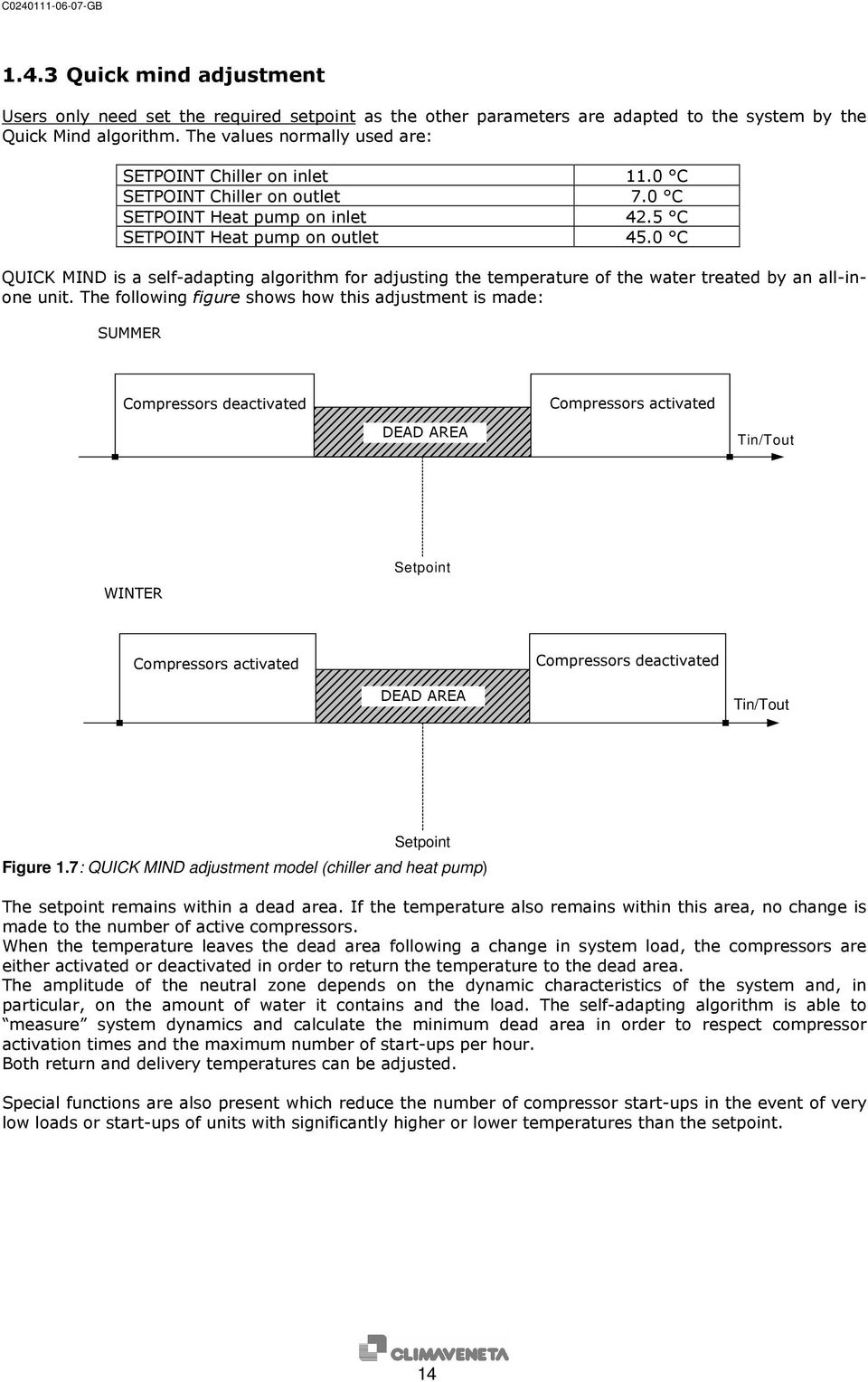
15 2 compressors - with maximum permitted number of start-ups per hour 8 Litres/kW Τout compressors - with maximum permitted number of start-ups per hour 12 Litres/kW Τout compressors - with maximum permitted number of start-ups per hour 8 Litres/kW Τout compressors - with maximum permitted number of start-ups per hour 12 Litres/kW Τout Table 1.4: maximum theoretical delivery temperature range at constant part load (depending on the quantity of water contained in the system) An example of real data acquired during operation with the Quick Mind adjuster on the delivery side is shown below. Reference is made to the following figure: Fase di avviamento controllato = Controlled starting phase Adattamento zona neutra = Adaptation to dead area Temperatura uscita evaporatore = Outlet temperature of evaporator Temperatura ingresso evaporatore = Inlet temperature of evaporator 1 compressore attivo = 1 compressor active 2 compressori attivi = 2 compressors active Figure 1.8: example of real data with quick-mind outlet adjustment (x-axis: time in [s]; y-axis: Tout in [ C] ). This is an example of start-up with a very high initial temperature compared with the setpoint (7 C). About 10 seconds after data acquisition began, one compressor switches on. The second compressor does not switch on immediately as the algorithm which handles start-up checks if one compressor is enough to return delivery temperature to the setpoint and avoid unnecessary start-ups. As the delivery temperature is still at 12 C after about 200 seconds, the second compressor is also switched on, otherwise it would take too long to reach setpoint. Following the controlled starting phase, the delivery temperature falls until it enters the dead area. The algorithm (at t= 350 s) begins to adapt the amplitude of the dead area in order to respect compressor safety times. As can be seen, the dead area is later reduced (t= 780 s, 950 s) to the absolute minimum amplitude which allows safety times to be respected. It can also be seen that the compressors are activated and deactivated when the outlet temperature reaches the upper or lower limits of the dead area. The example shows that outlet temperature varies by about 3.5 C during regular operation. 15

16 1.4.4 Modulating adjustment of screw compressors With screw compressors, modulating adjustment is performed on the outlet probe. Modulating adjustment is only available on Bitzer screw compressors. Tout [ C] set point ZN B (increase) t [min] C (decrease) Figure 1.9: modulating adjustment for screw compressors Reference is made to the figure to the left: The setpoint remains within a dead area. If the temperature also remains within this zone, no change is made to the number of active compressors or their load percentages (position of modulating chamber). When the temperature rises above zone B following a change in the system load, the compressors are activated in order to return the temperature to the dead area. Inside zone B, if the outlet temperature derivative is positive, compressor power is increased in order to return the temperature to the dead area (ZN). The further away the temperature is from the setpoint, the greater the increase is. When the temperature falls below zone C following a change in the system load, the compressors are either deactivated in order to return the temperature to the dead area. Inside zone C, if the outlet temperature derivative is negative, compressor power is decreased in order to return the temperature to the dead area (ZN). The further away the temperature is from the setpoint, the greater the decrease is. The amplitude of the neutral zone depends on the dynamic characteristics of the system and, in particular, on the amount of water it contains and the load. The self-adapting algorithm is able to measure system dynamics and calculate the minimum dead area in order to respect compressor activation times and the maximum number of start-ups per hour. When a second or subsequent compressor is switched on, the ones that are already running are forced to a minimum, and the subsequent power increases/decreases are applied to all the compressors. 16

17 1.4.5 Adjustment method for centrifuge compressors Adjustment is combined on the inlet temperature and integral on the outlet temperature. Some diagrams outlining how this works are shown below. Suppose we have a single compressor unit. A bsorbed power [K w ] M a x M in T herm oregulator power request [% ] set point (0% P 09.42) % com pressor sw itch-on (P 09.43) S et point + P roportional band (100% ) Figure 1.10: Adjustment for a single-compressor unit. Min=theoretical minimum electrical power absorbed by a compressor, Max=theoretical maximum electrical power absorbed by a compressor Let us take a close look at how the compressor is activated. When the system return temperature lies in zone A (figure 1.11a) or less than the setpoint, the compressor is off. The amplitude of zone A normally coincides with the temperature difference at the evaporator with the compressor running at minimum power. When the return temperature exceeds zone A (figure 1.11b), the compressor is switched on and then switches off if the temperature falls below the setpoint. If the return temperature lies in zone B (figure 1.11c), the power of the compressor is modulated according to system requirements. set point + proportional band Tin [ C] set point + proportional band Tin [ C] start compressor 1 set point A t [min] start compressor 1 set point A t [min] ON ON OFF OFF Figure 1.11 a) Figure 1.11 b) 17

18 s e t p o in t + p r o p o r t io n a l b a n d T in [ C ] B s t a r t c o m p r e s s o r 1 s e t p o in t t [ m in ] O N O F F m a x P a s s [ K w ] m in Figure 1.11 c) Suppose we have a unit with more than one compressor. Absorbed Potenza assorbita power [Kw] Max 2x Min Min set point (0%) % % compressor % accensione 1 compressor % accensione 2 1 switch-on compressore 2 switch-on compressore Set point + Banda prop. proporzionale band (100 (100 %) %) Thermoregulator Potenza power Request richiesta del [%] termoregolatore [%] Figure 1.12: Adjustment for a twin-compressor unit. Min=theoretical minimum electrical power absorbed by a compressor, Max=theoretical maximum electrical power absorbed by a compressor. 18
![Absorbed Potenza assorbita power [Kw] Max 2x Min Min set point (0%) % % compressor % accensione 1 compressor % accensione 2 1 switch-on compressore 2 switch-on compressore Set](/docs-images/40/7909384/images/page_18.jpg "point + Banda prop. proporzionale band (100 (100 %) %) Thermoregulator Potenza power Request richiesta del [%] termoregolatore [%] Figure 1.")
19 Let us take a close look at how the compressor is activated. The amplitude of zone A coincides with the temperature difference at the evaporator, with all the compressors running at minimum power. Zone A is the sum of the zones of each single compressor (A1+A2+ ). When the temperature lies in one of the An zones, the power of the active compressors is modulated according to system requirements. When moving from an An zone to the one just above it, the active compressors are taken to minimum power while waiting for the next one to be switched on. After that, they continue to be modulated in the new zone. When moving from an An zone to the one just below it, one of the compressors is switched off while the others are kept at a minimum. ss e t ppo oi ni t n t + b a np rd oa p opr tr i o np ao l r bz ai on d n a l e T i n [ C ] B s t a s t r a t r 2 t c o c m o p m r e p s s r o e r s 2 s o r e s t as tr at r 1 t c ocm opmr e ps sr oe r s 1 s o r e s e t p o i n t m a x P a s s [ K w ] A 2 A 1 A t [ m i n ] C o m p r. 1 m i n m a x P a s s [ K w ] C o m p r. 2 m i n Figure 1.13: adjustment for a twin-compressor unit 19

20 The following figure, instead, gives an example of the integral contribution of the adjustment method. Tin Set point + P. band Start compressor (P09.43) Set point Pass [KW] Max 100 % 0 % Example 1-compressor unit Band: 6 C Integral limit: 20% Integral time: 90 s Min Tout Set point + P. band Set point + limit (P39.07) Integral - limit (P39.07) Integral time Integral time Integral time Integral time Integral time Figure 1.14: Adjustment for a single-compressor unit: integral contribution 20
![43) Set point Pass [KW] Max 100 % 0 % Example 1-compressor unit Band: 6 C Integral limit: 20% Integral time: 90 s Min Tout](/docs-images/40/7909384/images/page_20.jpg "Set point + P. band Set point + limit (P39.07) Integral - limit (P39.")
21 2 ALARMS Press the [ALARM] key once to enter the alarms menu and view the alarm message along with its code. If there is more than one alarm, scroll the menu using the [UP] and [DOWN] keys. In the W3000 base, NO A is displayed if there is no alarm, otherwise the alarm code appears. Press any other key to exit from this menu. To reset the alarm press the [ALARM] key again and hold it down until the message No Alarm Active (for W3000 or W3000 compact) or No A (for W3000 base) appears. If the message does not appear it means that one or more alarm conditions are still active. Alarms table ALARM DESCRIPTION details RESET Faulty phase connection. Totally shuts down the unit (only displayed if the input that detects it is A 002 Phase sequence / Voltage out of range fitted) No flow to evaporator. The alarms automatically resets 3 times in the same hour if flow is restored within the maximum operating time of the pumps A/M 003 Evaporator flow switch with a small amount of water (P23.34), otherwise, it must be reset manually Enabled only in the heat pump mode. Low 005 Low inlet temperature water temperature at evaporator inlet. S-A Enabled only in the chiller mode. High water 006 High inlet temperature temperature at evaporator inlet. S-A Low water temperature at evaporator outlet. Also specifies (except for W3000 base) which evaporator (if more than one) is involved in the M 010 Evaporator antifreeze alarm condition. Only displayed if the relative input is present (see I/O menu). Unit stops due to an external M 014 Insufficient system pressure pressure switch. Indicates that the external air temperature has 017 Low external air temperature fallen below the set point. S The evaporator inlet temperature changes too quickly and creates a low water level in the S 021 Low water charge system. The temperature difference between the evaporator inlet and outlet is too high and M 022 Low water flow creates a low water flow from the pump Similarly to Evaporator flow switch (only for 045 Condenser flow switch water/water units with freon reversal). A/M 046 Recuperator flow switch No water flow to the recuperator. A Maintenance hours limit exceeded (in units with 051 Pump 1 maintenance just 1 pump, pump 1 is the evaporator pump) S Pump 2 maintenance hours limit exceeded (in 052 Pump 2 maintenance units with more than one pump). S The circuit 1 subcooling management driver is disconnected (only for units with centrifuge A 061 Subcooling driver 1 offline compressors) 062 Subcooling driver 2 offline as above, for circuit 2 A 063 Subcooling driver 3 offline as above, for circuit 3 A 064 Subcooling driver 4 offline as above, for circuit 4 A Low water temperature at condenser outlet. Except for W3000 base, it also specifies which condenser (if more than one) is involved in the M 075 Condenser antifreeze alarm condition (only for water/water units with freon reversal). 076 Recuperator antifreeze Low water temperature at recuperator outlet. A 081 Pump 1 thermal switch Pump 1 overheated (in units with just 1 pump, pump 1 = evaporator pump) M 21
22 ALARM DESCRIPTION details RESET Pump 2 overheated (in units with more than one 082 Pump 2 thermal switch pump). M Condenser pump overheated (only for 085 Condenser pump thermal switch water/water units with freon reversal) M 086 Recuperator pump thermal protection Recuperator pump overheated M Glycol pump overheated (in units with 087 Glycol pump thermal switch freecooling). S/A The slave card is disconnected (only for units 090 Slave no-link with 3 or 4 circuits) A Master expansion 1 unlinked. Apart from W3000 base, the word master appears in units with 3 or A 091 Expansion 1 no-link 4 circuits. 092 Expansion 2 no-link as above, for expansion 2 A 093 Expansion 3 no-link as above, for expansion 3 A 094 Expansion 4 no-link as above, for expansion 4 A 095 Expansion 5 no-link as above, for expansion 5 A 101 Expansion 1 slave no-link Slave expansion 1 unlinked. A 102 Expansion 2 slave no-link as above, for expansion 2 A 103 Expansion 3 slave no-link as above, for expansion 3 A 104 Expansion 4 slave no-link as above, for expansion 4 A 105 Expansion 5 slave no-link as above, for expansion 5 A No oil on compressor 1 due to low compressor 111 Compressor 1 oil oil level or pressure M 112 Compressor 2 oil as above, for compressor 2 M 113 Compressor 3 oil as above, for compressor 3 M 114 Compressor 4 oil as above, for compressor 4 M Compressor 1 delivery temperature is higher 121 High outlet temperature compressor 1 than the set limit. M 122 High outlet temperature compressor 2 as above, for compressor 2 M 123 High outlet temperature compressor 3 as above, for compressor 3 M 124 High outlet temperature compressor 4 as above, for compressor 4 M Compressor 1 motor overheated or any another 131 Compressor 1 fault fault M - A/M 132 Compressor 2 fault as above, for compressor 2 M - A/M 133 Compressor 3 fault as above, for compressor 3 M - A/M 134 Compressor 4 fault as above, for compressor 4 M - A/M No communication with compressor n 1 (only for 141 Compressor 1 offline units with centrifuge compressors) A 142 Compressor 2 offline as above, for compressor 2 A 143 Compressor 3 offline as above, for compressor 3 A 144 Compressor 4 offline as above, for compressor 4 A Maintenance hours limit exceeded on 151 Compressor 1 maintenance compressor 1 S 152 Compressor 2 maintenance as above, for compressor 2 S 153 Compressor 3 maintenance as above, for compressor 3 S 154 Compressor 4 maintenance as above, for compressor 4 S Compressor 1 did not start within the set timeout 171 Compressor 1 start-up timeout (only for units with centrifuge compressors) A/M 172 Compressor 2 start-up timeout as above, for compressor 2 A/M 173 Compressor 3 start-up timeout as above, for compressor 3 A/M 174 Compressor 4 start-up timeout as above, for compressor 4 A/M The maximum number of start-ups per hour permitted for compressor 1 has been exceeded (only for quick mind adjustment and modulating S 181 Compressor 1 start-up limit adjustment of screw compressors) 182 Compressor 2 start-up limit as above, for compressor 2 S 183 Compressor 3 start-up limit as above, for compressor 3 S 184 Compressor 4 start-up limit as above, for compressor 4 S 211 Circuit 1 high pressure High pressure on cooling circuit 1 M 212 Circuit 2 high pressure as above, for circuit 2 M 213 Circuit 3 high pressure as above, for circuit 3 M 214 Circuit 4 high pressure as above, for circuit 4 M One of the condensation fans in circuit Circuit 1 fan thermal protection overheated and stopped. M 222 Circuit 2 fan thermal protection as above, for circuit 2 M 22
23 ALARM DESCRIPTION details RESET 223 Circuit 3 fan thermal protection as above, for circuit 3 M 224 Circuit 4 fan thermal protection as above, for circuit 4 M Low pressure detected by the 231 Circuit 1 low pressure transducer/pressure switch on circuit 1 A/M 232 Circuit 2 low pressure as above, for circuit 2 A/M 233 Circuit 3 low pressure as above, for circuit 3 A/M 234 Circuit 4 low pressure as above, for circuit 4 A/M High pressure detected by the 241 Transducer 1 high pressure transducer/pressure switch on cooling circuit 1 M 242 Transducer 2 high pressure as above, for circuit 2 M 243 Transducer 3 high pressure as above, for circuit 3 M 244 Transducer 4 high pressure as above, for circuit 4 M Possible start-up attempt with no Freon in circuit 251 Circuit 1 start-up timeout 1. A 252 Circuit 2 start-up timeout as above, for circuit 2 A 253 Circuit 3 start-up timeout as above, for circuit 3 A 254 Circuit 4 start-up timeout as above, for circuit 4 A Possible Freon leakage in circuit 1 as the Startup timeout alarm has continued for at least 8 A 261 No freon in circuit 1 hours. 262 No freon in circuit 2 as above, for circuit 2 A 263 No freon in circuit 3 as above, for circuit 3 A 264 No freon in circuit 4 as above, for circuit 4 A 271 Finned coil in circuit 1 Circuit 1 condensation coil obstructed A/M 272 Finned coil in circuit 2 as above, for circuit 2 A/M 273 Finned coil in circuit 3 as above, for circuit 3 A/M 274 Finned coil in circuit 4 as above, for circuit 4 A/M There may not be any freon in circuit 1 as the evaporation pressure has fallen below the set M 281 Insufficient evaporation pressure circuit 1 point 282 Insufficient evaporation pressure circuit 2 as above, for circuit 2 M 283 Insufficient evaporation pressure circuit 3 as above, for circuit 3 M 284 Insufficient evaporation pressure circuit 4 as above, for circuit 4 M 301 Compressor 1 inverter temperature Compressor 1 inverter overheated A/M 302 Compressor 2 inverter temperature as above, for compressor 2 A/M 303 Compressor 3 inverter temperature as above, for compressor 3 A/M 304 Compressor 4 inverter temperature as above, for compressor 4 A/M Compressor 1 discharge overtemperature (only 311 Compressor 1 discharge temperature for units with centrifuge compressors) A/M 312 Compressor 2 discharge temperature as above, for compressor 2 A/M 313 Compressor 3 discharge temperature as above, for compressor 3 A/M 314 Compressor 4 discharge temperature as above, for compressor 4 A/M Compressor 1 suction pressure under min. (only 321 Compressor 1 low pressure for units with centrifuge compressors) A/M 322 Compressor 2 low pressure as above, for compressor 2 A/M 323 Compressor 3 low pressure as above, for compressor 3 A/M 324 Compressor 4 low pressure as above, for compressor 4 A/M Compressor 1 compression pressure over max. 331 Compressor 1 high pressure (only for units with centrifuge compressors) B 332 Compressor 2 high pressure as above, for compressor 2 B 333 Compressor 3 high pressure as above, for compressor 3 B 334 Compressor 4 high pressure as above, for compressor 4 B Compressor 1 current input over max. (only for 341 Compressor 1 input current units with centrifuge compressors) B 342 Compressor 2 input current as above, for compressor 2 B 343 Compressor 3 input current as above, for compressor 3 B 344 Compressor 4 input current as above, for compressor 4 B Compressor 1 rotor temperature over max. (only 351 Compressor 1 rotor temperature for units with centrifuge compressors) A/M 352 Compressor 2 rotor temperature as above, for compressor 2 A/M 353 Compressor 3 rotor temperature as above, for compressor 3 A/M 354 Compressor 4 rotor temperature as above, for compressor 4 A/M Compressor 1 compression ratio over max. (only 361 Compressor 1 compression ratio for units with centrifuge compressors) A/M 362 Compressor 2 compression ratio as above, for compressor 2 A/M 23
24 ALARM DESCRIPTION details RESET 363 Compressor 3 compression ratio as above, for compressor 3 A/M 364 Compressor 4 compression ratio as above, for compressor 4 A/M Compressor 1 bearings faulty (only for units with 371 Compressor 1 bearings centrifuge compressors) A/M 372 Compressor 2 bearings as above, for compressor 2 A/M 373 Compressor 3 bearings as above, for compressor 3 A/M 374 Compressor 4 bearings as above, for compressor 4 A/M Compressor 1 SCR temperature over max. (only 381 Compressor 1 SCR temperature for units with centrifuge compressors) A/M 382 Compressor 2 SCR temperature as above, for compressor 2 A/M 383 Compressor 3 SCR temperature as above, for compressor 3 A/M 384 Compressor 4 SCR temperature as above, for compressor 4 A/M Compressor 1 blocked (only for units with 391 Compressor 1 rotor block centrifuge compressors) A/M 392 Compressor 2 rotor block as above, for compressor 2 A/M 393 Compressor 3 rotor block as above, for compressor 3 A/M 394 Compressor 4 rotor block as above, for compressor 4 A/M Probe 10 error. Values read by probe 10 out of 400 Probe 10 error range. A 401 Probe 1 error analogue, as above A 402 Probe 2 error analogue, as above A 403 Probe 3 error analogue, as above A 404 Probe 4 error analogue, as above A 405 Probe 5 error analogue, as above A 406 Probe 6 error analogue, as above A 407 Probe 7 error analogue, as above A 408 Probe 8 error analogue, as above A 409 Probe 9 error analogue, as above A 411 Exp 1 Probe 1 error Probe 1, expansion 1 fault A 412 Exp 1 Probe 2 error analogue, as above A 413 Exp 1 Probe 3 error analogue, as above A 414 Exp 1 Probe 4 error analogue, as above A 421 Exp 2 Probe 1 error analogue, as above A 422 Exp 2 Probe 2 error analogue, as above A 423 Exp 2 Probe 3 error analogue, as above A 424 Exp 2 Probe 4 error analogue, as above A 425 Exp 2 Probe 5 error analogue, as above A 426 Exp 2 Probe 6 error analogue, as above A 427 Exp 2 Probe 7 error analogue, as above A 428 Exp 2 Probe 8 error analogue, as above A 431 Exp 3 Probe 1 error analogue, as above A 432 Exp 3 Probe 2 error analogue, as above A 433 Exp 3 Probe 3 error analogue, as above A 434 Exp 3 Probe 4 error analogue, as above A 451 Exp 5 Probe 1 error analogue, as above A 452 Exp 5 Probe 2 error analogue, as above A 453 Exp 5 Probe 3 error analogue, as above A 454 Exp 5 Probe 4 error analogue, as above A Slave probe 10 faulty - only in units with more 500 Probe 10 error slave than 2 circuits A 501 Probe 1 error slave analogue, as above A 502 Probe 2 error slave analogue, as above A 503 Probe 3 error slave analogue, as above A 504 Probe 4 error slave analogue, as above A 505 Probe 5 error slave analogue, as above A 506 Probe 6 error slave analogue, as above A 507 Probe 7 error slave analogue, as above A 508 Probe 8 error slave analogue, as above A 509 Probe 9 error slave analogue, as above A 511 Exp 1 Probe 1 error slave Probe 1, expansion 1, connected to slave faulty A 512 Exp 1 Probe 2 error slave analogue, as above A 513 Exp 1 Probe 3 error slave analogue, as above A 514 Exp 1 Probe 4 error slave analogue, as above A 521 Exp 2 Probe 1 error slave analogue, as above A 24
25 ALARM DESCRIPTION details RESET 522 Exp 2 Probe 2 error slave analogue, as above A 523 Exp 2 Probe 3 error slave analogue, as above A 524 Exp 2 Probe 4 error slave analogue, as above A 525 Exp 2 Probe 5 error slave analogue, as above A 526 Exp 2 Probe 6 error slave analogue, as above A 527 Exp 2 Probe 7 error slave analogue, as above A 528 Exp 2 Probe 8 error slave analogue, as above A 531 Exp 3 Probe 1 error slave analogue, as above A 532 Exp 3 Probe 2 error slave analogue, as above A 533 Exp 3 Probe 3 error slave analogue, as above A 534 Exp 3 Probe 4 error slave analogue, as above A 551 Exp 5 Probe 1 error slave analogue, as above A 552 Exp 5 Probe 2 error slave analogue, as above A 553 Exp 5 Probe 3 error slave analogue, as above A 554 Exp 5 Probe 4 error slave analogue, as above A Low water temperature at evaporator outlet prealarm. Also specifies which evaporator (if more S 611 Antifreeze pre-alarm evaporator 1 than one) is involved in the alarm condition 612 Antifreeze pre-alarm evaporator 2 as above, for circuit 2 S 613 Antifreeze pre-alarm evaporator 3 as above, for circuit 3 S 614 Antifreeze pre-alarm evaporator 4 as above, for circuit 4 S Low pressure acquired from circuit 1 transducer 631 Low pressure in circuit 1 pre-alarm pre-alarm S 632 Low pressure in circuit 2 pre-alarm as above, for circuit 2 S 633 Low pressure in circuit 3 pre-alarm as above, for circuit 3 S 634 Low pressure in circuit 4 pre-alarm as above, for circuit 4 S High pressure acquired from circuit 1 transducer 641 High pressure in circuit 1 pre-alarm pre-alarm S 642 High pressure in circuit 2 pre-alarm as above, for circuit 2 S 643 High pressure in circuit 3 pre-alarm as above, for circuit 3 S 644 High pressure in circuit 4 pre-alarm as above, for circuit 4 S Key to RESET column: M = Manual reset alarm (if the condition that generated the alarm is eliminated, the alarm must be reset from the keypad); sets cumulative alarms A = Automatic reset alarm (if the condition that generated the alarm is eliminated, the alarm is reset automatically); sets cumulative alarms A/M = Automatic reset alarm for the first n cut-ins, after which manual; sets cumulative alarms S = Signal on display (does not set cumulative alarms ) S-A = Automatic reset signal (that does not stop the machine) or alarm. The mode is selected from a parameter M - A/M = Manual reset alarm (in hermetic, alternative and screw compressors), automatic for the first n cut-ins, after which manual (in centrifuge compressors) B =Block that cannot be reset from the display; sets cumulative alarms. To eliminate the alarm, switch the relative compressor off and then back on again. 25
26 3 TABLE OF MASKS Press [UP] or [DOWN] to move from one mask to another inside the same menu. Press [ENTER] to access the parameter, press [UP] or [DOWN] to change the value of the parameter. Mask Description Para n Com. : ON ALXXX Main display mask. Shows operating mode and status. Mode : chiller The unit can be switched on and off with the On/Off command: press "Enter" to move to State: ON keypad "Com. :", select the command using the "Up" or "Down" keys and press "Enter" again to LIMIT ID:011 U:01 confirm. Also displays the following messages: ALxxx : alarm active, Sxxx : signal active, "U:xx" : unit configuration address, "ID:xxx" : unit supervisor address, Term. Req. Act. Cool % Rec % Pump time 010s Temp. In. Out. Evap C Rec C Cond C Temp. In. Out. Evap C Evap C Evap C Temp. In. Out. Cond C Cond C Cond C Temp. Freecooling 12.3 C External air 15.4 C Optional 19.6 C Manuf. Password: Symbols describing unit status also appear (see table at the end of this manual). Shows the request of the controller and the operating percentage of the thermoregulator (cool/heat) and recovery (if possible). Also shows the pump time remaining during switching on and off. Shows the inlet and outlet water temperature. (evaporator, recuperator and condenser are only displayed if they are fitted). (if 2 evaporators are fitted) Displays inlet and outlet temperatures of the evaporator or condenser (depending on whether the unit is in the chiller or heat pump mode) and the outlet temperature of the two evaporators. (if 2 condensers are fitted) Displays inlet and outlet temperatures of the evaporator or condenser (depending on whether the unit is in the chiller or heat pump mode) and the outlet temperature of the two condensers. (for water-air units) Displays freecooling temperature (in chiller+freecooling units), external air temperature and optional temperature (if the probes are enabled). Access mask to manufacturer menu. Enter the manufacturer password for access. This menu may only be accessed by authorised staff. Config. Unit: Type : chiller Compressors : Type : hermetic Circuits: N : 2 Access mask to user configuration submenu. Press "Up" or "Down" to scroll the other masks and "Esc" to return to the submenu. Mask for setting the type of unit and compressors Sets the number of circuits in the unit N compressors per circuit : 1 N sep. stages per compressor : 0 Condensation: Type : water N : 2 Reversal : water Fan: Type : axial Sets the number of compressors per circuit and the number of separation stages per compressor. Sets the type of condensation (for evaporating units set none). For water-cooled units with Freon-side reversal, select the number of condensers in the unit. For water-cooled heat pumps set the type of circuit reversal (water-side or freon-side reversal) Selects the type of ventilation used, only for air-cooled units Evaporation: Type : water N : 1 Selects the type of evaporation and the number of evaporators in the unit. (For evaporating units set the number of evaporators to 0) Evaporating banks: N : 1 Sets the number of evaporating banks, only for evaporating units
27 Mask Description Para n Refrigerant: Sets the type of refrigerant used Type : R407c Recovery: Enabled: N Enables recovery. Recovery is enabled automatically in the polyvalent units Freecooling: Enabled: N Enables freecooling control Enable probes: External temp. N Optional temp. N Enable probes: Cond. in. temp. N Cond. out. temp. N Enable probes: Pressure N Low Pressure N High pressure transducers Start Scale 00.0bar End Scale 30.0bar High pressure transducers Start Scale 00.0bar End Scale 30.0bar Global. Enter another manufacturer password Display passwords service 0000 user 0000 W 3000 Code CA GB Man. C Functions Setpoint Limitation Winter N Ext. air winter set point limit C Delta 05.0 C Max var. set 05.0 C Max setpoint limit winter Coil fractioning 45.0 C N Probe enable mask for enabling the external air temperature probe or optional temperature probe (only visible in water-air units) Probe enable mask for enabling the condenser inlet probe or the condenser outlet probe (only visible in water-water chiller and heat pump units with just one condenser; two condenser outlet probes are enabled in the units with two condensers) Maschera di abilizzazione sonde per l'abilitazione dei trasduttori di alta pressione e di bassa pressione Mask for configuring the high pressure transducers Mask for configuring the low pressure transducers Access mask to user global parameters submenu. Press "Up" or "Down" to scroll the other masks and "Esc" to return to the submenu. Sets a new password. ATTENTION: THE PASSWORD ENTERED IN THIS FIELD IS THE ONLY ONE THAT ALLOWS ACCESS TO THE MANUFACTURER MENU!! Displays the passwords governing access to the service and user menus This mask contains the reference information of the software [Code] and of the reference technical manual [Man.]. The closed padlock symbol shows that the board is provided with its propriety software; two padlocks appear on units with 3 or 4 circuits Access mask to functions submenu. Press "Up" or "Down" to scroll the other masks and "Esc" to return to the submenu. Enables setpoint limitation in summer and winter modes (only with winter setpoint limitation) Enables setting of the external air temperature setpoint below which setpoint limitation begins in the heat pump or recovery only modes and defining the temperature delta at which the maximum setpoint (lowering) variation (negative) takes place. (only with winter setpoint limitation) maximum winter setpoint limit Enables coil fractioning Upper set 10.0 bar Upper diff bar Lower set 12.0 bar Lower diff bar Subcooling modulating adjustment Enable N (only with coil fractioning) Sets the upper setpoint and differential and the lower setpoint and differential for controlling coil fractioning Enables subcooling modulating adjustment (only for units with centrifuge compressors)
28 Mask Description Para n Subcooling Enables subcooling Enabled N This function is only enabled in chillers with recovery mode. Subcooling Adjustment start delay 010 s Relay delay 005 s Subcooling Upper set 06.0 C Lower set 04.0 C High temp. pressure switch control Enabled: N High temp. pressure switch control Setpoint: 23.5 bar Diff: 02.0 bar Pumpdown Disabled Sets the delay before subcooling adjustment commences and the delay in the subcooling relay Sets the upper and lower sub cooling setpoint Enables setting of the pressure switch control of high temperatures by separating active circuit power Enables the setpoint and differential for the pressure switch control of high temperatures Enables or disables pumpdown. Selects the type of pumpdown to perform, pumpdown during shutdown or cyclical pumpdown or both. Pumpdown Setpoint 02.5bar Max. time 03s Cyclical pumpdown Cycle time 030min Pumpdown Chiller S Heatpump N Ch+Rec N Win rec N Sum rec N => 01 All-in-one unit valve override Sets end pumpdown setpoint and pumpdown timeout. The pumpdown procedure is interrupted - when low pressure falls below the setpoint (if there are transducers on the low pressure section) - when the low pressure switch trips (if there are no transducers) - after the timeout (if the procedure is not interrupted by pressure) Sets the cyclical pumpdown time. A pumpdown is performed each time the set time elapses. The time is reset every time a mode change occurs Sets the modes in which pumpdown is performed (both cyclical and shutdown). Depending on the type of unit, a smaller or larger number of available modes appear Pumpdown can be selected in the chiller mode and not in the chiller plus recovery mode, for example. Sets valve override for all-in-one units Enabled: Y Compressor Min compressor stop time 0120 s Min. del. btw starts diff. compr s Min. del. btw starts same compr s Max. compr. starts per hour 10 Min. compr. start time 150 s Force at low ext.t. Enable N Setpoint C Diff C Oil control type Direct Max time : 1200s Override T: 120s Width of dead area: 015 % Power incr. impulse: Period: 010 s Min. dur.: 00.3 s Max. dur.: 02.0 s Power decr. impulse: Period: 010 s Min. dur.: 00.5 s Max. dur.: 03.0 s Access mask to compressor submenu. Press "Up" or "Down" to scroll the other masks and "Esc" to return to the submenu. Minimum time a compressor must stay off after being switched off. (Only visible in the proportional step adjustment mode) Antipeak time to prevent overcurrents at start-up due to simultaneous demand from more than one compressor. Delay which limits the number of compressor start-ups per hour. (Only visible in the proportional step adjustment mode) Maximum permitted number of compressor starts per hour. Minimum switch-on time of a compressor. (Only visible in the quick mind and modulating adjustment modes of screw compressors) Only for screw compressors. Enables 100% screw compressor forcing of in the winter mode with low external temperatures. Selects the screw compressor oil level control mode: None, Direct, Indirect and Direct + Indirect. Sets the percentage with respect to the dead area and around the setpoint in which the compressor is not modulated. (only for modulating screw compressors) Sets the period and duration of the power increase impulse. (Only for modulating adjustment of screw compressors) Sets the period and duration of the power decrease impulse. (Only for modulating adjustment of screw compressors)
29 Mask Description Para n Compressor Sets the start-up time of the compressor, that, is, the time the compressor remains in the noload start mode before it starts adjusting start time: 30 s (Only for modulating adjustment of screw compressors) Min. time sep. stages active: 10 s Sets the minimum time the separation stages remain active Time compressor oil valve active 10 s Sets the time the compressor oil valve remains active Model: Bitzer Sets the compressor model Economiser: Enable N Start delay 120 s Economiser disable: Setpoint 15.0 bar Diff. 2.0 bar Compressor discharge temperature control Enabled: N Enables the economiser and sets the start delay Sets the setpoint and differential for disabling the economiser Enables compressor discharge temperature control for liquid injection Compressor discharge temperature control Setpoint C Diff C Config. discharge temperature probes for compressors: NTC C Compressor modulation Minimum: 010 % Maximum: 090 % Start revs: rpm Compressor start time: 020 s Number of bypass valves 1 Sets the setpoint and differential for liquid injection Mask only visible in screw compressors that allow the type of discharge temperature probe used to be selected Sets minimum and maximum values for centrifugal compressor modulation Sets the number of revs for calculating opening of the liquid line solenoid valve. Sets minimum revs timeout during start-up. (Only for centrifuge compressors) Sets the number of bypass valves (N.B.: controlled by the board and not by external timers) (Only for centrifuge compressors) Start compression 2.2 Start bypass delay 020 s Power request increase Integral T. 005 sec Minimum Var. 001 % Power request decrease Integral T. 005 sec Minimum Var. 001 % Centrifuge Comp. off: on: Comp % 040% Comp % 040% Centrifuge Comp. off: on: Comp % 040% Comp % 040% Valves Status configuration S0 => off Valves: CCCCCCCCCC => 00 Sets the compression ratio for calculating opening of the liquid line solenoid valve. Sets the bypass solenoid valve closing delay. (Only for centrifuge compressors) Sets the integral time and minimum variation for increasing the power request. (Only for centrifuge compressors) Sets the integral time and minimum variation for decreasing the power request. (Only for centrifuge compressors) Sets the enable and disable percentage with respect to the proportional band for each centrifuge compressor. Sets the enable and disable percentage with respect to the proportional band for each centrifuge compressor. Access mask to valves submenu. Press "Up" or "Down" to scroll the other masks and "Esc" to return to the submenu. Status editor mask. Configures the valves (A=valve open, C=valve closed) in each status (S0,S1, S12). Valve configuration is automatically converted. It is also possible to directly set the coded information, the state of the valves is automatically decoded and memorised
30 Mask Description Para n Status Code Description S0 off Off, circuit off S1 chiller on Chiller on S2 ch+rec on Chiller plus recovery on S3 chiller pd Chiller in pumpdown S4 chiller off Chiller off S5 rec on Recovery on S6 defrost Defrost S7 rec pd Recovery in pumpdown S8 rec off Recovery off S9 heatpump on Heat pump on S10 ch+rec pd Chiller plus recovery in pumpdown S11 heatpump pd Heat pump in pumpdown S12 heatpump off Heat pump off Valve release time: V1: 000 s V2: 000 s V3: 000 s V4: 000 s V5: 000 s Valve release time : V6: 000 s V7: 000 s V8: 000 s V9: 000 s V10:000 s C1: off valve:cccccccccc C2: off valve:cccccccccc C3: off valve:cccccccccc C4: off valve:cccccccccc Defrost Defrost config. Timer + Auto Tuning Defrost parameters: Start 03.0 bar Stop 14.0 bar Defrost parameters: Delay s Max. time s Drip time 120 s Timer tuning defrost Ref. time 120 s Ref. T. -10 C 180 s Ref. T. +10 C 060 s Timer tuning maximum delay variation perc. Maximum defrosts per hour 3 20 % Sets the valve release time Sets the valve release time Displays the status of the circuits and circuit valves. Displays the status of the circuits and circuit valves. Access mask to defrost submenu. Press "Up" or "Down" to scroll the other masks and "Esc" to return to the submenu. Sets 3 defrost types: Traditional, defrosting at fixed intervals, Timer Tuning, defrosting at dynamic intervals, Timer Tuning + Auto Tuning, defrosting at dynamic intervals, also analysing evaporation pressure values. Defines the pressure setpoints for start and stop defrost Sets defrost time parameters. Delay: cumulative time measured before the defrost procedure starts. Max. time: maximum duration of defrost procedure. Drip time: duration of coil dripping Sets certain timer tuning defrost parameters. Nominal defrost reference time (display only). Reference time at -10 C used to calculate the nominal reference time. Reference time at +10 C used to calculate the nominal reference time Sets the maximum current defrost delay variation percentage Sets the maximum number of defrosts in an hour. If this value is exceeded, the finned coil alarm appears Ext t.-evap. t. calc. interval 300 s t.ext-t.evap. var. speed threshold 3.0 C Ext t.-evap. t. difference threshold for changing defrost delay 15.0 C Threshold offset Start var. 2.0 C Variation factor 1 % (only for auto tuning) Maximum rate of change in the difference between external temperature and evaporation temperature. If exceeded, it force activates the defrost procedure after the bypass time. The calculation is updated every "calculation interval" (only for auto tuning) Initial threshold for the difference between external temperature and evaporation temperature for changing the defrost start delay. (only for auto tuning) Offset used to calculate the threshold for changing the defrost start delay. Defrost start delay change factor provided by Auto Tuning Defrost
31 Mask Description Para n Circuit start (only for auto tuning) bypass 120 s Bypass delay between the start of the circuits and the moment the defrost procedure is force Start variation changed if the maximum speed of change in the difference between the external temperature delay 600 s and the evaporation temperature is exceeded. If the difference between the external temperature and the evaporation temperature is greater than the calculated threshold, when the "Variation start delay" elapses, the defrost start delay Minimum derived evaporation pressure bar/m Forced defrosting with low pressure Enabled Y Threshold 1.7 bar Step override in heatpump separate 1.7 bar restore 2.1 bar Enable Free Defrost Y Minimum external temperature 04.0 C Drip phase with compressors on N Recovery Chiller override fm recovery pressure Setpoint 23.5 bar Diff. 5.0 bar Cyclical override to chiller from ch+rec Enable N Cycle time 060min Override time in chiller before passing to ch+rec 120 s Condens. Condensation control Enable : Y Type : Step Cont. N steps : 3 Condensation control Type: Separate Mod.: PWM Condensation control specified in the "Change factor" parameter commences. (only for auto tuning) Maximum permitted change in evaporation pressure before changing the defrost start delay. Minimum permitted evaporation pressure in heatpump. If the pressure falls below this value, defrosting is forced Evaporation pressure values at which the circuit with more than one hermetic compressor per circuit is "separated" to return the operating point within limits Evaporation pressure value at which compressor "separation" terminates. Enables the Free-Defrost algorithm and sets the minimum external temperature for operation Enables the drip phase with the compressors on after defrosting Access mask to recovery submenu. Press "Up" or "Down" to scroll the other masks and "Esc" to return to the submenu. Defines the pressure setpoint and differential at which the recovery mode is forced to chiller Enables override to the chiller mode from the chiller plus recovery mode (only for units with recovery). Sets the cycle time of this function, that is, the maximum time in the chiller plus recovery mode. The time is reset every time a mode change occurs. (NB.: pumpdown is also considered a mode change and therefore the cyclical pumpdown function in the Ch+rec mode is inconsistent with cyclical override, the function will be performed with the lowest cycle time.) Changing mode to Chiller+Rec. On, requires the Chiller On mode. This mask sets the Chiller On mode timeout before passing to the Chiller+Rec On mode. Access mask to condensation submenu. Press "Up" or "Down" to scroll the other masks and "Esc" to return to the submenu Enables condensation control, the type and number of steps Selects between individual and contemporary condensation. Also sets linear fan operation (0:Standard - 1:0-10V - 2:PWM - 3:FAE - 4:0-10V C ) Selects the type of valve for condensation in water-cooled chillers Logic: direct Enable max. override Chiller cond. NO Setpoint 23.0 bar Diff. 3.0 bar Enable max. override Heat pump evap. NO Setpoint 01.0 bar Diff. 0.5 bar Cont. cond. control Chiller Setpoint 14.0 bar Diff bar Cont. cond. control HeatPump Setpoint 06.0 bar Diff bar Enables 100% forced condensation in the chiller mode and establishes the setpoint Used to enable 100% forced evaporation in the heat pump mode and establish the setpoint Sets the setpoint and differential for continuous condensation adjustment in the chiller mode Sets the setpoint and differential for continuous condensation adjustment in the heat pump mode
32 Mask Description Para n Sets maximum and minimum condensation with continuous adjustment. This is fan speed or condensation valve opening Cont. condensation control Max. lim. 100 % Min. lim. 030 % Cont. condensation control Min. lim. Adjustment off: Y Diff. 01.0bar Modulating valve management N Opening time 100% 070 s Alarms High pressure from transducers alarm: Setpoint 28.0 bar Diff bar Low press. alarm N resets 3 Start bypass 120 s Low pressure alarm from transducers: Setpoint 01.6 bar Diff bar Low pressure alarm low air temp. Enabled N Start timeout 120 s Low pressure alarm low air temp. Setpoint 0.1 bar Diff. 0.5 bar Compressor alarms N resets 3 Enables the fans or the condensation valve when the minimum condensation limit is reached with continuous adjustment. The set condensation minimum may remain enabled or adjustment can be turned off when pressure falls below the condensation setpoint of the differential value. Enables management of the 2- or 3-way molulating valve connected to the heat exchanger with well/tower water and sets opening time from 0% to 100%. Access mask to alarms submenu. Press "Up" or "Down" to scroll the other masks and "Esc" to return to the submenu Sets the setpoint and differential for activating the high pressure from transducers alarm Sets the parameters for activating the low pressure alarm. Number of times the alarm has triggered in the previous hour and been reset automatically within the set period, the next time the alarm triggers it must be reset manually. Low pressure alarm by-pass delay. Sets the setpoint and differential for activating and resetting the low pressure alarms (only if the low pressure transducers are configured) Enables external air temperature control for activating the low pressure alarm and sets the start timeout. Sets the setpoint and differential for activating and resetting the low pressure alarms with control on external air temperature Sets the maximum number of automatic reset compressor fault alarms in the arc of an hour, after which the compressor fault alarm must be reset manually. (only for centrifugal compressors) Compressor thermal protection alarm: Bypass time 0010 s The compressor is switched off for a set time when the unit is powered. Must be set to 360 secs only for BRISTOL compressors Compressor discharge temperature alarm Setpoint C Diff C Compressor oil alarm: Start delay 090 s Running delay 090 s Flow switch alarm N resets 3 Max. pump op. and flow auto reset time in al. mode 015 s Evaporator flow switch alarm: Start delay 010 s Running delay 001 s Recuperator flow switch alarm: Start delay 010 s Running delay 001 s Condenser flow switch alarm: Start delay 010 s Running delay 001 s Sets the setpoint and differential for activating the high compressor discharge temperature alarm Sets the compressor oil alarm delay Sets the maximum number of automatic reset flow switch fault alarms in the arc of an hour, after which the flow switch fault alarm must be reset manually. The flow switch alarm is always automatically reset until the maximum pump alarm operation delay has elapsed. The pump then turns off and the flow switch alarm must be manually reset. Maximum pump operation time in flow alarm mode Following alarms requiring the pump to start (antifreeze alarm, low flow rate alarm, evaporator flow switch alarm) the pump is kept running in order to reset normal conditions. In any case, the time indicated is the time in which the flow switch alarm is automatically reset. After this delay, the flow switch alarm must be manually reset. Configuration parameters for evaporator flow switch alarm. Start delay: minimum time during which the flow must remain constant before the compressors start running. Running delay: minimum time before the flow switch triggers with the compressors running. Configuration parameters for recuperator flow switch alarm. Start delay: minimum time during which the flow must remain constant before the compressors start running. Running delay: minimum time before the flow switch triggers with the compressors running. Configuration parameters for condenser flow switch alarm. Start delay: minimum time during which the flow must remain constant before the compressors start running. Running delay: minimum time before the flow switch triggers with the compressors running. (only for water/water units with freon reversal)
33 Mask Description Para n Low ext. air temp. Enables external air temperature control for activating the low external air temperature alarm Enabled N Sets the alarm cut-in setpoint and differential This function automatically enables the external Setpoint C air temperature probe Diff C Access mask to initialisation menu. Press "Up" or "Down" to scroll the other mask and "Esc" to return to the submenu. Default The mask is not displayed when the chiller is ON. Reset chiller to This restores the default values. default values Deletes the memory and installs "logical" values. N The chiller must then be programmed with the parameter set during factory testing. Load configuration Alarmi log on display Delete Service Password: 0000 Adjust. Inlet adjustment: Type PROPORTION. N N Loads parameters from file. The unit is configured with factory settings. NB: Run default before Load configuration. Deletes the contents of the alarms log on the display Access mask to service menu. Enter the service password for access. This menu may only be accessed by authorised staff. Access screen to adjustment menu. Press "Up" or "Down" to scroll the other mask and "Esc" to return to the submenu. Defines the type of adjustment. (only visible in the step inlet adjustment mode) Integration time: 0090 s Integration correction limit: 020 % Chiller setpoint limits: Low 11.0 C High 20.0 C Chiller setpoint limits: Low 06.0 C High 18.0 C Heat pump setpoint limits: Low 30.0 C High 44.0 C Heat pump setpoint limits: Low 30.0 C High 48.0 C Recovery setpoint limits: Low 30.0 C High 45.0 C Forced shutdown Chiller 04.5 C Heat pump 51.0 C Temperature adjustment band 02.5 C Recovery adjustment band 02.5 C Dual setpoint Enable N Sets integration time and correction limit (displayed in the proportional step inlet adjustment mode with proportional + integral adjustment type) Maximum and minimum setpoint values that can be set with inlet adjustment N.B.: For low temperature units, the minimum value that can be set for the low limit is equal to the antifreeze setpoint +2 C (also check the value set for forced shut-down in the Quick Mind adjustment mode and modulating adjustment mode with screw compressors). Maximum and minimum setpoint values that can be set with outlet adjustment N.B.: For low temperature units, the minimum value that can be set for the low limit is equal to the antifreeze setpoint +2 C (also check the value set for forced shut-down in the Quick Mind adjustment mode and modulating adjustment mode with screw compressors). Maximum and minimum setpoint values that can be set with inlet adjustment (only visible if the heat pump configuration is set) Maximum and minimum setpoint values that can be set with outlet adjustment (only visible if the heat pump configuration is set) Maximum and minimum recovery setpoints. (only visible if recovery is configured) (Only in the Quick Mind and modulating adjustment modes of screw compressors). Forces compressor shut-down if: Tout Chiller < chiller minimum or Tout Heat Pump > heat pump maximum Sets the temperature and recovery adjustment band Enables selection of a second setpoint via an external contact (only displayed on compatible units) Setpoint variation Enabled 4-20 ma Min C Max C Enables setpoint variation through an external input which can be configured at 4-20mA or V. Maximum and minimum variation limits can also be set. If time bands have been enabled the external setpoint cannot be enabled (only displayed on compatible units) For units with alternative or screw compressors only a 4-20 ma variation can be selected
34 Mask Description Para n Rec. setpoint var. Enables recovery setpoint variation through an external input which can be configured at Enabled 4-20 ma 20mA or 0-5V. Maximum and minimum variation limits can also be set. If time bands have Min C been enabled the external setpoint cannot be enabled (only displayed on compatible units) Max C Pump config. Type of use: automatic Minimum start delay between pump and compressors 060 s Pump shutdown delay 060 s Demand limit Enable N For units with alternative or screw compressors only a 4-20 ma variation can be selected. (Only displayed if more than one pump is set) Selects whether to use both pumps through hourly rotation (FIFO if they have the same number of operating hours) or override pump 1 or pump 2. Defines the delay between pump start-up and compressor start-up after the unit has been switched on Defines pump shutdown delay after the unit has been switched off Enables limitation of the power delivered by the unit Demand limit Chiller 050 % Heat pump 050 % Recovery 050 % Enable from dig. in.: On/Off: Y Chiller/HP: N Sets the maximum percentage of power delivered by the unit in the chiller, heat pump (in heat pump units) and recovery (in compatible units where possible) modes. Allows the on/off status of the unit to be selected from external enables. Also performs chiller/heat pump switching in heat pump units Pumps Evaporator pumps configuration: N Pumps 1 Enable recuperator pumps: N Access mask to pumps submenu. Press "Up" or "Down" to scroll the other masks and "Esc" to return to the submenu. Sets the n of pumps in the unit Enables the pump on the recuperator Enable condenser pump: N Enables the condenser pump overheated (only for water/water units with freon reversal) Pump changeover after long activity: Threshold 0007 days Max diff days Long inactivity: Test pumps Y Threshold 0030 days Impulse 10 s Freecool. Freecooling Delta 01.0 C Offset C Diff C Direct valve Fans hysteresis 0.3 C delay 020 s Service Hour counter Pump: Threshold 012x1000 Reset N Hour counter Pump 2: Threshold 012x1000 Reset N Defines, in the automatic mode, the number of days of continuous operation after which a pump is stopped and the other one started. Max. diff. defines the maximum difference in hours between the two pumps over which the threshold value for the pump with less hours is doubled in order to balance pump hours more rapidly. Only appears for units with two pumps. When enabled, this function activates the pumps for the set impulse time after a period of activity reaches the threshold value. This appears with at least one pump enabled. Access mask to freecooling submenu. Press "Up" or "Down" to scroll the other masks and "Esc" to return to the submenu. Sets the freecooling adjustment parameters. The delta, the offset and the differential for freecooling adjustment are set here Selects the type of control for the freecooling valve, direct or reverse. Also sets the hysteresis of each fan and the start/stop delay for each fan Access mask to assistance submenu. Press "Up" or "Down" to scroll the other masks and "Esc" to return to the submenu. Sets the threshold for programmed maintenance on the evaporator pump. Sets the threshold for programmed maintenance on pump 2. (this may be pump 2 of the evaporator or the pump on the secondary circuit in the water/water units or the recuperator pump, depending on unit configuration)
35 Mask Description Para n Sets the threshold for programmed maintenance Hour counter Compressor 1: Threshold 010x1000 Reset N Hour counter Compressor 2: Threshold 010x1000 Reset N Hour counter Compressor 3: Threshold 010x1000 Reset N Hour counter Compressor 4: Threshold 010x1000 Reset N Priority in winter: N Sets the threshold for programmed maintenance Sets the threshold for programmed maintenance Sets the threshold for programmed maintenance Sets winter priority for recovery (only for heat pump units with recovery) Enable remove control of recovery: N Enables recovery control from a remote contact (requires expansion tank) Insuff. evap. press: Enable N Start delay 300 s Full p. del. 030 s Insuff. evap. press: Setpoint 03.4 bar Diff bar Evaporator antifreeze alarm: Setpoint 04.0 C Diff C Evaporator antifreeze heating element: Setpoint 04.0 C Diff C Condensor anti-freeze alarm: Setpoint 04.0 C Diff C Recuperator antifreeze heater: Setpoint 04.0 C Diff C Low water flow alarm: max. delta 08.0 C delay 030 s High/Low inlet temp. to unit Type: signal Delay: 030 s High inlet temp. to unit signal: setpoint 30.0 C Low inlet temp. to unit signal: setpoint 15.0 C Pre-alarms Enables evaporation pressure control for activating the insufficient evaporation pressure alarm. Sets the alarm cut-in delay Sets the setpoint and differential for activating the insufficient evaporation pressure alarm Sets the setpoint and differential for activating the evaporator anti-freeze alarm Sets the setpoint and differential for activating the evaporator anti-freeze heating element Sets the setpoint and differential for activating the condenser antifreeze alarm (only for water/water unit with freon reversal) Sets the setpoint and differential for activating the recuperator anti-freeze heater Sets the setpoint and delay for triggering the low water flow alarm Chooses whether, with high/low inlet water temperature, the unit must continue to work (giving a signal) or stop the compressors to prevent them from suffering damage (automatic reset alarm). Sets the delay before activating the high inlet water temperature (summer mode) / low temperature inlet water (winter mode) alarm/signal Sets the setpoint for activating the high inlet water temperature alarm/signal. (When operating in the chiller mode) Sets the setpoint for activating the low inlet water temperature alarm/signal. (When operating in the chiller mode) Pre-alarm enable mask Enable: N Antifreeze pre-alarm Offset 00.5 C Diff C Low pressure pre-alarm Offset 00.5 bar Diff bar Mask for setting the offset (with respect to the antifreeze alarm) and differential of the antifreeze pre-alarm on the evaporator (only visible if pre-alarm management is enabled). The anti-freeze alarm setpoint and offset define signal activation, the differential defines deactivation. Mask for setting the offset (with respect to the low pressure alarm from transducer) and differential of the low pressure pre-alarm (only visible if pre-alarm management and low pressure transducers are enabled or, for heat pumps, the pressure transducers are enabled). The low pressure alarm setpoint and offset define signal activation, the differential defines deactivation
36 Mask Description Para n Mask for setting the offset (with respect to the high pressure alarm from transducer) and differential of the high pressure pre-alarm (only visible if pre-alarm management and high pressure transducers are enabled). The anti-freeze alarm setpoint and offset define signal activation (negative offset), the differential defines deactivation (downwards with positive value). High pressure pre-alarm Offset bar Diff bar W 3000 Cod. CA GB Man. C Enter new service password 0000 Ventil. Condensation contr. Enable precond. Y Precond. time 10 s Precond. perc. 066 % Condensation contr. Chiller step1 Setpoint 15.0 bar Diff. 3.0 bar Condensation contr. Chiller step2 Setpoint 16.5 bar Diff. 3.0 bar Condensation contr. Chiller step3 Setpoint 18.0 bar Diff. 3.0 bar Condensation contr. Chiller step4 Setpoint 19.0 bar Diff. 2.0 bar Evaporation contr. HeatPump step1 Setpoint 08.0 bar Diff. 1.0 bar Evaporation contr. HeatPump step2 Setpoint 05.0 bar Diff. 1.4 bar Evaporation contr. HeatPump step3 Setpoint 02.2 bar Diff. 0.8 bar Evaporation contr. HeatPump step4 Setpoint 01.0 bar Diff. 0.5 bar Circuits on with fan overheating N This mask contains the reference information of the software [Code] and of the reference technical manual [Man.]. The closed padlock symbol shows that the board is provided with its propriety software; two padlocks appear on units with 3 or 4 circuits. Sets a new password. ATTENTION: THE PASSWORD ENTERED IN THIS FIELD IS THE ONLY ONE THAT ALLOWS ACCESS TO THE SERVICE MENU!! Access mask to fan submenu. Press "Up" or "Down" to scroll the other masks and "Esc" to return to the submenu. Enables pre-condensation (pre-ventilation), sets the duration and defines a value at which the fans (or condensation valve) run during this phase Sets step 1 in the chiller mode (only displayed if step condensation is set) Sets step 2 in the chiller mode (only displayed if step condensation is set) Sets step 3 in the chiller mode (only displayed if step condensation is set) Sets step 4 in the chiller mode (only displayed if step condensation is set) Sets step 1 in the heat pump mode (only displayed if step condensation is set) Sets step 2 in the heat pump mode (only displayed if step condensation is set) Sets step 3 in the heat pump mode (only displayed if step condensation is set) Sets step 4 in the heat pump mode (only displayed if step condensation is set) Enables the circuits even if the fan overheating alarm has tripped Calibration Master calibration offset Value B1: 0.0bar 07.3bar B2: 0.0 C 12.3 C Master calibration offset Value B3: 0.0 C 12.3 C B4: 0.0 C 12.3 C Master calibration offset Value B5: 0.0 C 12.3 C B6: 0.0 C 07.3bar Master calibration offset Value B7: 0.0 C 05.3 C B8: - - Access mask to calibration submenu. Press "Up" or "Down" to scroll the other masks and "Esc" to return to the submenu. Modifies the probe offsets. (Only present if required by the type of machine configured). The word "master" only appears on units with more than 2 circuits. Modifies the probe offsets. (Only present if required by the type of machine configured) The word "master" only appears on units with more than 2 circuits. Modifies the probe offsets. (Only present if required by the type of machine configured) The word "master" only appears on units with more than 2 circuits. Modifies the probe offsets. (Only present if required by the type of machine configured) The word "master" only appears on units with more than 2 circuits
37 Mask Description Para n Modifies the probe offsets. (Only present if required by the type of machine configured) The word "master" only appears on units with more than 2 circuits Master calibration offset Value B9: 0.0 C 00.0 C B10: - - Master calibr. exp1 offset Value B1: 0.0 C 35.6 C B2: 0.0 C 40.5 C Master calibr. exp1 offset Value B3: 0.0 C 37.2 C B4: 0.0 C 37.2 C Master calibr. exp2 offset Value B1: 0.0bar 04.2bar B2: 0.0bar 03.9bar Master calibr. exp2 offset Value B3: 0.0 C 35.6 C B4: 0.0 C 40.5 C Master calibr. exp2 offset Value B5: 0.0 C 22.3 C B6: 0.0 C 24.2 C Master calibr. exp2 offset Value B7: 0.0 C 22.4 C B8: - - Master calibr. exp3 offset Value B1: 0.0 C 05.3 C B2: 0.0 C 00.0 C Master calibr. exp3 offset Value B3: 0.0 C 00.0 C B4: 0.0 C 00.0 C Master calibr. exp5 offset Value B1: 0.0 C 00.0 C B2: 0.0 C 00.0 C Master calibr. exp5 offset Value B3: 0.0 C 00.0 C B4: 0.0 C 00.0 C Slave calibration offset Value B1: 0.0bar 07.3bar B2: 0.0 C 12.3 C Slave calibration offset Value B3: 0.0 C 12.3 C B4: 0.0 C 12.3 C Slave calibration offset Value B5: 0.0 C 12.3 C B6: 0.0 C 07.3bar Slave calibration offset Value B7: 0.0 C 05.3 C B8: - - Slave calibration offset Value B9: 0.0 C 00.0 C B10: - - Slave calibr. exp1 offset Value B1: 0.0 C 35.6 C B2: 0.0 C 40.5 C Slave calibr. exp1 offset Value B3: 0.0 C 37.2 C B4: 0.0 C 37.2 C Slave calibr. exp2 offset Value B1: 0.0bar 04.2bar B2: 0.0bar 03.9bar Slave calibr. exp2 offset Value B3: 0.0 C 35.6 C B4: 0.0 C 40.5 C Modifies the probe offsets of expansion 1. (Only present if required by the type of machine configured) The word "master" only appears on units with more than 2 circuits. Modifies the probe offsets of expansion 1. (Only present if required by the type of machine configured) The word "master" only appears on units with more than 2 circuits. Modifies the probe offsets of expansion 2. (Only present if required by the type of machine configured) The word "master" only appears on units with more than 2 circuits. Modifies the probe offsets of expansion 2. (Only present if required by the type of machine configured) The word "master" only appears on units with more than 2 circuits. Modifies the probe offsets of expansion 2. (Only present if required by the type of machine configured) The word "master" only appears on units with more than 2 circuits. Modifies the probe offsets of expansion 2. (Only present if required by the type of machine configured) The word "master" only appears on units with more than 2 circuits. Modifies the probe offsets of expansion 3. (Only present if required by the type of machine configured) The word "master" only appears on units with more than 2 circuits. Modifies the probe offsets of expansion 3. (Only present if required by the type of machine configured) The word "master" only appears on units with more than 2 circuits. Modifies the probe offsets of expansion 5. (Only present if required by the type of machine configured) The word "master" only appears on units with more than 2 circuits. Modifies the probe offsets of expansion 5. (Only present if required by the type of machine configured) The word "master" only appears on units with more than 2 circuits Modifies the probe offsets. (Only present if required by the type of machine configured) Modifies the probe offsets. (Only present if required by the type of machine configured) Modifies the probe offsets. (Only present if required by the type of machine configured) Modifies the probe offsets. (Only present if required by the type of machine configured) Modifies the probe offsets. (Only present if required by the type of machine configured) Modifies the probe offsets of expansion 1. (Only present if required by the type of machine configured) Modifies the probe offsets of expansion 1. (Only present if required by the type of machine configured) Modifies the probe offsets of expansion 2. (Only present if required by the type of machine configured) Modifies the probe offsets of expansion 2. (Only present if required by the type of machine configured)
38 Mask Description Para n Modifies the probe offsets of expansion 2. (Only present if required by the type of machine configured) Slave calibr. exp2 offset Value B5: 0.0 C 22.3 C B6: 0.0 C 24.2 C Slave calibr. exp2 offset Value B7: 0.0 C 22.4 C B8: - - Slave calibr. exp3 offset Value B1: 0.0 C 05.3 C B2: 0.0 C 00.0 C Slave calibr. exp3 offset Value B3: 0.0 C 00.0 C B4: 0.0 C 00.0 C Slave calibr. exp5 offset Value B1: 0.0 C 00.0 C B2: 0.0 C 00.0 C Slave calibr. exp5 offset Value B3: 0.0 C 00.0 C B4: 0.0 C 00.0 C User Password: 0000 Modifies the probe offsets of expansion 2. (Only present if required by the type of machine configured) Modifies the probe offsets of expansion 3. (Only present if required by the type of machine configured) Modifies the probe offsets of expansion 3. (Only present if required by the type of machine configured) Modifies the probe offsets of expansion 5. (Only present if required by the type of machine configured) Modifies the probe offsets of expansion 5. (Only present if required by the type of machine configured) Access mask to user menu. Enter the user password for access User Step adjustment type IN INLET Time bands enable: Disabled Access mask to user menu. Press "Up" or "Down" to scroll the other masks and "Esc" to return to the submenu. Chooses between proportional step adjustment, Quick Mind adjustment and modulating adjustment for screw compressors. Also defines on which temperature probe the adjustment is made. If the unit has more than one evaporator or step adjustment is set, adjustment can only be made on the inlet probe. Activates/deactivates time bands. The time bands cannot be activated if the external setpoint is enabled Serial line configuration: Disabled En. from superv.: On/Off: N Operating mode: N Allows the devices connected to the serial interface board to be enabled and selected ( "0"=disabled, "1"= supervision, "2"= sequencer, "3"=Manager 3000). N.B.: the Service software does not need to be enabled. Allows the on/off status of the unit to be selected from a supervision system. Also performs operating mode switching (to modify the latter, the unit must be switched off) Superv. setting Modbus protocol Speed 9600 baud ID 011 Select language: English Select language W 3000 Code CA GB Man. C Enter another user password Unit 0000 Temp. In. Out. Evap C Rec C Cond C Temp. In. Out. Evap C Evap C Evap C Defines the connection parameters with the supervisor: protocol type, communication speed and unit identification number. Selects the required language; Select language flashes on the last line in all the available languages. Once a language has been selected, the programme automatically switches to the first mask of the display menu. N.B.: Up to three languages are present on the board: Italian, English and another language. This mask contains the reference information of the software [Code] and of the reference technical manual [Man.]. The closed padlock symbol shows that the board is provided with its propriety software; two padlocks appear on units with 3 or 4 circuits Personalises the password by defining one that will replace the default password. Access mask to unit menu. Press "Up" or "Down" to scroll the other masks and "Esc" to return to the submenu. Displays inlet and outlet temperatures of the evaporator, recuperator and condenser (where fitted). (if 2 evaporators are fitted) Displays inlet and outlet temperatures of the evaporator or condenser (depending on whether the unit is in the chiller or heat pump mode) and the outlet temperature of the two evaporators
39 Mask Description Para n Temp. In. Out. (if 2 condensers are fitted) Displays inlet and outlet temperatures of the evaporator or Cond C condenser (depending on whether the unit is in the chiller or heat pump mode) and the outlet Cond C temperature of the two condensers. Cond C Temp. (for water-air units) Displays freecooling temperature (in chiller+freecooling units), external air Freecooling 12.3 C temperature and optional temperature (if the probes are enabled). External air 15.4 C Optional 19.6 C Circ1 Circ2 hp bar lp bar st Off Off Circ3 Circ4 hp bar lp bar st Off Off Circ1 Circ2 tc C tl C sub C Circ3 Circ4 tc C tl C sub C Timer tuning defrost Range s Free Defrost 0370 s Circ1 Circ2 Time s Displays high and low pressure values (if transducers are fitted) and codifies the operating mode of circuits 1 and 2. (see table at end of manual) Displays high and low pressure values (if transducers are fitted) and codifies the operating mode of circuits 3 and 4. (see table at end of manual) (in chiller units with recovery) Displays pressure converted into temperature values, temperature of the liquid and calculated subcooling values of circuits 1 and 2. (in chiller units with recovery) Displays pressure converted into temperature values, temperature of the liquid and calculated subcooling values of circuits 3 and 4. Displays, for timer tuning defrost, the variation range in the defrost delay calculated according to external temperature. Also displays the maximum duration of the free defrost calculated according to external temperature. Displays the defrost delay calculated by the timer tuning defrost algorithm. Timer tuning defrost Circ3 Circ4 Time s Timer tuning defrost Circ1 Circ2 Time s Max s Free Defrost Circ3 Circ4 Time s Max s Free Defrost Circ1 Circ2 defr N N T.del s T.dur s Circ3 Circ4 defr N N T.del s T.dur s Discharge temp. Comp C Comp C Discharge temp. Comp C Comp C Analogue outputs: Cond. 1 adj.:000 % Cond. 2 adj.:000 % Analogue outputs: Cond. 3 adj.:000 % Cond. 4 adj.:000 % Analogue outputs: --- % --- % Analogue outputs: 3 Freecooling :000 % --- % Displays the defrost delay calculated by the timer tuning defrost algorithm. Displays the free defrost enable time and the maximum time calculated according to the length of the delay. Displays the free defrost enable time and the maximum time calculated according to the length of the delay. Displays the defrosting status of circuits 1 and 2, the delay before defrosting starts and the time taken to defrost. Displays the defrosting status of circuits 3 and 4, the delay before defrosting starts and the time taken to defrost. Displays the discharge temperature (if probes are present) of compressors 1 and 2. Displays the discharge temperature (if probes are present) of compressors 3 and 4. Displays analogue outputs 1 and 2. Shows the percentage of demand of the devices connected to it (for non-linear devices correspondence with supplied voltage V does not apply). Compares Cond.1-2 adj. with single or dual ventilation adjustment. Displays analogue outputs 3 and 4. Displays analogue outputs 5 and 6. Displays analogue outputs 1 and 2 of expansion 3. 39
40 Mask Description Para n Analogue outputs: Displays analogue outputs 1 and 2 of the slave board. Shows the percentage of demand of Cond. 3 adj.:000 % the devices connected to it (for non-linear devices correspondence with supplied voltage V Cond. 4 adj.:000 % does not apply). Compares Cond. 3-4 adj. with single or dual ventilation adjustment. Analogue outputs: --- % --- % Analogue outputs: --- % --- % Analogue outputs: 3 Freecooling :000 % Displays analogue outputs 3 and 4 of the slave. Displays analogue outputs 5 and 6 of the slave. Displays analogue outputs 1 and 2 of slave expansion 3. Hour counter Pump Pump Compr. hour counter Av. hrs C C C C Comp.1 Work Req 078 << 082 Act 082% 32450rpm CR outlet temp 78.5 C lp 03.9bar Comp.2 Work Req 075 << 080 Act 080% 29500rpm CR outlet temp 78.5 C lp 03.9bar Comp.3 Work Req 076 << 082 Act 082% 33600rpm CR outlet temp 78.5 C lp 03.9bar Comp.4 Work Req 078 << 081 Act 081% 30250rpm CR outlet temp 78.5 C lp 03.9bar subc st Off Off step Enable circuits Circ1: Y Circ2: Y Circ3: N Circ4: N Enable compressors C1:Y C2:Y C3:Y C4:Y W 3000 Code CA GB Displays the operating hours of the circulation pump (pump 2 appears only if two pumps are enabled). Displays average compressor hours. Displays the operating hours of compressors 1, 2, 3 and 4. Displays the operating status of the centrifuge compressors, the request and effective activation, the rpm and the percentage delivered. Displays other data relative to the centrifuge compressors, such as outlet temperature and inlet pressure Displays the operating status of the centrifuge compressors, the request and effective activation, the rpm and the percentage delivered. Displays other data relative to the centrifuge compressors, such as outlet temperature and inlet pressure Displays the operating status of the centrifuge compressors, the request and effective activation, the rpm and the percentage delivered. Displays other data relative to the centrifuge compressors, such as outlet temperature and inlet pressure Displays the operating status of the centrifuge compressors, the request and effective activation, the rpm and the percentage delivered. Displays other data relative to the centrifuge compressors, such as outlet temperature and inlet pressure Displays the subcooling value of circuits, the status of the electronic thermostat valve drivers and the number of valve aperture steps Selects/deselects circuits Selects/deselects compressors This mask contains the reference information of the software [Code]. The closed padlock symbol shows that the board is provided with its propriety software; two padlocks appear on units with 3 or 4 circuits Setpoint Access mask to setpoint menu. Press "Up" or "Down" to scroll the other masks and "Esc" to return to the submenu. 40
41 Mask Description Para n Unit type: Mask for displaying the unit type and setting the operating mode. chiller Operating mode: chiller Setpoint active: Displays the current setpoint. If the letter R appears in the top right-hand corner, the active setpoint is the secondary one. Principal 07.0 C Recovery 42.5 C Chiller setpoint Sets the chiller and heat pump setpoint for inlet adjustment C Heatpump setpoint C Chiller setpoint 11.0 C Heatpump setpoint 45.0 C Dual setpoint chiller 07.0 C Dual setpoint heatpump 45.0 C Recovery Setpoint 42.5 C Sets the chiller and heat pump setpoint for outlet adjustment Mask for setting the second setpoint (only visible if the dual setpoint function is enabled P39.23) Sets the recovery setpoint (only displayed if recovery is enabled) In/Out Dig.In. master CCCCC CCCCC CCCCC CCC Dig.Out. master AAAAA AAAAA AAAAA AAAAA AAAAA AAAA An. In. master N Value bar C An. In. master N Value C C An. In. master N Value C bar An. In. master N Value C An. In. master N Value C 10 A An. Out. master N Value V V An. Out. master N Value V V An. Out. master N Value V V Masters required Exp.1: Y Exp.2: N Exp.3: Y Exp.4: N Exp.5: N Access mask to In/Out menu. Press "Up" or "Down" to scroll the other masks and "Esc" to return to the submenu. Displays the state of the digital inputs and specifies their state. C: Contact closed A: Contact open The number of inputs displayed depends on the type of unit. (the figures on the second row are for reference purposes) Master is only specified on units with 3 or 4 circuits. Displays the state of the digital outputs and specifies their state. C: Contact closed A: Contact open The number of outputs displayed depends on the type of unit. (the figures on the second row are for reference purposes) Master is only specified on units with 3 or 4 circuits. Display of analogue inputs 1 and 2. Master is only specified on units with 3 or 4 circuits. Display of analogue inputs 3 and 4. Master is only specified on units with 3 or 4 circuits. Display of analogue inputs 5 and 6. Master is only specified on units with 3 or 4 circuits. Display of analogue inputs 7 and 8. Master is only specified on units with 3 or 4 circuits. Display of analogue inputs 9 and 10. Master is only specified on units with 3 or 4 circuits. Voltage applied to analogue outputs 1 and 2. Master is only specified on units with 3 or 4 circuits. Voltage applied to analogue outputs 3 and 4. Master is only specified on units with 3 or 4 circuits. Voltage applied to analogue outputs 5 and 6. Master is only specified on units with 3 or 4 circuits. Mask indicating the address for the expansion boards. This changes depending on the parameter settings. Master is only specified on units with 3 or 4 circuits. 41
42 Mask Description Para n Mask for checking connection with the expansion boards. N means that there is no link with the expansion indicated in the address. Master is only specified on units with 3 or 4 circuits. Masters on-line Exp.1: Y Exp.2: N Exp.3: Y Exp.4: N Exp.5: N Dig.In. master exp CCCCC CCCCC CCCCC CCC Dig.Out. master exp AAAAA AAAAA AAAAA AAAAA AAAAA AAAA An. In. master exp1 N Value C C An. In. master exp1 N Value C C Dig.In. master exp CCCCC CCCCC CCCCC CCC Dig.Out. master exp AAAAA AAAAA AAAAA AAAAA AAAAA AAAA An. In. master exp2 N Value bar bar An. In. master exp2 N Value C C An. In. master exp2 N Value C C An. In. master exp2 N Value C 8 - C Dig.In. master exp CCCCC CCCCC CCCCC CCC Dig.Out. master exp AAAAA AAAAA AAAAA AAAAA AAAAA AAAA An. In. master exp3 N Value C C An. In. master exp3 N Value C C An. Out. master exp3 N Value V Displays the state of the digital inputs of expansion 1 (if present) and specifies their state. C: Contact closed A: Contact open Master is only specified on units with 3 or 4 circuits. Displays the state of the digital outputs of expansion 1 (if present) and specifies their state. C: Contact closed A: Contact open Master is only specified on units with 3 or 4 circuits. Displays analogue inputs 1 and 2 of expansion 1 (if present). Master is only specified on units with 3 or 4 circuits. Displays analogue inputs 3 and 4 of expansion 1 (if present). Master is only specified on units with 3 or 4 circuits. Displays the state of the digital inputs of expansion 2 (if present) and specifies their state. C: Contact closed A: Contact open Master is only specified on units with 3 or 4 circuits. Displays the state of the digital outputs of expansion 2 (if present) and specifies their state. C: Contact closed A: Contact open Master is only specified on units with 3 or 4 circuits. Displays analogue inputs 1 and 2 of expansion 2 (if present). Master is only specified on units with 3 or 4 circuits. Displays analogue inputs 3 and 4 of expansion 2 (if present). Master is only specified on units with 3 or 4 circuits. Displays analogue inputs 5 and 6 of expansion 2 (if present). Master is only specified on units with 3 or 4 circuits. Displays analogue inputs 7 and 8 of expansion 2 (if present). Master is only specified on units with 3 or 4 circuits. Displays the state of the digital inputs of expansion 3 (if present) and specifies their state. C: Contact closed A: Contact open Master is only specified on units with 3 or 4 circuits. Displays the state of the digital outputs of expansion 3 (if present) and specifies their state. C: Contact closed A: Contact open Master is only specified on units with 3 or 4 circuits. Displays analogue inputs 1 and 2 of expansion 3 (if present). Master is only specified on units with 3 or 4 circuits. Displays analogue inputs 3 and 4 of expansion 3 (if present). Master is only specified on units with 3 or 4 circuits. Voltage applied to analogue output 1 of expansion 3 (if present). Master is only specified on units with 3 or 4 circuits. Dig.In. master exp CCCCC CCCCC CCCCC CCC Dig.Out. master exp AAAAA AAAAA AAAAA AAAAA AAAAA AAAA An. In. master exp4 N Value 1 A 2 A Displays the state of the digital inputs of expansion 4 (if present) and specifies their state. C: Contact closed A: Contact open Master is only specified on units with 3 or 4 circuits. Displays the state of the digital outputs of expansion 4 (if present) and specifies their state. C: Contact closed A: Contact open Master is only specified on units with 3 or 4 circuits. Displays analogue inputs 1 and 2 of expansion 4 (if present). Master is only specified on units with 3 or 4 circuits. 42
43 Mask Description Para n Displays analogue inputs 3 and 4 of expansion 4 (if present). Master is only specified on units with 3 or 4 circuits. An. In. master exp4 N Value 3 A 4 A Dig.In. master exp CCCCC CCCCC CCCCC CCC Dig.Out. master exp AAAAA AAAAA AAAAA AAAAA AAAAA AAAA An. In. master exp5 N Value C C An. In. master exp5 N Value C C Dig.In. slave CCCCC CCCCC CCCCC CCC Dig.Out. slave AAAAA AAAAA AAAAA AAAAA AAAAA AAAA An. In. slave N Value bar C An. In. slave N Value C C An. In. slave N Value C bar An. In. slave N Value C An. In. slave N Value C 10 A An. Out. slave N Value V V An. Out. slave N Value V V An. Out. slave N Value V V Slaves required Exp.1: Y Exp.2: N Exp.3: Y Exp.4: N Exp.5: N Slaves on-line Exp.1: Y Exp.2: N Exp.3: Y Exp.4: N Exp.5: N Dig.In. slave exp CCCCC CCCCC CCCCC CCC Dig.Out. slave exp AAAAA AAAAA AAAAA AAAAA AAAAA AAAA Displays the state of the digital inputs of expansion 5 (if present) and specifies their state. C: Contact closed A: Contact open Master is only specified on units with 3 or 4 circuits. Displays the state of the digital outputs of expansion 5 (if present) and specifies their state. C: Contact closed A: Contact open Master is only specified on units with 3 or 4 circuits. Displays analogue inputs 1 and 2 of expansion 5 (if present). Master is only specified on units with 3 or 4 circuits. Displays analogue inputs 3 and 4 of expansion 5 (if present). Master is only specified on units with 3 or 4 circuits. Displays the state of the digital inputs and specifies their state. C: Contact closed A: Contact open The number of inputs displayed depends on the type of unit. (the figures on the second row are for reference purposes) Displays the state of the digital outputs and specifies their state. C: Contact closed A: Contact open The number of outputs displayed depends on the type of unit. (the figures on the second row are for reference purposes) Display of analogue inputs 1 and 2. Display of analogue inputs 3 and 4. Display of analogue inputs 5 and 6. Display of analogue inputs 7 and 8. Display of analogue inputs 9 and 10. Voltage applied to analogue outputs 1 and 2. Voltage applied to analogue outputs 3 and 4. Voltage applied to analogue outputs 5 and 6. Mask indicating the address for the slave expansion boards. This changes depending on the parameter settings. Master is only specified on units with 3 or 4 circuits. Mask for checking connection with the slave expansion boards. N means that there is no link with the expansion indicated in the address. Master is only specified on units with 3 or 4 circuits. Displays the state of the digital inputs of expansion 1 (if present) and specifies their state. C: Contact closed A: Contact open Displays the state of the digital outputs of expansion 1 (if present) and specifies their state. C: Contact closed A: Contact open 43
44 Mask Description Para n An. In. slave exp1 Displays analogue inputs 1 and 2 of expansion 1 (if present). N Value C C An. In. slave exp1 Displays analogue inputs 3 and 4 of expansion 1 (if present). N Value C C Dig.In. slave exp2 Displays the state of the digital inputs of expansion 2 (if present) and specifies their state C: Contact closed CCCCC CCCCC CCCCC A: Contact open CCC Dig.Out. slave exp AAAAA AAAAA AAAAA AAAAA AAAAA AAAA An. In. slave exp2 N Value bar bar An. In. slave exp2 N Value C C An. In. slave exp2 N Value C C An. In. slave exp2 N Value C 8 - C Dig.In. slave exp CCCCC CCCCC CCCCC CCC Dig.Out. slave exp AAAAA AAAAA AAAAA AAAAA AAAAA AAAA An. In. slave exp3 N Value C C An. In. slave exp3 N Value C C An. Out. slave exp3 N Value V Displays the state of the digital outputs of expansion 2 (if present) and specifies their state. C: Contact closed A: Contact open Displays analogue inputs 1 and 2 of expansion 2 (if present). Displays analogue inputs 3 and 4 of expansion 2 (if present). Displays analogue inputs 5 and 6 of expansion 2 (if present). Displays analogue inputs 7 and 8 of expansion 2 (if present). Displays the state of the digital inputs of expansion 3 (if present) and specifies their state. C: Contact closed A: Contact open Displays the state of the digital outputs of expansion 3 (if present) and specifies their state. C: Contact closed A: Contact open Displays analogue inputs 1 and 2 of expansion 3 (if present). Displays analogue inputs 3 and 4 of expansion 3 (if present). Voltage applied to analogue output 1 of expansion 3 (if present). Dig.In. slave exp CCCCC CCCCC CCCCC CCC Dig.Out. slave exp AAAAA AAAAA AAAAA AAAAA AAAAA AAAA An. In. slave exp4 N Value 1 A 2 A An. In. slave exp4 N Value 3 A 4 A Dig.In. slave exp CCCCC CCCCC CCCCC CCC Dig.Out. slave exp AAAAA AAAAA AAAAA AAAAA AAAAA AAAA An. In. slave exp5 N Value C C Displays the state of the digital inputs of expansion 4 (if present) and specifies their state. C: Contact closed A: Contact open Displays the state of the digital outputs of expansion 4 (if present) and specifies their state. C: Contact closed A: Contact open Displays analogue inputs 1 and 2 of expansion 4 (if present). Displays analogue inputs 3 and 4 of expansion 4 (if present). Displays the state of the digital inputs of expansion 5 (if present) and specifies their state. C: Contact closed A: Contact open Displays the state of the digital outputs of expansion 5 (if present) and specifies their state. C: Contact closed A: Contact open Displays analogue inputs 1 and 2 of expansion 5 (if present). 44
45 Mask Description Para n An. In. slave exp5 Displays analogue inputs 3 and 4 of expansion 5 (if present). N Value C C Access mask to clock menu. Press "Up" or "Down" to scroll the other masks and "Esc" to return to the submenu. Clock Clock card not installed Mask showing that the clock board is missing or damaged. Clock configuration: Date Time 01/01/04 08:00 Time bands not enabled. See user menu Daily time band programming: advanced Current date and time settings. Indicates that the time bands are set correctly but not enabled. To enable them, consult the user menu. Advanced time band programming manages four different daily time bands, type A and type B; each type can be personalised and each is independent from the other. Only the A-type time band is used in the standard programming mode Weekly timetable Monday type A Tuesday type A Wednesday type A Weekly timetable Thursday type A Friday type A Saturday disabled Weekly timetable Sunday disabled Weekly timetable setting Weekly timetable setting Weekly timetable setting Time band 1A Off Time 00:00 / 07:00 Sp S 08.0 C W 40.0 C Sp R 40.0 C Time band 2A Adj. Time 07:00 / 12:00 Sp S 07.0 C W 45.0 C Sp R 45.0 C Time band 3A Off Time 12:00 / 13:30 Sp S 08.0 C W 40.0 C Sp R 40.0 C Time band 4A Adj. Time 13:30 / 19:30 Sp S 07.0 C W 45.0 C Sp R 45.0 C Time band 5A Off Time 19:30 / 19:30 Sp S 08.0 C W 40.0 C Sp R 40.0 C Time band 6A Off Time 19:30 / 19:30 Sp S 08.0 C W 40.0 C Sp R 40.0 C Setting band A, first daily time band Setting band A, second daily time band Setting band A, third daily time band Setting band A, fourth daily time band Setting band A, fifth daily time band Setting band A, sixth daily time band
46 Mask Description Para n Time band 7A Off Setting band A, seventh daily time band Time 19:30 / 19: Sp S 08.0 C W 40.0 C Sp R 40.0 C Time band 8A Off Time 19:30 / 19:30 Sp S 08.0 C W 40.0 C Sp R 40.0 C Time band 9A Off Time 19:30 / 19:30 Sp S 08.0 C W 40.0 C Sp R 40.0 C Time band 10A Off Time 19:30 / 19:30 Sp S 08.0 C W 40.0 C Sp R 40.0 C Time band 1B Off Time 00:00 / 06:30 Sp S 09.0 C W 40.0 C Sp R 40.0 C Time band 2B Off Time 00:00 / 06:30 Sp S 09.0 C W 40.0 C Sp R 40.0 C Time band 3B Adj. Time 06:30 / 19:30 Sp S 07.0 C W 45.0 C Sp R 45.0 C Time band 4B Off Time 19:30 / 19:30 Sp S 09.0 C W 40.0 C Sp R 40.0 C Time band 5B Off Time 19:30 / 19:30 Sp S 09.0 C W 40.0 C Sp R 40.0 C Time band 6B Off Time 19:30 / 19:30 Sp S 09.0 C W 40.0 C Sp R 40.0 C Time band 7B Off Time 19:30 / 19:30 Sp S 09.0 C W 40.0 C Sp R 40.0 C Time band 8B Off Time 19:30 / 19:30 Sp S 09.0 C W 40.0 C Sp R 40.0 C Setting band A, eighth daily time band Setting band A, ninth daily time band Setting band A, tenth daily time band Setting band B, first daily time band Setting band B, second daily time band Setting band B, third daily time band Setting band B, fourth daily time band Setting band B, fifth daily time band Setting band B, sixth daily time band Setting band B, seventh daily time band Setting band B, eighth daily time band
47 Mask Description Para n Time band 9B Off Setting band B, ninth daily time band Time 19:30 / 19: Sp S 09.0 C W 40.0 C Sp R 40.0 C Time band 10B Off Time 19:30 / 19:30 Sp S 09.0 C W 40.0 C Sp R 40.0 C Time band 1C Off Time 00:00 / 06:30 Sp S 09.0 C W 40.0 C Sp R 40.0 C Time band 2C Off Time 00:00 / 06:30 Sp S 09.0 C W 40.0 C Sp R 40.0 C Time band 3C Adj. Time 06:30 / 19:30 Sp S 07.0 C W 45.0 C Sp R 45.0 C Time band 4C Off Time 19:30 / 19:30 Sp S 09.0 C W 40.0 C Sp R 40.0 C Time band 5C Off Time 19:30 / 19:30 Sp S 09.0 C W 40.0 C Sp R 40.0 C Time band 6C Off Time 19:30 / 19:30 Sp S 09.0 C W 40.0 C Sp R 40.0 C Time band 7C Off Time 19:30 / 19:30 Sp S 09.0 C W 40.0 C Sp R 40.0 C Time band 8C Off Time 19:30 / 19:30 Sp S 09.0 C W 40.0 C Sp R 40.0 C Time band 9C Off Time 19:30 / 19:30 Sp S 09.0 C W 40.0 C Sp R 40.0 C Time band 10C Off Time 19:30 / 19:30 Sp S 09.0 C W 40.0 C Sp R 40.0 C Time band 1D Off Time 00:00 / 06:30 Sp S 09.0 C W 40.0 C Sp R 40.0 C Setting band B, tenth daily time band Setting band C, first daily time band Setting band C, second daily time band Setting band C, third daily time band Setting band C, fourth daily time band Setting band C, fifth daily time band Setting band C, sixth daily time band Setting band C, seventh daily time band Setting band C, eighth daily time band Setting band C, ninth daily time band Setting band C, tenth daily time band Setting band D, first daily time band
48 Mask Description Para n Time band 2D Off Setting band D, second daily time band Time 00:00 / 06: Sp S 09.0 C W 40.0 C Sp R 40.0 C Time band 3D Adj. Time 06:30 / 19:30 Sp S 07.0 C W 45.0 C Sp R 45.0 C Time band 4D Off Time 19:30 / 19:30 Sp S 09.0 C W 40.0 C Sp R 40.0 C Time band 5D Off Time 19:30 / 19:30 Sp S 09.0 C W 40.0 C Sp R 40.0 C Time band 6D Off Time 19:30 / 19:30 Sp S 09.0 C W 40.0 C Sp R 40.0 C Time band 7D Off Time 19:30 / 19:30 Sp S 09.0 C W 40.0 C Sp R 40.0 C Time band 8D Off Time 19:30 / 19:30 Sp S 09.0 C W 40.0 C Sp R 40.0 C Time band 9D Off Time 19:30 / 19:30 Sp S 09.0 C W 40.0 C Sp R 40.0 C Time band 10D Off Time 19:30 / 19:30 Sp S 09.0 C W 40.0 C Sp R 40.0 C Log 10:36:04 20/12/06 Event N 001 A002 Y Phase sequence Setting band D, third daily time band Setting band D, fourth daily time band Setting band D, fifth daily time band Setting band D, sixth daily time band Setting band D, seventh daily time band Setting band D, eighth daily time band Setting band D, ninth daily time band Setting band D, tenth daily time band Access mask to Alarms Log menu. Press "Up" or "Down" to scroll the other masks and "Esc" to return to the submenu. Access mask to alarms log (only visible if the clock card is installed). Each alarm registered contains the following details: date and time, alarm or report code, activation or deactivation event (S = set, R = reset), event number, alarm description. 48
49 4 TABLE OF MASKS W3000 base Mask Description Para n level1 level2 level3 OFF Main display mask. Indicates the state of the unit ("ON", "OFF"). The submask displays the operating mode of the unit >MODE > > CH "CH"=Chiller, "HP"= Heat Pump >ST The submask displays the operating status of the unit > > ON H "ON K"= on from keypad, "ON D"= on from digital input, "ON B"= on from time bands, "ON S"= on from supervisor, "OFFA"= off from alarm, "OFFS"= off from supervisor, "OFFB"= off from time bands, "OFFD"= off from digital input, "OFFK"= off from keypad, "OFF"= off The submask displays the percentage of power requested by the thermoregulator >REQ > > 50 value ranging from 0 to 100 >ACT The submask displays the percentage of power delivered by the thermoregulator > > 50 value ranging from 0 to 100 >PUMP The submask displays the time remaining before the pump is switched on/off. > > 60 If the time decreases the unit is in the switching on/off phase. The time is expressed in seconds. The submask displays the inlet temperature of the evaporator >EVIN > > 12.5 temperature expressed in degrees centigrade >EVO1 > > 07.2 temperature expressed in degrees centigrade >EVO2 > > 06.9 temperature expressed in degrees centigrade >CDIN >EVO1 The submask displays the outlet temperature of evaporator 1 >EVO2 (If 2 evaporators are present). The submask displays the outlet temperature of evaporator 2 The submask displays the inlet temperature of the condenser (only for water/water units if the condenser inlet probe is enabled) > > 24.3 temperature expressed in degrees centigrade >CDO1 The submask displays the outlet temperature of condenser n 1 (only for water/water units if the condenser outlet probe is enabled) MNT >CDO2 (If 2 condensers are present). The submask displays the outlet temperature of condenser n 2 (only for water/water units if the condenser outlet probe is enabled) > > 22.4 temperature expressed in degrees centigrade >EHt (In water/air units, if the external air temperature probe is enabled). Displays external temperature > > 15.6 temperature expressed in degrees centigrade >OPT (In water-air units, if the operational temperature probe is enabled). Displays optional temperature > > 18.8 temperature expressed in degrees centigrade >PROP Service menu (Enable the "step adjustment" parameter first). The submask is used to set step adjustment. > > P "P"=proportional adjustment, "P+I"=proportional + integral adjustment >LL S The submask is used to set the lower limit of the chiller setpoint with inlet adjustment > > 0 expressed in degrees centigrade The submask is used to set the upper limit of the chiller setpoint with inlet adjustment >HL S > > 0 expressed in degrees centigrade >LL S The submask is used to set the lower limit of the chiller setpoint with outlet adjustment > > 0 expressed in degrees centigrade >HL S The submask is used to set the upper limit of the chiller setpoint with outlet adjustment > > 0 expressed in degrees centigrade >LL U The submask is used to set the lower limit of the heat pump setpoint with inlet adjustment > > 0 expressed in degrees centigrade >HL U The submask is used to set the upper limit of the heat pump setpoint with inlet adjustment > > 0 expressed in degrees centigrade >LL U The submask is used to set the lower limit of the heat pump setpoint with outlet adjustment > > 0 expressed in degrees centigrade >HL U The submask is used to set the upper limit of the heat pump setpoint with outlet adjustment > > 0 expressed in degrees centigrade >OFFS (Only in the quick mind adjustment mode). The submask is used to set the forced shutdown temperature in the chiller mode > > 4.5 expressed in degrees centigrade >OFFU (Only in the quick mind adjustment mode). The submask is used to set the forced shutdown temperature in the heat pump mode > > 51.0 expressed in degrees centigrade >BAND (Only visible in the step adjustment mode). The submask is used to set the temperature adjustment band 49
50 Mask Description Para n > > 0 expressed in degrees centigrade >SETV The submask is used to enable setpoint variation > > N "N"= disabled, "Y"= enabled >SETT The submask is used to set the setpoint variation signal type. > > 4 20 "4-20"= 4-20 ma >SETL The submask is used to set the minimum variation, corresponding to the minimum signal > > 0 expressed in degrees centigrade >SETH The submask is used to set the maximum variation, corresponding to the maximum signal > > 6.0 expressed in degrees centigrade >P PR (if 2 pumps are present on the evaporator). The submask is used to set the pump control type. > > AUTO "AUTO"= automatic, "PMP1"= pump 1 only, "PMP2"= pump 2 only >P ON The submask is used to set the minimum pump operation time when the unit is switched on > > 60 time expressed in seconds >P OF The submask is used to set the minimum pump switch-off time when the unit is switched off > > 60 time expressed in seconds >PUr UrL The submask is used to enable demand limit > > N "N"=disabled, "Y"=enabled > > 22.3 temperature expressed in degrees centigrade > > 50 value expressed in percent >PUrU (If the "demand limit" parameter is enabled"). The submask is used to set the power limitation percentage in the heat pump mode > > 0 value expressed in percent >DI O The submask is used to set the digital input for switching on/off the unit > > N "N"= disabled, "Y"= enabled >DI S (Only if the "operating mode" parameter is set on the heat pump). The submask is used to enable the digital input for the chiller/heat pump modes > > N "N"= disabled, "Y"= enabled >SALI Evaporator antifreeze alarm setpoint > > 04.0 temperature expressed in degrees centigrade >DALI Evaporator antifreeze alarm differential > > 04.0 temperature expressed in degrees centigrade >SR I Evaporator antifreeze heating element setpoint > > 04.0 temperature expressed in degrees centigrade >DR I Evaporator antifreeze heating element differential > > 04.0 temperature expressed in degrees centigrade >PASS The submask is used to set the Service Password > > 0 from 0 to 9999 USER User menu >REG The submask is used to set the adjustment type. > > STEP (Switch off the unit before changing this setting!!!). "STEP"= steps, "QM"= quick mind >FLOU The submask is used to set the adjustment flow type. > > IN "IN"= inlet flow, "OUT"= outlet type >BAND The submask can be used to enable time bands > > N "N"= disabled, "Y"= enabled >SER The submask is used to enable the supervisor > > N N = disabled, SPV = Supervision, SQ = Sequencer, EDI = Manager >PROT (If the "supervisor" is enabled). The submask is used to set the communication protocol. > > MODB "MODB"= modbus, "LON"= lonworks, "STD"=standard Carel >BAUD (If the "supervisor" is enabled). The submask is used to set the speed of communication expressed in bauds > > 1200 Possible values: "1200"-"2400"-"9600"-"19,2"= >ID (If the "supervisor" is enabled). The submask is used to set the identification n for communicating in the supervisor network > > 0 address >SV O (If the "supervisor" is enabled). The submask is used to set on/off from the supervisor > > N "N"= disabled, "Y"= enabled >SV M (If the "supervisor" is enabled). The submask is used to enable the operating mode as supervisor > > N "N"= disabled, "Y"= enabled >PASS The submask is used to set the user Password > > 0 from 0 to 9999 CLH Clock menu, not available on this keypad >NONE I/O Input/output menu >DI A Displays digital input 1:4 > > CCCC C=closed,A=open. XXXX=[input1][input2][input3][input4] >DI B Displays digital input 5:8 50
51 Mask Description Para n > > CCCC C=closed,A=open. XXXX=[input5][input6][input7][input8] >DI C Displays digital input 09:12:00 > > CCCC C=closed,A=open. XXXX=[input9][input10][input11][input12] >DI D Displays digital input 13:15 > > CCC C=closed,A=open. XXX-=[input13][input14][input15] >DO A Displays digital output 1:4 > > CAAA C=closed,A=open. XXXX=[output1][output2][output3][output4] >DO B Displays digital output 5:8 > > CAAA C=closed,A=open. XXXX=[output5][output6][output7][output8] >DO C Displays digital output 9:12 > > AAAA C=closed,A=open. XXXX=[output9][output10][output11][output12] >AI 1 Displays analogue input 1 > > 18.1 value >AI 2 Displays analogue input 2 > > value >AI 3 Displays analogue input 3 > > 25.3 value >AI 4 Displays analogue input 4 > > 30.2 value >AI 5 Displays analogue input 5 > > 24.5 value >AI 6 Displays analogue input 6 > > 24.5 value >AI 7 Displays analogue input 7 > > 0 value >AI 8 Displays analogue input 8 > > 0 value >AO 3 Displays analogue output 3 > > 70 value expressed in Volts >AO 4 Displays analogue output 4 > > 80 value expressed in Volts SETP Setpoint menu >MODE The submask is used to set the operating mode (this depends on the machine type set in the manufacturer menu using the W3000-compact keypad) > > CH "CH"= Chiller, "HP"= heat pump >ACT The submask displays the percentage of active power of the thermoregulator > > 50 value ranging from 0 to 100 >SUM (If the FLOW parameter in the user menu is set to inlet). The submask is used to set the > > 11.0 >SUM chiller setpoint with inlet adjustment expressed in degrees centigrade (If the FLOW parameter in the user menu is set to outlet). The submask is used to set the chiller setpoint with outlet adjustment > > 9.5 expressed in degrees centigrade >UIn (If the FLOW parameter in the user menu is set to inlet). The submask is used to set the heat pump setpoint with inlet adjustment > > 0 expressed in degrees centigrade >UIn (If the FLOW parameter in the user menu is set to outlet). The submask is used to set the heat pump setpoint with outlet adjustment > > 0 expressed in degrees centigrade UNIT Unit menu >EVIN Displays evaporator inlet temperature >EVO1 Displays evaporator 1 outlet temperature >EVO2 (If evaporator 2 is present). Displays evaporator 2 outlet temperature >CDIN (In water-water units, if the condenser inlet probe is enabled). Displays condenser inlet >CDO1 >CDO2 >EHt >OPT >HP1 temperature (In water-water units, if the condenser outlet probe is enabled). Displays condenser outlet temperature (In water-water units with two condensers, if the condenser 2 outlet probe is enabled). Displays condenser 2 outlet temperature (In water/air units, if the external air temperature probe is enabled). Displays external temperature (In water-air units, if the operational temperature probe is enabled). Displays optional temperature Displays circuit 1 high pressure 51
52 Mask Description Para n > > 0 high pressure value >HP2 Displays circuit 2 high pressure > > 0 high pressure value >AO 3 Displays value of analogue output 3 > > 0 value expressed in percent >AO 4 Displays value of analogue output 4 > > 0 value expressed in percent >HH 1 Displays compressor 1 operating hours expressed in thousands > > 1 e.g.: "1"=1000 hours >LH 1 Displays compressor 1 operating hours expressed in units > > 50 e.g.: "50"=50 hours >HH 2 Displays compressor 2 operating hours expressed in thousands > > 1 e.g.: "1"=1000 hours >LH 2 Displays compressor 2 operating hours expressed in units > > 50 e.g.: "50"=50 hours >SEL1 Enables compressor 1 > > Y "N"=deselected, "Y"= selected >SEL2 Enables compressor 2 > > Y "N"=deselected, "Y"= selected >CA13 Software release > > r.00 Software revision NO A No alarm active 52
53 5 PARAMETERS TABLE Para n Description of parameter Default U.M. Min. Max Type of unit (0:chiller - 1:heat pump - 2:multi-use) 0-0 P Type of compressors (0:centrifuge - 1:hermetic - 2:semi-hermetic - 3:screw) 1 - P P N circuits 2-1 P N compressors per circuit 1-1 P N separation stages per compressor 0-0 P Condensation type (0:none - 1:air - 2:water) N condensers Reversal side for chiller-heat pump (0:water - 1:freon ) Fan type (0:axial - 1:centrifuge) Evaporation type (0:none - 1:water) 1-1 P N evaporators 1-0 P N evaporating coils 1-1 P Freon type (0: R22-1: R134a - 2: R404a 3: R407c - 4: R410a 5: R507c - 6: R290-7: R600-8: R600a - 9: R717-10: R744) Recovery enable (0:disabled - 1:enabled) Freecooling enable (0:disabled- 1:enabled) Condenser inlet temperature probe enable (0:disabled - 1:enabled) External air temperature probe enable (0:disabled - 1:enabled) Pressure transducers enable (0:disabled - 1: enabled) Low pressure transducers enable (0:disabled - 1: enabled) Start scale value of high pressure transducers 0.0 bar 0.0 P End scale value of high pressure transducers 30.0 bar P Start scale value of low pressure transducers 0.0 bar 0.0 P End scale value of low pressure transducers 30.0 bar P Optional temperature probe enable (0:disabled - 1:enabled) Condenser outlet temperature probe enable (0:disabled - 1:enabled) Winter setpoint limitation enable (0:disabled - 1:enabled) Winter setpoint limitation setpoint -5.0 C Winter setpoint limitation differential 5.0 C Maximum variation for winter setpoint limitation 5.0 C Minimum limit for winter setpoint limitation 45.0 C Coil fractioning enable (0:disabled - 1:enabled) Upper setpoint 10.0 bar 0.0 P Upper differential 5.0 bar Lower setpoint 12.0 bar 0.0 P Lower differential 0.5 bar Subcooling enable (0:disabled - 1:enabled) Start delay for subcooling adjustment 10 s Activation delay for subcooling relay 5 s Upper setpoint for opening/closing subcooling valves 6.0 C Lower setpoint for opening/closing subcooling valves 4.0 C Enable high temperature pressure switch control (0:disabled - 1:enabled) Pressure switch high temperature control setpoint 23.5 bar P P Pressure switch high temperature control differential 2.0 bar Pumpdown type (0:enabled - 1:during shutdown - 2:cyclical - 3:during shutdown and cyclical) End pumpdown setpoint 2.5 bar Maximum pumpdown time 3 s Timeout for performing cyclical pumpdown 30 min Configure pumpdown start modes Enable valve override on all-in-one unit (0:disabled - 1:enabled) Modulating subcooling control enable for TECS (0:disabled - 1:enabled) Number of pumps on the evaporator 1-0 P Recuperator pump enable (0:disabled - 1: enabled) Condenser pump enable (0:disabled - 1: enabled) Maximum acceptable continuous operating time of a pump before rotation is forced 7 gg Maximum difference in days between the two pumps before the 'Threshold' value of the pump is doubled 60 gg Pump override enable during a long period of inactivity (0:No - 1:Yes) Threshold time for long period of inactivity 30 gg Duration of pump override for long period of inactivity 10 s Minimum compressor shut-down time (with step adjustment) 120 s Minimum time between start-ups of different compressors (with step adjustment) 10 s Minimum time between start-ups of the same compressor (with step adjustment) 360 s
54 Para n Description of parameter Default U.M. Min. Max Maximum number of compressor start-ups (with Quick Mind or modulating adjustment of screw compressors) Maximum compressor start-up time (with Quick Mind or modulating adjustment of screw compressors) 150 s Enables 100% screw compressor forcing (0:disabled - 1:enabled) Minimum separation mode temperature setpoint -5.0 C Separation re-activation differential 1.0 C Maximum separation time before 100% screw compressor forcing 1200 s % forcing time following maximum separation time control 120 s Period for power increase impulse (only modulating adjustment of screw compressors) 10 s Minimum duration of charge impulse (only modulating adjustment of screw compressors) 0.3 s 0.0 P Maximum duration of charge impulse (only modulating adjustment of screw compressors) 2.0 s P Period for power decrease impulse (only modulating adjustment of screw compressors) 10 s Minimum duration of discharge impulse (only modulating adjustment of screw compressors) 0.5 s 0.0 P Maximum duration of discharge impulse (only modulating adjustment of screw compressors) 3.0 s P Compressor start-up time (no-load) 30 s Minimum time the separation stages remain active 10 s Time the compressor oil valve remains active 10 s Screw compressor model (0:Bitzer - 1:Hitachi - 2:Fu-Sheng) Economiser enable (0:disabled - 1:enabled) Economiser start delay after compressor starts 120 s Setpoint for disabling the economiser 15.0 bar 10.0 P Differential for disabling the economiser 2.0 bar Enable compressor discharge temperature control, liquid injection (0:disabled - 1:enabled) Setpoint for enabling discharge temperature control C 70.0 P Differential for disabling discharge temperature control 10.0 C Minimum percentage for modulating centrifuge compressors 10 % 0 P Maximum percentage for modulating centrifuge compressors 90 % P Number of revs for compressor start (for units with shall and tube evaporator and centrifuge compressors) 3200 rpmx Start-up time for centrifuge compressors 20 s Number of bypass valves for centrifugal compressors Compression ration required to open the liquid line solenoid (centrifuge compressors only) Bypass valve closing timeout upon compressor start-up (centrifuge compressors only) 20 s Integral time for power increase (centrifuge compressors only) 5 s Minimum variation for power increase (centrifuge compressors only) 1 % Integral time for power decrease (centrifuge compressors only) 5 s Minimum variation for power decrease (centrifuge compressors only) 1 % Off percentage for centrifugal compressor 1 0 % 0 P On percentage for centrifugal compressor 1 40 % P Off percentage for centrifugal compressor 2 0 % 0 P On percentage for centrifugal compressor 2 40 % P Off percentage for centrifugal compressor 3 0 % 0 P On percentage for centrifugal compressor 3 40 % P Off percentage for centrifugal compressor 4 0 % 0 P On percentage for centrifugal compressor 4 40 % P Screw compressor oil control type (0:none, 1:direct, 2:indirect, 3:direct+indirect) 1-0 P Width of maintenance dead area (percentage inside the dead area in which the compressor is not modulated ) 15 % Type of compressor discharge temperature probe (0:NTC C, 1:PT1000 ) Valve configuration in status 0 - off Valve configuration in status 1 - chiller on Valve configuration in status 2 - ch+rec on Valve configuration in status 3 - chiller pd Valve configuration in status 4 - chiller off Valve configuration in status 5 - rec on Valve configuration in status 6 - defrost Valve configuration in status 7 - rec pd Valve configuration in status 8 - rec off Valve configuration in status 9 - heatpump on Valve configuration in status 10 - ch+rec pd
55 Para n Description of parameter Default U.M. Min. Max Valve configuration in status 11 - heatpump pd Valve configuration in status 12 - heatpump off Valve 1 release time 0 s Valve 2 release time 0 s Valve 3 release time 0 s Valve 4 release time 0 s Valve 5 release time 0 s Valve 6 release time 0 s Valve 7 release time 0 s Valve 8 release time 0 s Valve 9 release time 0 s Valve 10 release time 0 s Pressure setpoint for forcing chiller status from recovery 23.5 bar 10.0 P Pressure differential for forcing chiller status from recovery 5.0 bar Enables cyclical forcing from chiller plus heat recovery mode to chiller mode Maximum time in chiller plus heat recovery mode before forcing to chiller mode 60 min Minimum time in chiller mode before forcing to chiller plus heat recovery mode 120 s Enable condensation control (0:No - 1:Yes) Type of condensation adjustment (0:Step. Cont - 1:Step - 2:Continuous) N condensation steps 3-1 P Type of condensation control (0:Separate - 1:Individual - 2:Dual) 0-0 P Linear operation model (0:Standard - 1:0-10V - 2:PWM - 3:FAE - 4:0-10V C ) Condensation valve logic (0:direct - 1:reverse) Enable maximum condensation override in the chiller mode (0:No - 1:Yes) Maximum condensation override setpoint in the chiller mode 23.0 bar 10.0 P Maximum condensation override differential in the chiller mode 3.0 bar Enable minimum evaporation override in the heat pump mode (0:No - 1:Yes) Minimum evaporation override setpoint in the heat pump mode 1.0 bar Minimum evaporation override differential in the heat pump mode 0.5 bar Continuous adjustment setpoint in the chiller mode 14.0 bar 5.0 P Continuous adjustment differential in the chiller mode 5.0 bar Continuous adjustment setpoint in the heat pump mode 6.0 bar Continuous adjustment differential in the heat pump mode 1.0 bar Maximum condensation limit in continuous adjustment 100 % P Minimum condensation limit in continuous adjustment 30 % 0 P Adjustment under the minimum condensation limit (0:adjustment always- 1:adjustment Off) Condensation adjustment off differential 1.0 bar Water modulating valve control (0:disabled - 1:enabled) Opening time 0-100% water modulating valve 70 s Temperature difference for activating freecooling 1.0 C Temperature offset for deactivating freecooling -4.0 C P Temperature delta for deactivating freecooling 1.0 C Type of freecooling valve control (0:direct - 1:reverse) Hysteresis temperature of individual fans 0.3 C Start/stop delay for each fan 20 s Defrost type (0:standard - 1:Timer Tuning - 2:Timer Tuning + Auto Tuning) Start defrost setpoint 3.0 bar 0.0 P Stop defrost setpoint 14.0 bar P P Defrost delay 1800 s Maximum defrost time 300 s Drip time 120 s Reference time at +10 C for calculating reference time. 60 s 30 P Reference time at -10 C for calculating reference time. 180 s P P Defrost start delay variation percentage 20 s Maximum number of defrosts per hour Calculation interval of the rate of change in the difference between external temperature and evaporation temperature 300 s Maximum rate of change in the difference between external temperature and evaporation temperature. 3.0 C Initial threshold of difference between external temperature and evaporation temperature for changing the defrost delay C Offset for calculating the threshold for changing the defrost delay. 2.0 C Defrost delay variation factor 1 % Circuit start-up bypass delay for override in the defrost mode 120 s Delay in the defrost delay change with temperature difference higher than the calculated threshold 600 s Maximum derived evaporation pressure -0.1 bar/m
56 Para n Description of parameter Default U.M. Min. Max Forced defrosting with low pressure (0:disabled - 1:enabled) Forced defrosting pressure threshold 1.7 bar P Circuit separation pressure with hermetic compressors 1.7 bar P Restore pressure for separating the circuits with hermetic compressors 2.1 bar P Free defrost enable (0:disabled - 1:enabled) Minimum external temperature for free defrost operation 4.0 C Drip mode enable with compressors on (0:disabled - 1:enabled) High pressure from transducers alarm 28.0 bar 0.0 P High pressure from transducers alarm differential 7.0 bar N of low pressure alarm automatic resets Duration of low pressure alarm 120 s Low pressure alarm setpoint 1.6 bar Low pressure alarm differential 0.9 bar Enable low pressure control with low external air temperature (0:No - 1:Yes) Start-up time for low pressure control with low external air temperature 120 s 10 P Low pressure setpoint with low external air temperature 0.1 bar 0.1 P Low pressure differential with low external air temperature 0.5 bar N of centrifugal compressor alarm automatic resets Bypass time of compressor thermal protection alarm 10 s Setpoint for activating the high compressor discharge temperature alarm C Differential for deactivating the high compressor discharge temperature alarm 10.0 C Compressor oil alarm delay after starting 90 s Compressor oil alarm delay during running 90 s N of flow switch alarm automatic resets Evaporator flow switch start-up delay 10 s Evaporator flow switch running delay 1 s Recuperator flow switch start-up delay 10 s Recuperator flow meter running delay 1 s Condenser flow meter start-up delay 10 s Condenser flow meter running delay 1 s Maximum delay for automatic reset of flow switch alarms and pump operation in alarm conditions 15 s Probe 1 calibration 0.0 C/bar Probe 2 calibration 0.0 C/bar Probe 3 calibration 0.0 C/bar Probe 4 calibration 0.0 C/bar Probe 5 calibration 0.0 C/bar Probe 6 calibration 0.0 C/bar Probe 7 calibration 0.0 C/bar Probe 8 calibration 0.0 C/bar Probe 9 calibration 0.0 C/bar Probe 10 calibration 0.0 C/bar Expansion 1 Probe 1 calibration 0.0 C/bar Expansion 1 Probe 2 calibration 0.0 C/bar Expansion 1 Probe 3 calibration 0.0 C/bar Expansion 1 Probe 4 calibration 0.0 C/bar Expansion 2 Probe 1 calibration 0.0 C/bar Expansion 2 Probe 2 calibration 0.0 C/bar Expansion 2 Probe 3 calibration 0.0 C/bar Expansion 2 Probe 4 calibration 0.0 C/bar Expansion 2 Probe 5 calibration 0.0 C/bar Expansion 2 Probe 6 calibration 0.0 C/bar Expansion 2 Probe 7 calibration 0.0 C/bar Expansion 2 Probe 8 calibration 0.0 C/bar Expansion 3 Probe 1 calibration 0.0 C/bar Expansion 3 Probe 2 calibration 0.0 C/bar Expansion 3 Probe 3 calibration 0.0 C/bar Expansion 3 Probe 4 calibration 0.0 C/bar Expansion 5 Probe 1 calibration 0.0 C/bar Expansion 5 Probe 2 calibration 0.0 C/bar Expansion 5 Probe 3 calibration 0.0 C/bar Expansion 5 Probe 4 calibration 0.0 C/bar Slave Probe 1 calibration 0.0 C/bar Slave Probe 2 calibration 0.0 C/bar Slave Probe 3 calibration 0.0 C/bar Slave Probe 4 calibration 0.0 C/bar Slave Probe 5 calibration 0.0 C/bar Slave Probe 6 calibration 0.0 C/bar Slave Probe 7 calibration 0.0 C/bar Slave Probe 8 calibration 0.0 C/bar
57 Para n Description of parameter Default U.M. Min. Max Slave Probe 9 calibration 0.0 C/bar Slave Probe 10 calibration 0.0 C/bar Expansion 1 Slave Probe 1 calibration 0.0 C/bar Expansion 1 Slave Probe 2 calibration 0.0 C/bar Expansion 1 Slave Probe 3 calibration 0.0 C/bar Expansion 1 Slave Probe 4 calibration 0.0 C/bar Expansion 2 Slave Probe 1 calibration 0.0 C/bar Expansion 2 Slave Probe 2 calibration 0.0 C/bar Expansion 2 Slave Probe 3 calibration 0.0 C/bar Expansion 2 Slave Probe 4 calibration 0.0 C/bar Expansion 2 Slave Probe 5 calibration 0.0 C/bar Expansion 2 Slave Probe 6 calibration 0.0 C/bar Expansion 2 Slave Probe 7 calibration 0.0 C/bar Expansion 2 Slave Probe 8 calibration 0.0 C/bar Expansion 3 Slave Probe 1 calibration 0.0 C/bar Expansion 3 Slave Probe 2 calibration 0.0 C/bar Expansion 3 Slave Probe 3 calibration 0.0 C/bar Expansion 3 Slave Probe 4 calibration 0.0 C/bar Expansion 5 Slave Probe 1 calibration 0.0 C/bar Expansion 5 Slave Probe 2 calibration 0.0 C/bar Expansion 5 Slave Probe 3 calibration 0.0 C/bar Expansion 5 Slave Probe 4 calibration 0.0 C/bar Evaporator pump hour counter threshold 12 hx Pump 2 hour counter threshold 12 hx Compressor 1 hour counter threshold 10 hx Compressor 2 hour counter threshold 10 hx Compressor 3 hour counter threshold 10 hx Compressor 4 hour counter threshold 10 hx Compressor 1 hours (thousands) 0 hx Compressor 1 hours (units) 0 h Compressor 2 hours (thousands) 0 hx Compressor 2 hours (units) 0 h Compressor 3 hours (thousands) 0 hx Compressor 3 hours (units) 0 h Compressor 4 hours (thousands) 0 hx Compressor 4 hours (units) 0 h Recovery priority in winter (0:disabled - 1:enabled) Remote recovery control enable (0:disabled - 1:enabled) Evaporator antifreeze alarm setpoint 4.0 C Evaporator antifreeze alarm differential 4.0 C Evaporator antifreeze heating element setpoint 4.0 C P Evaporator antifreeze heating element differential 4.0 C Condenser antifreeze alarm setpoint 4.0 C Condenser antifreeze alarm differential 4.0 C Recuperator antifreeze heating element setpoint 4.0 C Recuperator antifreeze heating element differential 4.0 C Low water flow alarm setpoint 8.0 C Low water flow alarm delay 30 s P High/low inlet temperature (0:signal - 1:alarm) High/low inlet temperature alarm delay 30 s High inlet water temperature alarm setpoint 30.0 C P Low inlet water temperature alarm setpoint 15.0 C 15.0 P Pre-alarms enable (0:disabled - 1: enabled) 0 - Evaporator antifreeze pre-alarm offset with respect to evaporator antifreeze alarm (P23.17) 0.5 C Evaporator antifreeze pre-alarm differential 1.0 C Low pressure pre-alarm offset with respect to low pressure alarm from transducer (P23.05) 0.5 bar Low pressure pre-alarm differential 0.5 bar High pressure pre-alarm offset with respect to high pressure alarm from transducer (P23.01) -3.5 bar High pressure pre-alarm differential 4.0 bar Low external air temperature alarm enable (0:disabled - 1:enabled) Low external air temperature alarm activation set point C Differential for low external air temperature alarm deactivation 2.0 C Insufficient evaporation pressure alarm enable (0:disabled - 1:enabled) Insufficient evaporation pressure alarm delay 300 s P Insufficient evaporation pressure alarm run delay 30 s Insufficient evaporation pressure alarm setpoint 3.4 bar P Insufficient evaporation pressure alarm differential 0.1 bar Adjustment type (0:step - 1:Quick Mind or Modulating) 1-57
58 Para n Description of parameter Default U.M. Min. Max Adjustment control type (0:inlet - 1:outlet) Time bands enable (0:disabled - 1:enabled) Serial line configuration (0:Disabled - 1:Supervision - 2:Sequencer - 3:Manager 3000) On/off enable from supervisor (0:No - 1:Yes) Enable operating mode modification from supervisor (0:No - 1:Yes) #Set communication protocol with supervisor (1:Standard - 2:ModBus - 3:LonWorks - 4:Trend - 5:Bacnet) #Speed of communication with supervisor setting (0:1200 baud - 1:2400 baud - 2:4800 baud - 3:9600 baud - 4:19200 baud) #Set unit identification number with supervisor Language (0:Italian - 1:English - 2:Extra language) Operatine mode for unit: -ch(3:ch) -ch+fc(7:ch - 8:ch+fc) -ch+rec(2:ch+rec - 3:ch) -hp(3:ch - 4:hp) -Q(0:aut - 1:rec - 2:ch+rec - 3:ch) -NR(10:sum.aut - 11:sum.rec - 12:sum.ch+rec - 13:sum.ch - 14:win.hp - 15:win.rec :win.aut) 3 - P P Chiller setpoint with Quick Mind adjustment on inlet probe 11.0 C P P Chiller setpoint with step adjustment on inlet probe 9.5 C P P Heat pump setpoint with adjustment on inlet probe 42.5 C P P Chiller setpoint with adjustment on outlet probe 7.0 C P P Heat pump setpoint with adjustment on outlet probe 45.0 C P P Chiller dual setpoint 7.0 C P P Heat pump dual setpoint 45.0 C P P Recovery setpoint 42.5 C P P Circuit 1 enable (0:disabled - 1:enabled) Circuit 2 enable (0:disabled - 1:enabled) Circuit 3 enable (0:disabled - 1:enabled) Circuit 4 enable (0:disabled - 1:enabled) Compressor 1 enable (0:disabled - 1:enabled) Compressor 2 enable (0:disabled - 1:enabled) Compressor 3 enable (0:disabled - 1:enabled) Compressor 4 enable (0:disabled - 1:enabled) Enable pre-condensation (0:No - 1:Yes) Pre-condensation time 10 s Pre-condensation percentage 66 % Step 1 setpoint in chiller mode 15.0 bar 0.5 P Step 1 differential in chiller mode 3.0 bar Step 2 setpoint in chiller mode 16.5 bar 0.5 P Step 2 differential in chiller mode 3.0 bar Step 3 setpoint in chiller mode 18.0 bar 0.5 P Step 3 differential in chiller mode 3.0 bar Step 4 setpoint in chiller mode 19.0 bar 0.5 P Step 4 differential in chiller mode 2.0 bar Step 1 setpoint in heat pump mode 8.0 bar Step 1 differential in heat pump mode 1.0 bar Step 2 setpoint in heat pump mode 5.0 bar Step 2 differential in heat pump mode 1.4 bar Step 3 setpoint in heat pump mode 2.2 bar Step 3 differential in heat pump mode 0.8 bar Step 4 setpoint in heat pump mode 1.0 bar Step 4 differential in heat pump mode 0.5 bar Force circuits with fan overheating alarm (0:disabled - 1:enabled) Step adjustment type (0: proportional - 1: proportional+integral) Integral time 90 s Integral offset limit 20 % Minimum chiller setpoint (in the Quick Mind inlet adjustment mode) 11.0 C P P Minimum chiller setpoint (in the step inlet adjustment mode) 6.0 C P P Maximum chiller setpoint (with inlet adjustment) 20.0 C P P Minimum chiller setpoint (with outlet adjustment) 6.0 C P P Maximum chiller setpoint (with outlet adjustment) 15.0 C P P Minimum heat pump setpoint (with inlet adjustment) 30.0 C 22.0 P Maximum heat pump setpoint (with inlet adjustment) 44.0 C P Minimum heat pump setpoint (with outlet adjustment) 30.0 C 26.0 P Maximum heat pump setpoint (with outlet adjustment) 48.0 C P Minimum recovery setpoint 30.0 C 26.0 P Maximum recovery setpoint 50.0 C P Forced summer shutdown 4.5 C P P Forced winter shutdown 51.0 C P Temperature adjustment band (with step adjustment) 2.5 C Recovery adjustment band 2.5 C Enable dual setpoint (0:No - 1:Yes) 0-58
59 Para n Description of parameter Default U.M. Min. Max Enable setpoint variation from external signal (0:No - 1:Yes) External signal type for setpoint variation (0:4-20 ma - 1:0-5 V) Minimum for setpoint varied from external signal 0.0 C Maximum for setpoint varied from external signal 6.0 C Enable recovery setpoint variation from external signal (0:No - 1:Yes) External signal type for recovery setpoint variation (0:4-20 ma - 1:0-5 V) Minimum for recovery setpoint varied from external signal 0.0 C Maximum for recovery setpoint varied from external signal 6.0 C Evaporator pump operating mode (0:automatic - 1:pump 1 only - 2:pump 2 only) Minimum delay between pump start-up and compressor start-up 60 s Pump shutdown delay 60 s Enable limit demand (0:No - 1:Yes) Power limitation in chiller mode (%) 50 % Power limitation in heat pump mode (%) 50 % Power limitation in recovery mode (%) 50 % On/off enable from digital input (0:No - 1:Yes) Chiller/heat pump enable from digital input (0:No - 1:Yes) 0-59
60 5.1 Table of parameter limits (depending on unit configuration) Para n Description of parameter Maximum settable limit for configuring the machine type (depends on the type of hardware and the type of compressor): - with hardware L and centrifuge compressors (0:chiller) - with hardware B (1:chiller and heat pump) - other cases (2:chiller, heat pump, all-in-one) Maximum settable limit for choosing the type of compressor (depends on the type of board installed): - with hardware B (1:hermetic) - with hardware L (1:centrifuge or hermetic) - with hardware XL (3:alternative or screw) Maximum number of circuits (depends on the type of hardware): - with hardware B (2: maximum 2 circuits) - other cases (4: maximum 4 circuits, slave board required) Maximum number of compressors per circuit (depends on the type of hardware and the configured type of compressors): - screw compressors (1:maximum one comp. per circuit) - alternative compressors (2:maximum two comp. per circuit) - hardware B with 1 circ. (2:maximum two comp. on the same circuit) - hardware B with 2 circ. (1:maximum one comp. per circuit) - centrifuge comp. with 1 circ. (4:maximum four comp. per circ.) - centrifuge comp. with 2 circ. (2:maximum two comp. per circ.) - centrifuge comp. with 4 circ. (1:maximum one comp. per circ.) Maximum number of separation stages per compressor (depends on the set type of compressor): - with hermetic compressors (0:no separation stages) - other cases (2:maximum two separation stages per compressor) Maximum number of evaporators (depends on the type of hardware and the number of configured cooling circuits): - with hardware B (1: maximum one evaporator) - with 2 cooling circuits (2:maximum two evaporators) - with 4 cooling circuits (4:maximum four evaporators) Maximum value settable for the operating mode (depends on the configured type of machine): - Chiller (3:chiller) - Chiller + freecooling (7:chiller or chiller+fc) - Chiller + recovery (2:chiller+rec or chiller) - Heat pump (3:chiller or heatpump) - All-in-one unit (0:auto, recovery, chiller+rec or chiller) - Heat pump with recovery (10:summer auto, summer rec, summer ch+rec, summer ch., winter hp., winter rec or winter auto) Maximum settable value for the operating mode (depends on the configured type of machine): - Chiller (3:chiller) - Chiller + freecooling (8:chiller or chiller+fc) - Chiller + recovery (3:chiller+rec or chiller) - Heat pump (4:chiller or heatpump) - All-in-one unit (3:auto, recovery, chiller+rec or chiller) - Heat pump with recovery (16:summer auto, summer rec, summer ch+rec, summer ch., winter hp., winter rec or winter auto) Minimum settable value for the minimum chiller setpoint equal to anti-freeze setpoint + 2 C (P C) Maximum settable value for the minimum chiller setpoint, depends on the set type of adjustment: - with step adjustment on inlet (P43.03) - with quick mind adjustment on inlet (P43.02) Minimum chiller setpoint limit (depends on the type of adjustment): - with step adjustment on inlet (P55.05) - with quick mind adjustment on inlet (P55.04) - with adjustment on outlet (P55.07) Maximum chiller setpoint limit (depends on the type of adjustment): - with adjustment on inlet (P55.06) - with adjustment on outlet (P55.08) Minimum heat pump setpoint limit (depends on the type of adjustment): - with adjustment on inlet (P55.09) - with adjustment on outlet (P55.11) Maximum heat pump setpoint limit (depends on the type of adjustment): - with adjustment on inlet (P55.10) - with adjustment on outlet (P55.12) Advanced time band enable limit, depends on the advanced time band enable (P900.01): - with standard time band prog.: 1 (A bands), - with advanced time band prog.: 4 (bands A, B, C and D) Minimum settable value for controlling time bands (depends on parameter settings) (1:off) Maximum settable value for controlling time bands (depends on parameter settings) (2:adjustment) Negated value of parameter: (P C) 60
61 Para n Description of parameter Maximum number of available ventilation steps (depends on the type of board used and the configured type of compressors): - hardware XL (4:maximum four ventilation steps) - unit with centrifuge compressors (4:maximum four steps) - other cases (3:maximum three ventilation steps) Maximum number of pumps available from board (2: maximum two pumps) Minimum settable limit for choosing the compressor type (depends on the type of board installed): - with hardware B (1:hermetic) - with hardware L (0:centrifuge or hermetic) - with hardware XL (2:alternative or screw) Possible ventilation type, depends on the number of cooling circuits: - unit with 4 circuits (2: separate, single or dual ventilation) - unit with 3 circuits (0: separate ventilation) - unit with 1 or 2 circuits (1: separate or single ventilation) Maximum upper Timer-Tuning-Defrost band limit. This is the result of (maximum defrost time)-(reference time calculated by the system according to weather conditions and the unit operating mode) (P P21.07 o P P21.08) Maximum settable chiller setpoint limit with inlet adjustment of: High inlet temperature alarm setpoint-7 C (P C) Maximum settable chiller setpoint limit with outlet adjustment of: High inlet temperature alarm setpoint-12 C (P C) maximum limit for the configurable type of evaporators (1:no evaporation or water evaporation) maximum limit for setting the screw compressor oil management algorithms (depends on the set type of adjustment): - with modulating adjustment (1: none or direct) - with step adjustment (3: none, direct, indirect or direct+indirect) 61
62 6 DIAGRAMS This section explains how some operating algorithms work. Most of the configuration parameters are contained in the manufacturer and service menus; the tree diagram for navigation is shown below. Enter the manufacturer menu (not present in W3000 base) by pressing [Menu] / selecting the manufacturer menu by pressing [UP] / entering the password. The tree diagram of the manufacturer menu is shown in figure 6.0a. Select manufacturer menu Esc Manufacturer menu Esc Select configuration menu Esc / Configuration menu Esc Select global menu Esc / Global menu Esc Select functions menu Esc / Functions menu Esc Select compressors menu Esc / Compressors menu Esc Select valves menu Esc / Valves menu Esc Select defrost menu Esc / Defrost menu Esc Select recovery menu Esc / Recovery menu Esc Select condensation menu Esc / Condensation menu Esc Select alarms menu Esc / Alarms menu Esc Super User Esc Select default menu Esc / Default menu Figure 6.0a : manufacturer menu tree diagram 62
63 Enter the service menu (only partly present in W3000 base) by pressing [Menu] / selecting the service menu by pressing [UP] / entering the password. The tree diagram of the service menu is shown in figure 6.0b. Select assistance menu Esc Assistance menu Esc Select assistance menu Esc / Assistance menu Esc Select adjustment menu Esc / Adjustment menu Esc Select pumps menu Esc / Pumps menu Esc Select freecooling menu Esc / Freecooling menu Esc Select service menu Esc / Service menu Esc Select fan menu Esc / Fan menu Esc Select calibration menu Esc / Calibration menu Figure 6.0b : service menu tree diagram 63
64 6.1 Freecooling The freecooling function is applied to the efficient production of cold water by using external air. The operating principle is illustrated in the following figure External air Text Tfcool FREECOOLING COIL Tin EVAPORATOR Tout "3-way" valve Inlet water Outlet water Figure 6.1: block diagram of the freecooling activation circuit If the external water is cold, the valve closes and the water passes through the coil which cool the water by the water-air heat exchange achieved thanks to the internal fans. If, instead, the air is hot, there is no point in it passing through the coil and all the water is cooled with the evaporator compressors. Further details of the valve and fan adjustment system are shown in figures 6.2. % a pvalve e r t u r a aperture v a lv o la % - On/Off V a lv o valve la O n / O f f - Modulatine V a lv o mvalve o d u la n t e T e x t. D e lt a ( P ) T f c o o l. Figure 6.2a: operation of the valve (On/Off or modulating) depending on the difference between the unit inlet temperature (Tfcool) and that of the external air (Text) - VOn/Off alvo la valve O n/o ff - VModulatine alvo m ovalve du lan te % a pevalve rtu ra valvo aperture la 10 0% T. in D iff. (P ) O ffset (P ) S etp Chiller o in t Csetpoint h iller Figure 6.2b: control in low freecooling temperature: to prevent the risk of the coil freezing, the valve is closed below a suitable offset 64
65 n. step Regolazione Step speed velocità adjustment a step % richiesta demand Setpoint Dynamic Dinam setpoint ico Banda Dynamic dinamica freecooling di freecooling band T. in Setpoint Chiller Chiller setpoint Figure 6.2c: fan adjustment in the step mode (example with 8 fans) Regolazione Continual speed velocità adjustment continua 100% % richiesta demand Setpoint Dynamic Dinamico setpoint Banda Dynamic dinamica freecooling di freecooling band T. in Setpoint Chiller Chiller setpoint Figure 6.2d: fan adjustment in the continuous mode 65
66 6.2 Condensation Condensation adjustment depends on how the fans are turned on. Various condensation adjustment types in the chiller operating mode are shown below. The fans may be turned on using the on/off system ( step ) in which the fans are turned on progressively one after the other (figure 6.3a) or mutually excluded (figure 6.3b). Fans switched on in parallel but that increase fan speed (depending on pressure) are illustrated in figure 6.3c). Active steps Continual step speed adjustment Step4 on 3 Step3 on Set Point - differential Set Point 2 Step2 on Set Point - differential Set Point 1 Step1 on Set Point - differential Set Point Set Point - differential Set Point Pressure Figure 6.3a: continuous step condensation adjustment Active steps step speed adjustment 1 Step1 on Step2 on Step3 on Step4 on Set Point - differential Set Point Set Point - differential Set Point Set Point - differential Set Point Set Point - differential Pressure Set Point Figure 6.3b: step condensation adjustment Condensation Continual adjustment 100% max sp. % Condensation without Adjustment off min sp. % Condensation with Adjustment off Set Point - diff. Off Set Point Set point + differential Pressure Figure 6.3c: step condensation adjustment 66
67 7 HARDWARE B M L XL 67
68 EXPANSION E W
69 8 INPUT/OUTPUT CONFIGURATION TABLE 8.1 HARDWARE L Units with hermetic compressors WATER-AIR UNIT with L axial fans Digital inputs ID1 Circuit 1 low pressure switch ID2 Compressor 1 thermal protection ID3 Compressor 2 thermal protection ID4 Circuit 2 low pressure switch ID5 Compressor 3 thermal protection ID6 Compressor 4 thermal protection ID7 Circuit 1 fan thermal protection ID8 Circuit 2 fan thermal protection ID9 Evaporator flow switch ID10 Remote on/off ID11 Pump 1 thermal switch ID12 Pump 2 thermal switch ID13 Circuit 1 high pressure switch ID14 Circuit 2 high pressure switch ID15 Phase sequence ID16 System pressure control ID17 Demand limit ID18 Chiller/Heat pump from external contact Analogue inputs B1 Circuit 1 high pressure transducer B2 Evap. outlet water temperature (blend) B3 Evaporator inlet water temperature B4 Evap. outlet water temperature 1 B5 Evap. outlet water temperature 2 B6 Circuit 2 high pressure transducer B7 External air temperature B8 Setpoint var. from ext. signal (4-20mA.0-10V) B9 Optional temperature B10 Dual setpoint from external contact Digital outputs NO1 Circuit 1 cycle reversal valve NO2 Circuit 2 cycle reversal valve NO3 Solenoid valve 1 NO4 Solenoid valve 2 NO5 Pump 1 NO6 Pump 2 NO7 Compressor 1 NO8 Compressor 2 NO9 Ventilation step 1 circuit 1 NO10 Ventilation step 2 circuit 1 NO11 Ventilation step 3 circuit 1 NO12 Evaporator antifreeze heating element NO13 General alarms cumulative NO14 Compressor 3 NO15 Compressor 4 NO16 Ventilation step 1 circuit 2 NO17 Ventilation step 2 circuit 2 NO18 Ventilation step 3 circuit 2 Analogue outputs Y1 Circuit 1 speed adjustment Y2 Circuit 2 speed adjustment Y3 Circuit Defrost 1 Y4 Circuit Defrost 2 Y5 Y6 WATER-AIR UNIT with L centrifuge fans Digital inputs ID1 Circuit 1 low pressure switch ID2 Compressor 1 thermal protection ID3 Compressor 2 thermal protection ID4 Circuit 2 low pressure switch ID5 Compressor 3 thermal protection ID6 Compressor 4 thermal protection ID7 Fans thermal relay ID8 ID9 Evaporator flow switch ID10 Remote on/off ID11 Pump 1 thermal switch ID12 Pump 2 thermal switch ID13 Circuit 1 high pressure switch ID14 Circuit 2 high pressure switch ID15 Phase sequence ID16 General enable ID17 Demand limit ID18 Chiller/Heat pump from external contact Analogue inputs B1 Circuit 1 high pressure transducer B2 Evap. outlet water temperature (blend) B3 Evaporator inlet water temperature B4 Evap. outlet water temperature 1 B5 Evap. outlet water temperature 2 B6 Circuit 2 high pressure transducer B7 External air temperature B8 Setpoint var. from ext. signal (4-20mA.0-10V) B9 Optional temperature B10 Dual setpoint from external contact Digital outputs NO1 Circuit 1 cycle reversal valve NO2 Circuit 2 cycle reversal valve NO3 Solenoid valve 1 NO4 Solenoid valve 2 NO5 Pump 1 NO6 Pump 2 NO7 Compressor 1 NO8 Compressor 2 NO9 Main ventilation step NO10 NO11 NO12 Evaporator antifreeze heating element NO13 General alarms cumulative NO14 Compressor 3 NO15 Compressor 4 NO16 Ventilation step 1 NO17 Ventilation step 2 NO18 Ventilation step 3 Analogue outputs Y1 Speed adjustment Y2 Y3 Circuit Defrost 1 Y4 Circuit Defrost 2 Y5 Y6 69
70 L WATER-WATER UNIT L Digital inputs ID1 Circuit 1 low pressure switch ID2 Compressor 1 thermal protection ID3 Compressor 2 thermal protection ID4 Circuit 2 low pressure switch ID5 Compressor 3 thermal protection ID6 Compressor 4 thermal protection Condenser flow switch (units with freon-side ID7 reversal only) ID8 ID9 Evaporator flow switch ID10 Remote on/off ID11 Pump 1 thermal switch ID12 Pump 2 thermal switch ID13 Circuit 1 high pressure switch ID14 Circuit 2 high pressure switch ID15 Phase sequence ID16 System pressure control ID17 Demand limit ID18 Chiller/Heat pump from external contact Analogue inputs B1 Circuit 1 high pressure transducer B2 Evap. outlet water temperature (blend) B3 Evaporator inlet water temperature B4 Evap. outlet water temperature 1 B5 Evap. outlet water temperature 2 B6 Circuit 2 high pressure transducer B7 Outlet 2 water temp. / cond. inlet B8 Setpoint var. from ext. signal (4-20mA.0-10V) B9 Condenser outlet water temperature B10 Dual setpoint from external contact Digital outputs Unit operating mode: Chiller - Heat pump / NO1 Circuit 1 cycle reversal valve (units with freonside reversal only) Circuit 2 cycle reversal valve (units with freonside reversal only) NO2 NO3 Solenoid valve 1 NO4 Solenoid valve 2 NO5 Pump 1 NO6 Pump 2 NO7 Compressor 1 NO8 Compressor 2 NO9 NO10 NO11 NO12 Evaporator antifreeze heating element NO13 General alarms cumulative NO14 Compressor 3 NO15 Compressor 4 NO16 NO17 NO18 Analogue outputs Y1 Condensation adjustment Y2 Y3 Y4 Y5 Y6 70
71 L CONDENSING UNIT Digital inputs ID1 Circuit 1 low pressure switch ID2 Compressor 1 thermal protection ID3 Compressor 2 thermal protection ID4 Circuit 2 low pressure switch ID5 Compressor 3 thermal protection ID6 Compressor 4 thermal protection ID7 Circuit 1 fan thermal protection ID8 Circuit 2 fan thermal protection ID9 ID10 Remote on/off ID11 ID12 ID13 Circuit 1 high pressure switch ID14 Circuit 2 high pressure switch ID15 Phase sequence ID16 ID17 ID18 Analogue inputs B1 Circuit 1 high pressure transducer B2 B3 B4 Step 1 B5 Step 2 B6 Circuit 2 high pressure transducer B7 B8 B9 Step 3 B10 Step 4 Digital outputs NO1 NO2 NO3 Solenoid valve 1 NO4 Solenoid valve 2 NO5 NO6 NO7 Compressor 1 NO8 Compressor 2 NO9 Ventilation step 1 circuit 1 NO10 Ventilation step 2 circuit 1 NO11 Ventilation step 3 circuit 1 NO12 NO13 General alarms cumulative NO14 Compressor 3 NO15 Compressor 4 NO16 Ventilation step 1 circuit 2 NO17 Ventilation step 2 circuit 2 NO18 Ventilation step 3 circuit 2 L EVAPORATING UNIT Digital inputs ID1 Circuit 1 low pressure switch ID2 Compressor 1 thermal protection ID3 Compressor 2 thermal protection ID4 Circuit 2 low pressure switch ID5 Compressor 3 thermal protection ID6 Compressor 4 thermal protection ID7 Circuit 1 fan thermal protection ID8 Circuit 2 fan thermal protection ID9 Evaporator flow switch ID10 Remote on/off ID11 Pump 1 thermal switch ID12 Pump 2 thermal switch ID13 Circuit 1 high pressure switch ID14 Circuit 2 high pressure switch ID15 Phase sequence ID16 System pressure control ID17 Demand limit ID18 Analogue inputs B1 B2 Evap. outlet water temperature (blend) B3 Evaporator inlet water temperature B4 Evap. outlet water temperature 1 B5 Evap. outlet water temperature 2 B6 B7 B8 Setpoint var. from ext. signal (4-20mA.0-10V) B9 B10 Dual setpoint from external contact Digital outputs NO1 NO2 NO3 Solenoid valve 1 NO4 Solenoid valve 2 NO5 Pump 1 NO6 Pump 2 NO7 Compressor 1 NO8 Compressor 2 NO9 NO10 NO11 NO12 Evaporator antifreeze heating element NO13 General alarms cumulative NO14 Compressor 3 NO15 Compressor 4 NO16 NO17 NO18 Analogue outputs Y1 Circuit 1 speed adjustment Y2 Circuit 2 speed adjustment Y3 Y4 Y5 Y6 Y1 Y2 Y3 Y4 Y5 Y6 Analogue outputs 71
72 8.1.2 Units with centrifuge compressors WATER-WATER UNIT with L axial fans Digital inputs ID1 ID2 ID3 ID4 ID5 ID6 ID7 Circuit 1 fan thermal protection ID8 Circuit 2 fan thermal protection ID9 Evaporator flow switch ID10 Remote on/off ID11 Pump 1 thermal switch ID12 Pump 2 thermal switch ID13 Circuit 1 high pressure switch ID14 Circuit 2 high pressure switch ID15 ID16 ID17 Demand limit ID18 Analogue inputs B1 Circuit 1 high pressure transducer B2 Evap. outlet water temperature (blend) B3 Evaporator inlet water temperature B4 Evap. outlet water temperature 1 B5 Evap. outlet water temperature 2 B6 Circuit 2 high pressure transducer B7 External air temperature B8 Setpoint var. from ext. signal (4-20mA.0-10V) B9 Optional temperature B10 Dual setpoint from external contact Digital outputs NO1 Ventilation step 4 circuit 1 NO2 Ventilation step 4 circuit 2 NO3 Solenoid valve 1 NO4 Solenoid valve 2 NO5 Pump 1 NO6 Pump 2 NO7 Compressor 1 NO8 Compressor 2 NO9 Ventilation step 1 circuit 1 NO10 Ventilation step 2 circuit 1 NO11 Ventilation step 3 circuit 1 NO12 Evaporator antifreeze heating element NO13 General alarms cumulative NO14 Compressor 3 NO15 Compressor 4 NO16 Ventilation step 1 circuit 2 NO17 Ventilation step 2 circuit 2 NO18 Ventilation step 3 circuit 2 L WATER-WATER UNIT L Digital inputs ID1 ID2 ID3 ID4 ID5 ID6 ID7 ID8 ID9 Evaporator flow switch ID10 Remote on/off ID11 Pump 1 thermal switch ID12 Pump 2 thermal switch ID13 Circuit 1 high pressure switch ID14 Circuit 2 high pressure switch ID15 ID16 ID17 Demand limit ID18 Analogue inputs B1 Circuit 1 high pressure transducer B2 Evap. outlet water temperature (blend) B3 Evaporator inlet water temperature B4 Evap. outlet water temperature 1 B5 Evap. outlet water temperature 2 B6 Circuit 2 high pressure transducer B7 Outlet temperature 2 cond / condenser inlet B8 Setpoint var. from ext. signal (4-20mA.0-10V) B9 Condenser outlet temperature B10 Dual setpoint from external contact Digital outputs NO1 Ventilation step 4 circuit 1 NO2 Ventilation step 4 circuit 2 NO3 Solenoid valve 1 NO4 Solenoid valve 2 NO5 Pump 1 NO6 Pump 2 NO7 Compressor 1 NO8 Compressor 2 NO9 NO10 NO11 NO12 Evaporator antifreeze heating element NO13 General alarms cumulative NO14 Compressor 3 NO15 Compressor 4 NO16 NO17 NO18 Analogue outputs Y1 Circuit 1 speed adjustment Y2 Circuit 2 speed adjustment Y3 Y4 Y5 Y6 Y1 Y2 Y3 Y4 Y5 Y6 Analogue outputs 72
73 8.2 HARDWARE XL WATER-WATER UNIT with XL axial fans Digital inputs ID1 Circuit 1 low pressure switch ID2 Compressor 1 thermal protection ID3 Compressor 2 thermal protection ID4 Circuit 2 low pressure switch ID5 Compressor 1 oil ID6 Compressor 2 oil ID7 Circuit 1 fan thermal protection ID8 Circuit 2 fan thermal protection ID9 Evaporator flow switch ID10 Remote on/off ID11 Phase sequence ID12 Demand limit ID13 Circuit 1 high pressure switch ID14 Circuit 2 high pressure switch Analogue inputs B1 Circuit 1 high pressure transducer B2 Evap. outlet water temperature (blend) B3 Evaporator inlet water temperature B4 Compressor 1 discharge temperature B5 Compressor 2 discharge temperature B6 Circuit 2 high pressure transducer B7 Circuit 1 low pressure transducer B8 Circuit 2 low pressure transducer Digital outputs NO1 Compressor 1 start 1 NO2 Compressor 1 start 2 NO3 Separation stage 1 compressor 1 NO4 Compressor 2 start 1 NO5 Compressor 2 start 2 NO6 Separation stage 1 compressor 2 NO7 Oil valve comp. 1/ Compressor 3 start 1 NO8 Oil valve comp. 2/ Compressor 3 start 2 NO9 Liquid injection 1 / Compressor 4 start 1 NO10 Liquid injection 2 / Compressor 4 start 2 NO11 Economiser compressor 1 NO12 Evaporator antifreeze heating element NO13 General alarms cumulative NO14 Solenoid valve 1 NO15 Solenoid valve 2 NO16 Economiser compressor 2 NO17 Ventilation step 1 circuit 1 NO18 Ventilation step 2 circuit 1 NO19 Ventilation step 3 circuit 1 NO20 Ventilation step 4 circuit 1 NO21 Ventilation step 1 circuit 2 NO22 Ventilation step 2 circuit 2 NO23 Ventilation step 3 circuit 2 NO24 Ventilation step 4 circuit 2 NO25 Compressor 1 no-load starting NO26 Compressor 2 no-load starting NO27 Separation stage 2 compressor 1 NO28 Separation stage 2 compressor 2 NO29 Drip tray resistor Analogue outputs Y1 Circuit 1 speed adjustment Y2 Circuit 2 speed adjustment Y3 Circuit Defrost 1 Y4 Circuit Defrost 2 WATER-WATER UNIT with XL centrifuge fans Digital inputs ID1 Circuit 1 low pressure switch ID2 Compressor 1 thermal protection ID3 Compressor 2 thermal protection ID4 Circuit 2 low pressure switch ID5 Compressor 1 oil ID6 Compressor 2 oil ID7 Fans thermal relay ID8 ID9 Evaporator flow switch ID10 Remote on/off ID11 Phase sequence ID12 Demand limit ID13 Circuit 1 high pressure switch ID14 Circuit 2 high pressure switch Analogue inputs B1 Circuit 1 high pressure transducer B2 Evap. outlet water temperature (blend) B3 Evaporator inlet water temperature B4 Compressor 1 discharge temperature B5 Compressor 2 discharge temperature B6 Circuit 2 high pressure transducer B7 Circuit 1 low pressure transducer B8 Circuit 2 low pressure transducer Digital outputs NO1 Compressor 1 start 1 NO2 Compressor 1 start 2 NO3 Separation stage 1 compressor 1 NO4 Compressor 2 start 1 NO5 Compressor 2 start 2 NO6 Separation stage 1 compressor 2 NO7 Oil valve comp. 1/ Compressor 3 start 1 NO8 Oil valve comp. 2/ Compressor 3 start 2 NO9 Liquid injection 1 / Compressor 4 start 1 NO10 Liquid injection 2 / Compressor 4 start 2 NO11 Economiser compressor 1 NO12 Evaporator antifreeze heating element NO13 General alarms cumulative NO14 Solenoid valve 1 NO15 Solenoid valve 2 NO16 Economiser compressor 2 NO17 Main ventilation step NO18 NO19 NO20 NO21 Ventilation step 1 circuit 2 NO22 Ventilation step 2 circuit 2 NO23 Ventilation step 3 circuit 2 NO24 Ventilation step 4 circuit 2 NO25 Compressor 1 no-load starting NO26 Compressor 2 no-load starting NO27 Separation stage 2 compressor 1 NO28 Separation stage 2 compressor 2 NO29 Drip tray resistor Analogue outputs Y1 Speed adjustment Y2 Y3 Circuit Defrost 1 Y4 Circuit Defrost 2 73
74 XL WATER-WATER UNIT Digital inputs ID1 Circuit 1 low pressure switch ID2 Compressor 1 thermal protection ID3 Compressor 2 thermal protection ID4 Circuit 2 low pressure switch ID5 Compressor 1 oil ID6 Compressor 2 oil Condenser flow switch (units with freon-side ID7 reversal only) ID8 ID9 Evaporator flow switch ID10 Remote on/off ID11 Phase sequence ID12 Demand limit ID13 Circuit 1 high pressure switch ID14 Circuit 2 high pressure switch Analogue inputs B1 Circuit 1 high pressure transducer B2 Evap. outlet water temperature (blend) B3 Evaporator inlet water temperature B4 Compressor 1 discharge temperature B5 Compressor 2 discharge temperature B6 Circuit 2 high pressure transducer B7 Circuit 1 low pressure transducer B8 Circuit 2 low pressure transducer Digital outputs NO1 Compressor 1 start 1 NO2 Compressor 1 start 2 NO3 Separation stage 1 compressor 1 NO4 Compressor 2 start 1 NO5 Compressor 2 start 2 NO6 Separation stage 1 compressor 2 NO7 Oil valve comp. 1/ Compressor 3 start 1 NO8 Oil valve comp. 2/ Compressor 3 start 2 NO9 Liquid injection 1 / Compressor 4 start 1 NO10 Liquid injection 2 / Compressor 4 start 2 NO11 Economiser compressor 1 NO12 Evaporator antifreeze heating element NO13 General alarms cumulative NO14 Solenoid valve 1 NO15 Solenoid valve 2 NO16 Economiser compressor 2 NO17 NO18 NO19 NO20 NO21 NO22 NO23 NO24 NO25 Compressor 1 no-load starting NO26 Compressor 2 no-load starting NO27 Separation stage 2 compressor 1 NO28 Separation stage 2 compressor 2 NO29 Analogue outputs Y1 Condensation adjustment Y2 Y3 Y4 XL CONDENSING UNIT Digital inputs ID1 Circuit 1 low pressure switch ID2 Compressor 1 thermal protection ID3 Compressor 2 thermal protection ID4 Circuit 2 low pressure switch ID5 Compressor 1 oil ID6 Compressor 2 oil ID7 Circuit 1 fan thermal protection ID8 Circuit 2 fan thermal protection ID9 ID10 Remote on/off ID11 Phase sequence ID12 Demand limit ID13 Circuit 1 high pressure switch ID14 Circuit 2 high pressure switch Analogue inputs B1 Circuit 1 high pressure transducer B2 B3 B4 Compressor 1 discharge temperature B5 Compressor 2 discharge temperature B6 Circuit 2 high pressure transducer B7 Circuit 1 low pressure transducer B8 Circuit 2 low pressure transducer Digital outputs NO1 Compressor 1 start 1 NO2 Compressor 1 start 2 NO3 Separation stage 1 compressor 1 NO4 Compressor 2 start 1 NO5 Compressor 2 start 2 NO6 Separation stage 1 compressor 2 NO7 Oil valve comp. 1/ Compressor 3 start 1 NO8 Oil valve comp. 2/ Compressor 3 start 2 NO9 Liquid injection 1 / Compressor 4 start 1 NO10 Liquid injection 2 / Compressor 4 start 2 NO11 Economiser compressor 1 NO12 NO13 General alarms cumulative NO14 Solenoid valve 1 NO15 Solenoid valve 2 NO16 Economiser compressor 2 NO17 Ventilation step 1 circuit 1 NO18 Ventilation step 2 circuit 1 NO19 Ventilation step 3 circuit 1 NO20 Ventilation step 4 circuit 1 NO21 Ventilation step 1 circuit 2 NO22 Ventilation step 2 circuit 2 NO23 Ventilation step 3 circuit 2 NO24 Ventilation step 4 circuit 2 NO25 Compressor 1 no-load starting NO26 Compressor 2 no-load starting NO27 Separation stage 2 compressor 1 NO28 Separation stage 2 compressor 2 NO29 Analogue outputs Y1 Circuit 1 speed adjustment Y2 Circuit 2 speed adjustment Y3 Y4 74
75 XL EVAPORATING UNIT Digital inputs ID1 Circuit 1 low pressure switch ID2 Compressor 1 thermal protection ID3 Compressor 2 thermal protection ID4 Circuit 2 low pressure switch ID5 Compressor 1 oil ID6 Compressor 2 oil ID7 Circuit 1 fan thermal protection ID8 Circuit 2 fan thermal protection ID9 Evaporator flow switch ID10 Remote on/off ID11 Phase sequence ID12 Demand limit ID13 Circuit 1 high pressure switch ID14 Circuit 2 high pressure switch Analogue inputs B1 B2 Evap. outlet water temperature (blend) B3 Evaporator inlet water temperature B4 Compressor 1 discharge temperature B5 Compressor 2 discharge temperature B6 B7 B8 Digital outputs NO1 Compressor 1 start 1 NO2 Compressor 1 start 2 NO3 Separation stage 1 compressor 1 NO4 Compressor 2 start 1 NO5 Compressor 2 start 2 NO6 Separation stage 1 compressor 2 NO7 Oil valve comp. 1/ Compressor 3 start 1 NO8 Oil valve comp. 2/ Compressor 3 start 2 NO9 Liquid injection 1 / Compressor 4 start 1 NO10 Liquid injection 2 / Compressor 4 start 2 NO11 Economiser compressor 1 NO12 Evaporator antifreeze heating element NO13 General alarms cumulative NO14 Solenoid valve 1 NO15 Solenoid valve 2 NO16 Economiser compressor 2 NO17 NO18 NO19 NO20 NO21 NO22 NO23 NO24 NO25 Compressor 1 no-load starting NO26 Compressor 2 no-load starting NO27 Separation stage 2 compressor 1 NO28 Separation stage 2 compressor 2 NO29 Y1 Y2 Y3 Y4 Analogue outputs 75
76 8.3 HARDWARE B Water/air chiller with B axial fans Water/air chiller with B centrifuge fans Digital inputs ID1 Circuit 1 high pressure switch ID2 Circuit 2 high pressure switch ID3 Remote on/off ID4 Chiller/Heat pump from external contact ID5 Evaporator flow switch ID6 Circuit 1 low pressure switch ID7 Circuit 2 low pressure switch ID8 Compressor 1 thermal protection ID9 Compressor 2 thermal protection ID10 Pump 1 thermal protection ID11 Fans thermal relay ID12 Phase sequence ID13 System pressure control ID14 Pump 2 thermal protection ID15 Demand limit Analogue inputs B1 Circuit 1 high pressure transducer B2 Circuit 2 high pressure transducer B3 Evaporator inlet water temperature B4 Evaporator outlet 1 water temperature B5 Evaporator outlet 2 water temperature B6 Optional temperature B7 External temperature B8 Setpoint var. from ext. signal output 4-20 ma Digital outputs NO1 Evaporator antifreeze heating element NO2 Circuit 1 cycle reversal valve NO3 Circuit 2 cycle reversal valve NO4 NO5 Pump 1 NO6 Compressor 1 NO7 Compressor 2 NO8 General alarms cumulative NO9 Pump 2 NO10 Ventilation step 1 NO11 Ventilation step 2 NO12 Ventilation step 3 Analogue outputs Y1 Circuit 1 speed adjustment (PWM) Y2 Circuit 2 speed adjustment (PWM) Digital inputs ID1 Circuit 1 high pressure switch ID2 Circuit 2 high pressure switch ID3 Remote on/off ID4 Chiller/Heat pump from external contact ID5 Evaporator flow switch ID6 Circuit 1 low pressure switch ID7 Circuit 2 low pressure switch ID8 Compressor 1 thermal protection ID9 Compressor 2 thermal protection ID10 Pump 1 thermal protection ID11 Fans thermal relay ID12 Phase sequence ID13 System pressure control ID14 Pump 2 thermal protection ID15 Demand limit Analogue inputs B1 Circuit 1 high pressure transducer B2 Circuit 2 high pressure transducer B3 Evaporator inlet water temperature B4 Evaporator outlet 1 water temperature B5 Evaporator outlet 2 water temperature B6 Optional temperature B7 External temperature B8 Setpoint var. from ext. signal output 4-20 ma Digital outputs NO1 Evaporator antifreeze heating element NO2 Circuit 1 cycle reversal valve NO3 Circuit 2 cycle reversal valve NO4 Main fan step NO5 Pump 1 NO6 Compressor 1 NO7 Compressor 2 NO8 General alarms cumulative NO9 Pump 2 NO10 Ventilation step 1 NO11 Ventilation step 2 NO12 Ventilation step 3 Analogue outputs Y1 Speed adjustment (PWM) Y2 76
77 WATER-WATER UNIT B Digital inputs ID1 Circuit 1 high pressure switch ID2 Circuit 2 high pressure switch ID3 Remote on/off ID4 Chiller/Heat pump from external contact ID5 Evaporator flow switch ID6 Circuit 1 low pressure switch ID7 Circuit 2 low pressure switch ID8 Compressor 1 thermal protection ID9 Compressor 2 thermal protection ID10 Pump 1 thermal protection Condenser flow switch (units with freon-side ID11 reversal only) ID12 Phase sequence ID13 System pressure control ID14 Pump 2 thermal switch ID15 Demand limit Analogue inputs B1 Circuit 1 high pressure transducer B2 Circuit 2 high pressure transducer B3 Evaporator inlet water temperature B4 Evaporator outlet 1 water temperature B5 Evaporator outlet 2 water temperature B6 Condenser outlet water temperature B7 Outlet 2 water temp. / cond. inlet B8 Setpoint var. from ext. signal output 4-20 ma Digital outputs NO1 Evaporator antifreeze heating element Unit operating mode: Chiller - Heat pump / NO2 Circuit 1 cycle reversal valve (units with freonside reversal only) Circuit 2 cycle reversal valve (units with freonside reversal only) NO3 NO4 NO5 Pump 1 NO6 Compressor 1 NO7 Compressor 2 NO8 General alarms cumulative Pump 2 / Condenser pump (units with freon-side NO9 reversal only) NO10 NO11 NO12 Analogue outputs Y1 Condensation adjustment (PWM) Y2 77
78 8.4 EXPANSIONS Units with hermetic compressors E expansion for chiller with recovery. Expansion "E" - address 1 Digital inputs Digital inputs ID1 Recovery flow switch ID1 ID2 Recovery remote enable ID2 ID3 ID3 ID4 ID4 ID5 ID6 Analogue inputs ID7 Circuit 1 liquid temperature B1 ID8 Circuit 2 liquid temperature B2 ID9 Recovery inlet temperature B3 ID10 Recovery outlet temperature B4 ID11 ID12 Digital outputs ID13 Subcooling circuit 1-1 NO1 ID14 Subcooling circuit 1-2 NO2 ID15 Subcooling circuit 2-1 NO3 ID16 Subcooling circuit 2-2 NO4 ID17 ID18 Analogue outputs Y1 Analogue inputs B1 B2 B3 B4 B5 B6 B7 B8 B9 B10 Digital outputs NO1 Recovery valve circuit 1 NO2 Recovery valve circuit 2 NO3 NO4 NO5 NO6 NO7 NO8 NO9 NO10 NO11 NO12 NO13 NO14 NO15 NO16 NO17 NO18 Y1 Y2 Y3 Y4 Y5 Y6 Analogue outputs 78
79 E Expansion Heat pumps for low external air temperatures Expansion E - address 1 Digital inputs Digital inputs ID1 ID1 ID2 ID2 ID3 ID3 ID4 ID4 ID5 ID6 Analogue inputs ID7 Compressor 1 outlet temperature B1 ID8 Compressor 2 outlet temperature B2 ID9 Compressor 3 outlet temperature B3 ID10 Compressor 4 outlet temperature B4 ID11 ID12 Digital outputs ID13 Circuit 1 relay NO1 ID14 Circuit 2 relay NO2 ID15 NO3 ID16 NO4 ID17 ID18 Analogue outputs Y1 Analogue inputs B1 B2 B3 B4 B5 B6 B7 B8 B9 B10 NO1 NO2 NO3 NO4 NO5 NO6 NO7 NO8 NO9 NO10 NO11 NO12 NO13 NO14 NO15 NO16 NO17 NO18 Y1 Y2 Y3 Y4 Y5 Y6 Digital outputs Analogue outputs 79
80 M expansion for hermetic compressors. Air-cooled polyvalent units and heat pumps with total recovery. Expansion "M" - address 2 Digital inputs Digital inputs ID1 Recovery flow switch ID1 ID2 ID2 ID3 ID3 ID4 ID4 ID5 ID5 ID6 ID6 ID7 ID7 ID8 ID8 ID9 ID9 ID10 ID10 ID11 ID11 ID12 ID12 ID13 ID13 ID14 ID14 ID15 ID16 Analogue inputs ID17 Circuit 1 low pressure transducer B1 ID18 Not used Circuit 2 low pressure transducer B2 Recovery inlet temperature B3 Analogue inputs Recovery outlet temperature B4 B1 B5 B2 B6 B3 B7 B4 B8 B5 B6 Digital outputs B7 V 1-1 NO1 B8 V 1-2 NO2 B9 V 1-3 NO3 B10 V 1-4 NO4 V 1-5 NO5 Digital outputs NO6 NO1 Not used NO7 NO2 Not used V 2-1 NO8 NO3 V 2-2 NO9 NO4 V 2-3 NO10 NO5 V 2-4 NO11 NO6 V 2-5 NO12 NO7 NO13 NO8 NO9 Analogue outputs NO10 Y1 NO11 Y2 NO12 Y3 NO13 Y4 NO14 NO15 NO16 NO17 NO18 Y1 Y2 Y3 Y4 Y5 Y6 Analogue outputs 80
81 M expansion for hermetic compressors. Water-cooled polyvalent units and heat pumps with total recovery. Expansion "M" - address 2 Digital inputs Digital inputs ID1 Recovery flow switch ID1 ID2 Condenser flow switch ID2 ID3 Condenser pump thermal switch ID3 ID4 ID4 ID5 ID5 ID6 ID6 ID7 ID7 ID8 ID8 ID9 ID9 ID10 ID10 ID11 ID11 ID12 ID12 ID13 ID13 ID14 ID14 ID15 ID16 Analogue inputs ID17 Circuit 1 low pressure transducer B1 ID18 Circuit 2 low pressure transducer B2 Recovery inlet temperature B3 Analogue inputs Recovery outlet temperature B4 B1 Condenser inlet temperature (if 2 cond.) B5 B2 B6 B3 B7 B4 B8 B5 B6 Digital outputs B7 V 1-1 NO1 B8 V 1-2 NO2 B9 V 1-3 NO3 B10 V 1-4 NO4 V 1-5 NO5 Digital outputs NO6 NO1 Not used Condenser pump NO7 NO2 Not used V 2-1 NO8 NO3 V 2-2 NO9 NO4 V 2-3 NO10 NO5 V 2-4 NO11 NO6 V 2-5 NO12 NO7 NO13 NO8 NO9 Analogue outputs NO10 Y1 NO11 Y2 NO12 Y3 NO13 Y4 NO14 NO15 NO16 NO17 NO18 Y1 Y2 Y3 Y4 Y5 Y6 Analogue outputs 81
82 E expansion for hermetic compressors. Chiller with freecooling. Expansion "E" - address 3 Digital inputs Digital inputs ID1 Glycol pump thermal switch ID1 ID2 ID2 ID3 ID3 ID4 ID4 ID5 ID6 Analogue inputs ID7 Circuit 1 low pressure transducer B1 ID8 Circuit 2 low pressure transducer B2 ID9 Freecooling inlet temperature B3 ID10 B4 ID11 ID12 Digital outputs ID13 Coil charge valve circuit 1 NO1 ID14 Coil discharge valve circuit 1 NO2 ID15 Coil charge valve circuit 2 NO3 ID16 Coil discharge valve circuit 2 NO4 ID17 ID18 Analogue outputs Freecooling modulating valve Y1 Analogue inputs B1 B2 B3 B4 B5 B6 B7 B8 B9 B10 NO1 NO2 NO3 NO4 NO5 NO6 NO7 NO8 NO9 NO10 NO11 NO12 NO13 NO14 NO15 NO16 NO17 NO18 Y1 Y2 Y3 Y4 Y5 Y6 Digital outputs Freecooling valve Off Freecooling valve On Analogue outputs 82
83 8.4.2 Units with alternative and screw compressors E expansions for chillers with heat pumps or two pumps. Expansion "E" - address 5 Digital inputs Digital inputs ID1 Chiller/Heat pump from external contact ID1 ID2 ID2 ID3 Pump 1 thermal switch ID3 ID4 Pump 2 thermal switch ID4 ID5 ID6 Analogue inputs ID7 Evap. outlet water temperature 1 B1 ID8 Evap. outlet water temperature 2 B2 ID9 External temp. / Cond. 2 outlet water temp. B3 ID10 Optional temp. / Cond. outlet water temp. B4 ID11 ID12 Digital outputs ID13 Rev. cycle valve 1/recovery 1/freecooling OFF NO1 ID14 Rev. cycle valve 2/recovery 2/freecooling ON NO2 Pump 1 NO3 Analogue inputs Pump 2 NO4 B1 B2 Analogue outputs B3 Y1 B4 B5 B6 B7 B8 NO1 NO2 NO3 NO4 NO5 NO6 NO7 NO8 NO9 NO10 NO11 NO12 NO13 NO14 NO15 NO16 NO17 NO18 NO19 NO20 NO21 NO22 NO23 NO24 NO25 NO26 NO27 NO28 NO29 Y1 Y2 Y3 Y4 Digital outputs Analogue outputs 83
84 E expansions for chillers with external signal setpoint variation or dual setpoint. Expansion "E" - address 3 Digital inputs Digital inputs ID1 Glycol pump thermal switch ID1 ID2 Dual setpoint ID2 ID3 ID3 ID4 ID4 ID5 ID6 Analogue inputs ID7 Setpoint var. from ext. signal (4-20mA) B1 ID8 Recovery setpoint var. from ext. signal (4-20mA) B2 ID9 Freecooling inlet temperature B3 ID10 B4 ID11 ID12 Digital outputs ID13 Coil charge valve circuit 1 NO1 ID14 Coil discharge valve circuit 1 NO2 Coil charge valve circuit 2 NO3 Analogue inputs Coil discharge valve circuit 2 NO4 B1 B2 Analogue outputs B3 Freecooling modulating valve Y1 B4 B5 B6 B7 B8 NO1 NO2 NO3 NO4 NO5 NO6 NO7 NO8 NO9 NO10 NO11 NO12 NO13 NO14 NO15 NO16 NO17 NO18 NO19 NO20 NO21 NO22 NO23 NO24 NO25 NO26 NO27 NO28 NO29 Y1 Y2 Y3 Y4 Digital outputs Analogue outputs 84
85 E expansions for chillers with recovery. Expansion "E" - address 1 Digital inputs Digital inputs ID1 Recovery flow switch ID1 ID2 Recovery remote enable ID2 ID3 ID3 ID4 ID4 ID5 ID6 Analogue inputs ID7 Circuit 1 liquid temperature B1 ID8 Circuit 2 liquid temperature B2 ID9 Recovery inlet temperature B3 ID10 Recovery outlet temperature B4 ID11 ID12 Digital outputs ID13 Subcooling circuit 1-1 NO1 ID14 Subcooling circuit 1-2 NO2 Subcooling circuit 2-1 NO3 Analogue inputs Subcooling circuit 2-2 NO4 B1 B2 Analogue outputs B3 Y1 B4 B5 B6 B7 B8 Digital outputs NO1 NO2 NO3 NO4 NO5 NO6 NO7 NO8 NO9 NO10 NO11 NO12 NO13 NO14 NO15 Expansion "E" - address 5 NO16 Digital inputs NO17 Chiller/Heat pump from external contact ID1 NO18 ID2 NO19 Pump 1 thermal switch ID3 NO20 Pump 2 thermal switch ID4 NO21 NO22 Analogue inputs NO23 Evap. outlet water temperature 1 B1 NO24 Evap. outlet water temperature 2 B2 NO25 External temp. / Cond. 2 outlet water temp. B3 NO26 Optional temp. / Cond. outlet water temp. B4 NO27 NO28 Digital outputs NO29 Rev. cycle valve 1/recovery 1/freecooling OFF NO1 Rev. cycle valve 2/recovery 2/freecooling ON NO2 Analogue outputs Pump 1 NO3 Y1 Pump 2 NO4 Y2 Y3 Analogue outputs Y4 Y1 85
86 M expansion for alternative and screw compressors. Air-cooled polyvalent units and heat pumps with total recovery. Expansion "M" - address 2 Digital inputs Digital inputs ID1 Recovery flow switch ID1 ID2 ID2 ID3 ID3 ID4 ID4 ID5 ID5 ID6 ID6 ID7 ID7 ID8 ID8 ID9 ID9 ID10 ID10 ID11 ID11 ID12 ID12 ID13 ID13 ID14 ID14 Analogue inputs Analogue inputs B1 Evap. 1 outlet water temperature B1 B2 Evap. 2 outlet water temperature B2 B3 Recovery inlet temperature B3 B4 Recovery outlet temperature B4 B5 B5 B6 B6 B7 B7 B8 B8 Digital outputs Digital outputs NO1 V 1-1 NO1 NO2 V 1-2 NO2 NO3 V 1-3 NO3 NO4 V 1-4 NO4 NO5 V 1-5 NO5 NO6 NO6 NO7 NO7 NO8 V 2-1 NO8 NO9 V 2-2 NO9 NO10 V 2-3 NO10 NO11 V 2-4 NO11 NO12 V 2-5 NO12 NO13 NO13 NO14 NO15 Analogue outputs NO16 Y1 NO17 Y2 NO18 Y3 NO19 Y4 NO20 NO21 NO22 NO23 NO24 NO25 NO26 NO27 NO28 NO29 Y1 Y2 Y3 Y4 Analogue outputs 86
87 M expansion for alternative and screw compressors. Water-cooled polyvalent units and heat pumps with total recovery. Expansion "M" - address 2 Digital inputs Digital inputs ID1 Recovery flow switch ID1 ID2 Condenser flow switch ID2 ID3 Condenser pump thermal switch ID3 ID4 ID4 ID5 ID5 ID6 ID6 ID7 Not used ID7 ID8 ID8 ID9 ID9 ID10 ID10 ID11 ID11 ID12 ID12 ID13 ID13 ID14 ID14 Analogue inputs Analogue inputs B1 Evap. 1 outlet water temperature B1 B2 Evap. 2 outlet water temperature B2 B3 Recovery inlet temperature B3 B4 Recovery outlet temperature B4 B5 Condenser inlet temperature (if 2 cond.) B5 B6 Condenser outlet water temp. B6 B7 Condenser 2 outlet water temp. B7 B8 B8 Digital outputs Digital outputs NO1 V 1-1 NO1 NO2 V 1-2 NO2 NO3 V 1-3 NO3 NO4 V 1-4 NO4 NO5 V 1-5 NO5 NO6 NO6 NO7 Condenser pump NO7 NO8 V 2-1 NO8 NO9 V 2-2 NO9 NO10 V 2-3 NO10 NO11 V 2-4 NO11 NO12 V 2-5 NO12 NO13 NO13 NO14 NO15 Analogue outputs NO16 Y1 NO17 Y2 NO18 Y3 NO19 Y4 NO20 NO21 NO22 NO23 NO24 NO25 NO26 NO27 NO28 NO29 Y1 Y2 Y3 Y4 Analogue outputs 87
88 E expansion for alternative and screw compressors. Chiller with freecooling. Expansion "E" - address 3 Digital inputs Digital inputs ID1 Glycol pump thermal switch ID1 ID2 Dual setpoint from external contact ID2 ID3 ID3 ID4 ID4 ID5 ID6 Analogue inputs ID7 Setpoint var. from ext. signal (4-20mA) B1 ID8 Recovery setpoint var. from ext. signal (4-20mA) B2 ID9 Freecooling inlet temperature B3 ID10 B4 ID11 ID12 Digital outputs ID13 Coil charge valve circuit 1 NO1 ID14 Coil discharge valve circuit 1 NO2 Coil charge valve circuit 2 NO3 Analogue inputs Coil discharge valve circuit 2 NO4 B1 B2 Analogue outputs B3 Freecooling modulating valve Y1 B4 B5 B6 B7 B8 Digital outputs NO1 NO2 NO3 NO4 NO5 NO6 NO7 NO8 NO9 NO10 NO11 NO12 NO13 NO14 NO15 Expansion "E" - address 5 NO16 Digital inputs NO17 Chiller/Heat pump from external contact ID1 NO18 ID2 NO19 Pump 1 thermal switch ID3 NO20 Pump 2 thermal switch ID4 NO21 NO22 Analogue inputs NO23 Evap. outlet water temperature 1 B1 NO24 Evap. outlet water temperature 2 B2 NO25 External temp. / Cond. 2 outlet water temp. B3 NO26 Optional temp. / Cond. outlet water temp. B4 NO27 NO28 Digital outputs NO29 Rev. cycle valve 1/recovery 1/freecooling OFF NO1 Rev. cycle valve 2/recovery 2/freecooling ON NO2 Analogue outputs Pump 1 NO3 Y1 Pump 2 NO4 Y2 Y3 Analogue outputs Y4 Y1 88
89 E expansions for semi-hermetic compressors. Condensing unit or for alternative compressors. Unit with four compressors on two circuits. Expansion "E" - address 4 Digital inputs Digital inputs ID1 Compressor 3 thermal protection ID1 ID2 Compressor 4 thermal protection ID2 ID3 Compressor 3 oil ID3 ID4 Compressor 4 oil ID4 ID5 ID6 Analogue inputs ID7 Step 1 B1 ID8 Step 2 B2 ID9 Step 3 B3 ID10 Step 4 B4 ID11 ID12 Digital outputs ID13 Separation stage 1 compressor 3 NO1 ID14 Separation stage 2 compressor 3 NO2 Separation stage 1 compressor 4 NO3 Analogue inputs Separation stage 2 compressor 4 NO4 B1 B2 Analogue outputs B3 Y1 B4 B5 B6 B7 B8 NO1 NO2 NO3 NO4 NO5 NO6 NO7 NO8 NO9 NO10 NO11 NO12 NO13 NO14 NO15 NO16 NO17 NO18 NO19 NO20 NO21 NO22 NO23 NO24 NO25 NO26 NO27 NO28 NO29 Y1 Y2 Y3 Y4 Digital outputs Analogue outputs 89
90 8.4.3 Units with centrifuge compressors Expansion E Chiller with bypass valves. Expansion "E" - address 1 Digital inputs Digital inputs ID1 ID1 ID2 ID2 ID3 ID3 ID4 ID4 ID5 ID6 Analogue inputs ID7 B1 ID8 B2 ID9 B3 ID10 B4 ID11 ID12 Digital outputs ID13 Injection 1 NO1 ID14 Injection 2 NO2 ID15 Injection 3 NO3 ID16 Injection 4 NO4 ID17 ID18 Analogue outputs Y1 Analogue inputs B1 B2 B3 B4 B5 B6 B7 B8 B9 B10 NO1 NO2 NO3 NO4 NO5 NO6 NO7 NO8 NO9 NO10 NO11 NO12 NO13 NO14 NO15 NO16 NO17 NO18 Y1 Y2 Y3 Y4 Y5 Y6 Digital outputs Analogue outputs 90
91 9 CONNECTING SEVERAL BOARDS Caution:, perform the following operations before touching the boards in order to prevent electrostatic discharge: wear the bracelet (connected to the earth circuit) and the heel strap the board should be closed inside an antistatic bag protecting it from electrostatic discharge: remove it from the bag and place it on the light-blue mat with the yellow edge or on the dark-blue mat. You can now work on the board. Several boards can be connected together. There are two connection types: base-expansion on the expansion serial line and master-slave on the plan serial line. The mixed connection is a combination of the other two. 9.1 BASE-EXPANSION Connection In the base-expansion connection, the entire intelligence of the unit resides in the base. The connected expansions are exclusively used as additional I/O. The boards must be connected together with a threewire shielded cable connected from terminal J23 of the base to terminal J3 of expansion E or to terminal J11 of expansion M (see figure below). W3000 exp software must be installed in expansion M while no software application is required for expansion E. Base Expansion E Expansion E Expansion E Base Expansion M Expansion E Figure 9.1: base-expansion connection A certain number of expansions are present depending on the type of boards and the enabled functions. A specific address must be given for each expansion. 91
92 EXPANSIONS FOR HERMETIC COMPRESSORS Additional function Function, chiller type Expansion address Expansion type Recovery enable Chiller with heat recovery 1 E Low external air temperature kit Heat pump for low external air temperatures 1 E Recovery enable Multi-purpose Heat pump with total heat recovery 2 M Freecooling enable Coil fractioning enable Low temperature control enable Freecooling chiller Unit with fractioned coil Low temperature chiller Low pressure transducer enable Any unit with hermetic compressors where low pressure is required to be monitored (except for All-in one units and Heat pumps with total recovery) 3 E EXPANSIONS FOR ALTERNATIVE AND SCREW COMPRESSORS Additional function Function, chiller type Expansion address Expansion type Recovery enable Chiller with heat recovery 1 E Recovery enable Multi-purpose Heat pump with total heat recovery 2 M Freecooling enable Coil fractioning enable Freecooling chiller Unit with fractioned coil Setpoint variation enable from external Unit with setpoint variation or dual signal setpoint 3 E Recovery setpoint variation enable from external signal Dual setpoint enable from external contact Number of evaporators 0 Number of compressors per circuit 2 Condensing units Unit with 2 alternative compressors per circuit 4 E At least one pump enable Heat pump External temperature probe enable Optional temperature probe enable Recovery enable Freecooling enable Coil fractioning enable Low temperature control enable 2 evaporators Chiller with pumps on board Heat pump chiller Unit with external temp. probe Unit with optional temp. probe Chiller with heat recovery Freecooling chiller Unit with fractioned coil Low temperature chiller Chiller with more than one evaporator 5 E EXPANSIONS FOR CENTRIFUGAL COMPRESSORS Additional function Function, chiller type Expansion address Expansion type Bypass valve enable Bypass valve for starting compressors 1 E 92
93 9.2 MASTER-SLAVE connection Intelligence is distributed instead in the master-slave connections. Suppose we have a unit with 4 cooling circuits: the master board manages circuits 1 and 2 while the slave board manages circuits 3 and 4. In this case, the additional board is not simply an input/output expansion, but is fully involved managing part of the unit. The board software is the same and identifies its functions depending on the board address: the one with address 1 will be the master and will communicate with the board with address 11 (master address plus 10). Pay special attention to board addresses for this reason. Connect the boards together with a 3-wire shielded cable connected between terminals J11 of the boards, as shown in the figure below. Figure 9.2: master-slave connection 93
94 9.3 Mixed connection The mixed connection is used in units with 3/4 cooling circuits where an increase in inputs/outputs is required. The master board manages circuits 1 and 2 while the slave board manages circuits 3 and 4. Additionally, depending on the required functions or the type of machine, boards used as expansions can be connected. Connect the expansions for the I/O of circuits 1 and 2, and for the unit I/O to the master. Connect the expansions for the I/O of circuits 3 and 4 to the slave The following figure shows the connections between the boards and the expansions: a 3-wire shielded cable connects terminals J11 of the master and slave boards (marked in orange), and a 3-wire shielded cable connects terminals J23 of the master and/or slave boards with terminal J3 or J11 of expansions E or M (marked in blue). Master Expansion E Expansion E Expansion E Slave Expansion E Expansion E Expansion E Figure 9.3a: mixed connection 94
95 Master Expansion M Expansion E Slave Expansion M Figure 9.3b: mixed connection 95
96 10 Terminal configuration The first thing to do when connecting the boards of several units in a network in order to have a remote keypad or replace a board, is to configure the terminals. This cannot be achieved with the basic W3000 keypad. In this case, configure the terminals using the W3000 or W3000 compact keypad and afterwards reconnect the W3000 basic display. Before starting, it is advisable to check that each board and each terminal has been identified with the correct address established when the network was designed. It is important to remember that as the set address is only read by the boards during start-up, it is best to perform a global reset of all the devices if a mistake is made when configuring the addresses (more than one board with the same address). Reset the network by disconnecting all the devices from the power supply. The configuration procedure can be activated from any terminal (keyboard), which may also be connected temporarily only to perform configuration operations and removed upon completion. The operations to perform are described in the following paragraphs Setting the keypad address After connecting the keypad to the device, perform the following procedure: 1) Press [UP], [DOWN] and [ENTER] together and hold down until the mask shown to the side appears. 2) Press [ENTER] to move the cursor to Display address setting. Press [UP] and [DOWN] to set the required keypad address (e.g.: 21). Display address Setting...:00 I/O Board address: Display address Setting...:21 I/O Board address:-- 3) This mask means that the address of the keyboard has been set. Display address changed 4) If an empty mask or a mask showing NO LINK appears after NO LINK pressing [ESC], it means that the keypad is not communicating with any board. Either the board must be addressed or the plan network must be configured. N.B.: This is a timed procedure; if the parameters are not set within a few seconds, the display turns off. In this case, the operation must be repeated. 96
97 10.2 Setting the board address The board address is set by the software using the keypad. Proceed as follows: 1 Make sure the keypad address is set to 0 (see keypad address settings para) 2 Disconnect the board from the power supply (turn off the general switch). 3 Power the board by pressing [ALARM] and [UP] together; hold the keys down until the mask shown to the side appears. 4 Set the required address (e.g.: 1 ) To do this, press [UP] or [DOWN]; press [ENTER] to confirm. 5 An empty mask appears because the address of the keyboard is 0 and that of the board is (as shown in the example) 1; the two devices cannot communicate. In any case, board address 1 has been set. 6 Now perform PLAN NETWORK CONFIGURATION to allow the board to communicate with its keypad Display address Setting...:00 I/O Board address: plan address: 0 UP: increase DOWN: decrease ENTER: save & exit plan address: 1 UP: increase DOWN: decrease ENTER: save & exit 97
98 10.3 Plan network configuration Plan network connection (local) For each unit with an on-board keyboard, perform the following procedure to create a local plan network: 0 Make sure the board has been addressed (as described in the previous paragraph). 1 Press [UP], [DOWN] and [ENTER] together and hold down until the mask shown to the side appears. plan address: 1 UP: increase DOWN: decrease ENTER: save & exit Display address Setting...:00 I/O Board address: 2 Set the required address for the keyboard (e.g.: 21 ) Display address Setting...:21 3 Press [ENTER] to display the address of the boards in plan (in this case 1 ). N.B.: If there is more than one board, press [UP] or [DOWN] to choose which board to configure. I/O Board address:-- Display address Setting...:21 I/O Board address:01 4 Press [ENTER] to configure the terminals of the selected board; press [ENTER] to confirm 5 In this mask, the [ENTER] key moves the cursor from one field to another and the [UP] or [DOWN] keys change the values. P:01 means that the board with address 1 is being configured. 6 Configure keyboard 21 (previously set) as Pr=private (usually the one on the unit). (Sp=printer, or Sh=shared) 7 The remote keyboard must also be configured. Simply define the keyboard addressed with 32 (even if not present) as Sh. 8 To save the settings and exit the configuration procedure, move the cursor to No, change it to Yes and press [ENTER]. To exit without saving the settings, wait 30 seconds without touching the keyboard. Terminal config Press ENTER To continue P:01 Adr Priv/Shared Trm1 None -- Trm2 None -- Trm3 None -- Ok?No P:01 Adr Priv/Shared Trm1 21 Pr Trm2 None -- Trm3 None -- Ok?No P:01 Adr Priv/Shared Trm1 21 Pr Trm2 32 Sh Trm3 None -- Ok?No P:01 Adr Priv/Shared Trm1 21 Pr Trm2 32 Sh Trm3 None -- Ok?Yes 9 The following mask may appear. If no expansions are connected, simply press [ESC] to show the main display menu. ####################...expansion link... #################### To connect several units together and remote control them, thereby forming a plan network (global), a remote keypad controlling all the units is required. The remote keypad cannot be a W3000 base keypad. If a W3000 basic keypad is installed on the machine, replace it with a 3000 compact. 98
99 Configuring the plan network (global) It is easy to install a PLAN network (global). Just a few but essential operations are required. If just one of these is not performed correctly, the entire system will not work. The remote keyboard will work problem-free if the following operations are performed one after the other. 1 Set the on-board machine board and keyboard addresses (see configuring the local plan network) 2 Check the chillers work correctly without being connected to the network. 3 Disconnect the power supply from the chillers Configure the addresses of each board and keypad (with a univocal address in the network), leaving the network cable disconnected (connector J11) 4 Connect all the chillers to the network except for the remote keyboard. 5 Power the chillers. 6 Check that all the networked devices (boards and keypads) work correctly Connect connectors J11 together. Do not connect the remote keyboard. This creates a plan network comprising more than one chiller. If any faults occur, check the configuration of the terminals to make sure that no two devices have the same address. 7 Connect the remote keypad to one of the units Disconnect the machine keyboard and connect the remote keypad to the J10 connector. 8 Make sure the remote keyboard address is set to Make sure that the devices outside the chillers are correctly configured. Follow the procedure for addressing the keyboard. If the power unit for the remote keypad is fitted (see below: remote keypad from 200 up to 500 metres), make sure the remote keypad is powered. 11 Connect the remote keyboard. Disconnect connector J10 from the last board and connect it to connector A of the T shunt. Connect connector J10 on the last board to connector B of the T shunt. 10 Wait a few seconds until network communication has stabilised. In a global network comprising just W3000 chillers, the W3000-compact can be used as a remote keyboard. After configuring the various units (each with a different address in order not to generate conflicts in the global network), connect the remote keyboard and repeat the procedure. In this network type, the various machines of the network are switched by pressing [ESC] and [UP] together. If the plan network does not comprise just W3000 chillers, a 16-key keyboard must be used. Press [UNIT] to switch between one board and another. The terminals, however, must be given a special configuration as the 16-key keyboard is only recognised on terminal 3. Then configure the local plan network. Follow the same procedure up to point 6 and then modify the subsequent points as follows: 7 The remote keyboard can be configured even if the plan network doe not comprise just W3000 chillers. Simply define the keyboard addressed with 32 (N.B.: on terminal 3) as Sh, i.e.: shared. 8 To save the settings and exit the configuration procedure, move the cursor to No, change it to Yes and press [ENTER]. To exit without saving the settings, wait 30 seconds without touching the keyboard. P:01 Adr Priv/Shared Trm1 21 Pr Trm2 None -- Trm3 32 Sh Ok?No P:01 Adr Priv/Shared Trm1 21 Pr Trm2 None -- Trm3 32 Sh Ok?Yes 99

100 10.4 Connecting the remote keypad Usually, just the keyboard on the chiller is used. This is connected directly to connector J10. It is possible to connect a remote keyboard to the chillers and choose between various configurations. Unit T shunt This is a shunt with phone connectors that is used in both the local and global plan network. The two jumpers J14 and J15 must short circuit pins 1 and 2. There is also a terminal board. The meanings of the various terminals are explained below. 1. Imagine of a T shunt. 2. Wiring diagram of a T shunt. 3. Meaning of the terminal board Screw Function terminal 0 Earth (shielded cable sheath) 1 +VRL=30V 2 GND 3 Rx-/Tx- 4 Rx+/Tx+ 5 GND 6 +VRL=30V 100
101 Remote keyboard up to 200 metres To connect a remote keyboard two T shunt boards must be used, one near the controller and one near the remote keyboard. If a remote keyboard monitors just one unit, the correct configuration is: Shielded and twisted Unit The wiring diagram is shown below. 101
102 Remote keyboard from 200 metres up to 500 metres If the remote keyboard must be installed over 200m away from the plan network, a power unit must be installed near the remote keyboard. The remote keyboard cannot be installed more than 500 m away. The only difference between this and a remote keyboard up to 200 metres is that the power unit must be to terminals 1 and 2 of the T shunt (the one near the remote keyboard) If just one chiller is connected, the connection diagram is: Shielded and twisted Unit The wiring diagram is shown below. 102
103 Remote keypad for more than one unit To connect more than one chiller to the same remote keyboard, connect the two boards together by jumpering connectors J11. A configuration similar to the two shown above should only be used on the last board in the network (the one nearest the remote keyboard). CONFIGURING THE REMOTE To link units (up to 10), simply connect the controllers together with a 3x1 cable on connector J11. Each unit will have its own keypad on connector J10. The configuration up to 200m, or from 200m to 500m, will only be used on the last board, the one nearest the remote keypad. 103
104 SYMBOLS The following symbols are used in the W3000 and W3000 compact masks. Flashing items on main mask Bands Fcool Limit Freeze Description Time bands active Unit in free-cooling mode Power limit active (demand limit) Outlet temperature approaching anti-freeze setpoint Unit symbol Off Ch nr Ch Ch+R Hp nr Hp R nr R Pd Defr Drip menu Description Unit/circuit off Chiller circuit not demanded by thermoregulator Chiller circuit demanded by thermoregulator Chiller circuit plus recovery demanded by thermoregulator Heat pump circuit not demanded by thermoregulator Heat pump circuit demanded by thermoregulator Recovery only circuit not demanded by thermoregulator Recovery only circuit demanded by thermoregulator Circuit in pump-down mode Circuit in defrost mode Circuit in drip mode Chiller symbol chiller Chiller+freecooling symbol chiller chiller+fc Chiller+recovery symbol chiller chiller+rec Heat pump symbol chiller heat pump All-in-one symbol auto recovery chiller+rec chiller Heat pump with recovery symbol summer auto summer rec summer ch+rec summer ch winter hp winter rec winter auto Description Chiller Description Chiller Chiller plus freecooling Description Chiller Chiller plus recovery Description Chiller Heat pump Description Automatic Recovery Chiller plus recovery Chiller Description Summer automatic Summer recovery Summer chiller plus recovery Summer chiller Winter heat pump Winter recovery Winter automatic 104
User manual. Application program for pco 1, pco 2, pco 3. Standard Chiller Modular HP 1/4 Generic /Bitzer screw compressor and CAREL valve
 Standard Chiller Modular HP 1/4 Generic /Bitzer screw compressor and CAREL valve Application program for pco 1, pco 2, pco 3 User manual Manual Version: 1.4 dated 11/09/08 Program code: FLSTDmMSBE LEGGI
INSTALLATION OPERATING & MAINTENANCE MANUAL
 INSTALLATION OPERATING & MAINTENANCE MANUAL Basic Climatic TM Controller Ecologic English November 2002 CONTENTS PAGE GENERAL DESCRIPTION 3 USER INTERFACE 4 The keypad incorporated on the unit 4 The keypad
Technical Support Bulletin Nr. 20 Special AC Functions
 Technical Support Bulletin Nr. 20 Special AC Functions Summary! Introduction! Hot Start Control! Adaptive Control! Defrost Start Temperature Compensation Control! Anti-Sticking Control! Water Free Cooling
THERMO KING TRUCK & TRAILER UNIT ALARM CODES THIS DOCUMENT SHOWS ALL CURRENT ALARM CODES FOR THERMO KING TRUCK AND TRAILER UNITS.
 THERMO KING TRUCK & TRAILER UNIT ALARM CODES THIS DOCUMENT SHOWS ALL CURRENT ALARM CODES FOR THERMO KING TRUCK AND TRAILER UNITS. NOT ALL CODES ARE POSSIBLE ON ANY INDIVIDUAL UNIT. IF THE ALARM APPLIES
RZAHUC program version 1.1 Regulation for Reznor Air Handling Units
 INSTALLATION INSTRUCTIONS OPTION 1xxx 1104_1000_EN Comfort Regulation (Carel pco) Detailed instructions RZAHUC program version 1.1 Regulation for Reznor Air Handling Units INDEX 1. Introduction... 4 1.1.
SMM. Installation Operation Maintenance
 SMM Configuration SMM Module for Scroll Units, H Generation Installation Operation Maintenance 1 0 L80 IM 022 GB SMM Configuration SMM Module for Scroll Units, H generation Foreword These installation,
30RB/30RQ. Operation and maintenance instructions
 R 30RB/30RQ PRO-DIALOG Control A B C A B C Operation and maintenance instructions Contents 1 - SAFETY CONSIDERATIONS...4 1.1 - General...4 1.2 - Avoid electrocution...4 2 - GENERAL DESCRIPTION...4 2.1
MAKING MODERN LIVING POSSIBLE. UniLynx Indoor User Manual. ULX 1800i ULX 3000i ULX 3600i ULX 5400i SOLAR INVERTERS
 MAKING MODERN LIVING POSSIBLE UniLynx Indoor User Manual ULX 1800i ULX 3000i ULX 3600i ULX 5400i SOLAR INVERTERS Contents Contents 1. Introduction 2 Introduction 2 2. Function Description 3 Definition
LG Air Conditioning Multi F(DX) Fault Codes Sheet. Multi Split Units
 Multi Split Units If there is a fault on any LG Multi unit, an Error mark is indicated on the display window of the indoor unit, wired-remote controller, and LED s of outdoor unit control board. A two
Indoor coil is too warm in cooling mode or too cold in heating mode. Reversing valve or coil thermistor is faulty
 Codes Room Air Conditioner range: Indoor unit alarm s If timer lamp flashes for 1 second on, 1 second off, this indicates pre heating on the coil during heating mode and is not an error. If timer lamp
INSTALLATION MANUAL. Address card EKAC10B
 INSTALLATION MANUAL 88 44 µchiller compact 70 64 4a 4b G G0 power supply G G0 power supply 50 5 50 5 4a 4b 5a 5b 4 5a 5b Installation manual READ THIS MANUAL ATTENTIVELY BEFORE STARTING UP THE UNIT. DO
PANASONIC TROUBLE SHOOTING GUIDE
 A General Guide To Room Style Products Pipework Pipe sizes and lengths should be as the relevant Technical Guide Both lines should be insulated No line accessories or oil traps should be fitted In cooling
Application Engineering
 Application Engineering February 2011 Electronic Unit Controller Table of Contents 1. Introduction and Features... 2 1.1 Technical Specifi cations... 3 1.2 Pressure Probe Error Bypass... 3 1.3 Bump Start...
pco 2 Standard Application Pack Control Code: FLSTDMFC0A Version 1.2 s manual
 pco 2 Standard Application Pack Control Code: FLSTDMFC0A Version 1.2 s manual We wish to save you time and money! We can assure you that the thorough reading of this manual will guarantee correct installation
T-100-R Installation Guide
 T-100-R Installation Guide Table of Contents Page 2 Overview T-100-R Z-Wave Thermostat 3-4 Installation HVAC System Setup 6 Installer Settings Menu Items 7-9 Installer Settings Summary 10-11 Wiring Standard
Condensing unit type EPSILON-ECHOS LE Technical information manual
 Condensing unit type EPSILON-ECHOS LE Technical information manual 2 > EPSILON ECHOS Water chiller > EPSILON ECHOS /HP Reversible heat pump > EPSILON ECHOS /ST Water chiller with storage tank and pumps
NX Series Inverters. HVAC Pocket Programming Guide
 NX Series Inverters HVAC Pocket Programming Guide HVAC Pocket Programming Guide HVAC Pocket Programming Guide / Contents This guide provides a single reference document for the user of NXL HVAC (product
Cool Design for Homes and Offices
 AIR BLUE AIR BLUE air conditioning Homes Easy to install and use, quiet, attractive, and designed to fit any space: there are Cool Design for Homes and Offices a lot of reasons why Air Blue air conditioners
Standard 1/2 compressor chiller/heat pump
 Application program for pco Standard 1/2 compressor chiller/heat pump Manual version: 1.3-25/06/99 Program code: EPSTDEHP0A Rif.: 86EM Index Hardware architecture---------------------------------------------------------------------------------------------
HVAC-32A. Operation Manual. Specifications. Digital Multistage Air Conditioning Controller with inbuilt Outside Air Economy function
 Specifications Supply Voltage 240VAC @ 0.07Amps or 24VAC @ 0.380Amps Relays 240V @ 12A max (resistive) / Comp1,2,3, Aux Ht, Rv O/B) Fuses (Equipment) 15 Amps Maximum 3AG Control Range Minus 10 to 50C Control
COMPTROL 5000 INDEX 52. Issue 5.99 AIR CONDITIONING MICROPROCESSOR OPERATING INSTRUCTIONS. STULZ GmbH, Hamburg
 COMPTROL 5000 INDEX 52 Issue 5.99 AIR CONDITIONING MICROPROCESSOR STULZ GmbH, Hamburg OPERATING INSTRUCTIONS Contents Page INTRODUCTION... 4 NOTES ON SAFETY... 4 PAGE CODE... 4 DESCRIPTION OF THE CONTROLLER...
User manual. 086U6297 Rev. 9 EN
 User manual Atria Atria Duo Atria Duo Optimum Atria Optimum Comfort Diplomat Diplomat Duo Diplomat Duo Optimum Diplomat Duo Optimum G2 Diplomat Optimum Diplomat Optimum G2 086U6297 Rev. 9 EN Thermia Värme
Energy savings in commercial refrigeration. Low pressure control
 Energy savings in commercial refrigeration equipment : Low pressure control August 2011/White paper by Christophe Borlein AFF and l IIF-IIR member Make the most of your energy Summary Executive summary
CRAC Precision climate control units for data centres
 CRAC Precision climate control units for data centres 2 Rittal Computer Room Air Conditioner The whole is more than the sum of its parts The same is true of Rittal The System. With this in mind, we have
LG Air Conditioning - Universal Split Fault Codes Sheet. Universal Split Systems
 Universal Split Systems If there is a fault on any LG Universal unit, a two digit number will appear on the remote controllers led display. If the unit does not have a remote controller the fault will
Workshop 7 PC Software - Tracker
 Workshop 7 PC Software - Tracker Goal: You will startup and perform advanced setup functions using Tracker PC software. You will also setup equations to control MP503 binary outputs. The Binary Output
Gastronorm Supra Cabinet & Counter
 By Appointment to Gastronorm Supra Cabinet & Counter Her Majesty Queen Elizabeth II Suppliers of Commercial Refrigeration Foster Refrigerator (UK) Ltd King s Lynn S e r v i c e M a n u a l Gastronorm Supra
PLC Control Unit for a CSM-C Steam Compact Clean Steam Generator
 3.635.5275.251 IM-P486-19 CH Issue 2 PLC Control Unit for a CSM-C Steam Compact Clean Steam Generator Installation, Start-up and Operation Manual 1. Safety information 2. General product information 3.
ECOCIAT. Domestic hot water heat recovery unit
 Heat recovery unit Domestic hot water High energy efficiency with R410A Compact and quiet Scroll compressors Brazed-plate heat exchangers Heating Heat recovery ENVIRONMENTALLY HFC R410A PROTECTION DE FRIENDLY
Features and Benefits
 Refrigeration 2 eatures and Benefits Based on IR32 Parameters Real Time lock ( RT ) Model Specific (defrost based on real time 7 day 24 hour) HAP (Hazard Analysis and ritical ontrol Point) Alarm Available
Standard 1/3 compressor pack control Manual version: 1.0-21/10/94
 Application program for pco Standard 1/3 compressor pack control Manual version: 1.0-21/10/94 Program code: EPSTDEFC2A Rif.: 83EM pco controller for refrigeration EPSTDIFC2A ver. 1.002 (normally closed
F453. TiF453. User guide 10/11-01 PC
 F453 TiF453 User guide 10/11-01 PC 2 TiF453 User guide Contents 1. Hardware and Software requirements 4 2. Installation 4 1.1 Minimum Hardware requirements 4 1.2 Minimum Software requirements 4 3. Fundamental
TABLE 1: Wiring Terminals. Connect to... 1C 1H 2C 2H 1H1C 2H1C 2H2C 3H2C
 Installation TURN OFF POWER TO THE SYSTEM AT THE MAIN POWER PANEL TO AVOID ELECTRICAL SHOCK. Installation should be carried out by an electrician or a qualified technician. 1.1 Find a Location for the
sip Sanyo Modbus Guide Technical Specification Pinouts, Cable Connections & Wiring Issue 2: February 2009 Synapsys Solutions Ltd, all rights reserved
 Sanyo Section : Section : Section : Section : Section : sip Modbus Guide Configuration Modbus Table Technical Specification Pinouts, Cable Connections & Wiring Alarm Fault Codes Issue : February 009 Section
Why and How we Use Capacity Control
 Why and How we Use Capacity Control On refrigeration and air conditioning applications where the load may vary over a wide range, due to lighting, occupancy, product loading, ambient weather variations,
Automation System TROVIS 5100 Ventilation Controller TROVIS 5177
 Automation System TROVIS 5100 Ventilation Controller TROVIS 5177 ounting and Operating Instructions EB 5177 EN Electronics from SASON Firmware version 1.05 Edition September 2000 Contents 1 Scope of the
HP 5 Microprocessor Control for Mammoth Water Source Heat Pumps
 HP 5 Microprocessor Control for Mammoth Water Source Heat Pumps Operation and Maintenance Manual Model: 71028004 Applies to: Single Circuit Water-to-Water Twin Circuit Units Without DDC Controls MAMM WHSP
SERVICE INSTRUCTION R410A. WALL MOUNTEDtype INVERTER SPLIT TYPE ROOM AIR CONDITIONER. Models Indoor unit Outdoor unit
 SERVICE INSTRUCTION SPLIT TYPE ROOM AIR CONDITIONER WALL MOUNTEDtype INVERTER Models Indoor unit Outdoor unit ASYG07LECA ASYG09LECA ASYG12LECA ASYG14LECA AOYG07LEC AOYG09LEC AOYG12LEC AOYG14LEC R410A CONTENTS
Domestic heat pumps. DHP-A Opti DHP-C Opti DHP-C Opti W/W DHP-H DHP-H Opti DHP-H Opti Pro/Opti Pro + DHP-L DHP-L Opti DHP-L Opti Pro/Opti Pro +
 MAKING MODERN LIVING POSSIBLE User Guide DHP-A Opti DHP-C Opti DHP-C Opti W/W DHP-H DHP-H Opti DHP-H Opti Pro/Opti Pro + DHP-L DHP-L Opti DHP-L Opti Pro/Opti Pro + www.heating.danfoss.com The English language
Monitoring Network DMN
 Monitoring Network DMN User Manual Table of contents Table of contents... 2 1. Product features and capabilities... 3 2. System requirements... 5 3. Getting started with the software... 5 3-1 Installation...
Use, installation and instruction manual
 MU 5 44 kw Manual M14 Issue 02.99 Replaces 09.96 Use, installation and instruction manual Water chillers Water/water Hermetic scroll packaged compressors ISO 9001 Cert. N. 0603 TECHNICAL DATA MU SERIES
User manual. Atec. 086L0130 Rev. 1 EN
 User manual Atec 086L0130 Rev. 1 EN Thermia Värme AB reserves the right to make changes to components and specifications without prior notice. 2010 Thermia Värme AB. The Swedish language is used for the
NetworkAIR FM Precision Air Conditioner. Operation and Maintenance
 NetworkAIR FM Precision Air Conditioner Operation and Maintenance Contents Operation...1 Display Interface.................................... 1 Using the Display................................... 2
Midea Commercial Air Conditioner Malfunction Handbook
 Midea Commercial Air Conditioner Malfunction Handbook May 1, 2008 Customer Service Philosophy of Midea Air Conditioner Service Target: 100% Customer Satisfaction Service Standard: 100% Earnestness Service
Alpha Climatic Programmable Modulating Boiler Energy Manager. Installation and User Instructions
 Alpha Climatic Programmable Modulating Boiler Energy Manager Part No 3.022144 (Hard Wired) Part No 3.022143 (Radio Frequency) Installation and User Instructions 1. Description The Alpha Climatic energy
BA Touch. Operating Instructions. Operation and Display Unit for systemp Temperature Controllers and Hot Runner Control Cabinets
 Operating Instructions Operation and Display Unit for systemp Temperature Controllers and Hot Runner Control Cabinets BA Touch PSG Plastic Service GmbH Postbox 42 01 62 68280 Mannheim Germany Tel. +49
IC100CX. dixel. ichill 100CX. Quick reference guide. 1592022550 Quick reference guide IC100CX GB rel.1.0 03/03/2008 Page 1 di 39
 IC1CX dixel ichill 1CX Quick reference guide 15922255 Quick reference guide IC1CX GB rel.1. 3/3/28 Page 1 di 39 IC1CX INDEX 1. General Advices 2 2. User Interface 3 3. Remote Keyboard VICX61 4 4. Display
Inverter and programmable controls in heat pump applications
 Inverter and programmable controls in heat pump applications Biagio Lamanna Application Competence Centre Manager Product Development Process CAREL INDUSTRIES Srl 3rd EHPA European Heat Pump Forum Brussels
KRONOS GA11 WEEKLY-PROGRAMMING DIGITAL CHRONOTHERMOSTAT FOR THE REMOTE CONTROL OF HOT AIR GENERATORS THROUGH BRAHMA INTERFACE BOARD APPLICATION
 KRONOS GA11 WEEKLY-PROGRAMMING DIGITAL CHRONOTHERMOSTAT FOR THE REMOTE CONTROL OF HOT AIR GENERATORS THROUGH BRAHMA INTERFACE BOARD APPLICATION The digital chronothermostat Brahma Kronos series integrates
C-Bus Application Messages & Behaviour Chapter 25 Air Conditioning
 C-Bus Application Messages & Behaviour Chapter 25 Air Conditioning Document Number: CBUS-APP/25 Comments on this document should be addressed to: Engineering Manager Clipsal Integrated Systems PO Box 103
Porcia, 20 novembre 2012
 1 2 PLZ RANGE 14-18-20 3 TECHNICAL NUMBERS 4 MAIN COMPONENTS CONTROL SAFETY HYDRONIC OUTLET WATER TEMPERATURE INLET WATER TEMPERATURE AIR OR WATER EXTERNAL TEMPERATURE FRESH AIR WITH PRESSURE DIFFERENTIAL
1 4. 3 4-2 ABNORMAL OPERATION. 4-2-1 Error code Display. Specifics Error Code. Subsection Error Code. Subsection and Specifics Error code target
 4-2 ABNORMAL OPERATI 4-2-1 An is represented by 3 digit characters. The first 2 digit means the subsection, and the last 1 digit means the specifics. Ex.) Indoor unit Network communication Error Subsection
R22. K Control. Indoor Unit. Nomenclature. Compatibility PL H 3 G K H B. Unit style Heat Pump Horse Power
 R22. K Control. Indoor Unit. Nomenclature. PL H 3 G K H B Compatibility Unit style Heat Pump Horse Power Control Boost Heaters R22. K Control. Outdoor Unit. Nomenclature. PU H 3 Y K A Compatibility Outdoor
TABLE OF CONTENTS. 1.1 Features... 1. 2.1 Control Interface Large Display... 4. 2.1.1 Navigating to Various Views in the Liebert icom...
 Liebert icom User Manual -Intelligent Communications & Monitoring for Liebert Challenger 3000, Liebert CW and Liebert DS with Software Version PA2.01.48R TABLE OF CONTENTS 1.0 INTRODUCTION..........................................................1
User's Guide. CTS6000 WebControl
 User's Guide CTS6000 WebControl Version 1.01, 29.06.2010 Contents Contents... 2 List of figures... 3 Introduction... 4 Introduction to CTS6000... 4 Reading instructions... 4 Quick startup... 5 Daily operation...
ABB i-bus KNX Fan Coil Controller FC/S 1.1
 Product manual ABB i-bus KNX Fan Coil Controller FC/S 1.1 Intelligent Installation Systems Contents Page 1 Introduction... 2 2 Device technology... 3 3 Application and planning 3.1 Heating, ventilation
Thermostat with display
 H/LN4691-0 674 59-64170 Thermostat with display RA00118AA_I-01PC-13W39 www.homesystems-legrandgroup.com Thermostat with display Contents Thermostat with display 1 Introduction 4 1.1 Warnings and recommendations
PID Microprocessor temperature controllers CTD43 - CTD46 - CTH46
 PID Microprocessor temperature controllers CTD43 - CTD46 - CTH46 Display 1. Red measurement display (or the set point for CTD 43 by pressing, indicated by a flashing decimal point). 2. Green display of
543-0032-00, 943-0032-00. User s Manual
 543-0032-00, 943-0032-00 User s Manual 1 Comfort Alert Diagnostics Faster Service And Improved Accuracy The Comfort Alert diagnostics module is a breakthrough innovation for troubleshooting heat pump and
Commissioning - Construction Documents (Page 1 of 6)
 Commissioning - Construction Documents (Page 1 of 6) A. General Information Climate Zone: Building Type: Conditioned Area (sf): Reviewer's Name: Reviewer's Agency: Note: Design Review for each system/subsystem
Scroll compressors for Low GWP Heat Pumps using R290 natural refrigerant. Pierre Ginies, Next Heat Pump Generation 2015 p.ginies@danfoss.
 Scroll compressors for Low GWP Heat Pumps using R290 natural refrigerant Pierre Ginies, Next Heat Pump Generation 2015 [email protected] Danfoss Commercial Compressors Leading compressor R&D and manufacturing
Intelligent control system with integrated electronic expansion valves in an air-conditioning system operating at a Telecom telephone exchange
 Intelligent control system with integrated electronic expansion valves in an air-conditioning system operating at a Telecom telephone exchange ING. TOMMASO FERRARESE Thermodynamics Laboratory Engineer
SERVICE INSTRUCTION R410A. SPLIT TYPE ROOM AIR CONDITIONER Universal Floor / Ceiling Duct / Cassette Wall Mounted / Floor type INVERTER MULTI
 SERVICE INSTRUCTION SPLIT TYPE ROOM AIR CONDITIONER Universal Floor / Ceiling Duct / Cassette Wall Mounted / Floor type INVERTER MULTI R410A Models Indoor unit Outdoor unit AB*14LBAJ AB*18LBAJ AB*F14LAT
ASHRAE Boston Chapter Meeting Designing AC Refrigeration Systems Lessons Learned February 11, 2014
 ASHRAE Boston Chapter Meeting Designing AC Refrigeration Systems Lessons Learned February 11, 2014 Explanation of the refrigeration cycle. Compressors. Benefits and operating characteristics. -Reciprocating
Chapter 3.4: HVAC & Refrigeration System
 Chapter 3.4: HVAC & Refrigeration System Part I: Objective type questions and answers 1. One ton of refrigeration (TR) is equal to. a) Kcal/h b) 3.51 kw c) 120oo BTU/h d) all 2. The driving force for refrigeration
PD 100A. Printing data system
 PD 100A Printing data system Operating instructions ENGLISH IMPORTANT: Read these instructions carefully before installing and using the device; do not forget following all additional information. Keep
ELECTRIC CENTRAL HEATING FLOW BOILER
 ELECTRIC CENTRAL HEATING FLOW BOILER EKCO.T Used product can t be treated as general communal waste. Disassembled appliance has to be delivered to the collection point of electrical and electronic equipment
Owner s Manual RBC-AMS41E. Remote controller with weekly timer. Owner s Manual
 Owner s Manual Remote controller with weekly timer RBC-AMS41E Owner s Manual Remote controller Mode d emploi Télécommande Bedienungsanleitung Fernbedienung Manuale di istruzioni Telecomando Manual del
AIR-COOLED CHILLERS APPLIED SYSTEMS. www.daikin.eu EUWA*5-24KAZW - EUWY*5-24KAZW -
 AIR-COOLED CHILLERS APPLIED SYSTEMS www.daikin.eu Cooling Only Heat pump EUWA*5-24KAZW - EUWY*5-24KAZW - Environmental Awareness Daikin and the Environment In recent years, motivated by a global awareness
TABLE OF CONTENTS. 1.1 Features... 1. 2.1 System Screen... 4 2.2 Main Unit Screen... 6 2.3 Navigating Through the Liebert icom Menus...
 Liebert icom User Manual -Intelligent Communications & Monitoring for Liebert Challenger 3000, Liebert Challenger ITR, Liebert CW, Liebert DS Liebert PeX with Software Version PA2.01.029.03R TABLE OF
INSTALLATION AND OPERATION MANUAL
 INSTALLATION AND OPERATION MANUAL Installation and operation manual READ THIS MANUAL ATTENTIVELY BEFORE STARTING UP THE UNIT. DO NOT THROW IT AWAY. KEEP IT IN YOUR FILES FOR FUTURE REFERENCE. IMPROPER
Characterised control valve (CCV) with adjustable flow rate and sensoroperated flow control, power control, and power and energy-monitoring function
 Belimo Energy Valve TM web server manual EV..R+BAC P6..W..EV-BAC Characterised control valve (CCV) with adjustable flow rate and sensoroperated flow control, power control, and power and energy-monitoring
REMOTE CONTROL MANUAL
 REMOTE CONTROL MANUAL ENGLISH CONTENT PRECAUTIONS...1-2 USING THE REMOTE CONTROL UNIT...3 OPERATION...4-9 Thank you for purchasing our Room Air Conditioner. Before using your air-conditioner, please read
Programmable Thermostat MODEL 3312026.XXX With Dehumidify 3312024.XXX With Out Dehumidify
 Comfort Control Center 2 Thermostat Operating Instructions Programmable Thermostat MODEL 3312026.XXX With Dehumidify 3312024.XXX With Out Dehumidify TABLE OF CONTENTS About your new thermostat Features...2
SERVICE INSTRUCTION R410A. WALL MOUNTEDtype SPLIT TYPE ROOM AIR CONDITIONER INVERTER. Models Indoor unit Outdoor unit AOU 9RLFW AOU12RLFW AOU15RLS
 SERVICE INSTRUCTION SPLIT TYPE ROOM AIR CONDITIONER WALL MOUNTEDtype INVERTER Models Indoor unit Outdoor unit ASU 9RLF ASURLF ASU5RLS AOU 9RLFW AOURLFW AOU5RLS R40A CONTENTS. DESCRIPTION OF EACH CONTROL
D SERIES MODULAR AIR-COOLED SCROLL CHILLER. TECHNICAL SALES GUIDE-50Hz CAPACITY RANGE:65~130kW SUPER HIGH AMBIENT OPERATION TO 43
 D SERIES MODULAR AIR-COOLED SCROLL CHILLER TECHNICAL SALES GUIDE-50Hz CAPACITY RANGE:65~130kW SUPER HIGH AMBIENT OPERATION TO 43 CONTENTS 1.MODELS LIST... 3 2.NOMENCLATURE... 3 3.FEATURES... 3 4.PRODUCT
Technical Information
 Date of last update: Oct-11 Ref: D7.8.4/1011/E Application Engineering Europe CORESENSE DIAGNOSTICS FOR STREAM REFRIGERATION COMPRESSORS CoreSense Diagnostics for Stream Refrigeration Compressors... 1
Standard compressor packs Application software for pco 1, pco 2, pco 3, pco xs
 Standard compressor packs Application software for pco 1, pco 2, pco 3, pco xs User manual Manual version: 2.6 del 01/04/09 Programm code: FLSTDMFC0A LEGGI E CONSERVA QUESTE ISTRUZIONI READ AND SAVE THESE
Instruction book IQAN-MDM menu system
 SETTINGS Instruction book IQAN-MDM menu system Publ.no HY17 8363/UK Edition 0905 M MODE + - PROPERTIES 24,00 V MEASURE SETTINGS INFORMATION Contents Contents 1 Introduction......................................................3
Technical Support Bulletin Nr. 11 Alarms Codes
 Technical Support Bulletin Nr. 11 Alarms Codes Contents! Introduction! Alarm Tables Index! Alarm Tables Introduction This document describes all the error messages that display on devices for commercial
UPS Communicator. UPS Communicator English Manual Release 1.16 1
 UPS Communicator 1 License for use The use of the SOFTWARE manufactured by Legrand (the MANUFACTURER) is free of charge. By proceeding with its installation of his own free will, the USER (an individual
Brushless DC Motor Controller Product Specification Assembly 025F0129
 Brushless DC Motor Controller Product Specification Assembly 025F0129 September 16, 2009 025F0129 ST B Brushless DC Motor Controller Data Sheet Page 1 Revision History ECN # Date Rev Description By 07058
IQAN MDM Operation Manual
 IQAN MDM Operation Manual Purpose The primary purpose of this document is to inform a user of the IQAN system on the ease of adjustments of the system. A person can create a much smoother machine control
CW-5000/ 5200,1'8675,$/ &+,//(5 86(5 0$18$/
 CW-5000/ 5200 Contents Cautions ---------------------------------------------------------------- 3 Parts introduction --------------------------------------------------- 4 Installation ------------------------------------------------------------
How to read this guide
 How to read this guide The following shows the symbols used in this Quick start guide with descriptions and examples. Symbol Description Example P oint Reference Caution [ ] This symbol explains information
*.ppt 11/2/2009 12:48 PM 1
 Digital Compressor Controller *.ppt 11/2/2009 12:48 PM 1 Copeland Scroll Digital Controller Simple Controller That Enables OEM s To Use Digital Scrolls Relieves OEM From Developing Special Controllers
Failure code manual. content
 Failure code manual content 一 wall split AC series 2 二 floor standing AC series. 4 三 portable AC series.. 5 四 dehumidifer 6 五 DC inverter single split series...7 六 DC inverter multi-split series 10 1 一
Magellan All-in-one Wireless Security System
 Magellan All-in-one Wireless Security System MG6250 Console Version 1.0 Menu Programming Guide Introduction The MG6250 All-in-one Wireless Console is a two-partition, 64-zone wireless console, offering
User manual. Solid (FR 98,),
 User manual Solid (FR 98,), If these instructions are not followed during installation and service, Thermia Värme ABliability according to the applicable warranty is not binding. Thermia Värme AB retains
Sierra Dual 24 Volt Brushless DC Motor Controller Product Specification
 Sierra Dual 24 Volt Brushless DC Motor Controller Product Specification Assembly 025A0215 600A0942 Rev. A May 14, 2012 025A0215 Brushless DC Motor Controller Page 1 Revision History ECN # Date Rev Description
Variable Air Volume - VAV
 Mode Enable Sensor Options Variable Air Volume - VAV The temperature of this sensor will determine if the unit is in heating, cooling or vent mode during occupied operation. The following options are available:
..OR How To Protect your 3-Phase Equipment Investment with 3-Phase Monitors from Time Mark...
 ..OR How To Protect your 3-Phase Equipment Investment with 3-Phase Monitors from Time Mark... TIME MARK CORPORATION 11440 EAST PINE STREET TULSA, OK 74116 USA tel 918 438-1220 fax 918 437-7584 www.time-mark.com
TECHNICAL SERVICE DEPARTMENT Technical Service Bulletin 1-800-432-8373. Tankless Electric (RTE) Troubleshooting
 Sequence of Operations 1 Power supply and field wiring block 2 Energy Cut Off (ECO) 3 Water flow plunger and cold inlet 4 Magnetic flow switch 5 Water temperature thermistor 6 Control panel and circuit
MAROON 2. 6 78 kw. General information. Unique selling points
 6 78 kw General information Dedicated heat pumps new series with Scroll compressors, with and without vapor injection. /HT version in 15 sizes Cooling capacity (35;W7): 6 73 KW Heating capacity (7;W45):
Characterised control valve (CCV) with adjustable flow rate and sensoroperated flow control, and power and energy-monitoring function
 Belimo Energy Valve TM web server manual P6..W..EV-BAC Characterised control valve (CCV) with adjustable flow rate and sensoroperated flow control, and power and energy-monitoring function Contents General
WA Manager Alarming System Management Software Windows 98, NT, XP, 2000 User Guide
 WA Manager Alarming System Management Software Windows 98, NT, XP, 2000 User Guide Version 2.1, 4/2010 Disclaimer While every effort has been made to ensure that the information in this guide is accurate
1 Introduction...3 2 General Description...3. 2.1 Functions... 3 2.2 Main Board... 3 2.3 Second compressor board... 4. 3 User Interface (Terminal)...
 LCA - LCW - LCR Water chillers and heat pumps USER MANUAL GB INDICE 1 Introduction...3 2 General Description...3 2.1 Functions... 3 2.2 Main Board... 3 2.3 Second compressor board... 4 3 User Interface
Aerona Air Source Heat Pumps
 ADDENDUM to INSTALLATION INSTRUCTIONS for Aerona Air Source Heat Pumps DOC.87-05/05 Rev.04 March 2013 ATTENTION INSTALLERS - UPDATED INFORMATION! Your Grant Aerona Air Source Heat Pump has a number of
Firmware version: 1.10 Issue: 7 AUTODIALER GD30.2. Instruction Manual
 Firmware version: 1.10 Issue: 7 AUTODIALER GD30.2 Instruction Manual Firmware version: 2.0.1 Issue: 0.6 Version of the GPRS transmitters configurator: 1.3.6.3 Date of issue: 07.03.2012 TABLE OF CONTENTS