
User manual. Application program for pco 1, pco 2, pco 3. Standard Chiller Modular HP 1/4 Generic /Bitzer screw compressor and CAREL valve
|
|
|
- Coleen Whitehead
- 10 years ago
- Views:
Transcription
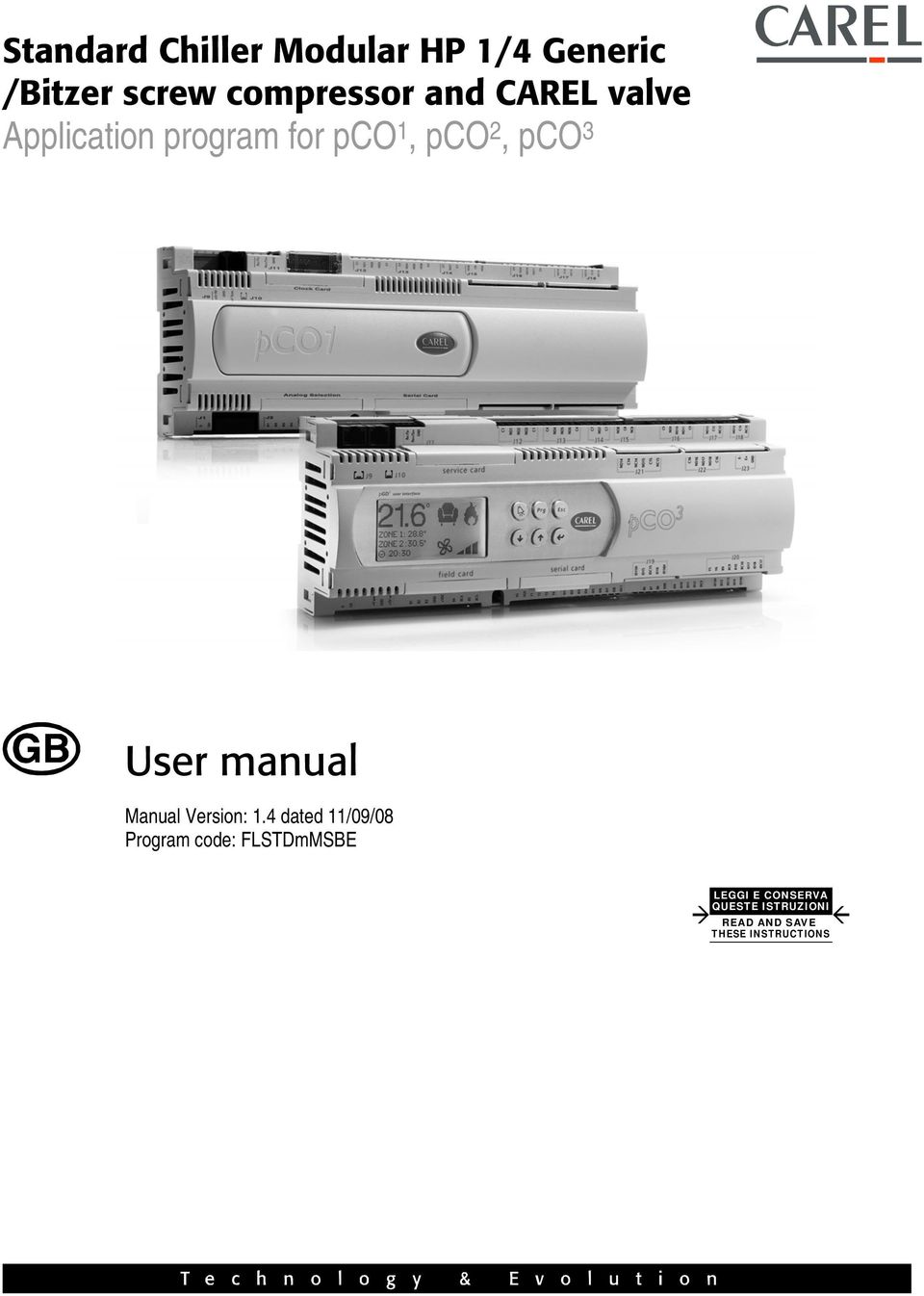
1 Standard Chiller Modular HP 1/4 Generic /Bitzer screw compressor and CAREL valve Application program for pco 1, pco 2, pco 3 User manual Manual Version: 1.4 dated 11/09/08 Program code: FLSTDmMSBE LEGGI E CONSERVA QUESTE ISTRUZIONI READ AND SAVE THESE INSTRUCTIONS
2

3 We wish to save you time and money! We can assure you that the thorough reading of this manual will guarantee correct installation and safe use of the product described. IMPORTANT WARNINGS BEFORE INSTALLING OR HANDLING THE DEVICE PLEASE CAREFULLY READ AND FOLLOW THE INSTRUCTIONS DESCRIBED IN THIS MANUAL. The device this software refers to was built to operate risk free for the intended purposes, providing: software installation, programming, operational control and maintenance must be carried out by qualified personnel according to the instructions in this manual; all the conditions prescribed and contained in the installation and use manual of the application in question are observed. All other uses and modifications made to the device which are not authorised by the manufacturer are considered incorrect. Liability for injury or damage caused by the incorrect use of the device lies exclusively with the user.

4

5 INDEX 1. APPLICATIONS AND FUNCTIONS PERFORMED BY THE SOFTWARE THE USER TERMINAL TYPE AND OPERATION LEDS USE OF THE BUTTONS PLAN MANAGEMENT BETWEEN BOARDS HOW TO ASSIGN THE PLAN ADDRESSES INSTALLATION OF DEFAULT VALUES LANGUAGE OPTION SELECTING THE UNIT OF MEASURE LIST OF INPUTS/OUTPUTS CHILLER-ONLY UNIT - MACHINE TYPE CHILLER UNIT + HEAT PUMP MACHINE TYPE CHILLER UNIT WITH FREECOOLING MACHINE TYPE CHILLER-ONLY UNIT MACHINE TYPE CHILLER UNIT + HEAT PUMP WITH GAS REVERSING MACHINE TYPE CHILLER UNIT + HEAT PUMP WITH WATER REVERSING MACHINE TYPE LIST OF PARAMETERS SCREENS LIST OF SCREENS EVD 200 ELECTRONIC EXPANSION VALVE DRIVER PARAMETERS SPECIAL GO AHEAD FUNCTION UNIT ON/OFF CONTROL CONTROL SET-POINT INLET TEMPERATURE CONTROL OUTLET TEMPERATURE CONTROL CONTROL OF WATER /WATER CHILLER ONLY UNITS CONTROL OF WATER/WATER CHILLER UNIT WITH GAS REVERSING HEAT PUMP CONTROL OF WATER/WATER CHILLER UNIT WITH WATER REVERSING HEAT PUMP TYPES OF CONTROLLED COMPRESSORS STEPPED CAPACITY CONTROL STEPPED CAPACITY CONTROL WITH CONTROL AT INLET STEPPED CAPACITY CONTROL WITH CONTROL AT OUTLET CONTINUOUS CAPACITY CONTROL CONTINUOUS CAPACITY CONTROL WITH CONTROL AT OUTLET IN THE INCREASING ZONE, TB MASK, COMES CONTROLLED EVERY DERIVATIVE TIME IF THE OUTLET TEMPERATURE IS CHANGED IN ORDER MORE THAN 0,2 C. IF THIS IS TRUE THE COMPRESSOR REMAINS IN STAND-BY UNTIL THE NEW CONTROL. THIS MANAGEMENT CAN BE DISABLED WITH DERIVATIVE TIME EQUAL TO COMPRESSOR ROTATION STARTING A SINGLE COMPRESSOR STARTING THE COMPRESSOR MOTOR COMPRESSOR START RESTRICTIONS FORCED CAPACITY CONTROL SOLENOID-VALVE MANAGEMENT PUMP-DOWN CONDENSATION CONTROL ON/OFF CONDENSER CONTROL LINKED TO COMPRESSOR OPERATION ON/OFF CONDENSER CONTROL LINKED TO THE PRESSURE OR TEMPERATURE SENSOR MODULATING CONDENSER CONTROL LINKED TO THE PRESSURE OR TEMPERATURE SENSOR PREVENT FUNCTION DEFROSTING CONTROL FOR WATER/AIR MACHINES TYPES OF DEFROSTING TYPE OF END AND START DEFROST DEFROSTING A CIRCUIT WITH TIME/TEMPERATURE CONTROL DEFROSTING A CIRCUIT WITH TIME/PRESSURE SWITCHES CONTROL OPERATION OF FANS DURING THE DEFROSTING STAGE... 41
6 21. FREE COOLING CONTROL FREE COOLING ACTIVATION CONDITION FREE COOLING THERMOSTAT FREE COOLING DISABLING CONDITIONS FREE COOLING ON/OFF VALVE FREE COOLING ON/OFF VALVE WITH STEPPED CONDENSATION FREE COOLING ON/OFF VALVE WITH INVERTER CONTROLLED CONDENSATION VOLT FREE COOLING ON/OFF VALVE VOLT FREE COOLING ON/OFF VALVE WITH STEPPED CONDENSATION VOLT FREE COOLING VALVE WITH INVERTER CONTROLLED CONDENSATION CONTROL ALGORITHM FOR BITZER SCREW COMPRESSORS PROTECTION START UP PROCEDURE CAPACITY CONTROL ALARMS SERIOUS ALARMS CIRCUIT ALARMS WARNING ONLY ALARMS PRESSURE DIFFERENTIAL ALARM MANAGEMENT ANTIFREEZE CONTROL PCO ALARMS TABLE DRIVER CARD ALARMS ALARM LOG STANDARD LOG ADVANCED LOG LIST OF ALARM LOG CODES SUPERVISOR... 55

7 1. Applications and functions performed by the software Type of control unit AIR / WATER CHILLER Chiller only Chiller + Heat pump Chiller + Freecooling WATER / WATER CHILLER Chiller only Chiller + Heat pump with gas reversing Chiller + Heat pump with water reversing Type of control Proportional or proportional + integral control on the evaporator water inlet temperature probe. Time control of the neutral zone on the evaporator water outlet temperature probe. Types of compressors Screw compressors with 4 capacity control steps Screw compressors with continuous duty capacity control. Bitzer screw compressors Maximum number of compressors From 1 to 4 with a maximum of 4 capacity control steps From 1 to 4 with continuous duty capacity control. (1 compressor for every pco*) (1 compressor for every pco*) Compressor duty call rotation Rotation of all compressors to FIFO logic for stepped and continuous duty capacity control. Condensation Condensation can be performed according to temperature, pressure or ON/OFF Fan management in stepped mode or with 0/10 Volt proportional signal Type of defrosting Overall defrosting of all pco units connected to network: Independent/Simultaneous/Separate Safety devices for all refrigerating circuits High pressure (pressure switch/transducer) Low pressure (pressure switch/transducer) Oil/Oil Level differential pressure switch Compressor thermal cutout Thermal cutout for condensation fan High delivery temperature to compressor Pressure differential alarm Antifreeze alarm Low superheat alarm (only with EVD driver enabled) System Safety devices Serious alarm input (shuts down entire unit) Flow-switch input for evaporator/condenser (shuts down entire unit) Pump thermal cutout input (shuts down entire unit) Remote ON/OFF input. Check electronic expansion valve driver operating status (only with EVD driver enabled) Other functions Alarms logging Built-in terminal management (on pco²-pco 3 only) Management of ratiometric probes for pressure control (on pco 1 -pco 3 only) EVD driver for piloting the EXV valve. Multi-language management. Accessories Supervision with serial card RS485 (CAREL or MODBUS protocol) Supervision with LON serial board Compatible hardware pco¹ Medium, pco² Medium and pco² Medium built-in, pco 3 Medium and pco 3 Medium built-in. Cod.: Rel /09/08 7

8 2. The user terminal 2.1 Type and operation Three different types of user terminal can be connected: 1. PGD0/semigraphic/6 buttons/4 rows - 20 columns/connection via telephone cable 2. LCD/15 buttons/4 rows - 20 columns/connection via telephone cable 3. Built-in display/6 buttons/4 rows - 20 columns (only on pco² - pco 3 board) The user terminal, whichever is used, can perform all the operations allowed by the application program installed. The user terminal displays the operating conditions of the unit. The terminal can be used to modify all the unit operating parameters, in real time. The user terminal is not required for the correct operation of the unit. 2.2 LEDs PGD0 terminal with 6 buttons LEDs Colour Description [ ] button (Alarm) Red On One or more alarm conditions have occurred PRG button Yellow On Unit on Flashing Unit off from supervisor or digital input All the LEDs not described and located underneath the remaining 4 buttons indicate that the instrument is powered. Together with the backlighting of the display, these will be switched off if no button is pressed on the keypad for 5 minutes LCD terminal with 15 buttons Each button has a green LED indicating the specific group of parameters selected during the operations to display/modify the operating parameters. The silicone rubber buttons have three different coloured LEDs, whose meaning is specified in the following table: LEDs Colour Description [ On/Off ] button Green On Unit on Flashing Unit off from supervisor or digital input [ Alarm ] button Red On One or more alarm conditions have occurred [ Enter ] button Yellow On Instrument correctly powered Built-In terminal with 6 buttons Given the number of buttons and LEDs available, these have general meanings, as described below: LEDs Colour Description [ ] button (Alarm) Red On One or more alarm conditions have occurred [ ] button (Enter) Yellow On Unit on Flashing Unit off from supervisor or digital input [ Prg ] button Green On Displaying/modifying the operating parameters [ Esc] button Green On Main menu parameters displayed Cod.: Rel /09/08 8

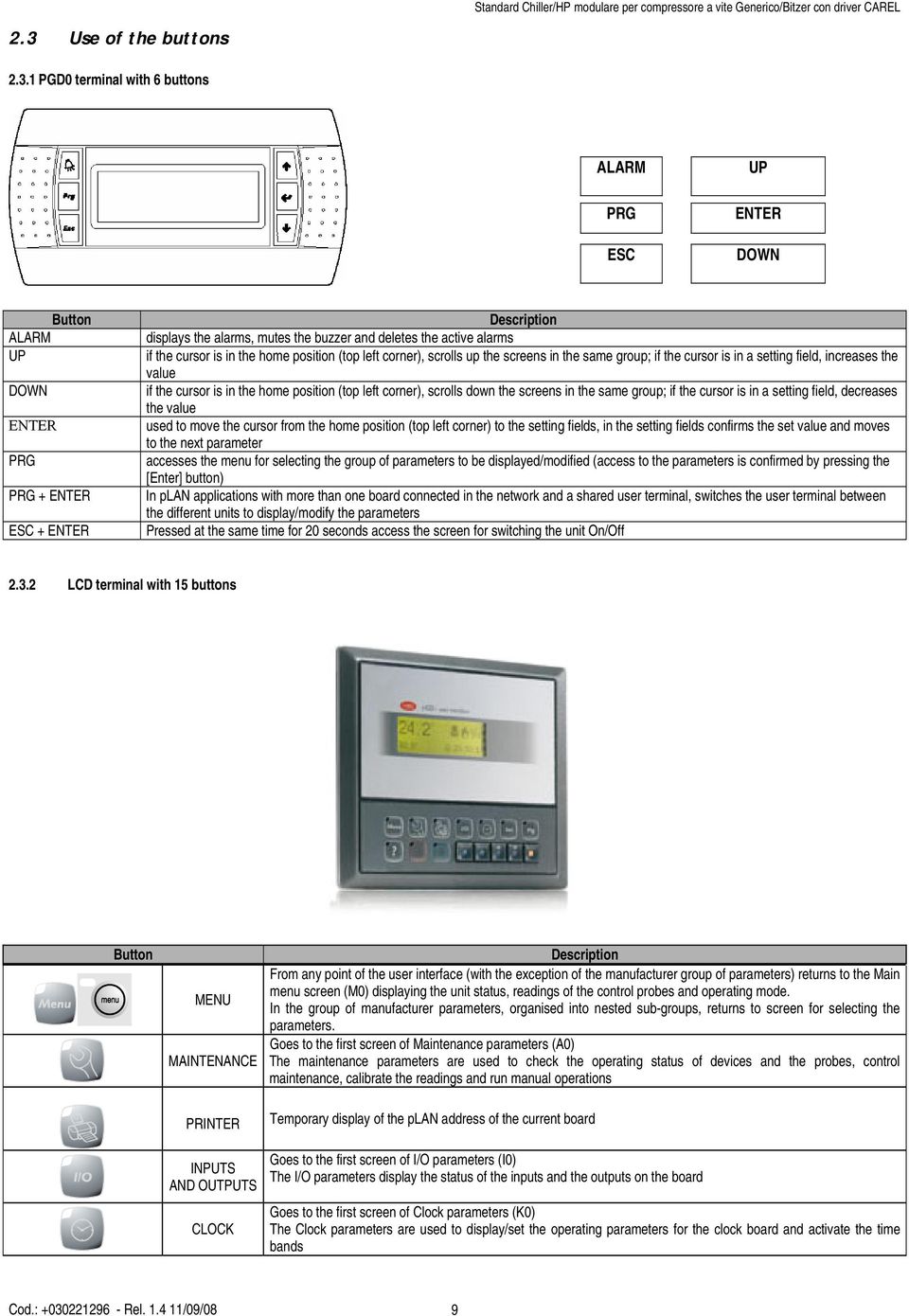
9 2.3 Use of the buttons PGD0 terminal with 6 buttons ALARM PRG ESC UP ENTER DOWN Button ALARM UP DOWN ENTER PRG PRG + ENTER ESC + ENTER Description displays the alarms, mutes the buzzer and deletes the active alarms if the cursor is in the home position (top left corner), scrolls up the screens in the same group; if the cursor is in a setting field, increases the value if the cursor is in the home position (top left corner), scrolls down the screens in the same group; if the cursor is in a setting field, decreases the value used to move the cursor from the home position (top left corner) to the setting fields, in the setting fields confirms the set value and moves to the next parameter accesses the menu for selecting the group of parameters to be displayed/modified (access to the parameters is confirmed by pressing the [Enter] button) In plan applications with more than one board connected in the network and a shared user terminal, switches the user terminal between the different units to display/modify the parameters Pressed at the same time for 20 seconds access the screen for switching the unit On/Off LCD terminal with 15 buttons Button MENU MAINTENANCE PRINTER Description From any point of the user interface (with the exception of the manufacturer group of parameters) returns to the Main menu screen (M0) displaying the unit status, readings of the control probes and operating mode. In the group of manufacturer parameters, organised into nested sub-groups, returns to screen for selecting the parameters. Goes to the first screen of Maintenance parameters (A0) The maintenance parameters are used to check the operating status of devices and the probes, control maintenance, calibrate the readings and run manual operations Temporary display of the plan address of the current board INPUTS AND OUTPUTS CLOCK Goes to the first screen of I/O parameters (I0) The I/O parameters display the status of the inputs and the outputs on the board Goes to the first screen of Clock parameters (K0) The Clock parameters are used to display/set the operating parameters for the clock board and activate the time bands Cod.: Rel /09/08 9
10 Button SET POINT PROGRAM Description Goes to the first screen of Set point parameters (S0). The Set point parameters are used to display/modify the unit working set point within the limits defined in the configuration Goes to the screen for entering the user password (P0) The user parameters are used to modify the unit operating mode + MENU+PROG INFO RED Goes to the screen for entering the manufacturer password (Z0) The manufacturer parameters are used to configure the unit in terms of the number and type of devices connected, enable specific accessories or special functions In plan applications with more than one board connected in the network and a shared user terminal, switches the user terminal between the different units to display/modify the parameters With the unit off, if the chiller+heat pump configuration is featured, enables heating operation BLUE With the unit off, if the chiller+heat pump configuration is featured, enables cooling operation Silicon rubber buttons Button Description 1 ON/OFF switches the unit on/off 2 ALARM displays the alarms, mutes the buzzer and deletes the active alarms 3 UP ARROW if the cursor is in the home position (top left corner), scrolls up the screens in the same group; if the cursor is in a setting field, increases the value 4 DOWN ARROW if the cursor is in the home position (top left corner), scrolls down the screens in the same group; if the cursor is in a setting field, decreases the value 5 ENTER used to move the cursor from the home position (top left corner) to the setting fields, in the setting fields confirms the set value and moves to the next parameter Built-in 6 button terminal ALARM PRG ESC DOWN UP ENTER Button ALARM UP DOWN ENTER PRG PRG + ENTER ESC + ENTER Description displays the alarms, mutes the buzzer and deletes the active alarms if the cursor is in the home position (top left corner), scrolls up the screens in the same group; if the cursor is in a setting field, increases the value if the cursor is in the home position (top left corner), scrolls down the screens in the same group; if the cursor is in a setting field, decreases the value used to move the cursor from the home position (top left corner) to the setting fields, in the setting fields confirms the set value and moves to the next parameter accesses the menu for selecting the group of parameters to be displayed/modified (access to the parameters is confirmed by pressing the [Enter] button) Temporary display of the board plan serial address Pressed at the same time for 20 seconds access the screen for switching the unit On/Off Cod.: Rel /09/08 10

11 3. plan management between boards The plan network identifies a physical connection between the cards (pco1 pco 2, pco 3 ) and the external terminals. plan=p.co L.ocal A.rea N.etwork.. The purpose of the plan network connection between the cards is to exchange variables among the cards with a logic decided by the program, in order to make the cards work together functionally. The variables exchanged among the cards have already been established by the program, and likewise their direction of origin and destination. Therefore, the user does not have to set them, but has only make the electrical connections. The following is a layout of the plan network The main MO mask shows the address of the connected card in the bottom left-hand corner. With the terminal showing 32, it is possible to view all the boards without the need for other terminals. 3.1 How to assign the plan addresses The plan addresses have to be unequivocal and correspond with the diagram shown above. There are various means of assigning the plan address PGD0 Terminal To direct (default level is 32) a PGD0 terminal, one has to: 1. Provide the terminal with voltage 2. Press the Up + Down + ENTER buttons until a display address setting appears 3. Type in the numerical plan address with the Up and Down buttons, then confirm by pressing Enter 4. The No link screen appears 5. If the NO Link screen does not appear, press Up + Down + ENTER again 6. Once the display address setting screen appears, press Enter 3 times Once the adr Priv/shard screen appears, set the correct levels and confirm by typing in YES pco 1 - pco 3 addressing Here is a description of the operations necessary for addressing plan from the pco 1, pco 3 cards. 1. Power down the pco 1 card and connect a LCD 4x20 / PGD0 terminal with the plan "0" address. 2. Power up the pco1 card, by holding down the Alarm + Up keys until a mask appears 3. When the plan Address screen is shown, perform the indicated operations, i.e. insert the numeric (1,2,.3 or 4 ) plan address with the Up and Down keys and then confirm by pressing Enter. 4. Power down the pco* card. 5. If necessary, assign the correct plan address to the external terminal if specified. 6. Power up the pco* card pco 2 addressing, PCOI/PCOT terminals and EVD-200 valve driver The plan addresses on these are set with binary logic, changing the position of a group of dip-switches located at the back of the pcoi / PCOT terminals, on the pco2 cards and inside the EVD-200 electronic valve drivers, with all the devices compulsorily powered down. For further information, consult the specific manual for the device. In all the other screens in the program, to display the address of the board that is currently connected, press the printer button or Enter+Prg, depending on the terminal used. Cod.: Rel /09/08 11

12 4. Installation of default values When you have checked the connections between the cards and terminals, power up the pco card/s*. When the machine is powered up, the software automatically installs the default values selected by CAREL for all the chiller and driver configuration parameters. This section tells you how to reset default values to return to the initial conditions. Therefore, this operation need not be carried out at the first power-up. The following procedure is used for resetting all the in-plant configuration parameters selected by CAREL: ATTENTION! this procedure irreversibly cancels any programming done by the user As resetting the default values is an operation that concerns each pco* card, if there are two or more cards, repeat the operation for each card. The procedure is identical for all the cards. These are the steps: press the menu and prog keys simultaneously on the terminal with 15 keys (PRG in the terminals with 6 keys). Once they have been pressed, both the LED above the menu key and the one above the prog key should light up (lighting up of LEDs on the PRG key in the terminals with 6 keys). Input the password using the "arrow" keys and press Enter: in this way, you enter the "constructor" configuration : Manufacturer Type in password press the up arrow key to rapidly reach the default values installation screen: Erase memory V0 Install global default values S Please wait press the "enter" key to position the cursor above the letter "N", and take it to "S" with the arrow keys. The "please wait " words appear immediately. The following screen will appear after a few seconds: DEFAULT STATUS: 1: 2:? 3:? 4:- Default complete > Switch-off unit <? Default in process > to data confirm < - No unit wait for the defaults to have been installed in all the units, then restart the units. 5. Language option When the unit is powered up, a screen appears by default, where you can select the language to be used (Italian/English/French/German/Spanish). This mask stays active for 30 seconds. When this time has elapsed, the program automatically changes over to the main menu (M0 screen) This function can be disabled. How to disable it: 1. Press the PROG (PRG) button and access P0 screen 2. Enter the correct password. 3. Go to screen Pc, pressing the down arrow repeatedly 4. Select "N" under item "Show language screen at start-up". In any case, you can change the language in use at any time. To do this, all it takes is to go to the third screen (Ak) in the maintenance menu. 6. Selecting the unit of measure The unit can be configured for operation with different units of measure for the temperature and pressure, depending on the target market. The options are metric ( C / Bar) or imperial ( F / Psi ). To change the setting, proceed as follows: 1. Press the PROG (PRG) button and access P0 screen 2. enter the correct password; 3. go to screen Pm, pressing the down arrow repeatedly; 4. choose METRIC or IMPERIAL for the item Type of unit of measure. After the selection has been made, all the parameters are converted into the new unit of measure. Cod.: Rel /09/08 12

13 7. List of inputs/outputs Inputs and outputs are listed below based on unit type. A number has been associated with each type of machine. This number is the program's main parameter because it identifies the inputs and outputs configuration. Using this list of inputs and outputs, select the number you require from the numbers associated in the program configuration screens. AIR/WATER UNIT WITH MAX. 4 SCREW COMPRESSORS (UP TO 4 CAPACITY STAGES PER COMPRESSOR) 7.1 CHILLER-ONLY UNIT - MACHINE TYPE 0 DIGITAL INPUTS N pco2 / pco3 MEDIUM pco¹ MEDIUM Master (Address 1) Slave (addresses 2/3/4) Master (Address 1) Slave (addresses 2/3/4) ID 1 Serious Alarm Serious Alarm Serious Alarm Serious Alarm ID 2 Evaporator Flow-switch Evaporator Flow-switch Evaporator Flow-switch Evaporator Flow-switch ID 3 Remote ON/OFF Remote ON/OFF Remote ON/OFF Remote ON/OFF ID 4 Pump Thermal cutout Pump Thermal cutout ID 5 Low Pressure 2 Pressure-switch Low Pressure 2 Pressure-switch Low Pressure 2 Pressure-switch Low Pressure 2 Pressure-switch ID 6 Differential / Oil Level Differential / Oil Level Differential / Oil Level Differential / Oil Level ID 7 Phase monitor Phase monitor Phase monitor Phase monitor ID 8 Double Set-point Double Set-point ID 9 Fan 1 Thermal cutout Fan 1 Thermal cutout Fan 1 Thermal cutout Fan 1 Thermal cutout ID10 Fan 2 Thermal cutout Fan 2 Thermal cutout Fan 2 Thermal cutout Fan 2 Thermal cutout ID11 High Pressure Pressure-switch High Pressure Pressure-switch High Pressure Pressure-switch High Pressure Pressure-switch ID12 Compressor Thermal cutout Compressor Thermal cutout Compressor Thermal cutout Compressor Thermal cutout ID13 ID14 ANALOGUE INPUTS N pco2 / pco3 MEDIUM pco¹ MEDIUM Master (Address 1) Slave (addresses 2/3/4) Master (Address 1) Slave (addresses 2/3/4) B1 Water temperature at Evaporator High Pressure (3) High Pressure (3) Inlet (1) B2 Water temp. at Evaporator Outlet (1) Water temp. at Evaporator Outlet (1) Low Pressure (3) Low Pressure (3) B3 Voltage/Current/Ext. Set point (6) Voltage / Current (6) B4 Outlet Temperature (4) Outlet Temperature (4) Outlet Temperature (2) Outlet Temperature (2) B5 Condenser Temperature (1) Condenser temperature Water temp. at Evaporator Inlet (1) B6 Voltage/Current/Ext. Set-point (5) Voltage / Current (5) Water temp. at Evaporator Outlet (1) Water temp. at Evaporator Outlet (1) B7 High Pressure (2) High Pressure (2) Condenser Temperature (1) Condenser Temperature (1) B8 Low Pressure (2) Low Pressure (2) (1) NTC (2) 4-20 ma (3) 4-20mA/0-5V (4) NTC-HT/4-20mA/NTC/PT1000 (5) 4-20mA/0-1V/0-10V (6) 4-20mA/0-1V (7) NTC-HT/4-20mA/NTC DIGITAL OUTPUTS N pco2 / pco3 MEDIUM pco¹ MEDIUM Master (Address 1) Slave (addresses 2/3/4) Master (Address 1) Slave (addresses 2/3/4) Generic Bitzer Generic Bitzer Generic Bitzer Generic Bitzer NO1 Relay 1 CR1 Relay 1 CR1 Relay 1 CR1 Relay 1 CR1 NO2 Relay 2 CR2 Relay 2 CR2 Relay 2 CR2 Relay 2 CR2 NO3 Circulation Pump Circulation Pump NO 4 Fan 1 Fan 1 Fan 1 Fan 1 NO 5 Liquid Solenoid Liquid Solenoid Liquid Solenoid Liquid Solenoid NO 6 Antifreeze Heater Antifreeze Heater Antifreeze Heater Antifreeze Heater NO 7 Relay 3 CR3 Relay 3 CR3 Relay 3 CR3 Relay 3 CR3 NO 8 General Alarm General Alarm General Alarm General Alarm NO 9 Liquid inj./econ/oil Cooler Liquid inj./econ/oil Cooler Liquid inj./econ/oil Cooler Liquid inj./econ/oil Cooler NO10 Line Contactor PW1 Line Contactor PW1 Line Contactor PW1 Line Contactor PW1 NO11 Triangle Contactor PW2 Triangle Contactor PW2 Triangle Contactor PW2 Triangle Contactor PW2 NO12 Star Contactor CR4 Star Contactor CR4 Star Contactor CR4 Star Contactor CR4 NO13 Fan 2 Fan 2 Fan 2 Fan 2 ANALOGUE OUTPUTS N pco2 / pco3 MEDIUM pco1 MEDIUM Master (Address 1) Slave (addresses 2/3/4) Master (Address 1) Slave (addresses 2/3/4) Y1 Speed Controller Speed Controller Speed Controller Speed Controller Y2 Y3 Y4 Cod.: Rel /09/08 13

14 7.2 CHILLER UNIT + HEAT PUMP MACHINE TYPE 1 DIGITAL INPUTS N pco2 / pco3 MEDIUM pco1 MEDIUM Master (Address 1) Slave (addresses 2/3/4) Master (Address 1) Slave (addresses 2/3/4) ID 1 Serious Alarm Serious Alarm Serious Alarm Serious Alarm ID 2 Evaporator Flow-switch Evaporator Flow-switch Evaporator Flow-switch Evaporator Flow-switch ID 3 Remote ON/OFF Remote ON/OFF Remote ON/OFF Remote ON/OFF ID 4 Pump Thermal cutout Pump Thermal cutout ID 5 Low Pressure 2 Pressure-switch Low Pressure 2 Pressure-switch Low Pressure 2 Pressure-switch Low Pressure 2 Pressure-switch ID 6 Differential / Oil Level Differential / Oil Level Differential / Oil Level Differential / Oil Level ID 7 Phase monitor Phase monitor Phase monitor Phase monitor ID 8 Double Set-point Double Set-point ID 9 Fan 1 Thermal cutout Fan 1 Thermal cutout Fan 1 Thermal cutout Fan 1 Thermal cutout ID10 Summer / Winter Summer / Winter ID11 High Pressure Pressure-switch High Pressure Pressure-switch High Pressure Pressure-switch High Pressure Pressure-switch ID12 Compressor Thermal cutout Compressor Thermal Cutouts Compressor Thermal cutout Compressor Thermal Cutouts ID13 ID14 ANALOGUE INPUTS N pco2 / pco3 MEDIUM pco1 MEDIUM Master (Address 1) Slave (addresses 2/3/4) Master (Address 1) Slave (addresses 2/3/4) B1 Water temperature at Evaporator High Pressure (3) High Pressure (3) B2 Inlet (1) Water temperature at Evaporator Outlet (1) Water temperature at Evaporator Outlet (1) Low Pressure (3) Low Pressure (3) B3 Voltage / Current / External Setpoint(6) Voltage / Current (6) B4 Outlet Temperature (4) Outlet Temperature (4) Outlet Temperature (7) Outlet Temperature (7) B5 Condenser temperature Condenser temperature Water temperature at Evaporator Inlet (1) B6 Voltage / Current / External Setpoint Voltage / Current (5) Water temperature at Evaporator Outlet (1) Water temperature at Evaporator Outlet (1) B7 High Pressure (2) High Pressure (2) Condenser temperature Condenser temperature B8 Low Pressure (2) Low Pressure (2) (1) NTC (2) 4-20 ma (3) 4-20mA/0-5V (4) NTC-HT/4-20mA/NTC/PT1000 (5) 4-20mA/0-1V/0-10V (6) 4-20mA/0-1V (7) NTC-HT/4-20mA/NTC DIGITAL OUTPUTS N pco2 / pco3 MEDIUM pco1 MEDIUM Master (Address 1) Slave (addresses 2/3/4) Master (Address 1) Slave (addresses 2/3/4) Generic Bitzer Generic Bitzer Generic Bitzer Generic Bitzer NO1 Relay 1 CR1 Relay 1 CR1 Relay 1 CR1 Relay 1 CR1 NO2 Relay 2 CR2 Relay 2 CR2 Relay 2 CR2 Relay 2 CR2 NO3 Circulation Pump Circulation Pump NO 4 Fan 1 Fan 1 Fan 1 Fan 1 NO 5 Liquid Solenoid Liquid Solenoid Liquid Solenoid Liquid Solenoid NO 6 Antifreeze Heater Antifreeze Heater Antifreeze Heater Antifreeze Heater NO 7 Relay 3 CR3 Relay 3 CR3 Relay 3 CR3 Relay 3 CR3 NO 8 General Alarm General Alarm General Alarm General Alarm NO 9 Liquid inj./econ/oil Cooler Liquid inj./econ/oil Cooler Liquid inj./econ/oil Cooler Liquid inj./econ/oil Cooler NO10 Line Contactor PW1 Line Contactor PW1 Line Contactor PW1 Line Contactor PW1 NO11 Triangle Contactor PW2 Triangle Contactor PW2 Triangle Contactor PW2 Triangle Contactor PW2 NO12 Star Contactor CR4 Star Contactor CR4 Star Contactor CR4 Star Contactor CR4 NO13 4-way Valve 4-way Valve 4-way Valve 4-way Valve ANALOGUE OUTPUTS N pco2 / pco3 MEDIUM pco1 MEDIUM Master (Address 1) Slave (addresses 2/3/4) Master (Address 1) Slave (addresses 2/3/4) Y1 Y2 Speed Controller Speed Controller Speed Controller Speed Controller Y3 Y4 Cod.: Rel /09/08 14

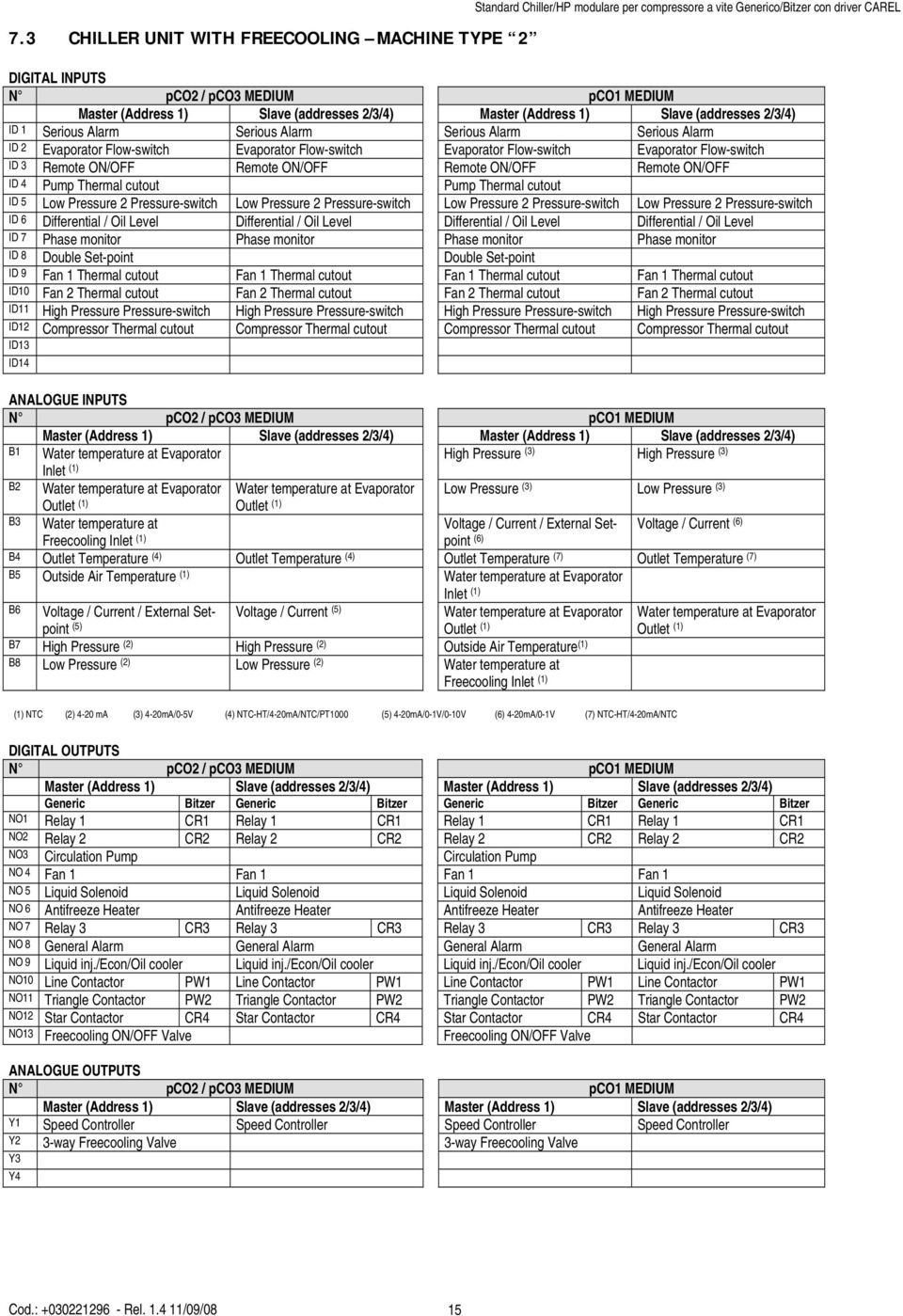
15 7.3 CHILLER UNIT WITH FREECOOLING MACHINE TYPE 2 DIGITAL INPUTS N pco2 / pco3 MEDIUM pco1 MEDIUM Master (Address 1) Slave (addresses 2/3/4) Master (Address 1) Slave (addresses 2/3/4) ID 1 Serious Alarm Serious Alarm Serious Alarm Serious Alarm ID 2 Evaporator Flow-switch Evaporator Flow-switch Evaporator Flow-switch Evaporator Flow-switch ID 3 Remote ON/OFF Remote ON/OFF Remote ON/OFF Remote ON/OFF ID 4 Pump Thermal cutout Pump Thermal cutout ID 5 Low Pressure 2 Pressure-switch Low Pressure 2 Pressure-switch Low Pressure 2 Pressure-switch Low Pressure 2 Pressure-switch ID 6 Differential / Oil Level Differential / Oil Level Differential / Oil Level Differential / Oil Level ID 7 Phase monitor Phase monitor Phase monitor Phase monitor ID 8 Double Set-point Double Set-point ID 9 Fan 1 Thermal cutout Fan 1 Thermal cutout Fan 1 Thermal cutout Fan 1 Thermal cutout ID10 Fan 2 Thermal cutout Fan 2 Thermal cutout Fan 2 Thermal cutout Fan 2 Thermal cutout ID11 High Pressure Pressure-switch High Pressure Pressure-switch High Pressure Pressure-switch High Pressure Pressure-switch ID12 Compressor Thermal cutout Compressor Thermal cutout Compressor Thermal cutout Compressor Thermal cutout ID13 ID14 ANALOGUE INPUTS N pco2 / pco3 MEDIUM pco1 MEDIUM Master (Address 1) Slave (addresses 2/3/4) Master (Address 1) Slave (addresses 2/3/4) B1 Water temperature at Evaporator High Pressure (3) High Pressure (3) Inlet (1) B2 Water temperature at Evaporator Water temperature at Evaporator Low Pressure (3) Low Pressure (3) Outlet (1) Outlet (1) B3 Water temperature at Voltage / Current / External Setpoint Voltage / Current (6) Freecooling Inlet (1) (6) B4 Outlet Temperature (4) Outlet Temperature (4) Outlet Temperature (7) Outlet Temperature (7) B5 Outside Air Temperature (1) Water temperature at Evaporator Inlet (1) B6 Voltage / Current / External Setpoint Voltage / Current (5) Water temperature at Evaporator Outlet (1) Water temperature at Evaporator Outlet (1) B7 High Pressure (2) High Pressure (2) Outside Air Temperature (1) B8 Low Pressure (2) Low Pressure (2) Water temperature at Freecooling Inlet (1) (1) NTC (2) 4-20 ma (3) 4-20mA/0-5V (4) NTC-HT/4-20mA/NTC/PT1000 (5) 4-20mA/0-1V/0-10V (6) 4-20mA/0-1V (7) NTC-HT/4-20mA/NTC DIGITAL OUTPUTS N pco2 / pco3 MEDIUM pco1 MEDIUM Master (Address 1) Slave (addresses 2/3/4) Master (Address 1) Slave (addresses 2/3/4) Generic Bitzer Generic Bitzer Generic Bitzer Generic Bitzer NO1 Relay 1 CR1 Relay 1 CR1 Relay 1 CR1 Relay 1 CR1 NO2 Relay 2 CR2 Relay 2 CR2 Relay 2 CR2 Relay 2 CR2 NO3 Circulation Pump Circulation Pump NO 4 Fan 1 Fan 1 Fan 1 Fan 1 NO 5 Liquid Solenoid Liquid Solenoid Liquid Solenoid Liquid Solenoid NO 6 Antifreeze Heater Antifreeze Heater Antifreeze Heater Antifreeze Heater NO 7 Relay 3 CR3 Relay 3 CR3 Relay 3 CR3 Relay 3 CR3 NO 8 General Alarm General Alarm General Alarm General Alarm NO 9 Liquid inj./econ/oil cooler Liquid inj./econ/oil cooler Liquid inj./econ/oil cooler Liquid inj./econ/oil cooler NO10 Line Contactor PW1 Line Contactor PW1 Line Contactor PW1 Line Contactor PW1 NO11 Triangle Contactor PW2 Triangle Contactor PW2 Triangle Contactor PW2 Triangle Contactor PW2 NO12 Star Contactor CR4 Star Contactor CR4 Star Contactor CR4 Star Contactor CR4 NO13 Freecooling ON/OFF Valve Freecooling ON/OFF Valve ANALOGUE OUTPUTS N pco2 / pco3 MEDIUM pco1 MEDIUM Master (Address 1) Slave (addresses 2/3/4) Master (Address 1) Slave (addresses 2/3/4) Y1 Speed Controller Speed Controller Speed Controller Speed Controller Y2 3-way Freecooling Valve 3-way Freecooling Valve Y3 Y4 Cod.: Rel /09/08 15
16 WATER/WATER UNIT WITH MAX. 4 SCREW COMPRESSORS (UP TO 4 CAPACITY STAGES PER COMPRESSOR) 7.4 CHILLER-ONLY UNIT MACHINE TYPE 3 DIGITAL INPUTS N pco2 / pco3 MEDIUM pco1 MEDIUM Master (Address 1) Slave (addresses 2/3/4) Master (Address 1) Slave (addresses 2/3/4) ID 1 Serious Alarm Serious Alarm Serious Alarm Serious Alarm ID 2 Evaporator Flow-switch Evaporator Flow-switch Evaporator Flow-switch Evaporator Flow-switch ID 3 Remote ON/OFF Remote ON/OFF Remote ON/OFF Remote ON/OFF ID 4 Evaporator Pump thermal Cutout Evaporator Pump thermal Cutout ID 5 Low Pressure 2 Pressure-switch Low Pressure 2 Pressure-switch Low Pressure 2 Pressure-switch Low Pressure 2 Pressure-switch ID 6 Differential / Oil Level Differential / Oil Level Differential / Oil Level Differential / Oil Level ID 7 Phase monitor Phase monitor Phase monitor Phase monitor ID 8 Double Set-point Double Set-point ID 9 Evaporator Flow-switch Evaporator Flow-switch Evaporator Flow-switch Evaporator Flow-switch (Enablable) (Enablable) (Enablable) (Enablable) ID10 Condenser Pump thermal Cutout Condenser Pump thermal Cutout ID11 High Pressure Pressure-switch High Pressure Pressure-switch High Pressure Pressure-switch High Pressure Pressure-switch ID12 Compressor Thermal cutout Compressor Thermal cutout Compressor Thermal cutout Compressor Thermal cutout ID13 ID14 ANALOGUE INPUTS N pco2 / pco3 MEDIUM pco1 MEDIUM Master (Address 1) Slave (addresses 2/3/4) Master (Address 1) Slave (addresses 2/3/4) B1 Water temperature at Evaporator High Pressure (3) High Pressure (3) Inlet (1) B2 Water temperature at Evaporator Water temperature at Evaporator Low Pressure (3) Low Pressure (3) Outlet (1) Outlet (1) B3 Water temperature at Condenser Water temperature at Condenser Voltage / Current / External Setpoint Voltage / Current (6) Outlet (1) Outlet (1) (6) B4 Outlet Temperature (4) Outlet Temperature (4) Outlet Temperature (7) Outlet Temperature (7) B5 Water temperature at Condenser Inlet (1) Water temperature at Evaporator Inlet (1) Voltage / Current (5) B6 Voltage / Current / External Setpoint Water temperature at Evaporator Outlet (1) B7 High Pressure (2) High Pressure (2) Water temperature at Condenser Inlet (1) B8 Low Pressure (2) Low Pressure (2) Water temperature at Condenser Outlet (1) Water temperature at Evaporator Outlet (1) Water temperature at Condenser Outlet (1) (1) NTC (2) 4-20 ma (3) 4-20mA/0-5V (4) NTC-HT/4-20mA/NTC/PT1000 (5) 4-20mA/0-1V/0-10V (6) 4-20mA/0-1V (7) NTC-HT/4-20mA/NTC DIGITAL OUTPUTS N pco2 / pco3 MEDIUM pco1 MEDIUM Master (Address 1) Slave (addresses 2/3/4) Master (Address 1) Slave (addresses 2/3/4) Generic Bitzer Generic Bitzer Generic Bitzer Generic Bitzer NO1 Relay 1 CR1 Relay 1 CR1 Relay 1 CR1 Relay 1 CR1 NO2 Relay 2 CR2 Relay 2 CR2 Relay 2 CR2 Relay 2 CR2 NO3 Evaporator Pump Evaporator Pump NO 4 Condenser Pump Condenser Pump NO 5 Liquid Solenoid Liquid Solenoid Liquid Solenoid Liquid Solenoid NO 6 Antifreeze Heater Antifreeze Heater Antifreeze Heater Antifreeze Heater NO 7 Relay 3 CR3 Relay 3 CR3 Relay 3 CR3 Relay 3 CR3 NO 8 General Alarm General Alarm General Alarm General Alarm NO 9 Liquid inj./econ/oil Cooler Liquid inj./econ/oil Cooler Liquid inj./econ/oil Cooler Liquid inj./econ/oil Cooler NO10 Line Contactor PW1 Line Contactor PW1 Line Contactor PW1 Line Contactor PW1 NO11 Triangle Contactor PW2 Triangle Contactor PW2 Triangle Contactor PW2 Triangle Contactor PW2 NO12 Star Contactor CR4 Star Contactor CR4 Star Contactor CR4 Star Contactor CR4 NO13 ANALOGUE OUTPUTS N pco2 / pco3 MEDIUM pco1 MEDIUM Master (Address 1) Slave (addresses 2/3/4) Master (Address 1) Slave (addresses 2/3/4) Y1 Y2 Y3 Y4 Cod.: Rel /09/08 16

17 7.5 CHILLER UNIT + HEAT PUMP WITH GAS REVERSING MACHINE TYPE 4 DIGITAL INPUTS N pco2 / pco3 MEDIUM pco1 MEDIUM Master (Address 1) Slave (addresses 2/3/4) Master (Address 1) Slave (addresses 2/3/4) ID 1 Serious Alarm Serious Alarm Serious Alarm Serious Alarm ID 2 Evaporator Flow-switch Evaporator Flow-switch Evaporator Flow-switch Evaporator Flow-switch ID 3 remote ON/OFF remote ON/OFF ID 4 Evaporator Pump thermal Cutout Evaporator Pump thermal Cutout ID 5 Low Pressure Pressure-switch Low Pressure Pressure-switch Low Pressure Pressure-switch Low Pressure Pressure-switch ID 6 Oil differential / Oil Level Oil differential / Oil Level Oil differential / Oil Level Oil differential / Oil Level ID 7 Phase monitor Phase monitor Phase monitor Phase monitor ID 8 Double Set-point Double Set-point ID 9 Evaporator Flow-switch Evaporator Flow-switch Evaporator Flow-switch Evaporator Flow-switch (Enablable) (Enablable) (Enablable) (Enablable) ID10 Summer / Winter Summer / Winter ID11 High pressure pressure-switch High pressure pressure-switch High pressure pressure-switch High pressure pressure-switch ID12 Compressor Thermal cutout Compressor Thermal cutout Compressor Thermal cutout Compressor Thermal cutout ID13 ID14 ANALOGUE INPUTS N pco2 / pco3 MEDIUM pco1 MEDIUM Master (Address 1) Slave (addresses 2/3/4) Master (Address 1) Slave (addresses 2/3/4) B1 Water temperature at Evaporator High Pressure (3) High Pressure (3) Inlet (1) B2 Water temperature at Evaporator Water temperature at Evaporator Low Pressure (3) Low Pressure (3) Outlet (1) Outlet (1) B3 Water temperature at Condenser Water temperature at Condenser Voltage / Current / External Setpoint Voltage / Current (6) Outlet (1) Outlet (1) (6) B4 Outlet Temperature (4) Outlet Temperature (4) Outlet Temperature (7) Outlet Temperature (7) B5 Water temperature at Condenser Inlet (1) Water temperature at Evaporator Inlet (1) B6 Voltage / Current / External Setpoint Voltage / Current (5) Water temperature at Evaporator Outlet (1) Water temperature at Evaporator Outlet (1) B7 High Pressure (2) High Pressure (2) Water temperature at Condenser Inlet (1) B8 Low Pressure (2) Low Pressure (2) Water temperature at Condenser Outlet (1) Water temperature at Condenser Outlet (1) (1) NTC (2) 4-20 ma (3) 4-20mA/0-5V (4) NTC-HT/4-20mA/NTC/PT1000 (5) 4-20mA/0-1V/0-10V (6) 4-20mA/0-1V (7) NTC-HT/4-20mA/NTC DIGITAL OUTPUTS N pco2 / pco3 MEDIUM pco1 MEDIUM Master (Address 1) Slave (addresses 2/3/4) Master (Address 1) Slave (addresses 2/3/4) Generic Bitzer Generic Bitzer Generic Bitzer Generic Bitzer NO1 Relay 1 CR1 Relay 1 CR1 Relay 1 CR1 Relay 1 CR1 NO2 Relay 2 CR2 Relay 2 CR2 Relay 2 CR2 Relay 2 CR2 NO3 Evaporator Pump Evaporator Pump NO 4 Condenser Pump Condenser Pump NO 5 Liquid Solenoid Liquid Solenoid Liquid Solenoid Liquid Solenoid NO 6 Antifreeze Heater Antifreeze Heater Antifreeze Heater Antifreeze Heater NO 7 Relay 3 CR3 Relay 3 CR3 Relay 3 CR3 Relay 3 CR3 NO 8 General Alarm General Alarm General Alarm General Alarm NO 9 Liquid inj./econ/oil Cooler Liquid inj./econ/oil Cooler Liquid inj./econ/oil Cooler Liquid inj./econ/oil Cooler NO10 Line Contactor PW1 Line Contactor PW1 Line Contactor PW1 Line Contactor PW1 NO11 Triangle Contactor PW2 Triangle Contactor PW2 Triangle Contactor PW2 Triangle Contactor PW2 NO12 Star Contactor CR4 Star Contactor CR4 Star Contactor CR4 Star Contactor CR4 NO13 4-way Valve 4-way Valve 4-way Valve 4-way Valve ANALOGUE OUTPUTS N pco2 / pco3 MEDIUM pco1 MEDIUM Master (Address 1) Slave (addresses 2/3/4) Master (Address 1) Slave (addresses 2/3/4) Y1 Y2 Y3 Y4 Cod.: Rel /09/08 17

18 7.6 CHILLER UNIT + HEAT PUMP WITH WATER REVERSING MACHINE TYPE 5 DIGITAL INPUTS N pco² MEDIUM pco¹ MEDIUM Master (Address 1) Slave (addresses 2/3/4) Master (Address 1) Slave (addresses 2/3/4) ID 1 Serious Alarm Serious Alarm Serious Alarm Serious Alarm ID 2 Evaporator Flow-switch Evaporator Flow-switch Evaporator Flow-switch Evaporator Flow-switch ID 3 Remote ON/OFF Remote ON/OFF Remote ON/OFF Remote ON/OFF ID 4 Evaporator Pump thermal Cutout Evaporator Pump thermal Cutout ID 5 Low Pressure Pressure-switch Low Pressure Pressure-switch Low Pressure Pressure-switch Low Pressure Pressure-switch ID 6 Oil 1 differential / Oil Level Oil 2 differential / Oil Level Oil 1 differential / Oil Level Oil 2 differential / Oil Level ID 7 Phase monitor Phase monitor Phase monitor Phase monitor ID 8 Double Set-point Double Set-point ID 9 Evaporator Flow-switch Evaporator Flow-switch Evaporator Flow-switch Evaporator Flow-switch (Enablable) (Enablable) (Enablable) (Enablable) ID10 Summer / Winter Summer / Winter ID11 High pressure pressure-switch High pressure pressure-switch High pressure pressure-switch High pressure pressure-switch ID12 Compressor Thermal cutout Compressor Thermal cutout Compressor Thermal cutout Compressor Thermal cutout ID13 ID14 ANALOGUE INPUTS N pco2 / pco3 MEDIUM pco1 MEDIUM Master (Address 1) Slave (addresses 2/3/4) Master (Address 1) Slave (addresses 2/3/4) B1 Water temperature at Evaporator High Pressure (3) High Pressure (3) Inlet (1) B2 Water temperature at Evaporator Water temperature at Evaporator Low Pressure (3) Low Pressure (3) Outlet (1) Outlet (1) B3 Water temperature at Condenser Water temperature at Condenser Voltage / Current / External Setpoint Voltage / Current (6) Outlet (1) Outlet (1) (6) B4 Outlet Temperature (4) Outlet Temperature (4) Outlet Temperature (7) Outlet Temperature (7) B5 Water temperature at Condenser Inlet (1) Water temperature at Evaporator Inlet (1) B6 Voltage / Current / External Setpoint Voltage / Current (5) Water temperature at Evaporator Outlet (1) Water temperature at Evaporator Outlet (1) B7 High Pressure (2) High Pressure (2) Water temperature at Condenser Inlet (1) B8 Low Pressure (2) Low Pressure (2) Water temperature at Condenser Outlet (1) Water temperature at Condenser Outlet (1) (1) NTC (2) 4-20 ma (3) 4-20mA/0-5V (4) NTC-HT/4-20mA/NTC/PT1000 (5) 4-20mA/0-1V/0-10V (6) 4-20mA/0-1V (7) NTC-HT/4-20mA/NTC DIGITAL OUTPUTS N pco2 / pco3 MEDIUM pco1 MEDIUM Master (Address 1) Slave (addresses 2/3/4) Master (Address 1) Slave (addresses 2/3/4) Generic Bitzer Generic Bitzer Generic Bitzer Generic Bitzer NO1 Relay 1 CR1 Relay 1 CR1 Relay 1 CR1 Relay 1 CR1 NO2 Relay 2 CR2 Relay 2 CR2 Relay 2 CR2 Relay 2 CR2 NO3 Evaporator Pump Evaporator Pump NO 4 Condenser Pump Condenser Pump NO 5 Liquid Solenoid Liquid Solenoid Liquid Solenoid Liquid Solenoid NO 6 Antifreeze Heater Antifreeze Heater Antifreeze Heater Antifreeze Heater NO 7 Relay 3 CR3 Relay 3 CR3 Relay 3 CR3 Relay 3 CR3 NO 8 General Alarm General Alarm General Alarm General Alarm NO 9 Liquid inj./econ/oil Cooler Liquid inj./econ/oil Cooler Liquid inj./econ/oil Cooler Liquid inj./econ/oil Cooler NO10 Line Contactor PW1 Line Contactor PW1 Line Contactor PW1 Line Contactor PW1 NO11 Triangle Contactor PW2 Triangle Contactor PW2 Triangle Contactor PW2 Triangle Contactor PW2 NO12 Star Contactor CR4 Star Contactor CR4 Star Contactor CR4 Star Contactor CR4 NO13 4-way Valve 4-way Valve 4-way Valve 4-way Valve ANALOGUE OUTPUTS N pco2 / pco3 MEDIUM pco1 MEDIUM Master (Address 1) Slave (addresses 2/3/4) Master (Address 1) Slave (addresses 2/3/4) Y1 Y2 Y3 Y4 Cod.: Rel /09/08 18

19 8. List of parameters Cod.: Rel /09/08 19 The table below describes program parameters along with the following additional information: screen code (screens have a code in the top right corner) to make identifying the parameter easier (screen), factory setting, upper and lower limits of the range within which values can be effected, unit of measurement, and an empty column for writing the desired value. To find the parameter you are interested in on the terminal s display, proceed as follows: Locate the parameter in the table below and the code of the screen it appears on Using the list of screens (coming section) and screen code, call up the screen on the terminal DESCRIPTION OF PARAMETER SCREEN MASTER SLAVE FACTORY VALUE USER VALUE RANGE UNIT MEASURE MENT 15 button terminal Terminal with 6-keys or built-in version MAINTENANCE PRG and MAINTENANCE button in the MAINTENANCE button menu Password inputting A3 M/S Duty hours thresholds for evaporator pump A4 M hours x 1000 Reset duty hours thresholds for evaporator pump A4 M N Y/N Duty hours thresholds for condenser pump A5 M hours x 1000 Reset duty hours thresholds for condenser pump A5 M N Y/N Duty hours thresholds for compressor A6 M hours x 1000 Reset compressor duty hours A6 M N Y/N Adjustment of probe B1 A7 M/S Adjustment of probe B2 A7 M/S Adjustment of probe B3 A7 M/S Adjustment of probe B4 A7 M/S Adjustment of probe B5 A8 M/S Adjustment of probe B6 A8 M/S Adjustment of probe B7 A8 M/S Adjustment of probe B8 A8 M/S Compressor 1 enable A9 M Y Y/N Compressor 2 enable A9 M Y Y/N Compressor 3 enable A9 M Y Y/N Compressor 4 enable A9 M Y Y/N Alarm log delete Aa M/S N Y/N Manual release of Driver 1 at start-up Ab M/S No No-Yes Manual release of Driver 2 at start-up Ac M/S No No-Yes Adjustment mode for Driver 1 valve Ad M/S Automatic Aut-Man Number of steps for manual opening of Driver 1 valve Ad M/S Steps Adjustment mode for Driver 2 valve Ae M/S Automatic Aut-Man Number of steps for manual opening of Driver 2 valve Ae M/S Steps Enter new Maintenance password Af M/S button terminal PGD0 Terminal with 6-keys or built-in version CLOCK CLOCK button PRG and CLOCK button in the menu Hour setting K1 M/S current hour 0 23 Hours Minute setting K1 M/S current minutes 0 59 minutes Day setting K1 M/S current day 1 31 Month setting K1 M/S current month 1 12 Year setting K1 M/S current year 0 99 Enter clock password K2 M 1234 Enable on-off time bands K3 M N Y/N Start and end hours and minutes for time band F1-1 and F1-2 K4 M Hours Minutes Start and end hours and minutes for time band F2 K5 M Hours Minutes Select time bands (F1-F2-F3-F4) for each day K6 M F1 F1-F2-F3-F4 Enter new Clock password K7 M SET POINT 15 button terminal PGD0 Terminal with 6-keys or built-in version SET POINT key PRG and SET POINT button in the menu Summer set point S1 M/S 12.0 see P1 C Winter set point S1 M 45.0 see P2 C Second summer set-point S2 M 12.0 see P1 C Second winter set point S2 M/S 45,0 see P2 C 15 button terminal PGD0 Terminal with 6-keys or built-in version USER PROG button PRG and USER button in the menu User password inputting P0 M/S Minimum limit of summer set point P1 M/S 7,0-99,9 / 99,9 C Maximum limits for the cooling set point P1 M 17,0-99,9 / 99,9 C Minimum limit of winter set point P2 M 40,0-99,9 / 99,9 C Maximum limits for the heating set point P2 M 50,0-99,9 / 99,9 C Selection of control probe P3 M Input Input / Output Control with probe at evaporator input P4 M Prop. Prop./Prop+Int. Integration time P4 M seconds Control at output - summer forced power down P5 M 5,0-99,9 99,9 C Control at output - winter forced power down P5 M 47,0-99,9 99,9 C Control band P6 M 3,0 0 99,9 C Neutral zone with modulating capacity control P7 M/S 1,0 0 99,9 C Delayed power up between pump and compressors P8 M seconds Delayed power down of main pump P9 M seconds

20 DESCRIPTION OF PARAMETER SCREEN MASTER SLAVE FACTORY VALUE USER VALUE RANGE UNIT MEASURE MENT Enable remote On/Off Pa M/S N Y/N Type of remote on / off from master Pa M On/Off Unit On/Off unit On/Off circuit Enable On/Off from supervisor Pl M/S N Y/N Alarm relay logic Pl M/S N.A N.O. / N.C. Enable summer / winter selection from digital input Pb M N Y/N Enable summer / winter selection from supervisor Pb M N Y/N Enable language mask start-up Pc M/S Y Y/N Type of freecooling control Pd M/S Prop. Prop./Prop+Int. Integral time for freecooling management Pd M/S seconds Freecooling offset on set-point Pd M/S 5,0 0 99,9 C Minimum freecooling delta Pe M/S 2,0 0 99,9 C Maximum freecooling delta Pe M/S 10,0 0 99,9 C Freecooling differential Pe M/S 4,0 2,0 99,9 C Compressors delay in freecooling Pe M/S minutes Minimum threshold for freecooling valve start Pf M/S % Maximum threshold for freecooling valve opening Pf M/S % Defrosting starts Pg M/S 2,0-99,9 / 99,9 C/bar Defrosting ends Pg M/S 12,0-99,9 / 99,9 C/bar Drip-off time Ph M/S seconds Delayed defrosting start Ph M/S seconds Maximum defrosting time Ph M/S seconds Cycle reversing configuration Pi M/S Comp. always on Comp. always ON Comp. OFF start of defr. Cmp. OFF end defr. Comp. OFF start/end Board identification number for supervisory network Pj M/S Card communication speed for supervision network Pj M/S bps Selection of communication serial network Pj M/S CAREL PTC Carel / Modbus / LON Select type of unit of measure Pm M STANDARD STANDARD / ANGLO- SAXON New user password inputting Pk M/S button terminal PGD0 Terminal with 6-keys or built-in version MANUFACTURER PROG + MENU button PRG and MANUFACTURER button in the menu Constructor password inputting Z0 M/S CONFIGURATION Unit configuration C1 M/S Enable probe B1 C2 M/S S (if pco2-pco3) Y/N N (if pco1) Enable probe B2 C2 M/S N Y/N Enable probe B3 C2 M/S N Y/N Enable probe B4 C2 M/S N Y/N Enable probe B5 C2 M/S N (if pco2-pco3) Y/N S (if pco1) Enable probe B6 C2 M/S N Y/N Enable probe B7 C2 M/S N Y/N Enable probe B8 C2 M/S N Y/N Generic probe generic configuration (B4 on pco1, B5 on pcoc, B6 on pco2) C3 M/S No No Current Voltage external Set-point Type of generic probe C3 M/S 0-1V(Set point and voltage) 4-20mA(current) Generic probe lower limit C4 M/S 0 (voltage and current), -5.0 (external set - point) Generic probe upper limit C4 M/S 630(voltage) 400(current) 5.0 (external set - point) 0-1 V 0-10 V 4-20mA -999,9 999,9 C/V/A -999,9 999,9 C/V/A Type of probes on analogue inputs 1 and 2 (pco1 only) C5 M/S 4-20mA 4-20mA / 0-5V Type of delivery temperature probe C6 M/S Ntc Ntc / 4-20mA Delivery probe lower limit C6 M/S -30,0-999,9 999,9 C Delivery probe upper limit C6 M/S 150,0 0,0 999,9 C High pressure probe lower limit C7 M/S 00,0-99,9 99,9 bar High pressure probe upper limit C7 M/S 30,0-99,9 99,9 bar Low pressure probe lower limit C8 M/S -0,5-99,9 99,9 bar Low pressure probe upper limit C8 M/S 7,0-99,9 99,9 bar Enable double set-point C9 M Disabled Disabled / Enabled Number of drivers present Ca M/S Number of compressors present Ca M/S Compressor rotation Ca M Y Y/N Kind of compressor and load steps Cb M/S Generic-step Generic-Step Generic-Stepless Bitzer-Step Bitzer-Stepless Number of steps per compressor Cb M/S Cod.: Rel /09/08 20

21 DESCRIPTION OF PARAMETER SCREEN MASTER SLAVE Cod.: Rel /09/08 21 FACTORY VALUE USER VALUE RANGE UNIT MEASURE MENT Solenoid valve configuration Cy M/S None None/ Liquid Injection/ Economiser Field enabling reduced power Ch M/S N Y/N Step 1 - Relay 1 logic Cd M/S ON OFF/ON Step 1 - Relay 2 logic Cd M/S OFF OFF/ON Step 1 - Relay 3 logic Cd M/S OFF OFF/ON Step 2 - Relay 1 logic Ce M/S OFF OFF/ON Step 2 - Relay 2 logic Ce M/S OFF OFF/ON Step 2 - Relay 3 logic Ce M/S ON OFF/ON Step 3 - Relay 1 logic Cf M/S OFF OFF/ON Step 3 - Relay 2 logic Cf M/S ON OFF/ON Step 3 - Relay 3 logic Cf M/S OFF OFF/ON Step 4 - Relay 1 logic Cg M/S OFF OFF/ON Step 4 - Relay 2 logic Cg M/S OFF OFF/ON Step 4 - Relay 3 logic Cg M/S OFF OFF/ON Off configuration for relay 1 Cz M/S OFF OFF/ON Off configuration for relay 2 Cz M/S ON OFF/ON Stand-by configuration for relay 1 Ci M/S OFF OFF/ON Stand-by configuration for relay 2 Ci M/S ON OFF/ON Decrementing configuration for relay 1 Cj M/S ON OFF/ON Decrementing configuration for relay 2 Cj M/S ON OFF/ON Incrementing configuration for relay 1 Ck M/S OFF OFF/ON Incrementing configuration for relay 2 Ck M/S OFF OFF/ON Compressor configuration visualisation OFF CR 1 (Btz) Ct M/S OFF OFF/ON Compressor configuration visualisation OFF CR 2 (Btz) Ct M/S ON OFF/ON Compressor configuration visualisation OFF CR 3 (Btz) Ct M/S OFF OFF/ON Compressor configuration visualisation stand-by CR 1 (Btz) Cu M/S OFF OFF/ON Compressor configuration visualisation stand-by CR 2 (Btz) Cu M/S OFF OFF/ON Compressor configuration visualisation stand-by CR 3 (Btz) Cu M/S OFF OFF/ON Decreasing configuration visualisation CR 1 (Btz) Cv M/S OFF OFF/ON Decreasing configuration visualisation CR 2 (Btz) Cv M/S ON OFF/ON Decreasing configuration visualisation CR 3 (Btz) Cv M/S OFF OFF/ON Increasing configuration visualisation CR 1 (Btz) Cw M/S OFF OFF/ON Increasing configuration visualisation CR 2 (Btz) Cw M/S OFF OFF/ON Increasing configuration visualisation CR 3 (Btz) Cw M/S ON OFF/ON Enable solenoid forcing when compressor OFF Co M/S N Y/N Enable pump - down Cp M/S N Y/N Minimum pump - down time Cp M/S seconds Conf. step compressor for safety capacity Cq M/S Max. power Max. power / Min. power Enable condensation Cr M/S No NO/YES Type of condensation control Cr M/S Inverter Inverter / Steps Number of fans per condenser Cr M/S Enable clock card Cs M/S Disabled Disabled / Enabled PARAMETERS Enable high pressure prevention G1 M/S N Y/N Type of high condensation prevention G1 M/S Pressure Press / Temp Condensation set-point G1 M/S 20,0 0 99,9 bar/ C High condensation differential G1 M/S 2,0 0 99,9 bar/ C Enable delivery prevention G2 M/S N Y/N Delivery prevention set-point G2 M/S 90, ,9 C Delivery prevention differential G2 M/S 5,0 0 99,9 C Antifreeze prevention setpoint G3 M/S 6,0-99,9 99,9 C Antifreeze prevention differential G3 M/S 1,0 0 99,9 C Condensation set-point G4 M/S 14,0-999,9 999,9 bar/ C Condensing differential G4 M/S 2,0-999,9 999,9 bar/ C Inverter maximum speed G5 M/S 10,0 0,0 10,0 V Inverter maximum speed G5 M/S 3,0 0,0 10,0 V Maximum speed time G5 M/S seconds Enable serious alarm G6 M/S N Y/N Enable phase monitor alarm G6 M/S N Y/N Enable evaporator flow-switch alarm G7 M/S N Y/N Enable condenser flow-switch alarm G7 M/S N Y/N Alarm set-point for delivery temperature probe G8 M/S 120, ,9 C Alarm differential for delivery temperature probe G8 M/S 5,0 0 99,9 C High pressure probe alarm set-point G9 M/S 21,0 0 99,9 bar High pressure probe alarm differential G9 M/S 2,0 0 99,9 bar Low pressure probe alarm set-point Ga M/S 1,0-99,9 99,9 bar Low pressure probe alarm differential Ga M/S 0,5-99,9 99,9 bar Alarm set-point: difference between high and low pressure Gb M/S 6,0 0 99,9 bar Delayed start due to low pressure difference alarm Gb M/S seconds High voltage alarm set-point Gc M/S 440, ,9 V High voltage alarm differential Gc M/S 5,0 0 99,9 V High current alarm set-point Gd M/S 200, ,9 A High current alarm percentage differential Gd M/S 10,0 0 99,9 % Antifreeze set point Ge M/S 3, ,9 C Antifreeze differential Ge M/S 1,0 0 99,9 C Pump status in case of antifreeze alarm Gf M Pump ON Pump ON /Pump OFF
22 DESCRIPTION OF PARAMETER SCREEN MASTER SLAVE Cod.: Rel /09/08 22 FACTORY VALUE USER VALUE RANGE UNIT MEASURE MENT Pump status in the event of evaporator or condenser flow switch alarm Gk M Pumps off Pumps on / Pumps off Solenoid-valve management set-point Gg M/S 80, ,9 C Solenoid-valve management differential Gg M/S 10,0 0 99,9 C Antifreeze heater setpoint Gh M/S 5,0 0 99,9 C Antifreeze heater differential Gh M/S 1,0 0 99,9 C Cycle reversing valve logic Gi M/S N.O. N.O. / N.C. Type of freecooling control Gi M/S 0/10V ON-OFF/0-10V Antifreeze temperature Gi M/S -2,0-99,9 99,9 C Defrosting probe configuration Cj M/S Pressure switches Temperature Pressure switches Type of overall defrosting Cj M/S Simultaneous Simultaneous Separate Independent CAREL EXV DRIVERS / System parameters Activation of driver battery F0 M/S N Y/N Type of valve F2 M/S --- See EVD Manual Select bi-directional valve F2 M/S N Y/N Type of refrigerant F2 M/S R407c See EVD Manual Custom Valve: minimum steps F3 M/S Custom Valve: maximum steps F3 M/S Custom Valve: closing steps F3 M/S Custom Valve: enable extra step at opening F4 M/S N Y/N Custom Valve: enable extra step at closure F4 M/S N Y/N Custom Valve: current operating F5 M/S ma Custom Valve: current stopped F5 M/S ma Custom Valve: frequency F6 M/S Hertz Custom Valve: duty cycle F6 M/S % Custom Valve: stand-by steps F7 M/S Minimum value of S1 pressure sensor F8 M/S -0,5-9,9 10,0 Bar Maximum value of S1 pressure sensor F8 M/S 7,0 3,5 200,0 Bar Delay low superheat alarm F9 M/S seconds Delay high superheat alarm F9 M/S minutes Delay LOP alarm Fa M/S seconds Delay MOP alarm Fa M/S seconds Capacity required from driver with step 1 active (stepped capacity Fc M/S % control) or with continuous capacity control Capacity required from driver with step 2 active Fc M/S % Capacity required from driver with step 3 active Fd M/S % Capacity required from driver with step 4 active Fd M/S % CAREL EXV DRIVERS / Autosetup Installation of default parameters Fs M/S N Y/N Percentage ratio between fridge power and driver power Ft M/S % Type of compressor or unit Fu M/S Screws See EVD manual Type of capacity control Fu M/S Steps See EVD manual Type of cold mode exchanger Fv M/S --- See EVD manual Type of heat mode exchanger Fv M/S --- See EVD manual Threshold for LOP protection during chiller operation Fw M/S -2,0-70,0 50,0 C Threshold for LOP protection during heat pump operation Fw M/S -18,0-70,0 50,0 C Threshold for LOP protection during defrost. operation Fw M/S -30,0-70,0 50,0 C Threshold for MOP protection during chiller operation Fx M/S 12,0-50,0 90,0 C Threshold for MOP protection during heat pump operation Fx M/S 12,0-50,0 90,0 C Threshold for MOP protection during defrost. operation Fx M/S 15,0-50,0 90,0 C Superheat high alarm threshold Fy M/S 20,0 0,0 99,9 C CAREL EXV DRIVERS / Advanced Percentage ratio between fridge power and driver power in chiller Fe M/S % function Proportional gain in chiller function Ff M/S 0 0,0 99,9 Integral time during chiller operation Ff M/S seconds Superheat set point during chiller operation Fg M/S 7,0 2,0 50,0 C Threshold for superheat protection during chiller operation. Fg M/S 2,5 0 9,9 C Percentage ratio between fridge power and driver power during Fh M/S % heat pump operation Proportional gain during heat pump operation Fi M/S 0 0,0 99,9 Integral time during heat pump operation Fi M/S seconds Superheat set-point during heat pump operation Fj M/S 7,0 2,0 50,0 C Threshold for superheat low protection during heat pump Fj M/S 2,5 0 9,9 C operation Percentage ratio between fridge power and driver power during Fk M/S % defrosting operation Proportional gain during defrosting operation Fl M/S 0 0,0 99,9 Integral time during defrosting operation Fl M/S seconds Superheat set point during defrosting operation Fm M/S 7,0 2,0 50,0 C Threshold for low superheat protection during defrost. operation Fm M/S 2,5 0 9,9 C Superheat dead band Fn M/S 0 0 9,9 C Derivative time Fn M/S 1,5 0 99,9 Integral time for superheat low protection Fo M/S 1,0 0 30,0 seconds Threshold Integral time for LOP protection during chiller. operation Fo M/S 1,5 0 25,5 seconds Threshold Integral time for LOP protection during chiller. operation Fp M/S 2,5 0 25,5 seconds Delay in MOP protection departure Fp M/S seconds
23 DESCRIPTION OF PARAMETER SCREEN MASTER SLAVE FACTORY VALUE USER VALUE RANGE UNIT MEASURE MENT Dynamic proportional enabling factor Fq M/S N Y/N Protection threshold for high temperature condensation Fr M/S 85,0 0 99,9 C Integral time for high temperature condensation Fr M/S ,5 seconds TIMES Delayed start due to evaporator flow-switch alarm T0 M/S seconds Delayed steady state operation due to evaporator flow-switch T0 M/S seconds alarm Delayed start due to condenser flow-switch alarm T1 M/S seconds Delayed steady state operation due to condenser flow-switch T1 M/S seconds alarm Delayed start due to low pressure alarm T2 M/S seconds Delayed steady state operation due to low pressure alarm T2 M/S seconds Delayed start due to oil differential alarm T3 M/S seconds Delayed steady state operation due to oil differential alarm T3 M/S seconds High current alarm activation delay from compressor start T8 M/S seconds High current alarm delay from threshold exceeded T8 M/S seconds Time between star / line T4 M/S seconds. Star time T4 M/S seconds. Delta / star time T4 M/S seconds. Compressor minimum ON time T5 M/S seconds Compressor minimum OFF time T5 M/S seconds Time between power ups of different compressors T6 M/S seconds Time between thrusts of same compressor T6 M/S seconds Time for reaching maximum power Td M/S seconds Time for reaching minimum power Td M/S seconds Solenoid-compressor start sequence T7 M/S SOL/CMP 0: SOL/CMP 1: CMP/SOL Time between solenoid and compressor or opposite. During this T7 M/S seconds time the condenser fan is force to 100% Time between capacity controls 1 and 2 T7 M/S seconds Time between capacity controls 2 and 3 T7 M/S seconds Time between capacity controls 3 and 4 T7 M/S seconds CR4 period T9 M/S seconds Maximum operating time out-with the operating limits T9 M/S 60 seconds Delay at start up of the high suction pressure alarm T9 M/S seconds Pulse period for modulating configuration Ta M/S seconds Minimum decrementing pulse Ta M/S 1,5 0 99,9 seconds Maximum decrementing pulse Ta M/S 3,0 0 99,9 seconds Derivation time for modulating configuration Tb M/S 3 seconds Minimum increasing pulse Tb M/S 1,5 0 99,9 seconds Maximum increasing pulse Tb M/S 3,0 0 99,9 seconds Decrement forcing time at compressor start Tc M/S seconds Delay to reach to the normal working Te M/S Minute Unloader time Te M/S Second INITIALISATION Deletion of memory and installation of default values. V0 M/S N Y/N Set new Constructor password V1 M/S Cod.: Rel /09/08 23
24 9. Screens Screens can be divided into 5 categories: USER screens, not password protected: they appear in all loops except prog and menu+prog and show probe values, alarms, hours of operation of the devices, time and date, and can be used to set temperature and humidity setpoints and for clock set-up. They are marked with the symbol in the parameters table below. password-protected USER screens (password 1234, editable): called up by pressing the prog key, via these screens you can set the main functions (times, setpoints, differentials) of connected devices. Screens referring to functions that are not available are not displayed. They are marked with the symbol in the parameters table below. password-protected MAINTENANCE screens (password 1234, editable): called up by pressing the maintenance key. Via these screens you can monitor devices, set connected probes, edit hours of operation and manage devices in manual mode. They are marked with the symbol in the parameters table below. password-protected MANUFACTURER screens (password 1234, editable): called up by pressing key combination menu+prog - via these screens you can configure the air-conditioner and enable main functions, as well as choosing connected devices. They are marked with the symbol in the parameters table below. 9.1 List of screens Following is the list of screens shown on the display. The table s columns represent screen loops, and the first screen (A0, B0 ) is the one that appears when you press the relevant key. You can then use the arrow keys to scroll through the others. The codes (Ax, Bx, Cx ) appear in the top right corner of the screens, making them easier to distinguish. The meaning of the symbols, is explained in the previous paragraph. The PSW symbol indicates screens where you are required to enter passwords. + M0 Ah I0 K0 S0 PSW P0 PSW Z0 Ai I1 K1 S1 P1 CONFIGURAZIONE C1 Ak I2 PSW K2 S2 P2 C2 A0 I3 K3 P3 A1 I4 K4 P4 Cb A2 I5 K5 P5 Cy PSW A3 I6 K6 P6 Ch A4 I7 K7 P7 Cd A5 I8 P8 Ce A6 I9 P9 Cf A7 Ia Pa Cg A8 Ib Pl Cz A9 Ic Pb Ci Aa Id Pc Cj Ab Pd Ck Ac Pe Ct Ad Pf Cu Ae Pg Cv Af Ph Cw Pi Co Pj Cp Pm Cq Pk Cr Cs PARAMETRI G1 Gf Gk Gg Gh Gi Gj CAREL EXV DRIVER F0 Parametri di sistema F2 Fd CAREL EXV DRIVER Fe Advanced Ff Fr CAREL EXV DRIVER Fs Autosetup Fs Fy TEMPISTICHE T0 T1 T2 T3 T8 T4 T5 T6 Td T7 T9 Ta Tb Tc INIZIALIZZAZIONE V0 V1 Cod.: Rel /09/08 24
25 10. EVD 200 electronic expansion valve The EV Driver module for piloting the electronic expansion valves (EEV) for the plan network, makes it possible to control intake superheating to enable the refrigerating unit to operate more efficiently and with greater versatility. We say efficiently, because by improving and stabilising the flow of Condensor refrigerant to the evaporator, we increases the system's overall performance, while guaranteeing safety (low pressure pressure switch less frequently tripped, fewer returns of liquid refrigerant to the compressor, ). plan Furthermore, if the EEV is correctly sized, use of condensation pressure Compressor (or evaporation pressure,) either floating or at low set point, considerably increases the system's efficiency, while ensuring lower energy Motor consumption and greater refrigerating yield. It is versatile, because the connection T probe electronic expansion valve makes it possible to serve refrigerating units EEV with a lower refrigerating capacity and in operating conditions which may differ considerably from each other. P probe Using an expansion valve entails the installation not only of the EVDriver and the expansion valve itself, but also of a temperature sensor and a pressure transducer, both located on the refrigerating side at the end of the evaporator (on the compressor's intake pipe). Consult the following diagram for a better understanding of the system's typical lay-out. The priorities to be considered for optimal control of the refrigerating system: Evaporator obtaining a high, constant refrigerating yield rather than very low, stable superheating. The heart of the control is a PID control with settable coefficients for superheating. These are the additional controls: LOW (Low superheating with integral time and adjustable threshold) LOP (Low evaporation pressure, operating in transients only, with integral time and adjustable threshold) MOP (High evaporation pressure with integral time and adjustable threshold) HiT cond (High condensing pressure, activated with condensing pressure probe read by the pco, with programmable integral time and threshold) 10.1 Driver parameters Below are shown the fundamental and most important parameters to operate the EVD200 driver. The parameters are divided into three different branches that can be accessed via the EVD menu: System parameters (information on what is physically installed) Autosetup (Standard information on the kind of unit) Advanced parameters (parameters who should be changed by experts) IMPORTANT : in order for the unit to operate, the parameters in the system parameter and autosetup branches should be inserted. Otherwise, an alarm will appear to indicate that the autosetup procedure has not occurred BRANCH system parameter Battery presence Indicate the presence of the battery connected to EVD Valve type Insert the kind of electronic valve used, a read only parameter will indicate the number of maximum regulation passes of the valve (useful for identifying certain valve models should the trade name be changed)) Alco EX5 Alco EX6 Alco EX7 Alco EX8 SPORLAND tons SPORLAND 25-20tons SPORLAND tons CAREL E2V**P CAREL E2V DANFOSS ETS-25/50 DANFOSS ETS-100 DANFOSS ETS-250/400 CUSTOM An incorrect choice of valve or configuration of the CUSTOM valve can damage the hardware of the valve itself. Refrigerant Select the kind of refrigerant used. R22, R134A, R404A, R407C, R410A, R507C, R290, R600, R600A, R717, R744, R728, R1270. Cod.: Rel /09/08 25
26 CUSTOM VALVE CONFIGURATION If a CUSTOM valve is selected, the configuration levels shown below appear. Minimum Steps Minimum opening steps used only in repositioning to capacity change. Maximum Steps Maximum opening steps Closure Steps Steps to obtain a complete closure of the valve Extra Opening Step Enabling opening steps beyond the maximum ones. Do not activate if one s own expansion valve has an overall course (closure steps) greater than the controlling course (Maximum steps) for example with the Sporlan valve. Do not use without prior authorisation from one s own EEV supplier at the enabling of the steps against the opening mechanical end stroke. These steps are given every second up to 30% of the maximum steps in the event that the valve is completely open with overheating above the setpoint. On return to normality (superheat below the setpoint and/or valve opening below maximum) the meter for the extra steps provides is reset and if the fault reappears, others will be provided again 30% greater than the maximum steps. Extra Step Closure Enabling of closure steps with valve already completely closed. Do not use without prior authorisation from one s own EEV supplier at the enabling of the steps against the closure mechanical end stroke. These steps are given every second up to 30% of the maximum steps in the event that the valve is completely closed with overheating below the setpoint. On return to normality (superheat above the setpoint and/or valve opening different from zero) the meter for the extra steps provides is reset and if the fault reappears, others will be provided again 30% greater than the maximum steps. Movement Current Stationary Current Step Frequency Duty Cycle Report on maximum gear. Indicate the maximum time percentage (based on a second) where the valve can be running (to avoid superheat of some motors). EEV steps in standby Represents the number of steps that the valve maintains during the adjustment pauses (unit at OFF). By selecting a level greater than zero, the valve will remain partially open. If a solenoid valve is installed before the expansion valve, this level can be increased (e.g. 25% of the maximum steps) to minimise the risks of blocking the valve (due to ice, dirt, wear.) Pressure sensor limits (deafault barg) Range of an adjustment sensor for overheating connected to the EVD. ALARMS DELAY Low Superheat (Default 120 S) A zero level deactivates the alarm. High Superheat (Default 20 Min) A zero level deactivates the alarm. LOP (default 120 s) Delay alarm for evaporation low pressure. A zero level deactivates the alarm. MOP (default 0 s) Delay alarm for evaporation high pressure. A zero level deactivates the alarm BRANCH autosetup Start up opening percentage Insert the ratio between the circuit potential and that of the valve, considering the circuit at 100%. The percentage is always lower than or equal to 100% the valve will always be larger than the circuit where it is installed. This percentage is used to calculate the position of the first opening (pre-positioned) of the valve when the circuit starts up. In the case of non modulating circuits (0% or 100%), the percentage is the only parameter that influences the first opening: by selecting 40% the valve will open 40% of its controlling course. In the case of stepped circuits (e.g. 0%-25%-50%-100%), the valve will open 40% of the controlling course multiplied for the first step of the circuit (e.g. 40%*25%=10%). The parameter is changed according to the ideal obtained from the ratio of the circuit/valve capacity so that when the circuit is turned on, there is no considerable liquid reflux (for more than a minute, in this case reduce the percentage) or excessively low evaporation pressure problems for an excessively long period (in this case increase the percentage). The parameter also automatically influences certain PID regulation levels (proportional gain). Kind if compressor or unit Insert the unit/compressor category in which the expansion valve is used. This selection optimises the PID control parameters and the Driver s auxiliary protection, bearing in mind the control specifications in the various kinds of plant. The following choices are available: Alternative Screws Scroll Rapid Group / Cell Group / Cell Cod.: Rel /09/08 26
27 Kind of load step In this field, one must insert the kind of capacity control used in the circuit. The following choices are available: None or steps: compressor without load steps or with step load steps. Slow continuation: compressor with continuous modulation that is not particularly fast or with a considerable inertia speed (e.g. case for screw compressors) compressor with fast continuous modulation or with low inertia (e.g. control with inverter or with speed case) Kind of evaporator Insert the kind of exchanger used as evaporator for the hot and/or cold modes: depending on the reversibility of the circuit there can be either one or two fields. The following choices are available: Metal sheets Plates/pipes Fast Finned Slow Finned Minimum saturation temperature ( LOP ) Separately set the limits lower than the evaporation temperature for the operational modes available (Cold, Hot, Defrost). The level to be inserted is not the calibration level of a low pressure switch but the minimum temperature of acceptable evaporation for the unit in continuous operation. For example, for water refrigerator without glycol with water outlet setpoint at 7 C, a typical level is -2 C. On the other hand, for a heat pump, the level could also be lower than -20 C depending on the use and project characteristics. In the case of centralised unit (e.g. supermarket) and/or multi-evaporator where the behaviour of the valve does not influence the evaporation pressure (being set a compressor pack) set at -50 C (function not operational). Maximum saturation temperature ( MOP ) Separately set the limits greater than the evaporation temperature for the operational modes available (Cold, Hot, Defrost). Once this threshold has been reached, the expansion valve will start to modulate (closing) in order to stay below. Obviously in these cases, the superheat control will be abandoned: the MOP work point normally helps maintain the superheat considerably above the set setpoint. Superheat high alarm threshold Default 20 C Insert the maximum superheat for the generation of the relative alarm (delay set in the system branch). This parameter shows a double field like the one in the advanced branch Advanced BRANCH This branch allows for the configuration of all the expansion valve control parameters that is generally unnecessary. For each parameter, in this section, two fields are shown. The left hand field shows the level set by the AUTOSETUP procedure and cannot be changed since it is read only. The right hand field can be changed (by default equal to zero that means the use of the autosetup parameter) and makes it possible to change the level of variation used by the control. The description of the parameter can start with a prefix indicating on which operational mode it will be used: CH: COLD mode HP: HOT mode DF: DEFROST mode EEV opening percentage Percentage of initial opening of the valve on activation of the driver/circuit. Set superheat Superheat target level that the driver aims at. Do not set levels that are too low (less than 5 C) or too close to the limit of low superheat (a difference of at least 3 C). Proportional gain Proportional gain of the PID control. On increasing this parameter, the valve s reaction speed increases, above all with frequent variations of superheat (e.g. fast capacity ramp or evaporator loading). This parameter influences all the valve s movements, not only those linked to the standard PID but also to the control of accessories (low superheat, high or low evaporation pressure ) Integral time Integral time of PID control. On the decreasing of this valve, the driver increases the number of steps sends a command to the valve every second to achieve the setpoint. High levels, therefore, reduce the integral action and slow down the valve movement. Excessively low levels (below 20s) can create hunting to the system for excessive movements of the expansion valve. The level 0 (zero) completely cancels the integral action. Low superheat Limits of low superheat. Below this level of superheat, the driver sends a command to the expansion valve for a faster closure speed than normal, in order to avoid liquid reflux. In fact, it represents an additional integral term to the PID control that intervenes below the threshold selected. Do not set levels that are too close to the superheat setpoint (a difference of at least 3 C) or levels too close to zero (less than 2 C) in order to avoid the protection intervening in the event of an incorrect reading of the control probes. Cod.: Rel /09/08 27
28 Superheat neutral area Neutral area for PID control. In this setpoint context, the driver will stop the control and the valve not make any movements. The control starts again when the superheat exits the neutral area. Derivative time Derivative time of PID control. Avoid levels greater than 4 seconds in order to prevent unstable control. Low superheat integral time Integral time for low superheat control. On this parameter decreasing, the control of low superheat diverts more speed/energy. Levels close to 1.0 seconds are advised for fast evaporators (plates, piping bands.) and close to 10.0 seconds for slow batteries (refrigeration counters, centralised units..). A level of 0 (zero) disables the control. LOP integral time Integral control time at the protection stage for low pressure/evaporation temperature (LOP). When this parameter diminishes, the control becomes faster. Levels close to 1.0 seconds are advised for fast evaporators (plates, piping bands.) and close to 10.0 seconds for slow batteries (refrigeration counters, units..). It is advisable to deactivate for centralised use (supermarket use, centralised units.) A level of 0 (zero) disables the protection. MOP integral time Integral control time at the protection stage for high pressure/evaporation temperature (MOP). When this parameter diminishes, the control becomes faster. Levels close to 2.5 seconds are advised for fast evaporators (plates, piping bands.) and close to 25.0 seconds for slow batteries (refrigeration counters, units..). A level of 0 (zero) disables the control. Delay in MOP start up The MOP action is disabled for this time when control starts. This time is needed to allow for the achievement of low evaporation pressures in circuits that start with equalised pressures. in the case of excessively reduced times, the MOP control leaving the unit could be activated only because the evaporation pressure did not have the time to reach the real working level. High condensation temperature protection Maximum condensation temperature. Only use if the driver controls the condensation probe or receives the level from the main control (pco ) Over and above this level, the driver ignores the superheat control and progressively closes the expansion valve to limit the fridge capacity and subsequently the condensation pressure. This way, the evaporation pressure is considerably reduced. Only use in plants that can operate at negative evaporation temperatures and that do not have other methods to reduce the condensation pressure (unloading, capacity reduction.) Integral time for high condensation temperature Integral control time during the protection stage for high condensation pressure (HiTcond). When this parameter diminishes, the control becomes faster. Levels close to 5.0 seconds are advised. A level of 0 (zero) disables the control. Dynamic proportional control This function allows the driver to change the proportional PID gain depending on the actual circuit capacity. In the case of valves that are particularly large and/or circuits with the possibility of working at low load steps (below 50%), this function allows for the automatic reduction of the gain in proportion to the low potential. Use in the case of low potential, the valve seems to react too quickly/violently, causing hunting in the evaporation pressure and/or superheat. This is a particular function to activate, so it will only show one field Special go ahead function Driver 1 status Valve open restart Go ahead? N There are three alarm conditions which prevent the driver from performing normal control (one of these is shown above ): an open valve during the last blackout, the valve was not shut completely battery charge the battery is not operating correctly or it is discharged or disconnected eeprom restart malfunctioning eeprom When one of these conditions is active, the following alarm appears: AL086 Driver1:Waiting for eeprom/batt.charged or open valve error With the "Ignore" function, these alarms can be ignored to enable the driver to control the valve (otherwise the driver would keep the valve shut). Cod.: Rel /09/08 28
29 WARNING! deleting the alarms means ignoring them, and consequently it is recommended to carefully check that the system is not damaged or malfunctioning or becomes unreliable (e.g.: if recharge battery is signalled, it probably means that the battery is not charged or is not connected, etc. Consequently, in the event of a blackout, it may not be able to close the valve. The valve would thus remain open when the installation starts again). If none of the three above alarms is present, the screen changes over to the next screen: Driver 1 status No fault Unit On/Off There two power-up and power-down modes for the machine: 1. Power-up and power-down of System 2. Power-up and power-down of Circuit The unit status can be controlled from the keypad, digital input (can be enabled), supervisor (can be enabled) The power-up/power down operation with the ON/OFF key on the keyboard has absolute priority. When this key is pressed, the green LED (ON or OFF) near the key will indicate the current status. The machine can be powered up or down from the supervisor and/or the digital input, only if it was powered up from the keyboard. Any power-down from the supervisor or digital input will be signalled by the flashing of the green LED on the ON/OFF key and by a special wording on the main menu screen. Power-up and power-down of System Control is by the master board : if the board is powered up, it will power up also all the system's slaves, and vice-versa if OFF. Power-up and power-down of Circuit Control is by the slave board : the individual slave boards can be powered up or down from the supervisor/digital input, only if the master card is ON. The main mask of the terminal connected to master board shows, on normal working, the status of unit. If the master circuit is switch-off, by digital input, the status blink between unit status and circuit off (Circ.OFF). 12. Control There are two different modes for controlling the control thermostat: - control depending on the water temperature values measured by the probe installed at the evaporator inlet; - control depending on the water temperature values measured by the probe installed at the evaporator outlet. In the first case, the control is proportional and based on the absolute temperature value measured by the probe; in the second case, control features a dead band based on the time the temperature measured by the probe remains over certain thresholds. The type of control in any case depends on the type of compressor managed: - if the compressor features stepped capacity control (load steps) then either type of control can be used; - if the compressor features continuous capacity control, then only outlet temperature control will be available. Control set-point Employed Inputs: Digital input to enable second set point Analogue input for remote set point variation Supervisor serial network Employed Parameters: Control set point Enable second set point from digital input Enable remote set point from analogue input Limits for calculating remote set point from analogue input Display set point used by the control Description of operation The temperature control, irrespective of the type, is based on the setting of two fundamental parameters: set point and control band. The control set point can be changed according to the operating requirements of the unit. There are four different ways to change the control set point: Different from the screen: accessing the special screen, the user can set the value of the parameter directly. Different from the supervisor: if a supervisory system is connected, the cooling or heating set point can be modified by accessing the dedicated addresses. Different from digital input: enabling the management of the secondary set point, the set point defined on the dedicated screen will be replaced by the corresponding user parameter, depending on the status of the digital input. Different from analogue input: enabling the remote set point from analogue input (0-1V) will activate the control set point compensation, with a proportional value between the two limits for the conversion of the input signal. All the conditions may exist together, condition 1 is always active, while the others can be enabled or disabled separately. Cod.: Rel /09/08 29
30 Inlet temperature control Employed Inputs: Water temperature at evaporator inlet Employed Parameters: Type of unit Total number of compressors Type of compressor capacity control Number of Capacity Control Steps Control set-point Proportional band for control at inlet. Type of control (proportional or proportional + integral) Integration time (if the proportional + integral control is enabled) Time between start-up and first capacity control Time between first and second capacity control Time between second and third capacity control Time between third and fourth capacity control Outputs used: Liquid Solenoid Windings for compressor Line - Delta Star All compressor capacity control relays The thermostatic control according to the values measured by the temperature probe at evaporator inlet, is based on proportional control. According to the total number of configured compressors and capacity control steps per compressor, the set control band will be subdivided into a certain number of steps of equal amplitude. When the activation thresholds of the individual steps is exceeded, a different compressor or capacity control steps will be activated. To determine the different activation thresholds, the following relations must be applied: Total number of control steps : Total number of compressors * Number of capacity control/compressor steps Step proportional amplitude = Proportional control band / Total number of control steps Step activation thresholds = Control set-point + (Step proportional amplitude * Step sequential number [1,2,3 ] Outlet temperature control Employed Inputs: Water temperature at evaporator outlet Employed Parameters: Type of unit Total number of compressors Type of compressor capacity control Number of capacity control steps Control set-point Control band for outlet control Delayed starting of compressor capacity control stages Devices activation delay Devices disablement delay Summer limit of temperature at outlet (powers down all compressors without observing the disabling time) Winter limit of temperature at outlet (powers down all compressors without observing the disabling time) Outputs used : Liquid Solenoid Windings for compressor Line - Delta - Star All compressor capacity control relays Richiesta di disinserimento dei compressori Richiesta di inserimento dei compressori Zona neutra Setpoint Banda neutra Temperatura in uscita Punto A Punto B A neutral temperature zone is identified, based on the set set-point and band values. - Temperature values between the set point and set point + band (A < Temperature < B) will not switch any compressors On/Off. - Temperature values above set point + band (Temperature > Point B) will activate the compressors - Temperature values below the set point (Temperature < Point A ) will deactivate the compressors A temperature threshold, subdivided into summer and winter operation is also specified: the installed devices are unconditionally disabled above/below this threshold, in order to prevent the units producing too much cold/heat. With capacity-control compressors, the activation and deactivation occur further outside of point A and B. See the chapter Continuous capacity control with outlet control. Cod.: Rel /09/08 30
31 Control of water /water chiller only units Employed Inputs: Water temperature at evaporator inlet Water temperature at evaporator outlet Water temperature at condenser inlet Water temperature at condenser outlet Employed Parameters: Type of unit Total number of compressors Type of compressor capacity control Number of capacity control steps Control set-point Control band Type of control (inlet - outlet) Type of control at inlet (proportional - proportional + integral) Integration time (if the proportional + integral control is enabled) Delayed starting of compressor capacity control stages Devices activation delay Outputs used : Liquid Solenoid Windings for compressor Line - Delta Star All compressor capacity control relays Description of operation: Activation of compressors is controlled by the water temperature measured by the probe located at evaporator inlet/outlet. No condensation fans are supplied because the condenser is water-cooled. Control of water/water chiller unit with gas reversing heat pump Employed Inputs: Water temperature at evaporator inlet Water temperature at evaporator outlet Water temperature at condenser inlet Water temperature at condenser outlet Employed Parameters: Type of unit Total number of compressors Type of compressor capacity control Number of capacity control steps Control set-point Control band Type of control (inlet - outlet) Type of control at inlet (proportional - proportional + integral) Integration time (if the proportional + integral control is enabled) Delayed starting of compressor capacity control stages Devices activation delay Refrigerating circuit reversing valve logic Outputs used Liquid Solenoid Windings for compressor Line - Delta - Star All compressor capacity control relays Refrigerating circuit reversing valve Description of operation: Activation of compressors is controlled by the water temperature measured by the probe located at evaporator inlet/outlet. No condensation fans are supplied because the condenser is water-cooled. During the reversing of the refrigerator cycle, i.e. at changeover from refrigeration to heating and vice-versa, the evaporator and condenser functions are exchanged. In this mode, the refrigerating circuit is reversed, but the compressors are always controlled by the temperature at evaporator inlet/outlet. Cod.: Rel /09/08 31
32 Control of water/water chiller unit with water reversing heat pump Employed Inputs: Water temperature at evaporator inlet Water temperature at evaporator outlet Water temperature at condenser inlet Water temperature at condenser outlet Employed Parameters: Type of unit Total number of compressors Type of compressor capacity control Number of capacity control steps Control set-point Control band Type of control (inlet - outlet) Type of control at inlet (proportional - proportional + integral) Integration time (if the proportional + integral control is enabled) Delayed starting of compressor capacity control stages Devices activation delay Water circuit reversing valve logic Outputs used Liquid Solenoid Windings for compressor Line - Delta - Star All compressor capacity control relays Water circuit reversing valve Description of operation: Activation of compressors is controlled by the water temperature measured by the probe located at evaporator inlet/outlet. There are no condensation fans because the condenser is cooled using water. During the reversal of the refrigerator cycle, that is, during the passage from refrigeration to heating or vice versa, there is no exchange between the evaporator and condenser functions. In this mode, the water circuit is reversed, and the compressors are controlled by the temperature at evaporator or condenser inlet/outlet according to the selected mode. Cod.: Rel /09/08 32
33 13. Types of controlled compressors Stepped capacity control A maximum number of four compressors are managed, with a maximum of four capacity control steps each. Capacity control is achieved by three relay outputs which, when suitably commanded, short-circuit the refrigerant thrust by the compressor, varying its capacity and, therefore, the power input into the circuit. Configuration of stepped capacity control relays The enabling sequence of the capacity control relays differs for each compressor. Therefore, the software has a facility for configuring the enabling sequence according to the needs of different compressor manufacturers. For multi-card systems: as several compressors are housed on the same machine, it is considered that the compressors controlled by each pco are perfectly equal and, therefore, the capacity control configuration selected on board the master card also applies to the slave cards. The following table shows examples of the configuration of the dedicated digital outputs for the different power stages entered. The effective status of the digital output is indicated. The relation between the data in the table and the values set on the display. Closed = ON Open = OFF Default configuration : % LOAD Relay 1 Relay 2 Relay 3 25% CLOSED OPEN OPEN 50% OPEN OPEN CLOSED 75% OPEN CLOSED OPEN 100% OPEN OPEN OPEN Configuration example : % LOAD Relay 1 Relay 2 Relay 3 25% OPEN CLOSED CLOSED 50% CLOSED CLOSED OPEN 75% CLOSED OPEN CLOSED 100% CLOSED CLOSED CLOSED Stepped capacity control times Delays are specified for capacity control management. These delays can be set when the capacity controls are enabled. Such delays indicate the minimum operating time of a compressor at a given power stage. If the machine is enabled at maximum level request, these delays prevent a changeover from power level 0 to maximum level. Graph of times for capacity control in 4 steps: 100% 75% 50% 25% T1 T2 T3 T4 With Bitzer compressor the time T2-T3-T4 are force the follow value: T2: The minimum value is force to 10 second T3: zero T4: zero The T1 time does not have restriction. To have more flexible management of the unloader during the unit start up and the normal working condition, it is possible to set a time (mask Te) starting from the pump on and after this the unit is in normal working mode. If this time equal to zero then the management is disable. During start up mode the time T1, T2, T3 (mask T7) are respected, but in normal mode they are ignored and an equal time for all the uloaders is used set by mask Te. With Bitzer compressor the minimum time is force to 10 second. Special management of capacity control first stage A facility is provided for enabling special management of the first stage of capacity control, managing the compressor's special requirements when it is operating at low power. In general, the control entails the use of the first capacity control stage only at power-up and if temperature falls below the control set-point. When controlling the compressor, this type of control uses a reduced power modulation range, between the second and maximum power stages. Management varies according to whether the compressor is in its starting or disabling stage. In both cases, you are recommended not work at 25% power for too long. Starting: after being started, if the compressor does not receive any thermostatic request for changeover to the second capacity control stage, the changeover is forced by the software after a time which can be set on the screen (T1). Power-down: if a reduction in the power of the circuit is requested, power is controlled between the maximum and second capacity control stage. Only if temperature drops below set-point value, the compressor is forced to operate according to the first capacity control stage for the set time (T1). This special operating mode is enabled from the screen. If the first capacity control step is not enabled, it is treated as just any step. The compressor can operate at this power level for an infinite time. Cod.: Rel /09/08 33
34 Stepped capacity control with control at inlet A description of stepped capacity control of 4 compressors with four capacity control steps each: C1P1 C2P1 C3P1 C4P1 P2 P3 P4 P2 P3 P4 P2 P3 P4 P2 P3 P4 Setpoint di regolazione Banda di regolazione Temperatura ingresso evaporatore All compressors and the relevant capacity control steps will be proportionally positioned in the band. Increasing temperature values will cause the control steps to be subsequently input. Each step will be input according to the set delay times. The compressors will be started at the first entered capacity control stage. If special management of the first capacity control stage was selected, control will be effected according to the description in the dedicated section. In any event, the times for the capacity controls will be applied as described. Stepped capacity control with control at outlet A description of stepped capacity control of 4 compressors with four capacity control steps each: Activation of compressors if the water temperature measured by the probe located at the evaporator outlet exceeds the threshold of Control Set-point + Control Band (Point B), the number of power stages will be increased - the power stages were input according to the set parameter known as "delay between power-up of different devices". Setpoint di regolazione Punto B Temperatura Uscita Evaporatore C1P1 C2P1 C3P1 C4P1 P2 P3 P4 P2 P3 P4 P2 P3 P4 P2 P3 P4 Tempo [s] Ritardo Attivazione Dispositivi In this configuration the time between the activation of the steps will be equal to the set time between the starts of different compressors, while in the event of capacity-control, the delay time between load steps set will still be applied, and therefore the higher of the two times will prevail. Power-down of compressors If the water temperature measured by the probe located at the evaporator outlet falls below the Control set point (Point A), then the number of load steps will be decreased, according to the parameter device deactivation delay. Soglia spegnimento forzato Setpoint Regolazione Punto A Temperatura Uscita Evaporatore C4P1 C3P1 C2P1 C1P1 P4 P3 P2 P4 P3 P2 P4 P3 P2 P4 P3 P2 Ritardo Disattivazione Dispositivi If the temperature falls below the forced off threshold, the compressors are stopped irrespective of the set delays, to avoid the activation of the antifreeze alarm. Tempo [s] Continuous capacity control A maximum number of four compressors are managed, with continuous capacity control. The compressor's capacity is controlled by two relay outputs, which, when suitably controlled, enable compressor power to be increased or reduced, varying the capacity of the compression chamber. Compressor power is controlled by sending impulses to the outputs of the capacity control relays. These impulses command the compressor to be charged or discharged. These impulses are at a constant frequency, settable, and of variable duration between two minimum and maximum limits, also settable. As there is no acquisition regarding the absolute position of the compressor 's capacity control valve, and, consequently, as no direct verification is possible of the power percentage input in the circuit, a time based control is run. With this control, when a set time threshold is reached, the compressor is considered fully charged/discharged and thus control of the capacity control impulses is suspended. Durata Impulso Calcolata Durata Impulso Calcolata Durata Impulso Calcolata Durata Impulso Calcolata Periodo Impulso Periodo Impulso Periodo Impulso Tempo [s] Cod.: Rel /09/08 34
35 Configuration of continuous capacity control relays The control method of the capacity control relays differs for each compressor. Therefore, the software has a facility for configuring the enabling sequence according to the needs of different compressor manufacturers. For multi-card systems: as several compressors are housed on the same machine, it is considered that the compressors controlled by each pco are perfectly equal and, therefore, the capacity control configuration selected on board the master card also applies to the slave cards. The following table shows examples of the configuration of the dedicated digital outputs for the different power stages entered. The effective status of the digital output is indicated. The relation between the data in the table and the values set on the display. Closed = ON Open = OFF Default configuration : Compressor behaviour Relay 1 Relay 2 Power reduction CLOSED CLOSED Power stand-by OPEN CLOSED Power increase OPEN OPEN The power stand-by configuration is taken on by the outputs when no variation of input power is requested, or if the maximum/minimum compressor power is reached, or because the water temperature measured by the probe located at evaporator outlet is inside the neutral control zone. For compressor charging /discharging, the digital outputs of the pco card are commanded alternately according to the stand-by and charge/discharge configuration, causing the dedicated relay to pulse Continuous capacity control with control at outlet Temperature control with compressors on continuous capacity control can occur only if control at outlet is selected, according to the temperature values measured by the probe located at evaporator outlet. To that end, further configuration parameters are input. They are specific for the particular type of compressor, and are added to those previously mentioned in the description of the special type of control. Employed Parameters: Neutral zone for continuous capacity control Impulse period Charging impulse minimum duration Charging impulse maximum duration Discharging impulse minimum duration Discharging impulse maximum duration Forced discharge period at compressor power-up Capacity control relay forcing enabled when compressor is OFF: Outputs used : Compressor capacity control Relay 1 Compressor capacity control Relay 2 Banda di regolazione per controllo in uscita Spegnimento compressori Decremento modulato potenza Zona neutra Incremento modulato potenza Accensione compressori Temperatura Uscita Evaporatore A Soglia Spegnimento Forzato B C Setpoint Regolazione D E Control of continuous capacity control according to points in the graph According to the set-point values, the control band with control at output and the neutral zone of compressors on continuous capacity control, points C, D and E are identified. If the water temperature measured by the probe located at evaporator outlet exceeds point E Point E = Control set point + Control band/2 + Dead zone /2 Then there will be a request for the compressor to start and an increase in capacity according to charge impulses of the maximum duration until reaching the maximum compressor load time. If the water temperature measured by the probe located at evaporator outlet is below point B Point B = Control set point + Dead zone /2 - Control band/2 In this case, there is a request for the compressors to be discharged according to the maximum duration impulses until compressor maximum discharging time is reached and until possible power-down. If the water temperature measured by the probe located at the evaporator outlet is between points D-E/B-C Point D = Control set point + Dead zone Point C = Control set point Then the power of the compressor will be increased/reduced by impulses of variable duration according to the values calculated within the minimum and maximum limits set for an infinite time. Cod.: Rel /09/08 35
36 Power-up of compressors (temperature above point E) The compressors are powered up in sequence at a rate calculated by the set time required to reach maximum power. As there is no absolute measurement of the effective capacity, when the compressor is started it performs a forced unload cycle for a set time (unloader relays energised continuously according to the unload configuration). Subsequently, the compressor power will be increased by maximum duration impulses Increase of compressor power When the maximum time limit for reaching maximum power is reached, a forced charging cycle is commanded for a time of 20% of the set threshold, then the compressor capacity control relays change to the power stand-by configuration. If the temperature remains in the power-up zone (beyond point E), every ten minutes a forced charging cycle is commanded with a duration of 20% of the time required to reach the maximum set power. In the case of multi-compressor units, the periodic forced charging cycle will be carried out by all powered-up compressors which have reached maximum power Modulated increase of power (temperature in range between points D-E) The compressor's power is modulated in this temperature range, by applying charging impulses of variable duration to the capacity control relays (duration is calculated between the minimum and maximum values set according to the measured temperature values). For multi-compressor units, modulated increase of power will occur simultaneously for all powered-up compressors Operation of compressor in neutral zone (temperature in range between points C-D) If the temperature value locates inside the neutral zone, the capacity control relays of all powered-up compressors change to the power stand-by configuration, thus maintaining the power level that had been reached Modulated reduction of power (temperature in range between points C-B) The compressor's power is modulated in this temperature range, by applying discharging impulses of variable duration to the capacity control relays (duration is calculated between the minimum and maximum values set according to the measured temperature values). For multi-compressor units, modulated reduction of power will occur simultaneously for all powered-up compressors Power-down of compressors (temperature below point B) The compressors are first unloaded by sending unload impulses of the maximum duration to the unloader relays. The compressors are then powered down, by reducing the number of requested devices, at a rate equal to the time required to reach minimum set power. FIFO Rotation is applied, whereby the first powered-up compressor is discharged and then powered-down. Instead, if rotation is disabled, the last powered-up compressors is discharged and then powered down Derivative regulation in the increasing zone In the increasing zone, Tb mask, comes controlled every Derivative Time if the outlet temperature is changed in order more than 0,2 C. If this is true the compressor remains in stand-by until the new control. This management can be disabled with Derivative time equal to 0. Cod.: Rel /09/08 36
37 14. Compressor rotation Compressor calls are rotated in order to equal the number of duty hours and power-ups among the devices. Rotation follows the FIFO logic: the first compressor to be powered up is the first to be powered down. At the initial stage, there may be considerable differences in the on-duty hours of the compressors, however, the hours are very similar to each other in steady state. Rotation occurs only among compressors and not among capacity controls, and, in any case, this type of rotation operates only if the compressors have stepped capacity control. Rotation-free management Power-up: C1,C2,C3,C4. Power-down: C4,C3,C2,C1. FIFO rotation management (the first compressor to be powered up is the first to be powered down): Power-up: C1,C2,C3,C4. Power-down: C1,C2,C3,C Starting a single compressor Description of operation The start-up stages are described in the following graph Termost Liquid Solenoid Condenser fan Compressor Time on mask T7 From mask T7 it is possible to set the liquid solenoid and compressor start sequenze. Pay attention that during this time the condenser fan are force to maximum speed Starting the compressor motor Delta / Star starting Starting the motor is described in the following diagram Contattore Linea Contattore Stella Contattore Triangolo Ritardo Linea - Stella Durata stella Ritardo Stella-Triangolo Start-up with Part - Winding To start the compressor with part-winding, you must reset the star and delta-star times, setting the desired part-winding time as the delta-star time. The outputs used are those of the line and triangle relays, used respectively as part-winding relays A and B. Example: Star-line time 0 / 100 s Star Time 0 / 100 s Delta-star time 100 / 100 s for a part-winding time of 1 s Compressor start restrictions There are two start restricting methods. Both start the compressor directly with the delta contactor, by-passing the star contactor. There is a single enablement for both cases: 1. Set high and low pressure thresholds exceeded 2. Set equalised pressure threshold exceeded (equalised pressure is the average pressure between high and low pressure measured by the transducers). Cod.: Rel /09/08 37
38 16. Forced capacity control Inputs used Water temperature at evaporator outlet Compressor delivery temperature Condensation pressure Current Parameters used High delivery temperature prevention threshold High delivery temperature prevention differential High pressure prevention threshold High pressure prevention differential Antifreeze temperature prevention threshold Antifreeze temperature prevention differential Forced selection of compressor at minimum/maximum power High current alarm threshold High current alarm percentage differential Delay time to signal the high current alarm Delay time to prevent high current from compressor start Outputs used All compressor capacity control relays Description of the condensing pressure-antifreeze-discharge temperature prevent function The compressor forced capacity control function prevents the unit from operating in abnormal conditions of pressure, refrigerated water temperature or condensation temperature, thus preventing any intervention by specific alarms. A parameter is provided for selecting the compressor operating mode if forced capacity control is enabled. The compressor can be taken to minimum/maximum power according to the selection when: High delivery temperature threshold exceeded High pressure threshold exceeded Antifreeze temperature threshold exceeded Differenziale Soglia temperatura mandata Temperatura mandata compressore Differenziale Soglia pressione condensazione Pressione condensazione Soglia temperatura antigelo Differenziale Temperatura uscita evaporatore Description of the high current prevent function If the probe for measuring the current input is enabled and correctly configured, forced capacity control is active for the high current condition. Parzializzazione costante D1 Differenziale percentuale S1 Soglia allarme Alta corrente Corrente The high current is controlled on a settable alarm threshold and differential. After a delay time from when compressor starts, is the current measured exceeds the set alarm threshold, a preventive action starts, which involves gradually decreasing the capacity of the compressor. The frequency of capacity reduction is equal to 1/3 of the set time T1 (delay time for signalling the high current alarm); in the case of compressors with stepped capacity control, the number of steps on will gradually be reduced, in the case of compressors with continuous capacity control, the unload will be managed with impulses lasting equal the minimum set time. There is a settable differential to return from the forced capacity control condition, expressed as a percentage of the alarm differential. The return of the current to values below the alarm threshold and in any case within the set differential will not cause any variation to the capacity of the compressor. The activation of a further forced capacity-control function due to pressure or temperature will be managed by assigning higher priority to the function that involves a greater decrease in compressor capacity. The duration of the current measured above the alarm threshold for a continuous time that exceeds the set time, will involve the activation of the corresponding high current alarm, with the immediate shutdown of the compressor and the need for manual reset by the user Compressors with stepped capacity control For compressors with stepped capacity control, forced capacity control means that the compressor has to operate at minimum or maximum power according to selection Compressors with continuous capacity control. For compressors with continuous capacity control, forced capacity control means that the compressor has to operate in continuous charging or discharging mode according to selection. Cod.: Rel /09/08 38
39 17. Solenoid-valve management. Inputs used: Compressor delivery temperature Parameters used: Solenoid-valve activation threshold Solenoid-valve differential Outputs used: Economizer solenoid-valve, oil-cooler, liquid-injection Description of operation A digital output is provided for controlling an economizer solenoid-valve, oil-cooler and liquid injection. Activation depends on the compressor discharge temperature read by the probe, as shown in the following graph: Differenziale Soglia attivazione elettrovalvola Differenziale Soglia Allarme Mandata Temperatura mandata compressore 18. Pump-down Inputs used Low Pressure Pressure-switch Parameters used Enable pump down Pump - down maximum duration Outputs used Liquid Solenoid Windings for compressor Line - Delta Star All compressor capacity control relays Description of operation If enabled, pump-down occurs by the thermostat disabling the compressor. The duration of the function can be set, and ends after a maximum time or if the low pressure switch is activated. If any alarm powers down the machine or even just the compressor, the pump-down finishes immediately. The activation of the pump-down function operates the compressor in forced capacity control mode: - for compressors with stepped capacity control, the compressor operates at the minimum/maximum capacity. - for compressors with modulating capacity-control, the compressor operates in continuous unload/load. Cod.: Rel /09/08 39
40 19. Condensation control Condensation can be performed in the following modes: ON/OFF linked to compressor operation (without pressure transducers) ON/OFF or modulating linked to reading by the pressure transducer (if the high pressure transducers were enabled) ON/OFF or modulating linked to reading by the battery temperature probes (if the battery temperature probes were enabled) Employed Inputs: Condensing pressure probe Condenser coil temperature probe Outputs used: Fan 1 Fan 2 Speed control for fans AOUT 1 Employed Parameters: Selection of condensation control None /pressure/temperature Condensation set point Condensation band Number of fans Enable prevent function Prevent threshold Prevent differential Output voltage for inverter minimum speed Output voltage for inverter maximum speed Inverter speed-up time 19.1 ON/OFF condenser control linked to compressor operation Fan operation will solely depend on compressor operation: Compressor OFF = fan OFF Compressor ON = fan ON 19.2 ON/OFF condenser control linked to the pressure or temperature sensor Fan operation depends on compressor operation and on the value read by the pressure or temperature sensors according to a set point or to a band. When the pressure/temperature is lower than or equal to the set point, all fans are OFF, but when the pressure/temperature rises to set point + band, all fans are ON Modulating condenser control linked to the pressure or temperature sensor With this type of condensation, the fans will be controlled through a 0/10 V analogue output, in proportion to demand by the pressure/temperature sensors. If the lower limit of the ramp is greater than 0 V, there will not be a proportional straight line, but, as in the first section of the graph, it will be below the set point-diff. by one step. 10 Volt Setpoint Banda Regolazione Soglia Prevenzione Soglia Allarme Pressione / Tempetatura Condensazione 19.4 Prevent function This function can be selected under the constructor password, and is used to prevent circuits shutting down due to high pressure. With the compressor ON, when this threshold is reached, the compressor is capacity-control forced until pressure returns to below the set point - of a settable differential. With the compressor OFF, when this threshold is reached, the fans are capacity-control forced until pressure returns to below the set point - a settable differential. Cod.: Rel /09/08 40
41 20. Defrosting control for water/air machines Employed Inputs: battery B3 temperature (can be used as a pressure switch) high pressure B7 Input for defrosting pressure switch 1 Employed Parameters: Inputs used for defrosting Type of defrosting (simultaneous / separate/independent) Type of defrosting start and finish (compressor behaviour) defrosting start set point defrosting stop set point Defrosting delay time Maximum defrosting time Type of compressor operation during the refrigerating cycle reversing stage. Drip-off time Outputs used: Compressor 1 Cycle reversing solenoid-valve 1 Fan Types of defrosting Simultaneous Only one circuit has to request entering the defrosting cycle for all circuits to forcibly enter defrosting. Circuits which do not need to defrost (temperature above defrosting stop set-point) stop and wait. As soon as all circuits finish defrosting, the compressors may restart on heat pump operation. Separate The first pco unit requesting defrosting begins to defrost, the other units - even if they request defrosting - wait (the heat pump continues to operate) until the first one finishes defrosting. All the units sequentially complete their defrosting cycle. Independent The units can start defrosting at random, independently of each other. In this way, there may be several machine starting to defrost simultaneously Type of end and start defrost Defrosting can be managed either by the coil temperature probe or the high pressure probe; the user can choose, on the screen, one of the two probes. The compressor can have four different types of behaviour in connection with start/end of defrosting. This makes it possible to protect the compressor against sudden cycle reversing, if necessary. Times are not considered in these compressor power-downs and power-ups. None: The refrigerating cycle is reversed at inlet/outlet to/from the defrosting cycle occurs with the compressor ON. Start of defrosting: The compressor is powered down by the reversal of the refrigerating cycle only at the inlet of the defrosting cycle. End of Defrosting: The compressor is powered down by the reversal of the refrigerating cycle only at the outlet from the defrosting cycle. Start/end of defrosting: The compressor is powered down by the reversal of the refrigerating cycle both at the inlet and outlet to/from the defrosting cycle Defrosting a circuit with time/temperature control Temperatura Set.stop Set.start t1 t2 t3 Ciclo di sbrinamento Tempo [s] If the battery temperature/pressure remains below the defrosting start set-point for a cumulative time equal to defrosting delay time, the circuit in question enters a defrosting cycle. the system's refrigerating capacity reaches maximum value the refrigerating circuit is reversed with the 4-way valve the fan in question goes OFF (if pressure probes are present) The circuit leaves the defrosting cycle due to temperature/pressure (if battery temperature exceeds the defrosting stop set point) or due to maximum time if the defrosting cycle exceeds the set maximum time threshold Defrosting a circuit with time/pressure switches control The control is exactly the same, the only difference is the fact that the temperature/pressure is no longer counted, but rather the status of the pressure switches Operation of fans during the defrosting stage The fans are usually OFF during the defrosting cycle. They are activated only if the pressure probes were enabled and pressure exceeds the prevent threshold - in this way the unit is prevented from going into high pressure alarm status. Cod.: Rel /09/08 41
42 21. Free Cooling Control Inputs used Water temperature at evaporator outlet Water temperature at inlet of Free Cooling battery External air temperature Parameters used Type of unit Number of units Type of condensation Number of fans Free Cooling valve type Free Cooling type control Integration time Control set point Control setpoint offset Minimum Free Cooling Delta Maximum Free Cooling Delta Free Cooling Control differential Maximum threshold for Free Cooling valve opening Minimum threshold for condensation speed controller Free Cooling antifreeze threshold Compressor activation delay Outputs used Condenser fans Condensation fans speed controller Free Cooling ON/OFF valve Free Cooling 3-way valve Description of operation Free Cooling control makes it possible to exploit the temperature conditions of external air to facilitate cooling use water. To this end, a heat exchanger is supplied. If necessary, a certain quantity of water is returned to this exchanger by the system, deviated via an appropriately commanded valve. The favourable conditions of outside air cause the water to cool beforehand, and, therefore activation of the cooling devices is delayed. Free Cooling is available in the air/water unit in the internal Free Cooling mode only. i.e. with the Free Cooling battery housed inside the machine near the condensation battery/ies, with which its shares control of the condensation fan/s Free Cooling activation condition The entire Free Cooling procedure is based on a relationship between the temperature value measured by the external temperature probe, and the temperature value measured by the temperature probe located at the input of the Free Cooling heat exchanger and the set Free Cooling delta. External T. < Free Cooling Input T. Min. Delta Freecooling If this condition is true, the freecooling function will be enabled, by activating/deactivating the dedicated devices. Cod.: Rel /09/08 42
43 21.3 Free Cooling Thermostat Free Cooling control exploits the calculated control set point values (taking into account any compensation) and the set Free Cooling control differential. The control is based on the water temperature measured by the probe located at the evaporator outlet, considering the effective supply of cold of the Free Cooling exchanger according to the different external temperature conditions. Two different control modes can be selected: proportional, proportional + integral - the integration constant must be set in the latter case. The set point for thermostatic control of Free Cooling will be determined according to the nominal value of the temperature of the water you wish the unit to produce. Depending on the type of control adopted for the compressors (inlet outlet), as the temperature references are different, two distinct control graphs will be identified. In machines controlled output with a neutral zone, the Free Cooling control set point will correspond to the control set point of the compressors. Free Cooling Set point = Compressors set Point Zona Neutra Compressori Banda Regolazione Free Cooling Setpoint Free Cooling = Setpoint Compressori The proportional control band will be equally distributed at the sides of the set point. The proportional band will be equally distributed on both sides of the set point. In units with inlet control and proportional band, the freecooling control set point will use an offset from the compressor control set point to compensate for the presence of the evaporator coil. Free Cooling Set point = Compressors Set-point - Offset T Out Banda Regolazione Compressori Banda Regolazione Free Cooling Setpoint Compressori T In Setpoint Free Cooling T Out Offset Setpoint Free Cooling The proportional control band will be equally distributed at the sides of the set point. In the Free Cooling control band, the activation thresholds for dedicated devices (e.g. valves and fans or speed variators) will be calculated in different ways according to the type of selection. As the fans and/or speed variators are shared by Free Cooling control and condensation control, if one or more compressors in a given refrigerating circuit is/are enabled, priority will be given to condensation control to protect the circuit itself. The Free Cooling valve will, in any event, be maintained fully open to provide as high as possible a thermal yield even at minimum ventilating capacity. To optimise Free Cooling performance during the machine start transients and in steady state operating situations, a by-pass time is applied for thermostatic control of the compressors. The purpose of this time is to delay the activation of the compressors in order to give Free Cooling sufficient time to reach the steady state conditions and take the machine's yield to nominal value. Only after this time has elapsed, and with the main thermostat dissatisfied, the compressors are commanded to operate. If time is set to 0, the function will be disabled. While the unit is operating, the same parameter is used by Free Cooling control to reassess the machine's working conditions according to the value measured by the external temperature probe. A further temperature delta should be set. This identifies a second threshold below which the yield of the Free Cooling battery is so high that it can fully satisfy the system's thermal load solely through combined operation of valve and fans. If the compressors are ON, the external temperature falls below "maximum delta" set according to the following relation: External T. < Free Cooling Input T. Free Cooling "Maximum Delta" and this condition continues for a continuous time period equal to the set by-pass time for the compressors. When this time has elapsed, the compressors will be commanded to OFF followed by a changeover to pure Free Cooling operation to satisfy load requirements with minimum use of energy. When the by-pass time for thermostatic control of the compressors has again elapsed, the requests will be re-assessed. An antifreeze threshold is specified. It is based on the temperature value of external air to protect the heat exchanger when operating in a cold environment. If the temperature of external air is lower than the set threshold, the valve controlling water flow inside the Free Cooling exchanger will be commanded to open, and the main circulation pump will be enabled (if OFF). This pump moves the fluid and prevents the interior of the exchanger from freezing. If the valve is a 0-10V type, the degree of opening will depend on the unit's operating status. with the unit off the valve will open to 100% of capacity with the unit on the valve will open to 10% of capacity If the valve is of the ON/OFF type, it will always open to maximum value irrespective of the unit's operating mode. The entire procedure will finish as soon as the external air temperature reaches a fixed hysteresis of 1.0 C with respect to the set threshold. Cod.: Rel /09/08 43
44 21.4 Free Cooling disabling conditions There are two main causes of the closure of the Free Cooling valve: the first depends on the external temperature conditions, and the second on thermostatic demand. The freecooling valve will be closed if the freecooling conditions are no longer present External T. < Free Cooling Input T. (Free Cooling Delta) C The Free Cooling valve will close if the Free Cooling thermostat is satisfied. For system safety, the reading of the water temperature probe a the evaporator outlet will be checked. According to the set thresholds, the following will be processed: an antifreeze pre-alarm, which will enable any post-heating heaters and totally disable the Free Cooling devices; and an antifreeze alarm which will totally disable the unit. Other system safety devices : serious alarm from digital input, circulation pump thermal cutout, failed control probe, failed antifreeze control probe, evaporator flow-switch alarm, phase monitor alarm. These safety device will totally disabled the unit, and, therefore, stop the Free Cooling control Free Cooling ON/OFF valve Proportional control Valvola ON/OFF Free Cooling Differenziale Free Cooling 5,0 % Setpoint Free Cooling Temperatura Uscita Evaporatore If temperature conditions favour Free Cooling control, the Free Cooling ON/OFF valve will be activated as soon as temperature exceeds the activation threshold of the individual step, identified by a temperature value of: The step amplitude is fixed at 5.0% of the set Free Cooling control differential. Control Set point - Free Cooling Differential +5.0% Free Cooling Differential Proportional + integral control Differenziale Free Cooling Differenziale Free Cooling 2 Valvola ON/OFF Free Cooling 5 % Setpoint Free Cooling Temperatura Uscita Evaporatore If temperature conditions favour Free Cooling control, the Free Cooling ON/OFF valve will be activated as soon as temperature exceeds the activation threshold of the individual step, identified by a temperature value of: The step amplitude is fixed at 5.0% of the Free Cooling control differential. - Control Set point % Freecooling differential Cod.: Rel /09/08 44
45 21.6 Free Cooling ON/OFF valve with stepped condensation Proportional control Here is an example of Free Cooling control with ON/OFF valve and three condensation steps. Valvola ON/OFF Free Cooling Differenziale Free Cooling V1 V2 V3 5.0 % Setpoint Free Cooling Temperatura Uscita Evaporatore The ON/OFF valve activation step will, in any case, be positioned in the first part of the control differential and will have an amplitude of 5.0% of the said differential. The activation steps of the condensation fans will be positioned proportionally inside the Free Cooling control differential. To calculate the amplitude of each step, use the following relation: Step amplitude = Free Cooling Differential (Number of Master fans X number of cards) It is assumed that all the circuits controlled by the pco cards making up the system are equivalent and that the number of controlled devices is the same Proportional + integral control Here is an example of Free Cooling control with ON/OFF valve and three condensation steps. Differenziale Free Cooling Differenziale Free Cooling % Valvola ON/OFF Free Cooling V1 V2 V3 Setpoint Free Cooling Temperatura Uscita Evaporatore The devices, whether they are valve or fans, will be activated in the second half of the control differential through the effect of the integrating control. Their activation will be tied to the set integrating constant: the slower it is, the greater the value attributed to the specific parameter. The amplitude of the valve control step will be 5.50% of the said control differential. The amplitude of the fan control steps will be calculated according to the following relation: Step amplitude = Free Cooling Differential (Number of Master fans X number of cards) It is assumed that all the circuits controlled by the pco cards making up the system are equivalent and that the number of controlled devices is the same Free Cooling ON/OFF valve with inverter controlled condensation Proportional control Differenziale Free Cooling Valvola ON/OFF Free Cooling Rampa 0 10V Inverter 10 Volt 0 Volt 5.0 % Setpoint Free Cooling Temperatura Uscita Evaporatore The ON/OFF valve activation step will, in any case, be positioned in the first part of the control differential and will have an amplitude of 5.0% of the said differential. The proportional ramp for piloting the analogue control output of the condensation inverter will be calculated on the entire control differential. If necessary, Value 0-10 Volt can be further limited downward according to the minimum output voltage value set on the screen. All proportional outputs relating to the different units of the system will be piloted in parallel Proportional + integral control Cod.: Rel /09/08 45
46 Differenziale Free Cooling Differenziale Free Cooling % Valvola ON/OFF Free Cooling Rampa 0 10V Inverter 10 Volt 0 Volt Setpoint Free Cooling Temperatura Uscita Evaporatore The devices, whether they are valve or fans, will be activated in the second half of the control differential through the effect of the integrating control. Their activation will be tied to the set integrating constant: the slower it is, the greater the value attributed to the specific parameter. The amplitude of the valve control step will be 5.50% of the said control differential. All proportional outputs relating to the different units of the system will be piloted in parallel Volt Free Cooling ON/OFF valve The Free Cooling valve is proportionally commanded in a different way depending on whether condensation control is in steps or by inverter. The control diagrams of the two different situations are shown below Volt Free Cooling ON/OFF valve with stepped condensation Proportional control Valvola 0 10V Free Cooling Differenziale Free Cooling 10 Volt V1 V2 V3 0 Volt Setpoint Free Cooling Temperatura Uscita Evaporatore The proportional control ramp of the Free Cooling valve will be calculated inside the first activation step of the condensation fans. In this way, when the first fan is enabled, the valve will be completely open, and, therefore, water flow in the Free Cooling exchanger will be at maximum level. The activation steps of the condensation fans will be positioned proportionally inside the Free Cooling control differential. To calculate the amplitude of each step, use the following relation: Step amplitude = Free Cooling Differential (Number of Master fans X number of cards) It is assumed that all the circuits controlled by the pco cards making up the system are equivalent and that the number of controlled devices is the same Proportional + integral control Differenziale Free Cooling Differenziale Free Cooling 2 10 Volt Valvola 0 10V Free Cooling V1 V2 V3 0 Volt Setpoint Free Cooling Temperatura Uscita Evaporatore The devices, whether they are valve or fans, will be activated in the second half of the control differential through the effect of the integrating control. Their activation will be tied to the set integrating constant: the slower it is, the greater the value attributed to the specific parameter. The proportional control ramp of the Free Cooling valve will be calculated inside the first activation step of the fans. In this way, when the first fan is enabled, the valve will be completely open, and, therefore, water flow in the Free Cooling battery (exchanger) will be at maximum level. The activation steps of the fans will be positioned proportionally inside the Free Cooling control differential. To calculate the amplitude of each step, use the following relation: Step amplitude = Free Cooling Differential (Number of Master fans X number of cards) It is assumed that all the circuits controlled by the pco cards making up the system are equivalent and that the number of controlled devices is the same. Cod.: Rel /09/08 46
47 Volt Free Cooling valve with inverter controlled condensation Proportional control Differenziale Free Cooling Valvola 0 10V Free Cooling Rampa 0 10V Inverter 10 Volt 0 Volt Soglia % massima Soglia % minima apertura valvola velocità inverter Setpoint Free Cooling Temperatura Uscita Evaporatore The control proportional ramp of the Free Cooling valve will be calculated inside the area determined by the thresholds: Control Set point -Free Cooling Differential/2 Control Set point -Free Cooling Differential/2 + valve maximum opening % Threshold The control proportional ramp of the condensation inverter will be calculated inside the area determined by the thresholds: Control Set point -Free Cooling Differential/2 + inverter speed minimum % Threshold Control Set point + Free Cooling Differential/2 The start/end points of the two control ramps can be modified at the user's discretion by varying the value of the thresholds (see graph) as a percentage of the value of the set Free Cooling differential. For the Free Cooling valve, the setting field ranges from 25 to 100% of the differential. For the condensation inverter, the setting field ranges from 0 to 75% of the differential. Example Control setpoint 12.0ºC Free Cooling Differential 4.0ºC Free Cooling valve % threshold 40% Condensation inverter % threshold: 80% Proportional area for control of Free Cooling valve = ºC Control Set point - Free Cooling Differential/2 = 10.0ºC Maximum % threshold for valve opening = 1.6ºC Proportional area for control of condensation inverter = ºC Control Set point - Free Cooling Differential/2 = 10.0ºC Control Set point - Free Cooling Differential/2 + inverter speed minimum % Threshold =13.2ºC Proportional + integral control Differenziale Free Cooling Differenziale Free Cooling 2 10 Volt Valvola 0 10V Free Cooling Rampa 0 10V Inverter 0 Volt Soglia % massima apertura valvola Setpoint Free Cooling Soglia % minima velocità inverter Temperatura Uscita Evaporatore The devices, whether they are valve or fans, will be activated in the second half of the control differential through the effect of the integrating control. This activation will be constrained by the set integrative constant. The greater the value assigned to the integration time, the slower the system's response. Cod.: Rel /09/08 47
48 22. Control algorithm for Bitzer screw compressors Carel developed a second Algorithm according to the Bitzer specifications to manage and protect their compressors. By setting the Compressor Type parameter to Bitzer Steps or Bitzer Stepless, the compressor s control algorithm is automatically set according to their specifications. With this kind of compressor, it is best to use hardware with SSR outlets to guarantee a long control life, because the CR4 valve switchings in the Steps and CR3 and CR4 in the Stepless are very high. In this case, the hardware codes become PCO1004CM0, PCO3002AM0 or PCO3002BM0 and for the connection table (chpt. 7) see the Bitzer column. The Bitzer management is integrated into the software application and keeps the suction and outlet pressure conditions under control, optimising the compressor fridge capacity both via the management of the control valves in step mode and in continuous control mode. On the basis of the refrigerant selected via the Refrigerant parameter, the Bitzer management considers the compressor s application limits, that is, the enveloping of the pressures according to the Bitzer specifications. With this compressor, only the R407c, R22, R134a refrigerants can be selected. This enveloping of the application limits. Diagramma di applicazione Condensaz. [Bar] Zone A max C 2 Zone B Zone B Zone C Zone D Zone E Zone F Zone G 4 5 8, Evaporaz. [Bar] max O Cod.: Rel /09/08 48
49 For each refrigerant, the polygon changes shape according to the following levels in the table. Absolute pressures Polygon points R22 With or without ECO R134a ECO With or without ECO R407C With or without ECO to po tc pc to po Tc pc to po tc pc 1 12,5 7,3 60,0 24,3 12,5 4,5 60,0 16,8 12,5 7,0 60,0 25,3 2-10,0 3,5 60,0 24,3-13,0 1,8 60,0 16,8-8,0 3,5 60,0 25,3 3-15,0 3,0 55,0 21,7-15,0 1,6 58,0 16,0-15,0 2,6 55,0 22,4 4-15,0 3,0 20,0 9,1-15,0 1,6 20,0 5,7-15,0 2,6 20,0 8,8 5-3,0 4,5 20,0 9,1-10,0 2,0 20,0 5,7 0,0 4,6 20,0 8,8 6 12,5 7,3 32,5 12,7 12,5 4,5 35,0 8,9 12,5 7,0 32,5 12,6 7 15,0 7,9 34,0 13,2 15,5 5,0 37,0 9,4 15,0 7,6 34,0 13,1 8 17,5 8,5 35,8 13,8 20,0 5,7 40,0 10,2 17,5 8,2 35,8 13,8 9 17,5 8,5 60,0 24,3 20,0 5,7 60,0 16,8 17,5 8,2 60,0 25, ,0 7,9 60,0 24,3 15,5 5,0 60,0 16,8 15,0 7,6 60,0 25,3 max c 60,0 24,3 65,0 18,9 60,0 25,3 max o 17,5 8,5 20,0 5,7 17,5 8, Protection Apart from the standard protection with the high and low pressure switches, the heat windings, the oil differential pressure switch and the Bitzer management keeps the compressor away from dangerous pressure conditions. Furthermore, the Bitzer management controls the frequency of the compressor thrusts, including in the case of loss of power, and minimum on/off times. And more than this: Zone A Above the maximum condensation limit (max. c) The compressor is stopped immediately Zone B The maximum capacity of the compressor is limited to 75%, and this condition is allowed for a maximum of one minute; if after one minute, the pressure level is not yet within the polygon, the compressor is stopped immediately Zone F NORMAL WORKING The maximum capacity of the compressor is unlimited (available up to 100%), but this condition is allowed for a maximum of one minute; if after one minute, the pressure level is not yet within the polygon, the compressor is stopped immediately. START-UP The compressor is switch-on with the power to 25% for 10s in order then passing to 50% and remains in this state for any thermostatic demand. In this zone the compressor can remain active if after 70s min difference HP-LP is greater then 1 bar and if after 370s the same difference is greater then 3 bars. If one of these conditions doesn t respect the compressor is switched-off then it is turned-on when protection times expired. This last procedure is repeated for 3 attempts. The compressor is stopped if after third attempts it stills into zone F. During the compressor restart the unit status, present in the main mask, will display RESTART. This type of protection is active when the compressor, in same starting, is not entered in zone C Zone C Polygon compressed between points Inside this zone, the compressor s capacity is unlimited and is managed solely according to the requests made Zone D Polygon compressed between points The maximum capacity of the compressor is limited to 75% without any time limit. In this case, the compressor is not compressed Zone E Polygon compressed between points The maximum capacity of the compressor is limited to 50%, and this condition is allowed for a maximum of 10 minutes; if after 10 minutes, the pressure level is not yet within the polygon, the compressor is stopped immediately. Cod.: Rel /09/08 49
50 Zone G above max. o If the limit is reached when already operational, the compressor is stopped immediately. On the contrary, only at the start, above this limit, the maximum capacity of the compressor is limited to 50% and this condition is allowed for a maximum of 5 minutes. If after 5 minutes from the start, the pressure level is still not inside the polygon, the compressor is stopped immediately, otherwise all the above protections are applied High delivery temperature alarm The alarm condition that can be set via relative setpoint and hysteresis, stops the compressor immediately. The default level is 120 C Start up procedure On start up, the compressor capacity is limited to 25% for 10 seconds. After 10 seconds, the compressor is controlled according to the enveloping of the application limits and depending on the requests made Part winding The part winding start up is handled directly by Macroblocco in line with Bitzer specifications Capacity control Via the Compressor Type parameter, the kind of capacity control can be selected, that is, stepped if Bitzer Steps or modulating if set at Bitzer Stepless Step control By choosing Bitzer Steps, the compressor capacity varies between 0% (compressor off), 25%, 50%, 75% and 100% (maximum load) depending on the requests made. Under every kind of condition, the maximum capacity is limited according to application enveloping even in the case where 100% is requested. There is no delay in the stepped control on the capacity change Stepless control By choosing Bitzer Stepless, the compressor capacity varies between 0% (compressor off), and is modulated from 25% to 100% (full load) depending on the requests made. Under every kind of condition, the maximum capacity is limited according to application enveloping even in the case where 100% is requested. In all condition the maximum cooling capacity is limited according to the envelop application limits, even in case of cooling demand is requiring 100% Economiser and liquid injection The economiser or liquid injection valve is controlled by the relative setpoints and hysteresi Cod.: Rel /09/08 50
51 23. Alarms Alarms are divided into three categories: - signal-only alarms (signal on the display, buzzer, alarm relay) - circuit alarms (deactivate only the corresponding circuit, signal on the display, buzzer, alarm relay) - serious alarms (deactivate the entire system, signal on the display, buzzer, alarm relay) 23.1 Serious alarms "No water flow" alarm Serious alarm from digital input Phase monitor alarm Pump thermal cutout 23.2 Circuit alarms High pressure/pressure switch alarm Low pressure alarm Compressor thermal overload alarm Oil differential alarm Fan thermal overload alarm Unit disconnected from network alarm Pressure differential alarm Evaporator antifreeze alarm High current alarm 23.3 Warning only alarms Unit maintenance alarm Compressor maintenance alarm Clock card faulty or disconnected alarm High voltage alarm 23.4 Pressure differential alarm management Inputs used Low pressure transducer High pressure transducer Parameters used Enable alarm Pressure differential set-point Alarm activation delay Outputs used General alarm relays All compressor outputs Description of operation The alarm is based on the differential between high and low pressure probe readings If this differential drops below the set differential value, the alarm is signalled and the compressor is powered down, according to the set delay Antifreeze control Inputs used: Water temperature at evaporator outlet Water temperature at condenser outlet Parameters used: Enable evaporator outlet probe Enable condenser outlet probe Antifreeze heater setpoint Antifreeze heater differential Antifreeze alarm set point Antifreeze alarm set point Forcing of main pump due to antifreeze alarm Outputs used : Antifreeze heater General alarm relays All compressor outputs Main circulation pump Cod.: Rel /09/08 51
52 Description of operation Every pco unit is able to manage antifreeze control providing the water temperature probe at evaporator/condenser outlet is connected and enabled according to the type of unit being controlled. Antifreeze alarm Heater activation activation Antifreeze Setpoint Antifreeze differential Heater setpoint Heater differential Antifreeze control is always enabled, even if the machine is OFF, both in summer and winter operating modes. For type 5 machines with reversing of the water circuit, the antifreeze control always controls water temperature at evaporator outlet, shifting control to the evaporator or condenser according to the operating mode (summer-winter). The antifreeze alarm is a circuit alarm, in multi-board systems, and will cause the total shutdown of the unit when all the circuits are in antifreeze mode. A control parameter is provided, which enables you to select whether to keep the main circulation pump ON or OFF in the event of an antifreeze alarm This will have effect only when all the circuits are in antifreeze status, otherwise the pump will remain on. In units with the freecooling coil, in the event of antifreeze alarms the 4-way valve will be closed. The heater activation is displayed on unit status of main mask pco alarms table Code Alarm description OFF OFF OFF OFF Reset Delay Signal Compressors Fans Pump System 011 Serious Alarm * * * * Manual Mst/Slv 012 Phase Monitor Alarm * * * * Manual Mst/Slv 018 Evaporator Pump thermal Cutout * * * * Manual Mst 019 Condenser Pump thermal Cutout * * * * Manual Mst 013 Evaporator Flow-switch * * * * Manual Settable Mst/Slv 014 Condenser Flow-switch * * * * Manual Settable Mst/Slv 031 Antifreeze alarm * * * Manual Mst/Slv 001 Unit 1 Offline * * * * Automatic 50 / 30 s Slv 002 Unit 2 Offline * * * * Automatic 50 / 30 s Mst 003 Unit 3 Offline * * * * Automatic 50 / 30 s Mst 004 Unit 4 Offline * * * * Automatic 50 / 30 s Mst 020 Compressor Thermal cutout * Manual Mst/Slv 015 Oil Differential Pressure Switch * * Manual Settable Mst/Slv 032 Low Pressure Differential * Manual Settable Mst/Slv 017 Low Pressure 2 Pressure-switch * * Manual Settable Mst/Slv 016 High Pressure Pressure-switch * Manual Mst/Slv 034 Low Transducer Pressure * * Manual Mst/Slv 033 High Transducer Pressure * Manual Mst/Slv 021 Fan 1 Thermal cutout * Manual Mst/Slv 022 Fan 2 Thermal cutout * Manual Mst/Slv 035 High outlet temperature * manual Mst/Slv 036 High Voltage Manual Mst/Slv 037 High Current * Manual Mst/Slv 051 Evap. Pump Maintenance Manual Mst 052 Cond. Pump Maintenance Manual Mst 053 Compressor Maintenance Manual Mst/Slv 060 B1 Probe Failed * * * * Automatic 10 s Mst 061 B2 Probe Failed * * * * Automatic 10 s Mst/Slv 062 B3 Probe Failed Automatic 10 s Mst/Slv 063 B4 Probe Failed Automatic 10 s Mst/Slv 064 B5 Probe Failed Automatic 10 s Mst/Slv 065 B6 Probe Failed Automatic 10 s Mst/Slv 066 B7 Probe Failed Automatic 10 s Mst/Slv 067 B8 Probe Failed Automatic 10 s Mst/Slv KB Clock Card Failed Manual Mst/Slv 090 Operation limit exceed * * * Manual Mst/Slv 091 Gas not managed Automatic Mst/Slv Cod.: Rel /09/08 52
53 23.7 Driver card alarms Code Alarm description OFF OFF OFF OFF Reset Delay Signal Compressors Fans Pump System 101 Probe driver 1 fault 102 Diver 1 EEPROM error * Manual Mst/Slv 103 Diver 1 stepped motor error * Manual Mst/Slv 104 Diver 1 battery error * Manual Mst/Slv 105 High pressure on driver 1 Manual Mst/Slv 106 Low pressure on driver 1 Manual Mst/Slv 107 Low super-heat driver 1 * Manual Mst/Slv 108 Valve not shut while driver 1 * Manual Mst/Slv being disabled 109 High super-heat driver 1 Manual Mst/Slv 114 Standby due to EEPROM * Manual Mst/Slv /battery recharge / or open valve error, driver LAN disconnected, driver 1 * Manual Mst/Slv 116 Setup incomplete Manual Mst/Slv 201 Probe driver 1 fault * Manual Mst/Slv 202 Diver 2 motor EEPROM error * Manual Mst/Slv 203 Diver 2 stepped motor error * Manual Mst/Slv 204 Diver 2 battery error * Manual Mst/Slv 205 High pressure on driver 2 Manual Mst/Slv 206 Low pressure on driver 2 Manual Mst/Slv 207 Low super-heat driver 2 * Manual Mst/Slv 208 Valve not shut while driver 2 * Manual Mst/Slv being disabled 209 Driver 2 high intake temperature Manual Mst/Slv 214 Standby due to EEPROM * Manual Mst/Slv /battery recharge / or open valve error, driver LAN disconnected, driver 2 * Manual Mst/Slv 216 Setup incomplete Manual Mst/Slv Cod.: Rel /09/08 53
54 24. Alarm log The alarm log can store the standard chiller s operating state when alarms are generated or at particular times. Each record represents an event that can be displayed from the list of all the events available in the memory. The log is used to resolve problems and faults as it represents a snapshot of the installation at the moment the alarm was activated, and may suggest the possible causes and solutions to the faults. There are two kinds of log in the program, the STANDARD log and ADVANCED log Standard log The pco* boards considerable buffer space means events can be saved in the STANDARD log, which is always available on the various boards. If there is no clock card (optional extra on pco1, built-in feature on pco2 and pco3), the STANDARD log just gives the alarm code. The maximum number of events that can be logged is 100. Once the hundredth alarm is reached, i.e. the last available slot in the memory is taken, the oldest alarm (00) is erased as it is overwritten with the next alarm, and so on for subsequent events. Logged events cannot be deleted by the user unless installing factory settings. The STANDARD log screen can be called up by pressing the MAINTENANCE key, and looks like this: Alarms history A2 AL000 00:00 00/00/00 TIn TOut HP LP For each alarm, the following data are stored relating to the standard chiller at the time of the alarm: alarm code Time; Date; chronological number of the event (0...99) The chronological event number indicates the seniority of the event with respect to the 100 available storage slots. The alarm with number 00 is the first to occur after the STANDARD logs are enabled, and hence the oldest. If you move the cursor onto the chronological number, you can run through the alarm log, from 0 to 99, using the arrow keys. For instance, if you are on position 00, pressing the down arrow will not take you anywhere. If 15 alarms have been logged, for instance, and you are on position 014, pressing the up arrow will not take you anywhere Advanced log Events are logged on the 1MB or 2MB memory expansion module, which is a permanent appendix to the board. Advantages and features are listed below: Event-based log: a typical event-based log is the alarm log. When an alarm occurs, the alarm generated is stored along with significant data (temperatures, pressures, setpoints etc.). Time-based log: a typical event[sic! probably time]-based log is the temperatures/pressure log. Temperature and pressure values are stored at regular intervals. Log log: this is the log of the last alarms/temperatures/pressures stored before a serious alarm. Unlike data stored in the event- and time-based logs, these data are not overwritten when the memory is full. You have the option of choosing the values to be saved at any time as well as the method used to save them. Using the WinLOAD utility program, you can define the values to be saved and the method used to save them with the aid of a practical Wizard. WinLOAD does not need application software files as it can procure all the information required directly from the pco* board s resident application software. 1MB of dedicated FLASH memory. With this system, data are saved to the 1MB FLASH memory included in the memory expansion module (code PCO200MEM0 for pco2). By way of example, 1MB of memory can hold 5,000 alarm events with 5 values for each alarm, and 6 months of recording 2 values - for instance, temperature and pressure - saved every 5 minutes. Option of defining up to 7 different log configurations. Usually, each controller will have one alarm log and one log for control values (temperature/humidity/pressure) configured, in addition to a number of log logs. Stored data can be consulted either via the (separate or built-in) LCD terminal or via a connected PC. Black box operating mode. The memory expansion module containing the logs can be removed from the controlled unit s pco² and inserted in another pco², via which the stored data can be consulted. The host pco² does not need to contain the same software as the original. Stored data reliability. Data are saved to a FLASH memory that does not need batteries, which are liable to run down. If previously stored data are not compatible with new software following an upgrade, all data are erased (you are prompted to confirm first) List of alarm log codes AL:001 Unit No. 1 Offline AL:002 Unit No. 2 Offline AL:003 Unit No.3 Offline AL:004 Unit no. 4 Offline AL:011 Serious alarm from digital input AL:012 Phase monitor alarm AL:013 Evaporator flow-switch alarm AL:014 Condenser flow-switch alarm AL:015 Oil level alarm AL:016 High pressure alarm (pressure switch) AL:017 Low pressure alarm (pressure switch) AL:018 Evaporator Pump thermal Cutout Cod.: Rel /09/08 54
55 AL:019 Condenser Pump thermal cutout AL:020 Compressor thermal cutout AL:021 Condenser 1 Thermal cutout AL:022 Condenser 2 Thermal cutout AL:031 Antifreeze alarm AL:032 Low pressure differential alarm AL:033 High pressure alarm (transducer) AL:034 Low pressure alarm (transducer) AL:035 High delivery temperature alarm AL:036 High voltage alarm AL:037 High current alarm AL:041 Alarm: clock card failed or disconnected AL:051 Evaporator pump maintenance AL:052 Condenser pump maintenance AL:053 Compressor Maintenance AL:060 Probe B1 failed or not connected AL:061 Probe B2 failed or not connected AL:062 Probe B3 failed or not connected AL:063 Probe B4 failed or not connected AL:064 Probe B5 failed or not connected AL:065 Probe B6 failed or not connected AL:066 Probe B7 failed or not connected AL:067 Probe B8 failed or not connected AL:090 Compressor out-with operating limits AL:101 Driver 1 probe fault AL:102 Diver 1 EEPROM error AL:103 Diver 1 stepped motor error AL:104 Alarm: driver 1 battery AL:105 High pressure (MOP) driver 1 AL:106 Low pressure (LOP) driver 1 AL:107 Low super-heat alarm, driver 1 AL:108 Valve not shut while driver 1 being disabled AL:109 High super-heat alarm, driver 1 AL:114 Standby due to EEPROM /battery recharge / or open valve error, driver 1 AL:115 LAN disconnected, driver 1 AL:116 Incomplete setup procedure on driver 1 AL 201 Driver 2 probe fault AL:202 Diver 2 EEPROM error AL:203 Diver 2 stepped motor error AL:204 Alarm: driver 2 battery AL:205 High pressure (MOP) driver 2 AL:206 Low pressure (LOP) driver 2 AL:207 Low super-heat alarm, driver 2 AL:208 Valve not shut while driver 2 being disabled AL:209 High super-heat alarm, driver 2 AL:214 Standby due to EEPROM /battery recharge / or open valve error, driver 2 AL:215 LAN disconnected, driver 2 AL:216 Incomplete setup procedure on driver Supervisor The unit can be interfaced to a local or remote supervision/remote-assistance system. Between the pco* card accessories, an optional card is planned for serial communication via RS485 interface, supplied separately from the pco* card (for installation instructions for the serial communication optional cards, see installation manual of pco* card). The software can handle the following supervision protocols: CAREL Modbus LonWorks (via special optional card) Trend (via special optional card) Bacnet (via external gateway or PCO-WEB) If the serial communication values (serial address and communication speed) are correctly set, the parameters transmitted by the unit will be as shown on the following table. By setting the serial identification number to 0, the communication towards the supervision system is disabled. Follow the list of variables managed by the supervisor. Cod.: Rel /09/08 55
56 Key A Analogue variable D Digital variable I Integer variable IN Input variable pco Supervisor OUT Output variable pco Supervisor IN/OUT Input/output variable pco Supervisor Type Direction Address Description A OUT 1 Analogue input 1 value A OUT 2 Analogue input 2 value A OUT 3 Analogue input 3 value A OUT 4 Analogue input 4 value A OUT 5 Analogue input 5 value A OUT 6 Analogue input 6 value A OUT 7 Analogue input 7 value A OUT 8 Analogue input 8 value A OUT 9 Analogue output 1 value A OUT 10 Analogue output 2 value A IN/OUT 11 Summer temperature set-point A IN/OUT 12 Winter temperature set-point A IN/OUT 13 Condensation set-point A IN/OUT 14 Temperature control band A IN/OUT 15 Double cooling temperature set point A IN/OUT 16 Double heating temperature set point A OUT 127 Software version I OUT 1 Unit status I OUT 2 plan address of unit I OUT 3 Type of fan management I OUT 4 Unit configuration type I OUT 5 Number of compressors I OUT 6 Number of fans I OUT 7 Kind of compressor I OUT 50 Minimum compressor on time / Time to reach minimum capacity I OUT 51 Minimum compressor off time I OUT 52 Time between starts of different compressors / Time to reach maximum capacity I OUT 53 Time between thrusts of same compressor I OUT 80 Bitzer working point I OUT 119 pco type I OUT 120 pco size I OUT 121 Bios release I OUT 122 Bios data I OUT 123 Boot release I OUT 124 Boot data I OUT 125 Software date- day I OUT 126 Software date- month I OUT 127 Software date- year D OUT 1 Unit status (On/Off) D OUT 2 Digital output 1 value D OUT 3 Digital output 2 value D OUT 4 Digital output 3 value D OUT 5 Digital output 4 value D OUT 6 Digital output 5 value D OUT 7 Digital output 6 value D OUT 8 Digital output 7 value D OUT 9 Digital output 8 value D OUT 10 Digital output 9 value D OUT 11 Digital output 10 value D OUT 12 Digital output 11 value D OUT 13 Digital output 12 value D OUT 14 Digital output 13 value D OUT 15 Enable evaporator flow-switch alarm D OUT 16 Enable probe 1 D OUT 17 Enable probe 2 D OUT 18 Enable probe 3 D OUT 19 Enable probe 4 D OUT 20 Enable probe 5 D OUT 21 Enable probe 6 D OUT 22 Enable probe 7 D OUT 23 Enable probe 8 D OUT 24 ON/OFF by supervisor D OUT 25 Enable starting restrictions D OUT 26 Type of compressor capacity control Cod.: Rel /09/08 56
57 Type Direction Address Description D OUT 27 Summer/Winter selection from digital input D OUT 28 Heat pump enabled D OUT 29 Summer/Winter operation D OUT 30 Selection of condensation with inverter D IN/OUT 31 Select cooling / heating D IN/OUT 32 Reset alarms D OUT 45 General alarm D OUT 46 Antifreeze alarm D OUT 47 Compressor thermal overload alarm D OUT 48 Evaporator flow-switch alarm D OUT 49 Condenser flow-switch alarm D OUT 50 High pressure alarm from pressure switch D OUT 51 Oil level alarm D OUT 52 Low pressure alarm from pressure switch D OUT 53 High pressure alarm from transducer D OUT 54 Serious alarm from digital input D OUT 55 Fan 1 thermal cutout alarm D OUT 56 Fan 2 thermal cutout alarm D OUT 57 Evaporator pump thermal cutout alarm D OUT 58 Card 1 offline alarm D OUT 59 Slave 1 Offline alarm D OUT 60 Slave 2 Offline alarm D OUT 61 Slave 3 Offline alarm D OUT 62 Alarm: Probe 1 failed or not connected D OUT 63 Alarm: Probe 2 failed or not connected D OUT 64 Alarm: Probe 3 failed or not connected D OUT 65 Alarm: Probe 4 failed or not connected D OUT 66 Alarm: Probe 5 failed or not connected D OUT 67 Alarm: Probe 6 failed or not connected D OUT 68 Alarm: Probe 7 failed or not connected D OUT 69 Alarm: Probe 8 failed or not connected D OUT 70 Condenser pump duty hours alarm D OUT 71 Compressor duty hours alarm D OUT 72 Condenser pump thermal cutout alarm D OUT 73 Clock alarm D OUT 74 Phase monitor alarm D OUT 75 Low pressure alarm from transducer D OUT 76 High voltage alarm D OUT 77 High current alarm D OUT 78 Evaporator pump duty hours alarm D OUT 79 Operation limit exceedi alarm D OUT 80 High delivery temperature alarm D OUT 81 Pressure differential alarm D OUT 82 Driver 1 probe alarm D OUT 83 Alarm: driver 1 EEPROM error D OUT 84 Alarm: driver 1 stepped motor valve error D OUT 86 Driver 1 high pressure alarm (MOP) D OUT 87 Driver 1 low pressure alarm (LOP) D OUT 88 Driver 1 low superheat alarm D OUT 89 Alarm - valve not shut after driver 1 black-out D OUT 90 Driver 1 high intake temperature alarm D OUT 92 Alarm: driver 2 EEPROM error D OUT 93 Alarm: driver 2 stepped motor valve error D OUT 94 Driver 2 probe alarm D OUT 95 Driver 2 high pressure alarm (MOP) D OUT 96 Driver 2 low pressure alarm (LOP) D OUT 97 Driver 2 low superheat alarm D OUT 98 Alarm - valve not shut after driver 2 black-out D OUT 99 Driver 2 high intake temperature alarm D OUT 100 Standby due to eeprom or open valve error, driver 1 D OUT 101 Standby due to eeprom or open valve error, driver 2 D OUT 102 Probe alarm on diver 1 D OUT 103 Probe alarm on diver 2 Cod.: Rel /09/08 57
58
59
60 CAREL S.p.A. Via dell Industria, Brugine - Padova (Italy) Tel. (+39) Fax (+39) http: // www. carel. com - carel. com Agency Cod. CAREL rel /09/08
pco 2 Standard Application Pack Control Code: FLSTDMFC0A Version 1.2 s manual
 pco 2 Standard Application Pack Control Code: FLSTDMFC0A Version 1.2 s manual We wish to save you time and money! We can assure you that the thorough reading of this manual will guarantee correct installation
Standard compressor packs Application software for pco 1, pco 2, pco 3, pco xs
 Standard compressor packs Application software for pco 1, pco 2, pco 3, pco xs User manual Manual version: 2.6 del 01/04/09 Programm code: FLSTDMFC0A LEGGI E CONSERVA QUESTE ISTRUZIONI READ AND SAVE THESE
Standard 1/2 compressor chiller/heat pump
 Application program for pco Standard 1/2 compressor chiller/heat pump Manual version: 1.3-25/06/99 Program code: EPSTDEHP0A Rif.: 86EM Index Hardware architecture---------------------------------------------------------------------------------------------
RZAHUC program version 1.1 Regulation for Reznor Air Handling Units
 INSTALLATION INSTRUCTIONS OPTION 1xxx 1104_1000_EN Comfort Regulation (Carel pco) Detailed instructions RZAHUC program version 1.1 Regulation for Reznor Air Handling Units INDEX 1. Introduction... 4 1.1.
Standard air-conditioning units Manual version 1.2 April 11, 2003
 Application program for pco¹ and pco 2 Standard air-conditioning units Manual version 1.2 April 11, 2003 Program code: FLSTDMCZ0E To save time and money! The thorough reading of this manual will ensure
Standard 1/3 compressor pack control Manual version: 1.0-21/10/94
 Application program for pco Standard 1/3 compressor pack control Manual version: 1.0-21/10/94 Program code: EPSTDEFC2A Rif.: 83EM pco controller for refrigeration EPSTDIFC2A ver. 1.002 (normally closed
INSTALLATION OPERATING & MAINTENANCE MANUAL
 INSTALLATION OPERATING & MAINTENANCE MANUAL Basic Climatic TM Controller Ecologic English November 2002 CONTENTS PAGE GENERAL DESCRIPTION 3 USER INTERFACE 4 The keypad incorporated on the unit 4 The keypad
SMM. Installation Operation Maintenance
 SMM Configuration SMM Module for Scroll Units, H Generation Installation Operation Maintenance 1 0 L80 IM 022 GB SMM Configuration SMM Module for Scroll Units, H generation Foreword These installation,
Standard Air-conditioners Application program for pco 1, pco 2, pco 3, pco xs
 Standard Air-conditioners Application program for pco 1, pco 2, pco 3, pco xs User manual Manual version: 2.5 dated 30/06/09 Program code: FLSTDMCZ0E We wish to save you time and money! We can assure
1 Introduction...3 2 General Description...3. 2.1 Functions... 3 2.2 Main Board... 3 2.3 Second compressor board... 4. 3 User Interface (Terminal)...
 LCA - LCW - LCR Water chillers and heat pumps USER MANUAL GB INDICE 1 Introduction...3 2 General Description...3 2.1 Functions... 3 2.2 Main Board... 3 2.3 Second compressor board... 4 3 User Interface
Operating ambient temperature range: 5ºC to 50ºC Storage temperature range: -30ºC to 70ºC
 HOJA TÉCNICA 1400H101 Edición 01 (02 de 08) www.ako.es GENERAL TECHNICAL SPECIFICATIONS Temperature range: -50ºC to +99ºC type: NTC Total accuracy ( + controller): ±1ºC lead extension with cable AKO-15586:
Standard Air-conditioners
 Application software for pco¹ pco 2 pco XS Standard Air-conditioners Program code: FLSTDMCZ0E We wish to save you time and money! We can assure you that the thorough reading of this manual will guarantee
Firmware version: 1.10 Issue: 7 AUTODIALER GD30.2. Instruction Manual
 Firmware version: 1.10 Issue: 7 AUTODIALER GD30.2 Instruction Manual Firmware version: 2.0.1 Issue: 0.6 Version of the GPRS transmitters configurator: 1.3.6.3 Date of issue: 07.03.2012 TABLE OF CONTENTS
30RB/30RQ. Operation and maintenance instructions
 R 30RB/30RQ PRO-DIALOG Control A B C A B C Operation and maintenance instructions Contents 1 - SAFETY CONSIDERATIONS...4 1.1 - General...4 1.2 - Avoid electrocution...4 2 - GENERAL DESCRIPTION...4 2.1
Thermostat with display
 H/LN4691-0 674 59-64170 Thermostat with display RA00118AA_I-01PC-13W39 www.homesystems-legrandgroup.com Thermostat with display Contents Thermostat with display 1 Introduction 4 1.1 Warnings and recommendations
W3000 TECHNICAL MANUAL C0240111-06-07-GB
 H W3000 TECHNICAL MANUAL C0240111-06-07-GB For software versions CA15 Replaces C0240111-01-07-GB G B CLIMAVENETA S.p.A Via Sarson, 57C 36061 Bassano del Grappa(VI)-ITALY Tel. (+39) 0424 509 500 Fax. (+39)
INSTALLATION MANUAL. Address card EKAC10B
 INSTALLATION MANUAL 88 44 µchiller compact 70 64 4a 4b G G0 power supply G G0 power supply 50 5 50 5 4a 4b 5a 5b 4 5a 5b Installation manual READ THIS MANUAL ATTENTIVELY BEFORE STARTING UP THE UNIT. DO
HVAC-32A. Operation Manual. Specifications. Digital Multistage Air Conditioning Controller with inbuilt Outside Air Economy function
 Specifications Supply Voltage 240VAC @ 0.07Amps or 24VAC @ 0.380Amps Relays 240V @ 12A max (resistive) / Comp1,2,3, Aux Ht, Rv O/B) Fuses (Equipment) 15 Amps Maximum 3AG Control Range Minus 10 to 50C Control
THERMO KING TRUCK & TRAILER UNIT ALARM CODES THIS DOCUMENT SHOWS ALL CURRENT ALARM CODES FOR THERMO KING TRUCK AND TRAILER UNITS.
 THERMO KING TRUCK & TRAILER UNIT ALARM CODES THIS DOCUMENT SHOWS ALL CURRENT ALARM CODES FOR THERMO KING TRUCK AND TRAILER UNITS. NOT ALL CODES ARE POSSIBLE ON ANY INDIVIDUAL UNIT. IF THE ALARM APPLIES
Technical Support Bulletin Nr. 20 Special AC Functions
 Technical Support Bulletin Nr. 20 Special AC Functions Summary! Introduction! Hot Start Control! Adaptive Control! Defrost Start Temperature Compensation Control! Anti-Sticking Control! Water Free Cooling
COMPTROL 5000 INDEX 52. Issue 5.99 AIR CONDITIONING MICROPROCESSOR OPERATING INSTRUCTIONS. STULZ GmbH, Hamburg
 COMPTROL 5000 INDEX 52 Issue 5.99 AIR CONDITIONING MICROPROCESSOR STULZ GmbH, Hamburg OPERATING INSTRUCTIONS Contents Page INTRODUCTION... 4 NOTES ON SAFETY... 4 PAGE CODE... 4 DESCRIPTION OF THE CONTROLLER...
Inwall Room Temperature Unit
 Inwall Room Temperature Unit TM11B01KNX TM11B11KNX TM11B21KNX Product Handbook Product: Inwall Room Temperature Unit Order Code: TM11B01KNX TM11B11KNX TM11B21KNX Application Program ETS: TM11B_1KNX Inwall
PANASONIC TROUBLE SHOOTING GUIDE
 A General Guide To Room Style Products Pipework Pipe sizes and lengths should be as the relevant Technical Guide Both lines should be insulated No line accessories or oil traps should be fitted In cooling
Monitoring Network DMN
 Monitoring Network DMN User Manual Table of contents Table of contents... 2 1. Product features and capabilities... 3 2. System requirements... 5 3. Getting started with the software... 5 3-1 Installation...
Indoor coil is too warm in cooling mode or too cold in heating mode. Reversing valve or coil thermistor is faulty
 Codes Room Air Conditioner range: Indoor unit alarm s If timer lamp flashes for 1 second on, 1 second off, this indicates pre heating on the coil during heating mode and is not an error. If timer lamp
Application Engineering
 Application Engineering February 2011 Electronic Unit Controller Table of Contents 1. Introduction and Features... 2 1.1 Technical Specifi cations... 3 1.2 Pressure Probe Error Bypass... 3 1.3 Bump Start...
Features and Benefits
 Refrigeration 2 eatures and Benefits Based on IR32 Parameters Real Time lock ( RT ) Model Specific (defrost based on real time 7 day 24 hour) HAP (Hazard Analysis and ritical ontrol Point) Alarm Available
R22. K Control. Indoor Unit. Nomenclature. Compatibility PL H 3 G K H B. Unit style Heat Pump Horse Power
 R22. K Control. Indoor Unit. Nomenclature. PL H 3 G K H B Compatibility Unit style Heat Pump Horse Power Control Boost Heaters R22. K Control. Outdoor Unit. Nomenclature. PU H 3 Y K A Compatibility Outdoor
How to read this guide
 How to read this guide The following shows the symbols used in this Quick start guide with descriptions and examples. Symbol Description Example P oint Reference Caution [ ] This symbol explains information
Technical Information
 Date of last update: Oct-11 Ref: D7.8.4/1011/E Application Engineering Europe CORESENSE DIAGNOSTICS FOR STREAM REFRIGERATION COMPRESSORS CoreSense Diagnostics for Stream Refrigeration Compressors... 1
SERVICE MANUAL FOR 6535 SERIES TWO TON HIGH EFFICIENCY PACKAGED HEAT PUMPS
 SERVICE MANUAL FOR 6535 SERIES TWO TON HIGH EFFICIENCY PACKAGED HEAT PUMPS TABLE OF CONTENTS 1. Warnings...2 2. Accessibility Of Appliance...3 3. Unit Dimensions And Specifications...3 4. Unit Specifications
Sterowniki uniwersalne z serii IR32. This is a universal step control for low cost solutions
 CAREL Sterowniki uniwersalne z serii IR32 This is a universal step control for low cost solutions Sterowniki uniwersalne z serii IR32 Mod.NTC Connection to temperature, humidity and pressure sensore (NTC,
Intelligent control system with integrated electronic expansion valves in an air-conditioning system operating at a Telecom telephone exchange
 Intelligent control system with integrated electronic expansion valves in an air-conditioning system operating at a Telecom telephone exchange ING. TOMMASO FERRARESE Thermodynamics Laboratory Engineer
Alpha Climatic Programmable Modulating Boiler Energy Manager. Installation and User Instructions
 Alpha Climatic Programmable Modulating Boiler Energy Manager Part No 3.022144 (Hard Wired) Part No 3.022143 (Radio Frequency) Installation and User Instructions 1. Description The Alpha Climatic energy
MODBUS for ECH 200 Serial Communication Protocol <IMG INFO>
 MODBUS for ECH 200 Serial Communication Protocol 1 CONTENTS 1 Contents...2 2 How to use this manual...3 3 Functions and Implemented Areas...4 3.1 Transmission Format...4 3.1.1 Configuration
USER MANUAL WARNING! CONTENTS MODEL 1 SPECIFICATIONS READ ALL INSTRUCTIONS BEFORE PROCEEDING. Non-Programmable Single Stage Heat/Cool Thermostat
 Builder MODEL 1010 Series Non-Programmable Single Stage Heat/Cool Thermostat USER MANUAL Compatible with low voltage single stage gas, oil or electric heating or cooling systems, including single stage
sip Sanyo Modbus Guide Technical Specification Pinouts, Cable Connections & Wiring Issue 2: February 2009 Synapsys Solutions Ltd, all rights reserved
 Sanyo Section : Section : Section : Section : Section : sip Modbus Guide Configuration Modbus Table Technical Specification Pinouts, Cable Connections & Wiring Alarm Fault Codes Issue : February 009 Section
Condensing unit type EPSILON-ECHOS LE Technical information manual
 Condensing unit type EPSILON-ECHOS LE Technical information manual 2 > EPSILON ECHOS Water chiller > EPSILON ECHOS /HP Reversible heat pump > EPSILON ECHOS /ST Water chiller with storage tank and pumps
Programmable Thermostat MODEL 3312026.XXX With Dehumidify 3312024.XXX With Out Dehumidify
 Comfort Control Center 2 Thermostat Operating Instructions Programmable Thermostat MODEL 3312026.XXX With Dehumidify 3312024.XXX With Out Dehumidify TABLE OF CONTENTS About your new thermostat Features...2
HP 5 Microprocessor Control for Mammoth Water Source Heat Pumps
 HP 5 Microprocessor Control for Mammoth Water Source Heat Pumps Operation and Maintenance Manual Model: 71028004 Applies to: Single Circuit Water-to-Water Twin Circuit Units Without DDC Controls MAMM WHSP
NX Series Inverters. HVAC Pocket Programming Guide
 NX Series Inverters HVAC Pocket Programming Guide HVAC Pocket Programming Guide HVAC Pocket Programming Guide / Contents This guide provides a single reference document for the user of NXL HVAC (product
Failure code manual. content
 Failure code manual content 一 wall split AC series 2 二 floor standing AC series. 4 三 portable AC series.. 5 四 dehumidifer 6 五 DC inverter single split series...7 六 DC inverter multi-split series 10 1 一
User's Guide. CTS6000 WebControl
 User's Guide CTS6000 WebControl Version 1.01, 29.06.2010 Contents Contents... 2 List of figures... 3 Introduction... 4 Introduction to CTS6000... 4 Reading instructions... 4 Quick startup... 5 Daily operation...
Cool Design for Homes and Offices
 AIR BLUE AIR BLUE air conditioning Homes Easy to install and use, quiet, attractive, and designed to fit any space: there are Cool Design for Homes and Offices a lot of reasons why Air Blue air conditioners
Automation System TROVIS 5100 Ventilation Controller TROVIS 5177
 Automation System TROVIS 5100 Ventilation Controller TROVIS 5177 ounting and Operating Instructions EB 5177 EN Electronics from SASON Firmware version 1.05 Edition September 2000 Contents 1 Scope of the
IC100CX. dixel. ichill 100CX. Quick reference guide. 1592022550 Quick reference guide IC100CX GB rel.1.0 03/03/2008 Page 1 di 39
 IC1CX dixel ichill 1CX Quick reference guide 15922255 Quick reference guide IC1CX GB rel.1. 3/3/28 Page 1 di 39 IC1CX INDEX 1. General Advices 2 2. User Interface 3 3. Remote Keyboard VICX61 4 4. Display
Dyeing Programmer DP - 01
 Dyeing Programmer DP - 01 Display and Controls. 1) Display: 16/2 alphanumeric display 2) Temperature range: 0 to 150 degree. 3) Resolution: 1 degree. 4) Accuracy: +/- 1 degree. 5) Temperature control setting:
User Manual Software for DSL Digital Speed Switch
 User Manual Software for DSL Digital Speed Switch Software version from 1.0.1 Baumer Hübner GmbH Max-Dohrn-Str. 2+4 D-10589 Berlin Phone +49 (0)30 690 03-0 Fax +49 (0)30 690 03-104 [email protected]
T-100-R Installation Guide
 T-100-R Installation Guide Table of Contents Page 2 Overview T-100-R Z-Wave Thermostat 3-4 Installation HVAC System Setup 6 Installer Settings Menu Items 7-9 Installer Settings Summary 10-11 Wiring Standard
<IMG INFO> 396,8 211 8 ECH 200. Electronic Controller for mono and bicompressor
 396,8 211 8 Electronic Controller for mono and bicompressor Chillers 1 CONTENTS 1 Contents...2 2 How to use this manual...5 3 Introduction...6 3.1 Models available...6 3.2 Components and accessories...7
OS 3030. Instruction Manual. Electronic Controllers for Reverse Osmosis Plants. Software version 0004 2.00
 OS 3030 Electronic Controllers for Reverse Osmosis Plants Instruction Manual Software version 0004 2.00 Contents Functional Description...1 PRODUCTION phase...1 Standby phase...1 Rinse after production
WAM Remote Wireless Asset Monitoring. Website User Guide
 WAM Remote Wireless Asset Monitoring Website User Guide Table of Contents Overview... 2 Login Page... 2 Quick Start Guide...3-4 Locations Page... 5 Devices Page... 5 Register Devices Page... 6 Temp or
Technical Support Bulletin Nr. 11 Alarms Codes
 Technical Support Bulletin Nr. 11 Alarms Codes Contents! Introduction! Alarm Tables Index! Alarm Tables Introduction This document describes all the error messages that display on devices for commercial
HEAT HEAT COOL HEAT PUMP COOL
 OWNER S MANUAL RESIDENTIAL THERMOSTAT P/N P374-1800 HEAT COOL HEAT PUMP Su AUTO 0I20: Pm 74 COOL HEAT 27 7-DAY MABLE DIGITAL THERMOSTAT 3 Configurable Outputs Accepts Optional Humidity Module: Control
TABLE 1: Wiring Terminals. Connect to... 1C 1H 2C 2H 1H1C 2H1C 2H2C 3H2C
 Installation TURN OFF POWER TO THE SYSTEM AT THE MAIN POWER PANEL TO AVOID ELECTRICAL SHOCK. Installation should be carried out by an electrician or a qualified technician. 1.1 Find a Location for the
User s Guide for version 5 Page
 Network Management Interface Catalog VPi 32.15E For use with these ATS products: 7000 & 4000 Series (Group 5 Controller) Series 300 (Group 1 Controller), and 940, 962, 436, 434, 447, 448 (Group 6A/7A Control
BA Touch. Operating Instructions. Operation and Display Unit for systemp Temperature Controllers and Hot Runner Control Cabinets
 Operating Instructions Operation and Display Unit for systemp Temperature Controllers and Hot Runner Control Cabinets BA Touch PSG Plastic Service GmbH Postbox 42 01 62 68280 Mannheim Germany Tel. +49
PROCEDURES FOR SELF DIAGNOSTICS
 PROCEDURES FOR SELF DIAGNOSTICS Baum Tools Unlimited Inc. March 31, 1999 TAU 2.1 READING ACTUAL VALUES 1. Remove the operating console from the TAU 2. At the upper side of the operating consol there is
Midea Commercial Air Conditioner Malfunction Handbook
 Midea Commercial Air Conditioner Malfunction Handbook May 1, 2008 Customer Service Philosophy of Midea Air Conditioner Service Target: 100% Customer Satisfaction Service Standard: 100% Earnestness Service
TABLE OF CONTENTS. 1.1 Features... 1. 2.1 System Screen... 4 2.2 Main Unit Screen... 6 2.3 Navigating Through the Liebert icom Menus...
 Liebert icom User Manual -Intelligent Communications & Monitoring for Liebert Challenger 3000, Liebert Challenger ITR, Liebert CW, Liebert DS Liebert PeX with Software Version PA2.01.029.03R TABLE OF
Porcia, 20 novembre 2012
 1 2 PLZ RANGE 14-18-20 3 TECHNICAL NUMBERS 4 MAIN COMPONENTS CONTROL SAFETY HYDRONIC OUTLET WATER TEMPERATURE INLET WATER TEMPERATURE AIR OR WATER EXTERNAL TEMPERATURE FRESH AIR WITH PRESSURE DIFFERENTIAL
USER MANUAL EXTROLLER
 COAIRE SCREW AIR COMPRESSORS USER MANUAL EXTROLLER SERIAL NO. : MODEL NO. : CAUTION For proper and safe use of the compressor, please follow all instructions and safety precautions as identified in this
MP-4000 Alarm List (Software version 2.4.3 or later)
 Service Bulletin SUBJECT: MP4000 Alarm s BULLETIN: C 100 DATE: June 19, 2013 ALARM LIST Where it is possible the alarm number is kept the same as for MP-3000. MP-3000 holds alarm number from 0 to 127.
HERZ-Thermal Actuators
 HERZ-Thermal Actuators Data Sheet 7708-7990, Issue 1011 Dimensions in mm 1 7710 00 1 7710 01 1 7711 18 1 7710 80 1 7710 81 1 7711 80 1 7711 81 1 7990 00 1 7980 00 1 7708 11 1 7708 10 1 7708 23 1 7709 01
SERVICE INSTRUCTION R410A. WALL MOUNTEDtype INVERTER SPLIT TYPE ROOM AIR CONDITIONER. Models Indoor unit Outdoor unit
 SERVICE INSTRUCTION SPLIT TYPE ROOM AIR CONDITIONER WALL MOUNTEDtype INVERTER Models Indoor unit Outdoor unit ASYG07LECA ASYG09LECA ASYG12LECA ASYG14LECA AOYG07LEC AOYG09LEC AOYG12LEC AOYG14LEC R410A CONTENTS
LG Air Conditioning Multi F(DX) Fault Codes Sheet. Multi Split Units
 Multi Split Units If there is a fault on any LG Multi unit, an Error mark is indicated on the display window of the indoor unit, wired-remote controller, and LED s of outdoor unit control board. A two
SERVICE INSTRUCTION R410A. WALL MOUNTEDtype SPLIT TYPE ROOM AIR CONDITIONER INVERTER. Models Indoor unit Outdoor unit AOU 9RLFW AOU12RLFW AOU15RLS
 SERVICE INSTRUCTION SPLIT TYPE ROOM AIR CONDITIONER WALL MOUNTEDtype INVERTER Models Indoor unit Outdoor unit ASU 9RLF ASURLF ASU5RLS AOU 9RLFW AOURLFW AOU5RLS R40A CONTENTS. DESCRIPTION OF EACH CONTROL
CM702 PROGRAMMABLE THERMOSTAT FEATURES PRODUCT SPECIFICATION SHEET
 CM702 PROGRAMMABLE THERMOSTAT FEATURES Attractive slim, modern styling makes it ideal for location in any type of home. 24-hour heating program. Up to 4 daily independent time and temperature level changes
RDJ10RF/SET. Wireless room temperature controller with 24-hour time switch and LCD. Programmable, for heating systems
 3 072 RDJ10RF RCR10/433 Wireless room temperature controller with 24-hour time switch and LCD Programmable, for heating systems RDJ10RF/SET Operating modes: Automatic, Comfort, Energy Saving, and Frost
Variable Air Volume - VAV
 Mode Enable Sensor Options Variable Air Volume - VAV The temperature of this sensor will determine if the unit is in heating, cooling or vent mode during occupied operation. The following options are available:
ComTool Tool for managing parametric controllers
 ComTool Tool for managing parametric controllers User manual 2 IMPORTANT WARNINGS BEFORE INSTALLING OR HANDLING THE DEVICE PLEASE CAREFULLY READ AND FOLLOW THE INSTRUCTIONS DESCRIBED IN THIS MANUAL. The
Setting Up the ZigBee Ethernet Gateway
 Setting Up the ZigBee Ethernet Gateway MAN-01-00030-1.4 This manual describes how to install and set up ZigBee communication between a SolarEdge device (Inverters or Safety and Monitoring Interface) and
NOTE: Append this Operation IB to the Install IB to make one IB-booklet. Need a divider tab between the 2 sections. Blank page remove.
 Product Name: CT101 Document Title: CT101 Operation Guide Document Type Code: IBOE Part Number: 1202-004-002 20apr12 Iris inclusion text added mtf 9apr12 bs edits mtf 14mar12 ch edits mtf 13mar12 initial
PLC Control Unit for a CSM-C Steam Compact Clean Steam Generator
 3.635.5275.251 IM-P486-19 CH Issue 2 PLC Control Unit for a CSM-C Steam Compact Clean Steam Generator Installation, Start-up and Operation Manual 1. Safety information 2. General product information 3.
Why and How we Use Capacity Control
 Why and How we Use Capacity Control On refrigeration and air conditioning applications where the load may vary over a wide range, due to lighting, occupancy, product loading, ambient weather variations,
FX07 Field Controller
 Product Bulletin FX07 Field Controller Issue Date March 25, 2008 FX07 Field Controller The FX07 is a high performance field controller designed specifically for commercial Heating, Ventilating, Air Conditioning,
M O D U L E - 7 E Model CS-Caliprompter Operator s Manual
 O P E R A T I O N S A N D P R O C E D U R E S F O R C S - C A L I P R O M P T E R A N D A C C E S S O R I E S Model CS-Caliprompter Visual screen display allows easy step-by-step operation On-site programming
Overview - Danfoss Link and living software versions
 Danfoss Link CC Mk II (with minisd card) software..35.3.7.4.5 0--00 The initial Danfoss Link CC software: Supports all features from the original Devilink software. New functionality providing control
RGK60 RGK50 RGAM10 RGAM20 RGAM4 Generator set control units
 I123 GB 1207 RGK60 RGK50 RGAM10 RGAM20 RGAM4 Generator set control units CUSTOMIZATION SOFTWARE MANUAL List of contents Introduction... 2 Main window... 3 Device model selection... 3 Transmission of data
NL708 (XWA11V) Walk-In Temp / Door /Alarm / Light Module
 NL708 (XWA11V) Walk-In Temp / Door /Alarm / Light Module 1. General Description 1 2. General Warnings 1 3. Interface 2 4. Temp Alarms Setting 3 5. Programming 3 6. Light Management 4 7. Installation and
OPERATING INSTRUCTIONS (TRANSLATION OF THE ORIGINAL) SUPPLEMENTARY OPERATING INSTRUCTIONS FOR YOUR AIR CURTAIN SYSTEM. Serial number: Year: --- Page 1
 --- OPERATING INSTRUCTIONS (TRANSLATION OF THE ORIGINAL) SUPPLEMENTARY OPERATING INSTRUCTIONS FOR YOUR AIR CURTAIN SYSTEM Serial number: Year: Please quote this number when contacting customer service!
Standard air-conditioning units Manual version: 1.0-14/09/97
 Application program for pco Standard air-conditioning units Manual version: 1.0-14/09/97 Program code: EPSTDECZUA Rif.: 36 EM REGULATION AND MICROPROCESSOR-CONTROL MANUAL FOR AIR-CONDITIONING UNITS: 1.
IQAN MDM Operation Manual
 IQAN MDM Operation Manual Purpose The primary purpose of this document is to inform a user of the IQAN system on the ease of adjustments of the system. A person can create a much smoother machine control
Sensi TM. Wi-Fi Programmable Thermostat MANUAL OPERATION. Version: March 2016 2016 Emerson Electric Co. All rights reserved.
 Sensi TM Wi-Fi Programmable Thermostat MANUAL OPERATION Version: March 2016 2016 Emerson Electric Co. All rights reserved. Contents MANUAL OPERATION GUIDE Buttons and Icons 3 Basic Functionality 4 Manual
ABB i-bus KNX Fan Coil Controller FC/S 1.1
 Product manual ABB i-bus KNX Fan Coil Controller FC/S 1.1 Intelligent Installation Systems Contents Page 1 Introduction... 2 2 Device technology... 3 3 Application and planning 3.1 Heating, ventilation
DeviceNet Bus Software Help for Programming an Allen Bradley Control System
 FBP FieldBusPlug V7 DeviceNet Bus Software Help for Programming an Allen Bradley Control System DeviceNet Software Help for Programming an Allen Bradley Control System Contents Page General Purpose...
CONTENTS 1. IMPORTANT NOTICE 2 2. TECHNICAL SPECIFICATION 3 3. OPERATION DETAILS 4 4. ELECTRICAL SCHEMATIC DIAGRAM 13 5. EXPLOSION VIEW 16 6
 TCL WALL MOUNTED SPLIT-TYPE AIR CONDITIONERS SERVICE MANUAL No.TE080528 Models KFTHP-12 KFTHP-18 KFTHP-24 CONTENTS 1. IMPORTANT NOTICE 2 2. TECHNICAL SPECIFICATION 3 3. OPERATION DETAILS 4 4. ELECTRICAL
Vertical Display and Storage B1350-2. SKOPE Gen2: Three Door Chiller
 Vertical Display and Storage User Manual MAN1227 Rev. 3.0 March 2008 edition CONTACT ADDRESSES Designed and Manufactured by New Zealand SKOPE INDUSTRIES LIMITED PO Box 1091, Christchurch New Zealand Freephone:
Technical Manual. FAN COIL CONTROLLER COOLING or HEATING ANALOG or PWM Art. 119914 631001A
 COOLING or HEATING ANALOG or PWM Art. 119914 631001A TOTAL AUTOMATION GENERAL TRADING CO. LLC SUITE NO.506, LE SOLARIUM OFFICE TOWER, SILICON OASIS, DUBAI. UAE. Tel. +971 4 392 6860, Fax. +971 4 392 6850
RVR Hybrid System Installer Instructions - 10052012. RVR Hybrid System Controller Installation Instructions
 RVR Hybrid System Controller Installation Instructions 1 Introduction to Hybrid Systems The RVR Hybrid system uses a combination of the Immergas Audax range of heat pumps with gas or oil boilers to create
TABLE OF CONTENTS. 1.1 Features... 1. 2.1 Control Interface Large Display... 4. 2.1.1 Navigating to Various Views in the Liebert icom...
 Liebert icom User Manual -Intelligent Communications & Monitoring for Liebert Challenger 3000, Liebert CW and Liebert DS with Software Version PA2.01.48R TABLE OF CONTENTS 1.0 INTRODUCTION..........................................................1
Automatic Telephone Dialer TD-101(W)
 Automatic Telephone Dialer TD-101(W) The TD-101 is an automatic dialing device which can transmit prerecorded information via the telephone line. The dialer can send two different 10 second voice messages
COMPUTHERM Q7 Programmable, digital room thermostat. Operating Instructions
 COMPUTHERM Q7 Programmable, digital room thermostat Operating Instructions GENERAL DESCRIPTION OF THE THERMOSTAT The COMPUTHERM Q7 type switched-mode room thermostat is suitable to regulate the overwhelming
T Sentry 4 Multi-Point Digital Alarm Instruction Manual
 T Sentry 4 Multi-Point Digital Alarm Instruction Manual Introduction The T Sentry4 (TS4) is a microprocessor-based temperature monitoring and alarm device with user programmable high-low alarm setpoints
D-MAX WEB GUIDE CONTROLLER WITH OPERATOR INTERFACE PANEL QUICK START SETUP MANUAL
 1/1 D-MAX.D1 1A Manual S1 D-MAX OPERATOR INTERFACE (Application Home Screen Is Shown) D-MAX CONTROLLER 04/14/2008 2008 Fife Corporation. All rights reserved. Figure Sheet 2-249 This page is intentionally
Controller for temperature control - EKC 102 REFRIGERATION AND AIR CONDITIONING. Manual
 Controller for temperature control - EKC 102 REFRIGERATION AND AIR CONDITIONING Manual Introduction Application The controller is used for temperature control refrigeration appliances and cold room Defrost
ELECTRIC CENTRAL HEATING FLOW BOILER
 ELECTRIC CENTRAL HEATING FLOW BOILER EKCO.T Used product can t be treated as general communal waste. Disassembled appliance has to be delivered to the collection point of electrical and electronic equipment