
HOW TO USE THIS INSTALL GUIDE
|
|
|
- Sharlene Bradford
- 9 years ago
- Views:
Transcription
1 SELET VEILE PRINT PES NEEE OW TO USE TIS INSTLL UIE Open the ookmarks menu and find your vehicle OR scroll down until you find the install guide for your vehicle. Print only the pages for your vehicle using the advanced options in the Print menu. Install your Maestro RR according to the guide for your vehicle. WRNIN Pressing the printer icon or quick printing this document will print all of the guides in this compilation. NOTIE: utomotive ata Solutions Inc. (S) recommends having this installation performed by a certified technician. Logos and trademarks used here in are the properties of their respective owners.

2 INSTLL UIE hevrolet olorado 2015 retains steering wheel controls, Onstar, and more! PROUTS REQUIRE iatalink Maestro RR Radio Replacement Interface iatalink Maestro M3 Installation arness OPTIONL ESSORIES None PRORMME IRMWRE S-RR(SR)-MS03-S NOTIE: utomotive ata Solutions Inc. (S) recommends having this installation performed by a certified technician. Logos and trademarks used here in are the properties of their respective owners.

3 hevrolet olorado 2015 WELOME ongratulations on the purchase of your iatalink Maestro RR Radio replacement solution. You are now a few simple steps away from enjoying your new car radio with enhanced features. efore starting your installation, please ensure that your iatalink Maestro module is programmed with the correct firmware for your vehicle and that you carefully review the install guide. TbLE O ONTENTS Installation Instructions 3 Wiring iagram without an mplifier 4 Wiring iagram with an mplifier 5 Radio Wire Reference hart 6 Vehicle Wire Reference hart 7 Please note that Maestro RR will only retain functionalities that were originally available in the vehicle. NEE help? [email protected] maestro.idatalink.com/support maestro.idatalink.com 2

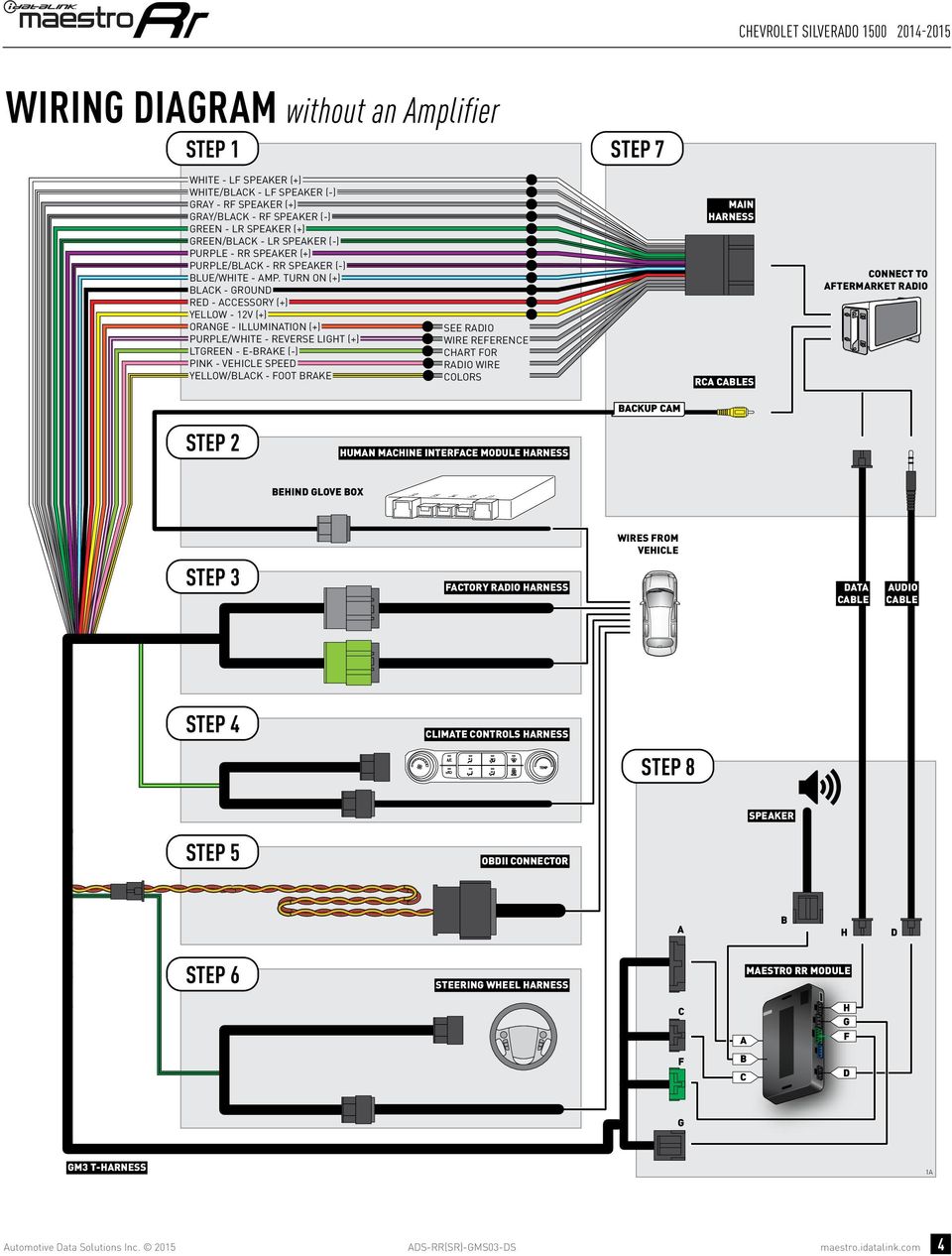
4 hevrolet olorado 2015 INSTLLTION INSTRUTIONS beore INSTLLIN etermine if the vehicle has a ose amplifier. Look for badges on the radio, door panels, and dash that indicate that the vehicle has ose. If the vehicle OES NOT have a factory amplifier: complete the installation as shown in the wiring diagram without an amplifier. If the vehicle OES have a factory amplifier: complete the installation as shown in the wiring diagram with an amplifier. The amplifier cannot be retained; it must be bypassed or replaced with an aftermarket amplifier. See the vehicle reference chart for wire colors; bypass instructions are not included. Remove the factory radio. STEP 1 Unbox the aftermarket radio and locate its main harness. Refer to the wiring diagram and connect the wires from aftermarket radio main harness to the M3 T-harness and match the wire functions. STEP 2 If the vehicle is equipped with an OEM backup camera, connect the backup camera harness to the uman Machine Interface module harness, located at the bottom of the radio cavity. Note: The guide lines of the backup camera will not be retained. STEP 3 onnect the factory harness to the M3 T-harness. STEP 4 Plug the climate control portion of the M3 T-harness into the climate controls. Plug the OII connector into the OII of the vehicle. STEP 6 If the vehicle OES have steering wheel controls: Remove steering column shroud. Locate the steering wheel control wire in them3 steering wheel harness. ut the REEN/LK wire and splice it into pin 9. Plug the steering wheel control T-harness into the harness at the steering wheel (steering wheel connector located at top of steering column). STEP 7 Plug the aftermarket radio harnesses into the aftermarket radio. onnect the backup camera R cable harness into the aftermarket radio. Plug the ata cable to the data port of the aftermarket radio. Insert the udio cable into the iatalink 3.5 mm audio jack of the aftermarket radio. STEP 8 onnect all the harnesses to the Maestro RR module then proceed test your installation. TROULESOOTIN TIPS: To reset the module back its factory settings, turn the key to the O position then disconnect all connectors from the module. Press and hold the module s programming button and connect all the connectors back to the module. Wait, the module s LE will flash RE rapidly (this may take up to 10 seconds). Release the programming button. Wait, the LE will turn solid REEN for 2 seconds. or technical assistance call or [email protected]. Visit us at maestro.idatalink. com/support and STEP 5 Plug the male LK 3 pin connector of your M3 T-harness into the OII/SW control harness. 2 maestro.idatalink.com 3

5 hevrolet olorado 2015 WIRIN IRM without an mplifier STEP 1 STEP 7 WITE - L SPEKER (+) WITE/LK - L SPEKER (-) RY - R SPEKER (+) RY/LK - R SPEKER (-) REEN - LR SPEKER (+) REEN/LK - LR SPEKER (-) PURPLE - RR SPEKER (+) PURPLE/LK - RR SPEKER (-) LUE/WITE - MP. TURN ON (+) LK - ROUN RE - ESSORY (+) YELLOW - 12V (+) ORNE - ILLUMINTION (+) PURPLE/WITE - REVERSE LIT (+) LTREEN - E-RKE (-) PINK - VEILE SPEE YELLOW/LK - OOT RKE SEE RIO WIRE REERENE RT OR RIO WIRE OLORS MIN RNESS R LES ONNET TO TERMRKET RIO KUP M STEP 2 UMN MINE INTERE MOULE RNESS OTTOM O RIO VITY J2 J5 J4 J3 J1 STEP 3 TORY RIO RNESS WIRES ROM VEILE T LE UIO LE STEP 4 LIMTE ONTROLS RNESS STEP 8 SPEKER STEP 5 OII ONNETOR STEP 6 STEERIN WEEL RNESS MESTRO RR MOULE PIN 9 UT REEN/LK WIRE N SPLIE IT TO PIN 9 WIRE M3 T-RNESS 2 maestro.idatalink.com 4

6 hevrolet olorado 2015 WIRIN IRM with an mplifier STEP 1 STEP 7 WITE - L SPEKER (+) WITE/LK - L SPEKER (-) RY - R SPEKER (+) RY/LK - R SPEKER (-) REEN - LR SPEKER (+) REEN/LK - LR SPEKER (-) PURPLE - RR SPEKER (+) PURPLE/LK - RR SPEKER (-) LUE/WITE - MP. TURN ON (+) LK - ROUN RE - ESSORY (+) YELLOW - 12V (+) ORNE - ILLUMINTION (+) PURPLE/WITE - REVERSE LIT (+) LTREEN - E-RKE (-) PINK - VEILE SPEE YELLOW/LK - OOT RKE O NOT ONNET IN VEILE EQUIPPE WIT TORY MP. SEE MPLIIER YPSS INORMTION IN VEILE WIRE RT. SEE RIO WIRE REERENE RT OR RIO WIRE OLORS MIN RNESS R LES ONNET TO TERMRKET RIO KUP M STEP 2 UMN MINE INTERE MOULE RNESS OTTOM O RIO VITY J2 J5 J4 J3 J1 STEP 3 TORY RIO RNESS WIRES ROM VEILE T LE UIO LE STEP 4 LIMTE ONTROLS RNESS STEP 8 SPEKER STEP 5 OII ONNETOR STEP 6 STEERIN WEEL RNESS MESTRO RR MOULE PIN 9 UT REEN/LK WIRE N SPLIE IT TO PIN 9 WIRE M3 T-RNESS 2 maestro.idatalink.com 5

7 hevrolet olorado 2015 RIO WIRE REERENE RT Wire escription Polarity Wire olor on Maestro T-arness Wire olor on lpine cable Wire olor on Kenwood cable Wire olor on Pioneer cable Illumination (+) Orange N/ Orange/White Orange/White Reverse Light (+) Purple/White Orange/White Purple/White Purple/White E-rake (-) Lt reen Yellow/lue Lt reen Lt reen oot rake (+) Yellow/lack Yellow/lack N/ N/ VSS (vehicle speed sensor) (T) Pink reen/white N/ Pink maestro.idatalink.com 6

8 hevrolet olorado 2015 VEILE WIRE REERENE RT Wire escription onnector Name onnector olor onnector Type Position Wire olor Polarity Wire Location Subwoofer ~ ~ 8 pin 01 klue/ray (+) mplifier, in dashboard, to the right of the glove box Subwoofer ~ ~ 8 pin 05 ray/lack (-) mplifier, in dashboard, to the right of the glove box R Speaker ~ ~ 8 pin 02 Yellow (+) mplifier, in dashboard, to the right of the glove box R Speaker ~ ~ 8 pin 06 Yellow/lack (-) mplifier, in dashboard, to the right of the glove box L Speaker ~ ~ 8 pin 03 klue (+) mplifier, in dashboard, to the right of the glove box L Speaker ~ ~ 8 pin 07 rown/klue (-) mplifier, in dashboard, to the right of the glove box R Tweeter (if R Tweeter (if L Tweeter (if L Tweeter (if ~ ~ 16 pin 04 rown/ltreen (+) mplifier, in dashboard, to the right of the glove box ~ ~ 16 pin 12 Purple/rown (-) mplifier, in dashboard, to the right of the glove box ~ ~ 16 pin 05 Yellow/klue (+) mplifier, in dashboard, to the right of the glove box ~ ~ 16 pin 13 Yellow/ray (-) mplifier, in dashboard, to the right of the glove box RR Speaker ~ ~ 16 pin 06 White (+) mplifier, in dashboard, to the right of the glove box RR Speaker ~ ~ 16 pin 14 klue/lack (-) mplifier, in dashboard, to the right of the glove box LR Speaker ~ ~ 16 pin 07 Ltreen (+) mplifier, in dashboard, to the right of the glove box LR Speaker ~ ~ 16 pin 15 Ltreen/lack (-) mplifier, in dashboard, to the right of the glove box MPLIIER ONNETORS (WIRE SIE) maestro.idatalink.com 7

9 INSTLL UIE hevrolet Silverado retains steering wheel controls, Onstar, and more! PROUTS REQUIRE iatalink Maestro RR Radio Replacement Interface iatalink Maestro M3 Installation arness OPTIONL ESSORIES None PRORMME IRMWRE S-RR(SR)-MS03-S NOTIE: utomotive ata Solutions Inc. (S) recommends having this installation performed by a certified technician. Logos and trademarks used here in are the properties of their respective owners.

10 hevrolet Silverado WELOME ongratulations on the purchase of your iatalink Maestro RR Radio replacement solution. You are now a few simple steps away from enjoying your new car radio with enhanced features. efore starting your installation, please ensure that your iatalink Maestro module is programmed with the correct firmware for your vehicle and that you carefully review the install guide. TbLE O ONTENTS Installation Instructions 3 Wiring iagram without an mplifier 4 Wiring iagram with an mplifier 5 Radio Wire Reference hart 6 Vehicle Wire Reference hart 7 Please note that Maestro RR will only retain functionalities that were originally available in the vehicle. NEE help? [email protected] maestro.idatalink.com/support maestro.idatalink.com 2
11 hevrolet Silverado INSTLLTION INSTRUTIONS beore INSTLLIN etermine if the vehicle has a ose amplifier. Look for badges on the radio, door panels, and dash that indicate that the vehicle has ose. If the vehicle OES NOT have a factory amplifier: complete the installation as shown in the wiring diagram without an amplifier. If the vehicle OES have a factory amplifier: complete the installation as shown in the wiring diagram with an amplifier. The amplifier cannot be retained; it must be bypassed or replaced with an aftermarket amplifier. See the vehicle reference chart for wire colors; bypass instructions are not included. Remove the factory radio. STEP 1 Unbox the aftermarket radio and locate its main harness. Refer to the wiring diagram and connect the wires from aftermarket radio main harness to the M3 T-harness and match the wire functions. STEP 2 If the vehicle is equipped with an OEM backup camera, connect the backup camera harness to the uman Machine Interface module harness, located behind the glove box. Note: The guide lines of the backup camera will not be retained. STEP 3 onnect the factory harness to the M3 T-harness. Plug the OII connector into the OII of the vehicle. STEP 6 Remove steering column shroud. Plug the steering wheel control T-harness into the harness at the steering wheel (steering wheel connector located at bottom of steering column). STEP 7 Plug the aftermarket radio harnesses into the aftermarket radio. onnect the backup camera R cable harness into the aftermarket radio. Plug the ata cable to the data port of the aftermarket radio. Insert the udio cable into the iatalink 3.5 mm audio jack of the aftermarket radio. STEP 8 onnect all the harnesses to the Maestro RR module then proceed test your installation. TROULESOOTIN TIPS: To reset the module back its factory settings, turn the key to the O position then disconnect all connectors from the module. Press and hold the module s programming button and connect all the connectors back to the module. Wait, the module s LE will flash RE rapidly (this may take up to 10 seconds). Release the programming button. Wait, the LE will turn solid REEN for 2 seconds. or technical assistance call or [email protected]. Visit us at maestro.idatalink. com/support and STEP 4 Plug the climate control portion of the M3 T-harness into the climate controls. STEP 5 Plug the male LK 3 pin connector of your M3 T-harness into the OII/SW control harness. 1 maestro.idatalink.com 3

12 hevrolet Silverado WIRIN IRM without an mplifier STEP 1 STEP 7 WITE - L SPEKER (+) WITE/LK - L SPEKER (-) RY - R SPEKER (+) RY/LK - R SPEKER (-) REEN - LR SPEKER (+) REEN/LK - LR SPEKER (-) PURPLE - RR SPEKER (+) PURPLE/LK - RR SPEKER (-) LUE/WITE - MP. TURN ON (+) LK - ROUN RE - ESSORY (+) YELLOW - 12V (+) ORNE - ILLUMINTION (+) PURPLE/WITE - REVERSE LIT (+) LTREEN - E-RKE (-) PINK - VEILE SPEE YELLOW/LK - OOT RKE SEE RIO WIRE REERENE RT OR RIO WIRE OLORS MIN RNESS R LES ONNET TO TERMRKET RIO KUP M STEP 2 UMN MINE INTERE MOULE RNESS EIN LOVE OX J2 J5 J4 J3 J1 STEP 3 TORY RIO RNESS WIRES ROM VEILE T LE UIO LE STEP 4 LIMTE ONTROLS RNESS STEP 8 SPEKER STEP 5 OII ONNETOR STEP 6 STEERIN WEEL RNESS MESTRO RR MOULE M3 T-RNESS 1 maestro.idatalink.com 4
13 hevrolet Silverado WIRIN IRM with an mplifier STEP 1 STEP 7 WITE - L SPEKER (+) WITE/LK - L SPEKER (-) RY - R SPEKER (+) RY/LK - R SPEKER (-) REEN - LR SPEKER (+) REEN/LK - LR SPEKER (-) PURPLE - RR SPEKER (+) PURPLE/LK - RR SPEKER (-) LUE/WITE - MP. TURN ON (+) LK - ROUN RE - ESSORY (+) YELLOW - 12V (+) ORNE - ILLUMINTION (+) PURPLE/WITE - REVERSE LIT (+) LTREEN - E-RKE (-) PINK - VEILE SPEE YELLOW/LK - OOT RKE O NOT ONNET IN VEILE EQUIPPE WIT TORY MP. SEE MPLIIER YPSS INORMTION IN VEILE WIRE RT. SEE RIO WIRE REERENE RT OR RIO WIRE OLORS MIN RNESS R LES ONNET TO TERMRKET RIO KUP M STEP 2 UMN MINE INTERE MOULE RNESS EIN LOVE OX J2 J5 J4 J3 J1 STEP 3 TORY RIO RNESS WIRES ROM VEILE T LE UIO LE STEP 4 LIMTE ONTROLS RNESS STEP 8 SPEKER STEP 5 OII ONNETOR STEP 6 STEERIN WEEL RNESS MESTRO RR MOULE M3 T-RNESS 1 maestro.idatalink.com 5

14 hevrolet Silverado RIO WIRE REERENE RT Wire escription Polarity Wire olor on Maestro T-arness Wire olor on lpine cable Wire olor on Kenwood cable Wire olor on Pioneer cable Illumination (+) Orange N/ Orange/White Orange/White Reverse Light (+) Purple/White Orange/White Purple/White Purple/White E-rake (-) Lt reen Yellow/lue Lt reen Lt reen oot rake (+) Yellow/lack Yellow/lack N/ N/ VSS (vehicle speed sensor) (T) Pink reen/white N/ Pink maestro.idatalink.com 6

15 hevrolet Silverado VEILE WIRE REERENE RT Wire escription onnector Name onnector olor onnector Type Position Wire olor Polarity Wire Location Subwoofer ~ ~ 8 pin 01 klue/ray (+) mplifier, back wall of the cab, center of the wall Subwoofer ~ ~ 8 pin 05 ray/lack (-) mplifier, back wall of the cab, center of the wall R Speaker ~ ~ 8 pin 02 Yellow (+) mplifier, back wall of the cab, center of the wall R Speaker ~ ~ 8 pin 06 Yellow/lack (-) mplifier, back wall of the cab, center of the wall L Speaker ~ ~ 8 pin 03 klue (+) mplifier, back wall of the cab, center of the wall L Speaker ~ ~ 8 pin 07 rown/klue (-) mplifier, back wall of the cab, center of the wall R Tweeter (if R Tweeter (if L Tweeter (if L Tweeter (if ~ ~ 16 pin 04 rown/ltreen (+) mplifier, back wall of the cab, center of the wall ~ ~ 16 pin 12 Purple/rown (-) mplifier, back wall of the cab, center of the wall ~ ~ 16 pin 05 Yellow/klue (+) mplifier, back wall of the cab, center of the wall ~ ~ 16 pin 13 Yellow/ray (-) mplifier, back wall of the cab, center of the wall RR Speaker ~ ~ 16 pin 06 White (+) mplifier, back wall of the cab, center of the wall RR Speaker ~ ~ 16 pin 14 klue/lack (-) mplifier, back wall of the cab, center of the wall LR Speaker ~ ~ 16 pin 07 Ltreen (+) mplifier, back wall of the cab, center of the wall LR Speaker ~ ~ 16 pin 15 Ltreen/lack (-) mplifier, back wall of the cab, center of the wall MPLIIER ONNETORS (WIRE SIE) maestro.idatalink.com 7

16 INSTLL UIE hevrolet Silverado 2500 & PROUTS REQUIRE iatalink Maestro RR Radio Replacement Interface iatalink Maestro M3 Installation arness OPTIONL ESSORIES None PRORMME IRMWRE S-RR(SR)-MS03-S NOTIE: utomotive ata Solutions Inc. (S) recommends having this installation performed by a certified technician. Logos and trademarks used here in are the properties of their respective owners.

17 hevrolet Silverado 2500 & WELOME ongratulations on the purchase of your iatalink Maestro RR Radio replacement solution. You are now a few simple steps away from enjoying your new car radio with enhanced features. efore starting your installation, please ensure that your iatalink Maestro module is programmed with the correct firmware for your vehicle and that you carefully review the install guide. TbLE O ONTENTS Installation Instructions 3 Wiring iagram without an mplifier 4 Wiring iagram with an mplifier 5 Radio Wire Reference hart 6 Vehicle Wire Reference hart 7 Please note that Maestro RR will only retain functionalities that were originally available in the vehicle. NEE help? [email protected] maestro.idatalink.com/support maestro.idatalink.com 2

18 hevrolet Silverado 2500 & INSTLLTION INSTRUTIONS beore INSTLLIN etermine if the vehicle has a ose amplifier. Look for badges on the radio, door panels, and dash that indicate that the vehicle has ose. If the vehicle OES NOT have a factory amplifier: complete the installation as shown in the wiring diagram without an amplifier. If the vehicle OES have a factory amplifier: complete the installation as shown in the wiring diagram with an amplifier. The amplifier cannot be retained; it must be bypassed or replaced with an aftermarket amplifier. See the vehicle reference chart for wire colors; bypass instructions are not included. Remove the factory radio. STEP 1 Unbox the aftermarket radio and locate its main harness. Refer to the wiring diagram and connect the wires from aftermarket radio main harness to the M3 T-harness and match the wire functions. STEP 2 If the vehicle is equipped with an OEM backup camera, connect the backup camera harness to the uman Machine Interface module harness, located behind the glove box. Note: The guide lines of the backup camera will not be retained. STEP 3 onnect the factory harness to the M3 T-harness. Plug the OII connector into the OII of the vehicle. STEP 6 Remove steering column shroud. Plug the steering wheel control T-harness into the harness at the steering wheel (steering wheel connector located at bottom of steering column). STEP 7 Plug the aftermarket radio harnesses into the aftermarket radio. onnect the backup camera R cable harness into the aftermarket radio. Plug the ata cable to the data port of the aftermarket radio. Insert the udio cable into the iatalink 3.5 mm audio jack of the aftermarket radio. STEP 8 onnect all the harnesses to the Maestro RR module then proceed test your installation. TROULESOOTIN TIPS: To reset the module back its factory settings, turn the key to the O position then disconnect all connectors from the module. Press and hold the module s programming button and connect all the connectors back to the module. Wait, the module s LE will flash RE rapidly (this may take up to 10 seconds). Release the programming button. Wait, the LE will turn solid REEN for 2 seconds. or technical assistance call or [email protected]. Visit us at maestro.idatalink. com/support and STEP 4 Plug the climate control portion of the M3 T-harness into the climate controls. STEP 5 Plug the male LK 3 pin connector of your M3 T-harness into the OII/SW control harness. 1 maestro.idatalink.com 3

19 hevrolet Silverado 2500 & WIRIN IRM without an mplifier STEP 1 STEP 7 WITE - L SPEKER (+) WITE/LK - L SPEKER (-) RY - R SPEKER (+) RY/LK - R SPEKER (-) REEN - LR SPEKER (+) REEN/LK - LR SPEKER (-) PURPLE - RR SPEKER (+) PURPLE/LK - RR SPEKER (-) LUE/WITE - MP. TURN ON (+) LK - ROUN RE - ESSORY (+) YELLOW - 12V (+) ORNE - ILLUMINTION (+) PURPLE/WITE - REVERSE LIT (+) LTREEN - E-RKE (-) PINK - VEILE SPEE YELLOW/LK - OOT RKE SEE RIO WIRE REERENE RT OR RIO WIRE OLORS MIN RNESS R LES ONNET TO TERMRKET RIO KUP M STEP 2 UMN MINE INTERE MOULE RNESS EIN LOVE OX J2 J5 J4 J3 J1 STEP 3 TORY RIO RNESS WIRES ROM VEILE T LE UIO LE STEP 4 LIMTE ONTROLS RNESS STEP 8 SPEKER STEP 5 OII ONNETOR STEP 6 STEERIN WEEL RNESS MESTRO RR MOULE M3 T-RNESS 1 maestro.idatalink.com 4

20 hevrolet Silverado 2500 & WIRIN IRM with an mplifier STEP 1 STEP 7 WITE - L SPEKER (+) WITE/LK - L SPEKER (-) RY - R SPEKER (+) RY/LK - R SPEKER (-) REEN - LR SPEKER (+) REEN/LK - LR SPEKER (-) PURPLE - RR SPEKER (+) PURPLE/LK - RR SPEKER (-) LUE/WITE - MP. TURN ON (+) LK - ROUN RE - ESSORY (+) YELLOW - 12V (+) ORNE - ILLUMINTION (+) PURPLE/WITE - REVERSE LIT (+) LTREEN - E-RKE (-) PINK - VEILE SPEE YELLOW/LK - OOT RKE O NOT ONNET IN VEILE EQUIPPE WIT TORY MP. SEE MPLIIER YPSS INORMTION IN VEILE WIRE RT. SEE RIO WIRE REERENE RT OR RIO WIRE OLORS MIN RNESS R LES ONNET TO TERMRKET RIO KUP M STEP 2 UMN MINE INTERE MOULE RNESS EIN LOVE OX J2 J5 J4 J3 J1 STEP 3 TORY RIO RNESS WIRES ROM VEILE T LE UIO LE STEP 4 LIMTE ONTROLS RNESS STEP 8 SPEKER STEP 5 OII ONNETOR STEP 6 STEERIN WEEL RNESS MESTRO RR MOULE M3 T-RNESS 1 maestro.idatalink.com 5

21 hevrolet Silverado 2500 & RIO WIRE REERENE RT Wire escription Polarity Wire olor on Maestro T-arness Wire olor on lpine cable Wire olor on Kenwood cable Wire olor on Pioneer cable Illumination (+) Orange N/ Orange/White Orange/White Reverse Light (+) Purple/White Orange/White Purple/White Purple/White E-rake (-) Lt reen Yellow/lue Lt reen Lt reen oot rake (+) Yellow/lack Yellow/lack N/ N/ VSS (vehicle speed sensor) (T) Pink reen/white N/ Pink maestro.idatalink.com 6
22 hevrolet Silverado 2500 & VEILE WIRE REERENE RT Wire escription onnector Name onnector olor onnector Type Position Wire olor Polarity Wire Location Subwoofer ~ ~ 8 pin 01 klue/ray (+) mplifier, back wall of the cab, center of the wall Subwoofer ~ ~ 8 pin 05 ray/lack (-) mplifier, back wall of the cab, center of the wall R Speaker ~ ~ 8 pin 02 Yellow (+) mplifier, back wall of the cab, center of the wall R Speaker ~ ~ 8 pin 06 Yellow/lack (-) mplifier, back wall of the cab, center of the wall L Speaker ~ ~ 8 pin 03 klue (+) mplifier, back wall of the cab, center of the wall L Speaker ~ ~ 8 pin 07 rown/klue (-) mplifier, back wall of the cab, center of the wall R Tweeter (if R Tweeter (if L Tweeter (if L Tweeter (if ~ ~ 16 pin 04 rown/ltreen (+) mplifier, back wall of the cab, center of the wall ~ ~ 16 pin 12 Purple/rown (-) mplifier, back wall of the cab, center of the wall ~ ~ 16 pin 05 Yellow/klue (+) mplifier, back wall of the cab, center of the wall ~ ~ 16 pin 13 Yellow/ray (-) mplifier, back wall of the cab, center of the wall RR Speaker ~ ~ 16 pin 06 White (+) mplifier, back wall of the cab, center of the wall RR Speaker ~ ~ 16 pin 14 klue/lack (-) mplifier, back wall of the cab, center of the wall LR Speaker ~ ~ 16 pin 07 Ltreen (+) mplifier, back wall of the cab, center of the wall LR Speaker ~ ~ 16 pin 15 Ltreen/lack (-) mplifier, back wall of the cab, center of the wall MPLIIER ONNETORS (WIRE SIE) maestro.idatalink.com 7
23 INSTLL UIE hevrolet Suburban 2015 retains steering wheel controls, Onstar, and more! PROUTS REQUIRE iatalink Maestro RR Radio Replacement Interface iatalink Maestro M3 Installation arness OPTIONL ESSORIES None PRORMME IRMWRE S-RR(SR)-MS03-S NOTIE: utomotive ata Solutions Inc. (S) recommends having this installation performed by a certified technician. Logos and trademarks used here in are the properties of their respective owners.
24 hevrolet Suburban 2015 WELOME ongratulations on the purchase of your iatalink Maestro RR Radio replacement solution. You are now a few simple steps away from enjoying your new car radio with enhanced features. efore starting your installation, please ensure that your iatalink Maestro module is programmed with the correct firmware for your vehicle and that you carefully review the install guide. TbLE O ONTENTS Installation Instructions 3 Wiring iagram without an mplifier 4 Wiring iagram with an mplifier 5 Radio Wire Reference hart 6 Vehicle Wire Reference hart 7 Please note that Maestro RR will only retain functionalities that were originally available in the vehicle. NEE help? [email protected] maestro.idatalink.com/support maestro.idatalink.com 2
25 hevrolet Suburban 2015 INSTLLTION INSTRUTIONS beore INSTLLIN etermine if the vehicle has a ose amplifier. Look for badges on the radio, door panels, and dash that indicate that the vehicle has ose. If the vehicle OES NOT have a factory amplifier: complete the installation as shown in the wiring diagram without an amplifier. If the vehicle OES have a factory amplifier: complete the installation as shown in the wiring diagram with an amplifier. The amplifier cannot be retained; it must be bypassed or replaced with an aftermarket amplifier. See the vehicle reference chart for wire colors; bypass instructions are not included. Remove the factory radio. STEP 1 Unbox the aftermarket radio and locate its main harness. Refer to the wiring diagram and connect the wires from aftermarket radio main harness to the M3 T-harness and match the wire functions. STEP 2 If the vehicle is equipped with an OEM backup camera, connect the backup camera harness to the uman Machine Interface module harness, located behind the glove box. Note: The guide lines of the backup camera will not be retained. STEP 3 onnect the factory harness to the M3 T-harness. Plug the OII connector into the OII of the vehicle. STEP 6 Remove steering column shroud. Plug the steering wheel control T-harness into the harness at the steering wheel (steering wheel connector located at bottom of steering column). STEP 7 Plug the aftermarket radio harnesses into the aftermarket radio. onnect the backup camera R cable harness into the aftermarket radio. Plug the ata cable to the data port of the aftermarket radio. Insert the udio cable into the iatalink 3.5 mm audio jack of the aftermarket radio. STEP 8 onnect all the harnesses to the Maestro RR module then proceed test your installation. TROULESOOTIN TIPS: To reset the module back its factory settings, turn the key to the O position then disconnect all connectors from the module. Press and hold the module s programming button and connect all the connectors back to the module. Wait, the module s LE will flash RE rapidly (this may take up to 10 seconds). Release the programming button. Wait, the LE will turn solid REEN for 2 seconds. or technical assistance call or [email protected]. Visit us at maestro.idatalink. com/support and STEP 4 Plug the climate control portion of the M3 T-harness into the climate controls. STEP 5 Plug the male LK 3 pin connector of your M3 T-harness into the OII/SW control harness. 1 maestro.idatalink.com 3
26 hevrolet Suburban 2015 WIRIN IRM without an mplifier STEP 1 STEP 7 WITE - L SPEKER (+) WITE/LK - L SPEKER (-) RY - R SPEKER (+) RY/LK - R SPEKER (-) REEN - LR SPEKER (+) REEN/LK - LR SPEKER (-) PURPLE - RR SPEKER (+) PURPLE/LK - RR SPEKER (-) LUE/WITE - MP. TURN ON (+) LK - ROUN RE - ESSORY (+) YELLOW - 12V (+) ORNE - ILLUMINTION (+) PURPLE/WITE - REVERSE LIT (+) LTREEN - E-RKE (-) PINK - VEILE SPEE YELLOW/LK - OOT RKE SEE RIO WIRE REERENE RT OR RIO WIRE OLORS MIN RNESS R LES ONNET TO TERMRKET RIO KUP M STEP 2 UMN MINE INTERE MOULE RNESS EIN LOVE OX J2 J5 J4 J3 J1 STEP 3 TORY RIO RNESS WIRES ROM VEILE T LE UIO LE STEP 4 LIMTE ONTROLS RNESS STEP 8 SPEKER STEP 5 OII ONNETOR STEP 6 STEERIN WEEL RNESS MESTRO RR MOULE M3 T-RNESS 1 maestro.idatalink.com 4
27 hevrolet Suburban 2015 WIRIN IRM with an mplifier STEP 1 STEP 7 WITE - L SPEKER (+) WITE/LK - L SPEKER (-) RY - R SPEKER (+) RY/LK - R SPEKER (-) REEN - LR SPEKER (+) REEN/LK - LR SPEKER (-) PURPLE - RR SPEKER (+) PURPLE/LK - RR SPEKER (-) LUE/WITE - MP. TURN ON (+) LK - ROUN RE - ESSORY (+) YELLOW - 12V (+) ORNE - ILLUMINTION (+) PURPLE/WITE - REVERSE LIT (+) LTREEN - E-RKE (-) PINK - VEILE SPEE YELLOW/LK - OOT RKE O NOT ONNET IN VEILE EQUIPPE WIT TORY MP. SEE MPLIIER YPSS INORMTION IN VEILE WIRE RT. SEE RIO WIRE REERENE RT OR RIO WIRE OLORS MIN RNESS R LES ONNET TO TERMRKET RIO KUP M STEP 2 UMN MINE INTERE MOULE RNESS EIN LOVE OX J2 J5 J4 J3 J1 STEP 3 TORY RIO RNESS WIRES ROM VEILE T LE UIO LE STEP 4 LIMTE ONTROLS RNESS STEP 8 SPEKER STEP 5 OII ONNETOR STEP 6 STEERIN WEEL RNESS MESTRO RR MOULE M3 T-RNESS 1 maestro.idatalink.com 5
28 hevrolet Suburban 2015 RIO WIRE REERENE RT Wire escription Polarity Wire olor on Maestro T-arness Wire olor on lpine cable Wire olor on Kenwood cable Wire olor on Pioneer cable Illumination (+) Orange N/ Orange/White Orange/White Reverse Light (+) Purple/White Orange/White Purple/White Purple/White E-rake (-) Lt reen Yellow/lue Lt reen Lt reen oot rake (+) Yellow/lack Yellow/lack N/ N/ VSS (vehicle speed sensor) (T) Pink reen/white N/ Pink maestro.idatalink.com 6
29 hevrolet Suburban 2015 VEILE WIRE REERENE RT Wire escription onnector Name onnector olor onnector Type Position Wire olor Polarity Wire Location Subwoofer ~ ~ 8 pin 01 klue/ray (+) mplifier, left side of cargo area, behind wheel well Subwoofer ~ ~ 8 pin 05 ray/lack (-) mplifier, left side of cargo area, behind wheel well R Speaker ~ ~ 8 pin 02 Yellow (+) mplifier, left side of cargo area, behind wheel well R Speaker ~ ~ 8 pin 06 Yellow/lack (-) mplifier, left side of cargo area, behind wheel well L Speaker ~ ~ 8 pin 03 klue (+) mplifier, left side of cargo area, behind wheel well L Speaker ~ ~ 8 pin 07 rown/klue (-) mplifier, left side of cargo area, behind wheel well R Tweeter (if R Tweeter (if L Tweeter (if L Tweeter (if ~ ~ 16 pin 04 rown/ltreen (+) mplifier, left side of cargo area, behind wheel well ~ ~ 16 pin 12 Purple/rown (-) mplifier, left side of cargo area, behind wheel well ~ ~ 16 pin 05 Yellow/klue (+) mplifier, left side of cargo area, behind wheel well ~ ~ 16 pin 13 Yellow/ray (-) mplifier, left side of cargo area, behind wheel well RR Speaker ~ ~ 16 pin 06 White (+) mplifier, left side of cargo area, behind wheel well RR Speaker ~ ~ 16 pin 14 klue/lack (-) mplifier, left side of cargo area, behind wheel well LR Speaker ~ ~ 16 pin 07 Ltreen (+) mplifier, left side of cargo area, behind wheel well LR Speaker ~ ~ 16 pin 15 Ltreen/lack (-) mplifier, left side of cargo area, behind wheel well MPLIIER ONNETORS (WIRE SIE) maestro.idatalink.com 7
30 INSTLL UIE hevrolet Tahoe 2015 retains steering wheel controls, Onstar, and more! PROUTS REQUIRE iatalink Maestro RR Radio Replacement Interface iatalink Maestro M3 Installation arness OPTIONL ESSORIES None PRORMME IRMWRE S-RR(SR)-MS03-S NOTIE: utomotive ata Solutions Inc. (S) recommends having this installation performed by a certified technician. Logos and trademarks used here in are the properties of their respective owners.
31 hevrolet Tahoe 2015 WELOME ongratulations on the purchase of your iatalink Maestro RR Radio replacement solution. You are now a few simple steps away from enjoying your new car radio with enhanced features. efore starting your installation, please ensure that your iatalink Maestro module is programmed with the correct firmware for your vehicle and that you carefully review the install guide. TbLE O ONTENTS Installation Instructions 3 Wiring iagram without an mplifier 4 Wiring iagram with an mplifier 5 Radio Wire Reference hart 6 Vehicle Wire Reference hart 7 Please note that Maestro RR will only retain functionalities that were originally available in the vehicle. NEE help? [email protected] maestro.idatalink.com/support maestro.idatalink.com 2
32 hevrolet Tahoe 2015 INSTLLTION INSTRUTIONS beore INSTLLIN etermine if the vehicle has a ose amplifier. Look for badges on the radio, door panels, and dash that indicate that the vehicle has ose. If the vehicle OES NOT have a factory amplifier: complete the installation as shown in the wiring diagram without an amplifier. If the vehicle OES have a factory amplifier: complete the installation as shown in the wiring diagram with an amplifier. The amplifier cannot be retained; it must be bypassed or replaced with an aftermarket amplifier. See the vehicle reference chart for wire colors; bypass instructions are not included. Remove the factory radio. STEP 1 Unbox the aftermarket radio and locate its main harness. Refer to the wiring diagram and connect the wires from aftermarket radio main harness to the M3 T-harness and match the wire functions. STEP 2 If the vehicle is equipped with an OEM backup camera, connect the backup camera harness to the uman Machine Interface module harness, located behind the glove box. Note: The guide lines of the backup camera will not be retained. STEP 3 onnect the factory harness to the M3 T-harness. Plug the OII connector into the OII of the vehicle. STEP 6 Remove steering column shroud. Plug the steering wheel control T-harness into the harness at the steering wheel (steering wheel connector located at bottom of steering column). STEP 7 Plug the aftermarket radio harnesses into the aftermarket radio. onnect the backup camera R cable harness into the aftermarket radio. Plug the ata cable to the data port of the aftermarket radio. Insert the udio cable into the iatalink 3.5 mm audio jack of the aftermarket radio. STEP 8 onnect all the harnesses to the Maestro RR module then proceed test your installation. TROULESOOTIN TIPS: To reset the module back its factory settings, turn the key to the O position then disconnect all connectors from the module. Press and hold the module s programming button and connect all the connectors back to the module. Wait, the module s LE will flash RE rapidly (this may take up to 10 seconds). Release the programming button. Wait, the LE will turn solid REEN for 2 seconds. or technical assistance call or [email protected]. Visit us at maestro.idatalink. com/support and STEP 4 Plug the climate control portion of the M3 T-harness into the climate controls. STEP 5 Plug the male LK 3 pin connector of your M3 T-harness into the OII/SW control harness. 1 maestro.idatalink.com 3
33 hevrolet Tahoe 2015 WIRIN IRM without an mplifier STEP 1 STEP 7 WITE - L SPEKER (+) WITE/LK - L SPEKER (-) RY - R SPEKER (+) RY/LK - R SPEKER (-) REEN - LR SPEKER (+) REEN/LK - LR SPEKER (-) PURPLE - RR SPEKER (+) PURPLE/LK - RR SPEKER (-) LUE/WITE - MP. TURN ON (+) LK - ROUN RE - ESSORY (+) YELLOW - 12V (+) ORNE - ILLUMINTION (+) PURPLE/WITE - REVERSE LIT (+) LTREEN - E-RKE (-) PINK - VEILE SPEE YELLOW/LK - OOT RKE SEE RIO WIRE REERENE RT OR RIO WIRE OLORS MIN RNESS R LES ONNET TO TERMRKET RIO KUP M STEP 2 UMN MINE INTERE MOULE RNESS EIN LOVE OX J2 J5 J4 J3 J1 STEP 3 TORY RIO RNESS WIRES ROM VEILE T LE UIO LE STEP 4 LIMTE ONTROLS RNESS STEP 8 SPEKER STEP 5 OII ONNETOR STEP 6 STEERIN WEEL RNESS MESTRO RR MOULE M3 T-RNESS 1 maestro.idatalink.com 4
34 hevrolet Tahoe 2015 WIRIN IRM with an mplifier STEP 1 STEP 7 WITE - L SPEKER (+) WITE/LK - L SPEKER (-) RY - R SPEKER (+) RY/LK - R SPEKER (-) REEN - LR SPEKER (+) REEN/LK - LR SPEKER (-) PURPLE - RR SPEKER (+) PURPLE/LK - RR SPEKER (-) LUE/WITE - MP. TURN ON (+) LK - ROUN RE - ESSORY (+) YELLOW - 12V (+) ORNE - ILLUMINTION (+) PURPLE/WITE - REVERSE LIT (+) LTREEN - E-RKE (-) PINK - VEILE SPEE YELLOW/LK - OOT RKE O NOT ONNET IN VEILE EQUIPPE WIT TORY MP. SEE MPLIIER YPSS INORMTION IN VEILE WIRE RT. SEE RIO WIRE REERENE RT OR RIO WIRE OLORS MIN RNESS R LES ONNET TO TERMRKET RIO KUP M STEP 2 UMN MINE INTERE MOULE RNESS EIN LOVE OX J2 J5 J4 J3 J1 STEP 3 TORY RIO RNESS WIRES ROM VEILE T LE UIO LE STEP 4 LIMTE ONTROLS RNESS STEP 8 SPEKER STEP 5 OII ONNETOR STEP 6 STEERIN WEEL RNESS MESTRO RR MOULE M3 T-RNESS 1 maestro.idatalink.com 5
35 hevrolet Tahoe 2015 RIO WIRE REERENE RT Wire escription Polarity Wire olor on Maestro T-arness Wire olor on lpine cable Wire olor on Kenwood cable Wire olor on Pioneer cable Illumination (+) Orange N/ Orange/White Orange/White Reverse Light (+) Purple/White Orange/White Purple/White Purple/White E-rake (-) Lt reen Yellow/lue Lt reen Lt reen oot rake (+) Yellow/lack Yellow/lack N/ N/ VSS (vehicle speed sensor) (T) Pink reen/white N/ Pink maestro.idatalink.com 6
36 hevrolet Tahoe 2015 VEILE WIRE REERENE RT Wire escription onnector Name onnector olor onnector Type Position Wire olor Polarity Wire Location Subwoofer ~ ~ 8 pin 01 klue/ray (+) mplifier, left side of cargo area, behind wheel well Subwoofer ~ ~ 8 pin 05 ray/lack (-) mplifier, left side of cargo area, behind wheel well R Speaker ~ ~ 8 pin 02 Yellow (+) mplifier, left side of cargo area, behind wheel well R Speaker ~ ~ 8 pin 06 Yellow/lack (-) mplifier, left side of cargo area, behind wheel well L Speaker ~ ~ 8 pin 03 klue (+) mplifier, left side of cargo area, behind wheel well L Speaker ~ ~ 8 pin 07 rown/klue (-) mplifier, left side of cargo area, behind wheel well R Tweeter (if R Tweeter (if L Tweeter (if L Tweeter (if ~ ~ 16 pin 04 rown/ltreen (+) mplifier, left side of cargo area, behind wheel well ~ ~ 16 pin 12 Purple/rown (-) mplifier, left side of cargo area, behind wheel well ~ ~ 16 pin 05 Yellow/klue (+) mplifier, left side of cargo area, behind wheel well ~ ~ 16 pin 13 Yellow/ray (-) mplifier, left side of cargo area, behind wheel well RR Speaker ~ ~ 16 pin 06 White (+) mplifier, left side of cargo area, behind wheel well RR Speaker ~ ~ 16 pin 14 klue/lack (-) mplifier, left side of cargo area, behind wheel well LR Speaker ~ ~ 16 pin 07 Ltreen (+) mplifier, left side of cargo area, behind wheel well LR Speaker ~ ~ 16 pin 15 Ltreen/lack (-) mplifier, left side of cargo area, behind wheel well MPLIIER ONNETORS (WIRE SIE) maestro.idatalink.com 7
37 INSTLL UIE M anyon 2015 retains steering wheel controls, Onstar, and more! PROUTS REQUIRE iatalink Maestro RR Radio Replacement Interface iatalink Maestro M3 Installation arness OPTIONL ESSORIES None PRORMME IRMWRE S-RR(SR)-MS03-S NOTIE: utomotive ata Solutions Inc. (S) recommends having this installation performed by a certified technician. Logos and trademarks used here in are the properties of their respective owners.
38 M anyon 2015 WELOME ongratulations on the purchase of your iatalink Maestro RR Radio replacement solution. You are now a few simple steps away from enjoying your new car radio with enhanced features. efore starting your installation, please ensure that your iatalink Maestro module is programmed with the correct firmware for your vehicle and that you carefully review the install guide. TbLE O ONTENTS Installation Instructions 3 Wiring iagram without an mplifier 4 Wiring iagram with an mplifier 5 Radio Wire Reference hart 6 Vehicle Wire Reference hart 7 Please note that Maestro RR will only retain functionalities that were originally available in the vehicle. NEE help? [email protected] maestro.idatalink.com/support maestro.idatalink.com 2
39 M anyon 2015 INSTLLTION INSTRUTIONS beore INSTLLIN etermine if the vehicle has a ose amplifier. Look for badges on the radio, door panels, and dash that indicate that the vehicle has ose. If the vehicle OES NOT have a factory amplifier: complete the installation as shown in the wiring diagram without an amplifier. If the vehicle OES have a factory amplifier: complete the installation as shown in the wiring diagram with an amplifier. The amplifier cannot be retained; it must be bypassed or replaced with an aftermarket amplifier. See the vehicle reference chart for wire colors; bypass instructions are not included. Remove the factory radio. STEP 1 Unbox the aftermarket radio and locate its main harness. Refer to the wiring diagram and connect the wires from aftermarket radio main harness to the M3 T-harness and match the wire functions. STEP 2 If the vehicle is equipped with an OEM backup camera, connect the backup camera harness to the uman Machine Interface module harness, located at the bottom of the radio cavity. Note: The guide lines of the backup camera will not be retained. STEP 3 onnect the factory harness to the M3 T-harness. STEP 4 Plug the climate control portion of the M3 T-harness into the climate controls. Plug the OII connector into the OII of the vehicle. STEP 6 If the vehicle OES have steering wheel controls: Remove steering column shroud. Locate the steering wheel control wire in them3 steering wheel harness. ut the REEN/LK wire and splice it into pin 9. Plug the steering wheel control T-harness into the harness at the steering wheel (steering wheel connector located at top of steering column). STEP 7 Plug the aftermarket radio harnesses into the aftermarket radio. onnect the backup camera R cable harness into the aftermarket radio. Plug the ata cable to the data port of the aftermarket radio. Insert the udio cable into the iatalink 3.5 mm audio jack of the aftermarket radio. STEP 8 onnect all the harnesses to the Maestro RR module then proceed test your installation. TROULESOOTIN TIPS: To reset the module back its factory settings, turn the key to the O position then disconnect all connectors from the module. Press and hold the module s programming button and connect all the connectors back to the module. Wait, the module s LE will flash RE rapidly (this may take up to 10 seconds). Release the programming button. Wait, the LE will turn solid REEN for 2 seconds. or technical assistance call or [email protected]. Visit us at maestro.idatalink. com/support and STEP 5 Plug the male LK 3 pin connector of your M3 T-harness into the OII/SW control harness. 2 maestro.idatalink.com 3
40 M anyon 2015 WIRIN IRM without an mplifier STEP 1 STEP 7 WITE - L SPEKER (+) WITE/LK - L SPEKER (-) RY - R SPEKER (+) RY/LK - R SPEKER (-) REEN - LR SPEKER (+) REEN/LK - LR SPEKER (-) PURPLE - RR SPEKER (+) PURPLE/LK - RR SPEKER (-) LUE/WITE - MP. TURN ON (+) LK - ROUN RE - ESSORY (+) YELLOW - 12V (+) ORNE - ILLUMINTION (+) PURPLE/WITE - REVERSE LIT (+) LTREEN - E-RKE (-) PINK - VEILE SPEE YELLOW/LK - OOT RKE SEE RIO WIRE REERENE RT OR RIO WIRE OLORS MIN RNESS R LES ONNET TO TERMRKET RIO KUP M STEP 2 UMN MINE INTERE MOULE RNESS OTTOM O RIO VITY J2 J5 J4 J3 J1 STEP 3 TORY RIO RNESS WIRES ROM VEILE T LE UIO LE STEP 4 LIMTE ONTROLS RNESS STEP 8 SPEKER STEP 5 OII ONNETOR STEP 6 STEERIN WEEL RNESS MESTRO RR MOULE PIN 9 UT REEN/LK WIRE N SPLIE IT TO PIN 9 WIRE M3 T-RNESS 2 maestro.idatalink.com 4
41 M anyon 2015 WIRIN IRM with an mplifier STEP 1 STEP 7 WITE - L SPEKER (+) WITE/LK - L SPEKER (-) RY - R SPEKER (+) RY/LK - R SPEKER (-) REEN - LR SPEKER (+) REEN/LK - LR SPEKER (-) PURPLE - RR SPEKER (+) PURPLE/LK - RR SPEKER (-) LUE/WITE - MP. TURN ON (+) LK - ROUN RE - ESSORY (+) YELLOW - 12V (+) ORNE - ILLUMINTION (+) PURPLE/WITE - REVERSE LIT (+) LTREEN - E-RKE (-) PINK - VEILE SPEE YELLOW/LK - OOT RKE O NOT ONNET IN VEILE EQUIPPE WIT TORY MP. SEE MPLIIER YPSS INORMTION IN VEILE WIRE RT. SEE RIO WIRE REERENE RT OR RIO WIRE OLORS MIN RNESS R LES ONNET TO TERMRKET RIO KUP M STEP 2 UMN MINE INTERE MOULE RNESS OTTOM O RIO VITY J2 J5 J4 J3 J1 STEP 3 TORY RIO RNESS WIRES ROM VEILE T LE UIO LE STEP 4 LIMTE ONTROLS RNESS STEP 8 SPEKER STEP 5 OII ONNETOR STEP 6 STEERIN WEEL RNESS MESTRO RR MOULE PIN 9 UT REEN/LK WIRE N SPLIE IT TO PIN 9 WIRE M3 T-RNESS 2 maestro.idatalink.com 5
42 M anyon 2015 RIO WIRE REERENE RT Wire escription Polarity Wire olor on Maestro T-arness Wire olor on lpine cable Wire olor on Kenwood cable Wire olor on Pioneer cable Illumination (+) Orange N/ Orange/White Orange/White Reverse Light (+) Purple/White Orange/White Purple/White Purple/White E-rake (-) Lt reen Yellow/lue Lt reen Lt reen oot rake (+) Yellow/lack Yellow/lack N/ N/ VSS (vehicle speed sensor) (T) Pink reen/white N/ Pink maestro.idatalink.com 6
43 M anyon 2015 VEILE WIRE REERENE RT Wire escription onnector Name onnector olor onnector Type Position Wire olor Polarity Wire Location Subwoofer ~ ~ 8 pin 01 klue/ray (+) mplifier, in dashboard, to the right of the glove box Subwoofer ~ ~ 8 pin 05 ray/lack (-) mplifier, in dashboard, to the right of the glove box R Speaker ~ ~ 8 pin 02 Yellow (+) mplifier, in dashboard, to the right of the glove box R Speaker ~ ~ 8 pin 06 Yellow/lack (-) mplifier, in dashboard, to the right of the glove box L Speaker ~ ~ 8 pin 03 klue (+) mplifier, in dashboard, to the right of the glove box L Speaker ~ ~ 8 pin 07 rown/klue (-) mplifier, in dashboard, to the right of the glove box R Tweeter (if R Tweeter (if L Tweeter (if L Tweeter (if ~ ~ 16 pin 04 rown/ltreen (+) mplifier, in dashboard, to the right of the glove box ~ ~ 16 pin 12 Purple/rown (-) mplifier, in dashboard, to the right of the glove box ~ ~ 16 pin 05 Yellow/klue (+) mplifier, in dashboard, to the right of the glove box ~ ~ 16 pin 13 Yellow/ray (-) mplifier, in dashboard, to the right of the glove box RR Speaker ~ ~ 16 pin 06 White (+) mplifier, in dashboard, to the right of the glove box RR Speaker ~ ~ 16 pin 14 klue/lack (-) mplifier, in dashboard, to the right of the glove box LR Speaker ~ ~ 16 pin 07 Ltreen (+) mplifier, in dashboard, to the right of the glove box LR Speaker ~ ~ 16 pin 15 Ltreen/lack (-) mplifier, in dashboard, to the right of the glove box MPLIIER ONNETORS (WIRE SIE) maestro.idatalink.com 7
44 INSTLL UIE M Sierra retains steering wheel controls, Onstar, and more! PROUTS REQUIRE iatalink Maestro RR Radio Replacement Interface iatalink Maestro M3 Installation arness OPTIONL ESSORIES None PRORMME IRMWRE S-RR(SR)-MS03-S NOTIE: utomotive ata Solutions Inc. (S) recommends having this installation performed by a certified technician. Logos and trademarks used here in are the properties of their respective owners.
45 M Sierra WELOME ongratulations on the purchase of your iatalink Maestro RR Radio replacement solution. You are now a few simple steps away from enjoying your new car radio with enhanced features. efore starting your installation, please ensure that your iatalink Maestro module is programmed with the correct firmware for your vehicle and that you carefully review the install guide. TbLE O ONTENTS Installation Instructions 3 Wiring iagram without an mplifier 4 Wiring iagram with an mplifier 5 Radio Wire Reference hart 6 Vehicle Wire Reference hart 7 Please note that Maestro RR will only retain functionalities that were originally available in the vehicle. NEE help? [email protected] maestro.idatalink.com/support maestro.idatalink.com 2
46 M Sierra INSTLLTION INSTRUTIONS beore INSTLLIN etermine if the vehicle has a ose amplifier. Look for badges on the radio, door panels, and dash that indicate that the vehicle has ose. If the vehicle OES NOT have a factory amplifier: complete the installation as shown in the wiring diagram without an amplifier. If the vehicle OES have a factory amplifier: complete the installation as shown in the wiring diagram with an amplifier. The amplifier cannot be retained; it must be bypassed or replaced with an aftermarket amplifier. See the vehicle reference chart for wire colors; bypass instructions are not included. Remove the factory radio. STEP 1 Unbox the aftermarket radio and locate its main harness. Refer to the wiring diagram and connect the wires from aftermarket radio main harness to the M3 T-harness and match the wire functions. STEP 2 If the vehicle is equipped with an OEM backup camera, connect the backup camera harness to the uman Machine Interface module harness, located behind the glove box. Note: The guide lines of the backup camera will not be retained. STEP 3 onnect the factory harness to the M3 T-harness. Plug the OII connector into the OII of the vehicle. STEP 6 Remove steering column shroud. Plug the steering wheel control T-harness into the harness at the steering wheel (steering wheel connector located at bottom of steering column). STEP 7 Plug the aftermarket radio harnesses into the aftermarket radio. onnect the backup camera R cable harness into the aftermarket radio. Plug the ata cable to the data port of the aftermarket radio. Insert the udio cable into the iatalink 3.5 mm audio jack of the aftermarket radio. STEP 8 onnect all the harnesses to the Maestro RR module then proceed test your installation. TROULESOOTIN TIPS: To reset the module back its factory settings, turn the key to the O position then disconnect all connectors from the module. Press and hold the module s programming button and connect all the connectors back to the module. Wait, the module s LE will flash RE rapidly (this may take up to 10 seconds). Release the programming button. Wait, the LE will turn solid REEN for 2 seconds. or technical assistance call or [email protected]. Visit us at maestro.idatalink. com/support and STEP 4 Plug the climate control portion of the M3 T-harness into the climate controls. STEP 5 Plug the male LK 3 pin connector of your M3 T-harness into the OII/SW control harness. 1 maestro.idatalink.com 3
47 M Sierra WIRIN IRM without an mplifier STEP 1 STEP 7 WITE - L SPEKER (+) WITE/LK - L SPEKER (-) RY - R SPEKER (+) RY/LK - R SPEKER (-) REEN - LR SPEKER (+) REEN/LK - LR SPEKER (-) PURPLE - RR SPEKER (+) PURPLE/LK - RR SPEKER (-) LUE/WITE - MP. TURN ON (+) LK - ROUN RE - ESSORY (+) YELLOW - 12V (+) ORNE - ILLUMINTION (+) PURPLE/WITE - REVERSE LIT (+) LTREEN - E-RKE (-) PINK - VEILE SPEE YELLOW/LK - OOT RKE SEE RIO WIRE REERENE RT OR RIO WIRE OLORS MIN RNESS R LES ONNET TO TERMRKET RIO KUP M STEP 2 UMN MINE INTERE MOULE RNESS EIN LOVE OX J2 J5 J4 J3 J1 STEP 3 TORY RIO RNESS WIRES ROM VEILE T LE UIO LE STEP 4 LIMTE ONTROLS RNESS STEP 8 SPEKER STEP 5 OII ONNETOR STEP 6 STEERIN WEEL RNESS MESTRO RR MOULE M3 T-RNESS 1 maestro.idatalink.com 4
48 M Sierra WIRIN IRM with an mplifier STEP 1 STEP 7 WITE - L SPEKER (+) WITE/LK - L SPEKER (-) RY - R SPEKER (+) RY/LK - R SPEKER (-) REEN - LR SPEKER (+) REEN/LK - LR SPEKER (-) PURPLE - RR SPEKER (+) PURPLE/LK - RR SPEKER (-) LUE/WITE - MP. TURN ON (+) LK - ROUN RE - ESSORY (+) YELLOW - 12V (+) ORNE - ILLUMINTION (+) PURPLE/WITE - REVERSE LIT (+) LTREEN - E-RKE (-) PINK - VEILE SPEE YELLOW/LK - OOT RKE O NOT ONNET IN VEILE EQUIPPE WIT TORY MP. SEE MPLIIER YPSS INORMTION IN VEILE WIRE RT. SEE RIO WIRE REERENE RT OR RIO WIRE OLORS MIN RNESS R LES ONNET TO TERMRKET RIO KUP M STEP 2 UMN MINE INTERE MOULE RNESS EIN LOVE OX J2 J5 J4 J3 J1 STEP 3 TORY RIO RNESS WIRES ROM VEILE T LE UIO LE STEP 4 LIMTE ONTROLS RNESS STEP 8 SPEKER STEP 5 OII ONNETOR STEP 6 STEERIN WEEL RNESS MESTRO RR MOULE M3 T-RNESS 1 maestro.idatalink.com 5
49 M Sierra RIO WIRE REERENE RT Wire escription Polarity Wire olor on Maestro T-arness Wire olor on lpine cable Wire olor on Kenwood cable Wire olor on Pioneer cable Illumination (+) Orange N/ Orange/White Orange/White Reverse Light (+) Purple/White Orange/White Purple/White Purple/White E-rake (-) Lt reen Yellow/lue Lt reen Lt reen oot rake (+) Yellow/lack Yellow/lack N/ N/ VSS (vehicle speed sensor) (T) Pink reen/white N/ Pink maestro.idatalink.com 6
50 M Sierra VEILE WIRE REERENE RT Wire escription onnector Name onnector olor onnector Type Position Wire olor Polarity Wire Location Subwoofer ~ ~ 8 pin 01 klue/ray (+) mplifier, back wall of the cab, center of the wall Subwoofer ~ ~ 8 pin 05 ray/lack (-) mplifier, back wall of the cab, center of the wall R Speaker ~ ~ 8 pin 02 Yellow (+) mplifier, back wall of the cab, center of the wall R Speaker ~ ~ 8 pin 06 Yellow/lack (-) mplifier, back wall of the cab, center of the wall L Speaker ~ ~ 8 pin 03 klue (+) mplifier, back wall of the cab, center of the wall L Speaker ~ ~ 8 pin 07 rown/klue (-) mplifier, back wall of the cab, center of the wall R Tweeter (if R Tweeter (if L Tweeter (if L Tweeter (if ~ ~ 16 pin 04 rown/ltreen (+) mplifier, back wall of the cab, center of the wall ~ ~ 16 pin 12 Purple/rown (-) mplifier, back wall of the cab, center of the wall ~ ~ 16 pin 05 Yellow/klue (+) mplifier, back wall of the cab, center of the wall ~ ~ 16 pin 13 Yellow/ray (-) mplifier, back wall of the cab, center of the wall RR Speaker ~ ~ 16 pin 06 White (+) mplifier, back wall of the cab, center of the wall RR Speaker ~ ~ 16 pin 14 klue/lack (-) mplifier, back wall of the cab, center of the wall LR Speaker ~ ~ 16 pin 07 Ltreen (+) mplifier, back wall of the cab, center of the wall LR Speaker ~ ~ 16 pin 15 Ltreen/lack (-) mplifier, back wall of the cab, center of the wall MPLIIER ONNETORS (WIRE SIE) maestro.idatalink.com 7
51 INSTLL UIE M Sierra 2500 & retains steering wheel controls, Onstar, and more! PROUTS REQUIRE iatalink Maestro RR Radio Replacement Interface iatalink Maestro M3 Installation arness OPTIONL ESSORIES None PRORMME IRMWRE S-RR(SR)-MS03-S NOTIE: utomotive ata Solutions Inc. (S) recommends having this installation performed by a certified technician. Logos and trademarks used here in are the properties of their respective owners.
52 M Sierra 2500 & WELOME ongratulations on the purchase of your iatalink Maestro RR Radio replacement solution. You are now a few simple steps away from enjoying your new car radio with enhanced features. efore starting your installation, please ensure that your iatalink Maestro module is programmed with the correct firmware for your vehicle and that you carefully review the install guide. TbLE O ONTENTS Installation Instructions 3 Wiring iagram without an mplifier 4 Wiring iagram with an mplifier 5 Radio Wire Reference hart 6 Vehicle Wire Reference hart 7 Please note that Maestro RR will only retain functionalities that were originally available in the vehicle. NEE help? [email protected] maestro.idatalink.com/support maestro.idatalink.com 2
53 M Sierra 2500 & INSTLLTION INSTRUTIONS beore INSTLLIN etermine if the vehicle has a ose amplifier. Look for badges on the radio, door panels, and dash that indicate that the vehicle has ose. If the vehicle OES NOT have a factory amplifier: complete the installation as shown in the wiring diagram without an amplifier. If the vehicle OES have a factory amplifier: complete the installation as shown in the wiring diagram with an amplifier. The amplifier cannot be retained; it must be bypassed or replaced with an aftermarket amplifier. See the vehicle reference chart for wire colors; bypass instructions are not included. Remove the factory radio. STEP 1 Unbox the aftermarket radio and locate its main harness. Refer to the wiring diagram and connect the wires from aftermarket radio main harness to the M3 T-harness and match the wire functions. STEP 2 If the vehicle is equipped with an OEM backup camera, connect the backup camera harness to the uman Machine Interface module harness, located behind the glove box. Note: The guide lines of the backup camera will not be retained. STEP 3 onnect the factory harness to the M3 T-harness. Plug the OII connector into the OII of the vehicle. STEP 6 Remove steering column shroud. Plug the steering wheel control T-harness into the harness at the steering wheel (steering wheel connector located at bottom of steering column). STEP 7 Plug the aftermarket radio harnesses into the aftermarket radio. onnect the backup camera R cable harness into the aftermarket radio. Plug the ata cable to the data port of the aftermarket radio. Insert the udio cable into the iatalink 3.5 mm audio jack of the aftermarket radio. STEP 8 onnect all the harnesses to the Maestro RR module then proceed test your installation. TROULESOOTIN TIPS: To reset the module back its factory settings, turn the key to the O position then disconnect all connectors from the module. Press and hold the module s programming button and connect all the connectors back to the module. Wait, the module s LE will flash RE rapidly (this may take up to 10 seconds). Release the programming button. Wait, the LE will turn solid REEN for 2 seconds. or technical assistance call or [email protected]. Visit us at maestro.idatalink. com/support and STEP 4 Plug the climate control portion of the M3 T-harness into the climate controls. STEP 5 Plug the male LK 3 pin connector of your M3 T-harness into the OII/SW control harness. 1 maestro.idatalink.com 3
54 M Sierra 2500 & WIRIN IRM without an mplifier STEP 1 STEP 7 WITE - L SPEKER (+) WITE/LK - L SPEKER (-) RY - R SPEKER (+) RY/LK - R SPEKER (-) REEN - LR SPEKER (+) REEN/LK - LR SPEKER (-) PURPLE - RR SPEKER (+) PURPLE/LK - RR SPEKER (-) LUE/WITE - MP. TURN ON (+) LK - ROUN RE - ESSORY (+) YELLOW - 12V (+) ORNE - ILLUMINTION (+) PURPLE/WITE - REVERSE LIT (+) LTREEN - E-RKE (-) PINK - VEILE SPEE YELLOW/LK - OOT RKE SEE RIO WIRE REERENE RT OR RIO WIRE OLORS MIN RNESS R LES ONNET TO TERMRKET RIO KUP M STEP 2 UMN MINE INTERE MOULE RNESS EIN LOVE OX J2 J5 J4 J3 J1 STEP 3 TORY RIO RNESS WIRES ROM VEILE T LE UIO LE STEP 4 LIMTE ONTROLS RNESS STEP 8 SPEKER STEP 5 OII ONNETOR STEP 6 STEERIN WEEL RNESS MESTRO RR MOULE M3 T-RNESS 1 maestro.idatalink.com 4
55 M Sierra 2500 & WIRIN IRM with an mplifier STEP 1 STEP 7 WITE - L SPEKER (+) WITE/LK - L SPEKER (-) RY - R SPEKER (+) RY/LK - R SPEKER (-) REEN - LR SPEKER (+) REEN/LK - LR SPEKER (-) PURPLE - RR SPEKER (+) PURPLE/LK - RR SPEKER (-) LUE/WITE - MP. TURN ON (+) LK - ROUN RE - ESSORY (+) YELLOW - 12V (+) ORNE - ILLUMINTION (+) PURPLE/WITE - REVERSE LIT (+) LTREEN - E-RKE (-) PINK - VEILE SPEE YELLOW/LK - OOT RKE O NOT ONNET IN VEILE EQUIPPE WIT TORY MP. SEE MPLIIER YPSS INORMTION IN VEILE WIRE RT. SEE RIO WIRE REERENE RT OR RIO WIRE OLORS MIN RNESS R LES ONNET TO TERMRKET RIO KUP M STEP 2 UMN MINE INTERE MOULE RNESS EIN LOVE OX J2 J5 J4 J3 J1 STEP 3 TORY RIO RNESS WIRES ROM VEILE T LE UIO LE STEP 4 LIMTE ONTROLS RNESS STEP 8 SPEKER STEP 5 OII ONNETOR STEP 6 STEERIN WEEL RNESS MESTRO RR MOULE M3 T-RNESS 1 maestro.idatalink.com 5
56 M Sierra 2500 & RIO WIRE REERENE RT Wire escription Polarity Wire olor on Maestro T-arness Wire olor on lpine cable Wire olor on Kenwood cable Wire olor on Pioneer cable Illumination (+) Orange N/ Orange/White Orange/White Reverse Light (+) Purple/White Orange/White Purple/White Purple/White E-rake (-) Lt reen Yellow/lue Lt reen Lt reen oot rake (+) Yellow/lack Yellow/lack N/ N/ VSS (vehicle speed sensor) (T) Pink reen/white N/ Pink maestro.idatalink.com 6
57 M Sierra 2500 & VEILE WIRE REERENE RT Wire escription onnector Name onnector olor onnector Type Position Wire olor Polarity Wire Location Subwoofer ~ ~ 8 pin 01 klue/ray (+) mplifier, back wall of the cab, center of the wall Subwoofer ~ ~ 8 pin 05 ray/lack (-) mplifier, back wall of the cab, center of the wall R Speaker ~ ~ 8 pin 02 Yellow (+) mplifier, back wall of the cab, center of the wall R Speaker ~ ~ 8 pin 06 Yellow/lack (-) mplifier, back wall of the cab, center of the wall L Speaker ~ ~ 8 pin 03 klue (+) mplifier, back wall of the cab, center of the wall L Speaker ~ ~ 8 pin 07 rown/klue (-) mplifier, back wall of the cab, center of the wall R Tweeter (if R Tweeter (if L Tweeter (if L Tweeter (if ~ ~ 16 pin 04 rown/ltreen (+) mplifier, back wall of the cab, center of the wall ~ ~ 16 pin 12 Purple/rown (-) mplifier, back wall of the cab, center of the wall ~ ~ 16 pin 05 Yellow/klue (+) mplifier, back wall of the cab, center of the wall ~ ~ 16 pin 13 Yellow/ray (-) mplifier, back wall of the cab, center of the wall RR Speaker ~ ~ 16 pin 06 White (+) mplifier, back wall of the cab, center of the wall RR Speaker ~ ~ 16 pin 14 klue/lack (-) mplifier, back wall of the cab, center of the wall LR Speaker ~ ~ 16 pin 07 Ltreen (+) mplifier, back wall of the cab, center of the wall LR Speaker ~ ~ 16 pin 15 Ltreen/lack (-) mplifier, back wall of the cab, center of the wall MPLIIER ONNETORS (WIRE SIE) maestro.idatalink.com 7
58 INSTLL UIE M Yukon & Yukon XL 2015 retains steering wheel controls, Onstar, and more! PROUTS REQUIRE iatalink Maestro RR Radio Replacement Interface iatalink Maestro M3 Installation arness OPTIONL ESSORIES None PRORMME IRMWRE S-RR(SR)-MS03-S NOTIE: utomotive ata Solutions Inc. (S) recommends having this installation performed by a certified technician. Logos and trademarks used here in are the properties of their respective owners.
59 M Yukon & Yukon XL 2015 WELOME ongratulations on the purchase of your iatalink Maestro RR Radio replacement solution. You are now a few simple steps away from enjoying your new car radio with enhanced features. efore starting your installation, please ensure that your iatalink Maestro module is programmed with the correct firmware for your vehicle and that you carefully review the install guide. TbLE O ONTENTS Installation Instructions 3 Wiring iagram without an mplifier 4 Wiring iagram with an mplifier 5 Radio Wire Reference hart 6 Vehicle Wire Reference hart 7 Please note that Maestro RR will only retain functionalities that were originally available in the vehicle. NEE help? [email protected] maestro.idatalink.com/support maestro.idatalink.com 2
60 M Yukon & Yukon XL 2015 INSTLLTION INSTRUTIONS beore INSTLLIN etermine if the vehicle has a ose amplifier. Look for badges on the radio, door panels, and dash that indicate that the vehicle has ose. If the vehicle OES NOT have a factory amplifier: complete the installation as shown in the wiring diagram without an amplifier. If the vehicle OES have a factory amplifier: complete the installation as shown in the wiring diagram with an amplifier. The amplifier cannot be retained; it must be bypassed or replaced with an aftermarket amplifier. See the vehicle reference chart for wire colors; bypass instructions are not included. Remove the factory radio. STEP 1 Unbox the aftermarket radio and locate its main harness. Refer to the wiring diagram and connect the wires from aftermarket radio main harness to the M3 T-harness and match the wire functions. STEP 2 If the vehicle is equipped with an OEM backup camera, connect the backup camera harness to the uman Machine Interface module harness, located behind the glove box. Note: The guide lines of the backup camera will not be retained. STEP 3 onnect the factory harness to the M3 T-harness. Plug the OII connector into the OII of the vehicle. STEP 6 Remove steering column shroud. Plug the steering wheel control T-harness into the harness at the steering wheel (steering wheel connector located at bottom of steering column). STEP 7 Plug the aftermarket radio harnesses into the aftermarket radio. onnect the backup camera R cable harness into the aftermarket radio. Plug the ata cable to the data port of the aftermarket radio. Insert the udio cable into the iatalink 3.5 mm audio jack of the aftermarket radio. STEP 8 onnect all the harnesses to the Maestro RR module then proceed test your installation. TROULESOOTIN TIPS: To reset the module back its factory settings, turn the key to the O position then disconnect all connectors from the module. Press and hold the module s programming button and connect all the connectors back to the module. Wait, the module s LE will flash RE rapidly (this may take up to 10 seconds). Release the programming button. Wait, the LE will turn solid REEN for 2 seconds. or technical assistance call or [email protected]. Visit us at maestro.idatalink. com/support and STEP 4 Plug the climate control portion of the M3 T-harness into the climate controls. STEP 5 Plug the male LK 3 pin connector of your M3 T-harness into the OII/SW control harness. 1 maestro.idatalink.com 3
61 M Yukon & Yukon XL 2015 WIRIN IRM without an mplifier STEP 1 STEP 7 WITE - L SPEKER (+) WITE/LK - L SPEKER (-) RY - R SPEKER (+) RY/LK - R SPEKER (-) REEN - LR SPEKER (+) REEN/LK - LR SPEKER (-) PURPLE - RR SPEKER (+) PURPLE/LK - RR SPEKER (-) LUE/WITE - MP. TURN ON (+) LK - ROUN RE - ESSORY (+) YELLOW - 12V (+) ORNE - ILLUMINTION (+) PURPLE/WITE - REVERSE LIT (+) LTREEN - E-RKE (-) PINK - VEILE SPEE YELLOW/LK - OOT RKE SEE RIO WIRE REERENE RT OR RIO WIRE OLORS MIN RNESS R LES ONNET TO TERMRKET RIO KUP M STEP 2 UMN MINE INTERE MOULE RNESS EIN LOVE OX J2 J5 J4 J3 J1 STEP 3 TORY RIO RNESS WIRES ROM VEILE T LE UIO LE STEP 4 LIMTE ONTROLS RNESS STEP 8 SPEKER STEP 5 OII ONNETOR STEP 6 STEERIN WEEL RNESS MESTRO RR MOULE M3 T-RNESS 1 maestro.idatalink.com 4
62 M Yukon & Yukon XL 2015 WIRIN IRM with an mplifier STEP 1 STEP 7 WITE - L SPEKER (+) WITE/LK - L SPEKER (-) RY - R SPEKER (+) RY/LK - R SPEKER (-) REEN - LR SPEKER (+) REEN/LK - LR SPEKER (-) PURPLE - RR SPEKER (+) PURPLE/LK - RR SPEKER (-) LUE/WITE - MP. TURN ON (+) LK - ROUN RE - ESSORY (+) YELLOW - 12V (+) ORNE - ILLUMINTION (+) PURPLE/WITE - REVERSE LIT (+) LTREEN - E-RKE (-) PINK - VEILE SPEE YELLOW/LK - OOT RKE O NOT ONNET IN VEILE EQUIPPE WIT TORY MP. SEE MPLIIER YPSS INORMTION IN VEILE WIRE RT. SEE RIO WIRE REERENE RT OR RIO WIRE OLORS MIN RNESS R LES ONNET TO TERMRKET RIO KUP M STEP 2 UMN MINE INTERE MOULE RNESS EIN LOVE OX J2 J5 J4 J3 J1 STEP 3 TORY RIO RNESS WIRES ROM VEILE T LE UIO LE STEP 4 LIMTE ONTROLS RNESS STEP 8 SPEKER STEP 5 OII ONNETOR STEP 6 STEERIN WEEL RNESS MESTRO RR MOULE M3 T-RNESS 1 maestro.idatalink.com 5
63 M Yukon & Yukon XL 2015 RIO WIRE REERENE RT Wire escription Polarity Wire olor on Maestro T-arness Wire olor on lpine cable Wire olor on Kenwood cable Wire olor on Pioneer cable Illumination (+) Orange N/ Orange/White Orange/White Reverse Light (+) Purple/White Orange/White Purple/White Purple/White E-rake (-) Lt reen Yellow/lue Lt reen Lt reen oot rake (+) Yellow/lack Yellow/lack N/ N/ VSS (vehicle speed sensor) (T) Pink reen/white N/ Pink maestro.idatalink.com 6
64 M Yukon & Yukon XL 2015 VEILE WIRE REERENE RT Wire escription onnector Name onnector olor onnector Type Position Wire olor Polarity Wire Location Subwoofer ~ ~ 8 pin 01 klue/ray (+) mplifier, left side of cargo area, behind wheel well Subwoofer ~ ~ 8 pin 05 ray/lack (-) mplifier, left side of cargo area, behind wheel well R Speaker ~ ~ 8 pin 02 Yellow (+) mplifier, left side of cargo area, behind wheel well R Speaker ~ ~ 8 pin 06 Yellow/lack (-) mplifier, left side of cargo area, behind wheel well L Speaker ~ ~ 8 pin 03 klue (+) mplifier, left side of cargo area, behind wheel well L Speaker ~ ~ 8 pin 07 rown/klue (-) mplifier, left side of cargo area, behind wheel well R Tweeter (if R Tweeter (if L Tweeter (if L Tweeter (if ~ ~ 16 pin 04 rown/ltreen (+) mplifier, left side of cargo area, behind wheel well ~ ~ 16 pin 12 Purple/rown (-) mplifier, left side of cargo area, behind wheel well ~ ~ 16 pin 05 Yellow/klue (+) mplifier, left side of cargo area, behind wheel well ~ ~ 16 pin 13 Yellow/ray (-) mplifier, left side of cargo area, behind wheel well RR Speaker ~ ~ 16 pin 06 White (+) mplifier, left side of cargo area, behind wheel well RR Speaker ~ ~ 16 pin 14 klue/lack (-) mplifier, left side of cargo area, behind wheel well LR Speaker ~ ~ 16 pin 07 Ltreen (+) mplifier, left side of cargo area, behind wheel well LR Speaker ~ ~ 16 pin 15 Ltreen/lack (-) mplifier, left side of cargo area, behind wheel well MPLIIER ONNETORS (WIRE SIE) maestro.idatalink.com 7
HOW TO USE THIS INSTALL GUIDE
 SELECT VEHICLE PRINT PAGES NEEDED 1 2 3 HOW TO USE THIS INSTALL GUIDE Open the Bookmarks menu and find your vehicle OR scroll down until you find the install guide for your vehicle. Print only the pages
RETAINS STEERING WHEEL CONTROLS, SYNC MEDIA PLAYER, SYNC BLUETOOTH AND MORE!
 Owner's Guide Mustang & Kenwood radio RETAINS STEERING WHEEL CONTROLS, SYNC MEDIA PLAYER, SYNC BLUETOOTH AND MORE! PRODUCTS REQUIRED idatalink Maestro RR Radio Replacement Interface MUS1 Dash Kit OPTIONAL
RETAINS STEERING WHEEL CONTROLS, SYNC MEDIA PLAYER, SYNC BLUETOOTH AND MORE!
 Owner's Guide FOR1 & Kenwood radio RETAINS STEERING WHEEL CONTROLS, SYNC MEDIA PLAYER, SYNC BLUETOOTH AND MORE! PRODUCTS REQUIRED idatalink Maestro RR Radio Replacement Interface FOR01 Installation Harness
Blue Point Engineering
 lue Point Engineering 10-Ch udio Controller Description: This board is designed to control the sequence or random playback by remote user switch or relay contact of 1 to 10 channels of audio files that
510351 92970196 instruction rev 0.0 11/13/2012
 INSTRUMENT LUSTER ISNET AESSORY NETOR INITION Sheet 2 FLOOR IMMER WIPER PA AS ROUN LEFT AN RIT AN ELETRI SPEEO ROUN ORN RELAY TURN SINAL PARIN BRAE NEUTRAL SAFETY EALIT BRAE RAIO IARETTE LITER BA UP INSTALLIN
GMOS-LAN-01 GM LAN 29 Non-amplified OnStar Interface 2006-up
 M4 M3 M5 ISO 6 2.5 1.5 INSTALLATION INSTRUCTIONS FOR PART INSTGMOS-LAN-01 GMOS-LAN-01 GM LAN 29 Non-amplified OnStar Interface 2006-up APPLICATIONS See inside front cover KIT FEATURES Provides accessory
VOLKSWAGEN CONNECTION METHODOLOGY
 19/03/2015 Volkswagen MIB Navigation upgrade installation manual Golf Mk7 2013> Navigation for Composition Media KIT CONTENTS 1 x Navigation Module 1 x Wiring Loom 1 x GPS Antenna 1 x TMC Antenna 1 x Interface
ASWC Axxess Steering Wheel Control Interface Installation Manual
 IGNITION TERMINALS 6 2.5 ISO 1.5 M4 M5 M3 WIRE CUTTER INSTALLATION INSTRUCTIONS FOR PART ASWC ASWC Axxess Steering Wheel Control Interface Installation Manual KIT FEATURES One Interface does it all - No
REAR-VIEW CAMERA INTEGRATION FOR SELECT CHEVROLET, CADILLAC & GMC VEHICLES 2013-UP
 CADILLAC 2014-2015 ATS 2013-2015 CTS 2013-2015 SRX CHEVROLET 2014-2015 Corvette 2015-2015 Colorado 2014-2015 Silverado 2015-2015 Tahoe GMC 2014-2015 Sierra 2015-2015 Suburban 2015-2015 Terrain APPLICATION
Chevy Equinox 2010-2015 / GMC Terrain 2010-2014 (with monochrome display) 99-3307G
 INSTALLATION INSTRUCTIONS FOR PART 99-3307G Chevy Equinox 2010-2015 / GMC Terrain 2010-2014 (with monochrome display) 99-3307G KIT FEATURES ISO DIN radio provision with pocket ISO DDIN radio provision
Copyright 2002-2004 Triple S Customs
 CHEVROLET SILVERADO 1988-2005 VEHICLE WIRING Copyright 2002-2004 Triple S Customs WIRING INFORMATION: 1988 Chevy Silverado Full-Size 2- POWER DOOR LOCK (5-wire reverse polarity) POWER DOOR UNLOCK (5-wire
Remote Access System Installation
 2011-2013 Explorer Remote Access Remote Access System Installation CONTENTS VEHICLE PREPARATION Hood Switch Wire Harness Installation Hood Switch Installation RMST Module Installation RMU Module Installation
XSVI-9004-NAV Audi CAN Interface 2002-2013
 INSTALLATION INSTRUCTIONS FOR PART XSVI-9004-NAV REV. 9/17/2014 INSTXSVI-9004-NAV AUDI Applications below use LD-AX-XSVI-AU1: A3* 2006-2013 A4/RS 4/S4 with NAV 2005-2008 A4/RS 4/S4 2007-2008 A4/RS 4/S4*
KVT-729DVD INSTALLATION MANUAL
 MONITOR WITH DVD RECEIVER KVT-729DVD INSTALLATION MANUAL B54-4516-00/00 (EV) Accessories 1 0...1...1 2!...1...2 3...1 4 5...1...1 6...2 7...4 8...4 9...2 2 KVT-729DVD Installation Procedure 1. To prevent
Classic Update Series
 lassic Update Series *** These are special instructions for connecting your wiring system to a stock instrument cluster. *** REFER TO THE TTHED DIGRMS FOR YOUR PPLITION YER. USE THE ENLOSED PRTS ND INFORMTION
I Click on a link tab to jump to that page. Cover Page
 Publication, Duplication, or Retransmission Of This Document Not Expressly Authorized n Writing By The nstall Doctor s Prohibited. Protected By U.S. Copyright Laws. 1997,1998,1999,2000. Factory Radio Other
PRO PLM Installation Instructions
 PRO PLM Installation Instructions PROFESSIONAL INSTALLATION STRONGLY RECOMMENDED Installation Precautions: Roll down window to avoid locking keys in vehicle during installation Avoid mounting components
GROM Interface Installation into Nissan and Infiniti cars using NIS02 vehicle specific harness
 GROM Interface Installation into Nissan and Infiniti cars using NIS02 vehicle specific harness Tools needed 1. Panel trim removal tool (optional) 2. Philips screwdriver Picture 1: NIS02 vehicle specific
INSTALLATION INSTRUCTIONS FOR PART 95-8202
 INSTLLTION INSTRUTIONS FOR PRT 9-80 KIT FETURES DDIN Head Unit Provision Stacked ISO DIN Head Unit Provision KIT OMPONENTS ) DDIN Trim plates PPLITIONS Toyota Rav 00-0 MR Spider 000-0 elica 000-0 Echo
PUSH BUTTON START INSTALLATION MANUAL
 PUSH BUTTON START INSTALLATION MANUAL ALTHOUGH THIS PRODUCT HAS BEEN THOROUGHLY TESTED KPIERSON TECHNOLOGIES ASSUMES NO RESPONSIBILITY FOR ANY DAMAGE THAT MAY RESULT BY THE INSTALLATION OF THIS PRODUCT.
KEYLESS ENTRY UPGRADE SECURITY SYSTEM for 2004 TOYOTA HIGHLANDER
 KEYLESS ENTRY UPGRADE SECURITY SYSTEM for 2004 TOYOTA HIGHLANDER DEALER SERVICE AND INSTALLATION MANUAL KIT NO. 00016-30915 Contents PARTS LIST... 2 PARTS ILLUSTRATIONS... 2 VEHICLE PREPARATION... 3 INSTALLING
I Click on a link tab to jump to that page. Cover Page
 & nstall Publication, Duplication, or Retransmission Of This Document Not Expressly Authorized n Writing By The nstall Doctor s Prohibited. Protected By U.S. Copyright Laws. 1997,1998,1999,2000. Factory
Installation Instructions
 AUX Chapter 1 Getting Started Installation Instructions 1.1 Subject The GROM an integration between an MP3 player and a factory installed car stereo. Equipped with the specific vehicle harness and standard
Product Application workware view and workware connect. Product Application workware view and workware connect. workware Specification Guide 1
 Product pplication workware view and workware connect Product pplication workware view and workware connect workware Specification uide 1 workware TM Product pplication uide Table of ontents Product pplications
CONTENTS TOOLS REQUIRED: Ratchet 13mm Socket 10mm Socket Phillips Screwdriver Pliers Panel Removal Tool. Amp Installation
 CONTENTS 1EA. SUBWOOFER ASSEMBLY P/N RUWRANGLER 1EA. 200 WATT AMP/BRACKET ASSEMBLY P/N RM11JKBTL - Bracket P/N RE08BTL200R - Amp 1EA. POWER HARNESS P/N RHWRANGLERPWR 1EA. OVERLAY HARNESS P/N RHWRANGLER
GV-VR605A DC Voltage Regulator
 Video 1 GV-VS04H www.geovision.com.tw Video 2 Video 3 Video 4 Audio 1 Speaker Out /Audio 2 Reset Ready Disk Full/ Audio 3 Load Fault Default /Audio 4 DC Voltage Regulator The is a voltage regulator designed
XIA-USB INSTALLATION INSTRUCTIONS
 ENT ESC R L USB INTERFACE XIA-USB INSTALLATION INSTRUCTIONS The Axxess XIA-USB is a digital interface designed to play the audio from the USB memory stick while being used in two separate scenarios; 1)
I Click on a link tab to jump to that page. Cover Page
 & nstall Publication, Duplication, or Retransmission Of This Document Not Expressly Authorized n Writing By The nstall Doctor s Prohibited. Protected By U.S. Copyright Laws. 1997,1998,1999,2000. Factory
Before installation it is important to know what parts you have and what the capabilities of these parts are.
 INSTALLATION GUIDE Before installation it is important to know what parts you have and what the capabilities of these parts are. The Recon XZT is the smallest and most powerful gauge of its kind. With
TERMINOLOGY USED IN THIS MANUAL:
 designed and built in the u.s.a. HAWG WIRED HUA360 HARLEY UNIVERSAL ADAPTER KIT CONTENTS KIT ITEMS INCLUDED (BY QUANTITY): HUA360 HARLEY UNIVERSAL ADAPTER 1 24 STEERING WHEEL CONTROL JACK 1 TERMINAL BLOCK
1R / 4-BUTTON SERIES
 Button 1 1R / 4-BUTTON SERIES VEHICLE SECURITY SYSTEM Standard Features: Two 4-Button Remote Transmitters Status indicator (LED) Valet / override switch Multi-tone siren Dual stage impact detector Remote
INSTALLATION MANUAL 3RP / 5RP 4-BUTTON SERIES VEHICLE SECURITY SYSTEMS
 3RP / 5RP 4-BUTTON SERIES VEHICLE SECURITY SYSTEMS INSTALLATION MANUAL Before you begin the installation Read the INSTRUCTIONS! Always use a multi-meter when verifying vehicle wiring. Before mounting the
GEN 5 LOCKPICK INSTALLATION POSSIBILITIES
 EVEN IF YOU ALREADY HAVE A FACTORY REAR VIEW CAMERA THE GEN 5 MAKES IT EASY TO ADD A FRONT OR BABY CAM ** INCLUDED CONNECTION FOR AFTERMARKET CAMERA(S) OR ANY STANDARD VIDEO INPUT IF REAR CAMERA, CONNECT
QUICK REFERENCE MANUAL
 PIONEER PLASMA DISPLAY SYSTEM QUICK REFERENCE MANUAL PDP-501HD: PLASMA DISPLAY PANEL PDP-501R: MEDIA RECEIVER PDP-501S-LR: SPEAKERS TABLE OF CONTENTS 1.0 CHOOSE THE INSTALLATION SITE...2 2.0 SET UP THE
Maximum distance: 15m P/N DESCRIPTION NOTES
 NETWORKING LPH SIGNS - Update September 2002 Single sign (RS232) networks Use this setup when a simple RS232 serial connection to a single sign is needed : Maximum distance: 15m P/N ESRIPTION NOTES 1036-9010
REC FIM LOCKPICK INSTALLATION OPTIONS
 REC FIM LOCKPICK INSTALLATION OPTIONS TM PLUG INTO RADIO PLUG WHITE CONNECTOR INTO RADIO PLUG AND PLAY RADIO CONNECTORS UNPLUG ORIGINAL RADIO GRAY CONNECTOR THEN PLUG IN HERE AFTERMARKET FRONT CAMERA VIDEO
ILISC515-A Shift Interlock (Manual Lift Door) 2015 Ford Transit, 3.7L and 3.5L
 An ISO 9001:2008 Registered Company ILISC515-A Shift Interlock (Manual Lift Door) 2015 Ford Transit, 3.7L and 3.5L Introduction The ILISC515-A is a microprocessor driven system for controlling wheelchair
Part Number: 250-1859
 General Applicability 2010 Honda Insight 07- Kia Optima / Forte / Rondo/ 10- Sedona / 12 Soul 10- Hyundai Tucson / Elantra Touring ETC 2012 Accent / Elantra/ Genesis Recommended Tools Safety Tools Gloves,
I Click on a link tab to jump to that page
 & nstall Publication, Duplication, or Retransmission Of This Document Not Expressly Authorized n Writing By The nstall Doctor s Prohibited. Protected By U.S. Copyright Laws. 1997,1998,1999,2000. Factory
Guide to the... Nissan Leaf. Completely harmless fun with. City Car Club 100% electric
 Guide to the... Nissan Leaf Completely harmless fun with City Car Club 100% electric Contents 1. First arrival at the car 2. Starting the car 3. Basic controls 4. Getting the most from the battery 5. Finished
99-5813 LINCOLN APPLICATIONS. Navigator 2007-up / MKX 2007-2010 MKZ 2007-2009 / Zephyr 2006. Excludes models equipped with factory navigation.
 INSTLLTION INSTRUCTIONS FOR PRT 99-58 PPLICTIONS LINCOLN Navigator 2007-up / MKX 2007-200 MKZ 2007-2009 / Zephyr 2006 Excludes models equipped with factory navigation. 99-58 KIT FETURES DIN Radio Provision
Introduction. Overview. Contents. Linksys AC1200 Max Wi-Fi Range Extender. Front
 User Guide RE6500 Linksys AC1200 Max Wi-Fi Range Extender Introduction This User Guide can help you connect the extender to your network and solve common setup issues. You can find more help from our award-winning,
Installation Instructions
 Installation Instructions for EVS II Security and Keyless Entry Systems Note: It is recommended that this installation take place prior to rustproofing. The individual delivering the vehicle should review
My Touch-CAM Ford Rear-Camera integration kit for 8.4 My-Touch Radios NTV-KIT391/392/446/456
 3950 NW 120 th Ave, Coral Springs, FL 33065 TEL 561-955-9770 FAX 561-955-9760 My Touch-CAM Ford Rear-Camera integration kit for 8.4 My-Touch Radios NTV-KIT391/392/446/456 BHM Overview The My Touch CAM
CAN BUS UTILITY VW ACTIVE MSY
 EN CAN BUS UTILITY VW ACTIVE MSY OPERATING PRINCIPLE With the CAN BUS UTILITY VW ACTIVE MSY module the obstacles detected by the ActivePark control units can be viewed on the Volkswagen, Seat and Skoda
Parts and Accessories Installation Instructions
 Parts and Accessories Installation Instructions INFO 1 4 2 5 3 6 TONE SELET FM AM MODE MENU F 38 393 B Retrofit Kit On-board Monitor and Navigation System BMW 7 Series (E 38) These installation instructions
INSTALLATION INSTRUCTIONS
 INSTALLATION INSTRUCTIONS Accessory Application Publications No. ACCORD All 30209 2-AND 4-DOOR SYSTEM (VP, LX, SE) Issue Date AUG 2005 PARTS LIST Security System Attachment: P/N 08E55-SDA-100A Unit panel
ANTI-THEFT SYSTEM. 1995 Volvo 850 DESCRIPTION & OPERATION BASIC ALARM. 1995-96 ACCESSORIES & EQUIPMENT Volvo Anti-Theft Systems
 ANTI-THEFT SYSTEM 1995 Volvo 850 1995-96 ACCESSORIES & EQUIPMENT Volvo Anti-Theft Systems 850 DESCRIPTION & OPERATION WARNING: Deactivate air bag system before performing any service operation. For 1995
INSTALLATION GUIDE OWNER S GUIDE
 INSTALLATION GUIDE OWNER S GUIDE KEYLESS ENTRY MODELS KE100 / KE150 / 1702 CONTENTS System Features... 1 System Components... 1 Technical Assistance... 1 Before You Begin... 1 Precautions... 1-2 Making
K9 Heat Alarm Owners Manual HA-1520
 K9 Heat Alarm Owners Manual HA-1520 Your K9 Heat Alarm is a state of the art product designed and developed by ACEK9.COM a division of Radiotronics, Inc. It is a unique blend of positive features taken
Cover Page. Factory Radio Other Documents Available For This Vehicle:
 & nstall Publication, Duplication, or Retransmission Of This Document Not Expressly Authorized n Writing By The nstall Doctor s Prohibited. Protected By U.S. Copyright Laws. 1997,1998,,2000. Factory Radio
Tiny Audio C3. English TINY AUDIO C3. Please read carefully before using this product
 English TINY AUDIO C3 Please read carefully before using this product 1 Safety Instructions: 1. Do not use this radio near water. 2. Clean with dry cloth. 3. Do not block any ventilation openings. 4. Do
User Manual Network connection and Mobics Dashboard (MIS) software for Dryer Controller M720
 User Manual Network connection and Mobics Dashboard (MIS) software for Dryer Controller Manual version : v1.00 Networking and MIS Manual Dryer controller Page 1 of 16 Document history Preliminary version
1978-83 Malibu 1978-87 Monte Carlo 1978-87 El Camino
 Important facts about this kit. 1. The dash panel used in this picture is used by permission of Covan's Classic. 2. This kit requires some modification to your original under dash wiring harness. It is
Installing RNS-E SAT NAV for Audi A4
 As one of the major options on the A4 you can get a DVD Satellite Navigation System call the RNS-E. With the help of ebay these sat nav systems are now available to by at a rough cost of 650 plus the cost
ALWAYS TEST THE INSTALLATION ONCE A RELAY IS INSTALLED, TO ENSURE THE VEHICLE CANNOT BE STARTED IN GEAR.
 Update Alert: Firmware updates are posted to the web on a regular basis. We recommend that you check for firmware and/or install guide updates prior to installing this product. Installation Guide The XK09-NISS2
INSTALLATION. Remove the Old Unit from the Dashboard. DIN Front Mount. 1. Remove the outer trim frame.
 INSTALLATION Tools for Installation Use the 2 removal wrenches of the old unit to take out the old unit and place with this brand new car radio. The following tools and supplies may also be needed for
1970-72 Chevelle. 1970-72 Chevelle. (500645) Gauge Cluster Kit Installation Instructions. (500645) Gauge Cluster Kit Installation Instructions
 1970-72 Chevelle (500645) Gauge Cluster Kit Installation Instructions 1970-72 Chevelle (500645) Gauge Cluster Kit Installation Instructions STEP 1: There are 4 small gauges. This is a photo of the bare
Retrofit Instructions Installing a Sport Heated Steering Wheel - Leather, Multifunction BMW X5, E53, 2001 2006
 Retrofit Instructions Installing a Sport Heated Steering Wheel - Leather, Multifunction BMW X5, E53, 2001 2006 Disclaimer: This set of instructions is simply a guide on how I installed my own heated steering
Quick Start. Nighthawk X8 AC5300 Tri-Band WiFi Router Model R8500. Package Contents. NETGEAR, Inc. 350 East Plumeria Drive San Jose, CA 95134 USA
 Support Thank you for purchasing this NETGEAR product. You can visit www.netgear.com/support to register your product, get help, access the latest downloads and user manuals, and join our community. We
INSTALLATION GUIDE. www.security.soundstream.com FCC ID NOTICE
 AL.1 AUTO SECURITY SYSTEM INSTALLATION GUIDE www.security.soundstream.com FCC ID NOTICE This device complies with Part 15 of the FCC rules. Operation is subject to the following conditions: 1. This device
70-2054 INSTALLATION INSTRUCTIONS General Motors Amplifier Bypass Harness
 70-2054 INSTALLATION INSTRUCTIONS General Motors Amplifier Bypass Harness 1-800-221-0932 www.metraonline.com COPYRIGHT 2001-2007 METRA ELECTRONICS CORPORATION CADILLAC - CTS 2003-07 w/ RPO code U57...
Parrot MKi9000. User guide
 Parrot MKi9000 User guide Contents Contents... 2 Installation... 3 Before you begin... 3 Checking the car configuration... 3 Caution... 3 Removing the car stereo... 3 Installing the kit... 4 Car stereo
TOYOTA TACOMA 2008- HANDS FREE BLU LOGIC Preparation
 TOYOTA TACOMA 2008- HANDS FREE BLU LOGIC Preparation Part #: PT923-00112 Conflicts: JBL Audio, Factory Navigation NOTE: Part number of this accessory may not be the same as the part number shown. Kit Contents:
INSTALLATION INSTRUCTIONS
 INSTALLATION INSTRUCTIONS Accessory Application Publications No. All 24393 ACCORD (DX, LX) SYSTEM 2-AND 4-DOOR Issue Date AUG 2002 PARTS LIST Security System Attachment (LX): P/N 08E55-SDA-100A Unit panel
Instrument panel. Volkswagen Touareg - Instrument panel. Special tools, testers and auxiliary items required. Release lever T10039
 Volkswagen Touareg - Instrument panel Page 1 / 14 70-1 Instrument panel Tools Special tools, testers and auxiliary items required Release lever T10039 Instrument panel, removing and installing Removing
Quick Connection and Setup Guide
 3-300-262-13(1) Read this first Quick Connection and Setup Guide Quick start guide to main features GB HDD Network Audio System NAS-SC55PKE 2008 Sony Corporation Printed in Malaysia Table of Contents Checking
Install Guide 3M-50. Caution. Caution
 PG 1 Install Guide 3M-50 aution Your thermostat is a precise instrument, handle it with care. Turn off electricity to the HVA system before installing or servicing thermostat or any part of the system.
Smarthome SELECT Bluetooth Wireless Stereo Audio Receiver and Amplifier INTRODUCTION
 Smarthome SELECT Bluetooth Wireless Stereo Audio Receiver and Amplifier INTRODUCTION The Smarthome SELECT Bluetooth Wireless Stereo Audio Receiver and Amplifier is a multi-functional compact device. It
Installation & Operation Manual HANDS-FREE BLUETOOTH MEDIA INTEGRATION KIT. Perfect for ANDROID TM
 GET CONNECTED Installation & Operation Manual HANDS-FREE BLUETOOTH MEDIA INTEGRATION KIT TranzIt BLU HF ISFM2351 Perfect for ANDROID TM Note to Readers, The information contained within the following documentation
TOYOTA PRIUS 2010- HANDS FREE BLU LOGIC Preparation
 TOYOTA PRIUS 2010- HANDS FREE BLU LOGIC Preparation Part #: PT923-00111 Conflicts: JBL Audio, Factory Navigation NOTE: Part number of this accessory may not be the same as the part number shown. Kit Contents:
Vehicle Monitoring Quick Reference Guide
 Vehicle Monitoring Quick Reference Guide Powered by Delphi Welcome You re about to experience a powerful device that will deliver a new level of convenience and peace of mind with your vehicle. When combined
SP-100 REMOTE CONTROL ALARM SYSTEM INSTALLATION & OPERATING INSTRUCTIONS INTRODUCTION
 SP-100 REMOTE CONTROL ALARM SYSTEM INSTALLATION & OPERATING INSTRUCTIONS INTRODUCTION CONGRATULATIONS on your choice of a Security Plus Remote Alarm System by Crimestopper Security Products Inc. This booklet
WIRING HARNESS FOR AS635P4. BLUE PLUG RED, BLUE, BLACK, WHITE - Plug in dual stage sensor harness
 WIRING HARNESS FOR AS635P4 ANTENNA NOT USED 5 PIN WHITE PLUG 2 PIN WHITE PLUG GREEN - PARKING BRAKE INPUT (-) BLUE - NOT USED 3 PIN BLUE PLUG RED, BLUE, BLACK, WHITE - Plug in dual stage sensor harness
CLASSROOM TECHNOLOGY GUIDE
 Media Services/Instructional Technology Support Services Waymon L. Hickman Building, Room 131 1665 Hampshire Pike Columbia, TN 38401 CLASSROOM TECHNOLOGY GUIDE Bob Trybalski, Coordinator [email protected]
INSTALLATION MANUAL VEHICLE SECURITY SYSTEM CE-SS200
 INSTALLATION MANUAL VEHICLE SECURITY SYSTEM CE-SS200 FUSION CULTURE TABLE OF CONTENTS There s no point doing something if no one notices. We ve always believed the way to make things happen is by getting
Troubleshooting Tips Lifestyle SA-2 & SA-3 Amplifier. Troubleshooting Tips
 Troubleshooting Tips Lifestyle SA-2 & SA-3 Amplifier Refer to the Lifestyle SA-2 & SA-3 Amplifier service manuals, part number 271720 for schematics, PCB layouts and parts lists. Preventative Repair Measures
GENUINE PARTS INSTALLATION INSTRUCTIONS
 GENUINE PARTS INSTALLATION INSTRUCTIONS DESCRIPTION: Illuminated Kick Plate APPLICATION: Rogue (2011) PART NUMBER: 999G6 GX010 KIT CONTENTS: Item A B C G H QTY 1 1 1 D 1 E 1 F 3 15 6 Description Kick Plate,
GM1 INSTALL GUIDE BLADE-AL(DL)-GM1. Automotive Data Solutions Inc.
 Automotive Data Solutions Inc. INSTALL GUIDE BLADE-AL(DL)-GM GM Available for : ADS-BLADE AL Rev. Date: October 04, 0 Doc. No.: ##666## 0004 Version FRançaise disponible en ligne au www.bladeuptade.com
HP Advanced Wireless Docking Station. User Guide
 HP Advanced Wireless Docking Station User Guide Copyright 2014, 2015 Hewlett-Packard Development Company, L.P. Intel is a trademark of Intel Corporation in the U.S. and other countries. Windows and Windows
Y-Not. User s Manual. RJM Music Technology, Inc.
 Y-Not User s Manual RJM Music Technology, Inc. Y-Not User s Manual Version 2.0 July 14, 2014 RJM Music Technology, Inc. 2525 Pioneer Ave #1 Vista, CA 92081 E-mail: [email protected] Web: www.rjmmusic.com
System Firmware Update Instructions for AVH-4000NEX
 System Firmware Update Instructions for AVH-4000NEX IMPORTANT Please download and print these firmware update instructions before downloading and installing the firmware update. It is important that you
P150SC15. Designed for 2015 Ford F150 Super-Cab and Super-Crew vehicles without Sony System. 2015 Stillwater Designs P150SC15-A2-20150813
 P150SC15 Designed for 2015 Ford F150 Super-Cab and Super-Crew vehicles without Sony System Subwoofer Assembly Amplifier Assembly Amplifier Harness 2015 Stillwater Designs P150SC15-A2-20150813 M6 Bolt M6
INSTALLATION INSTRUCTIONS FOR PART 99-7516B APPLICATIONS. Mazda CX9 2007-2010
 INSTLLTION INSTRUTIONS FOR PRT 99-756 PPLITIONS Mazda X9 2007-200 99-756 KIT FETURES DIN Head Unit Provision with Pocket ISO DIN Head Unit Provision with Pocket Double DIN Head Unit Provision ISO Stacked
This Document Contains:
 Instructional Documents Video Conference >> PolyCom >> VSX 7000 Extension Computing Technology Unit This Document Contains: A Device Description An Installation Guide Instructions for Use Best Practices
RC2200DK Demonstration Kit User Manual
 Demonstration Kit User Manual Table of contents TABLE OF CONTENTS... 1 QUICK INTRODUCTION... 2 INTRODUCTION... 3 DEMONSTRATION BOARD... 4 POWER SUPPLY SECTION... 5 RS-232 INTERFACE... 6 CONNECTORS... 7
AM/FM/CD/MP3 Receiver with USB/SD & A u xiliary Input 3 Built-in Microphone inputs for P A Announcements. Installation/Operation Manual
 AM/FM/CD/MP3 Receiver with USB/SD & A u xiliary Input 3 Built-in Microphone inputs for P A Announcements Installation/Operation Manual 50W x 4 CD-2000 CONTROLS AND INDICATORS (1) Power Button (2) Volume/Select
INSTALLATION INSTRUCTIONS
 INSTALLATION INSTRUCTIONS Accessory Application Publications No. AII 26327 2004 S2000 Issue Date OCT 2004 PARTS LIST Security System: P/N 08E51-S84-100 Attachment Kit: P/N 08E55-S2A-101 2 Remote controls
Technical Support. Package Contents. CENTRIA WNDR4700/WNDR4720 Installation Guide
 Technical Support After installing your device, locate the serial number on the label of your product and use it to register your product at https://my.netgear.com. You must register your product before
Mirror Mount Video Monitor/Recorder with Front and Rear View Night Cameras PLCMDVR5
 Mirror Mount Video Monitor/Recorder with Front and Rear View Night Cameras PLCMDVR5 www.pyleaudio.com Instruction Manual Installation and Connection: 1. Please disconnect your car battery. 2. In the contents
VEHICLE THEFT/SECURITY SYSTEMS
 DN VEHICLE THEFT/SECURITY SYSTEMS 8Q - 1 VEHICLE THEFT/SECURITY SYSTEMS TABLE OF CONTENTS page GENERAL INFORMATION INTRODUCTION...1 VEHICLE THEFT SECURITY SYSTEM....1 ENABLING...1 ARMING...1 DISARMING...2
BlueGate. Your easy to use reference for getting the most out of your product USER GUIDE. Enjoy FREE REGISTRATION
 TM BlueGate Your easy to use reference for getting the most out of your product USER GUIDE Enjoy FREE REGISTRATION Thank you for purchasing the Accessory Power GOgroove BlueGate Bluetooth audio receiver.
Automotive Data Solutions Inc.
 Automotive Data Solutions Inc. INSTALL GUIDE DBI-AL(TB)-TL-EN TL Available for : DBI-AL CA Rev. Date: December 28, 2012 Doc. No.: ##10349## 20121213 Version FRançaise disponible en ligne au www.idatalink.com
INSTALLATION INSTRUCTIONS
 INSTALLATION INSTRUCTIONS Accessory Application Publications No. AII23628 2003 PILOT Issue Date MAY 2002 PARTS LIST Security System Kit (sold separately): P/N 08E51-S84-100 2 Remote controls Attachment
WIRELESS INTERNET TROUBLESHOOTING GUIDE. 320.834.5151 888.236.3574 www.gctel.com. Help Desk 320.834.5155
 WIRELESS INTERNET TROUBLESHOOTING GUIDE 320.834.5151 888.236.3574 www.gctel.com Help Desk 320.834.5155 Table of Contents Check Physical Connection Connection Diagram - Page 1 Power Inserter - Page 2 Identify
Link Link sys E3000 sys RE1000
 User Guide High Performance Extender Wireless-N Router Linksys Linksys RE1000 E3000Wireless-N Table of Contents Contents Chapter 1: Product Overview 1 Front 1 Top 1 Bottom 1 Back 2 Chapter 2: Advanced
[USING THE NM150 WITH ADULTICIDING] July 13, 2015
![[USING THE NM150 WITH ADULTICIDING] July 13, 2015](/thumbs/30/14036548.jpg "[USING THE NM150 WITH ADULTICIDING] July 13, 2015") Reason Adulticiding 3.5 includes support for the New Mountain NM150 Weather Station. Adulticiding fogger log point details include temperature, wind speed, and wind direction. These can be recorded from
Reason Adulticiding 3.5 includes support for the New Mountain NM150 Weather Station. Adulticiding fogger log point details include temperature, wind speed, and wind direction. These can be recorded from
Quick Start Guide. Cisco SPA232D Mobility Enhanced ATA
 Quick Start Guide Cisco SPA232D Mobility Enhanced ATA Package Contents Analog Telephone Adapter Ethernet Cable Phone Cable Power Adapter Quick Start Guide Product CD-ROM Welcome Thank you for choosing