
Installing RNS-E SAT NAV for Audi A4
|
|
|
- Jesse Smith
- 9 years ago
- Views:
Transcription
1 As one of the major options on the A4 you can get a DVD Satellite Navigation System call the RNS-E. With the help of ebay these sat nav systems are now available to by at a rough cost of 650 plus the cost of all the other parts that are required. This document shows a step by step install of the RNS-E into an A4 for that has been fitted with a single DIN stereo. Tips and Tricks As there are a lot of bolts than need removing during this install, use a supply of small coin bags to keep the bolts for each area together and label the bags accordingly. Install difficulty (the more the harder the install) Page 1 of 27 04/02/2006

2 Parts Required 1 x RNS-E Unit - Part Number: 8E C or 8E D (EUROPEAN VERSION) 1 x Double DIN style climate control unit (make sure the one you buy has all the same switches that your current unit has i.e. heated seats etc..) This item can be ordered from Audi at a high cost or bought off ebay. 1 x GPS Antenna - with either an SMB or FAKRA connector. Can be purchased from ebay or 1 x RNS-E Adapter Part Number from Page 2 of 27 04/02/2006
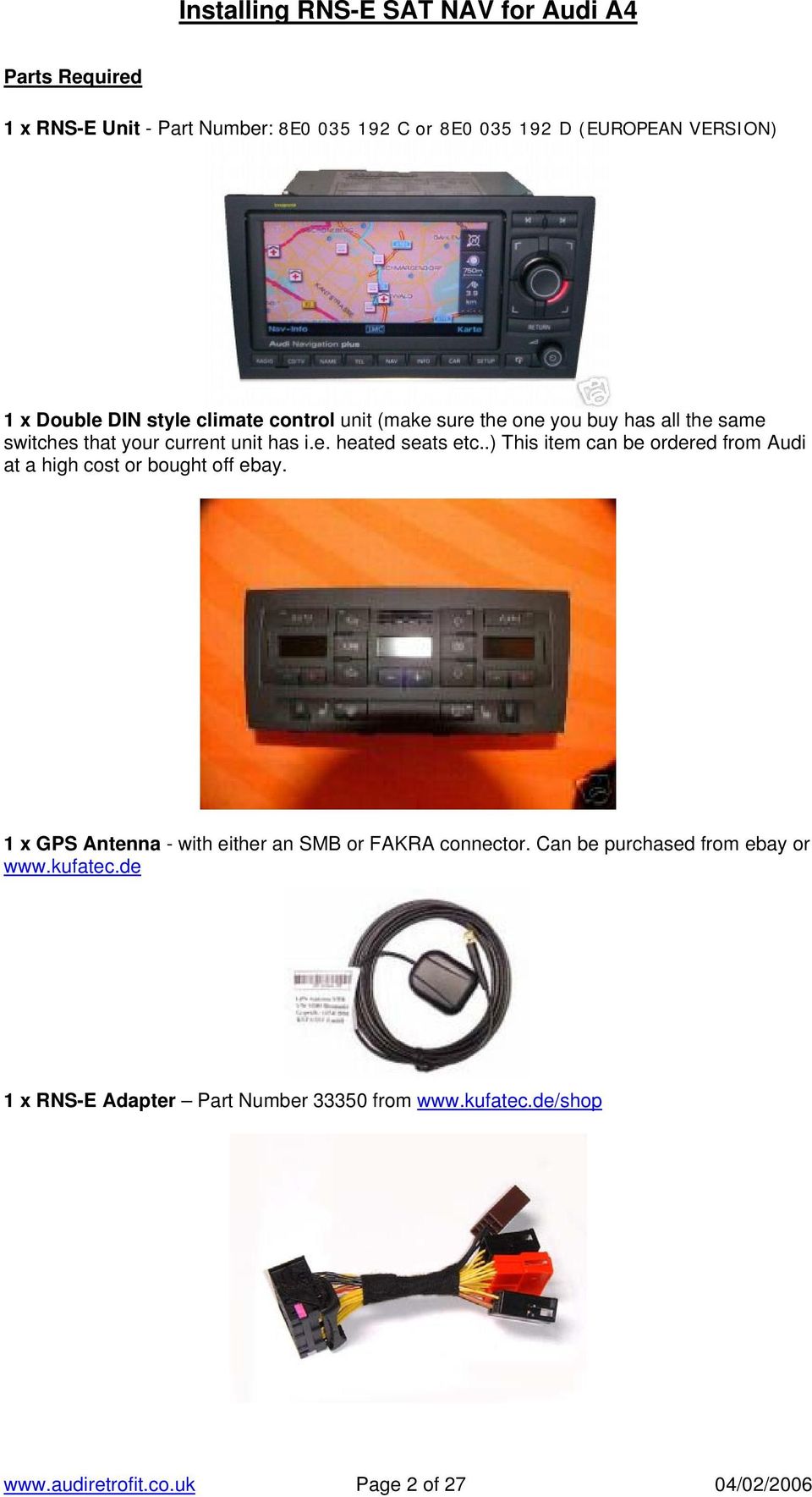
3 1 x RNS-E Antenna Adapter - Can be purchased from ebay or 1 x Double DIN Dash Housing Available from Audi Parts department or ebay. 1 x RNS-E Western Europe DVD (Try and buy the latest version that is out as this will also update your RNS-E Firmware to the latest version) Page 3 of 27 04/02/2006

4 Tools Required 4 x Radio Removal (These can be purchased off ebay or from Halfords etc..) 1 x Hacksaw with Fine Blade (Suitable for cutting plastic) 1 x Screwdriver Set which has hex style bits 1 x Socket Wrench with Extension Arm 1 x 8mm Socket 1 x 13mm Socket 1 x Small flat head screwdriver 1 x Stanley Knife with a sharp blade 1 x Ruler 1 x Wire Cutters 10 x Cable Ties Page 4 of 27 04/02/2006

5 Part 1: Removing and installing chorus and concert radios a) Switch off all electrical equipment. b) Remove ignition key. c) Prior to removing the radio check that you have the anti-theft code and have removed any Tapes/CD s from it. d) Insert radio release tool -T into release slots as illustrated until they engage. Pointed ends of grips must face outwards. e) Grasp hold of grips on radio release tool -T and pull radio out of dash panel. f) Release and unplug connectors at the back of the stereo unit. g) Press the tabs on the sides of the radio and pull out release tools. Page 5 of 27 04/02/2006

6 Stage 2: Removing plastic trim and switches from the centre of the dash a) Unclip upper switch module trim by hand or with a small flat head screwdriver which has had the end wrapped with electrical tape (this will stop the dash/trim from getting scratched) -1- b) Detach trim for switch module. c) Carefully remove the hazard warning switch by hand. d) Unplug electrical the connectors off the switch (The connector is colour coded so there is no need to make a note of where it goes). Page 6 of 27 04/02/2006

7 Stage 3: Remove right and left dash panel covers a) Open the driver s door. b) Use small flat head screwdriver which has had the end wrapped with electrical tape (this will stop the dash/trim from getting scratched) to remove the side panel cover. c) Open the front passenger s door and repeat the process (b) on this side as well. Page 7 of 27 04/02/2006

8 Stage 4: Remove the Glovebox WARNING!! If you car has an airbag deactivation switch in the glove box complete the following task prior to completing this stage. TASK: Switch the airbag deactivation switch in the glove box to the off position, then switch the ignition around to the until the airbag off light is displayed on the dash, then switch the ignition off and remove the key. REASON: Completing this will cause the car to acknowledge that you have manually switched off the airbag. If you don t complete this and then disconnect the glovebox you may need to take the car to your dealer to reset the airbag light. a) So not to scratch the glovebox make sure the floor mat is clean or covered with a towel. b) If you have a CD changer in the glovebox remove this with the stereo removal keys and unplug the connector at the back. c) Remove the 3 bolts -3- in recesses at top of glove compartment -1- with an 8mm socket. Page 8 of 27 04/02/2006

9 d) Using the same socket remove bolts -5- (2x) from the side, from the outside. e) Then use the socket to remove bolts -4- (2x) from underneath, from footwell. f) Pull out glove compartment downwards. g) Disconnect the glovebox connection located at the back of the glovebox. h) Unplugging connector for passenger airbag key switch (If present on your car) Press release mechanism -3- and remove connector -2- from switch -1-. Picture of Glovebox after it has been removed. Page 9 of 27 04/02/2006

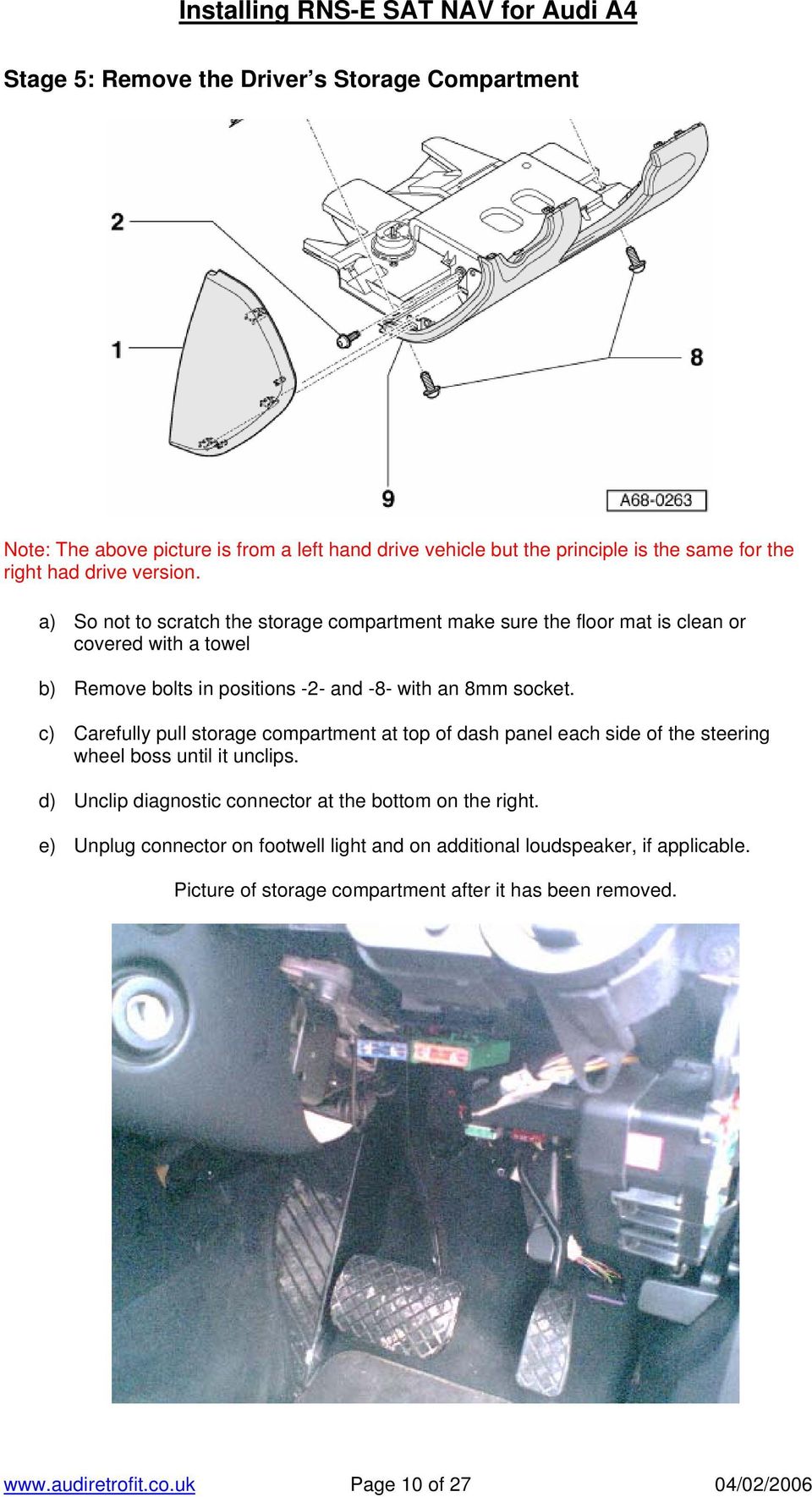
10 Stage 5: Remove the Driver s Storage Compartment Note: The above picture is from a left hand drive vehicle but the principle is the same for the right had drive version. a) So not to scratch the storage compartment make sure the floor mat is clean or covered with a towel b) Remove bolts in positions -2- and -8- with an 8mm socket. c) Carefully pull storage compartment at top of dash panel each side of the steering wheel boss until it unclips. d) Unclip diagnostic connector at the bottom on the right. e) Unplug connector on footwell light and on additional loudspeaker, if applicable. Picture of storage compartment after it has been removed. Page 10 of 27 04/02/2006
11 Stage 6: Remove the Centre Armrest (if present) a) Remove rear ashtray b) Remove nut -4- in ashtray well with a 13mm Socket c) On centre armrest with telephone, unplug connector -2- by squeezing retainer tabs - 3- d) Remove centre armrest Page 11 of 27 04/02/2006

12 Stage 7: Remove Gear Gaiter/Cover Automatic gearbox cover a) Lever off selector mechanism cover -1-. Manual gearbox cover a) Unclip mounting frame -6-. b) Lift up the gaiter so it is clear of the plastic surround. c) Lever off selector mechanism cover Page 12 of 27 04/02/2006

13 Stage 8: Remove the Ashtray a) Release the two screws -2- on ashtray. b) Remove ashtray -1-. c) Unclip storage compartment trim Page 13 of 27 04/02/2006

14 Stage 9: Remove the Centre Console a) Apply handbrake firmly. b) Remove caps -3- of bolts -4- on right and left of front footwell at side of centre console. c) Relmove bolts -4- on right and left of front footwell at side of centre console. d) Lever out cover -5- from front. e) Remove the two cross-head screws -7- on connecting piece -6- and remove connecting piece. Otherwise the trim cannot be pulled over the handbrake lever. f) Remove the two screws -8- in ashtray opening. g) Remove the four bolts -9- round the manual gearbox (if applicable), which hold centre console. h) Remove the two screws i) Remove the two hexagon combi nuts -12- with a 13mm Socket. Page 14 of 27 04/02/2006

15 j) Push centre console firmly backwards, disconnect the cigarette lighter cable and remove from vehicle. Picture of the console after all the components have been removed apart from connecting piece -6-. Shown by the red arrow. Picture of the Centre Console after it has been removed. Page 15 of 27 04/02/2006

16 Stage 10: Removing the Center Section of the dash (Single Din Housing) a) Remove bolts -2- on dash panel centre section b) Remove bolts -3- on dash panel centre section. c) Remove screw from the areas marked by the red arrows on the diagram. d) Detach centre section of the dash-panel. e) Disconnect the ESP switch, the connectors going into the Climate control. f) Remove the cup holder and storage compartments by pushing in the holding clips on the top of each item and then slide the compartment out. Page 16 of 27 04/02/2006

17 Stage 11: Fitting the new double din console. a) Insert the cup holder, storage compartment, and switches into the Double Din console. Make sure that they go in the same order that they were removed from the Single Din Console. b) Insert the Double Din console into the dash and align it with the location pins c) Screw in the 2 screws from the area marked with the red arrows on the diagram above. d) Reconnect the cables to the back of the storage compartments and switches. e) Insert bolts 2 and 3- and tighten. Page 17 of 27 04/02/2006

18 Stage 12: Cutting the Centre Tunnel. In order for the original centre tunnel to be re fitted there are two small sections that need to be cut out along with two corners. These parts are completely hidden when all the items have been refitted. The main area that needs to be cut is shown below by the red arrow! Page 18 of 27 04/02/2006

19 Stage 13: Re-installing the Centre Tunnel. a) Align the centre console with the new double Din housing and push down over the handbrake. The bolting points 12 - at the end of the console should align with there original position. b) Reconnect the cigarette lighter cable. c) Reinstall the two hexagon combi nuts -12- d) Reinstall the four bolts -9- round the manual gearbox (if applicable), which hold centre console e) Reinstall bolts 10 and bolts 8 - f) Reinstall Piece -6 into the handbrake lever area and fix in using the 2 scews 7 -. g) Clip in cover -5- from back. h) Re insert the plastic trim that you remove from the dash in stage 2 of this install document. Page 19 of 27 04/02/2006

20 Stage 14: Reinstalling and modifying the Ashtray. a) Part 4 in the picture needs to be cut in order to fit it back in. There are 2 clips that hold this piece into the console. You need to cut a straight line directly after these clips and cut along it. Please see the diagram below. Page 20 of 27 04/02/2006

21 Stage 14: Reinstalling and modifying the Ashtray Cont. CUT CLIPS b) Clip in storage compartment trim -4- now that it has been modified c) Insert ashtray -1-. d) Insert the two screws -2- on ashtray. e) Remove ashtray Page 21 of 27 04/02/2006
22 Stage 15: Installing the Climate Control Unit. a) Pull the cables for the climate control unit through the bottom aperture of the double din console. b) Clip the cables into the climate control unit (they have specific locations so they can not be connected incorrectly. c) Slot the climate control unit into the housing and it will lock into place. Stage 16: Fit the Gear Gaiter/Cover Automatic gearbox cover a) Clip on selector mechanism cover -1-. Manual gearbox cover b) Clip on selector mechanism cover c) Push the gaiter mounting frame -6- into the plastic surround. Page 22 of 27 04/02/2006
23 Stage 17: Fitting the RNS-E Unit. a) Connect the RNS-E adapter cable to the existing Audi Wiring connectors that went into the stereo. b) On the antenna adapter you need to connect both the diversity cable and the antenna cable. On some adapters you need to remove the plastic from the diversity cable on the wiring loom and slot it into the new adapter. c) Take the GPS antenna and feed the small cable through the left hand side of the double din console from the area where you removed the glovebox (SEE IMAGE BELOW). FROM HERE! d) Plug the GPS antenna into the top right connector at the back of the RNS-E Unit TO HERE! e) Plug the antenna adapter into the bottom left connector at the back of the RNS-E Unit f) Connect the wiring harness to the RNS-E unit s main connector and push the RNS-E back into the dash. (if the unit won t lock into place push the cables at the back of the until down so they allow it to go all the way into the dash). g) There is a small gap at the under the dash on the left hand side above the fan unit which is ideal for the GPS antenna. Push the antenna into this location and if the antenna has a magnetic base it will lock into place. (See image) CABLE FAN UNIT GAP BEHIND DASH FOR GPS ANTENNA Page 23 of 27 04/02/2006
24 h) Once this is in place attach the GPS cable to the cable shown the image (Blue Arrow) using cable ties and push through some slack to the back of the RNS-E Unit in case you have to remove it in the future. i) Switch on the RNS-E Unit, insert the Navigation DVD and test the unit by planning a trial route. j) Also to see how may satellites you are click on the Nav info button when in navigation screen. k) Then test the sound through the speakers to make sure that is ok. Page 24 of 27 04/02/2006
25 Stage 18: Install the Centre Armrest (if present) a) Slot Armrest -1- through the slot in the centre console. b) On centre armrest with telephone, connect connector -2- or any other connectors. c) Bolt in nut -4- in ashtray well with a 13mm Socket e) Reinsert the rear ashtray Page 25 of 27 04/02/2006
26 Stage 19: Reinstall the Glovebox a) Connect the glovebox connection located at the back of the glovebox. b) Connect connector for passenger airbag key switch (If present on your car) c) Feed the CD changer cable through the aperture in the dash (if applicable) d) Lift glovebox into place. e) Insert the 3 bolts -3- in recesses at top of glove compartment -1- with an 8mm socket. f) Using the same socket insert bolts -5- (2x) from the side, from the outside. g) Then use the socket to insert bolts -4- (2x) from underneath, from footwell. h) If you car has the CD changer screw in the bolt above this, connect the changer cable and push the change back into the glovebox. i) Clip panel -2- back into place. Page 26 of 27 04/02/2006
27 Stage 20: Reinstall the Driver s Storage Compartment Note: The above picture is from a left hand drive vehicle but the principle is the same for the right had drive version. a) Reconnect diagnostic connector at the bottom on the right of the compartment. b) Connect connector on footwell light and on additional loudspeaker, if applicable c) Lift compartment into position d) Push storage compartment at top of the panel each side of the steering wheel boss until it clips in. e) Insert bolts in positions -2- and -8- with an 8mm socket. f) Clip panel -1- back into place. CONGRATULATIONS YOU HAVE NOW INSTALLED AN RNS-E UNIT INTO YOUR CAR!! Page 27 of 27 04/02/2006
Retrofit Instructions Installing a Sport Heated Steering Wheel - Leather, Multifunction BMW X5, E53, 2001 2006
 Retrofit Instructions Installing a Sport Heated Steering Wheel - Leather, Multifunction BMW X5, E53, 2001 2006 Disclaimer: This set of instructions is simply a guide on how I installed my own heated steering
Installation instructions, accessories - Handsfree for cellular phone, system B, entry level
 XC90 Section Group Weight(Kg/Pounds) Year Month 3 39 0.5/1.1 2006 07 XC90 2003, XC90 2004 IMG-249663 Page 1 of 18 Required tools A0000162 A0000163 IMG-239664 M0000232 IMG-253123 IMG-252223 Page 2 of 18
TOYOTA TACOMA 2008- HANDS FREE BLU LOGIC Preparation
 TOYOTA TACOMA 2008- HANDS FREE BLU LOGIC Preparation Part #: PT923-00112 Conflicts: JBL Audio, Factory Navigation NOTE: Part number of this accessory may not be the same as the part number shown. Kit Contents:
Instrument panel. Volkswagen Touareg - Instrument panel. Special tools, testers and auxiliary items required. Release lever T10039
 Volkswagen Touareg - Instrument panel Page 1 / 14 70-1 Instrument panel Tools Special tools, testers and auxiliary items required Release lever T10039 Instrument panel, removing and installing Removing
INSTALLATION INSTRUCTIONS
 INSTALLATION INSTRUCTIONS Accessory Application Publications No. AII23628 2003 PILOT Issue Date MAY 2002 PARTS LIST Security System Kit (sold separately): P/N 08E51-S84-100 2 Remote controls Attachment
Installation instructions, accessories - Navigation system, RTI
 XC90 Section Group Weight(Kg/Pounds) Year Month 3 393 4/8.8 2007 08 Page 1 of 20 Required tools A0000162 IMG-239667 IMG-239664 IMG-239980 IMG-242205 R8802817 R3905015 Page 2 of 20 R3903812 IMG-213320 Page
TOYOTA PRIUS 2010- HANDS FREE BLU LOGIC Preparation
 TOYOTA PRIUS 2010- HANDS FREE BLU LOGIC Preparation Part #: PT923-00111 Conflicts: JBL Audio, Factory Navigation NOTE: Part number of this accessory may not be the same as the part number shown. Kit Contents:
INSTALLATION INSTRUCTIONS
 INSTALLATION INSTRUCTIONS Accessory Application Publications No. ACCORD All 30209 2-AND 4-DOOR SYSTEM (VP, LX, SE) Issue Date AUG 2005 PARTS LIST Security System Attachment: P/N 08E55-SDA-100A Unit panel
C5 Sound Deadening & Insulation Kit Interior Removal & Installation Instructions
 C5 Sound Deadening & Insulation Kit Interior Removal & Installation Instructions Ok, let's start with taking the radio bezel dash area off first. Here is what the OEM radio looks like... First you flip
INSTALLATION INSTRUCTIONS
 INSTALLATION INSTRUCTIONS Accessory Application Publications No. All 24393 ACCORD (DX, LX) SYSTEM 2-AND 4-DOOR Issue Date AUG 2002 PARTS LIST Security System Attachment (LX): P/N 08E55-SDA-100A Unit panel
INSTALLATION INSTRUCTIONS
 INSTALLATION INSTRUCTIONS Accessory Application Publications No. AII 26327 2004 S2000 Issue Date OCT 2004 PARTS LIST Security System: P/N 08E51-S84-100 Attachment Kit: P/N 08E55-S2A-101 2 Remote controls
GENUINE PARTS INSTALLATION INSTRUCTIONS
 GENUINE PARTS INSTALLATION INSTRUCTIONS 1. DESCRIPTION: Auto-Dimming Mirror Kit with Compass and HomeLink 2. APPLICATION: Titan 3. PART NUMBER: 999L1 WS000 4. KIT CONTENTS: Item Qty Description Service
INSTALLATION INSTRUCTIONS
 INSTALLATION INSTRUCTIONS Accessory TRIM Application 2008 ACCORD 4-DOOR Publications No. AII 35362 Issue Date AUG 2007 PARTS LIST Steering Wheel Trim (Without Navigation) P/N 08Z13-TA0-100 Right steering
FRONT BUMPER INSTALLATION INSTRUCTIONS 2007-2011 DODGE / MERCEDES SPRINTER
 Aluminess Products Inc 9402 Wheatlands Ct. #A Santee, CA 92071 619-449-9930 FRONT BUMPER INSTALLATION INSTRUCTIONS 2007-2011 DODGE / MERCEDES SPRINTER Please read before beginning Stainless steel hardware
Parts and Accessories Installation Instructions
 Parts and Accessories Installation Instructions INFO 1 4 2 5 3 6 TONE SELET FM AM MODE MENU F 38 393 B Retrofit Kit On-board Monitor and Navigation System BMW 7 Series (E 38) These installation instructions
INSTALLATION INSTRUCTIONS
 INSTALLATION INSTRUCTIONS Accessory Application Publications No. XM RADIO SYSTEM 2003 ACCORD 4 DOOR AII 24378 Issue Date MARCH 2003 The XM Radio will not fit in a vehicle equipped with a rear entertainment
Trailblazer, Envoy, Rainier, Ascender
 6. After removing the trim plate bezel simply remove the four ¼ screws holding the instrument cluster in place. Pull the cluster out and unplug the single wiring harness connection in the back. Trailblazer,
5 Mechanisms and accessories
 5 Mechanisms and accessories 51A SIDE OPENING ELEMENT MECHANISMS 52A NON-SIDE OPENING ELEMENT MECHANISMS 54A WINDOWS 55A EXTERIOR PROTECTION 56A EXTERIOR EQUIPMENT 57A INTERIOR EQUIPMENT X79 NOVEMBER 2009
INSTALLATION INSTRUCTIONS
 INSTALLATION INSTRUCTIONS Accessory Application 2009 PILOT Publications No. AII 39408 Issue Date MAY 2008 PARTS LIST Steering Wheel Trim (With Cruise and Audio) P/N 08Z13-SZA-130B (Chocolate) P/N 08Z13-SZA-140B
BODY-12, Door Handle - Removal, Installation, and Adjustment
 Introduction BODY-12, Door Handle - Removal, Installation, and Adjustment There are many different procedures floating around describing how to replace the door handles on a 944 and every one of them will
GROM Interface Installation into Nissan and Infiniti cars using NIS02 vehicle specific harness
 GROM Interface Installation into Nissan and Infiniti cars using NIS02 vehicle specific harness Tools needed 1. Panel trim removal tool (optional) 2. Philips screwdriver Picture 1: NIS02 vehicle specific
Time needed: ~3h for lid replacement only. Add 1h for operation harness in lid and ~2h more for installing drive unit and cable harness in trunk.
 DIY for replacing trunk lid and/or retrofitting electrical operation of trunk lid. This document is meant to be a support and give advice on the procedure but I will take no responsibility for any damage
Juice Box Stages 1&2 135&335 Installation Guide 5/10/08
 Tools Required: 8mm socket or nut driver Small flat head screwdriver Electrical tape, masking tape, or shrink tube Pep talk: Although the install looks daunting at first, once you get the learning curve
Before installation it is important to know what parts you have and what the capabilities of these parts are.
 INSTALLATION GUIDE Before installation it is important to know what parts you have and what the capabilities of these parts are. The Recon XZT is the smallest and most powerful gauge of its kind. With
GENUINE PARTS INSTALLATION INSTRUCTIONS
 GENUINE PARTS INSTALLATION INSTRUCTIONS DESCRIPTION: Illuminated Kick Plate APPLICATION: Rogue (2011) PART NUMBER: 999G6 GX010 KIT CONTENTS: Item A B C G H QTY 1 1 1 D 1 E 1 F 3 15 6 Description Kick Plate,
HP Laser Jet 4200/4240/4250/4300/4350 Swing Plate
 HP Laser Jet 4200/4240/4250/4300/4350 Swing Plate 1 Swing Plate Assembly-RM1-0043 1 Swing Plate Kit-5851-2766 (RM1-0043 plus RM1-1091 gear) CAUTION: Fuser may be hot. Turn off printer, unplug it and allow
UPGRADING AND SERVICING GUIDE
 UPGRADING AND SERVICING GUIDE HPTouchSmart 610 PC Computer features may vary by model. Removing and Replacing a CD/DVD Drive...2 Removing the CD/DVD Drive... 2 Installing a New CD/DVD Drive... 5 Removing
430 Power/Electronics Replacement
 Replacing the main board WARNING Before proceeding, turn off the main power switch and unplug the power cord. Caution Make sure you are properly grounded with an ESD strap before continuing. The main printed
INSTALLATION INSTRUCTIONS
 Rear Vision System Aftermarket and Factory 5.0, 8.4 and 6.1 MyGig Touch Screen Display (Factory Display requires Chrysler/Dodge dealer to activate) 2009 Current* Dodge Ram (Kit part number 1009-6503) *NOTE:
HP Pavilion All-in-One MS200 series PC. Upgrading and Servicing Guide. Printed in
 HP Pavilion All-in-One MS200 series PC *579907-001* *579907-001* Printed in Upgrading and Servicing Guide Replacing a Wireless Keyboard or Mouse...2 Before You Begin... 2 Replacing the Keyboard or Mouse...
INSTALLATION MANUAL INSIDE PASSENGER COMPARTMENT. HFC 134a FOR EUROPEAN SPEC. / GENERAL SPEC. AIR CONDITIONING ENGLISH
 HFC 134a Ozone Friendly Refrigerant FOR EUROPEAN SPEC. / GENERAL SPEC. AIR CONDITIONING ENGLISH AAAMU-60 / INSIDE PASSENGER COMPARTMENT INSTALLATION MANUAL 2000 (EUROPE) B.V.. All Rights Reserved. This
INSTALL/REMOVAL INSTRUCTIONS: WINDOW REGULATOR
 REMOVAL/INSTALL OF WINDOW REGULATOR (741-306) Honda Accord 2003 07 General Tech Tips: Use painter s tape rather than duct tape to secure window. It will not damage paint or leave sticky residue. A plastic
Service Guide. Gateway M275
 Service Guide Gateway M275 Contents Replacing Gateway M275 Components.................................... 1 Identifying the convertible tablet PC model...................................... 2 Identifying
GPS AutoSteer System Installation Manual
 GPS AutoSteer System Installation Manual Supported Vehicles John Deere Sprayers 4720 4630 4730 4830 AutoTrac Ready PN: 602-0227-01-A LEGAL DISCLAIMER Note: Read and follow ALL instructions in this manual
COOPER S PULLEY UPGRADE KIT INSTALLATION INSTRUCTIONS PART NUMBER NME5011
 COOPER S PULLEY UPGRADE KIT INSTALLATION INSTRUCTIONS PART NUMBER NME5011 Below are instructions for the Mini Mania Pulley Upgrade Kit, Part Number NME5011. Please take all necessary precautions for working
89 to 93 Dashboard Removal. Created for Miata.net Members by Anthony Meeks (SE1686)
 89 to 93 Dashboard Removal Created for Miata.net Members by Anthony Meeks (SE1686) Intro When I bought my 91 SE, the paint on the top of the dashboard was in terrible shape and I immediately determined
http://mbworld.org/forums/c32-amg-c55-amg-w203/449471-famous-ac-clicking-noiseac-footwell-damper-linkage-replacement-diy-details-steps.
 Air Conditioner / HVAC W203 Stepper Motor Repair PART 1 OF 3 forums/c-class-w203/177068-noisy-air-conditioner-stepper-motorreplacement-clicking-hissing.html forums/c32-amg-c55-amg-w203/449471-famous-ac-clicking-noiseac-footwell-damper-linkage-replacement-diy-details-steps.html
AUTO TRANS DIAGNOSIS Article Text 1998 Volkswagen Passat This file passed thru Volkswagen Technical Site - http://volkswagen.msk.
 AUTO TRANS DIAGNOSIS Article Text 1998 Volkswagen Passat This file passed thru Volkswagen Technical Site - http://volkswagen.msk.ru ARTICLE BEGINNING 1997-98 AUTOMATIC TRANSMISSIONS Volkswagen Shift Interlock
INSTALLATION INSTRUCTIONS
 Rear Vision System Tailgate Handle Camera Mirror Display 2004-2014 Ford F-150 and 2008-2015 Ford Super Duty (Kit part numbers 9002-9521) Kit Contents: Mirror Tailgate Handle with camera and harness Interior
TOYOTA Tundra 2007 - BACK-UP CAMERA SYSTEM Preparation
 Preparation Part Number(s): PT233-34070, PT923-35070-11, PT923-35070-43 NOTE: Part number of this accessory may not be the same as part number shown. Back Up Monitor Kit Contents PT923-35070-11 / PT923-35070-43
Installation instructions, accessories. Cruise control. Volvo Car Corporation Gothenburg, Sweden. Instruction No Version Part. No. 30739998 1.
 Instruction No Version Part. No. 30739998 1.1 Cruise control Page 1 / 11 Equipment A0000162 A0000161 A0801178 D8802049 Page 2 / 11 M8802108 Page 3 / 11 IMG-223164 Page 4 / 11 IMG-213320 Page 5 / 11 INTRODUCTION
Spurious diagnostic trouble codes in the airbag system (SRS)
 SERVICE INSTRUCTION Number: 850-2077 Year: 1999 Month: Market: FEBRUARY ALL Spurious diagnostic trouble codes in the airbag system (SRS) Cars affected Saab 9-5 4D M98-99 up to and including chassis number
Front brakes (FN- 3), servicing
 j a t Front brakes (FN- 3), servicing 46-1 Front brakes, servicing Note: Install complete repair kit. After replacing brake pads and before moving vehicle, depress brake pedal several times firmly to properly
Installation instruction do88 Intercooler for Volvo S40 / V50 / C30
 Installation instruction do88 Intercooler for Volvo S40 / V50 / C30 This instruction shows how to replace the OEM intercooler with our performance intercooler. 2. 3. 1. 4. 5. Part number: ICM-170 6. At
Volkswagen Jetta, Golf, GTI 1999, 2000 Brake System 46 Brakes - Mechanical Components (Page GR-46)
 46 Brakes - Mechanical Components (Page GR-46) Front brakes Brake pads, removing and installing Brake pads, removing and installing FN 3 brake caliper, servicing FS III brake caliper, servicing Rear wheel
http://mbworld.org/forums/c32-amg-c55-amg-w203/449471-famous-ac-clicking-noiseac-footwell-damper-linkage-replacement-diy-details-steps.
 Air Conditioner / HVAC W203 Stepper Motor Repair PART 2 OF 3 forums/c-class-w203/177068-noisy-air-conditioner-stepper-motorreplacement-clicking-hissing.html forums/c32-amg-c55-amg-w203/449471-famous-ac-clicking-noiseac-footwell-damper-linkage-replacement-diy-details-steps.html
Chevy Equinox 2010-2015 / GMC Terrain 2010-2014 (with monochrome display) 99-3307G
 INSTALLATION INSTRUCTIONS FOR PART 99-3307G Chevy Equinox 2010-2015 / GMC Terrain 2010-2014 (with monochrome display) 99-3307G KIT FEATURES ISO DIN radio provision with pocket ISO DDIN radio provision
INSTALL/REMOVAL INSTRUCTIONS: WINDOW LIFT MOTOR
 REMOVAL/INSTALL OF WINDOW LIFT MOTOR (742-273) Ford Expedition 1997 2002, Lincoln Navigator 1998 2002, Ford F-150 Super Crew Cab 2001 General Tech Tips: Use painter s tape rather than duct tape to secure
P150SC15. Designed for 2015 Ford F150 Super-Cab and Super-Crew vehicles without Sony System. 2015 Stillwater Designs P150SC15-A2-20150813
 P150SC15 Designed for 2015 Ford F150 Super-Cab and Super-Crew vehicles without Sony System Subwoofer Assembly Amplifier Assembly Amplifier Harness 2015 Stillwater Designs P150SC15-A2-20150813 M6 Bolt M6
Interior - Lights and Switches
 Interior - Lights and Switches Стр. 1 из 3 96-1 Interior - Lights and Switches Footwell Lights Footwell lights: Left Footwell Light W9 Right Footwell Light W10 Note: The front foot well lights are located
REARWARD- & FORWARD-FACING USER MANUAL ECE R44 04. GROUP WEIGHT AGE 0+/1 0-18 kg 6m-4y
 REARWARD- & FORWARD-FACING USER MANUAL ECE R44 04 GROUP WEIGHT AGE 0+/1 0-18 kg 6m-4y 1 Thank you for choosing BeSafe izi Combi ISOfix. BeSafe has developed this seat with much care, to protect your child
Convertible Top Hydraulic Cylinder Removal Manual for W124 E-Class Convertibles 1993-1995 Models 300CE (1993) and E320 (1994-1995)
 Convertible Top Hydraulic Cylinder Removal Manual for W124 E-Class Convertibles 1993-1995 Models 300CE (1993) and E320 (1994-1995) Written by Samit Ghosh with picture material from vexed of benzworld.org
specializing in AIR CONDITIONING, PARTS AND SYSTEMS for your classic vehicle PERFECT FIT IN-DASH HEAT/ COOL/ DEFROST 1967-72 CHEVROLET PICKUP
 specializing in AIR CONDITIONING, PARTS AND SYSTEMS for your classic vehicle PERFECT FIT IN-DASH HEAT/ COOL/ DEFROST 1967-72 CHEVROLET PICKUP CONTROL & OPERATING INSTRUCTIONS The controls on your new Perfect
VW GOLF Mk4 TDI FRONT MOUNTING INTERCOOLER INSTALLATION INSTRUCTIONS
 VW GOLF Mk4 TDI FRONT MOUNTING INTERCOOLER INSTALLATION INSTRUCTIONS Tools required: 10mm/13mm socket and 3/8 drive ratchet with extension Torx T20/25/30 screwdrivers or bits Phillips head screwdriver,
WARNING! REQUIRED TOOLS & SUPPLIES: HIGH VOLTAGE
 INSTRUCTIONS Product: GEM Electric Motorcars Models: All Subject: Instructions for installing Stereo Accessory Estimated Completion Time:.75 Hours Parts: See Page # 7 REQUIRED TOOLS & SUPPLIES: (1) 3/8
CONTENTS TOOLS REQUIRED: Ratchet 13mm Socket 10mm Socket Phillips Screwdriver Pliers Panel Removal Tool. Amp Installation
 CONTENTS 1EA. SUBWOOFER ASSEMBLY P/N RUWRANGLER 1EA. 200 WATT AMP/BRACKET ASSEMBLY P/N RM11JKBTL - Bracket P/N RE08BTL200R - Amp 1EA. POWER HARNESS P/N RHWRANGLERPWR 1EA. OVERLAY HARNESS P/N RHWRANGLER
Use subject to terms and conditions posted at http://www.burgertuning.com/terms.htm
 Use subject to terms and conditions posted at http://www.burgertuning.com/terms.htm THIS PART IS LEGAL FOR USE ONLY IN COMPETITION RACING VEHICLES AS DEFINED UNDER CALIFORNIA LAW, AND IS NOT LEGAL FOR
Bulb Replacement REPLACING BULBS WARNING
 Bulb Replacement REPLACING BULBS Check the operation of all exterior lamps before you drive the vehicle. Caution: Before attempting to replace a bulb, ensure that both the affected lamp and the vehicle's
VOLKSWAGEN CONNECTION METHODOLOGY
 19/03/2015 Volkswagen MIB Navigation upgrade installation manual Golf Mk7 2013> Navigation for Composition Media KIT CONTENTS 1 x Navigation Module 1 x Wiring Loom 1 x GPS Antenna 1 x TMC Antenna 1 x Interface
VW Jetta, Golf, New Beetle 1.9L TDi Unichip PnP Installation Instructions
 VW Jetta, Golf, New Beetle 1.9L TDi Unichip PnP Installation Instructions and Warranty Information Tools Required 10mm combination wrench, 13mm Socket (Jetta/Golf only), 3/8-inch or ¼-Inch drive ratchet,
- power windows - alarm system - electric door mirror control - door warning light - central locking - seat memory
 Door Wiring Harness Plug Connections Binder -, Electrics Vehicle Type: (86) Model Year: 7 (V) Concern: Door wiring harness plug connections X11 / X12. Information: The rubber boot for the door connector
Mazda CX7 2010-up 99-7520B
 INSTALLATION INSTRUCTIONS FOR PART 99-7520B APPLICATIONS Mazda CX7 2010-up 99-7520B KIT FEATURES DIN radio provision with pocket ISO radio provision with pocket Double DIN radio provision Painted matte
Solstice/Sky Water Pump Replacement
 Solstice/Sky Water Pump Replacement The water pump on the Solstice/Sky is starting to need replacement on some vehicles. This guide will help in replacing the water pump while the engine is still in the
LIFT-505. BMF Lift Kit. Yamaha Drive Gas or Electric. Installation Instructions
 LIFT-505 BMF Lift Kit Yamaha Drive Gas or Electric Installation Instructions Contents of LIFT-505 Yamaha Drive BMF Lift Kit: a (1 ea.) BMF A-Arm Assembly b (1 ea.) Driver Side Shock Tower c (1 ea.) Passenger
OWNER S MANUAL. Permolock C3. Docking system for Power wheelchair in vehicle
 OWNER S MANUAL US Permolock C3 Docking system for Power wheelchair in vehicle How to contact Permobil Head Office of the Permobil group Permolock C3 Docking system for electric wheelchair in vehicle Produced
Guide for Modified Assembly: Lightning McQueen. By: Collin Patterson, University of Delaware. Materials and Tools:
 Guide for Modified Assembly: Lightning McQueen By: Collin Patterson, University of Delaware Materials and Tools: PVC o 40 inches of 1 in diameter PVC o 25 inches of ¾ in PVC o 4 x 1 in elbows o 2 x ¾ in
Mazda CX7 2007-09 99-7508
 INSTALLATION INSTRUCTIONS FOR PART 99-7508 APPLICATIONS Mazda CX7 2007-09 99-7508 KIT FEATURES DIN Radio Provision with Pocket ISO Mount Radio Provision with Pocket Double DIN Mount Radio Provision Stacked
SERVICE GUIDE. Gateway Notebook
 SERVICE GUIDE Gateway Notebook Contents Replacing Gateway Notebook Components...................................1 Identifying the notebook model......................................... 2 Identifying
Front Panel Board Cable Replacement Instructions
 apple Mac Pro Front Panel Board Cable Replacement Instructions First Steps 1 Shut down computer. Note: Follow these instructions carefully. Failure to do so could damage your equipment and void its warranty.
Installing the Video Input and TV Tuner Cards in a Compact Computer or a Dual PCI-Slot Tower Computer
 Installing the Video Input and TV Tuner Cards in a Compact Computer or a Dual PCI-Slot Tower Computer This booklet describes how to install the video input and TV tuner cards in a compact Macintosh computer
Power Window/Power Lock Installation. To begin with you will need all the parts listed below:
 Power Window/Power Lock Installation To begin with you will need all the parts listed below: From Donor Fiero: Fiero power window regulators Power window motors (Generic GM type part) -motors are riveted
Installation Instructions
 Installation Instructions For Use with PXPV230, PXPV265, PXPD230, and PXPD265 models Attention! - Please read these instructions completely before attempting installation. Always unplug the power supply
General Tips for Installation of mobridge into Porsche Vehicles
 General Tips for Installation of mobridge into Porsche Vehicles Disclaimer: the information herein is provided as a convenient as-is reference only. The information herein is not guaranteed to be accurate
INSTALL/REMOVAL INSTRUCTIONS: WINDOW REGULATOR
 REMOVAL/INSTALL OF WINDOW REGULATOR (741-644) Cadillac Escalade, Chevrolet Suburban, Chevrolet Tahoe, GMC Yukon, Chevrolet Silverado, GMC Sierra 2000 05 General Tech Tips: Use painter s tape rather than
Installation instructions, accessories. Alarm, siren. Volvo Car Corporation Gothenburg, Sweden. Instruction No Version Part. No. 30633795 1.
 Instruction No Version Part. No. 30633795 1.0 Alarm, siren Page 1 / 12 Equipment A0000162 A0000161 A0801178 IMG-233902 Page 2 / 12 IMG-213320 Page 3 / 12 INTRODUCTION Read through all of the instructions
Installation Instructions
 AUX Chapter 1 Getting Started Installation Instructions 1.1 Subject The GROM an integration between an MP3 player and a factory installed car stereo. Equipped with the specific vehicle harness and standard
Processor Cage Fans, Front and Rear Replacement Instructions
 apple Mac Pro Processor Cage Fans, Front and Rear Replacement Instructions First Steps 1 Shut down computer. Note: Follow these instructions carefully. Failure to do so could damage your equipment and
5800 Temperature Sensor Cable Assembly
 5800 Temperature Sensor Cable Assembly Removal and Replacement Instruction Sheet #60-4702-070 Revision D, January 14, 2013 Overview The 5800 has two refrigeration temperature sensors, one attached to the
CAM-03, Camshaft Assembly Oil Seal Replacement
 CAM-03, Camshaft Assembly Oil Seal Replacement Tools Jack stands Floor Jack Metric Socket set Metric Wrench set Porsche Timing Belt Tension tool (P9201) Flywheel Lock (P9206) Balance Shaft Pin Spanner
TOYOTA TUNDRA 2015 Billet Grille w/led DRL
 TOYOTA TUNDRA 2015 Billet Grille w/led DRL Part Number: 00016-34088 Accessory Code: BG3000 Conflicts Models 1794 and Platinum Kit Contents Item # Quantity Reqd. Description 1 2 LED DRL 2 1 Driver Box 3
Bi-Xenon Retrofit DIY Instructions
 Bi-Xenon Retrofit DIY Instructions Models: Facelifted E46 with halogen lights fitted as OEM. NOTE: To get pre-2002 cars this functionality, you need to see the amendment. NOTE: Compliments of ScottZHP
BMW Parts and Accessories Installation Instructions
 1 4 BMW Parts and Accessories Installation Instructions INFO 2 5 3 6 TONE SELECT FM AM MODE MENU F 39 0524 B Retrofit Kit Onboard Monitor and Navigation System BMW 5 Series (E 39) These installation instructions
KVT-729DVD INSTALLATION MANUAL
 MONITOR WITH DVD RECEIVER KVT-729DVD INSTALLATION MANUAL B54-4516-00/00 (EV) Accessories 1 0...1...1 2!...1...2 3...1 4 5...1...1 6...2 7...4 8...4 9...2 2 KVT-729DVD Installation Procedure 1. To prevent
Windshield Wiper System
 Windshield Wiper System Page 1 / 17 92-1 Windshield Wiper System General information Caution! When disconnecting and reconnecting battery terminals, observe all applicable Notes and torque specifications,
CorkSport Mazdaspeed 6 Rear Sway Bar 2006-2007 Mazdaspeed 6
 CorkSport Mazdaspeed 6 Rear Sway Bar 2006-2007 Mazdaspeed 6 Pre-Installation Notes: The CorkSport Rear Sway Bar is a great addition to improving the handling performance to the Mazdaspeed 6. It will minimize
TOOL SVC NUMBERS: 250-2598, 250-2600 SVC CONTENTS ITEM QTY DESCRIPTION PART NUMBER 1 1 CUTTING TOOL 250-2598 2 1 EXTRACTION TOOL/PART# 250-2600
 07-08 TOYOTA FJ CRUISER, 05-09 SIENNA, 06-08 SCION TC PART NUMBER: 250-1732 1 CRUISE CONTROL KIT TOOL SVC NUMBERS: 250-2598, 250-2600 2 2 1 BASE KIT CONTENTS ITEM QTY DESCRIPTION 1 1 CONTROL SWITCH ASSEMBLY
2002 2005 Mini Cooper S Grille Install Instructions
 2002 2005 Mini Cooper S Grille Install Instructions Lower Front Grille BEFORE AFTER Package Contents 1 perforated grille (Stiletto, RAZR, or Monster) 6 Zip Tie Mounting Pads 1 is for the temp. sensor 5
KEYLESS ENTRY UPGRADE SECURITY SYSTEM for 2004 TOYOTA HIGHLANDER
 KEYLESS ENTRY UPGRADE SECURITY SYSTEM for 2004 TOYOTA HIGHLANDER DEALER SERVICE AND INSTALLATION MANUAL KIT NO. 00016-30915 Contents PARTS LIST... 2 PARTS ILLUSTRATIONS... 2 VEHICLE PREPARATION... 3 INSTALLING
A&A CORVETTE PERFORMANCE C6 BOOST & FUEL GAUGE INSTALLATION INSTRUCTIONS
 A&A CORVETTE PERFORMANCE C6 BOOST & FUEL GAUGE INSTALLATION INSTRUCTIONS 1. Check your gauges before you take them out of the packaging to make sure they are at 0 (zero) psi for both boost and fuel pressure.
Original Assembly Guide
 TCT Multipurpose Single Bevel Sliding Compound Mitre Saw Original Assembly Guide Read instructions before assembling this tool. Table of Contents GB Assembly Guide Read instructions before assembling this
Removing memory and option cards
 These instructions can help you remove memory or option cards. Use the following illustration to locate the connector for the card you want to remove. Hard disk connector 1 Option card connector Firmware
Replacing Faceplate Ribbon Cable on Kenwood KDC-715S (these instructions MAY apply to similar Kenwood motorized faceplate units.)
 Replacing Faceplate Ribbon Cable on Kenwood KDC-715S (these instructions MAY apply to similar Kenwood motorized faceplate units.) Warning: I am not an electronics expert but have done my share of electrical
SB-C-CTS/10TW3 SKU# 94552 2008 & Up Cadillac CTS/CTS-V
 INSTALLATION GUIDE for the SB-C-CTS/10TW3 SKU# 94552 2008 & Up Cadillac CTS/CTS-V If you choose to perform the installation yourself, it is absolutely vital that the Stealthbox be properly mounted to the
PRODUCT: WASHER / WASHER-DRYER COMBO MODEL: AW 120 / AW 122 / AW 125 AWD 120 / AWD 121 / AWD 129
 PRODUCT: WASHER / WASHER-DRYER COMBO MODEL: The information included in this Splendide Repair Manual may change without notice. Please see our web site www.splendide.com/service/docs.html for updates,
EZ-Steer Assisted Steering System
 EZ-Steer Assisted Steering System Installation Instructions Platform Kit P/N 53059-21 Case IH Puma 165 Puma 180 Puma 195 Puma 210 New Holland T7030 T7040 T7050 T7060 Revision A June 2007 Part Number 53345-21-EU2
I Click on a link tab to jump to that page. Cover Page
 Publication, Duplication, or Retransmission Of This Document Not Expressly Authorized n Writing By The nstall Doctor s Prohibited. Protected By U.S. Copyright Laws. 1997,1998,1999,2000. Factory Radio Other
ZAPPY 3 OWNER S MANUAL. Read this manual completely before riding your Electric ZAPPY 3.
 ZAPPY 3 OWNER S MANUAL Read this manual completely before riding your Electric ZAPPY 3. TECHNICAL INFORMATION Model No. : ZAPPY 3 Product size Type of motor Motor power Battery type Battery Charger Charging
SECURITY SYSTEM SMART SIREN KIT
 -J00876 REV. 009-0-09 SECURITY SYSTEM SMART SIREN KIT GENERAL Kit Number 688-0 Models For model fitment information, see the P&A Retail Catalog or the Parts and Accessories section of www.harley-davidson.com