
WIRING HARNESS FOR AS635P4. BLUE PLUG RED, BLUE, BLACK, WHITE - Plug in dual stage sensor harness
|
|
|
- Oscar Nash
- 10 years ago
- Views:
Transcription
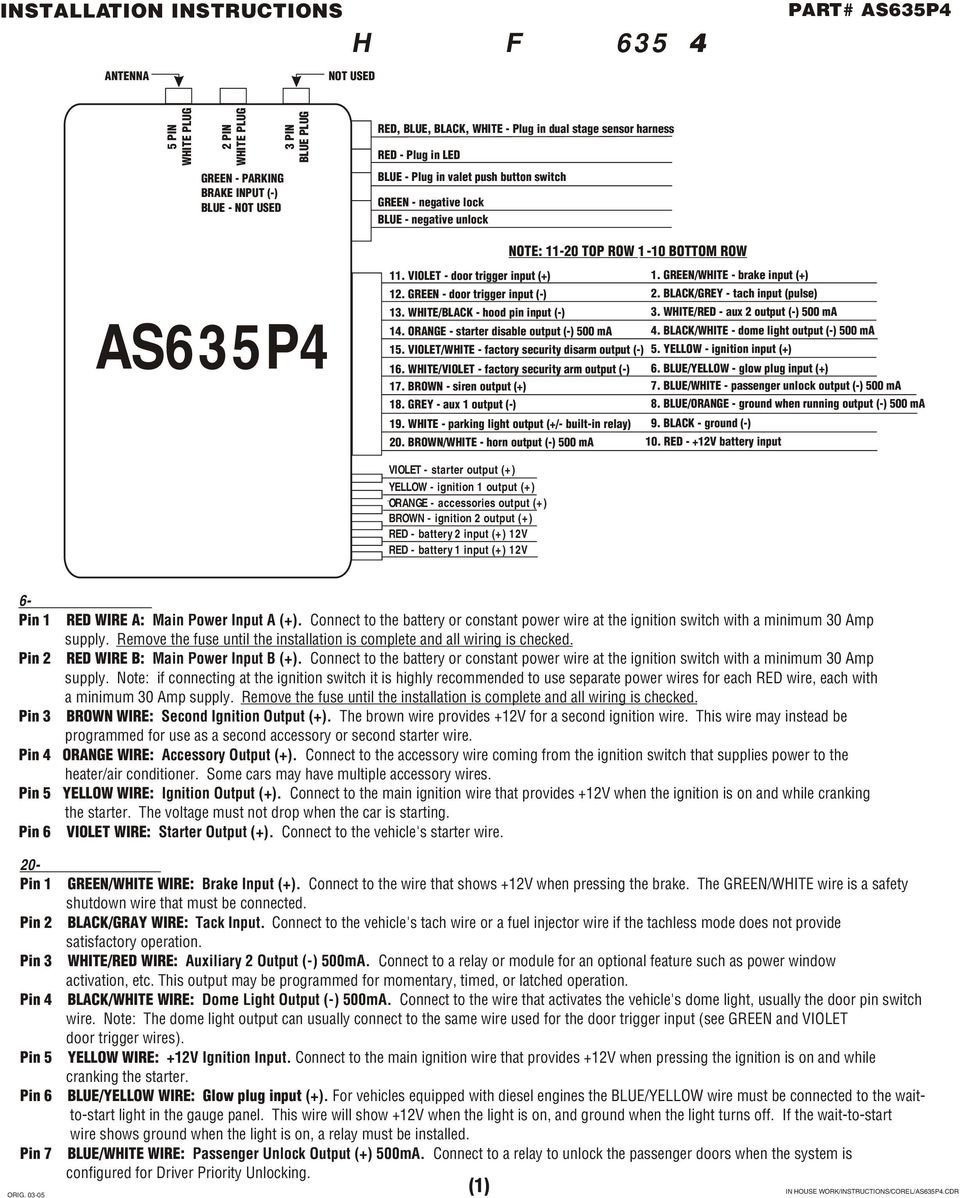
1 WIRING HARNESS FOR AS635P4 ANTENNA NOT USED 5 PIN WHITE PLUG 2 PIN WHITE PLUG GREEN - PARKING BRAKE INPUT (-) BLUE - NOT USED 3 PIN BLUE PLUG RED, BLUE, BLACK, WHITE - Plug in dual stage sensor harness RED - Plug in LED BLUE - Plug in valet push button switch GREEN - negative lock BLUE - negative unlock NOTE: TOP ROW 1-10 BOTTOM ROW AS635P4 11. VIOLET - door trigger input (+) 1. GREEN/WHITE - brake input (+) 12. GREEN - door trigger input (-) 2. BLACK/GREY - tach input (pulse) 13. WHITE/BLACK - hood pin input (-) 3. WHITE/RED - aux 2 output (-) 500 ma 14. ORANGE - starter disable output (-) 500 ma 4. BLACK/WHITE - dome light output (-) 500 ma 15. VIOLET/WHITE - factory security disarm output (-) 5. YELLOW - ignition input (+) 16. WHITE/VIOLET - factory security arm output (-) 6. BLUE/YELLOW - glow plug input (+) 17. BROWN - siren output (+) 7. BLUE/WHITE - passenger unlock output (-) 500 ma 18. GREY - aux 1 output (-) 8. BLUE/ORANGE - ground when running output (-) 500 ma 19. WHITE - parking light output (+/- built-in relay) 9. BLACK - ground (-) 20. BROWN/WHITE - horn output (-) 500 ma 10. RED - +12V battery input VIOLET - starter output (+) YELLOW - ignition 1 output (+) ORANGE - accessories output (+) BROWN - ignition 2 output (+) RED - battery 2 input RED - battery 1 input 6-PIN MAIN HARNESS Pin 1 RED WIRE A: Main Power Input A (+). Connect to the battery or constant power wire at the ignition switch with a minimum 30 Amp supply. Remove the fuse until the installation is complete and all wiring is checked. Pin 2 RED WIRE B: Main Power Input B (+). Connect to the battery or constant power wire at the ignition switch with a minimum 30 Amp supply. Note: if connecting at the ignition switch it is highly recommended to use separate power wires for each RED wire, each with a minimum 30 Amp supply. Remove the fuse until the installation is complete and all wiring is checked. Pin 3 BROWN WIRE: Second Ignition Output (+). The brown wire provides +12V for a second ignition wire. This wire may instead be programmed for use as a second accessory or second starter wire. Pin 4 ORANGE WIRE: Accessory Output (+). Connect to the accessory wire coming from the ignition switch that supplies power to the heater/air conditioner. Some cars may have multiple accessory wires. Pin 5 YELLOW WIRE: Ignition Output (+). Connect to the main ignition wire that provides +12V when the ignition is on and while cranking the starter. The voltage must not drop when the car is starting. Pin 6 VIOLET WIRE: Starter Output (+). Connect to the vehicle's starter wire. 20-PIN MAIN HARNESS Pin 1 GREEN/WHITE WIRE: Brake Input (+). Connect to the wire that shows +12V when pressing the brake. The GREEN/WHITE wire is a safety shutdown wire that must be connected. Pin 2 BLACK/GRAY WIRE: Tack Input. Connect to the vehicle's tach wire or a fuel injector wire if the tachless mode does not provide satisfactory operation. Pin 3 WHITE/RED WIRE: Auxiliary 2 Output (-) 500mA. Connect to a relay or module for an optional feature such as power window activation, etc. This output may be programmed for momentary, timed, or latched operation. Pin 4 BLACK/WHITE WIRE: Dome Light Output (-) 500mA. Connect to the wire that activates the vehicle's dome light, usually the door pin switch wire. Note: The dome light output can usually connect to the same wire used for the door trigger input (see GREEN and VIOLET door trigger wires). Pin 5 YELLOW WIRE: +12V Ignition Input. Connect to the main ignition wire that provides +12V when pressing the ignition is on and while cranking the starter. Pin 6 BLUE/YELLOW WIRE: Glow plug input (+). For vehicles equipped with diesel engines the BLUE/YELLOW wire must be connected to the waitto-start light in the gauge panel. This wire will show +12V when the light is on, and ground when the light turns off. If the wait-to-start wire shows ground when the light is on, a relay must be installed. Pin 7 BLUE/WHITE WIRE: Passenger Unlock Output (+) 500mA. Connect to a relay to unlock the passenger doors when the system is configured for Driver Priority Unlocking. (1) IN HOUSE WORK/INSTRUCTIS/COREL/AS635P4.CDR
2 Pin 8 BLUE/ORANGE WIRE: Ground When Running Output (-) 500mA. Connect to an optional factory security bypass module if required. Pin 9 BLACK WIRE: Ground Input (-). The BLACK wire must connect to a solid chassis ground. Clean away any paint or dirt to insure the best possible ground. Pin 10 RED WIRE: Module Power Input (+). Connect to a constant source of 12V. Pin 11 VIOLET WIRE: Positive Door Input (+). Connect to the door switch circuit wire that shows +12V when the door is open. This type of door circuit is usually found of Ford vehicles. Pin 12 GREEN WIRE: Negative Door Input (-). Connect to the door switch circuit wire that shows ground when the door is open. Pin 13 WHITE/BLACK WIRE: Hood Pin Input (-). Connect to the hood pin switch. The switch must provide a ground output when switch is opened. Pin 14 ORANGE WIRE: Armed Output (-) 500mA. The ORANGE wire provides a ground output while armed to activate a relay for starter disable and anti-grind protection. Pin 15 VIOLET/WHITE WIRE: Factory Disarm Output (-) 500mA. The VIOLET/WHITE wire provides a ground output on disarming and before remote starting to disarm a factory security system. Connect to the wire that requires a ground pulse to disarm the factory security system. Pin 16 WHITE/VIOLET WIRE: Factory Rearm Output (-) 500mA. The WHITE/ VIOLET wire provides a ground output on remote start shutdown to rearm a factory security system. Connect to the wire that requires a ground pulse to rearm the factory security system. Pin 17 BROWN WIRE: Siren Output (+) 3A. The Brown wire must connect to the siren s red wire. The black siren wire must be grounded. Pin 18 GRAY WIRE: Auxiliary 1 Output (-) 500mA. Connect to a relay for an optional feature such as trunk release, etc. This output may be programmed for momentary, timed, or latched operation. Pin 19 WHITE WIRE: Parking Light Output (+/-) Relay. Connect the WHITE wire to the circuit that shows +12V or ground only when the parking lights are on and set the internal parking light relay jumper to the proper polarity. For parking light circuits exceeding 10 amp, a relay is required. For vehicles with independent left and right parking light circuits, diodes must be installed to keep the circuits separate. NOTE: Do not connect the WHITE wire to the vehicle's headlight circuit. JUMPER SELECTI: Carefully separate the top and bottom halves DEFAULT SETTING SHOWN of the main unit case. Once the cover is removed, the parking light polarity jumper will be visible next to the parking light relay. Set the jumper for the correct polarity output as described below, then reassemble the main unit case. PARKING LIGHT OUTPUT: Selects the polarity (+/-). For the output of the on-board parking light relay. Left Pin + Center Pin = Positive Right Pin + Center Pin = Negative Parking Light Relay Pin 20 BROWN/WHITE WIRE: Horn Output (-) 500 ma. Connect to a relay to honk the vehicle s horn when the panic feature is triggered. The wire may instead be programmed as an ignition 3 relay trigger. PLUG-IN CNECTORS 4-Pin White Connector: Dual stage sock sensor port.. 2-Pin Red Connector: LED port. 2-Pin Blue Connector: Valet switch port. 3-Pin White Door Lock Connector: Door lock port. BLUE WIRE - Negative unlock output (-) 500mA. RED WIRE - NOT USED OR NOT AVAILABLE GREEN WIRE - Negative lock output (-) 500mA. 3-Pin Blue Connector: NOT USED 2-Pin White Connector: GREEN WIRE - Parking brake input (-) For vehicles equipped with a turbo charged engine. Must be connected if using the Turbo Timer feature. BLUE WIRE - NOT USED (2) IN HOUSE WORK/INSTRUCTIS/COREL/AS635P4.CDR

3 ADDING/REPLACING TRANSMITTERS To replace lost or stolen transmitters or to add additional transmitters into the system, have all desired transmitters ready and follow the steps below. NOTE: Up to 4 transmitters can be programmed to operate the system. To erase any previously stored transmitter codes, be sure to program all 4 transmitters (4 transmitter memory locations). To program the transmitter(s): 1. Turn the ignition key On, Off, On, Off and back On. The parking lights will 3 times. 2. Press and hold the Override switch for 5 seconds. The parking lights will flash 5 times. The LED will illuminate. 3. Press Button 1 on the first transmitter. The parking lights will flash once. 4. Press Button 1 on the first transmitter again. The parking lights will flash twice to indicate it has learned the code. 5. Repeat steps 3 and 4 for each transmitter (up to 4). 6. Turn off the ignition key. The parking lights will flash 3 times. Two Car Operation If two vehicles are equipped with a AS635P3, for convenience both can be operated using the same remote transmitter. If all four transmitters are to be used with both cars, program transmitters A and B into the first vehicle in the manner described above. Program transmitters C and D by pressing the Shift button twice before performing steps 3 and 4 above. When finished programming the firsts vehicle, program transmitters C and D into the second vehicle as normal, then program transmitters A and B by pressing the Shift button twice before performing steps 3 and 4 above. When programmed in this manner, the driver of the first car can also operate the second vehicle by pressing the Shift button twice and the desired function button. ENTERING SYSTEM PROGRAMMING 1. Turn on ignition. 2. Within 5 second, press the valet switch 5 times. The parking lights will provide one long chirp, indicating that you have entered Programming. 3. Press the valet switch the number of times equal to the System Parameter you want to change. The parking lights will flash each time the valet switch is pressed. 4. Within 5 seconds, press the transmitter button corresponding to the desired operating mode for that System Parameter. The parking lights will flash to indicate the setting. 1 flash = Button 1 2 flashes = Button 2 3 flashes = Button 3 5. When you are finished, turn off the ignition to save the changes. DEFAULT RESET Following this procedure will set all System Programming Parameters to factory default settings. 1. Enter System Programming. 2. Press Transmitter Button 3. The parking lights will flash 6 times indicating that the reset signal was received. All System Programming Parameters are now set to factory default settings. The Valet Mode is off. 3. Turn off ignition. PROGRAMMABLE SYSTEM OPTIS The following is a description of the programming options of the system. Some of the program branches control more than one option, and may require accessing a particular branch number twice in order to program all desired features. 1. Arm mode. Select between manual and passive arming. 2. Auto rearming mode. When selected, the system will automatically re-arm 30 seconds after it is disarmed if the doors have not been opened. 3. Arming chirps. Selects between normal and silent operations. 4. Ignition door locking / override code set. This dual program branch selects ignition door locking, and programs the optional emergency override code. Ignition door locking. Selects whether or not the system will automatically lock the doors 10 seconds after the ignition key is turned on. Override code set. Change the emergency override code for a higher level of security. 5. Ignition door unlocking. Selects whether or not the system automatically unlocks the doors when the ignition is turned off. The ignition door locking feature may be programmed to unlock all doors or the driver s door only. If driver s door only is selected, the optional passenger unlock wire must be connected. (See two stage door lock diagrams) 6. Door unlock pulse. Select between one pulse or two pulse operation for the door unlock output. Many new import vehicle s factory door locking systems require two pulses on the proper wire to unlock the doors. These systems can be interfaced directly without the use of relays or any additional circuitry by programming the systems for double unlock pulse. (3) IN HOUSE WORK/INSTRUCTIS/COREL/AS635P4.CDR

4 BRANCH FEATURE BUTT 1 (default) BUTT 2 BUTT 3 1. ARM MODE MANUAL ARMING PASSIVE ARMING 2. AUTO REARMING MODE 3. ARMING CHIRPS SIREN CHIRPS SILENT SIREN & HORN CHIRP 4. IGNITI DOOR LOCKING SET OVERRIDE CODE 5. IGNITI DOOR UNLOCKING UNLOCK ALL UNLOCK DRIVER LY 6. DOOR UNLOCK PULSE SINGLE DOUBLE 7. DOOR LOCK PULSE LENGTH 1 SECD 3 SECDS 0.1 SECDS 8. PASSIVE DOOR LOCKING 9. PASSIVE ARMING ENTRY DELAY 10. IGNORE OPEN DOOR REPORT IGNORE 11. AUX 2 ACTIVATE ARM 12. AUX 1 MODE PULSED TIMED LATCHED 13. AUX 2 MODE PULSED TIMED LATCHED 14. DISARM WITH AUX START IN VALET MODE 16. LOCK AFTER START 17. LOCK AFTER SHUTDOWN 18. ENGINE RUN TIME 15 MINUTES 25 MINUTES 19. AUTOMATIC START MODE 2 HOURS 1 HOUR 20. ENGINE SENSE MODE TACHLESS 21. REMOTE START PROGRAM RPM LEARN/TACH MITOR GAS ENGINE DIESEL ENGINE 22. IGNITI 2 OUTPUT PROGRAM IGNITI 2 OUTPUT ACCESSORY 2 OUTPUT STARTER 2 OUTPUT 23. HORN HK OUTPUT HORN OUTPUT IGNITI 3 OUTPUT 24. TURBO TIMER 25. EXTENDED PARKING LIGHTS 26. WARN-AWAY REPORT 7. Door lock pulse length. Selects between a 1-second and a 3-second output for door locking and unlocking. Program to 3 seconds for vehicles equipped with vacuum door locking systems. 8. Passive door locking. Selects whether or not the system will automatically lock the doors during passive arming and auto rearming mode. 9. Passive arming entry delay. When selected, the siren will chirp for 10 seconds before sounding if a door is opened. The system may be disarmed by simply turning on the ignition when programmed for this feature. 10. Ignore open door report. Bypasses the open zone warning chirps for vehicles equipped with a residual dome light circuit that remains on for a period of time after closing the door. 11. Aux 2 auto activate with arm. When selected, the auxiliary 2 output will activate when the system is armed. This feature can be used to roll-up windows, close sunroofs, activate accessories, etc. 12. Auxiliary 1 mode. Selects from momentary, 10 second timed, or latched operation for auxiliary 1. Momentary operation provides an output for as long as the transmitter button is pressed. Timed operation provides an output that turns on for 10 seconds each time the transmitter button is pressed. If the button is pressed again during the 30 seconds, the output will turn off. Latched operation provides an output that turns on when the transmitter button is pressed and remains on until the transmitter button is pressed again. NOTE: With the optional network interface and wizard software, and auxiliary function can be programmed to output for 1 second up to 255 seconds. 13. Auxiliary 2 mode. Selects from momentary, timed, or latched operation for auxiliary Disarm with auxiliary 1. When selected, activating the auxiliary 1 output (usually used to open the trunk) will disarm the alarm. 15. Start in valet mode. Selects whether or not the vehicle can remote start while in the valet mode. 16. Lock after start. When selected, the doors will automatically lock after remote starting. 17. Lock after shutdown. When selected, the doors will automatically lock after remote shutdown. 18. Engine run time. Selects between 15 or 25 minutes for the remote start run cycle. 19. Automatic start mode. Selects between every two hours or every hour for the automatic engine starting feature. 20. Engine sense mode. Selects between tachless and tach monitor operation. Tachless. Determines the engine status using an advanced software routine, without requiring connection to the vehicle s tachometer. Tachless operation may not be compatible with some vehicles or in severe temperatures, in which case the tach wire must be connected. Tach monitor. (4) IN HOUSE WORK/INSTRUCTIS/COREL/AS635P3.CDR

5 Monitors the vehicle s tach wire (or a fuel injection wire) in real-time to determine engine status and adjust starter crank time automatically. If programmed for tach monitor, the vehicle s tach signal will have to be learned before initial operation. 21. RPM lean/tach monitor. This dual program branch sets the engine mode for Gas or Diesel, and learns the vehicle s RPM threshold. For installation into a diesel equipped vehicle, first set the engine type to diesel before learning RPM. RPM Learn/Tach Monitor. Start the engine, enter Branch 21 and press Button 1 to learn the vehicle s tach signal and set the Tach Monitor Mode. The siren will chirp and the LED will flash once to confirm learning of the tach signal and set the Tach Monitor Mode. The siren will chirp four times and the LED will flash four times if the tach signal was not learned. Tach Monitor Mode: monitors the vehicles s tach wire (or a fuel injection wire) in real-time to determine engine status and adjust starter crank time automatically. Gas Engine. Sets the engine type for gasoline. Diesel Engine. Sets the engine type for Diesel and monitors the glow plug input to make sure the glow plugs are warm before cranking the starter. If the plug wire is not connected, the built-in timer waits 15 seconds before automatically cranking the starter. 22. Ignition 2 relay program. Selects one of three operating modes for the ignition 2 relay output: Ignition 2, accessory 2, or starter Horn output. When set for horn output the horn wire will pulse when the alarm is triggered. When ignition 3 output is selected, the output will activate during remote start to trigger a relay for ignition Turbo timer. When enabled, if the emergency brake has been applied ignition power will be kept on for a predetermined time (2 minute factory default) from the application of the emergency brake. 25. Extended parking lights. When enabled, upon disarming parking lights will turn on for 30 seconds or until the dome light turns off. 26. Warn-away pager report. When enabled, warn-away report will be sent to the pager. If disabled no warn-away report will be sent to the pager. WIRING DIAGRAMS POSITIVE DOME TO POSITIVE DOME LIGHT NEGATIVE DOME TO NEGATIVE DOME LIGHT Black/White (-) DOME LIGHT OUTPUT Black/White (-) DOME LIGHT OUTPUT POSITIVE HORN TO POSITIVE HORN WIRE NEGATIVE HORN TO NEGATIVE HORN WIRE Brown/White (-) HORN OUTPUT Brown/White (-) HORN OUTPUT NEGATIVE GLOW PLUG STARTER ANTI-GRIND (-)GLOW PLUG WIRE FROM VEHICLE Yellow Wire (+) IGNITI Orange Wire Yellow Wire (-) ANTI-GRIND (+) IGNITI Blue/Yellow (+) GLOW PLUG INPUT IGNITI SWITCH CUT Violet Wire (+) STARTER TO STARTER (5) IN HOUSE WORK/INSTRUCTIS/COREL/AS635P4CDR

6 DOOR LOCK DIAGRAMS Follow the diagrams below for connecting basic door lock systems. For Two Stage door lock systems (separately unlocks driver and passenger doors) see following pages. Negative Trigger Positive Trigger Reverse Polarity Vacuum Adding Actuators (6) IN HOUSE WORK/INSTRUCTIS/COREL/AS635P4CDR

7 TWO STAGE DOOR LOCK DIAGRAMS The AS635P3 is equipped with a dedicated passenger unlock output allowing Two Stage Door Lock operation. When connected as shown below, unlock the system will unlock only the driver s door. Pressing the unlock button again will unlock all doors. Two Stage Negative Trigger Two Stage Positive Trigger Two Stage Reverse Polarity Two Stage Adding Actuators (7) IN HOUSE WORK/INSTRUCTIS/COREL/AS635P4CDR

1R / 4-BUTTON SERIES
 Button 1 1R / 4-BUTTON SERIES VEHICLE SECURITY SYSTEM Standard Features: Two 4-Button Remote Transmitters Status indicator (LED) Valet / override switch Multi-tone siren Dual stage impact detector Remote
INSTALLATION MANUAL 3RP / 5RP 4-BUTTON SERIES VEHICLE SECURITY SYSTEMS
 3RP / 5RP 4-BUTTON SERIES VEHICLE SECURITY SYSTEMS INSTALLATION MANUAL Before you begin the installation Read the INSTRUCTIONS! Always use a multi-meter when verifying vehicle wiring. Before mounting the
VEHICLE SECURITY SYSTEM G25/G20
 VEHICLE SECURITY SYSTEM G25/G20 Limited Lifetime Warranty This vehicle security system is warranted to the original purchaser, to be free from defects in material and workmanship. The manufacturer will
ASTRA 4000RS/1000RS-DBP G55 SERIES VEHICLE SECURITY SYSTEM WITH REMOTE START PRODUCT MANUAL
 ASTRA 4000RS/1000RS-DBP G55 SERIES VEHICLE SECURITY SYSTEM WITH REMOTE START PRODUCT MANUAL Limited Lifetime Warranty This vehicle security system is warranted to the original purchaser, to be free from
How To Control A Car Alarm On A Car With A Remote Control System
 MODEL CA100 REMOTE CONTROL AUTO ALARM SYSTEM INSTALLATION & OPERATION INSTRUCTIONS WIRING DIAGRAM Black Antenna Wire 6 Pin 6 Pin Mini Connector Valet Switch Blue LED Indicator Blue Wire: (-) 200mA Unlock
INSTALLATION GUIDE. www.security.soundstream.com FCC ID NOTICE
 AL.1 AUTO SECURITY SYSTEM INSTALLATION GUIDE www.security.soundstream.com FCC ID NOTICE This device complies with Part 15 of the FCC rules. Operation is subject to the following conditions: 1. This device
VEHICLE SECURITY SYSTEM Optional Remote Start Module and 2-way Transmitter Instructions Included
 VEHICLE SECURITY SYSTEM Optional Remote Start Module and 2-way Transmitter Instructions Included STANDARD FEATURES Some of the system s standard features include: 4-button remote transmitter LED Status
PRO PLM Installation Instructions
 PRO PLM Installation Instructions PROFESSIONAL INSTALLATION STRONGLY RECOMMENDED Installation Precautions: Roll down window to avoid locking keys in vehicle during installation Avoid mounting components
Security and Remote Start Installation Guide for models: CA 6150 CA 6550
 PROFESSIONAL SERIES Security and Remote Start Installation Guide for models: CA 6150 CA 6550 2009 Audiovox Electronics Corporation. All rights reserved. 1 Table of Contents Before You Begin... 4 Wire Connection
REMOTE START SECURITY SYSTEM OWNERS MANUAL
 REMOTE START SECURITY SYSTEM OWNERS MANUAL Standard Features The System has the following standard features: 5-button remote transmitter Status indicator (LED) Valet/Service mode switch Remote Start capabilities
Button 1 Button 2. Button 3 Button 4. Programmed Remote Transmitter. Button Function Condition
 WWW.STELLAR.COM ST9000 SECURITY SYSTEM Button Function Condition 1 a. Arm and lock doors b. Car finder with sound c. Temporary stop alarm from sounding d. Remote lock doors 1 for 2 sec. Panic Anytime a.
REMOTE TRANSMITTER LAYOUT
 Full Featured Keyless Entry System with Optional Starter Defeat and Passive Immobilize Feature SYSTEM MANUA STANDARD FEATURES Some of the system s standard features include: Two 4-button remote transmitters
SP-100 REMOTE CONTROL ALARM SYSTEM INSTALLATION & OPERATING INSTRUCTIONS INTRODUCTION
 SP-100 REMOTE CONTROL ALARM SYSTEM INSTALLATION & OPERATING INSTRUCTIONS INTRODUCTION CONGRATULATIONS on your choice of a Security Plus Remote Alarm System by Crimestopper Security Products Inc. This booklet
INSTALLATION GUIDE OWNER S GUIDE
 INSTALLATION GUIDE OWNER S GUIDE SECURITY SYSTEM PRO-SERIES 5002 CONTENTS System Features... 1-2 System Components... 2 Technical Assistance... 2 Before You Begin... 2 Precautions... 2-3 Making Connections...
How To Set Off An Alarm On A Car With A Car Alarm On It
 AUTO SECURITY SYSTEM USER S OPERATION GUIDE FCC ID NOTICE This device complies with Part 15 of the FCC rules. Operation is subject to the following conditions: 1. This device may not cause harmful interference,
Installation Guide Security and Remote Start
 Installation Guide Security and Remote Start This product is intended for installation by a professional installer only! Attempts to install this product by a person other than a trained professional may
INSTALLATION MANUAL VEHICLE SECURITY SYSTEM CE-SS200
 INSTALLATION MANUAL VEHICLE SECURITY SYSTEM CE-SS200 FUSION CULTURE TABLE OF CONTENTS There s no point doing something if no one notices. We ve always believed the way to make things happen is by getting
2004 Directed Electronics, Inc. Vista, CA N426V 07-04
 350HV Installation Guide NOTE: This product is intended for installation by a professional installer only! Any attempt to install this product by any person other than a trained professional may result
Multi Function, User Configurable Remote Vehicle Security System with 4 Button Replaceable Membrane Remote Transmitter
 MODEL PRO-9744 INSTALLATION MANUAL Multi Function, User Configurable Remote Vehicle Security System with 4 Button Replaceable Membrane Remote Transmitter This System Allows The Transmitter Buttons To Be
Model 5303 Installation Guide
 Model 5303 Installation Guide This product is intended for installation by a professional installer only! Attempts to install this product by a person other than a trained professional may result in severe
e-ask electronic Access Security Keyless-entry
 e-ask electronic Access Security Keyless-entry e-fob Keyless-entry entry System Full-Function Function Installation Manual FCC ID: TV2EFOB1 (UM20 ~ 22793-02) Table of Contents Introduction... 1 e-fob Operation
SNIPER X1 VEHICLE SECURITY SYSTEM
 SNIPER X1 VEHICLE SECURITY SYSTEM Installation Manual Table of Contents 1. FEATURES & SPECIFICATIONS... 2 2. TRANSMITTER BUTTONS:... 2 3. FUNCTION... 2 3.1 Key Function:...2 3.2 Remote Transmitter Code
VEHICLE SECURITY SYSTEM Optional Remote Start Module and 2-way Transmitter Instructions Included
 VEHICLE SECURITY SYSTEM Optional Remote Start Module and 2-way Transmitter Instructions Included STANDARD FEATURES Some of the system s standard features include: 4-button remote transmitter LED Status
AL-1650-EDPB AL-1750-EDPB AL-1850-EDPB AL-1950-EDPB AL-2050-EDPB
 AL-1650-EDPB AL-1750-EDPB AL-1850-EDPB AL-1950-EDPB AL-2050-EDPB Deluxe Security & Remote Start System Installation Guide July 11, 2012 Temporary cover. Color cover is in a separate file. Installation
535T Window Automation System
 535T Window Automation System Installation Guide NOTE: This product is intended for installation by a professional installer only! Any attempt to install this product by any person other than a trained
VEHICLE SECURITY SYSTEM. Car Alarm System With Command Confirmation
 VEHICLE SECURITY SYSTEM Car Alarm System With Command Confirmation About Your System Congratulations on your purchase of this state-of-the-art vehicle security system. With proper installation this system
Car Alarm Series 2 B 2 Buttons
 Car Alarm Series 2 B 2 Buttons G22 SE (External - Shock Sensor) Version 3 Software 67 Plus www.geniuscaralarm.com 21 CAR ALARM GENIUS Series 2B 2 Buttons - G22 Se (External Shock Sensor) Module controlled
RS-1301DP/1303DP/1304DP 1-WAY SYSTEM RS-1300DP ADD-ON MODULE DP SERIES (Data Port)
 RS-1301DP/1303DP/1304DP 1-WAY SYSTEM RS-1300DP ADD-ON MODULE DP SERIES (Data Port) OPERATING INSTRUCTIONS **IMPORTANT NOTES:- FOR RS-1300DP MODEL ONLY** RS-1300DP Model is an add-on/expansion unit, without
Model AM2. Installation Guide
 Model AM2 Installation Guide NOTE: This product is intended for installation by a professional installer only! Any attempt to install this product by any person other than a trained professional may result
GALAXY 5000RS/2000RS SERIES-DBP
 GALAXY 5000RS/2000RS SERIES-DBP DATA BUS PORT VEHICLE SECURITY SYSTEM WITH REMOTE START PRODUCT MANUAL Limited Lifetime Warranty This vehicle security system is warranted to the original purchaser, to
MAGICAR M870AS. Car alarm with two-way remote and remote - start system Installation guide
 MAGICAR M870AS Car alarm with two-way remote and remote - start system Installation guide EN English TABLE OF CONTENTS I. INTRODUCTION...4 II. PLACING...4 III. ADDITIONAL RELAY 12V CONNECTION...1 IV. WIRING
CM6000 Install Guide. Table of Contents
 Version 6.07 Table of Contents CM6000 Introduction 4 Kit Contents 4 Installation Basics 5 Remote Programming Routine 6 Placement and Use of Components 6 Common Procedures 11 Wiring Descriptions 15 Option
EZ-90 / EZ-91 REMOTE ENGINE STARTING SYSTEM OPERATING INSTRUCTIONS INTRODUCTION REV A - 08.2004
 EZ-90 / EZ-91 REMOTE ENGINE STARTING SYSTEM OPERATING INSTRUCTIONS INTRODUCTION **IMPORTANT NOTES:- FOR EZ-91 MODEL ONLY** The EZ-91 model is an add-on (expansion unit), without remotes or antenna. It
Entering Program Mode for Vehicle Security and Remote Start Systems
 Entering Program Mode for Vehicle Security and Remote Start Systems System 100 Keyless Entry Remote Start System (1 Way and 2-Way Remote Start Systems) Kit Part # s: 7L2Z-19G364-AA AL2Z-19G364-A 9G1Z-19G364-A
PATENTED: www.voxxintl.com/company/patents
 Model PRO9776C Installation Manual Vehicle Security System Table Of Contents: with Remote Start Before You Begin Page 2 Wire Harnesses Quick View Page 3-4 Installation of the Major Components Page 5 Wiring
www.dsecanada.com istart Security and Remote Start Installation Guide ISO 9001 Fabriqué sous norme
 D S E www.dsecanada.com istart Security and Remote Start Installation Guide Fabriqué sous norme ISO 9001 Certified Manufacturer This product is intended for installation by a professional installer only!
HONDA ACCORD 1985-2005
 HONDA ACCORD 1985-2005 VEHICLE WIRING Copyright 2002-2004 Triple S Customs WIRING INFORMATION: 1985 Honda Accord WIRE WIRE COLOR WIRE LOCATION 12V CONSTANT WHITE or WHITE/BLACK Ignition Harness STARTER
FALCON WORLD CLASS SECURITY. Advanced Alarm System for Vehicles with CAN-Bus. Installer Manual NATIONWIDE INSTALLATION SERVICE 0800 622 474
 FALCON WORLD CLASS SECURITY FALCON PREDATOR CAN-BUS ALARM Advanced Alarm System for Vehicles with CAN-Bus Installer Manual NATIONWIDE INSTALLATION SERVICE 0800 622 474 HELPLINE: 0906 700 10 20 (All calls
PATENTED: www.voxxintl.com/company/patents
 Model APS-997C Installation Manual 2 Way LCD Vehicle Security and Table Of Contents: Remote Start System Before You Begin Page 2 Wire Harnesses Quick View Page 3 and 4 Installation Of The Major Components
TOMAHAWK CAR ALARMS. TW-9010 Two Way Car Alarm System
 TOMAHAWK TW-9010 TOMAHAWK CAR ALARMS TW-9010 Two Way Car Alarm System USER MANUAL INSTRUCTIONS FOR INSTALLATION TOMAHAWK TW-9010 1 2 3 4 5 6 7 8 9 10 11 12 13 14 15 16 17 18 19 20 21 22 23 24 25 26 27
About Your System NOTE: What is included: Options and Accessories:
 2-WAY CAR ALARM SYSTEM WITH REMOTE ENGINE START E8 MODEL IMPORTANT: Please read the entire manual for complete details on the features, accessories and operation before attempting to use your security
OPERATING INSTRUCTIONS SECURITY SYSTEM KIT NO.: 08E51-EP4-101. 2004 American Honda Motor Co., Inc. - All Rights Reserved. 1
 OPERATING INSTRUCTIONS SECURITY SYSTEM KIT NO.: 8E5-EP4-24 American Honda Motor Co., Inc. - All Rights Reserved. Contents Introduction... 3 Emergency Disarming During Alarming... 4 During the Entry Delay
VEHICLE SECURITY SYSTEM OPERATOR'S INSTRUCTIONS
 :). VEHICLE SECURITY SYSTEM OPERATOR'S INSTRUCTIONS (8 I NS070S Rev. A 12195 ThIs product is protected by U.S. patent number 5,049,867. @ Code Alarm, Inc. 1994 All rights reserved. Printed in the USA.
RF-350 PROFESSIONAL VEHICLE SECURITY SYSTEM WITH KEYLESS ENTRY. INSTALLATION & USERS MANUAL (For Authorized Dealers Only)
 RF-350 PROFESSIONAL VEHICLE SECURITY SYSTEM WITH KEYLESS ENTRY INSTALLATION & USERS MANUAL (For Authorized Dealers Only) Please register your product at www.autopageusa.com THIS PRODUCT IS DESIGNED FOR
INSTALLATION GUIDE OWNER S GUIDE
 INSTALLATION GUIDE OWNER S GUIDE TALKING ALARM MODEL 3001 CONTENTS System Features... 1 Technical Assistance... 1 Wiring Instructions... 2 Installation Instructions... 3 Operating Instructions... 4-5 Technical
Copyright 2002-2004 Triple S Customs
 CHEVROLET SILVERADO 1988-2005 VEHICLE WIRING Copyright 2002-2004 Triple S Customs WIRING INFORMATION: 1988 Chevy Silverado Full-Size 2- POWER DOOR LOCK (5-wire reverse polarity) POWER DOOR UNLOCK (5-wire
INSTRUCTION MANUAL FOR. Remote Control Car Alarm with Impact Sensor, Mini-Battery Backup Siren & Engine Immobiliser
 INSTRUCTION MANUAL FOR Remote Control Car Alarm with Impact Sensor, Mini-Battery Backup Siren & Engine Immobiliser A.C.N 001 621 610 SYDNEY / AUSTRALIA Build Date: TO ARM/DISARM ALARM The alarm is activated
ODYSSEY. Security System Owner s Manual. Kit No. 08E51-SHJ-100 08E55-SHJ-100. 2004 American Honda Motor Co., Inc. - All Rights Reserved.
 Kit No. 08E5-SHJ-00 08E55-SHJ-00 Security System Owner s Manual ODYSSEY 004 American Honda Motor Co., Inc. - All Rights Reserved. Contents Introduction... 3 Emergency Disarming During the Panic Alarm Activation...
INSTALLATION GUIDE OWNER S GUIDE
 INSTALLATION GUIDE OWNER S GUIDE KEYLESS ENTRY MODELS KE100 / KE150 / 1702 CONTENTS System Features... 1 System Components... 1 Technical Assistance... 1 Before You Begin... 1 Precautions... 1-2 Making
Owner s Guide. ca6554
 PROFESSIONAL SERIES Owner s Guide For Models: ca6554 Deluxe Vehicle Security and Remote Start System with 2 Way Confirming LCD Remote Control IMPORTANT NOTE: The operation of the Security and Convenience
The Child Reminder System Installation Manual
 The Child Reminder System Installation Manual Revised June, 2006 Detailed installation information can be found at www.childreminder.com. Get through your installation quickly and easily by calling 1-888-330-6786
AM1 Security System installation guide
 AM1 Security System installation guide 2005 Directed Electronics, Inc. Vista, CA N427A 01-05 NOTE: This product is intended for installation by a professional installer only! Any attempt to install this
RS1-G4 / RS3-G4 / RS4-G4 RS7-G4 (PAGING SYSTEM) RS00-G4 (ADD-ON MODULE)
 RS1-G4 / RS3-G4 / RS4-G4 RS7-G4 (PAGING SYSTEM) RS00-G4 (ADD-ON MODULE) REMOTE START SYSTEM INSTALLATION INSTRUCTIONS CONGRATULATIONS on your choice of a Cool Start System with Data Port Technology for
i ChatterBox! Motorcycle Security
 i Before you Start the Installation * Please read this manual to become familiar with the requirements necessary to complete the installation. * Use a high quality multi-meter to test all wires before
Vehicle Alarm System With Channel 2 Auxiliary Output Installation Instructions
 Model PRO 9842 Installation Manual Vehicle Alarm System With Channel 2 Auxiliary Output Installation Instructions This Unit Is Intended For Installation In Vehicles With 12 Volt Negative Ground Electrical
PUSH BUTTON START INSTALLATION MANUAL
 PUSH BUTTON START INSTALLATION MANUAL ALTHOUGH THIS PRODUCT HAS BEEN THOROUGHLY TESTED KPIERSON TECHNOLOGIES ASSUMES NO RESPONSIBILITY FOR ANY DAMAGE THAT MAY RESULT BY THE INSTALLATION OF THIS PRODUCT.
SECURITY SYSTEM ADP-CAN
 INSTALLATION INSTRUCTION SECURITY SYSTEM ADP-CAN Introduction Motorcar security system ADP-CAN is for motorcars provided with CAN net. It is for the work with the motorcar factory security systems or remote
MAGICAR M871A. Car alarm with two-way remote User s guide
 MAGICAR M871A Car alarm with two-way remote User s guide EN MAGICAR M871A Car alarm with two-way remote User s guide TABLE OF CONTENTS Table of contents...2 1. Important notice...4 2. Introduction...4
CA-125 Owner's Manual
 Remote Vehicle Control System CA-125 Owner's Manual Vehicle Security System With Remote Keyless Entry IMPORTANT NOTE: The operation of the Security and Convenience System as described in this manual is
Two-Way Remote User s Guide. Thank you.
 Thank you. Thank you for your purchase of an MAGICAR alarm and/or remote-start system. MAGICAR alarms and remote-start systems are the most advanced systems on the market with amazing features, incomparable
RS900ER / RS901 SERIES III OPERATING INSTRUCTIONS
 RS900ER / RS901 SERIES III OPERATING INSTRUCTIONS CONGRATULATIONS on your choice of a CoolStart Remote Engine Starter by Crimestopper Security Products Inc. This booklet contains the information necessary
CA 1050 Owner s Guide
 PROFESSIONAL SERIES CA 1050 Owner s Guide Vehicle Security and Keyless Entry System IMPORTANT NOTE: The operation of the Security and Convenience System as described in this manual is applicable to most
ANTI-THEFT SYSTEM. 1995 Volvo 850 DESCRIPTION & OPERATION BASIC ALARM. 1995-96 ACCESSORIES & EQUIPMENT Volvo Anti-Theft Systems
 ANTI-THEFT SYSTEM 1995 Volvo 850 1995-96 ACCESSORIES & EQUIPMENT Volvo Anti-Theft Systems 850 DESCRIPTION & OPERATION WARNING: Deactivate air bag system before performing any service operation. For 1995
AVS A4 alarm Owner s manual
 AVS A4 alarm Owner s manual Thank you for choosing an AVS A4 car security system. It has been designed to provide a superior level of security for you and your vehicle. Please read this guide carefully
UPGRADE ALARM USER INSTRUCTIONS
 UPGRADE ALARM USER INSTRUCTIONS CYCL PS SECURITY SYSTEMS PROUDLY AUSTRALIAN Proudly designed and engineered in Australia by Dynamco Pty Ltd. Your emergency override PIN is Keep this number in a safe place
FUNCTIONS FUNCTIONS PROGRAMMABLE THROUGH THE TRANSMITTER DESCRIPTION
 DESCRIPTION The systems 7463 and 7462 are modular systems which consists of an alarm unit and one audible external siren. These alarm systems can be installed on vehicles with 12V battery with negative
Copyright 2002-2004 Triple S Customs
 JEEP GRAND CHEROKEE 1992-2006 VEHICLE WIRING Copyright 2002-2004 Triple S Customs WIRING INFORMATION: 1992 Jeep Grand Cherokee 12V CONSTANT WIRE PINK/BLACK or RED/WHITE Steering Column STARTER WIRE YELLOW/BLUE
2003/2004/2005 TOYOTA COROLLA
 2003/2004/2005 TOYOTA COROLLA KEYLESS ENTRY UPGRADE SECURITY SYSTEM INSTALLATION INSTRUCTIONS KIT NO. 00016-30120 SPECIAL NOTE: Installation Sequences After TMS and Safety mandated preparatory steps have
MotorCycle Alarm by DEF COM 3 INSTALLATION MANUAL 80 C
 DEF COM 3 INSTALLATI MANUAL MotorCycle Alarm by IMMOBILISER (FAIL SAFE SYSTEM) Positive Logic (the relay switches over when the central unit is disarmed and ignition +15 is present.) Fig.2 Fig.3 SUPPLEMTARY
www.sebury.com.cn Digital Keypad Use s Manual
 K3 K4 www.sebury.com.cn Digital Keypad Use s Manual Contents Introduction Introduction Specifications Intramural Interface Circuit 3 Mounting 3 Wiring 5 Power UP 7 Engineer Programming Mode 7 The K3/K4
0 Copyright 1997 Subaru of America, Inc.
 0 Copyright 1997 Subaru of America, Inc. All rights reserved. This book may not be reproduced in whole or in part without the express written permission of Subaru of America, Inc. Subaru of America, Inc.
SECURITY SYSTEM OWNER S MANUAL MIATA, MAZDASPEED MX-5
 SECURITY SYSTEM OWNER S MANUAL MIATA, MAZDASPEED MX-5 Introduction l l l l l l l l l l l l l l l l Thank you for purchasing the Mazda Security Upgrade package. This system is designed to enhance the security
Responder LE Models Viper 4204 Clifford 420.4X Python 424 Keyless Entry and Remote Start Installation Guide
 Responder LE Models Viper 4204 Clifford 420.4X Python 424 Keyless Entry and Remote Start Installation Guide This product is intended for installation by a professional installer only! Attempts to install
KEYLESS ENTRY UPGRADE SECURITY SYSTEM for 2004 TOYOTA HIGHLANDER
 KEYLESS ENTRY UPGRADE SECURITY SYSTEM for 2004 TOYOTA HIGHLANDER DEALER SERVICE AND INSTALLATION MANUAL KIT NO. 00016-30915 Contents PARTS LIST... 2 PARTS ILLUSTRATIONS... 2 VEHICLE PREPARATION... 3 INSTALLING
TX GSM SMS Auto-dial Alarm System. Installation and User Manual
 TX GSM SMS Auto-dial Alarm System Installation and User Manual Product Features: 1. 16 wireless zones, 3 wired zones alarm system, suitable for small to medium size offices and homes. 2. The system uses
NST11537-3.CDR REV_A 2008-10-07
 NST-.CDR REV_A 00-0-0 00 / 00 Production Year 00 / 00 Model Year MODULE QC DIAGNOSTIC TEST AND 00 / * Production Year 009 / * Model Year Test initiates anytime power is applied to unit. Antenna / Reader
9452/9453 Installation and User Guide
 9452/9453 Installation and User Guide Compatible Equipment 9425 Remote Keypad 9040 Internal Sounder 660 Speech Communicator 8440 4-Channel Minicom 496330 Issue 1 1 of 10 9452/3 Introduction The 9452 and
Installation Instructions
 Installation Instructions for EVS II Security and Keyless Entry Systems Note: It is recommended that this installation take place prior to rustproofing. The individual delivering the vehicle should review
DC-8706K Auto Dial Alarm System
 DC-8706K Auto Dial Alarm System User Guide Basic Contents: 1x the host unit; 1x wireless door (window) magnet; 1x wireless infrared detector; 2x remote control; 1x siren; 1x phone core; 1x AC to DC power
FZ400 1997-1998 WIRING DIAGRAM (JAPANESE MARKET FAZER 400) 5
 FZ400 1997-1998 WIRING DIAGRAM (JAPANESE MARKET FAZER 400) 5 1 2 4 7 6 11 12 13 13 12 13 3 13 8 9 56 14 59 52 54 15 48 55 34 22 16 51 50 60 47 46 36 35 23 17 49 24 25 18 44 37 38 39 40 58 33 26 27 28 29
e-ask electronic Access Security Keyless-entry Consumer Manual FCC ID: TV2EFOB1 (UM12 ~ 22271-02)
 e-ask electronic Access Security Keyless-entry e-fob / e-pade Consumer Manual FCC ID: TV2EFOB1 (UM12 ~ 22271-02) Table of Contents Introduction... 1 e-fob Operation and Features - Standard... 2 e-fob Operation
CMD-10k COMMANDER SERIES REMOTE CONTROL ENTRY SYSTEM
 CMD-10k COMMANDER SERIES REMOTE CONTROL ENTRY SYSTEM INTRODUCTION Thank you for purchasing the CMD-10k Commander from Dakota Digital. This, along with many other products that Dakota Digital has to offer,
K9 Heat Alarm Owners Manual HA-1520
 K9 Heat Alarm Owners Manual HA-1520 Your K9 Heat Alarm is a state of the art product designed and developed by ACEK9.COM a division of Radiotronics, Inc. It is a unique blend of positive features taken
What you get Welcome to the best generation of security with remote start. Your system contains everything you need.
 Congratulations Congratulations on the purchase of your state-of-the-art security and remote start system. Reading this Owner s Guide prior to using your system will help maximize the use of your system
!"#$%&"'()**+),-+)).( /'0%1##1%&"'(21'$1#( ISSUE 1.40
 !"#$%&"'()**+),-+)).( /'0%1##1%&"'(21'$1#( ISSUE 1.40 MA8XXI 34&0(5167(410(877'(&'9#$:7:(;"
OWNER S OPERATION GUIDE English
 OWNER S OPERATION GUIDE English 76E268-0030-0606S -1- Printed in Japan Important WARNING / CAUTION / NOTE Please read this manual and follow its instructions carefully. To emphasize special information,
CMD-9000 COMMANDER SERIES REMOTE CONTROL ENTRY SYSTEM
 CMD-9000 COMMANDER SERIES REMOTE CONTROL ENTRY SYSTEM INTRODUCTION Thank you for purchasing the CMD-9000 Commander from Dakota Digital. This, along with many other products that Dakota Digital has to offer,
Control/Communicator Installation Manual
 DAS NETWORX NX-8 Control/Communicator Installation Manual Page General Description... 2 Ordering Information... 2 Option Definitions... 2 Programming the LED Code Pads... 4 Programming the NX-8... 8 Types
ISUZU RODEO 1992-2003
 ISUZU RODEO 1992-2003 VEHICLE WIRING Copyright 2002-2004 Triple S Customs WIRING INFORMATION: 1992 Isuzu Rodeo 12V CONSTANT WIRE BLACK Ignition Harness STARTER WIRE WHITE/BLUE OR BLACK/WHITE Ignition Harness
tattletale User Guide Consumer unit version 2.48 1 P a g e
 tattletale User Guide Consumer unit version 2.48 1 P a g e Contents Basic 1... 4 Base Unit Features... 4 Initial Setup... 4 Arming... 5 Disarming... 5 Quiet Button... 5 Settings... 5 Settings 2... 6 Quick
G-100/200 Operation & Installation
 G-100/200 Operation & Installation 2 Contents 7 Installation 15 Getting Started 16 GPS Mode Setup 18 Wheel Sensor Mode Setup 20 Fuel Calibration 23 Basic Operation 24 Telemetery Screen 27 Entering a Distance
ALWAYS TEST THE INSTALLATION ONCE A RELAY IS INSTALLED, TO ENSURE THE VEHICLE CANNOT BE STARTED IN GEAR.
 Update Alert: Firmware updates are posted to the web on a regular basis. We recommend that you check for firmware and/or install guide updates prior to installing this product. Installation Guide The XK09-NISS2
NO ONE DARES COME CLOSE
 The company behind Viper Auto Security Systems is Directed. Since its inception, Directed has had one purpose, to provide consumers with the finest vehicle security and accessories available. The recipient
Owner s Guide for the 220 MAX models (Rev D) Recreationnal Vehicle Security System
 Owner s Guide for the 220 MAX models (Rev D) Recreationnal Vehicle Security System [Table of contents] Your Warranty... 1 What s included... 2 System maintenance... 2 Transmitter Functions... 3 Arming
Keyless Entry System With Two Auxiliary Outputs Installation Instructions
 Model APS-45B Installation Manual Keyless Entry System With Two Auxiliary Outputs Installation Instructions This Unit Is Intended F Installation In Vehicles With 12 Volt Negative Ground Electrical Systems
INSTRUMENT PANEL. 1995 Volvo 850 DESCRIPTION & OPERATION. 1995-96 ACCESSORIES & EQUIPMENT Volvo Instrument Panels
 INSTRUMENT PANEL 1995 Volvo 850 1995-96 ACCESSORIES & EQUIPMENT Volvo Instrument Panels 850 WARNING: When working around steering column and before performing repairs, disconnect and shield battery ground
VEHICLE THEFT/SECURITY SYSTEMS
 DN VEHICLE THEFT/SECURITY SYSTEMS 8Q - 1 VEHICLE THEFT/SECURITY SYSTEMS TABLE OF CONTENTS page GENERAL INFORMATION INTRODUCTION...1 VEHICLE THEFT SECURITY SYSTEM....1 ENABLING...1 ARMING...1 DISARMING...2
Microprocessor Home Security System
 numbers of sensor s activations in the zone and after which activations the zone will be discarded (ignored). On every system s arming the counter is cleared in self. 6.3.11. 2 - Triger Timer - enter a