
PowerFlex 40 Adjustable Frequency AC Drive
|
|
|
- Carol Richard
- 9 years ago
- Views:
Transcription
1 PowerFlex 4 Adjustable Frequency AC Drive Quick Start This Quick Start guide summarizes the basic steps needed to install, start-up and program the PowerFlex 4 Adjustable Frequency AC Drive. The information provided Does Not replace the User Manual and is intended for qualified drive service personnel only. For detailed PowerFlex 4 information including EMC instructions, application considerations and related precautions refer to the PowerFlex 4 User Manual, Publication 22B-UM1 on the CD supplied with the drive or at General Precautions!!!!! ATTENTION: The drive contains high voltage capacitors which take time to discharge after removal of mains supply. Before working on drive, ensure isolation of mains supply from line inputs [R, S, T (L1, L2, L3)]. Wait three minutes for capacitors to discharge to safe voltage levels. Failure to do so may result in personal injury or death. Darkened display LEDs is not an indication that capacitors have discharged to safe voltage levels. ATTENTION: Equipment damage and/or personal injury may result if parameter A92 [Auto Rstrt Tries] or A94 [Start At PowerUp] is used in an inappropriate application. Do not use this function without considering applicable local, national and international codes, standards, regulations or industry guidelines. ATTENTION: Only qualified personnel familiar with adjustable frequency AC drives and associated machinery should plan or implement the installation, start-up and subsequent maintenance of the system. Failure to comply may result in personal injury and/or equipment damage. ATTENTION: This drive contains ESD (Electrostatic Discharge) sensitive parts and assemblies. Static control precautions are required when installing, testing, servicing or repairing this assembly. Component damage may result if ESD control procedures are not followed. If you are not familiar with static control procedures, reference A-B publication , Guarding Against Electrostatic Damage or any other applicable ESD protection handbook. ATTENTION: An incorrectly applied or installed drive can result in component damage or a reduction in product life. Wiring or application errors, such as, undersizing the motor, incorrect or inadequate AC supply, or excessive ambient temperatures may result in malfunction of the system.

2 English-2 Mounting Considerations Mount the drive upright on a flat, vertical and level surface. Frame Screw Size Screw Torque DIN Rail B M4 (#8-32) N-m (14-17 lb.-in.) 35 mm C M5 (#1-24) N-m (22-26 lb.-in.) Protect the cooling fan by avoiding dust or metallic particles. Do not expose to a corrosive atmosphere. Protect from moisture and direct sunlight. Minimum Mounting Clearances See page 16 for mounting dimensions. 25 mm (1. in.) 12 mm (4.7 in.) Mounting Option A No clearance required between drives. 12 mm (4.7 in.) Mounting Option B 12 mm (4.7 in.) 12 mm (4.7 in.) Ambient Operating Temperatures Ambient Temperature Enclosure Rating Minimum Mounting Minimum Maximum Clearances IP 2/Open Type Use Mounting Option A 4 C (14 F) -1 C (14 F) IP 3/NEMA 1/UL Type 1 (1) Use Mounting Option B 5 C (122 F) IP 2/Open Type Use Mounting Option B (1) Rating requires installation of the PowerFlex 4 IP 3/NEMA 1/UL Type 1 option kit. General Grounding Requirements Important: Remove the MOV to ground jumper if the drive is installed on an ungrounded distribution system. Tighten screw after jumper removal. Jumper Location R/L1 S/L2 T/L3 U/T1 V/T2 W/T3 SHLD CE Conformity Refer to the PowerFlex 4 User Manual on the CD supplied with the drive for details on how to comply with the Low Voltage (LV) and Electromagnetic Compatibility (EMC) Directives.

3 LISTED 966X English-3 Specifications, Fuses and Circuit Breakers Drive Ratings Output Ratings Input Ratings Branch Circuit Protection Power Catalog Dissipation Number kw (HP) Amps Voltage Range kva Amps Fuses 14M Motor Protectors (2) IP2 Open Contactors Watts 1-12V AC 1-Phase Input, - 23V 3-Phase Output 22B-V2P3N14.4 (.5) M-xxE-C16 1-C B-V5PN14.75 (1.) M-xxE-C2 1-C B-V6PN (1.5) M-xxE-C32 1-C V AC 1-Phase (1) Input, - 23V 3-Phase Output 22B-A2P3N14.4 (.5) M-xxE-B63 1-C9 3 22B-A5PN14.75 (1.) M-xxE-C16 1-C B-A8PN (2.) M-xxE-C2 1-C B-A12N (3.) M-xxE-C32 1-C V AC 3-Phase Input, - 23V 3-Phase Output 22B-B2P3N14.4 (.5) M-xxE-B4 1-C7 3 22B-B5PN14.75 (1.) M-xxE-C1 1-C B-B8PN (2.) M-xxE-C16 1-C B-B12N (3.) M-xxE-C16 1-C B-B17N (5.) M-xxE-C25 1-C B-B24N (7.5) M-xxE-C32 1-C B-B33N (1.) M-xxE-C45 1-C V AC 3-Phase Input, - 46V 3-Phase Output 22B-D1P4N14.4 (.5) M-xxE-B25 1-C7 3 22B-D2P3N14.75 (1.) M-xxE-B4 1-C7 4 22B-D4PN (2.) M-xxE-B63 1-C9 6 22B-D6PN (3.) M-xxE-C1 1-C9 9 22B-D1N14 4. (5.) M-xxE-C16 1-C B-D12N (7.5) M-xxE-C2 1-C B-D17N (1.) M-xxE-C2 1-C23 2 Input/Output Ratings Output Frequency: -4 Hz (Programmable) Efficiency: 97.5% (Typical) Digital Control Inputs (Input Current = 6mA) SRC (Source) Mode: SNK (Sink) Mode: 18-24V = ON -6V = ON -6V = OFF 18-24V = OFF Approvals Control Output Programmable Output (form C relay) Resistive Rating: 3.A at 3V DC, 3.A at 125V AC, 3.A at 24V AC Inductive Rating:.5A at 3V DC,.5A at 125V AC,.5A at 24V AC Analog Control Inputs 4-2mA Analog: 25 ohm input impedance -1V DC Analog: 1k ohm input impedance External Pot: 1-1k ohms, 2 Watt minimum Opto Outputs 3V DC, 5mA Non-inductive Fuses and Circuit Breakers Recommended Fuse Type: UL Class J, CC, T or Type BS88; 6V (55V) or equivalent. Recommended Circuit Breakers: HMCP circuit breakers or equivalent. Protective Features Analog Outputs (1 bit) -1V, 1k ohm Min. 4-2mA, 525 ohm Max. Motor Protection: I 2 t overload protection - 15% for 6 Secs, 2% for 3 Secs (Provides Class 1 protection) Overcurrent: 2% hardware limit, 3% instantaneous fault Over Voltage: 1-12V AC Input Trip occurs at 45V DC bus voltage (equivalent to 15V AC incoming line) 2-24V AC Input Trip occurs at 45V DC bus voltage (equivalent to 29V AC incoming line) 38-46V AC Input Trip occurs at 81V DC bus voltage (equivalent to 575V AC incoming line) Under Voltage: 1-12V AC Input Trip occurs at 21V DC bus voltage (equivalent to 75V AC incoming line) 2-24V AC Input Trip occurs at 21V DC bus voltage (equivalent to 15V AC incoming line) 38-48V AC Input Trip occurs at 39V DC bus voltage (equivalent to 275V AC incoming line) Control Ride Through: Minimum ride through is.5 Secs - typical value 2 Secs Faultless Power Ride Through: 1 milliseconds Dynamic Braking Internal brake IGBT included with all ratings.75 kw (1 HP) and larger. Refer to Appendix B of the PowerFlex 4 User Manual on CD for DB resistor ordering information. (1) 2-24V AC - 1-Phase drives are also available with an integral EMC filter. Catalog suffix changes from N14 to N114. (2) Refer to the Bulletin 14M Motor Protectors Selection Guide, publication 14M-SG1 to determine the frame and breaking capacity required for your application. LISTED 966X UL IND CONT EQ UL58C UL C CSA 22.2 IND CONT EQ EMC Directive 89/336 LV: EN 5178, EN 624 EMC: EN 618-3, EN 581-1, EN 582-2

4 English-4 Power Wiring Power Wire Rating Unshielded 6V, 75 C (167 F) THHN/THWN Shielded 6V, 75 C or 9 C (167 F or 194 F) RHH/ RHW-2 Shielded Tray rated 6V, 75 C or 9 C (167 F or 194 F) RHH/RHW-2 Recommended Copper Wire 15 Mils insulated, dry location Anixter OLF-7xxxxx, Belden or equivalent Anixter 7V-7xxxx-3G Shawflex 2ACD/3ACD or equivalent Power Terminal Block B Frame R/L1 S/L2 T/L3 U/T1 V/T2 W/T3 C Frame R/L1 S/L2 T/L3 U/T1 V/T2 W/T3 P2 P1 DC- DC+ BR+ DC- DC+ BR+ BR- BR- Terminal (1) R/L1, S/L2 R/L1, S/L2, T/L3 U/T1 V/T2 W/T3 P2, P1 DC+, DC- Description 1-Phase Input 3-Phase Input To Motor U/T1 To Motor V/T2 To Motor W/T3 Power Terminal Block Specifications = Switch any two motor leads to change forward direction. DC Bus Inductor Connection The drive is shipped with a jumper between Terminals P2 and P1. Remove this jumper only when a DC Bus Inductor will be connected. Drive will not power up without a jumper or inductor connected. DC Bus Connection BR+, BR- Dynamic Brake Resistor Connection [.75 kw (1 HP) ratings and higher] Safety Ground - PE (1) Important: Terminal screws may become loose during shipment. Ensure that all terminal screws are tightened to the recommended torque before applying power to the drive. Frame Maximum Wire Size (2) Minimum Wire Size (2) Torque B 5.3 mm 2 (1 AWG) 1.3 mm 2 (16 AWG) N-m (16-19 lb.-in.) C 8.4 mm 2 (8 AWG) 1.3 mm 2 (16 AWG) N-m (26-33 lb.-in.) (2) Maximum/minimum sizes that the terminal block will accept - these are not recommendations.

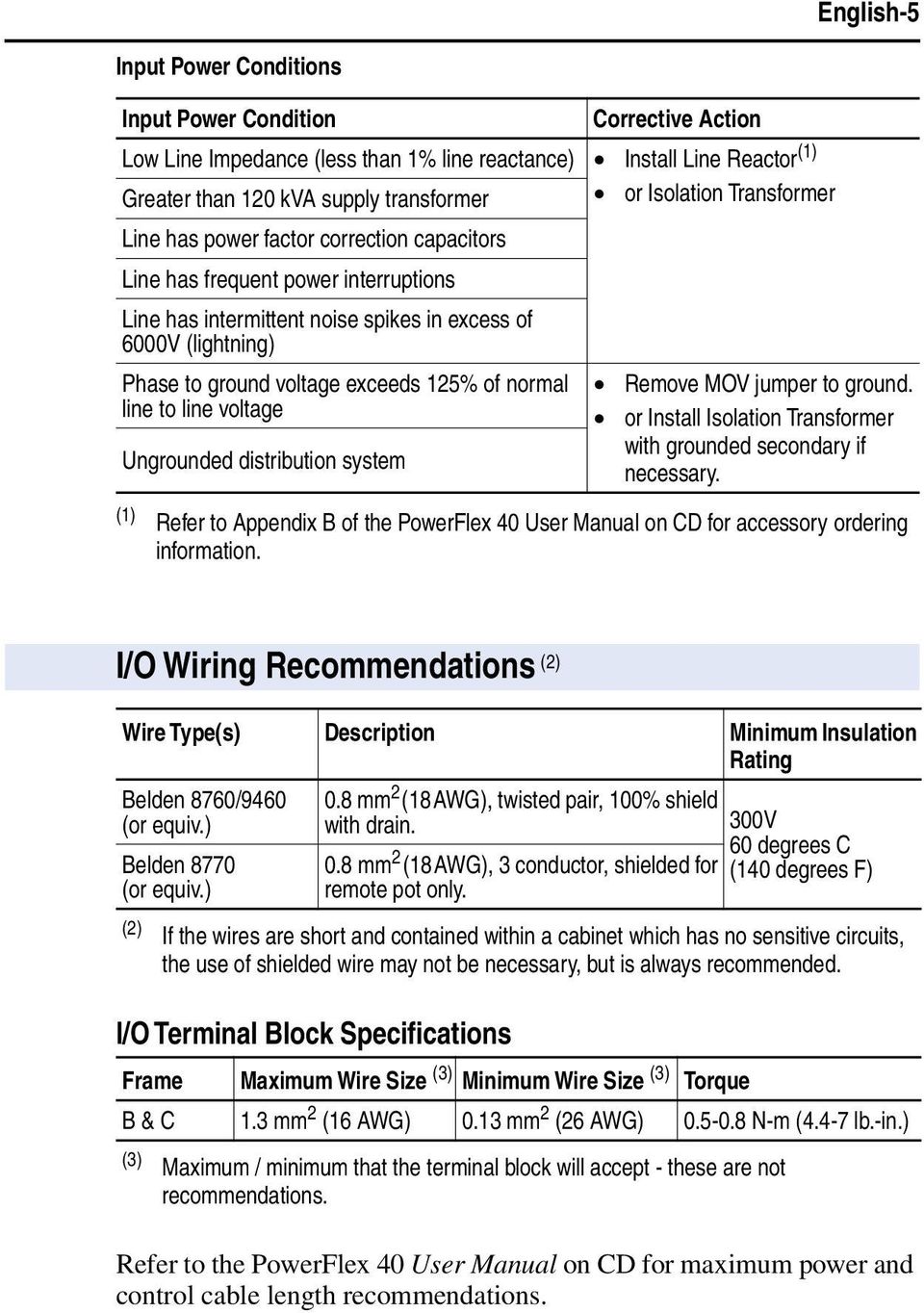
5 English-5 Input Power Conditions Input Power Condition Corrective Action Low Line Impedance (less than 1% line reactance) Install Line Reactor (1) Greater than 12 kva supply transformer Line has power factor correction capacitors Line has frequent power interruptions Line has intermittent noise spikes in excess of 6V (lightning) Phase to ground voltage exceeds 125% of normal line to line voltage Ungrounded distribution system or Isolation Transformer Remove MOV jumper to ground. or Install Isolation Transformer with grounded secondary if necessary. (1) Refer to Appendix B of the PowerFlex 4 User Manual on CD for accessory ordering information. I/O Wiring Recommendations (2) Wire Type(s) Description Minimum Insulation Rating Belden 876/946 (or equiv.) Belden 877 (or equiv.) I/O Terminal Block Specifications.8 mm 2 (18AWG), twisted pair, 1% shield with drain..8 mm 2 (18AWG), 3 conductor, shielded for remote pot only. 3V 6 degrees C (14 degrees F) (2) If the wires are short and contained within a cabinet which has no sensitive circuits, the use of shielded wire may not be necessary, but is always recommended. Frame Maximum Wire Size (3) Minimum Wire Size (3) Torque B & C 1.3 mm 2 (16 AWG).13 mm 2 (26 AWG).5-.8 N-m (4.4-7 lb.-in.) (3) Maximum / minimum that the terminal block will accept - these are not recommendations. Refer to the PowerFlex 4 User Manual on CD for maximum power and control cable length recommendations.
6 English-6 Relay N.O. Relay Common Relay N.C. Control Terminal Block Control Wiring Block Diagram Enable (4) Jumper R1 R2 R3 SNK SRC 3V DC 5mA Non-inductive +24V +1V -1V /4-2mA Stop (1) Typical SRC Wiring Start/Run FWD (2) Direction/Run REV Digital Common Digital Input 1 Digital Input 2 Digital Input 3 Digital Input 4 Opto Common +24V DC +1V DC -1V (or ±1V) Input Analog Common 4-2mA Input Analog Output Opto Output 1 Opto Output 2 RS485 Shield Pot must be 1-1k ohm 2 Watt Min. Typical SNK Wiring Common (3) 24V -1V -2mA R1 R2 R3 3V DC 125V AC 24V AC Resistive 3.A 3.A 3.A Inductive.5A.5A.5A SNK SRC Analog Output Select ENBL (1) Enable (4) Jumper RS485 (DSI) 1 (1) Important: I/O Terminal 1 is always a coast to stop input except when P36 [Start Source] is set to 3-Wire control. In three wire control, I/O Terminal 1 is controlled by P37 [Stop Mode]. All other stop sources are controlled by P37 [Stop Mode]. (2) P36 [Start Source] Stop I/O Terminal 1 Stop Keypad Per P37 Coast 3-Wire Per P37 Per P37 2-Wire Per P37 Coast RS485 Port Per P37 Coast Important: The drive is shipped with a jumper installed between I/O Terminals 1 and 11. Remove this jumper when using I/O Terminal 1 as a stop or enable input. Two wire control shown. For three wire control use a momentary input on I/O Terminal 2 to command a start. Use a maintained input for I/O Terminal 3 to change direction. (3) When using an opto output with an inductive load such as a relay, install a recovery diode parallel to the relay as shown, to prevent damage to the output. (4) When the ENBL jumper is removed, I/O Terminal 1 will always act as a hardware enable, causing a coast to stop. Refer to the PowerFlex 4 User Manual on CD for more information.

7 English-7 Control I/O Terminal Designations No. Signal Default Description Param. R1 Relay N.O. Fault Normally open contact for output relay. A55 R2 Relay Common Common for output relay. R3 Relay N.C. Fault Normally closed contact for output relay. A55 Analog Output Select DIP Switch Sink/Source DIP Switch -1V Sets analog output to either voltage or current. Setting must match A65 [Analog Out Sel]. Source (SRC) Inputs can be wired as Sink (SNK) or Source (SRC) via DIP Switch setting. 1 Stop (1) Coast The factory installed jumper or a normally closed input must be present for the drive to start. P36 (1) 2 Start/Run FWD Not Active Command comes from the integral keypad by default. P36, P37 3 Direction/Run REV Not Active To disable reverse operation, see A95 [Reverse P36, P37, Disable]. A95 4 Digital Common For digital inputs. Electronically isolated with digital inputs from analog I/O and opto outputs. 5 Digital Input 1 Preset Freq Program with A51 [Digital In1 Sel]. A51 6 Digital Input 2 Preset Freq Program with A52 [Digital In2 Sel]. A52 7 Digital Input 3 Local Program with A53 [Digital In3 Sel]. A53 8 Digital Input 4 Jog Forward Program with A54 [Digital In4 Sel]. A54 9 Opto Common For opto-coupled outputs. Electronically isolated with opto outputs from analog I/O and digital inputs V DC Referenced to Digital Common. Drive supplied power for digital inputs. Maximum output current is 1mA V DC Referenced to Analog Common. Drive supplied power for -1V external potentiometer. Maximum output current is 15mA. P38 13 ±1V In (2) Not Active For external -1V (unipolar) or ±1V (bipolar) input supply (input impedance = 1k ohm) or potentiometer wiper. 14 Analog Common For -1V In or 4-2mA In. Electronically isolated with analog inputs and outputs from digital I/O and opto outputs mA In (2) Not Active For external 4-2mA input supply (input impedance = 25 ohm). 16 Analog Output OutFreq -1 The default analog output is -1V. To covert to a current value, change the Analog Output Select DIP Switch to -2mA. Program with A65 [Analog Out Sel]. Max analog value can be scaled with A66 [Analog Out High]. Maximum Load: 4-2mA = 525 ohm (1.5V) -1V = 1k ohm (1mA) P38, A51-A54, A123, A132 P38, A51-A54, A132 A65, A66 17 Opto Output 1 MotorRunning Program with A58 [Opto Out1 Sel] A589, A59, A64 18 Opto Output 2 At Frequency Program with A61 [Opto Out2 Sel] A61, A62, A64 19 RS485 (DSI) Shield Terminal should be connected to safety ground - PE when using the RS485 (DSI) communications port. (1) See Footnote (1) on page 6. (2) -1V In and 4-2mA In are distinct input channels and may be connected simultaneously. Inputs may be used independently for speed control or jointly when operating in PID mode.

8 English-8 Prepare For Drive Start-Up! ATTENTION: Power must be applied to the drive to perform the following start-up procedures. Some of the voltages present are at incoming line potential. To avoid electric shock hazard or damage to equipment, only qualified service personnel should perform the following procedure. Thoroughly read and understand the procedure before beginning. If an event does not occur while performing this procedure, Do Not Proceed. Remove All Power including user supplied control voltages. User supplied voltages may exist even when main AC power is not applied to the drive. Correct the malfunction before continuing. Before Applying Power to the Drive 1. Confirm that all inputs are connected to the correct terminals and are secure. 2. Verify that AC line power at the disconnect device is within the rated value of the drive. 3. Verify that any digital control power is 24 volts. 4. Verify that the Sink (SNK)/Source (SRC) Setup DIP Switch is set to match your control wiring scheme. See page 7 for location. Important: The default control scheme is Source (SRC). The Stop terminal is jumpered (I/O Terminals 1 and 11) to allow starting from the keypad. If the control scheme is changed to Sink (SNK), the jumper must be removed from I/O Terminals 1 and 11 and installed between I/O Terminals 1 and Verify that the Stop input is present or the drive will not start. Important: If I/O Terminal 1 is used as a stop input, the jumper between I/O Terminals 1 and 11 must be removed. Applying Power to the Drive 6. Apply AC power and control voltages to the drive. 7. Familiarize yourself with the integral keypad features (see next page) before setting any Program Group parameters. Start, Stop, Direction and Speed Control Factory default parameter values allow the drive to be controlled from the integral keypad. No programming is required to start, stop, change direction and control speed directly from the integral keypad. Important: To disable reverse operation, see A95 [Reverse Disable]. If a fault appears on power up, refer to page 15 for an explanation of the fault code. For complete troubleshooting information, refer to the PowerFlex 4 User Manual on the CD supplied with the drive.

9 See the PowerFlex 4 User Manual on CD for more information on parameters. English-9 Integral Keypad ➏ ➋ ➊ RUN FWD REV ➍ PROGRAM ➐ ➎ FAULT ➌ ➑ Menu Description Display Group (View Only) Consists of commonly viewed drive operating conditions. Basic Program Group Consists of most commonly used programmable functions. Advanced Program Group Consists of remaining programmable functions. ➒ Fault Designator Consists of list of codes for specific fault conditions. Displayed only when fault is present. No. LED LED State Description ➊ Run/Direction Steady Red Indicates drive is running and commanded motor direction. Status Flashing Red Drive has been commanded to change direction. Indicates actual motor direction while decelerating to zero. ➋ Alphanumeric Steady Red Indicates parameter number, parameter value, or fault code. Display Flashing Red Single digit flashing indicates that digit can be edited. All digits flashing indicates a fault condition. Displayed Units Steady Red Indicates the units of the parameter value being displayed. ➌ ➍ ➎ ➏ ➐ Program Status Steady Red Indicates parameter value can be changed. Fault Status Flashing Red Indicates drive is faulted. Pot Status Steady Green Indicates potentiometer on Integral Keypad is active. Start Key Status Steady Green Indicates Start key on Integral Keypad is active. The Reverse key is also active unless disabled by A95 [Reverse Disable]. No. Key Name Description ➑ Escape Back one step in programming menu. Cancel a change to a parameter value and exit Program Mode. Select Advance one step in programming menu. Select a digit when viewing parameter value. Up Arrow Down Arrow Enter Scroll through groups and parameters. Increase/decrease the value of a flashing digit. Advance one step in programming menu. Save a change to a parameter value. ➒ Potentiometer Used to control speed of drive. Default is active. Controlled by parameter P38. Start Reverse Stop Used to start the drive. Default is active. Controlled by parameter P36. Used to reverse direction of the drive. Default is active. Controlled by parameters P36 and A95. Used to stop the drive or clear a fault. This key is always active. Controlled by parameter P37.

10 English-1 See the PowerFlex 4 User Manual on CD for more information on parameters. Viewing and Editing Parameters The last user-selected Display Group parameter is saved when power is removed and is displayed by default when power is reapplied. The following is an example of basic integral keypad and display functions. This example provides basic navigation instructions and illustrates how to program the first Program Group parameter. Step Key(s) Example Displays 1. When power is applied, the last user-selected Display Group parameter number is briefly displayed with flashing characters. The display then defaults to that parameter s current value. PROGRAM FAULT (Example shows the value of d1 [Output Freq] with the drive stopped.) 2. Press Esc once to display the Display Group parameter number shown on power-up. The parameter number will flash. PROGRAM FAULT 3. Press Esc again to enter the group menu. The group menu letter will flash. 4. Press the Up Arrow or Down Arrow to scroll through the group menu (d, P and A). or PROGRAM FAULT 5. Press Enter or Sel to enter a group. The right digit of the last viewed parameter in that group will flash. or PROGRAM FAULT 6. Press the Up Arrow or Down Arrow to scroll through the parameters that are in the group. or 7. Press Enter or Sel to view the value of a parameter. If you do not want to edit the value, press Esc to return to the parameter number. or PROGRAM FAULT 8. Press Enter or Sel to enter program mode to edit the parameter value. The right digit will flash and the Program LED will illuminate if the parameter can be edited. or PROGRAM FAULT 9. Press the Up Arrow or Down Arrow to change the parameter value. If desired, press Sel to move from digit to digit or bit to bit. The digit or bit that you can change will flash. or 1. Press Esc to cancel a change. The digit will stop flashing, the previous value is restored and the Program LED will turn off. Or Press Enter to save a change. The digit will stop flashing and the Program LED will turn off. PROGRAM FAULT 11. Press Esc to return to the parameter list. Continue to press Esc to back out of the programming menu. If pressing Esc does not change the display, then d1 [Output Frequency] is displayed. Press Enter or Sel to enter the group menu. PROGRAM FAULT

11 See the PowerFlex 4 User Manual on CD for more information on parameters. English-11 Display Group Parameters No. Parameter Min/Max Display/Options d1 [Output Freq]./[Maximum Freq].1 Hz d2 [Commanded Freq]./[Maximum Freq].1 Hz d3 [Output Current]./Drive Amps 2.1 Amps d4 [Output Voltage] /Drive Rated Volts 1 VAC d5 [DC Bus Voltage] Based on Drive Rating 1 VDC d6 [Drive Status] /1 (1 = Condition True) Bit 3 Bit 2 Bit 1 Bit Decelerating Accelerating Forward Running d7- [Fault x Code] F2/F122 F1 d9 d1 [Process Display]./ d12 [Control Source] /9 Bit 1 = Speed Command Bit = Start Command (See P38; 9 = Jog Freq ) (See P36; 9 = Jog ) d13 [Contrl In Status] /1 (1 = Input Present) Bit 3 Bit 2 Bit 1 Bit Dynamic Brake Stop Input Dir/Run REV Start/Run FWD d14 [Dig In Status] /1 (1 = Input Present) Bit 3 Bit 2 Bit 1 Bit Digital In4 Sel Digital In3 Sel Digital In2 Sel Digital In1 Sel d15 [Comm Status] /1 (1 = Condition True) Bit 3 Bit 2 Bit 1 Bit Fault Occurred RS485 Option Transmitting Receiving d16 [Control SW Ver] 1./ d17 [Drive Type] 11/ d18 [Elapsed Run Time] /9999 Hrs 1 = 1 Hrs d19 [Testpoint Data] /FFFF 1 Hex d2 [Analog In -1V]./1.%.1% d21 [Analog In 4-2mA]./1.%.1% d22 [Output Power]./Drive Power 2.1 kw d23 [Output Powr Fctr]./18. deg.1 deg d24 [Drive Temp] /12 degc 1 degc d25 [Counter Status] / d26 [Timer Status]./ Secs d28 [Stp Logic Status] /7 1 Smart Start-Up with Basic Program Group Parameters The PowerFlex 4 is designed so that start up is simple and efficient. The Program Group contains the most commonly used parameters. = Stop drive before changing this parameter. No. Parameter Min/Max Display/Options Default P31 [Motor NP Volts] 2/Drive Rated Volts 1 VAC Based on Drive Rating Set to the motor nameplate rated volts. P32 [Motor NP Hertz] 15/4 Hz 1 Hz 6 Hz Set to the motor nameplate rated frequency. P33 [Motor OL Current]./(Drive Rated Amps 2).1 Amps Based on Drive Rating Set to the maximum allowable motor current. P34 [Minimum Freq]./4. Hz.1 Hz. Hz Sets the lowest frequency the drive will output continuously. P35 [Maximum Freq] /4 Hz 1 Hz 6 Hz Sets the highest frequency the drive will output. P36 [Start Source] /5 = Keypad (1) Sets the control scheme used to start the drive. 1 = 3-Wire 2 = 2-Wire (1) When active, the Reverse key is also active 3 = 2-W Lvl Sens unless disabled by A95 [Reverse Disable]. 4 = 2-W Hi Speed 5 = Comm Port P37 [Stop Mode] /7 = Ramp, CF (1) Active stop mode for all stop sources [e.g. keypad, 1 = Coast, CF (1) run forward (I/O Terminal 2), run reverse (I/O 2 = DC Brake, CF (1) Terminal 3), RS485 port] except as noted below. 3 = DCBrkAuto,CF (1) Important: I/O Terminal 1 is always a coast to 4 = Ramp stop input except when P36 [Start Source] is set 5 = Coast for 3-Wire control. When in three wire control, I/O 6 = DC Brake Terminal 1 is controlled by P37 [Stop Mode]. 7 = DC BrakeAuto (1) Stop input also clears active fault.
![1 Amps d4 [Output Voltage] /Drive Rated Volts 1 VAC d5 [DC Bus Voltage] Based on Drive Rating 1 VDC d6 [Drive Status] /1 (1 = Condition True) Bit 3 Bit 2 Bit 1 Bit Decelerating Accelerating Forward](/docs-images/42/20775204/images/page_11.jpg "Running d7- [Fault x Code] F2/F122 F1 d9 d1 [Process Display]./9999.")
12 English-12 = Stop drive before changing this parameter. No. Parameter Min/Max Display/Options Default P38 [Speed Reference] /6 = Drive Pot Sets the source of the speed reference to the 1 = InternalFreq drive. 2 = -1V Input Important: When A51 or A52 [Digital Inx Sel] is 3 = 4-2mA Input set to option 2, 4, 5, 6, 13 or 14 and the digital 4 = Preset Freq input is active, A51, A52, A53 or A54 will 5 = Comm Port override the speed reference commanded by this 6 = Stp Logic parameter. Refer to Chapter 1 of the PowerFlex 4 User Manual on CD for details. P39 [Accel Time 1]./6. Secs.1 Secs 1. Secs Sets the rate of accel for all speed increases. P4 [Decel Time 1].1/6. Secs.1 Secs 1. Secs Sets the rate of decel for all speed decreases. P41 [Reset To Defalts] /1 = Ready/Idle Resets all parameter values to factory defaults. 1 = Factory Rset Advanced Group Parameters No. Parameter Min/Max Display/Options Default A51 A52 A53 A54 [Digital In1 Sel] I/O Terminal 5 [Digital In2 Sel] I/O Terminal 6 [Digital In3 Sel] I/O Terminal 7 [Digital In4 Sel] I/O Terminal 8 /25 = Not Used 1 = Acc & Dec 2 2 = Jog 3 = Aux Fault 4 = Preset Freq 5 = Local 6 = Comm Port 7 = Clear Fault 8 = RampStop,CF 9 = CoastStop,CF 1 = DCInjStop,CF 11 = Jog Forward 12 = Jog Reverse 13 = 1V In Ctrl 14 = 2mA In Ctrl 15 = PID Disable 16 = MOP Up 17 = MOP Down 18 = Timer Start 19 = Counter In 2 = Reset Timer 21 = Reset Countr 22 = Rset Tim&Cnt 23 = Logic In1 24 = Logic In2 25 = Current Lmt A55 [Relay Out Sel] /2 = Ready/Fault 1 = At Frequency 2 = MotorRunning 3 = Reverse 4 = Motor Overld 5 = Ramp Reg 6 = Above Freq 7 = Above Cur 8 = Above DCVolt 9 = Retries Exst 1 = Above Anlg V 11 = Logic In 1 12 = Logic In 2 13 = Logic 1 & 2 14 = Logic 1 or 2 15 = StpLogic Out 16 = Timer Out 17 = Counter Out 18 = Above PF Ang 19 = Anlg In Loss 2 = ParamControl A56 [Relay Out Level]./ A58 A61 [Opto Out1 Sel] [Opto Out2 Sel] /2 = Ready/Fault 1 = At Frequency 2 = MotorRunning 3 = Reverse 4 = Motor Overld 5 = Ramp Reg 6 = Above Freq 7 = Above Cur 8 = Above DCVolt 9 = Retries Exst 1 = Above Anlg V 11 = Logic In 1 12 = Logic In 2 13 = Logic 1 & 2 14 = Logic 1 or 2 15 = StpLogic Out 16 = Timer Out 17 = Counter Out 18 = Above PF Ang 19 = Anlg In Loss 2 = ParamControl 2 1 A59 A62 [Opto Out1 Level] [Opto Out2 Level]./ A55, A58 & A61 Setting A56, A59 & A62 Min/Max 6 /4 Hz 7 /18% 8 /815 Volts 1 /1% 16.1/9999 Secs 17 1/9999 Counts 18 1/18 degs 2 /1
![2 = -1V Input Important: When A51 or A52 [Digital Inx Sel] is 3 = 4-2mA Input set to option 2, 4, 5, 6, 13 or 14 and the digital 4 = Preset Freq input is active, A51, A52, A53 or A54 will 5 = Comm](/docs-images/42/20775204/images/page_12.jpg "Port override the speed reference commanded by this 6 = Stp Logic parameter. Refer to Chapter 1 of the PowerFlex 4 User Manual on CD for details. P39 [Accel Time 1]./6. Secs.1 Secs 1.")
13 English-13 No. Parameter Min/Max Display/Options Default A64 [Opto Out Logic] /3 1 A64 Option Opto Out1 Logic Opto Out2 Logic NO (Normally Open) NO (Normally Open) 1 NC (Normally Closed) NO (Normally Open) 2 NO (Normally Open) NC (Normally Closed) 3 NC (Normally Closed) NC (Normally Closed) A65 [Analog Out Sel] /14 1 A66 [Analog Out High] /8% 1% 1% A67 [Accel Time 2]./6. Secs.1 Secs 2. Secs A68 [Decel Time 2].1/6. Secs.1 Secs 2. Secs A69 [Internal Freq]./4. Hz.1 Hz 6. Hz A7 A71 A72 A73 A74 A75 A76 A77 Option Output Range Minimum Output Value Maximum Output Value [Analog Out High] DIP Switch Position OutFreq -1-1V V = Hz P35 [Maximum Freq] -1V 1 OutCurr -1-1V V = Amps 2% Drive Rated FLA -1V 2 OutVolt -1-1V V = Volts 12% Drive Rated Output Volts -1V 3 OutPowr -1-1V V = kw 2% Drive Rated Power -1V 4 TstData -1-1V V = (Hex FFFF) -1V 5 OutFreq -2-2mA ma = Hz P35 [Maximum Freq] -2mA 6 OutCurr -2-2mA ma = Amps 2% Drive Rated FLA -2mA 7 OutVolt -2-2mA ma = Volts 12% Drive Rated Output Volts -2mA 8 OutPowr -2-2mA ma = kw 2% Drive Rated Power -2mA 9 TstData -2-2mA ma = (Hex FFFF) -2mA 1 OutFreq mA 4 ma = Hz P35 [Maximum Freq] -2mA 11 OutCurr mA 4 ma = Amps 2% Drive Rated FLA -2mA 12 OutVolt mA 4 ma = Volts 12% Drive Rated Output Volts -2mA 13 OutPowr mA 4 ma = kw 2% Drive Rated Power -2mA 14 TstData mA 4 ma = (Hex FFFF) -2mA [Preset Freq ] (1) [Preset Freq 1] [Preset Freq 2] [Preset Freq 3] [Preset Freq 4] [Preset Freq 5] [Preset Freq 6] [Preset Freq 7]./4. Hz.1 Hz. Hz 5. Hz 1. Hz 2. Hz 3. Hz 4. Hz 5. Hz 6. Hz (1) To activate [Preset Freq ] set P38 [Speed Reference] to option 4. Input State of Digital In 1 (I/O Terminal 5) Input State of Digital In 2 (I/O Terminal 6) Input State of Digital In 3 (I/O Terminal 7) A78 [Jog Frequency]./[Maximum Freq].1 Hz 1. Hz A79 [Jog Accel/Decel].1/6. Secs.1 Secs 1. Secs A8 [DC Brake Time]./99.9 Secs.1 Secs. Secs A setting of 99.9 Secs = Continuous A81 [DC Brake Level]./(Drive Amps 1.8).1 Amps Amps.5 A82 [DB Resistor Sel] /99 = Disabled 1 = Normal RA Res Frequency Source Accel / Decel Parameter Used (2) [Preset Freq ] [Accel Time 1] / [Decel Time 1] 1 [Preset Freq 1] [Accel Time 1] / [Decel Time 1] 1 [Preset Freq 2] [Accel Time 2] / [Decel Time 2] 1 1 [Preset Freq 3] [Accel Time 2] / [Decel Time 2] 1 [Preset Freq 4] [Accel Time 1] / [Decel Time 1] 1 1 [Preset Freq 5] [Accel Time 1] / [Decel Time 1] 1 1 [Preset Freq 6] [Accel Time 2] / [Decel Time 2] [Preset Freq 7] [Accel Time 2] / [Decel Time 2] (2) When a Digital Input is set to Accel 2 & Decel 2, and the input is active, that input overrides the settings in this table. 2 = NoProtection 3-99 = % of Duty Cycle A83 [S Curve %] /1% 1% % (Disabled) A84 [Boost Select] /14 Settings in % of base voltage. 8 Only active when A125 [Torque Perf Mode] is = Custom V/Hz 7 (5, 7.5 & 1 set to V/Hz. Variable Torque Constant Torque HP Drives) 1 = 3., VT 5 =., no IR 1 = 1., CT 2 = 35., VT 6 =. 11 = 12.5, CT 3 = 4., VT 7 = 2.5, CT 12 = 15., CT 4 = 45., VT 8 = 5., CT 13 = 17.5, CT 9 = 7.5, CT 14 = 2., CT A85 [Start Boost]./25.%.1% 2.5% Only active when A84 [Boost Select] and A125 [Torque Perf Mode] are set to.
![(Normally Open) NC (Normally Closed) 3 NC (Normally Closed) NC (Normally Closed) A65 [Analog Out Sel] /14 1 A66 [Analog Out High] /8% 1% 1% A67 [Accel Time 2]./6. Secs.1 Secs 2.](/docs-images/42/20775204/images/page_13.jpg "Secs A68 [Decel Time 2].1/6. Secs.1 Secs 2. Secs A69 [Internal Freq]./4. Hz.1 Hz 6.")
14 English-14 No. Parameter Min/Max Display/Options Default A86 [Break Voltage]./1.%.1% 25.% Only active when A84 [Boost Select] and A125 [Torque Perf Mode] are set to. A87 [Break Frequency]./4. Hz.1 Hz 15. Hz Only active when A84 [Boost Select] and A125 [Torque Perf Mode] are set to. A88 [Maximum Voltage] 2/Rated Volts 1 VAC Rated Volts A89 [Current Limit 1].1/(Drive Amps 1.8).1 Amps Amps 1.5 A9 [Motor OL Select] /2 = No Derate 1 = Min Derate 2 = Max Derate A91 [PWM Frequency] 2./16. khz.1 khz 4. khz A92 [Auto Rstrt Tries] /9 1 A93 [Auto Rstrt Delay]./3. Secs.1 Secs 1. Secs A94 [Start At PowerUp] /1 = Disabled 1 = Enabled A95 [Reverse Disable] /1 = Rev Enabled 1 = Rev Disabled A96 [Flying Start En] /1 = Disabled 1 = Enabled A97 [Compensation] /3 = Disabled 2 = Mechanical 1 1 = Electrical 3 = Both A98 [SW Current Trip]./(Drive Amps 2).1 Amps. (Disabled) A99 [Process Factor].1/ A1 [Fault Clear] /2 = Ready/Idle 1 = Reset Fault 2 = Clear Buffer A11 [Program Lock] /9999 = Unlocked 1 = Locked A12 [Testpoint Sel] 4/FFFF 1 Hex 4 A13 [Comm Data Rate] /5 = 12 3 = 96 3 Power to drive must be cycled before any 1 = 24 4 = 19.2K changes will affect drive operation. 2 = 48 5 = 38.4K A14 [Comm Node Addr] 1/ Power to drive must be cycled before any changes will affect drive operation. A15 [Comm Loss Action] /3 = Fault 2 = Stop 1 = Coast Stop 3 = Continu Last A16 [Comm Loss Time].1/6. Secs.1 5. A17 [Comm Format] /2 = RTU 8-N-1 1 = RTU 8-E-1 Power to drive must be cycled before any changes will affect drive operation. A18 [Language] 1/1 1 = English 2 = Français 3 = Español 4 = Italiano 5 = Deutsch 2 = RTU 8-O-1 6 = Reserved 7 = Português 8 = Reserved 9 = Reserved 1 = Nederlands A11 [Anlg In -1V Lo]./1.%.1%.% A111 [Anlg In -1V Hi]./1.%.1% 1.% A112 [Anlg In4-2mA Lo]./1.%.1%.% A113 [Anlg In4-2mA Hi]./1.%.1% 1.% A114 [Slip FLA]./1. Hz.1 Hz 2. Hz A118 [Current Limit 2].1/(Drive Amps 1.8).1 Amps Amps 1.5 A119 [Skip Frequency] /4 Hz 1 Hz Hz A12 [Skip Freq Band]./3. Hz.1 Hz. Hz A121 [Stall Fault Time] /5 = 6 Seconds 1 = 12 Seconds 2 = 24 Seconds A122 [Analog In Loss] /6 = Disabled 1 = Fault (F29) 2 = Stop 3 = Zero Ref 3 = 36 Seconds 4 = 48 Seconds 5 = Flt Disabled 4 = Min Freq Ref 5 = Max Freq Ref 6 = Int Freq Ref A123 [1V Bipolar Enbl] /1 = Uni-Polar In 1 = Bi-Polar In A124 [Var PWM Disable] /1 = Enabled 1 = Disabled A125 [Torque Perf Mode] /1 = V/Hz 1 = Sensrls Vect 1 A126 [Motor NP FLA] Drive Amps.1/2.1 Amps Rated Amps 1
![5 A9 [Motor OL Select] /2 = No Derate 1 = Min Derate 2 = Max Derate A91 [PWM Frequency] 2./16. khz.1 khz 4. khz A92 [Auto Rstrt Tries] /9 1 A93 [Auto Rstrt Delay]./3. Secs.1 Secs 1.](/docs-images/42/20775204/images/page_14.jpg "Secs A94 [Start At PowerUp] /1 = Disabled 1 = Enabled A95 [Reverse Disable] /1 = Rev Enabled 1 = Rev Disabled A96 [Flying Start En] /1 = Disabled 1 = Enabled A97 [Compensation] /3 = Disabled 2 =")
15 To clear a fault, press the Stop key, cycle power or set A1 [Fault Clear] to 1 or 2. English-15 No. Parameter Min/Max Display/Options Default A127 [Autotune] /2 = Ready/Idle 2 = Rotate Tune 1 = Static Tune A128 [IR Voltage Drop]./23. VAC.1 VAC Rated Volts A129 [Flux Current Ref]./[Motor NP Volts].1 Amps Rated Amps A13 [PID Trim Hi]./ A131 [PID Trim Lo]./ A132 [PID Ref Sel] /8 = PID Disabled 5 = Setpnt, Trim 1 = PID Setpoint 2 = -1V Input 3 = 4-2mA Input 4 = Comm Port 6 = -1V, Trim 7 = 4-2mA, Trim 8 = Comm, Trim A133 [PID Feedback Sel] /2 = -1V Input 2 = Comm Port 1 = 4-2mA Input A134 [PID Prop Gain]./ A135 [PID Integ Time]./999.9 Secs.1.1 A136 [PID Diff Rate]./99.99 (1/Secs).1.1 A137 [PID Setpoint]./1.%.1%.% A138 [PID Deadband]./1.%.1%.% A139 [PID Preload]./4. Hz.1 Hz. Hz A14- A147 A15- A157 [Stp Logic -7] 1/BAFF 4 Digits For a list of digit options, refer to the PowerFlex 4 User Manual on the CD supplied with the drive. F1 [Stp Logic Time -7]./999.9 Secs.1 Secs 3. Secs Fault Codes No. Fault Description F2 Auxiliary Input (1) Check remote wiring. F3 Power Loss Monitor the incoming AC line for low voltage or line power interruption. F4 UnderVoltage (1) Monitor the incoming AC line for low voltage or line power interruption. F5 OverVoltage (1) Monitor the AC line for high line voltage or transient conditions. Bus overvoltage can also be caused by motor regeneration. Extend the decel time or install dynamic brake option. F6 Motor Stalled (1) Increase [Accel Time x] or reduce load so drive output current does not exceed the current set by parameter A89 [Current Limit]. F7 Motor Overload (1) An excessive motor load exists. Reduce load so drive output current does not exceed the current set by parameter P33 [Motor OL Current]. F8 Heatsink OvrTmp (1) Check for blocked or dirty heat sink fins. Verify that ambient temperature has not exceeded 4 C (14 F) for IP 3/NEMA 1/UL Type 1 installations or 5 C (122 F) for Open type installations. Check fan. F12 HW OverCurrent (1) Check programming. Check for excess load, improper DC boost setting, DC brake volts set too high or other causes of excess current. F13 Ground Fault Check the motor and external wiring to the drive output terminals for a grounded condition. F29 Analog In Loss An analog input is configured to fault on signal loss. A signal loss has occurred. F33 Auto Rstrt Tries Correct the cause of the fault and manually clear. F38 Phase U to Gnd Check the wiring between the drive and motor. Check motor for grounded phase. F39 Phase V to Gnd Replace drive if fault cannot be cleared. F4 Phase W to Gnd F41 Phase UV Short Check the motor and drive output terminal wiring for a shorted condition. F42 Phase UW Short Replace drive if fault cannot be cleared. F43 Phase VW Short F48 Params Defaulted The drive was commanded to write default values to EEPROM. Clear the fault or cycle power to the drive. Program the drive parameters as needed. F63 SW OverCurrent (1) Check load requirements and A98 [SW Current Trip] setting. F64 Drive Overload Reduce load or extend Accel Time. F7 Power Unit Cycle power. Replace drive if fault cannot be cleared. F8 Autotune Failure The autotune function was either cancelled by the user of failed. F81 Comm Loss If adapter was not intentionally disconnected, check wiring to the port. Replace wiring, port expander, adapters or complete drive as required. Check connection. An adapter was intentionally disconnected. Turn off using A15 [Comm Loss Action]. F1 Parameter Checksum Restore factory defaults. F122 I/O Board Fail Cycle power. Replace drive if fault cannot be cleared. (1) Auto-Reset/Run type fault. Configure with parameters A92 and A93.
![1 Amps Rated Amps A13 [PID Trim Hi]./4..1 6. A131 [PID Trim Lo]./4..1.1 A132 [PID Ref Sel] /8 = PID Disabled 5 = Setpnt, Trim 1 = PID Setpoint 2 = -1V Input 3 = 4-2mA Input 4 = Comm Port 6 = -1V,](/docs-images/42/20775204/images/page_15.jpg "Trim 7 = 4-2mA, Trim 8 = Comm, Trim A133 [PID Feedback Sel] /2 = -1V Input 2 = Comm Port 1 = 4-2mA Input A134 [PID Prop Gain]./99.99.1.1 A135 [PID Integ Time]./999.9 Secs.1.1 A136 [PID Diff Rate]./99.99 (1/Secs).")
16 English-16 Drive Dimensions PowerFlex 4 Frames Ratings are in kw and (HP) Frame 12V AC 1-Phase 24V AC 1-Phase 24V AC 3-Phase 48V AC 3-Phase B.4 (.5).75 (1.) 1.1 (1.5) PowerFlex 4 AC Drive.4 (.5).75 (1.) 1.5 (2.).4 (.5).75 (1.) 1.5 (2.) C 2.2 (3.) 5.5 (7.5) 7.5 (1.) A D C 2.2 (3.) 3.7 (5.).4 (.5).75 (1.) 1.5 (2.) 5.5 (7.5) 7.5 (1.) Dimensions are in millimeters and (inches). Weights are in kilograms and (pounds). 2.2 (3.) 4. (5.) E B F Frame A B C D E F B 1 (3.94) C 13 (5.1) 18 (7.9) 26 (1.2) 136 (5.35) 18 (7.1) 87 (3.43) 116 (4.57) 168 (6.61) 246 (9.7) 87.4 (3.44) Ship Weight 2.2 (4.9) 4.3 (9.5) A 5.5 (.22) Communication, RFI Filter, IP 3/NEMA 1/UL Type 1 Option Kits B 79.1 (3.11) 64.1 (2.52) 4.6 (1.6) 25.6 (1.1) 22.2 (.87) 17. (4.21) 66. (2.6) 24. (.94) 28.5 (1.12) 22.2 (.87) C 74.3 (2.93) 19.9 (4.33) (4.38) (5.99) Dimension Option D B Frame Drive C Frame Drive A Comm Cover 25 (.98) 25 (.98) B EMC Line Filter 5 (1.97) (1) C EMC Line Filter 229 (9.2) (1) D IP3/NEMA 1/UL 33 (1.3) 6 (2.36) Type 1 IP3/NEMA 1/UL 64 (2.52) 6 (2.36) Type 1 for Comm Cover B Frame - 22-JBAB 77.5 (3.5) 5. (1.97) 22.5 (.89) 22.2 (.87) 15.3 (4.15) 76.3 (3.) (5.29) C Frame - 22-JBAC 18.7 (4.28) 92.2 (3.63) 69.2 (2.72) 45.7 (1.8) 22.2 (.87) 22.2 (.87) (5.7) 19.8 (4.32) 28.5 (1.12) (7.8) (1) Not available at print. B Frame - 22-JBCB (used with Comm Cover) C Frame - 22-JBCC (used with Comm Cover) U.S. Allen-Bradley Drives Technical Support Tel: (1) , Fax: (1) , [email protected], Online: Publication 22B-QS1A-EN-P October 22 Copyright 22 Rockwell Automation, Inc. All rights reserved. Printed in Taiwan.

Display Group Parameters
 1 Display Group Parameters No. Parameter Min/Max Display/Options d1 [Output Freq]./[Maximum Freq].1 Hz d2 [Commanded Freq]./[Maximum Freq].1 Hz d3 [Output Current]./Drive Amps 2.1 Amps d4 [Output Voltage]
Adjustable Frequency AC Drive for Fan & Pump Applications
 Adjustable Frequency AC Drive for Fan & Pump Applications FRN 1.xx - 7.xx User Manual www.abpowerflex.com Important User Information Solid state equipment has operational characteristics differing from
A1000 Cheat Sheet (Open Loop Vector)
 A1000 Cheat Sheet (Open Loop Vector) The following procedure is a supplement to supplied with this equipment and will guide the user in properly wiring the A1000 and. It will also show the user how to
GPD 506/P5 Start-up Procedure and Checklist
 GPD 506/P5 Start-up Procedure and Checklist Preparation for GPD506/P5 Drive Start-Up...2 HVAC Start-Up Procedure for GPD 506/P5 WITH Bypass Option:...4 HVAC Start-Up Procedure for GPD 506/P5 WITHOUT Bypass
NX Series Inverters. HVAC Pocket Programming Guide
 NX Series Inverters HVAC Pocket Programming Guide HVAC Pocket Programming Guide HVAC Pocket Programming Guide / Contents This guide provides a single reference document for the user of NXL HVAC (product
Safe Torque Off Option (Series B) for PowerFlex 40P and PowerFlex 70 Enhanced Control AC Drives
 User Manual Safe Torque Off Option (Series B) for PowerFlex 40P and PowerFlex 70 Enhanced Control AC Drives Catalog Number 20A-DG01 Topic Page General Description 2 What Is the DriveGuard Safe Torque Off
MTE SERIES RLW. World REACTORS USER MANUAL PART NO. INSTR 030 REL. 090930. 2009 MTE Corporation
 MTE SERIES RLW World REACTORS USER MANUAL PART NO. INSTR 030 REL. 090930 2009 MTE Corporation IMPORTANT USER INFORMATION NOTICE MTE Series RLW reactors are components designed to improve the reliability
Variable Speed AC Motor Drives SM-Basic Installation and Operation Manual
 ELECTRIC MOTORS, GEARMOTORS AND DRIVES Variable Speed AC Motor Drives SM-Basic Installation and Operation Manual We, EC Declaration of Conformity In accordance with EN45014:1998 Leeson Electric Corporation
Bulletin 150 Smart Motor Controllers SMC-3 Smart Motor Controller
 Overview/Modes of Operation Bulletin 150 Smart Motor Controller The SMC-3 is a compact, simple to use, solid-state motor controller designed to operate 3-phase motors. It features a built-in overload relay
VCM Installation and Operations Manual. Table of Contents
 Table of Contents VCM Installation and Operations Manual 1.0 Introduction... 1 2.0 Product Inspection... 2 2.1 Nameplate Layout... 2 3.0 Operating Precautions... 3 3.1 Before Power up... 3 3.2 During Power
FlexPak 3000 Digital DC Drive Software Reference Manual Version 4.3
 FlexPak 3000 Digital DC Drive Software Reference Manual Version 4.3 Instruction Manual D2-3405-2 The information in this manual is subject to change without notice. Throughout this manual, the following
ABB general machinery drives. User s manual ACS355 drives
 ABB general machinery drives User s manual ACS355 drives List of related manuals Drive manuals and guides Code (English) ACS355 user s manual 3AUA0000066143 1) ACS355 drives with IP66/67 / UL Type 4x enclosure
Installation Instructions. PowerFlex 700H Adjustable Frequency AC Drive and PowerFlex 700S High Performance AC Drive Frames 9...14
 Installation Instructions PowerFlex 700H Adjustable Frequency AC Drive and PowerFlex 700S High Performance AC Drive Frames 9...14 Important User Information Read this document and the documents listed
PowerFlex 70 and 700 Packages for Fan and Pump Applications
 Installation Instructions PowerFlex 70 and 700 Packages for Fan and Pump Applications Catalog Numbers V, W Important User Information Read this document and the documents listed in the additional resources
SAFETY INSTRUCTIONS WARNING
 Important User Information Thank you for purchasing LS Variable Frequency Drives! SAFETY INSTRUCTIONS Always follow safety instructions to prevent accidents and potential hazards from occurring. In this
Single Phase Soft Starter
 Single Phase Soft Starter Installation & Operating Manual 6/02 Table of Contents Section 1 General Information................................................... 1 1 General Description................................................
Configuring Allen-Brandly ControlLogix PLC with Moxa MGate 5105-MB-EIP. 1 Application Description... 3. 1.1 Objective... 3 1.2 Goals...
 Moxa MGate 5105-MB-EIP Contents Moxa Technical Support Team [email protected] 1 Application Description... 3 1.1 Objective... 3 1.2 Goals... 3 2 System Topology... 3 3 Hardware and Software Requirements...
SJ200 Series Inverter Quick Reference Guide
 SJ2 Series Inverter Quick Reference Guide Single-phase Input 2V Class Three-phase Input 2V Class Three-phase Input 4V Class Hitachi Industrial Equipment Systems Co., Ltd. Manual No. NB6501XA March 24 Caution:
Analog Servo Drive 25A8
 Description Power Range NOTE: This product has been replaced by the AxCent family of servo drives. Please visit our website at www.a-m-c.com or contact us for replacement model information and retrofit
32VFD Variable Frequency Drives for Centrifugal Chillers
 32VFD 32VFD Variable Frequency Drives for Centrifugal Chillers ENERGY-SAVING CONTROL FOR CENTRIFUGAL CHILLERS Reduce energy consumption in your existing centrifugal chiller Your chiller was specified to
Bulletin 150 SMC Flex Smart Motor Controller Specifications
 Specifications Specifications Standard Features Optional Features Installation Setup Communications Power Wiring Control Wiring Keypad Software Starting and Stopping Modes Protection and Diagnostics Metering
SAFETY INSTRUCTIONS. Always follow safety instructions to prevent accidents and potential hazards from occurring.
 Thank you for purchasing LS Variable Frequency Drives! SAFETY INSTRUCTIONS Always follow safety instructions to prevent accidents and potential hazards from occurring. In this manual, safety messages are
MILLENIUM INSTALLATION MANUAL NTR 735 A. Simple Automation Control Module (MAS)
 MILLENIUM Table of contents 1. INTRODUCTION 1 2. HARDWARE DESCRIPTION 2 3. INSTALLATION 5 4. CONNECTION 6 5. USER SAFETY AND PROTECTION OF EQUIPMENT 8 1. Introduction The MILLENIUM series has been designed
Installation manual. Generator Paralleling Controller GPC multi-line 2 4189340225C
 Installation manual Generator Paralleling Controller GPC multi-line 2 Software ver. 1.3X Compact system in one unit - dynamic synchronisation - load sharing - generator protection DEIF A/S 3-phase AC RMS
SAFETY INSTRUCTIONS. Always follow safety instructions to prevent accidents and potential hazards from occurring.
 Thank you for purchasing LS Variable Frequency Drives! SAFETY INSTRUCTIONS Always follow safety instructions to prevent accidents and potential hazards from occurring. In this manual, safety messages are
VLT 6000 HVAC. Contents
 Contents Introduction Safety...3 Safety Guidelines...3 Warnings Against Unintended Start...3 Introduction...4 About this manual...4 Assumptions...4 References...4 Trademarks...5 Programming the VLT 6000
1 Application Description... 3. 1.1 Objective... 3 1.2 Goals... 3
 Contents Moxa Technical Support Team [email protected] 1 Application Description... 3 1.1 Objective... 3 1.2 Goals... 3 2 System Topology... 3 3 Hardware and Software Requirements... 4 4 Configuration...
MC Series Drives. Flexible, simple, rugged, robust! Phone: 800.894.0412 - Fax: 888.723.4773 - Web: www.actechdrives.com - Email: info@actechdrives.
 Drives Flexible, simple, rugged, robust! Our promise Commitment to Price Leadership Price leadership is serious business. It takes continuous life cycle management to make price leadership a sustainable
PowerFlex 700S and 700H Frame 12 DC Bus Connector Kit
 PowerFlex 700S and 700H Frame 12 DC Bus Connector Kit Installation Instructions This document provides instructions for the installation of a DC bus connector kit for PowerFlex 700S and 700H frame 12 drives
VARIABLE FREQUENCY DRIVES Revised 4/30/2015 23 81 07-1 Mechanical Systems
 SECTION 23 81 07 - VARIABLE FREQUENCY DRIVES PART 1 - GENERAL 1.1 SUMMARY A. This section includes all variable frequency drives. All standard and optional features shall be included within the VFD panel
Easy to connect - Easy to configure Easy to install
 SIMPLE TO USE... CG Drive- SK is an easy drive - easy to connect, easy to configure and easy to install. Easy to connect - All connectors are generously sized and clearly labeled. Easy to configure - The
AMFA-27 AMFA-29. Operator s Manual & Installation Instructions. Rev. 2.5
 AMFA-27 AMFA-29 Operator s Manual & Installation Instructions Rev. 2.5 Date: 17 July, 2010 Permanently-connected, utility Interactive, single-phase, inverters Model AMFA-27 WIND TURBINE INVERTER (240 VAC
SECTION 26 29 23 VARIABLE FREQUENCY DRIVES
 SECTION 26 29 23 VARIABLE FREQUENCY DRIVES PART 1 GENERAL 1.01 SCOPE A. Furnish and install individual freestanding variable frequency AC drives (VFD) as shown on the Drawings and specified herein. 1.02
AC ADJUSTABLE SPEED DRIVES MICRO SERIES INVERTERS
 MICRO SERIES INVERTERS MICRO SERIES INVERTER DRIVES Full feature, ultra-friendly operation. Programs and reads-out in plain English. Intelligent Power Module-IGBT s with a 16 bit Intel microprocessor.
INSTRUCTION MANUAL PHOENIX DX 3 TO 3500 HP SENSORLESS VECTOR AC DRIVE
 INSTRUCTION MANUAL PHOENIX DX 3 TO 3500 HP SENSORLESS VECTOR AC DRIVE Thank You We at US Drives would like to say thank you for purchasing our product. We believe the Phoenix AC Drive Series is the most
Installation, Operation and Maintenance Manual
 Installation, Operation and Maintenance Manual VLT 6000 Series Adjustable Frequency Drive 12/01 23-6108-00 Revision K Rotating shafts and electrical equipment can be hazardous. Therefore, it is strongly
Electronic timer CT-AHD.12 OFF-delayed with 1 c/o (SPDT) contact
 Data sheet Electronic timer CT-AHD.12 OFF-delayed with 1 c/o (SPDT) contact The CT-AHD.12 is an electronic time relay with OFF-delay. It is from the CT-D range. With their MDRC profile and a width of only
J1000. System configuration
 YASKAWA JZ J1000 The basic inverter V/f controlled inverter Good torque performance (150% / 3 Hz) Double rating ND 120%/1min and HD 150%/1 min Overload detection function (150% during 60s) thermal function
ABB Drives. User s Manual. Pulse Encoder Interface Module RTAC-01
 ABB Drives User s Manual Pulse Encoder Interface Module RTAC-0 Pulse Encoder Interface Module RTAC-0 User s Manual 3AFE 64486853 REV A EN EFFECTIVE:.5.00 00 ABB Oy. All Rights Reserved. Safety instructions
ABB machinery drives. User s manual ACS355 drives
 ABB machinery drives User s manual ACS355 drives List of related manuals Drive manuals and guides ACS355 user s manual ACS355 drives with IP66/67 / UL Type 4x enclosure supplement ACS355 quick installation
TABLE OF CONTENTS. Fig. 1 EV Pictorial Wiring Diagram 5. Section 2 Inverter Option Modules 6
 TABLE OF CONTENTS Introduction.. 3 Section 1 Safety Precautions.. 3 1.1 Preface.. 3 1.2 Receiving and Inspection... 3 1.3 Installation and Pre-operation 4 1.4 During Power ON. 4 Fig. 1 EV Pictorial Wiring
REGAL-BELOIT. Installation and Operation Manual. Variable Speed AC Motor Drives. Micro and PowerWash Series
 REGAL-BELOIT Variable Speed AC Motor Drives Micro and PowerWash Series Installation and Operation Manual Manual Number: SB184 TABLE OF CONTENTS 1.0 GENERAL................................................1
TECHNICAL DATASHEET #TD1404AX PWM CONTROLLED SOLENOID DRIVER
 TECHNICAL DATASHEET #TD1404AX PWM CONTROLLED SOLENOID DRIVER (PWM Input, 1.2A or 2A Output, Metal Box or PCB) PCB Board - P/N: PWMC-PCB-2A, PWMC-PCB-1.2A Packaged Driver (metal box with 1.5 m (5 ft.) cable)
SmartVFD Frame 4 Wiring Diagrams and Dimensional Drawings
 Smart Frame Wiring Diagrams and Dimensional Drawings Smart Frame Size 60 Vac:.5-7.5 HP 08/0 Vac: 0.75- HP SPECIFICATION DATA CONTENTS Smart Frame Wiring Diagrams... Frame, Fused Disconnect Wiring Diagrams...
ACS800. Firmware Manual ACS800 Standard Control Program 7.x
 ACS800 Firmware Manual ACS800 Standard Control Program 7.x ACS800 Standard Control Program 7.x Firmware Manual 3AFE64527592 REV I EN EFFECTIVE: 18.05.2007 2007 ABB Oy. All Rights Reserved. 5 Table of
SMC FLEX QUICK START BULLETIN 150
 QUICK START SMC FLEX BULLETIN 0 This guide provides you with the basic information required to start up your SMC Flex controller. When reading this document, look for this symbol Step x to guide you through
VSD Series Drives. November 2009 Supersedes September 2006. Powered by Eaton Technology. User Manual
 Powered by Eaton Technology VSD Series Drives User Manual Supersedes September 2006 LIT-1201828 For more information visit: www.johnsoncontrols.com Powered by Eaton Technology VSD Series Drives User Manual
VLT Series 3500 Adjustable Frequency Drive Instruction Manual
 Adjustable Frequency Drive Instruction Manual VLT Series 3500 Instruction Manual 175R5237 - Document Version 5.00 This manual applies to all VLT Series 3502-3800 Adjustable Frequency Drives with software
DLP-PU/E Instruction Manual
 Instruction Manual BEFORE USING THE POWER SUPPLY UNIT Pay attention to all warnings and cautions before using the unit. Incorrect usage could lead to an electrical shock, damage to the unit or a fire hazard.
Whale 3. User Manual and Installation Guide. DC Servo drive. Contents. 1. Safety, policy and warranty. 1.1. Safety notes. 1.2. Policy. 1.3. Warranty.
 Whale 3 DC Servo drive User Manual and Installation Guide Contents 1. Safety, policy and warranty. 1.1. Safety notes. 1.2. Policy. 1.3. Warranty. 2. Electric specifications. 2.1.Operation ranges. 3. Connections
PSR The compact range Description
 Description The PSR range is the most compact of all the ABB softstarter ranges, thereby making it possible to fit many devices into the same enclosure. The system concept with Manual Motor Starters provides
Operational Overview and Controls Guide. Two or Three Pump IronHeart Lite with Variable Frequency Drives
 DOCUMENT: ECSEQ6-0 EFFECTIVE: 09/23/10 SUPERSEDES: Operational Overview and Controls Guide Two or Three Pump IronHeart Lite with Variable Frequency Drives 6700 Best Friend Road. Norcross, GA 30071. (770)
LG Air Conditioning Multi F(DX) Fault Codes Sheet. Multi Split Units
 Multi Split Units If there is a fault on any LG Multi unit, an Error mark is indicated on the display window of the indoor unit, wired-remote controller, and LED s of outdoor unit control board. A two
NC-12 Modbus Application
 NC-12 Modbus Application NC-12 1 Table of Contents 1 Table of Contents... 2 2 Glossary... 3 SCADA...3 3 NC-12 Modbus in general... 3 4 Entire system... 4 4.1 PFC to PC connection alternatives...4 4.1.1
Parameter Settings for PowerFlex Drives Using Sine Wave Filters, dv/dt Filters, and Adjustable Voltage
 Application Technique Parameter Settings for PowerFlex Drives Using Sine Wave Filters, dv/dt Filters, and Adjustable Voltage PowerFlex 750-Series, 700, and 700VC AC Drives Topic Page About This Document
Installation & Operation Manual Dial-A-Flow Adjustable Frequency Drives
 GM 04-13 Installation & Operation Manual Dial-A-Flow Adjustable Frequency Drives for 1/8 HP thru 1HP 3-Phase AC Motors rated 208 230 VAC, 50 & 60 Hz NEMA-1 / IP-40 Operates from 115 and 208/230 Volt 50/60
PowerFlex Dynamic Braking Resistor Calculator
 Application Technique PowerFlex Dynamic Braking Resistor Calculator Catalog Numbers 20A, 20B, 20F, 20G, 22A, 22B Important User Information Solid-state equipment has operational characteristics differing
CONSTRUCTION STANDARDS DIVISION 23 HEATING VENTILATING AND AIR CONDITIONING
 PART 1-GENERAL 1.01 DESCRIPTION A. This specification is to cover a complete Variable Frequency motor Drive (VFD) consisting of a pulse width modulated (PWM) inverter designed for use on a standard NEMA
SAFETY INSTRUCTIONS WARNING
 Thank you for purchasing LG Variable Frequency Drives! SAFETY INSTRUCTIONS Always follow safety instructions to prevent accidents and potential hazards from occurring. In this manual, safety messages are
How To Use The Vacon 0 Machinery
 vacon 0 machinery how would you like your ac drive today? easy adaptation for customer requirements The Vacon 0 Machinery is an extremely compact AC drive for machine builders in the power range from 0.25
BT300 HVAC Drives Conventional Bypass (C-Bypass) Options
 BT300 HVAC Drives Conventional Bypass (C-Bypass) Options Description The BT300 Conventional Bypass is a companion package for the family of BT300 HVAC Drives. For information on the family of BT300 HVAC
Manual No. YEG-TOE-S616-55.1-OY. VARISPEED F7 Vector Control Frequency Inverter USER S MANUAL
 Manual No. YEG-TOE-S616-55.1-OY VARISPEED F7 Control Frequency Inverter USER S MANUAL Table of Content Warnings... VII Safety Precautions and Instructions for Use... VIII EMC Compatibility... X Line Filters...
PowerFlex 4 and 40 AC Drives
 Technical Data PowerFlex 4 and 40 AC Drives Original Instructions Topic Page Product Overview 2 Reference Materials 2 Packaging and Mounting 3 Start Up, Programming and Operation 3 Optimized Performance
CAT AVR V2.3. Instruction Manual. Voltage regulator for generators. March 2008
 CAT AVR V2.3 Voltage regulator for generators March 2008 Instruction Manual Warnings WARNING The system should not be installed, operated, serviced or modified except by qualified personnel who understand
ABB drives. User s manual ACS150 drives (0.37...4 kw, 0.5...5 hp)
 ABB drives User s manual ACS150 drives (0.37...4 kw, 0.5...5 hp) List of related manuals Drive manuals ACS150 drives User s manual ACS310 drives User s manual Code (English) 3AFE68576032 3AUA0000044201
9000X AF Drives. User Manual. May 2011 Supersedes June 2009
 9000X AF Drives User Manual May 2011 Supersedes June 2009 9000X AF Drives Disclaimer of Warranties and Limitation of Liability The information, recommendations, descriptions, and safety notations in this
Addendum to the Operating Instructions
 Drive Technology \ Drive Automation \ System Integration \ Services Addendum to the Operating Instructions MOVIMOT with AS-Interface and AC Motor DT/DV Unit Replacement MOVIMOT MM..C -> MM..D with MLK3A
APPENDIX. SureSERVO QUICK START GUIDE. In This Appendix... Quick Start for SureServo Drives...A 2. Tuning Quick Start for SureServo Drives...
 SureSERVO QUICK START GUIDE APPENDIX BA In This Appendix... Quick Start for SureServo Drives.............A 2 Spin the Motor......................................A 2 Position Mode Quick Start (Pt & Pr)......................A
Power Supplies 3. SDN-P DIN Rail Series
 SDN-P DIN Rail Series The SDN DIN Rail power supplies provide industry leading performance. Sag Immunity, transient suppression and noise tolerant, the SDN series ensures compatibility in demanding applications.
PowerFlex 70 Adjustable Frequency AC Drive
 Installation Instructions PowerFlex 70 Adjustable Frequency AC Drive This document explains the 5 BASIC STEPS needed to install and perform a Basic Start-up of the PowerFlex 70 AC drive. A Human Interface
ACH550 BCR/BDR/VCR/VDR E-Clipse Bypass Drives. User s Manual. ACH550 E-Clipse Bypass User s Manual 2-1
 ACH550 E-Clipse Bypass User s Manual 2-1 ACH550 BCR/BDR/VCR/VDR E-Clipse Bypass Drives 1 400 HP User s Manual ACH550-EB_UM (3AUA0000016461) Rev D EN EFFECTIVE: 2010-04-01 SUPERSEDES: ACH550-EB_UM (3AUA0000016461)
SAFETY PRECAUTIONS AND INSTRUCTIONS FOR USE OF TECHNICAL INFORMATION
 SAFETY PRECAUTIONS AND INSTRUCTIONS FOR USE OF TECHNICAL INFORMATION Please read and understand the product instruction manual before installing, servicing or operating Yaskawa products. Technical content
SOFT-STARTER MANUAL. Series: SSW-07 0899.5318 E/2
 SOFT-STARTER MANUAL Series: SSW-07 0899.5318 E/2 12/2006 Summary of revisions The information below describes the revisions in this manual. Revision Description Chapter 1 First Edition - 2 General Revision
Type: EASY719 DC RC Article No.: 274119. Ordering information Relay outputs Quantity 6 Power supply V DC 24 V DC. Description
 Type: EASY719 DC RC Article.: 274119 Ordering information Relay outputs Quantity 6 Power supply V DC 24 V DC Description 12 digital inputs (4 inputs available as analog inputs) 6 relay outputs LCD display
Voltage monitoring relays CM-ESS.2 For single-phase AC/DC voltages
 Data sheet Voltage monitoring relays CM-ESS.2 For single-phase AC/DC voltages The CM-ESS.2 is an electronic voltage monitoring relay that provides reliable monitoring of voltages as well as detection of
DMX-K-DRV. Integrated Step Motor Driver + (Basic Controller) Manual
 DMX-K-DRV Integrated Step Motor Driver + (Basic Controller) Manual DMX-K-DRV Manual page 1 rev 1.33 COPYRIGHT 2007 ARCUS, ALL RIGHTS RESERVED First edition, June 2007 ARCUS TECHNOLOGY copyrights this document.
Digi-Motor Installation Guide
 Digi-Motor Installation Guide Installation Video...located at marsdelivers.com Digi-Motor Installation Guide Digi-Motor For technical assistance with your Azure Digi-Motor, call the MARS technical support
Specifying a Variable Frequency Drive s
 Specifying a Variable Frequency Drive s Put on by Bruce Reeves and Jeremy Gonzales Dykman Electrical Covering the Western US For all of your VFD and Soft Start and Motor Needs How To Specify a Variable
CAUTION! THE 7I29 USES VOLTAGE AND POWER LEVELS THAT REPRESENT A HAZARD TO LIFE AND LIMB.
 7I29 MANUAL Rev 1.5 CAUTION! THE 7I29 USES VOLTAGE AND POWER LEVELS THAT REPRESENT A HAZARD TO LIFE AND LIMB. THE 7I29 IS INTENDED FOR USE BY OEMS THAT WILL INTEGRATE IT INTO A SYSTEM WITH INTERLOCKS AND
Softstarters Type PSR
 Catalog Softstarters Softstarters ABB Softstarters General To the left: A combination with PSR and a manual Motor Starter MS116 Above: PSR16, PSR30 and PSR 45 1 ABB Automation Products serve customers
ETC TWO STAGE ELECTRONIC TEMPERATURE CONTROL
 RANCO INSTALLATION INSTRUCTIONS ETC TWO STAGE ELECTRONIC TEMPERATURE CONTROL Relay Electrical Ratings PRODUCT DESCRIPTION The Ranco ETC is a microprocessor-based family of electronic temperature controls,
Contents. Document information
 User Manual Contents Document information... 2 Introduction... 3 Warnings... 3 Manufacturer... 3 Description... Installation... Configuration... Troubleshooting...11 Technical data...12 Device Scope: PCB
Fan Coil EC Motor Control
 Fan Coil EC Motor Control G3 PWM BARD The Enviro-Tec Generation 3 PWM (G3 PWM) board provides a pulse-width modulated (PWM) signal to the EC motor to control fan speed. The board is factory programmed
CONNECTOR AMPLIFIER FOR PROPORTIONAL VALVES (4-20 ma Input Version)
 TECHNICAL DATASHEET #TD1102AX CONNECTOR AMPLIFIER FOR PROPORTIONAL VALVES (4-20 ma Input Version) Part Number: Connector Amplifier CAPV-H-4-20MA-x complete with cable CAPV-4C-yM Where: x = current output
650W Single Output Power Supply 15V 24V. 27V 48V Rated Current. 0 ~ 100A 0 ~ 50A 0 ~ 40A 0 ~ 27A 0 ~ 24A 0 ~ 13.6A Rated Power
 Features: Universal AC input / Full range Programmable output Voltage (0% ~ 05%) Programmable output Current (% ~ 05%) + / 0.5A auxiliary output Forced current sharing at parallel operation Power OK signal
ABB 1 NEW. Three-phase monitoring relay for grid feeding CM-UFS.1. Data sheet. Features. Approvals. Marks. Order data. Order data - Accessories
 2CDC 251 014 F0t09 Features Monitoring of three-phase mains for grid feeding Type-tested in accordance with DIN V VDE V 0126-1-1: February 2006 Neutral conductor connection configurable Can also be used
Power Supply Unit, Primary Switched, Narrow Design MINI-PS-12-24DC/24DC/1
 Power Supply Unit, Primary Switched, Narrow Design MINI POWER provides: Extra narrow design with widths of 22.5 mm, 45 mm, and 67.5 mm (0.886, 1.772, and 2.657 in.) Global use due to a wide-range input
Series AMEPR30-AZ up to 2.5A AC-DC / DC-DC LED Driver / Converter
 FEATURES: Click on Series name for product info on aimtec.com Models Single output Model Max Output Power (W) 1 AC-DC Constant Current or Constant Over temperature protection Voltage LED Driver Over current
PowerFlex 520-Series AC Drive Specifications
 Technical Data PowerFlex 520-Series AC Drive Specifications Original Instructions Topic Page Product Overview 2 Catalog Number Explanation 8 Technical Specifications 9 Environmental Specifications 12 Certifications
Fractional to 2 HP DC Drives for Both Non-Regenerative and Regenerative Applications
 DC3 DC Drives Fractional to 2 HP DC Drives for Both Non-Regenerative and Regenerative Applications The Reliance Electric DC3 family of drives provides cost-effective variable speed control and operates
ABB HVAC Drives ACH400 Vertical Electronic Bypass to ACH550 E-Bypass, 1-25Hp @ 208V, 1-50Hp @ 480V (R1... R4 Frame Size Drives)
 ABB HVAC Drives ACH400 Vertical Electronic Bypass to ACH550 E-Bypass, 1-25Hp @ 208V, 1-50Hp @ 480V (R1... R4 Frame Size Drives) Retrofit Guide PRODUCTS ACH400 to ACH550 Drive Replacement Instructions This
Voltage monitoring relays CM-ESS.M For single-phase AC/DC voltages
 Data sheet Voltage monitoring relays CM-ESS.M For single-phase AC/DC voltages The CM-ESS.M is an electronic voltage monitoring relay that provides reliable monitoring of voltages as well as detection of
Phone: 800.894.0412 - Fax: 888.723.4773 - Web: www.clrwtr.com - Email: [email protected]
 Product description Wide rated operational voltage 208 600 V AC Wide rated control supply voltage 100 250 V, 50/60 Hz Rated operational current 18 to 370 A Wide ambient temperature range, -25 to +60 ºC
Solid Core and Split Core Adjustable Current Status Switches CSS-O, CSS-C; CSP-O, CSP-C
 Solid Core and Split Core Adjustable Current Status Switches CSS-O, CSS-C; CSP-O, CSP-C DESCRIPTION FEATURES PRODUCT DATA Very low operating trip points LED status indication Integral DIN rail mounting
Operational Overview and Controls Guide
 DOCUMENT: ECSEQ2-1 EFFECTIVE: 02/14/07 SUPERSEDES: 02/26/03 Operational Overview and Controls Guide Standard Two or Three Pump Type VFD Booster Controls 6700 Best Friend Road. Norcross, GA 30071. (770)
PowerFlex 700H and 700S AC Drives Frame 11 Main Fan Capacitor Replacement Kit
 Installation Instructions PowerFlex 700H and 700S AC Drives Frame 11 Main Fan Capacitor Replacement Kit ATTENTION: The sheet metal cover and mounting screws on the ASIC Board located on the power structure
SAFETY INSTRUCTIONS. To prevent injury and property damage, follow these instructions during the installation and operation of the inverter.
 Thank you for purchasing LS Variable Frequency Drives! SAFETY INSTRUCTIONS To prevent injury and property damage, follow these instructions during the installation and operation of the inverter. Incorrect
ARCO Electric Products Installation and Maintenance Manual Low Voltage Automatic Power Factor Correction Capacitor Systems 2013
 ARCO Electric Products Installation and Maintenance Manual Low Voltage Automatic Power Factor Correction Capacitor Systems 2013 READ CAREFULLY These instructions are intended to cover good practices in
PowerFlex 525 AC Drive. The Next Generation of PowerFlex Compact Drives
 PowerFlex 525 AC Drive The Next Generation of PowerFlex Compact Drives The New PowerFlex 525 AC Drive The Next Generation of Powerful Performance and Flexible Control The new Allen-Bradley PowerFlex 525
2011 Industrial Catalog. DRIVES, PAC, PLCs. Industrial Catalog 2011. www.toshiba.com/ind
 www.toshiba.com/ind 2011 Toshiba International Corporation Rev. 110504 Industrial Catalog 2011 13131 W. Little York Road Houston, TX 77041 Tel: 713-466-0277 Fax: 713-466-8773 US: 800-231-1412 Canada: 800-872-2792