
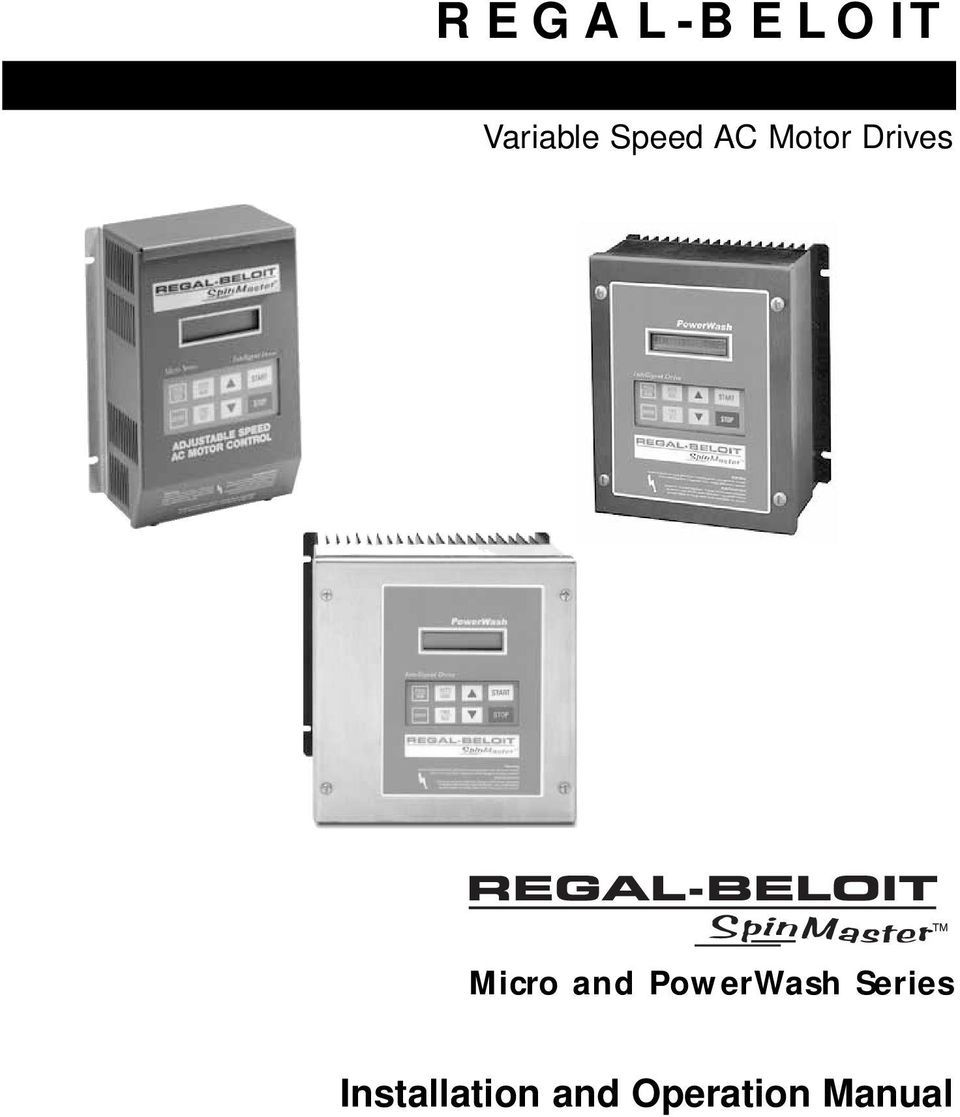
REGAL-BELOIT. Installation and Operation Manual. Variable Speed AC Motor Drives. Micro and PowerWash Series
|
|
|
- Irma Barrett
- 9 years ago
- Views:
Transcription
1 REGAL-BELOIT Variable Speed AC Motor Drives Micro and PowerWash Series Installation and Operation Manual
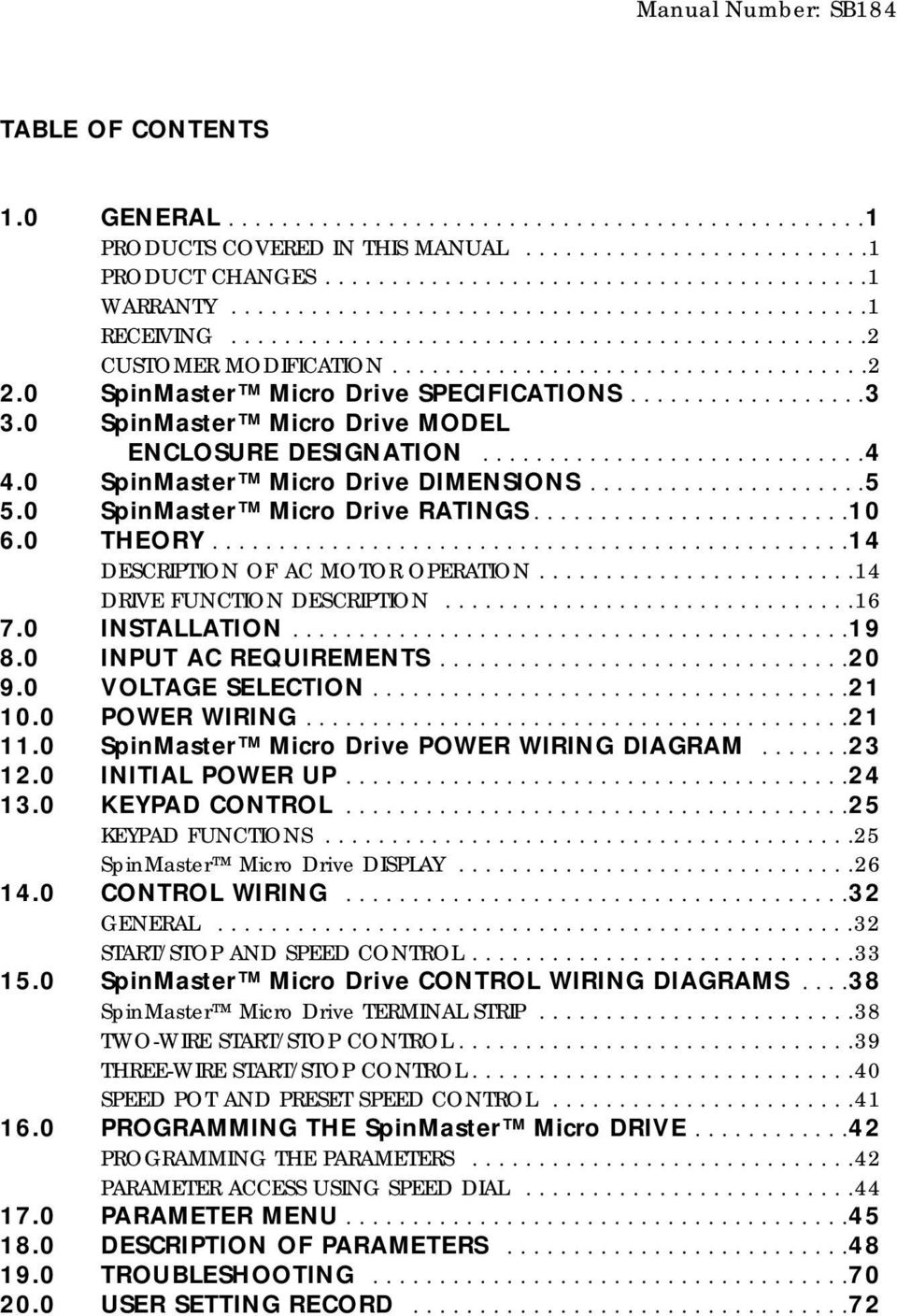
2 Manual Number: SB184 TABLE OF CONTENTS 1.0 GENERAL PRODUCTS COVERED IN THIS MANUAL PRODUCT CHANGES WARRANTY RECEIVING CUSTOMER MODIFICATION SpinMaster Micro Drive SPECIFICATIONS SpinMaster Micro Drive MODEL ENCLOSURE DESIGNATION SpinMaster Micro Drive DIMENSIONS SpinMaster Micro Drive RATINGS THEORY DESCRIPTION OF AC MOTOR OPERATION DRIVE FUNCTION DESCRIPTION INSTALLATION INPUT AC REQUIREMENTS VOLTAGE SELECTION POWER WIRING SpinMaster Micro Drive POWER WIRING DIAGRAM INITIAL POWER UP KEYPAD CONTROL KEYPAD FUNCTIONS SpinMaster Micro Drive DISPLAY CONTROL WIRING GENERAL START/STOP AND SPEED CONTROL SpinMaster Micro Drive CONTROL WIRING DIAGRAMS SpinMaster Micro Drive TERMINAL STRIP TWO-WIRE START/STOP CONTROL THREE-WIRE START/STOP CONTROL SPEED POT AND PRESET SPEED CONTROL PROGRAMMING THE SpinMaster Micro DRIVE PROGRAMMING THE PARAMETERS PARAMETER ACCESS USING SPEED DIAL PARAMETER MENU DESCRIPTION OF PARAMETERS TROUBLESHOOTING USER SETTING RECORD
3 IMPORTANT NOTICE The following, and information is supplied to you for your protection and to provide you with many years of trouble free and safe operation of your Marathon Electric product. Hazard of electrical shock! Disconnect incoming power and wait three minutes before servicing the drive. Capacitors retain charge after power is removed. Hazard of electrical shock! Wait three minutes after disconnecting incoming power before servicing drive. Capacitors retain charge after power is removed. If CONTROL is set to LOCAL, TB-1 is disabled and CANNOT be used as a STOP switch! Incorrect use of TB-1 may result in damage to equipment and/or injury to personnel! See Parameter 30 - CONTROL. STOP (TB-1) and EXTERNAL FAULT (TB-13D) circuitry may be disabled if parameters are reset to factory defaults! The drive must be reprogrammed after a RESET in order to insure proper operation (see Parameter 65 - PROGRAM). FAILURE TO DO SO MAY RESULT IN DAMAGE TO EQUIPMENT AND/OR INJURY TO PERSONNEL! Consult motor manufacturer before operating motor above rated frequency. Overspeeding the motor and/or driven equipment can cause damage to equipment and injury to personnel! This method requires TB-13C to be set for RUN REVERSE, which will disable TB-1 as a STOP switch! Incorrect use of TB-1 may result in damage to equipment and/or injury to personnel! Refer to Parameter 49 - TB13C. If TB-13C is programmed for RUN REVERSE, TB-1 is disabled and CANNOT be used as a STOP switch! This is true in LOCAL and REMOTE mode. Incorrect use of TB-1 may result in damage to equipment and/or injury to personnel! Refer to Parameter 49 - TB-13C for more information. Automatic start of equipment may result in damage to equipment and/or injury to personnel! Automatic start should only be used on equipment that is inaccessible to personnel. DRIVES MUST NOT BE INSTALLED WHERE SUBJECTED TO ADVERSE ENVIRONMENTAL CONDITIONS! DRIVES MUST NOT BE INSTALLED WHERE SUBJECTED TO: COMBUSTIBLE, OILY, OR HAZARDOUS VAPORS OR DUST; EXCESSIVE MOISTURE OR DIRT; STRONG VIBRATION; EXCESSIVE AMBIENT TEMPERATURES. CONSULT CUSTOMER SERVICE FOR MORE INFORMATION ON THE SUITABILITY OF A DRIVE TO A PARTICULAR ENVIRONMENT. Severe damage to the drive can result if it is operated after a long period of storage or inactivity without reforming the DC bus capacitors! Do not connect incoming AC power to output terminals T1, T2, or T3! Severe damage to the drive will result. DO NOT connect incoming AC power to output terminals T1, T2, and T3! Do not cycle input power to the drive more than once every two minutes. Damage to the drive will result. When operating in JOG mode, the STOP key WILL NOT stop the drive. To stop the drive, the contact between TB-13B and TB-2 must be opened.

4 IMPORTANT NOTICE (continued) Consult qualified personnel with questions. All electrical repairs must be performed by trained and qualified personnel only. Consult motor manufacturer before operating motor and/or driven equipment above base speed. Resale of Goods: In the event of the resale of any of the goods, in whatever form, Resellers/Buyers will include the following language in a conspicuous place and in a conspicuous manner in a written agreement covering such sale: The manufacturer makes no warranty or representations, express or implied, by operation of law or otherwise, as to the merchantability or fitness for a particular purpose of the goods sold hereunder. Buyer acknowledges that it alone has determined that the goods purchased hereunder will suitably meet the requirements of their intended use. In no event will the manufacturer be liable for consequential, incidental or other damages. Even if the repair or replacement remedy shall be deemed to have failed of its essential purpose under Section of the Uniform Commercial Code, the manufacturer shall have no liability to Buyer for consequential damages. Resellers/Buyers agree to also include this entire document including the warnings and cautions above in a conspicuous place and in a conspicuous manner in writing to instruct users on the safe usage of the product.

5 1.0 GENERAL 1.1 PRODUCTS COVERED IN THIS MANUAL This manual covers the REGAL-BELOIT CORPORATION SpinMaster Micro and PowerWash Variable Frequency Drive. 1.2 PRODUCT CHANGES REGAL-BELOIT CORPORATION reserves the right to discontinue or make modifications to the design of its products and manuals without prior notice, and holds no obligation to make modifications to products sold previously. REGAL-BELOIT CORPORATION also holds no liability for losses of any kind which may result from this action. Instruction manuals are available for download from WARRANTY REGAL-BELOIT CORPORATION warrants the SpinMaster Micro Series AC motor control to be free of defects in material and workmanship for a period of eighteen months from the date of sale to the user, or two years from the date of shipment, which ever occurs first. A SpinMaster control, or any component contained therein, which under normal use, becomes defective within the stated warranty time period, shall be returned to REGAL-BELOIT CORPORATION, freight prepaid, for examination (contact Customer Service for authorization prior to returning any product). REGAL-BELOIT CORPORATION reserves the right to make the final determination as to the validity of a warranty claim, and sole obligation is to repair or replace only components which have been rendered defective due to faulty material or workmanship. No warranty claim will be accepted for components which have been damaged due to mishandling, improper installation, unauthorized repair and/or alteration of the product, operation in excess of design specifications or other misuse, or improper maintenance. REGAL-BELOIT CORPORATION makes no warranty that its products are compatible with any other equipment, or to any specific application, to which they may be applied and shall not be held liable for any other consequential damage or injury arising from the use of its products. This warranty is in lieu of all other warranties, expressed or implied. No other person, firm or corporation is authorized to assume, for REGAL-BELOIT CORPORATION, any other liability in connection with the demonstration or sale of its products. 1

6 1.4 RECEIVING Inspect all cartons for damage which may have occurred during shipping. Carefully unpack equipment and inspect thoroughly for damage or shortage. Report any damage to carrier and/or shortages to supplier. All major components and connections should be examined for damage and tightness, with special attention given to PC boards, plugs, knobs and switches. 1.5 CUSTOMER MODIFICATION REGAL-BELOIT CORPORATION, its sales representatives and distributors, welcome this opportunity to assist our customers in applying our products. Many customizing options are available to aid in this function. REGAL-BELOIT CORPORATION cannot assume responsibility for any modifications not authorized by its engineering department. 2

7 2.0 SpinMaster PowerWash SPECIFICATIONS Storage Temperature -20 to 70 C Ambient Operating Temperature Type 1 (IP 31) -10 to 50 C (With 2.5, 6 and 8 khz carrier, Type 4 (IP 65) -10 to 40 C derate for higher carriers) Type 12 (IP 54) -10 to 40 C Ambient Humidity Altitude Input Line Voltages Less than 95% (non-condensing) 3300 feet (1000 m) above sea level without derating 240/120 Vac, 240/200 Vac, 480/400 Vac, and 590/480 Vac Input Voltage Tolerance +10%, -15% Input Frequency Tolerance Output Wave Form Output Frequency Carrier Frequency 48 to 62 Hz Sine Coded PWM Hz, Optional up to 1000 Hz 2.5 khz to 14 khz Frequency Stability ± % / C Service Factor 1.00 Efficiency > 97% throughout speed range Power Factor (displacement) > 0.96 Overload Current Capacity Speed Reference Follower Control Voltage Analog Outputs Digital Outputs 150% of output rating for 60 seconds 180% of output rating for 30 seconds 0-10 VDC, 4-20 ma 15 VDC 0-10 VDC, or 2-10 VDC Proportional to speed and load Form C relay: 2A at 28 VDC or 120 Vac Open-collector outputs: 40 ma at 30 VDC 3

8 3.0 SpinMaster Micro DRIVE MODEL ENCLOSURE DESIGNATION HP VOLTAGE PHASE NEMA 1 NEMA 4 NEMA 4X NEMA /240 1 T1110 T400 T /240 1 T1112 T402 T /240 3 T1212 T422 T /240 1 T1114 T404 T /240 3 T1214 T424 T T1414 T434 T T15144 T444 T /240 1 T1115 T405 T /240 T1215 T425 T T1116 T406 T /240 3 T1216 T426 T T1416 T436 T T1516 T446 T T1117 T407 T /240 3 T1217 T427 T T1417 T437 T T1517 T447 T /240 3 T1218 T438 T T1418 T438 T T1518 T448 T /240 3 T1219 T429 T T1419 T439 T T1519 T449 T /240 3 T1220 T430 T T1420 T440 T T1520 T450 T /240 3 T1221 T431 T T1421 T441 T T1521 T451 T /240 3 T1222 T T1422 T442 T T1522 T453 T /240 3 T1223 T T1423 T T1523 T /240 3 T1224 T T1424 T T1524 T T1425 T T1525 T T1426 T T1526 T T1427 T T1527 T557 4

9 4.0 SpinMaster Micro DIMENSIONS 4.1 SpinMaster NEMA 1 Enclosed W D R H P N Q Q CONDUIT HOLES: S DIA DIA. S DIA. W T DIA. SLOT U V 1.00 R MOUNTING TAB DETAIL IF W 7.86 T = 0.20 U = 0.34 V = 0.19 IF W = T = 0.28 U = 0.44 V = 0.24 INPUT HP VOLTAGE MODEL H W D N P Q R S /240 T /240 T /240 T /240 T /240 T T T /240 T /240 T T /240 T T T T /240 T T T
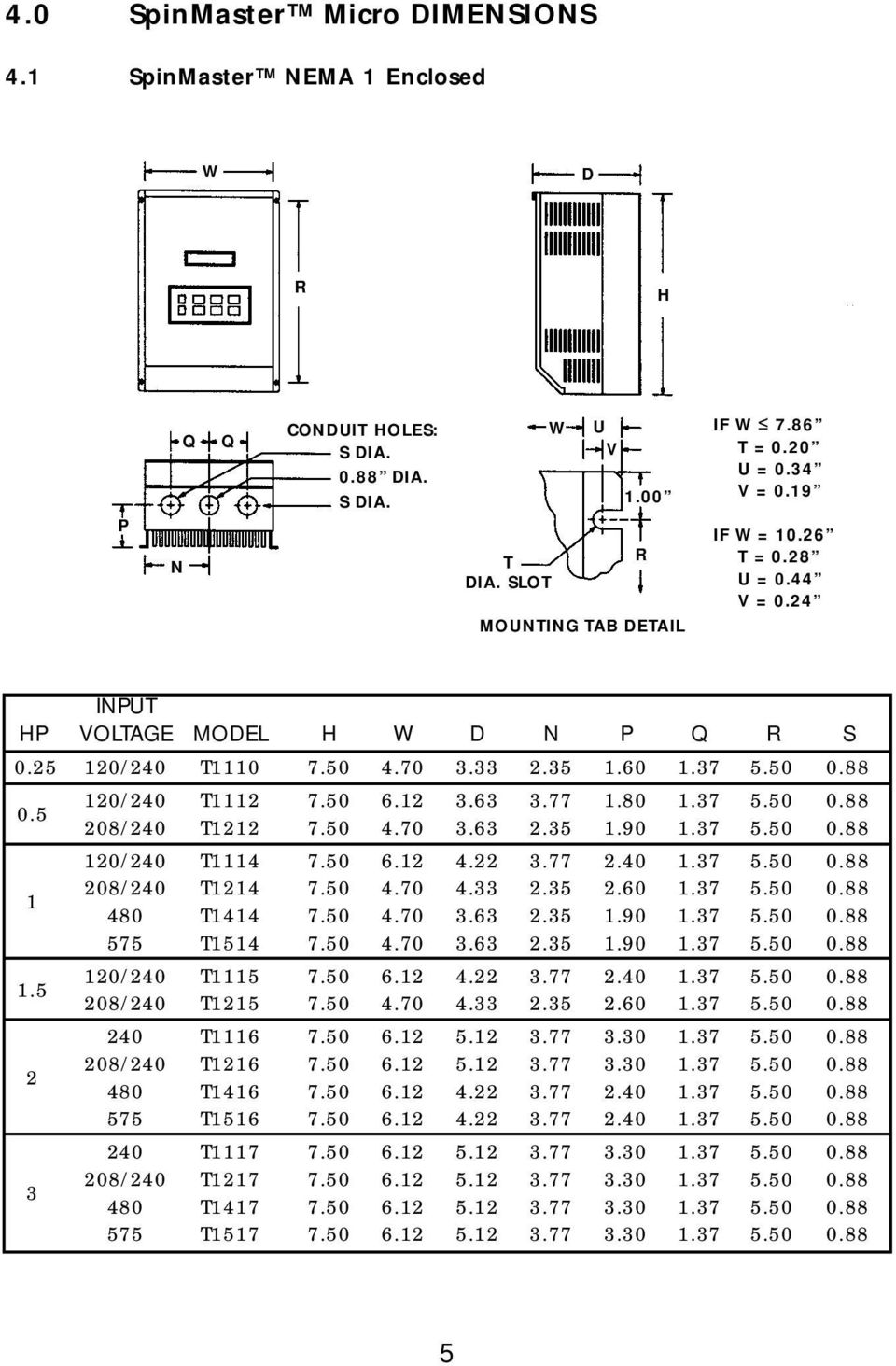
10 4.1 SpinMaster NEMA 1 Enclosed (continued) INPUT HP VOLTAGE MODEL H W D N P Q R S 208/240 T T T /240 T T T /240 T T T /240 T T T /240 T T T /240 T T T /240 T T T T T T T T T
11 4.2 PowerWash NEMA 4 AND 4X Enclosed INPUT NEMA 4 NEMA 4X HP VOLTAGE MODEL MODEL H W D N P Q R S /240 T400 T /240 T402 T /240 T422 T /0240 T404 T /240 T424 T T434 T T444 T /240 T405 T /240 T425 T T406 T /240 T426 T T436 T T446 T T407 T /240 T427 T T437 T T447 T
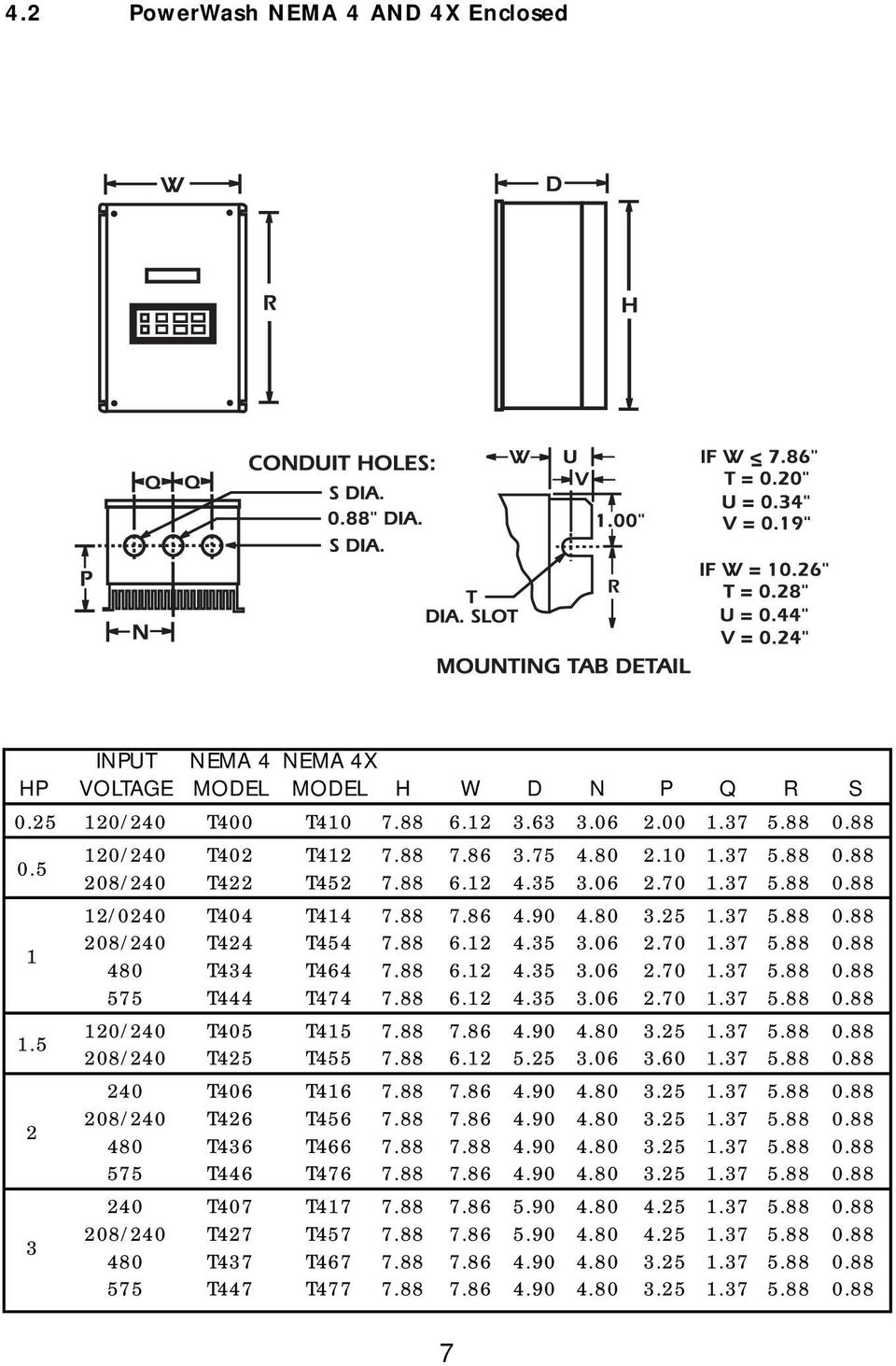
12 4.2 PowerWash NEMA 4 AND 4X Enclosed (continued) INPUT TYPE 4 TYPE 4X HP VOLTAGE MODEL MODEL H W D N P Q R S 208/240 T428 T T438 T T448 T /240 T429 T T439 T T449 T /240 T430 T T440 T T450 T /240 T431 T T441 T T451 T /240 (See NEMA 12) T442 T T452 T

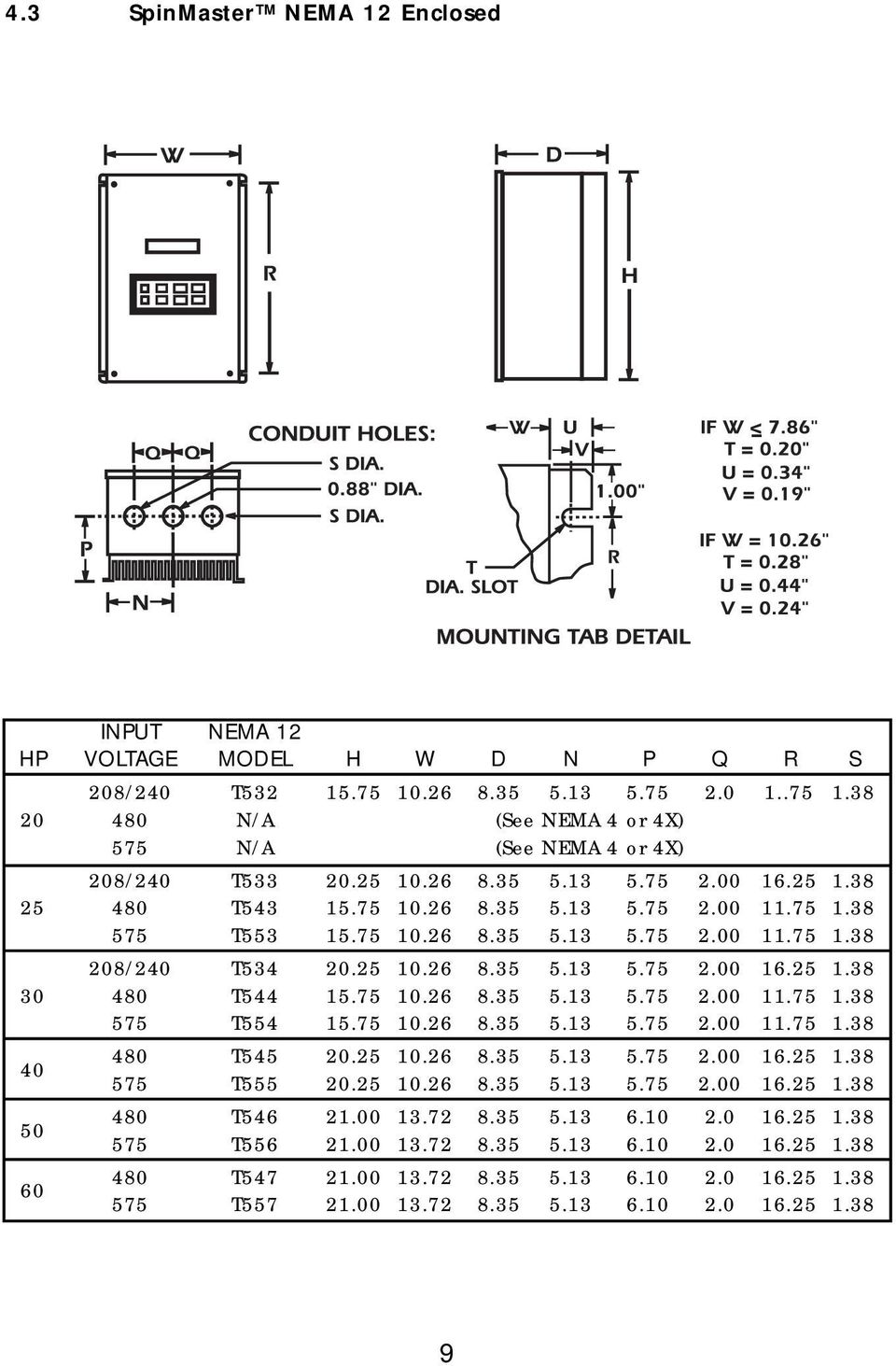
13 4.3 SpinMaster NEMA 12 Enclosed INPUT NEMA 12 HP VOLTAGE MODEL H W D N P Q R S 208/240 T N/A (See NEMA 4 or 4X) 575 N/A (See NEMA 4 or 4X) 208/240 T T T /240 T T T T T T T T T
14 5.0 SpinMaster Micro Drive RATINGS The following tables indicate the input and output ratings of the SpinMaster Micro drive series. NOTE: The output current ratings are based on operation at carrier frequencies of 8 khz and below. At full ambient temperature, operation at carrier frequencies above 8 khz require derating the drive by multiplying the output current rating by the following factors: 0.94 at 10 khz, 0.89 at 12 khz, and 0.83 at 14 khz. Refer to Parameter 23 - CARRIER in Section DESCRIPTION OF PARAMETERS. SpinMaster Micro Drive 120/240 Vac Ratings Models Input Output (Note 1) (120/240 Vac, Hz) (0-230 Vac) Nominal Nominal Current Current Rated Input (Amps) Power (Amps) Power HP Phase (Note 2) (KVA) (Note 2) (KVA) T1110, T400, T / / T1112, T402, T / / T1114, T404, T / / T1115, T405, T / / NOTE 1: See Section 3 for Drive Enclosures NOTE 2: N/A NOTE 3: See Section 8.0 for recommended fuse type. 10

15 SpinMaster Micro Drive RATINGS (continued) SpinMaster Micro Drive 208/240 Vac Ratings Models Input Output (Note 1) (240 Vac, Hz) (0-230 Vac) Nominal Nominal Current Current Rated Input (Amps) Power (Amps) Power HP Phase (Note 2) (KVA) (Note 2) (KVA) T1112, T402, T T1214, T424, T T1215, T405, T T1116, T406, T T1117, T407, T T1217, T427, T T1218, T428, T T1219, T429, T T1220, T430, T T1221, T431, T T1222, T T1223, T T1224, T NOTE 1: See Section 3 for Drive Enclosures NOTE 2: For 200 VAC Input Voltage Models (Three Phase only) multiply the input and output current ratings by 1.15 and the output voltage by NOTE 3: See Section 8.0 for recommended fuse type. 11

16 SpinMaster Micro Drive RATINGS (continued) SpinMaster Micro Drive 480 Vac Ratings Models Input Output (Note 1) (480 Vac, Hz) (0-460 Vac) Nominal Nominal Current Current Rated Input (Amps) Power (Amps) Power HP Phase (Note 2) (KVA) (Note 2) (KVA) T1414, T434, T T1416, T436, T T1417, T437, T T1418, T438, T T1419, T439, T T1420, T440, T T1421, T441, T T1422, T442, T T1423, T T1424, T T1425, T T1426, T T1427, T NOTE 1: See Section 3 for Drive Enclosures NOTE 2: For 400 VAC Input Voltage Models (Three Phase only) multiply the input and output current ratings by 1.15 and the output voltage by NOTE 3: See Section 8.0 for recommended fuse type. 12

17 SpinMaster Micro Drive RATINGS (continued) SpinMaster Micro Drive 575 Vac Ratings Models Input Output (Note 1) (590 Vac, Hz) (0-575 Vac) Nominal Nominal Current Current Rated Input (Amps) Power (Amps) Power HP Phase (Note 2) (KVA) (Note 2) (KVA) T1514, T444, T T1516, T446, T T1517, T447, T T1518, T448, T T1519, T449, T T1520, T450, T T1521, T451, T T1522, T453, T T1523, T T1524, T T1525, T T1526, T T1527, T NOTE 1: See Section 3 for Drive Enclosures NOTE 2: For 480 VAC Input Voltage Models (Three Phase only) multiply the input and output current ratings by 1.15 and the output voltage by NOTE 3: See Section 8.0 for recommended fuse type. 13

18 6.0 THEORY 6.1 DESCRIPTION OF AC MOTOR OPERATION Three phase AC motors are comprised of two major components, the stator and the rotor. The stator is a set of three electrical windings held stationary in the motor housing. The rotor is a metal cylinder, fixed to the motor drive shaft, which rotates within the stator. The arrangement of the stator coils and the presence of three phase AC voltage give rise to a rotating magnetic field which drives the rotor. The speed at which the magnetic field rotates is known as the synchronous speed of the motor. Synchronous speed is a function of the frequency at which the voltage is alternating and the number of poles in the stator windings. The following equation gives the relation between synchronous speed, frequency, and the number of poles: Ss f/p Where: Ss = Synchronous speed (rpm), f = frequency (Hz), p = number of poles In three phase induction motors the actual shaft speed differs from the synchronous speed as load is applied. This difference is known as slip. Slip is commonly expressed as a percentage of synchronous speed. A typical value is three percent at full load. The strength of the magnetic field in the gap between the rotor and stator is proportional to the amplitude of the voltage at a given frequency. The output torque capability of the motor is, therefore, a function of the applied voltage amplitude at a given frequency. When operated below base (rated) speed, AC motors run in the range of constant torque. Constant torque output is obtained by maintaining a constant ratio between voltage amplitude (Volts) and frequency (Hertz). For 60 Hz motors rated at 230, 460, and 575 Vac, common values of this V/Hz ratio are 3.83, 7.66, and 9.58 respectively. Operating with these V/Hz ratios generally yields optimum torque capability. Operating at lower ratio values results in lower torque and power capability. Operating at higher ratio values will cause the motor to overheat. Most standard motors are capable of providing full torque output from 3 to 60 Hz. However, at lower speeds, where motor cooling fans become less effective, supplemental cooling may be needed to operate at full torque output continuously. If the frequency applied to the motor is increased while the voltage remains constant, torque capability will decrease as speed increases. This will cause the horsepower capability of the motor to remain approximately constant. Motors run in this mode when operated above base speed, where drive output voltage is limited by the input line voltage. This operating range is known as the constant horsepower range. The typical maximum range for constant horsepower is about 2.3 to 1 (60 to 140 Hz). The diagram on the next page depicts the characteristics of a typical AC induction motor with a 60 Hz base speed. Consult motor manufacturer before operating motor and/or driven equipment above base speed. 14

19 6.1.1 VARIABLE TORQUE VS. CONSTANT TORQUE Variable frequency drives, and the loads they are applied to, can generally be divided into two groups: constant torque and variable torque. Constant torque loads include: vibrating conveyors, punch presses, rock crushers, machine tools, and just about every other application that is not considered variable torque. Variable torque loads include centrifugal pumps and fans, which make up the majority of HVAC applications. Variable torque loads are governed by the affinity laws, which define the relationships between speed, flow, torque and horsepower. The diagram below illustrates these relationships: 15

20 Variable torque refers to the fact that the torque required varies with the square of the speed. Also, the horsepower required varies with the cube of the speed, resulting in a large reduction in horsepower for even a small reduction in speed. It is easily seen that substantial energy savings can be achieved by reducing the speed of a fan or pump. For example, reducing the speed to 50% results in a 50 HP motor having to produce only 12.5% of rated horsepower, or 6.25 HP. Variable torque drives usually have a low overload capacity (110% - 120% for 60 seconds), because variable torque applications rarely experience overload conditions. To optimize efficiency and energy savings, variable torque drives are usually programmed to follow a variable V/Hz ratio. The term constant torque is not entirely accurate in terms of the actual torque required for an application. Many constant torque applications have reciprocating loads, such as vibrating conveyors and punch presses, where the rotational motion of the motor is being converted to a linear motion. In such cases, the torque loads, this fluctuation in torque is not a direct function of speed, as it is with a variable torque load. As a result, constant torque drives typically have a high overload rating (150% for 60 seconds) in order to handle the higher peak torque demands. To achieve maximum torque, constant torque drives follow a constant V/Hz ratio. SpinMaster PowerWash drives have full overload capacity (150% for 60 seconds, 180% for 30 seconds), so that either one can be used for either type of application. The V/Hz ratio can also be changed to optimize performance for either type of application. 6.2 DRIVE FUNCTION DESCRIPTION The SpinMaster Micro Series Drives are a 16 bit microprocessor based, keypad programmable, variable speed AC motor drive. There are four major sections: an input diode bridge and filter, a power board, a control board, and an output intelligent power module DRIVE OPERATION Incoming AC line voltage is converted to a pulsating DC voltage by the input diode bridge. The DC voltage is supplied to the bus filter capacitors through a charge circuit which limits inrush current to the capacitors during power-up. The pulsating DC voltage is filtered by the bus capacitors which reduces the ripple level. The filtered DC voltage enters the inverter section of the drive, composed of six output intelligent insulated gate bi-polar transistors (IGBTs) which make up the three output legs of the drive. Each leg has one intelligent IGBT connected to the positive bus voltage and one connected to the negative bus voltage. Alternately switching on each leg, the intelligent IGBT produces an alternating voltage on each of the corresponding motor windings. By switching each output intelligent IGBT at a very high frequency (known as the carrier frequency) for varying time intervals, the inverter is able to produce a smooth, three phase, sinusoidal output current wave which optimizes motor performance CIRCUIT DESCRIPTION The control section consists of a control board with a 16 bit microprocessor, keypad and display. Drive programming is accomplished via the keypad or the serial communications port. 16

21 During operation the drive can be controlled via the keypad, by control devices wired to the control terminal strip, or by the serial communications port. The Power Board contains the control and protection circuits which govern the six output IGBTs. The Power Board also contains a charging circuit for the bus filter capacitors, a motor current feedback circuit, a voltage feedback circuit, and a fault signal circuit. The drive has several built in protection circuits. These include phase-to-phase and phase-to-ground short circuit protection, high and low line voltage protection, protection against excessive ambient temperature, and protection against continuous excessive output current. Activation of any of these circuits will cause the drive to shut down in a fault condition SpinMaster Micro Drive ANALOG INPUT SIGNALS The drive allows for three speed reference input signals: speed potentiometer (10,000 Ohm), 4-20 ma, or 0-10 VDC. For control by a speed pot, the wiper lead is connected to terminal TB-5A, and the high and low end leads are connected to terminals TB-6 and TB-2, respectively. For 4-20 ma control, wire the positive to terminal TB-5B and the negative to terminal TB-2. For 0-10 VDC control, wire the positive to terminal TB-5A and the negative to terminal TB-2. Refer to the diagrams in Section SpinMaster Micro Drive CONTROL WIRING DIAGRAMS. The input impedance of terminal TB-5A (0-10 VDC input) is 200 kilohms, and the input impedance of terminal TB-5B (4-20 ma input) is 100 ohms. Terminal TB-2 is circuit common SpinMaster Micro Drive ANALOG OUTPUT SIGNALS There are two terminals that can supply analog output signals proportional to output frequency or load. Terminal TB-10A can provide a 0-10 VDC or a 2-10 VDC signal proportional to output frequency, and TB-10B can provide the same signals proportional to load. The 2-10 VDC signals can be converted to a 4-20 ma signal using a resistor in series with the signal such that the total circuit resistance is 500 Ohms. See Parameters: 42 - TB10A OUT, TB10B OUT, and 45 in Section DESCRIPTION OF PARAMETERS. NOTE: These analog output signals cannot be used with loop-powered devices that derive power from a 4-20 ma signal SpinMaster Micro Drive STATUS OUTPUT RELAYS The control board has one Form C relay at terminals TB-16, TB-17, and TB-18. Contacts are rated for 2 amps at 28 VDC or 120 Vac. There are also two open-collector outputs at terminals TB-14 and TB-15. The open-collector circuit is a current sinking type rated at 30 VDC and 40 ma maximum. An external power supply (30 VDC max.) must be used to power the open-collector outputs. The drive does not have a dedicated power supply for the open-collector outputs. The Form C relay and the open-collector outputs can be programmed to indicate any of the following: RUN, FAULT, /FAULT (INVERSE FAULT), LOCK (FAULT SPEED (AT SPEED), ABOVE #3, I LIMIT (CURRENT LIMIT), OR AUTO/MAN mode. See Parameters: 52 - TB14 OUT, 53 - TB15 OUT, and 54 - RELAY, in Section DESCRIPTION OF PARAMETERS. 17
22 The following describes the possible relay output settings: NONE RUN FAULT This setting disables the relay output. The relay energizes when the drive is given a START command, and remains energized until: a STOP command is given and the output frequency has decelerated to 0.5 Hz, the drive has tripped, or the input voltage is removed. Note that this relay indicates only that the drive is in the RUN mode. It does not necessarily indicate that the motor is turning. The relay energizes when input voltage is applied to the drive and remains energized until the drive trips into a fault condition, or input voltage is removed. / FAULT INVERSE FAULT The relay energizes when the drive trips into a fault condition, and remains energized until the fault condition is cleared. SPEED ABOVE #3 I LIMIT AUT/MAN FAULT LOCKOUT This relay is used when the drive is programmed to automatically restart after a fault. The relay energizes when input voltage is applied to the drive and remains energized until the drive has faulted and unsuccessfully attempted five restarts, or input voltage is removed. AT SPEED The relay energizes when the drive reaches the speed setpoint. To avoid a chattering relay (energizing and de-energizing), due to small fluctuations in speed, the relay will remain energized as long as the actual speed is within ±3 Hz of the speed setpoint. ABOVE SPEED #3 The relay energizes when the output frequency exceeds the SPEED #3 value, and de-energizes when the output frequency returns to a value lower than the SPEED #3 value. See Parameter 3 - SPEED #3 in Section DESCRIPTION OF PARAMETERS. CURRENT LIMIT The relay energizes when the drive is operating in current limit. Once the current limit relay is energized, it remains energized for a minimum of 500ms, regardless of whether the drive is still in current limit. At the end of the 500ms interval, the relay will de-energize if the drive is no longer in current limit. See Parameter 16 - CURRENT in Section DESCRIPTION OF PARAMETERS. AUTO/MANUAL MODE The relay energizes when the drive is in the AUTOMATIC mode, and de-energizes in the MANUAL mode. Refer to Section SPEED REFERENCE SELECTION. 18
23 7.0 INSTALLATION DRIVES MUST NOT BE INSTALLED WHERE SUBJECTED TO ADVERSE ENVIRON- MENTAL CONDITIONS! DRIVES MUST NOT BE INSTALLED WHERE SUBJECTED TO: COM- BUSTIBLE, OILY, OR HAZARDOUS VAPORS OR DUST; EXCESSIVE MOISTURE OR DIRT; STRONG VIBRATION; EXCESSIVE AMBIENT TEMPERATURES. CONSULT CUSTOMER SERVICE FOR MORE INFORMATION ON THE SUITABILITY OF A DRIVE TO A PARTICULAR ENVIRONMENT. The drive should be mounted on a smooth vertical surface capable of safely supporting the unit without vibrating. The LCD display has an optimum field of view, this should be considered when determining the mounting position. All drive models MUST be mounted in a vertical position for proper heatsink cooling. Maintain a minimum spacing around the drive of 2 inches for units rated 5 Hp and below, 4 inches for units rated HP, and 6 inches for units rated HP. Fans or blowers should be used to insure proper cooling in tight quarters. Do not mount drives about other drives or heat producing equipment that would impede the cooling of the drive. Note the ambient operating temperature ratings for each drive model. If it is necessary to drill or cut the drive enclosure or panel, extreme care must be taken to avoid damaging drive components or contaminating the drive with metal fragments (which cause shorting of electrical circuits). Cover drive components with a clean cloth to keep out metal chips and other debris. Use a vacuum cleaner to clean drive components after drilling, even if chips do not appear to be present. Do not attempt to use positive air pressure to blow chips out of drive, as this tends to lodge debris under electronic components. Contaminating the drive with metal chips can cause drive failure and will void the warranty. The SpinMaster Micro Series Drives are UL approved for solid state motor overload protection. Therefore, a separate thermal overload relay is not required for single motor applications. In applications where one drive is operating more than one motor, a separate thermal overload relay is required for each motor per NEC. 7.1 INSTALLATION AFTER A LONG PERIOD OF STORAGE Severe damage to the drive can result if it is operated after a long period of storage or inactivity without reforming the DC bus capacitors! If input power has not been applied to the drive for a period of time exceeding three years (due to storage, etc), the electrolytic DP bus capacitors within the drive can change internally, resulting in excessive leakage current. This can result in premature failure of the capacitors if the drive is operated after such a long period of inactivity or storage. In order to reform the capacitors and prepare the drive for operation after a long period of inactivity, apply input power to the drive for 8 hours prior to actually operating the drive/ motor system. 19
24 7.2 EXPLOSION PROOF APPLICATIONS Explosion proof motors that are not rated for inverter use lose their certification when used for variable speed. Due to the many areas of liability that may be encountered when dealing with these applications, the following statement of policy applies: REGAL-BELOIT CORPORATION inverter products are sold with no warranty of fitness for a particular purpose or warranty of suitability for use with explosion proof motors. REGAL-BELOIT CORPORATION accepts no responsibility for any direct, incidental or consequential loss, cost, or damage that may arise through the use of its AC inverter products in these applications. The purchaser expressly agrees to assume all risk of any loss, cost, or damage that may arise from such application. 8.0 INPUT AC REQUIREMENTS Hazard of electrical shock! Disconnect incoming power and wait three minutes before servicing the drive. Capacitors retain charge after power is removed. 8.1 INPUT AC POWER REQUIREMENTS VOLTAGE: The input voltage must match the drive s nameplate voltage rating. Voltage fluctuation must not vary by greater than 10% overvoltage or 15% undervoltage. NOTE: Drives with dual rated input voltage must be programmed for the proper supply voltage. Refer to Parameter 0 - LINE VOLTS in Section DESCRIPTION OF PARAMETERS. The drive is suitable for use on a circuit capable of delivering not more than 200,000 RMS symmetrical amperes, at the drive s rated voltage. Three phase voltage imbalance must be less than 2.0% phase to phase. Excessive phase to phase imbalance can cause severe damage to the drive s power components. Motor voltage should match line voltage in normal applications. The drive s maximum output voltage will equal the input voltage. Use extreme caution when using a motor with a voltage rating which is different from the input line voltage kva RATINGS: If the kva ratings of the AC supply transformer is greater than ten times the input kva rating of the drive, a drive isolation transformer, or a 2-3% input line reactor (also known as a choke) must be added. 20
25 8.2 INPUT FUSING AND DISCONNECT REQUIREMENTS A circuit breaker or a disconnect switch with fuses must be provided in accordance with the National Electric Code (NEC) and all local codes. The SpinMaster Micro drive is capable of withstanding up to 150% current overload for 60 seconds. Select a fuse or magnetic trip circuit breaker rated at 1.5 times the input current rating of the drive (the minimum fuse size should be 10 amps, regardless of input current rating). Refer to section SpinMaster Micro Drive RATINGS. Minimum voltage rating of the protection device should be 250 Vac for 120/240 Vac and 208/240 Vac rated drives, and 600 Vac for 480 Vac and 575 Vac drives. Use Class CC or Class T current limiting fuses with low I 2 T values, rated at 200,000 AIC. Recommended fuses are Bussman type KTK-R, JJN, and JJ s or equivalent. 9.0 VOLTAGE SELECTION 9.1 INPUT VOLTAGE RATINGS SpinMaster Micro Drive catalog numbers T1110-T1115, T400-T405, and T410-T415 are rated for 120/240 Vac (+ 10%, -15%) at 48 to 62 Hz when wired for 120 Vac input, or with input voltage of 240 Vac (+10%, -15%), at 48 to 62 Hz, when wired for 240 Vac input. (Voltage Group A) SpinMaster Micro Drive catalog numbers T1116-T1224, T422-T431, T452-T461, T406, T407, T416, T417, and T532-T534 are rated for 208/240 Vac, Hz input. The drive will function with input voltages of 200 to 240 Vac (+10%, -15%), at 48 to 62 Hz. (Voltage Group B) SpinMaster Micro Drive catalog numbers T1414-T1427, T434-T442, T464-T472, and T532-T534 are rated for 480 Vac, Hz input. The drive will function with input voltages of 400 to 480 Vac (+10%, -15%), at 48 to 62 Hz. (Voltage Group C) SpinMaster Micro Drive catalog numbers T1514-T1527, T444-T453, T474-T482, and T553-T557 are rated for 590/480 Vac, Hz input. The drive will function with input voltages of 480 to 590 Vac (+10%, -15%), at 48 to 62 Hz. (Voltage Group D) 10.0 POWER WIRING Hazard of electrical shock! Disconnect incoming power and wait three minutes before servicing the drive. Capacitors retain charge after power is removed. Note drive input and output current ratings and check applicable electrical codes for required wire type and size, grounding requirements, overcurrent protection, and incoming power disconnect, before wiring the drive. Size conservatively to minimize voltage drop. 21
26 Input fusing and a power disconnect switch or contactor MUST be wired in series with terminals L1, L2, and L3 (L1 and L2 if input is single phase). A disconnect means must be wired during installation. This disconnect must be used to power down the drive when servicing, or when the drive is not to be operated for a long period of time, but should not be used to start and stop the motor. Repetitive cycling of a disconnect or input contactor (more than once every two minutes) may cause damage to the drive WIRING FOR SINGLE PHASE OR THREE PHASE INPUT If the drive is nameplated for 120/240 Vac single phase input, wire the input to terminals L1 and N and jumper terminals L1 to L2 for 120 Vac input voltage, or wire to terminals L1 and L2 (do not wire to N) for 240 Vac input voltage. Refer to Section SpinMaster Micro Drive POWER WIRING DIAGRAM. If the drive is nameplated for three phase input only, wire the input to terminals L1, L2, and L3. All three power output wires, from terminals T1, T2, and T3 to the motor, must be kept tightly bundled and run in a separate conduit away from all other power and control wiring. It is not recommended to install contactors or disconnect switches between the drive and motor. Operating such devices while the drive is running can potentially cause damage to the drive s power components. If such a device is required, it should only be operated when the drive is in a STOP state. If there is potential for the device to be opened while the drive is running, the drive must be programmed for COAST TO STOP (see Parameter 26 - STOP), and an auxiliary contact on the device must be interlocked with the drive s run circuit. This will give the drive a stop command at the same time the device opens, and will not allow the drive to start again until the device is closed. 22
27 11.0 SpinMaster Micro Drive POWER WIRING DIAGRAM L1 L2 N T1 T2 T3 L1 L2 L3 GNDGND 120 Vac SINGLE PHASE INPUT WIRING DIAGRAM L1 L2 N THREE PHASE AC MOTOR GND FUSED INPUT VOLTAGE DISCONNECT MEANS (REQUIRED) 240 Vac SINGLE PHASE INPUT WIRING DIAGRAM Do not connect incoming AC power to output terminals T1, T2, or T3! Severe damage to the drive will result. INSTALL, WIRE, AND GROUND IN ACCORDANCE WITH ALL APPLICABLE CODES. NOTES: 1. Wire the motor for the proper voltage per the output rating of the drive. Motor wires MUST be run in a separate steel conduit away from control wiring and incoming AC power wiring. 2. Do not install contactors between the drive and the motor without consulting REGAL-BELOIT for more information. Failure to do so may result in drive damage. 3. Remove any existing, and do not install, power factor correction capacitors between the drive and the motor. Failure to do so will result in drive damage. 4. Use only UL and CSA listed and approved wire. 5. Minimum wire voltage ratings: 300 V for 120, 200 and 240 Vac systems, and 600 V for 400, 480, and 590 Vac systems. 23
28 6. Wire gauge must be based on a minimum of 150% of the rated output current of the drive, and a minimum 75 C insulation rating. Use copper wire only. 7. Wire and ground in accordance with NEC or CEC, and all applicable local codes INITIAL POWER UP Hazard of electrical shock! Wait three minutes after disconnecting incoming power before servicing drive. Capacitors retain charge after power is removed. Before attempting to operate the drive, motor, and driven equipment be sure all procedures pertaining to installation and wiring have been properly followed. Severe damage to the drive can result if it is operated after a long period of storage or inactivity without reforming DC bus capacitors! If input power has not been applied to the drive for a period of time exceeding three years (due to storage, etc), the electrolytic DC bus capacitors within the drive can change internally, resulting in excessive leakage current. This can result in premature failure of the capacitors if the drive is operated after such a long period of inactivity or storage. In order to reform the capacitors and prepare the drive for operation after a long period of inactivity, apply input power to the drive for 8 hours prior to actually operating the drive/motor system. Disconnect the driven load from the motor. Verify that the drive input terminals (L1, L2, and L3) are wired to the proper input voltage per the nameplate rating of the drive. DO NOT connect incoming AC power to output terminals T1, T2, and T3! Do not cycle input power to the drive more than once every two minutes. Damage to the drive will result. Energize the incoming power line. The LCD display should light and flash TESTING and then show the voltage and horsepower rating of the drive. The display should then show STOP>20.00 HZ which indicates that the drive is in a STOP condition, and the speed setpoint is Hz: 24
29 If the display does not appear, remove the incoming power, wait three minutes for the bus capacitors to discharge, and verify correct installation and wiring. If the wiring is correct, re-apply incoming power and note the display for drive status. If the display still does not appear contact the factory for assistance. NOTE 1: If the drive s display is blank after power up, and it is a model equipped with heatsink fans, check to make sure the fans are operating (they should be spinning anytime power is applied to the drive). If they are not spinning, the drive s display will be blank and the drive cannot be operated. If the fans are clogged or jammed, disconnect power from the drive and remove any obstructions from the fans. Re-apply power to the drive and check the fans. If they are spinning, the drive s display should appear and the drive should operate properly. If there are no obstructions, the fan itself may be defective. Please contact the factory for assistance. If the drive powers up correctly, follow the procedure given below to check the motor rotation: 1. Use the DOWN ARROW key to decrease the speed setpoint to the minimum value allowed (.50 Hz if Parameter 10 - MIN FRQ has not been changed). 2. Press the START key. The drive should indicate RUN, but if the speed setpoint is.50 Hz, the motor may not rotate. Press the UP ARROW key to increase the speed setpoint until the motor starts to rotate. 3. If the motor is rotating in the wrong direction, press the STOP key and remove power from the drive. Wait three minutes for the bus capacitors to discharge, and swap any two of the motor wires connected to T1, T2, and T3. NOTE 2: The drive is phase insensitive with respect to incoming line voltage. Therefore, to change the motor rotation, the phases must be swapped at the drive output terminals or at the motor KEYPAD CONTROL The drive can be operated in a number of different ways: keypad (LOCAL), control devices wired to the terminal strip (REMOTE), serial communications (SERIAL), or a combination of each. The drive should first be operated from the keypad during initial start-up. Refer to Sections CONTROL WIRING, and DESCRIPTION OF PARAMETERS for information on remote operation KEYPAD FUNCTIONS (IN LOCAL MODE) START/STOP To start the drive, press the START key. To stop the drive, press the STOP key. NOTE: The STOP key is active in both LOCAL and REMOTE modes. 25
30 SPEED SETPOINT FORWARD/REVERSE AUTO/MANUAL FAULT RESET To increase speed setpoint, press the key. To decrease the speed setpoint, press the key. NOTE: The and keys will only function if another speed reference source is not selected. To change rotation direction, press the FWD/REV key to select the desired direction, and then press the ENTER key within three seconds to confirm the change. NOTE: Parameter 27 - ROTATION must be set for FWD & REV for this key to be active. To toggle between AUTOMATIC (terminal strip) and MANUAL (keypad) speed control, press the AUTO/MAN key to select the desired mode, and then press the ENTER key within three seconds to confirm the change. NOTE: Parameter 28 - AUTO/MAN must be set to BOTH for this key to be active. See Section CONTROL WIRING for information on automatic speed references. Use the STOP key to reset a fault. If the fault condition has passed, pressing the STOP key will reset the fault and return the drive to a STOP condition. NOTE: If an OUTPUT fault occurs, there will be a 30 second delay before the fault can be cleared using the STOP key SpinMaster Micro Drive DISPLAY The following describes the possible display configurations for the SpinMaster Micro Drive Series SpinMaster Micro Drive DISPLAY IN STOP MODE When the drive is in the STOP mode, there are three possible displays. The first is the SPEED display, which looks like this: NOTE: See Parameter 31 - UNITS for the SPEED UNITS display options. 26
31 Pressing the ENTER key will change the display from the SPEED indication to the % LOAD indication: Pressing the ENTER key again will change the display from the % LOAD indication to the VAC (motor voltage) indication: Pressing ENTER again will change the display back to the SPEED indication. 27
32 The following table shows the possible DRIVE STATUS indications that can appear on the drive display: DRIVE STATUS TABLE DISPLAY DESCRIPTION STOP Drive is in STOP mode - No output to the motor. RUN Drive is in RUN mode and is within ± 3 Hz of the speed setpoint. FAULT Drive has shut down due to a FAULT condition. If the fault condition has passed, pressing the STOP key will clear the fault and return the drive to the STOP mode. LOCK Drive is in FAULT LOCKOUT after five unsuccessful restart attempts. BRAKE DC BRAKE is energized LIMIT Drive is in CURRENT LIMIT due to an overloaded motor, or ACCEL is set too fast. F DEC Drive is in DECEL FREEZE because DECEL rate is too fast. 28
33 SpinMaster Micro Drive DISPLAY IN RUN MODE When the drive is in the RUN mode, the default display will look like this: As in the STOP mode, the ENTER key can be used to toggle the display from SPEED to % LOAD to VAC (motor voltage): NOTE: During acceleration and deceleration to the SPEED SETPOINT, the DRIVE STATUS will show the actual drive speed. When the SPEED SETPOINT is reached, the DRIVE STATUS will change to RUN (or STOP if the drive is decelerating to a STOP). 29
34 SpinMaster Micro Drive DISPLAY IN FAULT MODE When the drive trips into a fault, the display will automatically change to the FAULT display, which indicates the FAULT MESSAGE: In FAULT mode, the ENTER key will toggle the display between four screens: FAULT, SPEED, % LOAD and VAC. The DRIVE STATUS for these displays will be FAULT. An example is shown below of the drive in the FAULT mode displaying SPEED. NOTE: To clear a FAULT, press the STOP key, issue a remote STOP command at TB-1, or use TB-13D (refer to Parameter 50 - TB13D) SpinMaster Micro Drive DISPLAY IN AUXILIARY MODE If the ENTER key is held down, the display will enter the auxiliary mode, which indicates the control source (LOCAL, REMOTE, or SERIAL), AUTO or MANUAL mode, and the speed reference source. When the ENTER key is released, the display will return to the previous screen. An example of the auxiliary mode display is shown below: 30
35 The table below shows the possible SPEED REFERENCE SOURCE indications for the auxiliary mode display: SPEED REFERENCE SOURCE TABLE DISPLAY DESCRIPTION KEY KEYPAD - Change speed using the UP and DOWN arrow keys. VDC 0-10 VDC analog input at TB-5A. IDC 4-20 ma analog input at TB-5B. SP#1 PRESET SPEED #1 SP#2 PRESET SPEED #2 SP#3 PRESET SPEED #3 SP#4 PRESET SPEED #4 JOG JOG SPEED - In JOG mode, JOG SPEED = PRESET SPEED #2. MOP MOTOR OPERATED POT - Change speed using contact closures at TB-13A (DEC FREQ) and TB-13B (INC FREQ) 31
36 14.0 CONTROL WIRING 14.1 GENERAL KEYPAD CONTROL The drive can be controlled by the keypad or by control devices wired to the terminal strip. The drive will run from the keypad out of the box, requiring no connections to the terminal strip. Refer to Section KEYPAD CONTROL CONTROL WIRING VS. POWER WIRING External control wiring MUST be run in a separate conduit away from all other input and output power wiring. If control wiring is not kept separate from power wiring, electrical noise may be generated on the control wiring that will cause erratic drive behavior. Use twisted wires or shielded cable grounded at the drive chassis ONLY. Recommended control wire is Belden 8760 (2-wire) or 8770 (3-wire), or equivalent. Be careful not to overtorque the control terminals, as this will cause damage to the terminal strip. This is not covered under warranty and can only be repaired by replacing the control board TB-2: CIRCUIT COMMON The TB-2 terminals are used as circuit common for the start/stop, forward/reverse, input select, local/remove, analog input, and analog output functions. There are three TB-2 terminals available on the terminal strip, and they are all internally connected to each other on the main control board. If necessary TB-2 may be connected to chassis ground. NOTE: TB-2 MUST be connected to chassis ground when using serial communications SURGE SUPPRESSION ON RELAYS Current and voltage surges and spikes in the coils of contactors, relays, solenoids, etc, near or connected to the drive, can cause erratic drive operation. Therefore, a snubber circuit should be used on coils associated with the drive. For AC coils, snubbers should consist of a resistor and a capacitor in series across the coil. For DC coils, a free-wheeling or flyback diode should be placed across the coil. Snubbers are typically available from the manufacturer of the device. 32
37 14.2 START/STOP AND SPEED CONTROL REMOTE MODE SELECTION The REMOTE mode can be selected by one of two methods: 1. Program Parameter 30 - CONTROL to REMOTE, or: 2. Program CONTROL to BOTH, set the TB-13A or TB-13C function (see Parameter 47 or 49) to LOCAL SELECT, and DO NOT make a contact closure between TB-13A or TB-13C and TB-2 (making the contact closure will select LOCAL mode). If CONTROL is set to LOCAL, TB-1 is disabled and CANNOT be used as a STOP switch! Incorrect use of TB-1 may result in damage to equipment and/or injury to personnel! See Parameter 30 - CONTROL. STOP (TB-1) and EXTERNAL FAULT (TB-13D) circuitry may be disabled if parameters are reset to factory defaults! The drive must be reprogrammed after a RESET in order to insure proper operation (see Parameter 65 - PROGRAM). FAILURE TO DO SO MAY RESULT IN DAMAGE TO EQUIPMENT AND/OR INJURY TO PERSONNEL! TWO-WIRE START/STOP CONTROL A two-wire start/stop circuit can be accomplished by one of three methods on the SpinMaster PowerWash drive. Follow the appropriate procedure listed below: FORWARD ROTATION ONLY 1. Select REMOTE mode (see above). 2. Connect a jumper between TB-12A and TB-2 to provide a permanent START command to the drive. 3. Wire a normally open maintained contact between TB-1 and TB-2. Closing this contact will RUN the drive and opening this contact will STOP the drive. FORWARD and REVERSE ROTATION 1. Select REMOTE mode (see above). 2. Program Parameter 27 - ROTATION to FWD & REV to allow rotation in both directions. 3. Program Parameter 49 - TB13C to START REVERSE. This will force TB-12A to act as START FORWARD. 4. Select the desired rotation by closing the appropriate terminal (TB-12A for forward, or TB-13C for reverse) to TB-2. This can be done with a toggle switch or equivalent circuit. 33
38 5. Wire a normally open maintained contact between TB-1 and TB-2. Close this contact to RUN the drive, and open this contact to STOP the drive ALTERNATE TWO-WIRE START/STOP CONTROL METHOD This method requires TB-13C to be set for RUN REVERSE, which will disable TB-1 as a STOP switch! Incorrect use of TB-1 may result in damage to equipment and/or injury to personnel! Refer to Parameter 49 - TB13C. FORWARD ROTATION ONLY 1. Select REMOTE mode (see page 28). 2. Program Parameter 27 - ROTATION to FWD & REV. 3. Program Parameter 49 - TB13C to RUN REVERSE. This will force TB-12A to act as RUN FORWARD. 4. Wire a normally open maintained contact between TB-12A and TB-2. Close this contact to RUN the drive in FORWARD, and open this contact to STOP the drive. FORWARD and REVERSE ROTATION with TWO RUN CONTACTS 1. Follow 1-4 above and also wire a normally open maintained contact between TB-13C and TB-2. Close this contact to RUN the drive in REVERSE, and open this contact to STOP the drive. FORWARD and REVERSE ROTATION with ONE RUN CONTACT 1. Follow 1-3 above and wire a normally open maintained contact between TB-2 and the common of a single-pole, double-throw toggle switch. Wire the poles of the toggle switch to TB-12A and TB-13C. Select the desired rotation with the toggle switch. Close the maintained contact to RUN, and open to STOP THREE-WIRE START/STOP CONTROL A three-wire start/stop circuit can be accomplished by one of two methods on the SpinMaster Micro drive. Follow the appropriate procedure listed below: FORWARD ROTATION ONLY 1. Select REMOTE mode (see page 28). 2. Wire a normally closed momentary STOP contact between TB-1 and TB-2. Momentarily open this contact to STOP the drive. 34
39 3. Wire a normally open momentary START contact between TB-12A and TB-2. Momentarily close this contact to START the drive. FORWARD and REVERSE ROTATION with TWO START CONTACTS 1. Select REMOTE mode (see page 28). 2. Program Parameter 27 - ROTATION to FWD & REV. 3. Program Parameter 49 - TB13C to START REVERSE. 4. Wire a normally closed momentary STOP contact between TB-1 and TB-2. Momentarily open this contact to STOP the drive. 5. Wire a normally open momentary START FORWARD contact between TB-12A and TB-2. Momentarily close this contact to START the drive in FORWARD. 6. Wire a normally open momentary START REVERSE contact between TB-13C and TB-2. Momentarily close this contact to START the drive in REVERSE. NOTE: If the drive is operating in one direction, and is given the START command for the opposite direction, the drive will decelerate to 0 Hz and then accelerate back to the speed setpoint in the opposite direction. FORWARD and REVERSE ROTATION with ONE START CONTACT 1. Follow 1-4 above and wire a normally open momentary contact between TB-2 and the common of a single-pole, double-throw toggle switch. Wire the poles of the toggle switch to TB-12A and TB-13C. See the wiring diagram in Section SPEED REFERENCE SIGNALS The drive allows for three analog speed reference inputs: a speed potentiometer (10,000 Ohm), 0-10 VDC, or 4-20 ma. SPEED POT Connect the wiper to terminal TB-5A, and connect the high and low end leads to terminals TB-6 and TB-2, respectively VDC Wire the positive to terminal TB-5A and the negative to terminal TB-2. TB-5A input impedance is 200 kilohms ma Wire the positive to terminal TB-5B and the negative to terminal TB-2. TB-5B input impedance is 100 ohms. 35
40 SPEED REFERENCE SELECTION AUTO/MAN vs. LOCAL/REMOTE In the SpinMaster Micro drive, AUTO/MAN refers to speed control, and LOCAL/REMOTE refers to START/STOP control. AUTOMATIC or MANUAL speed control selection is affected by whether the drive is in LOCAL or REMOTE mode. In LOCAL mode (keypad start/stop control), AUTOMATIC and MANUAL speed control is selected using Parameter 28 - AUTO/MAN. When AUTO/MAN is set to BOTH, the AUTO/MAN button on the keypad is active and is used to toggle between MANUAL (keypad or speed pot) and AUTOMATIC (0-10 VDC, 4-20 ma, or preset speeds) speed control. When set to MANUAL, speed control is governed by Parameter 29 - MANUAL, which selects either KEYPAD or 0-10 VDC (speed pot). When set to AUTOMATIC, one of the TB-13 input selects must be set to the desired speed reference, and that terminal must be closed to TB-2. The drive will then respond to the automatic speed reference. If one of the TB-13 input selects is set for a speed reference, and the contact closure is not made to TB-2, speed control will remain in AUTO mode, but the drive will respond to the keypad or speed pot, depending on Parameter 29 - MANUAL. Therefore, if the Form C relay or open-collector outputs are set to indicate AUTO/MAN mode, they will still indicate AUTO mode. In REMOTE mode (terminal strip start/stop control), speed control is only selected using the TB-13 input selects. For AUTOMATIC speed control, one of the TB-13 input selects must be set to the desired speed reference, and that terminal must be closed to TB-2. The drive will then respond to the automatic speed reference. If none of the TB-13 input selects are closed to TB-2, speed control will default to MANUAL mode, and the drive will respond to the keypad or speed pot, depending on Parameter 29 - MANUAL. This will cause the Form C relay or opencollector outputs to indicate MANUAL mode if set to indicate AUTO/MAN mode VDC and 4-20 ma INPUT SIGNALS TB-13A, TB-13B, and TB-13C can all be programmed to select 0-10 VDC or 4-20 ma input. PRESET SPEEDS TB-13A can be programmed to select SPEED #1, TB-13B to select SPEED #2, and TB-13C to select SPEED #3. Closing any two of these terminals to TB-2 will select SPEED #4. Refer to Parameters 1-4: SPEED #1 - #4 in Section DESCRIPTION OF PARAMETERS. JOG The JOG function only works when the drive is in REMOTE mode, and only when the drive is in a STOP condition. TB-13B can be programmed to select either JOG FORWARD or JOG REVERSE. The jog speed is set by PRESET SPEED #2. Close TB-13B to TB-2 to JOG, and open the contact to STOP. When operating in JOG mode, the STOP key WILL NOT stop the drive. To stop the drive, the contact between TB-13B and TB-2 must be opened. 36
41 MOP - MOTOR OPERATED POT TB-13A and TB-13B are used for this function, which sets the speed of the drive using contacts wired to the terminal strip. Program TB-13A to select DEC FREQ, and program TB-13B to select INC FREQ. Closing TB-13A to TB-2 will activate the DEC FREQ function, and will cause the speed setpoint to decrease until the contact is opened. DEC FREQ will operate when the drive is in RUN mode or STOP mode. Closing TB-13B to TB-2 will activate the INC FREQ function, and will cause the speed setpoint to increase until the contact is opened. INC FREQ will only operate when the drive is in RUN mode. NOTE: If TB-13A, TB-13B, and TB-13C are all programmed to select speed references, and two or three of the terminals are closed to TB-2, the higher terminal has priority and will override the others. For example, if TB-13A is programmed to select 0-10 VDC, and TB-13C is programmed to select PRESET SPEED #3, closing both terminals to TB-2 will cause the drive to respond to PRESET SPEED #3, because TB-13C overrides TB-13A ANALOG OUTPUT SIGNALS There are two terminals that can supply analog output signals proportional to output frequency or load. Terminal TB-10A can provide a 0-10 VDC or a 2-10 VDC signal proportional to output frequency, and TB-10B can provide the same signals proportional to load. The 2-10 VDC signals can be converted to a 4-20 ma signal using a resistor in series with the signal such that the total load resistance is 500 Ohms. See Parameters: 42 - TB10A OUT, TB10B OUT, and 45 in Section DESCRIPTION OF PARAMETERS. NOTE: These analog output signals cannot be used with loop-powered devices that derive power from a 4-20 ma signal DRIVE STATUS OUTPUT CONTACTS The control board has one Form C relay at terminals TB-16, TB-17 and TB-18. Contacts are rated 2 amps at 28 VDC or 120 Vac. There are also two open-collector outputs at terminals TB-14 and TB-15. The open-collector circuit is a current-sinking type rated at 30 VDC and 40 ma maximum. An external power supply (30 VDC max) must be used to power the open-collector outputs. The drive does not have a dedicated power supply for the open-collector outputs. The Form C relay and the open collector outputs can be programmed to indicate any of the following: RUN, FAULT, /FAULT (INVERSE FAULT), LOCK (FAULT LOCKOUT), AT SPEED, ABOVE #3, I LIMIT (CURRENT LIMIT), or AUTO/MAN. See Parameters: 52 - TB14 OUT, 53 - TB15 OUT, and 54 - RELAY. Refer to Section for a complete description of each of these status indications. 37
42 15.0 SpinMaster Micro Drive CONTROL WIRING DIAGRAMS 15.1 SpinMaster Micro Drive TERMINAL STRIP Shown below is the terminal strip on the main control board, along with a brief description of the function of each terminal. Wiring shown above the terminal strip indicates internal wiring on the main control board. NOTE: The function of terminals TB-10A, TB-10B, TB-13A, TB-13B, TB-13C, TB-13D, TB-14, TB-15, TB-16, and TB-18 are dependent on the programming of certain parameters. In most cases, the name of the parameter matches the number of the terminal, allowing quick and easy programming of the terminals to suit the application. The exception is TB-16 and TB-18, which are governed by Parameter 54 - RELAY. A complete description of operating the drive in the REMOTE mode can be found in Section The following diagrams provide a quick reference to wire the drive for the most common configurations. 38
43 15.2 TWO-WIRE START/STOP CONTROL Shown below is the wiring diagram for a typical two-wire stop/start control scheme, using one maintained contact (such as that from a PLC) for RUN and STOP commands. Close the contact to RUN, and open the contact to STOP. Also shown is the wiring for a 0-10 VDC or 4-20 ma speed reference signal. NOTES: 1. Close TB-1 to TB-2 to RUN, and open to STOP. 2. If REVERSE direction is required, ROTATION must be set to FWD & REV, and TB-13C must be set to START REVERSE (refer to Parameters: 27 - ROTATION, and 49 - TB13C). 3. Program TB-13A, 13B, or 13C to select the appropriate speed reference signal that will control the drive speed (refer to Parameters 47, 48, and 49). When that TB-13 terminal is closed to TB-2, the drive will respond to the selected speed reference signal. In the diagram above, TB-13A is programmed to select either a 0-10 VDC or 4-20 ma signal. 4. If the contact closure is not made between TB-13A and TB-2 to select a speed reference, the drive will default to MANUAL speed control, which is determined by Parameter 29 - MANUAL. 39
44 15.3 THREE-WIRE START/STOP CONTROL Shown below is the wiring diagram for a typical three-wire start/stop control scheme, using momentary contacts (such as pushbuttons) for START and STOP commands. Also shown is the wiring for a 0-10 VDC or 4-20 ma speed reference signal. NOTES: 1. Momentarily close TB-12A to TB-2 to START, and momentarily open TB-1 to TB-2 to STOP. 2. If REVERSE direction is required, ROTATION must be set to FWD & REV, and TB-13C must be set to START REVERSE (refer to Parameters: 27 - ROTATION, and 49 - TB13C). 3. Program TB-13A, 13B, or 13C to select the appropriate speed reference signal that will control the drive speed (refer to Parameters 47, 48, and 49). When that TB-13 terminal is closed to TB-2, the drive will respond to the selected speed reference signal. In the diagram above, TB-13A is programmed to select either a 0-10 VDC or 4-20 ma signal. 4. If the contact closure is not made between TB-13A and TB-2 to select a speed reference, the drive will default to MANUAL speed control, which is determined by Parameter 29 - MANUAL. 40
45 15.4 SPEED POT AND PRESET SPEED CONTROL Shown below is the wiring diagram for a control scheme that utilizes a speed pot and PRESET SPEEDS for speed control, and either a two-wire or three-wire START/STOP circuit: NOTES: 1. Program the PRESET SPEEDS (Parameters 1-4) to the desired values. 2. Program TB-13A to select SPEED #1, TB-13B to select SPEED #2, and TB-13C to select SPEED #3 (refer to Parameters 47, 48, and 49). 3. To select a preset speed, close the appropriate terminal to TB-2. To select SPEED #4, close any two of the preset speed terminals to TB Speed pot control can be selected by one of two methods. If none of the preset speeds are selected (all TB-13 terminals are open), the drive will default to speed pot control if Parameter 29 - MANUAL is set to 0-10 VDC, The speed pot can also be selected if one of the TB-13 terminals is programmed to select 0-10 VDC and that terminal is closed to TB If REVERSE rotation is required, TB-13C cannot be used to select SPEED #3. TB-13C must be programmed to select RUN REVERSE or START REVERSE, leaving only TB-13A and TB-13B to select preset speeds. 41
46 16.0 PROGRAMMING THE SpinMaster Micro DRIVE 16.1 PROGRAMMING THE PARAMETERS The SpinMaster Micro Drive keypad serves two purposes: operating the drive when in the LOCAL mode, and programming the parameters for particular applications. The keypad is shown below, along with the display that should appear when the drive is first powered up: To program the drive, the PROGRAM mode must be entered by pressing the PROG/RUN button. If the password protection is disabled, pressing the PROG/RUN buttons will result in direct entry into the PROGRAM mode. If the password protection is enabled, the PASSWORD prompt will appear when an attempt is made to enter the PROGRAM mode. The PASSWORD prompt appears as follows: To enter the password, use the UP and DOWN arrow keys to scroll to the password value, and then press the ENTER key. NOTE: The factory default password is
47 Once the correct password is entered, the PROGRAM mode will be entered and the first parameter will be displayed, which is Parameter 0 - LINE VOLTS. This is shown below: To scroll through the parameters, use the UP and DOWN arrow buttons on the keypad. When the desired parameter is found, press the ENTER key to shift the cursor from the parameter name to the parameter value. In this example, the cursor shifts from LINE VOLTS to AUTO: The parameter value can then be changed using the UP and DOWN arrow buttons. If the parameter has a numerical value, the UP arrow will increase the value and the DOWN arrow will decrease the value. If the parameter has specific choices that can be selected, the UP and DOWN arrow keys will scroll through the list of possible settings. When the desired value or option is selected, press the ENTER key to store the new setting. If the new setting is not ENTERED, it will not take effect and the old setting will still be valid. If the PROG/RUN key is pushed while the cursor is highlighting the parameter value, the value will change back to the original setting (if it had been changed, but not ENTERED), and the cursor will shift back to the parameter name. Pressing PROG/RUN again will exit the PROGRAM mode. If the PROGRAM mode is entered again within two minutes, the last parameter that was viewed, or changed, will come up on the display. After two minutes has elapsed, the password will have to be entered again when attempting to access the PROGRAM mode. 43
48 16.2 PARAMETER ACCESS USING SPEED DIAL SPEED DIAL is used to access parameters quickly using the parameter number. Once accessed, the parameter can be programmed as described in Section SPEED DIAL is accessed by pressing the AUTO/MAN key while in the PROGRAM mode. This will activate the SPEED DIAL display as shown below: Once in SPEED DIAL, the UP and DOWN arrow keys will allow the operator to scroll through the parameter numbers. The display will continue to show SPEED DIAL while scrolling through the parameter numbers, as shown below: When the desired parameter is reached, the SPEED DIAL display will be replaced by the parameter name: Once the desired parameter is displayed on the screen, press the ENTER key to display the parameter name and present setting. The parameter setting can now be changed by the method described in Section Press the AUTO/MAN key to return to SPEED DIAL. 44
49 17.0 PARAMETER MENU PARAMETER MENU PARAM. PARAMETER RANGE OF FACTORY NUMBER NAME ADJUSTMENT DEFAULT 0 LINE VOLTS HIGH, LOW, AUTO AUTO 1 SPEED #1 MIN FRQ - MAX FRQ Hz 2 SPEED #2 MIN FRQ - MAX FRQ Hz 3 SPEED #3 MIN FRQ - MAX FRQ Hz 4 SPEED #4 MIN FRQ - MAX FRQ Hz 5 SKIP #1.00 Hz - MAX FRQ.00 Hz 6 SKIP #2.00 Hz - MAX FRQ.00 Hz 7 BAND WID Hz 1.00 Hz 8 ACCEL (NOTE 1) 30.0 SEC 9 DECEL (NOTE 1) 30.0 SEC 10 MIN FRQ.00-MAX FRQ.50 Hz 11 MAX FRQ MIN FRQ Hz (NOTE 2) Hz 12 DC BRAKE (NOTE 1) 0. VDC 13 DC TIME SEC.0 SEC 14 DYN BRAKE OFF, ON OFF 16 CURRENT % (NOTE 3) 180% 17 MOTOR OL % 100% 18 BASE Hz (NOTE 2) Hz 19 FX BOOST % (NOTE 1) 20 AC BOOST % 0.00% NOTE 1: Refer to Section DESCRIPTION OF PARAMETERS NOTE 2: MAX LIMIT is 650 Hz on units with High Frequency Software. NOTE 3: If line volts is set to Low (or set to Auto and the input voltage is low), the range is %. 45
50 PARAMETER MENU (continued) PARAM. PARAMETER RANGE OF FACTORY NUMBER NAME ADJUSTMENT DEFAULT 21 SLIP CMP.0-5.0%.0% 22 TORQUE CONSTANT, VARIABLE, CONSTANT CT/NO CMP 23 CARRIER 2.5, 6, 8, 10, 12, 14 khz 2.5 khz 25 START NORMAL, POWER-UP, NORMAL AUTO RE-, RE-BRAKE 26 STOP RAMP, COAST COAST 27 ROTATION FORWARD, REVERSE, FORWARD FWD&REV, 28 AUTO/MAN AUTO, MANUAL, BOTH BOTH 29 MANUAL KEYPAD, 0-10 VDC KEYPAD 30 CONTROL LOCAL, REMOTE, BOTH LOCAL 31 HZ UNITS HERTZ, RPM, % HZ, HERTZ /SEC, /MIN, /HR, NONE 32 HZ MULT SPEED DP XXXXX, XXX.X, XX.XX, XXXXX X.XXX,.XXXX 34 LOAD MLT % 100% 35 CONTRAST LOW, MED, HIGH HIGH 39 TB5 MIN Hz (NOTE 2).00 Hz 40 TB5 MAX Hz (NOTE 2) Hz 42 TB10A OUT NONE, 0-10V, 2-10V NONE Hz (NOTE 2) Hz 44 TB10B OUT NONE, 0-10V, 2-10V NONE % 125% NOTE 2: MAX LIMIT is 650 Hz on units with High Frequency Software. 46
51 PARAMETER MENU (continued) PARAM. PARAMETER RANGE OF FACTORY NUMBER NAME ADJUSTMENT DEFAULT 47 TB13A NONE, 0-10 VDC, 4-20 MA NONE SPEED #1, LOC SEL, DEC FREQ 48 TB13B NONE, 0-10 VDC, 4-20 MA, NONE SPEED #2, INC FREQ, JOG FWD, JOG REV 49 TB13C NONE, 0-10 VDC,4-20 MA, NONE SPEED #3, LOC SEL, RUN REV, STRT REV 50 TB13D EXT FAULT, EXT/FAULT, EXT FAULT EXT CLEAR 52 TB14 OUT NONE, RUN, FAULT, NONE 53 TB15 OUT /FAULT, SPEED 54 RELAY ABOVE #3, I LIMIT, AUT/MAN 57 SERIAL DISABLE, W/TIMER, W/O TIMER DISABLE 58 ADDRESS PASSWORD SOFTWARE (VIEW - ONLY) (N/A) 64 MONITOR OFF, ON ON 65 PROGRAM MAINTAIN, RESET 60, RESET 60 RESET 50 (NOTE 4) 66 HISTORY MAINTAIN, CLEAR MAINTAIN 69 LANGUAGE (NOTE 1) ENGLISH 70 FAULT HISTORY (VIEW - ONLY) (N/A) NOTE 1: Refer to Section DESCRIPTION OF PARAMETERS NOTE 4: RST HIGH will appear on units set up for high frequency. 47
52 18.0 DESCRIPTION OF PARAMETERS 0 LINE VOLTS (LINE VOLTAGE) This parameter calibrates the drive for the correct input voltage, and can be set to AUTO, HIGH, or LOW. (NOTE: Default is AUTO) When set to AUTO, the drive measures the DC bus voltage when power is applied and automatically calibrates itself according to the measured value (DC bus voltage is equal to input voltage multiplied by 1.4). This parameter can also be set manually, using the HIGH or LOW settings. For actual line voltages of 230/240 Vac (on 240/200 Vac models), 460/480 Vac (on 480/400 Vac models), or 575/590 Vac (on 590/480 Vac models), set this parameter to HIGH. Refer to the table below. For actual line voltages of 200/208 Vac (on 240/200 Vac models), 380/415 Vac (on 480/400 Vac models), or 460/480 Vac (on 590 Vac models), set this parameter to LOW. Refer to the table below. INPUT LINE VOLTAGE SELECTION VOLTAGE RATED INPUT INPUT ACTUAL INPUT PARAM. GROUP VOLTAGE PHASE VOLTAGE SETTING A 120/ Vac HIGH 120/ Vac LOW Vac HIGH B 240/200 Vac Vac HIGH 240/200 Vac Vac LOW C 480/400 Vac Vac HIGH 480/400 Vac Vac LOW D 590/480 Vac Vac HIGH 590/480 Vac Vac LOW NOTE: Voltage Groups are defined in Section INPUT VOLTAGE RATINGS 1-4 SPEED #1-#4 (PRESET SPEEDS #1, #2, #3, AND #4) PRESET SPEEDS are only active when the drive is in AUTO mode, and are activated via contact closures between terminal TB-2 and terminals TB-13A, TB-13B, and TB-13C. These terminals must be programmed as preset speed selects using Parameters 47-49: TB13A, TB13B, and TB13C. 48
53 The preset speeds can only be set to values that are within the operating range defined by the minimum and maximum frequency (see Parameters: 10 - MIN FREQ, and 11 - MAX FREQ). The following table shows how each preset speed is selected using the TB-13 terminals. The terms OPEN and CLOSED refer to the state of the TB-13 terminal relative to TB-2 PRESET SPEED ACTIVATION SPEED # TB-13A TB-13B TB-13C NOTE: 1 CLOSED OPEN OPEN 2 OPEN CLOSED OPEN 3 OPEN OPEN CLOSED CLOSED CLOSED OPEN 4 CLOSED OPEN CLOSED OPEN CLOSED CLOSED SPEED #4 is selected if any two of the three TB-13 terminals are closed to TB-2. 5,6 SKIP #1 & #2 (SKIP SPEED #1 & #2) 7 BAND WID (SKIP BANDWIDTH) These parameters are used to prevent the drive from operating continuously at critical speeds, or frequencies, that cause excessive mechanical vibration of the driven equipment. The SKIP SPEED (Parameters 5 and 6) and the SKIP BANDWIDTH (Parameter 7) are used to define up to two speed avoidance ranges. The SKIP SPEED settings define the starting point of the speed range that is to be avoided, and the SKIP BANDWIDTH setting defines how far the speed range extends beyond SKIP SPEED. Setting the SKIP SPEEDS to.00 Hz disables this function. Example: The critical frequency is 21 Hz, and a bandwidth of 2 Hz is desired. Therefore, set SKIP #1 to 20 Hz and set SKIP BANDWIDTH to 2 Hz. This results in a speed range from 20 Hz to 22 Hz that the drive will not operate within continuously. If the drive were operating at 25 Hz and then commanded to operate at a speed within the range of avoidance, the drive would decelerate to 22 Hz and remain at that frequency until commanded to 20 Hz or below. The drive would then decelerate through the range of avoidance to the new frequency. Likewise, if the drive were operating at 18 Hz, and then commanded to operate at a speed within the range of avoidance, the drive would accelerate to 20 Hz and remain at that frequency until commanded to a speed of 22 Hz or above. The drive would then accelerate through the range of avoidance to the new frequency. 8 ACCEL (ACCELERATION TIME) ACCEL sets the acceleration rate for all speed reference sources (keypad, speed pot, 4-20 ma, 0-10 VDC, jog, and the preset speeds). The ACCEL setting is the time to accelerate from 0 Hz to the BASE FREQUENCY (Parameter 18). The range of adjustment for ACCEL depends on horsepower. Refer to the table on the following page: 49
54 ACCELERATION LIMITS HORSEPOWER RANGE OF ADJUSTMENT SEC SEC Example: If ACCEL is set to 30 seconds, and the BASE FREQUENCY is set to 60 Hz, the drive will ramp from 0 Hz to 60 Hz in 30 seconds. This is linear function, therefore the drive would ramp up to 30 Hz in 15 seconds, etc. NOTE: The ability to accelerate a given load at a particular rate will be limited by the output power capability of the drive/motor combination. The acceleration of high-inertia and high-friction loads may be affected by the current limiting characteristics of the drive. See Parameters: 16 - CURRENT, 19 - FX BOOST, and 20 - AC BOOST for more information. 9 DECEL (DECELERATION TIME) DECEL sets the deceleration rate for all speed reference sources. The DECEL setting indicates the time to decelerate from BASE FREQUENCY to 0 Hz. As with Parameter 8 - ACCEL, this is linear function. if the drive is set to COAST to stop, this parameter will have no effect when a STOP command is given. The range of adjustment for DECEL depends on horsepower, voltage, and whether Dynamic Braking (DB) is being used. Refer to the table below: DECELERATION LIMITS HORSEPOWER/VOLTAGE RATING RANGE OF ADJUSTMENT 240/200 Vac 480/400 Vac 590/480 Vac WITHOUT DB WITH DB (NOTE 2) HP HP SEC SEC HP HP HP SEC SEC HP HP HP SEC SEC HP SEC SEC NOTE 1: 120/240 Vac Units have the same limits as 240/200 Units. NOTE 2: The parameter value can be set below the minimum value shown, but the value shown is the operational limit of the drive. For example, if DECEL is set for 0.1 seconds on a 10 HP, 480 Vac drive without dynamic braking, the actual deceleration time would be 0.5 seconds. If an attempt is made to decelerate a high-inertia load too quickly, the motor will regenerate voltage back into the drive. This will cause the DC bus voltage to rise, which can result in a HI VOLTS fault. In order to prevent faulting, the drive will enter DECEL FREEZE, which halts the 50
55 deceleration until the DC bus voltage returns to a normal level. The drive will then begin to decelerate again, and if necessary, will enter DECEL FREEZE repeatedly to avoid faulting. If a very short deceleration time is programmed, DECEL FREEZE may not be able to compensate fast enough, resulting in a HI VOLTS fault. In applications where very short deceleration times are required on high-inertia loads, dynamic braking may be required. Consult the factory for more information on the Dynamic Braking option. 10 MIN FRQ (MINIMUM FREQUENCY) This parameter defines the lower limit of the drive s speed range. MIN FRQ is used in conjunction with MAX FRQ (Parameter 11 below) to define the operating range of the drive. If MIN FRQ is set to a value above 0.0 Hz, the drive will ramp up from 0.0 Hz when given a start command. Once running, however, the drive will not operate below the MIN FRQ setting unless the rotation is changed, or a stop command is issued and the drive is programmed to ramp to a stop. If the MINIMUM FREQUENCY is set to 0.0 Hz, the drive may be operated in ZERO SPEED mode (drive is in RUN state, but there is no output to the motor). ZERO SPEED operation can be used in applications requiring the ability to start and stop the drive using only the selected speed reference. The drive will start when the speed reference is raised above 0 VDC or 4 ma, and it will stop when the reference is lowered to 0 VDC or 4 ma. Note that the drive must be initially started using one of the normal start commands (keypad or terminal strip). 11 MAX FRQ (MAXIMUM FREQUENCY) This parameter defines the upper limit of the drive s speed range. MAX FRQ is used in conjunction with MIN FRQ (Parameter 10 above) to define the operating range of the drive. Consult motor manufacturer before operating motor above rated frequency. Overspeeding the motor and/or driven equipment can cause damage to equipment and injury to personnel! NOTE: If the drive is equipped with the High Frequency Output option, the range of adjustment will be Hz. 12 DC BRAKE (DC BRAKE VOLTAGE) DC braking creates a braking torque by injecting DC voltage into the motor. This parameter sets the magnitude of that DC voltage. The point at which the drive applies DC braking to the motor depends on which STOP mode is programmed (either COAST or RAMP, see Parameter 26 - STOP). If the drive is set to COAST, DC braking is activated when the stop command is given. In this case, DC braking helps decelerate the motor. This is useful in applications where a quick deceleration is desired on a load that would normally take a long time to coast to a stop. 51
56 If the drive is set to RAMP, DC braking is activated when the output frequency reaches 0 Hz. In this case, the drive decelerates the load to a near stop and then DC braking is used to stop and hold the motor. This is useful in applications where the load needs to be stopped in a certain position. Similar applications with high-inertia loads utilize both dynamic braking and DC braking. The dynamic braking allows the high-inertia load to be decelerated quickly, while the DC braking stops the load in the desired position. Due to heat generated in the motor, DC braking should only be used in applications where the load is stopped infrequently. In high duty-cycle applications, dynamic braking is recommended because the heat is dissipated through external resistor banks, rather than in the motor. When used, DC BRAKE should be set to the lowest voltage that provides satisfactory operation in order to minimize motor heating. The maximum voltage available depends on the voltage rating of the drive. Refer to the table below: MAXIMUM DC BRAKE VOLTAGE 120/240 Vac 240/200 Vac 480/400 Vac 590/480 Vac Models Models Models Models 24 VOLTS 24 VOLTS 48 VOLTS 59 VOLTS 13 DC TIME (DC BRAKE TIME) This parameter determines the length of time that the DC braking voltage is applied to the motor. DC TIME should be set to the lowest value that provides satisfactory operation in order to minimize motor heating. NOTE: If this parameter is set to seconds (the maximum value), the DC braking will be continuous. If it is set to.0 seconds, it is disabled. 14 DYN BRAK (DYNAMIC BRAKE) This parameter enables the dynamic braking circuit. Set this parameter to ON only if the optional dynamic braking circuit board and resistors are installed. Dynamic braking is used in applications where high-inertia loads need to be decelerated quickly. When this is attempted, the motor regenerates voltage back into the drive, causing the DC bus voltage to rise, eventually resulting in a HI VOLTS fault. With the dynamic braking option, the DC bus voltage is monitored, and when it reaches a certain level, a transistor is switched on that connects an external resistor bank across the DC bus. This allows the regenerated energy from the motor to be dissipated through the resistors as heat, which keeps the DC bus voltage below the trip level. 52
57 16 CURRENT (CURRENT LIMIT) This parameter sets the maximum allowable output current of the drive, which also determines the torque capability of the motor. For most applications, CURRENT is left at the maximum setting, which is 150% or 180% (of the drive s output current rating), depending on whether the input voltage to the drive is low or high (see Parameter 0 - LINE VOLTS). Regardless of the CURRENT setting, the drive is capable of delivering a maximum of 150% current for one minute, and 180% current for approximately 30 seconds, before tripping into an OVERLOAD fault. See Parameter 17 - MOTOR OL below. The drive will enter current limit when the load demands more current than the drive can deliver, which results in a loss of synchronization between the drive and the motor. To correct this condition, the drive will enter FREQUENCY FOLDBACK, which commands the drive to decelerate in order to reduce the output current and regain synchronization with the motor. When the overcurrent condition passes, the drive will return to normal operation and accelerate back to the speed setpoint. However, if FREQUENCY FOLDBACK cannot correct the condition and the drive remains in current limit for too long, it will trip into an OVERLOAD fault. If the drive enters current limit while accelerating, the time required to reach the speed setpoint will be longer than the time programmed into ACCEL (Parameter 8). 17 MOTOR OL (MOTOR OVERLOAD) The SpinMaster Micro drive is UL approved for solid state motor overload protection. Therefore, a separate thermal overload relay is not required for single motor applications. The MOTOR OVERLOAD circuit is used to protect the motor from overheating due to excessive current draw. The trip time for the MOTOR OVERLOAD setting is based on what is known as an inverse I 2 t function. This function allows the drive to deliver 150% of the rated output current for one minute, and even higher current levels for shorter periods of time. Once the overload circuit times out, the drive will trip into an OVERLOAD fault. The MOTOR OVERLOAD should be set to a value which is equal to the ratio (in percentage) of the motor full load current rating to the drive output current rating. This will result in an overload capacity of 150% of the MOTOR current rating for one minute. If this parameter is set to 100%, the motor will be allowed to draw 150% of the DRIVE output current rating for one minute. This distinction is important in cases where the motor full load current rating is significantly less than the drive output current rating, such as applications where the drive is oversized to meet torque requirements. Example 1: A 5 Hp, 480 Vac drive is operating a 3 HP motor with a full load current rating of 4.8 amps. Divide the motor current rating by the drive output current rating: 4.8/7.6 = 63%. Entering this value will allow continuous operation at 4.8 amps, and will also allow the motor to draw 7.2 amps (150% of 4.8 amps) for one minute. If the setting is left at 100%, the motor could draw 11.4 amps (150% of 7.6 amps) for one minute before tripping the drive. The SpinMaster Micro drive has two options for thermal overload protection. One depends on the speed of the drive, and the other does not. The diagram on the following page illustrates the difference between speed compensated and non-compensated thermal overload protection. 53
58 The speed-compensated thermal overload circuit offers additional protection from high load conditions at low speeds, where motor cooling is often less effective (e.g., motors with shaft-mounted fans). As seen on the diagram below, the drive reduces the allowable continuous output current when operating at frequencies less than 30 Hz. Example 2: A 480 Vac, 20 HP drive is operating a motor at 10 Hz. From the diagram, a drive operating at 10 Hz can deliver about 75% of its output current rating continuously. A 480 Vac, 20 HP drive s output current rating is 27 Amps. Therefore, the drive would be able to operate continuously at 20 Amps. The drive would also be able to deliver 150% of that value (30 Amps) for one minute before tripping into an OVERLOAD fault. The speed compensated thermal overload is the factory default and should be used in applications where the motor does not normally experience high loads at low speeds for extended periods of time. NOTE 1: The above diagram is based on a MOTOR OL setting of 100%. For lower MOTOR OL settings, reduce the % CURRENT values by the same percentage. For example, if MOTOR OL is set to 75%, reduce the % CURRENT values by 25%. Therefore, the curve shifts down, but the shape of the curve remains the same. The non-compensated thermal overload circuit allows 100% current continuously, and 150% current for one minute, at all speeds. In the example above, the motor operating at 10 Hz without speed-compensated protection would be allowed to operate continuously at 27 Amps, and could draw 40.5 Amps for one minute before tripping. Without sufficient motor cooling, this can result in motor failure due to overheating. The non-compensated circuit is selected by setting Parameter 22 - TORQUE to CT/NOCMP. The non-compensated setting should only be used in applications where the motor is properly cooled at all speeds, or the motor manufacturer has approved the motor for full-load operation at low speeds. 54
59 NOTE 2: The operation of the motor thermal overload circuit is affected by the setting of Parameter 34 - LOAD MLT. 18 BASE (BASE FREQUENCY) The BASE FREQUENCY determines the V/Hz ratio by setting the frequency at which the drive will output full voltage to the motor. For most applications the base frequency should be set to match the motor s rated frequency. For example, if the drive is rated for 460 Vac output, and the BASE FREQUENCY is set to 60 Hz, the drive will maintain a constant ratio of 7.66 V/Hz (except when AC BOOST or FX BOOST are active, see Parameters 19 and 20) from 0 Hz to 60 Hz. This range is the region of constant torque. If the motor speed is increased past 60 Hz, the output voltage remains constant while the frequency increases, resulting in a reduced V/Hz ratio. This range, from 60 Hz to about 90 Hz, is the region of constant horsepower. Above 90 Hz, horsepower begins to decrease as frequency increases. Refer to Section DESCRIPTION OF AC MOTOR OPERATION. 19 FX BOOST (FIXED BOOST) This parameter is used in applications which require high starting torque. FX BOOST increases the output voltage at lower output frequencies (below 30 Hz for 60 Hz base frequency), in order to boost the torque capability of the motor. Refer to the diagram below. The factory default for FX BOOST depends on the horsepower rating. Refer to the table below: FX BOOST FACTORY DEFAULT SETTINGS FACTORY FACTORY HP DEFAULT HP DEFAULT % % % % % % % % % % % % 20 AC BOOST (ACCELERATION BOOST) AC BOOST is similar to FX BOOST, but is only active when the drive is accelerating. During acceleration, the output voltage is increased according to the setting of AC BOOST, which increases motor torque. Refer to the diagram on the following page. AC BOOST, like FX BOOST, is used in applications with high-inertia loads. 55
60 The diagram below illustrates how FX BOOST and AC BOOST alter the V/Hz ratio to increase motor torque. FX BOOST sets the boost at 0 Hz (approximately 15% in the example on the previous page), and as the output frequency approaches 30 Hz, the boost decreases to zero. AC BOOST only functions during acceleration. In the diagram above, the drive is operating at 35 Hz and is then commanded to 50 Hz. The output voltage is increased by the AC BOOST setting (approximately 15% in the example above) during acceleration to the new speed setpoint. Once the new setpoint is reached, the output voltage returns to normal. 21 SLIP CMP (SLIP COMPENSATION) SLIP COMPENSATION is used to compensate for changes in motor speed ( slip ) which occur due to changes in load. In a standard AC induction motor, as the load on the motor increases, the motor current increases and the motor shaft speed decreases. By increasing the output frequency in response to the increased motor current, SLIP COMPENSATION is able to counteract the reduction in motor speed due to increased load. This parameter is useful in applications where precise speed regulation is needed, even under changing load conditions. The use of SLIP COMPENSATION can result in speed regulation of less than 1% of base speed in most applications. SLIP COMPENSATION is often set to 3%, which is the standard slip rating of most AC induction motors. 22 TORQUE (TORQUE CURVE SELECTION) This parameter is used to select whether the output of the drive follows a constant or variable V/Hz curve. The following selections are available: 56
61 CONSTANT VARIABLE CT / NOCMP Use for constant torque applications to optimize torque. Use for variable torque applications to optimize energy savings. Use for constant torque applications that require full overload capacity at low speeds (see Parameter 17 - MOTOR OL). 23 CARRIER (CARRIER FREQUENCY) This parameter sets the carrier frequency, or switching frequency of the output IGBT s. Higher switching rates result in less audible noise to be emitted from the motor, but the efficiency of the drive decreases as the carrier frequency increases. Therefore, this parameter should be set to the lowest value which yields acceptable sound levels. Available settings are: 2.5 khz, 6 khz, 8 khz, 10 khz, 12 khz and 14 khz. NOTE 1: The 2.5 khz carrier frequency setting is a variable carrier. The carrier frequency remains fixed at 1.5 khz up to 25 Hz output frequency. Above 25 Hz, the carrier is a fixed multiple of 60 times the drive s output frequency. For example, if the output frequency of the drive was set to 45 Hz, the carrier frequency would be 2.7 khz (45 Hz x 60 = 2700 Hz). NOTE 2: If the drive is equipped with the High Output Frequency option, and MAX FRQ is set above 120 Hz, CARRIER will change to 14 khz, and the CARRIER parameter will disappear from the parameter menu. NOTE 3: The ability to operate a drive in the quiet (high carrier frequency) mode is dependent on the drive horsepower rating, driven load, drive enclosure, and the ambient temperature. At full ambient temperature, operation above 8 khz requires derating the drive by multiplying the output current rating by the following factors: 0.94 at 10 khz, 0.89 at 12 khz, and 0.83 at 14 khz. 25 START (START MODE) Automatic start of equipment may result in damage to equipment and/or injury to personnel! Automatic start should only be used on equipment that is inaccessible to personnel. This parameter selects the starting method for the drive, and can be set for one of the following: NORMAL POWER UP The drive will start when the appropriate contact closure is made on the terminal strip (in REMOTE mode), or by pressing the keypad START key (in LOCAL mode). To start the drive in NORMAL mode, a start command must be issued at least two seconds AFTER input power is applied. The drive will automatically start upon application of input power. The drive MUST be wired for a two-wire start/stop circuit (refer to Section CONTROL WIRING). The start command MUST be present when power is applied for this function to operate. 57
62 AUTO RE- RE-BRAKE The drive will automatically restart after a protective fault or upon application of input power. As with the POWER-UP option, a start command must be present for this function to operate. After a fault, the drive will apply DC braking equal to the DC BRAKE setting for 15 seconds and then restart. This is done to ensure the motor is stopped during the restart attempt, as the drive will not start into a spinning motor. NOTE 1: POWER UP, AUTO RE-, and RE-BRAKE settings are only active when the drive is in REMOTE mode (see Parameter 30 - CONTROL). NOTE 2: After a fault, the drive will attempt to restart five times, and if unsuccessful, will shut down on a FAULT LOCKOUT. Every 15 minutes that passes will decrement the restart counter by one. Therefore, 75 minutes after a successful restart, the restart counter is fully reset, and the drive can once again attempt five restarts. NOTE 3: The drive WILL NOT restart after the following faults: CONTROL and PWR SAG. Also, if an OUTPUT fault occurs below 1.5 Hz, only one restart will be attempted, after a four minute delay. If unsuccessful, it will then trip into FAULT LOCKOUT, which will require a manual reset. This is done to protect the drive in case of a shorted motor. 26 STOP (STOP MODE) This parameter selects whether the motor will COAST to a stop, or RAMP to a stop, when the drive is given a stop command. COAST RAMP When a stop command is given, the drive shuts off the output to the motor, allowing it to coast to a stop. The time required for the motor to stop is governed by the inertia of the driven load. When a stop command is given, the drive will decelerate the motor to a stop over a period of time according to Parameter 9 - DECEL. 27 ROTATION (ROTATION DIRECTION) If TB-13C is programmed for RUN REVERSE, TB-1 is disabled and CANNOT be used as a STOP switch! This is true in LOCAL and REMOTE mode. Incorrect use of TB-1 may result in damage to equipment and/or injury to personnel! Refer to Parameter 49 - TB-13C for more information. This parameter is used to limit the motor rotation direction to forward or reverse, or to allow rotation in both directions. The parameter can be set to one of the following: FORWARD Rotation is allowed in the forward direction only. This selection disables the FWD/REV button on the keypad and TB-13C (REVERSE). 58
63 REVERSE FWD&REV Rotation is allowed in the reverse direction only. This selection disables the FWD/REV button on the keypad and TB-12A (FORWARD). TB-13C must be programmed for either RUN REV or STRT REV for this function to operate in the REMOTE mode. Rotation is allowed in both directions. The FWD/REV button is enabled. Rotation can be changed from the keypad (LOCAL mode), or the terminal strip (REMOTE mode). In the REMOTE mode, TB-13C must be programmed for either RUN REV or STRT REV for this function to operate. In LOCAL mode, rotation is allowed in the forward direction only. In REMOTE mode, rotation is allowed in both directions. NOTE: If the rotation is changed while the drive is running, the drive will decelerate to 0 Hz, and then accelerate back up to the speed setpoint in the opposite direction. 28 AUTO / MAN (AUTO / MANUAL SPEED CONTROL) This parameter is used to select the method of speed control when the drive is in the LOCAL mode. The choices are explained below: MANUAL The drive will accept a speed reference from the keypad (UP and DOWN ARROW keys) or a speed potentiometer (wired to TB-2, 5A, and 6). Parameter 29 - MANUAL below selects either keypad or speed potentiometer. The AUTO/MAN button on the keypad is disabled. AUTO The drive will accept a 0-10 VDC input signal on TB-5A and TB-2, a 4-20 ma input signal on TB-5B and TB-2, or one of the four PRESET SPEEDS. The programming of TB-13A, TB-13B and TB-13C determines which AUTO reference is selected. The AUTO/MAN button on the keypad is disabled. BOTH The AUTO/MAN key on the keypad is enabled and can be used to toggle between MANUAL and AUTO control ONLY if the drive is in LOCAL mode. NOTE: If the drive is in the AUTO mode, and a speed reference is not selected using TB-13A, TB-13B, or TB-13C, the speed reference source will default to the setting of Parameter 29 - MANUAL (KEYPAD OR 0-10 VDC). 29 MANUAL (MANUAL) This parameter selects the speed reference source when the drive is set for MANUAL speed control (see Parameter 28 - AUTO/MAN above). The speed reference options are KEYPAD (UP and DOWN ARROW keys), or 0-10 VDC (from a speed pot wired to TB-2, 5A, and 6; or some other 0-10 VDC source). 59
64 30 CONTROL (START/STOP CONTROL) If CONTROL is set to LOCAL, TB-1 is disabled and CANNOT be used as a STOP switch! Incorrect use of TB-1 may result in damage to equipment and/or injury to personnel! STOP (TB-1) and EXTERNAL FAULT (TB-13D) circuitry may be disable if parameters are reset to factory defaults! The drive must be reprogrammed after a RESET in order to insure proper operation (see Parameter 65 - PROGRAM). FAILURE TO DO SO MAY RESULT IN DAMAGE TO EQUIPMENT AND/OR INJURY TO PERSONNEL! This parameter is used to select the source of the start/stop command and direction control. The following settings are available: LOCAL REMOTE BOTH START/STOP and FORWARD/REVERSE commands from the keypad only. START/STOP and FORWARD/REVERSE commands from the terminal strip only. LOCAL operation if TB-13A or TB-13C is programmed for LOCAL SELECT and a contact closure is made from TB-13A or TB-13C to TB-2. If the contact closure is not made, the drive will be in REMOTE mode. 31 HZ UNITS (SPEED UNITS) HZ UNITS sets the units of the output speed display on the keypad. This parameter can be set to the following speed units: HERTZ, RPM, % HZ, /SEC, /MIN, /HR, and NONE. NOTE: The intended use of /SEC, /MIN. and /HR are units per second, units per minute, and units per hour. 32 HZ MULT (HERTZ MULTIPLIER) The HZ MULTIPLIER is used to scale the output speed indication on the display. If HZ UNITS is set for HERTZ or % HZ, this parameter has no effect. Multiplying the output frequency by the HZ MULTIPLIER will yield the desired speed value on the display. Example: The desired speed units is RPM with a standard 60 Hz, 1800 RPM motor. Set HZ UNITS to RPM and set HZ MULT to This will result in a speed display of 1110 RPM for an output frequency of 37 Hz (37 Hz x 30 = 1110 RPM). Also, if there was a 100:1 gear reducer in the system, Parameter 33 - SPEED DP below could be set to XX.XX to represent the output of the gear reducer (11.10 RPM in the example). 60
65 33 SPEED DP (SPEED DECIMAL POINT) This parameter is used to move the decimal point location in the speed display. This parameter will not have any effect if HZ UNITS is set to HERTZ or % HZ. The possible settings are: XXXXX, XXX.X, XX.XX, X.XXX, and.xxxx. Refer to Parameter 32 - HZ MULT on the previous page for an example on the use of SPEED DP. 34 LOAD MLT (LOAD MULTIPLIER) This parameter is used to scale the % LOAD display. If the drive output current rating is higher than the motor full load current rating, the drive will not display 100% load when the motor is at full load. Setting this parameter to the ratio (in %) of the drive output current rating to the motor full load current rating will scale the load display to show motor load instead of drive load. This will result in a display of 100% when the motor is at full load. The motor overload circuitry is also affected by this parameter. When the display reads 150% load, the drive will trip on OVERLOAD in one minute, regardless of the actual motor current. If this parameter is used to scale the display to show actual motor load, then Parameter 17 - MOTOR OL should be left at 100%. Likewise, if MOTOR OL has been set according to the motor full load rating, this parameter should be left at 100%. Changing both parameters will result in an OVERLOAD fault sooner than expected. The output signal at TB-10B is also affected by this parameter. When set to the ratio of current ratings as explained above, the output signal will be proportional to motor load instead of drive load. 35 CONTRAST (LCD DISPLAY CONTRAST) This parameter is used to adjust the contrast of the drive display and can be set to LOW, MED, or HIGH in order to obtain the most visible display. If the drive is mounted lower than eye level, a HIGH setting may make the display more visible. Likewise, if the drive is mounted higher than eye level, a LOW setting may make the display more visible. 39 TB5 MIN (TERMINAL TB-5 INPUT) TB5 MIN selects the output frequency of the drive that will correspond to the minimum analog speed reference input (0 VDC or 4 ma). This parameter is used in conjunction with Parameter 40 - TB5 MAX to define a speed range for the drive that corresponds to the analog speed reference input (0-10 VDC or 4-20 ma). 40 TB5 MAX (TERMINAL TB-5 INPUT) TB5 MAX selects the output frequency of the drive that will correspond to the maximum analog speed reference input (10 VDC or 20 ma). This parameter is used in conjunction with Parameter 39 - TB5 MIN to define a speed range for the drive that corresponds to the analog speed reference input (0-10 VDC or 4-20 ma). 61
66 Example 1: The drive is required to operate from 0 to 60 Hz in response to a 0-5 VDC speed reference signal (rather than the normal 0-10 VDC). Because TB5 MAX is based on a 0-10 VDC (or 4-20 ma) signal, the drive will operate at half of the TB5 MAX value if it is given a 5 VDC signal. Therefore, setting TB5 MAX to 120 Hz will cause the drive to run at 60 Hz when it is given a 5 VDC speed reference signal. NOTE: The drive can be programmed for inverse operation so that as the speed reference increases, the drive speed will decrease, and as the speed reference decreases, the drive speed will increase. This is accomplished by setting TB5 MIN to the desired maximum output frequency, and TB5 MAX to the desired minimum output frequency. Example 2: The drive is being controlled by a pressure transducer that provides a 4-20 ma signal proportional to duct pressure. The minimum frequency desired is 20 Hz, and the maximum is 60 Hz. Set TB5 MIN for 60 Hz, and TB5 MAX for 20 Hz. As the duct pressure rises, the output signal from the transducer will increase, causing the speed of the drive to decrease. This results in a decrease in duct pressure and a decreasing transducer signal. The drive responds to the decreasing signal by increasing speed, which again raises the duct pressure. In this way, the average duct pressure can be maintained at a certain level. If the acceleration and deceleration rates are set too fast however, the drive will react quickly to signal changes which will cause the drive speed to hunt up and down excessively. 42 TB10A OUT (TERMINAL TB-10A OUTPUT) The analog output signal at TB-10A is proportional to the output frequency of the drive. This parameter selects whether that signal is 0-10 VDC or 2-10 VDC. The 2-10 VDC signal can be converted to a 4-20 ma signal by connecting a resistor in series with the signal such that the total load resistance is 500 Ohms. If set to NONE, the function is disabled. NOTE: This output cannot be used with loop-powered devices that derive power from a 4-20 ma signal. TB10A (TERMINAL TB-10A SCALING) This parameter scales the analog output signal at TB-10A. This setting is the output frequency that is indicated when the TB-10A output measures 10VDC. Example: The drive is part of a control system that requires a 0-5 VDC signal (rather than 0-10 VDC) that is proportional to 0-60 Hz output frequency. The output signal is linear, so setting this parameter to 120 Hz would yield 10 VDC at 120 Hz, and 5 VDC at 60 Hz. 44 TB10B OUT (TERMINAL TB-10B OUTPUT) The analog output signal at TB-10B is proportional to the drive load. This parameter selects whether that signal is 0-10 VDC or 2-10 VDC. The 2-10 VDC signal can be converted to a 4-20 ma signal by connecting a resistor in series with the signal such that the total load resistance is 500 Ohms. 62
67 NOTE: This output cannot be used with loop-powered devices that derive power from a 4-20 ma signal. (TERMINAL TB-10B SCALING) This parameter scales the analog output signal at TB-10B. This setting is the load (in %) that is indicated when the TB-10B output measures 10 VDC. Example: The drive is part of a control system that requires a 0-10 VDC signal to indicate 0-150% drive load. If this parameter were set to 150%, the drive would output 10 VDC at 150% load (and about 6.7 VDC at 100% load). NOTE: The output signal at TB-10B is affected by the setting of Parameter 34 - LOAD MLT. 47 TB13A (TB-13A INPUT FUNCTION) This parameter is used to select the function of terminal TB-13A. Closing TB-13A to TB-2 activates the TB-13A input function. The following functions can be selected: NONE Disables the TB-13A function VDC Selects 0-10 VDC as the AUTO speed reference input. The 0-10 VDC signal is wired to TB-5A and TB MA Selects 4-20 ma as the AUTO speed reference input. The 4-20 ma signal is wired to TB-5B and TB-2. SPEED #1 LOC SEL DEC FREQ Selects PRESET SPEED #1 as the AUTO speed reference. Selects LOCAL mode when Parameter 30 - CONTROL is set to BOTH. Drive is in REMOTE mode if contact closure is not made. Decrease frequency setpoint. Used with the MOP (motor operated pot) function. Refer to Section SPEED REFERENCE SELECTION. 48 TB13B (TB-13B INPUT FUNCTION) When operating in JOG mode, the STOP key WILL NOT stop the drive. To stop the drive, the contact between TB-13B and TB-2 must be opened. This parameter is used to select the function of terminal TB-13B. Closing TB-13B to TB-2 activates the TB-13B function. The following functions can be selected: NONE Disables the TB-13B function VDC Selects 0-10 VDC as the AUTO speed reference input. The 0-10 VDC signal is wired to TB-5A and TB-2. 63
68 4-20 MA Selects 4-20 ma as the AUTO speed reference input. The 4-20 ma signal is wired to TB-5B and TB-2. SPEED #2 INC FREQ JOG FWD JOG REV Selects PRESET SPEED #2 as the AUTO speed reference. Increase frequency setpoint. Used with the MOP (motor operated pot) function. Refer to Section SPEED REFERENCE SELECTION. Jog in the forward direction. Active only when drive is STOPPED. The jog speed is set by Parameter 2 - SPEED #2. Jog in the reverse direction. Active only when drive is STOPPED. The jog speed is set by Parameter 2 - SPEED #2. 49 TB13C (TB-13C INPUT FUNCTION) If TB-13C is programmed for RUN REVERSE, TB-1 is disabled and CANNOT be used as a STOP switch! This is true in LOCAL and REMOTE mode. Incorrect use of TB-1 may result in damage to equipment and/or injury to personnel! This parameter is used to select the function of terminal TB-13C. Closing TB-13C to TB-2 activates the TB-13C input function. The following functions can be selected: NONE Disables the TB-13C function VDC Selects 0-10 VDC as the AUTO speed reference input. The 0-10 VDC signal is wired to TB-5A and TB MA Selects 4-20 ma as the AUTO speed reference input. The 4-20 ma signal is wired to TB-5B and TB-2. SPEED #3 LOC SEL RUN REV STRT REV Selects PRESET SPEED #3 as the AUTO speed reference. LOCAL SELECT - Selects LOCAL mode when Parameter 30 - CONTROL is set to BOTH. Drive is in REMOTE mode if contact closure is not made. RUN REVERSE - Run in reverse direction. Requires a maintained contact closure - close to RUN in reverse direction, open to STOP. This will cause TB-12A to function as RUN FORWARD, also requiring a maintained contact to RUN in forward. START REVERSE - Start in reverse direction. Requires a momentary contact closure to RUN in reverse direction. A momentary STOP contact must be wired between TB-1 and TB-2. Setting this parameter to START REVERSE causes TB-12A to function as START FORWARD, also requiring a momentary contact closure to RUN in forward. 64
69 50 TB13D (TB-13D FUNCTION) STOP (TB-1) and EXTERNAL FAULT (TB-13D) circuitry may be disabled if parameters are reset to factory defaults! The drive must be reprogrammed after a RESET in order to insure proper operation (see Parameter 65 - PROGRAM). FAILURE TO DO SO MAY RESULT IN DAMAGE TO EQUIPMENT AND/OR INJURY TO PERSONNEL! This parameter selects the function for TB-13D. EXT FAULT EXT / FAULT EXT CLEAR Sets TB-13D as a normally open EXTERNAL FAULT contact. Close TB-13D to TB-2 to trip the drive into an EXTERNAL FAULT. Sets TB-13D as a normally closed EXTERNAL FAULT contact. Open TB-13D to TB-2 to trip the drive into an EXTERNAL FAULT. Sets TB-13D as a normally open FAULT RESET. Close TB-13D to TB-2 to clear a fault. NOTE: When set to CLEAR, TB-13D becomes the only terminal that can be used to clear a fault (TB-1 will not work). However, the keypad STOP key can still be used to clear faults. 52 TB14 OUT (TB-14 OPEN COLLECTOR OUTPUT) This parameter sets the open-collector output indication for terminal TB-14. The following conditions can be selected: NONE, RUN, FAULT, /FAULT (INVERSE FAULT), LOCK (FAULT LOCKOUT), AT SPEED, ABOVE #3, I LIMIT (CURRENT LIMIT), or AUTO/MAN operation. Refer to Section SpinMaster Micro Drive STATUS OUTPUT RELAYS. The open-collector output circuit is a current-sinking type rated at 30 VDC and 40 ma maximum. An external power supply (30 VDC max.) must be used to power the open-collector outputs. The drive does not have a dedicated power supply for the open-collector outputs. 53 TB15 OUT (TB-15 OPEN COLLECTOR OUTPUT) This parameter sets the open-collector output indication for terminal TB-15. It has the same functionality as Parameter 52 - TB14 OUT above. 54 RELAY (RELAY FUNCTION) The control board has one auxiliary relay which can be programmed to indicate one of the following conditions: NONE, RUN, FAULT, /FAULT (INVERSE FAULT), LOCK (FAULT LOCKOUT), AT SPEED, ABOVE #3, I LIMIT (CURRENT LIMIT), or AUTO/MAN operation. Refer to Section SpinMaster Micro Drive STATUS OUTPUT RELAYS. 65
70 The auxiliary relay has a set of FORM C contacts on TB-16, 17, and 18, rated 2 amps at 28 VDC or 120 Vac. Control wiring diagrams show relays in the rest state (coils NOT energized). 57 SERIAL (SERIAL COMMUNICATIONS) This parameter is used to activate serial communications. When using this feature, the drive can communicate with a personal computer (PC), programmable logic controller (PLC), or other external device that utilizes RS-485 serial communications for control. The serial interface may be used to read present parameter settings (uploading to the control device), write new parameter settings (downloading from the control device), monitor present drive activity, and control drive activity. The following settings are available: DISABLE W / TIMER W / O TIMER Serial communication function is disabled. Enables serial communications with a watchdog timer. If there is no serial activity (read or write) for more than 10 seconds, serial control will turn off and the drive will stop. Enables serial communications without a watchdog timer. However, after 10 seconds of no serial activity, serial control can be turned off by issuing a STOP command from any source (keypad, terminal strip) other than the serial link. NOTE 1: The keypad STOP button is always active, regardless of what method (LOCAL, REMOTE, or SERIAL) is being used to control the drive. The remote STOP input (TB-1) may also be active, depending on how the drive is programmed. NOTE 2: If a RESET command (Parameter 65 - PROGRAM) is issued through the serial link, this parameter will not default back to DISABLE. However, explicitly setting this parameter to DISABLE through the serial link will cut off communication with the drive. If developing an application for serial communications, refer to the RS-232/RS-485 Modbus Communications Protocol Specification. 58 ADDRESS (SERIAL ADDRESS) This parameter is used with the serial communications feature, and is intended for use in a multiple drive network (RS-485). The serial link will support drives with addresses from 1 up to 247. If the serial communications option is not being used, leave this parameter set to the default setting of PASSWORD (PASSWORD NUMBER) This feature limits access to the programmable parameters for added security. The correct password must be entered in order to change the parameters. 66
71 Pressing the PROG/RUN button on the keypad will activate the PASSWORD prompt. If the correct password is entered, the PROGRAM MODE is entered and parameters can be changed. If the wrong password is entered, the drive will flash ERROR: INCORRECT and then return to the PASSWORD prompt to allow another attempt at entering the correct password. If the ENTER key is pressed while PASSWORD reads 0000, the MONITOR MODE will be entered (if Parameter 64 - MONITOR, is set to ON), which will allow the parameters to be viewed (except for PASSWORD), but not changed. NOTE 1: The factory default value is NOTE 2: If PASSWORD is set to 0000, the function is disabled. Pressing the PROG/RUN key will result in direct entry into the PROGRAM mode without having to enter a password. 63 SOFTWARE (SOFTWARE VERSION) This parameter displays the software code and revision number of the control board software. This information is useful when contacting the factory for programming or troubleshooting assistance. This is a view-only parameter, and cannot be changed. 64 MONITOR (MONITOR MODE) This parameter is used to enable (ON) or disable (OFF) the MONITOR MODE function. The functionality is explained below: ON OFF Pressing the PROG/RUN key will call up the PASSWORD prompt. If the ENTER key is pressed while the password value reads 0000, the MONITOR MODE is entered and parameters can be viewed (except for PASSWORD), but not changed. Pressing the PROG/RUN key will call up the PASSWORD prompt. If the ENTER key is pressed while the password value reads 0000 (or any other incorrect value), it will be treated as in incorrect password and the display will flash ERROR: INCORRECT, and then return to the PASSWORD prompt to allow another attempt at entering the correct password. 65 PROGRAM (PROGRAM FACTORY DEFAULTS) STOP (TB-1) and EXTERNAL FAULT (TB-13D) circuitry may be disabled if parameters are reset to factory defaults! The drive must be reprogrammed after a RESET in order to insure proper operation. FAILURE TO DO SO MAY RESULT IN DAMAGE TO EQUIPMENT AND/OR INJURY TO PERSONNEL! 67
72 This parameter is used to reset the programmable parameters back to the factory default settings. This parameter has four possible settings: MAINTAIN RESET 60 RESET 50 RST HIGH Maintain parameter settings as they are. Resets parameters to factory defaults for 60 Hz base frequency. Resets parameters to factory defaults for 50 Hz base frequency. Resets parameters to factory defaults for 650 Hz base frequency. This option will only appear if the drive is equipped with the High Frequency Output option. When a factory reset is performed, the following terminals are affected: TB-1 will be disabled as a STOP input because Parameter 30 - CONTROL will default to LOCAL. TB-13A, 13B, and 13C will be disabled because Parameters 47, 48, and 49 will default to NONE. If TB-13C was set to RUN REVERSE, TB-12A will default to a momentary START contact. TB-13D will default to a normally open EXTERNAL FAULT contact because Parameter 50 - TB13D will be reset to EXT FAULT. NOTE: This parameter will display RESET 60, RESET 50 or RST HIGH until a change is made to one or more of the parameter settings. Once a parameter is changed, the display will change to MAINTAIN. 66 HISTORY (CLEAR FAULT HISTORY) This parameter is used to clear the previous faults in the FAULT HISTORY. When set to CLEAR and the ENTER key is pushed, the display will change to MAINTAIN, and the FAULT HISTORY will display NO FAULT for each of the eight fault histories. 69 LANGUAGE (LANGUAGE SELECTION) The SpinMaster Micro drive can support other languages with the addition of an optional LANGUAGE EEPROM chip installed in socket U11 on the control board of the drive. If the EEPROM is not present, the default language will be ENGLISH. Also, this parameter is not affected when the parameters are reset using Parameter 65 - PROGRAM. Therefore, if a language other than ENGLISH is selected, it will remain in effect after a RESET. 70 FAULT HISTORY The FAULT HISTORY stores the previous eight fault conditions that caused the drive to trip. The information stored here is view-only, it cannot be altered. The FAULT HISTORY can be used to determine if there is a pattern, or trend, to the faults, which may indicate a problem in the system. Refer to Section TROUBLESHOOTING for more information on faults. 68
73 The FAULT HISTORY indicates the number of fault (number 1 is the most recent fault), the fault message, and the status of the drive at the time of the fault. An example is shown below: In the example above, the third fault log is being viewed, which is an OVERLOAD fault that occurred while the drive was in a RUN state. 69
74 19.0 TROUBLESHOOTING The table below lists the fault conditions that will cause the drive to shut down, as well as some possible causes. Please contact the factory for more information on troubleshooting faults. NOTE: The drive will not automatically restart after a PWR SAG or a CONTROL fault. Also, if an OUTPUT fault occurs below 1.5 Hz, the drive will only attempt one restart, after a four minute delay. If unsuccessful, it will then trip into FAULT LOCKOUT, which will require a manual reset. This is done to protect the drive in case of a shorted motor. FAULT MESSAGES FAULT DESCRIPTION POSSIBLE CAUSES OUTPUT Output transistor faults: Output Phase to ground short. current exceeded 200% of Phase to phase short. drive rating. FX or AC BOOST set too high. Bad transistor module (1PM). LO VOLTS Low DC Bus Voltage fault: DC Low line voltage. bus voltage below 60% of normal. HI VOLTS High DC Bus Voltage fault: DC High line voltage. bus voltage above 120% of Overhauling load. normal. DECEL rate is set too fast. HI TEMP Temperature fault: Internal Ambient temperature too high. drive temperature too high. Fan failure (if equipped). OVERLOAD Current Overload fault: Output Drive undersized for the current rating exceeded for too application. long. Problem with motor and/or driven equipment. PWR TRAN Power Transient fault: Low AC line dipped or sagged. line voltage. PWR SAG Power Sag fault: Control board Erratic AC line. voltage is below tolerance. A new control board has been Perform a factory reset using installed that is different from Parameter 65 - PROGRAM. the previous version. This will update the software and allow the fault to be reset. LANGUAGE Language fault: Selected Defective language EEPROM. language not present. Language EEPROM (U11) removed after programming. 70
75 FAULT MESSAGES (continued) FAULT DESCRIPTION POSSIBLE CAUSES EXTERNAL External fault: TB-13D is open or Check setting of Parameter closed to TB-2, depending on 50-TB13D. setting of Parameter 50 - TB13D. Check devices wired between TB13D and TB-2. DB ERROR Dynamic Brake fault: DB The DB duty cycle is too high, circuit has sensed a resistor causing the resistors to overheat. overload. CONTROL Control Board fault: New Perform a factory reset using software has been installed that Parameter 65 - PROGRAM. is different from the previous This will update the software and version. allow the fault to be reset. INTERNAL Internal fault: The microprocessor Electrical noise on control wiring. INTERN (#) has sensed a problem. Defective microprocessor. Blank Display The power supply has shut down. Check heatsink fans (if equipped). (drive will not run) This can be the result of clogged Clear any obstructions. If they or failed heatsink fans. are not clogged, contact your customer service representative. 71
76 20.0 USER SETTING RECORD PARAMETER MENU: USER SETTING RECORD PARAM. PARAMETER FACTORY USER NUMBER NAME DEFAULT SETTING 0 LINE VOLTS AUTO 1 SPEED # Hz 2 SPEED # Hz 3 SPEED # Hz 4 SPEED # Hz 5 SKIP #1.00 Hz 6 SKIP #2.00 Hz 7 BAND WID 1.00 Hz 8 ACCEL 30.0 SEC 9 DECEL 30.0 SEC 10 MIN FRQ.50 Hz 11 MAX FRQ Hz 12 DC BRAKE.0 VDC 13 DC TIME.0 SEC 14 DYN BRAKE OFF 16 CURRENT 180% 17 MOTOR OL 100% 18 BASE Hz 19 FX BOOST (NOTE 1) 20 AC BOOST 0.00% NOTE: Refer to Section DESCRIPTION OF PARAMETERS. 72
77 PARAMETER MENU: USER SETTING RECORD (continued) PARAM. PARAMETER FACTORY USER NUMBER NAME DEFAULT SETTING 21 SLIP CMP.0% 22 TORQUE CONSTANT 23 CARRIER 2.5 khz 25 START NORMAL 26 STOP COAST 27 ROTATION FORWARD 28 AUTO/MAN BOTH 29 MANUAL KEYPAD 30 CONTROL LOCAL 31 HZ UNITS HERTZ 32 HZ MULT SPEED DP XXXXX 34 LOAD MLT 100% 35 CONTRAST HIGH 39 TB5 MIN.00 Hz 40 TB5 MAX Hz 42 TB10A OUT NONE Hz 44 TB10B OUT NONE 125% 47 TB13A NONE 48 TB13B NONE 73
78 PARAMETER MENU: USER SETTING RECORD (continued) PARAM. PARAMETER FACTORY USER NUMBER NAME DEFAULT SETTING 49 TB13C NONE 50 TB13D EXT FAULT 52 TB14 OUT NONE 53 TB15 OUT NONE 54 RELAY NONE 57 SERIAL DISABLE 58 ADDRESS PASSWORD SOFTWARE (N/A) 64 MONITOR ON 65 PROGRAM RESET HISTORY MAINTAIN 69 LANGUAGE ENGLISH 70 FAULT HISTORY (N/A) 74
79 REGAL-BELOIT Variable Speed AC Motors Drives EC DECLARATION OF CONFORMITY In accordance with EN45014:1998 Applied Council Directive(s): EMC Directive 89/336/EEC, as amended: 92/31/EEC and Low Voltage Directive 73/23/EEC, as amended: 93/68/EEC We REGAL-BELOIT CORPORATION 200 State Street Beloit, WI U.S.A. declare under our sole responsibility that the products to which this Declaration relates, are in conformity with the relevant provisions of the following standards, provided that installations are carried out in accordance with manufacturer s instructions. PRODUCTS RELATED TO DECLARATION SpinMaster Micro AC Variable Frequency Motor Drive Models: T400 T422 T438 T452 T467 T481 T555 T1216 T1418 T1517 T402 T424 T439 T453 T468 T482 T556 T1217 T1419 T1518 T404 T425 T440 T454 T469 T532 T557 T1218 T1420 T1519 T405 T426 T441 T455 T470 T533 T1110 T1219 T1421 T1520 T406 T427 T442 T456 T471 T534 T1112 T1220 T1422 T1521 T407 T428 T444 T457 T472 T543 T1114 T1221 T1423 T1522 T410 T429 T446 T458 T474 T544 T1115 T1222 T1424 T1523 T412 T430 T447 T459 T476 T545 T1116 T1223 T1425 T1524 T414 T431 T448 T460 T477 T546 T1117 T1224 T1426 T1525 T415 T434 T449 T461 T478 T547 T1212 T1414 T1427 T1526 T416 T436 T450 T464 T479 T553 T1214 T1416 T1514 T1527 T417 T437 T451 T466 T480 T554 T1215 T1417 T1516 RELEVANT EUROPEAN STANDARDS EN * Electromagnetic compatibility Generic emission standard - Part 2: Industrial environment EN * Electromagnetic compatibility Generic immunity standard - Part 2: Industrial environment EN 50178:1998 Electronic equipment for use in power installations * with suitable line filters that are properly installed. YEAR OF CE Marking (Low Voltage Directive): 1999 Signature: John Rydeski, Agency Project Engineer Dated this 10th day of May 2002.
80 A REGAL-BELOIT COMPANY 100 E. Randolph Street P.O. Box 8003 Wausau, WI Fax: SB M/10-05/500/FS/BH
MC1000 Series Installation and Operation Manual
 MC1000 Series Installation and Operation Manual NOTE! The manual covers software version M108314 and above. Refer to parameter 63 for the software version of the drive you are working with. If you are
SPEEDMASTER MICRO SERIES COMPACT INVERTERS
 SPEEDMASTER MICRO SERIES COMPACT INVERTERS Installation and Operation Manual EC Declaration of Conformity TABLE OF CONTENTS 1.0 GENERAL....................................................... 2 PRODUCT
Variable Speed AC Motor Drives SM-Basic Installation and Operation Manual
 ELECTRIC MOTORS, GEARMOTORS AND DRIVES Variable Speed AC Motor Drives SM-Basic Installation and Operation Manual We, EC Declaration of Conformity In accordance with EN45014:1998 Leeson Electric Corporation
Specifying a Variable Frequency Drive s
 Specifying a Variable Frequency Drive s Put on by Bruce Reeves and Jeremy Gonzales Dykman Electrical Covering the Western US For all of your VFD and Soft Start and Motor Needs How To Specify a Variable
Single Phase Soft Starter
 Single Phase Soft Starter Installation & Operating Manual 6/02 Table of Contents Section 1 General Information................................................... 1 1 General Description................................................
MTE SERIES RLW. World REACTORS USER MANUAL PART NO. INSTR 030 REL. 090930. 2009 MTE Corporation
 MTE SERIES RLW World REACTORS USER MANUAL PART NO. INSTR 030 REL. 090930 2009 MTE Corporation IMPORTANT USER INFORMATION NOTICE MTE Series RLW reactors are components designed to improve the reliability
SECTION 26 29 23 VARIABLE FREQUENCY DRIVES
 SECTION 26 29 23 VARIABLE FREQUENCY DRIVES PART 1 GENERAL 1.01 SCOPE A. Furnish and install individual freestanding variable frequency AC drives (VFD) as shown on the Drawings and specified herein. 1.02
MC Series Drives. Flexible, simple, rugged, robust! Phone: 800.894.0412 - Fax: 888.723.4773 - Web: www.actechdrives.com - Email: info@actechdrives.
 Drives Flexible, simple, rugged, robust! Our promise Commitment to Price Leadership Price leadership is serious business. It takes continuous life cycle management to make price leadership a sustainable
Bulletin 150 Smart Motor Controllers SMC-3 Smart Motor Controller
 Overview/Modes of Operation Bulletin 150 Smart Motor Controller The SMC-3 is a compact, simple to use, solid-state motor controller designed to operate 3-phase motors. It features a built-in overload relay
32VFD Variable Frequency Drives for Centrifugal Chillers
 32VFD 32VFD Variable Frequency Drives for Centrifugal Chillers ENERGY-SAVING CONTROL FOR CENTRIFUGAL CHILLERS Reduce energy consumption in your existing centrifugal chiller Your chiller was specified to
Sierra Dual 24 Volt Brushless DC Motor Controller Product Specification
 Sierra Dual 24 Volt Brushless DC Motor Controller Product Specification Assembly 025A0215 600A0942 Rev. A May 14, 2012 025A0215 Brushless DC Motor Controller Page 1 Revision History ECN # Date Rev Description
Principles of Adjustable Frequency Drives
 What is an Adjustable Frequency Drive? An adjustable frequency drive is a system for controlling the speed of an AC motor by controlling the frequency of the power supplied to the motor. A basic adjustable
A1000 Cheat Sheet (Open Loop Vector)
 A1000 Cheat Sheet (Open Loop Vector) The following procedure is a supplement to supplied with this equipment and will guide the user in properly wiring the A1000 and. It will also show the user how to
GPD 506/P5 Start-up Procedure and Checklist
 GPD 506/P5 Start-up Procedure and Checklist Preparation for GPD506/P5 Drive Start-Up...2 HVAC Start-Up Procedure for GPD 506/P5 WITH Bypass Option:...4 HVAC Start-Up Procedure for GPD 506/P5 WITHOUT Bypass
SINGLE PHASE MOTORS. INSTALLATION AND MAINTENANCE MANUAL March 21, 2006
 SINGLE PHASE MOTORS INSTALLATION AND MAINTENANCE MANUAL March 21, 2006 Irvine, California (800) 474-0520 Indianapolis, Indiana (800) 866-7973 Hamilton, Ontario (800) 809-0330 e-mail: [email protected]
LG Air Conditioning Multi F(DX) Fault Codes Sheet. Multi Split Units
 Multi Split Units If there is a fault on any LG Multi unit, an Error mark is indicated on the display window of the indoor unit, wired-remote controller, and LED s of outdoor unit control board. A two
ETC TWO STAGE ELECTRONIC TEMPERATURE CONTROL
 RANCO INSTALLATION INSTRUCTIONS ETC TWO STAGE ELECTRONIC TEMPERATURE CONTROL Relay Electrical Ratings PRODUCT DESCRIPTION The Ranco ETC is a microprocessor-based family of electronic temperature controls,
GENERATOR START CONTROL MODULE - MINI (2 Wire to 3 Wire)
 FEATURES & APPLICATIONS Inexpensive 2 wire to 3 wire start controller for electric start high speed gas generators. Optimized for use with Outback Invertors. Supports three types of 3 wire generator control
543-0032-00, 943-0032-00. User s Manual
 543-0032-00, 943-0032-00 User s Manual 1 Comfort Alert Diagnostics Faster Service And Improved Accuracy The Comfort Alert diagnostics module is a breakthrough innovation for troubleshooting heat pump and
VARIABLE FREQUENCY DRIVES Revised 4/30/2015 23 81 07-1 Mechanical Systems
 SECTION 23 81 07 - VARIABLE FREQUENCY DRIVES PART 1 - GENERAL 1.1 SUMMARY A. This section includes all variable frequency drives. All standard and optional features shall be included within the VFD panel
Brushless DC Motor Controller Product Specification Assembly 025F0129
 Brushless DC Motor Controller Product Specification Assembly 025F0129 September 16, 2009 025F0129 ST B Brushless DC Motor Controller Data Sheet Page 1 Revision History ECN # Date Rev Description By 07058
Bulletin 150 SMC Flex Smart Motor Controller Specifications
 Specifications Specifications Standard Features Optional Features Installation Setup Communications Power Wiring Control Wiring Keypad Software Starting and Stopping Modes Protection and Diagnostics Metering
AC ADJUSTABLE SPEED DRIVES MICRO SERIES INVERTERS
 MICRO SERIES INVERTERS MICRO SERIES INVERTER DRIVES Full feature, ultra-friendly operation. Programs and reads-out in plain English. Intelligent Power Module-IGBT s with a 16 bit Intel microprocessor.
BT300 HVAC Drives Conventional Bypass (C-Bypass) Options
 BT300 HVAC Drives Conventional Bypass (C-Bypass) Options Description The BT300 Conventional Bypass is a companion package for the family of BT300 HVAC Drives. For information on the family of BT300 HVAC
We will discuss common industrial applications with guides for the proper use of electric motors on these.
 INTRODUCTION: Baldor Electric Company has prepared this Specifiers Guide to help you cover all the bases when you are specifying electric motors. It will cover in a generic way most of the subjects which
SUBJECT: How to wire a motor starter Number: AN-MC-004 Date Issued: 2/08/2005 Revision: Original
 SUBJECT: How to wire a motor starter Number: AN-MC-004 Date Issued: 2/08/2005 Revision: Original A motor starter is a combination of devices to allow an induction motor to start, run and stop according
EET272 Worksheet Week 9
 EET272 Worksheet Week 9 answer questions 1-5 in preparation for discussion for the quiz on Monday. Finish the rest of the questions for discussion in class on Wednesday. Question 1 Questions AC s are becoming
SECTION 4 ELECTRIC MOTORS UNIT 17: TYPES OF ELECTRIC MOTORS
 SECTION 4 ELECTRIC MOTORS UNIT 17: TYPES OF ELECTRIC MOTORS UNIT OBJECTIVES After studying this unit, the reader should be able to Describe the different types of open single-phase motors used to drive
KBIC Solid State SCR DC Motor Speed Controls See table 2 page 4 for KBIC models covered by this manual
 KBIC Solid State SCR DC Motor Speed Controls See table 2 page 4 for KBIC models covered by this manual Patented Ultra Fast CL Circuit Prevents Demagnetization in PM Motors Installation and Operating Instructions
Instructions & Safety Information Models A220-20D and A220-20L Version 2
 Quick 220 Voltage Converting Power Supply Instructions & Safety Information Models A220-20D and A220-20L Version 2 Quick 220 Systems LLC PO Box 47489 Phoenix, Arizona 85068-7489 800-347-0394 602-938-6057
Fundamentals of Inverter Fed Motors
 Fundamentals of Inverter Fed Motors Technical Manual 10/02 MN780 Contents Page The Growing Use Of Inverters.................................................................. 1 How Inverters Affect Motors....................................................................
Installation and Operating Manual
 DC DRIVE BC138 BC139 DC CONTROL Installation and Operating Manual 7/2001 MN708 TABLE OF CONTENTS Section Page i. Simplified Operating Instructions.......................................... 1 ii. Safety
PowerFlex Dynamic Braking Resistor Calculator
 Application Technique PowerFlex Dynamic Braking Resistor Calculator Catalog Numbers 20A, 20B, 20F, 20G, 22A, 22B Important User Information Solid-state equipment has operational characteristics differing
INSTALLATION AND MAINTENANCE INSTRUCTIONS FOR THREE PHASE INDUCTION MOTORS
 INSTALLATION AND MAINTENANCE INSTRUCTIONS FOR THREE PHASE INDUCTION MOTORS Frames 143T - 449TZ 5100 North IH 35 Round Rock, Texas 78681 Phone: 800-451-8798 512-255-4141 Fax: 512-244-5512 RECEIVING 1. Check
Installation Manual Version 7.3 IMPORTANT:
 Installation Manual Version 7.3 IMPORTANT: READ ENTIRE MANUAL CAREFULLY, THIS PHASE CONVERTER MUST BE INSTALLED BY A INDUSTRIAL LICENSED ELECTRICIAN 230 VOLTS MODEL ONLY READ FIRST!!!!!! DANGER: HIGH VOLTAGE
DC Motor control Reversing
 January 2013 DC Motor control Reversing and a "Rotor" which is the rotating part. Basically there are three types of DC Motor available: - Brushed Motor - Brushless Motor - Stepper Motor DC motors Electrical
MDC151-024031 Series
 MDC151-024031 Series 24V, 3A Brushless DC Controller User s Guide A N A H E I M A U T O M A T I O N 910 East Orangefair Lane, Anaheim, CA 92801 e-mail: [email protected] (714) 992-6990 fax: (714)
ARCO Electric Products Installation and Maintenance Manual Low Voltage Automatic Power Factor Correction Capacitor Systems 2013
 ARCO Electric Products Installation and Maintenance Manual Low Voltage Automatic Power Factor Correction Capacitor Systems 2013 READ CAREFULLY These instructions are intended to cover good practices in
FREQUENCY CONTROLLED AC MOTOR DRIVE
 FREQUENCY CONTROLLED AC MOTOR DRIVE 1.0 Features of Standard AC Motors The squirrel cage induction motor is the electrical motor motor type most widely used in industry. This leading position results mainly
BLWR23MDA Series. 24V, 15A Brushless Controller / Motor. User s Guide. 910 East Orangefair Lane, Anaheim, CA 92801 e-mail: info@anaheimautomation.
 BLWR23MDA Series 24V, 15A Brushless Controller / Motor User s Guide A N A H E I M A U T O M A T I O N 910 East Orangefair Lane, Anaheim, CA 92801 e-mail: [email protected] (714) 992-6990 fax:
CAT AVR V2.3. Instruction Manual. Voltage regulator for generators. March 2008
 CAT AVR V2.3 Voltage regulator for generators March 2008 Instruction Manual Warnings WARNING The system should not be installed, operated, serviced or modified except by qualified personnel who understand
Digi-Motor Installation Guide
 Digi-Motor Installation Guide Installation Video...located at marsdelivers.com Digi-Motor Installation Guide Digi-Motor For technical assistance with your Azure Digi-Motor, call the MARS technical support
SAFETY PRECAUTIONS AND INSTRUCTIONS FOR USE OF TECHNICAL INFORMATION
 SAFETY PRECAUTIONS AND INSTRUCTIONS FOR USE OF TECHNICAL INFORMATION Please read and understand the product instruction manual before installing, servicing or operating Yaskawa products. Technical content
NX Series Inverters. HVAC Pocket Programming Guide
 NX Series Inverters HVAC Pocket Programming Guide HVAC Pocket Programming Guide HVAC Pocket Programming Guide / Contents This guide provides a single reference document for the user of NXL HVAC (product
What Is Regeneration?
 What Is Regeneration? Braking / Regeneration Manual Regeneration Overview Revision 1.0 When the rotor of an induction motor turns slower than the speed set by the applied frequency, the motor is transforming
AC-Synchronous Generator
 Design Description AC Generators come in two basic types synchronous and non-synchronous. Synchronous generators lock in with the fundamental line frequency and rotate at a synchronous speed related to
Analog Servo Drive 25A8
 Description Power Range NOTE: This product has been replaced by the AxCent family of servo drives. Please visit our website at www.a-m-c.com or contact us for replacement model information and retrofit
Installation & Operation Manual Dial-A-Flow Adjustable Frequency Drives
 GM 04-13 Installation & Operation Manual Dial-A-Flow Adjustable Frequency Drives for 1/8 HP thru 1HP 3-Phase AC Motors rated 208 230 VAC, 50 & 60 Hz NEMA-1 / IP-40 Operates from 115 and 208/230 Volt 50/60
Product Description Primary Resistance Starting Electric Fire Pump Controllers FTA1500
 Product Description Primary Resistance Starting Electric Fire Pump Controllers FTA1500 Description Firetrol FTA1500 Primary Resistance Fire Pump Controllers use resistors in the line to reduce line voltage
Line Reactors and AC Drives
 Line Reactors and AC Drives Rockwell Automation Mequon Wisconsin Quite often, line and load reactors are installed on AC drives without a solid understanding of why or what the positive and negative consequences
Instruction Manual. This manual covers models: 8-125E 60-18E 20-50E 80-13E 33-33E 150-7E 40-25E 300-3.5E 50-20E 600-1.7E
 DCS-E SERIES POWER SUPPLIES Instruction Manual This manual covers models: 8-125E 60-18E 20-50E 80-13E 33-33E 150-7E 40-25E 300-3.5E 50-20E 600-1.7E SORENSEN Division of Elgar 9250 Brown Deer Road San Diego,
User s Manual Before using the inverter, you need to read and save the safety instructions.
 User s Manual Before using the inverter, you need to read and save the safety instructions. STI SERIES (STI200, STI300, STI500, STI700, STI1000) Power Frequency Pure Sine Wave Inverter The information
Product Description Full Voltage Starting Electric Fire Pump Controllers FTA1000
 Product Description Full Voltage Starting Electric Fire Pump Controllers FTA1000 Description Firetrol FTA1000 Full Voltage Fire Pump Controllers are intended for use with electric motor driven fi re pumps
Panel Mounted Air Conditioners by Dantherm, Inc.
 Panel Mounted Air Conditioners by Dantherm, Inc. CS020020A/B with USACG-6 Control PRODUCT INFORMATION MANUAL AC-2 CS020020 USACG-6 Manual Rev H Page 1 of 17 Dantherm, Inc. 110 Corporate Drive, Suite K
26 3213.13 Diesel Engine Driven Generators Page 1 of 6
 Last Update: December 8, 2014 A. Description of System Consultant s Handbook Page 1 of 6 1. Provide a diesel engine driven electric generating unit, factory assembled, tested and certified to operate at
Additional Benefits of VFDs In addition to energy savings and better process control, VFDs can provide other benefits:
 Variable Frequency Drives (or VFDs) are becoming almost standard part of aquatics equipment room packages. Most VFDs are fairly simple to install and operate however, they are quite complex with respect
VLT Series 3500 Adjustable Frequency Drive Instruction Manual
 Adjustable Frequency Drive Instruction Manual VLT Series 3500 Instruction Manual 175R5237 - Document Version 5.00 This manual applies to all VLT Series 3502-3800 Adjustable Frequency Drives with software
TIG INVERTER INSTRUCTION MANUAL
 TIG INVERTER INSTRUCTION MANUAL Contents Warning General Description Block Diagram Main Parameters Circuit Diagram Installation and Operation Caution Maintenance Spare Parts List Troubleshooting 3 4 4
Installation and Operation Guide for PD4000 Series Power Control Center
 Extended warranties are available for purchase at www.progressivedyn.com Installation and Operation Guide for PD4000 Series Power Control Center Member Thank you for selecting Progressive Dynamics as your
Whale 3. User Manual and Installation Guide. DC Servo drive. Contents. 1. Safety, policy and warranty. 1.1. Safety notes. 1.2. Policy. 1.3. Warranty.
 Whale 3 DC Servo drive User Manual and Installation Guide Contents 1. Safety, policy and warranty. 1.1. Safety notes. 1.2. Policy. 1.3. Warranty. 2. Electric specifications. 2.1.Operation ranges. 3. Connections
Load Cell Amplifier Module. Instruction Manual LCA210-000
 Load Cell Amplifier Module Instruction Manual LCA210-000 Table of Contents 1. General Description...3 2. Specifications...3 2.1 Electrical...3 2.2 Physical...4 3. Installation...4 3.1 Wiring Guidelines...4
T-Series Air Conditioner T62 Model
 INSTRUCTION MANUAL T-Series Air Conditioner T62 Model Protecting Electronics. Exceeding Expectations. McLean Cooling Technology 11611 Business Park Blvd N Champlin, MN 55316 USA Tel 763-323-8200 Fax 763-576-3200
Advantium 2 Plus Alarm
 ADI 9510-B Advantium 2 Plus Alarm INSTALLATION AND OPERATING INSTRUCTIONS Carefully Read These Instructions Before Operating Carefully Read These Controls Corporation of America 1501 Harpers Road Virginia
Number 1 in efficiency
 PowerXL DE1 Variable Speed Starter www.eaton.eu/de1 Number 1 in efficiency The easiest way of variable motor speed NEW Variation DE11 The new device category! The PowerXL DE1 Variable Speed Starter Why
CONTROL PANEL INSTALLATION INSTRUCTIONS. Single Phase Simplex Page 2-7. 3-Phase Simplex Page 8-13
 CONTROL PANEL INSTALLATION INSTRUCTIONS Single Phase Simplex Page 2-7 3-Phase Simplex Page 8-13 Single Phase Simplex SXL21=3, SXL24=3, SXH21=3, and SXH24=3 Manufactured by SJE-Rhombus Installation Instructions
CONSTRUCTION STANDARDS DIVISION 23 HEATING VENTILATING AND AIR CONDITIONING
 PART 1-GENERAL 1.01 DESCRIPTION A. This specification is to cover a complete Variable Frequency motor Drive (VFD) consisting of a pulse width modulated (PWM) inverter designed for use on a standard NEMA
VARI-DRIVE NEMA1 / IP20 SCR Variable Speed DC Motor Controls
 TM TM INSTALLATION AND OPERATING INSTRUCTIONS VARI-DRIVE NEMA1 / IP20 SCR Variable Speed DC Motor Controls Model KBWM-120 rated 1/100-1/3 HP (90 Volts DC) @ 115 Volts AC, 50/60 Hz Model KBWM-240 rated
REDI-LINE ELECTRIC GENERATORS USER'S GUIDE. Rugged, Reliable, DC to AC Power Conversion
 REDI-LINE ELECTRIC GENERATORS USER'S GUIDE Rugged, Reliable, DC to AC Power Conversion REDI-LINE ELECTRIC GENERATOR MODEL INPUT ACTUAL OUTPUT ACTUAL OUTPUT WATTS SERIAL NO. PACIFIC SCIENTIFIC MOTOR PRODUCTS
TC-9102 Series Surface Mount Temperature Controllers
 TC-9102 Series Surface Mount Temperature Controllers General Description & Applications The TC-9102 Series Temperature Controller offers a versatile solution for a wide variety of applications that may
PANCAKE CAPACITOR GENERATOR Installation, Operation and Maintenance Manual
 PANCAKE CAPACITOR GENERATOR Installation, Operation and Maintenance Manual A Regal Brand TABLE OF CONTENTS INTRODUCTION 2 General Data 2 Initial Inspection 2 SAFETY 2 INSTALLATION 3 Location / Environment
Owner s Manual 900.4. 4 channel amplifier
 Owner s Manual 900.4 4 channel amplifier THANK YOU Limited Warranty: for purchasing RE AUDIO Bluetooth amplifiers BT-900.4. With almost no sacrifice on sound quality, BT-900.4 easily plays the music from
ABB Drives. User s Manual. Pulse Encoder Interface Module RTAC-01
 ABB Drives User s Manual Pulse Encoder Interface Module RTAC-0 Pulse Encoder Interface Module RTAC-0 User s Manual 3AFE 64486853 REV A EN EFFECTIVE:.5.00 00 ABB Oy. All Rights Reserved. Safety instructions
AMFA-27 AMFA-29. Operator s Manual & Installation Instructions. Rev. 2.5
 AMFA-27 AMFA-29 Operator s Manual & Installation Instructions Rev. 2.5 Date: 17 July, 2010 Permanently-connected, utility Interactive, single-phase, inverters Model AMFA-27 WIND TURBINE INVERTER (240 VAC
PROAIR Water-Cooled Air Conditioner. CR43WC Model INSTRUCTION MANUAL. Rev. E 2013 Pentair Technical Products P/N 10-1008-167
 PROAIR Water-Cooled Air Conditioner CR43WC Model INSTRUCTION MANUAL Rev. E 2013 Pentair Technical Products P/N 10-1008-167 87976466 TABLE OF CONTENTS HANDLING & TESTING THE AIR CONDITIONER...3 INSTALLATION
Installation, Operation & Service Manual
 Installation, Operation & Service Manual 0RQLWRU Pulse Monitor Software Version 1 0 1 Pulse Monitor Card Software Revision 1 4 0 Pulse Monitor Card Product Revision 0 1 0 0 February, 2007 Copyright 2007,
LOBOY 16 AIR CONDITIONERS
 INSTRUCTION MANUAL FOR: LOBOY 16 AIR CONDITIONERS McLean Midwest Corp. dba: McLean Cooling Technology 11611 Business Park Blvd. N Champlin, MN 55316 Tel: 763-323-8200 Fax: 763-576-3200 www.mcleancoolingtech.com
SX460. Generator Automatic Voltage Regulator Operation Manual
 SX460 Generator Automatic Voltage Regulator Operation Manual Self Excited Automatic Voltage Regulator Compatible with Newage SX460* * Use for reference purpose only and not a genuine Newage product. 1.
CQM1-SF200/CS1W-SF200
 Safety Relay Unit ( I/O Unit Type) CQM1-SF200/CS1W-SF200 CSM_CQM1-SF200_CS1W-SF200_DS_E_2_1 A Safety Relay Unit That Functions as a I/O Unit. Less Installation Space and Wiring Required. Safety Relay Unit
AGS. Owner's Manual. Xantrex Automatic Generator Start Control System
 AGS Owner's Manual Xantrex Automatic Generator Start Control System TABLE OF CONTENTS INTRODUCTION...3 Main Features...3 Safety Summary...3 THINGS YOU SHOULD KNOW...4 THEORY OF OPERATION...5 System...5
ABB ! CAUTION. Type COQ Negative Sequence Generator Relay. (50/60 Hertz) 41-161J. Instruction Leaflet
 ABB Instruction Leaflet 41-161J Effective: May 1997 Supersedes I.L. 41-161H Dated July 1984 ( ) Denotes Change Since Previous Issue Type COQ Negative Sequence Generator Relay (50/60 Hertz)! CAUTION Before
Automatic Voltage Regulator User s Manual
 Resp. dept. R&D We reserve all rights in this document and in the information contained therein. Reproduction, use or disclosure to third parties without express authority is strictly forbidden. Copyright
Digital echo-charge. Owner s Manual. Xantrex Digital echo-charge Battery Charger
 Digital echo-charge Owner s Manual Xantrex Digital echo-charge Battery Charger Thank you for purchasing a Xantrex Digital echo-charge. Xantrex Technology Inc. takes pride in manufacturing quality products
RI-215A Operator s Manual. Part Number: 71-0045RK Revision 0 Released: 10/3/05
 RI-215A Operator s Manual Part Number: 71-0045RK Revision 0 Released: 10/3/05 Warranty RKI Instruments, Inc., warrants gas alarm equipment sold by us to be free from defects in materials and workmanship,
12V Portable Diaphragm Compressor Operating and Maintenance Instructions
 12V Portable Diaphragm Compressor Operating and Maintenance Instructions (Part No. DC2) Part No. Serial Number Date Purchased Table of Contents Page Safety Messages...2 Guidelines for Product Use...2 Operation
Oil and Coolant Circulating Heating System. Model - OCSM
 Oil and Coolant Circulating Heating System Model - OCSM Installation & Operation Manual 216280-000 REV 2 Identifying Your System The HOTSTART heating system is designed to heat fluids for use in marine
Understanding Variable Speed Drives
 Understanding Variable Speed Drives April 1, 1997 Solomon S. Turkel, Solomon S. When applied properly, the variable frequency drive (VFD) is the most effective motor controller in the industry today. Modern
SFS81 Series. Servo Finishing Stand PUSHCORP, INC. Dallas, Texas
 SFS81 Series Servo Finishing Stand PUSHCORP, INC. Dallas, Texas May, 2012 NEVER OPERATE THE SFS81 MANUALLY NEVER OPERATE THE SFS81 WITH PERSONEL IN THE WORKCELL DO NOT USE LUBRICATED AIR. This device requires
SERVICE MANUAL FOR 6535 SERIES TWO TON HIGH EFFICIENCY PACKAGED HEAT PUMPS
 SERVICE MANUAL FOR 6535 SERIES TWO TON HIGH EFFICIENCY PACKAGED HEAT PUMPS TABLE OF CONTENTS 1. Warnings...2 2. Accessibility Of Appliance...3 3. Unit Dimensions And Specifications...3 4. Unit Specifications
Rotary Phase Converters
 FACTS from Ronk Electrical Industries, Inc. Bulletin 11981 Rotary Phase Converters ROTOVERTER Pat. No. 3,670,238 ROTO-CON Pat. No. 4,158,225 What are the ROTO-CON and ROTOVERTER power converters? The ROTO-CON
Installation & Operation Manual for Energenics Air-Flow Optimizer
 1470 Don Street Naples, Florida 34104 Telephone: (239) 643-1711 Fax: (239) 643-6081 Customer Service: (800) 944-1711 Installation & Operation Manual for Energenics Air-Flow Optimizer Table of Contents
Product Description Digital Solid State Starting Electric Fire Pump Controllers FTA1930
 Product Description Digital Solid State Starting Electric Fire Pump Controllers FTA1930 Description Firetrol FTA1930 Digital Solid State Starting Fire Pump Controllers feature soft start, soft stop and
INSTRUCTION MANUAL PHOENIX DX 3 TO 3500 HP SENSORLESS VECTOR AC DRIVE
 INSTRUCTION MANUAL PHOENIX DX 3 TO 3500 HP SENSORLESS VECTOR AC DRIVE Thank You We at US Drives would like to say thank you for purchasing our product. We believe the Phoenix AC Drive Series is the most
Single Station Remote Alarm
 ADI 5106G Certified ISO 9001:2000 Single Station Remote Alarm 529 5106-01-120 529 5106-01-220 INSTALLATION AND OPERATING INSTRUCTIONS Carefully Read These Instructions Before Operating Controls Corporation
MODEL 2202IQ (1991-MSRP $549.00)
 F O R T H E L O V E O F M U S I C F O R T H E L O V E O F M U S I C MODEL 2202IQ (1991-MSRP $549.00) OWNER'S MANUAL AND INSTALLATION GUIDE INTRODUCTION Congratulations on your decision to purchase a LINEAR
CAUTION! THE 7I29 USES VOLTAGE AND POWER LEVELS THAT REPRESENT A HAZARD TO LIFE AND LIMB.
 7I29 MANUAL Rev 1.5 CAUTION! THE 7I29 USES VOLTAGE AND POWER LEVELS THAT REPRESENT A HAZARD TO LIFE AND LIMB. THE 7I29 IS INTENDED FOR USE BY OEMS THAT WILL INTEGRATE IT INTO A SYSTEM WITH INTERLOCKS AND
2011 Industrial Catalog. DRIVES, PAC, PLCs. Industrial Catalog 2011. www.toshiba.com/ind
 www.toshiba.com/ind 2011 Toshiba International Corporation Rev. 110504 Industrial Catalog 2011 13131 W. Little York Road Houston, TX 77041 Tel: 713-466-0277 Fax: 713-466-8773 US: 800-231-1412 Canada: 800-872-2792
LTR Series Uninterruptible Power Systems 700 VA - 2.1 KVA. General Specification
 08/17/12 Rev2 LTR Series General Specification 700 VA to 2.1 KVA 1.0 General LTR Series Uninterruptible Power Systems 700 VA - 2.1 KVA General Specification This specification describes the features and
EPM3. Phase Sequence and Motor Rotation Tester. Users Manual
 EPM3 Phase Sequence and Motor Rotation Tester Users Manual 1 L1 L2 L3 2 3 A B C CAT 600V 3-PHASE TESTER 5 TEST M1 M2 BATT M3 EPM3 MOTOR ROTATION TESTER EPM3 MOTOR ROTATION DETERMINED WHILE FACING MOTOR
User manual Rev. 1.2 (17/04/2015)
 User manual Rev. 1.2 (17/04/2015) CompactPCI Serial power supply CompactPCI Serial power supply (for illustration only) CompactPCI Serial is a new standard that supports the fast serial protocols PCI Express,