
PowerFlex 70 Adjustable Frequency AC Drive
|
|
|
- June Ellis
- 9 years ago
- Views:
Transcription
1 Installation Instructions PowerFlex 70 Adjustable Frequency AC Drive This document explains the 5 BASIC STEPS needed to install and perform a Basic Start-up of the PowerFlex 70 AC drive. A Human Interface Module (HIM) is required to perform the Basic Start-up routine that is covered in this manual. The information provided in this manual is intended for qualified installers only. Additional Resources These documents contain more information for related products from Rockwell Automation. Resource PowerFlex 70 AC Drives Technical Data, publication 20A-TD001 PowerFlex 70 Adjustable Frequency AC Drive User Manual, publication 20A-UM001 DriveGuard Safe Torque Off Option (Series B) for PowerFlex 40P and PowerFlex 70 AC Drives, publication PFLEX-UM003 PowerFlex Communication Adapter User Manuals, publication 20COMM-UMxxx (Adapter-specific user manual) Dynamic Braking Resistor Calculator, publication PFLEX-AT001 PowerFlex 70 and 700 Reference Manual - Volume 1, publication PFLEX-RM001 PowerFlex 70 EC and 70 VC Reference Manual, publication PFLEX-RM004 Wiring and Grounding Guidelines for Pulse Width Modulated (PWM) AC Drives, publication DRIVES-IN001 Industry Installation Guidelines for Pulse Width Modulated (PWM) AC Drives, publication DRIVES-AT003 Product Certifications website, Description This publication provides detailed drive specifications, option specifications, and input protection device ratings. Provides the basic information that is needed to start up and troubleshoot the PowerFlex 70 Adjustable Frequency AC Drive. Provides information for the installation and operation of the DriveGuard Safe Torque Off option. Provides information for the installation and operation of the various communication protocol adapters available for the drive. Provided information for determining dynamic braking requirements and evaluating resistors for dynamic braking. Provides detailed information for specifications and dimensions, operation, and dynamic brake selection for the drive. Provides detailed drive information including operation, parameter descriptions, and programming. Provides the basic information that is needed to properly wire and ground Pulse Width Modulated (PWM) AC drives. Provides basic information for enclosure systems and environmental/location considerations (to help protect against environmental contaminants), and power and grounding considerations that are needed to properly install AC drives. Provides declarations of conformity, certificates, and other certification details.

2 You can view or download publications at To order paper copies of technical documentation, contact your local Allen-Bradley distributor or Rockwell Automation sales representative. Allen-Bradley Drives Technical Support Use the contacts information provided in this table for PowerFlex 70 technical support, including spare parts information. Online at By at By Telephone at Rockwell Automation Publication 20A-IN009E-EN-P - January 2015

3 Table of Contents Catalog Number Explanation Step 1: Read the Precautions and General Information EMC Instructions Step 2: Mount the Drive Minimum Requirements Minimum Mounting Clearances Maximum Surrounding Air Temperature Power Ratings, Dimensions, and Approximate Weights Step 3: Wire the Drive Wire Recommendations Opening the Cover IP66 NEMA/UL Type 4X/12 Indoor Installations AC Supply Source Considerations Power Terminal Block General Grounding Requirements Power Wiring Electronic Motor Overload Protection Drive, Fuse, and Circuit Breaker Ratings Disconnecting MOVs and Common Mode Capacitors Step 4: I/O Wiring I/O Terminal Positions I/O Wiring Examples Hardware Enable Circuitry (Only Enhanced Control) Safe Torque Off Board Option (Only Enhanced Control) Encoder Interface Option (Only Enhanced Control) Step 5: Start-up Checklist Prepare For Drive Startup Information About Start-up Motor Tests Appendix A: Startup and Troubleshooting First Power-up Menu Structure Human Interface Module (HIM) Overview Start-up Routines Running S.M.A.R.T. Start Running an Assisted Startup Drive Status Indicators Common I/O Programming Changes Control Scheme Restoring Factory Defaults Troubleshooting Abbreviated Fault and Alarm Listing Common Symptoms and Corrective Actions Manually Clearing Faults Rockwell Automation Publication 20A-IN009E-EN-P - January

4 Catalog Number Explanation This table provides a description of the drive catalog numbers. Position Number A B 2P2 A 3 A Y Y N N C 0 a b c d e f g h i j k l Code a Drive Type 20A PowerFlex 70 b Voltage Rating Code Voltage Ph. B 240V AC 3 C 400V AC 3 D 480V AC 3 E 600V AC 3 c1 ND Rating 208V, 60 Hz Input Code Amps kw (Hp) Frame (1) 2P (0.5) A 4P (1.0) A 6P (2.0) B 9P (3.0) B (5.0) C (7.5) D (10) D (15) D (20) E (25) E c2 ND Rating 240V, 60 Hz Input Code Amps kw (Hp) Frame (1) 2P (0.5) A 4P (1.0) A 6P (2.0) B 9P (3.0) B (5.0) C (7.5) D (10) D (15) D (20) E (25) E c3 ND Rating 400V, 50 Hz Input Code Amps kw (Hp) Frame (1) 1P (0.5) A 2P (1.0) A 3P (2.0) A 5P (3.0) B 8P (5.0) B (7.5) C (10) C (15) D (20) D (25) D (30) D (40) E (50) E c4 ND Rating 480V, 60 Hz Input Code Amps kw (Hp) Frame (1) 1P (0.5) A 2P (1.0) A 3P (2.0) A 5P (3.0) B 8P (5.0) B (7.5) C (10) C (15) D (20) D (25) D (30) D (40) E (50) E c5 ND Rating 600V, 60 Hz Input Code Amps kw (Hp) Frame (1) 0P (0.5) A 1P (1.0) A 2P (2.0) A 3P (3.0) B 6P (5.0) B 9P (7.5) C (10) C (15) D (20) D (25) D (30) D (40) E (50) E CE certification testing has not been performed on 600V class drives. d Enclosure Code Enclosure Panel Mount - IP20, NEMA/UL A Type 1 Wall/Machine Mount = IP66, C NEMA/UL Type 4X/12 for indoor use only Flange Mount - Front Chassis = IP20, NEMA/UL Type 1; Rear F Heatsink = IP66, NEMA/UL Type 4X/12 for indoor/outdoor use Wall/Machine Mount - IP54, G NEMA/UL Type 12 IP20 and IP66 frame E drives are manufactured with a flange-like heatsink with mounting holes. Only available on Frame E. HIM Code Interface Module 0 Blank Cover 3 Full Numeric LCD 5 Prog. Only LCD Only available with NEMA 4X, option C. e (1) Frame size is dependent upon enclosure type and emission class. See Table 2 - Power Ratings on page 11 for applicable frame sizes for power ratings. See Catalog Number Explanation (Continued) on page 5. 4 Rockwell Automation Publication 20A-IN009E-EN-P - January 2015

5 Catalog Number Explanation (Continued) Position Number A B 2P2 A 3 A Y Y N N C 0 a b c d e f g h i j k l Code A N Code Y Code Y N f Documentation Type Manual No Manual g Brake IGBT w/brake IGBT Yes h Internal Brake Resistor w/resistor Yes No Emission Class Code Rating Filtered A A & B Frames (Optional) C, D, & E Frames (Standard) Not Filtered N A & B Frames (Optional) C, D, & E Frames 600V Frames A through D available only without filter (Cat. Code N). 600V Frame E available only with filter (Cat. Code A). Increases size to Frame B. Code C D E N i j Comm Slot Network Type ControlNet (Coax) DeviceNet EtherNet/IP None k Control & I/O Code Control Safe-Off N Standard N/A C Enhanced No G Enhanced Yes No longer available for sale. Not available as factory installed option for 600V ratings. Feedback Code Feedback No Feedback - Enhanced 0 Control 5V/12V Encoder w/enhanced 1 Control Drive is not CE EMC certified when the encoder interface option is installed. l Rockwell Automation Publication 20A-IN009E-EN-P - January

6 Step 1: Read the Precautions and General Information Qualified Personnel ATTENTION: Only qualified personnel familiar with adjustable frequency AC drives and associated machinery can plan or implement the installation, startup, and subsequent maintenance of the system. Failure to comply can result in personal injury and/or equipment damage. Personal Safety ATTENTION: To avoid an electric shock hazard, verify that the voltage on the bus capacitors has discharged before performing any work on the drive. Measure the DC bus voltage at the +DC terminal of the Power Terminal Block and the -DC test point (refer to Figure 9 on page 21 for location). The voltage must be zero. ATTENTION: Risk of injury or equipment damage exists. DPI or SCANport host products must not be directly connected together via 1202 cables. Unpredictable behavior can result if two or more devices are connected in this manner. ATTENTION: The drive start/stop/enable control circuitry includes solid-state components. If hazards due to accidental contact with moving machinery or unintentional flow of liquid, gas or solids exist, an additional hardwired stop circuit may be required to remove the AC line to the drive. An auxiliary braking method may be required. Product Safety ATTENTION: An incorrectly applied or installed drive can result in component damage or a reduction in product life. Wiring or application errors, such as, undersizing the motor, incorrect or inadequate AC supply, or excessive ambient temperatures can result in malfunction of the system. ATTENTION: This drive contains ESD (Electrostatic Discharge) sensitive parts and assemblies. Static control precautions are required when installing, testing, servicing or repairing this assembly. Component damage can result if ESD control procedures are not followed. If you are not familiar with static control procedures, reference Guarding Against Electrostatic Damage, publication or any other applicable ESD protection handbook. ATTENTION: Configuring an analog input for 0 20 ma operation and driving it from a voltage source could cause component damage. Verify proper configuration before applying input signals. ATTENTION: A contactor or other device that routinely disconnects and reapplies the AC line to the drive to start and stop the motor can cause drive hardware damage. The drive is designed to use control input signals that start and stop the motor. If an input device is used, operation must not exceed 1 cycle per minute or drive damage can occur. 6 Rockwell Automation Publication 20A-IN009E-EN-P - January 2015

7 ATTENTION: The adjust freq portion of the bus regulator function is useful for preventing nuisance overvoltage faults that result from aggressive decelerations, overhauling loads, and eccentric loads. It forces the output frequency to be greater than commanded frequency while the drive s bus voltage is increasing towards levels that can cause a fault; however, it can also cause either of the following two conditions to occur. Fast positive changes in input voltage (more than a 10% increase within 6 minutes) can cause uncommanded positive speed changes; however an F25 OverSpeed Limit fault occurs if the speed reaches P82 [Max Speed] + P83 [Overspeed Limit]. If this condition is unacceptable, take theses actions; 1) limit supply voltages within the specification of the drive and, 2) limit fast positive input voltage changes to less than 10%. Without taking such actions, if this operation is unacceptable, the adjust freq portion of the bus regulator function must be disabled (see parameters 161 [Bus Reg Mode A] and 162 [Bus Reg Mode B]). Actual deceleration times can be longer than commanded deceleration times; however, a Decel Inhibit fault is generated if the drive stops decelerating altogether. If this condition is unacceptable, the adjust freq portion of the bus regulator must be disabled (see parameters 161 [Bus Reg Mode A] and 162 [Bus Reg Mode B]). In addition, installing a properly sized dynamic brake resistor provides equal or better performance in most cases. Note: These faults are not instantaneous and have shown test results that take seconds to occur. Output Contactor Precaution ATTENTION: To guard against drive damage when using output contactors, the following information must be read and understood. One or more output contactors can be installed between the drive and motor(s) for disconnecting or isolating certain motors/loads. If a contactor is opened while the drive is operating, power is removed from the respective motor, but the drive continues to produce voltage at the output terminals. In addition, reconnecting a motor to an active drive (by closing the contactor) could produce excessive current that can cause the drive to fault. If any of these conditions are determined to be undesirable or unsafe, wire an auxiliary contact on the output contactor to a drive digital input that is programmed as Enable. With the drive Enable input wired to the output contactor, the drive will coast-tostop (cease output) whenever the output contactor is opened. Rockwell Automation Publication 20A-IN009E-EN-P - January

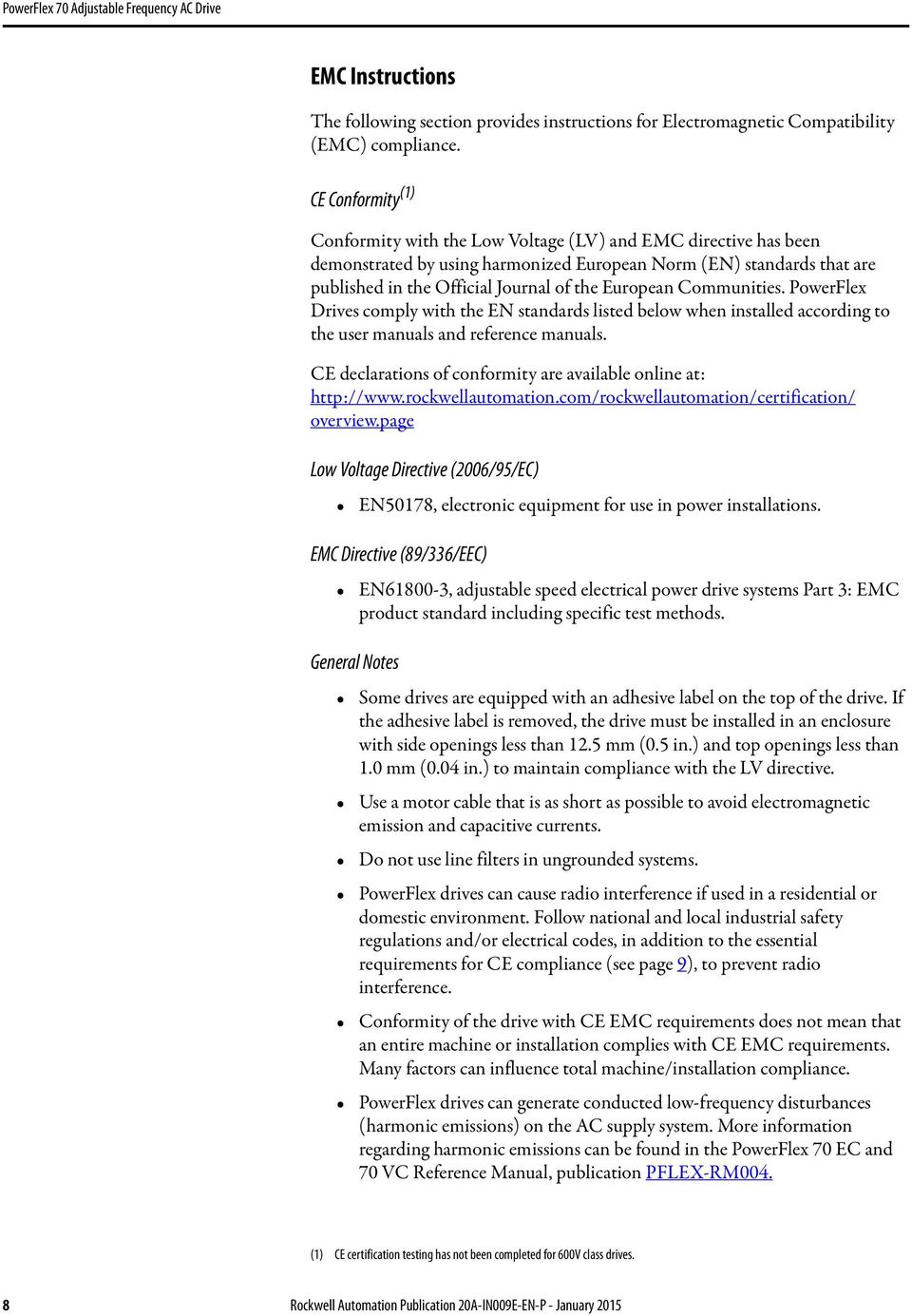
8 EMC Instructions The following section provides instructions for Electromagnetic Compatibility (EMC) compliance. CE Conformity (1) Conformity with the Low Voltage (LV) and EMC directive has been demonstrated by using harmonized European Norm (EN) standards that are published in the Official Journal of the European Communities. PowerFlex Drives comply with the EN standards listed below when installed according to the user manuals and reference manuals. CE declarations of conformity are available online at: overview.page Low Voltage Directive (2006/95/EC) EN50178, electronic equipment for use in power installations. EMC Directive (89/336/EEC) EN , adjustable speed electrical power drive systems Part 3: EMC product standard including specific test methods. General Notes Some drives are equipped with an adhesive label on the top of the drive. If the adhesive label is removed, the drive must be installed in an enclosure with side openings less than 12.5 mm (0.5 in.) and top openings less than 1.0 mm (0.04 in.) to maintain compliance with the LV directive. Use a motor cable that is as short as possible to avoid electromagnetic emission and capacitive currents. Do not use line filters in ungrounded systems. PowerFlex drives can cause radio interference if used in a residential or domestic environment. Follow national and local industrial safety regulations and/or electrical codes, in addition to the essential requirements for CE compliance (see page 9), to prevent radio interference. Conformity of the drive with CE EMC requirements does not mean that an entire machine or installation complies with CE EMC requirements. Many factors can influence total machine/installation compliance. PowerFlex drives can generate conducted low-frequency disturbances (harmonic emissions) on the AC supply system. More information regarding harmonic emissions can be found in the PowerFlex 70 EC and 70 VC Reference Manual, publication PFLEX-RM004. (1) CE certification testing has not been completed for 600V class drives. 8 Rockwell Automation Publication 20A-IN009E-EN-P - January 2015
9 Essential Requirements for CE Compliance These eight conditions must be satisfied for PowerFlex drives to meet the requirements of EN : Standard PowerFlex 70 CE compatible drive. Review important precautions/attention statements throughout this manual before installing the drive. The drive installation cannot include the encoder interface option (20A-ENC-1, drive catalog number, position 16 must be 0. For example: 20Axxxxxxxxxxxx0). Ground the drive as described in General Grounding Requirements on page 22. Output power, control (I/O), and signal wiring must be braided, shielded cable with a coverage of 75% or better, metal conduit or equivalent attenuation. For B and E frame drives only, ferrite core kit (20A-EMC01) must be installed on the I/O cable, as close to the drive as possible, per Figure 1. Figure 1 - Ferrite Core Installation on B Frame and E Frame Drives Only B Frame E Frame Install One Ferrite Core on the I/O Cable for B Frame Drives Install Three Ferrite Cores on the I/O Cable for E Frame Drives All shielded cables must terminate with the proper shielded connector. Comply with the conditions in Table 1 on page 10. Rockwell Automation Publication 20A-IN009E-EN-P - January

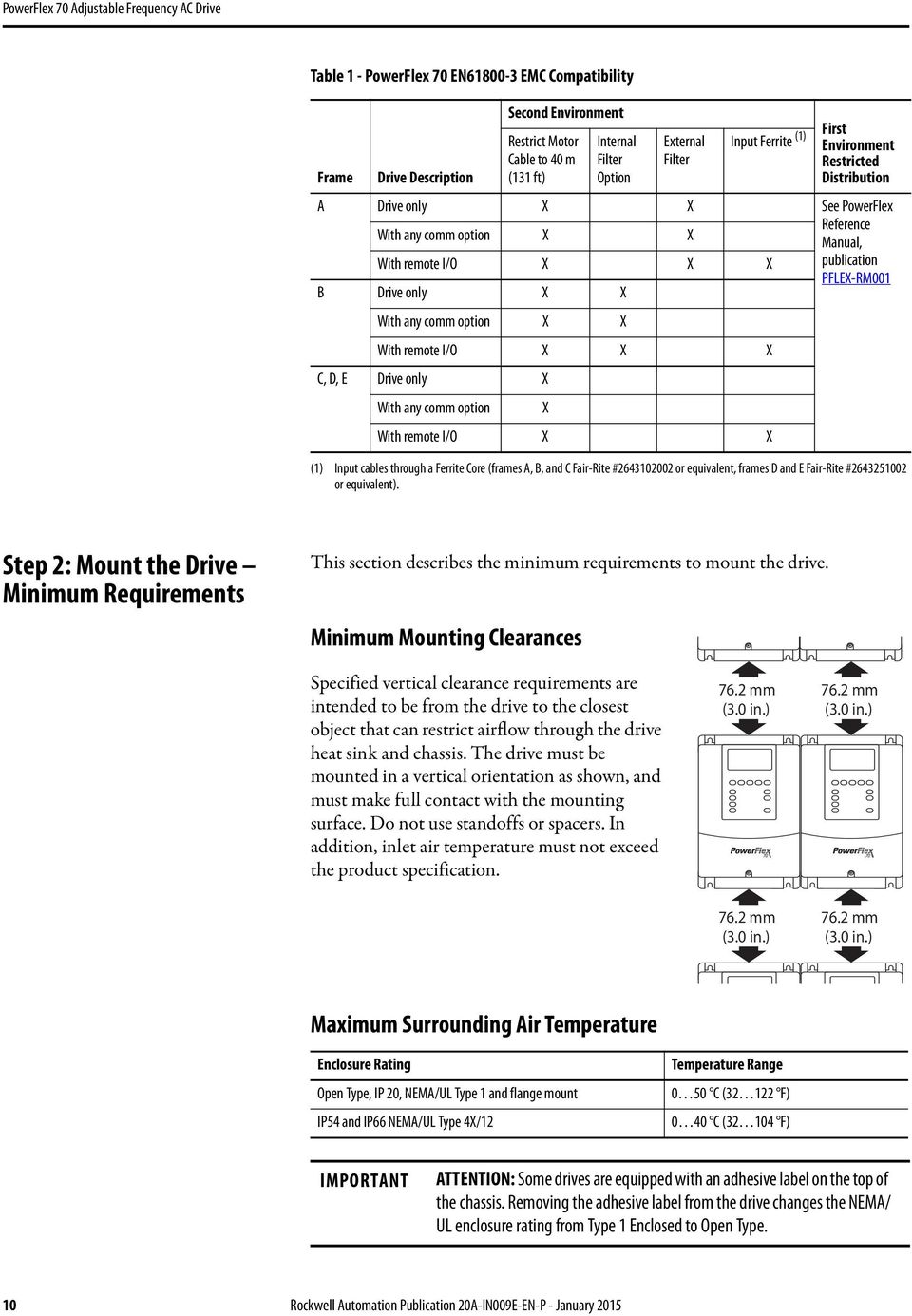
10 Table 1 - PowerFlex 70 EN EMC Compatibility Frame Drive Description Second Environment Restrict Motor Cable to 40 m (131 ft) Internal Filter Option External Filter Input Ferrite (1) First Environment Restricted Distribution A Drive only X X See PowerFlex With any comm option X X Reference Manual, With remote I/O X X X publication PFLEX-RM001 B Drive only X X With any comm option X X With remote I/O X X X C, D, E Drive only X With any comm option X With remote I/O X X (1) Input cables through a Ferrite Core (frames A, B, and C Fair-Rite # or equivalent, frames D and E Fair-Rite # or equivalent). Step 2: Mount the Drive Minimum Requirements This section describes the minimum requirements to mount the drive. Minimum Mounting Clearances Specified vertical clearance requirements are intended to be from the drive to the closest object that can restrict airflow through the drive heat sink and chassis. The drive must be mounted in a vertical orientation as shown, and must make full contact with the mounting surface. Do not use standoffs or spacers. In addition, inlet air temperature must not exceed the product specification mm (3.0 in.) 76.2 mm (3.0 in.) 76.2 mm (3.0 in.) 76.2 mm (3.0 in.) Maximum Surrounding Air Temperature Enclosure Rating Open Type, IP 20, NEMA/UL Type 1 and flange mount IP54 and IP66 NEMA/UL Type 4X/12 Temperature Range 0 50 C ( F) 0 40 C ( F) IMPORTANT ATTENTION: Some drives are equipped with an adhesive label on the top of the chassis. Removing the adhesive label from the drive changes the NEMA/ UL enclosure rating from Type 1 Enclosed to Open Type. 10 Rockwell Automation Publication 20A-IN009E-EN-P - January 2015
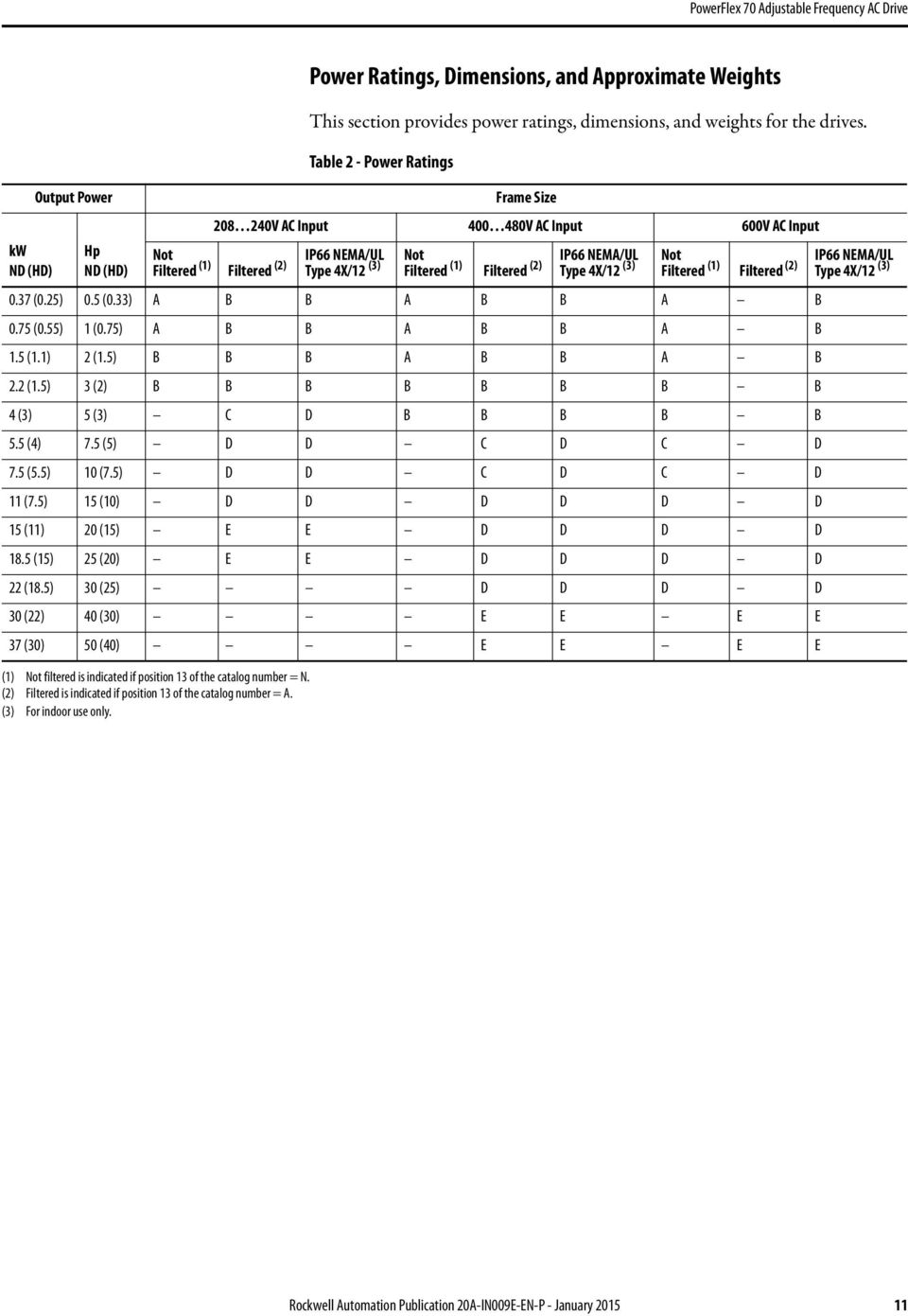
11 kw ND (HD) Output Power Hp ND (HD) Power Ratings, Dimensions, and Approximate Weights This section provides power ratings, dimensions, and weights for the drives. Table 2 - Power Ratings Frame Size V AC Input V AC Input 600V AC Input Not IP66 NEMA/UL Filtered (1) Filtered (2) Type 4X/12 (3) Not IP66 NEMA/UL Filtered (1) Filtered (2) Type 4X/12 (3) Not IP66 NEMA/UL Filtered (1) Filtered (2) Type 4X/12 (3) 0.37 (0.25) 0.5 (0.33) A B B A B B A B 0.75 (0.55) 1 (0.75) A B B A B B A B 1.5 (1.1) 2 (1.5) B B B A B B A B 2.2 (1.5) 3 (2) B B B B B B B B 4 (3) 5 (3) C D B B B B B 5.5 (4) 7.5 (5) D D C D C D 7.5 (5.5) 10 (7.5) D D C D C D 11 (7.5) 15 (10) D D D D D D 15 (11) 20 (15) E E D D D D 18.5 (15) 25 (20) E E D D D D 22 (18.5) 30 (25) D D D D 30 (22) 40 (30) E E E E 37 (30) 50 (40) E E E E (1) Not filtered is indicated if position 13 of the catalog number = N. (2) Filtered is indicated if position 13 of the catalog number = A. (3) For indoor use only. Rockwell Automation Publication 20A-IN009E-EN-P - January
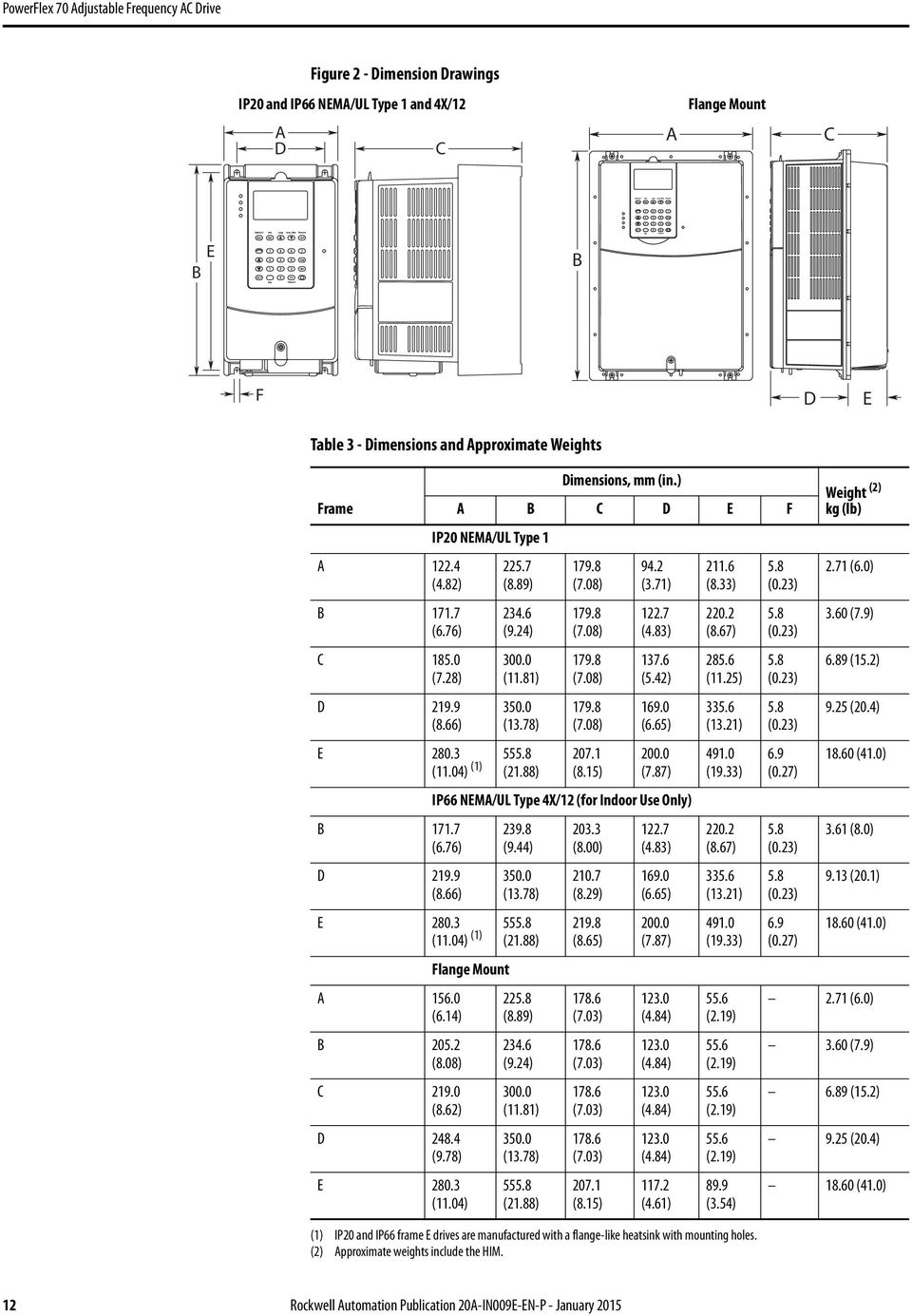
12 Figure 2 - Dimension Drawings IP20 and IP66 NEMA/UL Type 1 and 4X/12 Flange Mount A D C A C E B B F D E Table 3 - Dimensions and Approximate Weights Frame A (4.82) B (6.76) C (7.28) D (8.66) E (11.04) (1) B (6.76) D (8.66) Dimensions, mm (in.) A B C D E F IP20 NEMA/UL Type (8.89) (9.24) (11.81) (13.78) (21.88) (7.08) (7.08) (7.08) (7.08) (8.15) 94.2 (3.71) (4.83) (5.42) (6.65) (7.87) IP66 NEMA/UL Type 4X/12 (for Indoor Use Only) (9.44) (13.78) E (11.04) (1) (21.88) A (6.14) B (8.08) C (8.62) D (9.78) Flange Mount E (11.04) (8.89) (9.24) (11.81) (13.78) (21.88) (8.00) (8.29) (8.65) (7.03) (7.03) (7.03) (7.03) (8.15) (4.83) (6.65) (7.87) (4.84) (4.84) (4.84) (4.84) (4.61) (8.33) (8.67) (11.25) (13.21) (19.33) (8.67) (13.21) (19.33) 55.6 (2.19) 55.6 (2.19) 55.6 (2.19) 55.6 (2.19) 89.9 (3.54) (1) IP20 and IP66 frame E drives are manufactured with a flange-like heatsink with mounting holes. (2) Approximate weights include the HIM. 5.8 (0.23) 5.8 (0.23) 5.8 (0.23) 5.8 (0.23) 6.9 (0.27) 5.8 (0.23) 5.8 (0.23) 6.9 (0.27) Weight (2) kg (lb) 2.71 (6.0) 3.60 (7.9) 6.89 (15.2) 9.25 (20.4) (41.0) 3.61 (8.0) 9.13 (20.1) (41.0) 2.71 (6.0) 3.60 (7.9) 6.89 (15.2) 9.25 (20.4) (41.0) 12 Rockwell Automation Publication 20A-IN009E-EN-P - January 2015
13 Figure 3 - PowerFlex 70 IP20 NEMA/UL Type 1 Bottom View Dimensions, mm (in.) Frame A (For some drive ratings, the fan is not present.) Frame B 34.5 (1.36) 23.9 (0.94) 86.4 (3.40) 22.2 (0.87) Dia. 4 Places 43.4 (1.71) 32.8 (1.29) (5.02) 22.2 (0.87) Dia. 5 Places (6.11) (5.35) (5.11) (4.03) (6.45) (6.11) (5.38) (4.97) (4.00) (6.45) 42.7 (1.68) 55.4 (2.18) 79.3 (3.12) 85.1 (3.35) 55.6 (2.19) 75.5 (2.97) 85.7 (3.37) (4.47) (4.87) Frame C Frame D 47.7 (1.88) (4.42) 58.4 (2.30) 22.2 (0.87) Dia. 4 Places 22.2 (0.87) Dia. 2 Places 69.3 (2.73) 58.6 (2.31) (5.89) 28.5 (1.12) Dia. 2 Places (6.11) (5.09) (3.99) (6.44) (6.11) (5.30) (4.06) (6.46) 36.1 (1.42) 56.1 (2.21) 75.2 (2.96) 94.2 (3.71) 37.5 (1.48) 64.0 (2.52) 93.0 (3.66) (4.76) (4.25) Frame E (8.27) 22.2 (0.87) 43.7 (1.72) (7.14) (6.49) (5.50) (4.99) (4.25) (6.26) (8.27) Rockwell Automation Publication 20A-IN009E-EN-P - January

14 Figure 4 - PowerFlex 70 IP 66 NEMA/UL Type 4X/12 Bottom View Dimensions, mm (in.) (for indoor use only) Frame B 28.3 (1.11) Frame D 28.3 (1.11) 22.1 (0.87) 22.1 (0.87) (5.44) 99.6 (3.92) (5.53) (5.46) (4.05) 55.2 (2.17) 77.3 (3.04) 99.6 (3.92) (4.56) 31.0 (1.22) 49.1 (1.93) 75.5 (2.97) (4.02) (4.73) Figure 5 - PowerFlex 70 IP 54 / IP 66 NEMA/UL Type 4X/12 Bottom View Dimensions, mm (in.) Frame E 22.5 (0.89) 44.5 (1.75) (6.43) (5.51) (4.92) (4.26) (6.21) (6.52) (8.18) 14 Rockwell Automation Publication 20A-IN009E-EN-P - January 2015

15 Figure 6 - PowerFlex 70 Flange Mount Bottom View Dimensions, mm (in.) Frame A Frame C 51.3 (2.02) 40.7 (1.60) (4.06) 22.2 (0.87) Dia. 4 Places 64.7 (2.55) (5.09) 75.4 (2.97) 22.2 (0.87) Dia. 4 Places 95.9 (3.78) 76.6 (3.02) 70.5 (2.78) 43.2 (1.70) (4.11) 94.6 (3.72) (4.05) (2.70) 40.6 (1.60) 59.6 (2.35) 72.4 (2.85) 96.1 (3.78) (4.01) 53.1 (2.09) 73.0 (2.87) 92.2 (3.63) (4.38) Frame B Frame D 60.3 (2.37) 49.7 (1.96) (5.69) 22.2 (0.87) Dia. 5 Places 22.2 (0.87) Dia. 2 Places 83.7 (3.30) 73.0 (2.87) (6.46) 28.5 (1.12) Dia. 2 Places 95.0 (3.74) 76.6 (3.02) 65.9 (2.59) 41.4 (1.63) (4.07) 94.6 (3.27) (4.07) 74.1 (2.92) 42.3 (1.67) 70.9 (2.79) 92.4 (3.64) (4.04) (5.14) (5.54) 51.9 (2.04) 78.3 (3.08) (4.22) (5.33) Frame E (4.25) (8.27) 22.2 (0.87) 43.7 (1.72) 94.4 (3.72) 77.9 (3.07) 52.8 (2.08) 39.8 (1.57) (4.25) (6.26) (8.27) Rockwell Automation Publication 20A-IN009E-EN-P - January

16 Frame A Figure 7 - PowerFlex 70 Cutout Dimensions Frame B Frame C 6,9 (0.27) 156,0 (6.14) 70,7 (2.78) 140,7 (5.54) 6,9 (0.27) 205,2 (8.08) 95,0 (3.74) 190,0 (7.48) 6,3 (0.25) 219,0 (8.62) 101,0 (3.98) 202,0 (7.95) (7.80) 127,0 (5.00) 210,6 (8.29) 225,8 (8.89) 205,5 (8.09) 176,3 (6.94) 234,6 219,3 (9.24) (8.63) 272,3 (10.72) 189,4 (7.46) 283,0 (11.14) 300,0 (11.81) 241,5 (9.51) 105,3 (4.15) 109,7 (4.32) 141,5 (5.57) 8x: Ø3,5 (Ø0.14) 4x: 3,0R (0.12R) 5.0 (0.20) 8x: Ø3,5 (Ø0.14) 4x: 3,0R (0.12R) 6,9 (0.27) 12x: Ø3,5 (Ø0.14) 4x: 3,0R (0.12R) 41,5 (1.63) 5,1 (0.20) 58,8 (2.31) 58,8 (2.31) 58,8 (2.31) Frame D Frame E 4,5 (0.18) 40,7 (1.60) 231,4 (9.11) 115,7 (4.56) 248,4 (9.78) 190,7 (7.51) 6.0 (0.24) 56.2 (2.21) (10.33) (5.16) (11.04) (8.12) 222,4 (8.76) 350,0 (13.78) (9.86) 321,4 (12.65) 333,0 (13.11) (20.70) 271,5 (10.69) (21.88) 201,5 (7.93) (19.44) 61,5 (2.42) 131,5 (5.18) (13.54) (16.49) 14x: Ø3,5 (Ø0.14) 4x: 3,0R (0.12R) 4,5 (0.18) (10.59) (7.63) 58,8 (2.31) 43.9 (1.73) (4.68) 20x: Ø3.5 (Ø0.14) 6.0 (0.24) 87.1 (3.43) 16 Rockwell Automation Publication 20A-IN009E-EN-P - January 2015

17 Step 3: Wire the Drive Wire Recommendations This section describes wiring recommendations for the drive. Opening the Cover To open the cover, follow the steps for your drive enclosure shown below. IP20 NEMA/UL Type 1 1. Loosen the cover screw. 2. Pull the cover straight off the chassis to avoid damaging the connector pins. IP66 NEMA/UL Type 4X/12 (for Indoor Use Only) 1. Loosen the cover screws. 2. Pull the cover straight off the chassis. IMPORTANT Torque cover screws to 0.79 N m (7 lb in). IP66 NEMA/UL Type 4X/12 Indoor Installations Use the plugs that are supplied with IP66 NEMA/UL Type 4X/12 rated drives to seal unused holes in the conduit entry plate. For the best seal, be sure that the inner rim of the plug is fully seated against the edge of the conduit entry hole. Rockwell Automation Publication 20A-IN009E-EN-P - January

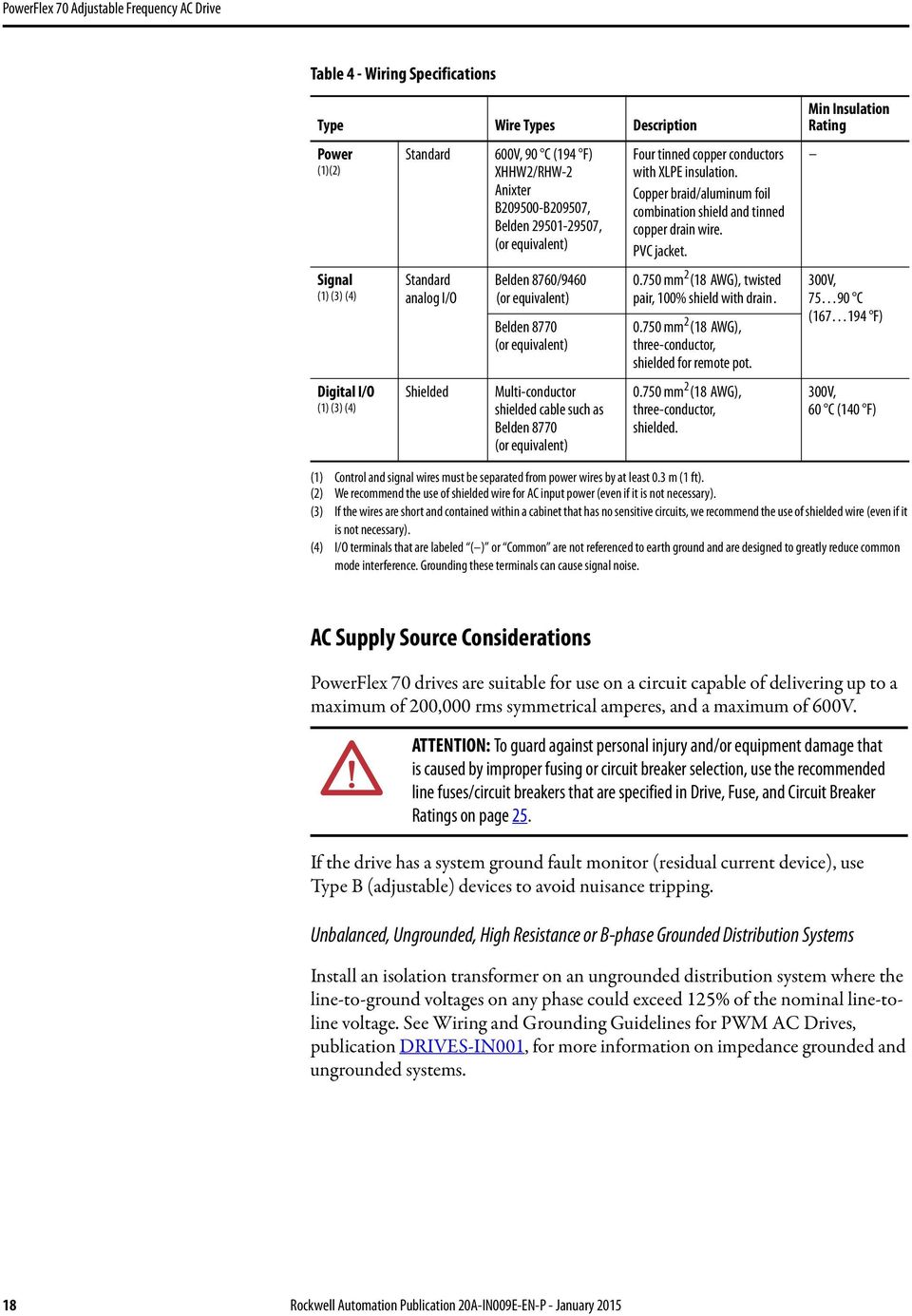
18 Table 4 - Wiring Specifications Type Wire Types Description Power (1)(2) Signal (1) (3) (4) Digital I/O (1) (3) (4) Standard Standard analog I/O Shielded 600V, 90 C (194 F) XHHW2/RHW-2 Anixter B B209507, Belden , (or equivalent) Belden 8760/9460 (or equivalent) Belden 8770 (or equivalent) Multi-conductor shielded cable such as Belden 8770 (or equivalent) Four tinned copper conductors with XLPE insulation. Copper braid/aluminum foil combination shield and tinned copper drain wire. PVC jacket mm 2 (18 AWG), twisted pair, 100% shield with drain mm 2 (18 AWG), three-conductor, shielded for remote pot mm 2 (18 AWG), three-conductor, shielded. Min Insulation Rating 300V, C ( F) 300V, 60 C (140 F) (1) Control and signal wires must be separated from power wires by at least 0.3 m (1 ft). (2) We recommend the use of shielded wire for AC input power (even if it is not necessary). (3) If the wires are short and contained within a cabinet that has no sensitive circuits, we recommend the use of shielded wire (even if it is not necessary). (4) I/O terminals that are labeled ( ) or Common are not referenced to earth ground and are designed to greatly reduce common mode interference. Grounding these terminals can cause signal noise. AC Supply Source Considerations PowerFlex 70 drives are suitable for use on a circuit capable of delivering up to a maximum of 200,000 rms symmetrical amperes, and a maximum of 600V. ATTENTION: To guard against personal injury and/or equipment damage that is caused by improper fusing or circuit breaker selection, use the recommended line fuses/circuit breakers that are specified in Drive, Fuse, and Circuit Breaker Ratings on page 25. If the drive has a system ground fault monitor (residual current device), use Type B (adjustable) devices to avoid nuisance tripping. Unbalanced, Ungrounded, High Resistance or B-phase Grounded Distribution Systems Install an isolation transformer on an ungrounded distribution system where the line-to-ground voltages on any phase could exceed 125% of the nominal line-toline voltage. See Wiring and Grounding Guidelines for PWM AC Drives, publication DRIVES-IN001, for more information on impedance grounded and ungrounded systems. 18 Rockwell Automation Publication 20A-IN009E-EN-P - January 2015
19 Input Power Conditioning Some events on the power system supplying a drive can cause component damage or shortened product life. These events are divided into two basic categories that are described below: All Drives The power system has power factor correction capacitors that are switched in and out of the system, either by the user or by the power company. The power source has intermittent voltage spikes in excess of 6000V. These spikes could be caused by other equipment on the line, or by events such as lightning strikes. The power source has frequent interruptions. 5 Hp or Less Drives (in addition to all drives above) The nearest supply transformer is larger than 100 kva, or the available short circuit (fault) current is greater than 100,000 A. The impedance in front of the drive is less than 0.5%. If any or all of these conditions exist, we recommend that you install a minimum amount of impedance between the drive and the source. This impedance could come from the supply transformer itself, the cable between the transformer and drive, or an additional transformer or reactor. To calculate the impedance, use the information that is supplied in the Wiring and Grounding Guidelines for Pulse Width Modulated (PWM) AC Drives, publication DRIVES-IN001. Single-phase Input Power The PowerFlex 70 drive is typically used with a three-phase input supply. The drive is listed by Underwriters Laboratories (UL) to operate on single-phase input power. Single-phase operation provides 50% of the three-phase rated current. See Table 11 on page 27 through Table 13 on page 29. Generator Input Power Contact technical support for details on how to power a drive properly when using generator power. See Rockwell Automation Support on the back cover. Rockwell Automation Publication 20A-IN009E-EN-P - January

20 Power Terminal Block Figure 8 - Typical Power Terminal Block Location (B frame shown) IP 20 (NEMA/UL Type 1) IP 66 (NEMA/UL Type 4X/12) Table 5 - Power Terminal Block Specifications No. Name Frame Description ➊ Power terminal block A, B, C Input power and motor connections D E Input power and motor connections Input power and motor connections ➋ SHLD terminal All Terminating point for wiring shields Wire Size Range (1) Max mm 2 (AWG) Min mm 2 (AWG) Torque Max N m (lb in) 4.0 (10) 0.3 (22) 1.1 (10) 0.8 (7) 10.0 (6) 0.8 (18) 1.7 (15) 1.4 (12) Recommended N m (lb in) 25.0 (3) 2.5 (14) 2.71 (24) 2.71 (24) 1.6 (14) 1.6 (14) (1) Maximum/minimum sizes that the terminal block can accept these are not recommendations. Table 6 - Wire Routing Recommendations No. ➌ ➍ Description Suggested entry for incoming line wiring. Suggested entry for motor wiring. 20 Rockwell Automation Publication 20A-IN009E-EN-P - January 2015

21 Cable Entry Plate Removal If more wiring access is needed, the cable entry plate on all drive frames can be removed. Loosen the screws that secure the plate to the heat sink and slide out the plate. Figure 9 - Frame A, B, C, D Power Terminal Block and DC Bus Test Points ➊ -DC -DC L1 R L2 S L3 T BR1 +DC BR2 BRK T1 U T2 V T3 W PE PE Figure 10 - Frame E Power Terminal Block L1 R L2 S L3 T +DC DC BR1 BR2 T1 U T2 V T3 W PE PE M6 M6 Terminal Description Notes R R (L1) Three-phase AC line input power. S S (L2) For single-phase input, connect to any two terminals. T T (L3) BR1 DC brake DB resistor connection - Important: Do not connect both an internal and BR2 DC brake external DB resistor at the same time. This can violate the minimum allowed DB resistance and cause damage to the drive. U U (T1) To the motor V V (T2) To the motor W W (T3) To the motor PE PE ground PE PE ground -DC DC bus ( ) ➊Test point on Frames A, B, C, and D are to the left or right of the power terminal block. Frame E has a dedicated terminal. +DC DC bus (+) Figure 11 - Power Input Terminals on Frame B with Internal RFI Filter Option -DC -DC L1 R L2 S L3 T L1 R L2 S L3 T BR1 +DC BR2 BRK T1 U T2 V T3 W PE PE Rockwell Automation Publication 20A-IN009E-EN-P - January
22 General Grounding Requirements IMPORTANT The safety ground for the drive (PE) must be connected to system ground. Ground impedance must conform to the requirements of national and local industrial safety regulations and/or electrical codes. Check the integrity of all ground connections periodically. For installations within a cabinet, a single safety ground point or ground bus bar connected directly to building steel (girder, joist) can be used. All circuits including the AC input ground conductor can be grounded independently and directly to this point/bar. Figure 12 - Typical Grounding R (L1) S (L2) T (L3) U (T1) V (T2) W (T3) PE SHLD Safety Ground (PE) The safety ground for the drive that is required by code. This point must be connected to adjacent building steel (girder, joist), a floor ground rod, or bus bar (see Figure 12). Grounding points must comply with national and local industrial safety regulations and/or electrical codes. Shield Termination - SHLD The shield terminal (see Figure 8 on page 20) provides a grounding point for the motor cable shield. The motor cable shield can be connected to this terminal on the drive (on the drive end) and the motor frame (on the motor end). A shield terminating cable gland can also be used. If you use shielded cable for control and signal wiring, the shield can be grounded at the source end, and not the drive end. 22 Rockwell Automation Publication 20A-IN009E-EN-P - January 2015
23 RFI Filter Grounding IMPORTANT Use RFI filters only in installations with grounded AC supply systems that are permanently installed and solidly grounded (bonded) to the building power distribution ground. If you use an optional radio-frequency interference (RFI) filter, relatively high ground leakage currents can be present. Be sure that the incoming supply neutral is solidly connected (bonded) to the same building power distribution ground. Grounding must not rely on flexible cables and must not include any form of plug or socket that permits inadvertent disconnection. Some local codes require redundant ground connections. Periodically check the integrity of all connections. See the instructions supplied with the filter. ATTENTION: The PowerFlex 70 does not provide branch short circuit protection. See Drive, Fuse, and Circuit Breaker Ratings on page 25 for the recommended fuse or circuit breaker to protect against short circuits. Power Wiring Cable Types Acceptable for V Installations Various cable types are acceptable for drive installations. For many installations, unshielded cable is adequate as long as the cable is separated from sensitive circuits. As an approximate guide, provide a spacing of 0.3 m (1 ft) for every 10 m (32.8 ft) of length. In all cases, do not use long parallel runs. Do not use cable with an insulation thickness less than 15 mils (0.4 mm/0.015 in.). Use copper wire. Wire gauge requirements and recommendations are based on 75 C (167 F). Do not reduce wire gauge when using higher temperature wire. Unshielded ATTENTION: National Codes and standards (NEC, VDE, BSI, and others) and local codes outline provisions for safely installing electrical equipment. Installation must comply with specifications regarding wire types, conductor sizes, branch circuit protection and disconnect devices. Failure to do so can result in personal injury and/or equipment damage. Thermoplastic High Heat-resistant Nylon-coated (THHN), Thermoplastic Heat and Water-resistant Nylon-coated (THWN), or similar wire is acceptable for drive installation in dry environments as long as adequate free air space and/or conduit fill rate limits are provided. The wire must have a minimum insulation thickness of 15 mils (0.4 mm/0.015 in.) and cannot have large variations in insulation concentricity. IMPORTANT Do not use THHN or similarly coated wire in wet areas. Rockwell Automation Publication 20A-IN009E-EN-P - January
24 Shielded/Armored Cable Shielded cable contains the general benefits of multi-conductor cable with the added benefit of a copper braided shield that can contain much of the noise that is generated by a typical AC Drive. Use shielded cable for installations with sensitive equipment such as weigh scales, capacitive proximity switches, and other devices that can be affected by electrical noise in the distribution system. Applications with large numbers of drives in a similar location, imposed EMC regulations, or a high degree of communications/networking are also good candidates for shielded cable. Shielded cable can also help reduce shaft voltage and induced bearing currents for some applications. In addition, the increased impedance of shielded cable can help extend the distance that the motor can be from the drive without the addition of motor protective devices, such as terminator networks. See Reflected Wave in Wiring and Grounding Guidelines for PWM AC Drives, publication DRIVES-IN001. Consider the general specifications of the environment of the installation, including temperature, flexibility, moisture characteristics, and chemical resistance. In addition, a braided shield can be included and be specified by the cable manufacturer as having coverage of at least 75%. An additional foil shield can greatly improve noise containment. A good example of recommended cable is Belden 295xx (xx determines gauge). This cable has four Cross-linked Polyethylene (XLPE) insulated conductors with a 100% coverage foil and an 85% coverage copper braided shield (with drain wire) surrounded by a Polyvinyl Chloride (PVC) jacket. Other types of shielded cable are available, but the use of these types can limit the allowable cable length. For example, some of the newer cables bundle four conductors of THHN wire and wrap them tightly with a foil shield. This type of construction can greatly increase the cable charging current that is required and reduce the overall drive performance. Unless specified in the individual distance tables as tested with the drive, these cables are not recommended and their performance against the lead length limits is not known. Table 7 - Recommended Shielded Wire Location Rating/Type Description Standard (option 2) Class I and II; Division I and II Tray rated 600V, 90 C (194 F) RHH/RHW-2 Anixter OLF-7xxxxx or equivalent Tray rated 600V, 90 C (194 F) RHH/RHW-2 Anixter 7V-7xxxx-3G or equivalent Three tinned copper conductors with XLPE insulation. 5 mil single helical copper tape (25% overlap minimum) with three bare copper grounds in contact with the shield. PVC jacket. Three bare copper conductors with XLPE insulation and impervious corrugated continuously welded aluminum armor. Black sunlight resistant PVC jacket overall. Three copper grounds on #10 AWG and smaller. ATTENTION: To avoid a possible shock hazard caused by induced voltages, unused wires in the conduit must be grounded at both ends. Also, if a drive sharing a conduit is being serviced or installed, disable all of the drives that are using that conduit. Disabling all drives helps minimize the possible shock hazard from cross coupled motor leads. 24 Rockwell Automation Publication 20A-IN009E-EN-P - January 2015
25 Motor Cable Lengths Typically, motor lead lengths less than 30 m (approximately 100 ft) are acceptable. However, if your application requires longer lengths, refer to Wiring and Grounding Guidelines for Pulse Width Modulated (PWM) AC Drives, publication DRIVES-IN001, for details. Electronic Motor Overload Protection Class 10 motor overload protection according to NEC article 430 and motor over-temperature protection according to NEC article (A)(2). UL 508C File E Drive, Fuse, and Circuit Breaker Ratings Integral solid-state short circuit protection does not provide branch circuit protection. Branch circuit protection must be provided in accordance with the National Electric Code (NEC) and any additional local codes, or the equivalent. The tables on the following pages provide drive ratings (including continuous, 1 minute and 3 second) and recommended AC line input fuse and circuit breaker information. Both types of short circuit protection are acceptable for UL and IEC requirements. Sizes that are listed are the recommended sizes that are based on 40 C (104 F) and the U.S. N.E.C. Other country, state, or local codes may require different ratings. Fusing The recommend fuse types are listed below. If available current ratings do not match those listed in the tables that are provided, choose the next higher fuse rating. IEC BS88 (British Standard) Parts 1 & 2, EN , Parts 1 & 2 (1), type gg or equivalent should be used. UL UL Class CC, T, RK1, or J should be used. Circuit Breakers The non-fuse listings in the following tables include inverse time circuit breakers, instantaneous trip circuit breakers (motor circuit protectors) and 140M self-protected combination motor controllers. If one of these devices is chosen as the desired protection method, the following requirements apply: IEC Both types of circuit breakers and 140M self-protected combination motor controllers are acceptable for IEC installations. UL Only inverse time circuit breakers and the specified 140M self-protected combination motor controllers are acceptable for UL installations. (1) Typical designations include, but may not be limited to the following; Parts 1 & 2: AC, AD, BC, BD, CD, DD, ED, EFS, EF, FF, FG, GF, GG, GH. Rockwell Automation Publication 20A-IN009E-EN-P - January
26 Table 8-208/240 Volt AC Three-phase Input Drive Ratings and Input Protection Devices Frame (1) Dual Element Time Delay Fuse Motor Circuit Protector (6) 140M Motor Protector with Adjustable Current Range Hp Rating Input Ratings Output Amps Non-time Delay Fuse Circuit Breaker (4) (7) (8) ND HD Amps kva Cont. 1 Min. 3 Sec. Min (2) Max (3) Min (2) Max (3) Max (5) Max (5) Available Catalog Numbers (9) Minimum Enclosure Volume (in. 3 ) (10) Cat.No. 208 Volt AC Input 20AB2P2 A M-C2E-B40 140M-D8E-B AB4P2 A M-C2E-B63 140M-D8E-B AB6P8 B M-C2E-C10 140M-D8E-C10 140M-F8E-C AB9P6 B M-C2E-C16 140M-D8E-C16 140M-F8E-C AB015 C M-C2E-C20 140M-D8E-C20 140M-F8E-C AB022 D M-D8E-C25 140M-F8E-C AB028 D M-F8E-C AB042 D M-F8E-C AB054 E AB070 E Volt AC Input 20AB2P2 A M-C2E-B25 140M-D8E-B AB4P2 A M-C2E-B63 140M-D8E-B AB6P8 B M-C2E-C10 140M-D8E-C10 140M-F8E-C AB9P6 B M-C2E-C16 140M-D8E-C16 140M-F8E-C AB015 C M-C2E-C16 140M-D8E-C16 140M-F8E-C AB022 D M-D8E-C25 140M-F8E-C AB028 D M-F8E-C AB042 D M-F8E-C AB054 E AB070 E See page 29 for notes. Table 9-400/480 Volt AC Three-phase Input Drive Ratings and Input Protection Devices Frame (1) Dual Element Time Delay Fuse Motor Circuit Protector (6) 140M Motor Protector with Adjustable Current Range Hp Rating Input Ratings Output Amps Non-time Delay Fuse Circuit Breaker (4) (7) (8) ND HD Amps kva Cont. 1 Min. 3 Sec. Min (2) Max (3) Min (2) Max (3) Max (5) Max (5) Available Catalog Numbers (9) Minimum Enclosure Volume (in. 3 ) (10) Cat.No. 400 Volt AC Input 20AC1P3 A M-C2E-B AC2P1 A M-C2E-B25 140M-D8E-B AC3P5 A M-C2E-B63 140M-D8E-B AC5P0 B M-C2E-C10 140M-D8E-C10 140M-F8E-C AC8P7 B M-C2E-C16 140M-D8E-C16 140M-F8E-C AC011 C M-C2E-C16 140M-D8E-C16 140M-F8E-C AC015 C M-C2E-C16 140M-D8E-C16 140M-F8E-C AC022 D M-D8E-C25 140M-F8E-C AC030 D M-F8E-C AC037 D M-F8E-C AC043 D AC060 E AC072 E Volt AC Input 20AD1P1 A M-C2E-B AD2P1 A M-C2E-B25 140M-D8E-B AD3P4 A M-C2E-B40 140M-D8E-B AD5P0 B M-C2E-B63 140M-D8E-B AD8P0 B M-C2E-C10 140M-D8E-C10 140M-F8E-C AD011 C M-C2E-C16 140M-D8E-C16 140M-F8E-C AD014 C M-C2E-C16 140M-D8E-C16 140M-F8E-C Rockwell Automation Publication 20A-IN009E-EN-P - January 2015
27 Table 9-400/480 Volt AC Three-phase Input Drive Ratings and Input Protection Devices (Continued) ND HD Amps kva Cont. 1 Min. 3 Sec. Min (2) Max (3) Min (2) Max (3) Max (5) Max (5) Available Catalog Numbers (9) Minimum Enclosure Volume Cat.No. (in. 3 ) (10) 20AD022 D M-D8E-C25 140M-F8E-C AD027 D M-F8E-C AD034 D M-F8E-C AD040 D M-F8E-C AD052 E AD065 E See page 29 for notes. Frame (1) Hp Rating Input Ratings Output Amps Dual Element Time Delay Fuse Non-time Delay Fuse Circuit Breaker (4) Motor Circuit Protector (6) 140M Motor Protector with Adjustable Current Range (7) (8) Table Volt AC Three-phase Input Drive Ratings and Input Protection Devices Frame (1) Dual Element Time Delay Fuse Motor Circuit Protector (6) 140M Motor Protector with Adjustable Current Range Hp Rating Input Ratings Output Amps Non-time Delay Fuse Circuit Breaker (4) (7) (8) ND HD Amps kva Cont. 1 Min. 3 Sec. Min (2) Max (3) Min (2) Max (3) Max (5) Max (5) Available Catalog Numbers (9) Minimum Enclosure Volume (in. 3 ) (10) Cat.No. 600 Volt AC Input 20AE0P9 A M-C2E-B AE1P7 A M-C2E-B25 140M-D8E-B AE2P7 A M-C2E-B40 140M-D8E-B AE3P9 B M-D8E-B AE6P1 B M-D8E-C10 140M-F8E-C AE9P0 C M-D8E-C10 140M-F8E-C AE011 C M-D8E-C16 140M-F8E-C AE017 D M-F8E-C AE022 D M-F8E-C AE027 D M-F8E-C AE032 D M-F8E-C AE041 E AE052 E See page 29 for notes. Table /240 Volt AC Single-phase Input Drive Ratings and Input Protection Devices Frame (1) Dual Element Time Delay Fuse Motor Circuit Protector (6) 140M Motor Protector with Adjustable Current Range Hp Rating Input Ratings Output Amps Non-time Delay Fuse Circuit Breaker (4) (7) (8) ND HD Amps kva Cont. 1 Min. 3 Sec. Min (2) Max (3) Min (2) Max (3) Max (5) Max (5) Available Catalog Numbers (9) Minimum Enclosure Volume (in. 3 ) (10) Cat.No. 208 Volt AC Input 20AB2P2 A M-C2E-B40 140M-D8E-B AB4P2 A M-C2E-B63 140M-D8E-B AB6P8 B M-C2E-C10 140M-D8E-C10 140M-F8E-C AB9P6 B M-C2E-C16 140M-D8E-C16 140M-F8E-C AB015 C M-C2E-C20 140M-D8E-C20 140M-F8E-C AB022 D M-D8E-C25 140M-F8E-C AB028 D M-F8E-C AB042 D M-F8E-C AB054 E AB070 E Volt AC Input 20AB2P2 A M-C2E-B25 140M-D8E-B AB4P2 A M-C2E-B63 140M-D8E-B AB6P8 B M-C2E-C10 140M-D8E-C10 140M-F8E-C Rockwell Automation Publication 20A-IN009E-EN-P - January
28 Table /240 Volt AC Single-phase Input Drive Ratings and Input Protection Devices (Continued) ND HD Amps kva Cont. 1 Min. 3 Sec. Min (2) Max (3) Min (2) Max (3) Max (5) Max (5) Available Catalog Numbers (9) Minimum Enclosure Volume Cat.No. (in. 3 ) (10) 20AB9P6 B M-C2E-C16 140M-D8E-C16 140M-F8E-C AB015 C M-C2E-C16 140M-D8E-C16 140M-F8E-C AB022 D M-D8E-C25 140M-F8E-C AB028 D M-F8E-C AB042 D M-F8E-C AB054 E AB070 E See page 29 for notes. Frame (1) Hp Rating Input Ratings Output Amps Dual Element Time Delay Fuse Non-time Delay Fuse Circuit Breaker (4) Motor Circuit Protector (6) 140M Motor Protector with Adjustable Current Range (7) (8) Table /480 Volt AC Single-phase Input Drive Ratings and Input Protection Devices Frame (1) Dual Element Time Delay Fuse Motor Circuit Protector (6) 140M Motor Protector with Adjustable Current Range Hp Rating Input Ratings Output Amps Non-time Delay Fuse Circuit Breaker (4) ND HD Amps kva Cont. 1 Min. 3 Sec. Min (2) Max (3) Min (2) Max (3) Max (5) Max (5) Available Catalog Numbers (9) Minimum Enclosure Volume (in. 3 ) (10) Cat.No. 400 Volt AC Input 20AC1P3 A M-C2E-B AC2P1 A M-C2E-B25 140M-D8E-B AC3P5 A M-C2E-B63 140M-D8E-B AC5P0 B M-C2E-C10 140M-D8E-C10 140M-F8E-C AC8P7 B M-C2E-C16 140M-D8E-C16 140M-F8E-C AC011 C M-C2E-C16 140M-D8E-C16 140M-F8E-C AC015 C M-C2E-C16 140M-D8E-C16 140M-F8E-C AC022 D M-D8E-C25 140M-F8E-C AC030 D M-F8E-C AC037 D M-F8E-C AC043 D AC060 E AC072 E Volt AC Input 20AD1P1 A M-C2E-B AD2P1 A M-C2E-B25 140M-D8E-B AD3P4 A M-C2E-B40 140M-D8E-B AD5P0 B M-C2E-B63 140M-D8E-B AD8P0 B M-C2E-C10 140M-D8E-C10 140M-F8E-C AD011 C M-C2E-C16 140M-D8E-C16 140M-F8E-C AD014 C M-C2E-C16 140M-D8E-C16 140M-F8E-C AD022 D M-D8E-C25 140M-F8E-C AD027 D M-F8E-C AD034 D M-F8E-C AD040 D M-F8E-C AD052 E AD065 E See page 29 for notes. (7) (8) 28 Rockwell Automation Publication 20A-IN009E-EN-P - January 2015
29 Table Volt AC Single-phase Input Drive Ratings and Input Protection Devices Frame (1) Dual Element Time Delay Fuse Motor Circuit Protector (6) 140M Motor Protector with Adjustable Current Range Hp Rating Input Ratings Output Amps Non-time Delay Fuse Circuit Breaker (4) (7) (8) ND HD Amps kva Cont. 1 Min. 3 Sec. Min (2) Max (3) Min (2) Max (3) Max (5) Max (5) Available Catalog Numbers (9) Minimum Enclosure Volume (in. 3 ) (10) Cat. No. 600 Volt AC Input 20AE0P9 A M-C2E-B AE1P7 A M-C2E-B25 140M-D8E-B AE2P7 A M-C2E-B40 140M-D8E-B AE3P9 B M-D8E-B AE6P1 B M-D8E-C10 140M-F8E-C AE9P0 C M-D8E-C10 140M-F8E-C AE011 C M-D8E-C16 140M-F8E-C AE017 D M-F8E-C AE022 D M-F8E-C AE027 D M-F8E-C AE032 D M-F8E-C AE041 E AE052 E (1) For IP 66 (NEMA/UL Type 4X/12) enclosures, drives listed as Frame A increase to Frame B and drives that are listed as Frame C increase to Frame D. (2) Minimum protection device size is the lowest rated device that supplies maximum protection without nuisance tripping. (3) Maximum protection device size is the highest rated device that supplies drive protection. For US NEC, minimum size is 125% of motor FLA. Ratings that are shown are maximum. (4) Circuit Breaker - inverse time breaker. For US NEC, minimum size is 125% of motor FLA. Ratings that are shown are maximum. (5) Maximum allowable rating by US NEC. Exact size must be chosen for each installation. (6) Motor Circuit Protector - instantaneous trip circuit breaker. For US NEC, minimum size is 125% of motor FLA. Ratings that are shown are maximum. (7) Bulletin 140M with adjustable current range must have the current trip set to the minimum range that the device will not trip. (8) Manual Self-Protected (Type E) Combination Motor Controller, UL listed for 208 Wye or Delta, 240 Wye or Delta, 480Y/277 or 600Y/347. Not UL listed for use on 480V or 600V Delta/Delta, corner ground, or high-resistance ground systems. (9) The AIC ratings of the Bulletin 140M Motor Protector Circuit Breakers may vary. See Bulletin 140M Motor Protection Circuit Breakers Application Ratings. (10) When using a Manual Self-Protected (Type E) Combination Motor Controller, the drive must be installed in a ventilated or non-ventilated enclosure with the minimum volume specified in this column. Application-specific thermal considerations may require a larger enclosure. Disconnecting MOVs and Common Mode Capacitors Before proceeding, be sure that all power to the drive has been removed. ATTENTION: Only qualified personnel familiar with adjustable frequency AC drives and associated machinery can perform maintenance/repair of the system. Failure to comply can result in personal injury and/or equipment damage. ATTENTION: To avoid an electric shock hazard, verify that the voltage on the bus capacitors has discharged before performing any work on the drive. Measure the DC bus voltage at the +DC and DC terminals of the Power Terminal Block (refer to Figure 9 on page 21 for location). The voltage must be zero. ATTENTION: The following information is merely a guide for proper installation. Rockwell Automation cannot assume responsibility for the compliance or the noncompliance to any code, national, local or otherwise for the proper installation of this drive or associated equipment. A hazard of personal injury and/or equipment damage exists if codes are ignored during installation. Rockwell Automation Publication 20A-IN009E-EN-P - January
30 IMPORTANT To guard against unstable operation and/or damage, you must configure the drive as shown in Table 14 on page 30. The PowerFlex 70 drive contains protective MOVs and common mode capacitors that are referenced to ground (see below). R/L1 S/L2 T/L3 MOV and AC EMI Capacitor Phase to Ground Common Mode Capacitor to Ground DC+ DC Jumper Wire Jumper Wire IMPORTANT All PowerFlex V, 480V, and 600V AC input drives are shipped with the DC bus common mode capacitors referenced to ground. Specific drive catalog numbers are listed below. Voltage Cat. No AB AD AE See Wiring and Grounding Guidelines for PWM AC Drives, publication DRIVES-IN001 for information on ungrounded systems. Table 14 - Recommended Power Jumper Configurations Power Source Type (1) MOV /Input Filter Caps (2) DC Bus Common Mode Caps Benefits of Correct Configuration on Power Source Type Unknown Connected Disconnected See solid and non-solid ground points below Solid ground AC fed, solidly grounded DC fed from passive rectifier that has an AC source and solid ground Non-solid ground AC fed ungrounded Impedance grounded High resistive ground B phase ground Regenerative unit such as common DC bus supply and brake DC fed from an active converter Connected Connected UL compliance Reduced electrical noise Most stable operation EMC compliance Reduced voltage stress on components and motor bearings Disconnected Disconnected Helps to avoid severe equipment damage when a ground fault occurs. (1) It is highly recommended to accurately determine the power source type and then configure appropriately. (2) When MOVs are disconnected, the power system must have its own transient protection to ensure known and controlled voltages. 30 Rockwell Automation Publication 20A-IN009E-EN-P - January 2015
31 To connect or disconnect these devices, refer to pages 32 through 34. IMPORTANT Common mode capacitors are required to conform with the EMC directive. Removing the common mode capacitors causes the drive to be non-compliant with the EMC directive. In addition to the configurations described in this section, install an isolation transformer on an ungrounded distribution system where the line-to-ground voltages on any phase can exceed 125% of the nominal line-to-line voltage. See Wiring and Grounding Guidelines for PWM AC Drives, publication DRIVES-IN001 for more information on impedance grounded and ungrounded systems. Jumper Installation, Removal, and Storage PowerFlex 70 drives utilize plug-in style jumpers. Most drives have a jumper storage area inside the front cover. Store any extra jumpers, or jumpers that have been removed, in this storage area. In some cases, a protective cover is installed over the jumper pins that extend from the board. If there is a protective cover, remove the cover, install (or remove) the jumper, and replace the cover. Drive Identification See the drive nameplate and locate the voltage code, frame, and internal EMC option (frame B drives). Use this information to locate the proper procedure in the following tables. Voltage Code Internal EMC Option Frame Cat No. 20A D xxx x x xxxxxxx UL TYPE 1/IP20 and 50C (122F) Ambient Limit See Manual for additional ratings Normal Duty Power Heavy Duty Power Input: 3 Phase, 47-63Hz AC Voltage Range Amps Output: 3 Phase, Hz AC Voltage Range Base Frequency (default) Continuous Amps 3 Sec / 60 Sec Ovld Amps Mfd. in 2008 on Jan V Class xxx kw xxx kw xxx Hz xxx xxx Serial No. xxxxxxx Original Firmware No. x.xxx Mfg. in U.S.A. (FAC1J) Series: A Frame: A 480V Class xxx HP xxx HP xxx Hz x xxx / xx c U L US LISTED INDUCTRIAL CONTROL EQUIPMRNT 966X.. TUV Rheinland Product Safety E C W Production inspected EN N223 Serial Number catalog number/series Rockwell Automation Publication 20A-IN009E-EN-P - January
32 Jumper Settings and Locations Frame Voltage Code A B C D E Factory Default Jumper Settings DC Bus Common Mode MOV / Input Filter Caps Caps Power Source Type JP2/JP3 Not applicable Solid ground Installed Verify that the jumper at JP2/JP3 is installed. Non-solid ground Remove the jumper at JP2/JP3. JP3 JP2 MOV B B D E C JP2/JP3 Installed JP2/JP3 Installed CM Cap JP5/JP6 Installed JP5/JP6 Installed JP6 JP5 Important: The internal EMC filter (input filter) is a factory-installed option on frame B drives. If the option is installed, the drive cannot be used on a non-solid ground power source. To verify: an extra R, S, T terminal block is present if the option is installed (as shown). Additionally, the 13th character of the nameplate catalog number is A (see page 31). L1 R L2 S L3 T L1 R L2 S L3 BR1 T +DC JP3 Solid ground Verify that the jumpers at both locations are installed (JP2/JP3 and JP5/JP6). Input Filter Option or JP2 MOV Non-solid ground Remove the jumpers at JP2/JP3 and JP5/JP6. In addition, verify that the input filter option is not installed. CM Cap L1 R L2 S L3 T L1 R L2 S L3 T BR1 +DC JP5 Input Filter Option JP6 JP3 JP2 MOV 32 Rockwell Automation Publication 20A-IN009E-EN-P - January 2015
33 Frame Voltage Code C B D E C Factory Default Jumper Settings DC Bus Common Mode MOV / Input Filter Caps Caps Power Source Type JP2/JP3 Installed JP2/JP3 Installed JP3A/JP3B Installed JP3A/JP3B Installed CM Cap Solid ground Verify that the jumpers at both locations (JP2/JP3 and JP3A/JP3B) are installed. Non-solid ground Remove the jumpers at JP2/JP3 and JP3A/JP3B. JP3B JP3A JP3 JP2 MOV / Filter Cap D B D E C JP2/JP3 Installed JP2/JP3 Installed JP3A/JP3B Installed JP3A/JP3B Installed CM Cap Solid ground Verify that the jumpers at both locations (JP2/JP3 and JP3A/JP3B) are installed. Non-solid ground Remove the jumpers at JP2/JP3 and JP3A/JP3B. JP3B JP3A JP3 JP2 SHLD MOV / Filter Cap Rockwell Automation Publication 20A-IN009E-EN-P - January
34 Frame Voltage Code E B D E C Factory Default Jumper Settings DC Bus Common Mode MOV / Input Filter Caps Caps Power Source Type JP1/JP2 Installed JP1/JP2 Installed JP3/JP4 Installed JP3/JP4 Installed Solid ground Verify that the jumpers at both locations (JP1/JP2 and JP3/JP4) are installed. Non-solid ground Remove the jumpers at JP1/JP2 and JP3/JP4. CM Cap JP4 JP1 JP2 JP3 MOV / Filter Cap 34 Rockwell Automation Publication 20A-IN009E-EN-P - January 2015
35 Step 4: I/O Wiring Important points to remember about I/O wiring: Use copper wire. Wire gauge requirements and recommendations are based on 75 C (167 F). Do not reduce wire gauge when you are using higher temperature wire. Wire with an insulation rating of 600V or greater. Control and signal wires must be separated from power wires by at least 0.3 m (1 ft). IMPORTANT I/O terminals that are labeled ( ) Digital In Common or Common are not connected to earth ground and are designed to greatly reduce common mode interference. Grounding these terminals can cause signal noise. ATTENTION: Hazard of personal injury or equipment damage exists when using bipolar input sources. Noise and drift in sensitive input circuits can cause unpredictable changes in motor speed and direction. Use speed command parameters to help reduce input source sensitivity. Figure 13 - Typical I/O Terminal Block Location (B Frame Shown) Table 15 - I/O Terminal Block Specifications Wire Size Range (1) Torque No. Name Description Max Min Max Recommended ➊ I/O terminal Signal and control 1.5 mm mm N m 0.5 N m block connections (16 AWG) (30 AWG) (4.9 lb in) (4.4 lb in) (1) Maximum / minimum that the terminal block can accept - these are not recommendations. Table 16 - Wire Routing Recommendations No. Description ➋ Suggested entry for communication wiring. ➌ Suggested entry for I/O and control wiring. Rockwell Automation Publication 20A-IN009E-EN-P - January
36 I/O Terminal Positions No. Signal Factory Default Description 1 Digital In 1 Stop CF (CF = Clear Fault) 2 Digital In 2 Start 3 Digital In 3 Auto/Man 4 Digital In 4 Speed Sel 1 5 Digital In 5 Speed Sel 2 6 Digital In 6 Speed Sel 3 Table 17 - I/O Terminal Designations Standard and Enhanced Control 11.2 ma at 24V DC 19.2V minimum on state 3.2V maximum off state Important: Use only 24V DC, not suitable for 115V AC circuitry. Inputs can be wired as sink or source. Important: Digital inputs are not designed to work with a pulsed source. Related Parameters V Common Drive supplied power for Digital In1 6 inputs. 8 Digital In Common Not intended for use on circuits outside of the drive V DC 150 ma maximum load V DC Pot Reference 2 k ohm minimum load. 11 Digital Out 1 N.O. (1) NOT Fault Max resistive load Digital Out 1 Common 250V AC / 30V DC 50VA / 60 W Max inductive load 13 Digital Out 1 N.C. (1) Fault Min DC load 250V AC / 30V DC 10 μa, 10 mv DC 25 VA / 30 W 14 Analog In 1 ( Volts) (2) Non-isolated, 0 +10V, 10 bit, 100k ohm input impedance. (3) Analog In 1 (+ Volts) TB Man Ref 16 Analog In 1 ( Current) Voltage Reads value at 14 & 15 Non-isolated, 0 20 ma, 10 bit, 100 ohm input impedance. (3) 17 Analog In 1 (+ Current) Analog In 2 ( Volts) Analog In 2 (+ Volts) (2) Speed Ref A Voltage Reads value at 18 & 19 Isolated, bipolar, differential, 0 +10V unipolar (10 bit) or ±10V bipolar (10 bit and sign), 100k ohm input impedance. (4) 20 Analog In 2 ( Current) Isolated, 0 20 ma, 10 bit and sign, 100 ohm input impedance. (4) 21 Analog In 2 (+ Current) 22 10V Pot Common Analog Out ( Volts) Analog Out ( Current) (2) Output Freq 23 Analog Out (+ Volts) Analog Out (+ Current) 0 +10V, 10 bit, 10k ohm (2k ohm minimum) load ma, 10 bit, 400 ohm maximum load. (5) Referenced to chassis ground. Common if internal 10V supply (terminal 10) is used Digital Out 2 N.O. (1) Run See description at No.s Digital Out 2 Common 26 Digital Out 2 N.C. (1) NOT Run (1) Contacts shown in unpowered state. Any relay that is programmed as fault or alarm energizes (pick up) when power is applied to drive and deenergizes (drop out) when fault or alarm exists. Relays selected for other functions energize when the condition exists, and deenergize when the condition is removed. (2) These inputs/outputs are dependent on a number of parameters. See the Related Parameters column in Table 17. (3) Differential isolation - external source must be less than 10V with respect to PE. (4) Differential isolation - external source must be maintained at less than 160V with respect to PE. Input provides high common mode immunity. (5) Analog output current is available only with enhanced control drives. 36 Rockwell Automation Publication 20A-IN009E-EN-P - January 2015
37 I/O Wiring Examples This section shows examples of typical I/O wiring. Input/Output Connection Example Required Parameter Settings Potentiometer unipolar speed reference 10k Ohm pot. recommended (2k Ohm minimum) Analog input unipolar speed reference 0 +10V Input Common + Select speed reference source: Param. 090 = 2 Analog In 2 Adjust Scaling: Param. 091, 092, 322, 323 Check results: Param. 017 Default speed reference source: Param. 090 = 2 Analog In 2 Adjust Scaling: Param. 091, 092, 325, 326 Check results: Param. 017 Two-wire control non-reversing (1) Internal supply Disable Digital Input 1: Param. 361 = 0 Not Used 2 Set Digital Input 2: Param. 362 = 7 Run Stop-Run Two-wire control reversing (1) Internal supply Set Digital Input 1: Run Rev 1 2 Run Fwd Param. 361 = 9 Run Reverse Set Digital Input 2: Param. 362 = 8 Run Forward Three-wire control (1) Internal supply Use factory default parameter settings. Digital Input 1: Stop Start Param. 361 = 4 Stop CF Digital Input 2: Param. 362 = 5 Start Three-wire control (1) External supply Use factory default parameter settings. Digital Input 1: Stop 1 2 Param. 361 = 4 Stop CF Digital Input 2: Param. 362 = 5 Start Start Digital output Form C relays energized in normal state Power Source +24V Common or Select source: Use factory default parameter settings. Digital Out1 Sel: Param. 380 = 1 Fault Digital Out2 Sel: Param. 384 = 4 Run Rockwell Automation Publication 20A-IN009E-EN-P - January
38 + PowerFlex 70 Adjustable Frequency AC Drive Input/Output Connection Example Required Parameter Settings Enable input Shown in enabled state. Important: Digital inputs are not designed to work with a pulsed source. 6 Standard control Param. 366 = 1 Enable Enhanced control Param. 366 = 1 Enable For dedicated hardware enable, remove enable jumper (see page 39) Joystick bipolar speed reference ±10V input -10V Com+10V Power Source Set direction mode: Param. 090 = 2 Analog In 2 Param. 190 = 1 Bipolar Adjust scaling: Param. 091, 092, 325, 326 Check results: Param. 017 Analog input bipolar speed reference ±10V input Adjust scaling: Param. 091, 092, 325, 326 Check results: Param. 017 Analog input unipolar speed reference 0 20 ma input Common Configure input for current: Param. 320, Bit #1 = 1 Current Adjust scaling: Param. 091, 092, 325, 326 Check results: Param. 017 Analog input, positive temperature coefficient PTC OT set > 5V PTC OT cleared < 4V PTC Short < 0.2V 1.8k PTC Ferrite Bead 3.32k Ohm Set Fault Config 1: Param. 238, Bit #7 = 1 Enabled Set Alarm Config 1: Param. 259, Bit #11 = 1 Enabled Analog output unipolar 0 +10V output. Can drive a 2k Ohm load (25 ma short circuit limit) 0 20 ma output. 400 Ohm max load Select source value: Param. 342 Adjust scaling: Param. 343, 344 (1) Digital inputs can be wired for 2-wire or 3-wire start/stop control. Three-wire control requires separate Start and Stop signals. Two-wire control requires one input signal configured Run-Hi/Stop-Lo. 38 Rockwell Automation Publication 20A-IN009E-EN-P - January 2015
39 Hardware Enable Circuitry (Only Enhanced Control) By default, you can program a digital input as an enable input. The status of this input is interpreted by drive software. If the application requires the drive to be disabled without software interpretation, a hardware enable configuration is used. To use the hardware enable configuration, remove the enable jumper (ENBL JMP) and connect the enable input to Digital In 6 (see below). 1. Remove the drive cover. 2. Locate and remove the enable jumper on the main control board (see the diagram). 3. Connect the enable to Digital In 6 (see Table 17 on page 36). Safe Torque Off Board Option (Only Enhanced Control) The optional PowerFlex Safe Torque Off board, when used with suitable safety components, provides protection according to EN 954-1:1997; Category 3 for safe off and protection against restart. The PowerFlex safe off option is just one safety control system. All components in the system must be chosen and applied correctly, to achieve the desired level of operator safeguarding N m (7 10 lb in) 20A-DG IMPORTANT The drive enable digital input is a solid-state circuit. The safety outputs on the safety module must not be configured for pulsed/safety pulse test. IMPORTANT The drive ships with the hardware enable jumper (ENBL JMP) installed. You must remove the jumper if you are using the DriveGuard Safe Torque Off option. If you do not remove the jumper, the drive faults when a start command is issued. Table 18 - Terminal Description No. Signal Description 1 Monitor - N.C. Normally closed contacts for monitoring relay status. 2 Common - N.C. Maximum Resistive Load: 250V AC / 30V DC / 50 VA / 60 W Maximum Inductive Load: 250V AC / 30V DC / 25 VA / 30 W 3 +24V DC Connections for user supplied power to energize coil. 4 24V Common Rockwell Automation Publication 20A-IN009E-EN-P - January
40 For detailed information on installing and wiring a safety relay system, refer to the DriveGuard Safe Torque Off Option (Series B) for PowerFlex 40P and PowerFlex 70 AC Drives User Manual, publication PFLEX-UM003. IMPORTANT If the Safe Torque Off board is removed from the drive, pins 3 and 4 of the Safe Torque Off connector must be jumpered for the drive to run. If the Safe Torque Off board or the jumper is not installed, and the drive is commanded to run, an F111 Enable Hardware fault occurs. Encoder Interface Option (Only Enhanced Control) The optional PowerFlex encoder interface can source 5 volt or 12 volt power and accept 5 volt or 12 volt single-ended differential inputs. The factory default setting is 12 volts. Note: The drive is not CE EMC certified when the encoder option is installed. Receive Voltage = 12V = 5V 20A-ENC N m (7 10 lb in) 1 = 12V = 5V 6 Send Voltage Table 19 - Terminal Description No. Signal Description 1 5V or 12V power Internal power source 250 ma (isolated). 2 Power return 3 Encoder B (NOT) Single channel or quadrature B input. 4 Encoder B 5 Encoder A (NOT) Single channel or quadrature A input. 6 Encoder A 40 Rockwell Automation Publication 20A-IN009E-EN-P - January 2015
41 Figure 14 - Sample Encoder Wiring I/O Connection Example I/O Connection Example Encoder power internal drive power Internal (drive) 12V DC, 250 ma V DC (250 ma) Common to SHLD Encoder power external power source + Common External Power Supply to SHLD Encoder signal single-ended, dual channel to Power Supply Common 1 1 to SHLD B NOT 3 B NOT 4 B 4 B 5 6 A NOT A 5 6 A NOT A to SHLD Encoder signal differential, dual channel Table 20 - Encoder Specifications Topic Type Description Incremental, dual-channel Supply 5V/12V Configurable ±5% Quadrature 90 ±27 Duty Cycle 50% +10% Requirements Encoders must be line driver type, quadrature (dual channel) or pulse (single channel), singleended or differential and capable of supplying a minimum of 10 ma per channel. The encoder interface board accepts 5V or 12V DC square-wave with a minimum high state voltage of 3.5V DC (5V mode) and 7.0V DC (12V mode). Maximum low state voltage is 1V DC (for both 5V and 12V modes). Maximum input frequency is 250 khz. Rockwell Automation Publication 20A-IN009E-EN-P - January
42 Step 5: Start-up Checklist This checklist supports the basic start-up menu option. See Start-up Routines on page 47 for information on other start-up routines. A HIM is required to run the basic start-up routine. The basic start-up routine can modify parameter values for analog and digital I/O. See Common I/O Programming Changes on page 49. ATTENTION: Power must be applied to the drive to perform the following start-up procedure. Some of the voltages present are at incoming line potential. To avoid electric shock hazard or damage to equipment, only qualified service personnel can perform the following procedure. Thoroughly read and understand the procedure before beginning. Prepare For Drive Startup 1. Verify the input supply voltage. 2. Check the output wiring. 3. Check the control wiring. 4. Connect a HIM to DPI Port 1 or 2. Figure 15 - DPI Ports 1 and 2 CTRL BD GND Optional Service Connection Board (SK-M9-SCB1) provides temporary DPI connection with drive cover removed. 5. Apply AC power and control voltages to the drive. IMPORTANT If any of the six digital inputs are configured to Stop CF (CF = Clear Fault) or Enable, verify that signals are present or the drive cannot start. See Troubleshooting Abbreviated Fault and Alarm Listing on page 50 for a list of potential digital input conflicts. If the STS LED is not flashing green, see Drive Status Indicators on page When prompted, select a display language. The PowerFlex 70 start-up screen displays. 7. Press the enter key to display the start-up menu. 8. Use the arrow keys to highlight 2. Basic. 9. Press the enter key. Use the enter key to follow the menu and step you through the start-up routine. 42 Rockwell Automation Publication 20A-IN009E-EN-P - January 2015
43 The basic start-up routine asks simple questions and prompts you to input required information. See also Common I/O Programming Changes on page 49. Information About Start-up Motor Tests Control schemes vary based on the Start/Jog Source that is selected in Step 3. Motor Tests. Start/Jog Source Digital inputs Local HIM Port 1 Remote HIM Control Source Description Digital In 1 = Stop / Digital In 2 = Start / Digital In 3 = Jog HIM connected to DPI Port 1 controls Stop / Start / Jog Digital In 1 6 are temporarily disabled during motor tests. HIM connected to DPI Port 2 controls Stop / Start / Jog Digital In 1 6 are temporarily disabled during motor tests. During motor tests and tuning procedures, the drive can modify certain parameter values for proper start-up operation. These values are reset to their original values when startup is complete. The affected parameters are listed here: IMPORTANT If power is removed from the drive during the tests without aborting the auto-tune procedure, these parameters may not reset to their original value. If this situation occurs, reset the drive to factory defaults (see page 50) and repeat the start-up procedure. Rockwell Automation Publication 20A-IN009E-EN-P - January
44 Appendix A: Startup and Troubleshooting This section includes information for starting and troubleshooting the drive. First Power-up Menu Structure English? Français? Español? Italiano? Deutsch? Português? Nederlands? Not Selected Main Menu: Diagnostics Parameter Device Select Memory Storage Start-Up Preferences PowerFlex 70 Start-Up Startup consists of several steps to configure a drive for basic applications. PowerFlex 70 Start-Up Make a selection 1. SMART 2. Basic 3. Detailed 4. More info PowerFlex 70 Start-Up Complete these steps in order: 1. Motor Control 2. Motr Data/Ramp 3. Motor Tests 4. Speed Limits 5. Speed/Trq Cntl 6. Start/Stop/I/O 7. Done/Exit 44 Rockwell Automation Publication 20A-IN009E-EN-P - January 2015
45 Human Interface Module (HIM) Overview This section provides information for operating the HIM. LCD Display Elements Display Description F-> Power Loss 0.0 Hz Main Menu: Diagnostics Parameter Device Select Auto Direction Drive Status Alarm Auto/Man Information Commanded or Output Frequency Programming / Monitoring / Troubleshooting HIM Key Functions Key Esc Sel Description Exit a menu, cancel a change to a parameter value, or acknowledge a fault/alarm. Select a digit, select a bit, or enter edit mode in a parameter screen. Scroll through options, increase a value, or toggle a bit. ALT Jog Scroll through options, decrease a value, or toggle a bit. Enter a menu, enter edit mode in a parameter screen, or save a change to a parameter value. Access the function that is associated with a programming or numeric key. Provides access to the Large Format Display. See the drive user manual for more information. Start the drive. Stop the drive or clear a fault. Jog the drive. S.M.A.R.T. View Lang Auto / Man Remove Esc Sel Alt /- Exp Param # HIM Jog Change direction. These keys are active when the HIM is granted Manual Control or Param. 090 [Speed Ref A Sel] / 093 [Speed Ref B Sel] is set to: Increase speed. Option 18 DPI Port 1 for a HIM installed in the drive cover or Decrease speed. Option 19 DPI Port 2 for a HIM connected by cable for handheld or remote installation option Rockwell Automation Publication 20A-IN009E-EN-P - January
46 HIM Main Menu Main Menu Screen F-> Power Loss 0.0 Hz Main Menu: Diagnostics Parameter Device Select ALT Functions Auto Menu Selections Main Menu: Diagnostics Parameter Device Select Memory Storage Start-Up Preferences To use an ALT function, start at the Main Menu and press the ALT key, release it, then press the programming key that is associated with one of the following functions that are listed in the table below. ALT Key then Function Function Description ALT Esc Esc Sel Sel +/ S.M.A.R.T. Log In/Out View Device Lang Auto / Man Remove Param # Displays the S.M.A.R.T. screen. This function enables the drive parameter values to be quickly programed by directly accessing the most frequently used drive functions. See the user manual for more information. Log in to change parameter settings. Log out to protect parameter settings. Change a password. Enables the selection of how parameters are viewed or detailed information about a parameter or component. Select a connected adapter for editing. Displays the language selection screen. The LCD HIM on an architecture class drive enables you to change the display language any time. Switches between Auto and Manual Modes. If the HIM requests Manual Mode, the Speed Reference source is transferred to the HIM. Enables HIM removal without causing a fault if the HIM is not the last controlling device and does not have manual control of the drive. Enables entry of a parameter number for viewing/editing. 46 Rockwell Automation Publication 20A-IN009E-EN-P - January 2015
47 Start-up Routines The PowerFlex 70 is designed so that startup is simple and efficient. If you have an LCD HIM, two start-up methods are provided. Select the desired start-up routine that is needed for the application: S.M.A.R.T. Start This routine lets you quickly configure the drive by programming values for the most commonly used functions (see Running S.M.A.R.T. Start on page 48). Assisted Startup This routine prompts you for information that is needed to start up a drive for most applications, such as line and motor data, commonly adjusted parameters, and I/O. With enhanced control, two levels of assisted startup are available: basic and detailed (see Running an Assisted Startup on page 48). Figure 16 - Standard Control Start-up Menu Main Menu: Start-Up Input Voltage Motor Data and Ramp Times (1) Motor Tests Speed Limits Speed Control Start/Stop/I/O Done / Exit Configu e for Alternate Input Voltage Enter Motor NP Data, Stop Mode, Accel/Decel Ramp Times Optimize Torque and Verify Direction Set Min/Max Speed and Direction Control Configu e Source, Value and Scale for Speed References Configu e Control Method (2 Wire/3 Wire), I/O, Digital Inputs/ Outputs and Analog Outputs IMPORTANT Power must be applied to the drive when viewing or changing parameters. Previous programming can affect the drive status when power is applied. Figure 17 - Enhanced Control Start-up Menu Main Menu: Start-Up Motor Control Select Motor Data and Ramp Times (1) (2) Motor Tests Speed Limits Speed/Torque Start/Stop/I/O Application Control Done / Exit Configu es Motor Control Method Enter Motor NP Data, Stop Mode, Accel/Decel Ramp Times Optimize Torque and Verify Direction Set Min/Max Speed and Direction Control Configu e Source, Value and Scale for Speed References Configu e Control Method (2 Wire/3 Wire), I/O, Digital Inputs/ Outputs and Analog Outputs Configu e for Specifi Application (1) During motor tests and tuning procedures, the drive can modify certain parameter values for proper start-up operation. These values are then reset to their original values when startup is complete. The affected parameters are: 053, 080, 276, 278, and If power is removed from the drive during the tests without aborting the auto-tune procedure, these parameters may not reset to their original value. If this situation occurs, reset the drive to factory defaults (see page 50) and repeat the start-up procedure. (2) Only in Detailed Startup mode. Rockwell Automation Publication 20A-IN009E-EN-P - January
48 Running S.M.A.R.T. Start During a startup, most applications require changes to a few parameters. The LCD HIM on a PowerFlex 70 drive offers S.M.A.R.T. start, and displays the most commonly changed parameters. With these parameters you can set the following functions: S Start Mode and Stop Mode M Minimum and Maximum Speed A Accel Time 1 and Decel Time 1 R Reference Source T Thermal Motor Overload To run a S.M.A.R.T. start routine, follow the steps in this table: Step Key(s) Example LCD Displays 1. Press ALT and then Esc (S.M.A.R.T). The S.M.A.R.T. start ALT Esc screen appears. F-> Stopped 2. View and change parameter values as desired. For HIM 0.0 Hz information, see Appendix B. SMART List: Main Menu: 3. Press Esc to exit the S.M.A.R.T. start. Diagnostics Stop Mode A Esc Digital In2 Sel Parameter Minimum Speed Auto Running an Assisted Startup IMPORTANT This start-up routine requires an LCD HIM. The assisted start-up routine prompts you to input required information. Access assisted startup by selecting Start Up from the Main Menu. To perform an assisted startup, follow the steps in this table: Step Key(s) Example LCD Displays 1. In the Main Menu, press the up arrow or down arrow to scroll to Start Up. F-> Stopped 2. Press Enter. 0.0 Hz Main Menu: Memory Storage Start Up Preferences Auto IMPORTANT You must select Done/Exit after you complete the start-up routine for the start-up/autotune data to be saved. 48 Rockwell Automation Publication 20A-IN009E-EN-P - January 2015
49 Drive Status Indicators Name Color State Description Green Flashing The d rive is ready but is not running, and no faults are present. STS Steady The drive is running and no faults are present. Yellow Flashing, drive stopped Flashing, drive running Steady, drive running An inhibit condition exists, the drive cannot be started. Check parameter 214 [Start Inhibits]. An intermittent type 1 alarm condition exists. Check parameter 211 [Drive Alarm 1]. A continuous type 1 alarm condition exists. Check parameter 211 [Drive Alarm 1]. Red Flashing A fault has occurred. PORT MOD NET A NET B Steady See the communication adapter user manual. A non-resettable fault has occurred. Status of DPI port internal communications (if present). Status of communications module (when installed). Status of network (if connected). Status of secondary network (if connected). Common I/O Programming Changes Your application needs can require changing parameters from their factory default settings. Speed Reference A Change Speed Reference A from Analog In 2 to Analog In 1 to connect an external potentiometer. 1. Set Parameter 090 [Speed Ref A Sel] to option 1, Analog In 1. Sets the speed reference input to I/O terminals 14 and 15 for voltage, and I/O terminals 16 and 17 for current. 2. Set Parameter 096 [TB Man Ref Sel] to option 9, MOP Level. Eliminates a potential conflict alarm condition. Analog In 2 is not a valid Speed Reference source if selected for any of the following parameters: 117 [Trim In Select] 126 [PI Reference Sel] 128 [PI Feedback Sel] 147 [Current Lmt Sel] 3. Set Parameter 091 [Speed Ref A Hi] to the upper value of the desired speed reference range in Hz. 4. Set Parameter 092 [Speed Ref A Lo] to the lower value of the desired speed reference range in Hz. Speed Reference A is now configured for an external potentiometer. Rockwell Automation Publication 20A-IN009E-EN-P - January
50 Control Scheme Change from 3-wire Start/Stop to 2-wire Run/Not Run at Digital In 1 and Digital In Set Parameter 361 [Digital In1 Sel] to option 7 Run, or 9 Run Reverse. 2. Set Parameter 362 [Digital In2 Sel] to another option such as 8 Run Forward, or 10 Jog. See I/O wiring examples beginning on page 35. Restoring Factory Defaults From the HIM Main Menu, select Memory Storage/Reset To Defaults. Troubleshooting Abbreviated Fault and Alarm Listing For a complete listing of faults and alarms, refer to the PowerFlex 70 User Manual, publication 20A-UM001. Table 21 - Abbreviated Fault Table Fault No. Type (1) Description Action Auxiliary Input 2 ➊ Auxiliary input interlock is open. Check remote wiring. Decel Inhibit 24 ➌ The drive is not following a commanded deceleration because it is attempting to limit bus voltage. FluxAmpsRef Rang 78 The value for flux amps determined by the Autotune procedure exceeds the programmed [Motor NP FLA]. HW OverCurrent 12 ➊ The drive output current has exceeded the hardware current limit. IR Volts Range 77 Calculate is the autotune default and the value that is determined by the autotune procedure for IR Drop Volts is not in the range of acceptable values. Motor Overload 7 ➊ ➌ Internal electronic overload trip. Enable/Disable with [Fault Config 1]. Verify that input voltage is within drive specified limits. Verify that system ground impedance follows proper grounding techniques. Disable bus regulation and/or add dynamic brake resistor and/or extend deceleration time. Reprogram [Motor NP FLA] with the correct motor nameplate value. Repeat Autotune. Check programming. Check for excess load, improper DC boost setting, DC brake volts set too high, or other causes of excess current. Reenter motor nameplate data. An excessive motor load exists. Reduce load so drive output current does not exceed the current set by [Motor NP FLA]. 50 Rockwell Automation Publication 20A-IN009E-EN-P - January 2015
51 Table 21 - Abbreviated Fault Table (Continued) Fault No. Type (1) Description OverSpeed Limit 25 ➊ Functions such as Slip Compensation or Bus Regulation have attempted to add an output frequency adjustment greater than the value programmed in [Overspeed Limit]. OverVoltage 5 ➊ DC bus voltage exceeded maximum value. SW OverCurrent 36 ➊ Drive output current has exceeded the 1 ms current rating. This rating is greater than the 3 second current rating and less than the hardware overcurrent fault level. It is typically % of the drive continuous rating. Action Remove excessive load or overhauling conditions or increase [Overspeed Limit]. Monitor the AC line for high line voltage or transient conditions. Motor regeneration can also cause a bus overvoltage. Extend the decel time or install dynamic brake option. Check for excess load, improper DC boost setting. DC brake volts set too high. (1) See the PowerFlex 70 User Manual, publication 20A-UM001, for a description of fault types. Rockwell Automation Publication 20A-IN009E-EN-P - January
52 Table 22 - Abbreviated Alarm Table Alarm No. Type (1) Description Dig In ConflictA 17 2 Digital input functions are in conflict. Combinations that are marked with an X cause an alarm. Acc2/Dec2 Accel 2 Decel 2 Jog Jog Fwd Jog Rev Fwd/Rev Acc2 / Dec2 X X Accel 2 X Decel 2 X Jog X X Jog Fwd X X Jog Rev X X Fwd / Rev X X Dig In ConflictB 18 2 A digital Start input has been configured without a Stop input or other functions are in conflict. Combinations that conflict are marked with an X and causes an alarm. Start Stop CF Run Run Fwd Run Rev Jog Jog Fwd Jog Rev Fwd/ Rev Start X X X X X Stop CF Run X X X X X Run Fwd X X X X Run Rev X X X X Jog X X Jog Fwd X X Jog Rev X X Fwd / Rev X X Dig In ConflictC 19 2 Multiple physical inputs have been configured to the same input function. Multiple configurations are not allowed for the following input functions: Forward/Reverse, Run Reverse, Bus Regulation Mode B Speed Select 1, Jog Forward, Acc2 / Dec2 Speed Select 2, Jog Reverse, Accel 2 Speed Select 3, Run, Decel 2 Run Forward, Stop Mode B TB Man Ref Cflct E C 30 Occurs when: Auto/Manual is selected (default) for [Digital In3 Sel], parameter 363 and [TB Man Ref Sel], parameter 96 has been reprogrammed. No other use for the selected analog input can be programmed. Example: If [TB Man Ref Sel] is reprogrammed to Analog In 2, all factory default uses for Analog In 2 must be reprogrammed (such as parameters 90, 117, 128 and 179). See the Auto/Manual Examples section of the PowerFlex 70 User Manual, publication 20A-UM001. To correct: Verify/reprogram the parameters that reference an analog input or Reprogram [Digital In3] to another function or Unused. (1) See PowerFlex 70 User Manual, publication 20A-UM001, for a description of alarm types. 52 Rockwell Automation Publication 20A-IN009E-EN-P - January 2015
53 Common Symptoms and Corrective Actions Table 23 - Drive Does Not Start From Start or Run Inputs Wired to the Terminal Block Cause Indication Corrective Action Drive is Faulted Incorrect input wiring. See page 35 for wiring examples. 2 wire control requires Run, Run Forward, Run Reverse or Jog input. 3 wire control requires Start and Stop inputs Jumper from terminal 7 to 8 is required. Incorrect digital input programming. Mutually exclusive choices have been made (i.e., Jog and Jog Forward). 2-wire and 3-wire programming can be conflicting. Exclusive functions (for example, direction control) can have multiple inputs that are configured. Stop is factory default and is not wired. Safe Torque Off Option Installed Hardware Enable Input Digital In 6 not present. Safe Torque Off Option inputs not present. Table 24 - Drive Does Not Start From the HIM Flashing red status light Flashing green status light None Flashing yellow status light and DigIn CflctB indication on LCD HIM. [Drive Status 2] shows type 2 alarms. Flashing yellow status light and Not Enable indication on LCD HIM. Flashing yellow status light and Safe-Off indication on LCD HIM. Cause Indication Corrective Action Drive is programmed for 2-wire control. Human Interface Module (HIM) Start button is disabled for 2-wire control. None Clear fault. Press Stop Cycle power Set [Fault Clear] to 1 Clear Faults on the HIM Diagnostic menu Wire inputs correctly and/or install jumper. Program [Digital Inx Sel] for correct inputs. Start or Run programming can be missing. Program [Digital Inx Sel] to resolve conflicts. Remove multiple selections for the same function. Install stop button to apply a signal at stop terminal. Verify correct wiring to Digital In 6. Check for presence of signal. Wire inputs correctly on Safe Off option terminals See the DriveGuard Safe Torque Off Option User Manual, publication PFLEX-UM003 for more information If 2-wire control is required, no action is necessary. If 3-wire control is required, program [Digital Inx Sel] for correct inputs. Rockwell Automation Publication 20A-IN009E-EN-P - January
54 Table 25 - Drive Does Not Respond to Changes in Speed Command Cause Indication Corrective Action No value is coming from the source of the command. Incorrect reference source has been programmed. Incorrect reference source is being selected via remote device or digital inputs. LCD HIM Status Line indicates At Speed and output is 0 Hz. None None Table 26 - Motor and/or Drive does Not Accelerate to Commanded Speed Cause Indication Corrective Action Acceleration time is excessive. None Reprogram [Accel Time x]. Excess load or short acceleration times force the drive into current limit, slowing or stopping acceleration. Speed command source or value is not as expected. Programming is preventing the drive output from exceeding limiting values. None None None Table 27 - Motor Operation is Unstable Cause Indication Corrective Action Motor data was incorrectly entered or Autotune was not performed. None 1. If the source is an analog input, check wiring and use a meter to check for presence of signal. 2. Check [Commanded Freq] for correct source. 1. Check [Speed Ref Source] for the source of the speed reference. 2. Reprogram [Speed Ref A Sel] for correct source. 1. Check [Drive Status 1], bits 12 and 13 for unexpected source selections. 2. Check [Dig In Status] to see if inputs are selecting an alternate source. 3. Reprogram digital inputs to correct Speed Sel x option. Check [Drive Status 2], bit 10 to see if the drive is in Current Limit. Remove excess load or reprogram [Accel Time x]. Check for the proper Speed Command by using Table 25 on page 54. Check [Maximum Speed] and [Maximum Freq] to assure that speed is not limited by programming. 1. Correctly enter motor nameplate data. 2. Perform Static or Rotate Autotune procedure. Manually Clearing Faults Step 1. Press Esc to acknowledge the fault. The fault information is removed so that you can use the Human Interface Module (HIM). 2. Address the condition that caused the fault. The cause must be corrected before the fault can be cleared. 3. After corrective action has been taken, clear the fault by one of these methods: Press Stop. Cycle drive power. Set parameter 240 [Fault Clear] to 1. Clear Faults on the Human Interface Module (HIM) Diagnostic menu. Key(s) Esc 54 Rockwell Automation Publication 20A-IN009E-EN-P - January 2015
55 Notes: Rockwell Automation Publication 20A-IN009E-EN-P - January
56 Rockwell Automation Support Rockwell Automation provides technical information on the Web to assist you in using its products. At you can find technical manuals, technical and application notes, sample code and links to software service packs, and a MySupport feature that you can customize to make the best use of these tools. You can also visit our Knowledgebase at for FAQs, technical information, support chat and forums, software updates, and to sign up for product notification updates. For an additional level of technical phone support for installation, configuration, and troubleshooting, we offer TechConnect SM support programs. For more information, contact your local distributor or Rockwell Automation representative, or visit Installation Assistance If you experience a problem within the first 24 hours of installation, review the information that is contained in this manual. You can contact Customer Support for initial help in getting your product up and running. United States or Canada Outside United States or Canada Use the Worldwide Locator at or contact your local Rockwell Automation representative. New Product Satisfaction Return Rockwell Automation tests all of its products to help ensure that they are fully operational when shipped from the manufacturing facility. However, if your product is not functioning and needs to be returned, follow these procedures. United States Outside United States Contact your distributor. You must provide a Customer Support case number (call the phone number above to obtain one) to your distributor to complete the return process. Please contact your local Rockwell Automation representative for the return procedure. Documentation Feedback Your comments will help us serve your documentation needs better. If you have any suggestions on how to improve this document, complete this form, publication RA-DU002, available at U.S. Allen-Bradley Drives Technical Support - Tel: (1) , Fax: (1) , [email protected] Online: Allen-Bradley, Rockwell Software, Rockwell Automation, PowerFlex, and TechConnect are trademarks of Rockwell Automation, Inc. Trademarks not belonging to Rockwell Automation are property of their respective companies. Publication 20A-IN009E-EN-P - January 2015 Supersedes Publication 20A-IN009D-EN-P - June 2013 Copyright 2015 Rockwell Automation, Inc. All rights reserved. Printed in the U.S.A.
Installation Instructions. PowerFlex 700H Adjustable Frequency AC Drive and PowerFlex 700S High Performance AC Drive Frames 9...14
 Installation Instructions PowerFlex 700H Adjustable Frequency AC Drive and PowerFlex 700S High Performance AC Drive Frames 9...14 Important User Information Read this document and the documents listed
PowerFlex 70 Adjustable Frequency AC Drive
 Installation Instructions PowerFlex 70 Adjustable Frequency AC Drive When reading this document, look for this symbol Step x to guide you through the 5 BASIC STEPS needed to install and perform a Basic
PowerFlex 700S High Performance AC Drive Phase I Control
 User Manual PowerFlex 7S High Performance AC Drive Phase I Control Firmware Versions.xx-.7 Important User Information Read this document and the documents listed in the additional resources section about
Safe Torque Off Option (Series B) for PowerFlex 40P and PowerFlex 70 Enhanced Control AC Drives
 User Manual Safe Torque Off Option (Series B) for PowerFlex 40P and PowerFlex 70 Enhanced Control AC Drives Catalog Number 20A-DG01 Topic Page General Description 2 What Is the DriveGuard Safe Torque Off
PowerFlex 700 Adjustable Frequency AC Drive Frames 0 6 0.37 132 kw (0.5 200 Hp)
 Installation Instructions PowerFlex 700 Adjustable Frequency AC Drive Frames 0 6 0.37 132 kw (0.5 200 Hp) This document explains the 5 BASIC STEPS needed to install and perform a Basic Start-Up of the
PowerFlex 700 and 700H Packaged Drives. Technical Data
 PowerFlex 700 and 700H Packaged Drives Technical Data Overview The heart of every PowerFlex 700/700H packaged drive package is a PowerFlex Adjustable Frequency Drive. The packaged drives program provides
Installation Instructions. Wiring and Grounding Guidelines for Pulse Width Modulated (PWM) AC Drives
 Installation Instructions Wiring and Grounding Guidelines for Pulse Width Modulated (PWM) AC Drives Important User Information Solid-state equipment has operational characteristics differing from those
PowerFlex 700S and 700H Frame 12 DC Bus Connector Kit
 PowerFlex 700S and 700H Frame 12 DC Bus Connector Kit Installation Instructions This document provides instructions for the installation of a DC bus connector kit for PowerFlex 700S and 700H frame 12 drives
CompactLogix Power Supplies Specifications
 Technical Data CompactLogix Power Supplies Specifications 1768 CompactLogix Power Supplies Catalog Numbers 1768-PA3, 1768-PB3 1769 Compact I/O Power Supplies Catalog Numbers 1769-PA2, 1769-PB2, 1769-PA4,
Specifying a Variable Frequency Drive s
 Specifying a Variable Frequency Drive s Put on by Bruce Reeves and Jeremy Gonzales Dykman Electrical Covering the Western US For all of your VFD and Soft Start and Motor Needs How To Specify a Variable
MTE SERIES RLW. World REACTORS USER MANUAL PART NO. INSTR 030 REL. 090930. 2009 MTE Corporation
 MTE SERIES RLW World REACTORS USER MANUAL PART NO. INSTR 030 REL. 090930 2009 MTE Corporation IMPORTANT USER INFORMATION NOTICE MTE Series RLW reactors are components designed to improve the reliability
PowerFlex 700S Adjustable Frequency Drive - Phase II Control Frames 1 6 0.75 132 kw (1 200 Hp)
 Installation Instructions PowerFlex 00S Adjustable Frequency Drive - Phase II Control Frames 0. kw ( 00 Hp) Introduction This document explains the primary steps for mechanical installation and for connecting
VLT Series 3500 Adjustable Frequency Drive Instruction Manual
 Adjustable Frequency Drive Instruction Manual VLT Series 3500 Instruction Manual 175R5237 - Document Version 5.00 This manual applies to all VLT Series 3502-3800 Adjustable Frequency Drives with software
Adjustable Frequency AC Drive for Fan & Pump Applications
 Adjustable Frequency AC Drive for Fan & Pump Applications FRN 1.xx - 7.xx User Manual www.abpowerflex.com Important User Information Solid state equipment has operational characteristics differing from
MCR1900 Media Converter 19-Slot Chassis
 MCR1900 Media Converter 19-Slot Chassis Installation Guide Part #5500304-11 Copyright Statement This document must not be reproduced in any way whatsoever, either printed or electronically, without the
Whale 3. User Manual and Installation Guide. DC Servo drive. Contents. 1. Safety, policy and warranty. 1.1. Safety notes. 1.2. Policy. 1.3. Warranty.
 Whale 3 DC Servo drive User Manual and Installation Guide Contents 1. Safety, policy and warranty. 1.1. Safety notes. 1.2. Policy. 1.3. Warranty. 2. Electric specifications. 2.1.Operation ranges. 3. Connections
Bulletin 150 SMC Flex Smart Motor Controller Specifications
 Specifications Specifications Standard Features Optional Features Installation Setup Communications Power Wiring Control Wiring Keypad Software Starting and Stopping Modes Protection and Diagnostics Metering
Cable Solutions for Servo and Variable Frequency Drives (VFD)
 Cable Solutions for Servo and Variable Frequency Drives (VFD) Electric drive systems with continuous torque and speed control are widespread today. They allow an optimal adjustment of the drive with respect
Bulletin 150 Smart Motor Controllers SMC-3 Smart Motor Controller
 Overview/Modes of Operation Bulletin 150 Smart Motor Controller The SMC-3 is a compact, simple to use, solid-state motor controller designed to operate 3-phase motors. It features a built-in overload relay
SECTION 26 29 23 VARIABLE FREQUENCY DRIVES
 SECTION 26 29 23 VARIABLE FREQUENCY DRIVES PART 1 GENERAL 1.01 SCOPE A. Furnish and install individual freestanding variable frequency AC drives (VFD) as shown on the Drawings and specified herein. 1.02
Unarmored Variable Frequency Drive (VFD) Cable Termination Guide
 Authorized Distributor Unarmored Variable Frequency Drive (VFD) Cable Termination Guide Be Certain with Belden A Step-by-Step Look at the Connection/Termination of Unarmored VFD Cables Terminating Unarmored
AC and DC Drive System Installation Information
 Purpose This document contains the Parker SSD Drives recommendations for installing drive systems. These instructions must be followed for safe and reliable operation. Instructions CODES AND REGULATIONS
How To Use A Grounded Neutral System
 Installation Instructions Wiring and Grounding Guidelines for Pulse Width Modulated (PWM) AC Drives Important User Information Read this document and the documents listed in the additional resources section
Electrical Grounding. Appendix C
 Appendix C Electrical Grounding Low-Voltage Equipment Grounding The most frequently cited Office of Safety and Health Administration (OSHA) electrical violation is improper occupational grounding of equipment
Duct Humidity Transmitter
 SDC-H Duct Humidity Transmitter Features Replaceable sensor element Humidity measurement for air ducts Minimum and maximum value memory 0 0V, 0 0mA or 0V, 4 0mA measuring signals selectable with jumpers
ABB Drives. User s Manual. Pulse Encoder Interface Module RTAC-01
 ABB Drives User s Manual Pulse Encoder Interface Module RTAC-0 Pulse Encoder Interface Module RTAC-0 User s Manual 3AFE 64486853 REV A EN EFFECTIVE:.5.00 00 ABB Oy. All Rights Reserved. Safety instructions
33.6W Power over Ethernet Waterproof Adapter PoE Plus Single Port Injector for Outdoor Application
 33.6W Power over Ethernet Waterproof Adapter PoE Plus Single Port Injector for Outdoor Application Features Compliant with the IEEE802.3at Standard -40 to +60 C Temperature Range Diagnostic LEDs Full Protection
AMFA-27 AMFA-29. Operator s Manual & Installation Instructions. Rev. 2.5
 AMFA-27 AMFA-29 Operator s Manual & Installation Instructions Rev. 2.5 Date: 17 July, 2010 Permanently-connected, utility Interactive, single-phase, inverters Model AMFA-27 WIND TURBINE INVERTER (240 VAC
INSTRUCTION MANUAL PHOENIX DX 3 TO 3500 HP SENSORLESS VECTOR AC DRIVE
 INSTRUCTION MANUAL PHOENIX DX 3 TO 3500 HP SENSORLESS VECTOR AC DRIVE Thank You We at US Drives would like to say thank you for purchasing our product. We believe the Phoenix AC Drive Series is the most
Grounding Demystified
 Grounding Demystified 3-1 Importance Of Grounding Techniques 45 40 35 30 25 20 15 10 5 0 Grounding 42% Case 22% Cable 18% Percent Used Filter 12% PCB 6% Grounding 42% Case Shield 22% Cable Shielding 18%
ST Series POWER SUPPLIES USER INSTRUCTIONS
 Introduction These instructions detail the installation and operation requirements for the ST20 & ST35 power supplies. These have been designed for operation in RV s providing a DC power system, with optional
Power Supply Unit, Primary Switched, Narrow Design MINI-PS-12-24DC/24DC/1
 Power Supply Unit, Primary Switched, Narrow Design MINI POWER provides: Extra narrow design with widths of 22.5 mm, 45 mm, and 67.5 mm (0.886, 1.772, and 2.657 in.) Global use due to a wide-range input
CONNECTOR AMPLIFIER FOR PROPORTIONAL VALVES (4-20 ma Input Version)
 TECHNICAL DATASHEET #TD1102AX CONNECTOR AMPLIFIER FOR PROPORTIONAL VALVES (4-20 ma Input Version) Part Number: Connector Amplifier CAPV-H-4-20MA-x complete with cable CAPV-4C-yM Where: x = current output
Current valve. for AC 24 V pulse/pause control of electrical loads up to 30 kw
 4 937 DESIO Current valve for AC 24 V pulse/pause control of electrical loads up to 30 kw SEA45.1 Use The current valve is used for the control of electric heating elements in heating, ventilation and
Outdoor 33.6W Dual Port Passive Power-over-Ethernet Midspan For External Security Cameras and Wireless Access Points
 Outdoor 33.6W Dual Port Passive Power-over-Ethernet Midspan For External Security Cameras and Wireless Access Points Features SELV Compliant No Detection Passive Injector Gigabit Compatible Full Protection
Power supply unit Model: PAC-SC50KUA
 Building Air Conditioning Control System Power supply unit Model: PAC-SC50KUA Installation Manual Contents 1. Safety precautions... 1 2. Product feature... 2 1. Specification... 2 2. Appearance... 2 3.
SECTION 26 09 13 - POWER MONITOR FOR ELECTRICAL, STEAM CONDENSATE, AND WATER PART I - GENERAL
 SECTION 26 09 13 - POWER MONITOR FOR ELECTRICAL, STEAM CONDENSATE, AND WATER PART I - GENERAL 1.1 SUMMARY A. This section describes the requirements for the installation of Power Monitors and associated
CONTROLS DATA MANAGEMENT PROCESS AUTOMATION EUROCUBE. General purpose single phase thyristors and solid state relays Product data.
 425 CONTROLS DATA MANAGEMENT PROCESS AUTOMATION EUROCUBE General purpose single phase thyristors and solid state relays Product data abc 425 EUROCUBE A complete range of low cost solid state relays and
Digital input modules
 8 172 TX-I/O Digital input modules TXM1.8D TXM1.16D Two fully compatible versions: TXM1.8D: 8 inputs, each with a three-color LED (green, yellow or red) TXM1.16D: As TXM1.8X, but 16 inputs, each with a
1756 ControlLogix Chassis Specifications
 Technical Data 1756 ControlLogix Chassis Specifications Catalog Numbers 1756-A4/B, 1756-A4K/B, 1756-A4/C, 1756-A4K/C, 1756-A7/B, 1756-A7K/B, 1756-A7/C, 1756-A7K/C, 1756-A10/B, 1756-A10K/B, 1756-A10/C,
TECHNICAL DATASHEET #TD1404AX PWM CONTROLLED SOLENOID DRIVER
 TECHNICAL DATASHEET #TD1404AX PWM CONTROLLED SOLENOID DRIVER (PWM Input, 1.2A or 2A Output, Metal Box or PCB) PCB Board - P/N: PWMC-PCB-2A, PWMC-PCB-1.2A Packaged Driver (metal box with 1.5 m (5 ft.) cable)
White Paper: Electrical Ground Rules
 Acromag, Incorporated 30765 S Wixom Rd, Wixom, MI 48393 USA Tel: 248-295-0880 Fax: 248-624-9234 www.acromag.com White Paper: Electrical Ground Rules Best Practices for Grounding Your Electrical Equipment
26 3213.13 Diesel Engine Driven Generators Page 1 of 6
 Last Update: December 8, 2014 A. Description of System Consultant s Handbook Page 1 of 6 1. Provide a diesel engine driven electric generating unit, factory assembled, tested and certified to operate at
SAFETY PRECAUTIONS AND INSTRUCTIONS FOR USE OF TECHNICAL INFORMATION
 SAFETY PRECAUTIONS AND INSTRUCTIONS FOR USE OF TECHNICAL INFORMATION Please read and understand the product instruction manual before installing, servicing or operating Yaskawa products. Technical content
FN2001-A1 Network module (SAFEDLINK) Mounting Installation
 FN00-A Network module (SAFEDLINK) Mounting Installation A6V050_f_en_-- 05-0-6 Building Technologies Division Legal notice Legal notice Technical specifications and availability subject to change without
PowerFlex 700H and 700S AC Drives Frame 11 Main Fan Capacitor Replacement Kit
 Installation Instructions PowerFlex 700H and 700S AC Drives Frame 11 Main Fan Capacitor Replacement Kit ATTENTION: The sheet metal cover and mounting screws on the ASIC Board located on the power structure
DIVISION 26 - ELECTRICAL SECTION 26 05 20 CABLES FOR INSTRUMENTATION
 DIVISION 26 - ELECTRICAL PART 1 - GENERAL 1.01 SUMMARY A. Section Includes 1. Instrumentation Cables 1.02 SUBMITTALS A. Submit in accordance with requirements of Section 01 33 00. B. Product Data: Submit
3.1.1 Full Type Tests & Routine Tests according to Clause 8 2 & 8 3. 4.0 Instructions For Installation, Operation & Maintenance
 SPECIFICATION FOR LOW VOLTAGE SWITCHBOARD SEN I N D E X Description 10 STANDARD TECHNICAL REQUIREMENTS 11 Standards 12 General Operating Conditions 13 General Description Of Switchboard 131 Structure 132
9000X AF Drives. User Manual. May 2011 Supersedes June 2009
 9000X AF Drives User Manual May 2011 Supersedes June 2009 9000X AF Drives Disclaimer of Warranties and Limitation of Liability The information, recommendations, descriptions, and safety notations in this
High PoE Midspans NPD-6001A NPD-9501A. en Installation Manual
 High PoE Midspans NPD-6001A NPD-9501A en Installation Manual High PoE Midspans Table of Contents en 3 Table of contents 1 Safety 4 1.1 About this Manual 4 1.2 Legal Information 4 1.3 Safety Precautions
REB 1 REB 3 REB 5 REB 6 REB 8 REB 10 REB 12 REB 16
 REB 1 REB 3 REB 5 REB 6 REB 8 REB 10 REB 12 REB 16 Manually Operated Electronic Speed Controller Single Phase For all applications using suitably specified single-phase induction motor fans 1 GENERAL The
AXIS T81B22 DC 30W Midspan
 INSTALLATION GUIDE AXIS T81B22 DC 30W Midspan ENGLISH About this Document This document includes instructions for installing AXIS T81B22 on your network. Previous experience of networking will be beneficial
100% EMI Emission Containment
 100% EMI Emission Containment Designed for Longer Service Life Highly Flexible for Easier Handling and Faster Installation Authorized Distributor Industrial VFD Cables Index n Variable Frequency Drive
SOLAR PV STANDARD ELECTRICAL PLAN Microinverter Systems for Single Family Dwellings
 *** Provide this document to the inspector along with ALL system installation instructions *** Project Address: Scope: Standard plan for the installation of grounded microinverter solar PV systems, not
HP UPS R1500 Generation 3
 HP UPS R1500 Generation 3 Installation Instructions Part Number 650952-001 NOTE: The rating label on the device provides the class (A or B) of the equipment. Class B devices have a Federal Communications
Alarm over IP. IRIS Touch Home Installation Manual. Version 1.0 ENGLISH. Now certified and compliant with EN50131, EN50136 Security Grade 4 ATS6
 Alarm over IP IRIS Touch Home Installation Manual Version 1.0 ENGLISH Now certified and compliant with EN50131, EN50136 Security Grade 4 ATS6 1. Introduction No more bulky batteries, just one sleek unit
Cross-beam scanning system to detect slim objects. 100 mm 3.937 in
 891 Object Area Sensor General terms and conditions... F-17 Related Information Glossary of terms... P.1359~ Sensor selection guide...p.831~ General precautions... P.1405 PHOTO PHOTO Conforming to EMC
Parallel Redundant Uninterruptible Power Supply
 9 315 Parallel Redundant Uninterruptible Power Supply Installation/Operation Manual 164202013 Rev. D ------------------------------------------------------------------------ ------------------------------------------------------------------------
Industrial Tower Uninterruptible Power Supply Specifications Bulletin Numbers 1609-P
 Technical Data Industrial Tower Uninterruptible Power Supply Specifications Bulletin Numbers 1609-P Topic Page 1609-P Specifications 2 1609-P Approximate Dimensions and Shipping Weights 3 Additional Resources
Redundancy Module QUINT-DIODE/40
 Redundancy Module QUT DIODE provides: 00% decoupling of power supplies connected in parallel Can be installed in potentially explosive areas Load currents up to 60 A supported Easy assembly by snapping
Altivar 71. Network braking units VW3 A7 201... 241. User's manual. Retain for future use
 Altivar 7 User's manual Retain for future use Network braking units VW3 A7 2... 24 Contents Before you begin 4 Steps for setting up the braking unit 5 Checking the installation 6 Recommendations 3 Characteristics
Advantium 2 Plus Alarm
 ADI 9510-B Advantium 2 Plus Alarm INSTALLATION AND OPERATING INSTRUCTIONS Carefully Read These Instructions Before Operating Carefully Read These Controls Corporation of America 1501 Harpers Road Virginia
Single Phase Soft Starter
 Single Phase Soft Starter Installation & Operating Manual 6/02 Table of Contents Section 1 General Information................................................... 1 1 General Description................................................
TIG INVERTER INSTRUCTION MANUAL
 TIG INVERTER INSTRUCTION MANUAL Contents Warning General Description Block Diagram Main Parameters Circuit Diagram Installation and Operation Caution Maintenance Spare Parts List Troubleshooting 3 4 4
543-0032-00, 943-0032-00. User s Manual
 543-0032-00, 943-0032-00 User s Manual 1 Comfort Alert Diagnostics Faster Service And Improved Accuracy The Comfort Alert diagnostics module is a breakthrough innovation for troubleshooting heat pump and
Applied Electronics. Commercial Dimming System UPDATE NOTICE
 REV. A Applied Electronics Commercial Dimming System UPDATE NOTICE This notice is to inform the end user of an additional feature added to this DP12/2400 dimming unit. This unit has been outfitted with
INSTALLATION INSTRUCTIONS
 LIGHTING CONTROL PANELS 4 AND 8 RELAYS INSTALLATION INSTRUCTIONS INSTALLATION OVERVIEW The installation instructions contained in this document are provided as a guide for proper and reliable installation.
AMPSEAL* Automotive Plug Connector and Header Assembly
 AMPSEAL* Automotive Plug Connector and Header Assembly Application Specification 24 SEP 97 Rev E All dimensions are given in millimeters unless otherwise specified. All dimensional tolerances are +0.2
VSD Series Drives. November 2009 Supersedes September 2006. Powered by Eaton Technology. User Manual
 Powered by Eaton Technology VSD Series Drives User Manual Supersedes September 2006 LIT-1201828 For more information visit: www.johnsoncontrols.com Powered by Eaton Technology VSD Series Drives User Manual
Type: DILM115(RAC240) Article No.: 239548 Sales text Contactor,55kW/400V,AC operated. Ordering information
 Type: DILM115(RAC240) Article No.: 239548 Sales text Contactor,55kW/400V,AC operated Ordering information Connection technique Description Description Rated operational current Screw terminals 3 pole AC
About the BitStorm 6051 POTS Splitter
 BitStorm 6051 Installation Instructions Document Number 6051-A2-GZ40-10 July 2002 About the BitStorm 6051 The BitStorm system enables simultaneous high-speed digital data access and analog voice service
Technical Description. Transistor D.C. Chopper Controller Type GS 24 S
 Technical Description Transistor D.C. Chopper Controller Type GS 24 S Table of contents 1. Getting started guide 2. General information 2.1. Characteristics 2.2. Accessories 3. Information about the Machine
Brake module AX5021. Documentation. Please read this document carefully before installing and commissioning the brake module!
 Documentation Brake module AX5021 Please read this document carefully before installing and commissioning the brake module! Version : 1.2 : 2012.03.05 Date Article-no. : TDmlAX-5021-0000-0200 Page 2/8
Series P215PR/RM Direct- and Remote-Mount Pressure-Actuated Condenser Fan Speed Controllers for Single-Phase Motors
 European Refrigeration Controls Catalogue Catalogue Section 4 Product Bulletin P215PR/RM Issue 01/03/2013 Series P215PR/RM Direct- and Remote-Mount Pressure-Actuated Condenser Fan Speed Controllers for
PT-6000 Power Tower INSTALLATION MANUAL SPECIFICATIONS
 PT-6000 Power Tower INSTALLATION MANUAL 10.5 9.75 12 22.75 10.75 MAXIMUM SOIL HEIGHT: DO NOT ALLOW FILL TO EXCEED THIS LEVEL! 11.5 4 4 13 Optional PT-BASE for new installations or when previous 2000/6000
Digi-Motor Installation Guide
 Digi-Motor Installation Guide Installation Video...located at marsdelivers.com Digi-Motor Installation Guide Digi-Motor For technical assistance with your Azure Digi-Motor, call the MARS technical support
Daker DK 1, 2, 3 kva. Manuel d installation Installation manual. Part. LE05334AC-07/13-01 GF
 Daker DK 1, 2, 3 kva Manuel d installation Installation manual Part. LE05334AC-07/13-01 GF Daker DK 1, 2, 3 kva Index 1 Introduction 24 2 Conditions of use 24 3 LCD Panel 25 4 Installation 28 5 UPS communicator
Chrome DIN Rail Power Supply 24V 30W 1 Phase (Class II & NEC Class 2) / DRC-24V30W1AZ
 Highlights & Features Protection Class II, Double Isolation (No Earth connection is required) Universal AC input voltage without power de-rating Efficiency > 87.0% @ 115Vac & 230Vac NEC Class 2 / Limited
ELECTRICAL GUIDELINES FOR SINGLE-FAMILY HOME OWNERS:
 ELECTRICAL GUIDELINES FOR SINGLE-FAMILY HOME OWNERS: Chapter 12 of the Burlington Code of ordinances allows owner occupants of single family homes to do their own wiring if they choose. If you choose to
Distribution Dry Type Transformers
 8 TRASFORMERS Distribution Dry Type Transformers Table (Contact Sales office for List Price) (commonly used) 1a. 115 C Rise F 1b. 80 C Rise B 4. Wall Brackets1 W 6. Low noise XdB below std. LX Type bg
MEDIUM VOLTAGE CE-BF SWITCHBOARDS. UP TO 40.5 kv. CE - BF - C - en - REV.00 2012.4
 CE - BF - C - en - REV.00 2012.4 APPLICATION CE-BF Switchbords up to 40.5 kv are designed for use in public and industrial distribution system up to 40,5KV for the operation and protection of lines, transformers,
User Guide. AC Variable Speed Drives 0.75-160kW / 1HP - 250HP 200-480V Single and 3 Phase Input. Installation and Operating Instructions
 1 Introduction Optidrive ODV-2 User Guide Revision 2.00 User Guide AC Variable Speed Drives 0.75-160kW / 1HP - 250HP 200-480V Single and 3 Phase Input IP20 IP66 / NEMA 4X IP55 / NEMA 12 IP40 Installation
Allen-Bradley 1397 400-600HP AC Line Filter Kit
 Installation Instructions IN Allen-Bradley 1397 400-600HP AC Line Filter Kit Cat. Nos. 1397-LF600 What This Option Provides What This Kit Contains This option is intended to be applied when the primary
LED MOTION ACTIVATED FLOOD LIGHT
 Utilitech & UT Design are registered trademarks of LF, LLC. All Rights Reserved. ITEM #0611551, #0611550 LED MOTION ACTIVATED FLOOD LIGHT MODEL #SE1036-BP2-02LF0-U, SE1036-WH3-02LF0-U Français p. 10 Español
DUAL%CHANNEL BROADBAND%LINEAR%AMPLIFIER Model&A800D
 ELECTRONICS AB DUAL%CHANNEL BROADBAND%LINEAR%AMPLIFIER Model&A800D & HIGH&VOLTAGE& FIXED&GAIN& BROADBAND & 800Vpp&60mA& 100x& DC&to&ca&200&kHz & LOW&OUTPUT&IMPEDANCE& HIGH&SLEW&RATE &
Chapter 9. Bonding and Grounding
 Chapter 9 Bonding and Grounding Objectives Describe why the cable should be bonded Describe bonding and grounding procedures Define Bonding and Grounding Explain Safety Benefits and intent of bonding and
Video Camera Installation Guide
 Video Camera Installation Guide The intent of this guide is to provide the information needed to complete or modify a video camera installation to avoid lightning and induced power surge damage. This guide
Power Supplies 3. SDN-P DIN Rail Series
 SDN-P DIN Rail Series The SDN DIN Rail power supplies provide industry leading performance. Sag Immunity, transient suppression and noise tolerant, the SDN series ensures compatibility in demanding applications.
STEP-PS/1AC/12DC/1.5. Extract from the online catalog. Order No.: 2868567. DIN rail power supply unit 12 V DC/1.5 A, primary switched-mode, 1- phase
 Extract from the online catalog STEP-PS/1AC/12DC/1.5 Order No.: 2868567 DIN rail power supply unit 12 V DC/1.5 A, primary switched-mode, 1- phase Commercial data EAN 4046356292924 Pack 1 pcs. Customs tariff
LIEBERT VNSA Installation Sheet
 LIEBERT VNSA Installation Sheet Description The Liebert vnsa network switch is designed for connecting multiple Ethernet-ready devices and comes in various models. The unit may have: A Liebert icom display
ABB 1. Three-phase monitoring relay CM-PFS. Data sheet. Features. Approvals. Marks. Order data. Order data - Accessories. Application.
 1SR 430 824 F9300 Features Monitoring of three-phase mains for phase sequence and failure Powered by the measuring circuit 2 c/o (SPDT) contacts 1 LED for status indication Approvals R: yellow LED - relay
Product and Applications Description. Application Programs. Example of Operation. GAMMA instabus Technical Product-Information.
 Product and Applications Description The power supply units N 125/x2 can supply DC 24 V power from an additional pair of terminals (yellowwhite). This DC 24 V output voltage can be used to power e.g. an
vacon 100 vacon 100 flow vacon 100 hvac ac drives installation manual wall-mounted drives
 vacon 100 vacon 100 flow vacon 100 hvac ac drives installation manual wall-mounted drives PREFACE VACON 3 PREFACE Document ID: DPD01711F Date: 8.7.2015 ABOUT THIS MANUAL This manual is copyright of Vacon
MILLENIUM INSTALLATION MANUAL NTR 735 A. Simple Automation Control Module (MAS)
 MILLENIUM Table of contents 1. INTRODUCTION 1 2. HARDWARE DESCRIPTION 2 3. INSTALLATION 5 4. CONNECTION 6 5. USER SAFETY AND PROTECTION OF EQUIPMENT 8 1. Introduction The MILLENIUM series has been designed
Grounding and Shield Termination. Application Note 51204
 Grounding and Shield Termination Application Note 51204 DEFINITIONS This is the safety alert symbol. It is used to alert you to potential personal injury hazards. Obey all safety messages that follow this
LOXONE 12 Channel Amplifier
 LOXONE 12 Channel Amplifier Item no.: 200110 Thank you for purchasing the Loxone Twelve Channel Amplifier. The versatility of the Amplifier makes it the perfect choice for almost every type of custom multi-room
1788 Linking Device Specifications
 Technical Data 1788 Linking Device Specifications Catalog Numbers 1788-EN2DNROM, 1788-EN2DNR, 1788-EN2FFR, 1788-EN2PAR, 1788-CN2DN, 1788-CN2FFR, 1788-CN2PAR, 1788-FBJB4R, 1788-FBJB6 Topic Page 1788-EN2DNR
LTR Series Uninterruptible Power Systems 700 VA - 2.1 KVA. General Specification
 08/17/12 Rev2 LTR Series General Specification 700 VA to 2.1 KVA 1.0 General LTR Series Uninterruptible Power Systems 700 VA - 2.1 KVA General Specification This specification describes the features and
RMM2 Heat-Tracing Remote Monitoring Module for the Raychem NGC Control System Installation Instructions
 Heat-Tracing Remote Monitoring Module for the NGC Control System Installation Instructions Tools Required 3 mm slotted screwdriver 3/8 hex key (for -4X only) Approvals Nonhazardous locations Type NM LISTED
Guidelines on the Short Circuit Current Rating for Industrial Control Panels
 usa.siemens.com/sccr Guidelines on the Short Circuit Current Rating for Industrial Control Panels Technical Paper for Practical Applications White Paper I October 2014 As per NEC Edition 2014, and UL508A