
Outdoor unit SERVICE MANUAL
|
|
|
- Amanda Norman
- 9 years ago
- Views:
Transcription
1 SPLIT-TYPE, HEAT PUMP AIR CDITIERS Outdoor unit SERVICE MANUAL R40A July 0 No. OCH504 Outdoor unit [model name] PUZ-HA30NHA4 PUZ-HA36NHA4 [Service Ref.] PUZ-HA30NHA4 PUZ-HA36NHA4 NOTE: This manual describes only service data of the outdoor units. RoHS compliant products have <G> mark on the spec name plate. CTENTS. REFERENCE MANUAL. SAFETY PRECAUTI 3. FEATURES 6 4. SPECIFICATIS 7 5. DATA 8 6. OUTLINES AND DIMENSIS 0 7. WIRING DIAGRAM 8. WIRING SPECIFICATIS 9. REFRIGERANT SYSTEM DIAGRAM 6 0. TROUBLESHOOTING 7. EASY MAINTENANCE FUNCTI 70. FUNCTI SETTING MITORING THE OPERATI DATA BY THE REMOTE CTROLLER 8 4. DISASSEMBLY PROCEDURE 9 PARTS CATALOG (OCB504) PUZ-HA30NHA4 PUZ-HA36NHA4

2 REFERENCE MANUAL -. INDOOR UNIT Model name Service Ref. Service Manual No. PLA-A8/30/36BA4 PLA-A8/30/36BA4 OCH48/OCB48 PKA-A8HA4 PKA-A8HA4 OCH483/OCB483 PKA-A30/36KA4 PKA-A30/36KA4.TH OCH488/OCB488 PEA-A8AA4 PEAD-A30/36AA4 PEA-A8AA4.TH PEAD-A30/36AA4 HWE08070 HWE09050 PCA-A30/36KA4 PCA-A30/36KA4 OCH484/OCB484 SAFETY PRECAUTI -. ALWAYS OBSERVE FOR SAFETY Before obtaining access to terminal, all supply circuits must be disconnected. Preparation before the repair service. Prepare the proper tools. Prepare the proper protectors. Provide adequate ventilation. After stopping the operation of the air conditioner, turn off the power-supply beaker. Discharge the condenser before the work involving the electric parts. Precautions during the repair service. Do not perform the work involving the electric parts with wet hands. Do not pour water into the electric parts. Do not touch the refrigerant. Do not touch the hot or cold areas in the refrigerating cycle. When the repair or the inspection of the circuit needs to be done without turning off the power, exercise great caution not to touch the live parts.

3 -. CAUTIS RELATED TO NEW REFRIGERANT Cautions for units utilizing refrigerant R40A Use new refrigerant pipes. In case of using the existing pipes for R, be careful with the followings. Be sure to clean the pipes and make sure that the insides of the pipes are clean. Change flare nut to the one provided with this product. Use a newly flared pipe. Avoid using thin pipes. Make sure that the inside and outside of refrigerant piping is clean and it has no contaminants such as sulfur, oxides, dirt, shaving particles, etc, which are hazard to refrigerant cycle. In addition, use pipes with specified thickness. Contamination inside refrigerant piping can cause deterioration of refrigerant oil etc. Store the piping to be used indoors during installation and both ends of the piping sealed until just before brazing. (Leave elbow joints, etc. in their packaging.) If dirt, dust or moisture enters into refrigerant cycle, that can cause deterioration of refrigerant oil or malfunction of compressor. The refrigerant oil applied to flare and flange connections must be ester oil, ether oil or alkylbenzene oil in a small amount. If large amount of mineral oil enters, that can cause deterioration of refrigerant oil etc. Charge refrigerant from liquid phase of gas cylinder. If the refrigerant is charged from gas phase, composition change may occur in refrigerant and the efficiency will be lowered. Do not use refrigerant other than R40A. If other refrigerant (R etc.) is used, chlorine in refrigerant can cause deterioration of refrigerant oil etc. Use a vacuum pump with a reverse flow check valve. Vacuum pump oil may flow back into refrigerant cycle and that can cause deterioration of refrigerant oil etc. Use the following tools specifically designed for use with R40A refrigerant. The following tools are necessary to use R40A refrigerant. Tools for R40A Gauge manifold Flare tool Charge hose Size adjustment gauge Gas leak detector Vacuum pump adaptor Torque wrench Electronic refrigerant charging scale Handle tools with care. If dirt, dust or moisture enters into refrigerant cycle, that can cause deterioration of refrigerant oil or malfunction of compressor. Do not use a charging cylinder. If a charging cylinder is used, the composition of refrigerant will change and the efficiency will be lowered. Ventilate the room if refrigerant leaks during operation. If refrigerant comes into contact with a flame, poisonous gases will be released. Use the specified refrigerant only. Never use any refrigerant other than that specified. Doing so may cause a burst, an explosion, or fire when the unit is being used, serviced, or disposed of. Correct refrigerant is specified in the manuals and on the spec labels provided with our products. We will not be held responsible for mechanical failure, system malfunction, unit breakdown or accidents caused by failure to follow the instructions.

4 [] Cautions for service () Perform service after recovering the refrigerant left in unit completely. () Do not release refrigerant in the air. (3) After completing service, charge the cycle with specified amount of refrigerant. (4) When performing service, install a filter drier simultaneously. Be sure to use a filter drier for new refrigerant. [] Additional refrigerant charge When charging directly from cylinder Check that cylinder for R40A on the market is syphon type. Charging should be performed with the cylinder of syphon stood vertically. (Refrigerant is charged from liquid phase.) Unit Gravimeter [3] Service tools Use the below service tools as exclusive tools for R40A refrigerant. No. Tool name Specifications Gauge manifold Only for R40A Charge hose Only for R40A 3 Electronic scale Use the existing fitting specifications. Use high-tension side pressure of 5.3MPa G or over. Use pressure performance of 5.09MPa G or over. 4 Gas leak detector Use the detector for R34a, R407C or R40A. 5 Adaptor for reverse flow check Attach on vacuum pump. 6 Refrigerant charge base 7 Refrigerant cylinder Only for R40A Top of cylinder (Pink) 8 Refrigerant recovery equipment Cylinder with syphon
![Be sure to use a filter drier for new refrigerant. [] Additional refrigerant charge When charging directly from cylinder Check that cylinder for R40A on the market is syphon type.](/docs-images/44/17962009/images/page_4.jpg "Charging should be performed with the cylinder of syphon stood vertically. (Refrigerant is charged from liquid phase.")
5 -3. CAUTIS FOR REFRIGERANT PIPING WORK New refrigerant R40A is adopted for replacement inverter series. Although the refrigerant piping work for R40A is same as for R, exclusive tools are necessary so as not to mix with different kind of refrigerant. Furthermore as the working pressure of R40A is.6 time higher than that of R, their sizes of flared sections and flare nuts are different. Thickness of pipes Because the working pressure of R40A is higher compared to R, be sure to use refrigerant piping with thickness shown below. (Never use pipes of 0.7mm [7/56 inch] or below.) Diagram below: Piping diameter and thickness Thickness : mm [inch] Nominal dimensions (inch) /4 3/8 / 5/8 3/4 Outside diameter (mm) R40A 0.8 [/3] 0.8 [/3] 0.8 [/3].0 [5/8] R 0.8 [/3] 0.8 [/3] 0.8 [/3].0 [5/8].0 [5/8] Dimensions of flare cutting and flare nut The component molecules in HFC refrigerant are smaller compared to conventional refrigerants. In addition to that, R40A is a refrigerant, which has higher risk of leakage because its working pressure is higher than that of other refrigerants. Therefore, to enhance air tightness and intensity, flare cutting dimension of copper pipe for R40A has been specified separately from the dimensions for other refrigerants as shown below. The dimension B of flare nut for R40A also has partly been changed to increase intensity as shown below. Set copper pipe correctly referring to copper pipe flaring dimensions for R40A below. For / and 5/8 inch, the dimension B changes. Use torque wrench corresponding to each dimension. Dimension A Dimension B Flare cutting dimensions Nominal dimensions(inch) /4 3/8 / 5/8 3/4 Outside diameter(mm) R40A 9. [/3-3/64] 3. [/-33/64] 6.6 [4/64-/3] 9.7 [49/64-5/3] Unit : mm [inch] +0 Dimension A ( -0.4 ) R Flare nut dimensions Nominal Outside dimensions(inch) diameter(mm) / /8 9.5 /.70 5/ / Unit : mm [inch] Dimension B R40A 7.0 [43/64].0 [7/8] 6.0 [-3/64] 9.0 [-9/64] R Tools for R40A (The following table shows whether conventional tools can be used or not.) Tools and materials Use R40A tools Can R tools be used? Gauge manifold Charge hose Gas leak detector Refrigerant recovery equipment Refrigerant cylinder Applied oil Air purge, refrigerant charge and operation check Gas leak check Recover refrigerant Refrigerant charge Apply to flared section Safety charger Charge valve Vacuum pump Flare tool Bender Pipe cutter Welder and nitrogen gas cylinder Refrigerant charging scale Vacuum gauge or thermistor vacuum gauge and vacuum valve Charging cylinder Prevent compressor malfunction when charging refrigerant by spraying liquid refrigerant Prevent gas from blowing out when detaching charge hose Vacuum drying and air purge Flaring work of piping Bend the pipes Cut the pipes Weld the pipes Recover refrigerant Check the degree of vacuum. (Vacuum valve prevents back flow of oil and refrigerant to thermistor vacuum gauge) Recover refrigerant Tool exclusive for R40A Tool exclusive for R40A Tool for HFC refrigerant Tool exclusive for R40A Tool exclusive for R40A Ester oil and alkylbenzene oil (minimum amount) Tool exclusive for R40A Tool exclusive for R40A Tools for other refrigerants can be used if equipped with adopter for reverse flow check Tools for other refrigerants can be used by adjusting flaring dimension Tools can be used for other refrigerants Tools can be used for other refrigerants Tools can be used for other refrigerants Tools can be used for other refrigerants Tools can be used for other refrigerants Tool exclusive for R40A : Prepare a new tool. (Use the new tool as the tool exclusive for R40A.) : Tools for other refrigerants can be used under certain conditions. : Tools for other refrigerants can be used. (Usable if equipped with adopter for reverse flow) (Usable by adjusting flaring dimension)

6 3 FEATURES PUZ-HA30NHA4 PUZ-HA36NHA4 HIGH HEATING CAPACITY Industry-first flash injection circuit is equipped, which enables to keep the equal capacity to the rating even when outside temperature is 5 F[-5 C]. Heating capacity (Btu/h) 40,000 30,000 Performance about 60%UP 38,000BTU/h HA36 3,500BTU/h A F [-5 C] -4 F [-0 C] 5 F 4 F 3 F [-5 C] [-0 C] [-5 C] Outdoor W.B. temp. 3 F [0 C] HIGH SPEED HEATING START UP The performance of heating start up is improved. Compared to PUZ-A type, Hyper Heating Inverter reduced the time for heating start up by about half. After starting operation, the airflow temperature goes up to 05 F[4 C] quickly in 0 minutes. With industry first shorter and less frequent defrost, defrosting time is cut down by 5% compared to PUZ-A type and heating operation can continuosly run for maximum 50 minutes. Heating capacity(peak) (Btu/h) 40,000 30,000 0 HA36 Outlet air temp.05 F[4 C] 33,000Btu/h (Outlet air temp. 05 F[4 C]) About 5min. Stable About 0 min. About 50% CUT When stabled, hot air of F[50 C] It doesn t become F[50 C] when outside air temp. is too low. PUZ-A type: Outlet air temp. 05 F[4 C] WIDE HEATING RANGE The heating range is expanded to -3 F[-5 C] compared to PUZ-A type which is up to 0 F[- C] Elapsed time(min.) Condition Room temp. 70 F[ C](D.B.) Outdoor temp. 35 F[.7 C](D.B.) / 33 F[0.6 C](W.B.) : Hi notch Expanded Up to -3 F 0 F A36 type -3 F HA36 type CHARGELESS SYSTEM PRE-CHARGED REFRIGERANT IS SUPPLIED FOR PIPING LENGTH AT SHIPMENT. Max.00ft, 30m The refrigerant circuit with LEV(Linear Expansion Valve) and power receiver always control the optimal refrigerant level regardless of the length (max.: 00ft [30m] and mim.: 6ft [5m]) of piping. The additional refrigerant charging work during installation often causes problems. It is completely eliminated by chargelss system. This unique system improves the quality and reliability of the work done. It also helps to speed up the installation time. 6-3 F [-5 C] -4 F [-0 C] 5 F [-5 C] 4 F [-0 C] 3 F [-5 C] Outdoor wet-bulb temperature 3 F [0 C]
![3 F [0 C] HIGH SPEED HEATING START UP The performance of heating start up is improved. Compared to PUZ-A type, Hyper Heating Inverter reduced the time for heating start up by about half.](/docs-images/44/17962009/images/page_6.jpg "After starting operation, the airflow temperature goes up to 05 F[4 C] quickly in 0 minutes.")
7 4 SPECIFICATIS Service Ref. PUZ-HA30NHA4 Power supply Phase PUZ-HA36NHA4 Single Cycle 60Hz Voltage 08/30V MCA A 8 MOCP A 40 Breaker size A 30 External finish Munsell 3Y 7.8/. Heat exchanger Plate fin coil Defrost method Reverse cycle Crankcase heater kw - Compressor Hermetic Model Motor output kw ANB33FJEMT.5 R.L.A. 0 L.R.A. 7.5 Starter type Inverter Fan Fan(drive) No. Propeller fan Fan motor output kw Fan motor F.L.A Airflow m 3 /min 00 CFM 3530 Sound level Cooling db 5 Heating db 53 Protection devices HP switch LP switch Discharge thermo Dimension W mm 950 D mm H mm 350 W in. 37-/3 D in /6 H in. 53-5/3 Weight kg lbs 0 65 Refrigerant R40A Charged kg 5.5 lbs Control Linear expansion valve Oil Model Ether (FV50S) Charged L.4 oz 45 Refrigerant Pipe size OD mm 9.5 piping Liquid in. 3/8 Pipe size OD mm 5.88 Gas in. 5/8 Connection method Indoor Flared Connection method Outdoor Flared Height difference m Max. 30 IU - OU ft Max. 00 Piping length m Max. 75 ft Max. 45 7

8 5 DATA 5-. REFILLING REFRIGERANT CHARGE (R40A : oz, kg) Piping Length (one way) Service Ref. 00ft 0ft 0ft 30ft 40ft 50ft 60ft 65ft 30m 33m 37m 40m 43m 46m 49m 50m 80ft 00ft 0ft 30ft 45ft 55m 6m 64m 70m 75m Factory Charged PUZ-HA30NHA4 PUZ-HA36NHA4 94 oz 00 oz 06 oz oz 8 oz 4 oz 30 oz 37 oz 4 oz 54 oz 60 oz 7 oz 80 oz 95 oz 5.5 kg 5.7 kg 5.9 kg 6.0 kg 6. kg 6.4 kg 6.6 kg 6.7 kg 6.9 kg 7. kg 7.4 kg 7.7 kg 7.9 kg 5.5 kg Longer pipe than 00 ft, additional charge is required. 5-. COMPRESSOR TECHNICAL DATA (at 0 C, 68 F ) Service Ref. Compressor model Winding Registance ( ) U-V U-W W-V PUZ-HA30NHA4 PUZ-HA36NHA4 ANB33FJEMT NOISE CRITERI CURVES OCTAVE BAND SOUND PRESSURE LEVEL, db (0 db = µbar) PUZ-HA30NHA4 PUZ-HA36NHA4 APPROXIMATE THRESHOLD OF HEARING FOR CTINUOUS NOISE MODE SPL(dB) COOLING 5 HEATING BAND CENTER FREQUENCIES, Hz LINE NC-70 NC-60 NC-50 NC-40 NC-30 NC-0 MICROPHE 5ft 3.3ft UNIT GROUND 8

9 5-4. STANDARD OPERATI DATA Representative matching PKA-A30KA4 PKA-A36KA4 Mode COOLING HEATING COOLING HEATING Total Capacity BTU/h 30,000 3,000 33,500 38,000 Input W,500,930,790 3,40 Indoor unit model PKA-A30KA PKA-A36KA Electrical circuit Refrigerant circuit Phase Cycle Voltage Current 0.36A Outdoor unit model Phase Cycle Voltage Current Discharge pressure Suction pressure MPa MPa Discharge temperature C Condensing temperature C Suction temperature C Ref. Pipe length Discharge pressure Suction pressure m PSIG PSIG Discharge temperature F Condensing temperature F Suction temperature F Ref. Pipe length Indoor Intake air temperature DB C side Intake air temperature WB C Discharge air temperature DB C Outdoor Intake air temperature DB C side Intake air temperature WB C Indoor Intake air temperature DB F side Intake air temperature WB F Discharge air temperature DB F Outdoor Intake air temperature DB F side Intake air temperature WB F SHF BF ft PUZ-HA30NHA. A A Single 60Hz 30V Single 60Hz 30V 0.57A PUZ-HA36NHA. A 5.4 A

10 6 OUTLINES AND DIMENSIS PUZ-HA30NHA4 PUZ-HA36NHA4 Unit : mm<inch> FREE <Foundation bolt height> Min. 0mm <3/8> Min. 0mm <3/8> Service space FOUNDATI Min. 000mm <39-3/8> Min. 50mm <5-9/3> Earth terminal Terminal Block Left Power supply wiring Right Indoor/Outdoor wiring Service panel Handle 3<9/3> * 443<7-7/6> * 447<7-9/3> 076<4-3/8> Side Air Intake Handle Rear Air Intake Air Discharge Front piping cover Rear piping cover 0 <8-/3> 45 <5-3/3> 45 <5-3/3> 3<-7/3> 30<-3/6> 45 <5-3/3> 8<3-3/6> 9<8-5/8> 7<-3/6> Rear Air Intake Side Air Intake Handle Handle Handle Air intake Conduit hole Right piping hole (-7<-/6>Knockout) (Knockout) Right trunking hole (Knockout) 75 <-3/3> 40<-9/6> 45<-5/3> 40<-9/6> 9<3-5/8> 65<-9/6> Conduit hole (-7<-/6>Knockout) Rear trunking hole (Knockout) Rear piping hole (Knockout) When installing the conduit. Set the attachment to the inner side of each panel. -.<7/8> 40<-9/6> 74<-9/3> / Conduit attachment 7<-3/6> Bottom piping hole (Knockout) Drain hole 5-33<-5/6> 9 <3-5/8> 3<9/3> 73<-7/8> 63<-/> 7<-/6> 55<-3/6> Front trunking hole (Knockout) 40<-9/6> 9 <3-5/8> 9<3/4> 55<-3/6> 9<3-5/8> 3<9/3> 7<-/6> 9<3-5/8> 73<-7/8> 63<-/> 9<3-5/8> 65<-9/6> 45<-5/3> 7<-/6> 55<-3/6> 63 <-/> 3<9/3> 73<-7/8> 37<4-9/3> 30<-3/6> 330<3> Front piping hole (Knockout) Conduit hole (-7<-/6>Knockout) -U Shaped notched hole (Foundation Bolt M0<W3/8>) 75<6-7/8> 600<3-5/8> 75<6-7/8> 66<-5/8> 4<-/3> 950<37-3/3> 3<-/6> 350<53-5/3> 635<5> 53<-3/3> 8<-3/3> 45<-5/3> 56<-7/3> 370<4-9/6> 47<6-3/3> 9<3/4> FREE SPACE (Around the unit) SERVICE SPACE 3 FOUNDATI BOLTS 4 PIPING-WIRING DIRECTIS The diagram below shows a basic example. Explantion of particular details are given in the installation manuals etc. Dimensions of space needed for service access are shown in the below diagram. Please secure the unit firmly with 4 foundation (M0<W3/8>) bolts. (Bolts and washers must be purchased locally.) Piping and wiring connections can be made from 4 directions: front, right, rear and below. Example of Notes Refrigerant GAS pipe connction (FLARE)5.88<5/8> Refrigerant LIQUID pipe connection (FLARE) 9.5<3/8> * Indication of STOP VALVE connection location. Piping Knockout Hole Details -36 Oval hole (Foundation Bolt M0<W3/8>) Min. 500mm <9-/6> Min. 30mm <-3/6> Min. 50mm <5-9/3> Min. 0mm<3/8> Min. 500mm <9-/6> 9 <3-5/8> 0

11 7 WIRING DIAGRAM PUZ-HA30NHA4 [LEGEND] SYMBOL TB MC MF, MF S4 63H 63L NAME Terminal Block<Power Supply, Indoor/Outdoor > Motor for Compressor Fan Motor Solenoid Valve (Four-Way Valve) High Pressure Switch Low Pressure Switch TH3,TH3,TH33 Thermistor<Outdoor Pipe> TH4 Thermistor<Discharge> TH6 Thermistor<Outdoor -Phase Pipe> TH7 Thermistor<Outdoor> TH8 Thermistor<Heatsink> LEV-A, LEV-B,LEV-C Electronic Expansion Valve DCL Reactor ACTM Active Filter Module CB Main Smoothing Capacitor CY, CY Capacitor C. B. MF MS 3~ MF MS 3~ CNDC (PNK) PUZ-HA36NHA4 7 CNF (WHT) 7 CNF (WHT) 3 CNS (WHT) 3 TH33 TH3 TH7 TH6 TH3 TH4 t 3 TH33 (YLW) TRANS F F t t t t t CNAC (WHT) 3 4 SYMBOL NAME SYMBOL NAME P.B. Power Circuit Board SW6 Switch<Model Select> TABU/V/W TABS/T Connection Terminal<U/V/W-Phase> Connection Terminal <L/N-Phase> SW7 SW8 Switch<Function Setup> Switch<Function Setup> TABP/P/P Connection Terminal<DC Voltage> SW9 Switch TABN/N/N Connection Terminal<DC Voltage> SWP Switch<Pump Down> DS, DS3 Diode Bridge CN3 Connector<Emergency Operation> IPM Power Module SS Connector<Connection for Option> N.F. Noise Filter Circuit Board CNM Connector<A-Control Service Inspection Kit> LI / LO Connection Terminal<L-Phase> CNMNT Connector NI / NO Connection Terminal<N-Phase> <Connected to Optional M-NET Adapter Board> EI, E Connection Terminal<Ground> CNVMNT Connector 5C 5C Relay <Connected to Optional M-NET Adapter Board> C.B. Controller Circuit Board CNDM Connector < Connected for Option (Contact Input)> SW Switch<Forced Defrost, Defect History Record CN5 Connector < Connected for Option (Signal output)> Reset, Refrigerant Address> LED,LED LED<Operation Inspection Indicators> SW4 Switch<Test Operation> F~F4 Fuse< T6.3AL50V> SW5 Switch<Function Switch> X5,X5,X55 Relay CN (WHT) 7 F3 F4 63H 63L 4 TH3 TH7/6 TH3 TH4 (BLK) (RED) (WHT) (WHT) 3 63L 3 (RED) 63H (YLW) 7 LEV-A M 6 LEV-A (WHT) LED LED CN4 (WHT) S4 (GRN) LEV-B M 6 LEV-B (RED) S4 X5 5 LEV-C 5 M 6 LEV-C (BLU) CNVMNT CNMNT (WHT) (WHT) CNM (WHT) X CN5C (RED) 3 SV 3 (BLU) SW5 SW8 SW4 SWP X5 SS (WHT) SW6 SW CN3 SW7 SW9 CNDM (WHT) CN5 (WHT) When M-NET adapter is connected A B S 5 SW CN5 (WHT) SW LED SW LED3 LED4 CNM (WHT) LED5 M-NET ADAPTER TB7 M-NET LED CND (WHT) 3 3 WHT BLU N. F. LO NO P. B. 5C CN5C (BLK) 4 7 TH8 t WHT CB RED CNAF (WHT) 6 CN (WHT) 7 CN3 (WHT) CN5 (RED) CN4 (WHT) TABN TABP TABP RED IPM TABU TABV TABW CNDC (PNK) 3 TABN BLK U TABN DS3 DS TABT BLU TABS WHT TABP RED 3 CNAC (RED) 3 CNAC (WHT) E CN5 (RED) BLK RED WHT BLK U V W MS 3~ MC WHT LI RED U NI U BLU EI BLK M-NET ADAPTER SYMBOL TB7 CN5 CND CNM SW SW SW LED LED LED3 LED4 LED5 NAME Terminal Block<M-net connection> Connector<Transmission> Connector<Power Supply> Connector<M-NET communication> Switch<Status of communication> Switch<Address setting : s digit> Switch<Address setting : 0s digit> LED<Power Supply : DC5V> LED<Connection to Outdoor Unit> LED<Transmission : Sending> LED<Transmission : Recelving> LED<Power Supply : DCV> ACTM MODEL SELECT The black square ( )indicates a switch position. MODEL 30N OFF DCL RED BLK BLK L SW6 L WHT P N N Io OFF RED WHT SW RED BLU GRN YLW ORN BRN L L GR S S S3 INDOOR UNIT CY CY TB POWER SUPPLY 08/30V 60Hz Use copper supply wires. 36N OFF SW5 - to 5 : Function Switch OFF

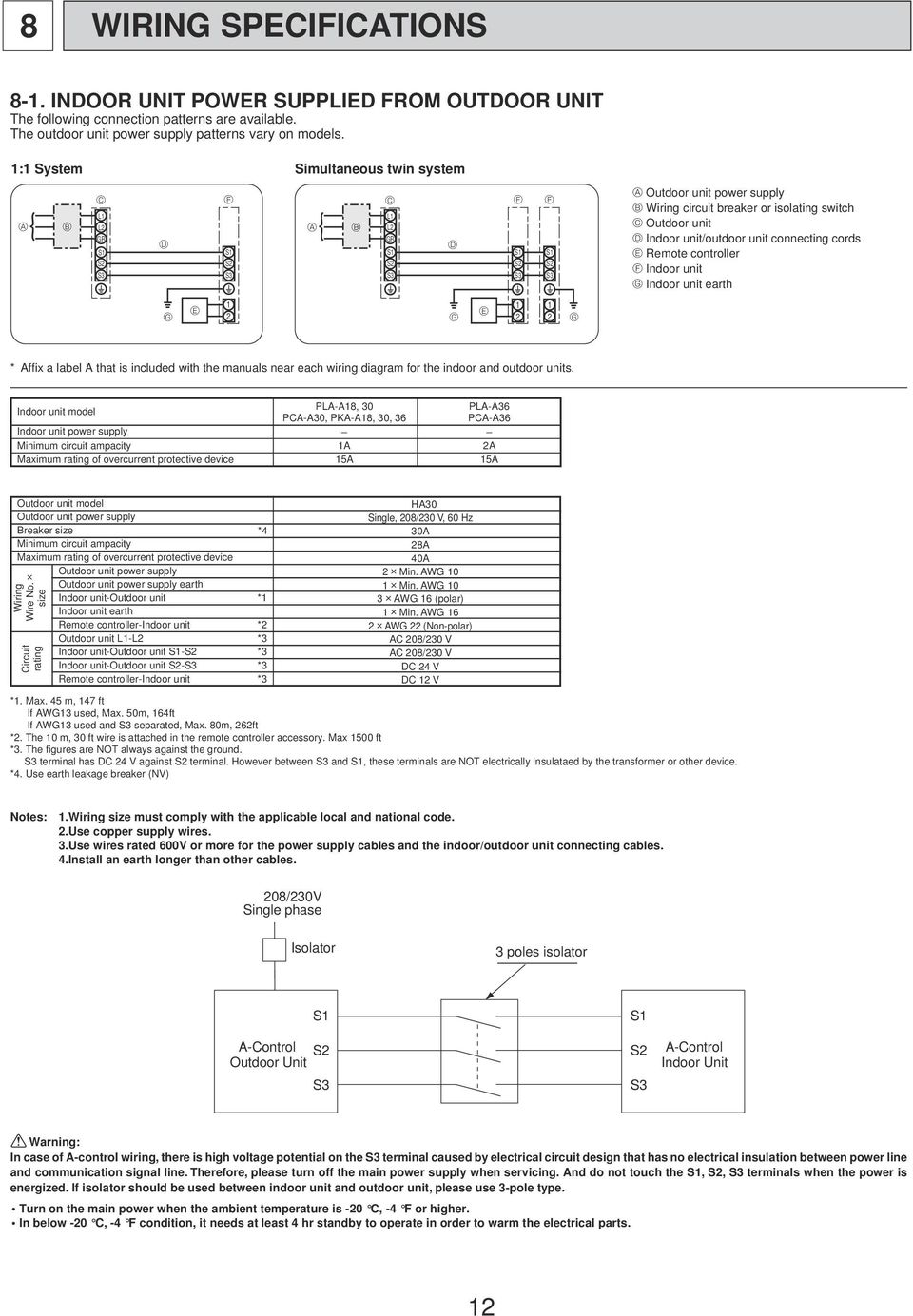
12 8 WIRING SPECIFICATIS 8-. INDOOR UNIT POWER SUPPLIED FROM OUTDOOR UNIT The following connection patterns are available. The outdoor unit power supply patterns vary on models. : System Simultaneous twin system L L GR S S S3 S S S3 L L GR S S S3 S S S3 S S S3 Outdoor unit power supply Wiring circuit breaker or isolating switch Outdoor unit Indoor unit/outdoor unit connecting cords Remote controller Indoor unit Indoor unit earth * Affix a label A that is included with the manuals near each wiring diagram for the indoor and outdoor units. Indoor unit model Indoor unit power supply Minimum circuit ampacity Maximum rating of overcurrent protective device PLA-A8, 30 PLA-A36 PCA-A30, PKA-A8, 30, 36 PCA-A36 A A 5A 5A Outdoor unit model Outdoor unit power supply Breaker size Minimum circuit ampacity Maximum rating of overcurrent protective device Outdoor unit power supply Outdoor unit power supply earth Wiring Wire No. size Circuit rating Indoor unit-outdoor unit * Indoor unit earth Remote controller-indoor unit * Outdoor unit L-L *3 Indoor unit-outdoor unit S-S *3 Indoor unit-outdoor unit S-S3 *3 Remote controller-indoor unit *3 *4 HA30 Single, 08/30 V, 60 Hz 30A 8A 40A Min. AWG 0 Min. AWG 0 3 AWG 6 (polar) Min. AWG 6 AWG (Non-polar) AC 08/30 V AC 08/30 V DC 4 V DC V *. Max. 45 m, 47 ft If AWG3 used, Max. 50m, 64ft If AWG3 used and S3 separated, Max. 80m, 6ft *. The 0 m, 30 ft wire is attached in the remote controller accessory. Max 500 ft *3. The figures are NOT always against the ground. S3 terminal has DC 4 V against S terminal. However between S3 and S, these terminals are NOT electrically insulataed by the transformer or other device. *4. Use earth leakage breaker (NV) Notes:.Wiring size must comply with the applicable local and national code..use copper supply wires. 3.Use wires rated 600V or more for the power supply cables and the indoor/outdoor unit connecting cables. 4.Install an earth longer than other cables. 08/30V Single phase Isolator 3 poles isolator A-Control Outdoor Unit S S S3 S S S3 A-Control Indoor Unit Warning: In case of A-control wiring, there is high voltage potential on the S3 terminal caused by electrical circuit design that has no electrical insulation between power line and communication signal line. Therefore, please turn off the main power supply when servicing. And do not touch the S, S, S3 terminals when the power is energized. If isolator should be used between indoor unit and outdoor unit, please use 3-pole type. Turn on the main power when the ambient temperature is -0 C, -4 F or higher. In below -0 C, -4 F condition, it needs at least 4 hr standby to operate in order to warm the electrical parts.
13 8-. SEPARATE INDOOR UNIT/OUTDOOR UNIT POWER SUPPLIES The following connection patterns are available. The outdoor unit power supply patterns vary on models. : System * The optional indoor power supply terminal kit is required. Outdoor unit power supply Wiring circuit breaker or isolating switch Outdoor unit Indoor unit/outdoor unit connecting cords L L Remote controller L L GR GR Indoor unit S S S S Indoor unit power supply Option S3 S3 * Affix a label B that is included with the manuals near each wiring diagram for the indoor and outdoor units. Simultaneous twin system L L GR S S S3 L L GR S S S3 L L GR S S S3 Outdoor unit power supply Wiring circuit breaker or isolating switch Outdoor unit Indoor unit/outdoor unit connecting cords Remote controller Indoor unit Indoor unit power supply Option Indoor unit earth *Affix a label B that is included with the manuals near each wiring diagram for the indoor and outdoor units. If the indoor and outdoor units have separate power supplies, refer to the table below. Change the indoor unit electrical box wiring refering to the figure in the right and the DIP switch settings of the outdoor unit control board. Indoor unit electrical box connector connection change Label affixed near each wiring diagram for the indoor and outdoor units Outdoor unit DIP switch settings (when using separate indoor unit/outdoor unit power supplies only) Indoor unit specifications Required Required 3 OFF (SW8) * There are three types of labels (labels A, B, and C). Affix the appropriate labels to the units according to the wiring method. L L GR S S S3 BLUE YELLOW BLUE YELLOW Indoor unit power supplied from outdoor unit (Initial setting) Connectors (connections when shipped from the factory are for indoor unit power supplied from outdoor unit) CN0 Indoor unit control board L L GR S S S3 BLUE YELLOW YELLOW BLUE If the indoor and outdoor units have separate power supplies, change the connections of the connectors as shown in the following figure. Connectors CN0 Indoor unit control board Separate indoor unit/outdoor unit power supplies Indoor unit model Indoor unit power supply Minimum circuit ampacity Maximum rating of overcurrent protective device Indoor unit power supply Indoor unit power supply earth Wiring Wire No. size Circuit rating Indoor unit-outdoor unit * Indoor unit earth Remote controller-indoor unit * Indoor unit L-L *3 Indoor unit-outdoor unit S-S *3 Indoor unit-outdoor unit S-S3 *3 Remote controller-indoor unit *3 *. Max. 50 m, 65 ft *. The 0 m, 30 ft wire is attached in the remote controller accessory. Max. 500 m, 500 ft *3. The figures are NOT always against the ground. Notes:. Wiring size must comply with the applicable local and national code.. Use copper supply wires. 3. Use wires rated 300V or more for the power supply cables. 4. Install an earth longer than other cables. PLA-A8, 30 PCA-A30, PKA-A8 PLA-A36, PCA-A36 Single 08/30 V, 60 Hz Single 08/30 V, 60 Hz A A 5A 5A Min. AWG6 Min. AWG6 Min. AWG6 Min. AWG6 AWG (polar) AWG (polar) AWG (Non-polar) AWG (Non-polar) AC 08/30 V AC 08/30 V DC4 V DC4 V DC V DC V 3

14 8-3. INDOOR OUTDOOR CNECTING CABLE Wire No. Size Outdoor power supply Max. 45m, 47ft Max. 50m, 64ft Max. 80m, 6ft Indoor unit-outdoor unit 3 AWG5(polar) 3 AWG3(polar) 3 AWG3(polar) and S3 separated The Max. cable length may vary depending on the condition of installation, humidity or materials, etc. Indoor/Outdoor separate power supply Indoor unit-outdoor unit The optional indoor power supply terminal kit is necessary. Wire No. Size Max. 0m, 393ft Min. AWG Be sure to connect the indoor-outdoor connecting cables directly to the units (no intermediate connections). Intermediate connections can lead to communication errors if water enters the cables and causes insufficient insulation to ground or a poor electrical contact at the intermediate connection point M-NET WIRING METHOD (Points to notice) () Outside the unit, transmission wires should stay away from electric wires in order to prevent electromagnetic noise from making an influence on the signal communication. Place them at intervals of more than 5cm. Do not put them in the same conduit tube. () Terminal block (TB7) for transmission wires should never be connected to 08/30V power supply. If it is connected, electronic parts on M-NET P.C. board may be burnt out. (3) Use -core x.5mm [AWG6] shield wire (CVVS, CPEVS) for the transmission wire. Transmission signals may not be sent or received normally if different types of transmission wires are put together in the same multi-conductor cable. Never do this because this may cause a malfunction. Group remote controller Power supply unit for transmission wire Refrigerant address 00 M-NET address 0 Refrigerant address 00 M-NET address 0 Refrigerant address 00 M-NET address 03 A-control A-control A-control remote remote remote controller controller controller It would be ok if M-NET wire (non-polar, -cores) is arranged in addition to the wiring for A-control. (4) Ground only one of any appliances through M-NET transmission wire (shield wire). Communication error may occur due to the influence of electromagnetic noise. Ed error will appear on the LED display of outdoor unit error will appear on the central-control remote controller. Bad example (Multi spot grounding of shield wire) Central remote controller Power supply appliance M-NET type outdoor unit M-NET type outdoor unit M-NET type outdoor unit M-NET transmission wire Good example (Single spot grounding of shield wire) Central remote controller Power supply appliance M-NET type outdoor unit M-NET type outdoor unit M-NET type outdoor unit M-NET transmission wire Good example (Single spot grounding of shield wire) Central remote controller Power supply appliance M-NET type outdoor unit M-NET type outdoor unit M-NET type outdoor unit M-NET transmission wire If there are more than grounding spots on the shield wire, noise may enter into the shield wire because the ground wire and shield wire form one circuit and the electric potential difference occurs due to the impedance difference among grounding spots. In case of single spot grounding, noise does not enter into the shield wire because the ground wire and shield wire do not form circuit. To avoid communication errors caused by noise, make sure to observe the single spot grounding method described in the installation manual. 4

15 M-NET wiring () Use -core x.5mm [AWG6] shield wire for electric wires. (Excluding the case connecting to system controller.) () Connect the wire to the M-NET terminal block. Connect one core of the transmission wire (non-polar) to A terminal and the other to B. Peel the shield wire, twist the shield part to a string and connect it to S terminal. (3) In the system which several outdoor units are being connected, the terminal (A(M), B(M), S) on M-NET terminal block should be individually wired to the other M-NET address setting In A-control models, M-NET address and refrigerant address should be set only for the outdoor unit. Similar to CITY MULTI series, there is no need to set the address of outdoor unit and remote controller. To construct a central control system, the setting of M-NET address should be conducted only upon the outdoor unit. The setting range should be to 50 (the same as that of the indoor unit in CITY MULTI system), and the address number should be consecutively set in a same group. Address number can be set by using rotary switches (SW for ones digit and SW for tens digit), which is located on the M-NET board of outdoor unit. (Initial setting: all addresses are set to 0.) <Setting example> M-NET Address No. Switching setting Refrigerant address setting In case of multiple grouping system (multiple refrigerant circuits in one group), indoor units should be connected by remote controller wiring (TB5) and the refrigerant address needs to be set. Leave the refrigerant addresses to 00 if the group setting is not conducted. Set the refrigerant address by using DIP SW-3 to -6 on the outdoor controller board. [Initial setting: all switches are OFF. (All refrigerant addresses are 00.)] SW ones digit SW tens digit M-NET terminal block 7890 A B S Transmission wire Shield part ~ Ground wire outdoor unit s terminal, i.e. A to A, B to B and S to S. In this case, choose one of those outdoor units and drive a screw to fix an ground wire on the plate as shown on the right figure. 50 Refrigerant address OFF OFF OFF OFF OFF OFF OFF OFF OFF OFF OFF OFF OFF OFF OFF OFF Regulations in address settings In case of multiple grouping system, M-NET and refrigerant address settings should be done as explained in the above section. Set the lowest number in the group for the outdoor unit whose refrigerant address is 00 as its M-NET address. Group A Group B Group C System controller Power supply unit for transmission wire Refrigerant address 00 M-NET address 0 A-control remote controller Refrigerant address 00 M-NET address 0 A-control remote controller TB5 Refrigerant address 0 M-NET address 03 Refrigerant address 00 M-NET address 04 A-control remote controller w Refrigerant addresses can be overlapped if they are in the different group. Group A Group B System controller Power supply unit for transmission wire Refrigerant address 00 M-NET address 0 Refrigerant address 0 M-NET address 0 TB5 Refrigerant address 00 M-NET address 04 Refrigerant address 0 M-NET address 03 Refrigerant address 0 M-NET address 05 A-control remote controller A-control remote controller w In group B, M-NET address of the outdoor unit whose refrigerant address is 00 is not set to the minimum in the group. As 03 is right for this situation, the setting is wrong. Taking group A as a good sample, set the minimum M-NET address in the group for the outdoor unit whose refrigerant address is 00. 5

16 9 REFRIGERANT SYSTEM DIAGRAM PUZ-HA30NHA4 PUZ-HA36NHA4 unit : mm (inch) Refrigerant GAS pipe connection 5.88(5/8) Ball valve Strainer #50 Charge plug (Low pressure) Solenoid valve (Four-way valve) Strainer #00 Charge plug (High pressure) Low pressure switch 63L Muffler High pressure switch 63H Thermistor TH3 (Outdoor pipe) Thermistor TH4 (Discharge) Heat exchanger Strainer #00 Thermistor TH7 (Outdoor) Thermistor TH6 (Outdoor -phase pipe) Thermistor TH3 (Outdoor pipe) Distributor Thermistor TH33 (Outdoor pipe) Strainer #00 Strainer #00 Linear expansion valve A Linear expansion valve B Power receiver Compressor Injection port Refrigerant LIQUID pipe connection 9.5 (3/8) Stop valve Strainer #00 (with service port) Linear expansion valve C Heat inter change circuit Refrigerant flow in cooling Refrigerant flow in heating Refrigerant recovering (pump down) Perform the following procedures to recover the refrigerant when moving the indoor unit or the outdoor unit. Turn on the power supply (circuit breaker). wwhen power is supplied, make sure that CENTRALLY CTROLLED is not displayed on the remote controller. If CENTRALLY CTROLLED is displayed, the refrigerant recovering (pump down) cannot be completed normally. After the liquid stop valve is closed, set the SWP switch on the control board of the outdoor unit to. The compressor (outdoor unit) and ventilators (indoor and outdoor units) start operating and refrigerant collecting operation begins. LED and LED on the control board of the outdoor unit are lit. wset the SWP switch (push-button type) to in order to perform refrigerant recovering operation only when the unit is stopped. However, refrigerant recovering operation cannot be performed until compressor stops even if the unit is stopped. Wait 3 minutes until compressor stops and set the SWP switch to again. 3 Because the unit automatically stops in about to 3 minutes after the refrigerant collecting operation (LED is not lit and LED is lit), be sure to quickly close the gas stop valve. win case the outdoor unit is stopped when LED is lit and LED is not lit, open the liquid stop valve completely, and then repeat step 3 minutes later. wif the refrigerant collecting operation has been completed normally (LED is not lit and LED is lit), the unit will remain stopped until the power supply is turned off. 4 Turn off the power supply (circuit breaker). 6

17 0 TROUBLESHOOTING 0-. TROUBLESHOOTING <Error code display by self-diagnosis and actions to be taken for service (summary)> Present and past error codes are logged and displayed on the wired remote controller and control board of outdoor unit. Actions to be taken for service, which depends on whether or not the trouble is reoccurring at service, are summarized in the table below. Check the contents below before investigating details. Unit conditions at service Error code Actions to be taken for service (summary) The trouble is reoccurring. The trouble is not reoccurring. Displayed Not displayed Logged Judge what is wrong and take a corrective action according to 0-4. Self-diagnosis action table. Conduct trouble shooting and ascertain the cause of the trouble according to 0-5. Troubleshooting by inferior phenomena. Consider the temporary defects such as the work of protection devices in the refrigerant circuit including compressor, poor connection of wiring, noise and etc. Re-check the symptom, and check the installation environment, refrigerant amount, when the trouble occurred, matters related to wiring and etc. Reset error code logs and restart the unit after finishing service. There is no abnormality concerning of parts such as electrical component, controller board, remote controller and etc. Not logged Re-check the abnormal symptom. Conduct trouble shooting and ascertain the cause of the trouble according to 0-5. Troubleshooting by inferior phenomena. Continue to operate unit for the time being if the cause is not ascertained. There is no abnormality concerning of parts such as electrical component, controller board, remote controller and etc. 0-. CHECK POINT UNDER TEST RUN () Before test run After installation of indoor and outdoor units, piping work and electric wiring work, re-check that there is no refrigerant leakage, loosened connections and incorrect polarity. Measure impedance between the ground and the power supply terminal block (L, L) on the outdoor unit by 500V Megger and check that it is.0m" or over. wdo not use 500V Megger to indoor/outdoor connecting wire terminal block (S, S, S3) and remote controller terminal block (, ). This may cause malfunction. Make sure that test run switch (SW4) is set to OFF before turning on power supply. Turn on power supply hours before test run in order to protect compressor. For specific models which requires higher ceiling settings or auto-recovery feature from power failure, make proper changes of settings referring to the description of. FUNCTI SETTING". Make sure to read operation manual before test run. (Especially items to secure safety.) 7

18 "TEST RUN" and the currently selected operation mode are displayed altemately. Displays the remaining test run time. F [TEST] button Pipe (liquid) temperature Operating procedures. Turn on the main power supply.. Press TEST button twice. 3. Press OPERATI SWITCH button. While the room temperature display on the remote controller is PLEASE WAIT, the remote controller is disabled. Wait until PLEASE WAIT disappears before using remote controller. PLEASE WAIT appears for about minutes after power supply is turned on. The TEST RUN appears on the screen. Cooling mode: Check if cool air blows and water is drained. Heating mode: Check if warm air blows. (It takes a little while until warm air blows.) 4. Press AIR DIRECTI button. Check for correct motion of auto-vanes. 5. Check the outdoor unit fan for The outdoor unit features automatic capacity control to correct running. provide optimum fan speeds. Therefore, the fan keeps running at a low speed to meet the current outside air condition unless it exceeds its available maximum power. Then, in actuality, the fan may stop or run in the reverse direction depending on the outside air, but this does not mean malfunction. 6. Press the /OFF button to reset the test run in progress. 7. Register the contact number. In case of test run, the OFF timer will be activated, and the test run will automatically stop after hours. The room temperature display section shows the pipe temperature of indoor units during the test run. Check that all the indoor units are running properly in case of simultaneous twin operation. Malfunctions may not be displayed regardless of incorrect wiring. w After turning on the power supply, the system will go into startup mode, PLEASE WAIT will blink on the display section of the room temperature, and lamp(green) of the remote controller will blink. As to INDOOR BOARD LED, LED will be lit up, LED will either be lit up in case the address is 0 or turned off in case the address is not 0. LED3 will blink. As to OUTDOOR BOARD LED, LED(green) and LED(red) will be lit up. (After the startup mode of the system finishes, LED(red) will be turned off.) In case OUTDOOR BOARD LED is digital display, and will be displayed alternately every second. If one of the above operations doesn t function correctly, the causes written below should be considered. Find causes from the symptoms. The below symptoms are under test run mode. startup in the table means the display status of w written above. Symptoms in test run mode Remote Controller Display Remote controller displays PLEASE WAIT, and cannot be operated. After power is turned on, PLEASE WAIT is displayed for 3 minutes, then error code is displayed. No display appears even when remote controller operation switch is turned on. (Operation lamp does not light up.) Display appears but soon disappears even when remote controller is operated. OUTDOOR BOARD LED Display < > indicates digital display. After startup is displayed, only green lights up. <00> After startup is displayed, green (once) and red (once) blink alternately. <F> After startup is displayed, green (once) and red (twice) blink alternately. <F3, F5, F9> After startup is displayed, green (twice) and red (once) blink alternately. <EA. Eb> After startup is displayed, only green lights up. <00> After startup is displayed, only green lights up. <00> Cause After power is turned on, PLEASE WAIT is displayed for minutes during system startup. (Normal) Incorrect connection of outdoor terminal block (L, L, and S, S, S3.) Outdoor unit s protection device connector is open. Incorrect wiring between the indoor and outdoor unit (Polarity is wrong for S, S, S3.) Remote controller transmission wire short There is no outdoor unit of address 0. (Address is other than 0.) Remote controller transmission wire open After canceling function selection, operation is not possible for about 30 seconds. (Normal) w Press the remote controller s CHECK button twice to perform self-diagnosis. See the table below for the contents of LCD display. LCD Contents of inferior phenomena LCD Contents of inferior phenomena P P P4 P5 P6 P8 P9 Fb Abnormality of room temperature thermistor Abnormality of pipe temperature thermistor/liquid Abnormality of drain sensor/float switch connector open Drain overflow protection is working. Freezing/overheating protection is working. Abnormality of pipe temperature Abnormality of pipe temperature thermistor/cond./eva Abnormality of indoor controller board U~UP F3~F9 E0~E5 E6~EF ---- FFFF PA Malfunction outdoor unit Malfunction outdoor unit Remote controller transmitting error Indoor/outdoor unit communication error No error history No applied unit Forced compressor stop(due to water leakage abnormality) See the table below for details of the LED display (LED,, 3) on the indoor controller board. LED (microcomputer power supply) Lits when power is supplied. Lits when power is supplied for wired remote controller. LED (remote controller) The indoor unit should be connected to the outdoor unit with address 0 setting. LED3 (indoor/outdoor communication) Blinks when indoor and outdoor unit are communicating. 8

19 , COOL /OFF MODE CHECK TEST RUN SET FAN VANE LOUVER RESET TEST RUN TEMP CLOCK AUTO STOP AUTO START h min Test run [for IR wireless remote controller] Measure an impedance between the power supply terminal block on the outdoor unit and ground with a 500V Megger and check that it is equal to or greater than.0m". Turn on the main power to the unit. Press the TEST RUN button twice continuously. (Start this operation from the turned off status of remote controller display.) TEST RUN and current operation mode are displayed. 3 Press the MODE ( ) button to activate COOL mode, then check whether cool air is blown out from the unit. 4 Press the MODE ( ) button to activate HEAT mode, then check whether warm air is blown out from the unit. FAN 5 Press the button and check whether strong air is blown out from the unit. 6 Press the VANE button and check whether the auto vane operates properly. 7 Press the /OFF button to stop the test run. Note: Point the remote controller towards the indoor unit receiver while following steps to 7. It is not possible to run in FAN, DRY or AUTO mode. Start and finish of test run [For outdoor controller board] Operation from the indoor unit Execute the test run using the installation manual for the indoor unit. Operation from the outdoor unit By using the DIP switch SW4 on the control board of outdoor unit, test run can be started and finished, and its operation mode (cooling/heating) can be set up. Set the operation mode (cooling/heating) using SW4-. Turn on SW4- to start test run with the operation mode set by SW4-. <SW4> 3Turn off SW4- to finish the test run. There may be a faint knocking sound around the machine room after power is supplied, but this is no problem with product because the linear expansion pipe is just moving to adjust opening pulse. There may be a knocking sound around the machine room for several seconds after compressor starts operating. But this is not a problem with product because the check valve itself generates the sound because pressure difference is small in the refrigerant circuit. Note: The operation mode cannot be changed by SW4- during test run. (To change test run mode, stop the unit by SW4-, change the operation mode and restart the test run by SW4-.) OFF Stop Cooling Operation Heating 9

20 0-3. HOW TO PROCEED "SELF-DIAGNOSIS" When a Problem Occurs During Operation If a problem occurs in the air conditioner, the indoor and outdoor units will stop, and the problem is shown in the remote controller display. [CHECK] and the refrigerant address are displayed on the temperature display, and the error code and unit number are displayed alternately as shown below. (If the outdoor unit is malfunctioning, the unit number will be "00".) In case of group control, for which remote controller controls multiple refrigerant systems, the refrigerant address and error code of the unit that first experienced trouble (i.e., the unit that transmitted the error code) will be displayed. To clear the error code, press the /OFF button. (Alternating Display) Error code ( or 4 digits) Address (3 digits) or unit number ( digits) When using remote-/local-controller combined operation, cancel the error code after turning off remote operation. During central control by a MELANS controller, cancel the error code by pressing the /OFF button Self-Diagnosis During Maintenance or Service Since each unit has a function that stores error codes, the latest check code can be recalled even if it is cancelled by the remote controller or power is turned off. Check the error code history for each unit using the remote controller. Switch to self-diagnosis mode. Press the CHECK button twice within 3 seconds. The display content will change as shown below. Set the unit number or refrigerant address you want to diagnose. Press the [TEMP] buttons ( and ) to select the desired number or address. The number (address) changes between [0] and [50] or [00] and [5]. Unit number or refrigerant address to be diagnosed The refrigerant address will begin to blink approximately 3 seconds after being selected and the self-diagnosis process will begin. Display self-diagnosis results. <When there is error code history> (For the definition of each error code, refer to the indoor unit's installation manual or service handbook.) (Alternating Display) Error code ( or 4 digits) <When there is no error code history> Address (3 digits) or unit number ( digits) <When there is no corresponding unit> Reset the error history. Display the error history in the diagnosis result display screen (see step ). 0
![[CHECK] and the refrigerant address are displayed on the temperature display, and the error code and unit number are displayed alternately as shown below.](/docs-images/44/17962009/images/page_20.jpg "(If the outdoor unit is malfunctioning, the unit number will be \"00\".")
21 Press the /OFF button twice within 3 seconds. The self-diagnosis address or refrigerant address will blink. When the error history is reset, the display will look like the one shown below. However, if you fail to reset the error history, the error content will be displayed again. Cancel self-diagnosis. Self-diagnosis can be cancelled by the following methods. Press the CHECK button twice within 3 seconds. Self-diagnosis will be cancelled and the screen will return to the previous state in effect before the start of self-diagnosis. Press the /OFF button. Self-diagnosis will be cancelled and the indoor unit will stop Remote Controller Diagnosis If the air conditioner cannot be operated from the remote controller, diagnose the remote controller as explained below. First, check that the power-on indicator is lit. If the correct voltage (DC V) is not supplied to the remote controller, the indicator will not light. If this occurs, check the remote controller's wiring and the indoor unit. Power on indicator Switch to the remote controller self-diagnosis mode. Press the CHECK button for 5 seconds or more. The display content will change as shown below. Press the FILTER button to start self-diagnosis. Remote controller self-diagnosis result [When the remote controller is functioning correctly] [When the remote controller malfunctions] (Error display ) "NG" blinks. The remote controller's transmitting-receiving circuit is defective. Check for other possible causes, as there is no problem with the remote controller. The remote controller must be replaced with a new one. [Where the remote controller is not defective, but cannot be operated.] (Error display ) [E3], [6833] or [683] blinks. Transmission is not possible. (Error display 3) "ERC" and the number of data errors are displayed. Data error has occurred. There might be noise or interference on the transmission path, or the indoor unit or other remote controllers are defective. Check the transmission path and other controllers. The number of data errors is the difference between the number of bits sent from the remote controller and the number actually transmitted through the transmission path. If such a problem is occurring, the transmitted data is affected by noise, etc. Check the transmission path. When the number of data errors is "0": Transmission data from remote controller Transmission data on transmission path To cancel remote controller diagnosis Press the CHECK button for 5 seconds or more. Remote controller diagnosis will be cancelled, "PLEASE WAIT" and operation lamp will blink. After approximately 30 seconds, the state in effect before the diagnosis will be restored.
22 Malfunction-diagnosis method by IR wireless remote controller <In case of trouble during operation> When a malfunction occurs to air conditioner, both indoor unit and outdoor unit will stop and operation lamp blinks to inform unusual stop. <Malfunction-diagnosis method at maintenance service> CHECK display /OFF button CHECK button /OFF MODE CHECK TEST RUN SET CHECK FAN VANE LOUVER RESET TEMP CLOCK AUTO STOP AUTO START h min Refrigerant address display Temperature button HOUR button [Procedure]. Press the CHECK button twice.. Press the temperature buttons. 3. Point the remote controller at the sensor on the indoor unit and press the HOUR button. "CHECK" lights, and refrigerant address "00" blinks. Check that the remote controller's display has stopped before continuing. Select the refrigerant address of the indoor unit for the self-diagnosis. Note: Set refrigerant address using the outdoor unit s DIP switch (SW). (For more information, see the outdoor unit installation manual.) If an air conditioner error occurs, the indoor unit's sensor emits an intermittent buzzer sound, the operation lamp blinks, and the error code is output. (It takes 3 seconds at most for error code to appear.) 4. Point the remote controller at the sensor on the indoor unit and press the /OFF button. The check mode is cancelled.
23 Refer to the following tables for details on the check codes. [Output pattern A] Beeper sounds OPERATI INDICATOR lamp blink pattern [Output pattern B] Beeper sounds OPERATI INDICATOR lamp blink pattern Beep Beep Beep Beep Beep Beep Beep Self-check starts (Start signal received) Beep Beep Beep Beep Beep Beep Beep Self-check starts (Start signal received) Off On On On Approx..5 sec. 0.5 sec. 0.5 sec. 0.5 sec. Off Approx..5 sec. st nd 3 rd n th st nd On Approx. 3 sec. st nd 3 rd n th st nd On 0.5 sec. On 0.5 sec. Number of blinks/beeps in pattern indicates the check code in the following table (i.e., n=5 for P5 ) Off On Approx..5 sec. 0.5 sec. On On 0.5 sec. 0.5 sec. On 0.5 sec. On 0.5 sec. Off Approx..5 sec. Number of blinks/beeps in pattern indicates the check code in the following table (i.e., n=5 for U ) Repeated Number of blinks/beeps in pattern indicates the check code in the following table On Approx. 3 sec. On 0.5 sec. On 0.5 sec. Repeated Number of blinks/beeps in pattern indicates the check code in the following table [Output pattern A] Errors detected by indoor unit IR wireless remote controller Wired remote controller Beeper sounds/operati INDICATOR lamp blinks Check code Symptom (Number of times) P Intake sensor error P Pipe (TH) sensor error P9 Pipe (TH5) sensor error 3 E6,E7 Indoor/outdoor unit communication error 4 P4 Drain sensor error / Float switch connector open 5 P5 Drain pump error PA Forced compressor stop(due to water leakage abnormality) 6 P6 Freezing/ Overheating protection operation 7 EE Communication error between indoor and outdoor units 8 P8 Pipe temperature error 9 E4, E5 Remote controller signal receiving error 0 Fb Indoor unit control system error (memory error, etc.) E0, E3 Remote controller transmission error E, E Remote controller control board error Remark As for indoor unit, refer to indoor unit's service manual. [Output pattern B] Errors detected by unit other than indoor unit (outdoor unit, etc.) IR wireless remote controller Wired remote controller Beeper sounds/operati INDICATOR lamp blinks Check code Symptom (Number of times) E9 Indoor/outdoor unit communication error (Transmitting error) (Outdoor unit) UP Compressor overcurrent interruption 3 U3,U4 Open/short of outdoor unit thermistors 4 UF Compressor overcurrent interruption (When compressor locked) 5 U Abnormal high discharging temperature/ 49C worked/ insufficient refrigerant 6 U,Ud Abnormal high pressure (63H worked)/ Overheating protection operation 7 U5 Abnormal temperature of heatsink 8 U8 Outdoor unit fan protection stop 9 U6 Compressor overcurrent interruption/abnormal of power module U9,UH Abnormality such as overvoltage or voltage shortage and abnormal synchronous signal to main circuit/current sensor error 3 4 Others Other errors * If the beeper does not sound again after the initial beeps to confirm the self-check start signal was received and the OPERATI INDICATOR lamp does not come on, there are no error records. * If the beeper sounds 3 times continuously beep, beep, beep ( sec.) after the initial beeps to confirm the self-check start signal was received, the specified refrigerant address is incorrect. Remark For details, check the LED display of the outdoor controller board. 3
24 0-4. SELF-DIAGNOSIS ACTI TABLE <Abnormalities detected when the power is turned on> (Note ) Refer to indoor unit section for code P and code E. Error Code Abnormal point and detection method Case Judgment and action No voltage is supplied to terminal block(tb) of outdoor unit. a) Power supply breaker is turned off. b) Contact failure or disconnection of power supply terminal c) Open phase (L or L phase) Check following items. a) Power supply breaker b) Connection of power supply terminal block (TB) c) Connection of power supply terminal block (TB) None Electric power is not charged to power supply terminal of outdoor power circuit board. a) Contact failure of power supply terminal b) Open phase on the outdoor power circuit board Disconnection of connector TABT or TABS 3 Electric power is not supplied to outdoor controller circuit board. a) Disconnection of connector (CNDC) 4 Disconnection of reactor (DCL) Check following items. a) Connection of power supply terminal block (TB) b) Connection of terminal on outdoor power circuit board Disconnection of connector TABT or TABS Refer to Check connection of the connector (CNDC) on the outdoor controller circuit board. Check connection of the connector, CNDC, on the outdoor power circuit board. Refer to Check connection of reactor. (DCL) Check connection of L and L on the active filter module.(actm) Refer to Disconnection of outdoor noise filter circuit board or parts failure in outdoor noise filter circuit board It is especially needed to check the resistance RS on the noise filter circuit board. 5 a) Check connection of outdoor noise filter circuit board. b) Replace outdoor noise filter circuit board. Refer to Defective outdoor power circuit board 7 Defective outdoor controller circuit board 6 Replace outdoor power circuit board. 7 Replace controller board (When items above are checked but the units cannot be repaired). F3 (50) 63L connector open Abnormal if 63L connector circuit is open for 3 minutes continuously after power supply. 63L: Low-pressure switch Disconnection or contact failure of 63L connector on outdoor controller circuit board Disconnection or contact failure of 63L 3 63L is working due to refrigerant leakage or defective parts. 4 Defective outdoor controller circuit board Check connection of 63L connector on outdoor controller circuit board. Refer to 0-9. Check the 63L side of connecting wire. 3 Check refrigerant pressure. Charge additional refrigerant. Check continuity by tester. Replace the parts if the parts are defective. 4 Replace outdoor controller circuit board. 4
25 Error Code Abnormal point and detection method Case Judgment and action F5 (50) 63H connector open Abnormal if 63H connector circuit is open for 3 minutes continuously after power supply. 63H: High-pressure switch Disconnection or contact failure of 63H connector on outdoor controller circuit board Disconnection or contact failure of 63H 3 63H is working due to defective parts. 4 Defective outdoor controller circuit board Check connection of 63H connector on outdoor controller circuit board. Refer to 0-9. Check the 63H side of connecting wire. 3 Check continuity by tester. Replace the parts if the parts are defective. 4 Replace outdoor controller circuit board. F9 (49) connector open Abnormal if both 63H and 63L connector circuits are open for 3 minutes continuously after power supply. 63H: High-pressure switch 63L: Low-pressure switch Disconnection or contact failure of connector (63H,63L) on outdoor controller circuit board. Disconnection or contact failure of 63H, 63L 3 63H and 63L are working due to defective parts. 4 Defective outdoor controller board Check connection of connector(63h,63l) on outdoor controller circuit board. Refer to 0-9. Check the 63H and 63L side of connecting wire. 3 Check continuity by tester. Replace the parts if the parts are defective. 4 Replace outdoor controller circuit board. EA (6844) Eb (6845) Indoor/outdoor unit connector miswiring, excessive number of units (4 units or more). Outdoor controller circuit board can automatically check the number of connected indoor units. Abnormal if the number cannot be checked automatically due to miswiring of indoor/outdoor unit connecting wire and etc. after power is turned on for 4 minutes.. Abnormal if outdoor controller circuit board recognizes the number of connected indoor units as 4 units or more. Miswiring of indoor/outdoor unit connecting wire (converse wiring or disconnection) Outdoor controller circuit board can automatically set the unit number of indoor units. Abnormal if the indoor unit number cannot be set within 4 minutes after power on because of miswiring (converse wiring or disconnection) of indoor/outdoor unit connecting wire. Contact failure or miswiring of indoor/outdoor unit connecting wire Diameter or length of indoor/ outdoor unit connecting wire is out of specified capacity. 3 4 or more indoor units are connected to outdoor unit. 4 Defective transmitting receiving circuit of outdoor controller circuit board 5 Defective transmitting receiving circuit of indoor controller board 6 Defective indoor power board 7 or more outdoor units have refrigerant address 0. (In case of group control) 8 Noise has entered into power supply or indoor/outdoor unit connecting wire. Contact failure or miswiring of indoor/outdoor unit connecting wire Diameter or length of indoor/ outdoor unit connecting wire is out of specified capacity. 4 Defective transmitting receiving circuit of outdoor controller circuit board 5 Defective transmitting receiving circuit of indoor controller board 6 Defective indoor power board 7 or more outdoor units have refrigerant address 0. (In case of group control) 8 Noise has entered into power supply or indoor/outdoor unit connecting wire. Check disconnection or looseness or polarity of indoor/outdoor unit connecting wire of indoor and outdoor units. Check diameter and length of indoor/outdoor unit connecting wire. Total wiring length: 80m (including wiring connecting each indoor unit and between indoor and outdoor unit) Also check if the connection order of flat cable is S, S, S3. 3 Check the number of indoor units that are connected to one outdoor unit. (If EA is detected) 4~6 Turn the power off once, and on again to check. Replace outdoor controller circuit board, indoor controller board or indoor power board if abnormality occurs again. 7 Check if refrigerant addresses (SW-3 to SW-6 on outdoor controller circuit board) are overlapping in case of group control system. 8 Check transmission path, and remove the cause. w The descriptions above -8 are for EA, Eb and EC. EC (6846) Start-up time over The unit cannot finish start-up process within 4 minutes after power on. Contact failure of indoor/ outdoor unit connecting wire Diameter or length of indoor/ outdoor unit connecting wire is out of specified capacity. 7 or more outdoor units have refrigerant address 0. (In case of group control) 8 Noise has entered into power supply or indoor/outdoor unit connecting wire. 5
26 <Abnormalities detected while unit is operating> Error Code Abnormal point and detection method Case Judgment and action High pressure (High-pressure switch ~6 Check indoor unit and repair defect. 63H worked) Abnormal if high-pressure switch 63H worked ( w ) during compressor operation. w 4.5 MPa [60PSIG] U (30) 63H: High-pressure switch Short cycle of indoor unit Clogged filter of indoor unit 3 Decreased airflow caused by dirt of indoor fan 4 Dirt of indoor heat exchanger 5 Locked indoor fan motor 6 Malfunction of indoor fan motor 7 Defective operation of stop valve (Not full open) 8 Clogged or broken pipe 9 Locked outdoor fan motor 0 Malfunction of outdoor fan motor Short cycle of outdoor unit Dirt of outdoor heat exchanger 3 Decreased airflow caused by defective inspection of outside temperature thermistor (It detects lower temperature than actual temperature.) 4 Disconnection or contact failure of connector (63H) on outdoor controller board 5 Disconnection or contact failure of 63H connection 6 Defective outdoor controller board 7 Defective action of linear expansion valve 8 Malfunction of fan driving circuit 7 Check if stop valve is fully open. 8 Check piping and repair defect. 9~ Check outdoor unit and repair defect. 3 Check the detected temperature of outside temperature thermistor on LED display. (SW on A-Control Service Tool : Refer to 0-0.) 4~6 Turn the power off and check F5 is displayed when the power is on again. When F5 is displayed, refer to Judgment and action for F5. 7 Check linear expansion valve. Refer to Replace outdoor controller board. U (0) High discharging temperature () Abnormal if discharge temperature thermistor (TH4) exceeds 5: [57 F] or 0: [30 F] continuously for 5 minutes. Abnormal if condenser/evaporator temperature thermistor (TH5) exceeds 40: [04 F] during defrosting and discharge temperature thermistor (TH4) exceeds 0: [30 F]. () Abnormal if discharge superheat (Cooling: TH4 TH5 / Heating: TH4 TH6) exceeds 70degC [6degF]. Overheated compressor operation caused by shortage of refrigerant Defective operation of stop valve 3 Defective thermistor 4 Defective outdoor controller board 5 Defective action of linear expansion valve 6 Clogging with foreign objects in refrigerant circuit. wclogging occurs in the parts which become below freezing point when water enters in the refrigerant circuit. Check intake superheat. Check leakage of refrigerant. Charge additional refrigerant. Check if stop valve is fully open. 34 Turn the power off and check if U3 is displayed when the power is on again. When U3 is displayed, refer to Judgement and action for U3. 5 Check linear expansion valve. Refer to After recovering refrigerant, remove water from entire refrigerant circuit under vacuum more than hour. 6
27 Error Code Abnormal point and detection method Case Judgment and action U3 (504) U4, TH3, TH33 (TH3:505) (TH6:507) (TH7:506) (TH8:50) Open/short circuit of discharge temperature thermistor (TH4) Abnormal if open (3: [37 F] or less) or short (7: [4 F] or more) is detected during compressor operation. (Detection is inoperative for 0 minutes of compressor starting process and for 0 minutes after and during defrosting.) Open/short of outdoor unit thermistors (TH3, TH3, TH33, TH6, TH7, and TH8) Abnormal if open or short is detected during compressor operation. Open detection of thermistors TH3,TH3,TH33 and TH6 is inoperative for 0 seconds to 0 minutes after compressor starting and 0 minutes after and during defrosting. WCheck which unit has abnormality in its thermistor by switching the mode of SW. (PAC-SK5ST) (Refer to -0.) Disconnection or contact failure of connector (TH4) on the outdoor controller circuit board Defective thermistor 3 Defective outdoor controller circuit board Disconnection or contact failure of connectors ( Outdoor controller circuit board: TH3, TH3, TH33,TH7/TH6 Outdoor power circuit board: CN3 Defective thermistor 3 Defective outdoor controller circuit board ( Check connection of connector (TH4) on the outdoor controller circuit board. Check breaking of the lead wire for thermistor (TH4). Refer to 0-9. Check resistance value of thermistor (TH4) or temperature by microcomputer. (Thermistor/TH4: Refer to 0-6.) (SW on A-Control Service Tool: Refer to 0-0.) 3 Replace outdoor controller board. Check connection of connector (TH3,TH,3,TH33,TH7/6) on the outdoor controller circuit board. Check connection of connector (CN3) on the outdoor power circuit board. Check breaking of the lead wire for thermistor (TH3,TH3,TH33,TH6,TH7,TH8). Refer to 0-9. Check resistance value of thermistor (TH3,T H3,TH33,TH6,TH7,TH8) or check temperature by microcomputer. (Thermistor/TH3,TH6,TH7,TH8: Refer to 0-6.) (SW on A-Control Service Tool: Refer to 0-0.) 3 Replace outdoor controller circuit board. WEmergency operation is available in case of abnormalities of TH3,TH3,TH33,TH6 and TH7. Refer to 0-8. U5 (430) U6 (450) U7 (50) Symbol TH3,TH3,TH33 TH6 TH7 TH8 Temperature of heatsink Abnormal if heat sink thermistor(th8) detects temperature indicated below. HA30, 36 84:, 83 F Power module Check abnormality by driving power module in case overcurrent is detected. (UF or UP error condition) Too low superheat due to low discharge temperature Abnormal if discharge superheat is continuously detected less than or equal to -5 C[5 F] for 3 minutes even though linear expansion valve has minimum open pulse after compressor starts operating for 0 minutes. Thermistors Name Thermistor <Outdoor pipe> Thermistor <Outdoor -phase pipe> Thermistor <Outdoor> Thermistor <Heatsink> The outdoor fan motor is locked. Failure of outdoor fan motor 3 Air flow path is clogged. 4 Rise of ambient temperature 5 Defective thermistor 6 Defective input circuit of outdoor power circuit board 7 Failure of outdoor fan drive circuit Open detection 40[-40 F] or below 40[-40 F] or below 40[-40 F] or below 7[-7 F] or below Outdoor stop valve is closed. Decrease of power supply voltage 3 Looseness, disconnection or converse of compressor wiring connection 4 Defective compressor 5 Defective outdoor power circuit board Disconnection or loose connection of discharge temperature thermistor (TH4) Defective holder of discharge temperature thermistor 3 Disconnection or loose connection of linear expansion valve s coil 4 Disconnection or loose connection of linear expansion valve s connector 5 Defective linear expansion valve Short detection 90[94 F] or above 90[94 F] or above 90[94 F] or above 0[6 F] or above Check outdoor fan. 3 Check air flow path for cooling. 4 Check if there is something which causes temperature rise around outdoor unit. (Upper limit of ambient temperature is 46: [4 F].) Turn off power, and on again to check if U5 is displayed within 30 minutes. If U4 is displayed instead of U5, follow the action to be taken for U4. 5 Check resistance value of thermistor (TH8) or temperature by microcomputer. (Thermistor/TH8: Refer to 0-6.) (SW on A-Control Service Tool: Refer to 0-0.) 6 Replace outdoor power circuit board. 7 Replace outdoor controller circuit board. Open stop valve. Check facility of power supply. 3 Correct the wiring (U V W phase) to compressor. Refer to 0-9 (Outdoor power circuit board). 4 Check compressor referring to Replace outdoor power circuit board. Check the installation conditions of discharge temperature thermistor (TH4). 3 Check the coil of linear expansion valve. Refer to Check the connection or contact of LEV-A and LEV-B on outdoor controller circuit board. 5 Check linear expansion valve.refer to
28 Error Code Abnormal point and detection method Case Judgment and action U8 (4400) Outdoor fan motor The outdoor fan motor is considered to be abnormal if the rotational frequency of fan motor is abnormal when detected during operation. Fan motor rotational frequency is abnormal if; 00 rpm or below detected continuously for 5 seconds at 0: [68 F] or more outside air temperature 50 rpm or below or 500 rpm or more detected continuously for minute. Failure in the operation of the DC fan motor Failure in the outdoor circuit controller board Check or replace the DC fan motor. Check the voltage of the outdoor circuit controller board during operation. 3 Replace the outdoor circuit controller board. (when the failure is still indicated even after performing the remedy above.) U9 (40) Overvoltage or voltage shortage and synchronous signal to main circuit Abnormal if any of followings are detected during compressor operation; Decrease of DC bus voltage to 30V Instantaneous decrease of DC bus voltage to 00V Increase of DC bus voltage to 400V Decrease of input current of outdoor unit to 0.5A only if operation frequency is more than or equal to 40Hz or compressor current is more than or equal to 5A. Decrease of power supply voltage Disconnection of compressor wiring 3 Defective noise filter circuit board 4 Disconnection or loose connection of CN5C 5 Defective ACT module 6 Defective ACT module drive circuit of outdoor power circuit board 7 Disconnection or loose connection of CNAF 8 Defective 5C drive circuit of noise filter circuit board 9 Disconnection or loose connection of CN5 on the outdoor power circuit board 0 Disconnection or loose connection of CN on the outdoor power circuit board Check the facility of power supply. Correct the wiring (U V W phase) to compressor. Refer to 0-9 (Outdoor power circuit board). 3 Replace noise filter circuit board. 4 Check CN5C wiring. 5 Replace ACT module. 6 Replace outdoor power circuit board. 7 Check CNAF wiring. 8 Replace noise filter circuit board. 9 Check CN5 wiring on the outdoor power circuit board. Refer to Check CN wiring on the outdoor power circuit board. Refer to 0-9. UF (400) Compressor overcurrent interruption (When compressor locked) Abnormal if overcurrent of DC bus or compressor is detected within 30 seconds after compressor starts operating. Stop valve is closed. Decrease of power supply voltage 3 Looseness, disconnection or converse of compressor wiring connection 4 Defective compressor 5 Defective outdoor power board Open stop valve. Check facility of power supply. 3 Correct the wiring (U V W phase) to compressor. Refer to 0-9 (Outdoor power circuit board). 4 Check compressor. Refer to Replace outdoor power circuit board. UH (5300) Current sensor error Disconnection of compressor Abnormal if current sensor detects.5a wiring to.5a during compressor operation. (This error is ignored in case of test run mode.) Defective circuit of current sensor on outdoor power circuit board Correct the wiring (U V W phase) to compressor. Refer to 0-9 (Outdoor power circuit board). Replace outdoor power circuit board. Ud (504) Overheat protection Abnormal if outdoor pipe thermistor (TH3) detects 70:[58 F] or more during compressor operation. Defective outdoor fan (fan motor) or short cycle of outdoor unit during coling operation Defective outdoor pipe thermistor (TH3) Check outdoor unit air passage. 3 Turn the power off and on again to check the error code. If U4 is displayed, follow the U4 processing direction. 8
29 Error Code Abnormal point and detection method Case Judgment and action Abnormal low pressure (63L worked) Check stop valve. Abnormal if 63L is worked (under -0.03MPa[-4PSIG]) during compressor operation. 63L: Low-pressure switch UL (300) Stop valve of outdoor unit is closed during operation. Disconnection or loose connection of connector (63L) on outdoor controller board 3 Disconnection or loose connection of 63L 4 Defective outdoor controller board 5 Leakage or shortage of refrigerant 6 Malfunction of linear expansion valve ~4 Turn the power off and on again to check if F3 is displayed on restarting. If F3 is displayed, follow the F3 processing direction. 5 Correct to proper amount of refrigerant. 6 Check linear expansion valve. Refer to 0-6. UP (40) Compressor overcurrent interruption Abnormal if overcurrent DC bus or compressor is detected after compressor starts operating for 30 seconds. Stop valve of outdoor unit is closed. Decrease of power supply voltage 3 Looseness, disconnection or converse of compressor wiring connection 4 Defective fan of indoor/outdoor units 5 Short cycle of indoor/outdoor units 6 Defective input circuit of outdoor controller board 7 Defective compressor Open stop valve. Check facility of power supply. 3 Correct the wiring (U V W phase) to compressor. Refer to 0-9 (Outdoor power circuit board). 4 Check indoor/outdoor fan. 5 Solve short cycle. 6 Replace outdoor controller circuit board. 7 Check compressor. Refer to 0-6. W Before the replacement of the outdoor controller circuit board, disconnect the wiring to compressor from the outdoor power circuit board and check the output voltage among phases, U, V, W, during test run. No defect on board if voltage among phases (U-V, V-W and W-U) is same. Make sure to perform the voltage check with same performing frequency. E0 or E4 Remote controller transmission error(e0)/signal receiving error(e4) Abnormal if main or sub remote controller cannot receive normally any transmission from indoor unit of refrigerant address 0 for 3 minutes. (Error code : E0) Abnormal if sub-remote controller could not receive any signal for minutes. (Error code: E0) Abnormal if indoor controller board can not receive any data normally from remote controller board or from other indoor controller board for 3 minutes. (Error code: E4) Indoor controller board cannot receive any signal from remote controller for minutes. (Error code: E4) Contact failure at transmission wire of remote controller All remote controllers are set as sub remote controller. In this case, E0 is displayed on remote controller, and E4 is displayed at LED (LED, LED) on the outdoor controller circuit board. 3 Miswiring of remote controller 4 Defective transmitting receiving circuit of remote controller 5 Defective transmitting receiving circuit of indoor controller board of refrigerant address 0. 6 Noise has entered into the transmission wire of remote controller. Check disconnection or looseness of indoor unit or transmission wire of remote controller. Set one of the remote controllers main. If there is no problem with the action above. 3 Check wiring of remote controller. Total wiring length: max. 500m[640ft] (Do not use cable o 3 or more.) The number of connecting indoor units: max.6 units The number of connecting remote controller: max. units When above ~3 find no problem. 4 Diagnose remote controllers. a) When RC OK is displayed, remote controllers have no problem. Turn the power off, and on again to check. If abnormality generates again, replace indoor controller board. b) When RC NG is displayed, replace remote controller. c) When RC E3 or ERC is displayed, noise may be causing abnormality. * If the unit is not normal after replacing indoor controller board in group control, indoor controller board of address 0 may be abnormal. E or E Remote controller control board Abnormal if data cannot be read normally from the nonvolatile memory of the remote controller control board. (Error code: E) Abnormal if the clock function of remote controller cannot be operated normally. (Error code: E) Defective remote controller Replace remote controller. 9
30 Error Code Abnormal point and detection method Case Judgment and action E3 or E5 Remote controller transmission error(e3)/signal receiving error(e5) Abnormal if remote controller could not find blank of transmission path for 6 seconds and could not transmit. (Error code: E3) Remote controller receives transmitted data at the same time, compares the data, and when detecting it, judges different data to be abnormal 30 continuous times. (Error code: E3) Abnormal if indoor controller board could not find blank of transmission path. (Error code: E5) Indoor controller board receives transmitted data at the same time, compares the data,and when detecting it, judges different data to be abnormal 30 continuous times. (Error code: E5) remote controllers are set as main. (In case of remote controllers) Remote controller is connected with indoor units or more. 3 Repetition of refrigerant address 4 Defective transmitting receiving circuit of remote controller 5 Defective transmitting receiving circuit of indoor controller board 6 Noise has entered into transmission wire of remote controller. Set a remote controller to main, and the other to sub. Remote controller is connected with only one indoor unit. 3 The address changes to a separate setting. 4~6 Diagnose remote controller. a) When RC OK is displayed, remote controllers have no problem. Turn the power off, and on again to check. When becoming abnormal again, replace indoor controller board. b) When RC NG is displayed, replace remote controller. c) When RC E3 or ERC is displayed, noise may be causing abnormality. E6 (6840) Indoor/outdoor unit communication error (Signal receiving error) Abnormal if indoor controller board could not receive any signal normally for 6 minutes after turning the power on. Abnormal if indoor controller board could not receive any signal normally for 3 minutes. 3 Consider the unit as abnormal under the following conditionl When or more indoor units are connected to an outdoor unit, indoor controller board could not receive a signal for 3 minutes from outdoor controller circuit board, a signal which allows outdoor controller circuit board to transmit signals. Contact failure, short circuit or miswiring (converse wiring) of indoor/outdoor unit connecting wire Defective transmitting receiving circuit of outdoor controller circuit board. 3 Defective transmitting receiving circuit of indoor controller board. 4 Noise has entered into indoor/ outdoor unit connecting wire. 5 Defective fan motor 6 Defective rush current resistor w Check LED display on outdoor controller circuit board. (Connect A-Control service tool (PAC-SG50ST)) Refer to EA~EC item if LED displays EA~AC. Check disconnecting or loosenness of indoor /outdoor unit connecting wire of indoor unit or outdoor unit. Check all the units in case of twin indoor unit system. ~4 Turn the power off, and on again to check. If abnormality generates again, replace indoor controller board or outdoor controller circuit board. 5 Turn the power off, and detach fan motor from connector (CNF,). Then turn the power on again. If abnormality is not displayed, replace fan motor. If abnormality is displayed, replace outdoor controller circuit board. 6 Check RS on outdoor noise filter board with tester. If open is detected, replace the board. w Other indoor controller board may have defect in case of twin indoor unit system. E8 (6840) E9 (684) Indoor/outdoor unit communication error (Signal receiving error) (Outdoor unit) Abnormal if outdoor controller circuit board could not receive anything normally for 3 minutes. Indoor/outdoor unit communication error (Transmitting error) (Outdoor unit) Abnormal if 0 receiving is detected 30 times continuously though outdoor controller circuit board has transmitted. Abnormal if outdoor controller circuit board could not find blank of transmission path for 3 minutes. Contact failure of indoor/outdoor unit connecting wire Defective communication circuit of outdoor controller circuit board 3 Defective communication circuit of indoor controller board 4 Noise has entered into indoor/ outdoor unit connecting wire. Indoor/outdoor unit connecting wire has contact failure. Defective communication circuit of outdoor controller circuit board 3 Noise has entered power supply. 4 Noise has entered indoor/ outdoor unit connecting wire. Check disconnection or looseness of indoor/ outdoor unit connecting wire of indoor or outdoor units. ~4 Turn the power off, and on again to check. Replace indoor controller board or outdoor controller circuit board if abnormality is displayed again. Check disconnection or looseness of indoor/ outdoor unit connecting wire. ~4 Turn the power off, and on again to check. Replace outdoor controller circuit board if abnormality is displayed again. EF (6607 or 6608) Non defined error code This code is displayed when non defined error code is received. Noise has entered transmission wire of remote controller. Noise has entered indoor/ outdoor unit connecting wire. 3 Outdoor unit is not inverter model. 4 Model name of remote controller is PAR-S5A. Turn the power off, and on again to check. Replace indoor controller board or outdoor controller circuit board if abnormality is displayed again. 3 Replace outdoor unit with inverter model. 4 Replace remote controller with MA remote controller. 30
31 Error Code Abnormal point and detection method Case Judgment and action Ed (0403) Serial communication error. Abnormal if serial communication between outdoor controller circuit board and outdoor power circuit board is defective.. Abnormal if communication between outdoor controller circuit board and M-NET board is not available. Breaking of wire or contact failure of connector CN between the outdoor controller circuit board and the outdoor power circuit board Breaking of wire or contact failure of connector CN4 between the outdoor controller circuit board and the outdoor power circuit board 3 Defective communication circuit of outdoor power circuit board 4 Defective communication circuit of outdoor controller circuit board for outdoor power circuit board Breaking of wire or contact failure of connector between outdoor controller circuit board and M-NET board Contact failure of M-NET board power supply line 3 Noise has entered into M-NET transmission wire. Check connection of each connector CN and CN4 between the outdoor controller circuit board and the outdoor power circuit board. 3 Replace outdoor power circuit board. 4 Replace outdoor controller circuit board. Check disconnection, looseness, or breaking of connection wire between outdoor controller circuit board (CNMNT) and M-NET board (CN5). Check disconnection, looseness, or breaking of connection wire between outdoor controller circuit board(cnmnt) and M-NET board (CND). 3 Check M-NET transmission wiring method. P8 Pipe temperature <Cooling mode> Detected as abnormal when the pipe temperature is not in the cooling range 3 minutes after compressor start and 6 minutes after the liquid or condenser/evaporator pipe is out of cooling range. Note ) It takes at least 9 minutes to detect. Note ) Abnormality P8 is not detected in drying mode. Cooling range : Indoor pipe temperature (TH or TH5) room temperature (TH) [ -3 deg [-5.4 F] TH: Lower temperature between liquid pipe temperature and condenser/ evaporator temperature <Heating mode> When 0 seconds have passed after the compressor starts operation and the hot adjustment mode has finished, the unit is detected as abnormal when condenser/ evaporator pipe temperature is not in heating range within 0 minutes. Note 3) It takes at least 7 minutes to detect abnormality. Note 4) It excludes the period of defrosting (Detection restarts when defrosting mode is over) Heating range : 3 deg [5.4 F] [ (Condenser/ Evaporator temperature(th5) room temperature(th)) Slight temperature difference between indoor room temperature and pipe <liquid or condenser/evaporator> temperature thermistor Shortage of refrigerant Disconnected holder of pipe <liquid or condenser/ evaporator> thermistor Defective refrigerant circuit Converse connection of extension pipe (on plural units connection) 3 Converse wiring of indoor/ outdoor unit connecting wire (on plural units connection) 4 Defective detection of indoor room temperature and pipe <condenser/evaporator> temperature thermistor 5 Stop valve is not opened completely. ~4 Check pipe <liquid or condenser/ evaporator> temperature with room temperature display on remote controller and outdoor controller circuit board. Pipe <liquid or condenser/evaporator> temperature display is indicated by setting SW of outdoor controller circuit board as follows. ( ) Conduct temperature check with outdoor controller circuit board after connecting A-Control Service Tool(PAC-SK5ST). Temperature display of indoor liquid pipe Indoor OFF Temperature display of indoor liquid pipe Indoor OFF A-Control Service Tool Temperature display of indoor condenser/ evaporator pipe Indoor OFF Temperature display of indoor condenser/ evaporator pipe Indoor SW setting OFF 3 Check converse connection of extension pipe or converse wiring of indoor/outdoor unit connecting wire. 3
32 <M-NET communication error> (Note) Indoor unit in the text indicates M-NET board in outdoor unit. Error Code Abnormal point and detection method Case Judgment and action A0 (6600) A (660) A3 (6603) Address duplicate definition This error is displayed when transmission from the units of same address is detected. Note) The address and attribute displayed at remote controller indicate the controller that detected abnormality. Hardware error of transmission processor Transmission processor intended to transmit 0, but appeared on transmission wire. Note) The address and attribute display at remote controller indicate the controller that detected abnormality. BUS BUSY. Overtime error by collision damage Abnormal if transmitting signal is not possible for 8-0 minutes continuously because of collision of transmission.. Data could not reach transmission wire for 8-0 minutes continuously because of noise or etc. Note) The address and attribute displayed at remote controller indicate the controller that detected abnormality. There are or more same address of controller of outdoor unit, indoor unit, FRESH MASTER, or LOSSNAY. Noise has entered into transmission signal and signal was transformed. Error is detected if waveform is transformed when wiring works of transmission wire of outdoor unit, indoor unit, FRESH MASTER or LOSSNAY are done, or polarity is changed with the power on and transmission data collide each other. Defective transmitting receiving circuit of transmission processor 3 Transmission data is changed by the noise on transmission. Transmission processor could not transmit signal because short cycle voltage of noise and the like have entered into transmission wire continuously. Transmission quantity has increased and transmission is not possible because there was wiring mistake of terminal block for transmission wire (TB3) and terminal block for central control (TB7) in outdoor unit. 3 Transmission are mixed with others and occupation rate on transmission wire rose because of defective repeater (a function to connector or disconnect transmission of control and central control system) of outdoor unit, then abnormality is detected. Search the unit with same address as abnormality occurred. If the same address is found, turn off the power supply of outdoor unit and indoor unit and FRESH MASTER or LOSSNAY at the same time for minutes or more after the address is corrected, and turn the power on again. Check transmission waveform or noise on transmission wire. If the works of transmission wire is done with the power on, turn off the power supply of outdoor unit and indoor unit and FRESH MASTER or LOSSNAY at the same time for minutes or more, and turn the power on again. Check transmission waveform or noise on transmission wire. Check if transmission wire of indoor unit, FRESH MASTER, LOSSNAY, or remote controller is not connected to terminal block for central control (TB7) of outdoor unit. Check if transmission wire of indoor unit, FRESH MASTER or LOSSNAY is not connected to terminal block for transmission wire of outdoor unit. 3 Check if terminal block for transmission wire (TB3) and terminal block for central control (TB7) is not connected. 4 Check transmission waveform or noise on transmission wire. A6 (6606) Communication error with communication processor Defective communication between unit processor and transmission processor Note) The address and attribute display at remote controller indicate the controller that detected abnormality. Data of transmission processor or unit processor is not transmitted normally because of accidental trouble such as noise or thunder surge. Address forwarding from unit processor is not transmitted normally because of defective transmission processor hardware. Turn off the power supply of outdoor unit and indoor unit and FRESH MASTER or LOSSNAY at the same time for minutes or more, and turn the power on again. System returns to normal if abnormality was accidental malfunction. If the same abnormality generates again, abnormality-generated controller may be defective. 3
33 Error Code Abnormal point and detection method Case Judgment and action A7 (6607) NO ACK signal. Transmitting side controller detects abnormal if a message was transmitted but there is no reply (ACK) that a message was received. Transmitting side detects abnormality every 30 seconds, 6 times continuously. Note) The address and attribute displayed at remote controller is indicate the controller that did not reply (ACK).. If displayed address or attribute is outdoor unit, indoor unit detects abnormality when indoor unit transmitted to outdoor unit and there was no reply (ACK). 3. If displayed address or attribute is indoor unit, remote controller detects abnormality when remote controller transmitted to indoor unit and there was no reply (ACK). Common factor that has no relation with abnormality source. The unit of former address does not exist as address switch has changed while the unit was energized. Extinction of transmission wire voltage and signal is caused by over-range transmission wire. Maximum distance 00m [656ft] Remote controller line (m [39ft]) 3 Extinction of transmission wire voltage and signal is caused by type-unmatched transmission wire. Type With shield wire- CVVS, CPEVS With normal wire (no shield)- VCTF, VCTFK, CVV CVS, VVR, VVF, VCT Diameter.5mm [AWG6] or more 4 Extinction of transmission wire voltage and signal is caused by over-numbered units. 5 Accidental malfunction of abnormality-detected controller (noise, thunder surge) 6 Defective of abnormality generated controller Contact failure of transmission wire of outdoor unit or indoor unit Disconnection of transmission connector (CNM) of outdoor unit 3 Defective transmitting receiving circuit of outdoor unit or indoor unit During group operation with indoor unit of multi- refrigerant system, if remote controller transmit to indoor unit while outdoor unit power supply of one refrigerant system is turned off or within minutes of restart, abnormality is detected. Contact failure of transmission wire of remote controller or indoor unit 3 Disconnection of transmission connector (CNM) of indoor unit 4 Defective transmitting receiving circuit of indoor unit or remote controller Always try the followings when the error A7 occurs. Turn off the power supply of outdoor unit and indoor unit and FRESH MASTER or LOSSNAY at the same time for minutes or more, and turn the power on again. If malfunction was accidental, the unit returns to normal. Check address switch of abnormality generated address. 3 Check disconnection or looseness of abnormality generated or abnormality detected transmission wire (terminal block and connector) 4 Check if tolerance range of transmission wire is not exceeded. 5 Check if type of transmission wire is correct or not. If there were some troubles of -5 above, repair the defective, then turn off the power supply of outdoor unit and indoor unit and FRESH MASTER or LOSSNAY at the same time for minutes or more, and turn the power on again. If there was no trouble with -5 above in single refrigerant system (one outdoor unit), controller of displayed address or attribute is defective. If there was no trouble with -5 above in different refrigerant system ( or more outdoor units), judge with 6. 6 If address of abnormality source is the address that should not exist, there is the unit that memorizes nonexistent address information. Delete useless address information with manual setting function of remote controller. Only the system FRESH MASTER or LOSSNAY are connected to, or the system that is equipped with group setting of different refrigerant system. If there was no trouble with -6 above, replace the controller board of displayed address or attribute. If the unit does not return to normal, multi-controller board of outdoor unit may be defective (repeater circuit). Replace multi-controller board one by one to check if the unit returns to normal. 33 Continued to the next page.
34 From the previous page. Error Code Abnormal point and detection method Case Judgment and action 4. If displayed address or attribute is remote controller, Indoor unit detects abnormality when indoor unit transmitted to remote controller and there was no reply (ACK). During group operation with indoor unit of multi- refrigerant system, if indoor unit transmit to remote controller while outdoor unit power supply of one refrigerant system is turned off or within minutes of restart, abnormality is detected. Contact failure of transmission wire of remote controller or indoor unit 3 Disconnection of transmission connector (CNM) of indoor unit 4 Defective transmitting receiving circuit of indoor unit or remote controller Same as mentioned in A7 of the previous page. A7 (6607) 5. If displayed address or attribute is FRESH MASTER, indoor unit detects abnormality when indoor unit transmitted to FRESH MASTER and there was no reply (ACK). 6. If displayed address or attribute is LOSSNAY, indoor unit detects abnormality when indoor unit transmitted to LOSSNAY and there was no reply (ACK). During sequential operation of indoor unit and FRESH MASTER of other refrigerant system, if indoor unit transmits to FRESH MASTER while outdoor unit power supply of same refrigerant system with FRESH MASTER is turned off or within minutes of restart, abnormality is detected. Contact failure of transmission wire of indoor unit or FRESH MASTER 3 Disconnection of transmission connector (CNM) of indoor unit or FRESH MASTER 4 Defective transmitting receiving circuit of indoor unit or FRESH MASTER If the power supply of LOSSNAY is off, indoor unit detects abnormality when it transmits to LOSSNAY. During sequential operation of indoor unit and LOSSNAY of other refrigerant system, if indoor unit transmits to LOSSNAY while outdoor unit power supply of same refrigerant system with LOSSNAY is turn off or within minutes of restart, abnormality is detected. 3 Contact failure of transmission wire of indoor unit of LOSSNAY 4 Disconnection of transmission connector (CNM) of indoor unit 5 Defective transmitting receiving circuit of indoor unit or LOSSNAY 7. If displayed address or attribute is nonexistent, The unit of former address does not exist as address switch has changed while the unit was energized. Abnormality is detected when indoor unit transmitted because the address of FRESH MASTER and LOSSNAY are changed after sequential operation of FRESH MASTER and LOSSNAY by remote controller. 34
35 Error Code Abnormal point and detection method Case Judgment and action A8 (6608) M-NET NO RESPSE Abnormal if a message was transmitted and there were reply (ACK) that message was received, but response command does not return. Transmitting side detects abnormality every 30 seconds, 6 times continuously. Note) The address and attribute displayed at remote controller indicate the controller that did not reply (ACK). Transmitting condition is repeated fault because of noise and the like. Extension of transmission wire voltage and signal is caused by over-range transmission wire. Maximum distance 00m [656ft] Remote controller line (m [39ft]) 3 Extension of transmission wire voltage and signal is caused by type-unmatched transmission wire. Type With shield wire- CVVS, CPEVS With normal wire (no shield)- VCTF, VCTFK, CVV CVS, VVR, VVF, VCT Diameter.5mm [AWG6] or more 4 Accidental malfunction of abnormality-generated controller Check transmission waveform or noise on transmission wire. Turn off the power supply of outdoor unit and indoor unit and FRESH MASTER or LOSSNAY at the same time for minutes or more, and turn the power on again. If malfunction was accidental, the unit returns to normal. If the same abnormality generates again, controller of displayed address and attribute may be defective TROUBLESHOOTING BY INFERIOR PHENOMENA Phenomena Factor Countermeasure DCV is not supplied to remote controller. (Power supply display is not indicated on LCD.) DC~5V is supplied to remote controller, however, no display is indicated. PLEASE WAIT is not displayed. PLEASE WAIT is displayed.. Remote controller display does not work. Check LED on indoor controller board. () When LED is lit. Check the remote controller wiring for breaking or contact failure. () When LED is blinking. Check short circuit of remote controller wiring. (3) When LED is not lit. Refer to No.3 below. Check the following. Failure of remote controller if PLEASE WAIT is not displayed Refer to No. below if PLEASE WAIT is displayed.. PLEASE WAIT display is remained on the remote controller. At longest minutes after the power supply PLEASE WAIT is displayed to start up. Communication error between the remote controller and indoor unit 3 Communication error between the indoor and outdoor unit 4 Outdoor unit protection device connector is open. Normal operation Self-diagnosis of remote controller 3 PLEASE WAIT is displayed for 6 minutes at most in case of indoor/outdoor unit communication error. Check LED3 on indoor controller board. ()When LED3 is not blinking. Check indoor/outdoor connecting wire for miswiring. (Converse wiring of S and S, or break of S3 wiring.) ()When LED3 is blinking. Indoor/outdoor connecting wire is normal. 4 Check LED display on outdoor controller circuit board. Refer to 0-0. Check protection device connector (63L and 63H) for contact failure. Refer to When pressing the remote controller operation switch the OPERATI display is appeared but it will be turned off soon. After cancelling to select function from the remote controller, the remote controller operation switch will not be accepted for approx. 30 seconds. Normal operation 35
36 Phenomena Factor Countermeasure 4. Even controlling by the IR wireless remote controller no beep is heard and the unit does not start operating. Operation display is indicated on the IR wireless remote controller. The pair number settings of the IR wireless remote controller and indoor controller board are mismatched. Check the pair number settings. 5. When operating by the IR wireless remote controller, beep sound is heard, however, unit does not start operating. No operation for minutes at most after the power supply. Hand-held remote controller operation is prohibited. Remote controlling adaptor is connected to CN3 on the indoor controller board. Hand-held remote controller operation is prohibited by centralised controller etc. since it is connected to MELANS. 3 Refer to factor of No. on previous page. Normal operation Normal operation 3 Check phenomena of No.. 6. Remote controller display works Refrigerant shortage normally and the unit performs cooling operation, however, the capacity cannot be fully obtained. (The air does not cool well.) Filter clogging 3 Heat exchanger clogging 4 Air duct short cycle If refrigerant leaks, discharging temperature rises and LEV opening increases. Inspect leakage by checking the temperature and opening. Check pipe connections for gas leakage. Open intake grille and check the filter. Clean the filter by removing dirt or dust on it. 3 If the filter is clogged, indoor pipe temperature rises and discharging pressure increases. Check if heat exchanger is clogged by inspecting discharging pressure. Clean the heat exchanger. 4 Remove the shield. 7. Remote controller display works normally and the unit performs heating operation, however, the capacity cannot be fully obtained. Linear expansion valve fault Opening cannot be adjusted well due to linear expansion valve fault. Discharging temperature and indoor heat exchanger temperature does not rise. Inspect the failure by checking discharging pressure. Replace linear expansion valve. Refrigerant shortage 3 Lack of insulation for refrigerant piping 4 Filter clogging 5 Heat exchanger clogging 6 Air duct short cycle 7 Bypass circuit of outdoor unit fault If refrigerant leaks, discharging temperature rises and LEV opening increases. Inspect leakage by checking the temperature and opening. Check pipe connections for gas leakage. 3 Check the insulation. 4 Open intake grill and check the filter. Clean the filter by removing dirt or dust on it. 5 If the filter is clogged, indoor pipe temperature rises and discharging pressure increases. Check if heat exchanger is clogged by inspecting discharging pressure. Clean the heat exchanger. 6 Remove the shield. 7 Check refrigerant system during operation. 8. For 3 minutes after temperature adjuster turns off, the compressor will not start operating even if temperature adjuster is turned on. For 3 minutes after temperature adjuster turns on, the compressor will not stop operating even if temperature adjuster is turned off. (Compressor stops operating immediately when turning off by the remote controller.) Normal operation (For protection of compressor) Normal operation 36
37 Symptoms: PLEASE WAIT is kept being displayed on the remote controller. Diagnosis flow Cause Inspection method and troubleshooting Check the display time of PLEASE WAIT after turning on the main power. 6 minutes or more How long is PLEASE WAIT kept being displayed on the remote controller? to 6 minutes minutes or less PLEASE WAIT will be displayed during the start-up diagnosis after turning on the main power. Normal The start-up diagnosis will be over in around minutes. Are any error codes displayed on the remote controller? NO Check the LED display of the outdoor controller circuit board. YES Are any error codes displayed on the LED? NO YES Miswiring of indoor/ outdoor connecting wire Breaking of indoor/ outdoor connecting wire (S3) Defective indoor controller board Defective outdoor controller circuit board Refer to Self-diagnosis action table in order to solve the trouble. In case of communication errors, the display of remote controller may not match the LED display of the outdoor unit. Defective indoor controller board Defective remote controller 37
38 Symptoms: Nothing is displayed on the remote controller LED display of the indoor controller board LED : LED : LED3 : Diagnosis flow Cause Inspection method and troubleshooting Check the voltage between S and S on the terminal block (TB4) of the indoor unit. AC 87V to AC 53V? YES NO Check the voltage among L and L on the terminal block (TB) of the outdoor power circuit board. AC 87V to AC 53V? YES Check the voltage between S and S on the terminal block (TB) of the outdoor unit which is used to connect the indoor unit and the outdoor unit. NO Troubles concerning power supply Check the power wiring to the outdoor unit. Check the breaker. Check the voltage of indoor controller board (CND). AC 87V to AC 53V? YES NO Bad wiring of the outdoor controller board The fuses on the outdoor controller circuit board are blown. Check the wiring of the outdoor unit. Check if the wiring is bad. Check if the fuses are blown. The fuses on the outdoor controller circuit board will be blown when the indoor /outdoor connecting wire short-circuits. DC V to DC 6V? NO Check the voltage of the unit after removing the indoor power board (CNS). YES Bad wiring of the outdoor controller board The fuses on the outdoor controller circuit board are blown. Defective indoor controller board Check if miswiring, breaking or poor contact is causing this problem. Indoor/outdoor connecting wire is polarized 3-core type. Connect the indoor unit and the outdoor unit by wiring each pair of S, S and S3 on the both side of indoor/outdoor terminal blocks. Replace the indoor controller board. DC V to DC 6V? NO YES Miswiring, breaking or poor connection of indoor/outdoor connecting wire Check if there is miswiring or breaking of wire. Defective indoor power board Replace the indoor power board. 38
39 Symptoms: Nothing is displayed on the remote controller LED display of the indoor controller board LED : LED : LED3 : or Diagnosis flow Check the voltage between S and S on the terminal block (TB4) of the indoor unit. Cause Inspection method and troubleshooting AC 87V to AC 53V? NO YES Check the status of the indoor controller board LED3 display. Blinking Check the refrigerant address of the outdoor unit. (SW-3 to -6) Not lighting. Check the looseness or disconnection of the indoor/outdoor connecting wire. Are there looseness or disconnection of the indoor/ outdoor connecting wire? NO YES Breaking or poor contact of the indoor/ outdoor connecting wire Fix the breaking or poor contact of the indoor/outdoor connecting wire. Is the refrigerant address 0? NO YES Check the LED display of the outdoor unit after turning on the main power again. Normal Only the unit which has the refrigerant address 0 supplies power to the remote controller. Set the refrigerant address to 0. In case of the multiple grouping system, recheck the refrigerant address again. Is anything displayed? Displayed. Not displayed. Defective outdoor controller circuit board Replace the outdoor controller circuit board. Is EA or Eb displayed? NO YES Is E8 displayed? NO YES Defective outdoor controller circuit board Replace the outdoor controller circuit board. Can the unit be restarted? Check the voltage between S and S3 on the terminal block of the outdoor unit. DC 7V to DC 8V? YES NO Can all the indoor unit be operated? YES NO Defective indoor controller board Influence of electromagnetic noise Defective outdoor power circuit board Defective indoor power board Replace the indoor controller board of the indoor unit which doesn t operate. Not abnormal. There may be the influence of electromagnetic noise. Check the transmission wire and get rid of the causes. Replace the outdoor power circuit board. Replace the indoor power board. 39
40 Symptoms: Nothing is displayed on the remote controller LED display of the indoor controller board LED : LED : or LED3 : Diagnosis flow Cause Inspection method and troubleshooting Check the voltage of the terminal block (TB6) of the indoor unit. DC 0V to DC 6V? YES Defective remote controller Replace the remote controller. NO Check the status of the LED. Blinking Check the status of the LED after disconnecting the remote controller wire from the terminal block (TB5) of the indoor unit. Lighting Breaking or poor contact of the remote controller wire Check if there is breaking or poor contact of the remote controller wire. Check the voltage of the terminal block (TB5) connecting the remote controller wire. If it is not between DC 0V and DC6V, the indoor controller board must be defective. Check the status of the LED. Blinking Lighting The remote controller wire short-circuits Check if the remote controller wire is short-circuited. Defective indoor controller board Replace the indoor controller board. 40
41 Before repair Frequent calling from customers Phone Calls From Customers How to Respond Note Unit does not operate at all. The operating display of remote controller does not come on. Unit cannot be restarted for a while after it s stopped. Error code appears and blinks on the display of remote controller. Check if power is supplied to air conditioner. Nothing appears on the display unless power is supplied. Wait around 3 minutes to restart unit. The air conditioner is in a state of being protected by the microcomputer s directive. Once the compressor is stopped, the unit cannot be restarted for 3 minutes. This control is also applied when the unit is turned on and off by remote controller or thermostat. Error code will be displayed if any protection devices of the air conditioner are actuated. What is error code? Refer to SELF-DIAGNOSIS ACTI TABLE. Check if servicing is required for the error. Remote controller PLEASE WAIT is displayed on the screen. Wait around minutes. An automatic startup test will be conducted for minutes when power is supplied to the air conditioner. PLEASE WAIT will be kept being displayed while that time. FILTER is displayed on the screen. STANDBY is displayed on the screen. DEFROST is displayed on the screen. (No air comes out of the unit.) This indicates that it is time to clean the air filters. Clean the air filters. Press the FILTER button on the remote controller twice to clear FILTER from the display. See the operation manual that came with the product for how to clean the filters. This is displayed when the unit starts HEAT operation, when the thermostat puts the compressor in operation mode, or when the outdoor unit ends DEFROST operation and returns to HEAT operation. The display will automatically disappear around 0 minutes later. While STANDBY is displayed on the remote controller, the airflow amount will be restricted because the indoor unit s heat exchanger is not fully heated up. In addition to that, the up/down vane will be automatically set to horizontal blow in order to prevent cold air from directly blowing out to human body. The up/down vane will return to the setting specified by the remote controller when STANDBY is released. The outdoor unit gets frosted when the outside temperature is low and the humidity is high. DEFROST indicates the DEFROST operation is being performed to melt this frost. The DEFROST operation ends in around 0 minutes (at most 5 minutes). During the DEFROST operation, the indoor unit s heat exchanger becomes cold, so the blower is stopped. The up/down vane will be automatically set to horizontal blow in order to prevent cold air from directly blowing out to human body. The display will turn into STANDBY when DEFROST operation ends. Display time of FILTER depends on the model. Long life filter: 500 hrs. Regular filter: 00 hrs. 4
42 Phone Calls From Customers How to Respond Note The room cannot be cooled or heated sufficiently. Sound comes out from the air conditioner. An gas escaping sound is heard sometimes. A cracking sound is heard sometimes. A buzzing sound is heard sometimes. Check the set temperature of remote controller. The outdoor unit cannot be operated if the set temperature is not appropriate. The outdoor unit operates in the following modes. COOL: When the set temperature is lower than the room temperature. HEAT: When the set temperature is higher than the room temperature. Check if filters are not dirty and clogged. If filters are clogged, the airflow amount will be reduced and the unit capacity will be lowered. See the instruction manual that came with the product for how to clean the filters. Check there is enough space around the air conditioner. If there are any obstacles in the air intake or air outlet of indoor/outdoor units, they block the airflow direction so that the unit capacity will be lowered. This is not a malfunction. This is the sound which is heard when the flow of refrigerant in the air conditioner is switched. This is not a malfunction. This is the sound which is heard when internal parts of units expand or contract when the temperature changes. This is not a malfunction. This is the sound which is heard when the outdoor unit starts operating. Something is wrong with the blower.. A ticking sound is heard from the outdoor unit sometimes. A sound, similar to water flowing, is heard from the unit. The fan speed doesn t match the setting of the remote controller during DRY operation.(no air comes out sometimes during DRY operation.) The fan speed doesn t match the setting of the remote controller in HEAT operation. This is not a malfunction. This is the sound which is heard when the blower of the outdoor unit is controlling the airflow amount in order to keep the optimum operating condition. This is not a malfunction. This is the sound which is heard when the refrigerant is flowing inside the indoor unit. This is not a malfunction. During the DRY operation, the blower s /OFF is controlled by the microcomputer to prevent overcooling and to ensure efficient dehumidification. The fan speed cannot be set by the remote controller during DRY operation. This is not a malfunction. ) When the HEAT operation starts, to prevent the unit from blowing cold air, the fan speed is gradually increased from zero to the set speed, in proportion to the temperature rise of the discharged air. ) When the room temperature reaches the set temperature and the outdoor unit stops, the unit starts the LOW AIR operation. 3) During the HEAT operation, the DEFROST operation is performed to defrost the outdoor unit. During the DEFROST operation, the blower is stopped to prevent cold air coming out of the indoor unit. 4 The up/down vane will be automatically set to horizontal blow in these cases listed up on the left (~). After a while, the up/down vane will be automatically moved according to the setting of the remote controller.
43 Something is wrong with the blower.. Something is wrong with the airflow direction. Phone Calls From Customers How to Respond Note Air blows out for a while after HEAT operation is stopped. The airflow direction is changed during COOL operation. The airflow direction is changed during HEAT operation. (The airflow direction cannot be set by remote controller.) The airflow direction doesn t change. (Up/down vane, left/right louver) The air conditioner starts operating even though any buttons on the remote controller are not pressed. The air conditioner stops even though any buttons on the remote controller are not pressed. This is not a malfunction. The blower is operating just for cooling down the heated-up air conditioner. This will be done within minute. This control is conducted only when the HEAT operation is stopped with the electric heater. If the up/down vane is set to downward in COOL operation, it will be automatically set to horizontal blow by the microcomputer in order to prevent water from dropping down. Hr. will be displayed on the remote controller if the up/down vane is set to downward with the fan speed set to be less than LOW. 43 However, this control is also applied to the models which has no electric heater. In HEAT operation, the up/down vane is STANDBY will be displayed automatically controlled according to the on the remote controller in temperature of the indoor unit s heat exchanger. case of ) and ). In the following cases written below, the up/down DEFROST will be displayed vane will be set to horizontal blow, and the setting on the screen in case of 3). cannot be changed by remote controller. ) At the beginning of the HEAT operation ) While the outdoor unit is being stopped by thermostat or when the outdoor unit gets started to operate. 3) During DEFROST operation The airflow direction will be back to the setting of remote controller when the above situations are released. ) Check if the vane is set to a fixed position. (Check if the vane motor connector is removed.) ) Check if the air conditioner has a function for switching the air direction. 3) If the air conditioner doesn t have that function, NOT AVAILABLE will be displayed on the remote controller when AIR DIRECTI or LOUVER button is pressed. Check if you set /OFF timer. The air conditioner starts operating at the time designated if timer has been set before. Check if any operations are ordered by distant control system or the central remote controller. While CENTRALLY CTROLLED INDICATOR is displayed on the remote controller, the air conditioner is under the control of external directive. Check if power is recovered from power failure (black out). The units will automatically start operating when power is recovered after power failure (black out) occurs. This function is called auto recovery feature from power. Check if you set /OFF timer. The air conditioner stops operating at the time designated if OFF timer has been set before. Check if any operations are ordered by distant control system or the central remote controller. While CENTRALLY CTROLLED INDICATOR is displayed on the remote controller, the air conditioner is under the control of external directive. There might be a case that CENTRALLY CTROLLED INDICATOR will not be displayed. There might be a case that CENTRALLY CTROLLED INDICATOR will not be displayed.
44 Phone Calls From Customers How to Respond Note A white mist is expelled from the indoor unit. Water or moisture is expelled from the outdoor unit. The display of the IR wireless remote controller gets dim or doesn t come on. The indoor unit doesn t receive a signal from remote controller at a long distance. This is not a malfunction. This may occur when the operation gets started in the room of high humidity. Cooling; when pipes or piping joints are cooled, they get sweated and water drips down. Heating; water drips down from the heat exchanger. * Use optional parts Drain Socket and Drain pan if these water needs to be collected and drained out for once. Batteries are being exhausted. Replace them and press the reset button of remote controller. 44
45 0-6. HOW TO CHECK THE PARTS PUZ-HA30NHA4 PUZ-HA36NHA4 Parts name Thermistor (TH3) <Outdoor pipe> Thermistor (TH4) <Discharge> Thermistor (TH6) <Outdoor -phase pipe> Thermistor (TH7) <Outdoor> Thermistor (TH8) <Heatsink> Thermistor (TH3) <Outdoor pipe> Thermistor (TH33) <Outdoor pipe> Check points Disconnect the connector then measure the resistance with a tester. (Ambient temperature 0~30, 50 F~86 F) TH4 TH3 TH6 TH7 TH3 TH33 TH8 Normal 60k~40k 4.3k~9.6k 39k~05k Abnormal Open or short Fan motor(mf,mf) Solenoid valve coil <Four-way valve> (S4) Refer to next page. Measure the resistance between the terminals with a tester. (Ambient temperature 0, 68 F) Normal Abnormal Open or short Motor for compressor (MC) U V W Linear expansion valve (LEV-A/LEV-B/LEV-C) Measure the resistance between the terminals with a tester. (Winding temperature 0, 68 F) Normal 0.88 Abnormal Open or short Disconnect the connector then measure the resistance with a tester. (Winding temperature 0, 68 F) M Gray Orange Red Yellow Black Normal Gray - Black Gray - Red Gray - Yellow Gray - Orange 46 3 Abnormal Open or short 45
46 Check method of DC fan motor (fan motor / outdoor controller circuit board) Notes High voltage is applied to the connecter (CNF, ) for the fan motor. Pay attention to the service. Do not pull out the connector (CNF, ) for the motor with the power supply on. (It causes trouble of the outdoor controller circuit board and fan motor.) Self check Symptom : The outdoor fan cannot turn around. Fuse check Check the fuse (F5) on outdoor controller board. Did the fuse blow? No Wiring contact check Contact of fan motor connector (CNF, ) Yes Replace outdoor controller board (C.B) and fan motor (MF, ). Is there contact failure? No Yes Wiring recovery Power supply check (Remove the connector (CNF, )) Measure the voltage in the outdoor controller circuit board. TEST POINT : VDC (between (+) and 4 (-) of the fan connector): VDC DC50~330V TEST POINT : VCC (between 5 (+) and 4 (-) of the fan connector): VCC DC5V Is the voltage normal? No Replace outdoor controller board. OK Yes Replace the fan motor. Yes Check the operation of fan. NG Replace outdoor controller board. OK END Check the operation. END NG Replace the fan motor. 46
47 0-7. HOW TO CHECK THE COMPENTS <Thermistor feature chart> Low temperature thermistors Thermistor <Outdoor pipe> (TH3) Thermistor <Outdoor -phase pipe> (TH6) Thermistor <Outdoor> (TH7) Thermistor <Outdoor pipe> (TH3) Thermistor <Outdoor pipe> (TH33) Thermistor R0 = 5k' ± 3% B constant = 3480 ± % t (:): Rt =5exp{3480( 73+t 73 )} T ( F): RT =5exp{3480( 73+(T 3)/.8 73 )} Resistance (k) :[3 F] 0:[50 F] 0:[68 F] 5:[77 F] 5k' 9.6k' 6.3k' 5.k' 30:[86 F] 40:[04 F] 4.3k' 3.0k' Temperature F Medium temperature thermistor Thermistor <Heatsink> (TH8) 00 Thermistor R50 = 7k' ± % B constant = 470 ± 3% t (:): Rt =7exp{470( 73+t 33 )} T ( F): RT=7exp{470( 73+(T 3)/.8 33 )} 0:[3 F] 5:[77 F] 50:[ F] 70:[58 F] 90:[94 F] 80k' 50k' 7k' 8k' 4k' Resistance (k) F Temperature High temperature thermistor Thermistor <Discharge> (TH4) Thermistor R0 = 7.465k' ± % B constant = 4057 ± % t (:): Rt =7.465exp{4057( 73+t 393 )} T ( F): RT =7.465exp{4057( 73+(T 3)/ )} 0:[68 F] 30:[86 F] 40:[04 F] 50:[ F] 60:[40 F] 50k' 60k' 04k' 70k' 48k' 70:[58 F] 80:[76 F] 90:[94 F] 00:[ F] 0:[30 F] 34k' 4k' 7.5k' 3.0k' 9.8k' Resistance (k) F Temperature 47
48 Linear expansion valve () Operation summary of the linear expansion valve Linear expansion valve opens/closes through stepping motor after receiving the pulse signal from the outdoor controller board. Valve position can be changed in proportion to the number of pulse signal. <Connection between the indoor controller board and the linear expansion valve> Outdoor controller board DCV LEV 3 Gray Drive circuit 6 M Orange 3 Red 4 Yellow Black 6 Connector LEV-A LEV-B LEV-C <Output pulse signal and the valve operation> Output (Phase) Output OFF OFF OFF OFF OFF Opening a valve : Closing a valve : The output pulse shifts in above order. OFF OFF OFF OFF OFF 3 OFF OFF OFF OFF OFF 4 OFF OFF OFF OFF OFF () Linear expansion valve operation Valve position (capacity) Close Open When linear expansion valve operation stops, all output phase become OFF. When the switch is turned on, 700 pulse closing valve signal will be sent till it goes to A point in order to define the valve position. (The pulse signal is being sent for about 0 seconds.) When the valve moves smoothly, there is no sound or vibration occurring from the linear expansion valve ; however, when the pulse number moves from B to A or when the valve is locked, sound can be heard. No sound is heard when the pulse number moves from B to A in case coil is burnt out or motor is locked by open-phase. Sound can be detected by placing the ear against the screw driver handle while putting the screw driver to the linear expansion valve. 500 pulse Opening a valve all the way Pulse number Extra tightning (about 3 pulse) 48
49 (3) How to attach and detach the coil of linear expansion valve <Composition> Linear expansion valve is separable into the main body and the coil as shown in the diagram below. Coil Stopper Main body Lead wire <How to detach the coil> Hold the lower part of the main body (shown as A) firmly so that the main body does not move and detach the coil by pulling it upward. Be sure to detach the coil holding main body firmly. Otherwise pipes can bend due to pressure. A <How to attach the coil> Hold the lower part of the main body (shown as A) firmly so that the main body does not move and attach the coil by inserting it downward into the main body. Then securely attach the coil stopper to main body. (At this time, be careful that stress is not added to lead wire and main body is not wound by lead wire.) If the stopper is not firmly attached to main body, coil may be detached from the main body and that can cause defective operation of linear expansion valve. To prevent piping stress, be sure to attach the coil holding the main body of linear expansion valve firmly. Otherwise pipe may break. Be sure to attach the stopper. A 49
50 0-8. EMERGENCY OPERATI () When the error codes shown below are displayed on outdoor unit or microcomputer for wired remote controller or indoor unit has a failure, but no other problems are found, emergency operation will be available by setting the emergency operation switch (SWE) to and short-circuiting the connector (CN3) on outdoor controller board. When following abnormalities occur, emergency operation will be available. Error code Inspected content U4 Open/short of thermistor (TH3/TH6/TH7/TH3/TH33/TH8) E8 Indoor/outdoor unit communication error Signal receiving error (Outdoor unit) E9 Indoor/outdoor unit communication error Transmitting error (Indoor unit) E0 ~ E7 Communication error other than outdoor unit Ed Communicaiton error between outdoor controller board and M-NET board (Serial communication error) () Check the following items and cautions for emergency operation Make sure that there is no abnormality in outdoor unit other than the above abnormalities. (Emergency operation will not be available when error codes other than the above are indicated.) For emergency operation, it is necessary to set the emergency operation switch (SWE) on indoor controller board. Refer to the electrical wiring diagram of indoor unit for how to set the indoor unit.) 3 During emergency operation, the air-conditioner will continuously be operated by supplying power and stopping it. It can not be turned on or off by remote control, and temperature control is not possible. 4 Do not perform emergency heating operation for an extended period of time. If the outdoor unit starts defrosting during this period, cold air will blow out from the indoor unit. 5 Do not perform emergency cooling operation for more than 0 hours. Neglecting this could result in freezing the heat exchanger in indoor unit. (3) Emergency operation procedure Turn the main power supply off. Turn on the emergency operation switch (SWE) on indoor controller board. 3 Set the shorting pins of emergency operation connector (CN3) on outdoor controller board to. 4 Use SW4- on outdoor controller board to set the operation mode (cooling or heating). (SW4- is not used.) SW4 Heating CN3 Shorting pins Cooling OFF 5 Turning the main power supply on will start the emergency operation. (4) Releasing emergency operation Turn the main power supply off. Set the emergency operation switch (SWE) on indoor controller board to OFF. 3 Set the shorting pins of emergency operation connector (CN3) on outdoor controller board to OFF. 4 Set SW4- on outdoor controller board as shown in the right. SW4 Heating wif shorting pins are not set on emergency operation connector (CN3), the setting remains OFF. Cooling 50
51 (5) Operation data during emergency operation During emergency operation, no communication is performed with the indoor unit, so the data items needed for operation are set to the following values: Operation data COOL Operation mode HEAT Remarks Intake temperature (TH) 7, 8 F 0.5, 69 F Indoor fluid pipe temperature (TH) 5, 4 F 45, 3 F Indoor -phase pipe temperature (TH5) 5, 4 F 50, F Set temperature 5, 77 F, 7 F Outdoor pipe temperature (TH3) 45, 3 F 5, 4 F () Outdoor -phase pipe temperature (TH6) 50, F 5, 4 F () Outdoor air temperature (TH7) 35, 95 F 7, 45 F () Temperature difference code (intake temperature - set temperature) (Tj) 5 5 () Discharge superheat (SHd) 30degC,54degF 30degC,54degF Sub-cool (SC) 5degC, 9degF 5degC, 9degF : If the thermistor temperature data is normal (not open/short), that data is loaded into the control as valid data. If the unit enters emergency operation because TH values have become mismatched, setting the thermistors to open/short corrects the settings. : If one thermistor is set to open/short, the values for each will be different. [Example] When pipe temperature thermistor (TH3) has an open or short circuit. () Thermistor TH3 TH6 COOL 45, 3 F Ta HEAT 5, 4 F Tb Regard normal figure as effective data. TH4 Tc Td Regard normal figure as effective data. TH5 TH 5, 4 F 5, 4 F 50, F 45, 3 F Discharge superheat (SHd) Cooling = TH4 - TH6 = Tc - Ta Heating = TH4 - TH5 = Td - (50 or F) Degree of subcooling (SC) Cooling = TH6 - TH3 = Ta - (45 or 3 F) Heating = TH5 - TH = = 5 degc. or = F - 3 F = 9degF 5
52 0-9. TEST POINT DIAGRAM Outdoor controller circuit board PUZ-HA30NHA4 PUZ-HA36NHA4 <CAUTI> TEST POINT is high voltage. SW6 Model select SW4 Test operation SWP Pump down SW5 Function switch SW8 Pipe replace Wiring replace CNM Connect to A control service tool CNMNT Connect to M-NET adapter(cn5) CNVMNT Connect to M-NET adapter(cnd) LEV-A,B,C Linear expansion valve 63L Low pressure switch TH4 Thermistor <Discharge> TH3 Thermistor <Outdoor pipe> TH7/6 Thermistor <Outdoor/ -phase pipe> 63H High pressure switch TH3, TH33 Thermistor (Outdoor pipe> VFG (TEST POINT 4) (Voltage between right pins of PC5C and PC5D, pin 3 and pin 4) (Same as (CNF7(+)-4(-)) SW7 Demand control setting SW Forced defrost, detect history record reset, refrigerant address CN5 External signal output Compressor operating signal Abnormal signal CNDM to : Input of low-level sound priority mode to 3: Input of external contact point CN5C (Connect to the noise filter circuit board (CN5C)) CN4 Transmission to outdoor power circuit board (CN4) S4 Four-way valve CN Connect to the outdoor power circuit board (CN) -5: Reception from power circuit board -5: Zero cross signal (0-5V DC) 3-4: 8V DC 6-5: 6V DC 7-5: 6V DC CNAC to 4: Power supply for outdoor controller circuit board (08/30V AC) to 3: Power supply for indoor and outdoor unit connection wire (08/30V AC) VSP (TEST POINT 3) (Voltage between pins of C5A, C5B): DC 0V(when stopped), DC 6.5V (when operated) CNF, CNF Connect to the fan motor -4: 80V DC 5-4: 5V DC 6-4: 0-6.5V DC 7-4: 5V DC(When stopped) 7.5V DC(When operated) (0V-5V pulse) CNDC 80V DC (+, 3-) (Outdoor power circuit board Communication power supply D7 Voltage 4V DC CNS S-S: 08/30V AC
53 Outdoor noise filter circuit board PUZ-HA30NHA4 PUZ-HA36NHA4 CN5C 5C driving signal (Connect to the outdoor controller circuit board (CN5C).) RS CNAC, CNAC 08/30V AC (Connect to the outdoor controller circuit board (CNAC)) LO, NO Voltage of 08/30V AC is output (Connect to the outdoor power circuit board (TABS, TABT)) E Connect to the earth EI Connect to the earth CN5 Primary current (Connect to the outdoor power circuit board (CN5)) LI, NI Voltage of 08/30V AC is input (Connect to the terminal block(tb)). 53
54 Outdoor power circuit board PUZ-HA30NHA4 PUZ-HA36NHA4 Brief check of POWER MODULE W Usually, they are in a state of being short-circuited if they are broken. Measure the resistance in the following points (connectors, etc.). If they are short-circuited, it means that they are broken.. Check of diode bridge TABP-TABS, TABN-TABS, TABP-TABT,TABN-TABT. Check of DIP-IPM P-U, P-V, P-W, N-U, N-V, N-W CN Connect to the outdoor controller circuit board (CN) -5:Transmitting signal to the outdoor controller circuit board (0~5V DC) -5:Zero cross signal (0~5V DC) 3-4:8V DC 6-5:6V DC 7-5:6V DC CNAF Connect to ACTM DIP-IPM CNDC V DC (+, 3 ) Connect to the outdoor controller circuit board TABS/TABT Connect to the outdoor noise filter circuit board Voltage among phases: 08/30V AC CN3 Thermistor (TH8) <Heatsink> CN5 Detection of primary current Connect to the outdoor noise filter circuit board (CN5) TABP Connect to 5C CN4 Connect to the outdoor controller circuit board (CN4) TABN Connect to ACTM TABP/SC-P Connect to the ACTM TABN Connect to the smoothing capacitor CB TABP Connect to the smoothing capacitor CB + TABU/V/W Connect to the compressor (MC) Voltage among phases:0v~80v AC TABN Connect to ACTM 54
55 Active filter module PUZ-HA30NHA4 PUZ-HA36NHA4 P Connect to the outdoor power circuit board(tabp) L, L Connect to the DCL(Reactor) N Non-connect Upper side + Connect to the outdoor power circuit board (TABP) Lower side N Non-connect Connect to the outdoor power circuit board(tabn) Connection and internal circuit diagram Connect to the outdoor power circuit board(cnaf) : GND - : 8V DC 3- : Control signal 4, 5 : Not used 6- : Control signal DCL L L ACTM Io Connect to the outdoor power circuit board(tabn) (+) (- ) P N N Io + Load Tester check points of Acive filter module Error condition Normal value (reference) Symptom when the unit is in trouble ( ) and Io open less than " The unit does not operate (can not be switched ) ( ) and L short 00k" ~ M" The breaker operates open W The unit does not operate (can not be switched ) U9 Abnormal stop (W) P and L short 00k" ~ M" The breaker operates open W The unit does not operate (can not be switched ) U9 Abnormal stop (W) P and Io short 00k" ~ M" The breaker operates open W The unit does not operate (can not be switched ) U9 Abnormal stop (W) L and Io short 00k" ~ M" The breaker operates open W The unit does not operate (can not be switched ) U9 Abnormal stop (W) W.The symptom when the unit is in open error condition is described to determine open error by tester check. W.SW setting : Code "0" display OFF 6 55
56 0-0. FUNCTI OF SWITCHES, CNECTORS AND JUMPERS () Function of switches Type of Switch switch Action by the switch operation No. Function Effective timing OFF 3 Forced defrost Start Normal When compressor is working in heating operation. Abnormal history clear Clear Normal off or operating Dip switch SW 4 5 Refrigerant address setting When power supply Push switch SW4 SW8 SWP Test run Operating OFF Test run mode setting Heating Cooling Use of existing pipe Used Not used No function Separate indoor/outdoor unit power supplies Used Not used Pump down Start Normal Under suspension Always When power supply Under suspension w Forced defrost should be done as follows. Change the DIP SW- on the outdoor controller board from OFF to. Forced defrost will start by the above operation if all these conditions written below are satisfied. Heat mode setting 0 minutes have passed since compressor started operating or previous forced defrost finished. Pipe temperature is less than or equal to 8ºC[46ºF]. Forced defrost will finish if certain conditions are satisfied. Forced defrost can be done if above conditions are satisfied when DIP SW- is changed from OFF to. After DIP SW- is changed from OFF to, there is no problem if DIP SW- is left or changed to OFF again. This depends on the service conditions. 56
57 Type of Switch Switch SW5 No. Function Action by the switch operation OFF Effective timing No function 3,4,5 6 Power failure automatic recovery No function Model select Auto recovery No auto recovery Following SW5-6 reference When power supply Dip switch SW7 4 SW9 SW6 SW , Setting of demand control 3 Max Hz setting (cooling) Max Hz setting (heating) No function Defrost setting No function Function switch No function Model select SW7- OFF OFF Max Hz(cooling) 0.8 Max Hz(heating) 0.8 MODEL SW6 SW5-6 30N 36N For high humidity Valid OFF OFF SW7- OFF OFF Power consumption (Demand switch ) 0% (Operation stop) 50% 75% Normal Normal Normal Normal OFF OFF Always Always Always Always Always w Power failure automatic recovery can be set by either remote controller or this DIP SW. If one of them is set to, Auto recovery activates. Please set Auto recovery basically by remote controller because all units do not have DIP SW. Please refer to the indoor unit installation manual. w3 SW7-, are used for demand control. SW7-, are effective only at the demand control. (Refer to next page : Special function (b)) w4 Please do not use SW7-3~6 usually. Trouble might be caused by the usage condition. () Function of connector Action by open/ short operation Types Connector Function Effective timing Short Open Connector CN3 Emergency operation Start Normal When power supply 57
58 Special function (a) Low-level sound priority mode (Local wiring) Unit enters into Low-level sound priority mode by external signal input setting. Inputting external signals to the outdoor unit decreases the outdoor unit operation sound 3 to 4 db lower than that of usual. Adding a commercial timer or on-off switch contactor setting to the CNDM connector which is optional contactor for demand input located on the outdoor controller board enables to control compressor operation frequency. W The performance depends on the load of conditioned outdoor temperature. How to wire Purchased locally <Low-level sound priority mode circuit> Insulate this point securely as this is not used. Adapter for external signal input (PAC-SC36NA) Outdoor unit controller board Relay supply ~ SW X X Red 3 Brown Orange CNDM SW : Switch X : Relay (Contact spec. : DCmA) Max. 0 m[33ft] including local wiring ) Make the circuit as shown above with adapter for external signal input(pac-sc36na). ) Turn SW to on for Low-level sound priority mode. Turn SW to off to release Low-level sound priority mode and normal operation. (b) On demand control (Local wiring) Demand control is available by external input. In this mode, power consumption is decreased within the range of usual 0~00%. How to wire Basically, the wiring is same with (a). Connect an SW which is procured locally between Orange and Red( and 3) of the adapter for external signal input(pac-sc36na), and insulate the tip of the brown lead wire. It is possible to set it to the following power consumption (compared with ratings) by setting the SW7-,. SW7- OFF OFF SW7- OFF OFF Power consumption (SW on) 0% (Operation stop) 50% 75% 58
59 <Display function of inspection for outdoor unit> The blinking patterns of both LED(green) and LED(red) indicate the types of abnormality when it occurs. Types of abnormality can be indicated in details by connecting an optional part A-Control Service Tool (PAC-SK5ST) to connector CNM on outdoor controller board. [Display] ()Normal condition Unit condition When the power is turned on When unit stops When compressor is warming up When unit operates Outdoor controller board A-Control Service Tool LED (Green) LED (Red) Error code Indication of the display Lighted Lighted Alternately blinking display Lighted Not lighted 00, etc. Operation mode Lighted Not lighted 08, etc. Lighted Lighted C5, H7 etc. ()Abnormal condition Indication Outdoor controller board Contents LED (Green) LED (Red) blinking blinking Connector(63L) is open. Connector(63H) is open. connectors are open. blinking blinking Miswiring of indoor/outdoor unit connecting wire, excessive number of indoor units (4 units or more) Miswiring of indoor/outdoor unit connecting wire (converse wiring or disconnection) Error code F3 F5 F9 Startup time over blinking Indoor/outdoor unit communication error (signal receiving error) is detected by indoor unit. E6 Indoor/outdoor unit communication error (transmitting error) is detected by indoor E7 unit. Indoor/outdoor unit communication error (signal receiving error) is detected by outdoor unit. Indoor/outdoor unit communication error (transmitting error) is detected by outdoor unit. 3 blinking Remote controller signal receiving E0 error is detected by remote controller. Remote controller transmitting error E3 is detected by remote controller. Remote controller signal receiving E4 error is detected by indoor unit. Remote controller transmitting error E5 is detected by indoor unit. 4 blinking Error code is not defined. EF 5 blinking Serial communication error <Communication between outdoor controller board and outdoor power board> <Communication between outdoor controller board and M-NET P.C. board> Communication error of M-NET system.error code displayed on remote controller.refer to service manual for indoor unit. Ed A0~A8 Error Inspection method Check if connector (63L or 63H) on the outdoor controller board is not disconnected. Check continuity of pressure switch (63H) by tester. Check if indoor/outdoor connecting wire is connected correctly. Check if 4 or more indoor units are connected to outdoor unit. Check if noise entered into indoor/outdoor connecting wire or power supply. Re-check error by turning off power, and on again. Check if indoor/outdoor connecting wire is connected correctly. Check if noise entered into indoor/outdoor connecting wire or power supply. Check if noise entered into indoor/outdoor controller board. Re-check error by turning off power, and on again. Check if connecting wire of indoor unit or remote controller is connected correctly. Check if noise entered into transmission wire of remote controller. Re-check error by turning off power, and on again. Check if remote controller is MA remote controller(par-maa). Check if noise entered into transmission wire of remote controller. Check if noise entered into indoor/outdoor connecting wire. Re-check error by turning off power, and on again. Check if connector (CN4) on outdoor controller board and outdoor power board is not disconnected. Check if there is poor connection of connector on outdoor controller board(cnmnt and CNVMNT). Check M-NET communication signal. Detailed reference page P.4 P.5 P.5 P.5 (EA) P.5 (Eb) P.5 (EC) P.30 (E8) P.30 (E9) P.9 P.30 P.9 P.30 P.30 P.3 P.3~ P.35 59
60 Indication Outdoor controller board LED (Green) LED (Red) Contents 3 blinking blinking Abnormality of shell thermostat and discharging temperature (TH4) Abnormality of superheat due to low discharge temperature blinking Abnormal high pressure (High pressure switch 63H worked.) Abnormal low pressure (Low pressure switch 63L worked.) 3 blinking Abnormality of outdoor fan motor rotational speed Protection from overheat operation(th3) 4 blinking Compressor overcurrent breaking(start-up locked) Compressor overcurrent breaking Abnormality of current sensor (P.B.) Abnormality of power module 5 blinking Open/short of discharge thermistor (TH4) Open/short of outdoor thermistors (TH3, TH3, TH33, TH6, TH7 and TH8) 6 blinking Abnormality of heatsink temperature 7 blinking Abnormality of voltage Error code U U7 U UL U8 Ud UF UP UH U6 U3 U4 U5 U9 Error Inspection method Check if stop valves are open. Check if connectors (TH4, LEV-A, and LEV-B) on outdoor controller board are not disconnected. Check if unit is filled with specified amount of refrigerant. Measure resistance values among terminals on indoor valve and outdoor linear expansion valve using a tester. Check if indoor/outdoor units have a short cycle on their air ducts. Check if connector(63h)(63l) on outdoor controller board is not disconnected. Check if heat exchanger and filter is not dirty. Measure resistance values among terminals on linear expansion valve using a tester. Check the outdoor fan motor. Check if connector (TH3) on outdoor controller board is disconnected. Check if stop valves are open. Check looseness, disconnection, and converse connection of compressor wiring. Measure resistance values among terminals on compressor using a tester. Check if outdoor unit has a short cycle on its air duct. Check if connectors(th3,th3,th33,th4, and TH7/6)on outdoor controller board and connector (CN3) on outdoor power board are not disconnected. Measure resistance value of outdoor thermistors. Check if indoor/outdoor units have a short cycle on their air ducts. Measure resistance value of outdoor thermistor(th8). Check looseness, disconnection, and converse connection of compressor wiring. Measure resistance value among terminals on compressor using a tester. Check if power supply voltage decreases. Check the wiring of CN5C. Check the wiring of CNAF. Detailed reference page P.6 P.7 P.6 P.9 P.8 P.8 P.9 P.8 P.7 P.7 P.7 P.7 P.8 4 blinking blinking Abnormality of room temperature thermistor (TH) Abnormality of pipe temperature thermistor /Liquid (TH) Abnormality of pipe temperature thermistor/condenser-evaporator blinking Abnormality of drain sensor (DS) Float switch connector open (FS) 3 blinking 4 blinking Indoor drain overflow protection Freezing (cooling)/overheating (heating) protection Abnormality of pipe temperature Error code displayed on remote controller Refer to service manual for indoor unit. P P P9 P4 P5 P6 P8 Check if connectors (CN0, CN, CN9 and CN44) on indoor controller board are not disconnected. Measure resistance value of indoor thermistors. Check if connector (CN3)(CN4F) on indoor controller board is not disconnected. Measure resistance value of indoor thermistors. Measure resistance value among terminals on drain-up machine using a tester. Check if drain-up machine works. Check drain function. Check if indoor unit has a short cycle on its air duct. Check if heat exchanger and filter is not dirty. Measure resistance value on indoor and outdoor fan motors. Check if the inside of refrigerant piping is not clogged. Check if indoor thermistors(th and TH5) are not disconnected from holder. Check if stop valve is open. Check converse connection of extension pipe. (on plural units connection) Check if indoor/outdoor connecting wire is connected correctly. (on plural units connection) 60
61 <Outdoor unit operation monitor function> [When optional part A-Control Service Tool(PAC-SK5ST) is connected to outdoor controller board(cnm)] Digital indicator LED displays digit number or code to inform operation condition and the meaning of error code by controlling DIP SW on A-Control Service Tool. Operation indicator SW : Indicator change of self diagnosis SW setting Display detail Explanation for display Unit <Digital indicator LED working details> (Be sure that to 6 in the SW are set to OFF.) () Display when the power supply When the power supply, blinking displays by turns. Wait for 4 minutes at the longest. () When the display lights (Normal operation) Operation mode display second interval LED (Lighting) SW (Initial setting) The tens digit : Operation mode Display Operation Model O OFF / FAN C COOLING / DRY H HEATING d DEFROSTING Display during error postponement Postponement code is displayed when compressor stops due to the work of protection device. Postponement code is displayed while error is being postponed. The ones digit : Relay output Warming-up Display Compressor A Compressor (3) When the display blinks Inspection code is displayed when compressor stops due to the work of protection devices. Display 0 Inspection unit Outdoor unit Indoor unit Indoor unit 4-way valve Display Contents to be inspected (During operation) U Abnormal high pressure (63H worked) U Abnormal high discharging temperature, shortage of refrigerant U3 Open/short circuit of discharging thermistor(th4) U4 Open/short of outdoor unit thermistors(th3, TH3, TH33, TH6, TH7 and TH8) U5 Abnormal temperature of heatsink U6 Abnormality of power module U7 Abnormality of superheat due to low discharge temperature U8 Abnormality in outdoor fan motor Ud Overheat protection UF Compressor overcurrent interruption (When Comp. locked) UH Current sensor error UL Abnormal low pressure(63l worked) UP Compressor overcurrent interruption P~P8 Abnormality of indoor units A0~A7 Communication error of M-NET system Display Contents to be inspected (When power is turned on) F3 63L connector(red) is open. F5 63H connector(yellow) is open. F9 connectors(63h/63l) are open. E8 Indoor/outdoor communication error (Signal receiving error) (Outdoor unit) E9 Indoor/outdoor communication error (Transmitting error) (Outdoor unit) EA Miswiring of indoor/outdoor unit connecting wire, excessive number of indoor units (4 units or more) Eb Miswiring of indoor/outdoor unit connecting wire(converse wiring or disconnection) EC Startup time over E0~E7 Communication error except for outdoor unit Solenoid valve 6
62 SW setting Display detail Explanation for display Unit Pipe temperature / Liquid(TH3) 40~94 40~94 ( 40~90:) (When the coil thermistor detects 0 F or below, and temperature are displayed by turns.) (Example) When -0 F; 0.5 secs. 0.5secs. secs. 0 F Discharge temperature (TH4) 37~37 37~37 (3~64:) (When the discharge thermistor detects 00 F or more, hundreds digit, tens digit and ones digit are displayed by turns.) (Example) When 05 F; 0.5 secs. 0.5secs. secs. 05 F Output step of outdoor FAN 0~0 0~0 Step The number of / OFF times of compressor 0~9999 0~9999 (When the number of times is 00 or more, hundreds digit, tens digit and ones digit are displayed by turns.) (Example) When 4500 times (45 00 times); 0.5 secs. 0.5secs. secs times Compressor integrating operation times 0~9999 0~9999 (When it is 00 hours or more, hundreds digit, tens digit and ones digit are displayed by turns.) (Example) When 450 hours (45 0 hours); 0.5 secs. 0.5secs. secs hours Compressor operating current 0~50 0~50 womit the figures after the decimal fractions. A Compressor operating frequency 0~5 0~55 (When it is 00Hz or more, hundreds digit, tens digit and ones digit are displayed by turns. (Example) When 5Hz; 0.5 secs. 0.5secs. secs. 5 Hz LEV-A opening pulse 0~480 0~480 (When it is 00 pulse or more, hundreds digit, tens digit and ones digit are displayed by turns. (Example) When 50 pulse; 0.5 secs. 0.5secs. secs. 50 Pulse Error postponement code history () of outdoor unit Postponement code display Blinking: During postponement Lighting: Cancellation of postponement 00 is displayed in case of no postponement. Code display Operation mode on error occurring Operation mode of when operation stops due to error is displayed by setting SW like below. (SW) Code display 6
63 SW setting Display detail Explanation for display Unit Pipe temperature / Liquid(TH3) on error occurring 40~94 40~94 ( 40~90:) (When the coil thermistor detects 0 F or below, and temperature are displayed by turns.) (Example) When 5 F; 0.5 secs. 0.5secs. secs. 5 F Compressor temperature (TH4) or discharge temperature (TH4) on error occurring 37~37 37~37 (3~64:) (When the temperature is 00 F or more, the hundreds digit, tens digit and ones digit are displayed by turns.) (Example) When 30 F; 0.5 secs. 0.5secs. secs. 30 F Compressor operating current on error occurring 0~50 0~50 A Error code history () (latest) Alternate display of abnormal unit number and code When no error history, 0 and are displayed by turns. Code display Error code history () Alternate display of error unit number and code When no error history, 0 and are displayed by turns. Code display Thermostat time 0~999 0~999 (When it is 00 minutes or more, the hundreds digit, tens digit and ones digit are displayed by turns.) (Example) When 45 minutes; 0.5 secs. 0.5secs. secs. 45 Minute Test run elapsed time 0~0 0~0 (When it is 00 minutes or more, the hundreds digit, tens digit and ones digit are displayed by turns.) (Example) When 05 minutes; 0.5 secs. 0.5secs. secs. 05 Minute 63
64 SW setting Display detail Explanation for display Unit The number of connected indoor units 0~3 (The number of connected indoor units are displayed.) Unit Capacity setting display Displayed as an outdoor capacity code Capacity HA30N HA36N Code 4 0 Code display Outdoor unit setting information The tens digit (Total display for applied setting) Setting details Display details H P / Cooling only Single phase / 3 phase The ones digit Setting details 0 : H P : Cooling only 0 : Single phase : 3 phase Display details Code display Defrosting switch 0 : Normal : For high humidity (Example) When heat pump, 3 phase and defrosting (normal) are set up, 0 is displayed. Indoor pipe temperature / Liquid (TH()) Indoor 38~90 38~90 ( 39~88:) (When the temperature is 0ºF or less, and temperature are displayed by turns.) F Indoor pipe temperature / Cond. / Eva. (TH5()) Indoor 38~90 38~90 ( 39~88:) (When the temperature is 0 F or less, and temperature are displayed by turns.) F Indoor pipe temperature / Liquid (TH()) Indoor 38~90 38~90 ( 39~88:) (When the temperature is 0 F or less, and temperature are displayed by turns.) F Indoor pipe temperature / Cond. / Eva. (TH5()) Indoor 38~90 38~90 ( 39~88:) (When the temperature is 0 F or less, and temperature are displayed by turns.) F Indoor room temperature (TH) 46~0 46~0 (8~39:) F
65 SW setting Display detail Explanation for display Unit Indoor setting temperature 6~86 (7~30:) 6~86 F Outdoor pipe temperature / -phase (TH6) -38~90-38~90 (-39~88:) (When the temperature is 0 F or less, and temperature are displayed by turns.) F Outdoor outside temperature (TH7) -38~90-38~90 (-39~88:) (When the temperature is 0 F or less, and temperature are displayed by turns.) F Outdoor heatsink temperature (TH8) -40~37-40~37 (-40~64:) (When the temperature is 0 F or less, and temperature are displayed by turns.) (When the thermistor detects 00 F or more, hundreds digit, tens digit and ones digit are displayed by turns.) F Discharge superheat. SHd 0~37 Cooling = TH4-TH6 Heating = TH4-TH5 0~37 (0~8degC) (When the temperature is 00degF or more, hundreds digit, tens digit and ones digit are displayed by turns.) degf Sub cool. SC 0~34 Cooling = TH6-TH3 Heating = TH5-TH 0~34 (0~30degC) (When the temperature is 00 F or more, hundreds digit, tens digit and ones digit are displayed by turns.) degf Input current of outdoor unit 0~500 (When it is 00 or more, hundreds digit, tens digit and ones digit are displayed by turns.) 0. A Targeted operation frequency 0~55 0~55 (When it is 00Hz or more, hundreds digit, tens digit and ones digit are displayed by turns.) Hz DC bus voltage 80~370 80~370 (When it is 00V or more, hundreds digit, tens digit and ones digit are displayed by turns.) V 65
66 SW setting Display detail Explanation for display Unit Capacity save 0~00 When air conditioner is connected to M-NET and capacity save mode is demanded, 0 ~ 00 is displayed. When there is no setting of capacity save 00 is displayed. 0~00 (When the capacity is 00%, hundreds digit, tens digit and ones digit are displayed by turns.) (Example) When 00%; 0.5 secs. 0.5secs. secs. 00 % Error postponement code history () of outdoor unit Postponement code display Blinking: During postponement Lighting: Cancellation of postponement 00 is displayed in case of no postponement. Code display Error postponement code history (3) of outdoor unit Postponement code display Blinking: During postponement Lighting: Cancellation of postponement 00 is displayed in case of no postponement. Code display Error code history (3) (Oldest) Alternate display of abnormal unit number and code. When no error history, 0 and are displayed by turns. Code display Error thermistor display 3: Outdoor pipe temperature /Liquid (TH3, TH3) 6: Outdoor pipe temperature /-phase (TH6) When there is no error thermistor, is displayed. 7: Outdoor outside temperature (TH7) 8: Outdoor radiator panel (TH8) Code display Operation frequency on error occurring 0~55 0~55 (When it is 00Hz or more, hundreds digit, tens digit and ones digit are displayed by turns.) (Example) When 5Hz; 0.5 secs. 0.5secs. secs. 5 Hz Fan step on error occurring 0~0 0~ Step 66
67 SW setting Display detail Explanation for display Unit LEV-A opening pulse on error occurring 0~480 0~480 (When it is 00 pulse or more, hundreds digit, tens digit and ones digit are displayed by turns.) (Example) When 30 pulse; 0.5 secs. 0.5secs. secs. 30 Pulse Indoor room temperature (TH) on error occurring 46~0 46~0 (8~39 C) F Indoor pipe temperature / Liquid (TH) on error occurring -38~90-38~90 (-39~88 C) (When the temperature is 0 F or less, and temperature are displayed by turns.) (Example) When 5 F; 0.5 secs. 0.5secs. secs. 5 F Indoor pipe temperature / Cond./ Eva. (TH5) on error occurring -38~90-38~90 (-39~88 C) (When the temperature is 0 F or less, and temperature are displayed by turns.) (Example) When 5 F; 0.5 secs. 0.5secs. secs. 5 F Outdoor pipe temperature / -phase (TH6) on error occurring -38~90-38~90 (-39~88 C) (When the temperature is 0 F or less, and temperature are displayed by turns.) (Example) When 5 F; 0.5 secs. 0.5secs. secs. 5 F Outdoor ambient temperature (TH7) on error occurring -38~90-38~90 (-39~88 C) (When the temperature is 0 F or less, and temperature are displayed by turns.) (Example) When 5 F; 0.5 secs. 0.5secs. secs. 5 F Outdoor heatsink temperature (TH8) on error occurring -40~39-40~39 (-40~00 C) (When the temperature is 0 F or less, and temperature are displayed by turns.) (When the temperature is 00 F or more, hundreds digit, tens digit and ones digit are displayed by turns.) F 67
68 SW setting Display detail Explanation for display Unit Discharge superheat on error occurring SHd 0~37 Cooling = TH4-TH6 Heating = TH4-TH5 0~37 (0~8degC) (When the temperature is 00degF or more, hundreds digit, tens digit and ones digit are displayed by turns.) (Example) When 50degF; 0.5 secs. 0.5secs. secs. 50 degf Sub cool on error occurring. SC 0~34 Cooling = TH6-TH3 Heating = TH5-TH 0~34 (0~30degC) (When the temperature is 00degF or more, hundreds digit, tens digit and ones digit are displayed by turns.) (Example) When 5degF; 0.5 secs. 0.5secs. secs. 5 degf Thermo-on time until error stops 0~999 0~999 (When it is 00 minutes or more, hundreds digit, tens digit and ones digit are displayed by turns.) (Example) When 45 minutes; 0.5 secs. 0.5secs. secs. 4 5 Minute U9 Error status during the Error postponement period Description Detection point Display 00 Normal Overvoltage error Undervoltage error Input current sensor error L or L-phase open error Abnormal power synchronous signal ACTM error Undervoltage Power circuit board Controller circuit board Controller circuit board Power circuit board Check CNAF wiring. Defective ACTM/ P.B Code display Display examples for multiple errors: Overvoltage (0) + Undervoltage (0) = 03 Undervoltage (0) + Power-sync signal error (08) = 0A L phase open error (04) + ACTM error (0) = LEV-B opening pulse 0~480 0~480 (When it is 00 pulse or more, hundreds digit, tens digit and ones digit are displayed by turns.) Pulse LEV-C opening pulse 0~480 0~480 (When it is 00 pulse or more, hundreds digit, tens digit and ones digit are displayed by turns.) Pulse Outdoor pipe temperature(th33) -38~90-38~90 (-39~88 C) (When the temperature is 0 F or less, and temperature are displayed by turns.) (Example) When 5 F; 0.5 secs. 0.5secs. secs. 5 F 68
69 SW setting Display detail Explanation for display Unit Controlling status of compressor The following code will be a help to know the operating frequency operating status of unit. The tens digit Display Compressor operating frequency control Primary current control Secondary current control The ones digit (In this digit, the total number of activated control is displayed.) Display Compressor operating frequency control Preventive control for excessive temperature rise of discharge temperature Preventive control for excessive temperature rise of condensing temperature 4 Frosting preventing control 8 Preventive control for excessive temperature rise of heatsink (Example) The following controls are activated. Primary current control LED Preventive control for excessive temperature rise of condensing temperature Preventive control for excessive temperature rise of heatsink Code display 69
70 EASY MAINTENANCE FUNCTI Reduces maintenance work drastically. Enables you to check operation data of the indoor and outdoor units by remote controller. Furthermore, use of maintenance stable-operation control that fixes the operating frequency, allows smooth inspection, even for inverter models. Smooth Maintenance Function Discharge temperature 47 F Remove the service panel. Conventional inspection work Outdoor unit Measure the intake air temperature. Indoor unit Easy maintenance information (unit) Compressor Outdoor unit Indoor unit Accumulated operating Heat exchanger Intake air time (0 hours) temperature ( F) temperature ( F) Number of /OFF Discharge Heat exchanger times (0 times) temperature ( F) temperature ( F) Operating Outside air Filter operating current (A) temperature ( F) time* (Hours) * The filter operating time is the time that has elapsed since the filter was reset. Measure the discharge temperature. Measure the outside air temperature -. MAINTENANCE MODE OPERATI METHOD * If you are going to use the "-.GUIDE FOR OPERATI CDITI", set the airflow to "High" before activating maintenance mode. Switching to maintenance mode Maintenance mode can be activated either when the air conditioner is operated or stopped. It cannot be activated during test run. Maintenance information can be viewed even if the air conditioner is stopped. Remote controller button information Operation mode Compressor information Outdoor unit information Indoor unit information Confirm Activate/cancel maintenance mode () Press the TEST button for 3 seconds to switch to maintenance mode. [Display ] MAINTENANCE If stable operation is unnecessary or if you want to check the data with the air conditioner stopped, skip to step (4). Fixed Hz operation The operating frequency can be fixed to stabilize operation of inverter model. If the air conditioner is currently stopped, start it by this operation. () Press the MODE button to select the desired operation mode. [Display ] Stable cooling operation COOL STABLE MODE Stable heating operation HEAT STABLE MODE Stable operation cancellation STABLE MODE CANCEL (3) Press the FILTER ( ) button to confirm the setting. [Display ] Waiting for stabilization Stabilized After 0 to 0 minutes 70
71 Data measurement When the operation is stabilized, measure operation data as explained below. (4) Press the [TEMP] buttons ( and ) to select the desired refrigerant address. [Screen ] (5) Select the type of data to be displayed. After selecting, go to step (6). Compressor information MENU button [Display ] Cumulative /OFF Number Operating current operation time COMP 0 HOURS COMP 00 TIMES COMP CURRENT (A) Outdoor unit information /OFF button [Display ] Heat exchanger temperature OUTDOOR UNIT H EXC. TEMP Comp discharge temperature OUTDOOR UNIT OUTLET TEMP Outdoor ambient temperature OUTDOOR UNIT OUTDOOR TEMP Indoor unit information [Display ] button Indoor room temperature INDOOR UNIT INLET TEMP Heat exchanger temperature INDOOR UNIT H EXC. TEMP Filter operating time INDOOR UNIT FILTER USE H (6) Press the FILTER ( ) button to confirm the setting. [Display example for accumulated operating time] Display Waiting for response Flashing After approx. 0 seconds,340 hours (7) Data is displayed on the display (at ). To check the data for each item, repeat steps (5) to (7). (8) To cancel maintenance mode, press the TEST button for 3 seconds or press the /OFF button. Refrigerant address Single refrigerant system In the case of single refrigerant system, the refrigerant address is "00" and no operation is required. Simultaneous twin units belong to this category (single refrigerant system). Multi refrigerant system (group control) Up to 6 refrigerant systems (6 outdoor units) can be connected as a group by one remote controller. To check or set the refrigerant addresses. [:] Refrigerant address=00 Outdoor unit [Twin] Refrigerant address=00 Outdoor unit Refrigerant address 00 Outdoor unit Refrigerant address 0 Outdoor unit Refrigerant address 0 Outdoor unit Refrigerant address 5 Outdoor unit Indoor unit 0 Indoor unit 0 Indoor unit 0 Indoor unit 0 Indoor unit 0 Indoor unit 0 Indoor unit 0 Remote controller Remote controller Remote controller 7
72 -. GUIDE FOR OPERATI CDITI Power supply Outdoor Unit Indoor Unit Temperature Loose connection Compressor Cleanliness Temperature Cleanliness Inspection item Result Breaker Good Retightened Terminal block Outdoor Unit Good Retightened (Insulation resistance) (Voltage) Accumulated operating time Number of /OFF times Current Indoor Unit Good Retightened M V Time Times Refrigerant/heat exchanger temperature COOL F HEAT F Refrigerant/discharge temperature COOL F HEAT F Air/outside air temperature COOL F HEAT F (Air/discharge temperature) COOL F HEAT F Appearance Good Cleaning required Heat exchanger Good Cleaning required Sound/vibration None Present Air/intake air temperature COOL F HEAT F (Air/discharge temperature) COOL F HEAT F Refrigerant/heat exchanger temperature COOL F HEAT F Filter operating time* A Time Decorative panel Good Cleaning required Filter Good Cleaning required Fan Good Cleaning required Heat exchanger Good Cleaning required Sound/vibration None Present * The filter operating time is the time that has elapsed since the filter was reset. Check Points Enter the temperature differences between,, and into the graph given below. Operation state is determined according to the plotted areas on the graph. For data measurements, set the fan speed to "Hi" before activating maintenance mode. Cool Heat Classification Item Result Inspection Temperature difference Inspection Temperature difference Is "000" displayed stably in Display on the remote controller? ( Discharge temperature) ( Outdoor heat exchanger temperature) ( Indoor intake air temperature) ( Indoor heat exchanger temperature) Is "000" displayed stably in Display on the remote controller? ( Discharge temperature) ( Indoor heat exchanger temperature) ( Indoor heat exchanger temperature) ( Indoor intake air temperature) Stable Stable Unstable F F Unstable * Fixed Hz operation may not be possible under the following temperature ranges. A)In cool mode, outdoor intake air temperature is 04 For higher or indoor intake air temperature is 73 F or lower. B)In heat mode, outdoor intake air temperature is 68 F or higher or indoor intake air temperature is 77 F or lower. * If the air conditioner is operated at a temperature range other than the ones above but operation is not stabilized after 30 minutes or more have elapsed, carry out inspection. * In heat mode, the operation state may vary due to frost forming on the outdoor heat exchanger. F F Cool mode Heat mode Area Normal Filter inspection Inspection A Inspection B Inspection C Normal operation state Filter may be clogged. * Performance has dropped. Detailed inspection is necessary. Refrigerant amount is dropping. Filter or indoor heat exchanger may be clogged. Check item Judgment Cool Heat * The above judgement is just guide based on Japanese standard conditions. It may be changed depending on the indoor and outdoor temperature. * It may be judged as filter inspection due to the outdoor and indoor temperature, even though it is not clogged. Result ( Indoor intake air temperature) (Indoor heat exchanger temperature) F Inspection C Filter inspection Normal Inspection A Inspection B F [ Discharge temperature] [ Outdoor heat exchanger temperature) ( Indoor heat exchanger temperature) ( Indoor intake air temperature) F Inspection C Filter inspection Normal Inspection A Inspection B F [ Discharge temperature] [ Indoor heat exchanger temperature) 7
73 FUNCTI SETTING -. UNIT FUNCTI SETTING BY THE REMOTE CTROLLER Each function can be set according to necessity using the remote controller. The setting of function for each unit can only be done by the remote controller. Select function available from the table. () Functions available when setting the unit number to 00 (Select 00 referring to 4 setting the indoor unit number.) <Table > Function selections Function Settings Mode No. Wired remote controller Power failure automatic recovery Indoor temperature detecting LOSSNAY connectivity Power supply voltage Frost prevention temperature Humidifier control Change of defrosting control Not available Available Average data from each indoor unit Data from the indoor unit with remote controllers Data from main remote controller Not supported Supported (indoor unit dose not intake outdoor air through LOSSNAY) Supported (indoor unit intakes outdoor air through LOSSNAY) 30V 08V [36 F] (Normal) 3 [37 F] When the compressor operates, the humidifier also operates. When the fan operates, the humidifier also operates. Standard For high humidity (RF thermostat) 0 (0) 0 ( ) 03 (03) 04 (04) 5 (5) 6 (6) 7 (7) 3 3 : Initial setting (when sent from the factory) Remarks The setting is applied to all the units in the same refrigerant system. Meaning of "Function setting" mode0:indoor temperature detecting OUTDOOR OUTDOOR OUTDOOR OUTDOOR No. Indoor temperature(ta)= INDOOR INDOOR INDOOR INDOOR INDOOR INDOOR REMOTE (MAIN) REMOTE (SUB) REMOTE (MAIN) REMOTE (SUB) REMOTE (MAIN) REMOTE (SUB) REMOTE (MAIN) No. Average data of the sensor on all the indoor units No. Data of the sensor on the indoor unit that connected with remote controller No.3 Data of the sensor on main remote controller Initial ta=(a+b)/ ta=(a+b)/ ta=a ta=a setting ta=a ta=b ta=a ta=a ta=c ta=c ta=c ta=c 73
74 () Functions available when setting the unit number to 0-03 or AL (07 in the case of the IR wireless remote controller) When setting functions for an indoor unit in an independent system, set the unit number to 0 referring to 4 setting the indoor unit number. When setting functions for a simultaneous twin indoor unit system, set the unit number to 0 to 03 for each indoor unit in case of selecting different functions for each unit referring to 4 setting the indoor unit number. When setting the same functions for an entire simultaneous Twin-indoor unit system, set refrigerant address to AL (07 in the case of the IR wireless remote controller) referring to 4 setting the indoor unit number. Filter sign Air flow (Fan speed) No.of air outlets Function Settings Setting No. Wired remote controller (RF thermostat) Optional high efficiency filter Vane setting Optional humidifier (PLA only) Vane differential setting in heating mode (cold wind prevention) Swing Set temperature in heating mode (4 degc up) Fan speed when the heating thermostat is OFF Fan speed when the cooling thermostat is OFF Detection of abnormality of the pipe temperature (P8) 00h 500h "Clean the filter" indicator is not displayed Quiet Standard High ceiling 4 directions 3 directions directions Not supported Supported No vanes (Vane No.3 setting : PLA only) Vane No. setting Vane No. setting Not supported Supported No. setting (TH5: 4-8) No. setting (Standard, TH5:8-3) No.3 setting (TH5: 3-38) Not available Swing } PLA-BA Available Wave air flow Available Not available Extra low Stop Keeping fan speed set by remote controller Keeping fan speed set by remote controller Stop Detect Neglect Mode No. 07 (07) 08 (08) 09 (09) 0 (0) () 3 (3) 4 (4) 3 (3) 4 (4) 5 (5) 7 (7) 8 (8) Way cassette PLA-BA : Initial setting (Factory setting) - : Not available Ceiling Suspended PCA-KA PKA-HA PKA-HAL Wall mounted PKA-KA PKA-KAL w. PKA-HA(L)/KA(L): degc (3.6degF) up Mode No. Setting No. Settings PLA-BA Vane No.3 setting Less smudging ( Downward position than the standard ) Vane No. setting Standard 3 Vane No. setting Less draft * ( Upward position than the standard ) * Be careful of the smudge on ceiling. No vane function PCA-KA Standard Less draft * ( Upward position than the standard ) 74
75 --. Selecting functions using the wired remote controller First, try to familiarize yourself with the flow of the function selection procedure. In this section, an example of setting the room temperature detection position is given. For actual operations, refer to steps to. Setting number Refrigerant address Unit number Mode number Modes 0 to 4 can be activated by pressing buttons and simultaneously, and modes 5 to 8 by pressing buttons and. Selecting functions using the wired remote controller Check the function selection setting. Switch to function setting mode. (Press and at the same time with stop the remote controller.) For modes 5 and higher, press and at the same time. Specify refrigerant address 00 (outdoor unit). Specify unit No. 00. (indoor unit) (Use and.) Enter the setting. (Press.) Select mode No. 0 (room temperature detection position). Select setting No. 03 (remote controller fixed). (Use and.) (Specified indoor unit: FAN operation) NO YES Change refrigerant address or unit No. Enter the setting. (Press.) Example: Selecting room temperature detection position Finished YES NO End function display. (Press and at the same time.) The above procedure must be carried out only if changes are necessary. 75
76 [Operating Procedure] Check the setting items provided by function selection. If settings for a mode are changed by function selection, the functions of that mode will be changed accordingly. Check all the current settings according to steps to, fill in the "Check" column in Table, then change them as necessary. For initial settings, refer to the indoor unit's installation manual. Switch off the remote controller. Hold down the FILTER ( mode is 5 to 8)and TEST buttons simultaneously for at least seconds. FUNCTI SELECTI will start to blink, then the remote controller's display content will change as shown below. Set the outdoor unit's refrigerant address. Press the [ CLOCK] buttons ( and ) to select the desired refrigerant address. The refrigerant address changes from "00" to "5". (This operation is not possible for single refrigerant systems.) Refrigerant address display section * If the unit stops after FUNCTI blinked for seconds or "88" blinks in the room temperature display area for seconds, a transmission error may have occurred. SELECTI Check to see if there are any sources of noise or interference near the transmission path. Note : If you have made operational mistakes during this procedure, exit function selection (see step ), then restart from step. Set the indoor unit number. Press the area. /OFF button so that "- -" blinks in the unit number display Unit number display section Press the [ CLOCK] buttons ( and ) to select the unit number of the indoor unit for which you want to perform function selection. The unit number changes to "00", "0", "0","03",04" and "AL" each time a button is pressed. * To set modes 0 to 06 or 5 to, select unit number "00". * To set modes 07 to 4 or 3 to 8, carry out as follows: To set each indoor unit individually, select " 0" to "04". To set all the indoor units collectively, select " AL". Confirm the refrigerant address and unit number. Press the MODE button to confirm the refrigerant address and unit number. After a while, "- - " will start to blink in the mode number display area. Mode number display section * "88" will blink in the room temperature display area if the selected refrigerant address does not exist in the system. Furthermore, if "F" appears and blinks in the unit number display area and the refrigerant address display area also blinks, there are no units that correspond to the selected unit number. In this case, the refrigerant address and unit number may be incorrect, so repeat steps and to set the correct ones. When the refrigerant address and unit number are confirmed by pressing the MODE button, the corresponding indoor unit will start fan operation. This helps you find the location of the indoor unit for which you want to perform function selection. However, if "00" or "AL" is selected as the unit number, all the indoor units corresponding to the specified refrigerant address will start fan operation. Example) When the refrigerant address is set to 00 and the unit number is 0. Indoor unit Designate operation 00 refrigerant address Outdoor unit Unit number 0 Unit number 0 Remote controller Fan draft * When grouping different refrigerant systems, if an indoor unit other than the one to which the refrigerant address has been set to perform fan operation, there may be another refrigerant address that is the same as the specified one. In this case, check the DIP switch of the outdoor unit to see whether such a refrigerant address exists. Select the mode number. Press the [ TEMP] buttons ( and ) to set the desired mode number. (Only the selectable mode numbers can be selected.) Mode number display section Mode number 0 = Indoor temperature detection Select the setting content for the selected mode. Press the MENU button. The currently selected setting number will blink, so check the currently set content. Press the [ TEMP] buttons ( and ) to select the desired setting number. Setting number display section Register the settings you have made in steps to. Setting number = Indoor unit operating average Press the MODE button. The mode number and setting number will start to blink and registration starts. Setting number 3 = Remote controller built-in sensor The mode number and setting number will stop blinking and remain lit, indicating the end of registration. * If " " is displayed for both the mode number and setting number and " " blinks in the room temperature display area, a transmission error may have occurred. Check to see if there are any sources of noise or interference near the transmission path. If you wish to continue to select other functions, repeat steps to. Complete function selection. Hold down the FILTER ( mode is 5 to 8) and TEST buttons simultaneously for at least seconds. After a while, the function selection screen will disappear and the air conditioner OFF screen will reappear. * Do not operate the remote controller for at least 30 seconds after completing function selection. (No operations will be accepted even if they are made.) Note If a function of an indoor unit is changed by function selection after installation is complete, make sure that a " " mark, etc., is given in the "Check" column of Table to indicate the change. 76
77 --. Selecting functions using the IR wireless remote controller (Type C) Functions can be selected with the IR wireless remote controller. Function selection using the IR wireless remote controller is available only for refrigerant system with wireless function. Refrigerant address cannot be specified by the IR wireless remote controller. [Flow of function selection procedure] CHECK Flow of function selection procedure The flow of the function selection procedure is shown below. This example shows how to turn off the function that raises the set temperature by 4 degrees during HEAT operation. The procedure is given after the flow chart. Check the function selection setting. /OFF TEMP MODE FAN VANE AUTO STOP AUTO START Switch to function selection mode. (Enter address "50" in troubleshooting mode, then press the HOUR button.) Troubleshooting mode is the mode entered when you press the CHECK button twice to display "CHECK". Specify unit No. "0" (since the function applies to unit 0). (Set address "0" while still in troubleshooting mode, then press the MINUTE button.) Note: You can't specify the refrigerant address. Select mode No. "4" (function that raises set temperature by 4 degrees during HEAT operation). NO (Set address "4" while still in troubleshooting mode, then press the HOUR button.) YES Change unit No. CHECK TEST RUN LOUVER h min Select setting No. "0" (OFF). (Set address "0" while still in troubleshooting mode, then press the HOUR button.) SET RESET CLOCK Finished NO YES End function selection mode. (End troubleshooting mode.) Note: When you switch to function selection mode on the IR wireless remote controller's operation area, the unit ends function selection mode automatically if nothing is input for 0 minutes or longer. [Operating instructions] Check the function settings. CHECK Press the button twice continuously. CHECK is lit and 00 blinks. Press the temp button once to set 50. Direct the IR wireless remote controller toward the receiver of the indoor unit and press h the button. 3 Set the unit number. Press the temp button to set the unit number. (Press 0 to specify the indoor unit whose unit number is 0.) min Direct the IR wireless remote controller toward the receiver of the indoor unit and press the button. min By setting unit number with the button, specified indoor unit starts performing fan operation. Detect which unit is assigned to which number using this function. If unit number is set to AL, all the indoor units in same refrigerant system start performing fan operation simultaneously. * If a unit number that cannot be recognized by the unit is entered, 3 beeps of 0.4 seconds will be heard. Reenter the unit number setting. * If the signal was not received by the sensor, you will not hear a beep or a double ping sound may be heard. Reenter the unit number setting. 4 Select a mode. Press the temp button to set a mode. Press 4 to turn on the function that raises the set temperature by 4 degree during heat operation. Direct the IR wireless remote controller toward the sensor of the indoor unit and press the button. The sensor-operation indicator will blink and beeps will be heard to indicate the current setting number. Current setting number: = beep (one second) = beeps (one second each) 3 = 3 beeps (one second each) * If a mode number that cannot be recognized by the unit is entered, 3 beeps of 0.4 seconds will be heard. Reenter the mode number. * If the signal was not received by the sensor, you will not hear a beep or a double ping sound may be heard. Reenter the mode number. 5 Select the setting number. Press the temp button to select the setting number. (0: Not available) Direct the IR wireless remote controller toward the receiver of the indoor unit and press the button. The sensor-operation indicator will blink and beeps will be heard to indicate the setting number. Setting number: = beeps (0.4 seconds each) = beeps (0.4 seconds each, repeated twice) 3 = beeps (0.4 seconds each, repeated three times) * If a setting number that cannot be recognized by the unit is entered, the setting will turn back to the original setting. * If the signal was not received by the sensor, you will not hear a beep or a double ping sound may be heard. Reenter the setting number. 6 Repeat steps 4 and 5 to make an additional setting without changing unit number. 7 Repeat steps 3 to 5 to change unit number and make function settings on it. 8 Complete the function settings Press button. * Do not use the IR wireless remote controller for 30 seconds after completing the function setting. h h 77
78 -. FUNCTI SELECTI OF REMOTE CTROLLER The setting of the following remote controller functions can be changed using the remote controller function selection mode. Change the setting when needed. Item.Change language ("CHANGE LANGUAGE").Function limit ("FUNCTI SELECTI") 3.Mode selection ("MODE SELECTI") Item Language setting to display () Operation function limit setting (operation lock) ("LOCKING FUNCTI") () Use of automatic mode setting ("SELECT AUTO MODE") (3) Temperature range limit setting ("LIMIT TEMP FUNCTI") () Remote controller main/sub setting ("CTROLLER MAIN/SUB") () Use of clock setting ("CLOCK") (3) Timer function setting ("WEEKLY TIMER") (4) Contact number setting for error situation ("CALL.") 4.Display change () Temperature display / F setting ("TEMP MODE / F") ("DISP MODE SETTING") () Room air temperature display setting ("ROOM TEMP DISP SELECT") (3) Automatic cooling/heating display setting ("AUTO MODE DISP C/H") Item 3 (Setting content) Display in multiple languages is possible. Setting the range of operation limit (operation lock) Setting the use or non-use of "automatic" operation mode Setting the temperature adjustable range (maximum, minimum) Selecting main or sub remote controller * When remote controllers are connected to one group, controller must be set to sub. Setting the use or non-use of clock function Setting the timer type Contact number display in case of error Setting the telephone number Setting the temperature unit ( or F) to display Setting the use or non-use of the display of indoor (room) air temperature Setting the use or non-use of the display of "Cooling" or "Heating" display during operation with automatic mode [Function selection flowchart] Refer to next page. [] Stop the air conditioner to start remote controller function selection mode. [] Select from item. [3] Select from item. [4] Make the setting. (Details are specified in item3) [5] Setting completed. [6] Change the display to the normal one. (End) [Detailed setting] [4] -. CHANGE LANGUAGE setting The language that appears on the dot display can be selected. Press the [ MENU] button to change the language. Japanese (JP), English (GB), German (D), Spanish (E), Russian (RU), Italian (I), Chinese (CH), French (F) [4] -. Function limit () Operation function limit setting (operation lock) To switch the setting, press the [ /OFF] button. no : Operation lock setting is made on all buttons other than the [ /OFF] button. no : Operation lock setting is made on all buttons. OFF (Initial setting value) : Operation lock setting is not made * To make the operation lock setting valid on the normal screen, it is necessary to press buttons (Press and hold down the [FILTER] and [ /OFF] buttons at the same time for seconds.) on the normal screen after the above setting is made.. () Use of automatic mode setting When the remote controller is connected to the unit that has automatic operation mode, the following settings can be made. To switch the setting, press the [ /OFF] button. (Initial setting value) : The automatic mode is displayed when the operation mode is selected. OFF : The automatic mode is not displayed when the operation mode is selected. (3) Temperature range limit setting After this setting is made, the temperature can be changed within the set range. To switch the setting, press the [ /OFF] button. LIMIT TEMP COOL MODE : The temperature range can be changed on cooling/dry mode. LIMIT TEMP HEAT MODE : The temperature range can be changed on heating mode. LIMIT TEMP AUTO MODE : The temperature range can be changed on automatic mode. OFF (initial setting) : The temperature range limit is not active. * When the setting, other than OFF, is made, the temperature range limit setting on cooling, heating and automatic mode is made at the same time. However the range cannot be limited when the set temperature range has not changed. To increase or decrease the temperature, press the [ TEMP ( ) or ( )] button. To switch the upper limit setting and the lower limit setting, press the [ ] button. The selected setting will flash and the temperature can be set. Settable range Cooling/Dry mode : Lower limit: 9 ~ 30, 67 F~87 F Upper limit: 30 ~ 9, 87 F~67 F Heating mode : Lower limit: 7 ~ 8, 63 F~83 F Upper limit: 8 ~ 7, 83 F~63 F Automatic mode : Lower limit: 9 ~ 8, 67 F~83 F Upper limit: 8 ~ 9, 83 F~67 F [4] -3. Mode selection setting () Remote controller main/sub setting To switch the setting, press the [ /OFF] button. Main : The controller will be the main controller. Sub : The controller will be the sub controller. () Use of clock setting To switch the setting, press the [ /OFF] button. : The clock function can be used. OFF: The clock function cannot be used. (3) Timer function setting To switch the setting, press the [ /OFF] button (Choose one of the followings.). WEEKLY TIMER (initial setting): The weekly timer can be used. AUTO OFF TIMER: The auto off timer can be used. SIMPLE TIMER: The simple timer can be used. TIMER MODE OFF: The timer mode cannot be used. * When the use of clock setting is OFF, the "WEEKLY TIMER" cannot be used. (4) Contact number setting for error situation To switch the setting, press the [ /OFF] button. CALL OFF : The set contact numbers are not displayed in case of error. CALL **** *** **** : The set contact numbers are displayed in case of error. CALL_ : The contact number can be set when the display is as shown on the left. Setting the contact numbers To set the contact numbers, follow the following procedures. Move the flashing cursor to set numbers. Press the [ TEMP. ( ) and ( )] button to move the cursor to the right (left). Press the [ CLOCK ( ) and ( )] button to set the numbers. [4] -4. Display change setting () Temperature display / F setting To switch the setting, press the [ /OFF] button. : The temperature unit is used. F : The temperature unit F is used. () Room air temperature display setting To switch the setting, press the [ /OFF] button. : The room air temperature is displayed. OFF: The room air temperature is not displayed. (3) Automatic cooling/heating display setting To switch the setting, press the [ /OFF] button. : One of "Automatic cooling" and "Automatic heating" is displayed under the automatic mode is running. OFF: Only "Automatic" is displayed under the automatic mode. 78
79 [Function selection flowchart] Setting language (English) Change Language Item Normal display (Display when the air conditioner is not running) Hold down the button and press the button for seconds. Remote controller function selection mode Item English German Hold down the button and press the button for seconds. Dot display Press the operation mode button. Press thetimer MENU button. Press thetimer /OFF button. Spanish Russian Italian Chinese French Japanese BACK PAR-MAA TEMP. MENU MITOR/SET CLOCK /OFF DAY OPERATI /OFF FILTER CHECK CLEAR TEST Function selection Item 3 OFF no no Operation lock setting is not used. (Initial setting value) Operation lock setting is except On/Off button. Operation lock setting is all buttons. OFF OFF The automatic mode is displayed when the operation mode is selected. (Initial setting value) The automatic mode is not displayed when the operation mode is selected. The temperature range limit is not active. (Initial setting value) The temperature range can be changed on cooling/dry mode. The temperature range can be changed on heating mode. The temperature range can be changed on automatic mode. Mode selection Display mode setting One of the description marked * on the right will be displayed. (current setting) OFF OFF CALL- F C OFF OFF * * * * Automatic filter elevation panel up/down operation mode Not necessary to set this mode. Refer to OPERATI MANUAL of Optional Parts (Panel) for details on operation. Fixed air flow direction mode Not necessary to set this mode. Refer to OPERATI MANUAL of indoor unit for details on operation. The remote controller will be the main controller. (Initial setting value) The remote controller will be the sub controller. The clock function can be used. (Initial setting value) The clock function cannot be used. Weekly timer can be used. (Initial setting value) Auto off timer can be used. Simple timer can be used. Timer mode cannot be used. The set contact numbers are not displayed in case of error. (Initial setting value) The set contact numbers are displayed in case of error. The temperature unit F is used.(initial setting value) The temperature unit C is used. Room air temperature is displayed. (Initial setting value) Room air temperature is not displayed. One of Automatic cooling and Automatic heating is displayed under the automatic mode is running. (Initial setting value) Only Automatic is displayed under the automatic mode. 79
80 -3. Function selection of the IR wireless remote controller Temperature display -C/-F setting (Change of temp mode from -F to -C) Press the set button with something sharp at the end. MODEL SELECT blinks. Press the AUTO START button. F: blinks. 3 Press the button. C: blinks. 4 Press the set button with something sharp at the end. MODEL SELECT is lighted for 3 seconds, then turned off. CHECK MODEL SELECT COOL DRY AUTO FAN FAN HEAT NOT AVAILABLE TEST RUN F C STOP AMPM SWING START AMPM /OFF TEMP FAN AUTO STOP MODE CHECK VANE LOUVER AUTO START h TEST RUN min SET RESET CLOCK 80
81 3 MITORING THE OPERATI DATA BY THE REMOTE CTROLLER 3-. HOW TO "MITOR THE OPERATI DATA" Turn on the [Monitoring the operation data] (3) (7) (5) Example) Request code "004" Discharge temperature 56 F Refrigerant address "00" (4) () ()(6) A: Mode display B: Refrigerant address C: Data display area D: Request code display area () Press the TEST button for 3 seconds so that [Maintenance mode] appears on the screen (at ). () Press the CHECK button for 3 seconds to switch to [Maintenance monitor]. Note) It is not possible to switch to [Maintenance monitor] during data request in maintenance mode (i.e., while " " is blinking), since no buttons are operative. Operating the service inspection monitor [- - - ] appears on the screen (at ) when [Maintenance monitor] is activated. (The display (at ) now allows you to set a request code No.) (3) Press the [TEMP] buttons ( and ) to select the desired refrigerant address. [Screen ] (4) Press the [CLOCK] buttons ( and ) to set the desired request code No. (5) Press the FILTER button to perform data request. (The requested data will be displayed at in the same way as in maintenance mode.) Data collected during operation of the remote controller will be displayed. The collected data such as temperature data will not be updated automatically even if the data changes. To display the updated data, carry out step (4) again. Canceling the Monitoring the operation data (6) While [Maintenance monitor] is displayed, press the CHECK button for 3 seconds to return to maintenance mode. (7) To return to normal mode, press the /OFF button. 8
82 3-. REQUEST CODE LIST * Certain indoor/outdoor combinations do not have the request code function; therefore, no request codes are displayed. Request code Request content Description (Display range) Unit Remarks Operation state Refer to 4--. Detail Contents in Request Code. Compressor-Operating current (rms) 0 50 Compressor-Accumulated operating time Compressor-Number of operation times Discharge temperature (TH4) 37 ~ 37 Outdoor unit - Liquid pipe temperature (TH3) -40 ~ 94 Outdoor unit - Liquid pipe temperature -40 ~ 94 Outdoor unit--phase pipe temperature (TH6) -38 ~ 90 Outdoor unit-ambient air temperature (TH7) -38 ~ 90 Outdoor unit-heatsink temperature (TH8) -40 ~ 37 Discharge superheat (SHd) 0 37 Sub-cool (SC) 0 34 Compressor-Operating frequency 0 55 Compressor-Target operating frequency 0 55 Outdoor unit-fan output step 0 0 Outdoor unit-fan speed (Only for air conditioners with DC fan motor) Outdoor unit-fan speed (Only for air conditioners with DC fan motor) LEV (A) opening LEV (B) opening Primary current 0 50 DC bus voltage Number of connected indoor units 0 4 Indoor unit-setting temperature 6 ~ 86 Indoor unit-intake air temperature <Measured by thermostat> 46 ~ 0 Indoor unit-intake air temperature (Unit No. ) 46 ~ 0 <Heat mode-4-deg correction> Indoor unit-intake air temperature (Unit No. ) 46 ~ 0 <Heat mode-4-deg correction> Indoor unit-intake air temperature (Unit No. 3) 46 ~ 0 <Heat mode-4-deg correction> Indoor unit-intake air temperature (Unit No. 4) 46 ~ 0 <Heat mode-4-deg correction> Indoor unit - Liquid pipe temperature (Unit No. ) -38 ~ 90 Indoor unit - Liquid pipe temperature (Unit No. ) -38 ~ 90 Indoor unit - Liquid pipe temperature (Unit No. 3) -38 ~ 90 Indoor unit - Liquid pipe temperature (Unit No. 4) -38 ~ 90 Indoor unit-cond./eva. pipe temperature (Unit No. ) -38 ~ 90 Indoor unit-cond./eva. pipe temperature (Unit No. ) -38 ~ 90 Indoor unit-cond./eva. pipe temperature (Unit No. 3) -38 ~ 90 Indoor unit-cond./eva. pipe temperature (Unit No. 4) -38 ~ 90 Thermostat operating time Test run elapsed time 0 0 A 0 hours 00 times F F F F Outdoor suction pipe temperature (TH3) -38 ~ 90 F F F F F Hz Hz Step rpm rpm Pulses Pulses LEV (C) opening Pulses A V Units F F F F F F F F F F F F F F Minutes Minutes "0" is displayed if the air conditioner is a single-fan type. "0" is displayed if the target unit is not present. "0" is displayed if the target unit is not present. "0" is displayed if the target unit is not present. Not possible to activate maintenance mode during the test run. 8
83 Request code Request content Description (Display range) Unit Remarks Indoor unit-control state Outdoor unit-control state Compressor-Frequency control state Outdoor unit-fan control state Actuator output state Error content (U9) Signal transmission demand capacity Contact demand capacity External input state (silent mode, etc.) Outdoor unit-capacity setting display Outdoor unit-setting information Outdoor unit-sw setting information Outdoor unit-sw setting information Outdoor unit-sw4 setting information Outdoor unit-sw5 setting information Outdoor unit-sw6 setting information Outdoor unit-sw7 setting information Outdoor unit-sw8 setting information Outdoor unit-sw9 setting information Outdoor unit-sw0 setting information M-NET adapter connection (presence/absence) Display of execution of replace/wash operation Outdoor unit-microcomputer version information Outdoor unit-microcomputer version information (sub No.) Outdoor unit - Error postponement history (latest) Outdoor unit - Error postponement history (previous) Outdoor unit - Error postponement history 3 (last but one) Refer to 4--.Detail Contents in Request Code. Refer to 4--.Detail Contents in Request Code. Refer to 4--.Detail Contents in Request Code. Refer to 4--.Detail Contents in Request Code. Refer to 4--.Detail Contents in Request Code. Refer to 4--.Detail Contents in Request Code Refer to 4--.Detail Contents in Request Code. Refer to 4--.Detail Contents in Request Code. Refer to 4--.Detail Contents in Request Code. Refer to 4--.Detail Contents in Request Code. Refer to 4--.Detail Contents in Request Code. Refer to 4--.Detail Contents in Request Code. Refer to 4--.Detail Contents in Request Code. Refer to 4--.Detail Contents in Request Code. Refer to 4--.Detail Contents in Request Code. Refer to 4--.Detail Contents in Request Code. Refer to 4--.Detail Contents in Request Code. Refer to 4--.Detail Contents in Request Code. Refer to 4--.Detail Contents in Request Code. "0000": Not connected "000": Connected "0000": Not washed "000": Washed Examples) Ver 5.0 "050" Auxiliary information (displayed after version information) Examples) Ver 5.0 A000 "A000" Displays postponement code. (" - - " is displayed if no postponement code is present) Displays postponement code. (" - - " is displayed if no postponement code is present) Displays postponement code. (" - - " is displayed if no postponement code is present) 83 % Ver Code Code Code
84 Request code Request content Description (Display range) Unit Remarks ~ Error history (latest) Error history (second to last) Error history 3 (third to last) Abnormal thermistor display (TH3/TH6/TH7/TH8) Operation mode at time of error Compressor-Operating current at time of error Compressor-Accumulated operating time at time of error Compressor-Number of operation times at time of error Discharge temperature at time of error Outdoor unit - Liquid pipe temperature (TH3) at time of error Outdoor unit - Liquid pipe temperature at time of error Outdoor unit--phase pipe temperature (TH6) at time of error Outdoor unit-outside air temperature (TH7) at time of error Outdoor unit-heat sink temperature (TH8) at time of error Discharge super heat (SHd) at time of error Sub-cool (SC) at time of error Compressor-Operating frequency at time of error Outdoor unit at time of error Fan output step Outdoor unit at time of error Fan speed (Only for air conditioners with DC fan) Outdoor unit at time of error Fan speed (Only for air conditioners with DC fan) LEV (A) opening at time of error LEV (B) opening at time of error Thermostat time until operation stops due to error Indoor - Liquid pipe temperature at time of error Indoor-Cond./Eva. pipe temperature at time of error Indoor at time of error Intake air temperature <Thermostat judge temperature> Indoor-Actual intake air temperature Indoor - Liquid pipe temperature Indoor-Cond./Eva. pipe temperature Displays error history. (" - - " is displayed if no history is present.) Displays error history. (" - - " is displayed if no history is present.) Displays error history. (" - - " is displayed if no history is present.) 3 : TH3 6 : TH6 7 : TH7 8 : TH8 0 : No thermistor error Displayed in the same way as request code "0" ~ ~ ~ ~ ~ ~ ~ ~ ~ ~ ~ ~ 90 Code Code Code Sensor number A 0 hours 00 times F F F F F F F F Hz Step rpm rpm Pulses Pulses Minutes F F F F F F "0" is displayed if the air conditioner is a singlefan type. Average value of all indoor units is displayed if the air conditioner consists of or more indoor units (twin). Average value of all indoor units is displayed if the air conditioner consists of or more indoor units (twin). 84
85 Request code Request content Description (Display range) Unit Remarks ~ ~ Indoor-Fan operating time (After filter is reset) Indoor-Total operating time (Fan motor time) Indoor fan output value (Sj value) Fan control data hour 0 hours For indoor fan phase control Indoor fan output value (Pulsation /OFF) Indoor fan output value (duty value) " 00 **" "**" indicates fan control data. "00 **" "**" indicates fan control data. For indoor fan pulsation control For indoor DC brushless motor control Indoor unit-model setting information Refer to 4-- Detail Contents in Request Code. Indoor unit-capacity setting information Refer to 4-- Detail Contents in Request Code. Indoor unit-sw3 information Undefined Wireless pair No. (indoor control board side) setting Refer to 4-- Detail Contents in Request Code. Indoor unit-sw5 information Undefined Indoor unit-microcomputer version information Examples) Ver 5.0 "050" Indoor unit-microcomputer version information (sub No.) Auxiliary information (displayed after version information) Examples) Ver 5.0 A000 "A000" Stable operation (Heat mode) Stable operation (Cool mode) Stable operation cancellation Ver This request code is not provided to collect data. It is used to fix the operation state. This request code is not provided to collect data. It is used to fix the operation state. This request code is not provided to collect data. It is used to cancel the operation state that has been fixed by request codes "765" and "766". 85
86 3--. Detail Contents in Request Code Example) Request code "004" Discharge temperature 56 F Refrigerant address "00" A: Mode display B: Refrigerant address C: Data display area D: Request code display area [Operation state] (Request code ":0") Data display C 4 Relay output state Operation mode Operation mode Display Operation mode 0 STOP FAN C COOL DRY H HEAT d DEFROST Relay output state Display A Power currently supplied to compressor Compressor Four-way valve Solenoid valve [Indoor unit Control state] (Request code :" 50 ") Data display Unit No. 4 state Unit No. 3 state Unit No. state Unit No. state Display State 0 Normal Preparing for heat operation. 3 4 Heater is. 5 Anti-freeze protection is. 6 Overheat protection is. 7 Requesting compressor to turn OFF. F There are no corresponding units. [Outdoor unit Control state] (Request code ":5") Data display State Normal Preparing for heat operation Defrost [Compressor Frequency control state] (Request code ":5") Data display 0 0 Frequency control state Frequency control state Frequency control state Display Current limit control 0 No current limit Primary current limit control is. Secondary current limit control is. Frequency control state Display Discharge temperature Condensation temperature Anti-freeze Heatsink temperature overheat prevention overheat prevention protection control overheat prevention 0 Controlled Controlled 3 Controlled Controlled 4 Controlled 5 Controlled Controlled 6 Controlled Controlled 7 Controlled Controlled Controlled 8 Controlled 9 Controlled Controlled A Controlled Controlled b Controlled Controlled Controlled C Controlled Controlled d Controlled Controlled Controlled E Controlled Controlled Controlled F Controlled Controlled Controlled Controlled 86
87 [Fan control state] (Request code :" 53") Data display 0 0 Fan step correction value by heatsink temperature overheat prevention control Fan step correction value by cool condensation temperature overheat prevention control Display Correction value - (minus) [Actuator output state] (Request code :"54") Data display 0 0 Actuator output state Actuator output state Actuator output state Display SV Four-way valve Compressor A b C d E F Compressor is warming up Actuator output state Display 5C SV SS [Error content (U9)] (Request code :"55") Data display 0 0 Error content Error content Error content : Detected Display A b C d E F Overvoltage Undervoltage L-phase Power synchronizing error error open error signal error 87 Error content : Detected Display Converter Fo PAM error error 0 3
88 [Contact demand capacity] (Request code "6") Data display Setting content Setting content Display Setting value Setting SW7- SW7-0 0% 50% 75% 3 00% [External input state] (Request code "6") Data display Input state Input state : Input present Contact demand Silent mode Spare Spare Display input input input input A b C d E F [Outdoor unit - Capacity setting display] (Request code : "70") Data display Capacity [Outdoor unit Setting information] (Request code "7") Data display 0 0 Setting information Setting information Setting information Display Defrost mode 0 Standard For high humidity Setting information Single-/ Heat pump/ Display three-phase cooling only 0 Heat pump Single-phase Cooling only Heat pump Three-phase 3 Cooling only 88
89 [Outdoor unit switch setting display (SW to SW0, except SW3)] Request codes: 73 to 8 0: Switch OFF : Switch SW, SW, SW6, SW A b C d E F Data display A 00 B 00 C 00 D 00 E 00 F A 00 B 00 C 00 D 00 E 00 F A 00 3B 00 3C 00 3D 00 3E 00 3F 0: Switch OFF : Switch SW A b C d E 00 0F SW Data display 0: Switch OFF : Switch SW4, SW9, SW0 Data display 0: Switch OFF : Switch Data display
90 [Indoor unit Model setting information] (Request code : 6) Data display 0 0 See the table on the right. Display Model setting state Display Model setting state A A 0b b 0C C 0d d 0E E 0F F A 3A b 3b C 3C d 3d E 3E F 3F PKA-A GA(L) PKA-A FA(L) PCA-A GA, PLA-A BA PLA-A AA PEA-A AA PCA-A KA PKA-A HA(L)/KA(L) [Indoor unit Capacity setting information] (Request code 63 ) Data display 0 0 See the table on the right. Display Capacity setting state Display Capacity setting state A A 0b 4 b 0C C 0d 30 d 0E E 0F 36 F [IWireless pair No. (indoor control board side) setting] (Request code 65 ) Data display 0 0 See the table on the right. Display Pair No. setting state 00 No. 0 0 No. J4 disconnected 0 No. J4 disconnected 03 No. 3 J4, J4 disconnected 90
91 4 DISASSEMBLY PROCEDURE PUZ-HA30NHA4 PUZ-HA36NHA4 OPERATING PROCEDURE. Removing the service panel and top panel () Remove 3 service panel fixing screws (5 0) and slide the hook on the right downward to remove the service panel. () Remove screws (3 for front, 3 for rear/5 0) of the top panel and remove it. PHOTOS & ILLUSTRATI Figure Top panel fixing screws Top panel Fan grille fixing screws Slide Service panel Fan grille Grille fixing screws Service panel fixing screws. Removing the fan motor (MF, MF) () Remove the service panel. (See Figure.) () Remove the top panel. (See Figure.) (3) Remove 5 fan grille fixing screws (5 0) to detach the fan grille. (See Figure.) (4) Remove a nut (for right handed screw of M6) to detach the propeller. (See Photo.) (5) Disconnect the connectors, CNF, CNF on controller circuit board in electrical parts box. (6) Remove 4 fan motor fixing screws (5 5) to detach the fan motor. (See Photo.) Photo Front panel Propeller Nut Photo Fan motor fixing screws Fan motor 3. Removing the electrical parts box () Remove the service panel. (See Figure.) () Remove the top panel. (See Figure.) (3) Disconnect the indoor/outdoor connecting wire and power supply wire from terminal block. (4) Remove all the following connectors from controller circuit board, fan motor, linear expansion valve, thermistor <Outdoor pipe>, thermistor <Discharge>, thermistor <Outdoor -phase pipe>, thermistor <Outdoor>, high pressure switch, low pressure switch, solenoid valve coil <Four-way valve>. Then remove a screw (4 8) from the valve bed to remove the lead wire. Pull out the disconnected wire from the electrical parts box. <Diagram symbol in the connector housing> Fan motor (CNF, CNF) Linear expansion valve (LEV-A, LEV-B and LEV-C) Thermistor <Outdoor pipe> (TH3) (TH3) (TH33) Thermistor <Discharge> (TH4) Thermistor <Outdoor -phase pipe, Outdoor> (TH7/6) High pressure switch (63H) Low pressure switch (63L) 4-way valve coil (S4) (5) Remove the terminal cover and disconnect the compressor lead wire. (6) Remove an electrical parts box fixing screw (4 0) and detach the electrical parts box by pulling it upward. The electrical parts box is fixed with hooks on the left and hook on the right. Photo 3 Fan motor fixing screws Controller circuit board(c.b.) Electrical parts box Electrical parts box fixing screw Terminal block (TB) Valve bed Screw Terminal cover Compressor (MC) 9
92 OPERATING PROCEDURE 4. Removing the thermistor <Outdoor -phase pipe> (TH6) and thermistor <Outdoor>(TH7) () Remove the service panel. (See Figure.) () Remove the top panel. (See Figure.) (3) Disconnect the connectors TH7/6 (red) on the controller circuit board in the electrical parts box. (4) Loosen the clamp for the lead wire in the rear of the electrical parts box. (5) Pull out the thermistor <Outdoor -phase pipe> (TH6) and thermistor <Outdoor> (TH7) from the sensor holder. Note: In case of replacing thermistor <Outdoor -phase pipe> (TH6) or thermistor <Outdoor> (TH7), replace it together. Photo 5 Lead wire of thermistor <Outdoor> (TH7) Sensor holder Photo 4 PHOTOS Heat exchanger Thermistor <Outdoor -phase pipe> (TH6) Clamp Electrical parts box 5. Removing the thermistor <Discharge> (TH4) () Remove the service panel. (See Figure.) () Disconnect the connector TH4 (white) on the controller circuit board in the electrical parts box. (3) Loosen clamps for the lead wire in the rear of the electrical parts box (See Photo 4.) and separator (See Photo 6.). (4) Pull out the thermistor <Discharge> (TH4) from the sensor holder. Photo 6 Clamp Thermistor <Discharge> Compressor (MC) Separator Muffler 6. Removing the thermistor <Outdoor pipe> (TH3) (TH3) (TH33) () Remove the service panel. (See Figure.) () Disconnect the connectors, TH3 (white) and TH3 (black), TH33 (yellow) on the controller circuit board in the electrical parts box. (3) Loosen clamps for the lead wire in the rear of the electrical parts box (See Photo 4.) and separator (See Photo 6.). (4) Loosen clamp for the lead wire for TH3. (5) Pull out the thermistor <Outdoor pipe> (TH3), (TH3) (TH33) from the sensor holder. (TH33 : See Photo 0.) Photo 7 Thermistor <Outdoor pipe> (TH3) Photo 8 Low pressure switch(63l) Thermistor <Outdoor pipe> (TH3) Clamp (for TH3) Power receiver 9
93 OPERATING PROCEDURE 7. Removing the 4-way valve coil (S4), and linear expansion valve coil (LEV-A, LEV-B, LEV-C) () Remove the service panel. (See Figure.) () Remove the top panel. (See Figure.) PHOTOS [Removing the 4-way valve coil] (3) Remove 4-way valve coil fixing screw (M4 6). (4) Remove the 4-way valve coil by sliding the coil toward you. (5) Disconnect the connector S4 (green) on the controller circuit board in the electrical parts box. [Removing the linear expansion valve coil] (3) Remove the linear expansion valve coil by sliding the coil upward. (4) Disconnect the connectors, LEV-A (white), LEV-B (red) and LEV-C(blue) on the controller circuit board in the electrical parts box. 8. Removing the 4-way valve () Remove the service panel. (See Figure.) () Remove the top panel. (See Figure.) (3) Remove 3 valve bed fixing screws (4 0) and 4 ball valve and stop valve fixing screws (5 6) then remove the valve bed. (4) Remove 4 right side panel fixing screws (5 0) in the rear of the unit then remove the right side panel. (5) Remove the 4-way valve coil. (6) Recover refrigerant. (7) Remove the welded part of 4-way valve. Note : Recover refrigerant without spreading it in the air. Note : The welded part can be removed easily by removing the right side panel. Note 3: When installing the 4-way valve, cover it with a wet cloth to prevent it from heating (0 C[50 F] or more), then braze the pipes so that the inside of pipes are not oxidized. 9. Removing linear expansion valve () Remove the service panel. (See Figure.) () Remove the top panel. (See Figure.) (3) Remove 3 valve bed fixing screws (4 0) and 4 ball valve and stop valve fixing screws (5 6) then remove the valve bed. (4) Remove 4 right side panel fixing screws (5 0) in the rear of the unit then remove the right side panel. (5) Remove the linear expansion valve coil. (6) Recover refrigerant. (7) Remove the welded part of linear expansion valve. Note : Recover refrigerant without spreading it in the air. Note : The welded part can be removed easily by removing the right side panel. Note 3: When installing the linear expansion valve, cover it with a wet cloth to prevent it from heating (0 C[50 F] or more), then braze the pipes so that the inside of pipes are not oxidized. 0. Removing the high pressure switch (63H) and the low pressure switch (63L) () Remove the service panel. (See Figure.) () Remove the top panel. (See Figure.) (3) Remove 3 right side panel fixing screws (5 0) in the rear of the unit and remove the right side panel. (4) Pull out the lead wire of high pressure switch and low pressure switch. (5) Recover refrigerant. (6) Remove the welded part of high pressure switch and low pressure switch. Note : Recover refrigerant without spreading it in the air. Note : The welded part can be removed easily by removing the right side panel. Note 3: When installing the high pressure switch, cover it with a wet cloth to prevent it from heating (00 C[0 F] or more), then braze the pipes so that the inside of pipes are not oxidized. 93 Photo 9 High pressure switch (63H) 4-way valve coil (S4) 4-way valve coil fixing screw 4-way valve LEV coil (LEV-C) LEV (Linear expansion valve) LEV coil (LEV-A) LEV LEV coil (LEV-B) Low pressure switch (63L)
94 OPERATING PROCEDURE. Removing the reactor (DCL) and capacitor (CE) () Remove the service panel. (See Figure.) () Remove the top panel. (See Figure.) (3) Remove the electrical parts box. (See Photo 3.) <Removing the reactor> (4) Remove 4 reactor fixing screws (4 0) and remove the reactor. <Removing the capacitor> (4) Remove capacitor band fixing screws (4 0) and remove the capacitor. w The reactor and capacitor are attached to the rear of the electrical parts box. Photo 0 Reactor fixing screws PHOTOS Reactor (DCL) Electrical parts box Reactor fixing screws Capacitor (CE) Capacitor band fixing screws. Removing the compressor (MC) () Remove the service panel. (See Figure.) () Remove the top panel. (See Figure.) (3) Remove front cover panel fixing screws (5 0) and remove the front cover panel. (See Photo 3.) (4) Remove back cover panel fixing screws (5 0) and remove the back cover panel. (5) Remove the electrical parts box. (See Photo 3.) (6) Remove 3 valve bed fixing screws (4 0) and 4 ball valve and stop valve fixing screws (5 6) then remove the valve bed. (7) Remove 3 right side panel fixing screws (5 0) in the rear of the unit then remove the right side panel. (8) Remove 3 separator fixing screws (4 0) and remove the separator. (9) Remove the soundproof cover for compressor. (0) Remove the terminal cover and remove the compressor lead wire. () Recover refrigerant. () Remove the 3 points of the compressor fixing nut using a spanner or a adjustable wrench. (3) Remove the welded pipe of compressor inlet and outlet then remove the compressor. Note: Recover refrigerant without spreading it in the air. Photo Separator Valve bed Compressor fixing nut Compressor (MC) Power receiver 94
95 95
96 HEAD OFFICE : TOKYO BLDG., -7-3, MARUNOUCHI, CHIYODA-KU, TOKYO , JAPAN CCopyright 0 MITSUBISHI ELECTRIC ENGINEERING CO., LTD. Distributed in Jul. 0 No. OCH504 Made in Japan New publication, effective Jul. 0 Specifications subject to change without notice
HP switch LP switch Discharge thermo Comp. Surface thermo
 1 Specifications Zubadan Model Name PUHZ-SHW80VHA PUHZ-SHW11VHA PUHZ-SHW11YHA Power supply (phase, cycle, voltage) 1φ, V, Hz 1φ, V, Hz 3φ, 0V, Hz Max. current A 9.5 35.0 13.0 Breaker size A 3 16 Outer
SERVICE MANUAL OUTDOOR UNIT. No. OBH590 REVISED EDITION-B. Models HFC
 SPLIT-TYPE AIR CONDITIONERS Revision B: MUZ-EF25/35/42/50VE - E2 and MUZ-EF25/35VEH - E2 have been added. Please void OBH590 REVISED EDITION-A. OUTDOOR UNIT SERVICE MANUAL HFC utilized R410A. OBH590 REVISED
SERVICE MANUAL MUZ-GE09NA MUZ-GE12NA MUZ-GE15NA MUZ-GE18NA MUZ-GE24NA MUY-GE09NA MUY-GE12NA MUY-GE15NA MUY-GE18NA MUY-GE24NA OUTDOOR UNIT
 SPLIT-TYPE AIR CONDITIONERS Revision B: Descriptions regarding the outdoor fan motor have been corrected. Please void OBH549 REVISED EDITION-A. OUTDOOR UNIT SERVICE MANUAL HFC utilized R410A. OBH549 REVISED
Split-type Air-Conditioner INSTALLATION MANUAL CONTENTS FOR INSTALLER MXZ-3A30NA MXZ-4A36NA ATTENTION. English. Français. Español
 Split-type Air-Conditioner MXZ-3A30NA MXZ-4A36NA INSTALLATION MANUAL Refer to the installation manual of each indoor unit for indoor unit installation. English Français Español ATTENTION This manual mentions
SERVICE MANUAL OUTDOOR UNIT MUZ-A09NA,- 1,- U1,- U2 MUZ-A12NA,- U1 MUZ-A15NA,- U1 MUZ-A17NA,- U1 MUY-A15NA MUY-A17NA MUY-A24NA,- 1,- U1,- U2
 SPLIT-TYPE AIR CONDITIONERS Revision E: MUZ-GA24NA and MUY-GA24NA have been added. Please void OB451 REVISED EDITION-D. OUTDOOR UNIT SERVICE MANUAL HFC utilized R410A. OB451 REVISED EDITION-E Models MUZ-A09NA,-
technical data air conditioning systems RXS20-25-35E (single phase) FBQ-B8V1-B8V3B Split Heat Pump Condensing Units Split Sky Air
 technical data RXS20-25-35E FBQ-B8V-B8V3B (single phase) Split Heat Pump Condensing Units air conditioning systems Split Sky Air Outdoor Units R-40A RXS-E2VB Split Sky Air Outdoor Units Features O u t
SERVICE MANUAL MUZ-GE25VA - E1 MUZ-GE25VAH - E1 MUZ-GE35VA - E1 MUZ-GE35VAH - E1 MUZ-GE42VA - E1 MUZ-GE42VAH - E1 MUZ-GE50VA - E1 MUZ-GE50VAH - E1
 SPLIT-TYPE AIR CONDITIONERS Revision A: MUZ-GE42/50VA(H) - E1 has been added. Please void OBH516. OUTDOOR UNIT SERVICE MANUAL HFC utilized R410A. OBH516 REVISED EDITION-A Models MUZ-GE25VA - E1 MUZ-GE25VAH
14. Troubleshooting Guide
 14. Guide 14.1 Refrigeration Cycle System In order to diagnose malfunctions, ensure the air conditioner is free from electrical problems before inspecting the refrigeration cycle. Such problems include
SERVICE MANUAL MUZ-FE09NA MUZ-FE12NA MUZ-FE18NA OUTDOOR UNIT. No. OBH543 REVISED EDITION-A. Models HFC
 SPLIT-TYPE AIR CONDITIONERS Revision A: MUZ-FE18NA has been added. Please void OBH543. OUTDOOR UNIT SERVICE MANUAL HFC utilized R410A. OBH543 REVISED EDITION-A Models MUZ-FE09NA MUZ-FE12NA MUZ-FE18NA Indoor
SERVICE MANUAL SPLIT SYSTEM ROOM AIR CONDITIONER SHARP CORPORATION SHARP CORPORATION CONTENTS
 SERVICE MANUAL SPLIT SYSTEM ROOM AIR CONDITIONER INDOOR UNIT AH-129 AH-MP14 OUTDOOR UNIT AU-129 AU-MP14 CONTENTS SPECIFICATIONS...2 EXTERNAL DIMENSIONS...4 WIRING DIAGRAMS...5 ELECTRICAL PARTS...6 MICROCOMPUTER
Si10-417_C. Pocket Manual. Service Diagnosis SPLIT & MULTI
 Pocket Manual Service Diagnosis SPLIT & MULTI Service Diagnosis SPLIT & MULTI 1. Troubleshooting with LED...5 1.1 Indoor Unit... 5 1.2 Outdoor Unit... 10 2. Troubleshooting by Symptoms...11 2.1 Air conditioner
SERVICE INSTRUCTION R410A. WALL MOUNTEDtype INVERTER SPLIT TYPE ROOM AIR CONDITIONER. Models Indoor unit Outdoor unit
 SERVICE INSTRUCTION SPLIT TYPE ROOM AIR CONDITIONER WALL MOUNTEDtype INVERTER Models Indoor unit Outdoor unit ASYG07LECA ASYG09LECA ASYG12LECA ASYG14LECA AOYG07LEC AOYG09LEC AOYG12LEC AOYG14LEC R410A CONTENTS
USER S MANUAL HSC-24A
 AIRREX AIR CONDITIONER USER S MANUAL HSC-24A Thank you for purchasing an AIRREX AIR CONDITIONER. BEFORE operation please read this user s manual carefully. Keep this manual readily available. It is ESSENTIAL
AIR-CONDITIONER SPLIT TYPE
 FILE NO. A08-016 SERVICE MANUAL AIR-CONDITIONER SPLIT TYPE RAS-M10PKVP-E, RAS-M13PKVP-E, RAS-M16PKVP-E, RAS-M18PKVP-E / RAS-M10PKVP-ND, RAS-M13PKVP-ND, RAS-M16PKVP-ND, RAS-M18PKVP-ND / RAS-3M26GAV-E1,
How To Measure Temperature On A Thermostat
 Кондиционеры Mitsubishi Heavy Техническое руководство Кондиционеры настенного типа SRK20HD-S, SRK28HD-S, SRK40HD-S, SRK20CD-S, SRK28CD-S, SRK40CD-S CTENTS 1. GENERAL INFORMATI... 1 1.1 Specific features...
CONTENTS 1. IMPORTANT NOTICE 2 2. TECHNICAL SPECIFICATION 3 3. OPERATION DETAILS 4 4. ELECTRICAL SCHEMATIC DIAGRAM 13 5. EXPLOSION VIEW 16 6
 TCL WALL MOUNTED SPLIT-TYPE AIR CONDITIONERS SERVICE MANUAL No.TE080528 Models KFTHP-12 KFTHP-18 KFTHP-24 CONTENTS 1. IMPORTANT NOTICE 2 2. TECHNICAL SPECIFICATION 3 3. OPERATION DETAILS 4 4. ELECTRICAL
SERVICE MANUAL MU-A09WA MU-A12WA MU-A12WA- 1 OUTDOOR UNIT. No. OB449. Wireless type Models HFC. Revision : A SPLIT-TYPE AIR CONDITIONERS
 SPLIT-TYPE AIR CONDITIONERS Revision : A MU-AWA- Please void OB449. has been added. OUTDOOR UNIT SERVICE MANUAL Wireless type Models MU-AWA MU-AWA- HFC utilized R40A No. OB449 REVISED EDITION-A Indoor
SERVICE INSTRUCTION R410A. WALL MOUNTEDtype SPLIT TYPE ROOM AIR CONDITIONER INVERTER. Models Indoor unit Outdoor unit AOU 9RLFW AOU12RLFW AOU15RLS
 SERVICE INSTRUCTION SPLIT TYPE ROOM AIR CONDITIONER WALL MOUNTEDtype INVERTER Models Indoor unit Outdoor unit ASU 9RLF ASURLF ASU5RLS AOU 9RLFW AOURLFW AOU5RLS R40A CONTENTS. DESCRIPTION OF EACH CONTROL
Air Conditioner Water Heater - A Product of HotSpot Energy LLC
 Air Conditioner Water Heater - A Product of HotSpot Energy LLC PLEASE READ THIS BEFORE YOU INSTALL THE UNIT 1. This air conditioner must be installed and/or repaired by a qualified technician. If you perform
Air Conditioners Technical Data
 Air Conditioners Technical Data O u t d o o r U n i t E E D E N 2-0 0 RX-JV Outdoor Unit RX-JV TABLE OF CONTENTS RX-JV Features............................................................. 2 2 Specifications.......................................................
LG Air Conditioning - Universal Split Fault Codes Sheet. Universal Split Systems
 Universal Split Systems If there is a fault on any LG Universal unit, a two digit number will appear on the remote controllers led display. If the unit does not have a remote controller the fault will
SERVICE MANUAL. Room Air Conditioner Multi Split type Outdoor unit /R410A DC Inverter/
 SERVICE MANUAL Room Air Conditioner Multi Split type Outdoor unit /R410A DC Inverter/ FS2MI-147HFD FS2MI-187HFD FS3MI-217HFD FS3MI-277HFD FS4MI-277HFD FS4MI-367HFD FS5MI-367HFD NOTE: Before servicing the
CONTENTS 1. IMPORTANT NOTICE 2 2. TECHNICAL SPECIFICATION 3 3. OPERATION DETAILS 4 4. WIRING DIAGRAM 11 5. EXPLOSION VIEW 12 6.
 TCL WALL MOUNTED SPLIT-TYPE AIR CONDITIONERS SERVICE MANUAL No.TE051220 Models TAC-09CHSA/GI TAC-12CHSA/GI CONTENTS 1. IMPORTANT NOTICE 2 2. TECHNICAL SPECIFICATION 3 3. OPERATION DETAILS 4 4. WIRING DIAGRAM
SERVICE MANUAL. June 2007 SPLIT-TYPE, HEAT PUMP AIR CONDITIONERS SPLIT-TYPE, AIR CONDITIONERS. No. OC370 REVISED EDITION-B. Indoor unit CONTENTS
 SPLIT-TYPE, HEAT PUMP AIR CONDITIONERS SPLIT-TYPE, AIR CONDITIONERS SERVICE MANUAL June 007 No. OC70 REVISED EDITION-B Indoor unit [Model names] [Service Ref.] PLA-AAA PLA-AAA PLA-AAA PLA-A8AA PLA-A8AA
Portable Air Conditioner
 Portable Air Conditioner Owner's Manual Model:3 in 1 12,000 Btu/h Series 3 Please read this owner s manual carefully before operation and retain it for future reference. CONTENTS 1. SUMMARY...1 2. PORTABLE
PANASONIC TROUBLE SHOOTING GUIDE
 A General Guide To Room Style Products Pipework Pipe sizes and lengths should be as the relevant Technical Guide Both lines should be insulated No line accessories or oil traps should be fitted In cooling
SERVICE MANUAL MXZ-2A20NA MXZ-2A20NA - MXZ-3A30NA MXZ-3A30NA - MXZ-4A36NA OUTDOOR UNIT. No. OB444. Models HFC. Inverter-controlled multi system type
 Revision C: MXZ-4A36NA have been added. SPLIT-TYPE, HEAT PUMP AIR CONDITIONERS Please void OB444 REVISED EDITION-B. OUTDOOR UNIT SERVICE MANUAL HFC utilized R40A No. OB444 REVISED EDITION-C Inverter-controlled
SERVICE MANUAL INDOOR UNIT
 SPLIT-TYPE AIR CONDITIONERS Revision E: MSZ-GE22VAD- A1 has been added. Please void OBH531 REVISED EDITION-D. INDOOR UNIT SERVICE MANUAL. OBH531 REVISED EDITION-E Models MSZ-GE22VA - A1 MSZ-GE50VA - A1
TECHNICAL DATA & SERVICE MANUAL SPLIT SYSTEM AIR CONDITIONER INDOOR UNIT: AW52AL AW64AL AW52AL 387030095 AW64AL 0.8180.463.0 07/05
 TECHNICAL DATA & SERVICE MANUAL INDOOR UNIT: AW52AL AW64AL SPLIT SYSTEM AIR CONDITIONER Model No. Product Code No. AW52AL 387030095 AW64AL 387030096 0.8180.463.0 07/05 IMPORTANT! Please read before installation
DC INVERTER SPLIT SYSTEM AIR CONDITIONER
 AIR CONDITIONER TECHNICAL & SERVICE MANUAL CS-KS30NKU + CU-KS30NKUA CS-KS36NKU + CU-KS36NKUA DC INVERTER SPLIT SYSTEM AIR CONDITIONER Indoor Model No. CS-KS30NKU CS-KS36NKU Product Code No. 852 360 86
Operating Instructions Split System Air Conditioner
 Operating Instructions Split System Air Conditioner Model No. Indoor Unit Type Indoor Unit Type Nominal Capacity 26 36 F2 Low Silhouette Ducted S-26PF2U6 S-36PF2U6 Connectable outdoor unit lineup This
DC INVERTER MULTI-SYSTEM AIR CONDITIONER
 TECHNICAL & SERVICE MANUAL OUTDOOR UNIT : CM97 CM7 CM7 FILE NO. Destination: North America DC INVERTER MULTI-SYSTEM AIR CONDITIONER Capacity at 0V 9,700 BTU/h,00 BTU/h 0,600 BTU/h Outdoor Model No. CM97
USER INSTRUCTIONS FOR GET PORTABLE 12k BTU AIR CONDITIONER MODEL No. GPACU12HR
 USER INSTRUCTIONS FOR GET PORTABLE 12k BTU AIR CONDITIONER MODEL No. GPACU12HR CONTENTS Introduction Safety Notes Identification of parts Installation instructions Operation instructions Maintenance Troubleshooting
Failure code manual. content
 Failure code manual content 一 wall split AC series 2 二 floor standing AC series. 4 三 portable AC series.. 5 四 dehumidifer 6 五 DC inverter single split series...7 六 DC inverter multi-split series 10 1 一
AIR CONDITIONER INSTALLATION MANUAL
 INSTALLATION MANUAL AIR CONDITIONER Please read this installation manual completely before installing the product. Installation work must be performed in accordance with the national wiring standards by
DC INVERTER SPLIT SYSTEM AIR CONDITIONER
 TECHNICAL & SERVICE MANUAL CSKE1NB41 & CZ18BT1U + CUKE1NK1 CSKE18NB4UW & CZ18BT1U + CUKE18NKU DC INVERTER SPLIT SYSTEM AIR CONDITIONER Indoor Model No. Body (Panel) CSKE1NB41 (CZ18BT1U) CSKE18NB4UW (CZ18BT1U)
DC INVERTER SPLIT SYSTEM AIR CONDITIONER
 TECHNICAL & SERVICE MANUAL CSKS12NB41 & CZ18BT1U + CUKS12NK1A CSKS18NB4UW & CZ18BT1U + CUKS18NKU CSKS18NB4UW & CZ18BT1U + CUKS18NKUA DC INVERTER SPLIT SYSTEM AIR CONDITIONER Indoor Model No. Body (Panel)
york air-conditioning products Residential & VRF News 2015
 york air-conditioning products Residential & VRF News 2015 york air-conditioning products Catalogue Content Split Systems Pag. High wall High Efficiency Inverter YWHJZH 09 to 24 K 6 High wall Inverter
CS-CE9NKE CS-CE12NKE CU-CE9NKE CU-CE12NKE TABLE OF CONTENTS WARNING
 Order No: PAPAMY1207094CE Indoor Unit CS-CE9NKE CS-CE12NKE Outdoor Unit CU-CE9NKE CU-CE12NKE WARNING This service information is designed for experienced repair technicians only and is not designed for
DC INVERTER MULTI-SYSTEM AIR CONDITIONER
 TECHNICAL & SERVICE MANUAL OUTDOOR UNIT : AEMI0AH AEMIAHB AEMIAH AEMI0AH FILE NO. Destination: Europe DC INVERTER MULTI-SYSTEM AIR CONDITIONER Capacity.0k.k.k.0k Outdoor Model No. AEMI0AH AEMIAHB AEMIAH
SERVICE MANUAL INDOOR UNIT
 SPLIT-TYPE AIR CONDITIONERS Revision B: "How to check miswiring and serial signal error" for MUZ type has been added. The description about "Low standby power control" has been added to "TECHNICAL CHANGES".
CS-XE9EKE CU-XE9EKE CS-XE12EKE CU-XE12EKE
 Order No. MAC0512111C8 Air Conditioner CS-XE9EKE CU-XE9EKE CS-XE12EKE CU-XE12EKE TABLE OF CONTENTS PAGE 1 Safety Precautions----------------------------------------------- 3 2 Specifications -----------------------------------------------------
R22. K Control. Indoor Unit. Nomenclature. Compatibility PL H 3 G K H B. Unit style Heat Pump Horse Power
 R22. K Control. Indoor Unit. Nomenclature. PL H 3 G K H B Compatibility Unit style Heat Pump Horse Power Control Boost Heaters R22. K Control. Outdoor Unit. Nomenclature. PU H 3 Y K A Compatibility Outdoor
SERVICE INSTRUCTION R410A. SPLIT TYPE ROOM AIR CONDITIONER Universal Floor / Ceiling Duct / Cassette Wall Mounted / Floor type INVERTER MULTI
 SERVICE INSTRUCTION SPLIT TYPE ROOM AIR CONDITIONER Universal Floor / Ceiling Duct / Cassette Wall Mounted / Floor type INVERTER MULTI R410A Models Indoor unit Outdoor unit AB*14LBAJ AB*18LBAJ AB*F14LAT
Air Conditioners. Technical Data. Wall Mounted Unit. www.daikin.eu RX-JV/GV
 Air Conditioners Technical Data Wall Mounted Unit www.daikin.eu RX-JV/GV Air Conditioners Technical Data Wall Mounted Unit www.daikin.eu RX-JV/GV TABLE OF CONTENTS RX-JV/GV 1 Features.............................................................
SERVICE MANUAL. Room Air Conditioner Multi Split Wall-Mounted Type Indoor. FSAI-Pro-91AE2 FSAI-Pro-121AE2 FSAIF-Pro-181AE2
 SERVICE MANUAL Room Air Conditioner Multi Split Wall-Mounted Type Indoor FSAI-Pro-91AE2 FSAI-Pro-121AE2 FSAIF-Pro-181AE2 NOTE: Before servicing the unit, please read this at first. Always contact with
DC INVERTER MULTI-SYSTEM AIR CONDITIONER
 AIR CONDITIONER AIR CONDITIONER TECHNICAL & SERVICE MANUAL INDOOR UNIT : CS-MKE7NKU CS-MKE9NKU CS-MKE12NKU CS-MKE18NKU CS-MKE24NKU DC INVERTER MULTI-SYSTEM AIR CONDITIONER Capacity 7,500BTU / h 9,000BTU
Multi System. 16 SEER, Inverter System. 9,000 to 18,000 BTU/Hr. Single Split
 Multi System 16 SEER, Inverter System 9,000 to 18,000 BTU/Hr Single Split 4MXW8-A 4TXM6-A March2013 42 Warnings and Cautions Warnings and Cautions. Notice that warnings and cautions appear at appropriate
AIR CONDITIONING & HEAT PUMP SYSTEMS
 AIR CDITIING & HEAT PUMP SYSTEMS SERVICE GUIDE Including outdoor unit (FDC 6 Series and 8 Series) FDT 4-Way Cassette FDEN Ceiling Suspended FDKN Wall Mounted FDR Ducted Cassette FDU Ducted - gh Static
CLOSE CONTROL SYSTEM. PFD series provide you with highly reliable computer room cooling system. High Reliability
 PFD-P250VM-E PUHY-P250YJM-A(-BS) PUHY-P500YSJM-A(-BS) PQHY-P250YHM-A CLOSE CONTROL SYSTEM MITSUBISHI ELECTRIC s Close Control System (PFD series) is specifically designed for computer rooms, laboratories
SiBE12-625. D-Series / E-Series. [Applied Models] Inverter Multi : Cooling Only Inverter Multi : Heat Pump
![SiBE12-625. D-Series / E-Series. [Applied Models] Inverter Multi : Cooling Only Inverter Multi : Heat Pump](/thumbs/24/2925602.jpg "SiBE12-625. D-Series / E-Series. [Applied Models] Inverter Multi : Cooling Only Inverter Multi : Heat Pump") SiBE12-625 D-Series / E-Series [Applied Models] Inverter Multi : Cooling Only Inverter Multi : Heat Pump SUPER MULTI NX D-Series / E-Series Cooling Only Indoor Unit FTKS20D3VMW FTKS20CAVMB FDKS25CAVMB
SiBE12-625 D-Series / E-Series [Applied Models] Inverter Multi : Cooling Only Inverter Multi : Heat Pump SUPER MULTI NX D-Series / E-Series Cooling Only Indoor Unit FTKS20D3VMW FTKS20CAVMB FDKS25CAVMB
SERVICE MANUAL MUZ-HJ25VA MUZ-HJ35VA OUTDOOR UNIT. No. OBH648. Models HFC SPLIT-TYPE AIR CONDITIONERS R410A
 SPLIT-TYPE AIR CONDITIONERS OUTDOOR UNIT SERVICE MANUAL HFC utilized R410A. Models MUZ-HJ25VA MUZ-HJ35VA - E1 - E1 Indoor unit service manual MSZ-HJ VA Series (OBH647) MUZ-HJ25VA MUZ-HJ35VA CONTENTS 1.
Model: AC-S13CG x 2. Model No: AC-S13CGx2.doc Version 1.0
 Air Conditioner Service Manual 2 3 Model: AC-S13CG x 2 3 Content Technical specification.. 4 Performance curve.5 Outline & dimension of indoor unit..10 Outline & dimension of outdoor unit 11 Exploded view
INVERTER WALL MOUNTED TYPE ROOM AIR-CONDITIONER ( Split system, air to air heat pump type )
 Manual No. 06. SRK-T. 050 updated September 29, 2009 INVERTER WALL MOUNTED TYPE ROOM AIR-CDITIER ( Split system, air to air heat pump type ) SRK20ZD-S1, SRK25ZD-S1, SRK35ZD-S1, SRK50ZD-S1 SRK63ZE-S1, SRK71ZE-S1
New Deluxe Wall Mounted Heat Pump Series EXTERIOS
 New Deluxe Wall Mounted Heat Pump Series EXTERIOS May 2013 New Deluxe Wall Mounted Heat Pump Series Panasonic Adding New Air Conditioner Lineup Setting Another Mile Stone in the US Ductless Split History
INSTALLATION INSTRUCTIONS Fan Coil Replacement Coil Kit EBX & EBXX
 Fan Coil Replacement Coil Kit EBX & EBXX These instructions must be read and understood completely before attempting installation. These instructions covers the installation of replacement coil kit into
LG Air Conditioning Multi F(DX) Fault Codes Sheet. Multi Split Units
 Multi Split Units If there is a fault on any LG Multi unit, an Error mark is indicated on the display window of the indoor unit, wired-remote controller, and LED s of outdoor unit control board. A two
Indoor coil is too warm in cooling mode or too cold in heating mode. Reversing valve or coil thermistor is faulty
 Codes Room Air Conditioner range: Indoor unit alarm s If timer lamp flashes for 1 second on, 1 second off, this indicates pre heating on the coil during heating mode and is not an error. If timer lamp
Technical service manual
 GD Midea Refrigeration Equipment Co.,Ltd ODMI-A-1202 MULTI SPLIT TYPE, HEAT PUMP AIR CONDITIONERS Technical service manual R410A Multi DC inverter 220~240V-1Ph-50Hz Outdoor units Models M2OC-14HRDN1 M2OC-14HRDN1-Q
SWIMMING POOL HEAT PUMP
 SWIMMING POOL HEAT PUMP Installation & User Manual Model HP40B HP50B HP65B Hayward Pool Products Canada, Inc. T: 1-888-238-7665 www.haywardpool.ca CONTENT I. Application 4 II. Features 4 III. Technical
SiUS041111. Service Manual. Inverter Pair Wall Mounted Type K-Series. [Applied Models] Inverter Pair : Cooling Only Inverter Pair : Heat Pump
![SiUS041111. Service Manual. Inverter Pair Wall Mounted Type K-Series. [Applied Models] Inverter Pair : Cooling Only Inverter Pair : Heat Pump](/thumbs/27/9681492.jpg "SiUS041111. Service Manual. Inverter Pair Wall Mounted Type K-Series. [Applied Models] Inverter Pair : Cooling Only Inverter Pair : Heat Pump") Service Manual Inverter Pair Wall Mounted Type K-Series [Applied Models] Inverter Pair : Cooling Only Inverter Pair : Heat Pump Inverter Pair Wall Mounted Type K-Series Cooling Only Indoor Unit FTXN09KEVJU
Service Manual Inverter Pair Wall Mounted Type K-Series [Applied Models] Inverter Pair : Cooling Only Inverter Pair : Heat Pump Inverter Pair Wall Mounted Type K-Series Cooling Only Indoor Unit FTXN09KEVJU
Ductless Split Air Conditioner
 Ductless Split Air Conditioner Installation Manual Indoor HSU09VHG(DB)-W HSU12VHG(DB)-W HSU18VHH(DB)-W HSU24VHG(DB)-W Outdoor HSU09VHG(DB)-G HSU12VHG(DB)-G HSU18VHH(DB)-G HSU24VHG(DB)-G Table of Contents
1 4. 3 4-2 ABNORMAL OPERATION. 4-2-1 Error code Display. Specifics Error Code. Subsection Error Code. Subsection and Specifics Error code target
 4-2 ABNORMAL OPERATI 4-2-1 An is represented by 3 digit characters. The first 2 digit means the subsection, and the last 1 digit means the specifics. Ex.) Indoor unit Network communication Error Subsection
OASIS-PLUS 120V READ ALL INSTRUCTIONS BEFORE OPERATING READ ALL INSTRUCTIONS BEFORE OPERATING OZONE IS A POWERFUL OXIDIZER AND MUST BE USED WITH CARE
 OASIS-PLUS 120V INFORMATION & OPERATING INSTRUCTIONS READ ALL INSTRUCTIONS BEFORE OPERATING READ ALL INSTRUCTIONS BEFORE OPERATING OZONE IS A POWERFUL OXIDIZER AND MUST BE USED WITH CARE 56041852 WARNING:
NewAir AC-10100E / AC-10100H Portable Air Conditioner Owner s Manual PLEASE READ AND SAVE THESE INSTRUCTIONS
 NewAir AC-10100E / AC-10100H Portable Air Conditioner Owner s Manual PLEASE READ AND SAVE THESE INSTRUCTIONS ELECTRICAL SAFETY This appliance is for indoor use only. Always turn off the unit and unplug
How To Power A Car With A Fan And A Fan (Power)
 SPLIT TYPE ROO AIR CONDITIONER CEILING WALL TYPE INVERTER Indoor unit AWYZLBC AWYZLBC AWYZLBC AWYZLBC Outdoor unit AOYZLBC AOYZLBL AOYZLBC AOYZLBL CONTENTS SPECIFICATIONS................... OUTLINE AND
Daker DK 1, 2, 3 kva. Manuel d installation Installation manual. Part. LE05334AC-07/13-01 GF
 Daker DK 1, 2, 3 kva Manuel d installation Installation manual Part. LE05334AC-07/13-01 GF Daker DK 1, 2, 3 kva Index 1 Introduction 24 2 Conditions of use 24 3 LCD Panel 25 4 Installation 28 5 UPS communicator
Technical service manual 2009
 MULTI SPLIT TYPE, HEAT PUMP AIR CONDITIONERS Technical service manual 2009 KSIM MULTI ZONE SERIES R410A DC Inverter multi Series Models KSIM20912-H216 KSIM30912-H216 KSIM40912-H216 CONTENT 1. Product features
Service manual. Website: www.andico.com.au CAUTION - BEFORE SERVICING THE UNIT, READ THE SAFETY - PRECAUTIONS IN THIS MANUAL.
 Website: www.andico.com.au Service manual CAUTION - BEFORE SERVICING THE UNIT, READ THE SAFETY - PRECAUTIONS IN THIS MANUAL. - ONLY FOR AUTHORISED SERVICE PERSONNEL. MODELS: MPK1-09CR-QB8 MPK1-12ER-QB6
CU-2E15LBE CU-2E18LBE CU-3E18LBE CU-4E23LBE
 Order No. PHAAM1003090C3 Outdoor Unit CU-2E15LBE CU-2E18LBE CU-3E18LBE CU-4E23LBE Air Conditioner Please file and use this manual together with the service manual for Model No. CS-E7LKEW CU-E7LKE CS-E7LKEW
Important Safeguards
 Table of Contents Important Safeguards...2 Product Layout...3 Preparing for Use...4 Air-conditioning without installation...4 Air-conditioning with installation...5 Control Panel...6 Operating from the
RAV-SM564UT-E RAV-SM804UT-E RAV-SM1104UT-E RAV-SM1404UT-E RAV-SM1604UT-E
 AIR CONDITIONER (SPLIT TYPE) Owner s Manual Indoor Unit Model name: For commercial use 4-way Cassette Type RAV-SM564UT-E RAV-SM804UT-E RAV-SM1104UT-E RAV-SM1404UT-E RAV-SM1604UT-E Owner s Manual English
Heating, Ventilation, Air Conditioning and Refrigeration (HVACR)
 Heating, Ventilation, Air Conditioning and Refrigeration (HVACR) I. Demonstrate safety skills in typical HVACR work situations to NATE Core Installer Knowledge Areas for Technician Excellence for Safety
SERVICE MANUAL INDOOR UNIT MSZ-EF35VEW MSZ-EF22VEB - - E1 MSZ-EF25VEB E1 MSZ-EF35VEB - - E1 MSZ-EF35VEB E1 MSZ-EF35VES - E1 - E1 MSZ-EF22VEW -
 SPLIT-TYPE AIR CONDITIONERS Revision A: Airflow in the Silent mode in the cooling operation has been changed. "TROUBLESHOOTING" has been corrected. Please void OBH589. INDOOR UNIT SERVICE MANUAL. OBH589
How To Use A Power Supply Unit (Upu)
 BRAVER UPS (Uninterruptible Power System) User s Manual Safety CAUTION! This UPS utilizes voltages that may be hazardous. Do not attempt to disassemble the unit. The unit contains no user replaceable parts.
Operating Instructions Air Conditioner
 F566272 Operating Instructions Air Conditioner CS-C18FFH CS-C28FFH CU-C18FFH CU-C28FFH ENGLISH Before operating the unit, read these operating instructions thoroughly and keep them for future reference.
SPL 2-00/-01 OPERATION INSTRUCTIONS
 SPL 2-00/-01 OPERATION INSTRUCTIONS Powerline Ethernet Adapter 500 Mbps EN Read and keep Operation Instructions SPL 2-00/-01 Safety Notes Do NOT use this product near water, for example, in a wet basement
SiUS091133. Service Manual. Inverter Pair FTXS-L Series FDXS-L Series. [Applied Models] Inverter Pair : Cooling Only Inverter Pair : Heat Pump
![SiUS091133. Service Manual. Inverter Pair FTXS-L Series FDXS-L Series. [Applied Models] Inverter Pair : Cooling Only Inverter Pair : Heat Pump](/thumbs/31/15338881.jpg "SiUS091133. Service Manual. Inverter Pair FTXS-L Series FDXS-L Series. [Applied Models] Inverter Pair : Cooling Only Inverter Pair : Heat Pump") Service Manual Inverter Pair FTXS-L Series FDXS-L Series [Applied Models] Inverter Pair : Cooling Only Inverter Pair : Heat Pump Inverter Pair FTXS-L Series FDXS-L Series Cooling Only Indoor Unit FTXS30LVJU
Service Manual Inverter Pair FTXS-L Series FDXS-L Series [Applied Models] Inverter Pair : Cooling Only Inverter Pair : Heat Pump Inverter Pair FTXS-L Series FDXS-L Series Cooling Only Indoor Unit FTXS30LVJU
Use and Care Manual. Model CPA12KH AIR CONDITIONER
 Use and Care Manual Model CPA12KH AIR CONDITIONER Introduction Thank you for choosing this air conditioner to provide you and your family with all of the "Home Comfort" requirements for your home, cottage
Wall Mounted Mini Split Heat Pump Air Conditioner
 Wall Mounted Mini Split Heat Pump Air Conditioner OPERATING AND INSTALLATION MANUAL Model: KFIHP-09-ID / KFHIP-09-OD KFHHP-12-ID / KFHHP-12-OD Indoor Unit. Outdoor Unit. Thank you for selecting Soleus
Refrigerant Charging Unit ICOGD. 020AH1000 Operating Manual. FR.8.2.4-09 İ-COLD 12.03.2014 Rev. 00
 E Refrigerant Charging Unit ICOGD 020AH1000 Operating Manual FR.8.2.4-09 İ-COLD 12.03.2014 Rev. 00 Contents Technical Specifications... 20 Safety... 21 A/C System... 22 Components... 23 Control Panel...
Dehumidifier Users manual. For Models: DH45S DH65S
 Dehumidifier Users manual For Models: DH45S DH65S 950-0062-revD Jan. 9 2007 FORWARD The appearance of the units that you purchase might be slightly different from the ones described in the Manual, but
TECHNICAL & SERVICE MANUAL SPLIT SYSTEM AIR CONDITIONER + SAP C181MA + SAP C181GA + SAP C181BA + SAP C241MA + SAP C241BA FILE NO.
 TECHNICAL & SERVICE MANUAL SAP K161GJA SAP K181GJA SAP K181MBA SAP K241GJA SAP K241MBA + SAP C161GA + SAP C161JA + SAP C181GA + SAP C181JA + SAP C181MA + SAP C181BA + SAP C241GA + SAP C241JA + SAP C241MA
evo+ Installation, Service & Troubleshooting DUCTLESS SYSTEM
 evo+ DUCTLESS SYSTEM Installation, Service & Troubleshooting Models: GWH09AB-A3DNA2B GWH12AB-A3DNA2B GWH09AB-D3DNA2D GWH12AB-D3DNA2D GWH18AB-D3DNA2D GWH24AB-D3DNA2D Table of Contents Safety Precautions
Installation manual. Branch kit 1:3 RBC-TRP100E AIR CONDITIONER (SPLIT TYPE) Model name: Installation manual. Air conditioner (Split type) 1 English
 AIR CONDITIONER (SPLIT TYPE) Installation manual Branch kit 1:3 Model name: RBC-TRP100E Installation manual Air conditioner (Split type) 1 English Manuel d installation Climatiseur (Type split) 24 Français
TECHNICAL & SERVICE MANUAL WINDOW TYPE AIR CONDITIONER SA 79G SA 99G FILE NO. SA 79G SA 99G REFERENCE NO. SM700402
 TECHNICAL & SERVICE MANUAL SA 79G SA 99G FILE NO. WINDOW TYPE AIR CONDITIONER Model No. Product Code No. Destination SA-79G-A 1 851 005 18 General (50Hz) & Europe SA-99G-A 1 851 005 19 SA 79G SA 99G REFERENCE
DUCT TYPE AIR CONDITIONER
 OPERATING MANUAL OPERATING MANUAL BEDIENUNGSANLEITUNG MODE D EMPLOI MANUAL DE FUNCIONAMIENTO MANUALE DI ISTRUZIONI ΕΓΧΕΙΡΙ ΙΟ ΛΕΙΤΟΥΡΓΙΑΣ MANUAL DE INSTRUÇÕES AIR CONDITIONER DUCT TYPE English Deutsch
Air Conditioner CU-XE9PKUA CU-XE12PKUA CS-XE9PKUA CS-XE12PKUA. Destination U.S.A. Canada WARNING
 Order No: PAPAMY1305056CE Air Conditioner Indoor Unit CS-XE9PKUA CS-XE12PKUA Outdoor Unit CU-XE9PKUA CU-XE12PKUA Destination U.S.A. Canada WARNING This service information is designed for experienced repair
1. BEFORE INSTALLATION
 ENGLISH SPLIT-TYPE AIR CONDITIONERS INSTALLATION MANUAL JG79A191H03 MSZ-GE06/09/12/15/18NA MSY-GE09/12/15/18NA When installing multi units, refer to the installation manual of the multi unit for outdoor
SERVICE MANUAL MSZ-HJ25VA MSZ-HJ35VA MSZ-HJ50VA INDOOR UNIT. No. OBH647. Models. Revision A: MSZ-HJ50VA- E1 has been added.
 SPLIT-TYPE AIR CONDITIONERS Revision A: MSZ-HJ50VA- E1 has been added. Please void OBH647. INDOOR UNIT SERVICE MANUAL. OBH647 REVISED EDITION-A Models MSZ-HJ25VA MSZ-HJ35VA MSZ-HJ50VA - E1 - E1 - E1 CONTENTS
Split Air Conditioner
 Split nditioner plit itsplit ir onditioner Split Split Split Split Split User s WNER'S 'S ER'S For s: AWI/AWO-21HPR1 Delta AWI/AWO-25HPR1 Delta AWI/AWO-32HPR1 Delta AWI/AWO-53HPR1 Delta AWI/AWO-65HPR1
Please read this owner s Manual carefully before operating the unit. - Cooling - Heating - Dehumidifying - Fan
 Please read this owner s Manual carefully before operating the unit. - Cooling - Heating - Dehumidifying - Fan TABLE OF CONTENTS INTRODUCTION 2 IMPORTANT SAFEGUARDS...2 PACKAGE CONTAINS..2 NAMES OF PARTS.3
Portable Air Conditioner. OWNER S MANUAL Read these instructions before use. Model: MF08CESWW. Voltage rating: 115V~60Hz Power rating : 800W
 MODE ALARM Portable Air Conditioner OWNER S MANUAL Read these instructions before use 8 Model: MF08CESWW Voltage rating: 115V~60Hz Power rating : 800W Customer Support : 1-800-474-2147 For product inquiries
Portable Air Conditioner. OWNER S MANUAL Read these instructions before use. Model: MM14CCS. Voltage rating: 115V~60Hz Power rating : 1400W
 Portable Air Conditioner OWNER S MANUAL Read these instructions before use Model: MM14CCS Customer Support : 1-800-474-2147 Voltage rating: 115V~60Hz Power rating : 1400W For product inquiries or support
RI-215A Operator s Manual. Part Number: 71-0045RK Revision 0 Released: 10/3/05
 RI-215A Operator s Manual Part Number: 71-0045RK Revision 0 Released: 10/3/05 Warranty RKI Instruments, Inc., warrants gas alarm equipment sold by us to be free from defects in materials and workmanship,
SPLIT WALL MOUNTED TYPE AIR CONDITIONERS OWNER'S MANUAL
 SPLIT WALL MOUNTED TYPE AIR CONDITIONERS OWNER'S MANUAL Thank you for choosing our Air Conditioner. Please read this OWNER'S MANUAL carefully prior to use and keep it for further reference. CONTENTS Contents
Appendix - Controllers 179
 Version: 200703 Appendix - Controllers 179 -3- -4- -5- -6- -7- -8- 2. Specifications 2.1 Specifications for inverter units item Model AB182ACERA Function cooling heating Capacity kw 5.01.8--5.8 5.22.0---6.2
ECOCIAT. Domestic hot water heat recovery unit
 Heat recovery unit Domestic hot water High energy efficiency with R410A Compact and quiet Scroll compressors Brazed-plate heat exchangers Heating Heat recovery ENVIRONMENTALLY HFC R410A PROTECTION DE FRIENDLY
SERVICE MANUAL MSZ-A18YV - E1 MSZ-A24YV - MSZ-A24YV - E1 INDOOR UNIT. No. OB345 REVISED EDITION-A. Models. Revision A : SPLIT-TYPE AIR CONDITIONERS
 SPLIT-TYPE AIR CONDITIONERS INDOOR UNIT SERVICE MANUAL Models E MSZ-A8YV - E MSZ-AYV - MSZ-A6YV - E Revision A : Parts numbers of indoor fan motor and motor band have been changed. Another type of the
Portable Air Conditioner. OWNER S MANUAL Read these instructions before use. Model: MN12CES / MN10CESWW
 Portable Air Conditioner OWNER S MANUAL Read these instructions before use 8 Model: MN12CES / MN10CESWW Voltage rating: 120V~60Hz Power rating : 1100W (MN12CES) Power rating : 900W (MN10CESWW) Customer