
G-Cloud Service Definition. Canopy Remote Backup for Cloud SaaS
|
|
|
- Roberta Holt
- 10 years ago
- Views:
Transcription
1 G-Cloud Service Definition Canopy Remote Backup for Cloud SaaS
2 Canopy Remote Backup for Cloud SaaS Canopy, an Atos company provides a highly secure, cloud backup and file management service for Internet-connected devices such as desktop computers, laptops, remote office servers, tablets and smartphones. It is simple, secure, affordable, comprehensive and does not slow down your users Users can also download and synchronize backed up files to mobile devices (iphones and Androids) Pay-per use. No upfront infrastructure investments. Canopy Remote Backup for Cloud SaaS The key benefits of this service are: Easy to Use Reduce admin cost due to simple web interface and management options Easy to understand installation and configuration guidelines Easy integration into existing infrastructure Secure 448-bit Blowfish default or 256-bit AES private encryption Industry Certified Secure Datacenter Facilities Flexible Pay-per use Scalable and flexible service with simple GB package pricing per end user device or per server Offers delegation of control to customers internal IT-staff Awarded product backed by EMC Large installed base, proven technology Certified solution (ISO27001 & SSAE 16 Type II) ii
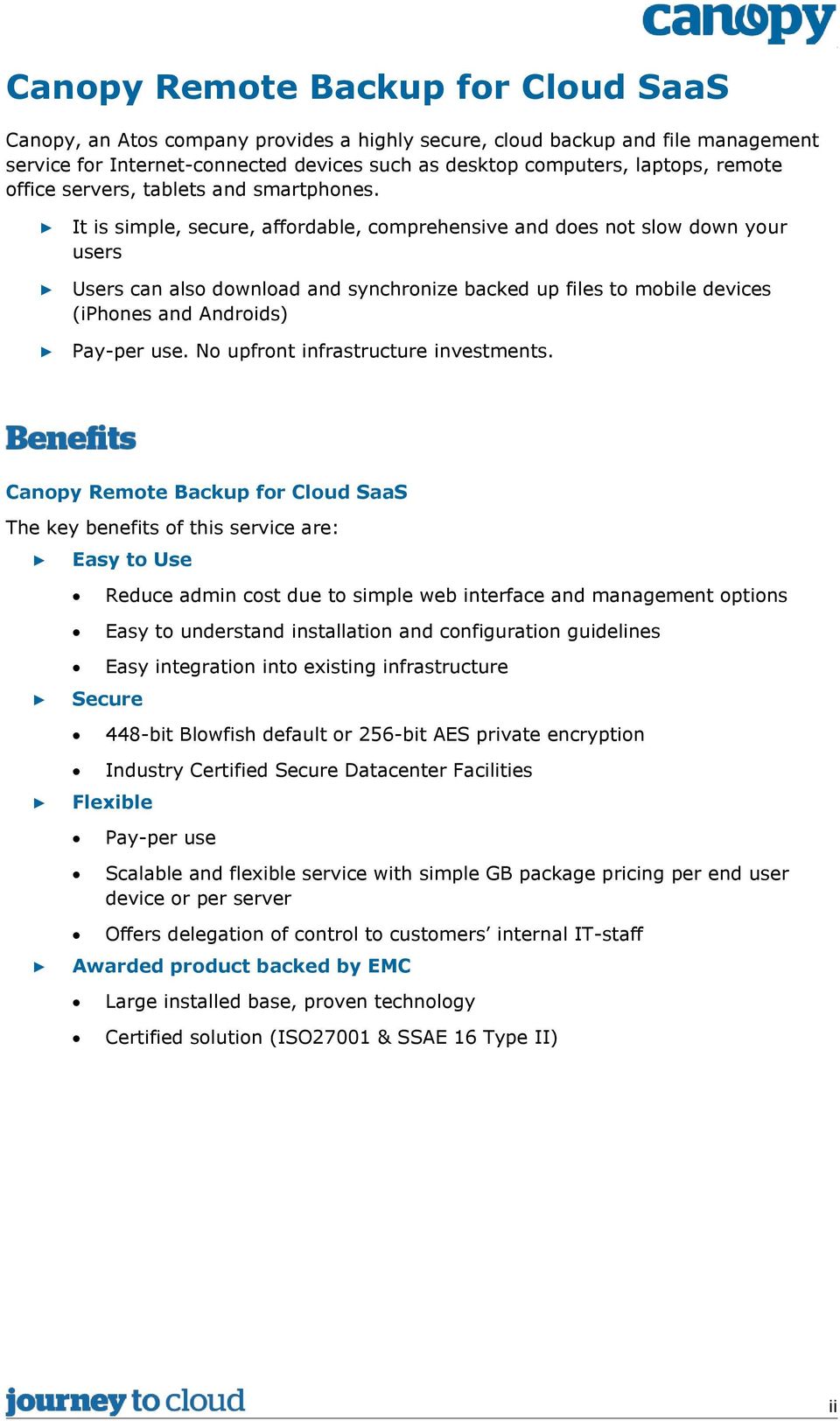
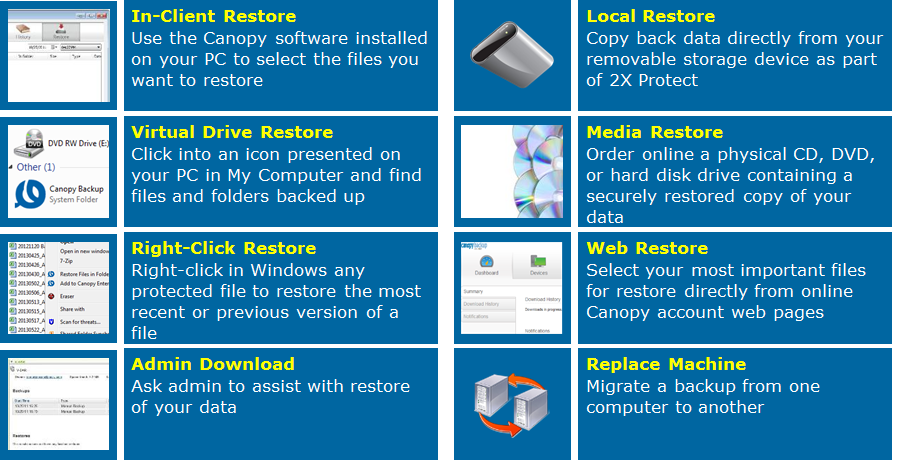
3 What is it? Canopy Remote Backup enables backup and restore: End Users, backup and restore data from/to their laptop and desktop computers System- and application managers to backup and restore remote office servers Backup data is sent, after it is encrypted, over the Internet to secure datacentres in either EMEA or US (as chosen by the customer). A range of options are also available for restoring your files: iii
4 Features of the service include: Win and Mac clients for desktops, laptops and servers, including native SQL & Exchange support Robust management capabilities Configure, deploy, and centrally manage backups via web-based, multi-tenant admin console Assign sub-admins, create user groups, set custom configuration World-class data protection in the public cloud End-to-end encryption during backup, transfer, and while at rest Personal (256-bit AES) and Enterprise custom key options SSAE 16 audited, ISO & Safe Harbor certified Multiple restore and access options Restore via web, Client, right-click, or hard drive Mobile data access via apps for ios and Android 90 days worth of backups and version available for restore What makes us unique? Today our solution is securing more than 20 billion user files with more than 1 million backups per day. Canopy Remote Backup and restore services are managed on a twenty-four (24) hours/day by seven (7) days/week basis. It is monitored for service availability, service capacity and service quality. Canopy Remote Backup is regularly monitored for Service Level compliance and adjustments are made as deemed necessary by Canopy. Canopy Remote Backup customer support is given by our Canopy Care team. Support is available to end users directly and to administrators of the customer. iv

5 Canopy Remote Backup provides a fully managed environment to backup and restore end user data on laptops, desktops and servers without upfront infrastructure investment and protects against the following scenarios: Data loss happens: Hard drive crashes, spilled drinks and accidental file deletion can occur at any time and put your organisations future in jeopardy 94% of companies suffering from a catastrophic data loss do not survive. 43% never reopen and 51% close within two years - University of Texas 25% of all PC users suffer from data loss each year Gartner 7 out of 10 small firms that experience a major data loss go out of business within a year - DTI/Price Waterhouse Coopers Business data is growing Digital data is rapidly growing at a rate of 50% to 4ZB in IDC 80% of digital data in 2012 was the responsibility or liability of enterprises. EMC/IDC No need for centralized home directories to secure your end users data. Secure access anywhere Business backup files are available to end users via the mobile app. Administrators control access to this feature. Need to do more with less Traditional backup solutions can be expensive and take weeks to implement, leaving your organisation vulnerable to lost productivity and customer dissatisfaction. Canopy Remote Backup is easily deployed without any infrastructure cost. v

6 vi
7 Contents 1. Introduction Service summary Service overview About the Admin Console Service Reporting Information assurance Backup/restore and disaster recovery On-boarding and off-boarding Pricing Service management Service constraints Service levels Financial recompense Training Ordering and invoicing process Termination terms By consumers (i.e. consumption) By the Supplier (removal of the G-Cloud Service) Data restoration / service migration Consumer responsibilities Technical requirements Trial service vii
8 1. Introduction Canopy provides a fully managed environment to backup and restore end user data on laptops, desktops and servers without upfront infrastructure investment. It is simple, secure, affordable, comprehensive and does not slow down your devices End Users can also download and synchronize backed up files to mobile devices (iphone and Android handsets) Canopy Remote Backup is an easy-to-use, automatic online backup and recovery solution that protects data on laptops, desktops, and small branch-office servers for companies of all sizes, including large enterprises. This product is being used by over 6 million users (growing rapidly) for over 100,000 organisations and currently protecting over 90 petabytes (PB) of customer data, with an extra 100 terabytes (TB) per day. Over 1 million backups per day and approximately restores each month are currently supported by the service. 1.1 Service summary Canopy Remote Backup safeguards the data of your employees wherever the internet is. Without any infrastructure investment on your side all your end users important desktop / notebook data are backed up, and your end users can restore lost data without support from a helpdesk. Data is encrypted before transmission and stored in iso27001 certified Tier 4 Datacenters in Europe or US (as chosen by the customer). Data can be accessed using mobile apps and via a web browser. There are multiple restore possibilities via restore software, web interface etc. Data backup is typically executed once a day but can be done as often as required, without additional cost. The backup software is lightweight and does not slowdown your PCs. Key Features: Backup and restore solution for your desktops, laptops and remote office servers. Data is encrypted before transmission and stored in industry certified secure datacentres. Pay-per use. 1


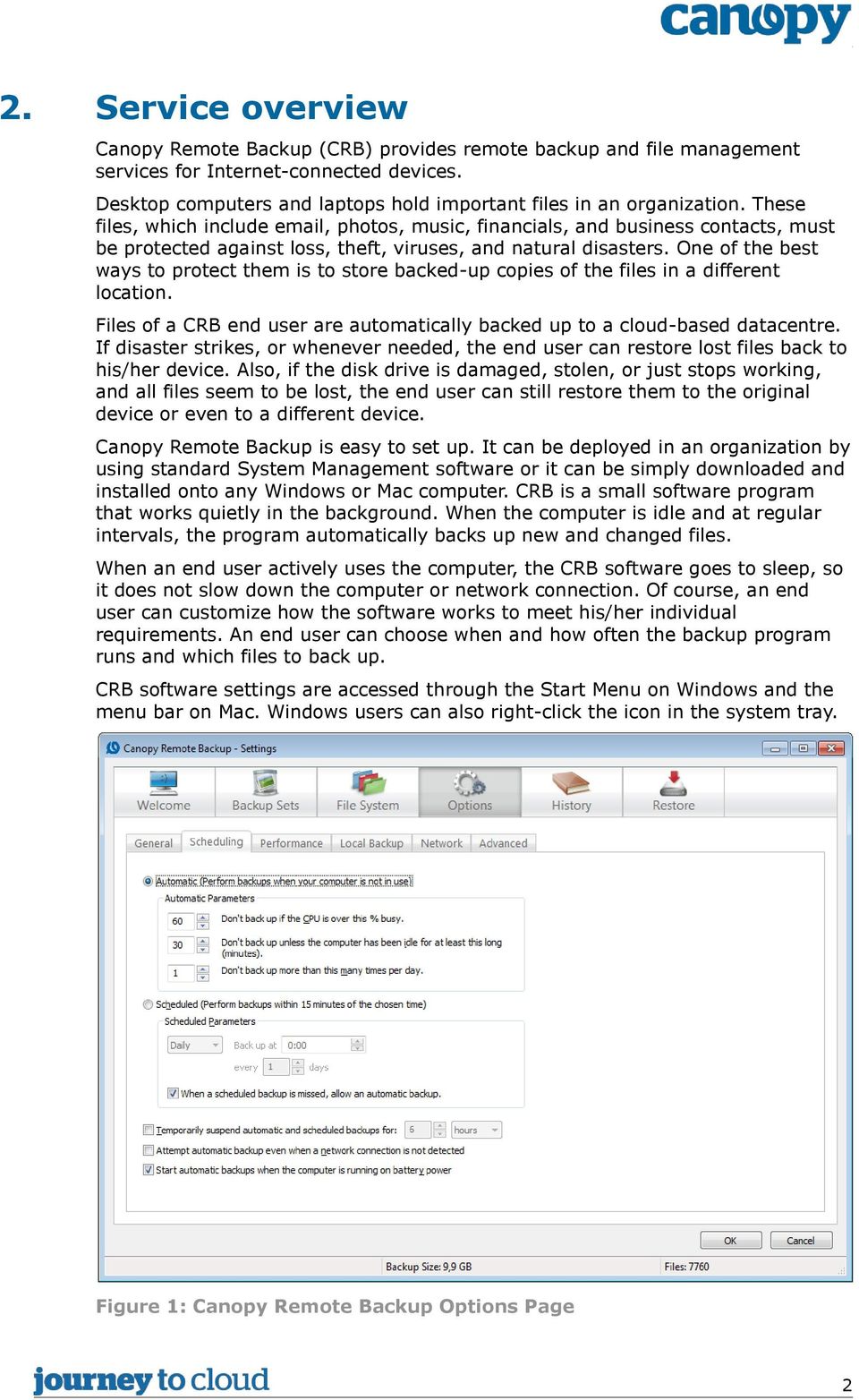
9 2. Service overview Canopy Remote Backup (CRB) provides remote backup and file management services for Internet-connected devices. Desktop computers and laptops hold important files in an organization. These files, which include , photos, music, financials, and business contacts, must be protected against loss, theft, viruses, and natural disasters. One of the best ways to protect them is to store backed-up copies of the files in a different location. Files of a CRB end user are automatically backed up to a cloud-based datacentre. If disaster strikes, or whenever needed, the end user can restore lost files back to his/her device. Also, if the disk drive is damaged, stolen, or just stops working, and all files seem to be lost, the end user can still restore them to the original device or even to a different device. Canopy Remote Backup is easy to set up. It can be deployed in an organization by using standard System Management software or it can be simply downloaded and installed onto any Windows or Mac computer. CRB is a small software program that works quietly in the background. When the computer is idle and at regular intervals, the program automatically backs up new and changed files. When an end user actively uses the computer, the CRB software goes to sleep, so it does not slow down the computer or network connection. Of course, an end user can customize how the software works to meet his/her individual requirements. An end user can choose when and how often the backup program runs and which files to back up. CRB software settings are accessed through the Start Menu on Windows and the menu bar on Mac. Windows users can also right-click the icon in the system tray. Figure 1: Canopy Remote Backup Options Page 2
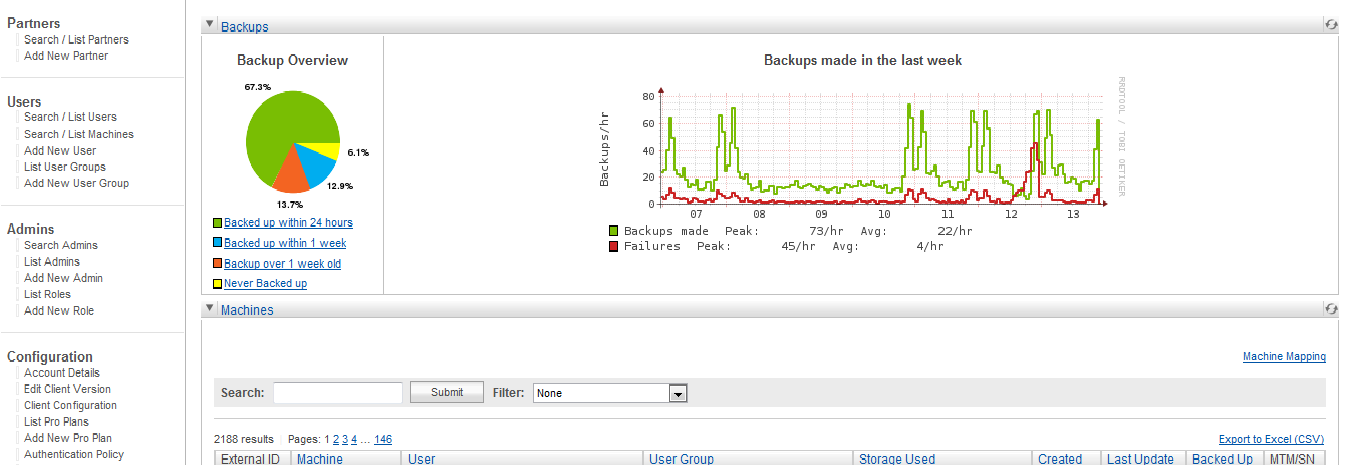
10 Options to set include (but are not limited to): File type selection Directory selection Customize the backup with respect to: scheduling performance use of local backup proxy settings bandwidth settings automatic updates Optional settings will have a default setting made by the Customer s admin. It is also possible to have all or part of the user settings locked by the administrator. As part of the backup process, each file is encrypted before being sent over the Internet. Files remain encrypted in the datacentre. The end user is the only person who can decrypt them. The files are protected at all times. At any time, backed-up files can be restored by accessing the CRB Settings program through the Start Menu (or Applications folder on Mac), by right-clicking a file in Windows Explorer, or by logging in to the end user s online account. End users are set a quota for the maximum size of the end user data to backup. Quota settings can be adjusted by the administrator. The service is offered with quota settings of 5 GB, 10 GB and 15 GB and can be increased with 5GB increments. 2.1 About the Admin Console The Admin Console is a Web-based management tool that lets administrators manage their online backup environment. It is accessed by using any Internetconnected device capable of running a supported Web browser. The Admin Console displays a navigation menu on the left and content panels in the main portion of the screen. The capabilities assigned to the administrator account determine which categories and links appear in the navigation menu. Clicking a navigation menu link usually opens a new content panel. The main page of the Admin Console, called the Dashboard, displays Backups and Machines content panels. Figure 2: Top part Dashboard 3

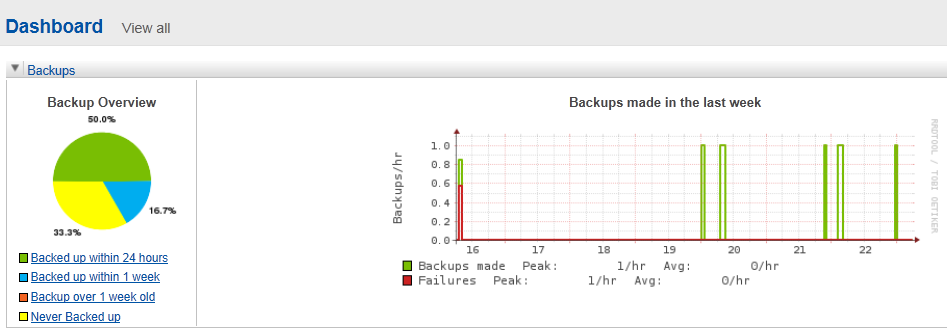
11 Canopy- recommend Customer admins attend a one day course to get familiar with this Admin console and be able to use the options to fine tune CRB according to the Customer s requirements. 2.2 Service Reporting Service Reporting at an End User level will be available through the client software installed on end-users laptops and desktops and on remote branch-office servers. End Users will be able to see historical information about backup execution. As an example: Customer Admins will be able to see an enterprise overview of the backup and restore results using the Admin Console functions: As an example: Customer Admins may choose to generate several reports, through the Admin console, which can be configured to see online, send by on a scheduled basis, or downloaded through the Customer Portal. 4

12 3. Information assurance This service is appropriate for IL0 information. 5

13 4. Backup/restore and disaster recovery Canopy Remote Backup is intended to provide an enterprise grade remote backup solution with the flexibility to deploy and manage multi-user environments and office locations. Canopy Remote Backup use data centers that are equipped with 24x7x365 onsite monitoring and security, fire detection and suppression systems, redundant power distribution units, with security standards that are SSAE 16 audited and ISO certified. 6

14 5. On-boarding and off-boarding On-boarding of a customer is a simple process. On request of the customer he can set up an initial client configuration, and e.g. default user quota. A customer admin will have the capability to appoint additional customer admins, at his personal discretion. Individual admins can have different roles, with differing capabilities defined. Deployment of client software to the machines is possible in two different ways: Using standard system management software (like SCCM). Packaging the software is not a part of the CRB service, but Canopy can arrange consultancy for the packaging process. A manual with an explanation of switch functionality is available. Manual installation. The client software can be installed by the end user or by a technician. Manual installation is in principle a simple process, but can be awkward in case the client software has to use a proxy in order to reach the internet. In that case the installation should be done by a technician; Canopy recommends avoiding proxy issues by having the client software whitelisted in the proxy, because the data is encrypted and the transfers are over an encrypted connection. Should the Customer require any on-boarding or off-boarding consultancy services from Canopy in relation to CRB, this will be subject to a separate agreement between the Parties. 7

15 6. Pricing 8

16 7. Service management The key contact organisation in terms of Incident Management is our Canopy Care Service Desk. Customers may choose if their end users contact the Canopy Care Service Desk directly or via their own internal service desk. Canopy Care is available on weekdays, 8:00 18:00 in your local time zone. Any escalation calls resulting from these Incident Management cases are handled by the support personnel from our partner EMC. Monthly service reports will be made available to the customer. 9
17 8. Service constraints Devices must be internet facing to use Canopy Remote Backup. Network Administrators can set policies on bandwidth usage and backup speeds, create custom backup sets or define what file types should be backed up. Policies can also include when scheduled backups occur therefore accommodating lights out or low usage periods All end user data is encrypted locally prior to transfer and at rest. Choose a managed key, personal key, or enterprise custom key for added security. To avoid proxy issues ensure the client software whitelisted in the proxy, because the data in encrypted and the transfers are over a secure connection. Canopy Remote Backup will keep the previous 90 days worth of backup versions available for restore for the source device 10

18 9. Service levels The following SLA is applicable for Canopy Backup: Service availability: excluding maintenance windows Service availability Second line support language Maintenance window Service Desk Availability Service Desk Contact 99.5% 7*24 hours: every day, 24 hours a day English 48 hours advance notification 5*10 hours: business days 08:00 18:00h (customers local time zone) , chat, social media, local country number Ticket Resolution times Pri1: <8h Pri2: <2d Pri3: <4d Pri4: <8d Canopy shall use its reasonable endeavours to meet the above Service Levels. 11

19 10. Financial recompense To minimise the cost to users, Canopy does not provide service credits for use of the service. All Canopy services are provided on a reasonable endeavours basis. Please refer to G Cloud terms and conditions In accordance with the guidance within the GPS G-Cloud Framework Terms and Conditions, the Customer may terminate the contract at any time, without cause, by giving at least thirty (30) Working Days prior notice in writing. The Call Off Contract terms and conditions and the Canopy terms will define the circumstances where a refund of any pre-paid service charges may be available. 12

20 11. Training Canopy recommends Customer administrators take a one day course to get familiar with the Canopy Remote Backup Admin console. 13
21 12. Ordering and invoicing process Ordering this product is a straightforward process. Please forward your requirements to the address [email protected] Canopy will prepare a quotation and agree that quotation with you, including any volume discounts that may be applicable. Once the quotation is agreed, Canopy will issue the customer with the necessary documentation (as required by the G-Cloud Framework) and ask for the customer to provide Canopy with a purchase order. Once received, the customer services will be configured to the requirements as per the original quotation. For new customers, additional new supplier forms may need to be completed. Invoices will be issued to the customer and Shared Services (quoting the purchase order number) for the services procured. On a monthly basis, Canopy will also complete the mandated management information reports to Government Procurement Services detailing the spend that the customer has placed with us. Cabinet Office publish a summary of this monthly management information at: 14
22 13. Termination terms 13.1 By consumers (i.e. consumption) Termination shall be in accordance with: The G-Cloud Framework terms and conditions Any terms agreed within the Call Off Contract under section 10.2 of the Order Form (termination without cause) where the Government Procurement Service (GPS) guidance states At least thirty (30) Working Days in accordance with Clause CO-9.2 of the Call-Off Contract Canopy Supplier Terms for this Service as listed on the G-Cloud CloudStore. For this specific service, by default Canopy ask for at least thirty (30) Working Days prior written notice of termination as per the guidance within the GPS G- Cloud Framework Terms and Conditions By the Supplier (removal of the G-Cloud Service) Canopy commits to continue to provide the service for the duration of the Call Off Contract subject to the terms and conditions of the G-Cloud Framework and Canopy Supplier Terms. 15
23 14. Data restoration / service migration Customer organization administrators are responsible for administering their own backup environment. Some of these activities include: Adjusting default and locked Client Software settings Manage client device roll-out / distribution End user management including adding/removing end users Assessing and adjusting storage quota as needed Canopy offer consultancy services with regard to implementation, security integration and client side software distribution in order to install the solution across the client devices within an organisation, this will be subject to a separate agreement between the Parties. 16
24 15. Consumer responsibilities Individual End Users and Remote Branch servers will need internet access to the Canopy Remote Backup hosting facilities. Customer organization administrators will be responsible for administering their own backup environment. Some of these activities include: Adjusting default and locked Client Software settings Manage client roll-out scenario s Do user management: adding/deleting users, adjusting quota when needed 17
25 16. Technical requirements All devices need to be internet facing to use Canopy Remote Backup 18
26 17. Trial service Demonstration of the service is available by agreement with Canopy for a trial period of up to two (2) months, at no cost. During this trial period (limited) end user support can be provided. 19
27 20
G-Cloud Service Definition. Canopy Remote Backup for Cloud SaaS
 G-Cloud Service Definition Canopy Remote Backup for Cloud SaaS Canopy Remote Backup for Cloud SaaS Canopy, an Atos company provides a highly secure, cloud backup and file management service for Internet-connected
MozyPro Online Backup. Overview and Sales Best Practices
 MozyPro Online Backup Overview and Sales Best Practices Why Backup? Digital Data Continues to Grow Growing by a Factor of 44 One Zettabyte (ZB) = 1 trillion gigabytes 2009 0.8 ZB 2020 35 ZB Page 3 Source:
G-CLOUD FRAMEWORK RM1557-vi 5DRIVE PROFESSIONAL STORAGE (PRO)
 Commercial in Confidence 1 G-CLOUD FRAMEWORK RM1557-vi SERVICE DEFINITION 5DRIVE PROFESSIONAL STORAGE (PRO) 5NINES 5NINES Data Centre Services Service Offered 5DRIVE PERSONAL CLOUD STORAGE with remote
G-Cloud Service Definition. Atos Rapid Pilot Mobile Application Development Service SCS
 G-Cloud Service Definition Atos Rapid Pilot Mobile Application Development Service SCS Atos Rapid Pilot Mobile Applications Development Service SCS Designed to provide rapid development and deployment
G-Cloud Service Definition. Canopy Enterprise Content Management for Cloud SaaS
 G-Cloud Service Definition Canopy Enterprise Content Management for Cloud SaaS Canopy Enterprise Content Management (ECM) Canopy ECM is a central, on-demand hub providing the entire Customer document and
G-Cloud Service Definition. Canopy Unmanaged Enterprise Private Cloud (IL3 Capable) IaaS
 G-Cloud Service Definition Canopy Unmanaged Enterprise Private Cloud (IL3 Capable) IaaS Canopy Unmanaged Enterprise Private Cloud IaaS Canopy Unmanaged Enterprise Private Cloud delivers the efficiencies,
G-Cloud Service Definition. Atos Accredited Oracle Business Intelligence Solutions SCS
 G-Cloud Service Definition Atos Accredited Oracle Business Intelligence Solutions SCS Atos Accredited Oracle Business Intelligence Solutions SCS Robust, scalable Cloud computing and consumption-based reporting
G-Cloud Service Definition Canopy Big Data proof of concept Service SCS
 G-Cloud Service Definition Canopy Big Data proof of concept Service SCS Canopy Big Data proof of concept Service SCS Canopy Big Data Proof of Concept (PoC) Service is a consulting service that helps the
Quick Start Guide. Apptix Online Backup by Mozy (AOBM) Live Support: 866-461-0851
 Quick Start Guide (AOBM) Live Support: 866-461-0851 Quick Start Guide Page 2 of 16 Quick Start Guide Overview Other Guides & Training Resources Admin Guide... [76 Page PDF] Client Software User Guide [46
G-Cloud Service Definition. Atos Oracle Database Upgrade
 G-Cloud Service Definition Atos Oracle Database Upgrade Database Upgrade for SCS While providing a technical database upgrade facility, Atos also assist organisations in maximising the benefits from the
G-CLOUD FRAMEWORK RM1557-vi 5DRIVE PERSONAL CLOUD BACKUP
 Commercial in Confidence 1 G-CLOUD FRAMEWORK RM1557-vi SERVICE DEFINITION 5DRIVE PERSONAL CLOUD BACKUP 5NINES 5NINES Data Centres Services Service Offered 5DRIVE - CLOUD BACKUP SERVICE with remote access
Documentum Document Management in the Cloud Service Definition
 Documentum Document Management in the Cloud Service Definition Service Overview Working together with its Cloud Services Partner, Skyscape, SynApps Solutions (SynApps) has developed its Documentum Document
G-Cloud Service Definition. Atos Information Security Wireless Scanning Service
 G-Cloud Service Definition Atos Information Security Wireless Scanning Service Keeping your wireless networks secure Atos Information Security Wireless Scanning Service The Atos Wireless Scanning Service
Solution Overview. Our Solution employs two tiers of storage aligning costs of storage with the changing value of data over time.
 Service Solution Overview Online Backup per TB model Databarracks fully managed online backup solution uses the Asigra software to back up and protect both physical and virtual environments. Housed in
G-Cloud Service Definition. Atos Business Intelligence Dashboards and Analytics SCS
 G-Cloud Service Definition Atos Business Intelligence Dashboards and Analytics SCS Atos Business Intelligence Dashboards and Analytics SCS The Atos approach to Business Intelligence (BI) Dashboards and
THE LOGICAL CHOICE FOR ONLINE DATA PROTECTION. Brought to you by
 THE LOGICAL CHOICE FOR ONLINE DATA PROTECTION Brought to you by VaultLogix Classic Online Backup VAULTLOGIX CLASSIC ONLINE BACKUP WHY BACK UP CRITICAL APPLICATIONS ONLINE/OFFSITE? Your financial records,
SCOPE OF SERVICE Hosted Cloud Storage Service: Scope of Service
 Hosted Cloud Storage Service: Scope of Service 1. Definitions 1.1 For the purposes of this Schedule: Access Account is an End User account with Data Storage requiring authentication via a username and
Secure Remote Backup (IL3) G-Cloud Lot3 IaaS
 Secure Remote Backup (IL3) G-Cloud Lot3 IaaS Contents Service Definition... 3 An overview of the Remote Backup as a Service... 3 Key Service Attributes... 4 Information assurance... 5 Details of the level
G-Cloud Service Definition. Atos Data Quality Audit SCS
 G-Cloud Service Definition Atos Data Quality Audit SCS Atos Data Quality Audit SCS As organisations increasingly utilise a hybrid of Legacy and Cloud based technology platforms, it becomes increasingly
Marval Software Limited. G Cloud iii Framework Service Definition
 1 Marval Software Limited G Cloud iii Framework Service Definition Page 1 of 9 2 Contents An overview of the Marval Service Management (MSM) Software Solution... 3 Information assurance Impact Level (IL)
G-Cloud Service Definition. Atos SI Oracle CRM and CX Services
 G-Cloud Service Definition Atos SI Oracle CRM and CX Services Atos SI Oracle CRM and CX Services SCS Atos provides a range of expert Customer Relationship Management (CRM) and Customer Experience (CX)
G-Cloud 6 SERVICE DEFINITION
 ORACLE CORPORATION UK LTD ( Oracle ) G-Cloud 6 SERVICE DEFINITION Date: [ 29 / 11] 2014 v. 1 This is Oracle s G-Cloud 6 Service Definition for the following service(s): Oracle Business Intelligence Cloud
SERVICE DEFINITION DOCUMENT MANAGEMENT IN THE CLOUD
 Commercial in Confidence 1 G-CLOUD III FRAMEWORK SERVICE DEFINITION DOCUMENT MANAGEMENT IN THE CLOUD Capita Division / Supplier: Capita Business Services Ltd powered by SkyScape Service Name: Document
PAAS Public Sector Managed Services
 Meritec Limited Meritec House, Acorn Business Park, Skipton, North Yorkshire, BD23 2UE 0845 3451155 [email protected] www.meritec.co.uk Registered In England & Wales No. 3224622 Table of Contents
G-CLOUD FRAMEWORK SERVICE DEFINITION. Kofax Model Office Bundle Proposal ISSUE 1
 G-CLOUD FRAMEWORK SERVICE DEFINITION Kofax Model Office Bundle Proposal ISSUE 1 Sept 2013 Table of Contents 1 SERVICE OVERVIEW & SOLUTION... 2 2 INFORMATION ASSURANCE... 3 3 BACKUP/RESTORE AND DISASTER
Dropbox for Business. Secure file sharing, collaboration and cloud storage. G-Cloud Service Description
 Dropbox for Business Secure file sharing, collaboration and cloud storage G-Cloud Service Description Table of contents Introduction to Dropbox for Business 3 Security 7 Infrastructure 7 Getting Started
Service Definition Nine23 MDM
 Service Definition Nine23 MDM G-Cloud iv Contents 1 Service Nine23 Mobile Device Management System.....4 1.1 Overview Nine23 MDM...... 4 1.2 Open Standards. 5 1.3 User requirements.....5 1.3.1 Client Browser....5
Azeus Convene Paperless Board and EXECUTIVE Meetings
 Service Definition Azeus Convene Paperless Board and EXECUTIVE Meetings 1. An Overview of the G- Cloud Service (functional, non functional) Azeus Convene replaces meeting papers with a user-friendly mobile
Introducing Databackup.com Cloud Backup. File Locker File Sharing & Collaboration EndGaurd EndPoint Protection & Device Management
 Introducing Databackup.com Cloud Backup File Locker File Sharing & Collaboration EndGaurd EndPoint Protection & Device Management Global Explosion of Data The demand for cloud storage is just getting started.
End-User Remote Support and Helpdesk Services
 End-User Remote Support and Helpdesk Services A single contact point for support needs G-Cloud 5 Service Definition CONTENTS Overview of Service... 2 Contacting the Service Desk... 3 Management Reports...
Amazon Relational Database Service (RDS)
 Amazon Relational Database Service (RDS) G-Cloud Service 1 1.An overview of the G-Cloud Service Arcus Global are approved to sell to the UK Public Sector as official Amazon Web Services resellers. Amazon
KUIDAS KAITSTA ANDMEID EMC TARKVARAGA?
 Madis Pärn Sr. System Engineer EMC [email protected] KUIDAS KAITSTA ANDMEID EMC TARKVARAGA? DATA PROTECTION OVERVIEW 1 TALE OF TWO WORLDS Traditional Apps IT On Premise Next Gen Apps Developers Cloud
G-Cloud Service Definition. Atos Oracle Cloud ERP Implementation Services
 G-Cloud Service Definition Atos Oracle Cloud ERP Implementation Services Atos Oracle Cloud ERP Implementation Services Customers need adaptive and agile Enterprise Resource Planning (ERP) systems to support
G-Cloud 6 Service Definition DCG Cloud Backup Service
 G-Cloud 6 Service Definition DCG Cloud Backup Service G-Cloud 6, Service Description, DCG Cloud Backup Service Page 1 of 16 CONTACT INFORMATION Guy Silver T: 07733 008799 E: [email protected] W:
SOLUTIONS CLOUD - DPS JEUDI 19 NOVEMBRE 2015
 SOLUTIONS CLOUD - DPS JEUDI 19 NOVEMBRE 2015 Christian LE CORRE - DPS Advisory Systems Engineer DATA PROTECTION EVERYWHERE On Premise Virtual Hybrid Born In The Cloud 30 Retention (LTR) BaaS & DRaaS Archive
Apptix Online Backup by Mozy
 Apptix Online Backup by Mozy What is Apptix Online Backup by Mozy? Apptix Online Backup by Mozy is a secure online data backup service. It's a simple, smart, and economical way to protect your data from
Online Backup by Mozy. Common Questions
 Online Backup by Mozy Common Questions Document Revision Date: June 29, 2012 Online Backup by Mozy Common Questions 1 What is Online Backup by Mozy? Online Backup by Mozy is a secure online data backup
Symantec Backup Exec.cloud
 Automatic, continuous, and secure protection that backs up data to the cloud, or via a hybrid approach combining on-premise and cloud-based backup. Data Sheet: Symantec.cloud Only 21 percent of SMBs are
TECHNOLOGY OVERVIEW INTRONIS CLOUD BACKUP & RECOVERY
 INTRONIS CLOUD BACKUP & RECOVERY TECHNOLOGY OVERVIEW CONTENTS Introduction 3 Ease-of-Use 3 Simple Installation 3 Automatic Backup 3 Backup Status Dashboard 4 Off-Site Storage 4 Scalability 4 File Restoration
G-Cloud Service Definition. Cloud Backup Service
 G-Cloud Service Definition Cloud Backup Service Cloud Backup Service ATOS Cloud Backup is an end-to-end Managed Service driven which encompass all aspects of backup and recovery within a client environment.
Service Definition The following section provides a summary overview of the hosted Microsoft Exchange solution.
 Microsoft Exchange Service Definition Service Description Hosted Exchange 2010 is a secure business-class email messaging and collaboration service designed to make it possible for you and your employees
Solution domain. Cloud PC Backup Startingkit for users. Date 26/05/2015 Sensitivity Unrestricted Our reference V1.0 Contact E-mail
 Solution domain Cloud PC Backup Startingkit for users Date 26/05/2015 Sensitivity Unrestricted Our reference V1.0 Contact E-mail Table of contents Table of contents... 2 1. What is Cloud PC Backup?...
IBM G-Cloud Microsoft Windows Active Directory as a Service
 IBM G-Cloud Microsoft Windows Active Directory as a Service Service Definition IBM G-Cloud Windows AD as a Service 1 1. Summary 1.1 Service Description This offering is provided by IBM Global Business
G-Cloud Service Definition. Atos Digital Marketing Specialist Cloud Services
 G-Cloud Service Definition Atos Digital Marketing Specialist Cloud Services Atos Digital Marketing SCS Atos Digital Marketing is a range of services to help customers develop and promote their digital
WOS Cloud. ddn.com. Personal Storage for the Enterprise. DDN Solution Brief
 DDN Solution Brief Personal Storage for the Enterprise WOS Cloud Secure, Shared Drop-in File Access for Enterprise Users, Anytime and Anywhere 2011 DataDirect Networks. All Rights Reserved DDN WOS Cloud
G-Cloud 7 Service Definition. Atos Oracle Cloud ERP Implementation Services
 G-Cloud 7 Service Definition Atos Oracle Cloud ERP Implementation Services Atos Oracle Cloud ERP Implementation Services Customers need adaptive and agile Enterprise Resource Planning (ERP) systems to
Copyright 2013 Carbonite, Inc. All rights reserved. www.carbonite.com GETTING STARTED GUIDE CARBONITE BUSINESS
 GETTING STARTED GUIDE CARBONITE BUSINESS CARBONITE BUSINESS OVERVIEW 2 CARBONITE BUSINESS OVERVIEW Carbonite offers a better way to back up your business. Here s why: AUTOMATIC BACKUP You ll never have
MANAGED CLOUD INFRASTRUCTURE www.easynet.com. Bronze Disaster Recovery Services
 MANAGED CLOUD INFRASTRUCTURE www.easynet.com Bronze Disaster Recovery Services G-Cloud Service Definition September 2013 Company Information Easynet Global Services Limited registered office Chancellor
Vodafone Private Cloud
 Vodafone Private Cloud Overview Vodafone Private Cloud is our dedicated public sector cloud service that connects you to your own private IL2/IL3 network and / or core government networks, including the
G-Cloud Service Definition. Atos Call Centre Services SCS
 G-Cloud Service Definition Atos Call Centre Services SCS Atos Call Centre Services SCS Summary Atos SIAM Service Desk is designed to provide a core part of the SIAM Tower model for ICT delivery. This service
Open Source Sales Force Automation (SFA) in the Cloud SaaS
 Open Source Sales Force Automation (SFA) in the Cloud SaaS Service Overview Our open source Sales Force Automation (SFA) in the cloud service allows customers to perform marketing automation through multi
All your apps & data in the cloud, all in one place.
 The Cloud Desktop For Business Unify Your Business IT Experience All your apps & data in the cloud, all in one place. The Cloud Desktop houses all of your organization's applications and data in one easy-to-access
Backup as a Service. Service Definition. G-Cloud VI. Information Security Management System
 Backup as a Service Service Definition Version: 1.0 Version date: October 2015 Classification: Public Backup-as-a-Service Systems Monitoring DR-as-a-Service Storage-as-a-Service Hosted Exchange Colocation
EVault Endpoint Protection All the Details: Enterprise Management, Backup and Recovery, and Security
 Protection All the Details: Enterprise Management, Backup and Recovery, and Security Key Benefits: Overall Empower IT with mobile data oversight enabled through central policy controls Lock down endpoint
END-USER REMOTE SUPPORT AND HELPDESK SERVICES SERVICE DEFINITION
 END-USER REMOTE SUPPORT AND HELPDESK SERVICES Complete IT Support for Business Westgate IT End-User Remote Support and Helpdesk Services: Service Definition Service Name End-User Remote Support and Helpdesk
HERO-DefendeRx & Secure-Cloud Overview
 Failback/Restore-Should a failure occur, HEROware manages the Failback and Restore process for you. Please contact HEROware technical support to schedule your restoration process. HEROware s goal is simple,
WebFOCUS Cloud Express. The WebFOCUS Cloud Express service is delivered as a managed G-Cloud service by Amtex Solutions Ltd.
 Service Definition The name of the Service is: WebFOCUS Cloud Express An overview of WebFOCUS Cloud Express The WebFOCUS Cloud Express service is delivered as a managed G-Cloud service by Amtex Solutions
Online Backup Plus Frequently Asked Questions
 Online Backup Plus Frequently Asked Questions 1 INSTALLATION 1.1 Who installs the Redstor Online Backup Plus service? 1.2 How does the installed client connect to Redstor s Cloud Platform? 1.3 On which
Ubertas Cloud Services: Service Definition
 Ubertas Cloud Services: Service Definition February 2013 Innovation. Power. Trust. Contents 1. About Ubertas... 2 Our Company... 2 Our Approach to Service Delivery... 2 Our Partner Network & the UK Cloud
Online backup subscription service and security overview
 Online backup subscription service and security overview Abstract This White Paper is a ready reckoner for Small and Medium Enterprises (SMEs) for their data storage needs. Traditional tape-based backups
Personal Cloud. Support Guide for Mac Computers. Storing and sharing your content 2
 Personal Cloud Support Guide for Mac Computers Storing and sharing your content 2 Getting started 2 How to use the application 2 Managing your content 2 Adding content manually 3 Renaming files 3 Moving
BITDEFENDER SECURITY FOR AMAZON WEB SERVICES
 BITDEFENDER SECURITY FOR AMAZON WEB SERVICES Beta Version Testing Guide Bitdefender Security for Amazon Web Services Beta Version Testing Guide Publication date 2015.03.04 Copyright 2015 Bitdefender Legal
Backing up your digital image collection provides it with essential protection.
 Backing up your digital image collection provides it with essential protection. In this chapter, you ll learn more about your options for creating a reliable backup of your entire digital image library.
SuiteCRM Customer Relationship Management System
 SuiteCRM Customer Relationship Management System Overview SalesAgility is an ISO9001-accredited professional services consultancy engaged in transforming the business needs of our clients into robust and
Vodafone Cloud Storage
 Vodafone Cloud Storage Overview Vodafone Cloud Storage gives you another, more flexible way to store data. It s available on G-Cloud and it s: Flexible you can decide how and where to store your data Fast
Service Description Archive Storage in the Cloud
 Service Description Archive Storage in the Cloud Product Overview Archive Storage in the Cloud enables an organisation to migrate their valuable but seldom used data to a cost efficient, reliable and secure
WHITE PAPER SETTING UP AND USING ESTATE MASTER ON THE CLOUD INTRODUCTION
 WHITE PAPER SETTING UP AND USING ESTATE MASTER ON THE CLOUD INTRODUCTION Cloud Computing can provide great flexibility for the Estate Master user. You can access your feasibilities, manage you projects
White Paper. Anywhere, Any Device File Access with IT in Control. Enterprise File Serving 2.0
 White Paper Enterprise File Serving 2.0 Anywhere, Any Device File Access with IT in Control Like it or not, cloud- based file sharing services have opened up a new world of mobile file access and collaborative
Platform as a Service
 Platform as a Service Service Definition Version: 1.0 Version date: October 2015 Classification: Public Backup-as-a-Service Systems Monitoring DR-as-a-Service Storage-as-a-Service Hosted Exchange Colocation
The Most Complete Data Protection Platform for MSPs
 The Most Complete Data Protection Platform for MSPs I delivers the industry s most complete Data Protection Platform today. From an easy-to-use dashboard, MSPs can efficiently manage cloud backup, disaster
The EVault Portfolio
 The EVault Portfolio Built from the start as a pure disk-to-disk solution, EVault is the only data protection platform that can be consumed as a cloud service, deployed as on-premise software, an on-premise
G-Cloud Service Definition. Atos Security Professional Services SCS
 G-Cloud Service Definition Atos Security Professional Services SCS Atos Security Professional Services SCS Security Professional Services delivered by experienced certified professionals empowered by market
RTS Communications G-Cloud Service Definition Video Conferencing as a Service (VAAS)
 RTS Communications G-Cloud Service Definition Video Conferencing as a Service (VAAS) Video Conferencing Endpoint Services September 2013 RTS G-Cloud Service Definition Page 1 CONTENTS 1. Executive Summary
Device Lifecycle Management
 Device Lifecycle Management 1 (8) Table of Contents 1. Executive summary... 3 2. Today's challenges in adapting to lifecycle management... 3 3. How is Miradore different?... 5 4. Conclusion... 8 2 (8)
CTERA Portal Datacenter Edition
 Administrator Guide CTERA Portal Datacenter Edition November 2013 Version 4.0 Copyright 2009-2013 CTERA Networks Ltd. All rights reserved. No part of this document may be reproduced in any form or by any
Backup / migration of a Coffalyser.Net database
 Backup / migration of a Coffalyser.Net database There are two main procedures for backup or migration of your Coffalyser.Net database. One of these procedures makes use of the SQL management studio software
How To Use Quantum Rbs Inc. Small Business Backup
 Small Business Backup & Recovery (File Servers, Peer-to-Peer, Laptops, Desktops) Smart Features: Continuous Backup Anywhere Access to Backed Up Data Simple Rate Plan Secure Bank Grade Encryption Open Files
Storage Guardian Remote Backup Restore and Archive Services
 Storage Guardian Remote Backup Restore and Archive Services Storage Guardian is the unique alternative to traditional backup methods, replacing conventional tapebased backup systems with a fully automated,
eztechdirect Backup Service Features
 eztechdirect Backup Service Features Introduction Portable media is quickly becoming an outdated and expensive method for safeguarding important data, so it is essential to secure critical business assets
G-Cloud Service Description. Atos Microsoft Dynamics CRM on Demand
 G-Cloud Service Description Atos Microsoft Dynamics CRM on Demand February 2013 Atos, the Atos logo, Atos Consulting, Atos Worldline, Atos Sphere, Atos Cloud, Atos Healthcare (in the UK) and Atos WorldGrid
2. Consultancy and Support
 G-Cloud Services 4 Service Definition Grant Management Services Lot 3 1. CC Grant Tracker 2. Consultancy and Support Submitted By: Dave Allan CC Technology Ltd 375 West George St Glasgow G2 4LW [email protected]
Back it up. Get it back. Simple.Secure.Affordable.
 Back it up. Get it back. Simple.Secure.Affordable. Based on feedback from the Carbonite community, we re expanding our offerings to support user-requested features such as External Hard Drive Backup, Bare