
How To Set Up Isu-Oit-Wpa On Windows 7 For Wireless Access (Isu- Oit- Wpa) On A Pc Or Mac Or Ipa (Windows 7) On An Ipa Or Ipac (Windows
|
|
|
- Doreen Brenda Foster
- 5 years ago
- Views:
Transcription
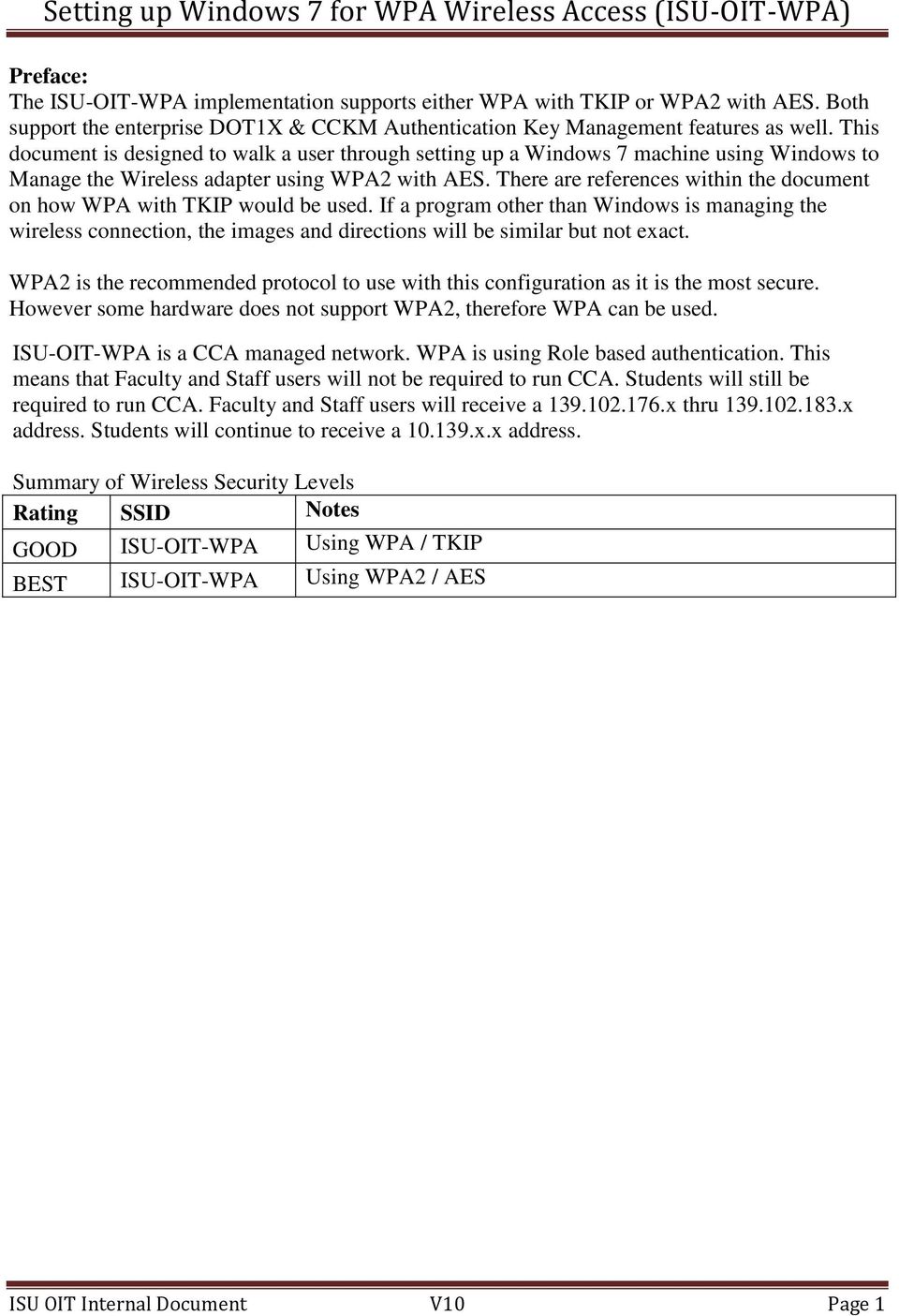
1 Preface: The ISU-OIT-WPA implementation supports either WPA with TKIP or WPA2 with AES. Both support the enterprise DOT1X & CCKM Authentication Key Management features as well. This document is designed to walk a user through setting up a Windows 7 machine using Windows to Manage the Wireless adapter using WPA2 with AES. There are references within the document on how WPA with TKIP would be used. If a program other than Windows is managing the wireless connection, the images and directions will be similar but not exact. WPA2 is the recommended protocol to use with this configuration as it is the most secure. However some hardware does not support WPA2, therefore WPA can be used. ISU-OIT-WPA is a CCA managed network. WPA is using Role based authentication. This means that Faculty and Staff users will not be required to run CCA. Students will still be required to run CCA. Faculty and Staff users will receive a x thru x address. Students will continue to receive a x.x address. Summary of Wireless Security Levels Rating SSID Notes GOOD ISU-OIT-WPA Using WPA / TKIP BEST ISU-OIT-WPA Using WPA2 / AES ISU OIT Internal Document V10 Page 1

2 Setting up WPA on Windows 7 Secured wireless access for users with: Operating System- Microsoft Windows 7 Adapter type- Integrated wireless adapter. Wireless Management- Done by Microsoft Windows SSID- ISU-OIT-WPA 1.) Click on the wireless connection icon in the system tray to open the Wireless Network Connection Status window and click the link to Open Network and Sharing Center. ISU OIT Internal Document V10 Page 2


3 2.) Click the link to Manage wireless networks. ISU OIT Internal Document V10 Page 3

4 3.) Click on the Add button: ISU OIT Internal Document V10 Page 4

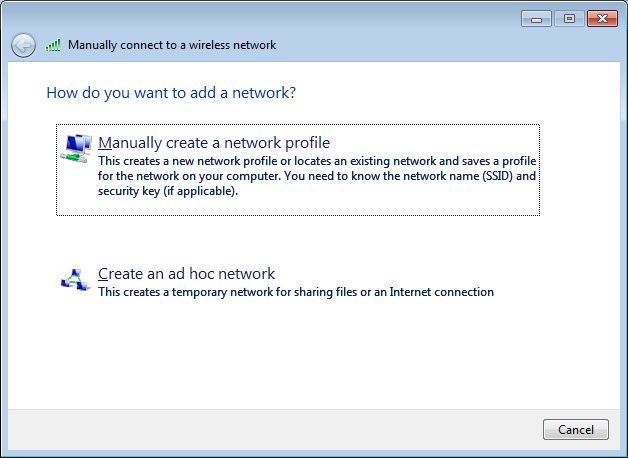
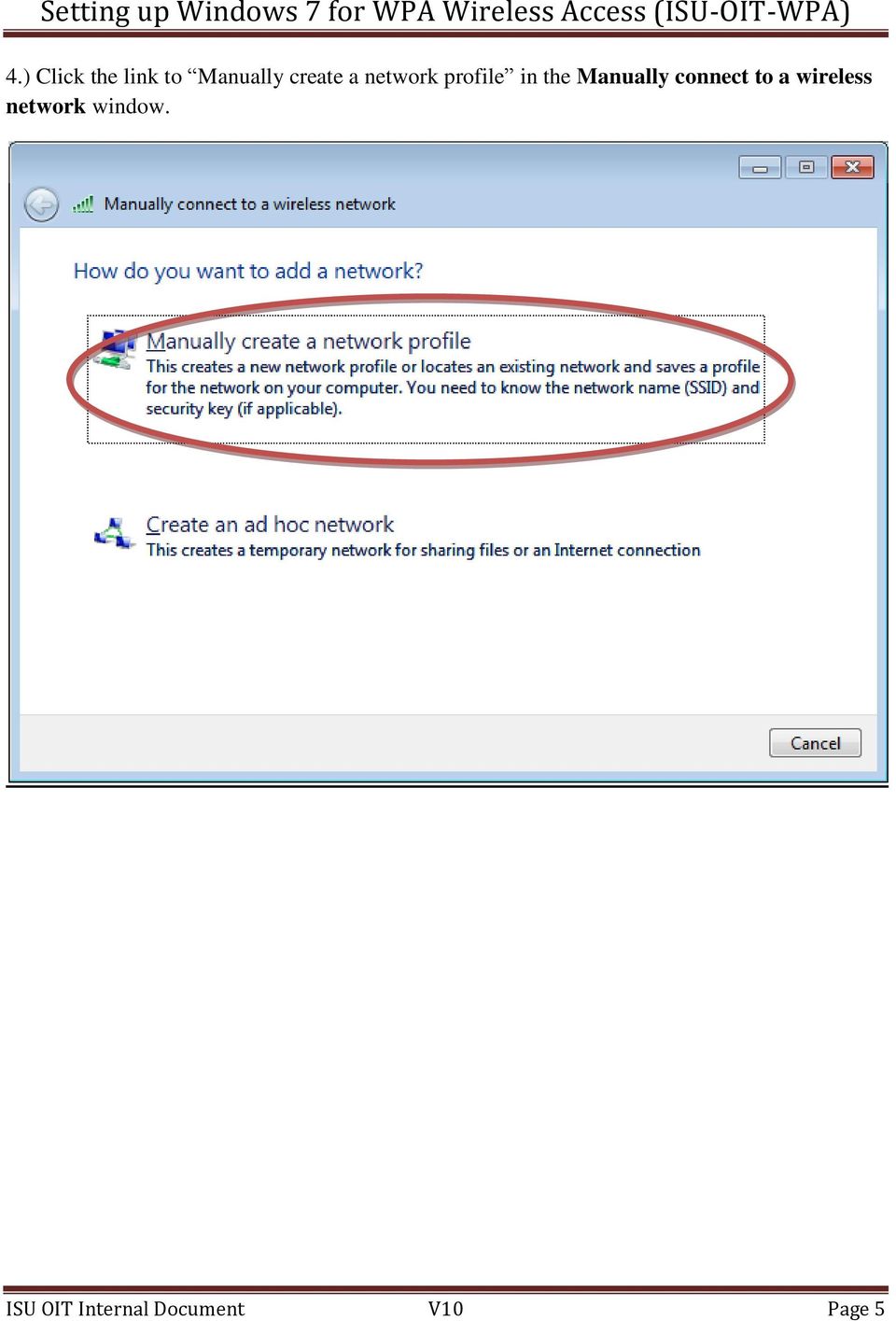
5 4.) Click the link to Manually create a network profile in the Manually connect to a wireless network window. ISU OIT Internal Document V10 Page 5
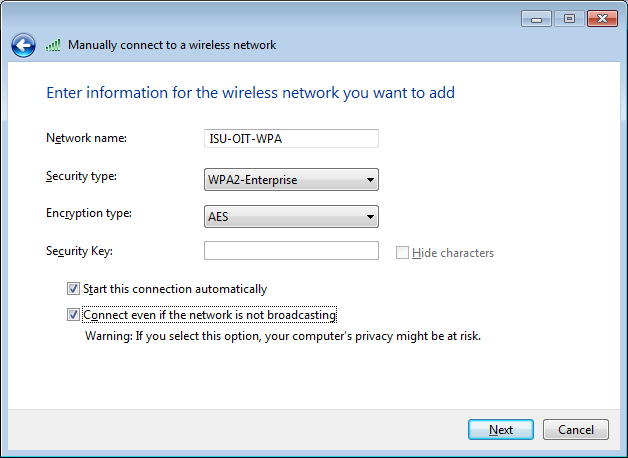
6 5.) WPA2 is preferred over WPA whenever possible. This depends on the model of Network Adapter that you have. Additionally you may need to download a patch from Microsoft KB (Formally KB893357) to enable WPA2 on your machine. If you are not using Windows to manage your wireless connections and are using the tools that came with your wireless card, you may not need to down load this patch. Some systems may report several WPA2 types available instead of just WPA2. The desired type should be WPA2-Enterprise over the non-desired type of WPA2-Personal If you are unable to select WPA2 from your list of available Network Authentications, use WPA. This will also require you to set your Data Encryption to TKIP for WPA. As with WPA2, some systems may refer to WPA as WPA-Enterprise. ISU OIT Internal Document V10 Page 6

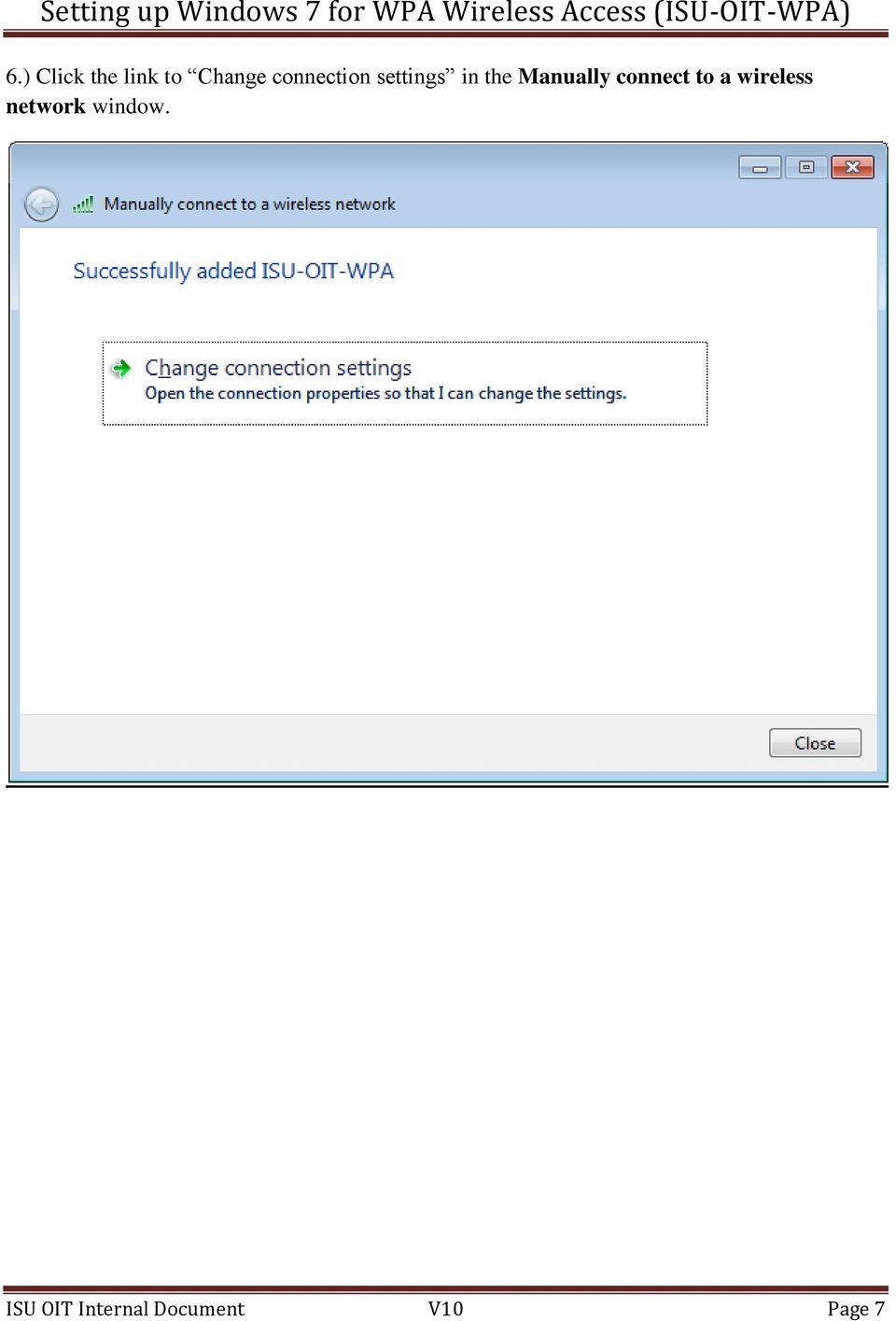
7 6.) Click the link to Change connection settings in the Manually connect to a wireless network window. ISU OIT Internal Document V10 Page 7

8 7.) Click on the Connection Tab and make sure the check boxes are set to Connect automatically when this network is in range and Connect even if the network is not broadcasting its name (SSID). Make sure Connect to a more preferred network if available is unchecked. ISU OIT Internal Document V10 Page 8


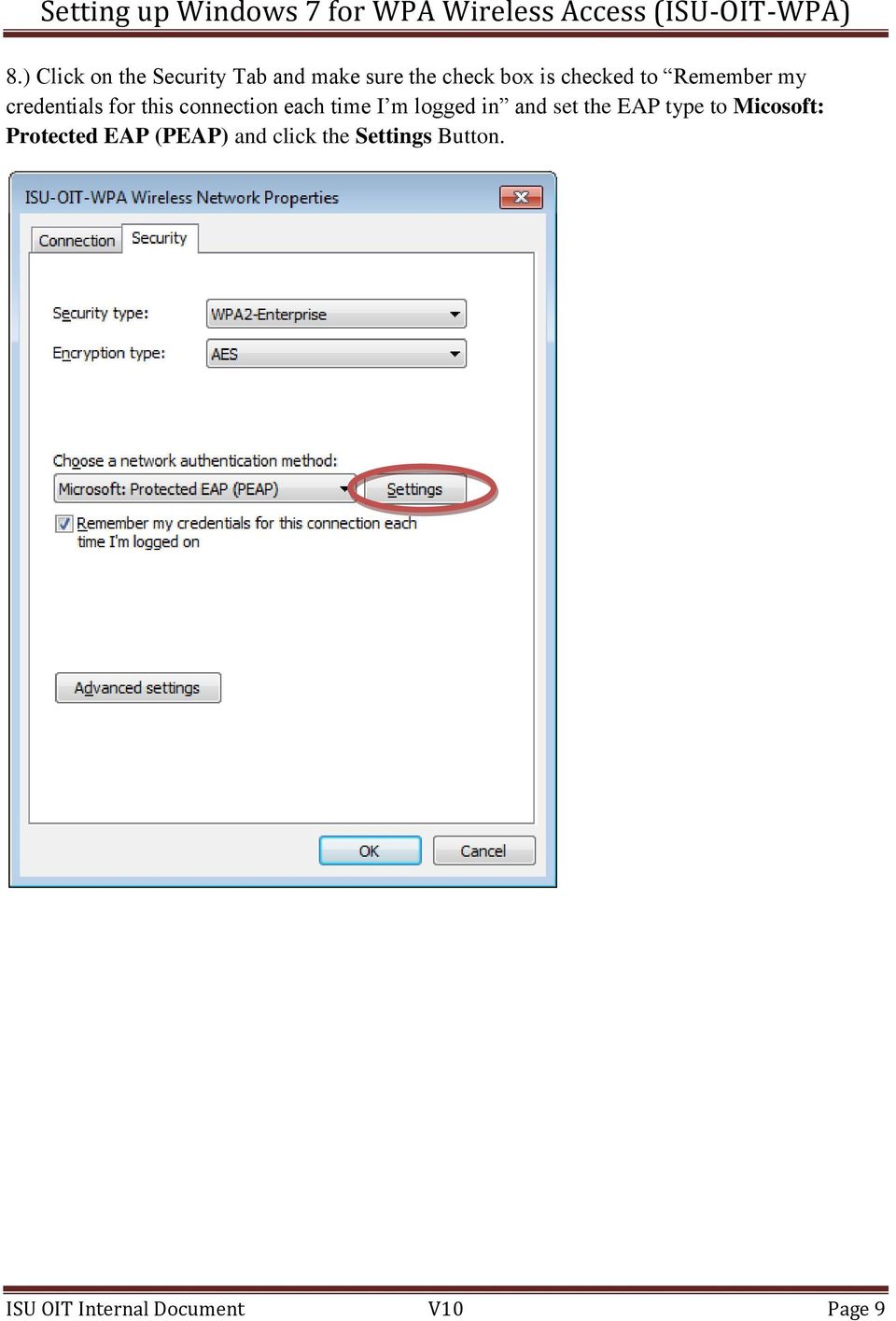
9 8.) Click on the Security Tab and make sure the check box is checked to Remember my credentials for this connection each time I m logged in and set the EAP type to Micosoft: Protected EAP (PEAP) and click the Settings Button. ISU OIT Internal Document V10 Page 9

10 9.) On the Protected EAP Properties page Uncheck the Validate server certificate box and check the Enable Fast Reconnect Box. Click on the Configure button. ISU OIT Internal Document V10 Page 10


11 10.) If your user name and password for your machine do not match your ISU Sycamore Login then you must uncheck the box to Automatically use my Windows Logon name and password (and domain if any). Click OK when complete and you will return to the previous screen. Then OK again to return to the Wireless Network Properties Screen. ISU OIT Internal Document V10 Page 11

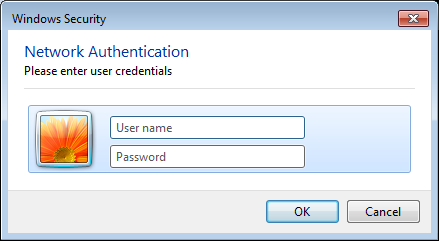
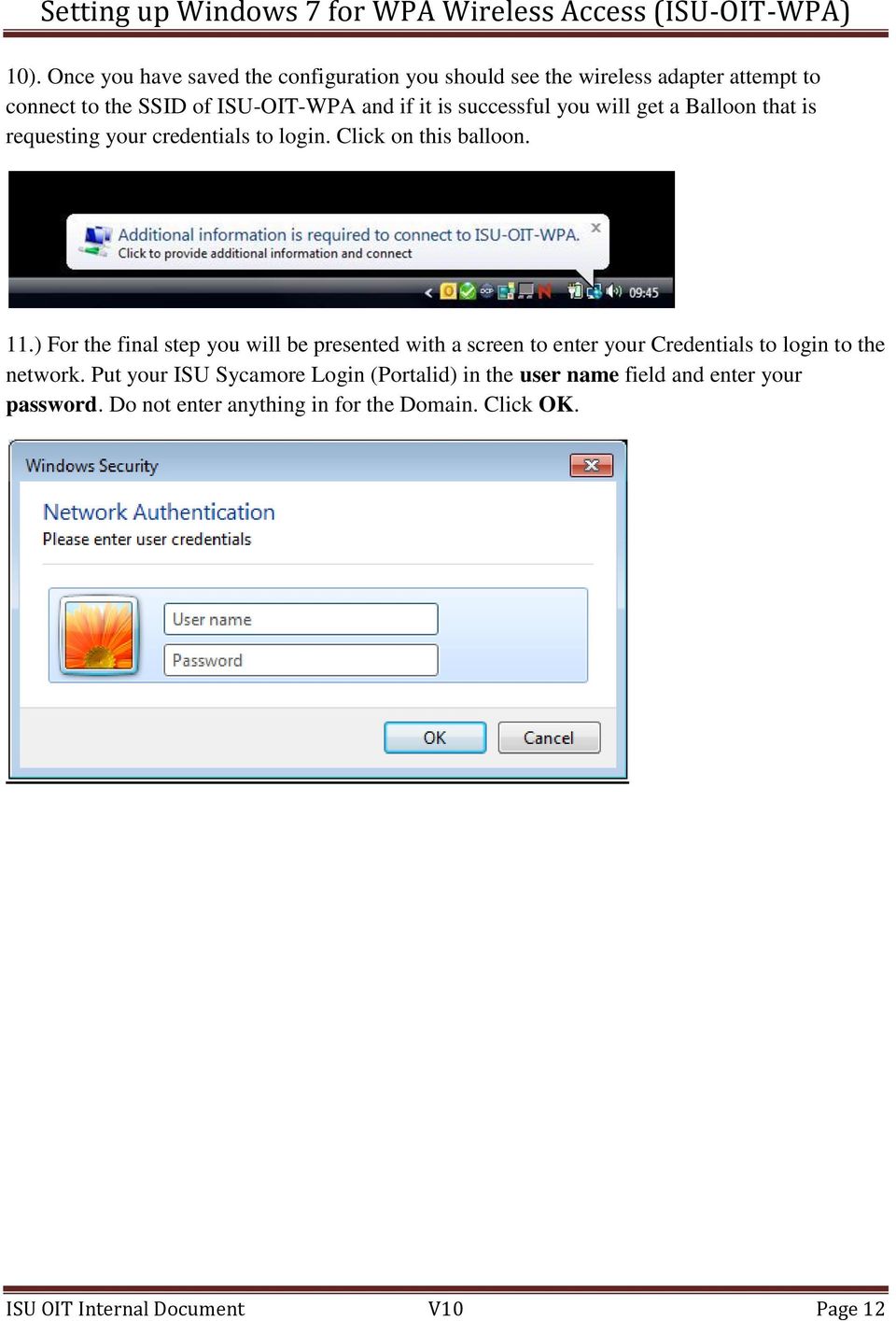
12 10). Once you have saved the configuration you should see the wireless adapter attempt to connect to the SSID of ISU-OIT-WPA and if it is successful you will get a Balloon that is requesting your credentials to login. Click on this balloon. 11.) For the final step you will be presented with a screen to enter your Credentials to login to the network. Put your ISU Sycamore Login (Portalid) in the user name field and enter your password. Do not enter anything in for the Domain. Click OK. ISU OIT Internal Document V10 Page 12
13 CAVEATS 1). At the time of this document the following known issues have been found: a. If you change your portal password, you will have to change the properties in your wireless adaptor if you are using windows for your wireless management. Then when you reconnect enter your new password. Other vendor s tools will have to address this separately to enter the new password. b. Some devices such as Windows CE devices may list WPA as a supported protocol. However it is WPA-PSK (Pre-Shared Key) protocol and not the WPA Enterprise protocol that is used at ISU. c. When you have multiple profiles setup and active on a machine. The machine will not necessarily always connect to the preferred net first. The nature of Wireless is that the SSIDs are broadcast as set intervals. Depending on where your machine is in the search process it may hear a non-preferred network first and connect to it. Either delete unwanted profiles, i.e. ISU-OIT-WEP and ISU-OIT-NWEP, or set them to manually connect. d. When using the computer that has wireless and it is physically connected to the network, the metrics of network performance come into play. Even though the computer may be physically plugged in or docked to the campus network. If the wireless card is still active it can take precedence over the wired connection. This is because the metrics of the network will use the fastest connection. If the wired connection is only 10Mb and the wireless is connected at 56Mb it will use wireless connection. Conversely if you are connected to a 100Mb or faster connection on the wired connection, it will always use the wired connection. To see what network connection is being used you can issue a simple command from the DOS command prompt. ROUTE PRINT will show you the cost of each interface in your computer. The lower the number the higher the priority / speed of the connection. Additionally at the bottom of the report it will list your Default Gateway, this will help in determining which interface is being used as the priority metric. It is not recommended to manually set the metrics of interfaces to get the one you desire to work as the priority. Rather, simply disable the undesired interface, i.e. disable your wireless card when on the wired network. This will make sure that when the computer moves to a faster line or another location the metrics will determine the best path for the computer to use. e. After setup on Windows Vista and Windows 7 it has been found that sometimes the machine has to be restarted for the connection to begin working. f. Windows based hand held devices will require a personal certificate to be installed on the device in order to connect under WPA. Search Google for information on how import a certificate for you device. ISU OIT Internal Document V10 Page 13

14 j. Windows based hand held devices will require a personal certificate to be installed on the device in order to connect under WPA. Check with the device vendor for information on how import a certificate for you device. Prepared by: David Pifer Created v1: September 14, 2007 Updated v2: October 26, 2007 Updated v3: November 29, 2007 Updated v4: December 19, 2007 Updated v5: April 21, 2008 Updated v6: June 5, 2008 Updated v7: July 24, 2008 Updated v8: August 19, 2009 Updated v9: July 6, 2010 A Cockrell Updated v10: July 25, 2012 A Cockrell ISU OIT Internal Document V10 Page 14

Setting up Windows XP for WPA Wireless Access (ISU-OIT-WPA)
 Preface: The ISU-OIT-WPA implementation supports either WPA with TKIP or WPA2 with AES. Both support the enterprise DOT1X & CCKM Authentication Key Management features as well. This document is designed
WIRELESS SETUP FOR WINDOWS 7
 Computing & Communications WIRELESS SETUP FOR WINDOWS 7 For assistance during the configuration process please call the Computing and Communications Help Desk at 639-2049, [email protected] Who should
Windows Vista and Windows 7 Wireless Configuration For NCC Faculty and Staff Owned Laptops
 Windows Vista and Windows 7 Wireless Configuration For NCC Faculty and Staff Owned Laptops A wireless network for Faculty and Staff to use with their personal laptops, is available throughout campus with
How to connect to the diamonds wireless network with Vista.
 How to connect to the diamonds wireless network with Vista. This configuration guide requires the use of Windows to configure the wireless settings. 1. Click on the START menu and click the Control Panel.
Connecting to the Rovernet WPA2 Secured Wireless Network with Windows 7
 Connecting to the Rovernet WPA2 Secured Wireless Network with Windows 7 Configuring your wireless device to use WPA2 takes a few minutes. You will, however, need to meet the following system requirements
How to Access Coast Wi-Fi
 How to Access Coast Wi-Fi Below is a summary of the information required to configure your device to connect to the coast-wifi network. For further assistance in configuring your specific device, continue
Windows Vista: Connecting to the fastnsecure@hood wireless network at Hood College
 Windows Vista: Connecting to the fastnsecure@hood wireless network at Hood College Please ensure your computer meets the following criteria in order to successfully make a connection to this network: 802.11n
Wireless Network Configuration Guide
 CIT Table of Contents Introduction... 1 General Wireless Settings... 1 1. Windows XP Wireless Configuration... 2 2. Windows XP Intel Pro Wireless Tool... 7 3. Windows Vista Using the Windows Wireless Tools...
Automatic Setup... 1 Manual Setup... 2 Installing the Wireless Certificates... 18
 Contents Automatic Setup... 1 Manual Setup... 2 Installing the Wireless Certificates... 18 Automatic Setup 1. Click on the Wireless icon in your system tray that looks like. 2. You will see a list of available
Connecting to UNOSECURE using Windows 7
 Connecting to UNOSECURE using Windows 7 1. Click the Wireless status icon on the task bar. 2. Select the unosecure connection and click connect. 3. Enter your UNO username and password. Click OK. UCC Help
Use the below instructions to configure your wireless settings to connect to the secure wireless network using Microsoft Windows Vista/7.
 Use the below instructions to configure your wireless settings to connect to the secure wireless network using Microsoft Windows Vista/7. 1. Click the Windows Start button, then Control Panel How-To-WCC-Secure-Windows-7-11/4/2010-4:09
INFORMATION SYSTEMS SERVICE NETWORKS AND TELECOMMUNICATIONS SECTOR
 INFORMATION SYSTEMS SERVICE NETWORKS AND TELECOMMUNICATIONS SECTOR User Guide: Connecting to the University of Cyprus wireless network ucywifi for Windows Vista operating systems ΥΠΣ ΕΔ/56 Last review
Wireless LAN Client Configuration Guide for Windows 7 2015. Configuring 802.1X Authentication Client for Windows 7
 Configuring 802.1X Authentication Client for Windows 7 1. Click on Windows button to display the main menu. Click on Control Panel. 1.1 In the Control Panel window, click on Network and Internet. 1 1.2
User Guide for eduroam
 User Guide for eduroam 獲 以 下 認 證 : Certificado pela: Certified by: 澳 門 望 廈 山 Colina de Mong-Há, Macau 電 話 : (853) 8598 3120 Tel: (853) 8598 3120 傳 真 : (853) 8598 3151 Fax: (853) 8598 3151 www.ift.edu.mo
Configuring WPA2 for Windows XP
 Configuring WPA2 for Windows XP Requirements for wireless using WPA2 on Windows XP with Service Pack 2 Your wireless card must support 802.1x, AES, and WPA2. Windows XP with service pack 2, it is recommended
Configuring Windows 7 to Use Encrypted (WPA-E) Wireless Services a...
 1 di 9 31/05/2011 14.48 Search This Site All UCSD Sites Blink Home > Technology > Network Services > Connections > Wireless > Windows 7 Configuring Windows 7 to Use Encrypted (WPA-E) Wireless Services
CruzNet Secure Set-Up Instructions for Windows Vista
 CruzNet Secure Set-Up Instructions for Windows Vista 1. In order to start using CruzNet Secure, you'll first need to create a password at https://vpn.soe.ucsc.edu/. Click on the reset your password link.
How To Set Up Hopkins Wireless On Windows 7 On A Pc Or Mac Or Ipad (For A Laptop) On A Network Card (For Windows 7) On Your Computer Or Ipa (For Mac Or Mac) On An Ipa Or
 Wireless Configuration Guide: Windows 7 Additional hopkins wireless network instructions and requirements for Windows XP, Vista, 8, Mac OS X, Linux, and other Mobile versions can be found at: http://www.it.johnshopkins.edu/services/network/wireless/
Windows 8 & RT Wireless Configuration For NCC Student Owned Laptops
 Windows 8 & RT Wireless Configuration For NCC Student Owned Laptops A wireless network for Students to use with their personal laptops, is available throughout campus with the SSID NCC-STUDENT. This network
Network Services One Washington Square, San Jose, CA 95192-0209 408-924-1530
 SJSU Premier Wi-Fi Service Network Services One Washington Square, San Jose, CA 95192-0209 408-924-1530 The SJSU Premier Wi-Fi service transmits your data across a secure, encrypted connection. This ensures
The back story of our Wireless (reading will help you understand what is going on in the building):
 Wireless Network The back story of our Wireless (reading will help you understand what is going on in the building): At Robeson we have a non-broadcasting wireless network. This means that if you are using
How To Connect To A Wireless Network On Windows 7 (Windows 7) On A Pc Or Mac Or Ipad (Windows) On Pc Or Ipa (Windows 8) On Your Computer Or Mac (Windows). (Windows.7) On An
 Wireless Configuration for Windows 7 Frostburg State University offers wireless service to all employees and students which can be accessed almost anywhere on campus. Network and Sharing Windows 7 includes
How to Connect to UAB s Wireless Networks
 How to Connect to UAB s Wireless Networks Sections: Page: Checking Windows XP for Service Pack 3 3 Configuring Windows XP SP3 to Connect to uabwifi-nac: Part I 5 Configuring Windows Vista to Connect to
Connecting to the University Wireless Network
 Connecting to the University Wireless Network Wifi is available to staff and registered students of University in certain areas of the three campuses of the University. This area of coverage will be expanded
Seamless and Secure Access (SSA) Manual Configuration Guide for Windows 7
 Seamless and Secure Access (SSA) Manual Configuration Guide for Windows 7 Page 1 1 Enable Wi-Fi a) Please refer to your computer s user manual to enable the Wireless (Wi-Fi) connection. b) Please click
Instructions for connecting to the FDIBA Wireless Network. (Windows XP)
 Instructions for connecting to the FDIBA Wireless Network (Windows XP) In order to connect, you need your username and password, as well as the FDIBA Root Certificate which you need to install on your
eduroam wireless setup guide for Windows 7, XP and Vista
 Information Technology Services eduroam wireless setup guide for Windows 7, XP and Vista Configuring Windows to connect to the eduroam wireless network June 2011 Introduction This document describes how
Wireless @ Johns Hopkins
 Wireless Configuration Guide: Windows 7 Additional hopkins wireless network instructions and requirements for Windows XP, Vista, Mac OS X, and Linux can be found at: http://www.it.johnshopkins.edu/services/network/wireless/
AeroLab Wireless Network Code of Conduct. Connecting to the AeroLab Wireless Network
 AeroLab Wireless Network Code of Conduct The AeroLab wireless network is intended for academic use only. Any use of the wireless network for BitTorrent or other Peer-to-Peer file sharing is strictly prohibited.
Using WPA Enterprise on Windows XP to Access Cleveland State University s Wireless Network (WoWnet)
 Using WPA Enterprise on Windows XP to Access Cleveland State University s Wireless Network (WoWnet) What is WPA (Wi-Fi Protected Access)? WPA is a powerful, standards-based, interoperable security technology
Eduroam wireless network Windows Vista
 Eduroam wireless network Windows Vista university for the creative arts How to configure laptop computers to connect to the eduroam wireless network Contents Contents Introduction Prerequisites Instructions
How to connect to NAU s WPA2 Enterprise implementation in a Residence Hall:
 How to connect to NAU s WPA2 Enterprise implementation in a Residence Hall: General Settings To connect to the ResNet-Secure SSID, a device is needed that supports 802.1X authentication and WPA2 Enterprise.
Edith Cowan University Information Technology Services Centre
 Information There are three wireless networks on campus which give you access to the ECU website, the staff intranet, the internet and other ECU resources: ECU This is the easiest to use and safest wireless
Massey University Wireless Network Client Configuration Windows 7
 Massey University Wireless Network Client Configuration Windows 7 Windows 7 wireless network Requirements You must have an active Massey network account, i.e. you should already be able to log onto the
Configuring Eduroam in Windows Vista
 Configuring Eduroam in Windows Vista How to configure Windows Vista wireless settings for use with Eduroam Opening the "Network and Sharing Center" Left Click the network connections icon in the taskbar.
Instructions for connecting to winthropsecure. Windows 7/8 Quick Connect Windows 7/8 Manual Wireless Set Up Apple Quick Connect Apple Settings Check
 Instructions for connecting to winthropsecure Windows 7/8 Quick Connect Windows 7/8 Manual Wireless Set Up Apple Quick Connect Apple Settings Check Windows 7 Windows 8 Quick Connect 1. Select the Wi-Fi
KU Information Technology provides wireless access for both the KU campus community and for guest users at many points across campus.
 Wireless at KU KU Information Technology provides wireless access for both the KU campus community and for guest users at many points across campus. The Campus IT map provides building locations where
Eduroam wireless network - Windows 7
 Eduroam wireless network - Windows 7 How to configure laptop computers and tablets to connect to the eduroam wireless network. Contents Introduction 1 Instructions for Windows 7 Devices 2 Technical Information
Extension Wireless Access (EWA) v2.0
 Extension Wireless Access (EWA) v2.0 The Extension Wireless Network (EWA) is broken into two parts: the public network (vce pub) and the private network (vce wlan). The public network (vce pub) is secured
WIRELESS SETUP GUIDES FOR WINDOWS 8
 Information Technology Services WIRELESS SETUP GUIDES FOR WINDOWS 8 Services Directory for RMIT International University Vietnam Date: 3-Nov-14 Version: 1.0 RMIT Vietnam - IT Services Page 1 of 11 Table
Connec ng to Northwest s WIFI with Windows 7
 Connecting to Northwest s Secure wireless network with your personal computer should be fast and easy if you follow these instructions. To connect your personally-owned computer (with Windows 7 OS) to
How to connect to VUWiFi
 Wireless Registration Instructions Windows XP How to connect to VUWiFi 1. The first step in setting up your wireless card for VUWiFi is to open your Network Connections window. You can find this by going
How to Connect to YaleSecure (Yale s secure wireless network)
 How to Connect to YaleSecure (Yale s secure wireless network) Below are instructions for Mac OS X, Windows XP, Windows Vista, and Windows 7. How to Connect to Yale s Encrypted Wireless Network (only possible
Manually Configuring Windows Vista for Wireless PittNet
 Technology Help Desk 412 624-HELP [4357] http://technology.pitt.edu Manually Configuring Windows Vista for Wireless PittNet If you are not able to connect to Wireless PittNet using our automated wizard,
Instructions for accessing the new TU wireless Network
 Instructions for accessing the new TU wireless Network These instructions are meant for University owned systems directly supported by ENS Computer Services. Users of other systems may find this document
Connecting to Secure Wireless (iitk-sec) on Fedora
 Connecting to Secure Wireless (iitk-sec) on Fedora Go to System Preferences Network Connections. Click on Wireless tab and then Add button. Check Connect automatically and Available to all users. Set SSID
Wireless Setup for Windows 8
 Wireless Setup for Windows 8 Wireless Names KUEMPLOYEE Only Kettering Staff and Faculty can connect to this wireless o Network Access, Internet Access, Printer Access, License Manager KUSTUDENT Active
Installation Guides - Information required for connection to the Goldfields Institute s (GIT) Wireless Network
 Installation Guides - Information required for connection to the Goldfields Institute s (GIT) Wireless Network Wireless Network Names and Credentials There are two wireless networks operating at the Goldfields
Setting up SJUMobile (Wireless Internet Access for personal devices)
 Setting up SJUMobile (Wireless Internet Access for personal devices) St. John s University provides wireless internet access to personal devices for all current registered students. To setup a connection,
Mac OS X Secure Wireless Setup Guide
 Mac OS X Secure Wireless Setup Guide Requirements: Apple computer with built-in AirPort card capable of WPA2-Enterprise encryption Mac OS X Snow Leopard version 10.6.0 or greater or Mac OS X Lion version
UCO_SECURE Wireless Connection Guide: Windows 8
 1 The UCO_SECURE wireless network uses 802.1x encryption to ensure that your data is secure when it is transmitted wirelessly. This security is not enabled by default on Windows computers. In order to
Seamless and Secure Access (SSA) Manual Configuration Guide for Windows Vista
 Seamless and Secure Access (SSA) Manual Configuration Guide for Windows Vista Page 1 1 Enable Wi-Fi a) Please refer to your computer s user manual to enable the Wireless (Wi-Fi) connection. b) Please click
Configuring Windows 7 for eduroam at DkIT
 Configuring Windows 7 for eduroam at DkIT Author: Paul Scollon, Computer Services Date: 18 th July, 2011 Version: 1.0 Note: see http://www.eduroam.ie/userdocs.php for details of other operating systems.
Connect to the Sheridan College / Gillette College - STUDENT Secure Wireless Network with the PEAP Client (Windows XP Pro)
 Contents Connect to the Sheridan College / Gillette College - STUDENT Secure Wireless Network with the PEAP Client (Windows XP Pro) 1. Introduction 2. Configuring the Sheridan College / Gillette College
Massey University Wireless Network - Client Configuration Windows XP (Service Pack 2)
 Massey University Wireless Network - Client Configuration Windows XP (Service Pack 2) Windows XP wireless network Requirements Information Technology Services You must have an active Massey network account,
ICT DEPARTMENT. Windows 7. Wireless Authentication Procedures for Windows 7 & 8 Users For Linux and windows XP users visit ICT office
 ICT DEPARTMENT Wireless Authentication Procedures for Windows 7 & 8 Users For Linux and windows XP users visit ICT office Requirements: 1. Wireless enable laptop with Valid Anti-Virus 2. Configure your
Wi- Fi settings for Windows XP
 Wi- Fi settings for Windows XP On the TU/e there are four Wlan network names or SSID's available. TUE-WPA2 2 The TUE-WPA2 network has WPA2 encryption. This network can be used by both TU/e students and
Instructions for connecting to the LSC-O Secure Wireless Network
 Instructions for connecting to the LSC-O Secure Wireless Network Wireless computer hot spots are available at various locations around the LSC-O campus. The Academic Center first floor, AHB first and second
Internet access system through the Wireless Network of the University of Bologna (last update 6.3.2012)
 Internet access system through the Wireless Network of the University of Bologna (last update 6.3.2012) Printable service summary document: the updated version is available online at the following address
Internet Access: Wireless WVU.Encrypted Network Connecting a Windows 7 Device
 Internet Access: Wireless WVU.Encrypted Network Connecting a Windows 7 Device Prerequisites An activated MyID account is required to use ResNet s wireless network. If you have not activated your MyID account,
Residence Wired Connection Installation Manual
 Memorial University of Newfoundland Residence Wired Connection Installation Manual Last updated: August 2008 Department of Computing and Communications Memorial University of Newfoundland St. John s, Newfoundland
6. After connecting reopen the wireless connections window. Right click on RamNet and select properties. Page 2 of 7
 Networking & Telecommunications 001 Allegheny Hall 610-436-3535 West Chester University fax: 610-436-3110 West Chester, Pennsylvania 1938 http://www.wcupa.edu/infoservices/commservices/ RamNet Wireless
Canterbury College Eduroam Wi-Fi Guide
 Canterbury College Eduroam Wi-Fi Guide Version 2.2 (Sept 2014) DG11 Phone: 01227 811144 Email: [email protected] Web: ITservicedesk.cant-col.ac.uk Table of Contents I. Overview... 2
Defiance College Networking Handbook
 Defiance College Networking Handbook Installation Instructions and Reference Manual for Campus Network Connections including Residence Halls and Wireless Access Points Revision 20141203 Preface All residence
Windows Wireless Network Connection Instructions
 Windows Wireless Network Connection Instructions Windows 7 Step 1: A. On the taskbar, right-click the wireless icon. B. Click Open Network and Sharing Center. Windows 8 Step 1: A. On the taskbar, right-click
Connecting to eduroam using Windows 8
 Connecting to eduroam using Windows 8 GUIDE User Services IT Services University of Malta 2013 User Services IT Services University of Malta Msida MSD 2080 Malta May only be reproduced with permission.
Wireless computer access at K-State
 Wireless computer access at K-State Information Technology Services provides wireless access across campus for both the K-State community and for campus visitors. Instructions for connecting to KSU Wireless
CONFIGURE THE BUCCANEER WIRELESS NETWORK USING WINDOWS HELP
 CONFIGURE THE BUCCANEER WIRELESS NETWORK USING WINDOWS HELP If you receive any of the following messages, follow the steps to resolve the issue. Message: Windows was unable to find a certificate to log
eduroam Overview and Device Configuration
 eduroam Overview and Device Configuration OTS PUBLICATION: WR3 REVISED 07-5-04 [email protected] OFFICE OF TECHNOLOGY SERVICES =Shortcut =Advice =Caution Introduction eduroam is a global wireless service
Eduroam wireless network Apple Mac OSX 10.5
 Eduroam wireless network Apple Mac OSX 0. How to configure laptop computers to connect to the eduroam wireless network Contents university for the creative arts Contents Introduction Prerequisites Instructions
WiFi troubleshooting. How s your WiFi signal? Android WiFi settings. ios WiFi settings
 1 WiFi troubleshooting How s your WiFi signal? If your connection appears to keep dropping off: check in your WiFi settings that you added @kent.ac.uk to your username, and entered your password correctly.
Setting Up Your Personally- Owned Computer
 Setting Up Your Personally- Owned Computer For use with the Kwansei Gakuin University Computer Network On-Campus Wireless LAN Connection for Windows 10 Revised Date: Jul, 2016 Organization for Information
Configuring Outlook 2002-2003 for IMAP. Creating a New IMAP Account. Modify an Existing Account
 mai l. uml. edu mai l. uml. edu Configuring Outlook 2002-2003 for IMAP This document will show you how to setup or modify Outlook 2003 as an IMAP client. It is intended for Faculty and Staff whose mailboxes
ResNet Connection for Windows 8
 ResNet Connection for Windows 8 GENERAL NOTE: ResNet is provided as a resource for UNO students to access University and Internet based services. As such, the network must be secured to prevent unauthorized
How to: Accessing the TU/e wireless network using Windows XP
 How to: Accessing the TU/e wireless network using Windows XP This How To will guide you in accessing the TU/e wireless network using your personal laptop computer. This manual describes the procedure for
Case Study - Configuration between NXC2500 and LDAP Server
 Case Study - Configuration between NXC2500 and LDAP Server 1 1. Scenario:... 3 2. Topology:... 4 3. Step-by-step Configurations:...4 a. Configure NXC2500:...4 b. Configure LDAP setting on NXC2500:...10
MBC WiFi wireless logon: Windows 7 (laptop)
 Connecting to the MBC Guest wireless network requires: FAQ s at end of document A. A connection to the wireless network SSID (identifier for a wireless LAN) from your laptop. B. Authentication to the MBC
VPN AND CITRIX INSTALLATION GUIDE
 Information Technology VPN AND CITRIX INSTALLATION GUIDE Overview of the CISCO SSL VPN Portal TMCC's Cisco SSL Virtual Private Network (VPN) portal was designed to give TMCC employees secure access to
Information Infrastructure Initiative, Kyushu University
 Information Infrastructure Initiative, Kyushu University Procedures for Connecting to wireless LAN for Education (edunet) Kyushu University provides its faculty, staff and students with a wireless LAN
Massey University Wireless Network - Client
 Massey University Wireless Network - Client Configuration Windows Mobile 5/6 Windows Mobile wireless network Requirements Information Technology Services You must have an active Massey network account,
RSC-Secure-Wireless provides...
 RSC-Secure-Wireless provides... Security: RSC-Secure-Wireless provides a layer of encryption for added security. Convenience: You don't have to type in your username and password each time you connect.
IT Quick Reference Guides Connecting to SU-Secure using Windows 8
 IT Quick Reference Guides Connecting to SU-Secure using Windows 8 Windows 8 Guides CONNECTING TO SU-SECURE WI-FI This document will give you instructions on how to connect your Windows 8 Computer to our
Eduroam wireless network Apple Mac OSX 10.4
 Eduroam wireless network Apple Mac OSX 0.4 How to configure laptop computers to connect to the eduroam wireless network Contents university for the creative arts Contents Introduction Prerequisites Instructions
Manual Configuration Instructions
 NOTE: The manual configuration instruction below are in the process of being revised to reflect the network name change to eduroam. All configuration settings for the TSCeduroam requires a username in
YSU Secure Wireless Connect Guide Windows XP Home/Professional/Media Center/Tablet PC Edition
 YSU Secure Wireless Connect Guide Windows XP Home/Professional/Media Center/Tablet PC Edition Required Items: Windows XP Home, Professional, Media Center, or Tablet PC Edition Any 802.11b, g, b/g, or a/b/g
Configuration Instructions for non-tcd users of the eduroam service
 Configuration Instructions for non-tcd users of the eduroam service This document contains configuration instructions for visitors to Trinity College Dublin wishing to use the eduroam service. The configuration
Configuring the WT-4 for ftp (Infrastructure Mode)
 Introduction En Configuring the WT-4 for ftp (Infrastructure Mode) This document provides basic instructions on configuring the WT-4 wireless transmitter and a ftp server for transmission over an infrastructure
Setting up a WiFi Network (WLAN)
 Setting up a WiFi Network (WLAN) How to set up Wi-Fi on your Huawei E960 InZone Step 1: In the address field on your internet browser, type http://192.168.1.1/ Step 2: Type admin into the Password box
University Computing & Telecommunications Virtual Private Networking: How To/Self- Help Guide Windows 8.1 Operating System.
 A VPN (Virtual Private Network) provides a secure, encrypted tunnel from your computer to UHCL's network when off campus. UHCL offers VPN software to allow authenticated, secure access to many UHCL resources
How to set up as VPN Network
 How to set up as VPN Network 1 Network and Sharing Firstly open the network and sharing centre by opening control panel and selecting Network and Sharing Center. If Network and Sharing cannot be found
This manual will help you connect your Microsoft Windows XP, Vista, or 7, or Apple OS X computer to the University of Maryland campus data network.
 This manual will help you connect your Microsoft Windows XP, Vista, or 7, or Apple OS X computer to the University of Maryland campus data network. Prerequisites for Network Registration: 1. In order to
Wireless LAN connection for Student/Staff owned devices. Windows 7. Internet Explorer 8. Paul Normington. Updated: 16/01/2013
 Wireless LAN connection for Student/Staff owned devices Windows 7 Internet Explorer 8 Paul Normington Updated: 16/01/2013 This document explains the concise steps required to connect to the Goulburn Ovens
Airnet-Student is a new and improved wireless network that is being made available to all Staffordshire University students.
 Airnet-Student Airnet-Student is a new and improved wireless network that is being made available to all Staffordshire University students. Airnet-Student has two key advantages over the current Airnet
eduroam Network guide configuration for Microsoft Windows 7
 eduroam Network guide configuration for Microsoft Windows 7 eduroam network guide configuration for Microsoft Windows 7 Index Introduction... 1 1.1 Operative System Compatibility with EAP-TTLS... 1 1.2
UCLan-Wireless for Windows 7
 Please note: You must read the Wireless Network Fair Usage and Security Policy at the end of this guide. This ensures that you are aware of all the rules regarding Wireless services and prevent your internet
New Student Guide to Technology
 INDIANA UNIVERSITY MAURER SCHOOL OF LAW New Student Guide to Technology In the law library Contents Wireless Networking Instructions for Windows Seven, Vista, XP and Mac OS X... 2 Using Windows 7 or Vista,
Microsoft Outlook Setup With Exchange Server. Outlook 2007 2010 2013
 Microsoft Outlook Setup With Exchange Server Outlook 2007 2010 2013 Revised 12/1/2014 CONTENTS SUMMARY... 3 I. OUTLOOK SETUP... 4 II. PERSONAL FOLDERS SETUP... 7 III. RULES SETUP... 9 Rule #1: Move Inbox
Seamless and Secure Access (SSA) Manual Configuration Guide for Windows Mobile 6.1
 Seamless and Secure Access (SSA) Manual Configuration Guide for Windows Mobile 6.1 Page 1 1 Connect to Wireless@SG via SSA 1.1 Turn on Wi-Fi Before connecting to Wireless@SGx hotspot, Wi-Fi must be turned