
Integrated Motion on SERCOS and EtherNet/IP Systems - Analysis and Comparison
|
|
|
- Pearl Gallagher
- 10 years ago
- Views:
Transcription
1 Integrated Motion on SERCOS and EtherNet/IP Systems - Analysis and Comparison The purpose of this document is to compare and contrast Integrated Motion systems using SERCOS and EtherNet/IP with a ControlLogix Programmable Automation Controller (PAC). Topics covered include the systems hardware, axis configurations, Get System Variable (GSV) and System Set Variable (SSV), and axis exceptions. Contents 0Hardware... 26H2 1HFeatures... 27H3 2HTopology... 28H4 3HCommunication Module & Drive Configuration... 29H5 4HAxis Configuration... 30H10 5HAxis Commissioning... 31H21 6HAdditional Axis Property Equivalents... 32H34 7HDiagnostics... 33H41 8HAxis Structure... 34H41 9HFaults & Alarms Log... 35H42 10HKinetix 6500 Embedded Webpage... 36H43 11HSupplemental Information... 37H48 12HAppendix A Ethernet Communication Module Drive Limits... 38H48 13HAppendix B Kinetix 6500 IP Address Assignment... 39H49 14HAppendix C Additional Topology Examples... 40H50 15HAppendix D Drive Parameters Cyclic Read/Write List... 41H52 16HAppendix E Available GSV & SSV Data... 42H53 17HAppendix F Axis Attributes... 43H61 18HAppendix G Axis Exceptions... 44H108 19HAdditional Resources... 45H148

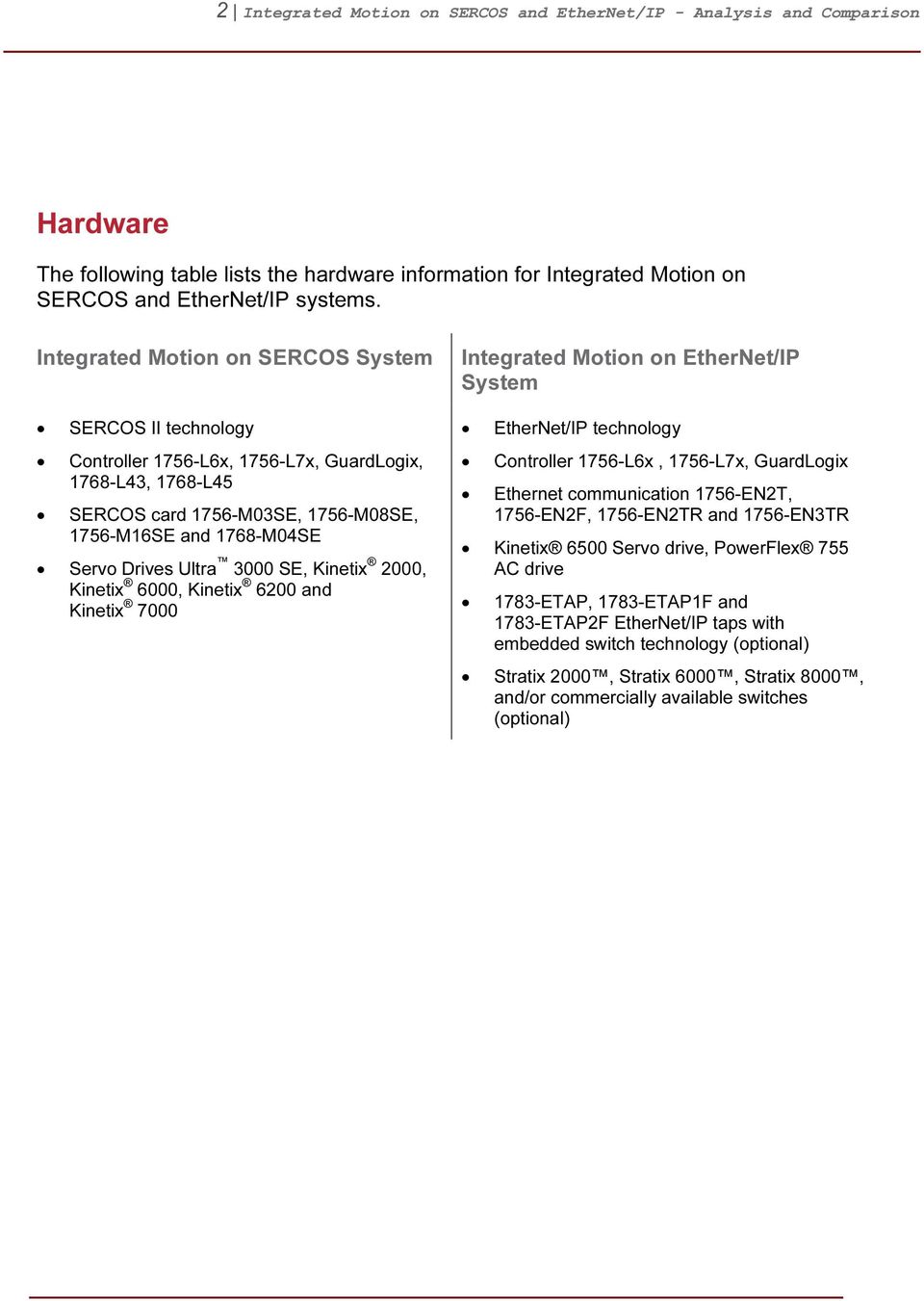
2 2 Integrated Motion on SERCOS and EtherNet/IP - Analysis and Comparison 0BHardware The following table lists the hardware information for Integrated Motion on SERCOS and EtherNet/IP systems. Integrated Motion on SERCOS System SERCOS II technology Controller 1756-L6x, 1756-L7x, GuardLogix, 1768-L43, 1768-L45 SERCOS card 1756-M03SE, 1756-M08SE, 1756-M16SE and 1768-M04SE Servo Drives Ultra 3000 SE, Kinetix 2000, Kinetix 6000, Kinetix 6200 and Kinetix 7000 Integrated Motion on EtherNet/IP System EtherNet/IP technology Controller 1756-L6x, 1756-L7x, GuardLogix Ethernet communication 1756-EN2T, 1756-EN2F, 1756-EN2TR and 1756-EN3TR Kinetix 6500 Servo drive, PowerFlex 755 AC drive 1783-ETAP, 1783-ETAP1F and 1783-ETAP2F EtherNet/IP taps with embedded switch technology (optional) Stratix 2000, Stratix 6000, Stratix 8000, and/or commercially available switches (optional)
3 3 Integrated Motion on SERCOS and EtherNet/IP - Analysis and Comparison 1BFeatures The following table lists features for Integrated Motion on SERCOS and EtherNet/IP systems. Integrated Motion on SERCOS System SERCOS (Serial Real-time Communications System) is a controller/drive interface using noise-immune, fiber optic cables. A single fiber optic ring serves as the sole interface between control and drive. It replaces costly command and feedback wiring, reducing both installation time and wiring costs. Kinetix provides advanced diagnostics and process reporting via the SERCOS interface. Wide variety of motion module options for ControlLogix, CompactLogix and GuardLogix. Up to 16 axes of motion can be controlled from one motion module. System is fully expandable, with up to 100 axes supported per controller. Multiple controllers can be used if additional axes are needed. Integrated Motion on EtherNet/IP System Single network architecture integrates high performance drives, I/O, smart actuators, HMI, programming terminal, and any other EtherNet/IP device providing lower system cost, improved performance, flexibility, and ease-of-use benefits. Extends the benefits and simplicity of Integrated Motion to Kinetix 6500 and PowerFlex 755 drives on EtherNet/IP. Kinetix and PowerFlex drives can be used on the same network for common configuration, programming, commissioning, diagnostics, and drive maintenance. EtherNet/IP is open and broadly adopted with over 3 million installed nodes, and over 1000 different products as of EtherNet/IP, CIP Motion, and CIP Sync technologies are global standards from ODVA, helping to ensure device standardization and compatibility. Support for any Ethernet topology for maximum flexibility. Kinetix 6500 has embedded switch DLR technology. EtherNet/IP is an agile, multidiscipline network that can be used to control, configure, monitor and do peer interlocking for motion, safety, process and discrete applications; it provides true enterprise-wide integration. This is a flexible network and can be used to connect business, commercial and industrial devices to help simplify networking, save time and reduce costs.

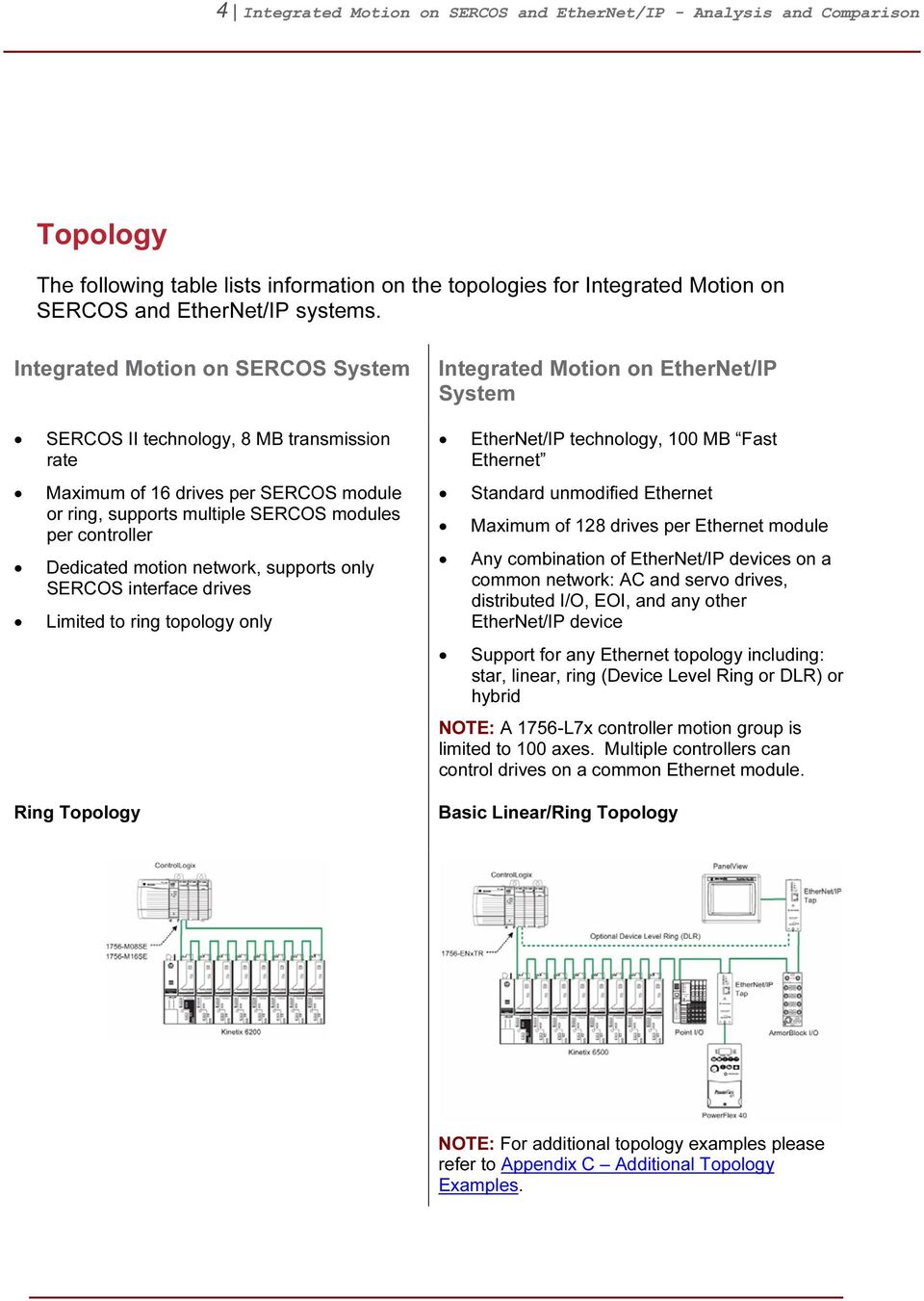
4 4 Integrated Motion on SERCOS and EtherNet/IP - Analysis and Comparison 2BTopology The following table lists information on the topologies for Integrated Motion on SERCOS and EtherNet/IP systems. Integrated Motion on SERCOS System SERCOS II technology, 8 MB transmission rate Maximum of 16 drives per SERCOS module or ring, supports multiple SERCOS modules per controller Dedicated motion network, supports only SERCOS interface drives Limited to ring topology only Ring Topology Integrated Motion on EtherNet/IP System EtherNet/IP technology, 100 MB Fast Ethernet Standard unmodified Ethernet Maximum of 128 drives per Ethernet module Any combination of EtherNet/IP devices on a common network: AC and servo drives, distributed I/O, EOI, and any other EtherNet/IP device Support for any Ethernet topology including: star, linear, ring (Device Level Ring or DLR) or hybrid NOTE: A 1756-L7x controller motion group is limited to 100 axes. Multiple controllers can control drives on a common Ethernet module. Basic Linear/Ring Topology NOTE: For additional topology examples please refer to 20HAppendix C Additional Topology Examples.
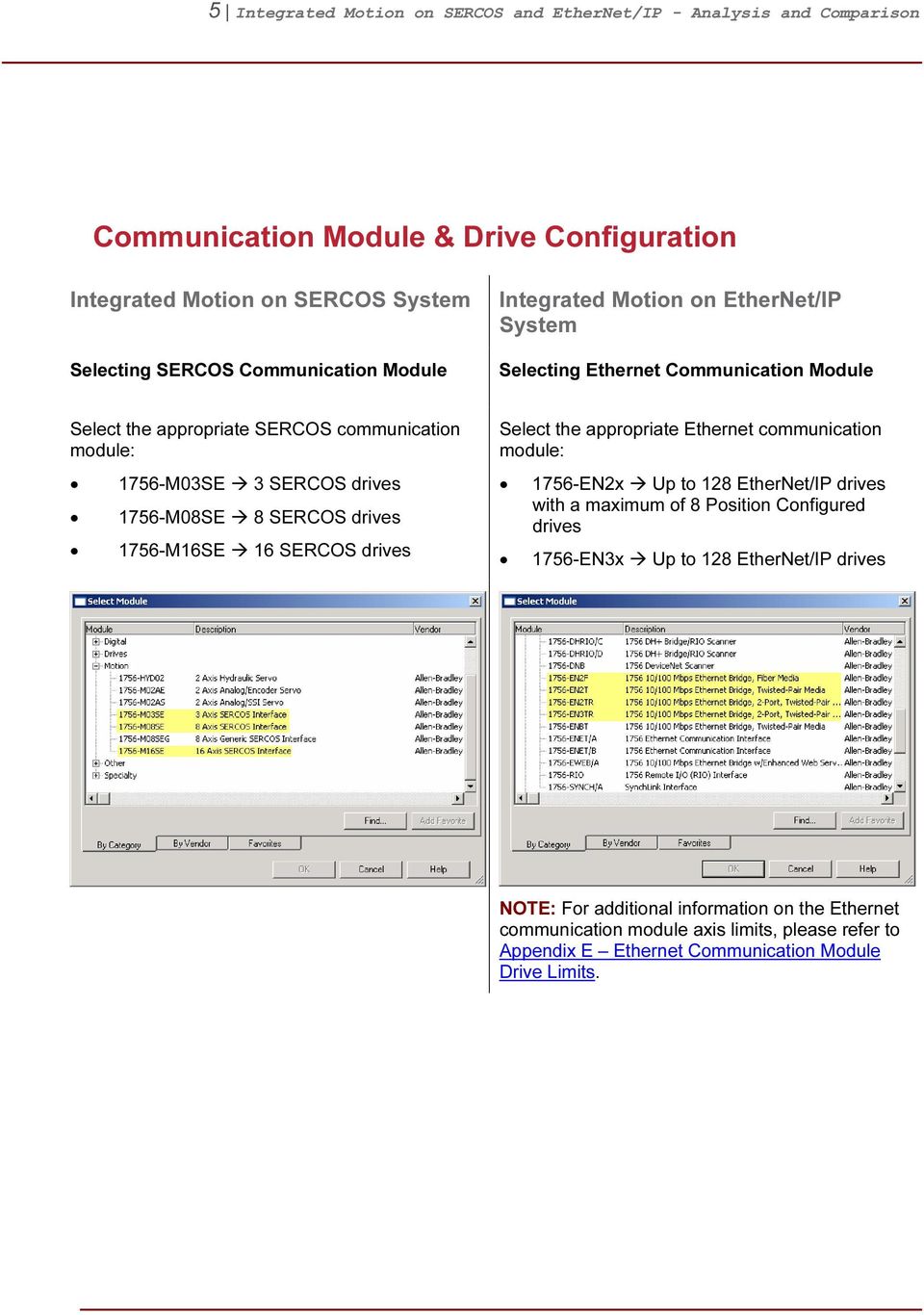
5 5 Integrated Motion on SERCOS and EtherNet/IP - Analysis and Comparison 3BCommunication Module & Drive Configuration Integrated Motion on SERCOS System Selecting SERCOS Communication Module Integrated Motion on EtherNet/IP System Selecting Ethernet Communication Module Select the appropriate SERCOS communication module: 1756-M03SE 3 SERCOS drives 1756-M08SE 8 SERCOS drives 1756-M16SE 16 SERCOS drives Select the appropriate Ethernet communication module: 1756-EN2x Up to 128 EtherNet/IP drives with a maximum of 8 Position Configured drives 1756-EN3x Up to 128 EtherNet/IP drives NOTE: For additional information on the Ethernet communication module axis limits, please refer to 21HAppendix E Ethernet Communication Module Drive Limits.
6 6 Integrated Motion on SERCOS and EtherNet/IP - Analysis and Comparison Integrated Motion on SERCOS System Drive Selection Integrated Motion on EtherNet/IP System Drive Selection: Control & Power Structure When selecting a SERCOS drive, the user is selecting both the control and power structure. For an EtherNet/IP drive, the user selects control and power structure separately. First, the control module is selected. Then, on the module definition for the control module, the power structure is selected. NOTE: The power structure can now be changed without having to re-add the drive.

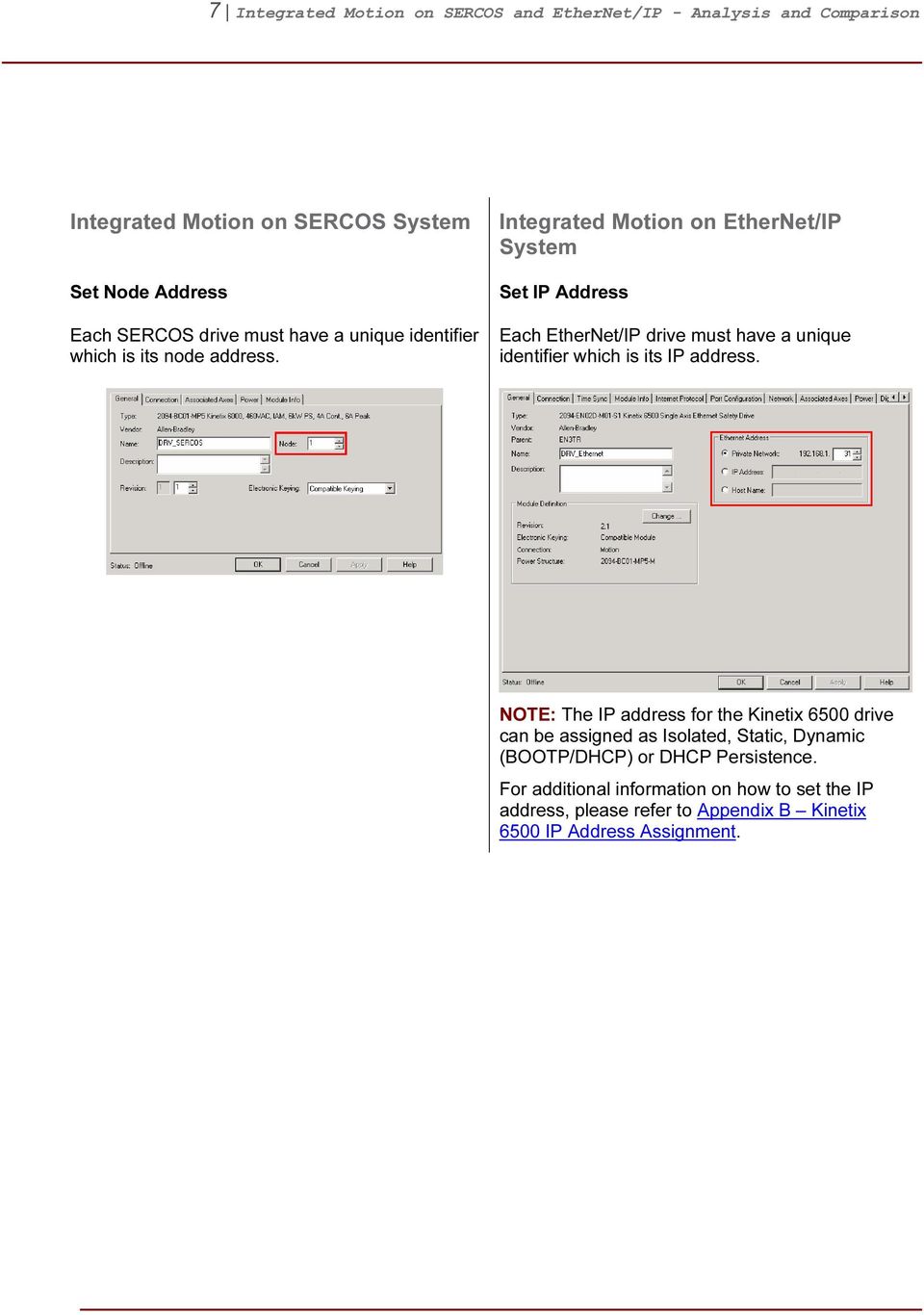
7 7 Integrated Motion on SERCOS and EtherNet/IP - Analysis and Comparison Integrated Motion on SERCOS System Set Node Address Each SERCOS drive must have a unique identifier which is its node address. Integrated Motion on EtherNet/IP System Set IP Address Each EtherNet/IP drive must have a unique identifier which is its IP address. NOTE: The IP address for the Kinetix 6500 drive can be assigned as Isolated, Static, Dynamic (BOOTP/DHCP) or DHCP Persistence. For additional information on how to set the IP address, please refer to 22HAppendix B Kinetix 6500 IP Address Assignment.
8 8 Integrated Motion on SERCOS and EtherNet/IP - Analysis and Comparison Integrated Motion on SERCOS System Configuring SERCOS Communication Module Integrated Motion on EtherNet/IP System Configuring Ethernet Communication Module Select the appropriate data rate, cycle time, etc. that matches the SERCOS network. These settings are typically dependent on the number of drives in the network. Set the module definition Time Sync Connection to Time Sync and Motion. This enables CIP Sync time coordination required for motion control. Digital Inputs Configurable Digital Inputs SERCOS drives contain up to 6 digital inputs. Typically the function of these inputs cannot be configured. EtherNet/IP drives have configurable digital inputs. For example, the Kinetix 6500 has 4 configurable inputs.

9 9 Integrated Motion on SERCOS and EtherNet/IP - Analysis and Comparison Integrated Motion on SERCOS System Drive Enable Input Checking Example Integrated Motion on EtherNet/IP System Drive Enable Input Checking Example For a SERCOS drive, the Drive Enable Input Checking checkbox is located on the Drive/Motor tab of the Axis Properities. For an EtherNet/IP drive, to disable input checking for example, make sure none of the inputs are assigned to enable. Hard Travel Limits Example Overtravel Limits Example For a SERCOS drive, the Hard Travel Limits checkbox is located on the Limits tab of the Axis Properties. For an EtherNet/IP drive, to enable the hard travel limits, assign the inputs to Positive / Negative Overtravel. NOTE: The Kinetix 6200 drive is limited to 4 digitals. NOTE: The following digital inputs can be assigned for the Kinetix 6500 drives. The digital input default settings can be configured by using a SERCOS IDN write instruction.

10 10 Integrated Motion on SERCOS and EtherNet/IP - Analysis and Comparison 4BAxis Configuration Integrated Motion on SERCOS System General Integrated Motion on EtherNet/IP System General Axis & Loop Configuration For a SERCOS axis, the Axis Configuration selects between Servo and Feedback Only operation control. Axis Configuration Axis & Feedback Configuration For an EtherNet/IP axis, the control mode is a combination of the Axis and Feedback Configurations. Axis Configuration NOTE: Frequency Control (V/Hz) is only valid with PowerFlex 755 AC drives. All other modes are fully supported by both Kinetix 6500 and PowerFlex 755 AC drives.

11 11 Integrated Motion on SERCOS and EtherNet/IP - Analysis and Comparison Integrated Motion on SERCOS System Integrated Motion on EtherNet/IP System To configure the axis for Velocity Servo, Torque Servo, etc., refer to the Loop Configuration located on the Drive/Motor tab. Loop Configuration Feedback Configuration

12 12 Integrated Motion on SERCOS and EtherNet/IP - Analysis and Comparison Integrated Motion on SERCOS System Drive/Motor Integrated Motion on EtherNet/IP System Motor Change Catalog Number For a SERCOS axis, the Motor Data Source dropdown selection does not exist. By default, the user is limited to selecting an available drive in the motor catalog database. Motor Data Source Options Nameplate Datasheet: Support 3 rd party motors or motors that are not included in the motor database. Motor parameters are entered directly by the user. Catalog Number: Supported Allen-Bradley motors can be chosen by catalog number. Provides automatic setting of all the required parameters. Motor NV: Motor parameters are derived from non-volatile memory of a smart feedback device equipped with a serial interface. Applies to any Hiperface or EnDat feedback device which is preprogrammed with Rockwell Automation formatted motor data. Not a valid selection for PowerFlex 755 AC drives. Drive NV: Motor parameters are derived from non-volatile memory from the drive. Valid selection for PowerFlex 755 AC drives only.

13 13 Integrated Motion on SERCOS and EtherNet/IP - Analysis and Comparison Integrated Motion on SERCOS System Motor Feedback For a SERCOS axis, the Motor Feedback tab provides a summary of the connected feedback. Integrated Motion on EtherNet/IP System Motor Feedback For an EtherNet/IP axis, the Motor Feedback page provides a summary of the connected feedback device when Catalog Number is selected as a Motor Data Source. When Nameplate Datasheet is selected, the motor feedback information can be defined. NOTE: The Commutation Offset is required for permanent magnet servo motors. Typically the offset value is read from the feedback device or measured by the drive via the Commutation Test.

14 14 Integrated Motion on SERCOS and EtherNet/IP - Analysis and Comparison Integrated Motion on SERCOS System Aux Feedback The Aux Feedback page is not accessible unless one of the conditions is true: Axis Configuration is set to Feedback Only Loop Configuration is set to Aux or Dual loop mode Integrated Motion on EtherNet/IP System Load Feedback The Load Feedback page is only visible if the Feedback Configuration is set to Load or Dual Feedback. Master Feedback If the Axis Configuration is set to Feedback Only, the Motor and Load Feedback pages are replaced by Master Feedback page.

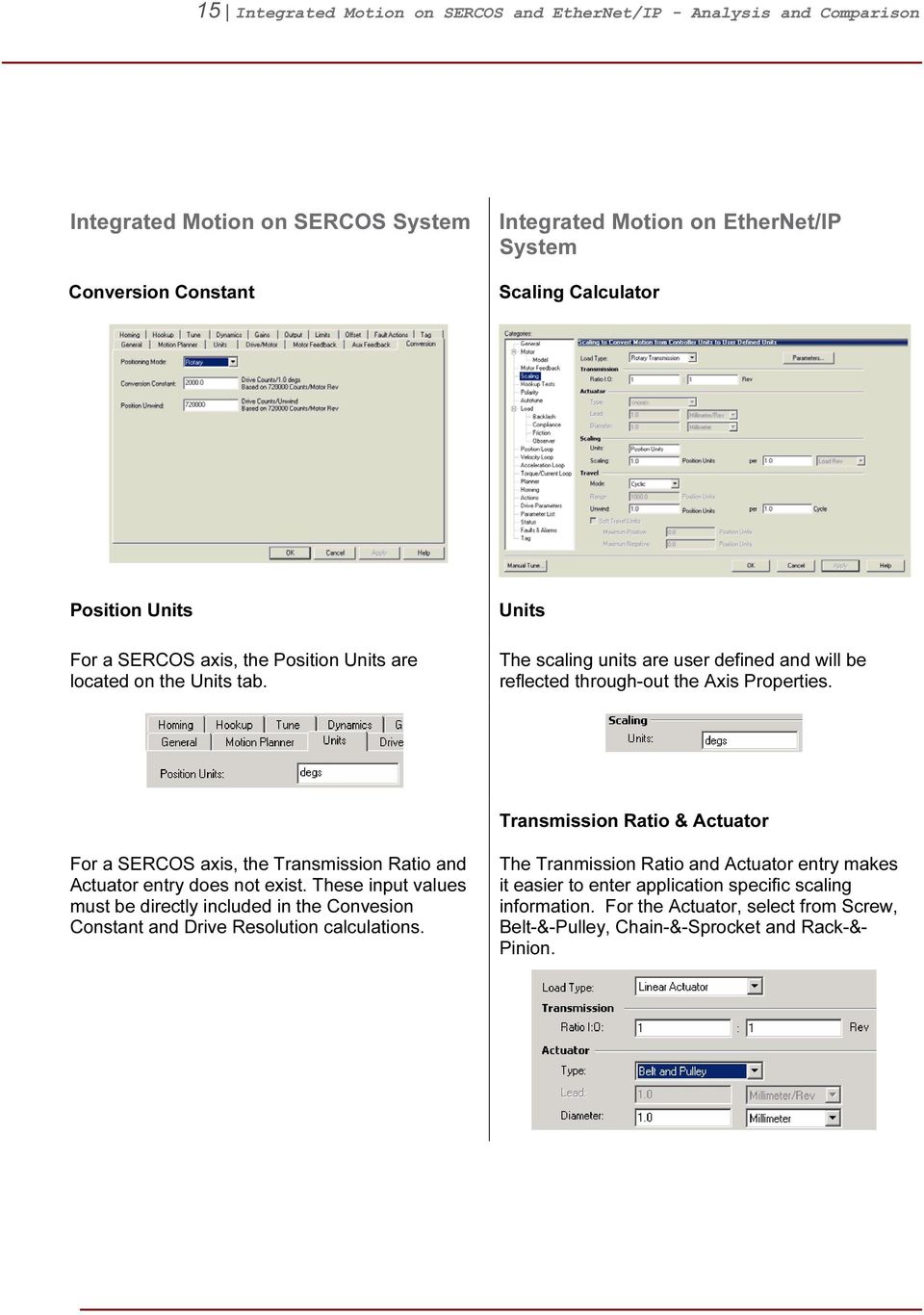
15 15 Integrated Motion on SERCOS and EtherNet/IP - Analysis and Comparison Integrated Motion on SERCOS System Conversion Constant Integrated Motion on EtherNet/IP System Scaling Calculator Position Units For a SERCOS axis, the Position Units are located on the Units tab. Units The scaling units are user defined and will be reflected through-out the Axis Properties. Transmission Ratio & Actuator For a SERCOS axis, the Transmission Ratio and Actuator entry does not exist. These input values must be directly included in the Convesion Constant and Drive Resolution calculations. The Tranmission Ratio and Actuator entry makes it easier to enter application specific scaling information. For the Actuator, select from Screw, Belt-&-Pulley, Chain-&-Sprocket and Rack-&- Pinion.
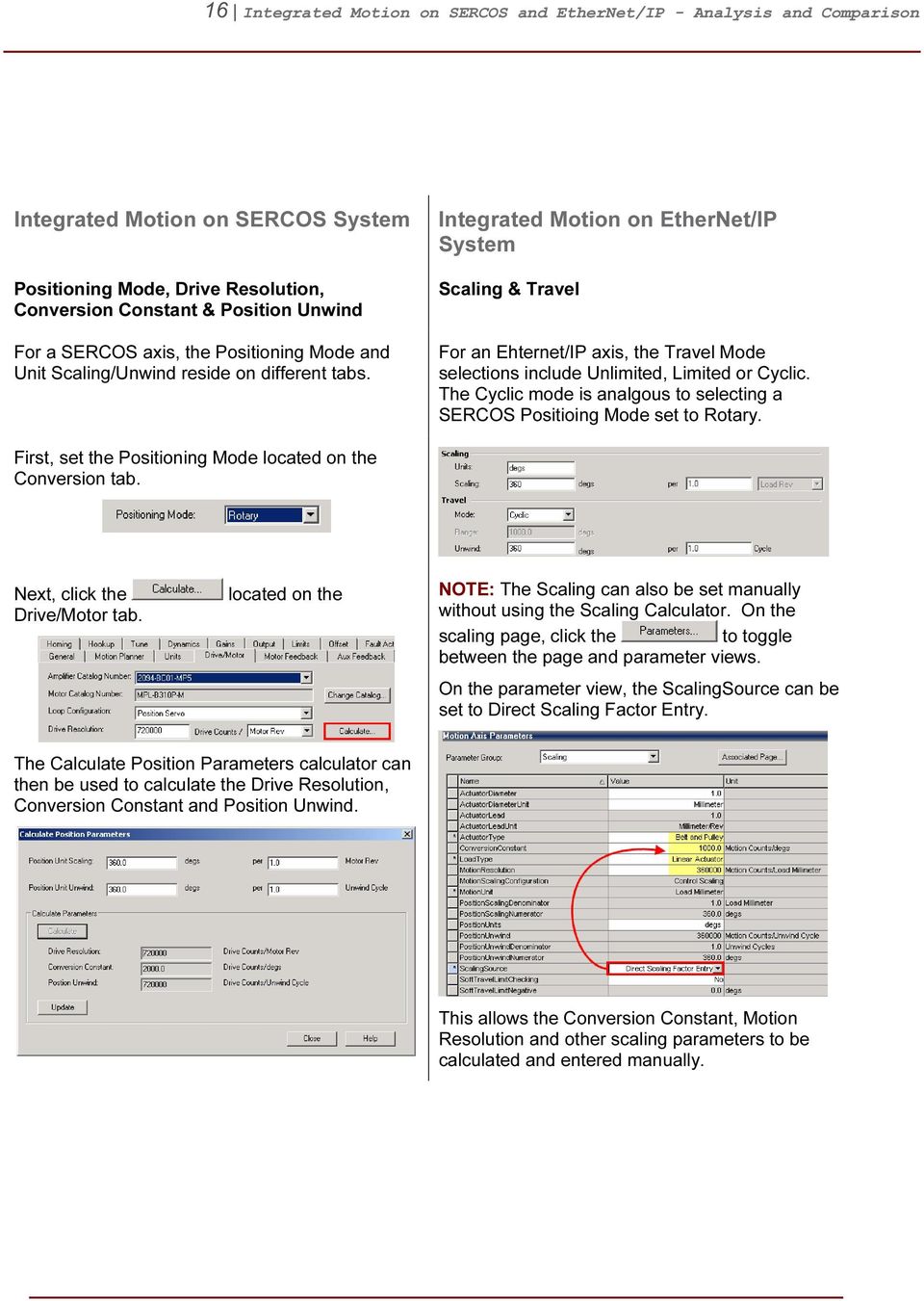
16 16 Integrated Motion on SERCOS and EtherNet/IP - Analysis and Comparison Integrated Motion on SERCOS System Positioning Mode, Drive Resolution, Conversion Constant & Position Unwind For a SERCOS axis, the Positioning Mode and Unit Scaling/Unwind reside on different tabs. Integrated Motion on EtherNet/IP System Scaling & Travel For an Ehternet/IP axis, the Travel Mode selections include Unlimited, Limited or Cyclic. The Cyclic mode is analgous to selecting a SERCOS Positioing Mode set to Rotary. First, set the Positioning Mode located on the Conversion tab. Next, click the Drive/Motor tab. located on the NOTE: The Scaling can also be set manually without using the Scaling Calculator. On the scaling page, click the to toggle between the page and parameter views. On the parameter view, the ScalingSource can be set to Direct Scaling Factor Entry. The Calculate Position Parameters calculator can then be used to calculate the Drive Resolution, Conversion Constant and Position Unwind. This allows the Conversion Constant, Motion Resolution and other scaling parameters to be calculated and entered manually.
17 17 Integrated Motion on SERCOS and EtherNet/IP - Analysis and Comparison Integrated Motion on SERCOS System Homing Integrated Motion on EtherNet/IP System Homing Homing Mode Homing Mode The Active and Passive homing modes for both SERCOS and EtherNet/IP axes have similar functions. Active: The desired homing sequence is selected by specifying whether a home limit switch or the encoder marker is used for this axis. Active homing sequences always use the trapezoidal velocity profile. Passive: Homing redefines the absolute position of the axis on the occurrence of a home switch or encoder marker event. Passive homing is most commonly used to calibrate uncontrolled axes, although it can also be used with controlled axes to create a custom homing sequence. Absolute: The absolute homing process establishes the true absolute position of the axis by applying the configured Home Position to the reported position of the absolute feedback device. NOTE: The only valid Home Sequence for an absolute Homing Mode is immediate. NOTE: For an EtherNet/IP axis, if the motor contains an absolute position capable feedback device the homing operation will automatically set the absolute position.

18 18 Integrated Motion on SERCOS and EtherNet/IP - Analysis and Comparison Integrated Motion on SERCOS System Homing Sequence Integrated Motion on EtherNet/IP System Homing Sequence NOTE: EtherNet/IP axes currently do not support the home to Torque Level sequence. This functionality can be implemented via software in your RSLogix 5000 project. Please refer to 23HSample Code Library: Filename/ID CIP Axis Home To Torque AOI This sample code example demonstrates one method to execute a Home to Torque Level sequence in RSLogix 5000 application code.

19 19 Integrated Motion on SERCOS and EtherNet/IP - Analysis and Comparison Integrated Motion on SERCOS System Fault Actions Integrated Motion on EtherNet/IP System Fault Actions A SERCOS axis is limited to a total 9 Fault Actions. Drive Enable Input Fault Example For SERCOS axis, the Drive Enable Input Fault checkbox is located on the Drive/Motor tab. Uncheck this box to ignore this this fault. For an EtherNet/IP axis, the Fault Actions referred to as Exception Conditions, see 24HAppendix G Axis Exceptions. The number of configurable conditions has been significantly expanded. Action Enable Input Deactivated Example For an EtherNet/IP axis, all of the Enable Input Deactivated Actions (including Ignore) are available on the Actions page. Typically the following Actions are available: Otherwise assign the approiate Fault Action. NOTE: The available Actions can vary between Exception Conditions.

20 20 Integrated Motion on SERCOS and EtherNet/IP - Analysis and Comparison Integrated Motion on SERCOS System Real Time Axis Information Integrated Motion on EtherNet/IP System Drives Parameters For a SERCOS axis, 2 additional real time attributes can be selected in addition to default Auto Tag Update attributes. The attributes updatedat the coarse update rate and are readonly. An EtherNet/IP axis supports up to 10-read and 10-write parameters. These parameters are transferred at the cyclic/coarse rate and are available in the axis structure. For a detailed list, please refer to 25HAppendix D Drive Parameter Cyclic Read/Write List. NOTE: Each parameter selected as a cyclic read/write attribute will add overhead to the controller / drive data exchange and thus impact throughput. The user must analyze the trade-off of real time data on the timing of the axis. NOTE: In order to obtain Real Time Axis Information for both SERCOS and EtherNet/IP axes, Auto Tag Update needs to enabled. In addition to selected attributes, the following 8-read only default attributes are automatically updated at the coarse update rate: ActualPosition CommandPosition ActualVelocity CommandVelocity ActualAcceleration CommandAcceleration AverageVelocity MasterOffset

21 21 Integrated Motion on SERCOS and EtherNet/IP - Analysis and Comparison 5BAxis Commissioning Integrated Motion on SERCOS System Hookup Tests Integrated Motion on EtherNet/IP System Hookup Tests The Hookup Tests interfaces between the SERCOS and EtherNet/IP axes are similar. The Hookup Tests are used to verify the proper hookup of the feedback device and to determine motor and feedback polarity. NOTE: The Hookup Tests for both SERCOS and EtherNet/IP Axes can be executed while the controller is in Program Mode.
22 22 Integrated Motion on SERCOS and EtherNet/IP - Analysis and Comparison Integrated Motion on SERCOS System Integrated Motion on EtherNet/IP System Commutation Test NOTE: For a SERCOS axis, the Commutation Test does not exist as this feature is not supported. For an EtherNet/IP axis, the Hookup Tests can also measure the Commutation Offset for permanent magnet servo motors. NOTE: Measuring the Commutation Offset is typically required when operating 3 rd party servo motors and/or when using PowerFlex 755 AC drives.
23 23 Integrated Motion on SERCOS and EtherNet/IP - Analysis and Comparison Integrated Motion on SERCOS System Drive Polarity For a SERCOS axis, the Drive Polarity is updated based on the results of the Hookup Tests. The Drive Polarity setting is located on the Hookup tab. Integrated Motion on EtherNet/IP System Polarity For an EtherNet/IP axis, the Motion Polarity, Motor Polarity and Feedback Polarity(s) are updated based on the results of the Hookup Tests. NOTE: The Drive Polarity for a SERCOS axis cannot be manually changed while online with controller. IMPORTANT: It is recommended to use the Hookup Tests to correctly adjust polarity settings. Incorrectly adjusting the polarity settings can lead to an axis runaway condition.
24 24 Integrated Motion on SERCOS and EtherNet/IP - Analysis and Comparison Integrated Motion on SERCOS System Tune Integrated Motion on EtherNet/IP System Autotune Tune Settings For a SERCOS axis, the Application Type dropdown selection does not exist. Instead the user must select the individual tuning parameters. Application Type The application type selection provides automatic setting of the servo loop configuration and loop gains. Custom Basic Tracking Point -to- Point Constant Speed Position Loop Bandwidth Position Integrator Bandwidth Velocity Loop Bandwidth Velocity Integrator Bandwidth Integrator Hold Velocity Feedforward (1) Acceleration Feedforward (1) Selected by default (1) Velocity and Acceleration Feedforward will be set to 100%
25 25 Integrated Motion on SERCOS and EtherNet/IP - Analysis and Comparison Integrated Motion on SERCOS System Integrated Motion on EtherNet/IP System Application Type continued Custom: Advanced setup, user selects specific tuning parameters based on the application. Basic: Default setup. Recommended as starting point for out of the box configurations. Tracking: Intended for applications that require minimal following error. Ex: Un/Winding, Flying Shear and Web Control Applications Point-to-Point: Intended for applications that require precise position moves with minimal overshoot. Ex: Pick-N-Place, Packaging and Cutto-Length Applications Constant Speed: Intended for applications that require minimal velocity error at steady state speed. Ex: Conveyors, Line Shaft and Crank Applications
26 26 Integrated Motion on SERCOS and EtherNet/IP - Analysis and Comparison Integrated Motion on SERCOS System Damping Factor Integrated Motion on EtherNet/IP System Loop Response For a SERCOS axis, the Loop Response dropdown selection does not exist. Instead the user must enter the desired damping factor. Low: Damping Factor = 1.5 Medium: Damping Factor = 1.0 Default setting, recommended as starting point for out of the box configurations. High: Damping Factor = 0.8 NOTE: The Damping Factor is used to calculate the maximum Position and Velocity Servo Bandwidth values. In general, the Damping Factor controls the dynamic response of the drive. When the tuning gains are calculated using a small Damping Factor, for example 0.8, a step response test tends to demonstrate an underdamped behavior with velocity overshoot. However, when the Damping Factor is increased to 1.0, the step response tends to exhibit little to no overshoot and typically works well for most applications. Load Coupling For a SERCOS axis, the Load Coupling dropdown selection does not exist as this feature is not supported. The Load Coupling automatically corrects the loop gains based on how tightly the system is physically coupled.
27 27 Integrated Motion on SERCOS and EtherNet/IP - Analysis and Comparison Integrated Motion on SERCOS System Tune Profile Integrated Motion on EtherNet/IP System Tune Profile For a SERCOS axis, the Tune Profile can be adjusted based on the application limitations. The Tune Profile is used to measure the System Inertia. This measurement requires motor to physically move the connected load in order to accurately assess the inertia. For an EtherNet/IP axis, not only can the Tune Profile be adjusted, but the Tune Profile can be used to measure the uncoupled motor inertia separate from the load. In cases where the system inertia has been established, the inertia test can also be disabled based on the selection of the Measure Inertia using Tune Profile checkbox. This allows the loop gains to be calculated on the Perform Tune test without re-running the Tune Profile during successive tuning iterations.
28 28 Integrated Motion on SERCOS and EtherNet/IP - Analysis and Comparison Integrated Motion on SERCOS System Tune Results Integrated Motion on EtherNet/IP System Tune Results Upon completion of the Autotune, a SERCOS axis will display the Loop Bandwidth and measured Load Inertia Ratio. The user can choose to select these results by clicking OK. For an EtherNet/IP axis, a more encompassing list of both Loop and Load Parameters are displayed to the user. The * next to the parameters indicates which values will be updated. The user can choose to select these results by pressing the.
29 29 Integrated Motion on SERCOS and EtherNet/IP - Analysis and Comparison Integrated Motion on SERCOS System Manual Tuning Manual Adjustment & Motion Direct Commands Integrated Motion on EtherNet/IP System Manual Tuning For a SERCOS axis, the Manual Adjust interface is limited to adjustment of the tuning related parameters only. The Manual Tuning interface consolidates many of the commonly used features utilized during the tuning process.
30 30 Integrated Motion on SERCOS and EtherNet/IP - Analysis and Comparison Integrated Motion on SERCOS System Motion Direct Commands Integrated Motion on EtherNet/IP System Motion Generator For a SERCOS axis, the user typically will need to launch the Motion Direct Commands in order to manually control the drive during the tuning process. As a part of the Manual Tuning interface, the Motion Generator feature includes direct access to several of the most commonly used Motion Direct Commands. This reduces the need to launch the Motion Direct Commands interface to complete the tuning process.
31 31 Integrated Motion on SERCOS and EtherNet/IP - Analysis and Comparison Integrated Motion on SERCOS System Gains Integrated Motion on EtherNet/IP System Manual Tune Loop Gains For a SERCOS axis, the gains can only be adjusted individually via the Manual Adjust interface. The Manual Tuning interface now offers 2 options to manually adjust the loop gains. Each parameter can be adjusted on an individual basis or as an entire set of gains which are adjusted proportionally with a single parameter. Adjustments to the System Bandwidth or System Damping will recalculate all of the gains accordingly. NOTE: For an EtherNet/IP axis, the loop gains (including System Bandwidth) are now represented in Hertz.
32 32 Integrated Motion on SERCOS and EtherNet/IP - Analysis and Comparison Integrated Motion on SERCOS System Offset Integrated Motion on EtherNet/IP System Additional Tune For a SERCOS axis, the Manual Adjust interface provides access to the Dynamics, Output, Limits and Offset parameters. The Manual Tuning interface provides access to additional Loop and Load Parameters that are often adjusted during the tuning process.
33 33 Integrated Motion on SERCOS and EtherNet/IP - Analysis and Comparison Integrated Motion on SERCOS System Output Integrated Motion on EtherNet/IP System Load Torque/Force Scaling System Inertia The Torque/Force Scaling attribute is used to convert the acceleration of the servo loop into equivalent % rated torque to the motor. This has the effect of "normalizing" the units of the servo loops gains so that their values are not affected by variations in feedback resolution, drive scaling, motor / load inertia, and mechanical gear ratios. Torque/Force Offset For an EtherNet/IP axis, the Torque/Force Scaling is now referred to as System Inertia. Torque Offset For a SERCOS axis, Torque offset is located on the Offset tab.
34 34 Integrated Motion on SERCOS and EtherNet/IP - Analysis and Comparison 6BAdditional Axis Property Equivalents Integrated Motion on SERCOS System Integrated Motion on EtherNet/IP System Torque Control Compensation Features A number of important compensation features are included in the torque control loop to help overcome physical effects that are inherit to most mechanical systems. Offset Backlash Compensation Backlash Compensation Backlash Compensation is used to stabilize the control loop for applications with high load inertia ratios and mechanical backlash. Output Low Pass & Notch Filters Compliance Compensation The Lead-Lag filter can be used in the lead configuration to boost velocity or acceleration loop bandwidth, or in the lag configuration to compensate the high frequency gain boost associated with compliant load mechanics. NOTE: The Lead-Lag Filter is a new feature added for EtherNet/IP axes only.
35 35 Integrated Motion on SERCOS and EtherNet/IP - Analysis and Comparison Integrated Motion on SERCOS System Offset Friction Compensation Integrated Motion on EtherNet/IP System Friction Compensation Friction Compensation applies a compensating directional torque or force to the motor to overcome the effects of friction in the mechanical system, thus minimizing the amount of control effort required. Load Observer For a SERCOS axis, the Load Observer feature does not exist. Load Observer is another compensation feature that can be effective in compensating for mechanical backlash, mechanical compliance and various load disturbances.
36 36 Integrated Motion on SERCOS and EtherNet/IP - Analysis and Comparison Integrated Motion on SERCOS System Integrated Motion on EtherNet/IP System Loop Gains & Limits The loop gains between a SERCOS and Ethernet/IP axis are similar, however a few notable differences do exist. Position Gains & Limits Position Loop
37 37 Integrated Motion on SERCOS and EtherNet/IP - Analysis and Comparison Integrated Motion on SERCOS System Velocity Gains & Limits Integrated Motion on EtherNet/IP System Velocity Loop NOTE: For an EtherNet/IP axis, the Bipolar Velocity Limit does not exist. The ± limits must be set independently. Acceleration Limits Acceleration Loop NOTE: For an EtherNet/IP axis, the Bipolar Acceleration Limit does not exist. The Accel/Decel limits must be set independently.
38 38 Integrated Motion on SERCOS and EtherNet/IP - Analysis and Comparison Integrated Motion on SERCOS System Torque Limits Integrated Motion on EtherNet/IP System Torque/Current Loop NOTE: For a SERCOS axis, direct access to the Torque Loop Gain is not available. Dynamics Planner For an EtherNet/IP axis, the Dynamics tab is now referred to as Planner.
39 39 Integrated Motion on SERCOS and EtherNet/IP - Analysis and Comparison Integrated Motion on SERCOS System Motion Planner Integrated Motion on EtherNet/IP System Motion Planner Parameters For an EtherNet/IP axis, the Output Cam Execution Targets and Master Delay Compensation parameters are located under the Planner Parameter Group listing. Click the to toggle between the page and parameter views The Program Stop Action is located under the Action Parameter Group listing. NOTE: Each Parameter Group list may contain more attributes than the associated page. In some instances, attributes listed in the Parameter Group list are not displayed on the associated page.
40 40 Integrated Motion on SERCOS and EtherNet/IP - Analysis and Comparison Integrated Motion on SERCOS System Set Custom Stop Action Integrated Motion on EtherNet/IP System Custom Stop Action For an EtherNet/IP axis, the Custom Stop Action parameters are located under the Action Parameter Group listing. Velocity Offset Velocity Offset For an EtherNet/IP axis, the Velocity Offset parameter is located under the Velocity Loop Parameter Group listing.
41 41 Integrated Motion on SERCOS and EtherNet/IP - Analysis and Comparison 7BDiagnostics The following section will highlight some of the diagnostic capabilities unique to Integrated Motion on EtherNet/IP systems. 10BAxis Structure The AIS_CIP_DRIVE axis structure is significantly different than that of an AIS_SERVO_DRIVE, which is required axis structure for SERCOS based servo drives. Some of tags match and/or have analogous functions, while additional tags were added to the AIS_CIP_DRIVE axis structure. For comparison purposes, the AIS_SERVO_DRIVE axis structure contains 209 tags, while the AIS_CIP_DRIVE axis structure contains 468 tags. One area responsible for the increase in tags is the overall increase in the number of faults and also the addition of alarm tags. Examining the axis structure, you will notice a series of basic fault bits listed under the Axis Fault word. When any fault condition is detected, the associated fault type bit is set. This provides a high level view to determine which fault group is currently active. In addition, the fault types are further broken down into individual fault and alarm status bits.
42 42 Integrated Motion on SERCOS and EtherNet/IP - Analysis and Comparison 11BFaults & Alarms Log The Faults & Alarms Log displays current status of both faults and alarms are logged by the controller for each individual axis. The display is read-only except for the ability to clear each of the logs (Faults, Alarms and Resets) independently. For example the alarm log can be cleared while maintaining the Faults and Resets logs. When online, select the Show checkboxes to toggle between showing and hiding the specified group of entries and use the Clear Log button clear the selected log. NOTE: Only the last 25 faults and alarms are displayed.
43 43 Integrated Motion on SERCOS and EtherNet/IP - Analysis and Comparison 12BKinetix 6500 Embedded Webpage The Kinetix 6500 Embedded Webpage contains a number of advanced diagnostic and troubleshooting tools. The embedded webpage is launched by entering the desired drives IP address into the address bar of a web browser like Internet Explorer. The Home page will be initially displayed. The Home page displays basic drive information like MAC and IP addresses, firmware revision, and catalog number information. In addition, the Home page indicated the current status of the drive.
44 44 Integrated Motion on SERCOS and EtherNet/IP - Analysis and Comparison The Drive Indicators page displays the active 4-Character Display and Status (LED) Indicators on the front of the drive control module. The Status Indicators include descriptions of their current state.
45 45 Integrated Motion on SERCOS and EtherNet/IP - Analysis and Comparison The Oscilloscope page provides the user with the ability to capture waveforms directly from the drive at periods up to 1-servo update. This means information can be captured from the drive that was previously unavailable to user, providing an added level diagnostic capability. The user can select up to 4 waveforms to capture, with the ability to select the number of samples, update period and trigger source. NOTE: The Oscilloscope feature does NOT impact the performance of the drive.
46 46 Integrated Motion on SERCOS and EtherNet/IP - Analysis and Comparison The Fault Log page allows the user capture data out of drive leading up to a fault event.
47 47 Integrated Motion on SERCOS and EtherNet/IP - Analysis and Comparison Specific drive data, like Position Command Position Feedback, etc. can be configured and then captured leading up to a fault event. The rate at which data is collected is customizable by the user at periods up to 1-servo update. This data can be helpful in troubleshooting axis faults as the data is automatically collected, allowing the user the benefit of being able to analyze the data at a later time. NOTE: The Fault Log feature does NOT impact the performance of the drive.
48 48 Integrated Motion on SERCOS and EtherNet/IP - Analysis and Comparison 8BSupplemental Information 13BAppendix A Ethernet Communication Module Drive Limits The following examples will help illustrate the number of drives that can be connected to each Ethernet communication module. The limits are a combination of loop configuration and available CIP and TCP connections. Each drive requires 1-CIP and 1-TCP connection EN2T / EN2F / EN2TR: EN2x modules are limited to 8 position configured drives. However, EN2x modules can support a total of 128 non-position configured drives. The non-position configured limit is based on the number of available CIP and TCP connections. EN2x modules support up to 256-CIP and 128-TCP connections. Examples: position 120 non-position position 128 non-position position (128 - ) non-position EN3TR: EN3x modules are limited to 128 drives regardless the number of position configured drives. The number of drives is based on the number of available CIP and TCP connections. EN3x modules support up to 256-CIP and 128-TCP connections. Examples: position 000 non-position position 128 non-position position (128 - ) non-position 128 NOTE: The numbers listed above do not include other EtherNet/IP devices. As additional devices are added to the network, CIP and TCP connections will be consumed which may limit the total number of connected drives.
49 49 Integrated Motion on SERCOS and EtherNet/IP - Analysis and Comparison 14BAppendix B Kinetix 6500 IP Address Assignment The Ethernet IP Address for the Kinetix 6500 can be assigned as follows: Isolated: The easiest way is by setting ( ) the thumbwheel switches on the front of the Integrates Axis Module (IAM) Static: For drive firmware v1, a static IP Address which can be set through RSLinx. You will need to set the thumbwheels to non-valid value (000, ). For drive firmware v2 or higher, a static IP address can be assigned via the BOOTP-DHCP server. See the dynamic option below. Dynamic: For drive firmware v2 or higher, when the thumbwheels are set to a non-valid address (000, ) out of the box, the drives will be placed into BOOTP mode. An IP Address can then be assigned via the BOOTP-DHCP server. At this point the drives can also be placed into DHCP or a static IP Address can be assigned via RSLinx. DHCP Persistence: DHCP persistence allows you to reserve and pre-assign an IP address from an IP address pool to a specific switch port, so that a drive connected to that switch port always receives the same IP address, regardless of its MAC address. DHCP Persistence allows the static address to be assigned to the port on the switch. Because of this, the end device does not need to be manually configured for a static IP address. There are two typical use cases for implementing DHCP persistence: replacement of a failed device in the field, and setting up a new out of the box device. In a typical EtherNet/IP system, the user should configure the switch first for DHCP Persistence IP allocation. Once this is complete, all devices that have DHCP/BOOTP enabled should be configured properly and communicating on the network.
50 50 Integrated Motion on SERCOS and EtherNet/IP - Analysis and Comparison 15BAppendix C Additional Topology Examples The following topologies demonstrate the overall flexibility of Integrated Motion on EtherNet/IP. Basically, any Ethernet topology is supported including: star, linear, ring Device Level Ring or DLR) or hybrid. The examples are indicative of a hybrid type of topology or a topology that consists of multiple base topologies combined together. These examples are but only a small subset of the possible topologies that can be constructed. Any combination of EtherNet/IP devices are supported on a common network. These devices include but are not limited to the following: AC and servo drives, distributed I/O, and EOI. Linear Star Topology
51 51 Integrated Motion on SERCOS and EtherNet/IP - Analysis and Comparison Star Linear Topology Star Device Level Ring Topology
52 52 Integrated Motion on SERCOS and EtherNet/IP - Analysis and Comparison 16BAppendix D Drive Parameters Cyclic Read/Write List SERCOS Axis (Real Time Axis Info) Cyclic Read Parameters EtherNet/IP Axis Cyclic Read Parameters EtherNet/IP Axis Cyclic Write Parameters PositionCommand PositionFineCommand PositionTrim PositionFeedback PositionReference VelocityTrim AuxPositionFeedback PositionFeedback1 TorqueTrim PositionError PositionError VelocityFeedforwardGain PositionIntegratorError PositionIntegratorOutput AccerlationFeedforwardGain VelocityCommand PositionLoopOutput PositionLoopBandwidth VelocityFeedback VelocityFineCommand PositionIntegratorBandwidth VelocityError VelocityFeedforwardCommand VelocityLoopBandwidth VelocityIntegratorError VelocityReference VelocityIntegratorBandwidth AccelerationCommand VelocityFeedback LoadObserverBandwidth AccelerationFeedback VelocityError TorqueLimitPositive MarkerDistance VelocityIntegratorOutput TorqueLimitNegative TorqueCommand VelocityLoopOutput VelocityLowPassFilterBandwidth TorqueFeedback AccelerationFeedforwardCommand TorqueLowPassFilterBandwidth PositiveDynamicTorqueLimit AccelerationFeedback SystemInertia NegativeDynamicTorqueLimit LoadObserverAccelerationEstimate MotorCapacity LoadObserverTorqueEstimate DriveCapacity TorqueReference PowerCapacity TorqueReferenceFiltered BusRegulatorCapacity TorqueReferenceLimited MotorElectricalAngle CurrentCommand TorqueLimitSource CurrentFeedback DCBusVoltage FluxCurrentFeedback OutputFrequency OutputCurrent OutputVoltage OutputPower DCBusVoltage MotorCapacity InverterCapacity DigitalInputs
53 53 Integrated Motion on SERCOS and EtherNet/IP - Analysis and Comparison 17BAppendix E Available GSV & SSV Data Get System Variable (GSV) Get System Variable (GSV) SERCOS Axis EtherNet/IP Axis Acceleration Feedforward Command Acceleration Command Acceleration Feedback Actual Acceleration Actual Position Actual Velocity Analog Input 1 Analog Input 2 Attribute Error Code Attribute Error ID Aux Position Feedback Average Velocity Axis Configuration Axis Control Bits Axis Event Bits Axis Fault Bits Axis Response Bits Axis Status Bits Axis Features Bus Regulator Capacity CIP Axis Faults CIP Axis Faults RA CIP Axis IO Status CIP Axis IO Status RA CIP Axis State CIP Axis Status CIP Axis Status RA CIP Initialization Faults CIP Initialization Faults RA CIP Start Inhibit CIP Start Inhibit RA Command Acceleration Command Position Command Velocity Control Method Current Command DC Bus Voltage Drive Capacity
54 54 Integrated Motion on SERCOS and EtherNet/IP - Analysis and Comparison Get System Variable (GSV) SERCOS Axis EtherNet/IP Axis Drive Fault Bits Drive Status Bits Drive Warning Bits Guard Faults Guard Status Hookup Test Commutation Offset Hookup Test Commutation Polarity Hookup Test Feedback 1 Direction Hookup Test Feedback 2 Direction Hookup Test Status Interpolated Actual Position Interpolated Command Position Inverter Capacity Marker Distance Master Offset Module Alarm Bits Module Fault Bits Module Status Bits Motor Capacity Motion Alarm Bits Motion Fault Bits Motion Status Bits Motor Electrical Angle Motor Test Counter EMF Motor Test Inductance Motor Test Resistance Motor Test Status Motor Unit Negative Dynamic Torque Limit Output Cam Lock Status Output Cam Pending Status Output Cam Status Output Cam Transition Status Output Current Output Power Output Voltage Position Command Position Error Position Feedback Position Integrator Error Position Integrator Output
55 55 Integrated Motion on SERCOS and EtherNet/IP - Analysis and Comparison Get System Variable (GSV) SERCOS Axis EtherNet/IP Axis Position Loop Output Position Reference Positive Dynamic Torque Limit Power Capacity Registration 1 Negative Edge Position Registration 1 Negative Edge Time Registration 1 Position Registration 1 Positive Edge Position Registration 1 Positive Edge Time Registration 1 Time Registration 2 Negative Edge Position Registration 2 Negative Edge Time Registration 2 Position Registration 2 Positive Edge Position Registration 2 Positive Edge Time Registration 2 Time Registration 1 Position Registration 1 Time Registration 2 Position Registration 2 Time SERCOS Error Code Start Actual Position Start Command Position Start Master Offset Strobe Actual Position Strobe Command Position Strobe Master Offset Test Direction Forward Test Status Torque Feedback Torque Limit Source Torque Reference Torque Reference Filtered Torque Reference Limited Tune Acceleration Tune Acceleration Time Tune Deceleration Tune Deceleration Time Tune Inertia Tune Status Velocity Command
56 56 Integrated Motion on SERCOS and EtherNet/IP - Analysis and Comparison Get System Variable (GSV) SERCOS Axis EtherNet/IP Axis Velocity Error Velocity Feedback Velocity Feedforward Command Velocity Integrator Error Velocity Integrator Output Velocity Loop Output Velocity Reference Watch Position
57 57 Integrated Motion on SERCOS and EtherNet/IP - Analysis and Comparison System Set Variables (SSV) System Set Variables (SSV) SERCOS Axis EtherNet/IP Axis Acceleration Feedforward Gain Acceleration Limit Bipolar Acceleration Limit Negative Acceleration Limit Positive Average Velocity Time Base AxisInfoSelect 1 AxisInfoSelect 2 Axis Type Backlash Reversal Offset Backlash Stabilization Window Brake Engage Time Delay Brake Release Time Delay CIP Axis Alarm Log Reset CIP Axis Fault Log Reset Command Update Delay Offset Continuous Torque Limit Control Mode Conversion Constant Damping Factor Drive Enable Fault Action Drive Model Time Constant Drive Polarity Drive Thermal Fault Action Dynamics Configuration Bits Fault Configuration Bits Feedback Configuration Feedback Mode Feedback Fault Action Feedback Noise Fault Action Friction Compensation Friction Compensation Window Gain Tuning Configuration Bits Hardware Overtravel Fault Action Home Configuration bits Home Direction Home Mode Home Offset Home Position Home Return Speed
58 58 Integrated Motion on SERCOS and EtherNet/IP - Analysis and Comparison System Set Variables (SSV) SERCOS Axis EtherNet/IP Axis Home Sequence Home Speed Home Torque Level Hookup Test Distance Hookup Test Feedback Channel Inhibit Axis Integrator Hold Enable Interpolation Time Linear Motor Mass Load Inertia Ratio Load Ratio Master Input Configuration Bits Master Position Filter Bandwidth Maximum Acceleration Maximum Acceleration Jerk Maximum Deceleration Maximum Deceleration Jerk Maximum Negative Travel Maximum Positive Travel Maximum Speed Motion Polarity Motion Resolution Motor Inertia Motor Thermal Fault Action Output LP Filter Bandwidth Output Notch Filter Frequency Position Error Fault Action Position Error Tolerance Position Integrator Bandwidth Position Integrator Control Position Integral Gain Position Lock Tolerance Position Loop Bandwidth Position Proportional Gain Position Servo Bandwidth Position Trim Position Unwind Programmed Stop Mode Resistive Brake Contact Delay Rotary Axis Rotary Motor Inertia
59 59 Integrated Motion on SERCOS and EtherNet/IP - Analysis and Comparison System Set Variables (SSV) SERCOS Axis EtherNet/IP Axis Scaling Source Servo loop configuration Soft Overtravel Fault Action Soft Travel Limit Checking Soft Travel Limit Negative Soft Travel Limit Positive Stopping Action Stopping Time Limit Stopping Torque System Bandwidth System Damping System Inertia Test Increment Torque Limit Bipolar Torque Limit Negative Torque Limit Positive Torque Offset Torque Scaling Torque Threshold Torque Trim Travel Mode Travel Range Tune Friction Tune Inertia Mass Tune Load Offset Tuning Configuration Bits Tuning Direction Tuning Select Tuning Speed Tuning Torque Tuning Travel Limits Velocity Droop Velocity Feedforward Gain Velocity Integral Gain Velocity Integrator Bandwidth Velocity Integrator Control Velocity Limit Bipolar Velocity Limit Negative Velocity Limit Positive Velocity Loop Bandwidth Velocity Offset
60 60 Integrated Motion on SERCOS and EtherNet/IP - Analysis and Comparison System Set Variables (SSV) SERCOS Axis EtherNet/IP Axis Velocity Proportional Gain Velocity Servo Bandwidth Velocity Standstill Window Velocity Threshold Velocity Trim Velocity Window
61 61 Integrated Motion on SERCOS and EtherNet/IP - Analysis and Comparison 18BAppendix F Axis Attributes AIS_SERVO_DRIVE AIS_CIP_DRIVE SERCOS Axis Type EtherNet/IP Axis Type Description AxisStatus DINT AxisStatus DINT 0 = ServoActionStatus 1 = DriveEnableStatus 2 = AxisShutdownStatus 3 = ConfigurationUpdateInProcess 4 = InhibitStatus ServoActionStatus ServoActionStatus The ServoActionStatus bit attribute is set when the associated axis is under servo control. If the bit is not set then servo action is disabled. The DriveEnableStatus bit attribute is set when the Drive Enable output of the DriveEnable DriveEnable associated physical axis is currently enabled. Status Status If the bit is not set then physical servo axis Drive Enable output is currently disabled. The AxisShutdownStatus bit attribute is set when the associated axis is currently in the ShutdownStatus ShutdownStatus Shutdown state. As soon as the axis is transitioned from the Shutdown state to another state, the Shutdown Status bit is cleared.
62 62 Integrated Motion on SERCOS and EtherNet/IP - Analysis and Comparison AIS_SERVO_DRIVE AIS_CIP_DRIVE SERCOS Axis Type EtherNet/IP Axis Type Description ConfigUpdateIn Process ConfigUpdateIn Process InhibitStatus InhibitStatus The Configuration Update Status Bits attribute provides a method for monitoring the progress of one or more specific module configuration attribute updates initiated by either online configuration or an SSV in the user program. As soon as such an update is initiated, the Logix processor sets the Configuration Update In Process bit. The bit remains set until the Set Attribute List reply comes back from the servo module indicating that the data update process was successful. Thus, the Configuration Update Status Bits attribute provides a method of waiting until the servo configuration data update to the connected 1756-ENxT module is complete before starting a dependent operation. The InhibitStatus bit attribute is set when the axis is in the inhibited state. This bit can also be used to determine when an inhibit/uninhibit operation has been completed (for example, connections has been shutdown, reconnected and then the reconfiguration process completed). During the inhibit/uninhibit process this bit will remain in the previous state and then once it completes it will be updated to the new state.
63 63 Integrated Motion on SERCOS and EtherNet/IP - Analysis and Comparison AIS_SERVO_DRIVE AIS_CIP_DRIVE SERCOS Axis Type EtherNet/IP Axis Type Description MotionStatus DINT MotionStatus DINT Bitmap: 0 = AccelStatus 1 = DecelStatus 2 = MoveStatus 3 = JogStatus 4 = GearingStatus 5 = HomingStatus 6 = StoppingStatus 7 = AxisHomedStatus 8 = PositionCamStatus 9 = TimeCamStatus 10 = PositionCamPendingStatus 11 = TimeCamPendingStatus 12 = GearingLockStatus 13 = PositionCamLockStatus 14 = Reserved 15 = Master Offset Move Status 16 = CoordinatedMotionStatus 17 = TransformStateStatus 18 = ControlledByTransformStatus 19 = DirectVelocityControlStatus 20 = DirectTorqueControlStatus = Reserved AccelStatus AccelStatus The Acceleration and Deceleration Status bit attributes (AccelStatus and DecelStatus) can be used to determine if the axis is currently being commanded to accelerate or decelerate. If neither bit is set then the axis is running at a steady state velocity or at rest.
64 64 Integrated Motion on SERCOS and EtherNet/IP - Analysis and Comparison AIS_SERVO_DRIVE AIS_CIP_DRIVE SERCOS Axis Type EtherNet/IP Axis Type Description DecelStatus DecelStatus The Acceleration and Deceleration Status bit attributes (AccelStatus and DecelStatus) can be used to determine if the axis is currently being commanded to accelerate or decelerate. If neither bit is set then the axis is running at steady state velocity or at rest. MoveStatus MoveStatus The Acceleration and Deceleration Status bit attributes (AccelStatus and DecelStatus) can be used to determine if the axis is currently being commanded to accelerate or decelerate. If neither bit is set then the axis is running at steady state velocity or at rest. JogStatus JogStatus The JogStatus bit attribute is set if a Jog motion, profile is currently in progress. As soon as the Jog is complete or superseded by some other motion operation, the JogStatus bit is cleared. GearingStatus GearingStatus The GearingStatus bit attribute is set if the axis is currently Gearing to another axis. As soon as the gearing operation is stopped or superseded by some other motion operation, the GearStatus bit is cleared. HomingStatus HomingStatus The HomingStatus bit attribute is set if a Home motion profile is currently in progress. As soon as the Home is complete or superseded by some other motion operation, the HomeStatus bit is cleared.
65 65 Integrated Motion on SERCOS and EtherNet/IP - Analysis and Comparison AIS_SERVO_DRIVE AIS_CIP_DRIVE SERCOS Axis Type EtherNet/IP Axis Type Description StoppingStatus StoppingStatus The StoppingStatus bit attribute is set if there is a stopping process currently in progress. As soon as the stopping process is complete, the Stopping Status bit is cleared. The stopping process is used to stop an axis (initiated by an MAS, MGS, MGPS, Stop Planner fault action, or mode change). This bit is no longer associated with the gearing Clutch bit (MAG with Clutch selected), which for I4B has been explicitly named the GearingLockStatus bit.
66 66 Integrated Motion on SERCOS and EtherNet/IP - Analysis and Comparison AIS_SERVO_DRIVE AIS_CIP_DRIVE SERCOS Axis Type EtherNet/IP Axis Type Description AxisHomedStatus AxisHomedStatus The HomedStatus bit attribute is cleared at power up or reconnection. The bit is set to 1 by the MAH instruction upon successful completion of the configured homing sequence. This bit would be later cleared if the axis entered the shutdown state. The HomedStatus bit is set by the MAH instruction upon successful completion of the configured homing sequence. This bit indicates that an absolute machine reference position has been established. When this bit is set, operations that require a machine reference, such as Software Overtravel checking can be meaningfully enabled. The HomedStatus bit is cleared under the following conditions. 1. Download, Control power cycle, or Reconnection with Incremental Feedback device. 2. Absolute Position Recovery (APR) fails with Absolute Feedback device. 3. Feedback Integrity bit is cleared by CIP Motion drive. The HomedStatus bit is directly used by the control system to qualify the Software Overtravel checking function. Thus, if the HomedStatus bit is clear, Soft Overtravel checking will not occur even if the Soft Overtravel Checking bit is set.
67 67 Integrated Motion on SERCOS and EtherNet/IP - Analysis and Comparison AIS_SERVO_DRIVE AIS_CIP_DRIVE SERCOS Axis Type EtherNet/IP Axis Type Description PositionCam Status PositionCam Status TimeCamStatus TimeCamStatus PositionCam PendingStatus PositionCam PendingStatus The PositionCamStatus bit attribute is set if a Position Cam motion, profile is currently in progress. As soon as the Position Cam is complete or superseded by some other motion operation, the PositionCamStatus bit is cleared. The TimeCamStatus bit attribute is set if a Time Cam motion, profile is currently in progress. As soon as the Time Cam is complete or superseded by some other motion operation, the TimeCamStatus bit is cleared. The PositionCamPendingStatus bit attribute is set if a Position Cam motion, profile is currently pending the completion of a currently executing cam profile. This would be initiated by executing an MAPC instruction with Pending execution selected. As soon as the current position cam profile completes, initiating the start of the pending cam profile, the PositionCamPending Status bit is cleared. This bit is also cleared if the position cam profile completes, or superseded by some other motion operation.
68 68 Integrated Motion on SERCOS and EtherNet/IP - Analysis and Comparison AIS_SERVO_DRIVE AIS_CIP_DRIVE SERCOS Axis Type EtherNet/IP Axis Type Description TimeCamPending Status GearingLock Status TimeCamPending Status GearingLock Status The TimeCamPendingStatus bit attribute is set if a Time Cam motion, profile is currently pending the completion of a currently executing cam profile. This would be initiated by executing an MATC instruction with Pending execution selected. As soon as the current time cam profile completes, initiating the start of the pending cam profile, the TimeCamPending status bit is cleared. This bit is also cleared if the time cam profile completes, or superseded by some other motion operation. The GearingLockStatus bit attribute is set whenever the slave axis is locked to the master axis in a gearing relationship according to the specified gear ratio. The clutch function of the gearing planner is used to ramp an axis up, or down, to speed in a gearing process (MAG with Clutch selected). During the intervals where the axis is clutching, the GearingLockStatus bit is clear.
69 69 Integrated Motion on SERCOS and EtherNet/IP - Analysis and Comparison AIS_SERVO_DRIVE AIS_CIP_DRIVE SERCOS Axis Type EtherNet/IP Axis Type Description PositionCamLock Status MasterOffsetMove Status Coordinated MotionStatus PositionCamLock Status MasterOffsetMove Status Coordinated MotionStatus The PositionCamLockStatus bit attribute is set whenever the master axis satisfies the starting condition of a currently active Position Cam motion profile. The starting condition is established by the Start Control and Start Position parameters of the MAPC instruction. As soon as the current position cam profile completes, or is superseded by some other motion operation, the Position Cam Lock bit is cleared. In unidirectional master direction mode, the PositionCamLockStatus bit clears when moving in the wrong direction and sets when moving in the correct direction. The MasterOffsetMoveStatus bit attribute is set if a Master Offset Move motion, profile is currently in progress. As soon as the Master Offset Move is complete or superseded by some other motion operation, the MasterOffsetMoveStatus bit is cleared. The CoordinatedMotionStatus bit attribute is set if any coordinated motion, profile is currently active upon this axis. As soon as the Coordinated Motion is complete or stopped, the CoordinatedMotionStatus bit is cleared.
70 70 Integrated Motion on SERCOS and EtherNet/IP - Analysis and Comparison AIS_SERVO_DRIVE AIS_CIP_DRIVE TransformState Status SERCOS Axis Type EtherNet/IP Axis Type Description ControlledBy TransformStatus TransformState Status ControlledBy TransformStatus DirectVelocity ControlStatus DirectTorque ControlStatus MotionAlarm Status DINT The Transform State Status bit is set if the axis is involved in a transform. The axis is in one of the coordinate systems specified in an active MCT instruction. True will indicate the axis is involved in a transform, false will indicate it is not. The Controlled By Transform Status bit is set if the axis is under transform control. True indicates the axis is under transform control and false indicates it is not under transform control. An axis under transform control cannot be commanded to move. When the Direct Velocity Control Status bit is set, the axis speed is directly controlled by the Direct Command Velocity value. This bit is set by the Motion Drive Start instruction (MDS) and only applies to CIP Drive axis types. When the Direct Torque Control Status bit is set, the axis torque is directly controlled by the Command Torque value. This bit is set by the Motion Drive start instruction (MDS) and only applies to CIP Drive axis types. 0 = Reserved 1 = SoftTravelLimitPositiveAlarm 2 = SoftTravelLimit NegativeAlarm 3 31 = Reserved
71 71 Integrated Motion on SERCOS and EtherNet/IP - Analysis and Comparison AIS_SERVO_DRIVE AIS_CIP_DRIVE SERCOS Axis Type EtherNet/IP Axis Type Description SoftTravelLimit PositiveAlarm SoftTravelLimit NegativeAlarm MotionFaultStatus DINT This exception condition occurs when Soft Travel Checking is enabled and when actual position has exceeded the configured Soft Travel Limit - Positive attribute value in the positive direction. If the Motion Exception Action for this bit is set for Stop Planner, the faulted axis can be moved or jogged back inside the soft travel limits. Any attempt, however, to move the axis further beyond the Soft Travel Limit - Positive value using a motion instruction will result in an instruction error. This exception condition occurs when Soft Travel Checking is enabled and when actual position has exceeded the configured Soft Travel Limit - Negative attribute value in the negative direction. If the Motion Exception Action for this bit is set for Stop Planner, the faulted axis can be moved or jogged back inside the soft travel limits. Any attempt, however, to move the axis further beyond the Soft Travel Limit - Negative value using a motion instruction will result in an instruction error. 0 = Reserved 1 = SoftTravelLimitPositiveFault 2 = SoftTravelLimitNegativeFault 3 31 = Reserved
72 72 Integrated Motion on SERCOS and EtherNet/IP - Analysis and Comparison AIS_SERVO_DRIVE AIS_CIP_DRIVE SERCOS Axis Type EtherNet/IP Axis Type Description SoftTravelLimit PositiveFault SoftTravelLimit NegativeFault This exception condition occurs when Soft Travel Checking is enabled and when actual position has exceeded the configured Soft Travel Limit - Positive attribute value in the positive direction. If the Motion Exception Action for this bit is set for Stop Planner, the faulted axis can be moved or jogged back inside the soft travel limits. Any attempt, however, to move the axis further beyond the Soft Travel Limit - Positive value using a motion instruction will result in an instruction error. This exception condition occurs when Soft Travel Checking is enabled and when actual position has exceeded the configured Soft Travel Limit - Negative attribute value in the negative direction. If the Motion Exception Action for this bit is set for Stop Planner, the faulted axis can be moved or jogged back inside the soft travel limits. Any attempt, however, to move the axis further beyond the Soft Travel Limit - Negative value using a motion instruction will result in an instruction error.
73 73 Integrated Motion on SERCOS and EtherNet/IP - Analysis and Comparison AIS_SERVO_DRIVE AIS_CIP_DRIVE SERCOS Axis Type EtherNet/IP Axis Type Description AxisEvent DINT AxisEvent DINT Bitmap: 0 = AccelStatus 1 = DecelStatus 2 = MoveStatus 3 = JogStatus 4 = GearingStatus 5 = HomingStatus 6 = StoppingStatus 7 = AxisHomedStatus 8 = PositionCamStatus 9 = TimeCamStatus 10 = PositionCamPendingStatus 11 = TimeCamPendingStatus 12 = GearingLockStatus 13 = PositionCamLockStatus 14 = Reserved 15 = Master Offset Move Status 16 = CoordinatedMotionStatus 17 = TransformStateStatus 18 = ControlledByTransformStatus 19 = DirectVelocityControlStatus 20 = DirectTorqueControlStatus = Reserved WatchEvent ArmedStatus WatchEvent ArmedStatus The Watch Event Armed Status bit attribute is set when a watch event has been armed through execution of the MAW (Motion Arm Watch) instruction. This bit is cleared when either a watch event occurs or a MDW (Motion Disarm Watch) instruction is executed.
74 74 Integrated Motion on SERCOS and EtherNet/IP - Analysis and Comparison AIS_SERVO_DRIVE AIS_CIP_DRIVE SERCOS Axis Type EtherNet/IP Axis Type Description WatchEventStatus WatchEventStatus RegEvent1Armed Status RegEvent1Armed Status RegEvent1Status RegEvent1Status RegEvent2Armed Status RegEvent2Armed Status The Watch Event Status bit attribute is set when a watch event has occurred. This bit is cleared when either another MAW (Motion Arm Watch) instruction or a MDW (Motion Disarm Watch) instruction is executed. The Registration 1 Event Armed Status bit attribute is set when a registration checking has been armed for registration input 1 through execution of the MAR (Motion Arm Registration) instruction. This bit is cleared when either a registration event occurs or a MDR (Motion Disarm Registration) instruction is executed for registration input 1. The Registration 1 Event Status bit attribute is set when a registration event has occurred on registration input 1. This bit is cleared when either another MAR (Motion Arm Registration) instruction or a MDR (Motion Disarm Registration) instruction is executed for registration input 1. The Registration 2 Event Armed Status bit attribute is set when a registration checking has been armed for registration input 2 through execution of the MAR (Motion Arm Registration) instruction. This bit is cleared when either a registration event occurs or a MDR (Motion Disarm Registration) instruction is executed for registration input 2.
75 75 Integrated Motion on SERCOS and EtherNet/IP - Analysis and Comparison AIS_SERVO_DRIVE AIS_CIP_DRIVE SERCOS Axis Type EtherNet/IP Axis Type Description RegEvent2Status RegEvent2Status The Registration 2 Event Status bit attribute is set when a registration event has occurred on registration input 2. This bit is cleared when either another MAR (Motion Arm Registration) instruction or a MDR (Motion Disarm Registration) instruction is executed for registration input 2. The Home Event Armed Status bit attribute is set when a home event has been armed and HomeEventArmed HomeEventArmed is used by the Home instruction (MAH) to Status Status manage various homing events that occur during the configured homing sequence. This bit is cleared when a home event occurs. The Home Event Status bit attribute is set when a home event has occurred and is used by the Home instruction (MAH) to manage HomeEventStatus HomeEventStatus various homing events that occur during the configured homing sequence. This bit is cleared when another MAH (Motion Axis Home) instruction is executed.
76 76 Integrated Motion on SERCOS and EtherNet/IP - Analysis and Comparison AIS_SERVO_DRIVE AIS_CIP_DRIVE SERCOS Axis Type EtherNet/IP Axis Type Description OutputCamStatus DINT OutputCamStatus DINT OutputCam PendingStatus DINT OutputCam PendingStatus DINT The Output Cam Status bit is set when an Output Cam has been initiated. The Output Cam Status bit is reset when the cam position moves beyond the cam start or cam end position in Once execution mode with no Output Cam pending or when the Output Cam is terminated by a MDOC instruction. This attributes and all the output cam status words are bit patterns where each bit refers to an output cam target. For example, bit 0 is output cam target 0 and so on. This is true of all the output cam status words. Each of these bits corresponds to an output cam target. The Output Cam Pending Status bit is set if an Output Cam is currently pending the completion of another Output Cam. This would be initiated by executing an MAOC instruction with Pending execution selected. As soon as this output cam is armed, being triggered when the currently executing Output Cam has completed, the Output Cam Pending bit is cleared. This bit is also cleared if the Output Cam is terminated by a MDOC instruction.
77 77 Integrated Motion on SERCOS and EtherNet/IP - Analysis and Comparison AIS_SERVO_DRIVE AIS_CIP_DRIVE SERCOS Axis Type EtherNet/IP Axis Type Description OutputCamLock Status OutputCam TransitionStatus DINT DINT OutputCamLock Status OutputCam TransitionStatus DINT DINT The Output Cam Lock Status bit is set when an Output Cam has been armed. This would be initiated by executing an MAOC instruction with Immediate execution selected, when a pending output cam changes to armed, or when the axis approaches or passes through the specified axis arm position. As soon as this output cam current position moves beyond the cam start or cam stop position, the Output Cam Lock bit is cleared. This bit is also cleared if the Output Cam is terminated by a MDOC instruction. The Output Cam Transition Status bit is set when a transition between the currently armed and the pending Output Cam is in process. Therefore, each Output Cam controls a subset of Output Bits. The Output Cam Transition Status bit is reset, when the transition to the pending Output Cam is complete or when the Output Cam is terminated by a MDOC instruction.
78 78 Integrated Motion on SERCOS and EtherNet/IP - Analysis and Comparison AIS_SERVO_DRIVE AIS_CIP_DRIVE SERCOS Axis Type EtherNet/IP Axis Type Description ActualPosition ActualPosition StrobeActual Position StrobeActual Position The Actual Position attribute is the current absolute position of an axis, in the configured Position Units of that axis, as read from the feedback transducer. This value is based on data reported to the Logix Processor as part of an ongoing synchronous data transfer process, which results in a delay of one Coarse Update Period. Thus, the Actual Position value that is obtained is the actual position of the axis one Coarse Update Period ago. Strobe Actual Position, Strobe Command Position, and Strobe Master Offset attributes are used to simultaneously store a snapshot of the actual, command position and master offset positions of an axis when the MGSP (Motion Group Strobe Position) instruction is executed. The values are stored in the configured Position Units of the axis. Since the MGSP instruction simultaneously stores the actual and command positions for all axes in the specified group of axes, the resultant Strobe Actual Position, Strobe Command Position and Strobe Master Offset values for different axes can be used to perform real time calculations.
79 79 Integrated Motion on SERCOS and EtherNet/IP - Analysis and Comparison AIS_SERVO_DRIVE AIS_CIP_DRIVE SERCOS Axis Type EtherNet/IP Axis Type Description StartActual Position StartActual Position Whenever a new motion planner instruction starts for an axis (for example, using a MAM instruction), the value of the axis command position and actual position is stored at the precise instant the motion begins. These values are stored as the Start Command Position and Start Actual Position respectively in the configured Position Units of the axis. Start Positions are useful to correct for any motion occurring between the detection of an event and the action initiated by the event. For instance, in coil winding applications, Start Command Positions can be used in an expression to compensate for overshooting the end of the bobbin before the gearing direction is reversed. If you know the position of the coil when the gearing direction was supposed to change, and the position at which it actually changed (the Start Command Position), you can calculate the amount of overshoot, and use it to correct the position of the wire guide relative to the bobbin.
80 80 Integrated Motion on SERCOS and EtherNet/IP - Analysis and Comparison AIS_SERVO_DRIVE AIS_CIP_DRIVE SERCOS Axis Type EtherNet/IP Axis Type Description AverageVelocity AverageVelocity The Average Velocity attribute is the current speed and direction of an axis in the configured Position Units per second of the axis. Unlike the Actual Velocity attribute value, it is calculated by averaging the actual velocity of the axis over the configured Average Velocity Timebase for that axis. Average velocity is a signed value with the sign indicating the direction the axis is currently moving. The resolution of the Average Velocity variable is determined by the current value of the Averaged Velocity Timebase parameter, and the configured Conversion Constant (feedback counts per Position Unit) for the axis. The Average Velocity Timebase determines the length over which the Average Velocity is computed. The Average Velocity Time base is the length of time over which the average is computed. The greater the Average Velocity Timebase value, the better the speed resolution, but the slower the response to changes in speed.
81 81 Integrated Motion on SERCOS and EtherNet/IP - Analysis and Comparison AIS_SERVO_DRIVE AIS_CIP_DRIVE SERCOS Axis Type EtherNet/IP Axis Type Description ActualVelocity ActualVelocity The Actual Velocity attribute is the current instantaneously measured speed and direction of an axis, in the configured axis Position Units per second. It is calculated from the current increment to the actual position per coarse update interval. Actual Velocity is a signed floating-point value the sign (+ or -) depends on which direction the axis is currently moving. Its resolution does not depend on the Averaged Velocity Timebase, but rather on the conversion constant of the axis and the fact that the internal resolution limit on actual velocity is 1 feedback count per coarse update. The Actual Acceleration attribute is the current instantaneously measured acceleration of an axis in the configured axis Position Units per second per second. It is calculated as the current increment to the actual velocity per coarse update interval. Actual Actual Actual Acceleration is a signed floating-point Acceleration Acceleration value. Its resolution does not depend on the Averaged Velocity Timebase, but rather on the Conversion Constant of the axis and the fact that the internal resolution limit on Actual Velocity is 1 feedback count per Coarse Update Period^2.
82 82 Integrated Motion on SERCOS and EtherNet/IP - Analysis and Comparison AIS_SERVO_DRIVE AIS_CIP_DRIVE SERCOS Axis Type EtherNet/IP Axis Type Description WatchPosition WatchPosition Registration1 Position Registration2 Position Registration1 Position Registration1 PositiveEdgePosition Registration1 NegativeEdgePosition Registration2 Position Registration2 PositiveEdgePosition Registration2 NegativeEdgePosition The Watch Position attribute is the current set-point position of an axis, in the configured axis Position Units, as set up in the last, most recently executed, MAW (Motion Arm Watch) instruction for that axis. Two registration position attributes are provided to independently store axis position associated with two different registration input events. The Registration Position value is the absolute position of a physical axis (in the position units of that axis) at the occurrence of the most recent registration event for that axis. Feedback position latched on the rising edge of the Registration Input 1. Feedback Position latched on the falling edge of the Registration Input 1. Two registration position attributes are provided to independently store axis position associated with two different registration input events. The Registration Position value is the absolute position of a physical axis (in the position units of that axis) at the occurrence of the most recent registration event for that axis. Feedback position latched on the rising edge of the Registration Input 2. Feedback Position latched on the falling edge of the Registration Input 2.
83 83 Integrated Motion on SERCOS and EtherNet/IP - Analysis and Comparison AIS_SERVO_DRIVE AIS_CIP_DRIVE SERCOS Axis Type EtherNet/IP Axis Type Description Registration1 Time Registration2 Time DINT Registration1Time DINT Registration1 PositiveEdgeTime Registration1 NegativeEdgeTime DINT DINT DINT Registration2Time DINT Registration2 PositiveEdgeTime Registration2 NegativeEdgeTime DINT DINT InterpolationTime DINT InterpolationTime DINT InterpolatedActual Position Interpolated CommandPosition InterpolatedActual Position Interpolated CommandPosition The two Registration Time values contain the lower 32-bits of CST time at which their respective registration events occurred. Units for this attribute are in microseconds. CST Time stamp on the rising edge of the Registration Input 1. CST Time stamp on the falling edge of the Registration Input 1. The two Registration Time values contain the lower 32-bits of CST time at which their respective registration events occurred. Units for this attribute are in microseconds. CST Time stamp on the rising edge of the Registration Input 2. CST Time stamp on the falling edge of the Registration Input 2. The Interpolation Time attribute is the 32-bit CST time used to calculate the interpolated positions. When this attribute is updated with a valid CST value, the Interpolated Actual Position and Interpolated Command Position values are automatically calculated. The Interpolated Actual Position attribute is the interpolation of the actual position, based on past axis trajectory history, at the time specified by the Interpolation Time attribute. Interpolated Command Position is the interpolation of the commanded position, based on past axis trajectory history, at the time specified by the "Interpolation Time" attribute.
84 84 Integrated Motion on SERCOS and EtherNet/IP - Analysis and Comparison AIS_SERVO_DRIVE AIS_CIP_DRIVE SERCOS Axis Type EtherNet/IP Axis Type Description MasterOffset MasterOffset StrobeMaster Offset StartMaster Offset StrobeMaster Offset StartMasterOffset The Master Offset attribute is the position offset that is currently applied to the master side of the position cam. The Master Offset is returned in master position units. The Master Offset shows the same unwind characteristic as the position of a linear axis. The Strobe Master Offset attribute is the position offset that was applied to the master side of the position cam when the last Motion Group Strobe Position (MGSP) instruction was executed. The Strobe Master Offset is returned in master position units. The Strobe Master Offset shows the same unwind characteristic as the position of a linear axis. The Start Master Offset attribute is the position offset that was applied to the master side of the position cam when the last Motion Axis Move (MAM) instruction with the move typeset to Absolute Master Offset or Incremental Master Offset was executed. The Start Master Offset is returned in master position units. The Start Master Offset shows the same unwind characteristic as the position of a linear axis.
85 85 Integrated Motion on SERCOS and EtherNet/IP - Analysis and Comparison AIS_SERVO_DRIVE AIS_CIP_DRIVE SERCOS Axis Type EtherNet/IP Axis Type Description CommandPosition CommandPosition The Command Position attribute is the desired or commanded position of a physical axis, in the configured Position Units of that axis, as generated by the controller in response to any previous motion Position Control instruction. Command Position data is transferred by the Logix Processor to a physical axis as part of an ongoing synchronous data transfer process, which results in a delay of one Coarse Update Period. Thus, the Command Position value that is obtained is the command position that will be acted upon by the physical servo axis one Coarse Update Period from now. The Strobe Actual Position, Strobe Command Position and Strobe Master Offset, and Strobe Command Position attributes are used to simultaneously store a snapshot of the StrobeCommand StrobeCommand actual, command position and master offset Position Position position of an axis when the MGSP (Motion Group Strobe Position) instruction is executed. The values are stored in the configured Position Units of the axis.
86 86 Integrated Motion on SERCOS and EtherNet/IP - Analysis and Comparison AIS_SERVO_DRIVE AIS_CIP_DRIVE StartCommand Position SERCOS Axis Type EtherNet/IP Axis Type Description StartCommand Position Whenever a new motion planner instruction starts for an axis (for example, using a MAM instruction), the value of the axis command position and actual position is stored at the precise instant the motion begins. These values are stored as the Start Command Position and Start Actual Position respectively in the configured Position Units of the axis. Start Positions are useful to correct for any motion occurring between the detection of an event and the action initiated by the event. For instance, in coil winding applications, Start Command Positions can be used in an expression to compensate for overshooting the end of the bobbin before the gearing direction is reversed. If you know the position of the coil when the gearing direction was supposed to change, and the position at which it actually changed (the Start Command Position), you can calculate the amount of overshoot, and use it to correct the position of the wire guide relative to the bobbin.
87 87 Integrated Motion on SERCOS and EtherNet/IP - Analysis and Comparison AIS_SERVO_DRIVE AIS_CIP_DRIVE SERCOS Axis Type EtherNet/IP Axis Type Description DirectCommand Velocity CommandVelocity CommandVelocity The Direct Command Velocity attribute provides tag access to the velocity command for the specified axis. This can be used to directly control the speed of a motor when an associated drive is configured for velocity control mode. For this attribute's value to be applied as the velocity command, a Motion Drive Start instruction shall be executed, which in turn sets the Direct Velocity Control Status bit of the Motion Status Bits attribute. If this bit is not set, the Direct Command Velocity value has no effect on axis motion. Only CIP Drive Axis data types currently support this capability. The Command Velocity is the commanded speed and direction of an axis, in the configured axis Position Units per second, as generated by any previous motion instructions. It is calculated as the current increment to the command position per coarse update interval. Command Velocity is a signed value the sign (+ or -) depends on which direction the axis is being commanded to move. Command Velocity is a signed floating-point value. Its resolution does not depend on the Averaged Velocity Timebase, but rather on the conversion constant of the axis and the fact that the internal resolution limit on command velocity is feedback counts per coarse update.
88 88 Integrated Motion on SERCOS and EtherNet/IP - Analysis and Comparison AIS_SERVO_DRIVE AIS_CIP_DRIVE Command Acceleration SERCOS Axis Type EtherNet/IP Axis Type Description Command Acceleration CommandTorque PositionCommand Equivalent: PositionFine Command PositionReference PositionFeedback PositionFeedback1 The Command Acceleration attribute is the commanded speed and direction of an axis, in the configured axis Position Units per second per second, as generated by any previous motion instructions. It is calculated as the current increment to the command velocity per coarse update interval. Command Acceleration is a signed value: the sign (+ or -) depends on which direction the axis is being commanded to move. Command Acceleration is a signed floatingpoint value. Its resolution does not depend on the Averaged Velocity Timebase, but rather on the conversion constant of the axis and the fact that the internal resolution limit on command velocity is feedback counts per Coarse Update Period per Coarse Update Period. Command torque output from Fine Command Generator (if active) into torque input summing junction when configured for torque control. The Position Fine Command attribute is the output value from the Command Position fine interpolator. The Position Reference attribute is the command position reference signal into the position loop-summing junction to be compared with a position feedback signal. The Position Feedback 1 attribute is the actual position of the encoder.
89 89 Integrated Motion on SERCOS and EtherNet/IP - Analysis and Comparison AIS_SERVO_DRIVE AIS_CIP_DRIVE SERCOS Axis Type EtherNet/IP Axis Type Description AuxPosition The Position Feedback 2 attribute is the PositionFeedback2 Feedback actual position of the encoder. The Position Error attribute is the error PositionError PositionError between commanded and actual position that is the output of the position loop-summing junction. PositionIntegrator Error VelocityCommand PositionIntegrator Output PositionLoop Output Equivalent: VelocityFine Command VelocityFeedforward Command VelocityReference The Position Integrator Output attribute is the output of position integrator representing the contribution of the position integrator to Position Loop Output. The Position Loop Output attribute is the output of the position loop forward path representing the total control effort of the position loop. The Velocity Fine Command attribute is the output value from the Command Velocity fine interpolator. When no Command Velocity signal is present when performing position control, this signal can be derived by scaling the Differential Position output value of the Command Position fine interpolator. The Velocity Feedforward Command attribute is a command signal that represents a scaled version of the command velocity profile. This signal is the Velocity Fine Command signal scaled by Velocity Feedforward Gain and applied to the output of the position loop. Command velocity reference into velocity loop summing junction.
90 90 Integrated Motion on SERCOS and EtherNet/IP - Analysis and Comparison AIS_SERVO_DRIVE AIS_CIP_DRIVE SERCOS Axis Type EtherNet/IP Axis Type Description VelocityFeedback VelocityFeedback VelocityError VelocityError VelocityIntegrator Error VelocityIntegrator Output VelocityLoop Output AccelerationFine Command Acceleration FeedforwardCommand Actual velocity of the axis applied to the velocity-summing junction based on Control Mode selection. Error between the velocity reference and velocity feedback value that is the output of the velocity loop-summing junction. Output of velocity integrator representing the contribution of the velocity integrator to Velocity Loop Output. Output of velocity forward path representing the total control effort of the velocity loop. The Acceleration Fine Command attribute is the output value from the Command Acceleration fine interpolator. When no Command Acceleration signal is present when performing position or velocity control, this signal can be derived by scaling the Differential Velocity output value of the Command Velocity fine interpolator. If no Command Velocity signal is present, the Interpolated Command Acceleration signal can be derived by scaling the 2nd Differential Position output value of the Command Position fine interpolator. The Acceleration Feedforward Command attribute is a signal that represents a scaled version of the command acceleration profile. This signal is the Acceleration Fine Command signal scaled by Acceleration Feedforward Gain and applied to the output of the velocity loop.
91 91 Integrated Motion on SERCOS and EtherNet/IP - Analysis and Comparison AIS_SERVO_DRIVE AIS_CIP_DRIVE SERCOS Axis Type EtherNet/IP Axis Type Description Acceleration Command velocity reference into velocity Reference loop summing junction. Actual velocity of the axis applied to the Acceleration Acceleration velocity-summing junction based on Control Feedback Feedback Mode selection. LoadObserver AccelerationEstimate LoadObserver TorqueEstimate Output of the Load Observer that, when the Load Observer block is enabled, is applied to the acceleration reference-summing junction. In the Load Observer configuration, this signal compensates for disturbances to the load relative to an ideal load model. When the Load Observer is configured to operate in Acceleration Feedback Only mode, this signal is the estimated acceleration feedback signal used to close the acceleration loop. When the Load Observer is disabled, this signal is 0. Product of the Load Observer Acceleration Estimate signal and the current System Inertia value, Kj. In the Load Observer configuration, this signal represents the estimated torque disturbances to the load relative to an ideal load model. When the Load Observer is configured to operate in Acceleration Feedback Only mode, this signal is an estimate of the applied motor torque. When the Load Observer is disabled, this signal is 0.
92 92 Integrated Motion on SERCOS and EtherNet/IP - Analysis and Comparison AIS_SERVO_DRIVE AIS_CIP_DRIVE SERCOS Axis Type EtherNet/IP Axis Type Description TorqueReference TorqueCommand TorqueReference Filtered TorqueReference Limited Equivalent: CurrentReference CurrentCommand TorqueFeedback Equivalent: CurrentFeedback CurrentError FluxCurrent Reference FluxCurrent Feedback Commanded torque reference input signal before torque filter section representing the sum of the Torque Command and Torque Trim signal inputs. Commanded torque reference input signal after torque filter section. Commanded torque reference input signal after torque limiter section. Current reference signal, Iq, into the torque producing current loop-summing junction. Represents the instantaneous commanded torque producing current signal, Iq, prior to passing through the Current Vector Limiter. It is tied directly to the output of torque reference path after the 1/Kt scaling that represents the torque effort to be applied to the drive's torque producing Iq current loop. The nominal value for 1/Kt is 1 based on 100% rated torque being produced by 100% rated current. Actual torque current applied to the axis based on current sensor feedback (% Motor Rated). Error between commanded and actual current that is the output of the torque producing, q-axis, current loop. Command current reference, Id, into the flux producing current loop-summing junction. Actual flux current applied to the axis based on current sensor feedback.
93 93 Integrated Motion on SERCOS and EtherNet/IP - Analysis and Comparison AIS_SERVO_DRIVE AIS_CIP_DRIVE SERCOS Axis Type EtherNet/IP Axis Type Description FluxCurrentError Error between commanded and actual current that is the output of the flux producing, d-axis, current loop summing junction. OperativeCurrent Represents the operative current limit based Limit on multiple limit sources. Equivalent: TorqueLimit Represents the operative source of a current DINT CurrentLimit DINT Source limit shall a current limit condition occur. Source MotorElectrical Angle MotorElectrical Angle SlipCompensation OutputFrequency OutputCurrent OutputVoltage OutputPower The Motor Electrical Angle attribute is the calculated electrical angle of the motor based on motor pole count, commutation offset, and selected feedback device. Indicates the actual amount of slip compensation currently being applied. The Output Frequency attribute is the time averaged output frequency applied to motor. Frequency value is in terms of electrical cycles. The Output Current attribute is the total time averaged output current applied to motor. The Output Voltage attribute is the total time averaged phase-to-phase output voltage applied to motor. The Output Power attribute is the total time averaged output power of the motor. This value is based on the product of the Torque Reference signal and the Velocity Feedback. DCBusVoltage DCBusVoltage Measured DC Bus Voltage.
94 94 Integrated Motion on SERCOS and EtherNet/IP - Analysis and Comparison AIS_SERVO_DRIVE AIS_CIP_DRIVE SERCOS Axis Type EtherNet/IP Axis Type Description MotorCapacity MotorCapacity DriveCapacity PowerCapacity Equivalent: InverterCapacity Equivalent: Converter Capacity The Motor Capacity attribute is the real-time estimate of the continuous rated motor thermal capacity utilized during operation based on the motor thermal model. A value of 100% would indicate that the motor is being used at 100% of rated capacity as determined by the continuous current rating of the motor. The Inverter Capacity attribute is the realtime estimate of the continuous rated inverter thermal capacity utilized during operation based on the inverter thermal model. A value of 100% would indicate that the inverter is being used at 100% of rated capacity as determined by the continuous current rating of the inverter. The Converter Capacity attribute is the realtime estimate of the continuous rated converter thermal capacity utilized during operation based on the converter thermal model. A value of 100% would indicate that the converter is being used at 100% of rated capacity as determined by the continuous current rating of the converter.
95 95 Integrated Motion on SERCOS and EtherNet/IP - Analysis and Comparison AIS_SERVO_DRIVE AIS_CIP_DRIVE SERCOS Axis Type EtherNet/IP Axis Type Description BusRegulator Capacity BusRegulator Capacity DigitalInputs DINT AnalogInput1 AnalogInput1 AnalogInput2 AnalogInput2 PositionTrim VelocityOffset Acceleration Command TorqueOffset Equivalent: VelocityTrim Equivalent: AccelerationTrim Equivalent: TorqueTrim VelocityFeed forwardgain The Bus Regulator Capacity attribute is the real-time estimate of the continuous rated bus regulator thermal capacity utilized during operation based on the bus regulator thermal model. A value of 100% would indicate that the bus regulator is being used at 100% of rated capacity as determined by the continuous current rating of the bus regulator. The Digital Inputs attribute is a 32-bit word with whose bits can be assigned by the vendor to general-purpose digital inputs. The Analog Input 1 attribute is a generalpurpose analog input 1 level. The Analog Input 2 attribute is a generalpurpose analog input 1 level. The Position Trim attribute is an additional position command added to the Position Command to generate the Position Reference signal into the position loopsumming junction. Additional velocity command added to the velocity loop-summing junction. Additional acceleration command added to the acceleration loop-summing junction. Additional torque command added to the torque input summing junction. The Velocity Feedforward Gain attribute multiplies the Velocity Feedforward Command signal to form the Velocity Feedforward Command that is applied to the velocity loop-summing junction.
96 96 Integrated Motion on SERCOS and EtherNet/IP - Analysis and Comparison AIS_SERVO_DRIVE AIS_CIP_DRIVE SERCOS Axis Type EtherNet/IP Axis Type Description Acceleration FeedforwardGain PositionLoop Bandwidth PositionIntegrator Bandwidth VelocityLoop Bandwidth The Acceleration Feedforward Gain attribute is a value that multiplies the Acceleration Fine Command signal to form the Acceleration Feedforward Command that is applied acceleration loop summing junction. The Position Loop Bandwidth attribute determines the proportional gain, Kpp, of the position loop that multiplies the Position Error signal. This value represents the unity gain bandwidth of the position loop beyond which the position loop is ineffective. The Position Integrator Bandwidth attribute determines the position loop integral gain, Kpi, which together with the Kpp, multiplies the integrated Position Error signal. This value represents the bandwidth of the position integrator beyond which the integrator is ineffective. A value of 0 for this attribute disables the integrator. The Velocity Loop Bandwidth attribute is a value that determines the proportional gain, Kvp, of the velocity loop that multiplies the Velocity Error signal. This value represents the unity gain bandwidth of the velocity loop.
97 97 Integrated Motion on SERCOS and EtherNet/IP - Analysis and Comparison AIS_SERVO_DRIVE AIS_CIP_DRIVE SERCOS Axis Type EtherNet/IP Axis Type Description VelocityIntegrator Bandwidth LoadObserver Bandwidth LoadObserver IntegratorBandwidth TorqueLimit Positive TorqueLimit Negative The Velocity Integrator Bandwidth attribute determines the velocity loop integral gain, Kvi, which together with the Kvp, multiplies the integrated Velocity Error signal. This value represents the bandwidth of the velocity integrator beyond which the integrator is ineffective. A value of 0 for this attribute disables the integrator. The Load Observer Bandwidth attribute determines the proportional gain, Kop, of the load observer. This value represents the unity gain bandwidth of the load observer. The Load Observer Integrator Bandwidth attribute determines the load observer integral gain, Koi, which together with the Kop, multiplies the integrated error signal within the observer. This value represents the bandwidth of the integrator beyond which the integrator is ineffective. A value of 0 for this attribute disables the integrator. This positive value determines the maximum positive torque that can be applied to the motor. If the device attempts to exceed this value, the torque command is clamped to this value. This negative value determines the most negative torque value that can be applied to the motor. If the device attempts to apply a more negative torque than this limit, the torque command is clamped to this value.
98 98 Integrated Motion on SERCOS and EtherNet/IP - Analysis and Comparison AIS_SERVO_DRIVE AIS_CIP_DRIVE SERCOS Axis Type EtherNet/IP Axis Type Description The Velocity Low Pass Filter Bandwidth attribute controls the bandwidth of the Low VelocityLowPass Pass Filter applied to the Velocity Error FilterBandwidth signal. Recommended implementation is a two-pole IIR filter. A value of 0 for this attribute disabled this feature. TorqueLowPass Break frequency for the 2nd order low pass FilterBandwidth filter applied to torque reference signal. SystemInertia Torque or force scaling gain value that converts commanded acceleration into equivalent rated torque/force. Properly set, this value represents the total system inertia or mass. Injected torque producing current command Current used to excite motor as part of Frequency Disturbance Analysis service. DigitalOutputs DINT The Digital Outputs attribute is a 32-bit word whose bits can be assigned by the vendor to general-purpose digital outputs. AnalogOutput1 The Analog Output 1 attribute is a generalpurpose analog output 1 level. AnalogOutput2 The Analog Output 1 attribute is a generalpurpose analog output 2 level. MarkerDistance Marker Distance in Position Units. PosDynamicTorqueLimit The currently operative maximum positive torque/current limits magnitude. It should be the lowest value of all torque/current limits in the drive at a given time, including: amplifier peak limit, motor peak limit, user current limit, amplifier thermal limit, and motor thermal limit.
99 99 Integrated Motion on SERCOS and EtherNet/IP - Analysis and Comparison AIS_SERVO_DRIVE AIS_CIP_DRIVE SERCOS Axis Type EtherNet/IP Axis Type Description NegDynamic TorqueLimit The currently operative negative positive torque/current limits magnitude. It should be the lowest value of all torque/current limits in the drive at a given time, including: amplifier peak limit, motor peak limit, user current limit, amplifier thermal limit, and motor thermal limit.
100 100 Integrated Motion on SERCOS and EtherNet/IP - Analysis and Comparison AIS_SERVO_DRIVE AIS_CIP_DRIVE SERCOS Axis Type EtherNet/IP Axis Type Description The status bits for your servo drive: Bit: Number: Data Type: Description: - no tag - 00 DINT Servo Action Status - no tag - 01 DINT Drive Enable Status - no tag - 02 DINT Axis Shutdown Status ProcessStatus 03 DINT Process Status Reserved 04-05, HomeInputStatus 06 DINT Home Input Status Reg1InputStatus 07 DINT Registration 1 Input Status Reg2InputStatus 08 DINT Registration 12Input Status PosOvertravelInputStatus 09 DINT Positive Overtravel Input Status NegOvertravelInputStatus 10 DINT Negative Overtravel Input Status EnableInputStatus 11 DINT Enable Input DriveStatus DINT Status AccelLimitStatus 12 DINT Accel Limit Status AbsoluteReferenceStatus 13 DINT Absolute Reference Status Reserved VelocityLockStatus 16 DINT Velocity Lock Status VelocityStandstillStatus 17 DINT Velocity Standstill Status VelocityThresholdStatus 18 DINT Velocity Threshold Status TorqueThresholdStatus 19 DINT Torque Threshold Status TorqueLimitStatus 20 DINT Torque Limit Status VelocityLimitStatus 21 DINT Velocity Limit Status PosLockStatus 22 DINT Position Lock Status Reserved (Reserved)
101 101 Integrated Motion on SERCOS and EtherNet/IP - Analysis and Comparison AIS_SERVO_DRIVE AIS_CIP_DRIVE SERCOS Axis Type EtherNet/IP Axis Type Description ProcessStatus Process Status BusReadyStatus Bus Ready Status AbsoluteReferenceStatus Absolute Reference Status SafeOffModeActiveStatus Safe Off Mode Active Status PowerLimitStatus Power Limit Status LowVelocity ThresholdStatus Low Velocity Threshold Status HighVelocity ThresholdStatus High Velocity Threshold Status CIPAxisState INT Enumeration 0 = Initializing 1 = Pre-Charge 2 = Stopped 3 = Starting 4 = Running 5 = Testing 6 = Stopping 7 = Aborting 8 = Faulted 9 = Start Inhibited 10 = Shutdown 11 = Axis Inhibited 12 = Not Grouped 13 = No Module = Reserved
102 102 Integrated Motion on SERCOS and EtherNet/IP - Analysis and Comparison AIS_SERVO_DRIVE AIS_CIP_DRIVE SERCOS Axis Type EtherNet/IP Axis Type Description CIPAxisStatus DINT LocalControl Status AlarmStatus DCBusUpStatus Bitmap 0 = Local Control 1 = Alarm 2 = DC Bus Up 3 = Power Structure Enabled 4 = Motor Flux Up 5 = Tracking Command 6 = Position Lock 7 = Velocity Lock 8 = Velocity Standstill 9 = Velocity Threshold 10 = Velocity Limit 11 = Acceleration Limit 12 = Deceleration Limit 13 = Torque Threshold 14 = Torque Limit 15 = Current Limit 16 = Thermal Limit 17 = Feedback Integrity 18 = Shutdown 19 = In Process = Reserved This bit is set if axis is taking command reference and services from local interface instead of the remote (CIP Motion) interface. This bit is set if the axis has detected one or more exception conditions configured to generate an alarm. This bit is set if DC Bus has charged up to an operational voltage level.
103 103 Integrated Motion on SERCOS and EtherNet/IP - Analysis and Comparison AIS_SERVO_DRIVE AIS_CIP_DRIVE SERCOS Axis Type EtherNet/IP Axis Type Description This bit is set if the axis amplifier is energized PowerStructure and capable of generating motor flux and EnabledStatus torque. MotorFluxUp This bit is set if motor flux for an induction Status motor has reached an operational level. This bit is set if the axis control structure is Tracking now actively tracking the command reference CommandStatus from motion planner. This bit is set if the actual position is within PositionLock PositionLock Position Lock Tolerance of command Status Status position. This bit is set if the velocity feedback signal is VelocityLock VelocityLock within Velocity Lock Tolerance of the Status Status unlimited velocity reference. VelocityStandstill VelocityStandstill This bit is set if the velocity feedback signal is Status Status within Velocity Standstill Window of 0. VelocityThreshold VelocityThreshold This bit is set if the absolute velocity Status Status feedback signal is below Velocity Threshold. This bit is set if the velocity reference signal VelocityLimit VelocityLimit is currently being limited by the Velocity Status Status Limiter. AccelLimitStatus This bit is set if the acceleration reference AccelerationLimit signal is currently being limited by the Status Acceleration Limiter. This bit is set if the acceleration reference DecelerationLimit signal is currently being limited by the Status Deceleration Limiter. TorqueThreshold TorqueThreshold This bit is set if the absolute filtered torque Status Status reference is above the Torque Threshold. TorqueLimitStatus TorqueLimit This bit is set if the filtered torque reference is Status currently being limited by the Torque Limiter.
104 104 Integrated Motion on SERCOS and EtherNet/IP - Analysis and Comparison AIS_SERVO_DRIVE AIS_CIP_DRIVE SERCOS Axis Type EtherNet/IP Axis Type Description CurrentLimit Status ThermalLimit Status FeedbackIntegrity Status This bit is set if the command current, Iq, is currently being limited by the Current Vector Limiter. This bit is set if Current Vector Limit condition of the axis is being limited by any of the axis s Thermal Models. This bit, when set, indicates that the feedback device is accurately reflecting changes to axis position, and there have been no conditions detected that would compromise the quality of the feedback position value. The bit is set at power up assuming that the feedback device passes any power-up self test required. If Feedback Integrity is cleared, the Axis Homed Status attribute is also cleared. This prevents Soft Overtravel checking If during operation a feedback exception occurs that could impact the fidelity of axis position, the bit is immediately cleared. The bit remains clear until either a fault reset is executed by the drive or the drive is power cycled. Fault Resets can be generated directly by the drive or initiated by the controller via motion instructions. NOTE that the Feedback Integrity bit behavior applies to both absolute and incremental feedback device operation.
105 105 Integrated Motion on SERCOS and EtherNet/IP - Analysis and Comparison AIS_SERVO_DRIVE AIS_CIP_DRIVE SERCOS Axis Type EtherNet/IP Axis Type Description CIPShutdown Status InProcessStatus This bit is set when the axis is in the shutdown state or in the faulted state but would transition to the shutdown state if the faults were cleared. This bit is set for the duration of an active process. An example of active process would be an operation initiated by a Run Motor Test, Run Hookup Test, or Run Inertia Test request service. CIPAxisStatusRA DINT 0 31 = Reserved CIPAxisIOStatus DINT Bitmap 0 = Regenerative Power Input Status 1 31 = Reserved EnableInputStatus EnableInputStatus Enable Input Status HomeInputStatus HomeInputStatus Home Input Status Reg1InputStatus Registration1Input Status Registration 1 Input Status Reg2InputStatus Registration2Input Status Registration 2 Input Status PosOvertravel PositiveOvertravel InputStatus InputStatus Positive Overtravel Input Status NegOvertravel Negative InputStatus OvertravelInputStatus Negative Overtravel Input Status Feedback1 ThermostatStatus Feedback 1 Thermostat Status ResistiveBrake OutputStatus Resistive Brake Output Status MechanicalBrake OutputStatus Mechanical Brake Output Status CIPAxisIOStatus DINT RA 0 31 = Reserved
106 106 Integrated Motion on SERCOS and EtherNet/IP - Analysis and Comparison AIS_SERVO_DRIVE AIS_CIP_DRIVE SERCOS Axis Type EtherNet/IP Axis Type Description Regenerative This bit represents the logical state of the PowerInputStatus Regenerative Power Input CIPStartInhibits INT Bitwise 1 = Axis Enable Input 2 = Motor Not Configured 3 = Feedback Not Configured 4 15 = Reserved AxisEnableInput Inhibit Axis Enable Input is not active. MotorNot The associated motor has not been ConfiguredInhibit configured for use. FeedbackNot The associated feedback device has not ConfiguredInhibit been configured. Bitwise 1 = Volts Hertz Curve Definition Inhibit 2 = Motor Feedback Required Inhibit CIPStartInhibits 3 = Speed Limit Configuration Inhibit INT RA 4 = Torque Prove Configuration Inhibit 5 = Safe Torque Off Inhibit 6 = Safety Reset Required Inhibit 8 15 = Reserved VoltsHertzCurve DefinitionInhibit MotorFeedback RequiredInhibit SpeedLimit ConfigurationInhibit Conflict exists in the V/Hz curve definition. Can't run using the selected motor control mode with Primary Feedback or Alternate Feedback set as open loop. Speed Ref Limit Conflict, either Minimum Forward Speed Limit exceeds Maximum Forward Speed Limit, or Minimum Reverse Speed Limit exceeds Maximum Reverse Speed Limit.
107 107 Integrated Motion on SERCOS and EtherNet/IP - Analysis and Comparison AIS_SERVO_DRIVE AIS_CIP_DRIVE SERCOS Axis Type EtherNet/IP Axis Type Description TorqueProve ConfigurationInhibit SafeTorqueOff Inhibit SafetyReset RequiredInhibit SafetyNot ConfiguredInhibit When Torque Prove Config is enabled, Control Mode, Feedback Mode, Motor Feedback Type, and Motor Option Configuration shall be properly set. The safety function has disabled the power structure. The safety reset input needs to be toggled before the safety board will allow motion again. The embedded safety function of the drive has not been configured.
108 108 Integrated Motion on SERCOS and EtherNet/IP - Analysis and Comparison 19BAppendix G Axis Exceptions AIS_SERVO_DRIVE AIS_CIP_DRIVE Type Description AxisFault AxisFault DINT PhysicalAxisFault PhysicalAxisFault If the Physical Axis Fault bit is set, it indicates that one or more fault conditions have been reported by the physical axis. The specific fault conditions can then be determined through access to the axis data type specific fault attributes of the associated physical axis. For CIP Drive axis data types Physical Axis Faults map to the standard CIP Axis Faults attribute, or manufacturer specific CIP Axis Faults RA, and CIP Axis Fault Mfg attributes. ModuleFault ModuleFault The Module Fault bit attribute is set when one or more faults have occurred related to the motion module associated with the selected axis. The specific fault conditions can then be determined through access to the Module Fault attribute of the associated axis. Usually a module fault affects all axes associated with the motion module. A module fault generally results in the shutdown of all associated axes. Reconfiguration of the motion module is required to recover from a module fault condition. ConfigFault ConfigFault The Configuration Fault bit is set when an update operation targeting an axis configuration attribute of an associated motion module has failed. Specific information concerning the Configuration Fault may be found in the Attribute Error Code and Attribute Error ID attributes associated with the motion module.
109 109 Integrated Motion on SERCOS and EtherNet/IP - Analysis and Comparison AIS_SERVO_DRIVE AIS_CIP_DRIVE Type Description GroupFault GroupFault The Group Fault bit attribute is set when one or more faults have occurred related to the motion group associated with the selected axis. The specific fault conditions can then be determined through access to the Group Fault attribute of the associated motion group. Usually a group fault affects all axes associated with the motion group. A group fault generally results in the shutdown of all associated axes. Reconfiguration of the entire motion subsystem is required to recover from a group fault condition. MotionFault If the Motion Fault bit is set, it indicates that there is one or more fault conditions have occurred related to the Motion Planner function. The specific fault conditions can then be determined through access to the Motion Fault attribute of the associated axis. Equivalent: GuardFaultExists GuardFault If the Guard Fault bit is set, it indicates that there is one or more fault conditions that have occurred related to the Guard Motion safety function. The specific fault conditions can then be determined through access to the Guard Motion attribute of the associated axis. Guard Faults are only applicable if the drive device is equipped with Guard Safety functionality.
110 110 Integrated Motion on SERCOS and EtherNet/IP - Analysis and Comparison AIS_SERVO_DRIVE AIS_CIP_DRIVE Type Description InitializationFault The Initialization Fault bit is set when initialization of a CIP Motion drive fails for any reason. Specific information concerning the Initialization Fault may be found in the standard CIP Initialization attribute, or manufacturer specific CIP Initialization Fault RA, and CIP Initialization Fault Mfg attributes associated with the CIP Drive axis data types. APRFault The APR (Absolute Position Recovery) Fault bit is set when during axis configuration the system is not able to recover the absolute position of the axis. Specific information concerning the APR Fault may be found in the standard APR Fault attribute, or manufacturer specific APR Fault RA, and APR Fault Mfg attributes associated with the CIP Drive axis data types. MotionAlarmStatus DINT These two attributes collect the fault and alarm exception conditions associated with the Motion Planner. When one of the listed excepted conditions is detected by the controller, the condition is indicated as a Fault or Alarm according to the associated Motion Exception Action attribute value. In general, Alarms are considered warnings by the control system while Faults result in some form of action to stop the axis.
111 111 Integrated Motion on SERCOS and EtherNet/IP - Analysis and Comparison AIS_SERVO_DRIVE AIS_CIP_DRIVE Type Description SoftTravelLimitPositiveAlarm This exception condition occurs when Soft Travel Checking is enabled and when actual position has exceeded the configured Soft Travel Limit - Positive attribute value in the positive direction. If the Motion Exception Action for this bit is set for Stop Planner, the faulted axis can be moved or jogged back inside the soft travel limits. Any attempt, however, to move the axis further beyond the Soft Travel Limit - Positive value using a motion instruction will result in an instruction error. As soon as the axis is moved back within the specified soft travel limits, the corresponding Soft Travel Limit - Positive fault bit is automatically cleared. However the soft travel fault will persist through any attempt to clear it while the axis position is still beyond the Soft Travel Limit - Positive value with the axis enabled.
112 112 Integrated Motion on SERCOS and EtherNet/IP - Analysis and Comparison AIS_SERVO_DRIVE AIS_CIP_DRIVE Type Description SoftTravelLimitNegativeAlarm This exception condition occurs when Soft Travel Checking is enabled and when actual position has exceeded the configured Soft Travel Limit - Negative attribute value in the negative direction. If the Motion Exception Action for this bit is set for Stop Planner, the faulted axis can be moved or jogged back inside the soft travel limits. Any attempt, however, to move the axis further beyond the Soft Travel Limit - Negative value using a motion instruction will result in an instruction error. As soon as the axis is moved back within the specified soft travel limits, the corresponding Soft Travel Limit - Negative fault bit is automatically cleared. However the soft travel fault will persist through any attempt to clear it while the axis position is still beyond the Soft Travel Limit - Negative value with the axis enabled. MotionFaultStatus DINT These two attributes collect the fault and alarm exception conditions associated with the Motion Planner. When one of the listed excepted conditions is detected by the controller, the condition is indicated as a Fault or Alarm according to the associated Motion Exception Action attribute value. In general, Alarms are considered warnings by the control system while Faults result in some form of action to stop the axis.
113 113 Integrated Motion on SERCOS and EtherNet/IP - Analysis and Comparison AIS_SERVO_DRIVE AIS_CIP_DRIVE Type Description Equivalent: PosSoftOvertravel Fault SoftTravelLimitPositiveFault This exception condition occurs when Soft Travel Checking is enabled and when actual position has exceeded the configured Soft Travel Limit - Positive attribute value in the positive direction. If the Motion Exception Action for this bit is set for Stop Planner, the faulted axis can be moved or jogged back inside the soft travel limits. Any attempt, however, to move the axis further beyond the Soft Travel Limit - Positive value using a motion instruction will result in an instruction error. As soon as the axis is moved back within the specified soft travel limits, the corresponding Soft Travel Limit - Positive fault bit is automatically cleared. However the soft travel fault will persist through any attempt to clear it while the axis position is still beyond the Soft Travel Limit - Positive value with the axis enabled.
114 114 Integrated Motion on SERCOS and EtherNet/IP - Analysis and Comparison AIS_SERVO_DRIVE AIS_CIP_DRIVE Type Description Equivalent: NegSoftOvertravel Fault SoftTravelLimitNegativeFault This exception condition occurs when Soft Travel Checking is enabled and when actual position has exceeded the configured Soft Travel Limit - Negative attribute value in the negative direction. If the Motion Exception Action for this bit is set for Stop Planner, the faulted axis can be moved or jogged back inside the soft travel limits. Any attempt, however, to move the axis further beyond the Soft Travel Limit - Negative value using a motion instruction will result in an instruction error. As soon as the axis is moved back within the specified soft travel limits, the corresponding Soft Travel Limit - Negative fault bit is automatically cleared. However the soft travel fault will persist through any attempt to clear it while the axis position is still beyond the Soft Travel Limit - Negative value with axis enabled. ModuleFaults ModuleFaults DINT This bit field is a roll-up of module scoped fault conditions that can include synchronization faults detected on either side of the CIP Motion connection. All defined Node Fault Codes are mapped into bits in this attribute. ControlSyncFault ControlSyncFault If this bit is set, the controller lost communication with the motion module and missed several position updates in a row. The controller can miss up to 4 position updates. After that, the Control Sync Fault bit is set. The motion module may fault later or may already be faulted. For a consumed axis, this bit means that communication is lost with the producing controller. This bit clears when communication is reestablished.
115 115 Integrated Motion on SERCOS and EtherNet/IP - Analysis and Comparison AIS_SERVO_DRIVE AIS_CIP_DRIVE Type Description ModuleSyncFault ModuleSyncFault If this bit is set, the motion module lost communication with the controller and missed several position updates in a row. The motion module can miss up to 4 position updates. After that, the motion module shuts down. This bit clears when communication is reestablished. TimerEventFault TimerEventFault If this bit is set, the motion module has a problem with its timer event that synchronizes the module s servo loop to the master time base of the chassis (that is, Coordinated System Time). To clear this bit, reconfigure the motion module. ModuleHardware Fault ModuleHardwareFault If this bit is set, the motion module has a hardware problem that, in general, is going to require replacement of the module. SERCOSRingFault If this bit is set, there is a problem on the SERCOS ring; that is, the light has been broken or a drive has been powered down. ModuleConnFault ConnFormatFault LocalModeFault CPUWatchdogFault ClockJitterFault CyclicReadFault CyclicWriteFault ClockSkewFault ControlConnFault ControlClockSyncFault ModuleClockSyncFault LogicWatchdogFault DuplicateAddressFault
116 116 Integrated Motion on SERCOS and EtherNet/IP - Analysis and Comparison AIS_SERVO_DRIVE AIS_CIP_DRIVE Type Description ModuleAlarmStatus DINT This bit field is a roll-up of module scoped alarm conditions that can include synchronization alarms detected on either side of the CIP Motion connection. All defined Node Alarm Codes are mapped into bits in this attribute. ControlSyncAlarm If this bit is set, the controller lost communication with the motion module and missed several position updates in a row. The controller can miss up to 4 position updates. After that, the Control Sync Fault bit is set. The motion module may fault later or may already be faulted. For a consumed axis, this bit means that communication is lost with the producing controller. This bit clears when communication is reestablished. ModuleSyncAlarm If this bit is set, the motion module lost communication with the controller and missed several position updates in a row. The motion module can miss up to 4 position updates. After that, the motion module shuts down. This bit clears when communication is reestablished. TimerEventAlarm If this bit is set, the motion module has a problem with its timer event that synchronizes the module s servo loop to the master time base of the chassis (that is, Coordinated System Time). To clear this bit, reconfigure the motion module. CPUOverloadAlarm ClockJitterAlarm OutOfRangeAlarm
117 117 Integrated Motion on SERCOS and EtherNet/IP - Analysis and Comparison AIS_SERVO_DRIVE AIS_CIP_DRIVE Type Description ClockSkewAlarm AxisFault PosHardOvertravel Fault AxisFault Equivalent: HardwareOvertravelPositive Fault Set if the axis moves beyond the current position limits as established by hardware overtravel limit switches mounted on the equipment. This fault can only occur when the drive is in the enabled state and the Hard Overtravel Checking bit is set in the Fault Configuration Bits attribute. If the Hard Overtravel Fault Action is set for Stop Command, the faulted axis can be moved or jogged back inside the soft overtravel limits. Any attempt, however, to move the axis further beyond the hard overtravel limit switch using a motion instruction results in an instruction error. To recover from this fault, the axis must be moved back within normal operation limits of the equipment and the limit switch closed. This fault condition is latched and requires execution of a Motion Axis Fault Reset (MAFR) or Motion Axis Shutdown Reset (MASR) instruction to clear. Any attempt to clear the fault while the overtravel limit switch is still open and the drive is enabled is unsuccessful.
118 118 Integrated Motion on SERCOS and EtherNet/IP - Analysis and Comparison AIS_SERVO_DRIVE AIS_CIP_DRIVE Type Description NegHardOver travelfault Equivalent: HardwareOvertravelNegative Fault Set if the axis moves beyond the negative direction position limits as established by hardware overtravel limit switches mounted on the equipment. This fault can only occur when the drive is in the enabled state and the Hard Overtravel Checking bit is set in the Fault Configuration Bits attribute. If the Hard Overtravel Fault Action is set for Stop Command, the faulted axis can be moved or jogged back inside the soft overtravel limits. Any attempt, however, to move the axis further beyond the hard overtravel limit switch using a motion instruction results in an instruction error. To recover from this fault, the axis must be moved back within normal operation limits of the equipment and the limit switch closed. This fault condition is latched and requires execution of a Motion Axis Fault Reset (MAFR) or Motion Axis Shutdown Reset (MASR) instruction to clear. Any attempt to clear the fault while the overtravel limit switch is still open and the drive is enabled is unsuccessful.
119 119 Integrated Motion on SERCOS and EtherNet/IP - Analysis and Comparison AIS_SERVO_DRIVE AIS_CIP_DRIVE Type Description MotFeedbackFault Equivalent: FeedbackSignalLossFLFault Set for the A Quad B feedback device when one of these happens: The differential electrical signals for one or more of the feedback channels (for example, A+ and A-, B+ and B-, or Z+ and Z-) are at the same level (both high or both low). Under normal operation, the differential signals are always at opposite levels. The most common cause of this situation is a broken wire between the feedback transducer and the servo module or drive. Loss of feedback power or feedback common electrical connection between the servo module or drive and the feedback device. The controller latches this fault. Use a Motion Axis Fault Reset (MAFR) or Motion Axis Shutdown Reset (MASR) instruction to clear the fault.
120 120 Integrated Motion on SERCOS and EtherNet/IP - Analysis and Comparison AIS_SERVO_DRIVE AIS_CIP_DRIVE Type Description MotFeedback NoiseFault Equivalent: FeedbackSignalNoiseFLFault Set when there is noise on the feedback device s signal lines. For example, simultaneous transitions of the feedback A and B channels of an A Quad B are referred to generally as feedback noise. Feedback noise (shown below) is most often caused by loss of quadrature in the feedback device itself or radiated common-mode noise signals being picked up by the feedback device wiring. You can see both of these on an oscilloscope. To troubleshoot the loss of channel quadrature, look for: Physical misalignment of the feedback transducer components Excessive capacitance (or other delays) on the encoder signals. Proper grounding and shielding usually cures radiated noise problems. The controller latches this fault. Use a Motion Axis Fault Reset (MAFR) or Motion Axis Shutdown Reset (MASR) instruction to clear the fault.
121 121 Integrated Motion on SERCOS and EtherNet/IP - Analysis and Comparison AIS_SERVO_DRIVE AIS_CIP_DRIVE Type Description AuxFeedbackFault Set for an auxiliary feedback source when one of these happens: The differential electrical signals for one or more of the feedback channels (for example, A+ and A-, B+ and B-, or Z+ and Z-) are at the same level (both high or both low). Under normal operation, the differential signals are always at opposite levels. The most common cause of this situation is a broken wire between the feedback transducer and the servo module or drive. Loss of feedback power or feedback common electrical connection between the servo module or drive and the feedback device. The controller latches this fault. Use a Motion Axis Fault Reset (MAFR) or Motion Axis Shutdown Reset (MASR) instruction to clear the fault.
122 122 Integrated Motion on SERCOS and EtherNet/IP - Analysis and Comparison AIS_SERVO_DRIVE AIS_CIP_DRIVE Type Description AuxFeedbackNoise Fault Set when there is noise on the feedback device s signal lines. For example, simultaneous transitions of the feedback A and B channels of an A Quad B are referred to generally as feedback noise. Feedback noise (shown below) is most often caused by loss of quadrature in the feedback device itself or radiated common-mode noise signals being picked up by the feedback device wiring. You can see both of these on an oscilloscope. To troubleshoot the loss of channel quadrature, look for: > physical misalignment of the feedback transducer components > excessive capacitance (or other delays) on the encoder signals DriveEnableInput Fault Equivalent: EnableInputDeactivatedFault Proper grounding and shielding usually cures radiated noise problems. The controller latches this fault. Use a Motion Axis Fault Reset (MAFR) or Motion Axis Shutdown Reset (MASR) instruction to clear the fault. This fault would be declared if either one of two possible conditions occur: 1) If an attempt is made to enable the axis (typically via MSO or MAH instruction) while the Drive Enable Input is inactive. 2) If the Drive Enable Input transitions from active to inactive while the axis is enabled. This fault can only occur when the Drive Enable Input Fault Handling bit is set in the Fault Configuration Bits attribute. If the Drive Enable
123 123 Integrated Motion on SERCOS and EtherNet/IP - Analysis and Comparison AIS_SERVO_DRIVE AIS_CIP_DRIVE Type Description CommonBusFault Equivalent: DCCommonBusFault Input Fault Action is set for Stop Command and the axis is stopped because of a Drive Enable Input Fault, the faulted axis cannot be moved until the fault is cleared. Any attempt to move the axis in the faulted state using a motion instruction results in an instruction error. If the Drive Enable Fault Action setting is Status Only or Stop Command and an attempt is made to enable the axis (typically via MSO or MAH instruction) while the Drive Enable Input is active, the axis enables in the faulted state indicating a Drive Enable Input Fault. When the Drive Enable Fault Action setting is Stop Command, instructions that both enable the axis and initiate motion (MAH, MRAT, MAHD) abort the motion process leaving the instruction with both the IP and PC bits clear. This fault condition is latched and requires execution of an explicit MAFR (Motion Axis Fault Reset) or MASR (Motion Axis Shutdown Reset) instruction to clear. Any attempt to clear the fault while the drive enable input is still inactive and the drive is enabled is unsuccessful. However, the drive enable input fault may be cleared with the drive enable input inactive if the drive is disabled. If the Drive Enable Input Checking bit is clear, then the state of the Drive Enable Input is irrelevant so no fault would be declared in any of the above conditions. The drive shuts down if you give it 3-phase power while it s configured for Common Bus Follower mode. If that happens, this bit turns on.
124 124 Integrated Motion on SERCOS and EtherNet/IP - Analysis and Comparison AIS_SERVO_DRIVE AIS_CIP_DRIVE Type Description PreCharge OverloadFault Equivalent: ConverterPreCharge OverloadFLFault The drive s pre-charge resistor gets too hot if you cycle 3-phase power too many times. If that happens, this bit turns on. GuardFaultExists GroundShortFault Equivalent: GuardFault Equivalent: ConverterGroundCurrentFL Fault When the drive detects an imbalance in the DC bus supply current, the Ground Short Fault bit is set, indicating that current is flowing through an improper ground connection. DriveHardFault Set when the drive detects a serious hardware fault. OverSpeedFault Equivalent: MotorOverspeedFLFault NOTE: The Axis_CIP_Drive structure provides many detailed fault, alarm, and inhibit tags to assist the user in diagnosing a failure. Set when the speed of the axis as determined from the feedback has exceeded the over speed limit which is typically set to 150% of configured velocity limit for the motor. OverloadFault When the load limit of the motor/drive is first exceeded, the Overload warning bit is set. If the condition persists, the Overload fault is set. Often this bit is tied into the IT limit of the drive. NOTE: The Axis_CIP_Drive structure provides independent overload tags for all components of the servo system instead of consolidating them into a single tag.
125 125 Integrated Motion on SERCOS and EtherNet/IP - Analysis and Comparison AIS_SERVO_DRIVE AIS_CIP_DRIVE Type Description DriveOvertemp Fault Set when the drive s temperature exceeds the drive shutdown temperature. MotorOvertemp Fault Equivalent: MotorOvertemperatureFLFault NOTE: The Axis_CIP_Drive structure provides specific fault and alarm tags for the converter, inverter, and bus regulator to provide more detailed information than this single tag. Set when the motor s temperature exceeds the motor shutdown temperature. DriveCoolingFault Set when the ambient temperature surrounding the drive s control circuitry temperature exceeds the drive ambient shutdown temperature. DriveControl VoltageFault Equivalent: ModuleVoltageMismatchFault Set when the power supply voltages associated with the drive circuitry fall outside of acceptable limits. FeedbackFault Equivalent: FeedbackDeviceFault Set when one of the feedback sources associated with the drive axis has a problem that prevents the drive from receiving accurate or reliable position information from the feedback device. Set when one of the feedback sources for the axis cannot send accurate or reliable position information because there is a problem. For AIS_SERVO axis, possible problems are: The differential electrical signals for one or more of the feedback channels (for example, A+ and A-, B+ and B-, or Z+ and Z-) are at the same level (both high or both low). Under normal operation, the differential signals are always at
126 126 Integrated Motion on SERCOS and EtherNet/IP - Analysis and Comparison AIS_SERVO_DRIVE AIS_CIP_DRIVE Type Description opposite levels. The most common cause of this situation is a broken wire between the feedback transducer and the servo module or drive. Loss of feedback power or common electrical connection between the servo module or drive and the feedback device. CommutationFault DriveOvercurrent Fault Equivalent: MotorCommutationFault Equivalent: InverterOvercurrentFault The controller latches this fault. Use a Motion Axis Fault Reset (MAFR) or Motion Axis Shutdown Reset (MASR) instruction to clear the fault. Set when the commutation feedback source associated with the drive axis has a problem that prevents the drive from receiving accurate or reliable motor shaft information to perform commutation. Set when drive output current exceeds the predefined operating limits for the drive. DriveOvervoltage Fault Equivalent: BusOvervoltageFLFault NOTE: As output current is the domain specifically of the inverter, the Axis_CIP_Drive structure indicates it as such rather than the generic drive label. Set when drive DC bus voltage exceeds the predefined operating limits for the bus. NOTE: The Axis_CIP_Drive structure clearly indicates that this fault is specifically representing the DC bus voltage rather than the inverter or converter voltage.
127 127 Integrated Motion on SERCOS and EtherNet/IP - Analysis and Comparison AIS_SERVO_DRIVE AIS_CIP_DRIVE Type Description DriveUndervoltage Fault Equivalent: BusUndervoltageFLFault Set when drive DC bus voltage is below the predefined operating limits for the bus. PowerPhaseLoss Fault Equivalent: ConverterACSinglePhaseLoss Fault NOTE: The Axis_CIP_Drive structure clearly indicates that this fault is specifically representing the DC bus voltage rather than the inverter or converter voltage. Set when the drive detects that one or more of the three power line phases is lost from the 3 phase power inputs. PositionErrorFault Equivalent: ExcessivePositionErrorFault NOTE: The Axis_CIP_Drive structure indicates that this fault is specifically representing the input power rather than the output power. Set when the axis position error exceeds the Position Error Tolerance. This fault can only occur when the drive is in the enabled state. The controller latches this fault. Use a Motion Axis Fault Reset (MAFR) or Motion Axis Shutdown Reset (MASR) instruction to clear the fault. SERCOSFault Set when either a requested SERCOS procedure fails to execute properly or the associated drive node has detected a SERCOS communication fault. NOTE: The Axis_CIP_Drive structure contains similar faults and alarms to describe the health of the Ethernet communications link, but there is no need for a SERCOS fault indication.
128 128 Integrated Motion on SERCOS and EtherNet/IP - Analysis and Comparison AIS_SERVO_DRIVE AIS_CIP_DRIVE Type Description GuardFaults GuardFaults DINT Guard Faults are faults that are generated by the drive s built-in safety module. When the safety module detects a problem that prevents normal safe operation of the drive it generates a safety fault. These faults are not sourced by exception conditions and, therefore, they do not have configurable actions. Examples of safety faults are a safety configuration faults, safe input faults, or safe speed faults. Like run-time faults, Safety Faults that result in the Faulted state are considered recoverable faults and can be cleared with a Fault Reset request. GuardInternalFault GuardInternalFault An internal hardware fault has been detected. GuardConfigurationFa ult GuardConfigurationFault One or more safety attributes have illegal values. GuardGateDrive Fault GuardGateDriveFault A fault has been detected on the motion power output circuitry. GuardResetFault GuardResetFault The reset was detected as active at power-up. GuardFeedback1 Fault GuardFeedback1Fault Feedback loss or an illegal state change has been detected on the motor AqB inputs. GuardFeedback2 Fault GuardFeedback SpeedCompare Fault GuardFeedback PositionCompare Fault GuardStopInput Fault GuardFeedback2Fault Feedback loss or an illegal state change has been detected on the motor AqB inputs. GuardFeedbackSpeed CompareFault GuardFeedbackPosition CompareFault A speed miss-compare was detected between the two feedback devices. A position miss-compare was detected between the two feedback devices. GuardStopInputFault The safe stop (SS) input circuitry has detected a problem. GuardStopOutput Fault GuardStopOutputFault The safe stop (SS) output circuitry has detected a problem.
129 129 Integrated Motion on SERCOS and EtherNet/IP - Analysis and Comparison AIS_SERVO_DRIVE AIS_CIP_DRIVE Type Description GuardStopDecel Fault GuardStopStand stillfault GuardStopMotion Fault GuardLimited SpeedInputFault GuardLimited SpeedOutputFault GuardLimitedSpeedM onitorfault GuardMaxSpeed MonitorFault GuardMaxAccel MonitorFault GuardDirection MonitorFault GuardDoor MonitorInputFault GuardDoor MonitorFault GuardDoorControlOut putfault GuardLockMonitor InputFault GuardLockMonitor Fault GuardEnabling SwitchMonitorInputFa ult GuardStopDecelFault The motor was detected to be not decelerating fast enough. GuardStopStandstillFault Zero speed was not detected by the end of the stop delay. GuardStopMotionFault Motion has been detected after the axis was already detected as stopped and the door was unlocked. GuardLimitedSpeedInputFault The safe limited speed (SLS) input circuitry has detected a problem. GuardLimitedSpeedOutputFault The safe limited speed (SLS) output circuitry has detected a problem. GuardLimitedSpeedMonitor Fault The monitored speed has exceeded the Safe Limited Speed limit. GuardMaxSpeedMonitorFault The monitored speed has exceeded the Safe Maximum Speed limit. GuardMaxAccelMonitorFault The motor was detected to be not accelerating fast enough. GuardDirectionMonitorFault The monitored direction was found to be in the restricted direction. GuardDoorMonitorInputFault The door monitor (DM) input was detected as OFF when it should have been ON. GuardDoorMonitorFault The door monitor (DM) input was detected as being in the wrong state. GuardDoorControlOutputFault The door control (DC) output circuitry has detected a problem. GuardLockMonitorInputFault The lock monitor (LM) input circuitry has detected a problem. GuardLockMonitorFault The lock monitor (LM) input was detected as OFF when the Door should have been locked or detected as ON when the door GuardEnablingSwitchMonitor InputFault was opened. The enabling switch monitor (ESM) input was detected as OFF when it should have been ON.
130 130 Integrated Motion on SERCOS and EtherNet/IP - Analysis and Comparison AIS_SERVO_DRIVE AIS_CIP_DRIVE Type Description GuardEnabling SwitchMonitorFault GuardFeedback1 VoltageMonitor Fault GuardFeedback2 VoltageMonitor Fault Equivalent: OverSpeedFault GuardEnablingSwitchMonitor Fault GuardFeedback1Voltage MonitorFault GuardFeedback2Voltage MonitorFault The enabling switch monitor (ESM) input was detected as being in the wrong state. Encoder voltage is outside of the limits. Encoder voltage is outside of the limits. MotorOverspeedFLFault Motor speed has exceeded its maximum limit given by the Motor Overspeed Factory Limit attribute associated with the motor type. MotorOverspeedULFault Motor speed has exceeded the user defined speed limit given by Motor Overspeed User Limit. Equivalent: MotorOvertemp Fault MotorOvertemperatureFLFault Motor temperature has exceeded its factory set temperature limit given by Motor Overtemperature Factory Limit, or the integral motor thermal switch has tripped. MotorOvertemperatureULFault Motor temperature has exceeded the user defined temperature limit given by Motor Overtemperature User Limit. MotorThermalOverloadFLFault Motor thermal model has exceeded its factory set thermal capacity limit given by Motor Thermal Overload Factory Limit. MotorThermalOverloadULFault Motor thermal model has exceeded its user defined thermal capacity given by Motor Thermal Overload User Limit. Equivalent: DriveOvercurrent Fault InverterOvercurrentFault Inverter current has exceeded the factory set peak or instantaneous current limit. InverterOvertemperatureFL Fault InverterOvertemperatureUL Fault Inverter temperature has exceeded its factory set temperature limit given by Inverter Overtemperature Factory Limit. Inverter temperature has exceeded the user defined temperature limit given by Inverter Overtemperature User Limit.
131 131 Integrated Motion on SERCOS and EtherNet/IP - Analysis and Comparison AIS_SERVO_DRIVE AIS_CIP_DRIVE Type Description Equivalent: GroundShortFault InverterThermalOverloadFL Fault InverterThermalOverloadUL Fault ConverterGroundCurrentFL Fault ConverterGroundCurrentUL Fault ConverterOvertemperatureFL Fault ConverterOvertemperature ULFault ConverterThermalOverloadFL Fault ConverterThermalOverloadUL Fault Inverter thermal model has exceeded its factory set thermal capacity limit given by Inverter Thermal Overload Factory Limit. Inverter thermal model has exceeded its user defined thermal capacity given by Inverter Thermal Overload User Limit. Ground Current has exceeded its factory set current limit by Converter Ground Current Factory Limit. Ground Current has exceeded user defined limit given by Converter Ground Current User Limit. Converter temperature has exceeded its factory set temperature limit given by Converter Overtemperature Factory Limit. Converter temperature has exceeded the user defined temperature limit given by Converter Overtemperature User Limit. Converter thermal model has exceeded its factory set thermal capacity limit given by Converter Thermal Overload Factory Limit. Converter thermal model has exceeded its user defined thermal capacity given by Converter Thermal Overload User Limit. ConverterACPowerLossFault Multiple AC phases have been lost on the AC line to the converter. Equivalent: PowerPhaseLoss Fault ConverterACSinglePhaseLoss Fault One AC phase was lost on the AC line to the converter. ConverterACPhaseShortFault A short has been detected between an AC phase and another AC phase or ground.
132 132 Integrated Motion on SERCOS and EtherNet/IP - Analysis and Comparison AIS_SERVO_DRIVE AIS_CIP_DRIVE Type Description ConverterPreChargeFault A problem has been detected in the Converter s Pre-Charge circuitry preventing the DC Bus from charging to an acceptable voltage level. BusRegulatorOvertemperatureFLF ault BusRegulatorOvertemperatureULF ault Bus Regulator temperature has exceeded its factory set temperature limit given by Bus Regulator Overtemperature Factory Limit. Bus Regulator temperature has exceeded the user defined temperature limit given by Bus Regulator Overtemperature User Limit. BusRegulatorFault The bus regulator (shunt) module in a multi-axis system has a failed. Equivalent: DriveUndervoltageFau lt BusUndervoltageFLFault DC Bus voltage level is below the factory set limit given by Bus Undervoltage Factory Limit. BusUndervoltageULFault DC Bus voltage level is below user defined limit given by Bus Undervoltage User Limit. Equivalent: Drive OvervoltageFault BusOvervoltageFLFault DC Bus voltage level is above the factory set limit given by Bus Overvoltage Factory Limit. BusOvervoltageULFault DC Bus voltage level is above user-defined limit given by Bus Overvoltage User Limit. BusPowerLossFault DC Bus voltage level is below the Bus Power Loss Threshold for more than the timeout periodspecified Bus Power Loss Time value. BusPowerBlownFuseFault DC Bus power loss due to blown fuse.
133 133 Integrated Motion on SERCOS and EtherNet/IP - Analysis and Comparison AIS_SERVO_DRIVE AIS_CIP_DRIVE Type Description Equivalent: MotFeedbackNoiseFa ult FeedbackSignalNoiseFLFault Noise induced A/B channel state changes (illegal states) from a feedback device were detected by the drive. Specifically, the number of these noise events that have occurred on this channel has exceeded the Feedback Noise Factory Limit. The offending feedback channel number is encoded in the associated Fault/Alarm Sub Code. FeedbackSignalNoiseULFault Noise induced A/B channel state changes (illegal states) from a feedback device were detected on a feedback channel. Specifically, the number of these noise events that have occurred on this channel has exceeded the Feedback Noise User Limit. The offending feedback channel number is encoded in the associated Fault/Alarm Sub Code. Equivalent: MotFeedback Fault) FeedbackSignalLossFLFault One or more A/B channel signals from a feedback device are open, shorted, missing, or severely attenuated. Specifically, the detected voltage levels of the signals are below the Feedback Loss Factory Limit. The offending feedback channel number is encoded in the associated Fault/Alarm Sub Code. FeedbackSignalLossULFault One or more A/B channel signals from a feedback device are open, shorted, missing, or severely attenuated. Specifically, the detected voltage levels of the signals are below the Feedback Loss User Limit. The offending feedback channel number is encoded in the associated Fault/Alarm Sub Code.
134 134 Integrated Motion on SERCOS and EtherNet/IP - Analysis and Comparison AIS_SERVO_DRIVE AIS_CIP_DRIVE Type Description FeedbackDataLossFLFault The number of consecutive missed or corrupted serial data packets over the serial data channel from a feedback device has exceeded the Feedback Data Loss Factory Limit. The offending feedback channel number is encoded in the associated Fault/Alarm Sub Code. FeedbackDataLossULFault The number of consecutive missed or corrupted serial data packets over the serial data channel from a feedback device has exceeded the Feedback Data Loss User Limit. The offending feedback channel number is encoded in the associated Fault/Alarm Sub Code. Equivalent: FeedbackFault FeedbackDeviceFault The feedback device has detected an internal error. Equivalent: PosHard OvertravelFault Equivalent: NegHard OvertravelFault Equivalent: PositionErrorFault HardwareOvertravelPositive Fault HardwareOvertravelNegative Fault Axis moved beyond the physical travel limits in the positive direction and activated the Positive Overtravel limit switch. Axis moved beyond the physical travel limits in the negative direction and activated the Negative Overtravel limit switch. ExcessivePositionErrorFault The Position Error value of the position control loop has exceeded the configured value for Position Error Tolerance. ExcessiveVelocityErrorFault The Velocity Error value of the velocity control loop has exceeded the configured value for Velocity Error Tolerance. OvertorqueLimitFault Motor torque has risen above user defined maximum torque level given by Overtorque Limit. UndertorqueLimitFault Motor torque has dropped below user defined minimum torque level given by Undertorque Limit. IllegalControlModeFault Controller has specified an unsupported Control Mode or Feedback Mode
135 135 Integrated Motion on SERCOS and EtherNet/IP - Analysis and Comparison AIS_SERVO_DRIVE AIS_CIP_DRIVE Type Description Equivalent: DriveEnableInput Fault EnableInputDeactivatedFault Enable has been deactivated while the axis is in Running state. ControllerInitiatedFault Exception generated specifically by controller. ExternalInputFault Exception generated by external input to device. CIPAxisFaultsRA LINT A bit map that represents the state of all manufacturer specific runtime faults. Fault bits when set are latched until a fault reset occurs. A fault reset clears the runtime fault bits, but the bits set again immediately if the underlying exception condition is still present. Any exceptions whose Axis Exception Action is configured to ignore or report as alarms do not appear in this attribute. CommutationStartupFault The self-sensing commutation startup algorithm failed. MotorVoltageMismatchFault The motor voltage is incompatible with the applied drive voltage. FeedbackFilterNoiseFault Excessive levels of noise have been detected by the digital feedback filter. FeedbackBatteryLossFault The battery voltage on a batterybacked motor encoder is low enough such that absolute position is not longer available. FeedbackBatteryLowFault The battery voltage on a batterybacked motor encoder is below a caution level. FeedbackIncrementalCountErrorFa ult ControlModuleOvertemperatureFLF ault The periodic check of the incremental encoder position against the absolute encoder position or Hall edges indicates they are out of tolerance. Kinetix: The control module temperature has exceeded its limit. PF755: The temperature sensor on the Main Control Board detected excessive heat.
136 136 Integrated Motion on SERCOS and EtherNet/IP - Analysis and Comparison AIS_SERVO_DRIVE AIS_CIP_DRIVE Type Description Equivalent: PreCharge OverloadFault ControlModuleOvertemperature ULFault ConverterPreChargeOverloadFL Fault ConverterPreChargeOverloadUL Fault ExcessiveCurrentFeedback OffsetFault The control module temperature has exceeded a user defined limit given by Control Module Overtemperature User Limit. Factory limit due to excessive power cycling. Converter estimates that the precharge circuit has exceeded its limit. Converter estimates that the precharge circuit has exceeded its user defined limit given by Converter Pre-charge Overload User Limit due to excessive power cycling. Current in one or more phases has been lost or remains below a preset level. RegenerativePowerSupplyFault The hardware Regeneration OK input was deactivated while the drive was enabled. PWMFrequencyReducedFault Carrier Frequency foldback due to excessive Junction Temperature. CurrentLimitReducedFault Current Limit reduced due to excessive Junction Temperature or due to Overload Protection. TorqueProveFault Actual feedback indicates error in torque proving. DecelOverrideFault The drive is not following a commanded deceleration because it is attempting to limit bus voltage. PreventativeMaintenanceFault Component has reached lifetime limit. MotorTestFault Motor Test procedure has failed. HardwareConfigurationFault Error related to the tracking of optional hardware installation. FirmwareChangeFault Errors or forced configuration changes relating to firmware update. Equivalent: CommonBusFault DCCommonBusFault Error has been detected related to Common Bus operation. RuntimeErrorFault Runtime Assertions detected.
137 137 Integrated Motion on SERCOS and EtherNet/IP - Analysis and Comparison AIS_SERVO_DRIVE AIS_CIP_DRIVE Type Description BackplaneCommunicationError Fault SafetyModuleCommunication ErrorFault Error in communicating over the modular backplane. Error in communicating to the Safety module. ProductSpecificFault Product Specific (exotic) exceptions by Sub Code. CIPAxisAlarms LINT A bit map that represents the current state of all standard alarm conditions. The bit map is identical to that of the Std. CIP Axis Exceptions attribute. Only exception conditions whose Axis Exception Action is configured to report as an alarm appear in this attribute, and will not be reported in the CIP Axis Faults attribute. Alarm bits when set are not latched and will clear as soon as the underlying exception condition is corrected. MotorCommutationAlarm Permanent magnet motor commutation problem detected. Example would be an illegal state 111 or 000 for UVW commutation signals, S1, S2, and S3. MotorOverspeedFLAlarm Motor speed has exceeded its maximum limit given by the Motor Overspeed Factory Limit attribute associated with the motor type. MotorOverspeedULAlarm Motor speed has exceeded the user defined speed limit given by Motor Overspeed User Limit. MotorOvertemperatureFL Alarm MotorOvertemperatureUL Alarm MotorThermalOverloadFL Alarm Motor temperature has exceeded its factory set temperature limit given by Motor Overtemperature Factory Limit, or the integral motor thermal switch has tripped. Motor temperature has exceeded the user defined temperature limit given by Motor Overtemperature User Limit. Motor thermal model has exceeded its factory set thermal capacity limit given by Motor Thermal Overload Factory Limit.
138 138 Integrated Motion on SERCOS and EtherNet/IP - Analysis and Comparison AIS_SERVO_DRIVE AIS_CIP_DRIVE Type Description MotorThermalOverloadUL Alarm Motor thermal model has exceeded its user defined thermal capacity given by Motor Thermal Overload User Limit. InverterOvercurrentAlarm Inverter current has exceeded the factory set peak or instantaneous current limit. InverterOvertemperatureFL Alarm InverterOvertemperatureUL Alarm InverterThermalOverloadFL Alarm InverterThermalOverloadUL Alarm ConverterGroundCurrentFL Alarm ConverterGroundCurrentUL Alarm ConverterOvertemperatureFL Alarm ConverterOvertemperatureUL Alarm ConverterThermalOverloadFL Alarm Inverter temperature has exceeded its factory set temperature limit given by Inverter Overtemperature Factory Limit. Inverter temperature has exceeded the user defined temperature limit given by Inverter Overtemperature User Limit. Inverter thermal model has exceeded its factory set thermal capacity limit given by Inverter Thermal Overload Factory Limit. Inverter thermal model has exceeded its user defined thermal capacity given by Inverter Thermal Overload User Limit. Ground Current has exceeded its factory set current limit given by Converter Ground Current Factory Limit. Ground Current has exceeded user defined limit given by Converter Ground Current User Limit. Converter temperature has exceeded its factory set temperature limit given by Converter Overtemperature Factory Limit. Converter temperature has exceeded the user defined temperature limit given by Converter Overtemperature User Limit. Converter thermal model has exceeded its factory set thermal capacity limit given by Converter Thermal Overload Factory Limit.
139 139 Integrated Motion on SERCOS and EtherNet/IP - Analysis and Comparison AIS_SERVO_DRIVE AIS_CIP_DRIVE Type Description ConverterThermalOverloadUL Alarm Converter thermal model has exceeded its user defined thermal capacity given by Converter Thermal Overload User Limit. ConverterACPowerLossAlarm Multiple AC phases have been lost on the AC line to the converter. ConverterACSinglePhaseLoss Alarm One AC phase has been lost on the AC line to the converter. ConverterACPhaseShortAlarm A short has been detected between an AC phase and another AC phase or ground. ConverterPreChargeAlarm A problem has been detected in the Converter s Pre-Charge circuitry preventing the DC Bus from charging to an acceptable voltage level. BusRegulatorOvertemperature FLAlarm BusRegulatorOvertemperature ULAlarm BusRegulatorThermalOverload FLAlarm BusRegulatorThermalOverload ULAlarm Bus Regulator temperature has exceeded its factory set temperature limit given by Bus Regulator Overtemperature Factory Limit. Bus Regulator temperature has exceeded the user defined temperature limit given by Bus Regulator Overtemperature User Limit. Bus Regulator thermal model has exceeded its factory set thermal capacity limit given by Bus Regulator Thermal Overload Factory Limit. Bus Regulator thermal model has exceeded its user defined thermal capacity given by Bus Regulator Thermal Overload User Limit. BusRegulatorAlarm The bus regulator (shunt) module in a multi-axis system has failed. BusUndervoltageFLAlarm DC Bus voltage level is below the factory set limit given by Bus Undervoltage Factory Limit. BusUndervoltageULAlarm DC Bus voltage level is below user defined limit given by Bus Undervoltage User Limit.
140 140 Integrated Motion on SERCOS and EtherNet/IP - Analysis and Comparison AIS_SERVO_DRIVE AIS_CIP_DRIVE Type Description BusOvervoltageFLAlarm DC Bus voltage level is above the factory set limit given by Bus Overvoltage Factory Limit. BusOvervoltageULAlarm DC Bus voltage level is above user defined limit given by Bus Overvoltage User Limit. BusPowerLossAlarm DC Bus voltage level is below the Bus Power Loss Threshold for more than the timeout periodspecified Bus Power Loss Time value. BusPowerBlownFuseAlarm DC Bus power loss due to blown fuse. FeedbackSignalNoiseFLAlarm Noise induced A/B channel state changes (illegal states) from a feedback device were detected by the drive. Specifically, the number of these noise events that have occurred on this channel has exceeded the Feedback Noise Factory Limit. The offending feedback channel number is encoded in the associated Fault/Alarm Sub Code. FeedbackSignalNoiseULAlarm Noise induced A/B channel state changes (illegal states) from a feedback device were detected on a feedback channel. Specifically, the number of these noise events that have occurred on this channel has exceeded the Feedback Noise User Limit. The offending feedback channel number is encoded in the associated Fault/Alarm Sub Code. FeedbackSignalLossFLAlarm One or more A/B channel signals from a feedback device are open, shorted, missing, or severely attenuated. Specifically, the detected voltage levels of the signals are below the Feedback Loss Factory Limit. The offending feedback channel number is encoded in the associated Fault/Alarm Sub Code.
141 141 Integrated Motion on SERCOS and EtherNet/IP - Analysis and Comparison AIS_SERVO_DRIVE AIS_CIP_DRIVE Type Description FeedbackSignalLossULAlarm One or more A/B channel signals from a feedback device are open, shorted, missing, or severely attenuated. Specifically, the detected voltage levels of the signals are below the Feedback Loss User Limit. The offending feedback channel number is encoded in the associated Fault/Alarm Sub Code. FeedbackDataLossFLAlarm The number of consecutive missed or corrupted serial data packets over the serial data channel from a feedback device has exceeded the Feedback Data Loss Factory Limit. The offending feedback channel number is encoded in the associated Fault/Alarm Sub Code. FeedbackDataLossULAlarm The number of consecutive missed or corrupted serial data packets over the serial data channel from a feedback device has exceeded the Feedback Data Loss User Limit. The offending feedback channel number is encoded in the associated Fault/Alarm Sub Code. FeedbackDeviceAlarm The feedback device has detected an internal error. HardwareOvertravelPositive Alarm HardwareOvertravelNegative Alarm Axis moved beyond the physical travel limits in the positive direction and activated the Positive Overtravel limit switch. Axis moved beyond the physical travel limits in the negative direction and activated the Negative Overtravel limit switch. ExcessivePositionErrorAlarm The Position Error value of the position control loop has exceeded the configured value for Position Error Tolerance. ExcessiveVelocityErrorAlarm The Velocity Error value of the velocity control loop has exceeded the configured value for Velocity Error Tolerance.
142 142 Integrated Motion on SERCOS and EtherNet/IP - Analysis and Comparison AIS_SERVO_DRIVE AIS_CIP_DRIVE Type Description OvertorqueLimitAlarm Motor torque has risen above user defined maximum torque level given by Overtorque Limit. UndertorqueLimitAlarm Motor torque has dropped below user defined minimum torque level given by Undertorque Limit. IllegalControlModeAlarm Controller has specified an unsupported Control Mode or Feedback Mode. EnableInputDeactivatedAlarm Enable has been deactivated while the axis is in Running state. ControllerInitiatedAlarm Exception generated specifically by controller. ExternalInputAlarm Exception generated by external input to device. CIPAxisAlarmsRA LINT A bit map that represents the current state of all manufacturer specific alarm conditions. Only exception conditions whose Axis Exception Action is configured to report as an alarm appear in this attribute, and will not be reported in the CIP Axis Faults attribute. Alarm bits when set are not latched and will clear as soon as the underlying exception condition is corrected. CommutationStartupAlarm The self-sensing commutation startup algorithm failed. MotorVoltageMismatchAlarm The motor voltage is incompatible with the applied drive voltage. FeedbackFilterNoiseAlarm Excessive levels of noise have been detected by the digital feedback filter. FeedbackBatteryLossAlarm The battery voltage on a batterybacked motor encoder is low enough such that absolute position is not longer available. FeedbackBatteryLowAlarm The battery voltage on a batterybacked motor encoder is below a caution level. FeedbackIncrementalCount ErrorAlarm The periodic check of the incremental encoder position against the absolute encoder position or Hall edges indicates they are out of tolerance.
143 143 Integrated Motion on SERCOS and EtherNet/IP - Analysis and Comparison AIS_SERVO_DRIVE AIS_CIP_DRIVE Type Description ControlModuleOvertemperature FLAlarm ControlModuleOvertemperature ULAlarm ConverterPreChargeOverload FLAlarm ConverterPreChargeOverload ULAlarm ExcessiveCurrentFeedback OffsetAlarm Kinetix: The control module temperature has exceeded its limit. PF755: The temperature sensor on the Main Control Board detected excessive heat. The control module temperature has exceeded a user defined limit given by Control Module Overtemperature User Limit. Converter estimates that the precharge circuit has exceeded its factory limit due to excessive power cycling. Converter estimates that the precharge circuit has exceeded its user defined limit given by Converter Pre-charge Overload User Limit due to excessive power cycling. Current in one or more phases has been lost or remains below a preset level. RegenerativePowerSupplyAlarm The hardware Regeneration OK input was deactivated while the drive was enabled. PWMFrequencyReducedAlarm Carrier Frequency foldback due to excessive Junction Temperature. CurrentLimitReducedAlarm Current Limit reduced due to excessive Junction Temperature or due to Overload Protection. TorqueProveAlarm Actual feedback indicates error in torque proving. DecelOverrideAlarm The drive is not following a commanded deceleration because it is attempting to limit bus voltage. PreventativeMaintenanceAlarm Component has reached lifetime limit. MotorTestAlarm Motor Test procedure has failed. HardwareConfigurationAlarm Error related to the tracking of optional hardware installation.
144 144 Integrated Motion on SERCOS and EtherNet/IP - Analysis and Comparison AIS_SERVO_DRIVE AIS_CIP_DRIVE Type Description FirmwareChangeAlarm Errors or forced configuration changes relating to firmware update. DCCommonBusAlarm Error has been detected related to Common Bus operation. RuntimeErrorAlarm Runtime Assertions detected. BackplaneCommunicationError Alarm Error in communicating over the modular backplane. SafetyModuleCommunication ErrorAlarm Error in communicating to the Safety module. ProductSpecificAlarm Product Specific (exotic) exceptions by Sub Code. CIPInitializationFaults DINT A bit map that represents the state of all standard initialization faults. These faults prevent any motion, and do not have configurable fault actions. Examples of initialization faults are corrupted memory data, calibration errors, firmware startup problems, or an invalid configuration attribute value. Initialization faults cannot be cleared with a Fault Reset service, although a power-cycle provides a new attempt at initialization. BootBlockChecksumFault Checksum or CRC error for Boot Block of CIP Motion device detected as part of Self-Test. MainBlockChecksumFault Checksum or CRC error for Main Block of CIP Motion device detected as part of Self-Test. NonvolatileMemoryChecksum Fault Checksum or CRC error for NV Memory of CIP Motion device detected as part of Self-Test.
145 145 Integrated Motion on SERCOS and EtherNet/IP - Analysis and Comparison AIS_SERVO_DRIVE AIS_CIP_DRIVE Type Description CIPInitializationFaultsRA DINT A bit map that represents the state of all Rockwell Automation specific initialization faults. These faults prevent any motion, and do not have configurable fault actions. Examples of initialization faults are corrupted memory data, calibration errors, firmware startup problems, or an invalid configuration attribute value. Initialization faults cannot be cleared with a Fault Reset service, although a power-cycle provides a new attempt at initialization. FeedbackDataCorruptionFault Smart Encoder Data Corruption detected. FeedbackDataRangeFault Data within a motor data blob is out of range. FeedbackCommunication StartupFault Communications with a smart encoder could not be established. FeedbackAbsoluteOverspeed Fault Excessive speed was detected in the battery-backed encoder while power was off. FeedbackAbsolutePowerOff TravelFault The power-off travel range of the battery-backed encoder has been exceeded. FeedbackAbsoluteStartup SpeedFault The absolute encoder was not able to accurately determine the position after power-up due to speed greater than 100 RPM. CommutationOffset UninitializedFault The commutation offset stored in a third-party motor has not been initialized. InvalidFPGAImageFault The FPGA image is incompatible with hardware operation. InvalidBoardSupportPackage Fault The board support package is incompatible with hardware operation. InvalidSafetyFirmwareFault The safety firmware is not compatible with the drive firmware, or the main safety firmware is missing. PowerBoardFault Power Board checksum error.
146 146 Integrated Motion on SERCOS and EtherNet/IP - Analysis and Comparison AIS_SERVO_DRIVE AIS_CIP_DRIVE Type Description IllegalOptionCardFault The Main Control Board has detected an illegal option installed in the port. OptionStorageChecksumFault Option data storage checksum failed. Equivalent: DriveControlVoltageF ault ModuleVoltageMismatchFault IAM detects a voltage rating mismatch on the modular backplane. UnknownModuleFault Unknown module is detected on the modular backplane. FactoryConfigurationErrorFault Factory Configuration Data is missing or invalid. IllegalAddressFault AM Node Address is out of range (>254). SeriesMismatchFault SERCOS AMs have been detected by the CIP IAM. OpenSlotFault IAM detects an open slot on the modular backplane. CIPStartInhibits INT A bit map that specifies the current state of all standard conditions that inhibits starting of the axis. AxisEnableInputInhibit Axis Enable Input is not active. MotorNotConfiguredInhibit The associated motor has not been configured for use. FeedbackNotConfiguredInhibit The associated feedback device has not been configured for use. CIPStartInhibitsRA INT A bit map that specifies the current state of all Rockwell Automation specific conditions that inhibits starting of the axis. VoltsHertzCurveDefinition Inhibit Conflict exists in the V/Hz curve definition. MotorFeedbackRequiredInhibit Can't run using the selected motor control mode with Primary Feedback or Alternate Feedback set as open loop. SpeedLimitConfiguration Inhibit Speed Ref Limit Conflict, either Minimum Forward Speed Limit exceeds Maximum Forward Speed Limit, or Minimum Reverse Speed Limit exceeds Maximum Reverse Speed Limit.
147 147 Integrated Motion on SERCOS and EtherNet/IP - Analysis and Comparison AIS_SERVO_DRIVE AIS_CIP_DRIVE Type Description TorqueProveConfiguration Inhibit When Torque Prove Config is enabled, Control Mode, Feedback Mode, Motor Feedback Type, and Motor Option Configuration must be properly set. SafeTorqueOffInhibit The safety function has disabled the power structure. SafetyResetRequiredInhibit The safety reset input needs to be toggled before the safety board will allow motion again. SafetyNotConfiguredInhibit The embedded safety function of the drive has not been configured.
148 148 Integrated Motion on SERCOS and EtherNet/IP - Analysis and Comparison 9BAdditional Resources All publications can be found online Kinetix 6200 and Kinetix 6500 Modular Multi-axis Servo Drives User Manual Kinetix 6200 and Kinetix 6500 Safe Speed Monitoring Safety Reference Manual CIP Motion Configuration and Startup User Manual Kinetix Motion Control Selection Guide UM RM001 MOTION-UM003 GMC-SG001 CIP Motion Popular Configuration Drawing IASIMP-QR020 Without notes CIP Motion Reference Manual MOTION-RM003 All publications can be found online
149 149 Integrated Motion on SERCOS and EtherNet/IP - Analysis and Comparison Allen-Bradley, Rockwell Automation, Kinetix, PowerFlex, ControlLogix, ArmorBlock, Stratix 2000, Stratix 6000, Stratix 8000, RSLinx, RSLogix are trademarks of Rockwell Automation. Trademarks not belonging to Rockwell Automation are property of their respective companies. For more information refer to our web site: Corporate Headquarters Rockwell Automation, 777 East Wisconsin Avenue, Suite 1400, Milwaukee, WI, USA, Tel: (1) , Fax: (1) BHeadquarters for Allen-Bradley Products, Rockwell Software Products and Global Manufacturing Solutions Americas: Rockwell Automation, 1201 South Second Street, Milwaukee, WI USA, Tel: (1) , Fax: (1) Europe: Rockwell Automation SA/NV, Vorstlaan/Boulevard du Souverain 36-BP 3A/B, 1170 Brussels, Belgium, Tel: (32) , Fax: (32) Asia Pacific: Rockwell Automation, 27/F Citicorp Centre, 18 Whitfield Road, Causeway Bay, Hong Kong, Tel: (852) , Fax: (852) Publication MOTION-WP001A-EN-P April 2011 Copyright 2011 Rockwell Automation, Inc. All Rights Reserved. Printed in USA.
Integrated Motion on the EtherNet/IP Network: Configuration and Startup
 User Manual Original Instructions Integrated Motion on the EtherNet/IP Network: Configuration and Startup ControlLogix, CompactLogix, Kinetix 350, Kinetix 5500, Kinetix 5700, Kinetix 6500, PowerFlex 527,
TwinCAT NC Configuration
 TwinCAT NC Configuration NC Tasks The NC-System (Numeric Control) has 2 tasks 1 is the SVB task and the SAF task. The SVB task is the setpoint generator and generates the velocity and position control
CompactLogix 5370 L1 Programmable Automation Controllers
 Insert Photo Here CompactLogix 5370 L1 Programmable Automation Controllers Copyright 2013 Rockwell Automation, Inc. All rights reserved. Copyright 2013 Rockwell Automation, Inc. All rights reserved. 2
EtherNet/IP Modules in Logix5000 Control Systems
 EtherNet/IP Modules in Logix5000 Control Systems Catalog Numbers 1756-ENBT, 1756-EN2F, 1756-EN2T, 1756-EN2TR, 1756-EN2TXT, 1768-ENBT, 1769-L23E-QB1B, 1769-L23E-QBFC1B, 1769- L32E, 1769-L35E, 1783-ETAP,
Module 1 Overview ControlLogix5000
 Module 1 Overview ControlLogix5000 Module Overview This module takes a fundamental approach to a ControlLogix system. It begins with an overview of the architecture and migrates into an introduction of
Application Technique. Troubleshoot EtherNet/IP Networks
 Application Technique Troubleshoot EtherNet/IP Networks Important User Information Read this document and the documents listed in the additional resources section about installation, configuration, and
Current Loop Tuning Procedure. Servo Drive Current Loop Tuning Procedure (intended for Analog input PWM output servo drives) General Procedure AN-015
 Servo Drive Current Loop Tuning Procedure (intended for Analog input PWM output servo drives) The standard tuning values used in ADVANCED Motion Controls drives are conservative and work well in over 90%
Application Note AN-SERV-006
 THIS INFORMATION PROVIDED BY AUTOMATIONDIRECT.COM TECHNICAL SUPPORT IS SUPPLIED "AS IS", WITHOUT ANY GUARANTEE OF ANY KIND. These documents are provided by our technical support department to assist others.
Designing Innovative Machines with Rockwell Automation Mid-Range Architecture System
 Designing Innovative Machines with Rockwell Automation Mid-Range Architecture System Prakash Balaguru Solution Architect - South 11 th Feb 2015 Agenda Critical Business Issues Midrange Portfolio Mechatronics
How To Set Up A Cep7 Second Generation Ethernet/Ip Module
 CEP7 Second Generation EtherNet/IP Side Mount Module Catalog Number CEP7-ETN Important User Information Solid state equipment has operational characteristics differing from those of electromechanical
Technical Note. Setting ACS drive IP address automatically with Rockwell BOOTP/DHCP Server. Contents
 Setting ACS drive IP address automatically with Rockwell BOOTP/DHCP Server Contents System Requirements...2 Software...2 Cabling...2 1.0 Introduction...3 2.0 ACS / TMI Setup...3 3.0 Rockwell BOOTP/DHCP
FlexPak 3000 Digital DC Drive Software Reference Manual Version 4.3
 FlexPak 3000 Digital DC Drive Software Reference Manual Version 4.3 Instruction Manual D2-3405-2 The information in this manual is subject to change without notice. Throughout this manual, the following
EtherNet/IP Network Configuration
 User Manual EtherNet/IP Network Configuration EtherNet/IP Communication Modules 1756-ENBT, 1756-EN2F, 1756-EN2T, 1756-EN2TR, 1756-EN2TXT, 1756-EN3TR, 1756-EN2TSC, 1756-EN2TRXT, 1756-EWEB, 1768-ENBT CompactLogix
PowerFlex 750-Series AC Drives. Designed for Ease of Use, Integration and Application Flexibility
 PowerFlex 750-Series AC Drives Designed for Ease of Use, Integration and Application Flexibility PowerFlex 750-Series AC Drives The Power and Control You Need With a complete power range of 0.75 to 1500
Logix5000 Controllers Nonvolatile Memory Card
 Programming Manual Logix5000 Controllers Nonvolatile Memory Card Catalog Numbers 1756 ControlLogix, 1756 GuardLogix, 1768 CompactLogix, 1768 Compact GuardLogix, 1769 CompactLogix, 1789 SoftLogix, PowerFlex
Configuring Allen-Brandly ControlLogix PLC with Moxa MGate 5105-MB-EIP. 1 Application Description... 3. 1.1 Objective... 3 1.2 Goals...
 Moxa MGate 5105-MB-EIP Contents Moxa Technical Support Team [email protected] 1 Application Description... 3 1.1 Objective... 3 1.2 Goals... 3 2 System Topology... 3 3 Hardware and Software Requirements...
Safety Function: Door Monitoring
 Application Technique Safety Function: Door Monitoring Products: Trojan 5 Switch, GuardLogix Controller Safety Rating: CAT. 3, PLd to ISO 13849-1: 2008 Topic Page Important User Information 2 General Safety
AKD EtherNet/IP Communication
 AKD EtherNet/IP Communication Edition August 2012, Revision C Valid for firmware version 1.7 Patents Pending Part Number 903-200008-00 Keep all manuals as a product component during the life span of the
ValveLink Mobile Software
 Quick Start Guide ValveLink Mobile Software Version 4.0 ValveLink Mobile Software ValveLink Mobile software lets you configure, calibrate, and troubleshoot FIELDVUE DVC2000, DVC6000, DVC6000f, DVC6200,
Technical Application Notes
 Technical Application Notes Applying the Autotune Feature to SERCOS Drives Applications Purpose of this Document: This document serves as a guide to (a) manually adjusting system gains after a successful,
CompactLogix 5370 L1 Controllers
 Quick Start CompactLogix 5370 L1 Controllers Catalog Numbers 1769-L16ER-BB1B, 1769-L18ER-BB1B, 1769-L18ERM-BB1B Important User Information Read this document and the documents listed in the additional
Linear Motion and Assembly Technologies Pneumatics Service. Industrial Ethernet: The key advantages of SERCOS III
 Electric Drives and Controls Hydraulics Linear Motion and Assembly Technologies Pneumatics Service profile Drive & Control Industrial Ethernet: The key advantages of SERCOS III SERCOS III is the open,
User Manual. DeviceNet Network Configuration
 User Manual DeviceNet Network Configuration Important User Information Solid-state equipment has operational characteristics differing from those of electromechanical equipment. Safety Guidelines for the
Logix5000 Controllers Tasks, Programs, and Routines
 Programming Manual Logix5000 Controllers Tasks, Programs, and Routines Catalog Numbers 1756 ControlLogix, 1756 GuardLogix, 1768 Compact GuardLogix, 1768 CompactLogix, 1769 CompactLogix, 1789 SoftLogix,
PR03. High Availability
 PR03 High Availability Related Topics NI10 Ethernet/IP Best Practices NI15 Enterprise Data Collection Options NI16 Thin Client Overview Solution Area 4 (Process) Agenda Overview Controllers & I/O Software
APPENDIX. SureSERVO QUICK START GUIDE. In This Appendix... Quick Start for SureServo Drives...A 2. Tuning Quick Start for SureServo Drives...
 SureSERVO QUICK START GUIDE APPENDIX BA In This Appendix... Quick Start for SureServo Drives.............A 2 Spin the Motor......................................A 2 Position Mode Quick Start (Pt & Pr)......................A
Kinetix 6000 Troubleshooting
 Kinetix 6000 Troubleshooting 1. Check Drive Status - Refer to Table Below IAM/AM Seven-Segment Status LED Status Do This Actively cycling (phase 0) The drive is looking for a closed SERCOS ring. Wait for
Application Technique. Safety Function: Door Monitoring
 Application Technique Safety Function: Door Monitoring Products: Trojan 5 Interlock Switch, GuardLogix Controller, PowerFlex 525 Drive with Safe Torque-off Safety Rating: CAT. 3, PLd to EN ISO 13849-1:
IMPORTANT PRODUCT INFORMATION
 January 2010 IMPORTANT PRODUCT INFORMATION READ THIS INFORMATION FIRST Product: Max-ON Hot-Backup Redundancy Software, Release 2.05 Introduction Max-ON is a trademark of GE Intelligent Platforms, Inc.
Application Guide. ArmorStart DLR Reference Architecture
 Application Guide ArmorStart DLR Reference Architecture Important User Information Because of the variety of uses for the products described in this publication, those responsible for the application and
Square D Model 6 Motor Control Centers
 Square D Model 6 Motor Control Centers with Ethernet Communications What is industrial Ethernet? Over the past few years the use of Ethernet communications has spread into every corner of the business
User Manual. PowerFlex 525 Embedded EtherNet/IP Adapter
 User Manual PowerFlex 525 Embedded EtherNet/IP Adapter Important User Information Solid-state equipment has operational characteristics differing from those of electromechanical equipment. Safety Guidelines
Application Note. EtherCAT Master Architecture. Applicable Products: Yaskawa Servodrives with CANopen over EtherCAT
 Application Note EtherCAT Master Architecture Applicable Products: Yaskawa Servodrives with CANopen over EtherCAT Yaskawa America, Inc. Drives & Motion Division 2014 March 5, 2015 Page 1 of 18 Table of
Using Logix5000 Controllers as Masters or Slaves on Modbus
 Application Solution Using Logix5000 Controllers as Masters or Slaves on Modbus Purpose of the Document This application solution, and the associated RSLogix 5000 project files, help you use Logix5000
1 Application Description... 3. 1.1 Objective... 3 1.2 Goals... 3
 Contents Moxa Technical Support Team [email protected] 1 Application Description... 3 1.1 Objective... 3 1.2 Goals... 3 2 System Topology... 3 3 Hardware and Software Requirements... 4 4 Configuration...
ControlLogix and CompactLogix 5370 Segmentation Methods for Plant-wide/ Site-wide Networks with OEM Convergence-ready Solutions
 Network Segmentation Methodology Application Guide ControlLogix and CompactLogix 5370 Segmentation Methods for Plant-wide/ Site-wide Networks with OEM Convergence-ready Solutions By Josh Matson and Gregory
USER S MANUAL. AXIS Mobile Monitor
 USER S MANUAL AXIS Mobile Monitor AXIS Mobile Monitor Overview Main window Main menu Find Devices Find Devices menu Monitor window Monitor menu Sequence window Sequence menu How to Use AXIS Mobile Monitor
CONTROL LEVEL NETWORK RESILIENCY USING RING TOPOLOGIES. Joseph C. Lee, Product Manager Jessica Forguites, Product Specialist
 CONTROL LEVEL NETWORK RESILIENCY Written by: Joseph C. Lee, Product Manager Jessica Forguites, Product Specialist DANGER 65 65 65 65 65 65 65 65 EtherNet/IP 1 3 4 5 6 LINK 1 LINK MOD NET 15 14 13 1 11
DeviceNet Communication Manual
 DeviceNet Communication Manual Soft-Starter Series: SSW-07/SSW-08 Language: English Document: 10000046963 / 00 03/2008 Summary ABOUT THIS MANUAL... 5 ABBREVIATIONS AND DEFINITIONS... 5 NUMERICAL REPRESENTATION...
R&S AFQ100A, R&S AFQ100B I/Q Modulation Generator Supplement
 I/Q Modulation Generator Supplement The following description relates to the Operating Manuals, version 03 of R&S AFQ100A, and version 01 of R&S AFQ100B. It encloses the following topics: LXI features,
Stratix 5700 Switch Configuration
 Quick Start Stratix 5700 Switch Configuration Important User Information Read this document and the documents listed in the additional resources section about installation, configuration, and operation
Integrated Architecture Design and Configuration Tools
 Electrical Lighting Automation DataComm Integrated Architecture Design and Configuration Tools -PRESENTED BY Thomas House and Dennis Ward Rockwell Automation Experience the Difference! IA Tools Website
EtherNet/IP Web Server Module
 EtherNet/IP Web Server Module 1756-EWEB, 1768-EWEB User Manual Important User Information Solid state equipment has operational characteristics differing from those of electromechanical equipment. Safety
A1000 Cheat Sheet (Open Loop Vector)
 A1000 Cheat Sheet (Open Loop Vector) The following procedure is a supplement to supplied with this equipment and will guide the user in properly wiring the A1000 and. It will also show the user how to
Ultra3000 Digital Servo Drives
 Ultra3000 Digital Servo Drives Catalog Numbers 2098-DSD-005, -010, and -020 2098-DSD-xxxX 2098-DSD-xxx-SE 2098-DSD-xxx-DN 2098-DSD-xxxX-DN 2098-DSD-030, -075, and -150 2098-DSD-xxxX 2098-DSD-xxx-SE 2098-DSD-xxx-DN
Copley Camming User Guide
 Copley Camming User Guide P/N 95-00501-000 Revision 2 June 2008 Copley Camming User Guide. TABLE OF CONTENTS About This Manual... 5 1: Operational Overview... 7 1.1: Host System Requirements... 8 1.2:
MicroLogix 1100 Embedded Web Server
 User Manual MicroLogix 1100 Embedded Web Server Bulletin 1763 Controllers Important User Information Solid-state equipment has operational characteristics differing from those of electromechanical equipment.
Gauge Drawing Tool... 8. Slider Drawing Tool... 8. Toggle Button Drawing Tool... 8. One-Way List Drawing Tool... 8
 v. 20120510 Table of Contents RTiPanel Overview and Requirements... 3 Software Requirements:... 3 Hardware Requirements:... 3 Network Requirements:... 3 Licensing Requirements:... 4 Basic Integration Designer
Logix5000 Controllers Information and Status
 Programming Manual Logix5000 Controllers Information and Status Catalog Numbers 1756 ControlLogix, 1756 GuardLogix, 1768 Compact GuardLogix, 1768 CompactLogix, 1769 CompactLogix, 1789 SoftLogix, PowerFlex
isppac-powr1220at8 I 2 C Hardware Verification Utility User s Guide
 November 2005 Introduction Application Note AN6067 The isppac -POWR1220AT8 device from Lattice is a full-featured second-generation Power Manager chip. As part of its feature set, this device supports
DeviceNet Bus Software Help for Programming an Allen Bradley Control System
 FBP FieldBusPlug V7 DeviceNet Bus Software Help for Programming an Allen Bradley Control System DeviceNet Software Help for Programming an Allen Bradley Control System Contents Page General Purpose...
User Manual. PowerFlex 25-COMM-E2P Dual-Port EtherNet/IP Adapter
 User Manual PowerFlex 25-COMM-E2P Dual-Port EtherNet/IP Adapter Important User Information Solid-state equipment has operational characteristics differing from those of electromechanical equipment. Safety
The service note describes the basic steps to install a ip camera for the DVR670
 Tech note Description Adding IP camera to DVR670 General The service note describes the basic steps to install a ip camera for the DVR670 Steps involved: 1) Configuration Manager application 2) Camera
Logix5000 Controllers Major, Minor, and I/O Faults
 Programming Manual Logix5000 Controllers Major, Minor, and I/O Faults Catalog Numbers 1756 ControlLogix, 1756 GuardLogix, 1768 Compact GuardLogix, 1768 CompactLogix, 1769 CompactLogix, 1789 SoftLogix,
Management Software. Web Browser User s Guide AT-S106. For the AT-GS950/48 Gigabit Ethernet Smart Switch. Version 1.0.0. 613-001339 Rev.
 Management Software AT-S106 Web Browser User s Guide For the AT-GS950/48 Gigabit Ethernet Smart Switch Version 1.0.0 613-001339 Rev. A Copyright 2010 Allied Telesis, Inc. All rights reserved. No part of
SDN INSTRUCTIONS 07/10, Ver 1.2. Somfy Digital Network (SDN) Installation and Programming
 Somfy Digital Network (SDN) Installation and Programming SSoomffyy SSyysst teemss IInncc.. 1 Table of Contents 1 General Information and Features... 3 1.1 ILT2 Motor... 3 1.2 SDN Switches... 4 1.3 ILT2
ControlLogix Redundancy
 User Manual Original Instructions ControlLogix Redundancy Important User Information Read this document and the documents listed in the additional resources section about installation, configuration, and
X8 Option 2 - Technology
 moog AC DC AC 4 to 450 A 4 to 210 A Compact MSD Servo Drive TTL in out Specification X8 Option 2 - Technology TTL Encoder Simulation / TTL Master Encoder moog Specification Option 2 - Technology TTL encoder
CPW Current Programmed Winder. Application Handbook. Copyright 2002 by Eurotherm Drives, Inc.
 CPW Current Programmed Winder Application Handbook Copyright 2002 by Eurotherm Drives, Inc. All rights strictly reserved. No part of this document may be stored in a retrieval system, or transmitted, in
Logix5000 Controllers Design Considerations
 Reference Manual Logix5000 Controllers Design Considerations Catalog Numbers 1756 ControlLogix, 1756 GuardLogix, 1768 CompactLogix, 1768 Compact GuardLogix, 1769 CompactLogix, 1789 SoftLogix, CompactLogix
SAN Conceptual and Design Basics
 TECHNICAL NOTE VMware Infrastructure 3 SAN Conceptual and Design Basics VMware ESX Server can be used in conjunction with a SAN (storage area network), a specialized high speed network that connects computer
About This Guide SolarEdge Configuration Tool Software Guide. About This Guide
 About This Guide 3 About This Guide This user guide is intended for Photovoltaic (PV) system owners, installers, technicians, maintainers, administrators and integrators who are authorized to configure
Recommended IP Addressing Methods for EtherNet/IP Devices
 Recommended IP Addressing Methods for EtherNet/IP Devices Version: 1.0 10-June-2003 Published by EtherNet/IP Implementors Workshop Open DeviceNet Vendor Association (ODVA) ControlNet International (CI)
Stratix Switches Within Integrated Architecture. Dave VanGompel, Principal Application Engineer
 Written By: Mark Devonshire, Product Manager Dave VanGompel, Principal Application Engineer Synopsis Industry adoption of EtherNet/IP for control and information has driven the wide deployment of standard
T20 - Rockwell Software Studio 5000 : The Automation Engineering and Design Environment
 T20 - Rockwell Software Studio 5000 : The Automation Engineering and Design Environment PUBLIC INFORMATION Rev 5058-CO900E Copyright 2014 Rockwell Automation, Inc. All Rights Reserved. Studio 5000 Overview/Vision
Kepware Technologies Optimizing KEPServerEX V5 Projects
 Kepware Technologies Optimizing KEPServerEX V5 Projects September, 2010 Ref. 50.16 Kepware Technologies Table of Contents 1. Overview... 1 2. Factors that Affect Communication Speed... 1 2.1 Defining Bandwidth...
FactoryTalk View Site Edition V5.0 (CPR9) Server Redundancy Guidelines
 FactoryTalk View Site Edition V5.0 (CPR9) Server Redundancy Guidelines This page left intentionally blank. FTView SE 5.0 (CPR9) Server Redundancy Guidelines.doc 8/19/2008 Page 2 of 27 Table of Contents
Multizone Application 1 2-3 >3. MSR300 System. No Software configurable? GuardPLC. Enet RECOMMENDED PRODUCTS. Time Delay MSR138
 AUDIN - 8, avenue de la malle - 51370 Saint Brice Courcelles - Tel : 03.26.04.20.21 - Fax : 03.26.04.28.20 - Web : http: www.audin.fr - Email : [email protected] Selection Flowchart Multizone Application General
User Manual. Motion Analyzer Software Version 7.00
 User Manual Motion Analyzer Software Version 7.00 Important User Information Solid-state equipment has operational characteristics differing from those of electromechanical equipment. Safety Guidelines
How To Use Step Servo Quicktuner
 Step Servo Quick Tuner Software Manual Copyright 2015 Applied Motion Products, Inc. 1 Revision History Version Author Participator Date Changes 1.0 Austin 2013-7-19 Initial release 1.1 Jay Frank, Jimmy
To perform Ethernet setup and communication verification, first perform RS232 setup and communication verification:
 PURPOSE Verify that communication is established for the following products programming option (488.2 compliant, SCPI only): DCS - M9C & DCS M130, DLM M9E & DLM-M9G & DLM M130, DHP - M9D, P series, SG,
Logix5000 Controllers Import/Export Project Components Programming Manual. Programming Manual
 Logix5000 Controllers Import/Export Project Components Programming Manual Programming Manual Important User Information Solid state equipment has operational characteristics differing from those of electromechanical
The GV-I/O Box 8 Ports provides 8 inputs and 8 relay outputs, and supports both DC and AC output voltages.
 GV-I/O Box 8 Ports The GV-I/O Box 8 Ports provides 8 inputs and 8 relay outputs, and supports both DC and AC output voltages. Key Features 8 inputs and 8 outputs are provided. Up to 9 pieces of GV-I/O
L23 DeviceNet Drawing
 4 2 1 Cat. Number 1769-L2-QFC1 Embedded Communication Port Isolated Serial Non-Isolated Serial CompactLogix Capacity CompactLogix Configuration EtherNet/IP Connections Memory Embedded I/O (pre-configured
GuardLogix Controller Systems
 Safety Reference Manual GuardLogix Controller Systems Catalog Numbers 1756-L61S, 1756-L62S, 1756-L63S, 1756-L71S, 1756-L72S, 1756-L73S, 1756-L73SXT, 1756-LSP, 1756-L7SP, 1756-L7SPXT, 1768-L43S, 1768-L45S
Accessing EtherNet/IP Network Variables in a WAGO 750-841 with a ControlLogix PLC Application note
 Accessing EtherNet/IP Network Variables in a WAGO 750-841 with a ControlLogix PLC, English Version 1.0.0 2 General Copyright 2002 by WAGO Kontakttechnik GmbH All rights reserved. WAGO Kontakttechnik GmbH
Active Vibration Isolation of an Unbalanced Machine Spindle
 UCRL-CONF-206108 Active Vibration Isolation of an Unbalanced Machine Spindle D. J. Hopkins, P. Geraghty August 18, 2004 American Society of Precision Engineering Annual Conference Orlando, FL, United States
Application/Connection Examples
 This Quick Start Guide is designed to familiarize the user with the connection and configuration of the DTS-305 DIN rail mounted single / 3 phase power & energy meter with RS-485 or TCP communications.
AXIS Installation Monitor. User s Manual
 AXIS Installation Monitor User s Manual Overview Setup Single camera setup One or more cameras in a network setup Device menu Monitor window Monitor menu Tips and tricks Overview AXIS Installation Monitor
Configuring PROFINET
 CHAPTER 9 This chapter describes how to configure the PROFINET feature on the Cisco IE 3000 switch. Understanding PROFINET, page 9-1, page 9-4 Displaying the PROFINET Configuration, page 9-5 Troubleshooting
CompactLogix 5370 L3 Controllers
 Quick Start CompactLogix 5370 L3 Controllers Catalog Numbers 1769-L30ER, 1769-L30ERM, 1769-L30ER-NSE, 1769-L33ER, 1769-L33ERM, 1769-L36ERM Important User Information Solid-state equipment has operational
SMS Alarm Messenger. Setup Software Guide. SMSPro_Setup. Revision 090210 [Version 2.2]
![SMS Alarm Messenger. Setup Software Guide. SMSPro_Setup. Revision 090210 [Version 2.2]](/thumbs/29/13662687.jpg "SMS Alarm Messenger. Setup Software Guide. SMSPro_Setup. Revision 090210 [Version 2.2]") SMS Alarm Messenger SMSPro_Setup Revision 090210 [Version 2.2] ~ 1 ~ Contents 1. How to setup SMS Alarm Messenger?... 3 2. Install the SMSPro_Setup software... 5 3. Connection Type... 6 4. Connection Port
SMS Alarm Messenger SMSPro_Setup Revision 090210 [Version 2.2] ~ 1 ~ Contents 1. How to setup SMS Alarm Messenger?... 3 2. Install the SMSPro_Setup software... 5 3. Connection Type... 6 4. Connection Port
Comparing performance of L7x vs L6x using Logix5000 Task Monitor tool
 Purpose: This document shows how to use the Logix5000 Task Monitor tool to compare the scan times of an application running in an Logix556x controller vs Logix 557x controller. The Logix5000 Task Monitor
Software version 1.1 Document version 1.0
 Software version 1.1 Document version 1.0 1 RDNET PROTOCOL OVERVIEW... 2 1.1 Network description... 2 1.2 Connection topology... 2 2 SOFTWARE BASIC OPERATIONS... 3 2.1 Main View elements... 3 2.2 Scanning
S4000TH HART. HART Communication Manual
 HART Communication Manual The information and technical data disclosed in this document may be used and disseminated only for the purposes and to the extent specifically authorized in writing by General
L5354 ControlNet Communications Interface
 L5354 ControlNet Communications Interface Technical Manual HA470733 Issue 2 Copyright SSD Drives Inc 2005 All rights strictly reserved. No part of this document may be stored in a retrieval system, or
Analog Servo Drive 25A8
 Description Power Range NOTE: This product has been replaced by the AxCent family of servo drives. Please visit our website at www.a-m-c.com or contact us for replacement model information and retrofit
AXIS Camera Station Quick Installation Guide
 AXIS Camera Station Quick Installation Guide Copyright Axis Communications AB April 2005 Rev. 3.5 Part Number 23997 1 Table of Contents Regulatory Information.................................. 3 AXIS Camera
User Manual. ControlNet Network Configuration
 User Manual ControlNet Network Configuration Important User Information Solid-state equipment has operational characteristics differing from those of electromechanical equipment. Safety Guidelines for
Stratix Industrial Networks Infrastructure At-A-Glance
 Stratix ing and Routing Services Router Wireless Distribution Services Router Hardware Features Ports Per Module 2 5 to 16 4 and 9 port 6, 10, 18 and 20 port 8, 10, 16, 18, 24 port 6 and 10 port base switches
PROFINET the Industrial Ethernet standard. Siemens AG 2013. Alle Rechte vorbehalten.
 the Industrial Ethernet standard is 100% Ethernet is Ethernet Ethernet is the established standard in the IT world for fast exchange of data (IEEE 802.3) is always full duplex simultaneous communication
User s Guide for version 5 Page
 Network Management Interface Catalog VPi 32.15E For use with these ATS products: 7000 & 4000 Series (Group 5 Controller) Series 300 (Group 1 Controller), and 940, 962, 436, 434, 447, 448 (Group 6A/7A Control
NJ Programming Best Practices
 NJ Programming Best Practices Johnston Hall October 15, 2014 NJ Best Practices V1.1 1 Contents Summary... 5 The purpose of this paper... 5 Fastest Way to Get Started... 6 Hardware and I/O Configuration...
Comprehensive Range of Industrial Products and Solutions
 Comprehensive Range of Industrial Products and Solutions SAFETY AUTOMATION Micro Controllers Small Controllers Mid Range Controllers Large Automation Controllers Safety Programmable Controller Motion Controller
WISE-4000 Series. WISE IoT Wireless I/O Modules
 WISE-4000 Series WISE IoT Wireless I/O Modules Bring Everything into World of the IoT WISE IoT Ethernet I/O Architecture Public Cloud App Big Data New WISE DNA Data Center Smart Configure File-based Cloud
Dell Network Management Card. User's Guide. w w w. d e l l. c o m s u p p o r t. d e l l. c o m
 Dell Network Management Card User's Guide w w w. d e l l. c o m s u p p o r t. d e l l. c o m Notes and Warnings NOTE: A NOTE indicates important information that helps you make better use of your software.
CNC Machine Control Unit
 NC Hardware a NC Hardware CNC Machine Control Unit Servo Drive Control Hydraulic Servo Drive Hydraulic power supply unit Servo valve Servo amplifiers Hydraulic motor Hydraulic Servo Valve Hydraulic Servo
Designing a Control System for High Availability
 Designing a Control System for High Availability Art Pietrzyk, TUV FSExp, Rockwell Automation Brian Root, Redundancy Marketing Manager, Process Initiative, Rockwell Automation Paul Gruhn, P.E., CFSE, Training
R ADVANCED MODEL-SETUP
 M0008487C TYPE S R ADVANCED MODEL-SETUP Setup Software Preface Thank you for selecting our AC Servo Amplifier R ADVANCED MODEL. This User s Manual is a support tool explaining the use and specifications
Micro800 Programmable Controllers: Getting Started with CIP Client Messaging
 Quick Start Micro800 Programmable Controllers: Getting Started with CIP Client Messaging Catalog Numbers Bulletin 2080-LC30, 2080-LC50 Important User Information Solid-state equipment has operational characteristics