
Nest Learning Thermostat Pro installation & configuration guide
|
|
|
- Griffin Dorsey
- 10 years ago
- Views:
Transcription
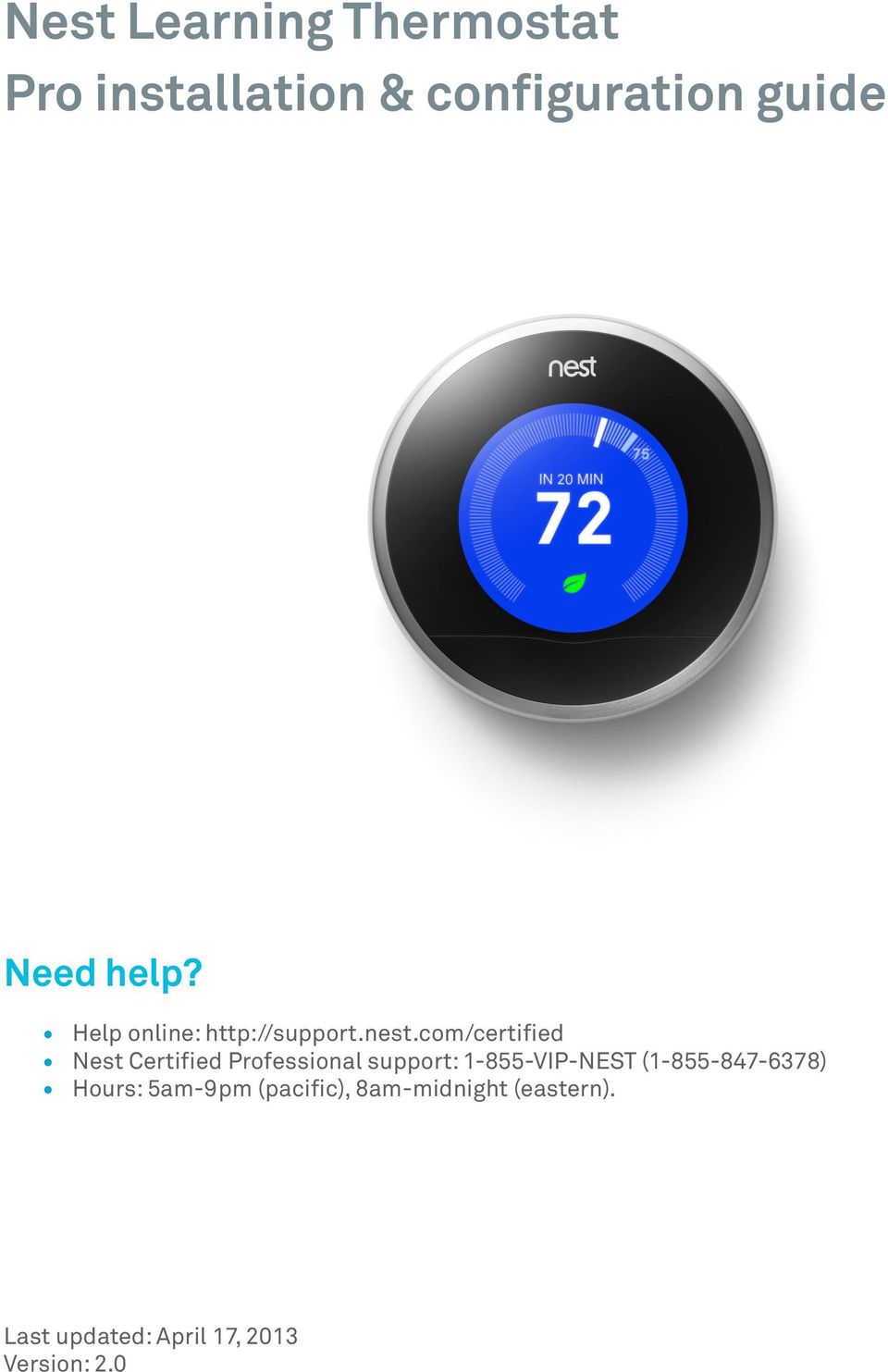
1 Nest Learning Thermostat Pro installation & configuration guide Need help? Help online: Nest Certified Professional support: VIP-NEST ( ) Hours: 5am-9pm (pacific), 8am-midnight (eastern). Last updated: April 17, 2013 Version: 2.0
2 Table of Contents Installation overview 1 What s different about installing Nest 1 Installation check-list 1 Installation details 2 Technical specifications 4 Supported wiring 6 Wiring diagrams: Conventional Systems 8 Wiring diagrams: Heat Pump Systems 12 Wiring diagrams: Humidifiers and Dehumidifiers 15 Configuring Nest with Pro Setup 18 What is Pro Setup? 18 How do I enter Pro Setup? 18 How do I use Pro Setup? 18 How do you configure special systems? 19 How To Quick Reference Guide 21 Wiring error quick reference guide 24 Troubleshooting 28 Handling unusual thermostat wiring 28 Quick Troubleshooting Reference Guide 31
3 Installation overview What s different about installing Nest No jumper wires needed Discard any jumper wires on the old thermostat. Nest won t need them. System Match Nest senses what wires are connected and asks you a few questions so it can offer different features specifically for your customer s heating and cooling system. Pro Setup Pro Setup is an advanced setting to enable you to set up complex systems, including dual fuel systems humidifiers and dehumidifiers. Silent relays Nest uses solid state switching instead of relays so there s no noise when Nest switches on or off. Press connectors Just press and insert the wires from the heating and cooling system into Nest, just like speaker wire connectors. Installation check-list Briefly test the HVAC system with existing thermostat. Make sure everything works before you install Nest. You ll be able to identify any HVAC issues and it ll help you isolate the appropriate circuit breaker for turning the HVAC system off. Turn of HVAC power at the furnace or circuit breaker. Turning off the power to the system while replacing the thermostat protects both you and the equipment. Determine wiring compatibility before opening Nest packaging. Just a simple test: would all the wires on the current thermostat have a home on Nest s base? Take off the cover of the old thermostat and look at the wires. Check them against the list of available connectors on the box or visit nest.com/works. Take a photo of the old thermostat wiring. If you can, take a quick picture of the old thermostat wiring. A reference photo can be handy when checking Nest s wiring. Offer the customer installation finishing options. Nest can be installed directly on the wall or with the optional trim kit. Talk to your customer about what they prefer. Trim and re-strip the wires. Most thermostats have the HVAC wiring wrapped around terminals, leaving wires bent and difficult to insert into Nest s press connectors. A quick trim and strip will make life much easier. Walk through the setup interview with your customer. Most of Nest s setup questions are easy for a professional to answer, but some answers, like a Wi- Fi password, only the customer can provide. Nest Learning Thermostat installation & configuration guide Page 1
4 Take advantage of the software update time. If there s a software update available, Nest will start downloading it as soon as it connects to the Internet. The update can take as long as 10 minutes, so take this time to set your customer s expectations about teaching Nest. Test heating and cooling for two minutes each. This is vital to any installation. After setting up Nest, you need to run each part of the system for a few minutes. This will ensure that Nest s installed correctly and there aren t any HVAC compatibility issues. Brief feature overview. Quickly walk through the Welcome Home guide included with Nest. Your customer will learn the basics of controlling their system so you don t get call backs. Installation details For help with installation, please refer to the Installation guide that is in the box. If you can t find the guide, download it at nest.com/support. Nest Learning Thermostat installation & configuration guide Page 2
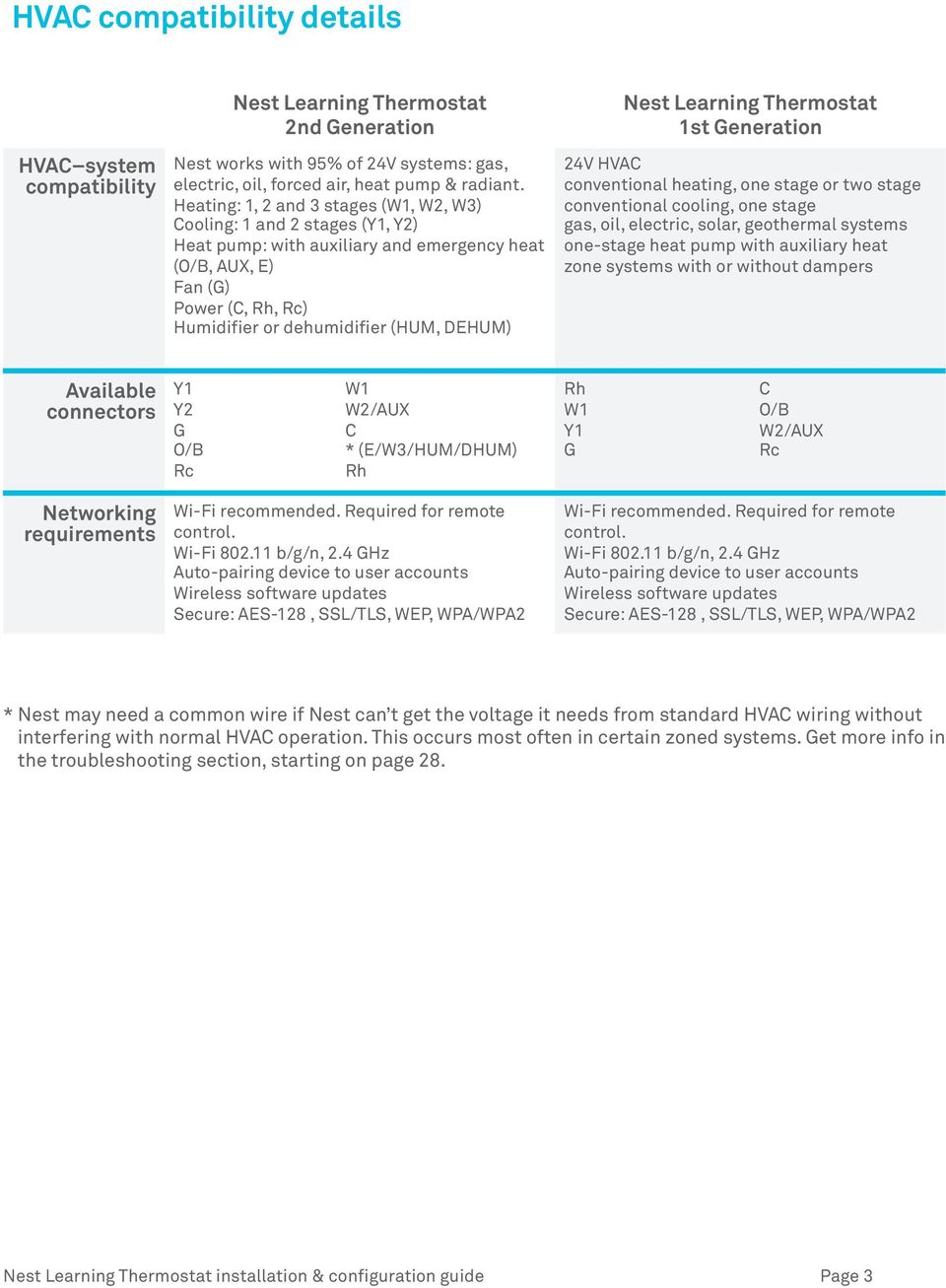
5 HVAC compatibility details HVAC system compatibility Nest Learning Thermostat 2nd Generation Nest works with 95% of 24V systems: gas, electric, oil, forced air, heat pump & radiant. Heating: 1, 2 and 3 stages (W1, W2, W3) Cooling: 1 and 2 stages (Y1, Y2) Heat pump: with auxiliary and emergency heat (O/B, AUX, E) Fan (G) Power (C, Rh, Rc) Humidifier or dehumidifier (HUM, DEHUM) Nest Learning Thermostat 1st Generation 24V HVAC conventional heating, one stage or two stage conventional cooling, one stage gas, oil, electric, solar, geothermal systems one-stage heat pump with auxiliary heat zone systems with or without dampers Available connectors Y1 Y2 G O/B Rc W1 W2/AUX C * (E/W3/HUM/DHUM) Rh Rh W1 Y1 G C O/B W2/AUX Rc Networking requirements Wi-Fi recommended. Required for remote control. Wi-Fi b/g/n, 2.4 GHz Auto-pairing device to user accounts Wireless software updates Secure: AES-128, SSL/TLS, WEP, WPA/WPA2 Wi-Fi recommended. Required for remote control. Wi-Fi b/g/n, 2.4 GHz Auto-pairing device to user accounts Wireless software updates Secure: AES-128, SSL/TLS, WEP, WPA/WPA2 * Nest may need a common wire if Nest can t get the voltage it needs from standard HVAC wiring without interfering with normal HVAC operation. This occurs most often in certain zoned systems. Get more info in the troubleshooting section, starting on page 28. Nest Learning Thermostat installation & configuration guide Page 3
6 Technical specifications Sensors Nest Learning Thermostat 2nd Generation Temperature sensor +/-.5 F Humidity sensor +/- 3%RH Near-field activity sensor Far-field activity sensor Ambient light sensor Nest Learning Thermostat 1st Generation Temperature sensor +/-.5 F Humidity sensor +/- 3%RH Near-field activity sensor Far-field activity sensor Ambient light sensor Power Power sharing (with built-in rechargeable Li-ion battery, 7-10 year battery life) No external power required No common wire required with most installations Power sharing (with built-in rechargeable Li-ion battery, 7-10 year battery life) No external power required No common wire required with most installations Display 24 bit color 320 x 320 pixel display 1.75" diameter 24 bit color 320 x 320 pixel display 1.75" diameter Language English Spanish French English Spanish French Nest Learning Thermostat installation & configuration guide Page 4

7 Display Nest Learning Thermostat 2nd Generation Mass = 215g / 7.6oz Diameter = 83.0mm / 3.27 Height = 28.0mm / 1.10 Nest Learning Thermostat 1st Generation Mass = 150g / 5.3oz Diameter = 81.2mm / 3.20 Height = 36.6mm / 1.44 Base Mass = 37g / 1.3oz Diameter = 76.5mm / 3.01 Height = 10.7mm / 0.42 Mass = 48g / 1.7oz Diameter = 74.1mm / 2.92 Height = 15.5mm / 0.61 Assembled Mass = 215g / 7.6oz Diameter = 83.0mm / 3.27 Height = 32.0mm / 1.26 Mass = 198g / 7.0oz Diameter = 81.2mm / 3.20 Height = 40.6mm / 1.60 Green RoHS compliant Mercury free 100% recyclable packaging RoHS compliant Mercury free 100% recyclable packaging Operation Operating temp: 0 C to 40 C (32ºF to 104ºF) Operating humidity: 0%RH to 90%RH Storage temp: -20 C to 45 C (-4ºF to 113ºF ) Storage humidity: 40%RH to 80%RH Operating temp: 0 C to 40 C (32ºF to 104ºF) Operating humidity: 0%RH to 90%RH Storage temp: -20 C to 45 C (-4ºF to 113ºF ) Storage humidity: 40%RH to 80%RH Compressor Lockout 2.5 minute minimum delay between compressor cycles 2.5 minute minimum delay between compressor cycles Outdoor Temp Sensors Nest utilizes local weather data over Wi-Fi in place of outdoor temperature sensors Nest utilizes local weather data over Wi-Fi in place of outdoor temperature sensors Nest Learning Thermostat installation & configuration guide Page 5

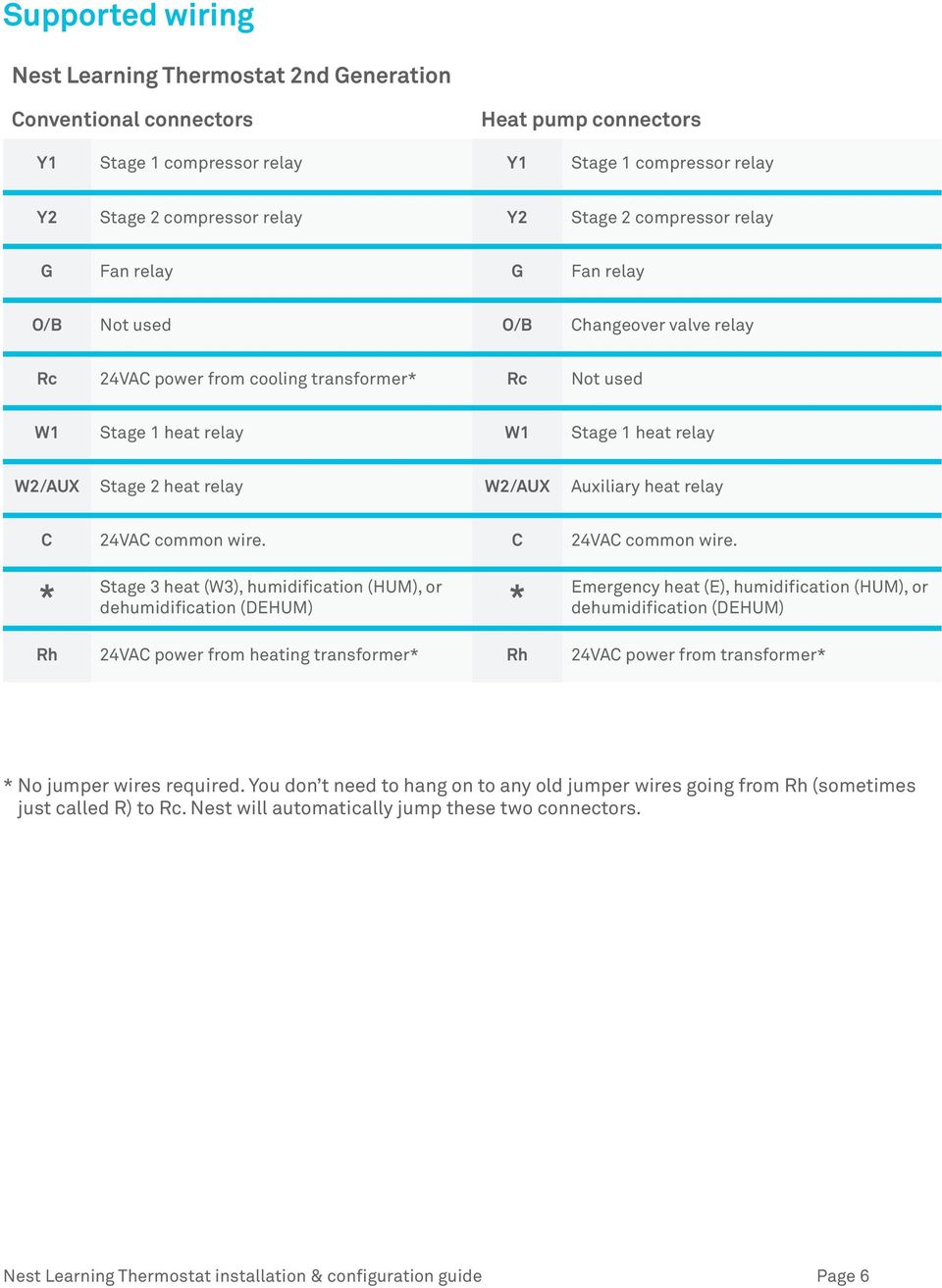
8 Supported wiring Nest Learning Thermostat 2nd Generation Conventional connectors Heat pump connectors Y1 Stage 1 compressor relay Y1 Stage 1 compressor relay Y2 Stage 2 compressor relay Y2 Stage 2 compressor relay G Fan relay G Fan relay O/B Not used O/B Changeover valve relay Rc 24VAC power from cooling transformer* Rc Not used W1 Stage 1 heat relay W1 Stage 1 heat relay W2/AUX Stage 2 heat relay W2/AUX Auxiliary heat relay C 24VAC common wire. C 24VAC common wire. * Stage 3 heat (W3), humidification (HUM), or dehumidification (DEHUM) * Emergency heat (E), humidification (HUM), or dehumidification (DEHUM) Rh 24VAC power from heating transformer* Rh 24VAC power from transformer* * No jumper wires required. You don t need to hang on to any old jumper wires going from Rh (sometimes just called R) to Rc. Nest will automatically jump these two connectors. Nest Learning Thermostat installation & configuration guide Page 6
9 Nest Learning Thermostat 1st Generation Conventional connectors Heat pump connectors Rh 24VAC power from heating transformer* Rh 24VAC power from heating transformer* W1 Stage 1 heat relay W1 Not usually used Y1 Stage 1 cooling compressor relay Y1 Stage 1 compressor contact G Fan relay G Fan relay C 24VAC common wire. C 24VAC common wire. O/B Not used O/B Changeover valve AUX/W2 Stage 2 heat relay AUX/ W2 Auxiliary heat relay Rc 24VAC power from cooling transformer* Rc 24VAC power from cooling transformer* * No jumper wires required. You don t need to hang on to any old jumper wires going from Rh (sometimes just called R) to Rc. Nest will automatically jump these two connectors. Nest Learning Thermostat installation & configuration guide Page 7

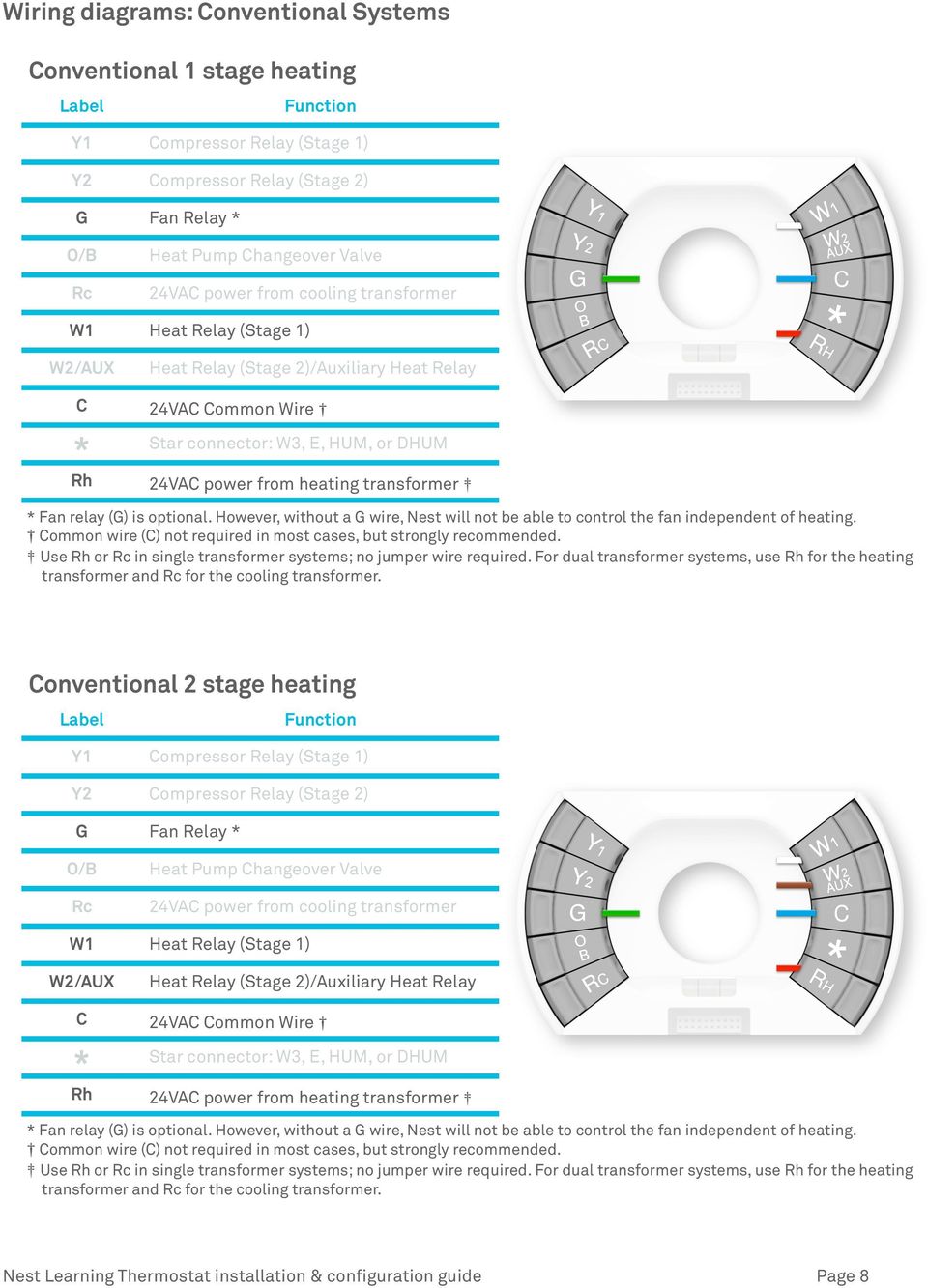
10 Wiring diagrams: Conventional Systems Conventional 1 stage heating Label Function Y1 Compressor Relay (Stage 1) Y2 Compressor Relay (Stage 2) G Fan Relay * O/B Heat Pump Changeover Valve Rc 24VAC power from cooling transformer W1 Heat Relay (Stage 1) W2/AUX Heat Relay (Stage 2)/Auxiliary Heat Relay C 24VAC Common Wire * Star connector: W3, E, HUM, or DHUM Rh 24VAC power from heating transformer * Fan relay (G) is optional. However, without a G wire, Nest will not be able to control the fan independent of heating. Common wire (C) not required in most cases, but strongly recommended. Use Rh or Rc in single transformer systems; no jumper wire required. For dual transformer systems, use Rh for the heating transformer and Rc for the cooling transformer. Conventional 2 stage heating Label Function Y1 Compressor Relay (Stage 1) Y2 Compressor Relay (Stage 2) G Fan Relay * O/B Heat Pump Changeover Valve Rc 24VAC power from cooling transformer W1 Heat Relay (Stage 1) W2/AUX Heat Relay (Stage 2)/Auxiliary Heat Relay C 24VAC Common Wire * Star connector: W3, E, HUM, or DHUM Rh 24VAC power from heating transformer * Fan relay (G) is optional. However, without a G wire, Nest will not be able to control the fan independent of heating. Common wire (C) not required in most cases, but strongly recommended. Use Rh or Rc in single transformer systems; no jumper wire required. For dual transformer systems, use Rh for the heating transformer and Rc for the cooling transformer. Nest Learning Thermostat installation & configuration guide Page 8
11 Conventional 3 stage heating Label Function Y1 Compressor Relay (Stage 1) Y2 Compressor Relay (Stage 2) G Fan Relay * O/B Heat Pump Changeover Valve Rc 24VAC power from cooling transformer W1 Heat Relay (Stage 1) W2/AUX Heat Relay (Stage 2)/Auxiliary Heat Relay C 24VAC Common Wire * Star connector: W3, E, HUM, or DHUM Rh 24VAC power from heating transformer * Fan relay (G) is optional. However, without a G wire, Nest will not be able to control the fan independent of heating. Common wire (C) not required in most cases, but strongly recommended. Use Rh or Rc in single transformer systems; no jumper wire required. For dual transformer systems, use Rh for the heating transformer and Rc for the cooling transformer. Conventional 1 stage heating and 1 stage cooling Label Function Y1 Compressor Relay (Stage 1) Y2 Compressor Relay (Stage 2) G Fan Relay * O/B Heat Pump Changeover Valve Rc 24VAC power from cooling transformer W1 Heat Relay (Stage 1) W2/AUX Heat Relay (Stage 2)/Auxiliary Heat Relay C 24VAC Common Wire * Star connector: W3, E, HUM, or DHUM Rh 24VAC power from heating transformer * Fan relay (G) is optional. However, without a G wire, Nest will not be able to control the fan independent of heating. Common wire (C) not required in most cases, but strongly recommended. Use Rh or Rc in single transformer systems; no jumper wire required. For dual transformer systems, use Rh for the heating transformer and Rc for the cooling transformer. Nest Learning Thermostat installation & configuration guide Page 9

12 Conventional 2 stage heating and 1 stage cooling Label Function Y1 Compressor Relay (Stage 1) Y2 Compressor Relay (Stage 2) G Fan Relay * O/B Heat Pump Changeover Valve Rc 24VAC power from cooling transformer W1 Heat Relay (Stage 1) W2/AUX Heat Relay (Stage 2)/Auxiliary Heat Relay C 24VAC Common Wire * Star connector: W3, E, HUM, or DHUM Rh 24VAC power from heating transformer * Fan relay (G) is optional. However, without a G wire, Nest will not be able to control the fan independent of heating. Common wire (C) not required in most cases, but strongly recommended. Use Rh or Rc in single transformer systems; no jumper wire required. For dual transformer systems, use Rh for the heating transformer and Rc for the cooling transformer. Conventional 2 stage heating and 2 stage cooling Label Function Y1 Compressor Relay (Stage 1) Y2 Compressor Relay (Stage 2) G Fan Relay * O/B Heat Pump Changeover Valve Rc 24VAC power from cooling transformer W1 Heat Relay (Stage 1) W2/AUX Heat Relay (Stage 2)/Auxiliary Heat Relay C 24VAC Common Wire * Star connector: W3, E, HUM, or DHUM Rh 24VAC power from heating transformer * Fan relay (G) is optional. However, without a G wire, Nest will not be able to control the fan independent of heating. Common wire (C) not required in most cases, but strongly recommended. Use Rh or Rc in single transformer systems; no jumper wire required. For dual transformer systems, use Rh for the heating transformer and Rc for the cooling transformer. Nest Learning Thermostat installation & configuration guide Page 10

13 Conventional 3 stage heating and 2 stage cooling Label Function Y1 Compressor Relay (Stage 1) Y2 Compressor Relay (Stage 2) G Fan Relay * O/B Heat Pump Changeover Valve Rc 24VAC power from cooling transformer W1 Heat Relay (Stage 1) W2/AUX Heat Relay (Stage 2)/Auxiliary Heat Relay C 24VAC Common Wire * Star connector: W3, E, HUM, or DHUM Rh 24VAC power from heating transformer * Fan relay (G) is optional. However, without a G wire, Nest will not be able to control the fan independent of heating. Common wire (C) not required in most cases, but strongly recommended. Use Rh or Rc in single transformer systems; no jumper wire required. For dual transformer systems, use Rh for the heating transformer and Rc for the cooling transformer. Conventional 1 stage heating and 2 stage cooling Label Function Y1 Compressor Relay (Stage 1) Y2 Compressor Relay (Stage 2) G Fan Relay * O/B Heat Pump Changeover Valve Rc 24VAC power from cooling transformer W1 Heat Relay (Stage 1) W2/AUX Heat Relay (Stage 2)/Auxiliary Heat Relay C 24VAC Common Wire * Star connector: W3, E, HUM, or DHUM Rh 24VAC power from heating transformer * Fan relay (G) is optional. However, without a G wire, Nest will not be able to control the fan independent of heating. Common wire (C) not required in most cases, but strongly recommended. Use Rh or Rc in single transformer systems; no jumper wire required. For dual transformer systems, use Rh for the heating transformer and Rc for the cooling transformer. Nest Learning Thermostat installation & configuration guide Page 11

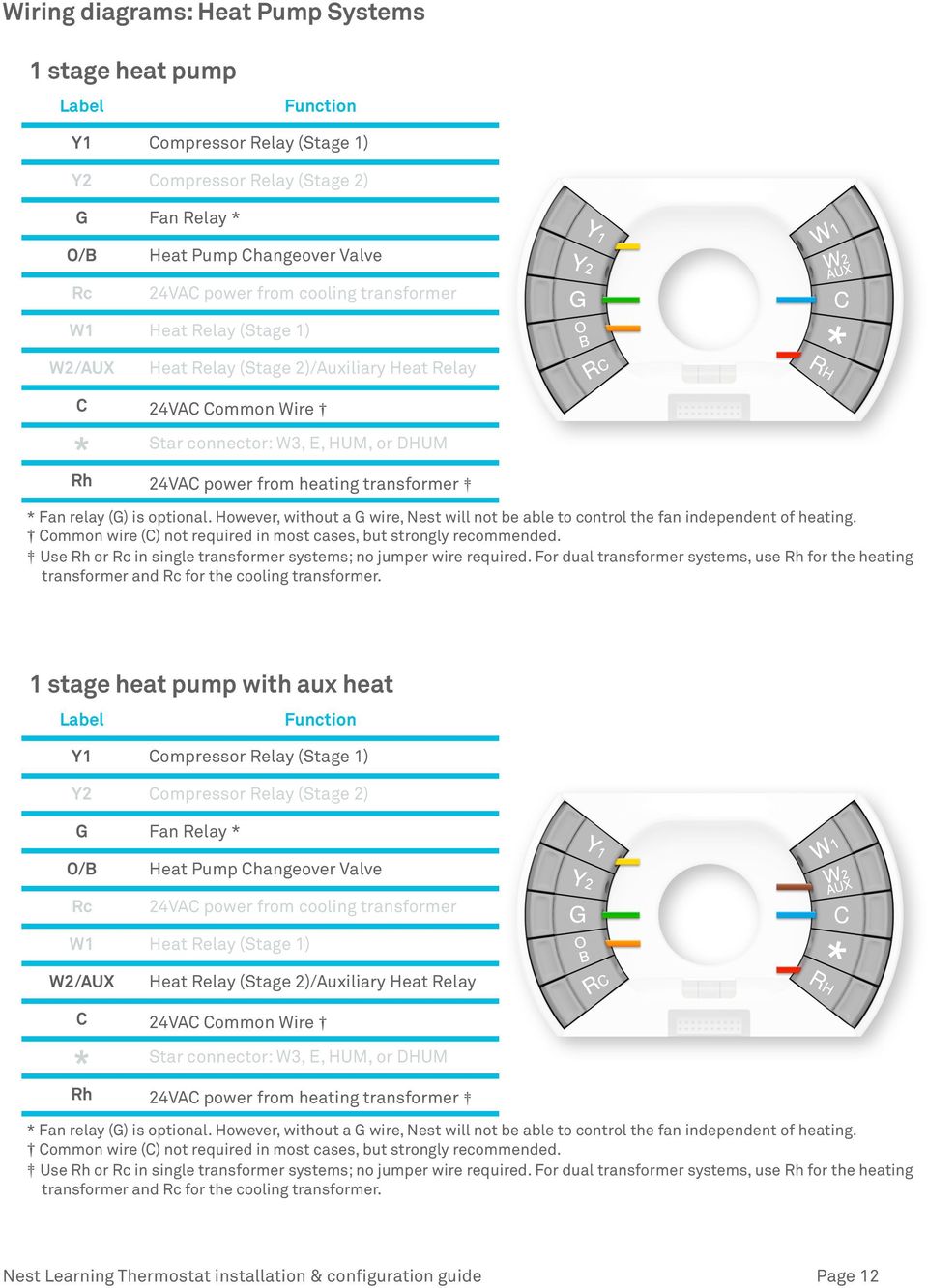
14 Wiring diagrams: Heat Pump Systems 1 stage heat pump Label Function Y1 Compressor Relay (Stage 1) Y2 Compressor Relay (Stage 2) G Fan Relay * O/B Heat Pump Changeover Valve Rc 24VAC power from cooling transformer W1 Heat Relay (Stage 1) W2/AUX Heat Relay (Stage 2)/Auxiliary Heat Relay C 24VAC Common Wire * Star connector: W3, E, HUM, or DHUM Rh 24VAC power from heating transformer * Fan relay (G) is optional. However, without a G wire, Nest will not be able to control the fan independent of heating. Common wire (C) not required in most cases, but strongly recommended. Use Rh or Rc in single transformer systems; no jumper wire required. For dual transformer systems, use Rh for the heating transformer and Rc for the cooling transformer. 1 stage heat pump with aux heat Label Function Y1 Compressor Relay (Stage 1) Y2 Compressor Relay (Stage 2) G Fan Relay * O/B Heat Pump Changeover Valve Rc 24VAC power from cooling transformer W1 Heat Relay (Stage 1) W2/AUX Heat Relay (Stage 2)/Auxiliary Heat Relay C 24VAC Common Wire * Star connector: W3, E, HUM, or DHUM Rh 24VAC power from heating transformer * Fan relay (G) is optional. However, without a G wire, Nest will not be able to control the fan independent of heating. Common wire (C) not required in most cases, but strongly recommended. Use Rh or Rc in single transformer systems; no jumper wire required. For dual transformer systems, use Rh for the heating transformer and Rc for the cooling transformer. Nest Learning Thermostat installation & configuration guide Page 12
15 1 stage heat pump with aux heat and emergency heat Label Function Y1 Compressor Relay (Stage 1) Y2 Compressor Relay (Stage 2) G Fan Relay * O/B Heat Pump Changeover Valve Rc 24VAC power from cooling transformer W1 Heat Relay (Stage 1) W2/AUX Heat Relay (Stage 2)/Auxiliary Heat Relay C 24VAC Common Wire * Star connector: W3, E, HUM, or DHUM Rh 24VAC power from heating transformer * Fan relay (G) is optional. However, without a G wire, Nest will not be able to control the fan independent of heating. Common wire (C) not required in most cases, but strongly recommended. Use Rh or Rc in single transformer systems; no jumper wire required. For dual transformer systems, use Rh for the heating transformer and Rc for the cooling transformer. 2 stage heat pump Label Function Y1 Compressor Relay (Stage 1) Y2 Compressor Relay (Stage 2) G Fan Relay * O/B Heat Pump Changeover Valve Rc 24VAC power from cooling transformer W1 Heat Relay (Stage 1) W2/AUX Heat Relay (Stage 2)/Auxiliary Heat Relay C 24VAC Common Wire * Star connector: W3, E, HUM, or DHUM Rh 24VAC power from heating transformer * Fan relay (G) is optional. However, without a G wire, Nest will not be able to control the fan independent of heating. Common wire (C) not required in most cases, but strongly recommended. Use Rh or Rc in single transformer systems; no jumper wire required. For dual transformer systems, use Rh for the heating transformer and Rc for the cooling transformer. Nest Learning Thermostat installation & configuration guide Page 13
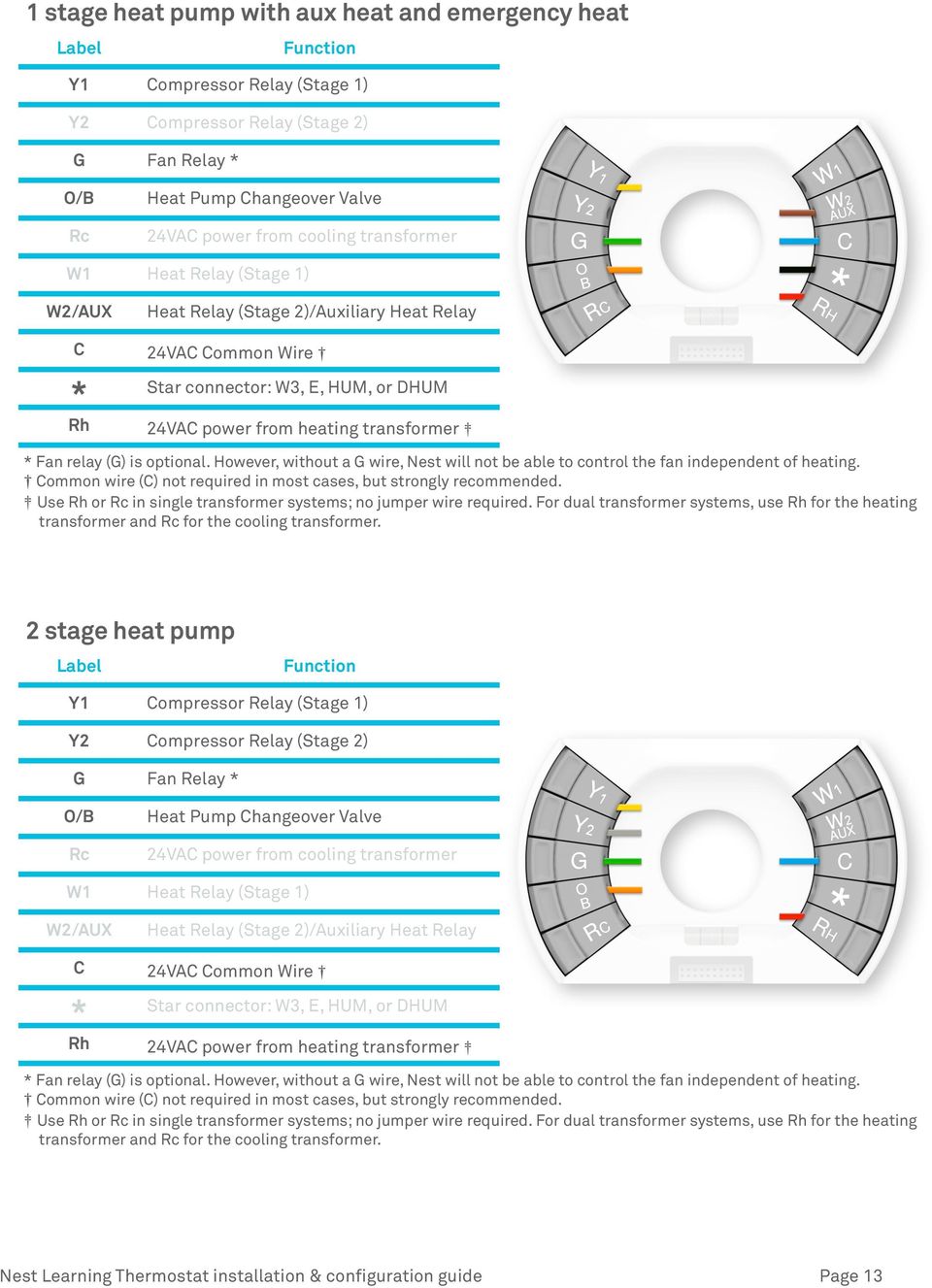
16 2 stage heat pump with aux heat Label Function Y1 Compressor Relay (Stage 1) Y2 Compressor Relay (Stage 2) G Fan Relay * O/B Heat Pump Changeover Valve Rc 24VAC power from cooling transformer W1 Heat Relay (Stage 1) W2/AUX Heat Relay (Stage 2)/Auxiliary Heat Relay C 24VAC Common Wire * Star connector: W3, E, HUM, or DHUM Rh 24VAC power from heating transformer * Fan relay (G) is optional. However, without a G wire, Nest will not be able to control the fan independent of heating. Common wire (C) not required in most cases, but strongly recommended. Use Rh or Rc in single transformer systems; no jumper wire required. For dual transformer systems, use Rh for the heating transformer and Rc for the cooling transformer. 2 stage heat pump with aux heat and emergency heat Label Function Y1 Compressor Relay (Stage 1) Y2 Compressor Relay (Stage 2) G Fan Relay * O/B Heat Pump Changeover Valve Rc 24VAC power from cooling transformer W1 Heat Relay (Stage 1) W2/AUX Heat Relay (Stage 2)/Auxiliary Heat Relay C 24VAC Common Wire * Star connector: W3, E, HUM, or DHUM Rh 24VAC power from heating transformer * Fan relay (G) is optional. However, without a G wire, Nest will not be able to control the fan independent of heating. Common wire (C) not required in most cases, but strongly recommended. Use Rh or Rc in single transformer systems; no jumper wire required. For dual transformer systems, use Rh for the heating transformer and Rc for the cooling transformer. Nest Learning Thermostat installation & configuration guide Page 14

17 Wiring diagrams: Humidifiers and Dehumidifiers The 2nd generation Nest LearningThermostat is compatible with most whole home humidifier and dehumidifier systems that connect to your thermostat with one or two low voltage wires. Compatible wires have one of the following labels: H, Hum, Hum1, H2, Hum2 D, DH, Dhum, Dehum, D2, DH2, Dhum2, Dehum2 Regardless of whether your system has one wire or two, you will need to figure out if the humidifier or dehumidifier can be activated on its own or if it requires heating or cooling to be activated at the same time. You ll also need to determine other settings, such as whether the fan is required during operation. Nest's * (STAR) terminal is a powered terminal. If connecting to a humidifier/dehumidifier that requires connection to unpowered terminals, add a 24VAC relay suitable for HVAC equipment use. Consult humidifier/dehumidifier installation manual for wiring requirements. Important Note: In dual transformer set ups (where there is both an Rh and an Rc wire connected to Nest), Nest will power the * connector from the Rh wire. Label Function Y1 Compressor Relay (Stage 1) Y2 Compressor Relay (Stage 2) G Fan Relay * O/B Rc Heat Pump Changeover Valve 24VAC power from cooling transformer W1 Heat Relay (Stage 1) W2/AUX Heat Relay (Stage 2)/ Auxiliary Heat Relay C 24VAC Common Wire Star connector: W3, E, HUM, * or DHUM Rh 24VAC power from heating transformer Nest Learning Thermostat installation & configuration guide Page 15

18 Possible configurations: Stand Alone Humidifier, 1 Wire This system has a humidifier that is separate from the HVAC system. Install the hum wire directly into the * terminal at Nest. Correctly ground the other wire from the Humidifier. No relay is recommended. Stand Alone Humidifier, 2 Wire This system has a humidifier that is separate from the HVAC system. Install the 2 hum wires directly into the relay. Run the single wire from the relay to the * terminal at Nest. Nest recommends the White Rogers Q or similar 24VAC HVAC relay. Nest Learning Thermostat installation & configuration guide Page 16

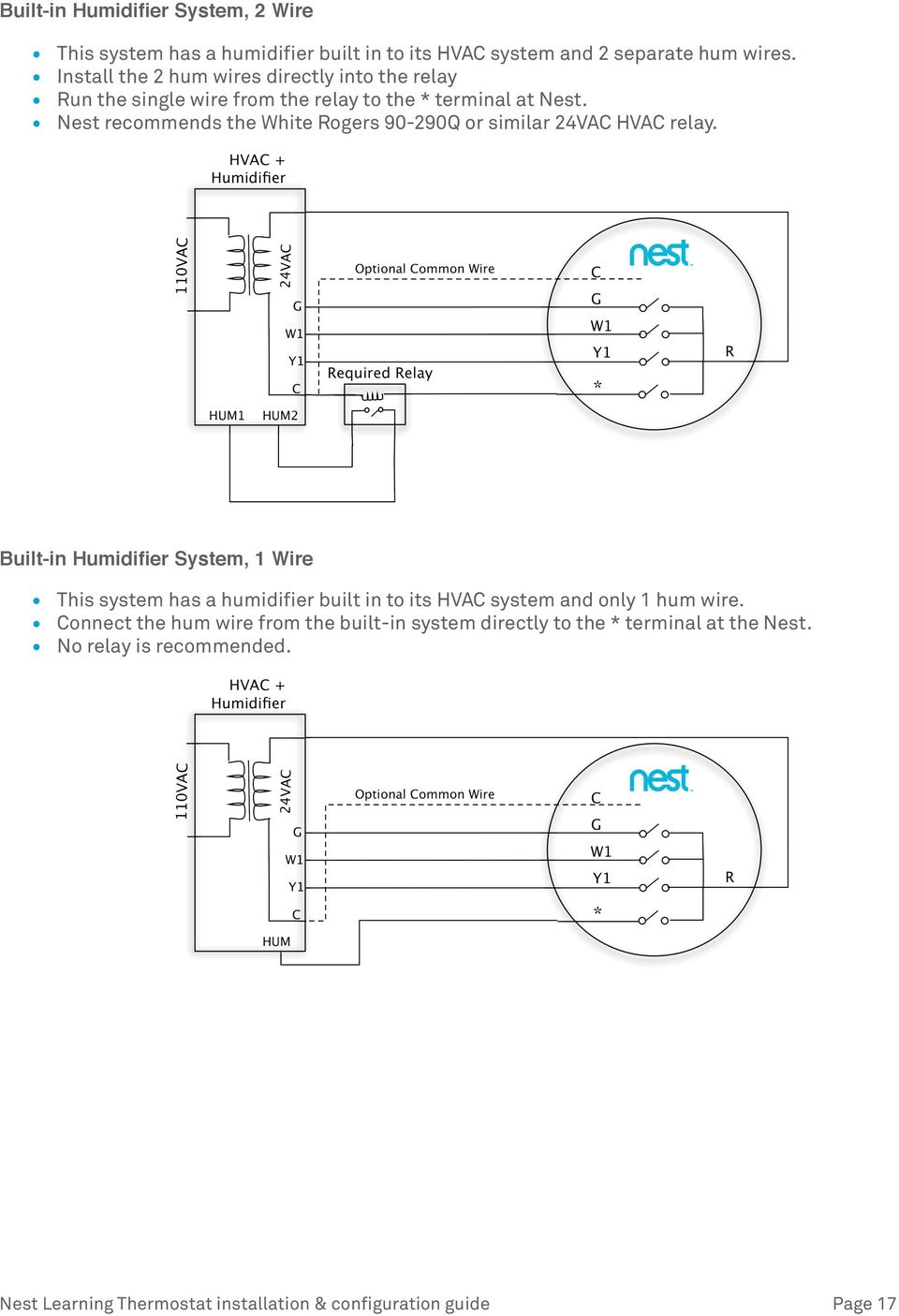
19 Built-in Humidifier System, 2 Wire This system has a humidifier built in to its HVAC system and 2 separate hum wires. Install the 2 hum wires directly into the relay Run the single wire from the relay to the * terminal at Nest. Nest recommends the White Rogers Q or similar 24VAC HVAC relay. Built-in Humidifier System, 1 Wire This system has a humidifier built in to its HVAC system and only 1 hum wire. Connect the hum wire from the built-in system directly to the * terminal at the Nest. No relay is recommended. Nest Learning Thermostat installation & configuration guide Page 17
20 Configuring Nest with Pro Setup Pro Setup lets installation professionals quickly configure the way Nest controls an HVAC system. Complex systems such as dual fuel systems, humidifiers and dehumidifiers require Pro Setup. Nest recommends professional installation to homeowners with these systems. Pro Setup can be used the first time you set up Nest or anytime through the SETTINGS menu. What is Pro Setup? Pro Setup allows HVAC technicians to configure how Nest controls your system. Pro Setup can configure both simple and complex systems. However, some configuration options are only available using Pro Setup. During setup, Nest will ask if you are a professional installer and allow pros to bypass the standard setup interview for the homeowner. Pro Setup can also be accessed in the EQUIPMENT section of SETTINGS at any time. If Pro Setup is configured incorrectly it could cause problems with your HVAC system. Therefore, Nest strongly advises that only trained installation professionals use Pro Setup. How do I enter Pro Setup? During setup on a Nest Learning Thermostat, you ll be asked if you re a homeowner or a professional. If you answer professional, you ll receive Pro Setup options. To enter Pro Setup on the Nest Learning Thermostat after initial setup: Go to SETTINGS > EQUIPMENT > CONTINUE > CONTINUE > PRO SETUP Read the disclaimer. Only continue if you re an HVAC professional. How do I use Pro Setup? Pro Setup gives you the ability to identify and configure how Nest should control each wire you connect to the Nest base. When you first enter Pro Setup, you ll see an image of the Nest connectors. Connectors with wires attached will be be highlighted in green or yellow. Green indicates that the wire has only one default setting. The Rc, Rh, C, and G connectors are examples. Yellow indicates connectors with multiple options. Nest selects default settings for these connectors, but you ll want to verify and/or modify these settings to make sure Nest is controlling each wire appropriately. To configure a wire, just turn the ring to highlight each connector and press to select it. Each wire will show Type, which describes the function of that wire. In most cases the Type cannot be modified - it s dictated by the wiring configuration and by whether or not the system is dual fuel. The Type for the * connector is always customizable. Connectors that control a heating or cooling function will also have a Source setting (to identify the type of fuel used to heat or cool) and a Delivery setting (to describe how heating or cooling is distributed Nest Learning Thermostat installation & configuration guide Page 18

21 throughout the home). Depending on the wire configuration, the Source or Delivery settings may have only one default option. Source options include: Gas Electric Oil Propane (LP) Geothermal Delivery options include: Forced air In-floor radiant Radiators It's recommended that all connectors highlighted in yellow be reviewed to ensure that the options chosen are right for that system. However, you can turn the ring and select DONE at any time to exit Pro Setup without making any changes. How do you configure special systems? Below are examples of how to configure a Nest Learning Thermostat to control some of the more complex heating and cooling systems. Dual Fuel Systems If the wires include an O/B wire and one or more W wires (which indicate that the system uses a heat pump with an additional heating source) Pro Setup will first ask if the heating system is dual fuel or single fuel. For single fuel, any wires inserted into the W1, W2/AUX, or * (if W3 is chosen) connectors will be treated as auxiliary heat that will be used simultaneously with the heat pump when needed. Pro Setup will automatically configure the auxiliary heat wire for an electric forced air system. The 2nd generation Nest Learning Thermostat can only support one wire for auxiliary heat; additional auxiliary heat wires are not supported by Nest. For dual fuel, any wires inserted into the W1, W2/AUX, or * (if W3 is chosen) connectors will be treated as alternate heat that will be used instead of the heat pump when needed. Use Pro Setup to indicate the source (gas, electric, geothermal, etc) as well as the delivery mechanism (forced air, radiant, etc) for each of the W wires connected. The 2nd generation Nest Learning Thermostat supports two wires for alternate heat; additional alternate heat wires are not supported. Nest Learning Thermostat installation & configuration guide Page 19
22 Humidifiers and Dehumidifiers The 2nd generation Nest Learning Thermostat supports wholehome humidifiers and dehumidifiers. There are multiple Pro Setup settings for the * wire to control a humidifier or dehumidifier. All wire Types include a Fan setting to specify whether or not the fan should be activated when humidification or dehumidification is engaged. Humidifier Pro Setup will show an Activate setting to specify whether heat needs to be activated for humidification to turn on. Bypass humidifiers should use the Hum. + heat option while steam, independent, or on-demand humidifiers should use the Hum. only option. Dehum with A/C Also known as AC integrated dehumidifiers, these systems require cooling to be activated to turn on dehumidification. Dehum Standalone These dehumidifiers can be engaged independently and do not require heating or cooling to be active. Pro Setup will show a To dehum. setting that specifies whether the * wire should be energized or not to turn on dehumidification. Two Stage Heat Pumps The 2nd generation Nest Learning Thermostat will use System Match to recognize your system as a two-stage heat pump if you ve connected Y1, Y2, and O/B wires. Nest assumes that your Y1 wire will be used to activate 1st stage heating and cooling for your heat pump. Using Pro Setup, you can configure the Y2 wire to be used for 2nd stage cooling and heating, 2nd stage cooling only, or 2nd stage heating only as well as specify the delivery mechanism (such as forced air or radiant). Nest Learning Thermostat installation & configuration guide Page 20
23 How To Quick Reference Guide Action Steps Configuring Nest for the installation location and HVAC system Just after installation, Nest will guide you through a set up interview, where you will configure it for the heating and cooling system it s controlling and for the home or business where it s installed. To help with HVAC configuration, Nest mechanically and electrically detects the wires inserted into its press connectors. When Nest senses which wires have been connected to its base, it will automatically configure its software for the system type it has detected. As an example, if it s a heat only system, Nest won t show any cooling options. If it s a heat pump, Nest will know and do a special test to check the orientation of the O/B wire. The set up interview will also guide you through connecting to the customer s Wi- Fi network, establishing the location through zip code, and establishing if the place of installation is a home or business. All of this information helps Nest to build a schedule that is best suited for the customer s needs. Use Pro Setup to configure Nest to control your customer s HVAC system. Pro Setup allows professionals to configure how Nest controls each wire connected to the base. Using Pro Setup is required to when using Nest with dual fuel systems (e.g. heat pump with furnace), humidifiers and dehumidifiers. Pro Setup is only available with the 2nd generation Nest Learning Thermostat. Pro Setup also offers configuration choices for other types of systems such as two-stage heat pumps and emergency heat. It is available to installation professionals during and after installation and allows them specify how Nest should control the specific HVAC system being used. Learn more about Pro Setup, please visit: Testing the basic operation after installation Activate heating and cooling Simply turn the ring to set the current set point above or below the current ambient temperature in the room. You ll need to switch to and from heating and cooling modes as you do this. Switching modes To switch to and from heating and cooling modes, follow these steps: Press the ring to bring up the menu. Select the Red and Blue dots. Turn the ring to select HEAT or COOL. Press the ring again to select. NOTE: To protect the heating and cooling systems it controls, Nest s minimum on-off times for manual temperature adjustments are 2.5 minutes for heat pumps and air conditioning systems. Nest Learning Thermostat installation & configuration guide Page 21
24 Action Testing second stage or auxiliary heat after installation Steps Conventional heating Before Nest has activated Time-to-Temperature, second stage heat will turn on when the setpoint is 4 F or greater than the room s ambient temperature. Heat Pumps Auxiliary heat will turn on when the setpoint is 4 F and the outdoor temperature is below 50 F, the default auxiliary heat lockout temperature. Auxiliary lockout can be turned off in the Heat Pump section of Advanced Settings in order to test auxiliary heat. To test second stage or auxiliary heat at installation, just raise the temperature 4 F in heating mode with the auxiliary lockout turned off. Once Time to Temperature is activated, Nest will use this feature to manage second stage and auxiliary heat. Switch between Heating, Cooling, and Range modes Switching modes To switch to and from heating and cooling modes, follow these steps: Press the ring to bring up the menu. Select the Red and Blue dots. Turn the ring to select HEAT, COOL, HEAT COOL, or OFF. Press the ring again to select. Heat Pump: Setting compressor and auxiliary lockout temperatures Both auxiliary and compressor lockout temperatures can be changed in the Heat Pump section of the Advanced Settings menu. By default, Nest will lock out the auxiliary heater when the outdoor temperature is above 50 F but will not lock out the compressor at any temperature. The lockout temperatures are only enforced when Nest is connected to Wi-Fi so it can track outdoor temperatures. To access the Heat Pump section of Advanced settings: Press the ring to bring up the menu. Turn the ring and select SETTINGS. Turn the ring and select ADVANCED. Turn the ring and select HEAT PUMP. Heat Pump: Change heat pump valve orientation Follow these steps: 1. Press the ring to bring up the menu. 2. Turn the ring and select SETTINGS. 3. Turn the ring and select ADVANCED. 4. Turn the ring and select HEAT PUMP. Nest Learning Thermostat installation & configuration guide Page 22
25 Action Adjust Away Heating and Cooling Temperatures Steps These temperatures are set as the final step during the set up interview. But if Nest is already configured, here are the steps: 1. Press the ring to bring up the menu. 2. Turn the ring and select SETTINGS. 3. Turn the ring and select AWAY. Turn the ring to set the HEAT TO temperature. Press the ring to set the COOL TO temperature. Press the ring again when done. Adjust Safety Temperatures No matter the schedule, Nest will never let the home go above or below the safety temperatures. To adjust them, follow these steps: 1. Press the ring to bring up the menu. 2. Turn the ring and select SETTINGS. 3. Turn the ring and select ADVANCED. 4. Turn the ring and select SAFETY TEMP. Set screen brightness 1. Press the ring to bring up the menu. 2. Turn the ring and select SETTINGS. 3. Turn the ring and select BRIGHTNESS. 4. Keep pressing the ring to scroll through the different options: low, medium, high, or auto. Set temperature display 1. Press the ring to bring up the menu. 2. Turn the ring and select SETTINGS. 3. Turn the ring and select ºF/ºC. 4. Press the ring to switch between displaying the temperature in Fahrenheit and Celsius. Note: Changing the temperature display on Nest will also change it when accessed from the Nest Account. Nest Learning Thermostat installation & configuration guide Page 23
26 Wiring error quick reference guide When Nest senses what wires have been connected to its base, it automatically configures its software for the system type it detects. If it s a heat only system, Nest won t show any cooling options. If it s a heat pump, Nest will know and do a special test to check the orientation of the O/B wire. If Nest senses a problem with the wiring, you ll get an error if the issue must be fixed before setup can continue, or a note if it is not critical to fix during setup. Here s a breakdown of the errors and notes and what they mean. Specific troubleshooting help for wiring errors is available online at nest.com/support. Error number Description What s going on? E1 Common wire C required. This wiring error may appear after installation when Nest can t get power while the system is turned on. Nest s software should be updated if this error appears E2 E22 E3 E23 E4 E24 No power wires detected. Rh or Rc wire is required. No power to Rc wire detected. No power to Rh wire detected You ll see this error when either a Rh or Rc wire was not installed or the Rh or Rc wire that was installed isn t powered. You ll see this error if you ve installed both an Rc wire and Nest isn t electrically detecting it. You ll see this error if you ve installed both an Rh wire and Nest isn t electrically detecting it E5 E25 No heating or cooling wires detected. W1 or Y1 wire is required Nest cannot detect any wires inserted into W1 or Y1. At least one of these is required. E6 Too many wires detected. This error indicates that the wiring combination you ve installed is no supported by Nest. Verify the actual wiring for the system and remove at least one of O/B, W1, Y1 or AUX wires as appropriate. E7 E27 Y1 wire not detected. Heat pump requires a Y1 wire. Your Nest is physically detecting a wire in the O/B connector. This connector is exclusively used for heat pumps which also require a Y1wire to be attached. E8 E28 Additional wire(s) required. AUX/W2 detected by itself. Your Nest is physically detecting a wire in the AUX/W2 connector. Supported configurations that use this connector also include a W1 wire or an O/B + Y1 wire. E9 E29 No power to C wire detected. Your Nest is physically detecting a wire in the C connector, but isn t detecting any power to it. Nest Learning Thermostat installation & configuration guide Page 24
27 Error number Description What s going on? E10 E30 No power to Y1wire detected. Your Nest is physically detecting a wire in the Y1 connector but isn t detecting any power to it. E11 Heat pump wireo/b detected. No heat pump system present. Your Nest is physically detecting a wire in the O/B connector but isn t detecting any power to it. You may need to update your Nest s software. E13 E33 Heat pump can have at most one auxiliary heat wire. Your Nest was previously setup as a single fuel system with auxiliary heat put it s detecting both W1 and AUX/W2 wires that aren t supported in that configuration. E34 Dual fuel requires an alternate heat wire. Your Nest was previously setup as a dual fuel system but it s not detecting a W1, AUX/W2 or * (W3) wire that is required to have alternate heat. E35 Dual fuel can have at most two alternate heat wires. Your Nest was setup as a dual fuel system, but the W1, AUX/W2 and * (W3) wires are configured as alternate heat wires. E36 Heat pump can have at most one auxiliary heat wire. Your Nest was previously setup as a single fuel system with auxiliary heat, but it s detecting W1, AUX/W2 and * (W3) wires that aren t supported in that configuration. E37 Heat pump can have at most one auxiliary heat wire. Your Nest was previously setup as a single fuel system with auxiliary heat, but it s detecting W1 and * (W3) wires that aren t supported in that configuration. E38 Heat pump can have at most one auxiliary heat wire. Your Nest was previously setup as a single fuel system with auxiliary heat, but it s detecting AUX/W2 and * (W3) wires that aren t supported in that configuration. E39 Y2 wire without Y1wire. Your Nest is physically detecting a Y2 wire but not a Y1 wire that is required for 2 stage conventional cooling systems or 2 stage heat pumps. E40 W3 wire without W2/AUX wire. Your Nest is physically detecting a * (W3) wire but not a W2/AUX wire that is required for 3 stage conventional heating systems. E41 E wire without O/B wire. Your Nest is physically detecting a * (E) wire but not an O/B wire. O/B is a heat pump wire and Nest only supports the use of emergency heat with heat pump systems. Nest Learning Thermostat installation & configuration guide Page 25
28 Error number Description What s going on? E42 E51 Your Nest may have tripped an internal fuse and Nest needs to be replaced. Your Nest either has wires that aren't fully inserted into the connectors or has tripped an internal fuse. N1 N21 Power wire Rc detected. Not connected to equipment. Your Nest isn t electrically detecting your Rc wire, but one is connected to the Nest base. N2 N22 Power wire Rh detected. Not connected to equipment. Your Nest isn t electrically detecting your Rh wire, but one is connected to the Nest base. N3 N23 No power to W1wire detected. Your Nest isn t electrically detecting your W1wire, but one is connected to the Nest base. N4 N24 No power to Y1wire detected. Your Nest isn t electrically detecting your Y1wire, but one is connected to the Nest base. N5 N25 No power to AUX/W2 wire detected. Your Nest isn t electrically detecting your AUX/W2 wire, but one is connected to the Nest base. N6 N26 No power to G wire detected. Your Nest isn t electrically detecting your G wire, but one is connected to the Nest base. N7 N27 No power to O/B wire detected. Your Nest isn t electrically detecting your O/B wire, but one is connected to the Nest base. N28 No power to Y2 wire detected. Your Nest isn t electrically detecting your Y2 wire, but one is connected to the Nest base. N29 No power to * wire detected. Your Nest isn t electrically detecting your * wire, but one is connected to the Nest base. W1 Nest can t continue to connect to your Wi-Fi network. Your Wi-Fi access point may now fully support a Wi-Fi standard known as power saving mode. Nest Learning Thermostat installation & configuration guide Page 26
29 Error number Description What s going on? W2 Failed to connect. Your Wi-Fi access point may have security settings enabled that prevent your Nest from connecting. W3 Failed to connect. Your Wi-Fi access point is not providing a network IP address to your Nest. W4 Failed to connect. Nest is connected to your wireless network but not to the internet. Important Note: These errors may change with future software updates. Visit nest.com/support for the latest information. Nest Learning Thermostat installation & configuration guide Page 27
30 Troubleshooting Handling unusual thermostat wiring When a B or X wire is a common wire Most thermostat manufacturers use C to designate the connector for the common wire. However there are some Trane, American Standard, and York thermostats use B for the common wire. The NEMA standard designated the B wire as one of the change-over wires for some heat pump manufacturers. This is a simple issue to address: 1. If you re installing Nest to control a heat pump system and the old thermostat has both an B and a C, connect to B to Nest s O/B connector and connect the C to Nest s C connector. 2. If you re installing Nest to control a heat pump system and the old thermostat has both an O and a B, connect to O to Nest s O/B connector and connect the B to Nest s C connector. 3. If you re installing Nest to control a heat pump system and the old thermostat only has a B wire, connect to B to Nest s O/B connector. 4. If you re installing Nest to control a conventional system (aka not a heat pump) and you see a B wire connected to the old thermostat, that B is a common wire and should be connected to the C connector on Nest. Important Note: If you have a B wire that is actually a common wire, not following the rules above can lead to blowing a fuse on your HVAC controller board and, most likely, damaging Nest. When X, W1 or W2 is an AUX wire Some heat pump installations may have the auxiliary heat connection labelled as X, W1 or W2 on the thermostat. You should verify that the X wire on the old thermostat is not a common wire. Once you re sure, you can assume that the X is the auxiliary heat and should be inserted into the AUX/W2 connector on Nest. Compressor and Auxiliary Heat Lockout Temperatures for Heat Pumps Requires Wi-Fi Both auxiliary and compressor lockout temperatures can be changed in the Heat Pump section of the Equipment menu. The lockout temperatures are only enforced when Nest is connected to Wi-Fi so it can track outdoor temperatures. If Wi-Fi is not enabled, Auxiliary heat will come on automatically when it takes longer than expected to reach the current target temperature. Search nest.com/support for auxiliary heat for more details. Nest Learning Thermostat installation & configuration guide Page 28
31 What if Nest isn't getting enough power from W or Y and the consumer doesn't have a Common ( C ) wire installed? While we find that in the vast majority of homes Nest can charge its built in battery power sharing from the regular heating and cooling wires, a few installations require a common wire to bring power to Nest without interfering with the normal operation of the heating and cooling system. What are the symptoms of a power sharing issue? In conventional heating and cooling or cooling only systems: Cooling is always on or on intermittently when Nest is not calling for cooling. Cooling does not activate when Nests calls for cooling. Cooling intermittently deactivates while Nest is still calling for cooling. In conventional heating only systems: Heating is always on or on intermittently when Nest is not calling for heating. Heating does not activate when Nests calls for heating. Heating intermittently deactivates while Nest is still calling for heating. There is a unusual noise coming from the customer's heating system. In heat pump systems: Heating or cooling is always on or on intermittently when Nest is not calling for it. Heating or cooling does not activate when Nest calls for it. Heating or cooling intermittently deactivates while Nest is still calling for it In these situations, Nest can't successfully charge from the Y or W wires without interfering with the normal operation of the heating and cooling system. There are three options; these changes should only be made by professionals. Use a spare wire as common wire Ordinarily you can solve the problem by turning an unused wire in the thermostat wire bundle into a common wire. Simply connect one end of the the spare or unused wire to the Common ( C ) terminal in the HVAC controller and the other end to Nest's C connector. Add a resistor to an existing Y or W wire We've found that many Y and W wire circuits that cannot supply enough power can be strengthened by bridging the Common terminal at the HVAC equipment to W or Y through a 220-ohm, 5W resistor. In a heat-only system, you need to bridge from common C to W. In a HVAC system with a Y wire, you must bridge from common C to Y. (Nest can only charge from W when Y is not connected.) Nest Learning Thermostat installation & configuration guide Page 29
32 Heat only systems Heating and cooling systems The heat call is detected by the controller board when the W wire is shorted to the R wire, which causes the 24V AC voltage to be detected. When the Nest thermostat is taking power, a small voltage is generated between W and C (typically less than 8 volts) which can cause a false heat call in a small number of systems. The addition of a 220 Ohm resistor at the furnace provides another current path to the thermostat, which reduces the voltage input at the detect circuit to prevent false heat calls. Note that this resistor will draw a couple of watts during call for heat (or cool, if the resistor is added to Y) and it will become warm. Make sure to mount the resistor so that it is not in contact with any wires or system components. Between heat or cool calls, the resistor will dissipate less than a watt. Pull a new C wire Replace the thermostat wiring bundle to provide an extra wire to be used as common. Nest Learning Thermostat installation & configuration guide Page 30
33 Quick Troubleshooting Reference Guide Symptom What s going on Steps to fix Nest doesn t turn on after installation. Red LED blinking on front. The internal battery is low and needs to charge. If you leave it where it is, it will slowly charge and eventually turn on. This can take an hour or two. If you have a mini-usb cable and wall charger you can charge it more quickly over USB. You need to restart or reset the settings on the thermostat. You may need to reset the settings if: You need to restart the thermostat. Reset Nest Sense features To help with troubleshooting Wi-Fi issues. The thermostat needs to be reconfigured. Follow these steps to access the RESET settings: 1. Press the ring to bring up the menu. 2. Turn the ring and select SETTINGS. 3. Turn the ring and select RESET. 4. Select one of the following options: CANCEL, RESTART, SCHEDULE, AUTO- AWAY, NETWORK, TO DEFAULTS. Nest doesn t turn on after installation. No LED blinking on the front of the unit. The power was never turned back on. Nest doesn t turn on until it senses both the that wires are hooked up and power is coming to those wires. This may happen if you ve forgotten to turn the power back on to the HVAC system or if you turned the power back on, but there was a fuze or breaker blown during the installation process. Use normal electrical troubleshooting techniques to isolate the issue to either the fuse/breaker box or a fuse on the HVAC controller board. Unit seems to be running backwards. If it is heating when it is supposed to be cooling and visa versa, the orientation of the heat pump is probably incorrect. Follow these steps to change the heat pump orientation: 1. Press the ring to bring up the menu. 2. Turn the ring and select SETTINGS. 3. Turn the ring and select ADVANCED. 4. Turn the ring and select HEAT PUMP. Fan doesn t come on Either there is an issue with the air handler or with Nest. First, check the wiring to make sure the wires are in the right place and the wire tips are straight and fully inserted into the connectors. If that doesn t work, pull out the Rh and the G wires. Carefully hold them together with the copper ends touching for seconds. If the fan turns on there may be a hardware issue with the device, so please contact us. If the fan did not turn on, there is an issue with the heating and cooling system unrelated to Nest. Nest Learning Thermostat installation & configuration guide Page 31
34 Symptom What s going on Steps to fix Your customer is seeing a question mark on their Nest when they use one of the Nest apps. The Nest apps will show a question mark over the thermostat when the Nest servers can t communicate with the device. This may happen if: The customer s Internet Service Provider is down. The customer s router is incompatible with Nest. The Nest servers are down or undergoing maintenance. First, you should verify that the customer s Internet connection is working and that their Wi- Fi network is online. If it is, check the Nest system status in the upper right of nest.com/support. Nest will publish maintenance or outage information there. The last thing to check is if the customer s Wi-Fi router is compatible with Nest. Wi-Fi troubleshooting help can be found here: Forgot Lock Code Customer has forgotten the lock code to their Nest Nest can be remotely unlocked by logging onto the Nest Account paired with their device from the Nest Web app or from the Nest Mobile app. For more detailed support information, please visit: Nest Learning Thermostat installation & configuration guide Page 32
37-7498. Professional Contractor INSTALLATION GUIDE
 37-7498 Professional Contractor INSTALLATION GUIDE Wireless Setup Connect Exit Next Exit 3 EASY STEPS Installing Sensi thermostat isn t that different than installing a non Wi-Fi thermostat. 1. Install
Installation Guide. LR-HWLV-HVAC TouchPRO Wireless. System Types
 Installation Guide LR-HWLV-HVAC TouchPRO Wireless Touchscreen Thermostat System Types Gas, oil, or electric heat with air conditioning Warm air, hot water, high efficiency furnaces, heat pumps, steam,
its ELECTRIC POSITION for electric heat, or set the units fan control appropriately to ELECTRIC or another appropriate setting.
 Troubleshooting Poor Temperature Regulation This page lists problems that may affect the temperature performance of your LUX thermostat with suggested resolutions. For more detailed information please
Sensi TM. Wi-Fi Programmable Thermostat MANUAL OPERATION. Version: March 2016 2016 Emerson Electric Co. All rights reserved.
 Sensi TM Wi-Fi Programmable Thermostat MANUAL OPERATION Version: March 2016 2016 Emerson Electric Co. All rights reserved. Contents MANUAL OPERATION GUIDE Buttons and Icons 3 Basic Functionality 4 Manual
FAQs. Conserve package. Gateway... 2 Range Extender... 3 Smart Plug... 3 Thermostat... 4 Website... 7 App and Mobile Devices... 7
 FAQs Conserve package Gateway... 2 Range Extender... 3 Smart Plug... 3 Thermostat... 4 Website... 7 App and Mobile Devices... 7 FAQs Gateway Can I have someone install my system for me? If you are concerned
Install Guide CT101. Caution. Caution
 Install Guide CT101 PG 1 Caution top cover Your thermostat is a precise instrument, handle it with care. Turn off electricity to the system before installing or servicing thermostat or any part of the
T-100-R Installation Guide
 T-100-R Installation Guide Table of Contents Page 2 Overview T-100-R Z-Wave Thermostat 3-4 Installation HVAC System Setup 6 Installer Settings Menu Items 7-9 Installer Settings Summary 10-11 Wiring Standard
Installation Questions
 Installation Questions How do I determine what type of heat I have? There may be several ways to determine what type of heat you have. First, if you can access the unit that is responsible for creating
Install Guide CT100. Caution. Caution ENGLISH. disconnect the power supply before beginning work.
 Install Guide CT100 PG 1 Caution top cover Your thermostat is a precise instrument, handle it with care. Turn off electricity to the system before installing or servicing thermostat or any part of the
ELECTRIC POSITION for electric heat, then confirm with Fan Test below.
 Troubleshooting Poor Temperature Regulation This page lists problems that may affect the temperature performance of your LUX thermostat with suggested resolutions. For more detailed information please
Install Guide 3M-50. Caution. Caution
 PG 1 Install Guide 3M-50 aution Your thermostat is a precise instrument, handle it with care. Turn off electricity to the HVA system before installing or servicing thermostat or any part of the system.
1-877-654-9394. UP400 Programmable Thermostat Installation Instructions & User Guide. For Installation Help. White-Rodgers.com
 UP400 Programmable Thermostat Installation Instructions & User Guide For Installation Help 1-877-654-9394 White-Rodgers.com 2011 Printed in China White-Rodgers 8100 West Florissant Avenue St. Louis, MO
Heating and Cooling Basics Thermostat Control
 Heating and Cooling Basics Thermostat Control UNI-LINE PRODUCT KNOWLEDGE 2012 Invensys. All Rights Reserved. The names, logos, and taglines identifying the products and services of Invensys are proprietary
HEAT HEAT COOL HEAT PUMP COOL
 OWNER S MANUAL RESIDENTIAL THERMOSTAT P/N P374-1800 HEAT COOL HEAT PUMP Su AUTO 0I20: Pm 74 COOL HEAT 27 7-DAY MABLE DIGITAL THERMOSTAT 3 Configurable Outputs Accepts Optional Humidity Module: Control
INSTALLER S & OWNER S MANUAL
 INSTALLER S & OWNER S MANUAL HVAC INSTALLER: PLEASE LEAVE MANUAL FOR HOMEOWNER DEH 3000 DEH 3000 Part No. 4028539 Dehumidifier & Ventilation System Controller P.O. Box 8680 Madison, WI 53708 TOLL-FREE
General Information. Do programmable thermostats really save energy?
 General Information Do programmable thermostats really save energy? Yes, programmable thermostats can save energy which in turn saves you money on your utility bill. The US Department of Energy states
User Guide ecobee3. 2014 ecobee 250 University Ave Suite 400 Toronto Ontario M5H 3E5 Canada Toll free 1.877.932.6233 www.ecobee.
 User Guide ecobee3 2014 ecobee 250 University Ave Suite 400 Toronto Ontario M5H 3E5 Canada Toll free 1.877.932.6233 www.ecobee.com e3-ug-r001 1 Table of Contents Overview... 4 Getting Help... 4 Touch Screen...
Technical support is also available by email or by phone: [email protected] 1.877.932.6233 (North America) 1.647.428.2220 (International)
 Installation guide Welcome! If you have questions, we have answers. Visit ecobee.com/support/ecobee3 for tutorials, how-to videos and FAQs. Technical support is also available by email or by phone: [email protected]
Installation Guide. VisionPRO. TH8000 Series. Need Help? This manual covers the following models. System Types
 Installation Guide VisionPRO TH8000 Series Touch-screen Programmable Thermostat This manual covers the following models TH8110U: For 1 Heat/1 Cool systems TH8320U: For up to 3 Heat/2 Cool systems TH8321U:
SERVICE MANUAL FOR 6535 SERIES TWO TON HIGH EFFICIENCY PACKAGED HEAT PUMPS
 SERVICE MANUAL FOR 6535 SERIES TWO TON HIGH EFFICIENCY PACKAGED HEAT PUMPS TABLE OF CONTENTS 1. Warnings...2 2. Accessibility Of Appliance...3 3. Unit Dimensions And Specifications...3 4. Unit Specifications
How To Control A Thermostat
 CONTENTS Installation Instructions for Heating & Air Conditioning 1F72 5/2 Day Programmable Heat Pump Thermostat Preparations... 1 Thermostat Details... 1 Removing Old Thermostat... 1-2 Mounting and Wiring...
Programmable Thermostat MODEL 3312026.XXX With Dehumidify 3312024.XXX With Out Dehumidify
 Comfort Control Center 2 Thermostat Operating Instructions Programmable Thermostat MODEL 3312026.XXX With Dehumidify 3312024.XXX With Out Dehumidify TABLE OF CONTENTS About your new thermostat Features...2
Installation Guide for Hive Active Heating
 Installation Guide for Hive Active Heating Important note: Installation should only ever be carried out by a qualified engineer. Technical Support If you need to contact Hive s Technical Support team during
1F82-0261 5/1/1 Day Programmable. 1F82-0261 Thermostat Thermostat Configuration Options Heat Pump. Maximum Stages Heat/Cool 2/1
 Blue 2 Heat Pump Thermostat Heat Pump Installation and Operating Instructions Save these instructions for future use! FAILURE TO READ AND FOLLOW ALL INSTRUCTIONS CAREFULLY BEFORE INSTALLING OR OPERATING
QUICK INSTALLATION GUIDE
 QUICK INSTALLATION GUIDE Read Installer Notes before removing cover from Thermostat. 1F85RF-275 Wireless Remote Kit INSTALLER NOTES IMPORTANT Do not apply power to the thermostat or wireless sensor until
USER MANUAL WARNING! CONTENTS MODEL 1 SPECIFICATIONS READ ALL INSTRUCTIONS BEFORE PROCEEDING. Non-Programmable Single Stage Heat/Cool Thermostat
 Builder MODEL 1010 Series Non-Programmable Single Stage Heat/Cool Thermostat USER MANUAL Compatible with low voltage single stage gas, oil or electric heating or cooling systems, including single stage
Thermostatic Wiring Principles by Bob Scaringe Ph.D., P.E.
 Thermostatic Wiring Principles by Bob Scaringe Ph.D., P.E. Basic Thermostat Types Many technicians have great difficulty understanding how to properly wire a thermostat or how to replace a thermostat with
HEAT PUMP PROGRAMMABLE THERMOSTAT
 HEAT PUMP PROGRAMMABLE THERMOSTAT SA PM 3 COOL TEMP Form 44014-01 r010408 Model 43168 Owners Manual 1 Congratulations! Heat Pump Programmable Thermostat Model 43168 THERMOSTAT CONTROLS Switches & Buttons...15
SERVICE MANUAL 12VDC WALL THERMOSTAT AIR CONDITIONING SYSTEMS ROOFTOP UNITS ONLY
 SERVICE MANUAL 12VDC WALL THERMOSTAT AIR CONDITIONING SYSTEMS ROOFTOP UNITS ONLY! WARNING - SHOCK HAZARD! TO PREVENT THE POSSIBILITY OF SEVERE PERSONAL INJURY, DEATH, OR EQUIPMENT DAMAGE DUE TO ELECTRICAL
INSTALLATION AND OPERATION MANUAL
 RCS MODEL ZC4 4 ZONE HVAC INSTALLATION AND OPERATION MANUAL DCN: 141-0020-02 /0/03 INTRODUCTION The 4 Zone HVAC Controller series allows up to 4 standard electronic thermostats to independently control
1F82-261 Programmable Electronic Digital Heat Pump Thermostat INSTALLATION AND OPERATION INSTRUCTIONS
 FAILURE TO READ AND FOLLOW ALL INSTRUCTIONS CAREFULLY BEFORE INSTALLING OR OPERATING THIS CONTROL COULD CAUSE PERSONAL INJURY AND/OR PROPERTY DAMAGE. DESCRIPTION ELECTRICAL DATA Electrical Rating: 20 to
CONTROLS KITS AND ACCESSORIES. 507240-01 12/2014 Supersedes10/2014
 2014 Lennox Industries Inc. Dallas, Texas, USA CONTROLS KITS AND ACCESSORIES 507240-01 12/2014 Supersedes10/2014 Litho U.S.A. Equipment Interface Module Installation Instructions for the Equipment Interface
Installation Instructions
 Installation Instructions Model TSTATG2111 Use with most systems: 2-Heat, 1-ool 1- Day Prog ram m ab l e Digital Thermostat u p t o 2 - H e a t & 1 - o o l ontrol up to 2 Heat & 1 ool Stages Backlit Display
Temperature Control from Lutron
 TouchPRO Wireless thermostat seetemp wall control in White Temperature Control from Lutron Home Control+ app Use Lutron s Home Control+ app to manage your home s temperature while at home or while you
PRODUCT PRODUCT CODE TECHNICAL INSTRUCTIONS PAGE
 Table of Contents PRODUCT PRODUCT CODE TECHNICAL INSTRUCTIONS PAGE # Electric Room Comfort Controller NEW! RDY2000 Room Comfort Controller RDY 129-905 D-3 Electric for Specialized Applications Surface
Blue Easy Reader Thermostat 1F95EZ-0671. Homeowner s Guide
 Blue Easy Reader Thermostat 1F95EZ-0671 Homeowner s Guide Message to Homeowners Congratulations on choosing the Emerson Blue Easy Reader Thermostat. Blue Easy Reader is designed to be the easiest thermostat
INSTALLATION INSTRUCTIONS MC95HAE-1 MASTER CONTROLLER
 INSTALLATION INSTRUCTIONS MC95HAE-1 MASTER CONTROLLER Bard Manufacturing Company, Inc. Bryan, Ohio 43506 Since 1914...Moving ahead just as planned. Manual : 2100-360B Supersedes: 2100-360A File: Volume
Communicating Wall Control Installation Manual TSTAT0101SC
 Communicating Wall Control Installation Manual TSTAT0101SC U.S. Patent No. 7,243,004 U.S. Patent No. 7,775,452 616 01 1017 02 08/07/12 Safety Considerations... 7 Introduction... 8 Quick Start... 9 Set
VisionPRO 8000 with RedLINK
 VisionPRO 8000 with RedLINK PRODUCT DATA Customizable Service Reminders Set up to 10 service reminders. Choose from the pre-set options or customize your own. Reminders can be based on date or the outdoor
Si10-417_C. Pocket Manual. Service Diagnosis SPLIT & MULTI
 Pocket Manual Service Diagnosis SPLIT & MULTI Service Diagnosis SPLIT & MULTI 1. Troubleshooting with LED...5 1.1 Indoor Unit... 5 1.2 Outdoor Unit... 10 2. Troubleshooting by Symptoms...11 2.1 Air conditioner
Installation Instructions
 TP-PRH-A, TP-NRH-A Performance Series Edge Thermidistat Control Installation Instructions Programmable Control A07049 A07048 Non Programmable Control Designed and Assembled in the USA. NOTE: Read the entire
ComfortLink II Installation Guide. 3 Zone Panel (optional) 4 Zone Sensor with Display (optional) 5 Zone Sensor (optional) 6 Zone Dampers (optional)
 18-HD64D1-3 ComfortLink II Installation Guide Other Installation Guides may be necessary, based on system configuration. A complete list of other optional components is shown below. 1 Control 2 Relay Panel
Table of Contents. 1 - Specifications...3. 2 - Installation...3. 3 - Wiring...5. 4 - User controls...7
 THERMOSTATS Table of Contents Page 1 - Specifications...3 1.1 - Product range...3 ARTTH001 (DSL-610)...3 ARTTH002 (DSL-700)...3 ARTTH003 (DSL-600)...3 1.2 - Technical data...3 1.3 - Power failures...3
User Manual. Air-conditioner Controller SB-DN-HVAC (MAC01.331) www.hdlautomation.com
 Air-conditioner Controller SB-DN-HVAC (MAC01.331) www.hdlautomation.com Document updates: Version Data Description V1.0 2015.05.25 Finish new document HVAC Controller User Manual INDEX 1. Overview...1
HVAC-32A. Operation Manual. Specifications. Digital Multistage Air Conditioning Controller with inbuilt Outside Air Economy function
 Specifications Supply Voltage 240VAC @ 0.07Amps or 24VAC @ 0.380Amps Relays 240V @ 12A max (resistive) / Comp1,2,3, Aux Ht, Rv O/B) Fuses (Equipment) 15 Amps Maximum 3AG Control Range Minus 10 to 50C Control
HEAT PUMP FREQUENTLY ASKED QUESTIONS HEAT PUMP OUTDOOR UNIT ICED-UP DURING COLD WEATHER:
 HEAT PUMP FREQUENTLY ASKED QUESTIONS HEAT PUMP OUTDOOR UNIT ICED-UP DURING COLD WEATHER: It is normal for a heat pump to have a build up of white frost on the outside coil during cold damp weather. The
WHITE-RODGERS COMFORT-SET 90 SERIES
 INSTALLATI DESCRIPTI WHITE-RODGERS COMFORT-SET 90 SERIES MULTI-STAGE INSTALLATI/CFIGURATI This White-Rodgers Automatic Setback Digital Thermostat uses microcomputer technology to provide precise time and
Home Monitoring and Control service provided by Verizon Online LLC
 Home Monitoring and Control service provided by Verizon Online LLC A separate subscription to Verizon FiOS TV is required for use with FiOS TV service. About This Manual This manual is designed for online
543-0032-00, 943-0032-00. User s Manual
 543-0032-00, 943-0032-00 User s Manual 1 Comfort Alert Diagnostics Faster Service And Improved Accuracy The Comfort Alert diagnostics module is a breakthrough innovation for troubleshooting heat pump and
Alerts and Delta T Diagnostics with the Prestige 2.0 IAQ Thermostat
 Alerts and Delta T Diagnostics with the Prestige 2.0 IAQ Thermostat MOUNTING LOCATIONS Refer to the guidelines below and Fig. 1 5 for mounting locations of the Discharge and Return Air Temperature Sensors.
The LimitlessLED Wifi Bridge 4.0 is compatible with RGBW(new), RGB(old), and Dual White(current) LimitlessLED lightbulbs.
 www.limitlessled.com Wifi Bridge Receiver 4.0 User Guide The LimitlessLED Wifi Bridge 4.0 is compatible with RGBW(new), RGB(old), and Dual White(current) LimitlessLED lightbulbs. User Guide last updated
INSTALLER S SYSTEM SETUP GUIDE
 2009 Lennox Industries Inc. Dallas, Texas, USA INSTALLER S SYSTEM SETUP GUIDE icomfort Thermostat Touch Screen Programmable Communicating Thermostat CONTROLS 506052 01 11/09 Litho U.S.A. Shipping and Packing
AC-115 Compact Networked Single Door Controller. Installation and User Manual
 AC-115 Compact Networked Single Controller Installation and User Manual December 2007 Table of Contents Table of Contents 1. Introduction...5 1.1 Key Features... 6 1.2 Technical Specifications... 7 2.
ETC TWO STAGE ELECTRONIC TEMPERATURE CONTROL
 RANCO INSTALLATION INSTRUCTIONS ETC TWO STAGE ELECTRONIC TEMPERATURE CONTROL Relay Electrical Ratings PRODUCT DESCRIPTION The Ranco ETC is a microprocessor-based family of electronic temperature controls,
Nest Learning Thermostat Installation Guide. Installation step-by-step
 Nest Learning Thermostat Installation Guide Installation step-by-step Contents Compatibility. 3 In the box. 4 Before you start. 5 Choose an installation method. 6 Replacing an existing wired thermostat.
RI-215A Operator s Manual. Part Number: 71-0045RK Revision 0 Released: 10/3/05
 RI-215A Operator s Manual Part Number: 71-0045RK Revision 0 Released: 10/3/05 Warranty RKI Instruments, Inc., warrants gas alarm equipment sold by us to be free from defects in materials and workmanship,
HP 5 Microprocessor Control for Mammoth Water Source Heat Pumps
 HP 5 Microprocessor Control for Mammoth Water Source Heat Pumps Operation and Maintenance Manual Model: 71028004 Applies to: Single Circuit Water-to-Water Twin Circuit Units Without DDC Controls MAMM WHSP
Mode Switch. Fan Switch Menu button Program button
 Operation 3M-30 Day Time of day Target Temperature Time Slot Touch Screen Current Room Temperature Thermostat Mode Statement of use: The 3M-30 can be used with millivolt, 24VAC, single and 2 stage conventional
Zoning Reference Guide
 Zoning Reference Guide Part No. RG-0508-001 Table of Contents Introduction 1 Braeburn Zone Systems: Comfort on Demand 1 What is a Zoning System? 2 The Braeburn Advantage 4 The Best Value in Zoning Today
1 For All Non-Programmable Digital Thermostat
 OWNER'S MANUAL P/N P474-0100 1 For All Non-Programmable Digital Thermostat TOTALINE 68 Dual Setpoint Very easy to program Thermoglow Backlight No batteries required Auto-Changeover Locking Keypad Meets
Installer Guide smart connect
 Installer Guide smart connect TM 7330 Wireless Remote Humidity Sensor Please read all instructions before proceeding. The wireless remote humidity sensor monitors the humidity passing through the return
Mobile Android App User Guide
 Mobile Android App User Guide Mobile Android App User Guide Copyright 2012 icontrol Networks, Inc. All rights reserved. No reproduction in whole or in part without prior written approval. icontrol Networks,
Rogers Smart Home Monitoring QUICK START GUIDE ROG_6093_QST_GDE_EN.indd 1 9/22/12 8:29 AM
 Rogers Smart Home Monitoring QUICK START GUIDE STAY CONNECTED TO YOUR HOME AND YOUR FAMILY. This Quick Start Guide is designed to help you get the most out of your new system right away and help ensure
Installation Guide. Programmable Thermostat TH6220D
 Installation Guide Programmable Thermostat TH6220D Product Application This thermostat provides electronic control of 24 VAC single-stage and multi-stage heating and cooling systems, or 750 mv heating
INSTALLATION GUIDE 1
 INSTALLATION GUIDE 1 Setting information MAC-558IF-E address(mac) MAC-558IF-E serial number(id) MAC-558IF-E code(pin) Indoor unit model name Indoor unit serial number Outdoor unit model name Outdoor unit
Home Monitoring and Control service provided by Verizon Online LLC
 Home Monitoring and Control service provided by Verizon Online LLC A separate subscription to Verizon FiOS TV is required for use with FiOS TV service. About This Manual This manual is designed for online
T6861 Series Large LCD Digital Thermostat 110/220 VAC 2-pipe/4-pipe fan coil control
 T Series arge CD Digital Thermostat 0/0 VAC -pipe/-pipe fan coil control Data sheet Application T digital thermostats are designed for application of -speed fan and s in fan coil system. Including: -pipe
YOUR THERMOSTAT REPLACES Assemble tools required as shown below. HAND OR POWER DRILL WITH 3/16 INCH DRILL BIT, IF NEEDED
 1F85-275 Heating & Air Conditioning 5-1-1 Programmable/Non-programmable, Auto Changeover, Multi-Stage/Heat Pump Thermostat INSTALLATION INSTRUCTIONS Operator tor: Save these instructions for future use!
CT3200 Programmable Thermostat
 CT3200 Programmable Thermostat Welcome to the world of comfort and energy savings with your new Honeywell Programmable Thermostat. Your new thermostat will automatically control the temperature in your
Programmable Room Thermostat 7 Day (5-2 Day) Models: 22083 / 22087 Power Supply: Battery / Mains
 Drayton Programmable Room Thermostat 7 Day (5-2 Day) Models: 22083 / 22087 Power Supply: Battery / Mains Invensys Controls Europe Technical Helpline: +44 (0) 845 130 7722 www.draytoncontrols.co.uk Installation
INSTRUCTION MANUAL All-In-One GSM Home Alarm System SB-SP7200-GSM
 INSTRUCTION MANUAL All-In-One GSM Home Alarm System SB-SP7200-GSM Revised: August 28, 2014 PRODUCT REFERENCE MOUNTING ACCESSORIES PIR / MOTION DETECTION UNIT MAIN UNIT POWER ADAPTER MOUNTING ACCESSORIES
C-Bus Application Messages & Behaviour Chapter 25 Air Conditioning
 C-Bus Application Messages & Behaviour Chapter 25 Air Conditioning Document Number: CBUS-APP/25 Comments on this document should be addressed to: Engineering Manager Clipsal Integrated Systems PO Box 103
SWIMMING POOL HEAT PUMP Owners Manual
 SWIMMING POOL HEAT PUMP Owners Manual This manual refers to the 17.0kw and 21.0kw models only. The heat pump unit is sold with a 1 year warranty. In addition there is a 2 year parts warranty on the compressor
TICS - Integrated Control Strategy TICS - Total Integrated Control Strategy Mid Range System
 TICS - Total Integrated Control Strategy Mid Range System Underfloor Heating & Cooling Control Solutions Energy efficient Heating and cooling TICS - Mid Range System Mid Range System TICS Mid Range Install
Document Number: 13004.25-4.5.2-6/15/2012
 Mobile Android App User Guide Copyright 2012 icontrol Networks, Inc. All rights reserved. No reproduction in whole or in part without prior written approval. icontrol Networks, icontrol, and icontrol logo
Liebert Deluxe System/3
 Precision Cooling For Business-Critical Continuity Liebert Deluxe System/3 Operation and Maintenance Manual 50 and 60 Hz, 6-30 Ton DX Systems (DH/DE/VH/VE); 12-60 Ton CW Systems (FH/UH) TABLE OF CONTENTS
SERVICE INSTRUCTION R410A. WALL MOUNTEDtype INVERTER SPLIT TYPE ROOM AIR CONDITIONER. Models Indoor unit Outdoor unit
 SERVICE INSTRUCTION SPLIT TYPE ROOM AIR CONDITIONER WALL MOUNTEDtype INVERTER Models Indoor unit Outdoor unit ASYG07LECA ASYG09LECA ASYG12LECA ASYG14LECA AOYG07LEC AOYG09LEC AOYG12LEC AOYG14LEC R410A CONTENTS
Air Conditioner Water Heater - A Product of HotSpot Energy LLC
 Air Conditioner Water Heater - A Product of HotSpot Energy LLC PLEASE READ THIS BEFORE YOU INSTALL THE UNIT 1. This air conditioner must be installed and/or repaired by a qualified technician. If you perform
for Windows Media Center User's Guide
 for Windows Media Center User's Guide Table of Contents Introduction System Requirements Installation Running HAI Home Control Using HAI Home Control Product Support Introduction Thank you for purchasing
Wireless Solutions. Application Selection Guide
 Wireless Solutions Application Selection Guide THERMOSTATS ZONING AIR CLEANERS HUMIDIFIERS DEHUMIDIFIERS UV SYSTEMS VENTILATION WATER SOLUTIONS COMBUSTION RedLINK Wireless Systems TrueZONE Panel Return
SMM. Installation Operation Maintenance
 SMM Configuration SMM Module for Scroll Units, H Generation Installation Operation Maintenance 1 0 L80 IM 022 GB SMM Configuration SMM Module for Scroll Units, H generation Foreword These installation,
Operation Guide 3M-22
 Operation Guide 3M-22 TEMP UP Target Temp Time Reset TEMP DOWN Control Panel Heat/Cool Mode Switch Fan Switch Battery Compartment Statement of use: The 3M-22 can be used with - millivolt, 24VAC single
COMFORT CONTROL - 4 HEAT (GAS, OIL*, OR ELECTRIC)/3 COOL/HEAT PUMP COMMUNICATING PROGRAMMABLE 3 WIRE HOOKUP
 COMFORT CONTROL - 4 HEAT (GAS, OIL*, OR ELECTRIC)/3 COOL/HEAT PUMP COMMUNICATING PROGRAMMABLE 3 WIRE HOOKUP ALL phases of this installation must comply with NATIONAL, STATE, AND LOCAL CODES INSTALLER S
Service manual. Website: www.andico.com.au CAUTION - BEFORE SERVICING THE UNIT, READ THE SAFETY - PRECAUTIONS IN THIS MANUAL.
 Website: www.andico.com.au Service manual CAUTION - BEFORE SERVICING THE UNIT, READ THE SAFETY - PRECAUTIONS IN THIS MANUAL. - ONLY FOR AUTHORISED SERVICE PERSONNEL. MODELS: MPK1-09CR-QB8 MPK1-12ER-QB6
Vehicle Monitoring Quick Reference Guide
 Vehicle Monitoring Quick Reference Guide Powered by Delphi Welcome You re about to experience a powerful device that will deliver a new level of convenience and peace of mind with your vehicle. When combined
Quick Start Guide For Vera Small Business Solution
 Quick Start Guide For Vera Small Business Solution Congratulations on Your Purchase of the Vera Small Business Solution You ve taken the first step to begin enjoying the ease, convenience, energy savings
Wireless and Prestige Comfort Systems. Frequently Asked Questions Guide
 Wireless and Prestige Comfort Systems Frequently sked uestions Guide TM RedLINK Wireless Technology TM The Description What is RedLINK? RedLINK is the first wireless protocol developed specifically for
OWNER S MANUAL OWNER S MANUAL
 OWNER S MANUAL OWNER S MANUAL By selecting a Haiku fan, you ve chosen quality design, heightened comfort and effortless conservation. Use this guide to discover everything your fan can do. Please contact
Introduction. Page 2 / 9
 Installation Manual English, US, version 1.1, as of November 13th, 2015 2015 Smappee NV. All rights reserved. Specifications are subject to change without notice. All product names are trademarks of their
TABLE 1: Wiring Terminals. Connect to... 1C 1H 2C 2H 1H1C 2H1C 2H2C 3H2C
 Installation TURN OFF POWER TO THE SYSTEM AT THE MAIN POWER PANEL TO AVOID ELECTRICAL SHOCK. Installation should be carried out by an electrician or a qualified technician. 1.1 Find a Location for the
AGRI-ALERT 800T / AGRI-ALERT 800 ALARM SYSTEM USER MANUAL
 AGRI-ALERT 800T / AGRI-ALERT 800 ALARM SYSTEM USER MANUAL Manufacturer: Viatron Electronics 3514 1st Street, St-Hubert (Quebec) Canada J3Y 8Y5 WARNING: the warranty can be void if the Agri-Alert 800T or
NOTE: Append this Operation IB to the Install IB to make one IB-booklet. Need a divider tab between the 2 sections. Blank page remove.
 Product Name: CT101 Document Title: CT101 Operation Guide Document Type Code: IBOE Part Number: 1202-004-002 20apr12 Iris inclusion text added mtf 9apr12 bs edits mtf 14mar12 ch edits mtf 13mar12 initial
Installer guide. Release 2.2
 Installer guide Release 2.2 Important safety notice h r j n l s The following safety regulations must be observed at all times. Failure to observe precautions could result in severe injury or death. jj
Cisco Unified IP Conference Phone 8831 Installation
 Cisco Unified IP Conference Phone 8831 Installation Cisco Unified IP Conference Phone 8831 Installation Overview, page 1 Before You Begin, page 1 Cisco Unified IP Conference Phone 8831 Components, page
How To Use An Easypad On A Pc Or Macbook Or Ipad (For Pc)
 User Guide Congratulations on your new EasyPad 1000. Please follow the instructions in this manual carefully. Statement: If the final version of this product has any differences from the description of
KCU Communication. PC Software Installation and User s Guide For KCU-30 / KCU-40 / KCU-50 modules. System requirement: Windows XP or above
 KCU Communication PC Software Installation and User s Guide For KCU-30 / KCU-40 / KCU-50 modules System requirement: Windows XP or above KCU Communication PC Software User Guide TABLE OF CONTENTS SECTION
Daker DK 1, 2, 3 kva. Manuel d installation Installation manual. Part. LE05334AC-07/13-01 GF
 Daker DK 1, 2, 3 kva Manuel d installation Installation manual Part. LE05334AC-07/13-01 GF Daker DK 1, 2, 3 kva Index 1 Introduction 24 2 Conditions of use 24 3 LCD Panel 25 4 Installation 28 5 UPS communicator
Portable Air Conditioner
 Portable Air Conditioner Owner's Manual Model:3 in 1 12,000 Btu/h Series 3 Please read this owner s manual carefully before operation and retain it for future reference. CONTENTS 1. SUMMARY...1 2. PORTABLE
Single Zone LCD Thermostat Operating Instructions
 Fan Cool Furnace *Heat Pump or Heat Strip On/Off F Single Zone LCD Thermostat Operating Instructions MODEL 3313192.XXX Cool/Furnace 3313193.XXX Cool/Furnace/Heat Pump 3313194.XXX Cool/Furnace/Heat Strip
PSPA711a. LUXPRO PSPA711a INSTALLATION AND OPERATING INSTRUCTIONS. Mt. Laurel, New Jersey 08054, USA www.luxproproducts.com
 PSPA711a LUXPRO PSPA711a INSTALLATION AND OPERATING INSTRUCTIONS 52070 1 COMPATIBILITY...................................... 2 2 FEATURES............................................ 2 3 ELECTRICAL RATINGS................................