
How To Control A Thermostat
|
|
|
- Janice Hunter
- 5 years ago
- Views:
Transcription
1 CONTENTS Installation Instructions for Heating & Air Conditioning 1F72 5/2 Day Programmable Heat Pump Thermostat Preparations... 1 Thermostat Details... 1 Removing Old Thermostat Mounting and Wiring Check Thermostat Operation Programming your Thermostat Specifications... 7 Troubleshooting YOUR THERMOSTAT REPLACES 1 Description PREPARATIONS Assemble tools required as shown below. Heat Pump ( Aux or Emergency Heat) Heat Pump (with Aux or Emergency Heat) Standard Heat & Cooling Systems Standard Heat Only Systems Millivolt Heat Only Systems Floor or Wall Furnaces Standard Central Air Conditioning Gas or Oil Heat Electric Furnace Hydronic (Hot Water) Zone Heat 2 Wires Hydronic (Hot Water) Zone Heat 3 Wires Yes Yes HAND OR POWER DRILL WITH 3/16 INCH DRILL BIT, IF NEEDED FLAT BLADE SCREWDRIVER WIRE CUTTER/STRIPPER SPIRIT LEVEL OR PLUMB BOB AND LINE OPTIONAL THERMOSTAT DOES NOT NEED TO BE LEVEL TO WORK PROPERLY Failure to follow and read all instructions carefully before installing or operating this control could cause personal injury and/or property damage. 2 THERMOSTAT DETAILS 3 Mounting hole REMOVING OLD THERMOSTAT CAUTION To prevent electrical shock and/or equipment damage, disconnect electrical power to the system at the main fuse or circuit breaker until installation is complete. Mounting hole W903 Clip to Disable EMR Feature W904 Clip for Celsius W905 Clip for Slow Cycle Figure 1. Thermostat base W906 for Emergency Heat Second Stage Fan Control O/B Terminal Selection Before removing wires from old thermostat s switching subbase, label each wire with the terminal designation it was removed from. 1. Remove Old Thermostat: A standard heat/cool thermostat consists of three basic parts: a. The cover, which may be either a snap-on or hinge type. b. The base, which is removed by loosening all captive screws. c. The switching subbase, which is removed by unscrewing the mounting screws that hold it on the wall or adaptor plate. 2. Shut off electricity at the main fuse box until installation is complete. Ensure that electrical power is disconnected. 3. Remove the front cover of the old thermostat. With wires still attached, remove wall plate from the wall. If the old thermostat has a wall mounting plate, remove the thermostat and the wall mounting plate as an assembly. 4. Identify each wire attached to the old thermostat using the labels enclosed with the new thermostat. 5. Disconnect the wires from the old thermostat one at a time. DO NOT LET WIRES FALL BACK INTO THE WALL. 6. Install new thermostat using the following procedures. WHITE-RODGERS EMERSON ELECTRIC CO ST. LOUIS, MISSOURI Printed in U.S.A. PART NO A 0342

2 3 REMOVING OLD THERMOSTAT CONTINUED FROM FIRST PAGE ATTENTION This product does not contain mercury. However, this product may replace a unit which contains mercury. Do not open mercury cells. If a cell becomes damaged, do not touch any spilled mercury. Wearing non-absorbent gloves, take up the spilled mercury and place into a container which can be sealed. If a cell becomes damaged, the unit should be discarded. Mercury must not be discarded in household trash. When the unit this product is replacing is to be discarded, place in a suitable container and return to White-Rodgers at 2895 Harrison Street, Batesville, AR for proper disposal. O/B Terminal Switch Selection The O/B switch on this thermostat is factory set to O position. This will accommodate the majority of heat pump applications, which require the changeover relay to be energized in COOL. If the thermostat you are replacing or the heat pump being installed with this thermostat requires a B terminal, to energize the changeover relay in HEAT, the O/B switch must be moved to the B position. CAUTION Take care when securing and routing wires so they do not short to adjacent terminals or rear of thermostat. Personal injury and/or property damage may occur. 4 MOUNTING AND WIRING WARNING Do not use on circuits exceeding specified voltage. Higher voltage will damage control and could cause shock or fire hazard. Do not short out terminals on gas valve or primary control to test. Short or incorrect wiring will damage thermostat and could cause personal injury and/or property damage. Thermostat installation and all components of the system shall conform to Class II circuits per NEC code. Electric/Gas Jumper (Fan Option) If your emergency or auxiliary system will energize the blower, then jumper W906 on the thermostat base must be cut (see fig. 1). If your emergency or auxiliary heat system requires that the thermostat energize the fan circuit, do not cut jumper W906. If you are unsure of your application, contact a qualified service person. F or C Selection The factory default setting for temperature display is Fahrenheit. If you want the temperature in Celsius, clip jumper W904. Fast or Slow Cycle Selection The factory default setting is fast cycle, which cycles 1st stage at approximately 1.2 F and 2nd stage 0.75 F. If you prefer slow cycle, clip jump W905. The 1st stage and 2nd stage would be 1.5 F and 1.2 F respectively. Attach Thermostat Base to Wall 1. Remove the packing material from the thermostat. Gently pull the cover straight off the base. Forcing or prying on the thermostat will cause damage to the unit. 2. Connect wires beneath terminal screws on base using appropriate wiring schematic (see figs. 2 through 4). 3. Place base over hole in wall and mark mounting hole locations on wall using base as a template. 4. Move base out of the way. Drill mounting holes. 5. Fasten base loosely to wall, as shown in fig. 1, using two mounting screws. Place a level against bottom of base, adjust until level, and then tighten screws. (Leveling is for appearance only and will not affect thermostat operation.) If you are using existing mounting holes, or if holes drilled are too large and do not allow you to tighten base snugly, use plastic screw anchors to secure subbase. 6. Push excess wire into wall and plug hole with a fire-resistant material (such as fiberglass insulation) to prevent drafts from affecting thermostat operation. Battery Location This thermostat does not require batteries to operate. The 2 AAA alkaline batteries are for the thermostat to remember the programming if AC voltage is lost. If the display shows BATT when AC power is not present, the batteries are low and should be replaced with fresh AAA Energizer alkaline batteries. To replace the batteries, install the batteries along the top of the base (see fig. 1). The batteries must be installed with the positive (+) ends to the right. Energy Management Recovery (EMR) This thermostat is set to operate with EMR. This causes the thermostat to start the heating or cooling system early to have the room temperature reach the program setpoint at the time the period is to start. To disable EMR, clip jumper W903 (see Fig. 1).

3 4 MOUNTING AND WIRING CONTINUED FROM SECOND PAGE O/B Changeover * Y Compressor Contactor G Fan W2 Aux (Stage 2) See te ** * Changeover is energized in COOL when O/B switch is in the O position Changeover is energized in HEAT when O/B switch is in the B position E Emergency ** Jumper required to use a single Aux Heat for both Second Stage Heat and Emergency MONITOR SWITCH L R THERMOSTAT Hot 24 VAC 120 VAC Neutral TRANSFORMER (Class II) Figure 2. Typical wiring diagram for single transformer systems C NOTE If safety circuits are in only one of the systems, remove the transformer of the system with NO safety circuits. CUT AND TAPE OFF HOT 120 VAC 24 VAC NEUTRAL O/B Changeover * Y Compressor Contactor G Fan * Changeover is energized in COOL when O/B switch is in the O position Changeover is energized in HEAT when O/B switch is in the B position W2 Aux (Stage 2) ** Jumper required to use a single Aux Heat for both Second Stage Heat and Emergency See te ** E Emergency MONITOR SWITCH L THERMOSTAT R Figure 3. Typical wiring diagram for two transformer systems with NO safety circuits C TWO COMMONS MUST BE JUMPERED TOGETHER Hot 24 VAC 120 VAC Neutral TRANSFORMER (Class II) NOTE Polarity must be observed. If the HOT side of the second transformer is jumpered to the COMMON side of the first transformer a short will be made. Damage to equipment will occur when power is restored. O/B Changeover * Y Compressor Contactor G Fan W2 Aux (Stage 2) See te ** E Emergency C MONITOR SWITCH L R 24 VAC ACCESSORY RELAY N.O. CONTACT COMMON THERMOSTAT 24 VAC Auxiliary Heating Transformer (Class II) 120 VAC HOT NEUTRAL NOTE The accessory relay scheme is required when safety circuits exist in both systems. TWO COMMONS MUST BE JUMPERED TOGETHER * Changeover is energized in COOL when O/B switch is in the O position Changeover is energized in HEAT when O/B switch is in the B position ** Jumper required to use a single Aux Heat for both Second Stage Heat and Emergency COMMON HOT 24 VAC 120 VAC Heat Pump Transformer (Class II) NEUTRAL Figure 4. Typical wiring diagram for two transformer systems with safety circuits in BOTH systems

4 5 CHECK THERMOSTAT OPERATION NOTE To prevent static discharge problems, touch side of thermostat to release static build-up before touching any keys. If at any time during testing your system does not operate properly, contact a qualified serviceperson. Fan Operation If your system does not have a G terminal connection, skip to Heating System. 1. Turn on power to the system. 2. Move fan switch to ON position. The blower should begin to operate. 3. Move fan switch to AUTO position. The blower should stop immediately. CAUTION Do not allow the compressor to run unless the compressor oil heaters have been operational for 6 hours and the system has not been operational for at least 5 minutes. Heating System 1. Move switch to HEAT position. If the auxiliary heating system has a standing pilot, be sure to light it. 2. Press to adjust thermostat setting to 1 above room temperature. The heat pump system should begin to operate. However, if the Flame icon ( ) and Snowflake icon ( ) are flashing, the compressor lockout feature is operating (see Configuration menu, item 2.) 3. Adjust temperature setting to 4 above room temperature. The auxiliary heat system should begin to operate and the Flame icon ( ) will be flashing. 4. Press to adjust thermostat setting below room temperature. The heating system should stop operating. Emergency System EMER bypasses the Heat Pump to use the heat source wired to terminal E on the thermostat. EMER is typically used when compressor operation is not desired, or you prefer back-up heat only. 1. Move switch to EMER position. EMER will flash on the display. 2. Press to adjust thermostat setting above room temperature. The Aux heating system will begin to operate. The Flame icon ( ) will display flashing to indicate that the Aux system is operating. 3. Press to adjust the thermostat below room temperature. The Aux heating system should stop operating. Cooling System 1. Move switch to COOL position. 2. Press to adjust thermostat setting below room temperature. The blower should come on immediately on high speed, followed by cold air circulation. 3. Press to adjust temperature setting above room temperature. The cooling system should stop operating. Before you begin programming your thermostat, you should be familiar with its features and with the display and the location and operation of the thermostat buttons. Your thermostat consists of two parts: the thermostat cover and the base. To remove the cover, gently pull it straight out from the base. To replace the cover, line up the cover with the base and press gently until the cover snaps onto the base. The Thermostat Buttons and 1 (Up arrow) Raises temperature setting. 2 (Down arrow) Lowers temperature setting. 3 TIME button. 4 PRGM (program) button. 5 RUN (program) button. 6 HOLD button. 7 FAN switch (ON, AUTO). 8 switch (COOL, OFF, HEAT, EMER). 9 Indicates day of the week. The Display 10 Indicates a malfunction with the system. 11 Flame icon ( ) is displayed when the switch is in the HEAT position. Flame icon ( ) is displayed flashing when 2nd-stage heat (Aux or Emergency) is energized. Snowflake icon ( ) is displayed (non-flashing) when the switch is in the COOL position. Snowflake and Flame icon will be displayed (flashing) if the thermostat is in lockout mode to prevent the compressor from cycling too quickly. CAUTION To prevent compressor and/or property damage, if the outdoor temperature is below 50 F, DO NOT operate the cooling system
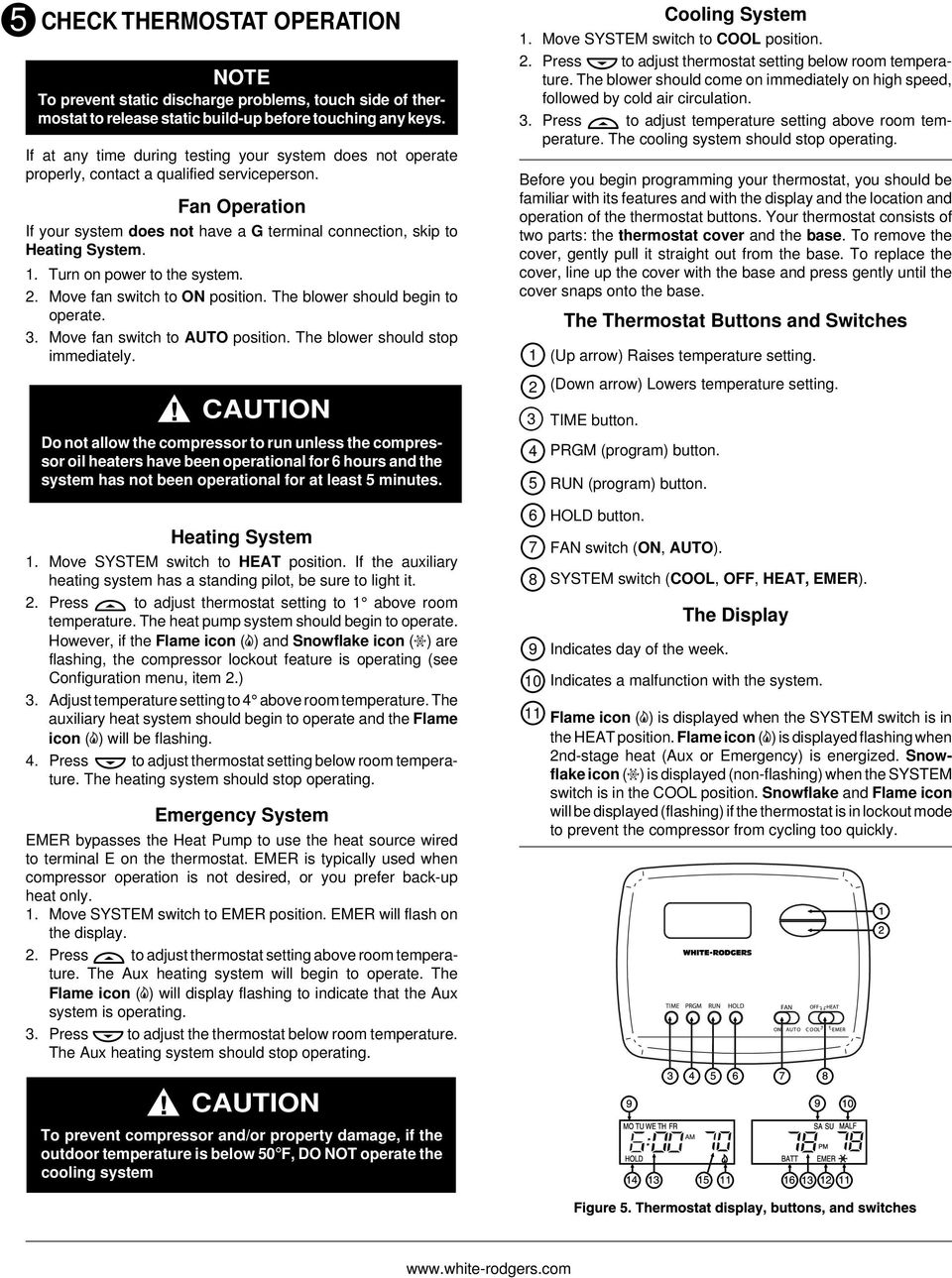
5 5 CHECK THERMOSTAT OPERATION CONTINUED FROM FOURTH PAGE 12 EMER is displayed flashing when the system switch is in EMER position. 13 Alternately displays current time and temperature. 14 The word HOLD is displayed when the thermostat is in the HOLD mode. 15 Displays currently programmed set temperature (this is blank when switch is in the OFF position). 16 BATT is displayed when 2 AAA batteries are low and should be replaced. Configuration Menu The configuration menu allows you to set certain thermostat operating characteristics to your system or personal requirements. Press RUN to make sure the thermostat is in the run program mode, then press PRGM and RUN at the same time to enter the configuration menu. The display will show the first item in the configuration menu. The configuration menu chart summarizes the configuration options. An explanation of each option follows. Press HOLD to change to the next menu item or press TIME to go backwards to the previous item in the menu. To exit the menu and return to the program operation, press RUN. If no keys are pressed within fifteen minutes, the thermostat will revert to normal operation. 1. In the run mode, if the setpoint temperature is manually raised by 3 F (2 C) or more above the actual temperature with the TEMPERATURE UP key, and the fast second stage feature is enabled, FA on, the second stage will energize immediately. With FA off, second stage will not energize until the setpoint temperature is 1 F or more above actual temperature for more than ten minutes. 2. Select Compressor Lockout CL OFF or ON Selecting CL ON will cause the thermostat to wait 5 minutes before turning on the compressor if the heating and cooling system loses power. It will also wait 5 minutes minimum between cooling and heating cycles. This is intended to help protect the compressor from short cycling. Some newer compressors already have a time delay built in and do not require this feature. Your compressor manufacturer can tell you if the lockout feature is already present in their system. When the thermostat compressor time delay occurs it will flash the Snowflake and Flame icons for about five minutes. 3. Select Temperature Display Adjustment 3 LO to 3 HI Allows you to adjust the room temperature display up to 3 higher or lower. Your thermostat was accurately calibrated at the factory but you have the option to change the display temperature to match your previous thermostat. The current or adjusted room temperature will be displayed on the left side of the display. 4. Select Backlit Display (t available on earlier models) The display backlight improves display contrast in low lighting conditions. Selecting backlight ON will keep the light on continuously. Selecting Backlight OFF will keep the light off. Operating Features w that you are familiar with the thermostat buttons and display, read the following information to learn about the many features of the thermostat. SIMULTANEOUS HEATING/COOLING PROGRAM STOR- AGE When programming, you can enter both your heating and cooling programs at the same time. There is no need to reprogram the thermostat at the beginning of each season. TEMPERATURE OVERRIDE Press or until the display shows the temperature you want. The thermostat will override current programming and keep the room temperature at the selected temperature until the next program period begins. Then the thermostat will automatically revert to the program. HOLD TEMPERATURE The thermostat can hold any temperature within its range for an indefinite period, without reverting to the programmed temperature. Press HOLD button. HOLD will be displayed. Then choose the desired temperature by pressing or. The thermostat will hold the room temperature at the selected setting until you press the RUN button to start program operation again. ENERGY MANAGEMENT RECOVERY Energy Management Recovery (EMR) causes the thermostat to start heating or cooling early to make the building temperature reach the program setpoint at the time you specify. Heating will start 5 minutes early for every 1 of temperature required to reach setpoint. Example: You select EMR and have your heating programmed to 65 at night and 70 at 7 AM. If the building temperature is 65 the difference between 65 and 70 is 5. Allowing 5 minutes per degree the thermostat setpoint will change to 70 at 6:35 AM. Cooling allows more time per degree because it takes longer to reach temperature. F/ C CONVERTIBILITY The factory default setting is Fahrenheit. Clipping W904 jumper on the circuit board (see fig. 1) will alter this feature to Celsius temperature setting. Step Press Button(s) Displayed (Factory Default) Press or to select: COMMENTS 1 Configuration Menu CL 2 HOLD* ON (OFF) 3 PRGM and RUN HOLD* FA (on) 0 HI (0) 3 LO TO 3 HI 5 RUN Returns to normal operation OFF Select Fast (on) or slow (off) Second Stage Heat Select Compressor lockout OFF or ON Select temperature display adjustment higher or lower dl 4* HOLD** OFF Select display backlight OFF or ON (ON) * t available on earlier models ** Press HOLD to advance to next item or TIME to move backwards to previous item

6 6 PROGRAMMING YOUR THERMOSTAT 3. Press TIME once. The display window will show the minutes only. This section will help you plan your thermostat s program to meet your needs. For maximum comfort and efficiency, keep the following guidelines in mind when planning your program. When heating (cooling) your building, program the temperatures to be cooler (warmer) when the building is vacant or during periods of low activity. During early morning hours, the need for cooling is usually minimal. Look at the factory preprogrammed times and temperatures shown below. If this program will suit your needs, simply press the RUN button to begin running the factory preset program. If you want to change the preprogrammed times and temperatures, follow these steps. Determine the time periods and temperatures for your weekday and weekend programs. You must program four periods for both the weekday and weekend program. However, you may use the same heating and cooling temperatures for consecutive time periods. You can choose start times, heating temperatures, and cooling temperatures independently for both weekday and weekend programs (for example, you may select 5:00 AM and 70 as the weekday 1st period heating start time and temperature, and also choose 7:00 AM and 76 as the weekday 1st period cooling start time and temperature). Use the table at the bottom of the page to plan your program time periods and the temperatures you want during each period. You may also want to look at the sample program table to get an idea of how the thermostat can be programmed. Entering Your Program Follow these steps to enter the heating and cooling programs you have selected. Set Current Time and Day 1. Press TIME button once. The display will show the hour only. EXAMPLE: PM 2. Press and hold either or until you reach the correct hour and AM/PM designation (AM begins at midnight; PM begins at noon). EXAMPLE: 4. Press and hold either or until you reach the correct minutes. 5. Press TIME once. The display will show the day of the week. 6. Press or until you reach the current day of the week. 7. Press RUN once. The display will show the correct time and room temperature alternately. Enter Heating Program 1. Move the switch to HEAT. 2. Press PRGM once. MO TU WE TH FR (indicating weekday program) will appear in the display. Also displayed are the currently programmed start time for the 1st heating period and the currently programmed temperature (flashing). EXAMPLE: MO TU WE TH FR AM This display window shows that for the 1st weekday period, the start time is 6:00 AM, and 70 is the programmed temperature (this example reflects factory preprogramming). 3. Press or to change the displayed temperature to your selected temperature for the 1st heating program period. 4. Press TIME once (the programmed time will flash). Press or until your selected time appears. The time will change in 15 minute increments. When your selected time is displayed, press TIME again to return to the change temperature mode. 5. Press PRGM once. The currently programmed start time and setpoint temperature for the 2nd heating program period will appear. 6. Repeat steps 4 and 5 to select the start time and heating temperature for the 2nd heating program period. 7. Repeat steps 4 through 6 for the 3rd and 4th heating program periods. Weekday heating programs are now complete. 8. Press PRGM once. SA SU (indicating weekend program) will appear in the display, along with the start time for the 1st heating period and the currently programmed temperature. COOL HEAT SAMPLE Heating/Cooling Schedule Plan (Factory Program) WEEKDAY (5 DAY) WEEKEND (2 DAY) Period 1ST 2ND 3RD 4TH 1ST 2ND 3RD 4TH Start Time 6:00 AM 8:00 AM 5:00 PM 10:00 PM 6:00 AM 8:00 AM 5:00 PM 10:00 PM Temperature 70 F 62 F 70 F 62 F 78 F 85 F 78 F 82 F Start Time 6:00 AM 8:00 AM 5:00 PM 10:00 PM 6:00 AM 8:00 AM 5:00 PM 10:00 PM Temperature 70 F 62 F 70 F 62 F 78 F 85 F 78 F 82 F COOL COOL HEAT Period 1ST 2ND 3RD 4TH 1ST 2ND 3RD 4TH Heating/Cooling Schedule Plan WEEKDAY (5 DAY) WEEKEND (2 DAY) Start Time Temperature Start Time Temperature

7 6 PROGRAMMING YOUR THERMOSTAT CONTINUED FROM SIXTH PAGE 9. Repeat steps 4 through 8 to complete weekend heating programming. 10. When you have completed entering your heating program, press RUN. Enter Cooling Program If the outside temperature is below 50 F, disconnect power to the cooling system before programming. Energizing the air conditioner compressor during cold weather may cause personal injury or property damage. 1. Move switch to COOL position. 2. Follow the procedure for entering your heating program, using your selected cooling times and temperatures. Check Your Programming Follow these steps to check your thermostat programming one final time before beginning thermostat operation. 1. Move switch to HEAT position. 2. Press PRGM to view the 1st weekday heating period time and temperature. Each time you press PRGM, the next heating period time and temperature will be displayed in sequence for weekday, then weekend program periods (you may change any time or temperature during this procedure). 3. Press RUN. 4. Move switch to COOL position. 5. Repeat step 2 to check cooling temperatures. 6. Press RUN to begin program operation. YOUR THERMOSTAT IS NOW COMPLETELY PROGRAMMED AND READY TO AUTOMATICALLY PROVIDE MAXIMUM COMFORT AND EFFICIENCY 7 SPECIFICATIONS ELECTRICAL DATA Electrical Rating: 20 to 30 VAC 50/60 Hz to 1.0 Amps (Load per terminal) 1.5 Amps Maximum Total Load (All terminals combined) THERMAL DATA Setpoint Temperature Range: 45 F to 90 F (7 C to 32 C) Operating Ambient Temperature Range: 32 F to 105 F Operating Humidity Range: 0 to 90% RH (non-condensing) Shipping Temperature Range: -40 F to 150 F 8 TROUBLESHOOTING Reset Operation If a voltage spike or static discharge blanks out the display or causes erratic thermostat operation you can reset the thermostat by pressing, and TIME at the same time. This also resets the factory defaults. If the thermostat has power, has been reset and still does not function correctly contact your heating/ cooling service person or place of purchase. Batteries For optimum performance, we recommend replacing batteries once a year with fresh AAA Energizer alkaline batteries. Symptom Possible Cause Corrective Action Heat/ Cool/ Fan 1. Blown fuse or tripped circuit breaker. Replace fuse or reset breaker. (common problems) 2. Furnace power switch to OFF. Turn switch to ON. 3. Furnace blower compartment door or Replace door panel in proper position to engage panel loose or not properly installed. safety interlock or door switch. Heat 1. Pilot light not lit. Re-light pilot. 2. System Switch not set to HEAT. Set System Switch to HEAT and raise setpoint above room temperature. 3. Loose connection to thermostat or system. Verify thermostat and system wires are securely attached. 4. Furnace Lock-Out Condition. Heat may also Many furnaces have safety devices that shut be intermittent. down when a lock-out condition occurs. If the heat works intermittently contact the furnace manufacturer or local service person for assistance.

8 8 TROUBLESHOOTING CONTINUED FROM SEVENTH PAGE Symptom Possible Cause Corrective Action Heat (continued) 5. Heating system requires service or Diagnostic: Set System Switch to HEAT and raise thermostat requires replacement. the setpoint above room temperature. Within a few seconds the thermostat should make a soft click sound. This sound usually indicates the thermostat is operating properly. If the thermostat does not click, try the reset operation listed above. If the thermostat does not click after being reset contact your heating and cooling service person or place of purchase for a replacement. If the thermostat clicks, contact the furnace manufacturer or a service person to verify the heating is operating correctly. Cool 1. System Switch not set to COOL. Set System Switch to COOL and lower setpoint below room temperature. 2. Loose connection to thermostat or system. Verify thermostat and system wires are securely attached. 3. Cooling system requires service or Same procedure as diagnostic for Heat thermostat requires replacement. condition except set the thermostat to COOL and lower the setpoint below the room temperature. There may be up to a five minute delay before the thermostat clicks in Cooling. Heat, Cool or Fan Runs Constantly. 1. Possible short in wiring. Check each wire connection to verify they are not 2. Possible short in thermostat. shorted or touching together. bare wire should 3. Possible short in heat/cool/fan system. stick out from under terminal screws. Try resetting 4. Fan Switch set to Fan On. the thermostat as described above. If the condition persists the manufacturer of your system or service person can instruct you on how to test the Heat/Cool system for correct operation. If the system operates correctly, replace the thermostat. Furnace (Air Conditioning) Cycles Too Fast 1. The location of the thermostat and/or the Digital thermostats normally provide precise or Too Slow (narrow or wide temperature size of the Heating (Cooling) System may temperature control and may cycle faster than swing) be influencing the cycle rate. some older mechanical models. A faster cycle rate means the unit turns on and off more frequently but runs for a shorter time so there is no increase in energy use. If you would like to increase the cycle time, clip Jumper W-905 as mentioned in the instructions for Hydronic Heating Systems. It is not possible to shorten the cycle time. If an acceptable cycle rate is not achieved as received or by clipping W-905 contact a local service person for additional suggestions. Thermostat Setting and Thermostat 1. Thermostat thermometer setting requires The thermometer can be adjusted +/- 3 degrees. Thermometer Disagree adjustment. See Temperature Display Adjustment in the Operation section. Thermostat Does t Follow Program 1. AM or PM set incorrectly in program. Check current clock and program settings 2. AM or PM set incorrectly on the clock. including the AM or PM designations for each 3. Voltage spike or static discharge. time period. If a voltage spike or a static discharge occurs use the Reset Operation listed above. Blank Display and/or Keypad 1. Voltage spike or static discharge. Use the Reset Operation listed above. t Responding

1F82-261 Programmable Electronic Digital Heat Pump Thermostat INSTALLATION AND OPERATION INSTRUCTIONS
 FAILURE TO READ AND FOLLOW ALL INSTRUCTIONS CAREFULLY BEFORE INSTALLING OR OPERATING THIS CONTROL COULD CAUSE PERSONAL INJURY AND/OR PROPERTY DAMAGE. DESCRIPTION ELECTRICAL DATA Electrical Rating: 20 to
1F82-0261 5/1/1 Day Programmable. 1F82-0261 Thermostat Thermostat Configuration Options Heat Pump. Maximum Stages Heat/Cool 2/1
 Blue 2 Heat Pump Thermostat Heat Pump Installation and Operating Instructions Save these instructions for future use! FAILURE TO READ AND FOLLOW ALL INSTRUCTIONS CAREFULLY BEFORE INSTALLING OR OPERATING
YOUR THERMOSTAT REPLACES Assemble tools required as shown below. HAND OR POWER DRILL WITH 3/16 INCH DRILL BIT, IF NEEDED
 1F85-275 Heating & Air Conditioning 5-1-1 Programmable/Non-programmable, Auto Changeover, Multi-Stage/Heat Pump Thermostat INSTALLATION INSTRUCTIONS Operator tor: Save these instructions for future use!
INSTALLATION REMOVE OLD THERMOSTAT ATTACH THERMOSTAT BASE TO WALL CHECK THERMOSTAT OPERATION BATTERY LOCATION
 HITE-RDERS 1F86-244 Non-Programmable Electronic Digital Thermostat INSTALLATIN AND PERATIN INSTRUCTINS perator: Save these instructions for future use! FAILURE T READ AND FLL ALL INSTRUCTINS CAREFULL EFRE
1F78 CAUTION CONTENTS YOUR THERMOSTAT REPLACES PREPARATIONS. Installation Instructions for. Heating & Air Conditioning. Non-Programmable Thermostat
 CNTENTS Installation Instructions for Heating & Air Conditioning 1F78 n-programmable Thermostat Preparations... 1 Thermostat Details... 1 Removing ld Thermostat... 1 Mounting and iring... 2 Check Thermostat
APPLICATIONS SPECIFICATIONS CAUTION. Blue Universal Thermostat with Automatic Heat/Cool Changeover Option. Save these instructions for future use!
 Save these instructions for future use! FAILURE TO READ AND FOLLOW ALL INSTRUCTIONS CAREFULLY BEFORE INSTALLING OR OPERATING THIS CONTROL COULD CAUSE PERSONAL INJURY AND/OR PROPERTY DAMAGE. APPLICATIONS
1-877-654-9394. UP400 Programmable Thermostat Installation Instructions & User Guide. For Installation Help. White-Rodgers.com
 UP400 Programmable Thermostat Installation Instructions & User Guide For Installation Help 1-877-654-9394 White-Rodgers.com 2011 Printed in China White-Rodgers 8100 West Florissant Avenue St. Louis, MO
QUICK INSTALLATION GUIDE
 QUICK INSTALLATION GUIDE Read Installer Notes before removing cover from Thermostat. 1F85RF-275 Wireless Remote Kit INSTALLER NOTES IMPORTANT Do not apply power to the thermostat or wireless sensor until
its ELECTRIC POSITION for electric heat, or set the units fan control appropriately to ELECTRIC or another appropriate setting.
 Troubleshooting Poor Temperature Regulation This page lists problems that may affect the temperature performance of your LUX thermostat with suggested resolutions. For more detailed information please
HEAT PUMP PROGRAMMABLE THERMOSTAT
 HEAT PUMP PROGRAMMABLE THERMOSTAT SA PM 3 COOL TEMP Form 44014-01 r010408 Model 43168 Owners Manual 1 Congratulations! Heat Pump Programmable Thermostat Model 43168 THERMOSTAT CONTROLS Switches & Buttons...15
WHITE-RODGERS COMFORT-SET 90 SERIES
 INSTALLATI DESCRIPTI WHITE-RODGERS COMFORT-SET 90 SERIES MULTI-STAGE INSTALLATI/CFIGURATI This White-Rodgers Automatic Setback Digital Thermostat uses microcomputer technology to provide precise time and
Install Guide CT100. Caution. Caution ENGLISH. disconnect the power supply before beginning work.
 Install Guide CT100 PG 1 Caution top cover Your thermostat is a precise instrument, handle it with care. Turn off electricity to the system before installing or servicing thermostat or any part of the
1F87-361 Programmable Electronic Digital Thermostat INSTALLATION AND OPERATION INSTRUCTIONS
 1F87-361 Programmable Electronic Digital Thermostat INSTALLATIN AND PERATIN INSTRUCTINS perator: Save these instructions for future use! FAILURE T READ AND FLL ALL INSTRUCTINS CAREFULL EFRE INSTALLIN R
Install Guide 3M-50. Caution. Caution
 PG 1 Install Guide 3M-50 aution Your thermostat is a precise instrument, handle it with care. Turn off electricity to the HVA system before installing or servicing thermostat or any part of the system.
USER MANUAL WARNING! CONTENTS MODEL 1 SPECIFICATIONS READ ALL INSTRUCTIONS BEFORE PROCEEDING. Non-Programmable Single Stage Heat/Cool Thermostat
 Builder MODEL 1010 Series Non-Programmable Single Stage Heat/Cool Thermostat USER MANUAL Compatible with low voltage single stage gas, oil or electric heating or cooling systems, including single stage
ELECTRIC POSITION for electric heat, then confirm with Fan Test below.
 Troubleshooting Poor Temperature Regulation This page lists problems that may affect the temperature performance of your LUX thermostat with suggested resolutions. For more detailed information please
CT3200 Programmable Thermostat
 CT3200 Programmable Thermostat Welcome to the world of comfort and energy savings with your new Honeywell Programmable Thermostat. Your new thermostat will automatically control the temperature in your
Install Guide CT101. Caution. Caution
 Install Guide CT101 PG 1 Caution top cover Your thermostat is a precise instrument, handle it with care. Turn off electricity to the system before installing or servicing thermostat or any part of the
Sensi TM. Wi-Fi Programmable Thermostat MANUAL OPERATION. Version: March 2016 2016 Emerson Electric Co. All rights reserved.
 Sensi TM Wi-Fi Programmable Thermostat MANUAL OPERATION Version: March 2016 2016 Emerson Electric Co. All rights reserved. Contents MANUAL OPERATION GUIDE Buttons and Icons 3 Basic Functionality 4 Manual
Installation Guide. LR-HWLV-HVAC TouchPRO Wireless. System Types
 Installation Guide LR-HWLV-HVAC TouchPRO Wireless Touchscreen Thermostat System Types Gas, oil, or electric heat with air conditioning Warm air, hot water, high efficiency furnaces, heat pumps, steam,
EK908FHL - Thermostat for floor heating
 EK908FHL - Thermostat for floor heating EK908FHL is a programmable thermostat designed for floor warming application or helping to limit floor temperature. This thermostat can be used for hot water radiant
Installation Guide. VisionPRO. TH8000 Series. Need Help? This manual covers the following models. System Types
 Installation Guide VisionPRO TH8000 Series Touch-screen Programmable Thermostat This manual covers the following models TH8110U: For 1 Heat/1 Cool systems TH8320U: For up to 3 Heat/2 Cool systems TH8321U:
HEAT HEAT COOL HEAT PUMP COOL
 OWNER S MANUAL RESIDENTIAL THERMOSTAT P/N P374-1800 HEAT COOL HEAT PUMP Su AUTO 0I20: Pm 74 COOL HEAT 27 7-DAY MABLE DIGITAL THERMOSTAT 3 Configurable Outputs Accepts Optional Humidity Module: Control
Blue Easy Reader Thermostat 1F95EZ-0671. Homeowner s Guide
 Blue Easy Reader Thermostat 1F95EZ-0671 Homeowner s Guide Message to Homeowners Congratulations on choosing the Emerson Blue Easy Reader Thermostat. Blue Easy Reader is designed to be the easiest thermostat
Installation Guide. Programmable Thermostat TH6220D
 Installation Guide Programmable Thermostat TH6220D Product Application This thermostat provides electronic control of 24 VAC single-stage and multi-stage heating and cooling systems, or 750 mv heating
SINCE 1 8 8 6 AUTO SAVER 550. OwnerÕs Manual Model 44550
 SINCE 1 8 8 6 AUTO SAVER 550 5: 7 2 2 3 2 OwnerÕs Manual Model 44550 Ask Your Local Retailer for Other Quality Products from unter Fans Air Purifiers umidifiers To locate your nearest unter Dealer, call
Mode Switch. Fan Switch Menu button Program button
 Operation 3M-30 Day Time of day Target Temperature Time Slot Touch Screen Current Room Temperature Thermostat Mode Statement of use: The 3M-30 can be used with millivolt, 24VAC, single and 2 stage conventional
SERVICE MANUAL FOR 6535 SERIES TWO TON HIGH EFFICIENCY PACKAGED HEAT PUMPS
 SERVICE MANUAL FOR 6535 SERIES TWO TON HIGH EFFICIENCY PACKAGED HEAT PUMPS TABLE OF CONTENTS 1. Warnings...2 2. Accessibility Of Appliance...3 3. Unit Dimensions And Specifications...3 4. Unit Specifications
Operation Guide 3M-22
 Operation Guide 3M-22 TEMP UP Target Temp Time Reset TEMP DOWN Control Panel Heat/Cool Mode Switch Fan Switch Battery Compartment Statement of use: The 3M-22 can be used with - millivolt, 24VAC single
PSPA711a. LUXPRO PSPA711a INSTALLATION AND OPERATING INSTRUCTIONS. Mt. Laurel, New Jersey 08054, USA www.luxproproducts.com
 PSPA711a LUXPRO PSPA711a INSTALLATION AND OPERATING INSTRUCTIONS 52070 1 COMPATIBILITY...................................... 2 2 FEATURES............................................ 2 3 ELECTRICAL RATINGS................................
INSTALLER S & OWNER S MANUAL
 INSTALLER S & OWNER S MANUAL HVAC INSTALLER: PLEASE LEAVE MANUAL FOR HOMEOWNER DEH 3000 DEH 3000 Part No. 4028539 Dehumidifier & Ventilation System Controller P.O. Box 8680 Madison, WI 53708 TOLL-FREE
User Manual THR840DUK Digital Thermostat
 User Manual THR840DUK Digital Thermostat 50051982-001 Rev. A WARNING: This product must be correctly installed and configured to work properly (see pages 12-24). If you are not experienced in wiring electrical
Installation Instructions
 Installation Instructions Model TSTATG2111 Use with most systems: 2-Heat, 1-ool 1- Day Prog ram m ab l e Digital Thermostat u p t o 2 - H e a t & 1 - o o l ontrol up to 2 Heat & 1 ool Stages Backlit Display
543-0032-00, 943-0032-00. User s Manual
 543-0032-00, 943-0032-00 User s Manual 1 Comfort Alert Diagnostics Faster Service And Improved Accuracy The Comfort Alert diagnostics module is a breakthrough innovation for troubleshooting heat pump and
Table of Contents. 1 - Specifications...3. 2 - Installation...3. 3 - Wiring...5. 4 - User controls...7
 THERMOSTATS Table of Contents Page 1 - Specifications...3 1.1 - Product range...3 ARTTH001 (DSL-610)...3 ARTTH002 (DSL-700)...3 ARTTH003 (DSL-600)...3 1.2 - Technical data...3 1.3 - Power failures...3
Operation 8022C. Customer Support: 888-515-2585 or Visit our webiste www.ritetemp-thermostats.com Made In China 401-006 OFF FAN HEAT COOL AUTO ON
 Operation 8022C HEAT O AN HEAT COOL AUTO ON HEAT O AN HEAT COOL AUTO ON Customer Support: 888-515-2585 or Visit our webiste www.ritetemp-thermostats.com Made In China 401-006 Operation 8022C TEMP UP Time/
TABLE 1: Wiring Terminals. Connect to... 1C 1H 2C 2H 1H1C 2H1C 2H2C 3H2C
 Installation TURN OFF POWER TO THE SYSTEM AT THE MAIN POWER PANEL TO AVOID ELECTRICAL SHOCK. Installation should be carried out by an electrician or a qualified technician. 1.1 Find a Location for the
Operator: Save these instructions for future use!
 WHITE-RDERS 1F58-72 Low Voltage Multi-Stage Heat PumpThermostat INSTALLATIN INSTRUCTINS perator: Save these instructions for future use FAILURE T READ AND FLLW ALL INSTRUCTINS CAREFULLY EFRE INSTALLIN
Honeywell CT3500/CT3595 PROGRAMMABLE THERMOSTAT
 Honeywell CT3500/CT3595 PROGRAMMABLE THERMOSTAT Weekday, Saturday and Sunday Programmable Heat and/or Cool Low Voltage (20 to 30 Vac) Thermostat and Wallplate Model CT3500/CT3595 OWNER S GUIDE Para pedir
NOTE: Append this Operation IB to the Install IB to make one IB-booklet. Need a divider tab between the 2 sections. Blank page remove.
 Product Name: CT101 Document Title: CT101 Operation Guide Document Type Code: IBOE Part Number: 1202-004-002 20apr12 Iris inclusion text added mtf 9apr12 bs edits mtf 14mar12 ch edits mtf 13mar12 initial
Owner s Guide Guide du propriétaire Guía para el usuario TH115-AF-GB-10. Programmable thermostat Thermostat programmable Termostato programable
 Owner s Guide Guide du propriétaire Guía para el usuario TH115-AF-GB-10 Programmable thermostat Thermostat programmable Termostato programable Read and save these instructions. Veuillez lire le mode d
SERVICE MANUAL 12VDC WALL THERMOSTAT AIR CONDITIONING SYSTEMS ROOFTOP UNITS ONLY
 SERVICE MANUAL 12VDC WALL THERMOSTAT AIR CONDITIONING SYSTEMS ROOFTOP UNITS ONLY! WARNING - SHOCK HAZARD! TO PREVENT THE POSSIBILITY OF SEVERE PERSONAL INJURY, DEATH, OR EQUIPMENT DAMAGE DUE TO ELECTRICAL
Installation Instructions
 TP-PRH-A, TP-NRH-A Performance Series Edge Thermidistat Control Installation Instructions Programmable Control A07049 A07048 Non Programmable Control Designed and Assembled in the USA. NOTE: Read the entire
Programmable Thermostat MODEL 3312026.XXX With Dehumidify 3312024.XXX With Out Dehumidify
 Comfort Control Center 2 Thermostat Operating Instructions Programmable Thermostat MODEL 3312026.XXX With Dehumidify 3312024.XXX With Out Dehumidify TABLE OF CONTENTS About your new thermostat Features...2
INSTALLATION INSTRUCTIONS MC95HAE-1 MASTER CONTROLLER
 INSTALLATION INSTRUCTIONS MC95HAE-1 MASTER CONTROLLER Bard Manufacturing Company, Inc. Bryan, Ohio 43506 Since 1914...Moving ahead just as planned. Manual : 2100-360B Supersedes: 2100-360A File: Volume
ETC TWO STAGE ELECTRONIC TEMPERATURE CONTROL
 RANCO INSTALLATION INSTRUCTIONS ETC TWO STAGE ELECTRONIC TEMPERATURE CONTROL Relay Electrical Ratings PRODUCT DESCRIPTION The Ranco ETC is a microprocessor-based family of electronic temperature controls,
1 For All Non-Programmable Digital Thermostat
 OWNER'S MANUAL P/N P474-0100 1 For All Non-Programmable Digital Thermostat TOTALINE 68 Dual Setpoint Very easy to program Thermoglow Backlight No batteries required Auto-Changeover Locking Keypad Meets
Installation Questions
 Installation Questions How do I determine what type of heat I have? There may be several ways to determine what type of heat you have. First, if you can access the unit that is responsible for creating
Programmable Room Thermostat 7 Day (5-2 Day) Models: 22083 / 22087 Power Supply: Battery / Mains
 Drayton Programmable Room Thermostat 7 Day (5-2 Day) Models: 22083 / 22087 Power Supply: Battery / Mains Invensys Controls Europe Technical Helpline: +44 (0) 845 130 7722 www.draytoncontrols.co.uk Installation
Wireless 7 Day Programmable Room Thermostat
 Wireless 7 Day Programmable Room Thermostat Cat. No. TRT037 Transmitter Receiver Operating & Installation Instructions What is a programmable room thermostat? an explanation for householders A programmable
Single Zone LCD Thermostat Operating Instructions
 Fan Cool Furnace *Heat Pump or Heat Strip On/Off F Single Zone LCD Thermostat Operating Instructions MODEL 3313192.XXX Cool/Furnace 3313193.XXX Cool/Furnace/Heat Pump 3313194.XXX Cool/Furnace/Heat Strip
1F95-0671 7 Day 5/1/1 Day Non-Programmable. Yes
 Save these instructions for future use! FAILURE TO READ AND FOLLOW ALL INSTRUCTIONS CAREFULLY BEFORE INSTALLING OR OPERATING THIS CONTROL COULD CAUSE PERSONAL INJURY AND/OR PROPERTY DAMAGE. Blue Universal
IMPORTANT SAFETY INSTRUCTIONS WARNING READ AND SAVE THESE OPERATING AND SAFETY INSTRUCTIONS BEFORE USING THIS HEATER.
 THERMAWAVE CERAMIC HEATER Model HZ-850 Series Model HZ-860 Series IMPORTANT SAFETY INSTRUCTIONS WARNING READ AND SAVE THESE OPERATING AND SAFETY INSTRUCTIONS BEFORE USING THIS HEATER. Warning Failure to
T-100-R Installation Guide
 T-100-R Installation Guide Table of Contents Page 2 Overview T-100-R Z-Wave Thermostat 3-4 Installation HVAC System Setup 6 Installer Settings Menu Items 7-9 Installer Settings Summary 10-11 Wiring Standard
WALL MOUNTED SPLIT TYPE AIR CONDITIONER
 WALL MOUNTED SPLIT TYPE AIR CONDITIONER MANUAL 8 OM-G12-ACSON CONTENTS - Operating Guide page 1 - G12 Remote Controller Indication page 2 - Indicator Lights page 4 - Installation of Aroma page 5 - Auto
TRANSMITTER RECEIVER THESE INSTRUCTIONS APPLY IN THE UK ONLY THESE INSTRUCTIONS ARE TO BE LEFT WITH THE USER OR AT THE APPLIANCE. Digistat Optimiser
 FITTING AND OPERATING INSTRUCTIONS FOR DIGISTAT OPTIMISER PROGRAMMABLE 7 DAY ROOM THERMOSTAT SYSTEM General information is given in the users instruction leaflet despatched with the appliance and/or on
Oil and Coolant Circulating Heating System. Model - OCSM
 Oil and Coolant Circulating Heating System Model - OCSM Installation & Operation Manual 216280-000 REV 2 Identifying Your System The HOTSTART heating system is designed to heat fluids for use in marine
37-7498. Professional Contractor INSTALLATION GUIDE
 37-7498 Professional Contractor INSTALLATION GUIDE Wireless Setup Connect Exit Next Exit 3 EASY STEPS Installing Sensi thermostat isn t that different than installing a non Wi-Fi thermostat. 1. Install
COMFORT CONTROL - 4 HEAT (GAS, OIL*, OR ELECTRIC)/3 COOL/HEAT PUMP COMMUNICATING PROGRAMMABLE 3 WIRE HOOKUP
 COMFORT CONTROL - 4 HEAT (GAS, OIL*, OR ELECTRIC)/3 COOL/HEAT PUMP COMMUNICATING PROGRAMMABLE 3 WIRE HOOKUP ALL phases of this installation must comply with NATIONAL, STATE, AND LOCAL CODES INSTALLER S
ComfortLink II Installation Guide. 3 Zone Panel (optional) 4 Zone Sensor with Display (optional) 5 Zone Sensor (optional) 6 Zone Dampers (optional)
 18-HD64D1-3 ComfortLink II Installation Guide Other Installation Guides may be necessary, based on system configuration. A complete list of other optional components is shown below. 1 Control 2 Relay Panel
Digi-Motor Installation Guide
 Digi-Motor Installation Guide Installation Video...located at marsdelivers.com Digi-Motor Installation Guide Digi-Motor For technical assistance with your Azure Digi-Motor, call the MARS technical support
COMPUTHERM Q7 Programmable, digital room thermostat. Operating Instructions
 COMPUTHERM Q7 Programmable, digital room thermostat Operating Instructions GENERAL DESCRIPTION OF THE THERMOSTAT The COMPUTHERM Q7 type switched-mode room thermostat is suitable to regulate the overwhelming
General Information. Do programmable thermostats really save energy?
 General Information Do programmable thermostats really save energy? Yes, programmable thermostats can save energy which in turn saves you money on your utility bill. The US Department of Energy states
WON0502-B INSTALLATION INSTRUCTIONS FOR ELECTRIC FURNACES. Bulletin 30-34 / March 2013
 Bulletin 30-34 / March 2013 INSTALLATION INSTRUCTIONS FOR ELECTRIC FURNACES General The information on the following pages is to provide the installer the necessary information to properly install the
SERVICE MANUAL FOR 12 VDC WALL THERMOSTAT AIR CONDITIONING SYSTEMS ROOF TOP UNITS ONLY
 RV Products Division SERVICE MANUAL FOR 12 VDC WALL THERMOSTAT AIR CONDITIONING SYSTEMS ROOF TOP UNITS ONLY Airxcel, Inc. RV Products Division P.O. Box 4020 Wichita, KS 67204 1976A376 (1-11) TABLE OF CONTENTS
REMOTE CONTROL MANUAL
 REMOTE CONTROL MANUAL ENGLISH CONTENT PRECAUTIONS...1-2 USING THE REMOTE CONTROL UNIT...3 OPERATION...4-9 Thank you for purchasing our Room Air Conditioner. Before using your air-conditioner, please read
Master Time Clock MTC-200 MTC-400 MTC-600. Users Manual
 Master Time Clock MTC-200 MTC-400 MTC-600 Users Manual Toll Free (888)713-0373 Phone (972)987-4408 FAX (877)720-9291 www.midwest-time.com [email protected] TABLE OF CONTENTS TOPIC PAGE GENERAL DESCRIPTION
T8131C, T8132C Programmable Thermostat
 T8131C, T8132C Programmable Thermostat OWNER S GUIDE Weekday/Weekend Programmable Heat and/or Cool Thermostat and Mounting Plate 1 69-1635-2 Welcome to the world of comfort and energy savings with your
Air Conditioning Sign-Off Sheet
 Air Conditioning Sign-Off Sheet Printed Technician Name Address Social Security Number Telephone Number City State Zip Code Install Or Verify The Accuracy Of An Air Conditioner s Installation The candidate
Carrier Thermostat Quick Reference Guide
 Cool Share Web-Programmable Thermostat Residential Carrier Thermostat Quick Reference Guide Thank you for taking an active role in helping reduce the region s demand for electricity during the summer.
INSTALLATION AND OPERATION MANUAL
 RCS MODEL ZC4 4 ZONE HVAC INSTALLATION AND OPERATION MANUAL DCN: 141-0020-02 /0/03 INTRODUCTION The 4 Zone HVAC Controller series allows up to 4 standard electronic thermostats to independently control
Thermostatic Wiring Principles by Bob Scaringe Ph.D., P.E.
 Thermostatic Wiring Principles by Bob Scaringe Ph.D., P.E. Basic Thermostat Types Many technicians have great difficulty understanding how to properly wire a thermostat or how to replace a thermostat with
AC-115 Compact Networked Single Door Controller. Installation and User Manual
 AC-115 Compact Networked Single Controller Installation and User Manual December 2007 Table of Contents Table of Contents 1. Introduction...5 1.1 Key Features... 6 1.2 Technical Specifications... 7 2.
Technical support is also available by email or by phone: [email protected] 1.877.932.6233 (North America) 1.647.428.2220 (International)
 Installation guide Welcome! If you have questions, we have answers. Visit ecobee.com/support/ecobee3 for tutorials, how-to videos and FAQs. Technical support is also available by email or by phone: [email protected]
Portable Air Conditioner
 Portable Air Conditioner Owner's Manual Model:3 in 1 12,000 Btu/h Series 3 Please read this owner s manual carefully before operation and retain it for future reference. CONTENTS 1. SUMMARY...1 2. PORTABLE
Installation Instructions
 TP --- PAC, TP --- PHP TP --- NAC, TP --- NHP Performance Series AC / HP Thermostat Installation Instructions A07049 Programmable Control A07048 Non-Programmable Control Designed and Assembled in the U.S.A.
G670 Intermittent Pilot Ignition Controls
 Installation Sheets Manual 121 Gas Combustion Combination Controls and Systems Section G Technical Bulletin Issue Date 0300 Intermittent Pilot Ignition Controls Figure 1: Intermittent Pilot Ignition Control
Nexus FS Point of Use Installation Guide
 Nexus FS Point of Use Installation Guide Nexus FS POU Install Guide:12152011:rev-12152011 Technical Specifications Dimensions: Height: 43.5 Width: 11.65 Depth: 15 Weight: 34.39 LBS Electrical Specs: Voltage:
Drayton Digistat +2RF/+3RF
 /+3RF Programmable Room Thermostat Wireless Model: RF700/22090 Model: RF701/22092 Power Supply: Battery - Thermostat Mains - Digistat SCR Invensys Controls Europe Customer Service Tel: 0845 130 5522 Customer
Installation Instructions
 H5HK Series Installation Instructions 3 Phase Electric Heater Kits 7.5 and 0 TON Package A/C Systems Description Installation of 08/40V and 480V H5HK 3 Phase Heater Kits in 7.5 and 0 TON Packaged Air Conditioners.
OWNER'S MANUAL R-410A Duct Free Split System Air Conditioner and Heat Pump
 R-410A Duct Free Split System Air Conditioner and Heat Pump Product Family: DFS4(A/H)-System, DFC4(A/H)3-Outdoor, DFF4(A/H)H-Indoor Please read the operating instructions and safety precautions carefully
Operator: Save these instructions for future use!
 WHITE-RODGERS 36C01 Combination Gas Valves (24 Volt and 120 Volt Models) INSTALLATI INSTRUCTIS FAILURE TO READ AND FOLLOW ALL INSTRUCTIS CAREFULLY BEFORE INSTALLING OR OPERATING THIS CTROL COULD CAUSE
Nest Learning Thermostat Pro installation & configuration guide
 Nest Learning Thermostat Pro installation & configuration guide Need help? Help online: http://support.nest.com/certified Nest Certified Professional support: 1-855-VIP-NEST (1-855-847-6378) Hours: 5am-9pm
INSTALLATION & SERVICE MANUAL. Display Panel
 INSTALLATION & SERVICE MANUAL Display Panel The PowerLine EMS TM is a specialized power distribution and energy management system intended to be used in recreational vehicles. The Control Module is housed
T841A Heating-Cooling Heat Pump Thermostat
 T84A Heating-Cooling Heat Pump Thermostat APPLICATIN The T84A Heating-Cooling TADELINE Thermostat provides 4 Vac control of two-stage heating and onestage cooling in heat pump systems, using manual changeover.
CM702 PROGRAMMABLE THERMOSTAT FEATURES PRODUCT SPECIFICATION SHEET
 CM702 PROGRAMMABLE THERMOSTAT FEATURES Attractive slim, modern styling makes it ideal for location in any type of home. 24-hour heating program. Up to 4 daily independent time and temperature level changes
E2 Series Electric Furnaces
 E2 Series Electric Furnaces Service Manual Table of Contents Electrical Requirements... 10 Codes, Specifications Requirements... 10 Connection Supply Service Wires... 10 Furnace Sequence of Operation...
Service manual. Website: www.andico.com.au CAUTION - BEFORE SERVICING THE UNIT, READ THE SAFETY - PRECAUTIONS IN THIS MANUAL.
 Website: www.andico.com.au Service manual CAUTION - BEFORE SERVICING THE UNIT, READ THE SAFETY - PRECAUTIONS IN THIS MANUAL. - ONLY FOR AUTHORISED SERVICE PERSONNEL. MODELS: MPK1-09CR-QB8 MPK1-12ER-QB6
Service Guide 12/27/03 TESTING, SERVICE & REPAIR GUIDE (For SH Space Heating Models & RA Water Heating Models)
 TESTING, SERVICE & REPAIR GUIDE (For SH Space Heating Models & RA Water Heating Models) WARNING - HIGH VOLTAGE AC electrical circuits are connected to this heater. Do not attempt any service work on the
SERVICE MANUAL RESIDENTIAL ELECTRIC AND LIGHT DUTY COMMERCIAL ELECTRIC WATER HEATERS. Troubleshooting Guide and Instructions for Service
 RESIDENTIAL ELECTRIC AND LIGHT DUTY COMMERCIAL ELECTRIC WATER HEATERS SERVICE MANUAL Troubleshooting Guide and Instructions for Service (To be performed ONLY by qualified service providers) Models Covered
36G22, 36G23, 36G24 & 36G52 36J22, 36J23, 36J24 & 36J52 DSI and HSI Single Stage Combination Gas Valve
 Operator: Save these instructions for future use! FAILURE TO READ AND FOLLOW ALL INSTRUCTIONS CAREFULLY BEFORE INSTALLING OR OPERATING THIS CONTROL COULD CAUSE PERSONAL INJURY AND/OR PROPERTY DAMAGE. DESCRIPTION
ELECTRONIC THERMOSTAT AND THERMOMETER With SPEED CONTROL
 148 OLD CONCORD TURNPIKE, BARRINGTON NH 03825 USA TEL (603) 868-5720 FAX (603) 868-1040 1-800-435-6708 E-Mail:[email protected] www.seafrost.com ELECTRONIC THERMOSTAT AND THERMOMETER With SPEED CONTROL
WARNING: FAILURE TO FOLLOW THESE RULES MAY RESULT IN SERIOUS PERSONAL INJURY CAUTION: INSTALLATION LOCATION:
 Revision Level: 01 Revision Date: 07/07/2011 Please read all instructions carefully to help ensure a correct and SAFE installation of your Second Wind Ultraviolet Germicidal Air Purifier. Failure to do
INSTALLATION GUIDE. Card Reader & Controller with KIM Swipe Reader for Solitaire 850 / 950 / 850L Learnlok PK2930
 INSTALLATION GUIDE Card Reader & Controller with KIM Swipe Reader for Solitaire 850 / 950 / 850L Learnlok PK2930 Card Reader and Controller Model 3.5 with KIM Swipe Reader Table of Contents 1. Features..................................
Roof Top Air Conditioner INSTALLATION AND OPERATING INSTRUCTIONS
 Roof Top Air Conditioner INSTALLATION AND OPERATING INSTRUCTIONS Ducted System RECORD THIS UNIT INFORMATION FOR FUTURE REFERENCE: Model Number: Serial Number: Date Purchased: This manual must be read and
GETTING STARTED WITH THE MIPOWER MANAGEMENT SYSTEM
 GETTING STARTED WITH THE MIPOWER MANAGEMENT SYSTEM This Quick Start guide will help you start using the MiPower Management System provided by Grayson Collin Electric Cooperative. You should create your