
Atlas Copco Generators QIX QAS QAC USER MANUAL FOR THE. Qc4001 GENERATOR CONTROLLER
|
|
|
- Vivian Singleton
- 10 years ago
- Views:
Transcription
1 Atlas Copco Generators QIX QAS QAC USER MANUAL FOR THE Qc4001 GENERATOR CONTROLLER User Manual Qc4001 edition03 Page 1 of 114

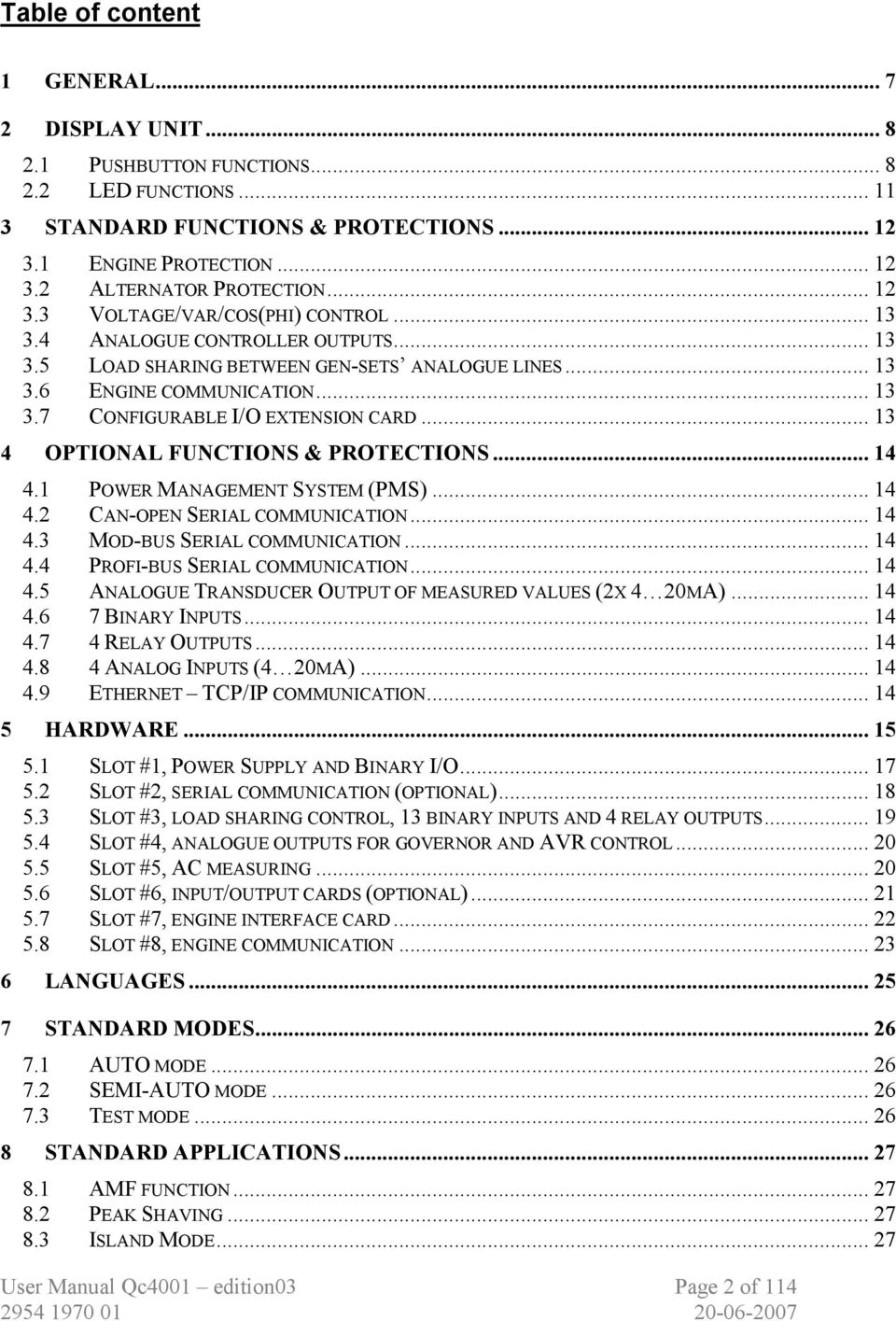
2 Table of content 1 GENERAL DISPLAY UNIT PUSHBUTTON FUNCTIONS LED FUNCTIONS STANDARD FUNCTIONS & PROTECTIONS ENGINE PROTECTION ALTERNATOR PROTECTION VOLTAGE/VAR/COS(PHI) CONTROL ANALOGUE CONTROLLER OUTPUTS LOAD SHARING BETWEEN GEN-SETS ANALOGUE LINES ENGINE COMMUNICATION CONFIGURABLE I/O EXTENSION CARD OPTIONAL FUNCTIONS & PROTECTIONS POWER MANAGEMENT SYSTEM (PMS) CAN-OPEN SERIAL COMMUNICATION MOD-BUS SERIAL COMMUNICATION PROFI-BUS SERIAL COMMUNICATION ANALOGUE TRANSDUCER OUTPUT OF MEASURED VALUES (2X 4 20MA) BINARY INPUTS RELAY OUTPUTS ANALOG INPUTS (4 20MA) ETHERNET TCP/IP COMMUNICATION HARDWARE SLOT #1, POWER SUPPLY AND BINARY I/O SLOT #2, SERIAL COMMUNICATION (OPTIONAL) SLOT #3, LOAD SHARING CONTROL, 13 BINARY INPUTS AND 4 RELAY OUTPUTS SLOT #4, ANALOGUE OUTPUTS FOR GOVERNOR AND AVR CONTROL SLOT #5, AC MEASURING SLOT #6, INPUT/OUTPUT CARDS (OPTIONAL) SLOT #7, ENGINE INTERFACE CARD SLOT #8, ENGINE COMMUNICATION LANGUAGES STANDARD MODES AUTO MODE SEMI-AUTO MODE TEST MODE STANDARD APPLICATIONS AMF FUNCTION PEAK SHAVING ISLAND MODE User Manual Qc4001 edition03 Page 2 of 114
3 8.4 FIXED POWER LOAD TAKE OVER POWER MANAGEMENT SYSTEM SINGLE GENSET USE / MULTI GENSET USE SINGLE GEN-SET USE MULTI GEN-SET USE APPLICATION EXAMPLES AUTOMATIC MAINS FAILURE APPLICATION WITH SINGLE GEN-SET INSTALLATION AND WITH BACK-SYNCRONIZING OF THE MAINS BREAKER MB PEAK SHAVING OPERATION WITH SINGLE GEN-SET INSTALLATION WIRINGS WIRING FOR AMF, PEAK SHAVING, FIXED POWER AND LOAD TAKE OVER APPLICATION WIRING FOR ISLAND AND PMS MODE APPLICATION LOAD SHARING LINES BINARY INPUTS ANALOGUE INPUTS (EXTERNAL SET-POINTS) OPTOCOUPLER OUTPUTS FOR EXTERNAL COUNTER DISPLAY CABLE SERIAL CABLE FOR PC APPLICATIONS DETAILS FOR THE QC SINGLE RUNNING GEN-SET AMF operation Island operation Peak Shaving application Fixed Power Load Take Over MULTI RUNNING GEN-SETS AMF operation (optional) Island operation Peak Shaving (optional) Fixed Power (optional) Load Take Over (optional) Power Management System (optional) REMOTE CONTROL VIA WWW (OPTIONAL) MENU OVERVIEW & CHANGING PARAMETERS MAIN VIEW SETUP MENU If the PROTECTION SETUP is selected If the CONTROL SETUP is selected If POWER SETUP is selected If the SYSTEM SETUP is selected THE JUMP BUTTON S1 / S2 / S3 MENU ALARM AND EVENT LIST MENU PASSWORD LEVELS User Manual Qc4001 edition03 Page 3 of 114

4 16 FAIL CLASSES MENU SET-POINTS PROTECTION SETUP Bus voltage protection Bus frequency protection Generator Reverse Power Generator Overcurrent Protection Generator Overload Protection Generator Current Unbalance Protection Generator Voltage Unbalance Protection Generator Reactive Power Import (loss of excitation) Protection Generator Reactive Power Export (overexcitation) Protection Loss of Mains Protection Vector jump Generator voltage protection Generator frequency protection Engine control Mains Power 4 20 ma input Configurable 4 20 ma input Configurable 4 20 ma input Configurable VDO input Configurable VDO input Configurable VDO input Overspeed (tacho input) Ext. Engine Failure (binary input 8) Emergency Stop (binary input 9) Non-configurable Sprinkler Input Coolant Temperature Coolant Temperature Oil Pressure Fuel Level Configurable binary input (optional) nd Set of Parameters (binary input 18) rd Set of Parameters (binary input 19) th Set of Parameters (binary input 20) Configurable binary input Configurable binary input Configurable binary input Configurable binary input Configurable binary input Configurable binary input Configurable binary input Configurable binary input Configurable binary input Configurable (binary input 30) Configurable 4 20 ma input (optional) Run Status Remote Start/Stop (binary input 31) W/L (binary input 32) User Manual Qc4001 edition03 Page 4 of 114

5 Disable Analogue Fuel Input (binary input 33) Static Charger (binary input 34) MDEC Run Signal CONTROL SETUP Synchronisation type Dynamic synchronisation Static synchronisation Blackout closing of breaker Generator and mains breaker, general failure alarm Frequency Controller Power Controller Power ramp up / Power ramp down Power ramp down Voltage controller Var controller PF Control Governor regulation failure AVR regulation failure Breaker type Static Synchronisation POWER SETUP. PEAK SHAVING OPERATION Mains power (import power) Daytime period Start gen-set Stop gen-set Load Dependent Start Load Dependent Stop Test running Fixed power set-point (for active generator power and power factor) PMS Configuration Internal Communication ID Priority Select Number of ID s Priority of ID s Running hours Ground Relay Stop Noncon. Gen-sets Power Capacity Tie breaker SYSTEM SETUP Nominal settings (1 st / 2 nd / 3 th / 4 th Parameter Set) Transformer generator (for generator voltage measuring) Transformer busbar (for busbar voltage measuring) External communication control (optional) Engine communication Date and time (internal clock) setting Measuring of generator running time and circuit breaker operations Battery undervoltage / overvoltage alarm Language Loadshare output User Manual Qc4001 edition03 Page 5 of 114

6 Loadshare type Battery undervoltag / overvoltage alarm Mode Relay Engine type Gen-set modes CAN Unit Tacho configuration Start sequency of the engine GB ON / GB OFF sequence MB ON / MB OFF sequence Stop sequence MB Control Horn timeout GB Control Analogue output configuration (optional) Relay Setup Relay Setup (optional) Real Time Clock Start & Stop commands GSM Pin Code Service Time Diagnostic Mode User passwords User passwords Service menu Diagnostics menu Clear Log Menu Parameter Set ID Application VDO VDO VDO TECHNICAL SPECIFICATIONS DIMENSIONS UNIT DIMENSIONS DISPLAY DIMENSIONS PANEL CUTOUT FOR DISPLAY ENGINE COMMUNICATION CAN-BUS MTU MDEC DEUTZ EMR DETROIT DIESEL DDEC IV User Manual Qc4001 edition03 Page 6 of 114

7 1 General The Atlas Copco Qc4001 is a protection and control unit for a generator driven by a diesel engine. It will carry out all necessary tasks to control and protect a generator, regardless of the use of the generator. This means that the Atlas Copco Qc4001 can be used for several application types. The Qc4001 measuring system is true RMS 3-phase measurement of generator voltage, generator current, generator frequency, mains voltage and mains frequency. This User Manual is based on: Functional Specification The Functional Specification can be changed without prior notice. The information contained in this User Manual is to assist you in the installation of your gen-set. If something is not clear, please do not hesitate to contact Atlas Copco for further help. User Manual Qc4001 edition03 Page 7 of 114

8 2 Display unit The display unit used in the Qc4001 communicates and receives power supply via a 9-pole Sub-D plug. The plug fits directly onto the main unit, so the display can be mounted on the top of the main unit. If the display is to be used as remote display, a standard computer extension cable with male/female plug can be used for the connection. 2.1 Pushbutton functions There are 16 pushbuttons on the display unit with the following functions: ALARM: Shifts the display 3 lower lines to show the alarm list (up to 30 alarms can be in the list). JUMP: This button enables the customer to enter a channel number selection. The module will jump directly to this channel. Using the JUMP button enables the user to select and display any setting without navigating all the way through the menus (see later). LEFT: Moves the cursor left for manoeuvring in the menus. User Manual Qc4001 edition03 Page 8 of 114


9 UP: Increases the value of the selected set-point (in the setting menus). In the daily use display it is used for scrolling the second line displaying of generator values. SELECT: Is used to select the chosen function (underscored selection in the lower line of the display). DOWN: Decreases the value of the selected set-point (in the setting menus). In the daily use display it is used for scrolling the second line displaying of generator values RIGHT: Moves the cursor right for manoeuvring in the menus. BACK: Jumps one step backwards in the menu (to previous display or to the entry window). START: Start of the generator if SEMI-AUTO is selected. STOP: Stop of the generator if SEMI-AUTO is selected. GB ON: Manual activation of close contactor and open contactor sequence if SEMI-AUTO is selected. MB ON: Manual activation of close contactor and open contactor sequence if SEMI-AUTO is selected. User Manual Qc4001 edition03 Page 9 of 114

10 AUTO: Puts the generator in AUTO mode. SEMI-AUTO: Puts the generator in SEMI-AUTO (manual) mode. TEST: Puts the generator in TEST mode. To enter the TEST mode, the lowest level password needs to be entered. VIEW LOG: Shifts the display 3 lower lines to show the alarm list (up to 150 alarms can be listed). These alarms will be kept in memory when the unit is powered off. User Manual Qc4001 edition03 Page 10 of 114

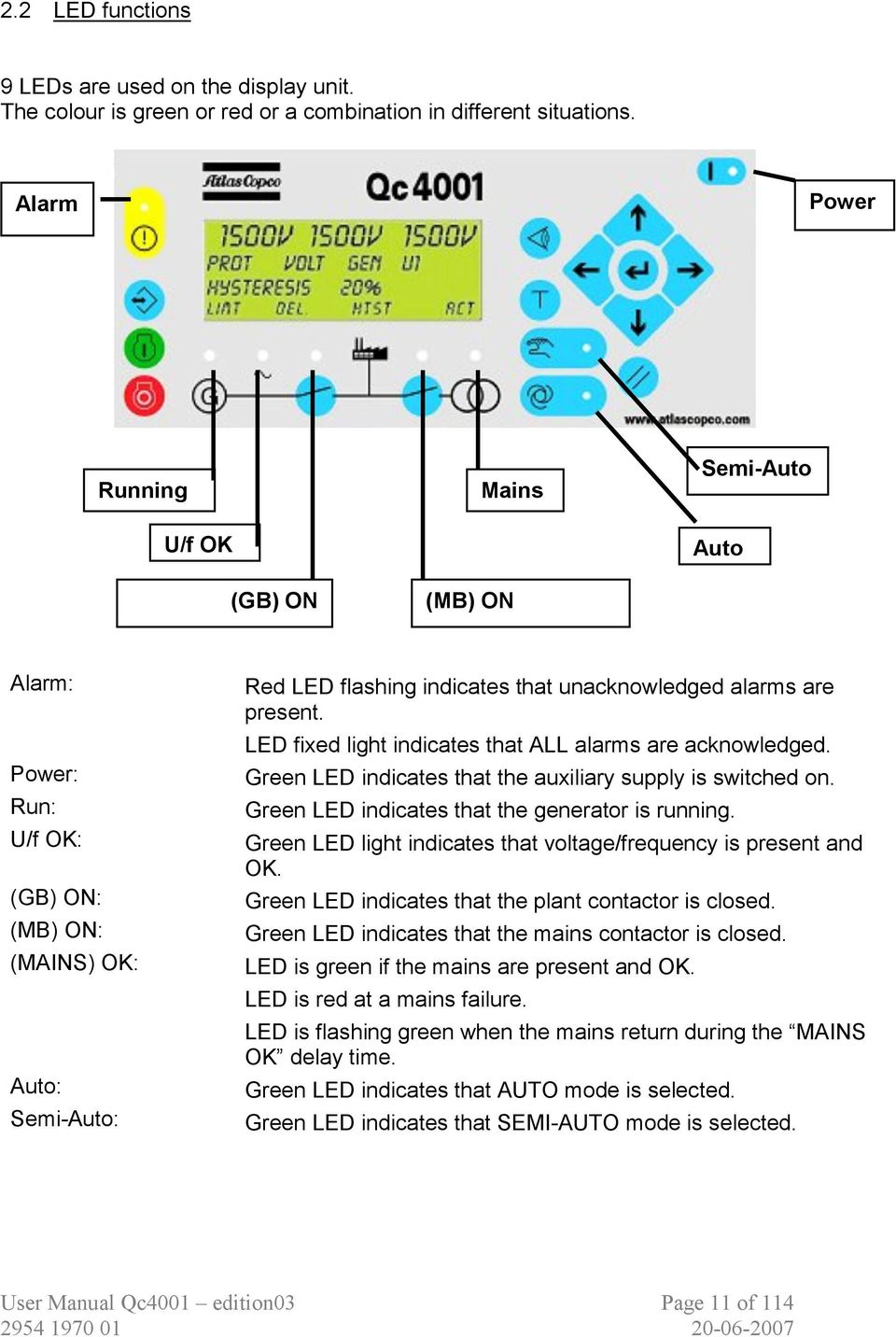
11 2.2 LED functions 9 LEDs are used on the display unit. The colour is green or red or a combination in different situations. Alarm Power Running U/f OK (GB) ON Mains (MB) ON Semi-Auto Auto Alarm: Power: Run: U/f OK: (GB) ON: (MB) ON: (MAINS) OK: Auto: Semi-Auto: Red LED flashing indicates that unacknowledged alarms are present. LED fixed light indicates that ALL alarms are acknowledged. Green LED indicates that the auxiliary supply is switched on. Green LED indicates that the generator is running. Green LED light indicates that voltage/frequency is present and OK. Green LED indicates that the plant contactor is closed. Green LED indicates that the mains contactor is closed. LED is green if the mains are present and OK. LED is red at a mains failure. LED is flashing green when the mains return during the MAINS OK delay time. Green LED indicates that AUTO mode is selected. Green LED indicates that SEMI-AUTO mode is selected. User Manual Qc4001 edition03 Page 11 of 114
12 The main Qc4001 control unit includes 3 LEDs: Power: Self check ok: Alarm inhibit: Green LED indicates that the auxiliary supply is switched on. Green LED indicates that the unit is OK. Green LED fixed light indicates that the inhibit input is ON. 3 Standard functions & protections The Qc4001 measuring system is true RMS 3-phase measurement of generator voltage, generator current, generator frequency, mains voltage and mains frequency. The Qc4001 module is built up with different extension cards that are mounted into one of the 9 different slots. Some of these cards are mounted as standard, and some as an option. The Qc4001 has the following control and protection functions as standard: 3.1 Engine Protection The engine alarm extension card has the following configurable inputs and outputs: ma input for Mains Power Transducer - 2 configurable 4 20mA inputs - 3 resistive sensor inputs for Engine Oil Pressure/Coolant Level, Coolant Temperature/Alternator Temperature, Fuel Level - 1 tacho input - 9 binary inputs for Access Lock, Running Feedback, Engine Failure, Emergency Stop, 2n d Parameter Set, W/L, Remote Start, disable analogue fuel input, Static Battery Charger. 3.2 Alternator Protection - Over current protection, definite time characteristic - Reverse power protection, definite time characteristic - Over- and under voltage (generator and busbar) - Over- and under frequency (generator and busbar) - Vector jump - Df/dt (ROCOF) - Overload - Current unbalance - Voltage asymmetry - Reactive power (import (excitation loss)/export) User Manual Qc4001 edition03 Page 12 of 114

13 3.3 Voltage/var/cos(phi) control Selectable (via binary inputs or (optional) serial interface) functions: - Constant voltage (stand-alone) - Constant reactive power (parallel with mains) - Constant power factor (parallel with mains) - Reactive power sharing (parallel with other generators, island operation) 3.4 Analogue controller outputs - +/-20mA for speed governor - +/-20mA for voltage/var/cos control 3.5 Load sharing between gen-sets analogue lines 3.6 Engine communication Software selectable for: - MTU MDEC communication - Detroit Diesel DDEC communication - Deutz EMR communication - Volvo EDCIII - John Deere JDEC communication - Scania ScaniaDec communication 3.7 Configurable I/O extension card - 13 binary inputs and 4 relay outputs Note: It is possible to configure binary inputs, analogue inputs and binary outputs. Binary Inputs - The text can be edited to a more saying name by using the USW - Input 10 (terminal 118) can be configured as 'Sprinkler'. When 'Sprinkler' is selected, all alarms and fail classes are overruled. The only alarms the gen-set will react on are 'Emergency Stop' on terminal 117 or a 'Tacho Failure'. Also the gen-set has 7 start attempts before 'Start Failure'. Analogue Inputs - The text can be edited to a more saying name Binary Outputs - The output can be configured as 'Alarm' relay - The output can be configured as 'Limit' relay User Manual Qc4001 edition03 Page 13 of 114

14 4 Optional functions & protections As standard 6 slots out of 9 slots contain a dedicated extension card. This means that 3 slots are still free for the optional extension cards. The following optional extension cards are available: 4.1 Power Management System (PMS) 4.2 Can-open Serial communication 4.3 Mod-bus Serial communication 4.4 Profi-bus Serial communication Note that it is only possible to have one of the above options on one and the same unit. 4.5 Analogue Transducer Output of measured values (2x 4 20mA) Binary Inputs Relay Outputs Analog Inputs (4 20mA) Note that it is only possible to have one of the above options on one and the same unit. 4.9 Ethernet TCP/IP communication Integrated Web Server with web pages for plant presentation. User Manual Qc4001 edition03 Page 14 of 114

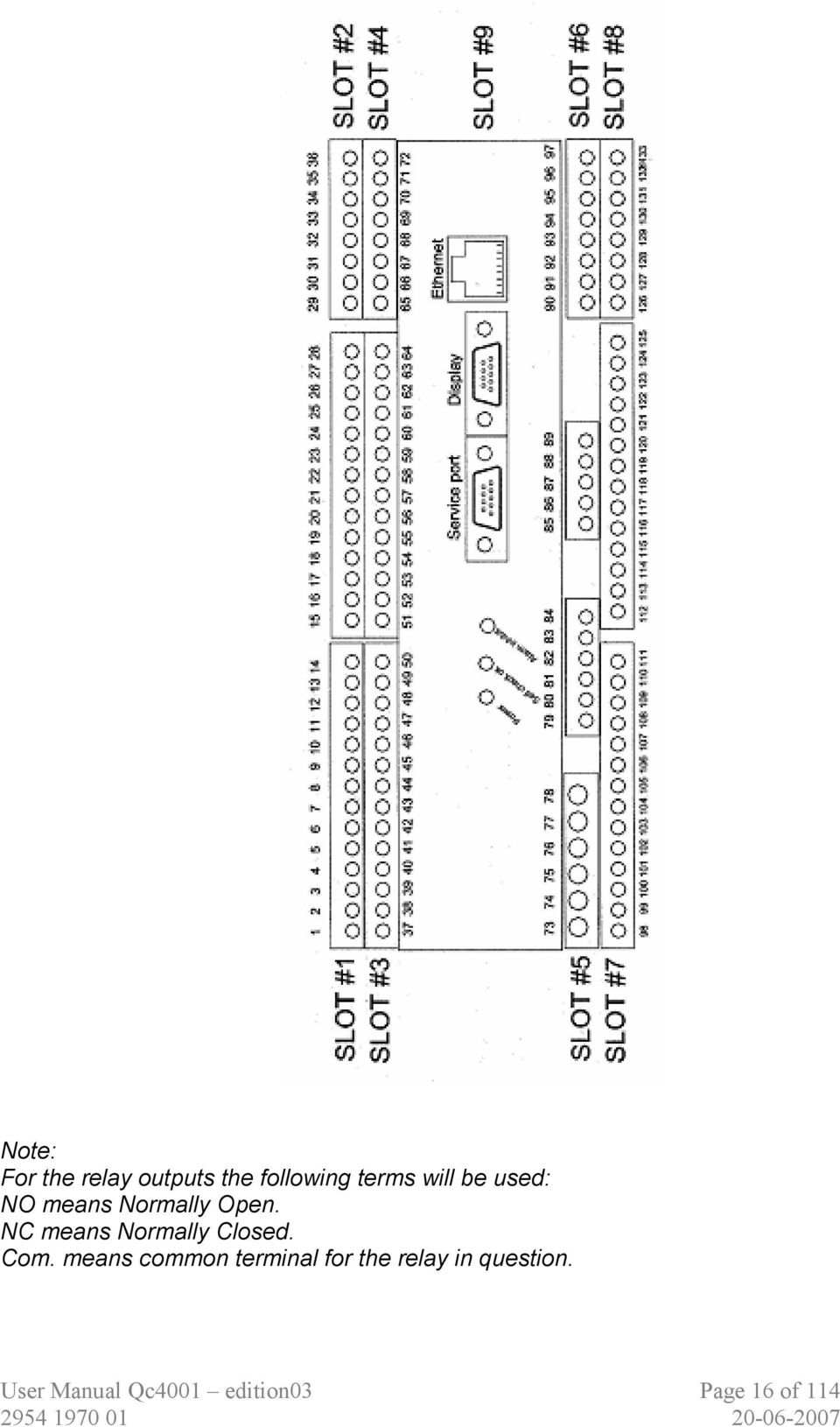
15 5 Hardware The Qc4001 housing is divided into board slot positions, some of which are standard (nonchangeable) and some intended for options. The unit is divided like this: - Slot #1 Power supply and binary I/O 1-28 Standard - Slot #2 Optional external communication Option - Slot #3 Load sharing control/i/o card Standard - Slot #4 Governor control analog outputs Standard - Slot #5 AC measuring Standard - Slot #6 Optional inputs/outputs Option - Slot #7 Engine interface card Standard - Slot #8 Engine communication Standard - Slot #9 Optional TCP/IP RJ45 conn. Option Besides the slots there is an additional board where the communication ports are placed. - RS232 PC service port Standard - Display port Standard An overview of the terminals can be seen on the next page. The slots are positioned in the unit as follows (seen from the top of the unit): Note: The Common terminal is referring to the Power supply (+12/24VDC). User Manual Qc4001 edition03 Page 15 of 114

16 Note: For the relay outputs the following terms will be used: NO means Normally Open. NC means Normally Closed. Com. means common terminal for the relay in question. User Manual Qc4001 edition03 Page 16 of 114
17 5.1 Slot #1, Power Supply and Binary I/O Term. Function Description 1 +12/24 VDC Power supply 2 0 VDC 3 NC Status relay Processor/power supply status supervision 4 Common terminal for terminal 3 5 NO Relay Central alarm HORN 6 Common terminal for terminals 5 and 7 7 NC Relay Central alarm HORN 8 NO Relay Open mains breaker (open breaker) 9 Common terminal for terminals 8 and NC Relay Open mains breaker (open breaker) 11 NO Relay Close mains breaker (synchronising) 12 Common terminal for terminals 11 and NC Relay Close mains breaker (synchronising) 14 NO Relay Open generator breaker (deload) 15 Common terminal for terminals 14 and NC Relay Open generator breaker (deload) 17 NO Relay Close generator breaker (synchronising) 18 Common terminal for terminals 17 and NC Relay Close generator breaker (synchronising) 20 Open collector 1 Transistor out Pulse output 1, kwh counter 21 Open collector 2 Transistor out Pulse output 2, kvarh counter 22 Common terminal for terminals 21 and Digital input 1 Optocoupler Alarm inhibit 24 Digital input 2 Optocoupler Mains breaker open 25 Digital input 3 Optocoupler Mains breaker closed 26 Digital input 4 Optocoupler Generator breaker open 27 Digital input 5 Optocoupler Generator breaker closed 28 Common terminal for terminals 23 to 27 The functionality of the alarm inhibit input (terminal 23) is described in the table below: Alarm inhibit input ON OFF Generator low f - ACT Generator low U - ACT Generator high f ACT ACT Generator high U ACT ACT 4 20 ma input - ACT Binary input - ACT VDO input - ACT Tacho input - ACT ACT = Alarm function is active ON = Input is high User Manual Qc4001 edition03 Page 17 of 114

18 5.2 Slot #2, serial communication (optional) Note: only 1 of the following options can be chosen: Can-open/Mod-bus/Profi-bus/Power Management - Can-open: Term. Function Description 29 Can-H The can is based on can-open 30 GND 31 Can-L 32 Can-H 33 GND 34 Can-L 35 Not used 36 Not used - Mod-bus: Term. Function Description 29 DATA + (A) Mod-bus RTU, RS GND 31 DATA - (B) 32 DATA + (A) 33 GND 34 DATA - (B) 35 Not used 36 Not used - Profi-bus: Term. Function Description 29 DATA + (B) Pin 3 on 9 pole sub-d connector 30 GND Pin 5 on 9 pole sub-d connector 31 DATA - (A) Pin 8 on 9 pole sub-d connector 32 DATA + (B) 33 GND 34 DATA - (A) 35 Not used 36 Not used The serial communication line should be terminated between DATA + and DATA - with a resistor equal to the cable impedance. The terminals 29/32, 30/33 and 31/34 are internally connected on all communication PCBs. Use shielded twisted pair cable. User Manual Qc4001 edition03 Page 18 of 114

19 - Power Management System Term. Function Description 29 Can-H Internal communication 30 GND 31 Can-L 32 Can-H 33 GND 34 Can-L 35 Not used 36 Not used The communication between Qc4001 units is used for power management purposes. With the Power Management System (PMS), the Can-bus is automatically integrated. 5.3 Slot #3, load sharing control, 13 binary inputs and 4 relay outputs Term. Function Description VDC Active load sharing line I/O 38 Common terminal for load sharing lines on terminals 37 and VDC Reactive load sharing I/O VDC Frequency/active load set-point Input 41 Common terminal for terminals 40 and VDC Voltage/var/power factor/reactive load set point In. 43 Binary input 18 2 nd Parameter set, not configurable 44 Binary input 19 3 rd Parameter set, non configurable 45 Binary input 20 4 th Parameter set, non configurable 46 Binary input 21 Configurable 47 Binary input 22 Configurable 48 Binary input 23 Configurable 49 Binary input 24 Configurable 50 Binary input 25 Configurable 51 Binary input 26 Configurable 52 Binary input 27 Configurable 53 Binary input 28 Configurable 54 Binary input 29 Configurable 55 Binary input 30 Configurable 56 Common terminal for terminals 43 to NO Relay 1 Configurable 58 Common terminal for terminal NO Relay 2 Configurable 60 Common terminal for terminal NO Relay 3 Configurable 62 Common terminal for terminal NO Relay 4 Configurable 64 Common terminal for terminal 63 User Manual Qc4001 edition03 Page 19 of 114

20 5.4 Slot #4, analogue outputs for governor and AVR control Term. Function Description 65 Not used 66 +/-20 ma out Speed governor set-point output Not used 69 Not used 70 +/-20 ma out AVR voltage set-point output Not used The analogue current outputs can, if needed, be converted to voltage using a resistor across the terminals (250 will convert the +/-20 ma into +/-5 VDC). 5.5 Slot #5, AC measuring Term. Function Description 73 I L1 s1 Generator current L1 1/5A AC input 74 I L1 s2 75 I L2 s1 Generator current L2 1/5A AC input 76 I L2 s2 77 I L3 s1 Generator current L3 1/5A AC input 78 I L3 s2 79 U L1 Generator voltage L1 80 Not used 81 U L2 Generator voltage L2 82 Not used 83 U L3 Generator voltage L3 84 U neutral Generator voltage neutral 85 U L1 Mains/bus voltage L1 86 Not used 87 U L2 Mains/bus voltage L2 88 Not used 89 U L3 Mains/bus voltage L3 Note: Current inputs are galvanically separated. Max. 0.3 VA per phase. Voltage measurements are for phase-to-phase voltages between 120VAC and 480VAC. User Manual Qc4001 edition03 Page 20 of 114

21 5.6 Slot #6, input/output cards (optional) Note: only 1 of the following options can be chosen: 7 binary inputs /4 relay outputs/ 4 analogue inputs 4 20mA / Analogue transducer output. - 7 binary inputs: Term. Function 90 Common for terminals 91 up to Configurable Binary Input Configurable Binary Input Configurable Binary Input Configurable Binary Input Configurable Binary Input Configurable Binary Input Configurable Binary Input 11-4 relay outputs: Term. Function 90 NO Relay 1 91 Common for Terminal NO Relay 2 93 Common for Terminal NO Relay 3 95 Common for Terminal NO Relay 4 97 Common for Terminal 96-4 analogue inputs 4 20mA: Term. Function 90 Common for Terminal Analogue Input 5 92 Common for Terminal Analogue Input 6 94 Common for Terminal Analogue Input 7 96 Common for Terminal Analogue Input 8 - Analogue transducer output: These outputs are active outputs i.e. they use the internal power supply. The outputs are galvanically separated from each other and the rest of the Qc4001 unit. The individual output can be selected (in display or via Qc4001 Utility Software) to represent any AC measuring value or related values (e.g. power, power factor, frequency etc.). User Manual Qc4001 edition03 Page 21 of 114
22 For actual selection refer to the channel number Via software selection the outputs can be selected to be 0 20mA or 4 20mA. Term. Function 90 Not Used 91 Common for Terminal Analogue Output 1 93 Not Used 94 Not Used 95 Common for Terminal Analogue Output 2 97 Analogue Input Slot #7, engine interface card The engine interface board is installed in slot #7. It consists of configurable inputs and outputs. The configuration is done through the Qc4001 Utility Software and the default settings can be changed to the relevant settings. To configure the inputs, upload the parameter list from the Qc4001 and select the input to be configured. Then a configuration dialog box appears and the settings can be changed. The standard title (e.g ma in no. 2) can be changed and the new title will also be shown in the display. The minimum and maximum values of the ma input can be adjusted: - Value: Alarm value (e.g. 85 C) - Min.: Value corresponding to 4 ma (e.g. 0 C) - Max.: Value corresponding to 20 ma (e.g. 100 C) The inverse proportional function is used when the input has inverse proportionality according to the measured value. The inputs can be used for a high or low alarm. As a high alarm the alarm appears when the measured value is higher than the alarm limit, and as a low alarm the alarm appears when the measured values are lower than the alarm limit. The relay outputs on slot #7 are used for engine control. - Start - Stop solenoid - Start prepare User Manual Qc4001 edition03 Page 22 of 114
23 The binary inputs use 12/24 volt constant signal. They do not use pulse inputs. Term. Function Description/preconfiguration 98 Analogue input 4 20 ma mains power input 99 Analogue input GND for terminal Analogue input ma configurable input 101 Analogue input 1 GND for terminal Analogue input ma configurable input 103 Analogue input 2 GND for terminal Resistive input 1 for VDO sensor 105 Resistive input 2 for VDO sensor 106 Resistive Input 3 for VDO sensor 107 Common ground for terminals Tacho Input VAC 109 Tacho Input / Hz 110 Binary Input 31 Remote Start/Stop 111 Binary input 32 W/L 112 Binary input 33 Disable Analogue Fuel Input 113 Binary Input 34 Static Battery Charger 114 Binary input 6 Access lock, not configurable 115 Binary input 7 Running feedback, not configurable 116 Binary input 8 External engine failure, configurable 117 Binary input 9 Emergency stop, not configurable 118 Binary input 10 Sprinkler, not configurable 119 Common terminal for terminals NO Start relay 121 Common terminal for terminal NO Run relay 123 Common terminal for terminal NO Preheat relay 125 Common terminal for terminal 124 The access lock input blocks the display functions, and the settings and parameters cannot be changed. The view windows are still accessible. 5.8 Slot #8, engine communication Term. Function 126 Not used 127 Not used 128 Can-L 129 GND 130 Can-H 131 Can-L 132 GND 133 Can-H Description User Manual Qc4001 edition03 Page 23 of 114
24 Can-communication is possible with following engine electronics: - MTU MDEC - Detroit Diesel DDEC - Deutz EMR - Volvo EDCIII - John Deere JDEC - Scania ScaniaDec The engine electronics' type is selectable through the Qc4001 Utility Software, so that the same hardware can be used for all. User Manual Qc4001 edition03 Page 24 of 114
25 6 Languages The default language (= Master language) used in the Qc4001 is English. Other available languages are: - Danish - Dutch - Finnish - French - German - Italian - Norwegian - Portuguese - Spanish - Swedish - 1 extra language It is possible for qualified Atlas Copco personnel to edit and/or add text and/or languages through the 'Qc4001 Utility Software'. Only the Master language English text is non-editable. For the other languages, empty 'textcells' will be foreseen where the translations can be filled in by qualified Atlas Copco personnel. With the current type of LCDisplay, it is not possible to display other than Roman characters. For other languages please contact Atlas Copco. User Manual Qc4001 edition03 Page 25 of 114
26 7 Standard Modes The Qc4001 is a protection and control unit for a generator driven by a diesel engine. It will carry out all necessary tasks to control and protect a gen-set, regardless of the use of the generator. This means that the Qc4001 can be used for several application types such as described in chapter 10. It is possible to operate the Qc4001 in three modes. The required mode can be selected via a dedicated pushbutton. 7.1 AUTO mode The Qc4001 controls the gen-set and the circuit breakers (generator breaker GB and mains breaker MB) automatically according to the operational state. 7.2 SEMI-AUTO mode Manual control and activation of the sequences with the buttons on the LCDisplay. The generator can be started/stopped manually. The breakers can be closed/opened manually, but the module will check automatically synchronizing sequences. 7.3 Test mode In this mode it is possible to enable/disable the synchronising feature. When enabled: When disabled: - the gen-set will start-up - the generator breaker will close after synchronizing - the gen-set will take a defined load for a defined period - the generator breaker will open - the gen-set will cool down for a defined period - the generator will stop. - the gen-set will start-up - the circuit breaker remains open - the gen-set will run with no load for a defined period - the gen-set stops. The percentage of nominal load and running time can be programmed. To go into the TEST mode, the lowest level password needs to be entered. User Manual Qc4001 edition03 Page 26 of 114
27 8 Standard Applications It is possible to select 5 different applications (via display or configurator software). 8.1 AMF function This application is only possible in combination with the AUTO mode. If the SEMI-AUTO mode is selected, the AMF operation will NOT function!! Installation with the Mains. - Automatic starting of the gen-set - Operation of the mains breaker MB and generator breaker GB - Back synchronising of gen-set to mains when the mains returns - Stopping of the gen-set 8.2 Peak Shaving This application is possible in combination with the AUTO mode or SEMI-AUTO mode. Installation with the Mains. An optional Power Transducer is required. - Automatic starting of the gen-set - Operation of the mains breaker MB and generator breaker GB - Load control - Stopping of the gen-set 8.3 Island Mode This application is possible in combination with SEMI-AUTO mode or AUTO mode with internal real time clock timer. Installation is stand alone, never with the Mains. - Operation of generator breaker GB. 8.4 Fixed Power This application is possible in combination with SEMI-AUTO mode or AUTO mode with internal real time clock timer. Installation is stand alone or with the Mains. - Operation of generator breaker GB User Manual Qc4001 edition03 Page 27 of 114
28 8.5 Load Take Over This application is possible in combination with SEMI-AUTO mode or AUTO mode with internal real time clock timer. Installation is stand alone or with the Mains. - Operation of the mains and generator breaker GB 8.6 Power Management System This application is only possible in combination with the AUTO mode. If the SEMI-AUTO mode is selected, the PMS operation will NOT function!! An optional PMS circuit board inside the Qc4001 controller is required. This option cannot be added afterwards. Installations are possible with stand alone generators or with the Mains (extra Qc4001 Mains is then needed): - Operation of the generator breaker GB and Mains & Tie breaker - Automatic start/stop function with multiple gensets depending on the load demand. User Manual Qc4001 edition03 Page 28 of 114
29 9 Single Genset use / Multi Genset use Depending on the amount of generators in the installation, the customer can select between 5 or 6 applications: 9.1 Single Gen-set use Only 1 generator in the installation. Installation can be stand alone or with the Mains. 9.2 Multi gen-set use More than 1 generator in the installation. In practice up to 16 gen-sets can be installed in parallel. Installation can be stand alone or with the Mains. User Manual Qc4001 edition03 Page 29 of 114
30 10 Application examples 10.1 Automatic Mains Failure application with Single gen-set installation and with Backsyncronizing of the mains breaker MB When the Qc4001 is operating in automatic mains failure operation, the following sequence will be run through in a mains failure situation: MAINS FAILURE occurs MB is opened START the gen-set CLOSE the generator breaker GEN-SET is taking the load The mains failure must be present in the period FAIL DELAY before the MB is opened. The timer FAIL DELAY will be reset each time when the mains is restored. When the mains is restored the following sequence is run through: MAINS is restored MB synchronises GB is deloaded GB is opened GEN-SET is stopped The mains must have been present in the period MAINS OK DELAY before the MB synchronises. When the gen-set is running it will control the frequency and voltage to the nominal set point Peak Shaving operation with Single gen-set installation When the Qc4001 is operating in peak shaving operation, the following sequence will be run through when the generator is in standby and the imported load increases above the configured limit: MB load increases above max import limit GEN-SET is started after time delay expires GB is synchronised and loaded Import power is equal to or lower than max limit When the load decreases below the stop gen-set limit, the following sequence is run through: MB load decreases below stop gen-set limit GEN-SET is deloaded after time delay expires GEN-SET is stopped When the gen-set is running it will be loaded between the minimum load limit (e.g. 5%) and the maximum nominal generator load. User Manual Qc4001 edition03 Page 30 of 114
31 11 Wirings 11.1 Wiring for AMF, peak shaving, fixed power and load take over application This drawing gives only a rough overview on the wiring. For details please see the correct circuit diagrams of the machine Wiring for Island and PMS mode application This drawing gives only a rough overview on the wiring. For details please see the correct circuit diagrams of the machine. User Manual Qc4001 edition03 Page 31 of 114
32 On the circuit diagrams you will find a terminal block (X25) where all the necessary connections have to be made. The circuit diagram for QAC gen-sets is Below you see a detail of circuit diagram for QIX gen-sets. Depending on the application the user has to connect the following wires: - Mains sensing wires on X25.3 / X25.4 / X Remote start signal on X25.9 / X Mains breaker feedback wires on X25.11 / X Mains breaker control wires on X25.13 / X25.14 / X25.15 / X Mains power signal (from optional Power Transducer) on X25.21 / X Active and reactive load sharing lines on X30.1 / X30.2 / X30.3 / X31.1 / X31.2 / X31.3 Important notes: - Remove link between X25.10 / X25.11 when NOT running in Island Mode. The Qc4001 module always needs some feedback from the Mains Breaker MB. If you are in Island mode, then there is no mains breaker in the system. In this case we simulate the mains breaker open signal with a bridge. - Remove link between X25.17 / X25.19 for no droop operation. This is valid for the QIX gen-sets with EMR control. In parallel operation with other gen-sets or with mains, you need a frequency droop. User Manual Qc4001 edition03 Page 32 of 114
33 11.3 Load sharing lines Even though screened cable is not needed, it is recommended if the cable run is longer than 5 m between units. Remark : When the option PMS is installed these load sharing cables are not needed. The loads are shared through the PMS communication cable Binary inputs All binary inputs are 12/24 VDC bi-directional optocoupler. The binary inputs use fixed signals. They do not use pulse signals Analogue inputs (external set-points) The set-point inputs are passive, i.e. an external power source is needed. This can be an active output from e.g. a PLC, or a potentiometer can be used Optocoupler outputs for external counter The kwh counter (terminals 20-22) and kvarh counter (terminals 21-22) outputs are lowpower outputs Display cable A standard computer extension cable can be used (9-pole SUB-D male/female plugs) or a cable can be tailored: - Wires min mm² - Max. cable length 6 m User Manual Qc4001 edition03 Page 33 of 114
34 Cable types: Belden 9540, BICC H8146, Brand Rex BE57540 or equivalent Serial cable for PC A standard computer null-modem cable can be used (9-pole SUB-D female/female plugs) or a cable can be tailored. User Manual Qc4001 edition03 Page 34 of 114
35 12 Applications details for the Qc4001 This chapter shows the correct application configuration for the different use of the Qc4001. The following application configurations are possible: Single gen-set Multi gen-sets AMF operation Island mode Peak shaving Fixed Power Load Take Over AMF operation Island mode Peak shaving Fixed Power Load Take Over Power Management System AUTO mode (SEMI-AUTO mode)* AUTO mode SEMI-AUTO mode AUTO mode SEMI-AUTO mode AUTO mode SEMI-AUTO mode AUTO mode SEMI-AUTO mode AUTO mode (SEMI-AUTO mode)* AUTO mode SEMI-AUTO mode AUTO mode SEMI-AUTO mode AUTO mode SEMI-AUTO mode AUTO mode SEMI-AUTO mode AUTO mode (SEMI-AUTO mode)* ( )* = the AMF and PMS operation will not function properly, when SEMI-AUTO mode is selected! It is possible to use the Qc4001 for one of these purposes, or for peak shaving/fixed power/ load take over in combination with AMF. The correct configuration can be set through the Qc4001 Utility Software or via the setup menu on the LCDisplay. From each of the above applications the module can jump into the Test mode, by pushing the dedicated Test button on the LCDisplay. The gen-set will follow the defined Test sequences and afterwards the gen-set will return in its previous application, always in combination with the AUTO mode. User Manual Qc4001 edition03 Page 35 of 114
36 12.1 Single running gen-set AMF operation When the mains goes outside the user-defined voltage (over and under) or frequency (over and under) for a certain user-defined time, the mains will be disconnected and the gen-set will be started to take over the load. When the mains is restored within the user-defined limits for a certain user-defined time, the gen-set will synchronise to the mains and deload the gen-set according a user defined ramp before disconnecting the gen-set (only if back-synchronisation feature is enabled) The gen-set will then go into cool down and stop. The generator is running in a system with only short simultaneous connection to other systems. It is possible to enable/disable the back synchronisation feature. Qc4001 Related customer settings: - Check that the module is in AUTO mode pushbutton on display - Gen-set mode (=application) channel Cool down setting channel Mains V failure channel Mains Hz failure channel Back synchronisation setting of Mains breaker channel 4440 Related customer wirings: - Mains sensing lines L1 / L2 / L3. - Wires for control and feedback of the Mains breaker. For details on all setpoints, see the setpoint list. For details on the wirings, see the circuit diagram. User Manual Qc4001 edition03 Page 36 of 114
37 Island operation In combination with SEMI-AUTO mode: The gen-set can be started/stopped wih a local start command. The breaker can be closed/opened with a local command (= LOCAL START). In combination with AUTO mode: The gen-set can be started/stopped with a remote start command (= REMOTE START). This can be a command through a signal from the internal real time clock. This can be a command through a binary input. When an external hard-wired switch (connected to this dedicated input) is closed, the unit will start up and the generator breaker will be closed. When this external switch is opened again, the unit will open the generator circuit breaker and stop. The generator is running in a system without simultaneous connection to other systems. Qc4001 Related customer settings: - Select the correct mode (Semi-auto/Auto) pushbutton on display - Gen-set mode (=application) channel Cool down setting channel Start command through internal real time clock channel Stop command through internal real time clock channel Related customer wirings: - Remote Start switch towards the dedicated binary input For details on all setpoints, see the setpoint list. For details on the wirings, see the circuit diagram. User Manual Qc4001 edition03 Page 37 of 114
38 Peak Shaving application In combination with AUTO mode: The gen-set will start up when the mains imported power (measured through an optional Power Transducer PT) exceeds a user-defined level. The gen-set will synchronise with the bus, and will take load according a user-defined ramp until the user-defined allowable mains imported power level is reached. When the mains imported power decreases below the user-defined mains imported power level for a user-definable time, the gen-set will deload according a user-defined ramp and disconnect from the bus. Then the gen-set will go into cooldown. It is possible to define two levels of max. mains imported power: day level and night level. In combination with SEMI-AUTO mode: The gen-set starts up once a local start command is given. The gen-set breaker closes once the local command is given, and the synchronisation is done. The gen-set will take load only if the mains imported power exceeds a user-defined level. The gen-set breaker can be opened and the gen-set stopped with a local command. The generator is running in a system with long simultaneous connection to other systems. It is possible to enable/disable AMF as a second application when the gen-set is in the peak shaving application. With AMF enabled, the gen-set will always guard the mains and will act as an AMF unit when not active as a peak shaving gen-set. It is possible to enable/disable the back synchronisation feature. Qc4001 PT Related customer settings: - Select the correct mode (Semi-auto/Auto) pushbutton on display - Power ramp up / ramp down channel Mains imported power level channel Daytime period channel Gen-set mode (=application) channel Cool down setting channel Back synchronisation setting of Mains breaker channel Enable/disable AMF as 2 nd application channel 4440 User Manual Qc4001 edition03 Page 38 of 114
39 Related customer wirings: - Power Transducer lines - Wires for control and feedback of the Mains breaker For details on all setpoints, see the setpoint list. For details on the wirings, see the circuit diagram For more information on the Power Transducer option, please contact Atlas Copco Fixed Power In combination with SEMI-AUTO mode: The gen-set will start up on a local command. The gen-set will synchronise with the mains, it will connect with the bus and it will take load according to a user-defined level and according a user-defined ramp. Stopping on a local command will deload the gen-set according a user-defined ramp and disconnect the gen-set from the bus. Then the gen-set will go into cooldown and stop. In combination with AUTO mode: The gen-set will go through the same sequences once a remote command is given. This can be a command through a signal from the internal real time clock. Or this can be a command through a binary input. When an external hard-wired switch (connected to this dedicated input) is closed, the unit will start up and the generator breaker will be closed. When this external switch is opened again, the unit will open the generator circuit breaker and stop. It is possible to enable/disable AMF as a second application when the gen-set is in fixe power application. With AMF enabled, the gen-set will always guard the mains and will act as an AMF unit when not active as a fixed power gen-set. It is possible to enable/disable the back synchronisation feature. The generator is running in a system with long simultaneous connection to other systems. Qc4001 User Manual Qc4001 edition03 Page 39 of 114
40 Related customer settings: - Select the correct mode (Semi-auto/Auto) pushbutton on display - Power ramp up / ramp down channel Fixed Power setpoint channel Gen-set mode (=application) channel Cool down setting channel Back synchronisation setting of Mains breaker channel Enable/disable AMF as 2 nd application channel Start command through internal real time clock channel Stop command through internal real time clock channel Related customer wirings: - Remote Start switch towards the dedicated binary input. - Wires for control and feedback of the Mains breaker. For details on all setpoints, see the setpoint list. For details on the wirings, see the circuit diagram Load Take Over In combination with SEMI-AUTO mode: The gen-set will start up on a local command. The gen-set will synchronise with the mains, it will connect with the bus, and it will take over the load according a user-defined ramp and disconnect the mains. To know if the load is completely taken over from the mains, an optional Power Transducer (PT) is necessary. After a local stop command, the gen-set will synchronise again to mains, connect the bus to mains, deload the gen-set according a user-defined ramp and disconnect the gen-set from the bus. Then the gen-set will go into cooldown and stop. In combination with AUTO mode: The gen-set will go through the same sequences once a remote command is given. This can be a command through a signal from the internal real time clock. Or this can be a command through a binary input. It is possible to enable/disable AMF as a second application when the gen-set is in the Load Take Over application. With AMF enabled, the gen-set will always guard the mains and will act as an AMF unit when not active as a Load Take Over gen-set. It is possible to enable/disable the back synchronisation feature. User Manual Qc4001 edition03 Page 40 of 114
41 The generator is running in a system with short simultaneous connection to other systems. Qc4001 PT Related customer settings: - Select the correct mode (Semi-auto/Auto) pushbutton on display - Power ramp up / ramp down channel Gen-set mode (=application) channel Cool down setting channel Back synchronisation setting of Mains breaker channel Enable/disable AMF as 2 nd application channel Start command through internal real time clock channel Stop command through internal real time clock channel Related customer wirings: - Remote Start switch towards the dedicated binary input - Wires for control and feedback of the Mains breaker - Wires from the optional Power Transducer For details on all setpoints, see the setpoint list. For details on the wirings, see the circuit diagram. For more information on the Power Transducer option, please contact Atlas Copco Multi running gen-sets AMF operation (optional) It is possible to have an optional power management system (PMS) that allows communication between the Qc4001 modules over CAN-bus. It has fully intelligent system which will start up all gen-sets in case of a mains failure, and then stops and starts gen-sets according to the actual load and according to each gen-set's status. It is possible to do this kind of intelligent load sharing between up to 16 Qc4001 controllers (all equipped with this PMS option). This PMS option needs to be installed from the factory and can not be added in the field! User Manual Qc4001 edition03 Page 41 of 114
42 The generators are running in a system with only short simultaneous connection to other systems. For the correct working all the generator Qc4001 controllers need to be programmed in AMF AUTO mode and the Qc4001 mains controller has to put in AMF AUTO mode. An complete overview on the parameters that needs to be programmed in both controllers you can find below. Qc PMS Tie Breaker Mains Breaker Qc PMS Qc PMS Qc Mains controller Related customer settings Qc4001 controller genset : - Check that the module is in AUTO mode pushbutton on display - Gen-set mode (=application) channel Cool down setting channel Application channel Int. Communication ID channel PMS configuration channel Priority Select channel Stop Noncon. Gen-sets channel Running hours priority selection channel Manual priority selection channel Number of ID s channel Load dependent start channel Load dedendent stop channel 3060 User Manual Qc4001 edition03 Page 42 of 114
43 Extra related customer settings Qc4001 Mains controller : - Mains V failure channel Mains Hz failure channel Back synchronisation setting of Mains breaker channel Power capacity set-point channel Tie breaker channel Application channel 5000 Remark : The Qc4001 controller of the generators and the Qc4001 mains controller are NOT the same controllers. It is not possible to mutual exchange the 2 controllers! Related customer wirings: - Mains sensing lines L1 / L2 / L3. - Wires for control and feedback of the Mains and Tie breaker. - PMS communication lines. For more details on related customer settings, see the setpoint list. For more details on related customer wirings, see circuit diagram. For more details on the PMS option, see Island operation In combination with SEMI-AUTO mode: Starting up and loading generators can be done through local commands on the LCDisplays of each unit. For each extra generator that is started, the breaker will close once the local command is given and the synchronisation is done. In combination with AUTO mode: Starting up and loading generators can be done through a remote command. This can be a command through a signal from the internal real time clock. Or this can be a command through a binary input. The load sharing will be done through the analogue load sharing lines. It is possible to do load sharing between up to 8 gen-sets. This 'analogue' load sharing is compatible with the Barber Colman Pow-R-Con. This means that old gen-sets can be parallelled with new gen-sets. Optional it is possible to have a power management system (PMS) which allows communication between the Qc4001 modules over CAN-bus and to have a fully intelligent system which can determine which gen-sets to start and stop, according to the actual load and to each gen-set's status. It is possible to do this kind of intelligent load sharing between up to16 Qc4001 controllers (all equipped with this PMS option). User Manual Qc4001 edition03 Page 43 of 114
44 Remark : When paralleling generators with PMS, it is no longer necessary to use the analogue load sharing lines. This will be done through the PMS communication lines. The generators are running in a system without simultaneous connection to other systems. Qc4001 Qc4001 Qc4001 Related customer settings: - Select the correct mode (Semi-auto/Auto) pushbutton on display - Gen-set mode (=application) channel Cool down setting channel Start command through internal real time clock channel Stop command through internal real time clock channel Extra related settings if the PMS option is added : - Application channel Int. Communication ID channel PMS configuration channel Priority Select channel Stop Noncon. Gen-sets channel Running hours priority selection channel Manual priority selection channel Number of ID s channel Load dependent start channel Load dedendent stop channel 3060 User Manual Qc4001 edition03 Page 44 of 114
45 Related customer wirings: - Remote Start switch towards the dedicated binary input - PMS communication lines For more details on related customer settings, see the setpoint list. For more details on related customer wirings, see circuit diagram. For more details on the PMS option, see Peak Shaving (optional) It is possible to have an optional power management system (PMS) which allows communication between the Qc4001 modules over CAN-bus and to have a fully intelligent system which will start and stop the necessary gen-set(s) to limit the imported mains power (measured through an optional Qc4001 Mains controller module) according the userdefined level. It is possible to define 2 levels of max mains imported power: day level and night level. It is possible to do this kind of intelligent peak shaving with up to 16 Qc4001 controllers (all equipped with this PMS option). The generators are running in a system with long simultaneous connection to other systems. It is possible to enable/disable AMF as a second application when the gen-sets are in this peak shaving application. With AMF enabled, the gen-sets will always guard the mains and will act as AMF units when not active as peak shaving gen-sets (extra Tie breaker is needed; see ). It is possible to enable/disable the back synchronisation feature. User Manual Qc4001 edition03 Page 45 of 114
46 Qc PMS Qc PMS Qc PMS Qc Mains Controller Related customer settings: - Select the correct mode (Semi-auto/Auto) pushbutton on display - Power ramp up / ramp down channel Mains imported power level channel Daytime period channel Gen-set mode (=application) channel Cool down setting channel Back synchronisation setting of Mains breaker channel Enable/disable AMF as 2 nd application channel Application channel Int. Communication ID channel PMS configuration channel Priority Select channel Stop Noncon. Gen-sets channel Running hours priority selection channel Manual priority selection channel Number of ID s channel Load dependent start channel Load dedendent stop channel 3060 User Manual Qc4001 edition03 Page 46 of 114
47 Related customer wirings: - Mains sensing lines L1 / L2 / L3 - Wires for control and feedback of the Mains breaker - PMS communication lines For more details on related customer settings, see the setpoint list. For more details on related customer wirings, see circuit diagram. For more details on the PMS option, see Fixed Power (optional) It is possible to have an optional power management system (PMS) which allows communication between the Qc4001 modules over CAN-bus and to have a fully intelligent system which will start up the necessary gen-set(s) when a start signal is given, synchronise the gen-set(s) with the mains, connect the gen-set(s) with the bus and load according a user-defined ramp to meet the user-defined fixed load. When a stop signal is given, the gen-set(s) will be deloaded according a user-defined ramp and they will be disconnected from the bus. The gen-set(s) will go into cooldown and stop. The start and stop signals can be local commands (in combination with SEMI-AUTO mode), or remote commands from the binary input or from the internal real time clock (in combination with AUTO mode). It is possible to do this kind of intelligent fixed loading with up to 16 QC4001 controllers (all equipped with this PMS option). The generators are running in a system with long simultaneous connection to other systems. It is possible to enable/disable AMF as a second application when the gen-sets are in this fixed power application. With AMF enabled, the gen-sets will always guard the mains and will act as AMF units when not active as a fixed power gen-sets (extra Tie breaker is needed; see ). It is possible to enable/disable the back synchronisation feature. User Manual Qc4001 edition03 Page 47 of 114
48 Qc PMS Qc PMS Qc PMS Mains Controller Related customer settings: - Select the correct mode (Semi-auto/Auto) pushbutton on display - Power ramp up / ramp down channel Fixed Power setpoint channel Gen-set mode (=application) channel Cool down setting channel Back synchronisation setting of Mains breaker channel Enable/disable AMF as 2 nd application channel Start command through internal real time clock channel Stop command through internal real time clock channel Application channel Int. Communication ID channel PMS configuration channel Priority Select channel Stop Noncon. Gen-sets channel Running hours priority selection channel Manual priority selection channel Number of ID s channel Load dependent start channel Load dedendent stop channel 3060 Related customer wirings: - Mains sensing lines L1 / L2 / L3 - Remote Start switch towards the dedicated binary input - Wires for control and feedback of the Mains breaker - PMS communication lines User Manual Qc4001 edition03 Page 48 of 114
49 For more details on related customer settings, see the setpoint list. For more details on related customer wirings, see circuit diagram. For more details on the PMS option, see Load Take Over (optional) It is possible to have an optional power management system (PMS) which allows communication between the Qc4001 modules over CAN-bus and to have a fully intelligent system which will start the necessary gen-set(s) on a local command or remote command, synchronise the gen-set(s) to mains, connect to the bus, take over the load according a user defined ramp and disconnect mains. This intelligent system will start and stop gen-sets to meet the actual load. After a local command or remote stop command, the gen-set(s) will synchronise to mains, connect the bus to mains, deload the gen-set(s) according a user defined ramp and disconnect the gen-set from the bus. Then the gen-set(s) will go into cooldown and stop. It is possible to do this kind of intelligent load take over with up to 16 Qc4001 controllers (all equipped with this PMS option). The local commands can be given when the module is in SEMI-AUTO mode. The remote commands can be given when the module is in AUTO mode. This can be through the binary input or through a signal from the internal real time clock. The generator is running in a system with short simultaneous connection to other systems. It is possible to enable/disable AMF as a second application when the gen-sets are in this Load Take Over application. With AMF enabled, the gen-sets will always guard the mains and will act as AMF units when not active as Load Take Over gen-sets (extra Tie breaker is needed; see ). It is possible to enable/disable the back synchronisation feature. User Manual Qc4001 edition03 Page 49 of 114
50 Qc PMS Qc PMS Qc PMS Mains Controller Related customer settings: - Select the correct mode (Semi-auto/Auto) pushbutton on display - Power ramp up / ramp down channel Gen-set mode (=application) channel Cool down setting channel Back synchronisation setting of Mains breaker channel Enable/disable AMF as 2 nd application channel Start command through internal real time clock channel Stop command through internal real time clock channel Application channel Int. Communication ID channel PMS configuration channel Priority Select channel Stop Noncon. Gen-sets channel Running hours priority selection channel Manual priority selection channel Number of ID s channel Load dependent start channel Load dependent stop channel 3060 Related customer wirings: - Mains sensing lines L1 / L2 / L3 - Remote Start switch towards the dedicated binary input - Wires for control and feedback of the Mains breaker - PMS communication lines User Manual Qc4001 edition03 Page 50 of 114
51 For more details on related customer settings, see the setpoint list. For more details on related customer wirings, see circuit diagram. For more details on the PMS option, see Power Management System (optional) PMS (= Power Management System) is a system that will automatically start & stop generators based on the actual load dependency. This will be done through a PMS communication between the different units connected. PMS applications are always in combination with AUTO mode. The Qc4001 controllers from the gensets need to be programmed as PMS in AUTO mode. When a Qc Mains controller is installed this needs to be programmed in the application that is required (AMF, LTO, Fixed power) and AUTO mode. Warning: By programming the parameters in AUTO mode, the generator can start up immediately. It is recommended to place the generator in SEMI-AUTO mode while programming all the PMS parameters! In an application with PMS it is important to program correctly the Start & Stop signals between the different generators because of the following reasons: - The maximum load step needs to be programmed in the Qc4001 controllers. This never may exceeds the power reserve of the running generators. Otherwise the gensets will go in overload with a sudden max. load increase before the next generator is started up and connected to the busbar. - To prevent the gensets to run in a start stop loop. The start signal is the value of the maximum required load step The stop signal is the value when the generator should be stopped automatically. Example : Installation with 3 gensets : G1 = 300 kw; G2 = 200 kw; G3 = 200 kw - Start signal is set at 90kW (Maximum load step < 90kW) Start signal if : Total Power needed > (Total available power of running gensets setpoint start signal) Only G1 is running; at 210kW load (300kW 90kW) => G2 will be started G1 & G2 are running; at 410kW load (200kW + 300kW 90kW) => G3 will be started User Manual Qc4001 edition03 Page 51 of 114
52 - Stop signal is set at 100kW and priority is set as (high) G1 > G2 > G3 (low) Stop signal if : Total Power needed < (Total available power of running gensets Power of generator with lowest priority setpoint stop signal) G1&G2&G3 are running; at 400kW (700kW 200kW 100kW) => G3 will be stopped G1&G3 are running; at 200kW (500kW 200kW 100kW) => G2 will be stopped The priority on starting & stopping the generators can be chosen on priority settings or on the amount of running hours. In manual mode the start & stop sequence is determent by the chosen priority between the generators. The generator with the lowest priority will start as the latest genset and will stop as first. If running hours are chosen as priority the start & stop sequence will be defined based on the actual running hours of the different generators. The lowest running hours will get the highest priority. Remark : When paralleling generators with PMS, it is no longer necessary to use the analogue load sharing lines. This will be done through the PMS communication lines. Use a screened CAN communication cable with a maximum total distance of 200 meters. Do not connect the cable screen to the ground! Use a 120 Ohm resistor at both end controllers of the PMS as described in the drawings below. The connections between the generators Qc4001 controllers (without the Qc mains controller) : User Manual Qc4001 edition03 Page 52 of 114
53 The connections for PMS between the generator and the Qc mains controller : PMS board (slot 2) Genset 1 PMS board (slot 2) Genset 2 PMS board (slot 8) Mains controller Ohm 120 Ohm 13 Remote control via www (optional) It is possible to communicate with the Qc4001 through the world wide web or local intranet. To be able to use this feature, one Qc4001 must be installed with the optional TCP/IP hardware, and all Qc4001 modules must be installed with the optional Can-bus communication (standard when PMS option installed). The communication with the world wide web is done through the TCP/IP unit. This unit communicates through fieldbus with the other units in the system. The web pages show the installation with the gen-sets, the breakers and the Qc4001 units. Clicking on the icons on the screen gives access to the following: - Status: Screen showing the alarms and the status of all control inputs. - Messages: Creates and sends messages if alarms occur. - Settings: Screen showing setup menus. - Measurements: Relevant values can be chosen between all measured gen-set values. For more information, please contact Atlas Copco. User Manual Qc4001 edition03 Page 53 of 114
54 14 Menu overview & changing parameters 14.1 Main View The display has 4 different lines. The information on these lines can change, depending on which view is used. There are 4 different main views possible: SETUP / S1 / S2 / S3. SETUP VIEW S3 VIEW QC4001 V Phase missing :08:11 G 0,00I PF 0kW SETUP MENU G 0 kva 0 kvar SETUP S3 S2 S1 SETUP S3 S2 S1 S2 VIEW S1 VIEW G 0 0 0A Run Time 0Hour G 0,00I PF 0kW Fuel level 100% G 0 kva 0 kvar :08:11 SETUP S3 S2 S1 SETUP S3 S2 S1 The user can scroll through these views with the scroll buttons SETUP menu The SETUP view shows the module name, the software version, the date and the time. If you select SETUP then you get the following view : G 0,00I PF 0kW I-L1 0A PROTECTION SETUP PROT CTRL POWER SYST The fourth line is the entry selection for the Menu system. If the SELECT button is pressed, the selection of the menu indicated with an underscore will be entered. Choices are: PROT CTRL POWER SYST protection setup controls setup power control setup system setup The user can scroll to these choices with the scroll buttons. User Manual Qc4001 edition03 Page 54 of 114
55 If the PROTECTION SETUP is selected The following view will appear (example of parameter) : G 0,00I PF 0kW 1210 Gen high-volt 1 Set point 105,00% LIM DEL OA OB ACT FC For a protective function the first entry shows the gen high volt 1 setting. Scrolling down will give all the protection parameters. The first line shows some generator data. There are 7 different information lines possible. The user can scroll through with the VIEW button. G 0,00I PF 0 kw G 0 kva 0 kvar G-L1 0.0 Hz 0 V B-L1 0.0 Hz 0 V G V B V G A The second line shows the channel number and the name of the parameter. The user can scroll through with the scroll buttons. The third line shows the value of a setpoint of this parameter. The fourth line shows the different possible setpoints. In this example: LIM DEL OA OB ACT FC = LIMIT, setting of switch point = DELAY, setting of time delay OUTPUT A, selection of which relay the function must activate OUTPUT B, selection of which relay the function must activate ACTION, activate/de-activate the function FAIL CLASS, fail class setting. The user can scroll to these choices with the scroll button, and select one choice with the SELECT button. After selection of LIM the following view will be visible: G 0,00I PF 0kW ENTER PASSWORD 1999 ENTER A password is needed in order to change the settings. There are 3 different password levels. User Manual Qc4001 edition03 Page 55 of 114
56 If the correct password is entered, the following view appears: G 0,00I PF 0kW 1211 Gen high-volt 1 RESET 100,0,,,105,0,,,120,0% SAVE Now the user can change the LIM of parameter Gen high-volt 1. This can be done with the scroll buttons. Then the user has to select SAVE to save the new settings. To exit the user has to press the BACK button several time, till the main view appears. This is the described menu flow: If the CONTROL SETUP is selected The following view will appear (example of parameter): G 0,00I PF 2020Synchronisation dfmax fmin Umax fmax 0kW 0,3Hz TGB For control functions one entry shows the Synchronisation function. In this case the fourth line shows: fmax fmin Umax tcb max allowed positive frequency deviation when synchronising. min allowed negative frequency deviation when synchronising. max allowed voltage deviation (positive/ negative) when synchronising. closing time delay for generator circuit breaker. Scrolling down gives all the other control parameters. The setpoints can be changed as explained in the protection setup. User Manual Qc4001 edition Page 56 of
57 If POWER SETUP is selected The following view will appear (example of parameter): G 0,00I PF 0kW 3010Mains Power Power DAY NIGHT TRANS 750 kw For power setup the first entry shows the Mains power setting. In this case the fourth line shows: DAY NIGHT TRANS setting of max allowed imported power during the daytime period. setting of max allowed imported power during the daytime period. setting of transducer scale for transducer used in peak shaving system. Scrolling down gives all the other power parameters. The setpoints can be changed as explained in the protection setup If the SYSTEM SETUP is selected The following view will appear (example of parameter) : G 0,00I PF 0kW 4010Nom. Settings Frequency 50,0Hz F P I U For system setup the first entry shows the Nominal settings. In this case the fourth line shows: f P I U nominal frequency setting nominal generator power setting nominal generator current setting nominal generator voltage setting The above settings are used by the QC4001 to calculate the nominal apparent power and the power factor. Scrolling down gives all the other system parameters. The setpoints can be changed as explained in the protection setup. User Manual Qc4001 edition03 Page 57 of 114
58 14.3 The JUMP button Instead of navigating through the entire menu, the user can jump directly to the required parameter, if he knows the channel number of that specific parameter. For example, if the user wants to change language, he can jump directly to channel If the JUMP button is pushed the password view will appear. Not all parameters can be changed by the end-user. The required password level for each parameter is given in the setpoint list S1 / S2 / S3 menu The user can select 3 different views to read out information of gen-set, bus and mains. S3 VIEW Phase missing G 0,00I PF 0kW G 0 kva 0 kvar SETUP S3 S2 S1 The S3 view shows operational status and selectable measurements During synchronisation the S3 view will show a synchronoscope in the first line. This is useful during manual synchronising. S2 VIEW G 0 00A G 0,00I PF 0kW G 0 kva 0 kvar SETUP S3 S2 S1 The S2 view shows selectable measurements. S1 VIEW Run Time Fuel level 100% :08:11 SETUP S3 S2 S1 0Hour In the S1 view the user can scroll up and down to 15 configurable screens showing different selectable measurements. The configuration of the 15 different screens is done through the Qc4001 Utility Software. It is not possible to configure the windows through the display. The screen shown when leaving S1 will be the screen shown when returning to S1. If the text No text is selected in all three lines in a window it will not be displayed. This is to get a continuous displaying if a window is no longer to be shown. User Manual Qc4001 edition03 Page 58 of 114
59 The selectable values and measurements are shown in the table below: I-L1 0 A I-L2 0 A I-L3 0 A Run time 0 Hour GB Operations MB Operations 0 Mains P 156 kw Analog ma Analog ma Oil P 91 psi 6.3 bar Cool. Temp. 77 F 25 C Fuel Level 100 % Analog ma Analog ma Analog ma Analog ma Tacho 0 rpm Serv. 1 0 d 49 h Serv d 49 h Engine I. value N.A. Engine I. value N.A. Engine I. value N.A. Engine I. value N.A. Engine I. value N.A. Engine I. value N.A. Engine I. value N.A. Engine I. value N.A. Engine I. value N.A. Engine I. value N.A. Engine I. value N.A. f-l Hz f-l Hz f-l Hz P 0 kw Q 0 kvar S 0 kva P factor 0.00 Ind Angle L1L2 0 deg Angle L2L3 0 deg Angle L3L1 0 deg U-Bus L1 0 V U-Bus L2 0 V U-Bus L3 0 V U-Bus L1L2 0 V U-Bus L2L3 0 V U-Bus L3L1 0 V U-Bus Max 0 V U-Bus Min 0 V f Bus 0.00 Hz Ang BusL1L2 0 deg Ang Bus-Gen 0 deg User Manual Qc4001 edition03 Page 59 of 114
60 U-Supply 24.6 V E 0 MWh 0 kwh U-Gen L1N 0 V U-Gen L2N 0 V U-Gen L3N 0V U-Gen L1L2 0 V U-Gen L2L3 0 V U-Gen L3L1 0 V U-Gen Max 0 V U-Gen Min 0 V 14.5 Alarm and event list menu When selecting the alarm (and event) list, the second line will display the latest alarm/event. The user can scroll through the list with the scroll buttons. User Manual Qc4001 edition03 Page 60 of 114
61 15 Password levels There are 4 different levels: - No password level - Customer password level - Service password level - Master password level The user can scroll through the entire menu without any password. From the moment that the user wants to change a setpoint, a password will be required. Changing different parameters requires different password levels. Some parameters cannot be changed by the end-customer because of safety reasons. Once the password has be entered, the user can change all the accessible setpoints. Only if no actions have been taken within 3 minutes, the password entry will be deactivated, and a new password entry will be needed. The user can change the Customer password in channel Beware: Write down the new password. If you forget it, entering the menus will not be possible. Service password and Master password can only be set through the Qc4001 Utility Software. User Manual Qc4001 edition03 Page 61 of 114
62 16 Fail classes All the activated alarms of the Qc4001 must be configured with a fail class. The fail classes define the category of the alarms and the subsequent action of the alarm. 4 different fail classes can be used: Fail Class Alarm Horn Relay Alarm Display Action GB Trip Gen-Set Stop Shutdown 1.Warning X X 2.Trip of GB X X X 3.Trip & Stop X X X X 4. Shutdown X X X X All alarms can be disabled or enabled as following: - OFF disabled alarm, inactive supervision. - ON enabled alarm, supervision of alarm all the time. - RUN gen-set running alarm, only supervision when the gen-set is running. User Manual Qc4001 edition03 Page 62 of 114
63 17 Menu set-points Each parameter has its specific channel number. Changing a parameter requires a password. The password level is indicated for each parameter. Channel numbers parameter Password level Default settings Min-max settings 1010 Bus High Volt. 1 CUSTOMER LEVEL 1011 Setpoint 103,0% ( ) 1012 Delay 10.00s ( ) 1013 Output Relay A R0 (R0... R3) 1014 Output Relay B R0 (R0... R3) 1015 Enable OFF (OFF / RUN / ON) 1016 Fail Class Warning (Warning / Trip / Trip+Stop / Shutdown) The set points are listed below in numerical order of channel number. The default values depend on the type of gen-set. Some values are different for QIX,QAS and for QAC gen-sets. In the parameter list below we have taken the default values for a QAC gen-set Protection setup Bus voltage protection 1010 Bus High Volt. 1 CUSTOMER LEVEL 1011 Setpoint 103,0% ( ) 1012 Delay 10.00s ( ) 1013 Output Relay A R0 (R0... R3) 1014 Output Relay B R0 (R0... R3) 1015 Enable OFF (OFF / RUN / ON) 1016 Fail Class Warning (Warning / Trip / Trip+Stop / Shutdown) 1020 Bus High Volt. 2 SERVICE LEVEL 1021 Setpoint 108,0% ( ) 1022 Delay 5.00s ( ) 1023 Output Relay A R0 (R0... R3) 1024 Output Relay B R0 (R0... R3) 1025 Enable OFF (OFF / RUN / ON) 1026 Fail Class Trip (Warning / Trip / Trip+Stop / Shutdown) User Manual Qc4001 edition03 Page 63 of 114
64 1030 Bus Low Volt. 1 CUSTOMER LEVEL 1031 Setpoint 97,0% ( ) 1032 Delay 10.00s ( ) 1033 Output Relay A R0 (R0... R3) 1034 Output Relay B R0 (R0... R3) 1035 Enable OFF (OFF / RUN / ON) 1036 Fail Class Warning (Warning / Trip / Trip+Stop / Shutdown) 1040 Bus Low Volt. 2 SERVICE LEVEL 1041 Setpoint 92,0% ( ) 1042 Delay 5.00s ( ) 1043 Output Relay A R0 (R0... R3) 1044 Output Relay B R0 (R0... R3) 1045 Enable OFF (OFF / RUN / ON) 1046 Fail Class Trip (Warning / Trip / Trip+Stop / Shutdown) Bus frequency protection 1050 Bus High Freq. 1 CUSTOMER LEVEL 1051 Setpoint 103,0% ( ) 1052 Delay 10.00s ( ) 1053 Output Relay A R0 (R0... R3) 1054 Output Relay B R0 (R0... R3) 1055 Enable OFF (OFF / RUN / ON) 1056 Fail Class Warning (Warning / Trip / Trip+Stop / Shutdown) 1060 Bus High Freq. 2 SERVICE LEVEL 1061 Setpoint 105,0% ( ) 1062 Delay 5.00s ( ) 1063 Output Relay A R0 (R0... R3) 1064 Output Relay B R0 (R0... R3) 1065 Enable OFF (OFF / RUN / ON) 1066 Fail Class Trip (Warning / Trip / Trip+Stop / Shutdown) 1070 Bus Low Freq. 1 CUSTOMER LEVEL 1071 Setpoint 97,0% ( ) 1072 Delay 10.00s ( ) 1073 Output Relay A R0 (R0... R3) 1074 Output Relay B R0 (R0... R3) 1075 Enable OFF (OFF / RUN / ON) 1076 Fail Class Warning (Warning / Trip / Trip+Stop / Shutdown) 1080 Bus Low Freq. 2 SERVICE LEVEL 1081 Setpoint 95,0% ( ) 1082 Delay 5.00s ( ) 1083 Output Relay A R0 (R0... R3) 1084 Output Relay B R0 (R0... R3) 1085 Enable OFF (OFF / RUN / ON) 1086 Fail Class Trip (Warning / Trip / Trip+Stop / Shutdown) User Manual Qc4001 edition03 Page 64 of 114
65 Generator Reverse Power Reverse power settings relates to nominal power setting Reverse Power SERVICE LEVEL 1091 Setpoint -20,0% ( ) 1092 Delay 5.00s ( ) 1093 Output Relay A R0 (R0... R3) 1094 Output Relay B R0 (R0... R3) 1095 Enable ON (OFF / RUN / ON) 1096 Fail Class Trip + Stop (Warning / Trip / Trip+Stop / Shutdown) Generator Overcurrent Protection Settings relates to nominal generator current setting Over Current 1 CUSTOMER LEVEL 1101 Setpoint 110,0% ( ) 1102 Delay 10.00s ( ) 1103 Output Relay A R0 (R0... R3) 1104 Output Relay B R0 (R0... R3) 1105 Enable ON (OFF / RUN / ON) 1106 Fail Class Warning (Warning / Trip / Trip+Stop / Shutdown) 1110 Over Current 2 SERVICE LEVEL 1111 Setpoint 120,0% ( ) 1112 Delay 5.00s ( ) 1113 Output Relay A R0 (R0... R3) 1114 Output Relay B R0 (R0... R3) 1115 Enable ON (OFF / RUN / ON) 1116 Fail Class Trip + Stop (Warning / Trip / Trip+Stop / Shutdown) User Manual Qc4001 edition03 Page 65 of 114
66 Generator Overload Protection Settings relates to nominal generator power setting Over Load 1 CUSTOMER LEVEL 1121 Setpoint 110,0% ( ) 1122 Delay 10.00s ( ) 1123 Output Relay A R0 (R0... R3) 1124 Output Relay B R0 (R0... R3) 1125 Enable ON (OFF / RUN / ON) 1126 Fail Class Warning (Warning / Trip / Trip+Stop / Shutdown) 1130 Over Load 2 SERVICE LEVEL 1131 Setpoint 120,0% ( ) 1132 Delay 5.00s ( ) 1133 Output Relay A R0 (R0... R3) 1134 Output Relay B R0 (R0... R3) 1135 Enable ON (OFF / RUN / ON) 1136 Fail Class Trip + Stop (Warning / Trip / Trip+Stop / Shutdown) Generator Current Unbalance Protection Settings relates to nominal generator current Current Unbalance SERVICE LEVEL 1141 Setpoint 30,0% ( ) 1142 Delay 10.00s ( ) 1143 Output Relay A R0 (R0... R3) 1144 Output Relay B R0 (R0... R3) 1145 Enable OFF (OFF / RUN / ON) 1146 Fail Class Trip + Stop (Warning / Trip / Trip+Stop / Shutdown) Generator Voltage Unbalance Protection Settings relates to nominal generator voltage Voltage Unbalance SERVICE LEVEL 1151 Setpoint 10,0% ( ) 1152 Delay 10.00s ( ) 1153 Output Relay A R0 (R0... R3) 1154 Output Relay B R0 (R0... R3) 1155 Enable OFF (OFF / RUN / ON) 1156 Fail Class Trip + Stop (Warning / Trip / Trip+Stop / Shutdown) User Manual Qc4001 edition03 Page 66 of 114
67 Generator Reactive Power Import (loss of excitation) Protection Settings relates to nominal generator power value (kw) var Import SERVICE LEVEL 1161 Setpoint 50,0% ( ) 1162 Delay 10.00s ( ) 1163 Output Relay A R0 (R0... R3) 1164 Output Relay B R0 (R0... R3) 1165 Enable ON (OFF / RUN / ON) 1166 Fail Class Warning (Warning / Trip / Trip+Stop / Shutdown) Generator Reactive Power Export (overexcitation) Protection Settings relates to nominal generator power value (kw) var Export SERVICE LEVEL 1171 Setpoint 50,0% ( ) 1172 Delay 10.00s ( ) 1173 Output Relay A R0 (R0... R3) 1174 Output Relay B R0 (R0... R3) 1175 Enable ON (OFF / RUN / ON) 1176 Fail Class Warning (Warning / Trip / Trip+Stop / Shutdown) Loss of Mains Protection The loss of mains protection includes df/dt (Rate Of Change Of Frequency) protection. The protection is used when the generator is paralleling with the mains. When the protections are activated there is a fixed time delay of 1 second after the mains breaker closes. The loss of mains function trips the generator breaker. NOTE: Time delay is in periods (per) Df/Dt (ROCOF) SERVICE LEVEL 1181 Setpoint 5.0Hz/s ( ) 1182 Delay 6 periods ( ) 1183 Output Relay A R0 (R0... R3) 1184 Output Relay B R0 (R0... R3) 1185 Enable OFF (OFF / RUN / ON) Vector jump 1190 Vector Jump SERVICE LEVEL 1191 Setpoint 10.0 deg ( ) 1192 Output Relay A R0 (R0... R3) 1193 Output Relay B R0 (R0... R3) 1194 Enable OFF (OFF / RUN / ON) User Manual Qc4001 edition03 Page 67 of 114
68 Generator voltage protection 1210 Gen High Volt. 1 CUSTOMER LEVEL 1211 Setpoint 110,0% ( ) 1212 Delay 5.0s ( ) 1213 Output Relay A R0 (R0... R3) 1214 Output Relay B R0 (R0... R3) 1215 Enable ON (OFF / RUN / ON) 1216 Fail Class Warning (Warning / Trip / Trip+Stop / Shutdown) 1220 Gen High Volt. 2 MASTER LEVEL 1221 Setpoint 120,0% ( ) 1222 Delay 1.0s ( ) 1223 Output Relay A R0 (R0... R3) 1224 Output Relay B R0 (R0... R3) 1225 Enable ON (OFF / RUN / ON) 1226 Fail Class Shutdown (Warning / Trip / Trip+Stop / Shutdown) 1230 Gen Low Volt. 1 CUSTOMER LEVEL 1231 Setpoint 90,0% ( ) 1232 Delay 15.0s ( ) 1233 Output Relay A R0 (R0... R3) 1234 Output Relay B R0 (R0... R3) 1235 Enable RUN (OFF / RUN / ON) 1236 Fail Class Warning (Warning / Trip / Trip+Stop / Shutdown) 1240 Gen Low Volt. 2 SERVICE LEVEL 1241 Setpoint 70,0% ( ) 1242 Delay 10.0s ( ) 1243 Output Relay A R0 (R0... R3) 1244 Output Relay B R0 (R0... R3) 1245 Enable RUN (OFF / RUN / ON) 1246 Fail Class Shutdown (Warning / Trip / Trip+Stop / Shutdown) Generator frequency protection 1250 Gen High Freq. 1 CUSTOMER LEVEL 1251 Setpoint 110,0% ( ) 1252 Delay 5.0s ( ) 1253 Output Relay A R0 (R0... R3) 1254 Output Relay B R0 (R0... R3) 1255 Enable ON (OFF / RUN / ON) 1256 Fail Class Warning (Warning / Trip / Trip+Stop / Shutdown) 1260 Gen High Freq. 2 MASTER LEVEL 1261 Setpoint 120,0% ( ) 1262 Delay 1.0s ( ) 1263 Output Relay A R0 (R0... R3) 1264 Output Relay B R0 (R0... R3) 1265 Enable ON (OFF / RUN / ON) User Manual Qc4001 edition03 Page 68 of 114
69 1266 Fail Class Shutdown (Warning / Trip / Trip+Stop / Shutdown) 1270 Gen Low Freq. 1 CUSTOMER LEVEL 1271 Setpoint 90,0% ( ) 1272 Delay 10.0s ( ) 1273 Output Relay A R0 (R0... R3) 1274 Output Relay B R0 (R0... R3) 1275 Enable RUN (OFF / RUN / ON) 1276 Fail Class Warning (Warning / Trip / Trip+Stop / Shutdown) 1280 Gen Low Freq. 2 SERVICE LEVEL 1281 Setpoint 80,0% ( ) 1282 Delay 5.0s ( ) 1283 Output Relay A R0 (R0... R3) 1284 Output Relay B R0 (R0... R3) 1285 Enable RUN (OFF / RUN / ON) 1286 Fail Class Shutdown (Warning / Trip / Trip+Stop / Shutdown) Engine control The configuration of the engine interface card is done in the next channel groups. Configuration of the inputs is done through the display and the Qc4001 Utility Software Mains Power 4 20 ma input The input is not configurable because it is used as a mains power input in the peak shaving mode Configurable 4 20 ma input mA Input 1.1 CUSTOMER LEVEL 1311 Setpoint 10.0mA ( ) 1312 Delay 15.0s ( ) 1313 Output Relay A R0 (R0... R3) 1314 Output Relay B R0 (R0... R3) 1315 Enable OFF (OFF / RUN / ON) 1316 Fail Class Warning (Warning / Trip / Trip+Stop / Shutdown) USW Alarm type High (Low / High) mA Input 1.2 CUSTOMER LEVEL 1321 Setpoint 10.0mA ( ) 1322 Delay 15.0s ( ) 1323 Output Relay A R0 (R0... R3) 1324 Output Relay B R0 (R0... R3) 1325 Enable OFF (OFF / RUN / ON) 1326 Fail Class Warning (Warning / Trip / Trip+Stop / Shutdown) USW Alarm type High (Low / High) High alarm = alarm when the actual value is higher than the setpoint. User Manual Qc4001 edition03 Page 69 of 114
70 Configurable 4 20 ma input mA Input 2.1 CUSTOMER LEVEL 1331 Setpoint 10.0mA ( ) 1332 Delay 15.0s ( ) 1333 Output Relay A R0 (R0... R3) 1334 Output Relay B R0 (R0... R3) 1335 Enable OFF (OFF / RUN / ON) 1336 Fail Class Warning (Warning / Trip / Trip+Stop / Shutdown) USW Alarm type High (Low / High) mA Input 2.2 CUSTOMER LEVEL 1341 Setpoint 10.0mA ( ) 1342 Delay 15.0s ( ) 1343 Output Relay A R0 (R0... R3) 1344 Output Relay B R0 (R0... R3) 1345 Enable OFF (OFF / RUN / ON) 1346 Fail Class Warning (Warning / Trip / Trip+Stop / Shutdown) USW Alarm type High (Low / High) High alarm = alarm when the actual value is higher than the setpoint Configurable VDO input 1 This input will be used for a resistive Engine Oil Pressure VDO sensor or for a 'fail-safe' VDO Coolant Level Switch. A sensor type must be software selectable (2 pressure sensors, 1 level switch & 1 configurable curve (8 points to be defined)). If a pressure sensor is selected, the displayed value will be in bar and psi. If the level switch is selected, there's no value to be displayed VDO 1.1 SERVICE LEVEL 1351 Setpoint N/A ( ) 1352 Delay 5.0s ( ) 1353 Output Relay A R0 (R0... R3) 1354 Output Relay B R0 (R0... R3) 1355 Enable OFF (OFF / RUN / ON) 1356 Fail Class Warning (Warning / Trip / Trip+Stop / Shutdown) USW Sensor Type N/A (0 / 1 / 2 / 3) 1360 VDO 1.2 MASTER LEVEL 1361 Setpoint N/A ( ) 1362 Delay 5.0s ( ) 1363 Output Relay A R0 (R0... R3) 1364 Output Relay B R0 (R0... R3) 1365 Enable OFF (OFF / RUN / ON) 1366 Fail Class Warning (Warning / Trip / Trip+Stop / Shutdown) User Manual Qc4001 edition03 Page 70 of 114
71 The 'Sensor Type' and 'Alarm Type' parameters will only be accessible through the Atlas Copco Qc4001 Utility Software, and not through the display menu. Pressure Sender 0 (ohm) Sender 1 (ohm) 0 bar bar bar bar bar bar bar bar bar bar bar bar bar bar bar bar Sender 2 : Coolant Level Switch: Normal situation: resistive value > 200 ohm ; Alarm situation: resistive value < 200 ohm. Sender 3 : configurable 0 10 bar (parameter ). User Manual Qc4001 edition03 Page 71 of 114
72 Configurable VDO input 2 This input will be used for a resistive Engine Coolant Temperature VDO sensor or for an Alternator Temperature PTC. A sensor type must be software selectable (3 temperature sensors, 1 PTC & 1 configurable curve (8 points to be defined)). If a temperature sensor is selected, the displayed value will be in C and F. If the PTC is selected, there's no value to be displayed High alternator Temperature SERVICE LEVEL 1371 Setpoint N/A ( ) 1372 Delay 3.0s ( ) 1373 Output Relay A R0 (R0... R3) 1374 Output Relay B R0 (R0... R3) 1375 Enable OFF (OFF / RUN / ON) 1376 Fail Class Warning (Warning / Trip / Trip+Stop / Shutdown) USW Sensor Type 3 (0 / 1 / 2 / 3 / 4) 1380 VDO 2.2 SERVICE LEVEL 1381 Setpoint N/A ( ) 1382 Delay 5.0s ( ) 1383 Output Relay A R0 (R0... R3) 1384 Output Relay B R0 (R0... R3) 1385 Enable OFF (OFF / RUN / ON) 1386 Fail Class Warning (Warning / Trip / Trip+Stop / Shutdown) The 'Sensor Type' and 'Alarm Type' parameters will only be accessible through the Atlas Copco Qc4001 Utility Software, and not through the display menu. Temperature Sender 0 (ohm) Sender 1 (ohm) Sender 2 (ohm) 40 C C C C C C C C C C C C 18.2 Sender 3 : Alternator Temperature PTC: Normal Situation: resistive value < 1k7 ; Alarm situation: resistive value > 1k7. Sender 4 : Configurable C (parameter ). User Manual Qc4001 edition03 Page 72 of 114
73 Configurable VDO input 3 This input will be used for a resistive Fuel Level VDO sensor. A sensor type must be software selectable (2 level sensors & configurable curve (8 points to be defined)). The displayed value will be in % Fuel Level 1 CUSTOMER LEVEL 1391 Setpoint 1 10,0% ( ) 1392 Delay 10.0s ( ) 1393 Output Relay A R0 (R0... R3) 1394 Output Relay B R0 (R0... R3) 1395 Enable ON (OFF / RUN / ON) 1396 Fail Class Warning (Warning / Trip / Trip+Stop / Shutdown) USW Sensor Type 1 (0 / 1 / 2) Resistive Fuel Level Sender 0: Linear: 0 % = 78.8 ohm ; 100 % = 1.6 ohm. Resistive Fuel Level Sender 1: Linear: 0 % = 3 ohm ; 100 % = 180 ohm. Resistive Fuel Level Sender 2: Configurable % (parameter ). The fuel pump logics will also use this input to start/stop the fuel pump when necessary Fuel Pump Logic CUSTOMER LEVEL 1401 Setpoint 2 20,0% ( ) 1402 Setpoint % ( ) 1403 Relay Output Pump R4 (R0... R3) 1404 Enable Pump Logics OFF (OFF / RUN / ON) 1405 Fill Check Delay 60.0s ( ) Fuel Pump Logics: If the fuel level is below 'set-point 2', the 'relay output pump' will be energised. This 'relay output pump' will stay energised until the fuel level reaches 'set-point 3', until a general failclass 3 or 4 occurs, until the controller is powered off. When the 'relay output pump' is energised, and the fuel level hasn't risen during the fill chack delay, the 'relay output pump' will be de-energised and a failclass 1 alarm 'Fuel Fill Pump Error' will be displayed. Set-point 4 will be an extra high alarm. This set-point can operate a relay output defined in Fuel High level CUSTOMER LEVEL 1411 Setpoint 4 98,0% ( ) 1412 Delay 5.0s ( ) 1413 Output Relay A R0 (R0... R3) 1414 Output Relay B R0 (R0... R3) Set-point 4 will be an extra high alarm. User Manual Qc4001 edition03 Page 73 of 114
74 Overspeed (tacho input) 1420 Overspeed MASTER LEVEL 1421 Setpoint 1650rpm ( ) 1422 Delay 3.0s ( ) 1423 Output Relay A R1 (R0... R3) 1424 Output Relay B R0 (R0... R3) 1425 Enable ON (OFF / RUN / ON) 1426 Fail Class Shutdown (Warning / Trip / Trip+Stop / Shutdown) 1430 Overspeed MASTER LEVEL 1431 Overspeed S2 1980rpm ( ) 1432 Overspeed S3 1650rpm ( ) 1433 Overspeed S4 1650rpm ( ) Overspeed S2 set-point is used when the 2 nd set of parameters are active. Overspeed S3 set-point is used when the 3 rd set of parameters are active. Overspeed S4 set-point is used when the 4 th set of parameters are active Ext. Engine Failure (binary input 8) 1440 Engine Failure SERVICE LEVEL 1441 Delay 1.0s ( ) 1442 Output Relay A R0 (R0... R3) 1443 Output Relay B R0 (R0... R3) 1444 Enable ON (OFF / RUN / ON) 1445 Fail Class Shutdown (Warning / Trip / Trip+Stop / Shutdown) Emergency Stop (binary input 9) 1450 Emergency Stop MASTER LEVEL 1451 Delay 0.0s ( ) 1452 Output Relay A R0 (R0... R3) 1453 Output Relay B R0 (R0... R3) 1454 Enable ON (OFF / RUN / ON) 1455 Fail Class Shutdown (Warning / Trip / Trip+Stop / Shutdown) Non-configurable Sprinkler Input Input 10 (terminal 118) can be configured as 'Sprinkler'. When 'Sprinkler' is selected, all alarms and fail classes are overruled. The only alarms the gen-set will react on are 'Emergency Stop' on terminal 117 or a 'Tacho Failure'. Also the gen-set has 7 start attempts before 'Start Failure'. User Manual Qc4001 edition03 Page 74 of 114
75 Coolant Temperature 1 A set-point can be configured for the coolant temperature value, that is read from the engine electronics over the CanBus Coolant Temperature 1 SERVICE LEVEL 1461 Setpoint 100 deg ( ) 1462 Delay 3.0s ( ) 1463 Output Relay A R0 (R0... R3) 1464 Output Relay B R0 (R0... R3) 1465 Enable ON (OFF / RUN / ON) 1466 Fail Class Warning (Warning / Trip / Trip+Stop / Shutdown) USW Alarm type High (Low / High) High alarm = alarm when the actual value is higher than the setpoint Coolant Temperature 2 A set-point can be configured for the coolant temperature value, that is read from the engine electronics over the CanBus Coolant Temperature 2 SERVICE LEVEL 1471 Setpoint 108 deg ( ) 1472 Delay 3.0s ( ) 1473 Output Relay A R0 (R0... R3) 1474 Output Relay B R0 (R0... R3) 1475 Enable ON (OFF / RUN / ON) 1476 Fail Class Shutdown (Warning / Trip / Trip+Stop / Shutdown) USW Alarm type High (Low / High) High alarm = alarm when the actual value is higher than the setpoint Oil Pressure Here, a set-point can be configured for the oil pressure value, that is read from the engine electronics over the CanBus Oil Pressure SERVICE LEVEL 1481 Setpoint 3.0 bar ( ) 1482 Delay 15.0s ( ) 1483 Output Relay A R0 (R0... R3) 1484 Output Relay B R0 (R0... R3) 1485 Enable RUN (OFF / RUN / ON) 1486 Fail Class Warning (Warning / Trip / Trip+Stop / Shutdown) USW Alarm type Low (Low / High) Low alarm = alarm when the actual value is lower than the setpoint. User Manual Qc4001 edition03 Page 75 of 114
76 Fuel Level 2 This input will be used for a resistive Fuel Level VDO sensor. The displayed value will be in % Fuel Level 2 CUSTOMER LEVEL 1391 Setpoint 1 5,0% ( ) 1392 Delay 20.0s ( ) 1393 Output Relay A R0 (R0... R3) 1394 Output Relay B R0 (R0... R3) 1395 Enable ON (OFF / RUN / ON) 1396 Fail Class Trip + Stop (Warning / Trip / Trip+Stop / Shutdown) Configurable binary input (optional) These settings will only be visible when the Qc4001 module contains the optional extension card with 7 binary inputs. The reserved channels for these parameters are nd Set of Parameters (binary input 18) This input will be dedicated for a 2 nd set of parameters input (see channel 4020: nominal settings 2). When this input is made active, some of the settings will be re-set to another level. No configuration of this input must be possible rd Set of Parameters (binary input 19) This input will be dedicated for a 3 rd set of parameters input (see channel 4030: nominal settings 3). When this input is made active, some of the settings will be re-set to another level. No configuration of this input must be possible th Set of Parameters (binary input 20) This input will be dedicated for a 4th set of parameters input (see channel 4040: nominal settings 4). When this input is made active, some of the settings will be re-set to another level. No configuration of this input must be possible. User Manual Qc4001 edition03 Page 76 of 114
77 Configurable binary input Digital Input 21 COSTUMER LEVEL 1701 Delay 10.0s ( ) 1702 Output Relay A R0 (R0... R3) 1703 Output Relay B R0 (R0... R3) 1704 Enable OFF (OFF / RUN / ON) 1705 Fail Class Warning (Warning / Trip / Trip+Stop / Shutdown) 1706 Type High (Low / High) High alarm = Alarm when the input closes Configurable binary input 22 For the QAC gensets this input is dedicated to Manual Fuel fill Man. Fuel Fill SERVICE LEVEL 1711 Delay 0.0s ( ) 1712 Output Relay A R4 (R0... R3) 1713 Output Relay B R0 (R0... R3) 1714 Enable ON (OFF / RUN / ON) 1715 Fail Class Warning (Warning / Trip / Trip+Stop / Shutdown) 1716 Type High (Low / High) High alarm = Alarm when the input closes Configurable binary input 23 For the QAC gen-sets this input is dedicated to Air Shut off Air Shut Off SERVICE LEVEL 1721 Delay 0.2s ( ) 1722 Output Relay A R0 (R0... R3) 1723 Output Relay B R0 (R0... R3) 1724 Enable ON (OFF / RUN / ON) 1725 Fail Class Shutdown (Warning / Trip / Trip+Stop / Shutdown) 1726 Type High (Low / High) High alarm = Alarm when the input closes User Manual Qc4001 edition03 Page 77 of 114
78 Configurable binary input 24 For the QAC gen-sets this input is dedicated to Fan Failure Fan Failure SERVICE LEVEL 1731 Delay 60.0s ( ) 1732 Output Relay A R0 (R0... R3) 1733 Output Relay B R0 (R0... R3) 1734 Enable RUN (OFF / RUN / ON) 1735 Fail Class Trip + Stop (Warning / Trip / Trip+Stop / Shutdown) 1736 Type High (Low / High) High alarm = Alarm when the input closes Configurable binary input 25 For the QAC gen-sets this input is dedicated to Low coolant Level Low Coolant Level SERVICE LEVEL 1741 Delay 10.0s ( ) 1742 Output Relay A R0 (R0... R3) 1743 Output Relay B R0 (R0... R3) 1744 Enable ON (OFF / RUN / ON) 1745 Fail Class Warning (Warning / Trip / Trip+Stop / Shutdown) 1746 Type High (Low / High) High alarm = Alarm when the input closes Configurable binary input 26 For the QAC gensets this input is dedicated to Tank leakage Tank leakage SERVICE LEVEL 1751 Delay 10.0s ( ) 1752 Output Relay A R0 (R0... R3) 1753 Output Relay B R0 (R0... R3) 1754 Enable ON (OFF / RUN / ON) 1755 Fail Class Warning (Warning / Trip / Trip+Stop / Shutdown) 1756 Type High (Low / High) High alarm = Alarm when the input closes User Manual Qc4001 edition03 Page 78 of 114
79 Configurable binary input 27 For the QAC gen-sets this input is dedicated to DDEC check engine DDEC Check Engine SERVICE LEVEL 1761 Delay 1.0s ( ) 1762 Output Relay A R0 (R0... R3) 1763 Output Relay B R0 (R0... R3) 1764 Enable RUN (OFF / RUN / ON) 1765 Fail Class Warning (Warning / Trip / Trip+Stop / Shutdown) 1766 Type Low (Low / High) Low alarm = Alarm when the input opens Configurable binary input 28 For the QAC gen-sets this input is dedicated to Terminal Board open T.B. Open SERVICE LEVEL 1771 Delay 0.0s ( ) 1772 Output Relay A R0 (R0... R3) 1773 Output Relay B R0 (R0... R3) 1774 Enable ON (OFF / RUN / ON) 1775 Fail Class Trip (Warning / Trip / Trip+Stop / Shutdown) 1706 Type High (Low / High) High alarm = Alarm when the input closes Configurable binary input 29 This input can not only enable, but also disable a relay output. For the QAC gen-sets this input is dedicated to DDEC Stop Engine 1780 DDEC Stop Engine SERVICE LEVEL 1781 Delay 1.0s ( ) 1782 Enable Output Relay R0 (R0... R3) 1783 Disable Output Relay R0 (R0... R3) 1784 Enable RUN (OFF / RUN / ON) 1785 Fail Class Shutdown (Warning / Trip / Trip+Stop / Shutdown) 1786 Type High (Low / High) High alarm = Alarm when the input closes User Manual Qc4001 edition03 Page 79 of 114
80 Configurable (binary input 30) This input can not only enable, but also disable a relay output Digital Input 30 CUSTOMER LEVEL 1791 Delay 10.0s ( ) 1792 Enable Output Relay R0 (R0... R3) 1793 Disable Output Relay R0 (R0... R3) 1794 Enable OFF (OFF / RUN / ON) 1795 Fail Class Warning (Warning / Trip / Trip+Stop / Shutdown) 1796 Type High (Low / High) High alarm = Alarm when the input closes Configurable 4 20 ma input (optional) These settings will only be visible when the Qc4001 module contains the optional extension card with 4 analogue inputs. The reserved channels for these parameters are Run Status All alarms can be: - Disabled (OFF) - Enabled all the time (ON) - Enabled while the gen-set runs (RUN) In case of 'enabled while gen-set runs' the alarms are monitored from when the generator is in running status Run Status SERVICE LEVEL 1861 Delay 5.0s ( ) 1862 Output Relay A R0 (R0... R3) 1863 Output Relay B R0 (R0... R3) 1864 Enable OFF (OFF / ON) Remote Start/Stop (binary input 31) This input will be dedicated for a remote start/stop command. Closing a remote hard-wired switch, connected to this input, will start the gen-set and control its functions according the selected mode. Opening of this switch will stop the gen-set according the selected mode. This Remote Start/Stop can be used in Island Mode, in Fixed Power Mode and in Load Take Over Mode. It is active when the QC4001 is in "AUTO" mode and when all Real Time Clock Start/Stop Commands are disabled. User Manual Qc4001 edition03 Page 80 of 114
81 W/L (binary input 32) This input will be dedicated for the charging feedback signal (W/L signal) of the charging alternator W/L Input SERVICE LEVEL 1871 Delay 3.0s ( ) 1872 Output Relay A R0 (R0... R3) 1873 Enable RUN (OFF / ON) 1874 Type Low (Low / High) Low alarm = Alarm when the input opens Disable Analogue Fuel Input (binary input 33) This input will be dedicated for following purpose: If the input is made high, the controller disables the analogue VDO fuel input. Then there will be no fuel level displayed, and all warnings, shutdowns or fuel pump actions will be disabled as well Static Charger (binary input 34) This input will be dedicated for the static battery charger feedback signal. This will only be monitored if the bus/mains voltage is present Static Charger SERVICE LEVEL 1881 Delay 10.0s ( ) 1882 Output Relay A R0 (R0... R3) 1883 Enable ON (OFF / ON) 1884 Type High (Low / High) High alarm = Alarm when the input closes MDEC Run Signal With a MDEC engine controller it is possible to connect an extra running signal from the engine controller to the Qc4001. This is default not connected and therefore disabled MDEC Run Signal SERVICE LEVEL 1891 Delay 10.0s ( ) 1892 Output Relay A R0 (R0... R3) 1893 Output Relay B R0 (R0... R3) 1894 Enable OFF (OFF / ON) User Manual Qc4001 edition03 Page 81 of 114
82 17.2 Control setup Synchronisation type 2010 Sync. Type SERVICE LEVEL 2011 Sync. Type Dynamic Sync. (Dynamic Sync. / Static Sync.) If dynamic synchronisation is chosen, the next menu will be If static synchronisation is chosen, the next menu will be Dynamic synchronisation The setting of df max. and df min. decides whether the generator synchronises when running faster or slower than nominal frequency. The du max. setting is related to nominal generator voltage. The du max. setting is +/- nominal generator voltage. The Qc4001 module compensates for the breaker delay time when synchronising Dynamic Sync. SERVICE LEVEL 2021 Df max. 0.3Hz ( ) 2022 Df min. 0.0Hz ( ) 2023 DU max. 5% ( ) 2024 Breaker Delay 75ms ( ) The synchronisation pulse is 400 ms Static synchronisation The phase gain and frequency gain are the control parameters used during static synchronisation. They both control the governor output. The phase controller will keep the angle between the generator voltage and the busbar voltage within the closing window. The frequency controller will keep the generator frequency and the busbar frequency at the same value Static Sync. SERVICE LEVEL 2031 GB Close Time 1.0s ( ) 2032 Closing Window 10.0 deg ( ) 2033 Phase Gain 40 ( ) 2034 Frequency Gain 40 ( ) The synchronisation pulse is 400 ms. User Manual Qc4001 edition03 Page 82 of 114
83 Blackout closing of breaker Settings are accepted limits (generator voltage and frequency) for closing the generator breaker. The du max. setting is related to nominal generator voltage Sync. Blackout SERVICE LEVEL 2051 Df max. 3.0Hz ( ) 2052 DU max. 8% ( ) If blackout closing of breaker is enabled on more units, external precautions must be taken to avoid two or more generators closing on a black busbar. In that case synchronism will not be present Generator and mains breaker, general failure alarm - Synchronisation time Adjustable time delay channel 2061/ Breaker ON/OFF feedback fail 1 second fixed time delay - Phase sequence error 1 second fixed time delay 2060 GB Synchr. Fail SERVICE LEVEL 2061 Delay 60.0s ( ) 2062 Output Relay A R0 (R0... R3) 2063 Output Relay B R0 (R0... R3) 2070 MB Synchr. Fail SERVICE LEVEL 2071 Delay 60.0s ( ) 2072 Output Relay A R0 (R0... R3) 2073 Output Relay B R0 (R0... R3) The general failure alarms cannot be disabled Frequency Controller The Frequency KP and KI parameter are used for the speed settings on the genset. The proportional controller (Kp) will have the effect of reducing the rise time and will reduce,but never eliminate the steady-state error. The integral control (Ki) will have the effect of eliminating the steady-state error. To have a quick and stable frequency both parameters needs to be adjusted and fine-tuned. Frequency deadband % settings relate to nominal generator frequency Freq. Control CUSTOMER LEVEL 2091 Deadband 0.2% ( ) 2092 Frequency KP 35 ( ) 2093 Frequency KI 150 ( ) User Manual Qc4001 edition03 Page 83 of 114
84 Power Controller The Power KP and KI parameter are used for the power settings on the genset. The proportional controller (Kp) will have the effect of reducing the rise time and will reduce,but never eliminate the steady-state error. The integral control (Ki) will have the effect of eliminating the steady-state error. To have a quick and stable power output both parameters needs to be adjusted and fine-tuned. Power deadband % settings relate to nominal generator power Power Control CUSTOMER LEVEL 2101 Deadband 0.2% ( ) 2102 Power KP 15 ( ) 2103 Power KI 100 ( ) Power ramp up / Power ramp down The delay point and time is the point where the generator stops ramping after closing of generator breaker to pre-heat the engine before commencing to take load. The time duration of the point is determined by the delay time setting. If the delay function is not needed, set the time to 0. Power % settings relate to nominal generator power Power Ramp Up CUSTOMER LEVEL 2111 Speed 10%/s ( ) 2112 Delay Point 10% ( ) 2113 Delay Time 0.0s ( ) Power ramp down The breaker open point is where a relay output is activated to open the generator breaker before reaching 0 kw. Power % settings relate to nominal generator power Power Ramp Down CUSTOMER LEVEL 2121 Speed 10%/s ( ) 2122 Breaker Open 5% ( ) User Manual Qc4001 edition03 Page 84 of 114
85 Voltage controller The Voltage KP and KI parameter are used for the voltage settings on the genset. The proportional controller (Kp) will have the effect of reducing the rise time and will reduce,but never eliminate the steady-state error. The integral control (Ki) will have the effect of eliminating the steady-state error. To have a quick and stable voltage parameters needs to be adjusted and fine-tuned. The voltage controller is active when the generator is in island mode. Voltage deadband % settings relate to nominal generator voltage Voltage Control CUSTOMER LEVEL 2141 Deadband 0.2% ( ) 2142 KP 200 ( ) 2143 KI 450 ( ) Var controller The Var KP and KI parameter are used for the reactive power settings on the genset. The proportional controller (Kp) will have the effect of reducing the rise time and will reduce, but never eliminate., the steady-state error. The integral control (Ki) will have the effect of eliminating the steady-state error. To have a quick and stable reactive power both parameters needs to be adjusted and finetuned. Frequency deadband % settings relate to nominal generator frequency. Var deadband % settings relate to nominal generator power value, i.e. it is assumed that the generator var value is the same as the kw value. This is not correct, but the assumption is made for control purposes only. The var controller is active when the generator is parallel to mains controlling the PF var Control CUSTOMER LEVEL 2151 Deadband 0.2% ( ) 2152 KP 30 ( ) 2153 KI 150 ( ) PF Control The Power Factor deadband is put in percentage of the nominal PF setpoint for fixed power applications (parameter 3080). For fixed power application it can be necessary to change this deadband PF Control COSTUMER LEVEL 2171 Deadband 5% ( ) User Manual Qc4001 edition03 Page 85 of 114
86 Governor regulation failure The alarm is activated if the difference between the measured value and the set-point is outside the deadband for longer than the timer set-point Gov. Reg. Failure SERVICE LEVEL 2181 Deadband 30.0% ( ) 2182 Timer 60.0s ( ) 2183 Output Relay A R0 (R0... R3) 2184 Output Relay B R0 (R0... R3) AVR regulation failure The alarm is activated if the difference between the measured value and the set-point is outside the deadband for longer than the timer set-point AVR Reg. Failure SERVICE LEVEL 2191 Deadband 30.0% ( ) 2192 Timer 60.0s ( ) 2193 Output Relay A R0 (R0... R3) 2194 Output Relay B R0 (R0... R3) Breaker type 2200 Breaker Type CUSTOMER LEVEL 2201 GB Type Pulse (Pulse / Continuous) 2202 MB Type Pulse (Pulse / Continuous) If the selected type is pulse then a closing pulse will be given for closing the breaker, and an opening pulse will be given to open the breaker. When a contactor kit is used, then the selected type will be continuous. Then a continuous signal will be given to the contactor when it needs to be closed, and the opening pulse output won t be used Static Synchronisation With these parameters you can program the setpoint Static Sync. SERVICE LEVEL 2211 Df max. 0.1Hz ) 2212 DU max. 5% ( ) 2213 Close Window 10.0 deg ( ) 2214 KP 80 ( ) 2215 KI 80 ( ) 2216 Delay 1.0s ( ) User Manual Qc4001 edition03 Page 86 of 114
87 17.3 Power setup. Peak shaving operation Mains power (import power) The mains power set point is the maximum imported power from the mains. If the load is higher than this set point, the mains will supply the load equal to the mains power set point and the gen-set will supply all additional loads. It is possible to have two set points, daytime and nighttime set point. The purpose of this is to adapt the mains import to the different load conditions in different periods. The Qc4001 needs a mA signal on terminal from an optional Power Transducer, measuring the imported power from the mains. The calibration of the Power Transducer must be: - 4 ma = 0.0 MW - 20 ma = Transducer scale, set-point in channel Mains Power CUSTOMER LEVEL 3011 Day 5000kW ( ) 3012 Night 5000kW ( ) 3013 Transducer Scale 5000kW ( ) Daytime period The start / stop time of the daytime period are adjusted with hours and minutes. The period outside the daytime period is defined as the night time period Daytime Period CUSTOMER LEVEL 3021 Start Hour 8 ( ) 3022 Start Minute 0 ( ) 3023 Stop Hour 16 ( ) 3024 Stop Minute 0 ( ) Start gen-set The set point is used to start the gen-set. When the imported mains power exceeds the setpoint in channel 3031, the gen-set is started and synchronised to the busbar. The set-point in channel 3031 is referring to the mains power set-points in channel 3011 or The start generator minimum load point is the minimum loading of the gen-set. The mains will always supply the maximum possible power. The additional power will be supplied by the gen-set Start Generator CUSTOMER LEVEL 3031 Setpoint 80% ( ) 3032 Delay 10.0s ( ) 3033 Minimum Load 10 ( ) User Manual Qc4001 edition03 Page 87 of 114
88 Stop gen-set This set-point is used to stop the gen-set. When the imported mains power decreases below the set point the stop sequence of the genset is commenced. The set point in channel 3041 refers to the mains power set points in channel 3011 or Stop Generator CUSTOMER LEVEL 3041 Setpoint 60% ( ) 3042 Delay 600.0s ( ) Load Dependent Start With the option PMS this is the setpoint for setting the maximum load step needed in the application. The setpoint will tell you the minimal load step that always will be available by the gensets. The delay is the time before the next unit will be started. The minimum load is the setpoint on which the generator wants to run minimally in a peak shaving application Load Dependent Start CUSTOMER LEVEL 3051 Setpoint 50kW ( ) 3052 Delay 1.0s ( ) 3053 Minimum Load 20kW ( ) Load Dependent Stop With the option PMS the setpoint will give you the maximum power reserve before stopping the gensets The delay is the time before the last genset will be stopped Load Dependent Stop CUSTOMER LEVEL 3061 Setpoint 100kW ( ) 3062 Delay 30.0s ( ) User Manual Qc4001 edition03 Page 88 of 114
89 Test running 3070 Test CUSTOMER LEVEL 3071 Setpoint 50% ( ) 3072 Delay 300.0s ( ) 3073 Syncr. OFF (ON / OFF) Test sequence: When the TEST mode is selected, the gen-set is automatically started and synchronised with the mains. The sequence of the TEST is as follows: - START sequence starts the gen-set - Synchronise the generator breaker to the busbar (mains) - Gen-set is loaded to the setting in channel The parallel time expires and the generator is deloaded - GB opens - STOP sequence stops the gen-set Pushing the TEST pushbutton on the display activates the test mode. The TEST mode can be used in peak shaving and AMF mode to check if the system is still functioning. After the test run the Qc4001 returns to AUTO mode. If the setting 3073 (Syncr.) is OFF, the sequence of the test is as follows: - START sequence starts the gen-set - The test time expires and the STOP sequence stops the gen-set Fixed power set-point (for active generator power and power factor) The fixed power set points are used when the Qc4001 is configured to fixed power operation. The PF (power factor) set point is used when the generator is running parallel to mains Fixed Power Setpoint CUSTOMER LEVEL 3081 P Setpoint 80% ( ) 3082 PF Setpoint 0.95 ( ) User Manual Qc4001 edition03 Page 89 of 114
90 PMS Configuration These are parameters that needs to be programmed if the option PMS is installed. - The amount of generators that are installed in the application - Activate the Qc4001 Mains controller in the application if needed. - Activate the PMS in this Qc4001 controller. Warning: By turning this parameter to ON in AUTO mode, the generator can start immediately. It is recommended to place the generator in SEMI-AUTO mode while programming the parameters! - Program the Qc4001 command controller in the application. If one controller is set to ON the others will set automatically to OFF. Program the Qc4001 mains controller as command unit if possible. The command unit communicates the following parameters to the other connected units : start generator limit, start generator delay, stop generator limit, stop generator delay, command unit, start & stop command, timer values. - Choose the way of starting up the application PMS Configuration CUSTOMER LEVEL 3101 # Gen-sets available 1 ( ) 3102 Mains available OFF (OFF / ON) 3103 PMS active OFF (OFF / ON) 3104 Command Unit ON (OFF / ON) 3105 Enable Start/Stop Local (Remote / Local / Timer) Internal Communication ID Give every generator an individual ID. No duplicates are possible. Used only with the PMS option Internal Communication ID CUSTOMER LEVEL 3111 Intern. Comm. ID 1 ( ) Priority Select Choose the priority in starting up the gensets either manually by ID-numbers of by the actual running hours. Used only with the PMS option Priority Select CUSTOMER LEVEL 3121 Priority Select Manual (Manual / Running Hours) Manual = 0 / Running Hours = 1 User Manual Qc4001 edition03 Page 90 of 114
91 Number of ID s Enable or disable every genset and mains controller in the PMS application. By disabling an ID, the generator won t be started but instead the next in the starting and stopping sequence. Used only with the PMS option Number of ID s CUSTOMER LEVEL 3131 Enable Mains OFF (OFF / ON) 3132 Enable ID1 ON (OFF / ON) 3133 Enable ID2 OFF (OFF / ON) 3134 Enable ID3 OFF (OFF / ON) 3135 Enable ID4 OFF (OFF / ON) 3136 Enable ID5 OFF (OFF / ON) 3140 Number of ID s CUSTOMER LEVEL 3141 Enable ID6 OFF (OFF / ON) 3142 Enable ID7 OFF (OFF / ON) 3143 Enable ID8 OFF (OFF / ON) 3144 Enable ID9 OFF (OFF / ON) 3145 Enable ID10 OFF (OFF / ON) 3146 Enable ID11 OFF (OFF / ON) 3150 Number of ID s CUSTOMER LEVEL 3151 Enable ID12 OFF (OFF / ON) 3152 Enable ID13 OFF (OFF / ON) 3153 Enable ID14 OFF (OFF / ON) 3154 Enable ID15 OFF (OFF / ON) 3155 Enable ID16 OFF (OFF / ON) Priority of ID s If manual priority (3120) is selected, the priority sequence needs to be programmed. Priority 1 means that the selected generator will be started first, then the generator with priority 2, etc. Used only with the PMS option Priority of ID s CUSTOMER LEVEL 3161 Priority ID1 1 (1 #Gen-sets Available) 3162 Priority ID2 2 (1 #Gen-sets Available) 3163 Priority ID3 3 (1 #Gen-sets Available) 3164 Priority ID4 4 (1 #Gen-sets Available) 3165 Priority ID5 5 (1 #Gen-sets Available) 3166 Transmit OFF (OFF / ON) User Manual Qc4001 edition03 Page 91 of 114
92 3170 Priority of ID s CUSTOMER LEVEL 3171 Priority ID6 6 (1 #Gen-sets Available) 3172 Priority ID7 7 (1 #Gen-sets Available) 3173 Priority ID8 8 (1 #Gen-sets Available) 3174 Priority ID9 9 (1 #Gen-sets Available) 3175 Priority ID10 10 (1 #Gen-sets Available) 3176 Priority ID11 11 (1 #Gen-sets Available) 3180 Priority of ID s CUSTOMER LEVEL 3181 Priority ID12 12 (1 #Gen-sets Available) 3182 Priority ID13 13 (1 #Gen-sets Available) 3183 Priority ID14 14 (1 #Gen-sets Available) 3184 Priority ID15 15 (1 #Gen-sets Available) 3185 Priority ID16 16 (1 #Gen-sets Available) Running hours If running hours priority (3120) is selected, this parameter will become available. The costumer can set the delay before running hours between the generators will be checked on which the priority is based on. Used only with the PMS option Running hours COSTUMER LEVEL 3221 Hours 175 ( ) Ground Relay In some special multi-genset PMS applications it is necessary to connect only 1 Neutral at a time to the load. These relay outputs can be connected to the separate Neutral breaker for getting only 1 Neutral closed. This will be based on the priorities between the genset, the open&close signal of the GB and the running feedback of the gensets Ground Relay COSTUMER LEVEL 3231 Output Relay A R0 (R0... R3) 3232 Output Relay B R0 (R0... R3) 3233 Enable OFF (OFF / ON) Stop Noncon. Gen-sets Extra safety delay time to stop the generator when through PMS a stop command is given but after a certain amount of time the genset does not stop. Used only with the PMS option Stop Noncon. Gen-sets COSTUMER LEVEL 3241 Delay 60.0s ( ) User Manual Qc4001 edition03 Page 92 of 114
93 Power Capacity This parameter will only be available on the Qc4001 mains control unit and is used for programming the power capacity that is needed on the generator side before switching over. With a setpoint that is higher than the total available power capacity by the gensets, the Mains controller will not close the tie-breaker. Used only with the PMS option Power Capacity COSTUMER LEVEL 3251 Power Capacity 50kW ( ) Tie breaker This parameter will only be available on the Qc4001 mains control unit and is used for enabling the tie breaker. Used only with the PMS option Tie breaker COSTUMER LEVEL 3261 Tie breaker OFF (OFF / ON) 17.4 System setup In the system setup it is possible to set up the Qc4001 with the specific parameters for application, engine and generator Nominal settings (1 st / 2 nd / 3 th / 4 th Parameter Set) The 1 st parameter set is used as standard. Depending on the input that is activated the other parameter sets will be used. On the QAC genn-sets 2 parameter sets will be used: the 1th set for 50Hz operation and the 2th set for 60Hz operation. The input is activated by the 50/60Hz switch on the cubicle Nominal Settings SERVICE LEVEL 4011 Frequency 50Hz ( ) 4012 Generator Power 720kW ( ) 4013 Generator Current 1300A ( ) 4014 Generator Voltage 400V ( ) 4020 Nominal Settings 2 SERVICE LEVEL 4021 Frequency 60Hz ( ) 4022 Generator Power 810kW ( ) 4023 Generator Current 1217A ( ) 4024 Generator Voltage 480V ( ) User Manual Qc4001 edition03 Page 93 of 114
94 4030 Nominal Settings 3 SERVICE LEVEL 4031 Frequency 50Hz ( ) 4032 Generator Power 720kW ( ) 4033 Generator Current 1300A ( ) 4034 Generator Voltage 400V ( ) 4040 Nominal Settings 4 SERVICE LEVEL 4041 Frequency 50Hz ( ) 4042 Generator Power 720kW ( ) 4043 Generator Current 1300A ( ) 4044 Generator Voltage 400V ( ) Transformer generator (for generator voltage measuring) Voltage transformer: If no voltage transformer is present, the primary and secondary side values are set to generator nominal value Transformer Gen. SERVICE LEVEL 4051 Volt. Prim. 440V ( ) 4052 Volt. Sec. 440V ( ) 4053 Current Prim. 1600A ( ) 4054 Current Sec. 5A (1 / 5) Transformer busbar (for busbar voltage measuring) Voltage transformer: If no voltage transformer is present, the primary and secondary side values are set to generator nominal value Transformer Bus SERVICE LEVEL 4061 Volt. Prim. 440V ( ) 4062 Volt. Sec. 440V ( ) External communication control (optional) These setpoints will only be visible when an optional external communication extension card is mounted. The channels are foreseen. The Baud rate can only be changed with Modbus communication Engine communication 4100 Engine Comms. SERVICE LEVEL 4101 Type DDEC (OFF / MDEC / DDEC / EMR / JDEC) 0 = OFF / 1 = MDEC / 2 = DDEC / 3 = EMR / 5 = JDEC NOTE: Selecting communication control ON will overrule external and internal settings. User Manual Qc4001 edition03 Page 94 of 114
95 Date and time (internal clock) setting 4110 Date and Time (internal clock) CUSTOMER LEVEL 4110 Date dd/mm/yyyy ( ) 4110 Time Hh:mm ( ) Measuring of generator running time and circuit breaker operations The function running time counts the hours the generator has been running (voltage on generator present). The function GB operations counts how many times the generator breaker has been closed. The function MB operations counts how many times the mains breaker has been closed. The counters can be reset/set Counters MASTER LEVEL 4121 Running Time 0 ( ) 4122 GB Operations 0 ( ) 4123 MB Operations 0 ( ) 4124 Reset kwh OFF Battery undervoltage / overvoltage alarm 4220 Battery Low SERVICE LEVEL 4221 Setpoint 18.0V ( ) 4222 Delay 3.0s ( ) 4223 Output Relay A R0 (R0... R3) 4224 Output Relay B R0 (R0... R3) 4225 Enable ON (ON / OFF) 4230 Battery High SERVICE LEVEL 4231 Setpoint 30.0V ( ) 4232 Delay 0.5s ( ) 4233 Output Relay A R0 (R0... R3) 4234 Output Relay B R0 (R0... R3) 4235 Enable ON (ON / OFF) Language 4240 Language CUSTOMER LEVEL 4241 Language English (GB / NL / F / D / E / I / DK / S / N / SF / P) 0 = Master / 1 = English / 2 = Danish / 3 = Dutch / 4 = Finnish / 5 = French / 6 = German / 7 = Italian / 8 = Norwegian / 9 = Portuguese / 10 = Spanish / 11 = Swedish Loadshare output User Manual Qc4001 edition03 Page 95 of 114
96 This function enables the user to set the voltage level of the active power loadshare line. This is only possible if the loadshare type Pow-R-Con is chosen (channel 4250) Loadshare Out CUSTOMER LEVEL 4251 Loadshare Out 5.0V ( ) Loadshare type This function enables the user to set the type of active power loadshare Loadshare Type CUSTOMER LEVEL 4261 Loadshare Type Qc4001 (Qc4001 / Selco / Pow-R-Con) 0 = Qc4001 / 1 = Selco T4800 / 2 = Pow-R-Con Battery undervoltag / overvoltage alarm Battery Low 2 COSTUMER LEVEL 4271 Setpoint N/A ( ) 4272 Delay 10.0s ( ) 4273 Output Relay A R0 (R0... R3) 4274 Output Relay B R0 (R0... R3) 4275 Enable OFF (ON / OFF) 4270 Battery High 2 COSTUMER LEVEL 4281 Setpoint N/A ( ) 4282 Delay 0.5s ( ) 4283 Output Relay A R0 (R0... R3) 4284 Output Relay B R0 (R0... R3) 4285 Enable OFF (ON / OFF) Mode Relay This function can be used to activate a relay in different modes Mode Relay COSTUMER LEVEL 4291 Test R0 (R0... R3) 4292 Auto R0 (R0... R3) 4293 Semi R0 (R0... R3) User Manual Qc4001 edition03 Page 96 of 114
97 Engine type 4300 Engine Type MASTER LEVEL 4301 Engine Type Diesel (Diesel / Gas) 0 = Diesel / 1 = Gas Gen-set modes 4320 Gen-Set Mode CUSTOMER LEVEL 4321 Gen-Set Mode Island (Island / AMF / PS / FP / LTO / PMS) 0 = Island / 1 = AMF / 2 = Peak Shaving / 3 = Fixed Power / 4 = Load Take Over / 5 = Power Management System CAN Unit This parameter can be used to change the read-outs on the display CAN Unit CUSTOMER LEVEL 4331 CAN Unit bar-celsius (bar-celsius / psi-farenheit) 0 = bar-celsius / 1 = psi-farenheit Tacho configuration 4350 Tacho Config. SERVICE LEVEL 4351 Setpoint 500rpm ( ) 4352 Teeth 0 ( ) The tacho input (=magnetic speed pick-up) must be configured to 0 teeth when not in use Start sequency of the engine 4360 Starter COSTUMER LEVEL 4361 Start Prepare 1.0s ( ) 4362 Start ON Time 12.0s ( ) 4363 Start OFF Time 12.0s ( ) 4364 Prepare Normal (Normal/ Extended) 4370 Start Attempts SERVICE LEVEL 4371 Attempts 3 ( ) 4372 Output Relay A R0 (R0... R3) 4373 Output Relay B R0 (R0... R3) The settings start prepare, start ON time and start OFF time are the periods that the relays on the engine interface card slot #7 are activated. The start prepare output can for example be used for prelubricating or preheating. The start relay output is for activating the starter of the engine and the stop relay output is for activating the stop coil of the engine. The amount of start attempts can be defined. User Manual Qc4001 edition03 Page 97 of 114
98 The start sequence is interrupted in the following situations: - Running feedback from the engine - Voltage is present at the generator - STOP signal, e.g. by STOP pushbutton in SEMI-AUTO - Shutdown alarm The interruption deactivates the start relay, and a start failure alarm is displayed GB ON / GB OFF sequence The GB ON sequence will synchronise and/or close the generator breaker. The breaker is closed directly without synchronising if the mains breaker is open or if no mains breaker is present (island mode), this means if the voltage on the busbar/mains is not present. The GB ON sequence is automatically initiated (except in SEMI-AUTO mode) when the automatic start sequence has been completed and the engine is running. In SEMI-AUTO mode the operator may initiate the GB ON sequence by pressing the "GB" pushbutton on the display. Conditions, which must be fulfilled before a GB ON signal is activated: - Running feedback from the engine (channel 4351, tacho configuration set-point or running feedback input). - The frequency and voltage has been present in the time f/u OK (channel 4381). This will initiate synchronising and/or closing of the generator breaker f/u OK SERVICE LEVEL 4381 Delay 3.0s ( ) 4390 f/u failure SERVICE LEVEL 4391 Delay 30.0s ( ) 4392 Output Relay A R0 (R0... R3) 4393 Output Relay B R0 (R0... R3) The GB ON sequence is interrupted when: - Synchronisation alarm - GB ON alarm - GB pushbutton pressed in SEMI-AUTO mode - f/u failure The GB OFF sequence is automatically initiated (except in SEMI-AUTO mode) when the generator has to be stopped. In AMF operation this is when the mains returns and the mains breaker is synchronised, and in PEAK SHAVING and LOAD TAKE OVER operation this is when the load is to be supplied by the mains only. In SEMI-AUTO mode the operator may initiate the GB OFF sequence by pressing the "GB" pushbutton on the display. User Manual Qc4001 edition03 Page 98 of 114
99 Sequence (if parallel with mains): - De-load the generator - Open the breaker at a configurable setpoint (channel 2122) Sequence (if island mode): - Open the breaker immediately The GB OFF sequence is interrupted when: - A DELOAD alarm - A GB OFFalarm - GB pushbutton is pressed in SEMI-AUTO mode MB ON / MB OFF sequence The MB ON sequence will synchronise and/or close the mains breaker. In AUTO mode the MB ON sequence is automatically initiated if the Qc4001 is in AMF operation and the mains returns after a mains failure. In peak shaving mode the MB ON sequence is automatically initiated when the mains is OK. If the generator breaker is open and the mains is present, the MB will be closed immediately in AUTO mode. In SEMI-AUTO mode the operator may initiate the MB ON sequence by pressing the "MB" pushbutton on the display. Pressing the MB pushbutton in SEMI-AUTO will close the MB immediately, if the GB is open and the mains is present. Conditions that must be fulfilled before a MB ON signal is activated: - No active MB alarms - Mains OK This will initiate synchronising and/or closing of the mains breaker. Interruption of the MB ON sequence: - Mains failure alarm - MB ON alarm - MB OFF pushbutton in SEMI-AUTO. The MB OFF sequence is automatically initiated (except in SEMI-AUTO mode). In SEMI- AUTO mode the operator may initiate the MB OFF sequence by pressing the "MB" pushbutton on the display. Sequence: AUTO (mains failure) - Mains not present - Open the mains breaker Sequence: SEMI-AUTO (gen-set parallel with mains) - MB pushbutton is pressed - Open the mains breaker User Manual Qc4001 edition03 Page 99 of 114
100 Sequence: SEMI-AUTO (gen-set stopped, the mains supplies the load) - MB OFF pushbutton pressed - Open the mains breaker Interruption of the MB OFF sequence: - MB OFF alarm - Pressing the MB pushbutton in SEMI-AUTO operation Stop sequence Stop sequence: - Programmable cooling down time - "STOP" output with programmable extended stop time The stop sequence is carried out when the Qc4001 has completed the GB OFF sequence and the generator breaker is open. In AUTO mode the stop sequence is initiated automatically. In SEMI-AUTO mode a stop command with the "STOP" pushbutton will stop the engine without cooling down. If the generator is running with the generator breaker closed and the STOP pushbutton is pressed, the generator is opened without deloading, and the engine is stopped without cooling down. A start command will interrupt an ongoing cool down period and leave the engine in idle speed. A GB ON signal will synchronise and close the breaker. A stop failure is displayed if the running feedback signal or the generator voltage and frequency are still present. If the coil type is configured as running coil, the stop coil will be energized during starting and running and de-energized during stopping. STOP parameters 4400 Stop SERVICE LEVEL 4401 Cool Down Time 60.0s ( ) 4402 Extended Stop 15.0s ( ) 4403 Coil Type RUN (RUN / STOP) 0 = Run Coil / 1 = Stop Coil 4410 Stop Failure SERVICE LEVEL 4411 Delay 20.0s ( ) 4412 Output Relay A R0 (R0... R3) 4413 Output Relay B R0 (R0... R3) User Manual Qc4001 edition03 Page 100 of 114
101 Mains failure: Automatic mains failure is detected when the Qc4001 is in AUTO mode and configured as an AMF unit. When the timer FAIL DELAY expires the following sequence is carried out: - MB is opened - Start sequence is initiated - GB is closed In case of MB open fail the sequence is stopped and an MB OPEN FAILURE alarm is displayed. When the mains returns the change-over sequence is started. The sequence is started when the timer MAINS OK DELAY expires: - MB is synchronised - GB is de-loaded (if parallel running is allowed) - GB is opened - Stop sequence is initiated In case of a sequence alarm the sequence will be stopped. If GB OFF fail and parallel running is not allowed, then the MB is opened Mains V Failure CUSTOMER LEVEL 4421 Fail Delay 1.0s ( ) 4422 Mains OK Delay 60.0s ( ) 4423 Low Voltage 75% ( ) 4424 High Voltage 120% ( ) 4425 Mains Fail Control Start+Open MB (Start / Start+Open MB) 0 = Start+Open MB / 1 = Start 4430 Mains Hz Failure CUSTOMER LEVEL 4431 Fail Delay 1.0s ( ) 4432 Mains OK Delay 60.0s ( ) 4433 Low Frequency 95% ( ) 4434 High Frequency 105% ( ) MB Control 4440 MB Control SERVICE LEVEL 4441 Function Mode Shift OFF (MS OFF / PS-AMF-PS / LTO-AMF-LTO) 4442 Timer 0.5s ( ) 4443 Back Sync. OFF (ON / OFF) 4444 Synchr. Timer 75ms ( ) Description of Mode Shift: In case of Peak Shaving, Fixed Power and Load Take Over mode, it is possible to enable the AMF function as a second application, next to the chosen mode. If then a mains failure occurs, the unit changes to AMF operation and finally it returns to the chosen mode when the mains supply is restored. User Manual Qc4001 edition03 Page 101 of 114
102 Horn timeout 4450 Alarm Horn CUSTOMER LEVEL 4451 Delay 20.0s ( ) The setting is the maximum time the horn is sounding at an alarm. If the setting is adjusted to 0 s, the horn will sound continuously until the alarm is acknowledged GB Control 4460 GB Control CUSTOMER LEVEL 4461 GB Close Delay 1.0s ( ) Analogue output configuration (optional) The analogue output option consists of two independent 0/4 20mA outputs. The related setpoints will only be shown when this analogue output extension card is mounted Relay Setup The relays can be configured in the 2 different ways described below. Alarm Relay Function: Limit Function: When an alarm activates the relay, it is activated as long as the alarm is present and unacknowledged. When an alarm activates the relay, no alarm message is displayed. After that the condition which activates this relay has returned to normal, the relay will deactivate after the 'Off Delay' has expired Relay 1 SERVICE LEVEL 4611 Function Alarm (Limit / Alarm) 4612 Off Delay 0.0s ( ) 4620 Relay 2 SERVICE LEVEL 4621 Function Alarm (Limit / Alarm) 4622 Off Delay 0.0s ( ) 4630 Relay 3 SERVICE LEVEL 4631 Function Alarm (Limit / Alarm) 4632 Off Delay 0.0s ( ) 4640 Relay 4 SERVICE LEVEL 4641 Function Alarm (Limit / Alarm) 4642 Off Delay 0.0s ( ) User Manual Qc4001 edition03 Page 102 of 114
103 Relay Setup (optional) These setpoints will only be shown when the optional output relay extension card is mounted in the Qc4001. The channels are foreseen Real Time Clock Start & Stop commands Up to 8 start/stop commands can be programmed on a weekly base. These commands, if enabled, can be used when the Qc4001 is in AUTO-mode in following applications: - Island Mode - Fixed Power Mode - Load Take Over Mode If a Start command is enabled, then a Stop command should be enabled as well. Else the genset will keep on running. For example: in channel 4710 a Start command can be defined on Monday 10h00, and in channel 4720 a Stop command can be defined on Tuesday 14h00. Following days or groups of days can be selected: Setting MO 0 TU 1 WE 2 TH 3 FR 4 SA 5 SU 6 MO-TU-WE-TH 7 MO-TU-WE-TH- FR 8 SA-SU 9 MO-TU-WE-TH- FR -SA-SU Start/Stop Cmd. 1 CUSTOMER LEVEL 4711 Enable OFF (ON / OFF) 4712 START/STOP STOP (START / STOP) 4713 Day(s) 10 (0 / 1 / 2 / 3 / 4 / 5 / 6 / 7 / 8 / 9 / 10) 4714 Hour 10 ( ) 4715 Minute 0 ( ) 4720 Start/Stop Cmd. 2 CUSTOMER LEVEL 4721 Enable OFF (ON / OFF) 4722 START/STOP STOP (START / STOP) 4723 Day(s) 11 (0 / 1 / 2 / 3 / 4 / 5 / 6 / 7 / 8 / 9 / 10) 4724 Hour 10 ( ) 4725 Minute 0 ( ) User Manual Qc4001 edition03 Page 103 of 114
104 4730 Start/Stop Cmd. 3 CUSTOMER LEVEL 4731 Enable OFF (ON / OFF) 4732 START/STOP STOP (START / STOP) 4733 Day(s) 11 (0 / 1 / 2 / 3 / 4 / 5 / 6 / 7 / 8 / 9 / 10) 4734 Hour 10 ( ) 4735 Minute 0 ( ) 4740 Start/Stop Cmd. 4 CUSTOMER LEVEL 4741 Enable OFF (ON / OFF) 4742 START/STOP STOP (START / STOP) 4743 Day(s) 11 (0 / 1 / 2 / 3 / 4 / 5 / 6 / 7 / 8 / 9 / 10) 4744 Hour 10 ( ) 4745 Minute 0 ( ) 4750 Start/Stop Cmd. 5 CUSTOMER LEVEL 4751 Enable OFF (ON / OFF) 4752 START/STOP STOP (START / STOP) 4753 Day(s) 11 (0 / 1 / 2 / 3 / 4 / 5 / 6 / 7 / 8 / 9 / 10) 4754 Hour 10 ( ) 4755 Minute 0 ( ) 4760 Start/Stop Cmd. 6 CUSTOMER LEVEL 4761 Enable OFF (ON / OFF) 4762 START/STOP STOP (START / STOP) 4763 Day(s) 11 (0 / 1 / 2 / 3 / 4 / 5 / 6 / 7 / 8 / 9 / 10) 4764 Hour 10 ( ) 4765 Minute 0 ( ) 4770 Start/Stop Cmd. 7 CUSTOMER LEVEL 4771 Enable OFF (ON / OFF) 4772 START/STOP STOP (START / STOP) 4773 Day(s) 11 (0 / 1 / 2 / 3 / 4 / 5 / 6 / 7 / 8 / 9 / 10) 4774 Hour 10 ( ) 4775 Minute 0 ( ) 4780 Start/Stop Cmd. 8 CUSTOMER LEVEL 4781 Enable OFF (ON / OFF) 4782 START/STOP STOP (START / STOP) 4783 Day(s) 11 (0 / 1 / 2 / 3 / 4 / 5 / 6 / 7 / 8 / 9 / 10) 4784 Hour 10 ( ) 4785 Minute 0 ( ) 0 = Start / 1 = Stop GSM Pin Code 4790 GSM Pin Code COSTUMER LEVEL 4791 Pin code 0000 (0 9999) User Manual Qc4001 edition03 Page 104 of 114
105 Service Time Two maintenance intervals can be monitored. Both monitor the running hours (with a counter) and the elapsed time (with a timer) since the last service. The first parameter (counter or timer) that reaches its defined limit, will give a maintenance warning to the user. For example on a QIX gen-set the maintenance interval is 500 running hours or 1 year, whichever comes first. For each of the two intervals, if either the setted running hours or the setted elapsed time is reached, an alarm will be given. Each interval can be reset by enabling the reset function. Then the respectively counter and timer will be put to 0. The Service Timer menus can only be entered using the JUMP pushbutton Service Timer 1 SERVICE LEVEL 4911 Enable ON (ON / OFF) 4912 Run Hours 500h ( ) 4913 Elapsed Time 365 days ( ) 4914 Fail Class Warning (Warning / Trip / Trip+Stop / Shutdown) 4915 Output Relay A R0 (R0... R3) 4916 Reset 4920 Service Timer 2 SERVICE LEVEL 4921 Enable ON (ON / OFF) 4922 Run Hours 1000h ( ) 4923 Elapsed Time 365 days ( ) 4924 Fail Class Warning (Warning / Trip / Trip+Stop / Shutdown) 4925 Output Relay A R0 (R0... R3) 4926 Reset Diagnostic Mode 4930 Diagnostics Mode CUSTOMER LEVEL 4930 Diagnostics Normal (Normal / Diagnostics) 0 = Normal / 1 = Diagnostics User passwords 4940 Reset Eventlog MASTER LEVEL 4940 Reset OFF (ON / OFF) User Manual Qc4001 edition03 Page 105 of 114
106 User passwords Only the level 1 (customer level) password can be changed through the display menu. Higher levels of passwords can only be changed through theqc4001 Utility Software. The level 1 password menu can only be entered using the JUMP pushbutton Level 1 Password CUSTOMER LEVEL 4971 Setting 2003 ( ) 4972 Level 2 Password SERVICE LEVEL 4972 Setting **** ( ) 4973 Level 3 Password MASTER LEVEL 4973 Setting **** ( ) Service menu The service menu can only be entered using the JUMP pushbutton. This menu is used in service situations. In the alarm selection you can see all the alarm timers and their remaining time if they are counting. The input and output selections show the present status of the inputs and outputs. E.g. mode inputs, relay outputs and load sharing lines. No. Setting Description 4980 Service Menu Selection Display 4981 Service Menu Alarm Shows remaining alarm delay time 4982 Service Menu Digital Inputs Shows digital input status 4983 Service Menu Digital Outputs Shows digital output status User Manual Qc4001 edition03 Page 106 of 114
107 Diagnostics menu This diagnostics menu can only be entered using the "JUMP" pushbutton. This menu is used in (mainly EMR) diagnostics situations. If diagnostics is selected in this menu, the fuel solenoid relay output will be de-energized for 30 seconds (to make sure that the unit is completely stopped), and then gets energized again. Then EMR diagnostics can take place. To leave this status, normal operation has to be selected again in this menu Diagnostics Mode CUSTOMER LEVEL 4930 Diagnostics Normal (Normal / Diagnostics) It's only possible to start the gen-set when this parameter is at 'Normal' Clear Log Menu This menu can only be entered by using the JUMP pushbutton. This menu will be used when the gen-sets leave the Atlas Copco test area, to clear the log memory in the Qc Reset Eventlog MASTER 4940 Reset OFF (ON / OFF) Parameter Set ID This is a text field which is saved and loaded together with the parameter set. The text is editable and contain a maximum of 15 characters (can be a combination of all kind of characters, eg. ' _02'). This text is listed in the 'parameters shown on the display 'list. This text can only be entered or edited through the Utility Software in the parameter file Application This parameter is default set on 0; only in a PMS application the Qc4001 mains controller needs to be set at 1. Used only with the PMS option. Warning : If a genset Qc4001 controller is set at 1; all the settings will be lost! 5000 Application MASTER 5000 Application 0 (0 / 1) User Manual Qc4001 edition03 Page 107 of 114
108 VDO 1 Parameters to be programmed when a configurable oil pressure sensor is used VDO 1 SERVICE LEVEL 5011 VDO 0,0 bar 10 (0 240) 5012 VDO 2,5 bar 44,9 (0 240) 5013 VDO 5,0 bar 81 (0 240) 5014 VDO 6,0 bar 134,7 (0 240) 5020 VDO 1 SERVICE LEVEL 5021 VDO 7,0 bar 184 (0 240) 5022 VDO 8,0 bar 200 (0 240) 5023 VDO 9,0 bar 210 (0 240) 5024 VDO 10,0 bar 220 (0 240) VDO 2 Parameters to be programmed when a configurable coolant temperature sensor is used VDO 2 SERVICE LEVEL 5031 VDO 40 C 292 (0 480) 5032 VDO 50 C 197 (0 480) 5033 VDO 60 C 134 (0 480) 5034 VDO 70 C 97 (0 480) 5040 VDO 2 SERVICE LEVEL 5041 VDO 80 C 70 (0 480) 5042 VDO 90 C 51 (0 480) 5043 VDO 100 C 39 (0 480) 5044 VDO 110 C 29 (0 480) VDO 3 Parameters to be programmed when a configurable fuel level sensor is used VDO 3 SERVICE LEVEL 5051 VDO 0% 78,8 (0 180) 5052 VDO 40% 47,9 (0 180) 5053 VDO 50% 40,2 (0 180) 5054 VDO 60% 32,5 (0 180) 5060 VDO 3 SERVICE LEVEL 5061 VDO 70% 24,8 (0 180) 5062 VDO 80% 17 (0 180) 5063 VDO 90% 9,3 (0 180) 5064 VDO 100% 1,6 (0 180) User Manual Qc4001 edition03 Page 108 of 114
109 18 Technical specifications Accuracy: Class 1.0 according to IEC 688. Operating temperature: C. Aux. supply: 12/24 VDC -25/+30 %. Guaranteed dips down to 6V (for max. 1s.) during starting. Measuring voltage: VAC. Consumption max VA per phase. Frequency: Hz. Measuring current: From current transformers /1 A or /5 A. Consumption max. 0.3 VA per phase. Binary inputs: Input voltage 6 32 VDC. Impedance 2.4 k., bi-directional. Open collector outputs: Supply voltage 6 32 VDC. Load max. 10 ma. Load sharing lines: +/-5 VDC. Analogue inputs: +/-10 VDC, impedance 100 k.(not galvanically separated). Relay outputs: 250 V/8 A or 24 VDC/1 A. Refer to actual description of I/O s. Safety: To EN installation category (overvoltage category) III, 600 V, pollution degree 2. CE and C-UL approved. Galvanic separation: Between AC voltage, AC current and other I/O s: 3250 VAC 50 Hz 1 min. Between analogue outputs: 500 VDC 1 min. EMC/CE: According to EN /2, EN /2, SS (PL4) and IEC Material: All plastic parts are self-extinguishing to UL94 (V1). Climate: HSE, to DIN Connections: 4 mm² multi stranded for AC currents, all others 2.5 mm² multi stranded. Response times: From the set-point is reached till the output is activated and the delay set to 0. Generator: Over/under voltage ms. Over/under frequency ms. Current: ms. Fast overcurrent: <42 ms. User Manual Qc4001 edition03 Page 109 of 114
110 High overcurrent: ms. Rocof: 100 ms (4 periods). Vector jump: 30 ms. Protection: Case: IP40. Terminals: IP20. Operator panel: IP52. To IEC 529 and EN Mounting: Base mounted with six screws or DIN-rail mounted. Protection of PCB's: all PCB's shall be sprayed to guarantee good functioning of the controller in humid environments. Cold Tested according to IEC Dry Heat Tested according to IEC Damp Heat Dynamic Tested according IEC Vibration Tested according IEC Shock Tested according IEC Flammability Test according to IEC User Manual Qc4001 edition03 Page 110 of 114
111 19 Dimensions 19.1 Unit dimensions 19.2 Display Dimensions User Manual Qc4001 edition03 Page 111 of 114
112 19.3 Panel cutout for display User Manual Qc4001 edition03 Page 112 of 114
113 20 Engine Communication CAN-bus 20.1 MTU MDEC Specifications: All necessary information and specifications about the MDEC CAN-bus can be found in following MTU manuals: - 'Connecting third-party devices to the MCS-5 FIELD BUS 1 / Documentation for design engineers / Structure and function of the field bus 1 communication protocol' E / 00 E - 'CAN bus interface / MTU-MDEC to third-party systems / DDC-MTU Series 2000 / Stationary applications / Documentation Part 1' E / 00 E MDEC Messages displayed on the Qc4001: Object Engine Speed Overspeed Shutdown MDEC Yellow Alarm MDEC Red Alarm Oil Pressure Low Oil Pressure Warning Low Oil Pressure Shutdown Charge Air Pressure Low Coolant Level Warning Actual MDEC Failures MDEC ECU Failure Coolant Temperature High Coolant Temp. Warning High Coolant Temp. Shutdown Charge Air Temperature High Intercooler Temp. Oil Temperature High Oil Temp. Shutdown Fuel Temperature High Charge Air Temp. Shutdown Defect Coolant Level Switch Intercooler Temperature Type Value Shutdown Warning Shutdown Value Warning Shutdown Value Warning Digits Shutdown Value Warning Shutdown Value Warning Value Shutdown Value Shutdown Warning Value User Manual Qc4001 edition03 Page 113 of 114
114 20.2 Deutz EMR Specifications: All necessary information and specification about the EMR CAN-bus can be found in following Deutz manual: - 'EMR CAN Messages Documentation V1' EMR Messages displayed on the Qc4001 Object High Coolant Temp. Shutdown Low Oil Pressure Shutdown Overspeed Shutdown EMR Warning EMR Shutdown Actual EMR Faults Coolant Temperature Oil Pressure Engine Speed Type Shutdown Shutdown Shutdown Warning Shutdown Digits Value Value Value 20.3 Detroit Diesel DDEC IV Specifications: All necessary information and specification about the DDEC IV CAN-bus can be found in the following Detroit Diesel manual: - 'Detroit Diesel DDEC IV Application and Installation Manual' in Chapter 5 'Communication Protocols'. DDEC IV Messages displayed on the Qc4001: Object Engine Speed Coolant Temperature Engine Oil Temperature Fuel Temperature Engine Oil Pressure Coolant Level Fuel Rate Air Inlet Temperature Boost Pressure Type Value Value Value Value Value Value Value Value Value User Manual Qc4001 edition03 Page 114 of 114
Paralleling and Protection Unit Type PPU multi-line 2 4189340230E
 User s manual Paralleling and Protection Unit Type PPU multi-line 2 Software ver. 1.4X Compact system in one unit - dynamic synchronisation - load sharing - generator protection DEIF A/S 3-phase AC RMS
Installation manual. Generator Paralleling Controller GPC multi-line 2 4189340225C
 Installation manual Generator Paralleling Controller GPC multi-line 2 Software ver. 1.3X Compact system in one unit - dynamic synchronisation - load sharing - generator protection DEIF A/S 3-phase AC RMS
TURBOtech srl. SED-635 Digital Excitation System. Industrial Electronics Sector FEATURES
 SED-635 Digital Excitation System SED-635 is a complete excitation system capable of adapting to control synchronous generators of any size. The integration of the TOUCH SCREEN operator interface and a
POWER SYSTEM ACCESSORIES
 POWER SYSTEM ACCESSORIES Monitor III Software Applicable Controllers Software for Monitoring and Control of: Decision-Maker 550 generator set controller Decision-Maker 340 generator set controller Decision-Maker
How to read this guide
 How to read this guide The following shows the symbols used in this Quick start guide with descriptions and examples. Symbol Description Example P oint Reference Caution [ ] This symbol explains information
NX Series Inverters. HVAC Pocket Programming Guide
 NX Series Inverters HVAC Pocket Programming Guide HVAC Pocket Programming Guide HVAC Pocket Programming Guide / Contents This guide provides a single reference document for the user of NXL HVAC (product
JNIOR. Overview. Get Connected. Get Results. JNIOR Model 310. JNIOR Model 312. JNIOR Model 314. JNIOR Model 410
 The INTEG is an Ethernet I/O (digital, analog) device that monitors and controls a small set of process signals. functions as both basic I/O for integration with another application or system AND as a
Automatic Transfer Switch Controller
 Automatic Transfer Switch Controller Decision-Makerr MPAC 1500 Model KBS with Decision-Makerr MPAC 1500 Controller Applicable Models Model Description KCS Standard-Transition Any Breaker ATS ] KCP Programmed-Transition
Firmware version: 1.10 Issue: 7 AUTODIALER GD30.2. Instruction Manual
 Firmware version: 1.10 Issue: 7 AUTODIALER GD30.2 Instruction Manual Firmware version: 2.0.1 Issue: 0.6 Version of the GPRS transmitters configurator: 1.3.6.3 Date of issue: 07.03.2012 TABLE OF CONTENTS
Application/Connection Examples
 This Quick Start Guide is designed to familiarize the user with the connection and configuration of the DTS-305 DIN rail mounted single / 3 phase power & energy meter with RS-485 or TCP communications.
Vibration Monitoring System Adash 3600
 " User's guide Application: Vibration Monitoring System Adash 3600! Vibration diagnostics, monitoring and protective on-line system! On-line vibration monitoring system of engines, fans, pumps, gearboxes,
AUTOMATIC TRANSFER SWITCH CONTROL UNIT OPERATOR S MANUAL
 ATS-220 AUTOMATIC TRANSFER SWITCH CONTROL UNIT OPERATOR S MANUAL For Use in 208 to 240 Volts Single and 3 Phase ATS Systems With 110Volt AC or DC Control Motors and selenoids 4501 NW 27 ave Miami FL 33142
Pow-R-Con Multi Function Control
 37264 Pow-R-Con Multi Function Control Product Specification Product Specification 37264 Product Information DYNA Power Controls Pow-R-Con TM GENERAL The Barber-Colman Pow-R-Con TM represents an integrated
1115 4G SERIES GOVERNOR. 4-20 ma ANALOGUE DIGITAL SPEED SETTING
 1115 4G SERIES GOVERNOR with 4-20 ma ANALOGUE & DIGITAL SPEED SETTING PO Box 28, 9300AA Roden, The Netherlands Tel: +31 505019888 Fax: +31 505013618 E-mail: [email protected] 1115 4G
CM705B - Universal Expander Module CM707B - Plug On Zone Expander Security Systems
 CM705B - Universal Expander Module CM707B - Plug On Zone Expander Security Systems EN Security System CM705B CM705B - Universal Expander Module The CM705B universal expander provides a cost effective way
Product Description Full Voltage Starting Electric Fire Pump Controllers FTA1000
 Product Description Full Voltage Starting Electric Fire Pump Controllers FTA1000 Description Firetrol FTA1000 Full Voltage Fire Pump Controllers are intended for use with electric motor driven fi re pumps
AC-115 Compact Networked Single Door Controller. Installation and User Manual
 AC-115 Compact Networked Single Controller Installation and User Manual December 2007 Table of Contents Table of Contents 1. Introduction...5 1.1 Key Features... 6 1.2 Technical Specifications... 7 2.
FLOW CALCULATOR INSTRUCTION MANUAL MESURES BAMOPHOX 759 26-06-2007 759 M1 02 E MES FLOW CALCULATOR 759-02/1
 BAMOPHOX 759 E - M FLOW CALCULATOR INSTRUCTION MANUAL MESURES 22, Rue de la Voie des Bans - Z.I. de la Gare - 95100 ARGENTEUIL Tél : (33) 01 30 25 83 20 - Web : www.bamo.fr Fax : (33) 01 34 10 16 05 -
TAC I/NETTM MR-VAV-AX. Application Specific MicroRegulator TM
 TAC I/NETTM TM TAC s TM has an extensive range ofpre-engineered VAV control sequences, which combined with a fully integrated actuator and airflow transducer, makes it a low Total Installed Cost solution
PowerWizard 1.0 & 2.0 Control Systems. Technical Manual
 PowerWizard 1.0 & 2.0 Control Systems Technical Manual Important Safety Information Most accidents that involve product operation, maintenance and repair are caused by failure to observe basic safety rules
UM0272 User manual. Central Unit for Alarm System (CUAS) Evaluation Board. Introduction
 User manual Central Unit for Alarm System (CUAS) Evaluation Board Introduction The Central Unit for Alarm System (CUAS) Evaluation Board provides a complete reference system addressing the low- to middle-end
Applications. diris_826_a_1_gb_cat
 Measurement units NEW diris_824_a_1_cat Energy monitoring and management of low voltage/ high voltage electrical installations Function are measurement units which can provide all the functions offered
User Manual V1.0 2014 SDM220MODBUS. Single-Phase Two Module DIN rail Meters
 SDM220MODBUS Single-Phase Two Module DIN rail Meters Measures kwh, Kvarh, KW, Kvar, KVA, PF, Hz, dmd, V, A, etc. Di-directional measurement IMP & EXP Two pulse outputs RS485 Modbus Din rail mounting 36mm
Eaton s E-Series protective relay family
 E-Series protective relays Feeder distribution relays Motor relays Transformer relays Generator relays Eaton s E-Series protective relay family Microprocessor-based design Eaton s E-Series relay family
WA Manager Alarming System Management Software Windows 98, NT, XP, 2000 User Guide
 WA Manager Alarming System Management Software Windows 98, NT, XP, 2000 User Guide Version 2.1, 4/2010 Disclaimer While every effort has been made to ensure that the information in this guide is accurate
Features. Display. Measurements. Intelligent. Accuracy. Models. Installation DEIF A/S. Multi-instrument 4921210109D
 7000/7000C/7020 Multi-instrument 4921210109D Features Measurements All 3-phase AC measurements True RMS Replaces analogue meters Demand on each phase current Accuracy U, I and F class 0.5 Other values
DTSC-50 ATS Controller
 37441C DTSC-50 ATS Controller Manual Software Version: 1.00xx or higher Manual 37441C WARNING Read this entire manual and all other publications pertaining to the work to be performed before installing,
MANUAL FOR MODEL MP30 ELECTRIC MOTOR DRIVEN LIMITED SERVICE CONTROLLER
 MANUAL FOR MODEL MP30 ELECTRIC MOTOR DRIVEN LIMITED SERVICE CONTROLLER Starting Serial No. "LA" This manual provides General Information, Installation, Operation, Maintenance and System Set-Up Information
WEA-Base. User manual for load cell transmitters. UK WEA-Base User manual for load cell transmitters Version 3.2 UK
 WEA-Base User manual for load cell transmitters 1 Contents 1. Technical data... 3 2. Assembly... 4 2.1 Power supply... 4 2.2 Load cells... 4 2.3 RS-485... 4 2.4 Relays... 5 2.5 Digital input... 5 2.6 Analogue
CRE Monitor Instructions Manual
 CRE Monitor Instructions Manual CRE TECHNOLOGY believes that all information provided herein is correct and reliable and reserves the right to update at anytime. CRE TECHNOLOGY does not assume any responsibility
Memcom Emergency Telephone
 Memcom Emergency Telephone Installation Guide Ref No. 450 900 (GB) Version 2 + + Simple wiring for quick installation + + Integrated LCD display shows you what you have programmed + + All code based programming
EDI Distributor Control Interface Wiring and Setup Instructions
 Universal I/O EDI Distributor Control Interface Wiring and Setup Instructions EDI UNIVERSAL I/O INTERFACE MODULE The only interface needed for EDI-V5 controls Network compatible with all older EDI controls
HyperAccess Access Control System
 Control System We manufacture, an advanced PC based access control solution that will give you control over who has access to your building. With you can control access on hundreds of doors for up to 10,000
Technical Specifications: The specifications represent a particular hardware platform. Application-specific software is provided.
 Preliminary TECHNICAL DATASHEET #TDAX020700 HYDRAULIC VALVE CONTROLLER 24 I/O 5 Analog and 6 Digital Inputs 1 Temperature Sensor and 1 RPM Sensor Interface 2 PWM Inputs 6 Proportional and 4 ON/OFF Current
SNMP Web Management. User s Manual For SNMP Web Card/Box
 SNMP Web Management User s Manual For SNMP Web Card/Box Management Software for Off-Grid Inverter Version: 1.2 Table of Contents 1. Overview... 1 1.1 Introduction... 1 1.2 Features... 1 1.3 Overlook...
Panel Meters and Controllers Modular Panel Meter Type EDM 35
 Panel Meters and Controllers Modular Panel Meter Type EDM 35 Modular digital panel meter, 3 1/2-digit Indicating or controlling current, voltage, resistance, temperature, tacho or frequency. Easy programming
EQUIPMENT SPECIFICATIONS
 EQUIPMENT SPECIFICATIONS IC-1600 Intelligent Controller The IC-1600 Intelligent Controller is a fully intelligent panel that has a complete database on board. It operates in conjunction with the Access
THYRISTORS T1-1PH from 850A to 2700A Specifications Universal 1 Phase Thyristor Unit 55-77-03-62, March 2012
 Technical Information THYRISTORS T1-1PH from 850A to 2700A Specifications Universal 1 Phase Thyristor Unit 55-77-03-62, March 2012 GENERAL DESCRIPTION THYRISTORS T1-1PH is a full digital and universal
INTEGRAL REMOTE MANAGEMENT SOLUTION cirwatt b series
 Communication system for the management of electrical installations INTEGRAL REMOTE MANAGEMENT SOLUTION cirwatt b series MID Approval Technology for energy efficiency PLC Communications (Power Line Communication)
RISH EM 3490 DS Dual Source Energy Meter RISH EM 3490 DS. Application : Product Features:
 Application : RISH Master 3490 DS measures important electrical parameters of Utility (in normal mode) & Generators (in Power back up) in three phase and single phase Network & replaces the multiple analog
MTS Power Products MIAMI FL 33142 ATS-22AG. Automatic Transfer Switch And Control PLC Operator s Manual
 MTS Power Products MIAMI FL 33142 ATS-22AG Automatic Transfer Switch And Control PLC Operator s Manual Dedicated Single Phase Transfer Switch With Touch Screen Controls Normal Power Connections Emergency
Short Form Catalogue. Alarm Systems. Reliable Supervision and Control
 Short Form Catalogue Alarm Systems Reliable Supervision and Control Alarm Monitors and Indicators The SELCO product range includes a number of alarm monitors and indicator panels for use in numerous applications.
INSTALLATION/PROGRAMMING INSTRUCTIONS E4KP ENTRYCHECK
 Security Door Controls 3580 Willow Lane, Westlake Village, CA 91361-4921 (805) 494-0622 Fax: (805) 494-8861 www.sdcsecurity.com E-mail: [email protected] INSTALLATION/PROGRAMMING INSTRUCTIONS E4KP
How to make a diagnostic on TeSysT to start the network?
 How to make a diagnostic on TeSysT to start the network? I- Type of publication Typical application Best know Method (BKM) Troubleshooting guide Level 2 use Internal use Customer II- Product - Product
ZC-24DO CANopen I/O Module: 24 Digital Outputs
 Z-PC Line EN ZC-24DO CANopen I/O Module: 24 Digital Outputs Installation Manual Contents: - General Specifications - Technical Specifications - Installation Rules - Electrical connections - DIP-switches
SNMP Web card. User s Manual. Management Software for Uninterruptible Power Supply Systems
 SNMP Web card User s Manual Management Software for Uninterruptible Power Supply Systems Table of Contents 1. Overview... 3 1.1 Introduction... 3 1.2 Features... 3 1.3 Overlook... 3 1.4 Installation and
Automation System TROVIS 6400 TROVIS 6493 Compact Controller
 Automation System TROVIS 6400 TROVIS 6493 Compact Controller For panel mounting (front frame 48 x 96 mm/1.89 x 3.78 inch) Application Digital controller to automate industrial and process plants for general
Configure Inverter output for two utility settings, (1)120V/60Hz, (2)220V/50Hz
 HV Solar Inverter System GUI Overview January 2012 TMS320C2000 Systems Applications Collateral The HV Solar Inverter System GUI provides a simple interface to evaluate some of the functionalities of the
Process Alarm Solutions
 Process Alarm Solutions Reliable Supervision and Control www.selco.com SELCO flexible alarm panels for supervision and control SELCO provides efficient and reliable solutions for alarm monitoring of electrical
LINETRAXX VMD460-NA. Network and system protection (NS protection) for monitoring the power feed-in of power generation systems
 LIETRAXX -A etwork and system protection (S protection) for monitoring the power feed-in of power generation systems TDB301021en/06.2013 LIETRAXX -A etwork and system protection (S protection) for monitoring
Option field bus: without bus with profibus DP. Design-Index (Subject to change)
 Amplifier / controller cards ED1 Digital amplifier / controller card ED1 for 1 or 2 proportional solenoids 4 analogue inputs, of which 2 for differential inputs 8 digital inputs Card setting via PC, multi-function
M1000 Process Alarm Monitor
 Data Sheet Process Alarm Monitor Reliable Supervision and Control 10 inputs with LED indications Supports both NO/NC input contacts 10 open collector outputs Built-in siren relay Text label for alarm descriptions
with Electronic Assistant
 TECHNICAL DATASHEET #TDAX100200 BLDC Motor Drive Drives a 12V, 24V or 48V BLDC motor Bidirectional, up to 25A Smooth speed control using Hall Sensors CAN (SAE J1939) with Electronic Assistant Features:
BA Touch. Operating Instructions. Operation and Display Unit for systemp Temperature Controllers and Hot Runner Control Cabinets
 Operating Instructions Operation and Display Unit for systemp Temperature Controllers and Hot Runner Control Cabinets BA Touch PSG Plastic Service GmbH Postbox 42 01 62 68280 Mannheim Germany Tel. +49
Electronic Control Devices The European Product Catalogue 2007
 FX07 Field Controller (1/4) FX07 Field Controller Display Model Dimensions in mm (inches) The FX07 is a terminal unit controller in the Facility Explorer range of products. The controller is designed specifically
Quick Connect. quick - simple - efficient. www.g-mw.de
 Quick Connect quick - simple - efficient www.g-mw.de Phone: +49 9103 7129-0 Fax: +49 9103 7129-207 Innovative connection technology to plug three single-phase current transformers to multifunctional power
LCD240X128A Asansörler İçin Grafik LCD Gösterge Graphic LCD Display for Elevators
 LCD240X128A Asansörler İçin Grafik LCD Gösterge Graphic LCD Display for Elevators KULLANICI KILAVUZU USER MANUAL TR/EN TÜRKÇE ENGLISH Publisher ARKEL Elektrik Elektronik Ticaret Ltd. Şti. Date of issue
SOLARCARE SERIES PRODUCT AND APPLICATION GUIDE
 SOLARCARE SERIES PRODUCT AND APPLICATION GUIDE for solar energy management LEATEC Delivering Solutions for Energy Management SOLAR ENERGY DATA CENTER BUILDING 4 to8 String Monitoring with 0.% Accuracy
Intelligent power sockets IQsocket tm IQSB-PicoIP. makes your life more comfortable. User guide. IQSB-PicoIP documentation v1.0 R1
 Intelligent power sockets IQsocket tm IQSB-PicoIP makes your life more comfortable User Guide IQSB-PicoIP documentation v1.0 R1 User guide www.iqsocket.eu Important information... 2 1 Introduction... 4
NC-12 Modbus Application
 NC-12 Modbus Application NC-12 1 Table of Contents 1 Table of Contents... 2 2 Glossary... 3 SCADA...3 3 NC-12 Modbus in general... 3 4 Entire system... 4 4.1 PFC to PC connection alternatives...4 4.1.1
ATC-300 Automatic Transfer Switch Controller
 ATC-300 Technical Data New Information Technical Data Page 2 Effective: May 2004 ATC-300 Introduction The Cutler-Hammer ATC-300 from Eaton s Electrical business is a comprehensive, multi-function, microprocessor-based
Inwall Room Temperature Unit
 Inwall Room Temperature Unit TM11B01KNX TM11B11KNX TM11B21KNX Product Handbook Product: Inwall Room Temperature Unit Order Code: TM11B01KNX TM11B11KNX TM11B21KNX Application Program ETS: TM11B_1KNX Inwall
OWNERS MANUAL. Status Monitor. for Windows 95, 98, ME, NT 4, 2000 & XP. SIGNALCRAFTERS TECH, INC. www.signalcrafters.com
 OWNERS MANUAL Status Monitor for Windows 95, 98, ME, NT 4, 2000 & XP SIGNALCRAFTERS TECH, INC. www.signalcrafters.com 57 Eagle Rock Avenue, East Hanover, NJ 07936 Tel: 973-781-0880 or 800-523-5815 Fax:
F453. TiF453. User guide 10/11-01 PC
 F453 TiF453 User guide 10/11-01 PC 2 TiF453 User guide Contents 1. Hardware and Software requirements 4 2. Installation 4 1.1 Minimum Hardware requirements 4 1.2 Minimum Software requirements 4 3. Fundamental
INSTALLATION GUIDE. Card Reader & Controller with KIM Swipe Reader for Solitaire 850 / 950 / 850L Learnlok PK2930
 INSTALLATION GUIDE Card Reader & Controller with KIM Swipe Reader for Solitaire 850 / 950 / 850L Learnlok PK2930 Card Reader and Controller Model 3.5 with KIM Swipe Reader Table of Contents 1. Features..................................
EGCP-3 MC 8406-114 Revision H Software 5448-145 Revision F. Explanation of Software Changes Made for the EGCP-3 MC Control. Application Note 51298
 EGCP-3 MC 8406-114 Revision H Software 5448-145 Revision F Explanation of Software Changes Made for the EGCP-3 MC Control Application Note 51298 WARNING DANGER OF DEATH OR PERSONAL INJURY WARNING FOLLOW
LEN s.r.l. Via S. Andrea di Rovereto 33 c.s. 16043 CHIAVARI (GE) Tel. +39 0185 318444 - Fax +39 0185 472835 mailto: [email protected] url: http//www.len.
 MA511 General Index 1 INTRODUCTION... 3 1.1 HARDWARE FEATURES:... 4 2 INTERFACE... 5 2.1 KEYBOARD... 6 2.2 POWER ON... 7 2.3 POWER OFF... 7 2.4 DETECTOR CONNECTION... 7 2.5 DETECTOR SUBSTITUTION...7 3
DAM Series DAM124 4DIN+8AI+4DO Module Model No.:DAM124 WebSite: www.gsm-m2m.com
 DAM Series DAM124 4DIN+8AI+4DO Module Model No.:DAM124 WebSite: www.gsm-m2m.com This handbook has been designed as a guide to the installation and operation of King Pigeon Hi-Tech.Co.,Ltd DAM series. Statements
VLT 6000 HVAC. Contents
 Contents Introduction Safety...3 Safety Guidelines...3 Warnings Against Unintended Start...3 Introduction...4 About this manual...4 Assumptions...4 References...4 Trademarks...5 Programming the VLT 6000
DeviceNet Bus Software Help for Programming an Allen Bradley Control System
 FBP FieldBusPlug V7 DeviceNet Bus Software Help for Programming an Allen Bradley Control System DeviceNet Software Help for Programming an Allen Bradley Control System Contents Page General Purpose...
PCAN-MicroMod Universal I/O Module with CAN Interface. User Manual. Document version 2.1.0 (2014-01-16)
 PCAN-MicroMod Universal I/O Module with CAN Interface User Manual Document version 2.1.0 (2014-01-16) Products taken into account Product Name Part number Model PCAN-MicroMod IPEH-002080 with firmware
BT300 HVAC Drives Conventional Bypass (C-Bypass) Options
 BT300 HVAC Drives Conventional Bypass (C-Bypass) Options Description The BT300 Conventional Bypass is a companion package for the family of BT300 HVAC Drives. For information on the family of BT300 HVAC
CAT AVR V2.3. Instruction Manual. Voltage regulator for generators. March 2008
 CAT AVR V2.3 Voltage regulator for generators March 2008 Instruction Manual Warnings WARNING The system should not be installed, operated, serviced or modified except by qualified personnel who understand
Optimize your simple machines... Modicon M218 Selection Guide
 Optimize your simple machines... Modicon M218 Selection Guide Compact Solution for Simple Machines Optimized Logic Controller Modicon M218 With intelligent software platform, specialized functional s,
Temperature & Humidity SMS Alert Controller
 Temperature & Humidity Alert Controller METERS 3 simple steps starting the unit: Insert the SIM card Plug in the sensors connectors Connect the AC power cord. Specifications: AC 90~260V Auto Select Internal
Modbus RTU (RS-485) TCP/IP (Ethernet)
 Eaton Innovative Technology PEM PC Software Installation and Operation Instruction Manual: IM01005006E Rev. 2 March 2007 Modbus RTU (RS-485) TCP/IP (Ethernet) Effective Date 3/2007 For more information
User and installation manual
 User and installation manual aquaero 5 The information contained in this manual is subject to change without prior notice. All rights reserved. Current as of April 2011 ENGLISH: PAGE 1 DEUTSCH: SEITE 13
Modular I/O System Analog and Digital Interface Modules
 OPERATING INSTRUCTIONS Modular I/O System Analog and Digital Interface Modules Installation Operation Maintenance Document Information Document ID Title: Operating Instructions Modular I/O System Part
How To Power A Power Control On An Ip40 (Ipl) With A Power Supply (Iplug) With An Ip20 Controller (Iphones) With Power Control (Power Control) With No Antenna) With The Ip20 (Power)
 MODEL NUMBER: ISC910-1-0-GB-XX ISC911-5-0-GB-XX IXP20 CONTROLLER SPECIFICATIONS Working Environment Plastic Housing... Power ImproX IXP20 Controller INSTALLATION MANUAL Designed to work in an indoor (dry)
How To Control A Power Supply With A Mini Transmitter And Switch (Power Supply)
 transmitter (2 wire) / switch for continuous or On/Off Control Indication, monitoring, transmitting and continuous or On/Off control in one device Output signal 4...20 ma, 2-wire for continuous control
Intelligent chart recorder for compressed air and gases. Measurement - control - indication - alarm - recording - evaluation
 DS 500 Intelligent chart recorder for compressed air and gases Measurement - control - indication - alarm - recording - evaluation new Advantages at a glance: Clear layout: 7" colour screen with touch
BIT COMMANDER. Serial RS232 / RS485 to Ethernet Converter
 BIT COMMANDER Serial RS232 / RS485 to Ethernet Converter (Part US2000A) Copyrights U.S. Converters 1 Contents Overview and Features... 3 Functions..5 TCP Server Mode... 5 Httpd Client Mode.5 TCP Auto mode....6
LiteKeeper 4 & 8 Programming Guide and User Manual
 LiteKeeper 4 & 8 Programming Guide and User Manual Table of Contents Safety Instructions... 3 Chapter 1: Introduction... 4 p1 How It Works... 4 What are relays?... 4 What are inputs?... 4 How do I program
ABB RTU560A Series CMU & Modules
 ABB RTU560A Series CMU & Modules 1KGT 150 648 V1.02 March 4, 2012 Slide 1 Contents RTU560A rack solutions March 4, 2012 Slide 2 560CSR01 Available for wall mounting and swing frame Supports redundant power
Automatic start of a generator
 Automatic start of a generator General description This application note will help you to set your Xtender for an automatic start of a generator as per different parameters such as the output power, the
PLA 44. Power quality analyzer. User and service manual. BMR trading
 PLA 44 Power quality analyzer User and service manual version 1.2 BMR Lipovka 17 516 01 Rychnov n. Kn. 1 Tel: +420 774 415 703 Fax: +420 494 533 602 Content 1. Front panel...3 5.6.1. List of events...8
Variable Air Volume - VAV
 Mode Enable Sensor Options Variable Air Volume - VAV The temperature of this sensor will determine if the unit is in heating, cooling or vent mode during occupied operation. The following options are available:
Overview. 1. GPS data tracking via GSM SMS / GPRS. 2. GPS data logging in internal memory. 3. Alarm alert via GSM SMS / Dialing / GPRS
 Vehicle or Personal Position Tracking Vehicle Status and Speed Tracking Auto Accident Report Global Position System (GPS) Navigation System Anti theft Alarm System Overview 1. GPS data tracking via GSM
Power-monitoring unit PowerLogic System. Technical data sheet. Power Meter Series 800
 Power-monitoring unit PowerLogic System Technical data sheet 2003 Power Meter Series 800 Function and characteristics PB100313 The PowerLogic Power Meter Series 800 offers all the high-performance measurement
FlexPak 3000 Digital DC Drive Software Reference Manual Version 4.3
 FlexPak 3000 Digital DC Drive Software Reference Manual Version 4.3 Instruction Manual D2-3405-2 The information in this manual is subject to change without notice. Throughout this manual, the following
SUBJECT: How to wire a motor starter Number: AN-MC-004 Date Issued: 2/08/2005 Revision: Original
 SUBJECT: How to wire a motor starter Number: AN-MC-004 Date Issued: 2/08/2005 Revision: Original A motor starter is a combination of devices to allow an induction motor to start, run and stop according
LIFT CONTROL SYSTEMS CATALOGUE 2007
 LIFT CONTROL SYSTEMS CATALOGUE 2007 All Your Needs For Elevators INDEX 1. Lift Control Cards... 3 2. Speed Control Units... 7 3. Emergency Rescue Cards... 8 4. Lift Control Panels... 10 5. Photocells...
MANUAL PC1000R [email protected]
 MANUAL PC1000R [email protected] Features The APart PC1000R is a professional multisource CD/USB/SD card music player, equipped with balanced and unbalanced analog outputs, coaxial and optical digital
Power Meter Series 700
 PowerLogic power-monitoring units Power Meter Series 700 Technical data sheet 2007 Functions and characteristics E90463 The PowerLogic Power Meter Series 700 offers all the measurement capabilities required
EVAL-UFDC-1/UFDC-1M-16
 Evaluation Board for Universal Frequency-to- Digital Converters UFDC-1 and UFDC-1M-16 EVAL-UFDC-1/UFDC-1M-16 FEATURES Full-Featured Evaluation Board for the Universal Frequency-to-Digital Converters UFDC-1
Digital and Analog I/O
 70072-0127-07 TECHNICAL NOTE 02/2007 Digital and Analog I/O This document discusses the application and configuration of digital and analog inputs/outputs (I/O). Details are for both onboard I/O and external
Daker DK 1, 2, 3 kva. Manuel d installation Installation manual. Part. LE05334AC-07/13-01 GF
 Daker DK 1, 2, 3 kva Manuel d installation Installation manual Part. LE05334AC-07/13-01 GF Daker DK 1, 2, 3 kva Index 1 Introduction 24 2 Conditions of use 24 3 LCD Panel 25 4 Installation 28 5 UPS communicator
T-BOXN12R. First steps with T-BOXN12R. You can make it wireless. Date: 2004-07-16 Version 1.0
 T-BOXN12R You can make it wireless First steps with T-BOXN12R Date: 2004-07-16 Version 1.0 Content 1. Purpose of this document... 3 2. T-BoxN12R overview... 4 3. First step... 5 3.1. Preparing your workshop
REGTRONIC OPERATING INSTRUCTIONS
 REGTRONIC OPERATING INSTRUCTIONS 1.FEATURES Electrical connection: M12 8-pin connector Preset pressure range 0.05-10 bar with possible full scale regulation. 10 100 mbar adjustable deadband Supply pressure:
ELECTRONIC CONTROL UNITS. Machine Management Systems. Description. EC-MMS-1012-H 10 inputs, 12 outputs meter-in systems controller 20
 s Description Page EC-MMS-1012-H 10 inputs, 12 outputs meter-in systems controller 20 EC-MMS-2218-H 22 inputs, 18 outputs RS22 / RS 85 interface 22 EC-MMS-1521-H 15 inputs, 21 outputs CANbus interface