
MAC 2000 Performance II user manual
|
|
|
- Shon Rodgers
- 10 years ago
- Views:
Transcription
1 MAC 2000 Performance II user manual

2 Dimensions All dimensions are in millimeters 133½ 133½ min c/c Martin Professional A/S, Denmark. All rights reserved. No part of this manual may be reproduced, in any form or by any means, without permission in writing from Martin Professional A/S, Denmark. Information subject to change without notice. Martin Professional A/S and all affiliated companies disclaim liability for any injury, damage, direct or indirect loss, consequential or economic loss or any other loss occasioned by the use of, inability to use or reliance on the information contained in this manual. P/N Rev. I

3 CONTENTS INTRODUCTION Safety information TRANSPORTATION Included items Transport locks Single flight case Double flight case AC POWER Fuses Power supply adjustments Power connection Reduced power function DATA Connecting fixtures RIGGING CONTROL PANEL Navigation DMX address and protocol setting Tailoring performance Readouts Service messages Service utilities EFFECTS Framing shutters Gobos Gobo animation system Dimming and strobe Color mixing Color temperature correction Effect wheel Iris Focus and zoom Pan and tilt Speed control ANIMATION GUIDE General animation tips Animation discs and their uses Effects ideas OPTICAL CONFIGURATION Rotating gobo wheel Effect wheel Gobo animation ROUTINE MAINTENANCE Lamp Cleaning Software installation DMX PROTOCOL bit protocol bit protocol

4 CONTROL MENU ADJUSTMENT SUBMENU DISPLAY MESSAGES TROUBLESHOOTING CIRCUIT BOARD CONNECTIONS SPECIFICATIONS MAC 2000 PERFORMANCE II MAC 2000 Performance II

5 INTRODUCTION Thank you for selecting the MAC 2000 Performance II. The MAC 2000 Performance II is a 1200 W moving head spotlight that provides CMY color mixing, continuous color correction (CTC), four-blade framing system, motorized iris, gobo wheel with five indexable rotating gobos, indexable gobo animation wheel, effect wheel with 3 effects (wide-angle converter lens, non-rotating nine-facet prism and variable frost), combined dimmer/shutter, focus, zoom, 540 of pan, and 267 of tilt. The MAC 2000 Performance II has an electronic ballast that provides flicker-free operation, an economic power-saving mode. and an auto-ranging switch-mode power supply (SMPS) that removes the need for manual adjustments to the transformer or ballast. For the latest firmware updates, documentation, and other information about this and all Martin Professional products, please visit the Martin web site at Safety information Warning! This product is for professional use only. It is not for household use. This product presents risks of lethal or severe injury due to fire and heat, electric shock, ultraviolet radiation, lamp explosion, and falls. Read this manual before powering or installing the fixture, follow the safety precautions listed below and observe all warnings in this manual and printed on the fixture. If you have questions about how to operate the fixture safely, please contact your Martin dealer or call the Martin 24-hour service hot line at Protection from electric shock Disconnect the fixture from AC power before removing or installing the lamp, fuses, or any part, and when not in use. Always ground (earth) the fixture electrically. Use only a source of AC power that complies with local building and electrical codes and has both overload and ground-fault protection. Do not expose the fixture to rain or moisture. Refer any service operation not described in this manual to a qualified technician. Protection from UV radiation and lamp explosion Do not operate the luminaire with missing or damaged covers, shields, lenses or ultraviolet screens: an unshielded discharge lamp emits UV radiation that can cause burns and eye damage. Do not stare directly into the light output. Never look at an exposed lamp while it is lit. A hot discharge lamp is under pressure and can explode without warning. Allow the luminaire to cool for at least 20 minutes and protect yourself with safety glasses and safety gloves before replacing the lamp or servicing the luminaire internals. If the quartz envelope of a discharge lamp is broken, the lamp releases a small quantity of mercury and other toxic gases. If a discharge lamp explodes in a confined area, evacuate the area and ventilate it thoroughly. Wear non-porous safety gloves when handling a broken discharge lamp. Treat broken or used discharge lamps and used safety gloves as hazardous waste and send to a specialist for disposal. Replace the lamp if it becomes visually deformed, damaged or in any way defective Replace the lamp when it reaches the limit of its average life as specified in this manual or by the lamp manufacturer. Install only an approved lamp. Introduction 5

6 Protection from burns and fire Never attempt to bypass the thermostatic switch or fuses. Always replace defective fuses with ones of the specified type and rating. Keep all combustible materials (for example fabric, wood, paper) at least 1.0 meter (39 inches) away from the fixture. Keep flammable materials well away from the fixture. Do not illuminate surfaces within 1.0 meter (39 inches) of the fixture. Provide a minimum clearance of 0.1 meters (4 inches) around fans and air vents. Never place filters or other materials over the lens. The exterior of the fixture can get very hot. Allow the fixture to cool for at least 5 minutes before handling. Do not modify the fixture or install other than genuine Martin parts. Do not operate the fixture if the ambient temperature (Ta) exceeds 40 C (104 F). Protection from injury due to falls Do not lift or carry the fixture alone. When suspending the fixture, verify that the structure can hold at least 10 times the weight of all installed devices. Verify that all external covers and rigging hardware are securely fastened and use an approved means of secondary attachment such as a safety cable. Block access below the work area whenever installing or removing the fixture. 6 MAC 2000 Performance II

7 TRANSPORTATION Important! Release the transport locks before operating the fixture. Included items The MAC 2000 Performance II is shipped in a cardboard carton or 1 or 2 unit flight case that contains the following items. User manual 2 x 20 A main fuses (for use with V local power supply) 2 x 15 A main fuses (for use with V local power supply) 4 additional animation wheels 2 aluminium gobos 2 clamp attachment brackets Figure 1: Pan and tilt locks Transport locks The head and yoke may be locked for transportation and service. The locks are shown in Figure 1. The fixture must be unlocked before operation. Single flight case Unpacking the fixture 1 Remove the top of the flight case. 2 With one person on each side, lift the fixture out of the bottom of the flight case. 3 Release the pan and tilt locks before operating. Packing the fixture 1 Disconnect the fixture from power and allow it to cool. 2 Lock the head and yoke in the position shown in Figure 2. 3 Place the fixture in the bottom of the flight case. Place the top section over the fixture without forcing. Figure 2: Single unit transport position Transportation 7

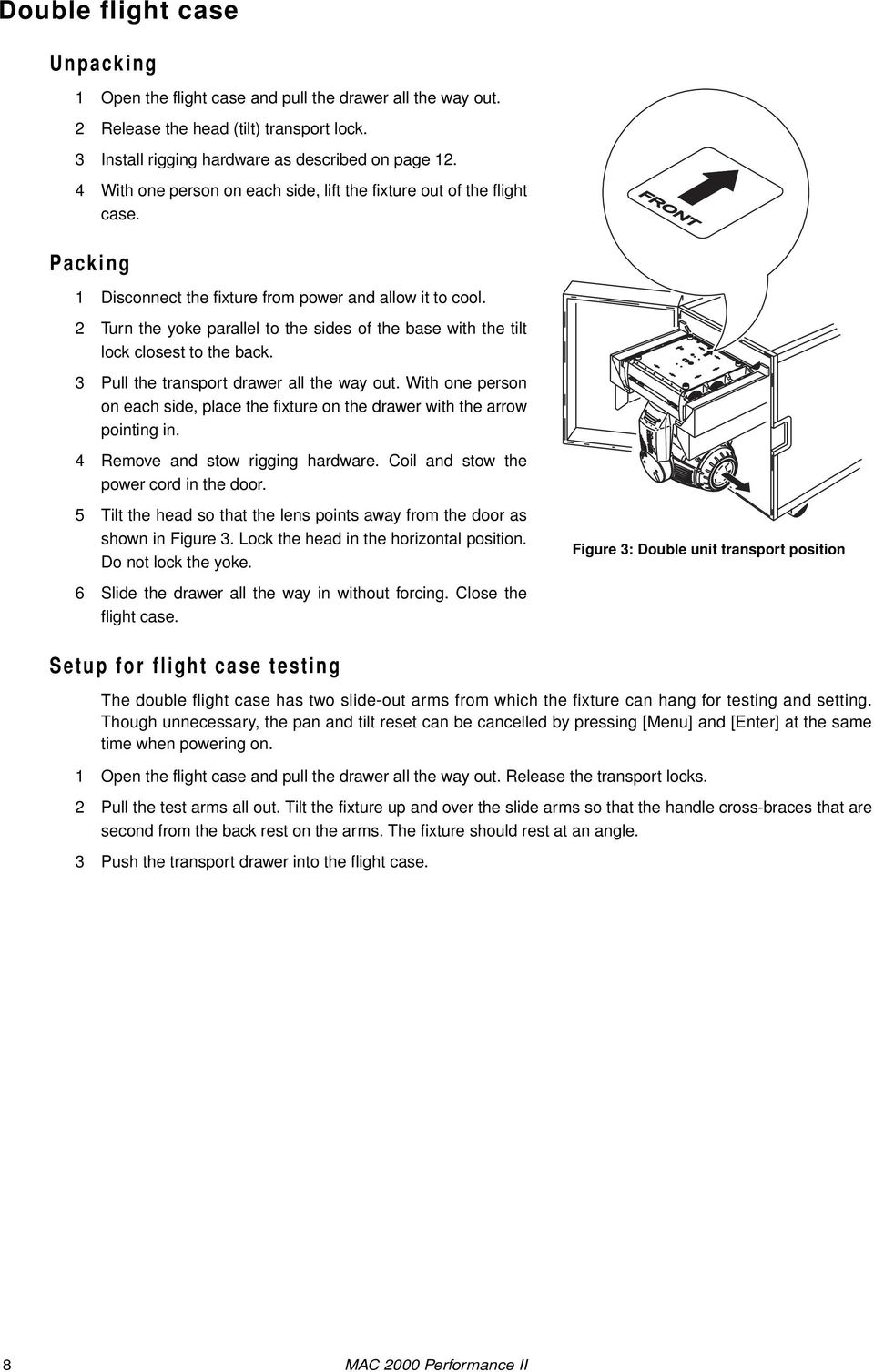
8 Double flight case Unpacking 1 Open the flight case and pull the drawer all the way out. 2 Release the head (tilt) transport lock. 3 Install rigging hardware as described on page With one person on each side, lift the fixture out of the flight case. FRONT Packing 1 Disconnect the fixture from power and allow it to cool. 2 Turn the yoke parallel to the sides of the base with the tilt lock closest to the back. 3 Pull the transport drawer all the way out. With one person on each side, place the fixture on the drawer with the arrow pointing in. 4 Remove and stow rigging hardware. Coil and stow the power cord in the door. 5 Tilt the head so that the lens points away from the door as shown in Figure 3. Lock the head in the horizontal position. Do not lock the yoke. Figure 3: Double unit transport position 6 Slide the drawer all the way in without forcing. Close the flight case. Setup for flight case testing The double flight case has two slide-out arms from which the fixture can hang for testing and setting. Though unnecessary, the pan and tilt reset can be cancelled by pressing [Menu] and [Enter] at the same time when powering on. 1 Open the flight case and pull the drawer all the way out. Release the transport locks. 2 Pull the test arms all out. Tilt the fixture up and over the slide arms so that the handle cross-braces that are second from the back rest on the arms. The fixture should rest at an angle. 3 Push the transport drawer into the flight case. 8 MAC 2000 Performance II
9 AC POWER WARNING! For protection from electric shock, the fixture must be grounded (earthed). The AC mains supply shall be fitted with a fuse or circuit breaker and ground-fault protection. Important! Verify the power supply settings before applying power. The chapter describes: Installing fuses Power supply adjustments for the various MAC 2000 Performance II models Connection to a power supply (see page 9) The reduced power function (see page 10) Fuses The MAC 2000 Performance II comes with two: 20 AT (time delay) main fuses for use with AC supplies of volts. 15 A main fuses for use with AC supplies of volts. Install the appropriate fuses in the holders near the power switch. Power supply adjustments The MAC 2000 Performance II (identified as such by the label on the base of the product) comes with an electronic ballast and an auto-sensing, auto-ranging switch-mode power supply. Manual adjustments to the transformer or ballast are not necessary as the MAC 2000 Performance II automatically adapts to the mains voltage and frequency. Note that MAC 2000 fixtures from S/N to S/N manufactured from mid-2003 to mid-2004 contained a power supply unit that needed to be switched to match AC power voltages below 130 V or above 200 V. Power connection Important! Connect the MAC 2000 Performance II directly to AC power. Do not connect it to a dimmer system; doing so may damage the fixture. You may need to install a cord cap that fits your supply on the power cable. A 3-prong grounding-type plug must be installed following the manufacturer s instructions. The table shows some possible pin identification schemes; if the pins are not clearly identified, or if you have any doubts about proper installation, consult a qualified electrician. To apply power, set the power switch on the base to the I position. Wire Color Pin Symbol Screw (US) brown live L yellow or brass blue neutral N silver yellow/green ground green Table 1: Cord cap connections AC power 9

10 Reduced power function The MAC 2000 Performance II has an automatic power reduction function, which reduces the consumption to 700W if the shutter/dimmer is closed for more than 10 seconds. This not only increases the lamp life, but also further decreases the overall noise emission of the fixture. 10 MAC 2000 Performance II

11 DATA Important! Never connect more than 1 data input and 1 data output. The MAC 2000 Performance II has both 3-pin and 5-pin XLR sockets for DMX input and output. The pin-out on all sockets is pin 1 to shield, pin 2 to cold (-), and pin 3 to hot (+). There is no connection to pins 4 and 5. The sockets are wired in parallel: both inputs connect to both outputs. For reliable data transmission and to avoid damage to the fixture, however, use one input and one output! Connecting fixtures Use shielded twisted-pair cable designed for RS-485 devices: standard microphone cable cannot transmit control data reliably over long runs. 24 AWG cable is suitable for runs up to 300 meters (1000 ft). Heavier gauge cable and/or an amplifier is recommended for longer runs. Never use both outputs to split the link. To split the serial link into branches use a splitter such as the Martin 4-Channel Opto-Isolated RS-485 Splitter/Amplifier. Do not overload the link. Up to 32 devices may be connected on a serial link. Terminate the link by installing a termination plug in the output socket of the last fixture. The termination plug, which is a male XLR plug with a 120 ohm, 0.25 watt resistor soldered between pins 2 and 3, soaks up the control signal so it does not reflect and cause interference. If a splitter is used, terminate each branch of the link. Martin fixtures introduced before 1997 have reversed polarity data sockets (pin 2 hot and pin 3 cold). The socket polarity is labelled. Use a phase-reversing cable between the MAC 2000 Performance II and any Martin device with reversed polarity. Connecting the data link 1 Connect the DMX data input from the controller to the MAC 2000 Performance II s 3-pin or 5-pin input (male) socket. 2 Using the sockets that match your data cable, connect the output of the fixture closest to the controller to the input of the next fixture. 3 Insert a male 120 Ω XLR termination plug in the 3-pin or 5-pin output of the last fixture on the link. Data 11

12 RIGGING The MAC 2000 Performance II can be placed on stage or clamped to a truss in any orientation. The Fast-Lock system enables quick and easy fastening of the clamp brackets in 4 positions as shown Figure Figure 4: Clamp bracket positions Warning! Warning! Always use 2 clamps to rig the fixture. Lock each clamp with both 1/4-turn fasteners. The fasteners are locked only when turned fully clockwise. Attach an approved safety cable to the attachment hole in the base. Never use the carrying handles for secondary attachment. Clamping the fixture to a truss 1 Verify that the rigging clamps (not included) are undamaged and can bear at least 10 times the weight of the fixture. Verify that the structure can bear at least 10 times the weight of all installed fixtures, clamps, cables, auxiliary equipment, etc. 2 Bolt each clamp securely to a clamp bracket with an M12 bolt (grade 8.8 or better) and lock nut. 3 Align a clamp with 2 mounting points in the base. Insert the fasteners into the base and turn both levers a full 1/4-turn clockwise to lock. Install the second clamp. 4 If the truss can be lowered, fixtures can be clamped on directly from the double flight case. If the fixture must be lifted, block access under the work area. Working safely from a stable platform, hang the fixture on the truss with the arrow towards the area to be illuminated. Tighten the rigging clamps. 5 Install a safety wire that can bear at least 10 times the weight of the fixture. The attachment point is designed to fit a caribiner clamp. 6 Verify that the pan and tilt locks are released. Verify that there are no combustible materials or surfaces to be illuminated within 1 meter of the fixture, and that there are no flammable materials nearby. FRONT Figure 5: Rigging hardware installation 12 MAC 2000 Performance II

13 CONTROL PANEL The LED control panel is used to set the address and personalities, read lamp hours and other information, calibrate effects, and run a test routine. Most of these functions may be performed remotely via the serial link with the Martin MP-2 Uploader. Navigation The DMX address and any messages (see page 52) are displayed when the MAC 2000 Performance II is turned on. To enter the menu, press [Menu]. Press [Up] and [Down] to move within the menu. To select a function or submenu, press [Enter]. To escape a function or menu, press [Menu]. See Table 2 on page 46 for a complete list of the menu items. Note: [Enter] must be pressed and held for a few seconds to enter the utilities menu. DMX address and protocol setting The DMX address, also known as the start channel, is the first channel used to receive instructions from the controller. For independent control, each fixture must be assigned its own control channels. Two MAC 2000 Performance IIs may share the same address, however, if identical behavior is desired. Address sharing can be useful for diagnostic purposes and symmetric control, particularly when combined with the inverse pan and tilt options. Two DMX protocols, 8-bit and 16-bit, are available. The 8-bit mode uses 28 control channels and provides full basic control. The 16-bit mode uses 3 additional channels to provide finer gobo and pan/tilt positioning. Setting the DMX address and protocol 1 Press [Menu] to enter the main menu. 2 Press [Up] until is displayed. Press [Enter]. To snap to channel 1, press [Enter] and [Up]. Scroll to the desired channel and press [Enter]. 3 Select from the main menu and press [Enter]. Select or and press [Enter]. Tailoring performance Movement The MAC 2000 Performance II provides six options for optimizing movement for different applications. The protocol setting () setting selects 8-bit or finer 16-bit control of pan, tilt, and gobo index. The pan and tilt invert () menu swaps and/or inverts pan and tilt. The pan/tilt speed () menu provides 3 settings:,, and. is best for most applications. provides better performance in applications where speed is most important. provides the smoothest movement and is best in long-throw applications with slow movements through narrow angles. The studio mode () setting optimizes all effects besides pan and tilt for speed or quietness. The shortcuts () setting determines whether the gobo, and effect wheels always take the shortest path between two static positions or oscillate between outer positions. Control panel 13
![Navigation The DMX address and any messages (see page 52) are displayed when the MAC 2000 Performance II is turned on. To enter the menu, press [Menu]. Press [Up] and [Down] to move within the menu.](/docs-images/40/3021091/images/page_13.jpg "To select a function or submenu, press [Enter]. To escape a function or menu, press [Menu]. See Table 2 on page 46 for a complete list of the menu items.")
14 Tracking Response The MAC 2000 Performance II has a filter algorithm that looks at several position updates in tracking control mode and calculates the ideal response for smooth movement. Tracking response is adjustable to compensate for variations in controller performance. In most cases the default settings work well. If tracking mode movement is not satisfactory there are 2 parameters that can be adjusted. The first is selected under. The default,, is the best choice with controllers that calculate intermediate positions at a steady rate. Begin by selecting the alternative,, which is better if the intermediate positions stray significantly from the line of travel. The second parameter is the number of position updates used to calculate speed. The level is adjustable between 1 and 10 under. Increasing the number of samples increases the distance over which speed is calculated, making movement smoother but less responsive to sudden changes. Experiment for best results. Display The display intensity () setting controls display brightness. The display on/off setting () determines whether the display remains on or extinguishes two minutes after the last key-press. To flip the display, press [Up] and [Down] simultaneously. Lamp There are two settings that modify lamp control: Automatic Lamp On () and DMX Lamp Off (). When is off, the lamp remains off until a lamp on command is received from the controller. When is on, the lamp strikes automatically after the fixture is powered on. When is set to, the lamp strikes automatically when the fixture receives DMX data, and it extinguishes 15 minutes after DMX data is lost. When is set to either or, the automatic lamp strike timing is staggered to prevent all lamps from striking at once. The delay is determined by the fixture address. If striking lamps from the controller, note that striking many lamps at once may cause a voltage drop large enough to prevent lamps from striking or trip the main circuit breaker. Avoid this by programming a lamp on sequence that strikes lamps one at a time at 5 second intervals. Power to the lamp can be turned off from the controller if DMX Lamp Off () is on. DMX reset The fixture can be reset from the controller if DMX reset ( ) is ON. Custom settings The custom configuration function allows you to save and recall three sets of fixture settings. The savable settings are DMX mode, pan/tilt speed, pan/tilt inverse and swap, DMX lamp off and reset, display settings, shortcuts, studio mode, automatic lamp on, effects feedback, tracking algorithm, and tracking samples. Readouts Note: The MP-2 Uploader provides commands to display the time, temperature, and version readouts on the fixture control panel. Time provides readouts of fixture hours (), lamp hours (), and lamp strikes (). Under each item is a resettable () increment counter and a non-resettable counter for total accumulated hours/strikes since fabrication (). To reset an increment counter, display it and then press [Up] until it reads 0. (This may also be done remotely using the MP-2 Uploader.) Temperature provides readouts of the head and base temperature in Celsius and Fahrenheit. 14 MAC 2000 Performance II

15 Firmware version displays the version number of the installed firmware. The firmware version is also displayed briefly at startup. DMX The menu shows the DMX start code () and DMX values received for each effect. Service messages The Service LED on the control panel lights under conditions that require fixture service, and there is a message describing the service required. To display the message, select in the main menu. This item is available only when the LED is lit. There are two service messages. is displayed when the lamp counter exceeds 750 hours, which is the rated average life for the HMI 1200 W/S lamp. The maximum service life is 125% of the average life, or 940 hours. is displayed when the head temperature exceeds 120 C (248 F). Overheating is likely due to dirty air filters, fans, or air vents; incorrect power supply settings, or a defective fan. Service utilities Important! Enter must be held for several seconds to access the utilities menu. Test sequences provides a general test of all effects that can be run without a controller. provides routines for circuit board testing that are for service use only. Feedback toggles An on-the-fly position correction system monitors the gobo wheel, gobos, and effect wheel. If a position error is detected, the shutter closes while the effect resets. This feature can be disabled by turning effects feedback ( ) off. The automatic pan/tilt position correction system may be temporarily turned off under. The off setting, however, is not saved and the system will be re-enabled the next time the fixture starts. If the system cannot correct the pan/tilt position within 10 seconds, feedback is automatically disabled. Adjustment The adjustment menu ( ) provides manual control for making mechanical adjustments. See page 50. Calibration The calibration menu ( ) provides utilities to define offsets in software that are relative to the mechanical reset or home positions. This allows you to fine tune optical alignment and achieve uniform performance between fixtures. Dimmer and zoom are calibrated to defined points. The other effects are calibrated relative to an arbitrary reference fixture. Default offset settings may be restored by selecting default offsets ( ). Calibrating effects 1 Apply power but do not strike the lamp until zoom has been calibrated. 2 To calibrate zoom, first remove the bottom head cover. Select and press [Enter]. Adjust the offset until the face of the zoom lens plate is flush with the back edge of the focus plate (Figure 6). Press [Enter] to save the setting. Replace the bottom head cover. Control panel 15

16 Figure 6: Zoom calibration point 3 Pan calibration is most useful when multiple fixtures are stacked vertically. To calibrate, set zoom, focus, iris, and tilt position for easy one-over-the-other comparison and set each fixture to the same pan DMX value. Select one fixture to be the reference fixture. On the other fixtures, select and press [Enter]. Adjust the offset as necessary to align the beam with the reference beam. Press [Enter] to save the setting. 4 Tilt calibration is most useful when multiple fixtures are arranged horizontally. To calibrate, set zoom, focus, iris, and pan position for easy side-by-side comparison and set each fixture to the same tilt DMX value. Select one fixture to be the reference fixture. On the other fixtures, select and press [Enter]. Adjust the offset as necessary to align the beam with the reference beam. Press [Enter] to save the setting. 5 To calibrate the dimmer, select and press [Enter]. Hold a piece of paper over the lens. Set the offset to 0 and then increase it until light is clearly projected onto the paper. Press [Enter] to save the setting. Remove the paper. 6 To calibrate color mixing flags (cyan, magenta, yellow, and color temperature correction), project white beams with no dimming and position them for easy comparison. On each fixture, including the reference, select and press [Enter]. (This adds a defined amount of cyan.) Select one fixture to be the reference. Adjust the offsets on the other fixtures to match the reference color. Press [Enter] to save the setting. Repeat for (magenta), (yellow), and (CTC). 7 Focus calibration is useful when two or more fixtures are the same distance from a projection surface. To calibrate focus, set up all fixtures with the same focus, zoom, dimming, iris, and gobo values. Select a focussed fixture to be the reference. On the other fixtures, select and press [Enter]. Adjust the offset to focus the image. Press [Enter] to save the setting. Software upload The software update mode is normally engaged automatically by the upload device. 16 MAC 2000 Performance II
![On the other fixtures, select and press [Enter]. Adjust the offset as necessary to align the beam with the reference beam. Press [Enter] to save the setting.](/docs-images/40/3021091/images/page_16.jpg "4 Tilt calibration is most useful when multiple fixtures are arranged horizontally.")
17 EFFECTS The MAC 2000 Performance II is compatible with USITT DMX512 controllers. The fixture has two DMX operating modes, 8-bit and 16-bit. 16-bit mode requires three more DMX channels than 8-bit mode but provides more precise gobo indexing and pan/tilt positioning. All other functions are identical. The complete DMX protocol begins on page 39. Framing shutters Optimized for use in theater, the MAC 2000 Performance II features a fully automated, micro-adjusting framing shutter blade system. For accurate illumination of stage props and scenery, this framing system slices the beam into angled shapes. The system comprises four shutter blades, arranged in two layers. With this 2-layer system, the MAC 2000 Performance II has been designed to project shapes with crisp, sharp edges. Each blade can be swiveled +/- 30 degrees, and the entire module rotates 90 degrees. We recommend that the angle of each blade, and the alignment of the entire module be set to 50% of their DMX value. This will set the frame positioning upright, and the shutter blades at right angles. Refer to the DMX protocol on page 39 for the specific channels. Directly attached to the framing system is the iris. You can use either the iris or the framing system, or both together. Gobos The gobo wheel provides room for 5 gobos. See page 30 to change gobos. Gobos may be rotated and shaken at varying speeds and indexed to any position. Extremely accurate positioning is available in 16-bit mode. The gobo and type of rotation (indexed or continuous, with or without shake) are selected on the wheel s Gobo & Function Channel, which also provide commands for continuous wheel rotation. The gobo position index and rotation speed are selected on its Position/Velocity Channel. In 16-bit mode, the position is further adjusted on the wheel s Fine Position Channel. Effects 17

18 Gobo animation system The gobo animation system is designed to create animated effects such as flames, sky and water imaging. The MAC 2000 Performance II comes with 5 replaceable gobo animation wheels, which are magnetically attached to the motor shaft, and which can be quickly changed. The gobo animation wheel pivots to allow horizontal, vertical, and angled effects, such as rising flames or windswept clouds. Via your DMX controller, you can control both the starting position of the animation disc and its rotation direction and speed. The animation disc can be set to run continuously or to run in an indexing mode, which will be of great use if you are using custom animation discs with text or company logos. You are also able to choose the angle at which the disc has its starting position, be it horizontally aligned, vertically aligned, or anywhere in between. For information about: Using the gobo animation effects, see Animation guide on page 20 Changing the installed gobo animation wheel, see Gobo animation on page 33 Dimming and strobe The mechanical dimmer/shutter system provides smooth, high-resolution 100 percent dimming, instant open and blackout, random and variable strobe effects up to 10 Hz, and random and variable pulses in which the dimmer snaps open and slowly dims or snaps closed and slowly opens. Color mixing The color mixing system uses continuous dichroic cyan, magenta, and yellow (CMY) color filters. It is a subtractive system that removes color from white light. Inserting all three filters results in loss of light: for maximum brightness, mix 2 colors at a time. Color temperature correction The color temperature correction (CTC) system uses a continuous mireds color filter that lowers the color temperature from 6000 K to 2900 K. Effect wheel The effect wheel provides a variable frost filter and two slots that house a wide angle converter lens (beam expander) and a nine-facet prism. Iris The iris closes down to 15 percent of its full-open diameter with high, 200-step resolution. The Iris Channel also provides random and variable speed pulsating iris effects. Focus and zoom The focus lens focusses the beam from approximately 2 meters (6.5 feet) to infinity. The zoom lens widens the beam from approximately 10 at full spot to 28 at full flood. 18 MAC 2000 Performance II

19 Pan and tilt The yoke pans 540 and the head tilts 267. For maximum positioning accuracy, select 16-bit mode. The pan/tilt speed (fast, norm, or slow) may be selected on the pan/tilt speed channel. Setting the pan/tilt speed channel to blackout causes the shutter to black out the light while the head is moving. Speed control There are two ways to control the speed at which effects move from one static position to another. These are known as tracking control and vector control and are selected on the Pan/Tilt Speed and Effect Speed Channels. These channels are independent so you may, for example, combine a vector control pan movement with a tracking control color fade. In tracking mode, speed is determined by the cross-fade time. The controller continuously sends small position changes that the fixture tracks. To enable tracking mode, set the relevant speed channel to a tracking value. Note that in addition to enabling tracking control, some tracking values also provide overrides of the menu settings. In vector mode, speed is set directly on a speed channel. The cross-fade time must be 0. Vector control provides a way to set speed on controllers that do not have programmable fade times and results in smooth movement regardless of the cross-fade time or the controller s processing power. To open the iris slowly in tracking mode, for example, you program a scene with the iris fully closed and a second scene with the iris fully open. Then you set a cross-fade time between the two scenes of, say, 10 seconds. The controller gradually changes the iris position value from 199 (closed) to 0 (open). To open the iris slowly in vector mode, you program the iris closed and open as before. Then you set the cross-fade time to 0 and program a slow speed, in the second scene, on the Effect Speed Channel. Effects 19

20 ANIMATION GUIDE This chapter is designed to help you get as much as possible from the gobo animation system in your MAC 2000 Performance II. It contains a section on general animation tips, an overview of the animation disc designs available, and a number of examples of different effects that can easily be created using your animation system. To achieve most of the effects you will use both an animation disc and a regular gobo. Throughout this guide we have used DHA Lighting in the United Kingdom as the reference for the regular gobos. All of the gobo numbers and designs mentioned belong to the standard range available from DHA Lighting. Their contact details are: DHA Lighting Limited , Waterloo Road London, SE1 8RQ United Kingdom Tel: Fax: Internet: [email protected] Martin Professional A/S are extremely grateful to DHA Lighting for allowing us to use material previously published by them. Note that there may be some small differences between the graphical images that you see in this guide and the final animation wheel or gobo designs when you use them, due to the difference in scale. However, we have tried to be as accurate as possible. General animation tips Via your DMX controller, you can control both the starting position of the animation disc and its rotation direction and speed. The animation disc can be set to run continuously or to run in an indexing mode, which will be of great use if you are using custom animation discs with text or company logos. You are also able to choose the angle at which the disc has its starting position, be it horizontally aligned, vertically aligned, or anywhere in between. Choice of gobo The gobo is the basis of the moving image and should be chosen first. It is worth noting, however, that useful and interesting effects can often be achieved with the most unlikely gobos, by projecting them out of focus. Focus With the gobo in hard focus the animation will not be optimized, movement is minimal and results will almost always be disappointing. Similarly with the animation disk in hard focus, you will see a far greater movement, but the gobo pattern will be lost. It is essential therefore to experiment with the focus in order to achieve the best effect. The precise quality of the result and the impression of the motions direction will also depend on the position of the focus. Animation disc patterns Effects ideas on page 23 describes the variations on the basic effect that individual disc patterns can produce. 20 MAC 2000 Performance II

21 Direction of movement The flexible mounting system for the animation discs inside the MAC 2000 Performance II allow you, through DMX control, to position the wheel at any position through a 90 degree section of the disc. This means that effects can be produced with a horizontal movement - such as clouds, with a vertical movement - such as rising flames, or at any angle in between - such as driving rain. The angle of the rotation can be changed during your show via the DMX control of the fixture. Note that for some animation effects, which are not strictly horizontal or vertical, you may find it necessary to flip the orientation of the complete head via the pan and tilt control channels to give your desired angle of animation. This will depend on the orientation of the head when you began programming your fixture. If you find, for example, that your 'driving rain' effect is not driving the correct way, flip the orientation and if necessary, rotate the animation wheel in the opposite direction. Through the DMX control you can select the wheel to operate in indexing mode, rather than continuously rotating. This is useful for any custom animation wheels that you may have made with text or logos. Custom animation wheels are available from the major gobo manufacturers, such as DHA Lighting in London. Speed The apparent speed of image movement depends not only on the disc rotation speed, but on the complexity of both the gobo and the disc patterns. Speeds suggested in the examples in this handbook are guidelines and are only intended as a starting point. Color The use of the dichroic CMY color changing system of the MAC 2000 Performance II can greatly enhance your animation effects. The system has been designed so that refraction across the beam will give slight variants in color, adding depth to your animations, particularly when using multiple dichroic colors. Some color tips are given in the 'EFFECTS IDEAS' section. Animation discs and their uses Five gobo animation wheels are supplied as standard with the MAC 2000 Performance II. The others mentioned here can be ordered from your Martin dealer. Tangential breakup The Tangential Breakup disc (P/N ) produces a subtle rippling motion, particularly when moving parallel with the lines of the gobo. It is the most suitable for rising flames, flowing water and other effects where a single direction of movement is required. This animation wheel is supplied as standard with your MAC 2000 Performance II. Radial breakup The Radial Breakup disc (P/N ) is perfect for providing a strong regular movement suitable for flickering flames, water ripples, reflected water and shimmers for heat haze or mirage effects. This animation wheel is supplied as standard with the MAC 2000 Performance II. Animation guide 21
22 Spiral breakup The Spiral Breakup disc (P/N ) pattern is very similar to the Radial Breakup disc, but has some movement at right angles to the main motion, as is seen in wind blown rain, snow, or flames. It is particularly worth experimenting with the angle of the gobo and the orientation of the disc to achieve all the possibilities with this pattern. This animation wheel is supplied as standard with the MAC 2000 Performance II. Linear breakup The Linear Breakup disc (P/N ) provides rhythmic movement and can be used to simulate a breeze through the branches of a tree or the rhythmic undulations of sea waves. DHA 14 MARTIN Triangle breakup The Triangle Breakup disc (P/N ) gives a more pronounced and rapid rhythmic effect than the Linear Breakup disc, and is suitable for use as psychedelic effects or for a rough sea effect. DHA 15 MARTIN / Cloud breakup The Cloud Breakup disc (P/N ) is designed for a softer directional movement particularly at slow or very slow speeds. It is suitable for cloud effects with cloud gobos or for a soft slow-flowing stream effect. This animation wheel is supplied as standard with the MAC 2000 Performance II. Elliptical breakup The Elliptical Breakup disc (P/N ) produces a bidirectional movement similar to the Spiral Breakup, but with constantly changing direction of movement. This is specifically useful for snow or similar effects where flurries of movement would be expected. DHA 17 MARTIN MAC 2000 Performance II
23 Dot breakup The Dot Breakup disc (P/N ) gives you the opportunity to cause motion while maintaining a more focused projection of the gobo image. It is suggested for effects such as falling leaves or rising bubbles. This animation wheel is supplied as standard with the MAC 2000 Performance II. Flicker wheel The Flicker Wheel (P/N ) provides a different kind of effect and can be used at high speed for motion effects, such as passing trains. It can also be effectively used for just breaking up the beam of a fixture and for an organic strobe effect. DHA 19 MARTIN Coarse radial breakup The Coarse Radial Breakup disc (P/N ) is particularly effective for animating light from a non-focused source whilst providing a minimal loss in intensity due to the high 'white to black' ratio of the radial pattern. It is also effective for similar uses to the Radial Breakup disc. DHA 20 MARTIN Coarse tangential breakup The Coarse Tangential Breakup disc (P/N ) can be used on its own in an unfocused form to give the image of flames. It can also be combined with gobos to give a drifting image to the projection. DHA 21 MARTIN Effects ideas The ideas outlined here are intended as suggestions only. The precise look of any effect will depend on many factors including the focus setting of your MAC 2000 Performance II, the projection surface onto which the image is directed and any color mixing effects that you choose. This section is divided into four: Water effects on page 24 Fire effects on page 26 Clouds, rain and snow on page 27 Other effects on page 28 Animation guide 23
24 Water effects RIPPLING WATER Gobo 955 and one of the following Gobo 958 Radial breakup disc Gobo 833 Use slower speeds for gentler or more distant movement. For rough water, substitute a more 'wavy' gobo design such as DHA Lighting s 'Reflected Water 906', 'Flames-4 960', or 'Fire/Waves ' and use the Coarse Radial Breakup animation disc or the Elliptical Breakup animation disc (for an irregular movement) combined with a higher rotation speed. Alternative gobos: Linear Breakups 401, 402, 501, 504 Shower 882 Alternative animation discs: Coarse Radial Breakup gives a bolder movement Spiral Breakup adds some flowing movement WAVES Gobo 504 DHA 15 MARTIN / and one of the following Gobo Triangle breakup disc As with any animation effect, the rotation speed and image focus will have a great effect on the final projection, so these parameters should be experimented with. With all water effects, it is possible to add an amount of cyan from the color mixing system, which will diffract to give both cyan and white color shifts as the image animates. Alternative gobos: Linear Breakups 401, 402, 501, 504 Reflected Water 906 Alternative animation discs: Linear Breakup Elliptical Breakup gives an irregular rhythm 24 MAC 2000 Performance II
25 REFLECTED WATER and one of the following Gobo 903 Gobo 906 Radial breakup disc As with any animation effect, the rotation speed and image focus will have a great effect on the final projection, so these parameters should be experimented with. With all water effects, it is possible to add an amount of cyan from the color mixing system, which will diffract to give both cyan and white color shifts as the image animates. Alternative animation disc: Elliptical Breakup gives an irregular movement WHIRLPOOL and Gobo 893 Spiral breakup disc A whirlpool effect can be created effectively by leaving the gobo in a static position and just rotating the animation wheel. However, to give a more dynamic whirlpool effect, the gobo for this combination should also be rotated, in a counter direction to the animation wheel. Again differences in the focus and in particular with the speeds on this effect will give you a variety of different options. With all water effects, it is possible to add an amount of cyan from the color mixing system, which will diffract to give both cyan and white color shifts as the image animates. FLOWING WATER Gobo 955 and one of the following Gobo 958 Tangential breakup disc Gobo 960 As with any animation effect, the rotation speed and image focus will have a great effect on the final projection, so these parameters should be experimented with. With all water effects, it is possible to add an Animation guide 25
26 amount of cyan from the color mixing system, which will diffract to give both cyan and white color shifts as the image animates. Fire effects The range of animation wheels available for the MAC 2000 Performance II is very versatile in producing fire and flame effects. Good results may be obtained from many of the designs together with any standard flame or fire gobo designs. Here are a few ideas to get you started: BLOWING FLAMES and one of the following Gobo 176 Gobo 175 Spiral breakup disc As with any animation effect, the rotation speed and image focus will have a great effect on the final projection, so these parameters should be experimented with. With all fire and flame effects, it is possible to add an amount of magenta (approximately 70%) and yellow (approximately 90%) from the color mixing system, which will diffract to give orange, yellow and red color shifts as the image animates. Alternative gobos: Any of the fire or flame gobos from the standard range could be used in substitution for the above suggestions. Alternative animation discs: Elliptical Breakup gives an irregular movement Dot Breakup RISING FLAMES 1 and one of the following Gobo 176 Gobo 175 Tangential breakup disc As with any animation effect, the rotation speed and image focus will have a great effect on the final projection, so these parameters should be experimented with. With all fire and flame effects, it is possible to add an amount of magenta (approximately 70%) and yellow (approximately 90%) from the color mixing system, which will diffract to give orange, yellow and red color shifts as the image animates. Alternative gobos: Any of the fire or flame gobos from the standard range could be used in substitution for the above suggestions. 26 MAC 2000 Performance II
27 RISING FLAMES 2 DHA 21 MARTIN Coarse tangential breakup disc Different to above, this animation gives a much stronger image of rising flames with the broader pattern on the disc. For this animation, it is possible to use the animation disk on its own to create the rising flame effect. You will need to set the focus away from the disk itself to enhance the effect. To give a different image, you could also add one of the standard fire or flame gobo designs. Alternative gobos: Any of the fire or flame gobos from the standard range can be used. Clouds, rain and snow The versatility that you can achieve with the animation system of the MAC 2000 Performance II makes this an ideal tool for creating all sorts of weather effects. CLOUDS Gobo 163 Gobo 168 and one of the following Gobo 164 Gobo 170 Cloud breakup disc Gobo 167 Once again, the speed and focus come greatly into play when creating your final effect, whether you wish to create soft flowing clouds on a summers night or gathering thunder clouds about to explode. Alternative gobos: Use any non-meshed cloud gobo to create the desired effect that you need. You should choose your gobo based on the type and density of your desired effect. Animation guide 27
28 RAIN Gobo 882 and one of the following Gobo 503 Spiral breakup disc For driving rain, you should angle the gobo first using the indexing control and then align the animation wheel anywhere between the horizontal and vertical axis to provide the desired effect. SNOW DHA 17 MARTIN and Gobo 884 Elliptical breakup disc This is a simple effect to set up, but looks excellent. The use of the prism on the effect wheel of the MAC 2000 Performance II will help diffuse the image, creating a more random effect, which adds a new dimension to the animation and is very effective in some situations. Other effects Here are some further examples of different animations that can be achieved with the MAC 2000 Performance II. LIGHT THROUGH TREES DHA 17 MARTIN and Gobo 405 Elliptical breakup disc It is possible to use almost any of the animation discs to animate a breakup gobo such as this one. There is a wide range of breakup gobos available to choose from on the market today. By using a combination of the cyan and yellow color mixing flags, you can create various shades of green which will diffract to give a variety of shades. You should adjust the values proportionately to give darker or lighter shades of green to your image. 28 MAC 2000 Performance II
29 TREE IN BREEZE DHA 14 MARTIN and Gobo 110 Linear breakup disc By using a combination of the cyan and yellow color mixing flags, you can create various shades of green which will diffract to give a variety of shades. You should adjust the values proportionately to give darker or lighter shades of green to your image. Alternative gobos: There are a wide range of tree, branch and foliage gobos available which can all be animated to give very distinctive effects. PASSING TRAIN DHA 19 MARTIN and one of the following Gobo 901 Gobo 902 Flicker wheel Adjusting the rotation speed of the animation wheel will give you a faster or slower 'flicker' effect depending on the speed of your train. Animation guide 29
30 OPTICAL CONFIGURATION Rotating gobo wheel The MAC 2000 Performance II is supplied with 5 rotating gobos installed. Figure 7 shows the standard gobo configuration with the gobo positions marked. Open 5 - Flames 1 - Dot breakup 4 - Water 2 - Soft breakup 3 - Linear Figure 7: Standard rotating gobo wheel configuration as seen from lamp The rotating gobos are magnetically indexed with a special indexing gobo holder in position 2 (the Soft Breakup gobo). The indexing gobo holder, which has a small magnet, must always be in position 2. If it is placed in a different position, the gobos will not index correctly. The indexing gobo holder accepts the same gobos as normal holders; any gobo suitable for the MAC 2000 may be placed in position 2. Two additional aluminum gobos are supplied. Realistic stars Clouds 30 MAC 2000 Performance II
31 Gobo specifications All gobo slots accept round theatrical size-e glass gobos. The rotating-gobo wheel positions hold gobos up to 3 mm thick with the gobo retention spring. Gobos thicker than 3 mm must be glued in the holder. For the best results, custom glass gobos that meet the following criteria should be used: Outside diameter: /-0.3 mm (1 15/32 +0/-0.01 in.) Maximum image diameter: mm (1 3/16 in.) Material: High temperature Borofloat or better glass Coating: Dichroic or enhanced aluminum Although glass gobos are generally the most durable, satisfactory results can be obtained in many applications at less expense with aluminum gobos. Our experience with the MAC 2000 Performance II, which is supplied with aluminum gobos, shows that aluminum can hold up to the heat very well. Custom stainless steel gobos can also be used, however they can warp, losing sharpness, in a matter of hours in the MAC 2000 Performance II. The useful life will depend on the gobo pattern and the projection cycle. Consult your gobo supplier for more information. Orientation GLASS GOBOS Coated glass gobos are inserted with the coating against the rim of the holder (away from the spring). Textured gobos are inserted with the smooth side against the spring. This provides the best results when combining rotating gobos. Coated side Uncoated side When an object is held up to the coated side there is no space between the object and its reflection. The back edge of the gobo cannot be seen when looking through the coated side. When an object is held up to the uncoated side there is a space between the object and its reflection. The back edge of the gobo can be seen when looking through the uncoated side. Figure 8: Finding the coated side METAL GOBOS For correct projection, install metal custom gobos with the true image facing the lamp. The false-image side (which faces away from the lamp) should be coated with a suitable high-temperature black paint to reduce reflections. Optical configuration 31
32 Replacing rotating gobos Important! The gobo can fall out if the spring is inserted backwards. 1 Disconnect the fixture from power and allow it to cool. 2 Lock the head in the top side up position and remove the top cover. Turn the gobo wheels as required to access the desired position. Pull the gobo holder away from the wheel slightly to release. Remove the gobo holder. TOP 3 Remove the gobo retention spring from the gobo holder and drop the gobo out of the holder. Insert the new gobo in the holder. Insert the spring with the narrow end against the gobo. To identify the narrow end, press the spring flat: the narrow end is on the inside. Push the end of the spring in under the lip of the holder. Coated side 4 Work the rim of the gobo holder under both clips and snap the gobo holder back into position. If necessary, a small screwdriver or similar tool may be used to pry the clips away from the wheel. 5 Replace the cover and release the pan and/or tilt locks before operating. 32 MAC 2000 Performance II
33 Effect wheel The effect wheel provides a variable frost filter and two positions for effects. The MAC 2000 Performance II comes with a wide angle lens and a nine-fact prism installed in these positions. Wide angle lens (beam expander) 9-facet prism Open position Variable frost filter Replacing effects 1 Disconnect the fixture from power and allow it to cool. 2 Lock the head in the upside down position and remove the bottom cover. Turn the effect wheel so that the locking plate is under the sensor bracket. 3 To remove, hold the rim of the effect holder and pull back on the locking plate. Remove effect from wheel. 4 To insert, pull back on the locking plate. If both effects are removed, pull straight back on both tabs. Position the groove in the effect holder over the fixed plate. Release the locking plate and verify that the effect is properly seated. 5 Replace the bottom cover and unlock the head before operating. Locking plate Position the effect holder groove over the fixed plate. Gobo animation The following gobo animation wheel patterns are supplied with the MAC 2000 Performance II. DHA 11 DHA 12 (installed) DHA 13 DHA 16 DHA 18 Tangential breakup Radial breakup Spiral breakup Cloud breakup Dot breakup Optical configuration 33
34 For information about using the gobo animation effects, see Animation guide on page 20. Replacing the gobo animation wheel 1 Disconnect the fixture from power and allow it to cool. 2 Lock the head in the upside down position and remove the bottom cover. 3 Using a finger or thumb (as illustrated), move the installed animation wheel up. TOP 4 The animation wheels are made of thin aluminum, so use a screw driver to release the wheel from the magnetic mount. 5 Take the wheel out by hand. 6 To insert a new wheel, place it over the mount, ensuring that the magnet that is fitted to the animation wheel is facing the mount. There is a small indexing position hole in each animation wheel and the indexing pin on the mount must be positioned in this hole. 7 Replace the bottom cover and unlock the head before operating 34 MAC 2000 Performance II
35 ROUTINE MAINTENANCE Warning! Disconnect the fixture from power and allow to cool before removing any cover. Important! Excessive dust, smoke fluid, and particulate buildup degrades performance and causes overheating and damage to the fixture that is not covered by the warranty. The MAC 2000 Performance II requires routine cleaning. To maximize the life of the product and protect the investment it represents, clean the fixture regularly especially the cooling systems. It is essential to follow the guidelines given later in this section. Refer any service operation that is not described here to a qualified Martin technician. It is Martin policy to use the best-quality materials and coatings available to ensure optimum performance and the longest possible component lifetimes. However, optical components in all lighting fixtures are subject to wear and tear over the life of the fixture, resulting in gradual changes in color rendition of dichroic filters or the specular properties of reflectors, for example. The extent of wear and tear depends heavily on operating conditions, maintenance and environment, so it is impossible to specify precise lifetimes for optical components. However, you will eventually need to replace optical components if their characteristics are affected by wear and tear after an extended period of use and if you require fixtures to perform within very precise optical and color parameters. Lamp The MAC 2000 Performance II is supplied with a Philips MSR 1200 SA/DE GOLD 1200 W discharge lamp installed. This source has a color temperature of 6000 K, a color rendering index greater than 85, and an average life of 750 hours. The lamp is capable of hot restrike. This feature, however, is only supported by the MAC 2000 Performance II with electronic ballast. The ends of the lamp are profiled with special keys, as shown in Figure 11, to ensure proper installation. Do not use lamps with keys in a non-keyed SFc 10-4 socket. TOP TOP Warning! Install only an approved lamp (see Source on page 55). Installing any other lamp may create a safety hazard or damage the fixture! The lamp should be replaced when it has reached the limit of its 750 hour average life. To reduce the risk of explosion, never exceed 125% of the lamp s average life, i.e. 940 hours. To read lamp hours from the control panel, please refer to Readouts on page 14. For optimum performance, avoid turning off the lamp before it has warmed up fully. Figure 9: Lamp access Routine maintenance 35
36 Lamp replacement Important! Do not touch the quartz bulb with bare fingers. The lamp can be replaced with either a Philips MSR 1200 SA/DE GOLD (Martin P/N ), or an OSRAM HMI 1200 W/S (Martin P/N ). Both lamps are available from your Martin dealer. The clear quartz bulb must be clean and free of any oils from your fingers. Clean the lamp with an alcohol wipe and polish it with a dry cloth, particularly if you accidentally touch the bulb. To replace the lamp: 1 Disconnect the fixture from power and allow it to cool. Lock the head horizontally with the top up. 2 See Figure 9. Release the 4 quarter-turn fasteners marked with arrows on the rear plate. Pull the lamp assembly straight back as far as it goes and let it rest in place. 3 See Figure 10. Pull the retention spring on the left-hand end of the lamp socket up and then swing the end of the lamp out. Pull the other end out of the socket. Figure 10: Lamp removal 4 Inspect the socket for corrosion (see Replacing the lamp socket on page 36) and replace if necessary. 5 See Figure 11. With the nipple on the bulb facing the back, insert the right end of the new lamp in the socket. Pull up on the left spring and snap the other end into place. 6 Lift the lamp assembly so that lamp is level with the center of the reflector. Push the assembly straight in until it seats, making sure the lamp passes through the reflector opening. Lock the 4 quarter-turn fasteners. 7 When installing a new lamp, reset the lamp hour and lamp strike counters as described in Time on page 14. Replacing the lamp socket The lamp holder used in the MAC 2000 Performance II eventually wears out due to the high voltages that pass through the contacts. Wear begins to show up as discoloration at the contact surfaces. When this happens, resistance increases and the lamp becomes harder to strike. If this process is allowed to continue, the lamp is likely to fail prematurely. Each time the lamp is replaced, inspect the lamp holder and have it replaced by a qualified technician as soon as there are signs of discoloration or pitting at the contact surfaces. We recommend routine replacement of the socket after maximum 4000 hours of use (replace one socket for every five lamps). Damage caused by failure to replace a worn and/or discolored lamp holder is not covered by the product warranty. Figure 11: Lamp insertion 36 MAC 2000 Performance II
37 Aligning the lamp 1 Switch on the MAC 2000 Performance II and allow it to reset. Using either a controller or the control module, turn on the lamp and project an open white beam on a flat surface. 2 Center the hot spot vertically using the top Allen-head adjustment screw in the center of the rear plate. 3 If there is significant hot spot, turn the bottom adjustment screw counterclockwise until the light is evenly distributed. If the light is brighter around the edge than it is in the center, or if light output is low, turn the bottom adjustment screw clockwise until the light is bright and evenly distributed. 4 Repeat step 2. Figure 12: Lamp adjustment Cleaning Regular cleaning is very important for fixture life and performance. Buildup of dust, dirt, smoke particles, fog fluid residues, etc. degrades the fixture s light output and cooling ability. Cleaning schedules for lighting fixtures vary greatly depending on the operating environment. It is therefore impossible to specify precise cleaning intervals for the MAC 2000 Performance II. Cooling fans suck in airborne dust and smoke particles, and in extreme cases fixtures may require cleaning after surprisingly few hours of operation. Environmental factors that may result in a need for frequent cleaning include: Use of smoke or fog machines. High airflow rates (near air conditioning vents, for example). Presence of cigarette smoke. Airborne dust (from stage effects, building structures and fittings or the natural environment at outdoor events, for example). If one or more of these factors is present, inspect fixtures within their first 25 hours of operation to see whether cleaning is necessary. Check again at frequent intervals. This procedure will allow you to assess cleaning requirements in your particular situation. If in doubt, consult your Martin dealer about a suitable maintenance schedule. Use care when cleaning optical components and work in a clean, well lit area. The coated surfaces are fragile and easily scratched. Do not use solvents that can damage plastic or painted surfaces. To maintain adequate cooling, dust must be cleaned from the fans and air vents periodically. Inspect the air filters regularly and clean before they become clogged. Replace the air filters with new ones when replacing the lamp. Cleaning optical components 1 Disconnect the fixture from power and allow the components to cool completely. Remove the head cover. 2 Vacuum or gently blow away dust and loose particles with compressed air. 3 Remove stuck particles with an unscented tissue or cotton swab moistened with glass cleaner or distilled water. Do not rub the surface: lift the particles off with a soft repeated press. 4 Remove smoke and other residues with cotton swabs or unscented tissues moistened with isopropyl alcohol. A commercial glass cleaner may be used, but residues must be removed with distilled water. Clean with a slow circular motion from center to edge. Dry with a clean, soft and lint-free cloth or compressed air. Cleaning the fan and air vents Remove dust from the fans and air vents with a soft brush, cotton swab, vacuum, or compressed air. Routine maintenance 37
38 Cleaning or replacing the air filters 1 Disconnect the fixture from power. On each side of the head, remove the 2 screws that hold the side cover using a Torx-20 screwdriver. Slide the cover forward to remove. Lift the filter off of the cover. 2 Clean the filters with a vacuum or compressed air, or replace them. If they are saturated with smoke fluid, etcetera, soak them in warm soapy water and blot dry. 3 Place the filters on the covers and replace the covers. Software installation Software updates are installed in the MAC 2000 Performance II using a Martin MP-2 Uploader or a LightJockey 4064 DMX interface card. The procedure is found in the MP-2 user manual and the Martin Software Uploader online help file. Requirements The following are required in order to install software. The MAC 2000 Performance II update file, available for download from the User Support Area of the Martin web site ( The Martin Software Uploader program, version 4.0 or later, available for download from the User Support Area of the Martin web site. A Martin MP-2 Uploader connected to a Windows 95/98/ME/2000/XP PC, or a LightJockey Controller (DJ or Club) with 4064 DMX Interface card. Preventing software updates Software updates are enabled by default, but you can disable this by setting the Write jumper (see Circuit board connections on page 54) to disable. Boot sector jumper If the normal upload procedure does not work, or if the software update notes call for a boot sector update, move the boot sector jumper on the printed circuit board to the BOOT position before uploading software. S ETTING THE BOOT SECTOR JUMPER 1 Disconnect the fixture from power. 2 Remove the top screws from the ends of the front side panel and tilt the panel down to expose the main circuit board. 3 Using the appropriate diagram in Circuit board connections on page 54 or the label inside the base, locate the BOOT jumper (PL16). Move the jumper to the BOOT position. 4 Perform a boot mode upload. When the upload is complete, disconnect the fixture from power and move the jumper back to the locked or normal position. 38 MAC 2000 Performance II
39 DMX PROTOCOL This section contains two DMX protocols (both from protocol version 1.0A): 16-bit protocol on page 40 8-bit protocol on page 43 The 16-bit is the default protocol that is used. To modify this use the control menu. For more information see Control menu on page 46. DMX protocol 39
40 16-bit protocol DMX channel Value Percent Function Start code = Shutter, Strobe, Reset, Lamp On/Off Shutter Closed (lamp reduced to 700 W (E-ballast) after 10 sec.) No function (Shutter Open) Strobe on fast slow Shutter open, lamp reduced to 700 W (E-ballast) Pulse opening fast slow Pulse closing fast slow No function Random Strobe Fast Random Strobe Medium Random Strobe Slow No function Random pulse opening fast Random pulse opening slow Random pulse closing fast Random pulse closing slow No function Reset Fixture No function Lamp On (Power On) No Function Lamp Off (Power Off) Note: T > 5 seconds Intensity 0 100% Cyan White Cyan Magenta White Magenta Yellow White Yellow CTC White CTC Rotating gobo 1 selection Open gobo Gobo 1 Indexing (set index on channel 8) Gobo 2 Indexing (set index on channel 8) Gobo 3 Indexing (set index on channel 8) Gobo 4 Indexing (set index on channel 8) Gobo 5 Indexing (set index on channel 8) Gobo 1 Cont. Rotation (set dir/speed on channel 8) Gobo 2 Cont. Rotation (set dir/speed on channel 8) Gobo 3 Cont. Rotation (set dir/speed on channel 8) Gobo 4 Cont. Rotation (set dir/speed on channel 8) Gobo 5 Cont. Rotation (set dir/speed on channel 8) Gobo shake (indexing) Gobo 1 slow fast Gobo 2 slow fast Gobo 3 slow fast Gobo 4 slow fast Gobo 5 slow fast Gobo shake (continuous gobo rotation) Gobo 1 slow fast Gobo 2 slow fast Gobo 3 slow fast Gobo 4 slow fast Gobo 5 slow fast Gobo wheel continuous rotation (continuous gobo rotation) CW slow fast CCW fast slow 40 MAC 2000 Performance II
41 DMX channel Value Percent Function Start code = Rotating gobo 1 index coarse, MSB (Set gobo selection on channel 7) Index min. max Rotating gobo 1 cont. rotation (Set gobo selection on channel 7) Static CCW slow fast CW fast slow Static Rotating gobo 1 index fine, LSB (Set gobo selection on channel 7) Index min. max Rotating gobo 1 cont. rotation (Set gobo selection on channel 7) No function Gobo Animation wheel position No Effect Vertical position Indexing (set index on channel 10) Horizontal position Indexing (set index on channel 10) Vertical position Cont. Rotation (set dir/speed on channel 10) Horizontal position Cont. Rotation (set dir/speed on channel 10) Animation wheel scroll position (Vertical Horizontal) Indexing (set index on channel 11) Animation wheel scroll position (Horizontal Vertical) Cont. Rot. (set dir/speed on channel 11) No Effect Gobo Animation MACROS Macro 1 Macro 2 Macro 3 Macro 4 Macro 5 Gobo Animation wheel index (Set position on channel 10) Index min. max Gobo Animation wheel cont. rotation (Set position on channel 10) Static CCW slow fast CW fast slow Static Effect selection Open Variable Frost min. max. Effect 1 Effect 2 Open Iris Open close Close Pulse opening fast slow Pulse closing fast slow Random pulse opening fast Random pulse opening slow Random pulse closing fast Random pulse closing slow Framing MACRO functions No Macro Reserved for macros Focus Focus far near Zoom Zoom wide narrow Framing shutter 1 Out In Framing shutter 1 Angle Parallel Angle + Framing shutter 2 Out In DMX protocol 41
42 DMX channel Value Percent Function Start code = Framing shutter 2 Angle Parallel Angle + Framing shutter 3 Out In Framing shutter 3 Angle Parallel Angle + Framing shutter 4 Out In Framing shutter 4 Angle Parallel Angle + Rotate framing shutters Right Center Left Pan coarse Max Left Neutral Max Right Pan fine Max Left Neutral Max Right Tilt coarse Max Up Neutral Max Down Tilt fine Max Up Neutral Max Down Speed: Pan/Tilt Movement Tracking Speed Fast Slow Tracking (Slow speed overrides the menu setting) Tracking (Normal speed overrides the menu setting) Tracking (Fast speed overrides the menu setting) No function Blackout while moving Speed: Dimmer, Cyan, Magenta, Yellow, CTC, Effect, Iris, Focus, Zoom Tracking Speed Fast Slow Tracking (Studio mode disabled overrides the menu setting) Tracking (Studio mode enabled overrides the menu setting) Tracking (Shortcuts disabled overrides the menu setting) Tracking (Shortcuts enabled overrides the menu setting) Fast Speed Speed: Gobo 1, Framing, Animation wheel pos., Animation wheel rot. Tracking Speed Fast Slow Tracking (Studio mode disabled overrides the menu setting) Tracking (Studio mode enabled overrides the menu setting) Tracking (Shortcuts disabled overrides the menu setting) Tracking (Shortcuts enabled overrides the menu setting) Blackout while moving 42 MAC 2000 Performance II
43 8-bit protocol DMX channel Value Percent Function Start code = Shutter, Strobe, Reset, Lamp On/Off Shutter Closed (lamp reduced to 700 W (E-ballast) after 10 sec.) No function (Shutter Open) Strobe on fast slow Shutter open, lamp reduced to 700 W (E-ballast) Pulse opening fast slow Pulse closing fast slow No function Random Strobe Fast Random Strobe Medium Random Strobe Slow No function Random pulse opening fast Random pulse opening slow Random pulse closing fast Random pulse closing slow No function Reset Fixture No function Lamp On (Power On) No Function Lamp Off (Power Off) Note: T > 5 seconds Intensity 0 100% Cyan White Cyan Magenta White Magenta Yellow White Yellow CTC White CTC Rotating gobo 1 selection Open gobo Gobo 1 Indexing (set index on channel 8) Gobo 2 Indexing (set index on channel 8) Gobo 3 Indexing (set index on channel 8) Gobo 4 Indexing (set index on channel 8) Gobo 5 Indexing (set index on channel 8) Gobo 1 Cont. Rotation (set dir/speed on channel 8) Gobo 2 Cont. Rotation (set dir/speed on channel 8) Gobo 3 Cont. Rotation (set dir/speed on channel 8) Gobo 4 Cont. Rotation (set dir/speed on channel 8) Gobo 5 Cont. Rotation (set dir/speed on channel 8) Gobo shake (indexing) Gobo 1 slow fast Gobo 2 slow fast Gobo 3 slow fast Gobo 4 slow fast Gobo 5 slow fast Gobo shake (continuous gobo rotation) Gobo 1 slow fast Gobo 2 slow fast Gobo 3 slow fast Gobo 4 slow fast Gobo 5 slow fast Gobo wheel continuous rotation (continuous gobo rotation) CW slow fast CCW fast slow DMX protocol 43
44 DMX channel Value Percent Function Start code = 0 Rotating gobo index (Set gobo selection on channel 7) Index min. max Rotating gobo cont. rotation (Set gobo selection on channel 7) Static CCW slow fast CW fast slow Static Gobo Animation wheel position No Effect Vertical position Indexing (set index on channel 10) Horizontal position Indexing (set index on channel 10) Vertical position Cont. Rotation (set dir/speed on channel 10) Horizontal position Cont. Rotation (set dir/speed on channel 10) Animation wheel scroll position (Vertical Horizontal) Indexing (set index on channel 10) Animation wheel scroll position (Horizontal Vertical) Cont. Rot. (set dir/speed on channel 10) No Effect Gobo Animation MACROS Macro 1 Macro 2 Macro 3 Macro 4 Macro 5 Gobo Animation wheel index (Set position on channel 9) Index min. max Gobo Animation wheel cont. rotation (Set position on channel 9) Static CCW slow fast CW fast slow Static Effect selection Open Variable Frost min. max. Effect 1 Effect 2 Open Iris Open close Close Pulse opening fast slow Pulse closing fast slow Random pulse opening fast Random pulse opening slow Random pulse closing fast Random pulse closing slow Framing MACRO functions No Macro Reserved for macros Focus Focus far near Zoom Zoom wide narrow Framing shutter 1 Out In Framing shutter 1 Angle Parallel Angle + Framing shutter 2 Out In Framing shutter 2 Angle Parallel Angle + 44 MAC 2000 Performance II
45 DMX channel Value Percent Function Start code = Framing shutter 3 Out In Framing shutter 3 Angle Parallel Angle + Framing shutter 4 Out In Framing shutter 4 Angle Parallel Angle + Rotate Framing Shutters Right Center Left Pan Max Left Neutral Max Right Tilt Max Up Neutral Max Down Speed: Pan/Tilt Movement Tracking Speed Fast Slow Tracking (Slow speed - overrides the menu setting) Tracking (Normal speed overrides the menu setting) Tracking (Fast speed overrides the menu setting) No function Blackout while moving Speed: Dimmer, Cyan, Magenta, Yellow, CTC, Effect, Iris, Focus, Zoom Tracking Speed Fast Slow Tracking (Studio mode disabled overrides the menu setting) Tracking (Studio mode enabled overrides the menu setting) Tracking (Shortcuts disabled overrides the menu setting) Tracking (Shortcuts enabled overrides the menu setting) Fast Speed Speed: Gobo 1, Framing, Animation wheel pos., Animation wheel rot. Tracking Speed Fast Slow Tracking (Studio mode disabled overrides the menu setting) Tracking (Studio mode enabled overrides the menu setting) Tracking (Shortcuts disabled overrides the menu setting) Tracking (Shortcuts enabled overrides the menu setting) Blackout while moving DMX protocol 45
46 CONTROL MENU Menu Item Options Notes (Default settings in bold print) DMX address. Full control with coarse pan, tilt, and gobo indexing. Full control with fine pan, tilt, and gobo indexing. Map DMX pan control to tilt channel and vice versa. Normal pan and tilt control. Reverse DMX pan control, right left. Normal pan control, left right. Reverse DMX tilt control, down up. Normal tilt control, up down. Medium pan/tilt speed. Optimize movement for speed. Optimize movement for smoothness. Optimize effects for speed. Optimize effects for silence. Display remains on. Adjust display intensity. Display extinguishes 2 minutes after last key press. Enable DMX lamp off command. Disable DMX lamp off command. Enable DMX reset command. Disable DMX reset command. No automatic lamp strike. Lamp strikes automatically within 90 seconds of power on. Lamp strikes if DMX is present, douses 15 mins. after it s missing. Gobo and effect wheels turn shortest distance. Gobo and effect wheel paths oscillate. Smoother dimming during final 25 percent of fade out. More responsive but less smooth (default): Absolute delta value algorithm (for most controllers) : Real delta value algorithm. Tracking samples. Increase if pan/tilt is not smooth. (Default = ). Return all personality settings (not calibrations) to factory defaults.,, Load custom configuration. Save current configuration. Table 2: Control menu 46 MAC 2000 Performance II
47 Menu Item Options Notes (Default settings in bold print) Total hours of operation since fabricated. Hours of operation since counter reset. To reset, display counter and press [ ] for 5 seconds. Total hours of operation with lamp on since fabricated. Lamp hours since counter reset. To reset, display counter and press [ ] for 5 seconds. Total number of lamp strikes since fabricated. Number of lamp strikes since counter reset. To reset, display counter and press [ ] for 5 seconds. Head temperature. Base temperature. CPU firmware version. Reset fixture. - Lamp on. - Lamp off. Temperature in the lamp module (not the temperature of the lamp itself). Decimal value of the DMX start code. The start code must be 0 for the MAC 2000 Performance II to function properly. DMX value (from 0-255) received for each channel. Open shutter. Close shutter. Fast strobe. Medium strobe. Slow strobe. - Dimmer.,, - White Cyan/Magenta/Yellow. - Color temperature correction. Cold Warm (0-178 mireds). Gobo wheel. Open position. - Gobo wheel. Indexed gobos Gobo wheel. Rotating gobos Gobo wheel. Indexed gobo shake Gobo wheel Rotating gobo shake 1 5. Gobo wheel. Clockwise wheel rotation - fast. Gobo wheel. Counter clockwise wheel rotation - fast. Gobo wheel. Clockwise wheel rotation - medium. Gobo wheel. Counter clockwise wheel rotation - medium. Gobo wheel. Clockwise wheel rotation - slow. Gobo wheel. Counter clockwise wheel rotation - slow. - Clockwise rotation of gobo. Slow fast. Table 2: Control menu Control menu 47
48 Menu Item Options Notes (Default settings in bold print) cont Effect 1. Effect 2. - Gobo animation wheel. Move away from optical path. Gobo animation wheel. Select speed of vertical movement left. Gobo animation wheel. Select speed of vertical movement right. Gobo animation wheel. Select speed of horizontal movement right. Gobo animation wheel. Select speed of horizontal movement left. Effects. Variable frost 0 100%. Iris - Open Closed. Pulse opening. Pulse closing. Random pulse opening. Random pulse closing. - Focus - Infinity Near. - Zoom - Flood spot. - Framing shutter blade 1. Move in or out. - Framing shutter blade 1. Angle right Framing shutter blade 1. Angle left Framing shutter blade 2. Move in or out. - Framing shutter blade 2. Angle right Framing shutter blade 2. Angle left Framing shutter blade 3. Move in or out. - Framing shutter blade 3. Angle right Framing shutter blade 3. Angle left Framing shutter blade 4. Move in or out. - Framing shutter blade 4. Angle right Framing shutter blade 4. Angle left Pan - Left Right - Tilt - Up Down Run a general test of all effects Table 2: Control menu 48 MAC 2000 Performance II
49 Menu Item Options Notes (Default settings in bold print) (Press and hold Enter for a few seconds to use this menu) (when Service LED is lit) Enable pan/tilt position correction system. Disable pan/tilt feedback. Setting not saved. Enable on the fly reset of color, gobo, and effect wheels. Disable on the fly reset of color, gobo, and effect wheels. See Adjustment submenu on page 50. Pan offset. Tilt offset. Dimmer offset. Cyan offset. Magenta offset. Yellow offset. CTC offset. Gobo wheel offset. Effect wheel offset. Iris offset. Focus offset. Zoom offset. Return all offsets to the default settings. PCB test for service use only. Regulate the effect cooling fans for quieter performance. Enabling this option increases the operating temperature and thus increases wear on the components. Operate cooling fans at full speed. This is the default from software version 1.4. Manually set fixture to software update mode. Displayed when lamp hours exceed average life (750 hours). Displayed if head temperature exceeds 120 C (248 F). Table 2: Control menu Control menu 49
50 ADJUSTMENT SUBMENU This functions are used by Martin service technicians to adjust the fixture. This menu is located under. Menu Item Options Notes Reset fixture. Strike lamp. Douse lamp.,,, Open dimmer. Turn dimmer to adjustment position (closed mechanical stop). Close dimmer. Strobe. Color flags out. Color flags in. For gobo adjustment at factory. Turn gobo wheel to open position. Turn gobo wheel to adjustment position. Animation wheel switch position adjustment. Animation wheel out position adjustment. Animation wheel vertical position adjustment. Animation wheel horizontal position adjustment. For effect wheel adjustment at factory. Turn effect wheel to open position. Turn effect wheel to adjustment position. Iris out. Iris in. Beam adjustment. Beam in. Beam out. Frame rotation left. Frame rotation right. Move focus lens to front. Move focus lens to back. Zoom to full spot. Zoom to full flood. Table 3: Adjustment menu 50 MAC 2000 Performance II
51 Menu Item Options Notes Move pan and tilt to neutral positions. Pan neutral, tilt down. Pan neutral, tilt up. Pan left, tilt neutral. Pan right, tilt neutral. Pan left, tilt down. Pan right, tilt up. Table 3: Adjustment menu Adjustment submenu 51
52 DISPLAY MESSAGES Message Appears when... What to do (Reset)... the fixture is indexing effects at startup. Wait for reset to complete. (Serial reset) (Lamp error) (Memory error) (Short error) (Base temperature error) (Head temperature error) (Feedback error pan) (Feedback error tilt) (Feedback error pan/tilt) (Pan time-out) (Tilt time-out) (Cyan time-out) (Magenta time-out) (Yellow time-out) (CTC time-out) (Focus time-out) (Zoom time-out) (Gobo wheel time-out) (Gobo wheel rotation time-out) (Animation wheel position time-out) (Animation wheel rotation time-out) (Effect wheel time-out) (Frame rotation index time-out)... the fixture has received a reset command from the controller.... the effects have been indexed and are moving to their default positions....the lamp access cover is not fully closed.... the lamp doesn t ignite within 10 minutes of receiving the Lamp ON command. Likely reasons are a missing or defective lamp, or insufficient AC voltage....the EEPROM memory cannot be read.... the fixture detects the lamp is on but no Lamp ON command has been received. This can occur if the lamp relay is stuck or if the lamp-power feedback circuit fails. The fixture may be operated but remote lamp on/off may be affected.... there is a fault with the temperature sensor in the base or head....pan (), tilt () or both () feedback circuits are malfunctioning. It will still be possible to operate the fixture, though it goes into a safe mode where maximum speed is reduced, thus preventing the fixture from losing track of its home position (losing step)....the electric indexing circuit is malfunctioning. The fixture will, after the time-out, establish a mechanical stop, and continue to work normally....the magnetic-indexing circuit malfunctions (e.g. sensor defective or magnet missing). After the time-out, the effect in question stops in a random position....an effect does not move away from the index position under reset, a sensor or micro-switch circuit is shorted, or a micro-switch is stuck or connected incorrectly....there is an on board RAM memory error....there is an on-board programming error....light sensor 1 is in error status. ---there is a thermoswitch error or a jumper on PL47 error. Table 4: Display messages Wait for reset to complete. Set to off to prevent accidental reset commands. Wait a few moments. Verify that the lamp access cover is locked in place. Check the lamp. Check that the voltage and frequency settings match the local supply. Contact Martin service personnel for assistance. Contact Martin service personnel for assistance. Contact Martin service personnel for assistance. Contact Martin service personnel for assistance. Reset fixture again. Contact Martin service personnel if problem continues. Reset fixture again. Contact Martin service personnel if problem continues. Contact Martin service personnel for assistance. Contact Martin service personnel for assistance. Contact Martin service personnel for assistance. Contact Martin service personnel for assistance. Contact Martin service personnel for assistance. 52 MAC 2000 Performance II
53 TROUBLESHOOTING Problem Probable cause(s) Remedy One or more of the fixtures is completely dead. Fixtures reset correctly but respond erratically or not at all to the controller. Magnetically indexed effect resets correctly but wanders after fixture reaches operating temperature. Mechanical effect loses position. No light and error message displayed. Lamp cuts out intermittently. No power to fixture. Primary fuse blown (located near mains inlet). Secondary fuse(s) blown (located on PCB inside base). Bad data link. Data link not terminated. Incorrect addressing of the fixtures. One of the fixtures is defective and disturbs data transmission on the link. XLR pin-out on fixtures does not match (pins 2 and 3 reversed). Effect wheel requires mechanical adjustment. Mechanical train requires cleaning, adjustment, or lubrication. Lamp blown Lamp not installed Lamp access safety switch open Fixture is too hot. Table 5: Troubleshooting Check that power is switched on and cables are plugged in. Disconnect fixture and replace fuse. Disconnect fixture. Check fuses on PCB and replace. Inspect connections and cables. Correct poor connections. Repair or replace damaged cables. Insert termination plug in output jack of the last fixture on the link. Check fixture address and protocol settings. Bypass one fixture at a time until normal operation is regained: unplug the XLR in and out connectors and connect them directly together. Have the fixture serviced by a qualified technician. Install a phase-reversing cable between the fixtures or swap pins 2 and 3 in the fixture that behaves erratically. Disable effects feedback (page 15). Contact Martin technician for service. Contact Martin technician for service. Disconnect fixture and replace lamp. Disconnect fixture and install lamp. Verify that lamp access plate is fully seated and locked in place. Allow fixture to cool. Clean air filters. Reduce ambient room temperature. Troubleshooting 53
54 CIRCUIT BOARD CONNECTIONS
55 SPECIFICATIONS MAC 2000 PERFORMANCE II PHYSICAL Length: mm (16.0 in) Width: mm (19.3 in) Height: mm (29.3 in) Weight: kg (87 lbs) SOURCE Lamp: W short arc discharge Base: Double-ended SFc 10-4 with key Approved models Philips MSR 1200 SA/DE Gold (installed), Osram HMI 1200 W/S Short-Arc Control: automatic and remote, hot re-strike Ballast: electronic Low voltage power supply electronic auto-ranging, or manually set THERMAL Maximum ambient temperature (Ta): C (104 F) Maximum surface temperature: C (284 F) Total heat dissipation: ca Btu/hr PHOTOMETRICS Light output: lumens Beam angle (focused on open gobo) Focal length mm Measurement source: osram HMI 1200 W/S ELECTRICAL AC input: m trailing cable w/o cord cap Operating ranges: / V, 50/60 Hz Ballast: electronic Power supply auto-ranging Main fuses (x 2 - when local AC supply is V) A Main fuses (x 2 - when local AC supply is V) T 20 A Fuse F101: T 6.3 A Fuse F102: T 10 A Fuse F103: T 3.15 A Fuse F104: T 3.15 A MAXIMUM POWER AND CURRENT 100 V, 50 Hz: W, 19.8 A 100 V, 60 Hz: W, 19.3 A 120 V, 50 Hz: W, 16.8 A 120 V, 60 Hz: W, 16.3 A 208 V, 50 Hz: W, 10.5 A 208 V, 60 Hz: W, 10.3 A 230 V, 50 Hz: W, 9.6 A 230 V, 60 Hz: W, 9.4 A 250 V, 50 Hz: W, 8.6 A 250 V, 60 Hz: W, 8.5 A Figures are valid at nominal voltage. Allow for +/- 10% variation.
56 GOBOS Outside diameter: /-0.3 mm ( /-0.01 in.) Image diameter: mm (1.18 in.) Thickness: mm in static slots, up to 7 mm in rotating slots Material: high-temperature Borofloat or better glass Coating: dichroic or enhanced aluminum GOBO ANIMATION WHEELS Outside diameter: mm +0/-0.25 mm) Image outer diameter: mm (5.12 in) Image inner diameter: mm (0.63 in) Thickness: mm (0.02 in) Construction: Aluminium CONTROL AND PROGRAMMING Protocol: USITT DMX-512 Control channels: or 31 Receiver: Opto-isolated RS-485 Data I/O: locking 3-pin & 5-pin XLR, pin 1 shield, pin 2 cold (-), pin 3 hot (+) Setting and addressing: LED control panel, remote w/ MP-2 uploader Pan/tilt resolution: or 16-bit Gobo indexing: or 16-bit Movement control: tracking and vector Software installation: serial upload (MUF) ELECTROMECHANICAL EFFECTS Cyan: % Magenta: % Yellow: % Color correction: mireds Gobo animation wheel: Animation effects at any angle Gobo wheel: rotating and indexable slots Four-blade framing system: Blade tilting +/- 31, frame rotation +/- 45 Effect wheel: wide-angle converter lens, non-rotating 9-facet prism, variable frost Iris motorized Dimmer/shutter: full range dimming and variable speed flash Focus: m (6.5 ft.) - infinity Zoom: Pan: Tilt: DESIGN STANDARDS EU EMC: EN , EN EU safety: EN , EN Canadian safety: csa C22.2 No. 166 US safety: ANSI/UL 1573 CONSTRUCTION Housing: UV-resistant fiber-reinforced composite Colors: black Protection factor: ip 20 INSTALLATION Mounting points: pairs of 1/4-turn locks, offset 45 Orientation: any
57 INCLUDED ITEMS 2 x Omega bracket, 1/4-turn User manual: P/N Realistic stars gobo (E size): P/N Cloud gobo (E size): P/N Radial breakup gobo animation wheel (installed): P/N Cloud breakup animation wheel: P/N Dot breakup animation wheel: P/N Tangential breakup animation wheel: P/N Spiral breakup animation wheel: P/N ACCESSORIES Wide-angle lens kit P/N Linear breakup gobo animation wheel P/N Triangle break gobo animation wheel P/N Elliptical breakup gobo animation wheel P/N Flicker wheel gobo animation wheel P/N Coarse radial breakup gobo animation wheel P/N Coarse tangential breakup gobo animation wheel P/N G-clamp: P/N Half-coupler clamp P/N Philips MSR 1200 SA/DE Gold lamp P/N OSRAM HMI 1200 W/S lamp P/N ORDERING INFORMATION MAC 2000 Performance II in cardboard carton: P/N MAC 2000 Performance II in 1-unit flight case: P/N Two MAC 2000 Performance IIs in 2-unit flight case: P/N
58 Disposing of this product Martin products are supplied in compliance with Directive 2002/96/EC of the European Parliament and of the Council of the European Union on WEEE (Waste Electrical and Electronic Equipment), as amended by Directive 2003/108/EC, where applicable. Help preserve the environment! Ensure that this product is recycled at the end of its life. Your supplier can give details of local arrangements for the disposal of Martin products.
59
60
Acrobat. user manual
 Acrobat user manual 1 mounting bracket 2 swivel locks 3 focus adjustment 4 effects cover 5 lamp access 6 13 mm clamp hole 7 air vent 8 AC input & main fuse 9 data sockets 10 DIP-switch 1999-2001 Martin
K E E P E TH T I H S I MA M N A U N A U L A FO F R
 Quad-C LED Moving Wash Pro SI-055 User Manual KEEP THIS MANUAL FOR FUTURE NEEDS 1. Unpacking Thank you for choosing Color Imagination s Quad-C LED Moving Wash Pro. For your own safety, please read this
Fixture One Power Cord One User Manual One Omega Bracket One DMX Cable - One
 1. INTRODUCTION AND UNPACKING Thank you for purchasing the MICROH LED NEO SPOT 60R moving head fixture. For your own safety and knowledge, please read this manual before installing or operating the device.
BSE Geluid en Licht Pagina 1 van 5. Description
 Description The MiniMAC Profile is an automated moving-head spotlight that provides 12 dichroic color filters, 7 interchangeable rotating gobos, high-speed mechanical shutter, 540 of pan by 270 of tilt,
1. Dispacking. 2. Safety Instructions
 1. Dispacking Thank you purchasing G-Lites Moving Head Beam 300. For your own safety, please read this manual before installing the device. This manual covers the important information on installation
ORLAND FOLLOW PR-1211
 ORLAND FOLLOW PR-1211 This product manual contains important information about the safe installation and use of this projector. Please read and follow these instructions carefully and keep this manual
IS200-MH. User Manual. 10. Specifications. Input Voltage: AC90-260V 50/60Hz. LED Quantities: 1*150W High brightness white LED unit
 10. Specifications Input Voltage: AC90-260V 50/60Hz LED Quantities: 1*150W High brightness white LED unit Control Signal: DMX512, master-slave and sound activated or auto operation Control Channel: 16
USER MANUAL PLEASE KEEP THIS FOR FUTURE USE
 LED Super Beam USER MANUAL PLEASE KEEP THIS FOR FUTURE USE 1. Unpacking 10. Maintenance and Cleaning Thank you for choosing Super beam light. For your own safety, please read this manual before installing
DMX protocol. Robin MMX Blade - DMX protocol, version 1.1
 protocol Mode/channel Robin MMX Blade - protocol, version 1.1 1 1 1 Pan 0-255 Pan movement by 540 proportional 2 2 * Pan Fine 0-255 Fine control of pan movement proportional 3 3 2 Tilt 0-255 Tilt movement
MAC Viper Quadray Module Installation and Control Guide
 MC Viper Quadray Module Installation and Control Guide Introduction This Guide explains how to install the Martin MC Viper Quadray Module, P/N 91614052, on a Martin MC Viper irfx fixture and control the
Operating Instructions Bedienungsanleitung Mode d emploi
 Operating Instructions Bedienungsanleitung Mode d emploi DW 400 www.bron-kobold.com Operating instructions DW 400 Before use Please read all the information contained in these operating instructions carefully.
Moving Head - One Signal Cable - One Omega Clamp One Power Cable - One Safety
 TABLE OF CONTENTS 1. INTRODUCTION AND UNPACKING 1 2. SAFTEY INSTRUCTIONS 1-2 3. OPERATION INSTRUCTIONS 2-3 4. MOUNTING AND INSTALLATION 4 5. DMX-512 CONTROL CONNECTIONS 5 6. MENU NAVIGATION 6 7. PHOTOMETRIC
Mania SCX500. user manual
 Mania SCX500 user manual DIMENSIONS All dimensions are in millimeters 442 364 178 138 200 2004-2005 Martin Professional A/S, Denmark. All rights reserved. No part of this manual may be reproduced, in any
MAC 250 Wash. user manual
 MAC 250 Wash TM user manual Dimensions All measurements are expressed in millimeters 469 538 364 119 315 Min. c/c 410 375 393 270 270 128.5 128.5 560 2005-2008 Martin Professional A/S. Information subject
Series. Profile Performance Wash
 Series Profile Performance Wash MAC 2000 INTRO Since it launched in 2000 the MAC 2000 Series has won over both designers and technicians en masse. Now widely regarded as the most influential range of
PRELIMINARY MANUAL STAGE COLOR 48. Preliminary User Guide. Official version will follow soon on: WWW.BRITEQ-LIGHTING.COM TABLE OF CONTENTS
 STGE COO 48 Preliminary User Guide Official version will follow soon on: WWW.BITEQ-IGHTIG.COM TBE OF COTETS 1. Safety Instruction 2. Technical Specification 3. How To Set The Unit 4. How To Control The
K E E P E TH T I H S I MA M N A U N A U L A FO F R
 IP65 LED Wall Washer W-010 User Manual KEEP THIS MANUAL FOR FUTURE NEEDS 1. Unpacking Thank you for our Color Imagination's IP65 LED Wall Washer. For your own safety, please read this manual before installing
Atomic 3000. user manual
 Atomic 3000 TM user manual 424 239 450 90 5 x Ø12.20 150 84 496 143 234 2001-2007 Martin Professional A/S, Denmark. Information subject to change without notice. Martin Professional A/S and all affiliated
WARNING: FAILURE TO FOLLOW THESE RULES MAY RESULT IN SERIOUS PERSONAL INJURY CAUTION: INSTALLATION LOCATION:
 Revision Level: 01 Revision Date: 07/07/2011 Please read all instructions carefully to help ensure a correct and SAFE installation of your Second Wind Ultraviolet Germicidal Air Purifier. Failure to do
Installation Guide. WSD-100 Wind Speed and Direction Sensor For XR5 Data Loggers. February, 2011
 WSD-100 Wind Speed and Direction Sensor For XR5 Data Loggers Installation Guide February, 2011 Pace Scientific Inc www.pace-sci.com Tel: 704-799-0688 [email protected] 1 Disclaimer The following warranty
PART 1 PRODUCT (GENERAL)...1.
 TABLE OF CONTENTS PART 1 PRODUCT (GENERAL)...1. 1.1--PRODUCT INTRODUCTION...1. 1.2--PRODUCT FEATURES...1. 1.3--TECHNICAL SPECIFICATIONS...2. 1.4--PHOTOMETRIC DATA...3. 1.5--SAFETY WARNING...4. PART 2 INSTALLATION...5.
VX 2400 Dimmer User's Manual
 TM VX 2400 Dimmer User's Manual 21-2119C Manual Revision 1.01 Software Version 1.0 10 March 1994 Table of Contents 1. General Description...3 1.1. Standard Features:...3 2. Installing Options...4 2.1.
Other products available from Apollo
 Other products available from Apollo Smart Color Scrollers Smart Power PSU s Stainless Steel Gobos Glass Gobos Gel Filters Gel Miser Tape Dichroics Pattern Holders Donuts And Much More! Apollo Design Technology
ComPar KIT 1 & 2 DMX LED light set
 ComPar KIT 1 & 2 DMX LED light set User manual 1 Safety precautions WARNING: This unit may cause serious injury to the eyes when used incorrectly. It is therefore strongly advised to read this user manual
LEDPAR64 USER MANUAL
 LEDPAR64 USER MANUAL 1 Table of Content Part I General Information 1.1 Introduction...3 1.2 Safety Information.. 3 1.3 Unpacking..4 1.4 Specifications....4 1.5 Features.. 4 Part II Installation and Operation
PART 1 PRODUCT (GENERAL)...1.
 11 T ABLE OF CONTENTS PART 1 PRODUCT (GENERAL)...1. 1.1--PRODUCT INTRODUCTION...1. 1.2--PRODUCT FEATURES...1. 1.3--TECHNICAL SPECIFICATIONS...2. 1.4--PHOTOMETRIC DATA...3. 1.5--SAFETY WARNING...4. PART
Light Source User Guide
 Light Source User Guide Compact DMX Light Source Models covered by this manual: UFO 150 CDMXG Glass, DMX - 240V UFO 150 CDMXP Plastic, DMX - 240V Universal Fibre Optics Issue 2 Revised: 23092013 Universal
INSTALLATION AND OPERATING INSTRUCTIONS For Model GL1 Gate Locks
 Securitron Magnalock Corp. www.securitron.com ASSA ABLOY, the global leader Tel 800.624.5625 [email protected] in door opening solutions INSTALLATION AND OPERATING INSTRUCTIONS For Model GL1 Gate
LED Par 56 Short DMX ORDERCODE 42421
 LED Par 56 Short DMX ORDERCODE 42421 Congratulations! You have bought a great, innovative product from Showtec. The Showtec LED Par 56 brings excitement to any venue. Whether you want simple plug-&-play
Lamp. Optics. Shutter. Color wheel
 The MAC 600 NT is an updated version of the highly successful MAC 600 wash light. It is an automated moving head featuring a newly designed CMY color mixing system. The new system offers enhanced, uniform
TS93 EMR T/PT/TDE. Surface applied door closer
 TS EMR T/PT/TDE Surface applied door closer Installation instructions: Pull side track mount door closer with smoke detector (EMR T) Push side track mount door closer with smoke detector (EMR PT) Double
Owners & Installation Manual for the Sheridan, Mountainair, Pine Valley and Old Forge Ceiling Fan Family
 Owners & Installation Manual for the Sheridan, Mountainair, Pine Valley and Old Forge Ceiling Fan Family Part of the Kiva Lighting Family Custom Lighting and Fans Since 1992 1312 12th St NW Albuquerque,
DP-DMX20L 4 CHANNEL DMX DIMMER PACK MODE MENU DISPLAY. OUTPUT: 10A/CH, TOTAL 20A Max. DMX CHANNEL RECEIVE TOTAL DMX CHANNEL DIMMER / SWITCH
 DP-DMX0L OUTPUT: 0A/CH, TOTAL 0A Max. CHANNEL DMX DIMMER PACK DISPLAY RECEIVE DMX CHANNEL TOTAL DMX CHANNEL DIMMER / SWITCH 8888 CHASE PROGRAM CHASE CHASE SPEED CHASE DIMMER MODE MENU Elation Professional
V94 BULK TAPE DEGAUSSER
 TECHNICAL MANUAL Operating and Maintenance Instructions for V94 BULK TAPE DEGAUSSER V94 BULK TAPE DEGAUSSER TECHNICAL MANUAL Document No. M000208 Production Standard ZZ 009 415 WARNING To help minimise
MAC Viper Series Firmware v.2.0.0 Upload Instructions
 MAC Viper Series Firmware v.2.0.0 Upload Instructions This guide explains how to update your MAC Viper Series with firmware version 2.0.0. Important A USB flash drive is required for this update. Once
FOR THE FOLLOWING MODELS: EE-8075W EE-8075O EE-8075R EE-8075BK
 FIREPLACE HEATER FOR THE FOLLOWING MODELS: EE-8075W EE-8075O EE-8075R EE-8075BK If you have any questions about the operation of your fireplace heater, please contact Crane Customer Care. Toll Free: 888-599-0992
Bubble King. User Manual
 Bubble King User Manual TABLE OF CONTENTS 1. Before You Begin... 3 What Is Included... 3 Unpacking Instructions... 3 Claims... 3 Text Conventions... 3 Icons... 3 Document Information... 3 Product at a
Installation Instructions For Slider Casement Air Conditioners
 Installation Instructions For Slider Casement Air Conditioners NOTE: These instructions describe installation in a typical wood framed window with a wood SLIDE-BY sash, or installation in a metal CASEMENT
StorTrends 3400 Hardware Guide for Onsite Support
 StorTrends 3400 Hardware Guide for Onsite Support MAN-3400-SS 11/21/2012 Copyright 1985-2012 American Megatrends, Inc. All rights reserved. American Megatrends, Inc. 5555 Oakbrook Parkway, Building 200
PS6500 Storage Arrays Rack Mount Instructions
 PS6500 Storage Arrays Rack Mount Instructions Part Number: R724M Rev. A01 Copyright 2010 Dell, Inc. All rights reserved. Dell is a trademark of Dell, Inc. EqualLogic is a registered trademark. All trademarks
Portable Air Conditioner
 Portable Air Conditioner Owner's Manual Model:3 in 1 12,000 Btu/h Series 3 Please read this owner s manual carefully before operation and retain it for future reference. CONTENTS 1. SUMMARY...1 2. PORTABLE
Owner s Guide and Installation Manual. Vancouver Model Name. 21321, 21328 Model No. English Español
 For Your Records and Warranty Assistance For reference, also attach your receipt or a copy of your receipt to the manual. Vancouver Model Name 21321, 21328 Model No. Type A Models Owner s Guide and Installation
ATS Overhead Table Shelf System INSTRUCTION MANUAL
 ATS Overhead Table Shelf System INSTRUCTION MANUAL ATS Overhead Table Shelf System Instruction Manual Warranty Newport Corporation warrants this product to be free of defects in material and workmanship
SMART MOVE. Gobo Rotators. Smart Move Smart Move DMX Smart Move Jr. Smart Move Jr. DMX Simple Single
 SMART MOVE Gobo Rotators Smart Move Smart Move DMX Smart Move Jr. Smart Move Jr. DMX Simple Single Table 0f Contents Introduction 2 Product Description 2 Safety Information 3 Gobo Installation 4 Operating
PRODUCT: WASHER / WASHER-DRYER COMBO MODEL: AW 120 / AW 122 / AW 125 AWD 120 / AWD 121 / AWD 129
 PRODUCT: WASHER / WASHER-DRYER COMBO MODEL: The information included in this Splendide Repair Manual may change without notice. Please see our web site www.splendide.com/service/docs.html for updates,
LED MOTION ACTIVATED FLOOD LIGHT
 Utilitech & UT Design are registered trademarks of LF, LLC. All Rights Reserved. ITEM #0611551, #0611550 LED MOTION ACTIVATED FLOOD LIGHT MODEL #SE1036-BP2-02LF0-U, SE1036-WH3-02LF0-U Français p. 10 Español
INSTALLATION INSTRUCTION SPEC. SHEET 7/00. City of New York Calendar #40747 ETL LISTED UNDER U.L. STD. 2108 LOW VOLTAGE TRACK LIGHTING SYSTEM
 7/00 INSTALLATION INSTRUCTION SPEC. SHEET 99052 99063 City of New York Calendar #40747 Copyright c 2000 ALFA Lighting, Inc. All rights reserved. Call:1-415-975-8080 QUICK JACK QJS R LISTED 9901483 ETL
Warning! To prevent or reduce the risk of electrical shock or fire, do. Caution! There are no user serviceable parts inside this unit.
 Introduction 7/08 User Instructions American DJ 6 S. Eastern Ave. Los Angeles Ca. 90040 www.americandj.com Unpacking: Thank you for purchasing the by American DJ. Every has been thoroughly tested and has
MAC 301 Wash. user manual
 MAC 301 Wash TM user manual Dimensions All dimensions are in millimeters 2009 Martin Professional A/S. Information subject to change without notice. Martin Professional A/S and all affiliated companies
USER INSTRUCTIONS FOR GET PORTABLE 12k BTU AIR CONDITIONER MODEL No. GPACU12HR
 USER INSTRUCTIONS FOR GET PORTABLE 12k BTU AIR CONDITIONER MODEL No. GPACU12HR CONTENTS Introduction Safety Notes Identification of parts Installation instructions Operation instructions Maintenance Troubleshooting
National Optical & Scientific Instruments Inc. 11113 Landmark 35 Drive San Antonio, Texas 78233 Phone (210) 590-9010 Fax (210) 590-1104
 National Optical & Scientific Instruments Inc. 11113 Landmark 35 Drive San Antonio, Texas 78233 Phone (210) 590-9010 Fax (210) 590-1104 INSTRUCTIONS FOR MODELS 106, 106-L 107, 107-L 108, 108-L 109-L ELEMENTARY
OASIS-PLUS 120V READ ALL INSTRUCTIONS BEFORE OPERATING READ ALL INSTRUCTIONS BEFORE OPERATING OZONE IS A POWERFUL OXIDIZER AND MUST BE USED WITH CARE
 OASIS-PLUS 120V INFORMATION & OPERATING INSTRUCTIONS READ ALL INSTRUCTIONS BEFORE OPERATING READ ALL INSTRUCTIONS BEFORE OPERATING OZONE IS A POWERFUL OXIDIZER AND MUST BE USED WITH CARE 56041852 WARNING:
TABLE OF CONTENTS. Returns... 20 Contact Us... 20
 User Manual TABLE OF CONTENTS 1. Before You Begin...3 What Is Included... 3 Unpacking Instructions... 3 Claims... 3 Text Conventions... 3 Symbols... 3 Disclaimer... 3 Product at a Glance... 4 Safety Notes...
50W/100W LED Zoom User Manual
 50W/100W LED Zoom User Manual Code: ELUM042-50W - (5600K) Code: ELUM042A - 100W - (5600K) Code: ELUM042D - 100W - (3200K) 1 2 FUSE F2A~250V Overview: You should find inside the Elemen8 carton the following
Bullet Camera. Installation Guide. Hangzhou Hikvision Digital Technology Co., Ltd. http://www.hikvision.com
 Bullet Camera Installation Guide Hangzhou Hikvision Digital Technology Co., Ltd. http://www.hikvision.com 1 Thank you for purchasing our product. If there are any questions, or requests, please do not
User manual DMX CONTROL 512. Table of contents
 User manual DMX CONTROL 512 Table of contents 1. SAFETY INSTRUCTIONS... 4 2. OPERATING DETERMINATIONS... 4 3.OVERVIEW... 6 3.1.REAR PANEL CONNECTIONS... 6 3.2.FRONT PANEL... 6 4.MENU... 6 4.1.CHOOSE FIXTURES...
IMPORTANT INSTRUCTIONS & OPERATING MANUAL. Houston 50 Inch Electric Wall Mounted Fireplace Black / White
 IMPORTANT INSTRUCTIONS & OPERATING MANUAL Houston 50 Inch Electric Wall Mounted Fireplace Black / White Model Number:MFE5050BK Model Number:MFE5050WH Read these instructions carefully before attempting
Snapshot. LEDrain 38 USER MANUAL. Ok on Dimmer. Outdoor OK. Sound Activated. DMX/Master/Slave. 115V/230V Switch. Replaceable Fuse.
 LEDrain 38 Snapshot Ok on Dimmer Outdoor OK Sound Activated DMX/Master/Slave 5V/30V Switch Replaceable Fuse User Serviceable Duty Cycle USER MANUAL CHAUVET, 3000 N 9 th Ct, Hollywood, FL 3300 U.S.A (800)
DMX protocol. 210-229 Reserved. Page 1. Mode/channel 1 2 3. DMX Value. Type of control. Function
 protocol Robin Pointe - protocol, version 1.3 (For fixtures produced after 20/08/2013 or updated with a software DSU_RobinPointe_13081258.zip (DSU_RobinPointe_13081258.tar.bz2) or latter. DSU RobinPointe_YYMMDDTT.zip
CB-100 LED Color Beam LED spotlight. user manual
 CB-100 LED Color Beam LED spotlight user manual Musikhaus Thomann Thomann GmbH Hans-Thomann-Straße 1 96138 Burgebrach Germany Telephone: +49 (0) 9546 9223-0 E-mail: [email protected] Internet: www.thomann.de
LED LEONARDO 120 W. LED Fresnel SPOTLIGHT White light, either Tungsten or Daylight balanced Correlated Color Temperature
 LED LEONARDO 120 W LED Fresnel SPOTLIGHT White light, either Tungsten or Daylight balanced Correlated Color Temperature OVERVIEW The LED LEONARDO 120W is a highly efficient Fresnel lens spotlight using
Bathroom Cabinet. Installation & User Guide. Illuminated Mirrors. www.illuminated-mirrors.uk.com
 Illuminated Mirrors The UK s Largest LED Mirror Supplier to Trade and Retail Installation & User Guide Bathroom Cabinet www.illuminated-mirrors.uk.com Bathroom Cabinet Installation & User Guide Thank you
Wiper Motor Marinco 2.5. Installation Instructions
 Wiper Motor Marinco 2.5 Installation Instructions Wiper Motor Marinco-2.5 The Marinco 2.5 Wiper Motor Offers the Following Features: Fully sealed base and housing which allows installation in outdoor wet
Express5800/120Ed. Rack Mount Kit Installation Procedures PN: 455-01607-001
 Express5800/120Ed Rack Mount Kit Installation Procedures PN: 455-01607-001 Proprietary Notice and Liability Disclaimer The information disclosed in this document, including all designs and related materials,
LED Cube Direct Control 30 ORDERCODE 41131
 LED Cube Direct Control 30 ORDERCODE 41131 Congratulations! You have bought a great, innovative product from Showtec. The Showtec LED Cube Direct Control 30 brings excitement to any venue. Whether you
Vision Engravers and Routers PRE-Installation Guide. 2015 Vision Engraving & Routing Systems
 Vision Engravers and Routers PRE-Installation Guide Revised: 8/19/2015 Vision Engravers and Routers PRE-Installation Guide All rights reserved. No parts of this work may be reproduced in any form or by
1500 Follow Spot Yoke
 = 1500 Follow Spot Yoke Rev 1.1 2004 City Theatrical, Inc. Getting Started with the City Theatrical Follow Spot Yoke Congratulations on the purchase of your City Theatrical Follow Spot Yoke. The City Theatrical
Mercury Helios 2 ASSEMBLY MANUAL & USER GUIDE
 Mercury Helios 2 ASSEMBLY MANUAL & USER GUIDE TABLE OF CONTENTS INTRODUCTION...1 1.1 MINIMUM SYSTEM REQUIREMENTS 1.1.1 Apple Mac Requirements 1.1.2 PC Requirements 1.1.3 Supported PCIe Cards 1.2 PACKAGE
How To Use A Power Supply On A Powerline 2.2 (Ai)
 KNX/EIB Product documentation Issue: 05.08.2010 629x1220 Push button sensor 3 comfort 1-gang Push button sensor 3 comfort 2-gang (1+1) Push button sensor 3 comfort 3-gang Push button sensor 3 comfort 4-gang
Warning! To prevent or reduce the risk of electrical shock or fire, do. Caution! There are no user serviceable parts inside this unit.
 Rev. 2/08 American DJ User Instructions American DJ 622 S. Eastern Ave. Los Angeles Ca. 90040 www.americandj.com Introduction Unpacking: Thank you for purchasing the by American DJ. Every has been thoroughly
Warning! To prevent or reduce the risk of electrical shock or fire, do
 Introduction Rev. 7/07 User Instructions American DJ 495 Charter Street Los Angeles Ca. 90058 www.americandj.com Unpacking: Thank you for purchasing the by American DJ. Every has been thoroughly tested
Cooktop Low-Profile Ventilation Hoods
 INSTALLATION GUIDE Cooktop Low-Profile Ventilation Hoods Contents Wolf Cooktop Low-Profile Ventilation Hoods........ 3 Cooktop Low-Profile Hood Specifications.......... 4 Cooktop Low-Profile Hood Installation............
AROS SMART WINDOW AIR CONDITIONER
 AROS SMART WINDOW AIR CONDITIONER Part of the Quirky + GE collection of smart products, Aros is an app-enabled air conditioning unit that reacts to its surroundings to save you Time, Energy & Money. TABLE
TABLE OF CONTENTS. 6. Technical Specifications... 20. Page 2 of 20 COLORband PiX User Manual (Rev. 02)
 User Manual TABLE OF CONTENTS 1. Before You Begin... 3 What Is Included... 3 Unpacking Instructions... 3 Claims... 3 Text Conventions... 3 Icons... 3 Document Information... 3 Product at a Glance... 4
Triac Printed Circuit Board Replacement
 Technical Service Bulletin: Triac Printed Circuit Board Replacement TRONIC 5000C Pro Models: WH17, WH27, WH36 Introduction Fig. 1 ELECTRICITY IS EXTREMELY DANGEROUS. TAKE EXTRA PRECAUTIONS AND ENSURE ALL
User's Instructions. Alpha HE CB25/33 and HE SY25
 User's Instructions Alpha HE CB25/33 and HE SY25 Wall Mounted, Fan Assisted, Room Sealed, Gas Fired, High Efficiency Condensing Boiler Range For Technical help or for Service call... ALPHA HELPLINE Tel:
ALL WEATHER W-SERIES QUARTZ TUBE ELECTRIC INFRARED RADIANT HEATER INSTALLATION USE & CARE MANUAL
 ALL WEATHER W-SERIES QUARTZ TUBE ELECTRIC INFRARED RADIANT HEATER TABLE OF CONTENTS: INSTALLATION USE & CARE MANUAL IMPORTANT INFORMATION Assembly Instructions 2 Wiring Instructions 2 Outdoor Installation
RL HW / RL HW+ / RL HGW / RL HV / RL HVPW/RL HVPW-G
 Auto-Levelling Rotary Laser Level RL HW / RL HW+ / RL HGW / RL HV / RL HVPW/RL HVPW-G 77-496 / 77-429 / 77-439 / 77-497 / 77-427/ 77-441 Please read these instructions before operating the product Auto-Levelling
Installation Instructions
 READ BEFORE INSTALLING UNIT For Slider Casement Air Conditioners To avoid risk of personal injury, property damage, or product damage due to the weight of this device and sharp edges that may be exposed:
Quick Start Guide See Inside for Use and Safety Information
 3 rd Generation Personal 3D Printer Quick Start Guide See Inside for Use and Safety Information The USB Mass Storage Device Contains the User Guide and Quick Start Guide in other Languages Congratulations
TABLE OF CONTENTS. Hurricane 1300 User Manual 2 Rev. 4
 User Manual TABLE OF CONTENTS 1. BEFORE YOU BEGIN... 3 What Is Included... 3 Unpacking Instructions... 3 Claims... 3 Product at a Glance... 3 Safety Instructions... 4 2. INTRODUCTION... 5 Product Overview...
LED MOTION ACTIVATED FLOOD LIGHT
 Utilitech & UT Design are registered trademarks of LF, LLC. All Rights Reserved. ITEM #0460794, 0459228 LED MOTION ACTIVATED FLOOD LIGHT MODEL #SE1019-WH3-02LF0-U, SE1019-TBZ-02LF0-U Français p. 8 Español
Serial ATA to Serial ATA
 Serial ATA to Serial ATA Model: MRK-300ST-BK Aluminum Mobile Rack 3-1 3-1 Introduction... 3-3 Mobile Rack Features... 3-3 Unpacking Your Mobile Rack... 3-4 IDE Basics... 3-4 3-2 Hardware Installation...
INFRARED QUARTZ WALL HEATER
 INFRARED QUARTZ WALL HEATER MODEL NO: IQ2000 PART NO: 6939004 MOUNTING & OPERATION INSTRUCTIONS GC0715 INTRODUCTION Thank you for purchasing this CLARKE Infrared Wall Heater. Before attempting to use this
aseries A13B Mini Bullet Camera User Manual
 aseries A13B Mini Bullet Camera User Manual Thank you for purchasing our product. If there are any questions, or requests, please do not hesitate to contact the dealer. This manual applies to the MicroView
Daker DK 1, 2, 3 kva. Manuel d installation Installation manual. Part. LE05334AC-07/13-01 GF
 Daker DK 1, 2, 3 kva Manuel d installation Installation manual Part. LE05334AC-07/13-01 GF Daker DK 1, 2, 3 kva Index 1 Introduction 24 2 Conditions of use 24 3 LCD Panel 25 4 Installation 28 5 UPS communicator
IMPORTANT SAFETY RULES TO FOLLOW
 WARNING FLOOR & CARPET CLEANER Any piece of equipment can be dangerous if not operated properly. YOU are responsible for the safe operation of this equipment. The operator must carefully read and follow
FT-100 Fire Training Fog Machine User Manual English
 FT-100 Fire Training Fog Machine User Manual English 2015 Antari Lighting and Effects Ltd. User Manual - English Safety Information Please read the following safety information carefully before operating
GreenWay Solar LED Path and Trail Lighting System. Installation and Owner s Manual
 GreenWay Solar LED Path and Trail Lighting System Installation and Owner s Manual Important Notes and Warnings This installation and instruction manual provides installation, operation, and maintenance
TIG INVERTER INSTRUCTION MANUAL
 TIG INVERTER INSTRUCTION MANUAL Contents Warning General Description Block Diagram Main Parameters Circuit Diagram Installation and Operation Caution Maintenance Spare Parts List Troubleshooting 3 4 4
Guide for Installation and Maintenance of MacroAir (ME Series) High Volume Low Speed Fans
 Guide for Installation and Maintenance of MacroAir (ME Series) High Volume Low Speed Fans Version 9.0 April 2014 1 Delivery: Upon receipt of fans, thoroughly inspect units for any damage sustained during
MCR1900 Media Converter 19-Slot Chassis
 MCR1900 Media Converter 19-Slot Chassis Installation Guide Part #5500304-11 Copyright Statement This document must not be reproduced in any way whatsoever, either printed or electronically, without the
MAINTENANCE & TROUBLESHOOTING
 MAINTENANCE & TROUBLESHOOTING This section describes how to: clean the lens replace the projection lamp replace the batteries in the remote use the security lock feature troubleshoot the projector Cleaning
SIMRAD SD10 Sailboat Drive
 INSTALLATION MANUAL SIMRAD SD10 Sailboat Drive 20222683/A English Simrad SD10 Sailboat Drive About this document Rev. A First issue 2007 Navico AS. All rights reserved. No part of this work covered by
LED Security Spotlight User Manual
 MOT ION-TR ACKING LED Security Spotlight User Manual www.jascoproducts.com 1-800-654-8483 2 TABLE OF CONTENTS Parts List 3 Questions? Missing Parts? 4 Installation (Wall mount) 6-9 Installation (Eave mount)