
CFP 2/4/8 ZONE ECONOMY FIRE ALARM CONTROL PANEL. installation & maintenance manual. Approved Document No. DFU Rev 1
|
|
|
- Stanley Wheeler
- 9 years ago
- Views:
Transcription
1 CFP 2/4/8 ZONE ECONOMY FIRE ALARM CONTROL PANEL installation & maintenance manual Approved Document No. DFU Rev 1

2 CFP 2/4/8 ZONE ECONOMY FIRE ALARM PANEL CONTENTS Basic Overview and Key Features...3 Important Notes...4 The Fire Panel Enclosure...5 First Fix...6 Cable types and limitations...6 Mains wiring...6 Planning the cable layout in the panel...6 Fixing the base to the wall...7 Typical detector circuit wiring...7 Typical sounder circuit wiring...8 Typical auxiliary input wiring...8 Typical auxiliary output wiring...9 Second Fix...10 Connecting the panel...10 Installing the Power Supply PCB...10 Connecting the Mains...10 Connecting the standby batteries...10 Installing the Main Control PCB...12 Connecting the detector and sounder circuits...13 Connecting the auxiliary inputs and outputs...13 Programming the Panel...14 An overview of the panel s controls...14 Engineer controls...14 Accessing the engineer controls...15 Programming zones into test and sounders function...16 Fault Diagnosis...17 Fault indications...17 Zone faults...18 Power supply faults...18 System faults...20 Sounder faults...20 Remote output faults...20 Maintenance...20 Standby Battery Calculation Guide...21 Technical Specification...22 Errors & Omissions Excepted. The manufacturer of this product operates a policy of continuous improvement and reserves the right to alter product specifications at its discretion and without prior notice. All of the instructions covered in this manual have been carefully checked prior to publication. However, no responsibility can be accepted by the manufacturer for any inaccuracies or for any misinterpretation of an instruction or guidance note. CFP ECONOMY FIRE ALARM PANEL INSTALLATION & MAINTENANCE MANUAL Approved Document No. DFU Rev 1 Page 2 of 22

3 CFP 2/4/8 ZONE ECONOMY FIRE ALARM PANEL BASIC OVERVIEW AND KEY FEATURES The fire alarm panel to which this manual relates is fully compliant with BS EN54 Parts 2 and 4. Its features include the following: Two, four or eight detector circuits (dependent on the model purchased); Four conventional sounder circuits; A flush or surface mountable plastic lid and enclosure; A range of secure user functions (as detailed in the separate User Manual / Log Book) including the ability to disable / enable a large number of system functions, as specified in EN54; Keypad and keyswitch entry to access authorised user controls (access level two); A wide range of engineering functions, including: Zone test facility Programming silenced sounders to resound, or not resound, when new zone in alarm Fault diagnostic facilities The following optional EN54 Part 2 features: Output(s) to fire alarm devices {Clause 7.8}. Four conventional sounder circuits are provided to drive external alarm sounders. Test condition {Clause 10.0}. A zone test facility is provided. The following features that are not required by EN54 Part 2: Reset output (RESET) open collector output which provides a signal to reset any part of the fire alarm system (if required) whilst the panel is being reset. Remote output (REM) and Auxiliary fire output (AUX) open collector outputs which provide a signal to any part of the fire alarm system that needs to be activated during a fire alarm condition. Fault output () open collector output (failsafe to open circuit). Two (non-latching) auxiliary input connections; class change and alert. Please Note: CFP LPCB Approved and Alarmsense panels are also available which provide additional features such as zone delay facility, ancillary connections for repeaters and on-board relays. Contact your distributer for more information. CFP ECONOMY FIRE ALARM PANEL INSTALLATION & MAINTENANCE MANUAL Approved Document No. DFU Rev 1 Page 3 of 22

4 CFP 2/4/8 ZONE ECONOMY FIRE ALARM PANEL IMPORTANT NOTES This equipment must only be installed and maintained by a suitably skilled and technically competent person. THIS EQUIPMENT IS A PIECE OF CLASS 1 EQUIPMENT AND MUST BE EARTHED. Items supplied with this panel Installation & Maintenance Manual (i.e. this manual). Explains how to install, commission and maintain the fire alarm control panel. This manual must not be left accessible to the User. User Manual / Log Book. Gives detailed operational information, some of which will need to be referenced by the installation engineer when setting up the panel. Sections of the user manual must be completed by the engineer before system handover. Torx key, for unfastening / securing the panel lid. Electrical accessory pack, containing the following items: 8 x 0.47μF 50V capacitors 4 x 6K8 0.25W resistors 1 x Mains fuse 1 x battery connection kit 2 x nylon cable ties (for securing the batteries into the panel enclosure). System design Fire alarm system design is beyond the scope of this document. A basic understanding of fire alarm system components and their use is assumed. We strongly recommend that a suitably qualified and competent person is consulted in connection with the design of the fire alarm system and that the system is commissioned and serviced in accordance with the laid down specification and national standards. The fire officer concerned with the property should be contacted at an early stage in case he / she has any special requirements. We recommend you read BS 5839 Part 1: Fire detection and fire alarm systems for buildings - code of practice for system design, installation, commissioning and maintenance, available at your local reference library or from the BSI. Other national standards of installation should be referenced and adhered to where applicable. Equipment guarantee This equipment is not guaranteed unless the complete system is installed and commissioned in accordance with the laid down national standards by an approved and competent person or organisation. This product has been manufactured in conformance with the requirements of all applicable EU Council Directives. CFP ECONOMY FIRE ALARM PANEL INSTALLATION & MAINTENANCE MANUAL Approved Document No. DFU Rev 1 Page 4 of 22

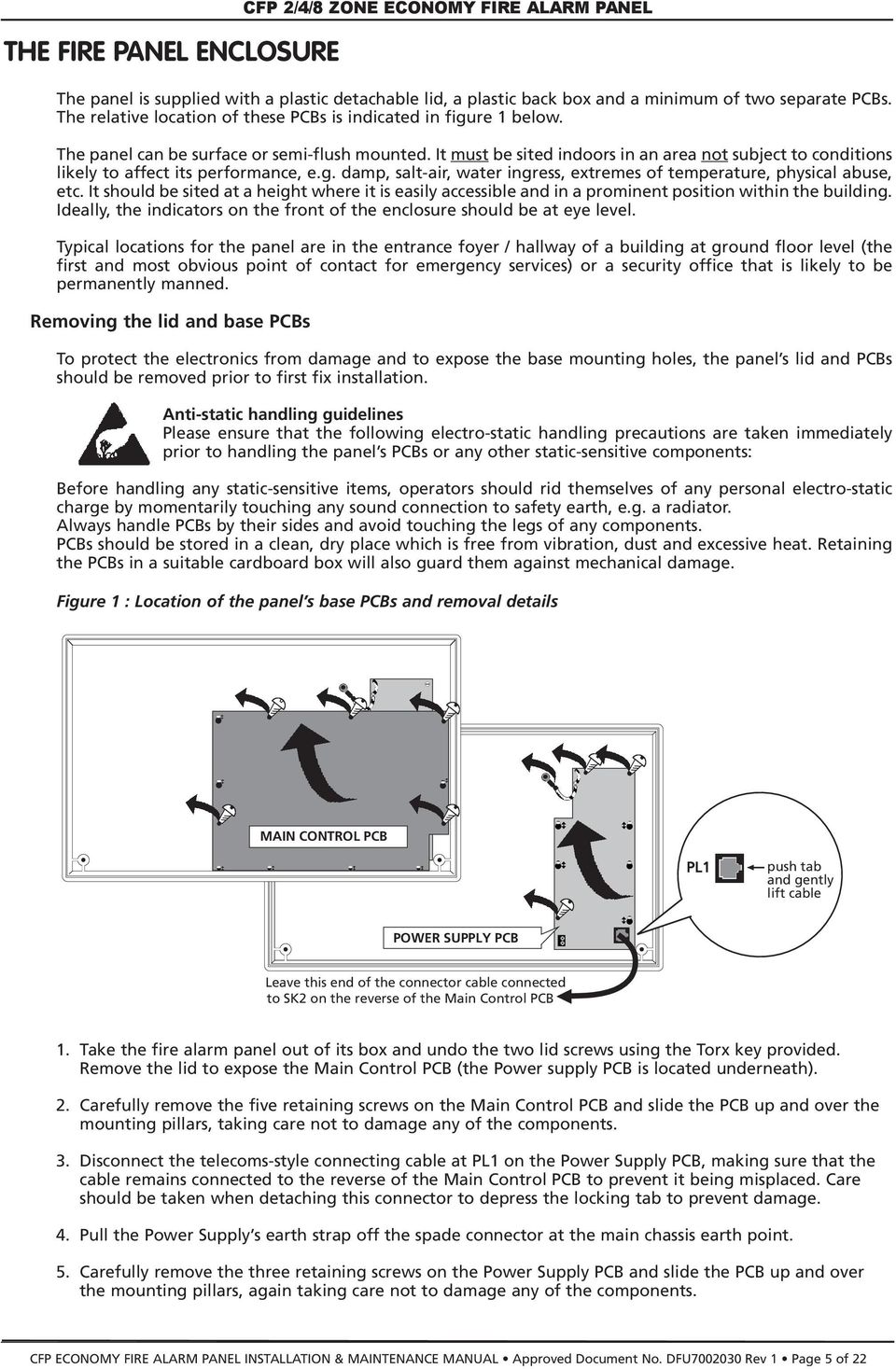
5 THE FIRE PANEL ENCLOSURE The panel is supplied with a plastic detachable lid, a plastic back box and a minimum of two separate PCBs. The relative location of these PCBs is indicated in figure 1 below. The panel can be surface or semi-flush mounted. It must be sited indoors in an area not subject to conditions likely to affect its performance, e.g. damp, salt-air, water ingress, extremes of temperature, physical abuse, etc. It should be sited at a height where it is easily accessible and in a prominent position within the building. Ideally, the indicators on the front of the enclosure should be at eye level. Typical locations for the panel are in the entrance foyer / hallway of a building at ground floor level (the first and most obvious point of contact for emergency services) or a security office that is likely to be permanently manned. Removing the lid and base PCBs CFP 2/4/8 ZONE ECONOMY FIRE ALARM PANEL To protect the electronics from damage and to expose the base mounting holes, the panel s lid and PCBs should be removed prior to first fix installation. Anti-static handling guidelines Please ensure that the following electro-static handling precautions are taken immediately prior to handling the panel s PCBs or any other static-sensitive components: Before handling any static-sensitive items, operators should rid themselves of any personal electro-static charge by momentarily touching any sound connection to safety earth, e.g. a radiator. Always handle PCBs by their sides and avoid touching the legs of any components. PCBs should be stored in a clean, dry place which is free from vibration, dust and excessive heat. Retaining the PCBs in a suitable cardboard box will also guard them against mechanical damage. Figure 1 : Location of the panel s base PCBs and removal details MAIN CONTROL PCB PL1 push tab and gently lift cable POWER SUPPLY PCB Leave this end of the connector cable connected to SK2 on the reverse of the Main Control PCB 1. Take the fire alarm panel out of its box and undo the two lid screws using the Torx key provided. Remove the lid to expose the Main Control PCB (the Power supply PCB is located underneath). 2. Carefully remove the five retaining screws on the Main Control PCB and slide the PCB up and over the mounting pillars, taking care not to damage any of the components. 3. Disconnect the telecoms-style connecting cable at PL1 on the Power Supply PCB, making sure that the cable remains connected to the reverse of the Main Control PCB to prevent it being misplaced. Care should be taken when detaching this connector to depress the locking tab to prevent damage. 4. Pull the Power Supply s earth strap off the spade connector at the main chassis earth point. 5. Carefully remove the three retaining screws on the Power Supply PCB and slide the PCB up and over the mounting pillars, again taking care not to damage any of the components. CFP ECONOMY FIRE ALARM PANEL INSTALLATION & MAINTENANCE MANUAL Approved Document No. DFU Rev 1 Page 5 of 22
6 CFP 2/4/8 ZONE ECONOMY FIRE ALARM PANEL FIRST FIX All system wiring should be installed to meet BS 5839 Part 1 and BS 7671 (Wiring Regulations). Other national standards of installation should be used where applicable. Cable types and limitations Consult {Clause 26} of BS 5839 Part 1: Fire detection and fire alarm systems for buildings - code of practice for system design, installation, commissioning and maintenance, for detailed information on cables, wiring and other interconnections. To comply with EMC (Electro Magnetic Compatibility) regulations and to reduce the risk of electrical interference in the system wiring, we recommend the use of fire-resistant screened cables throughout the installation. Cables such as FP 200, Firetuff, Firecel and MICC may be acceptable provided they are properly terminated at the fire panel and meet national standards / system specification as applicable. Correct cable glanding is essential and due regard should be made to any system specifications which demand a certain cable type. Mains wiring The requirement for the Mains supply to the fire panel is fixed wiring, using three core cable (no less than 1mm 2 and no more than 2.5mm 2 ) or a suitable three conductor system, fed from an isolating switched fused spur, fused at 3A. This should be secure from unauthorised operation and be marked FIRE ALARM: DO NOT SWITCH OFF. The Mains supply must be exclusive to the fire panel. (As an alternative to a switched fused spur, a double pole isolating device may be used providing it meets the appropriate national wiring regulations - see diagram below.) mm < 2.5mm MAIN DISTRIBUTION BOARD 3A FIRE PANEL Planning the cable layout in the panel The detector and sounder circuit cabling is classed as extra low voltage and should be segregated away from Mains voltages. Careful planning is needed to ensure this, see figure 2 (below) for guidance. Drill centre points are provided in the panel base to aid drilling tools. Cut out suitable holes in the panel using a hole saw directed by a pilot bit in the centre of the hole saw. Always ensure that if a hole is cut out it is filled with a good quality cable gland. Any unused holes must be securely blanked off. Figure 2 : Location of centre points for hole removal These four drill centre points are for incoming Mains cable only Do not drill any additional holes for cable entry in this shaded area. This is where the PCBs and backup batteries will be located. Holes should be cut out using a hole saw with a pilot bit. CFP ECONOMY FIRE ALARM PANEL INSTALLATION & MAINTENANCE MANUAL Approved Document No. DFU Rev 1 Page 6 of 22

7 Fixing the base to the wall CFP 2/4/8 ZONE ECONOMY FIRE ALARM PANEL Using the five mounting holes provided (see figure 3 below), fix the base securely onto / into the wall. The mounting holes are suitable for use with No.8-10, or 4-5mm countersunk screws. Assess the condition and construction of the wall and use a suitable screw fixing. Any dust or swarf created during the fixing process must be kept out of the fire alarm panel and care must be taken not to damage any wiring or components. Figure 3 : Internal view of the back box with PCBs removed / side view for flush mounting Fixing centres 339mm 75mm includes 'dimples' Fixing centres 170mm Ensure no fixing devices are located underneath the Power Supply PCB to avoid compromising electrical safety WALL Typical detector circuit wiring Depending on the model purchased, two, four, or eight detector circuit connections are available on the fire alarm panel. Refer to the specification on page 22 for the maximum number of devices that may be fitted to each circuit. Note: The number of devices affects the standby time of the system, and this should be taken into consideration when selecting the standby batteries. See page 21 for more information. Figure 4 : Typical detector circuit wiring PANEL DETECTOR CIRCUIT TERMINALS MANUAL CALL POINT SMOKE OR HEAT DETECTOR DO NOT SPUR (wiring not monitored) MANUAL CALL POINT SMOKE OR HEAT DETECTOR Connect an end-of-line (EOL) capacitor (provided in the panel s accessory pack) across the terminals of the last device on each circuit to allow the wiring to be monitored. Detector bases with integral continuity diodes must be used to ensure manual call points remain operational when a detector head is removed from its base. Manual call points with integral resistors must be used to prevent a short circuit fault occurring instead of a fire condition when activated. For more specific device wiring information, please refer to the manufacturers own instructions. END OF LINE CAPACITOR The wiring for each detector circuit should be connected to the relevant 5mm connector block on the Main Control PCB and their screens terminated at the panel s base earth post (see page 13 for detailed second fix connection information). CFP ECONOMY FIRE ALARM PANEL INSTALLATION & MAINTENANCE MANUAL Approved Document No. DFU Rev 1 Page 7 of 22

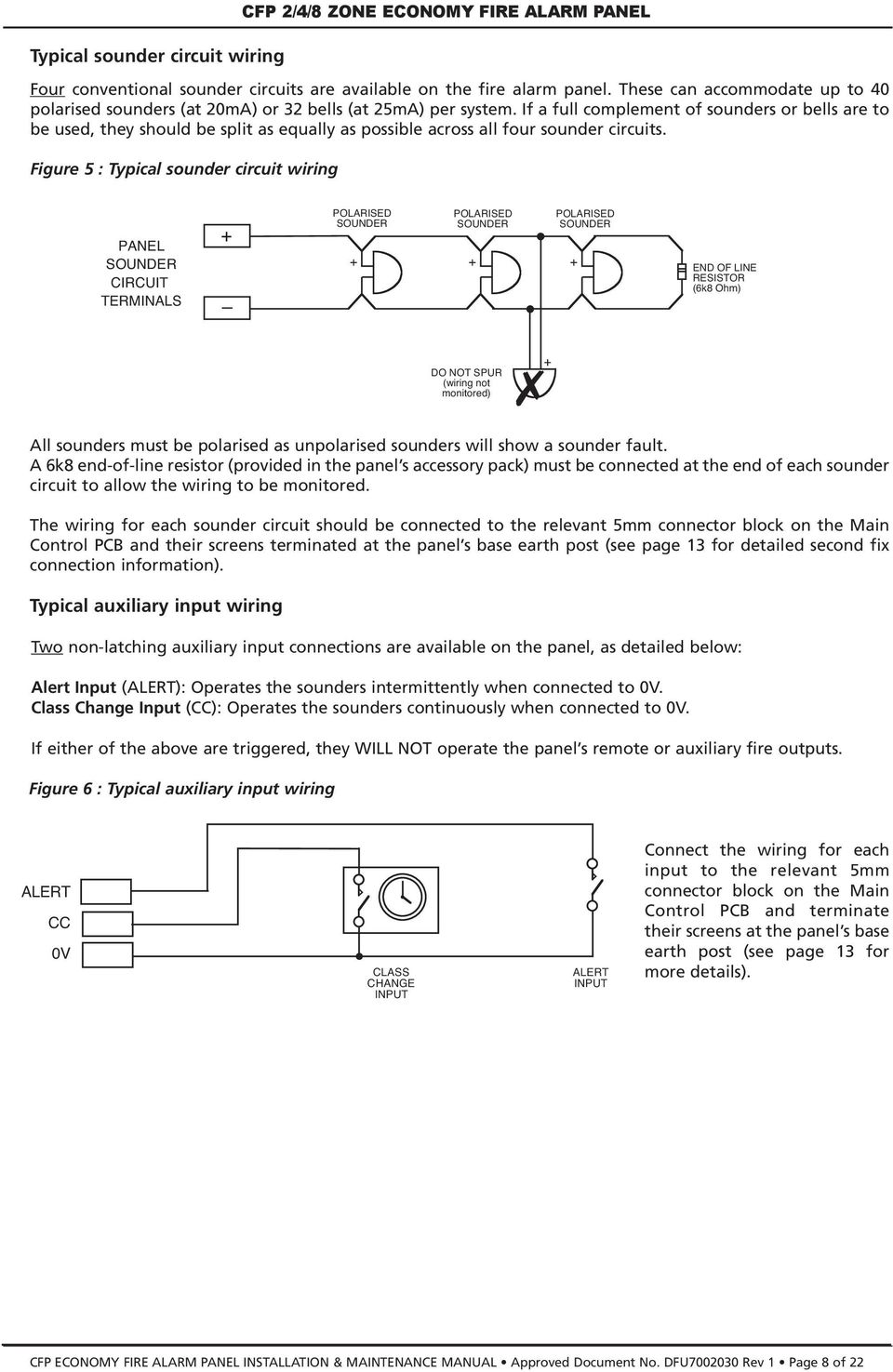
8 Typical sounder circuit wiring CFP 2/4/8 ZONE ECONOMY FIRE ALARM PANEL Four conventional sounder circuits are available on the fire alarm panel. These can accommodate up to 40 polarised sounders (at 20mA) or 32 bells (at 25mA) per system. If a full complement of sounders or bells are to be used, they should be split as equally as possible across all four sounder circuits. Figure 5 : Typical sounder circuit wiring PANEL SOUNDER CIRCUIT TERMINALS POLARISED SOUNDER POLARISED SOUNDER POLARISED SOUNDER END OF LINE RESISTOR (6k8 Ohm) DO NOT SPUR (wiring not monitored) All sounders must be polarised as unpolarised sounders will show a sounder fault. A 6k8 end-of-line resistor (provided in the panel s accessory pack) must be connected at the end of each sounder circuit to allow the wiring to be monitored. The wiring for each sounder circuit should be connected to the relevant 5mm connector block on the Main Control PCB and their screens terminated at the panel s base earth post (see page 13 for detailed second fix connection information). Typical auxiliary input wiring Two non-latching auxiliary input connections are available on the panel, as detailed below: Alert Input (ALERT): Operates the sounders intermittently when connected to 0V. Class Change Input (CC): Operates the sounders continuously when connected to 0V. If either of the above are triggered, they WILL NOT operate the panel s remote or auxiliary fire outputs. Figure 6 : Typical auxiliary input wiring ALERT CC 0V CLASS CHANGE INPUT ALERT INPUT Connect the wiring for each input to the relevant 5mm connector block on the Main Control PCB and terminate their screens at the panel s base earth post (see page 13 for more details). CFP ECONOMY FIRE ALARM PANEL INSTALLATION & MAINTENANCE MANUAL Approved Document No. DFU Rev 1 Page 8 of 22
9 Typical auxiliary output wiring CFP 2/4/8 ZONE ECONOMY FIRE ALARM PANEL Four auxiliary open collector outputs and one auxiliary output connections are available on the panel, as detailed below: Reset Output (RESET) Remote Output (REM) Auxiliary Fire Output (AUX) Fault Output () Auxiliary 24V Output (AUX 24V) Turns on during the panel s reset cycle. Can be used for resetting fire alarm system devices such as roller-shutter doors or beam detectors. This output remains active for approximately one second after all other outputs have returned to normal. Turns on during any new fire alarm condition or when the panel s Silence/Resound Sounders button is pressed to manually evacuate the building. The output turns off when the panel is silenced. This output does not turn on when the Class Change or Alert inputs are asserted (unless there are other fire alarm conditions present on the system). Note: If required, the remote output can be disabled by the user. When the Remote Output is activated the Remote Output light will be lit. Turns on during any fire alarm condition and off when the panel is reset. This output does not turn on if the Class Change or Alert inputs are activated (unless there are other fire alarm conditions present on the system). Note: If required, the Auxiliary Output can be disabled by the user. This output is normally energised. When a fault occurs, the output turns off to ensure failsafe operation even in the event of total power loss. If required, this output can be disabled by the user. This output provides a positive voltage supply for peripheral loads (such as relays) which are controlled from the above outputs. The current consumed by this output must be considered when calculating battery standby times. DO NOT CONNECT DOOR HOLDER CIRCUITS TO THIS OUTPUT AS THEY WILL REDUCE BATTERY STANDBY TIME - USE A SEPARATE POWER SUPPLY. Figure 7 : Typical auxiliary output wiring for open collector outputs CONN8 CONN10 REM AUX 24V RST NO C NC NO C NC OUTPUTS AUX AUX REM RESET AUX 24V RELAY RESET RELAY REMOTE OUTPUT RELAY AUXILIARY FIRE RELAY To protect the output stage, only 24V polarised relays with back EMF diodes should be used. If any of the relays are to be used to switch Mains potentials, then suitable relays should be chosen, installed and wired accordingly, so as not to compromise the electrical safety of the fire alarm system. Connect each output to the relevant 5mm connector block on the Main Control PCB and terminate their screens at the panel s base earth post (see page 13 for more details). CFP ECONOMY FIRE ALARM PANEL INSTALLATION & MAINTENANCE MANUAL Approved Document No. DFU Rev 1 Page 9 of 22

10 CFP 2/4/8 ZONE ECONOMY FIRE ALARM PANEL SECOND FIX Connecting the panel Connecting the panel s internal connections and PCBs should be undertaken immediately before commissioning. Before you begin, we recommend you check all devices on the detector and sounder circuits are correctly connected (see pages 7 and 8) and that cable integrity is verified throughout the installation. Important: DO NOT use a high voltage insulation tester with any electronic devices connected. Faults occurring in the wiring which are not picked up at this stage will almost certainly result in spurious and intermittent faults when the equipment is energised. Installing the Power Supply PCB The panel s Power Supply PCB combines the functions of a Mains to dc switched mode power supply unit, battery charging unit and battery monitoring unit. WHEN CONNECTED, THE POWER SUPPLY PCB STORES VOLTAGES AT UP TO 400Vdc AND MAY BE LETHAL IF TOUCHED. DO NOT TOUCH THE PCB WHILST THE RED HAZARDOUS VOLTAGES PRESENT INDICATOR IS LIT. Under no circumstances should the fire alarm panel be operated without the Power Supply PCB correctly mounted in the panel s enclosure and the three retaining screws securely tightened. The PCB should be positioned in the panel as shown in figure 8 on page 11. Connecting the Mains The general requirement for the Mains supply to this equipment is described on page 6. DO NOT attempt to connect Mains to the panel until you are fully conversant with the layout and features of the Power Supply PCB, as described above and in figure 8 on page 11. The incoming Mains cable should be brought into the panel at the top right hand side of the enclosure and terminated at the connector block (CONN1) on the Power Supply PCB. Make sure the Mains earth wire is connected directly to this connector block and NOT to the secondary base earth post which is provided for making off detector and sounder circuit screens. The Power Supply PCB s earth strap MUST be connected to the spade on the chassis earth post before operation. The spade is compressed against a shoulder on the post via the lowest nut. The earth post may appear loose, this is intended by design. Connecting the standby batteries Two new, good quality and fully charged 12V valve regulated lead acid (VRLA) batteries are required as the emergency standby power supply for the panel. Caution: DO NOT use any other type of batteries due to the risk of explosion. The batteries should be connected in series and located in the panel s enclosure as shown in figure 9 on page 11. The battery leads, link wire and nylon cable ties are provided in the panel s accessory pack. Run the battery leads through the slits in the panel s lower plastic ribs and secure the batteries into position using the nylon cable ties as shown. The panel s sophisticated battery monitoring unit protects the batteries against deep discharge by activating a cut off circuit when the standby supply voltage reaches 21V approx. If batteries are not fitted, are discharged or in poor condition, a PSU fault will show at the fire alarm panel. The capacity of the batteries used will depend upon the required standby time. To calculate the batteries required for any given standby period, please refer to the calculation guide on page 21. Always dispose of used batteries according to the battery manufacturer s instructions. CFP ECONOMY FIRE ALARM PANEL INSTALLATION & MAINTENANCE MANUAL Approved Document No. DFU Rev 1 Page 10 of 22

11 CFP 2/4/8 ZONE ECONOMY FIRE ALARM PANEL Figure 8 : Power Supply PCB layout and Mains connection details Incoming Mains cable must be segregated from other cables and should only enter the panel through either of these drill outs. Good quality cable glands must always be fitted. PSU earth strap Do not operate the panel without this strap connected. Mains fuse (F1) 20 x 5mm 1A HRC ceramic to IEC 127 (EN60127 Part 2). Do not use any other type or size of fuse in this position. Battery fuse (F2) 20 x 5mm 1A6 F to IEC 127 (EN60127 Part 2). Do not use any other type or size of fuse in this position. Battery leads (supplied in the panel s accessory pack). See below for connection details. DO NOT ADJUST BATTERY FUSE 1.6AF Red To Battery I Black BAT1 PRIMARY FUSE F1 FUSE PL2 AUX 24V L N 1ATH 250V HRC PL1 To Main Control PCB CONN1 L N L = Live; N = Neutral; CONN1 = Earth. The incoming Mains earth wire must be connected to the terminal marked and not to the base earth post. (The PSU earth strap connects the PCB to the base earth post.) Hazardous Voltages Present light When lit red, hazardous voltages will be present on the components in the shaded area of the PCB. DO NOT TOUCH! Certain components are charged to this hazardous voltage during operation, and this charge is bled away after the Mains supply has been removed. When the red light extinguishes, the charge has leaked away to a safe level. Figure 9 : Battery location and connection details Nylon tie wraps Link wire Take care to arrange batteries so terminals do not touch Run the battery leads (supplied) through slits in the plastic ribs I I R E D BLACK Location of small sized batteries typically 1.2 Ah Location of medium sized batteries typically 2.1 Ah Location of large sized batteries typically 3.0 Ah Connection of leads to Power Supply PCB CFP ECONOMY FIRE ALARM PANEL INSTALLATION & MAINTENANCE MANUAL Approved Document No. DFU Rev 1 Page 11 of 22

12 Installing the Main Control PCB The panel s Main Control PCB provides all the connections for the system s detector circuits, sounder circuits, auxiliary inputs and auxiliary outputs. It also provides the engineer with access to a wide range of engineering functions, details of which appear later in this manual. Before any connections can be made, the Main Control PCB must first be securely positioned inside the fire alarm panel (see figure 10 below) using the five retaining screws. As the PCB is presented to the panel, remember to attach the telecoms-style connecting cable to SKT2 on the reverse of the Main Control PCB and to PL1 on the Power Supply PCB. All of the 5mm connector blocks located across the top of the PCB can be removed to aid installation. Take care when reconnecting them that you do so the correct way round. We recommend that you clearly label all system wiring to reduce the likelihood of incorrect connection. Figure 10 : Main Control PCB layout CFP 2/4/8 ZONE ECONOMY FIRE ALARM PANEL DETECTOR CIRCUITS SOUNDER CIRCUITS OUTPUTS AUX Z1 Z2 Z3 Z4 Z5 Z6 Z7 Z8 SC1 SC2 SC3 SC4 AUX RST 24V REM NO C NC NO C NC INPUTS ALT CC 0V CONN2 CONN5 CONN6 CONN7 CONN8 CONN9 SW1 SW5 FIRE CODE ENTRY(1) CODE ENTRY(2) ESCAPE ACCESS SILENCE INTERNAL SOUNDER GENERAL FIRE ZONE1 ZONE2 ZONE3 ZONE4 ZONE5 ZONE6 ZONE7 ZONE8 SENSITIVE TO STATIC ELECTRICITY - OBSERVE PRECAUTIONS BEFORE HANDLING SW2 SW6 SILENCE/ RESOUND SOUNDERS SW7 SW3 NEXT OPTION RESET CODE ENTRY(3) SUPPLY REMOTE OUTPUT TEST ACCESSED GENERAL DISABLEMENT OUTPUT STATUS REMOTE OUTPUT STATUS WARNING REMOVING THIS CIRCUIT BOARD EXPOSES HAZARDOUS VOLTAGES - PLEASE REFER TO INSTALLATION INSTRUCTIONS SW4 I OK ENABLE/DISABLE LAMP TEST CODE ENTRY(4) CAUTION - RISK OF EXPLOSION IF INCORRECT TYPE OF BATTERIES FITTED. DISPOSE OF USED BATTERIES ACCORDING TO THE MANUFACTURERS INSTRUCTIONS. O ACCESS LEVEL 2 GENERAL PSU DELAY MINUTES VR1 SYSTEM SW8 REPEATER ACCESS LEVEL THREE FUNCTIONS OPEN CIRCUIT SHORT CIRCUIT COINCIDENCE DELAYS TEST NONLATCHING SOUNDER STATUS AUX OUTPUT STATUS FOR OPERATIONAL DETAILS PLEASE CONSULT THE MAINTENANCE MANUAL OUTPUTS DELAYED CFP ECONOMY FIRE ALARM PANEL INSTALLATION & MAINTENANCE MANUAL Approved Document No. DFU Rev 1 Page 12 of 22

13 Connecting the detector and sounder circuits Incoming detector and sounder circuits should be connected to the relevant connector block on the Main Control PCB as shown in figure 11 below. For typical detector and sounder circuit wiring diagrams, please refer to pages 7 and 8. Figure 11 : Detector and sounder circuit connection CFP 2/4/8 ZONE ECONOMY FIRE ALARM PANEL insulated conductors insulated screens See Important notes regarding the earthing of screens section below DETECTOR CIRCUITS SOUNDER CIRCUITS Z3 Z4 Z5 SC1 SC2 SC3 Z1 Z2 Z6 Z7 Z8 SC4 OUTPUTS AUX REM 24V RST NO AUX C NC NO C NC INPUTS ALT CC 0V CONN2 CONN5 CONN6 CONN7 CONN8 CONN10 CONN9 Connecting the auxiliary inputs and outputs Incoming auxiliary input and output cables should be connected to the relevant connector block terminals on the Main Control PCB. If screened cables have been used, all screens should be adequately insulated and connected between the nut and washers on the base earth post (see below) using eyed crimp connectors (as per the detector and sounder circuit examples shown in figure 11 above). For a full description of the inputs and outputs available on the panel, including typical wiring diagrams, please refer to pages 8 and 9. Important notes regarding the earthing of screens All screens should be adequately insulated and connected between the nut and washers on the base earth post (see right) using suitable eyed crimp connectors. Do not disturb the lower nut, this must be secure to ensure earth continuity. The base earth post is provided for terminating earth screens or drains and not as the main earthing point. The system designer or installer must review the external earth bonding (if required) with respect to the national wiring rules. That is, if the type of installation requires protective earth bonding, then this must be applied externally and in conjunction with the type of earthing system employed on that particular site. This must always be done with regard to the appropriate national wiring rules. crimped connections screens nut plain washers Do not untighten lower nut spring washer CFP ECONOMY FIRE ALARM PANEL INSTALLATION & MAINTENANCE MANUAL Approved Document No. DFU Rev 1 Page 13 of 22

14 PROGRAMMING THE PANEL An overview of the panel s controls Three control levels are available on the panel - general user (access level one), authorised user (access level two) and engineer (access level three), as detailed below: General user controls (access level one) When the panel is in its normal state, the indicator lights on the panel front give a comprehensive overview of the system s current status. Any fire and fault conditions are clearly displayed, disablements highlighted and the status of all outputs reported. The only functions that can be performed when the panel is in this state are: Muting the panel s internal sounder. Putting the panel into access level two to make active the authorised user controls (see below). Authorised user controls (access level two) To avoid unauthorised changes to critical parts of the fire alarm system, certain fire alarm panel controls are only available to authorised users. These include: Silencing the sounders. Resetting an alarm condition. Manually activating the alarm sounders (to evacuate a building) Testing the indicator lights. Disabling or enabling any (or all) of the following: zones, sounders, the fault output, the remote output, the auxiliary fire output. The authorised user controls can be accessed by entering the code using the keypad or, by turning the keyswitch to the I position. For detailed information on how to use the general and authorised user controls, please refer to the User Manual / Log Book. Engineer controls (access level three) It is possible to read or interrogate the site specific data at this level. The following controls are available to competent service personnel only: The invoking of test procedures. To aid commissioning and routine maintenance checks, a non-latching one man walk test facility is available. When a detector or manual call point is triggered on any zone(s) in test, the alarm sounders operate for approximately one second on and eight seconds off. This cycle continues until the cause of the alarm is removed (either by the test smoke clearing from the detector or the manual call point being reset), at which point the detector circuit also automatically resets. As the engineer walks around the site, additional devices on the zone(s) in test can be checked with the momentary activation of the alarm sounders confirming correct operation. Zones programmed for test, will be indicated at the panel by their Fault lights pulsing quickly in synchronisation with the general Test light. Should an alarm occur on a zone that is not programmed for test, the alarm will be processed in the normal way. All zones that are in test will have their tests temporarily suspended until the alarm(s) from the other zones are reset. At this point zone testing may resume. In other words, the alarm will operate correctly despite being in test mode. Programming silenced sounders to resound, or not resound, when new zone in alarm. Once the sounders have been activated after an alarm, then silenced, it is possible to set up the panel so that a new alarm raised from another zone resounds, or does NOT resound, the sounders in accordance with EN54-2 {Clause 7.8d}. Fault diagnosis. CFP 2/4/8 ZONE ECONOMY FIRE ALARM PANEL A wide range of fault diagnosis features are available at access level three. These are described in detail on pages 17 to 20 of this manual. Refer to pages 15 and 16 for details of how to gain access to the engineer controls and how to use them. CFP ECONOMY FIRE ALARM PANEL INSTALLATION & MAINTENANCE MANUAL Approved Document No. DFU Rev 1 Page 14 of 22

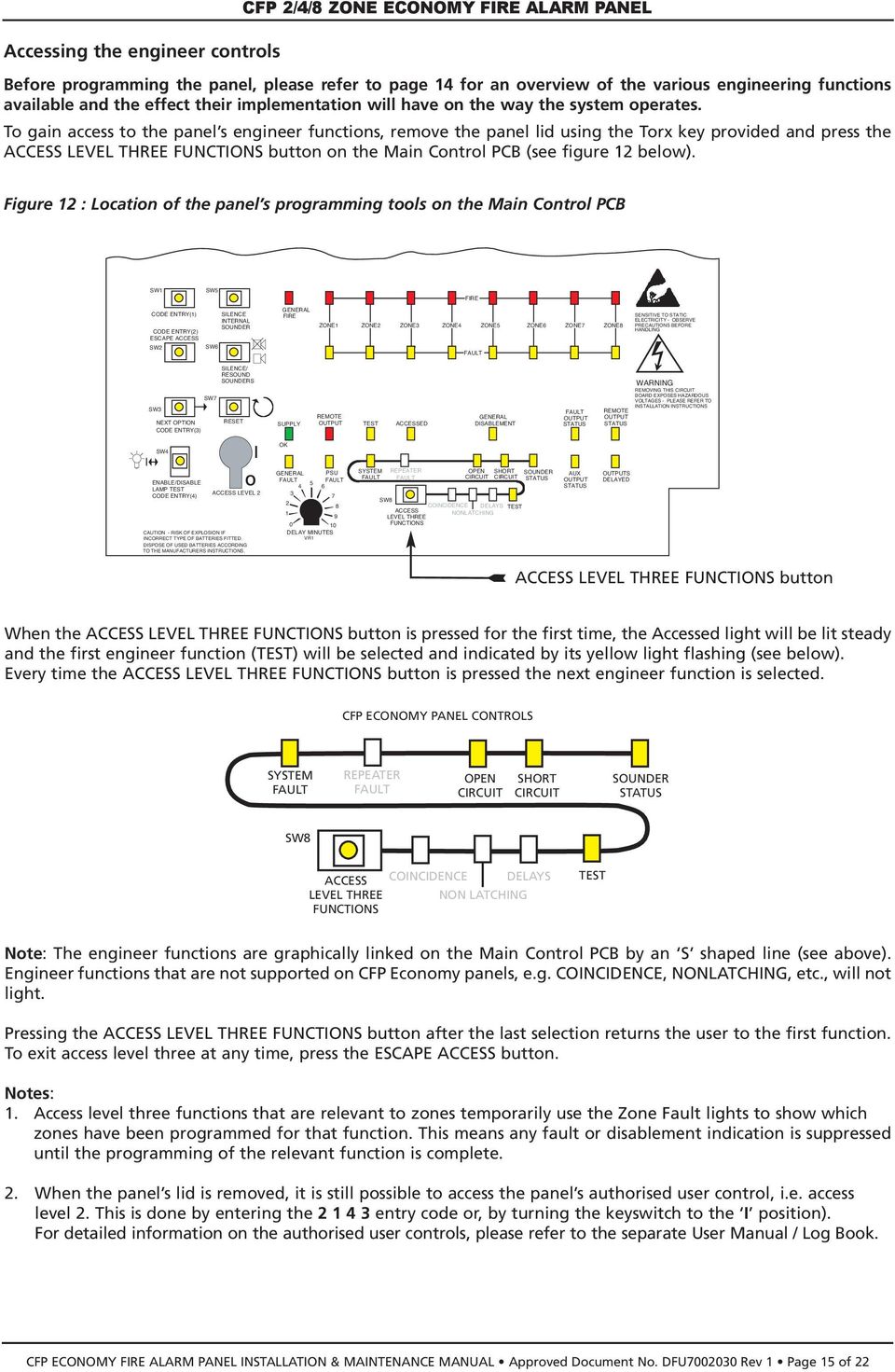
15 Accessing the engineer controls CFP 2/4/8 ZONE ECONOMY FIRE ALARM PANEL Before programming the panel, please refer to page 14 for an overview of the various engineering functions available and the effect their implementation will have on the way the system operates. To gain access to the panel s engineer functions, remove the panel lid using the Torx key provided and press the ACCESS LEVEL THREE FUNCTIONS button on the Main Control PCB (see figure 12 below). Figure 12 : Location of the panel s programming tools on the Main Control PCB SW1 SW5 FIRE CODE ENTRY(1) CODE ENTRY(2) ESCAPE ACCESS SILENCE INTERNAL SOUNDER GENERAL FIRE ZONE1 ZONE2 ZONE3 ZONE4 ZONE5 ZONE6 ZONE7 ZONE8 SENSITIVE TO STATIC ELECTRICITY - OBSERVE PRECAUTIONS BEFORE HANDLING SW2 SW6 SILENCE/ RESOUND SOUNDERS SW7 SW3 NEXT OPTION RESET CODE ENTRY(3) SUPPLY REMOTE OUTPUT TEST ACCESSED GENERAL DISABLEMENT OUTPUT STATUS WARNING REMOVING THIS CIRCUIT BOARD EXPOSES HAZARDOUS VOLTAGES - PLEASE REFER TO INSTALLATION INSTRUCTIONS REMOTE OUTPUT STATUS SW4 I OK ENABLE/DISABLE LAMP TEST CODE ENTRY(4) CAUTION - RISK OF EXPLOSION IF INCORRECT TYPE OF BATTERIES FITTED. DISPOSE OF USED BATTERIES ACCORDING TO THE MANUFACTURERS INSTRUCTIONS. O ACCESS LEVEL 2 GENERAL PSU DELAY MINUTES VR1 SYSTEM SW8 REPEATER ACCESS LEVEL THREE FUNCTIONS OPEN CIRCUIT COINCIDENCE DELAYS NONLATCHING SHORT CIRCUIT TEST SOUNDER STATUS AUX OUTPUT STATUS OUTPUTS DELAYED ACCESS LEVEL THREE FUNCTIONS button When the ACCESS LEVEL THREE FUNCTIONS button is pressed for the first time, the Accessed light will be lit steady and the first engineer function (TEST) will be selected and indicated by its yellow light flashing (see below). Every time the ACCESS LEVEL THREE FUNCTIONS button is pressed the next engineer function is selected. CFP ECONOMY PANEL CONTROLS SYSTEM REPEATER OPEN CIRCUIT SHORT CIRCUIT SOUNDER STATUS SW8 ACCESS LEVEL THREE FUNCTIONS COINCIDENCE DELAYS NON LATCHING TEST Note: The engineer functions are graphically linked on the Main Control PCB by an S shaped line (see above). Engineer functions that are not supported on CFP Economy panels, e.g. COINCIDENCE, NONLATCHING, etc., will not light. Pressing the ACCESS LEVEL THREE FUNCTIONS button after the last selection returns the user to the first function. To exit access level three at any time, press the ESCAPE ACCESS button. Notes: 1. Access level three functions that are relevant to zones temporarily use the Zone Fault lights to show which zones have been programmed for that function. This means any fault or disablement indication is suppressed until the programming of the relevant function is complete. 2. When the panel s lid is removed, it is still possible to access the panel s authorised user control, i.e. access level 2. This is done by entering the entry code or, by turning the keyswitch to the I position). For detailed information on the authorised user controls, please refer to the separate User Manual / Log Book. CFP ECONOMY FIRE ALARM PANEL INSTALLATION & MAINTENANCE MANUAL Approved Document No. DFU Rev 1 Page 15 of 22
16 CFP 2/4/8 ZONE ECONOMY FIRE ALARM PANEL To program zones into test 1. Press the ACCESS LEVEL THREE FUNCTIONS button until the TEST light flashes (any zones that are already programmed for test will now have their Zone Fault lights lit steady). 2. To change the test configuration press the NEXT OPTION button (zone 1 s Fault light will flash slower than the TEST light if not programmed, or at the same rate if it is). 3. If required, toggle between the two states by pressing the ENABLE/DISABLE button. 4. To confirm your choice, press the NEXT OPTION button. This will move you to the next zone (if available). 5. Repeat steps 3 and 4 until the process is complete. 6. To finish the function, press the ESCAPE ACCESS button, or move onto the next programming function (SOUNDER STATUS) by pressing the ACCESS LEVEL THREE FUNCTIONS button Important: Before testing any of the zones you have programmed for test, you must first press the ESCAPE ACCESS button. Any zone(s) in test will now be lit steady and the general Test light will also be lit. Testing can now commence. Remember to take the relevant zones out of test when testing is complete. To program the sounders function 1. Press the ACCESS LEVEL THREE FUNCTIONS button until the SOUNDER STATUS light flashes. If the SOUNDER STATUS light flashes three times quickly with a longer off period, then an alarm in a new zone will resound the sounders. If the SOUNDER STATUS light flashes with equal on-off periods, then an alarm in a new zone will NOT resound the sounders. 2. If required, toggle between the two states by pressing the ENABLE/DISABLE button. 3. To finish the function, press the ESCAPE ACCESS button, or return to the first programming function (TEST) by pressing the ACCESS LEVEL THREE FUNCTIONS button. Note: SYSTEM, OPEN CIRCUIT and SHORT CIRCUIT options are for fault diagnosis purposes, as detailed on pages 17 to 20. The relevant part of the System Set-Up Data chart in the User Manual / Log Book must be updated if you implement or make any changes to the program sounders functions. CFP ECONOMY FIRE ALARM PANEL INSTALLATION & MAINTENANCE MANUAL Approved Document No. DFU Rev 1 Page 16 of 22

17 CFP 2/4/8 ZONE ECONOMY FIRE ALARM PANEL DIAGNOSIS Fault indications When a fault occurs on a critical part of the fire alarm system, the panel responds by activating its internal sounder and illuminating the General Fault light and any other Fault light(s) relating to the fault. The panel s fault output will also activate (provided it has not been disabled). The type of faults typically indicated at the fire alarm panel are highlighted below. A more precise diagnosis of fault conditions is available at access level three (the summaries below refer to the sections you should read later in this manual for further information). Unless otherwise stated, repairing any particular fault condition will automatically clear the fault from the panel. If the panel is reset whilst faults still exist, the faults will reappear after a short period of time. Note: It is possible to mute the panel s internal sounder at any time by momentarily pressing the SILENCE INTERNAL SOUNDER button. General Fault This light flashes yellow when there is a fault on any part of the fire alarm system. It is always lit in tandem with at least one other Fault light which displays precise information on the type of fault detected. Zone Faults All of the panel s zone circuits are monitored for open and short circuit faults and detector head removal (unless there is an alarm condition or the zone is in test or disabled). All faults are indicated by the relevant Zone Fault light pulsing yellow. For advice on how to correct this fault, see page 18, section Zone fault/disabled/test Supply Present This light should be lit green at all times. If off, see power supply faults, page 18, section 1.2. supply present general fault remote output power supply fault test system fault accessed general disablement sounder status fault output status auxiliary output status remote output status Remote Output Fault This light flashes yellow when there is a fault on the output s aux. 24V supply. For advice on how to deal with this type of fault see page 20, section 1.5. Power Supply Fault This light flashes yellow when one or more of the following has occurred: 1) The Mains supply is too low or has failed completely. 2) Mains fuse (F1) has ruptured. 3) Battery fuse (F2) has ruptured. 4) The battery supply voltage is too low. 5) The panel s power supply unit is faulty. For advice on how to correct this fault see page 18, section 1.2. System Fault This light flashes yellow when one or more of the following has occurred: 1) There is a microprocessor watchdog fault. 2) The microprocessor s site memory has been corrupted. 3) The microprocessor s program menu has been corrupted. 4) The Main Control PCB is faulty. For advice on how to correct this fault see page 20, section 1.3. Sounder Fault All sounder circuits are monitored periodically for open and short circuit faults (unless disabled or in an alarm condition). If any faults are detected, this light pulses yellow. For advice on how to correct this fault see page 20, section 1.4. CFP ECONOMY FIRE ALARM PANEL INSTALLATION & MAINTENANCE MANUAL Approved Document No. DFU Rev 1 Page 17 of 22

18 CFP 2/4/8 ZONE ECONOMY FIRE ALARM PANEL 1.1 Zone faults To find out if an open circuit or head out fault has occurred on a detector zone: 1. Remove the panel s lid using the Torx key provided and press the ACCESS LEVEL THREE FUNCTIONS button on the Main Control PCB to gain access to the panel s engineer functions (see below). 2. Continue pressing the ACCESS LEVEL THREE FUNCTIONS button until OPEN CIRCUIT light pulses. Any existing Zone Fault lights are suppressed and the zone light(s) for any zone(s) with an open circuit fault are lit, e.g. if the wiring on zone 6 is broken, zone 6 s Fault light will be lit. CFP ECONOMY PANEL CONTROLS SYSTEM REPEATER OPEN CIRCUIT SHORT CIRCUIT SOUNDER STATUS SW8 ACCESS LEVEL THREE FUNCTIONS COINCIDENCE DELAYS NON LATCHING TEST To find out if a short circuit fault has occurred on a detector zone: 1. Follow steps 1 and 2 detailed above until the SHORT CIRCUIT light pulses. 2. Any existing Zone Fault lights are suppressed and the zone light(s) for any zone (s) that have a short circuit fault are lit, e.g. if the wiring on zone 4 has been shorted, zone 4 s Fault light will be lit. Suggested actions: 1. Disconnect the faulty detector zone completely and refit the end-of-line capacitor at the panel. If the fault condition clears this confirms there is a wiring fault. 2. Refit and double check the wiring and the end-of-line capacitor on the zone. Trace the fault with consideration for the type of fault indicated (see above). Note: A common short circuit fault is a detector head badly seated in a base which is not making a true connection. 1.2 Power supply faults A power supply fault indicates one, or more, of the following faults. Page 11 of this manual must be referenced when carrying out any of the suggested action procedures described below. The Mains supply voltage is too low or has failed completely, the Mains fuse (F1) has ruptured or the PSU has failed. Symptoms: The panel runs on batteries, but not on Mains. Suggested actions: 1. Taking all due precautions, check Mains voltages are within range (see Technical Specifications, page 22) by probing Live and Neutral connections at connector (CONN1). If not within range, repair Mains supply. 2. If within range and the red Hazardous Voltages Present light is not lit, check the Mains fuse (F1). 3. If the fuse is intact, the red Hazardous Voltages Present light on the Power Supply PCB may, or may not, be lit. The PSU is faulty and should be replaced. Isolate the Mains supply and wait for the red Hazardous Voltages Present light to extinguish before replacing the Power Supply PCB. CFP ECONOMY FIRE ALARM PANEL INSTALLATION & MAINTENANCE MANUAL Approved Document No. DFU Rev 1 Page 18 of 22

19 The battery fuse (F2) is ruptured. Symptoms: The panel runs on Mains, but not on batteries. Suggested actions: CFP 2/4/8 ZONE ECONOMY FIRE ALARM PANEL 1. Isolate the Mains supply and disconnect the batteries. 2. Remove the Main Control PCB and check the battery fuse (F2) on the Power Supply PCB for continuity. 3. If ruptured check the Power Supply and Main Control PCBs for signs of damage. If none found, replace fuse with the correct type, ensuring the fuse clip is not damaged when re-inserting the fuse. 4. Refit the Main Control PCB and reconnect the batteries. 5. If the green Supply Present light is lit, reconnect the Mains supply and check that the power supply fault has cleared. If the Supply Present light is not lit, either the Power Supply PCB or the Main Control PCB is faulty and should be replaced. 6. If the battery fuse (F2) is intact, proceed to check the battery voltage / condition (see next section). The battery voltage is too low, or in poor condition. Symptoms: The panel runs on Mains, but may or may not run on batteries. If the Mains supply has failed and the battery supply has been discharged to the point where the voltage is too low (i.e less than 21V), the panel will automatically turn off to avoid damaging the batteries by allowing them to deep discharge. The panel will not restart unless fresh, fully charged batteries are connected, or the Mains supply is restored. If the Mains supply has not failed, but the total battery voltage is less than 21V, the PSU may not charge the batteries to avoid damage to the charging circuit. If the batteries can be charged, the panel will still show a power supply fault until they have sufficient charge, at which point the power supply fault will automatically be cleared. Depending on battery size and the depth of discharge, this may take several hours. If the batteries are in poor condition they must be replaced. If the batteries (or their leads) are high resistance, then this will also result in a PSU fault. This fault may be due to: - batteries that have been stored for many months - low quality batteries - old batteries - loose / poor connections to the batteries. If the batteries are in good condition and all the other checks have been performed and no faults found, the Power Supply PCB is faulty and should be replaced. Note: Batteries that are not connected, connected in reverse, or with opposite polarities will also cause a power supply fault condition. Supply Present light not lit. If the Supply Present light is not lit one of the following faults has occurred: 1. Both the Mains supply and the standby batteries have failed. This could be because the Mains supply has failed and the batteries have been exhausted. Suggested action: Restore the Mains supply and the Supply Present light should come back on. However, if the batteries are discharged this will be recognised as a fault by the panel and indicated as such. See Battery voltage too low above. 2. The Power Supply PCB, the Main Control PCB and/or the cable that connects them is faulty. If the Mains supply is present (indicated by the red Hazardous Voltages Present light being lit on the Power Supply PCB), check that the connector cable between the Power Supply PCB and the Main Control PCB is fully inserted at both ends. If so, either the Power Supply PCB and/or the Main Control PCB and/or the connector cable are faulty and should be replaced. CFP ECONOMY FIRE ALARM PANEL INSTALLATION & MAINTENANCE MANUAL Approved Document No. DFU Rev 1 Page 19 of 22

20 CFP 2/4/8 ZONE ECONOMY FIRE ALARM PANEL 1.3 System faults System faults are unique in that they do not automatically clear when rectified. Three different types of system fault can occur; watchdog fault, site memory corruption fault or PLL (phase lock loop) fault. System Fault light is lit. Suggested action: Press the panel s RESET button and, if still in access level three, the ESCAPE ACCESS button. This should clear the fault. If the fault persists, the Main Control PCB is faulty and must be replaced. 1.4 Sounder faults To determine which of the panel s four sounder circuits are faulty: 1. Disconnect each sounder circuit from the Main Control PCB in turn and measure the resistance between the two wires. A good circuit will present only the end-of-line resistor value. Any other resistance value shows a fault. 2. If the readings from all sounder circuits are correct, take their end-of-line resistors and connect them to the sounder circuits at the panel without the sounder circuit wiring. If the fault still persists, the panel is faulty and must be replaced. 3. If a sounder circuit fault is detected, correct the fault and reconnect the sounder circuit. The sounder fault will automatically clear within 60 seconds. Note: If the sounder circuit is shorted and the alarm voltage applied, the relevant sounder fuse will trip. When the fault is removed, the fuse will automatically reset. 1.5 Remote output faults If the panel s 24V auxiliary output (which is typically used to supply relays switched by the remote output) is subject to current overload, its protection fuse will trip. This will result in the Remote Output Status light illuminating. Repairing the fault will reset the fuse and clear the associated Fault light. MAINTENANCE Periodic system maintenance should be carried out on the system as prescribed in the local design, maintenance and installation regulations. The Fire Alarm panel s standby batteries should be checked for integrity of the connections, deposits indicating venting, and a periodic load test with the Mains supply disabled to ensure adequate battery capacity. Both batteries should be renewed if there is any doubt about their integrity. CFP ECONOMY FIRE ALARM PANEL INSTALLATION & MAINTENANCE MANUAL Approved Document No. DFU Rev 1 Page 20 of 22

21 CFP 2/4/8 ZONE ECONOMY FIRE ALARM PANEL STANDBY BATTERY CALCULATION GUIDE The standby time of the fire alarm panel, after the Mains has failed, depends on the quiescent loading of the panel, the alarm load of the panel and the capacity of the batteries. To determine the capacity of batteries required for any given standby period, the following formula should be used: Standby Time in Ah = 1.25 x [(TxA) H x (PZ)] The multiplier 1.25 is present to account for lost capacity over the life of the batteries. H = Number of hours standby required P = The quiescent current of the panel = 0.025A This figure is with the Mains failed, internal sounder active and the Power Supply Fault and General Fault lights lit. If there are other quiescent drains on the panel then these must be included. Z = The total quiescent current of all zone devices As a guideline, the quiescent current of most modern detectors is typically A (50µA), and that of manual call points is zero. To obtain accurate figures consult the device manufacturers own specifications. A = The total alarm current of the sounders (plus any other devices connected to other alarm outputs). T = The amount of time in hours required for the alarm (most commonly being half an hour). Example 1: The panel has 70 detectors each consuming 50µA each, 20 sounders at 20mA each, the required standby time is 24 hours and the required alarm time is 0.5 hours. Z = 70 x = A P = 0.025A A = 20 x 0.02 = 0.4A H = 24 T = 0.5 Standby Time in Ah = 1.25 x [(0.5 x 0.4) 24 x ( )] = 1.1Ah. Therefore, batteries with at least 1.1Ah capacity are required. Example 2: The panel has 100 detectors each consuming 50µA each, 40 sounders at 20mA each, the required standby time is 72 hours and the required alarm time is 0.5 hours. Z = 100 x = 0.005A P = 0.025A A = 40 x 0.02 = 0.8A H = 24 T = 0.5 Standby Time in Ah = 1.25 x [(0.5 x 0.8) 72 x ( )] = 3.2Ah Therefore, batteries with at least 3.2Ah capacity are required. CFP ECONOMY FIRE ALARM PANEL INSTALLATION & MAINTENANCE MANUAL Approved Document No. DFU Rev 1 Page 21 of 22
22 TECHNICAL SPECIFICATION POWER SUPPLY SPECIFICATION Mains supply voltage Mains rated current Internal power supply Total output current limited to CFP 2/4/8 ZONE ECONOMY FIRE ALARM PANEL 230V 50/60Hz 350mA maximum Maximum internal battery resistance Ri max = 1.5Ω Supply and battery charger monitored for failure Batteries monitored for disconnection & failure Batteries protected against deep discharge Max. battery size and type Mains fuse (F1) Battery fuse (F2) Current draw from battery (Mains failed) DETECTOR CIRCUIT SPECIFICATION Number of circuits Max. cable length per circuit Line monitored for open circuit and short circuit Line monitored for detector removal Maximum allowable impedance (each conductor) Maximum cable capacitance (per circuit) Call point resistor value Max. number of smoke / heat detectors Max. combined no. of detectors & manual call points 19V V (27V nominal). Ripple 7V maximum (battery fault) 230Vac (ImaxA = 146mA) YES (battery charger is also temperature compensated) YES YES (Deep discharge cut off approx. 21 volts) 2 x 12V 3.2Ah VRLA (Valve Regulated Lead Acid) type, connected in series. Minimum battery size 1.2Ah. 240V 1A HRC ceramic 20mm compliant with IEC (EN60127 PT2) 1.6A F 20mm compliant with IEC (EN60127 PT2) 1.5A maximum 2, 4 or 8 (1 zone per circuit) depending on model purchased 500 metres YES - DC monitoring YES. End-of-line monitoring device modules provided. 20Ω 0.27µF 470 to 680Ω 25 per zone 32 per zone SOUNDER CIRCUIT SPECIFICATION Number of circuits 4 End-of-line (EOL) resistor value 6800Ω 5% Tol. 0.25W (blue, grey, red, gold) Each circuit monitored for open and short circuit YES - Reverse voltage DC monitoring. Indicated by common fault. Alarm voltage 27VDC maximum, 20VDC minimum (final battery voltage) Sounder circuit fuses Each circuit protected by fuses (200mA min. hold current; 400mA max. trip current; approx. 50mA when tripped. Reset when faults removed). Maximum total sounder output current to all outputs 4 x 200mA = 800mA Maximum No. of 25mA 32 Maximum No. of electronic 20mA 40 (sounders must be polarised) AUXILIARY OUTPUTS Type Non monitored open collector transistor Max. sink current 30mA each Max open circuit voltage 27Vdc Reset auxiliary output (RESET) Active during reset cycle. Remote auxiliary output (REM) Active during any fire condition Auxiliary fire output (AUX) Active during any fire condition Fault output () Active when no faults are present - failsafe to open circuit 24V aux. power output (for use with the above) This output is protected by a resetable fuse (100mA min. hold current). Fuse resets when fault removed. AUXILIARY INPUTS Class Change (makes sounders sound continuously) Connect to 0V to trigger. Max input voltage 27V (non-latching). Alert (makes sounders pulse intermittently) Connect to 0V to trigger. Max input voltage 27V (non-latching). DIMENSIONS Physical size and weight Size (OD) = 380 x 235 x 90mm approx. Weight = 1.75kg (without batteries) OPERATING CONDITIONS The components are selected to operate within their specification when the environmental conditions outside the enclosure comply with class 3k5 of IEC : Temperature range: -5 to 40 0 C. Maximum relative humidity: 95%. CFP ECONOMY FIRE ALARM PANEL INSTALLATION & MAINTENANCE MANUAL Approved Document No. DFU Rev 1 Page 22 of 22
LPCB APPROVED CFP 2/4/8 ZONE FIRE ALARM CONTROL PANEL. installation & maintenance manual. Approved Document No. DFU7004010 Rev 1
 LPCB APPROVED CFP 2/4/8 ZONE FIRE ALARM CONTROL PANEL installation & maintenance manual Approved Document No. DFU7004010 Rev 1 CONTENTS EN54 Compliance Statement...3 Basic Overview & Key Features...3 Important
BARDIC. 4 & 8 Zone Fire Panels Zircon range. Data, installation, operation and maintenance. by Honeywell
 Data, installation, operation and maintenance 4 & 8 Zone Fire Panels Zircon range BARDIC by Honeywell LED flashing LED Continuous FAULT DISABLE/TEST Power General Fault Sounder Fault/ Disable System Fault
installation & maintenance manual CFP 2/4/8 ZONE FIRE ALARM REPEATER PANEL approved document no. DFU7003001 rev 2
 CFP 2/4/8 ZONE FRE ALARM REPEATER PANEL CFP 2/4/8 ZONE FRE ALARM REPEATER PANEL installation & maintenance manual approved document no. DFU731 rev 2 CFP REPEATER PANEL NSTALLATON & MANTENANCE MANUAL Approved
CFP 2/4/8 ZONE CONVENTIONAL FIRE ALARM CONTROL PANEL. user manual & log book. Approved Document No. DFU7001020 Rev 1
 CFP 2/4/8 ZONE CONVENTIONAL FIRE ALARM CONTROL PANEL user manual & log book Approved Document No. DFU7001020 Rev 1 CONTENTS Safety...3 Important information regarding the safe use of this fire alarm panel
INTRODUCTION. The data provided is for The Standard Products and any variation will be dealt with at the end of this manual.
 INTRODUCTION The information provided herein covers the range of products known as the 'Sensor 901' series. The range of equipment is designed to meet the requirements of BS 5839 parts 1 & 4 1988. The
conventional system operation
 conventional system operation detection line operation Conventional detection systems normally operate on a 24VDC line. In the standby condition, the detectors will draw a low current, typically less than
3. MOUNTING THE FIRE ALARM PANEL... 7 3.1 PLANNING CABLE ENTRY 3.2 FIXING THE BACKBOX TO THE WALL
 INSTALLATION MANUAL CONTENTS 1. INTRODUCTION. 3 1.1 HANDLING THE PCBS 1.2 USING THIS MANUAL 1.3 ABOUT THE PREMIER SX FACP & INTEGRAL PSE 1.4 DESIGNING THE SYSTEM 1.5 EQUIPMENT GUARANTEE 2. FIRST FIX GUIDELINES.
CB200W Water Leak Detection Panel Application Guide
 Checked by: AJC Approved by: JBJ Contents CB200W Water Leak Detection Panel Application Guide 1. Cabinet Specifications... 2 2. Panel Hardware Specifications... 3 3. Panel Configuration... 4 4. Technical
INFINITY 8 INSTALLATION MANUAL FIRE ALARM CONTROL PANEL INSTALLATION MANUAL
 FIRE ALARM CONTROL PANEL INSTALLATION MANUAL Approved Document No. GLT-201-7-1 CONTENTS 1. INTRODUCTION... 1.1 HANDLING THE PCBS... 1.2 USING THIS MANUAL... 1.3 ABOUT THE INFINITY FIRE ALARM CONTROL PANEL
TS510 & TS500. Installation & User Guide. Compatible Equipment
 Installation & User Guide Compatible Equipment TS510 REM - Remote Keypad 9040 - Loudspeaker DC54/58 - Digital Communicator SD1+ - Speech Dialler 496525 Issue A 1 of 10 TS510 and TS500 Overview Introduction
FIREDEX 2200. Conventional Fire Panels
 68 Flexible, high specification system Choice of 1, 2, 4 or 8 zones Simple one-shot auto-reset user test facility Approved to EN54 Maintenance free poly switch circuit protection, with auto reset Class
Conventional Fire Detection and Extinguishant Control System Specification
 Conventional Fire Detection and Extinguishant Control System Specification Page 1 of 9 Scope Furnish a complete 24VDC Conventional, electrically supervised, combined fire detection and extinguishant release
FIREvac VOICE ALARM CONTROL PANEL INSTALLATION & MAINTENANCE MANUAL
 FIREvac VOICE ALARM CONTROL PANEL INSTALLATION & MAINTENANCE MANUAL Page 2 of 41 FIREvac Voice Alarm Control Panel Installation & Maintenance Manual This manual details the operation of: FIREvac Voice
FIRE ALARM SYSTEM TECHNICAL SPECIFICATIONS Page 1 of 10
 TECHNICAL SPECIFICATIONS Page 1 of 10 FIRE DETECTION AND ALARM SYSTEM Scope Furnish a complete 24V DC conventional, electrically supervised, zone annunciated, fire detection and alarm system as specified
(68.52) X. June 2000 Supercedes February 2000. xenex CONVENTIONAL FIRE DETECTION & ALARM SYSTEM. we look @ business differently
 (68.52) X June 2000 Supercedes February 2000 xenex CONVENTIONAL FIRE DETECTION & ALARM SYSTEM.... we look @ business differently XENEX SYSTEM ARCHITECTURE Note: This schematic is for guidance only please
VoCALL - CFVCM/CFVCWM & CFVCX8. Fire Telephone & Disabled Refuge Network System. User Manual & Log Book
 VoCALL - CFVCM/CFVCWM & CFVCX8 Fire Telephone & Disabled Refuge Network System User Manual & Log Book VoCALL Fire Telephone & Disabled Refuge Network System Introduction A VoCALL Emergency Voice Communications
ACTIVE 5 ENGINEERING MANUAL
 ACTIVE 5 ENGINEERING MANUAL C & K Systems Ltd C031-066 Issue 3 THE ACTIVE 5 INSTALLATION MANUAL. Date: Feb 1997 INTRODUCTION. The Active 5 is a microprocessor controlled intruder alarm panel. It features
GST301. (Single Protection Zone) Operation Manual
 GST301 Gas Extinguishing Control Panel (Single Protection Zone) Operation Manual 2 of 19 CONTENTS 1 OVERVIEW... 4 2 TECHNICAL DATA... 4 3 STRUCTURES... 5 3.1 FRONT SURFACE DESCRIPTION... 5 3.1.1 Indicators...
CSP Combined Series. Telephone Door Entry. with. Proximity Keyfob Access
 CSP Combined Series Telephone Door Entry with Proximity Keyfob Access PD-094 Issue 3 General Description The CSP series systems are combined Door Entry Telephone and Proximity Access Systems. The entrance
USER MANUAL, MAINTENANCE GUIDE & LOG BOOK
 Software Versions: PANEL 1.52 & LOOP CARD 2.0 ONE TO FOUR LOOPS ANALOGUE ADDRESSABLE FIRE ALARM PANEL USER MANUAL, MAINTENANCE GUIDE & LOG BOOK #Doc No. GLT.MAN-135 TABLE OF CONTENTS WHAT TO DO IF THE
Single Channel Loop Detector
 Single Channel Loop Detector Model - LD100 Series The LD100 is a single channel inductive loop detector designed for parking and access control applications. The detector is connected to an inductive loop
FA-300 Series. LCD Fire Alarm Control Panel. User Guide. LT-954 Rev. 0.1 February 2013. FA-300 SERIES Fire Alarm Control Panel
 ABC DEF GHI JKL MNO PQR STU YZ WXY FA-300 Series LCD Fire Alarm Control Panel Advanced Life Safety Solutions System Normal 10:36AM WED 2003-10-01 SYSTEM RESET A.C. ON ALARM SUPV TRBL CPU FAIL SIGNAL SILENCE
Repeaters and Mimics Data Sheet
 Repeaters and Mimics Data Sheet IDR series repeaters and mimics allow vital information from a Notifier fire system to be communicated to points around a building remote from the fire alarm control panel.
Fire. The Fire Installers Mate. A guide to fire alarm systems design
 Fire The Fire Installers Mate A guide to fire alarm systems design BS 5839 Part 1:2002 A guide to BS 5839 Part 1:2002 Disclaimer This booklet is not intended to be a comprehensive guide to all aspects
LD2 One & Two Zone Water Detection Alarm Installation and Operation Manual
 CMR Electrical Ltd Bolton House Five Chimneys Lane Hadlow Down East Sussex TN22 4DX Tel: 01825 733600 LD2 One & Two Zone Water Detection Alarm Installation and Operation Manual Contents 1) Operation 2)
Fire Alarm Control Panel. Family. Operating Manual
 Fire Alarm Control Panel Family Operating Manual CONTENTS System Description AH-03312 System Characteristics... Fire Signal Receiving Board Description-4L... Fire Signal Receiving Board Description-8L...
XFP NETWORKABLE ANALOGUE ADDRESSABLE FIRE ALARM CONTROL PANEL. user manual and log book. Approved Document No. DFU2000510 Rev 1
 XFP NETWORKABLE ANALOGUE ADDRESSABLE FIRE ALARM CONTROL PANEL user manual and log book Approved Document No. DFU2000510 Rev 1 CONTENTS Important safety notes...3 Introduction...4 Fire alarm systems - an
Secure Keypads for access control
 torm Secure Keypads for access control Strike Master Read this manual carefully before attempting to install, program or operate the STORM AXS Strike Master Keypad. After installation the Command Summary
HM-W536 Install Guide
 HM-W536 Install Guide 9/13/2013 IMPORTANT SAFETY INSTRUCTIONS Warning - When using electrical devices, basic safety precautions should be followed to reduce the risk of fire, electrical shock or injury.
SELECTION, APPLICATION AND MAINTENANCE
 DIESEL PROTECTION SYSTEMS Automatic Diesel Engine Shut Down System for Safe Area Applications SELECTION, APPLICATION AND MAINTENANCE Series 300 Series 310 SYSTEM DESCRIPTION Suitable for attended engine
12 Volt 30 Amp Digital Solar Charge Controller Installation & Operation Manual
 12 Volt 30 Amp Digital Solar Charge Controller Installation & Operation Manual This 30Amp charge controller is designed to protect your 12Volt Lead-acid or Gel-cell battery from being overcharge by solar
CM705B - Universal Expander Module CM707B - Plug On Zone Expander Security Systems
 CM705B - Universal Expander Module CM707B - Plug On Zone Expander Security Systems EN Security System CM705B CM705B - Universal Expander Module The CM705B universal expander provides a cost effective way
REB 1 REB 3 REB 5 REB 6 REB 8 REB 10 REB 12 REB 16
 REB 1 REB 3 REB 5 REB 6 REB 8 REB 10 REB 12 REB 16 Manually Operated Electronic Speed Controller Single Phase For all applications using suitably specified single-phase induction motor fans 1 GENERAL The
SFC-200 SERIES FIRE ALARM CONTROL PANELS. SFC-200 Series Fire Alarm Control Panels. Features. Description
 SFC-200 SERIES FIRE ALARM CONTROL PANELS SFC-200 Series Fire Alarm Control Panels Description Summit s SFC-200 Series fire alarm control panels consist of six and twelve zone models which are equipped
AC-115 Compact Networked Single Door Controller. Installation and User Manual
 AC-115 Compact Networked Single Controller Installation and User Manual December 2007 Table of Contents Table of Contents 1. Introduction...5 1.1 Key Features... 6 1.2 Technical Specifications... 7 2.
SECURIT 800L+ CONTROL PANEL
 INSTALLATION MANUAL SECURIT 800L+ CONTROL PANEL With additional options CONTENTS Warnings 2 Standards 2 Warranty Statement 2 Product Description 2 Available Parts 2 Intended use 2 Specifications 3 Processor
500r+ Installation and User Guide
 500r+ Installation and User Guide Compatible Equipment 502rUK-50 Watch/Pendant PA. 509rUK-50 Smoke Detector 515rUK-00 10 metre passive infra red movement detector. 525rUK-00 Remote Set/Unset (Full and
12 Volt 30 Amp Digital Solar Charge Controller
 12 Volt 30 Amp Digital Solar Charge Controller User s Manual WARNING Read carefully and understand all INSTRUCTIONS before operating. Failure to follow the safety rules and other basic safety precautions
EDA-Z5008 & Z5020. Radio Fire Alarm System. User Manual
 EDA-Z5008 & Z5020 Radio Fire Alarm System User Manual Electro-Detectors Ltd. Electro House, Edinburgh Way Harlow, Essex, CM20 2EG UK Tel: 01279 635668. Fax 01279 450185 Email: [email protected]
MIC-WKT and MIC-WKT-IR
 MIC-WKT and MIC-WKT-IR Installation Manual Bosch Security Systems EN Installation and Operation Manual MIC-WKTI and MIC-WKT-IR Installation Manual EN 2 MIC-WKT and MIC-WKT-IR Washer Pump Drive Card Kits
Manual for Fire Suppression & Methane Detection System
 Manual for Fire Suppression & Methane Detection System Fogmaker North America Post address: 150 Gordon Dr Exton, PA 19341 Delivery address: 150 Gordon Dr Exton, PA 19341 Tel: 610-265-3610 Fax: 610-265-8327
CONTENTS. GST102A/104A/108A/116A Conventional Fire Alarm Control Panel Installation and Operation Manual
 CONTENTS Installation Precautions... 1 EN 54 Information... 2 Chapter 1 Product Overview... 3 1.1 Features... 3 1.2 Technical Specifications... 3 1.2.1 Operating Voltage... 3 1.2.2 Batteries... 4 1.2.3
SECURIT 800L+ CONTROL PANEL
 USER MANUAL SECURIT 800L+ CONTROL PANEL COMPANY PROFILE IntelliSense have been successfully making security products for over 20 years and lead the security industry throughout the world with many innovative
Drayton Digistat +2RF/+3RF
 /+3RF Programmable Room Thermostat Wireless Model: RF700/22090 Model: RF701/22092 Power Supply: Battery - Thermostat Mains - Digistat SCR Invensys Controls Europe Customer Service Tel: 0845 130 5522 Customer
MODEL 5010 DUAL CHANNEL SMOKE/FIRE DETECTION MODULE
 DESCRIPTION MODEL 5010 DUAL CHANNEL SMOKE/FIRE DETECTION MODULE DESCRIPTION The SST Model 5010 Two Channel Smoke/Fire Detection Module provides two independent detection input channels for the NOVA-5000
INSTALLATION GUIDE. Card Reader & Controller with KIM Swipe Reader for Solitaire 850 / 950 / 850L Learnlok PK2930
 INSTALLATION GUIDE Card Reader & Controller with KIM Swipe Reader for Solitaire 850 / 950 / 850L Learnlok PK2930 Card Reader and Controller Model 3.5 with KIM Swipe Reader Table of Contents 1. Features..................................
INSTALLATION MANUAL 5-051-719-00 CONTENTS
 INSTALLATION MANUAL CHALLENGER VIII CONTROL PANEL 5-051-719-00 CONTENTS Warnings 2 Standards 2 Product Description 2 Available Parts 2 Intended use 2 Specifications 3 Processor Version 3 Power Supply 3
Alarm over IP. IRIS Touch Home Installation Manual. Version 1.0 ENGLISH. Now certified and compliant with EN50131, EN50136 Security Grade 4 ATS6
 Alarm over IP IRIS Touch Home Installation Manual Version 1.0 ENGLISH Now certified and compliant with EN50131, EN50136 Security Grade 4 ATS6 1. Introduction No more bulky batteries, just one sleek unit
www.sebury.com.cn Digital Keypad Use s Manual
 K3 K4 www.sebury.com.cn Digital Keypad Use s Manual Contents Introduction Introduction Specifications Intramural Interface Circuit 3 Mounting 3 Wiring 5 Power UP 7 Engineer Programming Mode 7 The K3/K4
Detector transparent with Color Inserts. FAA 500 TR P Trim Ring transparent with Color Inserts. FCA 500 / FCA 500 E Detector Bases
 Detector Color Detector transparent with Color Inserts FAA 500 TR W Trim Ring FAA 500 TR P Trim Ring transparent with Color Inserts FAA 500 BB Ceiling Mount Back Box FCA 500 / FCA 500 E Detector Bases
9452/9453 Installation and User Guide
 9452/9453 Installation and User Guide Compatible Equipment 9425 Remote Keypad 9040 Internal Sounder 660 Speech Communicator 8440 4-Channel Minicom 496330 Issue 1 1 of 10 9452/3 Introduction The 9452 and
EVC40 EMERGENCY VOICE COMMUNICATION SYSTEM
 EVC40 EMERGENCY VOICE COMMUNICATION SYSTEM INSTALLATION MANUAL Protec Fire Detection PLC, Protec House, Churchill Way, Nelson, Lancashire, BB9 6RT. Telephone: +44 (0) 1282 717171 Fax: +44 (0) 1282 717273
INSTALLATION & SERVICE MANUAL. Display Panel
 INSTALLATION & SERVICE MANUAL Display Panel The PowerLine EMS TM is a specialized power distribution and energy management system intended to be used in recreational vehicles. The Control Module is housed
A.1. a Division of Pittway Corporation. Documento: M-010.1-MGAS-ENG. Edizione: 01/1997 Rev.:
 Documento: M-010.1-MGAS-ENG Edizione: 01/1997 Rev.: A.1 a Division of Pittway Corporation FRONT PANEL & VISUAL INDICATIONS GENERAL TROUBLE GENERAL PROGRAMMING IN PROGRESS ENABLE/ALARM/TROUBLE (ZONE 1 ALARM
Syncro. Multi Loop Analogue Addressable Fire Control Panel. Product Manual. Man-1055 Issue 21 September 2010
 Syncro Multi Loop Analogue Addressable Fire Control Panel Product Manual Man-1055 Issue 21 September 2010 Section Index Page 1. Introduction... 4 2. Safety... 4 3. Installation... 5 4. Cabling... 5 4.1
AlarmSense 2-wire detection and alarm system. Product Guide
 AlarmSense 2-wire detection and alarm system Product Guide Contents What is AlarmSense? 2 The purpose of AlarmSense 4 How AlarmSense works 4 Alarmsense Features 5 Detector removal monitoring 5 Priority/non-priority
Packard Bell Easy Repair
 Your digital playground Packard Bell Easy Repair EasyNote MX Series Hard Disk Drive Repair Instructions www.packardbell.com Your digital playground Important Safety Check Instructions You must read all
SHOT BLAST CABINET MODEL NO: CSB20B
 SHOT BLAST CABINET MODEL NO: CSB20B PART NO: 7640110 USER INSTRUCTIONS GC0216 INTRODUCTION Thank you for purchasing this CLARKE Shot Blast Cabinet which is designed for professional workshop use. Before
StorTrends 3400 Hardware Guide for Onsite Support
 StorTrends 3400 Hardware Guide for Onsite Support MAN-3400-SS 11/21/2012 Copyright 1985-2012 American Megatrends, Inc. All rights reserved. American Megatrends, Inc. 5555 Oakbrook Parkway, Building 200
Control/Communicator Installation Manual
 DAS NETWORX NX-8 Control/Communicator Installation Manual Page General Description... 2 Ordering Information... 2 Option Definitions... 2 Programming the LED Code Pads... 4 Programming the NX-8... 8 Types
Best Methods for Safe Hipot Testing
 Best Methods for Safe Hipot Testing When working with electrical safety test equipment, instruments that output potentially dangerous voltages and currents, it is always important to regular review and
Technical Update TAA.TU.11093 Rev. 1
 http://www.gambro.com/en/usa_tech/ 800-525-2623 303-222-6500 Technical Update TAA.TU.11093 Rev. 1 Effective: 05 APR 2013 CO# 13084 Product: Subject: From: Phoenix Dialysis System Required Electrical Safety
FIRERAY 2000 Installation Guide
 FIRERAY 2000 Installation Guide Features Range 33ft to 330 ft. 24Vdc operation Selectable alarm thresholds Low current consumption Ground level electronics Manual or Automatic reset System Description
TIG INVERTER INSTRUCTION MANUAL
 TIG INVERTER INSTRUCTION MANUAL Contents Warning General Description Block Diagram Main Parameters Circuit Diagram Installation and Operation Caution Maintenance Spare Parts List Troubleshooting 3 4 4
OPL BASIC. Dosing System for Professional Laundry machines. Contents
 OPL BASIC Dosing System for Professional Laundry machines Contents 1 Getting Started. Page 2 2 Installation. Page 4 3 Set Up & Operation. Page 8 4 Maintenance & Accessories. Page 10 5 Troubleshooting Page
Product Data Sheet. User Manual. User Manual MX-4100, MX-4200, MX-4400, Mx-4400/LE & Mx-4800 Fire Alarm Control Panels
 User Manual Product Data Sheet User Manual MX-4100, MX-4200, MX-4400, Mx-4400/LE & Mx-4800 Fire Alarm Control Panels The operation and functions described in the manual are available from Software Versions
Operating Instructions
 Important information: These instructions contain safety information, read and follow them carefully. Dialight will not accept any responsibility for injury, damage or loss which may occur due to incorrect
Troubleshooting and Diagnostics
 Troubleshooting and Diagnostics The troubleshooting and diagnostics guide provides instructions to assist in tracking down the source of many basic controller installation problems. If there is a problem
Installation and Operation Manual
 GST102 GST104 Conventional Alarm Control Panel nstallation and peration Manual (ssue3.03, November 2005) nstallation and peration Manual The ntelligent Solution CNTENTS 1 General... 1 2 Technical Specifications...
Matrix 424/832/832+ ICON & LCD User Manual. Software Version 5 RINS915-2. EN50131-1 Security Grade 2 Environmental Class 2
 Matrix 424/832/832+ ICON & LCD User Manual Software Version 5 RINS915-2 EN50131-1 Security Grade 2 Environmental Class 2 CONTENTS CHAPTER 1: INTRODUCTION... 1 CHAPTER 2: REPLACING THE BATTERIES... 2 CHAPTER
HONEYWELL COMMERCIAL FIRE/BURG PANEL UL LISTING REQUIREMENTS (Compiled from VistaFBPT Installation Instructions 800-09617V1 Rev A 11/12)
 HONEYWELL COMMERCIAL FIRE/BURG PANEL UL LISTING REQUIREMENTS (Compiled from VistaFBPT Installation Instructions 800-09617V1 Rev A 11/12) UL864 (Commercial Fire) Compliance General Requirements The VISTA-128FBPT/VISTA250FBPT
EX-TECH SAS CP/PB 150 EXPLOSIONPROOF MANUAL CALL POINT/ PUSH BOTTON TECHNICAL MANUAL
 PRODUCT NAME: CP/PB -150- EXPLOSION-PROOF-MANUAL CALL POINT/ PUSH BOTTON DOC NO.: EX-TECH SAS-12-CP-PB150-TM REV01 EXPLOSION-PROOF MANUAL CALL POINT/ PUSH BOTTON II 2GD EPL Gb, Db Ex d IIC T6, IP66 Ex
AVAILABLE TO DOWNLOAD ON THE APOLLO APP. Fire Alarm Systems Design. a guide to BS5839
 AVAILABLE TO DOWNLOAD ON THE APOLLO APP a guide to Fire Alarm Systems Design BS5839 Part1:2013 The Regulatory Reform (Fire Safety) Order (FSO) became law on 1 October 2006 Legally you must comply! What
When any of the following symbols appear, read the associated information carefully. Symbol Meaning Description
 Samba OPLC SM35-J-R20 Installation Guide The Unitronics SM35-J-R20 offers the following onboard I/Os: 12 Digital Inputs, configurable via wiring to include: 1 HSC/Shaft-encoder Input, 2 Analog inputs (only
Joule Thief 3.0 Kit. June 2012, Rev 1 1 http://www.easternvoltageresearch.com Joule Thief 3.0
 Kit Instruction Manual Eastern Voltage Research, LLC June 2012, Rev 1 1 http://www.easternvoltageresearch.com HIGH BRIGHTNESS LED THIS KIT USES A 1W CREE, HIGH BRIGHTNESS LED. DO NOT STARE AT THIS (OR
How To Power A Power Control On An Ip40 (Ipl) With A Power Supply (Iplug) With An Ip20 Controller (Iphones) With Power Control (Power Control) With No Antenna) With The Ip20 (Power)
 MODEL NUMBER: ISC910-1-0-GB-XX ISC911-5-0-GB-XX IXP20 CONTROLLER SPECIFICATIONS Working Environment Plastic Housing... Power ImproX IXP20 Controller INSTALLATION MANUAL Designed to work in an indoor (dry)
How To Set A Timer On A Gg System
 ZONE ZONE 2 ZONE ZONE ZONE 5 ZONE 6 ZONE 7 ZONE Power PA XR2/ XR2+ Intruder alarm system Operating Instructions ZONE ZONE 2 ZONE ZONE ZONE 5 ZONE 6 ZONE 7 ZONE 0 2 5 6 7 9 Omit Prog Remote LED keypad 0
INSTRUCTIONS FOR THE INSTALLATION AND OPERATION OF ACTIVATOR II
 INSTRUCTIONS FOR THE INSTALLATION AND OPERATION OF ACTIVATOR II ELECTRONIC TRAILER BRAKE CONTROL 5500 FOR 2, 4, 6 & 8 BRAKE SYSTEMS IMPORTANT: READ AND FOLLOW THESE INSTRUCTIONS CAREFULLY. KEEP THESE INSTRUCTIONS
INSTALLATION INSTRUCTIONS
 LIGHTING CONTROL PANELS 4 AND 8 RELAYS INSTALLATION INSTRUCTIONS INSTALLATION OVERVIEW The installation instructions contained in this document are provided as a guide for proper and reliable installation.
CONTENTS QUICK SETUP & INSTALLATION USER MANUAL. SUPA8 Quick Setup & User Manual
 SUPA8 Quick Setup & User Manual QUICK SETUP & INSTALLATION CONTENTS FACTORY DEFAULTS... 1 INSTALLATION OF THE SECURITY SYSTEM... 2 COMMISSIONING THE DIALLER PANEL... 5 ZONE INPUT CONNECTIONS... 7 PANEL
PASSIVE INFRARED INTRUSION DETECTOR PASSIVE INFRAROOD DETECTOR DETECTEUR D INTRUSION PASSIF INFRAROUGE
 MODEL HAA51 PASSIVE INFRARED INTRUSION DETECTOR PASSIVE INFRAROOD DETECTOR DETECTEUR D INTRUSION PASSIF INFRAROUGE OPERATING MANUAL HAA51 PASSIVE INFRARED INTRUDER DETECTOR INTRODUCTION HAA51 Passive Infrared
2 4PI175 issue 1_6/01. How to unset system in alarm. Programs 1, 2 and 3. Access codes. How to operate Personal Attack
 Access codes Contents Unset system indications - - - - - - - - - - - System indication - - - - - - - - - - - - Access codes - - - - - - - - - - - - - - - - How to operate Personal - - - - - - How to unset
Oil and Coolant Circulating Heating System. Model - OCSM
 Oil and Coolant Circulating Heating System Model - OCSM Installation & Operation Manual 216280-000 REV 2 Identifying Your System The HOTSTART heating system is designed to heat fluids for use in marine
Vertical Display and Storage B1350-2. SKOPE Gen2: Three Door Chiller
 Vertical Display and Storage User Manual MAN1227 Rev. 3.0 March 2008 edition CONTACT ADDRESSES Designed and Manufactured by New Zealand SKOPE INDUSTRIES LIMITED PO Box 1091, Christchurch New Zealand Freephone:
3M Wrist Strap and Footwear Tester 740. User s Guide
 3M Wrist Strap and Footwear Tester 740 User s Guide Table of Contents Section Page Safety Information...3 1.0 General...4 2.0 Description...4 3.0 Operation...5 4.0 Wall Mounting...5 5.0 Wrist Strap Test...6
LG Air Conditioning Multi F(DX) Fault Codes Sheet. Multi Split Units
 Multi Split Units If there is a fault on any LG Multi unit, an Error mark is indicated on the display window of the indoor unit, wired-remote controller, and LED s of outdoor unit control board. A two
Using your LED Plus keypad
 Using your LED Plus keypad System 238 System 2316 System 238i System 2316i Part Number 5-051-372-00 Rev B Thank you for purchasing this C&K alarm system Your system is one of the most powerful and advanced
430 Power/Electronics Replacement
 Replacing the main board WARNING Before proceeding, turn off the main power switch and unplug the power cord. Caution Make sure you are properly grounded with an ESD strap before continuing. The main printed
XR1. Intruder alarm system Operating Instructions. Unset system indications. Set System indication
 h m mi R s t P o S t A XR EP 9 XR G panel with built-in keypad 2 5 6 7 Power A tack 0 2 5 6 7 9 Intruder alarm system Operating Instructions These operating instructions cover the following intruder system:
TOYOTA Tundra 2007 - BACK-UP CAMERA SYSTEM Preparation
 Preparation Part Number(s): PT233-34070, PT923-35070-11, PT923-35070-43 NOTE: Part number of this accessory may not be the same as part number shown. Back Up Monitor Kit Contents PT923-35070-11 / PT923-35070-43
2. Remove rear cover of head lamp if bulbs are covered/sealed within the housings, and remove halogen bulb carefully.
 These instructions are designed to address most general installation procedures across vehicles and should not be considered vehicle make, model or year specific. Please contact the vendor directly for
FIRE ALARM SYSTEM TECHNICAL SPECIFICATIONS Page 1 of 19
 TECHNICAL SPECIFICATIONS Page 1 of 19 FIRE DETECTION AND ALARM SYSTEM Scope Furnish a complete 24V DC analogue addressable, electrically supervised, zone annunciated, fire detection and alarm system as
AUTODIALLER / QUICKDIALLER - SA132
 AUTODIALLER / QUICKDIALLER - SA132 INSTRUCTION LEAFLET ENGLISH www.thermomax-group.com CONTENTS 1 SETUP AT A GLANCE... 2 2 FOREWORD....... 3 3 INSTALLATION...... 4 4 KEYPAD AND INDICATORS...... 5 SETTING
The Child Reminder System Installation Manual
 The Child Reminder System Installation Manual Revised June, 2006 Detailed installation information can be found at www.childreminder.com. Get through your installation quickly and easily by calling 1-888-330-6786
Emergency Voice Communication Systems EVCS Network 8 Data Sheet
 Emergency Voice Communication Systems EVCS Network 8 Data Sheet The Emergency Voice Communications System (EVCS) Network 8 is for use as a Fire Telephone system, Disabled Refuge Call system or as a combined
RP1r. Extinguishing Control Panel. User Manual (Software version 3.x) 3 zone control panel to protect 1 extinguishing risk
 EN12094:1/2003 Honeywell Life Safety Iberia C/Pau Vila 15-19 08911 BADALONA (BARCELONA) Tel.: 93 497 39 60 Fax: 93 465 86 35 www.honeywelllifesafety.es Extinguishing Control Panel RP1r 3 zone control panel
WD-AMX Water Detection Controllers
 Page 1 of 5 WD-AMX Water Detection Controllers Features: Benefit: LED Status of leak status VFC output Audible alarm Auto or manual reset alarm output Uses an isolated AC signal which prevents oxidation
ZETA ALARM SYSTEMS PREMIER AL MANUAL
 ZETA ALARM SYSTEMS PREMIER AL MANUAL And PREMIER AL GLOABAL NETWORK REPEATER MANUAL ( see also ZETA ALARMS PREMIER AL GLOBAL NETWORK REPEATER.PDF) (FOR USER INSTRUCTIONS AND GUIDE) INSTALLATION, COMMISSIONING
Operating and Maintenance Instructions MEDIPOINT 125 MEDICAL GAS CENTRAL ALARM
 Operating and Maintenance Instructions MEDIPOINT 125 MEDICAL GAS CENTRAL ALARM CONTENTS SECTION 0. SAFETY, STORAGE AND HANDLING DATA 0.1 Indentification of symbols 0.2 Environmental conditions 0.3 Environmental