
INFINITY 8 INSTALLATION MANUAL FIRE ALARM CONTROL PANEL INSTALLATION MANUAL
|
|
|
- Ethan Turner
- 9 years ago
- Views:
Transcription
1 FIRE ALARM CONTROL PANEL INSTALLATION MANUAL Approved Document No. GLT

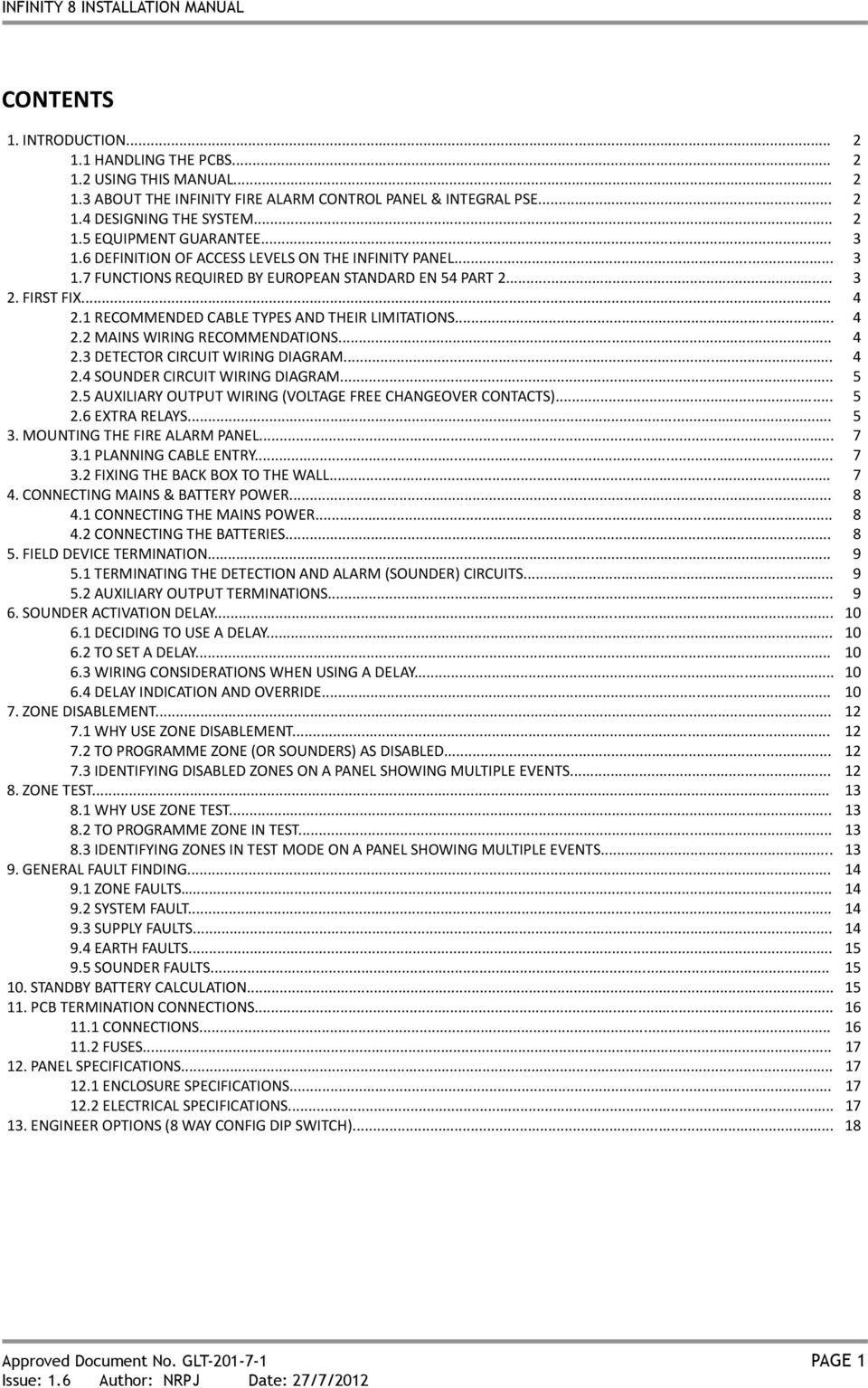
2 CONTENTS 1. INTRODUCTION HANDLING THE PCBS USING THIS MANUAL ABOUT THE INFINITY FIRE ALARM CONTROL PANEL & INTEGRAL PSE DESIGNING THE SYSTEM EQUIPMENT GUARANTEE DEFINITION OF ACCESS LEVELS ON THE INFINITY PANEL FUNCTIONS REQUIRED BY EUROPEAN STANDARD EN 54 PART FIRST FIX RECOMMENDED CABLE TYPES AND THEIR LIMITATIONS MAINS WIRING RECOMMENDATIONS DETECTOR CIRCUIT WIRING DIAGRAM SOUNDER CIRCUIT WIRING DIAGRAM AUXILIARY OUTPUT WIRING (VOLTAGE FREE CHANGEOVER CONTACTS) EXTRA RELAYS MOUNTING THE FIRE ALARM PANEL PLANNING CABLE ENTRY FIXING THE BACK BOX TO THE WALL CONNECTING MAINS & BATTERY POWER CONNECTING THE MAINS POWER CONNECTING THE BATTERIES FIELD DEVICE TERMINATION TERMINATING THE DETECTION AND ALARM (SOUNDER) CIRCUITS AUXILIARY OUTPUT TERMINATIONS SOUNDER ACTIVATION DELAY DECIDING TO USE A DELAY TO SET A DELAY WIRING CONSIDERATIONS WHEN USING A DELAY DELAY INDICATION AND OVERRIDE ZONE DISABLEMENT WHY USE ZONE DISABLEMENT TO PROGRAMME ZONE (OR SOUNDERS) AS DISABLED IDENTIFYING DISABLED ZONES ON A PANEL SHOWING MULTIPLE EVENTS ZONE TEST WHY USE ZONE TEST TO PROGRAMME ZONE IN TEST IDENTIFYING ZONES IN TEST MODE ON A PANEL SHOWING MULTIPLE EVENTS GENERAL FAULT FINDING ZONE FAULTS SYSTEM FAULT SUPPLY FAULTS EARTH FAULTS SOUNDER FAULTS STANDBY BATTERY CALCULATION PCB TERMINATION CONNECTIONS CONNECTIONS FUSES PANEL SPECIFICATIONS ENCLOSURE SPECIFICATIONS ELECTRICAL SPECIFICATIONS ENGINEER OPTIONS (8 WAY CONFIG DIP SWITCH) Approved Document No. GLT PAGE 1
3 1. INTRODUCTION THIS FIRE ALARM CONTROL PANEL IS CLASS 1 EQUIPMENT AND MUST BE EARTHED. This equipment must be installed and maintained by a qualified and technically experienced person. 1.1 HANDLING THE PCBS If the PCBs are to be removed to ease fitting the enclosure and cables, care must be taken to avoid damage by static. The best method is to wear an earth strap, but touching any earth point (e.g. building plumbing) will help to discharge any static. Hold PCBs by their sides, avoiding contact with any components. Always handle PCBs by their sides and avoid touching the legs of any components. Keep the PCBs away from damp dirty areas, e.g. in a small cardboard box. 1.2 USING THIS MANUAL This manual explains, in a step-by-step manner, the procedure for the installation of the Infinity 8 Range of Fire Alarm Control Panels. For full operational and maintenance information, please refer to document GLT.MAN- (USER MANUAL, MAINTENANCE GUIDE & LOG BOOK). It also contains a System set-up table, and Installation Certificate, that must be completed by the Commissioning Engineer prior to system handover. Unlike the User Manual, this Installation Manual must not be left accessible to the User. 1.3 ABOUT THE INFINITY FIRE ALARM CONTROL PANEL & INTEGRAL PSE The Infinity Fire alarm control panel is available in 1,2,4,6 or 8 Zone sizes. The 1 & 2 zone panels have 2 x 250mA sounder circuits. The 4, 6 & 8 zone panels have 4 x 150mA sounder circuits. It has a set of fire relay contacts (voltage free) rated at 1A SELV. It has a set of fault relay contacts (voltage free) rated at 1A SELV. This relay is normally powered to allow a fault output in the case of total power failure. It has the ability to disable any zone or the sounder circuits. It has a one man test mode, which resets the Zone in test after 5 seconds (EN54 option with requirements). It has a sounder delay facility (0-10 minutes in 1 minute steps)(en54 option with requirements). It has a maximum battery capacity of 3.4Ah. It has an in built capability of operating with Diode bases (for line continuity on head removal). It will operate in ambient temperatures of -5 to 40 C. It will operate in a relative humidity of up to 93% (non-condensing). It will withstand vibrations between 5 & 150 Hz. It has a maximum capacity of 32 devices per zone. The PSE is a 35W Switch Mode cage with a nominal output of 30V. The battery is fused at 2A (quick blow). The PSE will draw a maximum of 30uA from the battery in the event of mains failure (the FACP will continue to take around 60mA). The FACP & PSE should be maintained as described in section 3 of the User Manual, Maintenance Guide & Log Book. 1.4 DESIGNING THE SYSTEM This manual is not designed to teach Fire Alarm System design. It is assumed that the installer has an understanding of Fire Alarm System components and their use. We strongly recommend consultation with a suitably qualified, competent person regarding the design of the Fire Alarm System. The System must be commissioned and serviced in accordance with our instructions and the relevant National Standards. Contact the Fire Officer concerned with the property at an early stage in case he has any special requirements. If in doubt, read BS 5839: Pt 1: 2002 Fire Detection and Fire Alarm Systems for buildings (Code of Practice for System Design, Installation, Commissioning and Maintenance) available from the BSI, or at your local reference library. 1.5 EQUIPMENT GUARANTEE If this equipment is not fitted and commissioned according to our guidelines, and the relevant National Standards, by an approved and competent person or organisation, the warranty may become void. Approved Document No. GLT PAGE 2

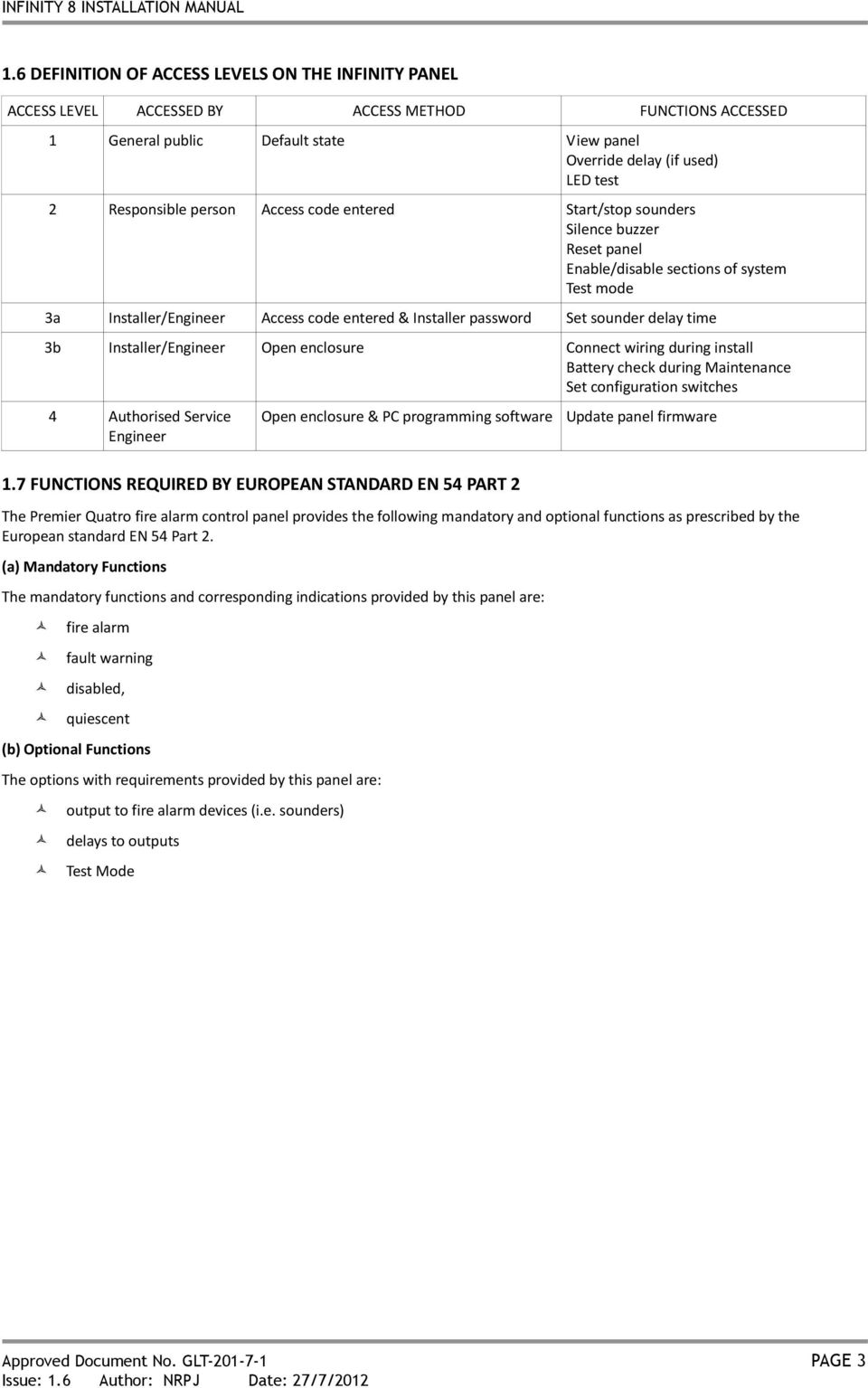
4 1.6 DEFINITION OF ACCESS LEVELS ON THE INFINITY PANEL ACCESS LEVEL ACCESSED BY ACCESS METHOD FUNCTIONS ACCESSED 1 General public Default state View panel Override delay (if used) LED test 2 Responsible person Access code entered Start/stop sounders Silence buzzer Reset panel Enable/disable sections of system Test mode 3a Installer/Engineer Access code entered & Installer password Set sounder delay time 3b Installer/Engineer Open enclosure Connect wiring during install Battery check during Maintenance Set configuration switches 4 Authorised Service Engineer Open enclosure & PC programming software Update panel firmware 1.7 FUNCTIONS REQUIRED BY EUROPEAN STANDARD EN 54 PART 2 The Premier Quatro fire alarm control panel provides the following mandatory and optional functions as prescribed by the European standard EN 54 Part 2. (a) Mandatory Functions The mandatory functions and corresponding indications provided by this panel are: fire alarm fault warning disabled, quiescent (b) Optional Functions The options with requirements provided by this panel are: output to fire alarm devices (i.e. sounders) delays to outputs Test Mode Approved Document No. GLT PAGE 3
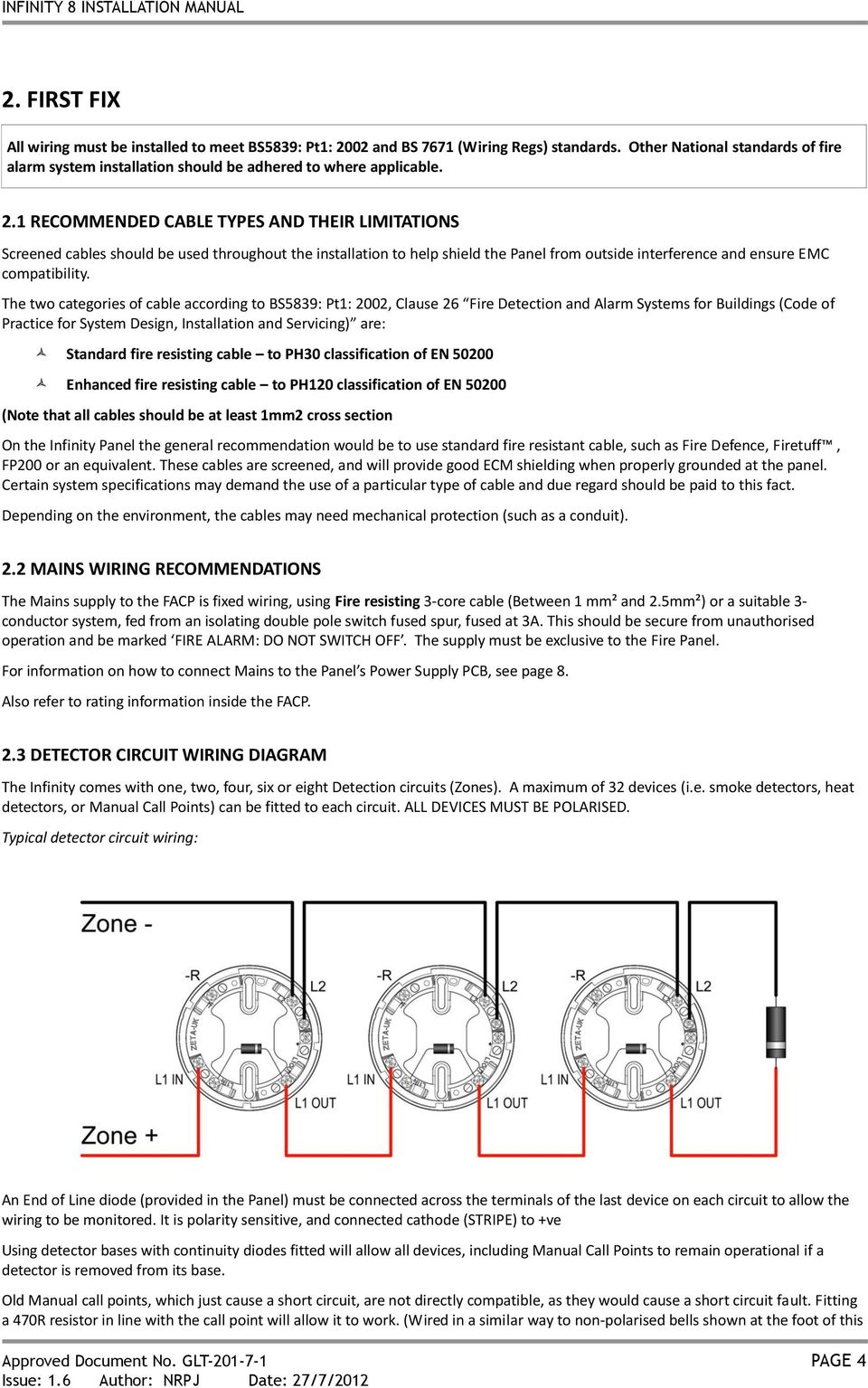
5 2. FIRST FIX All wiring must be installed to meet BS5839: Pt1: 2002 and BS 7671 (Wiring Regs) standards. Other National standards of fire alarm system installation should be adhered to where applicable. 2.1 RECOMMENDED CABLE TYPES AND THEIR LIMITATIONS Screened cables should be used throughout the installation to help shield the Panel from outside interference and ensure EMC compatibility. The two categories of cable according to BS5839: Pt1: 2002, Clause 26 Fire Detection and Alarm Systems for Buildings (Code of Practice for System Design, Installation and Servicing) are: Standard fire resisting cable to PH30 classification of EN Enhanced fire resisting cable to PH120 classification of EN (Note that all cables should be at least 1mm2 cross section On the Infinity Panel the general recommendation would be to use standard fire resistant cable, such as Fire Defence, Firetuff, FP200 or an equivalent. These cables are screened, and will provide good ECM shielding when properly grounded at the panel. Certain system specifications may demand the use of a particular type of cable and due regard should be paid to this fact. Depending on the environment, the cables may need mechanical protection (such as a conduit). 2.2 MAINS WIRING RECOMMENDATIONS The Mains supply to the FACP is fixed wiring, using Fire resisting 3-core cable (Between 1 mm² and 2.5mm²) or a suitable 3- conductor system, fed from an isolating double pole switch fused spur, fused at 3A. This should be secure from unauthorised operation and be marked FIRE ALARM: DO NOT SWITCH OFF. The supply must be exclusive to the Fire Panel. For information on how to connect Mains to the Panel s Power Supply PCB, see page 8. Also refer to rating information inside the FACP. 2.3 DETECTOR CIRCUIT WIRING DIAGRAM The Infinity comes with one, two, four, six or eight Detection circuits (Zones). A maximum of 32 devices (i.e. smoke detectors, heat detectors, or Manual Call Points) can be fitted to each circuit. ALL DEVICES MUST BE POLARISED. Typical detector circuit wiring: An End of Line diode (provided in the Panel) must be connected across the terminals of the last device on each circuit to allow the wiring to be monitored. It is polarity sensitive, and connected cathode (STRIPE) to +ve Using detector bases with continuity diodes fitted will allow all devices, including Manual Call Points to remain operational if a detector is removed from its base. Old Manual call points, which just cause a short circuit, are not directly compatible, as they would cause a short circuit fault. Fitting a 470R resistor in line with the call point will allow it to work. (Wired in a similar way to non-polarised bells shown at the foot of this Approved Document No. GLT PAGE 4
6 page). Other makes of detector will have different connections, but in general they are wired +IN & +OUT to same terminal, -IN to stripe side of continuity diode, -OUT to non-stripe side of continuity diode. Some makes will connect the +ve to a 470R load resistor, or a polarisation diode, to enable the detector to work correctly. If detectors other than Fyreye MK II are used the panel may need to be put into compatibility mode (See section 13) For more specific device wiring information, please refer to the manufacturers own instructions. The termination of each detection circuit must be as indicated on the main PCB (See page 15). The Earthing of the cable screens should be as shown on page SOUNDER CIRCUIT WIRING DIAGRAM Note: If non-polarised alarm devices (e.g. some types of old mechanical bell, or a relay) are used, then a diode will have to be placed in line with the device to enable fault monitoring. They may also need a back EMF protection diode. 2.5 AUXILIARY OUTPUT WIRING (VOLTAGE FREE CHANGEOVER CONTACTS) Auxiliary Fire Output (AUX): Changes over in any fire condition, and be used for driving local fire fighting equipment such as sprinkler systems, magnetic door holders, air conditioning shut off, etc. Fault Output (FAULT): This Output is energised in the quiescent condition. In a fault condition, the output relay turns off, to ensure fail-safe operation even in the event of total power loss. That is, the normally open contact will be closed when there is no fault, and open when there is a fault. This should be taken into account when any device is connected to the fault relay. 2.6 EXTRA RELAYS EN54-2 requires a fire panel to have a fault output. However, if the fault output is not being used, the infinity panel has the option to configure the fault relay as a second fire relay. See Engineering options (Section 13). Typical auxiliary output wiring: Approved Document No. GLT PAGE 5

7 The termination for the above inputs must be as indicated on the main PCB (See page 15). The Earthing of the cable screens should be as shown on page 9. Approved Document No. GLT PAGE 6

8 3. MOUNTING THE FIRE ALARM PANEL It is recommended that the panel s door be removed to avoid accidental damage. Also, the termination PCB could be removed and stored in a safe place, while fixing the back box to the wall. 3.1 PLANNING CABLE ENTRY Fig.2 below shows the location of the cable entries to facilitate planning of wiring (home runs) to be brought to the panel. The grommets can be easily removed by a push from inside the control panel box. If a grommet is removed, fill the hole with a brass cable gland. If any knockout is removed, but subsequently not used, it should be covered up. The 230Va.c. Mains cable must be fed into the enclosure via one of the cable entries at the top right corner of the back box. (Refer to Connecting the Mains on Page 8). 3.2 FIXING THE BACK BOX TO THE WALL Figure 2: Plan view inside the enclosure without PCBs. Side view for surface / flush installation. Fix the enclosure to the wall using the mounting holes provided. Check the build & condition of the wall to decide a suitable screw fixing. The mounting holes are designed for No 8 roundhead or countersunk woodscrews (or similar). Remove any debris from the enclosure. Take care not to damage the FACP during installation. Approved Document No. GLT PAGE 7

9 4. CONNECTING MAINS & BATTERY POWER 4.1 CONNECTING THE MAINS POWER Figure 3: Power Supply PCB layout and Mains connection details Figure CONNECTING THE BATTERIES Figure 4: Battery location and connection details CAUTION: RISK OF EXPLOSION IF BATTERY IS REPLACED BY AN INCORRECT TYPE. DISPOSE OF USED BATTERIES ACCORDING TO BATTERY MANUFACTURERS INSTRUCTIONS Figure 4 Approved Document No. GLT PAGE 8

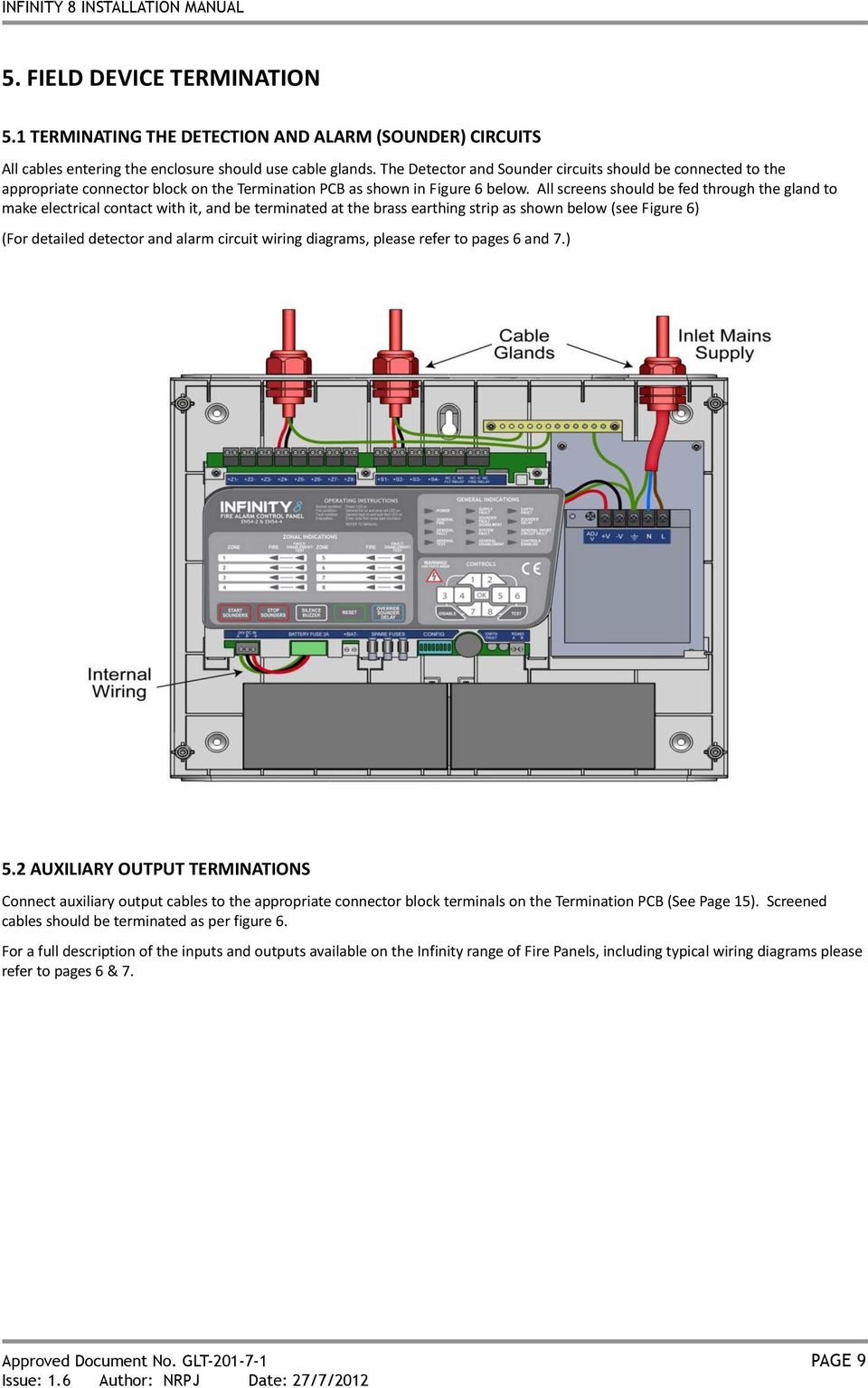
10 5. FIELD DEVICE TERMINATION 5.1 TERMINATING THE DETECTION AND ALARM (SOUNDER) CIRCUITS All cables entering the enclosure should use cable glands. The Detector and Sounder circuits should be connected to the appropriate connector block on the Termination PCB as shown in Figure 6 below. All screens should be fed through the gland to make electrical contact with it, and be terminated at the brass earthing strip as shown below (see Figure 6) (For detailed detector and alarm circuit wiring diagrams, please refer to pages 6 and 7.) 5.2 AUXILIARY OUTPUT TERMINATIONS Connect auxiliary output cables to the appropriate connector block terminals on the Termination PCB (See Page 15). Screened cables should be terminated as per figure 6. For a full description of the inputs and outputs available on the Infinity range of Fire Panels, including typical wiring diagrams please refer to pages 6 & 7. Approved Document No. GLT PAGE 9
11 6. SOUNDER ACTIVATION DELAY 6.1 DECIDING TO USE A DELAY A delay of up to ten minutes from the Fire Alarm Panel being triggered, to its Alarm sounder outputs being activated, can be programmed into the panel by the Engineer. This is a particularly useful feature for schools, nightclubs and other public places where the nuisance and panic caused by a false alarm must be avoided. It should be noted that the delay period will apply to ALL DETECTOR zones. Call point Zones will not be delayed. When a sounder delay is used, zone 1 is designated as a call point zone, and an alarm in this zone will not be delayed. There is an option to define the last zone as a call point zone also (see section 13: Engineer Options). All other zones will be designated as detector zones. When an Alarm occurs on any detector zone, it is processed as normal. However, the activation of the sounders is postponed until the delay period has expired, thus allowing the cause of the Alarm to be investigated by the User. If the alarm is false the alarm can be cancelled. 6.2 TO SET A DELAY 1. Enter the access code (default 1245) and press. 2. Enter access level 3 (1246) and press. 3. Hold for 3 seconds. 4. Type in the number of minutes you require the delay to be: 1-8 minutes type the number with the keypad. 0 minutes type nothing. 9 minutes type minutes type 82. Press. 5. The panel will flash a confirmation of the selected delay. 6. Press 3 times to exit access level WIRING CONSIDERATIONS WHEN USING A DELAY A delay is not usually applied to manual call points, unless there are exceptional circumstances to be taken into consideration. In order to meet this requirement, call points should be connected to a zone that is not delayed. On the infinity panel, zone 1 is never delayed, so call points should be connected to zone 1. If more than one 'call point zone' is needed, the last zone on the panel can also be set as non-delayed by setting configuration dip switch 8 to the on position. 6.4 DELAY INDICATION AND OVERRIDE If a delay is set, the fire panel will light the Delay (SOUNDER DELAY) LED to indicate that the sounders are delayed. If an alarm occurs, the fire LEDs will light as usual, but the sounders will not start until the delay period has expired. After the delay period, the Delay LED will extinguish & the sounders will start. Pressing the switch will override the delay at any time and results in the sounders being turned on immediately. If on investigation, the panel was activated by a false alarm, enter the access code to enable the Controls, and press the reset button. This will return the system to normal, without the sounders being activated. (Assuming the cause of the false alarm has been removed). The delay can be toggled on/off: 1. Enter access code (1245) press. 2. Press. 3. Press again to deactivate sounder delay. Approved Document No. GLT PAGE 10

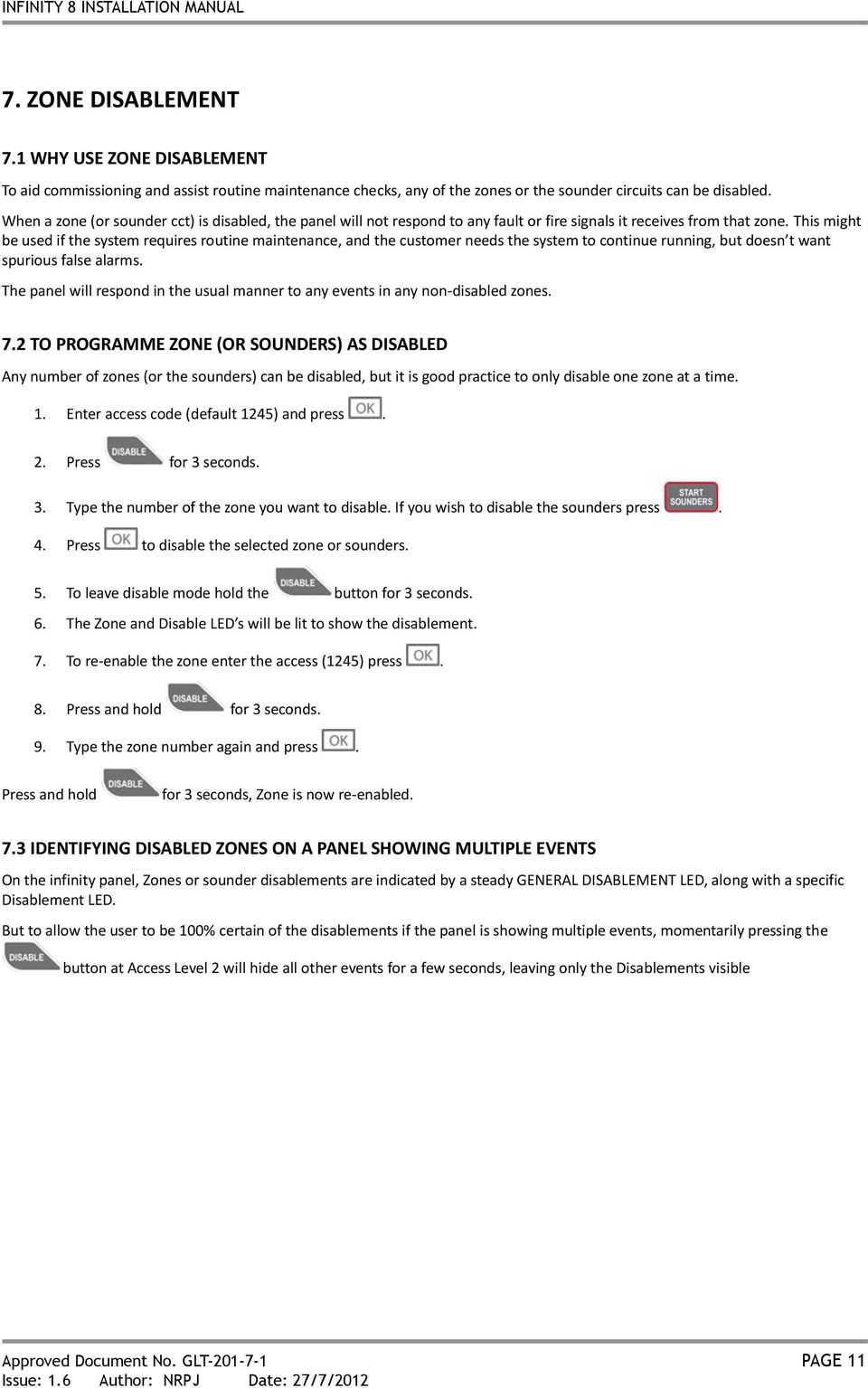
12 7. ZONE DISABLEMENT 7.1 WHY USE ZONE DISABLEMENT To aid commissioning and assist routine maintenance checks, any of the zones or the sounder circuits can be disabled. When a zone (or sounder cct) is disabled, the panel will not respond to any fault or fire signals it receives from that zone. This might be used if the system requires routine maintenance, and the customer needs the system to continue running, but doesn t want spurious false alarms. The panel will respond in the usual manner to any events in any non-disabled zones. 7.2 TO PROGRAMME ZONE (OR SOUNDERS) AS DISABLED Any number of zones (or the sounders) can be disabled, but it is good practice to only disable one zone at a time. 1. Enter access code (default 1245) and press. 2. Press for 3 seconds. 3. Type the number of the zone you want to disable. If you wish to disable the sounders press. 4. Press to disable the selected zone or sounders. 5. To leave disable mode hold the button for 3 seconds. 6. The Zone and Disable LED s will be lit to show the disablement. 7. To re-enable the zone enter the access (1245) press. 8. Press and hold for 3 seconds. 9. Type the zone number again and press. Press and hold for 3 seconds, Zone is now re-enabled. 7.3 IDENTIFYING DISABLED ZONES ON A PANEL SHOWING MULTIPLE EVENTS On the infinity panel, Zones or sounder disablements are indicated by a steady GENERAL DISABLEMENT LED, along with a specific Disablement LED. But to allow the user to be 100% certain of the disablements if the panel is showing multiple events, momentarily pressing the button at Access Level 2 will hide all other events for a few seconds, leaving only the Disablements visible Approved Document No. GLT PAGE 11
13 8. ZONE TEST 8.1 WHY USE ZONE TEST To aid commissioning and assist routine maintenance check, a non-latching one man test facility is available. When a detector or manual call point is triggered on any zone in Test, the Alarm sounders operate for approximately five seconds on and seven seconds off. This cycle continues until the cause of the Alarm is removed (either by the test smoke clearing from the detector or the manual call point being reset), at which point, the detector circuit also automatically resets. Should an Alarm occur on a zone that is not programmed to test, the Alarm will be processed in the normal way. The testing of the zone in test will temporarily be suspended until the Alarm(s) from the other zones are reset. At this point, zone retesting may resume. 8.2 TO PROGRAMME ZONE IN TEST NOTE: Only one zone can be programmed in test at any one time. 1. Enter access code (1245) press. 2. Press and hold for 3 seconds. 3. Select the zone you wish to put into test mode by typing the number with the keypad. The Zone & test LEDs will be flashing with a pattern 4 flashes then a pause (repeated). The zone is not in test mode at this point. 4. Press to start test mode. The Zone & test LEDs will be flashing with a pattern 12 flashes then a pause (repeated). The zone is now in test mode. 5. To set a different zone into test mode, press the zone number, followed by. The new zone is now in test mode, and the original zone returns to normal operation. To end test mode press for 3 seconds. For safety reasons, it is not possible to leave a zone in test while performing other maintenance functions (Such as disablement). This stops the possibility of leaving a section in test mode while another part of the system is being investigated. Trying to select disablement mode while test mode is active will result in the panel giving a warning tone, and a reminder that the panel is in test mode. Test mode must then be exited (By pressing accessed. for 3 seconds) before disablement mode can be If a panel does need both disablements & test mode to be applied at the same time, the disablement should be performed first. 8.3 IDENTIFYING ZONES IN TEST MODE ON A PANEL SHOWING MULTIPLE EVENTS On the infinity panel, a Zone in test is indicated by a fast flashing GENERAL TEST LED, along with a specific zone test LED. But to allow the user to be 100% certain of any zones in test mode if the panel is showing multiple events, momentarily pressing the button at Access Level 2 will hide all other events for a few seconds, leaving only the Zone in test visible. Approved Document No. GLT PAGE 12

14 9. GENERAL FAULT FINDING 9.1 ZONE FAULTS To assist in fault finding, the infinity panel will display zone faults as follows. The general fault LED will flash if a fault is present. On the first flash, any zones showing O/C will flash. The second time the General fault LED flashes, any zones with a Short Circuit fault will flash in conjunction with the General S/C LED. The cycle then repeats, showing O/C & S/C faults on alternate flashes. (The internal fault buzzer will also sound, and the fault relay will operate) The Zone Faults are non-latching faults. That is, if the fault disappears, the panel will automatically reset itself. Suggested Action a) Disconnect the wiring for the zone showing fault, and refit the end of line diode at that zone terminal in the panel. (Stripe to Zone +ve) If the fault condition for that zone clears, this confirms there is a wiring fault. b) Double-check the wiring and the end of line diode on the zone. Trace the fault with consideration for the type of fault indicated.(hint: splitting the cable half way down the zone, and fitting the end of line diode to the new end point helps to determine which section of cable is giving the fault) Note: A possible fault is a detector head badly seated in a base that is not making the connection. c) A short circuit on a zone could be caused by the end of line diode being fitted backwards. d) Check that the detectors are compatible with this FACP. Note that some makes of detector will require a series resistor or diode to be fitted to work properly. There is usually a spare connector on the base to accommodate this (check instructions that came with the detector). 9.2 SYSTEM FAULT A system fault is an abnormal microprocessor running condition due to various unexpected phenomena This will result in the panel attempting to correct itself. Should this fault occur, the System Fault LED, General Fault LED, General Fault relay and fault internal buzzer will be constantly active To reset a system fault, enter the access code, and press reset. If the system fault does not clear, the panel has been damaged, and will need to be repaired or replaced. 9.3 SUPPLY FAULTS The Infinity panel indicates supply faults with one long flash, followed by a number of shorter flashes. The number of short flashes indicates the type of fault:- 1 FLASH Mains Fault or Cage Fault 2 FLASHES Battery not present 3 FLASHES Battery voltage too low 4 FLASHES Battery internal resistance too high 5 FLASHES Charger fault 1 Flash - Mains Fault or Cage fault a. Check that main power is present. b. Check that cage voltage is set to 30.5 V DC 2 Flashes - Battery not present a. Check that 2 x 12V SLA batteries are fitted b. Check battery fuse FS6. c. Check that battery connections are secure. 3 Flashes - Battery voltage too low. Approved Document No. GLT PAGE 13

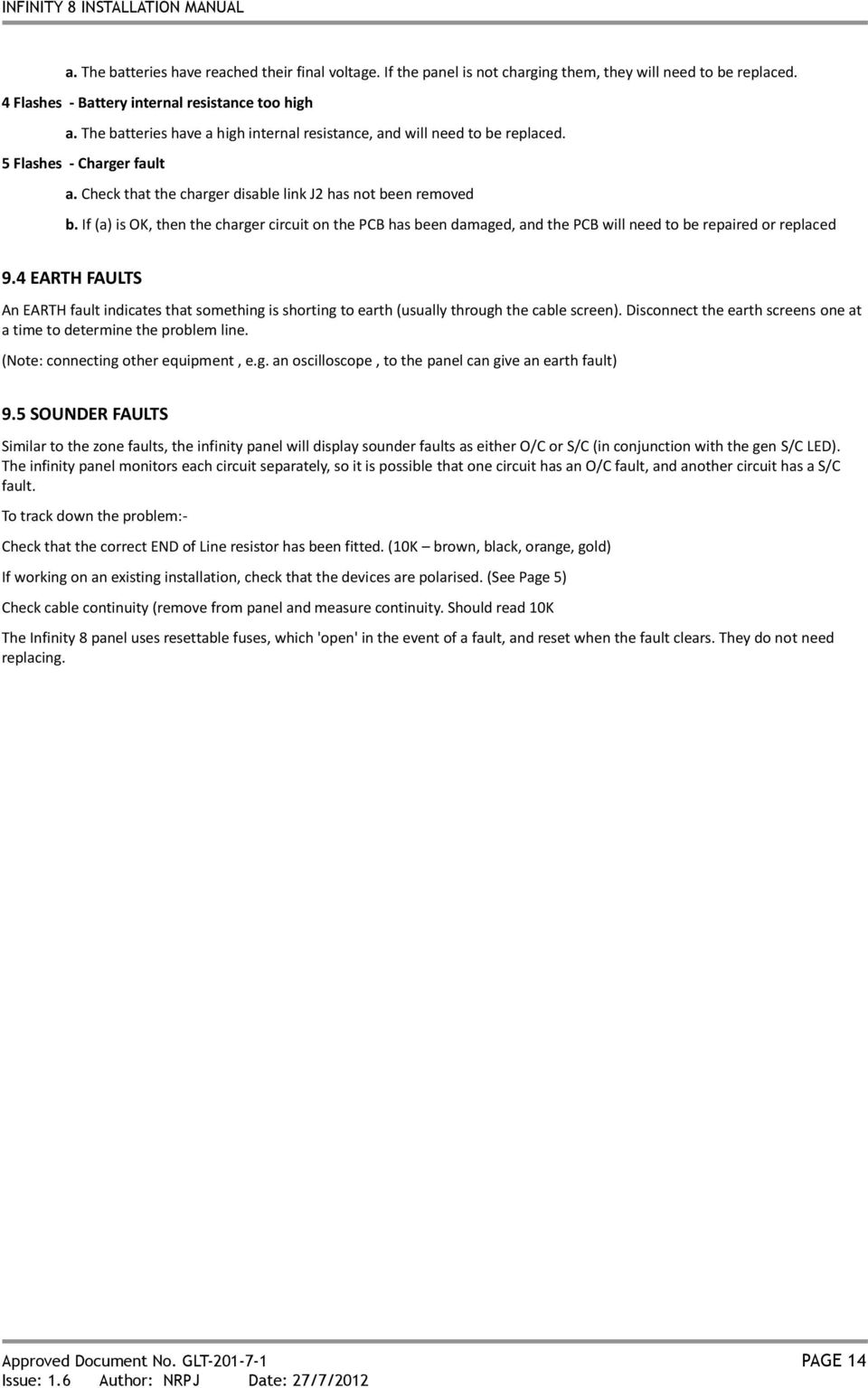
15 a. The batteries have reached their final voltage. If the panel is not charging them, they will need to be replaced. 4 Flashes - Battery internal resistance too high a. The batteries have a high internal resistance, and will need to be replaced. 5 Flashes - Charger fault a. Check that the charger disable link J2 has not been removed b. If (a) is OK, then the charger circuit on the PCB has been damaged, and the PCB will need to be repaired or replaced 9.4 EARTH FAULTS An EARTH fault indicates that something is shorting to earth (usually through the cable screen). Disconnect the earth screens one at a time to determine the problem line. (Note: connecting other equipment, e.g. an oscilloscope, to the panel can give an earth fault) 9.5 SOUNDER FAULTS Similar to the zone faults, the infinity panel will display sounder faults as either O/C or S/C (in conjunction with the gen S/C LED). The infinity panel monitors each circuit separately, so it is possible that one circuit has an O/C fault, and another circuit has a S/C fault. To track down the problem:- Check that the correct END of Line resistor has been fitted. (10K brown, black, orange, gold) If working on an existing installation, check that the devices are polarised. (See Page 5) Check cable continuity (remove from panel and measure continuity. Should read 10K The Infinity 8 panel uses resettable fuses, which 'open' in the event of a fault, and reset when the fault clears. They do not need replacing. Approved Document No. GLT PAGE 14
16 10. STANDBY BATTERY CALCULATION In order to calculate the standby battery size required, the following formula can be used:- Battery Size (Standby time in Amp Hours) = 1.25 x [(T ALM x I ALM ) + (T SBY x (I QP + I QZ ))] Where: T ALM I ALM T SBY I QP Typical Example: = Maximum time in hours required for the alarm [½ hour is most common time] = Total Alarm Current in amps for all alarm devices connected to the alarm circuits = Standby time in hours for the system after mains failure [normally 24, 48 or 72 hr] = Quiescent current in amps of control panel in fault condition [because of mains failure] I QZ = Quiescent current in amps of all detection zones. E.g. Ion detector Amp (50 μa), Optical Detector = Amp (100 μa) A system comprises of 20 ionisation detectors, 14 bells and the required standby is 24 hours. It will need to operate in alarm for ½ hour. Calculate the battery size required. T ALM = 0.5 Hr I ALM = 14 x =0.35A [This assumes the bell current is 25 ma. Most alarm Devices show their operating current] T SBY = 24 Hr I QP = 0.085A I QZ = 20 x =0.001A [the quiescent current for an ionisation detector is 50 μa] Therefore using the equation: Battery Size (Standby time in Amp Hours) = 1.25 x [(T ALM x I ALM ) + (T SBY x (I QP + I QZ ))] Battery Size (Standby time in Amp Hours) = 1.25 x [(0.5 x 0.35) + (24 x ( ))] Battery Size (Standby time in Amp Hours) = 1.25 x [ (24 x 0.049)] Battery Size (Standby time in Amp Hours) = 1.25 x [ ] Battery Size (Standby time in Amp Hours) = 1.25 x Battery Size (Standby time in Amp Hours) = 1.69 Amp Hours This system would require a minimum of 1.69Ah batteries. Approved Document No. GLT PAGE 15
![amps for all alarm devices connected to the alarm circuits = Standby time in hours for the system after mains failure [normally 24, 48 or 72 hr] = Quiescent current in amps of control panel in fault](/docs-images/47/20936953/images/page_16.jpg "condition [because of mains failure] I QZ = Quiescent current in amps of all detection zones. E.g. Ion detector 0.00005 Amp (50 μa), Optical Detector = 0.")
17 11. PCB TERMINATION CONNECTIONS 11.1 CONNECTIONS CONNECTION NO. DESCRIPTION USE 1 ZONE 1 +&- Connect to Zone 1 2 ZONE 2 +&- Connect to Zone 2 3 ZONE 3 +&- Connect to Zone 3 4 ZONE 4 +&- Connect to Zone 4 5 ZONE 5 +&- Connect to Zone 5 6 ZONE 6 +&- Connect to Zone 6 7 ZONE 7 +&- Connect to Zone 7 8 ZONE 8 +&- Connect to Zone 8 9 SND 1 +&- Connect to sounder circuit 1 (sirens/bells) 10 SND 2 +&- Connect to sounder circuit 2 (sirens/bells) 11 SND 3 +&- Connect to sounder circuit 3 (sirens/bells) 12 SND 4 +&- Connect to sounder circuit 4 (sirens/bells) 13 FAULT RELAY NC/CM/NO Normally powered i.e. NO is closed with no fault 14 FIRE RELAY NO/CM/NC Normally open, Activates on Fire condition 15 24V DC IN CONNECTION FROM CAGE 16 BATTERY +&- STANDBY BATTERY TERMINALS 17 RS485 COMMS FOR REPEATER (FUTURE) 11.2 FUSES FUSE NO. DESCRIPTION RATING FS2 Sounder circuit 1 150mA thermal fuse FS3 Sounder circuit 2 150mA thermal fuse FS4 Sounder circuit 3 150mA thermal fuse FS5 Sounder circuit 4 150mA thermal fuse FS6 Battery Fuse 2A quick 5 x 20mm glass Approved Document No. GLT PAGE 16

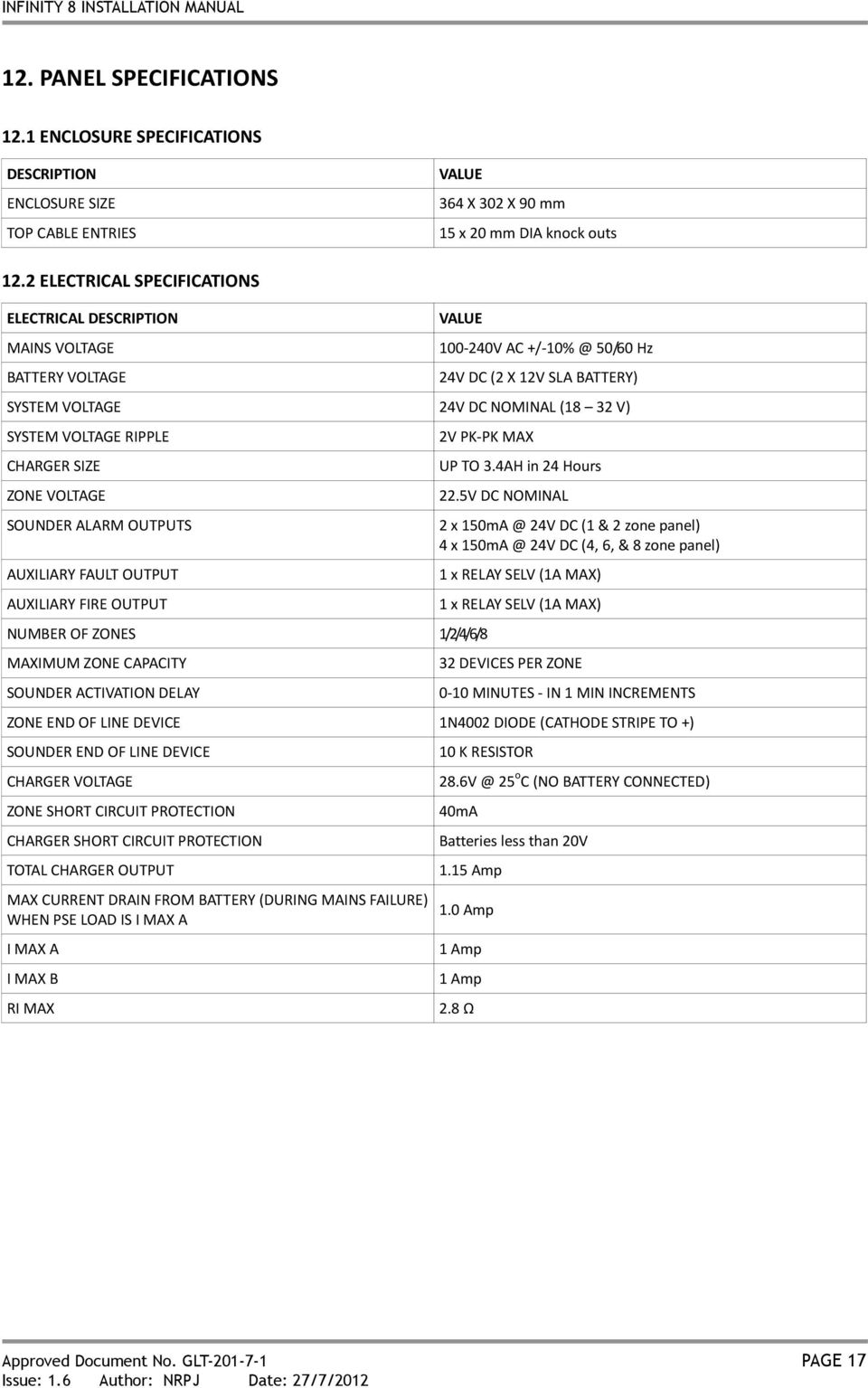
18 12. PANEL SPECIFICATIONS 12.1 ENCLOSURE SPECIFICATIONS DESCRIPTION ENCLOSURE SIZE TOP CABLE ENTRIES VALUE 364 X 302 X 90 mm 15 x 20 mm DIA knock outs 12.2 ELECTRICAL SPECIFICATIONS ELECTRICAL DESCRIPTION MAINS VOLTAGE BATTERY VOLTAGE VALUE V AC 50/60 Hz 24V DC (2 X 12V SLA BATTERY) SYSTEM VOLTAGE 24V DC NOMINAL (18 32 V) SYSTEM VOLTAGE RIPPLE CHARGER SIZE ZONE VOLTAGE SOUNDER ALARM OUTPUTS AUXILIARY FAULT OUTPUT AUXILIARY FIRE OUTPUT 2V PK-PK MAX NUMBER OF ZONES 1/2/4/6/8 MAXIMUM ZONE CAPACITY SOUNDER ACTIVATION DELAY UP TO 3.4AH in 24 Hours 22.5V DC NOMINAL 2 x 24V DC (1 & 2 zone panel) 4 x 24V DC (4, 6, & 8 zone panel) 1 x RELAY SELV (1A MAX) 1 x RELAY SELV (1A MAX) 32 DEVICES PER ZONE 0-10 MINUTES - IN 1 MIN INCREMENTS ZONE END OF LINE DEVICE 1N4002 DIODE (CATHODE STRIPE TO +) SOUNDER END OF LINE DEVICE CHARGER VOLTAGE ZONE SHORT CIRCUIT PROTECTION CHARGER SHORT CIRCUIT PROTECTION TOTAL CHARGER OUTPUT MAX CURRENT DRAIN FROM BATTERY (DURING MAINS FAILURE) WHEN PSE LOAD IS I MAX A I MAX A I MAX B RI MAX 10 K RESISTOR 25 o C (NO BATTERY CONNECTED) 40mA Batteries less than 20V 1.15 Amp 1.0 Amp 1 Amp 1 Amp 2.8 Ω Approved Document No. GLT PAGE 17


19 13. ENGINEER OPTIONS (8 WAY CONFIG DIP SWITCH) The Infinity FCP has the following configuration options: Switch 1 ON = Compatibility Mode use if Fyreye II Detectors are NOT used Switch 2 ON = Zone 2 non latching Switch 3 ON = Sounder circuit 3 active giving a power output Switch 4 ON = Sounder circuit 4 active giving a power output Switch 5 ON = DUTCH MARKET ONLY Switch 6 ON = Fault relay activates on a fire condition (Giving 2 fire relays) Switch 8 ON = Makes the last zone on the panel a call point zone (alarms from that zone not delayed) Note: The above options my not comply with local regulations. Please check with the relevant codes of practice in your region Zeta Alarm Systems by GLT Exports Ltd, Morfa Road, Swansea SA1 2EN CPD EN54-2:1997+A1: A2: 2006 EN54-4:1997+A1: A2: 2006 Control and indicating equipment for fire detection and fire alarm systems for buildings Infinity Conventional Fire Panel IN1, IN2, IN4, IN6, IN8 Provided options: Output to fire alarm devices Delays to outputs Test Condition Other Technical Data: See Doc: Infinity 8 Product file held by the manufacturer Approved Document No. GLT PAGE 18

3. MOUNTING THE FIRE ALARM PANEL... 7 3.1 PLANNING CABLE ENTRY 3.2 FIXING THE BACKBOX TO THE WALL
 INSTALLATION MANUAL CONTENTS 1. INTRODUCTION. 3 1.1 HANDLING THE PCBS 1.2 USING THIS MANUAL 1.3 ABOUT THE PREMIER SX FACP & INTEGRAL PSE 1.4 DESIGNING THE SYSTEM 1.5 EQUIPMENT GUARANTEE 2. FIRST FIX GUIDELINES.
BARDIC. 4 & 8 Zone Fire Panels Zircon range. Data, installation, operation and maintenance. by Honeywell
 Data, installation, operation and maintenance 4 & 8 Zone Fire Panels Zircon range BARDIC by Honeywell LED flashing LED Continuous FAULT DISABLE/TEST Power General Fault Sounder Fault/ Disable System Fault
USER MANUAL, MAINTENANCE GUIDE & LOG BOOK
 Software Versions: PANEL 1.52 & LOOP CARD 2.0 ONE TO FOUR LOOPS ANALOGUE ADDRESSABLE FIRE ALARM PANEL USER MANUAL, MAINTENANCE GUIDE & LOG BOOK #Doc No. GLT.MAN-135 TABLE OF CONTENTS WHAT TO DO IF THE
FIREDEX 2200. Conventional Fire Panels
 68 Flexible, high specification system Choice of 1, 2, 4 or 8 zones Simple one-shot auto-reset user test facility Approved to EN54 Maintenance free poly switch circuit protection, with auto reset Class
INTRODUCTION. The data provided is for The Standard Products and any variation will be dealt with at the end of this manual.
 INTRODUCTION The information provided herein covers the range of products known as the 'Sensor 901' series. The range of equipment is designed to meet the requirements of BS 5839 parts 1 & 4 1988. The
CFP 2/4/8 ZONE ECONOMY FIRE ALARM CONTROL PANEL. installation & maintenance manual. Approved Document No. DFU7002030 Rev 1
 CFP 2/4/8 ZONE ECONOMY FIRE ALARM CONTROL PANEL installation & maintenance manual Approved Document No. DFU7002030 Rev 1 CFP 2/4/8 ZONE ECONOMY FIRE ALARM PANEL CONTENTS Basic Overview and Key Features...3
LPCB APPROVED CFP 2/4/8 ZONE FIRE ALARM CONTROL PANEL. installation & maintenance manual. Approved Document No. DFU7004010 Rev 1
 LPCB APPROVED CFP 2/4/8 ZONE FIRE ALARM CONTROL PANEL installation & maintenance manual Approved Document No. DFU7004010 Rev 1 CONTENTS EN54 Compliance Statement...3 Basic Overview & Key Features...3 Important
Premier M Plus & Infinity 8
 25 Years of Manufacturing Excellence Premier M Plus & Infinity 8 Conventional Fire Alarm Systems 007 Assessed to ISO 9001: 2008 Certificate number 330 Premier M Plus 8-24 Zone Conventional Fire Alarm Panel
TS510 & TS500. Installation & User Guide. Compatible Equipment
 Installation & User Guide Compatible Equipment TS510 REM - Remote Keypad 9040 - Loudspeaker DC54/58 - Digital Communicator SD1+ - Speech Dialler 496525 Issue A 1 of 10 TS510 and TS500 Overview Introduction
CONTENTS. GST102A/104A/108A/116A Conventional Fire Alarm Control Panel Installation and Operation Manual
 CONTENTS Installation Precautions... 1 EN 54 Information... 2 Chapter 1 Product Overview... 3 1.1 Features... 3 1.2 Technical Specifications... 3 1.2.1 Operating Voltage... 3 1.2.2 Batteries... 4 1.2.3
CB200W Water Leak Detection Panel Application Guide
 Checked by: AJC Approved by: JBJ Contents CB200W Water Leak Detection Panel Application Guide 1. Cabinet Specifications... 2 2. Panel Hardware Specifications... 3 3. Panel Configuration... 4 4. Technical
Fire Alarm Control Panel. Family. Operating Manual
 Fire Alarm Control Panel Family Operating Manual CONTENTS System Description AH-03312 System Characteristics... Fire Signal Receiving Board Description-4L... Fire Signal Receiving Board Description-8L...
RP1r. Extinguishing Control Panel. User Manual (Software version 3.x) 3 zone control panel to protect 1 extinguishing risk
 EN12094:1/2003 Honeywell Life Safety Iberia C/Pau Vila 15-19 08911 BADALONA (BARCELONA) Tel.: 93 497 39 60 Fax: 93 465 86 35 www.honeywelllifesafety.es Extinguishing Control Panel RP1r 3 zone control panel
(68.52) X. June 2000 Supercedes February 2000. xenex CONVENTIONAL FIRE DETECTION & ALARM SYSTEM. we look @ business differently
 (68.52) X June 2000 Supercedes February 2000 xenex CONVENTIONAL FIRE DETECTION & ALARM SYSTEM.... we look @ business differently XENEX SYSTEM ARCHITECTURE Note: This schematic is for guidance only please
AC-115 Compact Networked Single Door Controller. Installation and User Manual
 AC-115 Compact Networked Single Controller Installation and User Manual December 2007 Table of Contents Table of Contents 1. Introduction...5 1.1 Key Features... 6 1.2 Technical Specifications... 7 2.
conventional system operation
 conventional system operation detection line operation Conventional detection systems normally operate on a 24VDC line. In the standby condition, the detectors will draw a low current, typically less than
CM705B - Universal Expander Module CM707B - Plug On Zone Expander Security Systems
 CM705B - Universal Expander Module CM707B - Plug On Zone Expander Security Systems EN Security System CM705B CM705B - Universal Expander Module The CM705B universal expander provides a cost effective way
Conventional Fire Detection and Extinguishant Control System Specification
 Conventional Fire Detection and Extinguishant Control System Specification Page 1 of 9 Scope Furnish a complete 24VDC Conventional, electrically supervised, combined fire detection and extinguishant release
9452/9453 Installation and User Guide
 9452/9453 Installation and User Guide Compatible Equipment 9425 Remote Keypad 9040 Internal Sounder 660 Speech Communicator 8440 4-Channel Minicom 496330 Issue 1 1 of 10 9452/3 Introduction The 9452 and
Drayton Digistat +2RF/+3RF
 /+3RF Programmable Room Thermostat Wireless Model: RF700/22090 Model: RF701/22092 Power Supply: Battery - Thermostat Mains - Digistat SCR Invensys Controls Europe Customer Service Tel: 0845 130 5522 Customer
ACTIVE 5 ENGINEERING MANUAL
 ACTIVE 5 ENGINEERING MANUAL C & K Systems Ltd C031-066 Issue 3 THE ACTIVE 5 INSTALLATION MANUAL. Date: Feb 1997 INTRODUCTION. The Active 5 is a microprocessor controlled intruder alarm panel. It features
FIRE ALARM SYSTEM TECHNICAL SPECIFICATIONS Page 1 of 10
 TECHNICAL SPECIFICATIONS Page 1 of 10 FIRE DETECTION AND ALARM SYSTEM Scope Furnish a complete 24V DC conventional, electrically supervised, zone annunciated, fire detection and alarm system as specified
GST301. (Single Protection Zone) Operation Manual
 GST301 Gas Extinguishing Control Panel (Single Protection Zone) Operation Manual 2 of 19 CONTENTS 1 OVERVIEW... 4 2 TECHNICAL DATA... 4 3 STRUCTURES... 5 3.1 FRONT SURFACE DESCRIPTION... 5 3.1.1 Indicators...
CFP 2/4/8 ZONE CONVENTIONAL FIRE ALARM CONTROL PANEL. user manual & log book. Approved Document No. DFU7001020 Rev 1
 CFP 2/4/8 ZONE CONVENTIONAL FIRE ALARM CONTROL PANEL user manual & log book Approved Document No. DFU7001020 Rev 1 CONTENTS Safety...3 Important information regarding the safe use of this fire alarm panel
AlarmSense 2-wire detection and alarm system. Product Guide
 AlarmSense 2-wire detection and alarm system Product Guide Contents What is AlarmSense? 2 The purpose of AlarmSense 4 How AlarmSense works 4 Alarmsense Features 5 Detector removal monitoring 5 Priority/non-priority
A.1. a Division of Pittway Corporation. Documento: M-010.1-MGAS-ENG. Edizione: 01/1997 Rev.:
 Documento: M-010.1-MGAS-ENG Edizione: 01/1997 Rev.: A.1 a Division of Pittway Corporation FRONT PANEL & VISUAL INDICATIONS GENERAL TROUBLE GENERAL PROGRAMMING IN PROGRESS ENABLE/ALARM/TROUBLE (ZONE 1 ALARM
Fire. The Fire Installers Mate. A guide to fire alarm systems design
 Fire The Fire Installers Mate A guide to fire alarm systems design BS 5839 Part 1:2002 A guide to BS 5839 Part 1:2002 Disclaimer This booklet is not intended to be a comprehensive guide to all aspects
CSP Combined Series. Telephone Door Entry. with. Proximity Keyfob Access
 CSP Combined Series Telephone Door Entry with Proximity Keyfob Access PD-094 Issue 3 General Description The CSP series systems are combined Door Entry Telephone and Proximity Access Systems. The entrance
INSTALLATION GUIDE. Card Reader & Controller with KIM Swipe Reader for Solitaire 850 / 950 / 850L Learnlok PK2930
 INSTALLATION GUIDE Card Reader & Controller with KIM Swipe Reader for Solitaire 850 / 950 / 850L Learnlok PK2930 Card Reader and Controller Model 3.5 with KIM Swipe Reader Table of Contents 1. Features..................................
Syncro. Multi Loop Analogue Addressable Fire Control Panel. Product Manual. Man-1055 Issue 21 September 2010
 Syncro Multi Loop Analogue Addressable Fire Control Panel Product Manual Man-1055 Issue 21 September 2010 Section Index Page 1. Introduction... 4 2. Safety... 4 3. Installation... 5 4. Cabling... 5 4.1
EVC40 EMERGENCY VOICE COMMUNICATION SYSTEM
 EVC40 EMERGENCY VOICE COMMUNICATION SYSTEM INSTALLATION MANUAL Protec Fire Detection PLC, Protec House, Churchill Way, Nelson, Lancashire, BB9 6RT. Telephone: +44 (0) 1282 717171 Fax: +44 (0) 1282 717273
CONTENTS QUICK SETUP & INSTALLATION USER MANUAL. SUPA8 Quick Setup & User Manual
 SUPA8 Quick Setup & User Manual QUICK SETUP & INSTALLATION CONTENTS FACTORY DEFAULTS... 1 INSTALLATION OF THE SECURITY SYSTEM... 2 COMMISSIONING THE DIALLER PANEL... 5 ZONE INPUT CONNECTIONS... 7 PANEL
ICP-CP500. User's Guide ICP-CP500 Codepads
 ICP-CP500 EN User's Guide ICP-CP500 Codepads ICP-CP500 User's Guide 1.0 ICP-CP500 Series Codepads Overview EN 2 1.0 ICP-CP500 Series Codepads Overview The codepad is the communications interface between
2.0 Installation 1. Remove the cover using a small flat blade screwdriver. Figure 2: Cover Removal
 O N DS160/DS161 Installation Guide High Performance Request-to-Exit Sensors 1.0 Description The DS160/161 is a passive-infrared (PIR) detector designed for Request to Exit (REX) interior applications.
INSTALLATION MANUAL PC2525. Version 1.1
 INSTALLATION MANUAL PC2525 Version 1.1 TABLE OF CONTENTS FEATURES 1 SPECIFICATIONS 1 INSTALLATION 2 Mounting the Panel... 2 Mounting the Keypad... 2 Auxiliary Power Connection... 2 Bell/Siren Connection...
SECTION 13850 DETECTION AND ALARM
 SECTION 13850 DETECTION AND ALARM PART 1 GENERAL 1.01 SUMMARY A. Section Includes 1. Control Panel 2 Associated Equipment B. Products Installed But Not Supplied Under This Section 1. Section 16140 - Wiring
Installation and Operation Manual
 GST102 GST104 Conventional Alarm Control Panel nstallation and peration Manual (ssue3.03, November 2005) nstallation and peration Manual The ntelligent Solution CNTENTS 1 General... 1 2 Technical Specifications...
SECURIT 800L+ CONTROL PANEL
 INSTALLATION MANUAL SECURIT 800L+ CONTROL PANEL With additional options CONTENTS Warnings 2 Standards 2 Warranty Statement 2 Product Description 2 Available Parts 2 Intended use 2 Specifications 3 Processor
DORMA MODEL PS-406BB POWER SUPPLY INSTALLATION INSTRUCTIONS
 Features: INSTALLATION Install in accordance with NFPA 70. DORMA MODEL PS-406BB POWER SUPPLY INSTALLATION INSTRUCTIONS Up to 1.95 Amps Load Capacity Class 2 Rated Outputs Overload, Over Voltage, and Short
Accenta/Optima. Engineer s Manual. Honeywell Security. 8SP399A - Accenta mini panel with remote LCD keypad and communicator outputs.
 Reset Chime Omit Prog Set Power PA Day ZONE PA PA Accenta/Optima Engineer s Manual Power Gen" ACCENTA! " # $ % & Zones Power Attack Tamper Day 0 1 2 3 5 6 7 8 Chime Omit Reset Prog 4 9 Set Accenta/! mini
Repeaters and Mimics Data Sheet
 Repeaters and Mimics Data Sheet IDR series repeaters and mimics allow vital information from a Notifier fire system to be communicated to points around a building remote from the fire alarm control panel.
User s Information Guide R1A
 HSC505-R Home Security Controller - User Manual Release R1a Pi HSC505 and Pi HSC505R Home Security Controller User s Information Guide R1A Page 1 QD Dynamics (Pty) Ltd reserves the right to make changes
SECURITY ALARM CONTROL PANEL QUICK SETUP & USER MANUAL
 SECURITY ALARM CONTROL PANEL QUICK SETUP & USER MANUAL PINKERTON Quick Setup & User Manual QUICK SETUP & INSTALLATION CONTENTS FACTORY DEFAULTS...1 INSTALLATION OF THE SECURITY SYSTEM...2 COMMISSIONING
TMS TANK MANAGEMENT SYSTEM
 TMS TANK MANAGEMENT SYSTEM Page 1 of 9 Operating Instructions GENERAL The Tank Management System is a bespoke design to control, monitor and accommodate efficient storage and dispensing of TMS. FUNCTIONS
Daker DK 1, 2, 3 kva. Manuel d installation Installation manual. Part. LE05334AC-07/13-01 GF
 Daker DK 1, 2, 3 kva Manuel d installation Installation manual Part. LE05334AC-07/13-01 GF Daker DK 1, 2, 3 kva Index 1 Introduction 24 2 Conditions of use 24 3 LCD Panel 25 4 Installation 28 5 UPS communicator
Surveyor Excel-K. Fire Alarm Control Equipment. Installation, Commissioning and Operating Manual
 Surveyor Excel-K Fire Alarm Control Equipment Installation, Commissioning and Operating Manual CONTENTS 2 16 ZONE CONVENTIONAL & TWIN WIRE INTRODUCTION. 3 SYSTEM DESIGN & PLANNING. 3 GENERAL. 3 EXCEL-K
D24 ALARM CONTROL PANEL USER S MANUAL REVISION 1.1 A$12.00 INC GST
 D24 ALARM CONTROL PANEL USER S MANUAL REVISION 1.1 A$12.00 INC GST Ness Security Products Pty Ltd Quality Endorsed Company ISO9001 LIC.No. QEC2074 NSW Head Office only WWW.NESS.COM.AU Australia s largest
500r+ Installation and User Guide
 500r+ Installation and User Guide Compatible Equipment 502rUK-50 Watch/Pendant PA. 509rUK-50 Smoke Detector 515rUK-00 10 metre passive infra red movement detector. 525rUK-00 Remote Set/Unset (Full and
EDA-Z5008 & Z5020. Radio Fire Alarm System. User Manual
 EDA-Z5008 & Z5020 Radio Fire Alarm System User Manual Electro-Detectors Ltd. Electro House, Edinburgh Way Harlow, Essex, CM20 2EG UK Tel: 01279 635668. Fax 01279 450185 Email: [email protected]
Operation and Installation Manual
 Operation and Installation Manual RCM-10 Remote Control Monitor and RSM-10 Remote Status Monitor for the CNA-100 & CNA-200 Automations Revision 1.1 9/98 WARRANTY INFORMATION The RCM-10 Remote Control
INSTALLATION MANUAL 5-051-719-00 CONTENTS
 INSTALLATION MANUAL CHALLENGER VIII CONTROL PANEL 5-051-719-00 CONTENTS Warnings 2 Standards 2 Product Description 2 Available Parts 2 Intended use 2 Specifications 3 Processor Version 3 Power Supply 3
VEGA Analogue Addressable Control Panels
 Analogue Addressable Control Panels Representing the future of fire alarm control technology, Vega's modular concept enables the tailoring of system design for the smallest to the largest system. Designed
MIC-WKT and MIC-WKT-IR
 MIC-WKT and MIC-WKT-IR Installation Manual Bosch Security Systems EN Installation and Operation Manual MIC-WKTI and MIC-WKT-IR Installation Manual EN 2 MIC-WKT and MIC-WKT-IR Washer Pump Drive Card Kits
25 Years of Manufacturing Excellence. Premier Quatro Addressable Fire Alarm System. Assessed to ISO 9001: 2008
 Premier Quatro Addressable Fire Alarm System Premier Quatro 4 Loop Analogue Addressable Fire Alarm Panel The Premier Quatro is the new 4 loop analogue Alarm Systems. It is available in 1, 2, 3 or 4 loop
HAM841K ALARM CONTROL PANEL FOR COMMERCIAL AND RESIDENTIAL SECURITY SYSTEMS
 ALARM CONTROL PANEL FOR COMMERCIAL AND RESIDENTIAL SECURITY SYSTEMS USER MANUAL USER MANUAL ALARM CONTROL PANEL FOR COMMERCIAL AND RESIDENTIAL SECURITY SYSTEMS INTRODUCTION The (HA-841K) is a complete
Intruder alarm system Engineering Information
 ZONE ZONE ZONE ZONE ZONE ZONE ZONE ZONE 8 ZONE ZONE ZONE ZONE ZONE ZONE ZONE ZONE 8 Power Power Chime Omit Chime Omit Prog Prog Set Set PA PA Chime Omit Prog Chime Omit Set PA Prog Set PA Intruder alarm
Intruder alarm system Engineering Information
 ZONE ZONE ZONE ZONE ZONE ZONE ZONE ZONE Chime Omit Chime Omit Prog Prog Set Set PA PA Chime Omit Prog Chime Omit Set PA Prog Set PA Intruder alarm system Engineering Information 0 6 7 8 6 7 8 9 0 6 7 8
PAC1 Door Access Controller
 PAC1 Door Access Controller Series 2 IMPORTANT DIFFERENCES FROM SERIES 1 1. A PACDL data logger revision 4.0 or higher attached to the DLOG terminal is able to program all features (i.e. times, relay type,
Alarm over IP. IRIS Touch Home Installation Manual. Version 1.0 ENGLISH. Now certified and compliant with EN50131, EN50136 Security Grade 4 ATS6
 Alarm over IP IRIS Touch Home Installation Manual Version 1.0 ENGLISH Now certified and compliant with EN50131, EN50136 Security Grade 4 ATS6 1. Introduction No more bulky batteries, just one sleek unit
Discovery 1-4 Loop Analogue Addressable Control Panel Application Guide
 Discovery 1-4 Loop Analogue Addressable Control Panel Application Guide Contents Page 1.0 Introduction and Typical System Illustration 2 2.0 Cabinet Specifications 4 3.0 Hardware Specifications 7 4.0 Software
SFC-200 SERIES FIRE ALARM CONTROL PANELS. SFC-200 Series Fire Alarm Control Panels. Features. Description
 SFC-200 SERIES FIRE ALARM CONTROL PANELS SFC-200 Series Fire Alarm Control Panels Description Summit s SFC-200 Series fire alarm control panels consist of six and twelve zone models which are equipped
HONEYWELL COMMERCIAL FIRE/BURG PANEL UL LISTING REQUIREMENTS (Compiled from VistaFBPT Installation Instructions 800-09617V1 Rev A 11/12)
 HONEYWELL COMMERCIAL FIRE/BURG PANEL UL LISTING REQUIREMENTS (Compiled from VistaFBPT Installation Instructions 800-09617V1 Rev A 11/12) UL864 (Commercial Fire) Compliance General Requirements The VISTA-128FBPT/VISTA250FBPT
RISH CON - Hz. Salient Features : Application : Product Features: FREQUENCY TRANSDUCER
 Application : The RISH CON - Hz transducer is used for frequency measurement. The output signal is proportional to measured frequency and is either load independent DC Current or load independent DC Voltage.
Control/Communicator Installation Manual
 DAS NETWORX NX-8 Control/Communicator Installation Manual Page General Description... 2 Ordering Information... 2 Option Definitions... 2 Programming the LED Code Pads... 4 Programming the NX-8... 8 Types
TABLE OF CONTENTS FEATURES 2 SPECIFICATIONS 2
 TABLE OF CONTENTS FEATURES 2 SPECIFICATIONS 2 INSTALLATION 3 Mounting the Panel... 3 Mounting the Keypad... 3 Auxiliary Power Connection... 3 PGM Terminal Connections... 3 Bell/Siren Connection... 3 Keypad
SYSTEM 4C. C R H Electronics Design
 SYSTEM 4C C R H Electronics Design SYSTEM 4C All in one modular 4 axis CNC drive board By C R Harding Specifications Main PCB & Input PCB Available with up to 4 Axis X, Y, Z, A outputs. Independent 25
HM-W536 Install Guide
 HM-W536 Install Guide 9/13/2013 IMPORTANT SAFETY INSTRUCTIONS Warning - When using electrical devices, basic safety precautions should be followed to reduce the risk of fire, electrical shock or injury.
GSM Alarm System User Manual
 GSM Alarm System User Manual For a better understanding of this product, please read this user manual thoroughly before using it. Quick Guider After getting this alarm system, you need to do the following
NX-591NE-GSM NetworX GSM 3G HSPA+ Module Installation Sheet
 NX-591NE-GSM NetworX GSM 3G HSPA+ Module Installation Sheet The NX-591NE-GSM is a microprocessor-controlled GSM interface module used to connect the NetworX series of control panels to GSM cellular networks
Installation manual. Version 1.1. www.videx-security.com
 Installation manual Version 1.1 www.videx-security.com 2 Table of Contents MANUAL INTRODUCTION... 4 SYSTEM INTRODUCTION... 4 SYSTEM COMPONENTS... 5 CONTROLS... 6 3.5A 13.8Vdc PSU... 6 CONTROL PCB... 6
DTW Works Master Specification Version 2006
 Issued 2006/08/01 Section 13852 Multiplex Fire Alarm System Page 1 of 10 PART 1 GENERAL 1.1 RELATED WORK.1 Section 01330 Submittal Procedures..2 Section 01780 Closeout Procedures..3 Section 01810 Commissioning..4
TABLE OF CONTENTS FEATURES
 TABLE OF CONTENTS FEATURES 2 Keypad Programmable... 2 EEPROM Memory... 2 Static/Lightning Protection... 2 Supervision... 2 Operation... 2 SPECIFICATIONS 2 PC1550 Control Panel... 2 PC1500RK Keypad... 2
FIRERAY 2000 Installation Guide
 FIRERAY 2000 Installation Guide Features Range 33ft to 330 ft. 24Vdc operation Selectable alarm thresholds Low current consumption Ground level electronics Manual or Automatic reset System Description
TIG INVERTER INSTRUCTION MANUAL
 TIG INVERTER INSTRUCTION MANUAL Contents Warning General Description Block Diagram Main Parameters Circuit Diagram Installation and Operation Caution Maintenance Spare Parts List Troubleshooting 3 4 4
Syncro. Multi Loop Analogue Addressable Fire Control Panel. Product Manual Man-1055 Issue 26 May 2016
 Syncro Multi Loop Analogue Addressable Fire Control Panel Product Manual Man-1055 Issue 26 May 2016 Section Index Page 1. Introduction... 4 2. Safety... 4 3. Installation... 5 4. Cabling... 5 4.1 Loop
User Manual for CH-PFC76810
 AA Portable Power Corp www.batteryspace.com, Email: [email protected] User Manual for CH-PFC76810 1. Overview The CH-PFC76810 charger is suitable for charging lithium ion battery packs such as those
Master Time Clock MTC-200 MTC-400 MTC-600. Users Manual
 Master Time Clock MTC-200 MTC-400 MTC-600 Users Manual Toll Free (888)713-0373 Phone (972)987-4408 FAX (877)720-9291 www.midwest-time.com [email protected] TABLE OF CONTENTS TOPIC PAGE GENERAL DESCRIPTION
D200+ Auto-Dialler Installation/Operators Manual
 D200+ Auto-Dialler Installation/Operators Manual Bell System (Telephones) Ltd. Presley Way, Crownhill, Milton Keynes, MK8 0ET D200+ Software Version 1.0 Contents General Description...3 Central Station
Class 2 transformer (TBT) Low Tension Conform to EN 60742. A LED turns ON when the current exceeds 1 A at the 14V output connector
 Technical notice TECHNICAL CHARACTERISTICS Power Class 2 transformer (TBT) Low Tension Conform to EN 60742 Rechargeable battery 16 Vac, 50-60Hz 50 Va min. 250 Va max 12 V, 7AH Protection A LED turns ON
ST Series POWER SUPPLIES USER INSTRUCTIONS
 Introduction These instructions detail the installation and operation requirements for the ST20 & ST35 power supplies. These have been designed for operation in RV s providing a DC power system, with optional
FA-300 Series. LCD Fire Alarm Control Panel. User Guide. LT-954 Rev. 0.1 February 2013. FA-300 SERIES Fire Alarm Control Panel
 ABC DEF GHI JKL MNO PQR STU YZ WXY FA-300 Series LCD Fire Alarm Control Panel Advanced Life Safety Solutions System Normal 10:36AM WED 2003-10-01 SYSTEM RESET A.C. ON ALARM SUPV TRBL CPU FAIL SIGNAL SILENCE
When any of the following symbols appear, read the associated information carefully. Symbol Meaning Description
 Samba OPLC SM35-J-R20 Installation Guide The Unitronics SM35-J-R20 offers the following onboard I/Os: 12 Digital Inputs, configurable via wiring to include: 1 HSC/Shaft-encoder Input, 2 Analog inputs (only
Detector transparent with Color Inserts. FAA 500 TR P Trim Ring transparent with Color Inserts. FCA 500 / FCA 500 E Detector Bases
 Detector Color Detector transparent with Color Inserts FAA 500 TR W Trim Ring FAA 500 TR P Trim Ring transparent with Color Inserts FAA 500 BB Ceiling Mount Back Box FCA 500 / FCA 500 E Detector Bases
Using your LED Plus keypad
 Using your LED Plus keypad System 238 System 2316 System 238i System 2316i Part Number 5-051-372-00 Rev B Thank you for purchasing this C&K alarm system Your system is one of the most powerful and advanced
CONTENTS 4. HOW TO UNSET THE PANEL...7
 Pi-8 USER MANUAL CONTENTS 1. THE KEYPAD AND ITS OPERATION...3 1.1 DESCRIPTION OF THE KEYPAD LEDS... 3 1.1.1 READY LED (RED)...3 1.1.2 TAMPER LED (RED)...3 1.1.3 POWER LED (GREEN)...3 1.1.4 CIRCUIT LEDs
Matrix 424/832/832+ ICON & LCD User Manual. Software Version 5 RINS915-2. EN50131-1 Security Grade 2 Environmental Class 2
 Matrix 424/832/832+ ICON & LCD User Manual Software Version 5 RINS915-2 EN50131-1 Security Grade 2 Environmental Class 2 CONTENTS CHAPTER 1: INTRODUCTION... 1 CHAPTER 2: REPLACING THE BATTERIES... 2 CHAPTER
QCS Section 23 Part 2 Fire Alarm and Detection Systems Page 1 2. FIRE ALARM DETECTION SYSTEMS...2
 QCS Section 23 Part 2 Fire Alarm and Detection Systems Page 1 2. FIRE ALARM DETECTION SYSTEMS...2 2.1 GENERAL...2 2.1.1 Scope 2 2.1.2 References 2 2.1.3 Contractor s Responsibility 2 2.1.4 System Description
Analogue addressable devices
 Discovery Analogue addressable devices from Channel Safety Systems Discovery Analogue addressable devices Discovery is a range of high-specification, intelligent fire detectors that are developed to meet
Charge Regulator SCR 12 Marine
 Charge Regulator SCR 12 Marine Manual Many thanks for purchasing a superwind product. The SCR 12 Marine is a charge regulator of highest quality and will perfectly and reliably charge your batteries for
e-ask electronic Access Security Keyless-entry
 e-ask electronic Access Security Keyless-entry e-fob Keyless-entry entry System Full-Function Function Installation Manual FCC ID: TV2EFOB1 (UM20 ~ 22793-02) Table of Contents Introduction... 1 e-fob Operation
MAKING MODERN LIVING POSSIBLE. AK-SC255 On-Site Installation Guide DANFOSS ELECTRONIC CONTROLS & SENSORS
 MAKING MODERN LIVING POSSIBLE AK-SC255 On-Site Installation Guide DANFOSS ELECTRONIC CONTROLS & SENSORS How to Use This Guide Read this Guide completely as you install and start up your new AK-SC 255 controller.
R22. K Control. Indoor Unit. Nomenclature. Compatibility PL H 3 G K H B. Unit style Heat Pump Horse Power
 R22. K Control. Indoor Unit. Nomenclature. PL H 3 G K H B Compatibility Unit style Heat Pump Horse Power Control Boost Heaters R22. K Control. Outdoor Unit. Nomenclature. PU H 3 Y K A Compatibility Outdoor
VoCALL - CFVCM/CFVCWM & CFVCX8. Fire Telephone & Disabled Refuge Network System. User Manual & Log Book
 VoCALL - CFVCM/CFVCWM & CFVCX8 Fire Telephone & Disabled Refuge Network System User Manual & Log Book VoCALL Fire Telephone & Disabled Refuge Network System Introduction A VoCALL Emergency Voice Communications
SECURIT 800L+ CONTROL PANEL
 USER MANUAL SECURIT 800L+ CONTROL PANEL COMPANY PROFILE IntelliSense have been successfully making security products for over 20 years and lead the security industry throughout the world with many innovative
WATER LEAK DETECTION SYSTEM WLDS-10 INSTALLATION & COMMISSIONING
 WATER LEAK DETECTION SYSTEM WLDS-10 INSTALLATION & COMMISSIONING DESCRIPTION: An electronic control panel used in conjunction with one pulse meter (water meter with pulse output proportional to flow rate)
9448 Installation and User Guide
 9448 Installation and User Guide Compatible Equipment 9040 Internal Sounder 660 Speech communicator 496327 Issue 1 1 of 6 9448 INTRODUCTION The 9448 is a 3 zone control panel with separate Entry/Exit and
Infrastructure Management & Monitoring For Business-Critical Continuity. Liebert AC4. User Manual
 Infrastructure Management & Monitoring For Business-Critical Continuity Liebert AC4 User Manual TABLE OF CONTENTS 1.0 INTRODUCTION 1.1 Methods of Viewing and Configuring the Liebert AC4..............................
User s Manual Before using the inverter, you need to read and save the safety instructions.
 User s Manual Before using the inverter, you need to read and save the safety instructions. STI SERIES (STI200, STI300, STI500, STI700, STI1000) Power Frequency Pure Sine Wave Inverter The information
Single Channel Loop Detector
 Single Channel Loop Detector Model - LD100 Series The LD100 is a single channel inductive loop detector designed for parking and access control applications. The detector is connected to an inductive loop
Installation and User Guide
 Installation and User Guide 458-UNI8 8-Channel Universal Dimmer Module Introduction The 458/UNI8 is an 8-channel universal, digital transistor, dimmer module. Each channel s mode can be selected for either