
430 Power/Electronics Replacement
|
|
|
- Marsha Manning
- 9 years ago
- Views:
Transcription
1 Replacing the main board WARNING Before proceeding, turn off the main power switch and unplug the power cord. Caution Make sure you are properly grounded with an ESD strap before continuing. The main printed circuit board in the 6890 GC is mounted on a metal carrier bracket on the right side of the instrument. The board and the bracket are replaced as an assembly. 1. If any external detectors are installed on the right side of the instrument through the large cut out on the main board, disconnect them now. 2. Remove any detector interface boards (P1, P2) from the main board. 3. Disconnect the cables from the following connectors: J7 J8 P3 P11 P12 P13 P16 P17 P18 AC Power Integrated ALS PCB (6890 Plus only) EPC Board Display Keyboard Keyboard Oven sensor Oven door switch Inlet fan, oven flap, oven cryo Mainframe 1 of 26

2 Replacing the main board P19 P21 P22 AC board control Inlet/Detector heated zones Remove the Inlet/ Detector wiring harness connectors from the main board sheet metal bracket. Valve box and aux heated zones After disconnecting the EPC ribbon cable (P3) and AC Power harness (J7), pull them back through their slots and out of the way. Beeper P21 P11 P1 P2 P16 P22 P3 J1 J2 JP1 P12 GND DSP P15 J8 JP2 GND P13 P17 3V Lithium battery Oven Access Cutout 4 ROM Sockets Gate Array CPU Gate Array +5v +15V 15V F2 F1 J7 F4 F3 P18 P19 Capacitor Capacitors Hole for transformer cable 24V +24V J4 J6 J5 Figure Main board connectors, 6890A and 6890 Plus 2 of 26 Mainframe

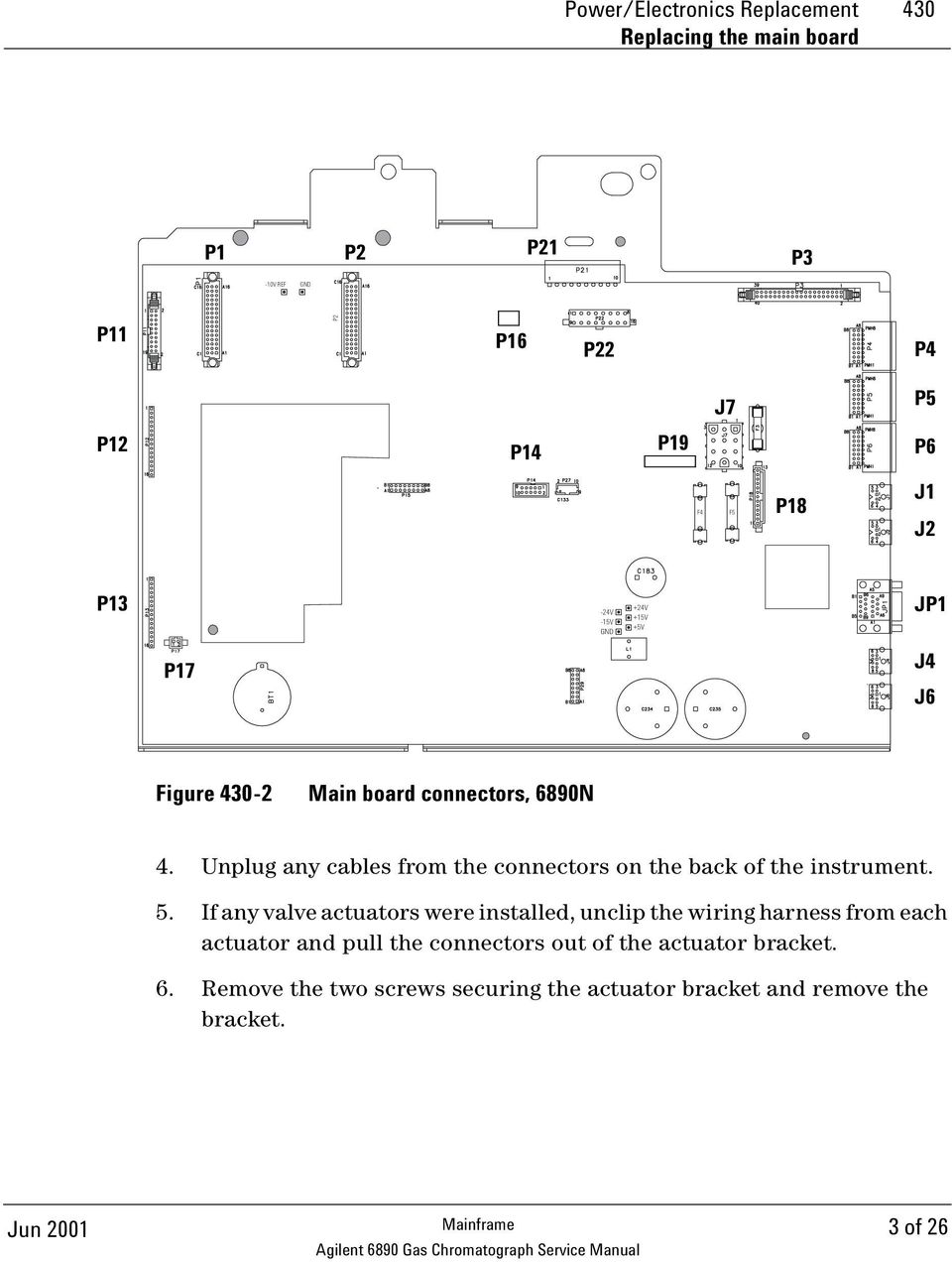
3 Power/Electronics Replacement 430 Replacing the main board P1 P2 P21 P3-10V REF GND P11 P2 P16 P22 P4 J7 P5 P12 P14 P19 P6 F4 F5 P18 J1 J2 P13-24V -15V GND +24V +15V +5V JP1 P17 J4 J6 Figure Main board connectors, 6890N 4. Unplug any cables from the connectors on the back of the instrument. 5. If any valve actuators were installed, unclip the wiring harness from each actuator and pull the connectors out of the actuator bracket. 6. Remove the two screws securing the actuator bracket and remove the bracket. Mainframe 3 of 26
4 Replacing the main board 7. If an MIO card is installed, remove the card and the support bracket as described below: a. Loosen the two spring-loaded captivated screws on the back of the instrument and slide the card out. b. Remove the MIO support bracket. c. Remove the three screws on the back of the instrument and the one screw in the standoff on the side of the instrument. Figure Removing the card and three screws on the back of the GC 4 of 26 Mainframe

5 Power/Electronics Replacement 430 Replacing the main board Remove Jumper card Standoff Figure Removing the MIO support bracket and jumper card d. Pull out the MIO jumper card (P15) from the main board. 8. Remove the three 1/4-inch hex screws and the two Torx T-20 grounding screws holding the board to the instrument body. Mainframe 5 of 26

6 Replacing the main board Beeper P16 P21 P22 P3 J1 P11 P1 P2 J2 GND JP1 P12 GND P13 Oven Access Cutout Cutout Gate Array DSP P15 F2 F1 F4 F3 J8 P18 Hole for transformer cable JP2 J4 J6 P17 3V Lithium battery 4 ROM Sockets CPU Gate Array +5v +15V 15V Capacitor Capacitors 24V +24V J5 Figure Screw locations on the main board (6890A/Plus board shown. 6890N is the same.) 9. Holding the main board by the metal bracket at the top left and the capacitors at the bottom right, slide it slightly to the left and pull it out of the instrument being careful not to catch the board on any wiring harnesses. 10. Installation of the new board is the reverse of this procedure. Caution Changing the board loses the GC serial number. 6 of 26 Mainframe

7 Power/Electronics Replacement 430 Installing an MIO card (6890A and 6890 Plus) 11. Re-configure the GC serial number. Press [Options], then select Diagnostic Instrument Status. Press [ ] [ ], type in the GC serial number (shown below the GC keypad), and press [Enter]. Installing an MIO card (6890A and 6890 Plus) Two Modular Input/Output (MIO) cards are available for the 6890 GC. The INET card allows the 6890 GC to communicate and transmit data over an INET network to a Chemserver. The LAN communications interface card allows the 6890 GC to communicate and transmit data over a LAN to a Chemserver. While only one card can be installed at a time, the installation procedure is similar for either type of MIO card. WARNING Before proceeding, turn off the main power switch and unplug the power cord. Caution Make sure you are properly grounded with an ESD strap before continuing. Follow the procedure below to install an MIO card: 1. Remove the electronics cover and the right side cover. 2. On the back of the GC, snip out the plastic plate that covers the MIO card slot. Discard the plate. 3. Remove the Torx T-10 screw located over the F2 fuse on the main board. Mainframe 7 of 26

8 Installing an MIO card (6890A and 6890 Plus) Beeper P21 P11 P1 P2 P16 P22 P3 J1 J2 GND JP1 P12 GND P13 Oven Access Cutout Gate Array DSP F2 F1 P15 F4 F3 J8 P18 Hole for transformer cable JP2 J4 J6 P17 3V Lithium battery 4 ROM Sockets CPU Gate Array +5v +15V 15V Capacitor Capacitors 24V +24V J5 Figure Location for MIO bracket standoff 4. Screw the hexagonal metal standoff provided with the MIO kit into the hole vacated by the T-10 screw. Use a 3/16-inch nut driver to tighten the standoff 1 8 turn past finger-tight. 5. Route the oven sensor wires (P16) and the main power wire harness (J7) underneath the standoff. 6. Plug the jumper board from the MIO kit into the P15 socket on the main board. Make sure the P7 connector on the jumper card points toward the back of the instrument. 7. From the back of the instrument, insert the metal bracket into the MIO card slot. 8 of 26 Mainframe

9 Power/Electronics Replacement 430 Installing an MIO card (6890A and 6890 Plus) Insert from rear of instrument Figure Installing the MIO support bracket and jumper card 8. Screw the bracket onto the standoff using a Torx T-10 screw. Do not fully tighten this screw yet. 9. From the back of the instrument, secure the bracket with three T-20 screws, starting with the bottom right screw. Mainframe 9 of 26

10 Installing an MIO card (6890A and 6890 Plus) Figure Securing the MIO support bracket (INET card shown) 10. Insert the MIO card into the track on the bracket and secure it with the captive thumb screws on the card. 10 of 26 Mainframe

11 Power/Electronics Replacement 430 Replacing ROMs on the main board (6890A and 6890 Plus) Replacing ROMs on the main board (6890A and 6890 Plus) WARNING Before proceeding, turn off the main power switch and unplug the power cord. Caution Make sure you are properly grounded with an ESD strap before continuing. There are four ROM sockets on the lower left corner of the main board numbered 0 to 3. Only sockets 0 and 1 (unshaded) are currently used. Beeper P21 P11 P1 P2 GND P16 P22 P3 J1 J2 JP1 P12 GND P13 Oven Access Cutout Gate Array DSP F2 F1 P15 F4 F3 J8 Hole for transformer cable P18 JP2 J4 J6 ROM socket 0 ROM socket 1 P17 3V Lithium battery 4 ROM Sockets CPU Gate Array +5v +15V 15V Capacitor Capacitors 24V J5 +24V ROM sockets 2 (top) and 3 (bottom) Figure Location of the ROM sockets on the main board Removing a ROM Insert the prongs of an AMP IC puller, part no (AMP part no ), in the small slots in the upper left and lower right corners of the socket and pull directly out. Mainframe 11 of 26

12 Replacing ROMs on the main board (6890A and 6890 Plus) Inserting a ROM Caution Before inserting a ROM (new or used), make sure that all of the prongs are straight. Straighten any bent prongs with a small flat-blade screwdriver or a small pair of needle nosed pliers before continuing. ROMs are supplied in sets of two: The lower part number goes in socket 0. The higher part number ROM goes in socket 1. If the positions are reversed, the system will not boot up. To insert a ROM, align the flattened corner of the chip with the upper right corner of the socket (a small dot and the word AMP mark it). Check to make sure all the prongs are aligned with their appropriate slots, then push the chip into the socket until it is firmly seated and level. 12 of 26 Mainframe

13 Power/Electronics Replacement 430 Replacing the battery Replacing the battery WARNING Before proceeding, turn off the main power switch. Caution Make sure you are properly grounded with an ESD strap before continuing. Removing the battery while the instrument is unplugged erases all user entered setpoints, methods and sequences. The 3V battery for the 6890 GC supplies the power to retain user entries in memory, such as programmed methods and sequences, in the event of a power failure or when the instrument is unplugged. The battery is located in the lower left corner of the main board. To replace the battery, slide the battery down and pull the battery out of the bottom first. Beeper P21 P11 P1 P2 P16 P22 P3 J1 J2 GND JP1 P12 GND P13 Oven Access Cutout Gate Array DSP P15 J8 F2 F1 F4 F3 P18 Hole for transformer cable JP2 J4 J6 P17 3V Lithium battery 4 ROM Sockets CPU Gate Array +5v +15V 15V Capacitor Capacitors 24V +24V J5 Figure Location of the battery on the main board Mainframe 13 of 26

14 Replacing the pneumatics board Replacing the pneumatics board WARNING Before proceeding, turn off the main power switch and unplug the power cord. Caution Make sure you are properly grounded with an ESD strap before continuing. The electronic pneumatic controller printed circuit board is located on the back of the instrument underneath the inlet and detector pneumatics modules. 1. Unclip any inlet/detector module connectors from the EPC board. 2. Unclip the ribbon cable from the main board and thread it back up through the slot towards the EPC board. 3. Unscrew the two Torx T-20 screws on the EPC board bracket and slide the bracket and board out of the GC. Figure Removing the screws from the EPC board bracket 14 of 26 Mainframe

15 Power/Electronics Replacement 430 Replacing the pneumatics board 4. Reassembly is the reverse of removal. Replacing the PCB bracket The PCB bracket must be replaced when changing from a Type 1 auxiliary manifold to a Type 2 auxiliary manifold. See Installing a type 2 manifold, for more information. 1. Compare the PCB bracket under the pneumatics PC board with the one included in the accessory kit. Check for the differences in the three mounting screw tabs. If they are the same, proceed to the next section. If they are different, the existing bracket must be replaced with the new one. WARNING Before proceeding, turn off the main power switch and unplug the power cord. 2. Remove the GC lower back panel. Caution Make sure you are properly grounded with an ESD strap before continuing. 3. If an MIO card is present, remove it and the jumper card. 4. Disconnect all cables from the pneumatics PC board. 5. Trace the ribbon cable on the end of the board to the main board and disconnect it there. Feed the cable up through the PCB bracket to the top. 6. Remove the screws holding the PCB bracket and slide it and the board out of the GC. 7. Remove the eight screws that fasten the board to the PCB bracket. Transfer the board to the new bracket and secure it with the eight screws. 8. Slide the board and bracket assembly back into the GC. Use the 10 mm screw provided in the kit for the left-most position, on the side of the GC. Use the screws removed earlier for the other positions. 9. Pass the ribbon cable down through the slot in the PCB bracket and connect it to the main board. Reconnect all cables to the pneumatics board. Mainframe 15 of 26

16 Replacing the pneumatics board 10. Re-install the MIO card and the jumper card. 11. Re-install the lower back panel. 16 of 26 Mainframe

17 Power/Electronics Replacement 430 Replacing the transformer GC serial number < Replacing the transformer GC serial number < WARNING Before proceeding, turn off the main power switch and unplug the power cord. Caution Make sure you are properly grounded with an ESD strap before continuing. When you are facing the back of the instrument, you will see the transformer on the bottom, left side. 1. Unclip the transformer wiring harness from connector J7 on the main board. 2. Unclip the transformer wiring harness from connector J1 on the AC power board. 3. Unclip the connector from P9 on the AC power board and move the wires out of the way of the transformer. Mainframe 17 of 26

18 Replacing the transformer GC serial number < Remove mounting screws (four corners) Figure Removing the transformer 4. Remove the four No. 2 Pozidriv screws from the top corners of the transformer. WARNING The transformer is very heavy! Make sure you have a firm grip on the transformer before lifting it out of the instrument. 5. Lift out the transformer. 18 of 26 Mainframe

19 Power/Electronics Replacement 430 Replacing the transformer GC serial number Replacing the transformer GC serial number WARNING Before proceeding, turn off the main power switch and unplug the power cord. Caution Make sure you are properly grounded with an ESD strap before continuing. When you are facing the back of the instrument, you will see the transformer on the bottom, left side. 1. Unclip the transformer wiring harness from connector J7 on the main board A and 6890 Plus. Unclip the wires from J5 on the ALS Interface PCB, if installed. 6890N. Most 6890N transformers have a single cable going to connector J7 on the main board. A few early models have two cables; one goes to J7 and the other to an adapter (G Conversion Cable) that goes to the back of P1, the cable-end plug that connects to J7. G P7 (connects to J7 on main board) Transformer Figure Some early 6890N transformers require a conversion cable for autosampler power Mainframe 19 of 26

20 Replacing the transformer GC serial number Unclip the transformer wiring harness from connector J1 on the AC power board. 4. Unclip the connector from P9 on the AC power board and move the wires out of the way of the transformer. 20 of 26 Mainframe

21 Power/Electronics Replacement 430 Replacing the transformer GC serial number Remove mounting bolt Bracket Figure Removing the transformer 5. Remove the long bolt that secures the transformer. WARNING The transformer is very heavy! Make sure you have a firm grip on the transformer before lifting it out of the instrument. 6. Lift out the transformer, gaskets, and plate. Save the gaskets. To install a new transformer: 1. If you removed the bracket, install it over the PEM in the base of the GC. The open side of the bracket should face left, towards the main board. 2. Lay a gasket over the PEM, then loosely install the mounting bolt. Tighten only a few turns. 3. Install the transformer over the bolt. Once the transformer is in place, remove the bolt. Mainframe 21 of 26
22 Replacing the transformer GC serial number Install the remaining gasket onto the transformer, then install the plate on the gasket. 5. Install the bolt and tighten. 22 of 26 Mainframe
23 Power/Electronics Replacement 430 Replacing the ALS Interface Board Replacing the ALS Interface Board The G2612A ALS Interface board is required to operate the 7683 Automatic Liquid Sampler. It can only be installed in a 6890 Plus Gas Chromatograph with a serial number >20,000. While an ALS Interface Board is installed in the GC, the GC can use only the 7683 ALS. WARNING Before proceeding, turn off the main power switch and unplug the power cord. Caution Make sure you are properly grounded with an ESD strap before continuing. Follow the procedure below to replace the G2612A ALS Interface board. 1. Remove the GC rear panels and the right side cover. 2. If an MIO card (LAN card) is installed, loosen its two mounting screws and slide the card out of the instrument as shown below. Figure Removing the card from the GC Mainframe 23 of 26
24 Replacing the ALS Interface Board 3. Disconnect the 6890 Controller PCB Cable, part no. G , from the ALS Interface board at P5. See Figure and Figure If you are replacing this cable, disconnect it from the main board at J8. P2 Battery P4 P3 F1 J5 P5 P1 Figure ALS Interface board connectors J8 Figure GC Main board 24 of 26 Mainframe
25 Power/Electronics Replacement 430 Replacing the ALS Interface Board 4. Remove the two screws that secure the board to the chassis. See Figure Gently pull the board out of the GC until the cutouts in the board line up with the locking tabs in the bracket. Tilt the board away from the GC until clear of the tabs, then remove. See Figure To re-install the board: Caution Attempting to slide the entire board under the locking tab will damage the board s components. 1. Hold the board upright and slightly angled as shown in Figure Place the board onto the mounting bracket. 3. Slide it into the bracket until the cutouts in the board are aligned with the locking tabs in the bracket. 4. Lay the board against the chassis then slide it in until it stops. The locking tabs should hold the board in place. 5. Install screws 3. Align cutouts and tabs 2. Place board in bracket 1. Hold board at angle Figure Install the ALS Interface board Mainframe 25 of 26
26 Replacing the ALS Interface Board 5. Secure the board to the chassis using the two mounting screws. The board should not be stressed or bowed against the locking tab. See Figure Locate the 2-wire cable leading from the transformer and connect it to the ALS Interface board at J5. See Figure and Figure Connect the 6890 Controller PCB Cable, part no. G , to the ALS Interface board at P5. If replacing the cable, route the new cable through the cutout in the main board and connect it to J8. See Figure and Figure If an MIO card was removed from the GC, re-install it. 9. Re-install the GC covers. 10. Restore power to the GC. 26 of 26 Mainframe
UPGRADING AND SERVICING GUIDE
 UPGRADING AND SERVICING GUIDE HPTouchSmart 610 PC Computer features may vary by model. Removing and Replacing a CD/DVD Drive...2 Removing the CD/DVD Drive... 2 Installing a New CD/DVD Drive... 5 Removing
Service Guide. Gateway M275
 Service Guide Gateway M275 Contents Replacing Gateway M275 Components.................................... 1 Identifying the convertible tablet PC model...................................... 2 Identifying
HP Laser Jet 4200/4240/4250/4300/4350 Swing Plate
 HP Laser Jet 4200/4240/4250/4300/4350 Swing Plate 1 Swing Plate Assembly-RM1-0043 1 Swing Plate Kit-5851-2766 (RM1-0043 plus RM1-1091 gear) CAUTION: Fuser may be hot. Turn off printer, unplug it and allow
Removing memory and option cards
 These instructions can help you remove memory or option cards. Use the following illustration to locate the connector for the card you want to remove. Hard disk connector 1 Option card connector Firmware
5800 Temperature Sensor Cable Assembly
 5800 Temperature Sensor Cable Assembly Removal and Replacement Instruction Sheet #60-4702-070 Revision D, January 14, 2013 Overview The 5800 has two refrigeration temperature sensors, one attached to the
Express5800/120Ed. Rack Mount Kit Installation Procedures PN: 455-01607-001
 Express5800/120Ed Rack Mount Kit Installation Procedures PN: 455-01607-001 Proprietary Notice and Liability Disclaimer The information disclosed in this document, including all designs and related materials,
TraceTek TTDM Series Leak Detection and Location Modules Replacement Parts Installation Instructions
 TraceTek TTDM Series Leak Detection and Location Modules Replacement Parts Installation Instructions TRACETEK TraceTek TTDM Replacement Parts General Information These instructions detail the steps to
Installation instructions, accessories - Handsfree for cellular phone, system B, entry level
 XC90 Section Group Weight(Kg/Pounds) Year Month 3 39 0.5/1.1 2006 07 XC90 2003, XC90 2004 IMG-249663 Page 1 of 18 Required tools A0000162 A0000163 IMG-239664 M0000232 IMG-253123 IMG-252223 Page 2 of 18
http://waterheatertimer.org/troubleshoot-rheem-tankless-water-heater.html
 http://waterheatertimer.org/troubleshoot-rheem-tankless-water-heater.html TECHNICAL SERVICE DEPARTMENT Removal, Cleaning, & Reinstallation of the Burner Assembly For models 74 & GT199 Required tools -
INSTALLATION INSTRUCTIONS
 INSTALLATION INSTRUCTIONS Accessory TRIM Application 2008 ACCORD 4-DOOR Publications No. AII 35362 Issue Date AUG 2007 PARTS LIST Steering Wheel Trim (Without Navigation) P/N 08Z13-TA0-100 Right steering
SERVICE GUIDE. Gateway Notebook
 SERVICE GUIDE Gateway Notebook Contents Replacing Gateway Notebook Components...................................1 Identifying the notebook model......................................... 2 Identifying
POWER LOCK KIT GENERAL INSTALLATION -J04427 REV. 2007-12-04. Kit Number. Models. Additional Parts Required. Kit Contents
 -J0 REV. 00--0 POWER LOCK KIT GENERAL Kit Number -0, 0-0 Models For model fitment information, please see the P&A Retail Catalog or the Parts and Accessories section of www.harleydavidson.com (English
Compaq Presario Desktop Products. Upgrading and Servicing Guide
 Compaq Presario Desktop Products Upgrading and Servicing Guide The information in this document is subject to change without notice. Hewlett-Packard Company makes no warranty of any kind with regard to
INSTALL/REMOVAL INSTRUCTIONS: WINDOW REGULATOR
 REMOVAL/INSTALL OF WINDOW REGULATOR (741-306) Honda Accord 2003 07 General Tech Tips: Use painter s tape rather than duct tape to secure window. It will not damage paint or leave sticky residue. A plastic
PARTS NEEDED FOR CONVERTING FROM LP TO NG
 1 6 7 8 3 5 4 10 9 2 PARTS NEEDED FOR CONVERTING FROM LP TO NG Number Description 1 30" NG Manifold 2 NG side burner valve 3 NG Regulator 4 Rear I/R NG orifice 4 Rear I/R NG orifice 5 Side burner NG orifice
PRODUCT: WASHER / WASHER-DRYER COMBO MODEL: AW 120 / AW 122 / AW 125 AWD 120 / AWD 121 / AWD 129
 PRODUCT: WASHER / WASHER-DRYER COMBO MODEL: The information included in this Splendide Repair Manual may change without notice. Please see our web site www.splendide.com/service/docs.html for updates,
Front Panel Board Cable Replacement Instructions
 apple Mac Pro Front Panel Board Cable Replacement Instructions First Steps 1 Shut down computer. Note: Follow these instructions carefully. Failure to do so could damage your equipment and void its warranty.
3. SEISCO PARTS & SERVICE REMOVAL AND REPAIR GUIDE
 4 3. SEISCO PARTS & SERVICE REMOVAL AND REPAIR GUIDE A. Changing the Control Board B. Replacing a Heating Element C. Thermistor Replacement D. High Limit Switch Replacement E. Level Detector Replacement
HP Pavilion All-in-One MS200 series PC. Upgrading and Servicing Guide. Printed in
 HP Pavilion All-in-One MS200 series PC *579907-001* *579907-001* Printed in Upgrading and Servicing Guide Replacing a Wireless Keyboard or Mouse...2 Before You Begin... 2 Replacing the Keyboard or Mouse...
Figure 2 The fan and shroud also needs to be removed for access to the four a/c compressor bolts and removal of the compressor from the top.
 Here are some pictures to show what s required when replacing the A/C compressor, expansion valve and receiver/drier on a 2001 Volvo V70. Even if you don t replace these A/C parts these pictures can help
Installation instruction do88 Intercooler for Volvo S40 / V50 / C30
 Installation instruction do88 Intercooler for Volvo S40 / V50 / C30 This instruction shows how to replace the OEM intercooler with our performance intercooler. 2. 3. 1. 4. 5. Part number: ICM-170 6. At
Upgrading and Servicing Guide
 Upgrading and Servicing Guide The only warranties for Hewlett-Packard products and services are set forth in the express statements accompanying such products and services. Nothing herein should be construed
Replacement Instructions. Warning: During this procedure, keep small parts away from children.
 apple ibook G4 Memory Card Replacement Instructions Follow the instructions in this sheet carefully. Failure to follow these instructions could damage your equipment and void its warranty. Note: Written
EasyNote TJ Series. Disassembly Manual
 EasyNote TJ Series Disassembly Manual CHAPTER3 Replacing notebook components Preventing static electricity discharge Preparing the work space Required tools Preparing the notebook Adding or replacing memory
Installing your upgrade processor
 Installing your upgrade processor This processor upgrade kit contains the following: Pentium processor with heat sink attached Processor retention bracket Voltage regulator module (VRM) Electrostatic discharge
CONTENTS TOOLS REQUIRED: Ratchet 13mm Socket 10mm Socket Phillips Screwdriver Pliers Panel Removal Tool. Amp Installation
 CONTENTS 1EA. SUBWOOFER ASSEMBLY P/N RUWRANGLER 1EA. 200 WATT AMP/BRACKET ASSEMBLY P/N RM11JKBTL - Bracket P/N RE08BTL200R - Amp 1EA. POWER HARNESS P/N RHWRANGLERPWR 1EA. OVERLAY HARNESS P/N RHWRANGLER
Installing RNS-E SAT NAV for Audi A4
 As one of the major options on the A4 you can get a DVD Satellite Navigation System call the RNS-E. With the help of ebay these sat nav systems are now available to by at a rough cost of 650 plus the cost
apple Service Source Power Mac G4 Cube Updated June 2, 2003 2002 Apple Computer, Inc. All rights reserved.
 apple Service Source Power Mac G4 Cube Updated June 2, 2003 2002 Apple Computer, Inc. All rights reserved. apple Service Source Take Apart Power Mac G4 Cube 2002 Apple Computer, Inc. All rights reserved.
Installation Instructions
 Installation Instructions For Use with PXPV230, PXPV265, PXPD230, and PXPD265 models Attention! - Please read these instructions completely before attempting installation. Always unplug the power supply
Replacing the Gateway M320 Keyboard
 Replacing the Gateway M320 Keyboard This package includes a replacement keyboard for your Gateway M320 notebook and these printed instructions. Tools you need You need a small Phillips and a small flat-blade
PowerFlex 700H and 700S AC Drives Frame 11 Main Fan Capacitor Replacement Kit
 Installation Instructions PowerFlex 700H and 700S AC Drives Frame 11 Main Fan Capacitor Replacement Kit ATTENTION: The sheet metal cover and mounting screws on the ASIC Board located on the power structure
GENUINE PARTS INSTALLATION INSTRUCTIONS
 GENUINE PARTS INSTALLATION INSTRUCTIONS 1. DESCRIPTION: Auto-Dimming Mirror Kit with Compass and HomeLink 2. APPLICATION: Titan 3. PART NUMBER: 999L1 WS000 4. KIT CONTENTS: Item Qty Description Service
800-551-1943. HP Laser Jet 2400 Series Fixing Drive Side Plate Assembly Fixing Drive Side Plate Assembly- RM1-1500 page 1
 Fixing Drive Side Plate Assembly- RM1-1500 page 1 CAUTION: Fuser may be hot. Turn off printer, unplug it and allow it to sit for 20 to 30 minutes before performing these maintenance procedures. Fixing
Gripper Kit for the Boe-Bot Robot (#28202)
 599 Menlo Drive, Suite 100 Rocklin, California 95765, USA Office: (916) 624-8333 Fax: (916) 624-8003 General: [email protected] Technical: [email protected] Web Site: www.parallax.com Educational: www.stampsinclass.com
FRONT BUMPER INSTALLATION INSTRUCTIONS 2007-2011 DODGE / MERCEDES SPRINTER
 Aluminess Products Inc 9402 Wheatlands Ct. #A Santee, CA 92071 619-449-9930 FRONT BUMPER INSTALLATION INSTRUCTIONS 2007-2011 DODGE / MERCEDES SPRINTER Please read before beginning Stainless steel hardware
Power Supply Guide Version 1.0 for D-Show
 Power Supply Guide Version 1.0 for D-Show Digidesign 2001 Junipero Serra Boulevard Daly City, CA 94014-3886 USA tel: 650 731 6300 fax: 650 731 6399 Technical Support (USA) tel: 650 731 6100 fax: 650 731
Instructions for: TTW 1 Universal Service Replacement Blower Kit P/N 265-47200-00
 Instructions for: TTW 1 Universal Service Kit P/N 265-47200-00 (To be performed ONLY by qualified service providers) The Blowers on the Following Water Heaters are Serviced by This Kit: MITW -10 Series
INSTALLATION INSTRUCTIONS
 INSTALLATION INSTRUCTIONS Accessory Application 2009 PILOT Publications No. AII 39408 Issue Date MAY 2008 PARTS LIST Steering Wheel Trim (With Cruise and Audio) P/N 08Z13-SZA-130B (Chocolate) P/N 08Z13-SZA-140B
Small form factor bay converter and hard drive installation
 Small form factor bay converter and hard drive installation HP xw6600 and HP xw8600 Workstations This document describes how to convert HP xw6600 and HP xw8600 Workstation 3.5-inch hard drive bays to hold
Intel NUC Kit DC3217IYE User Guide. Intel NUC Kit DC3217IYE
 Intel NUC Kit DC3217IYE User Guide 1 Before You Begin CAUTIONS The procedures in this user guide assume familiarity with the general terminology associated with personal computers and with the safety practices
Before installation it is important to know what parts you have and what the capabilities of these parts are.
 INSTALLATION GUIDE Before installation it is important to know what parts you have and what the capabilities of these parts are. The Recon XZT is the smallest and most powerful gauge of its kind. With
HP SATA/SAS hard drive and Solid State Drive installation
 HP SATA/SAS hard drive and Solid State Drive installation This document describes how to install Serial ATA (SATA) and Serial Attached SCSI (SAS) hard drives or Solid State Drives (SSD) in an internal
Processor Cage Fans, Front and Rear Replacement Instructions
 apple Mac Pro Processor Cage Fans, Front and Rear Replacement Instructions First Steps 1 Shut down computer. Note: Follow these instructions carefully. Failure to do so could damage your equipment and
Elecraft K3 KPA3 Power Connector Replacement Revision A Review, April 16, 2012 Copyright 2012, Elecraft, Inc. All Rights Reserved
 Introduction Elecraft K3 KPA3 Power Connector Replacement Revision A Review, April 16, 2012 Copyright 2012, Elecraft, Inc. All Rights Reserved The connectors furnishing high current to the KPA3 module
GPS AutoSteer System Installation Manual
 GPS AutoSteer System Installation Manual Supported Vehicles John Deere Sprayers 4720 4630 4730 4830 AutoTrac Ready PN: 602-0227-01-A LEGAL DISCLAIMER Note: Read and follow ALL instructions in this manual
The Electron Capture Detector (ECD)
 Theory of operation The ECD is based on the phenomenon that electronegative species can react with thermal electrons present to form negatively charged ions. The loss of such electrons is related to the
INSTALLATION INSTRUCTIONS
 INSTALLATION INSTRUCTIONS Accessory Application Publications No. ACCORD All 30209 2-AND 4-DOOR SYSTEM (VP, LX, SE) Issue Date AUG 2005 PARTS LIST Security System Attachment: P/N 08E55-SDA-100A Unit panel
Solstice/Sky Water Pump Replacement
 Solstice/Sky Water Pump Replacement The water pump on the Solstice/Sky is starting to need replacement on some vehicles. This guide will help in replacing the water pump while the engine is still in the
Retrofit Instructions Installing a Sport Heated Steering Wheel - Leather, Multifunction BMW X5, E53, 2001 2006
 Retrofit Instructions Installing a Sport Heated Steering Wheel - Leather, Multifunction BMW X5, E53, 2001 2006 Disclaimer: This set of instructions is simply a guide on how I installed my own heated steering
Written By: Walter Galan
 Installing iphone 4S Display Assembly Written By: Walter Galan TOOLS: Phillips 00 Screwdriver (1) Plastic Opening Tools (1) PARTS: iphone 4S Display Assembly (1) iphone 4 and 4S Screen Protector (1) Small
WARNING! REQUIRED TOOLS & SUPPLIES: HIGH VOLTAGE
 INSTRUCTIONS Product: GEM Electric Motorcars Models: All Subject: Instructions for installing Stereo Accessory Estimated Completion Time:.75 Hours Parts: See Page # 7 REQUIRED TOOLS & SUPPLIES: (1) 3/8
SC 7000 and SC 9000XL Patient Monitors SC 9000XL Monitor 12in (30.5cm) Display Service Manual Supplement Two
 s SC 7000 and SC 9000XL Patient Monitors SC 9000XL Monitor 12in (30.5cm) Display Service Manual Supplement Two EM Guidelines, 1997-04-02 E331.E539U.640.10.03.02 ASK-A898-03-7600 Page 1 of 16 Service Manual
SERVICE MANUAL. Corpus 3G. Seat system for electric wheelchair
 SERVICE MANUAL US Corpus 3G Seat system for electric wheelchair How to contact Permobil Head Office of the Permobil group Produced and published by Permobil AB, Sweden Version 4, 2014-07 Item No.: 205260-US-0
INSTALLATION INSTRUCTIONS
 INSTALLATION INSTRUCTIONS Accessory Application Publications No. All 24393 ACCORD (DX, LX) SYSTEM 2-AND 4-DOOR Issue Date AUG 2002 PARTS LIST Security System Attachment (LX): P/N 08E55-SDA-100A Unit panel
SECURITY SYSTEM SMART SIREN KIT
 -J00876 REV. 009-0-09 SECURITY SYSTEM SMART SIREN KIT GENERAL Kit Number 688-0 Models For model fitment information, see the P&A Retail Catalog or the Parts and Accessories section of www.harley-davidson.com
TOYOTA Tundra 2007 - BACK-UP CAMERA SYSTEM Preparation
 Preparation Part Number(s): PT233-34070, PT923-35070-11, PT923-35070-43 NOTE: Part number of this accessory may not be the same as part number shown. Back Up Monitor Kit Contents PT923-35070-11 / PT923-35070-43
BUILT-IN DISHWASHER INSTALLATION INSTRUCTIONS
 BUILT-IN DISHWASHER INSTALLATION INSTRUCTIONS PLEASE READ COMPLETE INSTRUCTIONS BEFORE YOU BEGIN LEAVE INSTALLATION INSTRUCTIONS AND USER'S GUIDE WITH OWNER ALL ELECTRIC WIRING AND PLUMBING MUST BE DONE
Intel RAID Maintenance Free Backup Unit 4 Quick Installation User's Guide
 Intel RAID Maintenance Free Backup Unit 4 Quick Installation User's Guide Thank you for buying an Intel RAID Maintenance Free Backup Unit 4. The Intel RAID Maintenance Free Backup Unit 4 supports the Intel
Memory Modules User Guide
 Memory Modules User Guide Copyright 2008 Hewlett-Packard Development Company, L.P. The information contained herein is subject to change without notice. The only warranties for HP products and services
ilan Ethernet Box for 9100 Installation Manual
 ilan Ethernet Box for 9100 Installation Manual 07103-00154 March 11, 2014 Corporate Headquarters: 21405 B Street Long Beach, MS 39560 Phone: (800) 259-6672 Fax: (228) 868-9445 Copyright Notice 2014 Triton.
Fan, Cypress / GreenField Installation Instructions (sku 99000173)
 Packing List Blower Assembly Wiring Harness Rheostat Snap Disc Rheostat Nut, Spacer, and Knob Warnings WARNING: NOTE: NOTE: Fan, Cypress / GreenField Make sure power to the stove has been shut off prior
Navico-Northstar 2kW JRC Radar Package, Scanner Cable Removal and Replacement
 Navico-Northstar 2kW JRC Radar Package, Scanner Cable Removal and Replacement This work instruction describes the methods and means for which to remove and reinstall optional scanner cable configurations
Installation Instructions for FT-10 Network PowerCommand ATS Communication Module (NCM) Kits 541 0812 and 541 0868
 Instruction Sheet 10-2004 Installation Instructions for FT-10 Network PowerCommand ATS Communication Module (NCM) Kits 541 0812 and 541 0868 PowerCommand is a registered trademark of Cummins Inc. InPower
P150SC15. Designed for 2015 Ford F150 Super-Cab and Super-Crew vehicles without Sony System. 2015 Stillwater Designs P150SC15-A2-20150813
 P150SC15 Designed for 2015 Ford F150 Super-Cab and Super-Crew vehicles without Sony System Subwoofer Assembly Amplifier Assembly Amplifier Harness 2015 Stillwater Designs P150SC15-A2-20150813 M6 Bolt M6
INSTALL/REMOVAL INSTRUCTIONS: WINDOW LIFT MOTOR
 REMOVAL/INSTALL OF WINDOW LIFT MOTOR (742-273) Ford Expedition 1997 2002, Lincoln Navigator 1998 2002, Ford F-150 Super Crew Cab 2001 General Tech Tips: Use painter s tape rather than duct tape to secure
apple Service Source PowerBook G4 (DVI) Updated 4 December 2003 2003 Apple Computer, Inc. All rights reserved.
 apple Service Source PowerBook G4 (DVI) Updated 4 December 2003 2003 Apple Computer, Inc. All rights reserved. apple Service Source Upgrades PowerBook G4 (DVI) 2003 Apple Computer, Inc. All rights reserved.
Replacing the Gateway M675 Keyboard
 Replacing the Gateway M675 Keyboard This package includes a replacement keyboard for your Gateway M675 notebook and these printed instructions. Tools you need You need a small Phillips screwdriver and
SALEEN SPEEDLAB SERIES VI STANDARD SC UPGRADE KIT
 SALEEN SPEEDLAB SERIES VI STANDARD SC UPGRADE KIT INSTALLATION MANUAL: 2005 MUSTANG 4.6 3V MANUAL P/N: 10-8002-C14338C SUPERCHARGER KIT P/N: 10-1607-B14083* Saleen Performance, Inc. 1225 East Maple Rd.,
Memory Modules. Document Part Number: 407947-001. This guide explains how to replace and upgrade memory in the computer. May 2006
 Memory Modules Document Part Number: 407947-001 May 2006 This guide explains how to replace and upgrade memory in the computer. Contents 1 Adding or replacing memory modules Adding or replacing a memory
INSTALLATION AND OPERATING INSTRUCTIONS For Model GL1 Gate Locks
 Securitron Magnalock Corp. www.securitron.com ASSA ABLOY, the global leader Tel 800.624.5625 [email protected] in door opening solutions INSTALLATION AND OPERATING INSTRUCTIONS For Model GL1 Gate
VW GOLF Mk4 TDI FRONT MOUNTING INTERCOOLER INSTALLATION INSTRUCTIONS
 VW GOLF Mk4 TDI FRONT MOUNTING INTERCOOLER INSTALLATION INSTRUCTIONS Tools required: 10mm/13mm socket and 3/8 drive ratchet with extension Torx T20/25/30 screwdrivers or bits Phillips head screwdriver,
POLEMOUNT FIELD FIX ASSEMBLY INSTRUCTIONS
 POLEMOUNT FIELD FIX ASSEMBLY INSTRUCTIONS Polemount Field Fix Support If you have any questions or incur any problems installing or using the new Polemount, please use Miovision s Support System by emailing
COOPER S PULLEY UPGRADE KIT INSTALLATION INSTRUCTIONS PART NUMBER NME5011
 COOPER S PULLEY UPGRADE KIT INSTALLATION INSTRUCTIONS PART NUMBER NME5011 Below are instructions for the Mini Mania Pulley Upgrade Kit, Part Number NME5011. Please take all necessary precautions for working
HP ProLiant DL165 G7 Server. Installation Instructions
 HP ProLiant DL165 G7 Server Installation Instructions Identifying server components Front panel components Figure 1 Front Panel Components / 4 3.5 HDD Item 1 Thumbscrews for rack mounting 2 Drive status
GAERTNER SCIENTIFIC CORPORATION 3650 Jarvis Ave. Skokie, Illinois 60076 U.S.A. tel: 1 847 673-5006 fax: 1 847 673-5009 email@gaertnerscientific.
 7109-C-244E-R1 Field Installation of HeNe Laser in B, C, and D-Type Auto Gain Ellipsometers GAERTNER SCIENTIFIC CORPORATION 3650 Jarvis Ave. Skokie, Illinois 60076 U.S.A. tel: 1 847 673-5006 fax: 1 847
INSTALLATION INSTRUCTIONS
 Rear Vision System Tailgate Handle Camera Mirror Display 2004-2014 Ford F-150 and 2008-2015 Ford Super Duty (Kit part numbers 9002-9521) Kit Contents: Mirror Tailgate Handle with camera and harness Interior
Dell P Series Monitor VESA Mounting Bracket Installation Instructions
 Dell P Series Monitor VESA Mounting Bracket Installation Instructions The VESA mounting bracket enables a Wyse cloud client to be mounted to the Dell P Series Monitor and the Dell E24 Monitor. The cloud
TOYOTA TACOMA 2008- HANDS FREE BLU LOGIC Preparation
 TOYOTA TACOMA 2008- HANDS FREE BLU LOGIC Preparation Part #: PT923-00112 Conflicts: JBL Audio, Factory Navigation NOTE: Part number of this accessory may not be the same as the part number shown. Kit Contents:
Service Manual. Model Number VCX1525 VCX1525-WH. UL Part Number 6904000100
 Service Manual Model Number VCX1525 VCX1525-WH UL Part Number 6904000100 IMPORTANT SAFETY INFORMATION: Always read this manual first before attempting to service this fireplace. For your safety, always
Tyan Computer. Transport PX22. Service Engineer s Manual
 Tyan Computer Transport PX22 Service Engineer s Manual 1 Precaution To read through the user manual, check all assembly and follow setup process before any operation on this server To keep paper clips,
MGB Chrome Bumper Conversion
 MGB Chrome Bumper Conversion Installation Instructions For 1974 1/2-1980 MGB This kit requires cutting, welding, and painting. Professional installation recommended. Note: Every MGB body is slightly different
Accessing the printer system board
 Accessing the printer system board 1 Turn the printer off. 2 Unplug the printer power cord. 3 Disconnect all cables from the back of the printer. 4 Locate the metal plate at the back of the printer. Loosen
Rear wheel brakes, servicing. Стр. 1 из 45. Note:
 Volkswagen Touareg - Rear wheel brakes, servicing Стр. 1 из 45 46-2 Rear wheel brakes, servicing Rear brakes, FN 44 brake caliper, servicing Note: After replacing brake pads, depress brake pedal firmly
Replacing a Vantage Vue Transmitter
 Replacing a Vantage Vue Transmitter Included in this replacement transmitter kit: SIM transmitter Cable tray Instructions Tools Required Phillips head screwdriver Small pliers To replace the transmitter
S E R V I C E N O T E
 IINFORMATIION ONLY DOES NOT COMMUNIICATE A MODIIFIICATIION OR SAFETY CONDIITIION S E R V I C E N O T E Supersedes: NONE Agilent E4416A EPM-P Peak & Average Power Meter Serial Numbers: GB00000000/GB99999999
Technical Support Information No. 113 Revision 2.0 March 2005
 Process Instrumentation and Analytics - A&D PI 2 - Karlsruhe Page 1 of 16 Neues PECM ersetzt alle PECM s in Maxum und Maxum Edition II - New PECM replaces all PECMs in Maxum and Maxum Edition II General
TeamPoS 2000 Installation Instructions Upgrade to M Motherboard
 TeamPoS 2000 Installation Instructions Upgrade to M Motherboard Fujitsu Transaction Solutions Inc. endeavors to ensure that the information in this document is correct and fairly stated but does not accept
LS-1 Series Tungsten Halogen Light Sources Installation and Operation Instructions
 LS-1 Series Tungsten Halogen Light Sources Installation and Operation Instructions Description The LS-1 Series of tungsten halogen light sources are versatile, white-light lamps optimized for use in the
TOOL SVC NUMBERS: 250-2598, 250-2600 SVC CONTENTS ITEM QTY DESCRIPTION PART NUMBER 1 1 CUTTING TOOL 250-2598 2 1 EXTRACTION TOOL/PART# 250-2600
 07-08 TOYOTA FJ CRUISER, 05-09 SIENNA, 06-08 SCION TC PART NUMBER: 250-1732 1 CRUISE CONTROL KIT TOOL SVC NUMBERS: 250-2598, 250-2600 2 2 1 BASE KIT CONTENTS ITEM QTY DESCRIPTION 1 1 CONTROL SWITCH ASSEMBLY
Dell Inspiron 660s Owner s Manual
 Dell Inspiron 660s Owner s Manual Computer model: Inspiron 660s Regulatory model: D06S Regulatory type: D06S001 Notes, Cautions, and Warnings NOTE: A NOTE indicates important information that helps you
Written By: Sam Lionheart
 iphone 5s Battery Replacement Replace the battery in your iphone 5s. Written By: Sam Lionheart INTRODUCTION Use this guide to bring life back to your iphone 5s with a new battery. Removing the battery
INSTALLATION MANUAL INSIDE PASSENGER COMPARTMENT. HFC 134a FOR EUROPEAN SPEC. / GENERAL SPEC. AIR CONDITIONING ENGLISH
 HFC 134a Ozone Friendly Refrigerant FOR EUROPEAN SPEC. / GENERAL SPEC. AIR CONDITIONING ENGLISH AAAMU-60 / INSIDE PASSENGER COMPARTMENT INSTALLATION MANUAL 2000 (EUROPE) B.V.. All Rights Reserved. This
BILLET HEADLAMP SHELL
 -J008 REV. 007-07- BILLET HEADLAMP SHELL GENERAL Kit Number 770-0 Models For model fitment information, please see the P&A Retail Catalog or the Parts and Accessories section of www.harleydavidson.com
CAM-03, Camshaft Assembly Oil Seal Replacement
 CAM-03, Camshaft Assembly Oil Seal Replacement Tools Jack stands Floor Jack Metric Socket set Metric Wrench set Porsche Timing Belt Tension tool (P9201) Flywheel Lock (P9206) Balance Shaft Pin Spanner
Building A Computer: A Beginners Guide
 Building A Computer: A Beginners Guide Mr. Marty Brandl The following was written to help an individual setup a Pentium 133 system using an ASUS P/I- P55T2P4 motherboard. The tutorial includes the installation
KEYLESS ENTRY UPGRADE SECURITY SYSTEM for 2004 TOYOTA HIGHLANDER
 KEYLESS ENTRY UPGRADE SECURITY SYSTEM for 2004 TOYOTA HIGHLANDER DEALER SERVICE AND INSTALLATION MANUAL KIT NO. 00016-30915 Contents PARTS LIST... 2 PARTS ILLUSTRATIONS... 2 VEHICLE PREPARATION... 3 INSTALLING
- power windows - alarm system - electric door mirror control - door warning light - central locking - seat memory
 Door Wiring Harness Plug Connections Binder -, Electrics Vehicle Type: (86) Model Year: 7 (V) Concern: Door wiring harness plug connections X11 / X12. Information: The rubber boot for the door connector
StorTrends 3400 Hardware Guide for Onsite Support
 StorTrends 3400 Hardware Guide for Onsite Support MAN-3400-SS 11/21/2012 Copyright 1985-2012 American Megatrends, Inc. All rights reserved. American Megatrends, Inc. 5555 Oakbrook Parkway, Building 200
INSTALLATION INSTRUCTIONS
 INSTALLATION INSTRUCTIONS Accessory Application Publications No. AII 26327 2004 S2000 Issue Date OCT 2004 PARTS LIST Security System: P/N 08E51-S84-100 Attachment Kit: P/N 08E55-S2A-101 2 Remote controls