
VS-606V7 Series Instruction Manual COMPACT GENERAL-PURPOSE INVERTER (VOLTAGE VECTOR CONTROL)
|
|
|
- Solomon Garrett
- 9 years ago
- Views:
Transcription
1 VS-606V7 Series Instruction Manual COMPACT GENERAL-PURPOSE INVERTER (VOLTAGE VECTOR CONTROL)

2 PREFACE YASKAWA s VS-606V7 is such a small and simple inverter; as easy as using a contactor. This instruction manual describes installation, maintenance, inspection, troubleshooting, and specifications of the VS-606V7. Read this instruction manual thoroughly before operation. YASKAWA ELECTRIC CORPORATION General Precautions Some drawings in this manual are shown with the protective covers and shields removed, in order to describe detail with more clarity. Make sure all covers and shields are replaced before operating this product. This manual may be modified when necessary because of improvement to the product, modification, or changes in specifications. Such modifications are denoted by a revised manual No. To order a copy of this manual, if your copy has been damaged or lost, contact you YASKAWA representative. YASKAWA is not responsible for any modification of the product made by the user, doing so will void the warranty. 2

3 NOTES FOR SAFE OPERATION Read this instruction manual thoroughly before installation, operation, maintenance or inspection of the VS-606V7. In this manual, NOTES FOR SAFE OPERATION are classified as WARNING or CAUTION. WARNING Indicates a potentially hazardous situation which, if not avoided, could result in death or serious injury to personnel. CAUTION Indicates a potentially hazardous situation which, if not avoided, may result in minor or moderate injury to personnel and damage to equipment. It may also be used to alert against unsafe practices. Even items described in may CAUTION result in a vital accident in some situations. In either case, follow these important notes. NOTE These are steps to be taken to ensure proper operation. 3

4 Warnings for UL/cUL Marking Do not connect or disconnect wiring, or perform signal checks while the power supply is turned ON. The Inverter internal capacitor is still charged even after the power supply is turned OFF. To prevent electric shock, disconnect all power before servicing the Inverter. Then, wait at least one minute after the power supply is disconnected and all indicators are OFF. Do not perform a withstand voltage test on any part of the Inverter. This electronic equipment uses semiconductors and is vulnerable to high voltage. Do not remove the Digital Operator or the blank cover unless the power supply is turned OFF. Never touch the printed control board (PCB) while the power supply is turned ON. The Inverter is not suitable for use on a circuit capable of delivering more than 18,000 RMS symmetrical amperes, 250volts maximum (200V class units) or 18,000 RMS symmetrical amperes, 480volts maximum (400V class units). CAUTION (Ref. page) Low voltage wires shall be wired with Class I Wiring

5 RECEIVING CAUTION (Ref. page) Do not install or operate any inverter which is damaged or has missing parts. Failure to observe this caution may result in personal injury or equipment damage MOUNTING CAUTION (Ref. page) Lift the cabinet by the cooling fin. When moving the unit, never lift by the plastic case or the terminal covers. Otherwise, the main unit may be dropped causing damage to the unit Mount the inverter on nonflammable material (i.e., metal). Failure to observe this caution can result in a fire When mounting units in an enclosure, install a fan or other cooling device (open chassis to keep the intake air temperature below 122 F (50 C). Overheating may cause a fire or damage to the unit The VS mini generates heat. For effective cooling, mount it vertically. Refer to the figure in Mounting Dimensions on page 18. 5

6 WIRING WARNING (Ref. page) Start wiring only after verifying that the power supply is turned OFF. Failure to observe this warning can result in electric shock or fire Wiring should be performed only by qualified personnel. Failure to observe this warning can result in electric shock or fire When wiring the emergency stop circuit, check the wiring thoroughly before operation. Failure to observe this warning can result in personal injury WARNING (Ref. page) Make sure to ground the ground terminal according to the local grounding code. Failure to observe this warning can result in electric shock or fire For 400V class, to conform to CE requirements, make certain to ground the supply neutral. Failure to observe this warning can result in electric shock or fire

7 CAUTION (Ref. page) Verify that the inverter rated voltage coincides with the AC power supply voltage. Failure to observe this caution can result in personal injury or fire. Do not perform a withstand voltage test of the inverter It may cause semi-conductor elements to be damaged. To connect a braking resistor, braking resistor unit or braking unit, follow the procedures described in this manual. Improper connection may cause a fire Make sure to tighten terminal screws of the main circuit and the control circuit. Failure to observe this caution can result in a malfunction, damage or a fire Never connect the AC main circuit power supply to output terminals U, V and W. The inverter will be damaged and void the warranty Do not connect or disconnect wires or connectors while power is applied to the circuit. Failure to observe this caution can result in personal injury. Do not change signals during operation The machine or the inverter may be damaged. 7

8 OPERATION WARNING (Ref. page) Only turn ON the input power supply after replacing the digital operator/blank cover (optional). Do not remove the digital operator or the covers while current is flowing. Failure to observe this warning can result in electric shock. Never operate the digital operator or dip switches when your hand is wet. Failure to observe this warning can result in electric shock. Never touch the terminals while current is flowing, even during inverter stopping. Failure to observe this warning can result in electric shock. When the fault retry function is selected, stand clear of the inverter or the load, since it may restart suddenly after being stopped. (Construct machine system, so as to assure safety for personnel, even if the inverter should restart.) Failure to observe this warning can result in personal injury When continuous operation after power recovery is selected, stand clear of the inverter or the load, since it may restart suddenly after being stopped. (Construct machine system, so as to assure safety for personnel, even if the inverter should restart.) Failure to observe this warning can result in personal injury Since the digital operator stop button can be disabled by a function setting, install a separate emergency stop switch. Failure to observe this warning can result in personal injury. If an alarm is reset with the operation signal ON, the inverter restarts automatically. Only reset the alarm after verifying that the operation signal is OFF. Failure to observe this warning can result in personal injury

9 OPERATION (Cont.) CAUTION (Ref. page) Never touch the heatsink or braking resistor, the temperature is very high. Failure to observe this caution can result in harmful burns to the body. Since it is easy to change operation speed from low to high speed, verify the safe working range of the motor and machine before operation. Failure to observe this caution can result in personal injury and machine damage. Install a holding brake separately if necessary. Failure to observe this caution can result in personal injury. Do not change signals during operation. The machine or the inverter may be damaged. All the parameters of the inverter have been preset at the factory. Do not change the settings unnecessarily. The inverter may be damaged MAINTENANCE AND INSPECTION WARNING (Ref. page) Never touch high-voltage terminals in the inverter. Failure to observe this warning can result in an electrical shock Disconnect all power before performing maintenance or inspection. Then wait at least one minute after the power supply is disconnected and all LEDs and CHARGE LED are extinguished. The capacitors are still charged and can be dangerous

10 WARNING (Ref. page) Do not perform withstand voltage test on any part of the VS-606V7. This electronic equipment uses semiconductors and is vulnerable to high voltage Only authorized personnel should be permitted to perform maintenance, inspections or parts replacement. [Remove all metal objects (watches, bracelets, etc.) before operation.] (Use tools which are insulated against electrical shock.) Failure to observe this warning can result in an electrical shock CAUTION (Ref. page) The control PC board employs CMOS ICs. Do not touch the CMOS elements. They are easily damaged by static electricity. Do not connect or disconnect wires, digital operator, connectors, or cooling fan while power is applied to the circuit. Failure to observe this caution can result in personal injury Others WARNING Never modify the product. Failure to observe this warning can result in an electrical shock or personal injury and will void the warranty. (Ref. page) 10
![[Remove all metal objects (watches, bracelets, etc.) before operation.] (Use tools which are insulated against electrical shock.) Failure to observe this warning can result in an electrical shock.](/docs-images/46/21199955/images/page_10.jpg "......... 127 CAUTION (Ref. page) The control PC board employs CMOS ICs. Do not touch the CMOS elements. They are easily damaged by static electricity.")
11 WARNING DISPLAY A warning label is displayed on the front cover of the inverter, as shown below. Follow these instructions when handling the inverter. 11

12 CONTENTS NOTES FOR SAFE OPERATION RECEIVING Checking the Name Plate IDENTIFYING THE PARTS MOUNTING Choosing a Location to Mount the Inverter Mounting Dimensions Mounting/Removing Components WIRING Wiring Instructions Wire and Terminal Screw Sizes Wiring the Main Circuit Wiring the Control Circuit Wiring Inspection OPERATING THE INVERTER Test Run Operating the Digital Operator LED Description Simple Data PROGRAMMING FEATURES Parameter Set-up and Initialization Using V/f control Mode Using Vector Control Mode Switching LOCAL/REMOTE Modes Selecting Run/Stop Commands Operation Condition

13 Selecting Stopping Method Building Interface Circuits with External Devices Frequency by Current Reference Input Frequency Reference by Pulse Train Input Decreasing Motor Speed Fluctuation Motor Protection Selecting Cooling Fan Operation Using MEMOBUS (MODBUS) Communications Using Parameter Copy Function Unit Selection for Frequency Reference Display MAINTENANCE AND INSPECTION Periodical Inspection Part Replacement FAULT DIAGNOSIS AND CORRECTIVE ACTIONS SPECIFICATIONS Standard Specifications (200V Class) Standard Specifications (400V Class) Standard Wiring Sequence Input Connection with NPN/PNP Transistor Dimensions Recommended Peripheral Devices Parameter List APPENDIX CE Conformance

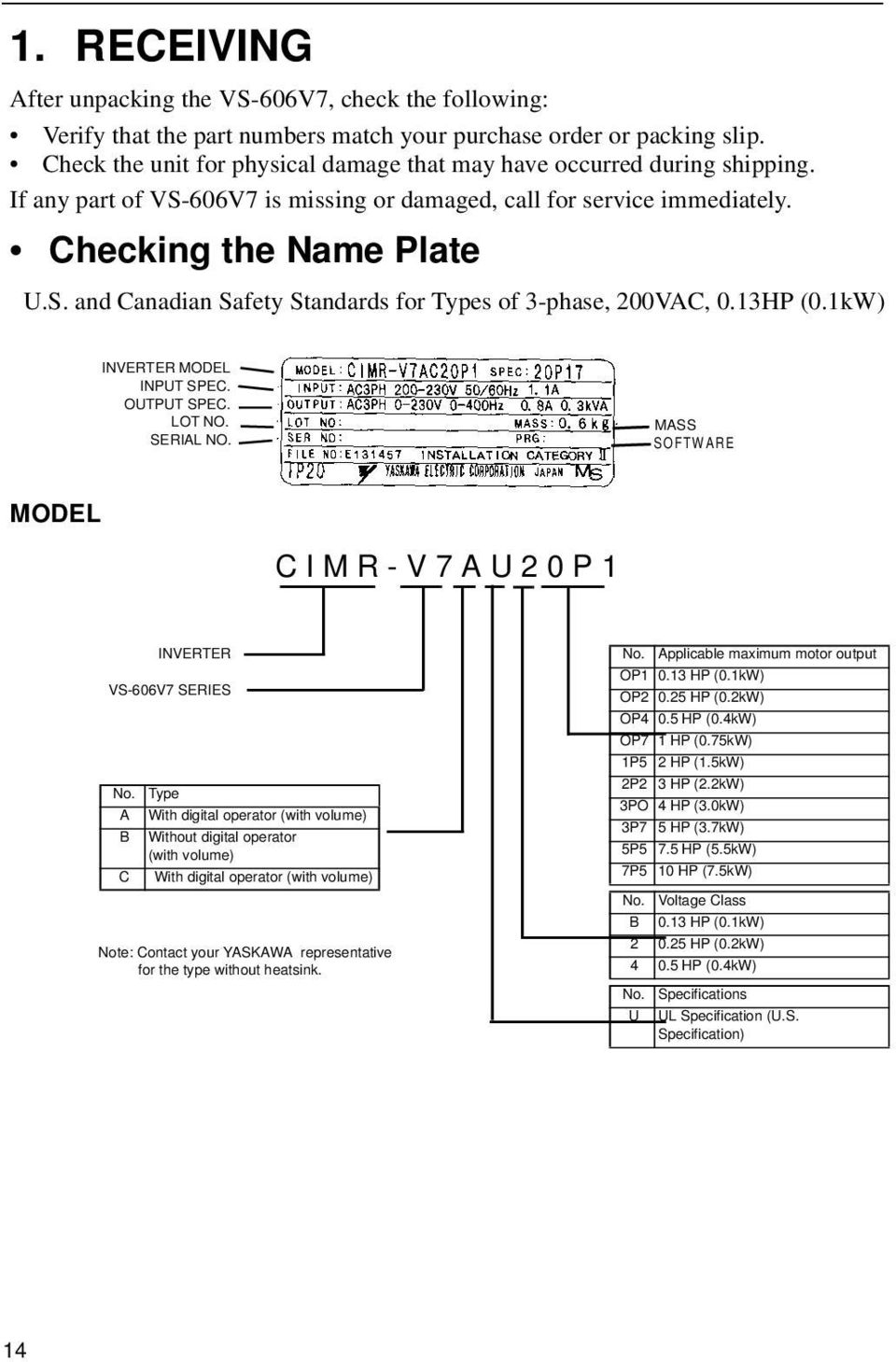
14 1. RECEIVING After unpacking the VS-606V7, check the following: Verify that the part numbers match your purchase order or packing slip. Check the unit for physical damage that may have occurred during shipping. If any part of VS-606V7 is missing or damaged, call for service immediately. Checking the Name Plate U.S. and Canadian Safety Standards for Types of 3-phase, 200VAC, 0.13HP (0.1kW) INVERTER MODEL INPUT SPEC. OUTPUT SPEC. LOT NO. SERIAL NO. MASS SOFTWARE MODEL C I M R - V 7 A U 2 0 P 1 INVERTER VS-606V7 SERIES No. Type A With digital operator (with volume) B Without digital operator (with volume) C With digital operator (with volume) Note: Contact your YASKAWA representative for the type without heatsink. No. Applicable maximum motor output OP HP (0.1kW) OP HP (0.2kW) OP4 0.5 HP (0.4kW) OP7 1 HP (0.75kW) 1P5 2 HP (1.5kW) 2P2 3 HP (2.2kW) 3PO 4 HP (3.0kW) 3P7 5 HP (3.7kW) 5P5 7.5 HP (5.5kW) 7P5 10 HP (7.5kW) No. Voltage Class B 0.13 HP (0.1kW) HP (0.2kW) HP (0.4kW) No. Specifications U UL Specification (U.S. Specification) 14
15 2 0 P 1 0 B Single-Phase 200VAC No. Applicable maximum motor output No. Protective structure 2 Three-Phase 200VAC OP HP (0.1kW) 0 Open chassis 4 Three-Phase 400VAC OP HP (0.2kW) (IP20, IP00) *1 OP4 OP7 1P5 2P2 0.5 HP (0.4kW) 1 HP (0.75kW) 2 HP (1.5kW) 3 HP (2.2kW) 1 Enclosed wall-mounted (NEMA 1) *2 7 Open chassis (IP20) Top-closed type 3PO 4 HP (3.0kW) 3P7 5 HP (3.7kW) 5P5 7.5 HP (5.5kW) 7P5 10 HP (7.5kW) *1 Code No.s OP1 to 3P7 are IP20. Always remove both top and bottom covers when using the 5P5 and 7P5 inverters as open chassis types IP00. *2 NEMA 1 OP1 to 3P7 are optional. NEMA 1 5P5 and 7P5 are standard. 15

16 2. IDENTIFYING THE PARTS 16

17 Main Circuit Terminal Arrangement Terminal arrangement of the main circuit terminal differs depending on the inverter model. The terminal arrangement for200/400v, 3-Phase input series 7.5/10 HP (5.5/7.5Kw) is shown below. 17

18 3. MOUNTING Choosing a Location to Mount the Inverter Be sure the inverter is protected from the following conditions: Extreme cold and heat. Use only within the ambient temperature range (for open chassis type): 14 to 122 F (-10 to +50 C). Rain, moisture. Oil sprays, splashes. Salt spray. Direct sunlight. (Avoid using outdoors). Corrosive gases (e.g. sulfurized gas) or liquids. Dust or metallic particles in the air. Physical shock, vibration. Magnetic noise. (Example: welding machines, power devices, etc.) High humidity. Radioactive substances. Combustibles: thinner, solvents, etc. 18

19 a a A Mounting Dimensions To mount the VS 606 V7, dimensions as shown below are required. Voltage 200V Single - phase 3 - phase 400V 3 - phase Max. Applicable Motor Output HP (Kw) Less than 5 HP (3.7 Kw) Length of A More than 1.18in (30mm) 200V 400V 3 - phase 3 - phase 7.5 HP (5.5 Kw) More than 1.97in (50mm) 10 HP (7.5 Kw) Caution! 1. The above dimensions are common for both open chassis type (IP00, IP20) and NEMA 1 type. 2. Always remove both top and bottom covers when using 200/400V, 5.5/7.5Kw (7.5/10 HP) as open chassis type. 19

20 Mounting/Removing Components Removing and Mounting Digital Operator and Covers NOTE: Mount the inverter after removing the front cover, digital operator and terminal cover. Removing front cover Use a screwdriver to loosen the screw on the front cover surface to direction 1 to remove it. Then press the right and left sides to direction 2 and lift the front cover to direction 3. Mounting front cover Mount the front cover in the reverse order of the above procedure for removal. Removing terminal cover when W (Width) dimensions are 4.25 (108mm), 5.51 (140mm), or 6.69 (170mm) After removing the front cover, press the right and left sides to direction 1 and lift the terminal cover to direction 2.. Removing terminal cover when W (Width) dimensions are 7.09 (180mm) Use a Screwdriver to loosen the screw on the terminal cover surface to direction 1 to remove it. Then press the right and left sides to direction 2 and lift the terminal cover to direction 3. Mounting terminal cover Mount the terminal cover in the descending order of the above procedure for removal. 20

21 Removing digital operator After removing the front cover, lift the upper and lower sides (section A) of the right side of the digital operator to direction 1. Mounting digital operator Mount the digital operator in the reverse order of the above procedure for removal. Removing bottom cover when W (Width) dimensions are 4.25 (108mm), 5.51 (140mm), or 6.69 (170mm) After removing the front cover and the terminal cover, tilt the bottom cover to direction 1 with section A as a supporting point. Removing terminal cover when W (Width) dimensions are 7.09 (180mm) After removing the terminal cover use a screwdriver to loosen the fastening screw to loosen the fastening screw to direction 1 to remove it. Mounting bottom cover Mount the bottom cover in the reverse order of the above procedure for removal. 21
22 4. WIRING Wiring Instructions (1) Always connect the power input terminals R/L1, S/L2, and T/L3 (R/L1, S/L2 for single-phase) and power supply via a molded-case circuit breaker (MCCB). Never connect them to U/T1, V/T2, W/T3. The single-phase (200V class) inverter can be connected to a 200V 3-phase input. However, when terminal T/L3 is connected to single-phase, never use the terminal for other purposes. Inverter Power Supply Connection Terminals 200V 3-phase Input Power Supply Specification Product CIMR-V V Single Input Power Supply Specification Product. CIMR-V7 B 400V 3-phase Input Power Supply Specification Product CIMR-V7 4 Connect to R/L1, S/L2, T/L3 Connect to R/L1, S/L2 Connect to R/L1, S/L2, T/L3 (2) Connect the motor wiring to terminals U, V, and W on the main circuit output side (bottom of the inverter). (3) If the wiring distance between inverter and motor is long, reduce the inverter carrier frequency. For details, refer to Reducing motor noise or leakage current (n46) on page 68. (4) Control wiring must be less than 164ft(50m) in length and separate from the power wiring. Use twisted-pair shielded wire when inputting the frequency signal externally. (5) Tighten the screws on the main circuit and control circuit terminals. (6) Do not connect or disconnect wiring, or perform signal check while the power supply is turned ON. (7) For 400V class inverters, make sure to ground the supply neutral to conform to CE requirements. (8) A closed-loop connector should be used when wiring to the main circuit terminal. (9) Voltage drop should be considered when determining wire size. Voltage drop can be calculated using the following equation: Phase- to phase voltage drop (V) = 3 wire resistance (Ω/km) x wiring distance (m) x current (A) x 10-3 Select a wire size so that voltage drop will be less than 2% of the normal rated voltage. 22
23 Wire and Terminal Screw Sizes 1. Control Circuit Model Terminal Symbol Screw Common to all models MA, MB, MC M3 M2 Wire Tightening Recommend Torque Applicable size size lb in (N m) Type mm 2 AWG mm 2 AWG 4.44 to 5.33 twisted wire 0.5 to to (0.5 to 0.6) single 0.5 to to 16 Shielded wire or 1.94 to 2.21 twisted wire 0.5 to to equivalent (0.22 to 0.25) single 0.5 to to Main Circuit 200V Class 3-phase Input Series Model Terminal Symbol Screw CIMR-V7AA20P1 R/L1,S/L2,T/L3,-,+1,+2,B1,B2,U/T1,V/T2,W/T3 M3.5 CIMR-V7AA20P2 R/L1,S/L2,T/L3,-,+1,+2,B1,B2,U/T1,V/T2,W/T3 M3.5 CIMR-V7AA20P4 R/L1,S/L2,T/L3,-,+1,+2,B1,B2,U/T1,V/T2,W/T3 M3.5 CIMR-V7AA20P7 R/L1,S/L2,T/L3,-,+1,+2,B1,B2,U/T1,V/T2,W/T3 M3.5 CIMR-V7AA21P5 R/L1,S/L2,-,+1,+2,B1,B2,U/T1,V/T2,W/T3 M4 CIMR-V7AA22P2 R/L1,S/L2,T/L3,-,+1,+2,B1,B2,U/T1,V/T2,W/T3 M4 CIMR-V7AA24PO R/L1,S/L2,T/L3,-,+1,+2,B1,B2,U/T1,V/T2,W/T3 CIMR-V7*A25P5 R/L1,S/L2,T/L3,-,+1,+2,B1,B2,U/T1,V/T2,W/T3 M5 CIMR-V7*A27P5 R/L1,S/L2,T/L3,-,+1,+2,B1,B2,U/T1,V/T2,W/T3 M5 Note: M4 Tightening Torque lb in (N m) 7.1 to 8.88 (0.8 to 1.0) 7.1 to 8.88 (0.8 to 1.0) 7.1 to 8.88 (0.8 to 1.0) 7.1 to 8.88 (0.8 to 1.0) to (1.2 to 1.5) to (1.2 to 1.5) to (1.2 to 1.5) (2.5) (2.5) The wire size is set for copper wires at 160 F (75 C) Wire Applicable size Recommended size mm 2 AWG mm 2 AWG 0.75 to to to to 2 2 to to to to to to to to to to to 8 10 to to 8 10 to S1 to S7,P1, P2,SC,PC,R+, R-,S+,S-,FS,FR,FC,AM,AC,RP Type 600V vinylsheathed wire or equivalent 23
24 200V Class Single-phase Input Series Model Terminal Symbol Screw CIMR-V7AAB0P1 R/L1,S/L2,T/L3,-,+1,+2,B1,B2,U/T1,V/T2,W/T3 M3.5 CIMR-V7AAB0P2 R/L1,S/L2,T/L3,-,+1,+2,B1,B2,U/T1,V/T2,W/T3 M3.5 CIMR-V7AAB0P4 R/L1,S/L2,T/L3,-,+1,+2,B1,B2,U/T1,V/T2,W/T3 M3.5 CIMR-V7AAB0P7 R/L1,S/L2,T/L3,-,+1,+2,B1,B2,U/T1,V/T2,W/T3 CIMR-V7AAB1P5 R/L1,S/L2,T/L3,-,+1,+2,B1,B2,U/T1,V/T2,W/T3 CIMR-V7AAB2P2 R/L1,S/L2,T/L3,-,+1,+2,B1,B2,U/T1,V/T2,W/T3 CIMRV7AAB4PO Note: R/L1,S/L2,T/L3,-,+1,+2,B1,B2,U/T1,V/T2,W/T3 M4 M4 M4 M5 M4 Tightening Torque lb in (N m) 7.1 to 8.88 (0.8 to 1.0) 7.1 to 8.88 (0.8 to 1.0) 7.1 to 8.88 (0.8 to 1.0) to (1.2 to 1.5) to (1.2 to 1.5) to (1.2 to 1.5) (3.0) to (1.2 to 1.5) The wire size is set for copper wires at 160 F (75 C) Wire Applicable size Recommended size mm 2 AWG mm 2 AWG 0.75 to to to 2 2 to to to to 8 2 to 8 18 to to to to to to to 8 14 to Type 600V vinylsheathed wire or equivalent Note: The wire size is set for copper wires at 160 F (75 C) Note: Three-phase input is also available for 0.1 to 0.75kw of single-phase input series. 400V Class 3-phase Input Series Tightening Wire Model Terminal Symbol Screw Torque Applicable Recommended lb in size size Type (N m) mm 2 AWG mm 2 AWG CIMR-V7AA40P2 R/L1,S/L2,T/L3,-,+1,+2,B1,B2,U/T1,V/T2,W/T3 M4 CIMR-V7AA40P4 R/L1,S/L2,T/L3,-,+1,+2,B1,B2,U/T1,V/T2,W/T3 M4 CIMR-V7AA40P7 R/L1,S/L2,T/L3,-,+1,+2,B1,B2,U/T1,V/T2,W/T3 M4 CIMR-V7AA41P5 R/L1,S/L2,T/L3,-,+1,+2,B1,B2,U/T1,V/T2,W/T3 M4 CIMR-V7AA42P2 R/L1,S/L2,T/L3,-,+1,+2,B1,B2,U/T1,V/T2,W/T3 M4 CIMR-V7AA43P0 R/L1,S/L2,T/L3,-,+1,+2,B1,B2,U/T1,V/T2,W/T3 CIMR-V7AA44PO R/L1,S/L2,T/L3,-,+1,+2,B1,B2,U/T1,V/T2,W/T3 CIMR-V7*A45P5 CIMR-V7*A47P5 R/L1,S/L2,T/L3,-,+1,+2,B1,B2,U/T1,V/T2,W/T3 R/L1,S/L2,T/L3,-,+1,+2,B1,B2,U/T1,V/T2,W/T3 M4 M4 M4 M to (1.2 to 1.5) to (1.2 to 1.5) to (1.2 to 1.5) to (1.2 to 1.5) to (1.2 to 1.5) to (1.2 to 1.5) to (1.2 to 1.5) (1.4) (2.5) 2 to to to to to to to to to 8 14 to to to to to to to to to V vinylsheathed wire or equivalent 24
25 Wiring the Main Circuit L1 L2 L3 [Example of 3-phase 400V class, 0.37 inverters] Main circuit input power supply Connect the power supply wiring to input terminals L1 (R), N/L2(S) and L3(T) [L1(R), N/L2(S) for single-phase specifications]. Never connect them to U/ T1, V/T2, W/T3, B1, B2, -, +1, or +2. Otherwise the inverter may be damaged. Single-phase voltage may be connected to inverter but do not use terminal T/L3 for any other purposes. NOTE Single-phase (200V class, 0.75kW or less) voltage may be connected to terminal T/L3. Never use the terminal with other purposes. Grounding (Use ground terminal.) Make sure to ground the ground terminal according to the local grounding code. Never ground the VS-606V7 in common with welding machines, motors, or other electrical equipment. When several VS-606V7 units are used side by side, ground each unit as shown in examples. Do not loop the ground wires. Braking resistor connection (optional). To connect the braking resistor, cut the protector on terminals B1 and B2. To protect the braking resistor from overheating, install a thermal overload relay between the braking resistor and the inverter. This provides a sequence which shuts off the power supply, by a thermal relay trip contact. Use this same procedure when connecting a braking resistor unit. Refer to page 104. Inverter output Connect the motor terminals to U, V, W. Wiring the main circuit terminals Pass the cables through wiring hole and connect. Be sure to mount the cover in its original position. 25
26 Wiring the Control Circuit Only basic insulation is provided for the control circuit terminals. Additional insulation may be necessary in the end product. Control Circuit terminals Pass the cable through wiring hole and connect. Be sure to mount all the covers on the original position. * SW1 can be changed according to sequence input signal (S1 to S7) polarity. 0V common: NPN side (factory setting) 24 common: PNP side Refer to pages 67 and 76 for SW2 Wiring the control circuit terminals Screwdriver blade width Insert the wire into the lower part of the terminal block and connect it tightly with a screwdriver. Wire sheath strip length must be 0.22 in. (5.5mm). 26
27 Open the front cover and verify that the strip length is 0.22 in. (5.5mm) Wiring Inspection After completing wiring, check the following: Wiring is properly connected. Wire clippings or screws are not left inside the unit. Screws are securely tightened. Bare wires in the terminal do not come in contact with other terminals. NOTE If the FWD (REV) run command is given during the operation reference selection (n003=1) from the control circuit terminal, the motor will start automatically after the main circuit input power supply is turned ON. 27
28 5. OPERATING THE INVERTER Initial setting of control mode selection (n002) is set at V/f control mode. Test Run The inverter operates by setting the frequency (speed). There are three types of operation modes for the VS-606V7: 1. Run command from the digital operator (local potentiometer/digital setting). 2. Run command from the control circuit terminal. 3. Run command from communications (MEMOBUS communications). Prior to shipping, the drive is set up to receive run command and frequency reference from the operator. Below are instructions for running the VS-606V7 using the digital operator JVOP-140 (with local potentiometer) or optional JVOP-147 (without local potentiometer. For instructions on operation, refer to page 37. Operation reference or frequency reference parameters can be selected separately as shown below. Name Operation Reference Selection Frequency Reference Selection parameter N003 = Enables operator RUN, STOP/RESET = Enables control circuit terminal run/stop = Enables communications (MEMOBUS communications) = Enables communication card (optional) N004 = Enables digital operator potentiometer = Enables frequency reference 1 (parameter 024) = Enables voltage reference (0 to 10V) of control circuit terminal = Enables current reference (4 to 20mA) of control circuit terminal = Enables current reference (0 to 20mA) of control circuit terminal = Enables pulse line reference of control circuit terminal = Enables communications (MEMOBUS communications) = Enables voltage reference (0 to 10V) of operator circuit terminal = Enables current reference (4 to 20 ma) of operator circuit terminal = Enables communication card (optional) 28
29 Operation Steps Operator Display 1. Turn ON the power supply LED Display FREF Status Indicator LED RUN ALARM 2. Set parameter n004 to 1. 1 PRGM RUN ALARM 3. Set the following parameters. n019 : 15.0 (acceleration time) n020 : 5.0 (deceleration time) PRGM RUN ALARM 4. F/R blinks. Select Forward or reverse run by pressing or key. NOTE Examine the application. (Never select REV when reverse run is prohibited.) (Forward) or F/R RUN ALARM (Reverse) FREF 5. Set the reference by pressing or key RUN ALARM RUN FOUT 6. Press RUN ALARM FOUT 7. Press STOP to stop RUN ALARM Status indicator lamp : ON : Blinking (Long Blinking) : Blinking :OFF Operation Check Points Motor rotates smoothly. Motor rotates in the correct direction. Motor does not have abnormal vibration or noise. Acceleration or deceleration is smooth. Current matching the load flows. Status indicator LED s and digital operator display are correct. 29
30 Operating the Digital Operator All functions of the VS-606V7 are set by the digital operator. Below are descriptions of the display and keypad sections. Digital Operator JVOP
31 Description of Status Indicator LED s There are two LED s on the middle right section of the face of the VS-606V7. The inverter status is indicated by various combinations of ON, BLINKING and OFF LED s. RUN indicator and status indicator of the RUN button have the same functions. For details on how the status indicator LED s function at inverter faults, refer to Section 8 FAULT DIAGNOSIS AND CORRECTIVE ACTIONS on page 126. If a fault occurs, the ALARM LED lights. NOTE STOP The fault can be reset by turning ON the fault reset signal (or pressing key RESET on the digital operator) with the operation signal OFF or by turning OFF the power supply. If the operation signal is ON, the fault cannot be reset by the fault reset signal. 31
32 LED Description By pressing on the digital operator, each of the function LED s can be selected. The following flowchart describes each function LED. If the VS-606V7 loses power while in one of these modes, it will return to this mode once power is restored. 32
33 41 Return to Multi-Function monitor Selecting monitor Press key. When is ON, data can be displayed by selecting monitor No. [Example] Monitoring Output Voltage Reference 33
34 Monitoring Following items can be monitored by U-parameter parameter No. U-01 U-02 U-03 Name Frequency reference (FREF)*¹ Output frequency (FOUT)*¹ Output current (IOUT)*¹ Hz Hz Hz Description Frequency reference can be monitored. (Same as FREF) Output frequency can be monitored. (Same as FOUT) Output current can be monitored. (Same as IOUT) U-04 Output voltage V Output voltage can be monitored. U-05 DC voltage V Main circuit DC voltage can be monitored. U-06 Input terminal status*2 Input terminal status of control circuit terminals can be monitored. U-07 Output terminal status*2 Output terminal status of control circuit terminals can be monitored. U-08 Torque monitor % The amount of output torque can be monitored. When V/f control mode is selected, ---- is displayed. U-09 Fault history (last 4 faults) Last four fault history is displayed. U-10 Software No. Software No. can be checked. U-11 Output power*3 kw Output power can be monitored U-13 Cumulative operation time*4 Cumulative operation time can be monitored in units of x10h 10H Contents of MEMOBUS communication data reception U-15 Data reception error*4 error can be checked. (contents of transmission register No. 003DH are the same) U-16 PID feedback*5 % Input 100(%) / Max. output frequency or equivalent U-17 PID input*5 % + 100(%) /+ Max. output frequency U-18 PID output*5 % + 100(%) /+ Max. output frequency *1 The status indicator LED is not turned ON. *2 Refer to the next page for input / output terminal status. *3 The display range is from -99.9kW to 99.99kW. When regenerating. the output power will be displayed in units of 0.01kW when -9.99kW or less and in units of 0.1kW when more than -9.99kW. When in the vector control mode, ---- will be displayed. *4 This function only applies to 200/400V class 7.5/10hp (5.5/7.5kW) inverters. *5 Displayed in units of 0.1% when less than 100% and in units of 1% when 100% or more. The display range is from -999% to 999%. 34
35 35
36 Fault history display method When U-09 is selected, a four-digit box is displayed. The three digits from the right show the fault description, and the digit on the left shows the order of fault (from one to four). Number 1 represents the latest fault, and 2, 3, 4, in ascending order of fault occurrence. (Example) (Refer to page 126 for details.) Switching fault history Order of the fault history can be changed by or key. Clearing fault history Set parameter n001 to 6 to clear fault history. Display returns to n001 after completion of 6 setting. Note: parameter initialize (n001 = 10, 11) clears the fault history. and referring parameters 36
37 Simple Data Digital setting (Refer to 5, OPERATING THE INVERTER) and potentiometer setting are both available for simple accel/decel operation of the VS-606V7. Frequency reference by analog voltage is set with initial setting (n004 = 1). For the model with digital operator (with potentiometer) JVOP-140, factory setting is set by frequency setting potentiometer (n004=0). Following is an example in which the function LED s are used to set frequency reference, acceleration time, deceleration time, and motor direction. Data setting by frequency setting potentiometer Operation Steps 1. Turn the potentiometer fully to the left. Then, turn the power ON. Operator Display LED Display FREF Status Indicator LED RUN ALARM 2. F/R blinks. Select FWD/REV run using keys. Never select REV when reverse run is NOTE prohibited. FOR or REV F/R RUN ALARM 3. Press DSPL to blink FREF. Then press RUN FREF RUN ALARM 4. Operates the motor by turning the potentiometer to the right. (Frequency reference corresponds to the potentiometer position is displayed.) NOTE If the potentiometer is switched rapidly, the motor also accelerates or decelerates rapidly corresponding to the potentiometer movement. Pay attention to load status and switch the potentiometer movement. Status indicator lamp 00.0 to Minimum output frequency is 1.50Hz FREF RUN ALARM : ON : Blinking (Long Blinking) : Blinking :OFF 37
38 Notes 38
39 6. PROGRAMMING FEATURES Factory settings of the parameters are shown as Parameter Set-up and Initialization in the tables. Parameter selection/initialization (n001) The following table describes the data which can be set or read when n001 is set. Unused parameters among n001 to n179 are not displayed. n001 Parameter that can be set Parameter that can be referred 0 n001 n001 to n179 1 n001 to n049* n001 to n049 2 n001 to n079* n001 to n079 3 n001 to n119* n001 to n119 4 n001 to n179* n001 to n179 5 Not used 6 Fault history cleared 8,9,12,13 Not used 10 Initialize 11 Initialize (3-wire sequence)= * Excluding setting disabled parameters. = Refer to page 70. NOTE appears on the LED display for one second and the set data returns to its initial values in the following cases: (1) The set values of input terminal function selection 1 to 7 (n050 to n056) are the same. (2) The following conditions are not satisfied in the V/f pattern setting: Max. output frequency (n011) > Max. voltage output frequency (n013) > Mid. output frequency (n014) > Min. output frequency (n016) For details, refer to Adjusting torque according to application (V/f pattern setting) on page 38. (3) If the following conditions are not satisfied in the Jump frequency setting: Jump frequency 3 (n085)< Jump frequency 2 (n084) < Jump frequency 1 (n083) (4) If Frequency reference lower limit (n034) > Frequency reference upper limit (n033) (5) If motor rated current (n036) > 150% of inverter rated current (6) When n018 = 0 and n019 ~ n022 is set to a value greater than sec, parameter n018 will automatically be set to 1. 39
40 Using V/f Control Mode Vector control mode is preset at the factory. Control mode selection (n002): 0: V/f control mode (initial setting) 1: Vector control mode Adjusting torque according to application Adjust motor torque by using V/f pattern and full-range automatic torque boost. V/f pattern setting Set V/f pattern by n011 to n017 as described below. Set each pattern when using a special motor (high-speed motor, etc.) or when requiring special torque adjustment of machine. Be sure to satisfy the following conditions for the setting of n011 to n017. n016 < n014 < n013 < n011 If n016 = n014 is set, the set value of n015 is disabled. n016 n014 n013 n011 (frequency) Parameters No. Name Unit range Initial n011 Max. output frequency 0.1Hz 50.0 to 400.0Hz 60.0Hz 1 to 255.0V (0.1 to 510.0V) 230.0V (460.0V) n012 Max. voltage 1V n013 Max. voltage output frequency (base frequency) 0.1Hz 0.2 to 400.0Hz 60.0Hz n014 Mid. output frequency 0.1Hz 0.1 to 399.9Hz 1.5Hz n015 Mid. output frequency voltage 1V 0.1 to 255.0V 12.0V (0.1 to 510.0V) (24.0V) n016 Min. output frequency 0.1Hz 0.1 to 10.0Hz 1.5Hz n017 Min. output frequency voltage 1V 1 to 50.0V 4.3V * (0.1 to 100.0V) (8.6V) * 10.0V for 200V class 7.5/10hp (5.5/7.5kW) 20.0V for 400V class 7.5/10hp (5.5/7.5kW) NOTE: Values with parentheses indicate 400V class. 40
41 Typical setting of V/f pattern Set the V/f pattern according to the application as described below. For 400V class, the voltage values (n012, n015, and n017) should be doubled. When running at a frequency exceeding 50Hz/60Hz, change the maximum output frequency (n011). Note: Be sure to set the maximum output frequency according to the motor characteristics (Factory setting) Increasing voltage of V/f pattern increases motor torque, but excessive increase may cause motor over excitation, motor overheat, or vibration. Note: n012 is to be set to motor rated voltage. 41
42 Full-range automatic torque boost (when V/f mode is selected. n002=0) Motor torque requirement changes according to load conditions. Full range automatic torque boost adjusts voltage of V/f pattern according to the requirement. The VS-606V7 automatically adjusts the voltage during parameter-speed operation as well as during acceleration. The required torque is calculated by the inverter. This ensures tripless operation and energy-saving effects. Output voltage Torque compensation gain (n103) Required torque Operation Normally, no adjustment is necessary for torque compensation gain (n103 factory setting: 1.0). An excessively high setting of torque compensation gain will result in motor over excitation, and possible inverter faults. If adjustments are necessary, adjust n103 in increments/decrements of 0.1 for optimization. When wiring distance between the inverter and the motor are long it may be necessary to increase the setting of n103. When motor generates vibration, decrease the setting of n103. Adjustment of torque compensation time parameter (n104) and torque iron loss compensation parameter (n105) are normally not required. Adjust torque compensation parameter under the following conditions: Increase setting when the motor generates vibration. Reduce setting when motor response is low. 42
43 Using Vector Control Mode the control mode selection (n002) can use a vector control mode. n002=0: V/f control mode (factory setting) 1: Vector control mode Precaution for voltage vector control application Since vector control needs motor parameters, the YASKAWA standard motor parameters have been set at the factory prior to shipment. Therefore, when an inverter exclusive-use motor is used or when a motor of any other manufacturer is driven, the required torque characteristics or speed control characteristics may not be maintained because the parameters are not matched. Set the following parameters so that they can match the motor parameters. No. Name Unit range Initial n106 Motor rated slip 0.1Hz 0.0 to 20.0Hz n107 Motor resistance per phase= 0.001Ω (less than 10Ω) 0.01Ω to 65.5Ω (10Ω or more) n036 Motor rated current 0.1A 0 to 150% of inverter rated current n110 Motor no-load current 1% 0 to 99% (100%=motor rated current) 150 depends on inverter capacity. To adjust for slip compensation gain (n111), induce load so that motor speed reaches target value. Increase or decrease the value by 0.1. When speed is less than target value, increase slip compensation gain. When speed is more than target value, reduce slip compensation gain. Adjustment of slip compensation gain time parameter (n112) is normally not required. Adjust under the following conditions: Reduce the setting when response is low. Increase the setting when speed is unstable. 43
44 Select slip compensation status during regeneration N113 Slip Compensation during Regeneration 0 Disabled 1 Enabled Motor parameter calculation The following shows an example of motor parameter calculation: (1) Motor rated slip (n106) * motor rated frequency (Hz) Motor rated speed (r/min) *2 Number of motor pole = /Number of motor pole (2) Motor resistance for one phase (n107) Calculations are based on line-to-line resistance and insulation grade of the motor test report. (E type insulation) Test report of line-to-line resistance at 75 C (Ω) x 0.92 x 1/2 (B type insulation) Test report of line-to-line resistance at 75 C (Ω) x 0.92 x 1/2 (F type insulation) Test report of line-to-line resistance at 115 C (Ω) x 0.87 x 1/2 (3) Motor rated current (n036) = Rated current at motor rated frequency (Hz) * 1 (A) (4) Motor no-load current (n110) No-load current (A) at motor rated frequency (Hz) = *1 Rated current (A) at motor rated frequency (Hz) *1 100% *1 Base frequency (Hz) during rated output current. *2 Rated speed (r/min) at base frequency during rated output current. Set n106 (motor rated slip), n036 (motor rated current), n107 (motor resistance per phase) and n110 (motor no-load current) according to the motor test report. When connecting a reactor between the inverter and the motor, set n108 to the value of n108 (motor leaking inductance) initial value + externally-mounted reactor inductance. Initial setting should be used unless a reactor is installed. Unless a reactor is connected, n108 (motor leakage inductance) does not have to be set according to the motor. 44
45 V/f pattern during vector control Set V/f pattern as follows during vector control. The following examples are for 200V class motors. When using 400V class motors, double voltage settings (n012, n015, n017). When operating with frequency larger than 60Hz/50Hz, change only maximum output frequency (n011). PARAMETER OUTPUT PARAMETER TORQUE VARIABLE OUTPUT = 50Hz 45
46 Switching LOCAL/REMOTE Modes The following functions can be selected by switching the LOCAL or REMOTE mode. To select RUN/STOP commands or frequency reference, change the mode in advance depending on the following applications. LOCAL mode:enables the digital operator for RUN/STOP commands and FWD/REV run commands. Frequency reference can be set by local potentiometer or. REMOTE mode: Enables operation reference selection (n003). How to select LOCAL/REMOTE modes 46
47 Selecting Run/Stop Commands Refer to Switching LOCAL/REMOTE Modes (Page 44) to select either the LOCAL mode or REMOTE mode. Operation method (RUN / STOP commands, FWD / REV run commands) can be selected by the following method. LOCAL Mode When Lo (local mode) is selected by digital operator ON mode, or when the LOCAL / REMOTE switching function is set and the input terminals are turned ON, run operation is enabled by the or of the digital operator, and FWD/REV run is selected by ON mode (using or key). REMOTE mode Select remote mode. The following two methods are used to select remote mode: 1. Select re (remote mode) by selection. 2. When the local / remote switching function is selected by multi-function input selection, turn OFF the input terminal to select remote mode. Select operation method by setting the parameter n003. n003 =0: Enables the digital operator (same with local mode) =1: Enables the multi-function input terminal (see fig. below) =2: Enables communications =3: Enables communication card (optional) Example for using the multi-function input terminal as operation reference (two-wire sequence) Below shows the example of three-wire sequence, (Refer to page 70.) For example of three-wire sequence, refer to page 70 Note: When inverter is operated without the digital operator, always set the parameter n010 to 0. ) 47
48 Operating (RUN /STOP commands) by communications parameter n003 to 2 in REMOTE mode can give RUN / STOP commands by communication (MEMOBUS communications). For the command by transmission, refer to page 89). Selecting Frequency Reference Frequency reference can be selected by the following methods. by operator Select REMOTE or LOCAL mode in advance. For the method of selecting the mode, refer to page 44. LOCAL mode Select command method by parameter n008. n008 =0 : Enables the setting by potentiometer on digital operator. =1 : Enables the digital setting by digital operator. (Initial ) Factory setting of the model with digital operator (with potentiometer) JVOP-140 is n008=0. Digital setting by digital operator Input frequency while FREF is lit (press ENTER after setting the numeric value). Frequency reference setting is effective when 1 (initial setting : 0) is set to parameter n009 instead of pressing ENTER key. n009 =0 : Enables frequency reference setting by ENTER key. =1 : Disable frequency reference setting by ENTER key. REMOTE mode Select command method by parameter n004. n004 =0 : Enables frequency reference setting by potentiometer on digital operator. =1 : Frequency reference 1 (n024) is effective (Initial setting) Factory setting of the model with digital operator (with potentiometer) JVOP-140 is n004=0 =2 : Voltage reference (0 to 10V) (See the figure on page 47) =3 : Current reference (4 to 20mA) (Refer to page 81) =4 : Current reference (0 to 20mA) (Refer to page 81) =5 : Pulse train reference (Refer to page 82) =6 : Communication (Refer to page 90) =7 : Voltage reference of digital operator circuit terminal (0-10) =8 : Current reference of digital operator circuit terminal (4-20mA) =9 : Communication card (optional) 48
49 Example of frequency reference by voltage signal 1) 49
50 Operation Conditions Reverse run prohibit (n006) Reverse run prohibit setting does not accept a reverse run command from the control circuit terminal or digital operator. This setting is used for applications where a reverse run command can cause problems. Description 0 Reverse run enabled 1 Reverse run disabled Multi-step speed selection By combining frequency reference and input terminal function selections, up to 16 steps of speed can be set. 8-step speed change n003=1 (operation mode selection) n004=1 (Frequency reference selection) n024=25.0hz (Frequency reference 1) n025=30.0hz (Frequency reference 2) n026=35.0hz (Frequency reference 3) n027=40.0hz (Frequency reference 4) n028=45.0hz (Frequency reference 5) n029=50.0hz (Frequency reference 6) n030=55.0hz (Frequency reference 7) n031=60.0hz (Frequency reference 8) NOTE When all multi-step speed inputs are open, frequency reference selected by parameter n004 (frequency reference selection) becomes effective. Only when multi-step speed input ref. 1 is closed and n077=1, the effective frequency reference becomes the CN2 analog input signal. n054=6 (Multi-function contact input terminal 5) n055=7 (Multi-function contact input terminal 6) n056=8 (Multi-function contact input terminal 7) n053=1 n050=1 (Input terminal S1 ) Initial n051=2 (Input terminal S2 ) Initial n052=3 (Input terminal S3) Initial n053=5 (Input terminal S4 ) Initial n054=6 (Input terminal S5 ) Initial n055=7 (Input terminal S6 ) Initial n056=10 (Input terminal S7 ) Change the to 8 50
51 Additional settings for 16-Step speed operation Set n120 ~ n127 to frequency reference A multi-function input must be set to multi-step speed reference 4 (n050 ~ n056 = 9). Operating at low speed By inputting a jog command and then a forward (reverse) run command, operation is enabled at the jog frequency set in n032. When multi-step speed references 1, 2, 3 or 4 are inputted simultaneously with the jog command, the jog command has priority. Parameter No. Name n032 Jog frequency reference Factory setting : 6.00Hz n050 to n056 Jog command Set to 10 for any parameter. 51
52 Adjusting speed setting signal To provide frequency reference by analog input of control circuit terminal FR and FC, the relationship between analog input and frequency reference can be set. FREQUENCY REFERENCE (a) Analog frequency reference gain (n060) The frequency reference provided when analog input is 10V(20mA) can be set in units of 1%. (maximum output frequency n011=100%) Factory setting : 100% (b) Analog frequency reference bias (n061) The frequency reference provided when analog input is 0V (4mA or 0mA) can be set in units of 1%. (Maximum output frequency n011=100%) Factory setting : 0% Typical setting To operate the inverter with frequency reference of 0% to 100% at 0 to 5V input 52
53 To operate the inverter with frequency reference of 50% to 100% at 0 to 10V input 53
54 Adjusting frequency upper and lower limits Frequency reference upper limit (n033) Sets the upper limit of the frequency reference in units of 1%. (n011: Maximum output frequency = 100%) Factory setting: 100% Frequency reference lower limit (n034) Sets the lower limit of the frequency reference in units of 1%. (n011: Maximum output frequency = 100%) When operating at frequency reference 0, operation is continued at the frequency reference lower limit. However, when frequency reference lower limit is set to less than the minimum output frequency (n016), operation is not performed. Factory setting: 0% Using two accel/decel times *When deceleration to a stop is selected (n005=0). By setting Multifunction Input Selection (either of n050 to n056) to 11 (accel/decel time select), accel/decel time is selected by turning ON/OFF the accel/decel time select (terminal S1 to S7). At OFF : n019 (accel time 1) n020 (decel time 1) At ON : n021 (accel time 2) n022 (decel time 2) 54
55 No. Name Unit Range Initial setting n019 Accel time s Refer to n020 Decel time 1 Refer to n s n018 n021 Accel time 2 setting 10.0s setting n022 Decel time s n018 setting No. Unit Range 0.1s s (999.9s or less) 0 1s s (1000s or more) n s s (99.99s or less) 1 0.1s s (100s or more) Notes: Parameter n018 can be set during stop. If the numeric value exceeded sec. is set for the accel/decel time when n018 = 0 (in units of 0.1 sec.). 1 cannot be set to n018. Accel time Set the time needed for output frequency to reach 100% from 0%. Decel time Set the time needed for output frequency to reach 0% from 100%. (Maximum output frequency n011 = 100%) Automatic restart after momentary power loss (n081) When parameter n081 is set to 1 or 2, operation automatically restarts even if momentary power loss occurs.. Description 0 Continuous operation after momentary power loss not provided. Continuous operation after power recovery within momentary 1* power loss ride thru time 0.5s. Continuous operation after power recovery (Fault output not 2*= provided) * Hold the operation command to continue the operation after recovery from a momentary power loss. = When 2 is selected, the inverter restarts if power supply voltage recovers while the control power supply is held. No fault signal is output. 55
56 Soft-start characteristics (n023) To prevent shock at machine start/stop, accel/decel can be performed in S-curve pattern. S-curve characteristic time 0 S-curve characteristic not provided second second second Note: The S-curve characteristics time is the time from accel/decel rate 0 to a regular accel/decel rate determined by the set accel/decel time. The following time chart shows FWD/REV run switching at deceleration to a stop. 56
57 Torque detection If an excessive load is applied to the machine, the resultant output current increase can be compared to the threshold setting of parameter n098, then output alarm signals to multi-function output terminals MA, MB, P1 and P2. To output an overtorque detection signal, set output terminal function selection n057 to n059 to overtorque detection [:6 (NO contact) or 7 (NC contact)]. Overtorque detection release width (hysterisis) is set at approx. 5% of inverter rated current. 57
58 Overtorque detection function selection 1 (n096) Description 0 Overtorque detection not provided Detected during parameter-speed running, 1 and operation continues after detection. Detected during parameter-speed running, 2 and operation stops during detection. Detected during running, 3 and operation continues after detection. Detected during running, 4 and operation stops during detection. (1) To detect overtorque at accel/decel, set to 3 or 4. (2) To continue the operation after overtorque detection, set to 1 or 3. During detection, the operator displays alarm (blinking). (3) To halt inverter by a fault at overtorque detection, set to 2 or 4. At detection, the operator displays fault (ON). Overtorque detection level (n098) Sets the overtorque detection current level in units of 1%. (Inverter rated current = 100%) When detection by torque is selected, motor rated torque becomes 100%. Factory setting: 160% Overtorque detection time (n099) If the time when the motor current exceeds the overtorque detection current level (n098) is longer than overtorque detection time (n099), the overtorque detection function operates. Factory setting: 0.1sec. Overtorque detection function selection 2 (n097) When vector control mode is selected, overtorque detection can be performed either by output current or by output torque. When V/f control mode is selected, n097 setting becomes invalid, and overtorque is detected by output current. Description 0 Detected by output torque 1 Detected by output current 58
59 Frequency detection (n095) Effective when either of output terminal function selections n057, n058 or n059 are set to frequency detection (setting: 4 or 5). Frequency detection turns ON when output frequency is higher or lower than the frequency detection level (n095). Frequency detection1 Output frequency > Frequency detection level n095 (Set either of n057, n058 or n059 to 4.) Frequency detection2 Output frequency < Frequency detection level n095 (Set either of n057, n058 or n059 to 5.) 59
60 Jump frequencies (n083 to n086) This function allows the prohibition or jumping of critical frequencies so that the motor can operate without resonance caused by machine systems. This function is also used for dead band control. the value to 0.00Hz disables this function. Set prohibited frequency 1, 2 or 3 as follows: n083 > n084 > n085 If this condition is not satisfied the inverter displays for one second and restores the data to original settings. Operation is prohibited within jump frequency range. However, motor operates smoothly (without jumping) during accel/decel. Continuing operation by automatic fault reset (n082) Sets the inverter to restart and reset fault detection after a fault occurs. The number of self-diagnosis and retry attempts can be set at n082 up to 10. The inverter automatically restarts after the following faults occur: OC (over current) OV (over voltage) The number of retry attempts are cleared to 0 during the following cases: (1) If no other fault occurs within 10 minutes after retry (2) When the fault reset signal is ON after the fault is detected (3) Power supply is turned OFF 60
61 Cumulative Operation Time Selection (n087) 0 1 Description Inverter power-on time (Counts the elapsed time that there is an inverter output) Inverter running time (Counts the elapsed time that there is an inverter output.) Cumulative operation time setting. Inverter operating time set with parameter n087 is accumulated by the unit of 10H. Accumulation starts from the time set with parameter n088. Initial Parameter No. Name Unit Range n088 Cumulative operation 1 = 10H 0 to 6550 (65500H) 0 (H) Installed Braking Resistor Overheating protection Selection (n165) Set 0 when braking resistor is not connected. Description 0 Overheating protection is not provided 1 Overheating protection is provided 61
62 Input / Output Open Phase Protection Parameters No. n166 n167 n168 n169 Name Input open-phase detection level Input open-phase detection time Output open-phase detection level Output open-phase detection time *1 0% setting - no detection *2 0.0 sec setting - no detection Recommended set values: 7% for n166 10sec. for n167 5% for n sec. for n169 Unit 1% Range 0 to 100% * V/100% (for 200V class) 800.0V/100% (for 400V class) Initial 0% 1 sec. 0 to 255 sec. *2 0 sec. 1% 0 to 100% *1 Inverter rated output current value/100% 0% 0.1 sec. 0.0 to 2.0 sec *2 0.0 sec. 62
63 Speed search command Restarts a coasting motor without stopping it. This function enables smooth switching between motor commercial power supply operation and inverter operation. Set input terminal function selection (n050 to n056) to 14 (search command from maximum output frequency) or 15 (search command from set frequency). Build a sequence so that FWD (REV) run command is input at the same time as the search command or after the search command. If the run command is input before the search command, the search command becomes disabled. Time chart at search command input Set declaration time during a speed search at parameter n101. Speed search starts when inverter output current > speed search operation level. This function applies to the 200/400V class 7.5/10hp inverters. 63
64 Holding accel/decel temporarily To hold acceleration or deceleration, input accel/decel hold command. The output frequency is maintained when the accel/decel hold command is input during acceleration or deceleration. When the stop command is input during accel/decel prohibition command input, accel/ decel hold is released and operation ramps to stop. Set multi-function input terminal selection (n050 to n056) to 16 (accel/decel hold command). 64
65 Using frequency meter or ammeter (n066) Selects the function to be monitored at analog output terminals AM-AC. Description 0 Output frequency 1 Output current 2 Main circuit DC voltage 3 Torque monitor 4 Output power 5 Output voltage reference In initial setting, analog voltage of approx. 10V is output when output frequency (output current) is 100%. Calibrating frequency meter or ammeter (n067) Used to adjust analog output gain. Set the analog output voltage at 100% of output frequency (output current). Frequency meter displays 0 to 60Hz at 0 to 3V. 10V n067 = 3V 0.30 Output frequency becomes 100% at this value 65
66 Using analog output (AM-AC) as a pulse train signal output (n065) Analog output AM-AC can be used as a pulse train output (output frequency monitor). Set n065 to 1 when using pulse train output. Parameters No. Name Unit range Initial n065 Monitor output type selection 1 0,1 0 n065 setting n065 0 Analog monitor output Pulse monitor output 1 (Output frequency monitor) Pulse train signal can be selected by setting n150. n150 Description Hz / Max. frequency (n011) 1 1F: Output frequency x 1 6 6F: Output frequency x F: Output frequency x F: Output frequency x F: Output frequency x36 At the factory setting the pulse of 1440Hz can be output when output frequency is 100% Pulse monitor output can be adjusted with the parameter n
67 NOTE Peripheral devices must be connected according to the following load conditions when using pulse monitor output. The machine might be damaged when the conditions are not satisfied. Used as a sourcing output Output voltage VRL (V) Load impendance (kω) +5V 1.5 kω or more +8V 3.5 kω or more +8V 10 kω or more Used as a sinking input External power supply (V) Sinking current (ma) +12VDC+5% 16mA or less 67
68 Reducing motor noise leakage current (n080) Set inverter output transistor switching frequency (carrier frequency). Carrier Frequency (khz) 7 12 fout (Hz) 8 24 fout (Hz) 9 36 fout (Hz) (khz) (khz) (khz) (khz) Metallic Noise from Motor Higher Not audible Noise and Current Leakage Smaller Larger values 7, 8, or 9 multiplies output frequency according to output frequency value. fout = OUTPUT FREQUENCY fout = OUTPUT FREQUENCY fout = OUTPUT FREQUENCY 68
69 Reducing Motor Noise or Leakage Current (n080) Frequency setting varies according to inverter capacity (kva). Voltage Class (V) 200 Single-phase 3- phase phase Capacity (kw) Initial Carrier Frequency Maximum Continuous Output Current (A) Reduced Current (A) kHz kHz kHz kHz kHz kHz kHz kHz kHz kHz kHz kHz kHz kHz kHz kHz kHz 14.8 * kHz (1) Reduce continuous output current when changing carrier frequency to 4 (10kHz) for the 200V class (1.5 W or more) and 400V class inverters. Refer to the table above for the reduced current. [Operation Condition] Input power supply voltage : 3-phase 200 to 230 V (200V class) Single-Phase 200 to 240V (200V class) 3-Phase 380 to 460V (400V class) Ambient temperature: 14 to 122ºF (-10 to +50ºC) (Protection structure: open chassis type IP20) (2) If the wiring distance is long, reduce the inverter carrier frequency as described below Wiring Distance between Up to 50m Up to 100m More than 100m Inverter and Motor Carrier frequency 10kHz or less 5kHz or less 2.5kHz or less (n080 setting) (n080=1, 2, 3, 4, 7, 8, 9) (n080=1, 2, 7, 8, 9) (n080=1, 7, 8, 9,) 69
70 (3) Set carrier frequency (n080) to either 1, 2, 3, 4 when using vector control mode. Do not set to 7, 8, or 9. (4) Carrier frequency is automatically reduced to 2.5kHz when reducing carrier frequency selection at low speed (n175) is set to 1 and the following conditions are satisfied: Output frequency < 5 Hz Output current > 110% Factory setting : 0 (Disabled) Operator stop key selection (n007) Selects processing when STOP key is pressed during operation either from multi-function input terminal or communications. 0 1 Description STOP key effective when running either from multi-function input terminals or communications. When STOP key is pressed, the inverter stops according to the setting of the parameter n005. At this time, the digital operator displays alarm (blinking). This stop command is held in the inverter until both forward and reverse run commands are open, or until run command from communications becomes zero. STOP key is ineffective when running either from multi-function input terminals or communications. 70
71 Selecting stopping method (n005) Selects the stopping method suitable for application. Description 0 Deceleration to stop 1 Coast to stop Deceleration to stop Example: when accel/decel time 1 is selected.5.0 * When frequency reference is changed during running. Upon termination of the FWD (REV) run command, the motor decelerates at the decel rate determined by the time set to decel time 1 (n020) and DC injection braking is applied immediately before stop. DC injection braking is also applied when the motor decelerates by setting frequency reference lower than minimum output frequency (n016) with FWD (REV) run command ON. If the decel time is short or the load inertia is large, over voltage (OV) fault may occur at deceleration. In this case, increase the decel time or install a optional braking resistor. Braking Torque: Without braking resistor: Approx. 20% torque of motor rating With braking resistor: Approx. 150% torque of motor rating 71
72 Coast to stop Example: when accel/decel time 1 is selected * When frequency reference is changed during running. Upon removal of the FWD (REV) run command, the motor starts coasting. Applying DC injection braking DC injection braking current (n089) Sets DC injection braking current in units of 1%. (Inverter rated current=100%) DC injection braking time at stop (n090) Sets the DC injection braking time at stopping in units of 0.1 second. When the setting of n090 is 0, DC injection braking is not performed but inverter output is shut OFF at the timing of DC injection braking start. When coasting to a stop is specified in stopping method selection (n005), DC injection braking at stop does not operate. 72
73 Building Interface Circuits with External Devices Using input signals Multi-function input terminal S1 to S7 functions can be changed when necessary by setting parameters n051 or n052 respectively. The same value cannot be set to different parameter settings. Name Description Ref. 0 FWD/REV run command (3 wire sequence selection) enabled only for n Forward run (2 wire sequence selection) 45 2 Reverse run (2 wire sequence selection) 45 3 External fault (NO contact input) Inverter stops by external fault signal input 4 External fault (NC contact input) Digital operator display is EFD.* Resets the fault. Fault reset not 5 Fault Reset effective with the run signal ON Multi-step speed reference Multi-step speed reference Multi-step speed reference Multi-step speed reference JOG command Accel/Decel time select 54 External baseblock Motor coast to a stop by this 12 (NO contact input) signal input. Digital operator display is 13 External baseblock (NC contact input) bb. Search command from 14 maximum frequency Speed search Search command from set frequency reference signal Accel/decel hold command LOCAL/REMOTE selection Communication/control circuit terminal selection 78 Emergency stop fault Inverter stops by emergency stop signal input 19 (NO contact input) according to stopping method selection (n005). Emergency stop alarm 20 When frequency coasting to a stop (n005 is set (NO contact input) to 1) method is selected, inverter coasts to a 21 stop according to decel time setting 2 (n022). Emergency stop fault (NC contact input) Digital operator display is srp 22 Emergency stop alarm (NC contact input) (lit at fault, blinking at alarm). 23 PID Control cancel PID integral reset Inverter overheat prediction OH3 (Blinking) is displayed on the digital operator by signal input 25 PID intregal hold 114 enabled only for 34 UP/DOWN command n056 (terminal S7) 75 enabled only for 35 Self-test n056 (terminal S7) 114 * Numbers 1 to 7 are displayed in q corresponding to the terminal number S1 to S7 respectively. 73
74 Initial setting No. Terminal Initial Function n050 S1 1 Forward run command (2-wire sequence) n051 S2 2 Reverse run command (3-wire sequence) n052 S3 3 External fault n053 S4 5 Fault reset n054 S5 6 Multi-step speed reference 1 n055 S6 7 Multi-step speed reference 2 n056 S7 10 JOG command Terminal function at 3-wire sequence selection When 0 is set at the terminal S3 (n052), terminal S1 becomes run command, terminal S2 becomes stop command, and terminal S3 becomes FWD/REV run command. LOCAL/REMOTE select (setting: 17) Select operation reference either by the digital operator or by the settings of operation method selection (n003) and frequency reference selection (n004). LOCAL/REMOTE select is available only during stop. Open: Run according to the setting of run command selection (n003) or frequency reference selection (n004) Closed: Run by frequency reference and run command from the digital operator. 74
75 (Example:)Set n003 = 1, n004 = 2, n008 = 0. Open: Run by frequency reference from multi-function input terminal FR and run command from multi-function input terminals S1 to S7. Closed: Run by potentiometer frequency reference and run command from the digital operator. UP/DOWN command (setting: n056 = 034) With the FWD (REV) run command entered, accel/decel is enabled by inputting the UP or DOWN signals to multi-function input terminals S6 and S7 without changing the frequency reference, so that operation can be performed at the desired speed. When UP/DOWN commands are specified by n056, any function set to n055 becomes disabled; terminal S6 becomes an input terminal for the UP command and terminal S7 for the DOWN command. Multi-function Input Terminal S6 (UP command) Closed Open Open Closed Multi-function Input Terminal S7 (DOWN command) Open Closed Open Closed Operation Status Accel Decel Hold Hold 75
76 76 Time Chart at UP/DOWN Command Input
77 Notes: (1) When UP/DOWN command is selected, the upper limit speed is set regardless of frequency reference. Upper limit speed = Maximum output frequency (n011) x Frequency reference upper limit (n033)/100 (2) Lower limit value is either minimum output frequency (n016) or frequency reference lower limit (n034) (whichever is greater). (3) When the FWD (REV) run command is input, operation starts at the lower limit speed without an UP/DOWN command. (4) If the jog command is input while running by the UP/DOWN command, the jog command has priority. (5) Multi-step speed reference 1 to 4 is not effective when UP/DOWN command is selected. Multistep speed reference is effective during running in hold status. (6) When 1 is set for HOLD output frequency memory selection (n100), output frequency can be recorded during HOLD. Description 0 Output frequency is not recorded during HOLD. When HOLD status is continued for 5 seconds or longer, the output frequency 1 during HOLD is recorded and the inverter restarts at the recorded frequency. 77
78 Communication/multi-function input terminal selection input (setting: 18) Operation can be changed from communication command, or from multi-function input terminal or digital operator command. Run command from communication and frequency reference are effective when multi-function input terminal for this setting is closed (register No. 0001H, 0002H). Run command in LOCAL/REMOTE mode and frequency reference are effective when Open. Using multi-function analog input (n077, n078, n079) The input analog signal (0 to 10V or 4mA to 20mA) for the CN2 terminal of the JVOP-140 digital operator can be used as an auxiliary function for the main speed frequency reference input to the control circuit terminals (FR or RP). Refer to the block diagram on page 111 for details of the input signal. When using the signal for the CN2 terminal of the JVOP-140 digital operator s a multi-function analog input, never use it or the target value or the feedback value of PID control. (PID control is disabled when n128 is set to 0.) NOTE Multi-function input selection (n077) No. Name Unit Range Initial n077 Multi-function input selection _ 0 to
79 n077 setting Name Description 0 Disabled The multi-function input is disabled Auxiliary frequency reference (FREF2) Frequency reference gain (FGAIN) Frequency reference (FBIAS) 4 Frequency detection When frequency reference 2 is selected in multi-step speed reference, the input analog signal for the CN2 terminal becomes the frequency reference. The n025 setting becomes invalid. Note: Set frequency reference gain to n068 or n071, and frequency reference bias to n069 or no72. Provides gain to main frequency reference. Set the FGAIN to parameter n60 or n074 and the FBIAS to parameter n061 or n075 for the main speed frequency reference. Then, add the FBIAS to the resulting frequency reference. The amount of the FBIAS to be added is set to n79. Add the VBIAS to the output voltage after V/f conversion. 79
80 Analog input level Auxiliary frequency reference (n077=1) FREF2 Frequency reference gain (n077=2) FGAIN ƒfrequence reference bias (n077=3) Output voltage bias (n077=4) The VBIAS value to be added is doubled for 400V class inverters. 80
81 Multi-function analog input signal selection (n078) Parameter No. Name Unit Range Initial n078 Multi-function analog input signal selection _ 0 = Digital operator terminal (voltage: 0 to 10V) 1 = Digital operator terminal (current: 4 to 20mA) 0 Frequency reference bias setting (n079) Parameter No. Name Unit n079 Frequency reference bias setting % Range 0 to % / Max. output frequency (n011) Initial 10 81
82 Using output signals (n057, n058, n059) Multi-function output terminal MA, MB, P1 and P2 functions can be changed when necessary by setting parameters n057, n058, and n059. Terminal MA and MB functions: Set to n057 Terminal P1 function: Set to n058 Terminal P2 function: Set to n059 Name Description Ref page 0 Fault Closed when inverter fault occurs. 1 In operation Closed when either FWD/REV command is input or voltage is output from the inverter. 2 Agreed frequency Closed when setting frequency agrees with inverter output frequency Zero speed Closed when inverter output frequency is less than minimum output frequency. 4 Frequency detection Output frequency frequency detection level (n095) 56 5 Frequency detection Output frequency frequency detection level (n095) 56 6 Overtorque detection (NO contact output) 55 7 Overtorque detection (NC contact output) Minor Fault Closed when the alarm is indicated. 11 Base blocked Closed when the inverter output is shut off. 12 Operation mode Closed when LOCAL is selected by LOCAL/REMOTE selection. 13 Inverter operation ready Closed when inverter fault is not detected, and operation is ready. 14 Fault restart Closed during fault retry 15 In UV Closed when undervoltage is detected. 16 In reverse run Closed during reverse run. 17 In speed search Closed when inverter conducts speed search. 18 Data output from communication Operates multi-function output terminal independently from inverter operation (by MEMOBUS communication). 19 PID feedback loss Closed during PID feedback loss Frequency reference is missing Closed when frequency reference is missing 21 Inverter overheat prediction Closed when overheat prediction is input. Digital OH3 operator display is OH3 (blinking)
83 Frequency by Current Reference Input When setting frequency by inputting current reference (4-20mA or 0-20mA) from the control circuit terminal FR, switch the DIP switch SW1 on the control circuit board to I side. SW1 is accessed by removing the digital operator. NOTE Never input voltage reference to control circuit terminal FR when DIP switch SW2 is switched to I side. This could damage the inverter. Initial setting of multi-function output terminal No. Terminals Initial n057 MA, MB 0 (fault) n058 P1 1 (in operation) n059 P2 2 (Frequency agreed) 83
84 Current reference selection After changing DIP switch (V/I switch of SW2) to the I side, PRESS PRGM on the digital operator, then set the following parameters. Current reference (4-20mA) parameter n004=3 Current reference (0-20mA) parameter n004=4 Press the digital operator keys to run or stop the inverter. Switch run and stop direction by setting F/R LED. Set frequency by the analog current signal [0-100% (max frequency)/4-20ma] connected to the control circuit terminal. Set run/stop and FWD/REV run with switching device connected to the control circuit terminal. Multi-function input terminals S1 and S2 are set to Forward run / STOP (n050 = 1) and Reverse run/stop (n051 = 2) respectively. Set frequency by the analog current signal [0-100% (max. frequency)/4-20ma] connected to the control circuit terminal. Frequency reference gain (n060)/bias (n061) can be set even when current reference input is selected. For details, refer to Adjusting frequency setting signal on page
85 Frequency Reference by Pulse Train Input Frequency reference can be set by pulse train input from the multi-function input terminal. Input pulse specifications Low-level voltage: 0.8V or less High-level voltage: 3.5 to 32V Duty Cycle: 30 to 70% Pulse frequency: 0 to 33 khz Frequency reference method Frequency reference is a value obtained by multiplying the ratio of the maximum input pulse frequency and actual input pulse frequency by the maximum output frequency. Input pulse frequency Reference freq = max output frequency (n011) Minimum pulse train frequency (n149) 10 Run/stop and FWD/REV can be selected by a switch connected to the control circuit terminal. Frequency setting can be set by pulse train input signal [0 to 100% (maximum frequency)/0 to 33kHz] connected to the multi-function input terminal. Parameter No. Name Unit range Initial n003 Run command selection 1 0 to 2 0 n004 Frequency reference selection 1 0 to 6 0 n149 Pulse train input scaling 1=10Hz to 3300 (33kHz) 2500 (25kHz) 85
86 Preventing Motor from Stalling (Current Limit) Automatically adjusts the output frequency and output current according to the load to continue operation without stalling the motor. Stall prevention (current limit) level during acceleration (n093) Sets the stall prevention (current limit) level during acceleration in units of 1% (Inverter rated current = 100%). Factory setting: 170% A setting of 200% disables the stall prevention (current limit) during acceleration. During acceleration, if the output current exceeds the value set for n093, acceleration stops and frequency is maintained. When the output current goes down to the value set for n093, acceleration starts. * Stops the acceleration to prevent the motor from stalling. Release width (hysteresis) of stall prevention during accel is approx. 5% of inverter rated current. In the constant horsepower area [output frequency > max. voltage output frequency (n013)], the following equation automatically decreases the stall prevention (current limit) level during acceleration, but the stall prevention level will never go below 40% of n
87 Stall prevention (current limit) level during running (n094) Sets the stall prevention (current limit) level during running in units of 1% (Inverter current = 100%). Factory setting: 160% A setting of 200% disables the stall prevention (current limit) during running. If the inverter is at speed agree and output current exceeds the value set for n094 for longer than 100msec, deceleration starts. Deceleration continues until the output current falls below the value set for n094. When this occurs, the inverter will accelerate back up to the set frequency. Stall prevention accel/decel settings during operation are set either by accel time 1 (n019) and decel time 1 (n020), or accel time 2 (n021) and decel time 2 (n022). * Decreases frequency to prevent the motor from stalling. At acceleration start, output hysteresis is approx. 5% of inverter rated current. Stall prevention during operation Stall prevention automatic decrease selection (n115) The stall prevention level can be increased automatically in the parameter output range. Parameter No. n115 Stall prevention automatic decrease selection Name Unit Range - 0=Disabled 1=Enabled Initial 0 87
88 n115 setting Function 0 The stall prevention level becomes the level set for the parameter n094 in all frequency areas The following shows that the stall prevention level is automatically decreased in the parameter output range (Max. frequency>max. voltage output frequency). The lower limit is 40% of the set value of n Accel/decel time selection during stall prevention (n116) With this function, acceleration/deceleration time when moving to prevent stalling during operations can be assigned to the two parameters, n021 and n022. Parameter No. n116 Accel/decel time selection during stall prevention Name Unit Range Initial - 0=Disabled 1=Enabled 0 n116 setting Function 0 Accel/decel time is set by accel/decel time 1or 2. 1 Accel/decel time is fixed at accel/decel time 2(n021, n022) Stall prevention (current limit) function during acceleration (n092) To prevent over voltage during deceleration, the inverter automatically extends the deceleration time according to the value of the main circuit DC voltage. When using an optional braking resistor, set n092 to 1. Stall prevention (current limit) during deceleration 0 Provided 1 Not provided (when braking resistor is mounted 88
89 Decreasing Motor Speed Fluctuation Slip compensation (When V/f control mode n002=0) As the load becomes larger, motor speed is reduced and motor slip value is increased. The slip compensating function controls the motor speed at a parameter value even if the load varies. When inverter output current is equal to the motor rated current (n036), the compensation frequency is added to the output frequency. Compensation frequency = Motor rated slip (n106) Related Parameters Parameters No. Name Unit Range n036 Motor rated current 0.1A 0 to 150% of inverter rated current * Initial n111 Slip compensation gain to n110 Motor no-load current 1% 0 to 99% (100% = Motor rated current n036) * n112 Slip compensation primary delay time Output current Motor no-load current (n110) Electronic thermal Motor no-load current (n110) reference current (n036) Slip compensation gain (n111) 0.1s 0.0 to 25.5s When 0.0s is set, delay time becomes 2.0s. n106 Motor rated slip 0.1Hz 0.0 to 20Hz * * Differs depending on inverter capacity. Notes: 1. Slip compensation is not performed in the following condition: Output frequency < minimum output frequency (n016). 2. Slip compensation is not performed during regeneration. 3. Slip compensation is not performed when motor rated current (n036) is set to 0.0A. 2.0s 89
90 Motor Protection Motor overload detection The VS-606V7 protects against motor overload with a built-in electronic thermal overload relay. Motor rated current (electronic thermal reference current, n036) Set to the rated current value shown on the motor nameplate. Note: to 0.0A disables the motor overload protective function. Motor overload protection selection (n037, n038). n037 Electronic Thermal Characteristics 0 Applied to general-purpose motor 1 Applied to inverter duty motor 2 Electronic thermal overload protection not provided Parameters No. Name Unit Range Initial n038 Protection parameter selection 1min 1 to 60min 8min The electronic thermal overload function monitors motor temperature, based on inverter output current and time, to protect the motor from overheating. When electronic thermal overload relay is enabled, an error occurs, shutting OFF the inverter output and preventing excessive overheating in the motor. When operating with one inverter connected to one motor, an external thermal relay is not needed. When operating several motors with one inverter, install a thermal relay on each motor. 90
91 General-purpose motor and inverter duty motor Induction motors are classified as general-purpose motors or inverter motors, based on their cooling capabilities. Therefore, the motor overload function operates differently between these two motor types. Example of 200V class motor Cooling Effect Effective when operated at 50/60Hz from commercial power supply Torque Characteristics Electronic Thermal overload error (motor overload protection) occurs when continuously operated at 50/60Hz or less at 100% load. General-purpose Motor Effective even when operated at low speed (approx. 6Hz) Base Frequency 60Hz (V/f for 60Hz, 220V Input Voltage) For low-speed operation, torque must be limited in order to stop motor temperature rise. Electronic thermal overload protection not activated even when continuously operated at 50/60Hz or less at 100% load. Inverter Motor Base Frequency 60Hz (V/f for 60Hz, 220V Input Voltage) Use an inverter motor for continuous operation at low speed. 91
92 Selecting Cooling Fan Operation In order to increase lifetime, the cooling fan can be set to operate only when inverter is running. n039 = 0 (factory setting) : Operates only when inverter is running. (Continuous operation for 1 minute after inverter is stopped.) 1 : Operates with power ON. Using MEMOBUS (MODBUS) Communications Serial transmission is available with VS-606V7 using programmable controller (MEMOCON series) and MEMOBUS. MEMOBUS (MODBUS) communications MEMOBUS system is composed of a single master (PLC) and slaves (1 to 31 VS-606V7 units). Communication between master and slave (serial communication) is controlled according to the master program with the master initiating communication and the slave responding. The master sends a signal to one slave at a time. Each slave has a pre-registered address No., and the master specifies the number and conducts signal communication. The slave receives the communications to carry out designated functions and reply to the master. Communications specifications Interface Synchronization Communication parameters Communication protocol Max. number of inverters that can be connected 92 RS-422, RS485 Asynchronous (Start-stop synchronization) Baud rate: Selected from 2400/4800/9600/19200 bps Data length: 8bit fixed Parity: Selected from even/odd/none Stop bits: 1bit fixed MEMOBUS (MODBUS) (RTU mode only) 31 units (When using RS-485
93 Communications connection terminal Use the following S+, S-, R+ and R- terminals for MEMOBUS communications. Change the termination resistor as shown below. At RS-422, RS-485 communications: Turn ON SW2 ON/OFF switch of only the inverter at the termination viewed from the PLC. Notes: 1. Separate the wiring for communication from the main circuit wiring or other power lines. 2. Use shielded cables for communication wiring; connect the shielded sheath to the ground terminal and terminate the other end to prevent it from being connected (to prevent noise malfunction). 3. When communication is performed through RS-485, connect S+ and R+, S- and R- terminals outside the inverter as shown right side. Procedure for communications with PLC The following shows the procedure for communications with PLC. (1) Connect the communication cable between the PLC and the VS-606V7 with the power supply turned OFF. (2) Turn the power ON. (3) Set the parameters (n151 to n157) required for communication by using the digital operator. (4) Turn the power OFF once to verify that the digital operator displays have been completely erased. (5) Turn the power ON again. (6) Communications with the PLC starts. 93
94 necessary parameters for communication Communication related parameters must be set for PLC communication. parameters n151 to n157 cannot be set during communication. Always set them prior to performing communication. Parameter Name Description n003 n004 n151 n152 Run command selection Frequency reference selection 0 : operator 1 : control circuit terminals 2 : communication 3 : communication card (optional) 0 : Local potentiometer (digital operator) 1 : frequency ref. 1 (n024) 2 : control circuit terminals (voltage 0 to 10V) 3 : control circuit terminals (current 4 to 20mA) 4 : control circuit terminals (current 0 to 20mA) 5 : pulse train 6 : MEMOBUS communication (Register No ) 7 : operator circuit terminals (voltage 0 to 10V) 8 : operator circuit terminals (current 4 to 20mA) 9 : communication card (optional) 0 : timeover detection (free run stop) Timeover detection 1 : timeover detection (coasting to a stop with speed selection reduction time 1) Monitors transmission time 2 : timeover detection (coasting to a stop with speed between the receiving the reduction time 2) correct data from the PLC 3 : timeover detection (continuous operation, warning (Timeover: 2 sec) display) 4 : timeover detection not provided Communication frequency Reference monitor unit selection 0 : 0.1Hz 1 : 0:0.1Hz 2 : 30000/100% (30000 = max. output frequency) 3 : 0.1% Initial n153 Slave address range: 0 to 32* 0 n154 Baud rate selection 0 : 2400 bps 1 : 4800 bps 2 : 9600 bps 2 3 : bps n155 Parity selection 0 : even parity 1 : odd parity 0 2 : no parity n156 Sending waiting time limit: 10 ms to 65 ms setting unit: 1 ms 10 ms n157 RTS control 0 : RTS control 1 : no RTS control (RS-422A 1 to 1 communication) 0 * The slave does not respond to the command from the master when set to 0. Monitoring run status from the PLC, setting/referencing of parameters, fault reset and multi-function input reference can be done regardless of run command or frequency reference selection. Multi-function input reference from PLC becomes OR with input commands from S1 to S7 multi-function input terminals
95 Message format For communications, the master (PLC) sends a command to the slave (VS-606V7) and the slave responds to it. The configuration for sending and receiving is as shown to the right. The length of the data varies according to the contents of commands (functions). The interval between messages must be maintained at the following amount. Slave address Function code Data Error Check VS-606V7 VS-606V7 VS-606V7 Slave address: Inverter address (0 to 32). to 0 indicates simultaneous broadcasting. The inverter does not respond to the command from the master. Function code: Command codes (See below). Function Code 01H Function Reading holding resistor contents Reference Message Response Message Minimum (Byte) Maximum (Byte) Minimum (Byte) Maximum (Byte) H Loop back test H Write in several holding resistors Data: Composes a series of data by combining holding register numbers (test codes for loop-back numbers) and their data. Data length depends on the contents of the commands. Error check: CRC-16 (Calculate the value by the following method.) 1. The default value at calculation of CRC-16 is normally 0. In the MEMOBUS system, change the default to 1 (all 1 to 16-bit). 2. Calculate CRC-16 assuming that the loop address LSB is MSB and the last data MSB is LSB. 3. Also calculate CRC-16 for a response message from the slave and refer it to CRC-16 in the response message. 95
96 Read out holding register contents [03H] Reads out the contents of the holding registers with the continuous numbers for the specified quantity. The contents of holding register is divided into the upper 8 bits and the lower 8 bits. They become the data items in response message in the order of numbers. Example: Reads out status signal, fault contents, data link status and frequency reference from the VS-606V7 (slave 2). Reference message (at normal operation) Response message (at normal operation) Reference message (at fault occurrence) Slave address 02H Slave address 02H Slave address 02H Function code 03H Function code 03H Function code 83H Start number Quantity Upper Lower Upper Lower 00H 20H 00H 04H Upper 45H CRC-16 Lower F0H (For error code 03H, refer to page 99.) Number of data* First Upper holding resistor Lower Next Upper holding resistor Lower Next Upper holding resistor Lower Next Upper holding resistor Lower 08H 00H 65H 00H 00H 00H 00H 1H F4H Error code Upper CRC-16 Lower 03H F1H 31H CRC-16 Upper Lower AFH 82H * Twice as much as the number of reference message. Example of loop-back test [08H] Command message is returned as a response message without being changed. This function is used to check transmission between the master and the slave. Any arbitrary values can be used for test codes or data. Example: Loop-back test of slave 1 and VS-606V7 Reference message (at normal operation) Response message (at normal operation) Reference message (at fault occurrence) Slave address 01H Slave address 01H Slave address 01H Function code 08H Function code 08H Function code 89H Start number Quantity Upper Lower Upper Lower 00H 00H A5H 37H Start number Quantity Upper Lower Upper Lower 00H 00H A5H 37H Error code Upper CRC-16 Lower 01H 86H 50H CRC-16 Upper Lower DAH 8DH CRC-16 Upper Lower DAH 8DH 96
97 Writing to several holding registers [10H] Specified data are written into the several specified holding registers from the specified number, respectively. Written data must be arranged in a command message in the order of the holding register numbers: from upper eight bits to lower eight bits. Example: Set forward run at frequency reference 60.0 Hz to slave 1 VS-606V7 from the PLC. Reference message (at normal operation) Slave address 01H Function code 10H Start Upper 00H number Lower 01H Upper Quantity Lower Number of data* First Upper Data Lower Next Upper data Lower CRC-16 Upper Lower 00H 02H 04H 00H 01H 02H 58H 63H 39H Response message (at normal operation) Slave address 01H Function code 10H Start Upper 00H number Lower 01H Quantity CRC-16 Upper Lower Upper Lower 00H 02H 10H 08H Reference message (at fault occurrence) Slave address 01H Function code 89H Error code 01H CRC-16 Upper Lower 86H 50H * Sets twice as large as the actual number. 97
98 Data Reference Data (available to read out/write in) Register No. bit Description 0000H Reserved 0 Run command 1 : Run 0 : Stop 1 Reverse run 1 : Reverse run 0 : Forward run 2 External fault 1 : Fault (EFO) 3 Fault reset 1 : Reset command 4 Multi-function input reference 1 (Function selected by n050) 0001H 5 Multi-function input reference 2 (Function selected by n051) 6 Multi-function input reference 3 (Function selected by n052) 7 Multi-function input reference 4 (Function selected by n053) 8 Multi-function input reference 5 (Function selected by n054) 9 Multi-function input reference 6 (Function selected by n055) A Multi-function input reference 7 (Function selected by n056) B-F (Not used) 0002H Frequency reference (unit : n152) 0003H V/f gain (1000/100%) range : 2.0% ~ 200.0% 0004H- 0008H Reserved 0 Multi-function output reference 1 (Effective when n057=18) ( 1 : MA ON 0 = MA OFF ) Multi-function output reference 2 ( 1 : P1 ON 0 = MA OFF ) H (Effective when n058=18) 2 Multi-function output reference 3 ( 1 : P2 ON 0 = MA OFF ) (Effective when n059=18) 3-F (Not used) 000AH- 001FH Reserved Note: Write in 0 for unused bit. Never write in data for the reserved register. Simultaneous Broadcasting Data (available only for write in) Register No. bit Description 0 Run command 1 : Run 0 : Stop 1 Reverse run 1 : Reverse run 0 : Forward run 2 (Not used) 0001H 3 (Not used) 4 External fault 1 : Fault (EFO) 5 Fault reset 1 : Fault reset command 6-F (Not used) 0002H 30000/100% fixed unit (Data is converted into 0.01 Hz inside the inverter, and fractions are rounded off.) Bit signals not defined as the broadcast operation signals are used as the local station data signals. 98
99 Monitor Data (available only for read out) Register No. bit Description 0 Run command 1 : Run 0 : Stop 1 Reverse run 1 : Reverse run 0 : Forward run 2 Inverter operation ready 1 : Ready 0 : Not ready 3 Fault 1 : Fault 0020H 4 Data setting error 1 : Error 5 Multi-function output 1 (1 : MA ON 0 : MA OFF) 6 Multi-function output 2 (1 : P1 ON 0 : OFF) 7 Multi-function output 3 (1 : P2 ON 0 : OFF) 8-F (Not used) 0 Over current (OC) 1 Over voltage (OV) 2 Inverter overload (OL2) 3 Inverter overheat (OH) 4 (Not used) 5 (Not used) 6 PID Feedback loss (FbL) 7 External fault (EF, EFO) Emergency stop (STP) 0021H 8 Hardware fault (Fxx) 9 Motor overload (OL1) A Overtorque detection (OL3) B (Not used) C Power loss (UV1) D Control power fault (UV2) E MEMOBUS communications timeover (CE) F Operator connection (OPR) 0 Data write in 1 (Not used) 2 (Not used) 0022H 3 Upper/lower limit fault 4 Consistency fault 5-F (Not used) 0023H Frequency reference (Unit : n152) 0024H Output frequency (Unit : n152) 0025H-026H (Not used) 0027H Output current (10/1A) 0028H Output voltage reference (1/1V) 0 Load short circuit (SC) 1 Ground fault (GF) 2 Input open phase (PF) 0029H 3 Output open phase (LF) 4 Installed type braking resistor overheat 5 Braking transistor fault (RR) 6-F Not used Status signal Fault description Data link status Fault contents 99
100 Register No. bit Description 0 Operator stop (STP) 1 Sequence error (SER) 2 FWD - REV command simulation input (EF) 3 External baseblock (BB) 4 Overtorque detection (OL3) 5 Cooling fin overheat (OH) 6 Main circuit overvoltage (OV) 7 Main circuit undervoltage 002AH 8 Cooling fan fault (FAN) 9 Communication error A Option card communication error (BUS) B Not used C Inverter overheat prediction (OH3) D PID feedback loss (FBL) E Emergency stop (STP) F Communication waiting (CALL) 0 Terminal S1 1 : Closed O : Open 1 Terminal S2 1 : Closed O : Open 2 Terminal S3 1 : Closed O : Open 002BH 5 Terminal S6 1 : Closed O : Open 6 Terminal S7 1 : Closed O : Open 7-F (Not Used) 0 Run 1 : Run 1 Zero - speed 1 : Zero - speed 2 Frequency agreed 1 : Agreed 3 Minor fault (Alarm is indicated) 4 Frequency detection 1 1: Output frequency (n095) 5 Frequency detection 2 1 : Output frequency (n095) 6 Inverter operation ready 1 : Ready 7 Undervoltage detection 1 : Under Voltage detection 8 Baseblock 1 : Inverter output base block 002CH 1 : Other than communications 9 Frequency reference mode 0 : Communications 1 : Other than communications A Run command mode 0 : Communications B Overtorque detection 1 : Detection or overtorque fault C (Not used) D Fault restart E Fault (Including MEMOBUS communications timeover) 1 : Fault F MEMOBUS communications timeover 1 : Timeover 0 MA ON 1 : Closed 0 : Open 1 P1 ON 1 : Closed 0 : Open 002DH 2 P2 ON 1 : Closed 0 : Open (Not used) 3-F 3 Terminal S4 1 : Closed O : Open 4 Terminal S5 1 : Closed O : Open Alarm Contents Sequence input Inverter status 100
101 Register No. bit Description 0 Frequency ref. loss 1 Not used 2 Not used 3 Not used 02EH 4 Not used 5 Not used 6 Not used 7 Not used 8 - F Not used 002FH-0030H Reserved 0031H Main circuit DC voltage (1/1V) 0032H Torque monitor 0033H-0034H Not used 0035H Cumulative operation time (I/IH) 0036H Not used Register No. bit Description 0037H Output power (1/1W : with sign) 0038H PID feedback value (100% / Input equivalent to max. output frequency; 10/1%; without sign) 0039H PID input value (±100% / ± Max. output frequency ; 10/1%; with sign) 003AH PID output value (±100% / ± Max. output frequency ; 10/1%; with sign) 003BH-003CH Reserved 0 CRC error 1 P1 ON 2 (Not used) 3 Parity error 003DH 4 Overrun error 5 Framing error 6 Timeover 7 (Not used) 003EH-00FFH Reserved * Communications error contents are saved until fault reset is input. (Reset is enabled during run.) Inverter Status Communications error 101
102 Storing parameters [Enter command] (can be written only.) Register Number 0900H Name Contents Range Default ENTER command Write-in parameter data to nonvolatile memory (EEPROM). 0000H to FFFFH - When a parameter is written from the PLC by communications, the parameter is written to the parameter data area on the RAM in the VS-606V7. ENTER command is a command to write the parameter data on the RAM to the non-volatile memory in the VS-606V7. Writing data (can be undefined) to register number 0900H during stop executes this ENTER command. Maximum number of writing times of the non-volatile memory used for VS-606V7 is 100,000; do not execute the ENTER command excessively. When a parameter is changed from the digital operator, the parameter data on the RAM is written to the nonvolatile memory without ENTER command. Register number 0900H is used only for write-in. If this register is readout, register number error (error code: 02H) occurs. 102
103 Error Codes Error Code Contents Function code error 01H Function code from PLC is other than 03H, 08H or 10H. Improper register number 02H No register numbers to be accessed have been registered. ENTER command 0900H that is an exclusive-use register for write-in was read out. Improper quantity The number of data items to be read or write-in is not in the range between 1 and H The number of data items in a message is not the value obtained by multiplying the quantity by two in the write-in mode. Data setting error 21H A simple upper/lower limit error occurred with control data or parameter write-in. A parameter setting error occurred when a parameter was written. Write-in mode error Attempt to write-in a parameter from PLC was made during running. Attempt to write-in an ENTER command from PLC was made during running. Attempt to write-in a parameter from PLC was made during UV occurrence. 22H Attempt to write-in an ENTER command from PLC was made during UV occurrence. Attempt to write-in a parameter other than n001=12,13 (initialization) from PLC was made during F04 occurrence. Attempt to write-in a parameter from PLC was made while data were being stored. Attempt to write-in data exclusive for read-out from PLC was made. * Refer to the parameters list for parameters that can be changed during operation. 103
104 Performing self-test VS-606V7 is provided with a function to perform self-diagnosis for operation check of the serial communication I/F circuit. This function is called self-test. In the self-test, connect the sending terminal with the receiving terminal in the communication section. It assures if the data received by VS-606V7 is not being changed. It also checks if the data can be received normally. Carry out the self-test in the following procedure. (1) Turn ON the VS-606V7 mini power supply. Set parameter n056 to 35 (self-test). (2) Turn OFF the VS-606V7 mini power supply. (3) Make the following wiring with the power supply turned OFF. (4) Turn the power ON. Normal operation: Operator displays frequency reference value. Faulty operation: Operator displays, fault signal is turned ON and inverter ready signal is turned OFF. 104
105 Using Energy-saving Control Mode Verify that the parameter n002 is set to 0 (V/f control mode) when performing energy-saving control. n139 to 1 enables the energy-saving control function. Energy-saving Control Selection (n139) Parameters No. n139 Name Energy-saving control selection Unit Range 0: Disabled 1: Enabled Initial Normally it is not necessary to change the setting. However, if the motor characteristics are different from a Yaskawa standard motor, refer to the description below and change the parameter setting accordingly. - 0 Energy-saving Control Mode (n140, n158) Calculates the voltage for the best motor efficiency when operating in energysaving control mode. The calculated voltage becomes the output voltage reference. The factory setting is set to the max. applicable motor capacity of a Yaskawa standard motor. The greater the energy-saving coefficient is, the greater the output voltage becomes. When using a motor other than a Yaskawa standard motor, set the motor code corresponding to the voltage and capacity to n158. Then, change the setting of the energy-saving coefficient K2 (n140) by 5% so that the output power becomes the smallest. When the motor code is set to n158, the energy-saving coefficient K2, which corresponds to the motor code, is set n140. Parameter No. Name n140 Energy-saving control coefficient K2-0.0 to 6550 * n158 Motor Code - 0 to 70 * depends on inverter capacity. Unit Range Initial 105
106 Energy-saving voltage lower/upper limit (n141, n142, n159, n160) Sets the upper and lower limits of the output voltage. When the value calculated in the energy-saving control mode is larger than the upper limit (or smaller than the lower limit), the value is output as a voltage reference value. The upper limit is set to prevent over-excitation, and the lower limit is set to prevent stalls when the load is light. The voltage limit is set for machines using 6Hz/60 Hz. For any voltage other than 6Hz/60Hz, set the (value of the) voltage limit according to linear interpolation. The parameters are set in % for 200V/400V inverters. Parameters No. n141 n142 n159 n160 Name Energy-saving voltage lower limit (60 Hz) Energy-saving voltage lower limit (6 Hz) Energy-saving voltage upper limit (60 Hz) Energy-saving voltage upper limit (6 Hz) Unit Range Initial % 0 to % 0 to % 0 to % 0 to *Doubled for the 400V class inverters. 106
107 Energy-saving search operation In the energy control mode, the max. applicable voltage is calculated using the output power. However, a temperature change or the use of another manufacturer s motor will change the fixed parameters, and the max. applicable voltage may not be emitted. In the search operation, change the voltage slightly so that the max. applicable voltage can be obtained. Search Operation Voltage Limit (n144) Limits the range where the voltage can be controlled. The parameters are set in % for 200V/400V inverters. The search operation is not performed when set to 0. Parameters No. n144 Name Search operation voltage limit Unit Range Initial % 0 to Search Operation Voltage Step (n145, n146) Sets the voltage fluctuations for one cycle of the search operation. Increase the value and the fluctuation of the rotation speed will also increase. Sets the range. The value calculated by linear interpolation is set for voltage other than above. Parameters No. n145 n146 n143 Name Search operation voltage step (100%) Search operation voltage step (100%) Search operation control cycle Unit Range Initial % 0.1 to % 0.1 to x24 ms 1 to (24ms) Output voltage 107
108 Search Operation Power Detection Hold Width (n161) When the power fluctuation is less than this value, the output voltage is held for 3 seconds. Then the search operation mode is activated. Set the hold width in % of the power which is currently held. Parameter No. n161 Name Search operation voltage limit Unit Range Initial % 0 to Power Detection Filter Time Parameter (n162) Response at load change is improved when this value is small. However, at low frequency, unstable rotation will result. Parameter No. n162 Name Power detection filter time parameter Unit Range Initial x 4 ms 0 to (20 ms) Parameter No. n162 Name Power detection filter time parameter Unit Range Initial x 4 ms 0 to (20 ms) 108
109 Motor Code The energy-saving coefficient K2 (n140) is set to a value that corresponds with that motor code (n158). Energy-saving coefficient K2: n kw kw kw kw kw kw kw kw kw kw kw kw kw kw kw kw kw kw kw kw kw kw kw kw kw kw kw kw kw kw kw kw kw kw kw kw Motor Type Voltage Class Capacity Motor Code: n158 YASKAWA Generalpurpose Motor YASKAWA Inverter Motor 200V 400V 200V 400V 109
110 Using PID Control Mode For details of the PID control setting, refer to the block diagram of the Inverter s internal PID control or the block diagram of the operator analog speed reference. Parameter No. n128 s PID Control Selection: n128 Name Set one of the above values when using PID control. The following table shows how to determine the target value and the feedback value to be input when the PID control is enabled. Unit Range Initial n128 PID control selection - 0 to 8 0 Function PID Output Characteristics 0 Disabled. 1 Enabled: deviation is subject to differential control. 2 Enabled: feedback signal is subject to differential control. 3 Enabled: frequency reference + PID control, and deviation Forward are subject to differential control. 4 Enabled: frequency reference + PID control, and feedback signal are subject to differential control. 5 Enabled: deviation is subject to differential control. 6 Enabled: feedback signal is subject to differential control. 7 Enabled: frequency reference + PID control, and deviation Reverse are subject to differential control. 8 Enabled: frequency reference + PID control, and feedback signal are subject to differential control. Target Value Feedback Value Input The currently selected frequency reference The frequency reference that is set to the PID feedback value selection (n164) Condition Determined by the frequency reference selection (n004) When the local mode is selected, the target value is determined by frequency reference selection in local mode (n008). When the multi-step speed reference is selected, the currently selected frequency reference becomes the target value. - n164 setting Description 0 Control circuit terminal FR (Voltage 0 to 10V). 1 Control circuit terminal (Current 4 to 20 ma) 2 Control circuit terminal (Current 0 to 20 ma) 3 Operator terminal (Voltage 0 to 10V) 4 Operator terminal (Current 4 to 20 ma) 5 Pulse train 110
111 Notes: 1. When selecting frequency reference from the control circuit terminal FR as the target or feedback value, the V-I switch of SW2 on the control circuit board must be selected depending on the input method (current or voltage input). 2. Never use the frequency reference from the control circuit terminal FR for both the target and feedback values. The frequency reference for both the target value and the feedback value becomes the same. (Example) When the frequency reference from the control circuit terminal FR, with a voltage of 0 to 10 V, is selected as the target value and n004=2, and when at the same time the frequency reference from the control circuit terminal FR, with a current of 4 to 20 ma, is selected as the feedback value and n164=1, the feedback value will be set as the frequency reference from the control circuit terminal FR. 3. When using the analog signal (0 to 10V / 4 to 20mA) which inputs to the CN2 terminal of the digital operator JVOP-140 as the target or feedback value of PID control, never use it as a multi-analog input. Parameter n077 (multifunction analog input) should be set to 0 (disabled). Proportional gain (P), Integral time (I), Differential time (D) (n130, n131, n132) Adjust the response of the PID control with the proportional gain (P), intregal time (I), and differential time (D). Parameter No. Name Optimize the responsiveness by adjusting it while operating an actual load (mechanical system). Any control (P, I, or D) that is set to zero (0.0, 0.00) will not operate. Unit Range Initial n130 Proportional gain (P) Multiples 0.0 to n131 Intregal Time 1.0s 0.0 to n132 Differential Time (D) 1.0s 0.00 to
112 Intregal (I) Limit (n134) Parameter No. Name This parameter prevents the calculated value of the integral control from exceeding the fixed amount. There is normally no need to change the setting. Reduce the setting if there is a risk of load damage, or of the motor going out of step by the inverter s response when the load suddenly changes. If the setting is reduced too much, the target value and the feedback value will not match. Set this parameter as a percentage of the maximum output frequency with the maximum frequency as 100%. Unit Range Initial n134 Intregal (I) limit % 0 to PID Offset Adjustment (n133) Parameter No. Name Parameter n133 adjusts the PID control offset. If both the target value and the feedback values are set to zero, adjust the inverter output frequency to zero. Unit Range Initial n133 PID Offset adjustment % -100 to PID Primary Delay Time Parameter (n135) Parameter No. Name Parameter n135 is the low-pass filter setting for PID control outputs. There is normally no need to change the setting. If the viscous friction of the mechanical system is high or if the rigidity is low causing the mechanical system to resonate, increase the setting so that it is higher than the resonance frequency period. Unit Range Initial n135 PID primary delay time parameter Seconds 0.0 to
113 PID Output Gain (n163) Parameter No. Name This parameter adjusts the output gain. Unit Range Initial n163 PID Output gain Multiples 0.0 to PID Feedback Value Adjusting Gain (n129) Parameter No. n129 Name PID feedback value adjusting gain Unit Parameter n129 is the gain that adjusts the feedback value. Range Initial Multiples 0.0 to PID Feedback Loss Detection (n136, n137, n138) Parameter No. Name Unit Range Initial n136 n137 n138 Selection of PID feedback loss detection PID feedback loss detection level PID feedback loss detection time - % 0: No detection of PID feedback loss 1: Detection of PID feedback loss (Operation continued: FbL alarm) 2: Detection of PID feedback loss (Output shut down: fault) 0 to %/Max. output frequency % 0.0 to
114 Int Integral Note: The integral can only be reset when the inverter is stopped or PID is cancelled via multi-function input. 114
115 115
116 Using Parameter Copy Function Parameter copy function The VS-606V7 standard digital operator JVOP-140 can store parameters for one inverter. A backup power supply is not necessary since EEPROM is used. Parameter copy function is possible only for the inverters with the same product series, power supply specifications and control mode (V/f control or vector control). However, some parameters may not be copied. It is also impossible to copy parameters between VS-606V7 and VSmini J7 inverters. The prohibition of the reading of parameters from the inverter can be set at n177. The parameter data cannot be changed when this parameter is set. If any alarm occurs during parameter copy, the PRGM will blink and copying will continue. Parameter Copy Function Selection (n176) Depending on the setting of n176 for parameter copy function selection, the following functions are available: 1. Read all the parameters from the inverter (READ) and store them in EEPROM in the digital operator. 2. Copies the parameters stored in the digital operator to the inverter (COPY). 3. Verify that the parameters in the digital operator and the parameters in the inverter are the same (VERIFY). 4. Displays the maximum applicable motor capacity and the voltage class of the inverter that has the parameters stored in the digital operator. 5. Displays the software number of the inverter that has the parameters stored in the digital operator. 116
117 Parameter No. Name n176 Parameter copy function selection - Prohibiting Parameter Read Selection (n177) Select this function to prevent accidentally overwriting the parameters stored in EEPROM or in the digital operator. Reading is not possible when this parameter is set to 0. The parameter data is stored in the digital operator are safe from accidental overwriting. When reading is performed while this parameter is set to 0, PrE will blink. Press the DSPL or ENTER and return to the parameter No. display. Unit Range rdy: READY red: READ CPy: COPY vfy: Verify va: Inverter capacity display Sno: Software number display Initial rdy Parameter No. Name Unit Range Initial n177 Prohibiting parameter read selection 1 0: READ prohibited 1: READ allowed 0 Read function Reads out the parameters in batch from the inverter and stores them in EEPROM inside the digital operator. When the read-out is executed, the previously stored parameters data in the EEPROM are cleared and replaced with the newly entered parameters. 117
118 [Example] Store the parameters read out from the inverter, in the EEPROM inside the digital operator. Explanation Operator display Enable the setting of the Press DSPL to light [PRGM]. parameters n001 to n179. Press ENTER to display the set value. Change the set value to 4 by pressing or key. Press ENTER. (Can be a different parameter No.) ( Lit ) (Can be a different set value.) (Blinks) (Lit for one second.) (The parameter is displayed) Set parameter read prohibited selection (n177) to read enabled. *1 Change the parameter No. to n177 by pressing or key. ( Lit ) Press ENTER to display the set value. Change the set value to 1 by pressing or key. Press ENTER. (Blinks) (Lit for one second) (The parameter displayed) Execute read-out (READ) by parameter copy function selection (n176). Change the parameter No. by pressing or key. Press ENTER to display the set value. Change the set value to red by pressing or key. Press ENTER. (Lit) (Lit) (Blinks while executing READ) Set Parameter read prohibited selection (n177) to READ disabled. *2. Press DSPL or ENTER Change the parameter No. to n177by pressing or key. (End is displayed after the execution of READ is completed.) (The parameter is displayed.) (Lit) Press ENTER to display the set value. Change the set value to 0 by pressing or key. Press ENTER. ( Blinks ) ( Lit for one minute ) (The parameter No. is displayed.) *1 When READ is enabled (n177=1), this setting is not necessary. *2 The setting is not necessary unless the READ prohibition is selected. 118
119 Copy Function Writes the parameters stored inside the digital operator in batch to the inverter. Write-in is possible only for the inverters with the same product series, power supply specifications and control mode (V/f control or vector control). Therefore, writing from 200 V class to 400 V class (or visa versa), from VS-606V7 to VSmini J7 are not possible. Parameter Copy Function Selection (n176), Parameter Read Prohibited Selection (n177), Fault history (n178), Inverter Software No. (n179), and hold output frequency are not written. Following parameters are not written if the inverter capacity is different. Parameter No. Name Parameter No. Name n011 to n017 V/f setting n108 Motor leakage inductance n036 Motor rated current n109 Torque compensation voltage limiter n080 Carrier frequency n110 Motor no-load current n105 Torque compensation iron loss n140 Energy-saving coefficient K2 n106 Motor rated slip n158 Motor code n107 Motor resistance for one phase [Example] Write the parameters from EEROM inside the digital operator to the inverter Enable the setting of the parameters n001 to n179. Explanation Press DSPL to light [PRGM]. Press ENTER to display the set value. Change the set value to 4 by pressing or key. Press ENTER. Operator display (Can be a different parameter No.) ( Lit ) (Can be a different set value.) (Blinks) (Lit for one second.) Execute write-in (COPY) by Parameter Copy Function Selection (n176). Change the parameter No. to n176 by pressing or key. Press ENTER to display the set value. Change the set value to CPy by pressing or key. Press ENTER. (The parameter No. is displayed) ( Lit ) (Lit) (Blinks while executing CPY) Press DSPL or ENTER (End is displayed after the execution of CPY is completed.) (The parameter No. is displayed.) 119
120 A setting range check and matching check for the written-in parameters are executed after the parameters are written from the digital operator to the inverter. If any parameter error is found, the written parameters are discarded and the parameters stored before writing are restored. When a setting range error is found, the parameter No. where an error occurs is indicated by blinking. When a matching error is found, ( : a number) is indicated by blinking. 120
121 VERIFY function Collates the parameters stored in the digital operator with the parameters in the inverter. As well as write-in, VERIFY is possible only for the inverters with same product series, power supply specifications and control mode (V/f control or vector control). When the parameters stored in the digital operator correspond to those in the inverter, vfy is displayed by blinking, then End is displayed. [Example] Collate the parameters stored in EEPROM inside the digital operator with the parameters in the inverter. Enable the setting of the parameters n001 to n179. Explanation Press DSPL to light [PRGM]. Press ENTER to display the set value. Change the set value to 4 by pressing or key. Press ENTER. Operator display (Can be a different parameter No.) ( Lit ) (Can be a different set value.) (Blinks) (Lit for one second.) (The parameter is displayed) Execute VERIFY by Parameter Copy Function selection (n176) Change the parameter No. to n176 by pressing or key. Press ENTER to display the set value. Change the set value to vfy by pressing or key. Press ENTER. (Lit) (Lit) (Blinks while executing VERIFY) Display the unmatched parameter No. Display the parameter value in the inverter. Display the parameter value in the digital operator. Continue the execution of VERIFY. Press ENTER. Press ENTER. Press key. (Blinks) (When n001 is unmatched) (Blinks) (Blinks) (Blinks while executing VERIFY Press DSPL or ENTER (End is displayed after the execution of VERIFY is completed.) (The parameter No. is displayed.) While an unmatched parameter No. is displayed or a parameter value is displayed, pressing STOP/RESET interrupts the execution of VERIFY and End is displayed. Pressing DSPL or ENTER returns to the parameter No. 121
122 Inverter Capacity Display The voltage class and maximum applicable motor capacity (whose parameters stored in the digital operator are read out) is displayed. [Example] Display the voltage class and maximum applicable motor capacity for the inverter whose parameters stored in EEPROM inside the digital operator. Enable the setting of the parameters n001 to n179. Explanation Press DSPL to light [PRGM]. Press ENTER to display the set value. Change the set value to 4 by pressing or key. Press ENTER. Operator display (Can be a different parameter No.) ( Lit ) (Can be a different set value.) (Blinks) (Lit for one second.) (The parameter is displayed) Execute Inverter Capacity Display (va) by parameter copy function selection (n176) Change the parameter No. to n176 by pressing or key. Press ENTER to display the set value. (Lit) (Lit) Change the set value to va by pressing or key. Press ENTER. Press DSPL or ENTER. (Lit) (For20P7)* (The parameter No. is displayed.) The following shows the explanation of Inverter Capacity Display Voltage class 2 Three-phase 200V b Single-phase 200V 4 Three-phase 400V Max. applicable motor capacity 200V class 400V class kW kW 0.37kW kW 0.55kW kW 1.1kW kW 1.5kW kW 2.2kW kW kW 4.0kW 122
123 Software No. Display The software No. (of the inverter whose parameters stored in the digital operator are read out) is displayed. [Example] Display the software No. of the inverter whose parameters stored in EEPROM inside the digital operator. Enable the setting of the parameters n001 to n179. Explanation Press DSPL to light [PRGM]. Press ENTER to display the set value. Change the set value to 4 by pressing or key. Press ENTER. Operator display (Can be a different parameter No.) ( Lit ) (Can be a different set value.) (Blinks) (Lit for one second.) (The parameter is displayed) Execute Software No. Display (Sno)* by Parameter copy function selection (n176) Change the parameter No. to n176 by pressing or key. Press ENTER to display the set value. Change the set value to Sno by pressing or key. Press ENTER Press DSPL or ENTER * Displays Lower 4 digits of the software version. (Lit) (Lit) (software version: VSP010013) (The parameter No. is displayed) 123
124 Display List Operator display Description Corrective action Lit: for parameter copy function selection enabled - Lit: READ selected Flashed: READ under execution - Lit: Writing (COPY) selected Blinks: Writing (COPY) under execution - Lit: VERIFY selected Flashed: VERIFY under execution - Lit: Inverter capacity display selected - Lit: Software No. Display selected - Lit: READ, COPY (writing), or VERIFY completed - Blinks: Attempt to execute READ while Confirm the necessity to execute READ, then Parameter Read Prohibited Selection (n177) is set parameter Read Prohibited selection (n177) set to 0. to 1 to execute READ. Blinks: The parameter could not be read Confirm that the main circuit power supply properly by READ operation. Or, a main circuit voltage is correct, then re-execute READ. low voltage is detected during READ operation. Blinks: A sumcheck error occurs in the parameter data stored in the digital operator. The parameter stored in the digital operator cannot be used. Re-execute READ to store the parameters in the digital operator. Blinks: The password for the connected Check if they are the same product series inverter and that for the parameter data stored in the digital operator do not agree. [EX.]Writing (Copy) from VS-606V7 to Vsmini J7 Blinks: No parameter data stored in the digital Execute READ operator. Blinks: Attempt to execute writing (COPY) or Check each voltage class and control mode. VERIFY between different voltage classes or different control modes Blinks: A main circuit low voltage is detected during writing (COPY) operation. Lit: A sumcheck error occurs in the parameter data stored in the inverter. Blinks: Attempt to execute VERIFY between different inverter capacities. Blinks: A communication error occurs between the inverter and the digital operator. Confirm that the main circuit power supply voltage is correct, then re-execute writing (COPY). Initialize the parameters. If an error occurs again, replace the inverter due to a failure of parameter memory element (EEPROM) in the inverter. Press ENTER to continue the execution of VERIFY. Press STOP to interupt the execution of VERIFY. Check the connection between the inverter and the digital operator. If a communication error occurs during READ operation or writing (COPY) operation, be sure to re-execute READ or COPY. Note: While red, CPy, or vfy is displayed by blinking, key input on the digital operator is disabled. While red, CPy and vfy are not displayed by blinking, pressing DSPL or ENTER redisplays the parameter No. 124
125 Unit selection for Frequency Reference / Display Parameter and monitor display for which selection of unit function is valid Item Frequency reference parameters Monitor display Contents Frequency reference 1 to 8 (Parameters n024 to n031) Jog frequency reference (Parameters n032) Frequency reference 9 to 16 (parameters n120 to n127) Frequency reference display (FREF) Output frequency display (FOUT) Frequency reference display (U-01) Output frequency display (U-02) Function Outline The frequency reference, output frequency and the numerical data of frequency reference parameters can be displayed in %, r/min, m/min according to the set value of parameter n035. Parameter No. 035 n035 setting 0 (Initial value) 1 2 to 39 Parameter Name Unit Selection for frequency Reference / Display Description 0: in units of 0.01 Hz (less than 100 Hz) (Lit) 0.1Hz (100 Hz and more) 1: in units of r/min (set the number of motor poles) 40 to 3999: in any unit Description Initial unit: 0.01 Hz (less than 100 Hz), 0.1 Hz (100 Hz and more) range min{fmax (n011) x Frequency reference lower limit (n034) to Fmax (n011) Frequency reference upper limit (n033), 400 Hz} in units of 0.1% : % / Fmax (n011) range min{frequency reference lower limit (n034) to Frequency reference upper limit (n033), (400 Hz Fmax (n011) 100%} in units of 1 r/min = 120 x Frequency reference (Hz) n035 (Set the number of motor poles for n035) range min{120 (Fma x (n011) Frequency reference lower limit (n034) n035~120x Fmax(n011) x Frequency reference upper limit (n033)) n035, 400Hzx120 P, 9999r/min Set the display value at 100% of frequency reference (set value of Fmax (n011)) at 1 of n
126 Parameter n to 3999 Description Set the display value at 100% of frequency reference (set value of Fmax(n011)) at 1st to 4th digit of n035. By a number of 4th digit of n035, set the position of decimal point. By 1st to 4th digit of n035, set a 3-digit figure excluding decimal point. Number of 4th digit. Position of decimal point 40 to (Example) To display 20.0 at 100% of frequency reference, set n035 to range min{(lower 3-digits of n035) x Frequency reference lower limit (n034) to (Lower 3-digits of n035) x Frequency reference upper limit (n033), 400Hz (Lower 3-digits of n035) to Fmax(n011), 999} Max. upper limit value: (Set value (Lower 3-digits of n035)) x Fmax(n011)< 400Hz Notes: 1. The frequency reference parameters and monitor display data for which this selection of unit function is valid, are stored in the inverter in units of Hz. The units are converted as follows. /Display parameter n035 Frequency reference parameters Data for monitor isplay d Each unit system Display Units of Hz 2. The upper limit for each unit is the figure whose fractions below the significant digits are cut off. (Example) Where the upper limit value for the unit Hz is Hz and n035 = 39, 120 x Hz 39 = 184.9, accordingly 184 r/min is displayed for the upper limit value. For the displays other than upper limit value, the fractions below the significant digits are rounded. 3. To execute VERIFY for parameter COPY function, frequency reference parameters (in units of Hz) is applied. 126
127 7. Maintenance and Inspection Periodical Inspection Periodically inspect the inverter as described in the following table to prevent accidents and to ensure high performance with high-reliability. Location to Check Check For Solution Terminal, unit mounting screws, etc. Cooling fins Printed circuit board Power elements and smoothing capacitor Cooling fan Part Replacement Connection hardware is properly seated and securely tightened. Built up dust, dirt, and debris Accumulation of conductive material or oil mist Abnormal odor or discoloration Abnormal noise or vibration. Cumulative operation time exceeding 20,000 hours. Properly seat and tighten hardware. Blow with dry compressed air: 39.2 X 10 4 to 58.8 X 10 4 Pa, 57 to 85 psi (4 to 6kg / cm 2 ) pressure. Blow with dry compressed air: 39.2 X 10 4 to 58.8 X 10 4 Pa, 57 to 85 psi (4 to 6kg / cm 2 ) pressure. If dust or oil cannot be removed, replace the inverter unit. Replace the inverter unit. Replace the cooling fan. Inverter s maintenance periods are noted below. Keep them as reference. Note: Part Replacement Guidelines Part Standard Replacement Period Replacement Method Cooling fan 2 to 3 years Replace with new part. Smoothing capacitor 5 years Replace with new part. (Determine need by inspection). Breaker relays Determine need by inspection. Fuses 10 years Replace with new part. Aluminum capacitors on PCBs 5 years Usage conditions are as follows: Ambient temperature: Yearly average of 30 C. Load factor: 80% max. Operating rate: 12 hours max. per day. Replace with new board. (Determine need by inspection). 127
128 Replacement of cooling fan Inverter of W-dimension (width) 2.68 inches (68mm), 5.51 inches (140mm), 6.69 inches (170mm), and 7.09 inches (180mm). 1. Removal (1) Press the right and left clicks of the fan cover to direction 1, and then pull them to direction 2 to remove the fan cover from the inverter unit. (2) Pull the wiring to direction 3 from the fan cover rear face, and remove the protective tube and connector. (3) Open the left and right sides of the fan cover to remove the cooling fan from cover. 2. Mounting (1) Mount the cooling fan on the fan cover. The arrow mark to indicate the wind direction of the cooling fan must be in the opposite side to the cover. (2) Connect the connector and mount the protective tube firmly. Mount the connector joint section on the fan cover rear face. (3) Mount the fan cover on the inverter. Be sure to mount the right and left clicks of the fan cover on the heatsink. (4) 128
129 8. Fault Diagnosis and Corrective Actions This section describes the alarm and fault displays, explanations for fault conditions and corrective actions to be taken if the VS-606V7 malfunctions. < Corrective Actions for models with blank cover > 1. Input fault reset or cycle the power supply OFF and ON. 2. When a fault cannot be corrected: (1) Turn the power supply OFF and check the wiring and external circuit (sequence). (2) Turn the power supply OFF and replace the blank cover with the digital operator to display faults. The faults are displayed after turning the power ON. 129
130 < Corrective Actions of models with digital operator > : ON : Blinking : OFF Digital Operator Blinking Blinking Blinking Alarm Display RUN (Green) ALARM (Red) Alarm Display and Contents Inverter Status Warning Fault contacts do not change state. Explanation Causes and Corrective Actions UV (Main circuit low voltage) Check the following: Main circuit DC voltage drops Power supply below the low-voltage voltage detection level while the Main circuit power inverter output is OFF. supply wiring is 200V: Stops at main circuit connected. DC voltage below Terminal screws are approx. 200V (160V for securely tightened. single phase) 400V:Stops at main circuit DC voltage below approx. 400V. (Control supply fault) Control power supply fault is detected while the inverter output is OFF. OV (Main circuit over voltage) Main circuit DC voltage exceeds the over voltage detection level while the inverter output is OFF. Detection level: 200V class: Approx 410V or more 400V class: Approx 820V or more OH (Cooling fin overheat) Intake air temperature rises while the inverter output is OFF. Check the power supply voltage. Check the intake air temperature. OH3(Inverter overheating prealarm)* signal is input. inverter overheating Release the input of pre-alarm signal. Blinking Blinking CAL (MEMOBUS communications waiting) Correct data has not been received from the PLC when the parameters n003 (operation command selection) is 2 or n004 (frequency reference selection) is 6, and power is turned ON. *Display only applies to 200/400V class. 7.5/10hp(5.5/7.5kW) inverters. Check communication devices and transmission signals. 130
131 Digital Operator Blinking Alarm Display RUN (Green) ALARM (Red) Inverter Status Warning Fault contacts do not change state. Explanation Causes and Corrective Actions OP (parameter setting error Check the setting when the parameter setting is values. performed through the MEMOBUS communications) OP1: Two or more values are set for multi-function input selection. (parameters n050 to n056) OP2: Relationship among V / f parameters is not correct. (parameters n011, n013, n014, n016) OP3: value of motor rated current exceeds 150% of inverter rated current. (parameter n036) OP4: Upper/lower limit of frequency reference is reversed. (parameters n033, n034) OP5: (parameters n083 to n085) Blinking Blinking OL 3 (Over torque detection) Motor current exceeded the preset value in parameter n098. Reduce the load and expand the accel/decel time. SER (Sequence error) Check the external Inverter receives LOCAL/ circuit (sequence). REMOTE select command or communication/control circuit terminal changing signals from the multi-function terminal while the inverter is outputting. 131
132 Digital Operator Blinking Blinking Blinking Blinking Alarm Display RUN (Green) ALARM (Red) Inverter Status Warning Fault contacts do not change state. Explanation BB (External baseblock) Check the external Baseblock command at multifunction terminal is active. circuit (sequence). The inverter output is shut OFF (motor coasting). Temporary condition is cleared when input command is removed. EF (Simultaneous FWD/REV Check the external run commands) circuit (sequence). When FWD and REV run commands are simultaneously input for over 500ms, the inverter stops according to parameter n005. STP (Operator function stop) STOP RESET is pressed during running by the control circuit terminals FWD/REV command, or by the run command from communications. The inverter stops according to parameter n005. STP (Emergency stop) Inverter receives emergency stop alarm signal. Inverter stops according to parameter n005. FAN (Cooling fan fault) Cooling fan is locked. Causes and Corrective Actions Open FWD/REV command of control circuit terminals. Check the external circuit (sequence). Check the following: Cooling fan Cooling fan wiring is not connected. Blinking CE (MEMOBUS) communications fault Check the communication devices or communication signals. Blinking Blinking FBL (PID feedback loss detection) PID feedback value drops below the detection level. When PID feedback loss is detected, the inverter operates according to the n136 setting. Option card communications fault. Communication fault has occurred in a mode that run command and frequency reference are set from the communication option card. Check the mechanical system and correct the cause, or increase the value of n137. Check the communication devices or communication signals. 132
133 Digital Operator Alarm Display RUN (Green) ALARM (Red) Inverter Status Protective Operation Output is shut OFF and motor coasts to a stop. Explanation OC (Over current) Short circuit or Inverter output current grounding at inverter momentarily exceeds approx. output side. 250% of rated current. Excessive load WK 2 Extremely rapid accel/decel time (parameters n019 to n022) Special motor used Starting motor during coasting Motor of a capacity greater than the inverter rating has been started. Magnetic contactor open/closed at the inverter output side. (Load Short-circuit)* The Inverter output or load was short circuited. (Ground Fault)* The ground fault current at the Inverter output exceeded approximately 50% of the Inverter rated output current. OV (Main circuit over voltage) Main circuit DC voltage exceeds the overfatigue detection level because of excessive regenerative energy from the motor. Detection level: 200V: Stops at main circuit DC voltage below approx. 410V 400V: Stops at main circuit DC voltage approx. 820V or more Causes and Corrective Actions A short-circuit or ground fault. Reset the fault correcting its cause. A ground fault occurred at the Inverter output. Reset the fault after correcting its cause. Insufficient decel time (parameters n020 and n022) Lowering of minus load (elevator, etc.) Increase decel time. Connect optional braking resistor. UV1 (Main circuit low voltage) Reduction of input Main circuit DC voltage drops power supply voltage below the low voltage Open phase of input detection level while the supply inverter output is ON. Occurrence of 200V: Stops at main circuit momentary power DC voltage below loss approx. 200V (160V for single phase) Check the following: 400V: Stops at main circuit Power supply DC voltage approx. voltage 400V or more Main circuit power supply wiring is connected. Terminal screws are securely tightened. * Display only applies to 200/400V class,7.5/10hp, 5.5/7.5 kw inverters. 133
134 Digital Operator 134 Alarm Display RUN (Green) ALARM (Red) Inverter Status Protective Operation Output is shut OFF and motor coasts to a stop. Causes and Explanation Corrective Actions UV2 (Control power supply Cycle power. fault) If the fault remains, Voltage fault of control power replace the inverter. supply is detected. (Main Circuit Voltage Fault)* An open-phase The main circuit DC voltage occurred in the input oscillates unusually (not when power supply. regenerating). A momentary power loss occurred. The voltage fluctuations in the input power supply are too large. The line voltage balance is bad. Check the following: Main circuit power supply wiring is connected. Power supply voltage. Terminal screws are securely tightned. (Output Open-Phase)* An open-phase occurred at the Inverter output. There is a broken wire in the output cable. There is a broken wire in the motor winding. The output terminals are loose. Output wiring is connected. Motor impendance. Output terminal screws are securely tightened. OH (Cooling fin overheat) Excessive load Temperature rise because of Improper V/f pattern inverter overload operation or setting Insufficient axel time intake air temperature rise. if the fault occurs during acceleration Intake air temperature exceeding 122 F (50 C) Cooling fan stops Check the following: Load size V/f pattern setting (parameters n011 to n017) Intake air temperature * Display only applies to 200/400V class,7.5/10hp, 5.5/7.5 kw inverters.
135 Digital Operator Alarm Display RUN (Green) ALARM (Red) Inverter Status Explanation RH (Installed type braking resistor overheating) The protection function has operated. Causes and Corrective Actions The declaration time is too short. The regenerative energy from the motor is too large. Increase the deceleration time. Reduce the regenerative load. Protective Operation Output is shut OFF and motor coasts to a stop. (Internal Braking Transistor Fault) The braking transistor is not operating properly. OL1 (Motor overload) Motor overload protection operates by built-in electronic thermal overload relay. OL2 (Inverter overload) Inverter overload protection operates by built-in electronic thermal overload relay. Replace the Inverter Check the load size or V/f pattern setting (parameters n011 to n017) Set the motor rated current shown on the nameplate by parameter n036. Check the load size or V/f pattern setting (parameters n011 to n017) Check the inverter capacity OL3 (Over torque detection) Check the driven V/f mode: Inverter output machine and correct current exceeded the the cause of the fault, preset value in or increase the value of parameter n098. parameter n098 up to Vector mode: Motor current or the highest value torque exceeded the allowed for the preset value in machine. parameters n097 and n098. When over torque is detected, inverter performs operation according to the preset setting of parameter n
136 Digital Operator Alarm Display RUN (Green) ALARM (Red) Inverter Status Protective Operation Output is shut OFF and motor coasts to a stop. Explanation EF Check the external (External fault) circuit (sequence). Inverter receives an external fault input from control circuit terminal. EF0: External fault reference through MEMOBUS communications EF1: External fault input command from control circuit terminal S1 EF2: External fault input command from control circuit terminal S2 EF3: External fault input command from control circuit terminal S3 EF4: External fault input command from control circuit terminal S4 EF5: External fault input command from control circuit terminal S5 EF6: External fault input command from control circuit terminal S6 EF7: External fault input command from control circuit terminal S7 CPF-00 Inverter cannot communicate with the digital operator for 5 sec. or more when power is turned ON. CPF-01 Transmission fault occurred for 5 sec. or more when transmission starts with the digital operator. CPF-04 EEPROM fault of inverter control circuit is detected. Causes and Corrective Actions Cycle power after checking the digital operator is securely mounted. If the fault remains, replace the digital operator or inverter. Cycle power after checking the digital operator is securely mounted. If the fault remains, replace the digital operator or inverter. Record all parameter data and initialize the parameters. (Refer to page 32 for parameter initialization) Cycle power. If the fault remains, replace the inverter. 136
137 Digital Operator Alarm Display RUN (Green) ALARM (Red) Inverter Status Protective Operation Explanation CPF-05 Cycle power. AD converter fault is detected If the fault remains replace the inverter. CPF-06 Remove power to the Option card connecting inverter. fault Check the connection A non-corresponding option of the digital operator. card is connected. Verify inverter software number (n179). CPF-07 Operator control circuit (EEPROM or AD converter) fault Communication option card self diagnostic error Causes and Corrective Actions Cycle power after checking the digital operator is securely mounted. If the fault remains, replace the digital operator or inverter. Option card fault Output is shut OFF and motor coasts to a Communication option card stop. model code error Replace the option card. Communication option card DPRAM error OPR (Operator connecting fault) Cycle power. If the fault remains, replace the inverter. CE (MEMOBUS communications fault) Check the communication devices or communication signals. 137
138 Digital Operator Alarm Display RUN(Green) ALARM(RED) Inverter Status Stops according to parameter. Explanation Causes and Corrective Actions STP (Emergency stop) Check the external The inverter stops according circuit (sequence). to parameter n005 after receiving the emergency stop fault signal. FBL (PID feedback loss detection) PID feedback value drops below the detection level. When PID feedback loss is detected, the inverter operates according to the n136 setting. Check the mechanical system and correct the cause, or increase the value of n137. Digital Operator Fault Display RUN(Green) ALARM(RED) Inverter Status Explanation Option card communications fault. Communication fault has occurred in a mode that run command and frequency reference are set from the communication option card. Causes and Corrective Actions Check the communications devices or communication signals. _ (OFF) Insufficient power supply Check the following: voltage Power supply Control power supply fault. voltage Hardware fault Main circuit power supply wiring is connected Terminal screws are securely tightened Control sequence. Replace the inverter. 138
139 9. Specifications Standard Specifications (200V Class) Voltage Class 200V single- / 3-phase Model 3-phase 20P1 20P2 20P4 20P7 21P5 22P2 23P7 25P5 27P5 CIMR-V7*C Single-phase B0P1 B0P2 B0P4 B0P7 B1P5 B2P2 B3P7 - - Max. Applicable Motor Output kw* Output Characteristics Input Current (A) Power Supply Control Characteristics Inverter Capacity (kva) Rated Output Current (A) Max. Output Voltage (V) 3-phase, 200 to 230V (proportional to input voltage) Single-phase, 200 to 240V (proportional to input voltage) Max. Output Frequency (Hz) 400 Hz (Programmable) (3-Phase) (Single-Phase) Rated Input Voltage and Frequency 3-phase, 200 to 230V, 50/60Hz Single-phase, 200 to 240V, 50/60Hz Allowable Voltage Fluctuation -15 to +10% Allowable Frequency Fluctuation ±5% Control Method Sine wave PWM (V/f control/voltage control selectable) Frequency Control Range 0.1 to 400Hz Frequency Accuracy (Temperature Change) Frequency Resolution Output Frequency Resolution Overload Capacity Frequency Reference Signal Accel/Decel Time Braking Torque V/f Characteristics Digital reference: ±0.01% (-10 to +50 C) Analog reference: ±0.5% (25±10 C) Digital reference: 0.01Hz (less than 100Hz) / 0.1Hz (100Hz or more) Analog reference: 1 / 1000 of max. output frequency 0.01Hz 150% rated output current for one minute 0 to 10VDC (20kΩ), 4 to 20mA (250Ω), 0 to 20mA (250Ω) pulse train input, frequency setting potentiometer (Selectable) 0.00 to 6000 sec. (accel/decel time are independently programmed) Short-term average deceleration torque 0.1, 0.25kW (0.13HP, 0.25HP): 150% 0.55, 1.1kW (0.5 HP, 1HP): 100% 1.5kW (2HP): 50% 2.2kW(3HP) or more: 20% Continuous regenerative torque: Approx. 20% (150% with optional braking resistor, braking transistor built-in) Possible to program any V/f pattern * Based on a standard 4-pole motor for max. applicable motor output. Shows deceleration torque for uncoupled motor decelerating from 60Hz with the shortest possible deceleration time. 139
140 Voltage Class 200V single- / 3-phase Model 3-phase 20P1 20P2 20P4 20P7 21P5 22P2 23P7 25P5 27P5 CIMR-V7*C Single-phase B0P1 B0P2 B0P4 B0P7 B1P5 B2P2 B3P7 - - Motor Overload Protection Electronic thermal overload relay Instantaneous Overcurrent Motor coasts to a stop at approx. 250% of inverter rated current Overload Motor coasts to a stop after 1 minute at 150% of inverter rated output current Overvoltage Motor coasts to a stop if DC bus voltage exceed 410V Undervoltage Stops when DC bus voltage is approx. 200V or less (approx. 160V or less for single-phase series) Following items are selectable: Not provided (stops if Momentary Power Loss power loss is 15ms or longer), continuous operation if power loss is approx. 0.5s or shorter, continuous operation Cooling Fin Overheat Protected by electronic circuit Stall Prevention Level Can be set individual level during accel/decel, provided/ not provided available during coast to a stop Cooling Fan Fault Protected by electronic circuit (fan lock detection) Ground Fault Protected by electronic circuit (overcurrent level) Power Charge Indication ON until the DC bus voltage becomes 50V or less. RUN lamp stays ON or digital operator LED stays ON. Seven of the following input signals are selectable: Forward/reverse run (3-wire sequence), fault reset, external fault (NO/NC contact input), multi-step speed operation, Jog command, accel/decel time select, external Multi-function Input baseblock (NO/NC contact input), speed search command, accel/decel hold command, LOCAL/REMOTE selection, communication/control circuit terminal selection, emergency stop fault emergency stop alarm UP/DOWN command, self test, PID control cancel, PID integral reset/hold Following output signals are selectable (1 NO/NC contact output, 2 photo-coupler outputs): Fault, running, zero speed, at frequency, frequency detection (output Multi-function Output frequency or set value), during over torque detection, during undervoltage detection, minor error, during baseblock, operation mode, inverter run ready, during fault retry, during UV, during speed search, data output through communication, PID feedback loss detection Voltage vector control, full-range automatic torque boost, slip compensation, DC injection braking current/time at start/stop frequency reference bias/gain, MEMOBUS Standard Functions communications (RS-485/422, max. 19.2K bps), PID control, energy-saving control, parameter copy, frequency reference with built-in potentiometer Unit selection for frequency reference setting/display Protective Functions Other Functions Input Signals Output Signals 140
141 Voltage Class 200V single- / 3-phase Model 3-phase 20P1 20P2 20P4 20P7 21P5 22P2 23P7 25P5 27P5 CIMR-V7*C Single-phase B0P1 B0P2 B0P4 B0P7 B1P5 B2P2 B3P7 - - Status Indicator LED RUN and ALARM provided as standard LEDs Digital Operator (JVOP-140) Available to monitor frequency reference, output frequency, output current Terminals Main circuit: screw terminals Control circuit: plug-in screw terminal Wiring Distance between Inverter and Motor 328ft (100m) or less# Enclosure Open chassis IP20, Open chassis IP20 (Top-closed type), or enclosed wall-mounted NEMA 1 Cooling fan is provided for the following models: Cooling Method 200V, 0.75kW or larger inverters (3-phase) 200V, 1.5kW or larger inverters (single-phase) Others models are self-cooling Open chassis IP20 : 14 to 122 F (-10 to +50 C) Open chassis IP20 (Top-closed type) and enclosed Other Functions Environmental Conditions Display Ambient Temperature Humidity Storage Temperature Location Elevation Vibration wall mounted NEMI1. : 14 to 105 F (-10 to +40 C) (not frozen) 95% RH or less (non-condensing) -4 to 140 F (-20 to +60 C) Indoor (free from corrosive gases or dust) 3280ft (1000m) or less Up to 9.8m / S 2 (1G) at less than 20Hz, up to 2m / S 2 (0.2G) at less than 20 to 50Hz * Temperature during shipping (for short period) # For details, refer to Reducing motor noise or leakage current (n080) on page
142 Standard Specifications (400V Class) Voltage Class 400V 3-phase Model 3-phase 40P2 40P4 40P7 41P5 42P2 43P0 43P7 45P5 47P5 CIMR-V7*C Single-phase Output Characteristics Input Current (A) Power Supply Control Characteristics Max. Applicable Motor Output HP (kw)* (0.2) (0.4) 2 (0.75) 3 (1.5) 3 (2.2) 3 (3.0) 5 (3.7) 7.5 (5.5) 10 (7.5) Inverter Capacity (kva) Rated Output Current (A) Max. Output Voltage (V) 3-phase, 380 to 460V (proportional to input voltage) Max. Output Frequency (Hz) 400 Hz (Programmable) (3-Phase) Rated Input Voltage and Frequency 3-phase, 380 to 460V, 50/60Hz Allowable Voltage Fluctuation -15 to +10% Allowable Frequency Fluctuation ±5% Control Method Sine wave PWM (V/f control/voltage control selectable) Frequency Control Range 0.1 to 400Hz Frequency Accuracy Digital reference: ±0.01%, 14 to 122 F (-10 to +50 C) (Temperature Change) Analog reference: ±0.5%, 59 to 95 F (25 ±10 C) Digital reference: 0.01Hz (less than 100Hz) / 0.1Hz (100Hz Frequency Resolution or more) Analog reference: 1 / 1000 of max. output frequency Output Frequency Resolution 0.01Hz Overload Capacity 150% rated output current for one minute Frequency Reference Signal Accel/Decel Time Braking Torque 0 to 10VDC (20kΩ), 4 to 20mA (250Ω), 0 to 20mA (250Ω) pulse train input, frequency setting potentiometer (Selectable) 0.00 to 6000 sec. (accel/decel time are independently programmed) Short-term average deceleration torque 0.2kW: 150% 0.75kW: 100% 2HP (1.5kW): 50% 3HP (2.2kW) or more: 20% Continuous regenerative torque: Approx. 20% (150% with optional braking resistor, braking transistor built-in) Possible to program any V / f pattern V/f Characteristics * Based on a standard 4-pole motor for max. applicable motor output. Shows deceleration torque for uncoupled motor decelerating from 60Hz with the shortest possible deceleration time. 142
143 Voltage Class 400V 3-phase Model 3-phase 40P2 40P4 40P7 41P5 42P2 43P0 43P7 45P5 47P5 CIMR-V7*C Single-phase Motor Overload Protection Electronic thermal overload relay Instantaneous Over Current Motor coasts to a stop at approx. 250% of inverter rated current Overload Motor coasts to a stop after 1 minute at 150% of inverter rated output current Over Voltage Motor coasts to a stop if DC bus voltage exceed 820V Under Voltage Stops when DC bus voltage is approx. 400V or less Following items are selectable: Not provided (stops if Momentary Power Loss power loss is 15ms or longer), continuous operation if power loss is approx. 0.5s or shorter, continuous operation Cooling Fin Overheat Protected by electronic circuit Stall Prevention Level Can be set to individual levels during accel/decel, provided/not provided available during coast to a stop Cooling Fan Fault Protected by electronic circuit (fan lock detection) Ground Fault Protected by electronic circuit (over current level) Power Charge Indication ON until the DC bus voltage becomes 50V or less. Seven of the following input signals are selectable: Forward/reverse run (3-wire sequence), fault reset, external fault (NO/NC contact input), multi-step speed operation, Jog command, accel/decel time select, external Multi-function Input baseblock (NO/NC contact input), speed search command, accel/decel hold command, LOCAL/REMOTE selection, communication/control circuit terminal selection, emergency stop fault emergency stop alarm, UP/DOWN command, self-test, PID control cancel, PID intregal reset/ hold Protective Functions Other Functions Input Signals Output Signals Multi-function Output Standard Functions Following output signals are selectable (1 NO/NC contact output, 2 photo-coupler outputs): Fault, running, zero speed, at frequency, frequency detection (output frequency or set value), during over torque detection, during under voltage detection, minor error, during baseblock, operation mode, inverter run ready, during fault retry, during UV, during speed search, data output through communication, PID feedback loss detection Voltage vector control, full-range automatic torque boost, slip compensation, DC injection braking current/time at start/stop frequency reference bias/gain, MEMOBUS communications (RS-485/422, max. 19.2K bps), PID control, energy-saving control, parameter copy, frequency reference with built-in potentiometer, Unit selection for frequency reference setting/display * The protection functions at approximately 50% of inverter rated output current. 143
144 Voltage Class 400V 3-phase Model 3-phase 40P2 40P4 40P7 41P5 42P2 43P0 43P7 45P5 47P5 CIMR-V7*C Single-phase Status Indicator LED RUN and ALARM provided as standard LEDs Digital Operator (JVOP-140) Available to monitor frequency reference, output frequency, output current Terminals Main circuit: screw terminals Control circuit: plug-in screw terminal Wiring Distance between Inverter and Motor 328ft (100m) or less# Enclosure Open chassis IP20, Open chassis IP20 (Top-closed type), or enclosed wall-mounted NEMA 1 Cooling fan is provided for the following models: 400V, Cooling Method 1.5kW or larger inverters (3-Phase) Others models are self-cooling Open chassis IP20 : -10 to +50 C (14 to 122 F) Open chassis IP20 (Top-closed type) and enclosed Other Functions Environmental Conditions Display Ambient Temperature Humidity Storage Temperature* Location Elevation Vibration wall mounted NEMA1. : -10 to +40 C (14 to 105 F) (not frozen) 95% RH or less (non-condensing) -4 to 140 F (-20 to +60 C) Indoor (free from corrosive gases or dust) 3280ft (1000m) or less Up to 9.8m / S 2 (1G) at less than 20Hz, up to 2m / S 2 (0.2G) at less than 20 to 50Hz * Temperature during shipping (for short period) # For details, refer to Reducing motor noise or leakage current (n080) on page
145 Standard Wiring FOR SINGLE-PHASE USE R\LI AND S\L2 (MAX. 33kHz) 145
146 Connection Example of Braking Resistor 146
147 Terminal Description Control Circuit Type Terminal Name Function (Signal Level) Main Circuit Communication Circuit Terminal Input Output Sequence Frequency reference Multi-function contact output MEMOBUS communications R/L1, S/L2, T/L3 U/T1, V/T2, W/T3 AC power supply input Inverter output Always use terminal R/L1, S/L2 for single-phase inverters. Never connect to terminal T/L3. Inverter output B1, B2 Braking resistor connection Braking resistor connection +2, +1 DC reactor connection When connecting optional DC reactor, remove the main circuit short-circuit bar between +2 and , ( ) DC power supply input DC power supply input (+1: positive : negative)* Grounding Grounding 200V: ground to local grounding codes 400V: ground to local grounding codes S1 Multi-function input selection 1 Factory setting closed: FWD run, open: REV run S2 Multi-function input selection 2 Factory setting closed: REV run, open: FWD run S3 Multi-function input selection 3 Factory setting: External fault (NO Photocoupler contact) S4 Multi-function input selection 4 Factory setting: Fault reset insulation S5 Multi-function input selection 5 Factory setting: Multi-step speed 24VDC, reference 1 8mA. S6 Multi-function input selection 6 Factory setting: Multi-step speed reference 2 S7 Multi-function input selection 7 Factory setting: Jog reference SC Multi-function input selection common For control signal RP Master speed reference pulse train input 33kHz max. FS Power for frequency setting +12V (permissible current 20mA max.) FR 0 to +10VDC (20kΩ) or 4 to 20mA (250kΩ) or 0 to 20mA (250Ω) (1/1000 Master speed frequency reference resolution) FC Frequency reference common 0V MA NO contact output Contact capability MB NC contact output Factory setting: fault 250VAC 1A or less, MC Contact output common 30VDC 1A or less P1 Photo-coupler output 1 Factory setting: Run AM P2 Photo-coupler output 2 PC Photo-coupler output common Analog monitor output Factory setting: Frequency agreed * DC power supply input terminal is not applied to CE/UL standards. Can be switched to pulse monitor output. 0V AC Analog monitor common 0V R+ Communications input (+) R- Communications input (-) S+ Communications output (+) S- Communications output (-) Factory setting: Output frequency 0 to +10V MEMOBUS communication Run through RS-485 or RS-422. Photo-coupler output +48VDC, 50mA or less +10VDC, 2mA or less, 8-bit resolution RS-485/422 MEMOBUS protocol, 19.2 kps max. 147
148 Sequence input connection with NPN/PNP transistor When connecting sequence inputs (S1 to S7) with transistor, turn the rotary switch SW1 depending on the polarity (0V common: NPN side, +24V common: PNP side). Factory setting: NPN side Sequence connection with NPN transistor (0V common) 148
149 Sequence connection with PNP transistor (+24V common) 149
150 Dimensions D1 150 Fig. 2
151 Dimensions in inches (mm)/mass in lb (kg) /Heat Loss (W) Voltage Capacity class HP(kW) 200V 3- phase 200V singlephase 0.13 (0.1) 0.25 (0.2) 0.5 (0.4) 1 (0.75) 2 (1.5) 3 (2.2) 5 (3.7) 7.5 (5.5) 10 (7.5) 0.13 (0.1) 0.25 (0.2) 0.5 (0.4) 1 (0.75) 2 (1.5) 3 (2.2) 5 (3.7) Heat Loss (W) W H D W1 H1 H2 H3 H4 D1 d Mass Heatsink Fig. Unit Total 2.68 (68) 2.68 (68) 2.68 (68) 2.68 (68) (148) (76) (148) (76) 2.20 (56) 2.20 (56) (148) (108) (56) (148) (128) (56) (108) (148) (131) (96) (108) (148) (140) (96) (118) (5) (128) (20) (118) (5) (128) (20) (118) (5) (128) (20) (118) (5) (128) (20) (118) (5) (128) (20) (118) (5) (128) (20) (140) (148) (143) (128) (118) (5) (128) (20) (180) (260) (170) (164) (244) (8) (180) (260) (170) (164) (244) (8) 2.68 (68) 2.68 (68) 2.68 (68) (148) (76) (148) (76) 2.20 (56) 2.20 (56) (148) (131) (56) (108) (148) (140) (96) (108) (148) (156) (96) (118) (5) (128) (20) (118) (5) (128) (20) (118) (5) (128) (20) (118) (5) (128) (20) (118) (5) (128) (20) (140) (128) (163) (128) (118) (5) (170) (128) (180) (158) (118) (5) M (0.7) M (0.7) M (1.0) M (1.2) M (1.6) M (1.7) M (2.4) M (65) (4.6) M (65) (4.8) 2 M (0.6) M (0.7) M (1.1) M (1.7) M (1.7) M (71) (2.2) M (71) (2.9) 151
152 Voltage Capacity class HP(kW) 400V 3- phase 0.5 (0.2) 0.75 (0.4) 2 (0.75) 3 (1.5) 3 (2.2) 3 (3.0) 5 (3.7) 5 (4.0) 7.5 (5.5) 10 (7.5) Heat Loss (W) W H D W1 H1 H2 H3 H4 D1 d Mass Heatsink Fig. Unit Total (108) (148) (92) 3.78 (96) (108) (148) (110) (96) (108) (148) (140) (96) (108) (148) (156) (96) (108) (148) (156) (96) (118) (5) (128) (20) (118) (5) (128) (20) (118) (5) (128) (20) (118) (5) (128) (20) (118) (5) (128) (20) (140) (148) (143) (128) (118) (5) (128) (20) (140) (148) (143) (128) (118) (5) (128) (20) (140) (148) (143) (128) (118) (5) (128) (20) (180) (260) (170) (164) (244) (8) (180) (260) (170) (164) (244) (8) M (1.2) M (1.2) M (1.7) M (1.7) M (1.7) M (2.4) M (2.4) M (2.4) M (65) (4.6) M (65) (4.8) 2 *200/400V class 7.5/10HP (5.5/7.5kW) inverters can be used as IP00 if the top and bottom covers are removed. 152
153 Recommended Peripheral Devices It is recommended that the following peripheral devices should be mounted between the AC main circuit power supply and VS-606V7 input terminals R/L1, S/L2, and T/ L3. MCCB (Molded-case circuit breaker)/fuse: Be sure to connect it for wiring protection. Magnetic contactor: Mount a surge suppressor on the coil (refer to the table shown below). When using a magnetic contactor to start and stop the inverter, do not exceed one start per hour. Recommended MCCB and magnetic contactor, and fuse 200V 3-phase VS-606V7 model V7 20P1 V7 20P2 V7 20P4 V7 20P7 V7 21P5 V7 22P2 V7 23P7 V7 25P5 V7 27P5 Capacity (kva) Rated Output Current (A) MCCB type NF30 (MITSUBISHI) 5A 5A 5A 10A 20A 20A 30A 50A 60A Magnetic contactor type HI (YASKAWA CONTROL) HI-7E HI-7E HI-7E HI-7E HI-10-2E HI-10-2E HI-20E HI-30E HI-50E Fuse (UL Class RK5) 5A 5A 5A 10A 20A 20A 30A 50A 60A 200V single-phase VS-606V7 model V7 B0P1 V7 B0P2 V7 B0P4 V7 B0P7 V7 B1P5 V7 B2P2 V7 B3P7 Capacity (kva) Rated Output Current (A) MCCB type NF30, NF50 (MITSUBISHI) 5A 5A 10A 20A 20A 40A 50A Magnetic contactor type HI (YASKAWA CONTROL) HI-7E HI-7E HI-7E HI-10-2E HI-15E HI-20E HI-30E Fuse (UL Class RK5) 5A 5A 10A 20A 20A 40A 50A 400V 3-phase VS-606V7 model V7 V7 V7 40P2 40P4 40P7 V7 41P5 V7 42P2 V7 43P0 V7 44P0 V7 45P5 V7 47P5 Capacity (kva) Rated Output Current (A) MCCB type NF30, NF50 5A 5A 5A 10A 10A 20A 20A 30A 30A (MITSUBISHI) Magnetic contactor type HI HI-7E HI-7E HI-7E HI-10-2E HI-10-2E HI-10-2E HI-10-2E HI-20E HI-20E (YASKAWA CONTROL) Fuse (UL Class RK5) 5A 5A 5A 10A 10A 20A 20A 30A 30A 153
154 Surge suppressors Coils and relays 200V to 230V Large size magnetic contactors Control relays MY-2, -3 (OMRON) HH-22, -23 (FUJI) MM-2, -4 (OMRON) Surge Suppressors Model DCR2-50A22E 10A25C Specifications 250VAC 0.5µF 200Ω 250VAC 0.1µF 100Ω Code No. C C Ground fault interrupter: Select a ground fault interrupter not affected by high frequencies. To prevent malfunctions, the current should be 200mA or more and the operating time 0.1 sec. or more. Example: NV series by Mitsubishi Electric Co., Ltd. (manufactured in 1988 and after) EGSG series by Fuji Electric Co., Ltd. (manufactured in 1984 and after) AC and DC reactor: Install an AC reactor to connect to a power supply transformer of large capacity (600kVA or more) or to improve power factor on the power supply side. Noise filter: Use a noise filter exclusively for inverter if radio noise generated from the inverter causes other control devices to malfunction. NOTE (1) Never connect a general LC/RC noise filter to the inverter output circuit. (2) Do not connect a phase advancing capacitor to the I/O sides and/or a surge suppressor to the output side. (3) When a magnetic contactor is installed between the inverter and the motor, do not turn it ON/OFF during operation. For the details of the peripheral devices, refer to the catalog. Parameter List Addition of parameters accompanied by the upgraded software version The parameters marked with #1 and #2 are applicable for the following upgraded software version Nos.: #1: Applicable for software version No. VSP or later #1: Applicable for software version No. VSP or later Parameters that can be changed during operation The parameters whose numbers are in bold can be changed during operation. 154
155 First Functions (Parameters n001 to n049) No. Register No. for Transmission H Name Parameter write-in prohibit / initialize Control mode selection (Note 6) Range 0 to 4, 6, 8, 9, 12, 13 Unit 0,1 1 Initial User Ref. Page (Note 1) (Note 6) Operation reference selection 0 to Frequency reference selection 0 to Stopping method selection 0, REV run prohibit 0, Operation stop enable/ disable selection 0, Frequency reference selection 0, (Note 5) 48 in local mode method selection for frequency reference 0, A Detecting selection of operator connecting fault 0, B Maximum output 50.0 to frequency 400.0Hz 0.1Hz 50.0Hz C 0.1 to 255.0V (0.2 Maximum voltage to 510.0) 0.1V 200.0V (Note 2) D Maximum voltage output 0.2 to 400.0Hz frequency 0.1Hz 50.0Hz E Mid. output frequency 0.1 to Hz 1.3Hz F Mid. output frequency 12.0V (Note 2) 0.1 to 255.0V 0.1V voltage Minimum output frequency Minimum output frequency voltage Accel / decel time setting unit Acceleration time to 6000s Deceleration time to 6000s Acceleration time to 6000s Deceleration time to 6000s S-curve accel / decel selection 0.1 to 10.0Hz 0.1Hz 1.3Hz to 50.0V 0.1V 12.0V (Note 2) 0, Depend on n018 setting Depend on n018 setting Depend on n018 setting Depend on n018 setting s s s s 55 0 to
156 No Register No. for Transmission Frequency reference 1 (Master speed frequency reference) Frequency reference A Frequency reference B Frequency reference C Frequency reference D Frequency reference E Frequency reference F Frequency reference Jog frequency reference Frequency reference upper limit Frequency reference lower limit Unit Selection for frequency reference setting/display Motor rated current Name Electronic thermal motor protection Parameter selection at electronic thermal motor protection Cooling fan operation selection Range 0.00 to 400.0Hz 0.00 to 400.0Hz 0.00 to 400.0Hz 0.00 to 400.0Hz 0.00 to 400.0Hz 0.00 to 400.0Hz 0.00 to 400.0Hz 0.00 to 400.0Hz 0.00 to 400.0Hz 0.01Hz (less than 100Hz) / 0.1Hz (100Hz or more) 0.01Hz (less than 100Hz) / 0.1Hz (100Hz or more) 0.01Hz (less than 100Hz) / 0.1Hz (100Hz or more) 0.01Hz (less than 100Hz) / 0.1Hz (100Hz or more) 0.01Hz (less than 100Hz) / 0.1Hz (100Hz or more) 0.01Hz (less than 100Hz) / 0.1Hz (100Hz or more) 0.01Hz (less than 100Hz) / 0.1Hz (100Hz or more) 0.01Hz (less than 100Hz) / 0.1Hz (100Hz or more) 0.01Hz (less than 100Hz) / 0.1Hz (100Hz or more) 6.00Hz Hz Hz Hz Hz Hz Hz Hz Hz 51 0 to 110% 1% 100% 54 0 to 110% 1% 0% 54 0 to to 150% of inverter rated current Unit Initial User Ref. Page 0.1A (Note 3) 90 0, 1, to 60 min 1 min 8 min 90 0,
157 Second Functions (Parameters n050 to n079) No. Register No. for Transmission A B Name Multi-function input selection 1 Multi-function input selection 2 Multi-function input selection 3 Multi-function input selection 4 Multi-function input selection 5 Multi-function input selection 6 Multi-function input selection 7 Multi-function output selection 1 Multi-function output selection 2 Multi-function output selection 3 Range 1 to 25,26 (Note 8) 1 to 25,26 (Note 8) 0 to 25,26 (Note 8) 1 to 25,26 (Note 8) 1 to 25,26 (Note 8) 1 to 25,26 (Note 8) 1 to 25, 26, 34, 35 (Note 8) 0 to 7, 10 to 19, 20, 21 (Note 8) 0 to 7, 10 to 19, 20, 21 (Note 8) 0 to 7, 10 to 19, 20, 21 (Note 8) Unit Initial User Ref. Page C Analog frequency reference gain (FR) 0 to 255% 1% 100% D Analog frequency reference bias (FR) -100 to 100% 1% 0% E Analog frequency reference filter time 0.00 to 2.00s 0.01s 0.10s --- parameter (FR) Operation select for frequency reference loss 0, (Note 9) Monitor output selection 0, Monitor item selection 0 to Monitor gain 0.00 to Analog frequency reference gain (CN2 V in ) -255 to 255% 1% 100% Analog frequency reference bias (CN2 V in ) -100 to 100% 1% 0%
158 No A B C 077 #2 078 #2 079 #2 Register No. for Transmission 014D 014E 014F Name Analog frequency reference filter time parameter (CN2 V in ) Analog frequency reference gain (CN2 I in ) Analog frequency reference bias (CN2 I in ) Analog frequency reference filter time parameter (CN2 I in ) Pulse train frequency reference gain (RP) Pulse train frequency reference bias (RP) Pulse train frequency filter time parameter (RP) Multifunction analog input selection Multifunction analog input signal selection Frequency reference bias (FBIAS) value Range Unit Initial User Ref. Page 0.00 to 2.00s 0.01s 0.10s to 255% 1% 100% to 100% 1% 0% to 2.00s 0.01s 0.01s to 255% 1% 100% to 100% 1% 0% to 2.00s 0.01s 0.10s to , to 50% 0.1% 10%
159 Third Functions (Parameters n080 to n119) No. Register No. for Transmission Name Range Unit Initial User Ref. Page Carrier frequency 1 to 4, 7 to (Note 4) Operation selection after momentary power loss 0, 1, Fault restart 0 to 10 times Jump frequency to 400.0Hz 0.01Hz (less than 100Hz) / 0.1Hz (100Hz or more) 0.00Hz 60
160 No. Register No. for Transmission Jump frequency Jump frequency to 400.0Hz 0.00 to 400.0Hz 0.01Hz (less than 100Hz) / 0.1Hz (100Hz or more) 0.01Hz (less than 100Hz) / 0.1Hz (100Hz or more) 0.00Hz Hz Jump frequency width 0.00 to 25.50Hz 0.01Hz 0.00Hz Cumulative operation time selection (Note 9) Cumulative operation 0 to =10H 0H DC injection braking current 0 to 100% 1% 50% A DC injection braking time at stop 0.0 to 25.5% 0.1s 0.0s (Note 2) B DC injection braking time at start 0.0 to 25.5% 0.1s 0.0s C Stall prevention (current limit) during decel 0, D Stall prevention (current limit) during accel 30 to 200% 1% 170% E Stall prevention (current limit) during running 30 to 200% 1% 160% F Frequency detection level 0.00 to 400.0Hz 0.01Hz (less than 100Hz) / 0.1Hz (100Hz or more) 0.00Hz Overtorque detection 1 0 to Overtorque detection Overtorque detection level 30 to 200% 1% 160% Overtorque detection time 0.1 to 10.0s 0.1s 0.1s Memory selection of hold output frequency 0, Speed search detection 0.1 to 10.0s time (Note 9) 0.1s 0.2s Speed search operation to 200% 1% 150% level (Note 9) Torque compensation gain 0.0 to Time parameter at torque compensation 0.0 to 25.5s 0.1s 0.3s Name Torque compensation iron loss Range 0.0 to 6550 Unit 0.01W (less than 100W) / 1W (1000W or more) Initial User (Note 3) A Motor rated slip 0.0 to 20.0Hz 0.1Hz (Note 3) 44 Ref. Page 160
161 No. Register No. for Transmission B Name Motor resistance for onephase C Motor leak inductance Range to 65.50Ω 0.00 to 655.0mH Unit 0.001Ω (less than 10Ω) / 0.01Ω (10Ω or more) 0.01mH (less than 100mH) / 0.1mH (100mH or more) Initial User Ref. Page (Note 3) 44 (Note 3)
162 No D Torque compensation voltage limiter 0 to 250% 1% 150% E Motor no-load current 0 to 99% 1% (Note 3) F Slip compensation gain 0.0 to Slip compensation primary delay time 0.0 to 25.5s 0.1s 2.0s Slip compensation selection during regeneration 0, #2 116 #2 Register No. for Transmission Name Stall prevention automatic decrease selection Accel/decel time during stall prevention Range Unit Initial User Ref. Page 0, , Fourth Functions (Parameters n120 to n179) No. Register No. for Transmission Name Frequency reference Frequency reference A Frequency reference B Frequency reference C Frequency reference D Frequency reference E Frequency reference 15 Range 0.00 to 400.0Hz 0.00 to 400.0Hz 0.00 to 400.0Hz 0.00 to 400.0Hz 0.00 to 400.0Hz 0.00 to 400.0Hz 0.00 to 400.0Hz Unit 0.01Hz (less than 100Hz) / 0.1Hz (100Hz or more) 0.01Hz (less than 100Hz) / 0.1Hz (100Hz or more) 0.01Hz (less than 100Hz) / 0.1Hz (100Hz or more) 0.01Hz (less than 100Hz) / 0.1Hz (100Hz or more) 0.01Hz (less than 100Hz) / 0.1Hz (100Hz or more) 0.01Hz (less than 100Hz) / 0.1Hz (100Hz or more) 0.01Hz (less than 100Hz) / 0.1Hz (100Hz or more) Initial User Ref. Page 0.00Hz Hz Hz Hz Hz Hz Hz
163 No. Register No. for Transmission Name F Frequency reference 16 Range 0.00 to 400.0Hz Unit 0.01Hz (less than 100Hz) / 0.1Hz (100Hz or more) Initial User Ref. Page 0.00Hz PID control selection 0 to PID feedback gain 0.00 to Proportional gain (P) 0.0 to Integral time (I) 0.0 to s Derivative time (D) 0.00 to s PID offset adjustment -100 to 100% 1% 0% Integral (I) upper limit -100 to 100% 1% 100% PID output primary delay parameter time 0.0 to s PID feedback loss detection selection 0,1, PID feedback loss detection level 0 to 100% 1% 0% A PID feedback loss detection time 0.0 to s B Energy-saving control selection (V/f control 0, mode) C Energy-saving coefficient K2 0.0 to (Note 7) D Energy-saving voltage lower limiter (at 60 Hz) 0 to 120% 1% 50% E Energy-saving voltage lower limiter (at 6 Hz) 0 to 25% 1% 12% F Power average time 1 to = 24ms 1 (24ms) Search operation voltage limit 0 to 100% 1% 0% Search operation voltage step (at 100%) 0.1 to 100% 0.1% 0.5% Search operation voltage step (at 5%) 0.1 to 10.0% 0.1% 0.2% Pulse train input scaling 100 to (1 = 10Hz) 2500 (25kHz) Pulse monitor output frequency selection 0,1,6,12,24,
164 No Timeover detection selection 0 to unit selection of communications frequency reference/ 0, 1, 2, frequency monitor Slave address 0 to A Baud rate selection 0 to B Parity selection 0, 1, C Send waiting time 10 to 65ms 1ms 10ms D RTS control 0, E Motor code (energysaving control) 0 to 70 1 (Note 7) F Energy-saving voltage upper limit (at 60Hz) 0 to 120% 1% 120% A0 Energy-saving voltage upper limit (at 6Hz) 0 to 25% 1% 16% A1 Search operation power detection hold width 0 to 100% 1% 10% A2 Power detection filter time parameter 0 to = 4 ms 5 (20ms) A3 PID output gain 0.0 to A4 PID feedback selection 0 to A5 Overheat protect select for installed braking 0, resistor (Note 9) A6 Input open-phase detection level (Note 9) 0 to 100% 1% 0% A7 Input open-phase detection time (Note 9) 0 to 255,s 1,s 0,s A8 Output open-phase detection level (Note 9) 0 to 100% 1% 0% A9 Input open-phase detection time (Note 9) 0 to 2,0,s 0.1,s 0.0,s #1 #2 Register No. for Transmission 01AF Name Reducing carrier frequency selection at low speed Range Unit 0,1 1 Initial 0 (Note 10) User Ref. Page B B1 Parameter copy selection Prohibiting parameter read selection B2 Fault history B3 Software No. rdy,red,cpy vfy,va,sno --- rdy 116 0, Stores, displays most recent 4 alarms Displays lowerplace 4 digits of software No. disabled disabled
165 No. Notes: 1. Not initialized by parameter initalization. 2. Upper limit and initial setting of setting range are doubled at 400 class. 3. Changes depending on inverter capacity. Refer to the next page. 4. Changes depending on inverter capacity. Refer to page Initial setting of the model with operator JVOP-140 (with potentiometer) is 0. can be set to 1 by parameter initialization. 6. When control mode selection (n002) is changed, initial setting correspondents to the control mode. 7. Changes depend on inverter capacity. Refer to page value only applies to 200/400V class 7.5/10hp (5.5/7.5kW) inverters. 9. Parameter value only applies to 200/400V class 7.5/10hp (5.5/7.5kW) inverters for 200/400V class 7.5/10hp (5.5/7.5kW) inverters Name V / f control mode (n002 = 0) Vector control mode (n002 = 1) n014 Mid. output frequency 1.3Hz 3.0Hz n015 Mid. output frequency voltage 12.0V* 11.0V* n016 Minimum output frequency 1.3Hz 1.0Hz n017 Minimum output frequency voltage 12V* 4.3V* n104 Torque compensation time parameter 0.3s 0.2s n111 Slip compensation gain n112 Slip compensation gain time parameter 2.0s 0.2s * Values are double with 400V class. Initial settings that change with inverter capacity 200V class 3-phase No. Name Unit Factory setting Inverter capacity kw 0.1kW 0.25kW 0.55kW 1.1kW 1.5kW 2.2kW 3.7kW 5.5kW 7.5kW n036 Motor rated current A Torque n105 compensation iron W loss n106 Motor rated slip Hz Motor resistance for n107 one phase* Ω Motor leakage n108 inductance MH Motor no-load n110 current %
166 200V class single-phase No. Name Unit Factory setting Inverter capacity kw 0.1kW 0.25kW 0.55kW 1.1kW 1.5kW 2.2kW 3.7kW 5.5kW 7.5kW n036 Motor rated current A Torque n105 compensation iron W loss n106 Motor rated slip Hz Motor resistance for n107 one phase* Ω Motor leak n108 inductance MH Motor no-load n110 current % V class 3-phase No. Name Unit Factory setting Inverter capacity kw 0.37kW 0.55kW 1.1kW 1.5kW 2.2kW 3.0kW 3.7kW 5.5kW 7.5kW n036 Motor rated current A Torque n105 compensation iron W loss n106 Motor rated slip Hz Motor resistance for n107 one phase* Ω Motor leak n108 inductance MH Motor no-load n110 current % * Values of motor line-to-line resistance are set to half of the standard value. = Values between V/f mode and Vector control mode. 166
167 Appendix - CE Conformance CE Conformance - Low Voltage Directive (LVD) Compliance c These circuits are hazardous and are separated from accessibility by protective separation. d These circuits are not separated from hazardous circuits by protective separation, but only with basic insulation. These circuits cannot be accessed and must not be interconnected with any circuits which are accessible, unless they are isolated from accessible circuits by supplemental insulation. These circuits can be connected only to the following circuits: 30VDC or less (overvoltage category 2) 250 VAC or less (overvoltage category 2) e These circuits are not separated from hazardous circuits by protective separation, but only with basic insulation. These circuits cannot be accessed and must not be interconnected with any circuits which are accessible, unless they are isolated from accessible circuits by supplemental insulation. 167
168 CE Conformance - Electro-Magnetic Compatibility (EMC) Compliance In order to conform to EMC standards, exclusive-use methods are required for line filter application, cable shielding and inverter installation. An outline of the methods follows. The line filter and the inverter must be mounted on the same metal plate. The filter should be mounted as close to the inverter as practical. Keep cable as short as possible. The metal plate should be securely grounded. The ground of the line filter and inverter must be bonded to the metal plate with as much area as possible. For line power input cable, screened cable is recommended at least within the panel. The screen of the cable should be connected to a solid ground. For the motor cable, screened cable (max. 20m) must be used and the screen of the motor cable is connected to ground at both ends by a short connection, using as large an area as practical. For a more detailed explanation, please refer to Making YASKAWA Inverter Products Confirm with EMC Directive (G-TI#99012-V7). The following table and figures show the line filter list for EMC standards and the installation/wiring of inverter and line filter. Line Filter List for EMC Conformance Recommended Line Filters for VS-606 made by Rasmi Electronics Ltd ( 200V single phase ) VS-606V7 Model Rated Voltage: AC 250V single phase Ambient Temperature: 40 C (max.) Current (A) Weight (kg) Dimension W D H CIMR-V7AUB0P1 CIMR-V7AUB0P2 RS 1010-V x 45 x 169 CIMR-V7AUB0P4 CIMR-V7AUB0P7 RS 1020-V x 50 x 169 CIMR-V7AUB1P5 CIMR-V7AUB2P2 RS 1030-V x 50 x 174 CIMR-V7AUB3P7 RS 1040-V x 50 x
169 Recommended Line Filters for VS-606V7 made by Rasmi Electronic Ltd ( 200 V three phase) VS-606V7 Model Current (A) Weight (kg) Rated Voltage: AC 250V three phase Ambient Temperature: 40 C (max.) Recommended Line Filters for VS-606V7 made by Rasmi Electronic Ltd ( 400 V three phase) Dimension W D H CIMR-V7AU20P1 CIMR-V7AU20P2 RS 2010-V x 50 x 194 CIMR-V7AU20P4 CIMR-V7AU20P7 CIMR-V7AU21P5 RS 2020-V x 50 x 169 CIMR-V7AU22P2 CIMR-V7AU23P7 RS 2030-V x 50 x 174 VS-606V7 Model Rated Voltage: AC 480V three phase Ambient Temperature: 40 C (max.) Current (A) Weight (kg) Dimension W D H CIMR-V7AU40P2 RS 3005-V x 45 x 169 CIMR-V7AU40P4 CIMR-V7AU40P7 CIMR-V7AU41P5 RS 3010-V x 45 x 169 CIMR-V7AU42P2 CIMR-V7AU43P7 RS 3020-V x 50 x
170 Mains Appendix 1.2 Installation of Line Filter and VS-606V7 ( single phase ) L1 PE L2/N Woven Screend input Screened cable input cable PE VS-606V7 PE L1 L2/N PE U V W Footprint Filter V S V 7 L2/N L1 PE F I L T E R PE L1 L2 Load 3~ M Woven Motor Cable Screened screened Motor cable 170
171 Appendix 1.3 Installation of Line Filter and VS-606V7 ( 3 phase ) Mains L1 L2 PE L3 Woven Screend Screened input input cable cable PE PE L1 L2 L3 VS-606V7 PE U V W Footprint Filter PE L1 L2 L3 V S V 7 L2 L3 L1 PE F I L T E R Load 3~ M Woven Motor Cable Screened Motor screened cable 171
172 Safety Warnings and Operating Information for Inverters Introduction Depending on their protection rating configuration, parts of inverters can have live, uninsulated and hot surfaces during operation. If housing components, the control unit or terminal covers are removed, incorrect installation and operation can lead to serious injuries and damage to other installations. It is thus absolutely essential to observe all the warnings and instructions in the operating manual. Installation, setup and maintenance should only be performed by properly qualified staff. IEC 364 / Cenelec HD 384 or DIN VDE 0100 and IEC 664 or DIN VDE. The applicable national safety and accident prevention regulations must also be observed.) For the purpose of observance of the safety requirement qualified staff are defined as individuals who are familiar with the installation, setup and operation of the converters and who have the proper qualifications for this work. Proper use for intended purpose Inverters are designed for installation in electrical systems or machines. A converter installed in a machine may only be activated if the machine conforms to the provisions of EU directive 89/392/ EEC (machine directives). EN must also be observed. The converter may also only be operated if the requirements of the EMC directive (89/336/EEC) are also satisfied. This frequency converter conforms to the requirements of the low voltage directive, 73/23/EEC. The harmonized standards of the pren 50178/DIN VDE 0160 series have been applied, in combination with EN / VDE Part 500 and EN / VDE The specifications on the ratings plate and the specifications and connection requirements described in the documentation must be observed at all times. Transportation and storage All instructions for transport, storage and proper handling must be observed. Climatic and environmental conditions must conform to the requirements of pren Installation The converters must be installed and cooled in compliance with the regulations outlines and referred to in the documentation. The cooling air flow direction is an important requirement that must be observed. This means that the unit may only be installed and operated in the specified orientation (e.g. upright). All distances specified must also be observed. The converters must be protected against excessive stresses. No components may be bent and no distances required for proper insulation may be changed. To prevent the risk of static electricity damage never touch electronic components or contacts. Electrical connections All national safety regulations (e.g. VBG 4) must be observed when working on live equipment. The electrical installation of the units must conform to the applicable regulations. For further information please refer to the documentation. In particular, please take care to observe all installation instructions regarding proper EMC immunity, e.g. for shielding, earthing, location of filters and cable routing. This also applies for equipment with CE approvals. Compliance with the EMC legislation limits is the responsibility of the machine or system manufacturer. RCCBs For information on the use of RCCBs with inverters please contact your supplier or Yaskawa representative. Operation In some systems it may be necessary to install additional monitoring and protective facilities to comply with the applicable safety and accident prevention regulations. The only changes permitted are to the operator software of the inverters. Please note that the capacitors can remain charged for up to around 5 minutes after the frequency converter has been disconnected from the power supply. You should thus always wait for a short period before opening the unit and touching the electrical connections. 172
173 EU Manufacturer s Declaration Products Static inverter, series VS-606V7 Scope YASKAWA inverters are components (BDM*, defined by IEC 22g/21CDV) designed exclusively for installation in machines or systems (end products) by qualified re-users (e.g. mechanical engineering manufacturers). Responsibility As a component manufacturer we are responsible for the provision of installation instructions. These can be found in the installation guidelines publication G-TI#99012-V7 (a Yaskawa publication free upon request). Our products have been tested by authorized bodies pursuant to the requirements of the standard listed below. The products conform to these standards listed below. The products conform to these standards listed below. The products conform to these standards, subject to due and proper observation of the installation instructions provided in section 10 of this manual: Immunity - EMC resistance pursuant to EN (1995) ENV50204 (1995) EN (1996) EN (1995) EN (1996) EN (1994) YASKAWA Electric Europe GmbH Am Kronberger Hang Schwalbach am Taunus Germany Emission - EMC interference emissions pursuant to EN (1993) EN55011 (1991) Class B Group 1 Up to 10m motor cable Class A Group 1 Up to 20m motor cable Always observe all the safety instructions provided in this product documentation! *AdÜ: Abkürzung bitte kontrollieren. 173
174 YASKAWA ELECTRIC AMERICA, INC. Chicago-Corporate Headquarters 2121 Norman Drive South, Waukegan, IL 60085, U.S.A. Phone: (847) Fax: (847) Internet: MOTOMAN INC. 805 Liberty Lane, West Carrollton, OH 45449, U.S.A. Phone: (937) Fax: (937) YASKAWA ELECTRIC CORPORATION New Pier Takeshiba South Tower, , Kaigan, Minatoku, Tokyo, , Japan Phone: Fax: Internet: YASKAWA ELETRICO DO BRASIL COMERCIO LTDA. Avenida Fagundes Filho, 620 Bairro Saude Sao Paolo-SP, Brasil CEP: Phone: Fax: YASKAWA ELECTRIC EUROPE GmbH Am Kronberger Hang 2, Schwalbach, Germany Phone: Fax: MOTOMAN ROBOTICS AB Box 504 S38525, Torsas, Sweden Phone: Fax: MOTOMAN ROBOTEC GmbH Kammerfeldstraβe 1, Allershausen, Germany Phone: Fax: YASKAWA ELECTRIC UK LTD. 1 Hunt Hill Orchardton Woods Cumbernauld, G68 9LF, Scotland, United Kingdom Phone: Fax: YASKAWA ELECTRIC KOREA CORPORATION Paik Nam Bldg , 1-Ga Euljiro, Joong-Gu, Seoul, Korea Phone: Fax: YASKAWA ELECTRIC (SINGAPORE) PTE. LTD. Head Office: 151 Lorong Chuan, #04-01, New Tech Park Singapore , SINGAPORE Phone: Fax: TAIPEI OFFICE (AND YATEC ENGINEERING CORPORATION) 10F 146 Sung Chiang Road, Taipei, Taiwan Phone: Fax: YASKAWA JASON (HK) COMPANY LIMITED Rm , Hong Kong Plaza, Connaught Road West, Hong Kong Phone: Fax: BEIJING OFFICE Room No. 301 Office Building of Beijing International Club, 21 Jianguomanwai Avenue, Beijing , China Phone: Fax: SHANGHAI OFFICE 27 Hui He Road Shanghai China Phone: Fax: SHANGHAI YASKAWA-TONJI M & E CO., LTD. 27 Hui He Road Shanghai China Phone: Fax: BEIJING YASKAWA BEIKE AUTOMATION ENGINEERING CO., LTD. 30 Xue Yuan Road, Haidian, Beijing China Phone: Fax: SHOUGANG MOTOMAN ROBOT CO., LTD. 7, Yongchang-North Street, Beijing Economic & Technological Development Area, Beijing China Phone: Fax: Yaskawa Electric America, Inc., December 1999 YEA-TOA-S606-11A Printed In U.S.A.
Varispeed V7 INSTRUCTION MANUAL
 YASKAWA Varispeed V7 INSTRUCTION MANUAL COMPACT GENERAL-PURPOSE INVERTER (VOLTAGE VECTOR CONTROL) FOR DeviceNet COMMUNICATIONS Upon receipt of the product and prior to initial operation, read these instructions
Manual No. TOE-S606-12F-OY. VS mini J7. Compact General Purpose Inverter USER S MANUAL
 Manual No. TOE-S606-12F-OY VS mini J7 Compact General Purpose Inverter USER S MANUAL PREFACE YASKAWA s VS mini J7 (hereinafter, called VS mini). is a small and simple inverter; as easy as using a contactor.
VARISPEED V7 IP65 Compact Sensorless Vector Inverter USER S MANUAL
 V7_IP65.qxd 15.02.2006 13:17 Uhr Seite 1 Manual No. I161E-EN-01 VARISPEED V7 IP65 Compact Sensorless Vector Inverter USER S MANUAL OMRON YASKAWA MOTION CONTROL B.V. Wegalaan 65 2132 JD Hoofddorp The Netherlands
SAFETY INSTRUCTIONS WARNING
 Important User Information Thank you for purchasing LS Variable Frequency Drives! SAFETY INSTRUCTIONS Always follow safety instructions to prevent accidents and potential hazards from occurring. In this
A1000 Cheat Sheet (Open Loop Vector)
 A1000 Cheat Sheet (Open Loop Vector) The following procedure is a supplement to supplied with this equipment and will guide the user in properly wiring the A1000 and. It will also show the user how to
Manual No. YEG-TOE-S616-55.1-OY. VARISPEED F7 Vector Control Frequency Inverter USER S MANUAL
 Manual No. YEG-TOE-S616-55.1-OY VARISPEED F7 Control Frequency Inverter USER S MANUAL Table of Content Warnings... VII Safety Precautions and Instructions for Use... VIII EMC Compatibility... X Line Filters...
J1000. System configuration
 YASKAWA JZ J1000 The basic inverter V/f controlled inverter Good torque performance (150% / 3 Hz) Double rating ND 120%/1min and HD 150%/1 min Overload detection function (150% during 60s) thermal function
VS mini J7. USER S Manual. Compact General Purpose Inverter. VS mini J7
 Manual No. I63E-EN-01 Manual No. I63E-EN-01 VS mini J7 USER S MANUAL OMRON YASKAWA MOTION CONTROL B.V. Wegalaan 65 2132 JD Hoofddorp The Netherlands phone: + 31 (0) 23 568 74 00 fax: + 31 (0) 23 568 74
GPD 506/P5 Start-up Procedure and Checklist
 GPD 506/P5 Start-up Procedure and Checklist Preparation for GPD506/P5 Drive Start-Up...2 HVAC Start-Up Procedure for GPD 506/P5 WITH Bypass Option:...4 HVAC Start-Up Procedure for GPD 506/P5 WITHOUT Bypass
Single Phase Soft Starter
 Single Phase Soft Starter Installation & Operating Manual 6/02 Table of Contents Section 1 General Information................................................... 1 1 General Description................................................
CAUTION OPC-LM1-IL. Option Card for Encoder of Line Driver Output. Instruction Manual
 Instruction Manual OPC-LM1-IL Option Card for Encoder of Line Driver Output CAUTION Deliver this instruction manual without fail to those who actually operate the equipment. Read this operation manual
YASKAWA AC Drive-J1000
 YASKAWA AC Drive-J1000 Compact V/f Control Drive Quick Start Guide Type: CIMR-JU Models: 200 V Class, Three-Phase Input: 0.1 to 5.5 kw 200 V Class, Single-Phase Input: 0.1 to 2.2 kw 400 V Class, Three-Phase
SAFETY INSTRUCTIONS WARNING
 Thank you for purchasing LG Variable Frequency Drives! SAFETY INSTRUCTIONS Always follow safety instructions to prevent accidents and potential hazards from occurring. In this manual, safety messages are
DLP-PU/E Instruction Manual
 Instruction Manual BEFORE USING THE POWER SUPPLY UNIT Pay attention to all warnings and cautions before using the unit. Incorrect usage could lead to an electrical shock, damage to the unit or a fire hazard.
Instruction Manual Copy Adapter "CPAD-C1A" "CP Fuji Electric Systems Co., Ltd. INR-SI47-0886a-EU Rev 052010
 Instruction n Manual Copy Adapter "CPAD-C1A" Thank you for purchasing our Copy Adapter CPAD-C1A. This product is designed to copy function codes and their data, which are stored in the FRENIC-Mini series
CAUTION OPC-LM1-ID. Option Card for Frequency Divider. Fuji Electric FA Components & Systems Co., Ltd. Instruction Manual
 Instruction Manual Option Card for Frequency Divider Deliver this instruction manual without fail to those who actually operate the equipment. Read this operation manual and understand the description
SAFETY INSTRUCTIONS. Always follow safety instructions to prevent accidents and potential hazards from occurring.
 Thank you for purchasing LS Variable Frequency Drives! SAFETY INSTRUCTIONS Always follow safety instructions to prevent accidents and potential hazards from occurring. In this manual, safety messages are
TIG INVERTER INSTRUCTION MANUAL
 TIG INVERTER INSTRUCTION MANUAL Contents Warning General Description Block Diagram Main Parameters Circuit Diagram Installation and Operation Caution Maintenance Spare Parts List Troubleshooting 3 4 4
SAFETY INSTRUCTIONS. Always follow safety instructions to prevent accidents and potential hazards from occurring.
 Thank you for purchasing LS Variable Frequency Drives! SAFETY INSTRUCTIONS Always follow safety instructions to prevent accidents and potential hazards from occurring. In this manual, safety messages are
TABLE OF CONTENTS. Fig. 1 EV Pictorial Wiring Diagram 5. Section 2 Inverter Option Modules 6
 TABLE OF CONTENTS Introduction.. 3 Section 1 Safety Precautions.. 3 1.1 Preface.. 3 1.2 Receiving and Inspection... 3 1.3 Installation and Pre-operation 4 1.4 During Power ON. 4 Fig. 1 EV Pictorial Wiring
MTE SERIES RLW. World REACTORS USER MANUAL PART NO. INSTR 030 REL. 090930. 2009 MTE Corporation
 MTE SERIES RLW World REACTORS USER MANUAL PART NO. INSTR 030 REL. 090930 2009 MTE Corporation IMPORTANT USER INFORMATION NOTICE MTE Series RLW reactors are components designed to improve the reliability
/ Instruction Manual. Analog Input/Output Interface Card "OPC-G1-AIO"
 / Instruction Manual Analog Input/Output Interface Card "OPC-G1-AIO" Fuji Electric Co., Ltd. INR-SI47-1288b-JE English Version Preface Thank you for purchasing our analog input/output interface card.
Cat. No. I527-E2-02 USER S MANUAL SYSDRIVE 3G3MV. Multi-function Compact Inverter
 Cat. No. I527-E2-02 USER S MANUAL SYSDRIVE 3G3MV Multi-function Compact Inverter Thank you for choosing this SYSDRIVE 3G3MV-series product. Proper use and handling of the product will ensure proper product
COMPACT INVERTER FOR GENERAL-USE
 YASKAWA COMPACT INVERTER FOR GENERAL-USE 200V CLASS (THREE-PHASE) 0.1 TO 3.7kW (0.13 TO 5HP) 200V CLASS (SINGLE-PHASE) 0.1 TO 1.5kW (0.13 TO 2HP) 400V CLASS (THREE-PHASE) 0.2 TO 3.7kW (0.25 TO 5HP) Certified
VCM Installation and Operations Manual. Table of Contents
 Table of Contents VCM Installation and Operations Manual 1.0 Introduction... 1 2.0 Product Inspection... 2 2.1 Nameplate Layout... 2 3.0 Operating Precautions... 3 3.1 Before Power up... 3 3.2 During Power
MC1000 Series Installation and Operation Manual
 MC1000 Series Installation and Operation Manual NOTE! The manual covers software version M108314 and above. Refer to parameter 63 for the software version of the drive you are working with. If you are
Power supply unit Model: PAC-SC50KUA
 Building Air Conditioning Control System Power supply unit Model: PAC-SC50KUA Installation Manual Contents 1. Safety precautions... 1 2. Product feature... 2 1. Specification... 2 2. Appearance... 2 3.
ARCO Electric Products Installation and Maintenance Manual Low Voltage Automatic Power Factor Correction Capacitor Systems 2013
 ARCO Electric Products Installation and Maintenance Manual Low Voltage Automatic Power Factor Correction Capacitor Systems 2013 READ CAREFULLY These instructions are intended to cover good practices in
Bulletin 150 Smart Motor Controllers SMC-3 Smart Motor Controller
 Overview/Modes of Operation Bulletin 150 Smart Motor Controller The SMC-3 is a compact, simple to use, solid-state motor controller designed to operate 3-phase motors. It features a built-in overload relay
YASKAWA AC Drive Compact V/f Control Drive J1000
 YASKAWA YASKAWA AC Drive Compact V/f Control Drive 100 V CLASS, SINGLE-PHASE INPUT: 0.1 to 1.1 kw 200 V CLASS, THREE-PHASE INPUT: 0.1 to 5.5 kw 200 V CLASS, SINGLE-PHASE INPUT: 0.1 to 2.2 kw 400 V CLASS,
OPERATING MANUAL. Table of contents. 2 Phase Stepping Motor Driver 2M542. Rev. A. Introduction page 2. Specifications page 2 Timing chart page 3
 2 Phase Stepping Motor Driver 2M542 OPEATING MANUAL Table of contents Introduction page 2 Specifications page 2 Timing chart page 3 Setting page 4 Current set page 4 educe current function page 4 Micro
12. Inspection and Maintenance
 12. and Maintenance Mandatory Be sure to inspect the inverter regularly and periodically to prevent it from breaking down because of the environment of use, such as temperature, humidity, dust and vibration,
SAFETY INSTRUCTIONS. To prevent injury and property damage, follow these instructions during the installation and operation of the inverter.
 Thank you for purchasing LS Variable Frequency Drives! SAFETY INSTRUCTIONS To prevent injury and property damage, follow these instructions during the installation and operation of the inverter. Incorrect
Instruction Manual. Designed for Fan and Pump Applications
 Instruction Manual Designed for Fan and Pump Applications Thank you for purchasing our FRENIC-Eco series of inverters. This product is designed to drive a three-phase induction motor. Read through this
Owner s Manual. For Automatic Transfer Switch. 100-200 Amp, Service Entrance/Non-Service Entrance
 Owner s Manual For Automatic Transfer Switch 100-200 Amp, Service Entrance/Non-Service Entrance Model Numbers RTST100A3 RTSP100A3 RTST150A3 RTST200A3 RTSP200A3 MODEL NUMBER: SERIAL NUMBER: DATE PURCHASED:
SINUS M. USER MANUAL -Installation and Programming Instructions-
 15P0073B1 SINUS M VARIABLE FREQUENCY DRIVE USER MANUAL -Installation and Programming Instructions- Issued on 17/02/11 R.03.1 SW Ver. EU2.3 English This manual is integrant and essential to the product.
VLT Series 3500 Adjustable Frequency Drive Instruction Manual
 Adjustable Frequency Drive Instruction Manual VLT Series 3500 Instruction Manual 175R5237 - Document Version 5.00 This manual applies to all VLT Series 3502-3800 Adjustable Frequency Drives with software
No. : EX##-OMF0004 OPERATION MANUAL. SI unit EX12#-SMB1
 No. : EX##-OMF0004 OPERATION MANUAL EX12#-SMB1 Contents 1. Safety instructions ------------------------------------------------------ P3 2. Notes ------------------------------------------------------
12 Volt 30 Amp Digital Solar Charge Controller
 12 Volt 30 Amp Digital Solar Charge Controller User s Manual WARNING Read carefully and understand all INSTRUCTIONS before operating. Failure to follow the safety rules and other basic safety precautions
TOSVERT VF-MB1. Functions for lift application
 TOSVERT VF-MB1 Functions for lift application The technical information in this manual is provided to explain the principal functions and applications of the product, but not to grant you a license to
Specifying a Variable Frequency Drive s
 Specifying a Variable Frequency Drive s Put on by Bruce Reeves and Jeremy Gonzales Dykman Electrical Covering the Western US For all of your VFD and Soft Start and Motor Needs How To Specify a Variable
Analog Servo Drive 25A8
 Description Power Range NOTE: This product has been replaced by the AxCent family of servo drives. Please visit our website at www.a-m-c.com or contact us for replacement model information and retrofit
MC Series Drives. Flexible, simple, rugged, robust! Phone: 800.894.0412 - Fax: 888.723.4773 - Web: www.actechdrives.com - Email: info@actechdrives.
 Drives Flexible, simple, rugged, robust! Our promise Commitment to Price Leadership Price leadership is serious business. It takes continuous life cycle management to make price leadership a sustainable
Three-phase Asymmetry and Phase-sequence Phase-loss Relay K8AB-PA
 Three-phase Asymmetry and Phase-sequence Phase-loss Relay K8AB-PA Ideal for 3-phase voltage asymmetry monitoring for industrial facilities and equipment. Monitor voltage asymmetry, phase sequence, and
MCR1900 Media Converter 19-Slot Chassis
 MCR1900 Media Converter 19-Slot Chassis Installation Guide Part #5500304-11 Copyright Statement This document must not be reproduced in any way whatsoever, either printed or electronically, without the
VSD Series Drives. November 2009 Supersedes September 2006. Powered by Eaton Technology. User Manual
 Powered by Eaton Technology VSD Series Drives User Manual Supersedes September 2006 LIT-1201828 For more information visit: www.johnsoncontrols.com Powered by Eaton Technology VSD Series Drives User Manual
5000VG7S Series. INSTRUCTION MANUAL High-Performance, Vector Control Inverter. CT Use (150%)
 5000VG7S Series INSTRUCTION MANUAL High-Performance, Vector Control Inverter CT Use (150%) 200V Series 400V Series 0.75kW/FRN0.75VG7S-2 3.7kW/FRN3.7VG7S-4 ~90kW/FRN90VG7S-2 ~400kW/FRN400VG7S-4 710kW/FRN710BVG7S-4DC
User s Manual Before using the inverter, you need to read and save the safety instructions.
 User s Manual Before using the inverter, you need to read and save the safety instructions. STI SERIES (STI200, STI300, STI500, STI700, STI1000) Power Frequency Pure Sine Wave Inverter The information
User s Manual AURORA 1.2K/2.2K
 User s Manual AURORA 1.2K/2.2K Uninterruptible Power System Safety CAUTION This UPS utilizes voltages that may be hazardous. Do not attempt to disassemble the unit. The unit contains no user serviceable
33.6W Power over Ethernet Waterproof Adapter PoE Plus Single Port Injector for Outdoor Application
 33.6W Power over Ethernet Waterproof Adapter PoE Plus Single Port Injector for Outdoor Application Features Compliant with the IEEE802.3at Standard -40 to +60 C Temperature Range Diagnostic LEDs Full Protection
Whale 3. User Manual and Installation Guide. DC Servo drive. Contents. 1. Safety, policy and warranty. 1.1. Safety notes. 1.2. Policy. 1.3. Warranty.
 Whale 3 DC Servo drive User Manual and Installation Guide Contents 1. Safety, policy and warranty. 1.1. Safety notes. 1.2. Policy. 1.3. Warranty. 2. Electric specifications. 2.1.Operation ranges. 3. Connections
BITMAIN. APW3-12-1600 PSU Series User Guide
 BITMAIN APW3-12-1600 PSU Series User Guide Contents 1 Overview... 3 2 Features... 3 3 Specifications... 4 4 Switching On/Off Remotely... 5 5 Order Information & Wire Type... 6 5.1 Order Information...
SJ200 Series Inverter Quick Reference Guide
 SJ2 Series Inverter Quick Reference Guide Single-phase Input 2V Class Three-phase Input 2V Class Three-phase Input 4V Class Hitachi Industrial Equipment Systems Co., Ltd. Manual No. NB6501XA March 24 Caution:
32VFD Variable Frequency Drives for Centrifugal Chillers
 32VFD 32VFD Variable Frequency Drives for Centrifugal Chillers ENERGY-SAVING CONTROL FOR CENTRIFUGAL CHILLERS Reduce energy consumption in your existing centrifugal chiller Your chiller was specified to
Content. Operational manual for RBU
 Content Operational manual for RBU 1 Safety Precautions...1 1.1 Safety definition... 1 1.2 Warning symbols... 1 1.3 Safety guidelines... 1 2 Inspection...4 2.1 Unpacking inspection... 4 2.2 Application
Achat 115MA full-range speaker. user manual
 Achat 115MA full-range speaker user manual Musikhaus Thomann Thomann GmbH Hans-Thomann-Straße 1 96138 Burgebrach Germany Telephone: +49 (0) 9546 9223-0 E-mail: [email protected] Internet: www.thomann.de
USER MANUAL Stand Alone Power Supply PSQ 2909 / PSQ 3909 / PSQ 4909 PSQ 2920 / PSQ 3920 / PSQ 4920
 USER MANUAL Stand Alone Power Supply PSQ 2909 / PSQ 3909 / PSQ 4909 PSQ 2920 / PSQ 3920 / PSQ 4920 [This page intentionally left blank] Warning for Your Protection 1. Read these instructions. 2. Keep these
VLT 6000 HVAC. Contents
 Contents Introduction Safety...3 Safety Guidelines...3 Warnings Against Unintended Start...3 Introduction...4 About this manual...4 Assumptions...4 References...4 Trademarks...5 Programming the VLT 6000
USER S MANUAL. MaxPower 400-600 UPS. Uninterruptible Power System 28-2MAXPO0018
 USER S MANUAL MaxPower 400-600 UPS Uninterruptible Power System 28-2MAXPO0018 IMPORTANT SAFETY INSTRUCTIONS SAVE THESE INSTRUCTIONS This manual contains important instructions for models MaxPower 400 and
When any of the following symbols appear, read the associated information carefully. Symbol Meaning Description
 Samba OPLC SM35-J-R20 Installation Guide The Unitronics SM35-J-R20 offers the following onboard I/Os: 12 Digital Inputs, configurable via wiring to include: 1 HSC/Shaft-encoder Input, 2 Analog inputs (only
Outdoor 33.6W Dual Port Passive Power-over-Ethernet Midspan For External Security Cameras and Wireless Access Points
 Outdoor 33.6W Dual Port Passive Power-over-Ethernet Midspan For External Security Cameras and Wireless Access Points Features SELV Compliant No Detection Passive Injector Gigabit Compatible Full Protection
LIEBERT VNSA Installation Sheet
 LIEBERT VNSA Installation Sheet Description The Liebert vnsa network switch is designed for connecting multiple Ethernet-ready devices and comes in various models. The unit may have: A Liebert icom display
Special Accessories. Sydrive Configurator software. 3G3IV-PCN126/326 Digital Operator Extension Cable
 3G3MV Sensorless vector in pocket size Sensorless vector controlled inverter Compact size Frequency setting signal 0..10 V / 4..20 ma 150% overload / 60 sec 100% torque at 0.5 Hz Pulse input Integrated
REB 1 REB 3 REB 5 REB 6 REB 8 REB 10 REB 12 REB 16
 REB 1 REB 3 REB 5 REB 6 REB 8 REB 10 REB 12 REB 16 Manually Operated Electronic Speed Controller Single Phase For all applications using suitably specified single-phase induction motor fans 1 GENERAL The
I nstallation. M100Q Series Proportional Actuator with R81Q Controller Board for Thermistor Sensor Applications. Tools Needed.
 FANs 268.1, 1628.3 Installation Bulletin M100Q Issue Date 1099 M100Q Series Proportional Actuator with R81Q Controller Board for Thermistor Sensor Applications I nstallation Parts Included M110QGA-1 and
SAFETY PRECAUTIONS AND INSTRUCTIONS FOR USE OF TECHNICAL INFORMATION
 SAFETY PRECAUTIONS AND INSTRUCTIONS FOR USE OF TECHNICAL INFORMATION Please read and understand the product instruction manual before installing, servicing or operating Yaskawa products. Technical content
Clear Glass Sensor. Ordering Information E3S-CR67/62. Optimum Sensor for Detecting Transparent Glass and Plastic Bottles
 Clear Glass Sensor Optimum Sensor for Detecting Transparent Glass and Plastic Bottles E3S-CR67/62 Retroreflective Sensor smoothly detects 5-mm gaps. Detects transparent bottles that have a lens effect.
AMFA-27 AMFA-29. Operator s Manual & Installation Instructions. Rev. 2.5
 AMFA-27 AMFA-29 Operator s Manual & Installation Instructions Rev. 2.5 Date: 17 July, 2010 Permanently-connected, utility Interactive, single-phase, inverters Model AMFA-27 WIND TURBINE INVERTER (240 VAC
Owner's/Installation Manual
 Owner's/Installation Manual Power Management Module (PMM) and Starter Kit NOTE: The starter kit must be purchased and installed prior to individual PMM usage. Model Numbers: 00686-0 PMM 00699-0 PMM WITH
ETC TWO STAGE ELECTRONIC TEMPERATURE CONTROL
 RANCO INSTALLATION INSTRUCTIONS ETC TWO STAGE ELECTRONIC TEMPERATURE CONTROL Relay Electrical Ratings PRODUCT DESCRIPTION The Ranco ETC is a microprocessor-based family of electronic temperature controls,
Bulletin 150 SMC Flex Smart Motor Controller Specifications
 Specifications Specifications Standard Features Optional Features Installation Setup Communications Power Wiring Control Wiring Keypad Software Starting and Stopping Modes Protection and Diagnostics Metering
Speed Control Methods of Various Types of Speed Control Motors. Kazuya SHIRAHATA
 Speed Control Methods of Various Types of Speed Control Motors Kazuya SHIRAHATA Oriental Motor Co., Ltd. offers a wide variety of speed control motors. Our speed control motor packages include the motor,
Liquid Leakage Sensor Amplifier
 9 Liquid Leakage Sensor Amplifier Space-saving Sensor Amplifier reliably detects a wide variety of liquids ranging from water to chemical liquids with low conductivity 1 Detects leakage of liquid such
Advantium 2 Plus Alarm
 ADI 9510-B Advantium 2 Plus Alarm INSTALLATION AND OPERATING INSTRUCTIONS Carefully Read These Instructions Before Operating Carefully Read These Controls Corporation of America 1501 Harpers Road Virginia
LG Air Conditioning Multi F(DX) Fault Codes Sheet. Multi Split Units
 Multi Split Units If there is a fault on any LG Multi unit, an Error mark is indicated on the display window of the indoor unit, wired-remote controller, and LED s of outdoor unit control board. A two
Installation and safety instructions for AC/DC built-in devices
 The device type and date of manufacture (week/year) can be found on the device rating plate. In the event of any queries about the device, please quote all the details given on the rating plate. For further
INSTALLATION INSTRUCTIONS
 LIGHTING CONTROL PANELS 4 AND 8 RELAYS INSTALLATION INSTRUCTIONS INSTALLATION OVERVIEW The installation instructions contained in this document are provided as a guide for proper and reliable installation.
OPERATOR S MANUAL 18 VOLT, 1 HOUR CHARGER
 OPERATOR S MANUAL 18 VOLT, 1 HOUR CHARGER P110 Your battery charger has been engineered and manufactured to Ryobi s high standard for dependability, ease of operation, and operator safety. When properly
14. Troubleshooting Guide
 14. Guide 14.1 Refrigeration Cycle System In order to diagnose malfunctions, ensure the air conditioner is free from electrical problems before inspecting the refrigeration cycle. Such problems include
ADM1TE 5/30A DIN rail single phase two wire energy meter
 ADMTE 5/30A DIN rail single phase two wire energy meter. Safety instruction.2 Foreword.3 Performance criteria.4 Specifications.5 Basic errors.6 Description.7 Dimensions.8 Installation.9 Operating.0 Troubleshooting.
MOUNTING AND OPERATING INSTRUCTIONS
 MOUNTING AND OPERATING INSTRUCTIONS CF 51/55 1. Delivery CF 51/55-1 calculator with battery (optionally with mains power supply) - 1 wall mounting bracket - package with material for sealing, screws, wall
Solid Core and Split Core Adjustable Current Status Switches CSS-O, CSS-C; CSP-O, CSP-C
 Solid Core and Split Core Adjustable Current Status Switches CSS-O, CSS-C; CSP-O, CSP-C DESCRIPTION FEATURES PRODUCT DATA Very low operating trip points LED status indication Integral DIN rail mounting
Instruction Bulletin. MCS025 Sync-Check Module Installation Sheet
 Instruction Bulletin 63230-216-244B1 LaVergne, TN, USA MCS025 Sync-Check Module Installation Sheet Retain for future use. DANGER HAZARD OF ELECTRIC SHOCK, EXPLOSION, OR ARC FLASH Only qualified electrical
LUCCI AIRFUSION QUEST II CEILING FAN
 LUCCI AIRFUSION QUEST II CEILING FAN WITH IR REMOTE INSTALLATION OPERATION MAINTENANCE WARRANTY INFORMATION CAUTION READ INSTRUCTIONS CAREFULLY FOR SAFE INSTALLATION AND FAN OPERATION. V1.0 QUEST II IR
VARIABLE SPEED DRIVE UNIT INVERTER. VAT20 1ph 200V-240V system, 0.2-0.75kW 1ph/3ph 200/240V system, 1.5-2.2kW. 3ph 380/460V system, 0.75-2.
 GE Power Controls VARIABLE SPEED DRIVE UNIT INVERTER VAT20 1ph 200V-240V system, 0.2-0.75kW 1ph/3ph 200/240V system, 1.5-2.2kW 3ph 380/460V system, 0.75-2.2kW INSTRUCTION MANUAL ------------------------------------------------------------
DRM75A 230V 20/100A DIN rail single phase two wire energy meter
 DRM75A 230V 20/100A DIN rail single phase two wire energy meter 1.1 Safety instruction 1.2 Foreword 1.3 Performance criteria 1.4 Specifications 1.5 Basic errors 1.6 Description 1.7 Dimensions 1.8 Installation
REGAL-BELOIT. Installation and Operation Manual. Variable Speed AC Motor Drives. Micro and PowerWash Series
 REGAL-BELOIT Variable Speed AC Motor Drives Micro and PowerWash Series Installation and Operation Manual Manual Number: SB184 TABLE OF CONTENTS 1.0 GENERAL................................................1
NX Series Inverters. HVAC Pocket Programming Guide
 NX Series Inverters HVAC Pocket Programming Guide HVAC Pocket Programming Guide HVAC Pocket Programming Guide / Contents This guide provides a single reference document for the user of NXL HVAC (product
1000 Hz High Frequency Custom Software
 YASKAWA AC Drive - V1000 Option 1000 Hz High Custom Software Supplement Software No. VSV91005X To properly use the product, read this manual thoroughly and retain for easy reference, inspection, and maintenance.
VLT Series 300 Watt True Sine Wave Inverter
 VLT Series 300 Watt True Sine Wave Inverter PURE SINE WAVE INVERTER I ON 0 OFF REMOTE CONTROL AC OUTPUT POWER STATUS Vout Vin Models VLT12-300 VLT24-300 300 Watt VLT Series Inverter - 1 - TABLE OF CONTENTS
Variable Speed AC Motor Drives SM-Basic Installation and Operation Manual
 ELECTRIC MOTORS, GEARMOTORS AND DRIVES Variable Speed AC Motor Drives SM-Basic Installation and Operation Manual We, EC Declaration of Conformity In accordance with EN45014:1998 Leeson Electric Corporation
UI2120G OPERATING MANUAL. Driver for 2-phase Stepping Motor
 HP-7434-4 Driver for 2-phase Stepping Motor UI2120G OPERATING MANUAL Table of contents Introduction...Page 2 1.Safety precautions...page 3 2.Product verification...page 5 3.Names and functions of driver
TECHNICAL DATA & SERVICE MANUAL SPLIT SYSTEM AIR CONDITIONER INDOOR UNIT: AW52AL AW64AL AW52AL 387030095 AW64AL 0.8180.463.0 07/05
 TECHNICAL DATA & SERVICE MANUAL INDOOR UNIT: AW52AL AW64AL SPLIT SYSTEM AIR CONDITIONER Model No. Product Code No. AW52AL 387030095 AW64AL 387030096 0.8180.463.0 07/05 IMPORTANT! Please read before installation
Manual Ranging MultiMeter
 Owner s Manual Manual Ranging MultiMeter Model 82345 CAUTION: Read, understand and follow Safety Rules and Operating Instructions in this manual before using this product.! Safety! Operation! Maintenance!
PowerFlex 700S and 700H Frame 12 DC Bus Connector Kit
 PowerFlex 700S and 700H Frame 12 DC Bus Connector Kit Installation Instructions This document provides instructions for the installation of a DC bus connector kit for PowerFlex 700S and 700H frame 12 drives
USER S MANUAL. CompoBus/D (DeviceNet) Communications Unit MODEL 3G3MV-PDRT1-SINV. (For SYSDRIVE 3G3MV Multi-function Compact Inverters)
 Cat. No. I529-E1-1 USER S MANUAL CompoBus/D (DeviceNet) Communications Unit MODEL 3G3MV-PDRT1-SINV (For SYSDRIVE 3G3MV Multi-function Compact Inverters) Thank you for choosing a 3G3MV Multi-function Compact
IMPORTANT SAFETY INSTRUCTIONS WARNING READ AND SAVE THESE OPERATING AND SAFETY INSTRUCTIONS BEFORE USING THIS HEATER.
 THERMAWAVE CERAMIC HEATER Model HZ-850 Series Model HZ-860 Series IMPORTANT SAFETY INSTRUCTIONS WARNING READ AND SAVE THESE OPERATING AND SAFETY INSTRUCTIONS BEFORE USING THIS HEATER. Warning Failure to
ABB general machinery drives. User s manual ACS355 drives
 ABB general machinery drives User s manual ACS355 drives List of related manuals Drive manuals and guides Code (English) ACS355 user s manual 3AUA0000066143 1) ACS355 drives with IP66/67 / UL Type 4x enclosure
Modular I/O System Analog and Digital Interface Modules
 OPERATING INSTRUCTIONS Modular I/O System Analog and Digital Interface Modules Installation Operation Maintenance Document Information Document ID Title: Operating Instructions Modular I/O System Part