
GIS Spatial Data Standards
|
|
|
- Jasper Gordon
- 9 years ago
- Views:
Transcription
1 GIS Spatial Data Standards Manatee County, FL GIS Section, Information Services Department TABLE OF CONTENTS I. Introduction 2 A. Purpose 2 B. Reference 2 II. Spatial Reference Information 2 A. Projection: Lambert Conformal Conic 2 B. Geographic Coordinate System 2 III. Creation and Capture 2 A. Base Layers 2 B. Field Collection 3 IV. Delivery Formats 3 A. Coverages 3 1. Processing Tolerances Coordinate Precision 3 2. Topology 3 3. Delivery Formats 4 4. Entity Naming 4 a) File and Layer Naming 4 b) Attribute Item and Field Naming 4 B. Shapefiles 5 1. Processing Tolerances Coordinate Precision 5 4. Entity Naming 5 a) File and Layer Naming 5 b) Attribute Item and Field Naming 5 C. Geodatabases 6 1. Processing Tolerances Coordinate Precision 6 2. Topology 6 3. Delivery Formats 6 4. Entity Naming 6 a) File and Layer Naming 6 b) Attribute Item and Field Naming 6 D. DXF Files 6 1. Processing Tolerances Coordinate Precision 6 2. Topology 7 a) Annotation Requirements 7 3. Delivery Formats 7 4. Entity Naming 7 a) File and Layer Naming 7 b) Attribute Item and Field Naming 7 V. Raster Data 7 A. Georeferenced Aerial Photography and Imagery Formats 7 B. Digital Elevation Models (DEM) and Digital Terrain Models (DTM) 8 C. Scanned Documents and Images (non-georeferenced) 8 APPENDIX A 8 Common Abbreviations 8 1

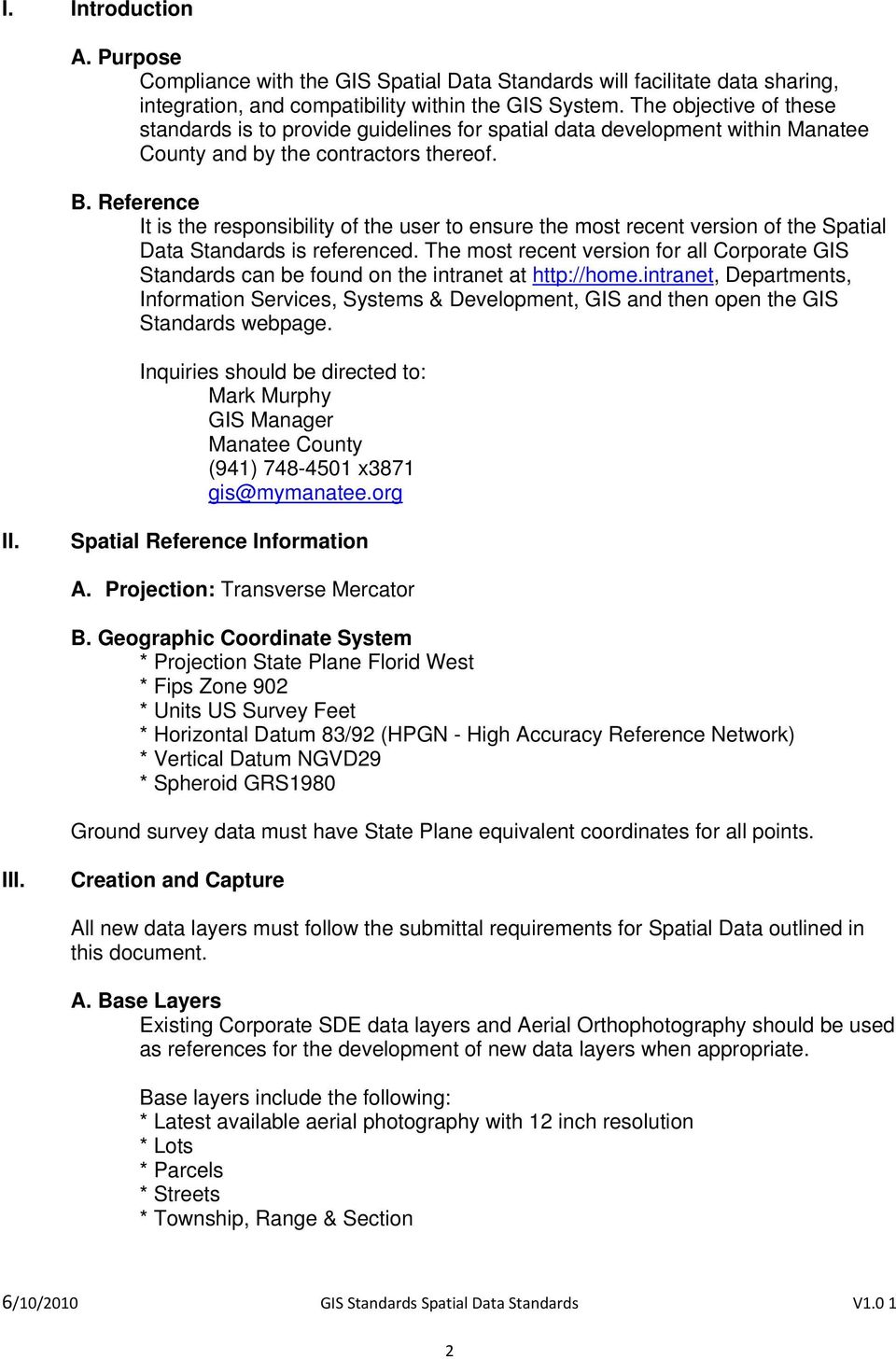
2 I. Introduction A. Purpose Compliance with the GIS Spatial Data Standards will facilitate data sharing, integration, and compatibility within the GIS System. The objective of these standards is to provide guidelines for spatial data development within Manatee County and by the contractors thereof. B. Reference It is the responsibility of the user to ensure the most recent version of the Spatial Data Standards is referenced. The most recent version for all Corporate GIS Standards can be found on the intranet at Departments, Information Services, Systems & Development, GIS and then open the GIS Standards webpage. Inquiries should be directed to: Mark Murphy GIS Manager Manatee County (941) x3871 II. Spatial Reference Information A. Projection: Transverse Mercator B. Geographic Coordinate System * Projection State Plane Florid West * Fips Zone 902 * Units US Survey Feet * Horizontal Datum 83/92 (HPGN - High Accuracy Reference Network) * Vertical Datum NGVD29 * Spheroid GRS1980 Ground survey data must have State Plane equivalent coordinates for all points. III. Creation and Capture All new data layers must follow the submittal requirements for Spatial Data outlined in this document. A. Base Layers Existing Corporate SDE data layers and Aerial Orthophotography should be used as references for the development of new data layers when appropriate. Base layers include the following: * Latest available aerial photography with 12 inch resolution * Lots * Parcels * Streets * Township, Range & Section 2
3 B. Field Collection Data collected in the field using GPS should follow the Spatial Reference Information as defined in Section II of this document. If latitude/longitude must be used, at least 10 significant digits must be collected using decimal degrees. Complete data collection documentation will be submitted and will include coordinate offsets when applicable. Metadata Standards IV. Delivery Formats A. Coverages Coverages are vector datasets depicting points, lines, polygons, regions, or routes. 1. Processing Tolerances Coordinate Precision Double Precision preserves up to 15 significant digits, while Single Precision reserves up to 7 significant digits. The precision of coordinates and attributes should be adequate to accurately represent the location and values of the data in question. They should also be standardized among datasets. Corporate GIS uses Double Precision. All data submitted to the Corporate GIS must meet the Spatial Reference Information as defined in Section II. Decimal Degrees are preferred over Degrees/Minutes/Seconds for the capture and storage of data because they are easier to calculate and convert into GIS coordinates. If decimal degrees are used they must be gathered at a minimum of 10 significant digits in order to maintain accuracy of less than one unit. ArcInfo coverages maintained using decimal degrees must have Double Precision. The following tolerances must be followed for all coverage datasets submitted to the Corporate GIS: * Double Precision * Fuzzy Tolerance * Dangle Tolerance 0.0 * Tic_Match 0.0 * Edit 0.5 * NodeSnap * Weed 0.5 * Grain 0.5 * Snap Topology Nodes or polygons must be present in an ArcInfo coverage in order to create topology. Topology can be built for any vector spatial data type and certain data conditions will prevent topology from being built without corrective editing. Topology allows GIS professionals to answer questions about adjacency, connectivity, proximity, and coincidence. Therefore topology is necessary for all polygonal and linear data sets submitted to the Corporate GIS. Identifying the potential uses of datasets will help determine which topological relationships are required for error checking, advanced analysis, and the associations maintained within datasets. 3

4 To create and maintain coverage topology, the following must be met: * Correct arc directionality must be maintained on streets, facility data, and any dataset with flow. * Polygons must close without overshoots or undershoots. * Pseudo nodes must only exist where 1) a line closes on itself 2) only two lines intersect 3) there is a change in attribution along a line 4) to maintain the shape and measurements of an arc. * Lines, polygons, points and annotation must not be duplicated. * Streets and facility data do not break at overpasses and underpasses. * There is a maximum of 500 vertices per arc limit with ArcInfo software. * Polygons must have only one label per feature. * Polygons must edge match without slivers. * Polygons must not overlap Associated References: 3. Delivery Formats * All coverages must contain a projection (prj.adf) file and follow the naming convention, precision, topology, and spatial reference standards for spatial data outlined in this document. They must have a spatial index, and be accompanied by Metadata. * e00 - All ArcInfo export files must be non-compressed and the platform in which the file was generated must be documented. Metadata Standards 4. Entity Naming a) File and Layer Naming File naming standards enable translation between data formats while ensuring that names are valid for each particular format. * File names will contain only alphanumeric characters (i.e. letters, numbers) * File names will start with a letter * File names will be entirely in lowercase * No spaces, dashes, underscores or special characters will be used * File names will be 10 characters or less * Common abbreviations should be used where applicable Refer to Appendix A for a list of Common Abbreviations. b) Attribute Item and Field Naming Attribute item and field naming standards enable translation between data formats without truncation or conflicts. * Item names will contain only alphanumeric characters (letters and numbers) and underscores * Item names must start with a letter * No spaces, dashes or special characters will be used * Item names will be 10 characters or less 4

5 B. Shapefiles * Common abbreviations should be used where applicable Refer to Appendix A for a list of Common Abbreviations. * To insure successful SDE data loading, item and attribute names must not contain Oracle Reserved Words. The Oracle Reserved Word List can be found on the home.intranet intranet site, under departments, Information Services, Systems & Development, GIS,GIS Standards webpage, Oracle Reserved Word List. If layers contain items or attributes matching any of the words in the Oracle Reserved Word List, they must be changed to a non-oracle reserved word before being submitted to the Corporate GIS. * Addresses will not be duplicated (i.e. two or more point, arc, or polygon features must not have the same street name, street number, and unit number or the same street name and address range). 1. Processing Tolerances Coordinate Precision Tolerances for shapefiles will be applied by the Corporate GIS as defined in Section IV.A Topology No formal topology exists within shapefiles. Even so, there are scripts that can be executed in ArcView to help identify overlapping, duplicate, sliver, and multipart polygons. These scripts can be downloaded from Perform a search for keyword Topology and look for the following scripts: Digitizing QA Tools and Shape Check v Please note that the Shape Check script is limited to polygons with 200 or fewer nodes. Help documents for each script are included with the downloads. Refer to Section IV.A.2 of this document for detailed Topology standards. 3. Delivery Formats All shapefiles must follow the naming convention, precision, topology, and spatial reference standards as defined in this document. They must have a spatial index and be accompanied by Metadata. When submitting a shapefile to the Corporate GIS the following files must always be included:.shp,.shx, and.dbf. When applicable, the.sbn and.sbx should also be included. If there is an ArcView Legend file (.AVL) that is to accompany the shapefile, it should be included as well. Metadata Standards 4. Entity Naming a) File and Layer Naming Refer to Section IV.4.a for File and Layer Naming standards. b) Attribute Item and Field Naming Refer to Section IV.4.b for Attribute Item and Field Naming standards. 5

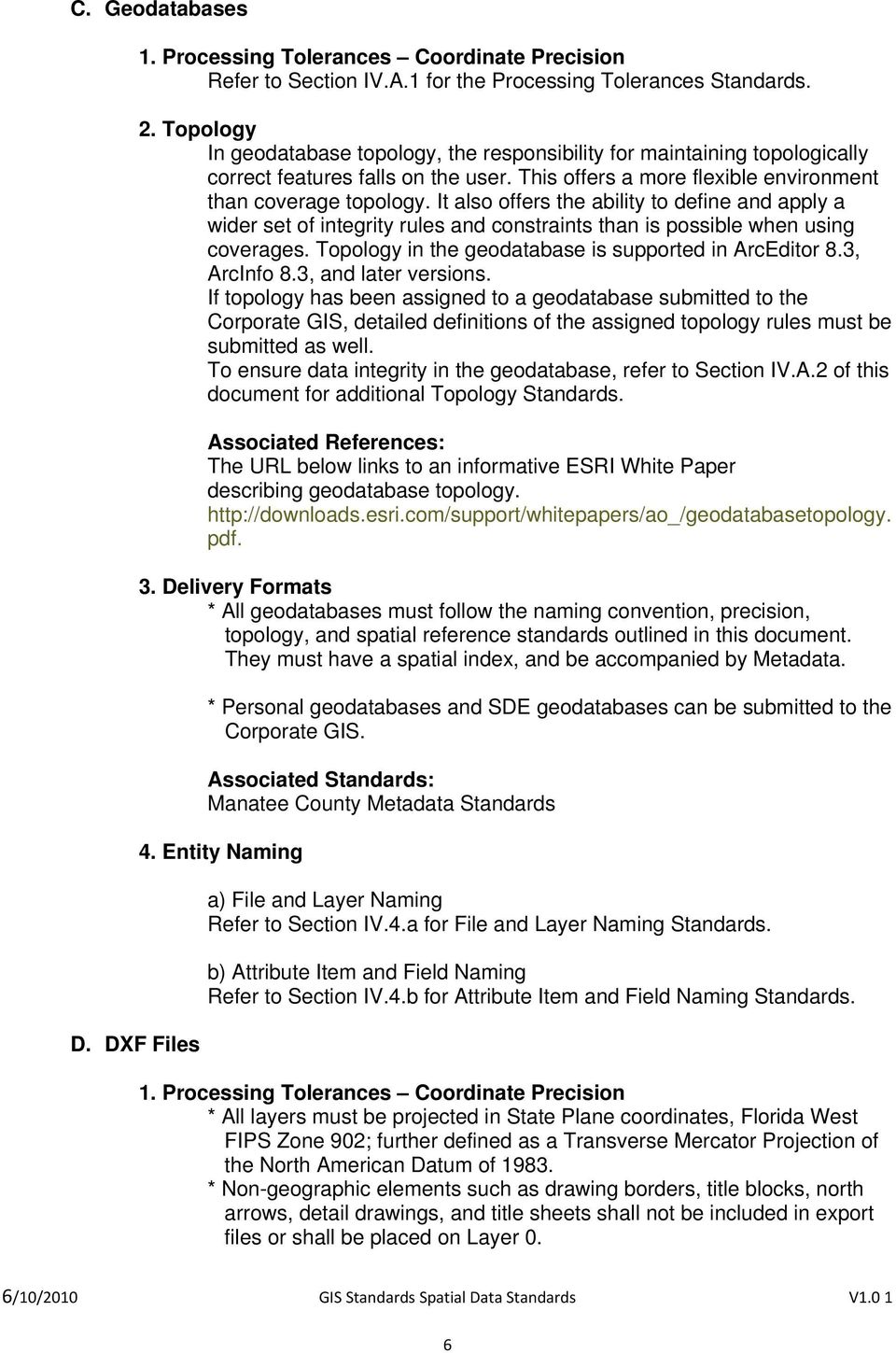
6 C. Geodatabases D. DXF Files 1. Processing Tolerances Coordinate Precision Refer to Section IV.A.1 for the Processing Tolerances Standards. 2. Topology In geodatabase topology, the responsibility for maintaining topologically correct features falls on the user. This offers a more flexible environment than coverage topology. It also offers the ability to define and apply a wider set of integrity rules and constraints than is possible when using coverages. Topology in the geodatabase is supported in ArcEditor 8.3, ArcInfo 8.3, and later versions. If topology has been assigned to a geodatabase submitted to the Corporate GIS, detailed definitions of the assigned topology rules must be submitted as well. To ensure data integrity in the geodatabase, refer to Section IV.A.2 of this document for additional Topology Standards. Associated References: The URL below links to an informative ESRI White Paper describing geodatabase topology. pdf. 3. Delivery Formats * All geodatabases must follow the naming convention, precision, topology, and spatial reference standards outlined in this document. They must have a spatial index, and be accompanied by Metadata. * Personal geodatabases and SDE geodatabases can be submitted to the Corporate GIS. Manatee County Metadata Standards 4. Entity Naming a) File and Layer Naming Refer to Section IV.4.a for File and Layer Naming Standards. b) Attribute Item and Field Naming Refer to Section IV.4.b for Attribute Item and Field Naming Standards. 1. Processing Tolerances Coordinate Precision * All layers must be projected in State Plane coordinates, Florida West FIPS Zone 902; further defined as a Transverse Mercator Projection of the North American Datum of * Non-geographic elements such as drawing borders, title blocks, north arrows, detail drawings, and title sheets shall not be included in export files or shall be placed on Layer 0. 6
7 * All blocks shall be exploded prior to creation of export file. * The 16 decimal places option must be specified during the DXFOUT ( Save As from the pull down menu) command. This will preserve double precision accuracy. * DXF files must be saved in AutoCAD version r14 or later. * An ASCII file listing individual layer names with descriptions shall be submitted in conjunction with each file. The ASCII file shall conform to all naming convention standards, and have a.txt extension. 2. Topology Files submitted to the Corporate GIS must follow the Manatee County AutoCAD standards published by the Public Works Department of Manatee County. a) Annotation Requirements * All annotation must use True Type Fonts. * Universal font type shall be used and it shall be bolded. * Layers: Annotation for each layer shall be placed in separate annotation layers. * Width factors shall be 100 (100% of normal width) for all text. All features submitted in AutoCAD (DXF) format must be free of symbology (text, symbols) that breaks line continuity. Manatee County AutoCAD Standards 3. Delivery Formats All AutoCAD files will be submitted as a.dxf or DWG files. 4. Entity Naming a) File and Layer Naming Refer to Section IV.4.a for File and Layer Naming Standards. V. Raster Data b) Attribute Item and Field Naming Refer to Section IV.4.b for Attribute Item and Field Naming Standards. Associated References: Refer to Appendix A for Common Abbreviations to be used in naming schemes. A. Georeferenced Aerial Photography and Imagery Formats MrSID - Images must be Version MG2 or MG3 JPEG Must be accompanied by World File (JFW) TIFF 4.0 Must be accompanied by World File (TFW) B. Digital Elevation Models (DEM) and Digital Terrain Models (DTM) e00, GRID, or TIN Must be accompanied by all ASCII source files 7

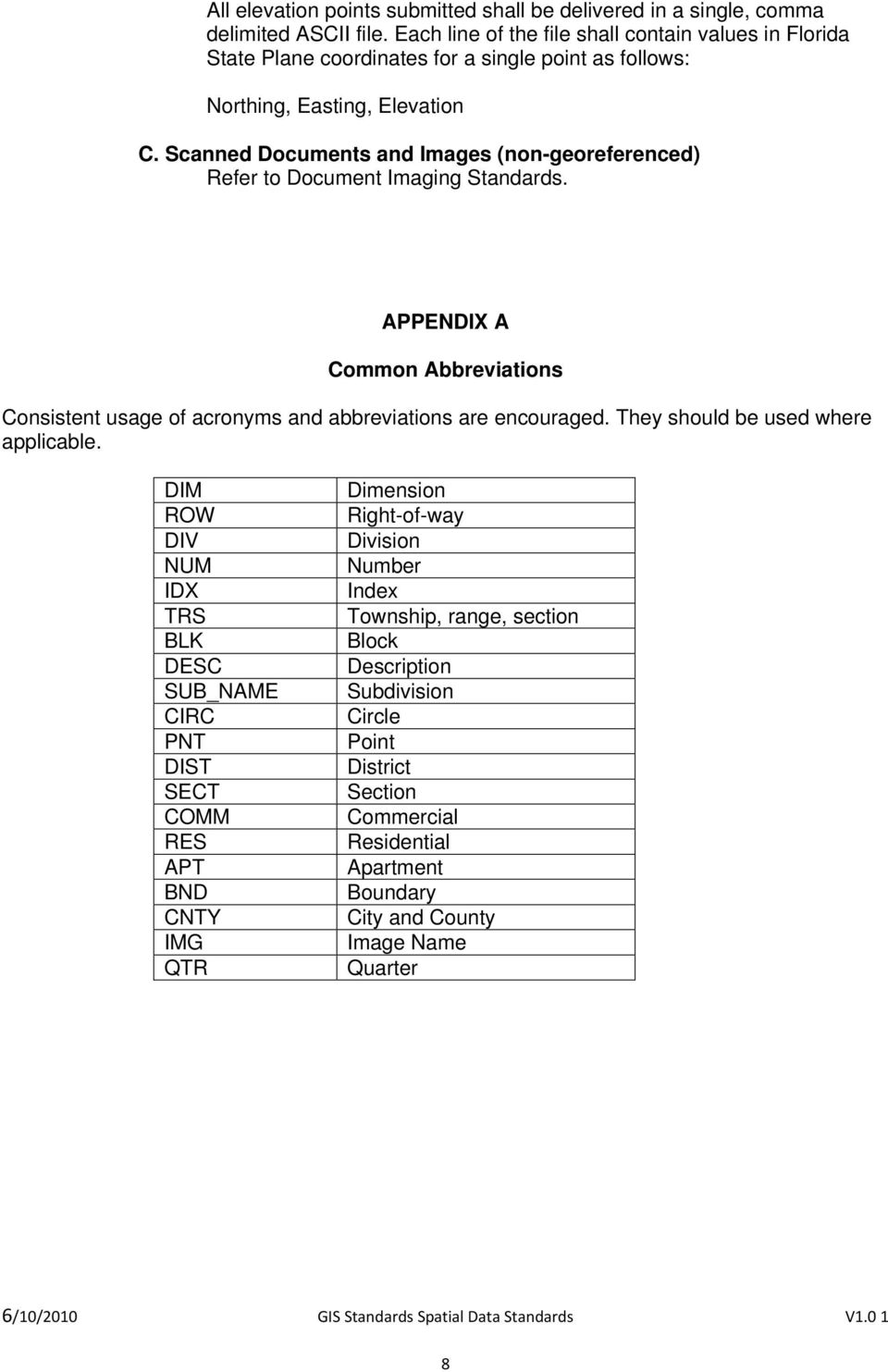
8 All elevation points submitted shall be delivered in a single, comma delimited ASCII file. Each line of the file shall contain values in Florida State Plane coordinates for a single point as follows: Northing, Easting, Elevation C. Scanned Documents and Images (non-georeferenced) Refer to Document Imaging Standards. APPENDIX A Common Abbreviations Consistent usage of acronyms and abbreviations are encouraged. They should be used where applicable. DIM ROW DIV NUM IDX TRS BLK DESC SUB_NAME CIRC PNT DIST SECT COMM RES APT BND CNTY IMG QTR Dimension Right-of-way Division Number Index Township, range, section Block Description Subdivision Circle Point District Section Commercial Residential Apartment Boundary City and County Image Name Quarter 8
Mapping and Digital Data Standards. October 2013
 Mapping and Digital Data Standards October 2013 New Jersey Department of Environmental Protection Geographic Information System Prepared by: New Jersey Department of Environmental Protection Office of
GIS Data in ArcGIS. Pay Attention to Data!!!
 GIS Data in ArcGIS Pay Attention to Data!!! 1 GIS Data Models Vector Points, lines, polygons, multi-part, multi-patch Composite & secondary features Regions, dynamic segmentation (routes) Raster Grids,
A GIS helps you answer questions and solve problems by looking at your data in a way that is quickly understood and easily shared.
 A Geographic Information System (GIS) integrates hardware, software, and data for capturing, managing, analyzing, and displaying all forms of geographically referenced information. GIS allows us to view,
INTRODUCTION TO ARCGIS SOFTWARE
 INTRODUCTION TO ARCGIS SOFTWARE I. History of Software Development a. Developer ESRI - Environmental Systems Research Institute, Inc., in 1969 as a privately held consulting firm that specialized in landuse
City of Tigard. GIS Data Standards
 City of Tigard GIS Data Standards City of Tigard 13125 SW Hall Blvd Tigard, Oregon 97223 503 639-4171 Page 1 of 5 1.0 Purpose The purpose of these standards is to provide guidance for geospatial data development
GEOGRAPHIC INFORMATION SYSTEMS CERTIFICATION
 GEOGRAPHIC INFORMATION SYSTEMS CERTIFICATION GIS Syllabus - Version 1.2 January 2007 Copyright AICA-CEPIS 2009 1 Version 1 January 2007 GIS Certification Programme 1. Target The GIS certification is aimed
Using Map Topology Editing Tools
 Using Map Topology Editing Tools What You Will Need in ArcView This tutorial, written by Colin Childs, is a companion to the article ArcGIS Topology for ArcView Users, also by Colin Childs, that appeared
Working with Geodatabase Topology
 Developed and Presented by Juniper GIS 1/38 Course Objectives Understanding how Geodatabase Topology works Geodatabase Rules Creating Geodatabase Topology Editing with Geodatabase Topology Geometric Networks
Introduction to GIS (Basics, Data, Analysis) & Case Studies. 13 th May 2004. Content. What is GIS?
 Introduction to GIS (Basics, Data, Analysis) & Case Studies 13 th May 2004 Content Introduction to GIS Data concepts Data input Analysis Applications selected examples What is GIS? Geographic Information
REQUEST FOR PROPOSAL FOR THE DEVELOPMENT OF A GIS PARCEL MAPPING FOR VERNON COUNTY, MISSOURI
 REQUEST FOR PROPOSAL FOR THE DEVELOPMENT OF A GIS PARCEL MAPPING FOR VERNON COUNTY, MISSOURI Vernon County, MO reserves the right to reject any and all proposals received, and the right to contract for
Spatial Adjustment Tools: The Tutorial
 Spatial Adjustment Tools: The Tutorial By Peter Kasianchuk, ESRI Educational Services In this exercise, you will perform some spatial adjustment and data management operations data to be used in analysis
GIS Architecture and Data Management Practices Boone County GIS Created and Maintained by the Boone County Planning Commission GIS Services Division
 GIS Architecture and Data Management Practices Boone County GIS Created and Maintained by the Boone County Planning Commission June 2008 Background Boone County s GIS program has been in existence for
Create a folder on your network drive called DEM. This is where data for the first part of this lesson will be stored.
 In this lesson you will create a Digital Elevation Model (DEM). A DEM is a gridded array of elevations. In its raw form it is an ASCII, or text, file. First, you will interpolate elevations on a topographic
GIS User Guide. for the. County of Calaveras
 GIS User Guide for the County of Calaveras Written by Dave Pastizzo GIS Coordinator Calaveras County San Andreas, California August 2000 Table of Contents Introduction..1 The Vision.1 Roles and Responsibilities...1
Topology. Shapefile versus Coverage Views
 Topology Defined as the the science and mathematics of relationships used to validate the geometry of vector entities, and for operations such as network tracing and tests of polygon adjacency Longley
National Register of Historic Places: GIS Webinar Cultural Resource GIS Facility National Park Service June 2012
 National Register of Historic Places: GIS Webinar Cultural Resource GIS Facility National Park Service June 2012 In February and March 2012 the National Register of Historic Places held webinars in conjunction
Chapter 6: Data Acquisition Methods, Procedures, and Issues
 Chapter 6: Data Acquisition Methods, Procedures, and Issues In this Exercise: Data Acquisition Downloading Geographic Data Accessing Data Via Web Map Service Using Data from a Text File or Spreadsheet
Editing Common Polygon Boundary in ArcGIS Desktop 9.x
 Editing Common Polygon Boundary in ArcGIS Desktop 9.x Article ID : 100018 Software : ArcGIS ArcView 9.3, ArcGIS ArcEditor 9.3, ArcGIS ArcInfo 9.3 (or higher versions) Platform : Windows XP, Windows Vista
HELCOM Data and Map Service. User Manual
 HELCOM Data and Map Service User Manual Version 2.2 - February 2015 1 Table of contents 1. General Information... 3 1.1 Background... 3 1.2 Technical requirements... 3 1.3 Contact... 3 2. Accessing HELCOM
GEOGRAPHIC INFORMATION SYSTEMS Lecture 20: Adding and Creating Data
 Adding Existing Data Into ArcGIS - there are many different ways to get data into ArcGIS GEOGRAPHIC INFORMATION SYSTEMS Lecture 20: Adding and Creating Data Add Data - normally we use the Add Data button
New York City Neighborhood Tabulation Areas
 Page 1 of 10 New York City Neighborhood Tabulation Areas ESRI Shapefile Tags New York, boundary, neighborhoods, Manhattan, projection areas, Queens, Brooklyn, Richmond, boundaries, neighborhood names,
Request for Proposals for Topographic Mapping. Issued by: Teton County GIS and Teton County Engineering Teton County, Wyoming
 Request for Proposals for Topographic Mapping Issued by: Teton County GIS and Teton County Engineering Teton County, Wyoming Proposals due: 2:00PM MDT July 1, 2015 Proposals may be delivered to: Teton
WFP Liberia Country Office
 1 Oscar Gobbato [email protected] [email protected] WFP Liberia Country Office GIS training - Summary Objectives 1 To introduce to participants the basic concepts and techniques in using Geographic
Spatial data models (types) Not taught yet
 Spatial data models (types) Not taught yet A new data model in ArcGIS Geodatabase data model Use a relational database that stores geographic data A type of database in which the data is organized across
Institute of Natural Resources Departament of General Geology and Land use planning Work with a MAPS
 Institute of Natural Resources Departament of General Geology and Land use planning Work with a MAPS Lecturers: Berchuk V.Y. Gutareva N.Y. Contents: 1. Qgis; 2. General information; 3. Qgis desktop; 4.
Introduction to GIS. http://libguides.mit.edu/gis
 Introduction to GIS http://libguides.mit.edu/gis 1 Overview What is GIS? Types of Data and Projections What can I do with GIS? Data Sources and Formats Software Data Management Tips 2 What is GIS? 3 Characteristics
EPSG. Coordinate Reference System Definition - Recommended Practice. Guidance Note Number 5
 European Petroleum Survey Group EPSG Guidance Note Number 5 Coordinate Reference System Definition - Recommended Practice Revision history: Version Date Amendments 1.0 April 1997 First release. 1.1 June
Title 10 DEPARTMENT OF NATURAL RESOURCES Division 35 Land Survey Chapter 1 Cadastral Mapping Standards
 Title 10 DEPARTMENT OF NATURAL RESOURCES Division 35 Land Survey Chapter 1 Cadastral Mapping Standards 10 CSR 35-1.010 Application of Standards PURPOSE: These minimum standards provide the digital mapper
Guidelines on Information Deliverables for Research Projects in Grand Canyon National Park
 INTRODUCTION Science is playing an increasing role in guiding National Park Service (NPS) management activities. The NPS is charged with protecting and maintaining data and associated information that
RIGIS Standards for Digital Parcel Data Sets For Use in a Geographic Information System Revision: December 15, 2003. TABLE OF CONTENTS Preamble.
 RIGIS Standards for Digital Parcel Data Sets For Use in a Geographic Information System Revision: December 15, 2003 TABLE OF CONTENTS Preamble. 1 1. Introduction and Credits. 2 2. Purpose.. 3 3. Background.
GEOGRAPHIC INFORMATION SYSTEMS
 GIS GEOGRAPHIC INFORMATION SYSTEMS FOR CADASTRAL MAPPING Chapter 6 2015 Cadastral Mapping Manual 6-0 GIS - GEOGRAPHIC INFORMATION SYSTEMS What is GIS For a long time people have sketched, drawn and studied
EEOS 381 -Spatial Databases and GIS Applications
 EEOS 381 -Spatial Databases and GIS Applications Lecture 3 GIS Data Models Data Formats Overview GIS Data Models Common GIS Data Formats EEOS 381 - Spring 2015: Lecture 3 2 Overview Key points: It is important
Data Validation Online References
 Data Validation Online References Submitted To: Program Manager GeoConnections Victoria, BC, Canada Submitted By: Jody Garnett Brent Owens Refractions Research Inc. Suite 400, 1207 Douglas Street Victoria,
CITY OF POWAY REQUEST FOR PROPOSALS (RFP) FOR GEOGRAPHIC INFORMATION SYSTEM (GIS) WATER / WASTEWATER SYSTEM DATA CONVERSION PROJECT ADDENDUM SIX
 CITY OF POWAY REQUEST FOR PROPOSALS (RFP) FOR GEOGRAPHIC INFORMATION SYSTEM (GIS) WATER / WASTEWATER SYSTEM DATA CONVERSION PROJECT ADDENDUM SIX In reference to the Request for Proposals for Geographic
GIS Databases With focused on ArcSDE
 Linköpings universitet / IDA / Div. for human-centered systems GIS Databases With focused on ArcSDE Imad Abugessaisa [email protected] 20071004 1 GIS and SDBMS Geographical data is spatial data whose
Constructing an EA-level Database. for the Census
 Constructing an EA-level Database for the Census Amor Laaribi UN-GGIM Secretariat UN Statistics Division New York 1 Overview Stages in the Geographic Database Development Sources of geographic information
Using Geocoded TIFF & JPEG Files in ER Mapper 6.3 with SP1. Eric Augenstein Earthstar Geographics Web: www.es-geo.com
 Using Geocoded TIFF & JPEG Files in ER Mapper 6.3 with SP1 Eric Augenstein Earthstar Geographics Web: www.es-geo.com 1 Table of Contents WHAT IS NEW IN 6.3 SP1 REGARDING WORLD FILES?...3 WHAT IS GEOTIFF
Abstract. Introduction
 Data Replication and Data Sharing Integrating Heterogeneous Spatial Databases Mark Stoakes and Katherine Irwin Professional Services, Safe Software Inc. Abstract Spatial data warehouses are becoming more
GEOGRAPHIC INFORMATION SYSTEMS
 GIS GEOGRAPHIC INFORMATION SYSTEMS FOR CADASTRAL MAPPING Chapter 7 2015 Cadastral Mapping Manual 7-0 GIS - GEOGRAPHIC INFORMATION SYSTEMS What is GIS For a long time people have sketched, drawn and studied
Online Digitizing and Editing of GIS Layers (On-Screen or Head s Up Digitizing)
 Online Digitizing and Editing of GIS Layers (On-Screen or Head s Up Digitizing) 2011 Charlie Schweik, Alexander Stepanov, Maria Fernandez, Lara Aniskoff Note: This work is licensed under the Creative Commons
Title 10 DEPARTMENT OF NATURAL RESOURCES Division 35 Land Survey Chapter 1 Cadastral Mapping Standards
 Title 10 DEPARTMENT OF NATURAL RESOURCES Division 35 Land Survey Chapter 1 Cadastral Mapping Standards 10 CSR 35-1.010 Application of Standards PURPOSE: These minimum standards provide the digital mapper
Department of Defence. Spatial Data Management Plan. DRMS Document Id: Version: 4.6.0. Defence Support and Reform Group R1830735
 Department of Defence Defence Support and Reform Group Spatial Data Management Plan DRMS Document Id: R1830735 Version: 4.6.0 Status: Draft Dated: 01 March 2015 Produced for: Director SIM EXECUTIVE SUMMARY
ADWR GIS Metadata Policy
 ADWR GIS Metadata Policy 1 PURPOSE OF POLICY.. 3 INTRODUCTION.... 4 What is metadata?... 4 Why is it important? 4 When to fill metadata...4 STANDARDS. 5 FGDC content standards for geospatial metadata...5
Converting GIS Datasets into CAD Format
 Ball State University Libraries GIS Research and Map Collection Converting GIS Datasets into CAD Format Author: Angela Gibson, 6/13/2014 Overview: One of the most common requests from students is for GIS
DATA QUALITY IN GIS TERMINOLGY GIS11
 DATA QUALITY IN GIS When using a GIS to analyse spatial data, there is sometimes a tendency to assume that all data, both locational and attribute, are completely accurate. This of course is never the
Geographic Information System Product Distribution Policies. Preface
 Support Services Department Information Technologies Division Geographic Information System Product Distribution Policies Preface 1. Purpose Geographic Information System (GIS) Product Distribution Policies
REGIONAL SEDIMENT MANAGEMENT: A GIS APPROACH TO SPATIAL DATA ANALYSIS. Lynn Copeland Hardegree, Jennifer M. Wozencraft 1, Rose Dopsovic 2 INTRODUCTION
 REGIONAL SEDIMENT MANAGEMENT: A GIS APPROACH TO SPATIAL DATA ANALYSIS Lynn Copeland Hardegree, Jennifer M. Wozencraft 1, Rose Dopsovic 2 ABSTRACT: Regional sediment management (RSM) requires the capability
Lab 3. GIS Data Entry and Editing.
 Lab 3. GIS Data Entry and Editing. The goal: To learn about the vector (arc/node) and raster data types entry and editing. Objective: Create vector and raster datasets and visualize them. Software for
UPDATED GIS DATABASE DESIGN: Geodatabase Model
 CITY OF SUFFOLK, VIRGINIA UPDATED GIS DATABASE DESIGN: Geodatabase Model Prepared by: Michael Baker Jr., Inc. Virginia Beach, Virginia TABLE OF CONTENTS A. GEODATABASE OVERVIEW...2 B. TYPES OF GEODATABASES...3
Mississippi Private Schools 2015
 Mississippi Private Schools 2015 Shapefile Tags education, schools, private, K-12 Summary To add to state data clearinghouse the Mississippi private schools point features. Description Point locations
Data access and management
 B Data access and management CONTENTS B.1 Introduction... B-1 B.2 Data requirements and availability... B-1 B.3 Data access... B-2 B.4 Overall procedures... B-2 B.5 Data tools and management... B-4 Appendix
Creating Figure Ground Maps in ArcMap 10.x: Basic procedures to download, open, manipulate and print spatial data
 Creating Figure Ground Maps in ArcMap 10.x: Basic procedures to download, open, manipulate and print spatial data These procedures outline: A. Retrieving Property Data B. Uncompressing the Downloaded Files
Open Source Desktop GIS Solutions for the Not-So Casual User
 Open Source Desktop GIS Solutions for the Not-So Casual User Roger C. Lowe III Warnell School of Forestry and Natural Resources The University of Georgia Athens, GA 30605 [email protected] Abstract Ask
NJDEP GPS Data Collection Standards For GIS Data Development
 NJDEP GPS Data Collection Standards For GIS Data Development Bureau of Geographic Information Systems Office of Information Resource Management June 8, 2011 1.0 Introduction... 3 2.0 GPS Receiver Hardware
Topology and Topological Rules Geometric properties that are maintained in spatial databases
 Topology and Topological Rules Geometric properties that are maintained in spatial databases The definition of topology Topology is a term used around GIS that is sometimes confused with the term topography.
CAD Standards Guideline For Facility Documentation and Construction Projects
 CAD Standards Guideline For Facility Documentation and Construction Projects Page 1 of 12 Table of Contents A. Software B. CAD Methods 1. Layer Standards 2. Font 3. Lineweights 4. External References 5.
Vermont GIS Parcel Data Standard
 VT Center for Geographic Information Vermont GIS Parcel Data Standard Version 1.1 Release Date: November 2013 Acknowledgements This data standard was drafted by staff at the VT Center for Geographic Information
NGA GRID GUIDE HOW TO USE ArcGIS 8.x ANS 9.x TO GENERATE MGRS AND OTHER MAP GRIDS
 GEOSPATIAL SCIENCES DIVISION COORDINATE SYSTEMS ANALYSIS TEAM (CSAT) SEPTEMBER 2005 Minor Revisions March 2006 POC Kurt Schulz NGA GRID GUIDE HOW TO USE ArcGIS 8.x ANS 9.x TO GENERATE MGRS AND OTHER MAP
Using the Kendall County GIS Basic GIS Viewer
 Using the Kendall County GIS Basic GIS Viewer Link to Viewer Gallery: http://gis.co.kendall.il.us/gisviewer_gallery.aspx Help and About Initial View Introduction Navigation Identify Tool Search Tool Search
The GeoMedia Fusion Validate Geometry command provides the GUI for detecting geometric anomalies on a single feature.
 The GeoMedia Fusion Validate Geometry command provides the GUI for detecting geometric anomalies on a single feature. Below is a discussion of the Standard Advanced Validate Geometry types. Empty Geometry
CityGML goes to Broadway
 CityGML goes to Broadway Thomas H. Kolbe, Barbara Burger, Berit Cantzler Chair of Geoinformatics [email protected] September 11, 2015 Photogrammetric Week 2015, Stuttgart The New York City Open Data
Getting Started With LP360
 Getting Started With LP360 10/30/2014 1 Contents What is LP360?... 3 System Requirements... 3 Installing LP360... 4 How to Enable the LP360 Extension... 4 How to Display the LP360 Toolbar... 4 How to Import
MGL Avionics. MapMaker 2. User guide
 MGL Avionics MapMaker 2 User guide General The MGL Avionics MapMaker application is used to convert digital map images into the raster map format suitable for MGL EFIS systems. Note: MapMaker2 produces
INCOG Transportation Planning Division Spatial Data Management Workflow GIS-T 2008
 INCOG Transportation Planning Division Spatial Data Management Workflow GIS-T 2008 Kevin Tartar, GISP Transportation Geodatabase Coordinator 201 West 5th Street, Suite 600 Tulsa, Oklahoma 74103 Phone:
CAD Standards Guideline For Facility Documentation and Construction Projects
 CAD Standards Guideline For Facility Documentation and Construction Projects Implemented March 2010 Page 1 of 9 Table of Contents A. Software B. CAD Methods 1. Layer Standards 2. Font 3. Lineweights 4.
User s Guide to ArcView 3.3 for Land Use Planners in Puttalam District
 User s Guide to ArcView 3.3 for Land Use Planners in Puttalam District Dilhari Weragodatenna IUCN Sri Lanka, Country Office Table of Content Page No Introduction...... 1 1. Getting started..... 2 2. Geo-referencing...
Brevard County Public Works Finance and Contracts Administration
 Brevard County Public Works Finance and Contracts Administration Public Works Survey & Mapping Division Review Check Sheet for Land Acquisition, Drainage, Roadway and Pedway Expansion, Asbuilts, Maintenance
ArcGIS. Image Server tutorial
 ArcGIS 9 ArcGIS Image Server tutorial Copyright 2006, 2007, and 2008 Zanja Technologies, Inc. All rights reserved. The information contained in this work is the property of Zanja Technologies, Inc., under
Digital Terrain Model Grid Width 10 m DGM10
 Digital Terrain Model Grid Width 10 m Status of documentation: 23.02.2015 Seite 1 Contents page 1 Overview of dataset 3 2 Description of the dataset contents 4 3 Data volume 4 4 Description of the data
INSTRUCTIONS FOR MAKING 3D,.DWG CONTOUR LINES
 INSTRUCTIONS FOR MAKING 3D,.DWG CONTOUR LINES A TUTORIAL FROM SPATIAL AND NUMERIC DATA SERVICES NICOLE SCHOLTZ AND GEOFF IVERSON Overview... 2 A. Get a Digital Elevation Model (DEM)... 3 B. Open ArcMap,
Gunnison County Web Map
 Gunnison County Web Map Find Data - Find data - Navigate tools - Mouse over tooltip Make Maps - Layers - Legend - Drawing tools - Printing Analysis - Measurement - Selecting - Queries Spatial SQL - Basic
SECTION 5 DRAFTING STANDARDS
 SECTION 5 DRAFTING STANDARDS 1 SECTION FIVE TABLE OF CONTENTS Description Page TABLE OF CONTENTS... 5-2 GENERAL... 5-3 DRAFTING STANDARDS... 5-5 DRAFTING MINIMUM REQUIREMENTS HANDOUT... 5-8 2 GENERAL 1.
What do I do first in ArcView 8.x? When the program starts Select from the Dialog box: A new empty map
 www.library.carleton.ca/find/gis Introduction Introduction to Georeferenced Images using ArcGIS Georeferenced images such as aerial photographs or satellite images can be used in many ways in both GIS
How to Download Census Data from American Factfinder and Display it in ArcMap
 How to Download Census Data from American Factfinder and Display it in ArcMap Factfinder provides census and ACS (American Community Survey) data that can be downloaded in a tabular format and joined with
Guidelines for Fiber Optic Cable Permits
 Guidelines for Fiber Optic Cable Permits NOVA District (Fairfax/Arlington) Permits www.virginiadot.org/business/fairfax-permits-main.asp Email: [email protected] 14685 Avion Parkway
ArcGIS Reference Document
 Migration of GIS Data to ArcSDE Page 1 of 10 Table of Contents A Brief Summary of DEP s GIS Data Storage o The Y Drive o ArcSDE (Spatial Database) Keeping Your GIS Project Data Current o Checking Your
Groundwater Chemistry
 Mapping and Modeling Groundwater Chemistry By importing Excel spreadsheets into ArcGIS 9.2 By Mike Price, Entrada/San Juan, Inc. In ArcGIS 9.2, Microsoft Excel spreadsheet data can be imported and used
Using CAD Data in ArcGIS
 Esri International User Conference San Diego, California Technical Workshops July 27, 2012 Using CAD Data in ArcGIS Jeff Reinhart & Phil Sanchez Agenda Overview of ArcGIS CAD Support Using CAD Datasets
http://www.esri.com/bia
 ArcGIS for Tribal Transportation Management David Gadsden Federal Account Manager [email protected] d d 1 David Gadsden GIS Background UW Geography (1995) Peace Corps Tanzania Environmental Social Science
ArcGIS Data Models Practical Templates for Implementing GIS Projects
 ArcGIS Data Models Practical Templates for Implementing GIS Projects GIS Database Design According to C.J. Date (1995), database design deals with the logical representation of data in a database. The
Guidelines for the use of the OGP P6/11 bin grid GIS data model
 Guidelines for the use of the OGP P6/11 bin grid GIS data model Report No. 483-6g July 2013 This document is a companion document to the OGP P6/11 Seismic bin grid data exchange format description (2012)
APLS 2011. GIS Data: Classification, Potential Misuse, and Practical Limitations
 APLS 2011 GIS Data: Classification, Potential Misuse, and Practical Limitations GIS Data: Classification, Potential Misuse, and Practical Limitations Goals & Objectives Develop an easy to use geospatial
MAIN_SNP_TOPO.dgm_2m
 Seite 1 von 7 MAIN_SNP_TOPO.dgm_2m SDE Raster Dataset Tags dgm_2m, dgm_gr_snp, dgm1177bis1258, dtm4, lomb_dtm_20, dem2_5_apb, dhm10, dem20_apb, dsm2_voralberg, dsm10_tirol Summary There is no summary for
Data Visualization. Prepared by Francisco Olivera, Ph.D., Srikanth Koka Department of Civil Engineering Texas A&M University February 2004
 Data Visualization Prepared by Francisco Olivera, Ph.D., Srikanth Koka Department of Civil Engineering Texas A&M University February 2004 Contents Brief Overview of ArcMap Goals of the Exercise Computer
ArcGIS ArcMap: Printing, Exporting, and ArcPress
 Esri International User Conference San Diego, California Technical Workshops July 25th, 2012 ArcGIS ArcMap: Printing, Exporting, and ArcPress Michael Grossman Jeremy Wright Workshop Overview Output in
DATABASE MANAGEMENT FILES GIS06
 DATABASE MANAGEMENT Last day we looked at spatial data structures for both vector and raster data models. When working with large amounts of data, it is important to have good procedures for managing the
A Method Using ArcMap to Create a Hydrologically conditioned Digital Elevation Model
 A Method Using ArcMap to Create a Hydrologically conditioned Digital Elevation Model High resolution topography derived from LiDAR data is becoming more readily available. This new data source of topography
Vector analysis - introduction Spatial data management operations - Assembling datasets for analysis. Data management operations
 Vector analysis - introduction Spatial data management operations - Assembling datasets for analysis Transform (reproject) Merge Append Clip Dissolve The role of topology in GIS analysis Data management
Downloading SSURGO Soil Data from Internet
 Downloading SSURGO Soil Data from Internet Prepared by Venkatesh Merwade School of Civil Engineering, Purdue University [email protected] September 2012 Purpose The purpose of this exercise to demonstrate
Metadata for Big River Watershed Geologic and Geomorphic Data
 Metadata for Big River Watershed Geologic and Geomorphic Data Metadata are descriptions and information regarding compiled data. This appendix contains the metadata that describes the compiled data used
Syllabus AGET 782. GIS for Agricultural and Natural Resources Management
 Syllabus AGET 782 Course Title: GIS for Agricultural and Natural Resources Management Course Abbreviation: AGET 782 Course Credits: Instructor: Course Description: Required Text: 3 hours Timothy N. Burcham,
Data source, type, and file naming convention
 Exercise 1: Basic visualization of LiDAR Digital Elevation Models using ArcGIS Introduction This exercise covers activities associated with basic visualization of LiDAR Digital Elevation Models using ArcGIS.