
Hummingbird DM Integrated Document Management Software
|
|
|
- Kelley Ferguson
- 10 years ago
- Views:
Transcription
1 Karen M. Shegda Product Report 15 December 2003 Hummingbird DM Integrated Document Management Software Summary Hummingbird DM is the integrated document management component of the Hummingbird Enterprise suite. Hummingbird DM represents re-branding of the former DOCSFusion, PowerDOCS and CyberDOCS products. Note Hummingbird began shipping Hummingbird Document Management (DM) version 5.1 in June This release provides performance enhancements and reporting capabilities. Hummingbird added an automated management solution to extend Hummingbird DM s capabilities. Hummingbird also made two acquisitions in the records management arena: LegalKEY (record management [RM] for law firms) and Valid (RM for U.K. government agencies). Table of Contents Overview Architecture Migration Issues Analysis Pricing Competitors Strengths Limitations Recommended Gartner Research Insight List Of Tables Table 1: Specifications: Hummingbird DM Table 2: Features and Functions: Hummingbird DM Gartner Reproduction of this publication in any form without prior written permission is forbidden. The information contained herein has been obtained from sources believed to be reliable. Gartner disclaims all warranties as to the accuracy, completeness or adequacy of such information. Gartner shall have no liability for errors, omissions or inadequacies in the information contained herein or for interpretations thereof. The reader assumes sole responsibility for the selection of these materials to achieve its intended results. The opinions expressed herein are subject to change without notice.
2 Corporate Headquarters Hummingbird 1 Sparks Avenue Toronto, ON M2H 2W1, Canada Tel: ; (in North America) Fax: Internet: Overview Hummingbird DM is part of a suite of Hummingbird products, known collectively as Hummingbird Enterprise. An integrated yet modular solution suite, Hummingbird Enterprise is designed to help enterprises manage the entire life cycle of their business content and knowledge assets. Hummingbird DM is an integrated document management (IDM) product that provides the underlying content repository and document management services for Hummingbird Enterprise. In addition to Hummingbird DM, Hummingbird Enterprise consists of the following core components: Hummingbird Portal the Web portal interface Hummingbird Business Intelligence (BI) a complete reporting and analysis package Hummingbird Extraction, Transformation and Loading (ETL) a data integration solution that extracts, transforms and loads data between applications, databases, data stores, data marts, data warehouses and document management systems Hummingbird Knowledge Management (KM) a collection of technologies that deliver search, categorization and information retrieval capabilities Hummingbird RM a records management tool Hummingbird Collaboration a document/project-based collaborative environment All components have a single common user interface. The components can be installed as stand-alone applications or in conjunction with other components in the suite. Currently, Hummingbird DM, Hummingbird BI, Hummingbird KM, Hummingbird RM, Hummingbird Collaboration and Hummingbird Portal are tightly integrated. When integrated with Hummingbird Portal, Hummingbird DM serves as the portal s underlying content repository. Hummingbird DM represents a major product release and a re-branding of the previous DOCSFusion, PowerDOCS and CyberDOCS products. It replaces DOCSFusion and DOCS Open as the strategic document management platform from Hummingbird. New features and enhancements in Hummingbird DM include improved compound document support, new search user interface, enhanced administration and deployment capabilities, and tighter integration with other components in the Hummingbird Enterprise Suite, particularly the records management and search capabilities. The Hummingbird DM suite itself includes the Hummingbird DM server and client software, as well as the following companion products: Hummingbird Collaboration Hummingbird Web Publishing 15 December

3 Hummingbird DM WorkFlow Hummingbird Imaging Hummingbird AutoCAD DM Extension Hummingbird targets Hummingbird DM primarily for use in managing an enterprise s internal business content and, when used in conjunction with Hummingbird Web Publishing, for publishing documents and content to an intranet or extranet site. Through its relationship with RedDot, Hummingbird can address customers Web content management needs. Hummingbird resells the RedDot products and is developing the integration between the two offerings. Architecture Hummingbird DM is built on a three-tier architecture consisting of a Data Tier, the Transactional Tier and the Client Tier. The Data Tier, or the Hummingbird Repository, consists of an SQL database containing the DM library, a file store containing one or more document servers, and a full-text index of the stored documents. Document metadata, forms and user profile information are stored in the database, while the actual documents are stored on the document servers. Document servers can be shared machines or dedicated servers. The Transactional Tier consists of the Hummingbird DM Server and the DM Web Server. The DM Server software includes DM Server, the DM Server Admin Tools and SearchServer 5.3. The DM Server handles access to the database that stores document metadata, and it manages the storage and retrieval of the physical documents. The DM Web Server is the Web interface for Hummingbird DM; it replaces the CyberDOCS software. The Client Tier is where users create, access and manage documents. Hummingbird DM provides a single client that offers several user interfaces, including the DM Webtop and DM Extensions, which expose DM features in clients and user authoring tools as well as the Windows Explorer. Migration Issues Established DOCSFusion customers can upgrade to Hummingbird DM free of charge as part of their standard maintenance agreements. DOCS Open customers can migrate to Hummingbird DM for a nominal per-user upgrade fee. Upgrades to Hummingbird DM 5.1 are supported from Hummingbird DM 5.0, DOCSFusion 4.0, and DOCS Open and According to Hummingbird, its previous DOCSFusion offering can coexist with Hummingbird DM, enabling users to gradually transition to the new offering. DOCSFusion client applications will work with Hummingbird DM, but they cannot take advantage of the new Hummingbird DM features. Sites implementing Hummingbird DM must create new indexes to take advantage of the new features in SearchServer 5.3, which is not backward-compatible with previous SearchServer versions. Once Hummingbird DM has been implemented, any established SearchServer indexes created by the DOCSFusion Indexer can be used for searching, but the Hummingbird DM Indexer cannot update them. In addition, with the release of Hummingbird DM, Hummingbird no longer supports Verity as the underlying search engine or recognizes Verity indexes. Established DOCS Open or DOCSFusion customers migrating to Hummingbird DM must re-create their full-text indexes with SearchServer; however, they will be able to create the SearchServer index while maintaining the Verity index for established users. Users connecting to the DM Repository via the Hummingbird DM Client cannot search the Verity indexes. 15 December

4 Table 1: Specifications: Hummingbird DM Product Type IDM software Current Version DM: 5.1 Installed Base 7,000 sites representing 2 million users (all Hummingbird DM products and their predecessors) Date Announced February 2002 (DM 5.0); 25 June 2003 (DM 5.1) Date Generally June 2002 (DM 5.0); 25 June 2003 (DM 5.1) Available Architecture N-tier, distributed Server Operating Microsoft Windows NT 4.0, Windows 2000 and Windows 2000 Advanced Server Systems Supported Web Server Support Microsoft Internet Information Server (IIS) or iplanet Client Operating Microsoft Windows 98, Windows 2000, Windows NT or Windows XP Systems Supported Web Browsers Microsoft Internet Explorer or Netscape Supported Databases Microsoft SQL Server 7.0 and 2000, Oracle8i and 9i, and Sybase System 12 and Supported 12.5 Standards Supported Microsoft Distributed Component Object Model (DCOM), HTML, Open Document Management Application Programming Interface (API) (ODMA), Java, Tagged ImageFileFormat(TIFF) Communications TCP/IP, HTTP, DCOM Protocols Supported System Security Uses a three-tier security model that leverages the security features of the server operating system. Using Hummingbird DM Server enhances the security for Hummingbird DM documents stored in the DM Repositories, since only the DM Server(s) can access the documents. Hummingbird DM 5.1 supports the Lightweight Directory Access Protocol (LDAP) for authenticating user information. Hummingbird DM can synchronize with LDAP directories to import users and groups information. System System administration is accomplished with the DM Administration Tools, which Administration Tools consist of Web- and Windows-based tools. Administrative tasks supported include user/group management and document template creation/management. Web-based administration capabilities include Library Maintenance. Administrators can access Web Admin Tools from the DM Webtop. Administrators can perform database management tasks, change DM Webtop configurations and manage Web-based deployment of DM Webtop installation packages. 15 December

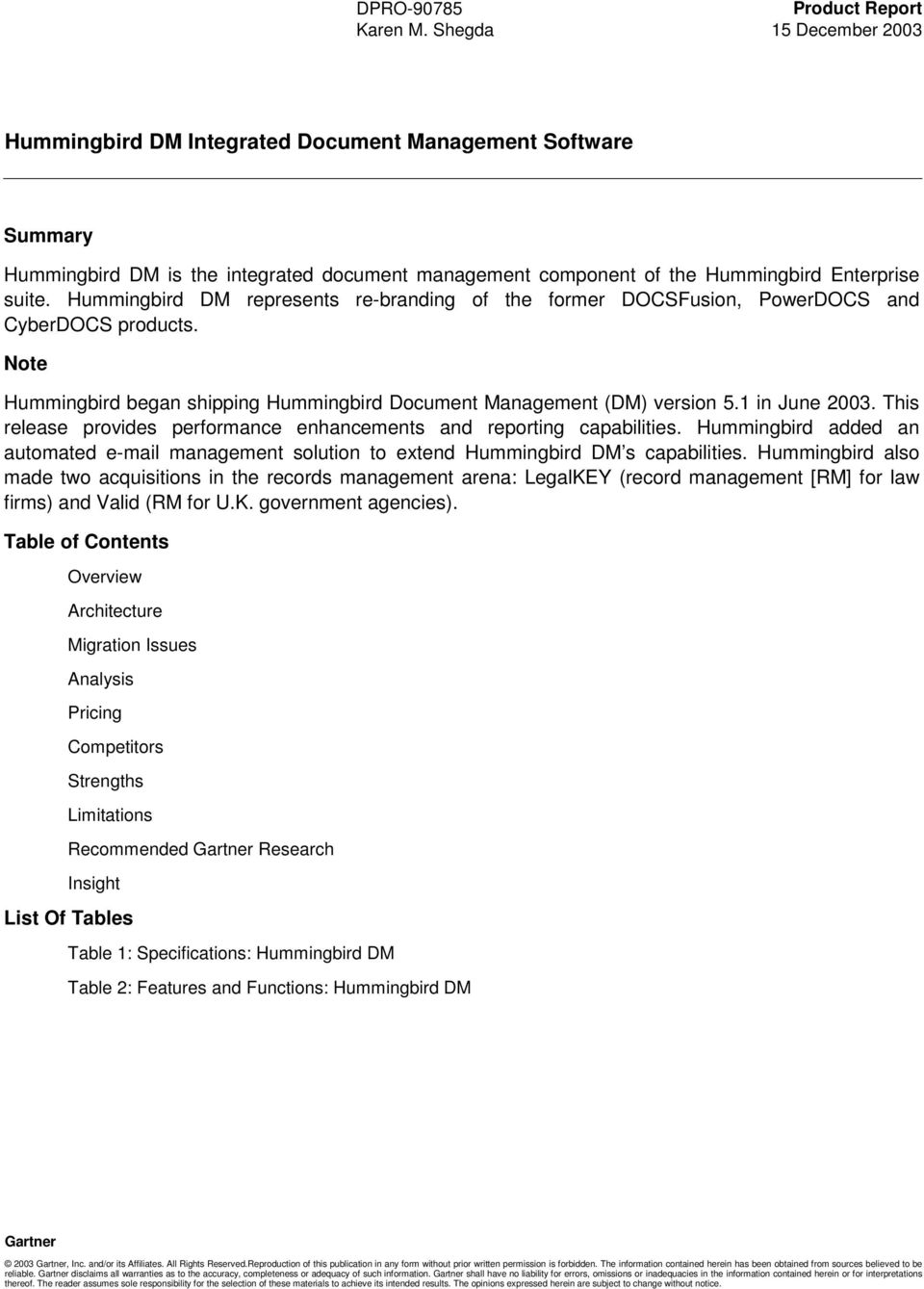
5 Table 1: Specifications: Hummingbird DM Native Language Support User Interface Application Integration In addition to English, Hummingbird DM is translated into French, German, Italian, Spanish, Japanese and Korean. Content can be stored in the user s native language, since Repositories may house documents and profiles generated in multilingual environments. Hummingbird DM also supports a variety of native languages when indexing source documents to support full-text searching. Hummingbird DM embeds Hummingbird SearchServer, which uses Unicode characters, for indexing and text search functionality. Out of the box, SearchServer fully recognizes Simplified Chinese, Traditional Chinese, Danish, Dutch, English, Finnish, French, German, Italian, Japanese, Korean, Bokmal Norwegian, Nynorsk Norwegian, Portuguese and Swedish. For languages not listed, some additional configuration or customization is required to enable SearchServer to recognize specific rules for word breaks or terms for accurate indexing and searching. Hummingbird provides a single client with multiple points of entry: the DM Webtop, which is browser-based; integration with user authoring tools; and desktop interfaces through Microsoft Outlook and Windows Explorer. General Hummingbird DM, through ODMA and macros, provides integration with third-party office applications, such as Corel WordPerfect, Microsoft Excel, Microsoft PowerPoint, Microsoft Project, Microsoft Word (XP and 2000), Microsoft Visio and Workshare DeltaView. Applications may be integrated actively or passively (isolating integrated functions in a single menu item). It also supports Interceptor integration, a way to integrate products that do not support macros or other programming tools commonly used to integrate applications. Hummingbird DM can also be integrated with clients, such as Lotus Notes, Novell GroupWise and Microsoft Outlook. It can be integrated with SAP through a third-party partner offering. Customer Through the companion Siebel DM Extension, Hummingbird DM integrates with Relationship Siebel s CRM system (Siebel 6.3 and 7.x), enabling native DM functionality within Management (CRM) the Siebel desktop. It also lets users associate Siebel records with relevant System Integration documents in the Hummingbird DM repository. Portal Integration Hummingbird DM can be integrated with Hummingbird Portal to serve as the portal s underlying content repository. The Hummingbird Core Services (HCS) Server handles communication between Hummingbird Portal and Hummingbird DM. When Hummingbird DM is used through the portal, it can be integrated with enterprise resource planning (ERP) systems from SAP and J.D. Edwards. Through its open API, Hummingbird DM can be integrated with third-party portals. Application Development/Customization Hummingbird DM API Hummingbird DM Extensions Application development/customization is accomplished through the Hummingbird DM API (customizable with any Component Object Model [COM]-oriented development environment, such as Visual Basic, C++ or Delphi). The Hummingbird DM Webtop uses a mixture of JavaScript and Active Server Pages (ASP), with support for ActiveX controls. The Hummingbird DM Extensions are written with Microsoft Visual C++, using Visual Basic for Applications (VBA) extensions, COM and ODMA. 15 December
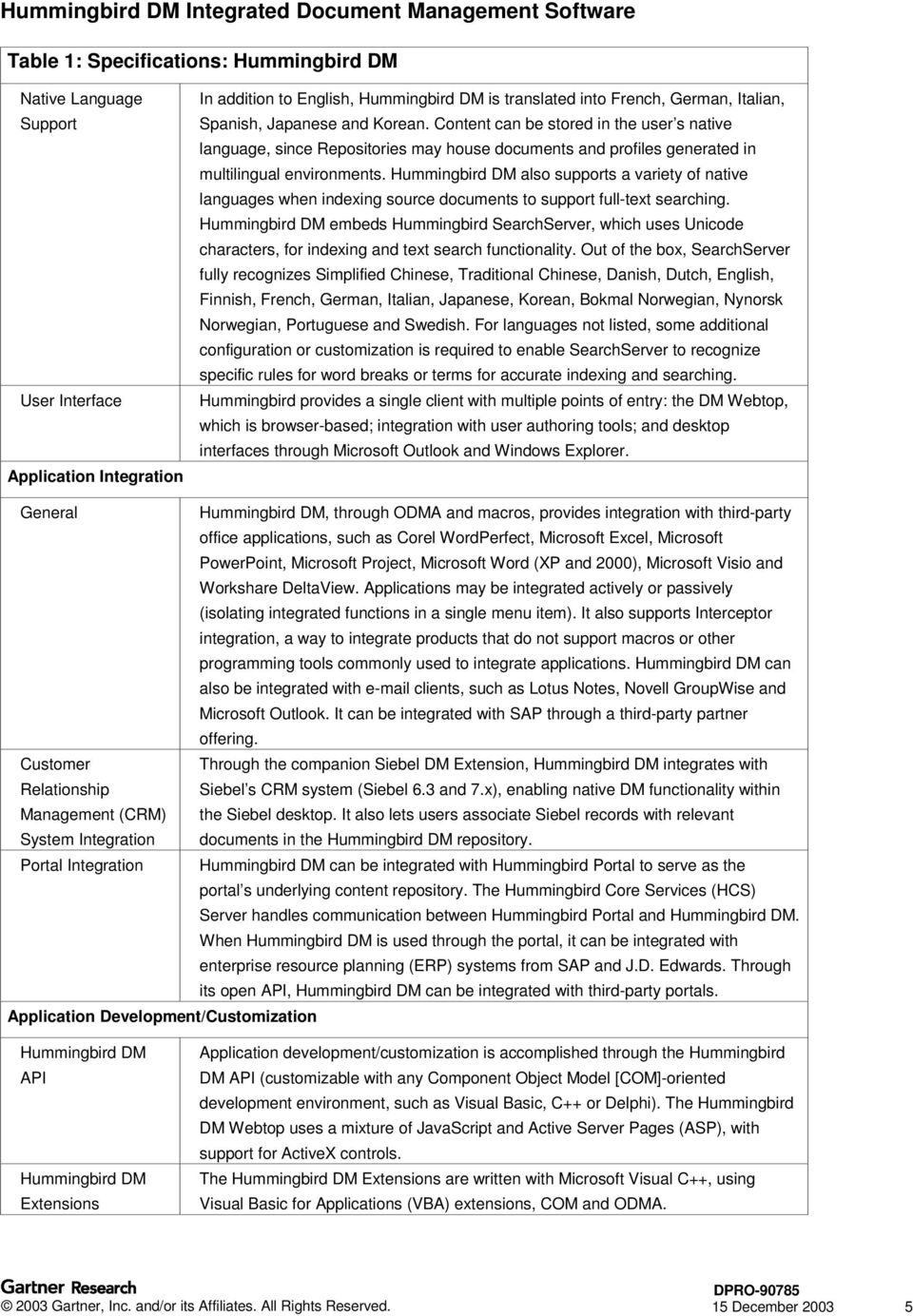
6 Table 1: Specifications: Hummingbird DM Options Hummingbird Imaging Hummingbird DM WorkFlow Hummingbird RM Hummingbird Web Publishing Hummingbird AutoCAD DM Extension Hummingbird Collaboration System Requirements Hummingbird DM Server Hummingbird DM Webtop A client tool that provides document-imaging capabilities. It enables users to capture, index, annotate, manage and store scanned paper documents and faxes within the Hummingbird DM repository. A complementary product that works in conjunction with Hummingbird DM Server to enable document routing. Hummingbird DM WorkFlow focuses on automating and managing those processes associated with document review and approval. It supports routing via the DM Webtop or Windows Desktop Extensions. Hummingbird RM is a core element of Hummingbird Enterprise and integral to Hummingbird DM. It enables enterprises to set disposition rules and treat documents as electronic records, thereby controlling the complete life cycle of all physical and electronic knowledge resources. Hummingbird RM and Hummingbird DM share the same repository and user interfaces. Hummingbird RM complies with the U.S. government s Section 508 accessibility requirements and with the U.S. Department of Defense (DOD) standard. Based on the Stellent Transit Central technology (which Hummingbird re-licenses), Hummingbird Web Publishing enables business documents stored in Hummingbird DM to be transformed into Web-viewable formats for publishing to an intranet, extranet or low-end Internet site. An extension that enables Hummingbird DM users to manage AutoCAD engineering drawing files. Hummingbird Collaboration is a secure Web-based collaborative workspace for dispersed teams across the enterprise. It works with both Hummingbird DM and Hummingbird Portal to provide an environment for managing complex projects involving both internal and external participants. External participants only get access to corporate documents they are authorized to see. Documents stored in Hummingbird DM can be copied, mirrored (synchronized) or imported into Hummingbird Collaboration project folders. Hummingbird Collaboration supports the World Wide Web Consortium Web Services standard for interoperability between Internet-enabled applications. DM Server: A Pentium processor (dual Pentium III 600MHz or greater recommended) with a minimum of 1GB of memory; Microsoft Windows NT Server 4.0 or Windows 2000 Server/Advanced Server. DM Web Server: A Pentium processor (dual Pentium III 600MHz or greater recommended) with a minimum of 1GB of memory; Microsoft IIS 4.0 or 5.0 or iplanet Web Server 4.0 or Hummingbird recommends that DM Web Server be installed on a different machine from DM Server. Pentium III processor (500MHz minimum, 600MHz or greater recommended); Microsoft Internet Explorer 6.0 or 5.5 or Netscape 7.02 DM Extensions: Minimum Pentium processor (500MHz) with 128MB of RAM; recommended Pentium III processor, 600MHz, with 256MB RAM, running Microsoft Windows 98, Microsoft Windows 2000, Microsoft Windows XP or Microsoft Windows NT 4.0 Workstation with Service Pack 6a or higher 15 December
7 Table 2: Features and Functions: Hummingbird DM Document Import/Capture General Supports the import and creation of electronic documents. Documents can be word processing documents, spreadsheets, forms, graphics files, HTML files and messages and their attachments. Hummingbird DM also supports scanned images of hard-copy documents through the Hummingbird Imaging option. A document can be created using established templates. Documents can also be added to the system by dragging and dropping them from the Windows desktop or Explorer, as well as from within Microsoft Outlook messages and attachments. A batch import utility enables documents to be imported from a local hard drive, from a network drive, or from a diskette or CD-ROM. File formats supported include TIFF, PDF and Joint Photographic Experts Group (JPEG). Image Capture Through the optional Hummingbird Imaging module, paper documents can be scanned in and stored as digitized images in the Hummingbird DM repositories. Supports TWAIN and Image and Scanner Interface Specification (ISIS)-compatible scanners. Includes optical character recognition (OCR) capabilities. OCR output can be plain text, Microsoft Word or HTML. Hummingbird Imaging supports binary and color images. Indexing Hummingbird DM uses Hummingbird s SearchServer engine for full-text indexing. With Hummingbird DM, the default is to index the last major version of a document unless there is a Published Version, at which point the Published Version is the version indexed. Multiple indexes can be maintained for the same library for load balancing or backup. Hummingbird DM has a Profile Paper Document option that lets users index the Profiles of external documents, that is, documents that are not stored electronically. Document Access Services Organization/Navigat ion Hummingbird DM uses the concept of folders, which are collections of related documents. Folders replace the containers that were known as Projects and Binders in the DOCS Open and DOCSFusion products. Folders can contain documents and subfolders. With the DM Webtop, Public Folders are presented in a hierarchical tree view. The DM Webtop also supports the concept of related items. This feature lets users create logical associations between documents. Users have the ability to create personal workspaces, which are containers that hold references to various Hummingbird DM items (for example, documents, folders, quick searches and uniform resource locators [URLs]). 15 December

8 Table 2: Features and Functions: Hummingbird DM Document Import/Capture Access Control Mobile Support Searching A user name and password are required to access documents. Authors can apply access control to documents and their profiles as they are created or entered into the system. Access rights are assigned to individual users or to user groups (rolebased). Users can be assigned to library groups. By default, the user who enters a document will have all access rights to it. Access rights granted include the following: control access; view, edit, retrieve, copy or delete documents; view published version only; and view or edit profiles. Hummingbird DM includes a deny right, which can be applied to remove rights from a user or group. Users can also be granted the capability to control access to a document (that is, to change access rights). Hummingbird DM provides four pre-defined Rights Templates. In addition, it provides a custom template that allows users to assign custom rights. These custom rights are determined by selecting a combination of the nine access rights options already provided. Hummingbird DM includes an Attaché feature that lets a user work with documents while the network is unavailable or the user is disconnected from the network. The Attaché feature is activated by installing Active Application Integration. The Hummingbird DM client lets users add documents to Attaché and synchronize Attaché documents back to the DM Webtop once reconnected to the network. With the Windows Explorer DM Extension or Microsoft Outlook DM Extension, users may also add or import new documents while undocked; view, print and edit shadowed documents; and save documents using Microsoft Outlook integration. It also supports application integration via ODMA, passive integration and the Interceptor mode. In addition, it will automatically monitor Hummingbird DM server availability. The Attaché feature does not support quick searches, folders or paper documents. In addition, Hummingbird DM supports alerts on key DM activities, which can be made available to wireless devices. Hummingbird DM ships with Hummingbird s SearchServer engine as the default engine for searching and retrieval. It supports quick searches, content searches and profile (attribute) searches. Content searches can include keywords and return a result s list ranked by relevance. Date searching is also supported. Frequently used search criteria can be saved as a quick search. Supports the capability of previewing documents in a results list before retrieving them. Supports query by example (QBE). Hummingbird provides new search interfaces, including a content, custom and easy search interfaces. Easy searches are designed for nontechnical users who wish to perform content searches. 15 December

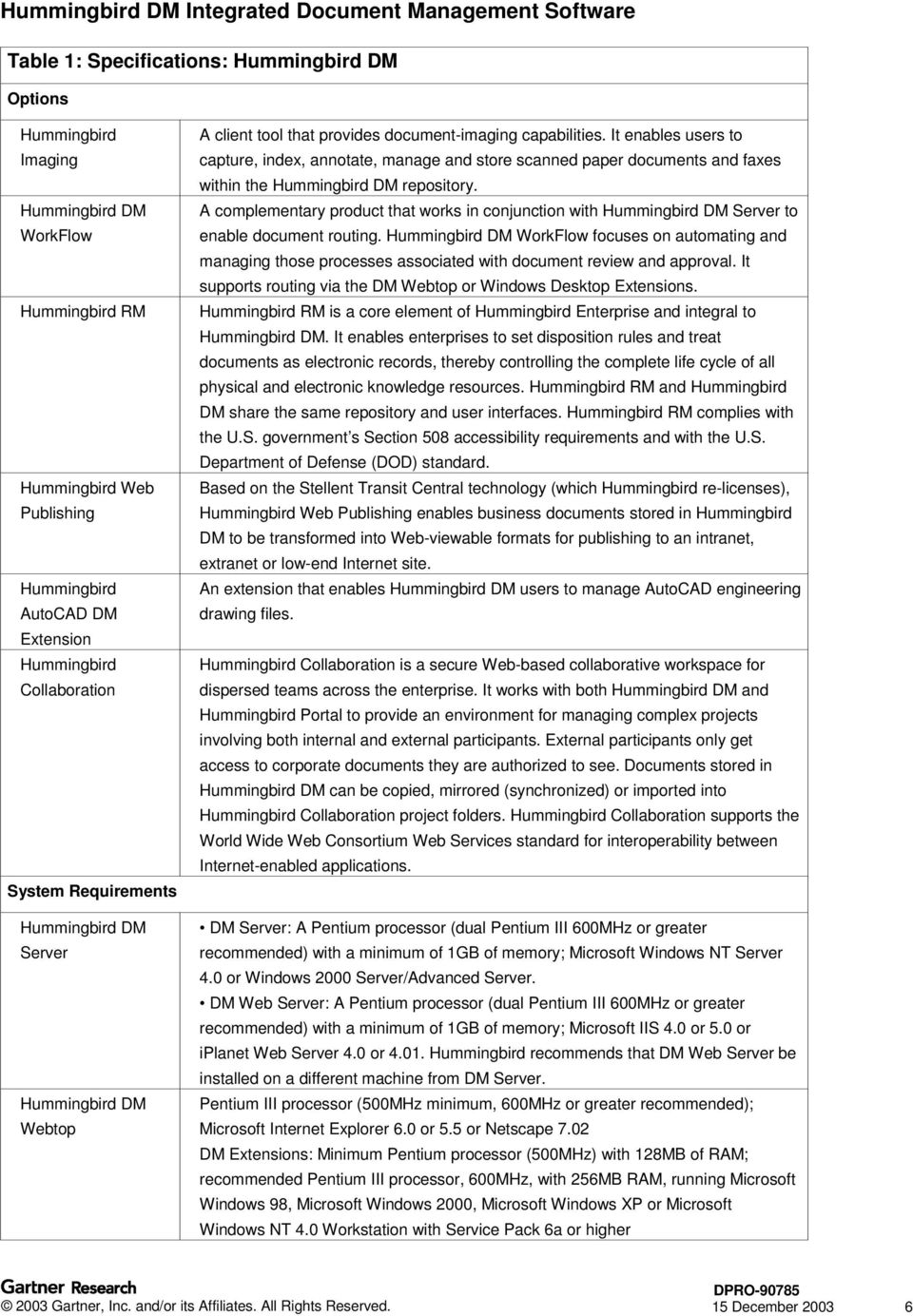
9 Table 2: Features and Functions: Hummingbird DM Document Import/Capture Viewing The Hummingbird DM Viewer is based on the Inso Outside In viewer technology from Stellent. Documents can be viewed in HTML, viewed by the DM Viewer (formerly known as FulView) and viewed in their native form. The DM Viewer supports the viewing of over 200 file formats; however, PDF files require that Adobe Acrobat or another PDF viewer be installed on the local computer. The HTML viewer dynamically converts the document into HTML for display in the browser. Hummingbird Imaging includes a Multiple Document Interface (MDI) for viewing multiple scanned or faxed documents simultaneously, and it supports thumbnails of the individual image pages. Other viewing features include rotate, pan and zoom; the capability of viewing two pages of one image simultaneously; and side-by-side comparisons. Caching Hummingbird DM supports compression and caching of documents and content at the workstation level. In addition, Hummingbird offers a DM Server Content Cache capability that can be deployed on DM Servers to improve the performance of remote workgroups in centralized environments. Content that needs to be accessed by remote users can be saved locally in cache. Document updates/changes are automatically synchronized between the local content cache and the source repository. Document and Content Management General Document Check- In/Checkout Version Control Basic library services include check-in/-out and version control. A Document History feature maintains a log of all actions performed on a document. With Hummingbird DM, documents can be exported and saved to a file system. They can also be saved as shortcuts on the Windows desktop. Hummingbird DM supports the concept of shadow documents, in which an additional copy of every document stored in the repository is saved to a local hard disk and is accessible to the user when offline via the Attaché folder. At checkout, users can copy a document or lock it. Copy leaves the original on the server and allows others to access and edit it. Documents checked out using the Copy option cannot be checked back into Hummingbird DM, but they can be imported as versions or new files. The Lock option prevents other users from editing a checked-out document. Multiple documents can be checked out simultaneously. Stores and manages up to 99 versions of a document. Each version can, in turn, have up to 26 sub-versions. Features supported include edit version comments, delete version and delete document without deleting the profile. Edits made to a document can be saved as a new version, a sub-version or a new document. With the Windows Explorer and Microsoft Outlook DM Extensions, users have the ability to publish a document version and to make a document version read only. Users with rights to view published version only can view the document. Users with broader access permissions can evolve the document to its next publishable state. 15 December
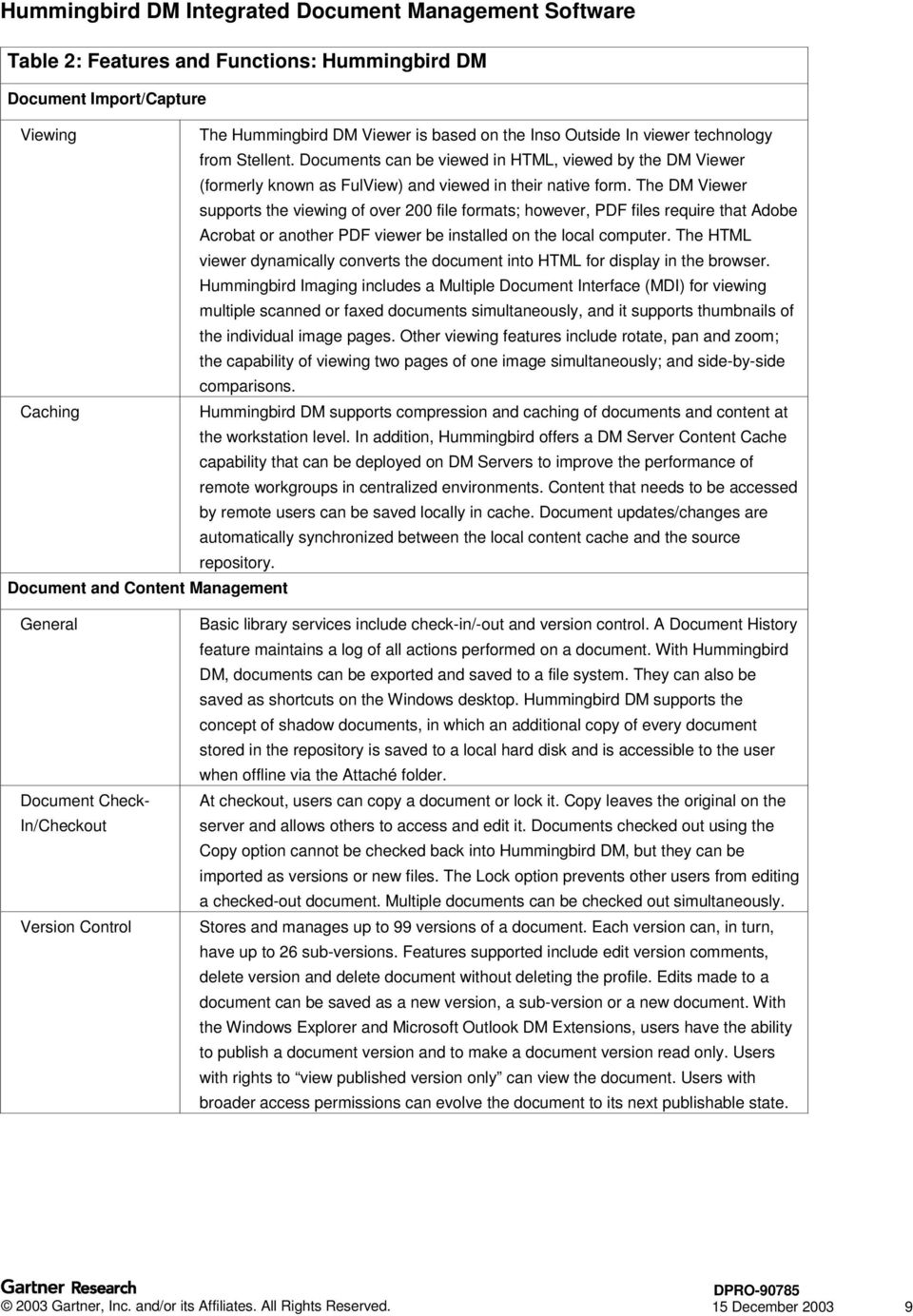
10 Table 2: Features and Functions: Hummingbird DM Document Import/Capture Compound Document Management Linking Annotation/Markup Capabilities Workflow Electronic Mail Integration Hummingbird DM supports compound document management through its extended folder model and Microsoft s Object Linking and Embedding (OLE) technology. It includes a where used function that reports how a document is referenced in folders as well as how the document is used in links from within applications. Through OLE, Hummingbird DM lets users create and update links between Microsoft Word, Excel and PowerPoint documents, and Corel WordPerfect, Presentations and Quattro Pro documents stored on the Hummingbird DM server. In addition, users can create a link to an OLE-compliant document and place it into any other OLE-compliant document. Hummingbird DM also supports linking to profiled documents via a DM URL that, when navigated, opens up a browser window and displays the linked document. Hummingbird Imaging provides markup and annotation capabilities, including highlighting, red-lining, sticky notes, redaction (black out) and digital stamps. It also provides full control over the annotations, including color fonts, fill style and fill shape. Document- and folder-routing capabilities are provided through the optional Hummingbird DM WorkFlow module. It supports parallel and sequential routing, both of which can be combined in a single route. Ad hoc exceptions can be handled through subrouting. Routes can span multiple libraries. Provides reusable route and task templates. Supports notification. An administrator can set up a single DM WorkFlow site that serves several DM libraries. Hummingbird partners with third-party solutions to support customers with more complex production workflow requirements. Hummingbird DM works with Messaging Application Programming Interface (MAPI)- compliant systems and can be integrated with Microsoft Outlook, Novell GroupWise and Lotus Notes clients. A Hummingbird DM document can be attached to a mail message. Mail messages and attachments are stored in Hummingbird DM as a single document, or users may choose to save messages and attachments as separate files. Via Hummingbird s advanced integration with Microsoft Outlook message header, information can be captured as profile metadata. Hummingbird DM can capture message threads and display them to the user, including attachments that may have been profiled separately from the message. The Microsoft Outlook DM Extension supports searching for related documents (for example, attachments or message threads) and storing message parameters. Administrators can now define defaults for saving messages: message (.MSG), rich text (.RTF) formats or both. In the latter case, users select the format when profiling the message. Outlook messages can be automatically saved on sending. Through the Automated Management Solution, Hummingbird DM supports server-side profiling, both rules-based and automatic, of messages. Attachments can be extracted and checked in as related documents so that the contents can be full-text indexed. The Automated Management solution is an extension to Microsoft Exchange and is deployed on an Exchange Server. 15 December

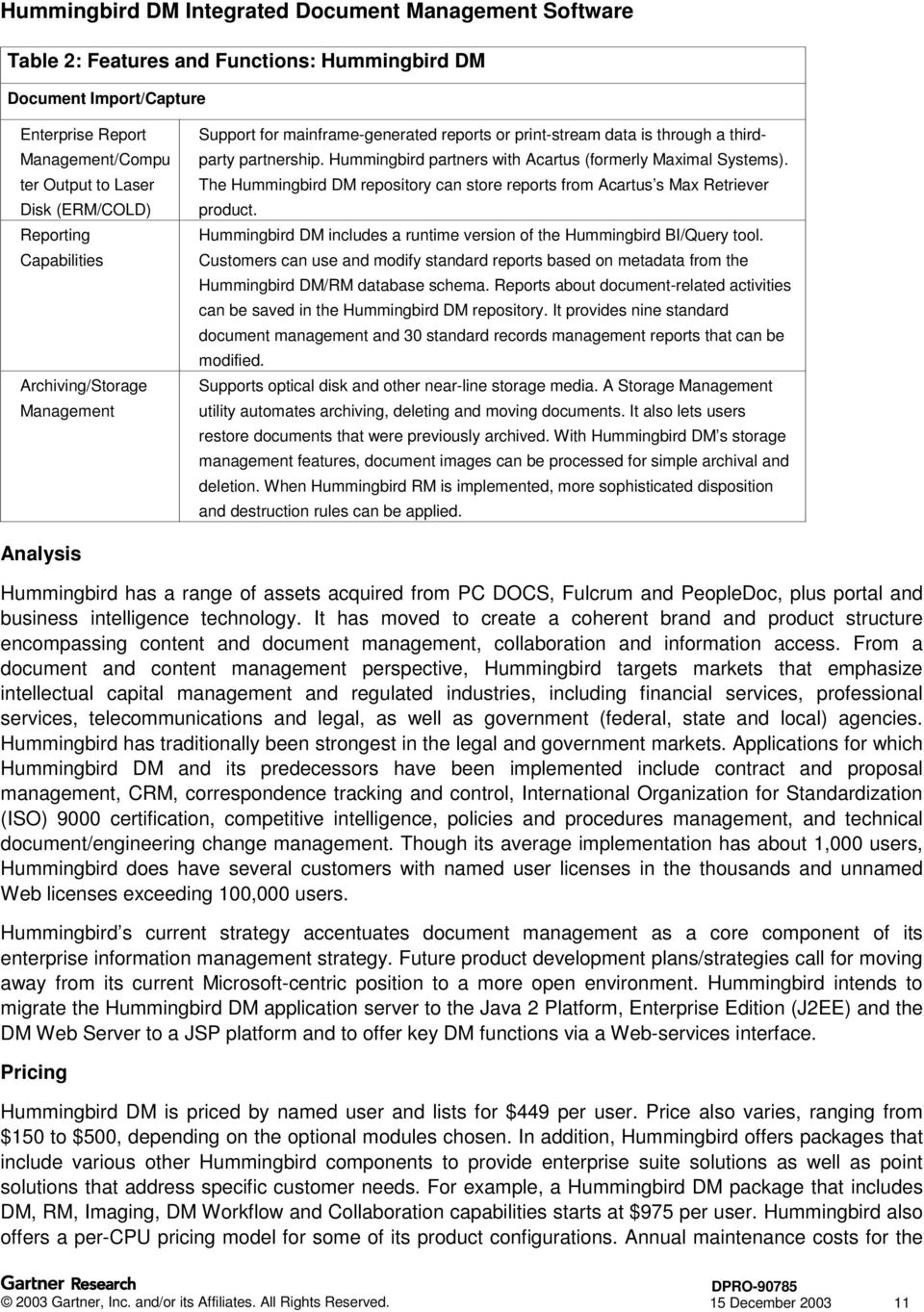
11 Table 2: Features and Functions: Hummingbird DM Document Import/Capture Enterprise Report Management/Compu ter Output to Laser Disk (ERM/COLD) Reporting Capabilities Archiving/Storage Management Support for mainframe-generated reports or print-stream data is through a thirdparty partnership. Hummingbird partners with Acartus (formerly Maximal Systems). The Hummingbird DM repository can store reports from Acartus s Max Retriever product. Hummingbird DM includes a runtime version of the Hummingbird BI/Query tool. Customers can use and modify standard reports based on metadata from the Hummingbird DM/RM database schema. Reports about document-related activities can be saved in the Hummingbird DM repository. It provides nine standard document management and 30 standard records management reports that can be modified. Supports optical disk and other near-line storage media. A Storage Management utility automates archiving, deleting and moving documents. It also lets users restore documents that were previously archived. With Hummingbird DM s storage management features, document images can be processed for simple archival and deletion. When Hummingbird RM is implemented, more sophisticated disposition and destruction rules can be applied. Analysis Hummingbird has a range of assets acquired from PC DOCS, Fulcrum and PeopleDoc, plus portal and business intelligence technology. It has moved to create a coherent brand and product structure encompassing content and document management, collaboration and information access. From a document and content management perspective, Hummingbird targets markets that emphasize intellectual capital management and regulated industries, including financial services, professional services, telecommunications and legal, as well as government (federal, state and local) agencies. Hummingbird has traditionally been strongest in the legal and government markets. Applications for which Hummingbird DM and its predecessors have been implemented include contract and proposal management, CRM, correspondence tracking and control, International Organization for Standardization (ISO) 9000 certification, competitive intelligence, policies and procedures management, and technical document/engineering change management. Though its average implementation has about 1,000 users, Hummingbird does have several customers with named user licenses in the thousands and unnamed Web licenses exceeding 100,000 users. Hummingbird s current strategy accentuates document management as a core component of its enterprise information management strategy. Future product development plans/strategies call for moving away from its current Microsoft-centric position to a more open environment. Hummingbird intends to migrate the Hummingbird DM application server to the Java 2 Platform, Enterprise Edition (J2EE) and the DM Web Server to a JSP platform and to offer key DM functions via a Web-services interface. Pricing Hummingbird DM is priced by named user and lists for $449 per user. Price also varies, ranging from $150 to $500, depending on the optional modules chosen. In addition, Hummingbird offers packages that include various other Hummingbird components to provide enterprise suite solutions as well as point solutions that address specific customer needs. For example, a Hummingbird DM package that includes DM, RM, Imaging, DM Workflow and Collaboration capabilities starts at $975 per user. Hummingbird also offers a per-cpu pricing model for some of its product configurations. Annual maintenance costs for the 15 December
12 Standard plan start at 18 percent of the software license cost, which is competitive with maintenance costs from other document management vendors. GSA Pricing Yes. Competitors Hummingbird has focused on building out a smart enterprise suite (SES), but is also a significant presence in the integrated DM market. Hummingbird s primary IDM competitors at present are Documentum, FileNet, imanage and Open Text. Hummingbird faces many challenges from these vendors, which are adding functionality to compete in the content management and collaborative applications space. Documentum and FileNet, in particular, have positioned themselves as strong contenders with revamped product lines focusing on enterprise content management. FileNet and Documentum s products require considerable development and customization, while Livelink is an out-ofthe-box solution. Documentum and FileNet both provide their own Web content management solutions, while Hummingbird provides basic Web publishing as an add-on and true Web content management (that is, template-based content creation and editing, site management and content delivery services) through a partnership with RedDot. Documentum has augmented its product family with project team support and collaboration capabilities (eroom) as well as with records management functionality. FileNet, though strong on imaging and workflow, lacks records management and collaborative functionality in its current suite. From a collaborative document management standpoint, Hummingbird competes most closely with Open Text and imanage. Documentum To further extend the broad enterprise content management capabilities delivered with Documentum 5 and to build out its product portfolio to move toward an SES, Documentum made two strategic acquisitions in the fourth quarter of 2002: collaboration vendor, eroom, and records management vendor, TrueArc (formerly Provenance Systems). Documentum s release acquisition of eroom and the release of Documentum eroom Enterprise puts it even more directly in competition with Hummingbird. It enables Documentum to address the ad hoc work-in-process segment of the content life cycle in addition to the structured management and approval process. Documentum s Team Manager and the eroom product suite have been rationalized as part of the integration process and are now known as Documentum eroom Enterprise. Documentum also continues to sell eroom as a stand-alone offering. Documentum eroom Enterprise is an out-of-box solution that includes both real-time collaboration features, such as chat, and an integration with WebEx, along with team collaboration capabilities, such as shared workspace, task management, project templates, role support and integration with Microsoft Project. Open Text Though Open Text is extending its market reach to offer an SES that combines team collaboration support, portals and content management, Livelink has a document-centric foundation. In addition to document management services, Livelink provides a strong suite of collaboration tools that includes group calendaring/scheduling features and work-routing capabilities. Livelink was designed from the ground up for the Internet and Web infrastructure, and its support for standards like Java, ActiveX, PDF and HTML make it highly extensible. Like Hummingbird DM, Livelink can be used as the underlying content repository for enterprise information portals. Hummingbird has had its own portal for some time now, but Open Text has recently acquired portal vendor Corechange. With this acquisition, Open Text has closed the gap in its portal 15 December

13 functions and improved its position among vendors of SESs. In addition, through Livelink Unite, Open Text supports integration into various portal frameworks, including iviews for the SAP Enterprise Portal. In addition, Open Text also provides its own real-time collaboration capabilities through MeetingZone. Hummingbird s collaboration capabilities focus more on threaded discussions and asynchronous document collaboration. It recently announced a partnership with Centra, an e-learning and real-time collaboration vendor. Hummingbird will integrate Centra s e-learning and real-time collaboration capabilities with the Hummingbird Enterprise suite. Livelink does not support integration with Microsoft Exchange repositories at present, and its integration with Lotus Notes/Domino is not bi-directional. Hummingbird, in contrast, can be integrated with Lotus Notes, Microsoft Outlook and Novell Groupwise . Interwoven/iManage On 6 August 2003, Interwoven announced a definitive agreement to merge with imanage for $171 million in cash and stock. Interwoven and imanage customers will benefit from having a single vendor that offers broader, more tightly integrated content management capabilities. The vendors long-term viability improves with the merger. As a combined entity, Interwoven/iManage can compete more effectively against Documentum and FileNet in the content management market and against Open Text, Vignette, Hummingbird and IBM in the emerging SES market. The deal is expected to close by year-end imanage has successfully targeted Hummingbird in its traditional stronghold the legal sector. With the WorkSite suite, imanage provides integrated software that enables enterprises to optimize their value chains by helping members to collaborate and exchange information. The imanage WorkSite suite is a content management and collaboration suite available for Microsoft Windows and for Java environments. It provides modular application services for document management, collaboration and workflow, as well as a portal application. The applications have a single code base and share a common repository. Documents, project workspaces, tasks, events and discussions are all stored in the same repository. Like Hummingbird, imanage provides both content and metadata searching. Recently, imanage expanded its product suite with enhancements and new capabilities, such as report management capabilities and an e- mail management solution. imanage offers a Java-based workflow solution, WorkRoute MP Pro. Strengths Distributed Architecture With Failover/Load Balancing Hummingbird DM is built using a multitiered, distributed architecture that supports failover and loadbalancing capabilities by enabling clusters of physical servers to act as one logical server. A cluster is a group of DM Servers that reside on the same network and serve the same libraries. This feature enables client users to be automatically switched to another Hummingbird DM Server in the event of a server failure. Client user requests can be distributed among servers as needed to balance processing loads. It also supports document shadowing (system administrators can disable this function, however), whereby documents that a user is working on are copied and stored on the user s local hard drive; the user then edits or works on the local copy. This improves network efficiency by reducing traffic and ensures that documents are available in the event of a server failure. Integration Capabilities Hummingbird DM provides tight integration with Microsoft Office, Windows Explorer and Microsoft Outlook. It incorporates several levels of integration: passive, active and interceptor. Passive integration results in a single menu that supports the integrated functions while allowing the application s native functions to continue to be available. Active integration allows Hummingbird DM to integrate with the 15 December

14 native menu items for file access. Interceptor enables Hummingbird DM to integrate DMS control into Windows applications. Through its partnership with Siebel, Siebel customers can directly access the Hummingbird DM Server from their Siebel browser-based interface. From within the Siebel client, they can search for and retrieve documents as well as create document versions and document profiles. Enterprise Capable Repository Hummingbird DM is designed for implementation as an enterprisewide solution, and its repository can scale to millions of documents. According to Hummingbird, the theoretical limit per repository is 100 million documents, with up to 99 versions and 26 sub-versions of each document. A Hummingbird DM repository can contain multiple SQL databases and multiple libraries. It can also support multiple document servers and full-text indexes. Consistent User Interface Within Hummingbird Suite The Hummingbird Webtop provides a user interface that is consistent throughout the entire Hummingbird Enterprise suite. The Webtop replaces the former CyberDOCS and PowerDOCS clients and offers multiple entry points into the DM server. Security Features Hummingbird DM provides strong document-level security capabilities using an extended access control list (ACL) model. Security levels for documents and folders can be set on a user-by-user basis. The Hummingbird DM Server brokers requests from the DM clients so that users do not have direct access to the document store. With Hummingbird DM, enterprises have the ability to deny users or groups specific rights to an object. In addition, Hummingbird DM automatically assigns nondescriptive file names to documents stored in the document server. This further prevents unauthorized access to documents by users who may browse the document server via Windows Explorer or another method. Now with version 5.1, Hummingbird DM fully supports LDAP integration. Focus on Records Management Compared to many of its IDM competitors, Hummingbird has a strong focus on records management. It owns its own records management technology (having acquired the technology back in 1998) rather than simply partnering with third-party vendors. Although Hummingbird RM is priced separately from Hummingbird DM, the two offerings are tightly integrated and share the same repository for all documents and records. Open Text has similar capabilities with its Livelink Records Management module. imanage relies on third-party partnerships, including IBM (former Tarian offering) and MDY. When implemented together, Hummingbird DM and Hummingbird RM provide a shared user interface, as well as shared user/group administration, shared security, shared search and retrieval, and shared history/audit trail features. Limitations Platform Restrictions Hummingbird DM is currently a Microsoft-centric tool in terms of its platform support and development environment. Hummingbird DM Server software only runs on Microsoft Windows NT or Windows 2000, not Unix servers. (Database servers, however, will run on whatever platforms the relational database management system supports, including Unix.) Hummingbird s leading competitors (for example, Open Text, imanage and Documentum) all support Unix server environments in addition to Windows NT and have moved to support J2EE. Hummingbird was developed in C++ and uses Microsoft s ASP and DCOM development tools. Recognizing the demand from customers for flexible deployment options, 15 December

15 Hummingbird intends to support J2EE across the entire Hummingbird Enterprise suite, including Hummingbird DM, in the future. In addition, support for Web services is an important part of Hummingbird s ongoing technology strategy. No Packaged ERP System Integration Although Hummingbird DM provides strong desktop application integration and is certified for integrating with Siebel s CRM solution, integration with ERP systems like SAP or J.D. Edwards is available only when Hummingbird DM 5.0 is used through the Hummingbird Portal or through third-party partners of Hummingbird. Hummingbird does not offer productized integrations with SAP or PeopleSoft as many of its competitors do. Limited Extensible Markup Language Support Hummingbird DM currently has limited support of Extensible Markup Language (XML). Some of its competitors, like Open Text and Documentum, make extensive use of XML. Hummingbird DM can store XML documents in the repository, but is not able to parse XML content. It does leverage XML for designing the templates in the Hummingbird Web Publishing module, which can export documents stored in Hummingbird DM as XML or HTML. In addition, Hummingbird DM 5 includes SearchServer 5.3, which supports indexing and searching of XML documents. Current Workflow Functionality Is Limited Hummingbird DM WorkFlow is designed to enable business users to route documents through a review and approval life cycle and is specific to Hummingbird DM. It is not intended to be a tool for automating structured rules-based business processes. It does not include a graphical workflow designer tool nor does it launch external processes. Hummingbird intends to offer a Java-based workflow engine, which includes a Java-based graphical process definition tool, to replace Hummingbird DM WorkFlow. The new workflow tool will be a shared component across the entire Hummingbird Enterprise suite of products. Today, Hummingbird works with third-party partners to provide solutions for automating structured rulesbased business processes. Recommended Gartner Research Magic Quadrant for Integrated Document Management, 2003, M The Smart Enterprise Suite Magic Quadrant for 2003, M Insight Hummingbird DM represents Hummingbird s strategic platform for enterprise document management applications with a strong focus on collaboration and records management. It should be considered by organizations looking for a document management solution with strong security features, tightly integrated records management capabilities (for example, a single repository) and good desktop application integration capabilities and one that is easy to roll out with a proven track record in enterprise implementations. Hummingbird can handle an organization s enterprise document management needs through its scalable, distributed architecture, with failover and load-balancing features. It can also be used for applications that involve ad hoc or low-to-mid-volume imaging, but it is typically not implemented for production imaging (over 50,000 images per day). In addition, organizations looking for a solution with add-on functionality to meet their evolving information management needs should consider Hummingbird DM as the content management foundation for Hummingbird s SES, Hummingbird Enterprise. 15 December

Documentum eroom Team Collaboration Support Software
 Karen M. Shegda Product Report 21 July 2003 Documentum eroom Team Collaboration Support Software Summary Documentum eroom is a Web-based software application for team support and project collaboration.
Open Text Document Management, edocs DM Release Notes Version 6.0.5 CU3. December 4,2009
 Open Text Document Management, edocs DM Release Notes Version 6.0.5 CU3 December 4,2009 2 edocs DM Release Notes Contents 1 Introduction... 3 2 About edocs DM 6.0.5 CU3... 4 2.1 New Features... 4 3 Packaging
Workshare Professional Secure Document Compliance for Microsoft Office 4.5. Workshare Professional Release Notes
 Workshare Professional Secure Document Compliance for Microsoft Office 4.5 Workshare Professional Release Notes INTRODUCTION Workshare is pleased to announce the Release of Workshare Professional 4.5.
Magic Quadrant for Integrated Document Management, 2003
 Magic Quadrant for Integrated Document Management, 2003 Document management has moved to the forefront of many enterprises' purchasing lists. Our 2003 Magic Quadrant explains the complexities of the integrated
Livelink ECM edocs Suite Roadmap
 Livelink ECM edocs Suite Roadmap Wednesday October 24 th,2007 Larry Roy Director, Product Management edocs Suite Open Text Corporation John Lee Director, Product Management Legal Solutions Open Text Corporation
Communiqué 4. Standardized Global Content Management. Designed for World s Leading Enterprises. Industry Leading Products & Platform
 Communiqué 4 Standardized Communiqué 4 - fully implementing the JCR (JSR 170) Content Repository Standard, managing digital business information, applications and processes through the web. Communiqué
Common Questions and Concerns About Documentum at NEF
 LES/NEF 220 W Broadway Suite B Hobbs, NM 88240 Documentum FAQ Common Questions and Concerns About Documentum at NEF Introduction...2 What is Documentum?...2 How does Documentum work?...2 How do I access
Nuance ecopy ShareScan 5 and ecopy PDF Pro Office 5 Reviewers' Guide
 Nuance ecopy ShareScan 5 and ecopy PDF Pro Office 5 Reviewers' Guide Thank you for your interest in the ecopy multifunction peripheral (MFP) document scanning and workflow software. We hope that the following
Nuance ecopy ShareScan v5. Document Imaging Software. Digitize and streamline paper-based workflows.
 Nuance ecopy ShareScan v5 Document Imaging Software SCAN > PROCESS > EXTRACT > COMBINE > TRANSFORM > Digitize and streamline paper-based workflows. > Integrate paper files with digital workflows Integrate
EMC ApplicationXtender Web Access
 EMC ApplicationXtender Web Access 6.5 User s Guide P/N 300-010-573 A01 EMC Corporation Corporate Headquarters: Hopkinton, MA 01748-9103 1-508-435-1000 www.emc.com Copyright 2002-2010 EMC Corporation. All
ILM et Archivage Les solutions IBM
 Information Management ILM et Archivage Les solutions IBM Dr. Christian ARNOUX Consultant Information Management IBM Suisse, Software Group 2007 IBM Corporation IBM Strategy for Enterprise Content Compliance
Enterprise Content Management with Microsoft SharePoint
 Enterprise Content Management with Microsoft SharePoint Overview of ECM Services and Features in Microsoft Office SharePoint Server 2007 and Windows SharePoint Services 3.0. A KnowledgeLake, Inc. White
Quick Reference Guide
 Quick Reference Guide What s New in NSi AutoStore TM 6.0 Notable Solutions, Inc. System requirements Hardware Microsoft Windows operating system (OS) running on computer with at least a 2 GHz Processor
FileNet P8 Enterprise Content Management Solutions
 Karen M. Shegda Product Report 11 June 2003 FileNet P8 Enterprise Content Management Solutions Summary FileNet P8 represents a new architecture for content management, business process management and application
3 C i t y C e n t e r D r i v e S u i t e 7 0 0 S t. L o u i s, MO 6 3 1 4 1 w w w. k n o w l e d g e l a k e. c o m P a g e 3
 The proposed solution utilizes Microsoft SharePoint as the foundation platform. Microsoft SharePoint is a powerful portal solution that provides a single point of access to people, teams, knowledge, and
Cisco TelePresence Management Suite
 Data Sheet Product Overview Figure 1. Cisco TelePresence Management Suite (Cisco TMS) provides complete control and management of telepresence conferencing and media services infrastructure and endpoints,
ORACLE BUSINESS INTELLIGENCE SUITE ENTERPRISE EDITION PLUS
 Oracle Fusion editions of Oracle's Hyperion performance management products are currently available only on Microsoft Windows server platforms. The following is intended to outline our general product
IBM Cognos Business Intelligence Version 10.1.1. Architecture and Deployment Guide
 IBM Cognos Business Intelligence Version 10.1.1 Architecture and Deployment Guide Note Before using this information and the product it supports, read the information in Notices on page 127. Product Information
ORACLE BUSINESS INTELLIGENCE SUITE ENTERPRISE EDITION PLUS
 ORACLE BUSINESS INTELLIGENCE SUITE ENTERPRISE EDITION PLUS PRODUCT FACTS & FEATURES KEY FEATURES Comprehensive, best-of-breed capabilities 100 percent thin client interface Intelligence across multiple
Introduction to Oracle Business Intelligence Standard Edition One. Mike Donohue Senior Manager, Product Management Oracle Business Intelligence
 Introduction to Oracle Business Intelligence Standard Edition One Mike Donohue Senior Manager, Product Management Oracle Business Intelligence The following is intended to outline our general product direction.
Improved document archiving speeds; data enters the FileNexus System at a faster rate! See benchmark test spreadsheet.
 Feature Sheet Version 6.100.14 FileNexus Major Advances Client Server Communication - Dependency on Windows DCOM protocols eliminated which means NO additional configuration required on Client PCs after
Cisco TelePresence Management Suite
 Data Sheet Centralized orchestration and management across the telepresence network Product Overview Figure 1. Cisco TelePresence Management Suite (Cisco TMS) provides complete control and management of
BlackBerry Enterprise Server for Microsoft Exchange Version: 5.0 Service Pack: 2. Feature and Technical Overview
 BlackBerry Enterprise Server for Microsoft Exchange Version: 5.0 Service Pack: 2 Feature and Technical Overview Published: 2010-06-16 SWDT305802-1108946-0615123042-001 Contents 1 Overview: BlackBerry Enterprise
Version5 +AutoCapture & Workflow
 Version5 +AutoCapture & Workflow What is document management? Information on paper. Over the past century the traditional office has changed dramatically. New technologies such as telecommunications, computers,
ImageSEND is document distribution. Powerful scanning and distribution software for Sharp Digital IMAGERs and MFPs.
 ImageSEND is document distribution Powerful scanning and distribution software for Sharp Digital IMAGERs and MFPs Document Scanning enhance your workflow with Sharp s scan-enabled Digital IMAGERs and easy-to-use
Feature and Technical
 BlackBerry Enterprise Server for Microsoft Exchange Version: 5.0 Service Pack: 4 Feature and Technical Overview Published: 2013-11-07 SWD-20131107160132924 Contents 1 Document revision history...6 2 What's
Open Text edocs. Overview and Roadmap. Larry Roy. July 29, 2010. Director, Product Management
 Open Text edocs Overview and Roadmap Larry Roy Director, Product Management July 29, 2010 Rev 1.1 02092009 Slide 1 Copyright 2010 Open Text Corporation. All rights reserved. Agenda Roadmap Summary What
Sisense. Product Highlights. www.sisense.com
 Sisense Product Highlights Introduction Sisense is a business intelligence solution that simplifies analytics for complex data by offering an end-to-end platform that lets users easily prepare and analyze
Managing Documents with SharePoint 2010 and Office 2010
 DMF Adds Value in 10 Ways With its wide-ranging improvements in scalability, functionality and managability, Microsoft SharePoint 2010 provides a much stronger platform for document management solutions.
Project Title: Judicial Branch Enterprise Document Management System RFP Number: FIN122210CK Appendix D Technical Features List
 FEAT891 Medium Recoverable using backup The solution shall be recoverable from backup storage media storage media. FEAT893 Desired Medium Support Load Sharing High Availability The solution should utilize
I/A Series Software EDM Electronic Document Management
 PSS 21S-2C1 B3 I/A Series Software EDM Electronic Document Management The I/A Series EDM system lowers the total cost of plant documentation such as operating procedures, MSDS sheets and CAD drawings.
SAP BusinessObjects Edge BI, Standard Package Preferred Business Intelligence Choice for Growing Companies
 SAP Solutions for Small Businesses and Midsize Companies SAP BusinessObjects Edge BI, Standard Package Preferred Business Intelligence Choice for Growing Companies SAP BusinessObjects Edge BI, Standard
Samsung SmarThru Workflow 2 Digitize your print environment with secure, cost effective document workflow
 Samsung SmarThru Workflow 2 Digitize your print environment with secure, cost effective document workflow Integrate almost any paper or electronic document into a secure digital workflow. Save costs and
Deciding When to Deploy Microsoft Windows SharePoint Services and Microsoft Office SharePoint Portal Server 2003. White Paper
 Deciding When to Deploy Microsoft Windows SharePoint Services and Microsoft Office SharePoint Portal Server 2003 White Paper Published: October, 2003 Table of Contents Introduction 4 Relationship between
Page 1. Overview of System Architecture
 Page 1 Contents Introduction to the HR.net Enterprise Framework 1 HR.net Enterprise Administrator Console 3 HR.net Enterprise Document Explorer 4 HR.net Enterprise Server Application 4 HR.net Enterprise
Actuate Business Intelligence and Reporting Tools (BIRT)
 Product Datasheet Actuate Business Intelligence and Reporting Tools (BIRT) Eclipse s BIRT project is a flexible, open source, and 100% pure Java reporting tool for building and publishing reports against
Document Capture and Distribution
 Document Capture and Distribution WHITE PAPER SmarThru TM Workflow 2 Document Capture and Distribution Introduction This white paper describes the design and the features used by the Samsung SmarThru TM
IBM Cognos 8 Business Intelligence Reporting Meet all your reporting requirements
 Data Sheet IBM Cognos 8 Business Intelligence Reporting Meet all your reporting requirements Overview Reporting requirements have changed dramatically in organizations. Organizations today are much more
SOLUTIONS FOR BUSINESS PROCESS & ENTERPRISE CONTENT MANAGEMENT. Imaging & Enterprise Content Management
 SOLUTIONS FOR BUSINESS PROCESS & ENTERPRISE CONTENT MANAGEMENT TM OMNIDOCS Imaging & Enterprise Content Management SOLUTIONS FOR BUSINESS PROCESS & ENTERPRISE CONTENT MANAGEMENT O MNIDOCS Enterprise Content
GlobalScan NX. Server 32/Server 750. Intelligent scanning for smarter workflow
 SOLUTION Intelligent scanning for smarter workflow GlobalScan NX Server 32/Server 750 Designed to simplify daily document tasks, these easy-to-use software solutions provide a fast, streamlined approach
DocuShare User Guide
 DocuShare User Guide Publication date: April 2011 This document supports DocuShare Release 6.6.1 Prepared by: erox Corporation DocuShare Business Unit 3400 Hillview Avenue Palo Alto, California 94304 USA
CatDV Pro Workgroup Serve r
 Architectural Overview CatDV Pro Workgroup Server Square Box Systems Ltd May 2003 The CatDV Pro client application is a standalone desktop application, providing video logging and media cataloging capability
ecopy ShareScan v4.35 for ScanStation Product Overview
 ecopy ShareScan v4.35 for ScanStation Product Overview This document provides full details on ecopy ShareScan v4.35 Suite for ScanStation for components, features, and functionality. Components ecopy ShareScan
BusinessObjects Enterprise InfoView User's Guide
 BusinessObjects Enterprise InfoView User's Guide BusinessObjects Enterprise XI 3.1 Copyright 2009 SAP BusinessObjects. All rights reserved. SAP BusinessObjects and its logos, BusinessObjects, Crystal Reports,
<Insert Picture Here> Oracle BI Standard Edition One The Right BI Foundation for the Emerging Enterprise
 Oracle BI Standard Edition One The Right BI Foundation for the Emerging Enterprise Business Intelligence is the #1 Priority the most important technology in 2007 is business intelligence
Office SharePoint Server 2007
 Top 10 Benefits of WSS 3.0 Office SharePoint Server 2007 1. Improve team productivity with easy-to-use collaborative tools Connect people with the information and resources they need. Users can create
Windows Server 2003 Active Directory: Perspective
 Mary I. Hubley, MaryAnn Richardson Technology Overview 25 September 2003 Windows Server 2003 Active Directory: Perspective Summary The Windows Server 2003 Active Directory lies at the core of the Windows
User Guide. DocAve Lotus Notes Migrator for Microsoft Exchange 1.1. Using the DocAve Notes Migrator for Exchange to Perform a Basic Migration
 User Guide DocAve Lotus Notes Migrator for Microsoft Exchange 1.1 Using the DocAve Notes Migrator for Exchange to Perform a Basic Migration This document is intended for anyone wishing to familiarize themselves
Cisco TelePresence Management Suite
 Data Sheet Centralized orchestration and management across a Cisco TelePresence network Product Overview Cisco TelePresence Management Suite (Cisco TMS) provides complete control and management of telepresence
Navigate your workflow
 Océ Document Management Tool 2.2 Navigate your workflow Digital document workflow software that streamlines productivity Put convenience and productivity at your fingertips Gain control over your document
ORACLE USER PRODUCTIVITY KIT V3.6.1 TECHNICAL SPECIFICATIONS (WITH ENABLEMENT SERVICE PACK 3)
 ORACLE USER PRODUCTIVITY KIT V3.6.1 TECHNICAL SPECIFICATIONS (WITH ENABLEMENT SERVICE PACK 3) KEY FEATURES AND BENEFITS DRIVE USER PRODUCTIVITY AND MITIGATE RISK. FEATURES Single, synchronized authoring
Simplify essential workflows with dynamic scanning capabilities. GlobalScan NX Server 32/Server 750 Capture & Distribution Solution
 GlobalScan NX Server 32/Server 750 Capture & Distribution Solution SCAN > SHARE > MANAGE > DELIVER > ACCELERATE > Simplify essential workflows with dynamic scanning capabilities. > Manage scanned documents
ANSYS EKM Overview. What is EKM?
 ANSYS EKM Overview What is EKM? ANSYS EKM is a simulation process and data management (SPDM) software system that allows engineers at all levels of an organization to effectively manage the data and processes
RSM McGladrey Business Continuity Planning System
 Kristen Noakes-Fry, Trude Diamond Product Report 21 November 2002 RSM McGladrey Business Continuity Planning System Summary RSM McGladrey s Business Continuity Planning System supports planning from the
Extending Microsoft SharePoint Environments with EMC Documentum ApplicationXtender Document Management
 Extending Microsoft SharePoint Environments with EMC Documentum ApplicationXtender A Detailed Review Abstract By combining the universal access and collaboration features of Microsoft SharePoint with the
Category: Business Process and Integration Solution for Small Business and the Enterprise
 Home About us Contact us Careers Online Resources Site Map Products Demo Center Support Customers Resources News Download Article in PDF Version Download Diagrams in PDF Version Microsoft Partner Conference
www.coveo.com Unifying Search for the Desktop, the Enterprise and the Web
 wwwcoveocom Unifying Search for the Desktop, the Enterprise and the Web wwwcoveocom Why you need Coveo Enterprise Search Quickly find documents scattered across your enterprise network Coveo is actually
Konica Minolta Unity Document Suite. Powerful integrated document processing. Document capture & distribution Unity Document Suite
 Konica Minolta Unity Document Suite Powerful integrated document processing Document capture & distribution Unity Document Suite Unity Document Suite, document capture & distribution Streamlined document
Digital Asset Management
 Digital Asset Management Managing the complexity of digital assets to support your business Product images, streaming video, sound bites, logos, Flash animations, presentations, web pages these days, digital
Whitepaper: Enterprise Vault Discovery Accelerator and Clearwell A Comparison August 2012
 888.427.5505 Whitepaper: Enterprise Vault Discovery Accelerator and Clearwell A Comparison August 2012 Prepared by Dan Levine, Principal Engineer & Miguel Ortiz, Esq., ediscovery Specialist Globanet 15233
edocs Strategy and Roadmap
 edocs Strategy and Roadmap Iain Jones EMEA, edocs Business Manager Rev 2.0 01102010 Copyright 2010 Open Text Corporation. All rights reserved. Expires March 31, 2011. 1 Agenda An Understanding Year In
PRESS RELEASE. AIIM, Philadelphia, May 15 th 2006 Embargo until, May 15 th 2006, at 5:40 p.m
 PRESS RELEASE AIIM, Philadelphia, May 15 th 2006 Embargo until, May 15 th 2006, at 5:40 p.m I.R.I.S. and Kodak announce IRISPdf Server for Kodak Capture Software, a new version of IRISPdf Server redesigned
Xerox Workflow Automation Services Solutions Brochure. Xerox DocuShare 7.0. Enterprise content management for every organization.
 Xerox Workflow Automation Services Solutions Brochure Xerox DocuShare 7.0 Enterprise content management for every organization. Office Work Can Work Better Despite huge advances in the technology and tools
QAD Business Intelligence Release Notes
 QAD Business Intelligence Release Notes September 2008 These release notes include information about the latest QAD Business Intelligence (QAD BI) fixes and changes. These changes may affect the way you
IBM Lotus Domino Document Manager 6.5.1
 Collaborative document management for the enterprise IBM 6.5.1 Highlights Provides high-value, low-cost Manages documents for document management for IBM Lotus Notes, Microsoft organization-wide applicability
Deltek Vision 7.0 LA. Technical Readiness Guide
 Deltek Vision 7.0 LA Technical Readiness Guide May 15, 2012 While Deltek has attempted to verify that the information in this document is accurate and complete, some typographical or technical errors may
Installation Guide QAD Business Intelligence. QAD BI OpenEdge 10 Edition QAD BI Progress 9 Edition
 Installation Guide QAD Business Intelligence QAD BI OpenEdge 10 Edition QAD BI Progress 9 Edition 78-0703A MFG/PRO 9.0 through QAD 2008 Standard and Enterprise March 2008 This document contains proprietary
SAP BusinessObjects Business Intelligence Platform Document Version: 4.1 Support Package 5-2014-11-06. Business Intelligence Launch Pad User Guide
 SAP BusinessObjects Business Intelligence Platform Document Version: 4.1 Support Package 5-2014-11-06 Business Intelligence Launch Pad User Guide Table of Contents 1 Document history....7 2 Getting started
For each requirement, the Bidder should indicate which level of support pertains to the requirement by entering 1, 2, or 3 in the appropriate box.
 Annex Functional Requirements for: The integrated reconciliation system of Back-Office and Cash Accounts operations: Instructions: The Required or Desired column represents whether a feature is a business
System Requirements - Table of Contents
 Page 1 of 12 System Requirements - Table of Contents CommNet Server CommNet Agent CommNet Browser CommNet Browser as a Stand-Alone Application CommNet Browser as a Remote Web-Based Application CommNet
ImageNow User. Getting Started Guide. ImageNow Version: 6.7. x
 ImageNow User Getting Started Guide ImageNow Version: 6.7. x Written by: Product Documentation, R&D Date: June 2012 2012 Perceptive Software. All rights reserved CaptureNow, ImageNow, Interact, and WebNow
AccuRead OCR. Administrator's Guide
 AccuRead OCR Administrator's Guide July 2016 www.lexmark.com Contents 2 Contents Change history... 3 Overview... 4 System requirements...4 Supported applications... 4 Supported formats and languages...
SAP ArchiveLink & Content Centric Processes: Understanding the Basics
 WHITEPAPER SAP ArchiveLink & Content Centric Processes: Understanding the Basics 1 Table of Contents Overview... 3 SAP and Document-Oriented Business Processes... 3 SAP Database as the Content Store...
InstaFile. Complete Document management System
 InstaFile Complete Document management System Index : About InstaFile 1.1 What is InstaFile 1.2 How does it work 1.3 Where you can use InstaFile 1.4 Why only InstaFile InstaFile features and benefits Start
2003 Desktop Software Distribution Magic Quadrant
 Markets, R. Colville Research Note 15 April 2003 2003 Desktop Software Distribution Magic Quadrant Software distribution is the critical component for desktop configuration management. Vendors in our Magic
PIVOTAL CRM ARCHITECTURE
 WHITEPAPER PIVOTAL CRM ARCHITECTURE Built for Enterprise Performance and Scalability WHITEPAPER PIVOTAL CRM ARCHITECTURE 2 ABOUT Performance and scalability are important considerations in any CRM selection
Quick Start - NetApp File Archiver
 Quick Start - NetApp File Archiver TABLE OF CONTENTS OVERVIEW SYSTEM REQUIREMENTS GETTING STARTED Upgrade Configuration Archive Recover Page 1 of 14 Overview - NetApp File Archiver Agent TABLE OF CONTENTS
Laserfiche Product Suite
 Product Suite The enterprise content management system is designed to be straightforward to purchase, deploy, extend, administer and support. Our solutions give IT managers central control over their information
Inmagic Content Server Workgroup Configuration Technical Guidelines
 Inmagic Content Server Workgroup Configuration Technical Guidelines 6/2005 Page 1 of 12 Inmagic Content Server Workgroup Configuration Technical Guidelines Last Updated: June, 2005 Inmagic, Inc. All rights
AccuRead OCR. Administrator's Guide
 AccuRead OCR Administrator's Guide April 2015 www.lexmark.com Contents 2 Contents Overview...3 Supported applications...3 Supported formats and languages...3 OCR performance...4 Sample documents...6 Configuring
Inmagic Content Server v9 Standard Configuration Technical Guidelines
 Inmagic Content Server v9.0 Standard Configuration Technical Guidelines 5/2006 Page 1 of 15 Inmagic Content Server v9 Standard Configuration Technical Guidelines Last Updated: May, 2006 Inmagic, Inc. All
LOTUS to SharePoint Migration Services
 LOTUS to SharePoint Migration Services Key Discussion Points StarSoft Value Proposition Microsoft Office SharePoint Server 2007 (MOSS) Lotus Notes: Current Marketplace Trends Migration Planning Questions:
OpenIMS 4.2. Document Management Server. User manual
 OpenIMS 4.2 Document Management Server User manual OpenSesame ICT BV Index 1 INTRODUCTION...4 1.1 Client specifications...4 2 INTRODUCTION OPENIMS DMS...5 2.1 Login...5 2.2 Language choice...5 3 OPENIMS
EMC Documentum ApplicationXtender Add-on Modules
 DATA SHEET EMC Documentum Add-on Modules Extension modules help you make better decisions and improve operational efficiencies EMC Documentum is an easy-to-use and implement document management system
RSView 32 ACTIVE DISPLAY SYSTEM GETTING RESULTS GUIDE. PUBLICATION VW32AD-GR001E-EN-E July 2011 Supersedes Publication VW32AD-GR001D-EN-E
 RSView 32 ACTIVE DISPLAY SYSTEM GETTING RESULTS GUIDE PUBLICATION VW32AD-GR001E-EN-E July 2011 Supersedes Publication VW32AD-GR001D-EN-E Contact Rockwell Copyright Notice Trademark Notices Customer Support
Inmagic Content Server Standard and Enterprise Configurations Technical Guidelines
 Inmagic Content Server v1.3 Technical Guidelines 6/2005 Page 1 of 15 Inmagic Content Server Standard and Enterprise Configurations Technical Guidelines Last Updated: June, 2005 Inmagic, Inc. All rights
BusinessObjects XI R2 Product Documentation Roadmap
 XI R2 Product Documentation Roadmap XI R2 indows and UNIX Patents Trademarks Copyright Third-party contributors Business Objects owns the following U.S. patents, which may cover products that are offered
PDF solution comparison
 PDF solution comparison vs. Standard DC and Compatibility Compatible with Microsoft Windows 7, 8, 8.1, 10 Compatible with Microsoft Office 2013, 2010 and 2007 Toolbar or/and menu shortcuts for Microsoft
DCA. Document Control & Archiving USER S GUIDE
 DCA Document Control & Archiving USER S GUIDE Decision Management International, Inc. 1111 Third Street West Suite 250 Bradenton, FL 34205 Phone 800-530-0803 FAX 941-744-0314 www.dmius.com Copyright 2002,
Server 32/Server 750. GlobalScan NX Server 5/ SOLUTION. Intelligent scanning for smarter workflow
 SOLUTION Intelligent scanning for smarter workflow GlobalScan NX Server 5/ Server 32/Server 750 Designed to simplify daily document tasks, these easy-to-use software solutions provide a fast, streamlined
Network device management solution
 iw Management Console Network device management solution iw MANAGEMENT CONSOLE Scalability. Reliability. Real-time communications. Productivity. Network efficiency. You demand it from your ERP systems
Enterprise content management solutions Better decisions, faster. Storing, finding and managing content in the digital enterprise.
 Enterprise content management solutions Better decisions, faster Storing, finding and managing content in the digital enterprise. Streamlines the collection, protection, sharing and distribution of digital
- Update 2.0.3. IBM Content Navigator Experience Platform. Sven Hapke Leading Technical Professional, Enterprise Content Management
 New insights. Better outcomes. IBM Content Navigator Experience Platform - Update 2.0.3 Sven Hapke Leading Technical Professional, Enterprise Content Management Introducing IBM Content Navigator IBM s
Customer Relationship Management
 It s about customers. M Microsoft Customer Relationship Management PUT YOUR CUSTOMERS AT THE CENTER OF YOUR BUSINESS Microsoft Customer Relationship Management THE GOAL: THE NEED: THE SOLUTION: Provide
Customer Relationship Management
 It s about customers. M Microsoft Customer Relationship Management PUT YOUR CUSTOMERS AT THE CENTER OF YOUR BUSINESS Microsoft Customer Relationship Management THE GOAL: THE NEED: THE SOLUTION: Provide