
Grandstream Networks, Inc. How to Integrate UCM6100 with Microsoft Lync Server
|
|
|
- Ethelbert Chapman
- 10 years ago
- Views:
Transcription
1 Grandstream Networks, Inc. How to Integrate UCM6100 with Microsoft Lync Server

2 Index Table of Contents OVERVIEW... 3 UCM6100 CONFIGURATION... 4 STEP 1: CREATE SIP PEER TRUNK... 4 STEP 2: CONFIGURE OUTBOUND RULE... 6 STEP 3: CONFIGURE INBOUND RULE... 7 MICROSOFT LYNC CONFIGURATION... 9 STEP 1: CREATE NEW PSTN GATEWAY... 9 STEP 2: CONFIGURE DIAL PLAN ON MICROSOFT LYNC SERVER STEP 3: CONFIGURE VOICE POLICY ON MICROSOFT LYNC SERVER MAKING CALLS ON UCM6100 AND MICROSOFT LYNC SERVER CASE 1: CALL BETWEEN UCM6100 EXTENSION AND LYNC CLIENT CASE 2: CALL FORWARDING TO LYNC CLIENT FROM UCM6100 EXTENSION CASE 3: FOLLOW ME TO LYNC CLIENT FROM UCM6100 EXTENSION CASE 4: DIAL TO LYNC CLIENT FROM UCM6100 ANALOG TRUNK Table of Figures Figure 1: Create New SIP Trunk on the UCM Figure 2: Create Peer SIP Trunk... 4 Figure 3: VoIP Trunks Web Page... 5 Figure 4: Edit Peer SIP Trunk... 5 Figure 5: Create New Outbound Rule... 6 Figure 6: Create New Outbound Rule... 6 Figure 7: Create New Inbound Rule... 7 Figure 8: Edit Inbound Rule... 8 Figure 9: Open Microsoft Lync 2013 Topology Builder... 9 Figure 10: PSTN Gateway under Lync Server Figure 11: Create New IP/PSTN Gateway Figure 12: Define the PSTN Gateway FQDN Figure 13: Define the IP Address Figure 14: Define the Root Trunk Figure 15: Select Publish Topology Figure 16: Publish Topology Process How to Integrate UCM6100 with Microsoft Lync Server Page 1 of 24

3 Figure 17: Publish Topology Finished Figure 18: Voice Routing->Dial Plan Figure 19: Edit Dial Plan Global Figure 20: Create New Normalization Rule Figure 21: Voice Routing->Voice Policy Figure 22: Edit Voice Policy - Global Figure 23: Edit Voice Policy - Global Figure 24: Create a New Voice Route Figure 25: Select the UCM6100 Trunk as the Associated Trunk Figure 26: Associated Trunk Added Figure 27: Commit All Configurations Figure 28: UCM6100 Integration with Microsoft Lync Server Figure 29: Follow Me Configuration on UCM This document is subject to change without notice. The latest electronic version of this document is available for download here: Reproduction or transmittal of the entire or any part, in any form or by any means, electronic or print, for any purpose without the express written permission of Grandstream Networks, Inc. is not permitted. How to Integrate UCM6100 with Microsoft Lync Server Page 2 of 24
4 OVERVIEW The UCM6100 and Microsoft Lync server can be connected using SIP peer trunk to achieve integration for better and more effective enterprise communication. This document introduces how to configure the UCM6100 and Microsoft Lync server to implement the integration. The following equipment and services are required in order to set up the UCM6100 with Microsoft Lync as described in this document. A properly installed and deployed Microsoft Lync server The configuration presented in this document is based on Microsoft Lync server The instruction is similar if the user has Microsoft Lync 2010 instead. Before starting to peer Microsoft Lync server with the UCM6100, please ensure the Microsoft Lync server is properly configured and working for all the Lync clients in the environment to be deployed. UCM6100 with firmware version is up and running Before starting to peer Microsoft Lync server with the UCM6100, please ensure the UCM6100 is upgraded to the latest firmware version. Here is the firmware link: The UCM6100 also needs to be properly configured and working for the registered extensions in the environment to be deployed. Functional network environment where the UCM6100 and Microsoft Lync server are connected Please ensure network connectivity between the two devices and port availability on the devices as well as firewall settings. The Microsoft Lync server and the UCM6100 can be located on the Internet or corporate Intranet. The configuration presented in this document applies to devices that are located on public network and the SIP trunk is over public Internet connection. Also, TCP is used as transport protocol for SIP signaling using port How to Integrate UCM6100 with Microsoft Lync Server Page 3 of 24
5 UCM6100 CONFIGURATION STEP 1: CREATE SIP PEER TRUNK Go to web UI->PBX->Basic Call/Call Routes->VoIP Trunks, click on Create New SIP Trunk. Figure 1: Create New SIP Trunk on the UCM6100 In the Create New SIP Trunk dialog, configure the following: Ø Type: Select Peer SIP Trunk Ø Provider Name: Enter a name to identify this SIP trunk in the UCM6100 Ø Host Name: Enter the IP address of the Lync Server to be peered with Figure 2: Create Peer SIP Trunk How to Integrate UCM6100 with Microsoft Lync Server Page 4 of 24

6 Click on Save to create the peer SIP trunk. The newly created SIP trunk will appear in the VoIP trunk web page. Click on icon to further configure the SIP trunk. Figure 3: VoIP Trunks Web Page In the dialog to edit the SIP trunk, configure the following: Ø Transport: Select TCP Only Ø Enable Qualify: enable this so that the UCM6100 can monitor the connectivity status with the Microsoft Lync server in status page Figure 4: Edit Peer SIP Trunk How to Integrate UCM6100 with Microsoft Lync Server Page 5 of 24

7 Click on Save on the bottom of the dialog. Click on Apply Changes on the upper right of the web UI. Now the SIP peer trunk is successfully configured. STEP 2: CONFIGURE OUTBOUND RULE Go to web UI->PBX->Basic/Call Routes->Outbound Routes, click on Create New Outbound Rule. Figure 5: Create New Outbound Rule In the dialog to create new outbound rule, configure the following: Figure 6: Create New Outbound Rule How to Integrate UCM6100 with Microsoft Lync Server Page 6 of 24
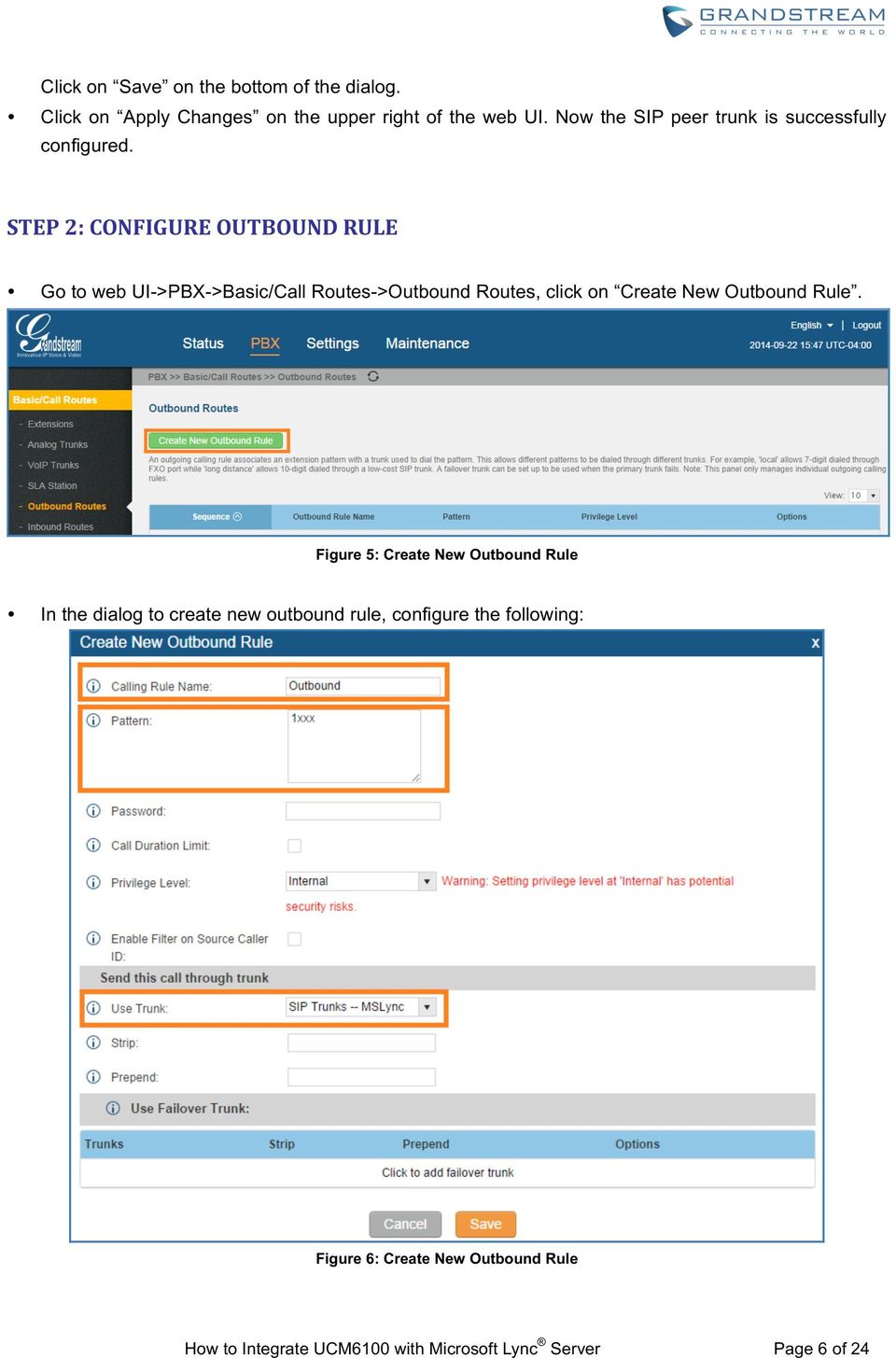
8 Ø Calling Rule Name: Enter the outbound rule name to identify it in the UCM6100 Ø Pattern: The Microsoft Lync server already has extensions 1xxx configured. Therefore, configure 1xxx here as the pattern to dial out from the UCM6100 extensions Ø Use Trunk: Select the SIP peer trunk created in step 1 as the trunk to be used for the outbound rule Click on Save on the bottom of the dialog. Click on Apply Changes on the upper right of the web UI. Now the outbound rule is successfully configured on the UCM6100. STEP 3: CONFIGURE INBOUND RULE Go to web UI->PBX->Basic/Call Routes->Inbound Routes, select the SIP trunk created in step 1 and click on Create New Inbound Rule. Figure 7: Create New Inbound Rule In the dialog to create inbound rule, configure the following: Ø Trunks: Make sure the SIP trunk created in the step 1 is selected Ø DID Pattern: Enter x. to allow any digit Ø Default Destination: Select By DID Ø DID Destination: Select Extension and other destinations you would like to have the Lync client to reach when calling into the UCM6100 How to Integrate UCM6100 with Microsoft Lync Server Page 7 of 24

9 Figure 8: Edit Inbound Rule Click on Save on the bottom of the dialog. Click on Apply Changes on the upper right of the web UI. Now the inbound rule is successfully configured. How to Integrate UCM6100 with Microsoft Lync Server Page 8 of 24

10 MICROSOFT LYNC CONFIGURATION STEP 1: CREATE NEW PSTN GATEWAY Open Microsoft Lync 2013 Topology Builder. Download or open a topology. Figure 9: Open Microsoft Lync 2013 Topology Builder Find the folder PSTN Gateway under Lync Server directory Shared Components. How to Integrate UCM6100 with Microsoft Lync Server Page 9 of 24

11 Figure 10: PSTN Gateway under Lync Server Right click on PSTN gateways and select New IP/PSTN gateway to create a new IP/PSTN gateway. Figure 11: Create New IP/PSTN Gateway The setup wizard for the IP/PSTN Gateway will guide you to configure it step by step. Firstly configure the FQDN as the UCM6100 IP address or the domain name. Then click on Next. How to Integrate UCM6100 with Microsoft Lync Server Page 10 of 24

12 Figure 12: Define the PSTN Gateway FQDN Leave the configuration as default in Define the IP Address dialog. Click on Next. Figure 13: Define the IP Address Define the root trunk. Configure the trunk as followings: How to Integrate UCM6100 with Microsoft Lync Server Page 11 of 24

13 Ø Listening port for IP/PSTN gateway: 5060 Ø SIP Transport Protocol: TCP Click on Finish. Figure 14: Define the Root Trunk Ø Now, right click on Lync Server and select Publish Topology to update the existing topology with the new PSTN gateway configurations. Figure 15: Select Publish Topology How to Integrate UCM6100 with Microsoft Lync Server Page 12 of 24

14 Figure 16: Publish Topology Process Figure 17: Publish Topology Finished STEP 2: CONFIGURE DIAL PLAN ON MICROSOFT LYNC SERVER Open the Microsoft Lync 2013 control panel. Select Voice Routing -> Dial Plan. Double click on Global to edit Dial Plan - Global. How to Integrate UCM6100 with Microsoft Lync Server Page 13 of 24

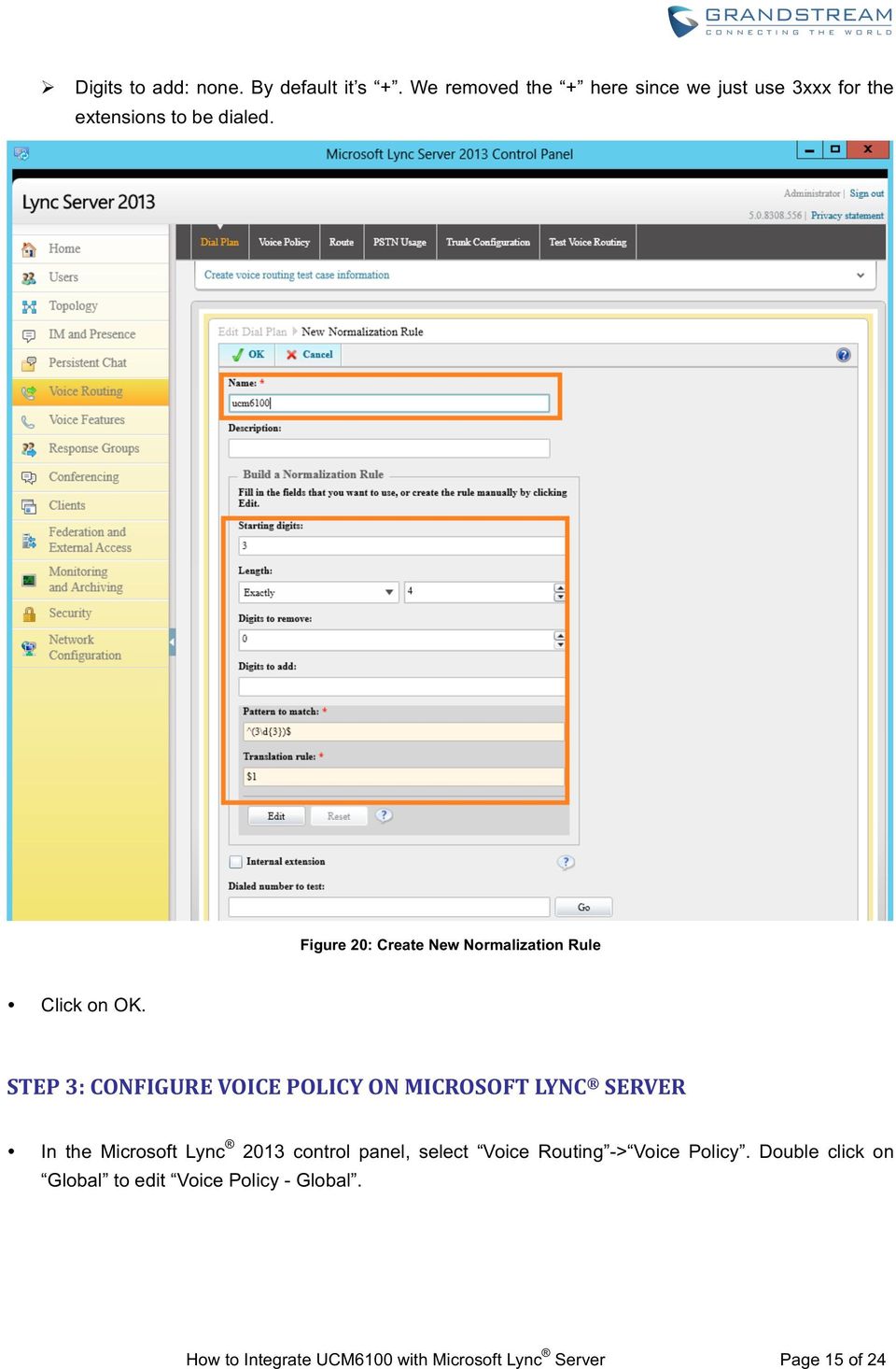
15 Figure 18: Voice Routing->Dial Plan In Edit Dial Plan - Global dialog, select New under Associated Normalization Rules. Figure 19: Edit Dial Plan Global In our sample, the UCM6100 has extensions 3xxx. Therefore, configure the following in the dial plan: Ø Starting digits: 3 Ø Length: exactly 4 Ø Digits to remove: 0 How to Integrate UCM6100 with Microsoft Lync Server Page 14 of 24

16 Ø Digits to add: none. By default it s +. We removed the + here since we just use 3xxx for the extensions to be dialed. Figure 20: Create New Normalization Rule Click on OK. STEP 3: CONFIGURE VOICE POLICY ON MICROSOFT LYNC SERVER In the Microsoft Lync 2013 control panel, select Voice Routing -> Voice Policy. Double click on Global to edit Voice Policy - Global. How to Integrate UCM6100 with Microsoft Lync Server Page 15 of 24
17 Figure 21: Voice Routing->Voice Policy Under associated PSTN usage, click on New. Figure 22: Edit Voice Policy - Global How to Integrate UCM6100 with Microsoft Lync Server Page 16 of 24

18 In the dialog Edit Voice Policy->New PSTN Usage Record, click on New under Associated Routes. Figure 23: Edit Voice Policy - Global Create a new voice route. Ø Name: Enter the name for the voice route to identify it in the Lync server Ø Build a pattern o match: Enter 3 and click on Add. This will create a pattern starting from digit 3 to reach the 3xxx extensions in the UCM6100. Ø Associated Trunk: Click on Add under Associated Trunk and select the UCM6100 trunk created in the Topology Builder. How to Integrate UCM6100 with Microsoft Lync Server Page 17 of 24

19 Figure 24: Create a New Voice Route How to Integrate UCM6100 with Microsoft Lync Server Page 18 of 24

20 Figure 25: Select the UCM6100 Trunk as the Associated Trunk How to Integrate UCM6100 with Microsoft Lync Server Page 19 of 24

21 Figure 26: Associated Trunk Added Click on OK multiple time until all the way back to the main voice policy interface. Then commit all configurations. How to Integrate UCM6100 with Microsoft Lync Server Page 20 of 24
22 Figure 27: Commit All Configurations How to Integrate UCM6100 with Microsoft Lync Server Page 21 of 24
23 MAKING CALLS ON UCM6100 AND MICROSOFT LYNC SERVER Once SIP trunk has been set up between the UCM6100 and the Microsoft Lync manipulate the deployment for different call flows and scenarios. server, users can Figure 28: UCM6100 Integration with Microsoft Lync Server 2013 Assuming the following has been set up: A UCM6100 extension 3000 is registered on the GXP2140 desk phone. A Lync client with extension 1002 has successfully logged in the Lync App on a mobile phone or the GXV3275. The UCM6100 has an analog trunk and inbound/outbound routes configured to reach outside PSTN lines. The inbound route destination is set to IVR that allows users to dial UCM6100 extensions and dial trunk. How to Integrate UCM6100 with Microsoft Lync Server Page 22 of 24
24 CASE 1: CALL BETWEEN UCM6100 EXTENSION AND LYNC CLIENT On the GXP2140, dial 1002 to reach the Lync client directly. After the call is answered, two way audio can be successfully established. On the Lync client, dial 3000 to reach the registered on GXP2140 directly. After the call is answered, two way audio can be successfully established. CASE 2: CALL FORWARDING TO LYNC CLIENT FROM UCM6100 EXTENSION Configure Call Forward Unconditional for the extension 3000 on the UCM6100. Make a call from cell phone to the UCM6100 PSTN line number. Enter 3000 after hearing the IVR. The call will be forwarded to the Lync client (extension 1002). Users can then answer the call on the Lync client. This can be used for out of office call forwarding if the user has Lync client set up on mobile phone. CASE 3: FOLLOW ME TO LYNC CLIENT FROM UCM6100 EXTENSION Configure Follow Me on the UCM6100 under web UI->PBX->Call Features->Follow Me. Enter the Lync client extension number 1002 as the follow me number for UCM6100 extension Figure 29: Follow Me Configuration on UCM6100 How to Integrate UCM6100 with Microsoft Lync Server Page 23 of 24
25 Make a call from cell phone to the UCM6100 PSTN line number. Enter 3000 after hearing the IVR. Extension 3000 will start to ring. If the call is rejected or not answered on the extension 3000, Lync client 1002 will start to ring. On the Lync client. enter 1 to accept the call. CASE 4: DIAL TO LYNC CLIENT FROM UCM6100 ANALOG TRUNK Make sure the IVR for the analog trunk has Dial Trunk enabled. Make a call from cell phone to the UCM6100 PSTN line number. Then enter Lync client extension 1002 after hearing the IVR. The Lync client will start to ring. Users can then answer the call on the Lync client. * Lync is a Registered Trademark of Microsoft Inc. How to Integrate UCM6100 with Microsoft Lync Server Page 24 of 24
Configuring an Etherspeak SIP Trunk in Microsoft Lync 2013
 Configuring an Etherspeak SIP Trunk in Microsoft Lync 2013 This is to cover the steps needed for basic functionality to communicate with Etherspeak s SIP trunking service. Many environments are different
Enabling Users for Lync services
 Enabling Users for Lync services 1) Login to collaborate.widevoice Server as admin user 2) Open Lync Server control Panel as Run As Administrator 3) Click on Users option and click Enable Users option
Grandstream Networks, Inc. How To Interconnect Multiple UCM6510 IPPBX
 Grandstream Networks, Inc. How To Interconnect Multiple UCM6510 IPPBX Index Table of Contents OVERVIEW... 2 CONNECT TWO UCM6510 USING PEER SIP TRUNK... 3 CREATE PEER SIP TRUNK FOR UCM6510... 3 CONFIGURE
Configuring a Pure-IP SIP Trunk in Lync 2013
 Configuring a Pure-IP SIP Trunk in Lync 2013 Contents Configuring a Pure-IP SIP Trunk in Lync 2013... 1 Introduction - Product version: Microsoft Lync Server 2013... 2 Pure-IP SIP Trunk configuration tasks...
Shared Components PSTN gateways PSTN gateways New IP/PSTN Gateway Define New IP/PSTN Gateway Define the PSTN Gateway FQDN FQDN Next
 Microsoft Lync 2013 Integration with VoIP.co.uk SAFEgateway In order to integrate Microsoft Lync 2013 with the VoIP.co.uk SAFEgateway you must configure both the Microsoft Lync server and the VoIP.co.uk
Grandstream Networks, Inc.
 Grandstream Networks, Inc. Interoperability Tutorial: Configuring UCM6100 Series with FreePBX Grandstream Networks, Inc. www.grandstream.com FreePBX is a Registered Trademark of Schmooze Com, Inc. Index
Integrating Asterisk FreePBX with Lync Server 2010
 1 Integrating Asterisk FreePBX with Lync Server 2010 Author: Baaskar R 1 www.baaskarcharles.com 2 Integrating Asterisk FreePBX with Lync Server 2010... 1 AsteriskNow package Source... 3 Installing AsteriskNow...
Quick Setup Guide. Integration of Aastra MX-ONE / Aastra 700 and Microsoft Lync Server 2010
 Quick Setup Guide Integration of Aastra MX-ONE / Aastra 700 and Microsoft Lync Server 2010 Aastra MX-ONE TM and Aastra 700 running Telephony Server software V.4.1 SP3 and later Aastra Telecom Sweden AB
Grandstream Networks, Inc. UCM6510 Basic Configuration Guide
 Grandstream Networks, Inc. UCM6510 Basic Configuration Guide Index Table of Contents OVERVIEW... 4 SETUP ENVIRONMENT... 5 QUICK INSTALLATION... 6 CONNECT UCM6510... 6 ACCESS UCM6510 WEB INTERFACE... 6
Grandstream Networks, Inc. How to Use Office Time and Holiday on UCM6100
 Grandstream Networks, Inc. How to Use Office Time and Holiday on UCM6100 Index Table of Contents OVERVIEW... 2 CONFIGURE OFFICE TIME AND HOLIDAY... 3 OFFICE TIME... 3 HOLIDAY... 4 TIME CONDITION DEFINITIONS...
Grandstream Networks, Inc. How to Configure T1 Trunk on UCM6510
 Grandstream Networks, Inc. How to Configure T1 Trunk on UCM6510 Index Table of Contents OVERVIEW... 3 1. CONNECTING T1 PORT... 4 2. CONFIGURING T1 CHANNELS... 5 3. CONFIGURING DIGITAL PORT... 8 4. CONFIGURING
Grandstream Networks, Inc.
 Grandstream Networks, Inc. UCM6100 Basic Configuration Guide Grandstream Networks, Inc. www.grandstream.com TABLE OF CONTENTS OVERIEW... 4 SETUP GUIDE SCENARIO... 4 QUICK INSTALLATION... 5 Connecting the
SBC 1000 / SBC 2000 Series Configuration Guide (For Microsoft Lync Server 2013)
 Configuration Guide SBC 1000 / SBC 2000 Series Configuration Guide (For Microsoft Lync Server 2013) For use with AT&T s IP Flexible Reach Enhanced Features Service on MIS, MPLS PNT or AT&T VPN Disclaimers
Grandstream Networks, Inc. How To Manage Inbound Route/Outbound Route on UCM6510/UCM6100
 Grandstream Networks, Inc. How To Manage Inbound Route/Outbound Route on UCM6510/UCM6100 Index Table of Contents OVERVIEW... 3 MANAGING OUTBOUND ROUTE... 4 USING SOURCE CALLER ID FILTER... 4 USING PRIVILEGE
Application Notes for Configuring Microsoft Office Communications Server 2007 R2 and Avaya IP Office PSTN Call Routing - Issue 1.0
 Avaya Solution & Interoperability Test Lab Application Notes for Configuring Microsoft Office Communications Server 2007 R2 and Avaya IP Office PSTN Call Routing - Issue 1.0 Abstract These Application
Grandstream Networks, Inc. Guide on Interconnecting Multiple
 Grandstream Networks, Inc. Guide on Interconnecting Multiple UCM6100 series IPPBX OVERVIEW This document describes basic configuration to interconnect two UCM6100s. In this example, we will be using two
Configuring Positron s V114 as a VoIP gateway for a 3cx system
 Assumptions: Configuring Positron s V114 as a VoIP gateway for a 3cx system The IP address of the V114 is 192.168.1.2 The IP address of the 3CX PBX System is 192.168.1.110 3CX already has some IP phones
ZyXEL IP PBX Support Note. ZyXEL IP PBX (X2002) VoIP. Support Notes
 ZyXEL IP PBX (X2002) VoIP Support Notes Version 1.00 October 2008 1 Contents Overview ZyXEL IP PBX Support Note 1. How to manage and maintain your IPPBX?...3 1.1 Firmware Upgrade..3 1.2 Backing up your
Grandstream Networks, Inc. UCM6100 Security Manual
 Grandstream Networks, Inc. UCM6100 Security Manual Index Table of Contents OVERVIEW... 3 WEB UI ACCESS... 4 UCM6100 HTTP SERVER ACCESS... 4 PROTOCOL TYPE... 4 USER LOGIN... 4 LOGIN TIMEOUT... 5 TWO-LEVEL
SUTUS Business Central 5800 ThinkTel Configuration
 SUTUS Business Central 5800 ThinkTel Configuration This document explains how to configure SUTUS Business Central 5800 to connect to the ThinkTel VoIP service. Configuring SUTUS Business Central 5800 to
UCM61xx Configuration
 UCM61xx Configuration Grandstream UCM61xx IPPBX firmware version 1.0.4.7 has passed SIP Trunk interoperability testing with Broadvox on February 12 th, 2014. This document introduces major configuration
Installing Policy Patrol on a separate machine
 Policy Patrol 3.0 technical documentation July 23, 2004 Installing Policy Patrol on a separate machine If you have Microsoft Exchange Server 2000 or 2003 it is recommended to install Policy Patrol on the
MaxACD for Lync Release 6.5.8. Deployment Guide
 MaxACD for Lync Release 6.5.8 Deployment Guide August 2013 Contents Introduction... 3 Operational Notes... 3 Requirements... 6 Server Requirements... 6 MaxAgent Requirements... 6 VRM (Voice Recording Manager)
Configuring the CyberData VoIP 4-Port Zone Controller with Audio Out
 NetVanta Unified Communications Technical Note Configuring the CyberData VoIP 4-Port Zone Controller with Audio Out Introduction The CyberData Voice over Internet Protocol (VoIP) zone controller enables
How To Connect An Ip Trunk To An Ip Trunk On A Microsoft Microsoft Lync Server 2013 (Windows) With An Ip And Ip Trunk (Windows 2) (Windows 1) (Xo) (Powerpoint) (Netware
 AudioCodes Mediant Series Enterprise Session Border Controllers (E-SBC) Interoperability Lab Configuration Note Microsoft Lync Server 2013 with XO Communications SIP Trunk using AudioCodes Mediant E-SBC
SBC 1000/2000 Configuration Guide with Lync 2013 for Windstream/ LPAETEC SIP Trunk Deployments
 SBC 1000/2000 Configuration Guide with Lync 2013 for Windstream/ LPAETEC SIP Trunk Deployments Application Notes Rev. 1.0 Last Updated: April 10, 2015 Revision Date Revised By Comments 0.1 12/03/2015 Roman
Acano solution. Third Party Call Control Guide. March 2015 76-1055-01-E
 Acano solution Third Party Call Control Guide March 2015 76-1055-01-E Contents Contents 1 Introduction... 3 1.1 How to Use this Guide... 3 1.1.1 Commands... 4 2 Example of Configuring a SIP Trunk to CUCM...
OfficeMaster Gate (Virtual) Enterprise Session Border Controller for Microsoft Lync Server. Quick Start Guide
 OfficeMaster Gate (Virtual) Enterprise Session Border Controller for Microsoft Lync Server Quick Start Guide October 2013 Copyright and Legal Notice. All rights reserved. No part of this document may be
VoIPon www.voipon.co.uk [email protected] Tel: +44 (0)1245 808195 Fax: +44 (0)1245 808299
 VoiceGear/3CX Integration Guide Ver.0.1 Page 2 1. OVERVIEW... 3 1.1 SETTING UP 3CX PBX...4 1.2 SETTING UP VOICEGEAR GATEWAY...5 2. VOICEGEAR-3CX SIP INTEGRATION... 6 2.1 3CX CONFIGURATION...7 2.2 VOICEGEAR
Avaya IP Office SIP Trunk Configuration Guide
 Valcom Session Initiation Protocol (SIP) VIP devices are compatible with SIP-enabled versions of Avaya IP Office (5.0 and higher). The Valcom device can be added to the IP Office system as a SIP Trunk.
Application Notes for configuring Avaya IP Office IP500 R7.0 with 2Ring NetFAX R3.0 Issue 1.0
 Avaya Solution & Interoperability Test Lab Application Notes for configuring Avaya IP Office IP500 R7.0 with 2Ring NetFAX R3.0 Issue 1.0 Abstract These Application Notes describe the configuration steps
Optional VBP-E at the Headquarters Location
 publicly whitelist/blacklist LAN/Subscriber-side GK address. Submit Default alias Optional VBP-E at the Headquarters Location As shown in the diagram above, you can choose to install a VBP-E to allow your
nexvortex Setup Guide
 nexvortex Setup Guide CUDATEL COMMUNICATION SERVER September 2012 510 S P R I N G S T R E E T H E R N D O N V A 2 0 1 7 0 + 1 8 5 5. 6 3 9. 8 8 8 8 Introduction This document is intended only for nexvortex
IP PBX. SD Card Slot. FXO Ports. PBX WAN port. FXO Ports LED, RED means online
 1 IP PBX SD Card Slot FXO Ports PBX LAN port PBX WAN port FXO Ports LED, RED means online 2 Connect the IP PBX to Your LAN Internet PSTN Router Ethernet Switch FXO Ports 3 Access the PBX s WEB GUI The
Configuration Note. Connecting Microsoft Lync Server 2013 with ITSP SIP Trunk using AudioCodes E-SBC. Interoperability Laboratory
 AudioCodes Mediant Series Enterprise Session Border Controller (E-SBC) Interoperability Laboratory Configuration Note Connecting Microsoft Lync Server 2013 with ITSP SIP Trunk using AudioCodes E-SBC June
Configuration Guide. Version 6.2. Mediant 800, 1000 and 3000. E SBC Media Gateways. October 2011 Document # LTRT 33420
 Mediant 800, 1000 and 3000 E SBC Media Gateways Connecting PAETEC SIP Trunking Service to Microsoft Lync Server 2010 Configuration Guide Version 6.2 October 2011 Document # LTRT 33420 Published by the
Avaya IP Office 8.1 Configuration Guide
 Avaya IP Office 8.1 Configuration Guide Performed By tekvizion PVS, Inc. Contact: 214-242-5900 www.tekvizion.com Revision: 1.1 Date: 10/14/2013 Copyright 2013 by tekvizion PVS, Inc. All Rights Reserved.
BroadSoft Partner Configuration Guide
 BroadSoft Partner Configuration Guide Microsoft Lync 2010 SIP Trunking August 2012 Document Version 1.6 9737 Washingtonian Blvd Suite 350 Gaithersburg, MD USA 20878 Tel +1 301.977.9440 WWW.BROADSOFT.COM
Cisco Unified Communications Manager SIP Trunk Configuration Guide
 Valcom PagePro SIP (Session Initiation Protocol) Paging Servers, models VIP-201 and VIP-204, are compatible with Cisco Unified Communications Manager as either a Third-party SIP Device (Basic or Advanced)
Integrating VoIP Phones and IP PBX s with VidyoGateway
 Integrating VoIP Phones and IP PBX s with VidyoGateway Updated February 2011 INDEX: I. ABSTRACT.1 II. III. IV. VIDYOGATEWAY OVERVIEW.. 1 NETWORK TOPOLOGIES AND DEFINITIONS...2 CONNECTING TO VIDYOCONFERENCES
3CX Guide sip.orbtalk.co.uk
 3CX Guide sip.orbtalk.co.uk Table of Contents 1. Outbound Dialling 2. Inbound Routing 3. Outbound CLI 4. Additional Network Configuration 1. Outbound dialling: The Customer will have been provided with
SIP Trunking using the EdgeMarc Network Services Gateway and the Mitel 3300 ICP IP-PBX
 June 26th, 2014 SIP Trunking using the EdgeMarc Network Services Gateway and the Mitel 3300 ICP IP-PBX Page 1 of 30 Table of Contents 1 Overview... 3 2 Prerequisites... 3 3 Network Topology... 4 4 Description
Sonus Unified Communications SBC1000/2000 Series Enterprise Session Border Controller Configuration Guide
 Sonus Unified Communications SBC1000/2000 Series Enterprise Session Border Controller Configuration Guide For Use with Verizon s SIP Trunking Service And Microsoft Lync Server 2010 Sonus, Inc. 6900 Paseo
OfficeMaster SBA (Survivable Branch Appliance)
 OfficeMaster SBA (Survivable Branch Appliance) Resilient branch office solution for Microsoft Lync Server 2010 December 2010 Based on Lync RTM (4.0.7577.0) Please send feedback on this documentation to
Configure your 3CX in our IP telephone service.
 Configure your 3CX in our IP telephone service. This user guide will explain how to configure a 3CX Phone System turning into a small office with three extensions (1000, 1001 y 1002) and connect with Netelip
Quick Setup Guide. Setup Guide for Aastra 400 and Microsoft Lync 2013. A Mitel Company. Aastra Telecom Schweiz AG. Ziegelmattstrasse 1 ...
 Quick Setup Guide A Mitel Company Setup Guide for Aastra 400 and Microsoft Lync 2013...... Aastra Telecom Schweiz AG Ziegelmattstrasse 1 CH-4503 Solothurn 13.03.2014 - depl-2033/1.1 Table of Contents 1
Install MS SQL Server 2012 Express Edition
 Install MS SQL Server 2012 Express Edition Sohodox now works with SQL Server Express Edition. Earlier versions of Sohodox created and used a MS Access based database for storing indexing data and other
SIP Domain/Proxy, Ring Detect Extension or/and Page Audio Extension, (The 8180 needs its own phone extension) Authentication ID, Password,
 The 8180 requires the information below: SIP Domain/Proxy, Ring Detect Extension or/and Page Audio Extension, (The 8180 needs its own phone extension) Authentication ID, Password, Get TalkSwitch SIP Domain/Proxy:
Configuration Note. Connecting Microsoft Lync Server 2010 with ITSP SIP Trunk using AudioCodes E-SBC. Interoperability Laboratory
 AudioCodes Mediant Series Enterprise Session Border Controller (E-SBC) Interoperability Laboratory Configuration Note Connecting Microsoft Lync Server 2010 with ITSP SIP Trunk using AudioCodes E-SBC June
Tech Bulletin 2012-002. IPitomy AccessLine SIP Provider Configuration
 [email protected] 941.306.2200 Tech Bulletin 2012-002 Description This guide is intended to streamline the installation of AccessLine SIP trunks in the IPitomy IP PBX. In our combined testing we determined
Configuring Avaya BCM 6.0 for Spitfire SIP Trunks
 Configuring Avaya BCM 6.0 for Spitfire SIP Trunks This document is a guideline for configuring Spitfire SIP trunks onto Business Communication Manager release 6.0 and includes the settings required for
Mediatrix 3000 with Asterisk June 22, 2011
 Mediatrix 3000 with Asterisk June 22, 2011 Proprietary 2011 Media5 Corporation Table of Contents Introduction... 3 Network Topology... 3 Equipment Detail... 3 Configuration of the Fax Extension... 4 Configuration
Peer-to-Peer SIP Mode with FXS and FXO Gateways
 Peer-to-Peer SIP Mode with FXS and FXO Gateways New Rock s SIP based VoIP gateways with FXS and FXO ports support peer-to-peer mode which has many applications in deploying enterprise multi-site telephone
SIP Trunking Configuration with
 SIP Trunking Configuration with Microsoft Office Communication Server 2007 R2 A Dell Technical White Paper End-to-End Solutions Team Dell Product Group - Enterprise THIS WHITE PAPER IS FOR INFORMATIONAL
Configuration guide on common features of OM20 with NeeHau APP
 Configuration guide on common features of OM20 with NeeHau APP Part 1: OM20 OM20 is a full-featured IP-Telephony system with 20 extensions, providing features such as auto-attendant, mobile extension,
Whitepaper: Voice Call Notifications via VoIP and existing Dialogic Diva Boards
 Whitepaper: Voice Call Notifications via VoIP and existing Dialogic Diva Boards derdack gmbh. all rights reserved. this document is for information only. derdack gmbh makes no warranties, express or implied,
NET UX Series with Microsoft Lync 2010 and CyberData VoIP Intercom
 Network Equipment Technologies, Inc. NET UX Series with Microsoft Lync 2010 and CyberData VoIP Intercom Configuration Note Rushal Patel Table of Contents 1. Introduction... 3 2. Assumptions and Prerequisites...
Sample Configuration for SIP Trunking between Avaya IP Office R8.0 and Cisco Unified Communications Manager 8.6.2 Issue 1.0
 Avaya Solution & Interoperability Test Lab Sample Configuration for SIP Trunking between Avaya IP Office R8.0 and Cisco Unified Communications Manager 8.6.2 Issue 1.0 Abstract These Application Notes describe
Microsoft OCS with IPC-R: SIP (M)TLS Trunking. directpacket Product Supplement
 Microsoft OCS with IPC-R: SIP (M)TLS Trunking directpacket Product Supplement directpacket Research www.directpacket.com 2 Contents Prepare DNS... 6 Prepare Certificate Template for MTLS... 6 1 Create
Configuration Notes 0215
 Mediatrix Digital and Analog VoIP Gateways DNS SRV Configuration for a Redundant Server Solution (SIP) Introduction... 2 Deployment Scenario... 2 DNS SRV (RFC 2782)... 3 Microsoft Server Configuration...
Http://www.passcert.com
 Http://www.passcert.com Exam : 70-337 Title : Enterprise Voice & Online Services with Microsoft Lync Server 2013 Version : DEMO 1 / 18 Topic 1, Litware, Inc Case A Overview Litware, Inc., is an international
Grandstream Networks, Inc.
 Grandstream Networks, Inc. GXV3275 IP Multimedia Phone for Android TM Microsoft Lync Application Setup Guide GXV3275 Microsoft Lync Setup Guide GXV3275 Microsoft Lync Setup Guide Index INTRODUCTION...
Application Notes for Configuring Intelepeer SIP Trunking with Avaya IP Office 7.0 - Issue 1.0
 Avaya Solution & Interoperability Test Lab Application Notes for Configuring Intelepeer SIP Trunking with Avaya IP Office 7.0 - Issue 1.0 Abstract These Application Notes describe the procedures for configuring
User Manual. 3CX VOIP client / Soft phone Version 6.0
 User Manual 3CX VOIP client / Soft phone Version 6.0 Copyright 2006-2008, 3CX ltd. http:// E-mail: [email protected] Information in this document is subject to change without notice. Companies names and data
Configuring Mitel 3300 for Spitfire SIP Trunks
 Configuring Mitel 3300 for Spitfire SIP Trunks This document is a guideline for configuring Spitfire SIP trunks onto Mitel 3300 and includes the settings required for Inbound DDI routing and Outbound CLI
6.40A AudioCodes Mediant 800 MSBG
 AudioCodes Mediant 800 MSBG Page 1 of 66 6.40A AudioCodes Mediant 800 MSBG 1. Important Notes Check the SIP 3 rd Party Validation Website for current validation status. The SIP 3 rd party Validation Website
Dialogic 4000 Media Gateway Series as a Survivable Branch Appliance for Microsoft Lync Server 2010
 Dialogic 4000 Media Gateway Series as a Survivable Branch Appliance for Microsoft Lync Server 2010 Deployment Guide December 2011 64-1146-02 www.dialogic.com Copyright and Legal Notice Copyright 2011 Dialogic
NovaBACKUP xsp Version 15.0 Upgrade Guide
 NovaBACKUP xsp Version 15.0 Upgrade Guide NovaStor / November 2013 2013 NovaStor, all rights reserved. All trademarks are the property of their respective owners. Features and specifications are subject
Download/Install IDENTD
 Download/Install IDENTD IDENTD is the small software program that must be installed on each user s computer if multiple filters are to be used in ComSifter. The program may be installed and executed locally
Enterprise Voice and Online Services with Microsoft Lync Server 2013
 Course 20337B: Enterprise Voice and Online Services with Microsoft Lync Server 2013 Course Details Course Outline Module 1: Voice Architecture This module introduce Enterprise Voice features of Lync Server
Configuration BCP Skype for Business
 Configuring Skype for Business using Grandstream CPE Devices Thank you for your interest in configuring Grandstream s SIP devices for Skype s SIP Trunking Service. This document describes the basic configuration
How to Build a Simple Virtual Office PBX System Using TekSIP and TekIVR
 How to Build a Simple Virtual Office PBX System Using TekSIP and TekIVR This document explains how to build a simple virtual office PBX system using TekSIP and TekIVR. In this example following components
SIP Trunking using Optimum Business Sip Trunk Adaptor and the Zultys MX250 IP PBX
 SIP Trunking using Optimum Business Sip Trunk Adaptor and the Zultys MX250 IP PBX Table of Contents Goal 3 Prerequisites 3 Zultys MX250 Configuration 4 Network Settings 4 Phone Registration and Assignment
Business Communication Manager BCM 50 and BCM450 Release 5.0 Configuration Guide for Verizon Business SIP Trunking. Issue 1.1
 Business Communication Manager BCM 50 and BCM450 Release 5.0 Configuration Guide for Verizon Business SIP Trunking Issue 1.1 Abstract This document provides guidelines for configuring a SIP Trunk between
Setup Guide for Exchange Server
 Setup Guide for Exchange Server Table of Contents Overview... 1 A. Exchange Server 2007/2010 Inbound Mail... 2 B. Exchange Server 2007/2010 Outbound Mail (optional)... 8 C. Exchange Server 2003/2000 Inbound
SIP Trunking, ITSP Checklist
 SIP Trunking, ITSP Checklist Note: This is not an official document of any kind so please do your own homework and research and also note that Vocale Ltd (owner of the SIP School) does not accept any responsibility
Application Notes for Microsoft Office Communicator Clients with Avaya Communication Manager Phones - Issue 1.1
 Avaya Solution & Interoperability Test Lab Application Notes for Microsoft Office Communicator Clients with Avaya Communication Manager Phones - Issue 1.1 Abstract These Application Notes describe the
How to Connect MyPBX to NeoGate TG via SIP Trunking
 How to Connect MyPBX to NeoGate TG via SIP Trunking Version: 1.0 Yeastar Technology Co., Ltd. Date: 2013.11.16 http://www.yeastar.com 1/11 Contents: 1. Introduction... 3 2. Connect MyPBX to NeoGate TG...
Configuring Quadro IP PBXs with "SIP Connect"
 Configuring Quadro IP PBXs with "SIP Connect" Revision: 1.0 Abstract: This document describes how to configure the Quadro IP PBXs to use the IP-PSTN service from SIP Connect PAGE 1 Document Revision History
TALKSWITCH VOIP NETWORK TROUBLESHOOTING GUIDE
 TALKSWITCH DOCUMENTATION TALKSWITCH VOIP NETWORK TROUBLESHOOTING GUIDE RELEASE 3.24 CT.TS005.008001 ANSWERS WITH INTELLIGENCE COPYRIGHT INFORMATION TalkSwitch. Copyright 2006. All Rights Reserved. Reproduction,
Step-by-step installation guide for monitoring untrusted servers using Operations Manager ( Part 3 of 3)
 Step-by-step installation guide for monitoring untrusted servers using Operations Manager ( Part 3 of 3) Manual installation of agents and importing the SCOM certificate to the servers to be monitored:
Configuring CyberData VoIP Ceiling Speakers
 NetVanta Unified Communications Technical Note Configuring CyberData VoIP Ceiling Speakers Introduction The CyberData Voice over IP (VoIP) ceiling speaker connects to existing local area networks (LANs)
DINSTAR DAG1000-4S4O with Elastix Setup Guide
 DINSTAR DAG1000-4S4O with Elastix Setup Guide Shenzhen Dinstar Technologies Co., Ltd. Address: Floor 6, Guoxing Building, Changxing Road, Nanshan District, Shenzhen, China 518057 Telephone: +86 755 2645
How To Program A Talkswitch Phone On A Cell Phone On An Ip Phone On Your Ip Phone (For A Sim Sim) On A Pc Or Ip Phone For A Sim Phone On Iphone Or Ipro (For An Ipro) On
 TALKSWITCH DOCUMENTATION ADDING IP PHONES TO TALKSWITCH RELEASE 6.50 CT.TS005.008104 ANSWERS WITH INTELLIGENCE COPYRIGHT INFORMATION Copyright 2011 Fortinet, Inc. All rights reserved. Fortinet, FortiGate,
How to Connect MyPBX to Skype
 Version: 2.0 Yeastar Technology Co., Ltd. Date: 2014.11.20 Table of Contents About This Guide... 3 1. Register Skype SIP Trunk on MyPBX... 4 2. Configure MyPBX with Inbound Calling... 7 2.1 Receive Incoming
Microsoft.Braindumps.70-664.v2013-12-31.by.Toni.75q
 Microsoft.Braindumps.70-664.v2013-12-31.by.Toni.75q Number: 70-664 Passing Score: 700 Time Limit: 120 min File Version: 12.5 http://www.gratisexam.com/ Exam Code: 70-664 Exam Name: TS: Microsoft Lync Server
Application Note. IP8000 Conference Phone Configuration Guide. Table of Contents. Overview. Requirements. ST-10010 October 25, 2007
 Application Note ST-10010 October 25, 2007 IP8000 Conference Phone Configuration Guide This application note provides the details on adding the IP8000 conference phone to the ShoreTel IP phone system.
SwyxWare configuration guide for BT SIP trunk
 Swyx Solutions GmbH Joseph-von-Fraunhofer-Str. 13a 44227 Dortmund Status: Released Pages: 18 Version: 2 Created: 13.02.13 by: Techel, Henning Last change: 19.04.16 11:50 by: File: Z:\2_Tests\Provider\UK\BT\SwyxWareHowTo.docx
Release Notes for NeoGate TE100 16.18.0.X
 Release Notes for NeoGate TE100 16.18.0.X ===Firmware Version: V16.18.0.2==== Applicable Model: NeoGate TE100 Release Date: October 25th, 2014 http://www.yeastar.com 1/6 1. New Features 1. Added support
Configuration Notes 283
 Mediatrix 4400 Digital Gateway VoIP Trunking with a Legacy PBX June 21, 2011 Proprietary 2011 Media5 Corporation Table of Contents Table of Contents... 2 Introduction... 3 Mediatrix 4400 Digital Gateway
A Guide to Connecting to FreePBX
 A Guide to Connecting to FreePBX FreePBX is a basic web Graphical User Interface that manages Asterisk PBX. It includes many features available in other PBX systems such as voice mail, conference calling,
Enabling NAT and Routing in DGW v2.0 June 6, 2012
 Enabling NAT and Routing in DGW v2.0 June 6, 2012 Proprietary 2012 Media5 Corporation Table of Contents Introduction... 3 Starting Services... 4 Distinguishing your WAN and LAN interfaces... 5 Configuring
Basic Exchange Setup Guide
 Basic Exchange Setup Guide The following document and screenshots are provided for a single Microsoft Exchange Small Business Server 2003 or Exchange Server 2007 setup. These instructions are not provided
How to Program a Commander or Scout to Connect to Pilot Software
 How to Program a Commander or Scout to Connect to Pilot Software Commander and Scout are monitoring and control products that can transfer physical environmental conditions and alarm sensor electrical
Cisco CallManager 4.1 SIP Trunk Configuration Guide
 Valcom Session Initiation Protocol (SIP) VIP devices are compatible with Cisco Unified Communications Manager systems. For versions of Communications Manager that do not support SIP endpoints (such as
Quick Installation Guide
 Quick Installation Guide PSTN / VoIP PBX Version 2.1 Table of Contents Hardware Setup... 1 Notification LEDs (On the Front Panel of the Gateway)... 2 PSTN/VOIP PBX Quick Installation Wizard... 3 Accessing
CISCO UNIFIED COMMUNICATIONS MANAGER SIP INTEGRATION
 CISCO UNIFIED COMMUNICATIONS MANAGER SIP INTEGRATION Validated Integrations: 8.5 with xic version 3.0 SU-10 and greater INTEGRATION DOCUMENT Version 2.03 7601 Interactive Way Indianapolis, IN 46278 Telephone/Fax:
Integrating Citrix EasyCall Gateway with SwyxWare
 Integrating Citrix EasyCall Gateway with SwyxWare The EasyCall Gateway has been tested for interoperability with Swyx SwyxWare, versions 6.12 and 6.20. These integration tests were done by using EasyCall
MS Skype for Business and Lync. Integration Guide
 MS Skype for Business and Lync Integration Guide June 03, 2016 Contents Introduction 4 How to use StarLeaf with Microsoft Skype for Business 2015 Server 5 Pre-requisites 5 Step One: Federate between the
8.7. NET SatisFAXtion Email Gateway Installation Guide. For NET SatisFAXtion 8.7. Contents
 NET SatisFAXtion Email Gateway Installation Guide For NET SatisFAXtion 8.7 Contents Install Microsoft Virtual SMTP Server 2 XP and 2003 2 2008 and 2008 R2 2 Windows 7 2 Upgrade Path 2 Configure Microsoft