
URC Universal remote
|
|
|
- Doris Ball
- 9 years ago
- Views:
Transcription
1 URC UK Universal remote D F E P I NL ONE FOR ALL 3

2 Table of Contents UK PICTURE OF THE ONE FOR ALL 3 REMOTE 3 INSTALLING THE BATTERIES 4 FEATURES AND FUNCTIONS 4 INSTALLATION Setting up your devices 6 The Search Method 7 QUICK CODE REFERENCE 8 CHANGING THE MODE OF A DEVICE KEY 9 RESETTING A DEVICE KEY 9 ADVANCED FEATURES Colour and Brightness 10 Volume Punch Through 10 Auto Scan 10 Device Sleeptimer 11 ONE FOR ALL Sleeptimer 11 ONE FOR ALL Recall 12 TROUBLE-SHOOTING 12 Customer Service 13 SETUP CODES Televisions 80 Video Recorders 83 DVD Players 85 About Your ONE FOR ALL 3 Congratulations on your purchase of the ONE FOR ALL 3 Universal Remote Control. By choosing the ONE FOR ALL 3 remote you have opted for the User Friendly remote control solution. Made according to the highest quality, the ONE FOR ALL 3 will provide you with long-term satisfaction. Please read these enclosed instructions carefully before putting your ONE FOR ALL 3 to use. Your ONE FOR ALL 3 Remote Package contains: Your ONE FOR ALL 3 Remote Control Your ONE FOR ALL 3 Manual Your Manual is divided into two parts: the set-up instructions and the device codes. PLEASE DO NOT DISCARD THIS MANUAL AS YOU MAY NEED IT AGAIN IN THE FUTURE! Your ONE FOR ALL 3 can operate three devices: a Television, a Video Recorder and a DVD Player. Your ONE FOR ALL 3 remote needs to be powered by 2 new AA/LR6 Alkaline batteries. 2

3

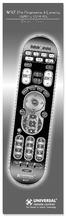
4 Installing the Batteries Your ONE FOR ALL 3 Remote needs 2 new "AA/LR6" Alkaline batteries. 1 Remove the battery cover from the back of your ONE FOR ALL 3 by pressing down on the arrow on the battery cover and sliding it backwards. 2 Match the batteries to the + and marks inside the battery case, then insert the batteries. 3 Slide the battery cover back into place until it clicks. Make sure the battery cover is secure. Important notes: - In order to avoid having to re-program your ONE FOR ALL 3 after you remove the batteries, you will need to insert new batteries within 5 minutes. Also it is recommended that you do not use rechargeable batteries. - On the inside of the battery compartment door you will find a label on which to write your Set-Up Codes for future reference. This you will do after setting up your ONE FOR ALL 3 remote for your devices. Features and Functions Please refer to the picture of the ONE FOR ALL 3 Remote Control on Page 3. 1 Power Key: The Power key controls the same function as it did on your original remote. 2 Device Keys: The TV, VCR & DVD keys select the home entertainment device you wish to control. For example, pressing the TV key allows the remote to control the functions of your television, etc. 3 3 Mode Indicator LED s: During the use of your ONE FOR ALL 3, these LED s will indicate the mode you re using. For example when you are controlling your DVD player, the LED on the DVD key will flash red. 4 Number Keys: The Number keys (0-9, -/--(10), AV (20)) provide the functions just like your original remote, such as the direct access to programme/channel selection. If your original remote uses a 10 key, this function can be found by pressing the -/-- key. If your original remote uses a 20 key, this function can be found by pressing the AV key. 5 Menu Key: Controls the same function as it did on your original remote control. 6 Magic Key: The Magic key is used to set-up your ONE FOR ALL 3 Remote Control and to access special functions. 7 Exit Key: The Exit key will exit the Menu. 8 Menu Navigator: The Menu Navigator is a miniature joystick. The movement of the navigator up, down, left and right operates the same functions as the up, down, left and right keys of your original remote. By pressing the Menu Navigator, it will operate the same function as the OK/Select key on your original remote control. These keys will allow you to navigate up, down, left and right through the menu of your device. 4

5 9 Channel Up / Down Control: The Channel Up / Down keys control the same functions as your original remote control. In DVD mode the Channel Up key operates the (Next Track) function, and the Channel down key operates the (Previous Track) function. 10 Recall Key: The Recall key operates the same function it did on the original remote control. If your original remote control does not have a Recall function you can set the Recall function up with the ONE FOR ALL Recall (see page 12). 11 Volume Up / Down Control: These keys operate just as those on your original remote. 12 Mute Key: The Mute key operates the same function it did on your original remote. It is also used to access the scan feature (see page 10). 13 VCR/DVD Playback keys: After pressing the VCR mode key, the Playback keys operate the same functions of your Video Recorder Keys. To prevent accidental recording of your video, the RECORD key must be pressed twice. After pressing the DVD mode key, the Playback keys will operate the same functions of your DVD Players. 14 Teletext Functions: After pressing the TV mode key, the VCR/DVD Playback keys are used to operate the main teletext functions. The symbols above the keys represent the teletext functions they will access. TEXT ON: Puts your television in the teletext mode. TEXT OFF: Switches the television back to regular viewing mode. On some televisions, this may be done by pressing the TEXT key several times. HOLD/STOP: Stops the television changing text pages. EXPAND: Shows the top half of the teletext page in larger letters. By pressing again, you can see the bottom half of the teletext page enlarged. To return to the regular teletext viewing, press the Expand key again, or press the Text key, depending on your television. MIX: Shows the teletext and regular television simultaneously. You may also use this key for subtitling. On some televisions this function is accessed by pressing the Text key twice. 15 Wide Screen/Format/16:9 Function: The 16:9 key allows you to access the wide screen view option of your television (if the function is available on your original remote). 16 Fastext Keys: The Red, Green, Yellow and Blue keys will allow you to access the fastext functions of your television. Again, your television must have fastext capability to operate these functions. If on your original remote control these keys are used for Menu operation, the ONE FOR ALL 3 Remote will operate the same. Important note: For a more detailed explanation of the Teletext and Fastext functions, please refer to the manual of your television. Remember, different televisions control Teletext and Fastext in different ways. Not all Teletext functions may be available for your particular model. 5

6 Installation Before you start, please read these instructions carefully Setting Up Your Devices Example: To set up the ONE FOR ALL 3 for your television: 1 Make sure your device (television) you wish to operate is switched on (not in standby). 2 Find the code for your device in the Code List (page 80-85). The device codes are listed per device type and brand name. Also the most popular code for each brand is listed first. Acura Admiral Adyson Agazi AGB Agef Aiko ONE FOR A , 0093, 0363, , , 0009, 0037, , , 0208, Press the device mode key (TV) on the ONE FOR ALL 3 TV remote for the device you wish to set up. 4 Press and hold down MAGIC until the red light blinks twice (the red light will blink once then twice). 5 Enter your four-digit device code using the number keys. The red light will blink twice. 6 Now aim the ONE FOR ALL 3 remote at your device (television) and press POWER. If your device switched off, the ONE FOR ALL 3 is ready to operate your device. 7 Turn your device (television) back on and try all the remote s functions to ensure they are working properly. If the functions do not work properly, repeat steps 1-6 using another code listed under your brand. 8 If your device (television) does not respond to the code entered, follow steps 1-6 with each code listed for your brand. If none of the codes listed for your brand operate your device (television), or if your brand is not listed at all, try the search method described on page 7. 9 Write your devicecode in the applicable four digit boxes provided in the battery compartment and on page 8 for future reference. MAGIC Important notes: - Some codes are quite similar. If your device does not respond or is not functioning properly with one of the codes, try another code listed under your brand. - For VCR setup: If your VCR s original remote control does not have a POWER key, press PLAY instead of POWER during step 6. - Remember to press the correct device mode key before operating your device. Only one device can be assigned to each device mode key. If your original remote control operates more than one device, you need to set up each device separately. Devices can be found under the following keys: Video Recorder DVD Player VCR VCR DVD SAT TV Television To set up for a second TV, VCR or DVD see Changing the Mode of a Device Key, Page

7 The Search Method If your device does not respond to the ONE FOR ALL 3 after you have tried all the codes listed for your brand, try searching for your code. The Search Method allows you to find the code for your device by scanning through all the codes contained in the memory of the ONE FOR ALL 3. The search method may also work if your brand is not listed at all. Example: To search for your television code: 1 Switch your television on (not in standby) and aim your ONE FOR ALL 3 at your device. 2 TV Press the TV key on the ONE FOR ALL 3. 3 Press and hold down MAGIC until the ONE FOR ALL 3 red light blinks twice (the red light will blink once then twice). MAGIC 4 Press The red light will blink twice Now slowly, alternate between TV and POWER, over and TV over, until your television turns off. You may have to press these keys many times (up to 200 times!), so please be patient. Remember to keep pointing the ONE FOR ALL 3 at your television when you press these keys. 6 As soon as your television turns off, press MAGIC to store the code. MAGIC The ONE FOR ALL remote should now be ready to operate your TV. Turn your TV back on and try all the remote s functions to ensure they are working properly. If some of the ONE FOR ALL 3 s commands are not operating correctly, try the search method again. You may be using the wrong code. Important notes: - To search for the code for another device follow the instructions above only press the appropriate device key instead of TV during steps 2 and 5. - If the original remote control of your VCR does not have a POWER key, press PLAY instead of POWER during step

8 Once you have Set-Up your ONE FOR ALL 3, you can blink back your Set-up Code for future reference. Example: to blink out your television code: 1 TV Press the TV key once. 2 Press and hold down MAGIC until the ONE FOR ALL 3 red light blinks twice (the red light will blink once then twice). MAGIC Press The red light will blink twice. 4 1 For the first digit of your four-digit code, press 1 and count all the red blinks. If there are no blinks, the digit is "0". 5 2 For the second digit of your four-digit code, press 2 and count all the red blinks. If there are no blinks, the digit is "0". 3 6 For the third digit of your four-digit code, press 3 and count all the red blinks. If there are no blinks, the digit is "0". 7 4 For the fourth digit of your four-digit code, press 4 and count all the red blinks. If there are no blinks, the digit is "0". Now you have your four-digit code. Important note: To blink back the code for your other devices, press the appropriate device key during step 1. Quick Code Reference Make sure you write down the codes for your devices in the boxes below and in the battery compartment for future easy reference. Device Type Code 8

9 Changing the Mode of a Device Key With your ONE FOR ALL 3 Remote it is possible to change the mode of a device key. This is useful if you want the ONE FOR ALL 3 to operate more than one of the same device types such as two Televisions or two Video Recorders for example. Example: to program a second Television on the DVD key, you need to change the DVD key into a TV key. 1 Press and hold down the MAGIC key until the red light blinks twice (the red light will blink once then twice). MAGIC 2 Press The red light will blink twice Press the TV key (the device mode you want to duplicate). TV 4 Now press the DVD key (the device mode key you want changed) and the red light will blink twice. DVD The DVD key of the ONE FOR ALL 3 is now ready to be set-up for your Television. To enter the Set-up code for your second TV, proceed with the setup procedure on page 6 remembering to use TV codes for the DVD key. Resetting a Device Key Example: to reset the DVD key back to its original mode. 1 Hold down the MAGIC key until the red light blinks twice (the red light will blink once then twice). 2 Press The red light will blink twice. 3 Press the DVD key (the device mode you want to reset). 4 Now press the DVD key again to confirm and the red light will blink twice. Now your DVD key of the ONE FOR ALL 3 is ready to be programmed for your DVD player again. To enter the Set-up code for your DVD player, proceed with the setup procedure on page

10 Advanced Features Colour and Brightness Depending on the functions of your original remote control, the ONE FOR ALL 3 may operate the colour and brightness settings of your television. Colour (+) = Press and release MAGIC then hold Volume (+) Colour (-) = Press and release MAGIC then hold Volume (-) Brightness (+) = Press and release MAGIC then hold Channel (+) Brightness (-) = Press and release MAGIC then hold Channel (-) Important note: You have 5 seconds to press the Volume or Channel keys for the colour or brightness adjustments after pressing MAGIC. Volume Punch Through You may be able to use some functions of your Television, Video recorder or DVD player at the same time. For example: if you are watching a programme on your video recorder, you can adjust the volume (a TV function) without pressing the TV mode key on your ONE FOR ALL 3. The table below lists some of the possibilities. Last Device Mode Key Pressed: You Can Control: VCR DVD TV volume up and down, mute TV volume up and down, mute To punch through to TV volume while in the VCR or DVD mode: 1 Press and hold MAGIC until the red light blinks twice. 2 Press Then press the TV key and the red light will blink twice. To cancel the "Volume Punch Through": 1 Press and hold MAGIC until the red light blinks twice. 2 Press Press the Volume (+) key and the red light will blink four times. Auto Scan Your ONE FOR ALL 3 comes with a special Scan function which lets you scan through every channel available on your television. To scan the channels on your TV: 1 Aim the ONE FOR ALL 3 at your TV. Press the TV key. Press and release MAGIC then press the MUTE key. The ONE FOR ALL 3 will send the command to advance through all the channels available on your television stopping at each channel for about three seconds. Remember, you must aim the ONE FOR ALL 3 at your television the entire time you are using scan. 2 When you find a channel you would like to watch, simply press any key to stop the scan. Important note: Auto Scan may not work with devices that do not have Channel +/- keys on the original remote control. 10

11 Device Sleeptimer If your television has a "Sleeptimer" function built in, you can access this function with your ONE FOR ALL remote. To do so: 1 Make sure your television is switched on (not in standby). 2 Press the device key (TV). 3 Point the ONE FOR ALL at your television and press and release MAGIC then press POWER. You should see the Sleeptimer activate on your TV screen. To increase the timer, simply press POWER again (within 5 seconds) until the timer gets to the desired time. To deactivate the Sleeptimer, repeat steps 1-3 above. During step 3, continue pressing POWER (within 5 seconds) until the timer indicates zero minutes. Important note: Depending on how you used the sleeptimer function on your original remote, you might need to access the sleeptimer of your television in a different way (through menu for example). ONE FOR ALL Sleeptimer If your device does not have a sleeptimer function built-in, you can still install the ONE FOR ALL Sleeptimer function. Installing the ONE FOR ALL Sleeptimer: 1 Press the device key of the device you want to use the sleeptimer on (this is only available for TV). 2 Press and hold MAGIC until the red light blinks twice. 3 Press The red light will blink twice again. Now your ONE FOR ALL 3 is setup to use the ONE FOR ALL Sleeptimer on the device you selected in the setup above. To activate the ONE FOR ALL Sleeptimer: It is possible to set the ONE FOR ALL Sleeptimer for 15, 30, 45 or 60 minutes. To do this, first make sure your TV is switched on. 4 Press the device mode key (TV). 5 Press and release the MAGIC key and then press POWER. The red light will blink once to indicate the timer is activated for 15 minutes. 6 To increase the timer, simply press the POWER key again (this must be done within 5 seconds). The red light will blink twice indicating the timer is set for 30 minutes (2x15). 7 You can press the POWER to a maximum of four times. This will set the timer to 60 minutes (indicated by 4 blinks). Once you have set the timer to the desired time, set your ONE FOR ALL remote down, pointing it at your device. When the programmed amount of time has elapsed, the ONE FOR ALL 3 will send the command for POWER, thereby turning off your device. Important notes: - The red light on the ONE FOR ALL 3 will blink every 15 seconds indicating that the remote is in sleeptimer mode. - To deactivate the timer, simply press any key on the ONE FOR ALL 3 remote. - Once the ONE FOR ALL Sleeptimer has been installed it is not necessary to repeat steps 1-3 above every time you wish to activate the timer. Simply repeat steps To uninstall the ONE FOR ALL Sleeptimer back to device sleeptimer, repeat steps 1-3 above and the red light will blink four times. - Remember to place the remote so it is pointing to your device when the timer is activated. - The ONE FOR ALL Sleeptimer can only be set-up for one device at a time. 11

12 ONE FOR ALL Recall (Previous Channel) If your television has a Recall or Previous / Last Channel function, the Recall key allows you to access this function. If, however, your television does not have a Recall or Previous / Last Channel function, then you can set up your own two favourite channels with the ONE FOR ALL Recall function. The ONE FOR ALL Recall function allows you to program up to two channels, each consisting of a maximum of 4 key presses per channel entry. This allows you to swap back and forth between two channels with the press of a single key. 1 Press the device key (TV). 2 Press the MAGIC and RECALL keys simultaneously, until the red light blinks twice. 3 Enter the first channel number exactly as you would on your original remote (e.g. <-/-->, <1>, <2> to get channel number 12). 4 Press RECALL once and release. 5 Enter the second channel number exactly as you would on your original remote (e.g. <-/-->, <2>, <3> to get channel number 23). 6 Press the MAGIC key, and the red light blinks twice. Now, if you press RECALL, you will obtain the second channel programmed (being <23>) and if you press RECALL again you will obtain the first channel programmed (being <12> in our example). Important notes: - To enter only one channel number, skip steps 4 & 5. - If two channel numbers have been stored previously, entering one new channel will delete the oldest entry. To reset the RECALL key: 1 Press the device key (TV). 2 Press MAGIC and RECALL simultaneously until the red light blinks twice. 3 Press RECALL and release. 4 Press MAGIC and release and the red light will blink twice. Trouble-Shooting Problem: Your brand is not listed in the code section? The ONE FOR ALL does not operate your device(s)? The ONE FOR ALL is not performing commands properly? Problems changing channels? Video not recording? The ONE FOR ALL does not respond after pressing a key? The red light does not blink when you press a key? Solution: Try the search method on page 7. A) Try all the codes listed for your brand. B) Try the search method on page 7. You may be using the wrong code. Try repeating the Direct Set-Up using another code listed under your brand or start the search method over again to locate the proper code. Enter the programme number exactly as you would on your original remote. As a safety feature on your ONE FOR ALL, you must press the Record key twice. Make sure you are using new batteries and are aiming the ONE FOR ALL at your device. Replace batteries with 2 fresh, new AA/LR6 alkaline batteries. 12

13 Customer Service If you still have questions about the operation of your ONE FOR ALL 3 universal remote and could not find the answer(s) in the trouble shooting section, you may want to contact the customer service department for assistance. You may care to visit our Internet-site: Our internet-site has many advantages: - 24 hours access - no waiting time - page for Frequently Asked Questions - info about the ONE FOR ALL product range Before contacting us, by Fax, or Phone, make sure you have the required information available by filling in the table below. What do we need to know before you contact us: 1 That you have the URC-7030 ONE FOR ALL remote. 2 The date of purchase (.../.../...). 3 A list of your equipment/models/helpcodes(*): (see example below) Helpcode(*) Device Brand Device Remote SET-UP(***) model nr. model nr. code TV Sony KVX-2950B RMT-V131B 0505 (example) (***) To obtain the SET-UP CODE, please follow the blink back procedure on page 8. Type/model numbers can often be found in your equipment owner s manual or on the factory plate behind the device. 4. Then Fax, or Dial us: In the UK: In Ireland: [email protected] (**) e- mail : [email protected] (**) fax : fax : tel : (*) tel : (*) In Australia: In South Africa: [email protected] (**) e- mail : [email protected] fax : fax : tel : tel : tel : In New Zealand: [email protected] (**) fax : (06) tel : 0508 ONE 4 ALL ( ) (*) When you call us you will be asked to enter your helpcode(s). You only have to enter the helpcode(s) of those devices you have a problem with. The helpcode is a 7-digit code, which defines the ONE FOR ALL-model you have, the device type and the brand of your device. This helpcode can be found in the first column of the setup code list. (**) Just send a blank message, you ll get auto-reply. 13

14 Televisions Fernseher Téléviseurs Televisores Televisões Televisori Televisies Blackway Blaupunkt Blue Sky Blue Star Bondstec Boots BPL Brandt Brinkmann Brionvega Britannia Brother Bruns BSR BTC Bush Capsonic Carad Carena Carrefour Carver Cascade Casio Cathay CCE Centurion Century CGE Cimline City Clarivox Clatronic Clayton CMS hightec Concorde Condor Contec Continental Edison Cosmel Crosley Crown CS Electronics CTC Curtis Mathes Cybertron Daenyk Daewoo Dainichi Dansai Dansette Dantax Datsura Dawa Daytron de Graaf Decca Deitron Denko DER Desmet Diamant Digiline Dixi Domland Drean DTS Dual Dumont Dux Dynatron Elbe Elcit Elekta ELG Elin Elite Elman Elta Emerson Emperor A.R. Systems Accent Acec Admiral Adyson Agashi AGB Agef Aiko Aim Aiwa Akai Akiba Akito Akura Alaron Alba Allorgan Allstar Amplivision Amstrad Anam Anam National Anglo Anitech Ansonic Apollo Arc en Ciel Arcam Ardem Aristona Arthur Martin ASA Asberg Asora Asuka Atlantic Atori Auchan Audiosonic Audioton Autovox AWA Ayomi Baird Bang & Olufsen Barco Basic Line Bastide Baur Bazin Beaumark Beko Beon Best Bestar Binatone Black Star Blacktron

15 Erres Hitachi ESC Etron Eurofeel Euroman Hitachi Fujian Hitsu Europa Hornyphone Europhon Hoshai Huanyu Expert Hygashi Exquisit Hyper Family Life Hypson Fenner Ferguson Iberia ICE Fidelity Ices Filsai Imperial Finlandia Finlux Indiana Ingelen Ingersoll Inno Hit Firstline Interactive Interbuy Interfunk Fisher Internal Intervision Flint FNR Forgestone Formenti Irradio Fortress Isukai Fraba ITC Friac ITS Frontech Fujitsu ITT Fujitsu General ITT Nokia Funai Galaxi ITV Galaxis Jean GBC JVC GE Geant Casino Kaisui GEC Kamp Geloso Kapsch General Karcher General Technic Genexxa Kawasho Goldhand KB Aristocrat Goldline Kendo GoldStar Kennedy Kingsley Goodmans Kneissel Kolster Konka Gorenje Kontakt GPM Korpel Gradiente Korting Graetz Kosmos Granada Kotron Kraking KTV Grandin Kyoshu Kyoto Lecson Gronic Lemair Grundig Lenco Halifax Lenoir Hampton Lesa Hanimex Leyco Hanseatic LG Liesenkotter Hantarex Lifetec Hantor Harley Davidson Lloyd's Harwood Loewe Hauppauge Logik HCM Logix Luma Hema Hifivox Lumatron Highline Hikona Lux May Hinari Luxor LXI Hisawa Madison Hit Magnadyne Magnafon Magnavox

16 Magnum Pael Mandor Palladium Manesth Manhattan Palsonic Marantz Panama Marelli Mark Panasonic Masuda Matsui Panavision Pathe Cinema Pathe Marconi Pausa McMichael Perdio Mediator Perfekt Medion Pershin Megas Philco Megatron Melectronic Philharmonic Philips Melvox Phoenix Memorex Memphis Phonola Mercury Metz Pilot Pioneer MGA Pionier Micromaxx Plantron Minerva Playsonic Minoka Polytron Mitsubishi Poppy Portland Mivar Powerpoint Prandoni-Prince Monaco Precision Morgan's Prima Motorola Prinz MTC Profex Multibroadcast Profitronic Multistandard Proline Multitec Prosonic Multitech Protech Murphy Musikland Proton NAD Provision Naiko Pye Nakimura Pymi NAT Quadra Vision National Quasar NEC Quelle Neckermann Questa NEI R-Line Nesco Radialva Netsat Radiola Network Radiomarelli Neufunk RadioShack New Tech Radiotone New World Nicamagic Rank Nikkai RCA Realistic Nikko Recor Noblex Rectiligne Nobliko Rediffusion Nogamatic Redstar Nokia Reflex Revox Nordmende Rex RFT Novatronic Oceanic Rhapsody Odeon Roadstar Okano Robotron Omega Rodex Onwa Roxy Opera Royal Lux Optimus Saba Optonica Orbit Sagem Orion Saisho Salora Orline Sambers Ormond Samsung Osaki Osio Sandra Oso Sanela Osume Sansui Otto Versand Santon

17 Sanyo Teletech Teleton Televideon Save Televiso SBR Temco Schaub Lorenz Tempest Schneider Tennessee Tensai Scott Sears Tenson SEG Tevion Texet Thomson SEI Thorn Seleco Sencora Sentra TMK Serie Dorada Tokai Serino Sharp Tokyo Tomashi Shorai Toshiba Siam Towada Siarem Toyoda Siemens Trakton Trans Continens Siera Transonic Siesta Transtec Silva Trident Silver Tristar Singer Triumph Uher Sinudyne Ultra Sky Ultravox Skysonic Sogera Unic Line Solavox United Sonawa Universum Sonitron Sonneclair Sonoko Sonolor Sontec Sony Univox Sound & Vision Vestel Soundesign Vexa Soundwave Victor Spectra Videologique Ssangyong VideoSystem Standard Videotechnic Videoton Starlite Vidikron Stenway Vidtech Stern Viper Strato Visiola Sunkai Vision Vistar Sunstar Vortec Sunwood Voxson Superla Waltham SuperTech Watson Supra Susumu Watt Radio Sutron Wega Swissline Wegavox Sydney Weltblick Sytong Wharfedale Tandberg White Tandy Westinghouse Tashiko Winco Windstar Tatung Xrypton Teac Yamishi Yokan TEC Yoko Tech Line Yorx Techica Zanussi Technema Zenor Tedelex Teiron Technics Teknika Teleavia Telecor Video Recorders Videorecorder Telefunken Magnétoscopes Telefusion Telegazi Telemeister Telesonic Telestar 0037 Vídeos Vídeo Gravadores 83

18 Graetz Videoregistratori Granada Videorecorders Grandin Grundig Adelsound Hanimex Adyson Hanseatic Aiwa Hantor Harwood Akai HCM Hinari Akiba Akura Hisawa Alba Hitachi Allorgan Hornyphone Allstar Hypson Ambassador Impego Amstrad Imperial Anitech Ingersoll Ansonic Inno Hit Aristona Interbuy ASA Interfunk Asuka Internal Audiosonic International Audioton Intervision AWA Irradio Baird ITT Bang & Olufsen ITT Nokia Basic Line ITV Bestar JVC Black Panther Blaupunkt Kaisui Karcher Blue Sky Kendo Bondstec Kenwood Bosch Kimari Brandt Kneissel Brinkmann Korpel Bush Kuba Kuwa Carena Kyoto Carrefour Leyco Casio LG Cathay Lifetec Catron Loewe CGE Logik Cimline Lumatron Clatronic Luxor Combitech Condor Magnavox Crown Manesth Daewoo Marantz Mark Dansai Marquant Daytron Matsui de Graaf Decca Mediator Medion Deitron Melectronic Denko Memorex Diamant Memphis Dual Metz Dumont Elbe Micormay Elcatech Migros Elin Minerva Elsay Mitsubishi Elta Multitech Emerson Murphy ESC NAD Etzuko National Europhon NEC Fenner Neckermann Ferguson Nesco Nikkai Fidelity Nokia Finlandia Finlux Nordmende Firstline Oceanic Fisher Frontech Okano Fujitsu Orion Funai Orson Galaxi Osaki GBC Otto Versand GEC Palladium General General Technic Palsonic Genexxa Panasonic Goldhand Pathe Cinema GoldStar Pathe Marconi Goodmans Perdio Philco Gradiente Philips Phonola

19 Pioneer Unitech Portland United Prinz 0000 Quick Star Profex Universum Profitronic Proline Victor Prosco Watson Prosonic Weltblick Protech Yamishi Provision Yokan Pye Yoko Radialva Radiola Rex RFT Royal Saba Saisho Salora Quelle Rank Roadstar Samsung Samurai Sansui DVD Player DVD Spieler Lecteur DVD DVD Leitor de DVD Lettore DVD Sanyo Saville SBR 0081 DVD speler Sanwa Scan Sonic Schaub Lorenz DLAB Schneider Afreey Bush Seaway cineultra SEG Denon Sei-Sinudyne Denver Seleco Denzel Semivox Diamond Sentra Dual Setron Elta Sharp Encore Shintom Enzer Shivaki GoldStar Shorai Grundig Siemens Harman/Kardon Siera Hitachi Silva JMB Silver Kenwood Sinudyne Kiss Solavox Lecson Sonitron Lenco Sonneclair LG Sonoko Magnavox Sonolor Marantz Sontec Matsui Sony Micromedia Soundwave Micromega Ssangyong Monyka Standard Neufunk Starlite Onkyo Stern Optimus Sunkai Orion Sunstar Oritron Suntronic Panasonic Sunwood Philips Supra Phonotrend Symphonic Pioneer Taisho Proline Tandberg Raite Tashiko REC Tatung Roadstar Sampo Teac Samsung Sansui TEC SEG TechniSat SM Electronic Teleavia Sony Telefunken Technics Tensai Teletech Tevion Tempest Thomson Tenosal Tokai Tensai Toshiba Tevion Universum Thomson Wesder Wharfedale Thorn Yamaha Tokai Yamakawa Tokiwa Zenith Topline Toshiba Towada Trakton TVA Uher Ultravox

20 Guarantee UK UNIVERSAL ELECTRONICS INC./ONE FOR ALL warrants to the original purchaser that this product will be free from defects in materials and workmanship under normal and correct use for a period of one (1) year from the date of original purchase. This product will be replaced free of charge if it has been proven to be defective within the one (1) year warranty period. This warranty does not cover cartons, carrying cases, batteries, broken or marred cabinets or any other item used in connection with the product. Any further obligation than listed above is excluded. To obtain warranty service during the warranty period, please call us at the number mentioned on the Customer Service page. Please notice that we need your purchase receipt so that we may establish your eligibility for service. GARANTIE D UNIVERSAL ELECTRONICS INC./ONE FOR ALL garantiert dem Kunden, dass dieses Produkt bei sachgemässem und ordentlichem Gebrauch für die dauer eines Jahres volkommen frei von Defekten materieller oder technischer Art bleiben wird, gerechnet ab Kaufdatum. Falls erwiesen werden kann, dass innerhalb der Garantiezeit eines Jahres ein Defekt entstanden ist, wird dieses Produkt gebührenfrei ersetzt, falls besagtes Produkt innerhalb der Garantiezeit auf Kosten des Kunden zurückgeschickt wird. Diese Garantie erstreckt sich nicht auf Verpackungen, Transportbehältnisse, Batterien, zerbrochene oder beschädigte Gehäuse oder ander Objekte, die in Verbindung mit dem Produkt verwendet werden. Jegliche weitere Verpflichtung als die oben aufgeführte wird ausgeschlossen. Um unseren Garantiesevice innerhalb der Garantiezeit in Anspruch nehmen zu können, wählen Sie bitte die Nummer die Sie auf der Kundendienstseite finden um weitere Instruktionen zu erhalten. Bitte beachten Sie, dass wir Ihren Kaufbeleg brauchen um fest zu stellen ob Sie Anspruch auf unseren Garantieservice erheben können. GARANTIE F UNIVERSAL ELECTRONICS INC./ONE FOR ALL garantit à l acheteur d origine que ce produit est certifié franc de défauts matériels et de main d œuvre durant une période d un (1) an à partir de la date d achat original à la condition exclusive que ce produit ait été utilisé de manière normale et correcte. Ce produit sera remplacé gratuitement s il s est révélé défectueux pendant ladite période d un (1) an, produit devant être retourné à la charge du client durant la période de garantie. Cette garantie ne saurait couvrir d aucune manière que ce soit emballages en carton, coffrets portables quelconques, piles, corps d`appareil cassé ou endommagé ou tout autre article utilisé en combinaison avec ce produit. Nous nous réservons le droit de rejeter tout autre engagement que ceux cités plus haut. Pour pouvoir obtenir le service de garantie durant la période de garantie, veuillez nous contacter au numéro mentionné sur la page Service Consommateurs pour les instructions nécessaires. Veuillez noter que la preuve d achat est obligatoire afin de pouvoir déterminer votre droit à ce service. GARANTIA E UNIVERSAL ELECTRONICS/ONE FOR ALL garantiza al comprador que este producto estará libre de defectos materiales o de fabricación, al menos durante 1 año desde la fecha actual de su adquisición,y en caso de que se utilice de un modo normal y correcto. Este producto será sustituido de forma gratuita siempre y cuando se pueda demostrar que es defectuoso y que esto haya sucedido dentro del año de garantía, corriendo a cuenta del comprador los gastos de su devolución. Esta garantia no cubre embalajes, maletines, envoltorios, pilas, armarios u otros objetos utilizados en conexión con este producto. Se excluyen otras obligaciones, cualesquiera que sean, además de las mencionadas más arriba. Para obtener servicio de garantía dentro del período correspondiente a ésta, por favor, llámenos al número de teléfono que se menciona en la página de Servicio de Atención al Cliente. Por favor, asegúrese de tener su recibo o ticket de compra para que podamos establecer su legitimidad a este servicio. GARANTIA P A UNIVERSAL ELECTRONICS INC>/ONE FOR ALL garante ao cliente a protecção deste produto no que respeita a defeitos de fabrico de material, dentro de um período de uso correcto e normal de 1 ano a partir da data da compra do mesmo produto. Este produto será substituido sem qualquer encargo no caso de ter sido comprovada qualquer avaria dentro do período de 1 ano e após o seu retorno ( custos de envio da responsabilidade do consumidor ) dentro deste mesmo prazo. Esta garantia não cobre embalagens de cartão, caixas, pilhas, ou outros items usados em conjunto com este produto. Qualquer outra obrigação para além daquela acima descrita não será tida em consideração. Para obter o serviço de garantia durante o período a este destinado, para mais informações contacte-nos no número mencionado na página do Serviço de Apoio ao Cliente. Por favor tome nota que ser-lhe á pedido o comprovativo de compra, de forma a que possamos confirmar a sua legitimidade para este serviço. GARANZIA I La compagnia Universal Electronics inc./ ONE FOR ALL garantisce L acquisto originale che questo prodotto sarà esente da difetti di mano d opera dietro l utilizzo proprio di 1 anno. Questo prodotto sarà sostituito gratuitamente se verrà provato che e difettoso entro l anno di garanzia e ovviamente accompagnato dalla prova dello scontrino che assicura la data d acquisto. La garanzia non copre la scatola, L imballaggio, le pile o ogni altro articolo che abbia a che vedere con il prodotto. Non ci sono ulteriori obblighi di qui sopra elencati.per accedere al nostro servizio al cliente durante l anno di garanzia potete chiamare al seguente numero telefonico che trovate sulla pagina Servizio Clienti. Vi chiediamo cortesemente di conservare lo scontrino affinche noi possiamo stabilire la vostra credibilità, per richiedere un nostro servizio. GARANTIE NL UNIVERSAL ELECTRONICS INC./ONE FOR ALL garandeert de klant, dat dit produkt bij normaal en correct gebruik vrij van materiële of technische defecten zal blijven voor een periode van één jaar, gerekend vanaf de datum van aankoop. Als aangetoond kan worden dat binnen de periode van één jaar een defect is ontstaan, zal dit produkt gratis vervangen worden als het genoemde produkt op kosten van de klant binnen de garantieperiode teruggestuurd wordt. Deze garantie is niet van toepassing voor verpakkingen, dozen voor transport, batterijen, gebroken of beschadigde behuizing of enig ander object, dat in verbinding met dit produkt gebruikt wordt. Elke andere verplichting dan het bovengenoemde wordt uitgesloten. Om gebruik te maken van onze garantieservice tijdens de garantieperiode, belt u het nummer dat u vindt op de Klantenservice pagina. Wij maken u erop attent dat wij uw bewijs van aankoop nodig hebben om vast te stellen of u voor deze garantieservice in aanmerking komt. URC Printed on Recycled Paper DD-1001

SUPER EASY Universal Remote USER GUIDE & CODE BOOK
 URC-3550 SUPER EASY Universal Remote USER GUIDE & CODE BOOK Retain For Future Reference Table of Contents ABOUT YOUR SUPER EASY 4 THE KEYPAD 6 INSTALLING THE BATTERIES 8 SETTING UP THE SUPER EASY Setting
A. Program Remote Control for TV
 A. Program Remote Control for TV To switch the RCU between TV Control mode and PVR Control mode: 1. Press the TV or STB button at the bottom of the remote control. To check which RCU control mode is active:
INSTALLING BATTERIES IN REMOTE TYPE A
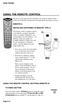 USING THE REMOTE CONTROL The next several pages provide instructions for using the remote control. Follow the instructions that pertain to the appropriate model type you have. REMOTE A INSTALLING BATTERIES
2008 PVR Remote Functionality Guide V1.1
 2008 PVR Remote Functionality Guide V1.1 1. LED Indications 1 2. Basic Colour Button Functionality 1 3. Shift Functionality 1 4. Programming 2 4.1. Programming a Device onto your Remote Control 2 4.1.1.
2-in-1 Universal Remote Control
 2-in-1 Universal Remote Control Owner s Manual Please read before using this equipment. ˆ Contents Features... 3 Introduction... 4 Preparation... 5 Installing Batteries... 5 Setting Up Your Remote Control...
URC-7540. Universal Remote USER GUIDE & CODE BOOK. Retain For Future Reference
 URC-7540 Universal Remote USER GUIDE & CODE BOOK Retain For Future Reference Table of Contents QUICK SET-UP 2 QUICK SEARCH 3 INSTALLING THE BATTERIES 4 THE KEYPAD 5 INSTALLATION Direct Set-Up 7 The Search
Watch Remote Manual.0814.qxd 8/14/01 4:49 PM Page 1. Watch Remote Control
 Watch Remote Manual.0814.qxd 8/14/01 4:49 PM Page 1 Watch Remote Control Watch Remote Manual.0814.qxd 8/14/01 4:49 PM Page 2 Watch Remote Manual.0814.qxd 8/14/01 4:49 PM Page 3 Operation range of your
TEK PARTNER TM UNIVERSAL REMOTE CONTROL USER S MANUAL
 TEK PARTNER TM UNIVERSAL REMOTE CONTROL USER S MANUAL Congratulations! Your TEK PARTNER TM Universal Remote Control is a state-of-the-art device which integrates many different infra-red remote controls.
text_dishpvr.fm Page 1 Tuesday, March 2, 2004 12:35 PM Remote Control Basics... 2
 text_dishpvr.fm Page 1 Tuesday, March 2, 2004 12:35 PM TABLE OF CONTENTS Remote Control Basics... 2 Models Supported by this Guide... 2 UHF and IR Signals... 3 Installing Batteries... 3 Converting the
UNIVERSAL REMOTE CONTROL
 Cox Manual 11/27/01 7:14 PM Page 1 UNIVERSAL REMOTE CONTROL User s Guide 4th Draft Cox Manual 11/27/01 7:14 PM Page 2 TABLE OF CONTENTS Introduction................................ 3 Features And Functions......................
About the Remote Control... page 2
 TABLE OF CONTENTS About the Remote Control... page 2 Remote Control Signals: UHF or IR...page 2 Installing Batteries in the Remote Control...page 3 Remote Control Modes...page 3 Using the Remote Control
Synergy V Universal / DVR Remote Control Model RT-U62CD
 Synergy V Universal / DVR Remote Control Model RT-U62CD Programming And Operating Instructions Rev. 09/04 2004 CONTEC CORPORATION - 1 - 1. Introduction Your Synergy V Universal / DVR remote control is
Synergy V Universal / DVR Remote Control Model RC-U63CDR
 Synergy V Universal / DVR Remote Control Model RC-U63CDR Programming And Operating Instructions (Part # 9-542-906) 2007, Contec Holdings, LLC, Rev. 06/07-1 - 1. Introduction Your Synergy V Universal /
VIZIO Universal Remote Control User Guide
 Table of Contents Chapter 1 - Introduction 2 Chapter 2 - Remote Control Button Description 3 2.1 - Key Remote Control Functions 3 2.2 - Insertion of Batteries in the Remote Control 6 2.3 - Remote Control
TROUBLESHOOTING TABLES REMOTE CONTROL DEVICE CODES
 Troubleshooting and Device Codes What you ll find in this chapter: TROUBLESHOOTING TABLES REMOTE CONTROL DEVICE CODES 119 Troubleshooting Tables TROUBLESHOOTING TABLES Use these tables if you have problems
CDKN-7402. User Manual
 CDKN-7402 User Manual FCC INFORMATION This equipment has been tested and found to comply with the limits for a Class B digital device, pursuant to Part 15 of the FCC Rules. These limits are designed to
URC 4080/4081 VIDEO EXPERT
 URC 4080/4081 VIDEO EXPERT User s Guide TABLE OF CONTENTS Introduction........................... 3 Features And Functions...................... 4 Key Charts............................... 5 Installing
Welcome to the world of SkyHD
 using SkyHD Welcome to the world of SkyHD This is your essential guide What do you want to do? to using your SkyHD box Learn about HD page 6 Get started page 10 See what s on page 16 Use your Planner page
ATLAS DVR/PVR 5-DEVICE Universal Remote Control
 ATLAS DVR/PVR 5-DEVICE Universal Remote Control User s Guide Atlas DVD/PVR Manual 2/14/03 5:00 PM Page 2 TABLE OF CONTENTS Introduction...................................... 3 Features And Functions............................
Operating Instructions. Blu-ray Disc PLAYER
 Operating Instructions Blu-ray Disc PLAYER Thank you for buying this Pioneer product. Please read through these operating instructions so you will know how to operate your model properly. After you have
Problem: Remote is not working A remote control may not be responding as expected when a customer presses certain buttons
 Welcome to Comcast! We are proud to be the exclusive broadband digital video provider for the University of Alabama. The digital cable service provided in your dorm room gives you additional channel offerings,
Model IRC 550 Universal Remote Control
 Model IRC 550 Universal Remote Control Programming and Operating Instructions To have a clearer idea of the features and capabilities of your remote control, take a moment to read these instructions. Save
CTGAE3P 3021 manual booklet 5/24/04 12:46 PM Page 1
 CTGAE3P 3021 manual booklet 5/24/04 12:46 PM Page 1 1 CTGAE3P 3021 manual booklet 5/24/04 12:46 PM Page 2 TABLE OF CONTENTS Introduction...................................................................
LET S GET STARTED YOUR USER GUIDE
 Humax Freesat+ with Freetime Model: HDR-1000S LET S GET STARTED YOUR USER GUIDE Welcome to Freesat. We are so pleased you bought this Freesat+ with Freetime box. NOW YOU CAN ENJOY: Quality state of the
TABLE OF CONTENTS. Introduction... 3 Features And Functions... 4 Key Charts... 5 Device Table... 6
 CTGAE4P 4021 manual booklet 5/24/04 12:10 PM Page 2 TABLE OF CONTENTS Introduction....................................................... 3 Features And Functions..............................................
CONTENTS Remote Description... 2 Programming Instructions... 3 Programming Codes... 6 More Information... 10
 REMOTE MANUAL Product Type: Universal IR Remote Model Line: ZEN100-700 (all) Product Year: 1999/2000 Manual Part #: Electronic Version Only NOTE: This manual was designed to help you program your Zenith
Jumbo Universal Remote Control
 Jumbo Universal Remote Control Catalog #1526 User s Guide This universal remote allows user to easily see and push buttons to control TV, VCR, DVD, Cable and Satellite receivers. The large buttons are
Using your Sky digibox
 Using your Sky digibox Your Sky remote control Sets your remote control to control your digibox tv Sets your remote control to control your TV box office Shows the Box Office screen tv guide Shows the
UNIVERSAL REMOTE CONTROL GUIDE
 UNIVERSAL REMOTE CONTROL GUIDE Service provided by We Keep You Connected Your new AT6400 AllTouch Infrared (IR) Universal Remote Control (remote) is a true universal remote, functioning as four remotes
Introducing the hard disc recorder and Beo4, Daily use, Advanced operation, Preference settings, Set up the hard disc recorder, On-screen menus,
 HDR 2 Guide Contents 3 Introducing the hard disc recorder and Beo4, 4 Find out how to operate the hard disc recorder with the Beo4 remote control and bring up the menus on your television screen. Daily
Verizon FiOS TV User Guide
 Verizon FiOS TV User Guide Welcome to Verizon FiOS TV Congratulations. You made a great choice by subscribing to FiOS SM TV. It s going to revolutionize your television experience. As a Verizon FiOS TV
OCE-0024B_Rev05 2007.3.9 9:35 AM 페이지1 Owner s Manual
 Owner s Manual Thank You! TM Thank you for purchasing the MX-50 Pre-Programmed and Learning Remote Control. This manual is designed to assist you step-by-step as you setup the MX-50 to replace all of your
2-9. Remote Control Unit (RCU) Set-up
 2-9. Remote Control Unit (RCU) Set-up Vu RCU is a universal RCU that can be used for TV and STB at the same time. A. User Guide of Vu Universal RCU Pre-note > means long press < > means normal press
TEK PARTNER UNIVERSAL REMOTE CONTROL
 TEK PARTNER UNIVERSAL REMOTE CONTROL SPECIFICATIONS... 2 SETUP... 3 PROGRAMMING... 3 POWER SCAN... 3 ID RECALL... 4 VOLUME PUNCH THROUGH... 4 MASTER POWER... 4 MENU MODE... 4 FREQUENTLY ASKED QUESTIONS...
ABOUT YOUR SATELLITE RECEIVER
 2 Satellite Receiver ABOUT YOUR SATELLITE RECEIVER This chapter gives you an overview and a description of your satellite receiver. SATELLITE RECEIVER OVERVIEW SINGLE AND DUAL MODES REMOTE CONTROL SATELLITE
Contents of the Guide
 BeoCenter 1 Guide Contents of the Guide 3 The following is an index to the contents of the separate Reference book with page references: How to set up BeoCenter 1, 4 Connect your TV cables, 5 Connect
XFINITY Spectrum. Remote Control Programming Guide
 XFINITY Spectrum Remote Control Programming Guide 2 Programming Your Remote Control Channel + / Press to change channels. Info Press to display information about the program you are currently watching.
Welcome to Verizon FiOS TV
 Welcome to Verizon FiOS TV Congratulations. You made a great choice by subscribing to FiOS TV. It s going to revolutionize your television experience. As a Verizon FiOS TV subscriber, you can unleash the
LET S GET STARTED YOUR USER GUIDE
 Humax Freesat HD with Model: HB-1000S LET S GET STARTED YOUR USER GUIDE Welcome to freesat. We are so pleased you bought this freesat HD with box. INCLUDED IN THIS BOX Quality state-of-the-art
Getting to Know Xsight... 3. Home Screen and Everyday Use... 9. Settings... 11. PC Setup... 17. 2 www.oneforall.com
 User Manual English English Getting to Know Xsight........................................ 3 Unpacking and Setting Up Xsight............................................................. 3 Using Xsight
Wireless Audio Video Sender
 SV-1710 702363 UK D F E P I NL SF S DK N Wireless Audio Video Sender 1 2 Aligned A B 3 IR-receiver WWW.EFORALL.COM 3 UK Table of Contents UK The Product.......................................................
ENTONE REMOTE Programming Instructions
 ENTONE REMOTE Programming Instructions A brand new ENTONE remote control must first be registered with the set top box (STB) before it can be manually programmed to a specific TV. Program Remote # 1 to
CABLE ONE ALL DIGITAL
 CABLE ONE ALL DIGITAL The world is going All Digital and so is Cable ONE. With the switch from analog to digital technology, Cable ONE will be able to add new channels, especially more HD channels, and
Universal Remote Instruction Manual
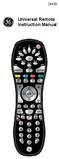 24959 Universal Remote Instruction Manual Table of Contents Introduction...3 Button Functions...4 Initial Setup...6 Battery Installation...6 Battery Saver...6 Code Saver...6 Code Setup...6 Direct Code
HD Receiver: Programmierung der Fernbedienung Liste der TV-Gerätehersteller-Codes
 HD Receiver: Programmierung der Fernbedienung Liste der TV-Gerätehersteller-Codes Seite 1 von 29 Seite 2 von 29 HD Receiver: Liste der TV-Gerätehersteller-Codes Tipp: Sollten der Hersteller Ihres TV-Gerätes
Set-up one component at a time, and you ll move quickly through your system.
 Congratulations! With your new WR7 universal remote, you now have the power to control your home entertainment system with just one easy-to-use control. Thousands of audio and video component codes have
DIRECTV Universal Remote Control User Guide
 DIRECTV Universal Remote Control User Guide CONTENTS Introduction............................................ 3 Features and Functions................................... 4 Key Charts.........................................
DVB-T 730. User s Manual
 EPG Program Reservation There are 10 program timers to bring up reminder for a reserved program. 20 seconds before the start of the reserved program, a pop-up window will remind viewer. If no further instruction,
User Guide. Plaza HDR S freesat digital HD TV recorder
 User Guide Plaza HDR S freesat digital HD TV recorder CONGRATULATIONS on buying a Manhattan Plaza HDR S freesat receiver. This high performance unit lets you record and watch the best of digital TV and
oooa? OOOOA You will need the list of codes to manually select and input the correct codes to your specific device.
 BUTTON DESCRIPTIONS CODE SEARCH: Used to program the remote or to search through codes. SIGNAL INDICATOR LIGHT (LED): The Indicator Light flashes to show that the remote is working properly. ON/OFF BUTTON:
The Parts of the System
 2 The Parts of the System THE RECEIVER THE RECEIVER FRONT PANEL Power Light This green light on the receiver front panel lights up when the receiver is turned ON. This light flashes when the receiver memory
RR-939B REMOTE CONTROL TÉLÉCOMMANDE FERNBEDIENUNG MANDO A DISTANCIA COMANDO A DISTANZA AFSTANDSBEDIENING FJERNBETJENING
 RR-B REMTE CNTRL TÉLÉCMMANDE FERNBEDIENUNG MAND A DISTANCIA CMAND A DISTANZA AFSTANDSBEDIENING FJERNBETJENING AUD TAPE DVD SAT TV VCR CBL PWER BAND VL CH T / V SURRUND + N SCREEN C. DELAY TRACK TRACK +
DVR GUIDE. Using your DVR/Multi-Room DVR. 1-866-WAVE-123 wavebroadband.com
 DVR GUIDE Using your DVR/Multi-Room DVR 1-866-WAVE-123 wavebroadband.com Table of Contents Control Live TV... 4 Playback Controls... 5 Remote Control Arrow Buttons... 5 Status Bar... 5 Pause... 6 Rewind...
Simple Directions For Common Converter Boxes
 Simple Directions For Common Converter Boxes This document contains basic instructions for using the following converter box models. Page numbers refer to the owner's manual that comes with your converter
Using the System ORDER YOUR BELL EXPRESSVU PROGRAMMING. Page 3-1
 Using the System ORDER YOUR BELL EXPRESSVU PROGRAMMING This procedure notifies the Bell ExpressVu Customer Service Call Centre that your system is on-line and installed. You need to have your services
ATLAS OCAP 5-Device Remote Control with Learning
 ATLAS OCAP 5-Device Remote Control with Learning Users Guide PREPROGRAMMED FOR YOUR SET-TOP BOX TABLE OF CONTENTS Introduction............................................ 4 Features and Functions...................................
DIRECTV Digital Satellite Receiver Operating Instructions TZ-DBS01
 DIRECTV Digital Satellite Receiver Operating Instructions TZ-DBS01 For product assistance, please call: 1-888-726-2377 or send e-mail to: [email protected] TQB2AA0366 10301 PRINTED IN MEXICO
Receiver and Remote Controls
 9242_4_Ch2_eng 6/11/07 9:29 AM Page 1 2 Receiver and Remote Controls ABOUT YOUR SATELLITE RECEIVER This chapter helps you get to know your remote control, which lets you use all the functions of your receiver.
Digital Cable TV. User Guide
 Digital Cable TV User Guide T a b l e o f C o n T e n T s DVR and Set-Top Box Basics............... 2 Remote Playback Controls................ 4 What s on TV.......................... 6 Using the OK Button..................
WELCOME TO. Your step-by-step guide to getting the most out of your Internet, Phone and TV services. VyveBroadband.com
 WELCOME TO Your step-by-step guide to getting the most out of your Internet, Phone and TV services. VyveBroadband.com Thank you for turning your Vyve on! We know you re pretty busy, so we went ahead and
DIRECTV Universal Remote Control User Guide
 DIRECTV Universal Remote Control User Guide CONTENTS Introduction............................................ 3 Features and Functions................................... 4 Key Charts.........................................
Table of Contents Function Keys of Your RF Remote Control Quick Setup Guide Advanced Features Setup Troubleshooting
 Congratulations on your purchase of the AT&T U-verse TV Point Anywhere RF Remote Control. This product has been designed to provide many unique and convenient features to enhance your AT&T U-verse experience.
DVB-T2 DIGITAL TV BOX
 DVB-T2 DIGITAL TV BOX QUALITY OF DIGITAL TELEVISION MT4159 User Manual EN 2 Index Index...2 Introduction...3 Front panel...3 Rear panel...3 Remote control...4 Hardware configuration...5 Connecting tuner
Operating Instructions HDD Recorder
 Operating Instructions HDD Recorder Model No. DMR-HW220 Thank you for purchasing this product. For optimum performance and safety, please read these instructions carefully. Please keep this manual for
LCD Flat Television Users Guide For Model: LT-37X987
 LCD Flat Television Users Guide For Model: LT-37X987 Illustration of LT-37X987 and RM-C18G Important Note: In the spaces below, enter the model and serial number of your television (located at the rear
If this PDF has opened in Full Screen mode, you can quit by pressing Alt and F4, or press escape to view in normal mode. Click here to start.
 You are reading an interactive PDF. If you are reading it in Adobe s Acrobat reader, you will be able to take advantage of links: where text is blue, you can jump to the next instruction. In addition you
MVS - Mini Video Speaker
 MVS - Mini Video Speaker Mini Clock Radio Night Vision Hidden Camera User Manual Spy Tec www.spytecinc.com GETTING STARTED Components Features Powering Up the Device Micro SD Memory Card for Data Storage
An explanation of symbols in the Guide and Reference book TV LIST. Buttons on the Beo4 remote control. Display on the Beo4 remote control
 BeoVision 6 Guide The Guide and the Reference book This Guide contains information about the daily use of your Bang & Olufsen product. The Reference book contains information about more advanced operation
CINEMATE 1 SR DIGITAL HOME THEATER SPEAKER SYSTEM. Operating Guide Guía del usuario Guide d utilisation
 CINEMATE 1 SR DIGITAL HOME THEATER SPEAKER SYSTEM Operating Guide Guía del usuario Guide d utilisation Notice This equipment has been tested and found to comply with the limits for a Class B digital device,
Hi! Let s get started.
 Hi! Let s get started. What s in the Box Roku player Remote control 2 x AAA batteries for remote A/V cable RCA Power adapter Get to know your roku A Front view B C F Back view D E A B C D E F Status light
User s Manual. High Definition Cable Receiver Personal Video Recorder
 User s Manual High Definition Cable Receiver Personal Video Recorder Important safety instructions Safety Warnings CAUTION RISK OF ELECTRIC SHOCK DO NOT OPEN CAUTION : To reduce the risk of electrical
Turn On the Entertainment
 Cox Advanced TV Experience 100% digital picture and sound, and hundreds of channels including the best in HD. Now you have access to all local channels and popular networks like ESPN, Discovery, History,
Fi TV Gold Quick Start Guide
 Quick Start Guide Fi TV Gold Quick Start Guide Welcome to Fi TV! We re happy that you chose EPB Fiber Optics to bring the best movies, sports, news and television programming into your business and we
1. The FOXTEL iq remote control
 Quickstart Guide 1. The FOXTEL iq remote control FOXTEL Takes you from the TV Guide (or any FOXTEL screen) to the last channel you were watching. Takes you back to FOXTEL after you have been using AV mode
PROGRAMMING YOUR PBTV REMOTE FOR POWER & VOLUME
 PROGRAMMING YOUR PB REMOTE FOR POWER & VOLUME START WITH TURNED ON CODE SEARCH METHOD The following steps need to be done in quick succession. Press and release the button. Press and hold the RCU SETUP
DVB-T VERTO. User Manual HD TERRESTRIAL DIGITAL TV STB & PLAYER MT4162
 DVB-T VERTO HD TERRESTRIAL DIGITAL TV STB & PLAYER MT4162 User Manual EN 2 Index Index...2 Overview...2 Remote Control...3 Battery installation in remote control...4 Using remote control...4 Connections...4
WOW! CABLE REFERENCE GUIDE
 TABLE OF CONTENTS WOW! CABLE REFERENCE GUIDE TABLE OF CONTENTS WOW! DIGITAL TV OPERATION The WOW! Digital TV Remote...C-1 The WOW! Atlas Universal Remotes...C-3 Getting Started...C-5 Using the Interactive
Digital Cable Your guide to home entertainment with a personal touch
 Your guide to home entertainment with a personal touch 1.888.345.1111 Sudbury 560.1565 eastlink.ca Exciting New Services Welcome to Home Entertainment Questions? We Have the Answers As one of EastLink
STB- 2. Installation and Operation Manual
 STB- 2 Installation and Operation Manual Index 1 Unpacking your STB- 2 2 Installation 3 WIFI connectivity 4 Remote Control 5 Selecting Video Mode 6 Start Page 7 Watching TV / TV Guide 8 Recording & Playing
Kiva Technology User s Manual
 2009 Kiva Technology User s Manual For Support Contact Call Center (816) 235-2000: Monday Friday 7:00 am 7:00 pm ILE Support E-Mail: [email protected] URL: http://www.umkc.edu/is/cts/ilesupport/ctssupporttext.asp
Part 2. Copyright 1998 Philips Consumer Communications L.P. All rights reserved. Printed in Mexico. Issue 1AT&T 848229506
 2 User's Manual for Two-Line Digital Answering System Telephone with Speakerphone 1872 Fold open this paper for information about this telephone's installation and operation. Please read Part 1 Important
TechniSat HDFS Satellite HD Digital Receiver. USB Recorder Instructions
 TechniSat HDFS Satellite HD Digital Receiver USB Recorder Instructions 1 Contents 1 Contents...2 2 Introduction...3 3 Getting Started...4 3.1 Formatting...4 4 Scheduled Recording...6 4.1 Manual Timer...6
/&' 79 7; /% ) &RORU 7HOHYLVLRQ (QJOLVK
 245U Using the On Screen Displays Many features available on this TV can be accessed via the On Screen Display menu system. Use the remote control as shown below to access and adjust features as desired.
High-Definition Microdisplay TV
 HP Pavilion md5020n/md5820n/md5880n/md6580n High-Definition Microdisplay TV User s Guide Copyright 2005 Hewlett-Packard Development Company, L.P. Reproduction, adaptation or translation without prior written
DSTV DECODER SETUP MANUAL July 2013
 DSTV DECODER SETUP MANUAL July 2013 DSTV SINGLE VIEW AND SD PVR DECODER SETUP How to program your Single View and SD PVR DSTV Decoders STEP 1 Ensure that the DSTV decoder is connected correctly to the
(2012 10 24) manual_tocomsat duo LITE.indd 20-1 2012-10-24 7:44:57
 (2012 10 24) manual_tocomsat duo LITE.indd 20-1 2012-10-24 7:44:57 TABLE OF CONTENTS Table of Contents Table of Contents Safety Warning General Information Package Contents & Features Front Panel Rear
DIGITAL CABLE & DVR QUICK GUIDE. cable television made simple
 DIGITAL CABLE & DVR QUICK GUIDE Grande Communications cable television made simple Table of Contents TABLE OF CONTENTS Using Your Remote remote Control 1 programming the Remote 2 Interactive Program Guide
Table of Contents. Use. Troubleshooting. Setup. Welcome. 11 How to arm/disarm system/camera(s) 19 Sync Module setup issues. 3 Installing the Blink app
 User Guide Table of Contents Welcome Setup Use Troubleshooting 2 What s in the box 2 What you need 3 Installing the Blink app 4 Setting up the Sync Module 5 Connecting the Sync Module to Your Wi-Fi 7 Adding
EOS 750D (W) Wi-Fi/NFC Function Instruction Manual ENGLISH INSTRUCTION MANUAL
 EOS 750D (W) Wi-Fi/NFC Function Instruction Manual ENGLISH INSTRUCTION MANUAL Introduction What You Can Do Using the Wireless LAN Functions This camera s wireless LAN functions let you perform a range
19 LCD TV + DVD. User Guide 1923DT. After Sales Support
 19 LCD TV + DVD User Guide 1923DT After Sales Support Now that you have purchased a quality Tevion product you can rest assured in the knowledge that as well as your 3 year parts and labour warranty you
HD-TV100 MP Digital TV and media player
 HD-TV100 MP Digital TV and media player User s manual 1. Functions overview: FULL HD TV HD Digital TV with MPEG-4(H.264)&MPEG-2, HD&SD standard DVB-T. HDMI HD format output 1080I, also compatible with
HP Mobile Remote Control (Select Models Only) User Guide
 HP Mobile Remote Control (Select Models Only) User Guide Copyright 2008 Hewlett-Packard Development Company, L.P. Windows and Windows Vista are either trademarks or registered trademarks of Microsoft Corporation
Easy Connect Guide Digital Adapter. Say hello to your TV s new best friend.
 Easy Connect Guide Digital Adapter Say hello to your TV s new best friend. Connect with the future of TV You re about to step up to a world of even better picture and sound, and this Easy Connect Guide
Big Sandy Broadband DVR Guide
 Big Sandy Broadband DVR Guide Contents Big Sandy Broadband DVR Don t Miss a Thing 3 Control Live TV 3 Playback Controls Using the Video Control Buttons 4 Playback Controls Using the Remote Control Arrow
Your Digital Adapter Easy Setup Guide
 Your Digital Adapter Easy Setup Guide Connect with the future of TV You re about to step up to a world of even better picture and sound, and this Easy Setup Guide is here to help every step of the way.
Brand Code 888 Accent ACE Acer Acme Acoustech Acoustic Solutions Action Acura ADA ADC Addison ADL Admiral Advent Adyson AEG Aftron Agashi Agazi AGB
 888 0006 A.R. Systems 0012 Accent 0019 ACE 0026 Acer 0028 Acme 3521 Acoustech 5094 Acoustic Solutions 0032 Action 0033 Acura 0036 ADA 0038 ADC 0040 Addison 0043 ADL 0045 Admiral 0046 Advent 0054 Adyson
EU45 EICTA Self-Commitment to improve the energy performance of CRT and flat LCD televisions and stand by mode for DVD players. Title of the measure:
 Title of the measure: EU45 EICTA Self-Commitment to improve the energy performance of CRT and flat LCD televisions and stand by mode for DVD players General description The SAVE programme established by
Video Cassette Recorder
 3-868-107-12 (1) Video Cassette Recorder Operating Instructions If you have any questions about this product, you may call: Sony Customer Information Center 1-800-222-SONY (7669) or write to: Sony Customer
The Guide and the Reference book
 BeoVision 7 Guide The Guide and the Reference book This Guide contains information about the daily use of your Bang & Olufsen product. The Reference book contains information about connecting and operating