
Installation Instructions. PowerFlex 700H Adjustable Frequency AC Drive and PowerFlex 700S High Performance AC Drive Frames
|
|
|
- Shanna Matthews
- 10 years ago
- Views:
Transcription
1 Installation Instructions PowerFlex 700H Adjustable Frequency AC Drive and PowerFlex 700S High Performance AC Drive Frames

2 Important User Information Read this document and the documents listed in the additional resources section about installation, configuration, and operation of this equipment before you install, configure, operate, or maintain this product. Users are required to familiarize themselves with installation and wiring instructions in addition to requirements of all applicable codes, laws, and standards. Activities including installation, adjustments, putting into service, use, assembly, disassembly, and maintenance are required to be carried out by suitably trained personnel in accordance with applicable code of practice. If this equipment is used in a manner not specified by the manufacturer, the protection provided by the equipment may be impaired. In no event will Rockwell Automation, Inc. be responsible or liable for indirect or consequential damages resulting from the use or application of this equipment. The examples and diagrams in this manual are included solely for illustrative purposes. Because of the many variables and requirements associated with any particular installation, Rockwell Automation, Inc. cannot assume responsibility or liability for actual use based on the examples and diagrams. No patent liability is assumed by Rockwell Automation, Inc. with respect to use of information, circuits, equipment, or software described in this manual. Reproduction of the contents of this manual, in whole or in part, without written permission of Rockwell Automation, Inc., is prohibited. Throughout this manual, when necessary, we use notes to make you aware of safety considerations. WARNING: Identifies information about practices or circumstances that can cause an explosion in a hazardous environment, which may lead to personal injury or death, property damage, or economic loss. ATTENTION: Identifies information about practices or circumstances that can lead to personal injury or death, property damage, or economic loss. Attentions help you identify a hazard, avoid a hazard, and recognize the consequence. IMPORTANT Identifies information that is critical for successful application and understanding of the product. Labels may also be on or inside the equipment to provide specific precautions. SHOCK HAZARD: Labels may be on or inside the equipment, for example, a drive or motor, to alert people that dangerous voltage may be present. BURN HAZARD: Labels may be on or inside the equipment, for example, a drive or motor, to alert people that surfaces may reach dangerous temperatures. ARC FLASH HAZARD: Labels may be on or inside the equipment, for example, a motor control center, to alert people to potential Arc Flash. Arc Flash will cause severe injury or death. Wear proper Personal Protective Equipment (PPE). Follow ALL Regulatory requirements for safe work practices and for Personal Protective Equipment (PPE). Allen-Bradley, DriveExplorer, DriveExecutive, DriveTools SP, PowerFlex, Rockwell Software, Rockwell Automation, and TechConnect are trademarks of Rockwell Automation, Inc. Trademarks not belonging to Rockwell Automation are property of their respective companies.
3 Summary of Changes This manual contains new and updated information. New and Updated Information This table contains the changes made to this revision. Topic Added enclosure code H IP54, NEMA/UL Type 12 for PowerFlex 700S drives to the Enclosure options table. Updated the list of manuals in the Additional Resources table. 17 Updated the DC Input Precharge Control Wiring information. 26 Added a new Auto/Manual example when using PowerFlex 700H firmware version Removed the chapter on Control Wiring for PowerFlex 700S Drives with Phase I Control Removed the Lifting and Mounting Instructions appendix - updated all references to refer to the appropriate Lifting and Mounting publications shipped with the drives for current information. Updated the recommended cable and wiring diagrams for the Stegmann Hi- Resolution Encoder Feedback Option Card to include new motor/cable combination. Updated the recommended cable and wiring diagrams for the Multi-Device Interface Option Card to include new motor/cable combination. Added Appendix F - History of Changes to contain all previous manual revision information. Page Changes to this manual for previous revisions are included in Appendix F History of Changes on page 209. Rockwell Automation Publication PFLEX-IN006E-EN-P - July

4 Summary of Changes Notes: 4 Rockwell Automation Publication PFLEX-IN006E-EN-P - July 2013

5 Table of Contents Preface Drive Description Enclosure Options Drive Frame Sizes Conventions General Precautions General Precautions, Continued Additional Resources Chapter 1 General Installation Information AC Supply Source Considerations Unbalanced, Ungrounded or Resistive Grounded Distribution Systems Single-Phase Input Power Input Power Conditioning Output Power Conditioning General Grounding Requirements Safety Ground - PE Shield Termination - SHLD RFI Filter Grounding Fuses and Circuit Breakers Power Wiring Wire Recommendations Motor Considerations CabIe Trays and Conduit EMC Instructions CE Conformity Low Voltage Directive (2006/95/EC) EMC Directive (2004/108/EC) General Notes Essential Requirements for CE Compliance Using Input/Output Contactors Input Contactor Precautions Output Contactor Precaution Common Bus/Precharge DC Input Precharge Control Wiring Control Wiring for PowerFlex 700H Drives Chapter 2 700H Control Circuit Board Designations I/O Terminal Blocks I/O Cable Grounding Analog I/O Configuration Hardware Enable Circuitry Auxiliary Power Supply I/O Wiring Examples Reference Control Sources Rockwell Automation Publication PFLEX-IN006E-EN-P - July

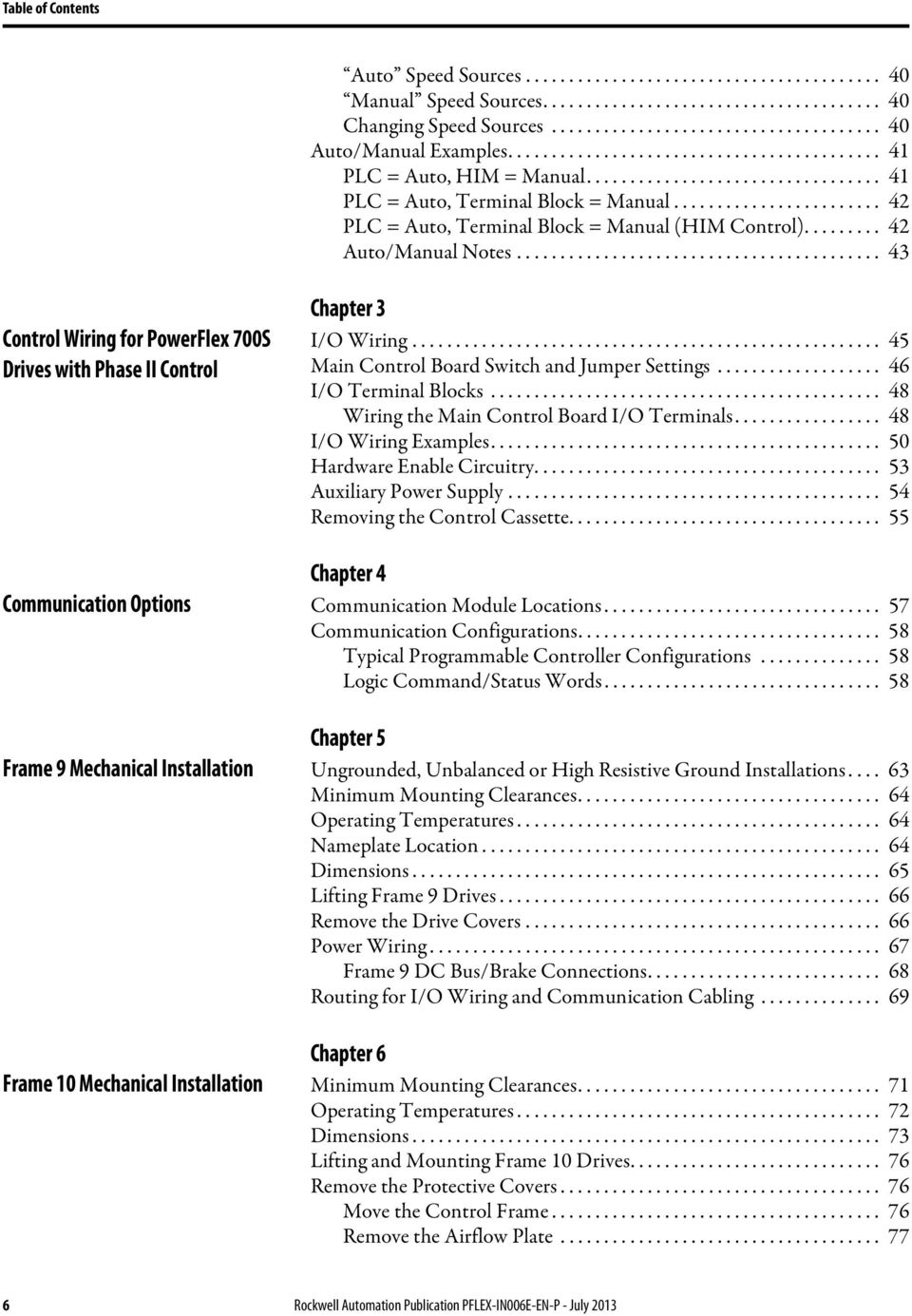
6 Table of Contents Auto Speed Sources Manual Speed Sources Changing Speed Sources Auto/Manual Examples PLC = Auto, HIM = Manual PLC = Auto, Terminal Block = Manual PLC = Auto, Terminal Block = Manual (HIM Control) Auto/Manual Notes Control Wiring for PowerFlex 700S Drives with Phase II Control Chapter 3 I/O Wiring Main Control Board Switch and Jumper Settings I/O Terminal Blocks Wiring the Main Control Board I/O Terminals I/O Wiring Examples Hardware Enable Circuitry Auxiliary Power Supply Removing the Control Cassette Chapter 4 Communication Options Communication Module Locations Communication Configurations Typical Programmable Controller Configurations Logic Command/Status Words Chapter 5 Frame 9 Mechanical Installation Ungrounded, Unbalanced or High Resistive Ground Installations Minimum Mounting Clearances Operating Temperatures Nameplate Location Dimensions Lifting Frame 9 Drives Remove the Drive Covers Power Wiring Frame 9 DC Bus/Brake Connections Routing for I/O Wiring and Communication Cabling Chapter 6 Frame 10 Mechanical Installation Minimum Mounting Clearances Operating Temperatures Dimensions Lifting and Mounting Frame 10 Drives Remove the Protective Covers Move the Control Frame Remove the Airflow Plate Rockwell Automation Publication PFLEX-IN006E-EN-P - July 2013
7 Table of Contents Remove the Protective Covers Ungrounded, High Resistive Ground or Grounded B Phase Delta Installations Installation on an Ungrounded Distribution System or High Resistive Ground Installation on a Grounded B Phase Delta System Move the Common Mode Jumper to the Disconnected Position. 81 Insulate Terminal X4 on the Rectifier Circuit Board Disconnect the Small Capacitors from the Input Terminals Power Wiring Chapter 7 Frame 11 Mechanical Installation Minimum Mounting Clearances Operating Temperatures Dimensions Lifting and Mounting Frame 11 Drives Remove the Protective Covers Move the Control Frame Remove the Airflow Plate Remove the Protective Covers Ungrounded, High Resistive Ground or Grounded B Phase Delta Installations Installation on an Ungrounded Distribution System or High Resistive Ground Installation on a Grounded B Phase Delta System Move the Common Mode Jumper to the Disconnected Position. 95 Insulate Terminal X4 on the Rectifier Circuit Board Power Wiring AC Input Wiring Chapter 8 Frame 12 Mechanical Installation Minimum Mounting Clearances Operating Temperatures Dimensions Lifting and Mounting Frame 12 Drives Remove the Protective Covers Move the Control Frame Remove the Airflow Plate Remove the Protective Covers Ungrounded, High Resistive Ground or Grounded B Phase Delta Installations Installation on an Ungrounded Distribution System or High Resistive Ground Installation on a Grounded B Phase Delta System Move the Common Mode Jumper to the Disconnected Position 111 Insulate Terminal X4 on the Rectifier Circuit Board Rockwell Automation Publication PFLEX-IN006E-EN-P - July

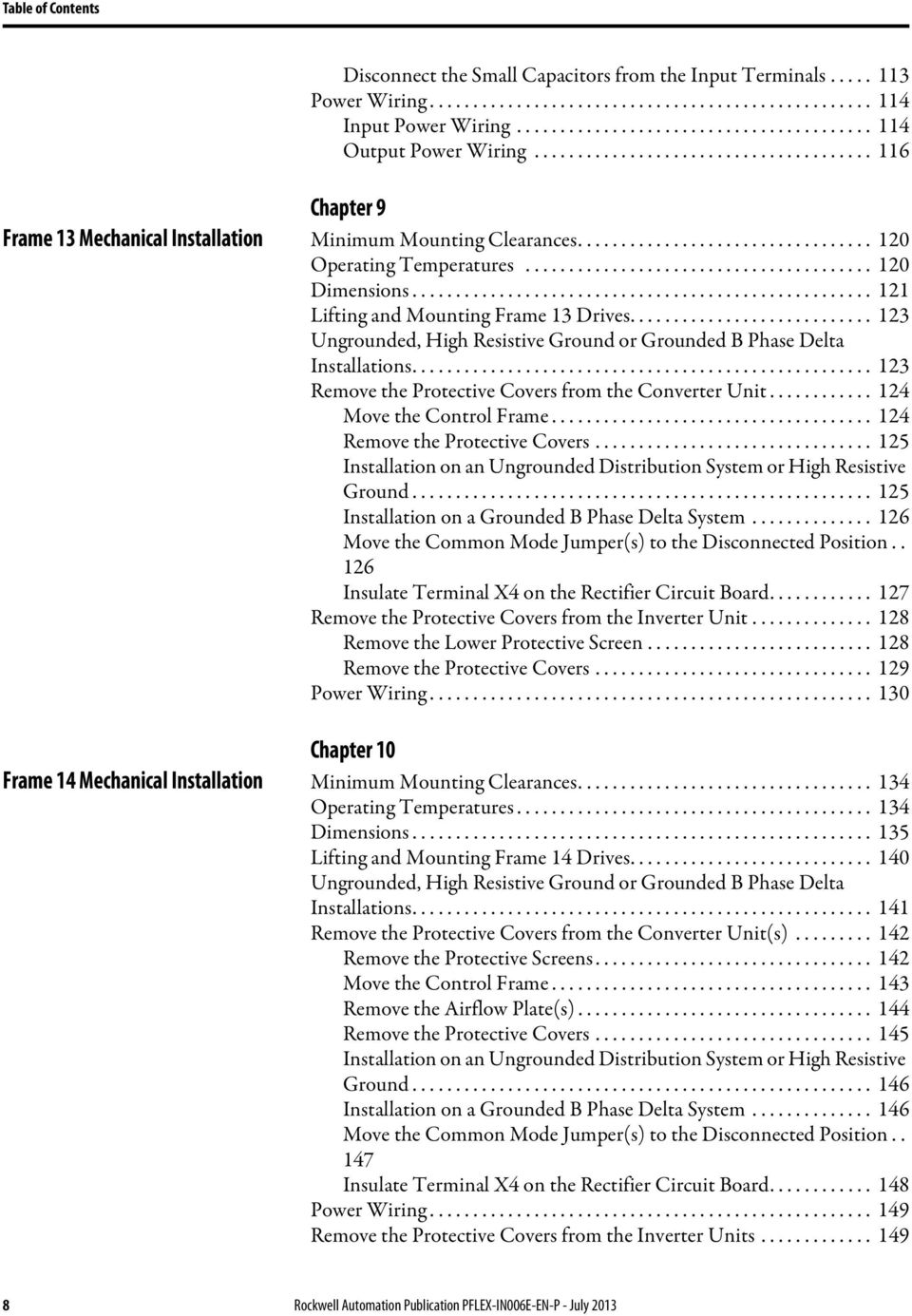
8 Table of Contents Disconnect the Small Capacitors from the Input Terminals Power Wiring Input Power Wiring Output Power Wiring Chapter 9 Frame 13 Mechanical Installation Minimum Mounting Clearances Operating Temperatures Dimensions Lifting and Mounting Frame 13 Drives Ungrounded, High Resistive Ground or Grounded B Phase Delta Installations Remove the Protective Covers from the Converter Unit Move the Control Frame Remove the Protective Covers Installation on an Ungrounded Distribution System or High Resistive Ground Installation on a Grounded B Phase Delta System Move the Common Mode Jumper(s) to the Disconnected Position Insulate Terminal X4 on the Rectifier Circuit Board Remove the Protective Covers from the Inverter Unit Remove the Lower Protective Screen Remove the Protective Covers Power Wiring Chapter 10 Frame 14 Mechanical Installation Minimum Mounting Clearances Operating Temperatures Dimensions Lifting and Mounting Frame 14 Drives Ungrounded, High Resistive Ground or Grounded B Phase Delta Installations Remove the Protective Covers from the Converter Unit(s) Remove the Protective Screens Move the Control Frame Remove the Airflow Plate(s) Remove the Protective Covers Installation on an Ungrounded Distribution System or High Resistive Ground Installation on a Grounded B Phase Delta System Move the Common Mode Jumper(s) to the Disconnected Position Insulate Terminal X4 on the Rectifier Circuit Board Power Wiring Remove the Protective Covers from the Inverter Units Rockwell Automation Publication PFLEX-IN006E-EN-P - July 2013
9 Table of Contents Remove the Protective Screens Remove the Airflow Plates Remove the Protective Covers and 690 Volt Class AC Input Wiring for Frame 14 Drives Frame 14 Circuit Breakers Circuit Breaker DIP Switch Settings Charging the MCCB Motor Operators Closing the Circuit Breakers and Energizing the Drive Resetting the Circuit Breakers Appendix A Specifications Drive Catalog Number Designations Drive Ratings Drive Fuse & Circuit Breaker Ratings Fusing Circuit Breakers PowerFlex 700S Stegmann Hi- Resolution Encoder Feedback Option PowerFlex 700S Resolver Feedback Option Card PowerFlex 700S Multi-Device Interface (MDI) Option Card Instructions for ATEX Approved PowerFlex 700H Drives in Group II Category (2) Applications with ATEX Approved Motors Appendix B Option Card Specifications Supported Encoders Wiring the Hi-Resolution Feedback Option Card to an Encoder Recommended Cables and Wiring Diagrams for the Stegmann Hi- Resolution Feedback Option Card Appendix C Option Card Specifications Compatible Resolvers Wiring the Resolver Feedback Option Card to a Resolver Recommended Cable Appendix D MDI Option Card Specifications Supported Linear Sensors Supported Rotary Encoders Wiring the MDI Option Card Recommended Cables and Wiring Diagrams for the MDI Option Card Appendix E General Information Motor Requirements Drive Wiring Configuration Removing the 20C-DG1 Option Board Verify Operation Rockwell Automation Publication PFLEX-IN006E-EN-P - July

10 Table of Contents Appendix F History of Changes PFLEX-IN006D-EN-P, March PFLEX-IN006C-EN-P, October Index 10 Rockwell Automation Publication PFLEX-IN006E-EN-P - July 2013

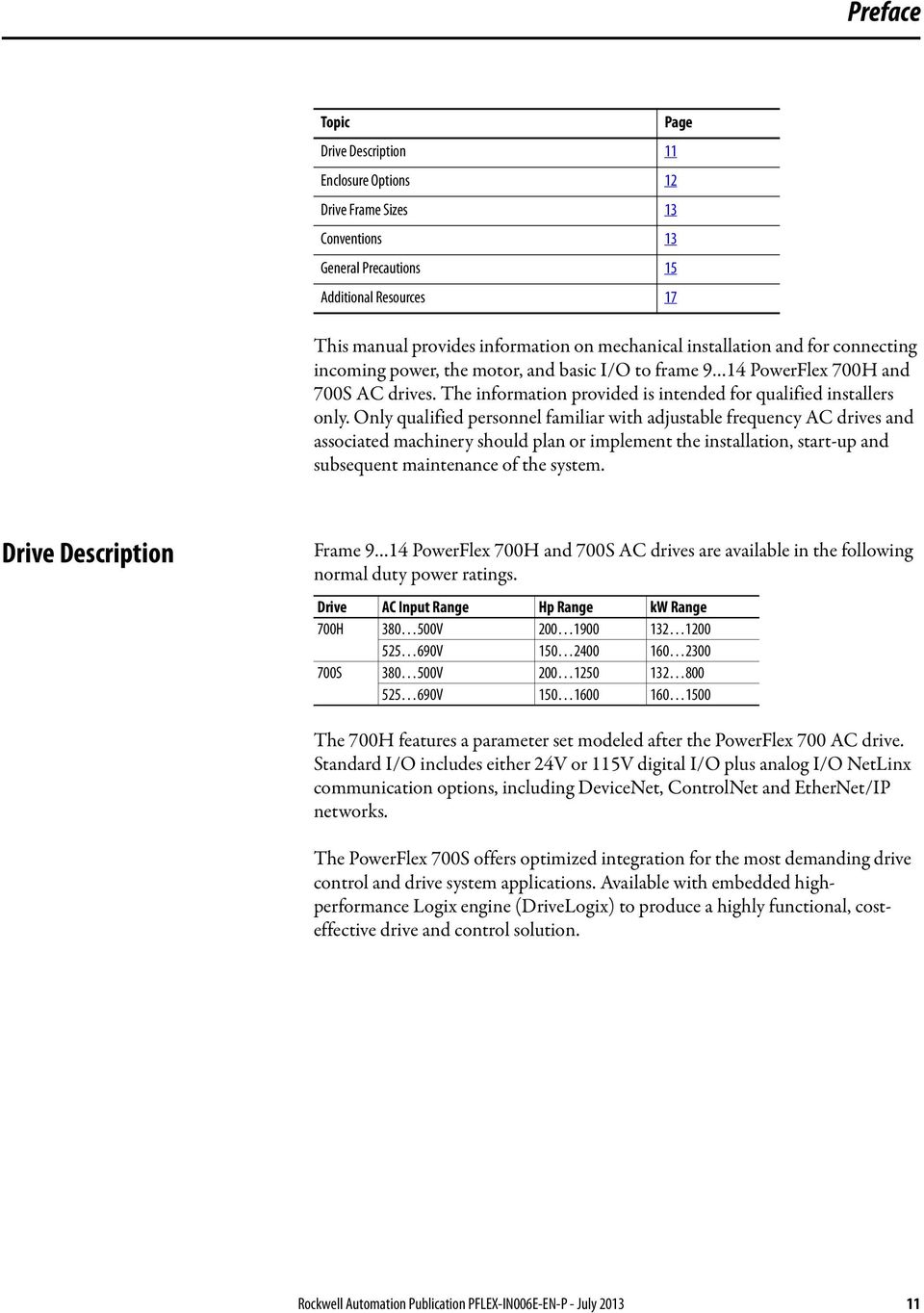
11 Preface Topic Drive Description 11 Enclosure Options 12 Drive Frame Sizes 13 Conventions 13 General Precautions 15 Additional Resources 17 This manual provides information on mechanical installation and for connecting incoming power, the motor, and basic I/O to frame 9 14 PowerFlex 700H and 700S AC drives. The information provided is intended for qualified installers only. Only qualified personnel familiar with adjustable frequency AC drives and associated machinery should plan or implement the installation, start-up and subsequent maintenance of the system. Page Drive Description Frame 9 14 PowerFlex 700H and 700S AC drives are available in the following normal duty power ratings. Drive AC Input Range Hp Range kw Range 700H V V S V V The 700H features a parameter set modeled after the PowerFlex 700 AC drive. Standard I/O includes either 24V or 115V digital I/O plus analog I/O NetLinx communication options, including DeviceNet, ControlNet and EtherNet/IP networks. The PowerFlex 700S offers optimized integration for the most demanding drive control and drive system applications. Available with embedded highperformance Logix engine (DriveLogix) to produce a highly functional, costeffective drive and control solution. Rockwell Automation Publication PFLEX-IN006E-EN-P - July
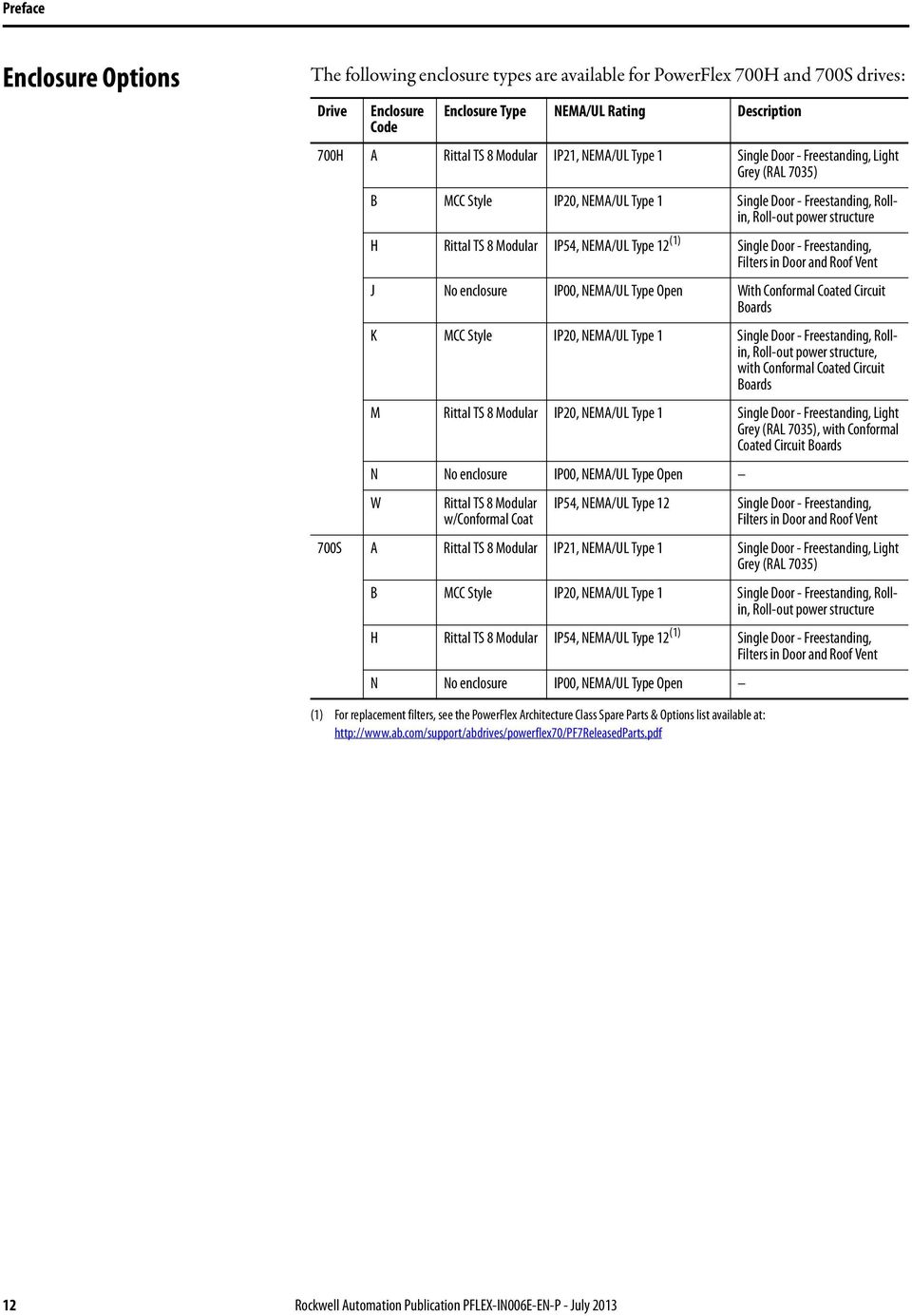
12 Preface Enclosure Options The following enclosure types are available for PowerFlex 700H and 700S drives: Drive Enclosure Enclosure Type NEMA/UL Rating Description Code 700H A Rittal TS 8 Modular IP21, NEMA/UL Type 1 Single Door - Freestanding, Light Grey (RAL 7035) B MCC Style IP20, NEMA/UL Type 1 Single Door - Freestanding, Rollin, Roll-out power structure H Rittal TS 8 Modular IP54, NEMA/UL Type 12 (1) Single Door - Freestanding, Filters in Door and Roof Vent J No enclosure IP00, NEMA/UL Type Open With Conformal Coated Circuit Boards K MCC Style IP20, NEMA/UL Type 1 Single Door - Freestanding, Rollin, Roll-out power structure, with Conformal Coated Circuit Boards M Rittal TS 8 Modular IP20, NEMA/UL Type 1 Single Door - Freestanding, Light Grey (RAL 7035), with Conformal Coated Circuit Boards N No enclosure IP00, NEMA/UL Type Open W Rittal TS 8 Modular IP54, NEMA/UL Type 12 Single Door - Freestanding, w/conformal Coat Filters in Door and Roof Vent 700S A Rittal TS 8 Modular IP21, NEMA/UL Type 1 Single Door - Freestanding, Light Grey (RAL 7035) B MCC Style IP20, NEMA/UL Type 1 Single Door - Freestanding, Rollin, Roll-out power structure H Rittal TS 8 Modular IP54, NEMA/UL Type 12 (1) Single Door - Freestanding, Filters in Door and Roof Vent N No enclosure IP00, NEMA/UL Type Open (1) For replacement filters, see the PowerFlex Architecture Class Spare Parts & Options list available at: 12 Rockwell Automation Publication PFLEX-IN006E-EN-P - July 2013
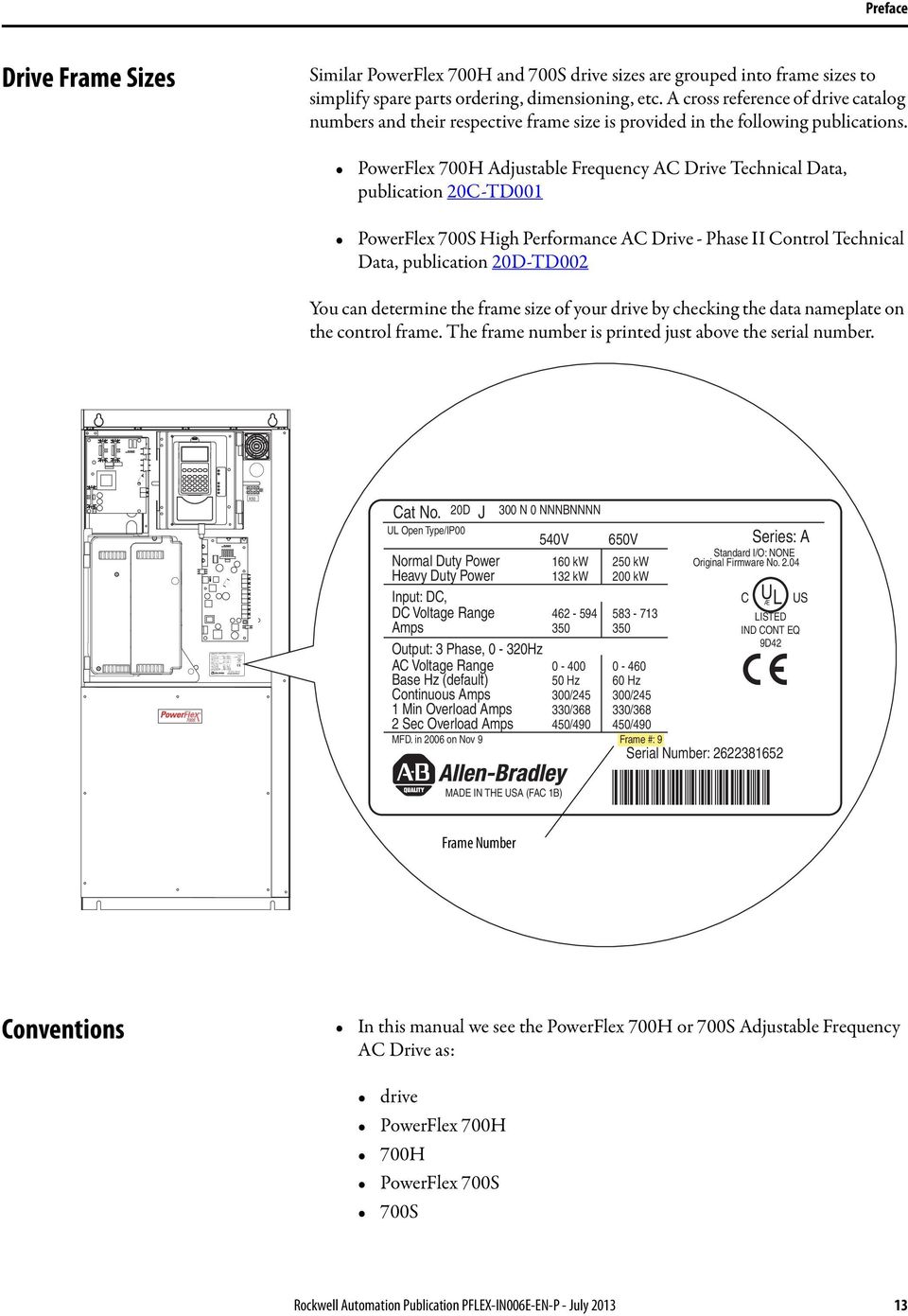
13 Cat No. 20D J 300 N 0 NNNBNNNN UL Open Type/IP00 540V 650V Normal Duty Power 160 kw 250 kw Heavy Duty Power 132 kw 200 kw Input: DC, DC Voltage Range Amps D42 Output: 3 Phase, 0-320Hz AC Voltage Range Base Hz (default) 50 Hz 60 Hz Continuous Amps 300/ /245 1 Min Overload Amps 330/ /368 2 Sec Overload Amps 450/ /490 MFD. in 1989 on Nov 9 Frame #: 9 Serial Number: MADE IN THE USA (FAC 1B) Series: A Standard I/O: NONE Original Firmware No C U Æ L US LISTED IND CONT EQ Preface Drive Frame Sizes Similar PowerFlex 700H and 700S drive sizes are grouped into frame sizes to simplify spare parts ordering, dimensioning, etc. A cross reference of drive catalog numbers and their respective frame size is provided in the following publications. PowerFlex 700H Adjustable Frequency AC Drive Technical Data, publication 20C-TD001 PowerFlex 700S High Performance AC Drive - Phase II Control Technical Data, publication 20D-TD002 You can determine the frame size of your drive by checking the data nameplate on the control frame. The frame number is printed just above the serial number. L1 L2 L3 L1 L2 L3 U/T1 V/T2 W/T3 U/T1 V/T2 W/T3 X50 Cat No. 20D J UL Open Type/IP N 0 NNNBNNNN Series: A Standard I/O: NONE Original Firmware No V 650V Normal Duty Power 160 kw 250 kw Heavy Duty Power 132 kw 200 kw Input: DC, C Æ DC Voltage Range Amps Output: 3 Phase, 0-320Hz AC Voltage Range Base Hz (default) 50 Hz 60 Hz Continuous Amps 300/ /245 1 Min Overload Amps 330/ /368 2 Sec Overload Amps 450/ /490 MFD. in 2006 on Nov 9 Frame #: 9 Serial Number: MADE IN THE USA (FAC 1B) U L US LISTED IND CONT EQ 9D42 Frame Number Conventions In this manual we see the PowerFlex 700H or 700S Adjustable Frequency AC Drive as: drive PowerFlex 700H 700H PowerFlex 700S 700S Rockwell Automation Publication PFLEX-IN006E-EN-P - July
14 Preface To help differentiate parameter names and LCD display text from other text, the following conventions will be used: Parameter Names will appear in [brackets]. For example: [DC Bus Voltage]. Display Text will appear in quotes. For example: Enabled. The following words are used throughout the manual to describe an action: Word Can Cannot May Must Shall Should Should Not Meaning Possible, able to do something Not possible, not able to do something Permitted, allowed Unavoidable, you must do this Required and necessary Recommended Not recommended 14 Rockwell Automation Publication PFLEX-IN006E-EN-P - July 2013

15 Preface General Precautions ATTENTION: This drive contains ESD (Electrostatic Discharge) sensitive parts and assemblies. Static control precautions are required when installing, testing, servicing or repairing this assembly. Component damage may result if ESD control procedures are not followed. If you are not familiar with static control procedures, reference A-B publication , Guarding Against Electrostatic Damage or any other applicable ESD protection handbook. ATTENTION: An incorrectly applied or installed drive can result in component damage or a reduction in product life. Wiring or application errors, such as, undersizing the motor, incorrect or inadequate AC supply, or excessive ambient temperatures may result in malfunction of the system. ATTENTION: Only qualified personnel familiar with adjustable frequency AC drives and associated machinery should plan or implement the installation, start-up and subsequent maintenance of the system. Failure to comply may result in personal injury and/or equipment damage. ATTENTION: To avoid an electric shock hazard, verify that the voltage on the bus capacitors has discharged completely before servicing. Check the DC bus voltage at the Power Terminal Block by measuring between the +DC and -DC terminals, between the +DC terminal and the chassis, and between the -DC terminal and the chassis. The voltage must be zero for all three measurements. ATTENTION: Risk of injury or equipment damage exists. DPI host products must not be directly connected together via 1202 cables. Unpredictable behavior can result if two or more devices are connected in this manner. ATTENTION: The sheet metal cover and mounting screws on the ASIC Board located on the power structure are energized at (-) DC bus potential high voltage. Risk of electrical shock, injury, or death exists if someone comes in contact with the assembly. Rockwell Automation Publication PFLEX-IN006E-EN-P - July

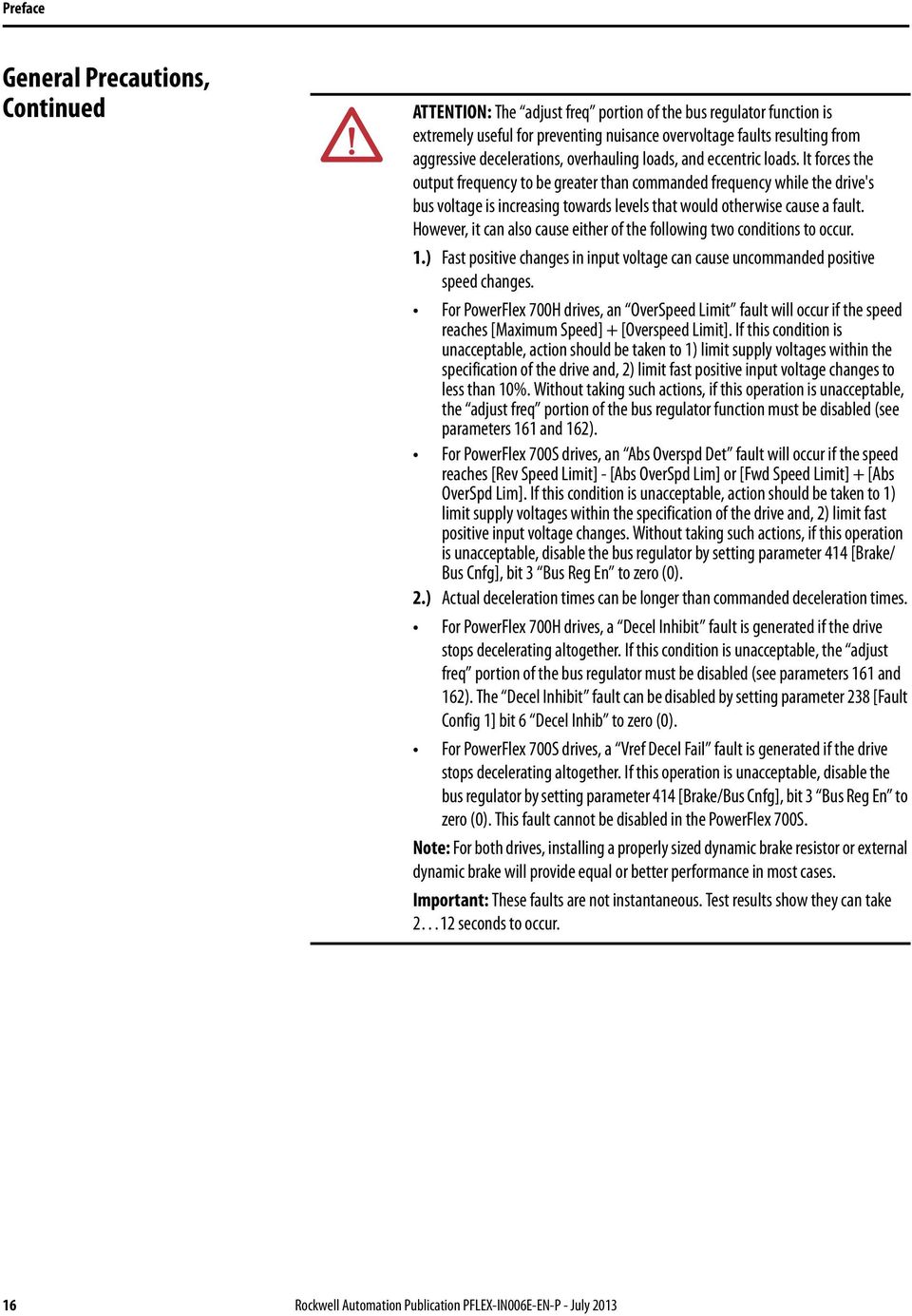
16 Preface General Precautions, Continued ATTENTION: The adjust freq portion of the bus regulator function is extremely useful for preventing nuisance overvoltage faults resulting from aggressive decelerations, overhauling loads, and eccentric loads. It forces the output frequency to be greater than commanded frequency while the drive's bus voltage is increasing towards levels that would otherwise cause a fault. However, it can also cause either of the following two conditions to occur. 1.) Fast positive changes in input voltage can cause uncommanded positive speed changes. For PowerFlex 700H drives, an OverSpeed Limit fault will occur if the speed reaches [Maximum Speed] + [Overspeed Limit]. If this condition is unacceptable, action should be taken to 1) limit supply voltages within the specification of the drive and, 2) limit fast positive input voltage changes to less than 10%. Without taking such actions, if this operation is unacceptable, the adjust freq portion of the bus regulator function must be disabled (see parameters 161 and 162). For PowerFlex 700S drives, an Abs Overspd Det fault will occur if the speed reaches [Rev Speed Limit] - [Abs OverSpd Lim] or [Fwd Speed Limit] + [Abs OverSpd Lim]. If this condition is unacceptable, action should be taken to 1) limit supply voltages within the specification of the drive and, 2) limit fast positive input voltage changes. Without taking such actions, if this operation is unacceptable, disable the bus regulator by setting parameter 414 [Brake/ Bus Cnfg], bit 3 Bus Reg En to zero (0). 2.) Actual deceleration times can be longer than commanded deceleration times. For PowerFlex 700H drives, a Decel Inhibit fault is generated if the drive stops decelerating altogether. If this condition is unacceptable, the adjust freq portion of the bus regulator must be disabled (see parameters 161 and 162). The Decel Inhibit fault can be disabled by setting parameter 238 [Fault Config 1] bit 6 Decel Inhib to zero (0). For PowerFlex 700S drives, a Vref Decel Fail fault is generated if the drive stops decelerating altogether. If this operation is unacceptable, disable the bus regulator by setting parameter 414 [Brake/Bus Cnfg], bit 3 Bus Reg En to zero (0). This fault cannot be disabled in the PowerFlex 700S. Note: For both drives, installing a properly sized dynamic brake resistor or external dynamic brake will provide equal or better performance in most cases. Important: These faults are not instantaneous. Test results show they can take 2 12 seconds to occur. 16 Rockwell Automation Publication PFLEX-IN006E-EN-P - July 2013
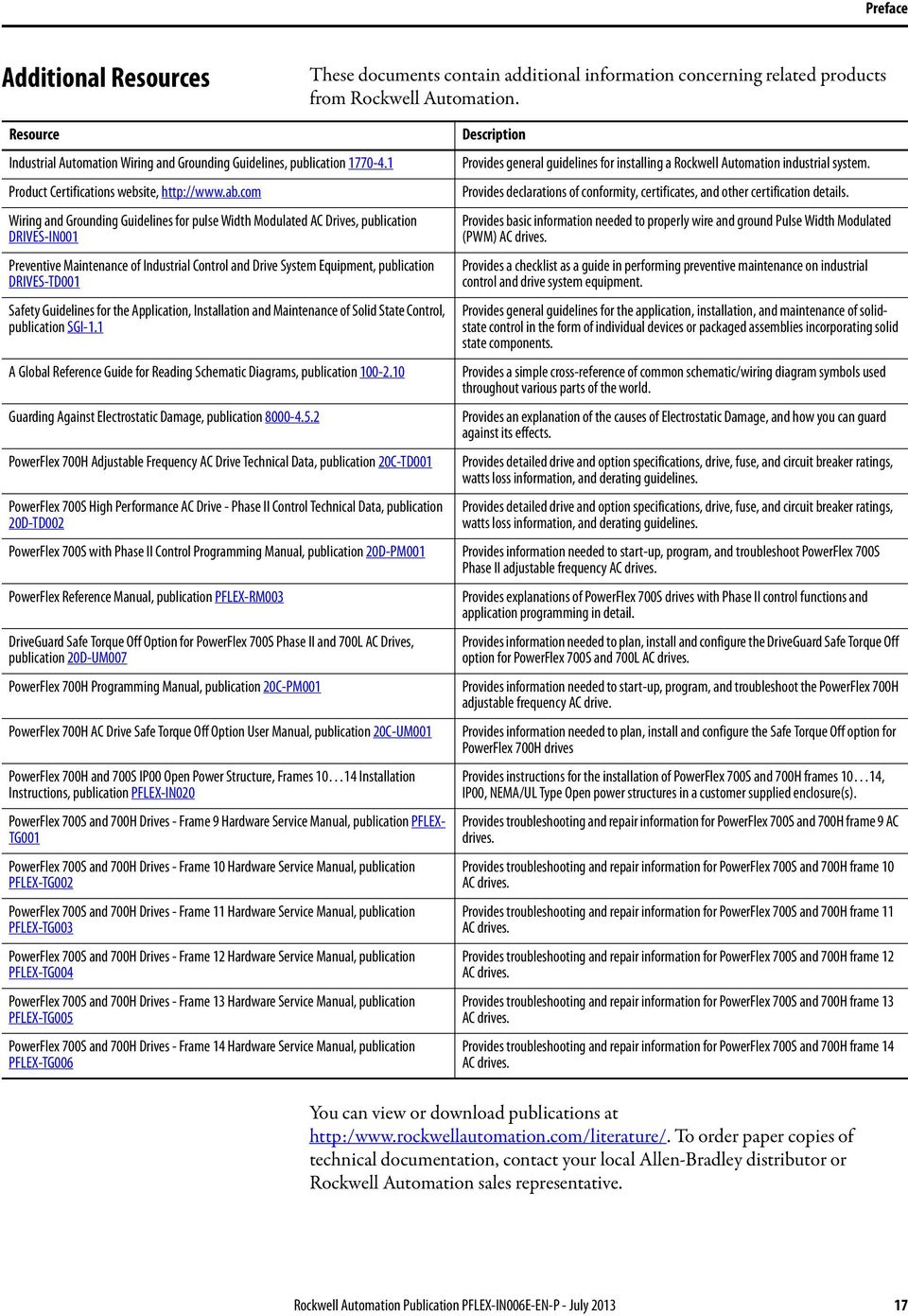
17 Preface Additional Resources These documents contain additional information concerning related products from Rockwell Automation. Resource Industrial Automation Wiring and Grounding Guidelines, publication Product Certifications website, Wiring and Grounding Guidelines for pulse Width Modulated AC Drives, publication DRIVES-IN001 Preventive Maintenance of Industrial Control and Drive System Equipment, publication DRIVES-TD001 Safety Guidelines for the Application, Installation and Maintenance of Solid State Control, publication SGI-1.1 A Global Reference Guide for Reading Schematic Diagrams, publication Guarding Against Electrostatic Damage, publication PowerFlex 700H Adjustable Frequency AC Drive Technical Data, publication 20C-TD001 PowerFlex 700S High Performance AC Drive - Phase II Control Technical Data, publication 20D-TD002 PowerFlex 700S with Phase II Control Programming Manual, publication 20D-PM001 PowerFlex Reference Manual, publication PFLEX-RM003 DriveGuard Safe Torque Off Option for PowerFlex 700S Phase II and 700L AC Drives, publication 20D-UM007 PowerFlex 700H Programming Manual, publication 20C-PM001 PowerFlex 700H AC Drive Safe Torque Off Option User Manual, publication 20C-UM001 PowerFlex 700H and 700S IP00 Open Power Structure, Frames Installation Instructions, publication PFLEX-IN020 PowerFlex 700S and 700H Drives - Frame 9 Hardware Service Manual, publication PFLEX- TG001 PowerFlex 700S and 700H Drives - Frame 10 Hardware Service Manual, publication PFLEX-TG002 PowerFlex 700S and 700H Drives - Frame 11 Hardware Service Manual, publication PFLEX-TG003 PowerFlex 700S and 700H Drives - Frame 12 Hardware Service Manual, publication PFLEX-TG004 PowerFlex 700S and 700H Drives - Frame 13 Hardware Service Manual, publication PFLEX-TG005 PowerFlex 700S and 700H Drives - Frame 14 Hardware Service Manual, publication PFLEX-TG006 Description Provides general guidelines for installing a Rockwell Automation industrial system. Provides declarations of conformity, certificates, and other certification details. Provides basic information needed to properly wire and ground Pulse Width Modulated (PWM) AC drives. Provides a checklist as a guide in performing preventive maintenance on industrial control and drive system equipment. Provides general guidelines for the application, installation, and maintenance of solidstate control in the form of individual devices or packaged assemblies incorporating solid state components. Provides a simple cross-reference of common schematic/wiring diagram symbols used throughout various parts of the world. Provides an explanation of the causes of Electrostatic Damage, and how you can guard against its effects. Provides detailed drive and option specifications, drive, fuse, and circuit breaker ratings, watts loss information, and derating guidelines. Provides detailed drive and option specifications, drive, fuse, and circuit breaker ratings, watts loss information, and derating guidelines. Provides information needed to start-up, program, and troubleshoot PowerFlex 700S Phase II adjustable frequency AC drives. Provides explanations of PowerFlex 700S drives with Phase II control functions and application programming in detail. Provides information needed to plan, install and configure the DriveGuard Safe Torque Off option for PowerFlex 700S and 700L AC drives. Provides information needed to start-up, program, and troubleshoot the PowerFlex 700H adjustable frequency AC drive. Provides information needed to plan, install and configure the Safe Torque Off option for PowerFlex 700H drives Provides instructions for the installation of PowerFlex 700S and 700H frames 10 14, IP00, NEMA/UL Type Open power structures in a customer supplied enclosure(s). Provides troubleshooting and repair information for PowerFlex 700S and 700H frame 9 AC drives. Provides troubleshooting and repair information for PowerFlex 700S and 700H frame 10 AC drives. Provides troubleshooting and repair information for PowerFlex 700S and 700H frame 11 AC drives. Provides troubleshooting and repair information for PowerFlex 700S and 700H frame 12 AC drives. Provides troubleshooting and repair information for PowerFlex 700S and 700H frame 13 AC drives. Provides troubleshooting and repair information for PowerFlex 700S and 700H frame 14 AC drives. You can view or download publications at To order paper copies of technical documentation, contact your local Allen-Bradley distributor or Rockwell Automation sales representative. Rockwell Automation Publication PFLEX-IN006E-EN-P - July
18 Preface Notes: 18 Rockwell Automation Publication PFLEX-IN006E-EN-P - July 2013
19 Chapter 1 General Installation Information AC Supply Source Considerations Frame 9 14 PowerFlex 700H and 700S drives are suitable for use on a circuit capable of delivering up to a maximum of 200,000 rms symmetrical amperes, and a maximum of 690 volts. ATTENTION: To guard against personal injury and/or equipment damage caused by improper fusing or circuit breaker selection, use only the recommended line fuses/circuit breakers specified in the drive Technical Data publications. See Additional Resources on page 17 for a list of technical publications for PowerFlex 700H and PowerFlex 700S drives. If a system ground fault monitor (RCD) is to be used, only Type B (adjustable) devices should be used to avoid nuisance tripping. Unbalanced, Ungrounded or Resistive Grounded Distribution Systems If phase to ground voltage will exceed 125% of normal or the supply system is ungrounded, see Wiring and Grounding Guidelines for Pulse Width Modulated (PWM) AC Drives, publication DRIVES-IN001, for more information. ATTENTION: PowerFlex 700H and 700S drives contain protective MOVs and common mode capacitors that are referenced to ground. These devices must be disconnected if the drive is installed on a resistive grounded distribution system or an ungrounded distribution system. If you are installing a... see: Frame 9 drive Ungrounded, Unbalanced or High Resistive Ground Installations on page 63 Frame 10 drive Ungrounded, High Resistive Ground or Grounded B Phase Delta Installations on page 79 Frame 11 drive Ungrounded, High Resistive Ground or Grounded B Phase Delta Installations on page 93 Frame 12 drive Ungrounded, High Resistive Ground or Grounded B Phase Delta Installations on page 109 Frame 13 drive Ungrounded, High Resistive Ground or Grounded B Phase Delta Installations on page 123 Frame 14 drive Ungrounded, High Resistive Ground or Grounded B Phase Delta Installations on page 141 Rockwell Automation Publication PFLEX-IN006E-EN-P - July

20 Chapter 1 General Installation Information Single-Phase Input Power The PowerFlex 700H and 700S drives are typically used with a three-phase input supply. The drives have been listed by UL to operate on single-phase input power with the requirement that the output current is derated by 80% of the three-phase ratings identified in Table 1 on page 167 through Table 8 on page 174. Input Power Conditioning All AC input drives include an internal line reactor. Certain events on the power system supplying a drive can cause component damage or shortened product life. These conditions are: The power system has power factor correction capacitors switched in and out of the system, either by the user or by the power company. The power source has intermittent voltage spikes in excess of 6000 volts. These spikes could be caused by other equipment on the line or by events such as lightning strikes. The power source has frequent interruptions. If any or all of these conditions exist, it is recommended that the user install a minimum amount of impedance between the drive and the source. This impedance could come from the supply transformer itself, the cable between the transformer and drive or an additional transformer or reactor. The impedance can be calculated using the information supplied in the Wiring and Grounding Guidelines for Pulse Width Modulated (PWM) AC Drives, publication DRIVES-IN001. Output Power Conditioning Frame 14 drives can be ordered with or without output reactors (du/dt filters). The du/dt filter limits the rate of change of output voltage and the rate of change in the IGBT or output transistor switching event. See the Wiring and Grounding Guidelines for Pulse Width Modulated (PWM) AC Drives, publication DRIVES-IN001, for minimum inductance on installations where du/dt filters are not installed. 20 Rockwell Automation Publication PFLEX-IN006E-EN-P - July 2013

21 General Installation Information Chapter 1 General Grounding Requirements Safety Ground - PE The drive Safety Ground - PE must be connected to system ground. Ground impedance must conform to the requirements of national and local industrial safety regulations and/or electrical codes. The integrity of all ground connections should be periodically checked. For installations within a cabinet, a single safety ground point or ground bus bar connected directly to building steel should be used. All circuits including the AC input ground conductor should be grounded independently and directly to this point/bar. Table 1 - Typical Grounding R (L1) S (L2) T (L3) U (T1) V (T2) W (T3) PE SHLD Shield Termination - SHLD The Shield terminal provides a grounding point for the motor cable shield. It must be connected to an earth ground by a separate continuous lead. The motor cable shield should be connected to this terminal on the drive (drive end) and the motor frame (motor end). A shield terminating cable gland may also be used. When shielded cable is used for control and signal wiring, the shield should be grounded at the source end only, not at the drive end. RFI Filter Grounding Using an optional RFI filter may result in relatively high ground leakage currents. Therefore, the filter must only be used in installations with grounded AC supply systems and be permanently installed and solidly grounded (bonded) to the building power distribution ground. Ensure that the incoming supply neutral is solidly connected (bonded) to the same building power distribution ground. Grounding must not rely on flexible cables and should not include any form of plug or socket that would permit inadvertent disconnection. Some local codes may require redundant ground connections. The integrity of all connections should be periodically checked. See the instructions supplied with the filter. Rockwell Automation Publication PFLEX-IN006E-EN-P - July
22 Chapter 1 General Installation Information Fuses and Circuit Breakers Frame 9 14 drives can be installed with either input fuses or an input circuit breaker. National and local industrial safety regulations and/or electrical codes may determine additional requirements for these installations. See Fuses and Circuit Breakers listed in Table 9 on page 176 through Table 16 on page 183. ATTENTION: Frame 9 14 PowerFlex drives do not provide branch short circuit protection. Specifications for recommended fuses to provide protection against short circuits are provided in the Technical Data publications for the drives. Power Wiring ATTENTION: National Codes and standards (NEC, VDE, BSI etc.) and local codes outline provisions for safely installing electrical equipment. Installation must comply with specifications regarding wire types, conductor sizes, branch circuit protection and disconnect devices. Failure to do so may result in personal injury and/or equipment damage. If you are installing... see: a Frame 9 drive Power Wiring on page 67 a Frame 10 drive Power Wiring on page 84 a Frame 11 drive Power Wiring on page 97 a Frame 12 drive Power Wiring on page 114 a Frame 13 drive Power Wiring on page 130 a Frame 14 drive Power Wiring on page 149 Wire Recommendations Type Description Min. Insulation Rating Power (1)(2) Standard Four tinned copper conductors with XLPE 600V, insulation. Copper braid/aluminum foil combination shield and 75 C (167 F) tinned copper drain wire. PVC jacket. (1) Control and signal wires should be separated from power wires by at least 0.3 meters (1 foot). (2) The use of shielded wire for AC input power may not be necessary but is always recommended. 22 Rockwell Automation Publication PFLEX-IN006E-EN-P - July 2013
23 General Installation Information Chapter 1 Motor Considerations Due to the operational characteristics of AC variable frequency drives, motors with inverter grade insulation systems designed to meet or exceed NEMA MG1 Part standards for resistance to spikes of 1600 volts are recommended. Guidelines must be followed when using non-inverter grade motors to avoid premature motor failures. Refer to Wiring and Grounding Guidelines for Pulse Width Modulated (PWM) AC Drives, publication DRIVES-IN001 for recommendations. Cable Trays and Conduit If cable trays or large conduits are to be used, see guidelines presented in the Wiring and Grounding Guidelines for Pulse Width Modulated (PWM) AC Drives, publication DRIVES-IN001. ATTENTION: To avoid a possible shock hazard caused by induced voltages, unused wires in the conduit must be grounded at both ends. For the same reason, if a drive sharing a conduit is being serviced or installed, all drives using this conduit should be disabled. This will help minimize the possible shock hazard from cross coupled motor leads. EMC Instructions CE Conformity Conformity with the Low Voltage (LV) Directive and Electromagnetic Compatibility (EMC) Directive has been demonstrated using harmonized European Norm (EN) standards published in the Official Journal of the European Communities. PowerFlex Drives comply with the EN standards listed below when installed according to this manual. CE Declarations of Conformity are available online at: Low Voltage Directive (2006/95/EC) EN Adjustable speed electrical power drive systems Part 5-1: Safety requirements Electrical, thermal and energy. EMC Directive (2004/108/EC) EN Adjustable speed electrical power drive systems Part 3: EMC product standard including specific test methods. Rockwell Automation Publication PFLEX-IN006E-EN-P - July
24 Chapter 1 General Installation Information General Notes The motor cable should be kept as short as possible in order to avoid electromagnetic emission as well as capacitive currents. Use of line filters in ungrounded systems is not recommended. PowerFlex drives may cause radio frequency interference if used in a residential or domestic environment. The user is required to take measures to prevent interference, in addition to the essential requirements for CE compliance listed below, if necessary. Conformity of the drive with CE EMC requirements does not guarantee an entire machine or installation complies with CE EMC requirements. Many factors can influence total machine/installation compliance. PowerFlex drives can generate conducted low frequency disturbances (harmonic emissions) on the AC supply system. Essential Requirements for CE Compliance Conditions 1-6 listed below must be satisfied for PowerFlex drives to meet the requirements of EN Standard PowerFlex 700H or 700S CE compatible Drive. For Frames 10 and up, the drive must also be installed in a suitable Rittal TS 8 (or equivalent) enclosure. 2. Review important precautions/attention statements throughout this manual before installing the drive. 3. Grounding as described on page Output power, control (I/O) and signal wiring must be braided, shielded cable with a coverage of 75% or better, metal conduit or equivalent attenuation. 5. All shielded cables should terminate with the proper shielded connector. 6. Conditions in Table 2. Table 2 - PowerFlex EN EMC Compatibility Second Environment Restrict Motor Cable to 30 m (98 ft.) Any Drive and Option Frame 24 Rockwell Automation Publication PFLEX-IN006E-EN-P - July 2013
25 General Installation Information Chapter 1 Using Input/Output Contactors Input Contactor Precautions ATTENTION: A contactor or other device that routinely disconnects and reapplies the AC line to the drive to start and stop the motor can cause drive hardware damage. The drive is designed to use control input signals that will start and stop the motor. If an input device is used, operation must not exceed one cycle per minute or drive damage will occur. ATTENTION: The drive start/stop/enable control circuitry includes solid state components. If hazards due to accidental contact with moving machinery or unintentional flow of liquid, gas or solids exist, an additional hardwired stop circuit may be required to remove the AC line to the drive. An auxiliary braking method may be required. Output Contactor Precaution ATTENTION: To guard against drive damage when using output contactors, the following information must be read and understood. One or more output contactors may be installed between the drive and motor(s) for the purpose of disconnecting or isolating certain motors/loads. If a contactor is opened while the drive is operating, power will be removed from the respective motor, but the drive will continue to produce voltage at the output terminals. In addition, reconnecting a motor to an active drive (by closing the contactor) could produce excessive current that may cause the drive to fault. If any of these conditions are determined to be undesirable or unsafe, an auxiliary contact on the output contactor should be wired to a drive digital input that is programmed as Enable. This will cause the drive to execute a coast-to-stop (cease output) whenever an output contactor is opened. Common Bus/Precharge DC input drives do not have an internal precharge circuit. Therefore, the following must be provided. Precharge capability must be provided in the system to guard against possible damage. Disconnect switches must not be used between the input of the drive and a common DC bus without the use of an external precharge device. IMPORTANT Precharge circuitry is external to the drive and must be customer supplied. Rockwell Automation Publication PFLEX-IN006E-EN-P - July
26 Chapter 1 General Installation Information DC Input Precharge Control Wiring If you are installing a DC input drive with a precharge interlock you must make the following connections on the X50 terminal block from the precharge circuit. See Figure 1 on page 27 for additional wiring information. Table 3 - Frame 9 - X50 Terminal Block Connections X50 Terminal Block Terminal Description 1 Charge Relay Contact 2 Charge Relay Contact 5 Precharge Complete Signal (+24V DC) 6 Precharge Complete Signal (Common) Table 4 - Frames X50 Terminal Block Connections X50 Terminal Block Frame Terminal Precharge Circuit Connection Description 10, 11 & Charge Relay Contact 23 Charge Relay Contact 25 Precharge Complete Signal (+24V DC) 26 Precharge Complete Signal (Common) 12 & 14 Power Structure 1 21 Charge Relay Contact 23 Charge Relay Contact (Jumper to Power Structure 2 Terminal 21) 25 Precharge Complete Signal (+24V DC) 26 Precharge Complete Signal (Common) Power Structure 2 21 Charge Relay Contact (Jumper to Power Structure 1 Terminal 23) Table 5 - X50 Terminal Block Specifications (All Frame Sizes) Wire Size Range (1) 23 Charge Relay Contact 25 Precharge Complete Signal (+24V DC) 26 Precharge Complete Signal (Common) Torque Maximum Minimum Recommended 6.0 mm 2 (10 AWG) 1.0 mm 2 (18 AWG) 0.8 N m (7.0 lb in) (1) Maximum/minimum sizes that the terminal block will accept - these are not recommendations. 26 Rockwell Automation Publication PFLEX-IN006E-EN-P - July 2013
27 General Installation Information Chapter 1 Figure 1 - Frame 9 Sample Precharge Wiring Diagram Customer Connections - External Precharge Circuitry is Shown as Dashed Lines Terminal Block on Control Frame Drive Connections M DC+ F1 R1 CR2 M V DC 0V DC DC Source 5 6 Isolated M F2 R2 CR2 DC- CR1 Pilot Relay CR1 M Main DC Contactor M CR2 Precharge Important: For DC Input Only. Do Not Install on DC Input Drives. * Refer to Table 6 on page 28 for contact ratings. Customer Connections - External Precharge Circuitry is Shown as Dashed Lines Figure 2 - Frames 10, 11 and 13 Sample Precharge Wiring Diagram Terminal Block on Control Frame Drive Connections F1 M R1 CR2 DC+ M X X ASIC Board Charge Relay* DC Source CR1 Pilot Relay X9 Precharge Complete M F2 R2 CR2 DC- CR1 M Main DC Contactor Important: For DC Input Only. Do Not Install on DC Input Drives. * Refer to Table 6 on page 28 for contact ratings. M CR2 Precharge Rockwell Automation Publication PFLEX-IN006E-EN-P - July
28 Chapter 1 General Installation Information Figure 3 - Frames 12 and 14 Sample Precharge Wiring Diagram Customer Connections - External Precharge Circuitry is Shown as Dashed Lines Terminal Blocks on Control Frame Drive Connections F1 M R1 CR2 DC+ CR1 M M PU1 X X X9 Charge Relay Precharge Complete* ASIC Board #1 DC Source M F2 R2 CR2 DC- M CR2 CR1 M PU2 X X X9 Charge Relay Precharge Complete* ASIC Board #2 Important: For DC Input Only. Do Not Install on DC Input Drives. * Refer to Table 6 below for contact ratings. Table 6 - ASIC Board Charge Relay Contact Ratings Load Resistance load (cos φ = 1) Rated load 8 A at 250 VAC: 5 A at 30 VDC Rated carry current 8 A Max. switching voltage 250 VAC; 30 VDC, (400 VAC) Max. switching current AC 8 A; DC 5 A Max. switching power 2,000 VA; 150 W Failure rate (reference value) 5 VDC 10 ma (for gold plating 0.35 μ min.) 28 Rockwell Automation Publication PFLEX-IN006E-EN-P - July 2013
29 General Installation Information Chapter 1 Figure 4 - X50 Terminal Block Locations Frame 9 Frames X50 X50 Terminal Block Rockwell Automation Publication PFLEX-IN006E-EN-P - July
30 Chapter 1 General Installation Information Notes: 30 Rockwell Automation Publication PFLEX-IN006E-EN-P - July 2013
31 Chapter 2 Control Wiring for PowerFlex 700H Drives Important points to remember about I/O wiring: Always use copper wire. Wire gauge requirements and recommendations are based on 75 C. Do not reduce wire gauge when using higher temperature wire. Wire with an insulation rating of 600V or greater is recommended. Control and signal wires should be separated from power wires by at least 0.3 meters (1 foot). IMPORTANT Control (I/O) terminals labeled ( ) or Common are not referenced to earth ground and are designed to greatly reduce common mode interference. Grounding these terminals can cause signal noise. ATTENTION: Inputs must be configured with software and jumpers (see page 36). In addition, configuring an analog input for 0 20 ma operation and driving it from a voltage source could cause component damage. Verify proper configuration prior to applying input signals. ATTENTION: Hazard of personal injury or equipment damage exists when using bipolar input sources. Noise and drift in sensitive input circuits can cause unpredictable changes in motor speed and direction. Use speed command parameters to help reduce input source sensitivity. Table 7 - Recommended Control Wire Type Wire Type Description Min. Insulation Rating Signal (1)(2) Standard Analog I/O mm 2 (18 AWG), twisted pair, 100% shield with drain. 300V, C ( F) Remote Pot mm 2 (18 AWG), 3 conductor, shielded. Digital I/O Un-shielded Per US NEC or applicable national or local code. 300V, Safety Inputs 60 C (140 F) Homing Input (1)(2) Shielded Multi-conductor shielded cable mm 2 (18 AWG), 3 conductor, shielded. (1) Control and signal wires must be separated from power wires by at least 0.3 meters (1 foot). (2) If the wires are short and contained within a cabinet which has no sensitive circuits, the use of shielded wire may not be necessary, but is always recommended. Rockwell Automation Publication PFLEX-IN006E-EN-P - July
32 Chapter 2 Control Wiring for PowerFlex 700H Drives 700H Control Circuit Board Designations The PowerFlex 700H control circuit board allows for a variety of I/O boards to be installed depending upon your application. Each option I/O circuit board is described below. Figure 5 - PowerFlex 700H Control Circuit Board Slot A B C D E IMPORTANT The boards identified in the table below can only be installed in the designated slot. Boards and slots are not interchangeable. Table 8 - Control Board Slot Designations Slot Used for Circuit Board... Part No. A 24V DC Digital Input with Analog I/O 20C-DA1-A 115V AC Digital Input with Analog I/O 20C-DA1-B B 24/115V Digital Output 20C-DO1 24V DC Digital Gate Disable option (1) 20C-DG1 C (Not Used) D (Not Used) E DPI Option Board 20C-DPI1 (1) See Appendix E, Instructions for ATEX Approved PowerFlex 700H Drives in Group II Category (2) Applications with ATEX Approved Motors on page 203 and the PowerFlex 700H AC Drive Safe Torque Off Option User Manual, publication 20C-UM001, for more information on installing and configuring the Gate Disable option board. 32 Rockwell Automation Publication PFLEX-IN006E-EN-P - July 2013
33 Control Wiring for PowerFlex 700H Drives Chapter 2 Drive Catalog Numbers for 700H Control I/O Board Options The following codes are designated in position 15 of the drive catalog string to indicate the desired combination of 700H I/O option boards supplied with the drive: Code Board in Slot A Board in Slot B Board in Slot E A 20C-DA1-A 20C-DO1 20C-DPI1 B 20C-DA1-B 20C-DO1 20C-DPI1 G 20C-DA1-A 20C-DG1 20C-DPI1 N none none 20C-DPI1 Figure 6 - PowerFlex 700H I/O Terminal Blocks and Jumpers J3 & J4 J5 J1 & J I/O Terminal Blocks and Jumpers I/O Terminal Blocks Table 9 - I/O Terminal Block Specifications No. Name Description Wire Size Range (1) Torque Maximum Minimum Maximum Recommended 1 Analog I/O Analog I/O Signals 2.5 mm 2 (14 AWG) 2 Digital Inputs Digital Input Signals 2.5 mm 2 (14 AWG) 3 Digital Outputs Digital Out Relays 2.5 mm 2 (14 AWG) 0.5 mm 2 (22 AWG) 0.5 mm 2 (22 AWG) 0.5 mm 2 (22 AWG) (1) Maximum/minimum that the terminal block will accept - these are not recommendations. 0.2 N m 1.8 lb in 0.2 N m 1.8 lb in 0.5 N m 4.5 lb in 0.2 N m 1.8 lb in 0.2 N m 1.8 lb in 0.5 N m 4.5 lb in Rockwell Automation Publication PFLEX-IN006E-EN-P - July
34 Chapter 2 Control Wiring for PowerFlex 700H Drives I/O Cable Grounding When installing shielded multi-conductor for analog and digital I/O, strip the cable at such a distance from the terminal plug so you can fix the shield to the cable clamp for grounding. Position the exposed shield so it can fixed to the clamp. Note: This clamp is not designed for strain relief. 34 Rockwell Automation Publication PFLEX-IN006E-EN-P - July 2013
35 Control Wiring for PowerFlex 700H Drives Chapter Table 10 - I/O Terminal Designations No. Signal Factory Default Description 1 Analog Input 1 ( ) (1) (2) Isolated (3), bipolar, differential, 9 bit & sign, 88 kω input impedance. A 2 Analog Input 1 (+) (1) jumper (page 36) selects: 0 10V, ±10V, 0 20 ma. Default: 0 10V (Ri =200k), 4 20 ma (Ri=100 Ω). 3 Analog Input 2 ( ) (1) 4 Analog Input 2 (+) (1) 5 10V Pot Reference 2 kω minimum, 10 ma maximum load, 1% accuracy. 6 Pot Common (GND) For (+) and ( ) 10V pot references V Pot Reference 2 kω minimum, 10 ma maximum load, 1% accuracy. 8 Analog Output 1 (+) (2) 9 Analog Output Common 10 Analog Output 2 (+) 11 Digital Input 1 Stop - CF 115V AC, 50/60 Hz - Opto isolated 12 Digital Input 2 Start 13 Digital Input 3 Auto/Man 14 Digital Input 4 Speed Sel 1 15 Digital Input 5 Speed Sel 2 16 Digital Input 6/Hardware Enable Speed Sel 3 Bipolar (current out is not bipolar), 9 bit and sign, 2 kω minimum load. A jumper (page 36) selects: 0 10V, ±10V, 0 20 ma. Low State: less than 30V AC High State: greater than 40V AC 24V DC - Opto isolated (250V) Low State: less than 5V DC High State: greater than 20V DC 11.2 ma DC Enable: Digital Input 6 is jumper selectable for HW Enable (see page 36). On-Time: < 16.7 ms, Off-Time < 1 ms 17 Digital Input Common Allows source or sink operation. Terminals 17, 18 and 19 can also be used 18 to provide backup power to DPI and control devices VDC (4) Drive supplied logic input power V Common (4) Common for internal power supply. 21 Digital Output 1 N.C. (5) Fault Max. Resistive Load: 22 Digital Output 1 Common 23 Digital Output 1 N.O. (5) NOT Fault 24 Digital Output 2 N.C. (5) NOT Run 25 Digital Output 2/3 Com. 26 Digital Output 3 N.O. (5) Run 240V AC/30V DC 1200VA, 150 W Max. Current: 5 A, Min. Load: 10 ma Max. Inductive Load: 240V AC/30V DC 840VA, 105 W Max. Current: 3.5 A, Min. Load: 10 ma Related Parameter(s) (1) Important: Input must be configured with a jumper. Drive damage may occur if jumper is not installed properly. See page 36. (2) These inputs/outputs are dependant on a number of parameters (see Related Parameters column in table). (3) Differential Isolation - External source must be maintained at less than 160V with respect to PE. Input provides high common mode immunity. (4) 150 ma maximum load. Not present on 115V versions. Can be used to provide control power from an external 24V source when main power is not applied. See page 36. (5) Contacts in un-powered state. Any relay programmed as Fault or Alarm will energize (pick up) when power is applied to drive and de-energize (drop out) when a fault or alarm exists. Relays selected for other functions will energize only when that condition exists and will de-energize when condition is removed. Rockwell Automation Publication PFLEX-IN006E-EN-P - July
36 Chapter 2 Control Wiring for PowerFlex 700H Drives Analog I/O Configuration IMPORTANT Analog I/O must be configured through programming, as well as the jumpers shown below. See the PowerFlex 700H Adjustable Frequency AC Drive Programming Manual, publication 20C-PM001. See Figure 6 on page 33 for the location of the jumpers indicated in the table below. Table 11 - I/O Configuration Signal Jumper Setting Analog J1 (Analog In 1) 0 20 ma 0 10V ±10V Inputs J2 (Analog In 2) J1 A B C D J2 A B C D J1 A B C D J2 A B C D J1 A B C D J2 A B C D Analog Outputs J3 (Analog Out 1) J4 (Analog Out 2) 0 20 ma 0 10V ±10V J3 A B C D J4 A B C D J3 A B C D J4 A B C D J3 A B C D J4 A B C D Hardware Enable Circuitry By default, the user can program a digital input as an Enable input. The status of this input is interpreted by drive software. If the application requires the drive to be disabled without software interpretation, a dedicated hardware enable configuration can be utilized. This is done by removing jumper J5 (see table below) and wiring the enable input to digital input 6. Verify that parameter 366 [Digital In6 Sel] is set to 1-Enable. Table 12 - Hardware Enable Configuration Signal Jumper Setting Hardware Enable J5 Hardware Enable Input Programmable (No Hardware Enable) J5 J5 A B A B 36 Rockwell Automation Publication PFLEX-IN006E-EN-P - July 2013
37 Control Wiring for PowerFlex 700H Drives Chapter 2 Auxiliary Power Supply You may use an auxiliary power supply to keep the 700H control unit energized, when input power is de-energized. This provides back-up power for the control unit and is sufficient for setting parameters. Connect 24V DC power to pin 19 and 24V DC common to pin 20 of the 24V DC version of the I/O card. Table 13 - Auxiliary Power Supply Specifications Voltage Current (Min) Current (Max) 24V DC ± 15% 150 ma 250 ma If 24V terminals of several drives are connected in parallel, it is recommend that a diode circuit to block current flow in the opposite direction is used. Reverse current flow could damage the control board. From Auxiliary Power Supply 24V dc Power 24V dc Common :19 :20 :19 :20 :19 :20 :19 :20 I/O Wiring Examples Input/Output Connection Example Required Parameter Changes Potentiometer Unipolar Speed Reference Set I/O configuration (see Analog I/O Configuration on page 36). 10k Ω Pot. Recommended 3 Adjust Scaling: (2 kω Minimum) 4 Parameters 91 [Speed Ref A Hi] / 92 [Speed Ref A Lo] and 325 [Analog In 2 Hi] / [Analog In 2 Lo] 7 View Results: Parameter 002 [Commanded Speed] Joystick Bipolar Speed Reference ±10V Input Important: See the Attention statement on page 31 for important information on bipolar wiring Set I/O configuration (see Analog I/O Configuration on page 36). Set parameter 190 [Direction Mode] = 1 Bipolar Adjust Scaling: Parameters 91 [Speed Ref A Hi] / 92 [Speed Ref A Lo] and 325 [Analog In 2 Hi] / 326 [Analog In 2 Lo] View Results: Parameter 002 [Commanded Speed] Rockwell Automation Publication PFLEX-IN006E-EN-P - July
38 Chapter 2 Control Wiring for PowerFlex 700H Drives Input/Output Connection Example Required Parameter Changes Analog Input Bipolar Speed Set I/O configuration (see Analog I/O Reference Configuration on page 36). 3 ±10V Input Set parameter 190 [Direction Mode] = 1 4 Important: See the Attention Bipolar statement on page 31 for Adjust Scaling: important information on Parameters 91 [Speed Ref A Hi] / 92 bipolar wiring. [Speed Ref A Lo] and 325 [Analog In 2 Hi] / 326 [Analog In 2 Lo] View Results: Parameter 002 [Commanded Speed] Analog Voltage Input Unipolar Speed Reference 0 to +10V Input 3 4 Set I/O configuration (see Analog I/O Configuration on page 36). Configure Input with parameter 320 [Anlg In Config] Adjust Scaling: Parameters 91 [Speed Ref A Hi] / 92 [Speed Ref A Lo] and 325 [Analog In 2 Hi] / 326 [Analog In 2 Lo] View Results: Parameter 002 [Commanded Speed] Analog Current Input Unipolar Speed Reference 4 20 ma Input 3 4 Set I/O configuration (see Analog I/O Configuration on page 36). Configure Input for Current: Parameter 320 [Anlg In Config] and add jumper at appropriate terminals Adjust Scaling: Parameters 91 [Speed Ref A Hi] / 92 [Speed Ref A Lo] and 325 [Analog In 2 Hi] / 326 [Analog In 2 Lo] View Results: Parameter 002 [Commanded Speed] Analog Input, PTC 0-10V Input PTC OT set > 5V PTC OT cleared < 5V PTC Short < 0.2V Analog Output ±10V, 4 20 ma Bipolar +10V Unipolar (shown) 1.8k PTC Ferrite Bead 3.32k Ohm Set I/O configuration (see Analog I/O Configuration on page 36). Configure Analog Input for PTC function: Set parameter 259 [Alarm Config 1] bit 14 PTC Config = Enabled Configure Analog Input for Fault when input goes below 0.2V: Set parameter 324 [Analog In 1 Loss] = 1 Fault Enable Fault: Set parameter 238 [Fault Config 1] bit 7 Motor Therm = Enabled Enable Alarm: Set parameter 259 [Alarm Config 1], bit 11 Motor Therm = Enabled Set I/O configuration (see Analog I/O Configuration on page 36). Configure with Parameter 340 [Anlg Out Config] Select Source Value: Parameter 384 [Digital Out1 Sel] Adjust Scaling: Parameters 343 [Analog Out1 Hi] / 344 [Analog Out1 Lo] 38 Rockwell Automation Publication PFLEX-IN006E-EN-P - July 2013
39 Control Wiring for PowerFlex 700H Drives Chapter 2 Input/Output Connection Example Required Parameter Changes 2-Wire Control Non- Disable Digital Input:#1: Reversing (1) 12 Parameter 361 [Digital In1 Sel] = 0 Not 24V DC internal supply Used Set Digital Input #2: Parameter 362 [Digital In2 Sel] = 7 Run 17 Set Direction Mode: Parameter 190 [Direction Mode] = 0 19 Unipolar 20 Stop-Run 2-Wire Control Reversing (1) External supply (I/O board dependent) 115V/ +24V Neutral/ Common Run Fwd. Run Rev Set Digital Input:#1: Parameter 361 [Digital In1 Sel] = 8 Run Forward Set Digital Input #2: Parameter 362 [Digital In2 Sel] = 9 Run Reverse 3-Wire Control Internal supply Stop No Changes Required Start Wire Control External supply (I/O Board dependent). Requires 3-wire functions only ([Digital In1 Sel]). Using 2-wire selections will cause a type 2 alarm. 115V/ +24V Neutral/ Common Stop Start No Changes Required Digital Output Relays shown in powered state with drive faulted. See Table 10 on page 35. Two relays at terminals or Power Source Fault NOT Fault NOT Run Run Select Source to Activate: Parameters 380 [Digital Out1 Sel] / 384 [Digital Out2 Sel] Enable Input Configure with parameter 366 [Digital In6 Sel] For dedicated hardware Enable: Remove Jumper J5 (see page 36) 16 (1) Important: Programming inputs for 2 wire control deactivates all HIM Start buttons unless parameter 192 [Save HIM Ref], bit 1 Manual Mode = 1. This will allow the HIM to control Start and Jog. Rockwell Automation Publication PFLEX-IN006E-EN-P - July
40 Chapter 2 Control Wiring for PowerFlex 700H Drives Reference Control Sources Auto Speed Sources The drive speed command can be obtained from a number of different sources. The source is determined by drive programming and the condition of the Speed Select digital inputs, Auto/Manual digital inputs or reference select bits of a command word. The default source for a command reference (all speed select inputs open) is the selection programmed in parameter 90 [Speed Ref A Sel]. If any of the speed select inputs are closed, the drive will use other parameters as the speed command source. Manual Speed Sources The manual source for speed command to the drive is either the HIM requesting manual control or the control terminal block (analog input) if a digital input is programmed to Auto/Manual. Changing Speed Sources The selection of the active Speed Reference can be made through digital inputs, DPI command, jog button or Auto/Manual HIM operation. 40 Rockwell Automation Publication PFLEX-IN006E-EN-P - July 2013
41 Control Wiring for PowerFlex 700H Drives Chapter 2 Figure 7 - Speed Reference Selection Chart (1) = Default [Digital Inx Select]: Trim Speed Sel Auto Speed Ref Options Speed Ref A Sel, Parameter Speed Ref B Sel, Parameter 093 Preset Speed 2, Parameter 102 Preset Speed 3, Parameter 103 Preset Speed 4, Parameter 104 Preset Speed 5, Parameter 105 Preset Speed 6, Parameter 106 Preset Speed 7, Parameter DPI Port Ref 1-6, See Parameter 209 DPI Command Manual Speed Ref Options HIM Requesting Auto/Manual TB Man Ref Sel, Parameter 096 Jog Speed, Parameter 100 Speed Adders PI Output Slip Compensation None Digital Input Jog Command [Speed Mode]: 2 "Process Pi" 1 "Slip Comp" 0 "Open Loop" PI Exclusive Mode [PI Configuration]: Bit 0, Excl Mode = 0 Auto Man Drive Ref Rslt Mod Functions (Skip, Clamp, Direction, etc.) Min/Max Speed Commanded Frequency Acc/Dec Ramp and S Curve Output Frequency Pure Reference to follower drive for Frequency Reference Post Ramp to follower drive for Frequency Reference Auto/Manual Examples PLC = Auto, HIM = Manual A process is run by a PLC when in Auto mode and requires manual control from the HIM during set-up. The Auto speed reference is issued by the PLC through a communications module installed in the drive. Since the internal communications is designated as Port 5, [Speed Ref A Sel] is set to DPI Port 5 with the drive running from the Auto source. Attain Manual Control Press ALT then Auto/Man on the HIM. When the HIM attains manual control, the drive speed command comes from the HIM speed control keys or analog potentiometer. Release to Auto Control Press ALT then Auto/Man on the HIM again. When the HIM releases manual control, the drive speed command returns to the PLC. (1) To access Preset Speed 1, set parameter 90 or 93 to Preset Speed 1. Rockwell Automation Publication PFLEX-IN006E-EN-P - July
42 Chapter 2 Control Wiring for PowerFlex 700H Drives PLC = Auto, Terminal Block = Manual A process is run by a PLC when in Auto mode and requires manual control from an analog potentiometer wired to the drive terminal block. The auto speed reference is issued by the PLC through a communications module installed in the drive. Since the internal communications is designated as Port 5, [Speed Ref A Sel] is set to DPI Port 5 with the drive running from the Auto source. Since the Manual speed reference is issued by an analog input ( Analog In 1 or Analog In 2 ), parameter 96 [TB Man Ref Sel] is set to the same input. To switch between Auto and Manual, parameter 364 [Digital In4 Sel] is set to 18 Auto/ Manual. Attain Manual Control Close the digital input. With the input closed, the speed command comes from the pot. Release to Auto Control Open the digital input. With the input open, the speed command returns to the PLC. PLC = Auto, Terminal Block = Manual (HIM Control) Note: This feature is only available for the 20-HIM-A3 / -A4-C3S / -C5S, Series B and PowerFlex 700H firmware v5.004 or higher. This version of firmware allows you to configure the drive to switch smoothly from a communicated speed reference to local speed reference produced by the Human Interface Module (HIM). When the drive is commanded to switch from the automatic (communicated) speed reference to the manual reference via a digital input, it pre-loads the last value from the communicated reference into the HIM. Then you can then modify the manual reference on the HIM. This avoids a step change in speed that would otherwise occur from the switch. Example: Use a communications adapter (like a 20-COMM-C or 20-COMM-E) in DPI port 5 for the primary - automatic speed reference. Use the on-board HIM in DPI port 1 for the secondary - manual speed reference. Wire digital input 4 to switch between automatic and manual references (high for manual, low for automatic). Make the following parameter selections: 90 [Speed Ref A Sel] = 22 DPI Port 5 96 [TB Man Ref Sel] = 18 DPI Port [Man Ref Preload] = 1 Enabled 364 [Digital In4 Sel] = 18 Auto/Manual 42 Rockwell Automation Publication PFLEX-IN006E-EN-P - July 2013
43 Control Wiring for PowerFlex 700H Drives Chapter 2 When digital input 4 is low, the drive runs in automatic mode, consuming the speed reference from the communications adapter. When digital input 4 goes high the drive takes the last value from the communication adapter and loads it into the HIM. So, the manual speed reference produced by the HIM starts at the last value produced by the communication adapter. Application Note: To facilitate a smooth transfer from manual HIM speed reference back to automatic (communicated) speed reference, you will need to execute the following in controller logic: While the drive is in manual mode, the controller will need to continually transfer the speed feedback or output frequency into its speed reference. This will eliminate any disturbance in the speed when the drive goes from manual mode back to automatic mode. Auto/Manual Notes Manual control is exclusive. If a HIM or terminal block takes manual control, no other device can take manual control until the controlling device releases manual control. If a HIM has manual control and power is removed from the drive, the drive will return to Auto mode when power is reapplied. Parameter 192 [Save HIM Ref ] can enable manual mode to allow starts and jogs from the HIM in 2-wire mode. Rockwell Automation Publication PFLEX-IN006E-EN-P - July
44 Chapter 2 Control Wiring for PowerFlex 700H Drives Notes: 44 Rockwell Automation Publication PFLEX-IN006E-EN-P - July 2013
45 Chapter 3 Control Wiring for PowerFlex 700S Drives with Phase II Control I/O Wiring Important points to remember about I/O wiring: Always use tinned copper wire. Wire gauge requirements and recommendations are based on 75 C. Do not reduce wire gauge when using higher temperature wire. Wire with an insulation rating of 600V or greater is recommended. Control and signal wires should be separated from power wires by at least 0.3 meters (1 foot). 4100CCF3 Flex I/O cable for use with DriveLogix is 3 ft. maximum length. IMPORTANT I/O terminals labeled ( ) or Common are not referenced to earth ground and are designed to greatly reduce common mode interference. Grounding these terminals can cause signal noise. ATTENTION: Hazard of personal injury or equipment damage exists when using bipolar input sources. Noise and drift in sensitive input circuits can cause unpredictable changes in motor speed and direction. Use speed command parameters to help reduce input source sensitivity. Table 14 - Recommended Control Wire Type Wire Type Description Min. Insulation Rating Signal (1)(2) Standard Analog I/O mm 2 (18 AWG), twisted pair, 100% shield with drain. Remote Pot mm 2 (18 AWG), 3 conductor, shielded. Encoder/ Combined mm 2 (24 AWG) individually shielded pairs. Pulse I/O <30 m (100 ft) Encoder/ Pulse I/O 30 to 152 m (100 to 500 ft) Encoder/ Pulse I/O 152 to 259 m (500 to 850 ft) Signal Power Combined Signal Power Combined mm 2 (24 AWG) individually shielded pairs mm 2 (18 AWG) individually shielded pairs mm 2 (22 AWG), power is mm 2 (20 AWG) individually shielded pairs mm 2 (24 AWG) individually shielded pairs mm 2 (18 AWG) individually shielded pairs mm 2 (18 AWG) individually shielded pairs. 300V, C ( F) Digital I/O Un-shielded Per US NEC or applicable national or local code. 300V, Safety Inputs Homing Input (1)(2) Shielded Multi-conductor shielded cable mm 2 (18 AWG), 3 conductor, shielded. 60 C (140 F) (1) Control and signal wires must be separated from power wires by at least 0.3 meters (1 foot). (2) If the wires are short and contained within a cabinet which has no sensitive circuits, the use of shielded wire may not be necessary, but is always recommended. Rockwell Automation Publication PFLEX-IN006E-EN-P - July
46 Chapter 3 Control Wiring for PowerFlex 700S Drives with Phase II Control Main Control Board Switch and Jumper Settings ATTENTION: The switches for Digital Inputs 4 6 are set to 24V DC at the factory. If you are running a 115V AC input application, the switches must be set as indicated below before applying power to the drive or damage to the main control board may occur. IMPORTANT There are two separate values for an encoder Table 15 - Switch and Jumper Settings Function Default Switch Open Closed Notes HW Enable Jumper (P22) pins 2-4 HW Enbl SHUNT Jumper pins 2-4 HW Enbl pins 1-3 No Enbl No Jmpr = HW Enbl See Hardware Enable Circuitry on page 53 for configuration. Gate Enable Jumper (P13) Jumper on pins SHUNT Jumper No Jmpr Jumper on pins No Jmpr = Gate disable or Safe- Off/Second Encoder board is present (1) Analog Input 1 Voltage S5-2 Voltage Current Change with Power Off Analog Input 2 Voltage S5-1 Voltage Current Change with Power Off Digital Inputs V DC S4-1, 115V AC 24V DC Change with Power Off Voltage S4-2 Digital Input 1 Voltage 24V DC S3-1 24V DC 12V DC Change with Power Off Digital Input 2 Voltage 24V DC S3-2 24V DC 12V DC Change with Power Off Encoder Supply Voltage 12V DC S2-4 12V DC 5V DC Change with Power Off Encoder Signal A Voltage 12V DC S2-1 12V DC 5V DC Encoder Signal B Voltage 12V DC S2-2 12V DC 5V DC Typically, set all switches the same Encoder Signal Z Voltage 12V DC S2-3 12V DC 5V DC Function Switch Down Up Center Notes DriveLogix Processor S1 RUN PROG REMOTE Processor Mode (1) Refer to publication 20D-UM007, DriveGuard Safe-Off Option for PowerFlex 700S Phase II AC Drives and PowerFlex 700L Liquid- Cooled AC Drives, for more information on the Safe-Off Option board, or publication, 20D-IN009 Installation Instructions - Second Encoder Option Card for PowerFlex 700S Drives with Phase II Control, for more information on the Second Encoder Option board. 46 Rockwell Automation Publication PFLEX-IN006E-EN-P - July 2013
47 Control Wiring for PowerFlex 700S Drives with Phase II Control Chapter 3 Figure 1 Main Control Board Switches and Jumpers SWITCH S1 RUN PROG REMOTE Down Up Center JUMPER P = HW Enable Up = Open = Off SWITCH S5 SIDE VIEW FRONT TOP VIEW = No HW Enable Down = Closed = On 1 2 JUMPER P SWITCH S2 = Gate Enabled = Gate Disabled Up = Open = Off SIDE VIEW FRONT TOP VIEW Down = Closed = On SWITCH S4 SWITCH S3 SIDE VIEW Up = Open = Off FRONT TOP VIEW Up = Open = Off Down = Closed = On SIDE VIEW FRONT TOP VIEW 1 2 Down = Closed = On 1 2 Rockwell Automation Publication PFLEX-IN006E-EN-P - July
48 Chapter 3 Control Wiring for PowerFlex 700S Drives with Phase II Control I/O Terminal Blocks Wiring the Main Control Board I/O Terminals Terminal blocks TB1 and TB2 contain connection points for all inputs, outputs and standard encoder connections. Both terminal blocks reside on the main control board in the control cassette. See Figure 8 below for locations. Table 17 and Table 18 on page 49 contain detailed descriptions for the terminals on TB1 and TB2. Remove the terminal block plug from the socket and make the appropriate connections. See Removing the Control Cassette on page 55 for instructions on removing the control cassette from the drive. IMPORTANT For NEMA/UL Type 1 applications, all wiring must be routed through the conduit plate on the drive. Route any wires from the expanded cassette to the base cassette and out of the drive. Reinstall the plug when wiring is complete. The terminal blocks have keys, which make it difficult to insert a terminal plug into the wrong socket. Table 16 - Control & Encoder Terminal Block Specifications Name Description Wires Size Range (1) Torque Maximum Minimum Maximum Recommended I/O Terminal Blocks Signal & Encoder power 1.5 mm mm N m 0.22 N m connections (16 AWG) (28 AWG) (2.2 lb in) (1.9 lb in) (1) Maximum/minimum sizes the terminal block will accept - these are not recommendations. Figure 8 - Main Control Board I/O Terminal Block Locations Control Cassette TB1 Terminals TB2 Terminals 48 Rockwell Automation Publication PFLEX-IN006E-EN-P - July 2013
49 Control Wiring for PowerFlex 700S Drives with Phase II Control Chapter 3 Table 17 - TB1 Terminal Descriptions Terminal Signal Factory Description Related Default Parameter 1 Analog Input 1 Comm. (Volt) Bipolar, differential input, +/-10V, 0-20 ma, 13 bit + sign Analog Input 1 (+/-) 20 kω impedance at Volt; 500 Ω impedance at ma (1) 2 3 Shield NA Analog Input shield Analog Input 2 Comm. (Volt) Bipolar, differential input, +/-10V, 0-20 ma, 13 bit + sign Analog Input 2 (+/-) 20 kω impedance at Volt; 500 Ω impedance at ma 6 6 Analog Input 3 [NTC-] Comm. (Volt) Differential input, 0-10V, 10 bit (for motor control mode FVC2, this is the temperature Analog Input 3 [NTC+] adaptation input) Shield NA Analog Output shield Analog Output 1 (-) (Volt) Bipolar, differential output, +/-10V, 0-20 ma, 11 bit + sign 832, Analog Output 1 (+) 2 kω minimum load 11 Analog Output 2 (-) (Volt) 839, Analog Output 2 (+) V Reference NA Rating: 20 ma maximum load (Recommend 5 kω pot) Reference Common NA V Reference NA Encoder A NA Normal current draw per channel: 20 ma Encoder A (Not) NA Encoder B NA Encoder B (Not) NA Encoder Z NA Encoder Z (Not) NA Encoder Reference (+) NA 12 or 5V DC power supply for primary encoder interface 23 Encoder Reference (-) NA Rating: 300 ma maximum 24 Encoder Shield NA Connection point for encoder shield (1) The analog inputs are not isolated. However, the analog inputs can be connected in series when using current mode. Note that at 20 ma the voltage source must be capable of providing 10V DC at the drive terminals for one drive V DC is required for two drives and 30V DC is required for three drives Table 18 - TB2 Terminal Descriptions Terminal Signal Factory Description Default 1 24V DC Common (-) NA Drive supplied 24V DC logic input power 2 24V DC Source (+) NA Rating: 300 ma maximum load 3 Digital Output 1 24V DC Open Collector (sinking logic) Rating: Internal Source = 150 ma max. External Source = 750 ma 4 Digital Output 1/2 Com NA Common for Digital Output 1 & 2 5 Digital Output 2 24V DC Open Collector (sinking logic) Rating: Internal Source = 150 ma max. External Source = 750 ma 6 Relay Output 3 (NC) Relay contact output 7 Relay Output 3 Com NA Rating: 115V AC or 24V DC = 2 A max. 8 Relay Output 3 (NO) Inductive/Resistive 9 Digital Input 1-3 Com NA Common for Digital Inputs Digital Input 1 High speed 12V or 24V DC (1), sinking Digital Input 2 Load:15 ma at 24V DC Digital Input 3 Load:15 ma at 24V DC sourcing Digital Input 4-6 Com NA Common for Digital Inputs Digital Input 4 Load: 10 ma at 24V DC sinking/sourcing Digital Input 5 Load: 7.5 ma at 115V AC 829 Note: The 115 VAC Digital Inputs can withstand 2 ma of leakage current without turning on. If an 16 Digital Input 6 HW Enable 830 output device has a leakage current greater than 2 ma, a burden resistor is required. A 68.1 KΩ resistor with a 0.5 W rating should be used to keep the 115 VAC output below 2 ma. Related Parameter 816, , , 857 (1) Digital Inputs 1 and 2 are configured for 12V or 24V DC via DIP switches S3-1 and S3-2, respectively. 24V DC is the default setting. Rockwell Automation Publication PFLEX-IN006E-EN-P - July
50 Chapter 3 Control Wiring for PowerFlex 700S Drives with Phase II Control I/O Wiring Examples Table 19 - TB1 Terminals Analog Wiring Examples Input/Output Connection Example Required Parameter Changes 0 10V Analog Input No Changes Required Internal Source 0 10V Analog Input Bi-Polar No Changes Required V Analog Input External Source Signal or Source Common +Signal Shield / Common -Signal or Source Common +Signal Shield / Common -Signal or Source Common +Signal Shield / Common No Changes Required Analog Output +/-10V DC Used to drive analog meters displaying speed and current Using Analog Out 1, -10V to + 10V to meter Motor RPM and direction: Send the data to the Analog Output Par 833 [Anlg Out1 Real] (the destination) linked to Par 71 [Filtered SpdFdbk] (the source) Scale the Output to the source parameter Par 835 [Anlg Out1 Scale] = 175 (Par 4 [Motor NP RPM] = 1750 / 10V) Using Analog Out 2, -10V to + 10V to meter Motor Current: Send the data to the Analog Output Par 840 [Anlg Out2 Real] (the destination) linked to Par 308 [Output Current] (the source) Scale the Output to the source parameter Par 822 [Anlg Out2 Scale] = xx (Par 2 [Motor NP FLA] / 10 V Output) 50 Rockwell Automation Publication PFLEX-IN006E-EN-P - July 2013
51 Control Wiring for PowerFlex 700S Drives with Phase II Control Chapter 3 Input/Output Connection Example Required Parameter Changes Primary Encoder Interface - Using Encoder 0 as speed feedback: Internal Supply Supports 5V/12V DC Par 222 [Motor Fdkbk Sel] = 0 - Encoder 0 (default) Par 232 [Encoder0 PPR] = Pulses/Rev for installed encoder differential encoders with internal power supply Encoder A Used as primary closed loop speed feedback A- B B- Z Z- + - Primary Encoder Interface - External Supply Used as primary closed loop speed feedback Encoder A A- B B- Z Z- + - Using Encoder 0 as speed feedback: Par 222 [Motor Fdkbk Sel] = 0 - Encoder 0 (default) Par 232 [Encoder0 PPR] = Pulses/Rev for installed encoder Power +V Common -V Shield Rockwell Automation Publication PFLEX-IN006E-EN-P - July
52 Chapter 3 Control Wiring for PowerFlex 700S Drives with Phase II Control Table 20 - TB2 Terminals - Digital Input Wiring Examples Input/Output Connection Example Required Parameter Changes Digital Inputs - Used for Sourcing Digital Inputs - Internal Power Supply enable and precharge control. 1 Com Note: 24V DC supply - supports only on-board digital inputs. Do not use for circuits outside the drive. Note: The factory default for Digital Inputs is 24V. This must be switched in order to use 115V V DC Sourcing Digital Outputs - Internal Power Supply Com 24V DC Sinking Digital Inputs - Internal Power Supply Sourcing and Sinking Definitions: The digital inputs and digital outputs of the PowerFlex 700S AC drive support Sourcing or Sinking configuration. Typically, digital inputs are sourcing devices and digital outputs are sinking devices. The following definitions apply throughout this section: Sourcing a Digital Input - The digital input common (return) is connected to the power supply common. Applying a positive voltage to the digital input will cause it to activate (pull up). Sinking a Digital Input - The digital input common (return) is connected to the power supply positive voltage. Applying 0V or common to the digital input will cause it to activate (pull down). Sourcing a Digital Output - The digital output common (return) is connected to the power supply common. The device to be controlled by the digital output is connect to the positive voltage and the device common is connected to the digital output. Sinking a Digital Output - The digital output common (return) is connected to the power supply positive voltage. The digital output is connect to the device to be controlled and the device common is connected to the power supply common. Note: Digital Inputs 1 3 can only be configured as sourcing inputs. Digital Inputs 4 6 can be configured as sourcing or sinking inputs Com 24V DC Sinking Digital Output - Internal Power Supply Com 24V DC 52 Rockwell Automation Publication PFLEX-IN006E-EN-P - July 2013
53 Control Wiring for PowerFlex 700S Drives with Phase II Control Chapter 3 Input/Output Connection Example Required Parameter Changes Digital Inputs Set the value of Par 829 [Dig In5 Sel] to a value of 7 - Run Sourcing Digital Inputs - Com Set bit 8 3WireControl of Par 153 [Control Options] to Off (0) for 2-1 Internal Power Supply, 2-Wire wire control. 24V DC Control, 24V DC 2 Set Par 168 [Normal Stop Mode] for the desired stopping mode: 3 0 = Ramp Stop 1 = CurLim Stop = Coast Stop Run 16 Enable Digital Inputs Sourcing Digital Inputs- Internal Power Supply, 3-Wire, 24V DC Com 24V DC Start Stop Enable Set the value of Par 829 [Dig In5 Sel] to a value of 14 - Normal Stop Set Par 828 [Dig In4 Sel] to a value of 5 - Start Set Par 168 [Normal Stop Mode] for the desired stopping mode: 0 = Ramp Stop 1 = CurLim Stop 2 = Coast Stop Hardware Enable Circuitry By default, Digital Input 6 (Par 830 [Dig In6 Sel]) is configured for hardware enable input. This is for applications requiring the drive to be disabled without software interpretation. With the HW Enable Jumper (Shunt - P22) on the pins closest to the PCB (2 and 4), Digital Input 6 is configured as a dedicated hardware enable. See Figure 1 on page 47 for jumper location. If this configuration is not required, the HW Enable Jumper (Shunt) may be moved to the out board pins (1 and 3), making Digital Input 6 user programmable via Par 830 [Dig In6 Sel]. Rockwell Automation Publication PFLEX-IN006E-EN-P - July
54 Chapter 3 Control Wiring for PowerFlex 700S Drives with Phase II Control Auxiliary Power Supply You may use an auxiliary power supply to keep the 700S control assembly energized, when input power is de-energized. This allows the main control board, DriveLogix controller and any feedback option cards to continue operation. Connect auxiliary power to J15 on the fiber optic interface board. You must set parameter 153 [Control Options], bit 17 Aux Pwr Sply to enable this feature. IMPORTANT For drives manufactured prior to June 2006, the voltage feedback board provides the bulk 24 volts for the fiber optic interface board. If the auxiliary power supply (24 volts) is greater than the voltage feedback board (24 volts) then the switch mode power supply on the voltage feedback board will shut down. If the auxiliary power supply has an adjustable voltage, then the voltage should be lowered (23.75). This will allow the voltage feedback board power supply to supply the 24 volts. If the auxiliary power supply cannot be adjusted, then a 500 W resistor needs to be added to the voltage feedback board. In this case, please contact Drives Technical Support for details. Table 21 - Auxiliary Power Supply Specifications Voltage Current (Min) Power (Min) 24V DC ± 5% 3 A 75 W Figure 9 - PowerFlex Fiber Optic Interface Board J15 Auxiliary Power Connector Pin 1 (24V DC power) Pin 3 (24V DC common) 54 Rockwell Automation Publication PFLEX-IN006E-EN-P - July 2013
55 Control Wiring for PowerFlex 700S Drives with Phase II Control Chapter 3 Removing the Control Cassette Follow the steps below to remove the control cassette in order to gain access to the I/O and control terminal blocks. 1. Disconnect any installed communications cables from the control assembly. 2. Disconnect the ribbon cables from the main control board. 3. Loosen the captive screw on the control assembly mounting plate and swing the control assembly mounting plate away from the control frame. Frame 9 Frames X50 Loosen captive screw and swing mounting plate away from drive. = 4. Loosen the two mounting screws on the front of the control assembly and slide the control cassette off the mounting bracket. Frame 9 shown Rockwell Automation Publication PFLEX-IN006E-EN-P - July
56 Chapter 3 Control Wiring for PowerFlex 700S Drives with Phase II Control Notes: 56 Rockwell Automation Publication PFLEX-IN006E-EN-P - July 2013
57 Chapter 4 Communication Options Communication Module Locations Figure 10 - DPI Port Locations 1 The HIM panel opens to allow access to the DPI interface board on back side of panel. To open the panel, remove the screws on left side of the HIM panel and swing open. Back View 2, 3 X2 X1 4 To drive control (Main Control board on 700S, DPI Interface board on 700H). No. Connector Description 1 DPI Port 1 HIM connection when installed in the drive. 2 DPI Port 2 Cable connection for handheld and remote options. 3 DPI Port 3 or 2 Splitter cable connected to DPI Port 2 provides additional port. 4 DPI Port 5 Cable connection for communications adapter. Note: DPI Port 4 is not available. Rockwell Automation Publication PFLEX-IN006E-EN-P - July
58 Chapter 4 Communication Options Communication Configurations Typical Programmable Controller Configurations IMPORTANT If block transfers are programmed to continuously write information to the drive, care must be taken to properly format the block transfer. If attribute 10 is selected for the block transfer, values will be written only to RAM and will not be saved by the drive. This is the preferred attribute for continuous transfers. If attribute 9 is selected, each program scan will complete a write to the drives non-volatile memory (EEprom). Since the EEprom has a fixed number of allowed writes, continuous block transfers will quickly damage the EEprom. Do Not assign attribute 9 to continuous block transfers. See the individual communications adapter User Manual for details. Logic Command/Status Words Figure 11 - PowerFlex 700H Logic Command Word Logic Bits Command Description x Stop (1) 0 = Not Stop 1 = Stop x Start (1)(2) 0 = Not Start 1 = Start x Jog 0 = Not Jog 1 = Jog x Clear Faults 0 = Not Clear Faults 1 = Clear Faults x x Direction 00 = No Command 01 = Forward Command 10 = Reverse Command 11 = Hold Present Direction x Local Control 0 = No Local Control 1 = Local Control x MOP 0 = Not Increment Increment 1 = Increment x x Accel Rate 00 = No Command 01 = Use Accel Time 1 10 = Use Accel Time 2 11 = Use Present Time x x Decel Rate 00 = No Command 01 = Use Decel Time 1 10 = Use Decel Time 2 11 = Use Present Time x x x x Reference Select (3) MOP Decrement 000 = No Command 001 = Ref. 1 (Ref A Select) 010 = Ref. 2 (Ref B Select) 011 = Ref. 3 (Preset 3) 100 = Ref. 4 (Preset 4) 101 = Ref. 5 (Preset 5) 110 = Ref. 6 (Preset 6) 111 = Ref. 7 (Preset 7) 0 = Not Decrement 1 = Decrement (1) A 0 = Not Stop condition (logic 0) must first be present before a 1 = Start condition will start the drive. The Start command acts as a momentary Start command. A 1 will start the drive, but returning to 0 will not stop the drive. (2) This Start will not function if a digital input (Pars ) is programmed for 2-Wire Control (option 7, 8 or 9). (3) This Reference Select will not function if a digital input (Pars ) is programmed for Speed Sel 1, 2 or 3 (option 15, 16 or 17). Note that Reference Selection is Exclusive Ownership. 58 Rockwell Automation Publication PFLEX-IN006E-EN-P - July 2013
59 Communication Options Chapter 4 Figure 12 - PowerFlex 700H Logic Status Word Logic Bits Status Description x Ready 0 = Not Ready 1 = Ready x Active 0 = Not Active 1 = Active x Command Direction 0 = Reverse 1 = Forward x Actual Direction 0 = Reverse 1 = Forward x Accel 0 = Not Accelerating 1 = Accelerating x Decel 0 = Not Decelerating 1 = Decelerating x Alarm 0 = No Alarm 1 = Alarm x Fault 0 = No Fault 1 = Fault x At Speed 0 = Not At Reference 1 = At Reference x x x Local Control (1) x x x x Reference Source (1) See Owners for further information. 000 = Port 0 (TB) 001 = Port = Port = Port = Port = Port = Reserved 111 = No Local 0000 = Ref A Auto 0001 = Ref B Auto 0010 = Preset 2 Auto 0011 = Preset 3 Auto 0100 = Preset 4 Auto 0101 = Preset 5 Auto 0110 = Preset 6 Auto 0111 = Preset 7 Auto 1000 = Term Blk Manual 1001 = DPI 1 Manual 1010 = DPI 2 Manual 1011 = DPI 3 Manual 1100 = DPI 4 Manual 1101 = DPI 5 Manual 1110 = Reserved 1111 = Jog Ref Rockwell Automation Publication PFLEX-IN006E-EN-P - July
60 Chapter 4 Communication Options Figure 13 - PowerFlex 700S Logic Command Word Logic Bits Command Description x Normal Stop 0 = Not Normal Stop 1 = Normal Stop x Start (1) 0 = Not Start 1 = Start x Jog 1 0 = Not Jog using [Jog Speed 1] 1 = Jog using [Jog Speed 1] x Clear Fault (2) 0 = Not Clear Fault 1 = Clear Fault x x x x x x x Unipolar Direction 00 = No Command 01 = Forward Command 10 = Reverse Command 11 = Hold Direction Control x Reserved x Jog 2 0 = Not Jog using [Jog Speed 2] 1 = Jog using [Jog Speed 2] x Current Limit Stop 0 = Not Current Limit Stop 1 = Current Limit Stop x Coast Stop 0 = Not Coast to Stop 1 = Coast to Stop Reserved Reserved Spd Ref Sel0 Spd Ref Sel1 Spd Ref Sel2 Bits = Spd Ref A = Spd Ref B = Preset = Ref. 3 (Preset 3) = Ref. 4 (Preset 4) = Ref. 5 (Preset 5) = Ref. 6 (Preset 6) = Ref. 7 (Preset 7) x Reserved (1) A Not Stop condition (logic bit 0 = 0, logic bit 8 = 0, and logic bit 9 = 0) must first be present before a 1 = Start condition will start the drive. (2) To perform this command, the value must switch from 0 to Rockwell Automation Publication PFLEX-IN006E-EN-P - July 2013
61 Communication Options Chapter 4 Figure 14 - PowerFlex 700S Logic Status Word Logic Bits Status Description x Active 0 = Not Active 1 = Active x Running 0 = Not Running 1 = Running x Command Direction 0 = Reverse 1 = Forward x Actual Direction 0 = Reverse 1 = Forward x Accel 0 = Not Accelerating 1 = Accelerating x Decel 0 = Not Decelerating 1 = Decelerating x Jogging 0 = Not Jogging 1 = Jogging x Fault 0 = No Fault 1 = Fault x Alarm 0 = No Alarm 1 = Alarm x Flash Mode 0 = Not in Flash Mode 1 = In Flash Mode x Run Ready 0 = Not Ready to Run 1 = Ready to Run x At Limit (1) 0 = Not At Limit 1 = At Limit x Tach Loss Sw 0 = Not Tach Loss Sw 1 = Tach Loss Sw x At Zero Spd 0 = Not At Zero Speed 1 = At Zero Speed x At Setpt Spd 0 = Not At Setpoint Speed 1= At Setpoint Speed x Enable 0 = Not Enabled 1 = Enabled (1) See Parameter 304 [Limit Status] in the PowerFlex 700S Phase II drive for a description of the limit status conditions. Rockwell Automation Publication PFLEX-IN006E-EN-P - July
62 Chapter 4 Communication Options Notes: 62 Rockwell Automation Publication PFLEX-IN006E-EN-P - July 2013
63 Chapter 5 Frame 9 Mechanical Installation Most start-up difficulties are the result of incorrect wiring. Every precaution must be taken to assure that the wiring is done as instructed. All information in Chapter 1 General Installation Information and in this chapter must be read and understood before the actual installation begins. ATTENTION: The following information is merely a guide for proper installation. Rockwell Automation, Inc. cannot assume responsibility for the compliance or the noncompliance to any code, national, local or otherwise for the proper installation of this drive or associated equipment. A hazard of personal injury and/or equipment damage exists if codes are ignored during installation. Ungrounded, Unbalanced or High Resistive Ground Installations CE frame 9 drives are equipped with common mode capacitors that are referenced to ground. Operating a CE frame 9 drive on a resistive ground or ungrounded distribution system could result in drive damage. ATTENTION: If you intend to operate a frame 9 drive on a resistive ground or ungrounded distribution system, you must order a non-ce PowerFlex drive. Rockwell Automation Publication PFLEX-IN006E-EN-P - July
64 Chapter 5 Frame 9 Mechanical Installation Minimum Mounting Clearances mm (15.75 in.) mm (15.75 in.) 50.0 mm (1.97 in.) 80.0 mm (3.2 in.) 50.0 mm (1.97 in.) mm (13.8 in.) mm (13.8 in.) See Figure 15 on page 65 for detailed dimension information. Operating Temperatures Frame 9 drives require a minimum of 1300 m 3 /h (765 cfm) of cooling air. PowerFlex Drive Voltage Class Amp Rating Surrounding Air Temperature Normal Duty Heavy Duty 700H All All 0 40 C ( F) 0 50 C (32 to 122 F) 700S 400/480V AC (540/650V DC) All 0 40 C ( F) 0 40 C ( F) 600/690V AC (810/932V DC) C ( F) 0 40 C ( F) C (32 95 F) 0 40 C ( F) Nameplate Location See Figure 15 on page Rockwell Automation Publication PFLEX-IN006E-EN-P - July 2013
65 Frame 9 Mechanical Installation Chapter 5 Dimensions Figure 15 - Frame 9 Dimensions Dimensions are in millimeters and (inches). 5.0 (0.20) 14.0 (0.55) (18.90) (15.75) (9.45) 9.0 (0.35) (14.32) (13.37) 45.0 (1.77) Mounting Holes Nameplate Lifting Holes Wire Way (45.28) (44.09) Nameplate Mounting Holes 9.0 (0.35) Lifting Hole 21.0 (0.83) 62.5 (2.46) (14.67) (11.52) (5.61) 59.0 (2.32) (7.54) (3.94) (9.67) (11.22) Detail A Brake Option Top Hat Rockwell Automation Publication PFLEX-IN006E-EN-P - July
66 Chapter 5 Frame 9 Mechanical Installation Lifting Frame 9 Drives See the PowerFlex 700H and 700S Frame 9 Drive Lifting Instructions, publication PFLEX-IN003, for detailed instructions. This instruction sheet is shipped with the drive. When you have completed the instructions in PFLEX- IN003, continue with the installation as directed below. Remove the Drive Covers Remove the Lower Cover (8 Screws) Remove the Upper Cover L1 L2 L3 L1 L2 L3 U/T1 V/T2 W/T3 U/T1 V/T2 W/T3 (8 Screws) L1 L2 L3 L1 L2 L3 U/T1 V/T2 W/T3 U/T1 V/T2 W/T3 (3 Screws) L1 L2 L3 L1 L2 L3 U/T1 V/T2 W/T3 U/T1 V/T2 W/T3 Remove the Conduit Cover 66 Rockwell Automation Publication PFLEX-IN006E-EN-P - July 2013
67 Frame 9 Mechanical Installation Chapter 5 Power Wiring Table 22 - Power Terminal Specifications No. Name Description Wire Size Range (1) Torque Maximum Minimum Recommended 1 Input Power Terminal Block (2) L1, L2, L3 Input power mm 2 (350 MCM) 95.0 mm 2 (4/0 AWG) 40 N m (354 lb in) 2 Output Power Terminal Block (2) U/T1, V/T2, W/T3 Motor connections mm 2 (350 MCM) 95.0 mm 2 (4/0 AWG) 40 N m (354 lb in) 3 SHLD Terminal, PE, Motor Ground Terminating point for wiring shields 95.0 mm 2 (4/0 AWG) 5.0 mm2 (10 AWG) 22 N m (195 lb in) 4 DC Bus (3) (2 Terminals; DC, DC+) DC input or external brake resistor (Internal Brake option not provided - See Frame 9 DC Bus/ mm 2 (350 MCM) 95.0 mm 2 (4/0 AWG) 40 N m (354 lb in) DC Bus w/brake (3) (3 Terminals; DC, DC+/R+, R ) 5 Cable Clamp for Shield Brake Connections on page 68.) DC input/internal brake Internal Brake option not provided - See Frame 9 DC Bus/ Brake Connections on page 68.) (1) Maximum/minimum sizes that the terminal block will accept - these are not recommendations. (2) Do Not exceed maximum wire size. Parallel connections may be required. (3) DC terminal and brake lugs can be removed. Figure 16 - Terminal Locations and Power Terminal Block mm 2 (350 MCM) 95.0 mm 2 (4/0 AWG) 40 N m (354 lb in) 4 L1 L2 L3 L1 L2 L3 U/T1 V/T2 W/T3 U/T1 V/T2 W/T3 DC DC+/R+ R AC Line Input Power To Motor Leads DC-, DC+/R+, R- terminals shown with protective cover removed. DC DC+/R+ R 5 Rockwell Automation Publication PFLEX-IN006E-EN-P - July
68 Chapter 5 Frame 9 Mechanical Installation Frame 9 DC Bus/Brake Connections Figure 17 - Connecting to DC Source Only (No Brake Option Ordered) DC Source DC DC+/ R+ R Figure 18 - Connecting to an External Brake Resistor (Brake Option Ordered) See Table 23 on page 69 for brake resistor sizing information. DB Resistor DC DC+/ R+ R Figure 19 - Connecting to an External Braking IGBT and Resistor (No Brake Option Ordered) DB Resistor Braking IGBT DC DC+/ R+ R 68 Rockwell Automation Publication PFLEX-IN006E-EN-P - July 2013
69 Frame 9 Mechanical Installation Chapter 5 Table 23 - Frame 9 Brake Resistor Ratings Input Voltage Drive Catalog Number ND Rating Cont. Output (Amps) Maximum Brake Current (Amps) 400V AC 20DC kw DC kw V AC 20DD HP DD HP V AC 20DE HP DE HP V AC 20DF kw DF kw Resistor Nominal (Ohms) Routing for I/O Wiring and Communication Cabling Network Communication Cabling 700S 700H Control Wiring Rockwell Automation Publication PFLEX-IN006E-EN-P - July
70 Chapter 5 Frame 9 Mechanical Installation Notes: 70 Rockwell Automation Publication PFLEX-IN006E-EN-P - July 2013
71 Chapter 6 Frame 10 Mechanical Installation Most start-up difficulties are the result of incorrect wiring. Every precaution must be taken to assure that the wiring is done as instructed. All information in Chapter 1 General Installation Information and in this chapter must be read and understood before the actual installation begins. ATTENTION: The following information is merely a guide for proper installation. Rockwell Automation, Inc. cannot assume responsibility for the compliance or the noncompliance to any code, national, local or otherwise for the proper installation of this drive or associated equipment. A hazard of personal injury and/or equipment damage exists if codes are ignored during installation. Minimum Mounting Clearances Figure 20 - Enclosure Codes: A (NEMA/UL Type 1, IP21), M (NEMA/UL Type 1, IP21 w/conformal Coat), H (NEMA/UL Type 12, IP54) and W (NEMA/UL Type 12, IP54 w/conformal Coat) 200 mm (7.87 in.) Min. Enclosure Code A (NEMA/UL Type 1, IP21) Shown 800 mm (31.50 in.) Min. Rockwell Automation Publication PFLEX-IN006E-EN-P - July
72 Powerful Performance, Flexible Control. Chapter 6 Frame 10 Mechanical Installation Figure 21 - Enclosure Code B (NEMA/UL Type 1, IP21) and K (NEMA/UL Type 1, IP21 w/conformal Coat) 200 mm (7.87 in.) Min. 838 mm (33.0 in.) Min. Operating Temperatures Frame 10 drives require a minimum of 2600 m 3 /h (1530 cfm) of cooling air. PowerFlex Drive Voltage Class Amp Rating Surrounding Air Temperature Normal Duty Heavy Duty 700H & 700S 400/480V AC (540/650V DC) All 0 40 C ( F) 0 40 C ( F) 600/690V AC (810/932V DC) 261, 325, C ( F) 0 40 C ( F) 600/690V AC (810/932V DC) C (32 95 F) 0 40 C ( F) 72 Rockwell Automation Publication PFLEX-IN006E-EN-P - July 2013
73 Frame 10 Mechanical Installation Chapter 6 Dimensions Figure 22 - Enclosure Code A (NEMA/UL Type 1, IP21) and M (NEMA/UL Type 1, IP21 w/conformal Coat) Dimensions are in millimeters and (inches). * This dimension is the depth for drives with the optional door-mounted HIM installed (23.85) (21.05) 32.3 (1.27) 632.5* (24.90) (23.84) (19.61) 42.0 (1.65) Lifting Holes (89.57) (87.95) (86.68) (5.7) 439 (17.3) 83 (3.3) 73.3 (2.9) Max. 116 (4.5) Gap with Overlapping Plate Removed 57.2 (2.3) Standard Stationary metal front bottom plate Two pieces of soft foam taped to adjacent metal plates Overlapping metal bottom plate (slightly adjustable) Stationary metal back bottom plate Wire entry for this enclosure is between two pieces of soft foam. If the adjustable plate is slid back, a gap develops between the foam pieces. Otherwise, the foam acts as a loose gasket around the wires. Rockwell Automation Publication PFLEX-IN006E-EN-P - July
74 Powerful Performance, Flexible Control. Chapter 6 Frame 10 Mechanical Installation Figure 23 - Enclosure Code B (NEMA/UL Type 1, IP20 MCC) and K (NEMA/UL Type 1, IP20 MCC w/ Conformal Coat) Dimensions are in millimeters and (inches). Removeable Lifting Angle 63.5 (2.5) 2286 (90.0) 635 (25.0) 635 (25.0) 50.8 (2.0) (21.0) (21.6) (9.5) Area available for conduit routing 43.2 (1.7) 19.0 (0.75) (11.75) (11.75) Dia. - 6 Mounting Holes 74 Rockwell Automation Publication PFLEX-IN006E-EN-P - July 2013
75 Frame 10 Mechanical Installation Chapter 6 Figure 24 - Enclosure Code H (NEMA/UL Type 12 - IP54) and W (NEMA/UL Type 12 - IP54 w/ Conformal Coat) Dimensions are in millimeters and (inches). 478 (19) NEMA/UL Type 12 Roof Assembly w/filters (25.8) 454 (18) (7.8) (94.6) NEMA/UL Type 12 External Filters (5.7) 73.3 (2.9) Max. 116 (4.5) Gap with Overlapping Plate Removed 57.2 (2.3) Standard 606 (24) 439 (17.3) 83 (3.3) Stationary metal front bottom plate Two pieces of soft foam taped to adjacent metal p Overlapping metal bottom plate (slightly adjusta Stationary metal back bottom plate Wire entry for this enclosure is between two pieces of soft foam. If the adjustable plate is slid back, a gap develops between the foam pieces. Otherwise, the foam acts as a loose gasket around the wires. Rockwell Automation Publication PFLEX-IN006E-EN-P - July
76 Chapter 6 Frame 10 Mechanical Installation Lifting and Mounting Frame 10 Drives See the Lifting and Mounting PowerFlex 700S and 700H Drives, Frames 10 14, Installation Instructions, publication PFLEX-IN005, for detailed instructions. These instructions are shipped with the drive. When you have completed the instructions in PFLEX-IN005, continue with the installation as directed below. Remove the Protective Covers Move the Control Frame To gain access to the power wiring terminals, airflow plate and protective covers you may need to move the control frame out of the way. If you do not need to move the control frame, continue with Remove the Airflow Plate on page 77. Task A B Description Loosen the T8 Torx-head screws that secure the control frame to the drive enclosure (remove screws on early frame 10 drives). Swing the control frame out and away from the power structure. A or A B Frame 10 drives, from early production runs, have holes instead of slots for these screws. You must completely remove the screws from these drives in order to swing-open the control frame. 76 Rockwell Automation Publication PFLEX-IN006E-EN-P - July 2013
77 Frame 10 Mechanical Installation Chapter 6 Remove the Airflow Plate The drive is equipped with a plate, located near the top of the drive enclosure (just above the control frame, if installed), that directs air flow through the drive. You may need to remove this plate in order to access the protective covers and the power terminals. If you do not need to remove the airflow plate, continue with Remove the Protective Covers on page 78. Task A B Description Remove the T8 Torx-head screws that secure the airflow plate to the drive. Slide the airflow plate off of the drive. A A B Rockwell Automation Publication PFLEX-IN006E-EN-P - July
78 Chapter 6 Frame 10 Mechanical Installation Remove the Protective Covers You must remove the protective covers to gain access to the power structure. Task A B C Description Remove the four M5 POZIDRIV screws that secure the top and bottom protective covers to the main front protective cover, then remove the top and bottom protective covers. Note: you only need to remove the top and bottom covers to gain access to the power terminals. You can remove the other covers without removing the top and bottom ones. Remove the four M5 POZIDRIV screws that secure the main front protective cover to the drive, then remove the protective cover. Remove the side protective covers. A C A B B C B A B A 78 Rockwell Automation Publication PFLEX-IN006E-EN-P - July 2013
79 Frame 10 Mechanical Installation Chapter 6 Ungrounded, High Resistive Ground or Grounded B Phase Delta Installations Frame 10 size drives are equipped with common mode capacitors and capacitors that are connected to the input terminals. To guard against drive damage, these capacitors should be disconnected depending upon the type of ground system on which the drive is installed. Installation on an Ungrounded Distribution System or High Resistive Ground If you are installing a 400/480V AC input drive on an ungrounded distribution system or high resistive ground, you: Must move the common mode jumper to the disconnected position - see Move the Common Mode Jumper to the Disconnected Position on page 81. Should insulate terminal X4 on the Rectifier circuit board- see Insulate Terminal X4 on the Rectifier Circuit Board on page 82. Must disconnect the small capacitors from the input terminals - see Disconnect the Small Capacitors from the Input Terminals on page 83. If you are installing a 600/690V AC input drive on an ungrounded distribution system or high resistive ground you: Must move the common mode jumper to the disconnected position - see Move the Common Mode Jumper to the Disconnected Position on page 81. Must insulate terminal X4 on the Rectifier circuit board- see Insulate Terminal X4 on the Rectifier Circuit Board on page 82. Must disconnect the small capacitors from the input terminals - see Disconnect the Small Capacitors from the Input Terminals on page 83. Installation on a Grounded B Phase Delta System If you are installing a drive on a grounded B phase Delta system you: Must move the common mode jumper to the disconnected position - see Move the Common Mode Jumper to the Disconnected Position on page 81. Must insulate terminal X4 on the Rectifier circuit board- see Insulate Terminal X4 on the Rectifier Circuit Board on page 82. Must disconnect the small capacitors from the input terminals - see Disconnect the Small Capacitors from the Input Terminals on p age 83. Note: See Wiring and Grounding Guidelines for Pulse Width Modulated (PWM) AC Drives, Installation Instructions, publication DRIVES-IN001, for additional information on an ungrounded distribution system or high resistive ground installation. Rockwell Automation Publication PFLEX-IN006E-EN-P - July
80 Chapter 6 Frame 10 Mechanical Installation Figure 25 - Common Mode Jumper and Rectifier Circuit Board Location Common Mode jumper Front View of Assembly There is one common mode jumper located on the upperright side of the power structure. Rectifier Circuit Board Control Frame not shown for clarity only. 80 Rockwell Automation Publication PFLEX-IN006E-EN-P - July 2013
81 Frame 10 Mechanical Installation Chapter 6 Move the Common Mode Jumper to the Disconnected Position Follow the steps below to move the common mode jumper to the disconnected position (see Figure 25 on page 80 for jumper location). Task A B C D Description Loosen the upper screw. Remove the lower screw. Move the jumper to the horizontal position. Install and tighten the screws. A Front View of Power Structure D C B Rectifier Circuit Board Rockwell Automation Publication PFLEX-IN006E-EN-P - July
82 Chapter 6 Frame 10 Mechanical Installation Insulate Terminal X4 on the Rectifier Circuit Board Follow the steps below to insulate terminal X4 on the rectifier circuit board (see Figure 25 on page 80 for rectifier board location). Task A B Description Remove the screw from the X4 connection on the rectifier circuit board. Insulate the top and bottom of the X4 connection on the rectifier circuit board. IMPORTANT Do not install the screw and washer that was removed from this connection. A Side View of Power Structure B X4 X1 X4 X1 X41 X41 Rectifier Circuit Board 82 Rockwell Automation Publication PFLEX-IN006E-EN-P - July 2013
83 Frame 10 Mechanical Installation Chapter 6 Disconnect the Small Capacitors from the Input Terminals Follow the lettered steps below to disconnect the small capacitors from the input terminals. IMPORTANT It is not necessary to remove the power wiring from the terminals in order to insulate the capacitor leads. Task A B C Description Remove the screws and lock washers that secure each of the three capacitor supply wires to the input power terminals. Insulate the capacitor leads and leave disconnected. Install and tighten the screws and lock washers only. IMPORTANT Do not re-install the capacitor leads. L1 L2 L3 Input power terminal Front View of Input Power Terminals Side View of Input Power Terminals Insulator B A Capacitor Capacitor lead - leave disconnected C Rockwell Automation Publication PFLEX-IN006E-EN-P - July
84 DANGER DC BUS CONDUCTORS AND CAPACITORS OPERATE AT HIGH VOLTAGE. REMOVE POWER AND WAIT 5 MINUTES BEFORE SERVICING FIELD INSTALLED OPTIONS: Cat No. Chapter 6 Frame 10 Mechanical Installation Power Wiring IMPORTANT Once power wiring has been completed, the protective covers must be reinstalled before energizing the drive. Installation is in reverse order of removal (see Remove the Protective Covers on page 78). Table 24 - Power Terminal Specifications No. Name Description Wire Size Range (1)(2) Torque Terminal Bolt Size (3)(4) Maximum Minimum Recommended 1 Input Power Terminal Block (3) Input power 300 mm mm 2 40 N m M12 L1, L2, L3 (600 MCM) (14 AWG) (354 lb in) 2 Output Power Terminal Block (3) Motor connections 300 mm mm 2 40 N m M12 U/T1, V/T2, W/T3 (600 MCM) (14 AWG) (354 lb in) 3 SHLD Terminal, PE, Motor Ground (3) Terminating point for wiring shields 300 mm mm 2 40 N m M10 (600 MCM) (14 AWG) (354 lb in) 4 DC Bus (3) DC input or external brake 300 mm mm 2 40 N m M12 (2 Terminals; DC, DC+) (600 MCM) (14 AWG) (354 lb in) 5 Cable Clamp for Shield (1) Maximum/minimum sizes that the terminal block will accept - these are not recommendations. (2) Do Not exceed maximum wire size. Parallel connections may be required. (3) These connections are bus bar type terminations and require the use of lug type connectors. (4) Apply counter torque to the nut on the other side of terminations when tightening or loosening the terminal bolt in order to avoid damage to the terminal. Figure 26 - Power Terminal Locations 4 DC- DC+ V/T * * U/T1 W/T3 2 L1 L2 L Rockwell Automation Publication PFLEX-IN006E-EN-P - July 2013
85 Chapter 7 Frame 11 Mechanical Installation Most start-up difficulties are the result of incorrect wiring. Every precaution must be taken to assure that the wiring is done as instructed. All information in Chapter 1 General Installation Information and in this chapter must be read and understood before the actual installation begins. ATTENTION: The following information is merely a guide for proper installation. Rockwell Automation, Inc. cannot assume responsibility for the compliance or the noncompliance to any code, national, local or otherwise for the proper installation of this drive or associated equipment. A hazard of personal injury and/or equipment damage exists if codes are ignored during installation. Minimum Mounting Clearances Figure 27 - Enclosure Codes: A (NEMA/UL Type 1, IP21), M (NEMA/UL Type 1, IP21 w/conformal Coat), H (NEMA/UL Type 12, IP54) and W (NEMA/UL Type 12, IP54 w/conformal Coat) 200 mm (7.87 in.) Min. Enclosure Code A (NEMA/UL Type 1 - IP21) shown 800 mm (31.5 in.) Min. Rockwell Automation Publication PFLEX-IN006E-EN-P - July
86 Chapter 7 Frame 11 Mechanical Installation Figure 28 - Enclosure Code B (NEMA/UL Type 1, IP21) and K (NEMA/UL Type 1, IP21 w/conformal Coat) 200 mm (7.87 in.) Min. 838 mm (33.0 in.) Min. Operating Temperatures Frame 11 drives require a minimum of 3900 m 3 /h (2295 cfm) of cooling air. PowerFlex Drive Voltage Class Amp Rating Surrounding Air Temperature Normal Duty Heavy Duty 700H All All 0 40 C ( F) 0 40 C ( F) 700S 400/480V AC (540/650V DC) All 0 40 C ( F) 0 40 C ( F) 600/690V AC (810/932V DC) 460, C ( F) 0 40 C ( F) 600/690V AC (810/932V DC) C (32 95 F) 0 35 C (32 95 F) 86 Rockwell Automation Publication PFLEX-IN006E-EN-P - July 2013
87 ! DANGER Frame 11 Mechanical Installation Chapter 7 Dimensions Figure 29 - Enclosure Code A NEMA/UL Type 1 - IP21 and M (NEMA/UL Type 1, IP21 w/conformal Coat) Dimensions are in millimeters and (inches). * This dimension is the depth for drives with the optional door-mounted HIM installed (31.38) (28.98) (1.27) * (24.48) (23.84) (19.61) 42.0 (1.65) (89.57) (87.95) (86.81) (5.7) 640 (25.2) 83 (3.3) 73.3 (2.9) Max (6.0) Gap with Overlapping Plate Removed 57.2 (2.3) Standard Stationary metal front bottom plate Two pieces of soft foam taped to adjacent metal plates Overlapping metal bottom plate (slightly adjustable) Stationary metal back bottom plate) Wire entry for this enclosure is between two pieces of soft foam. If the adjustable plate is slid back, a gap develops between the foam pieces. Otherwise, the foam acts as a loose gasket around the wires. Rockwell Automation Publication PFLEX-IN006E-EN-P - July
88 Chapter 7 Frame 11 Mechanical Installation Figure 30 - Enclosure Code B (NEMA/UL Type 1, IP20 MCC) and K (NEMA/UL Type 1, IP20 MCC w/ Conformal Coat) Dimensions are in millimeters and (inches). Removable Lifting Angle 63.5 (2.5) 2286 (90.0) 889 (35.0) 635 (25.0) 50.8 (2.0) 787 (31.0) (21.6) (9.5) Area available for conduit routing 43.2 (1.7) 19.0 (0.75) (16.75) (16.75) (0.625) Dia. - 6 Mounting Holes 88 Rockwell Automation Publication PFLEX-IN006E-EN-P - July 2013
89 Frame 11 Mechanical Installation Chapter 7 Figure 31 - Enclosure Code H (NEMA/UL Type 12, IP54) and W (NEMA/UL Type 12 - IP54 w/ Conformal Coat) Dimensions are in millimeters and (inches). 213 (8.4) 678 (26.7) NEMA/UL Type 12 Roof Assembly (1) (25.8) 454 (18.0) (95.0) NEMA/UL Type 12 External Filters 806 (31.7) (5.7) 640 (25.2) 83 (3.3) 73.3 (2.9) Max (6.0) Gap with Overlapping Plate Removed 57.2 (2.3) Standard Stationary metal front bottom plate Two pieces of soft foam taped to adjacent metal plates Overlapping metal bottom plate (slightly adjustable) Stationary metal back bottom plate) Wire entry for this enclosure is between two pieces of soft foam. If the adjustable plate is slid back, a gap develops between the foam pieces. Otherwise, the foam acts as a loose gasket around the wires. (1) NEMA/UL Type 12/IP54 Roof Assembly is 242 mm (9.5 in.) for frame 11, 400V 730A and 600V, 590A drives. For these drives, the total height of the drive is mm (104.5 in.). Rockwell Automation Publication PFLEX-IN006E-EN-P - July
90 Chapter 7 Frame 11 Mechanical Installation Lifting and Mounting Frame 11 Drives See the Lifting and Mounting PowerFlex 700S and 700H Drives, Frames 10 14, Installation Instructions, publication PFLEX-IN005, for detailed instructions. These instructions are shipped with the drive. When you have completed the instructions in PFLEX-IN005, continue with the installation as directed below. Remove the Protective Covers Move the Control Frame To gain access to the power wiring terminals, airflow plate and protective covers you may need to move the control frame out of the way. If you do not need to move the control frame, continue with Remove the Airflow Plate on page 91. Task A B Description Loosen the T8 Torx-head screws that secure the control frame to the drive enclosure. Swing the control frame out and away from the power structure. A A B 90 Rockwell Automation Publication PFLEX-IN006E-EN-P - July 2013
91 Frame 11 Mechanical Installation Chapter 7 Remove the Airflow Plate The drive is equipped with a plate, just above the control frame, that directs air flow through the drive. You may need to remove this plate in order to access the protective covers and the power terminals. If you do not need to remove the airflow plate, continue with Remove the Protective Covers on page 92. Task A B Description Remove the T8 Torx-head screws that secure the airflow plate to the drive. Slide the airflow plate off of the drive. A B A Rockwell Automation Publication PFLEX-IN006E-EN-P - July
92 Chapter 7 Frame 11 Mechanical Installation Remove the Protective Covers You must remove the protective covers to gain access to the power terminals. Task A B Description Remove the four M5 POZIDRIV screws that secure the top and bottom protective covers to the main front protective cover, then remove the top and bottom protective covers. Remove the four M5 POZIDRIV screws that secure the main front protective cover to the drive, then remove the protective cover. B A B A! DANGER Risk of electric shock and death. Disconnect power, wait 5 minutes and verify DC bus voltage before servicing. Follow instructions in manual before use. Earth ground required. B A B A 92 Rockwell Automation Publication PFLEX-IN006E-EN-P - July 2013
93 Frame 11 Mechanical Installation Chapter 7 Ungrounded, High Resistive Ground or Grounded B Phase Delta Installations Frame 11 size drives are equipped with common mode capacitors. To guard against drive damage, these capacitors should be disconnected depending upon the type of ground system on which the drive is installed. Installation on an Ungrounded Distribution System or High Resistive Ground If you are installing a 400/480V AC input drive on an ungrounded distribution system or high resistive ground, you: Must move the common mode jumper to the disconnected position - see Move the Common Mode Jumper to the Disconnected Position on page 95. Should insulate terminal X4 on the Rectifier circuit board- see Insulate Terminal X4 on the Rectifier Circuit Board on page 96. If you are installing a 600/690V AC input drive on an ungrounded distribution system or high resistive ground, you: Must move the common mode jumper to the disconnected position - see Move the Common Mode Jumper to the Disconnected Position on page 95. Must insulate terminal X4 on the Rectifier circuit board- see 96 on page Insulate Terminal X4 on the Rectifier Circuit Board. Installation on a Grounded B Phase Delta System If you are installing a drive on a grounded B phase Delta system, you: Must move the common mode jumper to the disconnected position - see Move the Common Mode Jumper to the Disconnected Position on page 95. Must insulate terminal X4 on the Rectifier circuit board- see Insulate Terminal X4 on the Rectifier Circuit Board on page 96. Note: See Wiring and Grounding Guidelines for Pulse Width Modulated (PWM) AC Drives, Installation Instructions, publication DRIVES-IN001, for additional information on an ungrounded distribution system or high resistive ground installation. Rockwell Automation Publication PFLEX-IN006E-EN-P - July
94 Chapter 7 Frame 11 Mechanical Installation Figure 32 - Common Mode Jumper and Rectifier Circuit Board Location There is one jumper located on each Rectifying Module. The Rectifying Modules are located on the upper-right side of the center and right side power stack of the drive s power structure. Front View of Assembly Common Mode jumper Rectifier Circuit Board Control Frame not shown for clarity only 94 Rockwell Automation Publication PFLEX-IN006E-EN-P - July 2013
95 Frame 11 Mechanical Installation Chapter 7 Move the Common Mode Jumper to the Disconnected Position Follow the steps below to move the common mode jumper to the disconnected position (see Figure 32 on page 94 for jumper location). Task A B C D Description Loosen the upper screw. Remove the lower screw. Move the jumper to the horizontal position. Install and tighten the screws. A Front View of Power Structure D C B Rectifier Circuit Board Rockwell Automation Publication PFLEX-IN006E-EN-P - July
96 Chapter 7 Frame 11 Mechanical Installation Insulate Terminal X4 on the Rectifier Circuit Board Follow the steps below to insulate terminal X4 on the rectifier circuit board (see Figure 32 on page 94 for rectifier board location). Task A B Description Remove the screw from the X4 connection on the rectifier circuit board. Insulate the top and bottom of the X4 connection on the rectifier circuit board. IMPORTANT Do not install the screw and washer that was removed from this connection. A Side View of Power Structure B X4 X1 X4 X1 X41 X41 Rectifier Circuit Board 96 Rockwell Automation Publication PFLEX-IN006E-EN-P - July 2013
97 Frame 11 Mechanical Installation Chapter 7 Power Wiring AC Input Wiring The table below identifies which frame 11 drives contain only one rectifying module and which frame 11 drives contain two rectifying modules. Drives with one rectifying module contain only one set of input power terminals. Drives with two parallel rectifying modules contain two sets of input power terminals--you must supply power to both sets of input terminals on these drives. There are several methods for accomplishing this. Each of these methods is shown below. Voltage Class Amps Number of Rectifiers 400/480V AC Input /690V AC Input IMPORTANT Parallel wiring must have the same cable dimensions, type and routing. Nonsymmetrical wiring may cause unequal loading between the converters and reduce the drive s ability to deliver current to the motor. Figure 33 - AC Wiring Example: Two Fuses per Phase L1 L2 L3 AC Input Power Wiring, Fuses, and Disconnect Device Provided by Customer 1L1 1L2 1L3 2L1 2L2 2L3 AC Input Power Terminals Inside Drive Rockwell Automation Publication PFLEX-IN006E-EN-P - July
98 Chapter 7 Frame 11 Mechanical Installation Figure 34 - AC Wiring Example: One Fuse per Phase L1 L2 L3 1L1 1L2 1L3 2L1 2L2 2L3 Figure 35 - AC Wiring Example: Circuit Breaker L1 L2 L3 1L1 1L2 1L3 2L1 2L2 2L3 IMPORTANT Once power wiring has been completed, the protective covers must be installed before energizing the drive. Installation is in reverse order of removal (see Remove the Protective Covers on page 90). 98 Rockwell Automation Publication PFLEX-IN006E-EN-P - July 2013
99 Frame 11 Mechanical Installation Chapter 7 Table 25 - Power Terminal Specifications No. Name Description Wire Size Range (1)(2) Torque Terminal Bolt Size (3)(4) Maximum Minimum Recommended 1 Input Power Terminal Block (3) AC Input power 300 mm mm 2 40 N m M12 1L1, 1L2, 1L3, 2L1, 2L2, 2L3 (600 MCM) (14 AWG) (354 lb in) 2 Output Power Terminal Block (3) Motor connections 300 mm mm 2 40 N m M12 U/T1, V/T2, W/T3 (600 MCM) (14 AWG) (354 lb in) 3 SHLD Terminal, PE, Motor Ground (3) Terminating point for wiring shields 300 mm mm 2 40 N m M10 (600 MCM) (14 AWG) (354 lb in) 4 DC Bus (3) DC input or external brake 300 mm mm 2 40 N m M12 (2 Terminals; DC, DC+) (600 MCM) (14 AWG) (354 lb in) 5 Cable Clamp for Shield (1) Maximum/minimum sizes that the terminal block will accept - these are not recommendations. (2) Do Not exceed maximum wire size. Parallel connections may be required. (3) These connections are bus bar type terminations and require the use of lug type connectors. (4) Apply counter torque to the nut on the other side of terminations when tightening or loosening the terminal bolt in order to avoid damage to the terminal. 4 Figure 36 - Power Terminal Locations DC+ DC- 2 3 U/T1 V/T2 W/T3 1L1 1L3 1L2 2L1 2L2 2L3 1 5 Note: 600V AC input, 460A and 502A frame 11 drives only have one set of Input Power Terminals. Rockwell Automation Publication PFLEX-IN006E-EN-P - July
100 Chapter 7 Frame 11 Mechanical Installation Notes: 100 Rockwell Automation Publication PFLEX-IN006E-EN-P - July 2013
101 Chapter 8 Frame 12 Mechanical Installation Most start-up difficulties are the result of incorrect wiring. Every precaution must be taken to assure that the wiring is done as instructed. All information in Chapter 1 General Installation Information and in this chapter must be read and understood before the actual installation begins. ATTENTION: The following information is merely a guide for proper installation. Rockwell Automation, Inc. cannot assume responsibility for the compliance or the noncompliance to any code, national, local or otherwise for the proper installation of this drive or associated equipment. A hazard of personal injury and/or equipment damage exists if codes are ignored during installation. Minimum Mounting Clearances Figure 37 - Enclosure Codes A (NEMA/UL Type 1, IP21), M (NEMA/UL Type 1, IP21 w/conformal Coat), H (NEMA/UL Type 12, IP54) and W (NEMA/UL Type 12, IP54 w/conformal Coat) 200 mm (8.00 in.) Min. Enclosure Code A (NEMA/UL Type 1, IP21) Shown 800 mm (31.5 in.) Min. Rockwell Automation Publication PFLEX-IN006E-EN-P - July
102 Powerful Performance, Flexible Control. Powerful Performance, Flexible Control. Chapter 8 Frame 12 Mechanical Installation Figure 38 - Enclosure Code B (NEMA/UL Type 1, IP21) and K (NEMA/UL Type 1, IP21 w/conformal Coat) 200 mm (8.0 in.) Min. 838 mm (33.0 in.) Min. Operating Temperatures Frame 12 drives require a minimum of 5200 m 3 /h (3060 cfm) of cooling air. PowerFlex Drive 700H 700S Voltage Class Amp Rating Surrounding Air Temperature Normal Duty Heavy Duty 400/480V AC 820, C ( F) 0 40 C ( F) (540/650V DC) 400/480V AC C ( F) 0 35 C (32 95 F) (540/650V DC) 600/690V AC 820, C ( F) 0 40 C ( F) (810/932V DC) 600/690V AC C (32 95 F 0 40 C ( F) (810/932V DC) 400/480V AC 820, C ( F) 0 40 C ( F) (540/650V DC) 400/480V AC C ( F) 0 35 C (32 95 F (540/650V DC) 600/690V AC 820, C ( F) 0 40 C ( F) (810/932V DC) 600/690V AC C (32 95 F 0 35 C (32 95 F (810/932V DC) 102 Rockwell Automation Publication PFLEX-IN006E-EN-P - July 2013
103 Frame 12 Mechanical Installation Chapter 8 Dimensions Figure 39 - Enclosure Code A (NEMA/UL Type 1 - IP21) and M (NEMA/UL Type 1, IP21 w/conformal Coat) Dimensions are in millimeters and (inches). * This dimension is the depth for drives with the optional door-mounted HIM installed (21.05) (47.45) 32.3 (1.27) 632.5* (24.90) (23.84) (19.61) 42.0 (1.65) (89.57) (87.95) (86.72) (5.7) 73.3 (2.9) Max. 116 (4.5) Gap with Overlapping Plate Removed 87.9 (3.5) 439 (17.3) 57.2 (2.3) Standard Stationary metal front bottom plate Two pieces of soft foam taped to adjacent metal plates Overlapping metal bottom plate (slightly adjustable) Stationary metal back bottom plate Wire entry for this enclosure is between two pieces of soft foam. If the adjustable plate is slid back, a gap develops between the foam pieces. Otherwise, the foam acts as a loose gasket around the wires. Rockwell Automation Publication PFLEX-IN006E-EN-P - July
104 Powerful Performance, Flexible Control. Powerful Performance, Flexible Control. Chapter 8 Frame 12 Mechanical Installation Figure 40 - Enclosure Code B (NEMA/UL Type 1, IP21) and K (NEMA/UL Type 1, IP21 w/conformal Coat) Dimensions are in millimeters and (inches). Removeable Lifting Angle 63.5 (2.5) 2286 (90.0) 635 (25.0) 1270 (50.0) 635 (25.0) 635 (25.0) 50.8 (2.0) (21.0) (21.6) (9.5) Area available for conduit routing 43.2 (1.7) 19.0 (0.75) (11.75) (11.75) (0.625) Dia. - 6 Mounting Holes 104 Rockwell Automation Publication PFLEX-IN006E-EN-P - July 2013
105 Frame 12 Mechanical Installation Chapter 8 Figure 41 - Enclosure Code H (NEMA/UL Type 12, IP54) and W (NEMA/UL Type 12, IP54 w/conformal Coat) Dimensions are in millimeters and (inches). NEMA/UL Type (18.8) (18.8) 12 Roof (25.8) (4.8) Assembly 454 (17.9) 198.5(7.8) (94.6) NEMA/UL Type 12 External Filters (5.7) 73.3 (2.9) Max. 116 (4.5) Gap with Overlapping Plate Removed 87.9 (3.5) 439 (17.3) 57.2 (2.3) Standard Stationary metal front bottom plate Two pieces of soft foam taped to adjacent metal plates Overlapping metal bottom plate (slightly adjustable) Stationary metal back bottom plate Wire entry for this enclosure is between two pieces of soft foam. If the adjustable plate is slid back, a gap develops between the foam pieces. Otherwise, the foam acts as a loose gasket around the wires. Lifting and Mounting Frame 12 Drives See the Lifting and Mounting PowerFlex 700S and 700H Drives, Frames 10 14, Installation Instructions, publication PFLEX-IN005, for detailed instructions. These instructions are shipped with the drive. When you have completed the instructions in PFLEX-IN005, continue with the installation as directed below. Rockwell Automation Publication PFLEX-IN006E-EN-P - July
106 Chapter 8 Frame 12 Mechanical Installation Remove the Protective Covers Move the Control Frame To gain access to the power wiring terminals, airflow plate and protective covers you may need to move the control frame out of the way. If you do not need to move the control frame, continue with Remove the Airflow Plate on page 107. Task A B Description Loosen the T8 Torx-head screws that secure the control frame to the drive enclosure (Remove screws on early frame 10 drives). Swing the control frame out and away from the power structure. A A B 106 Rockwell Automation Publication PFLEX-IN006E-EN-P - July 2013
107 Frame 12 Mechanical Installation Chapter 8 Remove the Airflow Plate The drive is equipped with a plate, just above the control frame, that directs air flow through the drive. You may need to remove this plate in order to access the protective covers and the power terminals. If you do not need to remove the airflow plate, continue with Remove the Protective Covers on page 108. Task A B Description Remove the T8 Torx-head screws that secure the airflow plate to the drive. Slide the airflow plate off of the drive. A A B Rockwell Automation Publication PFLEX-IN006E-EN-P - July
108 Chapter 8 Frame 12 Mechanical Installation Remove the Protective Covers You must remove the protective covers to gain access to the power structure. Task A B C Description Remove the four M5 POZIDRIV screws that secure the top and bottom protective covers to the main front protective cover, then remove the top and bottom protective covers. Note: you only need to remove the top and bottom covers to gain access to the power terminals. You can remove the other covers without removing the top and bottom ones. Remove the four M5 POZIDRIV screws that secure the main front protective cover to the drive, then remove the protective cover. Remove the side protective covers. A C A B B C B A B A 108 Rockwell Automation Publication PFLEX-IN006E-EN-P - July 2013
109 Frame 12 Mechanical Installation Chapter 8 Ungrounded, High Resistive Ground or Grounded B Phase Delta Installations Frame 12 size drives are equipped with common mode capacitors and capacitors that are connected to the input terminals. To guard against drive damage, these capacitors should be disconnected depending upon the type of ground system on which the drive is installed. Installation on an Ungrounded Distribution System or High Resistive Ground If you are installing a 400/480V AC input drive on an ungrounded distribution system or high resistive ground, you: Must move the common mode jumper to the disconnected position - see Move the Common Mode Jumper to the Disconnected Position on page 111. Should insulate terminal X4 on the Rectifier circuit board- see Insulate Terminal X4 on the Rectifier Circuit Board on page 112. Must disconnect the small capacitors from the input terminals - see Disconnect the Small Capacitors from the Input Terminals on page 113. If you are installing a 600/690V AC input drive on an ungrounded distribution system or high resistive ground, you: Must move the common mode jumper to the disconnected position - see Move the Common Mode Jumper to the Disconnected Position on page 111. Must insulate terminal X4 on the Rectifier circuit board- see Insulate Terminal X4 on the Rectifier Circuit Board on page 112. Must disconnect the small capacitors from the input terminals - see Disconnect the Small Capacitors from the Input Terminals on page 113. Installation on a Grounded B Phase Delta System If you are installing a drive on a grounded B phase Delta system, you: Must move the common mode jumper to the disconnected position - see Move the Common Mode Jumper to the Disconnected Position on page 111. Must insulate terminal X4 on the Rectifier circuit board- see Insulate Terminal X4 on the Rectifier Circuit Board on page 112. Must disconnect the small capacitors from the input terminals - see Disconnect the Small Capacitors from the Input Terminals on page 113. Note: See Wiring and Grounding Guidelines for Pulse Width Modulated (PWM) AC Drives, Installation Instructions, publication DRIVES-IN001, for additional information on an ungrounded distribution system or high resistive ground installation. Rockwell Automation Publication PFLEX-IN006E-EN-P - July
110 DANGER DC BUS CONDUCTORS AND CAPACITORS OPERATE AT HIGH VOLTAGE. REMOVE POWER AND WAIT 5 MINUTES BEFORE SERVICING DANGER DC BUS CONDUCTORS AND CAPACITORS OPERATE AT HIGH VOLTAGE. REMOVE POWER AND WAIT 5 MINUTES BEFORE SERVICING Chapter 8 Frame 12 Mechanical Installation Figure 42 - Common Mode Jumper and Rectifier Circuit Board Location Common Mode jumper There is one jumper located on each Rectifying Module. The Rectifying Modules are located on the upper-right side of the right side power stack of in each enclosure of the drive s power structure. Front View of Assembly Rectifier Circuit Board Control Frame not shown for clarity only 110 Rockwell Automation Publication PFLEX-IN006E-EN-P - July 2013
111 Frame 12 Mechanical Installation Chapter 8 Move the Common Mode Jumper to the Disconnected Position Follow the steps below to move the common mode jumper to the disconnected position (see Figure 42 on page 110 for jumper location). Task A B C D Description Loosen the upper screw. Remove the lower screw. Move the jumper to the horizontal position. Install and tighten the screws. A Front View of Power Structure D C B Rectifier Circuit Board Rockwell Automation Publication PFLEX-IN006E-EN-P - July
112 Chapter 8 Frame 12 Mechanical Installation Insulate Terminal X4 on the Rectifier Circuit Board Follow the steps below to insulate terminal X4 on the rectifier circuit board (see Figure 42 on page 110 for rectifier board location). Task A B Description Remove the screw from the X4 connection on the rectifier circuit board. Insulate the top and bottom of the X4 connection on the rectifier circuit board. IMPORTANT Do not install the screw and washer that was removed from this connection. A Side View of Power Structure B X4 X1 X4 X1 X41 X41 Rectifier Circuit Board 112 Rockwell Automation Publication PFLEX-IN006E-EN-P - July 2013
113 Frame 12 Mechanical Installation Chapter 8 Disconnect the Small Capacitors from the Input Terminals Follow the steps below to disconnect the small capacitors from the input terminals. IMPORTANT It is not necessary to remove the power wiring from the terminals in order to insulate the capacitor leads. Task A B C Description Remove the screws and lock washers that secure each of the three capacitor supply wires to the input power terminals. Insulate the capacitor leads and leave disconnected. Install and tighten the screws and lock washers only. IMPORTANT Do not re-install the capacitor leads. L1 L2 L3 Input power terminal Front View of Input Power Terminals Side View of Input Power Terminals Insulator B A Capacitor Capacitor lead - leave disconnected C Rockwell Automation Publication PFLEX-IN006E-EN-P - July
114 Chapter 8 Frame 12 Mechanical Installation Power Wiring Input Power Wiring Frame 12 drives utilize two parallel power structures, and therefore have two sets of AC input power terminals. You must supply power to both sets of input terminals. There are several methods for accomplishing this. IMPORTANT Parallel wiring must have the same cable dimensions, type and routing. Nonsymmetrical wiring may cause unequal loading between the converters and reduce the drive s ability to deliver current to the motor. For applications that require that the DC and DC+ terminals for PowerFlex 700S or 700H frame 12 drives be connected in common (for example, 12 pulse applications, or when using a dynamic brake), you must purchase and install the frame 12 DC Bus Connector kit, which is sold separately from the drive. See the PowerFlex 700S and 700H Frame 12 DC Bus Connector Kit, Installation Instructions, publication PFLEX-IN022. Figure 43 - Frame 12 AC Wiring Example: Two Fuses per Phase L1 L2 L3 AC Input Power Wiring, Fuses, and Disconnect Device Provided by Customer 1L1 1L2 1L3 2L1 2L2 2L3 AC Input Power Terminals Inside Drive 114 Rockwell Automation Publication PFLEX-IN006E-EN-P - July 2013
115 Frame 12 Mechanical Installation Chapter 8 Figure 44 - Frame 12 AC Wiring Example: One Fuse per Phase L1 L2 L3 1L1 1L2 1L3 2L1 2L2 2L3 Figure 45 - Frame 12 AC Wiring Example: Circuit Breaker L1 L2 L3 1L1 1L2 1L3 2L1 2L2 2L3 Rockwell Automation Publication PFLEX-IN006E-EN-P - July
116 Chapter 8 Frame 12 Mechanical Installation Output Power Wiring Frame 12 drives utilize two parallel power structures, and therefore have two sets of output power terminals. You must connect the motor to both sets of output power terminals. IMPORTANT IMPORTANT Parallel wiring must have the same cable dimensions, type and routing. Nonsymmetrical wiring may cause unequal loading between the converters and reduce the drive s ability to deliver current to the motor. The minimum cable length for parallel motor cables from the drive to the point where the cables connect is 5 m (16.4 ft). Join the parallel cables at the motor end (not the drive end). Or, install a reactor on the output of each power module with a minimum of 5 μh prior to joining the parallel cables at the motor end. Figure 46 - Frame 12 Motor Wiring Example 1T1 1T2 1T3 PE 2T1 2T2 2T3 PE 5 m minimum Motor Motor Frame IMPORTANT Once power wiring has been completed, the protective covers must be installed before energizing the drive. Installation is in reverse order of removal (see Remove the Protective Covers on page 106). 116 Rockwell Automation Publication PFLEX-IN006E-EN-P - July 2013
117 DANGER DC BUS CONDUCTORS AND CAPACITORS OPERATE AT HIGH VOLTAGE. REMOVE POWER AND WAIT 5 MINUTES BEFORE SERVICING FIELD INSTALLED OPTIONS: Cat No. DANGER DC BUS CONDUCTORS AND CAPACITORS OPERATE AT HIGH VOLTAGE. REMOVE POWER AND WAIT 5 MINUTES BEFORE SERVICING Frame 12 Mechanical Installation Chapter 8 Table 26 - Power Terminal Specifications No. Name Description Wire Size Range (1)(2) Torque Terminal Bolt Size (3)(4) Maximum Minimum Recommended 1 Input Power Terminal Block (3) Input power 300 mm mm 2 40 N m M12 1L1, 1L2, 1L3, 2L1, 2L2, 2L3 (600 MCM) (14 AWG) (354 lb in) 2 Output Power Terminal Block ((3) Motor connections 300 mm mm 2 40 N m M12 1U/1T1, 1V/1T2, 1W/1T3, 2U/2T1, 2V/2T2, 2W/2T3 (600 MCM) (14 AWG) (354 lb in) 3 SHLD Terminal, PE, Motor Ground (3) Terminating point for wiring shields 300 mm mm 2 40 N m M10 (600 MCM) (14 AWG) (354 lb in) 4 DC Bus (3) DC input or external brake 300 mm mm 2 40 N m M12 (2 Terminals; DC, DC+) (600 MCM) (14 AWG) (354 lb in) 5 Cable Clamp for Shield (1) Maximum/minimum sizes that the terminal block will accept - these are not recommendations. (2) Do Not exceed maximum wire size. Parallel connections may be required. (3) These connections are bus bar type terminations and require the use of lug type connectors. (4) Apply counter torque to the nut on the other side of terminations when tightening or loosening the terminal bolt in order to avoid damage to the terminal. Figure 47 - Power Terminal Locations DC- DC+ DC- DC V/T * 2V/T2 1U/T1 1W/T3 2U/T1 2W/T L1 2L1 1L2 1L3 2L2 2L Enclosure Style A Shown 3 Rockwell Automation Publication PFLEX-IN006E-EN-P - July
118 Chapter 8 Frame 12 Mechanical Installation Notes: 118 Rockwell Automation Publication PFLEX-IN006E-EN-P - July 2013
119 Chapter 9 Frame 13 Mechanical Installation Most start-up difficulties are the result of incorrect wiring. Every precaution must be taken to assure that the wiring is done as instructed. All information in Chapter 1 General Installation Information and in this chapter must be read and understood before the actual installation begins. ATTENTION: The following information is merely a guide for proper installation. Rockwell Automation, Inc. cannot assume responsibility for the compliance or the noncompliance to any code, national, local or otherwise for the proper installation of this drive or associated equipment. A hazard of personal injury and/or equipment damage exists if codes are ignored during installation. Rockwell Automation Publication PFLEX-IN006E-EN-P - July
120 Chapter 9 Frame 13 Mechanical Installation Minimum Mounting Clearances 200 mm (8.0 in.) Min. 800 mm (31.50 in.) Min mm, Style A Enclosure Shown. Operating Temperatures Frame 13 drives require a minimum of 4200 m3/h (2472 cfm) of cooling air for the inverter unit and 1150 m 3 /h (677 cfm) of cooling air for each converter unit. PowerFlex Voltage Class Amp Rating Surrounding Air Temperature Drive Normal Duty Heavy Duty 700H All All 0 40 C ( F) 0 40 C ( F) 700S 400/480V AC All 0 40 C ( F) 0 40 C ( F) (540/650V DC) 600/690V AC 920, C ( F) 0 40 C ( F) (810/932V DC) 600/690V AC (810/932V DC) C (32 95 F) 0 35 C (32 95 F) 120 Rockwell Automation Publication PFLEX-IN006E-EN-P - July 2013
121 Frame 13 Mechanical Installation Chapter 9 Dimensions Figure 48 - Enclosure Code A (NEMA/UL Type 1, IP21) and M (NEMA/UL Type 1, IP21 w/conformal Coat) A B C (24.4) 603 (23.7) 44 (1.73) 2275 (89.6) 2197 (86.5) 2231 (87.8) (43.6) D 65 (2.6) E 535 (21.1) F Stationary metal front bottom plate Two pieces of soft foam taped to adjacent metal plates Overlapping metal bottom plate (slightly adjustable) Stationary metal back bottom plate Wire entry for this enclosure is between two pieces of soft foam. If the adjustable plate is slid back, a gap develops between the foam pieces. otherwise, the foam acts as a loose gasket around the wires. Table 27 - Frame 13 Dimensions for Enclosure Code A (NEMA/UL Type 1, IP21) and M (NEMA/UL Type 1, IP21 w/conformal Coat) Voltage Class Amps A B C D E F 400/480V AC (56) 1329 (52) 1264 (50) 535 (21) 735 (29) 1264 (50) (540/650V DC) (63) 1529 (60) 1464 (58) 735 (29) 735 (29) 1464 (58) /690V AC (810/932V DC) Dimensions are in mm and (in.) (56) 1329 (52) 1264 (50) 535 (21) 735 (29) 1264 (50) Rockwell Automation Publication PFLEX-IN006E-EN-P - July
122 Chapter 9 Frame 13 Mechanical Installation D B 122 (4.8) Figure 49 - Enclosure Code H (NEMA/UL Type 12, IP54) and W (NEMA/UL Type 12, IP54 w/conformal Coat) A C NEMA/UL Type 12 Roof Assembly 662 (26.1) 454 (17.8) E NEMA/UL Type 12 External Filters F 65 (2.6) G 535 (21.1) H Ø 13 (0.5) 2 Places Stationary metal front bottom plate Two pieces of soft foam taped to adjacent metal plates Overlapping metal bottom plate (slightly adjustable) Stationary metal back bottom plate Wire entry for this enclosure is between two pieces of soft foam. If the adjustable plate is slid back, a gap develops between the foam pieces. otherwise, the foam acts as a loose gasket around the wires. Table 28 - Frame 13 Dimensions for Enclosure Code H (NEMA/UL Type 12 - IP54) and W (NEMA/UL Type 12, IP54 w/conformal Coat) Voltage Class Amps A B C D E F G H 400/480V AC (56) 478 (18.8) 678 (26.7) 242 (9.5) (104.5) 535 (21) 735 (29) 1264 (50) (540/650V DC) 213 (8.4) max (63) 678 (26.7) 678 (26.7) 242 (9.5) (104.5) 735 (29) 735 (29) 1464 (58) /690V AC (56) 478 (18.8) 678 (26.7) 242 (9.5) (104.5) 535 (21) 735 (29) 1264 (50) (810/932V DC) (8.4) max. Dimensions are in millimeters and (inches). 122 Rockwell Automation Publication PFLEX-IN006E-EN-P - July 2013
123 Frame 13 Mechanical Installation Chapter 9 Lifting and Mounting Frame 13 Drives Enclosed Frame 13 Drives with DC Input Enclosed Frame 13 drives with DC input are shipped with the control pan mounted in the motor connection area of the right-hand enclosure. The control pan must be moved from this location to a location in the adjacent enclosure, away from the power connections. See the Lifting and Mounting PowerFlex 700S and 700H Drives, Frames 10 14, Installation Instructions, publication PFLEX-IN005, for detailed instructions. These instructions are shipped with the drive. When you have completed the instructions in PFLEX-IN005, continue with the installation as directed below. Ungrounded, High Resistive Ground or Grounded B Phase Delta Installations Frame 13 size drives are equipped with common mode capacitors. To guard against drive damage, these capacitors should be disconnected depending upon the type of ground system on which the drive is installed. To access and move the common mode jumper(s) and disconnect the capacitor connections you must first move the control frame and remove the protective covers from the converter unit. These steps are detailed on the following pages. Note: See the Wiring and Grounding Guidelines for Pulse Width Modulated (PWM) AC Drives - Installation Instructions, publication DRIVES-IN001, for additional information on an ungrounded distribution system or high resistive ground installation. Figure 50 - Common Mode Jumper and Rectifier Circuit Board Location Rectifier Board Front View of Assembly Converter Unit Inverter Unit Common Mode Jumper There is one jumper for each rectifier module. The rectifier modules and jumpers are located on the left side of the power stack on the drive s rectifying structure (left side enclosure). Note: Control frame not shown for clarity only. Rockwell Automation Publication PFLEX-IN006E-EN-P - July
124 Chapter 9 Frame 13 Mechanical Installation Remove the Protective Covers from the Converter Unit Move the Control Frame You must move the control frame in order to access and remove the protective covers from the drive s converter unit. Task A B Description Loosen the T8 Torx-head screws that secure the control frame to the drive enclosure. Swing the control frame out and away from the converter unit. A B 124 Rockwell Automation Publication PFLEX-IN006E-EN-P - July 2013
125 DANGER DANGER DANGER Frame 13 Mechanical Installation Chapter 9 Remove the Protective Covers You must remove the protective covers from the converter unit to gain access to the common mode jumper(s) and rectifier circuit board. Remove the four M5 POZIDRIV screws that secure each of the two or three main and bottom protective covers to the drive, then remove the protective covers. Remove screws and covers.! DC BUS CONDUCTORS AND CAPACITORS OPERATE AT HIGH VOLTAGE. REMOVE POWER AND WAIT 5 MINUTES BEFORE SERVICING DC BUS CONDUCTORS AND CAPACITORS! DC BUS CONDUCTORS AND CAPACITORS OPERATE AT HIGH VOLTAGE. REMOVE POWER AND WAIT 5 MINUTES BEFORE SERVICING! OPERATE AT HIGH VOLTAGE. REMOVE POWER AND WAIT 5 MINUTES BEFORE SERVICING Remove screws and covers. Installation on an Ungrounded Distribution System or High Resistive Ground If you are installing a 400/480V AC input drive on an ungrounded distribution system or high resistive ground, you: Must move the common mode jumper(s) to the disconnected position - see Move the Common Mode Jumper(s) to the Disconnected Position on page 126. Should insulate terminal X4 on the rectifier circuit board - see Insulate Terminal X4 on the Rectifier Circuit Board on page 127. Rockwell Automation Publication PFLEX-IN006E-EN-P - July
126 Chapter 9 Frame 13 Mechanical Installation If you are installing a 600/690V AC input drive on an ungrounded distribution system or high resistive ground, you: Must move the common mode jumper(s) to the disconnected position - see Move the Common Mode Jumper(s) to the Disconnected Position on page 126. Must insulate terminal X4 on the rectifier circuit board - see Insulate Terminal X4 on the Rectifier Circuit Board on page 127. Installation on a Grounded B Phase Delta System If you are installing a drive on a grounded B phase Delta system, you: Must move the common mode jumper(s) to the disconnected position - see Move the Common Mode Jumper(s) to the Disconnected Position on page 126. Must insulate terminal X4 on the rectifier circuit board - see Insulate Terminal X4 on the Rectifier Circuit Board on page 127. Move the Common Mode Jumper(s) to the Disconnected Position Follow the steps below to move the common mode jumper(s) to the disconnected position for each converter unit (see Figure 50 on page 123 for jumper location). Task A B C Description Loosen the screws and two fasteners that secure the jumper. Rotate the jumper to the lower position. Tighten the screw and two fasteners. Front View of Converter Unit Rectifying Circuit Board B A C 126 Rockwell Automation Publication PFLEX-IN006E-EN-P - July 2013
127 Frame 13 Mechanical Installation Chapter 9 Insulate Terminal X4 on the Rectifier Circuit Board Follow the steps below to insulate terminal X4 on the rectifier circuit board for each converter unit (see Figure 50 on page 123 for rectifier board location). Task A B Description Remove the screw from the X4 connection on the rectifier circuit board. Insulate the top and bottom of the X4 connection on the rectifier circuit board. IMPORTANT Do not install the screw and washer that was removed from this connection. Side View of Rectifying Structure Rectifying Circuit Board X41 X41 X1 X4 X1 X4 A Jumper B Rockwell Automation Publication PFLEX-IN006E-EN-P - July
128 Chapter 9 Frame 13 Mechanical Installation Remove the Protective Covers from the Inverter Unit Remove the Lower Protective Screen To access the power terminals, you must first remove the lower protective screen (on NEMA/UL Type 1 and Type 12 enclosures). Remove the screws that secure the lower protective screen to the right side enclosure only and remove the screen. Remove screws and screen. 128 Rockwell Automation Publication PFLEX-IN006E-EN-P - July 2013
129 DANGER DANGER DANGER Frame 13 Mechanical Installation Chapter 9 Remove the Protective Covers You must remove the protective covers to gain access to the inverter units. Remove the four M5 POZIDRIV screws that secure each of the two or three main and bottom protective covers to the drive, then remove the protective covers. Remove screws and covers.! DC BUS CONDUCTORS AND CAPACITORS OPERATE AT HIGH VOLTAGE. REMOVE POWER AND WAIT 5 MINUTES BEFORE SERVICING DC BUS CONDUCTORS AND CAPACITORS! DC BUS CONDUCTORS AND CAPACITORS OPERATE AT HIGH VOLTAGE. REMOVE POWER AND WAIT 5 MINUTES BEFORE SERVICING! OPERATE AT HIGH VOLTAGE. REMOVE POWER AND WAIT 5 MINUTES BEFORE SERVICING Remove screws and covers. Rockwell Automation Publication PFLEX-IN006E-EN-P - July
130 Chapter 9 Frame 13 Mechanical Installation Power Wiring Frame and 600 Volt Class AC Input Power Wiring Frame 13 size drives utilize two or three parallel power structures that are preconnected to line reactors through a fused input switch. IMPORTANT Parallel wiring must have the same cable dimensions, type and routing. Nonsymmetrical wiring may cause unequal loading between the converters and reduce the drive s ability to deliver current to the motor. Figure 51 - Frame 13 AC Wiring Example: Three Internal Fuses per Phase AC Input Power Wiring Provided by Customer L1 L2 L3 400V, 1300 & 1450 Amp Example Shown AC Input Power Terminals Inside Drive L1 L2 L3 Converter 1 Converter 2 Converter 3 Inverter Unit Motor Out U /T1 V /T2 W /T3 130 Rockwell Automation Publication PFLEX-IN006E-EN-P - July 2013
131 Frame 13 Mechanical Installation Chapter 9 Output Power Wiring Connect the motor to the output power terminals. IMPORTANT Parallel wiring must have the same cable dimensions, type and routing. Nonsymmetrical wiring may cause unequal loading between the converters and reduce the drive s ability to deliver current to the motor. Figure 52 - Frame 13 Motor Wiring Example U/T1 V/T2 W/T3 PE Motor Motor Frame IMPORTANT Once power wiring has been completed, the protective covers must be installed before energizing the drive. Installation is in reverse order of removal (see Remove the Protective Covers from the Converter Unit on page 124 and Remove the Protective Covers from the Inverter Unit on page 128). Rockwell Automation Publication PFLEX-IN006E-EN-P - July
132 Chapter 9 Frame 13 Mechanical Installation Table 29 - Power Terminal Specifications No. Name Description Wire Size Range (1)(2) Torque Terminal Bolt Size (3)(4) Maximum Minimum Recommended 1 Input Power Terminal Block (1) Input power 300 mm mm 2 40 N m M12 L1, L2, L3 (600 MCM) (14 AWG) (354 lb in) 2 Output Power Terminal Block (3) Motor connections 300 mm mm 2 40 N m M12 U/T1, V/T2, W/T3 (600 MCM) (14 AWG) (354 lb in) 3 SHLD Terminal, PE, Motor Ground (3) Terminating point for wiring shields 300 mm mm 2 40 N m M10 (600 MCM) (14 AWG) (354 lb in) 4 DC Bus (3) (3 Terminals; DC, DC+) DC input or external brake 300 mm 2 (600 MCM) 2.1 mm 2 (14 AWG) 40 N m (354 lb in) M12 (1) Maximum/minimum sizes that the terminal block will accept - these are not recommendations. (2) Do Not exceed maximum wire size. Parallel connections may be required. (3) These connections are bus bar type terminations and require the use of lug type connectors. (4) Apply counter torque to the nut on the other side of terminations when tightening or loosening the terminal bolt in order to avoid damage to the terminal. Figure 53 - Power Terminal Locations 4 DC- DC+ DC- DC+ DC- DC+ U/T1 V/T2 W/T3 U/T1 V/T2 W/T3 L1 1 Output Power Terminals 2 L2 L3 3 Note: Right enclosure shown only. 132 Rockwell Automation Publication PFLEX-IN006E-EN-P - July 2013
133 Chapter 10 Frame 14 Mechanical Installation Most start-up difficulties are the result of incorrect wiring. Every precaution must be taken to assure that the wiring is done as instructed. All information in Chapter 1 General Installation Information and in this chapter must be read and understood before the actual installation begins. ATTENTION: The following information is merely a guide for proper installation. Rockwell Automation, Inc. cannot assume responsibility for the compliance or the noncompliance to any code, national, local or otherwise for the proper installation of this drive or associated equipment. A hazard of personal injury and/or equipment damage exists if codes are ignored during installation. Rockwell Automation Publication PFLEX-IN006E-EN-P - July
134 Chapter 10 Frame 14 Mechanical Installation Minimum Mounting Clearances 200 mm (8.0 in.) Min. 1500A Drive mm Enclosure Shown. 800 mm (31.50 in.) Min. Operating Temperatures Frame 14 drives require a minimum of 4200 m 3 /h (2472 cfm) of cooling air for each Inverter unit and 1150 m 3 /h (677 cfm) of cooling air for each Converter unit. PowerFlex Drive 700H 700S Voltage Class Amp Rating Surrounding Air Temperature Normal Duty Heavy Duty 400/480V AC All 0 40 C ( F) 0 40 C ( F) (540/650V DC) 600/690V AC 1500, C ( F) 0 40 C ( F) (810/932V DC) 600/690V AC C (32 95 F) 0 35 C (32 95 F) (810/932V DC) 600/690V AC C ( F) 0 40 C ( F) (810/932V DC) Table 30 - Frame 14 Number of Inverter and Converter Units Per Drive Voltage Class Amp Rating No. Converter Units No. Inverter Units 400/480V AC 1700, /690V AC , Rockwell Automation Publication PFLEX-IN006E-EN-P - July 2013
135 CLOSE OPEN Frame 14 Mechanical Installation Chapter 10 Dimensions Lifting Points Figure 54 - Drives Above 1500 A, 2800 mm Enclosure Code A (NEMA/UL Type 1, IP21) and M (NEMA/ UL Type 1, IP21 w/conformal Coat) Dimensions are in millimeters and (inches). Lifting Points 620 (24.5) 603 (24) 44 (1.7) Shipping Split At This Location 2276 (90) 2232 (88) 1400 (55) 1400 (55) (1.3) Places Access Holes for Motor Output Cables Access Holes for AC Input Cables (2 Places) 535 (21.0) (1.3) 535 (21.0) 735 (29.0) 735 (29.0) 65 (2.6) 65 (2.6) 65 (2.6) 2800 (110.2) 535 (21.0) Rockwell Automation Publication PFLEX-IN006E-EN-P - July
136 CLOSE OPEN Chapter 10 Frame 14 Mechanical Installation Figure 55 - Drives Above 1500 A 2800 mm Enclosure Code H (NEMA/UL Type 12, IP54) and W (NEMA/UL Type 12, IP54 w/conformal Coat) Lifting Points Dimensions are in millimeters and (inches). Lifting Points NEMA/UL Type 12 Roof Assembly w/filters 454 (18) 662 (26) Shipping Split At This Location 2276 (90) 2232 (88) NEMA/UL Type 12 External Door Filters 1400 (55) 1400 (55) Places Access Holes for Motor Output Cables Access Holes for AC Input Cables (2 Places) (1.3) 535 (21.0) 535 (21.0) 735 (29.0) 735 (29.0) 65 (2.6) 65 (2.6) 65 (2.6) 2800 (110.2) 535 (21.0) (1.3) 136 Rockwell Automation Publication PFLEX-IN006E-EN-P - July 2013
137 CLOSE OPEN Frame 14 Mechanical Installation Chapter 10 Figure A Drives 2400 mm Enclosure Code A (NEMA/UL Type 1, IP 21) and M (NEMA/UL Type 1, IP21 w/conformal Coat) Dimensions are in millimeters and (inches). Lifting Points Lifting Points 620 (24.5) 603 (24) 44 (1.7) Shipping Split At This Location 2276 (90) 2232 (88) 797 (31.4) 797 (31.4) 797 (31.4) Places Access Holes for Motor Output Cables Access Holes for AC Input Cables (2 Places) (1.3) 535 (21.0) 735 (29.0) 65 (2.6) 735 (29.0) 65 (2.6) 2397 (94.4) 735 (29.0) (1.3) Rockwell Automation Publication PFLEX-IN006E-EN-P - July
138 CLOSE OPEN Chapter 10 Frame 14 Mechanical Installation Figure A Drives 2400 mm Enclosure Code H (NEMA/UL Type 12, IP54) and W (NEMA/UL Type 12, IP54 w/conformal Coat) Lifting Points Dimensions are in millimeters and (inches). Lifting Points NEMA/UL Type 12 Roof Assembly w/filters 454 (18) 662 (26) Shipping Split At This Location 2276 (90) 2232 (88) NEMA/UL Type 12 External Door Filters 797 (31.4) 797 (31.4) 797 (31.4) 2400 (94.4) Places Access Holes for Motor Output Cables Access Holes for AC Input Cables (2 Places) (1.3) 535 (21.0) 735 (29.0) (1.3) 65 (2.6) 735 (29.0) 65 (2.6) 735 (29.0) (1.3) 138 Rockwell Automation Publication PFLEX-IN006E-EN-P - July 2013
139 Frame 14 Mechanical Installation Chapter 10 Figure 58 - DC Input Drive Enclosure Code A (NEMA/UL Type 1, IP 21) and M (NEMA/UL Type 1, IP21 w/conformal Coat) Dimensions are in millimeters and (inches). 620 (24.5) 601 (23.7) 44 (1.7) 2270 (89.4) 2232 (88) (2.5) 675 (26.6) 125 (5.0) 1597 (63.0) 675 (26.6) Wire entry for this enclosure is between two pieces of soft foam. If the adjustable plate is slid back, a gap develops between the foam pieces. Otherwise, the foam acts as a loose gasket around the wires. 65 (2.6) 475 (18.7) Stationary metal front bottom plate Two pieces of soft foam taped to adjacent metal plates Overlapping metal bottom plate (slightly adjustable) Stationary metal back bottom plate 30 (1.2) (2.7) (31.5) Rockwell Automation Publication PFLEX-IN006E-EN-P - July
140 CLOSE OPEN Chapter 10 Frame 14 Mechanical Installation Figure 59 - DC Input Drive Enclosure Code H (NEMA/UL Type 12, IP54) and W (NEMA/UL Type 12, IP54 w/conformal Coat) Dimensions are in millimeters and (inches). Lifting Points 454 (18) 662 (26) 2276 (90) 2232 (88) (31.5) (31.5) 1597 (63.0) (2.5) 675 (26.6) 125 (5.0) 675 (26.6) Wire entry for this enclosure is between two pieces of soft foam. If the adjustable plate is slid back, a gap develops between the foam pieces. Otherwise, the foam acts as a loose gasket around the wires. 65 (2.6) 475 (18.7) Stationary metal front bottom plate Two pieces of soft foam taped to adjacent metal plates Overlapping metal bottom plate (slightly adjustable) Stationary metal back bottom plate 30 (1.2) (2.7) (31.5) Lifting and Mounting Frame 14 Drives Enclosed Frame 14 Drives with DC Input Enclosed frame 14 drives with DC input are shipped with the control pan mounted in the motor connection area of the left-hand enclosure. The control pan must be moved from this location to a location in the adjacent enclosure, away from the power connections. See the Lifting and Mounting PowerFlex 700S and 700H Drives, Frames 10 14, Installation Instructions, publication PFLEX-IN005, for detailed instructions. These instructions are shipped with the drive. When you have completed the instructions in PFLEX-IN005, continue with the installation as directed below. 140 Rockwell Automation Publication PFLEX-IN006E-EN-P - July 2013
141 Frame 14 Mechanical Installation Chapter 10 Ungrounded, High Resistive Ground or Grounded B Phase Delta Installations Frame 14 size drives are equipped with common mode capacitors. To guard against drive damage, these capacitors should be disconnected depending upon the type of ground system on which the drive is installed. To access and move the common mode jumper(s) and disconnect the capacitor connections you must first move the control frame and remove the protective covers from the converter unit. These steps are detailed on the following pages. Note: See Wiring and Grounding Guidelines for Pulse Width Modulated (PWM) AC Drives - Installation Instructions, publication DRIVES-IN001, for additional information on an ungrounded distribution system or high resistive ground installation. Figure 60 - Common Mode Jumper and Rectifier Circuit Board Location Rectifier board Drives Above 1500A Rectifier board 1500A Drives Common Mode Jumper There is one jumper for each rectifying module. The rectifying modules and jumpers are located on the left side of the power stack on the drive s converter units. Converter Unit Inverter Unit Inverter Unit Converter Unit Converter Unit Inverter Unit Inverter Unit Control Frame not shown for clarity only Rockwell Automation Publication PFLEX-IN006E-EN-P - July
142 Chapter 10 Frame 14 Mechanical Installation Remove the Protective Covers from the Converter Unit(s) Remove the Protective Screens To access the components within the converter unit(s), you must first remove the protective screens from the drive. Remove the screws that secure the protective screens to the converter unit(s) and remove the screens. 1500A Drive Shown Remove screws and screens 142 Rockwell Automation Publication PFLEX-IN006E-EN-P - July 2013
143 Frame 14 Mechanical Installation Chapter 10 Move the Control Frame To gain access to the airflow plate and protective covers on the left side converter unit of the drive you must move the control frame. Task A B Description Loosen the T8 Torx-head screws that secure the control frame to the drive enclosure. Swing the control frame out and away from the converter unit. A B Rockwell Automation Publication PFLEX-IN006E-EN-P - July
144 Chapter 10 Frame 14 Mechanical Installation Remove the Airflow Plate(s) The drive is equipped with a plate(s), just above the converter unit(s), that directs airflow through the drive enclosure(s). You must remove this plate(s) in order to access the protective covers. Task A B Description Remove the T8 Torx-head screws that secure the airflow plate to the drive. Slide the airflow plate off of the drive. 1500A Drive Shown B A A 144 Rockwell Automation Publication PFLEX-IN006E-EN-P - July 2013
145 DANGER DANGER DANGER Frame 14 Mechanical Installation Chapter 10 Remove the Protective Covers You must remove the protective covers to gain access to the converter unit(s). Remove the four M5 POZIDRIV screws that secure each of the two or three main and bottom protective covers to the drive, then remove the protective covers. Remove screws and covers! DC BUS CONDUCTORS AND CAPACITORS OPERATE AT HIGH VOLTAGE. REMOVE POWER AND WAIT 5 MINUTES BEFORE SERVICING DC BUS CONDUCTORS AND CAPACITORS! DC BUS CONDUCTORS AND CAPACITORS OPERATE AT HIGH VOLTAGE. REMOVE POWER AND WAIT 5 MINUTES BEFORE SERVICING! OPERATE AT HIGH VOLTAGE. REMOVE POWER AND WAIT 5 MINUTES BEFORE SERVICING Remove screws and covers Rockwell Automation Publication PFLEX-IN006E-EN-P - July
146 Chapter 10 Frame 14 Mechanical Installation Installation on an Ungrounded Distribution System or High Resistive Ground Must move the common mode jumper(s) to the disconnected position - see Move the Common Mode Jumper(s) to the Disconnected Position on page 147. Should insulate terminal X4 on the Rectifier circuit board - see Insulate Terminal X4 on the Rectifier Circuit Board on page 148. If you are installing a 600/690V AC input drive on an ungrounded distribution system or high resistive ground, you: Must move the common mode jumper(s) to the disconnected position - see Move the Common Mode Jumper(s) to the Disconnected Position on page 147. Must insulate terminal X4 on the Rectifier circuit board - see Insulate Terminal X4 on the Rectifier Circuit Board on page 148. Installation on a Grounded B Phase Delta System If you are installing a drive on a grounded B phase Delta system, you: Must move the common mode jumper(s) to the disconnected position - see Move the Common Mode Jumper(s) to the Disconnected Position on page 147. Must insulate terminal X4 on the Rectifier circuit board - see Insulate Terminal X4 on the Rectifier Circuit Board on page Rockwell Automation Publication PFLEX-IN006E-EN-P - July 2013
147 Frame 14 Mechanical Installation Chapter 10 Move the Common Mode Jumper(s) to the Disconnected Position Follow the steps below to move the common mode jumper(s) to the disconnected position for each converter unit (see Figure 60 on page 141 for MOV jumper location). Task A B C Description Loosen the screws and two fasteners that secure the jumper. Rotate the jumper to the lower position. Tighten the screw and two fasteners. Front View of Converter Unit Rectifying Circuit Board B A C Rockwell Automation Publication PFLEX-IN006E-EN-P - July
148 Chapter 10 Frame 14 Mechanical Installation Insulate Terminal X4 on the Rectifier Circuit Board Follow the steps below to insulate terminal X4 onfigure 60 on page 141 the rectifier circuit board for each converter unit (see for rectifier board location). Task A B Description Remove the screw from the X4 connection on the rectifier circuit board. Insulate the top and bottom of the X4 connection on the rectifier circuit board. IMPORTANT Do not install the screw and washer that was removed from this connection. Side View of Rectifying Structure Rectifying Circuit Board X41 X41 X1 X4 X1 X4 A Jumper B 148 Rockwell Automation Publication PFLEX-IN006E-EN-P - July 2013
149 Frame 14 Mechanical Installation Chapter 10 Power Wiring To access the power terminals, you must first remove the protective screens (on NEMA/UL Type 1 and Type 12 enclosures), air flow plate and protective covers from the inverter units. These steps are detailed below. Remove the Protective Covers from the Inverter Units Remove the Protective Screens To access the power terminals, you must first remove the protective screens from the inverter units. Remove the screws that secure the protective screens to the inverter units and remove the screens. Remove screws and screens Rockwell Automation Publication PFLEX-IN006E-EN-P - July
150 Chapter 10 Frame 14 Mechanical Installation Remove the Airflow Plates The drive is equipped with plates, just above the top of the protective covers, that direct airflow through the drive enclosure. You must remove these plates in order to access the protective covers. Task A B Description Remove the T8 Torx-head screws that secure the airflow plates to the drive. Slide the airflow plates off of the drive. B A A 150 Rockwell Automation Publication PFLEX-IN006E-EN-P - July 2013
151 DANGER DANGER DANGER Frame 14 Mechanical Installation Chapter 10 Remove the Protective Covers You must remove the protective covers from the inverter units in order to gain access to the power terminals. Remove the four M5 POZIDRIV screws that secure each of the three main and bottom protective covers to the drive, then remove the protective covers. Remove screws and covers! DC BUS CONDUCTORS AND CAPACITORS OPERATE AT HIGH VOLTAGE. REMOVE POWER AND WAIT 5 MINUTES BEFORE SERVICING DC BUS CONDUCTORS AND CAPACITORS! DC BUS CONDUCTORS AND CAPACITORS OPERATE AT HIGH VOLTAGE. REMOVE POWER AND WAIT 5 MINUTES BEFORE SERVICING! OPERATE AT HIGH VOLTAGE. REMOVE POWER AND WAIT 5 MINUTES BEFORE SERVICING Remove screws and covers 400 and 690 Volt Class AC Input Wiring for Frame 14 Drives Frame 14 size drives utilize three parallel converter units or two pairs of two parallel converter units that are pre-connected to line reactors and are fed through motor operated circuit breakers. IMPORTANT Parallel wiring must have the same cable dimensions, type and routing. Nonsymmetrical wiring may cause unequal loading between the converters and reduce the drive s ability to deliver current to the motor. Frame 14 drives can be ordered with or without du/dt filters. The du/dt filter limits the rate of change of output voltage and the rate of change in the IGBT or output transistor switching event. See the Wiring and Grounding Guidelines for Pulse Width Modulated (PWM) AC Drives, publication DRIVES-IN001, for minimum inductance on installations where du/dt filters are not installed. Rockwell Automation Publication PFLEX-IN006E-EN-P - July
152 Chapter 10 Frame 14 Mechanical Installation Figure A Drive AC Wiring Example: AC Input Power Wiring Provided by Customer L1 L2 L3 L1 L2 L3 AC Input Power Terminals Inside Drive M M M L1 L2 L3 L1 L2 L3 Converter 1 Converter 2 L1 L2 L3 Converter 3 B- B+ B- B+ B- B+ 6x 6x B- B+ B- B+ Inverter 1 Inverter 2 U /T1 V /T2 W /T3 U /T1 V /T2 W /T3 L1 L2 L3 L1 L2 L3 U /T1 du/dt Filter Motor Output V /T2 W /T3 U /T1 du/dt Filter Motor Output V /T2 W /T3 152 Rockwell Automation Publication PFLEX-IN006E-EN-P - July 2013
153 Frame 14 Mechanical Installation Chapter 10 Figure 62 - Drives Above 1500A AC Wiring Example: AC Input Power Wiring Provided by Customer L1 L2 L3 L1 L2 L3 L1 L2 L3 AC Input Power Terminals Inside Drive L1 L2 L3 M M M M L1 L2 L3 L1 L2 L3 L1 L2 L3 L1 L2 L3 Converter 1 Converter 2 Converter 3 Converter 4 B- B+ B- B+ B- B+ B- B+ 6x 6x B- B+ B- B+ Inverter 1 Inverter 2 U /T1 V /T2 W /T3 U /T1 V /T2 W /T3 L1 L2 L3 L1 L2 L3 U /T1 du/dt Filter Motor Output V /T2 W /T3 U /T1 du/dt Filter Motor Output V /T2 W /T3 Rockwell Automation Publication PFLEX-IN006E-EN-P - July
154 Chapter 10 Frame 14 Mechanical Installation Output Power Wiring for Frame 14 Drives Frame 14 drives utilize two parallel power structures, and therefore have two sets of output power terminals. You must connect the motor to both sets of output power terminals. IMPORTANT Parallel wiring must have the same cable dimensions, type and routing. Nonsymmetrical wiring may cause unequal loading between the converters and reduce the drive s ability to deliver current to the motor. IMPORTANT The minimum cable length for parallel motor cables from the drive to the point where the cables connect is 5 m (16.4 ft.). Join the parallel cables at the motor end (not the drive end). Or, install a reactor on the output of each power module with a minimum of 5 μh prior to joining the parallel cables at the motor end. 154 Rockwell Automation Publication PFLEX-IN006E-EN-P - July 2013
155 Frame 14 Mechanical Installation Chapter 10 Figure 63 - Motor Wiring Example INU1 INU2 1U/T1 1V/T2 1W/T3 PE 2U/T1 2V/T2 2W/T3 PE 1L1 1L2 1L3 2L1 2L2 2L3 du/dt Filter 1 du/dt Filter 2 1U/T1 1V/T2 1W/T3 PE 2U/T1 2V/T2 2W/T3 PE 5 m minimum Motor Motor Frame IMPORTANT Once power wiring has been completed, the protective covers must be installed before energizing the drive. Installation is in reverse order of removal (see Remove the Protective Covers from the Converter Unit(s) on page 142 and Remove the Protective Covers from the Inverter Units on page 149). Rockwell Automation Publication PFLEX-IN006E-EN-P - July
156 Chapter 10 Frame 14 Mechanical Installation Table 31 - Power Terminal Specifications No. Name Description Wire Size Range (1)(2) Torque Terminal Bolt Size (3)(4) Maximum Minimum Recommended 1 Input Power Terminal Block (1) Input power 300 mm mm 2 40 N m M12 L1, L2, L3 (600 MCM) (14 AWG) (354 lb in) 2 Output Power Terminal Block (3) Motor connections 300 mm mm 2 40 N m M12 U/T1, V/T2, W/T3 (600 MCM) (14 AWG) (354 lb in) 3 SHLD Terminal, PE, Motor Ground (3) Terminating point for wiring shields 300 mm mm 2 40 N m M10 (600 MCM) (14 AWG) (354 lb in) 4 DC Bus (3) DC input or external brake 300 mm mm 2 40 N m M12 (3 Terminals; DC, DC+) (600 MCM) (14 AWG) (354 lb in) (1) Maximum/minimum sizes that the terminal block will accept - these are not recommendations. (2) Do Not exceed maximum wire size. Parallel connections may be required. (3) These connections are bus bar type terminations and require the use of lug type connectors. (4) Apply counter torque to the nut on the other side of terminations when tightening or loosening the terminal bolt in order to avoid damage to the terminal. Figure A Drive Power Terminal Locations DC Bus Terminals 4 DC (Front Terminals) DC+ (Back Terminals) Center Enclosure Shown 2 Output Power Terminals without du/dt Filters 1 Input Power Terminals U/T1 V/T2 W/T3 L1 L2 L3 Side View 3 Ground Terminals U/T1 V/T2 W/T3 2 Output Power Terminals with du/dt Filters 156 Rockwell Automation Publication PFLEX-IN006E-EN-P - July 2013
157 Frame 14 Mechanical Installation Chapter 10 Figure 65 - Drives Above 1500A Power Terminal Locations DC (Front Terminals) 4 DC Bus Terminals (In Both Enclosures) 2 Output Power Terminals without du/dt Filters (in two center enclosures) U/T1 V/T2 W/T3 DC+ (Back Terminals) 1 Input Power Terminals 1 Side View Input Power Terminals L1 L1 L2 L3 L2 L3 3 Ground Terminals U/T1 V/T2 W/T3 Center Enclosures Shown 2 Output Power Terminals with du/dt Filters (in two center enclosures) Rockwell Automation Publication PFLEX-IN006E-EN-P - July
158 DISCHARGED SPRING I OFF DISCHARGED SPRING I OFF Chapter 10 Frame 14 Mechanical Installation Frame 14 Circuit Breakers Frame 14 drives utilize molded case circuit breakers (MCCBs) to provide overload/overcurrent and undervoltage protection on the incoming AC lines and to synchronize the energizing of the power structures. The circuit breakers are located inside of the enclosures in front of the AC chokes. Drives Above 1500A 1500A Drives Push On Push Off Push On Push Off L S N L S N Rectifying Structure Power Structure Power Structure Rectifying Structure Rectifying Structure Power Structure Power Structure Note: Control Frame not shown for clarity only. 158 Rockwell Automation Publication PFLEX-IN006E-EN-P - July 2013
159 Frame 14 Mechanical Installation Chapter 10 Circuit Breaker DIP Switch Settings The DIP switches on the circuit breakers are configured to the correct settings at the factory. However, the settings detailed in Table 32 below should be verified before charging the circuit breaker motor operators and operating the drive. Once the settings have been verified, continue with Charging the MCCB Motor Operators on page 160. Table 32 - Circuit Breaker DIP Switch Settings Voltage Class Drive ND Continuous Amp Rating L S/I N I1 t1 S/I I3 t2 ON/OFF 50% / 100% 400/480V AC s S s OFF na s S s OFF na 600/690V AC s S s OFF na s S s OFF na s S s OFF na Figure 66 - Circuit Breaker DIP Switches Location DISCHARGED SPRING OFF I1 = In x (0.4+ L t1 S I I2= In x I3= t2 N L S I N Rockwell Automation Publication PFLEX-IN006E-EN-P - July
160 CLOSE OPEN Chapter 10 Frame 14 Mechanical Installation Charging the MCCB Motor Operators The stored energy motor operators must be charged prior to the first time the circuit breakers are closed and whenever input power is removed and re-applied to the drive. ATTENTION: When an external device for circuit breaker motor operator status is not used, the enclosure door(s) must be open in order to view the status indicator on the circuit breakers. Only qualified personnel familiar with PowerFlex 700S and 700H drives and associated machinery should plan or implement the installation, start-up and subsequent maintenance of the system. Failure to comply may result in personal injury and/or equipment damage. 1. With the doors of the enclosures containing the MCCBs open, apply control voltage to the drive. 2. Press and hold the Open (red) control button on the enclosure door until the status text Charged Spring displays on each of the MCCBs (see illustration below). Close and Open buttons location on enclosure door. CLOSE OPEN 160 Rockwell Automation Publication PFLEX-IN006E-EN-P - July 2013
161 Frame 14 Mechanical Installation Chapter 10 Status Text displays Charged Spring when charged. CHARGED SPRING Push On Push Off DISCHARGED SPRING OFF L S I N 3. The MCCBs can now be closed. Continue with Closing the Circuit Breakers and Energizing the Drive on page 161 below. Closing the Circuit Breakers and Energizing the Drive 1. Close and latch all enclosure doors. 2. Press the Close (green) control button on the enclosure door. 3. The circuit breakers can be opened by pressing the Open (red) control button on the enclosure door. The motor operators are automatically recharged when they are opened. Rockwell Automation Publication PFLEX-IN006E-EN-P - July
162 Chapter 10 Frame 14 Mechanical Installation Resetting the Circuit Breakers The electronic trip unit will open the circuit breaker in the case of a drive overload/overcurrent condition. When a voltage drop (U < 0.7 x Un) or loss of the main supply occurs, the undervoltage release coil of the circuit breakers will open. The trip indicator contacts of the circuit breakers are connected in series. Therefore, if one circuit breakers trips due to an undervoltage or overload/ overcurrent condition, all circuit breakers will open/trip. If the circuit breakers have opened due to an overcurrent fault, the condition that caused the fault must be corrected and the fault cleared before the circuit breakers can be reset and the drive started. In this case, see Charging the MCCB Motor Operators on page Rockwell Automation Publication PFLEX-IN006E-EN-P - July 2013
163 Production inspected Functional Safety Appendix A Specifications Category PowerFlex 700H PowerFlex 700S Agency Listed to UL 508C and CAN/CSA-C2.2 No. 14-M91. UL and cul Listed to UL 508C and CAN/CSA No Certification Marked for all applicable European Directives (1) EMC Directive (89/336/EEC) Emissions: EN Adjustable Speed electrical power drive systems Low Voltage Directive (73/23/EEC) EN Electronic Equipment for use in Power Installations Marked for all applicable European Directives EMC Directive (89/336/EEC) Emissions: EN Adjustable Speed electrical power drive systems Part 3 Low Voltage Directive (73/23/EEC) EN Electronic Equipment for use in Power Installations Certified to AS/NZS, 1997 Group 1, Class A. Certified to AS/NZS, 1997 Group 1, Class A. N223 II 2 G/D Certified to ATEX directive 94/9/EC. Group II Category (2) GD Applications with ATEX Approved Motors. Refer to Appendix E Instructions for ATEX Approved PowerFlex 700H Drives in Group II Category (2) Applications with ATEX Approved Motors on page 203 for more information. (not applicable) Certified to ATEX directive 94/9/EC. Group II Category (2) GD Applications with ATEX Approved Motors. PowerFlex 700S Phase II Control drives only. Refer to Appendix E ATEX Approved PowerFlex 700S, Phase II Drives in Group II Category (2) Applications with ATEX Approved Motors, in publication 20D-PM001 for more information. TUV functional safety report only (no FS mark on the label).. TUV Rheinland Product Safety E W C EN TUV Rheinland Bauart geprüft Type approved The drive is also designed to meet the following specifications: NFPA 70 - US National Electrical Code NEMA ICS Safety standards for Construction and Guide for Selection, Installation and Operation of Adjustable Speed Drive Systems. IEC International Electrical Code. (1) Applied noise impulses may be counted in addition to the standard pulse train causing erroneously high [Pulse Freq] readings. The drive is designed to meet applicable requirements of the following codes/ standards: IEC Adjustable speed electrical power drive systems - General requirements IEC Adjustable speed electrical power drive systems - Safety requirements NFPA 70 - US National Electrical Code Rockwell Automation Publication PFLEX-IN006E-EN-P - July
164 Appendix A Specifications Category Specification PowerFlex 700H PowerFlex 700S Protection Drive 380/400V 480V 500V 600V 690V 380/400V 480V 500V 600V 690V AC Input Overvoltage Trip: 611V AC 611V AC 611V AC 806V AC 806V AC 675V AC 675V AC 675V AC 889V AC 889V AC AC Input Undervoltage Trip: 235VAC 235VAC 235VAC 326VAC 326VAC Adjustable Bus Overvoltage Trip: 911V DC 911V DC 911VDC 1200V DC 1200V DC 911VDC 911V DC 911V DC 1200V DC 1200V DC Bus Undervoltage Shutoff/Fault: 333V DC 333V DC 333VDC 461V DC 461V DC Adjustable Nominal Bus Voltage (Full Load): 517V DC 621V DC 645VDC 776V DC 890V DC 540VDC 648V DC 645V DC 810VDC 931V DC Heat Sink Thermistor: Monitored by microprocessor overtemp trip Monitored by microprocessor overtemp trip Drive Overcurrent Trip Software Overcurrent Trip: Hardware Overcurrent Trip: Instantaneous Current Limit: 360% of rated Heavy Duty current (typical) Calculated value, 105% of motor rated to 200% of drive rated 360% of rated Heavy Duty current (typical) Line transients: up to 6000 volts peak per IEEE C Up to 6000 volts peak per IEEE C Control Logic Noise Immunity: Showering arc transients up to 1500V peak Showering arc transients up to 1500V peak Power Ride-Thru: 15 milliseconds at full load 15 milliseconds at full load Logic Control Ride-Thru: 0.5 seconds minimum, 2 seconds typical 0.25 seconds, drive not running Ground Fault Trip: Phase-to-ground on drive output Phase-to-ground on drive output Short Circuit Trip: Phase-to-phase on drive output Phase-to-phase on drive output Environment Altitude: 1000 m (3300 ft.) maximum without derating. Derate the drive by 1% for every 100 m (328 ft.) above 1000 m (3300 ft.). Maximum Surrounding Air Temperature without De-rating: 1000 m (3300 ft.) maximum without derating. Derate the drive by 1% for every 100 m (328 ft.) above 1000 m (3300 ft.). Based on drive rating, refer to Drive Ratings on page 167. Based on drive rating, refer to Drive Ratings on page 167. Storage Temperature (all const.): 40 to 60 C ( 40 to 140 F) 40 to 70 C ( 40 to 158 F) Atmosphere: Important: Drive must not be installed in an area where the ambient atmosphere contains volatile or corrosive gas, vapors or dust. If the drive is not going to be installed for a period of time, it must be stored in an area where it will not be exposed to a corrosive atmosphere. Important: Drive must not be installed in an area where the ambient atmosphere contains volatile or corrosive gas, vapors or dust. If the drive is not going to be installed for a period of time, it must be stored in an area where it will not be exposed to a corrosive atmosphere. Relative Humidity: 5 to 95% non-condensing 5 to 95% non-condensing Shock: Non-operational 15G peak for 11ms duration (±1.0 ms) 15G peak for 11ms duration (±1.0 ms) Vibration: 2 mm ( in.) displacement, 1G peak EN50178 / EN Sound: Frame Sound Level Back- ground Noise Level Note: Sound pressure level is measured at 1 meter. All devices measured are 400V 2 mm ( in.) displacement, 1G peak EN50178 / EN Frame Sound Level Back- ground Noise Level 9 78 dba 49 dba 9 78 dba 49 dba IP21 and in power up mode dba 49 dba dba 49 dba 13 76d ba 46 dba 13 76d ba 46 dba Electrical AC Input Voltage Tolerance: ±10% ±10% Frequency Tolerance: Hz Hz. Input Phases: Three-phase input provides full rating for all drives. Single-phase operation provides 50% of rated current. Note: Sound pressure level is measured at 1 meter. All devices measured are 400V IP21 and in power up mode. Three-phase input provides full rating for all drives. Single-phase operation provides 50% of rated current. Displacement Power Factor: 0.98 across entire speed range across entire speed range. Efficiency: 97.5% at rated amps, nominal line volts. 97.5% at rated amps, nominal line volts. Maximum Short Circuit Rating: 200,000 Amps symmetrical. 200,000 Amps symmetrical. Actual Short Circuit Rating: Determined by AIC rating of installed fuse/circuit breaker. Determined by AIC rating of installed fuse/circuit breaker. Maximum Drive to Motor Power Ratio: Recommended not greater than 2:1 ratio. Drive to motor rating cannot exceed a 2:1 ratio. 164 Rockwell Automation Publication PFLEX-IN006E-EN-P - July 2013
165 Specifications Appendix A Category Specification PowerFlex 700H PowerFlex 700S Control Method: Sine coded PWM with programmable carrier frequency. Ratings apply to all drives (refer to the Derating Guidelines in the PowerFlex Reference Manual). The drive can be supplied as 6 pulse or 12 pulse in a configured package. Sine coded PWM with programmable carrier frequency, Indirect Self- Organized, Field-Oriented Control, Current-regulated. Ratings apply to all drives (refer to the Derating Guidelines in the PowerFlex 700S Phase II Reference Manual, publication PFLEX-RM003). The drive can be supplied as 6 pulse or 12 pulse in a configured package. Carrier Frequency: 1 6 khz. 2 khz Settings: 2, 4, 6, 8, 10 khz (6 khz is for V/Hz operation only) Output Voltage Range: 0 to rated motor voltage 0 to rated motor voltage Output Frequency Range: Hz Hz Note: For output frequencies above Hz consult the factory. Frequency Accuracy Digital Input: Analog Input: Frequency Control: Within ±0.01% of set output frequency. Within ±0.4% of maximum output frequency. Speed regulation - with Slip Compensation 0.5% of base speed across 40:1 speed range 40:1 operating range Speed Control: Speed regulation - without feedback 0.1% of base speed across 120:1 speed range 120:1 operating range 50 rad/sec bandwidth Speed regulation - with feedback 0.001% of base speed across 120:1 speed range 1000:1 operating range 300 rad/sec bandwidth Torque Regulation: Torque Regulation - without feedback ±10%, 600 rad/sec bandwidth Torque Regulation - with feedback ±5%, 2500 rad/sec bandwidth Selectable Motor Control: Sensorless Vector with full tuning. Standard V/Hz with full custom capability. Field Oriented Control with and without a feedback device and permanent magnet motor control Stop Modes: Multiple programmable stop modes including - Ramp, Coast, DC-Brake, Rampto-Hold and S-curve. Multiple programmable stop modes including - Ramp, Coast and Current Limit. Accel/Decel: Two independently programmable accel and decel times. Each time may be programmed from seconds in 0.1 second increments. Two independently programmable accel and decel times. Each time may be programmed from seconds in 0.1 second increments. S-Curve Time: 0 100% of accel/decel time. Adjustable from seconds. Intermittent Overload: 110% Overload capability for up to 1 minute 110% Overload capability for up to 1 minute 150% Overload capability for up to 2 seconds 150% Overload capability for up to 3 seconds Current Limit Capability: Electronic Motor Overload Protection: Proactive Current Limit programmable from 20 to 160% of rated output current. Programmable proportional gain. Provides class 10 motor overload protection according to NEC article 430 and motor over-temperature protection according to NEC article (A) (2). UL 508C File E Independent Motoring and Regenerating Power Limits programmable to 800% of rated output current Provides class 10 motor overload protection according to NEC article 430 and motor over-temperature protection according to NEC article (A) (2). UL 508C File E Rockwell Automation Publication PFLEX-IN006E-EN-P - July
166 Appendix A Specifications Category Specification PowerFlex 700H PowerFlex 700S Feedback Encoder Inputs (2): Dual Channel Plus Marker, Isolated with differential transmitter Output (Line Drive) Incremental, Dual Channel Quadrature type Encoder Voltage Supply: 5V DC or 12 V DC 320 ma/channel 5V DC minimum high state voltage of 3.0V DC, maximum low state voltage at 0.4V DC 12 V DC minimum high state voltage of 7.0V DC, maximum low state voltage of 0.4V DC Encoder PPR Rating: Encoder PPR ratings are limited to the values specified in the table below: n = 2 n = x mod 75 mod 125 mod 225 mod 375 mod 625 mod DriveLogix Maximum Required Input Frequency: 400 khz Hi-Resolution Stegmann Option: Refer to specifications on 185 Encoder Voltage Supply: 11.5V 130 ma Hi-Resolution Feedback: Sine/Cosine 1V P-P Offset 2.5 Maximum Cable Length: 182 m (600 ft.) RS-485 Interface: Hi-Resolution Feedback Option card obtains the following information via the Hiperface RS-485 interface shortly after power-up: Address, Command Number, Mode, Number of turns, Number of Sine/Cos cycles, Checksum Customer-I/O Plug (P1) - Hi Res: Allen-Bradley PN: S Weidmuller PN: BL3.50/90/12BK Resolver Option: Excitation Frequency: 2400 Hz Excitation Voltage: Vrms Operating Frequency Range: 1 10 khz Feedback Voltage: 2V ± 300 mv Maximum Cable Length: meters (1000 ft) User Available MemoryBase: 256 kbytes With Memory Expansion Board: 768 kbytes Battery: 1756-BA1 (Allen-Bradley PN ) 0.59g lithium Serial Cable: 1761-CBLPM02 to 1761-NET-AIC 1761-CBLPA00 to 1761-NET-AIC 1756-CP3 directly to controller 1747-CP3 directly to controller category 3 (2) Flex I/O Connection: Up to (8) modules FLEXBUS Current Output: 640 ma 5.1V DC Cable: 4100-CCF3 166 Rockwell Automation Publication PFLEX-IN006E-EN-P - July 2013
167 Specifications Appendix A Drive Catalog Number Designations The first three characters of the drive catalog numbers in the drive ratings and protection devices tables on the following pages designate the type of drive control. The information in the tables are valid for PowerFlex drives with both the 700H and 700S control. Therefore, the third character of the drive catalog number in each table is replaced with an x. For ordering purposes, drives with the 700H control are designated as 20C and drives with the 700S control are designated as 20D. Drive Ratings The tables on the following pages provide drive ratings (including continuous, 1 minute and 3 seconds), PWM frequency ratings, ambient operating temperatures and watts loss information. Table Volt AC Input Frames 9 14 Drive Ratings Drive Catalog Number kw Rating PWM Freq. Temp. Input Ratings Output Amps Watts Loss ND HD khz C Amps Cont. 1 Min. 3 Sec. Watts 20xC xC xC xC xC xC xC xC xC xC xC1K xC1K xC1K xC1K xC1K7 (1) xC2K1 (1) xC2K7 (1) Frame (1) Not available with 700S Control. Rockwell Automation Publication PFLEX-IN006E-EN-P - July
168 Appendix A Specifications Table Volt AC Input Frames 9 14 Drive Ratings Drive Catalog HP Rating PWM Freq. Temp. Input Ratings Output Amps Watts Loss Number ND HD khz C Amps Cont. 1 Min. 3 Sec. Watts 20xD xD xD xD xD xD xD xD xD xD xD1K xD1K xD1K xD1K xD1K7 (1) xD2K1 (1) xD2K7 (1) Frame (1) Not available with 700S Control. 168 Rockwell Automation Publication PFLEX-IN006E-EN-P - July 2013
169 Specifications Appendix A Table Volt AC Input Frames 9 14 Drive Ratings Drive Catalog HP Rating PWM Freq. Temp. Input Ratings Output Amps Watts Loss Number ND HD khz C Amps Cont. 1 Min. 3 Sec. Watts 20xE (3) (3) xE (3) (3) xE (3) (3) xE (3) (3) xE (3) (3) xE (3) (3) xE (3) (3) xE (3) (3) xE (3) (3) xE (3) (3) xE (3) (3) xE820 (1) (3) (3) xE (3) (3) xE1K (3) (3) xE1K (3) (3) xE1K (3) (3) xE1K9 (2) (3) (3) xE2K2 (2) (3) (3) Frame (1) 20DE820 drives (ND) are only capable of producing 95% of starting torque under 10 Hz. (2) Not available with 700S Control. (3) Rated PWM for 700H control 1.5kHz, Rated PWM for 700S control 2.0kHz. Rockwell Automation Publication PFLEX-IN006E-EN-P - July
170 Appendix A Specifications Table Volt AC Input Frames 9 14 Drive Ratings Drive Catalog kw Rating PWM Freq. Temp. Input Ratings Output Amps Watts Loss Number ND HD khz C Amps Cont. 1 Min. 3 Sec. Watts 20xF xF xF xF xF xF xF xF xF xF xF xF820 (1) xF xF1K xF1K xF1K xF1K9 (2) xF2K2 (2) Frame (1) 20DF820 drives (ND) are only capable of producing 95% of starting torque under 10 Hz. (2) Not available with 700S Control. 170 Rockwell Automation Publication PFLEX-IN006E-EN-P - July 2013
171 Specifications Appendix A Table Volt DC Input Frames 9 14 Drive Ratings Drive Catalog Number Frame kw Rating PWM Freq. Temp. DC Input Ratings Output Amps ND HD khz C Amps Cont. 1 Min. 3 Sec. 20xH xH xH xH xH xH xH xH xH xH xH1K xH1K xH1K xH1K xH1K7 (1) xH2K1 (1) xH2K7 (1) (1) Not available with 700S Control. Rockwell Automation Publication PFLEX-IN006E-EN-P - July
172 Appendix A Specifications Table Volt DC Input Frames 9 14 Drive Ratings Drive Catalog Number Frame HP Rating PWM Freq. Temp. DC Input Ratings Output Amps ND HD khz C Amps Cont. 1 Min. 3 Sec. 20xJ xJ xJ xJ xJ xJ xJ xJ xJ xJ xJ1K xJ1K xJ1K xJ1K xJ1K7 (1) xJ2K1 (1) xJ2K7 (1) (1) Not available with 700S Control. 172 Rockwell Automation Publication PFLEX-IN006E-EN-P - July 2013
173 Specifications Appendix A Table Volt DC Input Frames 9 14 Drive Ratings Drive Catalog Number Frame HP Rating PWM Freq. Temp. DC Input Ratings Output Amps ND HD khz C Amps Cont. 1 Min. 3 Sec. 20xK xK xK xK xK xK xK xK xK xK xK xK820 (1) xK xK1K xK1K xK1K xK1K9 (2) xK2K2 (2) (1) 20DK820 drives (ND) are only capable of producing 95% of starting torque under 10 Hz. (2) Not available with 700S Control. Rockwell Automation Publication PFLEX-IN006E-EN-P - July
174 Appendix A Specifications Table Volt DC Input Frames 9 14 Drive Ratings Drive Catalog Number kw Rating PWM Freq. Temp. DC Input Ratings Output Amps ND HD khz C Amps Cont. 1 Min. 3 Sec. 20xM xM xM xM xM xM xM xM xM xM xM xM820 (1) xM xM1K xM1K xM1K xM1K9 (2) xM2K2 (2) Frame (1) 20DM820 drives (ND) are only capable of producing 95% of starting torque under 10 Hz. (2) Not available with 700S Control. 174 Rockwell Automation Publication PFLEX-IN006E-EN-P - July 2013
175 Specifications Appendix A Drive Fuse & Circuit Breaker Ratings The tables on the following pages provide recommended AC line input fuse and circuit breaker information. See Fusing and Circuit Breakers below for UL and IEC requirements. Sizes listed are the recommended sizes based on 40 C (104 F) and the U.S. NEC. Other country, state, or local codes can require different ratings. Tables with DC link fuse recommendations for DC input drives are also provided. Fusing The recommended fuse types are listed below. If available current ratings do not match those listed in the tables provided, choose the next higher fuse rating. IEC BS88 (British Standard) Parts 1 & 2, EN , Parts 1 & 2 (1), type gg or equivalent should be used. UL - UL requirements specify that UL Class CC, T, or J fuses must be used for all drives in this section. Circuit Breakers The non-fuse listings in the following tables include inverse time circuit breakers and instantaneous trip circuit breakers (motor circuit protectors). If one of these is chosen as the desired protection method, the following requirements apply: IEC Both types of circuit breakers are acceptable for IEC installations. UL Only inverse time circuit breakers are acceptable for UL installations. (1) Typical designations include, but may not be limited to the following; Parts 1 & 2: AC, AD, BC, BD, CD, DD, ED, EFS, EF, FF, FG, GF, GG, GH. Rockwell Automation Publication PFLEX-IN006E-EN-P - July
176 Appendix A Specifications Table Volt AC Input Frames 9 14 Drive Protection Devices Drive Catalog Number kw Rating Input Ratings Dual Element Time Delay Fuse Non-Time Delay Fuse Bussmann Style Semi- Conductor Fuse Circuit Breaker (5) Motor Circuit Protector (7) ND HD Amps Min. (2) Max. (3) Min. (2) Max. (3) Max. (6) Max. 20xC M M xC M M xC M M xC M M xC M M xC (1 per phs) (1 per phs) M (2 per phs) 375 (2 per phs) (1 per phs) (1 per phs) M (2 per phs) 350 (2 per phs) 20xC (1 per phs) (1 per phs) M (2 per phs) 425 (2 per phs) (1 per phs) (1 per phs) M (2 per phs) 375 (2 per phs) 20xC (1 per phs) (1 per phs) M (2 per phs) 500 (2 per phs) (1 per phs) (1 per phs) M (2 per phs) 425 (2 per phs) 20xC (1 per phs) (1 per phs) M (2 per phs) 550 (2 per phs) (1 per phs) (1 per phs) M (2 per phs) 500 (2 per phs) 20xC (1 per phs) (1 per phs) M (2 per phs) 600 (2 per phs) (1 per phs) (1 per phs) M (2 per phs) 550 (2 per phs) 20xC1K (1 per phs) (1 per phs) M (2 per phs) 700 (2 per phs) (1 per phs) (1 per phs) M (2 per phs) 600 (2 per phs) 20xC1K (1 per phs) (1 per phs) M6466 (4) (2 per phs) 700 (2 per phs) (1 per phs) (1 per phs) M6466 (4) (2 per phs) 750 (2 per phs) 20xC1K (1 per phs) (1 per phs) M6466 (4) (2 per phs) 850 (2 per phs) (1 per phs) (1 per phs) M6466 (4) (2 per phs) 750 (2 per phs) 20xC1K (1 per phs) (1 per phs) M6466 (4) (2 per phs) 950 (2 per phs) (1 per phs) (1 per phs) M6466 (4) (2 per phs) 800 (2 per phs) 20xC1K7 (1) (1 per phs) (1 per phs) M (3 per phs) 825 (3 per phs) (1 per phs) (1 per phs) M (3 per phs) 700 (3 per phs) 20xC2K1 (1) (1 per phs) (1 per phs) M (3 per phs) 1000 (3 per phs) (1 per phs) (1 per phs) M (3 per phs) 825 (3 per phs) 20xC2K7 (1) (1 per phs) (1 per phs) M (3 per phs) 1200 (3 per phs) Frame (1 per phs) 1000 (3 per phs) (1 per phs) 1000 (3 per phs) (1) Not available with 700S Control. (2) Minimum protection device size is the lowest rated device that supplies maximum protection without nuisance tripping. (3) Maximum protection device size is the highest rated device that supplies drive protection. (4) These fuses and disconnect are supplied with AC input NEMA/UL Type 1 drives M Rockwell Automation Publication PFLEX-IN006E-EN-P - July 2013
177 Specifications Appendix A (5) Inverse time breaker. Ratings shown are maximum. (6) Maximum allowable rating by US NEC. Exact size must be chosen for each installation. (7) Motor Circuit Protector - instantaneous trip circuit breaker. For US NEC minimum size is 125% of motor/drive FLA. Ratings shown are suggested. Instantaneous trip settings must be set to US NEC code. Not to exceed 1300% FLA. Table Volt AC Input Frames 9 14 Drive Protection Devices Drive Catalog HP Rating Input Dual Element Time Delay Fuse Non-Time Delay Fuse Bussmann Style Semi- Circuit Motor Circuit Number Ratings Conductor Fuse Breaker (5) Protector (7) ND HD Amps Min. (2) Max. (3) Min. (2) Max. (3) Max. (6) Max. 20xD M M xD M M xD M M xD M M xD M M xD (1 per phs) (1 per phs) M (2 per phs) 375 (2 per phs) (1 per phs) (1 per phs) M (2 per phs) 350 (2 per phs) 20xD (1 per phs) (1 per phs) M (2 per phs) 400 (2 per phs) (1 per phs) (1 per phs) M (2 per phs) 375 (2 per phs) 20xD (1 per phs) (1 per phs) M (2 per phs) 450 (2 per phs) (1 per phs) (1 per phs) M (2 per phs) 425 (2 per phs) 20xD (1 per phs) (1 per phs) M (2 per phs) 500 (2 per phs) (1 per phs) (1 per phs) M (2 per phs) 475 (2 per phs) 20xD (1 per phs) (1 per phs) M (2 per phs) 600 (2 per phs) (1 per phs) (1 per phs) M (2 per phs) 550 (2 per phs) 20xD1K (1 per phs) (1 per phs) M (2 per phs) 650 (2 per phs) (1 per phs) (1 per phs) M (2 per phs) 600 (2 per phs) 20xD1K (1 per phs) (1 per phs) M6466 (4) (2 per phs) 700 (2 per phs) (1 per phs) (1 per phs) M6466 (4) (2 per phs) 650 (2 per phs) 20xD1K (1 per phs) (1 per phs) M6466 (4) (2 per phs) 800 (2 per phs) (1 per phs) (1 per phs) M6466 (4) (2 per phs) 700 (2 per phs) 20xD1K (1 per phs) (1 per phs) M6466 (4) (2 per phs) 900 (2 per phs) (1 per phs) (1 per phs) M6466 (4) (2 per phs) 750 (2 per phs) 20xD1K7 (1) (1 per phs) (1 per phs) M (3 per phs) 750 (3 per phs) (1 per phs) (1 per phs) M (3 per phs) 675 (3 per phs) 20xD2K1 (1) (1 per phs) (1 per phs) M (3 per phs) 900 (3 per phs) (1 per phs) (1 per phs) M (3 per phs) 800 (3 per phs) 20xD2K7 (1) (1 per phs) (1 per phs) M (3 per phs) 1100 (3 per phs) Frame (1 per phs) 900 (3 per phs) (1 per phs) 900 (3 per phs) M Rockwell Automation Publication PFLEX-IN006E-EN-P - July
178 Appendix A Specifications (1) Not available with 700S Control. (2) Minimum protection device size is the lowest rated device that supplies maximum protection without nuisance tripping. (3) Maximum protection device size is the highest rated device that supplies drive protection. (4) These fuses and disconnect are supplied with AC input NEMA/UL Type 1 drives. (5) Inverse time breaker. Ratings shown are maximum. (6) Maximum allowable rating by US NEC. Exact size must be chosen for each installation. (7) Motor Circuit Protector - instantaneous trip circuit breaker. For US NEC minimum size is 125% of motor/drive FLA. Ratings shown are suggested. Instantaneous trip settings must be set to US NEC code. Not to exceed 1300% FLA. Table Volt AC Input Frames 9 14 Drive Protection Devices Drive Catalog HP Rating Input Dual Element Time Delay Fuse Non-Time Delay Fuse Bussmann Style Semi- Circuit Motor Circuit Number Ratings Conductor Fuse Breaker (6) Protector (8) ND HD Amps Min. (3) Max. (4) Min. (3) Max. (4) Max (7) Max. 20xE M M xE M M xE M M xE M M xE M M xE M M xE (1 per phs) (1 per phs) M (2 per phs) 300 (2 per phs) (1 per phs) (1 per phs) M (2 per phs) 250 (2 per phs) 20xE (1 per phs) (1 per phs) M (2 per phs) 325 (2 per phs) (1 per phs) (1 per phs) M (2 per phs) 300 (2 per phs) 20xE (1 per phs) (1 per phs) M (2 per phs) 375(2 per phs) (1 per phs) (1 per phs) M (2 per phs) 325 (2 per phs) 20xE (1 per phs) (1 per phs) M (2 per phs) 400 (2 per phs) (1 per phs) (1 per phs) M (2 per phs) 375 (2 per phs) 20xE (1 per phs) (1 per phs) M (2 per phs) 475 (2 per phs) (1 per phs) (1 per phs) M (2 per phs) 400 (2 per phs) 20xE820 (1) (1 per phs) (1 per phs) M (2 per phs) 500 (2 per phs) (1 per phs) (1 per phs) M (2 per phs) 400 (2 per phs) 20xE (1 per phs) (1 per phs) M6466 (5) (2 per phs) 600 (2 per phs) (1 per phs) (1 per phs) M6466 (5) (2 per phs) 500 (2 per phs) 20xE1K (1 per phs) (1 per phs) M6466 (5) (2 per phs) 650 (2 per phs) (1 per phs) (1 per phs) M6466 (5) (2 per phs) 600 (2 per phs) 20xE1K (1 per phs) (1 per phs) M6466 (5) (2 per phs) 750 (2 per phs) (1 per phs) (1 per phs) M6466 (5) (2 per phs) 650 (2 per phs) 20xE1K (1 per phs) (1 per phs) M (3 per phs) 650 (3 per phs) Frame (1 per phs) 550 (3 per phs) (1 per phs) 550 (3 per phs) M Rockwell Automation Publication PFLEX-IN006E-EN-P - July 2013
179 Specifications Appendix A Drive Catalog HP Rating Input Dual Element Time Delay Fuse Non-Time Delay Fuse Bussmann Style Semi- Circuit Motor Circuit Number Ratings Conductor Fuse Breaker (6) Protector (8) ND HD Amps Min. (3) Max. (4) Min. (3) Max. (4) Max (7) Max. 20xE1K9 (2) (1 per phs) (1 per phs) M (3 per phs) 800 (3 per phs) (1 per phs) (1 per phs) M (3 per phs) 650 (3 per phs) 20xE2K2 (2) (1 per phs) (1 per phs) M (3 per phs) 950 (3 per phs) (1 per phs) 800 (3 per phs) (1 per phs) 800 (3 per phs) M Frame (1) 20DE820 drives (ND) are only capable of producing 95% of starting torque under 10 Hz. (2) Not available with 700S Control. (3) Minimum protection device size is the lowest rated device that supplies maximum protection without nuisance tripping. (4) Maximum protection device size is the highest rated device that supplies drive protection. (5) These fuses and disconnect are supplied with AC input NEMA/UL Type 1 drives. (6) Inverse time breaker. Ratings shown are maximum. (7) Maximum allowable rating by US NEC. Exact size must be chosen for each installation. (8) Motor Circuit Protector - instantaneous trip circuit breaker. For US NEC minimum size is 125% of motor/drive FLA. Ratings shown are suggested. Instantaneous trip settings must be set to US NEC code. Not to exceed 1300% FLA. Table Volt AC Input Frames 9 14 Drive Protection Devices Drive Catalog kw Rating Input Dual Element Time Delay Fuse Non-Time Delay Fuse Bussmann Style Semi- Circuit Motor Circuit Number Ratings Conductor Fuse Breaker (6) Protector (8) ND HD Amps Min. (3) Max. (4) Min. (3) Max. (4) Max. (7) Max. 20xF M M xF M M xF M M xF M M xF M M xF M M xF (1 per phs) (1 per phs) M (2 per phs) 300 (2 per phs) (1 per phs) (1 per phs) M (2 per phs) 250 (2 per phs) 20xF (1 per phs) (1 per phs) M (2 per phs) 325 (2 per phs) (1 per phs) (1 per phs) M (2 per phs) 300 (2 per phs) 20xF (1 per phs) (1 per phs) M (2 per phs) 375 (2 per phs) (1 per phs) (1 per phs) M (2 per phs) 325 (2 per phs) 20xF (1 per phs) (1 per phs) M (2 per phs) 425 (2 per phs) (1 per phs) (1 per phs) M (2 per phs) 375 (2 per phs) 20xF (1 per phs) (1 per phs) M (2 per phs) 475 (2 per phs) (1 per phs) (1 per phs) M (2 per phs) 425 (2 per phs) 20xF820 (1) (1 per phs) (1 per phs) M (2 per phs) 550 (2 per phs) (1 per phs) (1 per phs) M (2 per phs) 425 (2 per phs) 20xF (1 per phs) (1 per phs) M6466 (5) (2 per phs) 600 (2 per phs) Frame (1 per phs) 550 (2 per phs) (1 per phs) 550 (2 per phs) M6466 (5) Rockwell Automation Publication PFLEX-IN006E-EN-P - July
180 Appendix A Specifications Drive Catalog kw Rating Input Dual Element Time Delay Fuse Non-Time Delay Fuse Bussmann Style Semi- Circuit Motor Circuit Number Ratings Conductor Fuse Breaker (6) Protector (8) ND HD Amps Min. (3) Max. (4) Min. (3) Max. (4) Max. (7) Max. 20xF1K (1 per phs) (1 per phs) M6466 (5) (2 per phs) 650 (2 per phs) (1 per phs) (1 per phs) M6466 (5) (2 per phs) 600 (2 per phs) 20xF1K (1 per phs) (1 per phs) M6466 (5) (2 per phs) 750 (2 per phs) (1 per phs) (1 per phs) M6466 (5) (2 per phs) 650 (2 per phs) 20xF1K (1 per phs) (1 per phs) M (3 per phs) 650 (3 per phs) (1 per phs) (1 per phs) M (3 per phs) 575 (3 per phs) 20xF1K9 (2) (1 per phs) (1 per phs) M (3 per phs) 800 (3 per phs) (1 per phs) (1 per phs) M (3 per phs) 650 (3 per phs) 20xF2K2 (2) (1 per phs) (1 per phs) M (3 per phs) 950 (3 per phs) (1 per phs) 800 (3 per phs) (1 per phs) 800 (3 per phs) M Frame (1) 20DF820 drives (ND) are only capable of producing 95% of starting torque under 10 Hz. (2) Not available with 700S Control. (3) Minimum protection device size is the lowest rated device that supplies maximum protection without nuisance tripping. (4) Maximum protection device size is the highest rated device that supplies drive protection. (5) These fuses and disconnect are supplied with AC input NEMA/UL Type 1 drives. (6) Inverse time breaker. Ratings shown are maximum. (7) Maximum allowable rating by US NEC. Exact size must be chosen for each installation. (8) Motor Circuit Protector - instantaneous trip circuit breaker. For US NEC minimum size is 125% of motor/drive FLA. Ratings shown are suggested. Instantaneous trip settings must be set to US NEC code. Not to exceed 1300% FLA. Table Volt DC Input Frames 9 14 Drive Protection Devices Drive Catalog Number Frame kw Rating DC Input Ratings Fuse Bussmann Style Fuse ND HD Amps 20xH M M xH M M xH M M xH M M xH (2 per phs) 170M (2 per phs) 170M xH (2 per phs) 170M (2 per phs) 170M xH (2 per phs) 170M (2 per phs) 170M xH (2 per phs) 170M (2 per phs) 170M xH (2 per phs) 170M (2 per phs) 170M xH (3 per phs) 170M (3 per phs) 170M xH1K (3 per phs) 170M (3 per phs) 170M xH1K M M xH1K M M Rockwell Automation Publication PFLEX-IN006E-EN-P - July 2013
181 Specifications Appendix A Drive Catalog Number Frame kw Rating DC Input Ratings Fuse Bussmann Style Fuse ND HD Amps 20xH1K M M xH1K7 (1) M M xH2K1 (1) M M xH2K7 (1) M M8610 (1) Not available with 700S Control. Table Volt DC Input Frames 9 14 Drive Protection Devices Drive Catalog Number Frame HP Rating DC Input Ratings Fuse Bussmann Style Fuse ND HD Amps 20xJ M M xJ M M xJ M M xJ M M xJ (2 per phs) 170M (2 per phs) 170M xJ (2 per phs) 170M (2 per phs) 170M xJ (2 per phs) 170M (2 per phs) 170M xJ (2 per phs) 170M (2 per phs) 170M xJ (2 per phs) 170M (2 per phs) 170M xJ (3 per phs) 170M (3 per phs) 170M xJ1K (3 per phs) 170M (3 per phs) 170M xJ1K M M xJ1K M M xJ1K M M xJ1K7 (1) M M xJ2K1 (1) M M xJ2K7 (1) M M8610 (1) Not available with 700S Control. Rockwell Automation Publication PFLEX-IN006E-EN-P - July
182 Appendix A Specifications Table Volt DC Input Frames 9 14 Drive Protection Devices Drive Catalog Number Frame HP Rating DC Input Ratings Fuse Bussmann Style Fuse ND HD Amps 20xK M M xK M M xK M M xK M M xK M M xK M M xK (2 per phs) 170M (2 per phs) 170M xK (2 per phs) 170M (2 per phs) 170M xK (2 per phs) 170M (2 per phs) 170M xK (2 per phs) 170M (2 per phs) 170M xK (2 per phs) 170M (2 per phs) 170M xK820 (1) (2 per phs) 170M (2 per phs) 170M xK M M xK1K M M xK1K M M xK1K M M xK1K9 (2) M M xK2K2 (2) M M8610 (1) 20DK820 drives (ND) are only capable of producing 95% of starting torque under 10 Hz. (2) Not available with 700S Control. 182 Rockwell Automation Publication PFLEX-IN006E-EN-P - July 2013
183 Specifications Appendix A Table Volt DC Input Frames 9 14 Drive Protection Devices Drive Catalog Number Frame kw Rating DC Input Ratings Fuse Bussmann Style Fuse ND HD Amps 20xM M M xM M M xM M M xM M M xM M M xM M M xM (2 per phs) 170M (2 per phs) 170M xM (2 per phs) 170M (2 per phs) 170M xM (2 per phs) 170M (2 per phs) 170M xM (2 per phs) 170M (2 per phs) 170M xM (2 per phs) 170M (2 per phs) 170M xM820 (1) (2 per phs) 170M (2 per phs) 170M xM M M xM1K M M xM1K M M xM1K M M xM1K9 (2) M M xM2K2 (2) M M8610 (1) 20DM820 drives (ND) are only capable of producing 95% of starting torque under 10 Hz. (2) Not available with 700S Control. Rockwell Automation Publication PFLEX-IN006E-EN-P - July
184 Appendix A Specifications Notes: 184 Rockwell Automation Publication PFLEX-IN006E-EN-P - July 2013
185 Appendix B PowerFlex 700S Stegmann Hi-Resolution Encoder Feedback Option Option Card Specifications Supported Encoders Consideration Description Encoder Voltage Supply 11.5V 130 ma Stegmann Feedback Sine/Cosine 1V P-P Offset 2.5 Maximum Cable Length 90 m (295 ft) Maximum Frequency 12.5 μs/cycle (Encoder Speed) ( RPM for encoders with 1024 sine cycles per revolution) (9375 RPM for encoders with 512 sine cycles per revolution) RS-485 Interface The Hi-Resolution Feedback Option card obtains the following information via the Hiperface RS-485 interface shortly after power-up: Address Command Number Mode Number of turns Number of Sine/Cos cycles Checksum Table 17 below specifies which encoders are supported by the Stegmann Hi- Resolution Encoder Feedback Option card. IMPORTANT Please note that encoders must be ordered as Single Ended. This will ensure that the RS-485 channel has the proper termination network installed at the factory. Table 17 - Supported Stegmann Encoders Model Resolution Comment SINCOS SCS-60, SCS-70, SCM-60, and SCM sine cycles per revolution SCM-60 and SCM-70 have built-in mechanical turns counter. SINCOS SCS-KIT-101 and SCM-KIT sine cycles per revolution SCM-60 and SCM-70 have built-in mechanical turns counter. SINCOS SRS-50, SRS-60, SRM-50, and SRM sine cycles per revolution SRM-50 and SRM-60 have built-in mechanical turns counter. SINCOS SRS/M sine cycles per revolution SRS25 and SRM25 have built-in mechanical turns counter. IP65 Protection Class. Size 25 square flange mounting. SINCOS SRS sine cycles per revolution Hollow-shaft up to 14 mm diameter SINCOS SHS sine cycles per revolution While the software supports this encoder, the SHS-170 draws excessive current and should only be used with an external power supply. Allen-Bradley 842HR 1024 sine cycles per revolution Has built-in mechanical turns counter. IP65 Protection Class. Size 25 square flange mounting. SINCOS, SINCODER and LINCODER are registered trademarks of Stegmann Inc. Rockwell Automation Publication PFLEX-IN006E-EN-P - July
186 Appendix B PowerFlex 700S Stegmann Hi-Resolution Encoder Feedback Option Wiring the Hi-Resolution Feedback Option Card to an Encoder Terminal block P1 contains connection points for a Stegmann Hiperface encoder. This terminal block resides on the Hi-Resolution Encoder Feedback Option card. Hiperface is a registered trademark of Stegmann Inc. Table 18 - Terminal Block Descriptions Terminal Signal Description 12 POWER COMMON Power supply for encoder interface. 11 POWER 10 REFSIN Negative Sine signal. 9 +SIN Positive Sine signal. 8 REFCOS Negative Cosine signal. 7 +COS Positive Cosine signal. 6 SHIELD Connection point for encoder cable shield. 5 SHIELD 4 N/C Not connected. 3 N/C 2 DATA+ (RS 485) Positive DH485 terminal. 1 DATA- (RS 485) Negative DH485 terminal. Recommended Cables and Wiring Diagrams for the Stegmann Hi- Resolution Feedback Option Card If you are using this motor and feedback device: Use this cable: See this wiring diagram: Allen-Bradley MPL-A/B3xx, -A/B4xx, -A/B45xx, -A/B5xx, and -A/B6xx motors with Allen-Bradley 2090-CFBM7E7-CDAFXX Figure 1 on page 187 embedded Stegmann rotary encoder Allen-Bradley MPL-A/B3xx, -A/B4xx, -A/B45xx, -A/B5xx, and -A/B6xx motors with Allen-Bradley 2090-CFMB7DF-CDAFXX Figure 1 on page 187 embedded Stegmann rotary encoder HPK-Series motors with embedded Stegmann rotary encoder Allen-Bradley 2090-XXNFMF-SXX Figure 2 on page 187 Allen-Bradley 1326AB-BXXXX-21ML and -21MKXL motors with embedded Stegmann Allen-Bradley 1326-CECU-XXL-XXX Figure 3 on page 187 rotary encoder Allen-Bradley 1326AB-BXXXX-M2L, -M2KXL, -S2L and -S2KXL motors with embedded Allen-Bradley 2090-CDNFDMP-SXX Figure 4 on page 188 Stegmann rotary encoder Allen-Bradley MPL-A5xx and all MPL-Bxxx motors with embedded Stegmann rotary Allen-Bradley 2090-CDNFDMP-SXX Figure 4 on page 188 encoder Allen-Bradley 1326AB-BXXXX-M2L, -M2KXL, -S2L and -S2KXL motors with embedded Allen-Bradley 2090-XXNFMP-SXX Figure 5 on page 188 Stegmann rotary encoder Allen-Bradley MPL-A5xx and all MPL-Bxxx motors with embedded Stegmann rotary Allen-Bradley 2090-XXNFMP-SXX Figure 5 on page 188 encoder Allen-Bradley MPL-A3xx - MPL-A45xx and all MPG series motors with embedded Allen-Bradley 2090-XXNFMP-SXX Figure 6 on page 188 Stegmann rotary encoder Allen-Bradley MPL-A3xx - MPL-A45xx and all MPG series motors with embedded Allen-Bradley 2090-UXNFDMP-SXX Figure 7 on page 189 Stegmann rotary encoder Any other motor with external Stegmann SHS-170 rotary encoder Stegmann shielded twisted-pair cable with 12-pin DIN Figure 8 on page 189 style connector Any other motor with external Stegmann SCS-60, SCS-70, SCM-60 or SCM-70, SRS-50, Stegmann shielded twisted-pair cable with 10-pin MS Figure 9 on page 189 SRS-60, SRM-60, SRM-60, SRS-25, SRM-25, or Allen-Bradley 842HR rotary encoder style connector Any other motor with external Stegmann SCS-Kit 101 or SCK-Kit 101 rotary encoder Stegmann shielded twisted-pair cable with 8-pin Berg Figure 10 on page 190 style connector Any other motor with external Stegmann SRS660 rotary encoder Is available only with pre-attached Stegmann shielded twisted-pair cable of various lengths Figure 11 on page Rockwell Automation Publication PFLEX-IN006E-EN-P - July 2013
187 PowerFlex 700S Stegmann Hi-Resolution Encoder Feedback Option Appendix B Connection Examples Figure 1 - All MPL-A/B3xx, -A/B4xx, -A/B45xx, -A/B5xx, and -B6xx motors with 2090-CFBM7E7-CDAFXX or 2090-CFBM7DF-CDAFXX cable Note: Thermal Switch cannot be accessed using 2090-CFBM7X7-CDAFXX cable. POWER COMMON POWER REFSIN +SIN REFCOS +COS SHIELD SHIELD N/C N/C DATA+ (RS 485) DATA- (RS 485) Hi-Res Feedback Option Board WH/GY OR WH/BK BK WH/RD RD GN WH/GN BK WH/BK RD WH/RD GN WH/GN OR WH/GY A B C D E F N P R S ENCODER +SIN REFSIN +COS REFCOS DATA+ (RS-485) DATA- (RS 485) POWER COMMON TS+ TS- Figure 2 - HPK-Series motors with 2090-XXNFMF-SXX cable Note: Thermal Switch cannot be accessed using 2090-XXNFMF-SXX cable. POWER COMMON POWER REFSIN +SIN REFCOS +COS SHIELD SHIELD N/C N/C DATA+ (RS 485) DATA- (RS 485) Hi-Res Feedback Option Board WH/GY OR WH/BK BK WH/RD RD GN WH/GN BK WH/BK RD WH/RD GN WH/GN OR WH/GY A B C D E F N P R S ENCODER +SIN REFSIN +COS REFCOS DATA+ (RS-485) DATA- (RS 485) POWER COMMON TS+ TS- Figure AB-BXXXX-21ML, and -21MKXL motors with a 1326-CECU-XXL-XXX cable POWER COMMON POWER REFSIN +SIN REFCOS +COS SHIELD SHIELD N/C N/C DATA+ (RS 485) DATA- (RS 485) Hi-Res Feedback Option Board WH BK BK RD BK BU BK GN BK WH BK RD BK BU BK GN A B C D E F G H I J ENCODER POWER POWER COMMON REFSIN +SIN REFCOS +COS DATA+ (RS-485) DATA- (RS-485) SHIELD OVERALL SHIELD Rockwell Automation Publication PFLEX-IN006E-EN-P - July
188 Appendix B PowerFlex 700S Stegmann Hi-Resolution Encoder Feedback Option Connection Examples Figure 4 - MPL-A5xx and all MPL-Bxxx motors or 1326AB-BXXXX-M2L, -M2KXL, -S2L, and -S2KXL motors with 2090-CDNFDMP-SXX cable POWER COMMON POWER REFSIN +SIN REFCOS +COS SHIELD SHIELD N/C N/C DATA+ (RS 485) DATA- (RS 485) Hi-Res Feedback Option Board WH/OR OR BK/WH BK WH/RD RD BU WH/BU GN WH/GN BK BK/WH RD WH/RD GN WH/GN OR WH/OR BU WH/BU A B C D E F N P R S ENCODER +SIN REFSIN +COS REFCOS DATA+ (RS-485) DATA- (RS 485) POWER COMMON TS+ TS- Figure 5 - MPL-A5xx and all MPL-Bxxx Motor or 1326AB-BXXXX-M2L, -M2KXL, -S2L, and -S2KXL motor with 2090-XXNFMP-SXX cable Note: Thermal Switch cannot be accessed using 2090-XXNFMP-SXX cable. POWER COMMON POWER REFSIN +SIN REFCOS +COS SHIELD SHIELD N/C N/C DATA+ (RS 485) DATA- (RS 485) Hi-Res Feedback Option Board WH/GY OR WH/BK BK WH/RD RD GN WH/GN BK WH/BK RD WH/RD GN WH/GN OR WH/GY A B C D E F N P R S ENCODER +SIN REFSIN +COS REFCOS DATA+ (RS-485) DATA- (RS 485) POWER COMMON TS+ TS- Figure 6 - MPL-A3xx - MPL-A45xx and all MPG series motors with 2090-XXNFMP-SXX cable Note: Thermal Switch cannot be accessed using 2090-XXNFMP-SXX cable. POWER COMMON POWER REFSIN +SIN REFCOS +COS SHIELD SHIELD N/C N/C DATA+ (RS 485) DATA- (RS 485) Hi-Res Feedback Option Board WH/GY GY BK/WH BK WH/RD RD GN WH/GN BK BK/WH RD WH/RD GN WH/GN GY WH/GY A B C D E F K L R S ENCODER +SIN REFSIN +COS REFCOS DATA+ (RS-485) DATA- (RS 485) POWER COMMON TS+ TS- 188 Rockwell Automation Publication PFLEX-IN006E-EN-P - July 2013
189 PowerFlex 700S Stegmann Hi-Resolution Encoder Feedback Option Appendix B Connection Examples Figure 7 - MPL-A3xx - MPL-A45xx and all MPG series motors with 2090-UXNFDMP-SXX cable POWER COMMON POWER REFSIN +SIN REFCOS +COS SHIELD SHIELD N/C N/C DATA+ (RS 485) DATA- (RS 485) Hi-Res Feedback Option Board WH/GY GY BK/WH BK WH/RD RD BU WH/BU GN WH/GN BK BK/WH RD WH/RD GN WH/GN GY WH/GY BU WH/BU A B C D E F K L R S ENCODER +SIN REFSIN +COS REFCOS DATA+ (RS-485) DATA- (RS 485) POWER COMMON TS+ TS- Figure 8 - Stegmann shielded twisted-pair cable with 12-pin DIN style connector POWER COMMON POWER REFSIN +SIN REFCOS +COS SHIELD SHIELD N/C N/C DATA+ (RS 485) DATA- (RS 485) Hi-Res Feedback Option Board BU 12 RD 11 BN 10 WH 9 BK 8 7 PK GY 2 GN 1 BU RD PK GN BN WH GY BK ENCODER POWER N/C POWER COMMON SHIELD +COS DATA- (RS 485) REFSIN +SIN N/C N/C DATA+ (RS 485) REFCOS Figure 9 - Stegmann shielded twisted-pair cable with 10-pin MS style connector POWER COMMON POWER REFSIN +SIN REFCOS +COS SHIELD SHIELD N/C N/C DATA+ (RS 485) DATA- (RS 485) Hi-Res Feedback Option Board BU RD BN WH BK PK GY GN RD BU BN BK GY GN WH PK A B C D E F G H I J ENCODER POWER POWER COMMON REFSIN REFCOS DATA+ (RS 485) DATA- (RS 485) +SIN +COS N/C SHIELD Rockwell Automation Publication PFLEX-IN006E-EN-P - July
190 Appendix B PowerFlex 700S Stegmann Hi-Resolution Encoder Feedback Option Connection Examples Figure 10 - Stegmann shielded twisted-pair cable with 8-pin Berg style connector POWER COMMON POWER REFSIN +SIN REFCOS +COS SHIELD SHIELD N/C N/C DATA+ (RS 485) DATA- (RS 485) Hi-Res Feedback Option Board BU RD BN WH BK PK GY GN RD BU BN BK GY GN WH PK ENCODER POWER POWER COMMON REFSIN REFCOS DATA+ (RS 485) DATA- (RS 485) +SIN +COS Figure 11 - Pre-attached Stegmann shielded twisted-pair cable POWER COMMON POWER REFSIN +SIN REFCOS +COS SHIELD SHIELD N/C N/C DATA+ (RS 485) DATA- (RS 485) Hi-Res Feedback Option Board BU RD BN WH BK PK GY GN RD BU BN BK GY GN WH PK ENCODER POWER POWER COMMON REFSIN REFCOS DATA+ (RS 485) DATA- (RS 485) +SIN +COS 190 Rockwell Automation Publication PFLEX-IN006E-EN-P - July 2013
191 Appendix C PowerFlex 700S Resolver Feedback Option Card Option Card Specifications Consideration Excitation Frequency Excitation Voltage Resolver Feedback Voltage Description Hz 8 26 Vrms 2 Vrms ±300 mv Compatible Resolvers Table 19 below specifies which resolvers are supported by the Resolver Feedback Option card. Table 19 - Compatible Resolvers Manufacturer Manufacturer Catalog Number Parameter 277 [Reslvr0 Type Sel] Configuration Allen-Bradley servo motors may be ordered with factory installed resolvers. Table 20 specifies which factory installed resolvers are supported by the Resolver Feedback Option card. Table 20 - Compatible Factory Installed Resolvers Notes Tamagawa TS-2014N181E T2014/2087x1 x 1, flange-mounted enclosure Tamagawa TS-2014N182E T2014/2087x2 x 2, flange-mounted enclosure Tamagawa TS-2014N185E T2014/2087x2 x 5, flange-mounted enclosure Tamagawa TS-2087N12E9 2 - T2014/2087x2 x 2, HD foot-mounted enclosure, double shaft Tamagawa TS-2087N1E9 1 - T2014/2087x1 x 1, HD foot-mounted enclosure Tamagawa TS-2087N2E9 2 - T2014/2087x2 x 2, HD foot-mounted enclosure Tamagawa TS-2087N5E9 3 - T2014/2087x2 x 5, HD foot-mounted enclosure Tamagawa TS-2087N11E9 1 - T2014/2087x1 x 1, HD foot-mounted enclosure, double shaft Advanced Micro Controls Inc. (AMCI) R11X-C10/ AmciR11XC107 Motor / Resolver Type Parameter 277 Notes [Reslvr0 Type Sel] Configuration 1326 AB 460V Primary Resolver Ax 460v Transmitter type resolver - supported 1326 AB 460V Secondary Resolver 13 - Reserved Secondary resolver is geared to motor - not intended for motor speed / position feedback Transmitter type resolver - supported 1326AH 460V Explosion Proof Motor Ax 460v Transmitter type resolver - supported Primary Resolver 1326AS 460V Rare Earth Primary Resolver Ax 460v Transmitter type resolver - supported MPL 460V Primary Resolver 4 - MPL 460v Transmitter type resolver - supported Rockwell Automation Publication PFLEX-IN006E-EN-P - July
192 Appendix C PowerFlex 700S Resolver Feedback Option Card Wiring the Resolver Feedback Option Card to a Resolver Table 21 - Terminal Block Description Terminal Signal Description 8 REF HIGH Positive Reference signal 7 SHIELD Connection point for resolver cable shield 6 REF LOW Negative Reference signal 5 SIN HIGH Positive Sine signal 4 SHIELD Connection point for resolver cable shield 3 SIN LOW Negative Sine signal 2 COS HIGH Positive Cosine signal 1 COS LOW Negative Cosine signal Recommended Cable Rockwell Automation strongly recommends the use of Reliance Electric CG or Belden 9730 cable for installation, or an equivalent cable that meets these specifications: 3 Twisted Pairs, 80 C, 300V Chrome FPR Jacket, Plenum Rated Conductor Size: 18 AWG Twists Per Inch: 2-3 twists per inch of wire lay per pair Capacitance Per Pair: not to exceed 30 pf per foot ± 0.3 pf as read on a GEN_RAD Model 1658 RLC Digibridge or equivalent Capacitance Difference Pair to Pair: not to exceed 0.6 pf per foot as read on a GEN_RAD Model 1658 RLC Digibridge or equivalent Resistance per 1000 ft: Ω ±10% Inductance per 1000 ft: 0.13 mh ±10% as read on a GEN_RAD Model 1658 RLC Digibridge or equivalent Insulation Thickness: in. Conductor Stranding 16/30 Jacket Thickness: in. 192 Rockwell Automation Publication PFLEX-IN006E-EN-P - July 2013
193 PowerFlex 700S Resolver Feedback Option Card Appendix C Figure 12 - Resolver Wiring Examples Connection Examples Resolver Interface - Clockwise Rotation = Count Up - + REF HIGH 8 SHIELD 7 REF LOW 6 + REF SIN COS - SIN HIGH SHIELD 4 SIN LOW 3 COS HIGH 2 COS LOW 1 Resolver Interface - Clockwise Rotation = Count Down (Reverse Polarity of Sine or Cosine Signals) - + REF HIGH 8 GROUND 7 REF LOW 6 + REF SIN COS - SIN HIGH GROUND 4 SIN LOW 3 COS HIGH 2 COS LOW REF HIGH 8 SHIELD 7 REF LOW 6 + REF SIN COS - SIN HIGH SHIELD 4 SIN LOW 3 COS HIGH 2 COS LOW 1 Rockwell Automation Publication PFLEX-IN006E-EN-P - July
194 Appendix C PowerFlex 700S Resolver Feedback Option Card Notes: 194 Rockwell Automation Publication PFLEX-IN006E-EN-P - July 2013
195 Appendix D PowerFlex 700S Multi-Device Interface (MDI) Option Card MDI Option Card Specifications Consideration Description Rotary Encoder Voltage Supply 11.5V 130 ma Rotary Encoder Hi-Resolution Feedback Sine/Cosine 1V P-P Offset 2.5 Rotary Encoder Maximum Cable Length 90 m (295 ft) Linear Encoder Maximum Cable Length 245 m (800 ft) Rotary Encoder RS-485 Interface The MDI Option card obtains the following information via the Hiperface RS-485 interface shortly after power-up: Address Command Number Mode Number of turns Number of Sine/Cos cycles Checksum Registration Inputs High speed 12 24V DC sinking digital inputs Supported Linear Sensors Temposonics R-Series Linear sensors with MTS part numbers ending in 1S2G1102 work with the MDI option. Part Number Characteristic Character 1 Input Voltage = +24VDC S SSI output 2 Data Length = 24 Bits G Output Format = Gray Code 1 Resolution = mm 1 Performance = Standard 02 Scale Orientation = Forward-acting Synchronized Temposonics is a registered trademark of MTS Systems Corporation. Rockwell Automation Publication PFLEX-IN006E-EN-P - July
196 Appendix D PowerFlex 700S Multi-Device Interface (MDI) Option Card Supported Rotary Encoders IMPORTANT Please note that encoders must be ordered as Single Ended. This will ensure that the RS-485 channel has the proper termination network installed at the factory. Model Resolution Comment SINCOS SCS-60, SCS-70, SCM-60, and SCM sine cycles per revolution. SCM-60 and SCM-70 have built-in mechanical turns counter. SINCOS SCS-KIT-101 and SCM- KIT sine cycles per revolution. SCM-60 and SCM-70 have built-in mechanical turns counter. SINCOS SRS-50, SRS-60, SRM-50, and SRM sine cycles per revolution. SRM-50 and SRM-60 have built-in mechanical turns counter. SINCOS SRS/M sine cycles per revolution SRS25 and SRM25 have built-in mechanical turns counter. IP65 Protection Class. Size 25 square flange mounting. SINCOS SRS sine cycles per revolution Hollow-shaft up to 14 mm diameter SINCOS SHS sine cycles per revolution. While the software supports this encoder, the SHS-170 draws excessive current and should only be used with an external power supply. Allen-Bradley 842HR 1024 sine cycles per revolution Has built-in mechanical turns counter. IP65 Protection Class. Size 25 square flange mounting. SINCOS, SINCODER and LINCODER are registered trademarks of Stegmann Inc. Wiring the MDI Option Card Table 22 - Terminal Block Description Terminal Signal Description 17 Rotary Encoder POWER COMMON Power supply for Rotary Encoder interface 16 Rotary Encoder POWER 15 Rotary Encoder REFSIN Positive Sine signal for Rotary Encoder interface 14 Rotary Encoder +SIN Negative Sine signal for Rotary Encoder interface 13 Rotary Encoder REFCOS Negative Cosine signal for Rotary Encoder interface 12 Rotary Encoder +COS Positive Cosine signal for Rotary Encoder interface 11 Rotary Encoder DATA+ (RS485) Positive DH485 terminal for Rotary Encoder interface 10 Rotary Encoder DATA- (RS485) Negative DH485 terminal for Rotary Encoder interface 9 Linear Sensor CLOCK+ Positive Clock terminal for Linear Sensor interface 8 Linear Sensor CLOCK- Negative Clock terminal for Linear Sensor interface 7 Linear Sensor DATA+ Positive SSI terminal for Linear Sensor interface 6 Linear Sensor DATA- Negative SSI terminal for Linear Sensor interface 5 Rotary Encoder REGISTRATION+ Positive terminal for Rotary Encoder registration strobe 4 Rotary Encoder REGISTRATION- Negative terminal for Rotary Encoder registration strobe 3 Linear Sensor REGISTRATION+ Positive terminal for Linear Sensor registration strobe 2 Linear Sensor REGISTRATION- Negative terminal for Linear Sensor registration strobe 1 CHASSIS GND Connection point for cable shields 196 Rockwell Automation Publication PFLEX-IN006E-EN-P - July 2013
197 PowerFlex 700S Multi-Device Interface (MDI) Option Card Appendix D Recommended Cables and Wiring Diagrams for the MDI Option Card If you are using this motor and feedback device: Use this cable: See this wiring diagram: Allen-Bradley MPL-A/B3xx, -A/B4xx, -A/B45xx, -A/B5xx, and -A/B6xx motors with Allen-Bradley 2090-CFBM7E7-CDAFXX Figure 13 below embedded Stegmann rotary encoder Allen-Bradley MPL-A/B3xx, -A/B4xx, -A/B45xx, -A/B5xx, and -A/B6xx motors with Allen-Bradley 2090-CFMB7DF-CDAFXX Figure 13 on page 197 embedded Stegmann rotary encoder HPK-Series motors with embedded Stegmann rotary encoder Allen-Bradley 2090-XXNFMF-SXX Figure 14 on page 198 Temposonics R-Series Linear sensors with MTS part numbers ending in 1S2G1102 Mating MTS molded extension cable for RG connector or Figure 15 on page 198 integral P cable Allen-Bradley 1326AB-BXXXX-M2L, -M2KXL, -S2L, and -S2KXL motors with embedded Allen-Bradley 2090-CDNFDMP-SXX Figure 16 on page 198 Stegmann rotary encoder Allen-Bradley MPL-A5xx and MPL-Bxxx motors motors with embedded Stegmann rotary Allen-Bradley 2090-CDNFDMP-SXX Figure 16 on page 198 encoder Allen-Bradley 1326AB-BXXXX-M2L, -M2KXL, -S2L, and -S2KXL motors with embedded Allen-Bradley 2090-XXNFMP-SXX Figure 17 on page 199 Stegmann rotary encoder Allen-Bradley MPL-A5xx and MPL-Bxxx motors motors with embedded Stegmann rotary Allen-Bradley 2090-XXNFMP-SXX Figure 17 on page 199 encoder Allen-Bradley MPL-A3xx - MPL-A45xx and all MPG series motors with embedded Allen-Bradley 2090-XXNFMP-SXX Figure 18 on page 199 Stegmann rotary encoder Allen-Bradley MPL-A3xx - MPL-A45xx and all MPG series motors with embedded Allen-Bradley 2090-UXNFDMP-SXX Figure 19 on page 199 Stegmann rotary encoder Any other motor with external Stegmann SHS-170 rotary encoder Stegmann shielded twisted-pair cable with 12-pin DIN Figure 20 on page 200 style connector Any other motor with external Stegmann SCS-60, SCS-70, SCM-60 or SCM-70, SRS-50, Stegmann shielded twisted-pair cable with 10-pin MS Figure 21 on page 200 SRS-60, SRM-60, SRM-60, SRS-25, SRM-25 or Allen-Bradley 842HR rotary encoder style connector Any other motor with external Stegmann SCS-Kit 101 or SCK-Kit 101 rotary encoder Stegmann shielded twisted-pair cable with 8-pin Berg Figure 22 on page 200 style connector Any other motor with external Stegmann SRS660 rotary encoder Is available only with pre-attached Stegmann shielded twisted-pair cable of various lengths Figure 23 on page 201 Table 23 - Connection Examples Example Figure 13 - All MPL-A/B3xx, -A/B4xx, -A/B45xx, -A/B5xx, and -B6xx motors with 2090-CFBM7E7-CDAFXX or 2090-CFBM7DF-CDAFXX cable Note: Thermal Switch cannot be accessed using 2090-CFBM7X7-CDAFXX cable. POWER COMMON POWER REFSIN +SIN REFCOS +COS SHIELD SHIELD N/C N/C DATA+ (RS 485) DATA- (RS 485) Hi-Res Feedback Option Board WH/GY OR WH/BK BK WH/RD RD GN WH/GN BK WH/BK RD WH/RD GN WH/GN OR WH/GY A B C D E F N P R S ENCODER +SIN REFSIN +COS REFCOS DATA+ (RS-485) DATA- (RS 485) POWER COMMON TS+ TS- Rockwell Automation Publication PFLEX-IN006E-EN-P - July
198 Appendix D PowerFlex 700S Multi-Device Interface (MDI) Option Card Example Figure 14 - HPK-Series motors with 2090-XXNFMF-SXX cable Note: Thermal Switch cannot be accessed using 2090-XXNFMF-SXX cable. Rotary Encoder POWER COMMON Rotary Encoder POWER Rotary Encoder REFSIN Rotary Encoder +SIN Rotary Encoder REFCOS Rotary Encoder +COS Rotary Encoder DATA+ (RS485) Rotary Encoder DATA- (RS485) Linear Sensor CLOCK+ Linear Sensor CLOCK- Linear Sensor DATA+ Linear Sensor DATA- Rotary Encoder REGISTRATION+ Rotary Encoder REGISTRATION- Linear Sensor REGISTRATION+ Linear Sensor REGISTRATION- CHASSIS GND MDI Feedback Option Board WH/GY OR BK/WH BK WH/RD Figure 15 - Linear Sensor connections with MDI RG connector or P integral cable RD GN WH/GN BK BK/WH RD WH/RD GN WH/GN OR WH/GY A B C D E F N P R S ENCODER +SIN REFSIN +COS REFCOS DATA+ (RS-485) DATA- (RS 485) POWER COMMON TS+ TS- EXTERNAL 24 Vdc POWER SUPPLY Rotary Encoder POWER COMMON Rotary Encoder POWER Rotary Encoder REFSIN Rotary Encoder +SIN Rotary Encoder REFCOS Rotary Encoder +COS Rotary Encoder DATA+ (RS485) Rotary Encoder DATA- (RS485) Linear Sensor CLOCK+ Linear Sensor CLOCK- Linear Sensor DATA+ Linear Sensor DATA- Rotary Encoder REGISTRATION+ Rotary Encoder REGISTRATION- Linear Sensor REGISTRATION+ Linear Sensor REGISTRATION- CHASSIS GND POWER RD or BN COMMON WH MDI Feedback Option Board YE GN GY PK WH RD or BN GN YE GY PK LINEAR SENSOR No Connection DC Ground +24 Vdc (-) CLOCK (+) CLOCK (+) DATA (-) DATA Figure 16 - Rotary Encoder connections for MPL-A5xx and MPL-Bxxx motors or 1326AB-BXXXX-M2L, -M2KXL, -S2L, and -S2KXL motors with CDNFDMP-SXX cable Rotary Encoder POWER COMMON Rotary Encoder POWER Rotary Encoder REFSIN Rotary Encoder +SIN Rotary Encoder REFCOS Rotary Encoder +COS Rotary Encoder DATA+ (RS485) Rotary Encoder DATA- (RS485) Linear Sensor CLOCK+ Linear Sensor CLOCK- Linear Sensor DATA+ Linear Sensor DATA- Rotary Encoder REGISTRATION+ Rotary Encoder REGISTRATION- Linear Sensor REGISTRATION+ Linear Sensor REGISTRATION- CHASSIS GND MDI Feedback Option Board WH/OR OR BK/WH BK WH/RD RD GN WH/GN BU WH/BU BK BK/WH RD WH/RD GN WH/GN OR WH/OR BU WH/BU A B C D E F N P R S ROTARY ENCODER +SIN REFSIN +COS REFCOS DATA+ (RS-485) DATA- (RS 485) POWER COMMON TS+ TS- 198 Rockwell Automation Publication PFLEX-IN006E-EN-P - July 2013
199 PowerFlex 700S Multi-Device Interface (MDI) Option Card Appendix D Example Figure 17 - Rotary Encoder connections for MPL-A5xx and MPL-Bxxx motors or 1326AB-BXXXX-M2L, -M2KXL, -S2L, and -S2KXL motors with XXNFMP-SXX cable Note: Thermal Switch cannot be accessed using 2090-XXNFMP-SXX cable. Rotary Encoder POWER COMMON Rotary Encoder POWER Rotary Encoder REFSIN Rotary Encoder +SIN Rotary Encoder REFCOS Rotary Encoder +COS Rotary Encoder DATA+ (RS485) Rotary Encoder DATA- (RS485) Linear Sensor CLOCK+ Linear Sensor CLOCK- Linear Sensor DATA+ Linear Sensor DATA- Rotary Encoder REGISTRATION+ Rotary Encoder REGISTRATION- Linear Sensor REGISTRATION+ Linear Sensor REGISTRATION- CHASSIS GND MDI Feedback Option Board WH/GY OR BK/WH BK WH/RD RD GN WH/GN BK BK/WH RD WH/RD GN WH/GN OR WH/GY ROTARY ENCODER +SIN REFSIN +COS REFCOS DATA+ (RS-485) DATA- (RS 485) POWER COMMON TS+ TS- Figure 18 - Rotary Encoder connections for MPL-A3xx - MPL-A45xx and all MPG series motors with 2090-XXNFMP-SXX cable Note: Thermal Switch cannot be accessed using 2090-XXNFMP-SXX cable. A B C D E F N P R S Rotary Encoder POWER COMMON Rotary Encoder POWER Rotary Encoder REFSIN Rotary Encoder +SIN Rotary Encoder REFCOS Rotary Encoder +COS Rotary Encoder DATA+ (RS485) Rotary Encoder DATA- (RS485) Linear Sensor CLOCK+ Linear Sensor CLOCK- Linear Sensor DATA+ Linear Sensor DATA- Rotary Encoder REGISTRATION+ Rotary Encoder REGISTRATION- Linear Sensor REGISTRATION+ Linear Sensor REGISTRATION- CHASSIS GND MDI Feedback Option Board WH/GY GY BK/WH BK WH/RD RD GN WH/GN BK BK/WH RD WH/RD GN WH/GN GY WH/GY A B C D E F N P R S ROTARY ENCODER +SIN REFSIN +COS REFCOS DATA+ (RS-485) DATA- (RS 485) POWER COMMON TS+ TS- Figure 19 - Rotary Encoder connections for MPL-A3xx - MPL-A45xx and all MPG series motors with 2090-UXNFDMP-SXX cable Rotary Encoder POWER COMMON Rotary Encoder POWER Rotary Encoder REFSIN Rotary Encoder +SIN Rotary Encoder REFCOS Rotary Encoder +COS Rotary Encoder DATA+ (RS485) Rotary Encoder DATA- (RS485) Linear Sensor CLOCK+ Linear Sensor CLOCK- Linear Sensor DATA+ Linear Sensor DATA- Rotary Encoder REGISTRATION+ Rotary Encoder REGISTRATION- Linear Sensor REGISTRATION+ Linear Sensor REGISTRATION- CHASSIS GND MDI Feedback Option Board WH/GY GY BK/WH BK WH/RD RD BU WH/BU GN WH/GN BK BK/WH RD WH/RD GN WH/GN GY WH/GY BU WH/BU A B C D E F K L R S ENCODER +SIN REFSIN +COS REFCOS DATA+ (RS-485) DATA- (RS 485) POWER COMMON TS+ TS- Rockwell Automation Publication PFLEX-IN006E-EN-P - July
200 Appendix D PowerFlex 700S Multi-Device Interface (MDI) Option Card Example Figure 20 - Stegmann shielded twisted-pair cable with 12-pin DIN style connector Rotary Encoder POWER COMMON Rotary Encoder POWER Rotary Encoder REFSIN Rotary Encoder +SIN Rotary Encoder REFCOS Rotary Encoder +COS Rotary Encoder DATA+ (RS485) Rotary Encoder DATA- (RS485) Linear Sensor CLOCK+ Linear Sensor CLOCK- Linear Sensor DATA+ Linear Sensor DATA- Rotary Encoder REGISTRATION+ Rotary Encoder REGISTRATION- Linear Sensor REGISTRATION+ Linear Sensor REGISTRATION- CHASSIS GND MDI Feedback Option Board BU RD BN WH BK PK GY GN BU RD PK GN BN WH GY BK ROTARY ENCODER POWER N/C POWER COMMON SHIELD +COS DATA- (RS 485) REFSIN +SIN N/C N/C DATA+ (RS 485) REFCOS Figure 21 - Rotary Encoder connections with Stegmann shielded twisted-pair cable and 10-pin MS style connector Rotary Encoder POWER COMMON Rotary Encoder POWER Rotary Encoder REFSIN Rotary Encoder +SIN Rotary Encoder REFCOS Rotary Encoder +COS Rotary Encoder DATA+ (RS485) Rotary Encoder DATA- (RS485) Linear Sensor CLOCK+ Linear Sensor CLOCK- Linear Sensor DATA+ Linear Sensor DATA- Rotary Encoder REGISTRATION+ Rotary Encoder REGISTRATION- Linear Sensor REGISTRATION+ Linear Sensor REGISTRATION- CHASSIS GND MDI Feedback Option Board BU RD BN WH BK PK GY GN RD BU BN BK GY GN WH PK A B C D E F G H I J ROTARY ENCODER POWER POWER COMMON REFSIN REFCOS DATA+ (RS 485) DATA- (RS 485) +SIN +COS N/C SHIELD Figure 22 - Rotary Encoder connections with Stegmann shielded twisted-pair cable and 8-pin Berg style connector Rotary Encoder POWER COMMON Rotary Encoder POWER Rotary Encoder +SIN Rotary Encoder REFSIN Rotary Encoder REFCOS Rotary Encoder +COS Rotary Encoder DATA+ (RS485) Rotary Encoder DATA- (RS485) Linear Sensor CLOCK+ Linear Sensor CLOCK- Linear Sensor DATA+ Linear Sensor DATA- Rotary Encoder REGISTRATION+ Rotary Encoder REGISTRATION- Linear Sensor REGISTRATION+ Linear Sensor REGISTRATION- CHASSIS GND MDI Feedback Option Board BU RD BN WH BK PK GY GN RD BU BN BK GY GN WH PK ROTARY ENCODER POWER POWER COMMON REFSIN REFCOS DATA+ (RS 485) DATA- (RS 485) +SIN +COS 200 Rockwell Automation Publication PFLEX-IN006E-EN-P - July 2013
201 PowerFlex 700S Multi-Device Interface (MDI) Option Card Appendix D Example Figure 23 - Rotary Encoder connections with Stegmann pre-attached shielded twisted-pair cable Rotary Encoder POWER COMMON Rotary Encoder POWER Rotary Encoder REFSIN Rotary Encoder +SIN Rotary Encoder REFCOS Rotary Encoder +COS Rotary Encoder DATA+ (RS485) Rotary Encoder DATA- (RS485) Linear Sensor CLOCK+ Linear Sensor CLOCK- Linear Sensor DATA+ Linear Sensor DATA- Rotary Encoder REGISTRATION+ Rotary Encoder REGISTRATION- Linear Sensor REGISTRATION+ Linear Sensor REGISTRATION- CHASSIS GND MDI Feedback Option Board Figure 24 - Registration Sensor connection BU RD BN WH BK PK GY GN BU RD BN WH BK PK GY GN ROTARY ENCODER POWER COMMON POWER REFSIN +SIN REFCOS +COS DATA+ (RS 485) DATA- (RS 485) EXTERNAL 12 or 24 Vdc POWER SUPPLY POWER Rotary Encoder POWER COMMON Rotary Encoder POWER Rotary Encoder REFSIN Rotary Encoder +SIN Rotary Encoder REFCOS Rotary Encoder +COS Rotary Encoder DATA+ (RS485) Rotary Encoder DATA- (RS485) Linear Sensor CLOCK+ Linear Sensor CLOCK- Linear Sensor DATA+ Linear Sensor DATA- Rotary Encoder REGISTRATION+ Rotary Encoder REGISTRATION- Linear Sensor REGISTRATION+ Linear Sensor REGISTRATION- CHASSIS GND COMMON MDI Feedback Option Board Rotary Registration Sensor + Power Common Linear Registration Sensor + Power Common Rockwell Automation Publication PFLEX-IN006E-EN-P - July
202 Appendix D PowerFlex 700S Multi-Device Interface (MDI) Option Card Notes: 202 Rockwell Automation Publication PFLEX-IN006E-EN-P - July 2013
203 Appendix E Instructions for ATEX Approved PowerFlex 700H Drives in Group II Category (2) Applications with ATEX Approved Motors General Information This document provides information on operation of an ATEX (1) Approved drive and ATEX approved motor. The motor is located in a defined hazardous environment, while the drive is not. A protective system is required to stop current flow to the motor when an over temperature condition has been sensed in the motor. When sensed, the drive will go into a stop condition. To restart the drive, the over temperature condition must be resolved, followed by a valid start command to the drive. The PowerFlex 700H drive must have the 20C-DG1 option board installed in slot B of the control assembly for ATEX applications. See 700H Control Circuit Board Designations on page 32 for more information. The drive is manufactured under the guidelines of the ATEX directive 94/9/EC. These drives are in Group II Category (2) Applications with ATEX Approved Motors. Certification of the drive for the ATEX group and category on its nameplate requires installation, operation, and maintenance according to the requirements found in this document and the appropriate Motor Instruction Manual(s). ATTENTION: Operation of this ATEX certified drive with an ATEX certified motor that is located in a hazardous environment requires additional installation, operation, and maintenance procedures beyond those stated in the standard user manual. Equipment damage and/or personal injury may result if all additional instructions in this document are not observed. Motor Requirements The motor must be manufactured under the guidelines of the ATEX directive 94/9/EC. It must be installed, operated, and maintained per the motor manufacturer supplied instructions. Only motors with nameplates marked for use on an inverter power source, and labeled for specific hazardous areas, may be used in hazardous areas on inverter (variable frequency) power. When the motor is indicated for ATEX Group II Category 2 for use in gas environments (Category 2G) the motor must be of flameproof construction, EEx d (according to EN50018) or Ex d (according to EN or IEC ). Group II motors are marked with a temperature or a temperature code. (1) ATEX is the French acronym for Atmosphères Explosibles which translates to Explosive Atmospheres in English. Rockwell Automation Publication PFLEX-IN006E-EN-P - July
204 Appendix E Instructions for ATEX Approved PowerFlex 700H Drives in Group II Category (2) Applications with ATEX Approved Motors When the motor is indicated for ATEX Group II Category 2 for use in dust environments (Category 2D) the motor must be protected by an enclosure (according to EN or according to IEC : Ex td). Group II motors are marked with a temperature. The motor over temperature signal supplied to the drive must be a normally closed contact (open during over temperature condition) compatible with the digital (logic) input circuitry of the drive. If multiple sensors are required in the motor, the connection at the drive must be the resultant of all required contacts wired in series. See all product markings for additional cautions that may apply. Typical motor markings are contained on a motor certification nameplate similar to the sample below. FLAMEPROOF Exd ENCLOSURE EExd I/IIB Tamb C to C II 2 G/D 0518 I M2 Sira ATEX MFG. BY ROCKWELL AUTOMATION Drive Wiring IMPORTANT ATEX certification of this drive requires that two separate inputs be configured to monitor a normally closed over temperature contact (or multiple contacts wired in series) presented to the drive from the motor. The first input must energize the SD1 input (terminals X5-1 & X5-2) on the drive option board (20C-DG1). The second input must energize the SD2 input (terminals X5-3 & X5-4) on the option board. This option board must be installed in the drive for ATEX applications. It is offered with 24V DC input only. Both input signals are wired with respect to the drive's digital input common when using a control board with 24V I/O. See Figure 6 on page 33 for wiring examples. Motor supplied contacts must have ratings compatible with the input circuit ratings and applied voltage level of the drive. 204 Rockwell Automation Publication PFLEX-IN006E-EN-P - July 2013
205 Instructions for ATEX Approved PowerFlex 700H Drives in Group II Category (2) Applications with ATEX Approved Motors Appendix E Table 24 - Terminal Descriptions ON OFF X X X3 Term. Blk. No. Signal Description X5 1 SD1+ Isolated Disable input 1 +24V +/-20% ma 2 SD1 Virtual GND 1 3 SD2+ Isolated Disable input 2 +24V +/-20% ma 4 SD2 Virtual GND 2 X2 21 Digital Out 1 - N.C. Max. Resistive Load: 22 Digital Out 1 Common 23 Digital Out 1 - N.O. X3 25 Digital Out 2 Common 26 Digital Out 2 N.O. 240V AC / 30V DC VA, 150 W Max. Current: 5 A, Min. Load: 10 ma Max. Inductive Load: 240V AC / 30V DC VA, 105 W Max. Current: 3.5 A, Min. Load: 10 ma X7 28 TI1+ Thermistor input: R trip 4.0 kω (PTC) 29 TI X2 X5 IMPORTANT The drive will not run unless one of the following conditions is met: A wire must be installed in the hardware thermistor input (X7-28 and X7-29) and the thermistor short circuit supervisor jumper X10 must be installed in the OFF position. OR A thermistor must be installed in the hardware thermistor input (X7-28 and X7-29). Rockwell Automation Publication PFLEX-IN006E-EN-P - July
206 Appendix E Instructions for ATEX Approved PowerFlex 700H Drives in Group II Category (2) Applications with ATEX Approved Motors Figure 25 - Wiring Example - Internal 24V Power Supply PowerFlex 700H Control Unit V DC 20 24V DC Common Slot A Motor Over Temperature Sensor(s) Slot B 20C-DG1 Disable Option 1 SD1+ 2 SD1-3 SD2+ 4 SD2-28 TI1+ 29 TI1- Micro Controller Hardware Disable 1 Hardware Disable 2 PowerFlex 700H Power Unit 3 M Configuration The PowerFlex 700H drive can be configure in one of five ways when using the 20C-DG1 option board, each resulting in the drive being put into a Gate Disabled state when digital inputs are removed or the thermistor is out of range. 1. Gate Disable Fault (59): Configured by setting bit 10 Gate Disable of parameter 238 [Fault Config1]. If both digital inputs open, the drive output will be disabled and the motor will coast to a stop. The drive HIM will display fault 59 Gate Disable. When the condition is cleared, the fault can be reset and the drive can be restarted. If only one digital input opens, the drive output will be disabled and the motor will coast to a stop. See Table 25 on page 208 for a description of drive conditions and actions. 206 Rockwell Automation Publication PFLEX-IN006E-EN-P - July 2013
207 Instructions for ATEX Approved PowerFlex 700H Drives in Group II Category (2) Applications with ATEX Approved Motors Appendix E 2. Gate Disable Alarm (59): Configured by setting bit 15 Gate Disable of parameter 259 [Alarm Config1]. If both digital inputs open, the drive output will be disabled and the motor will coast to a stop. The drive HIM will display alarm 59 Gate Disable. When the condition is cleared, the alarm will automatically clear in 10 seconds and the drive can be restarted. If only one digital input opens, the drive output will be disabled and the motor will coast to a stop. See Table 25 on page 208 for a description of drive conditions and actions. 3. Neither of the Gate Disable bits, 10 in parameter 238 [Fault Config1] or 15 in parameter 259 [Alarm Config1], are set. If both digital inputs open, the drive output will be disabled and the motor will coast to a stop. No fault or alarm indication will be given, but the Gate Disable status can be seen in bit 0 Gate Disable of parameter 359 [20C- DG1 Status]. When the condition is cleared, the drive can be restarted after 3 seconds. If only one digital input opens, the drive will be disabled and the motor will coast to a stop. See Table 25 on page 208 for a description of drive conditions and actions. 4. Both Gate Disable bits, 10 in [Fault Config1] and 15 in [Alarm Config1], are set: The Gate Disable fault takes precedence. 5. Thermistor Input: If the thermistor input goes out of range, the drive output will be disabled and the motor will coast to a stop. The drive will display fault 60 Hrdwr Therm on the drive HIM. When the condition is cleared, the fault can be reset and the drive can be restarted. This configuration requires that the two digital inputs remain closed to function. Rockwell Automation Publication PFLEX-IN006E-EN-P - July
208 Appendix E Instructions for ATEX Approved PowerFlex 700H Drives in Group II Category (2) Applications with ATEX Approved Motors Removing the 20C-DG1 Option Board During maintenance or service there may be a need to remove the 20C-DG1 option board. The drive is designed to generate a non-resettable fault F10 System Fault if the option board is removed. The operator must manually change parameter 358 [20C-DG1 Remove] to 1- Remove and then back to 0 - Ready to clear and acknowledge the fault. Once maintenance or service is completed and the 20C-DG1 option card has been reinstalled, the drive will recognize the option card on power-up. Verify Operation At regular intervals during the life of the machine check the protective system for proper operation. Both channels shall be verified using the table below. How frequently the protective system is checked is dependent on the safety analysis of the machine section controlled by the drive. Table 25 - Gate Disable Status and Verification Protective System Status SD1 - terminals X5-1 & X5-2 Par 359 [20C-DG1 Status], bit 3 No Enable CH1 SD2 - terminals X5-3 & X5-4 Par 359 [20C-DG1 Status], bit 4 No Enable CH2 Drive In Gate Disable State Bit 3 = 1 No Power Applied Bit 4 = 1 No Power Applied Drive In Gate Disable State Channel Operation Bit 3 = 0 Power Applied Bit 4 = 1 No Power Applied Drive In Gate Disable State Bit 3 = 1 No Power Applied Bit 4 = 0 Power Applied Drive Able To Run Bit 3 = 0 Power Applied Bit 4 = 0 Power Applied Description For Verification PowerFlex 700H Drive Status Output Disabled Output Disabled Output Disabled Output Enabled Par 359 [20C-DG1 Status], Bit 0 = 1 Bit 2 = 1 Bit 2 = 1 Bit 0 = 0 Bit 0 Gate Disable or Bits 2 Unexp In Pro and 15 Unexp HW Pro Bit 15 = 1 Bit 15 = 1 Fault or Alarm F59 Gate Disable (Fault or Alarm Based on drive set up) F10 System Fault F10 System Fault None 208 Rockwell Automation Publication PFLEX-IN006E-EN-P - July 2013
209 Appendix F History of Changes Topic This appendix briefly summarizes changes that have been made with revisions of this manual. Reference this appendix if you need information to determine what changes have been made across multiple revisions. This may be especially useful if you are deciding to upgrade your hardware or software based on information added with previous revisions of this manual. Page PFLEX-IN006D 210 PFLEX-IN006C 211 Rockwell Automation Publication PFLEX-IN006E-EN-P - July
210 Appendix F History of Changes PFLEX-IN006D-EN-P, March 2006 Change Updated the Normal Duty power ratings Updated the Reference Materials List Added information on installations using single-phase input power Updated the Common Bus/Precharge information Added a description for the use of output reactors on frame 14 drives Updated the 700H I/O board options chart Updated the Auto/Manual Notes section to include information on enabling manual mode to allow starts and jogs from the HIM in 2-wire mode Added a note to the analog inputs on the 700S Phase II control Added terminal wiring illustration for external brake resistor and external brake IGBT and resistor connections on frame 9 drives Updated all Frame 10 dimension drawings to include cable routing information. Added a dimension drawing for the frame 10 Motor Control Center (MCC), Enclosure Codes B and K Updated the instructions for frame 10 Ungrounded, High Resistive Ground or Grounded B Phase Delta installations Updated the Power Terminal Block designations for frame 10 (removed brake option terminals) Updated all Frame 11 dimension drawings to include cable routing information. Added a dimension drawing for the frame 11 Motor Control Center (MCC), Enclosure Codes B and K Updated the instructions for frame 11 Ungrounded, High Resistive Ground or Grounded B Phase Delta installations Updated all Frame 12 dimension drawings to include cable routing information. Added a dimension drawing for the frame 12 Motor Control Center (MCC), Enclosure Codes B and K Updated the instructions for frame 12 Ungrounded, High Resistive Ground or Grounded B Phase Delta installations Updated all Frame 13 dimension drawings to include cable routing information. Updated the frame 13 dimensions for the NEMA/UL Type 12 - IP54 Enclosures Updated the instructions for frame 13 Ungrounded, High Resistive Ground or Grounded B Phase Delta installations Added Chapter 11 - Frame 14 Installation Updated the Agency Certification information for drives with 700H control Separated the drive ratings information from the drive protection devices - now in separate tables Updated the drive rating, fusing and circuit breaker specifications Added new Appendix B to consolidate the common lifting and mounting instructions Added the Allen-Bradley 842HR rotary encoder to the list of compatible encoders Updated wiring diagrams for the Hi-Resolution Encoder Updated wiring diagrams for Resolvers Updated wiring diagrams for the MDI board Added Appendix E on ATEX Approved PowerFlex 700H Drives in Group II Category (2) Applications with ATEX Approved Motors 210 Rockwell Automation Publication PFLEX-IN006E-EN-P - July 2013
211 History of Changes Appendix F PFLEX-IN006C-EN-P, October 2004 Change Updated the drive ratings for PowerFlex 700H and 700S Updated the information on installing unbalanced, ungrounded or resistive grounded distribution systems Added information on DC input precharge control wiring Updated the Control Board Slot Designations table for the new 20C-DG1 digital I/O option board Added drive catalog numbers for 700H control I/O board options Updated the Analog Input, PTC 0-10V Input wiring example Added Chapter 4, Control Wiring for PowerFlex 700S Drives with Series II Control Updated information on frame 9 operating temperatures Updated frame 9 installation instructions for unbalanced, ungrounded or resistive grounded distribution systems Updated frame 10 minimum mounting clearances Updated frame 10 operating temperatures Added dimensions drawing for frame 10 NEMA/UL Type 12 - IP54 Enclosure Updated frame 10 Moving Control Frame to show slotted holes in Control Frame Updated frame 10 Removing Protective Covers to omit screws that were not present. Updated frame 10 installation instructions for unbalanced, ungrounded or resistive grounded distribution systems Updated frame 11 minimum mounting clearances Updated frame 11 operating temperatures Added dimensions drawing for frame 11 NEMA/UL Type 12 - IP54 Enclosure Updated frame 11 installation instructions for unbalanced, ungrounded or resistive grounded distribution systems Added Chapter 9, Frame 12 Installation Added Chapter 10, Frame 13 Installation Updated the agency certifications Updated the drive protection specifications Updated the fusing and circuit breaker specifications Added specifications and wiring diagram for using the Stahltronic linear encoder Rockwell Automation Publication PFLEX-IN006E-EN-P - July
212 Appendix F History of Changes Notes: 212 Rockwell Automation Publication PFLEX-IN006E-EN-P - July 2013
213 Index Numerics 20C-DG1 option board configuration 206 description of use 203 operation 208 removing 208 terminal descriptions 205 wiring example 206 A AC Input Circuit Breakers 175 Line Fuses 175 AC input ground 21 AC Input Overvoltage Trip 700H,700S 164 AC Input Undervoltage Trip 700H,700S 164 AC Input Voltage Tolerance 700H,700S 164 AC supply source 19 unbalanced 19 ungrounded 19 Accel/Decel 700H,700S 165 Actual Short Circuit Rating 700H,700S 164 Agency Certification 163 Altitude Rating 700H,700S 164 ambient temperature frame frame frame frame frame frame 9 64 ATEX drive configuration 206 drive wiring 204 motor requirements 203 Atmosphere 700H,700S 164 Auto mode 40 Auto/Manual control 41 modes 40 auxiliary power supply 54 B bipolar inputs hazards 31 using 45 brake resistor ratings (frame 9) 69 bus capacitors discharging precaution 15, 16 Bus Overvoltage Trip 700H,700S 164 Bus Undervoltage Shutoff/Fault 700H,700S 164 bus/brake connections (frame 9) 68 C cable SHLD terminal 21 cable trays using 23 Carrier Frequency 700H,700S 165 CE conformity 23 requirements 24 circuit breakers closing (frame 14) 161 DIP switch settings (frame 14) 159 input 22 resetting (frame 14) 162 clearances mounting (frame 10) 71 mounting (frame 11) 85 mounting (frame 12) 101 mounting (frame 13) 120 mounting (frame 14) 134 mounting (frame 9) 64 common mode interference 45 reducing 31 communications logic command word (700H) 58 logic command word (700S) 60 logic status word (700H) 59 logic status word (700S) 61 programmable controller 58 routing for cabling (frame 9) 69 conditioning input power 20 conduit using 23 configure ATEX applications 206 hardware enable (700H) 36 hardware enable (700S) 53 control Auto/Manual 41 Control Logic Noise Immunity 700H,700S 164 Control Method 700H,700S 165 control wire 700H S 45 frame 9 69 Rockwell Automation Publication PFLEX-IN006E-EN-P - July
214 Index converter covers opening (frame 13) 124 opening (frame 14) 142 covers opening (frame 10) 76 opening (frame 11) 90 opening (frame 12) 106 opening (frame 9) 66 Current Limit Capability 700H,700S 165 D digital inputs wiring examples (700S) 52 dimensions frame 10 - IP21 enclosure 73 frame 10 - IP54 enclosure 75 frame 10 - MCC enclosure 74 frame 11 - IP21 enclsoure 87 frame 11 - IP54 enclosure 89 frame 11 - MCC enclosure 88 frame 12 - IP21 enclosure 103 frame 12 - IP54 enclosure 105 frame 12 - MCC enclosure 104 frame 13 - IP21 enclosure 121 frame 13 - IP54 enclosure 122 frame 14, 1500 A - IP21 enclosure 137 frame 14, 1500 A - IP54 enclosure 138 frame 14, DC input - IP21 enclosure 139 frame 14, DC input - IP54 enclosure 140 frame 14, over 1500 A - IP21 enclosure 135 frame 14, over 1500 A - IP54 enclosure 136 frame 9 65 DIP switches circuit breaker settings (frame 14) 159 settings (700S) 46 Displacement Power Factor 700H,700S 164 distribution systems unbalanced 19 ungrounded 19 DPI port locations 57 drive grounding 21 Drive Ratings 175 DriveLogix Specifications Battery 166 Flex I/O Connection 166 Serial Cable 166 User Available MemoryBase 166 With Memory Expansion Board 166 E Efficiency 700H,700S 164 Electronic Motor Overload Protection 700H,700S 165 EMC directive 23 instructions 23 enclosure rating frame frame frame frame frame frame 9 64 Encoder inputs 166 maximum required input frequency 166 PPR rating 166 voltage supply 166 F Feedback Encoder Option 166 first environment installations 24 frame 10 dimensions - IP21 enclosure 73 dimensions - IP54 enclosure 75 dimensions - MCC enclosure 74 power terminal block 84 frame 11 dimensions - IP21 enclsoure 87 dimensions - IP54 enclosure 89 dimensions - MCC enclosure 88 power terminal block 99 frame 12 dimensions - IP21 enclosure 103 dimensions - IP54 enclosure 105 dimensions - MCC enclosure 104 power terminal block 117 frame 13 dimensions - IP21 enclosure 121 dimensions - IP54 enclosure 122 power terminal block 132 frame 14, 1500 A dimensions - IP21 enclosure 137 dimensions - IP54 enclosure 138 power terminal block 156 frame 14, DC input dimensions - IP21 enclosure 139 dimensions - IP54 enclosure 140 frame 14, over 1500 A dimensions - IP21 enclosure 135 dimensions - IP54 enclosure 136 power terminal block 157 frame 9 brake resistor ratings 69 DC bus/brake connections 68 dimensions 65 power terminal block 67 Frame Designations 175 Frequency Accuracy Analog Input 700H 165 Frequency Accuracy Digital Input 700H 165 Frequency Control 700H Rockwell Automation Publication PFLEX-IN006E-EN-P - July 2013
215 Index Frequency Tolerance 700H,700S 164 Fuses Ratings 175 fuses input 22 G Ground Fault Trip 700H,700S 164 grounding bus 21 conductor 21 general 21 impedance 21 RFI filter 21 safety, PE 21 shields 21 H hardware enable configuration (700H) 36 configuration (700S) 53 Hardware Overcurrent Trip 700H,700S 164 Heat Sink Thermistor 700H,700S 164 Hi-Resolution Stegmann Option 166 Customer-I/O Plug (P1) - Hi Res 166 Encoder Voltage Supply 166 Hi-Resolution Feedback 166 specifications 166 I I/O terminal block wire size (700H) 33 I/O terminal blocks 700H 35 input devices circuit breakers 22 fuses 22 using 25 input fusing 22 Input Phases 700H,700S 164 input power conditioning 20 interference common mode 45 Intermittent Overload 700H,700S 165 inverter covers opening (frame 13) 128 opening (frame 14) 149 J jumpers setting (700S) 46 L Line transients 700H,700S 164 logic command word 700H S 60 Logic Control Ride-Thru 700H,700S 164 logic status word 700H S 61 Low Voltage directive 23 M Manual mode 40 Maximum Drive to Motor Power Ratio 700H,700S 164 Maximum Short Circuit Rating 700H,700S 164 Maximum Surrounding Air Temperature without De-rating 700H,700S 164 MCCB motor operators charging (frame 14) 160 modes, Auto/Manual 40 mounting clearances frame frame frame frame frame frame 9 64 MOV 19 Multi-Device Interface option card recommended cables 197 wiring 196 N Nominal Bus Voltage (Full Load) 700H,700S 164 Non-operational Shock 700H,700S 164 Rockwell Automation Publication PFLEX-IN006E-EN-P - July
216 Index O opening converter covers (frame 13) 124 converter covers (frame 14) 142 covers (frame 10) 76 covers (frame 11) 90 covers (frame 12) 106 covers (frame 9) 66 inverter covers (frame 13) 128 inverter covers (frame 14) 149 operating temperature frame frame frame frame frame frame 9 64 output devices using 25 Output Frequency Range 700H,700S 165 Output Voltage Range 700H,700S 165 P PE ground 21 ports DPI 57 potentiometer wiring (700H) 37 Power Ride-Thru 700H,700S 164 power supply auxiliary 54 power terminals specifications (frame 10) 84 specifications (frame 11) 99 specifications (frame 12) 117 specifications (frame 13) 132 specifications (frame 14) 156 specifications (frame 9) 67 precautions discharging bus capacitors 15, 16 ESD 15, 16 using input contactors 25 using output contactors 25 programmable controller configurations 58 R Ratings, Drive 175 recommended cables Multi-Device Interface option card 197 Resolver feedback option card 192 Stegmann Hi-Resolution feedback option card 186 reference control sources 40 Relative Humidity 700H,700S 164 removing 20C-DG1 option board 208 converter covers (frame 13) 124 converter covers (frame 14) 142 covers (frame 10) 76 covers (frame 11) 90 covers (frame 12) 106 covers (frame 9) 66 inverter covers (frame 13) 128 inverter covers (frame 14) 149 resistive ground supply 63 Resolver feedback option card recommended cables 192 wiring 192 Resolver Option 166 excitation frequency 166 excitation voltage 166 feedback voltage 166 maximum cable length 166 operating frequency range 166 RFI filter grounding 21 S safety ground PE 21 S-Curve Time 700H,700S 165 Selectable Motor Control 700H,700S 165 SHLD terminal grounding 21 short circuit protection 22 Short Circuit Trip 700H,700S 164 signal wire recommended (700H) 31 recommended (700S) 45 sinking input (700S) 52 sinking output (700S) 52 Software Overcurrent Trip 700S 164 Sound 700S 164 sourcing input (700S) 52 sourcing output (700S) 52 Specifications Agency Certification 163 Control 165 Drive Ratings 175 Electrical 164 Environment 164 Protection 164 speed command sources Rockwell Automation Publication PFLEX-IN006E-EN-P - July 2013
217 Index speed reference Auto mode 40 control 40 manual mode 40 Speed regulation with feedback 700S 165 Speed regulation without feedback 700S 165 Stegmann Hi-Resolution feedback option card recommended cables 186 wiring 186 Stop Modes 700H,700S 165 Storage Temperature 700H,700S 164 supply source 19 switches settings (700S) 46 system grounding 21 W wire size encoder (700H) 33 power (frame 10) 84 power (frame 11) 99 power (frame 12) 117 power (frame 13) 132 power (frame 14) 156 power (frame 9) 67 wiring frame 9 control and communication 69 hardware enable (700H) 36 hardware enable (700S) 53 Multi-Device Interface option card 196 potentiometer (700H) 37 Resolver feedback option card 192 Stegmann Hi-Resolution feedback option card 186 wiring examples digital inputs (700S) 52 T TB1 terminal descriptions (700S) 49 TB2 terminal descriptions (700S) 49 terminal block location power (frame 10) 84 power (frame 11) 99 power (frame 12) 117 power (frame 13) 132 power (frame 14, 1500 A) 156 power (frame 14, over 1500 A) 157 power (frame 9) 67 Torque Regulation with feedback 700S 165 Torque Regulation without feedback 700S 165 U unbalanced ground supply 63 ungrounded ground supply 63 V Vibration 700H,700S 164 Rockwell Automation Publication PFLEX-IN006E-EN-P - July
218 Index 218 Rockwell Automation Publication PFLEX-IN006E-EN-P - July 2013
219
220 Rockwell Automation Support Rockwell Automation provides technical information on the Web to assist you in using its products. At you can find technical manuals, a knowledge base of FAQs, technical and application notes, sample code and links to software service packs, and a MySupport feature that you can customize to make the best use of these tools. For an additional level of technical phone support for installation, configuration, and troubleshooting, we offer TechConnect support programs. For more information, contact your local distributor or Rockwell Automation representative, or visit Installation Assistance If you experience a problem within the first 24 hours of installation, review the information that is contained in this manual. You can contact Customer Support for initial help in getting your product up and running. United States or Canada Outside United States or Canada Use the Worldwide Locator at or contact your local Rockwell Automation representative. New Product Satisfaction Return Rockwell Automation tests all of its products to ensure that they are fully operational when shipped from the manufacturing facility. However, if your product is not functioning and needs to be returned, follow these procedures. United States Outside United States Contact your distributor. You must provide a Customer Support case number (call the phone number above to obtain one) to your distributor to complete the return process. Please contact your local Rockwell Automation representative for the return procedure. Documentation Feedback Your comments will help us serve your documentation needs better. If you have any suggestions on how to improve this document, complete this form, publication RA-DU002, available at Rockwell Otomasyon Ticaret A.Ş., Kar Plaza İş Merkezi E Blok Kat: İçerenköy, İstanbul, Tel: +90 (216) *PN * PN Publication PFLEX-IN006E-EN-P - July Supersedes Publication PFLEX-IN006D-EN-P - August 2008 Copyright 2013 Rockwell Automation, Inc. All rights reserved. Printed in the U.S.A.
PowerFlex 700S and 700H Frame 12 DC Bus Connector Kit
 PowerFlex 700S and 700H Frame 12 DC Bus Connector Kit Installation Instructions This document provides instructions for the installation of a DC bus connector kit for PowerFlex 700S and 700H frame 12 drives
PowerFlex 700S High Performance AC Drive Phase I Control
 User Manual PowerFlex 7S High Performance AC Drive Phase I Control Firmware Versions.xx-.7 Important User Information Read this document and the documents listed in the additional resources section about
PowerFlex 70 Adjustable Frequency AC Drive
 Installation Instructions PowerFlex 70 Adjustable Frequency AC Drive This document explains the 5 BASIC STEPS needed to install and perform a Basic Start-up of the PowerFlex 70 AC drive. A Human Interface
PowerFlex Dynamic Braking Resistor Calculator
 Application Technique PowerFlex Dynamic Braking Resistor Calculator Catalog Numbers 20A, 20B, 20F, 20G, 22A, 22B Important User Information Solid-state equipment has operational characteristics differing
PowerFlex 700H and 700S AC Drives Frame 11 Main Fan Capacitor Replacement Kit
 Installation Instructions PowerFlex 700H and 700S AC Drives Frame 11 Main Fan Capacitor Replacement Kit ATTENTION: The sheet metal cover and mounting screws on the ASIC Board located on the power structure
CompactLogix Power Supplies Specifications
 Technical Data CompactLogix Power Supplies Specifications 1768 CompactLogix Power Supplies Catalog Numbers 1768-PA3, 1768-PB3 1769 Compact I/O Power Supplies Catalog Numbers 1769-PA2, 1769-PB2, 1769-PA4,
PowerFlex 700S Adjustable Frequency Drive - Phase II Control Frames 1 6 0.75 132 kw (1 200 Hp)
 Installation Instructions PowerFlex 00S Adjustable Frequency Drive - Phase II Control Frames 0. kw ( 00 Hp) Introduction This document explains the primary steps for mechanical installation and for connecting
PowerFlex 700 and 700H Packaged Drives. Technical Data
 PowerFlex 700 and 700H Packaged Drives Technical Data Overview The heart of every PowerFlex 700/700H packaged drive package is a PowerFlex Adjustable Frequency Drive. The packaged drives program provides
Brake module AX5021. Documentation. Please read this document carefully before installing and commissioning the brake module!
 Documentation Brake module AX5021 Please read this document carefully before installing and commissioning the brake module! Version : 1.2 : 2012.03.05 Date Article-no. : TDmlAX-5021-0000-0200 Page 2/8
Application Technique. Safety Function: Magnetic Door Switch Monitoring
 Application Technique Safety Function: Magnetic Door Switch Monitoring Products: MC1 Magnetically-coded Door Switch, Guardmaster Dual-input Safety Relay Safety Rating: CAT. 3, PLd to EN ISO 13849-1: 2008
MTE SERIES RLW. World REACTORS USER MANUAL PART NO. INSTR 030 REL. 090930. 2009 MTE Corporation
 MTE SERIES RLW World REACTORS USER MANUAL PART NO. INSTR 030 REL. 090930 2009 MTE Corporation IMPORTANT USER INFORMATION NOTICE MTE Series RLW reactors are components designed to improve the reliability
Specifying a Variable Frequency Drive s
 Specifying a Variable Frequency Drive s Put on by Bruce Reeves and Jeremy Gonzales Dykman Electrical Covering the Western US For all of your VFD and Soft Start and Motor Needs How To Specify a Variable
Safe Torque Off Option (Series B) for PowerFlex 40P and PowerFlex 70 Enhanced Control AC Drives
 User Manual Safe Torque Off Option (Series B) for PowerFlex 40P and PowerFlex 70 Enhanced Control AC Drives Catalog Number 20A-DG01 Topic Page General Description 2 What Is the DriveGuard Safe Torque Off
543-0032-00, 943-0032-00. User s Manual
 543-0032-00, 943-0032-00 User s Manual 1 Comfort Alert Diagnostics Faster Service And Improved Accuracy The Comfort Alert diagnostics module is a breakthrough innovation for troubleshooting heat pump and
PowerFlex 700 Adjustable Frequency AC Drive Frames 0 6 0.37 132 kw (0.5 200 Hp)
 Installation Instructions PowerFlex 700 Adjustable Frequency AC Drive Frames 0 6 0.37 132 kw (0.5 200 Hp) This document explains the 5 BASIC STEPS needed to install and perform a Basic Start-Up of the
SECTION 26 29 23 VARIABLE FREQUENCY DRIVES
 SECTION 26 29 23 VARIABLE FREQUENCY DRIVES PART 1 GENERAL 1.01 SCOPE A. Furnish and install individual freestanding variable frequency AC drives (VFD) as shown on the Drawings and specified herein. 1.02
USB-to-Data Highway Plus Cable
 Installation Instructions USB-to-Data Highway Plus Cable Catalog Number 1784-U2DHP Topic Page Important User Information 2 Environment and Enclosure 3 Install the Cable 5 Configure the DH+ Node Address
ABB Drives. User s Manual. Pulse Encoder Interface Module RTAC-01
 ABB Drives User s Manual Pulse Encoder Interface Module RTAC-0 Pulse Encoder Interface Module RTAC-0 User s Manual 3AFE 64486853 REV A EN EFFECTIVE:.5.00 00 ABB Oy. All Rights Reserved. Safety instructions
BT300 HVAC Drives Conventional Bypass (C-Bypass) Options
 BT300 HVAC Drives Conventional Bypass (C-Bypass) Options Description The BT300 Conventional Bypass is a companion package for the family of BT300 HVAC Drives. For information on the family of BT300 HVAC
MILLENIUM INSTALLATION MANUAL NTR 735 A. Simple Automation Control Module (MAS)
 MILLENIUM Table of contents 1. INTRODUCTION 1 2. HARDWARE DESCRIPTION 2 3. INSTALLATION 5 4. CONNECTION 6 5. USER SAFETY AND PROTECTION OF EQUIPMENT 8 1. Introduction The MILLENIUM series has been designed
Bulletin 150 Smart Motor Controllers SMC-3 Smart Motor Controller
 Overview/Modes of Operation Bulletin 150 Smart Motor Controller The SMC-3 is a compact, simple to use, solid-state motor controller designed to operate 3-phase motors. It features a built-in overload relay
SAFETY PRECAUTIONS AND INSTRUCTIONS FOR USE OF TECHNICAL INFORMATION
 SAFETY PRECAUTIONS AND INSTRUCTIONS FOR USE OF TECHNICAL INFORMATION Please read and understand the product instruction manual before installing, servicing or operating Yaskawa products. Technical content
33.6W Power over Ethernet Waterproof Adapter PoE Plus Single Port Injector for Outdoor Application
 33.6W Power over Ethernet Waterproof Adapter PoE Plus Single Port Injector for Outdoor Application Features Compliant with the IEEE802.3at Standard -40 to +60 C Temperature Range Diagnostic LEDs Full Protection
SLC 5/05 Processors Firmware/Operating System ControlFLASH Upgrade
 Installation Instructions SLC 5/05 Processors Firmware/Operating System ControlFLASH Upgrade Catalog Numbers 1747-DU501 Topic Page System Requirements 3 Install ControlFLASH 3 Prior to Running ControlFLASH
MCR1900 Media Converter 19-Slot Chassis
 MCR1900 Media Converter 19-Slot Chassis Installation Guide Part #5500304-11 Copyright Statement This document must not be reproduced in any way whatsoever, either printed or electronically, without the
Square D Clipsal DIN-Rail Four-Channel Auxiliary Input Unit
 Square D Clipsal DIN-Rail Four-Channel Auxiliary Input Unit SLCLE5504AUX for Use with Wired C-Bus Networks Instruction Bulletin Retain for future use. Square D Clipsal DIN-Rail Four-Channel Auxiliary Input
A1000 Cheat Sheet (Open Loop Vector)
 A1000 Cheat Sheet (Open Loop Vector) The following procedure is a supplement to supplied with this equipment and will guide the user in properly wiring the A1000 and. It will also show the user how to
Installation, Operation and Maintenance Manual
 Installation, Operation and Maintenance Manual VLT 6000 Series Adjustable Frequency Drive 12/01 23-6108-00 Revision K Rotating shafts and electrical equipment can be hazardous. Therefore, it is strongly
AC 800M. EtherNet/IP DeviceNet Linking Device LD 800DN. Power and productivity for a better world TM SP1134
 AC 800M EtherNet/IP DeviceNet Linking Device LD 800DN SP1134 Power and productivity for a better world TM AC 800M EtherNet/IP DeviceNet Linking Device LD 800DN NOTICE This document contains information
DUAL%CHANNEL BROADBAND%LINEAR%AMPLIFIER Model&A800D
 ELECTRONICS AB DUAL%CHANNEL BROADBAND%LINEAR%AMPLIFIER Model&A800D & HIGH&VOLTAGE& FIXED&GAIN& BROADBAND & 800Vpp&60mA& 100x& DC&to&ca&200&kHz & LOW&OUTPUT&IMPEDANCE& HIGH&SLEW&RATE &
Documentation for. KL2602 and KL2622. Two-channel Relay Output Terminals for 230 V AC / 30 V DC. Version: 1.4 Date: 2013-03-20
 Documentation for KL2602 and KL2622 Two-channel Relay Output Terminals for 230 V AC / 30 V DC Version: 1.4 Date: 2013-03-20 Table of contents Table of contents 1 Foreword 1 1.1 Notes on the documentation
Technical Description. Transistor D.C. Chopper Controller Type GS 24 S
 Technical Description Transistor D.C. Chopper Controller Type GS 24 S Table of contents 1. Getting started guide 2. General information 2.1. Characteristics 2.2. Accessories 3. Information about the Machine
Allen-Bradley/Rockwell
 MANUFACTURER DATA SHEET High Speed Counter Manufacturer: Allen-radley/Rockwell Model Number: 1746-HSCE See www.geomartin.com for additional PDF datasheets Martin Part Number: E-014901-03 VendorPartNumber:
FlexPak 3000 Digital DC Drive Software Reference Manual Version 4.3
 FlexPak 3000 Digital DC Drive Software Reference Manual Version 4.3 Instruction Manual D2-3405-2 The information in this manual is subject to change without notice. Throughout this manual, the following
Electronic timer CT-AHD.12 OFF-delayed with 1 c/o (SPDT) contact
 Data sheet Electronic timer CT-AHD.12 OFF-delayed with 1 c/o (SPDT) contact The CT-AHD.12 is an electronic time relay with OFF-delay. It is from the CT-D range. With their MDRC profile and a width of only
Altivar 71. Network braking units VW3 A7 201... 241. User's manual. Retain for future use
 Altivar 7 User's manual Retain for future use Network braking units VW3 A7 2... 24 Contents Before you begin 4 Steps for setting up the braking unit 5 Checking the installation 6 Recommendations 3 Characteristics
VSD Series Drives. November 2009 Supersedes September 2006. Powered by Eaton Technology. User Manual
 Powered by Eaton Technology VSD Series Drives User Manual Supersedes September 2006 LIT-1201828 For more information visit: www.johnsoncontrols.com Powered by Eaton Technology VSD Series Drives User Manual
1756 ControlLogix Chassis Specifications
 Technical Data 1756 ControlLogix Chassis Specifications Catalog Numbers 1756-A4/B, 1756-A4K/B, 1756-A4/C, 1756-A4K/C, 1756-A7/B, 1756-A7K/B, 1756-A7/C, 1756-A7K/C, 1756-A10/B, 1756-A10K/B, 1756-A10/C,
Safety Function: Door Monitoring
 Application Technique Safety Function: Door Monitoring Products: Trojan 5 Switch, GuardLogix Controller Safety Rating: CAT. 3, PLd to ISO 13849-1: 2008 Topic Page Important User Information 2 General Safety
CAT AVR V2.3. Instruction Manual. Voltage regulator for generators. March 2008
 CAT AVR V2.3 Voltage regulator for generators March 2008 Instruction Manual Warnings WARNING The system should not be installed, operated, serviced or modified except by qualified personnel who understand
ABB Drives. User s Manual HTL Encoder Interface FEN-31
 ABB Drives User s Manual HTL Encoder Interface FEN-31 HTL Encoder Interface FEN-31 User s Manual 3AUA0000031044 Rev B EN EFFECTIVE: 2010-04-06 2010 ABB Oy. All Rights Reserved. 5 Safety instructions
Bulletin 150 SMC Flex Smart Motor Controller Specifications
 Specifications Specifications Standard Features Optional Features Installation Setup Communications Power Wiring Control Wiring Keypad Software Starting and Stopping Modes Protection and Diagnostics Metering
Cable Solutions for Servo and Variable Frequency Drives (VFD)
 Cable Solutions for Servo and Variable Frequency Drives (VFD) Electric drive systems with continuous torque and speed control are widespread today. They allow an optimal adjustment of the drive with respect
MEDIUM VOLTAGE CE-BF SWITCHBOARDS. UP TO 40.5 kv. CE - BF - C - en - REV.00 2012.4
 CE - BF - C - en - REV.00 2012.4 APPLICATION CE-BF Switchbords up to 40.5 kv are designed for use in public and industrial distribution system up to 40,5KV for the operation and protection of lines, transformers,
Logix5000 Controllers Nonvolatile Memory Card
 Programming Manual Logix5000 Controllers Nonvolatile Memory Card Catalog Numbers 1756 ControlLogix, 1756 GuardLogix, 1768 CompactLogix, 1768 Compact GuardLogix, 1769 CompactLogix, 1789 SoftLogix, PowerFlex
Hard Disk Drive (HDD)
 Installation Instructions Hard Disk Drive (HDD) Catalog Number 6189V-35HDDST80, 6189V-35HDDST160 Topic Page About This Publication 1 Important User Information 2 Electrostatic Discharge (ESD) Precautions
SECTION 26 09 13 - POWER MONITOR FOR ELECTRICAL, STEAM CONDENSATE, AND WATER PART I - GENERAL
 SECTION 26 09 13 - POWER MONITOR FOR ELECTRICAL, STEAM CONDENSATE, AND WATER PART I - GENERAL 1.1 SUMMARY A. This section describes the requirements for the installation of Power Monitors and associated
PowerFlex 750-Series AC Drives. Designed for Ease of Use, Integration and Application Flexibility
 PowerFlex 750-Series AC Drives Designed for Ease of Use, Integration and Application Flexibility PowerFlex 750-Series AC Drives The Power and Control You Need With a complete power range of 0.75 to 1500
Unified requirements for systems with voltages above 1 kv up to 15 kv
 (1991) (Rev.1 May 2001) (Rev.2 July 2003) (Rev.3 Feb 2015) Unified requirements for systems with voltages above 1 kv up to 15 kv 1. General 1.1 Field of application The following requirements apply to
Outdoor 33.6W Dual Port Passive Power-over-Ethernet Midspan For External Security Cameras and Wireless Access Points
 Outdoor 33.6W Dual Port Passive Power-over-Ethernet Midspan For External Security Cameras and Wireless Access Points Features SELV Compliant No Detection Passive Injector Gigabit Compatible Full Protection
Power Supply Unit, Primary Switched, Narrow Design MINI-PS-12-24DC/24DC/1
 Power Supply Unit, Primary Switched, Narrow Design MINI POWER provides: Extra narrow design with widths of 22.5 mm, 45 mm, and 67.5 mm (0.886, 1.772, and 2.657 in.) Global use due to a wide-range input
VLT Series 3500 Adjustable Frequency Drive Instruction Manual
 Adjustable Frequency Drive Instruction Manual VLT Series 3500 Instruction Manual 175R5237 - Document Version 5.00 This manual applies to all VLT Series 3502-3800 Adjustable Frequency Drives with software
Three-phase monitoring relay CM-PFE
 Data sheet Three-phase monitoring relay CM-PFE The CM-PFE is a three-phase monitoring relay that monitors the phase parameter phase sequence and phase failure in three-phase mains. 2CDC 251 005 S0012 Characteristics
RC NETWORKS SALES GUIDE
 SALES GUIDE INTRODUCTION TO Recent developments in electronic equipment have shown the following trends: Increasing demands for numerical control machines, robotics and technically advanced appliances
ABB general machinery drives. User s manual ACS355 drives
 ABB general machinery drives User s manual ACS355 drives List of related manuals Drive manuals and guides Code (English) ACS355 user s manual 3AUA0000066143 1) ACS355 drives with IP66/67 / UL Type 4x enclosure
LTR Series Uninterruptible Power Systems 700 VA - 2.1 KVA. General Specification
 08/17/12 Rev2 LTR Series General Specification 700 VA to 2.1 KVA 1.0 General LTR Series Uninterruptible Power Systems 700 VA - 2.1 KVA General Specification This specification describes the features and
Voltage monitoring relays CM-ESS.M For single-phase AC/DC voltages
 Data sheet Voltage monitoring relays CM-ESS.M For single-phase AC/DC voltages The CM-ESS.M is an electronic voltage monitoring relay that provides reliable monitoring of voltages as well as detection of
INSTRUCTION MANUAL PHOENIX DX 3 TO 3500 HP SENSORLESS VECTOR AC DRIVE
 INSTRUCTION MANUAL PHOENIX DX 3 TO 3500 HP SENSORLESS VECTOR AC DRIVE Thank You We at US Drives would like to say thank you for purchasing our product. We believe the Phoenix AC Drive Series is the most
Installation Instructions for Alarm Module Kit A043F059
 Instruction Sheet 07-2013 Installation Instructions for Alarm Module Kit A043F059 1 Introduction The information contained within is based on information available at the time of going to print. In line
9000X AF Drives. User Manual. May 2011 Supersedes June 2009
 9000X AF Drives User Manual May 2011 Supersedes June 2009 9000X AF Drives Disclaimer of Warranties and Limitation of Liability The information, recommendations, descriptions, and safety notations in this
YASKAWA AC Drive-J1000
 YASKAWA AC Drive-J1000 Compact V/f Control Drive Quick Start Guide Type: CIMR-JU Models: 200 V Class, Three-Phase Input: 0.1 to 5.5 kw 200 V Class, Single-Phase Input: 0.1 to 2.2 kw 400 V Class, Three-Phase
12 SOLAR PHOTOVOLTAIC POWER SUPPLY SYSTEMS by John Ware. PV modules are current-limiting
 12 SOLAR PHOTOVOLTAIC POWER by John Ware IT IS PLANNED for BS 7671:2008 to include a new Section 712 providing additional requirements for safety applicable to solar photovoltaic (pv) power supply systems.
Water Leak Detection System
 Water Leak Detection System Installation and Operating Manual 505-334-5865 ph 505-334-5867 fax www.rodisystems.com email:[email protected] 936 Highway 516 Aztec, NM 87410-2828 Manual Revisions and Copyright
Current valve. for AC 24 V pulse/pause control of electrical loads up to 30 kw
 4 937 DESIO Current valve for AC 24 V pulse/pause control of electrical loads up to 30 kw SEA45.1 Use The current valve is used for the control of electric heating elements in heating, ventilation and
Single-phase (220...240 V) voltage monitoring: Undervoltage Overvoltage Window mode (overvoltage + undervoltage) Voltage fault memory selectable
 Features 70.11 70.31 70.41 Electronic voltage monitoring relays for single and three-phase applications Multifunctional types, providing the flexibility of monitoring Undervoltage, Overvoltage, Window
ControlNet Standard and High-flex Coax Cable
 Installation Instructions ControlNet Standard and High-flex Coax Cable Catalog Number 1786-RG6/A and 1786-RG6F/B About This Document This document contains application information you need to consider
Logix5000 Controllers Import/Export Project Components
 Programming Manual Logix5000 Controllers Import/Export Project Components Catalog Numbers 1768-L43, 1768-L45 Important user information Read this document and the documents listed in the additional resources
Oil and Coolant Circulating Heating System. Model - OCSM
 Oil and Coolant Circulating Heating System Model - OCSM Installation & Operation Manual 216280-000 REV 2 Identifying Your System The HOTSTART heating system is designed to heat fluids for use in marine
CONTROLS DATA MANAGEMENT PROCESS AUTOMATION EUROCUBE. General purpose single phase thyristors and solid state relays Product data.
 425 CONTROLS DATA MANAGEMENT PROCESS AUTOMATION EUROCUBE General purpose single phase thyristors and solid state relays Product data abc 425 EUROCUBE A complete range of low cost solid state relays and
Installation and safety instructions for AC/DC built-in devices
 The device type and date of manufacture (week/year) can be found on the device rating plate. In the event of any queries about the device, please quote all the details given on the rating plate. For further
City of Leesburg, Florida I.T. Data Center 130551 APPENDIX A TOSHIBA UPS INFORMATION
 City of Leesburg, Florida I.T. Data Center 130551 APPENDIX A TOSHIBA UPS INFORMATION This Appendix A includes technical documents and specifications for the Toshiba 4200 FA 30 kva Uninterruptable Power
Stratix 5700 Network Address Translation. Quick Start
 Stratix 5700 Network Address Translation Quick Start Important User Information Solid state equipment has operational characteristics differing from those of electromechanical equipment. Safety Guidelines
Molded Case Circuit Breaker Specifications Bulletin Number 140U-D
 Technical Data Molded Case Circuit Breaker Specifications Bulletin Number 140U-D Topic Page Product Line Overview 2 Specifications 3 Trip Curves 4 Approximate Dimensions 6 Additional Resources These documents
Application/Connection Examples
 This Quick Start Guide is designed to familiarize the user with the connection and configuration of the DTS-305 DIN rail mounted single / 3 phase power & energy meter with RS-485 or TCP communications.
User Manual. DeviceNet Network Configuration
 User Manual DeviceNet Network Configuration Important User Information Solid-state equipment has operational characteristics differing from those of electromechanical equipment. Safety Guidelines for the
Industrial Tower Uninterruptible Power Supply Specifications Bulletin Numbers 1609-P
 Technical Data Industrial Tower Uninterruptible Power Supply Specifications Bulletin Numbers 1609-P Topic Page 1609-P Specifications 2 1609-P Approximate Dimensions and Shipping Weights 3 Additional Resources
ABB 1 NEW. Three-phase monitoring relay for grid feeding CM-UFS.1. Data sheet. Features. Approvals. Marks. Order data. Order data - Accessories
 2CDC 251 014 F0t09 Features Monitoring of three-phase mains for grid feeding Type-tested in accordance with DIN V VDE V 0126-1-1: February 2006 Neutral conductor connection configurable Can also be used
Safety automation solutions
 Operating principle, characteristics Preventa safety s types XPS AV,, For and switch monitoring Operating principle Safety s XPS AV, and are used for monitoring circuits conforming to standards EN/ISO
Relés e Contatores de Estado Sólido SIRIUS
 Relés e Contatores de Estado Sólido SIRIUS Coletânea de dados técnicos ( product data sheet ) Agosto/212 SSR - 3RF21 22,5 mm Ponto Zero SSR - 3RF2 45 mm Ponto Zero SSR - 3RF22 45 mm Ponto Zero Trifásico
20-COMM-H RS-485 HVAC Adapter
 20-COMM-H RS-485 HVAC Adapter Firmware Version 2.xxx Modbus RTU Metasys N2 Siemens Building Technologies P1 FLN User Manual Important User Information Solid state equipment has operational characteristics
Variable Speed AC Motor Drives SM-Basic Installation and Operation Manual
 ELECTRIC MOTORS, GEARMOTORS AND DRIVES Variable Speed AC Motor Drives SM-Basic Installation and Operation Manual We, EC Declaration of Conformity In accordance with EN45014:1998 Leeson Electric Corporation
AC and DC Drive System Installation Information
 Purpose This document contains the Parker SSD Drives recommendations for installing drive systems. These instructions must be followed for safe and reliable operation. Instructions CODES AND REGULATIONS
Arc Flash Avoidance and its Application to Overhead Traveling Cranes
 Arc Flash Avoidance and its Application to Overhead Traveling Cranes Whitepaper August 2012 Jason Wellnitz, Controls Product Manager Material Handling Numerous technical papers, bulletins, magazine articles
ADM1TE 5/30A DIN rail single phase two wire energy meter
 ADMTE 5/30A DIN rail single phase two wire energy meter. Safety instruction.2 Foreword.3 Performance criteria.4 Specifications.5 Basic errors.6 Description.7 Dimensions.8 Installation.9 Operating.0 Troubleshooting.
Bimetallic Overload Relay Specifications
 Technical Data Bimetallic Overload Relay Specifications Bulletin Number 193K, 193T1 Topic Page Product Overview 2 Standards compliance and Certifications 2 General Specifications 193K 3 Approximate Dimensions
Whale 3. User Manual and Installation Guide. DC Servo drive. Contents. 1. Safety, policy and warranty. 1.1. Safety notes. 1.2. Policy. 1.3. Warranty.
 Whale 3 DC Servo drive User Manual and Installation Guide Contents 1. Safety, policy and warranty. 1.1. Safety notes. 1.2. Policy. 1.3. Warranty. 2. Electric specifications. 2.1.Operation ranges. 3. Connections
Safety Manual BT50(T) Safety relay / Expansion relay
 Safety Manual BT50(T) Safety relay / Expansion relay ABB Jokab Safety Varlabergsvägen 11, SE-434 39, Sweden www.abb.com/jokabsafety Read and understand this document Please read and understand this document
SIMATIC NET. CP 243-2 AS-Interface Master B C. Preface Contents. Technical Description and Installation Instructions Interface to the User Program
 Preface Contents SIMATIC NET CP 243-2 AS-Interface Master Manual Technical Description and Installation Instructions Interface to the User Program 2 in the S7-200 CPU Access to the Data of the AS-i Slaves
DRM75A 230V 20/100A DIN rail single phase two wire energy meter
 DRM75A 230V 20/100A DIN rail single phase two wire energy meter 1.1 Safety instruction 1.2 Foreword 1.3 Performance criteria 1.4 Specifications 1.5 Basic errors 1.6 Description 1.7 Dimensions 1.8 Installation
PowerFlex 70 and 700 Packages for Fan and Pump Applications
 Installation Instructions PowerFlex 70 and 700 Packages for Fan and Pump Applications Catalog Numbers V, W Important User Information Read this document and the documents listed in the additional resources
CAUTION! THE 7I29 USES VOLTAGE AND POWER LEVELS THAT REPRESENT A HAZARD TO LIFE AND LIMB.
 7I29 MANUAL Rev 1.5 CAUTION! THE 7I29 USES VOLTAGE AND POWER LEVELS THAT REPRESENT A HAZARD TO LIFE AND LIMB. THE 7I29 IS INTENDED FOR USE BY OEMS THAT WILL INTEGRATE IT INTO A SYSTEM WITH INTERLOCKS AND
Electronic timer CT-VBS.17+18 OFF-delayed without auxiliary voltage, for DC contactors Data sheet
 Characteristics Single-function OFF-delay timer for DC contactors, without auxiliary voltage Width.5 mm CDC 5 6 F3 Approvals A culus E CCC CT-VBS a Circuit diagram b Marker label Marks a CE b C-Tick Order
Operating Instructions. VLT HVAC Drive FC 102, 1.1-90 kw
 MAKING MODERN LIVING POSSIBLE Operating Instructions VLT HVAC Drive FC 102, 1.1-90 kw Safety Safety WARNING HIGH VOLTAGE! Frequency converters contain high voltage when connected to AC mains input power.
INSTRUCTION MANUAL MODEL PCD-88
 INSTRUCTION MANUAL MODEL PCD-88 CLOSED CAPTION DECODER LINK ELECTRONICS, INC. 2137 Rust Avenue Cape Girardeau, Missouri 63703 Phone: 573-334-4433 Fax: 573-334-9255 e-mail: sales @ linkelectronics.com website:
Reference Manual. Pressure/Temperature Compensated Flow (P_PTComp) Version 3.1
 Reference Manual Rockwell Automation Library of Process Objects: Pressure/Temperature Compensated Flow (P_PTComp) Version 3.1 Important User Information Read this document and the documents listed in the
ACS-30-EU-EMDR-10-MOD
 Multi-application heat tracing Control and Monitoring in commercial and residential buildings Roof & Gutter de-icing sensor module Technical Information Approvals Module IP rating Ambient operating temperature
Addendum to the Operating Instructions
 Drive Technology \ Drive Automation \ System Integration \ Services Addendum to the Operating Instructions MOVIMOT with AS-Interface and AC Motor DT/DV Unit Replacement MOVIMOT MM..C -> MM..D with MLK3A
CONNECTOR AMPLIFIER FOR PROPORTIONAL VALVES (4-20 ma Input Version)
 TECHNICAL DATASHEET #TD1102AX CONNECTOR AMPLIFIER FOR PROPORTIONAL VALVES (4-20 ma Input Version) Part Number: Connector Amplifier CAPV-H-4-20MA-x complete with cable CAPV-4C-yM Where: x = current output
..OR How To Protect your 3-Phase Equipment Investment with 3-Phase Monitors from Time Mark...
 ..OR How To Protect your 3-Phase Equipment Investment with 3-Phase Monitors from Time Mark... TIME MARK CORPORATION 11440 EAST PINE STREET TULSA, OK 74116 USA tel 918 438-1220 fax 918 437-7584 www.time-mark.com
Series AMEPR30-AZ up to 2.5A AC-DC / DC-DC LED Driver / Converter
 FEATURES: Click on Series name for product info on aimtec.com Models Single output Model Max Output Power (W) 1 AC-DC Constant Current or Constant Over temperature protection Voltage LED Driver Over current