
english ZETADYN 3C-MRL Frequency inverter Operating Instructions
|
|
|
- Gillian Morton
- 10 years ago
- Views:
Transcription
1 ZETADYN 3C-MRL english Frequency inverter Operating Instructions

2 Content 1 General information Validity Structure of the operating instructions Targetgroup Structure of operating instructions Exclusion of liability Copyright Safety instructions General Intended use Pictographs Product safety Requirements placed on the personnel / due diligence Commissioning Working on device / Hazards through residual voltage Modi cations / Interventions in the device Operator s obligation of diligence Employment of external personnel Product overview Application Functional description Ziehl-Abegg drive control features Control system Parameterisation Controller Requirements / notices Complete system Single components Motors centrifugal masses Frequency inverter Brake-Chopper / Brake-Resistor Encoder Service & maintenance Transport Storage duration: Disposal & recycling Mechanical installation General notes Switch cabinet installation Fixation Procedure Dimensions and minimum distances Electrical installation EMC-compatible installation Cables motor / brake resistor Contacting the shielding on the frequency converter Contacting the shielding on the motor Contacting the shielding on the brake resistor Con guration / Terminal positions Cable laying /184
3 5.3.1 Cable laying ZETADYN 3C-MRL Protective ground connection Mains connection (Q1) Network form Line cross-section Mains fuse Type of cable Connection Remote (only with ZETADYN 3C-MRL-AI) Line reactor-radio interference lter NF Residual current operated device (RCD) Control transformer in the mains feed line Motor connection (X2) Line cross-section Type of cable Cable lengths Connection Motor temperature monitoring (X-K / X400) Digital inputs (X-IN) Connection with external power supply Connection with internal power supply Technical data Terminal assignment X-IN Binary traveling speed defaults Digital outputs (X-OUT) Digital outputs X-OUT Connection X-OUT Digital output X-BC:PWM Connection PWM Technical data Terminal assignment X-OUT DCP interface (X-DCP) Electrical connection Encoder connection synchronous motors (X-ENC15) Technical data X-ENC Pin assignment X-ENC15 for absolute value encoder with EnDat/SSI interface Pin assignment X-ENC15 for absolute value encoder type ERN1387 (not for ZETADYN 3C-MRL) Simulating interruption of the encoder line during the acceptance by Technical Control Board Arti cial encoder (X-ENCO) Technical data X-ENCO Connection X-ENCO External 24V power supply (X-EXT) Technical data Connection X-EXT Motor contactors Activation of the motor contactors Technical data motor contactors Internal monitoring of the motor contactors (X-CO) Technical data internal contactor monitoring Brakes Brake release monitoring (X-BR) Connection X-BR Activating the brakes Technical data brake contactors Emergency power suply ZETADYN 3C-MRL-AI ZETADYN 3C-MRL-BI and ZETADYN 3C-MRL-BE /184

4 5.20 External monitoring functions Motor and brake contactors (ZETADYN 3C-MRL-AI, ZETADYN 3C-MRL-BI and ZETADYN 3C-MRL-BE) Technical data auxiliary contacts Assignment connection terminal X400 (ZETADYN 3C-MRL-AI) Assignment connection terminal X-K (ZETADYN 3C-MRL-BI and ZETADYN 3C-MRL-BE) Fault monitoring frequency inverter (only with ZETADYN 3C-MRL-AI) Connection suggestion ZETADYN 3C-MRL-AI Connection suggestion ZETADYN 3C-MRL-BI / ZETADYN 3C-MRL-BE Accessories Brake resistor Technical data Mechanical installation Dimensions Minimum clearances Electrical connection Allocation Operating terminal ZETAPAD Mounting / xing Dimensions Connection Operation and parameterising Possibilities for operation and con guration Operating terminal ZETAPAD Remote control via ZETAMON software Remote control via the elevator controller display Menu navigation Control key functions Menu and parameter navigation The various DCP protocols Meaning of the arrows appearing in the display: Entering numerical values Continuous change of a parameter value Changing individual digits Start-up Precon gured inverter Switching on the frequency inverter Parameterization of the frequency inverter Automaticoperating-curves default Setting the switch-off points Cut-off points for travel speed V_ Cut-off points for travel speed V_ Cut-off points for travel speed V_ Carrying out the rsttestrun Setting the speed controller Turning away when starting up Optimizing start up behavior Damping the start-up jerk Start-up variations Optimizing the acceleration Optimizing deceleration Optimizing stopping /184

5 9 Serial communication DCP (Drive Control & Position) Electrical connection The various DCP protocols DCP_ DCP_ DCP_ DCP_ Con guring in DCP mode Activating the DCP interface Setting the DCP-leveling behavior CANopen Lift Start-up the CAN-interface Information for start-up Frequency inverter Bus-cable Wiring Electrical connection Activating the interface Operation mode Command- and Statusbits of the recorder Parameter Parameter settings Network Management Status Parameter list LCD & Password menu Motor name plate menu Encoder & BC menu Installation menu Control system menu Monitoring menu Start menu Acceleration menu Travel menu Decelerating menu Stop menu Controller menu Parameter set 2 menu Statisticmenu Memory Card menu MMC-Recorder menue Encoder adjustment menu Safety gear menu HW-Ident. menu Power section menu CAN menu ZA-Intern menu INFO menu Traveloptions Normal travel Start-up and acceleration Traveling speed defaults Distance-dependent deceleration Normal stop during path dependent deceleration Arch travel with path-dependent deceleration /184

6 11.5 Time-dependent deceleration Deceleration with reached traveling speed Deceleration when traveling speed has not been reached Crawl path optimization Optimizing the step alignment Direct leveling Readjustment Operation in idle Fast-start Control system Monitoring functions for Quickstart Emergency evacuation Evacuation with 1-phase mains supply 230V AC Parameterisation Evacuation with UPS Evacuation through UPS with optimum power Evacuation through UPS with minimum power Parameterisation Improving the positioning Parameterisation Connection diagram for UPS to ZETADYN Emergency evacuation by opening the brakes Monitor function Error diagnosis Travel abort and acknowledgement during malfunctions Travel abort Acknowledgement Light emitting diodes Software-Update Readout the error memory Delete error memory Error list Masc-Funktion Block function Notes 0xx Error 1xx Error 2xx Error 3xx Error 4xx Error 5xx Error 7xx Error 8xx Error 9xx Information texts Operating conditions of the inverter Automatic parameter check (APC) Automaticparameter diagnostics (APD) Energy saving Stand-by function frequency converter Activation of stand-by mode Power Feedback Unit (PFU) Stand-by operation of the power feedback unit Activation of stand-by mode Electrical connection stand-by mode /184

7 Power feedback unit in connection with automatic emergency evacuation Special functions Changing the Clock frequency Fixed presetting of the clock frequency (Menu Power sectionl/m_pwm=fix f_pwm) Automatic adjustment if the clock frequency (Menu Power sectionl/m_pwm=auto) Encoder offset-alignment Load-free alignment SSI-Encoder Load-free alignment EnDat-Encoder Checking the load-free alignment of the SSI- & EnDat-encoders Encoder alignment with closed brakes Alignment absolute encoder type ERN Error messages during encoder offset alignment Safety Brake Reset Memory card Software Update Loading the update on a memory card Updating with the ZETAPAD operating terminal Updating without the ZETAPAD operating terminal Error ash code during a software update Checking the motor phases Field weakening Operation without encoder (Open-Loop) Activate operating mode for operation without encoder Parameter for Open-Loop-operation Functions with Open-Loop-operation U/f-characteristic curve Current-control Slip-compensation Tilting protection Improvements with Open-Loop-operation Optimizing start up behavior Slip-compensation Operation with a 3-phase 230 VAC power supply Controlled emergency stop in inclined elevators Travel direction counter Parameters for the travel direction counter Parametrization of the counter Output functions Enclosure Technical data ZETADYN 3C-MRL Adjustment card Type designation Declaration of conformity Index /184

8 General information 1 General information 1.1 Validity These operating instructions apply to: Frequency inverter from the series:zetadyn 3C-MRL from software version Structure of the operating instructions Use these operating instructions to work safety on and with the Frequency inverter ZETADYN 3C- MRL. They contain safety instructions that must be complied with as well as information that is required for failure-free operation of the device. Keep these operating instructions together with the device. It must be ensured that all persons that are to work on the device can refer to the operating instructions at any time. In addition to the operating instructions, directives in the sense of the ordinance on industrial safety and health and the work equipment ordinance are also to be provided. Keep the operating instructions for continued use. They must be passed-on to all successive owners, users and nal customers. 1.3 Target group The operating instructions address persons entrusted with planning, installation, commissioning and maintenance and servicing and who have the corresponding quali cations and skills for their job. 1.4 Structure of operating instructions The operating manual has a systematic structure. The order of the individual chapters corredsponds to the order of the work steps for rst time installation of the device. The operating instructions contain the following information: Device description Mechanical and electrical installation Accessories Operation and parameterising Start-up Parameter list Drive options and special functions Evacuation mode Diagnostic Software ZETAMON Enclosure 1.5 Exclusion of liability Concurrence between the contents of these operating instructions and the described hardware and software in the device has been examined. It is still possible that non-compliances exist; no guarantee is assumed for complete conformity. The contents of this manual are put through periodic reviews. Necessary modi cations are incorporated into the next version. Ziehl-Abegg AG is not liable for damage due to misuse, incorrect use, improper use or as a consequence of unauthorized repairs or modi cations. Symbols description Asynchronous motors The contents in the operating instructions refer speci cally to the operation of asynchronous motors. Synchronous motors. The contents in the operating instructions refer speci cally to the operation of synchronous motors. 8/184

9 Safety instructions 1.6 Copyright These operating instructions contain copyright protected information. The operating instructions may be neither completely nor partially photocopied, reproduced, translated or put on data medium without previous explicit consent from Ziehl-Abegg AG. Infringements are liable for damages. All rights reserved, including those that arise through patent issue or registration on a utility model. 2Safety instructions 2.1 General This chapter contains instructions to prevent personal injury and property damage. These instructions do not lay claim to completeness. In case of questions and problems, please consult our company technicians. 2.2 Intended use The ZETADYN 3C-MRL is a Frequency inverter for RPM control of three-phase current motors. The device is not designed for any other use than those listed here this is considered as improper use. Reading these operating instructions and complying with all contained instructions especially the safety instructions contained therein are considered part of intended use. Furthermore, carrying out all inspection work in the prescribed scheduled intervals is part of intended use Not the manufacturer, rather the operator of the frequency inverter is liable for any personal harm or material damage arising from non-intended use! 2.3 Pictographs Safety instructions are highlighted with warning triangles and are depicted according to the degree of hazard as follows. Danger! Hazardous area. Death or severe injury or signi cant property damage can occur if the corresponding precautions are not taken! Warning! Middle or slight bodily harm is possible if the corresponding precautions are not taken! CAUTION! Caution! Material damage is possible if the corresponding precautions are not taken! Danger! Danger by dangerous, electric voltage! Death or severe injury can occur if the corresponding precautions are not taken! Information Important information and advice for user 2.4 Product safety The device conforms to the state of the art at the time of delivery and is fundamentally considered to be reliable. The device and its accessories must only be used in a awless condition and installed and operated with compliance to the operating instructions. Exceeding the limits stated in the Enclosure / technical data chapter can lead to a defect in the device. 9/184

10 Safety instructions 2.5 Requirements placed on the personnel / due diligence Persons entrusted with the planning, installation, commissioning and maintenance and servicing in connection with the device must have the corresponding quali cations and skills for these jobs. Based on their training, knowledge and experience as well as knowledge of the relevant standards, they must be able to judge the work transferred to them and be able to recognize possible hazards. In addition, they must be knowledgeable about the safety regulations, EU directives, rules for the prevention of accidents and the corresponding national as well as regional and in-house regulations. Personnel to be trained or instructed and apprentices are only permitted to work on the device under the supervision of an experienced person. This also applies to personnel undergoing general training. Comply with the legal minimum age 2.6 Commissioning Danger! During commissioning, unexpected and hazardous conditions can arise in the entire installation due to defective adjustments, defective components or incorrect electrical connections During the commissioning following has to be observed: Remove all persons and objects from the hazardous area The EMERGENCY-STOP functions must be in working order The mechanical safety brakes must be installed and in working order Commissioning is only permitted with compliance to the EMC directive 39/336/EEC 2.7 Working on device / Hazards through residual voltage Before working on previously installed devices, separate them from the mains and secure them against reconnection. Danger! Through use of capacitors, danger of death exists even after switching off the device through directly touching the energized parts or due to parts that have become energized due to faults. Wait at least 3 minutes before working on the device. The safe isolation from the supply must be checked using a two-pole voltage detector. Danger! It is forbidden to carry out work on electrically live parts. Protection class of the device when open is IP 00! It is possible to inadventently touch components carrying hazardous voltages. 2.8 Modi cations / Interventions in the device For reasons of safety, no unauthorized interventions or modi cations may be made on the device. All planned modi cations must be authorized by the manufacturer in writing. Use only genuine spare parts / genuine wearing parts / genuine accessories from the Ziehl-Abegg AG.These parts were speci cally designed for the device. There is no guarantee that parts from nonoriginal sources are designed and manufactured in correspondence with load and safety requirements. Parts and special equipment not supplied by the Ziehl-Abegg AG are not approved for use. 10/184
11 Product overview 2.9 Operator s obligation of diligence The device has been designed and constructed with consideration of a hazard analysis and after carefully selecting the harmonized standards to be complied with as well as additional technical speci cations. It thus complies with the state-of-the art and ensures the highest degree of safety. However, this safety can only be implemented in operational practice if all measures necessary for this purpose are taken. The operator of the installation has the obligation of due diligence to plan these measures and monitor their implementation. In particular, the operator must ensure that The device is only used as intended (cmp. chapter "Product overview" concerning this) The installation is operated solely in a awless, functional condition and that especially the safety devices are periodically checked for their properly functioning condition The required personal safety gear is available to and used by the operating, maintenance and repair personnel The operating instructions are always readily available at the location where the frequency inverter is being used, are complete and are in legible condition Only suf ciently quali ed and authorized personnel operate, maintain and repair the device these staff receive regular instruction in all relevant occupational safety and environmental protection issues, are knowledgeable about the operating instructions and, especially, are familiar with the safety instructions contained therein. All safety and warning notices attached to the device are never removed and remain legible 2.10 Employment of external personnel Maintenance and service work are frequently carried out by external employees who often do not recognize the speci csituations and the thus resulting dangers. These persons must be comprehensively informed about the hazards in their area of activity. You must monitor their working methods in order to intervene in good time if necessary. 3 Product overview 3.1 Application The ZETADYN 3C-MRL is a eld-oriented Frequency inverter for speed control of three-phase motors developed for use in elevator machines. The inverter is equipped with a microprocessing control. This drives the motor based on time and travel-dependent programs, which can be selected through the upstream elevator controls. The use of IGBT modules and a pulse width modulation in which the clock frequencies can be modi ed enable low-noise motor operation. The user interface speci cally matched to elevator technology, interfaces and software enable simple installation and commissioning of the device. The Frequency inverter is designed for elevator installations for passenger and freight transport with a high demand on travel comfort and positioning accuracy. Frequency inverter for operating asynchronous motors and synchronous motors are available. 3.2Functional description The Frequency inverter places a three-phase line with variable frequency and variable voltage at your disposal. The amount of voltage and rate of frequency depends on the selected traveling speed and the load to be carried. By using a eld-orientated control, the motor is optimally operated at all operating points. As a result, every torque required is made available practically without delay. Even in standstill (speed 0), the motor s entire torque rating is available Ziehl-Abegg drive control features The drive cycle is controlled from the start (speed 0) up to standstill (speed 0) Highly dynamic and high positioning accuracy Large speed control range Simple commissioning and operation Extensive diagnostics functions High level of safety through multiple monitoring functions Robust EMC behavior The functional features mean problem-free adaptation to the most varied kinds of applications is feasible. 11/184

12 Product overview Control system The Frequency inverter and the elevator control communicate with each other through inputs and outputs. The time and travel-dependent programs are activated by triggering the inputs. The control system receives constant feedback about the drive s service condition through the potential-free relay outputs. Instead of conventional wiring, it is possible to implement a connection between the frequency inverter and the elevator control by using a serial control (see chapter "DCP mode") or a CAN-Bus-control (see chapter "CAN-mode"). As a result, wiring the inputs and outputs is omitted, reducing the wiring costs Parameterisation The traveling speeds, accelerations and therefore additional installation-speci cparameters can be entered with the aid of the integrated display and operator unit using text dialogues. Con guration can also be done using a Notebook and the ZETAMON software (see the "ZETAMON software" chapter) Controller All operating curves are run speed controlled and load independent. The ux control enables very precise compliance with the speci ed operating curves throughout the entire speed-control range. The closed loop control can be used up to a speed of 3.2 m/s (higher speeds available on request). The brakes operate almost wear-free throughout the controlled operation from speed 0 (start) to speed 0 (stop). 3.3 Requirements / notices Complete system Ziehl-Abegg AG can provide you with optimally matched drive systems. Such a system is composed of the following components: Asynchronous or synchronous motor including traction sheave Frequency inverter type ZETADYN 3C-MRL Brake resistor or Brake-Chopper Encoder (mounted on motor) When you purchase a complete system, no special conditions need to be met for the individual components and no special instructions need to be followed Single components When purchasing an individual frequency inverter (e.g. when during conversions or in connection with motors from other manufacturers), the following instructions must be complied with Motors During conversions, check to see if the motor works correctly in all operating- modes in its previous operation. The motor (and possibly the gearbox) must run quietly, without imbalance and without play. Existing mechanical weakness cannot be improved by the closed loop control; rather, they may make controlled operation impossible under certain circumstance. Information Before converting an installation, it is recommended to measure the following data in the old motor (in direction of travel, empty car, downwards) and to note the: Speed Current consumption These data are needed for later parameterisation of the frequency inverter centrifugal masses To reduce the acceleration currents, all additional centrifugal masses should be removed if possible. Solid hand wheels should be replaced by hand wheels made of plastic or aluminum. However, please note that by removing the centrifugal masses, it is possible that an imbalance arises 12/184
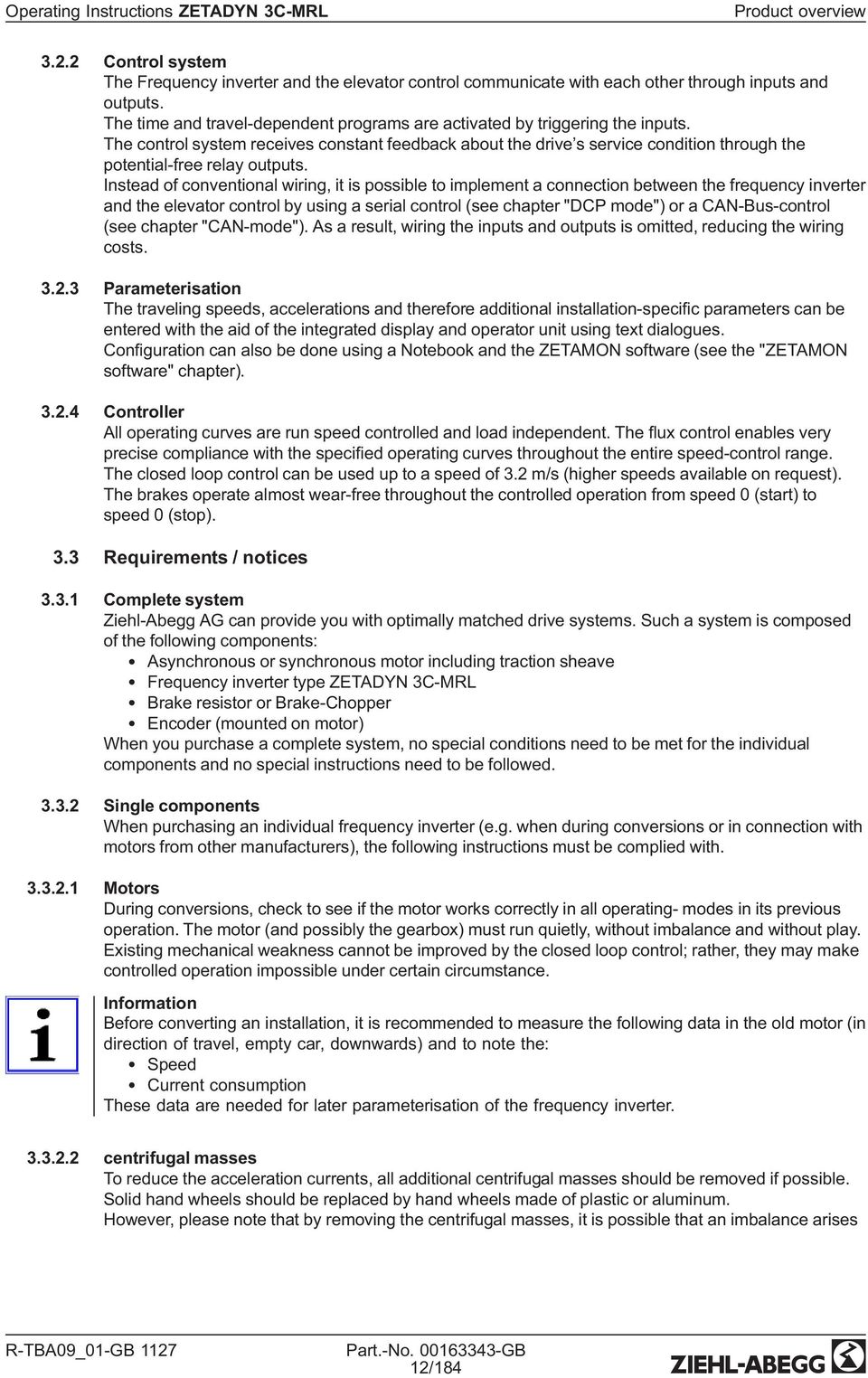
13 Product overview Frequency inverter When selecting the frequency inverter, it is assumed that the motor to be controlled will be loaded with the rated torque at the rated speed. Additional torque is required to accelerate the motor. To create this torque, an additional current of approx % of the rated current is necessary. That means during acceleration, the motor s current consumption is approx % of the rated current. The frequency converter can be loaded to up to 180% of the rated current for a maximum of 3 seconds. For this reason the current which is set when the motor accelerates may not be greater than 180% of the rated current. In general, valid is: INenn Frequenzumrichter INenn Motor Brake-Chopper / Brake-Resistor When selecting the Brake-Chopper / Brake resistor, please note that gearless installations regenerate much more energy than installations with gearboxes. That makes it feasible that twice the energy is regenerated with the same size frequency inverter. When retro tting an installation, you must recalculate the desigm of the Brake-Chopper / Brake resistor Encoder The pin assignment of the SUB-D sockets X-ENC9 and X-ENC15 for connecting the rotary encoder is not standardised. When using pulse encoders of other manufacturers, make sure that these have the same contact assignment and an interface with identical speci cation. Please refer to the "Electrical installation / encoder connection chapter for the pin assignments and interface speci cations. 3.4 Service & maintenance These jobs must be completed during the recurrent maintenance work: Check the device for dirt and clean if necessary Check the connections and tighten if necessary 3.5 Transport The device is packed ex factory to suit the transport method previously agreed. Always use the original packaging materials when transporting the device Avoid shocks and impacts to the device during the transport Storage duration: The storage duration depends particularly on the electrolytic capacitors because the oxide coating in the capacitor deteriorates. Storage duration: 12 months at C 24 months at C 36 months at C If storage exceeds the stated maximum storage times, you must carry out a reformation of the capacitors before applying the entire mains voltage to the inverter. New formation: To reform, the frequency inverter needs to be connected to reduced voltage for ca. 1 hour (230V AC at L1 / L2). 3.6 Disposal & recycling Disposal must be carried out professionally and environmentally friendly in accordance with the legal stipulations. 13/184
14 Mechanical installation 4 Mechanical installation 4.1 General notes The frequency inverter ZETADYN 3C-MRL is a compact device, designed especially for the installation on the machine carrier. An installation in the control cabinet or on the wall is not provided. Warning! The following points must be complied with during the mechanical installation to avoid causing a defect in the device due to assembly errors or environmental in uences: Before installation Remove the device from the packing and check for any possible shipping damage Carry out installation only on a clean, level and stable foundation Assemble the device outside of the traf carea During installation Mount the device in a torsion free conditions Installation position: vertical, connection terminals (L1, L2, L3) at bottom; no horizontal assembly Mount the device in a torsion free conditions avoid that drilling chips, screws and other foreign bodies reach the interior of the device Maintain the stated minimum clearances to ensure unobstructed cooling- air feed as well as unobstructed outgoing air discharge (see g.) Ambient conditions Prevent humidity Avoid aggressive and conductive materials in the environment Switch cabinet installation CAUTION! Caution! The device is designed for installation on the machine carrier in the lift shaft. An adequate cooling must be ensured for assembly in the switch cabinet. The power loss of the device (see chapter "Technical Data") must be taken into account here. The speci ed installation position and the minimum distances must be observed when assembling in the switch cabinet. 14/184

15 Mechanical installation 4.2Fixation The ZETADYN 3C-MRL disposes of an installation type which takes account into the special installation situation Procedure 1. Mount the xing plate (1) with absorbers (2) und 4 xing screws M8x50 (5) on the machine carrier 2. Hook the housing (3) of the ZETADYN 3C-MRL into the fastening lugs (4) of the xing plate (1) 3. Screw both parts together with 2 xing screws M6x12 (6) Mounting the ZETADYN 3C-MRL 15/184

16 Mechanical installation 4.3 Dimensions and minimum distances 1 2 Dimensions and minimum clearances ZETADYN 3C013-MRL-BI to ZETADYN 3C013-MRL-BI 1 Air inlet 2 Cable inlet 1 2 Dimensions and minimum clearances ZETADYN 3C013-MRL-BE to ZETADYN 3C013-MRL-BE 1 Air inlet 2 Cable inlet 16/184
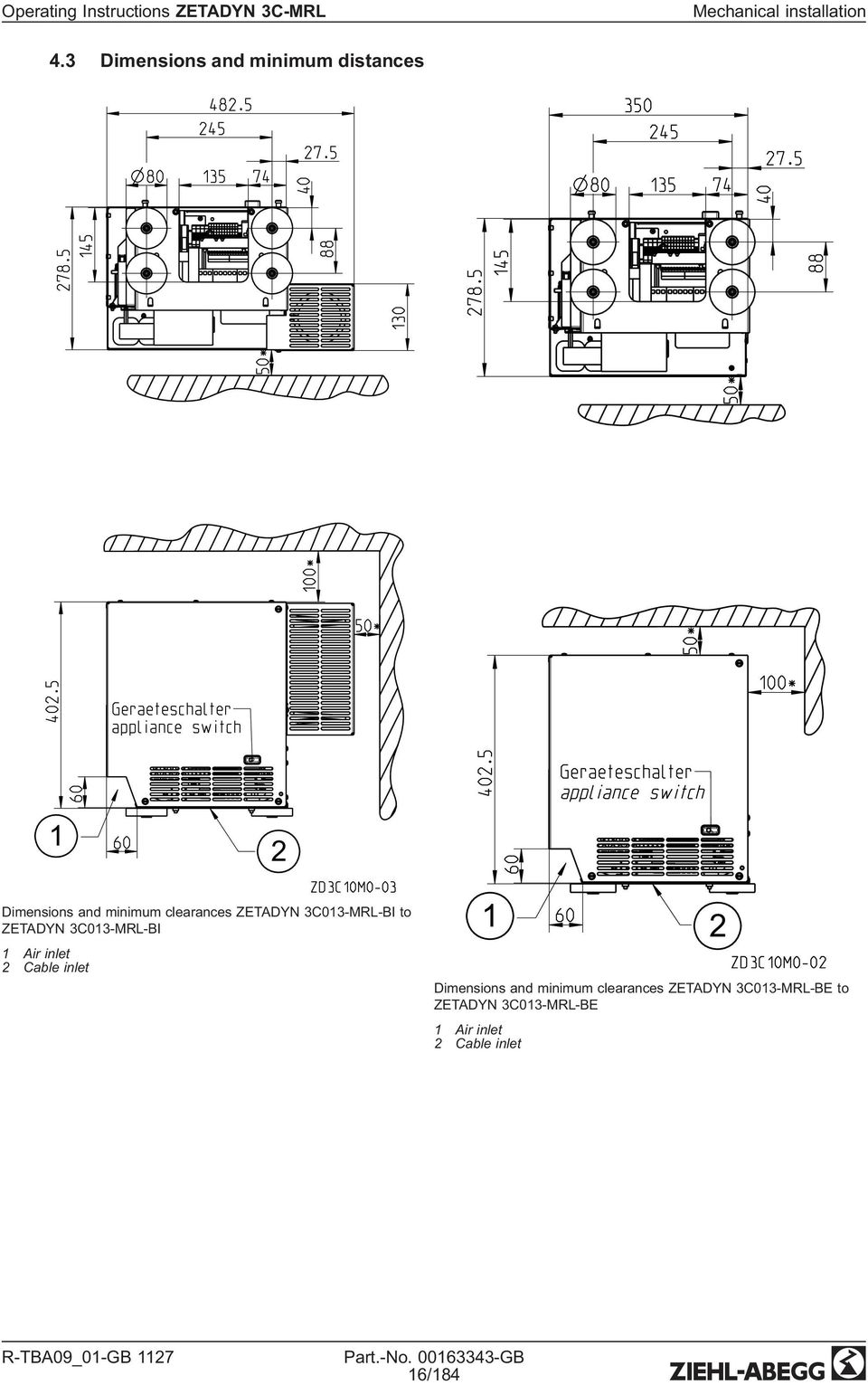
17 Electrical installation 1 2 Dimensions and minimum clearances ZETADYN 3C013-MRL-AI to ZETADYN 3C013-MRL-AI 1 Air inlet 2 Cable inlet 5 Electrical installation Danger! It is forbidden to carry out work on electrically live parts. Even after disconnection, the DC-link (terminals X1: +DC / X1: -DC) are still live. Wait at least 3 minutes before working on the device Danger! Operating the ZETADYN 3C-MRL with the housing cover removed is prohibited because energized, exposed parts are present inside the device. Disregarding this regulation can lead to severe personal injury. Work on electric components may only be carried out by trained electricians or by persons instructed in electricity under the supervision of an electrician in accordance with electrical engineering regulations. A second person must always be present when working on energized parts or lines who disconnects in case of emergency. 17/184

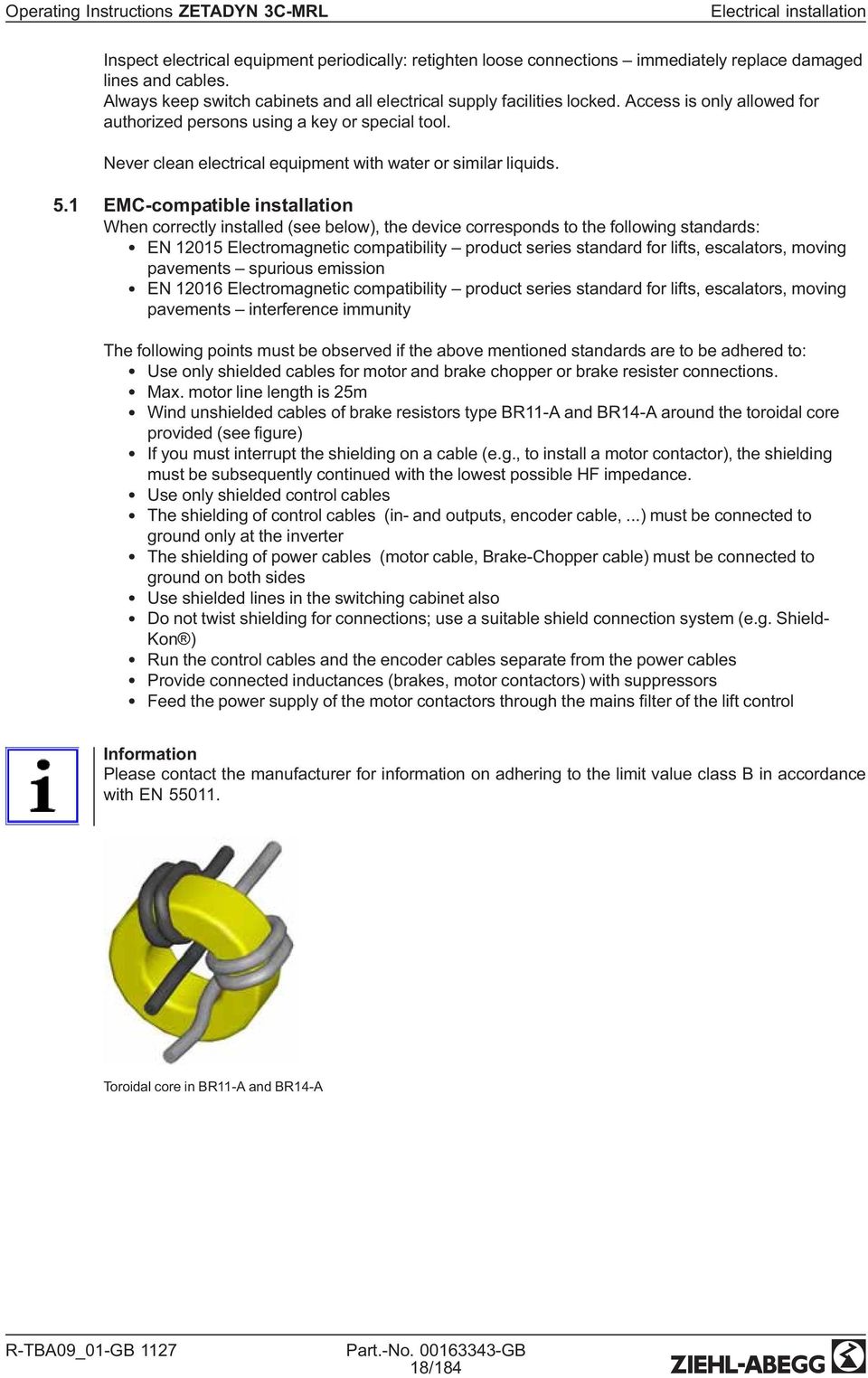
18 Electrical installation Inspect electrical equipment periodically: retighten loose connections immediately replace damaged lines and cables. Always keep switch cabinets and all electrical supply facilities locked. Access is only allowed for authorized persons using a key or special tool. Never clean electrical equipment with water or similar liquids. 5.1 EMC-compatible installation When correctly installed (see below), the device corresponds to the following standards: EN Electromagnetic compatibility product series standard for lifts, escalators, moving pavements spurious emission EN Electromagnetic compatibility product series standard for lifts, escalators, moving pavements interference immunity The following points must be observed if the above mentioned standards are to be adhered to: Use only shielded cables for motor and brake chopper or brake resister connections. Max. motor line length is 25m Wind unshielded cables of brake resistors type BR11-A and BR14-A around the toroidal core provided (see gure) If you must interrupt the shielding on a cable (e.g., to install a motor contactor), the shielding must be subsequently continued with the lowest possible HF impedance. Use only shielded control cables The shielding of control cables (in- and outputs, encoder cable,...) must be connected to ground only at the inverter The shielding of power cables (motor cable, Brake-Chopper cable) must be connected to ground on both sides Use shielded lines in the switching cabinet also Do not twist shielding for connections; use a suitable shield connection system (e.g. Shield- Kon ) Run the control cables and the encoder cables separate from the power cables Provide connected inductances (brakes, motor contactors) with suppressors Feed the power supply of the motor contactors through the mains lter of the lift control Information Please contact the manufacturer for information on adhering to the limit value class B in accordance with EN Toroidal core in BR11-A and BR14-A 18/184
19 Electrical installation Cables motor / brake resistor Contacting the shielding on the frequency converter Motor feeder cable On the brake resistor the shielding must be connected with earth potential with the provided clip (see g.). Cable brake resistor (only with ZETADYN 3C-MRL-BE) The cable of the brake resistor is connected directly at the frequency inverter. The shielding must be connected to earth potential at the frequency inverter (see g.). 19/184

20 Electrical installation Contacting the shielding on the motor Connect the shielding on the motor side to the PE junction that is located directly on the motor housing. For prefabricated motor lines from Ziehl-Abegg, the shielding connection is provided with a ring cable eye for the corresponding thread size. When using non-prefabricated lines, implement the shielding connection by using a suitable shielding connection system (e.g. Shield-Kon ) Contacting the shielding on the brake resistor On the brake resistor the shielding must be connected with earth potential with the clip provided (see g.). EMC-connection brake resistor 20/184

21 Electrical installation 5.2Con guration / Terminal positions Device structure ZETADYN 3C-MRL- AI 1 Power unit 2 Controller unit (with open loop control inputs and control outputs) 3 Appliance switch 4 Brake contactors 5 Motor contactors 6 Brake resistor 7Power contactor 8 Fuse power supply UPS Device structure ZETADYN 3C-MRL-BI and ZETADYN 3C-MRL- BE 1 Power unit 2 Controller unit (with open loop control inputs and control outputs) 3 Appliance switch 4 Brake contactors (optional) 5 Motor contactors 6 Brake resistor (only with ZETADYN 3C-MRL BI) X400 X35 X70 Q1 X2 X-300 Terminal positions ZETADYN 3C-MRL-AI Q1 Line X2 Motor X300 Power supply motor contactors / brake contactors / remote / monitoring control voltage / brakes / emergency power supply brake release X400 Monitoring brake contactors and standstill / motor temperature / manual brake release X70 Phase failure detection / UPS power supply X2 X-K Q1 Terminal position ZETADYN 3C-MRL BI and ZETADYN 3C-MRL- B Q1 Line X2 Motor X-K Motor contactors / contactor monitoring / brake contactors (option) / brakes (option) / two-circuit test (option) / manual brake release (option) 21/184
22 Electrical installation X-O X-I X-CO X-BC X-EXT X-MMC X-PAD X-MT X-DCP X-CAN / X-AN X-ENC15 X-ENCO X-BR Position of the controller unit connection terminals X-EXT external 24V DC power supply X-BC Allocation of Brake-Chopper / Brake-Resistor X-CO Contactor monitoring X-I Digital inputs X-O Digital outputs X-MMC Memory card X-DCP DCP X-CAN CAN X-ENCO Arti cial encoder X-BR Motor brake monitoring X-ENC8 Encoder X-ENC9 Encoder SUB-D X-ENC15 Absolute encoder SUB-D X-MT Motor temperature monitoring 5.3 Cable laying To lead the different cables in the ZETADYN 3C-MRL, device is equipped with several cable inlets. For strain-relief clips and clamps for cable ties are provided Cable laying ZETADYN 3C-MRL ZETADYN 3C-MRL-AI ZETADYN 3C-MRL-BI and ZETADYN 3C-MRL-BE 1 Motor cable / control cables (X-I, X-O, DCP) / encoder cable1 Motor cable / control cables (X-I, X-O, DCP) / encoder cable / brake monitoring cable / brake cable / brake monitoring cable / cable brake resistor 2 Power line / brake cable 2 Power line 22/184
23 Electrical installation 5.4 Protective ground connection In accordance with the de ned networks in DIN EN 60990, the device has a leakage current > 3.5 ma so it must be permanantly connected. The protective ground must be made double in accordance with EN Point and up to a cross section of at least 10 mm². An M6 threaded bolt is available on the frequency inverter to connect the protective ground (see Fig.). Protective earth conductor connection ZETADYN 3C-MRL 5.5 Mains connection (Q1) Caution! Before connecting to mains you have to check if the technical Datas on the rating plate of the grequency inverter are according to the required connecting values Network form The mains lter and frequency converter are designed for use in an earthed supply system. Permissible network forms are: TN network TT network Information The mains lter and frequency converter are unsuitable for use in the IT network! 5.5.2Line cross-section The line cross-section must be speci ed dependent on the motor s rated current and the ambient conditions (e.g. temperature, wiring method) in accordance with DIN VDE Mains fuse The fuse protection is implemented in accordance with the line cross-section used Type of cable Both rigid and exible lines can be utilized. The use of wire-end sleeves is recommended for exible lines. The mains line does not have to be shielded. 23/184
24 Electrical installation Connection 1 L1 L2 L3 ZETADYN 3C-MRL Q N* PE Mains connection ZETADYN 3C-MRL 1 Mains 3~ 400V/PE/50Hz * only with ZETADYN 3C-MRL-AI Remote (only with ZETADYN 3C-MRL-AI) The ZETADYN 3C-MRL-AI is equipped with an internal mains contactor. To put the frequency inverter into operation, in addition to apply the power supply the mains contactor K0 must be activated. Technical data mains contactor Operating voltage VAC Power consumption Energizing max. 48 W Standstill max. 6 W BR TB3 TB4 14 Q1 13 A1 A2 K0 X X Connection mains contactor with ZETADYB 3C-MRL-AI 1 Remote 2 Phase failure detection BR Brake resistor Q1 Appliance switch K0 Power contactor 24/184
25 Electrical installation 5.6 Line reactor-radio interference lter NF The mains choke and radio interference suppression lter integrated into the device ensures compliance with the product series standards listed below: EN Electromagnetic compatibility product series standard for lifts, escalators, moving pavements spurious emission EN Electromagnetic compatibility product series standard for lifts, escalators, moving pavements interference immunity 5.7 Residual current operated device (RCD) Danger! According to DIN EN it is not permissible to use pulsed current sensitive RCD's (type A) because a direct current component in the error current could prevent the RCD from triggering. A universal current-sensitive, selective RCD (type B) according to DIN-VDE must be used To ensure as high a degree of reliability as possible we recommend a release current of 300 ma, where a fault current circuit breaker is used. Information Please note that even when using a correct type B RCD, false triggering due to high protective earth currents (stray current) can still occur and that operation with these protective devices is not possible. 5.8 Control transformer in the mains feed line CAUTION! Caution! When using a control transformer in the frequency inverter s mains supply line, you must connect a capacitor parallel to the transformer s primary winding (see Fig.). The capacitor is used to prevent an extreme increase in voltage in case the voltage fails in one of the phases to which the transformer is connected. This voltage increase can lead to destruction of the line lter. The cause of voltage increases is resonance of the control transformer with the radio-interference suppression components, which are always used in frequency inverters. 1 L1 L2 L3 ZETADYN 3C-MRL Q N* PE 0V 0V Cx 400V 230V 2 3 Control transformer in the mains feed line 1 Mains 3~ 400V/PE/50Hz 2 Capacitor 3 Control transformer * only withi ZETADYN 3C-MRL-AI Recommended capacitor types for Cx: Epcos Typ B µF/640V-AV Condensers for motor starting with following data: 10µF/450V-AC 25/184
26 Electrical installation In addition, you must comply with the following: During sequential disconnection, switch off the phase on which the transformer is operated last Do not oversize the transformer If a loaded and an intermittently unloaded transformer is operated in the open loop control, operate these on the same phases 5.9 Motor connection (X2) Line cross-section The line cross-section must be speci ed dependent on the motor s current and the ambient conditions (e.g. temperature, wiring method) in accordance with DIN VDE Type of cable Always use shielded cables for the motor connections! Both rigid and exible lines can be installed. The use of wire-end sleeves is recommended for exible lines Cable lengths The maximum line length is 3 m. With a motor power line >3 m compliance with DIN EN (electromagnetic compatibility spurious emission and DIN EN (electromagnetic compatibility interference immunity) can no longer be guaranteed Connection The motor connection is designed with spring contact terminals. To avoid damage to the connection terminals and to ensure a safe contact, a suitable screwdriver must be inserted into the terminals as far as it will go to fully open them when connecting cables. Warning! When operating the motor with an encoder, the feed line to the motor must be connected on the motor and inverter side phase-correct: U R U/VR V/WR W. Never swap the connection; not even if the rotary direction of the motor is false!! If the motor phases are swapped, motor control is generally not possible. This can lead to jerky movements or uncontrolled acceleration of the motor. K K X2 U V W U V W M 3~ P1 P2 Asynchronous motor connection K K X2 U V W U V W M 3~ R4 R3 P1 P2 R2 R1 Synchronous motor connection 26/184
27 Electrical installation Information If an emergency evacuation is carried out by opening the brakes, the motor windings must be short-circuited for the evacuation to prevent an uncontrolled acceleration of the elevator. The short-circuit generates a speed-dependent braking torque, suf cient in most cases to limit the elevator speed to a safe level. CAUTION! If operating with synchronous motors from other manufacturers, you have to ensure that a manually emergency evacuation is approved Motor temperature monitoring (X-K / X400) Information The frequency inverter must be equipped with the option module EM3-MOT-TEMP (item no ) for motor temperature monitoring! Information The detection of over temperature of the motor doesn't cause a drive interruption. The current drive will be completed. If an over temperature of the motor will be detected at stop, there is no further drive possible. The temperature monitoring is carried out according to IEC : (switching point at 3500Ω) The following sensor types can be used: PTC thermistor (PTC according to DIN 44082) Temperature sensor KTY Thermal circuit breaker The used sensor has to be parametrized in the menuemonitoring/p1p2! Monitoring -" P1P2 On -" On Motor-temp. monitoring U V W PE X400* X-K** P1 P1 M 3~ P2 P2 Temperature monitoring connection * with ZETADYN 3C-MRL-AI ** with ZETADYN 3C-MRL-BI or ZETADYN 3C-MRL-BE Information If the temperature monitor is not used, it must be switched off (Monitors/P1P2=Off). Short-circuiting of the inputs P1 and P2 is detected as a fault by the ZETADYN 3. 27/184
28 Electrical installation 5.11 Digital inputs (X-IN) Standard, there are digital inputs available on the X-IN 8 terminals for parallel activation of the frequency inverter. The inputs are pre-parameterized but can be assigned with other functions by modifying the parameters The inputs can be activated galvanically isolated by an external 24 V power supply in the control system or by the internal 24 V supply in the frequency inverter. Information Use shielded cables for the connections. The shielding must be connected to the terminal X-IN shielding connection Connection with external power supply X-IN +24V +24V _IN I01 I02 I03 I04 I05 I06 I07 I GND _IN 10 GND (1) (2) (3) (4) (5) (6) (7) (8) (9) (10) (11) (12) (13) V +24V Connection of digital input with external power supply 1 Control system () terminal designation of connector * Wire number of the pre-assembled connecting lead X-I Information When using the external power supply the bridges between the terminals +24V / +24V_IN and GND / GND_IN the pre-assembled control cable X-I are not required. These must be removed! Connection with internal power supply X-IN +24V +24V _IN I01 I02 I03 I04 I05 I06 I07 I GND _IN GND (1) (2) (3) (4) (5) (6) (7) (8) (9) (10) (11) (12) (13) Connection of digital input with internal power supply 1 Control system () terminal designation of connector * Wire number of the pre-assembled connecting lead X-I 28/184
29 Electrical installation Information When using the internal power supply a bridge must be inserted between the terminals +24V / +24V_IN and between GND / GND_IN. These bridges are already integrated into the preassembled X-I cable. The cable GND_IN (wire no.10) is not required. This must be removed from the connection terminal both on the converter side and the control side and insulated. CAUTION! Caution! The internal 24V power supply is provided solely for the digital inputs. Switching consumer load with this voltage is prohibited! Technical data The digital inputs comply with the IEC TYPE 2 industry standard. Voltage range Switching level low/high Current consumption at 24 V Clamping range VDC <5 VDC / >11 VDC typ ma max. 1,5 mm² Terminal assignment X-IN You can con gure the inputs I1 I8 assignments. The con guration can be implemented by: Presetting the used control system (assignment corresponding to the control requirements) Free con guration Implement con guration of the digital inputs in the "Control\CONFIG" menu. The input assignments dependent on the con guration: Con guration Inputs I01 I02 I03 I04 I05 I06 I07 I08 00:Free RF* V1* V2* V3* VZ* RV1 UP* 01:ZA_IO RF V1 V2 V3 VZ RV1 UP 03:BP_IO RF V1 V2 V3 VZ RV1 UP 08:KN_IO RF V1 V2 V3 VZ RV1 UP 11:NL_IO RF V1 V2 V3 VZ RV1 UP RV2 DOWN* RV2 DOWN RV2 DOWN RV2 DOWN RV2 DOWN Free* Free* Free* Free* Free* 13:SS_IO RF V1 V2 V3 VZ RV1 UP RV2 DOWN V4* 15:ZA_BIN RF DIR BIN0 BIN1 BIN2 Free* Free* Free* 16:WL_IO RF V1 V2 V3 VZ RV1 UP 21:ST_IO RF V1 V2 V3 VZ RV1 UP 24:CSILVA RF BIN0 BIN1 BIN2 Free 25:S+S SBIN2 SBIN1 SBIN0 RV1 UP RV2 DOWN RV2 DOWN RV2 DOWN RV2 DOWN Free* Free* RV1 UP Free* Free* Free* Free* 27:MAS_BIN RF DIR MBIN0 MBIN1 MBIN2 BR1 BR2 Free* 30:KS_IO RF V1 V4 V2 VZ RV1 UP RV1 UP V3* * The function of the inputs can be changed 29/184
30 Electrical installation Information To be able to travel, at least the following input signals need to be present: Controller enable Speed Direction default Binary traveling speed defaults Standard (CONFIG=15:ZA_BIN) Travel speed V_3 Binary inputs BIN2 BIN1 BIN V V V V V V V Digital outputs (X-OUT) Digital outputs X-OUT The connection terminal X-OUT is equipped with 4 digital outputs as zero potential relay contacts with normally open function. The functions of the outputs are pre-parameterised but can be assigned other functions by changing the parameters Connection X-OUT X-OUT O11 O14 O21 O24 O31 O34 O41 O44 (1) (2) (3) (4) (5) (6) (7) (8) (9) (10) (11) 1* 2* 3* 4* 5* 6* 7* 8* 1 Connection of the digital outputs X-OUT 1 Control system () terminal designation of connector * Wire number of the pre-assembled connecting lead X-O Digital output X-BC:PWM The connection terminal X-BC is equipped with 1 digital output, connection PWM, with normally open function. The functions of the output is pre-parameterised but can be assigned another function by changing the parameter. Information WARNING! The PWM output does not have zero potential. The GND potential of the internal 24 V mains supply is connected! 30/184
31 Electrical installation Connection PWM X-BC PWM (1) 24V (2) Kx BC (3) (4) Connection of the digital output PWM Kx Control relay () terminal designation of connector Technical data X-OUT X-BC (PWM) Short-circuit-proof no* Min. switching capacity 5 ma / 12 VDC 5 ma / 24 VDC Max. switching capacity 2 A / 250 VAC 50 ma / 24 VDC Line cross-section max. 2,5 mm² max. 1,5 mm² CAUTION! Caution! * In order to protect the relay contacts, switched inductivities must be provided with an external suppressor circuit (suppressor diode, RC element) Terminal assignment X-OUT The output assignments can be con gured. The con guration can be implemented by: Presetting the used control system (assignment corresponding to the control requirements) Free con guration The output assignments dependent on the con guration: Implement con guration of the digital outputs in the Control system\config menu. Please refer to the "Parameter list / Control menu" chapter for a description of the individual parameters Con guration Outputs O11 - O14 O21 - O24 O31 -O34 O41 - O44 PWM 00:Free Fault* MB_Brake* MotContact* V < V_G1* AUS* 01:ZA_IO Fault MB_Brake MotContact V < V_G1 AUS 03:BP_IO Fault MB_Brake MotContact V < V_G1 AUS* 08:KN_IO Fault MB_Brake MotContact V < V_G1 AUS* 11:NL_IO Fault MB_Brake MotContact V < V_G1 AUS* 13:SS_IO Fault MB_Brake MotContact V < V_G1 AUS* 15:ZA_BIN Fault MB_Brake MotContact V < V_G1 AUS* 16:WL_IO Fault MB_Brake MotContact V < V_G1 AUS* 21:ST_IO Fault MB_Brake MotContact V < V_G1 AUS* 24:CSILVA Fault MB_Brake MotContact V < V_G1 AUS* 25:S+S MotContact MB_Brake V=O Fault AUS* 27:MAS_BIN Fault MB_Brake MotContact Off* AUS* 30:KS_IO Fault MB_Brake MotContact V < V_G1 AUS* * The function of the outputs can be changed 31/184
32 Electrical installation 5.13 DCP interface (X-DCP) Alternative to conventional wiring, it is also possible to activate the frequency inverter through a DCP protocol via the RS485 interface X-DCP (see "DCP operation chapter). Information Operating the frequency inverter with DCP protocol is only feasible with the option module EM3-CAN- DCP (item no )! Information Use a shielded cable for the connection. The shielding must be grounded to ground on both ends Make the connection between the frequency inverter and the control system without additional terminal points. The maximum line length is 50 m Electrical connection X-DCP (4) 0VD (3) GND DB (2) DATA - (B) DA (1) DATA + (A) DCP connection () terminal designation of connector 5.14 Encoder connection synchronous motors (X-ENC15) Information For operating synchronous motors, the frequency inverter must be equipped with the right optional board to suit the encoder type used! Absolute value encoder with EnDat or SSI interface: optional board EM3-ENC-SYN-ZA (art. no ) Absolute value encoder type ERN1387 (not for ZETADYN 3C-MRL): Options board EM3-ENC- SYN-01 (art. no ) CAUTION! Caution! The SUB-D jack X-ENC15 pin assignments are not standardized. When using external encoders, make sure that they have the identical contact assignments and an interface with identical speci cations. CAUTION! Caution! Before the impulse encoder can be plugged in or connected, the encoder type and the encoder resolution need to be parameterized in the "Encoder & BC/ENC_TYP" and "Encoder & BC/ /ENC_INC" menu. Encoder & BC -" ENC_Typ EnDat/SSI -" EnDat/SSI Encoder Typ Encoder & BC -" ENC_Inc " 2048 Encoder resolution 32/184
33 Electrical installation Technical data X-ENC15 Encoder types Absolute value encoder with EnDat or SSI interface Absolute value encoder type ERN1387 (not for ZETADYN 3C- MRL): Encoder resolution pulse / revolution Input resistor 120 Ω Cut-off frequency 200 khz Sine differential signal (at 2.5 V offset 0,6 Vss... 1,2 Vss (typ. 1Vss) against GND) Connection cable Shielded twisted pair cable Max. cable length 25 m Pin assignment X-ENC15 for absolute value encoder with EnDat/SSI interface 1 DATA Data line for communication with the absolute encoder 2 /DATA Data line inverse 3 U+ sens Sensor cable for encoder voltage (positive) 4 +5V_REG Controlled +5 V power supply (With missing encoder the power supply is switched off) 5 DGND Ground power supply absolute encoder 6 not used 7 B Analog track B 8 not used 9 /CLK Clock signal invers 10 CLK Clock signal for serial transfer 11 U- sens Sensor cable for encoder voltage (negative) 12 A Analog track A 13 /A Analog track A inverse 14 /B Analog track B inverse 15 GND_A_B Ground for internal shielding Housing Shielding 33/184
34 Electrical installation Pin assignment X-ENC15 for absolute value encoder type ERN1387 (not for ZETADYN 3C-MRL) 1 not used 2 not used 3 U+ sens Sensor cable - encoder voltage 4 +5V_REG Controlled +5 V power supply (With missing encoder the power supply is switched off) 5 DGND Ground power supply absolute encoder 6 /C Analog track C inverse 7 B Analog track B 8 C Analog track C for transmitting position 9 /D Analog track D inverse 10 D Analog track D for transmitting position 11 U- sens Sensor cable - encoder voltage 12 A Analog track A 13 /A Analog track A inverse 14 /B Analog track B inverse 15 GND_A_B Ground for internal shielding Housing Shielding 5.15 Simulating interruption of the encoder line during the acceptance by Technical Control Board The simulation of the interruption of an encoder line can be practically implemented by pulling the encoder line plug during travel and then plugging it back in after the inspection has been completed. It is always possible to unplug and plug back in all sinusoidal, incremental and absolute rotary encoders with the frequency inverter switched on. Information If the encoder is plugged back in when the controller is switched on, it will not be recognized by the frequency inverter. To recognize the encoder, the device must be switched off and then back on. The following procedure is recommended to check the behavior of the frequency controller when the encoder line is interrupted: Switch on the frequency inverter Apply a travel command Pull the encoder line during the drive Behavior of the frequency inverter during fault Switch off the frequency inverter and wait for at least 3 minutes until the device is completely voltage free Plug the encoder line back in 5.16 Arti cial encoder (X-ENCO) The arti cial encoder converts the signals of the encoder attached to the motor into differential signals according to ANSI Standard RS422. The resolution of the arti cial encoder is identical with the encoder resolution. Information When connecting an external 24V voltage source to terminal X-EXT, the arti cial encoder remains active even if the frequency inverter is switched off 34/184
35 Electrical installation Technical data X-ENCO Output signal high Output signal low Rload Short-circuit-proof Connection cable Clamping range min. 2,8 V / 8 ma max. 0,4 V / 4 ma 120 Ω no Shielded twisted pair cable max. 1,5 mm² Connection X-ENCO X-ENCO 1 X /X Y /Y (6) (5) (4) (3) GND (2) (1) Arti cial encoder connection 1 Signals depending on the rotating direction of the motor (with view to the power take-off side) () terminal designation of connector 5.17 External 24V power supply (X-EXT) By applying an external 24V power supply to terminal X-EXT, the following functions are active even when the frequency inverter is switched off: Communication between the control system and the frequency inverter Arti cial encoder ZETAPAD (parameter changes is possible) USB interface of the ZETAPAD Technical data Voltage range Current consumption V max. 625 ma Connection X-EXT X-EXT 24V _EX GND _EX (1) (2) +24V 0V 1 Connection external power supply 1 external power supply () terminal designation of connector 35/184
36 Electrical installation 5.18 Motor contactors The installed motor contactors are selected depending on the motor type and the corresponding motor data. The contacts of the motor contactors are forced in accordance with DIN EN When operating synchronous motors, one main contactor with 3 main contacts (3x NO) and one main contactor with 4 main contacts (2x NO and 2x NC) are used for the motor connection. Both contactors are equipped with 3 auxiliary contacts (2x NO and 1x NC) for the external contactor monitoring Activation of the motor contactors With integrated brake contactors The integrated motor contactors are activated by the frequency inverter. The power supply takes place on terminal X-300 (ZETADYN 3C-MRL-AI) respectively X-K (ZETADYN 3C-MRL-BI und ZETA- DYN 3C-MRL-BE). The signal to activate the motor contactors is switched by the digital output Without brake contactors (option with ZETADYN 3C-MRL-BI and ZETADYN 3C-MRL-BE) The integrated motor contactors are activated by the elevator control. The activation takes place by applying the operating voltage to terminal X-K. Warning! The power supply of the motor contactors has to be integrated in the safety circuit of the lift. If the safety circuit will be interrupted, also the power supply of the motor contactors has to be interrupted! Information The power supply of the motor contactors must be fed via the mains lter of the lift control. If this is not possible a separate mains lter (e.g. CORCOM type 3VK1F7135) can be used alternatively. Information Depending on the desing, motor contactors with AC- or DC-voltage will be used. As with the use of contactors with DC-voltage the recti eres are already integrated in the inverter, for the activation of the motor contactors AC-voltage can be applied to the terminal X-K generally. CAUTION! Caution! Note operating voltage of the contactors! A wrong operating voltage can destroy the motor contactors! Technical data motor contactors DC voltage Operating voltage VDC Power consumption Energizing max. 8 W Standstill max. 8 W AC voltage Operating voltage VAC Power consumption Energizing max. 245 W Holding max. 26 W 36/184
37 Electrical installation V1 ~ + - ~ K1 A1 K2 A2 A1 A2 K V3 ~ + - ~ K1 A1 K2 A2 A1 A2 K4 A1 A2 13 X-OUT 5 (O24) K (O21) X-OUT 7 (O31) K7.1 A1 A2 X-OUT 7 (O31) 8 (O34) X-OUT 5 (O24) 4 (O21) 8 (O34) A2 A2 K3 K7 A1 A1 X X-K L 1 N L 1 N Connection power supply motor contactors ZETADYN 3C-MRL-AI 1 Power supply contactor 2 Safety circuit Connection power supply motor contactors ZETADYN 3C-MRL-BI and ZETADYN 3C-MRL-BE 1 Power supply contactor 2 Safety circuit V1 + A1 ~ ~ K1 - A2 V2 + A1 ~ ~ K2 - A2 X-K L 1 N Connection power supply motor contactors ZETADYN 3C-MRL-BI and ZETADYN 3C-MRL-BE without brake contactors 1 Power supply contactor 2 Safety circuit Internal monitoring of the motor contactors (X-CO) The frequency inverter monitors the switching status of the motor contactors. The contactors must be applied during travel. Opening the contactors during travel (e.g. through chatter) leads to an immediate travel abort. CAUTION! Caution! Operating gearless motors is only permissible with connected and activated contactor monitoring! The contactor monitoring can be activated/deactivated in the Monitoring/CO menu. Monitoring -" CO Off -" CO1 Contactor control 37/184
38 Electrical installation Technical data internal contactor monitoring Monitoring voltage +24 VDC / 12 ma Contact type Normally open contact (NO) Number of inputs 2 Clamping range max. 1,5 mm² Information The two monitor contacts of the motor contactors are connected in series at the factory for internal contactor monitoring. The two motor contactors can also be monitored separately if necessary. X-CO X-CO +24V CO1 (1) (2) K K V CO1 (1) (2) K K CO2 (3) CO2 (3) Connection internal contactor monitoring ZETADYN 3C-MRL-AI - serial connection () terminal designation of connector Connection internal contactor monitoring ZETADYN 3C-MRL-BI and ZETADYN 3C-MRL-BE - serial connection () terminal designation of connector X-CO +24V CO1 (1) (2) K K CO2 (3) Connection internal contactor monitoring ZETADYN 3C-MRL-BI and ZETADYN 3C-MRL-BE without brake contactors - serial connection () terminal designation of connector X-CO X-CO +24V CO1 CO2 (1) (2) (3) K K V CO1 CO2 (1) (2) (3) K K Connection internal contactor monitoring ZETADYN 3C-MRL-AI - separate () terminal designation of connector Connection internal contactor monitoring ZETADYN 3C-MRL-BI and ZETADYN 3C-MRL-BE -separate () terminal designation of connector X-CO +24V CO1 CO2 (1) (2) (3) K K Connection internal contactor monitoring ZETADYN 3C-MRL-BI and ZETADYN 3C-MRL-BE -separate () terminal designation of connector 38/184
39 Electrical installation CAUTION! Caution! The internal 24V power supply is provided solely for the contactor monitoring. Switching consumer load with this voltage is prohibited! Information The frequency-inverter contactor monitoring does not substitute the motor contactors required by EN 81-1! 5.19 Brakes Brake release monitoring (X-BR) Information The brake release monitoring serves only for information about the operating state of the brakes. The monitor contains no safety functions. It is recommended to connect the brake air monitor to the ZETADYN 3 for optimum starting and stopping. Monitoring voltage +24 VDC / 12 ma Contact type Normally open contact (NO) or normally closed contact (NC) Number of inputs 4 Clamping range max. 1,5 mm² The contactor monitoring can be activated/deactivated in the menu Monitoring Monitoring -" BR 1*NC -" 3*NC Brake control (BR1..BR4) Connection X-BR X-BR +24V _B (6) 1 BR1 (5) BR2 (4) BR3 (3) BR4 (2) (1) Brake release monitor connection 1 Monitoring contacts () terminal designation of connector CAUTION! The internal 24V power supply is provided solely for the brake release monitoring. Switching consumer load with this voltage is prohibited! 39/184
40 Electrical installation Activating the brakes The integrated brake contactors are activated by the frequency inverter. The power supply of the brake contactors takes place on terminal X-300 (ZETADYN 3C-MRL-AI) respectively X-K (ZETADYN 3C-MRL-BI und ZETADYN 3C-MRL-BE). The signal to activate the brake contactors is switched by the digital output Information To reduce noises when switching-off the brake, during normal operation the brake is switched on the alternating current side. The brakes are switched-off slower and thus quiet through the recti er. To ensure instantaneous brake application in emergencies, during inspection drives and return rides, a second contactor, which disconnects the brake on the direct current side, is used. Warning! The power supply of the brake contactors has to be integrated in the safety circuit of the lift. If the safety circuit will be interrupted, also the power supply of the brake contactors has to be interrupted! Technical data brake contactors K3/K7* (acside) K4/K71* (dcside) K140/K141* (manual brake release) Operating voltage VAC VDC 20,4...26,4 VDC Power consumption 5 W max. 8 W max. 3,5 W * only with ZETADYN 3C-MRL-AI Emergency power suply Information If no voltage is available for opening the brake due to a fault in the power supply, an external power supply can be connected directly to terminal X-300 (ZETADYN 3C-MRL-AI) respectively X-K (ZETADYN 3C-MRL-BI und ZETADYN 3C-MRL-BE) 5 for manual opening of the brakes. This ensures fast rescue of trapped passengers in the event of a fault. 40/184
41 Electrical installation ZETADYN 3C-MRL-AI Activation for brakes without overexcitation X K K K K K140 V1 + ~ ~ - 8 (O34) K1 A2 K2 A K1 K2 A2 K7.1 A1 B 8 A U U K141 V7 + ~ ~ - X-OUT 7 (O31) X-OUT K7 4 (O21) 5 (O24) A1 A2 24 Q K140 K141 K K140 A2 K141 A2 K7 A1 A1 1 F1 (3,15A) X X X X A+ B+ 6 A/B- L 3 L 4 L N 2 L N Activation for brakes ZETADYN 3C-MRL-AI without overexcitation Activation for brakes with overexcitation X K K141 4T2 3L2 2T1 1L1 K7.1 K K141 V5 ROBA -switch ~ ~ V1 + ~ ~ - 8 (O34) K1 A2 A1 K K1 K2 A2 K7.1 A1 A2 A1 B 8 A U U K141 X-OUT 7 (O31) X-OUT K7 4 (O21) 5 (O24) A1 A2 24 Q K140 K141 K K140 A2 K141 A2 K7 A1 A1 13 F1 (3,15A) X X X X L 3 L 4 L N 2 L N Activation for brakes ZETADYN 3C-MRL-AI with overexcitation 1 End safety circuit 2 Power supply for the brakes with normal operation 3 Power supply for the brakes with brake test 4 Power supply for the brakes with evacuation 5 Input UPS 6 Emergency feed brake airing 7Manual brake release 8 Brake A/B Information After 2s, the supply voltage for the brake will be reduced to 104 VDC. This voltage is not suf cient for the opening of the brake! For this reason with manual opening of the brakes the push-buttons 6 and 7 ("open brake") must be activated latest 2s after activating the push-button 4 ("emergency operation") or the push-button 5 ("two-circuit test"). 41/184
42 Electrical installation ZETADYN 3C-MRL-BI and ZETADYN 3C-MRL-BE Activation for brakes without overexcitation X K K4 3 B U 2 V4 + ~ ~ A U K4 1 V3 + ~ ~ - K1 A1 A2 K2 A1 A2 K4 A1 A2 8 7 (O31) 5 (O24) 34 K K K K K3 5 X-OUT 8 (O34) X-OUT 4 (O21) A2 33 K K K K K3 2 K3 A1 X-K A B L N L 2 1 N Activation for brakes ZETADYN 3C-MRL-BI and ZETADYN 3C-MRL-BE without overexcitation Activation for brakes with overexcitation X3 4 V5 ROBA -switch ~ ~ K K4 B U A U K4 1 V3 + ~ ~ - K1 A1 A2 K2 A1 A2 K4 A1 A2 8 7 (O31) 5 (O24) 34 K K K K K3 5 X-OUT 8 (O34) X-OUT 4 (O21) A2 33 K K K K K3 2 K3 A1 X-K A B L N L 2 1 N Activation for brakes ZETADYN 3C-MRL-BI and ZETADYN 3C-MRL-BE with overexcitation 1 Power supply contactor 2 Voltage supply brakes 3 Safety circuit 4 Emergency operation / two-circuit test 5 manual brake release A/B 6 Emergncy power supply + brake A 7Emergncy power supply - brake A/B 8 Emergncy power supply + brake B 42/184
43 Electrical installation Information After 2s, the supply voltage for the brake will be reduced to 104 VDC. This voltage is not suf cient for the opening of the brake! For this reason with manual opening of the brakes the push-buttons 6 and 7 ("open brake") must be activated latest 2s after activating the push-button 4 ("emergency operation") or the push-button 5 ("two-circuit test") External monitoring functions Motor and brake contactors (ZETADYN 3C-MRL-AI, ZETADYN 3C-MRL-BI and ZETADYN 3C- MRL-BE) Information The switching states of the motor contactors must be monitored according to EN81-1. For the monitoring of the contactors potential-free contacts are avialable on the terminal X-400 (ZETADYN 3C-MRL-AI) respectively X-K (ZETADYN 3C-MRL-BI and ZETADYN 3C-MRL-BE) Technical data auxiliary contacts Contact type Min. switching capacity Max. switching capacity Clamping range 1x normally closed contact (NC) 1x normally open contact (NO) 5 ma / 17 VDC 6 A / 230 VAC 4 A / 24 VDC max. 4,0 mm² Assignment connection terminal X400 (ZETADYN 3C-MRL-AI) K K K K T3 K7 5L K2 13 K K1 22 X Connecting diagram ZETADYN 3C-MRL-AI 1 Monitoring brake contactors K7Brake contactor AC-side K7.1 Brake contactor DC-side 2 Monitoring the standstill K1 Motor contactor K2 Motor contactor K140 Contactor for manual brake release brake A K141 Contactor for manual brake release brake B K7Brake contactor AC-side K7.1 Brake contactor DC-side 43/184
44 Electrical installation Assignment connection terminal X-K (ZETADYN 3C-MRL-BI and ZETADYN 3C-MRL-BE) K2 33 K4 13 K2 41 K K K K K K K K K2 42 X-K X-K Connecting diagram contactor monitoring ZETADYN 3C-MRL-BI and ZETADYN 3C-MRL-BE - integrated brake contactors K1 Motor contactor K2 Motor contactor K3 Brake contactor AC-side K4 Brake contactor DC-side Connecting diagram contactor monitoring ZETADYN 3C-MRL-BI and ZETADYN 3C-MRL-BE - without integrated brake contactors K1 Motor contactor K2 Motor contactor Fault monitoring frequency inverter (only with ZETADYN 3C-MRL-AI) 2 (O14) X-OUT 1 (O11) X Connecting diagram fault monitoring X-OUT Output "Fault" 44/184
45 5.21 Connection suggestion ZETADYN 3C-MRL-AI ZETADYN 3C-MRL-AI for brakes without overexcitation E L1 L2 L3 PE F1 F2 F3 U V W M 3~ 8 9 P1 P2 Q1 K X300 Q K0 A1 X70 A X2 U V W X300 P1 P2 Z1 L1 L1 L1.1 U1 L2 L3.1 V1 L2 L2.1 W1 N2 +DC TB4 R TB3 TB2 TB1 K2 K R1 R2 R3 R * Option * Option U2 V2 W2 X1 L1 L2 L3 X1 +DC -DC R X-BC PWM +24 V BC X1 U V W X-CO +24V CO1 CO2 X-MT* P1 P2 X-ENC15 ZETADYN 3C-MRL-AI ZETADYN 3BF X-PAD X-ENCO X /X /Y GND X Y X-CAN / X-ANA* CH CL 0VC X-DCP* 0VD DB DA X-OUT O4 O44 O41 O3 O34 O31 O2 O24 O21 O1 O14 O11 X-EXT +24V_EX GND_EX X-BR +24 V_B BR1BR2BR3 BR4 +24V +24V _IN I01 X-IN I02 I03 I04 I05 I06 I07 I08 GND _INGND X Bremslüftüberwachung Brake release monitoring 7 X ZETAPAD 1 K K141 K140 K Q1 24 A1 K140 K141 A2 A1 A2 V1 ~ + ~ K1 A2 A1 K2 K A2 A1 K K7.1 A2 A1 K7 A1 A K140 K K K140 6T3 31 K L3 K2 K K7.1 K1 K X300 X N L 1 A B 12 V7 ~ 4 + ~ X F1 3,15 A X K K K141 K X L L A+ B+ A/B L N N L Operating Instructions ZETADYN 3C-MRL Electrical installation 45/184
46 ZETADYN 3C-MRL-AI for brakes with overexcitation E L1 L2 L3 PE F1 F2 F3 U V W M 3~ 8 9 P1 P2 7 ZETADYN 3C-MRL-AI ZETAPAD X Q X300 K L1 L2 L2 Z1 L1 L1.1 U1 L2.1 L3.1 N2 +DC TB4 TB3 TB2 TB1 R V1 W1 U2 V2 W2 X1 L1 L2 L3 X1 +DC -DC R X-BC PWM +24 V BC ZETADYN 3BF X-PAD X-ENCO X /X /Y GND X-CAN / X-ANA* CH CL 0VC X-DCP* X Y X70 Q K0 A1 A2 K140 A1 A2 K141 A1 A2 43 K K K7 2 3 K Q X2 U V W K K X1 U V W O4 O3 0VD DB DA 6 X-OUT O44 O41 O34 O31 V1 ~ + ~ K7 A1 A2 K1 A2 A1 K2 K A2 A1 K K7.1 A2 A1 O24 O2 R1 R2 O21 O14 O1 R3 R4 O X-CO +24V CO1 CO2 X-MT* P1 P2 X-ENC15 X-BR +24 V_B BR1BR2BR3 BR4 +24V +24V _IN I01 X-IN I02 I03 I04 I05 I06 I07 I08 GND _INGND X-EXT +24V_EX GND_EX 6T3 K K141 K K K140 X300 P1 P2 X X X L3 13 K K2 K * Option * Option N L 1 Bremslüftüberwachung Brake release monitoring A B 12 V5 X F1 3,15 A X ROBA -switch ~ ~ K K K K X L L A+ B+ A/B- 6 L N N L Operating Instructions ZETADYN 3C-MRL Electrical installation 46/184
47 Electrical installation 1 End safety circuit 2 Brake monitoring 3 Monitoring the standstill 4 Power supply brakes 5 Power supply UPS 6 Emergency feed brake airing 7Manual brake release 8 Remote 9 Phase failure detection 10 Power supply brake test 11 Power supply with evacuation 12 Brake magnets 13 Monitoring the frequency inverter 14 Control system 47/184
48 5.22 Connection suggestion ZETADYN 3C-MRL-BI / ZETADYN 3C-MRL-BE ZETADYN 3C-MRL-BI / ZETADYN 3C-MRL-BE for brakes without overexcitation E L1 L2 L3 PE F1 F2 F3 U V W M 3~ P1 P2 X2 U V W ZETADYN 3C-MRL-BI / ZETADYN 3C-MRL-BE Q1 2 1 L1 Z1 L1 L1.1 U1 U2 X1 L1 ZETAPAD ZETADYN 3BF X-PAD L2 L2 L2.1 L3.1 V1 W1 V2 W3 L2 L3 X1 +DC X-ENCO X /X Y /Y GND BR** +DC R -DC R X-CAN / X-ANA* CH TB2 TB1 X-BC PWM CL 0VC abgeschirmte Leitungen nur bei ZETADYN 3C-MRL-BE shielded cables only with ZETADYN 3C-MRL-BE K R1 R2 K X1 U V +24 V BC W O4 O3 O2 X-DCP* 0VD DB DA X-OUT O44 O41 O34 O31 O24 O21 V3 ~ + ~ K1 A2 A1 K2 A2 A1 K3 K4 A2 A1 A2 A1 R3 R X-CO +24V CO1 CO2 X-MT* P1 P2 X-ENC15 X-BR +24 V_B BR1BR2BR3BR4 +24V +24V _IN I01 X-IN I02 I03 I04 I05 I06 I07 I08 GND _IN GND O1 O14 O11 X-EXT +24V_EX GND_EX 4 K K K K K K K3 5 1 K3 2 K4 1 2 V4 ~ + ~ 6 K4 5 3 K4 4 X-K P1 P2 X-K X K K1 42 * Option * Option ** nur bei ZETADYN 3C-MRL-BI ** only with ZETADYN 3C-MRL-BI Bremslüftüberwachung Brake release monitoring 6 A B 4 3 L N L N 2 1 A B L L N Operating Instructions ZETADYN 3C-MRL Electrical installation 48/184
49 ZETADYN 3C-MRL-BI / ZETADYN 3C-MRL-BE for brakes with overexcitation E L1 L2 L3 PE F1 F2 F3 U V W M 3~ P1 P2 X2 U V W ZETADYN 3C-MRL-BI / ZETADYN 3C-MRL-BE Q L1 L2 L3 Z1 L1 L1.1 U1 L2.1 L3.1 V1 W1 U2 V2 W2 V 2 X1 L1 L2 L3 X1 +DC ZETADYN 3BF X-PAD X-ENCO X /X Y /Y GND ZETAPAD BR** +DC R -DC R X-CAN / X-ANA* CH K TB2 TB1 abgeschirmte Leitungen nur bei ZETADYN 3C-MRL-BE shielded cables only with ZETADYN 3C-MRL-BE K X1 U V X-BC PWM +24 V BC W O4 O3 CL 0VC X-DCP* 0VD DB DA X-OUT O44 O41 O34 O31 K3 A2 A1 V3 ~ + ~ K1 V5 A2 A1 K2 A2 A1 K4 ROBA -switch A2 A1 O24 O2 R1 R2 O21 O14 O1 R3 R4 O11 ~ ~ X-CO +24V CO1 CO2 X-MT* P1 P2 X-ENC15 X-BR +24 V_B BR1BR2BR3BR4 +24V +24V _IN I01 X-IN I02 I03 I04 I05 I06 I07 I08 GND _IN GND X-EXT +24V_EX GND_EX 4 K K K K K K K3 5 1 K3 2 1 K4 2 6 K4 5 3 K4 4 X-K P1 P2 X-K X K K1 42 * Option * Option ** nur bei ZETADYN 3C-MRL BI ** only with ZETADYN 3C-MRL BI Bremslüftüberwachung Brake release monitoring 6 A B 4 3 L N L N 2 1 A B L L N Operating Instructions ZETADYN 3C-MRL Electrical installation 49/184
50 ZETADYN 3C-MRL-BI / ZETADYN 3C-MRL-BE without brake contactors E L1 L2 L3 PE F1 F2 F3 U V W M 3~ P1 P2 X2 U V W Q X-K P1 Z1 L1 L1 L1.1 U1 U2 L2 L2.1 V1 V2 L2 L3.1 W1 W1 BR** +DC R TB2 TB1 abgeschirmte Leitungen nur bei ZETADYN 3C-MRL-BE shielded cables only with ZETADYN 3C-MRL-BE K2 1 2 K R1 R2 R3 R P2 * Option * Option ** nur bei ZETADYN 3C-MRL-BI ** only with ZETADYN 3C-MRL-BI ZETADYN 3C-MRL-BI / ZETADYN 3C-MRL-BE X1 L1 ZETADYN 3BF X-PAD L2 L3 X1 +DC X-ENCO X /X Y /Y GND -DC R X-CAN / X-ANA* CH X-BC PWM CL 0VC +24 V BC X-DCP* X1 U V O4 0VD DB DA X-OUT O44 O41 W O3 O34 O31 O24 O2 O21 O14 O1 O11 X-CO +24V CO1 CO2 X-EXT +24V_EX GND_EX X-MT* P1 P2 X-ENC15 X-BR +24 V_B BR1BR2BR3BR4 +24V +24V _IN I01 X-IN I02 I03 I04 I05 I06 I07 I08 GND _IN GND 1 X-K 6 Bremslüftüberwachung Brake release monitoring ZETAPAD V1** + ~ A1 ~ K1 A2 V2** + ~ A1 ~ K2 A K1 K1 K2 K Operating Instructions ZETADYN 3C-MRL Electrical installation 50/184
51 Accessories 1 End safety circuit 2 Power supply brakes 3 Two-circuit test/emergency operation 4 Manual brake release 5 Emergency feed brake airing 6 Control system 6 Accessories 6.1 Brake resistor During alternator operation, an electrical voltage is generated by the motor. This voltage is loaded into the frequency converter s intermediate circuit. To ensure that the voltage at the intermediate circuit capacitors does not exceed a limit value of approx. 760V, it is monitored. When the trigger voltage of approx. 680V is reached, the brake chopper or brake resistor is activated and the power generated in the alternator is converted to heat. As an option the created energy can be fed back to the mains power supply (e.g. with a Revcon power feedback unit) Technical data BR11-A BR14-A BR17 BR25 BR50 BR100 Electrical data Resistor [Ω] Max. supply voltage [V] 60 Max. peak current with 700 V [A] Max. on time with peak breaking [s] power at 120 s cycle time duration Max. on time with peak breaking power at 15 s cycle time duration [s] - - 1,5 1,4 1,3 Max. peak-braking power [kw] 7,7 vertical 6,16 horizontal Continuous braking power [kw] 0,45 vertical 0,36 horizontal 9,8 vertical 7,8 horizontal 0,85 vertical 0,68 horizontal 11,9 17, ,75 3,3 6,5 Trigger voltage [V] - Trigger-value temperature monitoring [ C] ±4K 125 ±4K Cooling Convection Ambient conditions Ambient conditions operation [ C] Ambient conditions storage [ C] rel. humidity [%] 90 Max. installation height [m] 2000* Protection class IP50 IP20 Physical conditions Dimensions w x h x d [mm] 225 x 124 x x 124 x x 230 x x 230 x x 414 x 185 Weight [kg] 1,25 2,94 2,6 4,8 8,5 Max. lenght connection cable [m] 1,0 1,0 5,0 * above 1000 m with power reduction of 1 % / 100 meters height 51/184
52 Accessories 6.1.2Mechanical installation Warning! When the device is overloaded, the air temperature can reach up to 400 C at a distance of 200 mm. Remaining in this area can lead to severe burns. You must take appropriate precautions. CAUTION! CAUTION! CAUTION! Caution! Due to the high amount of heat generation, it is only permissible to install the device outside of the switch cabinets! The devices must not be mounted on ammable surfaces Caution! The brake resistor cooling must not be impaired by the vents becoming covered. A re hazard exists if covered with ammable materials! Caution! Additional device cooling through external fans is prohibited because this would change the reaction characteristics of the temperature monitoring. Information The following points must be complied with during the mechanical installation to avoid causing a defect in the device due to assembly errors or environmental in uences: Before installation Remove the device from the packing and check for any possible shipping damage Carry out installation only on a clean, level and stable foundation Assemble the device outside of the traf carea During installation Mount the device in a torsion free conditions Mount the device in a torsion free conditions avoid that drilling chips, screws and other foreign bodies reach the interior of the device Installation position: horizontal, connection terminals at bottom; no horizontal assembly Maintain the stated minimum clearances to ensure unobstructed cooling- air feed as well as unobstructed outgoing air discharge Ambient conditions mounting the device on vibrating components is not allowed the device must not be exposed to any shock Prevent humidity Avoid aggressive and conductive materials in the environment Installation position Type BR11-A / BR14-A to preventgetting in contact with the hot surface, the brake resistor has to be mounted in a high of min. 2m or it has to be mounted with a protection against contact Horizontal or vertical installation position With vertical installation positions the cables must face downwards Maintain the minimum clearances to ensure unobstructed cooling- air feed as well as unobstructed outgoing air discharge! 52/184
53 Accessories 2 1 Installation position BR11-A / BR14-A 1 horizontal installation position with power reduction 2 vertical installation position Type BR17 / BR25 / BR50 / BR100 Installation position: horizontal, connection terminals at bottom; no horizontal assembly Maintain the minimum clearances to ensure unobstructed cooling- air feed as well as unobstructed outgoing air discharge! 2 Installation position BR17 / BR25 / BR50 / BR Dimensions Dimensions BR11-A Dimensions BR14-A 53/184
54 Accessories Dimensions BR17 / BR25 Dimensions BR50 Dimensions BR100 54/184
55 Accessories Minimum clearances Minimum clearances BR11-A / BR14-A vertical / horizontal Minimum clearances BR17 / BR25 / BR50 / BR100 CAUTION! Minimum clearances: 200 mm to non ammable materials ( re classi cation A1 according to EN ) 600 mm to materials of low ammability without smoke emission and without burning dripping ( re classi cation B, C-s1 do according to EN ) Electrical connection Warning! It is forbidden to work on the frequency converter under voltage (electrically alive). Even after disconnection, the DC-link (terminals X1:+DC / X1:-DC) is still live. Wait at least 3 minutes before working on the device Warning! Operating the device with the housing cover removed is prohibited because energized, exposed parts are present inside the device. Disregarding this regulation can lead to severe personal injury. Work on electric components may only be carried out by trained electricians or by persons instructed in electricity under the supervision of an electrician in accordance with electrical engineering regulations. A second person must always be present when working on energized parts or lines who disconnects in case of emergency. Inspect electrical equipment periodically: retighten loose connections immediately replace damaged lines and cables. Always keep switch cabinets and all electrical supply facilities locked. Access is only allowed for authorized persons using a key or special tool. 55/184
56 Accessories Never clean electrical equipment with water or similar liquids. CAUTION! Caution! An existing temperature monitor absolutely must be connected to the frequency inverter! Otherwise, the device could burn up during a malfunction! CAUTION! Caution! If the connection of a brake resistor (type BRxx) to the +DC and -DC terminals is faulty, it will emit a continuous power output and the device will become overheated. If a temperature monitor is not connected, the device will burn out! CAUTION! Caution! The brake resistor or brake chopper used must be con gured in the menu Encoder & BC /BC_TYP. Encoder & BC -" BC_TYP BR25 -" BR25 BR/BC-Typ Selecting cables Type BR11-A / BR14-A The brake resistors of the type BR11-A and BR14-A are equipped with prefabricated cables. These must be wound around the delivered toroidal core (see g.). Toroidal core BR11-A / BR14-A Type BR17 / BR25 / BR50 / BR100 Always use shielded cables for the connection! Due to the short load duration, the cable cross-section is not dependent on the Brake-Chopper / Brake resistor peak braking current. Allocating the conductor cross section to the frequency inverter Inverter Line cross-section Article-No. ZETADYN ZETADYN ZETADYN ZETADYN ZETADYN ZETADYN ZETADYN ZETADYN ZETADYN ,5 mm² 6,0 mm² (3,0 m) (5,0 m) (3,0 m) (5,0 m) In cables purchased from Ziehl-Abegg, the control lines for temperature monitoring are already integrated. 56/184
57 Accessories Cable lengths The maximum line length is 5 m. When lines over >5m are used, compliance with EN (electromagnetic compatibility electrical interference) and EN (electromagnetic compatibility noise immunity) is no longer guaranteed. If the pre-fabricated cable is not long enough in the brake resistor of the BR11-A and BR14-A type, this can be extended up to a length of 5 m. A shielded, self-extinguising cable is required for this. Brake-Resistor connection Information Brake resistors of the type BR11-A und BR14-A are not equipped with temperature monitoring. An electrical connection must be made at the ZETADYN 3BF between XBC:+24V and XBC:BR (see g.)! BR +DC X1/X3 +DC ZETADYN 3BF BR +DC X1/X3 +DC ZETADYN 3BF R -DC R -DC R R TB1 TB2 X-BC X-BC +24V +24V BC BC BR11-A / BR14-A connection Installation position BR17 / BR25 / BR50 / BR100 1 Max. contact load: 5 A / 250 VAC Allocation Inverter Brake resistor Article-No. ZETADYN ZETADYN BR11-A BR14-A BR17 BR14-A BR ZETADYN BR ZETADYN BR ZETADYN BR25 BR ZETADYN BR ZETADYN BR ZETADYN BR ZETADYN BR50 BR /184
58 Accessories 6.2Operating terminal ZETAPAD The ZETAPAD is an operating module that is independent of the frequency inverter. It can be used to operate and con gure all ZETADYN 3 type frequency inverters. When using longer connection lines, remote control of the frequency inverter is feasible Mounting / xing The fastening takes place with the provided magnetic stripes, which will be af xed to the back-side, on the front-side of the frequency inverter and all magnetisable surfaces. Two keyhole notches are available on the rear for mounting the ZETAPAD to non-magnetic surfaces (see Fig.) Dimensions Mounting ZETAPAD to ZETADYN 3 ZETAPAD dimensions Connection The connection has to be effected on the RJ45-female plug of the operating terminal and the ZETADYN 3 (X-PAD). Connection cable CAT5 network cable, 8-core both sides RJ-45 plug, 8-pole max. length of the cable: 50 m line cross-section >= AWG26 CAT5 Connection ZETAPAD 58/184
59 Operation and parameterising 7 Operation and parameterising 7.1 Possibilities for operation and con guration The following can be performed with the aid of the various operating facilities: The parameters needed for commissioning can be set Simple measurement and control functions can be carried out Service conditions can be recorded Operating terminal ZETAPAD The ZETAPAD is an operating module independent of the frequency inverter. It can be used to operate and con gure frequency inverters of the ZETADYN 3 type and evacuation modules of the EVAC 3 type Remote control via ZETAMON software When the ZETAMON software is used the frequency converter can be operated by a PC / Notebook (see chapter "ZETAMON Software") Remote control via the elevator controller display Prerequisite is an elevator control system which supports the DCP protocol or CANopen lift protocol as well as an existing connection between frequency converter and elevator control system. Please see the elevator control system operating manual for information on operating the converter via the elevator control system. 7.2Menu navigation Information The menu navigation for the ZETAPAD and ZETAMON operating facilities is uniform! Please inform yourself about navigation with an elevator control by using the corresponding operating instructions! Information Modifying parameters is only possible when the machine is in standstill! Operating interface ZETAPAD and ZETAMON 59/184
60 Operation and parameterising Control key functions back to menu selection Back to parameter selection Negation of yes-no queries Con rming menu selection Con rming parameter selection Con rming parameter values Af rmation of yes-no queries Menu selection Parameter selection Increasing parameter values Menu selection Parameter selection Reducing parameter values Display of current operational states Menu and parameter navigation ZIEHL ABEGG AG ZETADYN 3 SN: /0003 Activate any control key Menu level Acceleration Travelling Decelertion Stop Menu selection Selection Menu Information Back from menu Information Confirtmation of the selection Back to menu selection Parameter level Travelling V_ m/ s V_ m/ s Parameter selection Selection Menu Information Back from menu Information Confirmation of the selection Abort and back to menu selection Travelling V_ m/ s 0.42 Intermediate speed Modification of the parameter - values Modification of parameter - functions Confirmation of modified parameter With modification of parameter which have influence on the delay distance, the new calculated distance is displayed. Travelling V_ m/ s s21= 0.49m [OK] Confirmation of the delay distance Menu and parameter navigation 60/184
61 Operation and parameterising The various DCP protocols The rmware of the ZETADYN 3 is divided into two parameter levels: Basic-Level Three menus are available here: Startup, Statistics and Memory Card Starting up takes place exclusively in the "Startup" menu. Advanced-Level In the Advanced-Level all parameters as described in chapter 10 "Parameter List" are displayed. Depending on the parameterisation, unneeded parameters are hidden automatically to give a better overview. Information You can switch between Basic-Level and Advanced-Level by a long press of the ESC key. Durch den Parameter USR_LEV kann das Level, das nach dem Reglerstart aktiv ist, eingestellt werden Meaning of the arrows appearing in the display: Motor-Typenschild Encoder & BC Anlage-daten Steuerung Selecting a menus in the menu level Motor-Typenschild n 128 rpm f 18.0 Hz I 40.4 A Selecting changeable parameters in the menu Anlage-Daten MOD_n* Mit D..i2 n* 94 rpm D m Selected parameter can be modi ed, but is blocked at the moment. The block can be implemented by assigning a password or functionally (dependent on another parameter) Start T_2 1.0 s T2_real 0.8 s T_3 0.1 s Value / function of a parameters is only displayed for informational purposes and cannot be modi ed. Serial-No ZETADYN 3BF013-A SN: / i Zahl Current position (page number) in the INFO-menue MMC-Recorder REC_MOD On REC_CFG 0 REC_NUM 0 The recorder for recording measurements on the memory card is activ Start ERR T_2 1.0 s T2_real 0.8 s T_3 0.1 s ERR Failure of the frequency inverter The device must be switched off 61/184
62 Operation and parameterising 7.3 Entering numerical values Entering numerical parameter values can be done using two different facilities: Continuous change of a parameter value After selecting the parameter, the parameter value can be set by continuously changing the numerical value using the & key. Short keypress: Number is incremented/decremented by 1 Long push on the key:number automatically increases/decreases until the key is released. Encoder & BC -" ENC_INC 1024 I -" 2036 Encoder resolution 7.3.2Changing individual digits When changing a parameter by a large value, it is possible to change the individual digits separately After selecting the parameter, use to the select the desired digit and change from 0 9 with the & key The selected digit is marked with an arrow. Encoder & BC -" ENC_INC 1024 I W -" /184
63 Start-up 8 Start-up Danger! Defective connections can cause the motor to start unexpectedly or lead to uncontrolled motor movements. Reversed connections cause the motor to rotate in the wrong direction. That can cause serious machine damage. CAUTION! Caution! Incorrectly wired connections can destroy the electrical / electronic components. Electrostatic discharges can be hazardous to the electronic components and lead to errors in the software. You must comply with the following points to prevent machine damage or life-threatening injuries when commissioning the machine: Only suitably quali ed personnel are to be entrusted with the commissioning of the device. They must comply with the safety instructions. Before starting work, make sure all tools and external parts have been removed from the machine. Activate all safeguards and the emergency-off switches before commissioning. Make sure no unauthorized persons are in the machine working area and that no other persons can be endangered when the installation is started up. Inspect the electrical connections before the rst start Pay special attention to the protective measures (e.g. grounding,...) for the electrostatically endangered components. Also read the chapter "General Safety Instructions". Information This commissioning assumes the factory settings for the digital inputs and outputs, encoder inputs and monitoring contacts have not been modi ed! Requirements for error-free commissioning: Mains line is connected Motor is connected Brake chopper or Brake resistor are connected Controller and monitoring inputs are connected Encoder is connected 8.1 Precon gured inverter Inverters preprogrammed by Ziehl-Abegg are provided with the following information plate on the faceplate Information Preset parameters Preset paramters In these units, the parameters are factory preset, based on customer speci cinformation. Entering parameters is no longer necessary but the parameters must be checked before commissioning! 8.2Switching on the frequency inverter When the mains voltage is applied, the frequency inverter switches on after a self test. The display shows thefoll owing: Ziehl-Abegg AG ZETADYN 3BF SN: /123 Phone /184
64 Start-up 8.3 Parameterization of the frequency inverter If the frequency inverter doesn't have preset parameters, you have to adjust the following parameters before start-up. ZETADYN 3BF R Startup Statistic Memory Card Select menu "Startup" Startup -" LCD Deutsch -" English Language - Sprache Select parameter "LCD" Choose language The languages German and English are integrated as standard. A third language can be loaded with the memory card. Startup -" USR_LEV Basic -" Advanced User Level Select parameter "USR_LEV" Durch den Parameter USR_LEV kann das Level, das nach dem Reglerstart aktiv ist, eingestellt werden. Startup -" MOT_TYP SM 200 -" SM 200 Motor Select parameter "MOT_TYP" Enter the operated motor type Startup -" n 72 rpm -" 72 Nominal motor speed Select parameter "n" Enter nominal speed of the motor Startup -" f 18.0 Hz -" 18.0 Nominal frequency Select parameter "f" Enter nominal frequency of the motor Startup -" I 13.7 A -" 13.7 Nominal current Select parameter "I" Enter nominal current of the motor Startup -" U 360 V -" 360 Nominal voltage Select parameter "U" Enter nominal voltage of the motor Startup -" P 5.5 kw -" 5.5 Nominal Power Select parameter "P" Enter nominal power of the motor Startup -" cos phi " 0.75 Power factor Select parameter "cos phi" Enter power factor of the motor Possible only for asynchronous motors 64/184
65 Start-up Startup -" TYP star -" triangle Connection type Select parameter "TYP" Choose connection type of the motor Startup -" ENC_TYP EnDat/SSI -" EnDat/SSI Encoder-type Select parameter "ENC_TYP" Enter the type of encoder used Startup -" ENC_INC 2048 INC -" 2048 Encoder resolution Select parameter "ENC_INC" Enter the encoder resolution Startup -" BC_TYP BR11 -" BR11 BR/BC - type Select parameter "BC_TYP" Enter the used brake resistor or brake chopper Startup -" V* 1.00 m/s -" 1.00 Nominal travel speed Select parameter "V*" Enter the installation rated speed Startup -" D m -" Diam. trac. sheave Select parameter " D" Enter the diameter of the traction sheave Startup -" is 1:1 -" 1:1 Suspension Select parameter " is" Enter the installation's type of suspension Startup -" i " Gear ratio i1:i2 Select parameter " i1" Input of i1 of the gearbox ratio i1:i2 Possible only for asynchronous motors Startup -" i2 1 -" 1 Gear ratio i1:i2 Select parameter " i2" Input of i2 of the gearbox ratio i1:i2 Possible only for asynchronous motors Startup -" Q 600 kg -" 600 Nominal load Select parameter "Q" Enter the elevator installation's rated load Startup -" F 1000 kg -" 1000 Car weight Select parameter "F" Enter the car weight 65/184
66 Start-up Startup -" G 1300 kg -" 1300 Counterweight Select parameter "G" Enter the counterweight Startup -" CONFIG 01: ZA_IO -" 01: ZA_IO Con guration Select parameter "CONFIG" Con guration of the digital inputs according to the used control system and type of communication Startup -" MO_DR Left -" Right Motor direction Select parameter "MO_DR" Changing the rotating direction of the motor It must be observed the with triggering the input RV1 the cabin drives upwards Startup -" CO C01 -" C01 Contactor control Select parameter "CO" De nition of the contactor monitoring The contactor monitoring has to be connected to the inverter obligatory! Startup -" BR Aus -" 3*NO Brake control Select parameter "BR" de nition of the brake monitoring Startup -" P1P2 Off -" PTC Motor-temp. monit. Select parameter "P1P2" Motor temperature monitoring Startup -" K_START 1.0 -" 1.0 Start gain Select parameter "K_START" Start gain Multiplicative factor for the parameter "Controller/SPD_KP" Increasing the PI controller during the start-up Startup -" SPD_KP " 1.00 Base gain factor Select parameter "SPD_KP" Multiplication factor to modify the calculated basic ampli cation SPD_C 8.4 Automatic operating-curves default Using the automatic operating-curve defaults, the parameters responsible for operating curves and travel speeds are pre-assigned dependent on the "installation nominal velocity "V*". After changing the parameter V*, you can con rm the request " automaticpre-signment?" with yes or no. Precon gured parameters through the automaticoperating defaults: "Acceleration" menu "Deceleration" menu "Travelling" menu A_POS R_POS1 R_POS2 A_NEG R_NEG1 R_NEG2 V_2 V_3 66/184
67 Start-up 8.5 Setting the switch-off points Cut-off points for travel speed V_3 The deceleration paths V_3 to V_1 or V_3 to standstill (with DCP2 and DCP4 protocols) can be read out directly on the frequency inverter in the info menu / page 03. Dist sa: 0.00 s m sr:^0.00 s m s1: 0.00 sd: 0.52m s31: Display of calculated deceleration path V_3 R V_1 or V_3 R Standstill The following parameters in uence the deceleration path: V_1 (Positioning speed) V_3 (Traveling speed) R_NEG1 (upper round-off) R_NEG2 (lower round-off) A_NEG (Deceleration) When a parameter is changed, the newly calculated deceleration path is (s31) is indicated in the display after con rming the modi cation. Travelling s31= 1.53m [ok] s31: Display of calculated deceleration V_3 R V_1 or V_3 R Standstill after modifying V_3 To have some leeway to optimize the travel behavior, the interrupt point is set - if possible to a deceleration path larger than that, which was calculated. The crawl path can be shortened later directly on the inverter in the Decelerating / S_DI3 menu To reach almost identical positioning in all oors, the interrupt points must be set with a precision of ± 1cm Cut-off points for travel speed V_2 The deceleration paths V_2 to V_1 or V_2 to standstill (with DCP2 and DCP4 protocols) can be read out directly on the frequency inverter in the info menu / page 03. Dist sa: 0.00 s m sr:^0.00 s m s1: 0.00 sd: 0.52m s21: Display of calculated decelration path V_2 R V_1 or V_2 R Standstill The following parameters in uence the deceleration path: V_1 (Positioning speed) V_2 (Intermediate speed) R_NEG1 (upper round-off) R_NEG2 (lower round-off) A_NEG (Deceleration) When a parameter is changed, the newly calculated deceleration path is (s21) indicated in the display after con rming the modi cation. Travelling s21= 0.86m [ok] s21: Display of calculated deceleration V_2 R V_1 or V_2 R Standstill after modifying V_2 If the oor separation is smaller than the calculated deceleration path, the speed for V_2 must be decreased until the deceleration path is smaller than the oor separation Cut-off points for travel speed V_1 To prevent overshooting the ush alignment, the interrupt points V_1, dependent on the deceleration A_NEG, must be set between 2and 5cm before ush alignment. If the ride ends before alignment, the interrupt points need to be correspondingly adjusted. To reach almost identical positioning in all oors, the interrupt points must be set with a precision of ± 1mm. 67/184
68 Start-up 8.6 Carrying out the rst test run Warning! Operating synchronous motors without encoder offset can cause uncontrolled motor movements With synchronous motors, an encoder-offset alignment must be carried out before the rst trip (see Special functions chapter)! To perform the offset alignment, the motor must be in the idle state (no ropes on the traction sheave). When a Ziehl-Abegg motor is purchased in connection with a frequency inverter, the offset alignment is already taken care of. When using external motors, the offset must be performed as in the following (get information from the manufacturer): Connect motor winding to direct current: U R + und V und W R -. Offset value = 0 The rst trip must be carried out with the return control or as an inspection trip. If this trip can be carried out without any problems and without any fault messages, a normal trip can be made as the next step. If fault messages appear, an error list is available in the Diagnose chapter together with the corresponding error causes If you need support during commissioning or trouble shooting, we would be glad to help. 8.7 Setting the speed controller Use the parameters "SPD_KP" (ampli cation) and "SPD_TI" (readjustment time) to effectively optimize the setting of the speed controller during travel. The parameters can be changed in the "Controller/SPD_KP" and "Controller/SPD_TI" menus. Controller -" SPD_KP " 0.95 SPD_REG: Base gain Controller -" SPD_TI 100 ms -" 65 SPD_REG: reset time You can generally set the speed control by changing the factor for the basic ampli cation ("SPD_KP"). If signi cant control deviations occur during the trip (especially during acceleration and deceleration), (see Fig.), the ampli cation has been set too low. In this case, increase the factor for ampli cation ("SPD_KP"). Control deviations when the ampli cation is set too low blue red Set-value - travel speed Actual-value - travel speed If the motor is noisy or starts vibrating (see gure), ampli cation is set too high. In this instance, the factor for ampli cation ("SPD_KP") should be reduced. 68/184
69 Start-up Control deviations when the ampli cation is set too high blue red Set-value - travel speed Actual-value - travel speed Optimum setting of the speed controller The following procedure is recommended to obtain an optimum setting of the speed controller: Increase the parameter Loop control/spd_kpuntil the motor causes noises/vibrations when starting up. Decrease the parameter Loop control/spd_kpuntil the motor causes no noises/vibrations when starting up Turning away when starting up Turningawaywhen starting up is indicated by uncontrolled movement of the traction sheave. The reason for this is too weak a gain of the speed controller for the time at which the brake opens. If the motor turns away when starting up despite optimum setting of the basicgain (parameter Controllerl/SPD_KP) this can be optimised by increasing the parameter Start/K_START. Start -" K_START 1.0 -" 3.0 Gain Start CAUTION! Caution! Before the parameter Start/K_START is increased, it must be ensured that the basic gain (Controller/SPD_KP) is optimally set! 69/184
70 Start-up 8.8 Optimizing start up behavior Optimizing the start up behavior is only necessary if there is a negative in uence on the travel comfort (e.g. through start up jerks) Information Proper installation condition (rail guides, car suspension, transmission oil lling, etc.) The car must be empty and the counterweight completely loaded. Start-up for all loading conditions can only be optimally adjusted in under these conditions The speed control parameters must be correctly set in thecontroller menu (see "Commissioning / Setting the speed control" chapter) Start-up time sequence T_0 Time until motor contactors have been opened T_1 Time until magnetizing ux has been built up (only with asynchronous motors) T_2 Time until brake has been opened T_3 Time in which the motor is controlled to speed 0 or accelerated to V_T3 RF Controller enable Vx Travel speed V_3 RVx Travel direction ST Controller failure MB_Brake Mechanical Brake RB Motor Contactors The various times can be set in the "Start" menu Time optimization through contactor monitoring If the contact monitoring is activated (Monitoring/CO=ON) and the monitor contacts are connected, time T0 is optimized. As soon as the contactors are closed, time T0 is aborted and time T1 started. Time optimization through brake monitoring If the brake monitoring is activated (Monitoring/BR ON) and the monitoring contacts are connected, the time T2 is optimized. As soon as the brakes are opened, time T2 is aborted and time T3 started Damping the start-up jerk Applies to all start-up variations! To decrease the start-up jerk, acceleration can be carried out linearly at the speed V_T3 during expiration of T3. That overcomes the static friction, decreasing the start-up jerks Start-up variations Information The optimal start-up variations are preset based on the motor type selection in the "Motor name plate" menu. Synchronous motors: MOD5 Asynchronous motors: MOD1 Additional start-up variations are only required in special cases. The various start-up variations can be con gured in the Start/M_Star menu. The speed control ampli cation K_START is con gured in the Start/K_START menu. 70/184
71 Start-up Start -" M_START 1 -" 3 Start attenuation Start -" K_START 1 -" 3 Start gain MOD1 (standard setting for asynchronous motors) The machine is speed controlled. Up to expiration of T2, the speed is controlled at target value = 0. A shaft position change is not corrected. The parameter "K_start" is used to increase the speed control ampli cation. It is activated with the start of T1 and deactivated with the expiration of T2. MOD2 Corresponds to the function of MOD1. In addition, the parameter "s_start" is activated. If the position of the machine changes during time T2 by the value entered in "s_start", "K_start" is switched off. That prevents the machine from being damaged due to too high a value of "K_start". MOD3 The machine is both position and speed controlled. Please note that both controls are set through "K_start" and are thus dependent on each other. The position and speed control is activated with the start of T1 and deactivated with the expiration of T2. MOD5 (standard setting for synchronous motors) The machine is position controlled. The machine position is recorded until expiration of T2 and is corrected if it changes. The parameter "K_start" is used to increase the position control ampli cation. It is activated with the start of T1 and deactivated with the expiration of T2 MOD4 Corresponds to the function of MOD5. In addition, the parameter "s_start" is activated. If the position of the machine changes during time T2 by the value entered in "s_start", "K_start" is switched off. That prevents the machine from being damaged due to too high a value of "K_start". Start-up variations RF V_1 V_3 RV1 / RV2 RB MB_Brake T_1 T_2 T_3 K_START SPD_KP Controller enable Positioning speed travel speed Direction default Motor Contactors Mechanical Brake Flux build-up time Brake opening time speed=0 MOD1 / MOD2 (Speed control) MOD3 (position- & speed control) MOD4 / MOD5 (position control) Base ampli cation speed controller 71/184
72 Start-up 8.9 Optimizing the acceleration The acceleration torque is de ned by the parameter in the Accelerating menu. By changing the parameter values, you can adapt the curve shape to the requirements Acceleration ramp RF Controller enable V_1 Positioning speed V_3 travel speed RV1 / RV2 Direction default RB Motor Contactors MB_Brake Mechanical Brake A_POS: R_POS1: R_POS2: Acceleration preset in m/s. A higher value causes greater acceleration and thus a steeper ramp Preset for the lower round off. A higher value causes a softer round off. Preset for the upper round off. A higher value causes a softer round off Information To achieve optimum starting behavior: The motor contactors must be switched instantaneously with the digital output "RB" The brakes must be switched instantaneously with the digital output "MB" 72/184
73 Start-up 8.10 Optimizing deceleration The deceleration ramp is de ned by the parameter in the Deceleration menu. By changing the parameter values, you can adapt the curve shape to the requirements Deceleration ramp RF Controller enable V_1 Positioning speed V_3 travel speed RV1 / RV2 Direction default RB Motor Contactors MB_Brake Mechanical Brake A_NEG: R_NEG1: R_NEG2: Deceleration preset in m/s. A higher value causes greater deceleration and thus a steeper ramp. Preset for the upper round off. A higher value causes a softer round off Preset for the lower round off. A higher value causes a softer round off. Information Adapting the parameter modi es the deceleration path V_3 R V_1. The recalculated path is shown in the display. If necessary, correspondingly adapt the interrupt point for V_3. 73/184
74 Start-up 8.11 Optimizing stopping Stopping time sequence X-IN T_4 T_5 T_5a T_5b T_6 RF Vx RVx X-OUT St MB RB T_4 Hold speed 0 T_5 Wait until the brake is closed T_5a additional current feed of the brakes T_5b Wait until the motor is currentless T_6 Wait until the motors contactors are open RF Controller enable Vx Travel speed V_3 RVx Travel direction ST Controller failure MB_Brake Mechanical Brake RB Motor Contactors The different timers can be set in the menu Stop. Time optimization through brake monitoring If the brake monitoring is activated ( Monitoring/BR Off) and the monitor contacts are connected, time T5 is optimized. As soon as the brakes are closed, time T5 is aborted and time T5b started. Time optimization through contactor monitoring If the contact monitoring is activated (Monitoring/CO=ON) and the monitor contacts are connected, time T0 is optimized. As soon as the contactors are open, time T6 is aborted and the stopping sequence ends. 74/184
75 Serial communication 9 Serial communication 9.1 DCP (Drive Control & Position) Information To operate the installation with DCP protocol, the frequency inverter must be equipped with the optional board EM3-ENC-CAN-DCP (Art.-No )! The DCP-mode enables serial activation of the frequency inverter through an RS485 interface. Through the bi-directional, serial triggering, the control signals are conducted through a 2- or 3-core connection line. Generally, the lines X-IN and X-OUT are no longer required, which means the wiring expenditure is reduced to a minimum Electrical connection X-DCP (4) 0VD (3) GND DB (2) DATA - (B) DA (1) DATA + (A) DCP connection () terminal designation of connector Danger! Defective connections can cause the motor to start unexpectedly or lead to uncontrolled motor movements. Reversed connections cause the motor to rotate in the wrong direction. That can cause serious machine damage. 75/184
76 Serial communication 9.1.2The various DCP protocols DCP_01 The operating principle is similar to a conventional triggering via the (X-IN) control inputs and (X-OUT) control outputs. The elevator control transmits the required activation signals (e.g. controller enable, direction of travel, speed, deceleration point) to the frequency inverter as command bits and receives the status messages as status bits as return information from the frequency inverter (e.g. signals for mechanical brakes and motor contactor, speed monitoring and general alarm) DCP_03 The DCP_03 protocol is an expanded version of the DCP_01 protocol. As compared with the DCP_01 protocol, it has: faster data transmission a faster communication channel automatic compatibility checking between the software in the frequency inverter and software in the control system Command byte Speed default byte Status byte B0 RF - Controller enable G0 slow speed (V1) S0 inverter ready for the next trip B1 travel command (start) G1 readjustment (Vz) S1 travel active (RB) B2 stop switch (switching off V_1) G2 Hold speed 0 S2 advance warning active B3 Travel speed V_3 G3 return (V5) S3 general alarm active (ST) B4 direction of travel (RV1 or RV2) G4 Inspection (V4) S4 speed monitoring (interface/ V_G1) B5 speed change G5 Additional speed (V6) S5 fast stop B6 transmission of rest of route G6 interim speed S6 mechanical brake (MB) B7 error in the last telegram G7 high speed (V3) S7 error in the last telegram 76/184
77 Serial communication DCP_02 The transmission of the command and status bit correspond to the DCP_01-protocol. In addition, travel is residual path oriented: With the start command, the open loop control determines the path to the next oor for the frequency inverter. This path is continuously updated during the drive (residual path). The frequency inverter adapts its traveling speed to the residual path and the car arrives directly at the oor, time optimized and jolt-free without crawl drive. An absolute rotary encoder is required for setting the residual path!the brake path (shown in the inverter s display) must be manually entered into the open loop control beforehand.through the entered brake path and the current residual path during an incoming call during the trip, the open loop control can decide whether it is still possible to stop.if no call comes in latest DCP_04 The DCP_04 protocol is an expanded version of the DCP_02 protocol. As compared with the DCP_02 protocol, it has: faster data transmission a faster communication channel Automatic compatibility checking between the software in the frequency converter and software Braking distance transmission: The control unit continuously transmits the braking distance for the current speed to the open loop control. That means during an incoming call, the trip the open loop control can decide whether it is still possible to stop. Command byte Speed default byte Status byte B0 RF - Controller enable G0 slow speed (V1) S0 inverter ready for the next trip B1 travel command (start) G1 readjustment (Vz) S1 travel active (RB) B2 stop switch (switching off V_1) G2 Hold speed 0 S2 advance warning active B3 Travel speed V_3 G3 return (V5) S3 general alarm active (ST) B4 direction of travel (RV1 or RV2) G4 Inspection (V4) S4 speed monitoring (interface/ V_G1) B5 speed change G5 Additional speed (V6) S5 fast stop B6 transmission of rest of route G6 interim speed S6 mechanical brake (MB) B7 error in the last telegram G7 high speed (V3) S7 error in the last telegram 77/184
78 Serial communication Con guring in DCP mode Activating the DCP interface Activate the DCP interface in the Control system/config menu dependent on the open loop control used and the applied communication protocol. Control system -" CONFIG 04:BP_DCP1 -" 05:BP_DCP2 Extern Control.Funct Manufacturer DCP-protocol Mnemonic ZETADYN 3 BÖHNKE + PARTNER DCP1 04:BP_DCP1 BÖHNKE + PARTNER DCP2 05:BP_DCP2 BÖHNKE + PARTNER DCP3 06:BP_DCP3 BÖHNKE + PARTNER DCP4 07:BP_DCP4 Kollmorgen DCP3 09:KN_DCP3 Kollmorgen DCP4 10:KN_DCP4 NEW LIFT DCP3 12:NL_DCP3 SCHNEIDER STEUERUNGSTECHNIK DCP3 14:SS_DCP3 STRACK LIFT AUTOMATION DCP3 22:ST_DCP3 STRACK LIFT AUTOMATION DCP4 23:ST_DCP4 Weber Lifttechnik DCP1 17:WL_DCP1 Weber Lifttechnik DCP2 18:WL_DCP2 Weber Lifttechnik DCP3 19:WL_DCP3 Weber Lifttechnik DCP4 20:WL_DCP4 KW AUFZUGSTECHNIK DCP3 26:KW_DCP Setting the DCP-leveling behavior The behavior during direct leveling (only in DCP_02 and DCP_04) can be set in the DECELERA- TION/S_ABH menu. Decelerating -" S_ABH DCP_comf -" DCP_slow Distance dependency S_ABH=DCP_fast S_ABH=DCP_comf S_ABH=DCP_slow Time optimized leveling Leveling with short crawl path Leveling with early reduction of the leveling speed 78/184
79 Serial communication 9.2CANopen Lift Start-up the CAN-interface Information for start-up Danger! Defective connections can cause the motor to start unexpectedly or lead to uncontrolled motor movements. Reversed connections cause the motor to rotate in the wrong direction. That can cause serious machine damage. CAUTION! Caution! Incorrectly wired connections can destroy the electrical / electronic components. Electrostatic discharges can be hazardous to the electronic components and lead to errors in the software Frequency inverter To operate the installation with CANopen, the frequency inverter must be equipped with the optional board EM3-ENC-CAN-DCP (Art.-No )! Only devices with the CiA 417 pro le are allowed. All devices work in 11 bit - mode. By implication, there can be one ZETADYN 3 connected to one bus-system. When two ZETADYN 3 per bus-system are needed, please call Ziehl-Abegg before installing Bus-cable A shielded bus-cable is not needed, but the data wires should be twisted. The installation takes place in line structure. The seperate devices are connected to the bus with short branch lines. The bus should be terminated with a terminating resistor of Ohms, at both ends of the bus. The maximum length of the bus is 200 m and 6 m at the branch lines. All devices normally work with a baud rate of 250 kbit/s Wiring The connection of the bus cable takes place at the slot "X-CAN" of the frequency inverter. Take care of the maximum bus length. Not correctly shielded motor-, brake chopper- or brake resistor cables can cause signi cant errors. In case of an error, check the shielding of the cables. Steuerung / Control system Umrichter / Inverter Schachtgeber / Encoder Ohm Ohm Exemplary assembly of a bus-system with CANopen 79/184
80 Serial communication Electrical connection Information The connection of the bus cable takes place at the slot X-CAN of the frequency inverter. X-CAN CH (4) CAN High (H) CL (3) (2) Optionaler Schirmanschluss CAN Low (L) 0VC (1) GND Connection CAN Activating the interface The activation of the CAN interface can be set in the menu Control system/config. Control system -" CONFIG 01:ZA_IO -" 02:ZA_CAN Con guration The INFO menu shows CAN information at the pages (Assumption: "CONFIG" = "02: ZA_CAN") Operation mode Information There are two operation modes by using CAN: Velocity Mode [pv] Velocity Mode 80/184
81 Serial communication Position Mode [pp] Position Mode The used mode can be set in the menu "CAN/MODE" of the ZETADYN 3. Generally the mode is sent from the control system to the ZETADYN 3 shortly before start-up. Therefor you have to set the operation mode in the control system. When the ZETADYN 3 is operated in position mode, the shaft-encoder has to be connected to the same bus as the ZETADYN 3. The control system transmits the travel speed to the frequency inverter before every drive. If the transmitted speed couldn't be reached, the frequency inverter initiates a pointed arch drive. Therefor the maximum speed has to be entered in the control system Command- and Statusbits of the recorder Position Mode [pp] C&S / Velocity Mode [pv] C&S C = Command = Command from the control system to the frequency inverter S = Status = Status of the frequency inverter as reaction of a command from the control system Status- / Commandbit Description Comment CSwO Command Switch On CEVo Command Enable Voltage CQSt Command Quick Stop CEOp Command Enable Operation CFaR Command Fault Reset CNSp Command New Setpoint only active in position mode CHlt Command Halt SRSO Status Ready to Switch On SSdO Status Switched On SOpE Status Operation Enabled SVoE Status Voltage Enabled SQSt Status Quick Stop SSOD Status Switch On Disabled STaR Status Target Reached SS=0 Status Speed = 0 only active in velocity mode SSpA Status Setpoint Acknowledge only active in position mode SFlt Status Fault SWrn Status Warning 81/184
82 Serial communication Parameter Parameter settings The seperate parameters for CAN operation can be modi ed in the menu CAN. Parameter Description Value range Factory setting LIFT_NR Enter the lift number NODE_ID Node number, normally: Control system: 1 Frequency inverter: 2 Encoder: BD_RATE Transfer rate (baud rate) 10 kbd kbd 250 kbd MODE Operation mode of the ZETADYN 3 Position / Velocity Position T_CMD Maximum waiting time for commands of the ms 1500 ms control system T_MAX Maximum processing time for the CAN messages per cycle. 0, ms 0.8 ms The info menu with the CAN-speci cdisplays is in chapter 10 "Parameter List" on pages 14 to 17. Information The in the ZETADYN 3 adjusted nominal travel speed V* has to be equal or higher than the speed which is sent to the ZETADYN 3 by the control system. Otherwise no drive takes place Network Management Status Status: BootUp: ZETADYN 3 is switching to the bus Stop: ZETADYN 3 was stopped (normally by the control system) Preop.: ZETADYN 3 can be parametrised, but before the it has to be set to "operational". Opera.: ZETADYN 3 is ready, a drive can take place. Controller State: No Error: No errors existent Warn.Lim.: Error counter exceed 127 Bus off: Because of too many errors the device was switched off the bus (Error counter > 255) 82/184
83 Parameter list LCD 10 Parameter list Information Not all of the described paramters are freely accessible. The indication of the parameters depends on the choosen functions and the adjustments of the frequency inverter. The individual parameters are subdivided into various menus based on their functions LCD & Password menu Selection the desired operating language. Protects the frequency inverter from access by third parties by assigning a password.modifying the parameters is only possible after entering the password. A password is not factory set. Parameter Description Value range Select the desired operating language. The operating languages German and English are integrated into the device as standard. A third operating language can be loaded with the memory card. The following folders must be saved on the memory card for this: 3BF\Update\Language Deutsch English Nederland Espanol Türkce Italiano Svenska Czech France Factory setting Deutsch PASSWD Enter password = no password 0 PW_NEW New password A number between 0 and 9999 can be used as a password PWCOD Displays the password in coded form. If you lose the password, please contact the manufacturer. Cannot be set PW_CLR Deleting the password The password has to be entered correctly before on ON: Delete password Off Off Off: no function 10.2Motor name plate menu Enter the motor data in accordance with the data on the motor name plate. Information The motor data must be con gured before the rst trip! The procedure for entering the motor data is described in the "Commissioning" chapter. Parameter Description Value range MOT_TYP Enter the operated motor type Factory setting ASM:Asynchronous motor SMxxx: Synchronous motor External product SM160: Ziehl-Abegg synchronous motor type SM160 SM200: Ziehl-Abegg synchronous motor type SM200 SM225: Ziehl-Abegg synchronous motor type SM225 SM250: Ziehl-Abegg synchronous motor type SM250 SM700: Ziehl-Abegg synchronous motor type SM700 SM860: Ziehl-Abegg synchronous motor type SM860 ASM SMxxx SM160 SM200 SM225 SM250 SM700 SM860 n Enter the motor's rated speed rpm 0 f Enter the motor's rated frequency Hz 0.1 I Enter the motor's rated current A /184
84 Parameter list Parameter Description Value range Factory setting U Enter the motor's rated voltage V 0 P Enter the motor's rated power kw 0 cos phi Enter the motor's power factor (only for asynchronous motors) TYP Enter the motor's type of connection Star Delta Star 10.3 Encoder & BC menu Enter: Encoder type Encoder resolution used Brake-Chopper or Brake resistor type Parameter Description Value range ENC_TYP Enter the type of encoder used Factory setting EnDat/SSI: Absolute rotary encoder Position information is transmitted either via SSI (synchronous serial interface) or EnDat protocol ERN1387: absolute encoder Position information is transmitted by analog signal Hiperface: Codeface: TTL Sine: 5V encoder with sinusoidal signal TTL Square: 5V encoder with square-wave signal HTL 10-30V: 10-30V encoder with square-wave signal No ENC.: Open-loop-mode HTL 10-30V TTL square TTL Sine Hiperface Codeface ERN1387 No ENC. TTL square ENC_INC Enter encoder resolution (pulses/revolution) BC_TYP Enter the used brake resistor or brake chopper BR11: Brake resistor type BR11-A BR17 BR17-1: Brake resistor type BR17 BR25 BR25-1: Brake resistor type BR25 BC25 BC25: Brake-Chopper type BC25 BC50 BC50: Brake-Chopper type BC50 BC100 BC100: Brake-Chopper type BC100 BR11 BR50:Brake resistor type BR50 BR50 BR50+BR25: parallel connection of BR25 and BR50 BR50+BR25 BR17 BR50+BR50: parallel connection of 2 pieces BR50 BR50+BR50 BRxx: Brake resistor external product BRxx PFU: Power Feedback Unit PFU PFU+BR11: Power Feedback Unit + Brake resitor type BR11 PFU+BR11 PFU+BR11: Power Feedback Unit + Brake resitor type BR17 PFU+BR17 PFU+BR11: Power Feedback Unit + Brake resitor type BR25 PFU+BR25 PFU+BR11: Power Feedback Unit + Brake resitor type BR50 PFU+BR50 R_BR P_BR T_PFU Enter resistance of brake resistor when third-party product used ("BC_TYP=BRxx") Ohm 64 Enter rating performance when third-party product used ("BC_TYP=BRxx") kw 0.5 Input of time between end of run and activation of the output with the PFU function Input 0: Function deactivated s 0 84/184
85 Parameter list 10.4 Installation menu Enter of installation speci cdata Information The installation data must be con gured before the rst trip! The procedure for calculating the installation nominal speed and to preset the travel data is described in the "Commissioning" chapter. Factory setting Parameter Description Value range V* Enter the installation rated speed m/s 1.00 MOD_n* Input type of the motor speed at installation rated speed direct: manually input of V* and n* Calculate: Calculates the speed of the motor dependent on: V*; D; is; ; i1 and i2 n* Motor speed at V* MOD_n = direct: direct input of the motor speed at V* MOD_n = calculate: Calculates the speed of the motor dependent on: V*; D; is; ; i1 and i2 direct Calculate Calculate rpm 0 D Enter the diameter of the traction sheave m is Enter the installation's type of suspension 1:1 1:2 1:3 1:1 1:4 i1 Input of i1 of the gearbox ratio i1:i i2 Input of i2 of the gearbox ratio i1:i Q Enter the elevator installation's rated load kg 600 F Enter the car weight kg 1000 G Enter the counterweight kg /184
86 Parameter list 10.5 Control system menu Con guring of: elevator control system Digital inputs Digital outputs ZETAPAD CONFIG MO_DR CTRL Parameter Description Value range Con guration of the digital inputs according to the used control system and type of communication Free: Outputs are freely con gurable 01:ZA_IO: Ziehl-Abegg standard control 02:ZA_CAN: Ziehl-Abegg CAN 03:BP_IO: Böhnke+Partner standard control 04:BP_DCP1: Böhnke & Partner DCP1 05:BP_DCP2: Böhnke & Partner DCP2 06:BP_DCP3: Böhnke & Partner DCP3 07:BP_DCP4: Böhnke & Partner DCP4 08:KN_IO: Kollmorgen standard control 09:KN_DCP3:Kollmorgen DCP3 10:KN_DCP4: Kollmorgen DCP4 11:NL_IO: New Lift standard control 12:NL_DCP3: New Lift DCP3 13:SS_IO: Schneider Steuerungen standard control 14:SS_DCP3: Schneider Steuerungen DCP3 15:ZA_BIN: Ziehl-Abegg standard control with binary speed presetting 16:WL_IO: Weber Lifttechnik standard control 17:WL_DCP1: Weber Lifttechnik DCP1 18:WL_DCP2 Weber Lifttechnik DCP2 19:WL_DCP3 Weber Lifttechnik DCP3 20:WL_DCP4 Weber Lifttechnik DCP4 21:ST_IO Strack Lift Automation standard control 22:ST_DCP3 Strack Lift Automation DCP3 22:ST_DCP3 Strack Lift Automation DCP4 24:CSILVA: Carlos Silva standard control 25:S+S: Schmitt+Sohn standard control 26:KW_DCP3: KW Aufzugstechnik DCP3 27: MAS_BIN: Masora standard control 28: BU_SATU: Hydraulicelevator aggregate with Bucher-Aggregat type Saturn ALPHA 29: BU_ORIO: Hydraulicelevator aggregate with Bucher-Aggregat type Orion ALPHA 30: KS_IO: Georg Kühn Control systems standard control Changing the rotating direction of the motor It must be observed the with triggering the input RV1 the cabin drives upwards left: Rotary direction left right: Rotary direction right Select the communication between the inverter and the control system under "CONFIG=Free" Standard: Parallel connection DCP1: Communication by DCP01 protocol DCP2: Communication by DCP02 protocol DCP3: Communication by DCP03 protocol DCP4: Communication by DCP04 protocol 00:Free 01:ZA_IO 02:ZA_CAN 03:BP_IO 04:BP_DCP1 05:BP_DCP2 06:BP_DCP3 07:BP_DCP4 08:KN_IO 09:KN_DCP3 10:KN_DCP4 11:NL_IO 12:NL_DCP3 13:SS_IO 14:SS_DCP3 15:ZA_BIN 16:WL_IO 17:WL_DCP1 18:WL_DCP2 19:WL_DCP3 20:WL_DCP4 21:ST_IO 22:ST_DCP3 23:ST_DCP4 24:CSILVA 25:S+S 26:KW_DCP3 27:MAS_BIN 28:Bucher_SATU 29:Bucher_ORIO 30:KS_IO left right Standard DCP01 DCP02 DCP03 DCP04 Factory setting 01:ZA_IO left Standard 86/184
87 Parameter list Factory setting Parameter Description Value range f_i01 Con guration of the function of the digital inputs I01 I08 under 00:Free 01:RF f_i02 "CONFIG=free" (For description of the functions, see table) 01:RF 04:V1 f_i03 02:RV1-UP 05:V2 f_i04 03:RV2-DOWN 06:V3 04:V1 f_i05 07:VZ 05:V2 f_i06 06:V3 02:RV1-UP f_i07 07:VZ 03:RV2-DOW- 08:V4 N f_i08 09:V5 00:Free f_xbr1 Con guration of the function of the digital inputs for the brake 10:V6 00:Free f_xbr2 monitoring BR1... BR4 (For description of the functions, see 11:V7 00:Free table) f_xbr3 12:PARA2 00:Free f_xbr4 13:BIN0 14:BIN1 15:BIN2 16:DIR(1=UP) 17:v=0 18:RF+RV1 19:RF+RV2 20:BR1 21:BR2 22:BR3 23:BR4 24:SBIN0 25:SBIN1 26:SBIN2 27:MBIN0 00:Free 28:MBIN1 29:MBIN2 30: STANDBY 31:STEP+ 32:STEP- 33:PFU_BR 34:HY_UP 35:HY_DOWN 36:/DELAY 37:DTE 38:RECORD 39:INV_A1 40:FKT.ana 41:Monitor f_o1 f_o2 f_o3 f_o4 f_pwm V_G1 Con guration of the function of the digital outputs O1 O4 under "CONFIG=free" (For description of the functions, see table) Con guration of the function of the digital output PWM WARNING! The PWM output does not have zero potential. The GND potential of the internal 24 V mains supply is connected! Off MotContact RB-Invers V<V_G1 V<V_G2 V<1.1*V_3 Pre-signment Fault EVAC.Dir MB_Brake INV V<V_G1 INV V<V_G2 V=0 PFU Fault MB_Brake MotContact V < V_G1 Presetting of the limit value 1 when using the V<V_G1 parameter for a digital output m/s /184
88 Parameter list Factory setting Parameter Description Value range V_G2 Presetting of the limit value 2 when using the V<V_G2 parameter for a digital output m/s 0.80 V_G3 SIM_V1 A_MAX S_B_OFF Presetting of the limit value 3 (this information is only issued when using a DCP protocol) m/s 0.50 ON: Distance-dependent delay of V3 -> V1 or V2 -> V1 is carried out if V1 is activated 100 ms after switching off V3 or V2 at the latest SIM_V1 must be activated to carry out a distance-dependent delay of V3 -> V1 or V2 -> V1 with binary speed speci cation Off: Distance-dependent delay of V3 -> V1 or V2 -> V1 is only carried out if the positioning speed is already activated at the time of deactivation of a high travelling speed (V3 or V2) Delay in elevator emergency stop due to deactivation of the input with the function "/DELAY" 1.00 m/s 2 Additional braking offset If the control system doesn't extend early enough, it can be increased here on Off Off mm 50 Parameter descriptions for digital inputs Parameter Function Explanation 00:Free Function not assigned Activating the input is noneffective 01:RF Controller enable Enable for the frequency inverter. This input must be triggered during the entire trip. 02:RV1 Direction preset UP Travel direction "UP" of car 03:RV2 Direction prest DOWN Travel direction "DOWN" of car 04:V1 Positioning speed Speed to position the car to the stop point 05:V2 Intermediate speed If necessary, the intermadiate speed for normal travel 06:V3 Travel speed V_3 High travel speed for normal travel 07:VZ Readjustment speed Speed for readjustment. Has precedence above all other speeds! 08:V4 Additional speed 1 Additional speed for inspection and return operation 09:V5 Additional speed 2 Additional speed for inspection and return operation 10:V6 Additional speed 3 Additional speed for inspection and return operation 11:V7 Additional speed 4 Additional speed for inspection and return operation 12:PARA2 Switchover to 2nd parameter set 2nd parameter set is activated 13:BIN0 Binary input 0 14:BIN1 Binary input 1 15:BIN2 Binary input 2 Speed default through binary coding Standard-con guration Speed default through binary coding Standard-con guration Speed default through binary coding Standard-con guration 16:DIR Direction default Default for direction of travel when using one input 1 signal: Direction of travel UP 0 signal: Direction of travel DOWN 17:v=0 Hold speed 0 When the motor brake is open, speed 0 is controlled 18:RF+RV1 Controller enable + travel direction UP 19:RF+RV2 Controller enable + travel direction DOWN Controller enable and travel direction UP are triggered with one input Controller enable and travel direction DOWN are triggered with one input 20:BR1 Brake monitoring 1 Brake monitoring with unsing the input terminal X-IN 21:BR2 Brake monitoring 2 Brake monitoring with unsing the input terminal X-IN 22:BR3 Brake monitoring 3 Brake monitoring with unsing the input terminal X-IN 23:BR4 Brake monitoring 4 Brake monitoring with unsing the input terminal X-IN 88/184
89 Parameter list Parameter Function Explanation 24:SBIN0 25:SBIN1 26:SBIN2 27:MBIN0 28:MBIN0 29:MBIN0 Binary input 0 Con guration Schmitt+Sohn Binary input 1 Con guration Schmitt+Sohn Binary input 2 Con guration Schmitt+Sohn Binary input 0 Con guration Masora Binary input 1 Con guration Masora Binary input 2 Con guration Masora Speed default through binary coding Con guration Schmitt+Sohn Speed default through binary coding Con guration Schmitt+Sohn Speed default through binary coding Con guration Schmitt+Sohn Speed default through binary coding Con guration Masora Speed default through binary coding Con guration Masora Speed default through binary coding Con guration Masora 30:STANDBY Standby Switching the frequency converter to standby function to save energy 31:STEP+ Touch mode special applications Positive change 32:STEP- Touch mode special applications Negative change 33:PFU_BR 34:HY_UP 35:HY_DOWN Power Feedback Unit + brake resistor Direction UP at hydraulic elevator with Bucher aggregate type Saturn ALPHA Direction DOWN at hydraulic elevator with Bucher aggregate type Saturn ALPHA and Orion ALPHA Function monitoring of the feedback unit when using a brake resistor in connection with a feedback unit The input functions RF+RV1+V1 are activated simultaneously when the input is activated only at ZETADYN 3-HY The input functions RF+RV2+V1 are activated simultaneously when the input is activated only at ZETADYN 3-HY 36:/DELAY Delay in emergency stop When deactivating the input the motor is braked with the delay set in the Controller/A_MAX menu 37:DTE Ziehl-Abegg test function Reserved for Ziehl-Abegg 38:RECORD 39:INV_A1 Recorder function Direction UP at hydraulic elevator with Bucher aggregate type Orion ALPHA Start or stop measurement by external signal Input activated: Measurement is active Input deactivated: Measurement is stopped and saved Inverting the analog target value A1 40:FKT.ana Ziehl-Abegg test function Reserved for Ziehl-Abegg 41:Monitor Monitoring function for manually evacuation Shown evacuation direction and evacution speed Parameter descriptions for digital outputs Parameter Function Explanation Off Output has no function Output is open all the time MotContact RB_Invers V<V_G1 V<V_G2 V<1.1*V_3 Pre-signment Motor Contactors Switching the motor contactors Inverted function of "RB contactor" Speed monitoring Speed monitoring Speed monitoring Warning Contact closes when the following signals are applied: Controller enable, traveling speed and direction default. When the contact closes, the motor contactors must be switched immediately. Contact opens when the following signals are applied: Controller enable, traveling speed and direction default. Contact opens when the tolerance set in the "Control system" menu V_G1 is exceeded. Contact opens when the tolerance set in the "INTERFACE" menu V_G1 is exceeded. Contact opens when the traveling speed V3 is exceeded by 10%. Monitoring of the motor temperature and the temperature of the power section. Contact opens if a malfunction advance warning is present because of an excess temperatur. The current trip will be traveled to the end. The advance warning can be evaluated by the open loop control and a new start can be prevented. 89/184
90 Parameter list Parameter Function Explanation Fault Fault Contact is closed if no error is present in the frequency inverter. EVAC.DIR MB_Brake INV V<V_G1 INV V<V_G2 Evacuation direction Mechanical Brake inverted function of "V<V_G1" inverted function of "V<V_G2 Contact open: Car is lighter than counterweight Contact closed: car is heavier than counterweight Contact closes after expiration of the magnetic ux creation time. When the contact close, the mechanical brake must be immediately opened via an external contactor. Contact closes when the limit value set in the "Control system" menu V_G1 is exceeded. Contact closes when the limit value set in the "Control system" menu V_G2 is exceeded. V=0 Speed = 0 Contact opens at start of travel when actual speed > 0 m/s Contact closes at the end of travel when actual speed = 0 m/s and output for control mode contactor = 0 PFU Power feedback unit Switching the feedback unit to standby function to save energy Info rope TD_CNT ext. Rope-change necessary Monostable trigger circuit Contact closes when the actual rope still can be used, for approx 1 year. Contact stays close until the down-counter will be reset. The output relay gives an impulse to the output at every travel direction change. For connecting an external counter, e.g. in the control system 10.6 Monitoring menu Con guring the monitoring functions MOD_ST CO Parameter Description Value range Behavior of the frequency inverter during fault Lock function: If serious errors occur successively without a awless trip being carried out, it is possible to blocks the inverter. The output "ST malfunction" remains open. If a awless trip is carried out, the error counter is reset to 0. Fix 2Sec: no blocking function, the output con gured on "ST" drops for 2 seconds during a malfunction and then increases again Lock n.3: Block function after 3 malfunctions. Output "ST" remains dropped after the 3rd error Lock n.2: Locking function after 2 faults. Output "ST" remains released after the second fault. Lock n.1: Block function after 1 malfunction. Output "ST" remains dropped after the 1st error. The following noti cation text appears during a block function: "ZETADYN block [OFF]".After pressing the "i" key, the device returns back to normal operation. The errors that led to the block are accordingly marked in the error list. Monitoring the travel contactors Off: Contactor monitoring deactivated CO1: Contactor monitoring is only implemented by input CO1 (series connection of the monitoring contacts) CO1&CO2: Contactor monitoring is implemented by inputsco1 and CO2 (individual monitoring of the monitoring contacts) Fix 2 Sek.: Lock n.3 Lock n.2: Lock n.1 OFF CO1 CO1&CO2 Factory setting Fix 2 Sek.: CO1 90/184
91 Parameter list BR P1P2 R_P1P2 T_ENC I_MAX T_I_MAX Parameter Description Value range Motor brake monitoring Input of number and function of the brake monitoring contacts used OFF:no brake monitoring connected 1*NC: 1x normally closed contact (Contact closed when brake currentless) 2*NC: 2 x normally closed contact (Contact closed when brake currentless) 3*NC: 3 x normally closed contact (Contact closed when brake currentless) 1*NO: 1 x normally open (contact is open when brake currentless) 2*NO: 2 x normally open contact (contact is open when brake currentless) 3*NO: 3 x normally open (contact is open when brake currentless) Motor temperature monitoring Off: Temperature monitor deactivated PTC: thermistor (PTC according to DIN 44082) TC: Thermal circuit breaker KTY: Temperature sensor KTY Only accessible when P1P2=KTY is parameterised Resistance value at which the motor temperature monitor responds 1190 Ohm = 130 C motor temperature Encoder check time Time is started when the output signal "MB" is issued. If there no input signals from the pulse encoder are applied during this time, the inverter goes into malfunction Protection against overload current depending on the nominal current of the motor If the con gured value for "I_Max" (I x "I_MAX") is exceeded for the time "T_I_MAX" the inverter issues an error message. Overcurrent protection If the value con gured for time "T_I_MAX" in "I_MAX" (I x "I_MAX") is exceeded, the inverter issues an error message. Off 1*NC 2*NC 3*NC 1*NO 2*NO 3*NO Off PTC TC KTY Factory setting accordingly to motor type PTC Ohm 1190 Ohm s % s 3.0 APC Automaticarameter control on Suppression of up to ve error messages through con guring the corresponding error number in an error mask Off on MASK1 Error mask MASK2 Suppression of up to ve error messages through con guring 0 the corresponding error number in an error mask MASK3 Error no. 0 MASK4 0 MASK5 0 91/184
92 Parameter list 10.7 Start menu Chronological sequence from before the start of acceleration and optimization of the start-up behavior. Parameter Description Value range M_START K_START T_0 Control action to optimize the starting behavior (see chapter "Commissioning") Off: RPM control without gain at start (K_Start=1) MOD1:Speed control MOD2: Speed control + safety function MOD3:Speed + position control MOD2: Position control + safety function MOD5: Position control Start gain Multiplicative factor for the parameter "Controller/SPD_KP" Increasing the PI controller during the start-up Max. motor contactor switch-on time Time during deactivated contactor monitoring ("Monitoring/CO=- Off") menu from applying the travel signal up to supply the contactors with current Off MOD1 MOD2 MOD3 MOD4 MOD5 is automatically limited Factory setting accordingly to motor type s 0.5 T_0 real Measured motor contactor switching time Cannot be set 0.0 T_1 Flux build-up time Time to build-up the magnetic eld in the motor (only with asynchronous s 0.2 motors) T_2 Maximum brake opening time After expiration of time "T_1", the brake must have opened within s 0.6 time "T2" T_2real Measured brake opening time Cannot be set 0.0 T_3 Hold speed V_T3 Within time T_3, the machine accelerates up to the speed con s 0.0 gured in V_T3 V_T3 Minimal speed to minimize starting jerk. Within time T_3, the machine is accelerated up to speed V_T3, thus overcoming the staticfriction mm/s 0 s_start If the position of the machine changes during the start procedure by the con gured value, ampli cation K_START is switched off (only with M_START=MOD2/4) mm 3.0 Start-up time sequence 92/184
93 Parameter list 10.8 Acceleration menu De nition of acceleration ramp. Parameter Description Value range Factory setting A_POS Positive acceleration m/s² 0.5 R_POS1 R_POS2 Lower round off during positive acceleration, a higher value causes a softer round off % Upper round off during positive acceleration, a higher value causes a softer round off % will be calculated will be calculated Acceleration with high A_POS and low R_POS1 and R_POS2 Acceleration with low A_POS and high R_POS1 and R_POS2 V_1 V_2 V_ Travel menu Traveling speed defaults Parameter Description Value range Positioning speed Speed to position during oor approach Intermediate speed Speed for normal traveling e.g. during travel to intermediate oor travel speed Speed for normal travel Factory setting m/s m/s m/s 0.95 V_Z Readjustment speed Speed for readjusting the car position during car m/s 0.05 loading or unloading V_4 Additional speed m/s 0.30 V_5 Additional speed m/s 0.30 V_6 Additional speed m/s 0.05 V_7 Additional speed m/s Decelerating menu De nes the deceleration ramp and optimizes the positioning behavior. Parameter Description Value range Factory setting A_NEG Negative acceleration m/s² 0.5 R_NEG1 R_NEG2 S_DI3 S_DI2 Upper round off during negative acceleration, a higher value causes a softer round off % Lower round off during negative acceleration, a higher value causes a softer round off % Dist. correction V3 Traveling speed V_3 is switched off, delayed by the con gured value Dist. correction V2 Traveling speed V_2 is switched off, delayed by the con gured value will be calculated will be calculated m m 0 93/184
94 Parameter list Parameter Description Value range Factory setting S_DI1 Dist. correction V1 Traveling speed V_1 is switched off, delayed by the con gured mm 0 value S_ABH Path dependent deceleration ON: path dependent deceleration, the deceleration paths are on always identical Off OFF: time dependent deceleration, deceleration paths can be varied DCP_fast on DCP_fast, DCP_comf, DCP_slow:Behavior during direct approach with DCP2 or DCP4 (see chapter "DCP mode" ) DCP_slow DCP_comf V2toV3:in distance-dependent travel with intermediate speed V2toV3 (V1 and V2 active) travelling speed V3 can be accelerated to Deceleration with low A_NEG and high R_NEG1 and R_NEG2 Deceleration with high A_NEG and low R_NEG1 and R_NEG2 Function S_DI 1 Switching of V3 2 Starting with deceleration Stop menu Chronological sequence after reaching speed 0 during stopping procedure. Parameter Description Value range T_4 Hold speed 0 During time T_4, the motor is maintained at speed 0 after reaching this speed Factory setting s 0.1 T_5 Mech. Brake close time Time within which the mechanical brake must be closed s 0.6 T_5a additional current feed at closed brakes s 0.0 T_5b Wait until the motor is currentless Within time T_5b, the powering of the synchronous motor is decreased in a ramp function s 0.3 T_6 Mot.Contactor switch-off time Time within which the contactor signal must be closed s /184
95 Parameter list Stopping time sequence X-IN T_4 T_5 T_5a T_5b T_6 RF Vx RVx X-OUT St MB RB 10.12Controller menu In uences the speed control by the factor of the basic ampli cation (SPD_KP) and readjustment time (SPD_TI). Seletion of the operation mode of the frequency inverter SPD_KP SPD_TI Parameter Description Value range Multiplication factor to modify the calculated basic ampli cation SPD_C Adjusting time Limit frequency of the inverter during a travel is automatically limited Factory setting ms 100 Information The paramters which are necessary for the Open-Loop-operation are only displayd with the paramter C_MOD=U/f. The parameters are described in the chapter Open-Loop-operation" Parameter set 2menu A second set of parameters can be stored in the inverter. This can be used for: Emergency evacuation Normal travel with changed parameter values Parameter back-up Parameter Description Value range f_para2 Function allocation of parameter set 2 Locked: 2nd parameter set is blocked 2ndParameter set: Activates the 2nd parameter set EVAC 3B: Emergency evacuation with evacuation module EVAC 3B EVA. 3*AC: Emergency evacuation through three-phase current emergency-generator EVA. 1*AC: Emergency evacuation through UPS UPS: Emergency evacuation through UPS (with decreased power) Locked 2nd parameter set EVAC 3B EVA. 3*AC EVA. 1*AC UPS Factory setting Locked 95/184
96 Parameter list Parameter Description Value range U_ACCU P_UPS RS_UPS STOP Copy Accu nominal voltage Con guring the rated voltage of the rechargeable battery during evacuation with evacuation unit EVAC 3 ("f_para2=evac 3B", see "Emergency evacuation" chapter) Max. Load UPS Con guring the available power of the UPS during evacuation with UPS ("f_para2=ups", see "Emergency evacuation" chapter) Stator resistor Enter the resistor of the stator of themotor with "f_para2=ups" Stop function to improve the positioning accuracy in the evacuation mode "f_para2=ups" ON: - Brake is closed when the switch point for V_1 is closed. - Brake is closed when the residual path con gured in S_STOP has been reached (only for DCP02/04 Off: Stop function deactivated Copy parameter set Off: Function deactivated PARA1->2: copies the data from 1st parameter set into the 2nd parameter set Factory setting V kW Ohm 1.00 on Off Off Para 1->2 Off Off Statistic menu All statistical data can be called up in the Statistic menu. The data remain saved even after the frequency inverter has been switched off. Reading out the error list and deleting the error memory are described in the "Error diagnosis" chapter. Parameter Description Value range Factory setting ST_LST Error list Cannot be set - ST_H Operating hours Cannot be set - ST_DRV Number of trips Cannot be set - ST_RES Number of mains interruptions Cannot be set - ST_SRF Number of travel aborts due to interruption of the controller enable RF during the travel Cannot be set - ST_SCO ST_CRL APD RESET Number of trip aborts due to interruption of the contactor monitoring CO (opening of the contactor) during the travel Cannot be set - Delete error memory Deletes ST_LST, ST_RES and ST_SRF and ST_SCO Automaticparameter diagnosis, see "Error diagnosis" chapter On: Automatic parameter diagnostics are activated Off: Automatic parameter diagnostics are deactivated Deletes parameters, counter levels and error lists, preassigning parameters with standard values. RESET77: preset parametred frequency inverter: Parameters will be set with customer speci cdatas Standard frequency inverter: Parameters will be set with standard data RESET90: Device reset, parameters remain preserved. ENC_- OFF stays. RESET99: Device reset, parameters deleted and assigned by the factory settings. If a value is entered for the encoder offset (ECOFF), it will also be deleted! Cannot be set - on Off Reset 77 Reset 90 Reset 99 Off 0 96/184
97 Parameter list Parameter Description Value range TD_PWN Assign password for the travel direction counter. A number between 0 and 9999 can be used as a password Factory setting TD_PWC Displays the password in coded form. If you lose the password, please contact the manufacturer. nicht einstellbar TD_PW Enter password = no password TD_CNT Initial value of the down counter M Memory Card menu Contains the parameters for the various functions in association with a memory card. Parameter Description Value range SAV_ALL SAV_PAR LOD_PAR UPDATE SAV_CFG LOD_CFG Format Saves data to memory card with serial number allocation Parameter list (.PRT) in directory /3BF/DEVICE/serieal number/lst Error list (.FLT) in directory /3BF/DEVICE/serial number/lst Parameter (.PA3) in directory /3BF/DEVICE/serial number/lst Black-Box (.BOX) in directory /3BF/DEVICE/serial number/lst Off: no function ON: Data will be saved to the memory card. After copying, the parameter jumps back to "Off" Save parameters to memory card (copy parameters in the case of identical systems): Parameter (.PA3) in directory /3BF/DEVICE/FORCE Here, there is no serial number allocation. The data will be overwritten during each saving Off: no function ON: Parameter will be saved to the memory card. After copying, the parameter jumps back to "Off" Load parameters from memory card to inverter (copy parameters in the case of identical systems) Enter 27: Parameter (.PA3) will be loaded from the /3BF/DEVI- CE/FORCE directory into the inverter After loading, the parameter jumps back to "off" Starts the software update from a memory card. The most current software will always be loaded from the memory card Enter 27: Software will be loaded from the /3BF/Update/Softwareversion directory into the inverter Saves data to memory card with con guration number allocation: Parameter list (.PRT) in directory /3BF/CONFIG/con guration Parameter (.PA3) in directory /3BF/CONFIG/con guration number Load parameter from memory card to converter with speci cation of con guration number Enter con guration number : Parameters (.PA3) are loaded to the converter from the /3BF/CONFIG directory. The parameter jumps to "Off" again after loading Reformatting the memory card: Enter 27:Folders and les on the memory card will be deleted on Off on Off Factory setting Off Off /184
98 Parameter list MMC-Recorder menue With the assistance of the memory card it is possible to make measurements on the frequency inverter without notbook. the measurement will be con gurated in the MMC-Recorder menu. Parameter Description Value range REC_MOD REC_CFG REC_NUM TRIG_BY T_REC T_DLY Recorder settings Off:Recorder is switched off ON: Recorder ist active, the operating curves are saved to the memory card Stop&Shot: Manual stopping and saving of a measurement which was started with MOD=ON". After saving the data on the memory card, REC_MOD will set to "Off" ZETAMON: Mode for using ZETAMON software The settings for REC_MOD can only be changed with REC_CFG=0 Con guring the measurement channels 0: all measurement channels and the recording time can be freely con gured 1 9: permanently set con gurations that cannot be modi ed Directory number Number assignment for the le on the memor card. With entering "0" the serial number of the inverter will be used for the name of the le. Trigger-source Speci cations for stopping the recorder and saving the data to the memory card. Error: data will be saved as soon as an error occurs Err/stop: data will be saved as soon as an error occurs or an error-free travel is nished Record-time Time for 1000 measurements For a recording time of 5 s, for example, measured values are recorded every 5 ms Trigger Delay Delay time for stopping of the masurement. E.g. T_DLY=0.5s: the recording will be stopped 0.5s after an error occurs Off on Stop&Shot ZETAMON Error Error/Stop 5s 10 s 15 s 20 s 40 s 80 s 160 s 0.5 h 1h 24 h Factory setting ZETAMON s 0.5 s 98/184
99 Parameter list Factory setting Parameter Description Value range CHN1 Con guration of the measuring channels 1-4 with analog measurement values 3 CHN2 1: setted speed [m/s] 1 1 CHN3 3: acutal speed [m/s] 3 15 CHN4 6: internal staus of the inverter 6 15: torque build-up current [A] 15 16: ux build-up current [A]r 16 26: motor current [A] 26 27: motor voltage [V] 27 28: voltage DC-link [V] : temperatur power section [ C] 31 49: covered total travel distance [m] 49 62: residual path by the control system [mm] (only wirh DCP2 or 62 DCP4) : Capacity of the Brake-Chopper / Brake resistor CHN5 Con guration of the measuring channel 5 with digital measurement values 89: digital in- and outputs with indication of the function 90: digital in- and outputs optimized for brake monitoring 91: digital in- and outputs 92: DCP-order and statusbits Encoder adjustment menu Contains parameter values required for aligning the SSI/EnDat rotary encoders for synchronous motors. The procedure for entering the encoder alignment data is described in the "Special functions" chapter. Parameter Description Value range ENC_ADJ ENC_POS ENC_OFF Activating the encoder alignment Off: no function ON: Starts the encoder offset or control of the encoder offset alignment Encoder Position Numerical display of the absolute position of the encoder per revolution: 0 [4x number of grooves in encoder]-1 Encoder Offset Shifts the zero position of the absolute rotary encoder to the pole's electrical zero position EnDat encoder: Default 0 is absolutely necessary SSI encoder: if the SSI encoder is not mechanically mounted in the zero position, the value ascertained during the offset alignment (ENC_ADJ) for ENC_OFF must be entered on Off Factory setting Off Cannot be set /184
100 Parameter list Safety gear menu Con guration of the data used for the "Safety gear" function. The procedure for the safety brake is described in the "Special functions" chapter. Parameter Description Value range SB_MOD SB_M SB_T1 Activates or deactivates the safety brake function Off: Safety brake function deactivated On: Starting the Safety-Brake-function in the requested direction by pressing the button "Inspection trip UP" oder "Inspection trip DOWN" Default for pulse amplitude with which the motor is to be fed with current. The default is made as percent from the maximum inverter operating current (rated current x 1.8) Împulse time Time for which the motor will be fed with current on Off Factory setting Off % s 0.5 SB_T0 Pulse breake Break time between the individual current pulses s 0.2 SB_N Number of current pulses Procedure Safety-Brake 1 Inspection trip "UP" or "DOWN" HW-Ident. menu Identi cation of the individual assemblies in the frequency inverter. The identi cation of the assembly is generally downloaded directly from its EEPROM. Manual input of the identi cation defaults is only necessary in case of malfunctions and replacements. To do so, enter the stored version number for the corresponding assembly. If the number of the stored version numbers is exceeded, a 0 = automatic identi cation is entered ID_NOK Parameter Description Value range The number of the changed hardware identi cation (identi cation-no. unequal 0) is indicated Factory setting 100/184
101 Parameter list Power section menu Con guring the tolerances of the internal power stage. M_PWM Parameter Description Value range Pulse width modulation operating mode Auto: PWM frequency is changed depending on the power stage temperature and load At the start of travel, the motor voltage is cycled at the cycle frequency set in parameter "f_pwm_h". Cycle frequency is reduced if required. Fix f_pwm: motor voltage is permanently cycled at the PWM frequency set in the parameter "f_pwm" Auto Fix f_pwm Factory setting f_pwm Cycle frequency at parameter setting "M_PWM=Fix f_pwm" khz 8.0 f_pwm_h Maximum cycle frequency (start frequency) at parameter setting "M_PWM=Auto" khz 16.0 UDC_N DC voltage for the DC-link V 565 UDC_MIN Minimum limit value of the DC-link voltage V 450 UDC_MAX Maximum limit value of the DC-link voltage V 760 FAN_T Power stage temperature at which the fan is switched on C 33 Auto CAN menu Parametrize the CAN-speci cfunctions. Factory setting Parameter Description Value range LIFT_NR Enter the lift number NODE_ID Node number, normally: Control system: 1 Frequency inverter: 2 Encoder: BD_RATE Bitrate 10 kbd kbd 250 kbd MODE Operation mode of the ZETADYN 3 Position / Velocity Position T_CMD Maximum waiting time for commands of the control system ms 1500 ms ZA-Intern menu Parameterisation of internal measuring and monitoring functions Parameter Description Value range Factory setting PW_S9 Password for the indication of additional parameter 0 UVW_CHK UVW_PEK De nition of motor phase checking on start-up Single: Motor phases will be check with the rst travel after switching-on the inverter. With a successful control no more further examination is made. If the examination is incorrect, with each start an examination is made until a correct examination could be accomplished. Cont: Motor phases will be check with each travel Off: Checking of the motor phases is deactivated Test voltage for motor phase check V: Selection of the test voltage between 1 V and 10 V. In case of an error the testing voltage is displayed in the error message. f(p): The testing voltage depends on the nominal voltage of the motor, which is entered in the menu "Motor name plate". In case of an error the testing voltage is displayed in the error message. Single Cont Off f(p) Single f(p) 101/184
102 Parameter list n_ana Parameter Description Value range Initialisation value for analogue input in ZETADYN 3-HY Example: n_ana = 3000 analogue input = 0-10 V 10V = /min Factory setting INFO menu The INFO menu provides an easily accessible overview of: Current measurements Current operation conditions of the inverter Current switching states of the inputs and outputs Inverter internal measurements Information about the internal components The individual pages are numbered for increased clarity. Serial-No ZETADYN 3BF013-A SN: /x xx Status " Drive standby 3 530R540R550R560R 100 ^ m/s Page 01: Serial-No. Line 2: Indication of the inverter type and inverter size -A0: Typ ZETADYN 3BF for asynchronous motors -S0: Typ ZETADYN 3BF für synchronous motors -SD:Typ ZETADYN 3C with integrated brake contactors for synchronous machines -X: unknown type Line 3: Serial number/type consecutively numbered /0xxx: type ZETADYN 3BF /Dxxx:Type ZETADYN 3C with integrated brake contactors for synchronous machines Line 4: software version Loaded 3rd operating language Page 02: Status Line 2: current service condition in plain text display Line 3: last 5 service conditions current operating condition is displayed on right in total, the last 60 service conditions can be inquired: Previous page Next page The current condition will be indicated with the arrows > < The previous conditions are indicated with the arrows < > Line 4 (from left to right): current direction of travel current position of car in the shaft current travel path with positioning speed current traveling speed 102/184
103 Parameter list Dist sa: 0.00 s m sr:^0.00 s31: 1.45m s1: 0.00 sd: 0.52m Page 03: Dist Line 2: sa: current position of car in the shaft s21: calculated deceleration path V_2 R V_1 s20: calculated deceleration path V_2 R Standstill (only in DCP02/DCP04) Line 3: sr: current direction of travel, current total route s31: calculated deceleration path V_2 R V_1 s30: calculated deceleration path V_3 R Standstill (only in DCP02/DCP04) Line 4: s1: current travel path with positioning speed V_1 (not used in DCP02 / DCP04) sd:real deceleration path V_3 R V_1 or V_2 R V_1 Mot zzz _+0 % real: 0rpm 0V prog: 0rpm +0.0A The display can be frozen by pressing the Page 04: Mot Line 2: Bar chart of motor speed Slip in % Load angle in Line 3: Actual motor speed Motor voltage Line 4: Target motor speed Motor current button. If the motor has been correctly adjusted, the slip is nearly proportional to the motor s rated current (e.g. 50% motor current = 50% slip). MotDat I: 11.0A n: 60rp U: 360V f:10 Hz p: 10 The display can be frozen by pressing the button. Page 05: MotDat Display of the motor data entered in the Motor name plate menu: Line 2: Nominal current Nominal speed Line 3: Nominal voltage Rated frequency Line 4: Number of pole pairs MotDat I: 11.0A n: 1450rp cos:0.88 f: 50.0Hz I0: 3.8A TR: 316ms Line 2: Nominal current Nominal speed Line 3: cos phi Rated frequency Line 4: Magnetization current Rotor time constant 103/184
104 Parameter list MotDatFW I: 11.0A n: 1560rp cos:0.89 f: 53.4Hz I0: 3.5A TR: 316ms MotDatNom I: 11.0A n: 1450rp cos:0.88 f: 50.0Hz I0: 3.8A TR: 316ms RegLimits S P IQ ID PS U LIM: PEK: Page 05: MotDatFW Display of the calculated motor data with eld weakening operation: Line 2: Nominal current Nominal speed Line 3: cos phi Rated frequency Line 4: Magnetization current Rotor time constant Seite 05: MotDatNom By pressing the button, the original motor date wiill be displayed Page 06: RegLimits Online display of whether a control loop has reached the limit Line 2: SP: Speed controller IQ: Current controller (torque creation current) ID: Current controller ( ux creation current) PS: Position controller U: Frequency-inverter voltage limit Line 3: Alarm bell left: minimum limit reached Alarm bell right: maximum limit reached Brems-Chopper Intern 1.4kHz BC U_DC: 565V Ampl: 0% No alarm bell should appear during a faultless, normal trip. Page 07: Brake-Chopper Online-display Line 2: Internal PWM frequency (only for brake resistor) Condition of function and temperature monitoring on input terminal BC (larger point = OK) Line 3: DC-link voltage as bar chart display DC-link voltage Line 4 (only with Brake resistor): Modulation of Brake resistor as bar chart display Modulation of Brake resistor in % The DC-link voltage displayed in standstill must have the value Mains connection voltage x 1,41". A large point must constantly be displayed behind the function and condition monitor. Pressing the button Display will be frozen Display of the loaf of the brake resistor (average value over 120s) 104/184
105 Parameter list Cu-Functions CONFIG 00: Frei I:RF RV.2 V... O: VG1 Start/Stop RF RB CO MB BR Page 08: Cu-Functions Online-display Line 2: Selected control system con guration in menu "Control system/config" Line 3: Active digital input functions: Controller enable (RF) Direction of travel (RV) Traveling speed (V) Line 4: Active digital output functions Page 09: Start / Stop Online display of the digital inputs and outputs important for the start / stop process: Line 3: RF Controller enable (input) RB Controller ready / Contactors switching (output) CO Contactor monitoring (input) MB mechanical brake switching (output) BRx Brake monitoring contacts Line 4: A big dot below the description displays the input or output is active A "!" under the monitor input "CO" or "BR" indicates that this monitoring function has been deactivated in the "Monitoring" menu. Cu-Ports In: Out: BC C Encoder Incr:2048 Typ:ENDAT Enable Err: 0 Cnt:9941=345 A B Page 10: Cu-Ports Online-display Line 3: 1 8: digital inputs I1 I8 BC: Function and temperature monitoring of brake resistor or brake chopper C12: Contactor monitoring 1 4: digital outputs O1 O4 Line 4: A big dot below the description displays the input or output is active Page 11: Encoder Online-display Line 2: Con gured encoder resolution Detected encoder type (with absolute encoders) Con gured encoder type (with incremental encoders) Line 3: Enable rst point: Enabling of the supply voltage for absolute rotary encoder Enable second point: Absolute rotary encoder performance test both points must be active both points must be off ERR: Error code from encoder, if the encoder is faultless, 0 must be displayed. Line 4: Cnt: counter reading for pulse counter (0-4x encoder resolution) and display of motor revolution in degrees (360 = one revolution of the motor) A and B: graphicdisplay of the sine signal (A) and cos signal (B) The display can be frozen by pressing the button. 105/184
106 Parameter list Power DC IGBT PWM ED: 10%.. z FAN: 0% UDC:565V Temp: 28C Page 12: Power1 Power stage condition (point for condition OK) Line 2und 3: DC: rst point: Precharge relay switched on second point: Power stage power supply both points must be active during normal operation IGBT: rst point: ower stage power supply second point: Power stage power supply OK both points must be active during normal operation PWM: rst point: PWM power stage enabled second point: Power stage power supply OK Both points are only active during driving Bar display under M: narrow: Clock frequency 4 khz xed medium: Clock frequency 8 khz wide: Clock frequency 16 khz ED: Turn on duration of the frequency converter (time interval: 10 minutes) FAN: Speed of the fan in % Line 4: UDC: DC-link voltage Temp: Power stage temperature Power ERR_EXT U. OC:... SRC_APP. UCE_P:... SRC_MOP. UCE_M:... The display can be frozen by pressing the button. Page 12: Power2 Cause for excess current malfunction Line 2: ERR_EXT: Excess current message (display is not saved; point is only displayed if excess current is present U: Overvoltage error in the DC-link (voltage higher than 850 V DC) OC: Overcurrent was detected by the current sensors (incorrect phase is indicated by letters UVW) Line 3: SRC_APP: Excess current is detected by the application processor. UCE_P: Error in positive current path in power stage (faulty phase is displayed) Line 4: SRC_MOP: Excess current is detected by the motor management processor. UCE_M: Error in negative current path in power stage (faulty phase is displayed) During normal operation, no points and phase displays (U V W) should be active During a malfunction, the displays remain active until the next travel command (with the exception of ERR_EXT) DCP-Ident Info: xx 0101 / de Load: 77% A Page 14: DCP-Ident Information about the control system Line 2: Manufacturer Line 3: Software version of control system Software date of the control system Operating language set in the control system, display according to ISO639 The operating language of the inverter is automatically adapted Line 4 (only with DCP4): Load in % (0% = cabin empty) Load-dependent start torque current 106/184
107 Parameter list DCP-Bits B... G... S DCP-Dist Sv: mm S R mm 4 DCP-Err RX_TIM 1 RX_XOR 0 TX_ERR 0 CAN Act Mode: Velocity T_max: 0 RErr:255 NMT:Preop./Warn.Lim: CAN Act Mode: Velocity T_max:0.7ms TErr:255 NMT:Preop./Warn.Lim: CAN Velocity V_CAN: + 0mm/s Contr.:Disable Volt. Status:Sw. On Disab. Page 15: DCP-Bits Online-display Line 2: Command and speed bytes B= command byte G= speed byte Line 3: Status byte S= Statusbyte Current service condition in which the frequency inverter is operating Line 4: actual travel command Page 16: DCP-Dist. Online-display Line 2: Display of the current remaining path Line 3: Display of the remaining path required Page 17: DCP-Err Online display of transmission errors that increase the counter level during running operation as soon as transmission errors occur: Line 2: RX_TIM: Timing (open loop control does not answer within the cycle time Line 3: RX_XOR: erroneous open loop control telegram is detected by inverter Line 4: TX_ERR: erroneous inverter telegram is detected by the open loop control Page 14: CAN Operating information (normal view) Line 2: Act: A dot signalizes that the inverter operates with CAN Mode: Operating mode (velocity or position) Line 3: T_max: Number of cycles, which excessed the maximum process time RErr: Recieve buffer - error counter Line 4: NMT: Shows the actual NMT status (see table 4.3) Page 14: CAN Operating information (while pressing "Enter") Line 2: Act: A dot signalizes that the inverter operates with CAN Mode: Operating mode (velocity or position) Line 3: T_max: Maximum time for processing the CAN messges per cycle, since switch-on TErr: Transmit buffer - error counter Line 4: NMT: Shows the actual NMT status (see table 4.3) Page 15: CAN Velocity Active in velocity mode Line 2: V_CAN: Travel speed, sent fron the control system to the ZETADYN 3. Line 3: Contr. Control-byte. Shows commands which are sent by the control system Line 4: Status: Status-byte. Shows CAN-status of the ZETADYN 3 107/184
108 Parameter list CAN Position S_CAN + 0mm Contr.:Disab. Volt. Status:Sw.On Disab. CAN Calib AbsEnc mm: 5358 MotEnc mm: Offs:13081A/M 1.28 A+R m/s m/s m/s3 InfoBus Ident-No Exist: xxxx Error 0000 Page 16: CAN Position Active in position mode Line 2: S_CAN: Relative target position, sent from the control system to the ZETADYN 3 Line 3: Contr. Control-byte. Shows commands which are sent by the control system Line 4: Status: Status-byte. Shows CAN-status of the ZETADYN 3 After pressing the "Enter" button the display shows the maximum travel speed, sent by the control system Page 17: CAN Calib. Calibration Lines 2-4: For calibrating the distances which were sent by the motor encoder and the shaft encoder. Page 18: A&R Display of con gured values for: Rampup time Rampdown time dependent on the operating curve of a normal ride Line 2: upper round off of the acceleration in m/s³ upper round off of the deceleration in m/s³ Line 3: Acceleration in m/s³ Deceleration in m/s³ Line 4: lower round off of the acceleration in m/s³ lower round off of the deceleration in m/s³ Page 19: InfoBus Display of the inverter con guration Line 2: Ident no. of the internal assemblies 0: Controller Unit (CU) 1: Shunt module (CUSH) 2: Expansion card DCP / CAN (CUEC) 3: Expansion card, encoder (CUEE) 4: reserved 5: Switching Power Print (SP) 6: Power Print (PP) 7: Module Print (MP) Line 3: Each board which implemented to the inverter will be indicated (see also menu "HW-Ident."): x: indenti cation of the board by reading out the EEPROM m: identi cation by manual default in the menu "HW-Ident." Line 4: Error allocation of the assembly 1: No answer 2: Incorrect or unknown object 3: No proper EEPROM connection 4: No or unknown part number 5: No or unknown index 6: Original and backup copy are not identical During awless operation, all internal assemblies must be displayed with a "0" 108/184
109 Parameter list TravelDirection TD_SET M TD_CNT 4.32 M TD_DRV M TravelDirection TD_RES 10 TD_CNT 4.32 M TD_DRV M Cuec Typ: B1013AA-02 Func: DCP & CAN Stat: GRN Page 20: TravelDirection Display the direction changes Line 2: TD_SET: Initial value of the down counter Line 3: TD_CNT: Travel direction counter, resettable. Displays the remained travel direction changes with the actual rope. After resetting the travel direction counter, TD_RES will be increased Line 4: TD_DRV: Total counter of the travel direction changes. Value remains after resetting the down counter Page 20: TravelDirection While pressing the button, line 2 shows the actual number of counter resets "TD_RES". Page 21: Cuec Expansion board "Control" Line 2: Type: Part number of the expansion board "Control" Line 3: Func: Functions of the expansion board "Control" Line 4: Stat: LED status of the expansion board "Control" 109/184
110 Travel options 11 Travel options 11.1 Normal travel The gure shows the sequence of a trip between two oors with the corresponding input and output signal processes. You can nd a detailed description of the various acceleration and deceleration processes in this chapter. Normal travel RF Controller enable V_1 Positioning speed V_3 travel speed RV1 / RV2 Direction default RB Motor Contactors MB_Brake Mechanical Brake 11.2Start-up and acceleration To be able to travel, the frequency inverter requires at least the following input signals: Controller enable (RF) Speed (V_1, V_2 or V_3) Default of travel direction (RV1 or RV2) Start-up procedure with acceleration The elevator control system triggers the following inverter inputs: Controller enable (RF), can already be triggered Speed V_1 and V_3 Direction of travel RV1 The inverter switches the digital output "Controller ready RB" time-delayed. The motor contactors must be switched instantaneously with this signal The inverter switches the digital output "Mechanical brake MB" time-delayed. The motor brakes must be opened instantaneously with this signal The controller accelerates the motor up to the highest triggered speed (V_3) according 4 to the set acceleration and round off. 5 Target speed V_3 has been reached 110/184
111 Travel options Start-up and acceleration RF Controller enable V_1 Positioning speed V_3 travel speed RV1 / RV2 Direction default RB Motor Contactors MB_Brake Mechanical Brake 11.3 Traveling speed defaults After entering the installation speci cations and carrying out the automatic parameter assignment, the traveling speeds V_2 and V_3 are pre-con gured in the Travelling menu, dependent on V*. Description Parameter pre-signment Intermediate speed V_2 V_2 50% V* Travel speed V_3 V_3 100% V* The speeds listed in the table below are permanently preset and thus independent of V*. Description Parameter pre-signment Positioning speed V_1 0,05 m/s Readjustment speed V_Z 0,05 m/s Additional speed V_4 V_4 0,32 m/s Additional speed V_5 V_5 0,32 m/s Additional speed V_6 V_6 0,32 m/s Additional speed V_7 V_7 0,32 m/s 111/184
112 Travel options 11.4 Distance-dependent deceleration In a path-dependent deceleration, the deceleration paths are always identical. Independent of the speed reached at the start of the deceleration. The path-dependent deceleration can be activated in the menu Decelerating/S_ABH = ON Path dependent deceleration is carried out during deceleration of: V3 R V1 V2 R V1 V3 R Drehzahl 0 (only in DCP2/DCP4 protocol) V3 R Drehzahl 0 (only in DCP2/DCP4 protocol) During all other switchovers between two speeds, the deceleration is carried out time-dependent. Information Before removing the digital input for the travelling speeds V_3 or V_2, the input for the travelling speed V_1 must be applied (see diagram). If it is not possible to control two travelling speeds simultaneously for technical reasons (e.g. control of the speeds by an alternating contact), the distance-dependent delay with the Control system/sim_- V1=ON parameter can be activated! Here it must be noted that the positioning speed V_1 must be activated 100 ms after deactivation of the travelling speeds V_3 or V_2 at the latest! If binary speed is speci ed, there is only a distance-dependent delay at Control system/sim_v1=on! Information If the signal for the higher traveling speed (e.g. V_3) is switched off for a short time, the inverter decelerates the motor to positioning speed V_1. For safety reasons, retriggering a higher traveling speed is ignored. Triggering at a higher traveling speeds is only possible after all the inputs for the traveling speed have been switched off and the motor has reached the speed /184
113 Travel options Normal stop during path dependent deceleration When the switch off point for the traveling speed is reached, the con gured nal speed 6 V_3 has been reached. Deceleration is initiated 7 Travel at positioning speed V_ Positioning speed V_1 is switched off. Motor continues to decelerate. Hold speed 0 Output MB is switched off Brake must operate immediately The motor continues to be fed with current The current to the motor is switched off Output RB is switched off Motor contactors must drop immediately Normal stop during path dependent deceleration RF Controller enable V_1 Positioning speed V_3 travel speed RV1 / RV2 Direction default RB Motor Contactors MB_Brake Mechanical Brake 113/184
114 Travel options Arch travel with path-dependent deceleration If the selected nal speed (V_2 or V_3) is not reached with short oor clearances, the frequency inverter carries out arch travel. Independent of the speed reached upon the interrupt time point, the identical crawl paths are always achieved through the arch travel. When the switch off point for the traveling speed is reached, the con gured nal speed is not yet reached. 6 The motor continues to be accelerated. The point from which the deceleration must be initiated is calculated. X Deceleration is initiated 7 Travel at positioning speed V_ Positioning speed V_1 is switched off. Motor continues to decelerate. Hold speed 0 Output MB is switched off Brake must operate immediately The motor continues to be fed with current The current to the motor is switched off Output RB is switched off Motor contactors must drop immediately 6 x Arch travel RF Controller enable V_1 Positioning speed V_3 travel speed RV1 / RV2 Direction default RB Motor Contactors MB_Brake Mechanical Brake That means that during a normal trip and during arch travel, the deceleration path V3 R V1 (S_31) and the crawl path V1 R speed 0 (S_10, only with DCP2/DCP4) are identical. 114/184
115 Travel options 11.5 Time-dependent deceleration Time-dependent deceleration is activated for all speed transitions if the menu Decelerating / S_ABH =OFF. With the exception of decelerations of: V_3 R V_1 V_2 R V_1 the decelerations are operated time-dependent. They are independent from the con gured function of the parameter Decelerating / S_ABH After switching off the current speed preset, the motor is decelerated time-dependent, according to the con gured decelerations and round offs, to the highest speed still triggered. Information In a time-dependent deceleration, the deceleration paths vary dependent on the speed attained at the time the deceleration starts. For this reason, time-dependent deceleration only makes sense if traveling speed is reached during each trip Deceleration with reached traveling speed When the switch off point for the traveling speed is reached, the con gured nal speed V_3 has been reached. Deceleration to V_2 is initiated Switch off point for V_2 Deceleration to V_1 is initiated Positioning speed V_1 is switched off. Motor continues to decelerate. Hold speed 0 Output MB is switched off Brake must operate immediately The motor continues to be fed with current The current to the motor is switched off Output RB is switched off Motor contactors must drop immediately Time-dependent deceleration with reached traveling speed RF Controller enable V_1 Positioning speed V_2 Intermediate speed V_3 travel speed RV1 / RV2 Direction default RB Motor Contactors MB_Brake Mechanical Brake 115/184
116 Travel options Deceleration when traveling speed has not been reached When the switch off point for the traveling speed is reached, the con gured nal speed 6 V_3 is not reached. Deceleration is initiated 7 Travel at positioning speed V_ Positioning speed V_1 is switched off. Motor continues to decelerate. Hold speed 0 Output MB is switched off Brake must operate immediately The motor continues to be fed with current The current to the motor is switched off Output RB is switched off Motor contactors must drop immediately Deceleration when traveling speed has not been reached RF Controller enable V_1 Positioning speed V_3 travel speed RV1 / RV2 Direction default RB Motor Contactors MB_Brake Mechanical Brake Information If the trip duration is monitored by the open loop control, due to the long trip time with a traveling speed of V_1 an error message may result! Information If the traveling speed is switched off just before the preset nal speed has been reached, it could happen that the oor is overshot. 116/184
117 Travel options 11.6 Crawl path optimization Improvement of: too long crawl paths with traveling speed V_1 non- ush stopping due to V1 being prematurely switched off without additional installation work. Using the crawl path optimization in the menu: Decelerating / S_DI1 Decelerating / S_DI2 Decelerating / S_DI3 the traveling speeds V_1, V_2 and V_3 are switched off in all oors delayed by the value con gured in the corresponding menu. Optimizing the crawl paths 1 Travel to each oor from both directions of travel with the max. traveling speed V_3 or V_2 and check the crawl path s1 in the "INFO / Page 03" menu. Dist sa: 0.00 s m sr:^0.00 s31: 1.45m s1: 0.00 sd: 0.52m The value for s1 should be the same for all oors from both travel directions. If the crawl paths differ, use the smallest value for s1. In the Decelerating menu, change the values for S_DI3 or S_DI2 to that determined for s1 Check the deceleration behavior and, if necessary, correct the values for S_DI3 or S_DI2. Information If s1 has different values, it is not possible to get the same crawl path in all oors! Deceleration with non-optimized crawl path RF Controller enable V_1 Positioning speed V_3 travel speed RV1 / RV2 Direction default RB Motor Contactors MB_Brake Mechanical Brake 117/184
118 Travel options Deceleration with optimized crawl path RF Controller enable V_1 Positioning speed V_3 travel speed RV1 / RV2 Direction default RB Motor Contactors MB_Brake Mechanical Brake 11.7 Optimizing the step alignment 1 Ascertain the distance of the ush in each oor by measuring manually The clearance should be the same in all oors when approaching from both directions. 2 If the values differ, use the smallest value determined. 3 In the Decelerating menu, con gure the value for S_DI1 to the ascertained value. 4 Check the deceleration behavior and, if necessary, correct the values for S_DI1. Information If there are different distances to the ush alignments, it is not possible to travel ush to all oors by modifying S_DI1! Optimizing the step alignment RF Controller enable V_1 Positioning speed V_3 travel speed RV1 / RV2 Direction default RB Motor Contactors MB_Brake Mechanical Brake 118/184
119 Travel options 11.8 Direct leveling Information Direct leveling is only possible when using the DCP2 or DCP4 protocols and an absolute shaft copy system! During direct leveling, the control system predetermines the frequency inverter the residual path to be traveled up to the stopping point. The inverter decelerates the motor, dependent on the preset remaining path. As a consequence, it is possible to travel to the stop point without a crawl path. Direct leveling with DCP protocol 1 Travel speed V_3 2 Residual distance 119/184
120 Travel options 11.9 Readjustment Correction of the rope elongation under load and relieving the load on the car. The rope elongation is evaluated by the control system. The readjustment speed is con gured in the Travelling / V_Z" menu and controlled through a digital input (con gured to V_Z). Information The traveling speed for readjustment takes precedence over the other traveling speeds. To be able to make a readjustment, at least the following input signals need to be present: Controller enable Readjustment speed V_Z Direction default Information To prevent oscillation, the control system must wait a suitable amount of time until the rope comes to rest before the readjustment is activated. Readjustment speed RF Controller enable V_Z Readjustment speed RB Motor Contactors MB_Brake Mechanical Brake Operation in idle With the ZETADYN frequency inverter, both synchronous as well as asynchronous motors can be operated in an idle state. CAUTION! Caution! When operating synchronous motors in idle, strong vibrations and noise development can result! Therefore, the factor for the speed controller basic-ampli cation "SPD_KP" must be reduced to approx. 0.1%. Controller -" SPD_KP " 0.10 SPD_REG: Base-gain 120/184
121 Travel options Fast-start The motor is energized as the cabin door closes and the mechanical brake is opened. Motor speed is controlled to 0. This makes it possible to start travel immediately the door is closed. Information The Quickstart function may only be used in the door zone range in elevators with adjustment control. The regulations of DIN EN 81-1 must be observed Control system Con gure digital input in the Control system menu to v=0. Controll system -" f_i08 v=0 -" v=0 Function of I Standard Cabin door closing Actuation of inputs: RF - Controller enable RVx - Default for travel direction v=0 - Hold speed 0 Activation of output: RB - Controller ready Motor contacts must be switched without a delay. Motor energized Activation of output: MB mechanical brake Motor brake must be opened without a delay. Motor speed is controlled to 0. Cabin door is closed Deactivation of input: v=0 - Hold speed 0 Actuation of inputs: V1 - Positioning speed or V2 - Intermediate speed or V3 - travel speed Travel speeds must be actuated no more than 150 ms after input "v=0" has been deactivated! Cabin door closing Setting the bits by lift control: G2 - RPM 0 B1 travel command B2 off switch B3 travelling speed B4 travel direction DCP Setting the bits by frequency converter: S1 travel active Motor contacts must be switched without a delay. Motor energized Setting the bits by frequency converter: S6 - mechanical brake Motor brake must be opened without a delay. Motor speed is controlled to 0. Cabin door is closed Setting the bits by lift control: G6 - Intermediate speed or G7 fast speed B3 travelling speed Cancelling the bits by lift control: G2 - RPM 0 Travel speeds must be actuated no more than 150 ms after input "v=0" has been deactivated! Caution! Danger from traveling with cabin door open! In order to prevent premature starting up in the event of a defective input or fractured wire for the "Hold speed 0" function, the signals for travel speeds should only be applied after the "Hold speed 0" function has been switched off! 121/184
122 Travel options Quickstart with standard actuation RF Controller enable v=0 Hold speed 0 V1 Positioning speed V3 Travel speed V_3 RV1 / RV2 Direction default RB Motor Contactors MB_Brake Mechanical Brake Quick start with DCP actuation B0 Converter enable B1 Travel command B2 Off switch B3 Travel speed V_3 B4 Direction default S1 Travel active S6 Mechanical Brake G2 Hold speed 0 G7travel speed Monitoring functions for Quickstart If the drive is maintained at speed 0 for longer than 20 s, the inverter goes to fault mode, displaying ERR780/Quickst. t-limit If the input signal "Drehzahl 0 halten" is set during travel, the inverter goes to fault mode, displaying ERR781 / Quick. bei Fahrt If the motor moves by more than ± 7 mm with the input set to speed 0, the frequency inverter goes to fault mode, displaying ERR529 / Quickstart Alarm the monitoring time for the encoder (T_GUE) is started after the function "Drehzahl 0" has been switched off 122/184
123 Emergency evacuation 12Emergency evacuation 12.1 Evacuation with 1-phase mains supply 230V AC Due to the low power requirements of a synchronous drive, it is possible to carry out an evacuation trip in the motoricand generatoricdirection. Due to the high level of magnetization current, emergency evacuation with a single-phase mains supply with asynchronous motors does not make sense. Information - Characteristics of evacuation with single-phase mains supply: Evacuation in motoric and generatoric direction Load-independent starts Load-independent stopping Flush stopping If there is a mains failure, the mains supply must provide the following voltage to the inverter: 230 VAC to feed L1 and L2 The frequency inverter analyses the load ratio between the car and the counterweight during every start. The control system starts the evacuation trip by activating: Controller enable Direction default Speed default Calculation of the UPS The required UPS performance consists of the following: Electronic frequency inverter power consumption + Control systempower consumption + Electromechanical brakes power consumption + Other consumers (car light, ) power consumption + Motor power consumption during motoric operation with suf cient power (ask motor manufacturer) = Real power UPS [W] Information The shaft ef ciency has a decisive in uence on the required power of the single-phase mains supply Parameterisation (1) The following prerequisites must be present: The direction of travel of the car is downwards with Standard 24V signal on input con gured to "RV2" DCP Command byte 1, Bit 4 has 1-signal 123/184
124 Emergency evacuation Detection of voltage drop Con gure digital input in the Control system menu to PARA2. Control system -" f_i08 PARA2 -" PARA2 Funktion of I_08 In case of a voltage drop (power failure) the inverter is informed by activating the congured input with 24VDC that a switchover must be made to parameterset 2. (3) Inform the open loop control about the permissible direction of travel (optional): Standard Con gure digital output in the Control system menu to Evac. Dir. Control system -" f_o4 Evac.Dir -" Evac.Dir Funktion of O4 Contact open R Car is lighter than counterweight Evacuation trip will be carried out upwards! Output closed R Car is heavier than counterweight Evacuation trip will be carried out downwards! DCP Status byte 2, Bit 2 = 0 R Car is lighter than counterweight Evacuation trip will be carried out upwards! Status byte 2, Bit 2 = 1 R Car is heavier than counterweight Evacuation trip will be carried out downwards! (4) Evacuation type default Con gure the parameter F_PARA2= EVA. 1*AC in the Parameter set 2 menu. Paramter set 2 -" F_PARA EVAC1*AC -" EVAC1*AC Function parameter set 2 (5) Copying the parameters: In the menu Parameter set 2/ COPY, select the function PARA->2. After copying, the parameter is once again OFF. Parameter set 2 -" COPY OFF -" Para1R2 Copy parameter Information The power failure detection and type of evacuation must be parameterised before copying the parameters. Only a lower speed of the motor is possible because of the lower mains supply. The maximum possible speeds for V_2 and V_3 are calculated during the copying process. 124/184
125 Emergency evacuation 12.2 Evacuation with UPS Due to the low power requirements of a synchronous drive, it is possible to carry out an evacuation trip at half-load or in the direction of the pulling load using a commercially available UPS.An evacuation trip against the load direction is not possible! Due to the high level of magnetization current, emergency evacuation with a single-phase mains supply with asynchronous motors does not make sense. In case of a mains failure, the UPS supplies the following voltage: 230 VAC to feed L1 and L2 During each trip, the frequency inverter analyses the load ratio between the car and the counterweight. In case of a voltage drop (mains failure), the frequency inverter informs the control system which direction is possible for an evacuation trip. The open loop control carries out the evacuation trip in the corresponding direction. The control system starts the evacuation trip by activating: Controller enable Direction preset (in the direction of the pulling load) Speed default Evacuation through UPS with optimum power Information - Characteristics of evacuation with optimum UPS power Load-independent starts Load-independent stopping Flush stopping With corresponding sizing of the UPS, a trip in the motoric direction is also feasible. Calculation of the UPS The required UPS performance consists of the following: Electronic frequency inverter power consumption + Control systempower consumption + Electromechanical brakes power consumption + Other consumers (car light, ) power consumption + Motor power consumption for UPS operation with suf cient power (ask motor manufacturer) = Real power UPS [W] Information The shaft ef ciency has a decisive in uence on the required power of the UPS performance. 125/184
126 Emergency evacuation Evacuation through UPS with minimum power Information - Evacuation through UPS with minimum power Load-dependent starting, cannot be optimized Evacuation only possible in the direction of the pulling load Positioning is carried out load dependent; that means step formation could occur. Calculation of the UPS The required UPS performance consists of the following: Electronic frequency inverter power consumption + Control systempower consumption + Electromechanical brakes power consumption + Other consumers (car light, ) power consumption + Motor power consumption for UPS operation with reduced power (ask motor manufacturer) = Real power UPS [W] Information The shaft ef ciency has a decisive in uence on the required power of the UPS performance Parameterisation (1) The following prerequisites must be present: The direction of travel of the car is downwards with Standard 24V signal on input con gured to "RV2" DCP Command byte 1, Bit 4 has 1-signal Detection of voltage drop Con gure digital input in the Control system menu to PARA2. Control system -" f_i08 PARA2 -" PARA2 Funktion of I_08 In case of a voltage drop (power failure) the inverter is informed by activating the congured input with 24VDC that a switchover must be made to parameterset /184
127 Emergency evacuation (3) Inform the open loop control about the permissible direction of travel (optional): Standard Con gure digital output in the Control system menu to Evac. Dir. Control system -" f_o4 Evac.Dir -" Evac.Dir Funktion of O4 Contact open R Car is lighter than counterweight Evacuation trip will be carried out upwards! Output closed R Car is heavier than counterweight Evacuation trip will be carried out downwards! DCP Status byte 2, Bit 2 = 0 R Car is lighter than counterweight Evacuation trip will be carried out upwards! Status byte 2, Bit 2 = 1 R Car is heavier than counterweight Evacuation trip will be carried out downwards! (4) Evacuation type default Con gure the parameter F_PARA2= UPS in the Parameter set 2 menu. Parameter set 2 -" F_PARA2 UPS -" UPS Function of parameter (5) Presetting the stator resistor in synchronous motors Con gure the synchronous motor's stator resistor in the Parameter set 2/RS_UPS menu Parameter set 2 -" RS_UPS 1.00 Ohm -" 1.00 Stator-resistor (UPS (6) Limit motor current Limit the motor current by entering the available UPS power in the "Parameter set 2/ P_UPS" menu. Parameter set 2 -" P_UPS1.0 kw -" 1.0 Max. Load UPS Calculating the available UPS power: x 1 rating plate - Control systempower consumption - Electromechanical brakes power consumption - Other consumers (car light, ) power consumption = Available UPS_power [W] Information Entering the UPS power determines the type of UPS evacuation. Suf cient power: An evacuation trip with the characteristics of an evacuation with optimum UPS power is implemented. Not enough power: An evacuation trip with the characteristics of an evacuation with minimal UPS power is implemented. CAUTION! Caution! Setting the value for P_UPS too high can lead to an overloading or destruction of the UPS. 127/184
128 Emergency evacuation (7) Copying the parameters In the menu Parameter set 2/ COPY, select the function PARA->2. After copying, the parameter is once again OFF. Parameter set 2 -" COPY OFF -" Para1R2 Copy parameter Information The power failure detection and type of evacuation must be parameterised before copying the parameters. Only a lower speed of the motor is possible because of the lower mains supply. The maximum possible speeds for V_2 and V_3 are calculated during the copying process. (8) Switch off times in which the motor is kept at speed 0: Con gure in the Start / T_3 = 0 menu Start -" T_3 0.0 s -" 0.0 Max. hold time Con gure in the Stop / T_4 = 0 menu Stop -" T_4 0.0 s -" 0.0 Maxholdtime 12.3 Improving the positioning Due to the reduced UPS power, it is not possible to decelerate the motor until standstill. That means, at the time when the oor is reached and the brakes are closed, the motor is still moving. The time delay until the brakes are closed can lead to overshooting the door zone area and thus step formation Parameterisation Con gure in the Parameter set 2/ STOP = ON menu Parameter set 2 -" STOP On -" On Stop-function Standard DCP2/ DCP4 Con gure in the "Parameter set 2 / STOP = ON" Determine overshoot path at the ush position under menu full load Brake is already closed when the switch off for the Menu Control system / DCP_STP =... mm parametrieren speed V_1is reached. Control system -" DCP_STP 35 mm -" 35 Stop before oor level The brakes are already closed when the distance to the ush position preset by S_Stop is reached. Information Despite these measures, positioning is still load-dependent. During trips with half-load, stopping too early outside the door zone area can occur under Parameter set 2/ STOP = ON. 128/184
129 Emergency evacuation 12.4 Connection diagram for UPS to ZETADYN 3 L1 L2 L3 N PE L1 N USV 1 LUSV N N Funkentstörfilter Radio interference filter 3 I/O Aufzugsteuerung Elevator controller LUSV +24 V E_1 E_2 L1 L2 L3 N Phasenausfallrelais 2 S1 21 K4 K3 22 K3 K4 K K K L1 L2 L2 FEF L1.1 L2.1 L3.1 K U1 V1 W1 ND U2 V2 W2 X1 L1 L2 L3 X-IN +24V +24V_in +24V I_08 Gnd_in Gnd X-OUT O41 O44 5 ZETADYN Uninterruptible power supply 2 Phase failure relay 3 elevator control system 4 Output paramterised to "Evac.Dir" function (information direction of generator) 5 Input parameterised for "PARA2" function S1 Relay is active when all 3 phases of the power supply are connected. E_1 Information voltage failure E_2 Information direction of generator (can be omitted when extended status bytes evaluated at DCP3 and DCP4) K3 Normal operation K4 Operation with uninterruptible power supply 129/184
130 Emergency evacuation 12.5 Emergency evacuation by opening the brakes Emergency evacuation through manually or electrically opening the motor brakes until the cabin has reached the next oor in the direction of the pulling load. Warning! If an emergency evacuation is carried out by opening the brakes, the motor windings must be short-circuited for the evacuation to prevent an uncontrolled acceleration of the elevator. The short-circuit generates a speed-dependent braking torque, suf cient in most cases to limit the elevator speed to a safe level. CAUTION! Caution! Short-circuiting the motor windings must be authorized by the motor manufacturer. This is tested and guaranteed in Ziehl-Abegg motors Monitor function Monitoring of evacuation direction and evacuation speed during the evacuation process. The monitoring function will be activated by a digital input. Control system -" f_i08 41:Monitor -" 41:Monitor Function of I08 Con gure the digital input in the Control system menu to the function 41:Monitor. Activating of the monitoring function Switch off the frequency inverter activate the digital input with the "Monitoring" function Switch on the frequency inverter Monitoring function is active Elevator-Monitor Speed: 0,2 m/s Direction: up Distance: m Elevator-Monitor Speed: Display of the actual evacuation speed Direction: Display of the actual evacuation speed Evacuation speed < Limit V_G1 Evacuation speed > Limit V_G1 Distance: Display of the evacuation distance past Information During activated Monitoring-Function, all further functions of the frequency inverter are locked! 130/184
131 Error diagnosis 13 Error diagnosis 13.1 Travel abort and acknowledgement during malfunctions Travel abort If the frequency inverter detects an error, the current trip program is aborted and the outputs: ST Malfunction RB Controller ready (motor contactors) MB mechanical brake The open loop control must immediately: Close the electromechanical brake Open the motor contactors The machine is decelerated by the brake torque of the mechanical brake. The error that has occurred is shown in the display with error text and error number. LED s, error memory and an error list are available for additional troubleshooting Acknowledgement Acknowledging the error is performed automatically 2 seconds after the cause of the error has been repaired. The prerequisite is that the input signals for traveling speeds are applied. No error acknowledgement is issued f traveling signals are applied before the expiration of the 2 seconds. The following errors are not automatically acknowledged: Error no. Acknowledgement by Switch frequency inverter off and then back on 1 Error is recognized 2 Error is no more present 3 Atomatic acknowledgement with Vx=0 4 New travel command 13.2Light emitting diodes Condition of the frequency inverter Four LEDs are available to diagnose the frequency inverter. Error (red) Update (yellow) Op1 (gelb) Op2(grün) Operation condition Off Off Slow alternating ashing Standstill Off Off Fast, alternating ashing Travel 131/184
132 Error diagnosis Condition of the CAN- DCP connection Two LEDs are available to diagnose the CAN / DCP connection. Error (red) Run (green) Operation condition on on CAN/DCP interface module is present, but the DCP function was not activated fast ashing Off With activated DCP function, the DCP connection is not present or is defective Off on With activated DCP function, the DCP connection is awless Slow alternating ashing The DCP function is not activated in a trouble-free DCP connection (only DCP3/DCP4) Software-Update If an error occurs during the software update, a ash code is issued by LED OP1 for the corresponding error message. An explanation of the ash code can be found in the chapter Special Functions/Software Update 13.3 Readout the error memory Faults which lead to interruption of the travel are saved in a fault list. The fault list can be found in menu Statistik/ST_LST. Up to 64 error messages can be managed. Once the number of 64 messages has been reached, the oldest entry in each case is deleted for each new error message which arises. When the fault list is called up, the last fault which occurred is displayed with the following information: ? BR:Fahrt-Fehler? E583 S h xxx 28C? 00 RV1 5.91m +12 A 1 Error description 2 Error no. 3 Operation condition (S=status) 4 Travel number 5 Consecutive error number 6 Travel direction 7Operating hours 8 Temperture power stage 9 Motor current consumption 10 Additional information (option) 11 Position of tha car in the shaft Please refer to the "Error diagnosis chapter for a description of the error number and the operating condition. Scroll through fault list: the fault list can be scrolled through using the two arrow keys. Scroll up (reduce fault serial number) Scroll down (increase fault serial number) 132/184
133 Error diagnosis Determine time of fault When i key is pressed, the difference from the current number of travels and operting time is displayed "BC:Alarm/Malfunclfunction 3 E912 S h C " 01 RV1 0.00m +12A 13.4 Delete error memory The fault memory is wiped by means of an entry in the Statistic/ST_CLR=ON. The following parameters are reset: ST_LST (Error list) ST_RES (Number of interruptions in the mains supply) ST_SRF (Number of trip interruptions due to an interruption in the control enabling) ST_SCO (Number of trip interruptions due to an interruption in the contactor monitor) 13.5 Error list All error messages are stored in the Statistic/ST_LST menu (see "Error diagnosis / error memory" chapter) Masc-Funktion You can deactivate individual monitoring functions by inputting an item in the error mask (see "Parameter list /"Monitoring" menu chapter). To do this, enter the corresponding error number into error masks 1-5. The maskable errors are marked in the error list with a point in thecolum n M. CAUTION! Caution! Never use the mask function during trouble shooting and error diagnosis. You must acknowledge the cause of the error for permanent inverter operation! Sequential errors can occur if errors are masked. Important monitoring functions are deactivated through masking. That can result in hazardous service conditions or damage to the inverter Block function The block function blocks the controller if certain errors recur several times successively, depending on the con guration in the "Monitoring/MODE_ST" menu (see "Parameter list / "Monitoring" menu chapter). During this, the error must occur in directly successive trip trials. When a awless trip is carried out, the error counter is reset to 0. The following block functions can be set in the Monitoring/MOD_ST menu: Fix 2 Sec.: No blocking function, the output con gured on "ST" drops for 2 seconds during a malfunction and then increases again (speed preset V_x must be switched off) Lock n.3: Lock function after 3 malfunctions. Output "ST" remains dropped after the 3rd error Lock n.2: Block function after 2 malfunctions. Output "ST" remains dropped after the 2nd error Lock n.1: Lock function after 1 malfunction1. Output "ST" remains dropped after the 1st error Errors that lead to a blocking of the frequency inverter are marked with a point in column S. 133/184
134 Error diagnosis Notes 0xx Information about: Error memory content Changes in the operating conditions Application of special inverter functions Note-No. Note text Description M S N0 Memory empty EEPROM is empty N010 Update software Software update was carried out Additional information: Version of the new software N020 MOT_TYP changed Motor type in "Motor name plate" was changed N077 ST_LST: locked Five faults occurred in direct succession Fault memory is blocked Additional information: indicates the most recent fault The fault counter is set to 0 when performing a trouble-free run. N080 Mode: EVA ->Norm Switchover from evacuation to normal mode was implemented N081 Mode: Norm ->EVA Switchover from normal to evacuation to mode was implemented N082 Mode:ParaChange The parameter set was changed N085 Mode: Safety Br Safety brake function was implemented N086 Mode:Enc.Adj.MB Encoder-alignment with closed brakes was carried out N087 Mode:Encoder-Adj. Manual encoder offset was carried out N088 Mode:Encoder-Check The encoder offset alignment was checked Error 1xx Hardware con guration error Software error Error no. Error text Error cause M S Inverter / CU does not have a serial number, e.g. after a component replacement 100 Serial no. missing 101 System-Error An internal, defective component was found during a self-test of the inverter 110 CU ID no. was not detected: CU: No ID 120 CU is not present or its ID EEPROM does not reply Shunt ID no. was not detected: 111 CUSH: No ID Shunt module is not present or its ID EEPROM does not reply CUEE: No ID SP: No ID PP: No ID MP: No ID ID no. for the additional card for the the encoder was not detected: encoder card is not present or its ID EEPROM does not reply Switching power supply ID no. was not detected: Switching power supply is not present or its ID EEPROM does not reply Power print ID no. was not detected: Power print is not present or its ID EEPROM does not reply The print module ID no. was not detected: Module Print is not present or its ID EEPROM does not reply 121 CUSH: ID-Error Internal shunt module was detected but there are problems with the shunt module's informational content 140 MP:Unknown IGBT A unknown IGBT-module was recognized 141 MP: Temp.Sens? The external temperature sensor for the Modul Print is not recognized 150 HW-Con ict! Shuntmodul, Power Print and Modul Prind do not match 155 No Analog-Input! Frequency converter type ZETADYN 3-HY is not equipped with an analogue input (X-AN) 174 CUMT:Not detect Option module for the temperature monitoring of the motor is nit recognized: Check the con guration for rhe temperature monitoring in the "Monitoring" menu 134/184
135 Error diagnosis Error no. Error text Error cause M S 180 UF CTRL=DCP2/4 Error: DCP2 or DCP4 is entered for the communication between inverter and elevator contol. This is not possible with Open-Loop-operation Remedy: Enter DCP1 or DCP3 for the communication Error 2xx Con guration error Error no. Error text Error cause M S 200 Stop input Error: A parameter is open while apply a correct travel command (RF + RVx + Vx) Remedy: End parameter inputs 201 Motor name plate 202 MOT_TYP =? 203 n* = 0? 204 n* > 3*n 205 Input duplicated 207 Input PFU_BR miss. 208 DELAY active 210 Wrong ENC_TYP 211 No binary encoder 220 Error: SM data 221 Error: ASM data 231 V_G1 > 150% V* 232 V_G2 > 150% V* 233 V_G3 > 150% V* 280 S31 too long 285 Installation:V*=0 Error: a parameter in the "Motor name plate" menu has not been assigned Remedy: Check the parameter in the "Motor name plate" menu Error: No motor type was selected in the "Motor name plate" menu Remedy: Enter in the "Motor name plate"menu Error: No speed was entered in the "Installation" menu Remedy: Enter the speed at V* in the "Installation" menu directly or have it calculated based on the installation data Error: n* was incorrectly calculated due to incorrect installation data (n* >3xn) Remedy: Check the installation data for correct entry Error: two digital inputs are assigned with the same function Remedy: Change the function allocation of the digital inputs Fault:When using a feedback unit in connection with a brake resistor the temperature monitor of the brake resistor is not programmed Remedy: Parameterise digital input (preferably X_BR4) in the "Control" menu to the "PFU_BR" function Error: Emergency stop was done by deactivating of the input with the function "/DELAY" At travel start, the input with the function "/DELAY" is not active Remedy: Check the triggering of the input with the function "/DELAY" Error: Encoder type and motor type do not match Remedy: Enter the correct encoder type in the "Encoder & BC"menu Error: With theb encoder types TTL-sine wave or EnDat/SSi no binary resolution was enterd Remedy: Enter a binary resolution (e.g. 512, 1024 or 2048) Error: While operating synchronous motors, the values for the rated speed (n) and the rated frequency (f) do not match in the "Motor name plate" menu Remedy: Enter the correct data for rated speed and rated frequency in the "Motor name plate" menu Error: While operating asynchronous motors, the values for the rated speed (n) and the rated frequency (f) do not match in the "Motor name plate" menu Remedy: Enter the correct data for rated speed and rated frequency in the "Motor name plate" menu Error: the limit value con gured for V_G1 is too large Remedy: Con gure the limit value V_G1 to max 150% V* in the "Control system" menu Error: the limit value con gured for V_G2 is too large Remedy: Con gure the limit value V_G2 to max 150% V* in the "Control system" menu Error: the limit value con gured for V_G3 is too large Remedy: Con gure the limit value V_G3 to max 150% V* in the "Control system" menu Error: the calculated deceleration path S31 is too long Remedy: in the "Decelerate" menu, increase the deceleration "A_NEG" or reduce the round offs "R_NEG1" and "R_NEG2 Error: V* in the "Installation data" menu has not been assigned Remedy: Check the parameter in the "Installation" menu 135/184
136 Error diagnosis Error no. Error text Error cause M S 287 V1... V7 > V*! Error: One of the travelling speeds V_1... V_7 entered is larger than the entered rated speed V* Remedy: Con gure speeds V_1 V_7 in the "Travel" menu to V* 288 V_3 > V* 289 V_1 < V_2 < V_3! 290 ParaSet2 empty! Error: The traveling speed V_3 entered is larger than the entered rated speed V* Remedy: Set speed "V_3" in the "Travel" menu to V Error: Speeds in the "Travellingl" menu are incorrectly set Remedy: In the "Travel" menu, make sure that V_1 < V_2 and V_2 <V_3 Error: Activated parameter set 2 does not contain any data Remedy: In the "Parameter set2" menu, copy the the data from parameter set 1 to parameter set Error 3xx Error before trip start Error no. Error text Error cause M S 301 MOP: Timeout Error: No communication between the application processor and the motor management processor during start due to an error during the update Remedy: Carry out a software update 303 MOP: SW-Error Error: Software error message in the motor management processor Remedy: Carry out a software update 304 MOP: HW-Error Error: Hardware error message in the motor management processor Error: Zero point offset in the motor current detection (analogue digital converter) is outside the tolerance 305 ADC calibration?? 306 Remedy: Replace defective shunt module 307 Iu Iv Iw > 1.0A 310 No abs.enc Error: Defective current measuring the phase U, V or W Remendy: Check the connector of the Shunt-Modul Current sensors are defekt Error: The connected absolute encoder is not detected (when switching on the inverter no the absolute encoder was not connected) Remedy: Check encoder connection Switch frequency inverter off and then back on Check the parameter in the "Encoder & BC" menu 315 EnDat: HW-error Error: EnDat encoder delivers error 316 EnDat: Resolution Error: Con gured resolution in the EnDat encoder does not match the encoder resolution Remedy: Enter the correct encoder resolution in the "Encoder & BC" menu 320 ENC: Error-start 321 EnDat: ULP-error 322 EnDat: Com-Fehler Error: Con gured sinusoidal encoder was not detected Remedy: Check connection Check the encoder type; possibly connect a square wave encoder Error: While starting, an error was read out from the EnDat encoder. Error is stated as a code: 0: defective encoder power supply 1: no SSI communication 2: Encoder illumination defective 3: defective signal amplitude 4: Positioning error 5: defective sine evaluation Remedy: Check the connection, Check the encoder Error: During start, malfunction in communication to EnDat encoder; absolute value could not be read out Remedy: Check the encoder, Check encoder cable Check the encoder con guration in the "Encoder & BC" menu 136/184
137 Error diagnosis Error no. Error text Error cause M S 324 SSI: Ack-Error Error: During start, malfunction in communication to SSI encoder; absolute value could not be read out Remedy: Check the encoder, Check encoder cable Check the encoder con guration in the "Encoder & BC" menu 325 SSI: Timeout 327 ENC: Read-Error 328 ENC: Count-Dif 329 ENC:Sinus-Error S 330 ENC:Sinus-Error F 331 ENC: Error NDEF 332 ENC: 1387 CD=0 372 ENC:No Abs.value 373 ENC:No Abs.End 374 P1P2:short-circuit 375 MOT:Temp.warning 377 BRxx:Temp.warning Error: During start, malfunction in communication to SSI encoder; absolute value could not be read out, encoder does not reply Remedy: Check the encoder, Check encoder cable Check the encoder con guration in the "Encoder & BC" menu Error: During reading out the position of the absolute encoder (position will be read out repeatedly) different values will be read. Remedy: Check the encoder, Check encoder cable Check encoder connection (e.g. shielding) Error: Too large a difference between the position determined by the absolute rotary encoder and the position calculated from the encoder pulses Remedy: Check the encoder, Check encoder cable Check encoder connection (e.g. shielding) Fault: Plausibility between sine and cosine track of sinus encoder unsatisfactory Remedy: Check the encoder, Check encoder cable Check encoder connection (e.g. shielding) Fault: Plausibility between sine and cosine track of sinus encoder unsatisfactory Number of checks can be set in the menu "S9_ZA-Intern/ENC_C HK". The factory setting ENC_CHK=4 corresponds to a check duration of approx. 1 ms. Remedy: Check the encoder, Check encoder cable Check encoder connection (e.g. shielding) Error: Start-Bit of the EnDat-protocol is not detected Remedy: Check the encoder, Check encoder cable Check encoder connection (e.g. shielding) Fault: input voltages of signal tracks C and D of absolute value encoder type ERN1387 areboth zero Remedy: Check the encoder, Check encoder cable Check encoder connection Error: Before start of trip, no absolute value read in from encoder Remedy: Check encoder connection Error: Before start of trip, no absolute value read in from encoder Remedy: Check encoder connection Fault:with parameterised motor temperature monitor "P1P2=PTC" the resistance at the input P1P2 is < 20 ohms Remedy: Check connected motor temperature monitor Check parameterised sensor type in "Monitoring/P1P2" menu Short-circuit at the X-MT:P1P2 is not permissible Fault: motor temperature monitoring has responded at a standstill Remedy: Check the temperature sensor connection remove the cause for the rise in the motor temperature Error: The continious braking power of the Brake resistor is exceeded by 150 % within 120 s A restart will be avoided Remedy: Check the con guration of the BR-type Check the connected BR 137/184
138 Error diagnosis Error no. Error text Error cause M S 378 MP: Not active! Fault: Mains supply of the power section not active 379 MP:Temp.warning Error: during startup, the temperature on the power stage is too high Remedy: Inverter is overloaded, repair the cause for the overload 380 BR: Start-Error 385 DCP: Init fail Error: When the brake monitoring is activated, at least 1 brake monitoring contact is not connected or is incorrectly connected Remedy: Check the functioning (NO or NC) in the monitoring contacts, check the con gured number and function of the monitoring contacts in the "Monitoring" menu, check the connection of the monitoring contacts Error: Inverter has not received any initialization data from the open loop control (in DCP03 & DCP04) Remedy: Check the DCP line connection, Check the type of triggering control in the "Control system" menu Check the elevator control system 395 MP:ERR_EXT active Error: Internal defect of the device, overcurrent in the power stage Error 4xx Trip abort to protect the frequency inverter Voltage monitoring Overvoltage Brake resistor / Brake-Chopper Power stage temperature recording Current monitoring Error no. Error text Error cause M S 410 ADC: Over current! Error: Maximum modulation of the analogue current converter, motor current too high Remedy: Check the connection to inverter output for short-circuit, check encoder connection for connection of encoder tracks, check the phase position (URU; VRV; WRW), Check motor data in the "Motor name plate" menu, Decrease "SPD_KP" ampli cation in the "Control system" menu, Reduce ampli cation during start "K_START" in the "Start" menu 412 MOT:UVW fail Error: Motor test current not correct Remedy: Check the motor connection Check the motor contactors (see also "Special functions" chapter) 415 MOT: Current UVW Error: Motor fault current, earth fault Remedy: Check the motor connection Check encoder connection 420 MP: Temp. Fault Error: Excess heat in the power stage Remedy: Check the fan, check the ambient temperature, when installing the inverter in the switch cabinet, ensure it has suf cient ventilation 431 MP: PWM fail Error: The pulse width modulation of the clock frequency is not switched on or off Remedy: Check encoder connection 450 MP: Overload! Error: nominal current of inverter exceeded by a factor of 1.8 for 10 s Remedy: Check motor data Check calculation Check the weight compensation 138/184
139 Error diagnosis Error no. Error text Error cause M S 460 HY_OVERLOAD only at ZETADYN 3-HY Fault: Maximum level of the internal current controllers Remedy: Check motor data Check encoder type Check encoder connection Check encoder resolution Reduce machine speed Check machine for overload 470 DC: U < UDC_MIN Error: Intermediate circuit has undercut the permissible value for "UDC_MIN" (Menu "Power section") during travel Remedy: Check the setting for the "UDC_MIN! value in the "Power section" menu, check the inverter size, Check the motor data Voltage drop during the travel Check the input phases 471 DC: U > UDC_MAX Error: Intermediate circuit has exceeded the permissible value for "UDC_MAX" (Menu "Power section") during trave Remedy: Check the setting for the "UDC_MIN! value in the "Power section" menu, Check the connection / functioning of the brake chopper / brake resistor Check the parameter in the "Encoder & BC" menu Check the size of the Brake-Chopper / Brake-Resistor, 475 DC: U > 850V Error: During travel, the intermediate circuit voltage exceeds 850VDC Remedy: Check the connection / functioning of the brake chopper / brake resistor, Check the size of the Brake-Chopper / Brake-Resistor, Check selection of brake chopper / brake resistor in chapter "Encoder & BC/BC_Type" 480 MP: Overcurrent! Error: In one motor phase, overcurrent was measured Remedy: Check the motor connection (short-circuit, earth fault), Check encoder connection Check the "SPD_KP" parameter in the "Control system" menu, 481 MP: Overcurr. CO Error: in at least 1 open motor contactor monitoring-contact (contactor monitor on X-CO not triggered), overcurrent was measured in one motor phase Remedy: Check the contactor monitoring Check the contactor wiring 490 MP: UCE -Alarm Error:The IGBT monitoring was activated due to high motor current Remedy: Check the motor connection (short-circuit, earth fault), Check encoder connection Check the "SPD_KP" parameter in the "Control system" menu, 491 MP: UCE -Alarm CO Error: in at least 1 open motor contactor monitoring-contact (contactor monitor on X-CO not triggered), the IGBT monitoring was activated due to high motor current Remedy: Check the contactor monitoring Check the contactor wiring /184
140 Error diagnosis Error 5xx Trip abort to protect the installation Speed monitoring Contactor control Allocation of Brake-Chopper / Brake-Resistor Motor temperature monitoring Error no. Error text Error cause M S 501 Travel at MB=OFF Error: Machine moves with deactivated MB output occurs if the brake is opened manually occurs if the brake is opened manually, Remedy: Check the brake functioning 502 ENC:Sin-Enc.fail Error: In standstill, a sine signal from the encoder was detected Additional information:the maximum output voltage of the inverter was reached at the time of the error Remedy: Check the brake functioning Check encoder connection 503 No starting Error: No encoder signal was received after expiration of the time T_GUE (T_GUE is started with T_2) Remedy: Check the function of the encoder, Check encoder connection Check the brake lifting Check the time "T_ENC" in the "Monitoring" menu Check the times "T_2" and T_3" in the "Start" menu 505 MB/ENC fault Error: At target speed of >10cm/s, inverter does not receive an encoder signal Additional information: Motor current in ampere Remedy: check motor connections (URU; VRV; WRW), Brake not closed during start, Check the motor data Check encoder connection Increase the "SPD_KP" parameter in the "Control system" menu, 506 X_ENC15:Discon. Error: Interruption of the encoder signal during travel Remedy: Check encoder connection Switch frequency inverter off and then back on 515 v > 110% V* Error: Actual speed is 150% of the rated speed V* Remedy: Check whether the car counterweight is pulling up, Check motor data in the "Motor name plate" menu, Check the resolution type in the "Encoder & BC" menu, Check the "SPD_KP" parameter in the "Control system" menu, 516 v > 150% V* Error: Actual speed is 150% of the rated speed V* Remedy: Check whether the car counterweight is pulling up, Check motor data in the "Motor name plate" menu, Check the resolution type in the "Encoder & BC" menu, Check the "SPD_KP" parameter in the "Control system" menu, Speed too low Error: The actual speed deviates from the target speed by -15% Remedy: Check encoder connection check the encoder pulse in the "Info" menu, page 11 Check the brake lifting Check motor data in the "Motor name plate" menu, Check the resolution type in the "Encoder & BC" menu, Increase "SPD_KP" ampli cation in the "Controller" menu 520 Wrong direction Error: Machine moves more than 12 cm in the wrong direction Remedy: Check encoder connection Check the encoder con guration in the "Encoder & BC" menu check the motor connections (URU; VRV; WRW) Inverter size too small 140/184
141 Error diagnosis Error no. Error text Error cause M S 522 ENC: Dif. Pos Error: Too large positive difference in the encoder counter level between two scan steps. The limit value equals 2 times the installation rated speed Remedy: Check whether the car counterweight is pulling up, Check motor data in the "Motor name plate" menu, Check the resolution type in the "Encoder & BC" menu, Check the "SPD_KP" parameter in the "Control system" menu, Check the motor connection 523 ENC: Dif. neg Error: Too large negative difference in the encoder counter level between two scan steps. The limit value equals 2 times the installation rated speed Remedy: Check whether the car counterweight is pulling up, Check motor data in the "Motor name plate" menu, Check the resolution type in the "Encoder & BC" menu, Check the "SPD_KP" parameter in the "Control system" menu, Check the motor connection 525 ENC: 1387 ADC Limit Fault:signal track A or B of the absolute value or sinus encoder exceeding permitted limit value during travel Fault entry not made until end of travel Travel not cancelled Remedy: Check the encoder, Check the optional pcb for encoder connection Check the encoder type in the "Encoder & BC" menu, 529 Quickstart alarm Error: During a quick start function, the machine moves more than 7cm while input "V=0" is triggered Remedy: Check the parameter in the "Motor name plate" menu Shorten time during which input "V=0" is triggered 540 CO: ON!? Fault: No signal is available at the end of the contactor monitoring time T_CDLY Remedy: Check the wiring of the contactor monitoring, check wiring the contactor control, check the power supply of the motor contactors, Check the power-supply of the contactor monitoring Check contactor switch-on time "T_CDLY " in the "Monitoring" menu Check the contactor monitoring in the "Monitoring" menu 544 CO/RF:Vx activ! Error: 300 ms after switching off the digital outputs RB and MB due to a RF- or CO-interrupt, the travel comands of the elevator control are still activated Remedy: Check the analysis of the output signals from the inverter by the elevator control 545 CO open early Error: Motor contactors are open during travel Remedy: Check the motor contactor triggering Check the safety circuit 546 CO: open early M Error: Motor contactors are open during travel Remedy: Check the motor contactor triggering Check the safety circuit 548 CO1: still on Error: 5s after expiration of T_6, a signal is still present on the contactor monitor input CO1 Remedy: Check the wiring of the contactor monitoring, check wiring the contactor control, 549 CO12: still on Error: 5s after expiration of T_6, a signal is still present on the contactor monitor input CO1 or CO2 Remedy: Check the wiring of the contactor monitoring, check wiring the contactor control, 550 MOT: Overload! Error: Motor current exceeds the value max for time Tmax Remedy: Check the parameter in the "Motor name plate" menu Check the weight compensation Check the brake switching function 141/184
142 Error diagnosis Error no. Error text Error cause M S 575 MOT: Temp. -Alarm Error: Motor temperature monitor triggered during the trip (error evaluation only if error no. 575 is entered in the mask function) Remedy: Check the parameter in the "Motor name plate" menu check the motor's duty cycle, check the motor for winding short, check the encoder check the brake functioning 582 BR:T2 too small Error: Brake does not open within time T2 (only active if brake monitor is switched on) Remedy: Check the brake triggering, check the brake opening time, check the con gured brake opening time "T_2" in the "Start" menu and increase if necessary 583 BR: Fault Travel Error: Brake monitoring contacts triggered during travel Fault leads to immediate interruption of travel Remedy: Check the brake triggering, check the monitoring contacts, check the power supply of the brakes 584 BR: Fault Travel Error: Brake monitoring contacts triggered during travel Fault message at end of travel with additional information = 0: Brake monitor contacts have switched during travel but the brake was not closed Fault message without immediate interruption of travel and additional information 0: Brake was closed during travel Additional information: Indicates consequential fault Remedy: Check the brake triggering, check the monitoring contacts, check the power supply of the brakes 585 BR: T5 too small Error: Brake does not close within time T5 (only active if brake monitor is switched on) Remedy: Check the brake triggering, check the brake closing time, check the con gured brake opening time "T_5" in the "Stop" menu and increase if necessary 586 BR: Stop-Error Fault: Monitoring contact of the brake brie y signals "Brake closed and then "Brake open" again within the time T5 (only active with the brake monitor switched on) Remedy: Check the brake triggering, check the brake closing time, check the con gured brake opening time "T_5" in the "Stop" menu and increase if necessary 590 RV1/RV2:Change Fault: Change the direction speci cation during active travel Additional information: Display of the set direction 1 = RV1 3 = RV2 Remedy: Check control of travel directions Error 7xx Trip abort due to errors between frequency inverter and control system Error no. Error text Error cause M S 710 DCP: Timeout Error: DCP communication interrupted during travel Remedy: check wiring (shields) 715 DCP: G0-G7 fail! Error: Transmission error in the DCP protocol: Telegram for the speed preset (G0-G7) not received Remedy: Possibly the DCP-function of the elevator control is not compatible 142/184
143 Error diagnosis Error no. Error text Error cause M S 720 DCP: Delay fail Error: The DCP residual path increases during deceleration by more than 5cm Remedy: Check the absolute rotary encoder for its residual path determination Wrong residual path signal from open loop control 721 DCP: Dist. fail Fault: There is no change in the residual path for 200 ms during the run Remedy: Check the absolute rotary encoder for its residual path determination Wrong residual path signal from open loop control 722 DCP: s_rest = 0? Error: Residual path > 20mm jumps to 0mm Remedy: Check the absolute rotary encoder for its residual path determination Wrong residual path signal from open loop control 723 DCP: s_rest < 0! Error: A negative residual path is transmitted during travel Remedy: Check the DCP wiring 780 DCP: Quick Start >20s Error: In the quick start function, input "V=0" is triggered for over 20s Remedy: Shorten the time in which "V=0" is triggered 781 v0 at travel?!l Error: Input "V=0" is triggered during travel Remedy: Check the triggering of "V=0" 799 RF:Failure Error: Control enable RF was switched off during travel (error evaluation only if error no. 799 is entered in the error mask) Remedy: Check the triggering of "RF" Error 8xx CAN-speci cerrors If an error occurs during operation with CANopen, the frequency inverter runs through status "ST_Delay" and nally goes to status "Wait drivecom. off". At this status the frequency inverter waits until the control system sends the command "Fault Reset". Error no. Error text Error cause M S 800 CAN: Timeout Errors in Velocity Mode: Heartbeat from control system is missing or at wrong time. Errors in Position Mode: Heartbeat from control system and/or encoder is missing or at wrong time. Remedy: Check CAN-connection Check if devices have the right heartbeat. 810 CAN: Quick Stop Det. Error: Control system activates a quick stop. 820 CAN: Illegal Status Error: Control system sends commands in wrong order. Remedy: Take care to the right order in CAN drive cycle 830 CAN: Timeout Enab.- Det. Error: Control system gives command "Enable Operation" not within T_CMD Remedy: Increase time for T_CMD 831 CAN: Timeout Dis. Op. Error: Control system gives command "Disable Operation" not within T_CMD Remedy: Increase time for T_CMD 832 CAN: Timeout Shutdown Error: Control system gives command "Shutdown" not within T_CMD. Occurs by closing the brakes. Remedy: Increase time for T_CMD 143/184
144 Error diagnosis Error no. Error text Error cause M S 833 CAN: Timeout Dis. Vol. Error: Control system gives command "Disable Voltage" not within T_CMD. Occurs at end of travel. Remedy: Increase time for T_CMD 840 CAN: ENC. Info missing Error: The object "Encoder Info" was not written to the frequency inverter by the control system Error 9xx Fatal error, which can only be acknowledged by switching off the frequency inverter Error no. Error text Error cause M S 905 MOP:HW-SW Error Error: A hard- or software error occured after switching on the inverter. After 60s the inverter chabges to "Wait-Switch off" Remedy:Check the connectors between the Control Unit and Modul Print check the fuse on the Switching Power Print no Modul Print existing check EEprom on the Modul Print 907 PFU: BR missing Fault:When using a feedback unit in connection with a brake resistor the monitor contact of the brake resistor is not closed The temperature is monitored via a digital input with the function "PFU_BR" Remedy: Check connection of brake resistor temperature monitor, Check function of brake resistor temperature monitor, Check assignment of the ""PFU_BR" monitor function in the Control menu 908 PFU: No function Fault:When switching on the converter, the monitor contact of the feedback unit is not closed Remedy: Check connection of the feedback unit function monitor, Check feedback unit function monitor 909 PFU: Fault Fault: Monitor contact of the feedback unit opens during operation of the converter Remedy: Check connection of the feedback unit function monitor, Check feedback unit function monitor 910 BC: No function Error: When switching on the inverter, the monitoring contact for the Brake- Chopper or Brake resistor is not closed Remedy: Check the temperature monitor for the Brake-Chopper or Brake resistor, check the temperature monitoring for the Brake-Chopper or Brake-Resistor, 911 BRxx: Overload Error: The continious braking power of the Brake resistor is exceeded by 150 % within 120 s The inverter switches off during the travel Remedy: Check the con guration of the BR-type Check the connected BR 912 BC: Fault Error: Monitoring contact for Brake-Chopper or Brake resistor opens while the inverter is operating Remedy: Check the temperature monitor for the Brake-Chopper or Brake resistor, check the temperature monitoring for the Brake-Chopper or Brake-Resistor, 913 DC: U_DC>U_BC Fault: at a standstill, the voltage measured at the intermediate circuit (+DC/- DC) after 5 s is higher than trigger voltage U_BC Remedy: Defective analysis of the DC-link voltage U_DC The synchronous motor is operated without motor contactors and driven by an external load 914 X-ENC15:Miss. Fehler:Bei Einschalten des Umrichters wird kein Geber an X-ENC 15 erkannt Remedy: Check encoder connection reset the inverter 144/184
145 Error diagnosis Error no. Error text Error cause M S 916 X_ENC15:Discon. Error: Interruption of the encoder signal during travel Remedy: Check encoder connection Switch frequency inverter off and then back on 917 BRxx activ Error:The internal Transistor for the brake resistor is still triggered 5,5s after travel-end 918 MP:Temp.missing Error: Temperature detector on power stage is not supplying any measurements Remedy: Change the device Check fuse on SP board 920 MOP:ERRNMI active Error: Overcurrent during standstill Remedy: Check the brake chopper / brake resistor wiring 930 MP: UCE Alarm BR Error: The voltage monitoring of the transistor of the Brake resistor has triggered (Overcurrent of the electric circuit of the Brake resistor) Remedy: Check wiring of the Brake-Resistor Check Brake-Resistor Check whether the correct type is con gured in the "Encoder & BC/BC_Typ" menu 931 MP:ERR_EXT active Error: internal error message of the output stage Remedy: Switch frequency inverter off and then back on Replace the device (only after consultation of the Ziehl-Abegg-Hotline) 950 TD_CNT: Drive Limit Error: Number of maximum drives reached! Only one travel with the actual rope remains. Remedy: Change ropes and reset the down counter. After resetting the ZETADYN 3 there is one additional drive possible. 994 MOP: Timeout 2 Error: I standstill the communication between the Motor-Management-Processor (MOP) and the Application-Processor (APP) is interupped for more than 7.5 s Increased BR-protection 995 ENC:1387 CD-Lim Fault: signal track C and/or D of absolute value encoder type ERN1387 exceeds permitted limit value before travel starts Remedy: Check the encoder, Check the optional pcb for encoder connection Fault can only be reset once the frequency inverter is switched off Information texts An information text appears in the display for approx. 2 s for faults which are not saved in the fault list. Information text CO-Interrupt RF-Interrupt s1 = 0 cm Attention! n*>n automatic pre-signment? Until rope change xxx travels possible Cause During a non distance-dependent travel (speeds V4... V7) the travel contactors are opened. During the halt process the motor contactors open before the timer T5b has expired. The number of CO interruptions is counted in the Statistics/SCO menu. The controller enable (signal CE) is deactivated during travel. During the halt process the controller enable (signal CE) is deactivated before the timer T5b has expired. The number of CE interruptions is counted in the Statistics/SCE menu. During the distance-dependent delay phase from travelling speed V2 or V3 to positioning speed V1 the signal is already deactivated for the positioning speed V1. Calculated speed n* is greater than the speed n speci ed on the rating plate. After changing the parameter V*, you can con rm the request " automaticpre-signment?" with yes or no. Shows the remaining travels with the actual rope. Information will be shown in the display until pressing the [ESC] button. 145/184
146 Error diagnosis 13.6 Operating conditions of the inverter The frequency inverter software divides the operating curve into various sections. Each of these sections is assigned a status number that refers to a de ned service condition. If an error occurs, the status number is stored with the error number in ther error list. Furthermore, the operating conditions are displayed with the status number and in plain test in the "Info/Page02" menu. status Condition of the inverter status Condition of the inverter 10 Checking of voltage supply 430 Constant running at speed V3(time-dependent, V1 is not activated) 21 Check software version 431 Round down the acceleration to V3 (distance-dependent) 22 Parameter transmission 432 Linear acceleration to V3 (distance-dependent) 30 Check absolute value encoder 433 Constant travel with V3 (distance-dependent) Check input BC 41: Power feedback unit 42: Brake chopper or brake resistor 435 Deceleration with safety ramp 50 Adjust current transformer 440 distance dependent travel with DCP4 70 Check temperature power unit 480 Retract to standstill 100 Device off 490 fast stop 105 Power feedback unit on standby 500 Keep motor at speed 0 (T4) 110 Machine ready 510 Wait until motor brakes are closed (T5) 200 Start-up check 515 Brake gets additional current feed for 1s Check absolute value encoder 520 Switch off current to motor (T5b) 300 Wait until motor contactors switched on (T0) 530 Wait until motor contactors switched off (T6) 305 Checking the motor phases Build-up of magnetic eld in the motor (T1) 536 Travel interrupted due to interruption of the controller enable RF Travel interrupted due to interruption of the contactor monitor COx 320 Wait until motor brakes have opened (T2) 540 Wait for standstill 330 Accelerate motor to speed V_T3 (T3) 550 Checking the input BR after travel nished 340 Start up 560 End of travel 400 Accelerate to speed Vx 900 Delay of automaticacknowledgement after remedying the cause of the fault (2 s) 402 Constant running at speed Vx 950 Parameter change 404 Delay from speed Vx 982 Motor type changed 410 Constant running at speed V1 988 Wait for reset 420 Constant running at speed V2 990 Fault input BC 421 Round down the acceleration to V2 (distance-dependent) 991 No absolute value encoder detected 422 Linear acceleration to V2 (distance-dependent) 992 Temperature of the power section missing 423 Constant travel with V2 (distance-dependent) 997 Frequency converter is in stand-by mode Rounding up and linear delay from V2 (distancedependent) Rounding down of the delay from V2 (distancedependent) 998 Wait until frequency converter is switched off 146/184
147 Error diagnosis 2xx 3xx 4xx 5xx Travel curve with related status numbers 13.7 Automatic parameter check (APC) The Automatic parameter check checks the input values for plausibility and tolerances while the parameters are being entered. The APC function aims to prevent erroneous parameter inputs. Every message must be acknowledged by the user with the key You can activate or deactivate the APC function in the Monitoring / APC menu. The factory setting is ON. Monitoring -" APC On -" On Auto.Parameter Control Through the APC function: Values are restricted (Limit) Parameters are set (Set) Parameters are updated (Update). Parameters that are not preset are updated during a software update Automatic parameter diagnostics (APD) During Automatic parameter diagnostics, the following are checked: The parameters for plausibility and tolerances Device functions for functional errors Erroneous parameters or functions are shown in the display. Every message must be acknowledged by the user with the key. The APD function can be activated in the "Statistic / APD" menu. After checking, the function is reset to "OFF". Statistic -" APD Off -" On Auto. Parameter 147/184
148 Energy saving 14 Energy saving 14.1 Stand-by function frequency converter To save energy at standstill the frequency converter ZETADYN 3 can be switched to stand-by mode. Internal components of the frequency converter are switched off in stand-by mode. This means that the frequency converter has a much lower power loss at standstill. ZETADYN 3xx011 3xx013 3xx017 3xx023 3xx032 3xx040 3xx050 3xx062 3xx074 Power losses during standstill [W] Power loss in stand-by [W] Activation of stand-by mode Switching to standby mode is only possible when the controller enable (input CE) is switched off. Con gure digital input in thecontrol systemmenu tostandby. Control system -" f_i08 STANDBY -" STANDBY Function of I_08 Activation of the STANDBY digital input: Converter switches to standby mode Output ST fault is deactivated 3 s after deactivation of the digital STANDBY input the frequency converter is ready for operation again. The ST fault output is activated (see diagram). 1 2 RF 3 s STANDBY ST Function stand-by mode ZETADYN 3 1 STANDBY input is activated 2 STANDBY input is deactivated RF Controller enable STANDBY Input with STANDBY function ST Fault 148/184
149 Energy saving 14.2Power Feedback Unit (PFU) The power feedback unit offers the possibility to save energy by feeding the energy generated in a generator run into the supply network. This energy is used by other consumers in the building. Information By using a power feedback unit graduation in energy ef ciency class A according to VDI 4707 can be achieved! Stand-by operation of the power feedback unit To reduce the power loss of the power feedback unit at standstill the REVCON power feedback unit can be switched to stand-by mode. Revcon SVC SVC SVC SVC SVC Power losses during standstill [W] 24 Power loss in stand-by [W] Activation of stand-by mode Parameterise digital output (preferably PWM) in the Control system menu to the PFU function. Control system -" f_pwm PFU -" PFU Function PWM To switch the power feedback unit to stand-by mode the output A2 of the power feedback unit must be switched to GND! Deactivation of the digital output PFU: Power feedback unit switches to standby mode The time between the end of travel and activation of the PFU output can be speci ed with the Encoder & BC/T_PFU parameter. Encoder & BC -" T_PFU 0 s -" 60 Wait time PFU PWM If the parameter T_PFU is set to 0s, the output PFU is always active. Standby is now deactivated. 1 s after deactivation of the digital output PFU the power feedback unit is ready for operation again (see diagram) T_PFU 1 s RF PFU ST-Revcon Function stand-by mode Revcon 1 End of travel 2 Output with the "PFU" function is activated 3 Output with the "PFU" function is deactivated RF Controller enable PFU Output with the "PFU" function ST-Revcon Output "Fault" of the power feedback unit 149/184
150 Energy saving Electrical connection stand-by mode PFU Revcon SVC A1 X-BC (1) PWM (2) 24V A2 X2 3 (3) (4) BC 4 X-BR (6) +24V _B (5) BR1 (4) BR2 (3) BR3 (2) BR4 (1) Connection Revcon power feedback unit with stand-by mode Power feedback unit in connection with automatic emergency evacuation. CAUTION! In lift systems with automatic emergency evacuation by a single-phase mains supply (emergency power supply unit/ups) or battery (EVAC 3B) the power feedback unit is not active due to the too operating voltage failure. To avoid too high a voltage in the intermediate circuit when evacuating by a generator run, a brake resistor must be used in addition to the power feedback unit! The combination power feedback unit + brake resistor must be entered in the Encoder & BC/BC_Typ menu Encoder & BC -" BC_TYP PFU+BR17 -" PFU+BR25 BR/BC-Type 150/184
151 Special functions 15 Special functions 15.1 Changing the Clock frequency The factory setting of the frequency converter s clock frequency depends on the size and motor type: Model size Synchronous motor Asynchronous motor ZETADYN 3xx009-1 ZETADYN 3xx011 ZETADYN 3xx013 ZETADYN 3xx023 ZETADYN 3xx032 ZETADYN 3xx040 ZETADYN 3xx050 ZETADYN 3xx062 ZETADYN 3xx074 ZETADYN 3xx110 ZETADYN 3xx180 Clock frequency 16 khz auto (Parameter M_PWM=Auto) Clock frequency 8 khz x (Parameter M_PWM=Fix f_pwm) Clock frequency 16 khz auto (Parameter M_PWM=Auto) Clock frequency 16 khz auto (Parameter M_PWM=Auto) Information If necessary the clock frequency can be changed continuously between 2.5 and 16 khz in the Power section menu. For release the ESC key must be pressed for approx. 5 s. until Ziehl-Abegg-Intern FREIGABE appears in the display. Information Only change the clock frequency after consultation with the Ziehl-Abegg hotline. Consultation can clarify the effect of changing the clock frequency on the service life of the frequency inverter. CAUTION! Caution! Increasing the clock frequency causes a performance reduction of the frequency inverter (see Technical Data chapter) a greater power loss and thus increased heating of the frequency inverter The service life of the frequency inverter is negatively in uenced by the higher temperatures Fixed presetting of the clock frequency (Menu Power sectionl/m_pwm=fix f_pwm) After setting at the factory, the cycle frequency of the frequency inverter is 8 khz. If required, this can be changed in nitely between 2.5 and 10 khz in the menu "Leistungsteil/f_PWM" Automatic adjustment if the clock frequency (Menu Power sectionl/m_pwm=auto) The inverter works with the clock frequency which is con gured in the the enu "Power section/f_pwm_h". If required the inverter switches to the clock frequency which is con gured in the menu "Power section/f_pwm" 151/184
152 Special functions 15.2Encoder offset-alignment CAUTION! Caution! Make sure you perform an encoder alignment if you operate a synchronous motor. Operating the motor without encoder-offset alignment can cause uncontrolled motor movements. Traveling is prohibited before an absolute encoder offset alignment has been performed! Information In Ziehl-Abegg motors, the absolute encoder is already aligned in the factory to the offset value "0". It is not necessary to perform an absolute encoder offset alignment! Options for calibrating an absolute value encoder The frequency converter ZETADYN 3C-MRL has two different methods of calibrating the absolute value encoder: load-free calibration of theabsolutevalue encoder calibration of the absolute value encoder with brake closed General conditions required for an encoder alignment without load: The installation and motor data must be con gured Load-free operation (ropes must be removed from the traction sheave) Brake monitoring must be activated corresponding to the number and type of brakes in use ("Monitoring / BR" menu) Contactor monitoring must be con gured according to the type of contact for monitoring ("Monitoring / CO" menu) General conditions required for an encoder alignment closed brake: The installation and motor data must be con gured It must be ensured that the brake does not open during the calibration (disconnect brake) Brake monitoring must be activated corresponding to the number and type of brakes in use ("Monitoring / BR" menu) Contactor monitoring must be con gured according to the type of contact for monitoring ("Monitoring / CO" menu) 152/184
153 Special functions Load-free alignment SSI-Encoder When aligning the SSI encoder, the frequency inverter supplies the motor with direct current. During this, the rotor jumps to the middle of the nearest magneticpoles. In this rotor position, the absolute rotary encoder must be manually aligned to its zero point. To ease installation, it is recommended to connect the encoder to the frequency inverter before installation and to align the offset value "0" (value in Encoder-adjust. / ENC_POS menu). After that, mount the encoder into position - shifting as little as possible into the position in which the terminal screw is easily accessible. Information The calibration should always be done twice. Any inaccuracy in the 1st calibration is detected by the 2nd calibration and can be corrected. If the encoder terminal screw is not accessible in the "ENC_POS = 0" position, the encoder can be adjusted to the value of any pole pair (see table). Pole pair ZETATOP-motor SM 160 / SM200 / SM225 / SM250 ZETASYN-motor SM700 / SM /184
154 Special functions Carrying out the load-free alignment with SSI-encoder LCD & Password Motor name plate E ncoder & BC Installation After approx. 5s appears Z i e h l - A b e g g - I n t e r n F R E I G A B E Press both arrowbuttons or the ESCbutton in the menulevel Abort with ESC [esc] Press inspection! Press the button for the inspection drive and keep it pressed. MMC-Recorder Encoder-adjustme Safety Brake HW-Ident. Select menu Encoderadjustment Wait.Check encoder function INC/P The phase U of the motor will be voltage applied, thereby the rotor rotates to the zero-point of the next pole. Encoder check, check of the motor data. Encoder-adjustment ENC_POS 0 ENC_OFF 0 SIN_ERR 0 Encoder-adjustment ENC_ADJ Off ENC_POS 0 CKECK or START adjustment? [esc] [x] [CHK] [START] Abort with ESC Confirmation of selection Confirmation of entry Confirmation of entry - Select parameter ENC_OFF - Enter ENC_OFF =0 - Select parameter ENC_ADJ - Activate encoder-adustment with ENC_ADJ=On Start encoder-adjustment [START] Wait +12.9A -6.5A -6.47A Difference within one pole Adjust SSI-Encoder diff. to ZERO... no Adjust encoder mechanically? - Indication of the counted pulses between the poles (e.g. 514) - Indication of the expexted (calculated) pulses/polepair (e.g. 512) Rotor is kept in the zero-point of the next pole. - Indication of the motor current of the phases U V W Offset value (electric angle, 360 per pole) yes Adjustment by entering the offset-value: The encoder will not be moved mechanically, the offsetvalue persists and will be corrected by entering the encoder-offset-value in the inverter. When changing the inverter, the offset value of the encoder must be available! If the value is not available, a encoder-offset has to be carried out again! Mechanical adjustment of the encoder: Adjust the encoder exact as possible to the value 0 and tighten the clmaping screw carefully, maybe the encoder position must be corrected thereby. At the end of the adjustment procedure the cencoder must be fixed hard and the offset value must be close to 0. With a deviation less ± 2.00 the alignment is correct. A max. deviation of ± 1 is recommanded. The adjustment procedure is finished by switching off the inspection drive. The adjustment procedure is finished by switching off the inspection drive. Please check and if necessary set ENC_OFF = [OK] Mechanical SSI- Adjustment is quite correct! [OK] The encoder-offset must be corrected to the indicated value! It is essential to note the value! Encoder-Abgleich ENC_OFF DEG Encoder Offset 154/184
155 Special functions Load-free alignment EnDat-Encoder When aligning the EnDat encoder, the frequency inverter supplies the motor with direct current. During this, the rotor jumps to the middle of the nearest poles. In this rotor position, the offset value is stored in the encoder, which sets the encoder to the 0 position. Information The calibration should always be done twice. Any inaccuracy in the 1st calibration is detected by the 2nd calibration and can be corrected. Carrying out the load-free alignment with EnDat-encoder LCD & Password Motor name plate E ncoder & BC Installation After approx. 5s appears Z i e h l - A b e g g - I n t e r n F R E I G A B E Press both arrowbuttons or the ESCbutton in the menulevel Abort with ESC [esc] Press inspection! Press the button for the inspection drive and keep it pressed. MMC-Recorder Encoder-adjustme Safety Brake HW-Ident. Select menu Encoderadjustment Wait.Check encoder function INC/P The phase U of the motor will be voltage applied, thereby the rotor rotates to the zero-point of the next pole. Encoder check, check of the motor data. Encoder-adjustment ENC_POS 0 ENC_OFF 0 SIN_ERR 0 Encoder-adjustment ENC_ADJ Off ENC_POS 0 CKECK or START adjustment? [esc] [x] [CHK] [START] Abort with ESC Confirmation of selection Confirmation of entry Confirmation of entry - Select parameter ENC_OFF - Enter ENC_OFF =0 - Select parameter ENC_ADJ - Activate encoder-adustment with ENC_ADJ=On Start encoderadjustment [START] Wait +12.9A -6.5A -6.47A Difference within one pole -1.89! Stop Inspection! The adjustment procedure is finished by switching off the inspection drive. The offset value is storaged in the encoder. - Indication of the counted pulses between the poles (e.g. 514) - Indication of the expexted (calculated) pulses/polepair (e.g. 512) Rotor is kept in the zero-point of the next pole. - Indication of the motor current of the phases U V W Indication of the difference between the calculated angle and the measured angle between 2 poles. Encoder adjustment Was succesfully finished [EXIT] 155/184
156 Special functions Checking the load-free alignment of the SSI- & EnDat-encoders When checking the encoder offset, the frequency inverter supplies each individual pole in the motor with direct current. The offset is determined on each pole and the average offset is calculated from that. This offset can be stored in the frequency inverter. Information The offset determined during the inspection is not stored in the frequency inverter because if the inverter is replaced, the new inverter will not have the identical encoder offset. You must carry out a new encoder offset alignment or enter the old encoder offset. Information During the encoder-offset alignment, the traction sheave must turn in the right-hand direction (when looking at the traction sheave). After completing the alignment, the traction sheave must be in the same position as when the procedure was started. Saving the checking To save the result, a memory card needs to be in the X-MMC card slot during the check. The result is led under travel number.pol in the folder/3bf/device/seriennummer/lst. 156/184
157 Special functions Carrying out the checking of the encoder offset LCD & Password Motor name plate E ncoder & BC Installation After approx. 5s appears Press both arrowbuttons or the ESCbutton in the menulevel WAIT 0/0A 36C 80 ACT >> prog: POL:2 real: Z i e h l - A b e g g - I n t e r n F R E I G A B E MMC-Recorder Encoder-adjustme Safety Brake HW-Ident. Encoder-adjustment ENC_POS 0 ENC_OFF 0 SIN_ERR 0 Confirmation of selection Select menu Encoderadjustment - Select parameter ENC_OFF - Enter ENC_OFF =0 During the offset check information is indicated on the display: line 1: 0/0A: current in motor phase U / current in motor phase V 36: temperature of the power section line 2: position of the rotor line 3: ACT: activity M1 / M2: measurement 1/2 slow positioning of a pole >> << fast positioning of the next ploe prog: line 4: POL: number of the actual polepair real: postion of the encoder inside a pole Encoder-adjustment ENC_ADJ Off ENC_POS 0 Confirmation of entry - Select parameter ENC_ADJ - Activate encoder-adustment with ENC_ADJ=On Stop inspection! Stop inspection drive CKECK or START adjustment? [esc] [x] [CHK] [START] Abort with ESC Press inspection! Confirmation of entry Start checking [CHK] Indication of the result of the checking: line 1: ERR_AVG: average deviation in degree (electr. angle) line 2: ERR_MAX: maximum deviation in degree from the average value line 3 + 4: Optimum ENC_OFF: correction factor encoderfffset (electr. angle) [esc] Abort with ESC Press button for inspection drive and keep it pressed for approx. 2 minutes. The offest-check runs automatically and takes approx. 2 minutes. The rotor rotates for one revolution and für each pole the offset value will be calculated. ERR_AVG: ERR_MAX: Optimum ENC_OFF: 1.10 [OK] Confirm checking Press inspection! Iu + 13,0A Iv + 6,5A 157/184
158 Special functions Encoder alignment with closed brakes If the encoder is calibrated with the brake closed, there is no need to take the cables off the traction sheave. This allows calibration to be performed with much less effort. CAUTION! Caution! The electric brake of the motor may not open during the encoder calibration! It is recommended to remove the electrical connection of the brake for the duration of the encoder calibration! Information Considerable noise may occur at the motor for s during calibration. These noises are caused by the special form of energization of the motor and are normal for this kind of encoder calibration. Pleas keep the button for the inspection travel still closed! CAUTION! Caution! The offset determined (ENC_OFF) must be entered manually in the menu Encoder-Abgleich/ENC_- OFF. This saves the offset in the frequency inverter. If the device is replaced, the offset needs to be entered in the new device! Perform calibration of EnDat or SSI encoders LCD & Password Motor name plate E ncoder & BC Installation After approx. 5s appears Z i e h l - A b e g g - I n t e r n F R E I G A B E Press both arrowbuttons or the ESCbutton in the menulevel Abort with ESC [esc] Press inspection! Press the button for the inspection drive and keep it pressed. MMC-Recorder Encoder-adjustme Safety Brake HW-Ident. Select menu Encoderadjustment *Set Test-Current 0 8.8A 23V The motor voltage will be increased until the nominal current of the motor is flowing. Calibration will be carried out. Confirmation of selection Stop inspection! Encoder-adjustment ENC_POS 0 ENC_OFF 0 SIN_ERR 0 - Select parameter ENC_OFF - Note the entered value! - Enter ENC_OFF =0 Encoder-adjustment ENC_ADJ Off ENC_POS 0 Confirmation of entry Confirmation of entry - Select parameter ENC_ADJ - Activate encoder-adustment with ENC_ADJ=On The adjustment procedure is finished by switching off the inspection drive. *Result: 2.7A > 186 / 6 ENC_OFF= 6 [END] Indication of the result of the aligment (186 / 6) Abort CKECK or START adjustment? [esc] [x] [CHK] [START] Start encoderadjustment [x] The encoder offset has to be set to the indicated value (ENC_OFF)! Abort Is the elec. connec. to the machanical brake disconnected? [Esc] [Yes] [No] Disconnect the electrical connection of the brake Confirm the disconnection of the brake Encoder-Abgleich ENC_OFF 6.00DEG 6.00 Encoder Offset If ENC_OFF =? is indicated, it is not possible to find out the correct encoder offset (ENC_OFF). In this case one of the both indicated results ( in the example 186 or 6) is correct. The only possibility is to try both. With one the motor is working correct, with the other one the motor will make uncotrolled movements! 158/184
159 Special functions Alignment absolute encoder type ERN1387 The calibration of absolute value encoders of type ERN1387 corresponds to calibration with brake closed. Information To minimize inaccuracies in determination of position, the sensor calibration must be performed 4 times with the brake closed! The traction sheave needs to be turned through approx. 90 after every calibration. Positions for the encoder alignment Carry out encoder calibration type ERN1387 * Result: 2.7A > 186/ 6 ENC_OFF= 6 [END] Perform encoder calibration 4 times with brake closed. Note the value for ENC_OFF after each calibration Calculating the average offset Encoder-adjust. -" ENC_OFF 6.00 DEG -" 6.00 Encoder Offset Enter mean offset in parameter ENC_OFF in the menu Encoder-adjust. 159/184
160 Special functions Error messages during encoder offset alignment Error no. Error text Error cause 01 Drop out of inspect. Measurement was aborted too soon 05 Phase UVW is missing Phase current too small Iu < 200mA Iv, Iw < 100mA 06 No encoder impulses 07 Wrong dir. Check UVW no encoder pulses Encoder defective or motor brake is closed Wrong direction motor phases are mixed up 08 Wrong amount of pole Wrong number of pole pairs Deviation of the increments by ± 10% within one pole 10 Asym. current Motor current is unsymmetrical 12 Drop out of inspect. Signals for the inspection trip were removed too early 30 BR is not off. Brake monitor contacts are active even before the encoder offset alignment started 40 CO1 does not turn on Contactor monitor contacts do not switch or contactors are not open 50 BR does not turn on Brake monitor contacts do not switch or brakes are not open 52 Input CO interrupt Contactors open during encoder calibration 60 Adj.cannot be stored Encoder error, absolute value cannot be written into the encoder memory 61 Adj.did not store Encoder error, absolute value not saved in encoder 70 BR1..4 are activ Brake opens when carrying out an encoder calibration with closed brake 71 Check nominal power! Motordaten sind nicht korrekt 160/184
161 Special functions 15.3 Safety Brake Function to release the car from the safety gear. In this function, the motor builds up its maximum torque dependent on the con gured values for the pulse sequence, thus attempting to pull the car from the arrester. In order to provide the maximum power, the clock frequency of the pulse width modulation is reduced during the safety-brake function time. CAUTION! Caution! Do not repeatedly carry out the safety brake function because that can destroy the frequency inverter. Carrying out the safety brake-function LCD & Password Motor name plate Encoder & BC Installation After approx. 5s appears Z i e h l - A b e g g - I n t e r n F R E I G A B E Press both arrowbuttons or the ESCbutton in the menulevel Safety gear SB_MOD On SB_M 85 % - Select parameter SB_MOD - Activate Safety Brake funktion with SB_MOD=On Confirmation of entry Encoder-Abgleich Safety gear HW-Ident. ZA-Intern Safety gear SB_MOD AUS SB_M 70 % SB_T1 0.5 s Safety gear SB_M 85 % SB_T1 0.5 s SB_T0 0.2 s Confitmation of selection Confirmation of entry Select menu Safety gear - Select parameter SB_M - Enter pulse amplitude - Select parameter SB_T1 - Enter impulse time Abort inspection drive Abort with ESC Safety Brake Press inspektion! [esc] Starting the Safety Brake funktion by pressing the button for insoection drive Function successful! 0.0s 4.0A 8 jerk1 Stop inspektion! Function not successful! Abort inspection drive Safety gear SB_T1 1.2 s SB_T0 0.2 s SB_N 3 Confirmation of entry Confirmation of entry - Select parameter SB_T0 - Enter impulse pause Abort with ESC SB_INFO 1 [ESC] Safety gear SB_T0 0.9 s SB_N 3 - Select parameter SB_N - Enter impulse number Safety gear SB_MOD Off On SAFETY BRAKE Funktion Confirmation of entry 161/184
162 Special functions 15.4 Reset Allocating the parameters of the frequency inverter with a factory setting or customer speci csettings. The works setting is made by a numericinput in the Statistics/RESETmenu. Information For release the ESC key appears in the display. must be pressed for approx. 5 s. until Ziehl-Abegg-Intern FREIGABE Reset-functions: Reset-No Effect preset parametred frequency inverter: Parameters will be set with customer speci cdatas Standard frequency inverter: Parameters will be set with standard data deleting of: Parameter Error list Error messages Parameters will be set with standard data deleting of: Parameter Error list Error messages Encoder-Offset "ENC_OFF" (will be set to 0) Parameters will be set with standard data CAUTION! Caution! In synchronous motors, the parameters for the encoder offset (ENC_OFF) are set to 0 during a reset. If a value was entered beforehand for ENC_OFF, after performing a reset either an encoder-offset alignment must be carried out or the old values for ENC_OFF must be entered! Operating the motor without encoder-offset alignment can cause uncontrolled motor movements! CAUTION! Attention! - Reset 90 and 99 Any pre-con guration carried out in the Ziehl-Abegg factory is lost when the reset is carried out. The parameters are assigned the factory settings. These do not correspond to the pre-con guration! Information You can only start-up again after entering the parameters in the Motor name plate, Encoder & BC, Installation, Control system and Monitoring menus (see "Commissioning" chapter). 162/184
163 Special functions 15.5 Memory card The following functions are feasible when using a memory card (MMC card or SD card) in the X-MMC card slot: Software-Update (see "Memory card / Software update" chapter) Storing parameters (see "Parameter list / Menu Memory Card / Function SAV_PAR" chapters) Loading parameters (see "Parameter list / Menu Memory Card / Function LOD_PAR" chapters) Storing parameter lists, error lists and parameters with allocation of the frequency inverter serial number (see "Parameter list / Menu Memory Card / Function SAV_ALL" chapters) Continuous recording of operating curves with an MMC recorder and saving the measurements in standstill (see "Parameter list / Menu MMC recorder" chapter) 15.6 Software Update If a software update becomes necessary, you can carry it out using a memory card. The update is available at: Internet ( with software from Ziehl-Abegg With software from Ziehl-Abegg written on a memory card Information For software updates, the memory card must have free memory amounting to at least 1MB! Caution! Carry out a supervised inspection trip after completing the update! Loading the update on a memory card (1) Save the update as a ZIP le from Internet download or to the local data medium. Saving update Saving the download update 163/184
164 Special functions (2) Extracting the ZIP le to a local data medium Extracting the ZIP le The directory created on the local data medium contains two les: "Readme.txt": Contains information about the procedure to update a ZETADYN 3 "D1275A04.exe": Contains the software update itself. The le name is assigned depending on the software version. (3) Start the exe le. Directory content (4) Select the card reader drive and press "extract". Select drive and extract (5) If the extraction was successful, a le structure is stored on the memory card. Con rm with "OK" "Extraction successful" message (6) The memory card can now be used for to update. 164/184
165 Special functions Updating with the ZETAPAD operating terminal 1. Insert the memory card with the software update into the "X-MMC" card slot of the ZETADYN 3 (see Fig. in the following chapter). 2. Do NOT insert the memory card into the card slot of the ZETAPAD! 3. Con gure the parameters in the "Memory Card / UPDATE=27" menu. 4. The Update starts (duration max. 300s). 5. Following another automatic reset, the frequency is once more ready for operation. Information An update cannot be made with the card slot on the ZETAPAD! Updating without the ZETAPAD operating terminal 1. Switch off the master switch and wait until the controller unit is voltage free. 2. Insert the memory card with the software update into the "X-MMC" card slot (see Fig.). 3. Switch on the master switch. The inverter starts again. 4. After the LED "OP1" illuminates for the rst time, remove the memory card and then reinsert it. You must complete this procedure within 5s (watch for fast "OP1" ash code). 5. The Update starts (duration max. 300s). 6. Following another automatic reset, the frequency is once more ready for operation. X-MMC card slot position 165/184
166 Special functions Error ash code during a software update If an error occurs during the software update, a ash code is issued by LED OP1 for the corresponding error message Quickly ashing (10 pulses/s) 2 Break (1s) 3 Slowly ashing (Number of pulses corresponds to the error message in the table below) 4 Break (1s) 5 Cycle is repeated Number of Error description pulses 1 EEPROM is missing 2 The memory card does not contain a software update The update software on the memory card is identical with the software in the frequency 3 inverter 4 The memory card does not contain a valid software update 5 The les in the update software are identical 6 External application-processor RAM is defective 8,14 Internal programing voltage does not switch on Internal programing voltage does not switch off 8,19 (it is possible that the prog. key is blocked) 16 Error while deleting the program memory ( ash delete error) Error while writing the program memory (Flash write error) 17 (Flash write error) 18 Error while checking the written les in the program memory ( ash data error) 23 Memory card was removed too early 166/184
167 Special functions 15.7 Checking the motor phases To avoid unde ned motor activities due to wrong connection, short circuit, broken wires, etc, the motor phases will be checked during the start procedure. Therefor the current in the phases U/V/W will be measured before the brakes are opening. Due to this monitoring function the starting procedure will be extended by 300ms.By using the factory setting "Single" and having correct monitoring result only the rst travel after switching-on the inverter will be extended. If during the inspection an error is detected the error message E412- MOT:UVW fail is displayed. The different monitoring functions can be selected in the menu ZA-Intern/UVW_CHK. The factory setting is "Single". Function Single Cont Off Description Motor phases will be check with the rst travel after switching-on the inverter. With a successful control no more further examination is made. If the examination is incorrect, with each start an examination is made until a correct examination could be accomplished. Motor phases will be check with each travel Checking of the motor phases is deactivated The testing voltage can be selected in the menu ZA-Intern/UVW_PEK an. The factory setting is "f(p)". Function f(p) Description The testing voltage depends on the nominal voltage of the motor, which is entered in the menu Motor name plate. In case of an error the testing voltage is displayed in the error message. 1V... 10V Selecting the testing voltage between 1 V und 10 V. In case of an error the testing voltage is displayed in the error message. Error "E412- MOT:UVW fail" occurs, but the motor connection is correct If the error "E412 - MOT:UVW fail" occurs even though the motor is connected correct, maybe the testing voltage is to small. The testing voltage has to be increased manually Field weakening The operation with eld weakening is only possible with asynchronous motor. If the requiered motor speed n* for an asynchronous motor is higher than the reated speed of the motor, the ZETADYN 3 switches automatically to operation with eld weakening (parameter Motor- Model/F_WEAK=Const.). In operation with eld weakening the magnetizing current I_0 is reduced over the complete speed range of the motor. The cos phi of the motor data will be increased. Thereby the required speed will be reached. The original and the new calculated motor data can be compared in the "Info/page05" menu. 167/184
168 Special functions 15.9 Operation without encoder (Open-Loop) Information Restrictions with Open-Loop-operation: no distance dependent deceleration no arch-travel possibly higher heating of the motor worse positioning accuracy than with Closed-Loop-operation worse travel confort than with Closed-Loop-operation maximum travel speed: 1,0 m/s Activate operating mode for operation without encoder To be able to commission a motor without an encoder, the operating mode has to be activated before ZA-Intern -" f_c_mod Off -" On Funktion/Controller Set in the menu "ZA-Intern" the parameter "f_c_mod=on" Controller -" C_MOD U/f -" U/f Controller-Mode Activate operation without encoder in the menu Controller with parameter C_MOD=U/f. Further procedure is identical to commissioning for operation with an encoder. This is described in the section entitled Commissioning Parameter for Open-Loop-operation For the Open-Loop-operation additional parameters to improve the travel performance are available in the menu Controller. The parameters are visible only if operation without an encoder is activated. If it is necessary to change parameters, the parameter Controller/UF_ED=On must be entered. C_MOD UF_ED V_0 V_STOP I_Kipp U0 U1 U2 f1 f2 s_fil Parameter Description Value range Controller Mode Selection of the operation mode of the frequency inverter FOC: Operation with encoder (Closed-Loop) U/f: Operation without encoder (Open Loop) U/f-Edit-mode Enabling the additional parameters with Open-Loop-operation (U/f) Minimum travel speed at start The setpoint for V_0 will be activated before the brake opens Minimum travel speed at stop The brake will be closed when the V_STOP is reached Tilting protection: If the entered limit value is exceeded, the set value for the speed will be reduced. Voltage at speed 0 of the frequence dependent voltage characteristic Start voltage of the frequency dependent voltage characteristic Corner voltage of the frequency dependent voltage characteristic Start frequency of the frequency dependent voltage characteristic Corner frequency of the frequency dependent voltage characteristic Filter for measuring motor current for the slip compensation FOC U/f on Off m/s m/s A V V V Hz Hz ms Factory setting FOC Off autom. precon- guration autom. precon- guration autom. precon- guration autom. precon- guration autom. precon- guration autom. precon- guration autom. precon- guration autom. precon- guration autom. precon- guration 168/184
169 Special functions s_comp Parameter Description Value range Operation with slip-compensation On: Slip-compensation is activated Off: Slip-compensation is deactivated on Off Factory setting s_lim Maximum slip-frequency-compensation autom. precon- guration U_S_MX Maximum output voltage for the slip compensation V 80 I_IxR Current controller, sets the minumm current with wihich the motor is energised A Off Nominal current (I) of the motor I_FIL Filter of the motor current for the slip-compensation autom. precon Hz guration IxR_KP P-contribution of the controller for the current autom. precon V/A guration IxR_TI I-contribution of the controller for the current ms 20 ms IxR_KC Correction factor of the controller for the current IxR_KD D-contribution of the controller for the current IxR_MX Maximum limitation of the controller % 20 IxR_MN Minimum limitation of the controller % 0 FADE1 FADE2 Fading-in and fading-out the current-control and the slip-compensation depending on the frequency of the rotating eld in the stator Fading-in and fading-out the current-control and the slip-compensation depending on the frequency of the rotating eld in the stator Hz Hz autom. precon- guration autom. precon- guration Functions with Open-Loop-operation U/f-characteristic curve With entering the motor data in the menu "motor name plate" the parameters "U0", "U1", "f1" and "f2" will be pre-assigned. By these parameters the U/f-characteristic curve will be de ned. The U/fcharacteristic curve sets the motor voltage depending on the frequency of the rotating eld in the stator. U U2 U0 U1 f1 f1 f U/f-characteristic curve Current-control For improving the startin, the stopping as well as the travelling with a slow speed, the motor will be energised with a minimum current (Parameter "Controller/I_IxR"). With the parameters FADE1 and FADE2 the current can be set depending on the frequency (f) of the rotating eld in the stator. f < FADE1: If the frequency of the rotating eld in the stator is less than FADE1 the motor will be energised with 100% of I_IxR. f > FADE2: If the frequency of the rotating eld in the stator is greater than FADE2 the current I_IxR is 0 169/184
170 Special functions FADE1 < f < FADE2: If the frequency of the rotating eld is between FADE1 and FADE2 the current-control depends on the characteristic curve: the higher the frequency the lower is the current impression. The characteristic curve is de ned by the values for FADE1 and FADE % I_IxR FADE1 FADE2 f Fader-function for the current-control Slip-compensation With asynchronous motors the slip (difference between synchronous speed and asynchronous speed) is proportional to the load of the motor and therefore porportional to the motor current. This leads to different travel speeds in upwards and downwards direction with the same load. Example: The nominal speed of a motor is 1430 rpm. With empty car in downwards direction the speed is 1430 rpm. In upwards direction the speed is 1570 rpm. The difference of 140 rpm will be settled by the slip-compensation. The slip-compensation will be activated with the parameter Controller/s_COMP=On. Controller -" s_comp On -" On U/F: Slip-Comp. Functionality: The motor current is recorded by a lter (parameter "s_fil"). Proportional to the measured motor current: the slip-frequency will be added or subtracted to the output frequency of the U/f-characteristic curve voltage will be added dto the output voltage of the U/f-characteristic curve The additional values of the slip-compensation will be limited by following parameters: Controller -" s_lim 5 Hz -" 5 U/f:Limitation slip Frequency: parameter "s_lim" 170/184
171 Special functions Controller -" U_S_MX 80 V -" 80 U/f:Max. voltage of. Voltage: parameter "U_S_MX" The slip-compensation depends on the paremeter FADE1 and FADE2: f < FADE1: If the frequency of the rotating eld in the stator is less than FADE1 the slip-compensation is switched off. f > FADE2: If the frequency of the rotating eld in the stator is greater than FADE1 the slip-compensation is activated 100 %. FADE1 < f < FADE2 If the frequency of the rotating eld in the stator is between FADE1 and FADE2 the slip-compensation depends on the characteristic curve: the higher the frequency the higher the slip-compensation. The characteristic curve is de ned by the values for FADE1 and FADE2. Thereby a seamless transition from current-control to slip compensation and backwards is existing. 100 % S_COMP FADE1 FADE2 f Fader-function with slip-compensation 171/184
172 Special functions Tilting protection Avoids an uncontrolled tilting of the speed. Functionality: The motor current is recorded by a lter (parameter "s_fil"). If the setted limit value for the current (Parameter "I_KIPP") is exceeded, the setpoint for the speed will be reduced linear to the motor current. f I_KIPP I Tilting protection Improvements with Open-Loop-operation Information The described possibilities for improvements apply only to parameter which are available only in the U/f-operation mode (Open-Loop). Possibilities for improving travel curve or the signal-timing are described in the chapter "Commissioning" Optimizing start up behavior If the motor has a rollback during the start, the minimum current, which is impressed to the motor, too low. In this case the parameter "Controller/I_IxR" must be increased to minimise the rollback. Controller -" I_IxR 15 A -" Slip-compensation Due to the different speeds in upwards and downwards direction the different positioning travels or inexactness during the stopping can occur. By having nearly the same speed in both directions these inaccuracies can be minimised. The adjustment of the speed is carried out by the slip-compensation. The slip-compensation will be activated with the parameter Controller/s_COMP=On. Controller -" s_comp On -" On U/F: Slip-Comp. 172/184
173 Special functions Operation with a 3-phase 230 VAC power supply The ZETADYN 3 frequency inverter can be operated with a 3~ 230 VAC power supply. For this purpose, it is only necessary to adapt various monitoring functions to the lower power supply. Installation R Control system Monitoring Start Press both arrow keys or the esckey at menu level for approx. 5s. Power section -" UDC_N 325 V -" 325 DC-link nom. voltage In the menu Power section con gure the parameter UDC_N=325 V Power section -" UDC_MIN 250 V -" 250 Min. DC-link voltge In the menu Power section con gure the parameter UDC_MIN=250 V Power section -" UDC_MAX 760 V -" 760 Max. DC-link voltage In the menu Power section con gure the parameter UDC_MAX=760 V Power section -" U_BC 650 V -" 650 BC operating voltage In the menu Power section con gure the parameter U_BC=650 V Installation R Control system Monitoring Start 173/184
174 Special functions Controlled emergency stop in inclined elevators If an emergency stop is implemented in inclined elevators by suddenly closing the brakes, the abrupt stop can lead to injury to passengers. To avoide this, the cabin should also be braked controlled in emergency stop. The /DELAY input function is available for this. When deactivating the input with the /DELAY function, the motor is delayed with the delay parameterised in the Controller/A_MAX menu (see g.). Information At the end of the emergency stop the fault E208 - DELAY active is output. A new run can only be performed after activating the /DELAY input function! V X-IN RF t V1 V3 RV1/RV2 /DELAY X-OUT RB MB Controlled emergency stop RF Controller enable V1 Positioning speed V3 travel speed RV1/RV2 Direction default /DELAY Delay in emergency stop RB Motor Contactors MB_Brake Mechanical Brake 174/184
175 Special functions 15.12Travel direction counter Information The travel direction counter is a down counter which is counting the allowed travel direction changes with coated ropes. With the travel direction counter the frequency inverter shows an accurately timed info text when a rope change is necessary Parameters for the travel direction counter For the travel direction counter there are the following parameters, available in the menu Statistic. Parameter Description Value range Factory setting TD_PWN New password A number between 0 and 9999 can be used as a password TD_PWC Displays the password in coded form. If you lose the nicht einstellbar password, please contact the manufacturer. TD_PW Enter password = no password TD_CNT Initial value of the down counter M 0.00 The current counter readings and the start value of the direction change counter are also available in the INFO menu on page Parametrization of the counter For using the travel direction counter, the following parameters have to be adjusted. Statistic -" TD_PWN 0 -" 0 *New Password Assign new password with the parameter TD_PWN in the menu Statistic. If there is already a password existing, you have to enter it to "TD_PW" before it can be replaced by a new password. Statistic TD_PWN 0 R TD_PWC *Coded Password The coded password is shown with the parameter TD_PWC in the menu Statistic. Statistic -" TD_PW 0 -" 0 *Enter password Before you can change TD_CNT you have to enter the password to the parameter TD_PW in the menu Statistic. Statistic -" TD_CNT 0 M -" 0 *Initual value cnt. Enter the maximum allowed travel directions with the parameter TD_CNT in the menu Statistic. CAUTION! Caution! Before replacing the ZETADYN 3, the value TD_CNT of the actual ZETADYN 3 has to be set into TC_CNT of the new ZETADYN /184
176 Special functions Output functions Two special counter functions can be assigned to the digital outputs of the ZETADYN 3 when using the change of direction counter: Parameter Function Explanation Info rope Rope-change necessary Contact closes when the actual rope still can be used, for approx 1 year. Contact stays close until the down-counter will be reset. TD_CNT ext. Monostable trigger circuit The output relay gives an impulse to the output at every travel direction change. For connecting an external counter, e.g. in the control system 176/184
177 Enclosure 16 Enclosure 16.1 Technical data ZETADYN 3C-MRL ZETADYN 3C013-MRL 3C017-MRL 3C023-MRL 3C032-MRL Electrical data Mains connection voltage [V] 3~ absolut Mains frequency [Hz] 50 / 60 (±1,5 Hz) Network form TT TN Typ. motor output (400V) [kw] 5,5 7, Duty cycle at rated current and [%] clock frequency 8 khz 60 Rated current for 60 % duty ratio [A] and clock frequency 8 khz x Rated current for 60 % duty ratio [A] and clock frequency 12 khz x* Rated current for 60 % duty ratio [A] and clock frequency 16 khz x* Max. operating current (for max. 3s) [A] Power loss at rated current, clock [W] frequency 8 khz and duty ratio of 35/60 % Power loss at rated current, clock [W] frequency 16 khz and duty ratio of 35/60 % Power losses during standstill [W] Power loss in stand-by [W] Switching Freq. [Hz] Terminal cross-section [mm 2 ] mains / motor 6,0 16,0 Min. cable cross-section [mm 2 ] Brake-Chopper / Brake-Resistor 2,5 2,5 2,5 6,0 Ambient conditions Protection class IP20 Ambient conditions operation [ C] from 40 C power reduction of 1.66% / 1K temperature increase Relative humidity [%] 90 / condensation prohibited Installation height [m über up to 2000 NN] above 1000m power reduction of 1.0% / 100m Storage and shipping temperature [ C] Physical data AI BI BE AI BI BE AI BI BE AI BI BE Weight [kg] 23,3 21,3 19,9 25,2 23,2 21,8 29,7 27,7 26,3 31,7 29,7 28,3 Dimensions h** x w x d [mm] 403 x 483 x x 350 x x 483 x x 350 x x 483 x x 350 x x 483 x 280 * With a variable clock frequency (menu power section/m_pwm=auto) a power reduction does not take place. ** without absorber (additionally 15 mm) 403 x 350 x /184
178 Enclosure 16.2Adjustment card "Motor name plate" menu Control system menu Start menu MOT_TYP CONFIG M_START n MO_DR K_START f f_i01 T_0 I f_i02 T_1 P f_i03 T_2 cos phi f_i04 T_3 TYP f_i05 f_i06 Acceleration menu Encoder & BC menu f_i07 A_POS ENC_TYP f_i08 R_POS1 ENC_INC f_o1 R_POS2 BC_TYP f_o2 f_o3 Travelling menu Installation menu f_o4 V_1 V* V_G1 V_2 MOD_n* V_G2 V_3 D V_G3 V_Z is V_4 i1 Monitoring menu V_5 i2 MOD_ST V_6 Q CO V_7 F BR G P1P2 Deceleration menu T_ENC A_NEG T_CO R_NEG1 T_BR R_NEG2 S_MB S_DI3 I_MAX S_DI2 T_I_MAX S_DI1 APC S_ABH MASK1 MASK2 Stop menu MASK3 T_4 MASK4 T_5 MASK5 T_5b T_6 Controller menu SPD_KP SPD_TI 178/184
179 Enclosure 16.3 Type designation ZETADYN 3 xx 0xx - 1 Series 3rd generation Structure BF Basis unit for synchronous and asynchronous motors not including line reactor, radio interference lter and motor contactors CA Complete unit for asynchronous motors Including power choke, lter and motor contactors and brake contactors (optional) CS Complete unit for synchronous motors Including power choke, lter and motor contactors and brake contactors (optional) Nominal current A A A A 018 (HY) 18 A A 025 (HY) 25 A A A A A 063 (HY) 63 A A 080 (HY) 80 A 105 (HY) 105 A A A Additional designation 1 Operating voltage 230 VAC MRL A with expansion module and integrated brake resistor MRL BI without expansion module, with integrated brake resistor MRL BE without expansion module, with external brake resistor HY for hydraulicelevators 179/184
180 Enclosure 16.4 Declaration of conformity 180/184
181 16.5 Index 3 3~ 230 VAC power supply 173 A Acceleration menu 93 Activating the DCP interface 78 activation of the CAN interface 80 Allocation 57 Application 11 Arch travel 114 Arti cial encoder 34 Automatic parameter check 147 Automaticparameter diagnostics 147 away 69 B baud rate 79, 82 Block function 133 Brake release monitoring 39 Brake-Resistor connection 57 Brakes 39 bus-cable 79 C CAN menu 101 CANopen 79 centrifugal masses 12 Clock frequency 151 Commissioning 10, 63 Con guration 21 contactor monitoring 37 Control system menu 86 Control transformer 25 Controller menu 95 Controller Mode 168 Copyright 9 Crawl path optimization 117 Cut-off points 67 D DCP interface 32 DCP protocols 76 DCP-leveling behavior 78 DCP-mode 75 Decelerating menu 93 Delete error memory 133 Digital inputs 28 Digital outputs 30 Dimensions and minimum clearances 16 Dimensions BR 54 Direct leveling 119 Disposal 13 Distance-dependent deceleration 112 due diligence 10 E EMC-compatible installation 18 Emergency evacuation by opening the brakes 130 Encoder 13 Encoder & BC menu 84 Encoder adjustment menu 99 Encoder connection synchronous motors 32 Encoder offset-alignment 152 Encoder resolution 84 Encoder type 84 Error list 96, 133 errors 79 Evacuation through UPS with minimum power 126 Evacuation through UPS with optimum power 125 Evacuation with 1-phase mains supply 230V AC 123 Evacuation with UPS 125 Exclusion of liability 8 External 24V power supply 35 F Fast-start 121 Functional description 11 H Hazards 10 HW-Ident. menu 100 I INFO menu 102 installation 14, 79 Installation menu 85 Internal monitoring of the motor contactors (X-CO) 37 Interventions 10 L LCD & Password menu 83 lift number 82 Light emitting diodes 131 Line reactor-radio interference lter NF 25 Load-free alignment EnDat- Encoder 155 Load-free alignment SSI-Encoder 153 M Mains connection /184 maintenance 13 Masc-Funktion 133 Mechanical installation 52 Memory card 163 Memory Card menu 97 Menu and parameter navigation 60 Menu navigation 59 Minimum clearances 55 MMC-Recorder 98 MMC-Recorder menue 98 Modi cations 10 Monitoring menu 90 Motor connection 26 Motor contactors Motor name plate menu 83 Motor temperature monitoring 27 Mounting the ZETADYN 3C- MRL 15 N Node number 82 nominal travel speed 82 Normal stop 113 Normal travel 110 Number of mains interruptions 96 Number of trips 96 O Open-Loop 168 Operating conditions 146 Operating hours 96 operating language 83 Operating terminal ZETAPAD 58 operating-curves default 66 operation and con guration 59 Operation in idle 120 Operation mode 82 Operation without encoder 168 Optimizing start up behavior 70 Optimizing stopping 74 Optimizing the acceleration 72 Optimizing the step alignment 118 P Parameter 83 Parameter set 2 menu 95 parameters 82 Pictographs 9 position mode 108 power feedback unit 149 Power section menu 101 Precon gured inverter 63 Product safety 9
182 Protective ground connection 23 R Readjustment 120 Readout the error memory 132 Recorder 98 recycling 13 Remote 24 replacing the ZETADYN Reset 162 Residual current operated device (RCD) 25 S Safety Brake 161 Safety gear menu 100 Safety instructions 9 save energy 148 Service 13 standby mode 148 Start menu 92 Start-up 70, 110 Statisticmenu 96 Stop 74 Stop menu 94 Symbols description 8 T Target group 8 Technical data 51 Technical data ZETADYN 3C-MRL 177 terminating resistor 79 Time-dependent deceleration 115 Transfer rate 82 Transport 13 Travel abort 131 travel aborts 96 travel direction counter 175 Travel menu 93 Traveling speed 111 Type designation 7, 179 U Update 163 V velocity mode 107 Z ZA-Intern menu 101 ZETAPAD 58 ZETAPAD dimensions /184
183 Index 183/184
184 by Ziehl-Abegg GB Subject to technical modi cations HOTLINE % Tel. +49 (0) Fax +49 (0) [email protected] Ziehl-Abegg AG Heinz-Ziehl-Straße D Künzelsau Germany Tel. +49 (0) Fax +49 (0) [email protected]
Brake module AX5021. Documentation. Please read this document carefully before installing and commissioning the brake module!
 Documentation Brake module AX5021 Please read this document carefully before installing and commissioning the brake module! Version : 1.2 : 2012.03.05 Date Article-no. : TDmlAX-5021-0000-0200 Page 2/8
Technical Description. Transistor D.C. Chopper Controller Type GS 24 S
 Technical Description Transistor D.C. Chopper Controller Type GS 24 S Table of contents 1. Getting started guide 2. General information 2.1. Characteristics 2.2. Accessories 3. Information about the Machine
ABB Drives. User s Manual HTL Encoder Interface FEN-31
 ABB Drives User s Manual HTL Encoder Interface FEN-31 HTL Encoder Interface FEN-31 User s Manual 3AUA0000031044 Rev B EN EFFECTIVE: 2010-04-06 2010 ABB Oy. All Rights Reserved. 5 Safety instructions
ABB Drives. User s Manual. Pulse Encoder Interface Module RTAC-01
 ABB Drives User s Manual Pulse Encoder Interface Module RTAC-0 Pulse Encoder Interface Module RTAC-0 User s Manual 3AFE 64486853 REV A EN EFFECTIVE:.5.00 00 ABB Oy. All Rights Reserved. Safety instructions
Installation and safety instructions for AC/DC built-in devices
 The device type and date of manufacture (week/year) can be found on the device rating plate. In the event of any queries about the device, please quote all the details given on the rating plate. For further
Contactless Encoder RI360P0-QR24M0-INCRX2-H1181
 Compact, rugged housing Many mounting possibilities Status displayed via LED Immune to electromagnetic interference 1024 pulses per revolution (default) 360, 512, 1000, 1024, 2048, 2500, 3600, 4096, parametr.
Subminiature Load Cell Model 8417
 w Technical Product Information Subminiature Load Cell 1. Introduction... 2 2. Preparing for use... 2 2.1 Unpacking... 2 2.2 Using the instrument for the first time... 2 2.3 Grounding and potential connection...
Modular I/O System Analog and Digital Interface Modules
 OPERATING INSTRUCTIONS Modular I/O System Analog and Digital Interface Modules Installation Operation Maintenance Document Information Document ID Title: Operating Instructions Modular I/O System Part
MILLENIUM INSTALLATION MANUAL NTR 735 A. Simple Automation Control Module (MAS)
 MILLENIUM Table of contents 1. INTRODUCTION 1 2. HARDWARE DESCRIPTION 2 3. INSTALLATION 5 4. CONNECTION 6 5. USER SAFETY AND PROTECTION OF EQUIPMENT 8 1. Introduction The MILLENIUM series has been designed
HERZ-Thermal Actuators
 HERZ-Thermal Actuators Data Sheet 7708-7990, Issue 1011 Dimensions in mm 1 7710 00 1 7710 01 1 7711 18 1 7710 80 1 7710 81 1 7711 80 1 7711 81 1 7990 00 1 7980 00 1 7708 11 1 7708 10 1 7708 23 1 7709 01
Precision Miniature Load Cell. Models 8431, 8432 with Overload Protection
 w Technical Product Information Precision Miniature Load Cell with Overload Protection 1. Introduction The load cells in the model 8431 and 8432 series are primarily designed for the measurement of force
Adjustment functions for both span and shift have been incorporated
 SENSORS FOR SERIES LED Type Wafer Alignment Sensor FX-0-F FT-F9 FD-F7 EX-F70/F60 M SH-7 FD-L4 M-DW The use of a safe LED light beam now allows for high precision detection with a resolution of 0!m (.8
Type: DILM115(RAC240) Article No.: 239548 Sales text Contactor,55kW/400V,AC operated. Ordering information
 Type: DILM115(RAC240) Article No.: 239548 Sales text Contactor,55kW/400V,AC operated Ordering information Connection technique Description Description Rated operational current Screw terminals 3 pole AC
ADM1TE 5/30A DIN rail single phase two wire energy meter
 ADMTE 5/30A DIN rail single phase two wire energy meter. Safety instruction.2 Foreword.3 Performance criteria.4 Specifications.5 Basic errors.6 Description.7 Dimensions.8 Installation.9 Operating.0 Troubleshooting.
Addendum to the Operating Instructions
 Drive Technology \ Drive Automation \ System Integration \ Services Addendum to the Operating Instructions MOVIMOT with AS-Interface and AC Motor DT/DV Unit Replacement MOVIMOT MM..C -> MM..D with MLK3A
R.C.C.B. s two-pole LEXIC
 87045 LIMOGES Cedex Telephone : (+33) 05 55 06 87 87 Fax : (+ 33) 05 55 06 88 88 R.C.C.B. s two-pole LEXIC 089 06/09/10/11/12/15/16/17/18/ 27/28/29/30/35, CONTENTS PAGES 1. Electrical and mechanical characteristics...
DALI RC BASIC SO. Control unit Operating instructions
 DALI RC BASIC SO Control unit Operating instructions Contents Safety... 4 General instructions 4 Safety instructions 4 Description... 5 Purpose and application 5 Function 5 Light control 5 Brightness
Square D Clipsal DIN-Rail Four-Channel Auxiliary Input Unit
 Square D Clipsal DIN-Rail Four-Channel Auxiliary Input Unit SLCLE5504AUX for Use with Wired C-Bus Networks Instruction Bulletin Retain for future use. Square D Clipsal DIN-Rail Four-Channel Auxiliary Input
T7560A,B,C Digital Wall Module
 T7560A,B,C Digital Wall Module HONEYWELL EXCEL 5000 OPEN SYSTEM BEFORE INSTALLATION All wiring must comply with local electrical codes and ordinances or as specified on installation wiring diagrams. Digital
Electronic timer CT-AHD.12 OFF-delayed with 1 c/o (SPDT) contact
 Data sheet Electronic timer CT-AHD.12 OFF-delayed with 1 c/o (SPDT) contact The CT-AHD.12 is an electronic time relay with OFF-delay. It is from the CT-D range. With their MDRC profile and a width of only
LIFT CONTROL SYSTEMS CATALOGUE 2007
 LIFT CONTROL SYSTEMS CATALOGUE 2007 All Your Needs For Elevators INDEX 1. Lift Control Cards... 3 2. Speed Control Units... 7 3. Emergency Rescue Cards... 8 4. Lift Control Panels... 10 5. Photocells...
Series 7500 Torque Sensor
 Properties PTO (Power Take-Off) shaft with integrated torque and angle measurement Non-contact measurement system, high robustness Plug & Play solution, no additional electronics required Performance Measurement
Automation System TROVIS 6400 TROVIS 6493 Compact Controller
 Automation System TROVIS 6400 TROVIS 6493 Compact Controller For panel mounting (front frame 48 x 96 mm/1.89 x 3.78 inch) Application Digital controller to automate industrial and process plants for general
aseries A13B Mini Bullet Camera User Manual
 aseries A13B Mini Bullet Camera User Manual Thank you for purchasing our product. If there are any questions, or requests, please do not hesitate to contact the dealer. This manual applies to the MicroView
Current valve. for AC 24 V pulse/pause control of electrical loads up to 30 kw
 4 937 DESIO Current valve for AC 24 V pulse/pause control of electrical loads up to 30 kw SEA45.1 Use The current valve is used for the control of electric heating elements in heating, ventilation and
Three-phase monitoring relay CM-PFE
 Data sheet Three-phase monitoring relay CM-PFE The CM-PFE is a three-phase monitoring relay that monitors the phase parameter phase sequence and phase failure in three-phase mains. 2CDC 251 005 S0012 Characteristics
Daker DK 1, 2, 3 kva. Manuel d installation Installation manual. Part. LE05334AC-07/13-01 GF
 Daker DK 1, 2, 3 kva Manuel d installation Installation manual Part. LE05334AC-07/13-01 GF Daker DK 1, 2, 3 kva Index 1 Introduction 24 2 Conditions of use 24 3 LCD Panel 25 4 Installation 28 5 UPS communicator
12 SOLAR PHOTOVOLTAIC POWER SUPPLY SYSTEMS by John Ware. PV modules are current-limiting
 12 SOLAR PHOTOVOLTAIC POWER by John Ware IT IS PLANNED for BS 7671:2008 to include a new Section 712 providing additional requirements for safety applicable to solar photovoltaic (pv) power supply systems.
Mounting instructions. Acceleration Transducer B12. B 26.B12.10 en
 Mounting instructions Acceleration Transducer B12 B 26.B12.10 en B12 3 Contents Page Safety instructions.............................................. 4 1 Scope of supply..............................................
How To Use A Power Supply Unit (Upu)
 BRAVER UPS (Uninterruptible Power System) User s Manual Safety CAUTION! This UPS utilizes voltages that may be hazardous. Do not attempt to disassemble the unit. The unit contains no user replaceable parts.
Safety automation solutions
 Operating principle, characteristics Preventa safety s types XPS AV,, For and switch monitoring Operating principle Safety s XPS AV, and are used for monitoring circuits conforming to standards EN/ISO
A1000 Cheat Sheet (Open Loop Vector)
 A1000 Cheat Sheet (Open Loop Vector) The following procedure is a supplement to supplied with this equipment and will guide the user in properly wiring the A1000 and. It will also show the user how to
Technical data. General specifications. Indicators/operating means. 30 Hz Multiplex operation 30 Hz / n, n = number of sensors, n 5
 Model Number Single head system Features Parameterization interface for the application-specific adjustment of the sensor setting via the service program ULTRA 000 programmable switch outputs Hysteresis
LIFT CONTROL SYSTEMS CATALOGUE 2007
 LIFT CONTROL SYSTEMS CATALOGUE 2007 All Your Needs For Elevators INDEX 1. Lift Control Cards... 3 2. Speed Control Units... 7 3. Emergency Rescue Cards... 8 4. Lift Control Panels... 10 5. Photocells...
ABB i-bus EIB / KNX Analogue Input AE/S 4.2
 Product Manual ABB i-bus EIB / KNX Analogue Input AE/S 4.2 Intelligent Installation Systems This manual describes the functionality of Analogue Input AE/S 4.2. Subject to changes and errors excepted. Exclusion
ZC-24DO CANopen I/O Module: 24 Digital Outputs
 Z-PC Line EN ZC-24DO CANopen I/O Module: 24 Digital Outputs Installation Manual Contents: - General Specifications - Technical Specifications - Installation Rules - Electrical connections - DIP-switches
Safety Manual BT50(T) Safety relay / Expansion relay
 Safety Manual BT50(T) Safety relay / Expansion relay ABB Jokab Safety Varlabergsvägen 11, SE-434 39, Sweden www.abb.com/jokabsafety Read and understand this document Please read and understand this document
Power Supply Unit, Primary Switched, Narrow Design MINI-PS-12-24DC/24DC/1
 Power Supply Unit, Primary Switched, Narrow Design MINI POWER provides: Extra narrow design with widths of 22.5 mm, 45 mm, and 67.5 mm (0.886, 1.772, and 2.657 in.) Global use due to a wide-range input
VLT Series 3500 Adjustable Frequency Drive Instruction Manual
 Adjustable Frequency Drive Instruction Manual VLT Series 3500 Instruction Manual 175R5237 - Document Version 5.00 This manual applies to all VLT Series 3502-3800 Adjustable Frequency Drives with software
Type: EASY719 DC RC Article No.: 274119. Ordering information Relay outputs Quantity 6 Power supply V DC 24 V DC. Description
 Type: EASY719 DC RC Article.: 274119 Ordering information Relay outputs Quantity 6 Power supply V DC 24 V DC Description 12 digital inputs (4 inputs available as analog inputs) 6 relay outputs LCD display
TRACTION NETWORK MONITORING AND PROTECTION SYSTEM SMTN-3 CITY ELECTRIC TRANSPORT RAILWAYS METRO INDUSTRY
 TRACTION NETWORK MONITORING AND PROTECTION SYSTEM SMTN-3 CITY ELECTRIC TRANSPORT RAILWAYS METRO INDUSTRY 2 TRACTION NETWORK MONITORING AND PROTECTION SYSTEM Traction network monitoring and protection system,
DLP-PU/E Instruction Manual
 Instruction Manual BEFORE USING THE POWER SUPPLY UNIT Pay attention to all warnings and cautions before using the unit. Incorrect usage could lead to an electrical shock, damage to the unit or a fire hazard.
WEB log. Device connection plans
 WEB log LIGHT+ 20 BASIC 100 PRO unlimited Device connection plans Version 20151210* Copyright Copyright for this manual remains with the manufacturer. No part of this manual may be reproduced or edited,
PowerFlex 700S and 700H Frame 12 DC Bus Connector Kit
 PowerFlex 700S and 700H Frame 12 DC Bus Connector Kit Installation Instructions This document provides instructions for the installation of a DC bus connector kit for PowerFlex 700S and 700H frame 12 drives
Duct Humidity Transmitter
 SDC-H Duct Humidity Transmitter Features Replaceable sensor element Humidity measurement for air ducts Minimum and maximum value memory 0 0V, 0 0mA or 0V, 4 0mA measuring signals selectable with jumpers
ARCO Electric Products Installation and Maintenance Manual Low Voltage Automatic Power Factor Correction Capacitor Systems 2013
 ARCO Electric Products Installation and Maintenance Manual Low Voltage Automatic Power Factor Correction Capacitor Systems 2013 READ CAREFULLY These instructions are intended to cover good practices in
User Manual DONGGUAN SHENGYANG INDUSTRIAL CO., LTD. SY WMVC Smart Grid Tie Microinverter. Dongguan Shengyang Industrial Co., Ltd.
 DONGGUAN SHENGYANG INDUSTRIAL CO., LTD SY WMVC Smart Grid Tie Microinverter User Manual Dongguan Shengyang Industrial Co., Ltd. ADD: No. 1 Shangxin Road, New Village, Xin An Community, Chang An Town, Dongguan
Oil and Coolant Circulating Heating System. Model - OCSM
 Oil and Coolant Circulating Heating System Model - OCSM Installation & Operation Manual 216280-000 REV 2 Identifying Your System The HOTSTART heating system is designed to heat fluids for use in marine
Mounting Instructions. Torque Transducer. A0329 3.2 en
 Mounting Instructions Torque Transducer T5 T5 Contents 3 Page Safety instructions.............................................. 4 1 Measuring characteristics..................................... 7 2 Mounting.....................................................
Operating instructions
 ebm-papst Mulfingen GmbH & Co. KG Bachmühle D-74673 Mulfingen Phone +49 (0) 7938 81-0 Fax +49 (0) 7938 81-110 [email protected] www.ebmpapst.com CONTENTS 1. SAFETY REGULATIONS AND S 1.1 Levels of hazard
DRM75A 230V 20/100A DIN rail single phase two wire energy meter
 DRM75A 230V 20/100A DIN rail single phase two wire energy meter 1.1 Safety instruction 1.2 Foreword 1.3 Performance criteria 1.4 Specifications 1.5 Basic errors 1.6 Description 1.7 Dimensions 1.8 Installation
ACTIVE CUBE. Operating Instructions Frequency Inverter 230V / 400V 0.25 kw... 132 kw
 ACTIVE CUBE Operating Instructions Frequency Inverter 230V / 400V 0.25 kw... 132 kw General Information about the Documentation The present documentation refers to the frequency inverters ACTIVE Cube
MINI MCR-SL-R-UI(-SP)
 Resistance/potiposition transducer INTERFACE Data Sheet 0807_en_05 Description PHOENIX CONTACT - 0/008 Features The slim MINI MCR-SL-R-UI... potiposition transducer has a width of only 6. mm and converts
Series 6000 Torque measured metal bellow coupling
 Properties Free of float metal bellow coupling with integrated torque measurement Non-contact measurement system, high robustness High torsional stiffness Limited torque of inertia Performance Measurement
Product and functional description
 Product and functional description The KNX / DALI gateway N 141/02 is a 4 MU wide, DINrail mounted KNX device with one DALI interface to which up to 64 DALI actuators (e.g. DALI ballasts) can be connected
ABB 1. Three-phase monitoring relay CM-PFS. Data sheet. Features. Approvals. Marks. Order data. Order data - Accessories. Application.
 1SR 430 824 F9300 Features Monitoring of three-phase mains for phase sequence and failure Powered by the measuring circuit 2 c/o (SPDT) contacts 1 LED for status indication Approvals R: yellow LED - relay
MCR1900 Media Converter 19-Slot Chassis
 MCR1900 Media Converter 19-Slot Chassis Installation Guide Part #5500304-11 Copyright Statement This document must not be reproduced in any way whatsoever, either printed or electronically, without the
 ABLOY DA60 SWING DOOR OPERATOR Installation and commissioning manual Abloy Oy An ASSA ABLOY Group company APPROVALS / STANDARDS Low Voltage directive 7//EEC as amended by the directive 9/68/EEC EMC directive
ABB i-bus KNX Switch Actuator, x-fold, 16/20 A, MDRC SA/S x.16.6.1, 2CDG 110 1xx R0011
 , 2CDG 110 1xx R0011 SA/S 8.16.6.1 2CDC 071 006 S0010 The 16/20 A Switch actuators are modular installation devices in Pro M Design for installation in the distribution board. The devices are especially
Infrarot-Bewegungsmelder IP44
 Infrarot-Bewegungsmelder IP44 infrared motion sensors IP44 ODA (weiß) slim ODA (schwarz) slim 95174 96000 ODA (weiß) ODA (schwarz) 95175 96001 Betriebsanleitung User s Manual User s Manual infrared motion
Quick Connect. quick - simple - efficient. www.g-mw.de
 Quick Connect quick - simple - efficient www.g-mw.de Phone: +49 9103 7129-0 Fax: +49 9103 7129-207 Innovative connection technology to plug three single-phase current transformers to multifunctional power
FL ballasts Electronic dimming. PCA T5 BASIC lp Y II, 14 80 W BASIC T5
 T5 TC-L PCA T5 BASIC lp Y II, 1 80 W BASIC T5 Product description Processor-controlled ballast with y II inside Highest possible energy class CELMA EEI = A1 BAT 1 Noise-free precise control via DSI signal,
Vision Engravers and Routers PRE-Installation Guide. 2015 Vision Engraving & Routing Systems
 Vision Engravers and Routers PRE-Installation Guide Revised: 8/19/2015 Vision Engravers and Routers PRE-Installation Guide All rights reserved. No parts of this work may be reproduced in any form or by
Technical data UNIBLOCK UBSF 180 625
 Data TECHNICL DT Technical data UNIBLOCK UBSF 80 6 Output data Type UBSF 80 UBSF 0 UBSF 00 UBSF 6 Output power 80 kv 0 kv 00 kv 6 kv Output voltage 80/77 V 0/ V 0/ V 0/ V Output current 7 8 66 80 Power
Rack mounted telephone- and leased line modem for industrial applications
 Rack mounted telephone- and leased line modem for industrial applications TR-6 Rack modem for industrial PSTNand /-wire leased line applications The TR-6 is an analogue V. 9 -rack PSTN modem as well as
DS 1.102 DRTE. AIR ROOM TEMPERATURE SENSOR with fan speed control switches
 DS 1.102 02/99 AIR ROOM TEMPERATURE SENSOR with fan speed control switches Specification No. 528-X-XXX* The Active Room Temperature sensor incorporating fan speed control switches is designed to give a
SV 210 Signal Splitter and Incremental Converter for Sine-Cosine Encoders
 control motion interface motrona GmbH Zwischen den Wegen 32 78239 Rielasingen - Germany Tel. +49 (0)7731-9332-0 Fax +49 (0)7731-9332-30 [email protected] www.motrona.com SV 210 Signal Splitter and Incremental
CONFIGURABLE SAFETY RELAYS
 MSI-m/R, MSI-mx/Rx Configurable MSI Safety Relay with function for efficient material flow in a packaging application Special features Sequential or Parallel with automatic mode detection MSI-mx for separate
Electronic timer CT-VBS.17+18 OFF-delayed without auxiliary voltage, for DC contactors Data sheet
 Characteristics Single-function OFF-delay timer for DC contactors, without auxiliary voltage Width.5 mm CDC 5 6 F3 Approvals A culus E CCC CT-VBS a Circuit diagram b Marker label Marks a CE b C-Tick Order
Digital input modules
 8 172 TX-I/O Digital input modules TXM1.8D TXM1.16D Two fully compatible versions: TXM1.8D: 8 inputs, each with a three-color LED (green, yellow or red) TXM1.16D: As TXM1.8X, but 16 inputs, each with a
User s Manual AURORA 1.2K/2.2K
 User s Manual AURORA 1.2K/2.2K Uninterruptible Power System Safety CAUTION This UPS utilizes voltages that may be hazardous. Do not attempt to disassemble the unit. The unit contains no user serviceable
Mounting instructions. Junction box VKK2R-8 DIGITAL. A1145-1.0 en
 Mounting instructions Junction box VKK2R-8 DIGITAL VKK2R-8 DIGITAL 3 Contents Page Safety instructions... 4 1 Introduction and appropriate use... 7 2 Mechanical construction... 8 2.1 Mounting... 9 3 Electrical
Pressure monitoring equipment for oil-sf 6. bushings, type GOEK
 Pressure monitoring equipment for oil-sf 6 bushings, type GOEK Installation and maintenance guide 5693 827-6 en, Rev. 3, 2002-01-30 This document must not be copied without our written permission, and
The table below lists the symbols used on the Clamp and/or in this manual. Important Information. See manual.
 i800 AC Current Clamp Instruction Sheet Introduction The i800 AC Current Clamp, the Clamp, has been designed for use with multimeters, recorders, power analyzers, safety testers, etc., for accurate non-intrusive
Outdoor 33.6W Dual Port Passive Power-over-Ethernet Midspan For External Security Cameras and Wireless Access Points
 Outdoor 33.6W Dual Port Passive Power-over-Ethernet Midspan For External Security Cameras and Wireless Access Points Features SELV Compliant No Detection Passive Injector Gigabit Compatible Full Protection
Safety technique. Emergency stop module BO 5988 safemaster
 Safety technique Emergency stop module BO 5988 safemaster 0221562 Function diagram Pushbutton on Mains or emergencystop () K1 According to EC Directive for machines 98/37/EG According to IEC/E 60204-1
Electronic Power Control
 Service. Self-Study Programme 210 Electronic Power Control Design and Function With the Electronic Power Control system, the throttle valve is actuated only by an electric motor. This eliminates the need
Proportional relief valves type AGMZO-TERS, AERS two stage, with integral or remote pressure transducer, ISO 6264 size 10, 20 and 32
 www.atos.com Table F040-1/E Proportional relief valves type AGMZO-TERS, AERS two stage, with integral or remote pressure transducer, ISO 6264 size 10, 20 and 32 AGMZO are two stage poppet type proportional
CONFIGURABLE SAFETY RELAYS
 MSI-s/R, MSI-sx/Rx Configurable MSI provide important functions for the efficient flow of automated production processes Special features Combined guarding types by connecting up to 4 AOPDs Additional
EC DECLARATION OF CONFORMITY FOR MACHINES
 EC DECLARATION OF CONFORMITY FOR MACHINES (DIRECTIVE 98/37/EC) Manufacturer: Address: Declares that: FAAC S.p.A. Via Benini, 1-40069 Zola Predosa BOLOGNA - ITALY 770 mod. operator is built to be integrated
Model 1756 Test Lead Kit
 Keithley Instruments 28775 Aurora Road Cleveland, Ohio 44139 1-888-KEITHLEY http://www.keithley.com Model 1756 Test Lead Kit Gerneral Purpose Test Lead Information Description These test leads allow you
Operating Instructions. VLT HVAC Drive FC 102, 1.1-90 kw
 MAKING MODERN LIVING POSSIBLE Operating Instructions VLT HVAC Drive FC 102, 1.1-90 kw Safety Safety WARNING HIGH VOLTAGE! Frequency converters contain high voltage when connected to AC mains input power.
INSTALLATION GUIDE. Card Reader & Controller with KIM Swipe Reader for Solitaire 850 / 950 / 850L Learnlok PK2930
 INSTALLATION GUIDE Card Reader & Controller with KIM Swipe Reader for Solitaire 850 / 950 / 850L Learnlok PK2930 Card Reader and Controller Model 3.5 with KIM Swipe Reader Table of Contents 1. Features..................................
Description. Dimensions. Features. www.pwb-encoders.com. precision works better
 Description The MEC22 is a high resolution optical hollow shaft encoder that can be fixed quickly and easily on different sizes of motor shafts. The encoder provides two square wave outputs in quadrature
FLUORESCENT UV- RING LIGHT OPERATING INSTRUCTION
 FLUORESCENT UV- RING LIGHT OPERATING INSTRUCTION Caution! UV-radiation of this device is in the range of UV-A (320-400 nm). Direct exposure to eyes shall therefore be avoided. UV protection glasses shall
Power Supply and Indicator Unit Type 5024-1. Fig. 1 Type 5024-1. Mounting and Operating Instructions EB 9539 EN
 Power Supply and Indicator Unit Type 5024-1 Fig. 1 Type 5024-1 Mounting and Operating Instructions EB 9539 EN Edition October 2003 Application 1 Application The Type 5024-1 Power Supply and Indicator Unit
MODEL 2202IQ (1991-MSRP $549.00)
 F O R T H E L O V E O F M U S I C F O R T H E L O V E O F M U S I C MODEL 2202IQ (1991-MSRP $549.00) OWNER'S MANUAL AND INSTALLATION GUIDE INTRODUCTION Congratulations on your decision to purchase a LINEAR
MTE SERIES RLW. World REACTORS USER MANUAL PART NO. INSTR 030 REL. 090930. 2009 MTE Corporation
 MTE SERIES RLW World REACTORS USER MANUAL PART NO. INSTR 030 REL. 090930 2009 MTE Corporation IMPORTANT USER INFORMATION NOTICE MTE Series RLW reactors are components designed to improve the reliability
OPL BASIC. Dosing System for Professional Laundry machines. Contents
 OPL BASIC Dosing System for Professional Laundry machines Contents 1 Getting Started. Page 2 2 Installation. Page 4 3 Set Up & Operation. Page 8 4 Maintenance & Accessories. Page 10 5 Troubleshooting Page
CONTROLS DATA MANAGEMENT PROCESS AUTOMATION EUROCUBE. General purpose single phase thyristors and solid state relays Product data.
 425 CONTROLS DATA MANAGEMENT PROCESS AUTOMATION EUROCUBE General purpose single phase thyristors and solid state relays Product data abc 425 EUROCUBE A complete range of low cost solid state relays and
UM-X Field display for continous level sensors
 Technical Documentation Field display for continous level sensors 10/2007 Edition: 1 Item No.: 207120 FAFNIR GmbH Bahrenfelder Str. 19 D-22765 Hamburg Telephone: +49 (0)40-39 82 07-0 Fax: +49 (0)40-3 90
Technical data. General specifications. Signal voltage 15... 30 V DC Signal duration. 1 s Input 2. Signal voltage. 1 s Analog output.
 Model Number Features Very small housing High climatic resistance 4 Bit multiturn Analog output Surge and reverse polarity protection Description This absolute rotary encoder with internal magnetic sampling
MOUNTING AND OPERATING INSTRUCTIONS
 MOUNTING AND OPERATING INSTRUCTIONS CF 51/55 1. Delivery CF 51/55-1 calculator with battery (optionally with mains power supply) - 1 wall mounting bracket - package with material for sealing, screws, wall
Your Advantages For safety application up to PL e / Cat. 4 e.g. SIL 3 Manual or automatic start 0225592. * see variants. Applications.
 Safety Technique SAFEMASTER Emergency Stop Module BG 5924, IP 5924 Your Advantages For safety application up to PL e / Cat. 4 e.g. SIL 3 Manual or automatic start 0225592 BG 5924 IP 5924 Product Description
Ferrostat Speed Sensor Series DSF Explosion Proof Versions EEx
 Ferrostat Speed Sensor Series DSF Explosion Proof Versions EEx DSF..10.**.HV Ex ATEX Operating Instructions 374E-64368 Valid from lot nr. 0103 General Function Use in potentially explosive environment
CAT AVR V2.3. Instruction Manual. Voltage regulator for generators. March 2008
 CAT AVR V2.3 Voltage regulator for generators March 2008 Instruction Manual Warnings WARNING The system should not be installed, operated, serviced or modified except by qualified personnel who understand
33.6W Power over Ethernet Waterproof Adapter PoE Plus Single Port Injector for Outdoor Application
 33.6W Power over Ethernet Waterproof Adapter PoE Plus Single Port Injector for Outdoor Application Features Compliant with the IEEE802.3at Standard -40 to +60 C Temperature Range Diagnostic LEDs Full Protection
225-230T-05-S2. Rotary drive without spring return. Technical data sheet. Description. Technical data. Actuators
 Actuators Technical data sheet 225-230T-05-S2 Rotary drive without spring return Description Actuator for adjusting air dampers of 90 angle of rotation to be used in HVAC installations. Torque Motor 5