
Objectives. Upon completing this chapter, you will be able to
|
|
|
- Tracy Norris
- 10 years ago
- Views:
Transcription
1 1358_fmi.book Page 30 Thursday, May 27, :21 PM Objectives Upon completing this chapter, you will be able to Create and configure IPv4 addresses Understand and resolve IP addressing crises Assign a VLSM addressing scheme Configure route summarization Configure private addressing and NAT Use IP unnumbered Understand and configure DHCP and Easy IP Know when to use helper addresses Understand the concepts of IPv6 You can reinforce your understanding of the objectives covered in this chapter by opening the interactive media activities on the CD accompanying this book and performing the lab activities collected in the Cisco Networking Academy Program CCNP 1: Advanced Routing Lab Companion. Throughout this chapter, you will see references to these activities by title and by icon. They look like this: Interactive Media Activity Lab Activity

2 Chapter 2 Advanced IP Addressing Management A scalable network requires an addressing scheme that allows for growth. However, several unanticipated consequences can result from unmanaged network growth. As new nodes and networks are added to the enterprise, existing addresses might need to be reassigned. Excessively large routing tables might slow down older routers, and the supply of available addresses might simply run out. You can avoid these unpleasant consequences with careful planning and deployment of a scalable network addressing system. Network designers can choose from among many different network protocols and addressing schemes. However, with the emergence of the Internet and its nonproprietary protocol, Transmission Control Protocol/Internet Protocol (TCP/IP), this has meant that virtually every enterprise must implement an IP addressing scheme. In addition to TCP/IP, several proprietary network protocols and addressing schemes have been used. Companies such as Apple and Novell have recently migrated their network software to TCP/IP and away from their proprietary protocols. Presently, many organizations choose to run TCP/IP as the only routed protocol on the network. The bottom line is that administrators must find ways to scale their networks by using IP addressing. Unfortunately, the architects of TCP/IP could not have predicted that their protocol would eventually sustain a global network of information, commerce, and entertainment. Twenty years ago, IP version 4 (IPv4) offered an addressing strategy that, although scalable for a time, resulted in an inefficient allocation of addresses. Over the past two decades, engineers have successfully modified IPv4 so that it can survive the Internet s exponential growth. Meanwhile, an even more extensible and scalable version of IP, IP version 6 (IPv6), has been defined and developed. Today, IPv6 is slowly being implemented in select networks. Eventually, IPv6 might replace IPv4 as the dominant Internet protocol.
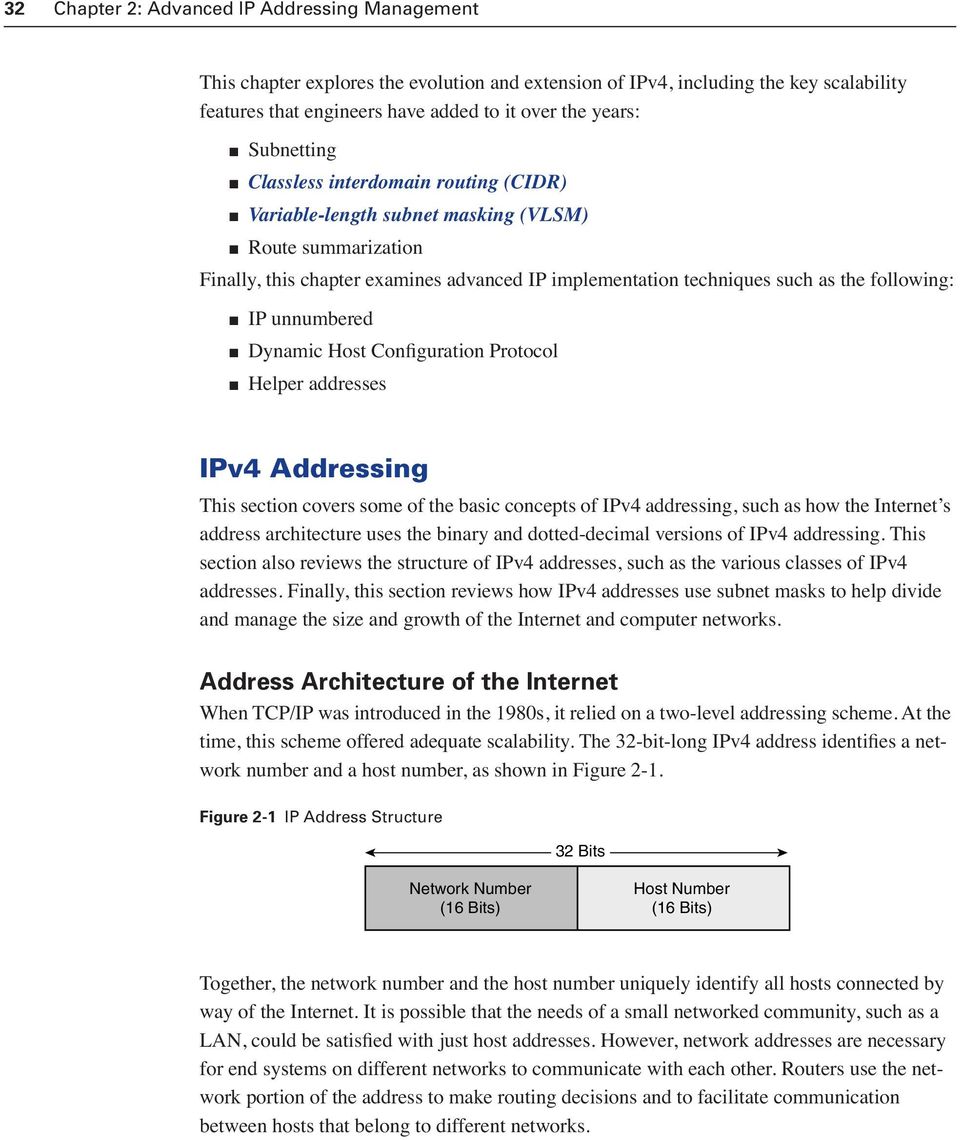
3 32 Chapter 2: Advanced IP Addressing Management This chapter explores the evolution and extension of IPv4, including the key scalability features that engineers have added to it over the years: Subnetting Classless interdomain routing (CIDR) Variable-length subnet masking (VLSM) Route summarization Finally, this chapter examines advanced IP implementation techniques such as the following: IP unnumbered Dynamic Host Configuration Protocol Helper addresses IPv4 Addressing This section covers some of the basic concepts of IPv4 addressing, such as how the Internet s address architecture uses the binary and dotted-decimal versions of IPv4 addressing. This section also reviews the structure of IPv4 addresses, such as the various classes of IPv4 addresses. Finally, this section reviews how IPv4 addresses use subnet masks to help divide and manage the size and growth of the Internet and computer networks. Address Architecture of the Internet When TCP/IP was introduced in the 1980s, it relied on a two-level addressing scheme. At the time, this scheme offered adequate scalability. The 32-bit-long IPv4 address identifies a network number and a host number, as shown in Figure 2-1. Figure 2-1 IP Address Structure 32 Bits Network Number (16 Bits) Host Number (16 Bits) Together, the network number and the host number uniquely identify all hosts connected by way of the Internet. It is possible that the needs of a small networked community, such as a LAN, could be satisfied with just host addresses. However, network addresses are necessary for end systems on different networks to communicate with each other. Routers use the network portion of the address to make routing decisions and to facilitate communication between hosts that belong to different networks.
4 IPv4 Addressing 33 Unlike routers, humans find working with strings of 32 1s and 0s tedious and clumsy. Therefore, 32-bit IP addresses are written using dotted-decimal notation. Each 32-bit address is divided into four groups of eight, called octets. Each octet is converted to decimal and then separated by decimal points, or dots. This is illustrated as follows: A 32-bit IP address is a binary number: This binary number can be divided into four octets: Each octet (or byte) can be converted to decimal: Finally, the address can be written in dotted-decimal notation: In the dotted-decimal address , which of these four numbers represents the network portion of the address? Which numbers are the host numbers? Finding the answers to these questions is complicated by the fact that IP addresses are not really four numbers. They actually consist of 32 different numbers, or 32 bits. In the early days of TCP/IP, a class system was used to define the network and host portions of the address. IPv4 addresses were grouped into five distinct classes. This was done according to the value of the first few bits in the first octet of the address. Although the class system can still be applied to IP addresses, networks today often ignore the rules of class in favor of a classless IP scheme. The next few sections cover all of the following topics related to IP addressing: The limitations of the IP address classes The subsequent addition of the subnet mask The addressing crisis that led to the adoption of a classless system Class A and B IP Addresses In a class system, IP addresses can be grouped into one of five different classes: A B C D E

5 34 Chapter 2: Advanced IP Addressing Management Each of the four octets of an IP address represents either the network portion or the host portion of the address, depending on the address class. The network and host portions of the respective Class A, B, C, and D addresses are shown in Figure 2-2. Figure 2-2 Address Structure Class A Network Host Octet Class B Network Host Octet Class C Network Host Octet Class D Host Octet Only the first three classes A, B, and C are used to address actual hosts on IP networks. Class D addresses are used for multicasting. Class E addresses are reserved for experimentation and are not shown in Figure 2-2. The following sections explore each of the five classes of addresses. Class A Addresses If the first bit of the first octet of an IP address is a binary 0, the address is a Class A address. With that first bit being a 0, the lowest number that can be represented is , decimal 0. The highest number that can be represented is , decimal 127. Any address that starts with a value between 0 and 127 in the first octet is a Class A address. These two numbers, 0 and 127, are reserved and cannot be used as a network address. Class A addresses were intended to accommodate very large networks, so only the first octet is used to represent the network number. This leaves three octets, or 24 bits, to represent the host portion of the address. With 24 bits total, 2 24 combinations are possible, yielding 16,777,216 possible addresses. Two of those possibilities, the lowest and highest values, are reserved for special purposes. The low value is 24 0s, and the high value is 24 1s. Therefore, each Class A address can support up to 16,777,214 unique host addresses. Why are two host addresses reserved for special purposes? Every network requires a network number. A network number is an ID number that is used to refer to the entire range of hosts when building routing tables. The address that contains all 0s in the host portion is used as the

6 IPv4 Addressing 35 network number and cannot be used to address an individual node is a Class A network number. Similarly, every network requires a broadcast address that can be used to address a message to every host on a network. It is created when the host portion of the address has all 1s. For example, a broadcast address for network would be With almost 17 million host addresses available, a Class A network actually provides too many possibilities for one company or campus. Although it is easy to imagine an enormous global network with that many nodes, the hosts in such a network could not function as members of the same logical group. Administrators require much smaller logical groupings to control broadcasts, apply policies, and troubleshoot problems. Fortunately, the subnet mask allows subnetting, which breaks a large block of addresses into smaller groups called subnetworks. All Class A networks are subnetted. If they were not, Class A networks would represent huge waste and inefficiency. How many Class A addresses are there? Because only the first octet is used as a network number, and it contains a value between 0 and 126, 126 Class A networks exist. Each of the 126 Class A addresses has almost 17 million possible host addresses that make up about half of the entire IPv4 address space. Recall that the network address is reserved for the local loopback address, which is why Class A addresses stop at and Class B addresses start at Under this system, a mere handful of organizations control half of the available Internet addresses. Class B Addresses Class B addresses start with a binary 10 in the first 2 bits of the first octet. Therefore, the lowest number that can be represented with a Class B address is , decimal 128. The highest number that can be represented is , decimal 191. Any address that starts with a value in the range of 128 to 191 in the first octet is a Class B address. Class B addresses were intended to accommodate medium-size networks. Therefore, the first two octets are used to represent the network number, which leaves two octets or 16 bits to represent the host portion of the address. With 16 bits total, 2 16 combinations are possible, yielding 65,536 Class B addresses. Recall that two of those numbers, the lowest and highest values, are reserved for special purposes. Therefore, each Class B address can support up to 65,534 hosts. Although it is significantly smaller than the networks created by Class A addresses, a logical group of more than 65,000 hosts is still unmanageable and impractical. Therefore, like Class A networks, Class B addresses are subnetted to improve efficiency. Because the first 2 bits of a Class B address are always 10, 14 bits are left in the network portion of the address, resulting in 2 14 or 16,384 Class B networks. The first octet of a Class B address offers 64 possibilities, 128 to 191. The second octet has 256 possibilities, 0 to 255.
7 36 Chapter 2: Advanced IP Addressing Management That yields 16,384 addresses, or 25 percent of the total IP space. Nevertheless, given the popularity and importance of the Internet, these addresses have run out quickly. This essentially leaves only Class C addresses available for new growth. Classes of IP Addresses: C, D, and E This section covers Class C, D, and E IP addresses. Class C Addresses A Class C address begins with binary 110. Therefore, the lowest number that can be represented is , decimal 192. The highest number that can be represented is , decimal 223. If an IPv4 address contains a number in the range of 192 to 223 in the first octet, it is a Class C address. Class C addresses were originally intended to support small networks. The first three octets of a Class C address represent the network number. The last octet may be used for hosts. One host octet yields 256 (2 8 ) possibilities. After the all-0s network number and the all-1s broadcast address are subtracted, only 254 hosts may be addressed on a Class C network. Whereas Class A and Class B networks prove impossibly large without subnetting, Class C networks can impose an overly restrictive limit on hosts. Because the first 3 bits of a Class C address are always 110, 21 bits are left in the network portion of the address, resulting in 2 21 or 2,097,152 Class C networks. With 2,097,152 total network addresses containing a mere 254 hosts each, Class C addresses account for 12.5 percent of the Internet address space. Because Class A and B addresses are nearly exhausted, the remaining Class C addresses are all that is left to be assigned to new organizations that need IP networks. Table 2-1 summarizes the ranges and availability of the three address classes used to address Internet hosts. Table 2-1 IP Addresses Available to Internet Hosts Address Class First Octet Range Number of Possible Networks Number of Hosts Per Network Class A 0 to (2 are reserved) 16,777,214 Class B 128 to ,384 65,534 Class C 192 to 223 2,097, Class D Addresses A Class D address begins with binary 1110 in the first octet. Therefore, the first octet range for a Class D address is to , or 224 to 239. Class D addresses are not used

8 IPv4 Addressing 37 to address individual hosts. Instead, each Class D address can be used to represent a group of hosts called a host group, or multicast group. For example, a router configured to run Enhanced Interior Gateway Routing Protocol (EIGRP) joins a group that includes other nodes that are also running EIGRP. Members of this group still have unique IP addresses from the Class A, B, or C range, but they also listen for messages addressed to The 224 octet designates the address as a Class D address. Therefore, a single routing update message can be sent to , and all EIGRP routers will receive it. A single message sent to several select recipients is called a multicast. Class D addresses are also called multicast addresses. A multicast is different from a broadcast. Every device on a logical network must process a broadcast, whereas only devices configured to listen for a Class D address receive a multicast. Class E Addresses If the first octet of an IP address begins with 1111, the address is a Class E address. Therefore, the first octet range for Class E addresses is to , or 240 to 255. Class E addresses are reserved for experimental purposes and should not be used to address hosts or multicast groups. Subnet Masking Subnet masking, or subnetting, is used to break one large group into several smaller subnetworks, as shown in Figure 2-3. These subnets can then be distributed throughout an enterprise. This results in less IP address waste and better logical organization. Formalized with RFC 950 in 1985, subnetting introduced a third level of hierarchy to the IPv4 addressing structure. The number of bits available to the network, subnet, and host portions of a given address varies depending on the size of the subnet mask. Figure 2-3 IP Address Structure After Subnetting 32 Bits Network Number Subnet Number Host Number A subnet mask is a 32-bit number that acts as a counterpart to the IP address. Each bit in the mask corresponds to its counterpart bit in the IP address. Logical ANDing is applied to the address and mask. If a bit in the IP address corresponds to a 1 bit in the subnet mask, the IP address bit represents a network number. If a bit in the IP address corresponds to a 0 bit in the subnet mask, the IP address bit represents a host number.

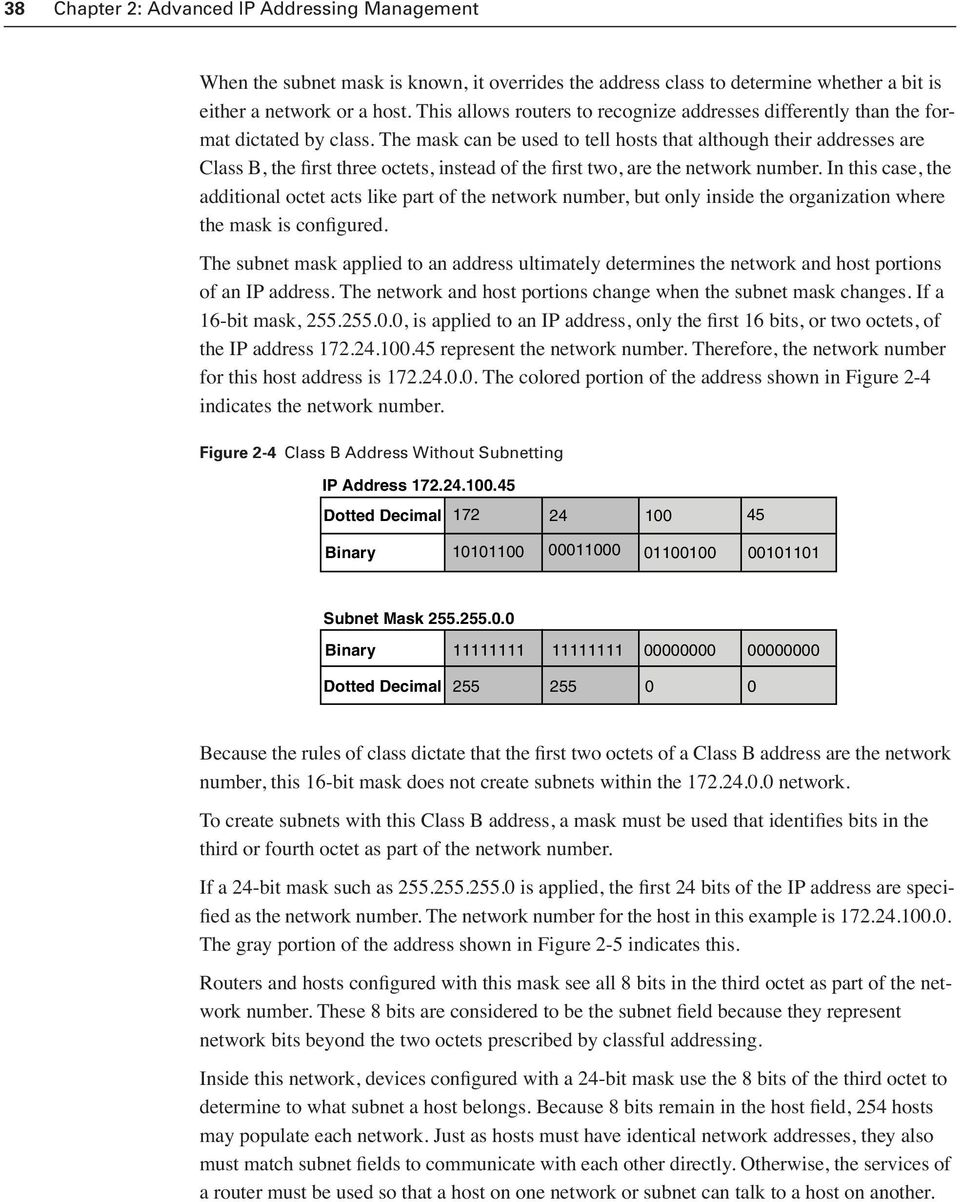
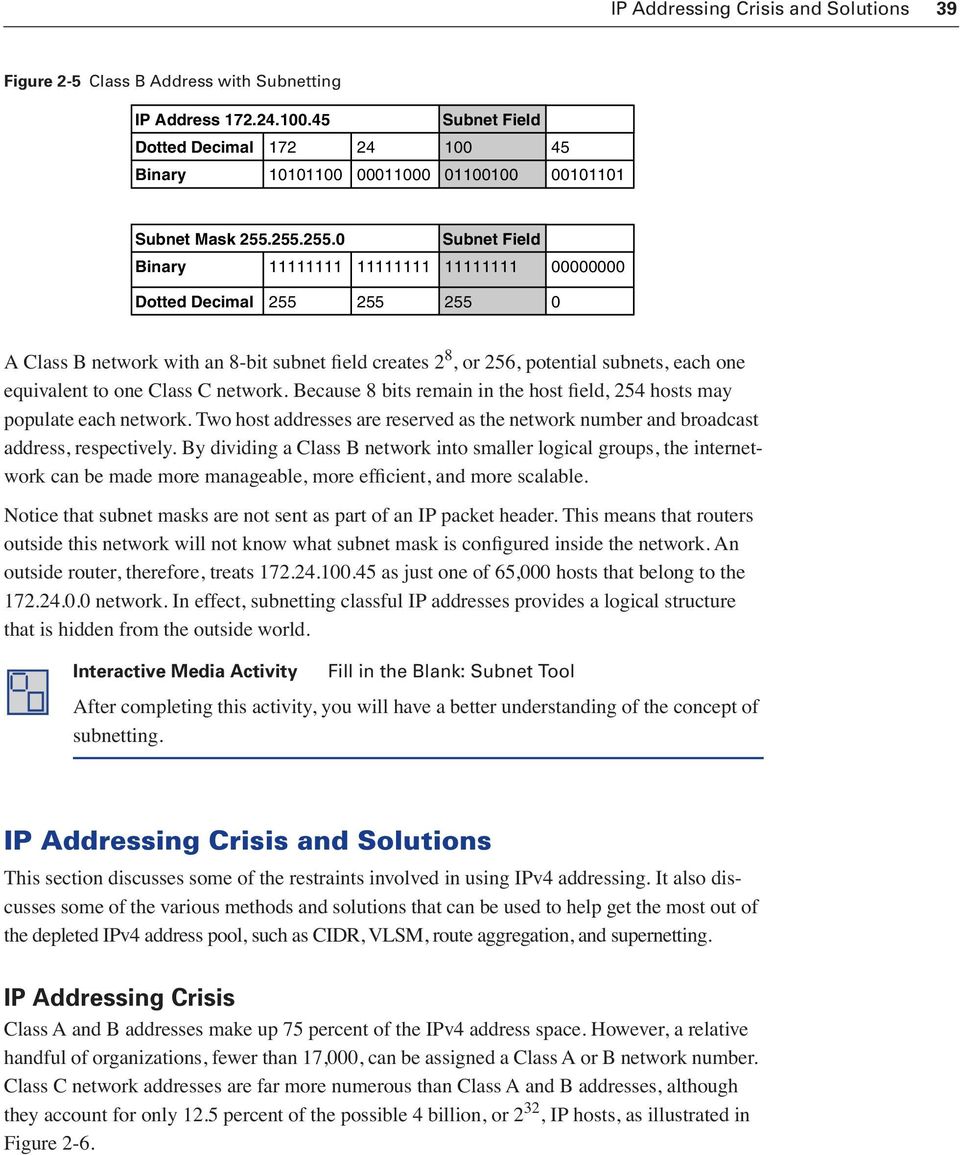
9 38 Chapter 2: Advanced IP Addressing Management When the subnet mask is known, it overrides the address class to determine whether a bit is either a network or a host. This allows routers to recognize addresses differently than the format dictated by class. The mask can be used to tell hosts that although their addresses are Class B, the first three octets, instead of the first two, are the network number. In this case, the additional octet acts like part of the network number, but only inside the organization where the mask is configured. The subnet mask applied to an address ultimately determines the network and host portions of an IP address. The network and host portions change when the subnet mask changes. If a 16-bit mask, , is applied to an IP address, only the first 16 bits, or two octets, of the IP address represent the network number. Therefore, the network number for this host address is The colored portion of the address shown in Figure 2-4 indicates the network number. Figure 2-4 Class B Address Without Subnetting IP Address Dotted Decimal Binary Subnet Mask Binary Dotted Decimal Because the rules of class dictate that the first two octets of a Class B address are the network number, this 16-bit mask does not create subnets within the network. To create subnets with this Class B address, a mask must be used that identifies bits in the third or fourth octet as part of the network number. If a 24-bit mask such as is applied, the first 24 bits of the IP address are specified as the network number. The network number for the host in this example is The gray portion of the address shown in Figure 2-5 indicates this. Routers and hosts configured with this mask see all 8 bits in the third octet as part of the network number. These 8 bits are considered to be the subnet field because they represent network bits beyond the two octets prescribed by classful addressing. Inside this network, devices configured with a 24-bit mask use the 8 bits of the third octet to determine to what subnet a host belongs. Because 8 bits remain in the host field, 254 hosts may populate each network. Just as hosts must have identical network addresses, they also must match subnet fields to communicate with each other directly. Otherwise, the services of a router must be used so that a host on one network or subnet can talk to a host on another.
10 IP Addressing Crisis and Solutions 39 Figure 2-5 Class B Address with Subnetting IP Address Subnet Field Dotted Decimal Binary Subnet Mask Binary Subnet Field Dotted Decimal A Class B network with an 8-bit subnet field creates 2 8, or 256, potential subnets, each one equivalent to one Class C network. Because 8 bits remain in the host field, 254 hosts may populate each network. Two host addresses are reserved as the network number and broadcast address, respectively. By dividing a Class B network into smaller logical groups, the internetwork can be made more manageable, more efficient, and more scalable. Notice that subnet masks are not sent as part of an IP packet header. This means that routers outside this network will not know what subnet mask is configured inside the network. An outside router, therefore, treats as just one of 65,000 hosts that belong to the network. In effect, subnetting classful IP addresses provides a logical structure that is hidden from the outside world. Interactive Media Activity Fill in the Blank: Subnet Tool After completing this activity, you will have a better understanding of the concept of subnetting. IP Addressing Crisis and Solutions This section discusses some of the restraints involved in using IPv4 addressing. It also discusses some of the various methods and solutions that can be used to help get the most out of the depleted IPv4 address pool, such as CIDR, VLSM, route aggregation, and supernetting. IP Addressing Crisis Class A and B addresses make up 75 percent of the IPv4 address space. However, a relative handful of organizations, fewer than 17,000, can be assigned a Class A or B network number. Class C network addresses are far more numerous than Class A and B addresses, although they account for only 12.5 percent of the possible 4 billion, or 2 32, IP hosts, as illustrated in Figure 2-6.
11 40 Chapter 2: Advanced IP Addressing Management Figure 2-6 IP Address Allocation Class D and E 12.5% Class C 12.5% Class A 50% Class B 25% Unfortunately, Class C addresses are limited to 254 hosts, which will not meet the needs of larger organizations that cannot acquire a Class A or B address. Even if there were more Class A, B, and C addresses, too many network addresses would cause Internet routers to grind to a halt under the weight of enormous routing tables. Ultimately, the classful system of IP addressing, even with subnetting, could not scale to effectively handle global demand for Internet connectivity. As early as 1992, the Internet Engineering Task Force (IETF) identified two specific concerns: NOTE CIDR is pronounced cider. In a classful system, a router determines the class of an address and then identifies the network and host octets based on that class. With CIDR, a router uses a bit mask to determine the network and host portions of an address, which are no longer restricted to using an entire octet. Exhaustion of the remaining, unassigned IPv4 network addresses. At the time, the Class B space was on the verge of depletion. The rapid and substantial increase in the size of the Internet routing tables is because of the Internet s growth. As more Class C addresses came online, the resulting flood of new network information threatened the capability of Internet routers to cope effectively. In the short term, the IETF decided that a retooled IPv4 would have to hold out long enough for engineers to design and deploy a completely new Internet Protocol. That new protocol, IPv6, solves the address crisis by using a 128-bit address space. After years of planning and development, IPv6 promises to be ready for wide-scale implementation. However, IPv6 continues, for the most part, to wait for that implementation. One reason that IPv6 has not been rushed into service is that the short-term extensions to IPv4 have been so effective. By eliminating the rules of class, IPv4 now enjoys renewed viability. Classless Interdomain Routing Routers use a form of IPv4 addressing called Classless Interdomain Routing (CIDR) that ignores class.

12 IP Addressing Crisis and Solutions 41 CIDR was introduced in 1993 by RFCs 1517, 1518, 1519, and It was deployed in CIDR dramatically improves the scalability and efficiency of IPv4 by providing the following: Replacement of classful addressing with a more flexible and less wasteful classless scheme Enhanced route aggregation, also known as supernetting or summarization Supernetting, which is the combination of contiguous network addresses into a new address defined by the subnet mask The following sections describe route aggregation, supernetting, and address allocation in more detail. Route Aggregation and Supernetting CIDR allows routers to aggregate, or summarize, routing information. It does this by using a bit mask instead of an address class to determine the network portion of an address. This shrinks the size of the routing tables used by the router. In other words, just one address and mask combination can represent the routes to multiple networks. Without CIDR and route aggregation, a router must maintain many individual entries for the routes within the same network, as opposed to one route for that particular network when using CIDR addressing. The shaded entries in Table 2-2 identify the 16 bits that, based on the rules of class, represent the network number. Classful routers are forced to handle Class B networks using these 16 bits. Because the first 16 bits of each of these eight network numbers are unique, a classful router sees eight unique networks and must create a routing table entry for each. However, these eight networks do have common bits. Table 2-2 Route Aggregation and Supernetting Network Number First Octet Second Octet Third Octet Fourth Octet / / / / / / / /

13 42 Chapter 2: Advanced IP Addressing Management Table 2-3 shows that the eight network addresses have the first 13 bits in common. A CIDRcompliant router can summarize routes to these eight networks by using a 13-bit prefix. Only these eight networks share these bits: Table 2-3 Dotted-Decimal Notation Network Number First Octet Second Octet Third Octet Fourth Octet / / / / / / / / To represent this prefix in decimal terms, the rest of the address is padded with 0s and then paired with a 13-bit subnet mask: = = Therefore, a single address and mask define a classless prefix that summarizes routes to the eight networks, /13. By using a prefix address to summarize routes, routing table entries can be kept more manageable. The following benefits are a result of the summarized routes: More efficient routing Reduced number of CPU cycles when recalculating a routing table or when sorting through the routing table entries to find a match Reduced router memory requirements Supernetting is the practice of using a bit mask to group multiple classful networks as a single network address. Supernetting and route aggregation are different names for the same process. However, the term supernetting is most often applied when the aggregated networks are under common administrative control. Supernetting takes bits from the network portion of the network mask, whereas subnetting takes bits from the host portion of the subnet mask. Supernetting and route aggregation are essentially the inverse of subnetting.

14 IP Addressing Crisis and Solutions 43 Recall that the Class A and Class B address space is almost exhausted, leaving large organizations little choice but to request multiple Class C network addresses from providers. If a company can acquire a block of contiguous Class C network addresses, supernetting can be used so that the addresses appear as a single large network, or supernet. Supernetting and Address Allocation Consider Company XYZ, which requires addresses for 400 hosts. Under the classful addressing system, XYZ could apply to a central Internet address authority for a Class B address. If the company got the Class B address and then used it to address one logical group of 400 hosts, tens of thousands of addresses would be wasted. A second option for XYZ would be to request two Class C network numbers, yielding 508, or 2 * 254, host addresses. The drawback of this approach is that XYZ would have to route between its own logical networks. Also, Internet routers would still need to maintain two routing table entries for the XYZ network, rather than just one. Under a classless addressing system, supernetting allows XYZ to get the address space it needs without wasting addresses or increasing the size of routing tables unnecessarily. Using CIDR, XYZ asks for an address block from its Internet service provider (ISP), not a central authority, such as the Internet Assigned Numbers Authority (IANA). The ISP assesses XYZ s needs and allocates address space from its own large CIDR block of addresses. Providers assume the burden of managing address space in a classless system. With this system, Internet routers keep only one summary route, or supernet route, to the provider network. The provider keeps routes that are more specific to its customer networks. This method drastically reduces the size of Internet routing tables. In the following example, XYZ receives two contiguous Class C addresses, and If you examine the shaded portions of Table 2-4, you will see that these network addresses have this common 23-bit prefix: Table 2-4 Supernetting and Address Allocation Network Number First Octet Second Octet Third Octet Fourth Octet When the sample topology shown in Figure 2-7 is supernetted with a 23-bit mask, /23, the address space provides well over 400, or 2 9, host addresses without the tremendous waste of a Class B address. With the ISP acting as the addressing authority for a
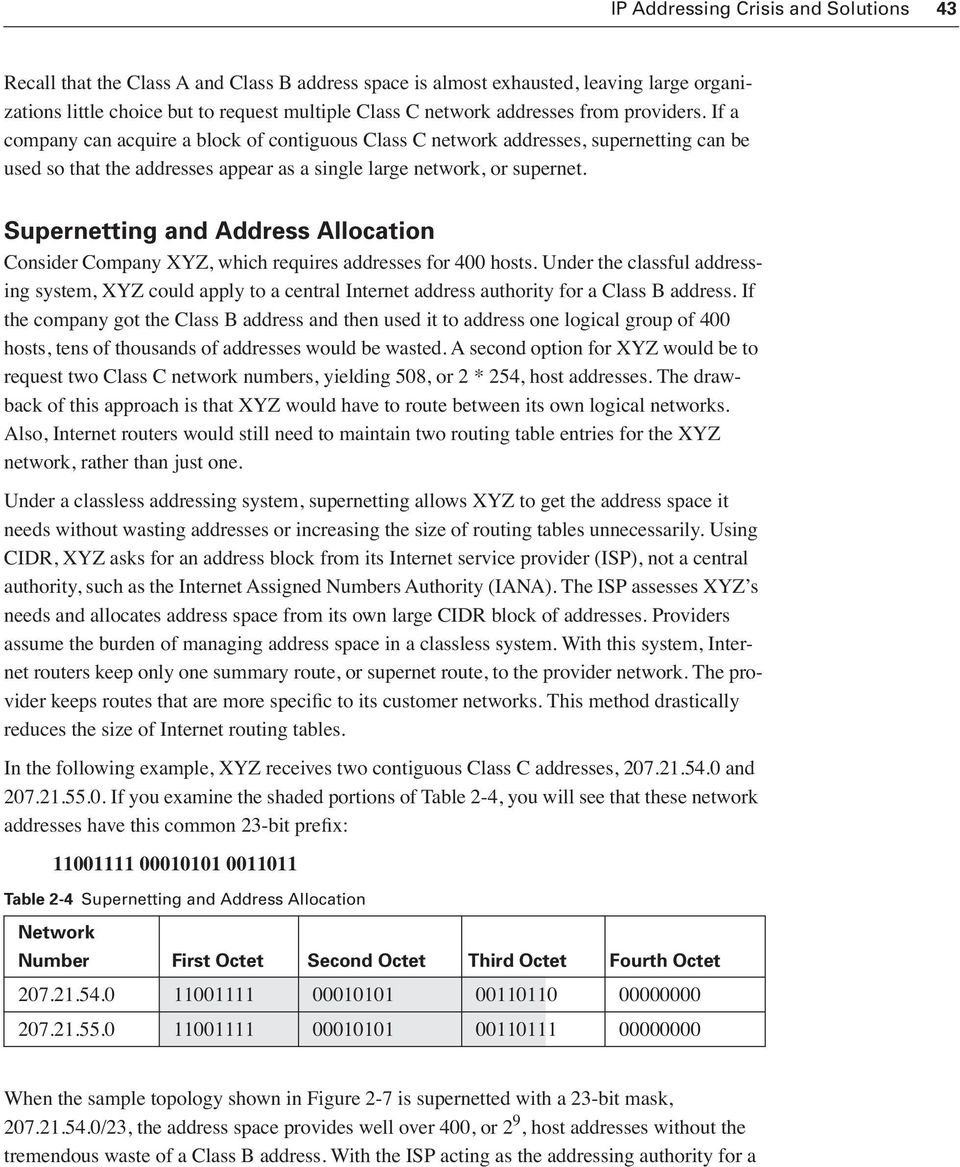
15 44 Chapter 2: Advanced IP Addressing Management CIDR block of addresses, the ISP s customer networks, which include XYZ, can be advertised among Internet routers as a single supernet. The ISP manages a block of 256 Class C network addresses and advertises them to the world using a 16-bit prefix: /16 Figure 2-7 Addressing with CIDR Internet / /23 XYZ ISP When CIDR enabled ISPs to hierarchically distribute and manage blocks of contiguous addresses, IPv4 address space enjoyed the following benefits: Efficient allocation of addresses Reduced number of routing table entries VLSM This section discusses VLSMs and how they can be used to further maximize IPv4 addressing efficiency. Variable-Length Subnet Masks VLSM allows an organization to use more than one subnet mask within the same network address space. Implementing VLSM is often called subnetting a subnet. It can be used to maximize addressing efficiency.
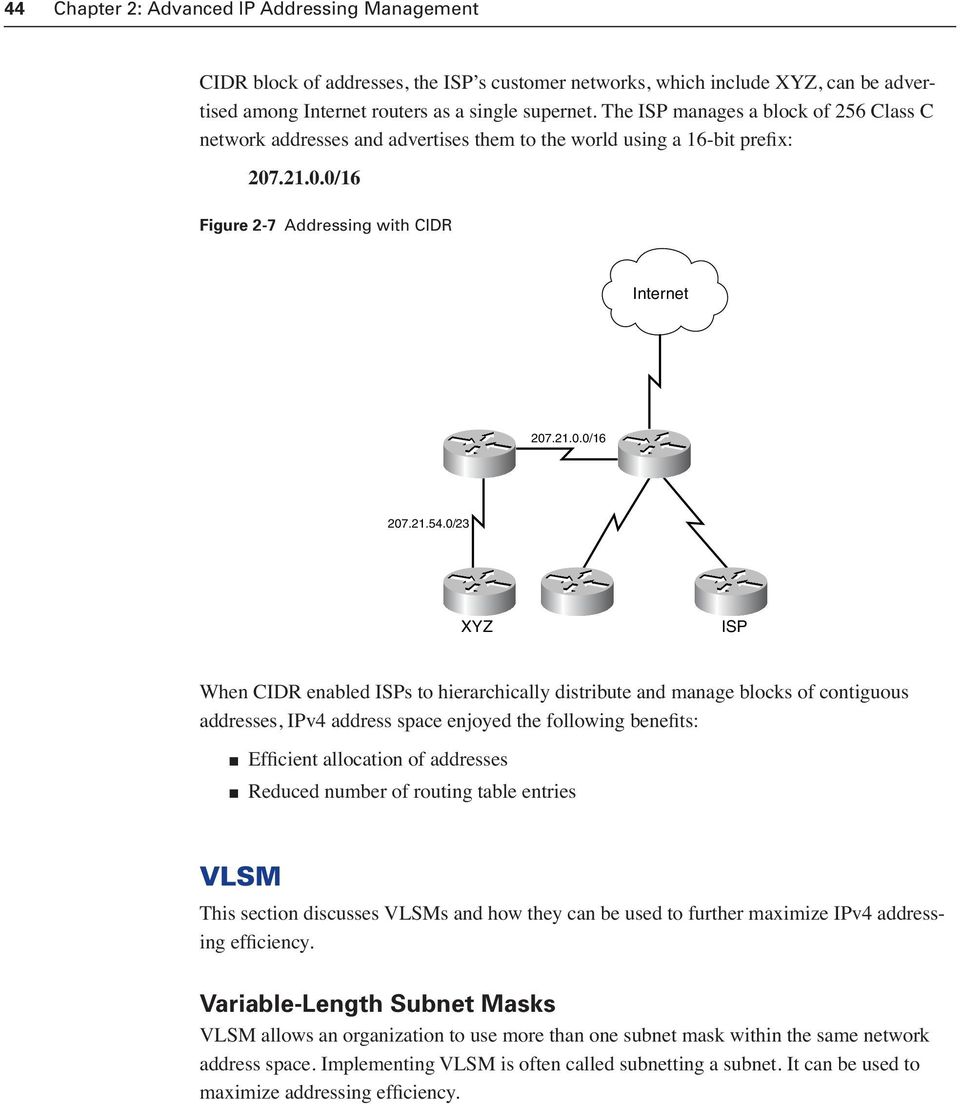
16 VLSM 45 Consider Table 2-5, in which the subnets are created by borrowing 3 bits from the host portion of the Class C address, Table 2-5 Subnetting with One Mask Subnet Number Subnet Address Subnet /27 Subnet /27 Subnet /27 Subnet /27 Subnet /27 Subnet /27 Subnet /27 Subnet /27 If the ip subnet-zero command is used, this mask creates seven usable subnets of 30 hosts each. Four of these subnets can be used to address remote offices at Sites A, B, C, and D, as shown in Figure 2-8. Figure 2-8 Using Subnets to Address a WAN / /27 Site C /27 Site A Site B Site D /27 Unfortunately, only three subnets are left for future growth, and three point-to-point WAN links between the four sites remain to be addressed. If the three remaining subnets were assigned to the WAN links, the supply of IP addresses would be completely exhausted. This addressing scheme would also waste more than a third of the available address space. There are ways to avoid this kind of waste. Over the past 20 years, network engineers have developed three critical strategies for efficiently addressing point-to-point WAN links: Use VLSM Use private addressing (RFC 1918) Use IP unnumbered Private addresses and IP unnumbered are discussed in detail later in this chapter. This section focuses on VLSM. When VLSM is applied to an addressing problem, it breaks the address

17 46 Chapter 2: Advanced IP Addressing Management into groups or subnets of various sizes. Large subnets are created for addressing LANs, and very small subnets are created for WAN links and other special cases. A 30-bit mask is used to create subnets with two valid host addresses. This is the exact number needed for a point-to-point connection. Figure 2-9 shows what happens if one of the three remaining subnets is subnetted again, using a 30-bit mask. Figure 2-9 Subnetting with VLSMs Subnet /27 Subnet 1 Subnet 2 Subnet 3 Subnet 4 Subnet 5 Subnet 6 Subnet / / / / / / /27 Sub-Subnet 0 Sub-Subnet 1 Sub-Subnet 2 Sub-Subnet 3 Sub-Subnet 4 Sub-Subnet 5 Sub-Subnet 6 Sub-Subnet / / / / / / / /30 Subnetting the /27 subnet in this way supplies another eight ranges of addresses to be used for point-to-point networks. For example, in Figure 2-10, the network /30 can be used to address the point-to-point serial link between the Site A router and the Site B router. Figure 2-10 Using VLSM to Address Point-to-Point Links / /30 Site A Site B Example 2-1 shows the commands needed to configure the Site A router, labeled RTA, with a 27-bit mask on its Ethernet port and a 30-bit mask on its serial port. Example 2-1 Configuring VLSM RTA(config)#interface e0 RTA(config-if)#ip address RTA(config-if)#interface s0 RTA(config-if)#ip address

18 VLSM 47 Interactive Media Activity Drag and Drop: VLSM Calculation After completing this activity, you will have a better understanding of VLSM. Lab Configuring VLSM and IP Unnumbered In this lab, you will configure VLSM and test its functionality with two different routing protocols, RIPv1 and RIPv2. Finally, you will use IP unnumbered in place of VLSM to further conserve addresses. Classless and Classful Routing Protocols For routers in a variably subnetted network to properly update each other, they must send masks in their routing updates. Without subnet information in the routing updates, routers would have nothing but the address class and their own subnet mask to go on. Only routing protocols that ignore the rules of address class and use classless prefixes work properly with VLSM. Table 2-6 lists common classful and classless routing protocols. Table 2-6 Classful and Classless Routing Protocols Classful Routing Protocols RIP Version 1 RIP Version 2 IGRP EIGRP EGP OSPF BGP3 IS-IS BGP4 Classless Routing Protocols Routing Information Protocol version 1 (RIPv1) and Interior Gateway Routing Protocol (IGRP), common interior gateway protocols, cannot support VLSM because they do not send subnet information in their updates. Upon receiving an update packet, these classful routing protocols use one of the following methods to determine an address s network prefix: If the router receives information about a network, and if the receiving interface belongs to that same network, but on a different subnet, the router applies the subnet mask that is configured on the receiving interface. If the router receives information about a network address that is not the same as the one configured on the receiving interface, it applies the default, subnet mask (by class).

19 48 Chapter 2: Advanced IP Addressing Management Despite its limitations, RIP is a very popular routing protocol and is supported by virtually all IP routers. RIP s popularity stems from its simplicity and universal compatibility. However, the first version of RIP, RIPv1, suffers from several critical deficiencies: RIPv1 does not send subnet mask information in its updates. Without subnet information, VLSM and CIDR cannot be supported. RIPv1 broadcasts its updates, increasing network traffic. RIPv1 does not support authentication. In 1988, RFC 1058 prescribed the new and improved Routing Information Protocol version 2 (RIPv2) to address these deficiencies. RIPv2 has the following features: RIPv2 sends subnet information and, therefore, supports VLSM and CIDR. RIPv2 multicasts routing updates using the Class D address , providing better efficiency. RIPv2 provides for authentication in its updates. Because of these key features, RIPv2 should always be preferred over RIPv1, unless some legacy device on the network does not support it. When RIP is first enabled on a Cisco router, the router listens for version 1 and 2 updates but sends only version 1. To take advantage of the RIPv2 features, turn off version 1 support, and enable version 2 updates with the following commands: Router(config)#router rip Router(config-router)#version 2 The straightforward RIP design ensures that it will continue to survive. A new version has already been designed to support future IPv6 networks. Lab a VLSM 1 In this lab, you create an addressing scheme using VLSM. Lab b VLSM 2 In this lab, you create an addressing scheme using VLSM. Lab c VLSM 3 In this lab, you create an addressing scheme using VLSM. Lab d VLSM 4 In this lab, you create an addressing scheme using VLSM.

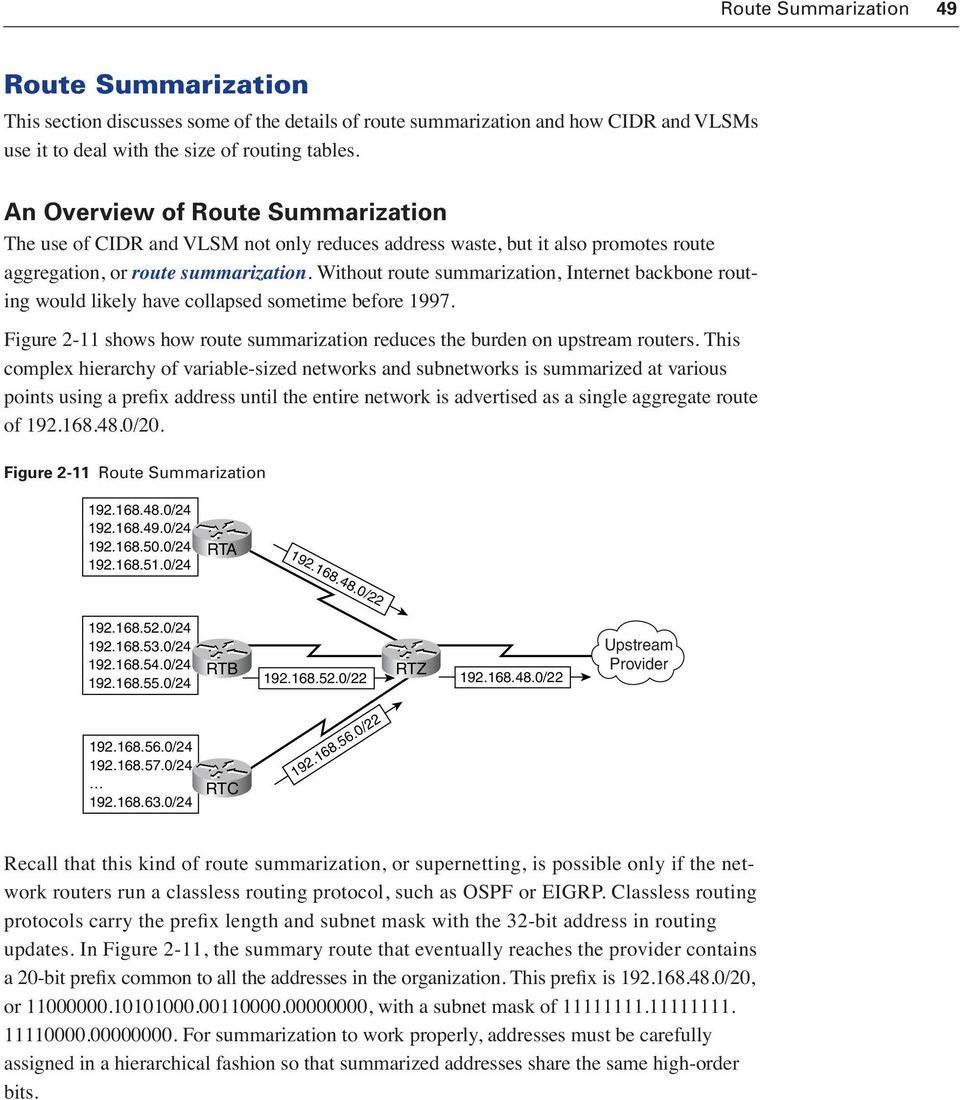
20 Route Summarization 49 Route Summarization This section discusses some of the details of route summarization and how CIDR and VLSMs use it to deal with the size of routing tables. An Overview of Route Summarization The use of CIDR and VLSM not only reduces address waste, but it also promotes route aggregation, or route summarization. Without route summarization, Internet backbone routing would likely have collapsed sometime before Figure 2-11 shows how route summarization reduces the burden on upstream routers. This complex hierarchy of variable-sized networks and subnetworks is summarized at various points using a prefix address until the entire network is advertised as a single aggregate route of /20. Figure 2-11 Route Summarization / / / /24 RTA / / / / /24 RTB RTZ / /22 Upstream Provider / / /24 RTC /22 Recall that this kind of route summarization, or supernetting, is possible only if the network routers run a classless routing protocol, such as OSPF or EIGRP. Classless routing protocols carry the prefix length and subnet mask with the 32-bit address in routing updates. In Figure 2-11, the summary route that eventually reaches the provider contains a 20-bit prefix common to all the addresses in the organization. This prefix is /20, or , with a subnet mask of For summarization to work properly, addresses must be carefully assigned in a hierarchical fashion so that summarized addresses share the same high-order bits.
21 50 Chapter 2: Advanced IP Addressing Management Route Flapping Route flapping occurs when a router interface alternates rapidly between the up and down states. This can be caused by a number of factors, including a faulty interface or poorly terminated media. Summarization can effectively insulate upstream routers from route-flapping problems. Consider RTC in Figure If the RTC interface connected to the network goes down, RTC removes that route from its table. If the routers were not configured to summarize, RTC would then send a triggered update to RTZ about the removal of the specific network, In turn, RTZ would update the next router upstream, and so on. Every time these routers are updated with new information, their processors must go to work. It is possible, especially in the case of OSPF routing, that the processors can work hard enough to noticeably affect performance. Now, consider the impact on performance if the RTC interface to network comes back up after only a few seconds. The routers update each other and recalculate. In addition, what happens when the RTC link goes back down seconds later? And then back up? This is called route flapping, and it can cripple a router with excessive updates and recalculations. Figure 2-12 Routes Summarized to / / / / /24 RTA / / / / /24 RTB RTZ / /20 Upstream Provider / / /24 RTC /21 However, the summarization configuration prevents the RTC route flapping from affecting any other routers. RTC updates RTZ about a supernet, /21, which includes eight networks, through The loss of one network does not invalidate the route to the supernet. While RTC might be kept busy dealing with its own route flap, RTZ, all upstream routers are unaware of any downstream problem. Summarization effectively insulates the other routers from the problem of route flapping.
22 Private Addressing and NAT 51 Private Addressing and NAT This section explains Network Address Translation (NAT) and how it can limit the waste of IP addresses by using the private addressing scheme. Private IP Addresses (RFC 1918) Because TCP/IP is the dominant routed protocol in the world, most network applications and operating systems offer extensive support for it. Therefore, many designers build their networks around TCP/IP, even if they do not require Internet connectivity. Internet hosts require globally unique IP addresses. However, private hosts that are not connected to the Internet can use any valid address, as long as it is unique within the private network. Because many private networks exist alongside public networks, just grabbing any address is strongly discouraged. RFC 1918 sets aside three blocks of IP addresses for private or internal use: A Class A range A Class B range A Class C range Addresses in one of these ranges, shown in Table 2-7, are not routed on the Internet backbone. Internet routers immediately discard private addresses. Table 2-7 Private Addresses in the WAN Class RFC 1918 Internal Address Range CIDR Prefix A to /8 B to /12 C to /16 If any of the following are being addressed, these private addresses can be used instead of globally unique addresses: A nonpublic intranet A test lab A home network Global addresses must be obtained from a provider or a registry at some expense. RFC 1918 addresses have found a home in production networks as well. Earlier in this chapter, the advantages of using VLSM to address the point-to-point WAN links in an internetwork were discussed. Recall that with VLSM, you can further subnet one of the subnets left in the address space of a Class C network. Although this solution is better than wasting an entire 30-host subnet on each two-host WAN link, it still costs one subnet that could have
23 52 Chapter 2: Advanced IP Addressing Management been used for future growth. A less-wasteful solution is to address the WAN links using private network numbers. The WAN links shown in Figure 2-13 are addressed using subnets from the private address space, /8. Figure 2-13 Using Subnets to Address the WAN Internet / /27 Site C / / / /27 Site A Site B Site D /27 How can these routers use private addresses if LAN users at Sites A, B, C, and D expect to access the Internet? End users at these sites should have no problem, because they use globally unique addresses from the network. The routers use their serial interfaces with private addresses merely to forward traffic and exchange routing information. Upstream providers and Internet routers see only the source and destination IP addresses in the packet. Upstream providers do not care if the packet traveled through links with private addresses at some point. In fact, many providers use RFC 1918 network numbers in the core of their network to avoid depleting their supply of globally unique addresses. There is one trade-off when using private numbers on WAN links. The serial interfaces cannot be the original source of traffic bound for the Internet or the final destination of traffic from the Internet. Routers normally do not spend time surfing the web. Therefore, this limitation typically becomes an issue only when you re troubleshooting with Internet Control Message Protocol (ICMP), using Simple Network Management Protocol (SNMP), or connecting remotely with Telnet over the Internet. In those cases, the router can be addressed only by its globally unique LAN interfaces. The following sections discuss implementing a private address scheme, including the pitfalls of discontiguous subnets and the advantages of NAT. Discontiguous Subnets Mixing private addresses with globally unique addresses can create discontiguous subnets. Discontiguous subnets are subnets from the same major network that are separated by a completely different major network or subnet.
24 Private Addressing and NAT 53 In Figure 2-14, Site A and Site B both have LANs that are addressed using subnets from the same major network, They are discontiguous because the /30 network separates them. Classful routing protocols notably, RIPv1 and IGRP cannot support discontiguous subnets because the subnet mask is not included in routing updates. If Site A and Site B are running RIPv1, Site A receives updates about network /24 but not about /27. This is because the subnet mask is not included in the update. Because Site A has an interface directly connected to that network in this case, e0 Site A rejects the Site B route. Figure 2-14 Discontiguous Subnets / / /30 Site A Site B Even some classless routing protocols require additional configuration to solve the problem of discontiguous subnets. RIPv2 and EIGRP automatically summarize on classful boundaries, unless explicitly told not to. Usually, this type of summarization is desirable. However, in the case of discontiguous subnets, you must enter the following command for both RIPv2 and EIGRP to disable automatic summarization: Router(config-router)#no auto-summary Finally, when using private addresses on a network that is connected to the Internet, packets and routing updates should be filtered. This is done to avoid leaking any RFC 1918 addresses between autonomous systems. If both the LAN and the provider use addresses from the /16 block, the routers could get confused if confronted with updates from both systems. Network Address Translation (NAT) NAT, as defined by RFC 1631, is the process of swapping one address for another in the IP packet header. In practice, NAT is used to allow hosts that are privately addressed using RFC 1918 addresses to access the Internet. A NAT-enabled device, such as a UNIX computer or a Cisco router, operates at the border of a stub domain. An example is an internetwork that has a single connection to the outside world. When a host inside the stub domain wants to transmit to a host on the outside, it forwards the packet to the NAT-enabled device. The NAT process then looks inside the IP header
25 54 Chapter 2: Advanced IP Addressing Management and, if appropriate, replaces the inside IP address with a globally unique IP address. When an outside host sends a response, as shown in Figure 2-15, the NAT does the following: 1. Receives it. 2. Checks the current table of network address translations. 3. Replaces the destination address with the original inside source. Figure 2-15 NAT Router E0 RTA S1 S1 RTB E ip unnumbered ethernet 0 ip unnumbered ethernet 0 NAT translations can occur dynamically or statically and can be used for a variety of purposes. The most powerful feature of NAT routers is their capability to use Port Address Translation (PAT), which allows multiple inside addresses to map to the same global address. This is sometimes called a many-to-one NAT. With PAT, or address overloading, literally hundreds of privately addressed nodes can access the Internet using only one global address. The NAT router keeps track of the different conversations by mapping TCP and UDP port numbers. Lab a Network Address Translation: Static NAT and Dynamic NAT In this lab, you learn how to configure static and dynamic NAT. Lab b Network Address Translation: Port Address Translation and Port Forwarding In this lab, you learn how to configure PAT and port forwarding. IP Unnumbered This chapter has presented several ways to maximize the use of IP addresses in an organization. In previous sections, you learned that you can avoid wasting an entire subnet on pointto-point serial links by using VLSM, or use private addresses instead. Neither technique can be supported by classful routing protocols, such as the popular RIPv1 and IGRP. Fortunately, the Cisco IOS software offers a third option for efficiently addressing serial links IP unnumbered.
26 IP Unnumbered 55 Using IP Unnumbered When a serial interface is configured for IP unnumbered, it does not need its own address. This is because it borrows the IP address of another interface, usually a LAN interface or loopback interface. Example 2-2 shows how to configure an unnumbered interface. Not only does IP unnumbered avoid wasting addresses on point-to-point WAN links, but it also can be used with classful routing protocols, whereas VLSM and discontiguous subnets cannot. If the network runs RIPv1 or IGRP, IP unnumbered might be the only solution to maximize the addresses. Example 2-2 Configuring an IP Unnumbered Interface RTA(config)#interface e0 RTA(config-if)#ip address RTA(config-if)#interface s1 RTA(config-if)#ip unnumbered e0 RTB(config)#interface e0 RTB(config-if)#ip address RTB(config-if)#interface s1 RTB(config-if)#ip unnumbered e0 RTA e0, , and RTB e0, , can communicate using TCP/IP over this serial link, even though they do not belong to the same IP network, as shown in Figure This is possible because the serial link is a point-to-point link, so there is no confusion about which device a packet is originating from or destined for. In this case, the command ip unnumbered e0 is entered in serial 1 interface configuration mode on both RTA and RTB. Configuring IP unnumbered on an interface has two ground rules: The interface is both serial and connected by way of a point-to-point link. The same major network with the same mask is used to address the LAN interfaces that lend their IP address on both sides of the WAN link. or Different major networks with no subnetting are used to address the LAN interfaces on both sides of the WAN link.
27 56 Chapter 2: Advanced IP Addressing Management Figure 2-16 IP Unnumbered Interfaces SA = Source Address SA NAT Table SA Internet Inside Local Global IP Address IP Address E0 RTA S1 S1 RTB E ip unnumbered ethernet 0 ip unnumbered ethernet 0 Certain drawbacks come with using IP unnumbered: The use of ping cannot determine whether the interface is up, because the interface has no IP address. A network IOS image cannot boot over an unnumbered serial interface. IP security options cannot be supported on an unnumbered interface. DHCP and Easy IP This section discusses DHCP and its operation. It covers how to configure DHCP, and use Easy IP as well. DHCP Overview After designing a scalable IP addressing scheme for the enterprise, the next step is implementation. Routers, servers, and other key nodes usually require special attention from administrators. However, desktop clients are often automatically assigned IP configurations using Dynamic Host Configuration Protocol (DHCP). Because desktop clients typically make up the bulk of network nodes, DHCP is good news for systems administrators. Small offices and home offices can also take advantage of DHCP by using Easy IP, a Cisco IOS software feature set that combines DHCP with NAT functions. DHCP works by configuring servers to give out IP configuration information to clients. Clients lease the information from the server for an administratively defined period. When the lease is up, the host must ask for another address, although it is typically reassigned the same one. Figures 2-17 and 2-18 illustrate this process. In Figure 2-17, Host A issues a DHCP request for an IP address. In Figure 2-18, the DHCP server replies to the DHCP request by leasing an IP address from the configured IP address pool.
28 DHCP and Easy IP 57 Figure 2-17 Simple DHCP Operation: Client/Server Host A Host B Central DHCP Server Figure 2-18 Simple DHCP Operation: Reply Host A This IP Address Is Host B Central DHCP Server Administrators typically prefer to use a Microsoft 2000 server or a UNIX computer to offer DHCP services because these solutions are highly scalable and relatively easy to manage. Even so, the Cisco IOS software offers an optional, fully featured DHCP server, which leases configurations for 24 hours by default. Administrators set up DHCP servers to assign addresses from predefined pools. DHCP servers can also provide other information: Default gateway address DNS server addresses WINS server addresses Domain names
29 58 Chapter 2: Advanced IP Addressing Management NOTE BOOTP was originally defined in RFC 951 in It is the predecessor of DHCP, and it shares some operational characteristics. Both protocols use UDP ports 67 and 68, which are well-known as BOOTP ports, because BOOTP came before DHCP. Most DHCP servers also let you specifically define what client MAC addresses can be serviced and automatically assign the same number to a particular host each time. DHCP Operation The DHCP client configuration process is shown in Figure Figure 2-19 DHCP Operation Host A DHCPDISCOVER (Broadcast) DHCPOFFER (Unicast) DHCPREQUEST (Broadcast) DHCPACK (Unicast) Cisco IOS DHCP Server The DHCP client configuration process follows these steps: 1. When a client is set up for DHCP and needs an IP configuration, typically at boot time, it tries to locate a DHCP server by sending a broadcast called a DHCPDISCOVER. 2. The server sends a DHCPOFFER unicast to the client. When the server receives the broadcast, it determines whether it can service the request from its own database. If it cannot, the server might forward the request to another DHCP server or servers, depending on its configuration. If it can service the request, the DHCP server offers the client IP configuration information in the form of a unicast DHCPOFFER. The DHCPOFFER is a proposed configuration that may include IP address, DNS server address, and lease time. 3. The client sends a DHCPREQUEST broadcast to all nodes. If the client finds the offer agreeable, it sends another broadcast. This broadcast is a DHCPREQUEST, specifically requesting those particular IP parameters. Why does the client broadcast the request instead of unicasting it to the server? A broadcast is used because the very first message, the DHCPDISCOVER, might have reached more than one DHCP server. After all, it was a broadcast. If more than one server makes an offer, the broadcasted DHCPREQUEST lets the servers know which offer was accepted, which is usually the first offer received. 4. The server sends a DHCPACK unicast to the client. The server that receives the DHCPREQUEST makes the configuration official by sending a unicast acknowledgment, the DHCPACK. Note that it is possible but highly unlikely that the server will not send the DHCPACK, because it might have leased that information to another client in the interim. Receipt of the DHCPACK message lets the client begin using the assigned address immediately.
30 DHCP and Easy IP 59 Depending on an organization s policies, it might be possible for an end user or administrator to statically assign a host an IP address that belongs in the DHCP server address pool. Just in case, the Cisco IOS software DHCP server always checks to make sure that an address is not in use before the server offers it to a client. The server issues ICMP echo requests (pings) to a pool address before sending the DHCPOFFER to a client. Although it can be configured, the default number of pings used to check for potential IP address conflict is two. The more pings, the longer the configuration process takes. Configuring the IOS DHCP Server The DHCP server process is enabled by default on versions of the Cisco IOS software that support it. If for some reason the DHCP server process becomes disabled, you can reenable it by using the service dhcp global configuration command. The no service dhcp command disables the server. Like NAT, DHCP servers require that the administrator define a pool of addresses. In Example 2-3, the ip dhcp pool command defines which addresses are assigned to hosts. Example 2-3 Configuring a DHCP Address Pool RTA(config)#ip dhcp pool room12 RTA(dhcp-config)#network RTA(dhcp-config)#exit RTA(config-if)#ip dhcp excluded-address The first command, ip dhcp pool room12, creates a pool named room12 and puts the router in a specialized DHCP configuration mode. In this mode, you use the network statement to define the range of addresses to be leased. If specific addresses are to be excluded on this network, return to global configuration mode and enter the ip dhcp excluded-address command. The ip dhcp excluded-address command configures the router to exclude through when assigning addresses to clients. The ip dhcp excluded-address command may be used to reserve addresses that are statically assigned to key hosts. A DHCP server can configure much more than an IP address. Other IP configuration values can be set from DHCP configuration mode, as shown in Example 2-4. Example 2-4 Assigning Key DHCP Information RTA(config)#ip dhcp pool room12 RTA(dhcp-config)#dns-server RTA(dhcp-config)#netbios-name-server RTA(config-if)#default-router
31 60 Chapter 2: Advanced IP Addressing Management IP clients will not get very far without a default gateway, which can be set by using the default-router command. The address of the DNS server, dns-server, and WINS server, netbios-name-server, can be configured here as well. The IOS DHCP server can configure clients with virtually any TCP/IP information. Table 2-8 lists the key IOS DHCP server commands. These commands are entered in DHCP pool configuration mode, identified by the router(dhcp-config)# prompt. Table 2-8 Key DHCP Server Commands Command network network-number [mask /prefix-length] default-router address [address2...address8] dns-server address [address2...address8] netbios-name-server address [address2...address8] domain-name domain lease {days [hours] [minutes] infinite} Description Specifies the subnet network number and mask of the DHCP address pool. The prefix-length portion specifies the number of bits that comprise the address prefix. The prefix is the alternative way of specifying the client s network mask. The prefix-length must be preceded by a slash (/). Specifies the IP address of the default router or default gateway for a DHCP client. One IP address is required, although up to eight addresses can be specified in one command line. Specifies the IP address of a DNS server that is available to a DHCP client. One IP address is required, although up to eight addresses can be specified in one command line. Specifies the IP address of the NetBIOS WINS server that is available to a Microsoft DHCP client. One IP address is required, although up to eight addresses can be specified in one command line. Specifies the client s domain name. Specifies the duration of the DHCP lease. The default is a one-day lease. Use the EXEC mode commands, shown in Table 2-9, to monitor DHCP server operation.
32 DHCP and Easy IP 61 Table 2-9 Key Commands for Monitoring DHCP Operation Command show ip dhcp binding [address] show ip dhcp conflict [address] show ip dhcp database [url] show ip dhcp server statistics Definition Displays a list of all bindings (MAC to IP address) created on a specific DHCP server. Displays a list of all address conflicts recorded by a specific DHCP server. Displays recent activity on the DHCP database. (Use this command in privileged EXEC mode.) Displays count information about server statistics and messages sent and received. Easy IP Easy IP is a combination suite of Cisco IOS software features that allows a router to negotiate its own IP address, as a DHCP client, and to do NAT through that negotiated address. Easy IP is typically deployed on a small office, home office (SOHO) router. It is useful in cases where a small LAN connects to the Internet by way of a provider that dynamically assigns only one IP address for the entire remote site, as shown in Figure Figure 2-20 Cisco IOS Easy IP Telecommuter LAN Easy IP Telecommuter LAN Easy IP Branch Office LAN Internet Branch Office LAN Easy IP Branch Office LAN Central Site Easy IP Telecommuter LAN Easy IP Easy IP
33 62 Chapter 2: Advanced IP Addressing Management A SOHO router with the Easy IP feature set uses DHCP, as a server, to automatically address local LAN clients with RFC 1918 addresses. When the router dynamically receives its WAN interface address by way of PPP, it uses NAT overload to translate between local inside addresses and its single global address. Therefore, both the LAN side and the WAN side are dynamically configured with little or no administrative intervention. In effect, Easy IP offers plug-and-play routing. Helper Addresses This section describes how networks and routers use helper addresses to forward broadcasts to another server or router on another network. This section describes some of the purposes of and scenarios in which to use helper addresses. Using Helper Addresses DHCP is not the only critical service that uses broadcasts. Cisco routers and other devices might use broadcasts to locate TFTP servers. Some clients might need to broadcast to locate a TACACS security server. In a complex hierarchical network, clients might not reside on the same subnet as key servers. Such remote clients broadcast to locate these servers, but routers, by default, do not forward client broadcasts beyond their subnet. Some clients are unable to make a connection without services such as DHCP. For this reason, the administrator must provide DHCP and DNS servers on all subnets or use the Cisco IOS software helper address feature. Running services such as DHCP or DNS on several computers creates overhead and administrative problems, so the first option is not very appealing. When possible, administrators use the ip helper-address command to relay broadcast requests for these key User Datagram Protocol (UDP) services. By using the ip helper-address command, a router can be configured to accept a broadcast request for a UDP service and then forward it as a unicast to a specific IP address, as shown in Figure Alternatively, the router can forward these requests as directed broadcasts to a specific network or subnetwork. Figure 2-21 Helper Addresses Looking for Boot Server. Diskless Workstation BOOTP Server Broadcast Unicast
34 Helper Addresses 63 Configuring IP Helper Addresses To configure the helper address, identify the router interface that will receive the broadcasts for UDP services. In interface configuration mode, use the ip helper-address command to define the address to which UDP broadcasts for services should be forwarded. By default, the ip helper-address command forwards the eight UDP services listed in Table Table 2-10 Default Forward UDP Services Service Port Time 37 TACACS 49 DNS 53 BOOTP/DHCP Server 67 BOOTP/DHCP Client 68 TFTP 69 NetBIOS name service 137 NetBIOS datagram service 138 What if Company XYZ needs to forward requests for a service not on this list? The Cisco IOS software provides the global configuration command ip forward-protocol to allow an administrator to forward any UDP port in addition to the default eight. To forward UDP on port 517, use the global configuration command ip forward-protocol udp 517. This command is used not only to add a UDP port to the default eight, but also to subtract an unwanted service from the default group. When forwarding DHCP, TFTP, and DNS without forwarding Time, TACACS, and NetBIOS, the Cisco IOS software requires that the router be configured according to the syntax shown in Example 2-5. Example 2-5 Forwarding UDP Services RTA(config-if)#ip helper-address RTA(config-if)#exit RTA(config)#ip forward-protocol udp 517 RTA(config)#no ip forward-protocol udp 37 RTA(config)#no ip forward-protocol udp 49 RTA(config)#no ip forward-protocol udp 137 RTA(config)#no ip forward-protocol udp 138
35 64 Chapter 2: Advanced IP Addressing Management IP Helper Address Example Consider the complex sample helper address configuration shown in Figure You want Host A to automatically obtain its IP configuration from the DHCP server at Because RTA will not forward the Host A DHCPDISCOVER broadcast, RTA must be configured to help Host A. Figure 2-22 IP Helper Address Example TACACS Host A NetBIOS DHCP TFTP E /24 E /24 RTA E /24 Server Farm To configure RTA e0, the interface that receives the Host A broadcasts, to relay DHCP broadcasts as a unicast to the DHCP server, use the following commands: RTA(config)#interface e0 RTA(config-if)#ip helper-address With this simple configuration, Host A broadcasts using any of the eight default UDP ports that are relayed to the DHCP server s IP address. However, what if Host A also needs to use the services of the NetBIOS server at ? As configured, RTA forwards NetBIOS broadcasts from Host A to the DHCP server. Moreover, if Host A sends a broadcast TFTP packet, RTA also forwards this to the DHCP server at What is needed in this example is a helper address configuration that relays broadcasts to all servers on the segment. The following commands configure a directed broadcast to the IP subnet that is being used as a server farm: RTA(config)#interface e0 RTA(config-if)#ip helper-address Configuring a directed broadcast to the server segment, , is more efficient than entering the IP address of every server that could potentially respond to the Host A UDP broadcasts. Finally, some devices on the Host A segment need to broadcast to the TACACS server, which does not reside in the server farm. Configure the RTA e0 to make it work by adding the command ip helper-address
36 Helper Addresses 65 Verify the correct helper configuration with the show ip interface command, as shown in Example 2-6. Example 2-6 Verifying IP Helper Address Configuration RTA#show ip interface e0 Ethernet0 is up, line protocol is up Internet address is /24 Broadcast address is Address determined by setup command MTU is 1500 bytes Helper addresses are Directed broadcast forwarding is disabled <output omitted> Notice that the RTA interface e3 in Example 2-7, which connects to the server farm, is not configured with helper addresses. However, the output shows that for this interface, directed broadcast forwarding is disabled. This means that the router does not convert the logical broadcast into a physical broadcast with a Layer 2 address of FF-FF-FF-FF-FF-FF. NOTE Because directed broadcasts particularly Internet Control Message Protocol (ICMP) directed broadcasts have been abused by malicious persons, it is recommended that security-conscious users disable the ip directed-broadcast command on any interface where directed broadcasts are unneeded and that they use access lists to limit the number of exploded packets. Example 2-7 Verifying Directed Broadcast Forwarding RTA#show ip interface e3 Ethernet3 is up, line protocol is up Internet address is /24 Broadcast address is Address determined by setup command MTU is 1500 bytes Helper addresses is not set Directed broadcast forwarding is disabled <output omitted> To allow all the nodes in the server farm to receive the broadcasts at Layer 2, configure e3 to forward directed broadcasts with the following commands: RTA(config)#interface e3 RTA(config-if)#ip directed-broadcast
37 66 Chapter 2: Advanced IP Addressing Management Lab Using DHCP and IP Helper Addresses In this lab, configure a Cisco router to act as a DHCP server for clients on two separate subnets and the IP helper address feature to forward DHCP requests from a remote subnet. IPv6 IPv6 is an alternative and a solution to the IPv4 address crisis. This section explains what IPv6 is and describes its address structure. IP Address Issues Solutions This chapter has shown that IPv4 addressing faces two major issues: The depletion of addresses, particularly the key medium-sized space The pervasive growth of Internet routing tables, which is illustrated in Figure 2-23 Figure 2-23 Growth of Routing Tables Routing Table Entries (In Thousands) In the early 1990s, CIDR ingeniously built on the concept of the address mask and stepped forward to temporarily alleviate these overwhelming problems. CIDR s hierarchical nature dramatically improved IPv4 s scalability. Once again, a hierarchical design has proven to be a scalable one. Yet even with subnetting in 1985, variable-length subnetting in 1987, and CIDR in 1993, a hierarchical structure could not save IPv4 from one simple problem: not enough addresses exist to meet future needs. At roughly four billion possibilities, the IPv4 address space is
38 IPv6 67 formidable. However, it will not suffice in a future world of mobile Internet-enabled devices and IP-addressable household appliances. Recent short-term IPv4 solutions to the address crunch have been developed. These include RFC 1918, which sets aside private addresses for unlimited internal use, and NAT, which allows thousands of hosts to access the Internet with only a handful of valid addresses. However, the ultimate solution to the address shortage is the introduction of IPv6 and its 128- bit address. Developed to create a supply of addresses that would outlive demand, IPv6 is on course to eventually replace IPv4. IPv6 s large address space will provide not only far more addresses than IPv4, but additional levels of hierarchy as well. In 1994, the IETF proposed IPv6 in RFC 1752, and a number of working groups were formed in response. IPv6 covers issues such as the following: Address depletion Quality of service Address autoconfiguration Authentication Security It will not be easy for organizations deeply invested in the IPv4 scheme to migrate to a totally new architecture. As long as IPv4, with its recent extensions and CIDR-enabled hierarchy, remains viable, administrators will shy away from adopting IPv6. A new IP protocol requires new software, new hardware, and new methods of administration. It is likely that IPv4 and IPv6 will coexist, even within an autonomous system, for years. NOTE 128 bits allows for 340,282,366,920,938,463, 463,374,607,431,768,211, 456 possibilities. IPv6 Address Format As defined in RFC 1884 and later revised in RFC 2373, IPv6 addresses are 128-bit identifiers for interfaces and sets of interfaces, not nodes. Three general types of addresses exist: Unicast An identifier for a single interface. A packet sent to a unicast address is delivered to the interface identified by that address. Anycast An identifier for a set of interfaces that typically belong to different nodes. A packet sent to an anycast address is delivered to the nearest interface in the anycast group. Multicast An identifier for a set of interfaces that typically belong to different nodes. A packet sent to a multicast address is delivered to all interfaces in the multicast group. To write 128-bit addresses so that they are more readable to human eyes, the IPv6 architects abandoned dotted-decimal notation in favor of a hexadecimal format. Therefore, IPv6 is written as 32-hex digits, with colons separating the values of the eight 16-bit pieces of the address.
39 68 Chapter 2: Advanced IP Addressing Management IPv6 addresses are written in hexadecimal: 1080:0000:0000:0000:0008:0800:200C:417A Leading 0s in each 16-bit value can be omitted, so this address can be expressed as follows: 1080:0:0:0:8:800:200C:417A Because IPv6 addresses, especially in the early implementation phase, might contain consecutive 16-bit values of 0, one such string of 0s per address can be omitted and replaced by a double colon. As a result, this address can be shortened as follows: 1080::8:800:200C:417A Under current plans, IPv6 nodes that connect to the Internet will use what is called an aggregatable global unicast address. This is the familiar counterpart to the IPv4 global addresses. Like CIDR-enhanced IPv4, aggregatable global unicast addresses rely on hierarchy to keep Internet routing tables manageable. IPv6 global unicast addresses feature three levels of hierarchy: Public topology The collection of providers that offer Internet connectivity. Site topology The level local to an organization that does not provide connectivity to nodes outside itself. Interface identifier The level specific to a node s individual interface. This three-level hierarchy is reflected by the structure of the aggregatable global unicast address (see Figure 2-24), which includes the following fields: Format Prefix (FP) field, 3 bits The 3-bit FP is used to identify the type of address unicast, multicast, and so on. The bits 001 identify aggregatable global unicasts. Top-Level Aggregation Identifier (TLA ID) field, 13 bits The TLA ID field is used to identify the authority responsible for the address at the highest level of the routing hierarchy. Internet routers necessarily maintain routes to all TLA IDs. With 13 bits set aside, this field can represent up to 8192 TLAs. Reserved (Res) field, 8 bits IPv6 architecture defined the Res field so that the TLA or NLA IDs could be expanded as future growth warrants. Currently, this field must be set to 0. Next-Level Aggregation Identifier (NLA ID) field, 24 bits The NLA ID field is used by organizations assigned a TLA ID to create an addressing hierarchy and to identify sites. Site-Level Aggregation Identifier (SLA ID) field, 16 bits The SLA ID is used by an individual organization to create its own local addressing hierarchy and to identify subnets. Interface ID field, 64 bits The Interface ID field is used to identify individual interfaces on a link. This field is analogous to the host portion of an IPv4 address, but it is
40 Summary 69 derived using the IEEE EUI-64 format. When this field is on LAN interfaces, the Interface ID adds a 16-bit field to the interface MAC address. Figure 2-24 IPv6 Address Format Number of Bits FP TLA ID Res NLA ID SLA ID Interface ID Public Topology Site Topology Interface Identifier In addition to the global unicast address space, IPv6 offers internal network numbers, or site local use addresses. These are analogous to RFC 1918 addresses. If a node is not normally addressed with a global unicast address or an internal site local use address, it can be addressed using a link local use address, which is specific to a network segment. Summary This chapter described how all of the following can enable more efficient use of IP addresses: Subnet masks VLSMs Private addressing NAT This chapter also showed that hierarchical addressing allows for efficient allocation of addresses and a reduced number of routing table entries. VLSMs, specifically, provide the capability to include more than one subnet mask within a network and the capability to subnet an already subnetted network address. Proper IP addressing is required to ensure the most efficient network operations. Finally, the IPv6 addressing format was presented.
41 70 Chapter 2: Advanced IP Addressing Management Key Terms anycast An identifier for a set of interfaces that typically belong to different nodes. A packet sent to an anycast address is delivered to the nearest, or first, interface in the anycast group. CIDR (classless interdomain routing) An IP addressing scheme that replaces the older system based on Classes A, B, and C. With CIDR, a single IP address can be used to designate many unique IP addresses. Format Prefix (FP) field The 3-bit FP identifies the type of address unicast, multicast, and so on. The bits 001 identify aggregatable global unicasts. interface identifier The level specific to a node s individual interface. Interface ID field The 64-bit Interface ID field identifies individual interfaces on a link. This field is analogous to the host portion of an IPv4 address, but it is derived using the IEEE EUI-64 format. When this field is on LAN interfaces, the Interface ID adds a 16-bit field to the interface MAC address. multicast An identifier for a set of interfaces that typically belong to different nodes. A packet sent to a multicast address is delivered to all interfaces in the multicast group. Next-Level Aggregation Identifier (NLA ID) field The 24-bit NLA ID field is used to identify ISPs. The field itself can be organized to reflect a hierarchy or a multitiered relationship among providers. public topology The collection of providers that offer Internet connectivity. Reserved (Res) field The IPv6 architecture defines the 8-bit Res field so that the TLA or NLA IDs can be expanded as future growth warrants. Currently, this field must be set to 0. RIP (Routing Information Protocol) An Interior Gateway Protocol (IGP) supplied with the FreeBSD version of UNIX. The most common IGP in the Internet. RIP uses hop count as a routing metric. RIPv2 (Routing Information Protocol version 2) Defined in RFC 1723 and supported in Cisco IOS software versions 11.1 and later. RIPv2 is not a new protocol; it is just RIPv1 with some extensions to bring it up-to-date with modern routing environments. RIPv2 has been updated to support VLSM, authentication, and multicast updates. route summarization The consolidation of advertised addresses in OSPF and IS-IS. In OSPF, this causes a single summary route to be advertised to other areas by an area border router. Site-Level Aggregation Identifier (SLA ID) field The 16-bit SLA ID is used by an individual organization to create its own local addressing hierarchy and to identify subnets.
42 Key Terms 71 site topology outside itself. The level local to an organization that does not provide connectivity to nodes Top-Level Aggregation Identifier (TLA ID) field The 13-bit TLA ID field is used to identify the authority responsible for the address at the highest level of the routing hierarchy. Internet routers necessarily maintain routes to all TLA IDs. With 13 bits set aside, this field can represent up to 8192 TLAs. unicast An identifier for a single interface. A packet sent to a unicast address is delivered to the interface identified by that address. VLSM (variable-length subnet masking) The ability to specify a different subnet mask for the same network number on different subnets. VLSM can help optimize available address space.
43 72 Chapter 2: Advanced IP Addressing Management Check Your Understanding Complete all of the review questions to test your understanding of the topics and concepts in this chapter. The answers appear in Appendix B, Answers to the Check Your Understanding Questions. For additional, more in-depth questions, refer to the chapter-specific study guides on the companion CD-ROM. 1. What feature lets a Cisco router act as a DHCP client? A. NAT B. DHCP C. DNS D. Easy IP 2. What is a summarization address for the networks /24 and /24? A /21 B /20 C /22 D /21 3. The subnet /20 is again subnetted to /26. What is the result? A subnets B. 64 hosts per subnet C. 62 hosts per subnet D subnets 4. What routing protocol does not contain subnet mask information in its routing updates? A. EIGRP B. OSPF C. RIP D. RIPv2 5. What method is used to represent a collection of IP network addresses with a single IP network address? A. Classful routing B. Subnetting C. Address translation D. Route summarization
44 Check Your Understanding According to RFC 1918, which of the following is a private Internet address? A B C D Which of the following is a characteristic of IP unnumbered? A. Avoids wasted addresses on multiaccess links B. Efficient addressing on Ethernet links C. Uses another router interface address D. May be used with classful and classless routing protocols 8. How many bits make up an IPv6 address? A. 32 B. 48 C. 64 D What is the purpose of IP helper addresses? A. To relay key UDP broadcast requests to hosts on the same subnet B. To relay key UDP broadcast requests to hosts on the other subnets C. To relay key TCP broadcast requests to hosts on other subnets D. To relay key TCP broadcast requests to hosts on the same subnet 10. What are the three general types of IPv6 addresses? A. Class 1, Class 2, Class 3 B. Class A, Class B, Class C C. Unicast, anycast, multicast D. Public, site, interface
Advanced IP Addressing
 Advanced IP Addressing CS-765 A Aspects Of Systems Administration Spring-2005 Instructure: Jan Schauman Stevens Institute Of Technology, NJ. Prepared By: Modh, Jay A. M.S. NIS SID: 999-14-0352 Date: 05/02/2005
Network and Host Addresses 1.3. 2003, Cisco Systems, Inc. All rights reserved. INTRO v1.0a 6-4
 IP Addressing To facilitate the routing of packets over a network, the TCP/IP protocol suite uses a 32-bit logical address known as an IP address. This topic introduces the components of an IP address.
WHITE PAPER. Understanding IP Addressing: Everything You Ever Wanted To Know
 WHITE PAPER Understanding IP Addressing: Everything You Ever Wanted To Know Understanding IP Addressing: Everything You Ever Wanted To Know CONTENTS Internet Scaling Problems 1 Classful IP Addressing 3
IP Addressing A Simplified Tutorial
 Application Note IP Addressing A Simplified Tutorial July 2002 COMPAS ID 92962 Avaya Labs 1 All information in this document is subject to change without notice. Although the information is believed to
CCNA Tutorial Series SUBNETTING
 CCNA Tutorial Series This document contains the Course Map For The Interactive flash tutorial at: http://www.semsim.com/ccna/tutorial/subnetting/subnetting.html HOME PAGE Course Objectives Pre-test By
Chapter 19 Network Layer: Logical Addressing 19.1
 Chapter 19 Network Layer: Logical Addressing 19.1 Copyright The McGraw-Hill Companies, Inc. Permission required for reproduction or display. 19-1 IPv4 ADDRESSES An IPv4 address is a 32-bit address that
Understanding IP Addressing: Everything You Ever Wanted To Know
 Understanding IP Addressing: Everything You Ever Wanted To Know Class C CIDR All-1s Prefix -Length Network-Prefix Mask /24 All-0s Class A Subnetting Supernetting Extended-Network Prefix /8 VLSM Longest
VLSM and CIDR Malin Bornhager Halmstad University
 VLSM and CIDR Malin Bornhager Halmstad University Session Number 2002, Svenska-CNAP Halmstad University 1 Objectives Classless routing VLSM Example of a VLSM calculation 2 Classless routing CIDR (Classless
Subnetting and Network Management Omer F. Rana. Networks and Data Communications 1
 Subnetting and Network Management Omer F. Rana Networks and Data Communications 1 Subnetting Subnetting is an important concept in establishing TCP/IP based networks important in integrating small Local
Internet Addresses (You should read Chapter 4 in Forouzan)
 Internet Addresses (You should read Chapter 4 in Forouzan) IP Address is 32 Bits Long Conceptually the address is the pair (NETID, HOSTID) Addresses are assigned by the internet company for assignment
Internetworking and IP Address
 Lecture 8 Internetworking and IP Address Motivation of Internetworking Internet Architecture and Router Internet TCP/IP Reference Model and Protocols IP Addresses - Binary and Dotted Decimal IP Address
IP Addressing Introductory material.
 IP Addressing Introductory material. A module devoted to IP addresses. Addresses & Names Hardware (Layer 2) Lowest level Ethernet (MAC), Serial point-to-point,.. Network (Layer 3) IP IPX, SNA, others Transport
Chapter 5. IPv4 Addresses. TCP/IP Protocol Suite 1 Copyright The McGraw-Hill Companies, Inc. Permission required for reproduction or display.
 Chapter 5 IPv4 Addresses TCP/IP Protocol Suite 1 Copyright The McGraw-Hill Companies, Inc. Permission required for reproduction or display. Chapter Outline TCP/IP Protocol Suite 2 5-1 INTRODUCTION The
Savera Tanwir. Internet Protocol
 Savera Tanwir Internet Protocol The IP Protocol The IPv4 (Internet Protocol) header. IP Packet Details Header and payload Header itself has a fixed part and variable part Version IPv4, IPv5 or IPv6 IHL,
Classful IP Addressing (cont.)
 Classful IP Addressing (cont.) 1 Address Prefix aka Net ID defines the network Address Suffix aka Host ID defines the node In Classful addressing, prefix is of fixed length (1, 2, or 3 bytes)! Classful
One of the most important topics in any discussion of TCP/IP is IP. IP Addressing
 IP Addressing 125 machine, called a RARP server, responds with the answer, and the identity crisis is over. RARP uses the information it does know about the machine s MAC address to learn its IP address
(Refer Slide Time: 02:17)
 Internet Technology Prof. Indranil Sengupta Department of Computer Science and Engineering Indian Institute of Technology, Kharagpur Lecture No #06 IP Subnetting and Addressing (Not audible: (00:46)) Now,
Textbook Required: Cisco Networking Academy Program CCNP: Building Scalable Internetworks v5.0 Lab Manual.
 Course: NET 251 Building Scalable Internetworks Credits: 3 Textbook Required: Cisco Networking Academy Program CCNP: Building Scalable Internetworks v5.0 Lab Manual. Course Description: In this course,
ITRI CCL. IP Routing Primer. Paul C. Huang, Ph.D. ITRI / CCL / N300. CCL/N300; Paul Huang 1999/6/2 1
 IP Routing Primer Paul C. Huang, Ph.D. ITRI / / N300 /N300; Paul Huang 1999/6/2 1 Basic Addressing / Subnetting Class A 0 Network Host Host Host 127 networks / 16,777,216 hosts Class A natural mask 255.0.0.0
Computer Network Foundation. Chun-Jen (James) Chung. Arizona State University
 Computer Network Foundation Chun-Jen (James) Chung 1 Outline Network Addressing Subnetting Classless Inter-Domain Routing (CIDR) Route Aggregation Network Addressing How does the network decide where to
Chapter 3: IP Addressing and VLSM
 Chapter 3: IP Addressing and VLSM QUESTION 54 What is the principle reason to use a private IP address on an internal network? A. Subnet strategy for private companies. B. Manage and scale the growth of
IP Subnetting and Addressing
 Indian Institute of Technology Kharagpur IP Subnetting and Addressing Prof Indranil Sengupta Computer Science and Engineering Indian Institute of Technology Kharagpur Lecture 6: IP Subnetting and Addressing
We Are HERE! Subne\ng
 TELE 302 Network Design Lecture 21 Addressing Strategies Source: McCabe 12.1 ~ 12.4 Jeremiah Deng TELE Programme, University of Otago, 2013 We Are HERE! Requirements analysis Flow Analysis Logical Design
Module 2: Assigning IP Addresses in a Multiple Subnet Network
 Module 2: Assigning IP Addresses in a Multiple Subnet Network Contents Overview 1 Lesson: Assigning IP Addresses 2 Lesson: Creating a Subnet 19 Lesson: Using IP Routing Tables 29 Lesson: Overcoming Limitations
Guide to TCP/IP, Third Edition. Chapter 2: IP Addressing and Related Topics
 Guide to TCP/IP, Third Edition Chapter 2: IP Addressing and Related Topics Objectives Understand IP addressing, anatomy and structures, and addresses from a computer s point of view Recognize and describe
IP Addressing. IP Addresses. Introductory material.
 IP Addressing Introductory material. An entire module devoted to IP addresses. IP Addresses Structure of an IP address Classful IP addresses Limitations and problems with classful IP addresses Subnetting
This chapter discusses the following advanced IP addressing topics: IP Address Planning Hierarchical Addressing Using Variable-Length Subnet Masks
 This chapter discusses the following advanced IP addressing topics: IP Address Planning Hierarchical Addressing Using Variable-Length Subnet Masks Route Summarization Classless Interdomain Routing Network
Table of Contents. Cisco IP Addressing and Subnetting for New Users
 Table of Contents IP Addressing and Subnetting for New Users...1 Introduction...1 Before You Begin...1 Conventions...1 Prerequisites...1 Components Used...1 Additional Information...1 Understanding IP
Routing with OSPF. Introduction
 Routing with OSPF Introduction The capabilities of an internet are largely determined by its routing protocol. An internet's scalability, its ability to quickly route around failures, and the consumption
Lab 10.3.5a Basic Subnetting
 Lab 10.3.5a Basic Subnetting Objective How to identify reasons to use a subnet mask How to distinguish between a default subnet mask and a custom subnet mask What given requirements determine the subnet
CLASSLESS INTER DOMAIN ROUTING - CIDR
 CLASSLESS INTER DOMAIN ROUTING - CIDR Marko Luoma Helsinki University of Technology Laboratory of Telecommunications Technology [email protected] ABSTRACT As the Internet evolved and become more familiar
Internetworking and Internet-1. Global Addresses
 Internetworking and Internet Global Addresses IP servcie model has two parts Datagram (connectionless) packet delivery model Global addressing scheme awaytoidentifyall H in the internetwork Properties
8.2 The Internet Protocol
 TCP/IP Protocol Suite HTTP SMTP DNS RTP Distributed applications Reliable stream service TCP UDP User datagram service Best-effort connectionless packet transfer Network Interface 1 IP Network Interface
Lecture 15. IP address space managed by Internet Assigned Numbers Authority (IANA)
 Lecture 15 IP Address Each host and router on the Internet has an IP address, which consist of a combination of network number and host number. The combination is unique; no two machines have the same
CE363 Data Communications & Networking. Chapter 6 Network Layer: Logical Addressing
 CE363 Data Communications & Networking Chapter 6 Network Layer: Logical Addressing TCP/IP and OSI model APPLICATION APPLICATION PRESENTATION SESSION TRANSPORT NETWORK Host-Network TRANSPORT NETWORK DATA
2. IP Networks, IP Hosts and IP Ports
 1. Introduction to IP... 1 2. IP Networks, IP Hosts and IP Ports... 1 3. IP Packet Structure... 2 4. IP Address Structure... 2 Network Portion... 2 Host Portion... 3 Global vs. Private IP Addresses...3
Internet Protocol version 4 Part I
 Internet Protocol version 4 Part I Claudio Cicconetti International Master on Information Technology International Master on Communication Networks Engineering Table of Contents
256 4 = 4,294,967,296 ten billion. 256 16 = 18,446,744,073,709,551,616 ten quintillion. IP Addressing. IPv4 Address Classes
 IP Addressing With the exception of multicast addresses, Internet addresses consist of a network portion and a host portion. The network portion identifies a logical network to which the address refers,
The Subnet Training Guide
 The Subnet Training Guide A Step By Step Guide on Understanding and Solving Subnetting Problems by Brendan Choi v25 easysubnetcom The Subnet Training Guide v25 easysubnetcom Chapter 1 Understanding IP
Computer Networks. Introduc)on to Naming, Addressing, and Rou)ng. Week 09. College of Information Science and Engineering Ritsumeikan University
 Computer Networks Introduc)on to Naming, Addressing, and Rou)ng Week 09 College of Information Science and Engineering Ritsumeikan University MAC Addresses l MAC address is intended to be a unique identifier
SUBNETS, CIDR, AND CLASSLESS ADDRESSING
 Announcements SUBNETS, CIDR, AND CLASSLESS ADDRESSING Internet Protocols CSC / ECE 573 Fall, 005 No office hours tomorrow (Wednesday) out of town No class on Thursday Fall break! Midterm exam next Tuesday!
Router and Routing Basics
 Router and Routing Basics Malin Bornhager Halmstad University Session Number 2002, Svenska-CNAP Halmstad University 1 Routing Protocols and Concepts CCNA2 Routing and packet forwarding Static routing Dynamic
PART IV. Network Layer
 PART IV Network Layer Position of network layer Network layer duties Internetworking : heterogeneous Physical Networks To look Like a single network to he upper layers The address at Network layer must
Interconnecting Cisco Network Devices 1 Course, Class Outline
 www.etidaho.com (208) 327-0768 Interconnecting Cisco Network Devices 1 Course, Class Outline 5 Days Interconnecting Cisco Networking Devices, Part 1 (ICND1) v2.0 is a five-day, instructorled training course
IP Addressing. -Internetworking (with TCP/IP) -Classful addressing -Subnetting and Supernetting -Classless addressing
 IP Addressing -Internetworking (with TCP/IP) -Classful addressing -Subnetting and Supernetting -Classless addressing Internetworking The concept of internetworking: we need to make different networks communicate
ICS 351: Today's plan
 ICS 351: Today's plan Quiz, on overall Internet function, linux and IOS commands, network monitoring, protocols IPv4 addresses: network part and host part address masks IP interface configuration IPv6
- IPv4 Addressing and Subnetting -
 1 Hardware Addressing - IPv4 Addressing and Subnetting - A hardware address is used to uniquely identify a host within a local network. Hardware addressing is a function of the Data-Link layer of the OSI
Source net: 200.1.1.0 Destination net: 200.1.2.0 Subnet mask: 255.255.255.0 Subnet mask: 255.255.255.0. Router Hub
 then to a router. Remember that with a Class C network address, the first 3 octets, or 24 bits, are assigned as the network address. So, these are two different Class C networks. This leaves one octet,
Computer Networks By Bahaa Q. Al-Mussawi Subnetting Basics Reduced network traffic Optimized network performance Simplified management
 Subnetting Basics You learned previously how to define and find the valid host ranges used in a Class A, Class B, and Class C network address by turning the host bits all off and then all on. This is very
Lab 10.4.1 IP Addressing Overview
 Lab 10.4.1 IP ing Overview Estimated time: 30 min. Objectives: Background: This lab will focus on your ability to accomplish the following tasks: Name the five different classes of IP addresses Describe
How To Make A Network Address Prefix Smaller
 CSC521 Communication Protocols 網 路 通 訊 協 定 Ch.9 Classless And Subnet Address Extensions (CIDR) 吳 俊 興 國 立 高 雄 大 學 資 訊 工 程 學 系 Outline 1. Introduction 2. Review Of Relevant Facts 3. Minimizing Network Numbers
Pre-lab Preparation: 1. Read thoroughly and prepare the experiment sheet. 2. You must bring a printed copy of this experiment with you to the lab.
 University of Jordan Faculty of Engineering & Technology Computer Engineering Department Computer Networks Laboratory 907528 Lab.5 Subnetting &Variable Length Subnet Mask (VLSM) Objectives 1. To become
TCP/IP Basis. OSI Model
 TCP/IP Basis 高 雄 大 學 資 訊 工 程 學 系 嚴 力 行 Source OSI Model Destination Application Presentation Session Transport Network Data-Link Physical ENCAPSULATION DATA SEGMENT PACKET FRAME BITS 0101010101010101010
Part2. Chapter 8. Advanced TCP/IP Network Design - CLASSLESS ADDRESSING AND VARIABLE- LENGTH SUBNET MASKS
 Part2 Chapter 8 Advanced TCP/IP Network Design - CLASSLESS ADDRESSING AND VARIABLE- LENGTH SUBNET MASKS Variable-Length Subnet Masks Variable-length subnet masks specified how a single network ID could
Computer Networks 1 (Mạng Máy Tính 1) Lectured by: Dr. Phạm Trần Vũ
 Computer Networks 1 (Mạng Máy Tính 1) Lectured by: Dr. Phạm Trần Vũ 1 Lecture 7: Network Layer in the Internet Reference: Chapter 5 - Computer Networks, Andrew S. Tanenbaum, 4th Edition, Prentice Hall,
IP Addressing. and Subnetting. Workbook Version 1.5. Student Name:
 IP Addressing and Subnetting Workbook Version.5 Student Name: IP Address Classes Class A 27 (Network 27 is reserved for loopback and internal testing) Leading bit pattern... Network. Host. Host. Host Class
IP Routing Configuring RIP, OSPF, BGP, and PBR
 13 IP Routing Configuring RIP, OSPF, BGP, and PBR Contents Overview..................................................... 13-6 Routing Protocols.......................................... 13-6 Dynamic Routing
IP Addressing and Subnetting, Including IPv6
 Untitled Document Page 1 of 1 IP Addressing and Subnetting, Including IPv6 Author: J. D. Wegner, Robert Rockell ISBN: 1928994016 Published: 2000 Publisher: Syngress Media See Table of Contents IP Addressing
AS/400e. TCP/IP routing and workload balancing
 AS/400e TCP/IP routing and workload balancing AS/400e TCP/IP routing and workload balancing Copyright International Business Machines Corporation 2000. All rights reserved. US Government Users Restricted
ERserver. iseries. TCP/IP routing and workload balancing
 ERserver iseries TCP/IP routing and workload balancing ERserver iseries TCP/IP routing and workload balancing Copyright International Business Machines Corporation 1998, 2001. All rights reserved. US
IP Routing Configuring Static Routes
 11 IP Routing Configuring Static Routes Contents Overview..................................................... 11-3 IP Addressing.............................................. 11-3 Networks.................................................
APPENDIX B. Routers route based on the network number. The router that delivers the data packet to the correct destination host uses the host ID.
 APPENDIX B IP Subnetting IP Addressing Routers route based on the network number. The router that delivers the data packet to the correct destination host uses the host ID. IP Classes An IP address is
Computer Networks. Lecture 3: IP Protocol. Marcin Bieńkowski. Institute of Computer Science University of Wrocław
 Computer Networks Lecture 3: IP Protocol Marcin Bieńkowski Institute of Computer Science University of Wrocław Computer networks (II UWr) Lecture 3 1 / 24 In previous lectures We learned about layer 1
IP ADDRESS CONSERVATION STRATEGIES
 52-20-32 DATA COMMUNICATIONS MANAGEMENT IP ADDESS CONSEVATION STATEGIES Cliff iggs INSIDE IP Version 6 (FC 2460); Variable-Length Subnet Masking (FC 1812) and Classless Interdomain outing (FC 1519); Private
IP Addressing and Subnetting for New Users
 IP Addressing and Subnetting for New Users Document ID: 13788 Contents Introduction Prerequisites Requirements Components Used Additional Information Conventions Understanding IP Addresses Network Masks
100-101: Interconnecting Cisco Networking Devices Part 1 v2.0 (ICND1)
 100-101: Interconnecting Cisco Networking Devices Part 1 v2.0 (ICND1) Course Overview This course provides students with the knowledge and skills to implement and support a small switched and routed network.
640-816: Interconnecting Cisco Networking Devices Part 2 v1.1
 640-816: Interconnecting Cisco Networking Devices Part 2 v1.1 Course Introduction Course Introduction Chapter 01 - Small Network Implementation Introducing the Review Lab Cisco IOS User Interface Functions
Introduction. Internet Address Depletion and CIDR. Introduction. Introduction
 Introduction Internet Address Depletion and A subnet is a subset of class A, B, or C networks IP addresses are formed of a network and host portions network mask used to separate the information Introduction
Module 10 Subnetting Class A, B and C addresses. Solutions to the Lab Exercises 10.3.5a, 10.3.5b, 10.3.5c and 10.3.5d
 Module 10 Subnetting Class A, B and C addresses Solutions to the Lab Exercises 10.3.5a, 10.3.5b, 10.3.5c and 10.3.5d 10.3.5a Basic Subnetting Use the following information and answer the following subnet
IPv6 Fundamentals Ch t ap 1 er I : ntroducti ti t on I o P IPv6 Copyright Cisco Academy Yannis Xydas
 IPv6 Fundamentals Chapter 1: Introduction ti to IPv6 Copyright Cisco Academy Yannis Xydas The Network Today The Internet of today is much different that it was 30, 15 or 5 years ago. 2 Technology Tomorrow
Internet Working 5 th lecture. Chair of Communication Systems Department of Applied Sciences University of Freiburg 2004
 5 th lecture Chair of Communication Systems Department of Applied Sciences University of Freiburg 2004 1 43 Last lecture Lecture room hopefully all got the message lecture on tuesday and thursday same
Internet Protocol Address
 SFWR 4C03: Computer Networks & Computer Security Jan 17-21, 2005 Lecturer: Kartik Krishnan Lecture 7-9 Internet Protocol Address Addressing is a critical component of the internet abstraction. To give
Future Internet Technologies
 Future Internet Technologies Traditional Internet Dr. Dennis Pfisterer Institut für Telematik, Universität zu Lübeck http://www.itm.uni-luebeck.de/people/pfisterer Internet Protocol v4 (IPv4) IPv4 Model
Networking TCP/IP routing and workload balancing
 System i Networking TCP/IP routing and workload balancing Version 5 Release 4 System i Networking TCP/IP routing and workload balancing Version 5 Release 4 Note Before using this information and the product
IP Networking. Overview. Networks Impact Daily Life. IP Networking - Part 1. How Networks Impact Daily Life. How Networks Impact Daily Life
 Overview Dipl.-Ing. Peter Schrotter Institute of Communication Networks and Satellite Communications Graz University of Technology, Austria Fundamentals of Communicating over the Network Application Layer
Packet Tracer 3 Lab VLSM 2 Solution
 Packet Tracer 3 Lab VLSM 2 Solution Objective Create a simulated network topology using Packet Tracer Design an IP addressing scheme using a Class B subnetwork address and VLSM Apply IP addresses to the
COURSE AGENDA. Lessons - CCNA. CCNA & CCNP - Online Course Agenda. Lesson 1: Internetworking. Lesson 2: Fundamentals of Networking
 COURSE AGENDA CCNA & CCNP - Online Course Agenda Lessons - CCNA Lesson 1: Internetworking Internetworking models OSI Model Discuss the OSI Reference Model and its layers Purpose and function of different
Networking Basics for Automation Engineers
 Networking Basics for Automation Engineers Page 1 of 10 mac-solutions.co.uk v1.0 Oct 2014 1. What is Transmission Control Protocol/Internet Protocol (TCP/IP)------------------------------------------------------------
Routing in Small Networks. Internet Routing Overview. Agenda. Routing in Large Networks
 Routing in Small Networks Internet Routing Overview AS, IGP,, BGP in small networks distance vector or link state protocols like RIP or OSPF can be used for dynamic routing it is possible that every router
Interconnecting Cisco Networking Devices Part 2
 Interconnecting Cisco Networking Devices Part 2 Course Number: ICND2 Length: 5 Day(s) Certification Exam This course will help you prepare for the following exam: 640 816: ICND2 Course Overview This course
INTERCONNECTING CISCO NETWORK DEVICES PART 1 V2.0 (ICND 1)
 INTERCONNECTING CISCO NETWORK DEVICES PART 1 V2.0 (ICND 1) COURSE OVERVIEW: Interconnecting Cisco Networking Devices, Part 1 (ICND1) v2.0 is a five-day, instructor-led training course that teaches learners
1 Data information is sent onto the network cable using which of the following? A Communication protocol B Data packet
 Review questions 1 Data information is sent onto the network cable using which of the following? A Communication protocol B Data packet C Media access method D Packages 2 To which TCP/IP architecture layer
iseries TCP/IP routing and workload balancing
 iseries TCP/IP routing and workload balancing iseries TCP/IP routing and workload balancing Copyright International Business Machines Corporation 2000, 2001. All rights reserved. US Government Users Restricted
Scaling the Network: Subnetting and Other Protocols. Networking CS 3470, Section 1
 Scaling the Network: Subnetting and Other Protocols Networking CS 3470, Section 1 Today CIDR Subnetting Private IP addresses ICMP, IMAP, and DHCP Protocols 2 Packet Encapsulation ** Creative Commons: http://en.wikipedia.org/wiki/file:udp_encapsulation.svg
Address Scheme Planning for an ISP backbone Network
 Address Scheme Planning for an ISP backbone Network Philip Smith Consulting Engineering, Office of the CTO Version 0.1 (draft) LIST OF FIGURES 2 INTRODUCTION 3 BACKGROUND 3 BUSINESS MODEL 3 ADDRESS PLAN
Chapter 2 TCP/IP Networking Basics
 Chapter 2 TCP/IP Networking Basics A network in your home or small business uses the same type of TCP/IP networking that is used for the Internet. This manual provides an overview of IP (Internet Protocol)
The Internet. Internet Technologies and Applications
 The Internet Internet Technologies and Applications Aim and Contents Aim: Review the main concepts and technologies used in the Internet Describe the real structure of the Internet today Contents: Internetworking
CS 348: Computer Networks. - IP addressing; 21 st Aug 2012. Instructor: Sridhar Iyer IIT Bombay
 CS 348: Computer Networks - IP addressing; 21 st Aug 2012 Instructor: Sridhar Iyer IIT Bombay Think-Pair-Share: IP addressing What is the need for IP addresses? Why not have only MAC addresses? Given that
Lecture Computer Networks
 Prof. Dr. H. P. Großmann mit M. Rabel sowie H. Hutschenreiter und T. Nau Sommersemester 2012 Institut für Organisation und Management von Informationssystemen Thomas Nau, kiz Lecture Computer Networks
You can probably work with decimal. binary numbers needed by the. Working with binary numbers is time- consuming & error-prone.
 IP Addressing & Subnetting Made Easy Working with IP Addresses Introduction You can probably work with decimal numbers much easier than with the binary numbers needed by the computer. Working with binary
Transport and Network Layer
 Transport and Network Layer 1 Introduction Responsible for moving messages from end-to-end in a network Closely tied together TCP/IP: most commonly used protocol o Used in Internet o Compatible with a
How To Understand Bg
 Table of Contents BGP Case Studies...1 BGP4 Case Studies Section 1...3 Contents...3 Introduction...3 How Does BGP Work?...3 ebgp and ibgp...3 Enabling BGP Routing...4 Forming BGP Neighbors...4 BGP and
Course Overview: Learn the essential skills needed to set up, configure, support, and troubleshoot your TCP/IP-based network.
 Course Name: TCP/IP Networking Course Overview: Learn the essential skills needed to set up, configure, support, and troubleshoot your TCP/IP-based network. TCP/IP is the globally accepted group of protocols
How To Learn Cisco Cisco Ios And Cisco Vlan
 Interconnecting Cisco Networking Devices: Accelerated Course CCNAX v2.0; 5 Days, Instructor-led Course Description Interconnecting Cisco Networking Devices: Accelerated (CCNAX) v2.0 is a 60-hour instructor-led
Route Discovery Protocols
 Route Discovery Protocols Columbus, OH 43210 [email protected] http://www.cse.ohio-state.edu/~jain/ 1 Overview Building Routing Tables Routing Information Protocol Version 1 (RIP V1) RIP V2 OSPF
How to Create Subnets To create subnetworks, you take bits from the host portion of the IP address and reserve them to define the subnet address.
 SUBNET MASK To define the network and host portions of an address, the devices use a separate 32-bit pattern called a subnet mask. We express the subnet mask in the same dotted decimal format as the IPv4
IP Addressing and Subnetting. 2002, Cisco Systems, Inc. All rights reserved.
 IP Addressing and Subnetting 2002, Cisco Systems, Inc. All rights reserved. 1 Objectives Upon completion, you will be able to: Discuss the Types of Network Addressing Explain the Form of an IP Address
"Charting the Course...
 Description "Charting the Course... Course Summary Interconnecting Cisco Networking Devices: Accelerated (CCNAX), is a course consisting of ICND1 and ICND2 content in its entirety, but with the content