
AS/400e. TCP/IP routing and workload balancing
|
|
|
- Bertina Poole
- 10 years ago
- Views:
Transcription
1 AS/400e TCP/IP routing and workload balancing

2

3 AS/400e TCP/IP routing and workload balancing
4 Copyright International Business Machines Corporation All rights reserved. US Government Users Restricted Rights Use, duplication or disclosure restricted by GSA ADP Schedule Contract with IBM Corp.

5 Contents Chapter 1. TCP/IP routing and workload balancing Chapter 2. Print this topic Chapter 3. TCP/IP routing functions by release Chapter 4. Packet processing Chapter 5. General routing rules Chapter 6. Routing connectivity methods Routing with point-to-point Proxy Address Resolution Protocol routing Transparent subnets Dynamic routing Route binding Classless Inter-Domain Routing Routing with virtual IP Fault tolerance Routing with network address translation Masquerade NAT Dynamic NAT Static NAT Routing with OptiConnect and logical partitions.. 29 TCP/IP and OptiConnect Routing with virtual OptiConnect and logical partitions Chapter 7. TCP/IP workload balancing methods DNS-based load balancing Duplicate route-based load balancing Load balancing with virtual IP Chapter 8. Other information about TCP/IP routing and workload balancing 39 Copyright IBM Corp iii

6 iv AS/400e: TCP/IP routing and workload balancing

7 Chapter 1. TCP/IP routing and workload balancing Are you looking for better ways to route and balance the TCP/IP traffic of your AS/400? Your AS/400 system can be used for many things, but you should also know that its integrated routing capabilities can eliminate the need for an external router by connecting TCP/IP networks. The routing and workload balancing methods as well as the background information will help you understand the options available for you to use on your AS/400. Each method is described using a figure so that you can see how the connections are made. These methods do not include instructions on configuring these routing techniques. The focus in these pages is on the routing principles and concepts you should know so your AS/400 works better for you. Why are these methods important to you? The techniques in these methods may cut down the overall cost of your connections because you could use fewer external routers and servers. Using these routing methods, you may free up IP addresses because you will learn how to manage them in a more effective way. By reading the workload balancing methods, you may get better overall AS/400 performance by balancing the communications workload on your system. What if I want to print these pages? You can easily print this topic and read it as one document. Just follow the instructions in Print this topic. Before you start If you are new to routing and workload balancing on AS/400, you may want to look at these pages before you begin looking at the methods: TCP/IP routing functions by release contains information on the routing functions available on each version and release of the AS/400 so that you know which functions are available for you to use. Packet processing shows you how a packet of information is processed by your AS/400. General routing rules gives you some basic rules for AS/400 routing. You should consider these rules while you are reading the routing methods. How do I know which method to use? Many different methods are available to you. You can make your own decisions and apply these methods to your own network situation: TCP/IP routing connectivity methods give you a better understanding of how your AS/400 system is capable of routing data. Copyright IBM Corp
8 TCP/IP workload balancing methods help you understand different TCP/IP techniques that can be used to balance the communications workload of your AS/400. Want more information on AS/400 TCP/IP routing? Other information about TCP/IP routing and workload balancing contains additional reference information related to TCP/IP routing and workload balancing. [ Information Center Home Page Feedback ] 2 AS/400e: TCP/IP routing and workload balancing
9 Chapter 2. Print this topic You can view or download a PDF version of this document for viewing or printing. You must have Adobe(R) Acrobat(R) Reader installed to view PDF files. You can download a copy from the Adobe(R) Acrobat(R) Web site. To view or download the PDF version, select Routing and workload balancing (about 429 KB or 37 pages). To save a PDF on your workstation for viewing or printing: 1. Open the PDF in your browser (click the link above). 2. In the menu of your browser, click File. 3. Click Save As Navigate to the directory in which you would like to save the PDF. 5. Click Save. Copyright IBM Corp

10 4 AS/400e: TCP/IP routing and workload balancing

11 Chapter 3. TCP/IP routing functions by release The following list shows the functions supported by the release on AS/400. Before you plan to use a function, check here to make sure that your system is at the correct release to support the function that you want to perform. In some cases, however, you can use a different approach to achieve the same results. V3R1: Static route-based packet forwarding is introduced. V3R7/V3R2: Serial Line Internet Protocol (SLIP), proxy Address Resolution Protocol (ARP) routing, and unnumbered connection network support. V4R1: Dynamic Routing Information Protocol Version 1 (RIPv1). V4R2: Dynamic Routing Information Protocol Version 2 (RIPv2), transparent subnetting, and duplicated route-based load-balancing. V4R3: Virtual IP addresses, IP address masquerading, network address translation (NAT), and Classless Inter-Domain Routing (CIDR). V4R4: IP over OptiConnect. [ Information Center Home Page Feedback ] Copyright IBM Corp

12 6 AS/400e: TCP/IP routing and workload balancing

13 Chapter 4. Packet processing Having a better understanding of a packet process helps you decide how to implement routing functions. The simplified flow chart below shows the logical process that takes place when an IP packet (datagram) reaches your AS/400. The actual flow may be different, but the outcome should be the same. The following logic only describes the default packet processing scenarios. If advanced routing techniques are used, packet processing may be slightly different. Copyright IBM Corp

14 First, the destination address in the IP header is compared to all the defined addresses on the system. If it is determined that the packet is destined for your system, the packet is passed up the IP stack to a higher level software, such as TCP, and then to the application that is listening on the destination port. If the packet was not accepted locally, the next check that is performed is the IP forwarding attribute. If IP forwarding is set to *YES, then this system is configured to forward packets like a router. If the attribute is set to *NO in the TCP/IP attributes or in the PPP profile, the packet is destroyed. The destination address of the packet is compared to all the *DIRECT routes known to your system. This is done by including the destination address of the packet with the subnet mask specified in the *DIRECT routing entries of the defined interfaces to determine if the packet is destined for a network that is directly attached to this system. Checking is done from the most specific routes to the least specific. Then, if the AS/400 is not directly connected to the remote host, the routing table is searched. Once again this is done from the most specific host (subnet mask ) to the least specific different route (subnet mask ). If a route is found, the packet is forwarded to the next hop gateway. The last point in the flow chart shows that if no matching routing entry is found, the packet is destroyed. [ Information Center Home Page Feedback ] 8 AS/400e: TCP/IP routing and workload balancing

15 Chapter 5. General routing rules These are some of the basic rules that apply to TCP/IP in general and to TCP/IP on your AS/400. You should consider these rules as you implement routing functions on your AS/400. These rules will help you determine what is happening to the packets on your system and where they may be going. As with most rules, there are exceptions. 1. Your system does not have an IP address; only interfaces have IP addresses. The exception to this rule is Virtual IP (connectionless) addresses, which are assigned to the system. Virtual IP is available starting in V4R3. 2. In general, if the destination IP address is defined on your system, your system will process it regardless of what interface a packet comes in on. The exception in this case is that if the address is associated with an unnumbered interface, or if IP NAT or filtering is active, the packet may be forwarded or discarded. 3. The IP address and mask define the address of the attached network. 4. The route out of a system is selected based on the network address attached to an interface. The route selected is based on the following items: v v v v Route group search order: direct routes, subnetwork routes, and then default routes. Within a group, the route with the most specific subnet mask is chosen. Equally specific routes are subject to list order or load-balancing techniques. Routes may be added manually or dynamically by the system. [ Information Center Home Page Feedback ] Copyright IBM Corp

16 10 AS/400e: TCP/IP routing and workload balancing

17 Chapter 6. Routing connectivity methods Routing deals with what path the network traffic follows from its source to its destination and how that path is connected. This page provides links to conceptual information on routing methods for you to consider using on your AS/400. v v v v v v v v v Routing with point-to-point connections You can get your data from your local system to a remote system or from a local network to a remote network with point-to-point connections. This explains two concepts used in configuring IP addresses for a point-to-point connection. Proxy ARP routing Proxy Address Resolution Protocol (ARP) provides connectivity between physically separate networks without creating any new logical networks and without updating any routing tables. This also contains a description of transparent subnets, which is an extension to the proxy ARP routing technique. Dynamic routing Dynamic routing is a low maintenance method that automatically reconfigures routing tables as your network changes. Route binding Route binding gives you control over which interface is used to send out response packets of information. Classless Inter-Domain Routing (CIDR) Classless Inter-Domain Routing can reduce the size of your routing tables and make more IP addresses available within your business. Routing with virtual IP Virtual IP provides a way to assign one or more addresses to the system without the need of binding the address to a physical interface. This can be used when you want to run multiple occurrences of a Domino Web server bound to different addresses or other services that need to bind to default ports. Fault tolerance Fault tolerance shows several different ways a route may be recovered after an outage. Routing with network address translation (NAT) Routing with NAT lets you access remote networks, such as the Internet, while protecting your private network by masking IP addresses that are used on the private network. This page discusses the kinds of NAT that AS/400 supports and why you may want to use them. Routing with OptiConnect and logical partitions OptiConnect can connect multiple AS/400 systems by using a high-speed, fiber-optic bus. This information covers using OptiConnect with logical partitions and the advantages of using them. [ Information Center Home Page Feedback ] Copyright IBM Corp
18 Routing with point-to-point Point-to-point connections are typically used to connect two systems together over a wide area network (WAN). You can use a point-to-point connection to get data from your local system to a remote system or to get data from a local network to a remote network. Do not confuse point-to-point connections with Point-to-Point Protocol. Point-to-Point Protocol (PPP) is one type of a point-to-point connection that is commonly used to connect a computer to the Internet. See PPP connections for more information on how to set up and manage your PPP connections. You can use point-to-point connections across dial-up lines, leased lines, and other types of networks such as frame relay. There are two ways that you can configure the IP addresses for a point-to-point connection: a numbered connection or an unnumbered connection. As the names imply, a numbered connection has a unique IP address defined for each interface. An unnumbered connection does not use additional IP addresses for a connection. Numbered network connections: On the surface, it seems that the simplest way to configure a point-to-point connection is by using a numbered connection. A numbered connection is a point-to-point definition that has a unique IP address defined for each end of a connection. Here are some points to keep in mind when you consider a numbered point-to-point connection: v Each end of the connection has a unique IP address. v Routing statements must be added to your system to flow the traffic to the remote system. v Addresses on the point-to-point link must be managed by your network administrator. v Addresses are used up just to connect two systems. When each point-to-point connection is defined to your AS/400, a routing entry must be made on each end to describe how to get to any network at the other end of the connection. The routing selection process on your AS/400 depends on having an IP address for each interface. These addresses and routes must be managed by your network administrator. In a small network, these addresses are easy to keep track of and do not use many additional addresses. In a large network, however, this may use an entire subnet of addresses just to define an interface at each end. The figure below shows a numbered network connection between two AS/400 systems. A routing entry is not needed if all you want to do is communicate from AS1 to AS2. If you want to communicate with systems in the remote network ( x), the routing entry included in the figure must be added to each system. This is because the remote network, x, is a part of the x connection. 12 AS/400e: TCP/IP routing and workload balancing

19 Unnumbered network connections: An unnumbered connection is a more complex method of defining a point-to-point connection than a numbered connection. However, you may find the unnumbered connection a simpler and better way to manage your network. The routing selection process in the AS/400 depends on having an IP address for an interface. In an unnumbered connection, the point to point interface does not have a unique address. The IP address of your AS/400 interface for an unnumbered connection is actually the IP address of the remote system. Points to keep in mind while considering an unnumbered connection: v The point-to-point interface has an address that appears to be in the remote network. v Routing statements are not needed in the system. v Your network administration is simplified by not using up IP addresses for the link. In the following example, AS1 appears to have an interface in the x network and AS2 appears to have an interface in the x network. The AS1 is connected to LAN network x with an address of This allows AS1 to communicate with any system on the x network directly. Chapter 6. Routing connectivity methods 13
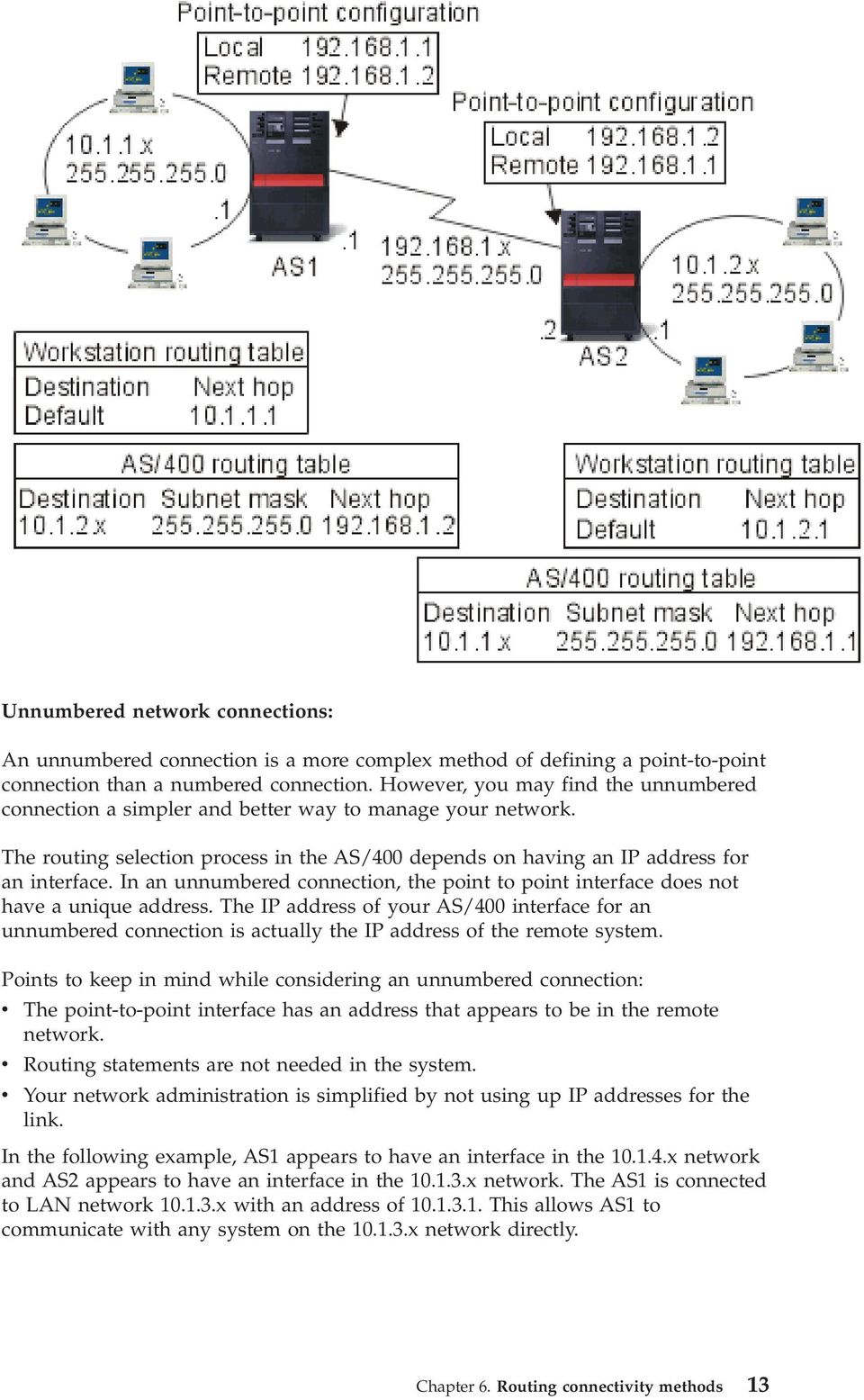
20 Also shown in the example is AS2. AS2 is connected to LAN network x with an address of This allows AS2 to communicate with any system on the x network directly. Each system (AS1 and AS2) adds the remote address to its routing table as a local interface. The address is treated specially so that packets destined for that address will not be processed locally. The packets for the remote address will be placed on the interface and transported to the other end of the connection. When the packet arrives at the other end of the connection, normal packet processing is used. Now you have a need to connect AS1 to the x network and to connect AS2 to the x network. If these two systems were in the same room, you would simply add a LAN adapter to each system and plug the new interface into the correct LAN. If you did this, AS1 and AS2 would not need any routing entries added. In this example, however, the systems are in different cities so you must use a point- to-point connection. Even though you are using a point-to-point connection, you would still like to avoid adding routing entries. By defining the Point-to-Point Protocol (PPP) connection as an unnumbered connection, you achieve the same results that you would have gotten if you could have used LAN adapters without adding any routing entries to your AS/400. To do this, each system borrows the IP address of the remote system for use with route resolution. Unnumbered versus numbered connection data flow: The following figure shows the addresses that would be used in a numbered and unnumbered point-to-point connection. The top half of the picture shows, that with a numbered connection, the remote system address of or could be used to reach the remote system. This is because there is a routing entry in AS3 that directs packets for to as the next hop. The addresses used in the return packet are based on the received packet. The bottom of the figure shows the addresses used with an unnumbered connection. The outbound packet has a source of and a destination of No routing entries are needed on either system because the systems have a direct interface to the remote network by using the remote system address of the point-to-point connection. 14 AS/400e: TCP/IP routing and workload balancing

21 [ Information Center Home Page Feedback ] Chapter 6. Routing connectivity methods 15
22 Proxy Address Resolution Protocol routing Proxy Address Resolution Protocol (ARP) routing allows physically distinct, separate networks to appear as if they were a single logical network. It provides connectivity between physically separate networks without creating any new logical networks and without updating any routing tables. Proxy ARP allows systems that are not directly connected to a LAN to appear to other systems on the LAN as though they are connected. This is useful in dial-up scenarios to provide connections to the entire network from a dial-in interface. The following figure shows a possible scenario. The x is your home LAN and the through are your remote systems. When a system on your home LAN ( x) wants to send data to one of your remote systems, it will first do an ARP request. This is a broadcast that goes out to all your systems attached to the LAN segment to request the address of the target system. However, a remotely connected system will not see the broadcast. This is where the proxy ARP comes in. The AS/400 knows which systems are connected remotely. If your AS/400 sees an ARP request for one of your remotely connected machines, your AS/400 will reply to the ARP request with its address. Your AS/400 in turn receives the data and forwards it to the remote system. For this forwarding to take place, IP forwarding must be set to *yes. If your remote system is not connected, your AS/400 will not reply to the ARP request and the requesting system will not send data. You can use transparent subnets as a proxy for an entire subnet, or range of hosts. Transparent subnetting allows stub networks to be assigned addresses out of the primary network address space. [ Information Center Home Page Feedback ] 16 AS/400e: TCP/IP routing and workload balancing
23 Transparent subnets You can use transparent subnets as a way to extend the proxy ARP concept. Transparent subnets work for a single host so that you can connect to an entire subnet or range of hosts. You can see in the figure below that the stub networks ( x through x) are assigned addresses out of the primary network address space (10.1.x.x). The twinaxial LANs are defined in address ranges that are within the real LAN address range. Prior to V4R2, the edits on the add TCP/IP route and add TCP/IP interface would not allow this to happen. In V4R2 the edits were relaxed. This allows two interfaces in different segments to have addresses that look like they are in the same segment. When the AS/400 sees this happen, it automatically performs a Proxy ARP for any systems that are attached behind the twinaxial controller. This allows all the systems on the 10.1.x.x network to communicate with all the subnet systems with no changes to the systems on the 10.1.x.x network. Transparent subnetting over WANs: The transparent subnet function can be further expanded to handle real LANs that are remotely located. Transparent subnetting over WANs makes remote networks appear to be connected to the home network. In the figure above, three networks are attached to the home 10.1.x.x network through the AS/400. These networks are all defined using a subnet mask that makes them transparent to the home network. Proxy ARP responds to any ARP request on the home network for systems in the x, x and x subnets. This causes the traffic for the home network to be routed automatically to the AS/400 in the home network. This AS/400 in Chapter 6. Routing connectivity methods 17
24 turn routes the data to the correct remote AS/400. The remote AS/400 either processes the data, or forwards it to the correct system within the remote LAN. The workstations in the remote LAN must have a default route that points to the remote AS/400 in their network as the first hop gateway. The workstations in the home LAN do not need any additional routing entries because no new logical networks are created. [ Information Center Home Page Feedback ] Dynamic routing Dynamic routing is provided by Interior Gateway Protocols (IGPs), such as Routing Internet Protocol (RIP). RIP allows you to configure the hosts as part of a RIP network. This type of routing requires little maintenance and also automatically reconfigures routing tables when your network changes or crashes. RIPv2 was added to the AS/400 so you can send and receive RIP packets to update routes throughout your network. In the figure below, a static route is added to the central system (AS1) that describes the connection to the network x via AS2. This is a static route (added by your network administrator) with route redistribution set to yes. This setting causes this route to be shared with other routers and systems so that when they have traffic for x, they route the traffic to your central AS/400 (AS1). AS2 has the routed server started so that it sends and receives RIP information. In this example, AS1 is sending the message that AS2 has a direct connection to x. 18 AS/400e: TCP/IP routing and workload balancing
25 What s happening in this example? v AS1 receives this RIP packet from AS2 and processes it. If AS1 does not have a route to x, it will store this route. If it does have a path to x that is the same number of hops or fewer, it will discard this new route information. In this example AS1 keeps the route data. v AS1 receives information from R1 with route information to x. AS1 keeps this route information. v AS1 receives information from R2 with route information to x. AS1 keeps this route information. v The next time AS1 sends RIP messages it will send information to R1 that describes all the connections AS1 knows about that R1 may not know about. AS1 sends route information about x, x, and x. AS1 does not send information about x to R1 because AS1 knows that R1 is connected to x and does not need a route. Similar information is sent to R2 and AS3. [ Information Center Home Page Feedback ] Chapter 6. Routing connectivity methods 19
26 Route binding Before preferred route binding came along, you did not have complete control over which interface was used to send out response packets of information. The Preferred Route Binding Interface, added to the add route function, gives you more control over which interface is used to send out your packets by allowing you to explicitly bind routes to interfaces. In the following figure there are three interfaces connected to the same network. To guarantee that no matter which interface receives the inbound request, the reply can be sent back to the same interface. To do this, you must add the duplicate routes to each interface. In this example, we add three default routes, each one is explicitly bound to a different interface. This binding does not change regardless of the order in which interfaces are started or ended. [ Information Center Home Page Feedback ] Classless Inter-Domain Routing Classless Inter-Domain Routing (CIDR or supernetting) is a way to combine several class-c address ranges into a single network or route. This method of routing adds class-c Internet Protocol (IP) addresses. These addresses are given out by Internet Service Providers (ISPs) for use by their customers. CIDR addresses can reduce the size of your routing tables and make more IP addresses available within your business. In the past, you were required to enter a subnet mask that was equal to or greater than the mask required for the network class. For class-c addresses, this meant a subnet of was the largest (253 host) that could be specified. To conserve IP addresses, when companies needed more than 253 hosts in a network, the Internet was issuing several class-c addresses. This would make the configuration of routes and other things difficult. Now, CIDR allows these contiguous class-c addresses to be combined into a single network address range by using the subnet mask. For example, if you are giving out four class-c network addresses ( , , , and 20 AS/400e: TCP/IP routing and workload balancing
27 with a subnet mask of ), you could ask your ISP to make them a supernet by using the subnet mask This mask combines the four networks into one for routing purposes. CIDR is beneficial because it reduces the number of assigned but unnecessary IP addresses. In this example, the router is set up to send one RIP message with the network address and subnet mask This tells your systems to receive the RIP messages for networks through through this router. This sends one message rather than the 16 that it would take to convey the same information if CIDR were not available. [ Information Center Home Page Feedback ] Routing with virtual IP Virtual IP, also called a circuitless or loopback interface, is a powerful function that can be used for many different things. It provides a way to assign one or more addresses to the system without the need of binding the address to a physical interface. This can be used when you want to run multiple occurrences of a Domino Web server bound to different addresses or if you want to run other services that need to bind to default ports. Most environments where you might want to use virtual IP are cases where you want to provide multiple paths between the local gateway and the AS/400, for example, load balancing and fault tolerance. In this context, each path implies an additional interface, and consequently, an additional, nonvirtual IP address on the AS/400. The existence of these multiple interfaces should only be visible on the local network. You do not want the remote clients to have to be aware of the Chapter 6. Routing connectivity methods 21
28 multiple IP addresses for the AS/400. Ideally, you would like them to view your AS/400 as a single IP address. How the inbound packet gets routed through the gateway, over the local network, and to the AS/400 should be invisible to a remote client. The way to accomplish this is by using virtual IP. Local clients should communicate with the AS/400 by any of the physical IP addresses while remote clients would see only the virtual IP interface. The virtual IP environment is for the AS/400 that acts as the server for remotely connected clients. More importantly, the virtual IP address is on a different subnet than the physical interfaces. Moreover, the virtual IP address makes your AS/400 appear as a single host, not necessarily as one attached to a larger network or subnetwork. Therefore, the subnet mask for the virtual IP interface should usually be set to Since the virtual IP address is not bound to a single physical interface, AS/400 never responds to an Address Resolution Protocol (ARP) request to the virtual IP address. In other words, you cannot route directly to a virtual IP address. For other systems to reach the virtual IP address, they must have a route defined to reach the address. This is why Virtual IP is designed mostly for remotely attached clients. In the following example, the workstations all point to one of the interfaces, on the AS/400, as their next hop gateway. When a packet arrives at AS/400, it goes through the packet processing. If the destination address matches any address defined on the system (including virtual IP addresses), the system processes the packet. The DNS servers use the addresses of the requested server. In this case all the addresses represent the same system. The virtual IP function can be used when consolidating multiple systems into one larger system. [ Information Center Home Page Feedback ] 22 AS/400e: TCP/IP routing and workload balancing
29 Fault tolerance Another use for virtual IP addresses is to protect against route fault tolerance. This example shows several different ways a route may be recovered after an outage. The most reliable connection is when a virtual IP address is defined on the system. With virtual IP s support, even if an interface fails, the session can still communicate using different interfaces. What happens if router R1 fails? v Connections through R1 are rerouted through R2. v The failed gateway will detect R1 recovery, but active connections will continue to run through R2. What happens if interface fails? v Active connections to are lost, but other connections to , , and remain. v Route rebinding: Pre-V4R2: Indirect routes are rebound to or V4R2: Routes are rebound only if Preferred Binding Interface is set to NONE. V4R3 and higher: You need to define as the virtual IP address and primary system address. - The primary IP address of the system remains active. - The system stays accessible as long as at least one physical interface remains active. [ Information Center Home Page Feedback ] Routing with network address translation Network address translation (NAT) provides access to a remote network, usually the Internet, while protecting the private network by masking the IP addresses that are used inside your firewall. You can use these types of NAT for routing your AS/400: Chapter 6. Routing connectivity methods 23
30 v v v Masquerade NAT Masquerade NAT allows your private network to hide behind and be represented by the address you bind to your public interface. Dynamic NAT Dynamic NAT establishes a connection from within a private network out to a public network. The difference is that a pool of public addresses is maintained and used when an outbound connection is made. Static NAT Static NAT supports inbound connections from a public network into a private network. [ Information Center Home Page Feedback ] Masquerade NAT Masquerade NAT is used to allow your private network to hide behind, as well as be represented by, the address bound to the public interface. In many situations, this is the address that has been assigned by an Internet Service Provider (ISP), and the address may be dynamic in the case of a Point-to-Point Protocol (PPP) connection. This type of translation can only be used for connections originating within the private network destined for the outside public network. Each outbound connection is maintained by using a different source IP port number. Masquerade NAT allows workstations with private IP addresses to communicate with hosts on the Internet using AS/400. AS/400 has an IP address assigned by the local ISP as its Internet gateway. The term locally attached machine is used to refer to all machines on an internal network regardless of the method of attachment (LAN or WAN) and regardless of the distance of the connection. The term external machines is used to refer to machines located on the Internet. The following figure illustrates how Masquerade NAT works. 24 AS/400e: TCP/IP routing and workload balancing
31 To the Internet, all of your workstations appear to be contained within your AS/400; that is, only one IP address is associated with both your AS/400 and your workstations. When a router receives a packet intended for your workstation, it attempts to determine what address on the internal LAN should receive the packet and sends it there. Each workstation must be set up so that AS/400 is its gateway and also its default destination. The correspondence between a particular communication connection (port) and a workstation is set up when one of your workstations sends a packet to AS/400 to be sent to the Internet. The masquerade NAT function saves the port number so that when it receives responses to your workstation s packet over that connection, it can send the response to the correct workstation. A record of active port connections and the last access time by either end of the connection is created and maintained by masquerade NAT. These records are periodically purged of all connections that are idle for a predetermined amount of time based on the assumption that an idle link is no longer in use. All communication between your workstation and the Internet must be initiated by locally attached machines. This is an effective security firewall; the Internet knows nothing of the existence of your workstations, and it cannot broadcast those addresses to the Internet. Chapter 6. Routing connectivity methods 25
32 A key to masquerade NAT implementation is the use of logical ports, issued by masquerade NAT to distinguish between the various communication streams. TCP contains a source and a destination port number. To these designations, NAT adds a logical port number. Outbound masquerade NAT processing: The outbound message in the figure above is a packet from the private LAN to the Internet. An outbound message (local to external) contains the source port used by the originating workstation. NAT saves this number and replaces it in the transport header with a unique logical port number. For outbound datagrams, the source port number is the local port number. 1. Outbound masquerade NAT processing assumes that all IP packets it receives are bound for external IP addresses, and therefore does not check to determine whether a packet should be routed locally. 2. The set of logical port numbers searches for a match on the transport layer as well as a source IP address and source port. If found, the corresponding logical port number is substituted for the source port. If no matching port number is found, a new one is created, and a new logcial port number is selected and substituted for the source port. 3. The source IP address is translated. 4. The packet is then processed as usual by IP and is sent to the correct external system. Inbound masquerade NAT processing (response and other): The inbound message in the figure above is a packet from the Internet to your private LAN. For inbound datagrams, the destination port number is the local port number. (For inbound messages, the source port number is the external port number. For outbound messages, the destination port number is the external port number.) Response messages returning from the Internet bound for a locally attached machine have a masquerade-assigned logical port number as the destination port number in the transport layer header. The masquerade NAT inbound processing steps are: 1. Masquerade NAT searches its database for this logical port number (source port). If it is not found, the packet is assumed to be an unsolicited packet, and the packet is returned to the caller unchanged. It is then handled as a normal unknown destination. 2. If a matching logical port number is found, a further check is made to determine that the source IP address matches the destination IP address of the existing logical port number table entry. If it matches, the original local machine s port number replaces the source port in the IP header. If the check fails, the packet is returned unchanged. 3. The local matching IP addresses are placed in the packet IP destination. 4. The packet is then processed, as usual by IP or TCP, and ends up at the correct locally attached machine. Because masquerade NAT requires a logical 26 AS/400e: TCP/IP routing and workload balancing
33 port number to determine the correct source and destination port addresses, masquerade NAT is incapable of handling unsolicited datagrams from the Internet. [ Information Center Home Page Feedback ] Dynamic NAT Dynamic NAT can only be used to establish connections from within the private network out to the public network. A pool of network addresses is maintained and used when an outbound connection is made. Each connection is assigned a unique public address. The maximum number of simultaneous connections is equal to the number of public addresses in the pool. This is similar to a one-to-one correspondence between addresses. Dynamic NAT allows you to communicate with the Internet through a dynamic NAT address. The figure below illustrates Dynamic NAT. Chapter 6. Routing connectivity methods 27
34 [ Information Center Home Page Feedback ] Static NAT Static NAT is a simple one-to-one mapping of private and public addresses. This is required to support inbound connections from your public network into your private network. For each local address defined, there has to be an associated globally unique address. 28 AS/400e: TCP/IP routing and workload balancing
35 [ Information Center Home Page Feedback ] Routing with OptiConnect and logical partitions OptiConnect and logical partitions provide other environments for you to use the routing basics of proxy ARP, point-to-point, and virtual IP interfaces. Here are a few different methods of these basics. v TCP/IP and OptiConnect OptiConnect can give you the ability to define TCP/IP connections over an OptiConnect bus. This page describes this feature and how it may be used. Chapter 6. Routing connectivity methods 29
36 v Virtual OptiConnect with logical partitions Virtual OptiConnect TCP/IP interfaces are used as interpartition communication paths. A single AS/400 is logically partitioned in multiple virtual machines. Each partition has its own address space. To TCP/IP, each partition appears as a distinct AS/400. This page shows you how you can use this feature to your advantage. [ Information Center Home Page Feedback ] TCP/IP and OptiConnect OptiConnect gives you the ability to define TCP/IP connections over an OptiConnect bus. TCP/IP over OptiConnect provides another method for the routing building blocks such as proxy ARP, unnumbered point-to-point networks, and virtual IP interfaces. You can configure this with an OptiConnect-emulated LAN configuration and an OptiConnect point-to-point configuration. With an OptiConnect-emulated LAN configuration, the OptiConnect bus appears as a LAN to TCP/IP. This is simple to configure, but the LAN OptiConnect connectivity is not automatic because it requires Routing Information Protocol (RIP) or static routes. The OptiConnect point-to-point configuration uses point-to-point unnumbered interfaces that are configured for each pair of OptiConnect hosts. No new networks are created and so the LAN OptiConnect connectivity is automatic. One advantage to this configuration is that no additional route definitions are required. Connectivity between a host on one network to hosts on another network is automatic. Another advantage is that if both networks are active, data sent between AS/400 servers flows over the OptiConnect bus because these routes have the most specific subnet mask. If the OptiConnect bus goes down, traffic is automatically switched to the token-ring LAN. OptiConnect point-to-point configuration using virtual IP is a variation on the unnumbered point-to-point configuration. Remember that whenever you use unnumbered, point-to-point interfaces, each interface has to have an associated local interface specified. This is the IP address by which the system on the remote end of the point-to-point link will know the local AS/400. This associated local interface may be the AS/400 system s primary LAN interface, as shown below. Or you can use a virtual IP interface as the associated local interface. In this configuration you use the OptiConnect bus as a collection of point-to-point connections. You define an unnumbered connection for each pair of hosts. Like the previous configuration, no additional route definitions are required, and connectivity between a host on one network to hosts on the other network are automatic. An advantage of this configuration is that if either network is active, a path will exist to reach any AS/ AS/400e: TCP/IP routing and workload balancing
37 [ Information Center Home Page Feedback ] Routing with virtual OptiConnect and logical partitions With logical partitions, a single AS/400 is logically partitioned into multiple virtual machines. Virtual OptiConnect TCP/IP interfaces are used as interpartition communication paths. Each partition has its own address space, its own instance of TCP/IP, and may have its own dedicated I/O adapters. To TCP/IP, each partition appears as a distinct AS/400. TCP/IP communication between the different partitions is done using a virtual OptiConnect bus. The TCP/IP routing code uses the path to another partition no differently than the path to another system connected by a physical OptiConnect bus. Chapter 6. Routing connectivity methods 31
38 In these examples, only one LAN adapter is installed in the system. It is allocated to partition A. The clients in the LAN need to communicate with the other partitions defined on the system. To do this, you define a transparent subnet on the virtual OptiConnect bus. The LAN has a network address of x. You want to plan for additional partitions, so IP addresses are then needed. To get 12 addresses, you must use a subnet mask of This gives you addresses through , a total of 14 usable addresses. You must ensure that these addresses are not already in use on the LAN. After you get the addresses, you assign one to each partition. You add an interface to each partition and define the address on the virtual OptiConnect bus. 32 AS/400e: TCP/IP routing and workload balancing
39 Transparent subnetting is automatically enabled when the following statements are true. First, the virtual OptiConnect bus is less than or equal to the size of the MTU on the real LAN interface. Second, the OptiConnect bus subnet is a subnet of the LAN network address. If both statements are true, then transparent subnetting is automatically enabled. The interface performs a proxy for all the interfaces defined in the partitions. This allows clients on the LAN to connect to the partitions. [ Information Center Home Page Feedback ] Chapter 6. Routing connectivity methods 33
40 34 AS/400e: TCP/IP routing and workload balancing
41 Chapter 7. TCP/IP workload balancing methods Workload balancing is redistributing network traffic and workload of heavily accessed machines across multiple processors, multiple interface adapters, or multiple host servers. If you want to get the best performance possible from your AS/400, you should put the communications load on multiple parts of your system. Several different TCP/IP routing methods can be used to balance the workload of your AS/400: v v v DNS-based load balancing You can use DNS-based load balancing for your inbound workload. If load balancing is needed for local clients, you should use DNS load balancing. Duplicate route-based load balancing Here you can learn about outbound workload balancing across multiple interfaces. This is a connection-based solution that has more flexibility than DNS-based load balancing but is not active for local clients. Load balancing with virtual IP This solution requires you to have an external load balancing machine, such as IBM enetwork Dispatcher. Virtual IP addresses allow you to assign an address to the system rather than to a specific interface. You may define the same address to multiple servers, which allows many new options for load balancing. [ Information Center Home Page Feedback ] DNS-based load balancing DNS-based load balancing is used for inbound load balancing. Multiple host IP addresses are configured in DNS for a single host server name. DNS alternates the host IP address returned to a successive client host name resolution request. An advantage to this type of load balancing is that it is a common DNS function. Disadvantages to this solution are that IP addresses can be cached by a client and it is a connection-based solution, not a load-based solution. The first way to achieve load balancing is to use a DNS function to pass out multiple addresses for the same system name. The DNS will serve a different IP address each time a request is made for the address record for your system name. In the example below, each address corresponds to a different system. This allows you to provide load balancing across two separate systems. In the case of clients on the private networks, they receive a different address for each request. This is a common DNS function. Notice that the public DNS also has two address entries. These addresses are translated using static NAT so that if you are on the Internet, you can reach the two systems. Copyright IBM Corp
42 If your programs depend on getting to a specific system or depend on returning to the same system after the initial connection, the Web pages and site should be coded to send a different system name after the first contact is made. Additional DNS entries could be added for MyServer and MyServer By doing this, the Web sites, for example, could point to MyServer2 after the first contact. This type of load balancing provides balancing by the connection request. In most cases, once you have resolved the address the client caches the address and will not ask again. This type of load balancing does not consider the amount of traffic going to each system. Note that this type of load balancing only considers inbound traffic and also that you can have two adapters on one system rather than one adapter on two systems. [ Information Center Home Page Feedback ] Duplicate route-based load balancing You can use duplicate route-based load balancing for outbound workload balancing across multiple interfaces. This is a connection-based solution that has more flexibility than DNS-based load balancing, but it is not active for local clients. The advantages of using this type of load balancing are that it is a total AS/400 solution, it has more flexibility than DNS, and it is good for applications where most of the traffic is outbound, like HTTP and Telnet. The disadvantages to it are that it is a connection-based (not a load-based solution) it is not active for local clients; and it has no effect on inbound requests. In the example below, three adapters on your system are all connected to the same LAN segment. You have set up one of the adapters as an inbound line only and set up the other two adapters as outbound. Local clients continue to work the same way as in the past. That is to say the outbound interface is the same as the inbound interface. Remember that a local client is any system that does not require a router to reach it. This could be a very large network if switches were used rather than routers. 36 AS/400e: TCP/IP routing and workload balancing
43 Where do I go to configure this? You can configure this in the Add TCP/IP Route command line and also in the Operations Navigator interface. One is called duplicate route priority, the other is called the preferred binding interface. If the value for duplicate route priority is left at the default value of 5, nothing happens. If a value greater than 5 is set, then connections are distributed between routes at the same priority. The preferred binding interface is used to bind a route to a specific interface by IP address rather than the first one the system sees. In the example above, there is an inbound adapter ( ) with a duplicate route priority of 6. The other two adapters are configured with a duplicate route priority of 8. Because the duplicate route priority on one adapter is 6, it will not be selected for an outbound connection unless all the single route priority interfaces of 8 are down. You should put all the outbound interfaces at the same priority. If you put some at one value and some at another value, only the highest value interfaces will be used. Notice that the DNS is pointing to the interface making it the inbound interface. Even if you decide not to use duplicate route priority, you should always define a default route out of the system on each interface by using the preferred binding interface parameter. [ Information Center Home Page Feedback ] Chapter 7. TCP/IP workload balancing methods 37
44 Load balancing with virtual IP Virtual IP addresses allow you to assign an address to the system rather than to a specific interface. This solution requires you to have an external load balancing machine, such as IBM enetwork Dispatcher. You may define the same address to multiple servers, as shown in the following figure, which allows many new options for load balancing. A benefit of this type of load balancing is that it is load-based dispatching. The disadvantage to it is that it requires an external dispatcher. Local clients can still connect to servers using a physical interface address ( x), while remote clients see only a single virtual server, accessible only through a dispatcher. If virtual IP addresses are reachable through multiple interfaces on the same host, you should define duplicate indirect routes, each bound to a different physical interface. [ Information Center Home Page Feedback ] 38 AS/400e: TCP/IP routing and workload balancing
45 Chapter 8. Other information about TCP/IP routing and workload balancing <! attempted to fix link ><! OLD LINK was DNS is an advanced system for managing the host names that are associated with Internet Protocol (IP) addresses on TCP/IP networks. Here you will find basic concepts and procedures that you need to know to configure and administer DNS. Logical partitions provides you with more background information and detail. NAT and IP filter administration helps you manage your filter rules. Some of the functions include adding comments, editing, and viewing. OptiConnect, provides you with information on OptiConnect routing. This is an AS/400 online book called OptiConnect for OS/400 V4R4. Point-to-point protocol is commonly used to connect a computer to the Internet. PPP is an Internet standard and is the most widely used connection protocol among Internet Service Providers (ISPs). [ Information Center Home Page Feedback ] Copyright IBM Corp
46 40 AS/400e: TCP/IP routing and workload balancing
47
48 Printed in U.S.A.
iseries TCP/IP routing and workload balancing
 iseries TCP/IP routing and workload balancing iseries TCP/IP routing and workload balancing Copyright International Business Machines Corporation 2000, 2001. All rights reserved. US Government Users Restricted
ERserver. iseries. TCP/IP routing and workload balancing
 ERserver iseries TCP/IP routing and workload balancing ERserver iseries TCP/IP routing and workload balancing Copyright International Business Machines Corporation 1998, 2001. All rights reserved. US
Networking TCP/IP routing and workload balancing
 System i Networking TCP/IP routing and workload balancing Version 5 Release 4 System i Networking TCP/IP routing and workload balancing Version 5 Release 4 Note Before using this information and the product
Networking Security IP packet security
 Networking Security IP packet security Networking Security IP packet security Copyright International Business Machines Corporation 1998,2000. All rights reserved. US Government Users Restricted Rights
Proxy Server, Network Address Translator, Firewall. Proxy Server
 Proxy Server, Network Address Translator, Firewall 1 Proxy Server 2 1 Introduction What is a proxy server? Acts on behalf of other clients, and presents requests from other clients to a server. Acts as
Chapter 3 LAN Configuration
 Chapter 3 LAN Configuration This chapter describes how to configure the advanced LAN features of your ProSafe Dual WAN Gigabit Firewall with SSL & IPsec VPN. This chapter contains the following sections
Chapter 12 Supporting Network Address Translation (NAT)
 [Previous] [Next] Chapter 12 Supporting Network Address Translation (NAT) About This Chapter Network address translation (NAT) is a protocol that allows a network with private addresses to access information
IP Addressing A Simplified Tutorial
 Application Note IP Addressing A Simplified Tutorial July 2002 COMPAS ID 92962 Avaya Labs 1 All information in this document is subject to change without notice. Although the information is believed to
Technical Support Information Belkin internal use only
 The fundamentals of TCP/IP networking TCP/IP (Transmission Control Protocol / Internet Protocols) is a set of networking protocols that is used for communication on the Internet and on many other networks.
ERserver. iseries. Networking TCP/IP Setup
 ERserver iseries Networking TCP/IP Setup ERserver iseries Networking TCP/IP Setup Copyright International Business Machines Corporation 1998, 2001. All rights reserved. US Government Users Restricted
LAN TCP/IP and DHCP Setup
 CHAPTER 2 LAN TCP/IP and DHCP Setup 2.1 Introduction In this chapter, we will explain in more detail the LAN TCP/IP and DHCP Setup. 2.2 LAN IP Network Configuration In the Vigor 2900 router, there are
ERserver. iseries. Remote Access Services: PPP connections
 ERserver iseries Remote Access Services: PPP connections ERserver iseries Remote Access Services: PPP connections Copyright International Business Machines Corporation 1998, 2002. All rights reserved.
Configuring Network Address Translation (NAT)
 8 Configuring Network Address Translation (NAT) Contents Overview...................................................... 8-3 Translating Between an Inside and an Outside Network........... 8-3 Local and
UIP1868P User Interface Guide
 UIP1868P User Interface Guide (Firmware version 0.13.4 and later) V1.1 Monday, July 8, 2005 Table of Contents Opening the UIP1868P's Configuration Utility... 3 Connecting to Your Broadband Modem... 4 Setting
Chapter 3 Security and Firewall Protection
 Chapter 3 Security and Firewall Protection This chapter describes how to use the basic firewall features of the ADSL2+ Modem Router to protect your network. Firewall Settings You can set up the ADSL2+
Chapter 4 Customizing Your Network Settings
 Chapter 4 Customizing Your Network Settings This chapter describes how to configure advanced networking features of the RangeMax Dual Band Wireless-N Router WNDR3300, including LAN, WAN, and routing settings.
CMPT 471 Networking II
 CMPT 471 Networking II Firewalls Janice Regan, 2006-2013 1 Security When is a computer secure When the data and software on the computer are available on demand only to those people who should have access
Efficient Addressing. Outline. Addressing Subnetting Supernetting CS 640 1
 Efficient Addressing Outline Addressing Subnetting Supernetting CS 640 1 IPV4 Global Addresses Properties IPv4 uses 32 bit address space globally unique hierarchical: network + host 7 24 Dot Notation 10.3.2.4
Basic Network Configuration
 Basic Network Configuration 2 Table of Contents Basic Network Configuration... 25 LAN (local area network) vs WAN (wide area network)... 25 Local Area Network... 25 Wide Area Network... 26 Accessing the
8.2 The Internet Protocol
 TCP/IP Protocol Suite HTTP SMTP DNS RTP Distributed applications Reliable stream service TCP UDP User datagram service Best-effort connectionless packet transfer Network Interface 1 IP Network Interface
04 Internet Protocol (IP)
 SE 4C03 Winter 2007 04 Internet Protocol (IP) William M. Farmer Department of Computing and Software McMaster University 29 January 2007 Internet Protocol (IP) IP provides a connectionless packet delivery
Note: This case study utilizes Packet Tracer. Please see the Chapter 5 Packet Tracer file located in Supplemental Materials.
 Note: This case study utilizes Packet Tracer. Please see the Chapter 5 Packet Tracer file located in Supplemental Materials. CHAPTER 5 OBJECTIVES Configure a router with an initial configuration. Use the
s@lm@n CompTIA Exam N10-006 CompTIA Network+ certification Version: 5.1 [ Total Questions: 1146 ]
![s@lm@n CompTIA Exam N10-006 CompTIA Network+ certification Version: 5.1 [ Total Questions: 1146 ]](/thumbs/27/9611247.jpg "s@lm@n CompTIA Exam N10-006 CompTIA Network+ certification Version: 5.1 [ Total Questions: 1146 ]") s@lm@n CompTIA Exam N10-006 CompTIA Network+ certification Version: 5.1 [ Total Questions: 1146 ] Topic break down Topic No. of Questions Topic 1: Network Architecture 183 Topic 2: Network Operations 149
s@lm@n CompTIA Exam N10-006 CompTIA Network+ certification Version: 5.1 [ Total Questions: 1146 ] Topic break down Topic No. of Questions Topic 1: Network Architecture 183 Topic 2: Network Operations 149
Implementing Network Address Translation and Port Redirection in epipe
 Implementing Network Address Translation and Port Redirection in epipe Contents 1 Introduction... 2 2 Network Address Translation... 2 2.1 What is NAT?... 2 2.2 NAT Redirection... 3 2.3 Bimap... 4 2.4
Internetworking and Internet-1. Global Addresses
 Internetworking and Internet Global Addresses IP servcie model has two parts Datagram (connectionless) packet delivery model Global addressing scheme awaytoidentifyall H in the internetwork Properties
Dynamic Host Configuration Protocol (DHCP) 02 NAT and DHCP Tópicos Avançados de Redes
 Dynamic Host Configuration Protocol (DHCP) 1 1 Dynamic Assignment of IP addresses Dynamic assignment of IP addresses is desirable for several reasons: IP addresses are assigned on-demand Avoid manual IP
Guide to TCP/IP, Third Edition. Chapter 2: IP Addressing and Related Topics
 Guide to TCP/IP, Third Edition Chapter 2: IP Addressing and Related Topics Objectives Understand IP addressing, anatomy and structures, and addresses from a computer s point of view Recognize and describe
Introduction to LAN/WAN. Network Layer (part II)
 Introduction to LAN/WAN Network Layer (part II) Topics The Network Layer Introduction Routing (5.2) The Internet (5.5) IP, IP addresses ARP (5.5.4) OSPF (5.5.5) BGP (5.5.6) Congestion Control (5.3) Internetworking
Guide to TCP/IP, Third Edition. Chapter 3: Data Link and Network Layer TCP/IP Protocols
 Guide to TCP/IP, Third Edition Chapter 3: Data Link and Network Layer TCP/IP Protocols Objectives Understand the role that data link protocols, such as SLIP and PPP, play for TCP/IP Distinguish among various
z/os V1R11 Communications Server system management and monitoring
 IBM Software Group Enterprise Networking Solutions z/os V1R11 Communications Server z/os V1R11 Communications Server system management and monitoring z/os Communications Server Development, Raleigh, North
Copyright International Business Machines Corporation 2001. All rights reserved. US Government Users Restricted Rights Use, duplication or disclosure
 iseries DNS iseries DNS Copyright International Business Machines Corporation 2001. All rights reserved. US Government Users Restricted Rights Use, duplication or disclosure restricted by GSA ADP Schedule
IP addressing. Interface: Connection between host, router and physical link. IP address: 32-bit identifier for host, router interface
 IP addressing IP address: 32-bit identifier for host, router interface Interface: Connection between host, router and physical link routers typically have multiple interfaces host may have multiple interfaces
Chapter 6 Configuring the SSL VPN Tunnel Client and Port Forwarding
 Chapter 6 Configuring the SSL VPN Tunnel Client and Port Forwarding This chapter describes the configuration for the SSL VPN Tunnel Client and for Port Forwarding. When a remote user accesses the SSL VPN
1 Data information is sent onto the network cable using which of the following? A Communication protocol B Data packet
 Review questions 1 Data information is sent onto the network cable using which of the following? A Communication protocol B Data packet C Media access method D Packages 2 To which TCP/IP architecture layer
CCNA Tutorial Series SUBNETTING
 CCNA Tutorial Series This document contains the Course Map For The Interactive flash tutorial at: http://www.semsim.com/ccna/tutorial/subnetting/subnetting.html HOME PAGE Course Objectives Pre-test By
Chapter 4 Customizing Your Network Settings
 . Chapter 4 Customizing Your Network Settings This chapter describes how to configure advanced networking features of the Wireless-G Router Model WGR614v9, including LAN, WAN, and routing settings. It
NAT & IP Masquerade. Internet NETWORK ADDRESS TRANSLATION INTRODUCTION. NAT & IP Masquerade Page 1 of 5. Internal PC 192.168.0.25
 NAT & IP Masquerade Page 1 of 5 INTRODUCTION Pre-requisites TCP/IP IP Address Space NAT & IP Masquerade Protocol version 4 uses a 32 bit IP address. In theory, a 32 bit address space should provide addresses
A Practical Look at Network Address Translation. A Nokia Horizon Manager White Paper
 A Practical Look at Network Address Translation A Nokia Horizon Manager White Paper Part No. WP0018 Rev A Published November 2003 COPYRIGHT 2003 Nokia. All rights reserved. Rights reserved under the copyright
Broadband Phone Gateway BPG510 Technical Users Guide
 Broadband Phone Gateway BPG510 Technical Users Guide (Firmware version 0.14.1 and later) Revision 1.0 2006, 8x8 Inc. Table of Contents About your Broadband Phone Gateway (BPG510)... 4 Opening the BPG510's
DMZ Network Visibility with Wireshark June 15, 2010
 DMZ Network Visibility with Wireshark June 15, 2010 Ashok Desai Senior Network Specialist Intel Information Technology SHARKFEST 10 Stanford University June 14-17, 2010 Outline Presentation Objective DMZ
2. IP Networks, IP Hosts and IP Ports
 1. Introduction to IP... 1 2. IP Networks, IP Hosts and IP Ports... 1 3. IP Packet Structure... 2 4. IP Address Structure... 2 Network Portion... 2 Host Portion... 3 Global vs. Private IP Addresses...3
Transport and Network Layer
 Transport and Network Layer 1 Introduction Responsible for moving messages from end-to-end in a network Closely tied together TCP/IP: most commonly used protocol o Used in Internet o Compatible with a
Operating System Concepts. Operating System 資 訊 工 程 學 系 袁 賢 銘 老 師
 Lecture 7: Distributed Operating Systems A Distributed System 7.2 Resource sharing Motivation sharing and printing files at remote sites processing information in a distributed database using remote specialized
Guideline for setting up a functional VPN
 Guideline for setting up a functional VPN Why do I want a VPN? VPN by definition creates a private, trusted network across an untrusted medium. It allows you to connect offices and people from around the
SSVP SIP School VoIP Professional Certification
 SSVP SIP School VoIP Professional Certification Exam Objectives The SSVP exam is designed to test your skills and knowledge on the basics of Networking and Voice over IP. Everything that you need to cover
How To Configure A Vyatta 4.2.0 As A Ds Internet Connection Router/Gateway With A Web Server On A Dspv.Net 4.0.1 (Dspv) On A Network With A D
 Open Informatics a An Information Technology Company Visit us on the web at www.openinformatics.net Tutorial Author: Zlatan Klebic Send Feedback: [email protected] Configuring a Vyatta 4.0 release
Teldat Router. ARP Proxy
 Teldat Router ARP Proxy Doc. DM734-I Rev. 10.00 November, 2002 INDEX Chapter 1 Introduction...1 1. ARP Proxy... 2 Chapter 2 Configuration...4 1. ARP Proxy Configuration... 5 1.1. Enabling ARP Proxy...
PART IV. Network Layer
 PART IV Network Layer Position of network layer Network layer duties Internetworking : heterogeneous Physical Networks To look Like a single network to he upper layers The address at Network layer must
ERserver. iseries. TFTP server
 ERserver iseries TFTP server ERserver iseries TFTP server Copyright International Business Machines Corporation 2000. All rights reserved. US Government Users Restricted Rights Use, duplication or disclosure
Subnetting,Supernetting, VLSM & CIDR
 Subnetting,Supernetting, VLSM & CIDR WHAT - IP Address Unique 32 or 128 bit Binary, used to identify a system on a Network or Internet. Network Portion Host Portion CLASSFULL ADDRESSING IP address space
Chapter 7. Address Translation
 Chapter 7. Address Translation This chapter describes NetDefendOS address translation capabilities. Dynamic Network Address Translation, page 204 NAT Pools, page 207 Static Address Translation, page 210
VMware vcloud Air Networking Guide
 vcloud Air This document supports the version of each product listed and supports all subsequent versions until the document is replaced by a new edition. To check for more recent editions of this document,
Craig Pelkie Bits & Bytes Programming, Inc. [email protected]
 Craig Pelkie Bits & Bytes Programming, Inc. [email protected] The Basics of IP Packet Filtering Edition IPFILTER_20020219 Published by Bits & Bytes Programming, Inc. Valley Center, CA 92082 [email protected]
Broadband Router ESG-103. User s Guide
 Broadband Router ESG-103 User s Guide FCC Warning This equipment has been tested and found to comply with the limits for Class A & Class B digital device, pursuant to Part 15 of the FCC rules. These limits
How To Plan Out Your Own Version Of Hpl (Dhcp) On A Network With A Network (Dns) On Your Network (Dhpl) On An Ipad Or Ipad On A Pc Or Ipa On A Server On A
 System i Networking Dynamic Host Configuration Protocol Version 5 Release 4 System i Networking Dynamic Host Configuration Protocol Version 5 Release 4 Note Before using this information and the product
ITRI CCL. IP Routing Primer. Paul C. Huang, Ph.D. ITRI / CCL / N300. CCL/N300; Paul Huang 1999/6/2 1
 IP Routing Primer Paul C. Huang, Ph.D. ITRI / / N300 /N300; Paul Huang 1999/6/2 1 Basic Addressing / Subnetting Class A 0 Network Host Host Host 127 networks / 16,777,216 hosts Class A natural mask 255.0.0.0
Lab 10.3.5a Basic Subnetting
 Lab 10.3.5a Basic Subnetting Objective How to identify reasons to use a subnet mask How to distinguish between a default subnet mask and a custom subnet mask What given requirements determine the subnet
Configuring IP Load Sharing in AOS Quick Configuration Guide
 Configuring IP Load Sharing in AOS Quick Configuration Guide ADTRAN Operating System (AOS) includes IP Load Sharing for balancing outbound IP traffic across multiple interfaces. This feature can be used
NAT REFERENCE GUIDE. VYATTA, INC. Vyatta System NAT. Title
 Title VYATTA, INC. Vyatta System NAT REFERENCE GUIDE NAT Vyatta Suite 200 1301 Shoreway Road Belmont, CA 94002 vyatta.com 650 413 7200 1 888 VYATTA 1 (US and Canada) Copyright COPYRIGHT Copyright 2005
Network Address Translation (NAT)
 Network Address Translation (NAT) Relates to Lab 7. Module about private networks and NAT. Taken from http://www.cs.virginia.edu/~itlab/ book/slides/module17-nat.ppt 1 Private Network Private IP network
Introduction to Network Operating Systems
 As mentioned earlier, different layers of the protocol stack use different kinds of addresses. We can now see that the Transport Layer (TCP) uses port addresses to route data to the correct process, the
How to set up Inbound Load Balance under Drop-in Mode
 How to set up Inbound Load Balance under Drop-in Mode Background Customers often wonder whether Drop-in Mode and Inbound Load Balance can co-exist. The good news is yes they can. The purpose of this how-to
DEPLOYMENT GUIDE Version 1.1. DNS Traffic Management using the BIG-IP Local Traffic Manager
 DEPLOYMENT GUIDE Version 1.1 DNS Traffic Management using the BIG-IP Local Traffic Manager Table of Contents Table of Contents Introducing DNS server traffic management with the BIG-IP LTM Prerequisites
Guide to Network Defense and Countermeasures Third Edition. Chapter 2 TCP/IP
 Guide to Network Defense and Countermeasures Third Edition Chapter 2 TCP/IP Objectives Explain the fundamentals of TCP/IP networking Describe IPv4 packet structure and explain packet fragmentation Describe
Computer Networks By Bahaa Q. Al-Mussawi Subnetting Basics Reduced network traffic Optimized network performance Simplified management
 Subnetting Basics You learned previously how to define and find the valid host ranges used in a Class A, Class B, and Class C network address by turning the host bits all off and then all on. This is very
System i and System p. Customer service, support, and troubleshooting
 System i and System p Customer service, support, and troubleshooting System i and System p Customer service, support, and troubleshooting Note Before using this information and the product it supports,
Galileo International. Firewall & Proxy Specifications
 Galileo International Technical Support Documentation Firewall & Proxy Specifications For Focalpoint, Viewpoint & Focalpoint Print Manager (GALILEO and APOLLO PRODUCTION SYSTEMS) Copyright Copyright 2001
Load Balancing. Final Network Exam LSNAT. Sommaire. How works a "traditional" NAT? Un article de Le wiki des TPs RSM.
 Load Balancing Un article de Le wiki des TPs RSM. PC Final Network Exam Sommaire 1 LSNAT 1.1 Deployement of LSNAT in a globally unique address space (LS-NAT) 1.2 Operation of LSNAT in conjunction with
Internet Firewall CSIS 4222. Packet Filtering. Internet Firewall. Examples. Spring 2011 CSIS 4222. net15 1. Routers can implement packet filtering
 Internet Firewall CSIS 4222 A combination of hardware and software that isolates an organization s internal network from the Internet at large Ch 27: Internet Routing Ch 30: Packet filtering & firewalls
Internet Protocol version 4 Part I
 Internet Protocol version 4 Part I Claudio Cicconetti International Master on Information Technology International Master on Communication Networks Engineering Table of Contents
Internet Protocol: IP packet headers. vendredi 18 octobre 13
 Internet Protocol: IP packet headers 1 IPv4 header V L TOS Total Length Identification F Frag TTL Proto Checksum Options Source address Destination address Data (payload) Padding V: Version (IPv4 ; IPv6)
Agenda. Distributed System Structures. Why Distributed Systems? Motivation
 Agenda Distributed System Structures CSCI 444/544 Operating Systems Fall 2008 Motivation Network structure Fundamental network services Sockets and ports Client/server model Remote Procedure Call (RPC)
hp ProLiant network adapter teaming
 hp networking june 2003 hp ProLiant network adapter teaming technical white paper table of contents introduction 2 executive summary 2 overview of network addressing 2 layer 2 vs. layer 3 addressing 2
Computer Networks. Lecture 3: IP Protocol. Marcin Bieńkowski. Institute of Computer Science University of Wrocław
 Computer Networks Lecture 3: IP Protocol Marcin Bieńkowski Institute of Computer Science University of Wrocław Computer networks (II UWr) Lecture 3 1 / 24 In previous lectures We learned about layer 1
IP addressing and forwarding Network layer
 The Internet Network layer Host, router network layer functions: IP addressing and forwarding Network layer Routing protocols path selection RIP, OSPF, BGP Transport layer: TCP, UDP forwarding table IP
Evaluation guide. Vyatta Quick Evaluation Guide
 VYATTA, INC. Evaluation guide Vyatta Quick Evaluation Guide A simple step-by-step guide to configuring network services with Vyatta Open Source Networking http://www.vyatta.com Overview...1 Booting Up
Configuration Guide. DHCP Server. LAN client
 DHCP Server Configuration Guide 4.0 DHCP Server LAN client LAN client LAN client Copyright 2007, F/X Communications. All Rights Reserved. The use and copying of this product is subject to a license agreement.
Scalable Linux Clusters with LVS
 Scalable Linux Clusters with LVS Considerations and Implementation, Part I Eric Searcy Tag1 Consulting, Inc. [email protected] April 2008 Abstract Whether you are perusing mailing lists or reading
Internet Addresses (You should read Chapter 4 in Forouzan)
 Internet Addresses (You should read Chapter 4 in Forouzan) IP Address is 32 Bits Long Conceptually the address is the pair (NETID, HOSTID) Addresses are assigned by the internet company for assignment
Enterprise Edge Communications Manager. Data Capabilities
 Enterprise Edge Communications Manager Data Capabilities Data Module Objectives After the completion of this module you will be able to describe the following Data components of the Enterprise Edge Communications
Blue Coat Security First Steps Transparent Proxy Deployments
 Transparent Proxy Deployments SGOS 6.5 Third Party Copyright Notices 2014 Blue Coat Systems, Inc. All rights reserved. BLUE COAT, PROXYSG, PACKETSHAPER, CACHEFLOW, INTELLIGENCECENTER, CACHEOS, CACHEPULSE,
Implementing, Managing, and Maintaining a Microsoft Windows Server 2003 Network Infrastructure
 Question Number (ID) : 1 (jaamsp_mngnwi-025) Lisa would like to configure five of her 15 Web servers, which are running Microsoft Windows Server 2003, Web Edition, to always receive specific IP addresses
Zarząd (7 osób) F inanse (13 osób) M arketing (7 osób) S przedaż (16 osób) K adry (15 osób)
 QUESTION NO: 8 David, your TestKing trainee, asks you about basic characteristics of switches and hubs for network connectivity. What should you tell him? A. Switches take less time to process frames than
2.1.2.2.2 Variable length subnetting
 2.1.2.2.2 Variable length subnetting Variable length subnetting or variable length subnet masks (VLSM) allocated subnets within the same network can use different subnet masks. Advantage: conserves the
Introduction To Computer Networking
 Introduction To Computer Networking Alex S. 1 Introduction 1.1 Serial Lines Serial lines are generally the most basic and most common communication medium you can have between computers and/or equipment.
How Your Computer Accesses the Internet through your Wi-Fi for Boats Router
 How Your Computer Accesses the Internet through your Wi-Fi for Boats Router By default, a router blocks any inbound traffic from the Internet to your computers except for replies to your outbound traffic.
Module 15: Network Structures
 Module 15: Network Structures Background Topology Network Types Communication Communication Protocol Robustness Design Strategies 15.1 A Distributed System 15.2 Motivation Resource sharing sharing and
Internet Working 5 th lecture. Chair of Communication Systems Department of Applied Sciences University of Freiburg 2004
 5 th lecture Chair of Communication Systems Department of Applied Sciences University of Freiburg 2004 1 43 Last lecture Lecture room hopefully all got the message lecture on tuesday and thursday same
Quick Start for Network Agent. 5-Step Quick Start. What is Network Agent?
 What is Network Agent? The Websense Network Agent software component uses sniffer technology to monitor all of the internet traffic on the network machines that you assign to it. Network Agent filters
Lecture Computer Networks
 Prof. Dr. H. P. Großmann mit M. Rabel sowie H. Hutschenreiter und T. Nau Sommersemester 2012 Institut für Organisation und Management von Informationssystemen Thomas Nau, kiz Lecture Computer Networks
Raritan Valley Community College Academic Course Outline. CISY 253 - Advanced Computer Networking
 Raritan Valley Community College Academic Course Outline CISY 253 - Advanced Computer Networking I. Basic Course Information A. Course number and Title: CISY 253- Advanced Computer Networking (TCP/IP)
> Technical Configuration Guide for Microsoft Network Load Balancing. Ethernet Switch and Ethernet Routing Switch Engineering
 Ethernet Switch and Ethernet Routing Switch Engineering > Technical Configuration Guide for Microsoft Network Load Balancing Enterprise Solutions Engineering Document Date: March 9, 2006 Document Version:
Copyright 2006 Comcast Communications, Inc. All Rights Reserved.
 ii Copyright 2006 Comcast Communications, Inc. All Rights Reserved. Comcast is a registered trademark of Comcast Corporation. Comcast Business IP Gateway is a trademark of Comcast Corporation. The Comcast
ISOM3380 Advanced Network Management. Spring 2014 15. Course Description
 ISOM3380 Advanced Network Management Spring 2014 15 Course Description In an interconnected economy, management of network applications becomes increasingly important. This course helps students develop
Advanced IP Addressing
 Advanced IP Addressing CS-765 A Aspects Of Systems Administration Spring-2005 Instructure: Jan Schauman Stevens Institute Of Technology, NJ. Prepared By: Modh, Jay A. M.S. NIS SID: 999-14-0352 Date: 05/02/2005
NetFlow Subinterface Support
 NetFlow Subinterface Support Feature History Release Modification 12.2(14)S This feature was introduced. 12.2(15)T This feature was integrated into Cisco IOS Release 12.2 T. This document describes the
How To Use A Network Over The Internet (Networking) With A Network (Netware) And A Network On A Computer (Network)
 1 TCP Transmission Control Protocol, is a connection based Internet protocol responsible for breaking data into packets to send over a network using IP (internet protocol) IP works at the TCP/IP Internet