
This chapter discusses the following advanced IP addressing topics: IP Address Planning Hierarchical Addressing Using Variable-Length Subnet Masks
|
|
|
- Doris Melton
- 9 years ago
- Views:
Transcription
1 This chapter discusses the following advanced IP addressing topics: IP Address Planning Hierarchical Addressing Using Variable-Length Subnet Masks Route Summarization Classless Interdomain Routing Network Address Translation Understanding IP Version 6

2 C H A P T E R 1 Advanced IP Addressing Scalable, well-behaved networks are not accidental; they are the result of good network design and effective implementation planning. A key element for effective scalable network implementation is a well-conceived and scalable IP addressing plan. The purpose of a scalable IP addressing plan is to maximize the amount of IP address space available in deployed networks (this address space is shrinking) and to minimize the size of routing tables. As a network grows, the number of subnets and the volume of network addresses required increase proportionally. Without advanced IP addressing techniques such as summarization and classless interdomain routing (CIDR), the size of the routing tables increases, which causes a variety of problems. For example, networks require more CPU resources to respond to each topology change in the larger routing tables. In addition, larger routing tables can cause delays while the CPU sorts and searches for a match to a destination address. Both of these problems are solved by summarization and CIDR. To effectively use summarization and CIDR to control the size of routing tables, network administrators employ other advanced IP addressing techniques such as Network Address Translation (NAT) and variable-length subnet masking (VLSM). NAT allows the use of a private addressing space within an organization while using globally unique addresses for routing across the Internet and between independent divisions of the organization. Different address pools may be used to track groups of users, which makes it easier to manage interconnectivity. VLSM allows the network administrator to subnet a previously subnetted address to make the best use of the available address space. Another long-standing problem that network administrators must overcome is the exhaustion of available IP addresses caused by the increase in Internet use. Although the current solution is to use NAT, the long-term solution is to migrate from the IP version 4 (IPv4) 32-bit address space to the IP version 6 (IPv6) 128-bit address space. Gaining insight into IPv6 functionality and deployment will prove valuable for network administrators in the not-too-distant future.
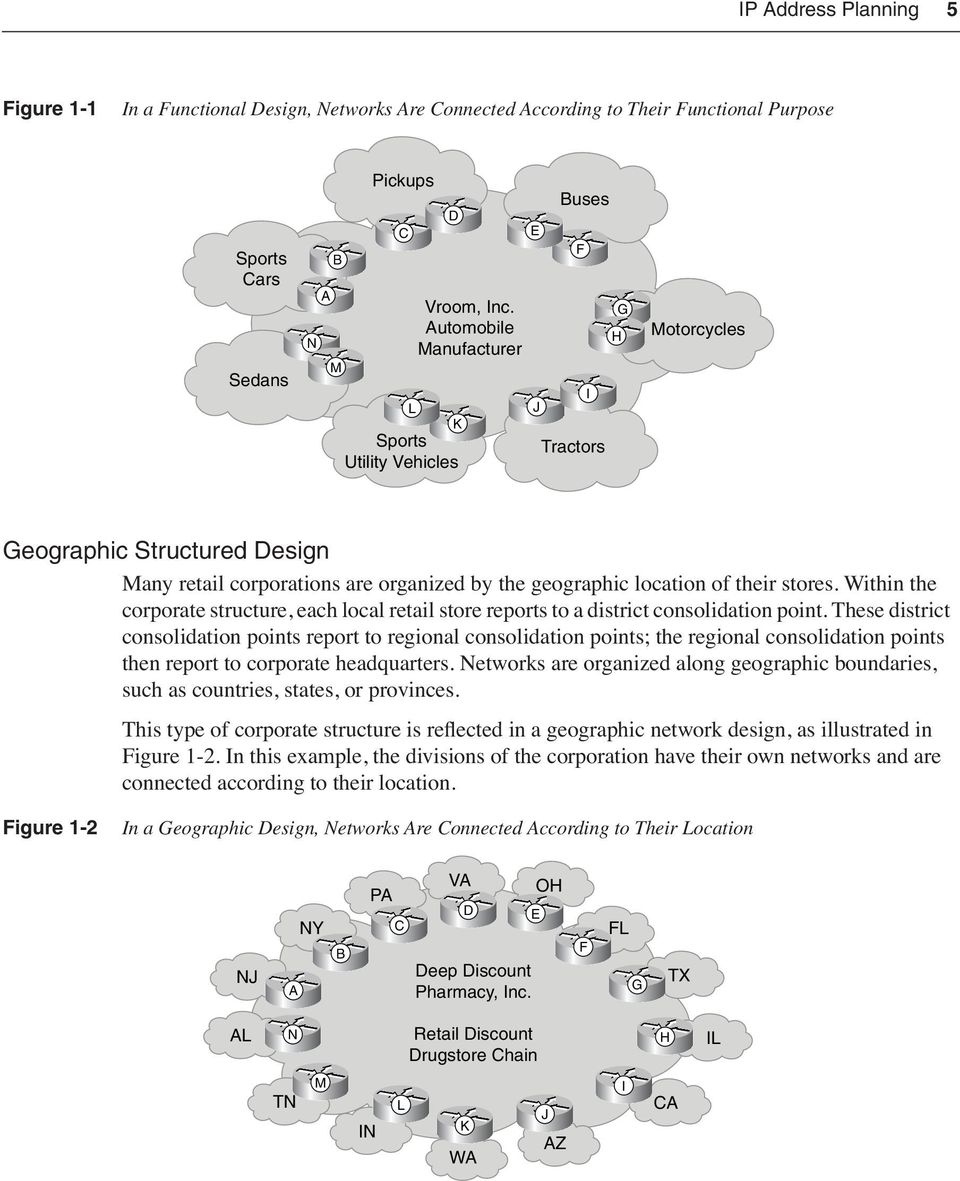
3 4 Chapter 1: Advanced IP Addressing After completing this chapter, you will be able to describe the concepts of network design and explain the benefits and characteristics of an effective scalable IP addressing plan. You will also be able to describe the role of VLSM addressing in a scalable network and calculate VLSM addresses for a network. You will be able to demonstrate the principles of route summarization and CIDR by summarizing a given range of network addresses into larger IP address blocks. You will also be able to configure NAT for multiple address pools using access lists and route maps. Finally, you will be able to describe the features and benefits of using IPv6. IP Address Planning A well-designed large-scale internetwork with an effective IP addressing plan has many benefits. It is scalable, flexible, predictable, and can reduce the routing table size through summarization. Scalable Network Design An understanding of scalable network design concepts is imperative for understanding proper IP address planning. Corporate organizational structure should affect network design. The structure of a scalable network design reflects a corporation s information flow and is called a hierarchical network design. There are two types of hierarchical network design: functional and geographic. The design concepts discussed in this section are only a very small part of good network design from the perspective of the IP addressing plan. For a full discussion of internetwork design, refer to CCDA Self-Study: Designing for Cisco Internetwork Solutions (DESGN) (Cisco Press, 2003). Functional Structured Design Some corporations have independent divisions that are responsible for their own operations, including networking. These divisions interact with one another and share resources; however, each division has an independent chain of command. This type of corporate structure is reflected in a functional network design, as illustrated in Figure 1-1. In this example, the different divisions of the corporation have their own networks and are connected according to their functional purpose within the corporate structure. The network architecture can follow the corporate organizational chart.
4 IP Address Planning 5 Figure 1-1 In a Functional Design, Networks Are Connected According to Their Functional Purpose Sports Cars Sedans N A B M Pickups C D L K Sports Utility Vehicles Vroom, Inc. Automobile Manufacturer E J Buses F I Tractors H G Motorcycles Geographic Structured Design Many retail corporations are organized by the geographic location of their stores. Within the corporate structure, each local retail store reports to a district consolidation point. These district consolidation points report to regional consolidation points; the regional consolidation points then report to corporate headquarters. Networks are organized along geographic boundaries, such as countries, states, or provinces. This type of corporate structure is reflected in a geographic network design, as illustrated in Figure 1-2. In this example, the divisions of the corporation have their own networks and are connected according to their location. Figure 1-2 In a Geographic Design, Networks Are Connected According to Their Location NJ A NY B PA C VA D Deep Discount Pharmacy, Inc. E OH F FL G TX AL N Retail Discount Drugstore Chain H IL TN M IN L K WA J AZ I CA
5 6 Chapter 1: Advanced IP Addressing From a networking point of view, a geographic network structure is cost-effective because fewer network links require long-haul carriers, often a considerable added expense. Hierarchical Layers Within the functional or geographic networks, the following three primary layer elements are involved in a hierarchical scalable network design: Access layer Provides local and remote workgroup, end-user, and customer access to the network. Virtual LANs (VLANs), firewalls, and access lists maintain security for this layer. Distribution layer Provides policy-based connectivity and is the consolidation point for access layer devices and corporate services. Host services required by multiple access layer devices are assigned to this layer. Core (or backbone) layer Provides high-speed transport to satisfy the connectivity and transport needs of the distribution layer devices. The circuits with the fastest bandwidth are in the core layer of the network. Redundancy occurs more frequently at this layer than at the other layers. There are many different ways of designing these hierarchical layers. Some of the considerations are identified in this section. Fully Meshed Core Layer The core layer is designed to provide quick and efficient access to headquarters and other divisions within a company. Because the core is usually critical to the network, redundancy is often found in this layer. In a fully meshed core layer design, shown in Figure 1-3, each division has redundant routers at the core layer. The core sites are fully meshed, meaning that all routers have direct connections to all other routers. This connectivity allows the network to react quickly when it must route data flow from a downed link to another path. Figure 1-3 In a Fully Meshed Core, All Routers Are Connected to All Other Routers Division A B A N M Division B C D E Division C F H G Division D Division G L Division F K J I Division E
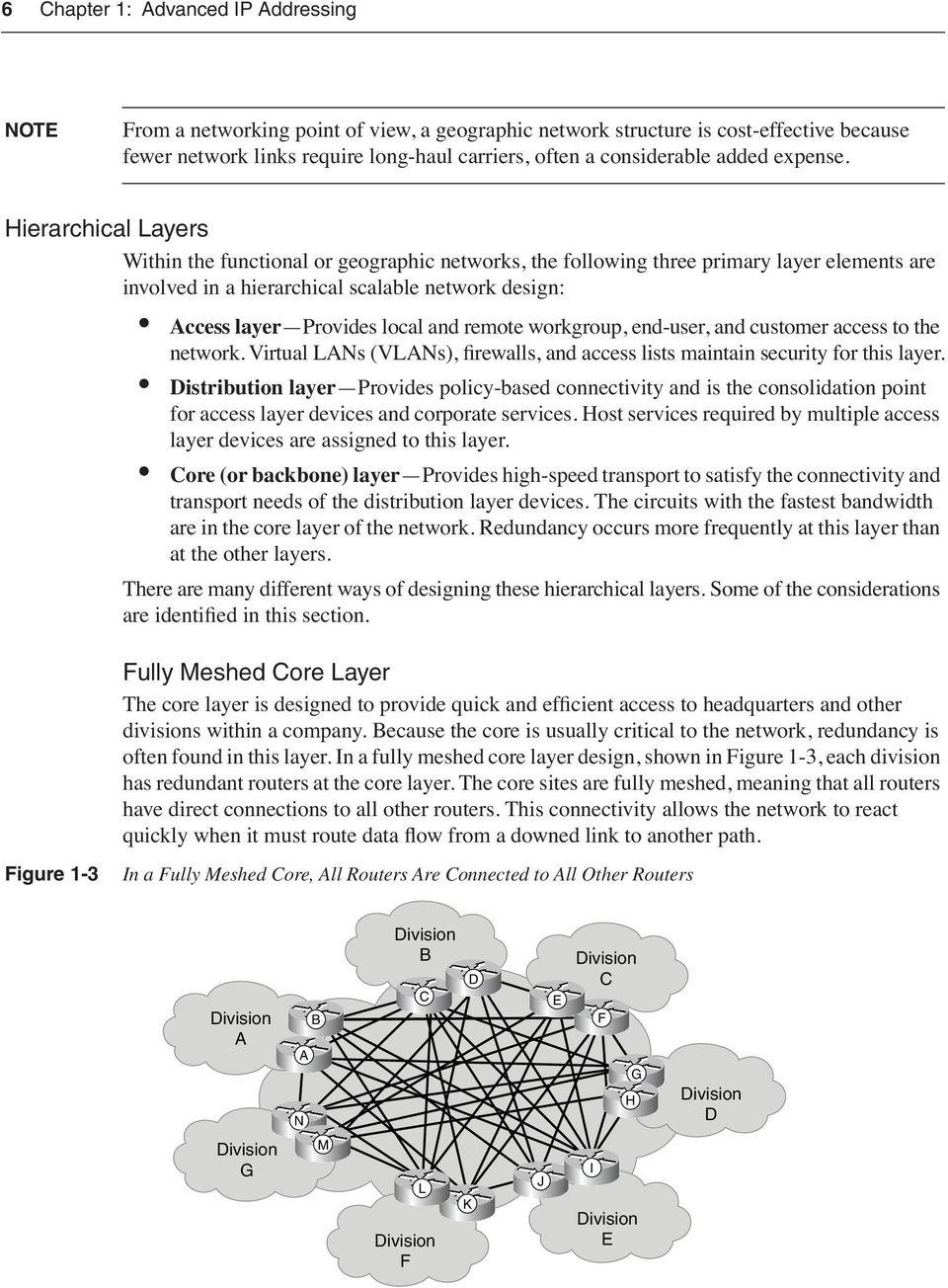
6 IP Address Planning 7 For a small core with a limited number of divisions, this core layer design provides robust connectivity. However, a fully meshed core layer design is very expensive for a corporation with many divisions. The number of links in a full mesh is n(n 1)/2, where n is the number of routers. As the number of routers increases, the cost of full-mesh connectivity might become prohibitive. Hub-and-Spoke Core Layer As a network grows, fully meshing all the core routers can become difficult. At that point, consolidation into geographically separate data centers might be appropriate. For example, in many companies, data travels to a centralized headquarters where the corporate databases and network services reside. To reflect this corporate centralization, the core layer hub-and-spoke configuration establishes a focal point for the data flow at a key site. The hub-and-spoke design, illustrated in Figure 1-4, supports the traffic flow through the corporation. Figure 1-4 In a Hub-and-Spoke Core, Each Division Is Connected Only to the Headquarters Division A B A N Division B C O D P E Division C F H G Division D Division G M L Division F K J I Division E A partial-mesh design is also possible, including some nodes connected in a full mesh and some connected in hub-and-spoke fashion. Access and Distribution Layers Remote sites are points of entry to the network for end users and customers. Within the network, remote sites gain access to network services through the access layer. The distribution layer consolidates the services and devices that the access layer needs to process the activity that is generated by the remote sites. Figure 1-5 illustrates this process.

7 8 Chapter 1: Advanced IP Addressing Figure 1-5 The Distribution Layer Consolidates Access Layer Connectivity Core Layer Distribution Layer Frame Relay R19 Frame Relay Distribution Layer A R1 R2 R7 R8 R9 R10 B R3 R6 R5 Distribution Layer R4 Frame Relay R18 R17 R16 R15 Access Layer Access Layer R11 R12 R13 R14 Access Layer Frame Relay, shown in Figure 1-5, is a WAN access protocol commonly used to interconnect geographically dispersed sites. Services should be placed in the distribution layer when there is no benefit to having duplicated services at the remote sites. These services may include Dynamic Host Configuration Protocol (DHCP), Domain Name System (DNS), human resources, and accounting servers. One or more distribution layers can connect to each entry point at the core layer. You can fully mesh connectivity between remote sites at the access layer. However, using a huband-spoke configuration by connecting remote sites to at least two distribution layer devices provides redundancy and is relatively easy to administer. Benefits of a Good Network Design An effective network design accommodates unexpected growth and quick changes in the corporate environment. The network design can be adapted to accommodate mergers with other companies, corporate restructuring, and downsizing with minimal impact on the portions of the network that do not change. The following are characteristics of a good IP addressing plan implemented in a well-designed network: Scalability A well-designed network allows for significant increases in the number of supported sites.

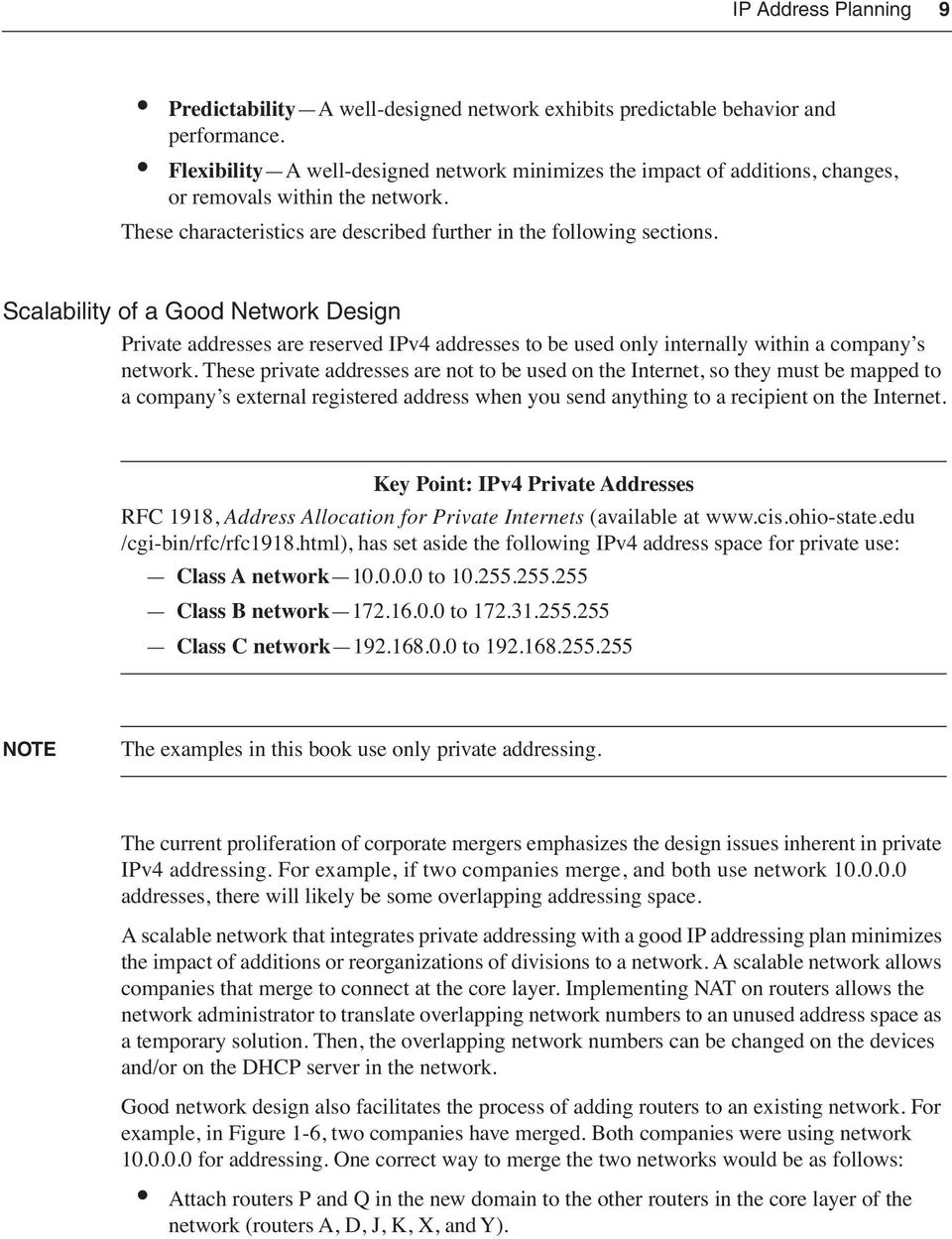
8 IP Address Planning 9 Predictability A well-designed network exhibits predictable behavior and performance. Flexibility A well-designed network minimizes the impact of additions, changes, or removals within the network. These characteristics are described further in the following sections. Scalability of a Good Network Design Private addresses are reserved IPv4 addresses to be used only internally within a company s network. These private addresses are not to be used on the Internet, so they must be mapped to a company s external registered address when you send anything to a recipient on the Internet. Key Point: IPv4 Private Addresses RFC 1918, Address Allocation for Private Internets (available at /cgi-bin/rfc/rfc1918.html), has set aside the following IPv4 address space for private use: Class A network to Class B network to Class C network to The examples in this book use only private addressing. The current proliferation of corporate mergers emphasizes the design issues inherent in private IPv4 addressing. For example, if two companies merge, and both use network addresses, there will likely be some overlapping addressing space. A scalable network that integrates private addressing with a good IP addressing plan minimizes the impact of additions or reorganizations of divisions to a network. A scalable network allows companies that merge to connect at the core layer. Implementing NAT on routers allows the network administrator to translate overlapping network numbers to an unused address space as a temporary solution. Then, the overlapping network numbers can be changed on the devices and/or on the DHCP server in the network. Good network design also facilitates the process of adding routers to an existing network. For example, in Figure 1-6, two companies have merged. Both companies were using network for addressing. One correct way to merge the two networks would be as follows: Attach routers P and Q in the new domain to the other routers in the core layer of the network (routers A, D, J, K, X, and Y).
9 10 Chapter 1: Advanced IP Addressing Configure NAT on routers P and Q to change the IP address space of the new company from network to network Change the DHCP servers to reflect the newly assigned address space in the new network. Remove NAT from routers P and Q. Figure 1-6 A Good IP Addressing Design Minimizes the Impact of Merging Networks P S X Y Q R New Division A B E D J K G C Division Alpha F N M O L I H Division Beta Predictability of a Good Network Design The behavior of a scalable network is predictable. Packets load-balance across the internetwork if equal-cost paths exist between any two routers in the internetwork. When a circuit or router fails, an alternative equal-cost path to the destination that exists in every routing table can be used, without any recalculation. This alternative path reduces convergence times and route recalculation to typically less than 1 second after the failed circuit or router is discovered. Depending on the routing protocol used, the equal cost is determined based on hop count and/ or bandwidth. For example, if the Routing Information Protocol (RIP) is used in the network shown in Figure 1-6, the routing table for router C will have two best paths to X: three hops through B and three hops through E. Routers B and E each have two best paths to the networks behind router X: Both have two hops through either routers A or D. If router D fails, routers B and E do not need to discover alternative routes because the preferred route exists in the routing table. Thus, if router D fails, the routes to X in router C s routing table do not change.
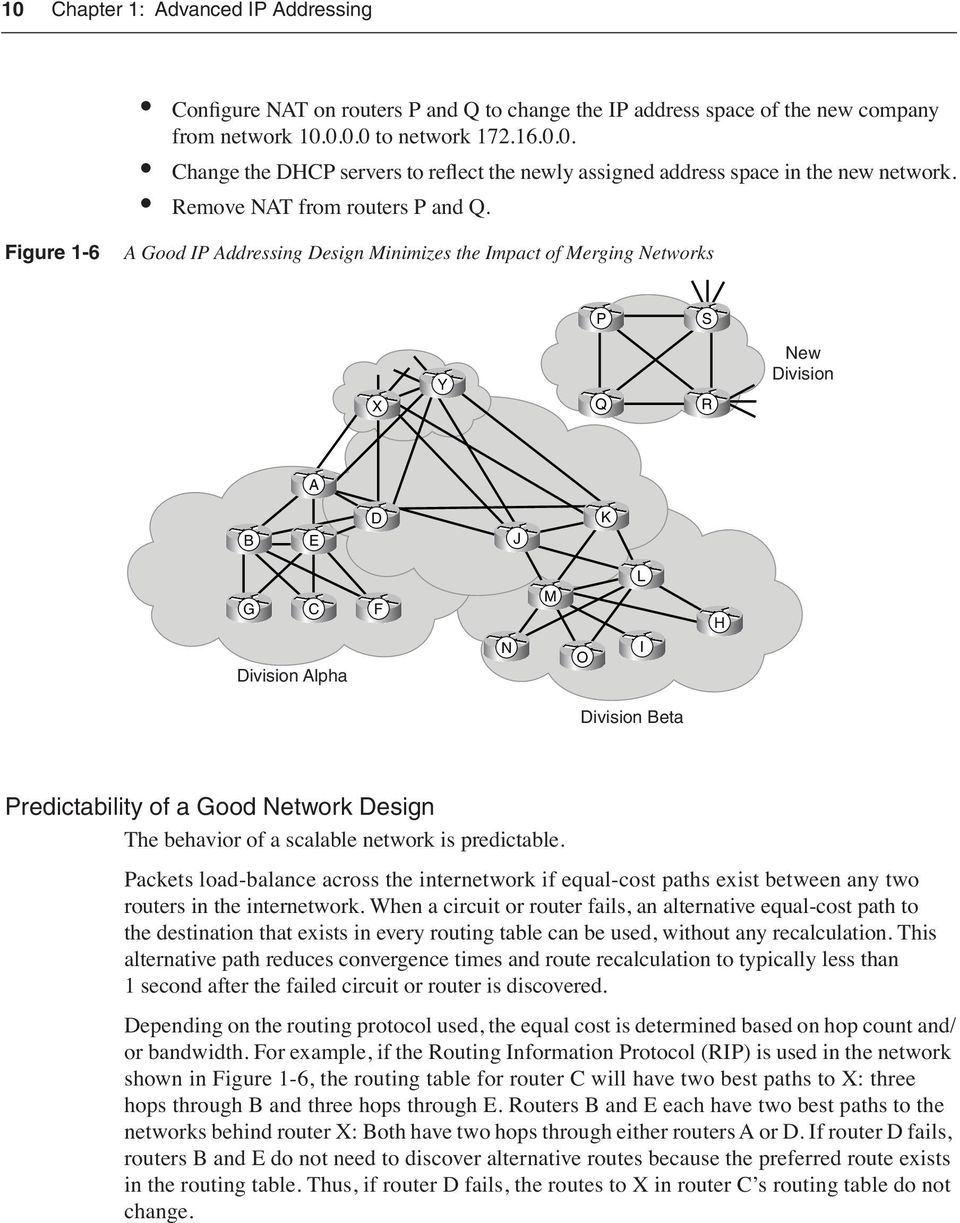
10 IP Address Planning 11 If a routing protocol that uses bandwidth in its calculation is used (for example, Interior Gateway Routing Protocol [IGRP]), the bandwidth should be configured equally on all interfaces within a layer at each site. For example, in Figure 1-6, routers B and E are consolidation points for the access layer routers (G, C, and F in the example). Routers C, B, and E all have the same bandwidth configured on the links that connect them so that load balancing can be used. The paths between routers B and E and routers A and D need larger-bandwidth pipes to consolidate the traffic between corporate divisions. Because routers A and D consolidate multiple distribution points for a division, the connections for these routers to other divisions in the company need the largest bandwidth. The result is a predictable traffic pattern. This level of network behavior predictability is a direct benefit of a scalable network design. Flexibility of a Good Network Design A scalable network also needs to be flexible. For example, corporate reorganizations can have minimal impact on the rest of the network when implemented in a scalable network. In the sample network shown in Figure 1-6, assume that Frame Relay is used at the remote sites and that Division Beta is sold and merged with another company, except for remote site H, which becomes part of Division Alpha. The network administrator in this sample network could accommodate the corporate reorganization with the following process: Install two additional virtual circuits from router H to routers B and E. Following a successful installation, remove the virtual circuits to routers M and L. Perform NAT on the router H interfaces to routers B and E to use the address space of Division Alpha. Remove the circuits from routers J and K to the other core routers A, D, X, and Y (and P and Q if they are connected). Change the user addresses for router H to the Division Alpha block of addresses. Benefits of an Optimized IP Addressing Plan An optimized IP addressing plan uses hierarchical addressing. Perhaps the best-known addressing hierarchy is the telephone network. The telephone network uses a hierarchical numbering scheme that includes country codes, area codes, and local exchange numbers. For example, if you are in San Jose, California, and you call someone else in San Jose, you dial the San Jose local exchange number, 528, and the person s four digit number. Upon seeing the number 528, the central office recognizes that the destination telephone is within its area, so it looks up the four digit number and transfers the call.
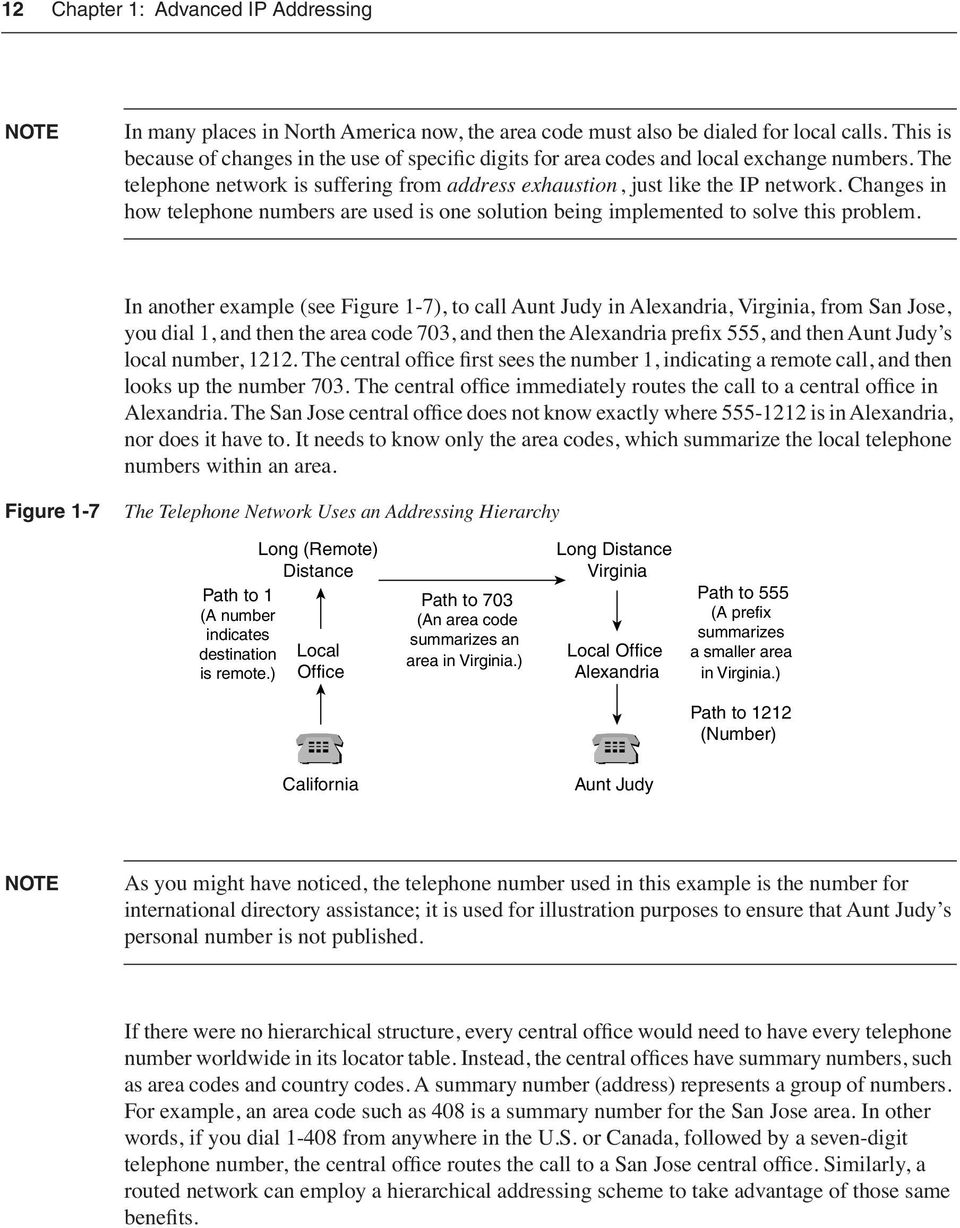
11 12 Chapter 1: Advanced IP Addressing In many places in North America now, the area code must also be dialed for local calls. This is because of changes in the use of specific digits for area codes and local exchange numbers. The telephone network is suffering from address exhaustion, just like the IP network. Changes in how telephone numbers are used is one solution being implemented to solve this problem. In another example (see Figure 1-7), to call Aunt Judy in Alexandria, Virginia, from San Jose, you dial 1, and then the area code 703, and then the Alexandria prefix 555, and then Aunt Judy s local number, The central office first sees the number 1, indicating a remote call, and then looks up the number 703. The central office immediately routes the call to a central office in Alexandria. The San Jose central office does not know exactly where is in Alexandria, nor does it have to. It needs to know only the area codes, which summarize the local telephone numbers within an area. Figure 1-7 The Telephone Network Uses an Addressing Hierarchy Path to 1 (A number indicates destination is remote.) Long (Remote) Distance Local Office Path to 703 (An area code summarizes an area in Virginia.) Long Distance Virginia Local Office Alexandria Path to 555 (A prefix summarizes a smaller area in Virginia.) Path to 1212 (Number) California Aunt Judy As you might have noticed, the telephone number used in this example is the number for international directory assistance; it is used for illustration purposes to ensure that Aunt Judy s personal number is not published. If there were no hierarchical structure, every central office would need to have every telephone number worldwide in its locator table. Instead, the central offices have summary numbers, such as area codes and country codes. A summary number (address) represents a group of numbers. For example, an area code such as 408 is a summary number for the San Jose area. In other words, if you dial from anywhere in the U.S. or Canada, followed by a seven-digit telephone number, the central office routes the call to a San Jose central office. Similarly, a routed network can employ a hierarchical addressing scheme to take advantage of those same benefits.
12 IP Address Planning 13 Here are some of the benefits of hierarchical addressing: Reduced number of routing table entries Whether it is with your Internet routers or your internal routers, you should try to keep your routing tables as small as possible by using route summarization. Route summarization is a way of having a single IP address represent a collection of IP addresses; this is most easily accomplished when you employ a hierarchical addressing plan. By summarizing routes, you can keep your routing table entries (on the routers that receive the summarized routes) manageable, which offers the following benefits: More efficient routing A reduced number of CPU cycles when recalculating a routing table or sorting through the routing table entries to find a match Reduced router memory requirements Reduced bandwidth required to send the fewer, smaller routing updates Faster convergence after a change in the network Easier troubleshooting Increased network stability Efficient allocation of addresses Hierarchical addressing lets you take advantage of all possible addresses because you group them contiguously. With random address assignment, you might end up wasting groups of addresses because of addressing conflicts. For example, classful routing protocols (discussed in the later section Implementing VLSM in a Scalable Network ) automatically create summary routes at a network boundary. Therefore, these protocols do not support discontiguous addressing (as you will see in Chapter 2, Routing Principles ), so some addresses would be unusable if not assigned contiguously. Within the context of hierarchical addressing, the IP addressing plan must include provisions for summarization at key points. Summarization (also called aggregation or information hiding) is not a new concept. When a router announces a route to a given network, the route is a summarization of the addresses in the routing table for all the host devices and individual addresses that reside on that network. Summarization helps reduce routing-table size and helps localize topology changes. This promotes network stability because a reduced routing-table size means that less bandwidth, memory, and CPU cycles are required to calculate the best path selection. Because summarization limits the propagation of detailed routes, it also reduces the impact to the network when these detailed routes fail. Scalable Network Addressing Example The network illustrated in Figure 1-8 shows an example of scalable addressing. In this example, a U.S. national drugstore chain plans to have a retail outlet in every city in the country with a
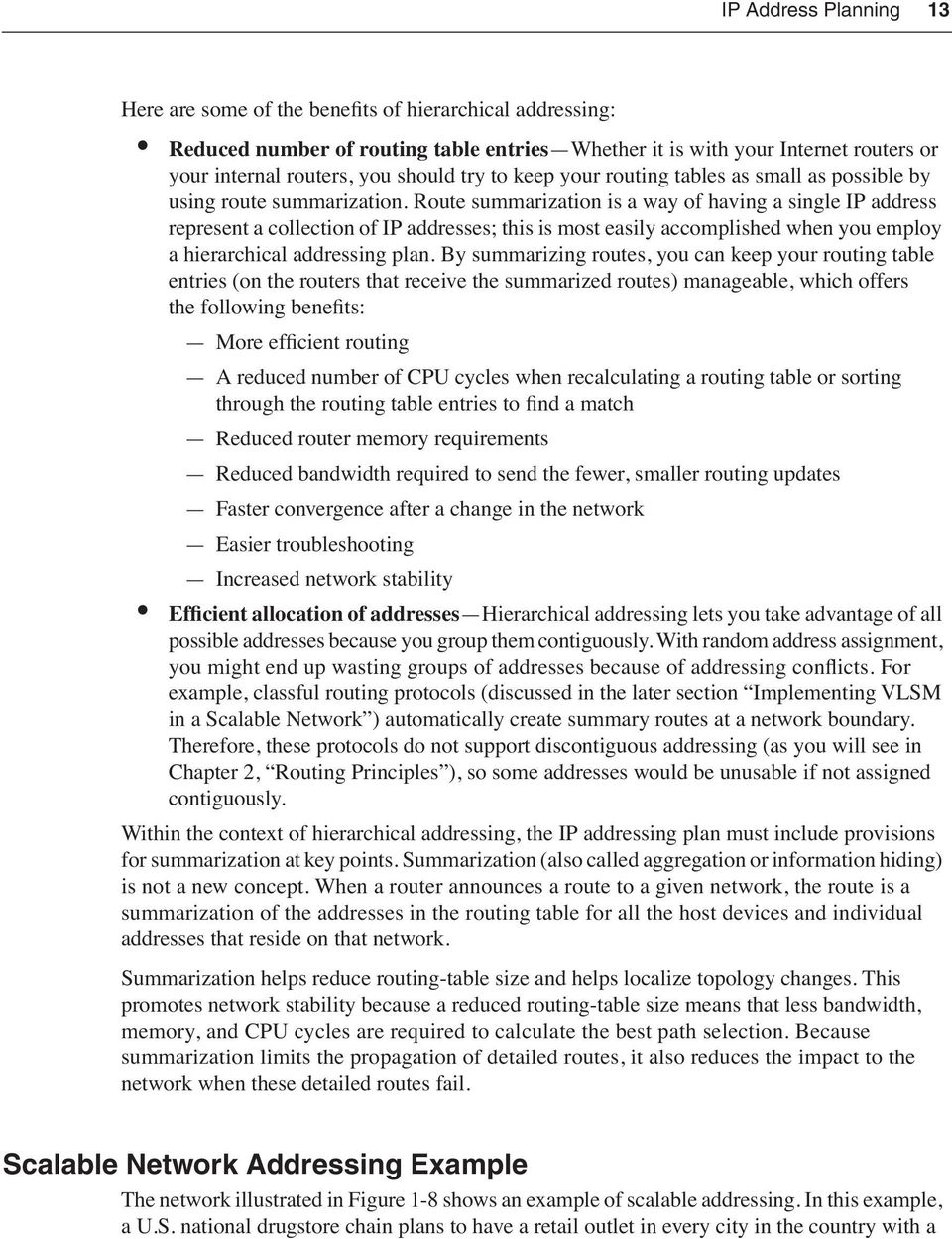
13 14 Chapter 1: Advanced IP Addressing population greater than 10,000. Each of the 50 states has up to 100 stores, with two Ethernet LANs in each store: One LAN is used to track customer prescriptions and pharmacy inventory and reorder stock. The second LAN is used to stock the rest of the store and connect the cash registers to a corporate-wide, instantaneous point-of-sale evaluation tool. Figure 1-8 Scalable Addressing Allows Summarization Core / / / The total number of Ethernet LAN networks is 50 states * 100 stores per state * 2 LANs per store = 10,000. (An equal number of serial links interconnect these stores.) Using a scalable design and creating 51 divisions (one for each state and one for the backbone interconnecting the divisions), the corporation can assign each division a block of IP addresses 10.x.0.0 /16. Each LAN is assigned a /24 subnet of network , and each division has 200 such subnets (two for each of the 100 stores). The network will have 10,000 subnets; without summarization, each of the 5000 routers will have all these networks in their routing tables. If each division router summarizes its block of networks 10.x.0.0 /16 at the entry point to the core network, any router in a division has only the 200 /24 subnets within that division, plus the x.0.0 /16 summarizations that represent the other divisions, in its routing table. This results in a total of 249 networks in each IP routing table. Nonscalable Network Addressing In contrast to the previous example, if a hierarchical addressing plan is not used, summarization is not possible, as is the case in Figure 1-9. Problems can occur in this network related to the
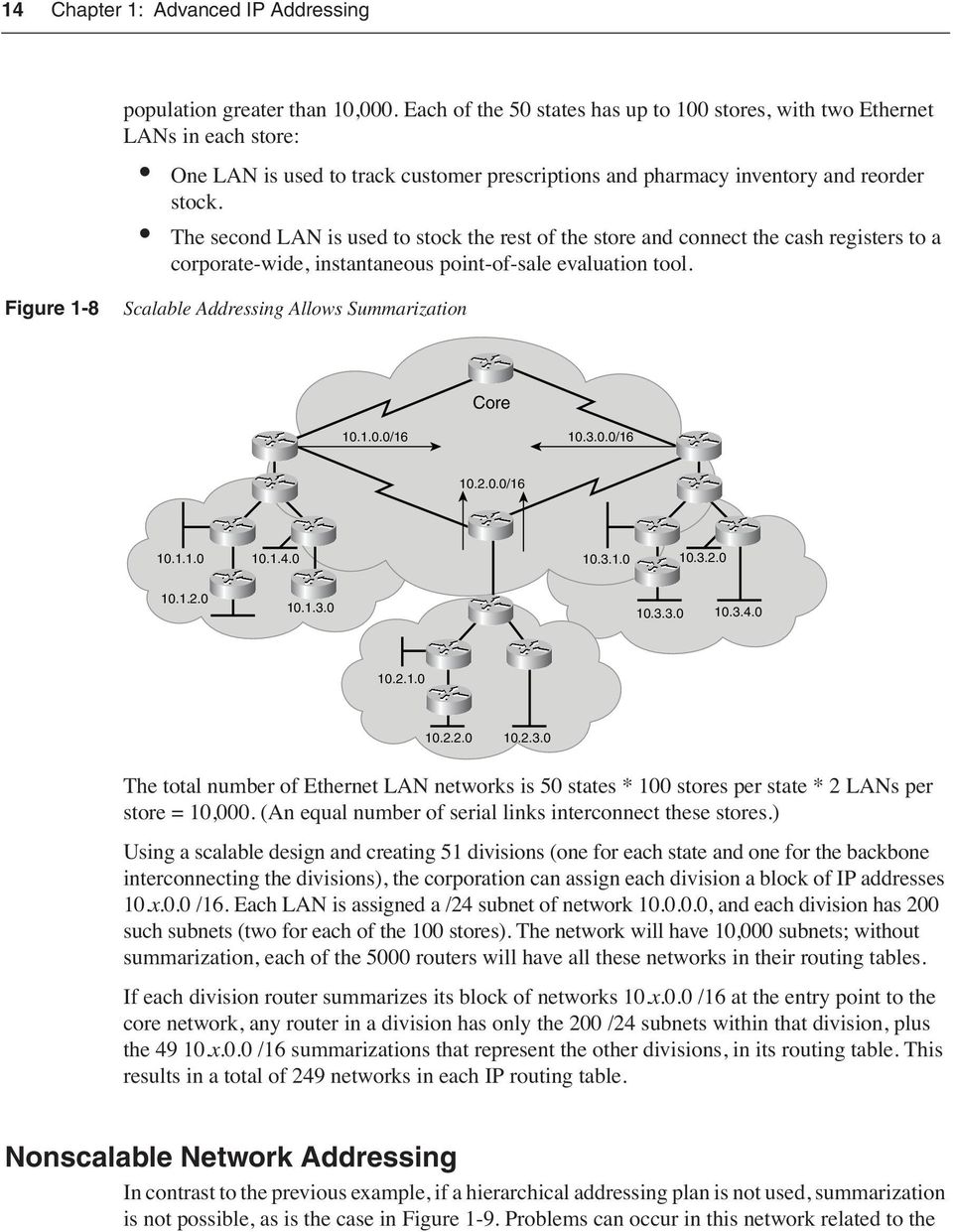
14 IP Address Planning 15 frequency and size of routing table updates and how topology changes are processed in summarized and unsummarized networks. These problems are described next. Figure 1-9 Nonscalable Addressing Results in Large Routing Tables / / / /24 Core / / / / Update Size Routing protocols such as RIP and IGRP, which send a periodic update every 30 and 90 seconds, respectively, use valuable bandwidth to maintain a table without summarization. A single RIP update packet is limited to carrying 25 routes; therefore, 10,000 routes means that RIP on every router must create and send 400 packets every 30 seconds. With summarized routes, the 249 routes means that only 10 packets need to be sent every 30 seconds. Unsummarized Internetwork Topology Changes A routing table with 10,000 entries constantly changes. To illustrate this constant change, consider the sample network with a router at each of 5000 different sites. A power outage occurs at site A, a backhoe digs a trench at site B, a newly-hired system administrator begins work at site C, a Cisco IOS software upgrade is in progress at site D, and a newly-added router is being installed at site E. Every time a route changes, all the routing tables must be updated. For example, when using a routing protocol such as Open Shortest Path First (OSPF), an upgrade or topology change on the internetwork causes a shortest path first (SPF) calculation. The SPF calculations are large because each router needs to calculate all known pathways to each of the 10,000 networks. Each change a router receives requires time and CPU resources to process. Summarized Network Topology Changes In contrast to an unsummarized network, a summarized network responds efficiently to network changes. For example, in the sample drugstore network with 200 routes for each division,

15 16 Chapter 1: Advanced IP Addressing the routers within the division see all the subnets for that division. When a change occurs on one of the 200 routes in the division, all other routers in the division recalculate to reflect the topology change of those affected networks. However, the core router of that division passes a summarized /16 route and suppresses the /24 networks from advertisement to the core routers of other divisions. The summarized route is announced as long as any portion of the summarized block can be reached from that core router. The more-specific routes are suppressed so that changes from this division are not propagated to other divisions. In this scenario, each router has only 200 /24 networks, compared to the 10,000 /24 networks in an unsummarized environment. Obviously, the amount of CPU resources, memory, and bandwidth required for the 200 networks is less than the 10,000 networks. With summarization, each division hides more-specific information from the other divisions and passes only the summarized route that represents that overall division. Hierarchical Addressing Using Variable-Length Subnet Masks VLSM is a crucial component of an effective IP addressing plan for a scalable network. This section introduces VLSM, provides examples, and discusses methods of determining the best subnet mask for a given address requirement. Network Mask and Prefix Length The concept and definition of a network mask and the prefix length field relate to hierarchically addressed network implementation. This section discusses the purpose of the network mask and the prefix length and describes their use within a network. IP Addressing and Subnetting This section is an overview of IP addressing and subnetting. Appendix A, Job Aids and Supplements, includes a more detailed review of these topics. A subnet mask is a 32-bit value that identifies which bits in an address represent network bits and which represent host bits. To create a subnet mask for an address, use a 1 for each bit of the address that you want to represent the network or subnet portion of the address, and use a 0 for each bit of the address that you want to represent the node portion of the address. Note that the 1s in the mask are contiguous. The default subnet masks for Classes A, B, and C addresses are as shown in Table 1-1.

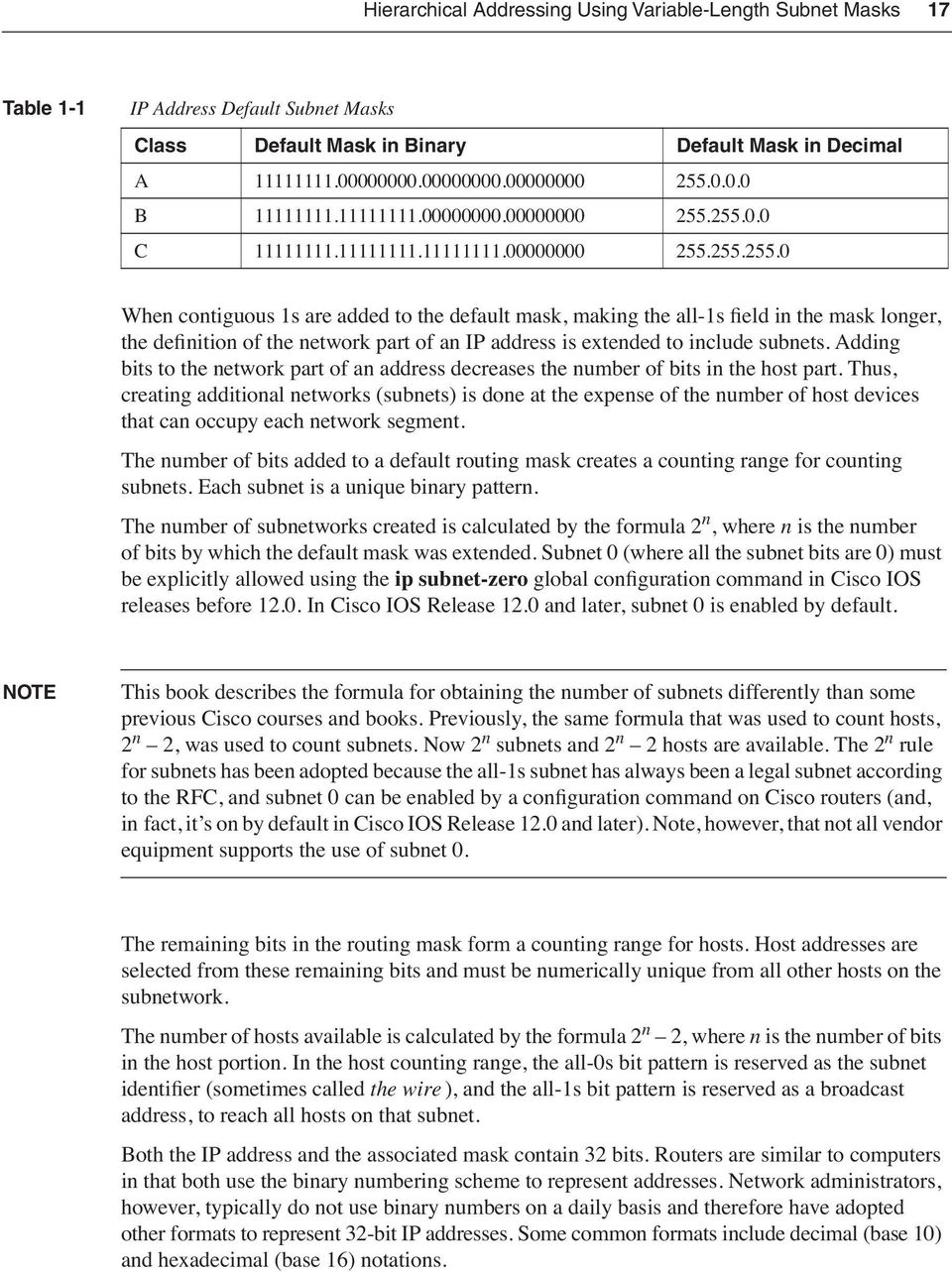
16 Hierarchical Addressing Using Variable-Length Subnet Masks 17 Table 1-1 IP Address Default Subnet Masks Class Default Mask in Binary Default Mask in Decimal A B C When contiguous 1s are added to the default mask, making the all-1s field in the mask longer, the definition of the network part of an IP address is extended to include subnets. Adding bits to the network part of an address decreases the number of bits in the host part. Thus, creating additional networks (subnets) is done at the expense of the number of host devices that can occupy each network segment. The number of bits added to a default routing mask creates a counting range for counting subnets. Each subnet is a unique binary pattern. The number of subnetworks created is calculated by the formula 2 n, where n is the number of bits by which the default mask was extended. Subnet 0 (where all the subnet bits are 0) must be explicitly allowed using the ip subnet-zero global configuration command in Cisco IOS releases before In Cisco IOS Release 12.0 and later, subnet 0 is enabled by default. This book describes the formula for obtaining the number of subnets differently than some previous Cisco courses and books. Previously, the same formula that was used to count hosts, 2 n 2, was used to count subnets. Now 2 n subnets and 2 n 2 hosts are available. The 2 n rule for subnets has been adopted because the all-1s subnet has always been a legal subnet according to the RFC, and subnet 0 can be enabled by a configuration command on Cisco routers (and, in fact, it s on by default in Cisco IOS Release 12.0 and later). Note, however, that not all vendor equipment supports the use of subnet 0. The remaining bits in the routing mask form a counting range for hosts. Host addresses are selected from these remaining bits and must be numerically unique from all other hosts on the subnetwork. The number of hosts available is calculated by the formula 2 n 2, where n is the number of bits in the host portion. In the host counting range, the all-0s bit pattern is reserved as the subnet identifier (sometimes called the wire ), and the all-1s bit pattern is reserved as a broadcast address, to reach all hosts on that subnet. Both the IP address and the associated mask contain 32 bits. Routers are similar to computers in that both use the binary numbering scheme to represent addresses. Network administrators, however, typically do not use binary numbers on a daily basis and therefore have adopted other formats to represent 32-bit IP addresses. Some common formats include decimal (base 10) and hexadecimal (base 16) notations.
17 18 Chapter 1: Advanced IP Addressing The generally accepted method of representing IP addresses and masks is to break the 32-bit field into four groups of 8 bits (octets) and to represent those 8-bit fields in a decimal format, separated by decimal points. This is known as 32-bit dotted-decimal notation. Although dotted-decimal notation is commonly accepted, this notation means nothing to routing or computing devices, because devices internally use the 32-bit binary string. All routing decisions are based on the 32-bit binary string. Subnet masks are used to identify the number of bits in an address that represent the network, subnet, and host portions of the address. Another way of indicating this information is to use a prefix. A prefix is a slash (/) followed by a numeric value that is the number of bits in the network and subnet portions of the address in other words, the number of contiguous 1s that are in the subnet mask. For example, assume you are using a subnet mask of The binary representation of this mask is , which is 24 1s followed by eight 0s. Thus, the prefix would be /24, for the 24 bits of network and subnet information, the number of 1s in the mask. Use of the Network Mask If a PC has an IP address of with a mask of (or a prefix length of /28), it uses this mask to determine the valid host addresses for devices on its local connection. These devices have the first 28 bits in their IP address in common (the range of these local devices is through ). If communication with any of these devices is necessary, the PC uses Address Resolution Protocol (ARP) to find the device s corresponding media access control (MAC) address (assuming that it does not already have a destination MAC address for the IP address in its MAC table). If a PC needs to send information to an IP device that is not in the local range, the PC instead forwards the information to its default gateway. (The PC also uses ARP to discover the MAC address of the default gateway.) A router behaves in a similar manner when it makes a routing decision. A packet arrives on the router and is passed to the routing table. The router compares the packet s destination IP address to the entries in the routing table. These entries have a prefix length associated with them. The router uses the prefix length as the minimum number of destination address bits that must match to use the corresponding outbound interface that is associated with a network entry in the routing table. Network Mask Example Consider a scenario in which an IP packet with a destination address of is sent to a router. The router s IP routing table is shown in Example 1-1.
18 Hierarchical Addressing Using Variable-Length Subnet Masks 19 Example 1-1 IP Routing Table for Network Mask Example is subnetted, 4 subnets O /28 [110/1800] via , 00:05:17, Serial 0 C /28 is directly connected, Ethernet 0 O /28 [110/10] via , 00:05:17, Ethernet 0 O /28 [110/1800] via , 00:05:17, Serial 1 In this scenario, the router determines where to send a packet that is destined for by looking at the routing table. The routing table has four entries for network The router compares the destination address to each of the four entries for this network. The destination address of has the first three octets in common with all four entries in the routing table, but it is not clear by looking at the decimal representation which of those entries is the best match to route this packet. A router handles all packets in binary, not dotted-decimal, notation. Following is the binary representation of the last octet for destination address and the binary representation of the last octet for the four entries in the IP routing table. Because the prefix length is 28 and all four entries match at least the first 24 bits of , the router must find the routing table entry that matches the first 4 bits (bits 25 to 28) of the number 67. It is not important if the last 4 bits match, so the target is 0100xxxx. The routing entry 64, which has a value of 0100 in the first 4 bits, is the only one that matches the requirement: The router therefore uses the entry in the routing table and forwards this packet to the next router ( ) on the Ethernet 0 interface. Implementing VLSM in a Scalable Network Key Point: Classful Versus Classless Routing A major network (also known as a classful network) is a Class A, B, or C network. With classful routing, routing updates do not carry the subnet mask. Therefore, only one subnet mask must be in use within a major network. This is known as Fixed-Length Subnet Masking (FLSM). Examples of classful routing protocols are RIP version 1 (RIPv1) and IGRP. With classless routing, routing updates do carry the subnet mask. Therefore, different masks may be used for different subnets within a major network. This is known as VLSM. Examples of classless routing protocols are RIP version 2 (RIPv2), OSPF, Intermediate System-to- Intermediate System (IS-IS), and Enhanced Interior Gateway Routing Protocol (EIGRP).

19 20 Chapter 1: Advanced IP Addressing Classful and classless routing protocols are discussed further in Chapter 2. VLSM allows more than one subnet mask within a major network and enables the subnetting of a previously subnetted network address. The network shown in Figure 1-10 is used to illustrate how VLSM works. Figure 1-10 Network for the VLSM Example A Corporate Address Space /16 Division X B D HQ /22 C /22 has been assigned to Division X. Range of Addresses: to The following are some characteristics that permit VLSMs to conserve IP addresses: Efficient use of IP addresses Without the use of VLSMs, companies are locked into implementing a single subnet mask within an entire Class A, B, or C network number. For example, suppose a network architect decides to use the /16 address space to design a corporate network. The architect determines that 64 blocks of addresses with up to 1022 hosts in each are required. Therefore, 10 host bits ( = 1022) and 6 subnet bits (2 6 = 64) are required for each block. The mask is therefore ; the prefix is /22. The network architect assigns address block /22 to Division X, as shown in Figure The prefix mask of /22 indicates that all addresses within that range have the first 22 bits in common (when reading from left to right). The prefix mask provides Division X with a range of addresses from through The details of the range of addresses available to Division X are shown in the center block of Figure Within Division X, the networks are assigned addresses in this range, with varying subnet masks. Details of these address assignments are provided in the next section. Greater capability to use route summarization VLSMs allow for more hierarchical levels within an addressing plan and thus allow better route summarization within routing tables. For example, in Figure 1-10, address /22 summarizes all the subnets that are further subnets of /22.

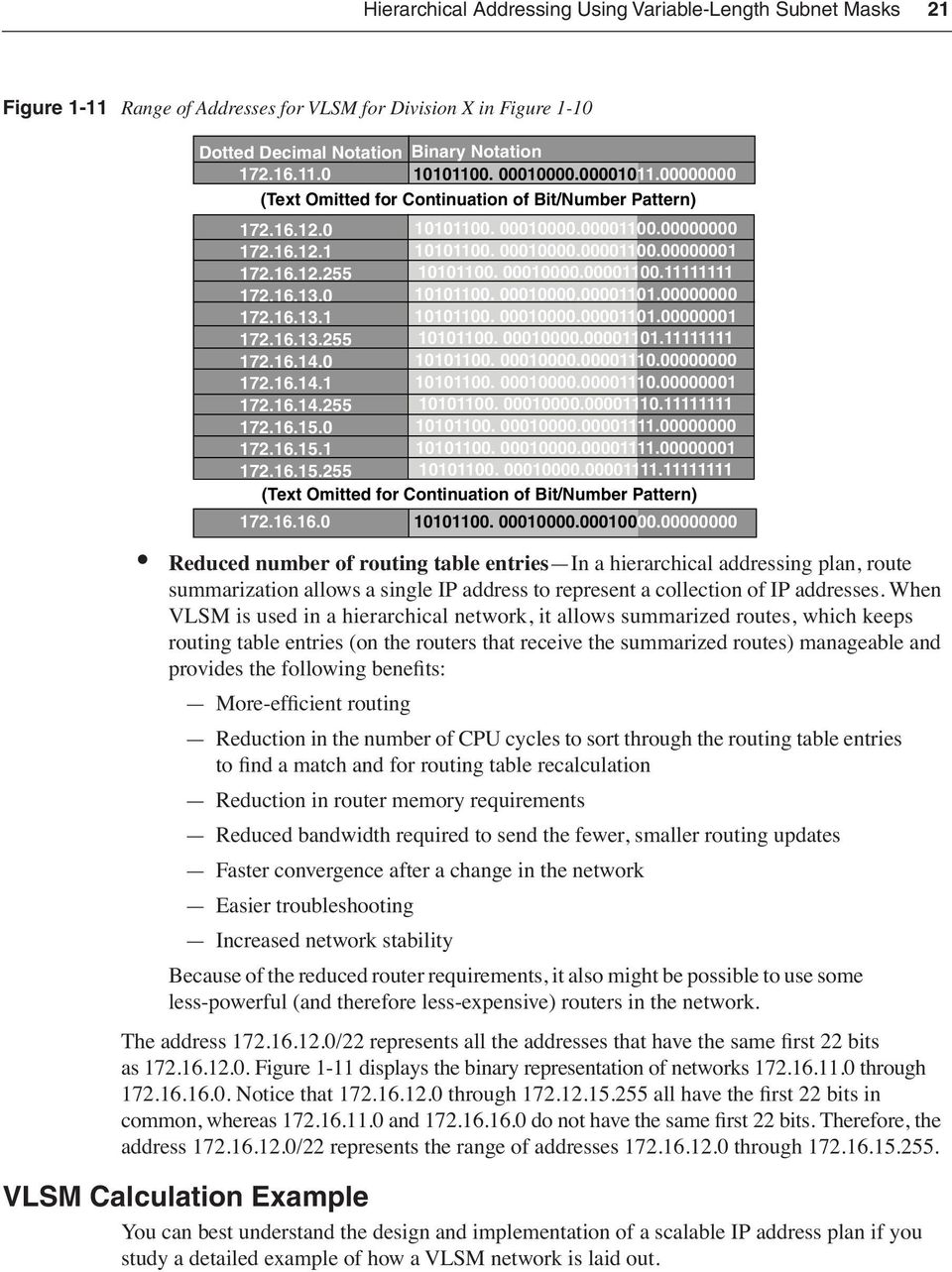
20 Hierarchical Addressing Using Variable-Length Subnet Masks 21 Figure 1-11 Range of Addresses for VLSM for Division X in Figure 1-10 Dotted Decimal Notation Binary Notation (Text Omitted for Continuation of Bit/Number Pattern) (Text Omitted for Continuation of Bit/Number Pattern) Reduced number of routing table entries In a hierarchical addressing plan, route summarization allows a single IP address to represent a collection of IP addresses. When VLSM is used in a hierarchical network, it allows summarized routes, which keeps routing table entries (on the routers that receive the summarized routes) manageable and provides the following benefits: More-efficient routing Reduction in the number of CPU cycles to sort through the routing table entries to find a match and for routing table recalculation Reduction in router memory requirements Reduced bandwidth required to send the fewer, smaller routing updates Faster convergence after a change in the network Easier troubleshooting Increased network stability Because of the reduced router requirements, it also might be possible to use some less-powerful (and therefore less-expensive) routers in the network. The address /22 represents all the addresses that have the same first 22 bits as Figure 1-11 displays the binary representation of networks through Notice that through all have the first 22 bits in common, whereas and do not have the same first 22 bits. Therefore, the address /22 represents the range of addresses through VLSM Calculation Example You can best understand the design and implementation of a scalable IP address plan if you study a detailed example of how a VLSM network is laid out.
21 22 Chapter 1: Advanced IP Addressing Figure 1-12 shows a detailed view of the same Division X shown in Figure Figure 1-12 Detailed IP Addressing of Division X in Figure /27 A Division X /30 Address Space / / /27 B /30 D HQ /27 C / /30 In Division X, the following exist: One VLAN on each of the two Ethernet ports of Router D, each with 200 users. Three remote sites, at Routers A, B, and C, each with a 24-port Cisco /100 switch. Corporate management guarantees that the number of users at each remote site does not exceed 20. Three serial links to the remote sites. The serial links are point-to-point Frame Relay and require an address on each side. VLSM allows you to further subnet the /22 address space, using variable masks, to accommodate the network requirements. For example, because point-to-point serial lines require only two host addresses, you can use a subnetted address that has only two host addresses and therefore does not waste scarce subnet numbers. To start the VLSM process, determine the number of subnets necessary for the networks to which you need to assign IP addresses, and determine the number of hosts necessary per subnetwork. You can determine the number of hosts by checking corporate policy to see if a limit is set per segment or VLAN, checking the physical number of ports on a switch, and checking the current size of the network or networks at other sites that fulfill the same role. The decimal-to-binary conversion chart in Appendix A might be helpful when you are calculating VLSMs. LAN Addresses Because IP addresses are binary, they are used in blocks of powers of 2. A block of addresses contains 2, 4, 8, 16, 32, 64, 128, 256, 512, 1024, 2048, and so on addresses. Two addresses are lost each time you create a subnet: one for the network (wire) address and the other for the broadcast address. The lowest address of the range, where the host bits are all 0s, is known as the network number or the wire address. The top of the address range, where the host bits are all 1s, is the broadcast
22 Hierarchical Addressing Using Variable-Length Subnet Masks 23 address. The number of addresses in a block that can be assigned to devices is 2 n 2, where n is the number of host bits. For example, with 3 host bits, = 8 2 = 6 addresses can be assigned. To determine the size of the block of addresses needed for a subnet, follow these steps: Step 1 Calculate the maximum number of hosts on that subnet. Step 2 Add 2 to that number for the broadcast and subnet numbers. Step 3 Round up to the next higher power of 2. In this example, the VLANs each have 200 users; therefore, the number of addresses required is = 202. Rounding up to the next power of 2 gives you 256. Thus, 8 (2 8 = 256) host bits are required for the VLANs; therefore, the prefix is /24 (32 bits 8 bits for the host = 24 bits). The network administrator subnets the /22 into four /24 subnets on router D /24 is assigned to VLAN 1, and /24 is assigned to VLAN 2. This leaves two /24 subnets, /24 and /24, to use for the switches at the three remote sites and the three serial point-to-point links. The number of addresses required for the LANs at each remote site is = 22. Rounding this up to the next power of 2 gives you 32. Thus, 5 host bits (2 5 = 32) are required to address the remote users at each site. Therefore, the prefix to use is /27 (32 bits 5 bits for the host = 27). You cannot use the /24 or /24 networks, because they are assigned to VLANs 1 and 2 on router D. The process to further subnet /24 into /27 subnets is shown in Figure The first three subnets calculated in Figure 1-13 are used on the LANs in Figure Figure 1-13 Calculating Subnet Addresses for the LANs in Figure 1-12 Subnetted Address: /24 In Binary VLSM Address: /27 In Binary st Subnet: = /27 2nd Subnet: = /27 3rd Subnet: = /27 4th Subnet: = /27 5th Subnet: = /27 6th Subnet: = /27 7th Subnet: = /27 8th Subnet: = /27 Network Subnet VLSM Host Subnet
23 24 Chapter 1: Advanced IP Addressing Serial Line Addresses After you establish the addresses for the LANs at the remote sites, you must address the serial links between the remote sites and router D. Because the serial links require two addresses, the number of addresses required is = 4 (the two additional addresses are for the network number and the broadcast address). In this case, there is no need to round up, because 4 is a power of 2. Therefore, 2 host bits will allow for two hosts per subnet. A network mask of /30 (32 bits 2 host bits = 30 bits) is used. This prefix allows for only two hosts just enough hosts for a point-to-point connection between a pair of routers. To calculate the subnet addresses for the WAN links, further subnet one of the unused /27 subnets. In this example, /27 is further subnetted with a prefix of /30. The three additional subnet bits result in 2 3 = 8 subnets for the WAN links. Key Point: Further Subnet Only Unused Subnets It is important to remember that only unused subnets should be further subnetted. In other words, if you use any addresses from a subnet, that subnet should not be further subnetted. In Figure 1-12, three subnet numbers are used on the LANs. Another, as-yet unused subnet, /27, is further subnetted for use on the WANs. The WAN addresses derived from /27 are as follows. The shaded bits are the 3 additional subnet bits: = / = / = / = / = / = / = / = /30 The first three of these subnets are used on the WANs shown in Figure The address information for the router A to router D link is as follows: Network number Router A serial interface Router D serial interface Broadcast address
24 Hierarchical Addressing Using Variable-Length Subnet Masks 25 The address information for the router B to router D link is as follows: Network number Router B serial interface Router D serial interface Broadcast address The address information for the router C to router D link is as follows: Network number Router C serial interface Router D serial interface Broadcast address Note that to provide the most flexibility for future growth, the /27 subnet was selected for the WANs instead of using the next available subnet, /27. For example, if the company purchases more switches, the next IP segment could be assigned the /27 subnet, and the new remote site would be connected to router D with the /30 serial subnet. The /24 block could have been used for these /30 subnets, but only three subnets are currently needed, so a lot of the address space would be unused. The /24 block is now available to use on another LAN in the future. Summary of Addresses Used in the VLSM Example Figure 1-14 summarizes the addresses, in binary, used in this example. Figure 1-14 Binary Representation of the Addresses Used in Figure 1-12 VLSM Addresses for /24 for : VLAN 1 VLAN 2 Nodes Not Used VLSM Addresses for /27 for : Nodes Site A Nodes Site B Nodes Site C VLSM Addresses for /30 for : A-D Serial B-D Serial C-D Serial Not Used Not Used Not Used Not Used Not Used Original Prefix Mask Mask 2 Mask 3 (VLAN) (Nodes) (Serial Links)
25 26 Chapter 1: Advanced IP Addressing Another VLSM Example This section illustrates another example of calculating VLSM addresses. In this example, you have a subnet address /20, and you need to assign addresses to a network that has ten hosts. With this subnet address, however, you have = 4094 host addresses, so you would be wasting more than 4000 IP addresses. With VLSM, you can further subnet the address /20 to give you more subnetwork addresses and fewer hosts per network, which would work better in this network topology. For example, if you subnet /20 to /26, you gain 64 (2 6 ) subnets, each of which can support 62 (2 6 2) hosts. To further subnet /20 to /26, do the following, as illustrated in Figure 1-15: Step 1 Write in binary. Step 2 Draw a vertical line between the 20th and 21st bits, as shown in Figure Step 3 Draw a vertical line between the 26th and 27th bits, as shown in Figure Step 4 Calculate the 64 subnet addresses using the bits between the two vertical lines, from lowest to highest. Figure 1-15 shows the first five subnets available. Figure 1-15 Further Subnetting a Subnetted Address Subnetted Address: /20 In Binary VLSM Address: /26 In Binary st Subnet: = /26 2nd Subnet: = /26 3rd Subnet: = /26 4th Subnet: = /26 5th Subnet: = /26 Network Subnet VLSM Subnet Host VLSM calculators are available on the web. The following URL contains the one offered by Cisco: (Note that you need to have an account on Cisco s website to use this calculator.) Route Summarization As the result of corporate expansion and mergers, the number of subnets and network addresses in routing tables is increasing rapidly. This growth taxes CPU resources, memory, and bandwidth used to maintain the routing table. Route summarization and CIDR techniques
26 Route Summarization 27 can manage this corporate growth much like Internet growth has been managed. With a thorough understanding of route summarization and CIDR, you can implement a scalable network. This section describes summarization; CIDR is covered in the later section Classless Interdomain Routing. The relationship between summarization and VLSM is also examined. With VLSM, you break a block of addresses into smaller subnets; in route summarization, a group of subnets is rolled up into a summarized routing table entry. Route Summarization Overview In large internetworks, hundreds, or even thousands, of network addresses can exist. It is often problematic for routers to maintain this volume of routes in their routing tables. Route summarization (also called route aggregation or supernetting ) can reduce the number of routes that a router must maintain, because it is a method of representing a series of network numbers in a single summary address. For example, in Figure 1-16, router D can either send four routing update entries or summarize the four addresses into a single network number. If router D summarizes the information into a single network number entry, the following things happen: Bandwidth is saved on the link between routers D and E. Router E needs to maintain only one route and therefore saves memory. Router E also saves CPU resources, because it evaluates packets against fewer entries in its routing table. Figure 1-16 Routers Can Summarize to Reduce the Number of Routes / /24 I will announce the summarized block of / /24 D E /24 Routing Table for D / / / /24 Routing Table for E /22 Key Point: Summary Routes A summary route is announced by the summarizing router as long as at least one specific route in its routing table matches the summary route.
27 28 Chapter 1: Advanced IP Addressing Router D in Figure 1-16 is advertising that it can route to network /22, including all subnets of that network. However, if there were other subnets of /22 elsewhere in the network (for example, if were discontiguous), summarizing in this way might not be valid. Another advantage of using route summarization in a large, complex network is that it can isolate topology changes from other routers. For example, in Figure 1-16, if a specific link (such as /24) is flapping (going up and down rapidly), the summary route ( /22) does not change. Therefore, router E does not need to continually modify its routing table as a result of this flapping activity. Flapping is a common term used to describe intermittent interface or link failures. Route summarization is possible only when a proper addressing plan is in place. Route summarization is most effective within a subnetted environment when the network addresses are in contiguous blocks in powers of 2. For example, 4, 16, or 512 addresses can be represented by a single routing entry because summary masks are binary masks just like subnet masks so summarization must take place on binary boundaries (powers of 2). If the number of network addresses is not contiguous or not a power of 2, you can divide the addresses into groups and try to summarize the groups separately. Routing protocols summarize or aggregate routes based on shared network numbers within the network. Classless routing protocols (such as RIPv2, OSPF, IS-IS, and EIGRP) support route summarization based on subnet addresses, including VLSM addressing. Classful routing protocols (RIPv1 and IGRP) automatically summarize routes on the classful network boundary and do not support summarization on any other bit boundaries. Classless routing protocols support summarization on any bit boundary. Summarization is described in RFC 1518, An Architecture for IP Address Allocation with CIDR, available at As an example of the power of summarization, imagine a company that operates a series of pizza shops, with 200 stores in each of the 50 states in the U.S. Each store has a router with an Ethernet and a Frame Relay link connected to headquarters. Without route summarization, the routing table on any of those routers would have 200 * 50 = 10,000 networks. Instead, if each state has a central site to connect it with all the other states, and each of these routes is summarized before being announced to other states, every router sees its 200 state
28 Route Summarization 29 subnets and 49 summarized entries representing the other states. This results in less CPU, memory, and bandwidth usage. Route Summarization Calculation Example Router D in Figure 1-16 has the following networks in its routing table: / / / /24 To determine the summary route on router D, determine the number of highest-order (leftmost) bits that match in all the addresses. To calculate the summary route, follow these steps: Step 1 Convert the addresses to binary format and align them in a list. Step 2 Step 3 Locate the bit where the common pattern of digits ends. (It might be helpful to draw a vertical line marking the last matching bit in the common pattern.) Count the number of common bits. The summary route number is represented by the first IP address in the block, followed by a slash, followed by the number of common bits. As Figure 1-17 illustrates, the first 22 bits of the IP addresses from through are the same. Therefore, the best summary route is /22. Figure 1-17 Summarizing Within an Octet, for Router D in Figure /24 = /24 = /24 = /24 = /24 = /24 = /24 = Number of Common Bits = 22 Summary: /22 Number of Noncommon Bits = 10
29 30 Chapter 1: Advanced IP Addressing In this network, the four subnets are contiguous, and the summary route covers all the addresses in the four subnets and only those addresses. Consider, for example, what would happen if /24 were not behind router D, but instead were used elsewhere in the network, and only the other three subnets were behind router D. The summary route /22 should no longer be used on router D, because it includes /24 and might result in confusing routing tables. (However, this depends on how other routers in the network summarize. If the /24 route is propagated to all routers, they choose the route with the most bits that match the destination address and should route properly. This is further described in the section Route Summarization Operation in Cisco Routers. ) In Figure 1-17, the subnets before and after the subnets to be summarized are also shown. Observe that they do not have the same first 22 bits in common and therefore are not covered by the /22 summary route. Summarizing Addresses in a VLSM-Designed Network A VLSM design allows for maximum use of IP addresses as well as more-efficient routing update communication when using hierarchical IP addressing. In Figure 1-18, route summarization occurs at the following two levels: Router C summarizes two routing updates from networks /26 and /26 into a single update: /24. Router A receives three different routing updates. However, router A summarizes them into a single routing update, /16, before propagating it to the corporate network. Figure 1-18 VLSM Addresses Can Be Summarized /20 B / / /26 C / /20 A /16 Corporate Network /20 D
30 Route Summarization 31 Route Summarization Implementation Route summarization reduces memory use on routers and routing protocol network traffic, because it results in fewer entries in the routing table (on the routers that receive the summarized routes). For summarization to work correctly, the following requirements must be met: Multiple IP addresses must share the same highest-order bits. Routing protocols must base their routing decisions on a 32-bit IP address and a prefix length that can be up to 32 bits. Routing updates must carry the prefix length (the subnet mask) along with the 32-bit IP address. Route Summarization Operation in Cisco Routers This section discusses generalities of how Cisco routers handle route summarization. Details about how route summarization operates with a specific protocol are discussed in the corresponding protocol chapter of this book. Cisco routers manage route summarization in two ways: Sending route summaries Routing information advertised out an interface is automatically summarized at major (classful) network address boundaries by RIP, IGRP, and EIGRP. Specifically, this automatic summarization occurs for routes whose classful network addresses differs from the major network address of the interface to which the advertisement is being sent. For OSPF and IS-IS, you must configure summarization. Route summarization is not always a solution. You would not want to use route summarization if you needed to advertise all networks across a boundary, such as when you have discontiguous networks. When using EIGRP and RIPv2, you can disable this automatic summarization. Selecting routes from route summaries If more than one entry in the routing table matches a particular destination, the longest prefix match in the routing table is used. Several routes might match one destination, but the longest matching prefix is used. For example, if a routing table has the paths shown in Figure 1-19, packets addressed to destination are routed through the /24 path, because that address has the longest match with the destination address. Figure 1-19 Routers Use the Longest Match When Selecting a Route /32 host /27 subnet /24 network /16 block of networks /0 default
31 32 Chapter 1: Advanced IP Addressing When running classful protocols (RIPv1 and IGRP), you must enable ip classless if you want the router to select a default route when it must route to an unknown subnet of a network for which it knows some subnets. Refer to the section The ip classless Command in Chapter 2 for more details. Note that by default (and for historical reasons) the routing table on Cisco routers acts in a classful manner, as described in the sidebar The Routing Table Acts Classfully in Chapter 2. Route Summarization in IP Routing Protocols Table 1-2 summarizes the route summarization support available in the various IP routing protocols. Table 1-2 Routing Protocol Route Summarization Support Protocol Automatic Summarization at Classful Network Boundary? Capability to Turn Off Automatic Summarization? RIPv1 Yes No No RIPv2 Yes Yes No IGRP Yes No No EIGRP Yes Yes Yes OSPF No Yes IS-IS No Yes Capability to Summarize at Other Than a Classful Network Boundary? Cisco IOS 12.0 introduced RIPv2 s manual summarization feature with the ip summaryaddress rip command. This command provides limited summarization support; RIPv2 advertises a summarized local IP address pool on the specified interface to dialup clients. More information on this feature is available in IP Summary Address for RIPv2 at /en/us/products/sw/iosswrel/ps1830/products_feature_guide09186a ad1.html. Classless Interdomain Routing CIDR is a mechanism developed to help alleviate the problem of exhaustion of IP addresses and growth of routing tables. The idea behind CIDR is that blocks of multiple addresses (for example, blocks of Class C address) can be combined, or aggregated, to create a larger classless set of IP addresses, with more hosts allowed. Blocks of Class C network numbers are allocated to each network service provider; organizations using the network service provider for Internet
32 Classless Interdomain Routing 33 connectivity are allocated subsets of the service provider s address space as required. These multiple Class C addresses can then be summarized in routing tables, resulting in fewer route advertisements. (Note that the CIDR mechanism can be applied to blocks of Class A, B, and C addresses; it is not restricted to Class C.) CIDR is described further in RFC 1518, An Architecture for IP Address Allocation with CIDR, and RFC 1519, Classless Inter-Domain Routing (CIDR): An Address Assignment and Aggregation Strategy, available at RFC 2050, Internet Registry IP Allocation Guidelines, specifies guidelines for the allocation of IP addresses. It is available at Most CIDR debates revolve around summarizing blocks of Class C networks into large blocks of addresses. As a general rule, Internet service providers (ISPs) implement a minimum route advertisement standard of /19 address blocks. A /19 address block equals a block of 32 Class C networks. (In some cases, smaller blocks might be advertised, such as with a /21 mask [eight Class C networks].) Addressing is now so limited that networks such as /8 are being divided into blocks of /19 that are assigned to major ISPs, which allows further allocation to customers. CIDR combines blocks of addresses regardless of whether they fall within a single classful boundary or encompass many classful boundaries. CIDR Example Figure 1-20 shows an example of CIDR and route summarization. The Class C network addresses /24 through /24 are being used and are being advertised to the ISP router. When the ISP router advertises the available networks, it can summarize these into one route instead of separately advertising the eight Class C networks. By advertising /21, the ISP router indicates that it can get to all destination addresses whose first 21 bits are the same as the first 21 bits of the address Figure 1-20 CIDR Allows a Router to Summarize Multiple Class C Addresses /24 A / /24 B /24 ISP / / /24 H
33 34 Chapter 1: Advanced IP Addressing The mechanism used to calculate the summary route to advertise is the same as shown in the Route Summarization section. The Class C network addresses /24 through /24 are being used and are being advertised to the ISP router. To summarize these addresses, find the common bits, as shown here (in bold): The route xxx.xxxxxxxxor /21 (also written as ) summarizes these eight routes. In this example, the first octet is 192, which identifies the networks as Class C networks. Combining these Class C networks into a block of addresses with a mask of less than /24 (the default Class C network mask) indicates that CIDR, not route summarization, is being performed. Key Point: CIDR Versus Route Summarization The difference between CIDR and route summarization is that route summarization is generally done within, or up to, a classful boundary, whereas CIDR combines several classful networks. In this example, the eight separate x.0 Class C networks that have the prefix /24 are combined into a single summarized block of /21. (At some other point in the network, this summarized block may be further combined into /16, and so on.) Consider another example. A company that uses four Class B networks has the IP addresses /16 for Division A, /16 for Division B, /16 for Division C, and /16 for Division D. They can all be summarized as a single block: /14. This one entry represents the whole block of four Class B networks. This process is CIDR; the summarization goes beyond the Class B boundaries. Network Address Translation IP address depletion is a key problem facing the Internet. To assist in maximizing the use of registered IP addresses, Cisco IOS Release 11.2 and later implement NAT. This feature, which is Cisco s implementation of RFC 1631, The IP Network Address Translator (available at is a solution that provides a way to use the same IP addresses in multiple internal stub networks, thereby reducing the need for registered IP addresses.
34 Network Address Translation 35 NAT is an important function in most scalable networks and is mandatory for the majority of companies that have Internet connections. ISPs have hundreds of users accessing the Internet, yet commonly are assigned only 8 or 16 individual addresses. The ISPs use NAT to map the hundreds of inside addresses to the few globally unique addresses assigned to that company. After introducing NAT terminology and features, this section demonstrates the following: How to use basic NAT and a standard access list to assign separate address space to different users. How to use an extended access list to check a packet s destination address and assign different source addresses based on it. How to use a Cisco IOS software tool called a route map to create a fully extended address translation in an IP NAT table. The IP NAT table tracks the original address and its translation as well as the destination address and the Transmission Control Protocol (TCP) and User Datagram Protocol (UDP) ports for each. NAT Terminology and Features This section first introduces the terminology that is necessary to understand NAT and then explains NAT s various features. NAT Terminology The terms inside network and outside network are used with NAT, as shown in Figure NAT terminology, as used in Figure 1-21, is defined in Table 1-3. Figure 1-21 Network Address Translation Is Used to Translate Addresses Between the Inside and Outside Networks Inside Outside DA SA DA Internet A SA NAT Table Host B C Inside Local IP Address Inside Global IP Address B
35 36 Chapter 1: Advanced IP Addressing Table 1-3 NAT Terminology Term Inside local IP address (A) Inside global IP address (B) Outside global IP address (C) Outside local IP address (not shown) Simple translation entry Extended translation entry (not shown) Definition The IP address assigned to a host on the inside network. (The address was either globally unique but obsolete, allocated from RFC 1918, or randomly picked.) A legitimate IP address (typically assigned by a service provider) that represents one or more inside local IP addresses to the outside world. (The address was allocated from a globally unique address space, typically provided by the ISP.) The IP address that was assigned to a host on the outside network by its owner. (The address was allocated from a globally routable address space.) The IP address of an outside host as it appears to the inside network. (The address was allocated from address space routable on the inside or possibly was allocated from RFC 1918, for example.) An example of when an outside local IP address is required is given in the Handling Overlapping Networks sidebar later in this section. A translation entry that maps one IP address to another. This is the type of entry shown in the NAT table in Figure A translation entry that maps one IP address and port pair to another. A NAT entry is built in the IP NAT table as the packet goes from an IP NAT inside interface. A NAT entry usually changes the source IP address in the packet from an inside address to an outside address. When a device on the outside responds to the packet, the destination IP address of the returning packet is compared to the entries in the IP NAT table. If a match is found, the destination IP address is translated to the correct inside address and is sent to the routing table to be routed to the correct IP NAT inside interface. If no match is found, the packet is discarded. NAT is performed when a packet is routed between the following interfaces: IP NAT inside interface to an IP NAT outside interface IP NAT outside interface to an IP NAT inside interface A NAT table may contain the following information: Protocol IP, TCP, or UDP. Inside local IP address:port The IP address and port number used by the inside host before any translations. The inside local IP address is usually the private addressing defined in RFC Inside global IP address:port The IP address and port number used by the inside host as it appears to the outside network; this is the translated IP address and port. Addresses are allocated from a globally unique address space, typically provided by the ISP if the enterprise connects to the global Internet.
36 Network Address Translation 37 Outside global IP address:port The configured globally unique IP address assigned to a host in the outside network, and the port number used. Outside local IP address:port The IP address and port number of an outside host as it appears to the inside network. Simple NAT entries consist of only the inside local IP address and the inside global IP address. Features Supported by NAT Supported NAT features include the following: Static address translation Establishes a one-to-one mapping between inside local and global addresses. Dynamic source address translation Establishes a dynamic mapping between the inside local and global addresses. This is accomplished by describing the local addresses to be translated, the pool of addresses from which to allocate global addresses, and associating the two. The router creates translations as needed. Address overloading Can conserve addresses in the inside global address pool by allowing source ports in TCP connections or UDP conversations to be translated. When different inside local addresses map to the same inside global address, each inside host s TCP or UDP port numbers are used to distinguish between them. When the router determines that a packet s path is from an IP NAT inside interface to an IP NAT outside interface, an entry is built to include both the original source IP address and the original TCP for UDP port number. Each of these entries is assigned a unique TCP/UDP source port number to distinguish it from the others. When a packet returns to the IP NAT outside interface, it is compared to the IP NAT table. Although the packet destination address could match thousands of entries, NAT checks the destination TCP/UDP port for the correct entry for the returning packet. After the correct entry is found, the current destination address and port number change to the appropriate IP NAT inside destination address and port number. TCP load distribution A dynamic form of destination translation that can be configured for some outside-to-inside traffic. After a mapping is defined, destination addresses matching an access list are replaced with an address from a rotary pool. Allocation is done on a round-robin basis, and only when a new connection is opened from the outside to the inside. All non-tcp traffic is passed untranslated (unless other translations are in effect).
37 38 Chapter 1: Advanced IP Addressing Handling Overlapping Networks Figure 1-22 illustrates NAT operation when addresses in the inside network overlap with addresses that are in the outside network; in this case, outside local IP addresses are used. Figure 1-22 Handling Overlapping Networks DNS Request for Host C Address SA = DA = x.x.x.x Internet DNS Server x.x.x.x 5 DNS Request for Host C Address SA = DA = x.x.x.x 1/6 Host C DNS Response from x.x.x.x SA = x.x.x.x DA = C = Message to Host C 3 DNS Response from x.x.x.x SA = x.x.x.x DA = C = Message to Host C SA = DA = SA = DA = NAT Table 2 Inside Local IP Address Inside Global IP Address Outside Global IP Address Outside Local IP Address The following describes this process of handling overlapping addresses: Step 1 The user at opens a connection to Host C ( ), causing to perform a name-to-address lookup to a DNS server. Step 2 Step 3 Step 4 If there is an overlap, the router intercepts the DNS reply and translates the returned address. In this case, overlaps with an inside address. To translate the return address of Host C, the router creates a simple translation entry that maps the overlapping address to an address from a separately configured outside local address pool. In this example, the address is The router forwards the DNS reply to Host The reply has Host C s address as At this point, opens a connection to When the router receives the packet for Host C ( ), it sets up a translation that maps the inside local and global addresses and the outside global and local addresses by replacing the source address of with the inside global address and replacing the destination address of with Host C s outside global address,
38 Network Address Translation 39 Step 5 Step 6 Host C receives a packet and continues the conversation. For each packet sent between Host and Host C, the router performs a lookup, replaces the destination address with the inside local address, and replaces the source address with the outside local address. Configuring NAT with Access Lists This section explains the IP NAT commands to configure IP NAT with access lists. It provides a sample IP NAT configuration and two specific examples of configuring IP NAT with access lists. The first example demonstrates how to use access lists to determine whether an IP address needs translation based on the original source address. The second example demonstrates how to use an access list to assign a NAT source IP address based on the source and destination addresses of the original packet. The following commands are used to configure IP NAT with access lists: ip nat {inside outside} This interface configuration command marks the IP networks attached to that interface as either internal or external to the controlled network. Only packets arriving on an interface marked as IP NAT inside or outside are subject to translation. ip nat inside source list {access-list-number access-list-name } pool pool-name When a packet comes in on an interface marked as IP NAT inside, this global configuration command causes the router to compare the source IP address in the packet to the access list referenced in the command. The access list indicates whether the router should translate that source IP address to the next available address in the pool-name listed. NAT translates an address that is permitted in the access list. Addresses that are not permitted by the access list are not translated, and the packet is routed normally. ip nat pool pool-name starting-ip-address ending-ip-address {prefix-length prefix-length netmask netmask} This global configuration command creates the translation pool referenced by the previous command. This command includes the starting and ending addresses for translation and either the prefix length or network mask associated with this range of addresses. Standard Access List Translation Example In Figure 1-23, when an IP packet comes in on Ethernet 0 of Router A with a source address of x, the router translates it from the NAT pool of addresses defined by the name sale_pool. If the packet has a source address of x, the router translates it from the NAT pool of addresses defined by the name acct_pool. In this example, the Information Services (IS) department maps different groups of users to different blocks of NAT addresses. The IS department determines the percentage of users per department who can use the NAT interface and assigns an appropriate number of addresses. The percentage of users can typically be determined using accounting or security software.
39 40 Chapter 1: Advanced IP Addressing Figure 1-23 Translating with Standard Access Lists Inside E0 A S0 Internet Inside Local IP Address NAT Table Inside Global IP Address ip nat pool sale_pool prefix-length 24 ip nat pool acct_pool prefix-length 24! ip nat inside source list 2 pool sale_pool ip nat inside source list 3 pool acct_pool! interface Ethernet 0 ip address ip nat inside! interface Serial 0 ip address ip nat outside! access-list 2 permit access-list 3 permit Extended Access List Translation Example The network used in this example is the same as that shown in Figure However, in this configuration example, the extended access lists 102 and 103 are used to control NAT decisions. Instead of making the decision based only on the source address, an extended access list makes the decision based on the source and destination addresses of all packets coming in on interface Ethernet 0. The configuration used on Router A is shown in Example 1-2. Example 1-2 NAT Example Using Extended Access Lists on Router A in Figure 1-23 ip nat pool trusted_pool prefix-length 24 ip nat pool untrusted_pool prefix-length 24! ip nat inside source list 102 pool trusted_pool ip nat inside source list 103 pool untrusted_pool! interface ethernet 0 ip address ip nat inside! interface serial 0 ip address ip nat outside! access-list 102 permit ip access-list 102 permit ip access-list 103 permit ip any
40 Network Address Translation 41 In this example, if the packet is not from the /24 subnet, the packet s source IP address is not translated. If the packet is from the /24 subnet and the destination address matches either /24 or /24, the source IP address is translated to the next available address in the trusted_pool, which is the /24 network. If the packet is from the /24 subnet and the destination address does not match either /24 or /24, the source IP address is translated to the next available address in the untrusted_pool, which is the /24 network. In this example, the outside NAT environment has both trusted and untrustworthy sites. For example, the company might be attached to an industry internetwork where it exchanges information with corporate partners and competitors /24 and /24 are addresses of trusted networks on the industry internetwork, but all other destination addresses are considered untrustworthy. (A firewall system may also be added to allow greater control over the trusted sites.) Configuring NAT with Route Maps A route map is a Cisco IOS software function that serves a variety of purposes. This section explains route maps and compares the results of using NAT with a route map to the results of using NAT with only an access list. Route maps are discussed in more detail in Chapter 7, Manipulating Routing Updates. Example 1-3 When you use only access lists for NAT, as described in the previous section, the resulting NAT table has only simple translation entries, identifying only which inside local address is being translated to which inside global address. Example 1-3 shows simple translation entries using the show ip nat translations command. The simple translation entry contains only local and global IP address entries. It does not include any TCP or UDP port information or the packet s destination address. Simple IP Address Translation Entries Router#show ip nat translations Pro Inside global Inside local Outside local Outside global The entries in this IP NAT translation table are called simple entries because they track only the original source address (the inside local address) and the address to which it is translated (the inside global address). The other fields in the table are left blank. It is difficult to troubleshoot connectivity using simple address entries, because you do not see the destination address or the application (port) associated with each NAT translation. This might
41 42 Chapter 1: Advanced IP Addressing also prevent proper translation among multiple address pools. The first address pool matched creates a simple NAT entry; a second session initiated by the same source to a different host already matches the simple entry, thereby preventing proper translation to the second address pool. (Configuration Exercise 1-2, at the end of this chapter, includes an example of this translation problem.) Example 1-4 To get an extended translation entry in the NAT table, you must either configure NAT for overloading (using the overload keyword on the ip inside source command) or use a Cisco IOS software tool called a route map. Example 1-4 shows an example of an extended translation entry. The extended translation entry identifies the source and destination addresses with their appropriate translations, the transport layer protocol used, and the port (or application) used for the session. IP Address Translation with Route Maps Router#show ip nat translations Pro Inside global Inside local Outside local Outside global udp : : : :69 tcp : : : :21 tcp : : : :20 tcp : : : :23 tcp : : : :80 Understanding Route Maps Route maps are complex access lists that allow some conditions to be tested against the packet or route in question using match commands. If the conditions match, some actions can be taken to modify attributes of the packet or route. These actions are specified by set commands. A collection of route map statements that have the same route map name are considered one route map. Within a route map, each route map statement is numbered and therefore can be edited individually. The statements in a route map correspond to the lines of an access list. Specifying the match conditions in a route map is similar to specifying the source and destination addresses and masks in an access list. Key Point: Route Maps Versus Access Lists One big difference between route maps and access lists is that route maps can modify the route by using set commands. The route-map map-tag [permit deny] [sequence-number] global configuration command can be used to define the conditions for NAT. This command is explained in detail in Table 1-4.
42 Network Address Translation 43 Table 1-4 route-map Command Command map-tag permit deny sequence-number Description Name of the route map Optional parameter that specifies the action to be taken if the route map match conditions are met Optional sequence number that indicates the position that a new route map statement will have in the list of route map statements already configured with the same name The default for the route-map command is permit, with a sequence-number of 10. Route Map Sequence Numbering If you leave out the sequence number when configuring all statements for the same route map name, the router will assume that you are editing and adding to the first statement, sequence number 10. Route map sequence numbers do not automatically increment! A route map may be made up of multiple route map statements. The statements are processed top-down, similar to an access list. The first match found for a route is applied. The sequence number is used for inserting or deleting specific route map statements in a specific place in the route map. The match condition route map configuration commands are used to define the conditions to be checked. The set condition route map configuration commands are used to define the actions to be followed if there is a match and the action to be taken is permit. (The consequences of a deny action depend on how the route map is being used.) A single match statement may contain multiple conditions. At least one condition in the match statement must be true for that match statement to be considered a match. A route map statement may contain multiple match statements. All match statements in the route map statement must be considered true for the route map statement to be considered matched. Key Point: Route Map Match Conditions Only one match condition listed on the same line must match for the entire line to be considered a match. For example, IP standard or extended access lists can be used to establish match criteria using the match ip address {access-list-number name} [...access-list-number name] route map
43 44 Chapter 1: Advanced IP Addressing Example 1-5 configuration command. (If multiple access lists are specified, matching any one results in a match.) A standard IP access list can be used to specify match criteria for a packet s source address; extended access lists can be used to specify match criteria based on source and destination addresses, application, protocol type, type of service (ToS), and precedence. The sequence number specifies the order in which conditions are checked. For example, if two statements in a route map are named MYMAP, one with sequence 10 and the other with sequence 20, sequence 10 is checked first. If the match conditions in sequence 10 are not met, sequence 20 is checked. Like an access list, an implicit deny any appears at the end of a route map. The consequences of this deny depend on how the route map is being used. Another way to explain how a route map works is to use a simple example and see how a router would interpret it. Example 1-5 shows a sample route map configuration. (Note that on a router, all the conditions and actions shown would be replaced with specific conditions and actions, depending on the exact match and set commands used.) route-map Command route-map demo permit 10 match x y z match a set b set c route-map demo permit 20 match q set r route-map demo permit 30 The route map named demo in Example 1-5 is interpreted as follows: If {(x or y or z) and (a) match} then {set b and c} Else If q matches then set r Else Set nothing NAT with Route Maps Example The ip nat inside source route-map route-map-name pool pool-name global configuration command causes the router to compare the source IP address in the packet to the route map referenced in the command. The route map indicates whether the router should translate that source IP address to the next available address in the pool-name listed. NAT translates an address that is matched in the route map. Example 1-6 provides an alternative configuration for Router A in Figure Two route maps have been added to the configuration shown in Figure In this example, the
44 Network Address Translation 45 what_is_sales_doing route map is linked to the sales_pool using the ip nat inside source route-map what_is_sales_doing pool sales_pool command. Example 1-6 Alternative Configuration for Router A in Figure 1-23 ip nat pool sales_pool prefix-length 24 ip nat pool acct_pool prefix-length 24! ip nat inside source route-map what_is_sales_doing pool sales_pool ip nat inside source route-map what_is_acct_doing pool acct_pool! interface ethernet 0 ip address ip nat inside! interface serial 0 ip address ip nat outside! route-map what_is_sales_doing permit 10 match ip address 2! route-map what_is_acct_doing permit 10 match ip address 3 access-list 2 permit access-list 3 permit Following the path of a packet through this configuration is the best way to understand it. An IP packet with a source address of arrives on interface Ethernet 0, which is an IP NAT inside interface. The ip nat inside source route-map what_is_sales_doing pool sales_pool command causes the router to send the packet to the what_is_sales_doing route map. Sequence 10 of this route map matches the packet s source IP address, , against access list 2, which permits the packet and therefore matches the route map. The router then queries the NAT pool sales_pool and obtains the next address to which to translate the packet. The what_is_acct_doing route map together with the ip nat inside source route-map what_is_acct_doing pool acct_pool command causes the router to look for source IP addresses in the /24 range and change them to source IP addresses in the /24 range. As discussed, to examine the IP NAT translation table, use the show ip nat translations command. When using just an access list (as in the configuration shown in Figure 1-23), the router creates only a simple translation entry, one entry per application, without the TCP and UDP ports; Example 1-3 shows a simple translation entry. However, when using a route map, the router creates a fully extended translation entry in the IP NAT translation table, which includes the source and destination TCP or UDP port numbers. The extended translation entry shown in Example 1-4 results from the configuration in Example 1-6.
45 46 Chapter 1: Advanced IP Addressing Notice in Example 1-4 that each session has individual entries; the IP address of each user and the applications in use can be determined from these entries. The local device with IP address has three sessions with an outside device that has IP address Example 1-4 shows that has a TFTP session (UDP port 69) and an FTP session (TCP ports 20 and 21) with Local device has two sessions with the same remote device ( ). Its two sessions are Telnet (TCP port 23) and HTTP (TCP port 80). Understanding IP Version 6 The ability to scale networks for future demands requires a new generation of IP addresses. IPv6 combines expanded addressing with a more efficient and feature-rich header to meet the demands for scalable networks in the future. This section describes the functionality and benefits of IPv6. Benefits of IPv6 IPv6 is a powerful enhancement to IPv4. Its primary features are as follows: The larger address space provides new global reachability, flexibility, aggregation, multihoming, autoconfiguration, plug and play, and renumbering. IPv6 increases the IP address size from 32 bits to 128 bits, allowing more support for addressing hierarchical levels, a much greater number of addressable nodes, and simpler autoconfiguration of addresses. The simpler, fixed-size header enables better routing efficiency, performance, and forwarding rate scalability. The numerous possibilities to transition from IPv4 to IPv6 allow existing IPv4 capabilities to exist with the added features of IPv6. Various mechanisms are defined for transitioning to IPv6, including dual stack, tunneling, and translation. Mobility and security ensures compliance with Mobile IP and IP Security (IPSec) standards. Mobility is an important feature in networks. Mobile IP is an Internet Engineering Task Force (IETF) standard available for both IPv4 and IPv6. This standard lets mobile devices move without breaks in current connections. In IPv6, mobility is built in, which means that any IPv6 node can use it when necessary. However, mobility is not provided in IPv4; you must add it. IPv6 s routing headers make mobile IPv6 much more efficient for end nodes than mobile IPv4. IPSec is the IETF standard for IP network security. It enables integrity, authentication, and confidentiality. IPSec is available for both IPv4 and IPv6. Although the functionality is essentially identical in both environments, IPSec is mandatory in IPv6. IPSec is enabled on every IPv6 node and is available for use, resulting in the IPv6 Internet being more secure. IPSec also requires keys for each party, which implies global key deployment and distribution.
46 Understanding IP Version 6 47 RFC 2460, Internet Protocol, Version 6 (IPv6) Specification (available at /cgi-bin/rfc/rfc2460.html), defines the IPv6 standard. You can find information on IPv6 features supported in specific Cisco IOS releases by following the links on the Cisco IOS IPv6 page, at IPv6 Addressing IPv6 increases the number of address bits by a factor of 4, from 32 to 128. During the IPv6 design specification, factoring to 64, 128, and 160 bits was considered. Ultimately, the design team selected 128 bits as the most appropriate factoring choice, resulting in a very large number of addressable nodes. (However, as in any addressing scheme, not all the addresses are used.) Key Point: IPv6 Addresses Are 128 Bits The 128 bits of an IPv6 address provide a much larger address space than IPv4. IPv6 can provide approximately 3.4 * addresses (340,282,366,920,938,463,374,607,432,768,211,456), or approximately 5 * addresses for every person on the planet! Increasing the number of bits for the address also increases the header size. Because each IP header contains a source and a destination address, the sizes of the header fields that contain the addresses are 64 bits for IPv4 and 256 bits for IPv6. IPv6 allows hosts to have multiple IPv6 addresses and networks to have multiple IPv6 prefixes, thereby facilitating connection to multiple ISPs, for example. IPv6 Address Format IPv6 addresses are represented as a series of 16-bit hexadecimal fields separated by colons (:), in the format x:x:x:x:x:x:x:x. Techniques are available to shorten written IPv6 addresses: The leading 0s within a field are optional. IPv6 addresses often contain successive hexadecimal fields of 0s. To shorten IPv6 addresses, two colons (::) may be used to compress and represent successive hexadecimal fields of 0s. This can be done at the beginning, middle, or end of an IPv6 address, but it is allowed only once in an address. To determine the number of missing 0s in an IPv6 address, write the two parts of the address separately, and fill in between with 0s until you have 128 bits.
47 48 Chapter 1: Advanced IP Addressing An address parser identifies the number of missing 0s by separating the two parts and entering 0 until the 128 bits are complete. If two :: notations are placed in the address, there is no way to identify the size of each block of 0s. For example, the IPv6 address 2031:0000:130F:0000:0000:09C0:876A:130B can be written as 2031:0:130F::9C0:876A:130B. An incorrect way to write this address is 2031::130F::9C0:876A:130B; two colons are allowed only once in an address. The address 0:0:0:0:0:0:0:0 can be written as :: because it contains all 0s. The IPv6 addressing architecture is described in RFC 2373, IP Version 6 Addressing Architecture, available at Like the IPv4 prefix, the IPv6 prefix represents the network part of the address. The IPv6 prefix is written in prefix/prefix-length format; the prefix-length is a decimal value indicating the number of higher-order bits in the address that are included in the prefix. For example, 1080:5E40::/32 indicates that the higher-order 32 bits represent the network part of the address. IPv6 Address Types Key Point: IPv6 Address Types IPv6 addresses can be unicast (one-to-one), anycast (one-to-nearest), or multicast (one-tomany); IPv6 has no concept of a broadcast address. Broadcasting in IPv4 results in a number of problems, including interrupting every computer on the network and, in some cases, completely hanging up an entire network (this is called a broadcast storm). IPv6 unicast addresses are the same as IPv4 unicast: A single source sends data to a single destination. A packet sent to a unicast IPv6 address is delivered to the interface identified by that address.
48 Understanding IP Version 6 49 An IPv6 multicast address is the same as in IPv4 multicast: an address for a set of interfaces (in a given scope) that typically belong to different nodes. A packet sent to a multicast address is delivered to all the interfaces identified by the multicast address (in a given scope). (IPv6 uses a 4-bit scope ID to specify address ranges reserved for multicast addresses for each scope.) Multicast addresses enable efficient network operation by using a number of functionally specific multicast groups to send requests to a limited number of computers on the network. The multicast groups prevent the majority of problems related to broadcast storms in IPv4. The range of multicast addresses in IPv6 is larger than in IPv4. For the foreseeable future, allocation of multicast groups is not being limited. IPv6 defines a new type of address called an anycast address. It identifies a list of interfaces that typically belong to different nodes. A packet sent to an anycast address is delivered to the closest interface, as defined by the routing protocols in use, identified by the anycast address. In other words, devices that share the same characteristics are assigned the same anycast address. A sender interested in contacting a device (a receiver) with those characteristics sends a packet to the anycast address, and the routers deliver the packet to the receiver nearest to the sender. Anycast can be used for service location. For example, an anycast address could be assigned to a set of replicated FTP servers. A user in China who wants to retrieve a file would be directed to the Chinese server, and a user in Europe would be directed to the European server. Anycast addresses are allocated from the unicast address space and must not be used as the source address of an IPv6 packet. To devices that are not configured for anycast, these addresses appear as unicast addresses. When a unicast address is assigned to more than one interface, thus turning it into an anycast address, the nodes to which the anycast address is assigned must be explicitly configured to know that it is an anycast address. An example of anycast use in a Border Gateway Protocol (BGP) multihomed network is when a customer has multiple connections to multiple ISPs. The customer uses a different anycast address for each ISP; each router for that ISP has the same configured anycast address. The source device can choose which ISP to send the packet to. However, the routers along the path determine the closest router to reach that ISP using the anycast address. Another use for an anycast address is when a LAN is attached to multiple routers, and the routers are all configured with the same anycast address. Distant devices need to specify only the anycast address, and then intermediate devices can choose the best path to reach the closest entry point to that LAN. IPv6 Address Aggregation A larger address space means that larger address allocations can be made to ISPs and organizations. As for IPv4, IPv6 summarization (or aggregation) reduces the routing table size and results in an efficient and scalable routing table. Scalable routing is necessary to connect to various devices and networks on the Internet in the future. An ISP aggregates all its customers prefixes into a single prefix and announces that single prefix to the IPv6 Internet, as shown in Figure 1-24.
49 50 Chapter 1: Advanced IP Addressing Figure 1-24 IPv6 Address Summarization Customer No :0410:0001:/ :0410::/35 Only Announces the /35 Prefix Customer No :0410:0002:/48 IPv6 Internet 2001::/16 IPv6 Autoconfiguration A much larger address space allows IPv6 engineers to design a better way to enable autoconfiguration of the addresses and maintain their global uniqueness. The stateless autoconfiguration method is one way to do this. With stateless autoconfiguration, a router on the local link sends network-type information, such as the prefix of the local link and the default route, to all its nodes. An IPv6-enabled host uses the prefix advertised by the router as the top 64 bits of the address; the remaining 64 bits contain the 48-bit MAC address in an extended universal identifier 64-bit (EUI-64) format. This autoconfiguration produces a full 128-bit address that can be used on the local link and that guarantees global uniqueness. IPv6 detects duplicate addresses in special circumstances to avoid address collision. The EUI-64 Format The EUI-64 format interface ID is derived from the 48-bit link-layer MAC address by inserting the hex number FFFE between the upper 3 bytes (the Organizational Unique Identifier [OUI] field) and the lower 3 bytes (the serial number) of the link-layer address. To make sure that the chosen address is from a unique MAC address, the seventh bit in the high-order byte is set to 1 (equivalent to the IEEE G/L bit) to indicate the uniqueness of the 48-bit address. The information in this sidebar is derived from Cisco s The ABCs of IP Version 6, available at Autoconfiguration enables a plug-and-play feature, which connects devices (such as DHCP servers) to the network without configuration. Plug and play is a key feature to deploy new devices on the Internet, including cell phones, wireless devices, home appliances, and networks.
50 Understanding IP Version 6 51 Stateless autoconfiguration is accomplished via a handshake between the host and the router. As illustrated in Figure 1-25, the host sends a router solicitation (RS) at boot time to ask the router to send an immediate router advertisement (RA) on the local link. The router sends an RA immediately after the host sends an RS. The host therefore receives the autoconfiguration information without waiting for the next scheduled RA. Figure 1-25 Stateless Autoconfiguration Means That IPv6 Can Be Plug and Play MAC Address: 00:2c:04:00:FE:56 RS RA Sends Network-Type Information (Prefix, Default Route, ) Host Autoconfigured Address Is: Prefix Received + Link-Layer Address Routers also send RAs periodically, upon request, on all their configured interfaces. The router sends an RA to the all-nodes multicast address. Information contained in the RA message includes the following: One or more prefixes to use on the link A prefix s lifetime Flags that indicate the kind of autoconfiguration that hosts perform Default router information, including existence and lifetime Other types of host information RA timing and other parameters can be configured on the routers. IPv6 Renumbering RAs may announce the pending retirement of an old node prefix with a short lifetime and the use of a new node prefix. Decreasing the lifetime of the old prefix tells the nodes to begin using the new prefix and, at the same time, to continue maintaining connections opened with the old prefix for a period. During that period, nodes have two unicast addresses that they can use. When the old node prefix is retired (its lifetime decreases to 0), the RA announces only the new node prefix. If you are renumbering an entire site, you must also renumber the routers. A router renumbering protocol is currently under review by the IETF. Renumbering an entire site also requires changes to the DNS entries; the introduction of new DNS records for IPv6 facilitates this process.
51 52 Chapter 1: Advanced IP Addressing IPv6 Packet Format As illustrated in Figure 1-26, the new IPv6 header is less complicated than the IPv4 header in the following ways: It contains half of the previous IPv4 header fields. Fewer fields means easier packet processing, enhanced performance, and routing efficiency. It enables direct routing data storage and faster routing data retrieval with 64-bit aligned fields. Figure 1-26 The IPv6 Header Is Simpler and More Efficient Than the IPv4 Header IPv4 Header IPv6 Header IPv6 header enhancements enable hardware-based processing that provides forwarding rate scalability for the next generation of high-speed lines. In the long term, it is clear that IPv6 improves routing efficiency. In the short term, however, the impact of the larger, 128-bit addressing remains unclear. IPv4 Header Format As illustrated in Figure 1-27, the IPv4 header contains 12 basic header fields, followed by an Options field and a data portion (usually the transport layer segment). The basic IPv4 header has a fixed size of 20 octets. The variable-length Options field increases the size of the total IP header. Figure 1-27 IPv4 Header Format Version Hd Len Type of Service Total Length Identification Flags Fragment Offset Time to Live Protocol Header Checksum Source Address Destination Address 20 Octets Options (Padding) Variable Length Data Portion 32 Bits IPv6 contains fields similar to seven of the 12 IPv4 basic header fields. The IPv6 header does not require the other fields for the following reasons: Routers handle fragmentation in IPv4, which causes a variety of processing issues. IPv6 routers no longer perform fragmentation. Instead, a discovery process is used to determine
52 Understanding IP Version 6 53 the most optimum maximum transmission unit (MTU) to use during a given session, as follows: In the discovery process, the source IPv6 device attempts to send a packet at the size specified by the upper IP layers for example, the transport and application layers. If the device receives an ICMP packet too big message, it tells the upper layer to discard the packet and to use the new MTU. The ICMP packet too big message contains the proper MTU size for the pathway. Each source device needs to track the MTU size for each session. Generally, the tracking is done by creating a cache based on the destination address; however, it also can be built using the flow label. If source-based routing is performed, the tracking of the MTU size can be built using the source address. The discovery process is beneficial because as routing paths change, a new MTU can be more appropriate. When a device receives an ICMP packet too big message, it decreases its MTU size if the ICMP message contains a recommended MTU less than the device s current MTU. A device can perform MTU discovery every 5 minutes to see if the MTU has increased along the path. Applications and transport layers for IPv6 accept MTU reduction notifications from the IPv6 layer. If they do not, IPv6 has a mechanism to fragment packets that are too large. However, upper layers are encouraged to avoid sending messages that require fragmentation. Most currently implemented link-layer technologies already do checksum and error control. Because link-layer technologies are relatively reliable, an IP header checksum is considered redundant. Without the IP header checksum, the upper-layer optional checksums, such as UDP, are now mandatory. IPv6 Header Format The IPv6 header is illustrated in Figure Figure 1-28 IPv6 Header Format Version Traffic Class Flow Label Payload Length Next Header Hop Limit Source Address 40 Octets Destination Address Next Header Extension Header Info Data Portion 32 Bits Variable Length
53 54 Chapter 1: Advanced IP Addressing Key Point: IPv6 Header The IPv6 header has 40 octets in contrast to the 20 octets in IPv4. IPv6 has a smaller number of fields, and the header is 64-bit aligned to enable fast processing by current processors. The IPv6 address fields are four times larger than in IPv4. The IPv6 header contains these fields: Version A 4-bit field, the same as in IPv4, that indicates the IP version. It contains the number 6 for IPv6 instead of the number 4 for IPv4. Traffic Class An 8-bit field similar to the ToS field in IPv4. It tags the packet with a traffic class that it uses in differentiated services. These functions are the same for IPv6 and IPv4. Flow Label A new 20-bit field. It tags a flow for IP packets. It can be used for multilayer switching techniques and faster packet-switching performance. Payload Length A 16-bit field similar to the Total Length field in IPv4. This field indicates the total length of the packet s data portion. Next Header An 8-bit field similar to the Protocol field in IPv4. The value of this field determines the type of information following the basic IPv6 header. It can be a transport layer segment, such as TCP or UDP, or it can be an extension header. Hop Limit This 8-bit field specifies the maximum number of hops that the IP packet can traverse. It is similar to the Time To Live (TTL) field in IPv4. Each hop or router decreases this field by 1. Because the IPv6 header has no checksum, the router can decrease the field without recomputing the checksum. (On IPv4 routers, the recomputation costs processing time.) Source Address This field has 16 octets or 128 bits and contains the packet s source address. Destination Address This field has 16 octets or 128 bits and contains the packet s destination address. The extension headers, if any, and the packet s data portion follow the eight fields. The number of extension headers is not fixed, so the total length of the extension header chain is variable. Stream Control Transmission Protocol IPv6 also uses Stream Control Transmission Protocol (SCTP) at the transport layer. SCTP is a reliable transport service like TCP and supports sequence and acknowledgment functions. SCTP was built to overcome TCP s limitations for example, the TCP requirement for a strict order of transmission that can cause head-of-line blocking. The main difference between the two protocols lies in SCTP s purpose. SCTP is used for multihomed nodes and to combine several streams within a single data connection. TCP
54 Understanding IP Version 6 55 sends a stream of bytes, and SCTP sends a stream of messages. In TCP, the application has to know how to divide the stream of bytes into usable segments. SCTP is designed to provide a general-purpose transport protocol for message-oriented applications, such as signaling used in the public telephone network. If multiple streams are integrated into one connection and one of these streams has reliability problems, all the streams in TCP have difficulty. SCTP is aware of the messages in the connection, and functionality is provided with SCTP to selectively acknowledge SCTP packets. In multihoming, clients and servers can have multiple network interface cards (NICs), and each can be reached through a variety of physical pathways. During SCTP setup, the client informs the server of all its IP addresses. The client needs to know only a single address for the server, because when the server responds to the client, it has in its acknowledgment a list of addresses to use to reach it. SCTP monitors all paths between the devices with a heartbeat function and identifies one path as the primary. Secondary paths can be used for retransmissions or in case the primary path fails. SCTP has greater security than TCP, because SCTP uses a cookie function for each session and is immune to a TCP SYN attack. For example, if Device A wants to set up an SCTP session with Device B, the following steps occur: Device A creates an initialization request and sends it to Device B. Device A then waits for a message from Device B. Device B receives the request, generates an encrypted key and a message authentication code (indicating who created the message), and puts these into a cookie message. It sends the cookie to Device A. Device A receives the cookie and sends it back to Device B in a cookie echo message. Device A again waits for a message from Device B. Device B receives the cookie echo message and examines it to ensure that the message authentication code indicates that it was indeed Device B that created the cookie. It sends a cookie acknowledgment to Device A. Only then does Device B initiate the SCTP session; it is now in a state in which it can accept and send data. Device A receives the cookie acknowledgment and enters a state in which it can accept and send data. RFC 2960, Stream Control Transmission Protocol, available at /rfc/rfc2960.html, further describes SCTP. IPv6 Extension Headers There are many types of extension headers. Each extension header is 64-bit aligned. The extension headers form a chained list of headers; the Next Header field of the previous header identifies each header, as shown in Figure 1-29.
55 56 Chapter 1: Advanced IP Addressing Figure 1-29 IPv6 Extension Headers Form a Chained List of Headers IPv6 Basic Header (40 Octets) Any Number of Extension Headers Next Header Extension Header Length Data (For Example, TCP or UDP) Extension Header Data When multiple extension headers are used in the same packet, their order is as follows: 1 IPv6 header 2 Hop-by-Hop Options header 3 Destination Options header (when using the Routing header) 4 Routing header 5 Fragment header 6 Authentication header 7 Encapsulating Security Payload header 8 Destination Options header 9 Upper-layer header IPv6 to IPv4 Interoperability The transition from IPv4 to IPv6 will be a slow process, but fortunately it does not require upgrades on all nodes at the same time. Meanwhile, IPv4 and IPv6 must coexist. Many transition mechanisms enable smooth integration of IPv4 and IPv6. Other mechanisms that allow IPv4 nodes to communicate with IPv6 nodes are available. Key Point: IPv6 Transition Techniques The two most common techniques to transition from IPv4 to IPv6 are as follows: Dual stack IPv4 and IPv6 stacks run on a system. The system can communicate with both IPv4 and IPv6 devices. Tunneling The most common type of tunneling used is IPv6 to IPv4 (6to4) tunneling to encapsulate IPv6 packets in IPv4 packets.
56 Understanding IP Version 6 57 A third method uses an extension of IP NAT to translate an IPv4 address to an IPv6 address and an IPv6 address to an IPv4 address. Dual-Stack Transition A dual stack enables both the IPv4 and IPv6 protocols. Cisco IOS software is IPv6-ready. As soon as IPv4 and IPv6 basic configurations are complete on an interface, the interface is dual stacked, and it forwards IPv4 and IPv6 traffic. As shown in Figure 1-30, using IPv6 on a Cisco IOS software router requires the global configuration command ipv6 unicast-routing. This command enables the forwarding of IPv6 datagrams. All interfaces that forward IPv6 traffic must have an IPv6 address, assigned with the interface configuration command ipv6 address IPv6-address [/prefix length]. This command specifies the IPv6 address to be assigned to the interface and enables IPv6 processing on the interface. Figure 1-30 Assigning IPv4 and IPv6 Addresses Creates a Dual-Stack Interface IPv6 and IPv4 Network Dual-Stack Router 1 router1# ipv6 unicast-routing interface ethernet0 ip address ipv6 address 3ffe:b00:c18:1::3/127 IPv4: /24 IPv6:3ffe:b00:c18:1::3/127 Overlay Tunnels Tunnels are often used to overlay an incompatible protocol on an existing network. Tunneling IPv6 traffic over an IPv4 network requires one edge router to encapsulate the IPv6 packet inside an IPv4 packet and another router to decapsulate the packet. This process lets you interconnect IPv6 islands without converting the entire network to IPv6, as illustrated in Figure Figure 1-31 Tunneling Encapsulates an IPv6 Packet in an IPv4 Packet IPv6 Host IPv6 Header IPv6 Data IPv6 Header IPv6 Data IPv6 Network Dual-Stack Router Tunnel: IPv6 in IPv4 Packet IPv4 Header IPv6 Header IPv6 Data A IPv4 Dual-Stack Router B IPv6 Network IPv6 Host
57 58 Chapter 1: Advanced IP Addressing When you tunnel, remember the following: If the IPv4 header does not contain an optional field, the MTU effectively decreases by 20 octets. A tunneled network is often difficult to troubleshoot. Tunneling is a transition technique that should be used only where it is appropriate; do not consider it a final architecture. Using native IPv6 throughout the network is still the final goal. Tunnels can be either manually or automatically configured. Manually Configured Tunnel In a manually configured tunnel, you configure both the IPv4 and IPv6 addresses statically on the routers at each end of the tunnel, as illustrated in Figure These end routers must be dual-stacked, and the configuration does not change dynamically as network and routing needs change. Routing must be set up properly to forward a packet between the two IPv6 networks. Figure 1-32 A Manually Configured Tunnel Has Static Addresses IPv6 Network Dual-Stack Router A IPv4 Dual-Stack Router B IPv6 Network IPv4: IPv6: 3ffe:b00:c18:1::3 IPv4: IPv6: 3ffe:b00:c18:1::2 Tunnel endpoints can be unnumbered, but unnumbered endpoints make troubleshooting difficult. The IPv4 practice of saving addresses by using unnumbered tunnel endpoints is no longer an issue. 6to4 Tunneling The 6to4 tunneling method automatically establishes and enables the connection of IPv6 islands through an IPv4 network, as illustrated in Figure The 6to4 tunneling method assigns a valid IPv6 prefix to each IPv6 island, which enables the fast deployment of IPv6 in a corporate network without obtaining addresses from the ISPs or registries. Figure to4 Tunneling Automatically Establishes Connections IPv6 Network 6to4 Router A IPv4 6to4 Router B IPv6 Network Network Prefix: 2002:c0a8:6301::/ Network Prefix: 2002:c0a8:1e01::/48 = =
58 Understanding IP Version 6 59 The 6to4 tunneling method requires configuration of the edge routers, but the IPv6 hosts and routers inside the 6to4 site do not require new features to support 6to4. Key Point: 6to4 Tunnel Addresses The 6to4 tunnel treats the IPv4 network as a virtual link. Each 6to4 edge router has an IPv6 address with a /48 prefix, which is the concatenation of 2002::/16 and the edge router s IPv4 address (in hexadecimal); 2002::/16 is a specially assigned address range for the purpose of 6to4. The edge routers automatically build the tunnel using the IPv4 addresses imbedded in the IPv6 addresses. For example, if the edge router s IPv4 address is , the prefix of its IPv6 network is 2002:c0a8:6301::/48, because c0a86301 is the hexadecimal representation of When the edge router receives an IPv6 packet with a destination address in the range of 2002::/16, it determines from its routing table that the packet must go through the tunnel. The router extracts the IPv4 address embedded as the third to sixth octets inclusive in the IPv6 next-hop address; this is the IPv4 address of the 6to4 router at the other end of the tunnel. The router encapsulates the IPv6 packet in an IPv4 packet with the extracted IPv4 address of the destination edge router. The packet then goes through the IPv4 network. The destination edge router decapsulates the IPv6 packet from the received IPv4 packet and forwards the IPv6 packet to its final destination. (To be able to reach a native IPv6 Internet, a 6to4 relay router, which offers traffic forwarding to the IPv6 Internet, is needed.) IPv6 Routing Protocols This section introduces IPv6 routing protocols and compares them to their IPv4 counterparts. The routing protocols available in IPv6 include interior gateway protocols (IGPs), for within an autonomous system, and exterior gateway protocols (EGPs), for between autonomous systems. The following routing protocols or draft proposals are available: IGPs: RIP new generation (RIPng) OSPF version 3 (OSPFv3) Integrated IS-IS version 6 (IS-ISv6) EGP BGP4+ Routing protocols for IPv4 are discussed in detail in other chapters.
59 60 Chapter 1: Advanced IP Addressing RIPng RIPng is a distance-vector protocol with a limit of 15 hops that uses split horizon and poison reverse to prevent routing loops. IPv6 features include the following: RIPng is based on the IPv4 RIPv2 and is similar to RIPv2. RIPng uses an IPv6 prefix and next-hop IPv6 address. A multicast group, FF02::9, is the all-rip-routers multicast group and is used as the destination address for RIP updates. RIPng uses IPv6 for transport. RIPng is defined in RFC 2080, RIPng for IPv6, available at /rfc2080.html. OSPFv3 OSPFv3 is a new protocol implementation for IPv6. It has the following features: OSPFv3 is similar to the IPv4 version of OSPF. OSPFv3 carries IPv6 addresses. OSPFv3 uses IPv6 link-local unicast addresses as source addresses. (A link-local unicast address can serve as a method of connecting devices on the same local network without the need for either site-local or globally unique addresses.) OSPFv3 uses IPv6 for transport. OSPFv3 is defined in RFC 2740, OSPF for IPv6, available at /rfc/rfc2740.html. Integrated IS-ISv6 The large address support in Integrated IS-ISv6 facilitates the IPv6 address family. IS-ISv6 is the same as IS-IS for IPv4, with the following extensions added for IPv6: Two new types, lengths, values (TLVs): IPv6 reachability IPv6 interface address A new protocol identifier
60 Summary 61 BGP4+ Multiprotocol extensions for BGP4 let other protocols besides IPv4 be routed, including IPv6. Other IPv6-specific extensions also are included in BGP4+, including the definition of a new identifier for the IPv6 address family. Multiprotocol extensions to BGP are defined in RFC 2858, Multiprotocol Extensions for BGP-4, available at BGP4+ for IPv6 is defined in RFC 2545, Use of BGP-4 Multiprotocol Extensions for IPv6 Inter-Domain Routing, available at Cisco routers support the RIPng, IS-ISv6, and BGP4+ routing protocols. OSPFv3 is also supported on some platforms. You can find information on IPv6 features supported in specific Cisco IOS releases and platforms by following the links on the Cisco IOS IPv6 page, at In the Cisco Internet Router Series, IPv6 routing is supported in the Cisco IOS 12.0(22)S configuration and later. In all other platforms, the IPv6 routing protocols are supported in IOS 12.2(2)T and later. Redistribution is not supported between IPv4 routing protocols and IPv6 routing protocols. The largest use of IPv6 is across the Internet using BGP extensions for IPv6. Summary In this chapter, you learned that networks must be designed to support the benefits of advanced IP routing protocols. Well-designed networks allow corporations to react quickly to changes in their networking requirements, including mergers, reorganizations, and downsizing. There are two types of hierarchical network design: functional and geographic. In a functional network design, the different divisions of a corporation have their own networks and are connected according to their functional purpose within the corporate structure. In a geographic network design, the divisions of a corporation have their own networks and are connected according to their location. The access, distribution, and core layers comprise a hierarchical scalable network design. In a fully meshed core layer design, all routers in the core have direct connections to all other routers in the core. A core layer hub-and-spoke configuration establishes a focal point for the data flow at a key site.
61 62 Chapter 1: Advanced IP Addressing A good IP addressing plan implemented in a well-designed network provides scalability, predictability, and flexibility. RFC 1918 has set aside the following IPv4 address space for private use: Class A network to Class B network to Class C network to The benefits of hierarchical addressing include a reduced number of routing table entries and efficient allocation of addresses. A subnet mask is a 32-bit value that identifies which bits in an address represent network bits and which represent host bits. To create a subnet mask for an address, use a 1 for each bit of the address that you want to represent the network or subnet portion of the address, and use a 0 for each bit of the address that you want to represent the node portion of the address. The number of subnetworks created by adding n bits to the default mask is calculated by the formula 2 n. The number of hosts available is calculated by the formula 2 n 2, where n is the number of bits in the host portion. A prefix is a slash (/) followed by a numeric value that is the number of bits in the network and subnet portions of the address in other words, the number of contiguous 1s that would be in the subnet mask. A major network is a Class A, B, or C network. With classful routing, routing updates do not carry the subnet mask. Therefore, only one subnet mask must be in use within a major network; this is known as FLSM. With classless routing, routing updates do carry the subnet mask. Therefore, different masks may be used for different subnets within a major network; this is known as VLSM. With VLSM, it is important to remember that only unused subnets should be further subnetted. In other words, if you use any addresses from a subnet, that subnet should not be further subnetted. Route summarization (also called route aggregation or supernetting ) can reduce the number of routes that a router must maintain, because it is a method of representing a series of network numbers in a single summary address. Route summarization is most effective within a subnetted environment when the network addresses are in contiguous blocks in powers of 2. Routing information advertised out an interface is automatically summarized at major (classful) network address boundaries by RIP, IGRP, and EIGRP. When using EIGRP and RIPv2, you can disable this automatic summarization. For OSPF and IS-IS, you must configure summarization. CIDR is a mechanism developed to help alleviate the problem of exhaustion of IP addresses and growth of routing tables. The idea behind CIDR is that blocks of multiple addresses (for example, blocks of Class C address) can be combined, or aggregated, to create a larger classless set of IP addresses, with more hosts allowed. The difference between CIDR and route summarization is that route summarization is generally done within, or up to, a classful boundary, whereas CIDR combines several classful networks.
62 Summary 63 NAT terminology includes the following: Inside local IP address The IP address used by the inside host before any translations. Inside global IP address The IP address used by the inside host as it appears to the outside network; this is the translated IP address. Outside global IP address The configured globally unique IP address assigned to a host in the outside network. Outside local IP address The IP address of an outside host as it appears to the inside network. When you use only access lists for NAT, the resulting NAT table has only simple translation entries, identifying only which inside local address is being translated to which inside global address. To get an extended translation entry in the NAT table, you must either configure NAT for overloading or use route maps. Route maps are complex access lists that allow some conditions to be tested against a packet or route in question using match commands. If the conditions match, some actions can be taken to modify attributes of the packet or route. These actions are specified by set commands. IPv6 addresses have 128 bits. The IPv6 header has 40 octets in contrast to the 20 octets in IPv4. IPv6 has a smaller number of fields, and the header is 64-bit aligned to enable fast processing by current processors. The IPv6 address fields are four times larger than in IPv4. IPv6 addresses are represented as a series of 16-bit hexadecimal fields separated by colons (:), in the format x:x:x:x:x:x:x:x. The leading 0s within a field are optional. Two colons (::) may be used to compress successive hexadecimal fields of 0s. This can be done at the beginning, middle, or end of an IPv6 address, but it is allowed only once in an address. IPv6 addresses can be unicast (one-to-one), anycast (one-to-nearest), or multicast (one-tomany); IPv6 has no concept of a broadcast address. With IPv6 stateless autoconfiguration, a router on the local link sends network-type information to all its nodes. An IPv6-enabled host uses the prefix advertised by the router as the top 64 bits of the address; the remaining 64 bits contain the 48-bit MAC address in an extended universal identifier 64-bit (EUI-64) format. This autoconfiguration produces a full 128-bit address that can be used on the local link and that guarantees global uniqueness. The two most common techniques to transition from IPv4 to IPv6 are as follows: Dual stack IPv4 and IPv6 stacks run on a system. The system can communicate with both IPv4 devices and IPv6 devices. Tunneling The most common type of tunneling used is IPv6 to IPv4 (6to4) tunneling, to encapsulate IPv6 packets in IPv4 packets. Each 6to4 edge router has an IPv6 address with a /48 prefix, which is the concatenation of 2002::/16 and the edge router s IPv4 address (in hexadecimal). The edge routers automatically build the tunnel using the IPv4 addresses imbedded in the IPv6 addresses.
63 64 Chapter 1: Advanced IP Addressing The following routing protocols or draft proposals are available for IPv6: RIPng, OSPFv3, IS-ISv6, and BGP4+. References For additional information, refer to these resources: Cisco IP Version 6 Solutions, ipv6_sol/index.htm. Cisco IOS IPv6, The ABCs of IP Version 6, Configuration Exercise 1-1: Basic Connectivity In this exercise, you give the routers in your pod a basic configuration. Introduction to the Configuration Exercises This book uses Configuration Exercises to help you practice configuring routers with the commands and topics presented. If you have access to real hardware, you can try these exercises on your routers. See Appendix H, Configuration Exercise Equipment Requirements and Initial Configurations, for a list of recommended equipment and initial configuration commands for the routers. However, even if you don t have access to any routers, you can go through the exercises and keep a log of your own running configurations or just read through the solution. Commands used and solutions to the Configuration Exercises are provided after the exercises. In the Configuration Exercises, the network is assumed to consist of two pods, each with four routers. The pods are interconnected to a backbone. You configure pod 1. No interaction between the two pods is required, but you might see some routes from the other pod in your routing tables in some exercises if you have it configured (the Configuration Exercise answers show the routes from the other pod). In most of the exercises, the backbone has only one router; in some cases, another router is added to the backbone. Each Configuration Exercise assumes that you have completed the previous chapters Configuration Exercises on your pod. Throughout this exercise, the pod number is referred to as x, and the router number is referred to as y. Substitute the appropriate numbers as needed. Objectives Given that the routers in your pod are properly cabled, your task is to do the following: Provide an initial configuration on your edge routers, PxR1 and PxR2, so that you can connect to the TFTP server in the core.
64 Configuration Exercise 1-1: Basic Connectivity 65 Connect to the TFTP server in the core from the PxR1 and PxR2 routers. Download a configuration file and complete the setup of your edge routers. Visual Objective Figure 1-34 illustrates the topology used in this exercise. You will configure only the PxR1 and PxR2 routers in this exercise. Figure 1-34 Basic Configuration Exercise Topology TFTP Server BBR S0 S1 P1R E E E0 E0/ S S Frame Relay S0 S P1R2 E Loopback S P2R1 S E S S BBR S0 S1 P2R E Pod 1 Pod E0 E E0 P1R3 S S0 P1R4 P2R3 S S0 E P2R4 Backbone Router 2 (BBR2), shown in Figure 1-34, is not used until a later Configuration Exercise. Command List In this exercise, you use the commands in Table 1-5, listed in logical order. Refer to this list if you need configuration command assistance during the exercise.
65 66 Chapter 1: Advanced IP Addressing CAUTION Although the command syntax is shown in this table, the addresses shown are typically for the PxR1 and PxR3 routers. Be careful when addressing your routers! Refer to the exercise instructions and the appropriate visual objective diagram for addressing details. Table 1-5 Basic Configuration Exercise Commands Command (config-if)#encapsulation frame-relay (config-if)#ip address x.y (config-if)#frame-relay map ip x.3 1xy broadcast (config-if)#no shutdown (config)#ip route x.3 #copy tftp run #copy run start Description Enables Frame Relay encapsulation. Assigns an IP address. Maps a next-hop IP address to a permanent virtual circuit (PVC). Brings up an interface. Creates a static route. Copies the configuration file into the running configuration from a TFTP server. Copies the running configuration file (in RAM) into the startup configuration file (in NVRAM). Refer to Appendix C, Summary of ICND Router and Switch Commands, for a listing of the Cisco IOS router commands covered in the Cisco Press Interconnecting Cisco Network Devices book, which this book assumes that you are familiar with. Task: Setting Up the Edge Routers In this task, you will use a terminal utility to establish a console connection to the equipment. You will establish connectivity between the edge routers in your pod (PxR1 and PxR2) and the BBR1 router. Then you will download configurations to these routers from the TFTP server in the core. Complete the following steps: Step 1 Connect to each of your pod routers; they should not have configurations on them. If a router does have a configuration, delete the configuration using the erase start command, and then use the reload command to reboot. In this exercise, you will apply some minimal addressing and routing information so that your routers can reach the TFTP server. Step 2 Connect to each of your pod edge routers (PxR1 and PxR2). Configure the serial s0 interface of these routers for Frame Relay by turning on Frame Relay encapsulation.
66 Configuration Exercise 1-1: Basic Connectivity 67 Step 3 Step 4 Assign an IP address to your serial 0 interface. Your IP address is x.y/24 (where x is your pod number and y is your router number). Inverse ARP has been turned off in the core Frame Relay network. Manually map a data-link connection identifier (DLCI) to BBR1 ( x.3). The DLCI number will be in the form 1xy, where x is your pod number and y is your router number. For instance, P2R1 will use DLCI 121. Remember to specify the broadcast keyword so that the Frame Relay mapping supports broadcasts and multicasts, such as routing protocol traffic. Step 5 Step 6 Step 7 Step 8 Step 9 Use the no shutdown command on the interface, and exit configuration mode. Verify successful connectivity from your PxR1 and PxR2 router to the core BBR1 router ( x.3) using the ping command. The goal of this exercise is to download a file from the TFTP server (at ), which is connected to BBR1. Look at your PxR1 and PxR2 routing tables. Is there a route to the network that the TFTP server is located on? Why not? Add a static route to /8 on your edge routers, through BBR1 ( x.3), to provide a path to the TFTP server. Verify that the edge routers can see this route. Verify successful connectivity to the TFTP server ( ) from your PxR1 and PxR2 router using the ping command. Step 10 Retrieve the configuration file for your router from the TFTP server. The file should be named PxRy.txt. (For example, Pod 1 Router 2 will download P1R2.txt.) Filenames are not case-sensitive. The configuration files include the no ip classless command to force your router to behave classfully (although this command is on by default in IOS 12.0 and later). These files also include all required IP addresses and enable all required interfaces. Remember that files copied to runningconfig are merged, so this configuration complements what is already in your running-config. The initial configuration files for the routers are provided in Appendix H. Step 11 Save your configuration before proceeding.
67 68 Chapter 1: Advanced IP Addressing Exercise Verification You have successfully completed this exercise if you can ping the core BBR1 router and the TFTP server from your edge routers (PxR1 and PxR2) and if you have downloaded the configuration files for your edge routers from the TFTP server. Configuration Exercise 1-2: NAT Using Access Lists and Route Maps In this exercise, you will use NAT to allow your internal routers (PxR3 and PxR4) to download a configuration file from the TFTP server. Throughout this exercise, the pod number is referred to as x, and the router number is referred to as y. Substitute the appropriate numbers as needed. Objectives After completing this exercise, you will be able to Demonstrate the uses and limits of access control list (ACL)-based NAT Demonstrate the usefulness of NAT with route maps by implementing separate concurrent translations Connect the internal router to the TFTP server or the opposite edge router using appropriate translation Download a configuration file for the internal routers Visual Objective Figure 1-35 illustrates the topology used in this exercise. Backbone Router 2 (BBR2), shown in Figure 1-35, is not used until a later Configuration Exercise. Command List In this exercise, you will use the commands in Table 1-6, listed in logical order. Refer to this list if you need configuration command assistance during the exercise.
68 Configuration Exercise 1-2: NAT Using Access Lists and Route Maps 69 Figure 1-35 NAT Configuration Exercise Topology TFTP Server BBR S0 S1 P1R E E E0 E0/ S S Frame Relay S0 S P1R2 E Loopback S P2R1 S E S S BBR S0 S1 P2R E Pod 1 Pod E0 E E0 P1R3 S S0 P1R4 P2R3 S S0 E P2R4 CAUTION Although the command syntax is shown in this table, the addresses shown are typically for the PxR1 and PxR3 routers. Be careful when addressing your routers! Refer to the exercise instructions and the appropriate visual objective diagram for addressing details. Table 1-6 NAT Configuration Exercise Commands Command (config)#access-list 100 permit ip 10.1.x (config)#ip nat pool BBR x x.254 netmask or (config)#ip nat pool BBR x x.254 prefix-length 24 (config)#ip nat inside source list 100 pool BBR Description Creates an access list that specifies the traffic that should be translated. Creates a named pool of addresses for use by NAT. Translates inside addresses that match the access list into this pool. continues
69 70 Chapter 1: Advanced IP Addressing Table 1-6 NAT Configuration Exercise Commands (Continued) Command Description (config-if)#ip nat inside Identifies an inside NAT address. (config-if)#ip nat outside Identifies an external NAT address. (config)#ip route e0 Creates a default route pointing out interface E0. #show ip nat translations Views the translation table. #debug ip icmp Starts the console display of ICMP events. #debug ip packet Starts the console display of IP packet events. (config)#route-map TO_BBR permit 10 (config-route-map)#match ip address 100 Creates a route map to match the source address with addresses permitted by the access list. #clear ip nat translation * (config)#ip nat inside source route-map TO_POD pool POD #debug ip nat detailed Removes all address translations from the NAT table. Specifies a route map to be used for NAT. Starts the console display of translation entries being created. Task 1: Connecting the Internal Router to the Edge Router In this task, you will connect the internal routers in your pod, PxR3 and PxR4, to the edge routers, PxR1 and PxR2. Complete the following steps: Step 1 Step 2 Step 3 The internal routers (PxR3 and PxR4) should not have a configuration. If a configuration is present, use the erase start and reload commands to clear the configuration and reload the router. Connect to your internal routers. Supply an IP address to the Ethernet interface, and enable the interface. The Ethernet address of PxR3 should be 10.x.1.3/24, and the Ethernet address of PxR4 should be 10.x.2.4/24. PxR1 has an Ethernet address of 10.x.1.1, and PxR2 has an Ethernet address of 10.x.2.2. Verify connectivity to the Ethernet-attached edge router from each internal router. Task 2: Setting Up ACL-Based NAT In this task, you will configure one-to-one NAT using an access list on the edge routers (PxR1 or PxR2). The access list translates the internal router Ethernet address using either x.0/24 or xx.0/24. BBR1 has static routes for x.0/24 and xx.0/24. It does not have any remote routes for the pod 10.x.0.0 addresses, only its local TFTP server network
70 Configuration Exercise 1-2: NAT Using Access Lists and Route Maps 71 Complete the following steps: Step 1 Step 2 Step 3 Step 4 Step 5 Step 6 On the PxR1 and PxR2 routers, configure the sources to be translated using extended access list 100. Access list 100 should match traffic sourced from the network on your edge router s Ethernet interface, destined for the network that the TFTP server is located on. For example, PxR1 should match traffic sourced from 10.x.1.0/24, and PxR2 should match traffic sourced from 10.x.2.0/24. The access list must match only packets with a destination of /24. On the PxR1 and PxR2 routers, create a pool of addresses called BBR for use by NAT, using the ip nat pool command. PxR1 should use the address range of x.0/24, and PxR2 should use xx.0/24. For example, P2R1 would use through , and P2R2 would use through On the PxR1 and PxR2 routers, use the ip nat inside source list command to specify that packets that match access list 100 should have their source addresses translated into the BBR pool. On the PxR1 and PxR2 routers, define which interfaces are inside or outside for NAT translation purposes. On the PxR3 and PxR4 routers, configure a default route pointing to the attached edge router e0 interface. This configuration allows the internal router to reach the core network. From the PxR3 and PxR4 routers, verify connectivity to the TFTP server ( ) using the ping command. CAUTION You will not be able to reach the TFTP server if the NAT translation is not done correctly. Step 7 View the NAT translation table on the edge router (PxR1 and PxR2). Task 3: Translating to the Other Edge Router In this task, you will translate traffic from the odd half of the pod (PxR1 and PxR3) to the even half of the pod (PxR2 and PxR4) and vice versa. Because you are not running a routing protocol, you will translate the internal addresses to addresses that would be appropriate on the serial link between PxR1 and PxR2. Complete the following steps: Step 1 On the PxR1 and PxR2 routers, configure the source addresses to be translated using extended access list 101. Access list 101 should match traffic sourced from the network on your edge router s Ethernet interface, bound for any destination. For instance, PxR1 should match traffic from 10.x.1.0/24, and PxR2 should match traffic from 10.x.2.0/24. The access list must match packets with a destination to any network.
71 72 Chapter 1: Advanced IP Addressing Step 2 On the PxR1 and PxR2 routers, create a pool of addresses named POD for use by NAT. PxR1 should use the address range 10.x.0.64 to 10.x.0.95, and PxR2 should use the address range 10.x.0.96 to 10.x Step 3 On the PxR1 and PxR2 routers, specify that packets that match access list 101 should have their source addresses translated into the POD pool. Step 4 Step 5 Step 6 Step 7 Step 8 Step 9 At the PxR1 and PxR2 routers, define the S1 interface of each router as the NAT outside interface by using the ip nat outside command so that traffic from the respective internal routers is translated. From one internal router, ping the Serial 1 interface of the nonconnected edge router. (For example, from PxR3, ping the Serial 1 address of PxR2.) Is the ping successful? Look at the IP translation table on the edge routers to help explain the result of the previous ping. From the nonconnected edge router, use the debug ip icmp and debug ip packet commands while the pings are still active. Observe the output to help explain the results of the previous ping. Turn off all debugging when you are finished. Look at the routing table on the nonconnected edge router. Is there a route back to the destination address of the ping echo reply message? What does a router do when it does not find an appropriate address? Task 4: Using a Route Map with NAT to Translate Internal Addresses In this task, you will configure NAT using a route map to match traffic. You saw in Task 3 that when NAT uses an access list without overloading addresses, the translation entry contains only local and global inside IP addresses. When a route map is used with NAT, the translation entry contains both the inside and outside (local and global) address entries and any TCP or UDP port information. This translation entry lets the router recognize different conversations. In this exercise, traffic needs to be translated based on destination. Traffic to the TFTP server and the core should still be translated to x.0/24 or xx.0/24, but traffic to the other edge router should be translated to an IP address in the 10.x.0.0 subnet. This address will appear to be local to the serial 1 interface of the other edge and will have a path entered in the routing table (connected routes are automatically in the routing table). To prevent confusion, PxR1 uses the address range of 10.x.0.64/24 through 10.x.0.95/24, and PxR2 uses the address range of 10.x.0.96/24 through 10.x.0.127/24. Complete the following steps: Step 1 Create a route map that will be used to conditionally translate traffic based on the packet s destination.
72 Configuration Exercise 1-2: NAT Using Access Lists and Route Maps 73 Step 2 Replace the translation commands from Task 3 with route map-based commands to perform the required translation. If the router reports %Dynamic mapping in use, cannot remove, simply go to privileged mode and enter the clear ip nat translation * command to remove all mappings. You then can configure the router. Step 3 Step 4 Ping from one internal router to the opposite edge router and to the TFTP server to verify that the previous step was successful. Turn on debug ip nat detailed debugging on the edge routers to see the translation. Use the show ip nat translations command on each edge router to see the resulting NAT translation table. Task 5: Downloading a Configuration File Now that NAT is properly configured and working, you will download a configuration for the internal routers (PxR3 and PxR4). On the internal routers, use TFTP to download the configuration file called PxRy.txt from the TFTP server to the running-config. The configurations for PxR3 and PxR4 include the command no ip classless in preparation for the next Configuration Exercise at the end of the next chapter. If you try to communicate with the TFTP server now, it will not work. The reasoning behind this behavior is examined in the next Configuration Exercise. Exercise Verification You have successfully completed this exercise when you achieve the following results: Your internal router can ping the TFTP server using a translation to x.0/24. Your internal router can ping the opposite edge router using a translation to 10.x.0.0/24. You have demonstrated the limitations of access list-based NAT and have overcome those limitations by configuring NAT using a route map. You have connected to the TFTP server through NAT and have downloaded a configuration file for your internal routers.
73 74 Chapter 1: Advanced IP Addressing Solution to Configuration Exercise 1-1: Basic Connectivity This section provides the answers to the questions in the Configuration Exercise. Some answers provided cover multiple steps; the answers are given after the last step for which that answer applies. Solution to Task: Setting Up the Edge Routers Step 1 Connect to each of your pod routers; they should not have configurations on them. If a router does have a configuration, delete the configuration using the erase start command, and then use the reload command to reboot. In this exercise, you will apply some minimal addressing and routing information so that your routers can reach the TFTP server. Step 2 Step 3 Step 4 Connect to each of your pod edge routers (PxR1 and PxR2). Configure the serial s0 interface of these routers for Frame Relay by turning on Frame Relay encapsulation. Assign an IP address to your serial 0 interface. Your IP address is x.y/24, where x is your pod number and y is your router number. Inverse ARP has been turned off in the core Frame Relay network. Manually map a DLCI to BBR1 ( x.3). The DLCI number will be in the form 1xy, where x is your pod number and y is your router number. For instance, P2R1 will use DLCI 121. Remember to specify the broadcast keyword so that the Frame Relay mapping supports broadcasts and multicasts, such as routing protocol traffic. Step 5 Use the no shutdown command on the interface and exit configuration mode. Solution: The following shows how to perform the required steps on the P1R1 router: Router>en Router#conf t Enter configuration commands, one per line. End with CNTL/Z. Router(config)#int s0 Router(config-if)#encapsulation frame-relay Router(config-if)#ip address Router(config-if)#frame-relay map ip broadcast Router(config-if)#no shutdown
74 Solution to Configuration Exercise 1-1: Basic Connectivity 75 Step 6 Verify successful connectivity from your PxR1 and PxR2 router to the core BBR1 router ( x.3) using the ping command. Solution: The following shows the ping from the P1R1 router: Router#ping Type escape sequence to abort. Sending 5, 100-byte ICMP Echos to , timeout is 2 seconds:!!!!! Success rate is 100 percent (5/5), round-trip min/avg/max = 36/36/36 ms Router# Step 7 The goal of this exercise is to download a file from the TFTP server (at ), which is connected to BBR1. Look at your PxR1 and PxR2 routing tables. Is there a route to the network that the TFTP server is located on? Why not? Solution: The following shows the routing table on P1R1. There is no route to the network. P1R1 only has a route to its connected S0 interface; it does not have any other interfaces configured, and it has not learned any other routes from other routers. Router#show ip route <output omitted> /24 is subnetted, 1 subnets C is directly connected, Serial0 Router# Step 8 Add a static route to /8 on your edge routers, through BBR1 ( x.3), to provide a path to the TFTP server. Verify that the edge routers can see this route. Solution: The following configuration and output are on the P1R1 router. P1R1 now has a route to the network. Router#conf t Enter configuration commands, one per line. End with CNTL/Z. Router(config)#ip route Router(config)#exit Router#show ip route <output omitted> /24 is subnetted, 1 subnets C is directly connected, Serial0 S /8 [1/0] via Router#
75 76 Chapter 1: Advanced IP Addressing Step 9 Verify successful connectivity to the TFTP server ( ) from your PxR1 and PxR2 router using the ping command. Solution: The following ping is from the P1R1 router; the ping is successful: Router#ping Type escape sequence to abort. Sending 5, 100-byte ICMP Echos to , timeout is 2 seconds:.!!!! Success rate is 80 percent (4/5), round-trip min/avg/max = 32/35/40 ms Router# The following ping is from the P1R2 router; the ping is successful: Router#ping Type escape sequence to abort. Sending 5, 100-byte ICMP Echos to , timeout is 2 seconds:!!!!! Success rate is 100 percent (5/5), round-trip min/avg/max = 32/44/96 ms Router Step 10 Retrieve the configuration file for your router from the TFTP server. The file should be named PxRy.txt. (For example, Pod 1 Router 2 will download P1R2.txt.) Filenames are not case-sensitive. The configuration files include the no ip classless command to force your router to behave classfully (although this command is on by default in IOS 12.0 and later). These files also include all required IP addresses and enable all required interfaces. Remember that files copied to running-config are merged, so this configuration complements what is already in your running-config. Solution: The following output is from the P1R1 router. The download was successful. Router#copy tftp run Address or name of remote host []? Source filename []? P1R1.txt Destination filename [running-config]? Accessing tftp:// /p1r1.txt... Loading P1R1.txt from (via Serial0):! [OK /2048 bytes] 1334 bytes copied in secs (53 bytes/sec) P1R1# The initial configuration files for the routers are provided in Appendix H.
76 Solution to Configuration Exercise 1-2: NAT Using Access Lists and Route Maps 77 Step 11 Save your configuration before proceeding. Solution: The following output is from the P1R1 router. The configuration was saved successfully. P1R1#copy run start Destination filename [startup-config]? Building configuration... [OK] P1R1# Exercise Verification You have successfully completed this exercise if you can ping the core BBR1 router and the TFTP server from your edge routers (PxR1 and PxR2) and you have downloaded the configuration files for your edge routers from the TFTP server. Solution to Configuration Exercise 1-2: NAT Using Access Lists and Route Maps This section provides the answers to the questions in the Configuration Exercise. Some answers provided cover multiple steps; the answers are given after the last step for which that answer applies. Solution to Task 1: Connecting the Internal Router to the Edge Router Step 1 The internal routers (PxR3 and PxR4) should not have a configuration. If a configuration is present, use the erase start and reload commands to clear the configuration and reload the router. Step 2 Connect to your internal routers. Supply an IP address to the Ethernet interface, and enable the interface. The Ethernet address of PxR3 should be 10.x.1.3/24, and the Ethernet address of PxR4 should be 10.x.2.4/24. Solution: The following example shows the configuration of P1R3: Router(config)#int e0 Router(config-if)#no shutdown Router(config-if)#ip address The following example shows the configuration of P1R4: Router(config)#int e0 Router(config-if)#no shutdown Router(config-if)#ip address
77 78 Chapter 1: Advanced IP Addressing Step 3 PxR1 has an Ethernet address of 10.x.1.1, and PxR2 has an Ethernet address of 10.x.2.2. Verify connectivity to the Ethernet-attached edge router from each internal router. Solution: To verify connectivity, the edge routers are pinged from the appropriate internal router. The following output is from the P1R3 router. The ping was successful. Router#ping Type escape sequence to abort. Sending 5, 100-byte ICMP Echos to , timeout is 2 seconds:.!!!! Success rate is 80 percent (4/5), round-trip min/avg/max = 4/4/4 ms Router# The following output is from the P1R4 router. The ping was successful. Router#ping Type escape sequence to abort. Sending 5, 100-byte ICMP Echos to , timeout is 2 seconds:.!!!! Success rate is 80 percent (4/5), round-trip min/avg/max = 4/5/8 ms Router# Solution to Task 2: Setting Up ACL-Based NAT BBR1 has static routes for x.0/24 and xx.0/24. It does not have any remote routes for the pod 10.x.0.0 addresses, only its local TFTP server network Step 1 Step 2 On the PxR1 and PxR2 routers, configure the sources to be translated using extended access list 100. Access list 100 should match traffic sourced from the network on your edge router s Ethernet interface, destined for the network that the TFTP server is located on. For example, PxR1 should match traffic sourced from 10.x.1.0/24, and PxR2 should match traffic sourced from 10.x.2.0/24. The access list must match only packets with a destination of /24. On the PxR1 and PxR2 routers, create a pool of addresses called BBR for use by NAT, using the ip nat pool command. PxR1 should use the address range of x.0/24, and PxR2 should use xx.0/24. For example, P2R1 would use through , and P2R2 would use through
78 Solution to Configuration Exercise 1-2: NAT Using Access Lists and Route Maps 79 Step 3 Step 4 On the PxR1 and PxR2 routers, use the ip nat inside source list command to specify that packets that match access list 100 should have their source addresses translated into the BBR pool. On the PxR1 and PxR2 routers, define which interfaces are inside or outside for NAT translation purposes. Solution: Because the traffic to be translated will come from the Ethernet interface, that will be the inside NAT interface. Translated traffic will leave via the Serial0 interface, so S0 will be the outside interface for NAT purposes. The following example shows the configuration on the P1R1 router: P1R1(config)#access-list 100 permit ip P1R1(config)#ip nat pool BBR netmask P1R1(config)#ip nat inside source list 100 pool BBR P1R1(config)#int e0 P1R1(config-if)#ip nat inside P1R1(config-if)#exit P1R1(config)#int s0 P1R1(config-if)#ip nat outside Step 5 On the PxR3 and PxR4 routers, configure a default route pointing to the attached edge router e0 interface. This configuration allows the internal router to reach the core network. Solution: The following example shows the configuration on the P1R3 router: Router(config)#ip route e0 Step 6 From the PxR3 and PxR4 routers, verify connectivity to the TFTP server ( ) using the ping command. Solution: The following output shows the result of the ping command on the P1R3 router; the ping is successful. Router#ping Type escape sequence to abort. Sending 5, 100-byte ICMP Echos to , timeout is 2 seconds:!!!!! Success rate is 100 percent (5/5), round-trip min/avg/max = 36/36/36 ms Router# CAUTION You will not be able to reach the TFTP server if the NAT translation is not done correctly.
79 80 Chapter 1: Advanced IP Addressing Step 7 View the NAT translation table on the edge router (PxR1 and PxR2). Solution: The following output shows the NAT translation table on the P1R1 router. From this output, you can see that one address has been translated. P1R1>show ip nat translations Pro Inside global Inside local Outside local Outside global P1R1> Solution to Task 3: Translating to the Other Edge Router Step 1 On the PxR1 and PxR2 routers, configure the source addresses to be translated using extended access list 101. Access list 101 should match traffic sourced from the network on your edge router s Ethernet interface, bound for any destination. For instance, PxR1 should match traffic from 10.x.1.0/24, and PxR2 should match traffic from 10.x.2.0/24. The access list must match packets with a destination to any network. Step 2 On the PxR1 and PxR2 routers, create a pool of addresses named POD for use by NAT. PxR1 should use the address range 10.x.0.64 to 10.x.0.95, and PxR2 should use the address range 10.x.0.96 to 10.x Step 3 On the PxR1 and PxR2 routers, specify that packets that match access list 101 should have their source addresses translated into the POD pool. Step 4 At the PxR1 and PxR2 routers, define the S1 interface of each router as the NAT outside interface by using the ip nat outside command so that traffic from the respective internal routers is translated. Solution: The following example shows the configuration of the P1R1 and P1R2 routers: P1R1(config)#access-list 101 permit ip any P1R1(config)#ip nat pool POD netmask P1R1(config)#ip nat inside source list 101 pool POD P1R1(config)#int s1 P1R1(config-if)#ip nat outside P1R2(config)#access-list 101 permit ip any P1R2(config)#ip nat pool POD netmask P1R2(config)#ip nat inside source list 101 pool POD P1R2(config)#int s1 P1R2(config-if)#ip nat outside Step 5 From one internal router, ping the Serial 1 interface of the nonconnected edge router. (For example, from PxR3, ping the Serial 1 address of PxR2.) Is the ping successful?
80 Solution to Configuration Exercise 1-2: NAT Using Access Lists and Route Maps 81 Solution: The following example is a ping from the P1R3 router to the P1R2 router s Serial 1 address: Router>ping Type escape sequence to abort. Sending 5, 100-byte ICMP Echos to , timeout is 2 seconds:... Success rate is 0 percent (0/5) The ping is unsuccessful. Step 6 Look at the IP translation table on the edge routers to help explain the result of the previous ping. Solution: The following output is from the P1R1 router: P1R1#show ip nat translations Pro Inside global Inside local Outside local Outside global P1R1# As you can see in the translation table, the P1R1 router has already translated the source address, in Task 2, to The router doesn t recognize that ping is a separate conversation, to a different destination, so it doesn t translate the traffic again for the new destination. You need a way to distinguish between different conversations. Step 7 From the nonconnected edge router, use the debug ip icmp and debug ip packet commands while the pings are still active. Observe the output to help explain the results of the previous ping. Turn off all debugging when you are finished. Solution: The following output is from the P1R2 router while the pings from P1R3 to the P1R2 Serial 1 address are ongoing: P1R2#debug ip icmp ICMP packet debugging is on P1R2#debug ip packet IP packet debugging is on P1R2# Feb 28 21:44:55 EST: IP: s= (Serial1), d= (Serial1), len 100, rcvd 3 Feb 28 21:44:55 EST: ICMP: echo reply sent, src , dst Feb 28 21:44:55 EST: IP: s= (local), d= , len 100, unroutable P1R2 receives a packet with source address and tries to reply to this packet. However, P1R2 reports that is unroutable.
81 82 Chapter 1: Advanced IP Addressing Step 8 Look at the routing table on the nonconnected edge router. Is there a route back to the destination address of the ping echo reply message? Solution: The following output is from the P1R2 router: P1R2#sh ip route <output omitted> /24 is subnetted, 1 subnets C is directly connected, Serial /8 is variably subnetted, 3 subnets, 2 masks C /24 is directly connected, Serial1 C /24 is directly connected, Ethernet0 S /8 [1/0] via There is no route in P1R2 s routing table to ; this is why P1R2 cannot reply to the ping. Step 9 What does a router do when it does not find an appropriate address? Solution: The router drops the packet. Solution to Task 4: Using a Route Map with NAT to Translate Internal Addresses Step 1 Create a route map that will be used to conditionally translate traffic based on the packet s destination. Solution: The following example shows the configuration on P1R1: P1R1(config)#route-map TO_BBR permit 10 P1R1(config-route-map)#match ip address 100 P1R1(config-route-map)#exit P1R1(config)#route-map TO_POD permit 10 P1R1(config-route-map)#match ip address 101 Step 2 Replace the translation commands from Task 3 with route map-based commands to perform the required translation. If the router reports %Dynamic mapping in use, cannot remove, simply go to privileged mode and enter the clear ip nat translation * command to remove all mappings. You then can configure the router.
82 Solution to Configuration Exercise 1-2: NAT Using Access Lists and Route Maps 83 Solution: The following configuration is from the P1R1 router: P1R1#clear ip nat translation * P1R1#conf t Enter configuration commands, one per line. End with CNTL/Z. P1R1(config)#no ip nat inside source list 100 pool BBR P1R1(config)#no ip nat inside source list 101 pool POD P1R1(config)#ip nat inside source route-map TO_BBR pool BBR P1R1(config)#ip nat inside source route-map TO_POD pool POD Step 3 Ping from one internal router to the opposite edge router and to the TFTP server to verify that the previous step was successful. Turn on debug ip nat detailed debugging on the edge routers to see the translation. Solution: The following ping output is from the P1R3 internal router to the TFTP server. (The P1R4 internal router produced the same result.) Router#ping Type escape sequence to abort. Sending 5, 100-byte ICMP Echos to , timeout is 2 seconds:!!!!! Success rate is 100 percent (5/5), round-trip min/avg/max = 36/38/48 ms The following debug output is from the P1R1 router while the preceding ping from P1R3 to the TFTP server was ongoing. This output shows the translation using the BBR pool: P1R1#debug ip nat detailed IP NAT detailed debugging is on P1R1# Feb 28 21:59:37 EST: NAT: map match TO_BBR Feb 28 21:59:37 EST: NAT: map match TO_BBR Feb 28 21:59:37 EST: NAT: i: icmp ( , 2567) -> ( , 2567) [65] Feb 28 21:59:37 EST: NAT: s= > , d= [65] Feb 28 21:59:37 EST: NAT*: o: icmp ( , 2567) -> ( , 2567) [189] Feb 28 21:59:37 EST: NAT*: s= , d= > [189] The following ping output is from the P1R3 internal router to the P1R2 router s Serial 1 interface. (The same results were obtained when P1R4 pinged the P1R1 router Serial 1 interface.) Router#ping Type escape sequence to abort. Sending 5, 100-byte ICMP Echos to , timeout is 2 seconds:!!!!! Success rate is 100 percent (5/5), round-trip min/avg/max = 52/54/60 ms
83 84 Chapter 1: Advanced IP Addressing The following debug output is from the P1R1 router while the preceding ping from P1R3 to P1R2 was ongoing. This output shows the translation using the POD pool: P1R1#debug ip nat detailed IP NAT detailed debugging is on P1R1# Feb 28 22:03:45 EST: NAT: map match TO_POD Feb 28 22:03:45 EST: NAT: map match TO_POD Feb 28 22:03:45 EST: NAT: i: icmp ( , 330) -> ( , 330) [85] Feb 28 22:03:45 EST: NAT: s= > , d= [85] Feb 28 22:03:45 EST: NAT*: o: icmp ( , 330) -> ( , 330) [85] Feb 28 22:03:45 EST: NAT*: s= , d= > [85] Step 4 Use the show ip nat translations command on each edge router to see the resulting NAT translation table. Solution: The following output is from the P1R1 and P1R2 routers: P1R1#show ip nat translations Pro Inside global Inside local Outside local Outside global icmp : : : :1652 icmp : : : :1653 icmp : : : :1654 icmp : : : :1655 icmp : : : :9208 icmp : : : :9209 icmp : : : :9210 icmp : : : :9211 icmp : : : :9212 icmp : : : :133 icmp : : : :134 icmp : : : :135 icmp : : : :136 icmp : : : :137 P1R2#show ip nat translations Pro Inside global Inside local Outside local Outside global icmp : : : :5005 icmp : : : :5006 icmp : : : :5007 icmp : : : :5008 icmp : : : :5009 icmp : : : :1481 icmp : : : :1482 icmp : : : :1483 icmp : : : :1484 icmp : : : :1485 Notice that the NAT translation table is completely developed. The inside and outside local and global addresses are included in the table, along with the TCP and UDP port numbers. Much more troubleshooting information is available within this table than with the table shown in Task 3.
84 Solution to Configuration Exercise 1-2: NAT Using Access Lists and Route Maps 85 Solution to Task 5: Downloading a Configuration File On the internal routers, use TFTP to download the configuration file called PxRy.txt from the TFTP server to the running-config. Solution: The following configuration and output are from the P1R3 router. Notice that the router s name, P1R3, is configured after the configuration is downloaded: Router#copy tftp run Address or name of remote host []? Source filename []? p1r3.txt Destination filename [running-config]? Accessing tftp:// /p1r3.txt... Loading p1r3.txt.from (via Ethernet0):! [OK /2048 bytes] 1085 bytes copied in secs (35 bytes/sec) P1R3# The following configuration and output are from the P1R4 router. Again, notice that the router s name changes after the configuration is loaded: Router#copy tftp run Address or name of remote host []? Source filename []? p1r4.txt Destination filename [running-config]? Accessing tftp:// /p1r4.txt... Loading p1r4.txt.from (via Ethernet0):! [OK /2048 bytes] 1085 bytes copied in secs (35 bytes/sec) P1R4# The configurations for PxR3 and PxR4 include the command no ip classless in preparation for the Configuration Exercise in the next chapter. If you try to communicate with the TFTP server now, it will not work. The reasoning behind this behavior is examined in the next Configuration Exercise. Exercise Verification You have successfully completed this exercise when you achieve the following results: Your internal router can ping the TFTP server using a translation to x.0/24. Your internal router can ping the opposite edge router using a translation to 10.x.0.0/24. You have demonstrated the limitations of access list-based NAT and have overcome those limitations by configuring NAT using a route map. You have connected to the TFTP server through NAT and have downloaded a configuration file for your internal routers.
85 86 Chapter 1: Advanced IP Addressing Review Questions Answer the following questions, and then refer to Appendix G, Answers to Review Questions, for the answers. 1 When networks are connected based on their location, is this a functional or geographic network design? 2 Describe the role of each layer in the hierarchical network model. 3 Name an advantage and a disadvantage of a fully meshed core layer. 4 At what layer are DHCP and DNS servers typically found? 5 What are three benefits of a good IP address design? 6 What are private IP addresses, and what are they used for? 7 How does route summarization benefit a network? 8 Given a host address /28, what is the range of addresses on the subnet that this host is on? 9 How does VLSM allow a more efficient use of IP addresses? 10 What range of addresses is represented by the summary route /21? 11 You are in charge of the network shown in Figure It consists of five LANs with 25 users on each LAN and five serial links. You have been assigned the IP address /24 to allocate addressing for all links. Figure 1-36 Network for Address Assignment 25 Users 1 A A 25 Users 2 B B 25 Users 3 C C D HQ 25 Users 4 D E 25 Users 5 E
86 Review Questions 87 Write down the addresses you would assign to each of the LANs and serial links LAN 1 LAN 2 LAN 3 LAN 4 LAN 5 WAN A WAN B WAN C WAN D WAN E 12 Figure 1-37 shows a network with subnets of the network configured. Indicate in the following table where route summarization can occur in this network and what the summarized addresses would be. Figure 1-37 Network for Route Summarization / /28 A B / / /28 C D Major Network /28 Other Network Addresses / / / / / /28 Router C Routing Table Entries Summarized Routes That Can Be Advertised to Router D from Router C
87 88 Chapter 1: Advanced IP Addressing 13 Figure 1-38 shows a network with subnets of the network configured. Indicate in the following table where route summarization can occur in this network and what the summarized address would be. Figure 1-38 Network for Route Summarization / /28 F G Other Network Addresses / / / / / / / /28 H /28 D Major Network /28 Router H Routing Table Entries Summarized Routes That Can Be Advertised to Router D from Router H 14 When selecting a route, which prefix match is used? 15 What is the difference between route summarization and CIDR? 16 The following networks are in Router A s routing table: / / / /24 Using CIDR, what route could Router A advertise to its neighbor? 17 What is the difference between a NAT inside local IP address and an inside global IP address? 18 Which command indicates that NAT translation is to be done for packets arriving on an interface?
88 Review Questions In the following configuration example, what does the first line do? What does the fourth line do? ip nat pool our_pool prefix-length 24 ip nat pool their_pool prefix-length 24! ip nat inside source list 104 pool our_pool ip nat inside source list 105 pool their_pool! interface ethernet 0 ip address ip nat inside! interface serial 0 ip address ip nat outside! access-list 104 permit ip access-list 104 permit ip access-list 105 permit ip any 20 Describe how a route map works. 21 What are some differences between IPv4 and IPv6? 22 What is the difference between the IPv4 header and the IPv6 header? 23 What features does the larger address space of IPv6 provide? 24 Write the shortest legal format for the following IPv6 address: 2210:0000:0011:ABCD:0000:0000:0000: Write out the following IPv6 address completely: 2214::15:ABCD 26 Describe how IPv6 stateless autoconfiguration works. 27 Name two IPv4 packet header fields that are no longer defined in the IPv6 packet header. 28 Describe how 6to4 transition works. 29 What does dual stack mean? 30 What is the difference between an IPv6 anycast address and an IPv6 multicast address? 31 What is the IPv6 broadcast address? 32 What does the 2001::/16 summary route mean? 33 The IPv6 header is aligned on what bit boundary?
Advanced IP Addressing
 Advanced IP Addressing CS-765 A Aspects Of Systems Administration Spring-2005 Instructure: Jan Schauman Stevens Institute Of Technology, NJ. Prepared By: Modh, Jay A. M.S. NIS SID: 999-14-0352 Date: 05/02/2005
Introduction to Dynamic Routing Protocols
 CHAPTER 3 Introduction to Dynamic Routing Protocols Objectives Upon completion of this chapter, you should be able to answer the following questions: Can you describe the role of dynamic routing protocols
Routing with OSPF. Introduction
 Routing with OSPF Introduction The capabilities of an internet are largely determined by its routing protocol. An internet's scalability, its ability to quickly route around failures, and the consumption
100-101: Interconnecting Cisco Networking Devices Part 1 v2.0 (ICND1)
 100-101: Interconnecting Cisco Networking Devices Part 1 v2.0 (ICND1) Course Overview This course provides students with the knowledge and skills to implement and support a small switched and routed network.
Router and Routing Basics
 Router and Routing Basics Malin Bornhager Halmstad University Session Number 2002, Svenska-CNAP Halmstad University 1 Routing Protocols and Concepts CCNA2 Routing and packet forwarding Static routing Dynamic
ITRI CCL. IP Routing Primer. Paul C. Huang, Ph.D. ITRI / CCL / N300. CCL/N300; Paul Huang 1999/6/2 1
 IP Routing Primer Paul C. Huang, Ph.D. ITRI / / N300 /N300; Paul Huang 1999/6/2 1 Basic Addressing / Subnetting Class A 0 Network Host Host Host 127 networks / 16,777,216 hosts Class A natural mask 255.0.0.0
Packet Tracer 3 Lab VLSM 2 Solution
 Packet Tracer 3 Lab VLSM 2 Solution Objective Create a simulated network topology using Packet Tracer Design an IP addressing scheme using a Class B subnetwork address and VLSM Apply IP addresses to the
You can probably work with decimal. binary numbers needed by the. Working with binary numbers is time- consuming & error-prone.
 IP Addressing & Subnetting Made Easy Working with IP Addresses Introduction You can probably work with decimal numbers much easier than with the binary numbers needed by the computer. Working with binary
Interconnecting Cisco Network Devices 1 Course, Class Outline
 www.etidaho.com (208) 327-0768 Interconnecting Cisco Network Devices 1 Course, Class Outline 5 Days Interconnecting Cisco Networking Devices, Part 1 (ICND1) v2.0 is a five-day, instructorled training course
VLSM and CIDR Malin Bornhager Halmstad University
 VLSM and CIDR Malin Bornhager Halmstad University Session Number 2002, Svenska-CNAP Halmstad University 1 Objectives Classless routing VLSM Example of a VLSM calculation 2 Classless routing CIDR (Classless
Top-Down Network Design
 Top-Down Network Design Chapter Five Designing a Network Topology Copyright 2010 Cisco Press & Priscilla Oppenheimer Topology A map of an internetwork that indicates network segments, interconnection points,
Type of addressing in IPv4
 Type of addressing in IPv4 Within the address range of each IPv4 network, we have three types of addresses: Network address - The address by which we refer to the network Broadcast address - A special
WHITE PAPER. Understanding IP Addressing: Everything You Ever Wanted To Know
 WHITE PAPER Understanding IP Addressing: Everything You Ever Wanted To Know Understanding IP Addressing: Everything You Ever Wanted To Know CONTENTS Internet Scaling Problems 1 Classful IP Addressing 3
Switching Basics and Intermediate Routing CCNA 3 Labs and Study Guide Allan Johnson
 Switching Basics and Intermediate Routing CCNA 3 Labs and Allan Johnson Introduction Switching Basics and Intermediate Routing CCNA 3 Labs and s is a supplement to your classroom and laboratory experience
IP Addressing A Simplified Tutorial
 Application Note IP Addressing A Simplified Tutorial July 2002 COMPAS ID 92962 Avaya Labs 1 All information in this document is subject to change without notice. Although the information is believed to
Objectives. Upon completing this chapter, you will be able to
 1358_fmi.book Page 30 Thursday, May 27, 2004 2:21 PM Objectives Upon completing this chapter, you will be able to Create and configure IPv4 addresses Understand and resolve IP addressing crises Assign a
Internet Protocol version 4 Part I
 Internet Protocol version 4 Part I Claudio Cicconetti International Master on Information Technology International Master on Communication Networks Engineering Table of Contents
- IPv4 Addressing and Subnetting -
 1 Hardware Addressing - IPv4 Addressing and Subnetting - A hardware address is used to uniquely identify a host within a local network. Hardware addressing is a function of the Data-Link layer of the OSI
Guide to TCP/IP, Third Edition. Chapter 2: IP Addressing and Related Topics
 Guide to TCP/IP, Third Edition Chapter 2: IP Addressing and Related Topics Objectives Understand IP addressing, anatomy and structures, and addresses from a computer s point of view Recognize and describe
Chapter 19 Network Layer: Logical Addressing 19.1
 Chapter 19 Network Layer: Logical Addressing 19.1 Copyright The McGraw-Hill Companies, Inc. Permission required for reproduction or display. 19-1 IPv4 ADDRESSES An IPv4 address is a 32-bit address that
http://computernetworkingnotes.com/ccna-study-guide/basic-of-network-addressing.html
 Subnetting is a process of dividing large network into the smaller networks based on layer 3 IP address. Every computer on network has an IP address that represent its location on network. Two version
COURSE AGENDA. Lessons - CCNA. CCNA & CCNP - Online Course Agenda. Lesson 1: Internetworking. Lesson 2: Fundamentals of Networking
 COURSE AGENDA CCNA & CCNP - Online Course Agenda Lessons - CCNA Lesson 1: Internetworking Internetworking models OSI Model Discuss the OSI Reference Model and its layers Purpose and function of different
iseries TCP/IP routing and workload balancing
 iseries TCP/IP routing and workload balancing iseries TCP/IP routing and workload balancing Copyright International Business Machines Corporation 2000, 2001. All rights reserved. US Government Users Restricted
Source net: 200.1.1.0 Destination net: 200.1.2.0 Subnet mask: 255.255.255.0 Subnet mask: 255.255.255.0. Router Hub
 then to a router. Remember that with a Class C network address, the first 3 octets, or 24 bits, are assigned as the network address. So, these are two different Class C networks. This leaves one octet,
RARP: Reverse Address Resolution Protocol
 SFWR 4C03: Computer Networks and Computer Security January 19-22 2004 Lecturer: Kartik Krishnan Lectures 7-9 RARP: Reverse Address Resolution Protocol When a system with a local disk is bootstrapped it
Internet Protocol Address
 SFWR 4C03: Computer Networks & Computer Security Jan 17-21, 2005 Lecturer: Kartik Krishnan Lecture 7-9 Internet Protocol Address Addressing is a critical component of the internet abstraction. To give
Table of Contents. Cisco IP Addressing and Subnetting for New Users
 Table of Contents IP Addressing and Subnetting for New Users...1 Introduction...1 Before You Begin...1 Conventions...1 Prerequisites...1 Components Used...1 Additional Information...1 Understanding IP
Lab 10.3.5a Basic Subnetting
 Lab 10.3.5a Basic Subnetting Objective How to identify reasons to use a subnet mask How to distinguish between a default subnet mask and a custom subnet mask What given requirements determine the subnet
This chapter covers four comprehensive scenarios that draw on several design topics covered in this book:
 This chapter covers four comprehensive scenarios that draw on several design topics covered in this book: Scenario One: Pearland Hospital Scenario Two: Big Oil and Gas Scenario Three: Beauty Things Store
CE363 Data Communications & Networking. Chapter 6 Network Layer: Logical Addressing
 CE363 Data Communications & Networking Chapter 6 Network Layer: Logical Addressing TCP/IP and OSI model APPLICATION APPLICATION PRESENTATION SESSION TRANSPORT NETWORK Host-Network TRANSPORT NETWORK DATA
"Charting the Course...
 Description "Charting the Course... Course Summary Interconnecting Cisco Networking Devices: Accelerated (CCNAX), is a course consisting of ICND1 and ICND2 content in its entirety, but with the content
Textbook Required: Cisco Networking Academy Program CCNP: Building Scalable Internetworks v5.0 Lab Manual.
 Course: NET 251 Building Scalable Internetworks Credits: 3 Textbook Required: Cisco Networking Academy Program CCNP: Building Scalable Internetworks v5.0 Lab Manual. Course Description: In this course,
IP Addressing and Subnetting. 2002, Cisco Systems, Inc. All rights reserved.
 IP Addressing and Subnetting 2002, Cisco Systems, Inc. All rights reserved. 1 Objectives Upon completion, you will be able to: Discuss the Types of Network Addressing Explain the Form of an IP Address
Chapter 3: IP Addressing and VLSM
 Chapter 3: IP Addressing and VLSM QUESTION 54 What is the principle reason to use a private IP address on an internal network? A. Subnet strategy for private companies. B. Manage and scale the growth of
IP Addressing and Subnetting for New Users
 IP Addressing and Subnetting for New Users Document ID: 13788 Contents Introduction Prerequisites Requirements Components Used Additional Information Conventions Understanding IP Addresses Network Masks
INTERCONNECTING CISCO NETWORK DEVICES PART 1 V2.0 (ICND 1)
 INTERCONNECTING CISCO NETWORK DEVICES PART 1 V2.0 (ICND 1) COURSE OVERVIEW: Interconnecting Cisco Networking Devices, Part 1 (ICND1) v2.0 is a five-day, instructor-led training course that teaches learners
How To Learn Cisco Cisco Ios And Cisco Vlan
 Interconnecting Cisco Networking Devices: Accelerated Course CCNAX v2.0; 5 Days, Instructor-led Course Description Interconnecting Cisco Networking Devices: Accelerated (CCNAX) v2.0 is a 60-hour instructor-led
ICS 351: Today's plan
 ICS 351: Today's plan Quiz, on overall Internet function, linux and IOS commands, network monitoring, protocols IPv4 addresses: network part and host part address masks IP interface configuration IPv6
CCNA Tutorial Series SUBNETTING
 CCNA Tutorial Series This document contains the Course Map For The Interactive flash tutorial at: http://www.semsim.com/ccna/tutorial/subnetting/subnetting.html HOME PAGE Course Objectives Pre-test By
640-816: Interconnecting Cisco Networking Devices Part 2 v1.1
 640-816: Interconnecting Cisco Networking Devices Part 2 v1.1 Course Introduction Course Introduction Chapter 01 - Small Network Implementation Introducing the Review Lab Cisco IOS User Interface Functions
CHAPTER 6 DESIGNING A NETWORK TOPOLOGY
 CHAPTER 6 DESIGNING A NETWORK TOPOLOGY Expected Outcomes Able to identify terminology that will help student discuss technical goals with customer. Able to introduce a checklist that can be used to determine
Interconnecting Cisco Networking Devices Part 2
 Interconnecting Cisco Networking Devices Part 2 Course Number: ICND2 Length: 5 Day(s) Certification Exam This course will help you prepare for the following exam: 640 816: ICND2 Course Overview This course
TCP/IP Basis. OSI Model
 TCP/IP Basis 高 雄 大 學 資 訊 工 程 學 系 嚴 力 行 Source OSI Model Destination Application Presentation Session Transport Network Data-Link Physical ENCAPSULATION DATA SEGMENT PACKET FRAME BITS 0101010101010101010
Internet Addresses (You should read Chapter 4 in Forouzan)
 Internet Addresses (You should read Chapter 4 in Forouzan) IP Address is 32 Bits Long Conceptually the address is the pair (NETID, HOSTID) Addresses are assigned by the internet company for assignment
How To Make A Network Address Prefix Smaller
 CSC521 Communication Protocols 網 路 通 訊 協 定 Ch.9 Classless And Subnet Address Extensions (CIDR) 吳 俊 興 國 立 高 雄 大 學 資 訊 工 程 學 系 Outline 1. Introduction 2. Review Of Relevant Facts 3. Minimizing Network Numbers
Expert Reference Series of White Papers. Binary and IP Address Basics of Subnetting
 Expert Reference Series of White Papers Binary and IP Address Basics of Subnetting 1-800-COURSES www.globalknowledge.com Binary and IP Address Basics of Subnetting Alan Thomas, CCNA, CCSI, Global Knowledge
IP Addressing Introductory material.
 IP Addressing Introductory material. A module devoted to IP addresses. Addresses & Names Hardware (Layer 2) Lowest level Ethernet (MAC), Serial point-to-point,.. Network (Layer 3) IP IPX, SNA, others Transport
Internetworking and Internet-1. Global Addresses
 Internetworking and Internet Global Addresses IP servcie model has two parts Datagram (connectionless) packet delivery model Global addressing scheme awaytoidentifyall H in the internetwork Properties
CCNA R&S: Introduction to Networks. Chapter 9: Subnetting IP Networks
 CCNA R&S: Introduction to Networks Chapter 9: Subnetting IP Networks Frank Schneemann Chapter 9: Subnetting IP Networks Subnetting IP Networks In this chapter, you will be learning how devices can be grouped
Cisco Discovery 3: Introducing Routing and Switching in the Enterprise 157.8 hours teaching time
 Essential Curriculum Computer Networking II Cisco Discovery 3: Introducing Routing and Switching in the Enterprise 157.8 hours teaching time Chapter 1 Networking in the Enterprise-------------------------------------------------
CS 348: Computer Networks. - IP addressing; 21 st Aug 2012. Instructor: Sridhar Iyer IIT Bombay
 CS 348: Computer Networks - IP addressing; 21 st Aug 2012 Instructor: Sridhar Iyer IIT Bombay Think-Pair-Share: IP addressing What is the need for IP addresses? Why not have only MAC addresses? Given that
Lab 10.4.1 IP Addressing Overview
 Lab 10.4.1 IP ing Overview Estimated time: 30 min. Objectives: Background: This lab will focus on your ability to accomplish the following tasks: Name the five different classes of IP addresses Describe
The Subnet Training Guide
 The Subnet Training Guide A Step By Step Guide on Understanding and Solving Subnetting Problems by Brendan Choi v25 easysubnetcom The Subnet Training Guide v25 easysubnetcom Chapter 1 Understanding IP
Internetworking and IP Address
 Lecture 8 Internetworking and IP Address Motivation of Internetworking Internet Architecture and Router Internet TCP/IP Reference Model and Protocols IP Addresses - Binary and Dotted Decimal IP Address
Lecture 15. IP address space managed by Internet Assigned Numbers Authority (IANA)
 Lecture 15 IP Address Each host and router on the Internet has an IP address, which consist of a combination of network number and host number. The combination is unique; no two machines have the same
Routing in Small Networks. Internet Routing Overview. Agenda. Routing in Large Networks
 Routing in Small Networks Internet Routing Overview AS, IGP,, BGP in small networks distance vector or link state protocols like RIP or OSPF can be used for dynamic routing it is possible that every router
Planning for Information Network
 Planning for Information Network Lecture 5: Designing IP Addressing in the Network II Assistant Teacher Samraa Adnan Al-Asadi 1 Subnetting the Subnet When contiguous 1s are added to the default mask, making
IP Networking. Overview. Networks Impact Daily Life. IP Networking - Part 1. How Networks Impact Daily Life. How Networks Impact Daily Life
 Overview Dipl.-Ing. Peter Schrotter Institute of Communication Networks and Satellite Communications Graz University of Technology, Austria Fundamentals of Communicating over the Network Application Layer
Computer Networks By Bahaa Q. Al-Mussawi Subnetting Basics Reduced network traffic Optimized network performance Simplified management
 Subnetting Basics You learned previously how to define and find the valid host ranges used in a Class A, Class B, and Class C network address by turning the host bits all off and then all on. This is very
Interconnecting Cisco Networking Devices, Part 1 (ICND1) v3.0
 Interconnecting Cisco Networking Devices, Part 1 (ICND1) v3.0 COURSE OVERVIEW: Interconnecting Cisco Networking Devices, Part 1 (ICND1) v3.0 is a five-day, instructor-led training course that teaches learners
ISOM3380 Advanced Network Management. Spring 2014 15. Course Description
 ISOM3380 Advanced Network Management Spring 2014 15 Course Description In an interconnected economy, management of network applications becomes increasingly important. This course helps students develop
IP Subnetting and Addressing
 Indian Institute of Technology Kharagpur IP Subnetting and Addressing Prof Indranil Sengupta Computer Science and Engineering Indian Institute of Technology Kharagpur Lecture 6: IP Subnetting and Addressing
PART IV. Network Layer
 PART IV Network Layer Position of network layer Network layer duties Internetworking : heterogeneous Physical Networks To look Like a single network to he upper layers The address at Network layer must
Working knowledge of TCP/IP protocol Suite IPX/SPX protocols Suite, MCSE or CNE or experienced in supporting a LAN environment.
 Cisco Certified Network Associate (640-802) Overview & Objectives This course will lead to a CISCO Certification (CCNA). This is the CISCO: Fundamental of Internetworking and WAN Configuration but with
Course Contents CCNP (CISco certified network professional)
 Course Contents CCNP (CISco certified network professional) CCNP Route (642-902) EIGRP Chapter: EIGRP Overview and Neighbor Relationships EIGRP Neighborships Neighborship over WANs EIGRP Topology, Routes,
Interconnecting Multiple OSPF Areas
 C H A P T E R 4 Interconnecting Multiple OSPF Areas This chapter introduces readers to the use, operation, configuration, and verification of Open Shortest Path First (OSPF) in multiple areas. After completing
Classful IP Addressing (cont.)
 Classful IP Addressing (cont.) 1 Address Prefix aka Net ID defines the network Address Suffix aka Host ID defines the node In Classful addressing, prefix is of fixed length (1, 2, or 3 bytes)! Classful
Zarząd (7 osób) F inanse (13 osób) M arketing (7 osób) S przedaż (16 osób) K adry (15 osób)
 QUESTION NO: 8 David, your TestKing trainee, asks you about basic characteristics of switches and hubs for network connectivity. What should you tell him? A. Switches take less time to process frames than
Disaster Recovery Design Ehab Ashary University of Colorado at Colorado Springs
 Disaster Recovery Design Ehab Ashary University of Colorado at Colorado Springs As a head of the campus network department in the Deanship of Information Technology at King Abdulaziz University for more
8.2 The Internet Protocol
 TCP/IP Protocol Suite HTTP SMTP DNS RTP Distributed applications Reliable stream service TCP UDP User datagram service Best-effort connectionless packet transfer Network Interface 1 IP Network Interface
Pre-lab Preparation: 1. Read thoroughly and prepare the experiment sheet. 2. You must bring a printed copy of this experiment with you to the lab.
 University of Jordan Faculty of Engineering & Technology Computer Engineering Department Computer Networks Laboratory 907528 Lab.5 Subnetting &Variable Length Subnet Mask (VLSM) Objectives 1. To become
Computer Networks. Lecture 3: IP Protocol. Marcin Bieńkowski. Institute of Computer Science University of Wrocław
 Computer Networks Lecture 3: IP Protocol Marcin Bieńkowski Institute of Computer Science University of Wrocław Computer networks (II UWr) Lecture 3 1 / 24 In previous lectures We learned about layer 1
Computer Networks. Introduc)on to Naming, Addressing, and Rou)ng. Week 09. College of Information Science and Engineering Ritsumeikan University
 Computer Networks Introduc)on to Naming, Addressing, and Rou)ng Week 09 College of Information Science and Engineering Ritsumeikan University MAC Addresses l MAC address is intended to be a unique identifier
2. What is the maximum value of each octet in an IP address? A. 28 B. 255 C. 256 D. None of the above
 CCNA1 V3.0 Mod 10 (Ch 8) 1. How many bits are in an IP C. 64 2. What is the maximum value of each octet in an IP A. 28 55 C. 256 3. The network number plays what part in an IP A. It specifies the network
AS/400e. TCP/IP routing and workload balancing
 AS/400e TCP/IP routing and workload balancing AS/400e TCP/IP routing and workload balancing Copyright International Business Machines Corporation 2000. All rights reserved. US Government Users Restricted
Table of Contents. Cisco How Does Load Balancing Work?
 Table of Contents How Does Load Balancing Work?...1 Document ID: 5212...1 Introduction...1 Prerequisites...1 Requirements...1 Components Used...1 Conventions...1 Load Balancing...1 Per Destination and
Course Overview: Learn the essential skills needed to set up, configure, support, and troubleshoot your TCP/IP-based network.
 Course Name: TCP/IP Networking Course Overview: Learn the essential skills needed to set up, configure, support, and troubleshoot your TCP/IP-based network. TCP/IP is the globally accepted group of protocols
SUBNETTING SCENARIO S
 SUBNETTING SCENARIO S This white paper provides several in-depth scenario s dealing with a very confusing topic, subnetting. Many networking engineers need extra practice to completely understand the intricacies
Configuration Management: Best Practices White Paper
 Configuration Management: Best Practices White Paper Document ID: 15111 Contents Introduction High Level Process Flow for Configuration Management Create Standards Software Version Control and Management
IP Routing Configuring Static Routes
 11 IP Routing Configuring Static Routes Contents Overview..................................................... 11-3 IP Addressing.............................................. 11-3 Networks.................................................
Module 2: Assigning IP Addresses in a Multiple Subnet Network
 Module 2: Assigning IP Addresses in a Multiple Subnet Network Contents Overview 1 Lesson: Assigning IP Addresses 2 Lesson: Creating a Subnet 19 Lesson: Using IP Routing Tables 29 Lesson: Overcoming Limitations
Guide to Network Defense and Countermeasures Third Edition. Chapter 2 TCP/IP
 Guide to Network Defense and Countermeasures Third Edition Chapter 2 TCP/IP Objectives Explain the fundamentals of TCP/IP networking Describe IPv4 packet structure and explain packet fragmentation Describe
Guide to TCP/IP, Third Edition. Chapter 3: Data Link and Network Layer TCP/IP Protocols
 Guide to TCP/IP, Third Edition Chapter 3: Data Link and Network Layer TCP/IP Protocols Objectives Understand the role that data link protocols, such as SLIP and PPP, play for TCP/IP Distinguish among various
IP Networking Part 3- IP Address Management A webinar to help you prepare for the CBNE Certification
 IP Networking Part 3- IP Address Management A webinar to help you prepare for the CBNE Certification Wayne M. Pecena, CPBE, CBNE Texas A&M Information Technology Educational Broadcast Services IP Networking,
IT-AD08: ADD ON DIPLOMA IN COMPUTER NETWORK DESIGN AND INSTALLATION
 IT-AD08: ADD ON DIPLOMA IN COMPUTER NETWORK DESIGN AND INSTALLATION Objective of the course: This course is designed to impart professional training to the students of computer Science, computer applications,
Networking TCP/IP routing and workload balancing
 System i Networking TCP/IP routing and workload balancing Version 5 Release 4 System i Networking TCP/IP routing and workload balancing Version 5 Release 4 Note Before using this information and the product
IP Addressing. -Internetworking (with TCP/IP) -Classful addressing -Subnetting and Supernetting -Classless addressing
 IP Addressing -Internetworking (with TCP/IP) -Classful addressing -Subnetting and Supernetting -Classless addressing Internetworking The concept of internetworking: we need to make different networks communicate
Overview of Routing between Virtual LANs
 Overview of Routing between Virtual LANs This chapter provides an overview of virtual LANs (VLANs). It describes the encapsulation protocols used for routing between VLANs and provides some basic information
How To Understand and Configure Your Network for IntraVUE
 How To Understand and Configure Your Network for IntraVUE Summary This document attempts to standardize the methods used to configure Intrauve in situations where there is little or no understanding of
ERserver. iseries. TCP/IP routing and workload balancing
 ERserver iseries TCP/IP routing and workload balancing ERserver iseries TCP/IP routing and workload balancing Copyright International Business Machines Corporation 1998, 2001. All rights reserved. US
Subnetting IPv4 and IPv6
 Subnetting IPv4 and IPv6 Advanced Networking: Routing & Switching 1 Chapter 9 Copyleft 2013 Hacklab Cosenza (http://hlcs.it) Released under Creative Commons License 3.0 By-Sa Cisco name, logo and materials
Network Protocol Configuration
 Table of Contents Table of Contents Chapter 1 Configuring IP Addressing... 1 1.1 IP Introduction... 1 1.1.1 IP... 1 1.1.2 IP Routing Protocol... 1 1.2 Configuring IP Address Task List... 2 1.3 Configuring
Network and Host Addresses 1.3. 2003, Cisco Systems, Inc. All rights reserved. INTRO v1.0a 6-4
 IP Addressing To facilitate the routing of packets over a network, the TCP/IP protocol suite uses a 32-bit logical address known as an IP address. This topic introduces the components of an IP address.
NETE-4635 Computer Network Analysis and Design. Designing a Network Topology. NETE4635 - Computer Network Analysis and Design Slide 1
 NETE-4635 Computer Network Analysis and Design Designing a Network Topology NETE4635 - Computer Network Analysis and Design Slide 1 Network Topology Design Themes Hierarchy Redundancy Modularity Well-defined
Computer Networks 1 (Mạng Máy Tính 1) Lectured by: Dr. Phạm Trần Vũ
 Computer Networks 1 (Mạng Máy Tính 1) Lectured by: Dr. Phạm Trần Vũ 1 Lecture 7: Network Layer in the Internet Reference: Chapter 5 - Computer Networks, Andrew S. Tanenbaum, 4th Edition, Prentice Hall,
Chapter 3: Review of Important Networking Concepts. Magda El Zarki Dept. of CS UC Irvine [email protected] http://www.ics.uci.
 Chapter 3: Review of Important Networking Concepts Magda El Zarki Dept. of CS UC Irvine [email protected] http://www.ics.uci.edu/~magda 1 Networking Concepts Protocol Architecture Protocol Layers Encapsulation
O 10.16.1.0/27 [110/129] via 192.168.1.5, 00:00:05, Serial0/0/1
![O 10.16.1.0/27 [110/129] via 192.168.1.5, 00:00:05, Serial0/0/1](/thumbs/39/20242582.jpg "O 10.16.1.0/27 [110/129] via 192.168.1.5, 00:00:05, Serial0/0/1") 1 Which two statements are true regarding the advantages of the use of static routes? (Choose increased security reduced effort in configuring routes the administrator maintains control over routing easier
1 Which two statements are true regarding the advantages of the use of static routes? (Choose increased security reduced effort in configuring routes the administrator maintains control over routing easier
Layer 3 Routing User s Manual
 User s Manual Second Edition, July 2011 www.moxa.com/product 2011 Moxa Inc. All rights reserved. User s Manual The software described in this manual is furnished under a license agreement and may be used