
Session Manager Overview. Seattle IAUG Chapter Meeting
|
|
|
- Nancy Mary Henry
- 10 years ago
- Views:
Transcription
1 Session Manager Overview Seattle IAUG Chapter Meeting

2 Agenda Session Manager continues to evolve.. Flexibility BYOD Soft Clients Endpoints SIPenablement 3 rd Party Adjuncts Centralized SIP Trunking Redundancy Trunking to deliver new possibilities

3 Session Management Avaya Session Manager (SM) Has Two Main Functions: 1. SIP Routing Element (SRE) Common, Centralized Enterprise Wide Dialplan Normalization of SIP Multi Vendor Interoperability Enterprise Wide Least Cost Routing and Time of Day Routing Alternate Routing (Around Network Failures, Congestion) Load Balancing Call Admission Control (CAC) 2. User Relationship Element (URE) Bind Users to Devices Authenticate Users, Devices, Cloud Elements Bind Users to Applications Sequence Applications For Users
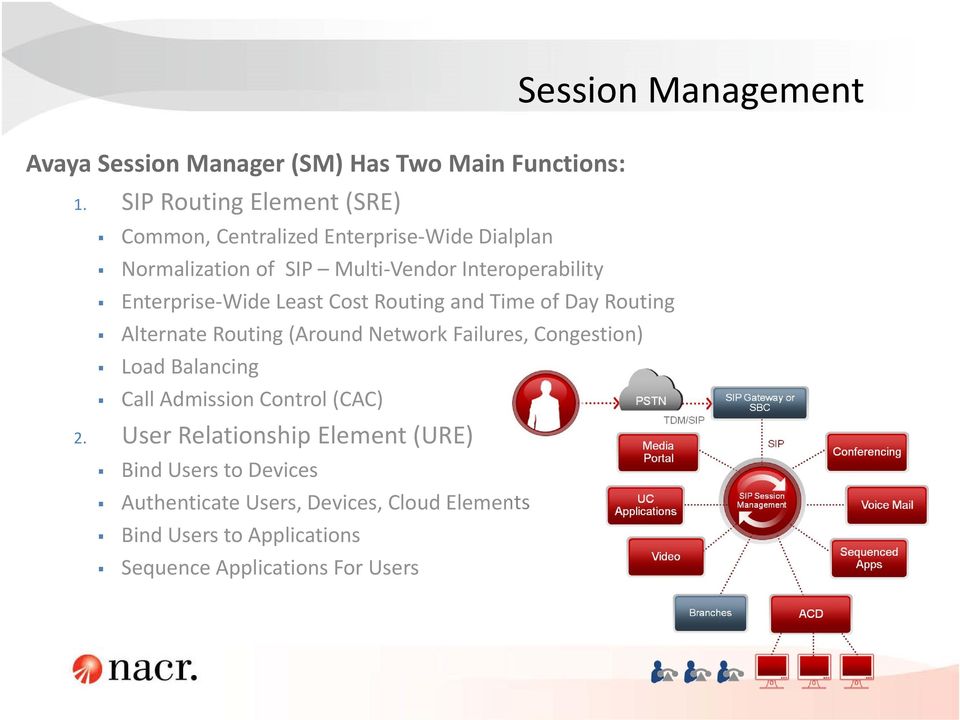
4 Connection Management Connection Management Session Management

5 Session Manager Core Network Routing eliminates meshed trunk networking and support centralized applications Full Mesh N 2 N Interconnects N Separate Routing Databases No Centralized Trunking No On Net Dialing N Interconnects 1 Routing Database SIP Trunking On Net Dialing SYS Centralized SIP Applications Named Apps Sequenced Apps 3rd Party SIP Endpoints MM CM FS Named & Sequenced ApplicationsCC SIP Session Manager Avaya CS1K, Avaya CM, IP Office 3 rd Party PBX Avaya One X & 3 rd Party SIP Endpoints

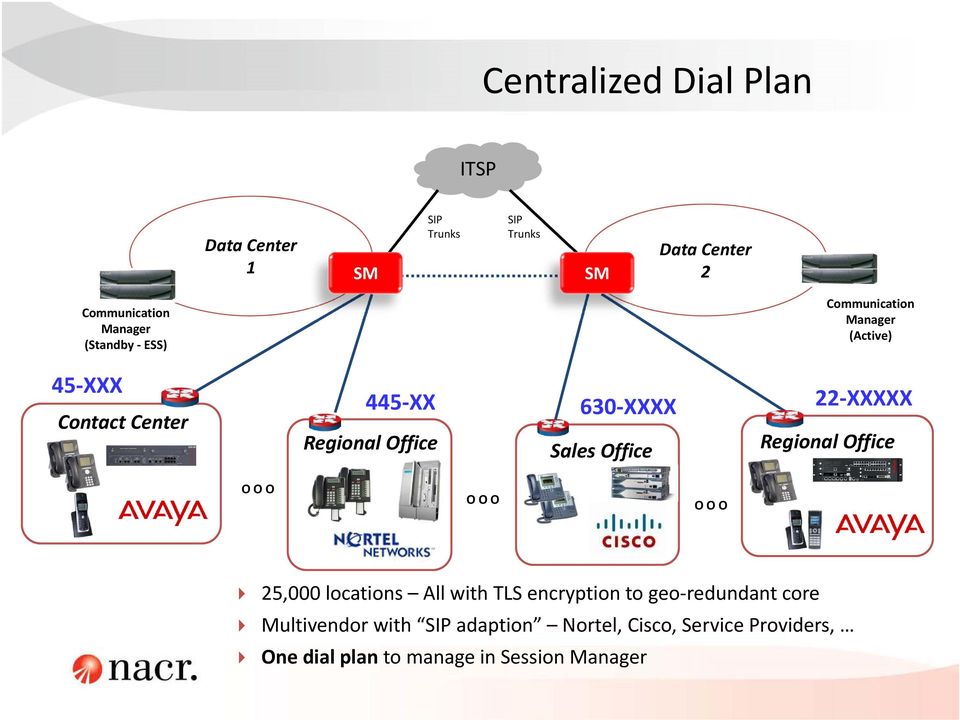
6 Centralized Dial Plan ITSP Data Center 1 SM SIP Trunks SIP Trunks SM Data Center 2 Communication Manager (Standby ESS) 45 XXX Contact Center O O O Regional Office O O O Sales Office i120 O O O Communication Manager (Active) 445 XX 630 XXXX 22 XXXXX Regional Office i120 25,000 locations All with TLS encryption to geo redundant core Multivendor with SIP adaption Nortel, Cisco, Service Providers, One dial plan to manage in Session Manager
7 Session Manager Geo redundancy Active/Active, N+1 redundancy Up to 10 SM Instances Placement reflects data network design and geographic placement o 1 second distance limit Avaya Aura Core Session Manager Session Manager Session Manager

8 Avaya Geo Redundant Reference Architecture

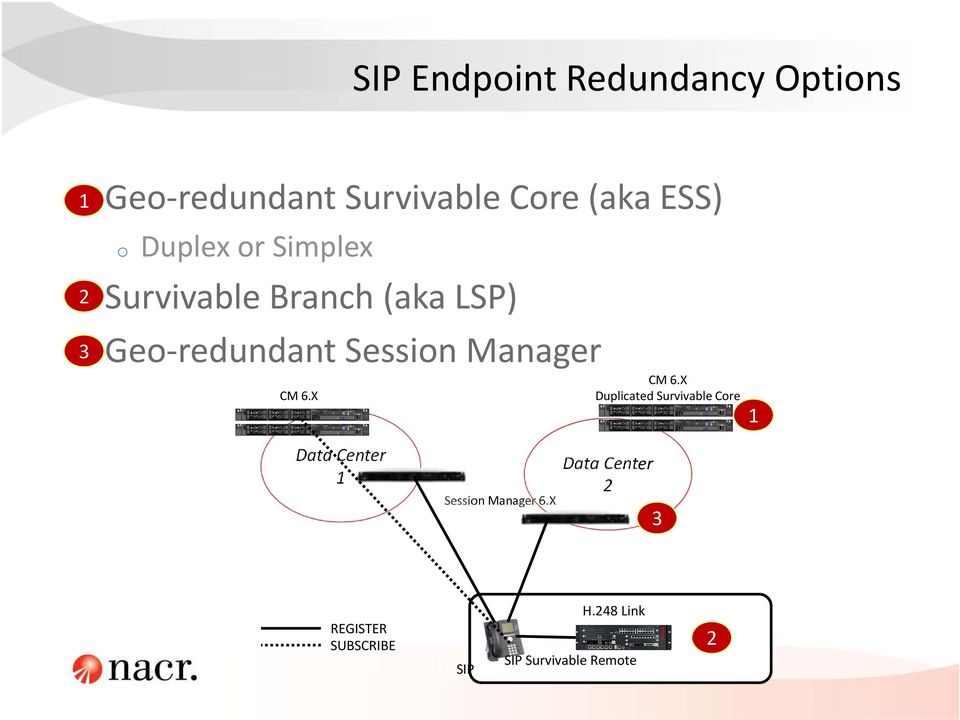
9 SIP Endpoint Redundancy Options 1 Geo redundant Survivable Core (aka ESS) o Duplex or Simplex 2 Survivable Branch (aka LSP) 3 Geo redundant Session Manager CM 6.X CM 6.X Duplicated Survivable Core 1 Data Center 1 Session Manager 6.X Data Center 2 3 REGISTER SUBSCRIBE SIP H.248 Link SIP Survivable Remote 2
10 Avaya Aura System Manager The administrative interface for Session Manager and Communication Manager Hide administration complexity Enter user information once Centralized enterprise wide dial plans, TEHO, etc. Simplify enterprise security Automated certificate distribution Corporate certificate authority integration Serviceability and trouble shooting Consolidated logs of all elements Alarm consolidation SNMP, Avaya service desk Extensible plug in framework Element Managers per system

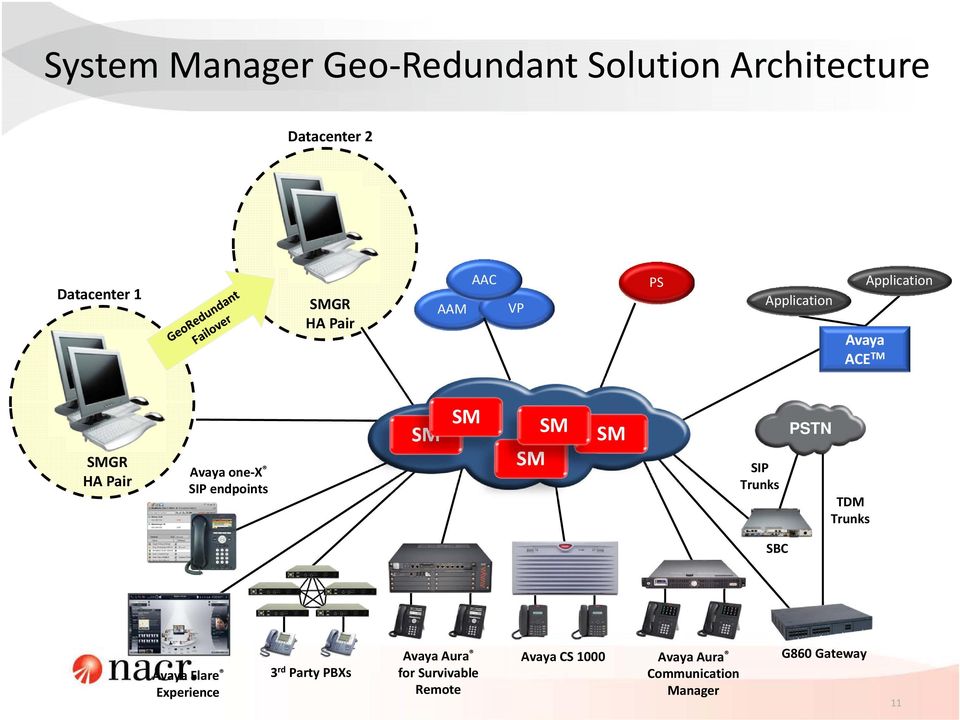
11 System Manager Geo Redundant Solution Architecture Datacenter 2 Datacenter 1 SMGR HA Pair AAM AAC VP PS Application Avaya ACE TM Application SMGR HA Pair Avaya one X SIP endpoints SM SM SM SM SM SIP Trunks PSTN TDM Trunks SBC Avaya Flare Experience 3 rd Party PBXs Avaya Aura for Survivable Remote Avaya CS 1000 Avaya Aura Communication Manager G860 Gateway 11
12 Key New Features in Session Manager Dial Plan Transparency for SIP User does not have to dial different numbers based on the IP network connectivity status (i.e. sunny day vs. rainy day) Multi Device Access Users can be simultaneously logged into multiple SIP devices and switch between devices while on a call SIP Call Loop Elimination Prevent call loops that can consume all the SIP trunk resources VMware enablement enhancements Multiple VMware footprints and all the features in 6.3 available on VMware platform
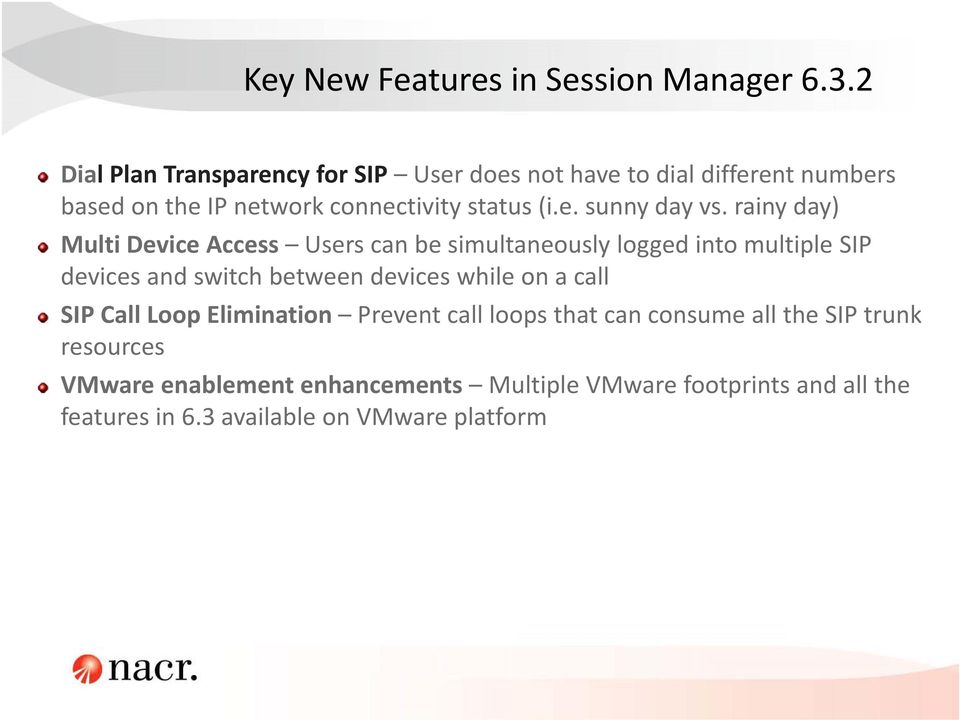
13 Key New Features in Session Manager Dial Plan Transparency for SIP User does not have to dial different numbers based on the IP network connectivity status (i.e. sunny day vs. rainy day) Multi Device Access Users can be simultaneously logged into multiple SIP devices and switch between devices while on a call SIP Call Loop Elimination Prevent call loops that can consume all the SIP trunk resources VMware enablement enhancements Multiple VMware footprints and all the features in 6.3 available on VMware platform

14 Communication Manager System Settings Configure locations Configure IP Codec Set Configure IP Network Region Configure IP Node Names and IP Addresses Configure SIP Signaling Groups and Trunk Groups Configure Route Patterns Administer Uniform Dial Plan Administer Numbering Plan Administer AAR Analysis

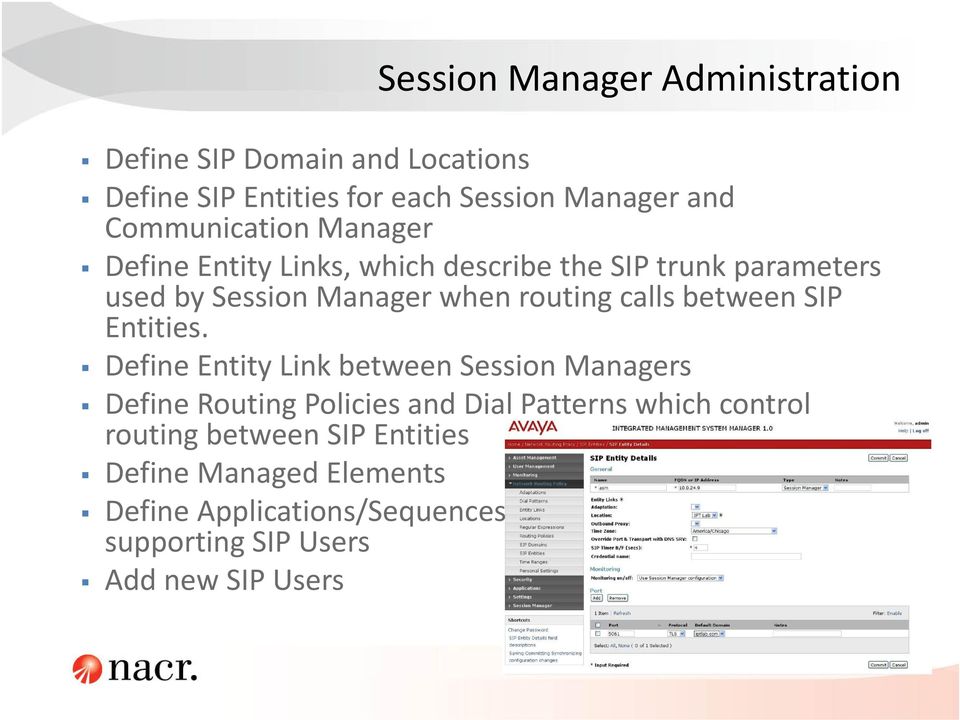
15 Session Manager Administration Define SIP Domain and Locations Define SIP Entities for each Session Manager and Communication Manager Define Entity Links, which describe the SIP trunk parameters used by Session Manager when routing calls between SIP Entities. Define Entity Link between Session Managers Define Routing Policies and Dial Patterns which control routing between SIP Entities Define Managed Elements Define Applications/Sequences supporting SIP Users Add new SIP Users
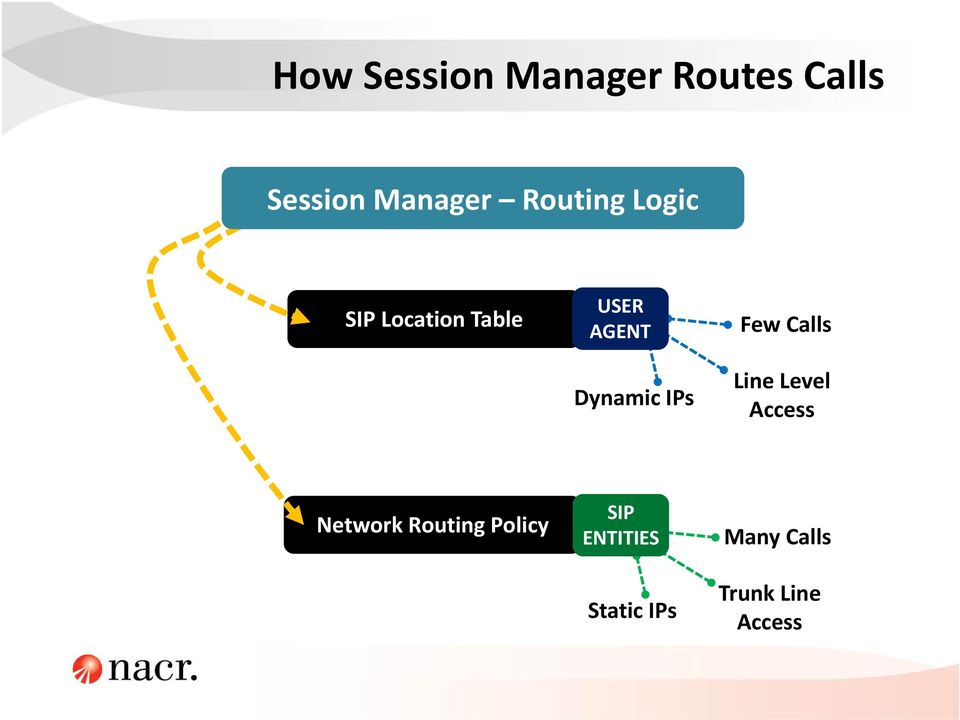
16 How Session Manager Routes Calls Session Manager Routing Logic SIP Location Table USER AGENT Dynamic IPs Few Calls Line Level Access Network Routing Policy SIP ENTITIES Static IPs Many Calls Trunk Line Access
17 Want > 19 features?

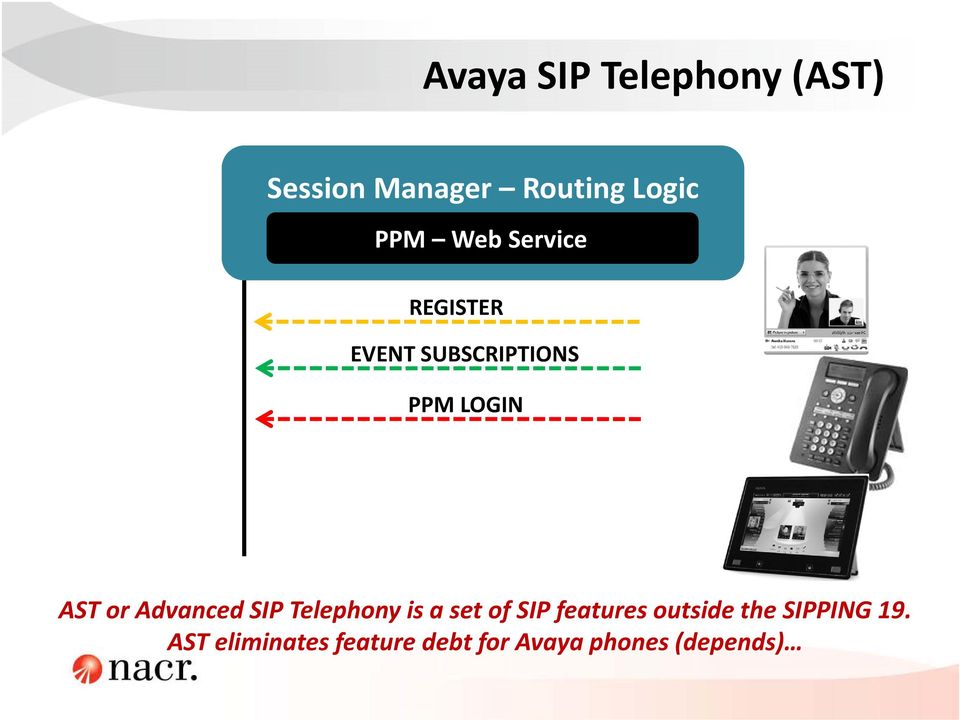
18 Avaya SIP Telephony (AST) Session Manager Routing Logic PPM Web Service REGISTER EVENT SUBSCRIPTIONS PPM LOGIN AST or Advanced SIP Telephony is a set of SIP features outside the SIPPING 19. AST eliminates feature debt for Avaya phones (depends)
19 Bring Your Device using Session Manager
20 BYOD Challenges IT Compliance Who gets on? To do what? To go where? Network Capacity Can I handle multiple devices per user & high bandwidth applications? Security How can I address? Quality of Service How can I ensure business critical applications get priority?

21 Your BYOD Roadmap One X Mobile ios Supports iphones and ipads One X Lite Augments EC500 Supports Androids and iphones Requires: Communication Manager 6 Session Manager One X Mobile Full Supports Androids and iphones Requires: Client Enablement Server One X Mobile Server
22 Session Manager BYOD Setup Wireless Access User Name (Extension) Password Endpoint SM Registration User Name (Extension) Password Domain Name
23 Features: One X Mobile for SIP IOS Clients iphone and ipad Telephony via WiFi Enterprise Directory Access Call Log Standard Telephony Features Requirements: Communication Manager 6.0 or Session Manager 6.0 SIP Enablement Server 5.2 ios 4.3 or greater
24 Running Avaya one X Mobile SIP for ios for the first time 1. On the ios client screen, tap the application icon for Avaya one X Mobile SIP for ios. 2. On the End User License Agreement screen, tap Accept. 3. Tap Set up Account. The system displays the SIP Server screen. 4. Enter the following primary server details: Server: The IP address of the Avaya Aura Session Manager server to which the ios client connects. Port: For Transmission Control Protocol (TCP), enter port For Transport Layer Security (TLS), enter port TLS: For TCP, tap Off. For TLS, tap On.
25 Running Avaya one X Mobile SIP for ios for the first time 5. Tap Next. The system displays the User Details screen. 6. Enter the following user details: Extension: The extension number of the ios client. Password: The password of the extension number. Domain: The domain of the ios client. 7. Tap Next. The system displays the Configuration screen. 8. Enter the configuration URL address. The URL consists a file for user authentication having details such as, name of the customer and the expiry date of the license. 9. Tap get started. The system starts the ios client with Verifying Configuration status.
26 Other vendor SIP Softphones Always test! We ve successfully used: o 3CX o Skype o X Lite
27 BYOD Android (example) Remember that endpoints should be DevConnect certified or.
28 3 rd Party SIP Client Registers with Session Manager Provides basic telephony Application should be DevConnect certified
29 SIP Dual Mode (SIP DuM)
30 Dual Mode Rationale Dual Mode handset supports both WiFi and cellular voice network Avaya provides DuM client software for Dual Mode handset Handset in WiFi environment, DuM client registers to SM with SIP; handset not on WiFi, DuM client works as EC500 cellular One X Mobile SIP 6.2 for ios is the first Avaya DuM client for iphone CM 6.3 is required : o o Sequential forking: For one incoming call, DuM handset will receive it either on SIP client, or as EC500 cellular; but not on both. Active call handoff: Between EC500 cellular and mobile SIP client.
31 High Level Requirements ec500delay FNU Incoming call CM SIP EC500 SM PSTN INVITE 18x or 200 with DuM tag Not launched: if above 18x or 200 received Launched: 4 seconds delay, if above 18x or 200 NOT received
32 Technical Design No CM administration required Supported by CM Evolution Server only If multiple EC500 entries are administered, and DuM SIP rings, all EC500 destinations won t ring. SIP DuM can be used together with H.323/SIP dual registration, and it has no impact to SIP DuM functions. Can enable barge in tone in off pbx telephone configuration set form for security alert, while working with H.323/SIP dual registration SIP DuM can be used with SIP MDA with limitations.
33 End User Perspective 1XM SIP 6.2 for iphone supporting Call Handover from Cellular to SIP PSTN 1 On going EC500 call over public cellular network Aura Session Manager Cellular Network (CDMA/GSM) 2 User wants to handover call to SIP call over WiFi. Navigate to 1XM SIP application, and bridge on to the active appearance. 1XM SIP sends Invite Join request to CM (via SM). Aura Communication Manager 3 Aura CM joins 1XM SIP to the call, and drops EC500 call leg. 4 1XM SIP call is active over WiFi.
34 End User Perspective 1XM SIP 6.2 for iphone supporting Call Handover from SIP to Cellular 1 Active SIP call over Wi Fi connection on iphone Aura Session Manager 2 User wants to handover call to cellular voice network and taps Handover to Cellular Network button. One X Mobile initiates the Extend Call FNU, and drops the SIP call. Aura Communication Manager PSTN 3 4 Call arrives on iphone native dialer Aura CM makes an extended to cellular call to the mobile phone number (The extended call button and EC500 must be assigned for the extension in CM.) Cellular Network (CDMA/GSM) 5 User answers cellular call and continues conversation.
35 Avaya Aura Session Manager What SIP roles are played by SM? o Session Management/Routing, Registrar, Proxy How do you administer SM? o Use System Manager What enterprise functionality does SM provide? o Centralized numbering plan across multiple IP PBXs o Centralizes applications with load balancing o SIP endpoint registration True or False: SM offers up to 10 servers in an activeactive design o True
36 Questions?
Feature and Technical
 BlackBerry Mobile Voice System for SIP Gateways and the Avaya Aura Session Manager Version: 5.3 Feature and Technical Overview Published: 2013-06-19 SWD-20130619135120555 Contents 1 Overview...4 2 Features...5
Avaya Aura SIP Trunking Training
 Avaya Aura SIP Trunking Training 5 Day Course Lecture & Demo WHO NEEDS TO ATTEND This class is suited to those who are new to administering Avaya systems, need to know how to send calls through an Avaya
How to Configure the Avaya IP Office 6.1 for use with Integra Telecom SIP Solutions
 How to Configure the Avaya IP Office 6.1 for use with Integra Telecom SIP Solutions Overview This document provides a reference for configuration of the Avaya IP Office to connect to Integra Telecom SIP
Avaya Aura SIP Trunking Training
 Avaya Aura SIP Trunking Training 5 Day Course Lecture & Demo WHO NEEDS TO ATTEND This class is suited to those who are new to administering Avaya systems and would like to know more about the SIP protocol.
Evolution & Revolution. Avaya s Reference Architecture For Unified Communications. Gianluca Attura Amministratore Delegato Avaya Italia S.p.A.
 Evolution & Revolution Avaya s Reference Architecture For Unified Communications Gianluca Attura Amministratore Delegato Avaya Italia S.p.A. Avaya Customer Experiences Challenge From 100-200 Strategic
Avaya Aura Session Manager
 Avaya Aura Session Manager Avaya Aura Session Manager is the core of Avaya s revolutionary Session Initiated Protocol (SIP) based cloud computing architecture. The Session Manager platform makes it possible
Avaya Aura Session Manager Overview
 Avaya Aura Session Manager Overview 03-603323, Issue 1 Release 1.1 May 2009 2009 Avaya Inc. All Rights Reserved. Notices While reasonable efforts were made to ensure that the information in this document
Implementing Intercluster Lookup Service
 Appendix 11 Implementing Intercluster Lookup Service Overview When using the Session Initiation Protocol (SIP), it is possible to use the Uniform Resource Identifier (URI) format for addressing an end
Avaya Aura System Manager
 Avaya Aura System Manager is an integrated solution that helps enterprises implement and maintain optimal results for their communications and business collaboration solutions. Avaya Aura System Manager
Application Notes for Configuring SIP Trunking between Metaswitch MetaSphere CFS and Avaya IP Office Issue 1.0
 Avaya Solution & Interoperability Test Lab Application Notes for Configuring SIP Trunking between Metaswitch MetaSphere CFS and Avaya IP Office Issue 1.0 Abstract These Application Notes describe the steps
Avaya IP Office Deployment Options & Client Integrations. Ken Gaugush Solutions Architect
 Avaya IP Office Deployment Options & Client Integrations Ken Gaugush Solutions Architect June 2014 Overview Agenda Avaya IP Office Overview Avaya IP Office Branch Integrating IP Office with Lync Client
Motorola Solutions Integration Guide TEAM WSM to Avaya Session Manager with Nortel CS1000 Trunk Side Integration
 Motorola Solutions Integration Guide TEAM WSM to Avaya Session Manager with Nortel CS1000 Trunk Side Integration 1 Integration Guide TEAM WSM to Avaya Session Manager and CS1000 Table of Contents 1.0 Summary...
mobile unified communications client and docking station
 FREQUENTLY ASKED QUESTIONS mobile unified communications client and docking station What are the target customer characteristics of a Mobile UC subscriber? + Verizon Wireless as mobile carrier. Mobile
Avaya Solution & Interoperability Test Lab
 Avaya Solution & Interoperability Test Lab Application Notes for Configuring Ascom Wireless IP-DECT SIP Solution with Avaya IP Office 9.0 in a Converged Voice over IP and Data Network - Issue 1.0 Abstract
Windstream Integrated Services Group. 2011 Avaya Inc. All rights reserved. 1
 Integrated Services Group 2011 Avaya Inc. All rights reserved. 1 Who is Integrated Services Group (ISG)? Leading integrator specializing in building and delivering unified communication solutions by integrating
Best Practices for deploying unified communications together with SIP trunking connectivity
 An Allstream White Paper Best Practices for deploying unified communications together with SIP trunking connectivity An Allstream White Paper 1 Table of contents Correct identification and maximization
Enabling Users for Lync services
 Enabling Users for Lync services 1) Login to collaborate.widevoice Server as admin user 2) Open Lync Server control Panel as Run As Administrator 3) Click on Users option and click Enable Users option
Avaya, Trapeze and Nokia Mobility Solution Abstract
 Avaya, Trapeze and Nokia Mobility Solution Abstract This application note describes the Avaya, Trapeze and Nokia mobility solution. This document is not a user guide or sales brochure. It is a how-to/tips
Configuring a SIP Trunk between Avaya Aura Session Manager Release 6.1 and Avaya Communication Server 1000E Release 7.5 Issue 1.0
 Avaya Solution Interoperability Test Lab Configuring a SIP Trunk between Avaya Aura Session Manager Release 6.1 and Avaya Communication Server 1000E Release 7.5 Issue 1.0 Abstract These Application Notes
Application Notes for Configuring Yealink T-22 SIP Phones to interoperate with Avaya IP Office - Issue 1.0
 Avaya Solution & Interoperability Test Lab Application Notes for Configuring Yealink T-22 SIP Phones to interoperate with Avaya IP Office - Issue 1.0 Abstract These Application Notes describe the configuration
Application Notes for BT Wholesale/HIPCOM SIP Trunk Service and Avaya IP Office 8.0 Issue 1.0
 Avaya Solution & Interoperability Test Lab Application Notes for BT Wholesale/HIPCOM SIP Trunk Service and Avaya IP Office 8.0 Issue 1.0 Abstract These Application Notes describe the procedures for configuring
Avaya IP Office 8.1 Configuration Guide
 Avaya IP Office 8.1 Configuration Guide Performed By tekvizion PVS, Inc. Contact: 214-242-5900 www.tekvizion.com Revision: 1.1 Date: 10/14/2013 Copyright 2013 by tekvizion PVS, Inc. All Rights Reserved.
Application Notes Rev. 1.0 Last Updated: January 9, 2015
 SBC 1000/2000 Series Configuration Guide with Cisco Unified Call Manager v9.1 for Level 3 Voice Complete SM SIP Trunk Deployments Application Notes Rev. 1.0 Last Updated: January 9, 2015 Contents 1 Document
Avaya Product Comparison
 Avaya Product Comparison Small and Medium Enterprise Systems June 2012 Architecture / Models Single Server; Hybrid IP PBX The IP Office 500 is a single SME Communications platform with pay as you grow
Cisco Unified Communications Manager 7.0
 Cisco Unified Communications Manager 7.0 Cisco Unified Communications Solutions unify voice, video, data, and mobile applications on fixed and mobile networks, enabling easy collaboration every time from
Truly Unified Communications. This could be your corporate network:
 The Comdasys MC Solution brings the features of your IP-PBX to your mobile phone in the palm of your hand. Its two components, the MC Controller and the MC Client, will enhance your business mobility.
mobile uc client End user guide
 mobile uc client End user guide 1 Mobile Unified Communications User Guide About Mobile UC Currently, the following five Droid Phones are supported for Mobile UC: + Droid X + Droid X2 + Droid 2 Global
SIP Trunking. Cisco Press. Christina Hattingh Darryl Sladden ATM Zakaria Swapan. 800 East 96th Street Indianapolis, IN 46240
 SIP Trunking Christina Hattingh Darryl Sladden ATM Zakaria Swapan Cisco Press 800 East 96th Street Indianapolis, IN 46240 SIP Trunking Contents Introduction xix Part I: From TDM Trunking to SIP Trunking
Introducing Cisco Voice and Unified Communications Administration Volume 1
 Introducing Cisco Voice and Unified Communications Administration Volume 1 Course Introduction Overview Learner Skills and Knowledge Course Goal and Course Flow Additional Cisco Glossary of Terms Your
Application Notes Rev. 1.0 Last Updated: February 3, 2015
 SBC 1000/2000 Series Configuration Guide with Cisco Unified Call Manager v8.6 for Level 3 Voice Complete SM Deployments Application Notes Rev. 1.0 Last Updated: February 3, 2015 Contents 1 Document Overview...
Application Notes for Avaya IP Office 7.0 Integration with Skype Connect R2.0 Issue 1.0
 Avaya Solution & Interoperability Test Lab Application Notes for Avaya IP Office 7.0 Integration with Skype Connect R2.0 Issue 1.0 Abstract These Application Notes describe the steps to configure an Avaya
Whitepaper: Microsoft Office Communications Server 2007 R2 and Cisco Unified Communications Manager Integration Options
 Whitepaper: Microsoft Office Communications Server 2007 R2 and Cisco Unified Communications Manager Integration Options Document Summary This document provides information on several integration scenarios
Application Notes for Configuring Broadvox SIP Trunking with Avaya IP Office - Issue 1.0
 Avaya Solution & Interoperability Test Lab Application Notes for Configuring Broadvox SIP Trunking with Avaya IP Office - Issue 1.0 Abstract These Application Notes describe the procedures for configuring
Configuring SIP Mobility for CounterPath Bria on the NetVanta 7100 and NetVanta UC Server Systems
 6UCSSG0002-42B January 2013 Interoperability Guide Configuring SIP Mobility for CounterPath Bria on the NetVanta 7100 and NetVanta UC Server Systems This interoperability guide provides instructions for
Communications Transformations 2: Steps to Integrate SIP Trunk into the Enterprise
 Communications Transformations 2: Steps to Integrate SIP Trunk into the Enterprise The Changing Landscape IP-based unified communications is widely deployed in enterprise networks, both for internal calling
SIP Trunking DEEP DIVE: The Service Provider
 SIP Trunking DEEP DIVE: The Service Provider Larry Keefer, AT&T Consulting UC Practice Director August 12, 2014 2014 AT&T Intellectual Property. All rights reserved. AT&T, the AT&T logo and all other AT&T
Configuring the Avaya B179 SIP Conference Phone with Avaya Aura Communication Manager and Avaya Aura Session Manager Issue 1.0
 Avaya Solution & Interoperability Test Lab Configuring the Avaya B179 SIP Conference Phone with Avaya Aura Communication Manager and Avaya Aura Session Manager Issue 1.0 Abstract These Application Notes
Integrating a Hitachi IP5000 Wireless IP Phone
 November, 2007 Avaya Quick Edition Integrating a Hitachi IP5000 Wireless IP Phone This application note explains how to configure the Hitachi IP5000 wireless IP telephone to connect with Avaya Quick Edition
VoIPon www.voipon.co.uk [email protected] Tel: +44 (0)1245 808195 Fax: +44 (0)1245 808299
 VoiceGear/3CX Integration Guide Ver.0.1 Page 2 1. OVERVIEW... 3 1.1 SETTING UP 3CX PBX...4 1.2 SETTING UP VOICEGEAR GATEWAY...5 2. VOICEGEAR-3CX SIP INTEGRATION... 6 2.1 3CX CONFIGURATION...7 2.2 VOICEGEAR
Application Notes for Configuring Intelepeer SIP Trunking with Avaya IP Office 7.0 - Issue 1.0
 Avaya Solution & Interoperability Test Lab Application Notes for Configuring Intelepeer SIP Trunking with Avaya IP Office 7.0 - Issue 1.0 Abstract These Application Notes describe the procedures for configuring
Application Notes for Configuring Microsoft Office Communications Server 2007 R2 and Avaya IP Office PSTN Call Routing - Issue 1.0
 Avaya Solution & Interoperability Test Lab Application Notes for Configuring Microsoft Office Communications Server 2007 R2 and Avaya IP Office PSTN Call Routing - Issue 1.0 Abstract These Application
Application Notes for Algo 8028 SIP Door Phone with Avaya IP Office - Issue 1.0
 Avaya Solution & Interoperability Test Lab Application Notes for Algo 8028 SIP Door Phone with Avaya IP Office - Issue 1.0 Abstract These Application Notes describe the configuration steps required for
Application Notes for Configuring Cablevision Optimum Voice SIP Trunking with Avaya IP Office - Issue 1.1
 Avaya Solution & Interoperability Test Lab Application Notes for Configuring Cablevision Optimum Voice SIP Trunking with Avaya IP Office - Issue 1.1 Abstract These Application Notes describe the procedures
Configuration of Applied VoIP Sip Trunks with the Toshiba CIX40, 100, 200 and 670
 Configuration of Applied VoIP Sip Trunks with the Toshiba CIX40, 100, 200 and 670 Businesses Save Money with Toshiba s New SIP Trunking Feature Unlike gateway based solutions, Toshiba s MIPU/ GIPU8 card
Application Notes for Biamp AudiaFLEX VoIP-2 with Avaya Aura Communication Manager Using Avaya Aura SIP Enablement Services Issue 1.
 Avaya Solution & Interoperability Test Lab Application Notes for Biamp AudiaFLEX VoIP-2 with Avaya Aura Communication Manager Using Avaya Aura SIP Enablement Services Issue 1.0 Abstract These Application
Application Notes for Configuring Avaya IP Office 9.0 with HIPCOM SIP Trunk Issue 1.0
 Avaya Solution & Interoperability Test Lab Application Notes for Configuring Avaya IP Office 9.0 with HIPCOM SIP Trunk Issue 1.0 Abstract These Application Notes describe the procedures for configuring
ACCELERATOR 6.3 ASTERISK 1.4 INTEGRATION GUIDE
 ACCELERATOR 6.3 ASTERISK 1.4 INTEGRATION GUIDE October 2014 Tango Networks, Inc. phone: +1 469-229-6000 3801 Parkwood Blvd, Suite 500 fax: +1 469-467-9840 Frisco, Texas 75034 USA www.tango-networks.com
Configuring SIP Enablement Services Edge 4.0 for Avaya Distributed Office
 Configuring SIP Enablement Services Edge 4.0 for Avaya Distributed Office 03-602026 Issue 1.0 May 2007 2007 Avaya Inc. All Rights Reserved. Notice While reasonable efforts were made to ensure that the
Application Notes for Algo 8180 SIP Audio Alerter with Avaya Aura TM Session Manager and Avaya Aura TM Communication Manager - Issue 1.
 Avaya Solution & Interoperability Test Lab Application Notes for Algo 8180 SIP Audio Alerter with Avaya Aura TM Session Manager and Avaya Aura TM Communication Manager - Issue 1.0 Abstract These Application
Application Notes for Biamp Tesira SVC-2 and Avaya IP Office Issue 1.0
 Avaya Solution & Interoperability Test Lab Application Notes for Biamp Tesira SVC-2 and Avaya IP Office Issue 1.0 Abstract These Application Notes describe the procedures for configuring Biamp Tesira SVC-2
Expert Reference Series of White Papers. The Role of Session Manager in Applying Features to Calls via Sequenced Applications, Part 1
 Expert Reference Series of White Papers The Role of Session Manager in Applying Features to Calls via Sequenced Applications, Part 1 1-800-COURSES www.globalknowledge.com The Role of Session Manager in
IP Telephony Deployment Models
 CHAPTER 2 Sections in this chapter address the following topics: Single Site, page 2-1 Multisite Implementation with Distributed Call Processing, page 2-3 Design Considerations for Section 508 Conformance,
Avaya Aura Session Manager Overview
 Avaya Aura Session Manager Overview Issue 1 03-603323 Release 6.1 November 2010 2010 Avaya Inc. All Rights Reserved. Notice While reasonable efforts have been made to ensure that the information in this
Application Notes for Avaya Aura Conferencing 7.2 and Radvision SCOPIA Elite MCU Issue 1.0
 Avaya Solution & Interoperability Test Lab Application Notes for Avaya Aura Conferencing 7.2 and Radvision SCOPIA Elite MCU Issue 1.0 Abstract These Application Notes describe the configuration of Avaya
Configuring Avaya 1120E, 1140E, 1220 and 1230 IP Deskphones with Avaya IP Office Release 6.1 Issue 1.0
 Avaya Solution & Interoperability Test Lab Configuring Avaya 1120E, 1140E, 1220 and 1230 IP Deskphones with Avaya IP Office Release 6.1 Issue 1.0 Abstract These Application Notes describe a solution comprised
Communication Manager configuration for BLU-103
 Avaya Aura Communication Manager configuration for BLU-103 Application Notes for Configuring BLU-103 VoIP Solution with Avaya Aura Session Manager 6.3 and Avaya Aura Communication Manager 6.3 10653 South
IP Office Technical Tip
 IP Office Technical Tip Tip no: 188 Release Date: September 27, 2007 Region: GLOBAL Verifying IP Office SIP Trunk Operation IP Office back-to-back SIP Line testing IP Office Release 4.0 supports SIP trunking.
Supporting Multiple PBXs in Hybrid Deployment Models
 NetVanta Unified Communications Technical Note Supporting Multiple PBXs in Hybrid Deployment Models Application Note for Hybrid Deployments The goal of this technical note is to ensure that you can leverage
UC-One. Epik. UC-One Quick Guide. Quick Guide For Apps. Why we love UC-One
 Quick Guide For Apps Epik UC-One UC-One is part of our Epik suite enabling you to access all your communication services, telephony, video, IM and presence from any supported device. Contact Integration
Abstract. Avaya Solution & Interoperability Test Lab
 Avaya Solution & Interoperability Test Lab Application Notes for Configuring the Ascom Wireless IP- DECT SIP Solution with Avaya IP Office in a Converged Voice over IP and Data Network - Issue 1.1 Abstract
Agenda What can we do now? And 5 years from now we will still be current!
 Pittsburgh Steelers Alcatel-Lucent OmniPCX Enterprise IP Telephone System Alcatel-Lucent OmniSwitch Network Infrastructure Alcatel-Lucent Collaboration and Fax Server AVST Unified Messaging Wireless Network
nexvortex SIP Trunking Implementation & Planning Guide V1.5
 nexvortex SIP Trunking Implementation & Planning Guide V1.5 510 S PRING S TREET H ERNDON VA 20170 +1 855.639.8888 Introduction Welcome to nexvortex! This document is intended for nexvortex Customers and
How To Guide. SIP Trunking Configuration Using the SIP Trunk Page
 How To Guide SIP Trunking Configuration Using the SIP Trunk Page For the Ingate SIParators and Firewalls using software release 4.9.2 or later. Updated to show features available from release 4.10.x May
Extend the Life of Your Legacy PBX while Benefiting from SIP Trunks. December 5, 2013
 Extend the Life of Your Legacy PBX while Benefiting from SIP Trunks December 5, 2013 Agenda About Sangoma VoIP Gateways Defined Sangoma Gateway Features Gateways Product Specifications Business Applications
SIP Trunking Steps to Success, Part One: Key Lessons from IT Managers Who ve Been There
 SIP Trunking Steps to Success, Part One: Key Lessons from IT Managers Who ve Been There Q&A Session Date: Wednesday, April 13, 2011 Q: You have to partner with a provider in order to do SIP trunking, correct?
Configuring the Sonus SBC 2000 with Cisco Unified Call Manager 10.5 for Verizon Deployment
 Configuring the Sonus SBC 2000 with Cisco Unified Call Manager 10.5 for Verizon Deployment Application Notes Rev 1.0 P/N 550-06690 Last Updated: October 26, 2015 Revision History Revision Date Revised
Avaya Solution & Interoperability Test Lab. Abstract
 Avaya Solution & Interoperability Test Lab Application Notes for Avaya Aura Communication Manager 6.3, Avaya Session Manager 6.3, and Avaya Session Border Controller for Enterprise 6.3, with AT&T IP Flexible
Application Note Configuring the Synapse SB67070 SIP Gateway for Broadvox GO! SIP Trunking
 Configuring the Synapse SB67070 SIP Gateway for Broadvox GO! SIP Trunking 2012 Advanced American Telephones. All Rights Reserved. AT&T and the AT&T logo are trademarks of AT&T Intellectual Property licensed
SBC 1000/2000 Configuration Guide with Lync 2013 for Windstream/ LPAETEC SIP Trunk Deployments
 SBC 1000/2000 Configuration Guide with Lync 2013 for Windstream/ LPAETEC SIP Trunk Deployments Application Notes Rev. 1.0 Last Updated: April 10, 2015 Revision Date Revised By Comments 0.1 12/03/2015 Roman
Allstream Converged IP Telephony
 Allstream Converged IP Telephony SIP Trunking Solution An Allstream White Paper 1 Table of contents Introduction 1 Traditional trunking: a quick overview 1 SIP trunking: a quick overview 1 Why SIP trunking?
VMobile Talk User Guide
 VMobile Talk User Guide Table of Contents 1. Description 2 2. Supported Devices 2 3. Installation and Usage 2 3.1. Download 2 3.2. Installation 2 3.3. Account Settings 3 3.4. Advanced Settings 3 3.5. Wi-Fi
Application Notes for Algo 8180 SIP Audio Alerter with Avaya IP Office - Issue 1.1
 Avaya Solution & Interoperability Test Lab Application Notes for Algo 8180 SIP Audio Alerter with Avaya IP Office - Issue 1.1 Abstract These Application Notes describe the configuration steps required
Businesses Save Money with Toshiba s New SIP Trunking Feature
 TOSHIBA Strata CIX Product Bulletin PBCIX-0056 Dec. 7, 2007 Businesses Save Money with Toshiba s New SIP Trunking Feature For business trying to save money on telecommunications tariffs, conventional technology
Unified Communications. Summary of Manufacturer Technical Evaluations
 Unified Communications Summary of Manufacturer Technical Evaluations 1 Terminology Definitions of commonly used terms and acronyms 1 ShoreTel 2 Avaya 3 Cisco 4 Siemens (Unify) 5 2 Terminology Definitions
Cisco EXAM - 300-075. Implementing Cisco IP Telephony and Video, Part 2 (CIPTV2) Buy Full Product. http://www.examskey.com/300-075.
 Cisco EXAM - 300-075 Implementing Cisco IP Telephony and Video, Part 2 (CIPTV2) Buy Full Product http://www.examskey.com/300-075.html Examskey Cisco 300-075 exam demo product is here for you to test the
SIP Proxy Server. Administrator Installation and Configuration Guide. V2.31b. 09SIPXM.SY2.31b.EN3
 SIP Proxy Server Administrator Installation and Configuration Guide V2.31b 09SIPXM.SY2.31b.EN3 DSG, DSG logo, InterPBX, InterServer, Blaze Series, VG5000, VG7000, IP590, IP580, IP500, IP510, InterConsole,
Enterprise Video Conferencing
 Enterprise Video Conferencing When Voice Meets Video How SIP & H.323 Can Coexist SIPNOC 2014 Presented by: Gernot Scheichl June 2014 Agenda The Market The Challenges History Comparing the Protocols (H.323
Application Notes for the Ingate SIParator with Avaya Converged Communication Server (CCS) - Issue 1.0
 Avaya Solution & Interoperability Test Lab Application Notes for the Ingate SIParator with Avaya Converged Communication Server (CCS) - Issue 1.0 Abstract These Application Notes describe the configuration
Abstract. Avaya Solution & Interoperability Test Lab
 Avaya Solution & Interoperability Test Lab Application Notes for Configuring SIP Trunking between the Verizon Business VoIP Service with IP Trunking and Avaya Communication Manager Branch Edition Issue
White paper. SIP An introduction
 White paper An introduction Table of contents 1 Introducing 3 2 How does it work? 3 3 Inside a normal call 4 4 DTMF sending commands in sip calls 6 5 Complex environments and higher security 6 6 Summary
Avaya Top Gun Training
 2015 Fall Technical Conference Avaya Top Gun Training Technical Training Track 2012 Avaya Inc. All rights reserved. 1 Communication Manager Survivability Track #1 The Communication Manager Track #1 will
Application Notes for G-Tek SIP Telephone MT-102H version 1510X.27.1.02i with Avaya Software Communication System Release 3.0 Issue 1.0.
 Avaya Solution & Interoperability Test Lab Application Notes for G-Tek SIP Telephone MT-102H version 1510X.27.1.02i with Avaya Software Communication System Release 3.0 Issue 1.0 Abstract These Application
ACCELERATOR 6.3 ALARMS AND OPERATIONAL MEASUREMENTS
 ACCELERATOR 6.3 ALARMS AND OPERATIONAL MEASUREMENTS October 2014 Tango Networks, Inc. phone: +1 469-229-6000 3801 Parkwood Blvd, Suite 500 fax: +1 469-467-9840 Frisco, Texas 75034 USA www.tango-networks.com
1.1.3 Versions Verified SIP Carrier status as of 18 Sep 2014 : validated on CIC 4.0 SU6.
 1 SIP Carriers 1.1 Telstra 1.1.1 Warnings Check the SIP 3 rd Party SIP Carrier Matrix for certification status, and supported features. More info about the SIP 3 rd Party SIP Carrier Matrix can be found
ACCELERATOR 6.3 AASTRA MX-ONE INTEGRATION GUIDE
 ACCELERATOR 6.3 AASTRA MX-ONE INTEGRATION GUIDE September 2014 Tango Networks, Inc. phone: +1 469-229-6000 3801 Parkwood Blvd, Suite 500 fax: +1 469-467-9840 Frisco, Texas 75034 USA www.tango-networks.com
1 VoIP/PBX Axxess Server
 - 1 1 VoIP/PBX Axxess Server The Axxess Server supports comprehensive Voice Over Internet Protocol network services, which are based on the Open Source Asterisk VoIP software. The Axxess Server VoIP telephony
ACCELERATOR 6.3 ASTERISK LINES INTEGRATION GUIDE
 ACCELERATOR 6.3 ASTERISK LINES INTEGRATION GUIDE January 2014 Tango Networks, Inc. phone: +1 469-229-6000 3801 Parkwood Blvd, Suite 500 fax: +1 469-467-9840 Frisco, Texas 75034 USA www.tango-networks.com
MDS Amiba Cloud PBX. Getting Started
 Getting Started Specifications are subject to change without notice. This documentation refers to: Software version 14.119 or higher for the MDS Amiba Cloud PBX system Software version 20.044 or higher
Configuration Note for Jeron Provider 790 and Cisco CallManager
 Configuration Note for Jeron Provider 790 and Cisco CallManager 1. Jeron Provider 790 Setup 1.1 Configure the SIP Server Connectivity Set Brekeke SIP Server's IP address in the [SIP Server IP] field and
Avaya Aura Scalability and Reliability Overview. Deploying SIP Reliably at Scale for Large Corporate Communication Networks
 Avaya Aura Scalability and Reliability Overview Deploying SIP Reliably at Scale for Large Corporate Communication Networks TABLE OF CONTENTS Avaya SIP Architecture Scales to Support Mobile, 2 Fixed and
Grandstream Networks, Inc.
 Grandstream Networks, Inc. UCM6100 Basic Configuration Guide Grandstream Networks, Inc. www.grandstream.com TABLE OF CONTENTS OVERIEW... 4 SETUP GUIDE SCENARIO... 4 QUICK INSTALLATION... 5 Connecting the
VoIP Trunking with Session Border Controllers
 VoIP Trunking with Session Border Controllers By Chris Mackall Submitted to the Faculty of the Information Technology Program in Partial Fulfillment of the Requirements for the Degree of Bachelor of Science
Colt VoIP Access. 2010 Colt Technology Services Group Limited. All rights reserved.
 Colt VoIP Access 2010 Colt Technology Services Group Limited. All rights reserved. Business requirements Are you looking for ways to simplify management of national or even international voice services
Configuring NET SatisFAXtion with Avaya IP Office
 Configuring NET SatisFAXtion with Avaya IP Office Documentation provided by Kristian Guntzelman - G&C Interconnects - 3-15-2010 Summary: This document will provide an example of how to connect the FaxBack
Peer-to-Peer SIP Mode with FXS and FXO Gateways
 Peer-to-Peer SIP Mode with FXS and FXO Gateways New Rock s SIP based VoIP gateways with FXS and FXO ports support peer-to-peer mode which has many applications in deploying enterprise multi-site telephone